Random wanderings through Microsoft Azure esp. PaaS plumbing, the IoT bits, AI on Micro controllers, AI on Edge Devices, .NET nanoFramework, .NET Core on *nix and ML.NET+ONNX
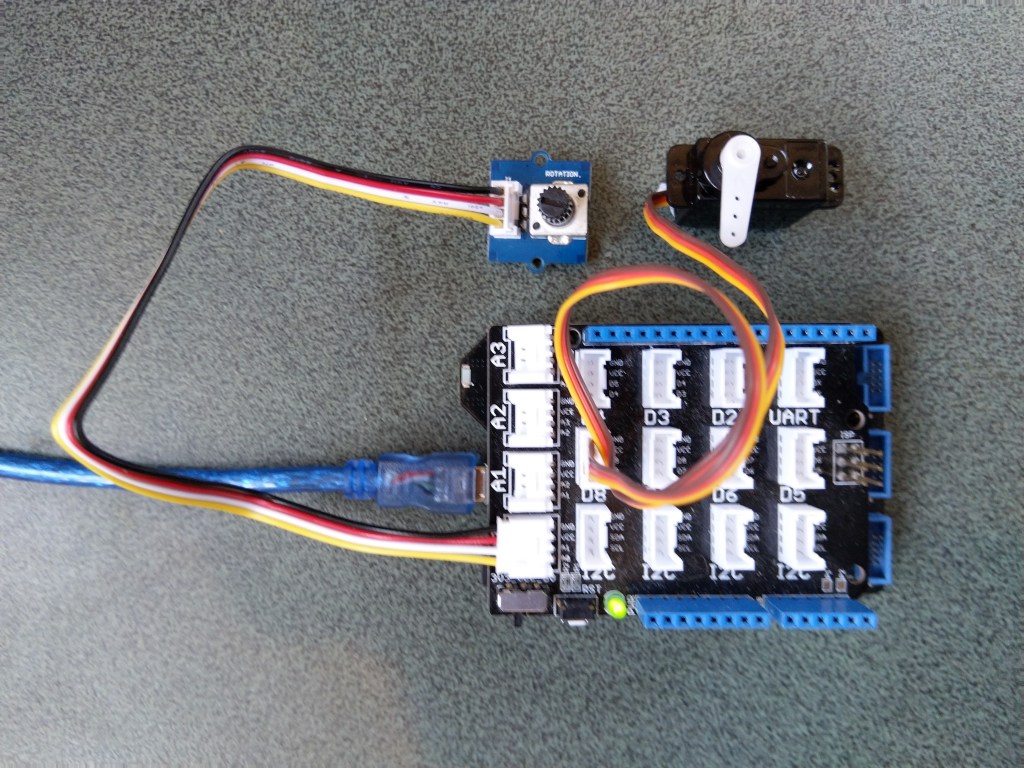
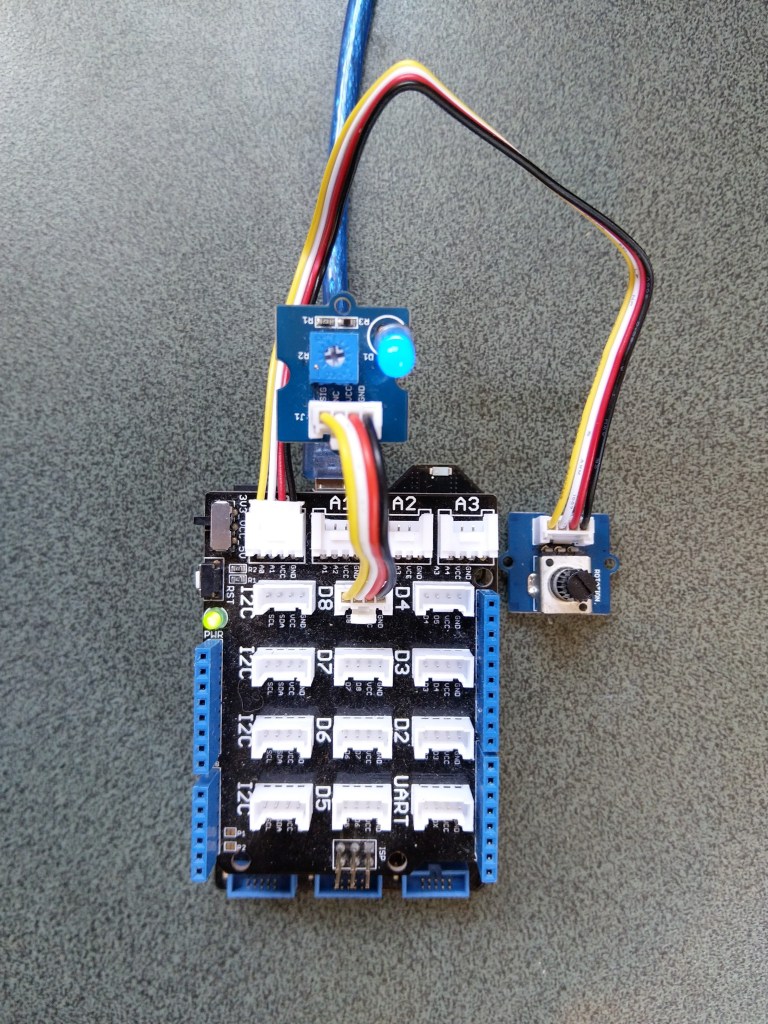
The next step was to figure out how to configure a Pulse Width Modulation (PWM) output and an Analog Input so I could adjust the duty cycle and control the brightness of a Light Emitting Diode(LED).
Netduino 3 ADC & PWN test rig
My test rig uses (prices as at Aug 2020) the following parts
 public class Program
   {
      public static void Main()
      {
         Debug.WriteLine("devMobile.Longboard.AdcTest starting");
         Debug.WriteLine(AdcController.GetDeviceSelector());

         try
         {
            AdcController adc = AdcController.GetDefault();
            AdcChannel adcChannel = adc.OpenChannel(0);

            while (true)
            {
               double value = adcChannel.ReadRatio();

               Debug.WriteLine($"Value: {value:F2}");

               Thread.Sleep(100);
            }
         }
         catch (Exception ex)
         {
            Debug.WriteLine(ex.Message);
         }
      }
   }
The nanoFramework code polls for the rotary angle sensor for its position value every 100mSec.
The setup to use for the Analog to Digital Convertor(ADC) port was determined by looking at the board.h and target_windows_devices_adc_config.cpp file.
//
// Copyright (c) 2018 The nanoFramework project contributors
// See LICENSE file in the project root for full license information.
//

#include <win_dev_adc_native_target.h>

const NF_PAL_ADC_PORT_PIN_CHANNEL AdcPortPinConfig[] = {

    // ADC1
    {1, GPIOC, 0, ADC_CHANNEL_IN10},
    {1, GPIOC, 1, ADC_CHANNEL_IN11},

    // ADC2
    {2, GPIOC, 2, ADC_CHANNEL_IN14},
    {2, GPIOC, 3, ADC_CHANNEL_IN15},

    // ADC3
    {3, GPIOC, 4, ADC_CHANNEL_IN12},
    {3, GPIOC, 5, ADC_CHANNEL_IN13},

    // these are the internal sources, available only at ADC1
    {1, NULL, 0, ADC_CHANNEL_SENSOR},
    {1, NULL, 0, ADC_CHANNEL_VREFINT},
    {1, NULL, 0, ADC_CHANNEL_VBAT},
};

const int AdcChannelCount = ARRAYSIZE(AdcPortPinConfig);
The call to AdcController.GetDeviceSelector() only returned one controller
The thread '<No Name>' (0x2) has exited with code 0 (0x0).
devMobile.Longboard.AdcTest starting
ADC1
After some experimentation it appears that only A0 & A1 work on a Netduino. (Aug 2020).
My PWM test harness
public class Program
{
   public static void Main()
   {
      Debug.WriteLine("devMobile.Longboard.PwmTest starting");
      Debug.WriteLine(PwmController.GetDeviceSelector());

      try
      {
         PwmController pwm = PwmController.FromId("TIM5");
         AdcController adc = AdcController.GetDefault();
         AdcChannel adcChannel = adc.OpenChannel(0);

         PwmPin pwmPin = pwm.OpenPin(PinNumber('A', 0));
         pwmPin.Controller.SetDesiredFrequency(1000);
         pwmPin.Start();

         while (true)
         {
            double value = adcChannel.ReadRatio();

            Debug.WriteLine(value.ToString("F2"));

            pwmPin.SetActiveDutyCyclePercentage(value);

            Thread.Sleep(100);
         }
      }
      catch (Exception ex)
      {
         Debug.WriteLine(ex.Message);
      }
   }

   private static int PinNumber(char port, byte pin)
   {
      if (port < 'A' || port > 'J')
         throw new ArgumentException();
      return ((port - 'A') * 16) + pin;
   }
}
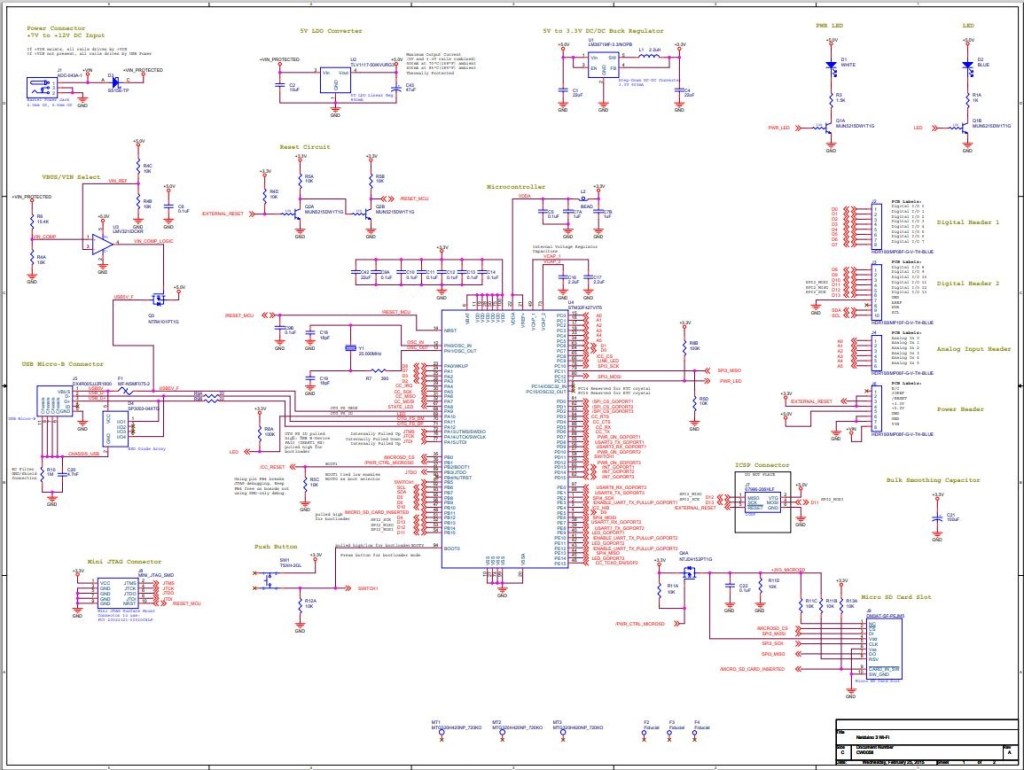
I had to refer to the Netduino schematic to figure out pin mapping
With my test rig (with easy access to D0 thru D8) I found that only D2,D3,D7 and D8 work as PWM outputs.
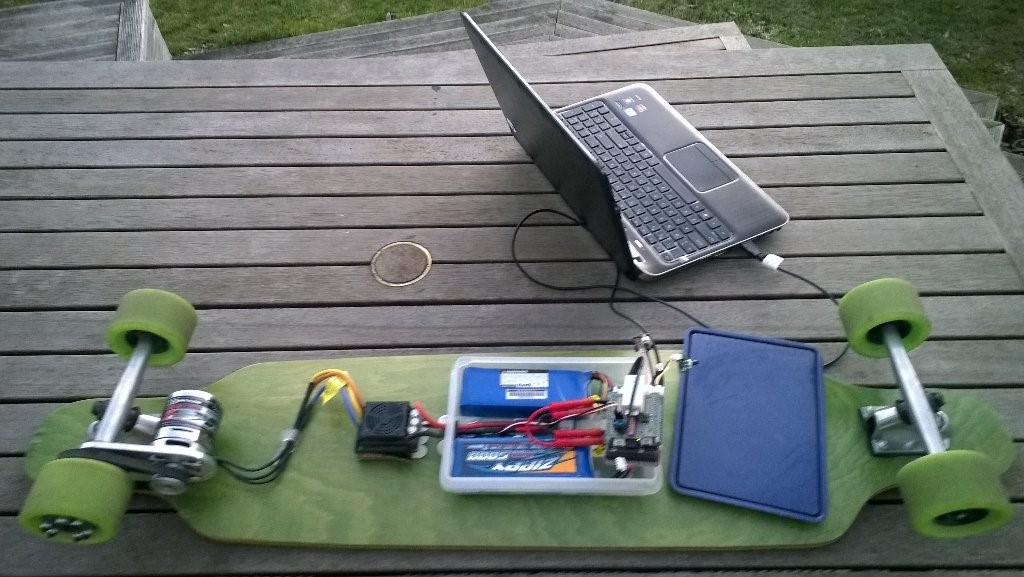
Roughly four years ago I build myself an electric longboard as summer transport. It initially had a controller built with a devDuino V2.2 which after a while I “upgraded” to a GHI Electronics.NET Microframework device.
Configuring the original netMF based longboard
Now that GHI Electronics no longer supports the FEZ Panda III I figured upgrading to a device that runs the nanoFramework would be a good compromise.
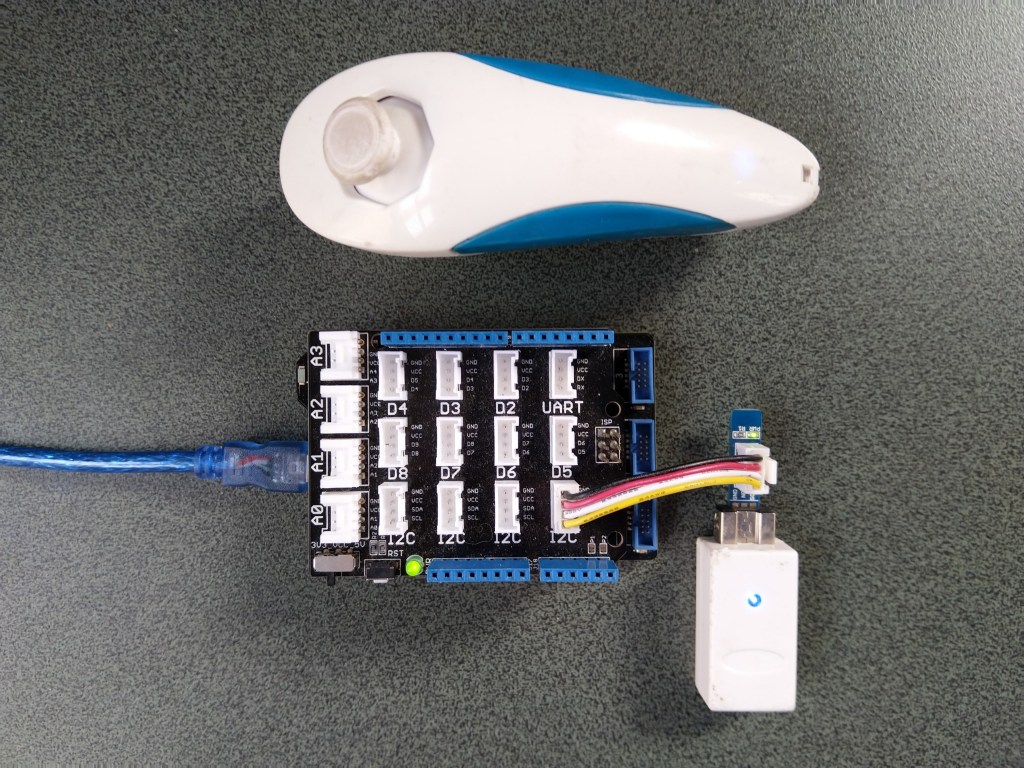
My changes were mainly related to the Inter Integrated Circuit(I2C) configuration and the reading+writing of registers.
/// <summary>
/// Initialises a new Wii Nunchuk
/// </summary>
/// <param name="busId">The unique identifier of the I²C to use.</param>
/// <param name="slaveAddress">The I²C address</param>
/// <param name="busSpeed">The bus speed, an enumeration that defaults to StandardMode</param>
/// <param name="sharingMode">The sharing mode, an enumeration that defaults to Shared.</param>
public WiiNunchuk(string busId, ushort slaveAddress = 0x52, I2cBusSpeed busSpeed = I2cBusSpeed.StandardMode, I2cSharingMode sharingMode = I2cSharingMode.Shared)
   {
      I2cTransferResult result;

      // This initialisation routine seems to work. I got it at http://wiibrew.org/wiki/Wiimote/Extension_Controllers#The_New_Way
      Device = I2cDevice.FromId(busId, new I2cConnectionSettings(slaveAddress)
      {
         BusSpeed = busSpeed,
         SharingMode = sharingMode,
      });

      result = Device.WritePartial(new byte[] { 0xf0, 0x55 });
      if (result.Status != I2cTransferStatus.FullTransfer)
      {
         throw new ApplicationException("Something went wrong reading the Nunchuk. Did you use proper pull-up resistors?");
      }

      result = Device.WritePartial(new byte[] { 0xfb, 0x00 });
      if (result.Status != I2cTransferStatus.FullTransfer)
      {
         throw new ApplicationException("Something went wrong reading the Nunchuk. Did you use proper pull-up resistors?");
      }

      this.Device.Write(new byte[] { 0xf0, 0x55 });
      this.Device.Write(new byte[] { 0xfb, 0x00 });
   }

   /// <summary>
   /// Reads all data from the nunchuk
   /// </summary>
   public void Read()
   {
      byte[] WaitWriteBuffer = { 0 };
      I2cTransferResult result;

      result = Device.WritePartial(WaitWriteBuffer);
      if (result.Status != I2cTransferStatus.FullTransfer)
      {
         throw new ApplicationException("Something went wrong reading the Nunchuk. Did you use proper pull-up resistors?");
      }

      byte[] ReadBuffer = new byte[6];
      result = Device.ReadPartial(ReadBuffer);
      if (result.Status != I2cTransferStatus.FullTransfer)
      {
         throw new ApplicationException("Something went wrong reading the Nunchuk. Did you use proper pull-up resistors?");
      }

      // Parses data according to http://wiibrew.org/wiki/Wiimote/Extension_Controllers/Nunchuck#Data_Format

      // Analog stick
      this.AnalogStickX = ReadBuffer[0];
      this.AnalogStickY = ReadBuffer[1];

      // Accelerometer
      ushort AX = (ushort)(ReadBuffer[2] << 2);
      ushort AY = (ushort)(ReadBuffer[3] << 2);
      ushort AZ = (ushort)(ReadBuffer[4] << 2);
      AZ += (ushort)((ReadBuffer[5] & 0xc0) >> 6); // 0xc0 = 11000000
      AY += (ushort)((ReadBuffer[5] & 0x30) >> 4); // 0x30 = 00110000
      AX += (ushort)((ReadBuffer[5] & 0x0c) >> 2); // 0x0c = 00001100
      this.AcceleroMeterX = AX;
      this.AcceleroMeterY = AY;
      this.AcceleroMeterZ = AZ;

      // Buttons
      ButtonC = (ReadBuffer[5] & 0x02) != 0x02;    // 0x02 = 00000010
      ButtonZ = (ReadBuffer[5] & 0x01) != 0x01;    // 0x01 = 00000001
}
The nanoFramework code polls for the joystick position and accelerometer values every 100mSec
public class Program
{
   public static void Main()
   {
      Debug.WriteLine("devMobile.Longboard.WiiNunchuckTest starting");
      Debug.WriteLine(I2cDevice.GetDeviceSelector());

      try
      {
         WiiNunchuk nunchuk = new WiiNunchuk("I2C1");

         while (true)
         {
            nunchuk.Read();

            Debug.WriteLine($"JoyX: {nunchuk.AnalogStickX} JoyY:{nunchuk.AnalogStickY} AX:{nunchuk.AcceleroMeterX} AY:{nunchuk.AcceleroMeterY} AZ:{nunchuk.AcceleroMeterZ} BtnC:{nunchuk.ButtonC} BtnZ:{nunchuk.ButtonZ}");

            Thread.Sleep(100);
         }
      }
      catch (Exception ex)
      {
         Debug.WriteLine(ex.Message);
      }
   }
}
The setup to use for the I2C port was determined by looking at the board.h and target_windows_devices_I2C_config.cpp file
//
// Copyright (c) 2018 The nanoFramework project contributors
// See LICENSE file in the project root for full license information.
//

#include <win_dev_i2c_native_target.h>

//////////
// I2C1 //
//////////

// pin configuration for I2C1
// port for SCL pin is: GPIOB
// port for SDA pin is: GPIOB
// SCL pin: is GPIOB_6
// SDA pin: is GPIOB_7
// GPIO alternate pin function is 4 (see alternate function mapping table in device datasheet)
I2C_CONFIG_PINS(1, GPIOB, GPIOB, 6, 7, 4)
Then checking this against the Netduino 3 Wifi schematic.
After some experimentation with how to detect if an I2C read or write had failed the debugging console output began displaying reasonable value
I then used nSwagStudio to generate a C# client from a local copy of the API swagger (in the future I will use download the swagger and use the command line tools).
nSwag User Interface
At this point I had a basic client for the TTN network stack API which lacked support for the TTN security model etc. After looking at the TTN API documentation I figured out I need to add a header which contained an API Key from the TTN application configuration.
namespace TheThingsNetwork.API
{
	public partial class EndDeviceRegistryClient
	{
		public string ApiKey { set; get; }

		partial void PrepareRequest(System.Net.Http.HttpClient client, System.Net.Http.HttpRequestMessage request, string url)
		{
			if (!client.DefaultRequestHeaders.Contains("Authorization"))
			{
				client.DefaultRequestHeaders.Add("Authorization", $"Bearer {ApiKey}");
			}
		}
	}
}
In the TTN console on the overview page for my application I created an Access Key.
I then added some attributes to one of my devices so I had some addition device configuration data to display(I figured these could be useful for Azure IoT Hub configuration parameters etc. more about this later..)
Basic Device configuration in TTN Enterprise
I built a nasty console application which displayed some basic device configuration information to confirm I could authenticate and enumerate.
//---------------------------------------------------------------------------------
// Copyright (c) August 2020, devMobile Software
//
// Licensed under the Apache License, Version 2.0 (the "License");
// you may not use this file except in compliance with the License.
// You may obtain a copy of the License at
//
//     http://www.apache.org/licenses/LICENSE-2.0
//
// Unless required by applicable law or agreed to in writing, software
// distributed under the License is distributed on an "AS IS" BASIS,
// WITHOUT WARRANTIES OR CONDITIONS OF ANY KIND, either express or implied.
// See the License for the specific language governing permissions and
// limitations under the License.
//
// SECURITY_ANONYMISE
//---------------------------------------------------------------------------------
namespace TheThingsNetwork.EndDeviceClient
{
	using System;
	using System.Collections.Generic;
	using System.Net.Http;
	using TheThingsNetwork.API;

	class Program
	{
		static void Main(string[] args)
		{
			Console.WriteLine("TheThingsNetwork.EndDeviceClient starting");

			if (args.Length != 3)
			{
				Console.WriteLine("EndDeviceClient <baseURL> <applicationId> <apiKey>");
				Console.WriteLine("Press <enter> to exit");
				Console.ReadLine();
				return;
			}
			string baseUrl = args[0];
#if !SECURITY_ANONYMISE
			Console.WriteLine($"baseURL: {baseUrl}");
#endif
			string applicationId = args[1];
#if !SECURITY_ANONYMISE
			Console.WriteLine($"applicationId: {applicationId}");
#endif
			string apiKey = args[2];
#if !SECURITY_ANONYMISE
			Console.WriteLine($"apiKey: {apiKey}");
			Console.WriteLine();
#endif

			using (HttpClient httpClient = new HttpClient())
			{
				EndDeviceRegistryClient endDeviceRegistryClient = new EndDeviceRegistryClient(baseUrl, httpClient);
				endDeviceRegistryClient.ApiKey = apiKey;

				try
				{
					V3EndDevices endDevices = endDeviceRegistryClient.ListAsync(applicationId).GetAwaiter().GetResult();

					foreach (V3EndDevice v3EndDevice in endDevices.End_devices)
					{
#if SECURITY_ANONYMISE
						v3EndDevice.Ids.Dev_eui[7] = 0x0;
						v3EndDevice.Ids.Dev_eui[8] = 0x0;
						v3EndDevice.Ids.Dev_eui[9] = 0x0;
						v3EndDevice.Ids.Dev_eui[10] = 0x0;
						v3EndDevice.Ids.Dev_eui[11] = 0x0;
#endif
						Console.WriteLine($"Device ID:{v3EndDevice.Ids.Device_id} DevEUI:{Convert.ToBase64String(v3EndDevice.Ids.Dev_eui)}");
						Console.WriteLine($"   CreatedAt: {v3EndDevice.Created_at:dd-MM-yy HH:mm:ss} UpdatedAt: {v3EndDevice.Updated_at:dd-MM-yy HH:mm:ss}");

						string[] fieldMaskPaths = { "name", "description", "attributes" };

						var endDevice = endDeviceRegistryClient.GetAsync(applicationId, v3EndDevice.Ids.Device_id, field_mask_paths: fieldMaskPaths).GetAwaiter().GetResult();

						Console.WriteLine($"   Name: {endDevice.Name}");
						Console.WriteLine($"   Description: {endDevice.Description}");
						if (endDevice.Attributes != null)
						{
							foreach (KeyValuePair<string, string> attribute in endDevice.Attributes)
							{
								Console.WriteLine($"      Key: {attribute.Key} Name: {attribute.Value}");
							}
						}
						Console.WriteLine();
					}
				}
				catch (Exception ex)
				{
					Console.WriteLine(ex.Message);
				}

				Console.WriteLine("Press <enter> to exit");
				Console.ReadLine();
			}
		}
	}
}
I added some code so I could anonymise the displayed configuration so I could take screen grabs without revealing any sensitive information.
TTN API Client V1
Initially I struggled with versioning issues as the TTN community network is running V2 and the github repository was for V3. I approached TTN and they gave me access to a “limited” account on the enterprise network.
I also struggled with the number of blank fields in responses and spent some time learning GO (the programming language TTN is built with) to figure out how to use fieldMaskPaths etc.
The nanoFramework SPI and interrupt port configuration (note the slightly different SPI port configuration)
public void Initialize(string spiPortName, int chipEnablePin, int chipSelectPin, int interruptPin, int clockFrequency = 2000000)
{
   var gpio = GpioController.GetDefault();

   if (gpio == null)
   {
      Debug.WriteLine("GPIO Initialization failed.");
   }
   else
   {
      _cePin = gpio.OpenPin(chipEnablePin);
      _cePin.SetDriveMode(GpioPinDriveMode.Output);
      _cePin.Write(GpioPinValue.Low);

      _irqPin = gpio.OpenPin((byte)interruptPin);
      _irqPin.SetDriveMode(GpioPinDriveMode.InputPullUp);
      _irqPin.ValueChanged += irqPin_ValueChanged;
   }

   try
   {
      var settings = new SpiConnectionSettings(chipSelectPin)
      {
         ClockFrequency = clockFrequency,
         Mode = SpiMode.Mode0,
         SharingMode = SpiSharingMode.Shared,
      };

      _spiPort = SpiDevice.FromId(spiPortName, settings);
   }
   catch (Exception ex)
   {
      Debug.WriteLine("SPI Initialization failed. Exception: " + ex.Message);
   return;
   }
The error handling of the initialise method is broken. If the some of the GPIO or SPI port configuration fails a message is displayed in the Debug output but the caller is not notified.
I’m using a Netduino 3 Wifi as the SPI port configuration means I can use a standard Arduino shield to connect up the NRF24L01 wireless module without any jumpers
Netduino 3 Wifi and embedded coolness shield
I have applied the PowerLevel fix from the TinyCLR and Meadow libraries but worry that there maybe other issues.
Based on my experiences porting the library to three similar platforms and debugging it on two others I’m considering writing my own compile-time platform portable library.
//---------------------------------------------------------------------------------
// Copyright (c) July 2020, devMobile Software
//
// Licensed under the Apache License, Version 2.0 (the "License");
// you may not use this file except in compliance with the License.
// You may obtain a copy of the License at
//
//     http://www.apache.org/licenses/LICENSE-2.0
//
// Unless required by applicable law or agreed to in writing, software
// distributed under the License is distributed on an "AS IS" BASIS,
// WITHOUT WARRANTIES OR CONDITIONS OF ANY KIND, either express or implied.
// See the License for the specific language governing permissions and
// limitations under the License.
//
//---------------------------------------------------------------------------------
#define NETDUINO3_WIFI   // nanoff --target NETDUINO3_WIFI --update

namespace devMobile.IoT.nRf24L01.ModuleSPI
{
   using System;
   using System.Threading;
   using System.Diagnostics;
   using System.Text;
   using Windows.Devices.Gpio;
   using Windows.Devices.Spi;

   public class Program
   {
      const byte SETUP_AW = 0x03;
      const byte RF_CH = 0x05;
      const byte RX_ADDR_P0 = 0x0A;
      const byte R_REGISTER = 0b00000000;
      const byte W_REGISTER = 0b00100000;
      const string P0_Address = "ZYXWV";

#if NETDUINO3_WIFI
      private const string SpiBusId = "SPI2";
#endif

      public static void Main()
      {
#if NETDUINO3_WIFI
         // Arduino D7->PD7
         int chipSelectPinNumber = PinNumber('A', 1);
#endif
         Debug.WriteLine("devMobile.IoT.nRf24L01.ModuleSPI starting");

         Debug.WriteLine(Windows.Devices.Spi.SpiDevice.GetDeviceSelector());

         try
         {
            GpioController gpioController = GpioController.GetDefault();

            var settings = new SpiConnectionSettings(chipSelectPinNumber)
            {
               ClockFrequency = 2000000,
               Mode = SpiMode.Mode0,
               SharingMode = SpiSharingMode.Shared,
            };

            using (SpiDevice device = SpiDevice.FromId(SpiBusId, settings))
            {
               Debug.WriteLine("nrf24L01Device Device...");
               if (device == null)
               {
                  Debug.WriteLine("nrf24L01Device == null");
               }

               Thread.Sleep(100);

               Debug.WriteLine("ConfigureSpiPort Done...");
               Debug.WriteLine("");

               Thread.Sleep(500);
               try
               {
                  // Read the Address width
                  Debug.WriteLine("Read address width");
                  byte[] txBuffer1 = new byte[] { SETUP_AW | R_REGISTER, 0x0 };
                  byte[] rxBuffer1 = new byte[txBuffer1.Length];

                  Debug.WriteLine(" nrf24L01Device.TransferFullDuplex...SETUP_AW");
                  Debug.WriteLine(" txBuffer:" + BitConverter.ToString(txBuffer1));
                  device.TransferFullDuplex(txBuffer1, rxBuffer1);
                  Debug.WriteLine(" rxBuffer:" + BitConverter.ToString(rxBuffer1));

                  // Extract then adjust the address width
                  byte addressWidthValue = rxBuffer1[1];
                  addressWidthValue &= 0b00000011;
                  addressWidthValue += 2;
                  Debug.WriteLine($"Address width 0x{SETUP_AW:x2} - Value 0X{rxBuffer1[1]:x2} Value adjusted {addressWidthValue}");
                  Debug.WriteLine("");

                  // Write Pipe0 Receive address
                  Debug.WriteLine($"Write Pipe0 Receive Address {P0_Address}");
                  byte[] txBuffer2 = new byte[addressWidthValue + 1];
                  byte[] rxBuffer2 = new byte[txBuffer2.Length];
                  txBuffer2[0] = RX_ADDR_P0 | W_REGISTER;
                  Array.Copy(Encoding.UTF8.GetBytes(P0_Address), 0, txBuffer2, 1, addressWidthValue);

                  Debug.WriteLine(" nrf24L01Device.Write...RX_ADDR_P0");
                  Debug.WriteLine(" txBuffer:" + BitConverter.ToString(txBuffer2));
                  device.TransferFullDuplex(txBuffer2, rxBuffer2);
                  Debug.WriteLine("");

                  // Read Pipe0 Receive address
                  Debug.WriteLine("Read Pipe0 Receive address");
                  byte[] txBuffer3 = new byte[addressWidthValue + 1];
                  txBuffer3[0] = RX_ADDR_P0 | R_REGISTER;
                  byte[] rxBuffer3 = new byte[txBuffer3.Length];

                  Debug.WriteLine(" nrf24L01Device.TransferFullDuplex...RX_ADDR_P0");
                  Debug.WriteLine(" txBuffer:" + BitConverter.ToString(txBuffer3));
                  device.TransferFullDuplex(txBuffer3, rxBuffer3);
                  Debug.WriteLine(" rxBuffer:" + BitConverter.ToString(rxBuffer3));
                  Debug.WriteLine($"Address 0x{RX_ADDR_P0:x2} Address {UTF8Encoding.UTF8.GetString(rxBuffer3, 1, addressWidthValue)}");
                  Debug.WriteLine("");

                  // Read the RF Channel
                  Debug.WriteLine("RF Channel read 1");
                  byte[] txBuffer4 = new byte[] { RF_CH | R_REGISTER, 0x0 };
                  byte[] rxBuffer4 = new byte[txBuffer4.Length];

                  Debug.WriteLine(" nrf24L01Device.TransferFullDuplex...RF_CH");
                  Debug.WriteLine(" txBuffer:" + BitConverter.ToString(txBuffer4));
                  device.TransferFullDuplex(txBuffer4, rxBuffer4);
                  Debug.WriteLine(" rxBuffer:" + BitConverter.ToString(rxBuffer4));

                  byte rfChannel1 = rxBuffer4[1];
                  Debug.WriteLine($"RF Channel 1 0x{RF_CH:x2} - Value 0X{rxBuffer4[1]:x2} - Value adjusted {rfChannel1+2400}");
                  Debug.WriteLine("");

                  // Write the RF Channel
                  Debug.WriteLine("RF Channel write");
                  byte[] txBuffer5 = new byte[] { RF_CH | W_REGISTER, rfChannel1+=1};
                  byte[] rxBuffer5 = new byte[txBuffer5.Length];

                  Debug.WriteLine(" nrf24L01Device.Write...RF_CH");
                  Debug.WriteLine(" txBuffer:" + BitConverter.ToString(txBuffer5));
                  //device.Write(txBuffer5);
                  device.TransferFullDuplex(txBuffer5, rxBuffer5);
                  Debug.WriteLine("");

                  // Read the RF Channel
                  Debug.WriteLine("RF Channel read 2");
                  byte[] txBuffer6 = new byte[] { RF_CH | R_REGISTER, 0x0 };
                  byte[] rxBuffer6 = new byte[txBuffer6.Length];

                  Debug.WriteLine(" nrf24L01Device.TransferFullDuplex...RF_CH");
                  Debug.WriteLine(" txBuffer:" + BitConverter.ToString(txBuffer6));
                  device.TransferFullDuplex(txBuffer6, rxBuffer6);
                  Debug.WriteLine(" rxBuffer:" + BitConverter.ToString(rxBuffer6));

                  byte rfChannel2 = rxBuffer6[1];
                  Debug.WriteLine($"RF Channel 2 0x{RF_CH:x2} - Value 0X{rxBuffer6[1]:x2} - Value adjusted {rfChannel2+2400}");
                  Debug.WriteLine("");
               }
               catch (Exception ex)
               {
                  Debug.WriteLine("Configure Port0 " + ex.Message);
               }
            }
         }
         catch (Exception ex)
         {
            Debug.WriteLine(ex.Message);
         }
      }

#if NETDUINO3_WIFI
      static int PinNumber(char port, byte pin)
      {
         if (port < 'A' || port > 'J')
            throw new ArgumentException();

         return ((port - 'A') * 16) + pin;
      }
#endif
   }
}
After bit of tinkering with SPI configuration options and checking device.Write vs. device.TransferFullDuplex usage. I can reliably read and write my nRF24L01 device’s receive port address and channel configuration.
//---------------------------------------------------------------------------------
// Copyright (c) July 2020, devMobile Software
//
// Licensed under the Apache License, Version 2.0 (the "License");
// you may not use this file except in compliance with the License.
// You may obtain a copy of the License at
//
//     http://www.apache.org/licenses/LICENSE-2.0
//
// Unless required by applicable law or agreed to in writing, software
// distributed under the License is distributed on an "AS IS" BASIS,
// WITHOUT WARRANTIES OR CONDITIONS OF ANY KIND, either express or implied.
// See the License for the specific language governing permissions and
// limitations under the License.
//
// must have one of
//    TINYCLR_V2_FEZDUINO or
//    PAYLOAD_BCD or PAYLOAD_BYTES defined
//    OTAA or ABP
//
// For confirmed messages define CONFIRMED
//---------------------------------------------------------------------------------
namespace devMobile.IoT.Rak811LoRaWanDeviceClient
{
   using System;
   using System.Threading;
   using System.Diagnostics;

   using GHIElectronics.TinyCLR.Pins;
   using GHIElectronics.TinyCLR.Devices.Uart;

   using devMobile.IoT.LoRaWan;

   public class Program
   {
#if TINYCLR_V2_FEZDUINO
      private const string SerialPortId = SC20100.UartPort.Uart5;
#endif
#if OTAA
      private const string DevEui = "...";
      private const string AppEui = "...";
      private const string AppKey = "...";
#endif
#if ABP
      private const string DevAddress = "...";
      private const string NwksKey = "...";
      private const string AppsKey = "...";
#endif
      private const string Region = "AS923";
      private static readonly TimeSpan JoinTimeOut = new TimeSpan(0, 0, 10);
      private static readonly TimeSpan SendTimeout = new TimeSpan(0, 0, 10);
      private const byte MessagePort = 1;
#if PAYLOAD_BCD
      private const string PayloadBcd = "48656c6c6f204c6f526157414e"; // Hello LoRaWAN in BCD
#endif
#if PAYLOAD_BYTES
      private static readonly byte[] PayloadBytes = { 0x48, 0x65, 0x6c, 0x6c, 0x6f, 0x20, 0x4c, 0x6f, 0x52, 0x61, 0x57, 0x41, 0x4e}; // Hello LoRaWAN in bytes
#endif

      public static void Main()
      {
         Result result;

         Debug.WriteLine("devMobile.IoT.Rak811LoRaWanDeviceClient starting");

         try
         {
            using (Rak811LoRaWanDevice device = new Rak811LoRaWanDevice())
            {
               result = device.Initialise(SerialPortId, 9600, UartParity.None, 8, UartStopBitCount.One);
               if (result != Result.Success)
               {
                  Debug.WriteLine($"Initialise failed {result}");
                  return;
               }

#if CONFIRMED
               device.OnMessageConfirmation += OnMessageConfirmationHandler;
#endif
               device.OnReceiveMessage += OnReceiveMessageHandler;

               Debug.WriteLine($"{DateTime.UtcNow:hh:mm:ss} Region {Region}");
               result = device.Region(Region);
               if (result != Result.Success)
               {
                  Debug.WriteLine($"Region failed {result}");
                  return;
               }

               Debug.WriteLine($"{DateTime.UtcNow:hh:mm:ss} ADR On");
               result = device.AdrOn();
               if (result != Result.Success)
               {
                  Debug.WriteLine($"ADR on failed {result}");
                  return;
               }

#if CONFIRMED
               Debug.WriteLine($"{DateTime.UtcNow:hh:mm:ss} Confirmed");
               result = device.Confirm(LoRaConfirmType.Confirmed);
               if (result != Result.Success)
               {
                  Debug.WriteLine($"Confirm on failed {result}");
                  return;
               }
#else
               Debug.WriteLine($"{DateTime.UtcNow:hh:mm:ss} Unconfirmed");
               result = device.Confirm(LoRaConfirmType.Unconfirmed);
               if (result != Result.Success)
               {
                  Debug.WriteLine($"Confirm off failed {result}");
                  return;
               }
#endif

#if OTAA
               Debug.WriteLine($"{DateTime.UtcNow:hh:mm:ss} OTAA");
               result = device.OtaaInitialise(DevEui, AppEui, AppKey);
               if (result != Result.Success)
               {
                  Debug.WriteLine($"OTAA Initialise failed {result}");
                  return;
               }
#endif

#if ABP
               Debug.WriteLine($"{DateTime.UtcNow:hh:mm:ss} ABP");
               result = device.AbpInitialise(DevAddress, NwksKey, AppsKey);
               if (result != Result.Success)
               {
                  Debug.WriteLine($"ABP Initialise failed {result}");
                  return;
               }
#endif

               //Debug.WriteLine($"{DateTime.UtcNow:hh:mm:ss} Join start Timeout:{JoinTimeOut:hh:mm:ss}");
               result = device.Join(JoinTimeOut);
               if (result != Result.Success)
               {
                  Debug.WriteLine($"Join failed {result}");
                  return;
               }
               Debug.WriteLine($"{DateTime.UtcNow:hh:mm:ss} Join finish");

               while (true)
               {
#if PAYLOAD_BCD
                  Debug.WriteLine($"{DateTime.UtcNow:hh:mm:ss} port:{MessagePort} payload BCD:{PayloadBcd}");
                  result = device.Send(MessagePort, PayloadBcd, SendTimeout);
#endif
#if PAYLOAD_BYTES
                  Debug.WriteLine($"{DateTime.UtcNow:hh:mm:ss} Send Timeout:{SendTimeout:hh:mm:ss} port:{MessagePort} payload Bytes:{BitConverter.ToString(PayloadBytes)}");
                  result = device.Send(MessagePort, PayloadBytes, SendTimeout);
#endif
                  if (result != Result.Success)
                  {
                     Debug.WriteLine($"Send failed {result}");
                  }

                  // if we sleep module too soon response is missed
                  Thread.Sleep(5000);

                  Debug.WriteLine($"{DateTime.UtcNow:hh:mm:ss} Sleep");
                  result = device.Sleep();
                  if (result != Result.Success)
                  {
                     Debug.WriteLine($"Sleep failed {result}");
                     return;
                  }

                  Thread.Sleep(30000);

                  Debug.WriteLine($"{DateTime.UtcNow:hh:mm:ss} Wakeup");
                  result = device.Wakeup();
                  if (result != Result.Success)
                  {
                     Debug.WriteLine($"Wakeup failed {result}");
                     return;
                  }
               }
            }
         }
         catch (Exception ex)
         {
            Debug.WriteLine(ex.Message);
         }
      }

      static void OnMessageConfirmationHandler(int rssi, int snr)
      {
         Debug.WriteLine($"{DateTime.UtcNow:hh:mm:ss} Send Confirm RSSI:{rssi} SNR:{snr}");
      }

      static void OnReceiveMessageHandler(int port, int rssi, int snr, string payloadBcd)
      {
         byte[] payloadBytes = Rak811LoRaWanDevice.BcdToByes(payloadBcd);

         Debug.WriteLine($"{DateTime.UtcNow:hh:mm:ss} Receive Message RSSI:{rssi} SNR:{snr} Port:{port} Payload:{payloadBcd} PayLoadBytes:{BitConverter.ToString(payloadBytes)}");
      }
   }
}
I noticed (mid July 2020) that when changing from from ABP to OTAA and vice versa I needed to reset the the device “frame counters” in the Things Network console.


 devMobile's blog