Christchurch Azure User Group Session April 2026

Faster, Cheaper, Scalable: Architecting High-Performance Azure Apps with Caching

Details

“There are 2 hard problems in computer science: cache invalidation, naming things, and off-by-1 errors.” — Leon Bambrick

Join us as Microsoft MVP Bryn Lewis shows us how caching is the ultimate “cheat code” for cloud architecture. When implemented correctly, it’s the fastest way to slash your Azure consumption costs, reduce database contention, and keep your application responsive under massive load. But move beyond simple lookups – your deployment model and caching strategy can make or break your app’s reliability. In this session, we’ll move from the browser edge to the distributed core:

  • Optimizing the Edge: Leverage RFC-standard HTTP semantics to offload traffic to CDNs and browsers, cutting ingress/egress costs before requests even reach your App Service.
  • Saving Compute: See how ASP.NET Core Output Caching rescues your CPU from redundant work, allowing you to scale out less frequently and save on your monthly Azure bill.
  • Modern Object Strategies: A deep dive into HybridCache and FusionCache. We’ll compare L1/L2 strategies and master “the dark arts” of stampede protection and cache invalidation to ensure high availability.
  • The Power of Azure Cache for Redis: We’ll close by configuring Redis as a distributed L2 cache, ensuring your cloud applications stay fast, synchronized, and resilient across multiple instances.

The code I used to double check my assumptions is available on GitHub. This repo demonstrates various .NET caching strategies (FusionCache, HybridCache, OutputCache, Redis, etc.) against a real Azure SQL Server backend.

Dapper Extensions

All the demo projects use my DapperExtensions project, so every cache benchmark hits the database through the same resilient layer, meaning the retry logic “should never” skew the results.

DIYCache – Rolling your own cache in 80 lines

The cache is a ConcurrentDictionary<string,CacheItem<T>>> registered as a singleton. The GET endpoint uses the cache-aside pattern, return if valid and not expired, otherwise hit the database, and store the result with a configurable TTL, then return. A companion DELETE endpoint evicts a specific entry with a single TryRemove call. The cache has no background eviction, or stampede protection, and the size is “unbounded”

Fusion Cache – Scale with configuration

FusionCache is a read through cache with Fast L1/Shared L2 support which hides the checking, fetching, and storing in three separate steps, with a factory lambda to manage the process. Cache invalidation uses tags, each entry is stamped at write time, and a single RemoveByTagAsync call evicts every matching entry. In the sample project Stack Exchange Redis is opt-in via configuration. Add the required connection string and FusionCache becomes a two-tier cache: fast in-memory L1 backed by distributed Redis L2. Add a backplane connection string and invalidation signals propagate across all running instances. The same code works as a single-process cache in development and a fully distributed one in production with no code changes. Realistically it was what I was hoping HybridCache would be

HTTP Head – RFC 9111 IETF “HTTP Caching”.

The HTTPHead project shows how HTTP’s HEAD method and ETags can eliminate unnecessary data transfers. When a client fetches a neighborhood record via GET, it receives an ETag derived from the Azure SQL Server rowversion (replaces the TimeStamp which has been deprecated) column. On subsequent checks, it sends that ETag to the HEAD endpoint, which queries only the version column and returns 304 Not Modified or 200 OK no payload needed. The PUT endpoint uses optimistic concurrency, rejecting updates where the ETag no longer matches. This ensures clients only download data that has actually changed.

Hybrid Cache – If only

HybridCache is a two-tier cache that sits in front of both an in-process L1 cache and an optional Redis L2 cache behind a single GetOrCreateAsync call. In the sample code NeighborHood lookups are cached with a 5-minute in-memory expiry and a 30-minute Stack Exchange Redis expiry, so repeated requests within the same process never leave the machine, while distributed deployments still share a warm cache across instances.

Hybrid Cache Serialization – When less sent to the L2 Cache is more

The HybridCacheSerialization project extends the HybridCache sample by swapping the default JSON serializer for others like Neuecc MessagePack. HybridCache exposes an IHybridCacheSerializer interface, so developers can plug in different serialisers. In the sample the Data Transfer Object(DTO) is decorated with [MessagePackObject] and [Key(n)] attributes to control the binary layout (MessagePack message format is supported by many languages). The payoff is compact, fast binary payloads stored in Stack Exchange Redis instead of verbose JSON. This is worthwhile when cached objects are large, retrieved frequently, or bandwidth between app and cache is a latency/jitter/cost concern.

Object Cache – Barely sufficient

The ObjectCache project is the simplest (non-DIY) option using just IMemoryCache. Neighborhood lookups are wrapped in GetOrCreateAsync: a hit returns the cached object instantly, a miss queries Azure SQL Server and caches the result for 5 minutes. In this example a database miss isn’t just returned as NotFound and forgotten, this is cached too, for 1 minute, so a flood of requests for a non-existent record won’t hammer the database. A DELETE endpoint lets callers evict a specific entry on demand.

Output Cache – Avoiding regeneration, but don’t cross the streams.

The OutputCache project demonstrates ASP.NET Core’s OutputCaching middleware, a response-level cache that stores the fully serialized HTTP responses rather than the underlying objects. Output caching short-circuits the entire endpoint and serves the cached bytes directly. The project has named policies (“short”, “medium”, “neighborhood”) defined at startup and applied to endpoints with .CacheOutput(), inline policies defined inline as a lambda, Stack Exchange Redis can be dropped in
as the backing store with no code changes

MIDDLEWARE ORDER MATTERS- Place AFTER authentication/authorization so user identity and policies respected

Redis Cache – Old school and amazingly Fast

The RedisCache project goes bare-metal, using the Stack Exchange Redis IConnectionMultiplexer directly rather than any .NET caching abstraction. The cache-aside pattern used, check Redis first, then fall back to the database on a miss, then write the result back with a 30-second TTL. This sample uses source-generated JSON serializationvia JsonSerializerContext: serialization and deserialization use pre-compiled code paths rather than runtime reflection, which keeps allocation low and throughput high on the hot path. This also enables Ahead of Time(AoT) compilation support.

ResponseCache – RFC 9110 IETF “HTTP Semantics”

The ResponseCache project covers ASP.NET Core’s older ResponseCaching middleware, which caches responses based on standard HTTP Cache-Control headers rather than any framework-specific API. The endpoint sets Cache-Control: public, max-age=90 directly on the response headers and the middleware handles the rest. ResponseCache has largely been replaced by Output Cache though it matters when managing the caching behaviour of downstream proxies and Content Delivery Networks(CDNs), because the Cache-Control headers it emits are understood by the full HTTP stack.

Response Compression – When less sent to the client is more

The ResponseCompression middleware is server-side complement to caching that reduces payload size rather than request database traffic. The sample supports Gzip (faster,universally supported) and Brotli (better compression ratio, higher CPU cost), with an optionalflag to tune the trade-off between speed and size.

The application/json content-type isn’t compressed by default so it must be added explicitly to the Multipurpose Internet Mail Extension(MIME) type list; EnableForHttps must be opted into deliberately since compressing encrypted responses can expose reflected secrets (the CRIME/BREACH attacks); and Azure App Service containers apply their own platform-level gzip, so enabling this middleware there risks double-compression. Clients must send Accept-Encoding: gzip for compression as it’s not automatic.

The full source is available in the CHCAzureUGC202604 repository alongside the caching demos it supports
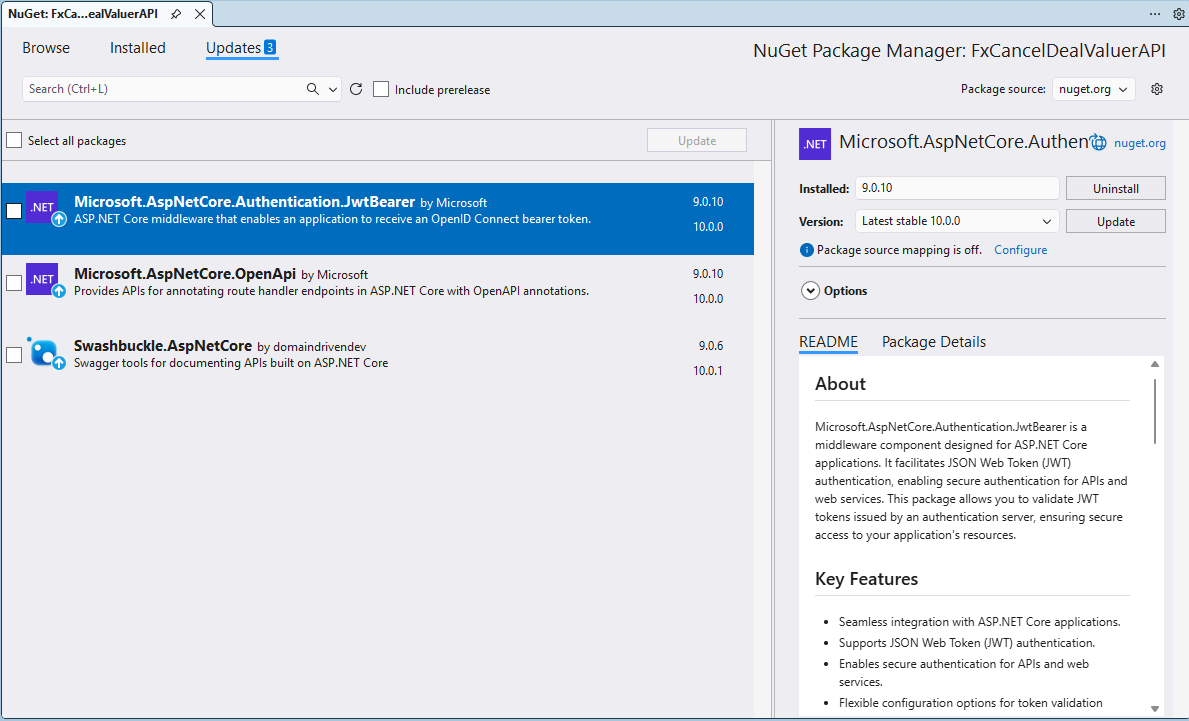
.NET 10 OpenAPI and SwashBuckle NuGets

Yesterday I downloaded Microsoft Visual Studio 2026 and started updating the projects I am working on to .NET 10 and updating any NuGets.

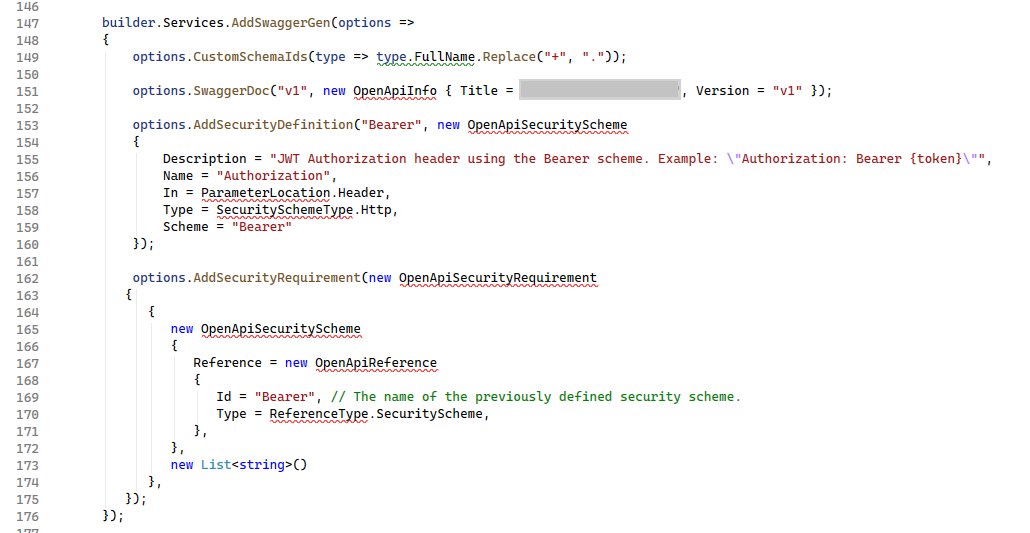
I left these three NuGets to the last as I have had problems updating them before, and this time was no different. The updated NuGets “broke” my code because the way that security definitions and security requirements were implemented had changed.

These articles were the inspiration for my approach

   options.AddSecurityDefinition("X-API-Key", new OpenApiSecurityScheme
   {
      Description = "JWT Authorization header using the Bearer scheme. Example: \"Authorization: Bearer {token}\"",
      Name = "Authorization",
      In = ParameterLocation.Header,
      Type = SecuritySchemeType.Http,
      Scheme = "Bearer"
   });

   options.AddSecurityRequirement(document => new OpenApiSecurityRequirement
   {
      [new OpenApiSecuritySchemeReference("Bearer", document)] = [],
      [new OpenApiSecuritySchemeReference("X-API-Key", document)] = []
   });
});

Warning: make sure the schema etc. have same case so you don’t lose an hour from your life that you will never get back.

With the above updates the application would work but….

WithOpenApi was originally designed for minimal APIs to attach an OpenApiOperation to endpoint metadata so tools like Swashbuckle could consume it.

Deprecation of WithOpenApi extension method

However, starting with .NET 9, ASP.NET Core introduced native OpenAPI document generation via Microsoft.AspNetCore.OpenApi. This made WithOpenApi unnecessary because the new pipeline already supports operation customization through transformers.

app.MapGet("Version", () =>
{
   return Results.Ok(typeof(Program).Assembly.GetName().Version?.ToString());
}).RequireAuthorization()
         .WithName("Version")
         .Produces<string>(StatusCodes.Status200OK)
         .Produces(StatusCodes.Status401Unauthorized)
         .AddOpenApiOperationTransformer((operation, context, ct) =>
         {
            // Per-endpoint tweaks
            operation.Summary = "Returns version of the application";
            operation.Description = "Returns the version of the application from project metadata.";
            return Task.CompletedTask;
         });

The new transformer API (AddOpenApiOperationTransformer) works directly with the built-in OpenAPI pipeline. It allows per-operation or global modifications without relying on third-party libraries.

Myriota device Uplink Serialisation

The Myriota Developer documentation has some sample webhook data payloads so I used JSON2csharp to generate a Data Transfer Object(DTO) to deserialise payload. The format of the message is a bit “odd”, the “Data “Value” contains an “escaped” JSON object.

{
  "EndpointRef": "ksnb8GB_TuGj:__jLfs2BQJ2d",
  "Timestamp": 1692928585,
  "Data": "{"Packets": [{"Timestamp": 1692927646796, "TerminalId": "0001020304", "Value": "00008c9512e624cce066adbae764cccccccccccc"}]}",
  "Id": "a5c1bffe-4b62-4233-bbe9-d4ecc4f8b6cb",
  "CertificateUrl": "https://security.myriota.com/data-13f7751f3c5df569a6c9c42a9ce73a8a.crt",
  "Signature": "FDJpQdWHwCY+tzCN/WvQdnbyjgu4BmP/t3cJIOEF11sREGtt7AH2L9vMUDji6X/lxWBYa4K8tmI0T914iPyFV36i+GtjCO4UHUGuFPJObCtiugVV8934EBM+824xgaeW8Hvsqj9eDeyJoXH2S6C1alcAkkZCVt0pUhRZSZZ4jBJGGEEQ1Gm+SOlYjC2exUOf0mCrI5Pct+qyaDHbtiHRd/qNGW0LOMXrB/9difT+/2ZKE1xvDv9VdxylXi7W0/mARCfNa0J6aWtQrpvEXJ5w22VQqKBYuj3nlGtL1oOuXCZnbFYFf4qkysPaXON31EmUBeB4WbZMyPaoyFK0wG3rwA=="
}
namespace devMobile.IoT.myriotaAzureIoTConnector.myriota.UplinkWebhook.Models
{
    public class UplinkPayloadWebDto
    {
        public string EndpointRef { get; set; }
        public long Timestamp { get; set; } 
        public string Data { get; set; } // Embedded JSON ?
        public string Id { get; set; }
        public string CertificateUrl { get; set; }
        public string Signature { get; set; }
    }
}

The UplinkWebhook controller “automagically” deserialises the message, then in code the embedded JSON is deserialised and “unpacked”, finally the processed message is inserted into an Azure Storage queue.

namespace devMobile.IoT.myriotaAzureIoTConnector.myriota.UplinkWebhook.Controllers
{
    [Route("[controller]")]
    [ApiController]
    public class UplinkController : ControllerBase
    {
        private readonly Models.ApplicationSettings _applicationSettings;
        private readonly ILogger<UplinkController> _logger;
        private readonly QueueServiceClient _queueServiceClient;

        public UplinkController(IOptions<Models.ApplicationSettings> applicationSettings, QueueServiceClient queueServiceClient, ILogger<UplinkController> logger)
        {
            _applicationSettings = applicationSettings.Value;
            _queueServiceClient = queueServiceClient;
            _logger = logger;
        }

        [HttpPost]
        public async Task<IActionResult> Post([FromBody] Models.UplinkPayloadWebDto payloadWeb)
        {
            _logger.LogInformation("SendAsync queue name:{QueueName}", _applicationSettings.QueueName);

            QueueClient queueClient = _queueServiceClient.GetQueueClient(_applicationSettings.QueueName);

            var serializeOptions = new JsonSerializerOptions
            {
                WriteIndented = true,
                Encoder = System.Text.Encodings.Web.JavaScriptEncoder.UnsafeRelaxedJsonEscaping
            };

            await queueClient.SendMessageAsync(Convert.ToBase64String(JsonSerializer.SerializeToUtf8Bytes(payloadWeb, serializeOptions)));

            return this.Ok();
        }
    }
}

The webhook application uses the QueueClientBuilderExtensions and AddServiceClient so a QueueServiceClient can be injected into the webhook controller.

namespace devMobile.IoT.myriotaAzureIoTConnector.myriota.UplinkWebhook
{
    public class Program
    {
        public static void Main(string[] args)
        {
            var builder = WebApplication.CreateBuilder(args);

            // Add services to the container.
            builder.Services.AddControllers();

            builder.Services.AddApplicationInsightsTelemetry(i => i.ConnectionString = builder.Configuration.GetConnectionString("ApplicationInsights"));

            builder.Services.Configure<Models.ApplicationSettings>(builder.Configuration.GetSection("Application"));

            builder.Services.AddAzureClients(azureClient =>
            {
                azureClient.AddQueueServiceClient(builder.Configuration.GetConnectionString("AzureWebApi"));
            });

            var app = builder.Build();

            // Configure the HTTP request pipeline.

            app.UseHttpsRedirection();

            app.MapControllers();

            app.Run();
        }
    }
}

After debugging the application on my desktop with Telerik fiddler I deployed the application to one of my Azure subscriptions.

Azure Resource Group for the myriota Azure IoT Connector
Adding a new Destination in the myriota device manager

As part of configuring a new device test messages can be sent to the configured destinations.

Testing a new Destination in the myriota device manager
{
  "EndpointRef": "N_HlfTNgRsqe:uyXKvYTmTAO5",
  "Timestamp": 1563521870,
  "Data": "{"Packets": [{"Timestamp": 1563521870359,
    "TerminalId": "f74636ec549f9bde50cf765d2bcacbf9",
    "Value": "0101010101010101010101010101010101010101"}]}",
  "Id": "fe77e2c7-8e9c-40d0-8980-43720b9dab75",
  "CertificateUrl":    "https://security.myriota.com/data-13f7751f3c5df569a6c9c42a9ce73a8a.crt",
  "Signature": "k2OIBppMRmBT520rUlIvMxNg+h9soJYBhQhOGSIWGdzkppdT1Po2GbFr7jbg..."
}

The DTO generated with JSON2csharp needed some manual “tweaking” after examining how a couple of the sample messages were deserialised.

Azure Storage Explorer messages

I left the Myriota Developer Toolkit device (running the tracker sample) outside overnight and the following day I could see with Azure Storage Explorer a couple of messages in the Azure Storage Queue

Myriota device configuration

For a couple of weeks Myriota Developer Toolkit has been sitting under my desk and today I got some time to setup a device, register it, then upload some data.

Myriota Developer Toolkit

The first step was to download and install the Myriota Configurator so I could get the device registration information and install the tracker example application.

Using Windows File Explorer to “unblock” the downloaded file

After “unblocking” the zip file and upgrading my pip install the install script worked.

Myriota Configurator installation script

The application had to be run from the command line with “python MyriotaConfigurator.py”

Myriota Configurator main menu
Myriota Configurator retrieving device registration code

On the device I’m using the Tracker sample application to generate some sample payloads.

Myriota Configurator downloading tracker sample to device

The next step was to “register” my device and configure the destination(s) for its messages.

Myriota Device Manager Device configuration

Once the device and device manager configuration were sorted, I put the Tracker out on the back lawn on top of a large flowerpot.

Device Manager Access Times

On the “Access Times” page I could see that there were several periods when a satellite was overhead and overnight a couple of messages were uploaded.

ASP.NET Core authentication – In the beginning

While building my ASP.NET Core identity, Dapper Custom storage provider I found there wasn’t a lot of discussion of the ASPNETUserClaims functionality for fine “grained permissions”.

ASP.NET Core identity initial data model

ASP.NET Core identity Roles can also have individual claims but with the authorisation model of the legacy application I work on this functionality hasn’t been useful. We use role based authentication with a few user claims to minimise the size of our Java Web Tokens(JWT)

Visual Studio 2022 ASP.NET Core Web Application template options

The first step was to create a “bare-bones” ASP.NET Core Razor pages Web Application with Individual Accounts Authentication project

Default ASP.NET Core identity Web application Homepage

I tried to minimise the modifications to the application. I added EnableRetryOnFailure, some changes to names spaces etc. I also added support for email address confirmation with SendGrid and “authentication” link to the navabar in _Layout.cshtml.

@page
@model RolesModel
@{
    <table class="table">
        <thead>
            <tr>
                <th>Role</th>
            </tr>
        </thead>
        <tbody>
            @foreach (var role in Model.Roles)
            {
                <tr>
                    <td>
                        @Html.DisplayFor(modelItem => role.Value)
                    </td>
                </tr>
            }
        </tbody>
    </table>
    <br/>
        <table class="table">
        <thead>
            <tr>
                <th>Claim Subject</th>
                <th>Value</th>
            </tr>
        </thead>

        <tbody>
            @foreach (var claim in Model.Claims)
            {
                <tr>
                    <td>
                        @Html.DisplayFor(modelItem => claim.Type)
                    </td>
                    <td>
                        @Html.DisplayFor(modelItem => claim.Value)
                    </td>
                </tr>
            }
        </tbody>
    </table>
}

The “Authentication” page displays the logged in User’s Role and Claims.

namespace devMobile.AspNetCore.Identity.WebApp.EFCore.Pages
{
    [Authorize()]
    public class RolesModel : PageModel
    {
        private readonly ILogger<RolesModel> _logger;

        public List<Claim> Roles { get; set; }
        public List<Claim> Claims { get; set; }

        public RolesModel(ILogger<RolesModel> logger)
        {
            _logger = logger;
        }

        public void OnGet()
        {
            Roles = User.Claims.Where(c => c.Type == ClaimTypes.Role).ToList();

            Claims = User.Claims.Where(c => c.Type != ClaimTypes.Role).ToList();
        }
    }
}

Each user can have role(s), with optional claims, and some optional individual claims.

ASP.NET Core identity application Authentication information page

The WebApp.EFCore project is intended to be the starting point for a series of posts about ASP.NET Core identity so I have not included Cross-Origin Resource Sharing (CORS), Cross Site Request Forgery (CSRF) etc. functionality.

.NET ASP.NET Core Custom Identity Provider Sample Update

As part of some security updates to one of the ASP.NET Core applications I work on there were changes to how users are authorised and authenticated(A&A). As part of this we were looking at replacing custom A&A (login names & passwords+ existing database) with ASP.NET Core Identity and a Custom Storage Provider. I downloaded the sample code from the Github AspNetCore.Docs repository and opened the project in Visual Studio 2022.

The Custom Storage Provider sample hasn’t been updated for years and used .NET Core 1.1 which was released Q4 2016.

When I opened the project there were errors and many of the NuGets were deprecated.

The sample code uses Dapper (micro ORM) to access tables in a custom Microsoft SQL Server database but there was also NuGets and code that referenced Entity Framework Core.

After several unsuccessful attempts at updating the NuGets packages I started again from scratch

The code wouldn’t compile so I started fixing issues (The first couple of attempts were very “hacky”). The UseDatabaseErrorPage method was from EF Core so it was commented out. The UseBrowserLink method was from the Browser Link support which I decided not to use etc.

...
namespace CustomIdentityProviderSample
{
    public class Startup
    {
        public Startup(IHostingEnvironment env)
        {
            var builder = new ConfigurationBuilder()
                .SetBasePath(env.ContentRootPath)
                .AddJsonFile("appsettings.json", optional: false, reloadOnChange: true)
                .AddJsonFile($"appsettings.{env.EnvironmentName}.json", optional: true);

            if (env.IsDevelopment())
            {
                // For more details on using the user secret store see https://go.microsoft.com/fwlink/?LinkID=532709
                builder.AddUserSecrets<Startup>();
            }

            builder.AddEnvironmentVariables();
            Configuration = builder.Build();
        }

        public IConfigurationRoot Configuration { get; }

        // This method gets called by the runtime. Use this method to add services to the container.
        public void ConfigureServices(IServiceCollection services)
        {
            // Add identity types
            services.AddIdentity<ApplicationUser, ApplicationRole>()
                .AddDefaultTokenProviders();

            // Identity Services
            services.AddTransient<IUserStore<ApplicationUser>, CustomUserStore>();
            services.AddTransient<IRoleStore<ApplicationRole>, CustomRoleStore>();
            string connectionString = Configuration.GetConnectionString("DefaultConnection");
            services.AddTransient<SqlConnection>(e => new SqlConnection(connectionString));
            services.AddTransient<DapperUsersTable>();

            services.AddMvc();

            // Add application services.
            services.AddTransient<IEmailSender, AuthMessageSender>();
            services.AddTransient<ISmsSender, AuthMessageSender>();
        }

        // This method gets called by the runtime. Use this method to configure the HTTP request pipeline.
        public void Configure(IApplicationBuilder app, IHostingEnvironment env, ILoggerFactory loggerFactory)
        {
            // loggerFactory.AddConsole(Configuration.GetSection("Logging"));
            // loggerFactory.AddDebug();

            if (env.IsDevelopment())
            {
                app.UseDeveloperExceptionPage();
                // app.UseDatabaseErrorPage(); BHL
                // app.UseBrowserLink(); BHL
            }
            else
            {
                app.UseExceptionHandler("/Home/Error");
            }

            app.UseStaticFiles();

            app.UseRouting(); // BHL

            // app.UseIdentity(); BHL
            app.UseAuthentication();
            app.UseAuthorization();

            // Add external authentication middleware below. To configure them please see https://go.microsoft.com/fwlink/?LinkID=532715
            app.UseMvc(routes =>
            {
                routes.MapRoute(
                    name: "default",
                    template: "{controller=Home}/{action=Index}/{id?}");
            });
        }
    }
}

This process was repeated many times until the Custom Storage Provider sample compiled so I could run it in the Visual Studio 2022 debugger.

The Custom Storage Provider sample then failed because of changes to routing etc.

The Custom Storage Provider sample then failed because of changes to A&A middleware

The Custom Storage Provider sample then failed because the database creation script and the code didn’t match.

CREATE TABLE [dbo].[CustomUser](
	[Id] [uniqueidentifier] NOT NULL,
	[Email] [nvarchar](256) NULL,
	[EmailConfirmed] [bit] NOT NULL,
	[PasswordHash] [nvarchar](max) NULL,
	[UserName] [nvarchar](256) NOT NULL,
 CONSTRAINT [PK_dbo.CustomUsers] PRIMARY KEY CLUSTERED 
(
	[Id] ASC
)WITH (PAD_INDEX = OFF, STATISTICS_NORECOMPUTE = OFF, IGNORE_DUP_KEY = OFF, ALLOW_ROW_LOCKS = ON, ALLOW_PAGE_LOCKS = ON) ON [PRIMARY]
) ON [PRIMARY] TEXTIMAGE_ON [PRIMARY]

Finally, the Custom Storage Provider sample worked but the page layout was broken

I then worked through the Razor views adding stylesheets where necessary.

@inject Microsoft.ApplicationInsights.AspNetCore.JavaScriptSnippet JavaScriptSnippet
<!DOCTYPE html>
<html>
<head>
    <meta charset="utf-8" />
    <meta name="viewport" content="width=device-width, initial-scale=1.0" />
    <title>@ViewData["Title"] - CustomIdentityProviderSample</title>
    @* BHL *@
    <link rel="stylesheet" href="https://ajax.aspnetcdn.com/ajax/bootstrap/3.3.7/css/bootstrap.css"
          asp-fallback-href="~/lib/bootstrap/dist/css/bootstrap.css"
          asp-fallback-test-class="sr-only" asp-fallback-test-property="position" asp-fallback-test-value="absolute" />

    <environment names="Development">
        <link rel="stylesheet" href="~/lib/bootstrap/dist/css/bootstrap.css" />
    </environment>
    <environment names="Staging,Production">
        <link rel="stylesheet" href="https://ajax.aspnetcdn.com/ajax/bootstrap/3.3.7/css/bootstrap.css"
              asp-fallback-href="~/lib/bootstrap/dist/css/bootstrap.css"
              asp-fallback-test-class="sr-only" asp-fallback-test-property="position" asp-fallback-test-value="absolute" />
    </environment>
    @Html.Raw(JavaScriptSnippet.FullScript)
</head>
...

The Custom Storage Provider sample subset of pages then rendered better.

The Custom Storage Provider sample then failed when functionality like user phone number was used.

This required the addition of implementations (many just throw NotImplementedException exceptions) for IUserPhoneNumberStore, IUserTwoFactorStore, and IUserLoginStore etc.

using Microsoft.AspNetCore.Identity;
using System;
using System.Threading.Tasks;
using System.Threading;
using System.Collections.Generic;

namespace CustomIdentityProviderSample.CustomProvider
{
    /// <summary>
    /// This store is only partially implemented. It supports user creation and find methods.
    /// </summary>
    public class CustomUserStore : IUserStore<ApplicationUser>, 
        IUserPasswordStore<ApplicationUser>,
        IUserPhoneNumberStore<ApplicationUser>,
        IUserTwoFactorStore<ApplicationUser>,
        IUserLoginStore<ApplicationUser>
    {
        private readonly DapperUsersTable _usersTable;

        public CustomUserStore(DapperUsersTable usersTable)
        {
            _usersTable = usersTable;
        }

        public Task AddLoginAsync(ApplicationUser user, UserLoginInfo login, CancellationToken cancellationToken)
        {
            throw new NotImplementedException();
        }

        public async Task<IdentityResult> CreateAsync(ApplicationUser user, 
            CancellationToken cancellationToken = default(CancellationToken))
        {
            cancellationToken.ThrowIfCancellationRequested();
            if (user == null) throw new ArgumentNullException(nameof(user));

            return await _usersTable.CreateAsync(user);
        }

        public async Task<IdentityResult> DeleteAsync(ApplicationUser user, 
            CancellationToken cancellationToken = default(CancellationToken))
        {
            cancellationToken.ThrowIfCancellationRequested();
            if (user == null) throw new ArgumentNullException(nameof(user));

            return await _usersTable.DeleteAsync(user);

        }

        public async Task<ApplicationUser> FindByIdAsync(string userId, 
            CancellationToken cancellationToken = default(CancellationToken))
        {
            cancellationToken.ThrowIfCancellationRequested();
            if (userId == null) throw new ArgumentNullException(nameof(userId));
            Guid idGuid;
            if(!Guid.TryParse(userId, out idGuid))
            {
                throw new ArgumentException("Not a valid Guid id", nameof(userId));
            }

            return await _usersTable.FindByIdAsync(idGuid);

        }

        public Task<ApplicationUser> FindByLoginAsync(string loginProvider, string providerKey, CancellationToken cancellationToken)
        {
            throw new NotImplementedException();
        }

        public async Task<ApplicationUser> FindByNameAsync(string userName, 
            CancellationToken cancellationToken = default(CancellationToken))
        {
            cancellationToken.ThrowIfCancellationRequested();
            if (userName == null) throw new ArgumentNullException(nameof(userName));

            return await _usersTable.FindByNameAsync(userName);
        }

        public async Task<IList<UserLoginInfo>> GetLoginsAsync(ApplicationUser user, CancellationToken cancellationToken)
        {
            cancellationToken.ThrowIfCancellationRequested();
            if (user == null) throw new ArgumentNullException(nameof(user));

            return await _usersTable.GetLoginsAsync(user.Id);
        }
... 
}

This also required extensions to the DapperUsersTable.cs.

public async Task<IdentityResult> UpdateAsync(ApplicationUser user)
{
   string sql = "UPDATE dbo.AspNetUsers " + // BHL
                     "SET [Id] = @Id, [Email]= @Email, [EmailConfirmed] = @EmailConfirmed, [PasswordHash] = @PasswordHash, [UserName] = @UserName " +
                     "WHERE Id = @Id;";


   int rows = await _connection.ExecuteAsync(sql, new { user.Id, user.Email, user.EmailConfirmed, user.PasswordHash, user.UserName });

   if (rows == 1)
   {
      return IdentityResult.Success;
   }

return IdentityResult.Failed(new IdentityError { Description = $"Could not update user {user.Email}." });
}

After many failed attempts my very nasty Custom Storage Provider refresh works (with many warnings and messages). I now understand how they work well enough that I am going to start again from scratch.