nanoFramework RAK811 LoRaWAN library Part3

Factory Reset

When writing communications libraries one of the first things I try and get working is a “factory reset”. At some stage I will misconfigure the device so badly that it won’t work anymore and having a way to return to the device to its original configuration is really useful.

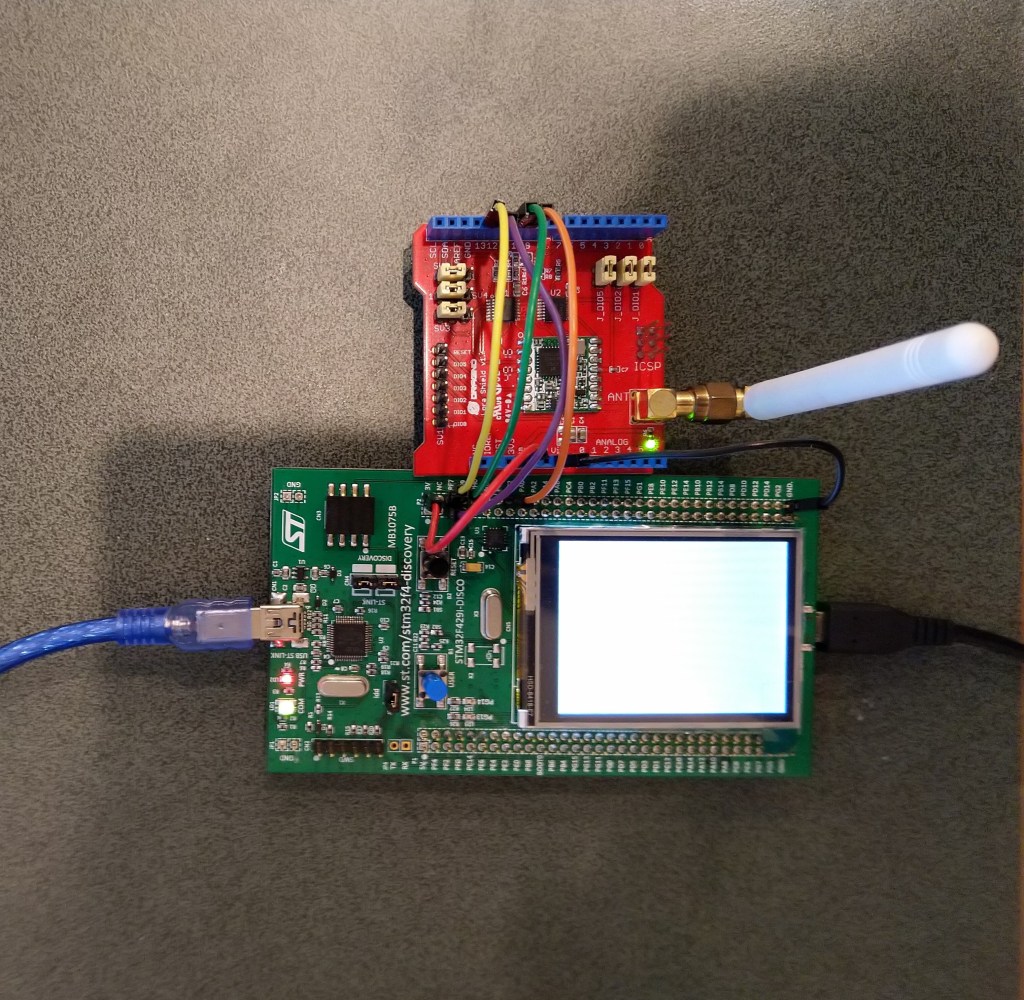
The RAK811 LPWAN Evaluation Board(EVB) test rig was based on an STM32F691DISCOVERY board which supports hardware (using D8 as I haven’t removed R11) and software reset with an AT command.

//---------------------------------------------------------------------------------
// Copyright (c) June 2020, devMobile Software
//
// Licensed under the Apache License, Version 2.0 (the "License");
// you may not use this file except in compliance with the License.
// You may obtain a copy of the License at
//
//     http://www.apache.org/licenses/LICENSE-2.0
//
// Unless required by applicable law or agreed to in writing, software
// distributed under the License is distributed on an "AS IS" BASIS,
// WITHOUT WARRANTIES OR CONDITIONS OF ANY KIND, either express or implied.
// See the License for the specific language governing permissions and
// limitations under the License.
//
//---------------------------------------------------------------------------------
// nanoff --target ST_STM32F769I_DISCOVERY --update
//#define SERIAL_SYNC_READ
//#define HARDWARE_RESET
//#define SOFTWARE_RESTART
//#define DEVICE_STATUS
//#define LORA_STATUS
namespace devMobile.IoT.Rak811.FactoryReset
{
   using System;
   using System.Diagnostics;
   using System.Threading;
   using Windows.Devices.Gpio;
   using Windows.Devices.SerialCommunication;
   using Windows.Storage.Streams;
   
   public class Program
   {
      private const string SerialPortId = "COM6";

      public static void Main()
      {
         SerialDevice serialDevice;

         Debug.WriteLine("devMobile.IoT.Rak811.FactoryReset starting");

         Debug.WriteLine(Windows.Devices.SerialCommunication.SerialDevice.GetDeviceSelector());

         try
         {
#if HARDWARE_RESET
            GpioPin resetPin = GpioController.GetDefault().OpenPin(PinNumber('J', 4));
            resetPin.SetDriveMode(GpioPinDriveMode.Output);
            resetPin.Write(GpioPinValue.Low);
#endif
            serialDevice = SerialDevice.FromId(SerialPortId);

            // set parameters
            serialDevice.BaudRate = 9600;
            serialDevice.Parity = SerialParity.None;
            serialDevice.StopBits = SerialStopBitCount.One;
            serialDevice.Handshake = SerialHandshake.None;
            serialDevice.DataBits = 8;

            serialDevice.ReadTimeout = new TimeSpan(0, 0, 30);
            serialDevice.WriteTimeout = new TimeSpan(0, 0, 4);

            DataWriter outputDataWriter = new DataWriter(serialDevice.OutputStream);

#if SERIAL_SYNC_READ
            DataReader inputDataReader = new DataReader(serialDevice.InputStream);
#else
            serialDevice.DataReceived += SerialDevice_DataReceived;
#endif

            // set a watch char to be notified when it's available in the input stream
            serialDevice.WatchChar = '\n';

            while (true)
            {
#if HARDWARE_RESET
               resetPin.Write(GpioPinValue.High);
               Thread.Sleep(10);
               resetPin.Write(GpioPinValue.Low);
#endif

#if SOFTWARE_RESTART
               uint bytesWritten = outputDataWriter.WriteString("at+set_config=device:restart\r\n");
               Debug.WriteLine($"TX: {outputDataWriter.UnstoredBufferLength} bytes to output stream.");

               // calling the 'Store' method on the data writer actually sends the data
               uint txByteCount = outputDataWriter.Store();
               Debug.WriteLine($"TX: {txByteCount} bytes via {serialDevice.PortName}");
#endif

#if DEVICE_STATUS
               uint bytesWritten = outputDataWriter.WriteString("at+get_config=device:status\r\n");
               Debug.WriteLine($"TX: {outputDataWriter.UnstoredBufferLength} bytes to output stream.");

               // calling the 'Store' method on the data writer actually sends the data
               uint txByteCount = outputDataWriter.Store();
               Debug.WriteLine($"TX: {txByteCount} bytes via {serialDevice.PortName}");
#endif

#if LORA_STATUS
               uint bytesWritten = outputDataWriter.WriteString("at+get_config=lora:status\r\n");
               Debug.WriteLine($"TX: {outputDataWriter.UnstoredBufferLength} bytes to output stream.");

               // calling the 'Store' method on the data writer actually sends the data
               uint txByteCount = outputDataWriter.Store();
               Debug.WriteLine($"TX: {txByteCount} bytes via {serialDevice.PortName}");
#endif

#if SERIAL_SYNC_READ
               // June 2020 appears to be limited to 256 chars
               uint bytesRead = inputDataReader.Load(50);

               Debug.WriteLine($"RXs :{bytesRead} bytes read from {serialDevice.PortName}");

               if (bytesRead > 0)
               {
                  String response = inputDataReader.ReadString(bytesRead);
                  Debug.WriteLine($"RX sync:{response}");
               }
#endif

               Thread.Sleep(20000);
            }
         }
         catch (Exception ex)
         {
            Debug.WriteLine(ex.Message);
         }
      }

      private static void SerialDevice_DataReceived(object sender, SerialDataReceivedEventArgs e)
      {
         switch (e.EventType)
         {
            case SerialData.Chars:
               //Debug.WriteLine("RX SerialData.Chars");
               break;

            case SerialData.WatchChar:
               Debug.WriteLine("RX: SerialData.WatchChar");
               SerialDevice serialDevice = (SerialDevice)sender;

               using (DataReader inputDataReader = new DataReader(serialDevice.InputStream))
               {
                  inputDataReader.InputStreamOptions = InputStreamOptions.Partial;

                  // read all available bytes from the Serial Device input stream
                  uint bytesRead = inputDataReader.Load(serialDevice.BytesToRead);

                  Debug.WriteLine($"RXa: {bytesRead} bytes read from {serialDevice.PortName}");

                  if (bytesRead > 0)
                  {
                     String response = inputDataReader.ReadString(bytesRead);
                     Debug.WriteLine($"RX:{response}");
                  }
               }
               break;
            default:
               Debug.Assert(false, $"e.EventType {e.EventType} unknown");
               break;
         }
      }
      static int PinNumber(char port, byte pin)
      {
         if (port < 'A' || port > 'J')
            throw new ArgumentException();

         return ((port - 'A') * 16) + pin;
      }
   }
}

Initially I tried strobing D8 which is connected to the reset pin on the RAK811 module.

UART1 work mode: RUI_UART_NORAMAL
Current work_mode:LoRaWAN, join_mode:OTAA, Class: A
Initialization OK 

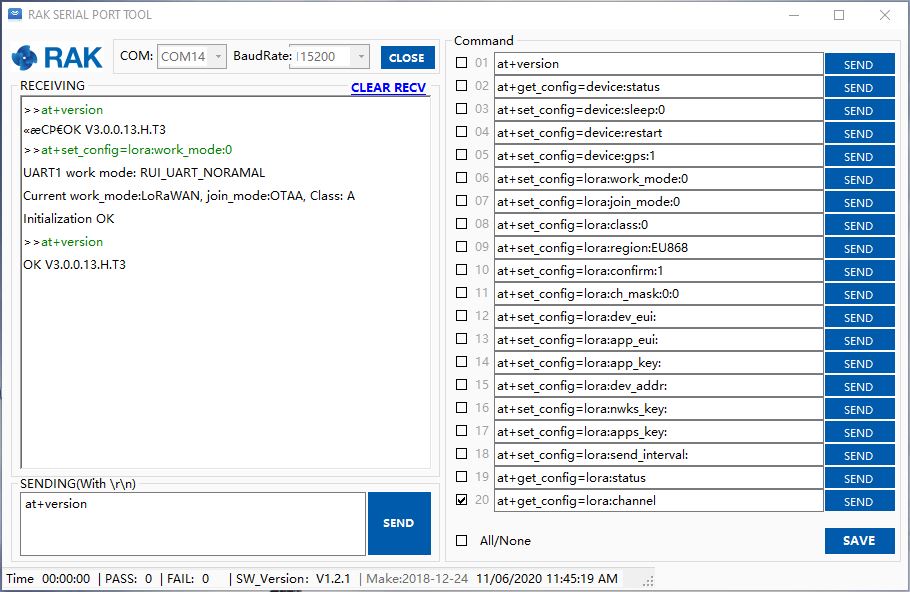
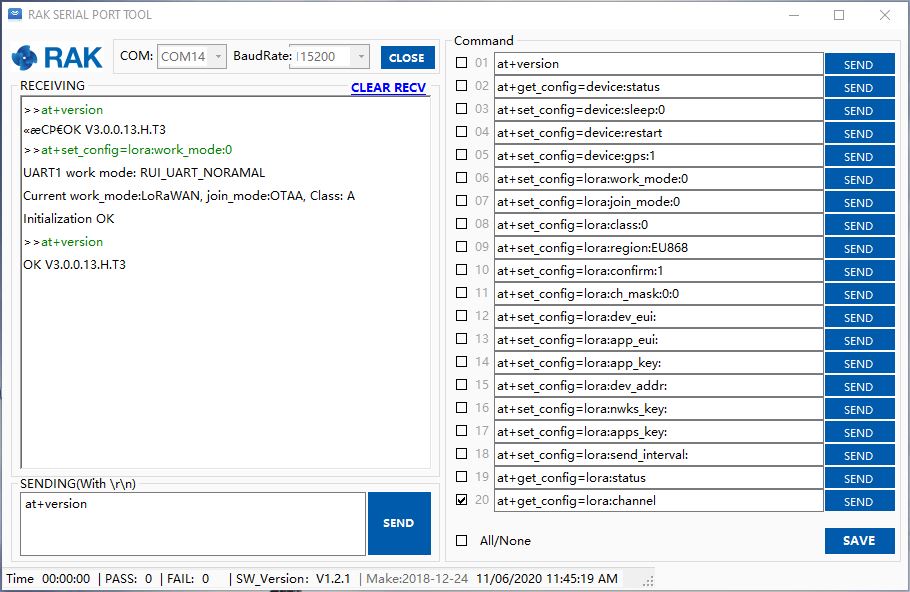
I then used the RAK Serial Port Tool to see if the configuration had changed

OK Work Mode: LoRaWAN
Region: AS923
Send_interval: 600s
Auto send status: false.
Join_mode: OTAA
DevEui: ...
AppEui: ...
AppKey: ...
Class: A
Joined Network:false
IsConfirm: false
AdrEnable: true
EnableRepeaterSupport: false
RX2_CHANNEL_FREQUENCY: 923200000, RX2_CHANNEL_DR:2
RX_WINDOW_DURATION: 3000ms
RECEIVE_DELAY_1: 1000ms
RECEIVE_DELAY_2: 2000ms
JOIN_ACCEPT_DELAY_1: 5000ms
JOIN_ACCEPT_DELAY_2: 6000ms
Current Datarate: 2
Primeval Datarate: 2
ChannelsTxPower: 0
UpLinkCounter: 0
DownLinkCounter: 0

The device reset but the settings appear not to have returned to factory.

I then tried the device:restart AT command

>>at+set_config=device:restart
UART1 work mode: RUI_UART_NORAMAL
Current work_mode:LoRaWAN, join_mode:OTAA, Class: A
Initialization OK 

>>at+get_config=lora:status
OK Work Mode: LoRaWAN
Region: AS923
Send_interval: 600s
Auto send status: false.
Join_mode: OTAA
DevEui: ...
AppEui: ...
AppKey: ...
Class: A
Joined Network:false
IsConfirm: false
AdrEnable: true
EnableRepeaterSupport: false
RX2_CHANNEL_FREQUENCY: 923200000, RX2_CHANNEL_DR:2
RX_WINDOW_DURATION: 3000ms
RECEIVE_DELAY_1: 1000ms
RECEIVE_DELAY_2: 2000ms
JOIN_ACCEPT_DELAY_1: 5000ms
JOIN_ACCEPT_DELAY_2: 6000ms
Current Datarate: 2
Primeval Datarate: 2
ChannelsTxPower: 0
UpLinkCounter: 0
DownLinkCounter: 0

The device settings appear not to have returned to factory.

After some experimentation it looks like the only way to get a factory reset maybe re-flashing the device.

nanoFramework RAK811 LoRaWAN library Part2

Shield Serial

My initial RAK811 LPWAN Evaluation Board(EVB) test rig was based on an STM32F7691DISCOVERY. I connected the EVB with jumper leads and sent the AT Command to request the LoRaWAN module version information

STM32F691Discovery with EVB connected with Jumpers

The STM32F691DISCOVERY board has an Arduino Uno R3 format socket which I wanted to be able to plug the EVB into. After removing R8,R17 & R19 I put the EVB on the STM32F691DISCOVERY and could still retrieve the RAK811 module version information.

STM32F691Discovery with EVB plugged into Arduino headers
The thread '<No Name>' (0x2) has exited with code 0 (0x0).
devMobile.IoT.Rfm9x.ShieldSerial starting
COM5,COM6
TX: 12 bytes to output stream.
TX: 12 bytes via COM6
RXs :19 bytes read from COM6
RX sync:OK V3.0.0.13.H.T3

TX: 12 bytes to output stream.
TX: 12 bytes via COM6
RXs :19 bytes read from COM6
RX sync:OK V3.0.0.13.H.T3

RAK811 LPWAN EVB Part3

Invalidating the warranty…

I wanted the RAK811 LPWAN Evaluation Board(EVB) -AS923 to work with selection of my Arduino and nanoFramework devices. The first decision was which of the hardware serial port (D0,D1) or the software serial port (D10,D11) should be connected to P1?

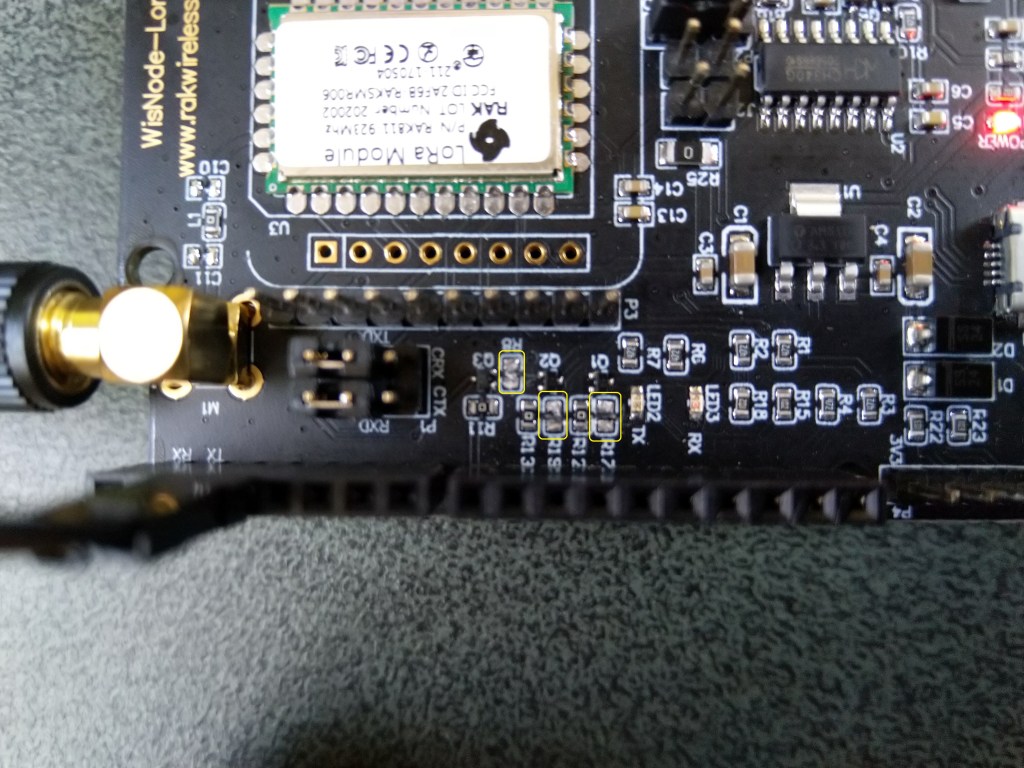
To use the EVB with my STM32F691DISCOVERY board running the nanoFramework (COM5 on the hardware serial port pins D0,D1) I removed R17&R19.

After some tinkering, I found that R8 which is connected to the RAK811 module reset had to be cut as well for the shield to work on my Arduino Uno R3 and STM32F691DISCOVERY devices.

RAK811 EVB with R17,R19 & R8 cut

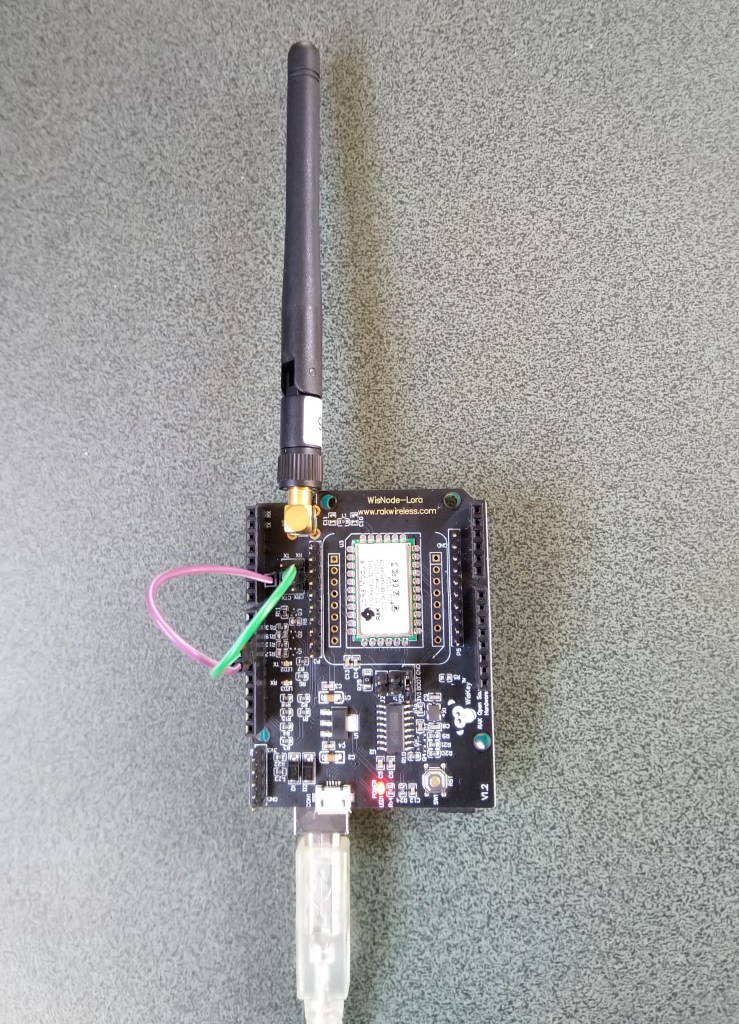
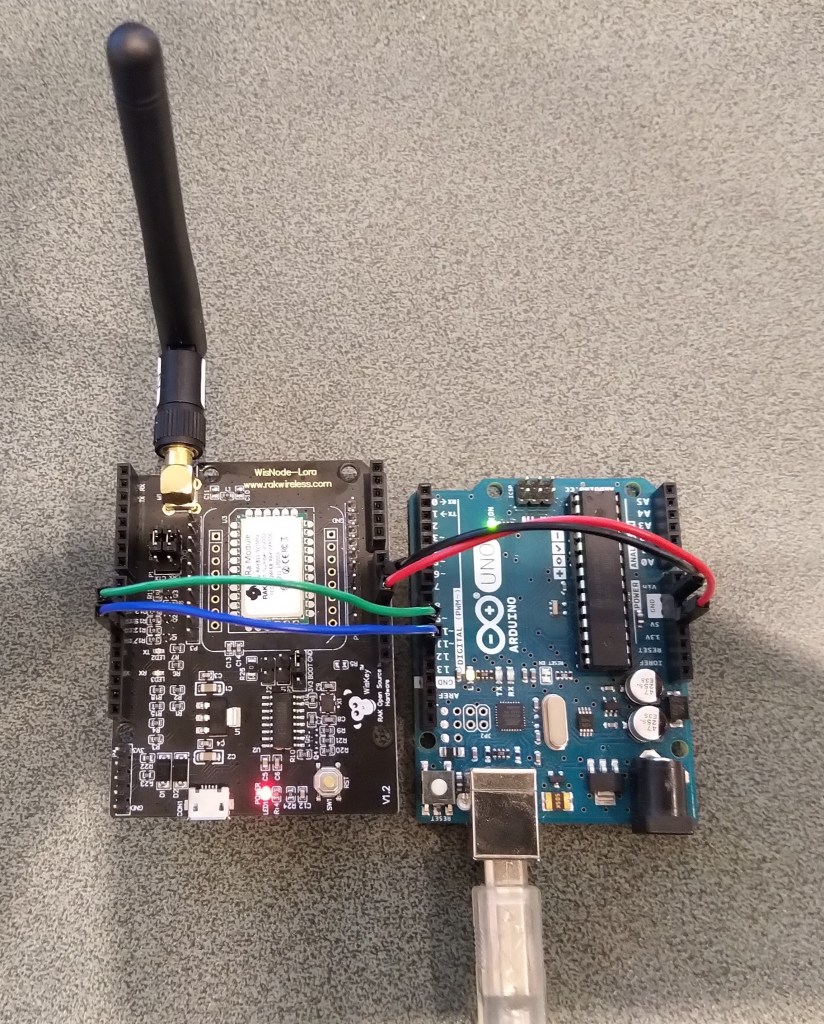
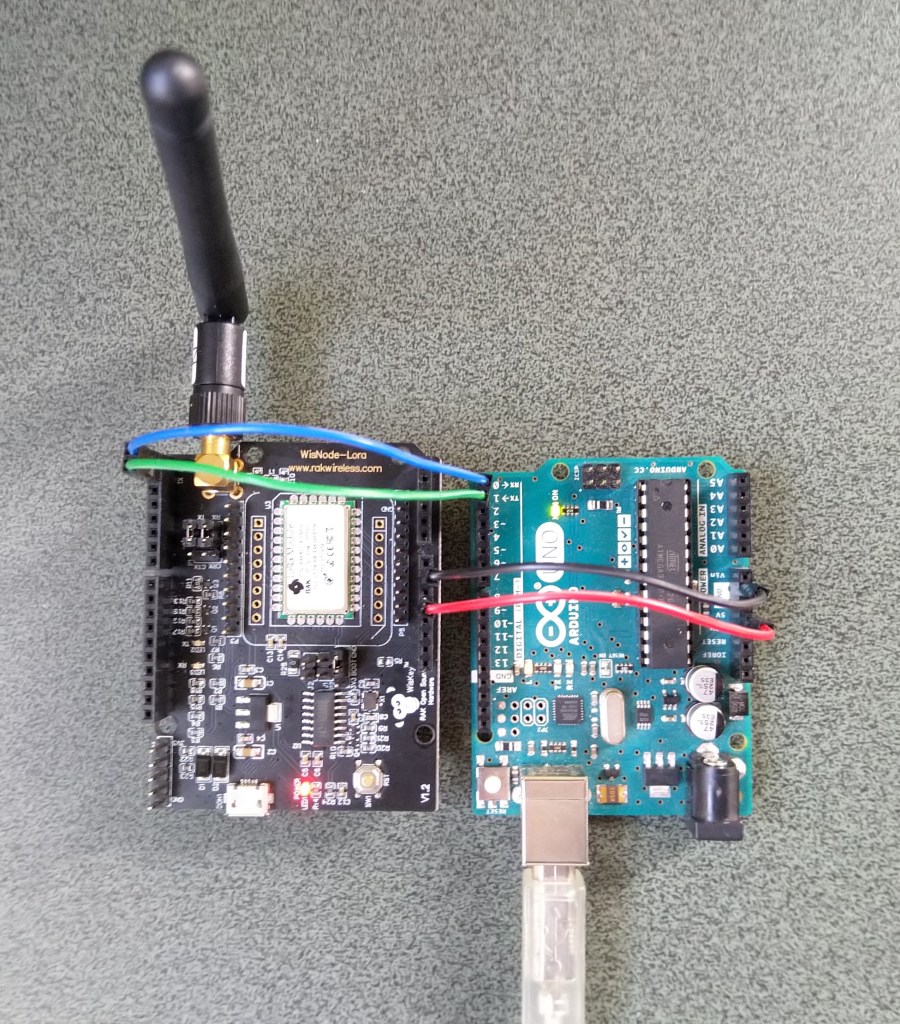
I can still run the Arduino Uno R3 and RAK811 EVB in the original configuration with a couple of jumper leads

RAK811 on Arduino with Serial connected to D10,D1 a SoftwareSerial port

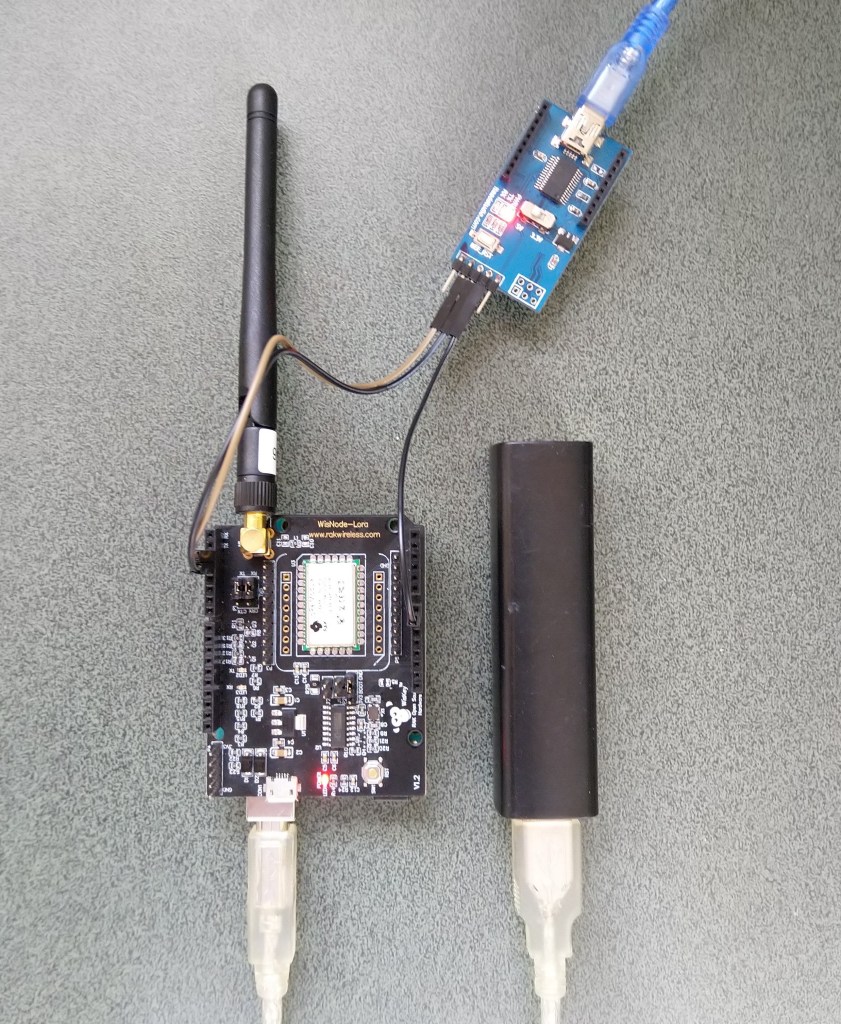
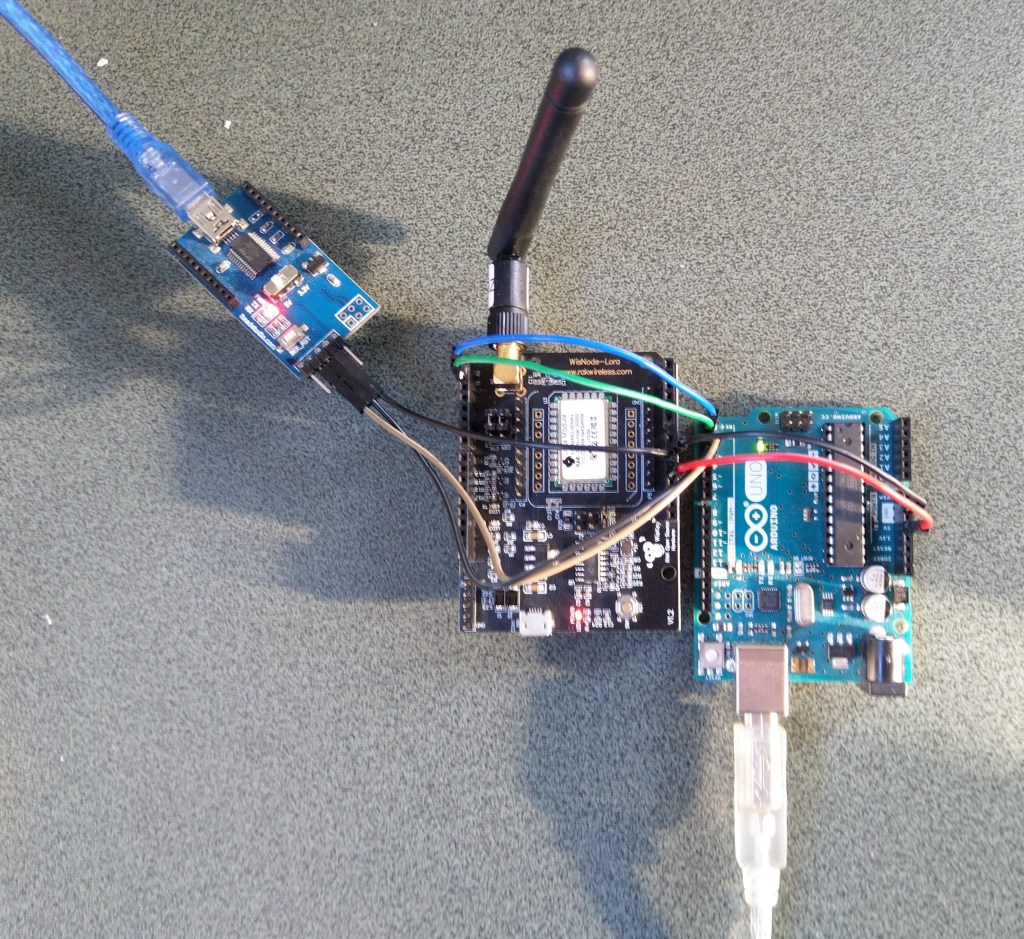
For devices where I needed D10,D11 for a  Serial Peripheral Interface(SPI) I could use an FTDI board and a couple of other pins (in this case D2,D3) for serial logging.

RAK811 on Arduino with Serial connected to D2,D2 a SoftwareSerial port

After debugging some code I also replaced the small jumpers on P1 with a couple of jumper leads so it was less fiddly to swap from downloading to debugging.

nanoFramework RAK811 LoRaWAN library Part1

Invalidating the warranty

Over the last couple of days I have been working on a nanoFramework C# library for my RAK811 LPWAN Evaluation Board(EVB) from RAK Wireless which I have been using with an Arduino Uno R3 device. My initial test rig is based on an STM32F691DISCOVERY board which has Arduino Uno R3 format socket for the EVB.

My first step was to check what serial ports were available (COM5 & COM6) on the STM32F691Discovery and what pins they were connected to. (COM6 Arduino D0 & D1). Then check that these would work with the EVB pin assignments.

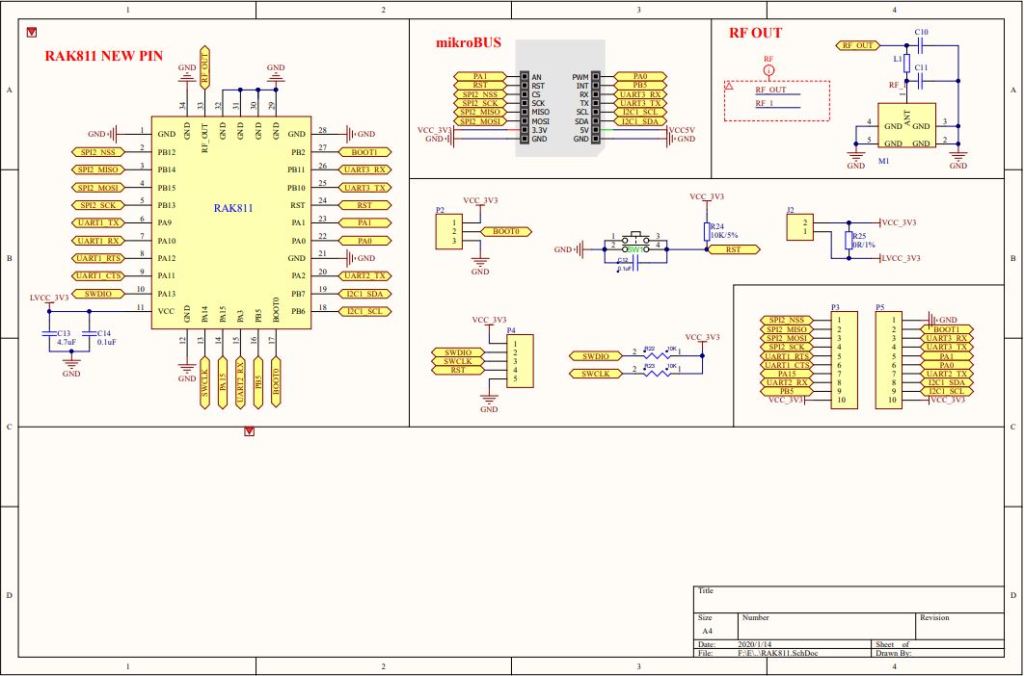
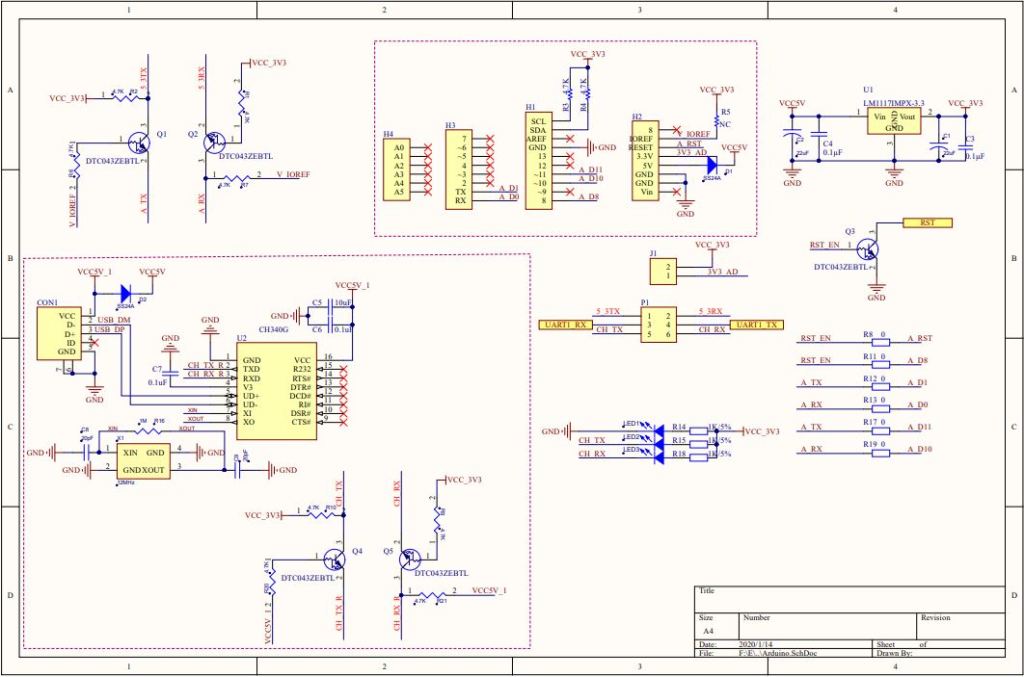
RAK 811 EVB schematic pg1
RAK 811 EVB schematic pg2

My first test was was a simple loopback based on the nanoFramework samples Serial Communications example.

STM32F691Discovery with jumper loopback
//---------------------------------------------------------------------------------
// Copyright (c) June 2020, devMobile Software
//
// Licensed under the Apache License, Version 2.0 (the "License");
// you may not use this file except in compliance with the License.
// You may obtain a copy of the License at
//
//     http://www.apache.org/licenses/LICENSE-2.0
//
// Unless required by applicable law or agreed to in writing, software
// distributed under the License is distributed on an "AS IS" BASIS,
// WITHOUT WARRANTIES OR CONDITIONS OF ANY KIND, either express or implied.
// See the License for the specific language governing permissions and
// limitations under the License.
//
//---------------------------------------------------------------------------------
//#define ESP32_WROOM   //nanoff --target ESP32_WROOM_32 --serialport COM4 --update
//#define NETDUINO3_WIFI   // nanoff --target NETDUINO3_WIFI --update
//#define MBN_QUAIL // nanoff --target MBN_QUAIL --update
//#define ST_NUCLEO64_F091RC // nanoff --target ST_NUCLEO64_F091RC --update
//#define ST_NUCLEO144_F746ZG //nanoff --target ST_NUCLEO144_F746ZG --update
#define ST_STM32F769I_DISCOVERY      // nanoff --target ST_STM32F769I_DISCOVERY --update 
namespace devMobile.IoT.Rak811.ShieldSerial
{
   using System;
   using System.Diagnostics;
   using System.Threading;
   using Windows.Devices.SerialCommunication;
   using Windows.Storage.Streams;

#if ESP32_WROOM_32_LORA_1_CHANNEL
   using nanoFramework.Hardware.Esp32;
#endif

   public class Program
   {
#if ESP32_WROOM
      private const string SerialPortId = "";
#endif
#if NETDUINO3_WIFI
      private const string SpiBusId = "";
#endif
#if MBN_QUAIL
      private const string SpiBusId = "";
#endif
#if ST_NUCLEO64_F091RC
      private const string SpiBusId = "";
#endif
#if ST_NUCLEO144_F746ZG
      private const string SpiBusId = "";
#endif
#if ST_STM32F429I_DISCOVERY
      private const string SpiBusId = "";
#endif
#if ST_STM32F769I_DISCOVERY
      private const string SerialPortId = "COM6";
#endif

      public static void Main()
      {
         SerialDevice serialDevice;

         Debug.WriteLine("devMobile.IoT.Rfm9x.ShieldSerial starting");

         Debug.WriteLine(Windows.Devices.SerialCommunication.SerialDevice.GetDeviceSelector());

         try
         {
            // set GPIO functions for COM2 (this is UART1 on ESP32)
            #if ESP32_WROOM
               Configuration.SetPinFunction(Gpio.IO04, DeviceFunction.COM2_TX);
               Configuration.SetPinFunction(Gpio.IO05, DeviceFunction.COM2_RX);
            #endif
            serialDevice = SerialDevice.FromId(SerialPortId);

            // set parameters
            serialDevice.BaudRate = 9600;
            serialDevice.Parity = SerialParity.None;
            serialDevice.StopBits = SerialStopBitCount.One;
            serialDevice.Handshake = SerialHandshake.None;
            serialDevice.DataBits = 8;

            serialDevice.ReadTimeout = new TimeSpan(0, 0, 30);
            serialDevice.WriteTimeout = new TimeSpan(0, 0, 4);

            DataWriter outputDataWriter = new DataWriter(serialDevice.OutputStream);

            #if SERIAL_SYNC_READ
               DataReader inputDataReader = new DataReader(serialDevice.InputStream);
            #else
               serialDevice.DataReceived += SerialDevice_DataReceived;
            #endif

            // set a watch char to be notified when it's available in the input stream
            serialDevice.WatchChar = '\n';

            while (true)
            {
               uint bytesWritten = outputDataWriter.WriteString("at+version\r\n");
               Debug.WriteLine($"TX: {outputDataWriter.UnstoredBufferLength} bytes to output stream.");

               // calling the 'Store' method on the data writer actually sends the data
               uint txByteCount = outputDataWriter.Store();
               Debug.WriteLine($"TX: {txByteCount} bytes via {serialDevice.PortName}");

#if SERIAL_SYNC_READ
               uint bytesRead = inputDataReader.Load(50);

               Debug.WriteLine($"RXs :{bytesRead} bytes read from {serialDevice.PortName}");

               if (bytesRead > 0)
               {
                  String response = inputDataReader.ReadString(bytesRead);
                  Debug.WriteLine($"RX sync:{response}");
               }
#endif

               Thread.Sleep(20000);
            }
         }
         catch (Exception ex)
         {
            Debug.WriteLine(ex.Message);
         }
      }

      private static void SerialDevice_DataReceived(object sender, SerialDataReceivedEventArgs e)
      {
         switch(e.EventType)
         {
            case SerialData.Chars:
               //Debug.WriteLine("RX SerialData.Chars");
               break;

            case SerialData.WatchChar:
               Debug.WriteLine("RX: SerialData.WatchChar");
               SerialDevice serialDevice = (SerialDevice)sender;

               using (DataReader inputDataReader = new DataReader(serialDevice.InputStream))
               {
                  inputDataReader.InputStreamOptions = InputStreamOptions.Partial;

                  // read all available bytes from the Serial Device input stream
                  uint bytesRead = inputDataReader.Load(serialDevice.BytesToRead);

                  Debug.WriteLine($"RXa: {bytesRead} bytes read from {serialDevice.PortName}");

                  if (bytesRead > 0)
                  {
                     String response = inputDataReader.ReadString(bytesRead);
                     Debug.WriteLine($"RX:{response}");
                  }
               }
               break;
            default:
               Debug.Assert(false, $"e.EventType {e.EventType} unknown");
               break;
         }
      }
   }
}

After some tinkering I could successfully transmit and receive a string.

The next step was to connect my EVB and sent the AT Command to request the LoRaWAN module version information

STM32F691Discovery with EVB connected with Jumpers
The thread '<No Name>' (0x2) has exited with code 0 (0x0).
devMobile.IoT.Rfm9x.ShieldSerial starting
COM5,COM6
TX: 12 bytes to output stream.
TX: 12 bytes via COM6
RX: SerialData.WatchChar
RXa: 19 bytes read from COM6
RX:OK V3.0.0.13.H.T3

TX: 12 bytes to output stream.
TX: 12 bytes via COM6
RX: SerialData.WatchChar
RXa: 19 bytes read from COM6
RX:OK V3.0.0.13.H.T3

The response was the same as I got with the RAK Serial Port Tool which was positive.

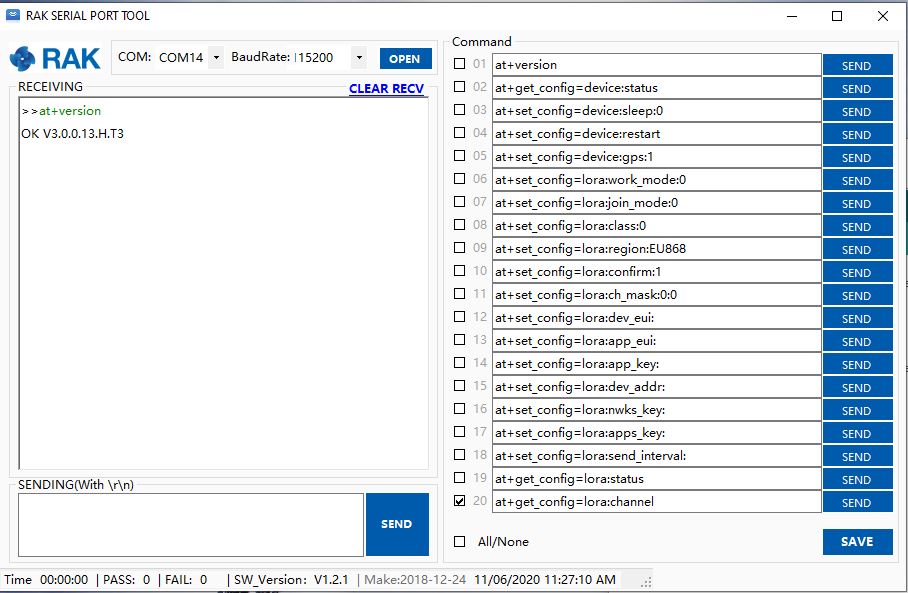
Version number check with RAK Serial Port tool

I need to do some more digging into how serialDevice.WatchChar = ‘\n’ works for synchronous reads.

Plus removing R17 & R19 there is no interaction with D11 & D10 which are normally used by the Serial Peripheral Interface(SPI) port so I can plug the shield directly into the STM32F691Discovery board.

My plan was to get an initial version of the library working with the STM32F691Discovery, then port it to the Netduino 3 Wifi (possible serial port pin issues) , ST_NUCLEO144_F746ZG, and ST_NUCLEO64_F091RC (possible issues with available flash).

RAK811 LPWAN EVB Part2

How can I use this…

Just over a week ago I purchased a RAK811 LPWAN Evaluation Board -AS923 and now I want to trial it with selection of devices and configurations.

Initially I didn’t want to modify the shield by removing resistors as I only have one, and I’m not certain what device(s) it will be used with. The initial hardware configuration required jumpers for the serial port, ground and 5V power.

Arduino Uno R3 and RAK811 LPWAN Evaluation board 5V config

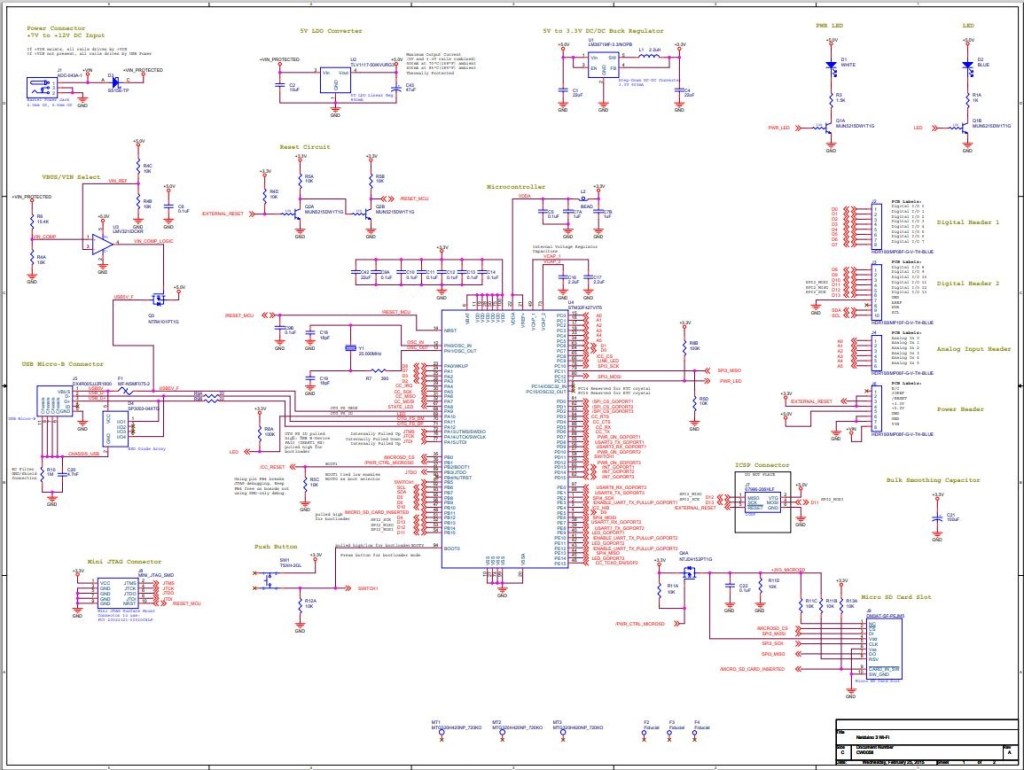
After looking at the schematic it should be possible to use the shield with a 3v3 device.

RAK 811 EVB schematic pg1
RAK 811 EVB schematic pg2

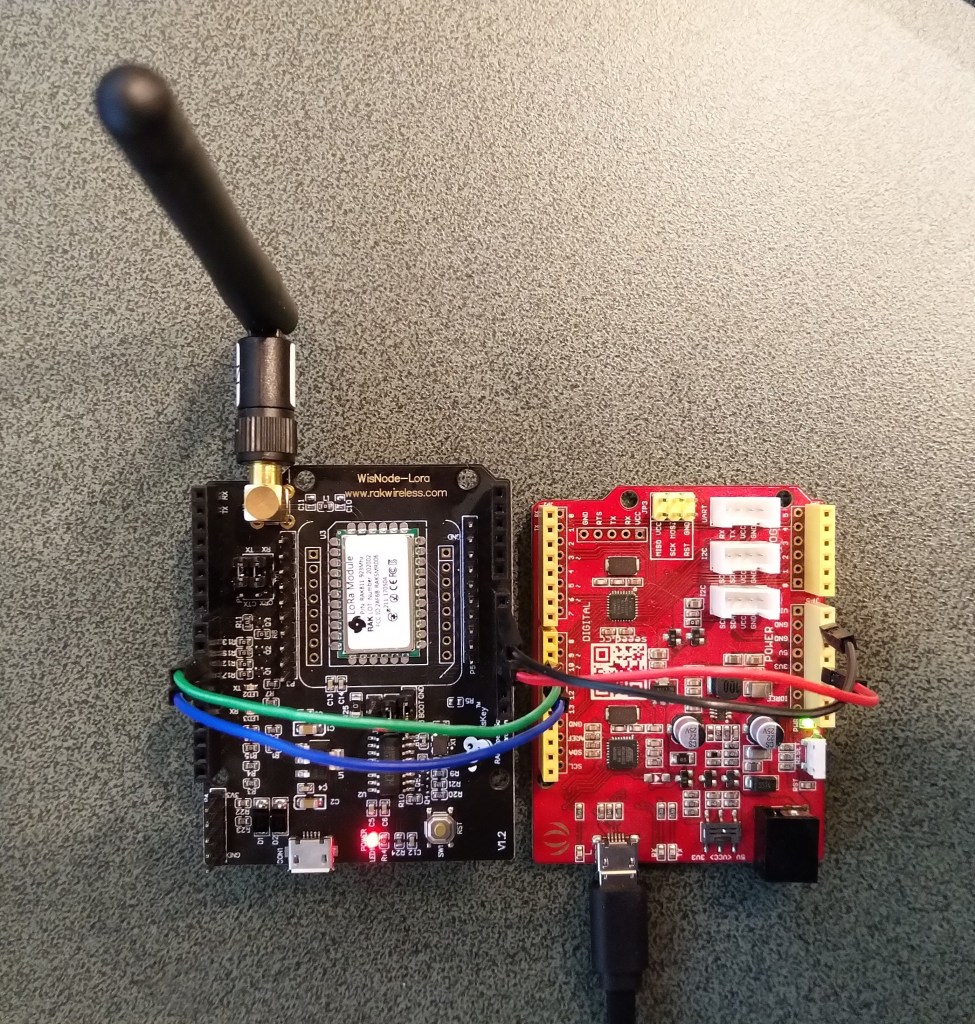
I confirmed this with a Seeeduino V4.2 devices set to 3v3, by putting a jumper on J1 and shifting the jumper wire from the 5V to the 3V3 pin.

Seeeduino V4 and RAK811 LPWAN Evaluation board 3V3 config

The next step was to see how I could get the RAK shield working on other devices without jumpers. On Arduino Uno R3 devices D0&D1 are the hardware(HW) serial port which are used for uploading sketches, and diagnostic logging.

The shield also connects the module serial port to D0&D1 to D10&D11, so by removing R17&R19 the shield should work on a device This would also allow the use of the Serial Peripheral Interface(SPI) port for other applications.

Using the HW Serial port but without any logging.

Unplugging the jumpers to upload was painful but the lack of logging made it really hard to debug my code.

To get around this I configured a SoftwareSerial port on D2&D3 for logging.

/********************************************************
 * This demo is only supported after RUI firmware version 3.0.0.13.X on RAK811
 * Master Board Uart Receive buffer size at least 128 bytes. 
 ********************************************************/
//#define SERIAL_BUFFER_SIZE 128
//#define SERIAL_TX_BUFFER_SIZE 64
//#define SERIAL_RX_BUFFER_SIZE 128
//#define _SS_MAX_RX_BUFF 128
#include "RAK811.h"
#include "SoftwareSerial.h"
#define WORK_MODE LoRaWAN   //  LoRaWAN or LoRaP2P
#define JOIN_MODE OTAA    //  OTAA or ABP
#if JOIN_MODE == OTAA
String DevEui = "..."; // From TTN
String AppEui = "...";
String AppKey = "...";
#else JOIN_MODE == ABP
String NwkSKey = "...";
String AppSKey = "...";
String DevAddr = "...";
#endif

#define TXpin 3   // Set the virtual serial port pins
#define RXpin 2

SoftwareSerial DebugSerial(RXpin,TXpin); // Declare a virtual serial port for debugging
#define ATSerial Serial

char buffer[]= "48656C6C6F20776F726C6435";

bool InitLoRaWAN(void);
RAK811 RAKLoRa(ATSerial,DebugSerial);

void setup() {
  DebugSerial.begin(19200);
  DebugSerial.println(F("Starting"));
  while(DebugSerial.available())
  {
    DebugSerial.read(); 
  }
  
  ATSerial.begin(9600); //set ATSerial baudrate:This baud rate has to be consistent with  the baud rate of the WisNode device.
  while(ATSerial.available())
  {
    ATSerial.read(); 
  }

  if(!RAKLoRa.rk_setWorkingMode(0))  //set WisNode work_mode to LoRaWAN.
  {
    DebugSerial.println(F("set work_mode failed, please reset module."));
    while(1);
  }
  
  RAKLoRa.rk_getVersion();  //get RAK811 firmware version
  DebugSerial.println(RAKLoRa.rk_recvData());  //print version number

  DebugSerial.println(F("Start init RAK811 parameters..."));
 
  if (!InitLoRaWAN())  //init LoRaWAN
  {
    DebugSerial.println(F("Init error,please reset module.")); 
    while(1);
  }

  DebugSerial.println(F("Start to join LoRaWAN..."));
  while(!RAKLoRa.rk_joinLoRaNetwork(60))  //Joining LoRaNetwork timeout 60s
  {
    DebugSerial.println();
    DebugSerial.println(F("Rejoin again after 5s..."));
    delay(5000);
  }
  DebugSerial.println(F("Join LoRaWAN success"));

  if(!RAKLoRa.rk_isConfirm(0))  //set LoRa data send package type:0->unconfirm, 1->confirm
  {
    DebugSerial.println(F("LoRa data send package set error,please reset module.")); 
    while(1);    
  }
}

bool InitLoRaWAN(void)
{
  if(RAKLoRa.rk_setJoinMode(JOIN_MODE))  //set join_mode:OTAA
  {
    if(RAKLoRa.rk_setRegion(0))  //set region EU868
    {
      if (RAKLoRa.rk_initOTAA(DevEui, AppEui, AppKey))
      {
        DebugSerial.println(F("RAK811 init OK!"));  
        return true;    
      }
    }
  }
  return false;
}

void loop() 
{
  DebugSerial.println(F("Start send data..."));
  if (RAKLoRa.rk_sendData(1, buffer))
  {    
    //for (unsigned long start = millis(); millis() - start < 300000L;)
    for (unsigned long start = millis(); millis() - start < 10000L;)
    {
      String ret = RAKLoRa.rk_recvData();
      if(ret != NULL)
      { 
        DebugSerial.println("ret != NULL");
        DebugSerial.println(ret);
      }
      if((ret.indexOf("OK")>0)||(ret.indexOf("ERROR")>0))
      {
        DebugSerial.println(F("Go to Sleep."));
        RAKLoRa.rk_sleep(1);  //Set RAK811 enter sleep mode
        delay(10000);  //delay 10s
        RAKLoRa.rk_sleep(0);  //Wakeup RAK811 from sleep mode
        break;
      }
    }
  }
}

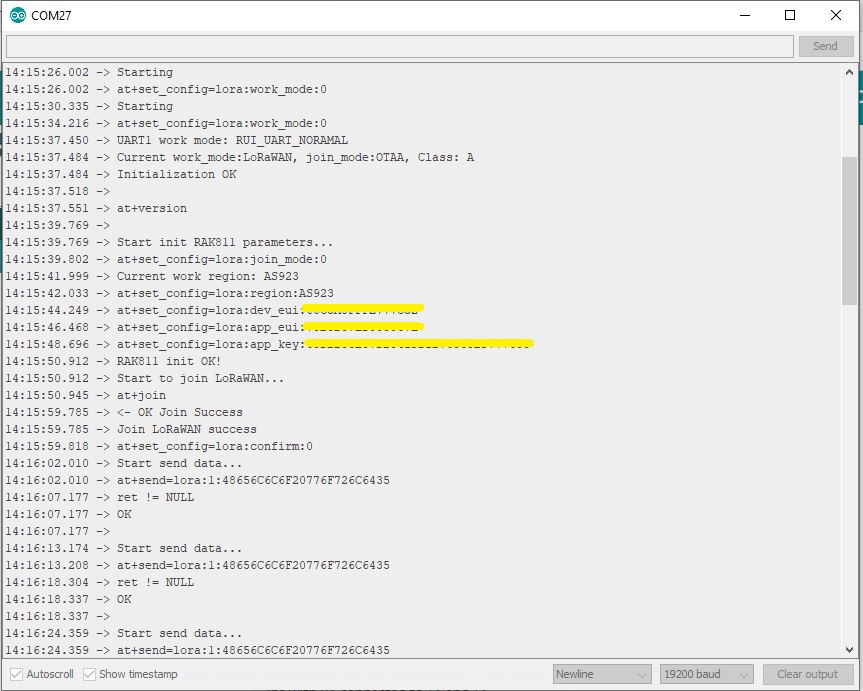
I used an FTDI module I had lying around to connect the diagnostic logging serial port on the test rig to my development box.

Using the HW Serial port but with logging.

Now I only had to unplug the jumpers for D0&D1 and change ports in the Arduino IDE. One port for debugging the other for downloading.

Depending on the application I may remove R8 so I can manually reset the shield.

RAK811 LPWAN EVB Part1

I followed the instructions…

Just over a week ago I purchased some gear from RAK Wireless, the shipping was reasonable, it arrived promptly, and was well packaged. I had ordered

I figured a good first project would be to get the evaluation board going with one of my older Arduino Uno R3 devices following the Interfacing your RAK811 LPWAN Evaluation Board with Arduino Boards instructions.

The evaluation board was in its own box along with a USB cable, some spare PCB jumpers, some jumper leads and an antenna labeled with the frequency band which was thoughtful.

Arduino Uno R3 and RAK811 LPWAN Evaluation board 5V config

I downloaded the specified library from the RAK Wireless Github repository extracted the contents and copied the V1.3 directory into the libraries folder of my Arduino IDE install.

I updated the module software to the latest using the tools provided in the github download and checked this with the RAK Serial Port tool over the Universal Serial Bus(USB) connection (make sure the jumpers next to the antenna connection are set correctly)

Version number check with RAK Serial Port tool

I created a new project based on JoinNetworkOTAA (Over the Air Activation) example.

/********************************************************
 * This demo is only supported after RUI firmware version 3.0.0.13.X on RAK811
 * Master Board Uart Receive buffer size at least 128 bytes. 
 ********************************************************/

#include "RAK811.h"
#include "SoftwareSerial.h"
#define WORK_MODE LoRaWAN   //  LoRaWAN or LoRaP2P
#define JOIN_MODE OTAA    //  OTAA or ABP
#if JOIN_MODE == OTAA
String DevEui = "8680000000000001";
String AppEui = "70B3D57ED00285A7";
String AppKey = "DDDFB1023885FBFF74D3A55202EDF2B1";
#else JOIN_MODE == ABP
String NwkSKey = "69AF20AEA26C01B243945A28C9172B42";
String AppSKey = "841986913ACD00BBC2BE2479D70F3228";
String DevAddr = "260125D7";
#endif
#define TXpin 11   // Set the virtual serial port pins
#define RXpin 10
#define DebugSerial Serial
SoftwareSerial ATSerial(RXpin,TXpin);    // Declare a virtual serial port
char buffer[]= "72616B776972656C657373";

bool InitLoRaWAN(void);
RAK811 RAKLoRa(ATSerial,DebugSerial);


void setup() {
  DebugSerial.begin(115200);
  while(DebugSerial.available())
  {
    DebugSerial.read(); 
  }
  
  ATSerial.begin(9600); //set ATSerial baudrate:This baud rate has to be consistent with  the baud rate of the WisNode device.
  while(ATSerial.available())
  {
    ATSerial.read(); 
  }

  if(!RAKLoRa.rk_setWorkingMode(0))  //set WisNode work_mode to LoRaWAN.
  {
    DebugSerial.println(F("set work_mode failed, please reset module."));
    while(1);
  }
  
  RAKLoRa.rk_getVersion();  //get RAK811 firmware version
  DebugSerial.println(RAKLoRa.rk_recvData());  //print version number

  DebugSerial.println(F("Start init RAK811 parameters..."));
 
  if (!InitLoRaWAN())  //init LoRaWAN
  {
    DebugSerial.println(F("Init error,please reset module.")); 
    while(1);
  }

  DebugSerial.println(F("Start to join LoRaWAN..."));
  while(!RAKLoRa.rk_joinLoRaNetwork(60))  //Joining LoRaNetwork timeout 60s
  {
    DebugSerial.println();
    DebugSerial.println(F("Rejoin again after 5s..."));
    delay(5000);
  }
  DebugSerial.println(F("Join LoRaWAN success"));

  if(!RAKLoRa.rk_isConfirm(0))  //set LoRa data send package type:0->unconfirm, 1->confirm
  {
    DebugSerial.println(F("LoRa data send package set error,please reset module.")); 
    while(1);    
  }
}

bool InitLoRaWAN(void)
{
  if(RAKLoRa.rk_setJoinMode(JOIN_MODE))  //set join_mode:OTAA
  {
    if(RAKLoRa.rk_setRegion(0))  //set region EU868
    {
      if (RAKLoRa.rk_initOTAA(DevEui, AppEui, AppKey))
      {
        DebugSerial.println(F("RAK811 init OK!"));  
        return true;    
      }
    }
  }
  return false;
}

void loop() {
  DebugSerial.println(F("Start send data..."));
  if (RAKLoRa.rk_sendData(1, buffer))
  {    
    for (unsigned long start = millis(); millis() - start < 90000L;)
    {
      String ret = RAKLoRa.rk_recvData();
      if(ret != NULL)
      { 
        DebugSerial.println(ret);
      }
      if((ret.indexOf("OK")>0)||(ret.indexOf("ERROR")>0))
      {
        DebugSerial.println(F("Go to Sleep."));
        RAKLoRa.rk_sleep(1);  //Set RAK811 enter sleep mode
        delay(10000);  //delay 10s
        RAKLoRa.rk_sleep(0);  //Wakeup RAK811 from sleep mode
        break;
      }
    }
  }
}

I had to look at the library code to work out the value the rk_setRegion call needed for the AS932 band used in my region

bool RAK811::rk_setRegion(int region)
{
  if (region > 9)
  {
    _serial1.println(F("Parameter error"));
    return false;
  }
  String REGION;
  switch (region)
  {
    case 0:REGION="AS923";
      break;
    case 1:REGION="AU915";
      break;
    case 2:REGION="CN470";
      break;
    case 3:REGION="CN779";
      break;
    case 4:REGION="EU433";
      break;
    case 5:REGION="EU868";
      break;
    case 6:REGION="KR920";
      break;
    case 7:REGION="IN865";
      break;
    case 8:REGION="US915";
      break;
    case 9:REGION="US915_Hybrid";
      break;
  }
  _serial1.println("Current work region: "+REGION);
  sendRawCommand("at+set_config=lora:region:" + REGION);
  ret = rk_recvData();
#if defined DEBUG_MODE
  _serial1.println(ret);
#endif
  if (ret.indexOf("OK") >= 0)
  {
    return true;
  }
  else
  {
    return false;
  }
}

I compiled the code, uploaded it to my device and it didn’t work…

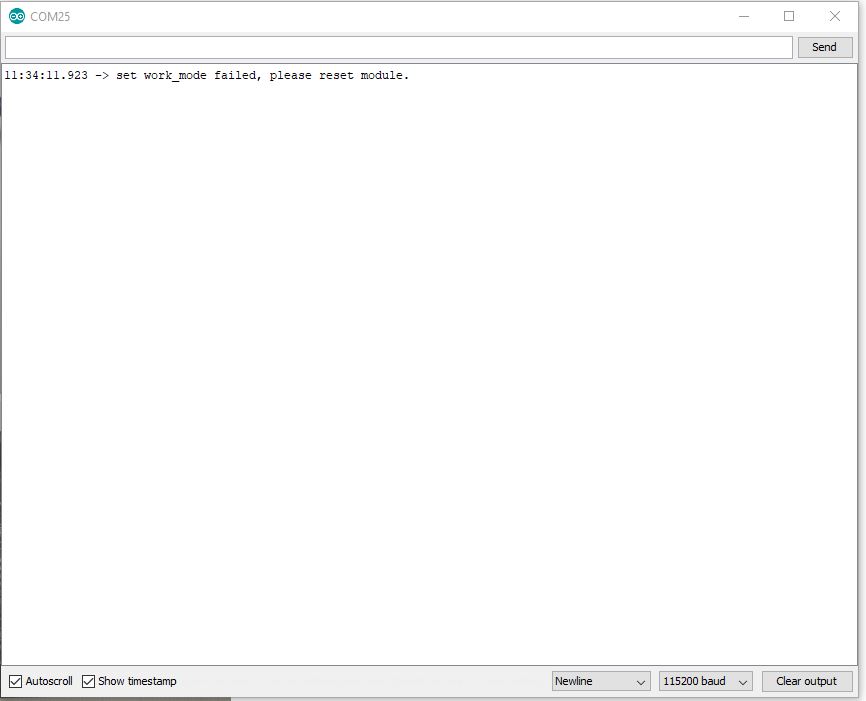
Arduino monitor output showing rk_setWorkingMode failing

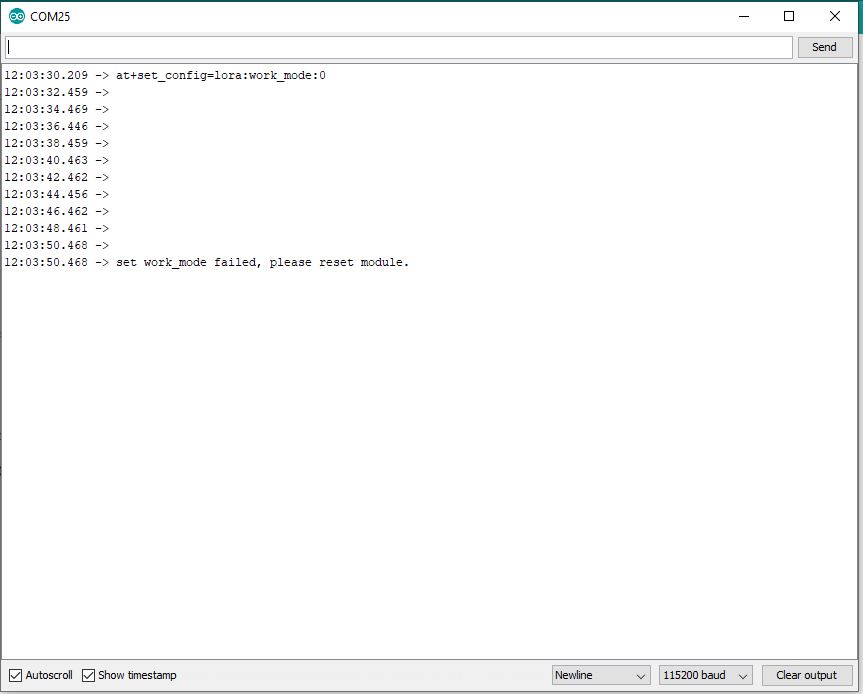
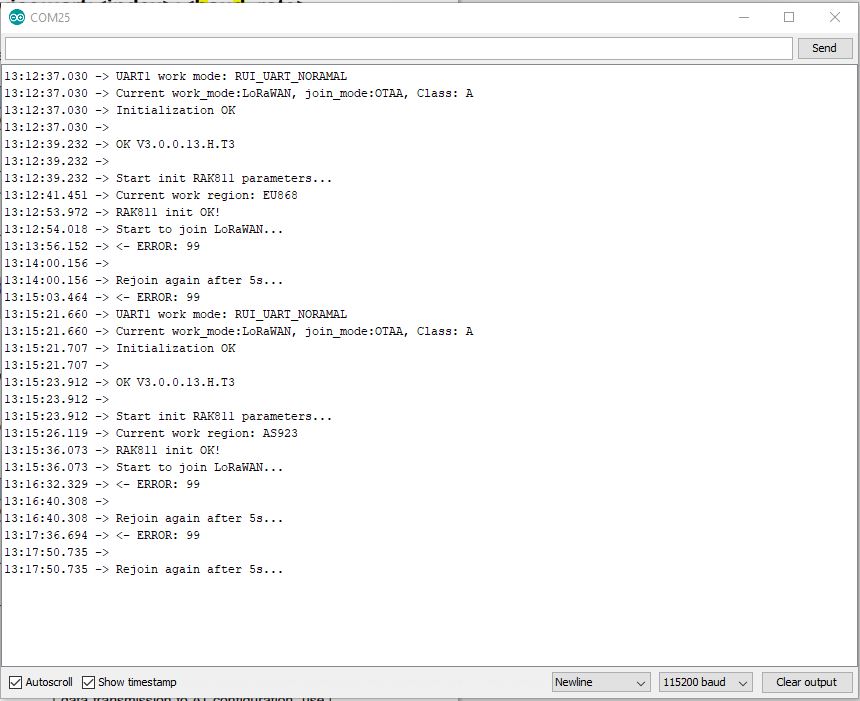
I then had a look at the Arduino library code and enabled some of the commented out diagnostic println statements. At the time it did seem odd there were no responses from the module.

Arduino monitor output showing rk_setWorkingMode failing with debugging

I had noticed some odd characters in the RAK Serial Port Tool while checking version numbers etc.

Setting work Mode with RAK Serial Port Tool

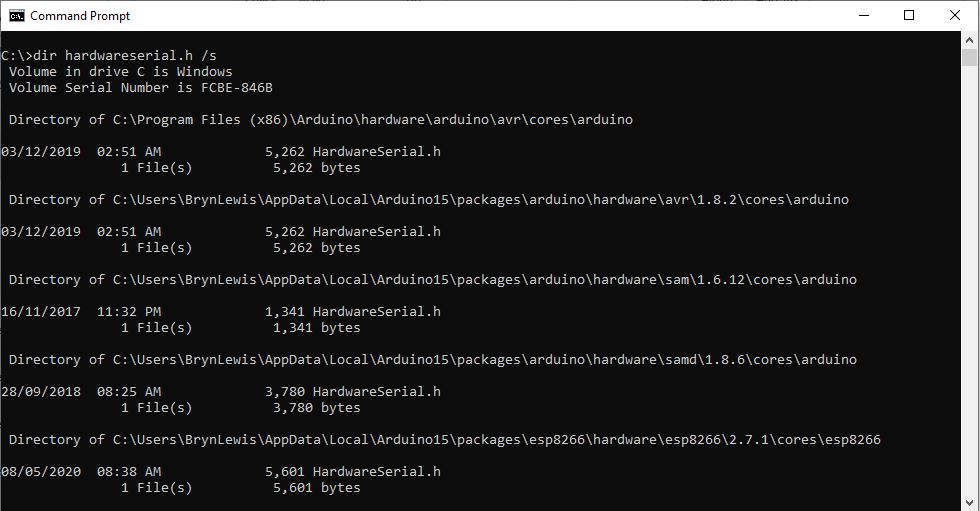
It looked like maybe the serial port was having some issues, so I double checked my modification of the HardwareSerial.h file and began to wonder (as the binary size wasn’t changing) if I had the right file. After some research I found there are several copies of that file and I wasn’t modifying the correct one.

Multiple locations of HardwareSerial.h

Then I realised that the port sending AT Commands to the module was actually a SoftwareSerial port not a hardware one. I then tried changing the size of the software serial buffers but still was having problems.

Arduino tool with default buffer sizes (833 bytes)
Arduino tool with non-default buffer sizes (961 bytes)

I then tried recompiling with different settings to see if the serial port issues would stop. The global variables size changed which showed I had the right files/settings but the code still didn’t work.

Going back over my settings I tried the command used in the rk_setWorkingMode call in the RAK Serial Port Tool and it worked.

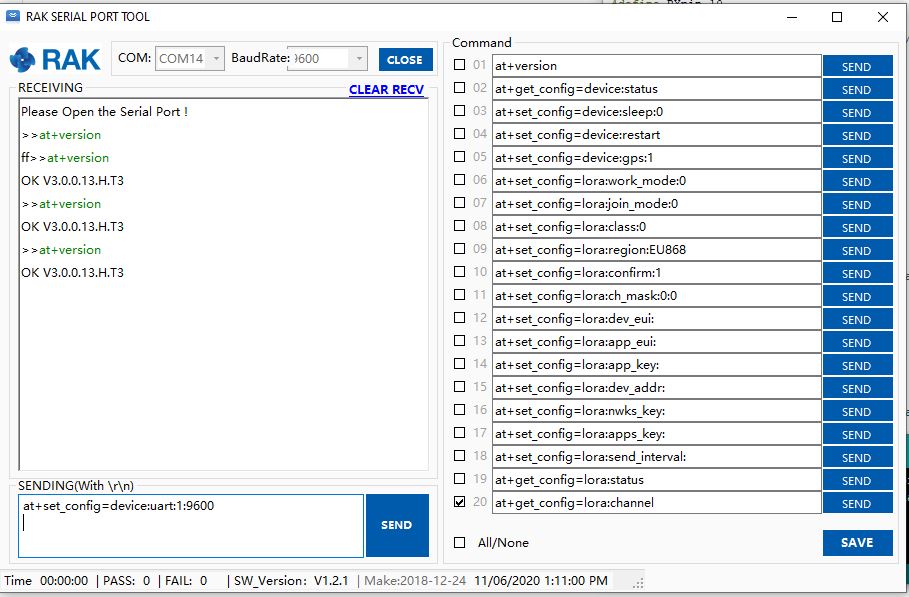
I then then went for a walk and when I came back I realised the module speed was set to 115200 baud by default (which it is). I then used at+set_config=device:uart:1:9600 (don’t forget to press <enter> at end of the line) to set baud rate to match the code.

Setting device to 9600 baud

I then changed the jumpers and ran the software again…

So, it looks like the RAK811 module was set to 115200 baud (web based setup instructions), but the later library versions were 9600 baud, but the instructions didn’t mention the need to change the speed with the RAK Serial port tool.

Image of code and setup from RAK instructions

Now that my device is trying to connect to a network I need to configure the LoRaWAN network settings. I’m going to use the RAK7246G LPWAN Developer Gateway and the nationwide LoRaWAN network operated by Spark in New Zealand.

RFM9X.NetNF on Netduino

After publishing my RFM9X.NetMF library working I noticed a Netduino 3 Wifi sitting at the back of my desk. I have got a few Netduinos and NanoFramework support (as a reference platform) for the Netduino 3 Wifi had caught my attention.

Netduino 3 Wifi LoRa test rig

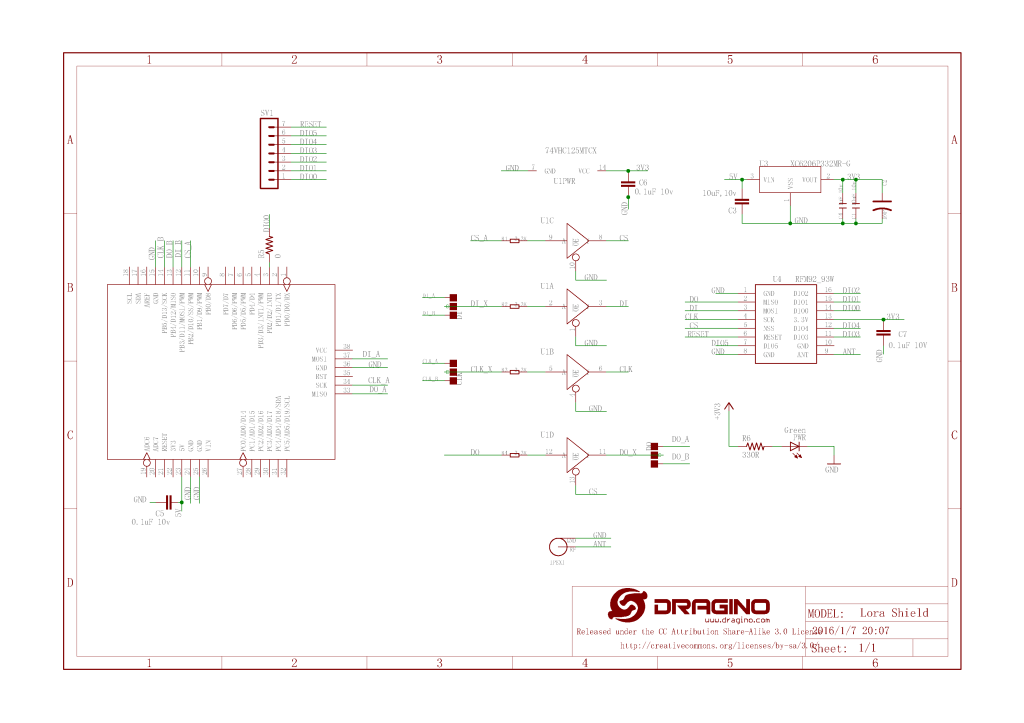
The first step was to get the chip select, reset and Serial Peripheral interface(SPI) configurations sorted. I’m using a Dragino LoRa shield for Arduino and a Netduino 3 Wifi.

Dragino LoRa Shield Schematic

The first step was to figure out the configuration using the 00.Shield project. After some experimentation I figured out the SPI port connected to D10-D13 was SPI2 (SPI1 is connected to the MicroSD port)

//---------------------------------------------------------------------------------
// Copyright (c) April 2020, devMobile Software
//
// Licensed under the Apache License, Version 2.0 (the "License");
// you may not use this file except in compliance with the License.
// You may obtain a copy of the License at
//
//     http://www.apache.org/licenses/LICENSE-2.0
//
// Unless required by applicable law or agreed to in writing, software
// distributed under the License is distributed on an "AS IS" BASIS,
// WITHOUT WARRANTIES OR CONDITIONS OF ANY KIND, either express or implied.
// See the License for the specific language governing permissions and
// limitations under the License.
//
//---------------------------------------------------------------------------------
//#define ESP32_WROOM_32_LORA_1_CHANNEL   //nanoff --target ESP32_WROOM_32 --serialport COM4 --update
#define NETDUINO3_WIFI   // nanoff --target NETDUINO3_WIFI --update
//NOTE May 2020 ST_NUCLEO64_F091RC device doesn't work something broken in SPI configuration
//#define ST_NUCLEO64_F091RC // nanoff --target ST_NUCLEO64_F091RC --update
//#define ST_STM32F429I_DISCOVERY       //nanoff --target ST_STM32F429I_DISCOVERY --update
//NOTE May 2020 ST_STM32F769I_DISCOVERY device doesn't work SPI2 mappings broken 
//#define ST_STM32F769I_DISCOVERY      // nanoff --target ST_STM32F769I_DISCOVERY --update 
namespace devMobile.IoT.Rfm9x.ShieldSPI
{
   using System;
   using System.Diagnostics;
   using System.Threading;

   using Windows.Devices.Gpio;
   using Windows.Devices.Spi;

#if ESP32_WROOM_32_LORA_1_CHANNEL
   using nanoFramework.Hardware.Esp32;
#endif

   public class Program
   {
      private const byte RegVersion = 0x42;
#if ESP32_WROOM_32_LORA_1_CHANNEL
      private const string SpiBusId = "SPI1";
#endif
#if NETDUINO3_WIFI
      private const string SpiBusId = "SPI2";
#endif
#if ST_NUCLEO64_F091RC
      private const string SpiBusId = "SPI1";
#endif
#if ST_STM32F429I_DISCOVERY
      private const string SpiBusId = "SPI5";
#endif
#if ST_STM32F769I_DISCOVERY
      private const string SpiBusId = "SPI5";
#endif

      public static void Main()
      {
#if ESP32_WROOM_32_LORA_1_CHANNEL // No reset line for this device as it isn't connected on SX127X
         int ledPinNumber = Gpio.IO17;
         int chipSelectPinNumber = Gpio.IO16;
#endif
#if NETDUINO3_WIFI
         int ledPinNumber  = PinNumber('A', 10);
         // Arduino D10->PB10
         int chipSelectPinNumber = PinNumber('B', 10);
         // Arduino D9->PE5
         int resetPinNumber = PinNumber('E', 5);
#endif
#if ST_NUCLEO64_F091RC // No LED for this device as driven by D13 the SPI CLK line
         // Arduino D10->PB6
         int chipSelectPinNumber = PinNumber('B', 6);
         // Arduino D9->PC7
         int resetPinNumber = PinNumber('C', 7);
#endif
#if ST_STM32F429I_DISCOVERY // No reset line for this device as I didn't bother with jumper to SX127X pin
         int ledPinNumber  = PinNumber('G', 14);
         int chipSelectPinNumber = PinNumber('C', 2);
#endif
#if ST_STM32F769I_DISCOVERY
         int ledPinNumber  = PinNumber('J', 5);
         // Arduino D10->PA11
         int chipSelectPinNumber = PinNumber('A', 11);
         // Arduino D9->PH6
         int resetPinNumber = PinNumber('H', 6);
#endif
         Debug.WriteLine("devMobile.IoT.Rfm9x.ShieldSPI starting");

         try
         {
            GpioController gpioController = GpioController.GetDefault();

#if NETDUINO3_WIFI|| ST_NUCLEO64_F091RC || ST_STM32F769I_DISCOVERY
            // Setup the reset pin
            GpioPin resetGpioPin = gpioController.OpenPin(resetPinNumber);
            resetGpioPin.SetDriveMode(GpioPinDriveMode.Output);
            resetGpioPin.Write(GpioPinValue.High);
#endif

#if ESP32_WROOM_32_LORA_1_CHANNEL || NETDUINO3_WIFI|| ST_STM32F429I_DISCOVERY || ST_STM32F769I_DISCOVERY
            // Setup the onboard LED
            GpioPin led = gpioController.OpenPin(ledPinNumber);
            led.SetDriveMode(GpioPinDriveMode.Output);
#endif

#if ESP32_WROOM_32_LORA_1_CHANNEL
            Configuration.SetPinFunction(nanoFramework.Hardware.Esp32.Gpio.IO12, DeviceFunction.SPI1_MISO);
            Configuration.SetPinFunction(nanoFramework.Hardware.Esp32.Gpio.IO13, DeviceFunction.SPI1_MOSI);
            Configuration.SetPinFunction(nanoFramework.Hardware.Esp32.Gpio.IO14, DeviceFunction.SPI1_CLOCK);
#endif

            var settings = new SpiConnectionSettings(chipSelectPinNumber)
            {
               ClockFrequency = 500000,
               Mode = SpiMode.Mode0,// From SemTech docs pg 80 CPOL=0, CPHA=0
               SharingMode = SpiSharingMode.Shared,
            };

            using (SpiDevice device = SpiDevice.FromId(SpiBusId, settings))
            {
               Thread.Sleep(500);
            
               while (true)
               {
                  byte[] writeBuffer = new byte[] { RegVersion, 0x0 };
                  byte[] readBuffer = new byte[writeBuffer.Length];

                  device.TransferFullDuplex(writeBuffer, readBuffer);

                  Debug.WriteLine(String.Format("Register 0x{0:x2} - Value 0X{1:x2}", RegVersion, readBuffer[1]));

                  #if ESP32_WROOM_32_LORA_1_CHANNEL|| NETDUINO3_WIFI || ST_STM32F429I_DISCOVERY || ST_STM32F769I_DISCOVERY
                     led.Toggle();
                  #endif
                  Thread.Sleep(10000);
               }
            }
         }
         catch (Exception ex)
         {
            Debug.WriteLine(ex.Message);
         }
      }

#if  NETDUINO3_WIFI || ST_NUCLEO64_F091RC || ST_STM32F429I_DISCOVERY || ST_STM32F769I_DISCOVERY
      static int PinNumber(char port, byte pin)
      {
         if (port < 'A' || port > 'J')
            throw new ArgumentException();

         return ((port - 'A') * 16) + pin;
      }
#endif
   }
}

In the Visual Studio output windows I could see the correct version register value

The thread '<No Name>' (0x2) has exited with code 0 (0x0).
devMobile.IoT.Rfm9x.ShieldSPI starting
Register 0x42 - Value 0X12
...

After checking the configuration of the reset (D9) and interrupt (D2) pins in other test harness programs my final configuration for Rfm9xLoRaDevice client was

//---------------------------------------------------------------------------------
// Copyright (c) April/May 2020, devMobile Software
//
// Licensed under the Apache License, Version 2.0 (the "License");
// you may not use this file except in compliance with the License.
// You may obtain a copy of the License at
//
//     http://www.apache.org/licenses/LICENSE-2.0
//
// Unless required by applicable law or agreed to in writing, software
// distributed under the License is distributed on an "AS IS" BASIS,
// WITHOUT WARRANTIES OR CONDITIONS OF ANY KIND, either express or implied.
// See the License for the specific language governing permissions and
// limitations under the License.
//
//---------------------------------------------------------------------------------
//#define ADDRESSED_MESSAGES_PAYLOAD
//#define ESP32_WROOM_32_LORA_1_CHANNEL   //nanoff --target ESP32_WROOM_32 --serialport COM4 --update
#define NETDUINO3_WIFI   // nanoff --target NETDUINO3_WIFI --update
//#define ST_STM32F429I_DISCOVERY       //nanoff --target ST_STM32F429I_DISCOVERY --update
namespace devMobile.IoT.Rfm9x.LoRaDeviceClient
{
	using System;
	using System.Diagnostics;
	using System.Text;
	using System.Threading;

#if ESP32_WROOM_32_LORA_1_CHANNEL
	using nanoFramework.Hardware.Esp32;
#endif

	using devMobile.IoT.Rfm9x;

	class Program
	{
		private const double Frequency = 915000000.0;
#if ST_STM32F429I_DISCOVERY
		private const string DeviceName = "Disco429";
		private const string SpiBusId = "SPI5";
#endif
#if ESP32_WROOM_32_LORA_1_CHANNEL
		private const string DeviceName = "ESP32";
		private const string SpiBusId = "SPI1";
#endif
#if NETDUINO3_WIFI
		private const string DeviceName = "N3W";
		private const string SpiBusId = "SPI2";
#endif
#if ADDRESSED_MESSAGES_PAYLOAD
		private const string DeviceName = "LoRaIoT1";
#endif

		static void Main()
		{
			byte MessageCount = System.Byte.MaxValue;
#if ST_STM32F429I_DISCOVERY
			int chipSelectPinNumber = PinNumber('C', 2);
			int resetPinNumber = PinNumber('C', 3);
			int interruptPinNumber = PinNumber('A', 4);
#endif
#if ESP32_WROOM_32_LORA_1_CHANNEL
         int chipSelectPinNumber = Gpio.IO16;
         int interruptPinNumber = Gpio.IO26;

			Configuration.SetPinFunction(Gpio.IO12, DeviceFunction.SPI1_MISO);
			Configuration.SetPinFunction(Gpio.IO13, DeviceFunction.SPI1_MOSI);
			Configuration.SetPinFunction(Gpio.IO14, DeviceFunction.SPI1_CLOCK);

			Rfm9XDevice rfm9XDevice = new Rfm9XDevice(SpiBusId, chipSelectPinNumber, interruptPinNumber);
#endif
#if NETDUINO3_WIFI
			// Arduino D10->PB10
			int chipSelectPinNumber = PinNumber('B', 10);
			// Arduino D9->PE5
			int resetPinNumber = PinNumber('E', 5);
			// Arduino D2->PA3
			int interruptPinNumber = PinNumber('A', 3);
#endif

#if ST_STM32F429I_DISCOVERY || NETDUINO3_WIFI
			Rfm9XDevice rfm9XDevice = new Rfm9XDevice(SpiBusId, chipSelectPinNumber, resetPinNumber, interruptPinNumber);
#endif
			rfm9XDevice.Initialise(Frequency, paBoost: true);

#if DEBUG
			rfm9XDevice.RegisterDump();
#endif

			rfm9XDevice.OnReceive += Rfm9XDevice_OnReceive;
#if ADDRESSED_MESSAGES_PAYLOAD
			rfm9XDevice.Receive(UTF8Encoding.UTF8.GetBytes(DeviceName));
#else
			rfm9XDevice.Receive();
#endif
			rfm9XDevice.OnTransmit += Rfm9XDevice_OnTransmit;

			Thread.Sleep(10000);

			while (true)
			{
				string messageText = string.Format("Hello from {0} ! {1}", DeviceName, MessageCount);
				MessageCount -= 1;

				byte[] messageBytes = UTF8Encoding.UTF8.GetBytes(messageText);
				Debug.WriteLine(string.Format("{0}-TX {1} byte message {2}", DateTime.UtcNow.ToString("HH:mm:ss"), messageBytes.Length, messageText));
#if ADDRESSED_MESSAGES_PAYLOAD
				rfm9XDevice.Send(UTF8Encoding.UTF8.GetBytes(HostName), messageBytes);
#else
				rfm9XDevice.Send(messageBytes);
#endif
				Thread.Sleep(10000);
			}
		}

		private static void Rfm9XDevice_OnReceive(object sender, Rfm9XDevice.OnDataReceivedEventArgs e)
		{
			try
			{
				// Remove unprintable characters from messages
				for (int index = 0; index < e.Data.Length; index++)
				{
					if ((e.Data[index] < 0x20) || (e.Data[index] > 0x7E))
					{
						e.Data[index] = 0x20;
					}
				}

				string messageText = UTF8Encoding.UTF8.GetString(e.Data, 0, e.Data.Length);

#if ADDRESSED_MESSAGES_PAYLOAD
				string addressText = UTF8Encoding.UTF8.GetString(e.Address, 0, e.Address.Length);

				Debug.WriteLine(string.Format(@"{0}-RX From {1} PacketSnr {2} Packet RSSI {3}dBm RSSI {4}dBm ={5} ""{6}""", DateTime.UtcNow.ToString("HH:mm:ss"), addressText, e.PacketSnr, e.PacketRssi, e.Rssi, e.Data.Length, messageText));
#else
				Debug.WriteLine(string.Format(@"{0}-RX PacketSnr {1} Packet RSSI {2}dBm RSSI {3}dBm ={4} ""{5}""", DateTime.UtcNow.ToString("HH:mm:ss"), e.PacketSnr, e.PacketRssi, e.Rssi, e.Data.Length, messageText));
#endif
			}
			catch (Exception ex)
			{
				Debug.WriteLine(ex.Message);
			}
		}

		private static void Rfm9XDevice_OnTransmit(object sender, Rfm9XDevice.OnDataTransmitedEventArgs e)
		{
			Debug.WriteLine(string.Format("{0}-TX Done", DateTime.UtcNow.ToString("HH:mm:ss")));
		}

#if ST_STM32F429I_DISCOVERY || NETDUINO3_WIFI
		static int PinNumber(char port, byte pin)
      {
         if (port < 'A' || port > 'J')
            throw new ArgumentException();

         return ((port - 'A') * 16) + pin;
      }
#endif
	}
}


The sample client could reliable send and receive messages.

The thread '<No Name>' (0x2) has exited with code 0 (0x0).
Register dump
Register 0x00 - Value 0X7A
Register 0x01 - Value 0X80
Register 0x02 - Value 0X1A
Register 0x03 - Value 0X0B
Register 0x04 - Value 0X00
Register 0x05 - Value 0X52
Register 0x06 - Value 0XE4
Register 0x07 - Value 0XC0
Register 0x08 - Value 0X00
Register 0x09 - Value 0XCF
Register 0x0A - Value 0X09
Register 0x0B - Value 0X2B
Register 0x0C - Value 0X20
Register 0x0D - Value 0X01
Register 0x0E - Value 0X80
Register 0x0F - Value 0X00
Register 0x10 - Value 0X00
Register 0x11 - Value 0X00
Register 0x12 - Value 0X00
Register 0x13 - Value 0X00
Register 0x14 - Value 0X00
Register 0x15 - Value 0X00
Register 0x16 - Value 0X00
Register 0x17 - Value 0X00
Register 0x18 - Value 0X10
Register 0x19 - Value 0X00
Register 0x1A - Value 0X00
Register 0x1B - Value 0X00
Register 0x1C - Value 0X00
Register 0x1D - Value 0X72
Register 0x1E - Value 0X70
Register 0x1F - Value 0X64
Register 0x20 - Value 0X00
Register 0x21 - Value 0X08
Register 0x22 - Value 0X01
Register 0x23 - Value 0XFF
Register 0x24 - Value 0X00
Register 0x25 - Value 0X00
Register 0x26 - Value 0X04
Register 0x27 - Value 0X00
Register 0x28 - Value 0X00
Register 0x29 - Value 0X00
Register 0x2A - Value 0X00
Register 0x2B - Value 0X00
Register 0x2C - Value 0X00
Register 0x2D - Value 0X50
Register 0x2E - Value 0X14
Register 0x2F - Value 0X45
Register 0x30 - Value 0X55
Register 0x31 - Value 0XC3
Register 0x32 - Value 0X05
Register 0x33 - Value 0X27
Register 0x34 - Value 0X1C
Register 0x35 - Value 0X0A
Register 0x36 - Value 0X03
Register 0x37 - Value 0X0A
Register 0x38 - Value 0X42
Register 0x39 - Value 0X12
Register 0x3A - Value 0X49
Register 0x3B - Value 0X1D
Register 0x3C - Value 0X00
Register 0x3D - Value 0XAF
Register 0x3E - Value 0X00
Register 0x3F - Value 0X00
Register 0x40 - Value 0X00
Register 0x41 - Value 0X00
Register 0x42 - Value 0X12
00:00:25-TX 20 byte message Hello from N3W ! 255
00:00:25-TX Done
00:00:35-TX 20 byte message Hello from N3W ! 254
00:00:35-TX Done
00:00:45-TX 20 byte message Hello from N3W ! 253
00:00:45-TX Done
00:00:46-RX PacketSnr 9.50 Packet RSSI -70dBm RSSI -110dBm =59 " LoRaIoT1Maduino2at 43.9,ah 75,wsa 1,wsg 2,wd 36.00,r 0.00,"
00:00:55-TX 20 byte message Hello from N3W ! 252
00:00:55-TX Done
00:01:05-TX 20 byte message Hello from N3W ! 251
00:01:05-TX Done

Overall the process was fairly painless and helped identify a bug in the configuration of the Mode register in one of the test harness applications.

TinyCLR OS V2 nRF24L01 library Part2

After sorting out Serial Peripheral Interface(SPI) connectivity the next step porting the techfooninja nRF24L01P library to GHI Electronics TinyCLR was rewriting the initialisation code. Overall changes were minimal as the TinyCLR V2 SPI library has similar methods to the Windows 10 IoT Core ones.

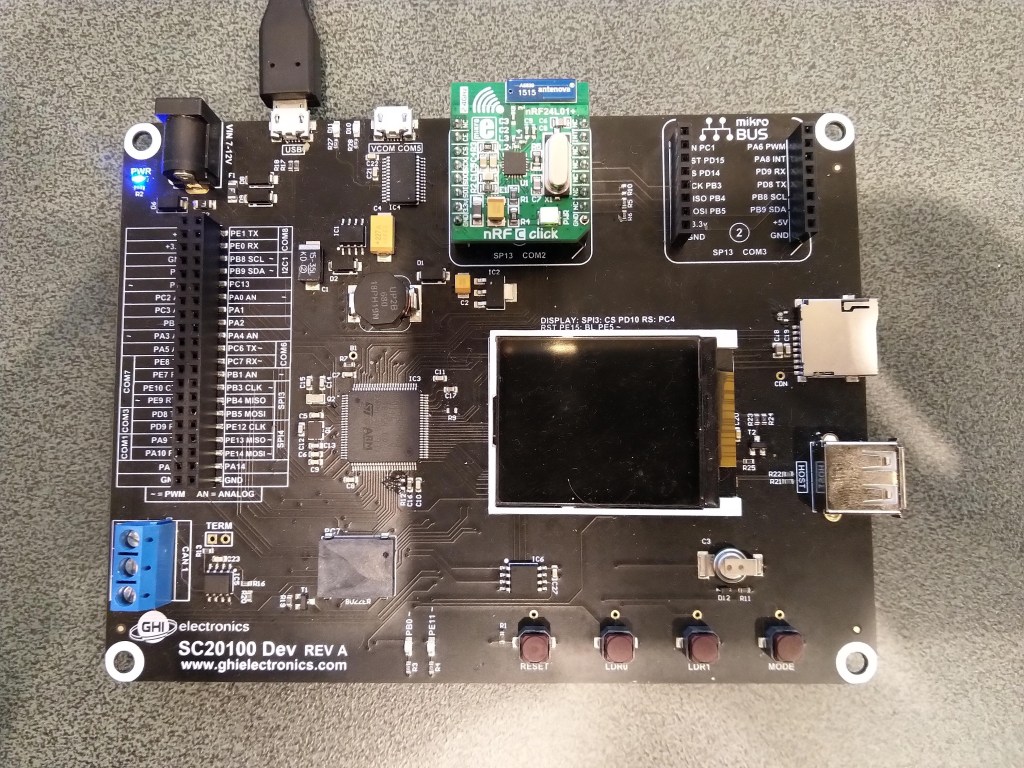
SC20100 and MikroE nRF24 C Click

I need to refactor the initialise method so that failure exceptions are not caught and add the interrupt trigger edge so I can remove test from the handler.

      public void Initialize(string spiPortName, byte chipEnablePin, byte chipSelectPin, byte interruptPin, int clockFrequency = 2000000)
      {
         var gpio = GpioController.GetDefault();

         if (gpio == null)
         {
            Debug.WriteLine("GPIO Initialization failed.");
         }
         else
         {
            _cePin = gpio.OpenPin(chipEnablePin);
            _cePin.SetDriveMode(GpioPinDriveMode.Output);
            _cePin.Write(GpioPinValue.Low);

            _irqPin = gpio.OpenPin((byte)interruptPin);
            _irqPin.SetDriveMode(GpioPinDriveMode.InputPullUp);
            _irqPin.Write(GpioPinValue.High);
            _irqPin.ValueChanged += _irqPin_ValueChanged;
         }

         try
         {
            var settings = new SpiConnectionSettings()
            {
               ChipSelectType = SpiChipSelectType.Gpio,
               ChipSelectLine = gpio.OpenPin(chipSelectPin),
               Mode = SpiMode.Mode0,
               ClockFrequency = clockFrequency,
               ChipSelectActiveState = false,
            };

            SpiController controller = SpiController.FromName(spiPortName);
            _spiPort = controller.GetDevice(settings);
         }
         catch (Exception ex)
         {
            Debug.WriteLine("SPI Initialization failed. Exception: " + ex.Message);
            return;
         }

         // Module reset time
         Thread.Sleep(100);

         IsInitialized = true;

         // Set reasonable default values
         Address = Encoding.UTF8.GetBytes("NRF1");
         DataRate = DataRate.DR2Mbps;
         IsDynamicPayload = true;
         IsAutoAcknowledge = true;

         FlushReceiveBuffer();
         FlushTransferBuffer();
         ClearIrqMasks();
         SetRetries(5, 60);

         // Setup, CRC enabled, Power Up, PRX
         SetReceiveMode();
      }

The Initialise method gained parameters for the SPI port name and SPI clock frequency.

      static void Main()
      {
         RF24 Radio = new RF24();

         try
         {
            Radio.OnDataReceived += Radio_OnDataReceived;
            Radio.OnTransmitFailed += Radio_OnTransmitFailed;
            Radio.OnTransmitSuccess += Radio_OnTransmitSuccess;

            // SC20100.GpioPin.PD3
            Radio.Initialize(SC20100.SpiBus.Spi3, SC20100.GpioPin.PD4, SC20100.GpioPin.PD3, SC20100.GpioPin.PC5);
            Radio.Address = Encoding.UTF8.GetBytes(DeviceAddress);

            Radio.Channel = 15;
            //Radio.PowerLevel = PowerLevel.Max;
            //Radio.PowerLevel = PowerLevel.High;
            //Radio.PowerLevel = PowerLevel.Low;
            //Radio.PowerLevel = PowerLevel.Minimum
            Radio.DataRate = DataRate.DR250Kbps;
            //Radio.DataRate = DataRate.DR1Mbps;
            Radio.IsEnabled = true;

            Radio.IsAutoAcknowledge = true;
            Radio.IsDyanmicAcknowledge = false;
            Radio.IsDynamicPayload = true;

            Debug.WriteLine($"Address: {Encoding.UTF8.GetString(Radio.Address)}");
            Debug.WriteLine($"PowerLevel: {Radio.PowerLevel}");
            Debug.WriteLine($"IsAutoAcknowledge: {Radio.IsAutoAcknowledge}");
            Debug.WriteLine($"Channel: {Radio.Channel}");
            Debug.WriteLine($"DataRate: {Radio.DataRate}");
            Debug.WriteLine($"IsDynamicAcknowledge: {Radio.IsDyanmicAcknowledge}");
            Debug.WriteLine($"IsDynamicPayload: {Radio.IsDynamicPayload}");
            Debug.WriteLine($"IsEnabled: {Radio.IsEnabled}");
            Debug.WriteLine($"Frequency: {Radio.Frequency}");
            Debug.WriteLine($"IsInitialized: {Radio.IsInitialized}");
            Debug.WriteLine($"IsPowered: {Radio.IsPowered}");

            while (true)
            {
               string payload = "hello " + DateTime.Now.Second;
               Debug.WriteLine($"{DateTime.UtcNow:HH:mm:ss}-TX {payload.Length} byte message {payload}");
               Radio.SendTo(Encoding.UTF8.GetBytes(BaseStationAddress), Encoding.UTF8.GetBytes(payload));

               Thread.Sleep(30000);
            }
         }
         catch (Exception ex)
         {
            Debug.WriteLine(ex.Message);

            return;
         }
      }

I can send and receive messages but the PowerLevel doesn’t look right so I need to apply fix from the Meadow version.

The thread '<No Name>' (0x2) has exited with code 0 (0x0).
Address: Dev01
PowerLevel: 15
IsAutoAcknowledge: True
Channel: 15
DataRate: 2
IsDynamicAcknowledge: False
IsDynamicPayload: True
IsEnabled: False
Frequency: 2415
IsInitialized: True
IsPowered: True
00:00:01-TX 7 byte message hello 1
Data Sent!
00:00:01-TX Succeeded!
00:00:31-TX 8 byte message hello 31
Data Sent!
00:00:31-TX Succeeded!

TinyCLR OS V2 nRF24L01 library Part1

After debugging Windows 10 IoT Core, .NetMF and Wilderness Labs Meadow nRF24L01P libraries I figured yet another port, this time to a GHI Electronics Tiny CLR V2 powered device shouldn’t be “rocket science”.

This test rig uses SC20100S Dev and MikroE nRF C Click boards.

//---------------------------------------------------------------------------------
// Copyright (c) May 2020, devMobile Software
//
// Licensed under the Apache License, Version 2.0 (the "License");
// you may not use this file except in compliance with the License.
// You may obtain a copy of the License at
//
//     http://www.apache.org/licenses/LICENSE-2.0
//
// Unless required by applicable law or agreed to in writing, software
// distributed under the License is distributed on an "AS IS" BASIS,
// WITHOUT WARRANTIES OR CONDITIONS OF ANY KIND, either express or implied.
// See the License for the specific language governing permissions and
// limitations under the License.
//
//---------------------------------------------------------------------------------
namespace devMobile.IoT.nRf24L01.ModuleSPI
{
   using System;
   using System.Diagnostics;
   using System.Reflection;
   using System.Text;
   using System.Threading;

   using GHIElectronics.TinyCLR.Devices.Gpio;
   using GHIElectronics.TinyCLR.Devices.Spi;
   using GHIElectronics.TinyCLR.Pins;

   class Program
   {
      const byte SETUP_AW = 0x03;
      const byte RF_CH = 0x05;
      const byte RX_ADDR_P0 = 0x0A;
      const byte R_REGISTER = 0b00000000;
      const byte W_REGISTER = 0b00100000;
      const string P0_Address = "ZYXWV";
      static SpiDevice nrf24L01Device;

      static void Main()
      {
         try
         {
            GpioController gpioController = GpioController.GetDefault();

            var settings = new SpiConnectionSettings()
            {
               ChipSelectType = SpiChipSelectType.Gpio,
               //ChipSelectLine = FEZ.GpioPin.D10,
               ChipSelectLine = gpioController.OpenPin(SC20100.GpioPin.PD3),
               Mode = SpiMode.Mode0,
               //Mode = SpiMode.Mode1,
               //Mode = SpiMode.Mode2,
               //Mode = SpiMode.Mode3,
               ClockFrequency = 500000,
               //ChipSelectActiveState = true
               ChipSelectActiveState = false,
               //ChipSelectHoldTime = new TimeSpan(0, 0, 0, 0, 500),
               //ChipSelectSetupTime = new TimeSpan(0, 0, 0, 0, 500),
            };

            var spiController = SpiController.FromName(SC20100.SpiBus.Spi3);

            Debug.WriteLine("nrf24L01Device Device...");
            nrf24L01Device = spiController.GetDevice(settings);
            if (nrf24L01Device == null)
            {
               Debug.WriteLine("nrf24L01Device == null");
            }

            Thread.Sleep(100);

            Debug.WriteLine("ConfigureSpiPort Done...");
            Debug.WriteLine("");

            Thread.Sleep(500);
         }
         catch (Exception ex)
         {
            Debug.WriteLine("Configure SpiPort " + ex.Message);
         }

         try
         {
            // Read the Address width
            Debug.WriteLine("Read address width");
            byte[] txBuffer1 = new byte[] { SETUP_AW | R_REGISTER, 0x0 };
            byte[] rxBuffer1 = new byte[txBuffer1.Length];

            Debug.WriteLine(" nrf24L01Device.TransferFullDuplex...SETUP_AW");
            Debug.WriteLine(" txBuffer:" + BitConverter.ToString(txBuffer1));
            nrf24L01Device.TransferFullDuplex(txBuffer1, rxBuffer1);
            Debug.WriteLine(" rxBuffer:" + BitConverter.ToString(rxBuffer1));

            // Extract then adjust the address width
            byte addressWidthValue = rxBuffer1[1];
            addressWidthValue &= 0b00000011;
            addressWidthValue += 2;
            Debug.WriteLine($"Address width 0x{SETUP_AW:x2} - Value 0X{rxBuffer1[1]:x2} Value adjusted {addressWidthValue}");
            Debug.WriteLine("");

            // Write Pipe0 Receive address
            Debug.WriteLine($"Write Pipe0 Receive Address {P0_Address}");
            byte[] txBuffer2 = new byte[addressWidthValue + 1];
            txBuffer2[0] = RX_ADDR_P0 | W_REGISTER;
            Array.Copy(Encoding.UTF8.GetBytes(P0_Address), 0, txBuffer2, 1, addressWidthValue);

            Debug.WriteLine(" nrf24L01Device.Write...RX_ADDR_P0");
            Debug.WriteLine(" txBuffer:" + BitConverter.ToString(txBuffer2));
            nrf24L01Device.Write(txBuffer2);
            Debug.WriteLine("");

            // Read Pipe0 Receive address
            Debug.WriteLine("Read Pipe0 Receive address");
            byte[] txBuffer3 = new byte[addressWidthValue + 1];
            txBuffer3[0] = RX_ADDR_P0 | R_REGISTER;
            byte[] rxBuffer3 = new byte[txBuffer3.Length];

            Debug.WriteLine(" nrf24L01Device.TransferFullDuplex...RX_ADDR_P0");
            Debug.WriteLine(" txBuffer:" + BitConverter.ToString(txBuffer3));
            nrf24L01Device.TransferFullDuplex(txBuffer3, rxBuffer3);
            Debug.WriteLine(" rxBuffer:" + BitConverter.ToString(rxBuffer3));
            Debug.WriteLine($"Address 0x{RX_ADDR_P0:x2} Address {UTF8Encoding.UTF8.GetString(rxBuffer3, 1, addressWidthValue)}");
            Debug.WriteLine("");

            // Read the RF Channel
            Debug.WriteLine("RF Channel read 1");
            byte[] txBuffer4 = new byte[] { RF_CH | R_REGISTER, 0x0 };
            byte[] rxBuffer4 = new byte[txBuffer4.Length];

            Debug.WriteLine(" nrf24L01Device.TransferFullDuplex...RF_CH");
            Debug.WriteLine(" txBuffer:" + BitConverter.ToString(txBuffer4));
            nrf24L01Device.TransferFullDuplex(txBuffer4, rxBuffer4);
            Debug.WriteLine(" rxBuffer:" + BitConverter.ToString(rxBuffer4));

            ushort rfChannel1 = rxBuffer4[1];
            rfChannel1 += 2400;
            Debug.WriteLine($"RF Channel 1 0x{RF_CH:x2} - Value 0X{rxBuffer4[1]:x2} - Value adjusted {rfChannel1}");
            Debug.WriteLine("");

            // Write the RF Channel
            Debug.WriteLine("RF Channel write");
            byte[] txBuffer5 = new byte[] { RF_CH | W_REGISTER, rxBuffer4[1]+=1};

            Debug.WriteLine(" nrf24L01Device.Write...RF_CH");
            Debug.WriteLine(" txBuffer:" + BitConverter.ToString(txBuffer5));
            nrf24L01Device.Write(txBuffer5);
            Debug.WriteLine("");

            // Read the RF Channel
            Debug.WriteLine("RF Channel read 2");
            byte[] txBuffer6 = new byte[] { RF_CH | R_REGISTER, 0x0 };
            byte[] rxBuffer6 = new byte[txBuffer6.Length];

            Debug.WriteLine(" nrf24L01Device.TransferFullDuplex...RF_CH");
            Debug.WriteLine(" txBuffer:" + BitConverter.ToString(txBuffer6));
            nrf24L01Device.TransferFullDuplex(txBuffer6, rxBuffer6);
            Debug.WriteLine(" rxBuffer:" + BitConverter.ToString(rxBuffer6));

            ushort rfChannel2 = rxBuffer6[1];
            rfChannel2 += 2400;
            Debug.WriteLine($"RF Channel 2 0x{RF_CH:x2} - Value 0X{rxBuffer6[1]:x2} - Value adjusted {rfChannel2}");
            Debug.WriteLine("");
         }
         catch (Exception ex)
         {
            Debug.WriteLine("Configure Port0 " + ex.Message);
         }
      }
   }
}

After lots of tinkering with SPI configuration options I can read and write my nRF24L01 device receive port address

The thread '<No Name>' (0x2) has exited with code 0 (0x0).
nrf24L01Device Device...
ConfigureSpiPort Done...

Read address width
 nrf24L01Device.TransferFullDuplex...SETUP_AW
 txBuffer:03-00
 rxBuffer:0E-03
Address width 0x03 - Value 0X03 Value adjusted 5

Write Pipe0 Receive Address ZYXWV
 nrf24L01Device.Write...RX_ADDR_P0
 txBuffer:2A-5A-59-58-57-56

Read Pipe0 Receive address
 nrf24L01Device.TransferFullDuplex...RX_ADDR_P0
 txBuffer:0A-00-00-00-00-00
 rxBuffer:0E-5A-59-58-57-56
Address 0x0a Address ZYXWV

RF Channel read 1
 nrf24L01Device.TransferFullDuplex...RF_CH
 txBuffer:05-00
 rxBuffer:0E-15
RF Channel 1 0x05 - Value 0X15 - Value adjusted 2421

RF Channel write
 nrf24L01Device.Write...RF_CH
 txBuffer:25-16

RF Channel read 2
 nrf24L01Device.TransferFullDuplex...RF_CH
 txBuffer:05-00
 rxBuffer:0E-16
RF Channel 2 0x05 - Value 0X16 - Value adjusted 2422

RFM9X.NetNF on Github

The source code of my nanoFramework RFM9X/SX127X library is now available on GitHub. One test harness uses an STM32F429 Discovery and a dragino technology LoRa shield for Arduino with some jumper wires.

STM32F429 Discovery kit with Dragino Shield

The other uses Sparkfun LoRa Gateway 1 Channel ESP32 for a LoRaWAN.

A sample application which shows how to send/receive address/un-addressed payloads.

//---------------------------------------------------------------------------------
// Copyright (c) April/May 2020, devMobile Software
//
// Licensed under the Apache License, Version 2.0 (the "License");
// you may not use this file except in compliance with the License.
// You may obtain a copy of the License at
//
//     http://www.apache.org/licenses/LICENSE-2.0
//
// Unless required by applicable law or agreed to in writing, software
// distributed under the License is distributed on an "AS IS" BASIS,
// WITHOUT WARRANTIES OR CONDITIONS OF ANY KIND, either express or implied.
// See the License for the specific language governing permissions and
// limitations under the License.
//
//---------------------------------------------------------------------------------
//#define ADDRESSED_MESSAGES_PAYLOAD
#define ST_STM32F429I_DISCOVERY       //nanoff --target ST_STM32F429I_DISCOVERY --update
//#define ESP32_WROOM_32_LORA_1_CHANNEL   //nanoff --target ESP32_WROOM_32 --serialport COM4 --update
namespace devMobile.IoT.Rfm9x.LoRaDeviceClient
{
	using System;
	using System.Text;
	using System.Threading;

#if ESP32_WROOM_32_LORA_1_CHANNEL
	using nanoFramework.Hardware.Esp32;
#endif

	using devMobile.IoT.Rfm9x;

	class Program
	{
		const double Frequency = 915000000.0;
#if ST_STM32F429I_DISCOVERY
		private const string SpiBusId = "SPI5";
#endif
#if ESP32_WROOM_32_LORA_1_CHANNEL
		private const string SpiBusId = "SPI1";
#endif

		static void Main()
		{
			byte MessageCount = System.Byte.MaxValue;
#if ADDRESSED_MESSAGES_PAYLOAD
			const string HostName = "ESP32LoRa";
			const string DeviceName = "LoRaIoT1";
#else
			const string DeviceName = "ESP32LoRa";
#endif
#if ST_STM32F429I_DISCOVERY
			int chipSelectPinNumber = PinNumber('C', 2);
			int resetPinNumber = PinNumber('C', 3);
			int interruptPinNumber = PinNumber('A', 4);
#endif
#if ESP32_WROOM_32_LORA_1_CHANNEL
         int chipSelectPinNumber = Gpio.IO16;
         int interruptPinNumber = Gpio.IO26;

			Configuration.SetPinFunction(Gpio.IO12, DeviceFunction.SPI1_MISO);
			Configuration.SetPinFunction(Gpio.IO13, DeviceFunction.SPI1_MOSI);
			Configuration.SetPinFunction(Gpio.IO14, DeviceFunction.SPI1_CLOCK);

			Rfm9XDevice rfm9XDevice = new Rfm9XDevice(SpiBusId, chipSelectPinNumber, interruptPinNumber);
#endif
#if ST_STM32F429I_DISCOVERY
			Rfm9XDevice rfm9XDevice = new Rfm9XDevice(SpiBusId, chipSelectPinNumber, resetPinNumber, interruptPinNumber);
#endif
			rfm9XDevice.Initialise(Frequency, paBoost: true, rxPayloadCrcOn: true);

#if DEBUG
			rfm9XDevice.RegisterDump();
#endif

			rfm9XDevice.OnReceive += Rfm9XDevice_OnReceive;
#if ADDRESSED_MESSAGES_PAYLOAD
			rfm9XDevice.Receive(UTF8Encoding.UTF8.GetBytes(DeviceName));
#else
			rfm9XDevice.Receive();
#endif
			rfm9XDevice.OnTransmit += Rfm9XDevice_OnTransmit;

			Thread.Sleep(10000);

			while (true)
			{
				string messageText = string.Format("Hello from {0} ! {1}", DeviceName, MessageCount);
				MessageCount -= 1;

				byte[] messageBytes = UTF8Encoding.UTF8.GetBytes(messageText);
				Console.WriteLine(string.Format("{0}-TX {1} byte message {2}", DateTime.UtcNow.ToString("HH:mm:ss"), messageBytes.Length, messageText));
#if ADDRESSED_MESSAGES_PAYLOAD
				rfm9XDevice.Send(UTF8Encoding.UTF8.GetBytes(HostName), messageBytes);
#else
				rfm9XDevice.Send(messageBytes);
#endif
				Thread.Sleep(10000);
			}
		}

		private static void Rfm9XDevice_OnReceive(object sender, Rfm9XDevice.OnDataReceivedEventArgs e)
		{
			try
			{
				// Remove unprintable characters from messages
				for (int index = 0; index < e.Data.Length; index++)
				{
					if ((e.Data[index] < 0x20) || (e.Data[index] > 0x7E))
					{
						e.Data[index] = 0x20;
					}
				}

				string messageText = UTF8Encoding.UTF8.GetString(e.Data, 0, e.Data.Length);

#if ADDRESSED_MESSAGES_PAYLOAD
				string addressText = UTF8Encoding.UTF8.GetString(e.Address, 0, e.Address.Length);

				Console.WriteLine(string.Format(@"{0}-RX From {1} PacketSnr {2} Packet RSSI {3}dBm RSSI {4}dBm ={5} ""{6}""", DateTime.UtcNow.ToString("HH:mm:ss"), addressText, e.PacketSnr, e.PacketRssi, e.Rssi, e.Data.Length, messageText));
#else
				Console.WriteLine(string.Format(@"{0}-RX PacketSnr {1} Packet RSSI {2}dBm RSSI {3}dBm ={4} ""{5}""", DateTime.UtcNow.ToString("HH:mm:ss"), e.PacketSnr, e.PacketRssi, e.Rssi, e.Data.Length, messageText));
#endif
			}
			catch (Exception ex)
			{
				Console.WriteLine(ex.Message);
			}
		}

		private static void Rfm9XDevice_OnTransmit(object sender, Rfm9XDevice.OnDataTransmitedEventArgs e)
		{
			Console.WriteLine( string.Format("{0}-TX Done", DateTime.UtcNow.ToString("HH:mm:ss")));
		}

#if ST_STM32F429I_DISCOVERY
      static int PinNumber(char port, byte pin)
      {
         if (port < 'A' || port > 'J')
            throw new ArgumentException();

         return ((port - 'A') * 16) + pin;
      }
#endif
	}
}


The addressing support is pretty basic as my goal was a library that I could extend with optional functionality like tamper detection via signing and privacy via payload encryption, mesh network support etc.

The library works but should be treated as early beta.