TinyCLR OS V2 LoRa library Part1

Shortly after finishing my TinyCLR OS V1 LoRa Library port GHI Electronics started talking publicly about their new SITCore hardware and updated TinyCLR.

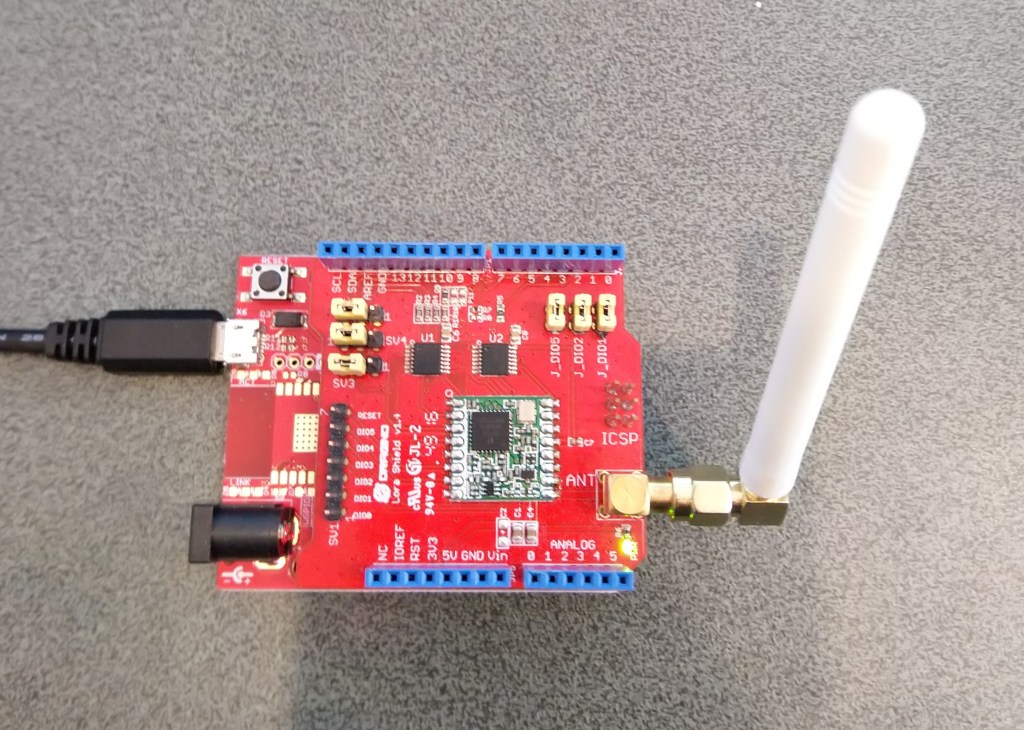
To get started I used a Dragino LoRa shield for Arduino and some jumper leads to connect it to the SC20100 device I had been sent
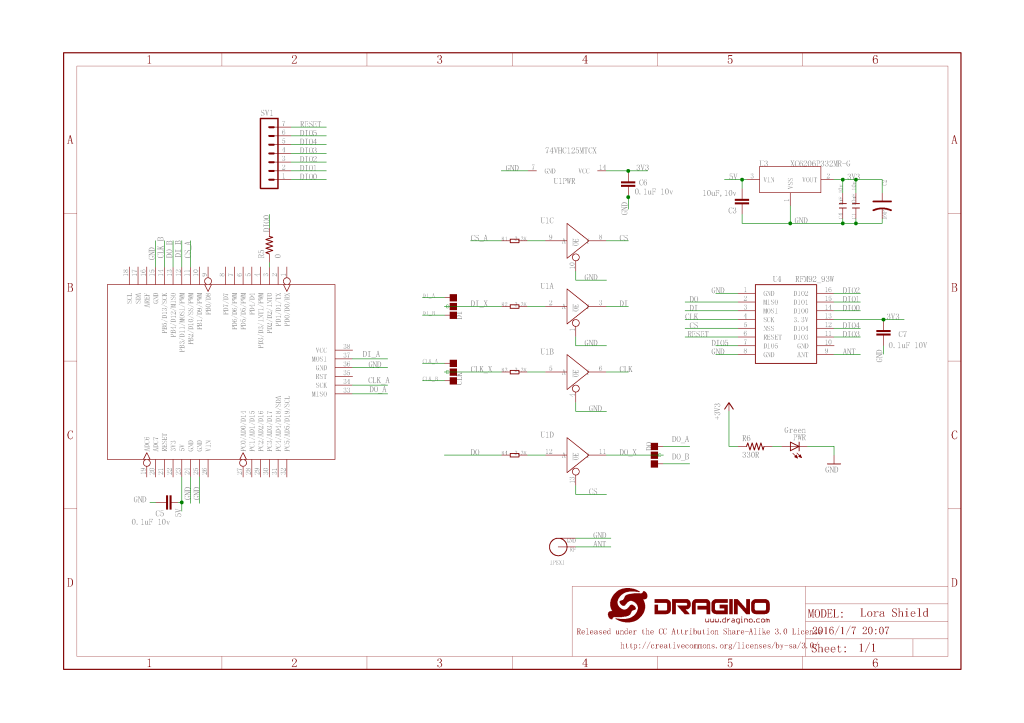
Dragino Arduino LoRa Shield Schematic

The shield uses D10 for chip select, D2 for RFM9X DI0 interrupt and D9 for Reset. The shield ships with the SPI lines configured for ICSP so the three jumpers diagonally across the shield from the antenna connector need to be swapped to the side closest to the edge of the shield.
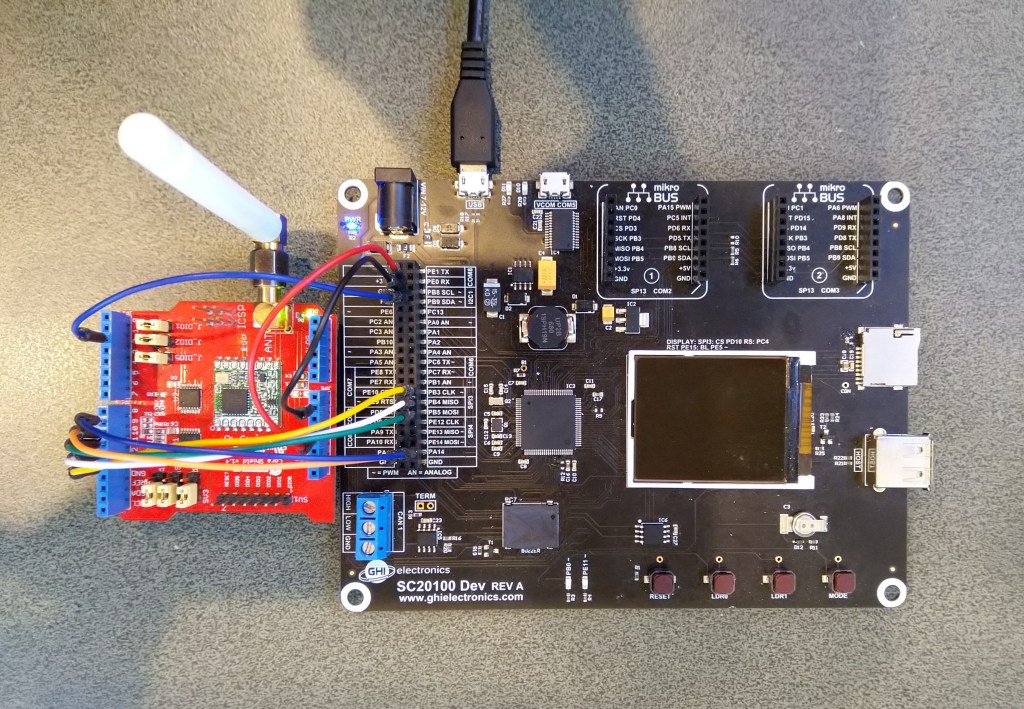
SC20100 Device with Dragino Shield

First step was to confirm I could (using the TinyCLR SPI NuGet library) read a couple of the Semtech SX1276 registers.

namespace devMobile.IoT.Rfm9x.ShieldSpi
{
   using System;
   using System.Diagnostics;

   using System.Threading;
   using GHIElectronics.TinyCLR.Devices.Spi;
   using GHIElectronics.TinyCLR.Pins;

   class Program
   {
      static void Main()
      {
         var settings = new SpiConnectionSettings()
         {
            ChipSelectType = SpiChipSelectType.Gpio,
            //ChipSelectLine = FEZ.GpioPin.D10,
            ChipSelectLine = GHIElectronics.TinyCLR.Devices.Gpio.GpioController.GetDefault().OpenPin(SC20100.GpioPin.PA13), 
            Mode = SpiMode.Mode0,
            //Mode = SpiMode.Mode1,
            //Mode = SpiMode.Mode2,
            //Mode = SpiMode.Mode3,
            ClockFrequency = 500000,
            //DataBitLength = 8, Removed as part of TiyCLR V2 Upgrade
            //ChipSelectActiveState = true
            ChipSelectActiveState = false,
            //ChipSelectHoldTime = new TimeSpan(0, 0, 0, 0, 500),
            //ChipSelectSetupTime = new TimeSpan(0, 0, 0, 0, 500),
         };

         //var controller = SpiController.FromName(FEZ.SpiBus.Spi1);
         var controller = SpiController.FromName(SC20100.SpiBus.Spi3);
         var device = controller.GetDevice(settings);

         Thread.Sleep(500);

         while (true)
         {
            byte register;
            byte[] writeBuffer;
            byte[] readBuffer;

            // Silicon Version info
            register = 0x42; // RegVersion expecting 0x12

            // Frequency
            //register = 0x06; // RegFrfMsb expecting 0x6C
            //register = 0x07; // RegFrfMid expecting 0x80
            //register = 0x08; // RegFrfLsb expecting 0x00

            //register = 0x17; //RegPayoadLength expecting 0x47

            // Preamble length 
            //register = 0x18; // RegPreambleMsb expecting 0x32
            //register = 0x19; // RegPreambleLsb expecting 0x3E

            //register <<= 1;
            //register |= 0x80;

            //writeBuffer = new byte[] { register };
            writeBuffer = new byte[] { register, 0x0 };
            //writeBuffer = new byte[] {register, 0x0, 0x0};
            //writeBuffer = new byte[] {register, 0x0, 0x0, 0x0};

            readBuffer = new byte[writeBuffer.Length];

            //device.TransferSequential(writeBuffer, readBuffer);
            device.TransferFullDuplex(writeBuffer, readBuffer);

            Debug.WriteLine("Value = 0x" + BytesToHexString(readBuffer));

            Thread.Sleep(1000);
         }
      }

      private static string BytesToHexString(byte[] bytes)
      {
         string hexString = string.Empty;

         // Loop through the bytes.
         for (byte b = 0; b < bytes.Length; b++)
         {
            if (b > 0)
               hexString += "-";

            hexString += bytes[b].ToString("x2");
         }

         return hexString;
      }
   }
}

After updating the way the chip select line was configured I could successfully read the RegVersion and default frequency values

'GHIElectronics.TinyCLR.VisualStudio.ProjectSystem.dll' (Managed): Loaded 'C:\Users\BrynLewis\source\repos\RFM9X.TinyCLR\ShieldSPI\bin\Debug\pe\..\GHIElectronics.TinyCLR.Native.dll'
'GHIElectronics.TinyCLR.VisualStudio.ProjectSystem.dll' (Managed): Loaded 'C:\Users\BrynLewis\source\repos\RFM9X.TinyCLR\ShieldSPI\bin\Debug\pe\..\GHIElectronics.TinyCLR.Devices.Gpio.dll'
'GHIElectronics.TinyCLR.VisualStudio.ProjectSystem.dll' (Managed): Loaded 'C:\Users\BrynLewis\source\repos\RFM9X.TinyCLR\ShieldSPI\bin\Debug\pe\..\GHIElectronics.TinyCLR.Devices.Spi.dll'
'GHIElectronics.TinyCLR.VisualStudio.ProjectSystem.dll' (Managed): Loaded 'C:\Users\BrynLewis\source\repos\RFM9X.TinyCLR\ShieldSPI\bin\Debug\pe\..\ShieldSPI.exe', Symbols loaded.
The thread '<No Name>' (0x2) has exited with code 0 (0x0).
Value = 0x00-12
Value = 0x00-12
Value = 0x00-12
Value = 0x00-12
Value = 0x00-12

I also updated the BytesToHexString method to use the byte.ToString( string format) overload which is implemented by the TinyCLR runtime.
nanoFramework LoRa library Part1

After writing my Windows 10 IoT Core RFM9X library and porting it to .NetMF, Wilderness Labs Meadow and GHI Electronics TinyCLR-OS I figured yet another platform port shouldn’t take too long.

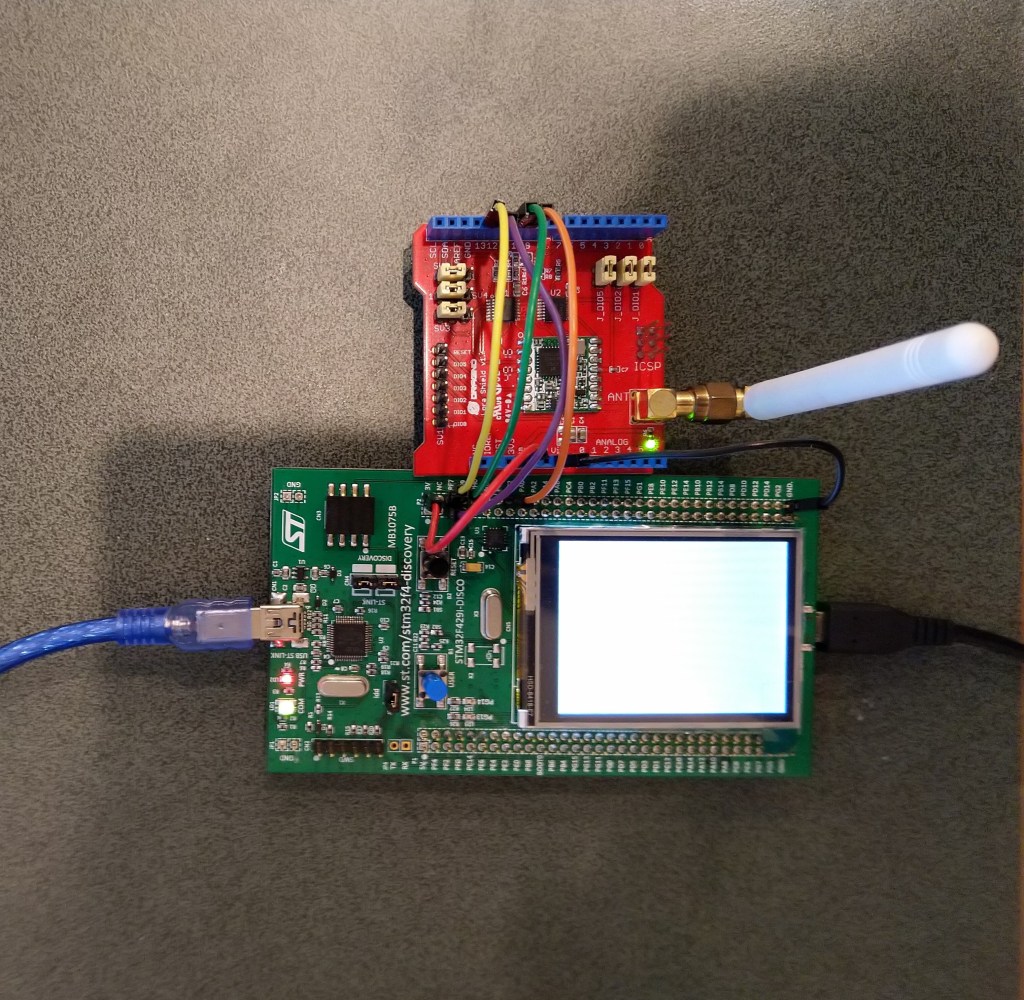
To get started I used a Dragino LoRa shield for Arduino and jumper wires to connect it to my STM32F4 Discovery Kit running the nanoFramework.

Dragino Arduino LoRa Shield Schematic

My initial pin mapping was

  • SCK->PF7->D10
  • MISO->PF8->D12
  • MOSI->PF9->D11
  • CS->PC2->D10

The shield uses D10 for chip select, D2 for RFM9X DI0 interrupt and D9 for Reset. The shield ships with the SPI lines configured for ICSP so the three jumpers diagonally across the shield from the antenna connector need to be swapped to the side closest to the edge of the shield.

STM32F429 Discovery kit with Dragino Shield

First step was to confirm I could (using the nanoFramework GPIO and SPI Nuget packages) read a couple of the Semtech SX1276 registers.

//---------------------------------------------------------------------------------
// Copyright (c) April 2020, devMobile Software
//
// Licensed under the Apache License, Version 2.0 (the "License");
// you may not use this file except in compliance with the License.
// You may obtain a copy of the License at
//
//     http://www.apache.org/licenses/LICENSE-2.0
//
// Unless required by applicable law or agreed to in writing, software
// distributed under the License is distributed on an "AS IS" BASIS,
// WITHOUT WARRANTIES OR CONDITIONS OF ANY KIND, either express or implied.
// See the License for the specific language governing permissions and
// limitations under the License.
//
//---------------------------------------------------------------------------------
namespace devMobile.IoT.Rfm9x.ShieldSPI
{
   using System;
   using System.Threading;

   using Windows.Devices.Gpio;
   using Windows.Devices.Spi;

   public class Program
   {
      public static void Main()
      {
         try
         {
            GpioController gpioController = GpioController.GetDefault();

            GpioPin chipSelectGpioPin = gpioController.OpenPin(PinNumber('C', 2));
            chipSelectGpioPin.SetDriveMode(GpioPinDriveMode.Output);

            var settings = new SpiConnectionSettings(chipSelectGpioPin.PinNumber)
            {
               ClockFrequency = 500000,
               Mode = SpiMode.Mode0,// From SemTech docs pg 80 CPOL=0, CPHA=0
               //Mode = SpiMode.Mode1,
               //Mode = SpiMode.Mode2,
               //Mode = SpiMode.Mode3,
               SharingMode = SpiSharingMode.Shared,
               //SharingMode = SpiSharingMode.Exclusive,
            };
            

            SpiDevice Device = SpiDevice.FromId("SPI5", settings);

            Thread.Sleep(500);

            while (true)
            {
               byte[] writeBuffer = new byte[] { 0x42 };
               byte[] readBuffer = new byte[1];
            
               //Device.Write(writeBuffer);
               //Device.Read(readBuffer);
               Device.TransferSequential(writeBuffer, readBuffer);

               byte registerValue = readBuffer[0];
               Console.WriteLine(String.Format("Register 0x{0:x2} - Value 0X{1:x2}", 0x42, registerValue));

               Thread.Sleep(10000);
            }
         }
         catch (Exception ex)
         {
            Console.WriteLine(ex.Message);
         }
      }

      static int PinNumber(char port, byte pin)
      {
         if (port < 'A' || port > 'J')
            throw new ArgumentException();

         return ((port - 'A') * 16) + pin;
      }
   }
}

After trying many permutations of settings I could successfully read the RegVersion and default frequency values

Attaching to nanoDevice...
Waiting for nanoDevice to initialize...
Updating nanoDevice debugger engine.
The nanoDevice runtime is loading the application assemblies and starting execution.
'nanoFramework.Tools.VS2019.Extension.dll' (Managed): Loaded 'C:\Users\BrynLewis\source\repos\RFM9X.NetNF\ShieldSPI\bin\Debug\ShieldSPI.exe', Symbols loaded.
'nanoFramework.Tools.VS2019.Extension.dll' (Managed): Loaded 'C:\Users\BrynLewis\source\repos\RFM9X.NetNF\packages\nanoFramework.Windows.Devices.Spi.1.3.0-preview.12\lib\Windows.Devices.Spi.dll', Symbols loaded.
'nanoFramework.Tools.VS2019.Extension.dll' (Managed): Loaded 'C:\Users\BrynLewis\source\repos\RFM9X.NetNF\packages\nanoFramework.Runtime.Events.1.4.2-preview.1\lib\nanoFramework.Runtime.Events.dll', Symbols loaded.
'nanoFramework.Tools.VS2019.Extension.dll' (Managed): Loaded 'C:\Users\BrynLewis\source\repos\RFM9X.NetNF\packages\nanoFramework.Windows.Devices.Gpio.1.4.1-preview.13\lib\Windows.Devices.Gpio.dll', Symbols loaded.
The thread '<No Name>' (0x2) has exited with code 0 (0x0).
Register 0x42 - Value 0X12

Mapping the Discovery board pins to corresponding SPI and GPIO pins was a bit painful

TinyCLR OS LoRa library Part7

Transmit Interrupt

Starting with the TransmitBasic sample application I modified the code so that a hardware interrupt (specified in RegDioMapping1) was generated on TxDone (FIFO Payload Transmission completed).

The application inserts a message into the RFM95 transmit FIFO every 10 seconds with confirmation of transmission displayed shortly afterwards

      public Rfm9XDevice(int chipSelectPin, int resetPin, int interruptPin)
      {
         var settings = new SpiConnectionSettings()
         {
            ChipSelectType = SpiChipSelectType.Gpio,
            ChipSelectLine = chipSelectPin,
            Mode = SpiMode.Mode0,
            ClockFrequency = 500000,
            DataBitLength = 8,
            ChipSelectActiveState = false,
         };

         SpiController spiCntroller = SpiController.FromName(FEZ.SpiBus.Spi1);

         rfm9XLoraModem = spiCntroller.GetDevice(settings);

         // Factory reset pin configuration
         GpioController gpioController = GpioController.GetDefault();
         GpioPin resetGpioPin = gpioController.OpenPin(resetPin);
         resetGpioPin.SetDriveMode(GpioPinDriveMode.Output);
         resetGpioPin.Write(GpioPinValue.Low);
         Thread.Sleep(10);
         resetGpioPin.Write(GpioPinValue.High);
         Thread.Sleep(10);

         // Interrupt pin for RX message & TX done notification 
         InterruptGpioPin = gpioController.OpenPin(interruptPin);
         resetGpioPin.SetDriveMode(GpioPinDriveMode.Input);

         InterruptGpioPin.ValueChanged += InterruptGpioPin_ValueChanged;
      }

      private void InterruptGpioPin_ValueChanged(GpioPin sender, GpioPinValueChangedEventArgs e)
      {
         if (e.Edge != GpioPinEdge.RisingEdge)
         {
            return;
         }

         byte irqFlags = this.RegisterReadByte(0x12); // RegIrqFlags
         Debug.WriteLine($"RegIrqFlags 0X{irqFlags:x2}");

         if ((irqFlags & 0b00001000) == 0b00001000)  // TxDone
         {
            Debug.WriteLine("Transmit-Done");
         }

         this.RegisterWriteByte(0x12, 0xff);// RegIrqFlags
      }
…
   class Program
   {
      static void Main()
      {
         Rfm9XDevice rfm9XDevice = new Rfm9XDevice(FEZ.GpioPin.D10, FEZ.GpioPin.D9, FEZ.GpioPin.D2);
         int SendCount = 0;

         // Put device into LoRa + Sleep mode
         rfm9XDevice.RegisterWriteByte(0x01, 0b10000000); // RegOpMode 

         // Set the frequency to 915MHz
         byte[] frequencyWriteBytes = { 0xE4, 0xC0, 0x00 }; // RegFrMsb, RegFrMid, RegFrLsb
         rfm9XDevice.RegisterWrite(0x06, frequencyWriteBytes);

         // More power PA Boost
         rfm9XDevice.RegisterWriteByte(0x09, 0b10000000); // RegPaConfig

         // Interrupt on TxDone
         rfm9XDevice.RegisterWriteByte(0x40, 0b01000000); // RegDioMapping1 0b00000000 DI0 TxDone

         while (true)
         {
            // Set the Register Fifo address pointer
            rfm9XDevice.RegisterWriteByte(0x0E, 0x00); // RegFifoTxBaseAddress 

            // Set the Register Fifo address pointer
            rfm9XDevice.RegisterWriteByte(0x0D, 0x0); // RegFifoAddrPtr 

            string messageText = $"Hello LoRa {SendCount += 1}!";

            // load the message into the fifo
            byte[] messageBytes = UTF8Encoding.UTF8.GetBytes(messageText);
            rfm9XDevice.RegisterWrite(0x0, messageBytes); // RegFifo 

            // Set the length of the message in the fifo
            rfm9XDevice.RegisterWriteByte(0x22, (byte)messageBytes.Length); // RegPayloadLength
            Debug.WriteLine($"Sending {messageBytes.Length} bytes message {messageText}");
            rfm9XDevice.RegisterWriteByte(0x01, 0b10000011); // RegOpMode 

            Thread.Sleep(10000);
         }
      }
   }

The output in the debug window

'GHIElectronics.TinyCLR.VisualStudio.ProjectSystem.dll' (Managed): Loaded 'C:\Users\BrynLewis\source\repos\RFM9X.TinyCLR\TransmitInterrupt\bin\Debug\pe\..\TransmitInterrupt.exe', Symbols loaded.
The thread '<No Name>' (0x2) has exited with code 0 (0x0).
Sending 13 bytes message Hello LoRa 1!
RegIrqFlags 0X08
Transmit-Done
Sending 13 bytes message Hello LoRa 2!
RegIrqFlags 0X08
Transmit-Done
Sending 13 bytes message Hello LoRa 3!
RegIrqFlags 0X08
Transmit-Done
Sending 13 bytes message Hello LoRa 4!
RegIrqFlags 0X08
Transmit-Done
Sending 13 bytes message Hello LoRa 5!
RegIrqFlags 0X08
Transmit-Done

On the Arduino test client the serial monitor displayed

19:39:55.595 -> LoRa init succeeded.
19:39:56.157 -> Sending HeLoRa World! 0
19:39:58.742 -> Message: Hello LoRa 5!
19:39:58.742 -> RSSI: -36
19:39:58.789 -> Snr: 9.50
19:39:58.789 -> 
19:40:07.151 -> Sending HeLoRa World! 2
19:40:11.920 -> Message: Hello LoRa 1!
19:40:11.920 -> RSSI: -41
19:40:11.967 -> Snr: 9.75
19:40:11.967 -> 
19:40:17.924 -> Sending HeLoRa World! 4
19:40:21.905 -> Message: Hello LoRa 2!
19:40:21.905 -> RSSI: -41
19:40:21.952 -> Snr: 9.50
19:40:21.952 -> 
19:40:28.248 -> Sending HeLoRa World! 6
19:40:31.928 -> Message: Hello LoRa 3!
19:40:31.928 -> RSSI: -36
19:40:31.975 -> Snr: 9.50
19:40:31.975 -> 
19:40:38.803 -> Sending HeLoRa World! 8
19:40:41.928 -> Message: Hello LoRa 4!
19:40:41.928 -> RSSI: -34
19:40:41.975 -> Snr: 9.25
19:40:41.975 -> 

Now that I’m confident my hardware is all working as expected the next step will be building a client which has a receive and transmit interrupt handler.

TinyCLR OS LoRa library Part1

After writing my Windows 10 IoT Core RFM9X library and porting it to .NetMF and Wilderness Labs Meadow I figured another port to GHI Electronics TinyCLR-OS on a FEZ device shouldn’t take too long.

To get started I used a Dragino LoRa shield for Arduino which looked compatible with my FEZT18-N and FEZT18-W devices.

Dragino Arduino LoRa Shield Schematic

The shield uses D10 for chip select, D2 for RFM9X DI0 interrupt and D9 for Reset. The shield ships with the SPI lines configured for ICSP so the three jumpers diagonally across the shield from the antenna connector need to be swapped to the side closest to the edge of the shield.

First step was to confirm I could (using the TinyCLR SPI NuGet library) read a couple of the Semtech SX1276 registers.

//---------------------------------------------------------------------------------
// Copyright (c) March 2020, devMobile Software
//
// Licensed under the Apache License, Version 2.0 (the "License");
// you may not use this file except in compliance with the License.
// You may obtain a copy of the License at
//
//     http://www.apache.org/licenses/LICENSE-2.0
//
// Unless required by applicable law or agreed to in writing, software
// distributed under the License is distributed on an "AS IS" BASIS,
// WITHOUT WARRANTIES OR CONDITIONS OF ANY KIND, either express or implied.
// See the License for the specific language governing permissions and
// limitations under the License.
//
//---------------------------------------------------------------------------------
namespace devMobile.IoT.Rfm9x.ShieldSpi
{
   using System;
   using System.Diagnostics;

   using System.Threading;
   using GHIElectronics.TinyCLR.Devices.Spi;
   using GHIElectronics.TinyCLR.Pins;

   class Program
   {
      static void Main()
      {
         var settings = new SpiConnectionSettings()
         {
            ChipSelectType = SpiChipSelectType.Gpio,
            ChipSelectLine = FEZ.GpioPin.D10,
            Mode = SpiMode.Mode0,
            ClockFrequency = 500000,
            DataBitLength = 8,
            ChipSelectActiveState = false,
         };

         var controller = SpiController.FromName(FEZ.SpiBus.Spi1);
         var device = controller.GetDevice(settings);

         Thread.Sleep(500);

         while (true)
         {
            byte register;
            byte[] writeBuffer;
            byte[] readBuffer;

            // Silicon Version info
            register = 0x42; // RegVersion expecting 0x12

            // Frequency
            //register = 0x06; // RegFrfMsb expecting 0x6C
            //register = 0x07; // RegFrfMid expecting 0x80
            //register = 0x08; // RegFrfLsb expecting 0x00

            //register = 0x17; //RegPayoadLength expecting 0x47

            // Preamble length 
            //register = 0x18; // RegPreambleMsb expecting 0x32
            //register = 0x19; // RegPreambleLsb expecting 0x3E

            writeBuffer = new byte[] { register,  0x0 };
            readBuffer = new byte[writeBuffer.Length];

            device.TransferFullDuplex(writeBuffer, readBuffer);

            Debug.WriteLine("Value = 0x" + BytesToHexString(readBuffer));

            Thread.Sleep(1000);
         }
      }

      private static string BytesToHexString(byte[] bytes)
      {
         string hexString = string.Empty;

         // Create a character array for hexidecimal conversion.
         const string hexChars = "0123456789ABCDEF";

         // Loop through the bytes.
         for (byte b = 0; b < bytes.Length; b++)
         {
            if (b > 0)
               hexString += "-";

            // Grab the top 4 bits and append the hex equivalent to the return string.        
            hexString += hexChars[bytes[b] >> 4];

            // Mask off the upper 4 bits to get the rest of it.
            hexString += hexChars[bytes[b] & 0x0F];
         }

         return hexString;
      }
   }
}

After trying many permutations of settings I could successfully read the RegVersion and default frequency values

The debugging target runtime is loading the application assemblies and starting execution.
Ready.

'GHIElectronics.TinyCLR.VisualStudio.ProjectSystem.dll' (Managed): Loaded 'C:\Users\BrynLewis\source\repos\RFM9X.TinyCLR\ShieldSPI\bin\Debug\pe\..\GHIElectronics.TinyCLR.Native.dll'
'GHIElectronics.TinyCLR.VisualStudio.ProjectSystem.dll' (Managed): Loaded 'C:\Users\BrynLewis\source\repos\RFM9X.TinyCLR\ShieldSPI\bin\Debug\pe\..\GHIElectronics.TinyCLR.Devices.Gpio.dll'
'GHIElectronics.TinyCLR.VisualStudio.ProjectSystem.dll' (Managed): Loaded 'C:\Users\BrynLewis\source\repos\RFM9X.TinyCLR\ShieldSPI\bin\Debug\pe\..\GHIElectronics.TinyCLR.Devices.Spi.dll'
'GHIElectronics.TinyCLR.VisualStudio.ProjectSystem.dll' (Managed): Loaded 'C:\Users\BrynLewis\source\repos\RFM9X.TinyCLR\ShieldSPI\bin\Debug\pe\..\ShieldSPI.exe', Symbols loaded.
The thread '<No Name>' (0x2) has exited with code 0 (0x0).
Value = 0x00-12
Value = 0x00-12
Value = 0x00-12
Value = 0x00-12

Overall the SPI implementation felt closer to Windows 10 IoT Core model than expected.

.Net Meadow RFM95/96/97/98 LoRa library Part7

Transmit Interrupt

Starting with the TransmitBasic sample application I modified the code so that a hardware interrupt (specified in RegDioMapping1) was generated on TxDone (FIFO Payload Transmission completed).

The application inserts a message into the RFM95 transmit FIFO every 10 seconds with confirmation of transmission displayed shortly afterwards

      public Rfm9XDevice(IIODevice device, ISpiBus spiBus, IPin chipSelectPin, IPin resetPin, IPin interruptPin)
      {
         // Chip select pin configuration
         ChipSelectGpioPin = device.CreateDigitalOutputPort(chipSelectPin, initialState: true);
         if (ChipSelectGpioPin == null)
         {
            Console.WriteLine("ChipSelectGpioPin == null");
         }

         // Factory reset pin configuration
         IDigitalOutputPort resetGpioPin = device.CreateDigitalOutputPort(resetPin);
         if (resetGpioPin == null)
         {
            Console.WriteLine("resetGpioPin == null");
         }
         resetGpioPin.State = false;
         Task.Delay(10);
         resetGpioPin.State = true;
         Task.Delay(10);

         // Interrupt pin for RX message & TX done notification 
         InterruptGpioPin = device.CreateDigitalInputPort(interruptPin, InterruptMode.EdgeRising);
         InterruptGpioPin.Changed += InterruptGpioPin_ValueChanged;

         Rfm9XLoraModem = new SpiPeripheral(spiBus, ChipSelectGpioPin);
         if (Rfm9XLoraModem == null)
         {
            Console.WriteLine("Rfm9XLoraModem == null");
         }
      }

      private void InterruptGpioPin_ValueChanged(object sender, DigitalInputPortEventArgs args)
      {
        byte irqFlags = this.RegisterReadByte(0x12); // RegIrqFlags
        this.RegisterWriteByte(0x12, 0xff);// Clear RegIrqFlags

        //Console.WriteLine(string.Format("RegIrqFlags:{0}", Convert.ToString(irqFlags, 2).PadLeft(8, '0')));
         if ((irqFlags & 0b00001000) == 0b00001000)  // TxDone
         {
            Console.WriteLine("Transmit-Done");
         }
      }
…
   public class MeadowApp : App<F7Micro, MeadowApp>
   {
      private Rfm9XDevice rfm9XDevice;

      public MeadowApp()
      {
         ISpiBus spiBus = Device.CreateSpiBus(500);
         if (spiBus == null)
         {
            Console.WriteLine("spiBus == null");
         }

         rfm9XDevice = new Rfm9XDevice(Device, spiBus, Device.Pins.D09, Device.Pins.D11, Device.Pins.D10);

         // Put device into LoRa + Sleep mode
         rfm9XDevice.RegisterWriteByte(0x01, 0b10000000); // RegOpMode 

         // Set the frequency to 915MHz
         byte[] frequencyWriteBytes = { 0xE4, 0xC0, 0x00 }; // RegFrMsb, RegFrMid, RegFrLsb
         rfm9XDevice.RegisterWrite(0x06, frequencyWriteBytes);

         // More power PA Boost
         rfm9XDevice.RegisterWriteByte(0x09, 0b10000000); // RegPaConfig

         // Interrupt on TxDone
         rfm9XDevice.RegisterWriteByte(0x40, 0b01000000); // RegDioMapping1 0b00000000 DI0 TxDone

         while (true)
         {
            // Set the Register Fifo address pointer
            rfm9XDevice.RegisterWriteByte(0x0E, 0x00); // RegFifoTxBaseAddress 

            // Set the Register Fifo address pointer
            rfm9XDevice.RegisterWriteByte(0x0D, 0x0); // RegFifoAddrPtr 

            string messageText = "Hello LoRa!";

            // load the message into the fifo
            byte[] messageBytes = UTF8Encoding.UTF8.GetBytes(messageText);
            rfm9XDevice.RegisterWrite(0x0, messageBytes); // RegFifo 

            // Set the length of the message in the fifo
            rfm9XDevice.RegisterWriteByte(0x22, (byte)messageBytes.Length); // RegPayloadLength
            Console.WriteLine("Sending {0} bytes message {1}", messageBytes.Length, messageText);
            rfm9XDevice.RegisterWriteByte(0x01, 0b10000011); // RegOpMode 

            Task.Delay(10000).Wait();
         }
      }
   }

The output in the debug window

'App.exe' (CLR v4.0.30319: DefaultDomain): Loaded 'C:\WINDOWS\Microsoft.Net\assembly\GAC_64\mscorlib\v4.0_4.0.0.0__b77a5c561934e089\mscorlib.dll'. 
'App.exe' (CLR v4.0.30319: DefaultDomain): Loaded 'C:\Users\BrynLewis\source\repos\RFM9X.Meadow\TransmitInterrupt\bin\Debug\net472\App.exe'. Symbols loaded.
'App.exe' (CLR v4.0.30319: App.exe): Loaded 'C:\Users\BrynLewis\source\repos\RFM9X.Meadow\TransmitInterrupt\bin\Debug\net472\Meadow.dll'. 
The program '[11164] App.exe: Program Trace' has exited with code 0 (0x0).
The program '[11164] App.exe' has exited with code 0 (0x0).
.
.
DirectRegisterAccess = True
.
.
Sending 11 bytes message Hello LoRa!
Transmit-Done
Sending 11 bytes message Hello LoRa!
Transmit-Done
Sending 11 bytes message Hello LoRa!
Transmit-Done

On the Arduino test client the serial monitor displayed

13:02:09.098 -> Sending HeLoRa World! 4
13:02:19.130 -> Message: ⸮LoRaIoT1Maduino2at 79.7,ah 39,wsa 6,wsg 13,wd 28.13,r 0.00,
13:02:19.177 -> RSSI: -72
13:02:19.177 -> Snr: 9.25
13:02:19.177 -> 
13:02:19.431 -> Sending HeLoRa World! 6
13:02:29.994 -> Sending HeLoRa World! 8
13:02:32.000 -> Message: Hello LoRa!
13:02:32.000 -> RSSI: -46
13:02:32.047 -> Snr: 9.50
13:02:32.047 -> 
13:02:40.750 -> Sending HeLoRa World! 10
13:02:42.260 -> Message: Hello LoRa!
13:02:42.260 -> RSSI: -45
13:02:42.314 -> Snr: 9.50
13:02:42.314 -> 
13:02:51.286 -> Sending HeLoRa World! 12
13:02:52.541 -> Message: Hello LoRa!
13:02:52.541 -> RSSI: -45
13:02:52.541 -> Snr: 9.75
13:02:52.541 -> 
13:03:02.112 -> Sending HeLoRa World! 14
13:03:02.745 -> Message: Hello LoRa!
13:03:02.745 -> RSSI: -45
13:03:02.792 -> Snr: 9.50
13:03:02.792 -> 

Now that I’m confident my hardware is all working the next step will be building a full featured client based on my Windows 10 IoT Core library.

Netduino LoRa Radio 433/868/915 MHz Payload Addressing client

This is a demo Netduino client (based on one of the examples in my RFM9XLoRaNetMF library) that uploads telemetry data to my Windows 10 IoT Core on Raspberry PI field gateway proof of concept(PoC).

Bill of materials (Prices Sep 2018)

//---------------------------------------------------------------------------------
// Copyright (c) 2017, devMobile Software
//
// Licensed under the Apache License, Version 2.0 (the "License");
// you may not use this file except in compliance with the License.
// You may obtain a copy of the License at
//
//     http://www.apache.org/licenses/LICENSE-2.0
//
// Unless required by applicable law or agreed to in writing, software
// distributed under the License is distributed on an "AS IS" BASIS,
// WITHOUT WARRANTIES OR CONDITIONS OF ANY KIND, either express or implied.
// See the License for the specific language governing permissions and
// limitations under the License.
//---------------------------------------------------------------------------------
namespace devMobile.IoT.Netduino.FieldGateway
{
   using System;
   using System.Text;
   using System.Threading;
   using Microsoft.SPOT;
   using Microsoft.SPOT.Hardware;
   using SecretLabs.NETMF.Hardware.Netduino;
   using devMobile.IoT.NetMF.ISM;
   using devMobile.NetMF.Sensor;

   class NetduinoClient
   {
      Rfm9XDevice rfm9XDevice;
      private readonly TimeSpan dueTime = new TimeSpan(0, 0, 15);
      private readonly TimeSpan periodTime = new TimeSpan(0, 0, 300);
      private readonly SiliconLabsSI7005 sensor = new SiliconLabsSI7005();
      private readonly OutputPort _led = new OutputPort(Pins.ONBOARD_LED, false);
      private readonly byte[] fieldGatewayAddress = Encoding.UTF8.GetBytes("LoRaIoT1");
      private readonly byte[] deviceAddress = Encoding.UTF8.GetBytes("Netduino1");

      public NetduinoClient()
      {
         rfm9XDevice = new Rfm9XDevice(Pins.GPIO_PIN_D10, Pins.GPIO_PIN_D9, Pins.GPIO_PIN_D2);
      }

      public void Run()
      {
         //rfm9XDevice.Initialise(frequency: 915000000, paBoost: true, rxPayloadCrcOn: true);
         rfm9XDevice.Initialise(frequency: 433000000, paBoost: true, rxPayloadCrcOn: true);
         rfm9XDevice.Receive(deviceAddress);

         rfm9XDevice.OnDataReceived += rfm9XDevice_OnDataReceived;
         rfm9XDevice.OnTransmit += rfm9XDevice_OnTransmit;

         Timer humidityAndtemperatureUpdates = new Timer(HumidityAndTemperatureTimerProc, null, dueTime, periodTime);

         Thread.Sleep(Timeout.Infinite);
      }

      private void HumidityAndTemperatureTimerProc(object state)
      {
         _led.Write(true);

         double humidity = sensor.Humidity();
         double temperature = sensor.Temperature();

         Debug.Print(DateTime.UtcNow.ToString("hh:mm:ss") + " H:" + humidity.ToString("F1") + " T:" + temperature.ToString("F1"));

         rfm9XDevice.Send(fieldGatewayAddress, Encoding.UTF8.GetBytes( "t " + temperature.ToString("F1") + ",H " + humidity.ToString("F0")));

         _led.Write(true);
      }

      void rfm9XDevice_OnTransmit()
      {
         Debug.Print("Transmit-Done");
         _led.Write(false);
      }

      void rfm9XDevice_OnDataReceived(byte[] address, float packetSnr, int packetRssi, int rssi, byte[] data)
      {
         try
         {
            string messageText = new string(UTF8Encoding.UTF8.GetChars(data));
            string addressText = new string(UTF8Encoding.UTF8.GetChars(address));

            Debug.Print(DateTime.UtcNow.ToString("HH:MM:ss") + "-Rfm9X PacketSnr " + packetSnr.ToString("F1") + " Packet RSSI " + packetRssi + "dBm RSSI " + rssi + "dBm = " + data.Length + " byte message " + @"""" + messageText + @"""");
         }
         catch (Exception ex)
         {
            Debug.Print(ex.Message);
         }
      }
   }
}

The code is available on GitHub
FieldGatewayNetduinoLoRaElecrow915
Elecrow shield
FieldGatewayNetduinoLoRaDragino915
Dragino shield
FieldGatewayNetduinLoRaMakerFabs433
MakerFabs shield
Net Micro Framework debug output from device

The thread '' (0x2) has exited with code 0 (0x0).
12:00:18 H:96.9 T:19.6
Transmit-Done
12:05:17 H:95.1 T:20.1
Transmit-Done

.Net Framework debug output Field Gateway

The thread 0x1550 has exited with code 0 (0x0).
21:21:49-RX From Netduino1 PacketSnr 9.5 Packet RSSI -40dBm RSSI -107dBm = 11 byte message "t 19.6,H 97"
 Sensor Netduino1t Value 19.6
 Sensor Netduino1H Value 97
 AzureIoTHubClient SendEventAsync start
 AzureIoTHubClient SendEventAsync finish
...
21:26:49-RX From Netduino1 PacketSnr 9.5 Packet RSSI -33dBm RSSI -103dBm = 11 byte message "t 20.1,H 95"
 Sensor Netduino1t Value 20.1
 Sensor Netduino1H Value 95
 AzureIoTHubClient SendEventAsync start
 AzureIoTHubClient SendEventAsync finish
The thread 0xfbc has exited with code 0 (0x0).

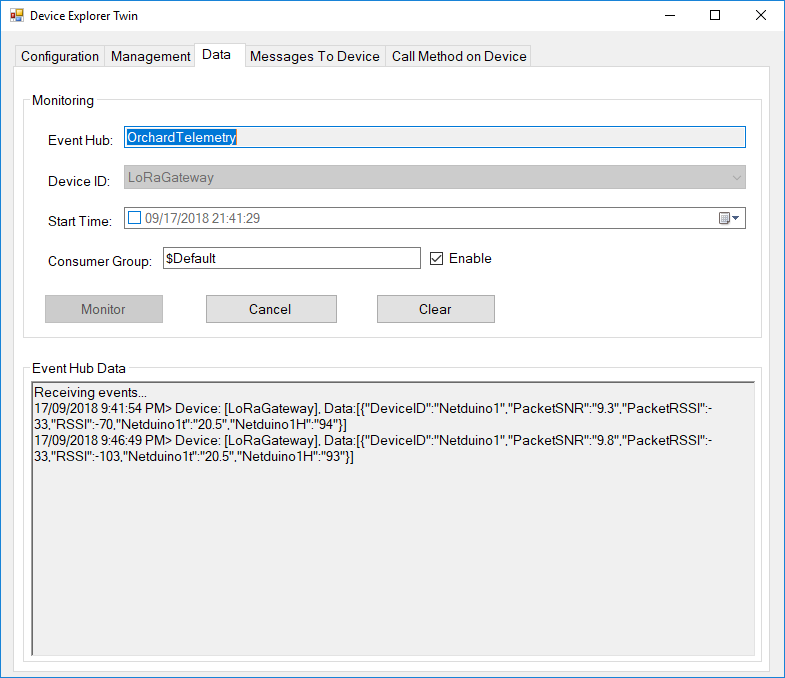
Then in my Azure IoT Hub

AzureIOTHubExplorerScreenGrab20180917

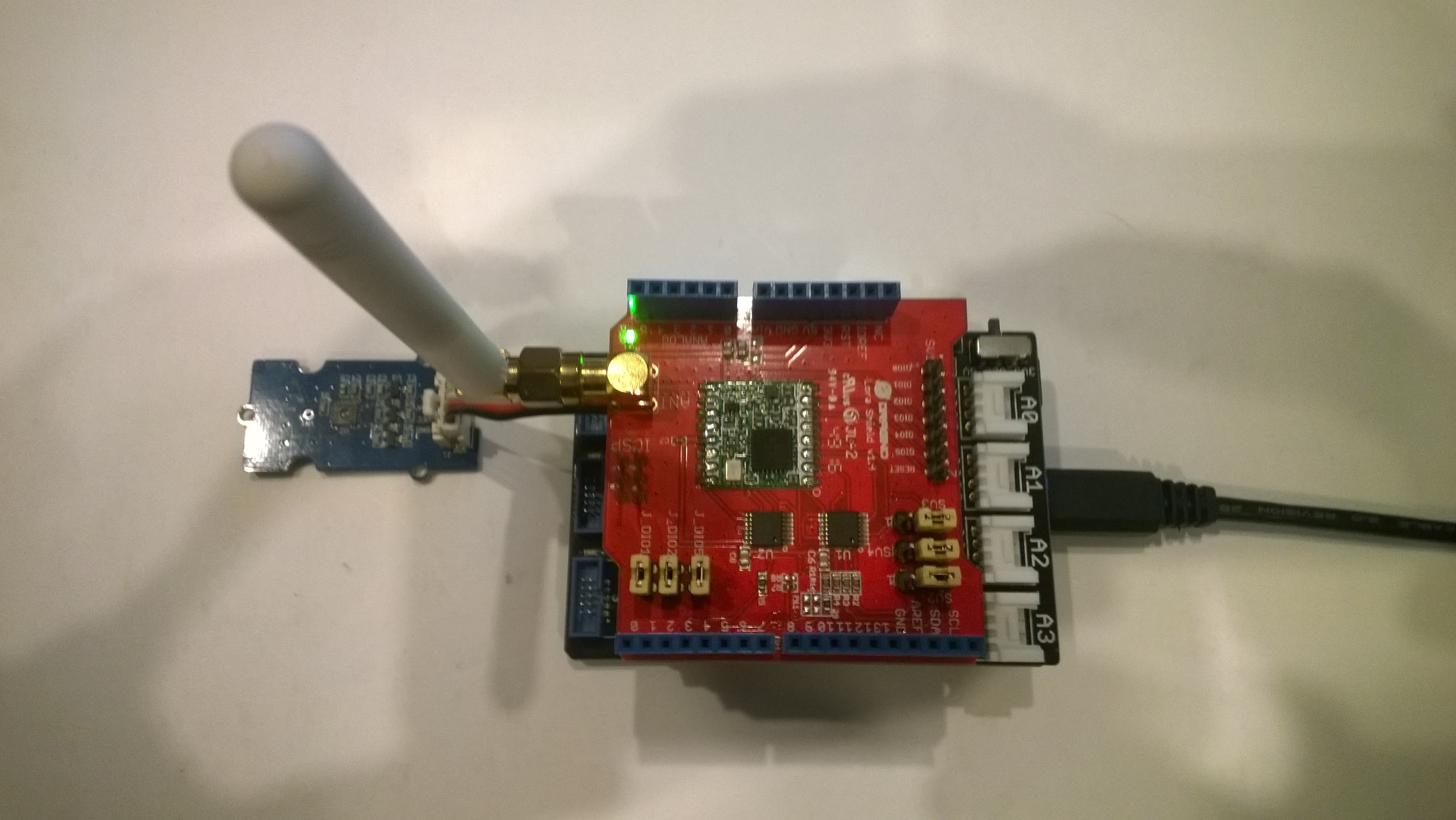
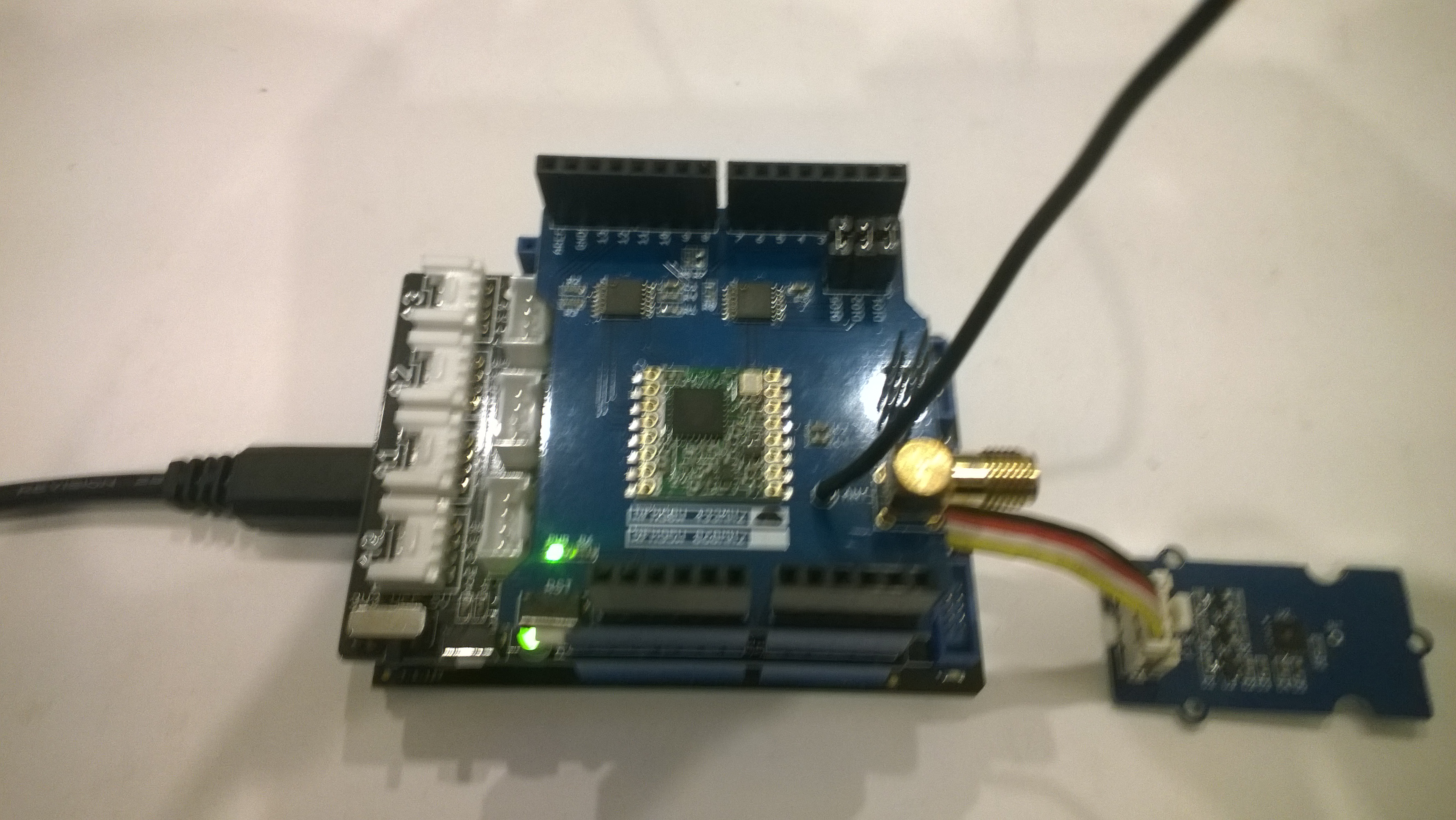
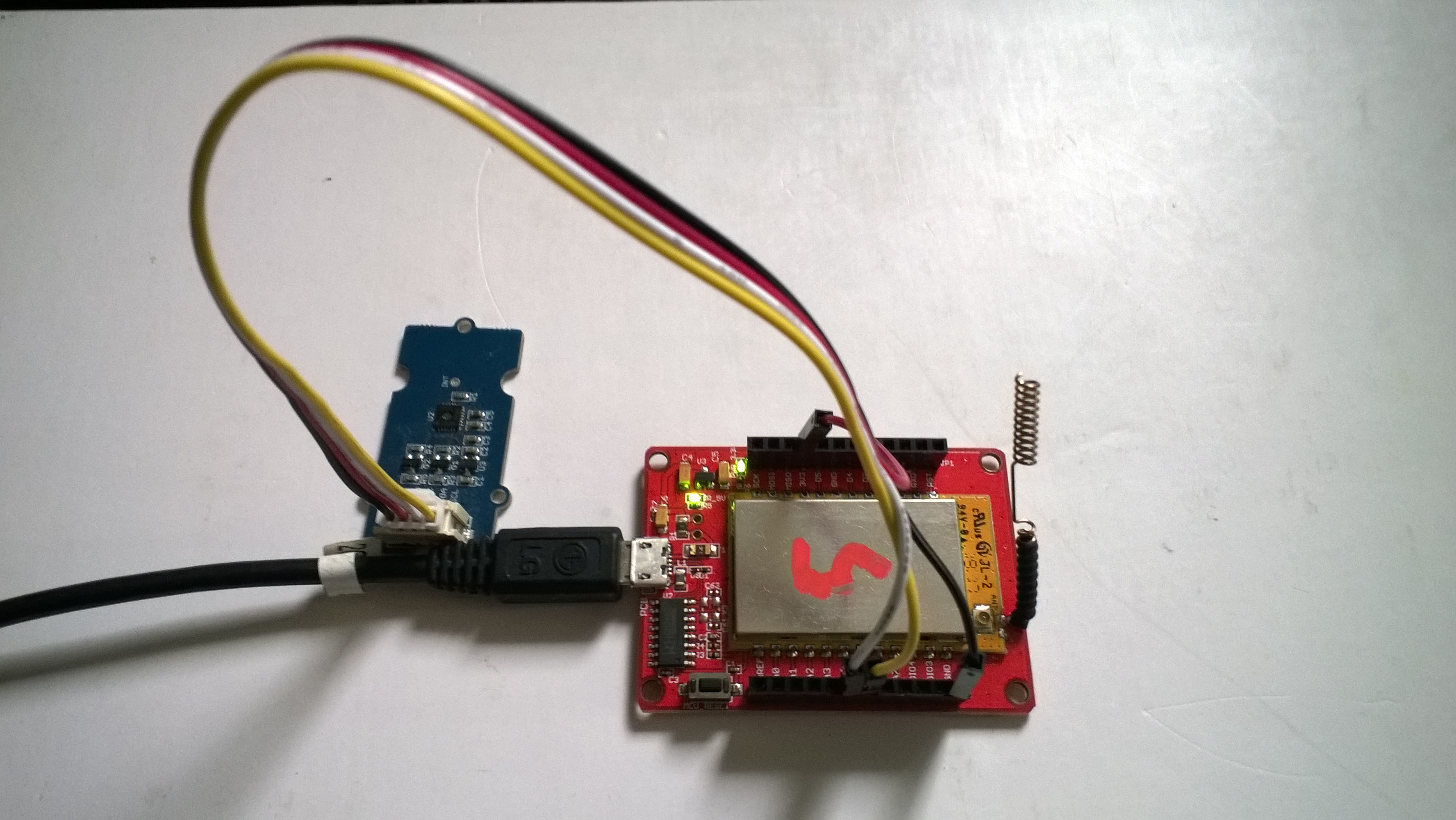
Dragino LoRaMiniDev Payload Addressing Client

This is a demo Dragino LoRa Mini Dev featuring LoRa® technology client (based on one of the examples from Arduino-LoRa) that uploads telemetry data to my AdaFruit.IO and Azure IoT Hubs Windows 10 IoT Core on Raspberry PI proof of concept (PoC) field gateways.

LoRaMiniDevTH02

Bill of materials (Prices Sep 2018)

  • Draguino LoRa MiniDev USD23
  • Seeedstudio Temperature&Humidity Sensor USD11.50 NZD20
  • 4 pin Male Jumper to Grove 4 pin Conversion Cable USD2.90

The code is pretty basic, it shows how to pack the payload and set the necessary RFM9X/SX127X LoRa module configuration, has no power conservation, advanced wireless configuration etc.

The Grove 4 pin Male Jumper to Grove 4 pin Conversion Cable was a quick & convenient way to get the I2C Grove temperature and humidity sensor connected up.

/*
Adapted from LoRa Duplex communication with Sync Word

Sends temperature & humidity data from Seeedstudio

https://www.seeedstudio.com/Grove-Temperature-Humidity-Sensor-High-Accuracy-Min-p-1921.html

To my Windows 10 IoT Core RFM 9X library

https://blog.devmobile.co.nz/2018/09/03/rfm9x-iotcore-payload-addressing/

*/
#include
#include
#include
const int csPin = 10;          // LoRa radio chip select
const int resetPin = 9;       // LoRa radio reset
const int irqPin = 2;         // change for your board; must be a hardware interrupt pin

// Field gateway configuration
const byte FieldGatewayAddress[] = "LoRaIoT1";
const float FieldGatewayFrequency =  915000000.0;
//const float FieldGatewayFrequency =  433000000.0;
const byte FieldGatewaySyncWord = 0x12 ;

// Payload configuration
const int PayloadSizeMaximum = 64 ;
char payload[PayloadSizeMaximum] = "";
const byte SensorReadingSeperator = ',' ;

// Manual serial number configuration
char DeviceId[] = {"LoRaMiniDev5"};

const int LoopSleepDelaySeconds = 10 ;

void setup() {
Serial.begin(9600);
while (!Serial);

Serial.print("LoRa Setup-");
Serial.println( DeviceId ) ;

// override the default CS, reset, and IRQ pins (optional)
LoRa.setPins(csPin, resetPin, irqPin);// set CS, reset, IRQ pin

if (!LoRa.begin(FieldGatewayFrequency))
{
Serial.println("LoRa init failed. Check your connections.");
while (true);
}

// Need to do this so field gateways pays attention to messsages from this device
LoRa.enableCrc();
LoRa.setSyncWord(FieldGatewaySyncWord);

//LoRa.dumpRegisters(Serial);
Serial.println("LoRa Setup done.");

// Configure the Seeedstudio TH02 temperature & humidity sensor
Serial.println("TH02 setup");
TH02.begin();
delay(100);
Serial.println("TH02 Setup done");

Serial.println("Setup done");
}

void loop()
{
int payloadLength = 0 ;
float temperature ;
float humidity ;

Serial.println("Loop called");
memset(payload, 0, sizeof(payload));

// prepare the payload header with "To" Address length (top nibble) and "From" address length (bottom nibble)
payload[0] = (strlen(FieldGatewayAddress)<<4) | strlen( DeviceId ) ;
payloadLength += 1;

// Copy the "To" address into payload
memcpy(&payload[payloadLength], FieldGatewayAddress, strlen(FieldGatewayAddress));
payloadLength += strlen(FieldGatewayAddress) ;

// Copy the "From" into payload
memcpy(&payload[payloadLength], DeviceId, strlen(DeviceId));
payloadLength += strlen(DeviceId) ;

// Read the temperature and humidity values then display nicely
temperature = TH02.ReadTemperature();
humidity = TH02.ReadHumidity();

Serial.print("T:");
Serial.print( temperature, 1 ) ;
Serial.print( "C" ) ;

Serial.print(" H:");
Serial.print( humidity, 0 ) ;
Serial.println( "%" ) ;

// Copy the temperature into the payload
payload[ payloadLength] = 't';
payloadLength += 1 ;
payload[ payloadLength] = ' ';
payloadLength += 1 ;
payloadLength += strlen( dtostrf(temperature, -1, 1, &payload[payloadLength]));
payload[ payloadLength] = SensorReadingSeperator;
payloadLength += sizeof(SensorReadingSeperator) ;

// Copy the humidity into the payload
payload[ payloadLength] = 'h';
payloadLength += 1 ;
payload[ payloadLength] = ' ';
payloadLength += 1 ;
payloadLength += strlen( dtostrf(humidity, -1, 0, &payload[payloadLength]));

// display info about payload then send it (No ACK) with LoRa unlike nRF24L01
Serial.print( "RFM9X/SX127X Payload length:");
Serial.print( payloadLength );
Serial.println( " bytes" );

LoRa.beginPacket();
LoRa.write( payload, payloadLength );
LoRa.endPacket();

Serial.println("Loop done");

delay(LoopSleepDelaySeconds * 1000l);
}

In the debug output window the messages from the device looked like this

09:53:05-RX From LoRaMiniDev5 PacketSnr 9.3 Packet RSSI -65dBm RSSI -109dBm = 11 byte message "t 16.8,h 98"
Sensor LoRaMiniDev5t Value 16.8
Sensor LoRaMiniDev5h Value 98
AzureIoTHubClient SendEventAsync start
AzureIoTHubClient SendEventAsync finish
The thread 0xba0 has exited with code 0 (0x0).
The thread 0xb24 has exited with code 0 (0x0).
09:53:15-RX From LoRaMiniDev5 PacketSnr 9.3 Packet RSSI -65dBm RSSI -108dBm = 11 byte message "t 16.7,h 98"
Sensor LoRaMiniDev5t Value 16.7
Sensor LoRaMiniDev5h Value 98
AzureIoTHubClient SendEventAsync start
AzureIoTHubClient SendEventAsync finish
The thread 0x76c has exited with code 0 (0x0).
The thread 0x91c has exited with code 0 (0x0).

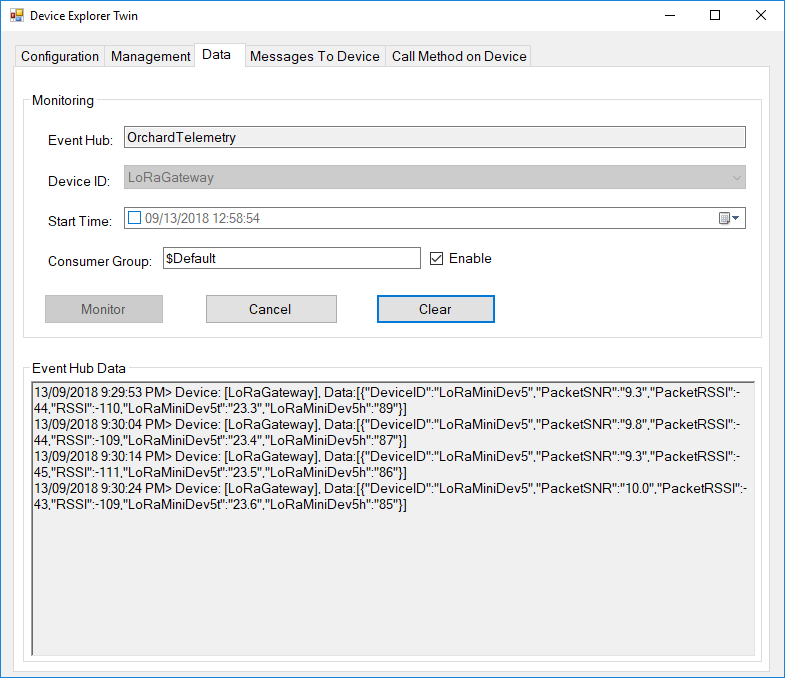
Then in my Azure IoT Hub monitoring software
DraginoLoraMinDevEventHub
The dragino LoRa Mini Dev with an external antenna connector would be a good indoor data acquisition node for student project when powered by a 2nd hand cellphone charger.

Arduino LoRa Payload Addressing Client

This is a demo Arduino client (based on one of the examples from Arduino-LoRa) that uploads telemetry data to my Windows 10 IoT Core on Raspberry PI field gateway proof of concept(PoC).

Bill of materials (Prices Sep 2018)

ArduinoUnoR3DraginoLoRa

The code is pretty basic, it shows how to pack the payload and set the necessary RFM9X/SX127X LoRa module configuration, has no power conservation, advanced wireless configuration etc.

/*
  Adapted from LoRa Duplex communication with Sync Word

  Sends temperature & humidity data from Seeedstudio 

  https://www.seeedstudio.com/Grove-Temperature-Humidity-Sensor-High-Accuracy-Min-p-1921.html

  To my Windows 10 IoT Core RFM 9X library

  https://blog.devmobile.co.nz/2018/09/03/rfm9x-iotcore-payload-addressing/

*/
#include
#include
#include
const int csPin = 10;          // LoRa radio chip select
const int resetPin = 9;       // LoRa radio reset
const int irqPin = 2;         // change for your board; must be a hardware interrupt pin

// Field gateway configuration
const byte FieldGatewayAddress[] = "LoRaIoT1";
const float FieldGatewayFrequency =  915000000.0;
const byte FieldGatewaySyncWord = 0x12 ;

// Payload configuration
const int PayloadSizeMaximum = 64 ;
char payload[PayloadSizeMaximum] = "";
const byte SensorReadingSeperator = ',' ;

// Manual serial number configuration
char DeviceId[] = {"Arduino1"};

const int LoopSleepDelaySeconds = 60;

void setup() {
  Serial.begin(9600);
  while (!Serial);

  Serial.println("LoRa Setup");

  // override the default CS, reset, and IRQ pins (optional)
  LoRa.setPins(csPin, resetPin, irqPin);// set CS, reset, IRQ pin

  if (!LoRa.begin(FieldGatewayFrequency))
  {
    Serial.println("LoRa init failed. Check your connections.");
    while (true);
  }

  // Need to do this so field gateways pays attention to messsages from this device
  LoRa.enableCrc();
  LoRa.setSyncWord(FieldGatewaySyncWord);  

  //LoRa.dumpRegisters(Serial);
  Serial.println("LoRa Setup done.");

  // Configure the Seeedstudio TH02 temperature & humidity sensor
  Serial.println("TH02 setup");
  TH02.begin();
  delay(100);
  Serial.println("TH02 Setup done");  

  Serial.println("Setup done");
}

void loop()
{
  int payloadLength = 0 ;
  float temperature ;
  float humidity ;

  Serial.println("Loop called");
  memset(payload, 0, sizeof(payload));

  // prepare the payload header with "To" Address length (top nibble) and "From" address length (bottom nibble)
  payload[0] = (strlen(FieldGatewayAddress) << 4) | strlen( DeviceId ) ;
  payloadLength += 1;

  // Copy the "To" address into payload
  memcpy(&payload[payloadLength], FieldGatewayAddress, strlen(FieldGatewayAddress));
  payloadLength += strlen(FieldGatewayAddress) ;

  // Copy the "From" into payload
  memcpy(&payload[payloadLength], DeviceId, strlen(DeviceId));
  payloadLength += strlen(DeviceId) ;

  // Read the temperature and humidity values then display nicely
  temperature = TH02.ReadTemperature();
  humidity = TH02.ReadHumidity();

  Serial.print("T:");
  Serial.print( temperature, 1 ) ;
  Serial.print( "C" ) ;

  Serial.print(" H:");
  Serial.print( humidity, 0 ) ;
  Serial.println( "%" ) ;

  // Copy the temperature into the payload
  payload[ payloadLength] = 't';
  payloadLength += 1 ;
  payload[ payloadLength] = ' ';
  payloadLength += 1 ;
  payloadLength += strlen( dtostrf(temperature, -1, 1, &payload[payloadLength]));
  payload[ payloadLength] = SensorReadingSeperator;
  payloadLength += sizeof(SensorReadingSeperator) ;

  // Copy the humidity into the payload
  payload[ payloadLength] = 'h';
  payloadLength += 1 ;
  payload[ payloadLength] = ' ';
  payloadLength += 1 ;
  payloadLength += strlen( dtostrf(humidity, -1, 0, &payload[payloadLength]));  

  // display info about payload then send it (No ACK) with LoRa unlike nRF24L01
  Serial.print( "RFM9X/SX127X Payload length:");
  Serial.print( payloadLength );
  Serial.println( " bytes" );

  LoRa.beginPacket();
  LoRa.write( payload, payloadLength );
  LoRa.endPacket();      

  Serial.println("Loop done");

  delay(LoopSleepDelaySeconds * 1000l);
}

In the debug output window the messages from the device looked like this

Register 0x40 – Value 0X00 – Bits 00000000
Register 0x41 – Value 0X00 – Bits 00000000
Register 0x42 – Value 0X12 – Bits 00010010

19:15:21-RX From Arduino1 PacketSnr 9.3 Packet RSSI -49dBm RSSI -105dBm = 11 byte message "t 18.8,h 91"

19:15:30-TX 25 byte message Hello from LoRaIoT1 ! 255
19:15:30-TX Done
19:15:31-RX From Arduino1 PacketSnr 9.3 Packet RSSI -49dBm RSSI -103dBm = 11 byte message "t 18.8,h 91"

19:15:41-RX From Arduino1 PacketSnr 9.3 Packet RSSI -48dBm RSSI -106dBm = 11 byte message "t 18.8,h 91"

There must be a nicer way of building the payload, a topic for a future post maybe.

RFM9X.NetMF on Github

After a month of posts the source code of V0.9 of my RFM9X/SX127X library is on GitHub. I included all of the source for my test harness and proof of concept(PoC) applications so other people can follow along with “my learning experience”.

I need to trial with some more hardware, frequency bands, variety of clients, initialisation configurations and backport the last round of fixes from my .Net library.

The simplest possible application .NetMF using the new library

/---------------------------------------------------------------------------------
// Copyright (c) August 2018, devMobile Software
//
// Licensed under the Apache License, Version 2.0 (the "License");
// you may not use this file except in compliance with the License.
// You may obtain a copy of the License at
//
//     http://www.apache.org/licenses/LICENSE-2.0
//
// Unless required by applicable law or agreed to in writing, software
// distributed under the License is distributed on an "AS IS" BASIS,
// WITHOUT WARRANTIES OR CONDITIONS OF ANY KIND, either express or implied.
// See the License for the specific language governing permissions and
// limitations under the License.
//
//---------------------------------------------------------------------------------
namespace devMobile.IoT.NetMF.Rfm9X.Client
{
using System;
using System.Text;
using System.Threading;
using devMobile.IoT.NetMF.ISM;
using Microsoft.SPOT;
using SecretLabs.NETMF.Hardware.Netduino;

public class Program
{
public static void Main()
{
Rfm9XDevice rfm9XDevice = new Rfm9XDevice(Pins.GPIO_PIN_D10, Pins.GPIO_PIN_D9, Pins.GPIO_PIN_D2);
byte MessageCount = Byte.MinValue;

rfm9XDevice.Initialise( Rfm9XDevice.RegOpModeMode.ReceiveContinuous, 915000000, paBoost: true, rxPayloadCrcOn: true);
rfm9XDevice.OnDataReceived += rfm9XDevice_OnDataReceived;
rfm9XDevice.OnTransmit += rfm9XDevice_OnTransmit;

while (true)
{
string messageText = "Hello NetMF LoRa! " + MessageCount.ToString();
MessageCount += 1;
byte[] messageBytes = UTF8Encoding.UTF8.GetBytes(messageText);
Debug.Print("Sending " + messageBytes.Length + " bytes message " + messageText);
rfm9XDevice.SendMessage(messageBytes);

Thread.Sleep(10000);
}
}

static void rfm9XDevice_OnTransmit()
{
Debug.Print("Transmit-Done");
}

static void rfm9XDevice_OnDataReceived(byte[] data)
{
try
{
string messageText = new string(UTF8Encoding.UTF8.GetChars(data));

Debug.Print("Received " + data.Length.ToString() + " byte message " + messageText);
}
catch (Exception ex)
{
Debug.Print(ex.Message);
}
}
}
}

// Dirty hack for Rosyln
namespace System.Diagnostics
{
public enum DebuggerBrowsableState
{
Never = 0,
Collapsed = 2,
RootHidden = 3
}
}

I need to do more testing (especially of the initialisation options) and will add basic device addressing soon so my field gateway will only see messages which it is interested in.

RFM9X.IoTCore on Github

After a month of posts the source code of V0.9 of my RFM9X/SX127X library is on GitHub. I included all of the source for my test harness and proof of concept(PoC) applications so other people can follow along with “my learning experience”.

I started wanting a library to for a LoRa telemetry field gateway and ended up writing one (which is usually not a good idea). My use case was a device that was configured, then run for long periods of time, was not battery powered, and if settings were changed could be restarted. I need to trial with some more hardware, frequency bands, variety of clients, initialisation configurations and backport the last round of fixes to my .NetMF library.

I am also looking at writing an RFM69 library using a pair of shields (434MHz & 915MHz)  from seegel-systeme.

The simplest possible application using the new library (a fair bit of the code is to support the different supported shields)

//---------------------------------------------------------------------------------
// Copyright (c) August 2018, devMobile Software
//
// Licensed under the Apache License, Version 2.0 (the "License");
// you may not use this file except in compliance with the License.
// You may obtain a copy of the License at
//
//     http://www.apache.org/licenses/LICENSE-2.0
//
// Unless required by applicable law or agreed to in writing, software
// distributed under the License is distributed on an "AS IS" BASIS,
// WITHOUT WARRANTIES OR CONDITIONS OF ANY KIND, either express or implied.
// See the License for the specific language governing permissions and
// limitations under the License.
//
//---------------------------------------------------------------------------------
namespace devMobile.IoT.Rfm9x.LoRaDeviceClient
{
using System;
using System.Diagnostics;
using System.Text;
using System.Threading.Tasks;

using devMobile.IoT.Rfm9x;
using Windows.ApplicationModel.Background;

public sealed class StartupTask : IBackgroundTask
{
private byte NessageCount = Byte.MaxValue;
#if DRAGINO
private const byte ChipSelectLine = 25;
private const byte ResetLine = 17;
private const byte InterruptLine = 4;
private Rfm9XDevice rfm9XDevice = new Rfm9XDevice(ChipSelectPin.CS0, ChipSelectLine, ResetLine, InterruptLine);
#endif
#if M2M
private const byte ChipSelectLine = 25;
private const byte ResetLine = 17;
private const byte InterruptLine = 4;
private Rfm9XDevice rfm9XDevice = new Rfm9XDevice(ChipSelectPin.CS0, ChipSelectLine, ResetLine, InterruptLine);
#endif
#if ELECROW
private const byte ResetLine = 22;
private const byte InterruptLine = 25;
private Rfm9XDevice rfm9XDevice = new Rfm9XDevice(ChipSelectPin.CS1, ResetLine, InterruptLine);
#endif
#if ELECTRONIC_TRICKS
private const byte ResetLine = 22;
private const byte InterruptLine = 25;
private Rfm9XDevice rfm9XDevice = new Rfm9XDevice(ChipSelectPin.CS0, 22, 25);
#endif

public void Run(IBackgroundTaskInstance taskInstance)
{
rfm9XDevice.Initialise(Rfm9XDevice.RegOpModeMode.ReceiveContinuous, 915000000.0, paBoost: true);

#if DEBUG
rfm9XDevice.RegisterDump();
#endif
rfm9XDevice.OnReceive += Rfm9XDevice_OnReceive;
rfm9XDevice.OnTransmit += Rfm9XDevice_OnTransmit;

Task.Delay(10000).Wait();

while (true)
{
string messageText = string.Format("Hello W10 IoT Core LoRa! {0}", NessageCount);
NessageCount -= 1;

byte[] messageBytes = UTF8Encoding.UTF8.GetBytes(messageText);
Debug.WriteLine("{0:HH:mm:ss}-TX {1} byte message {2}", DateTime.Now, messageBytes.Length, messageText);
this.rfm9XDevice.Send(messageBytes);

Task.Delay(10000).Wait();
}
}

private void Rfm9XDevice_OnReceive(object sender, Rfm9XDevice.OnDataReceivedEventArgs e)
{
try
{
string messageText = UTF8Encoding.UTF8.GetString(e.Data);

Debug.WriteLine("{0:HH:mm:ss}-RX {1} byte message {2}", DateTime.Now, e.Data.Length, messageText);
}
catch (Exception ex)
{
Debug.WriteLine(ex.Message);
}
}

private void Rfm9XDevice_OnTransmit(object sender, Rfm9XDevice.OnDataTransmitedEventArgs e)
{
Debug.WriteLine("{0:HH:mm:ss}-TX Done", DateTime.Now);
}
}
}

I have a shield from uputronics on order which should arrive from the UK in roughly a week. This shield has two RFM9X devices onboard (In my case 434MHz & 915MHz) so it will be interesting to see how my library copes with two instances of the stack running together.

I need to do more testing (especially of the initialisation options) and will add basic device addressing soon so my field gateway will only see messages which it is interested in.