DF Robot Temperature & Humidity Sensor(SHT20) trial

In preparation for a project to build weather stations to place at a couple of local schools I purchased a DF Robot SHT20 Temperature & Humidity Sensor for evaluation.
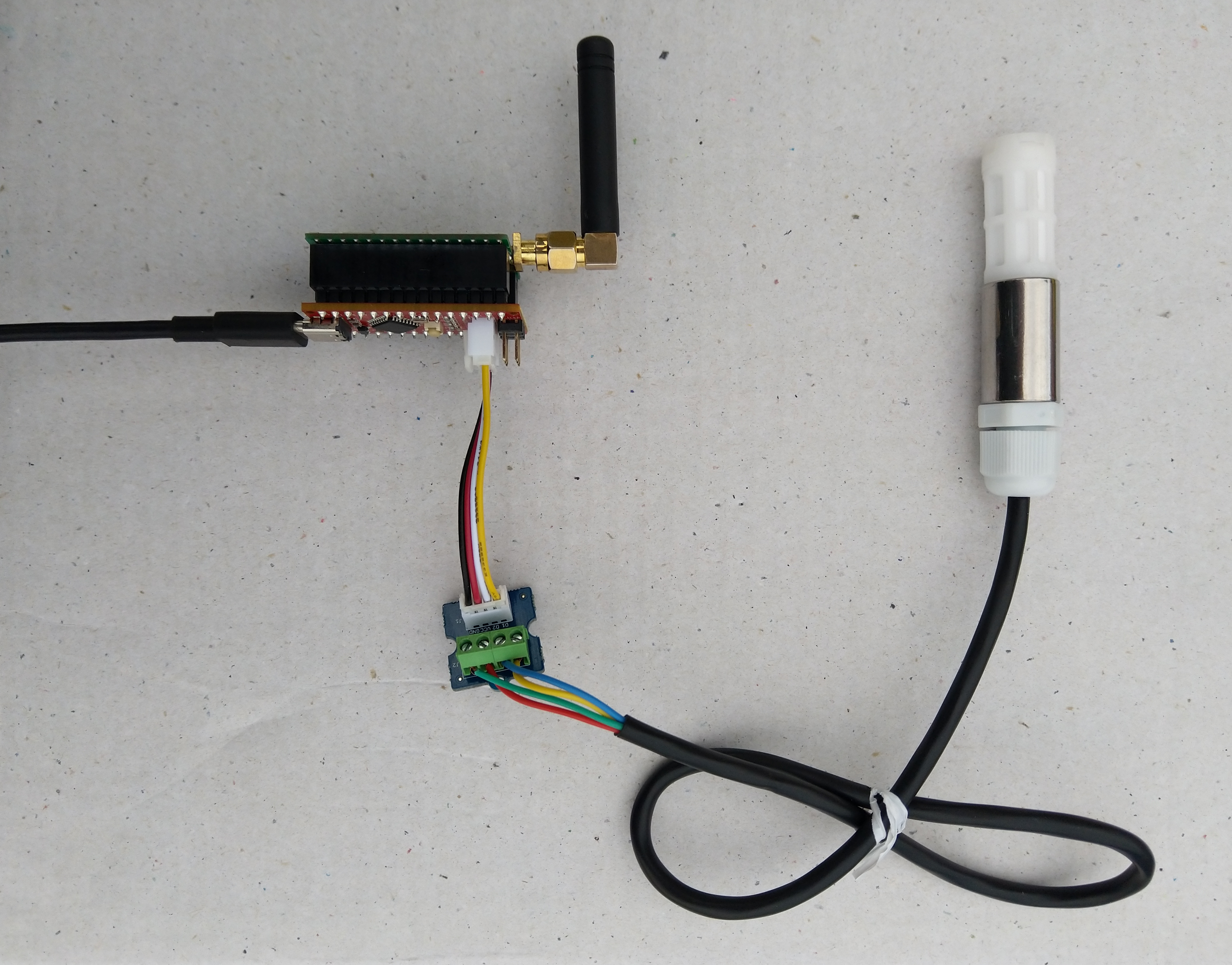
Seeeduino Nano, EasySensors Shield & DF Robot Sensor test rig

The Seeeduino Nano devices I’m testing have a single on-board I2C socket which meant I didn’t need a Grove Shield for Arduino Nano which reduced the size and cost of the sensor node.

To test my setup I installed the DFRobot Arduino SHT20 library and downloaded a demo application to my device.

I started with my Easy Sensors Arduino Nano Radio Shield RFM69/95 Payload Addressing client and modified it to use the SHT20 sensor.

/*
  Copyright ® 2019 August devMobile Software, All Rights Reserved

  THIS CODE AND INFORMATION IS PROVIDED "AS IS" WITHOUT WARRANTY OF ANY
  KIND, EITHER EXPRESSED OR IMPLIED, INCLUDING BUT NOT LIMITED TO THE
  IMPLIED WARRANTIES OF MERCHANTABILITY AND/OR FITNESS FOR A PARTICULAR
  PURPOSE.

  You can do what you want with this code, acknowledgment would be nice.
  http://www.devmobile.co.nz

  DF Robot SHT20 Temperature & Humidity sensor   https://www.dfrobot.com/wiki/index.php/SHT20_I2C_Temperature_%26_Humidity_Sensor_(Waterproof_Probe)_SKU:_SEN0227  

  Seeeduino Nano 
  https://www.seeedstudio.com/Seeeduino-Nano-p-4111.html
  
  Polycarbonate enclosure approx 3.5" x 4.5"
    2 x Cable glands
    1 x ufl to SMA connector
    3M command adhesive strips to hold battery & device in place
   
*/
#include <stdlib.h>
#include <DFRobot_SHT20.h>
#include <LoRa.h>
#include <sha204_library.h>

//#define DEBUG
//#define DEBUG_TELEMETRY
//#define DEBUG_LORA
//#define DEBUG_TEMPERATURE_AND_HUMIDITY

#define UNITS_HUMIDITY "%"
#define UNITS_TEMPERATURE "°c"

// LoRa field gateway configuration (these settings must match your field gateway)
const byte DeviceAddressMaximumLength = 15 ;
const char FieldGatewayAddress[] = {"LoRaIoT1"};
const float FieldGatewayFrequency =  915000000.0;
const byte FieldGatewaySyncWord = 0x12 ;

// Payload configuration
const int ChipSelectPin = 10;
const int ResetPin = 9;
const int InterruptPin = 2;

// LoRa radio payload configuration
const byte SensorIdValueSeperator = ' ' ;
const byte SensorReadingSeperator = ',' ;
const unsigned long SensorUploadDelay = 60000;

// ATSHA204 secure authentication, validation with crypto and hashing (currently only using for unique serial number)
const byte Atsha204Port = A3;
atsha204Class sha204(Atsha204Port);
const byte DeviceSerialNumberLength = 9 ;
byte deviceSerialNumber[DeviceSerialNumberLength] = {""};

// SHT20 Air temperature and humidity sensor
DFRobot_SHT20 sht20;

const byte PayloadSizeMaximum = 64 ;
byte payload[PayloadSizeMaximum];
byte payloadLength = 0 ;


void setup()
{
  Serial.begin(9600);

#ifdef DEBUG
  while (!Serial);
#endif
 
  Serial.println("Setup called");

  Serial.print("Field gateway:");
  Serial.print(FieldGatewayAddress ) ;
  Serial.print(" Frequency:");
  Serial.print( FieldGatewayFrequency,0 ) ;
  Serial.print("MHz SyncWord:");
  Serial.print( FieldGatewaySyncWord ) ;
  Serial.println();
  
   // Retrieve the serial number then display it nicely
  if(sha204.getSerialNumber(deviceSerialNumber))
  {
    Serial.println("sha204.getSerialNumber failed");
    while (true); // Drop into endless loop requiring restart
  }

  Serial.print("SNo:");
  DisplayHex( deviceSerialNumber, DeviceSerialNumberLength);
  Serial.println();

  Serial.println("LoRa setup start");

  // override the default chip select and reset pins
  LoRa.setPins(ChipSelectPin, ResetPin, InterruptPin);
  if (!LoRa.begin(FieldGatewayFrequency))
  {
    Serial.println("LoRa begin failed");
    while (true); // Drop into endless loop requiring restart
  }

  // Need to do this so field gateway pays attention to messsages from this device
  LoRa.enableCrc();
  LoRa.setSyncWord(FieldGatewaySyncWord);

#ifdef DEBUG_LORA
  LoRa.dumpRegisters(Serial);
#endif
  Serial.println("LoRa Setup done.");

  // Configure the DF Robot SHT20, temperature & humidity sensor
  Serial.println("SHT20 setup start");  
  sht20.initSHT20();
  delay(100);
  sht20.checkSHT20();    
  Serial.println("SHT20 setup done");

  PayloadHeader((byte *)FieldGatewayAddress,strlen(FieldGatewayAddress), deviceSerialNumber, DeviceSerialNumberLength);

  Serial.println("Setup done");
  Serial.println();
}


void loop()
{
  unsigned long currentMilliseconds = millis();  
  float temperature ;
  float humidity ;

  Serial.println("Loop called");

  PayloadReset();  

  humidity = sht20.readHumidity();          
  PayloadAdd( "h", humidity, 0, false);

  temperature = sht20.readTemperature();               
  PayloadAdd( "t", temperature, 1, false);
  
  #ifdef DEBUG_TEMPERATURE_AND_HUMIDITY  
    Serial.print("H:");
    Serial.print( humidity, 0 ) ;
    Serial.print( UNITS_HUMIDITY ) ;
    Serial.print("T:");
    Serial.print( temperature, 1 ) ;
    Serial.println( UNITS_TEMPERATURE ) ;
  #endif

  #ifdef DEBUG_TELEMETRY
    Serial.println();
    Serial.print("RFM9X/SX127X Payload length:");
    Serial.print(payloadLength);
    Serial.println(" bytes");
  #endif

  LoRa.beginPacket();
  LoRa.write(payload, payloadLength);
  LoRa.endPacket();

  Serial.println("Loop done");
  Serial.println();

  delay(SensorUploadDelay - (millis() - currentMilliseconds ));
}


void PayloadHeader( const byte *to, byte toAddressLength, const byte *from, byte fromAddressLength)
{
  byte addressesLength = toAddressLength + fromAddressLength ;

  payloadLength = 0 ;

  // prepare the payload header with "To" Address length (top nibble) and "From" address length (bottom nibble)
  
  payload[payloadLength] = (toAddressLength << 4) | fromAddressLength ;
  payloadLength += 1;

  // Copy the "To" address into payload
  memcpy(&payload[payloadLength], to, toAddressLength);
  payloadLength += toAddressLength ;

  // Copy the "From" into payload
  memcpy(&payload[payloadLength], from, fromAddressLength);
  payloadLength += fromAddressLength ;
}


void PayloadAdd( const char *sensorId, float value, byte decimalPlaces, bool last)
{
  byte sensorIdLength = strlen( sensorId ) ;

  memcpy( &payload[payloadLength], sensorId,  sensorIdLength) ;
  payloadLength += sensorIdLength ;
  payload[ payloadLength] = SensorIdValueSeperator;
  payloadLength += 1 ;
  payloadLength += strlen( dtostrf(value, -1, decimalPlaces, (char *)&payload[payloadLength]));
  if (!last)
  {
    payload[ payloadLength] = SensorReadingSeperator;
    payloadLength += 1 ;
  }
  
#ifdef DEBUG_TELEMETRY
  Serial.print("PayloadAdd float-payloadLength:");
  Serial.print( payloadLength);
  Serial.println( );
#endif
}


void PayloadAdd( char *sensorId, int value, bool last )
{
  byte sensorIdLength = strlen(sensorId) ;

  memcpy(&payload[payloadLength], sensorId,  sensorIdLength) ;
  payloadLength += sensorIdLength ;
  payload[ payloadLength] = SensorIdValueSeperator;
  payloadLength += 1 ;
  payloadLength += strlen(itoa( value,(char *)&payload[payloadLength],10));
  if (!last)
  {
    payload[ payloadLength] = SensorReadingSeperator;
    payloadLength += 1 ;
  }
  
#ifdef DEBUG_TELEMETRY
  Serial.print("PayloadAdd int-payloadLength:" );
  Serial.print(payloadLength);
  Serial.println( );
#endif
}


void PayloadAdd( char *sensorId, unsigned int value, bool last )
{
  byte sensorIdLength = strlen(sensorId) ;

  memcpy(&payload[payloadLength], sensorId,  sensorIdLength) ;
  payloadLength += sensorIdLength ;
  payload[ payloadLength] = SensorIdValueSeperator;
  payloadLength += 1 ;
  payloadLength += strlen(utoa( value,(char *)&payload[payloadLength],10));
  if (!last)
  {
    payload[ payloadLength] = SensorReadingSeperator;
    payloadLength += 1 ;
  }
  
#ifdef DEBUG_TELEMETRY
  Serial.print("PayloadAdd uint-payloadLength:");
  Serial.print(payloadLength);
  Serial.println( );
#endif
}


void PayloadReset()
{
  byte fromAddressLength = payload[0] & 0xf ;
  byte toAddressLength = payload[0] >> 4 ;
  
  payloadLength = toAddressLength + fromAddressLength + 1;
}


void DisplayHex( byte *byteArray, byte length) 
{
  for (int i = 0; i < length ; i++)
  {
    // Add a leading zero
    if ( byteArray[i] < 16)
    {
      Serial.print("0");
    }
    Serial.print(byteArray[i], HEX);
    if ( i < (length-1)) // Don't put a - after last digit
    {
      Serial.print("-");
    }
  }
}    

The code is available on GitHub.

20:52:09.656 -> Setup called
20:52:09.690 -> Field gateway:LoRaIoT1 Frequency:915000000MHz SyncWord:18
20:52:09.794 -> SNo:01-23-21-61-D6-D1-F5-86-EE
20:52:09.828 -> LoRa setup start
20:52:09.828 -> LoRa Setup done.
20:52:09.862 -> SHT20 setup start
20:52:09.932 -> End of battery: no
20:52:09.932 -> Heater enabled: no
20:52:09.965 -> Disable OTP reload: yes
20:52:09.999 -> SHT20 setup done
20:52:09.999 -> Setup done
20:52:09.999 -> 
20:52:09.999 -> Loop called
20:52:10.067 -> H:60%T:20.0°c
20:52:10.136 -> Loop done
20:52:10.136 -> 
20:53:09.915 -> Loop called
20:53:10.019 -> H:61%T:20.5°c
20:53:10.088 -> Loop done
20:53:10.088 -> 

To configure the device in Azure IoT Central (similar process for Adafruit.IO, working on support for losant,and ubidots I copied the SNo: from the Arduino development tool logging window and appended p10 for PM 1 value, p25 for PM2.5 value and p100 for PM10 value to the unique serial number from the ATSHA204A chip. (N.B. pay attention to the case of the field names they are case sensitive)
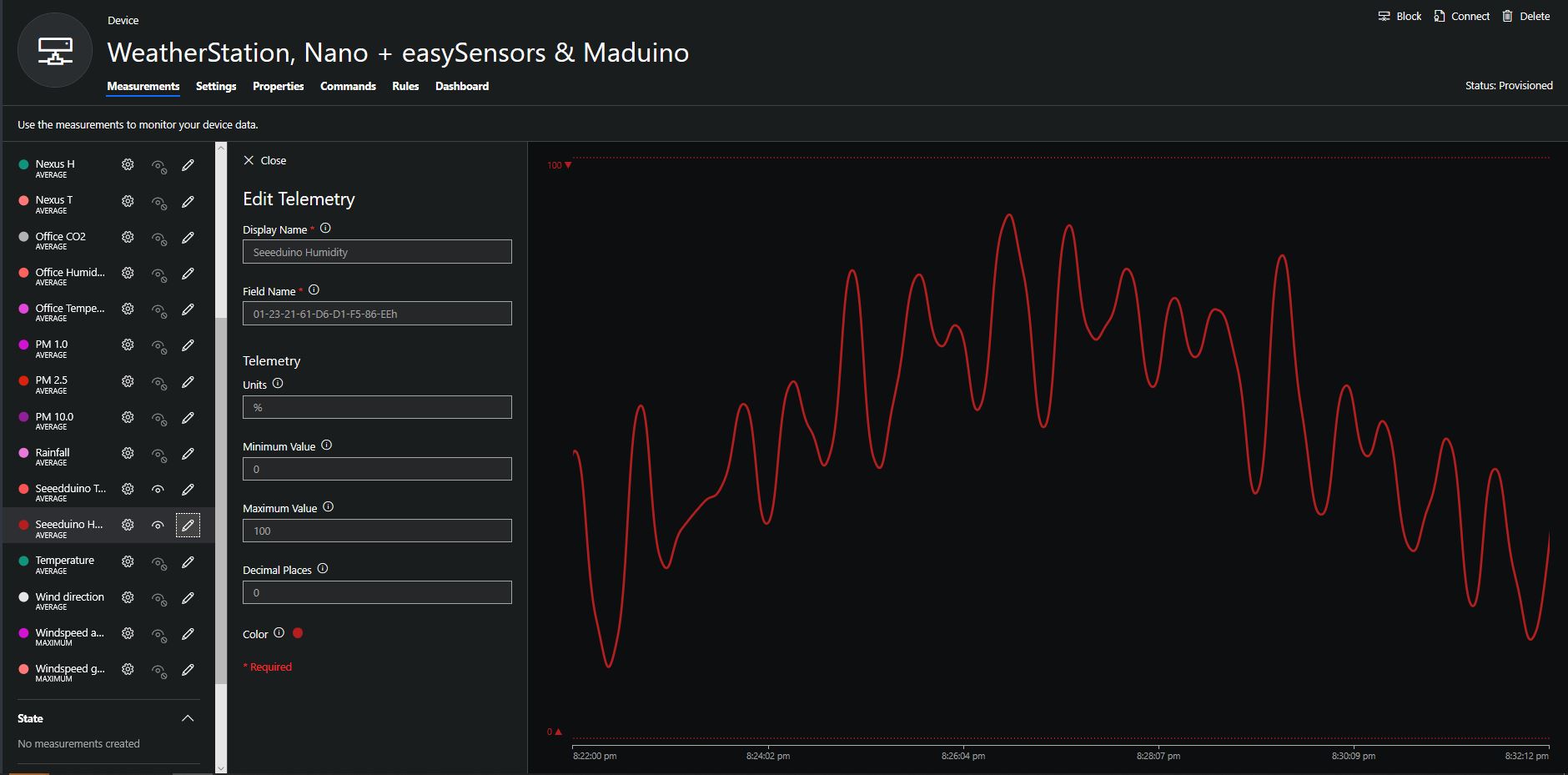
When I moved the sensor indoors it appeared to take a while to warm up and after a while the metal body still felt cold. The sensor element is surrounded by quite a bit of protective packaging for outdoors use and I that would have a bit more thermal inertia the than the lightweight indoor enclosure.
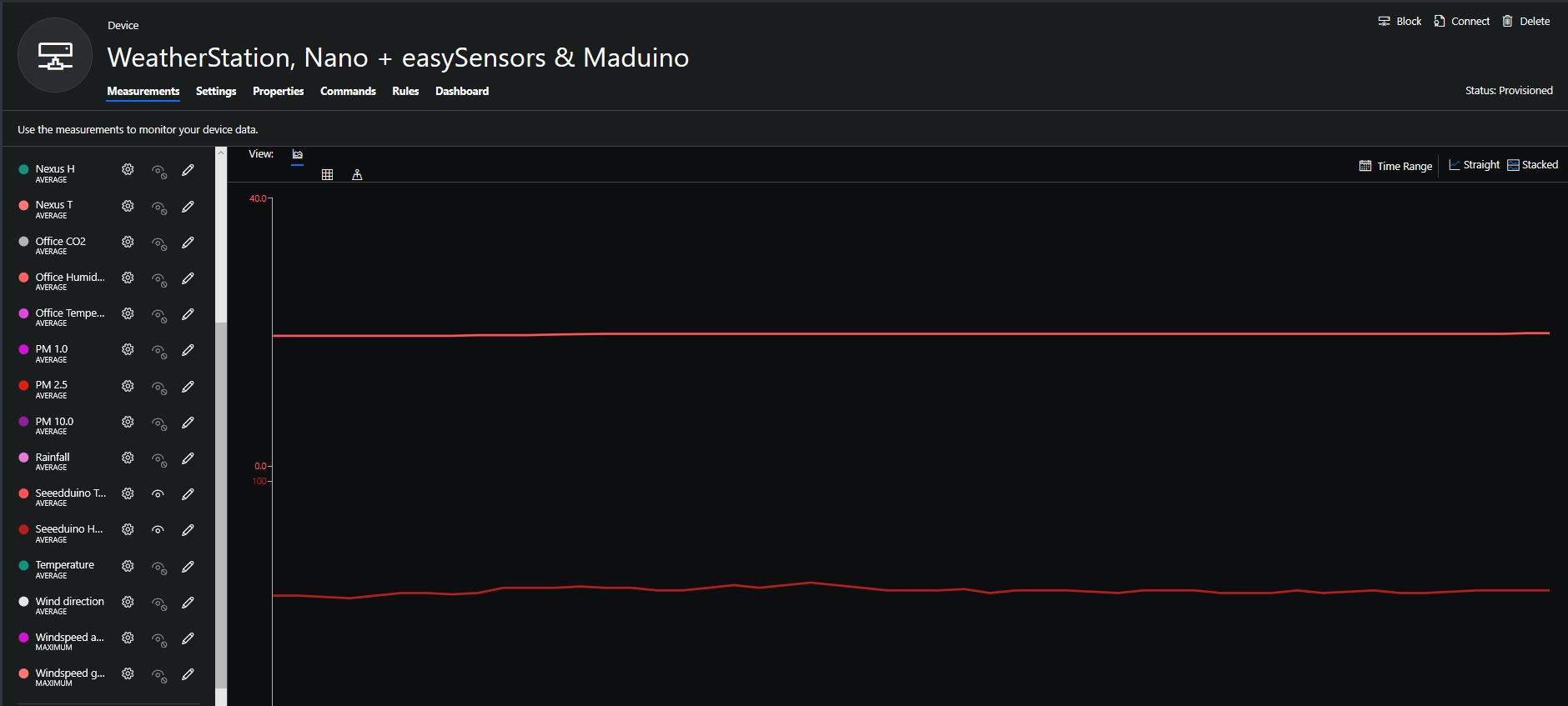
It would be good to run the sensor alongside a calibrated temperature & humidity sensor to see how accurate and responsive it is.

Bill of materials (prices as at August 2019)
  • Seeeduino Nano USD6.90
  • Grove Screw Terminal USD2.90
  • DF Robot SHT20 I2C Temperature & Humidity Sensor USD22.50
  • EasySensors Arduino Nano radio shield RFM95 USD15.00

Grove – Laser PM2.5 Sensor(HM3301) trial

In preparation for a project to monitor the particulates levels around the 3D Printers and Laser Cutters in a school makerspace I purchased a Grove -Laser PM2.5 Sensor (HM3301) for evaluation.

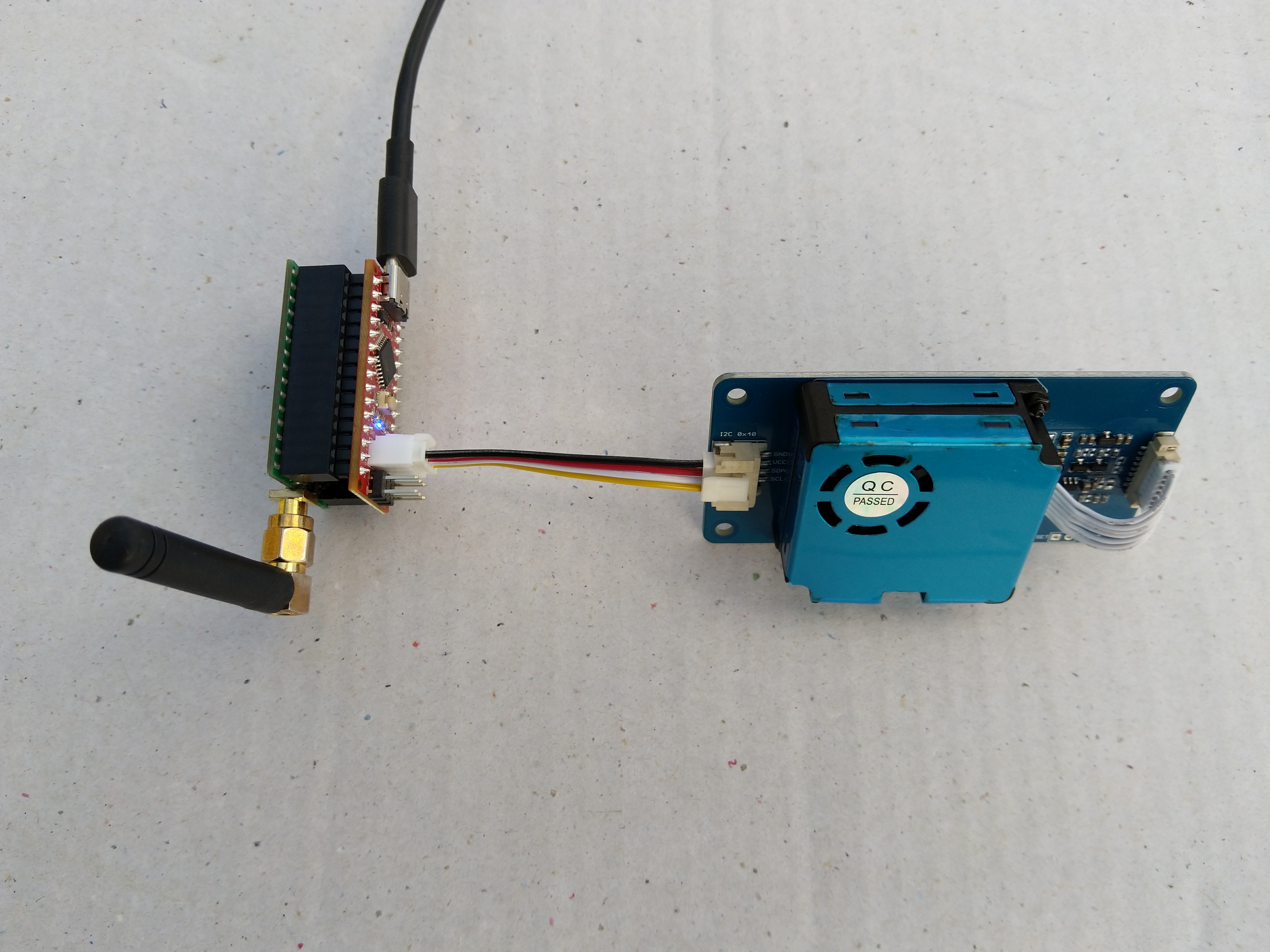
Seeeduino, Grove HM3301 and easysensors shield

The Seeeduino Nano devices I’m testing have a single on-board I2C socket which meant I didn’t need a Grove Shield for Arduino Nano which reduced the size and cost of the sensor node.

To test my setup I installed the Seeed PM2.5 Sensor HM3301 Software Library and downloaded the demo application to my device.

I started with my Easy Sensors Arduino Nano Radio Shield RFM69/95 Payload Addressing client and modified it to use the HM3301 sensor.

After looking at the demo application I stripped out the checksum code and threw the rest away. In my test harness I have extracted only the PM1.0/PM2.5/PM10.0 (concentration CF=1, Standard particulate) in μg/ m3 values from the sensor response payload.

/*
  Copyright ® 2019 August devMobile Software, All Rights Reserved

  THIS CODE AND INFORMATION IS PROVIDED "AS IS" WITHOUT WARRANTY OF ANY
  KIND, EITHER EXPRESSED OR IMPLIED, INCLUDING BUT NOT LIMITED TO THE
  IMPLIED WARRANTIES OF MERCHANTABILITY AND/OR FITNESS FOR A PARTICULAR
  PURPOSE.

  You can do what you want with this code, acknowledgment would be nice.

  http://www.devmobile.co.nz

*/
#include <stdlib.h>
#include <LoRa.h>
#include <sha204_library.h>
#include "Seeed_HM330X.h"

//#define DEBUG
//#define DEBUG_TELEMETRY
//#define DEBUG_LORA

const byte SensorPayloadLength = 28 ;
const byte SensorPayloadBufferSize  = 29 ;
const byte SensorPayloadPM1_0Position = 4;
const byte SensorPayloadPM2_5Position = 6;
const byte SensorPayloadPM10_0Position = 8;

HM330X sensor;
byte SensorPayload[SensorPayloadBufferSize];
  
// LoRa field gateway configuration (these settings must match your field gateway)
const byte DeviceAddressMaximumLength = 15 ;
const char FieldGatewayAddress[] = {"LoRaIoT1"};
const float FieldGatewayFrequency =  915000000.0;
const byte FieldGatewaySyncWord = 0x12 ;

// Payload configuration
const int ChipSelectPin = 10;
const int ResetPin = 9;
const int InterruptPin = 2;

// LoRa radio payload configuration
const byte SensorIdValueSeperator = ' ' ;
const byte SensorReadingSeperator = ',' ;
const unsigned long SensorUploadDelay = 60000;

// ATSHA204 secure authentication, validation with crypto and hashing (currently only using for unique serial number)
const byte Atsha204Port = A3;
atsha204Class sha204(Atsha204Port);
const byte DeviceSerialNumberLength = 9 ;
byte deviceSerialNumber[DeviceSerialNumberLength] = {""};

const byte PayloadSizeMaximum = 64 ;
byte payload[PayloadSizeMaximum];
byte payloadLength = 0 ;


void setup()
{
  Serial.begin(9600);

#ifdef DEBUG
  while (!Serial);
#endif
 
  Serial.println("Setup called");

  Serial.print("Field gateway:");
  Serial.print(FieldGatewayAddress ) ;
  Serial.print(" Frequency:");
  Serial.print( FieldGatewayFrequency,0 ) ;
  Serial.print("MHz SyncWord:");
  Serial.print( FieldGatewaySyncWord ) ;
  Serial.println();
  
   // Retrieve the serial number then display it nicely
  if(sha204.getSerialNumber(deviceSerialNumber))
  {
    Serial.println("sha204.getSerialNumber failed");
    while (true); // Drop into endless loop requiring restart
  }

  Serial.print("SNo:");
  DisplayHex( deviceSerialNumber, DeviceSerialNumberLength);
  Serial.println();

  Serial.println("LoRa setup start");

  // override the default chip select and reset pins
  LoRa.setPins(ChipSelectPin, ResetPin, InterruptPin);
  if (!LoRa.begin(FieldGatewayFrequency))
  {
    Serial.println("LoRa begin failed");
    while (true); // Drop into endless loop requiring restart
  }

  // Need to do this so field gateway pays attention to messsages from this device
  LoRa.enableCrc();
  LoRa.setSyncWord(FieldGatewaySyncWord);

#ifdef DEBUG_LORA
  LoRa.dumpRegisters(Serial);
#endif
  Serial.println("LoRa Setup done.");

  // Configure the Seeedstudio CO2, temperature & humidity sensor
  Serial.println("HM3301 setup start");
  if(sensor.init())
  {
    Serial.println("HM3301 init failed");
    while (true); // Drop into endless loop requiring restart
  
  }
  delay(100);
  Serial.println("HM3301 setup done");

  PayloadHeader((byte *)FieldGatewayAddress,strlen(FieldGatewayAddress), deviceSerialNumber, DeviceSerialNumberLength);

  Serial.println("Setup done");
  Serial.println();
}

void loop()
{
  unsigned long currentMilliseconds = millis();  
  byte sum=0;
  short pm1_0 ;
  short pm2_5 ;
  short pm10_0 ;

  Serial.println("Loop called");

  if(sensor.read_sensor_value(SensorPayload,SensorPayloadBufferSize) == NO_ERROR)
  {
    // Calculate then validate the payload "checksum"
    for(int i=0;i<SensorPayloadLength;i++)
    {
        sum+=SensorPayload[i];
    }
    if(sum!=SensorPayload[SensorPayloadLength])
    {
        Serial.println("Invalid checksum");
        return;
    }    

    PayloadReset();
    
    pm1_0 = (u16)SensorPayload[SensorPayloadPM1_0Position]<<8|SensorPayload[SensorPayloadPM1_0Position+1];
    Serial.print("PM1.5: ");
    Serial.print(pm1_0);
    Serial.println("ug/m3 ") ;

    PayloadAdd( "P10", pm1_0, false);
    
    pm2_5 = (u16)SensorPayload[SensorPayloadPM2_5Position]<<8|SensorPayload[SensorPayloadPM2_5Position+1];
    Serial.print("PM2.5: ");
    Serial.print(pm2_5);
    Serial.println("ug/m3 ") ;

    PayloadAdd( "P25", pm2_5, 1, false);

    pm10_0 = (u16)SensorPayload[SensorPayloadPM10_0Position]<<8|SensorPayload[SensorPayloadPM10_0Position+1];
    Serial.print("PM10.0: ");
    Serial.print(pm10_0);
    Serial.println("ug/m3 ");

    PayloadAdd( "P100", pm10_0, 0, true) ;

    #ifdef DEBUG_TELEMETRY
      Serial.println();
      Serial.print("RFM9X/SX127X Payload length:");
      Serial.print(payloadLength);
      Serial.println(" bytes");
    #endif

    LoRa.beginPacket();
    LoRa.write(payload, payloadLength);
    LoRa.endPacket();
  }
  Serial.println("Loop done");
  Serial.println();
  
  delay(SensorUploadDelay - (millis() - currentMilliseconds ));
}

void PayloadHeader( const byte *to, byte toAddressLength, const byte *from, byte fromAddressLength)
{
  byte addressesLength = toAddressLength + fromAddressLength ;

  payloadLength = 0 ;

  // prepare the payload header with "To" Address length (top nibble) and "From" address length (bottom nibble)
  
  payload[payloadLength] = (toAddressLength << 4) | fromAddressLength ;
  payloadLength += 1;

  // Copy the "To" address into payload
  memcpy(&payload[payloadLength], to, toAddressLength);
  payloadLength += toAddressLength ;

  // Copy the "From" into payload
  memcpy(&payload[payloadLength], from, fromAddressLength);
  payloadLength += fromAddressLength ;
}

void PayloadAdd( const char *sensorId, float value, byte decimalPlaces, bool last)
{
  byte sensorIdLength = strlen( sensorId ) ;

  memcpy( &payload[payloadLength], sensorId,  sensorIdLength) ;
  payloadLength += sensorIdLength ;
  payload[ payloadLength] = SensorIdValueSeperator;
  payloadLength += 1 ;
  payloadLength += strlen( dtostrf(value, -1, decimalPlaces, (char *)&payload[payloadLength]));
  if (!last)
  {
    payload[ payloadLength] = SensorReadingSeperator;
    payloadLength += 1 ;
  }
  
#ifdef DEBUG_TELEMETRY
  Serial.print("PayloadAdd float-payloadLength:");
  Serial.print( payloadLength);
  Serial.println( );
#endif
}

void PayloadAdd( char *sensorId, int value, bool last )
{
  byte sensorIdLength = strlen(sensorId) ;

  memcpy(&payload[payloadLength], sensorId,  sensorIdLength) ;
  payloadLength += sensorIdLength ;
  payload[ payloadLength] = SensorIdValueSeperator;
  payloadLength += 1 ;
  payloadLength += strlen(itoa( value,(char *)&payload[payloadLength],10));
  if (!last)
  {
    payload[ payloadLength] = SensorReadingSeperator;
    payloadLength += 1 ;
  }
  
#ifdef DEBUG_TELEMETRY
  Serial.print("PayloadAdd int-payloadLength:" );
  Serial.print(payloadLength);
  Serial.println( );
#endif
}

void PayloadAdd( char *sensorId, unsigned int value, bool last )
{
  byte sensorIdLength = strlen(sensorId) ;

  memcpy(&payload[payloadLength], sensorId,  sensorIdLength) ;
  payloadLength += sensorIdLength ;
  payload[ payloadLength] = SensorIdValueSeperator;
  payloadLength += 1 ;
  payloadLength += strlen(utoa( value,(char *)&payload[payloadLength],10));
  if (!last)
  {
    payload[ payloadLength] = SensorReadingSeperator;
    payloadLength += 1 ;
  }
  
#ifdef DEBUG_TELEMETRY
  Serial.print("PayloadAdd uint-payloadLength:");
  Serial.print(payloadLength);
  Serial.println( );
#endif
}

void PayloadReset()
{
  byte fromAddressLength = payload[0] & 0xf ;
  byte toAddressLength = payload[0] >> 4 ;
  
  payloadLength = toAddressLength + fromAddressLength + 1;
}

void DisplayHex( byte *byteArray, byte length) 
{
  for (int i = 0; i < length ; i++)
  {
    // Add a leading zero
    if ( byteArray[i] < 16)
    {
      Serial.print("0");
    }
    Serial.print(byteArray[i], HEX);
    if ( i < (length-1)) // Don't put a - after last digit
    {
      Serial.print("-");
    }
  }
}    

The code is available on GitHub.

20:45:38.021 -> Setup called
20:45:38.054 -> Field gateway:LoRaIoT1 Frequency:915000000MHz SyncWord:18
20:45:38.156 -> SNo:01-23-8C-48-D6-D1-F5-86-EE
20:45:38.190 -> LoRa setup start
20:45:38.190 -> LoRa Setup done.
20:45:38.224 -> HM3301 setup start
20:45:38.292 -> HM3301 setup done
20:45:38.292 -> Setup done
20:45:38.292 -> 
20:45:38.325 -> Loop called
20:45:38.325 -> PM1.5: 10ug/m3 
20:45:38.359 -> PM2.5: 14ug/m3 
20:45:38.359 -> PM10.0: 19ug/m3 
20:45:38.393 -> Loop done
20:45:38.393 -> 
20:46:38.220 -> Loop called
20:46:38.220 -> PM1.5: 10ug/m3 
20:46:38.255 -> PM2.5: 15ug/m3 
20:46:38.255 -> PM10.0: 20ug/m3 
20:46:38.325 -> Loop done
20:46:38.325 -> 
20:47:38.181 -> Loop called
20:47:38.181 -> PM1.5: 10ug/m3 
20:47:38.181 -> PM2.5: 14ug/m3 
20:47:38.216 -> PM10.0: 19ug/m3 
20:47:38.250 -> Loop done
20:47:38.284 -> 
20:48:38.123 -> Loop called
20:48:38.123 -> PM1.5: 10ug/m3 
20:48:38.158 -> PM2.5: 14ug/m3 
20:48:38.158 -> PM10.0: 19ug/m3 
20:48:38.193 -> Loop done
20:48:38.227 -> 
20:49:38.048 -> Loop called
20:49:38.082 -> PM1.5: 10ug/m3 
20:49:38.082 -> PM2.5: 14ug/m3 
20:49:38.117 -> PM10.0: 19ug/m3 
20:49:38.151 -> Loop done
20:49:38.151 -> 
20:50:38.010 -> Loop called
20:50:38.010 -> PM1.5: 9ug/m3 
20:50:38.010 -> PM2.5: 13ug/m3 
20:50:38.045 -> PM10.0: 18ug/m3 
20:50:38.079 -> Loop done
20:50:38.079 -> 

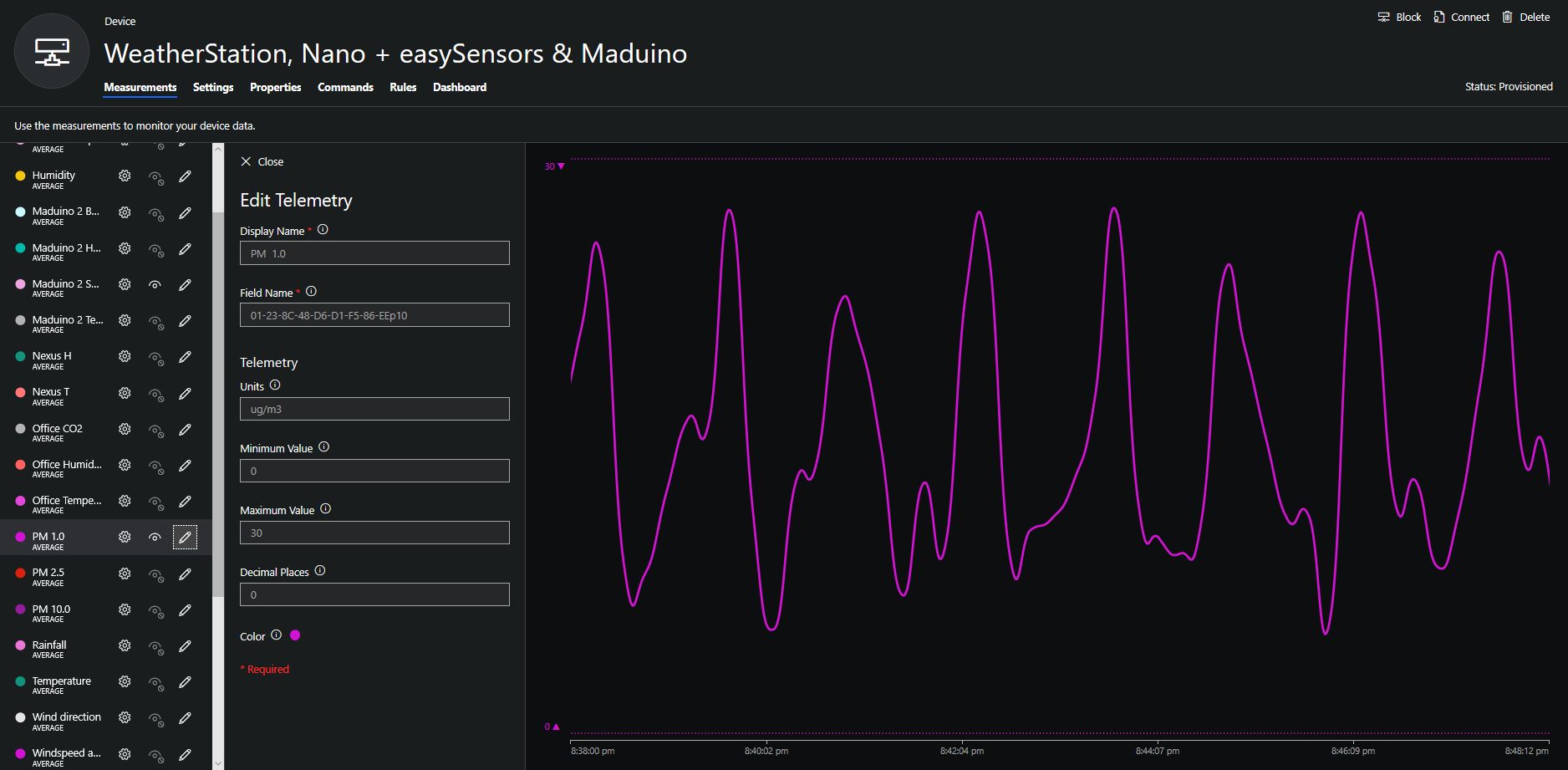
To configure the device in Azure IoT Central (similar process for Adafruit.IO, working on support for losant, and ubidots) I copied the SNo: from the Arduino development tool logging window and appended p10 for PM 1 value, p25 for PM2.5 value and p100 for PM10 value to the unique serial number from the ATSHA204A chip. (N.B. pay attention to the case of the field names they are case sensitive)

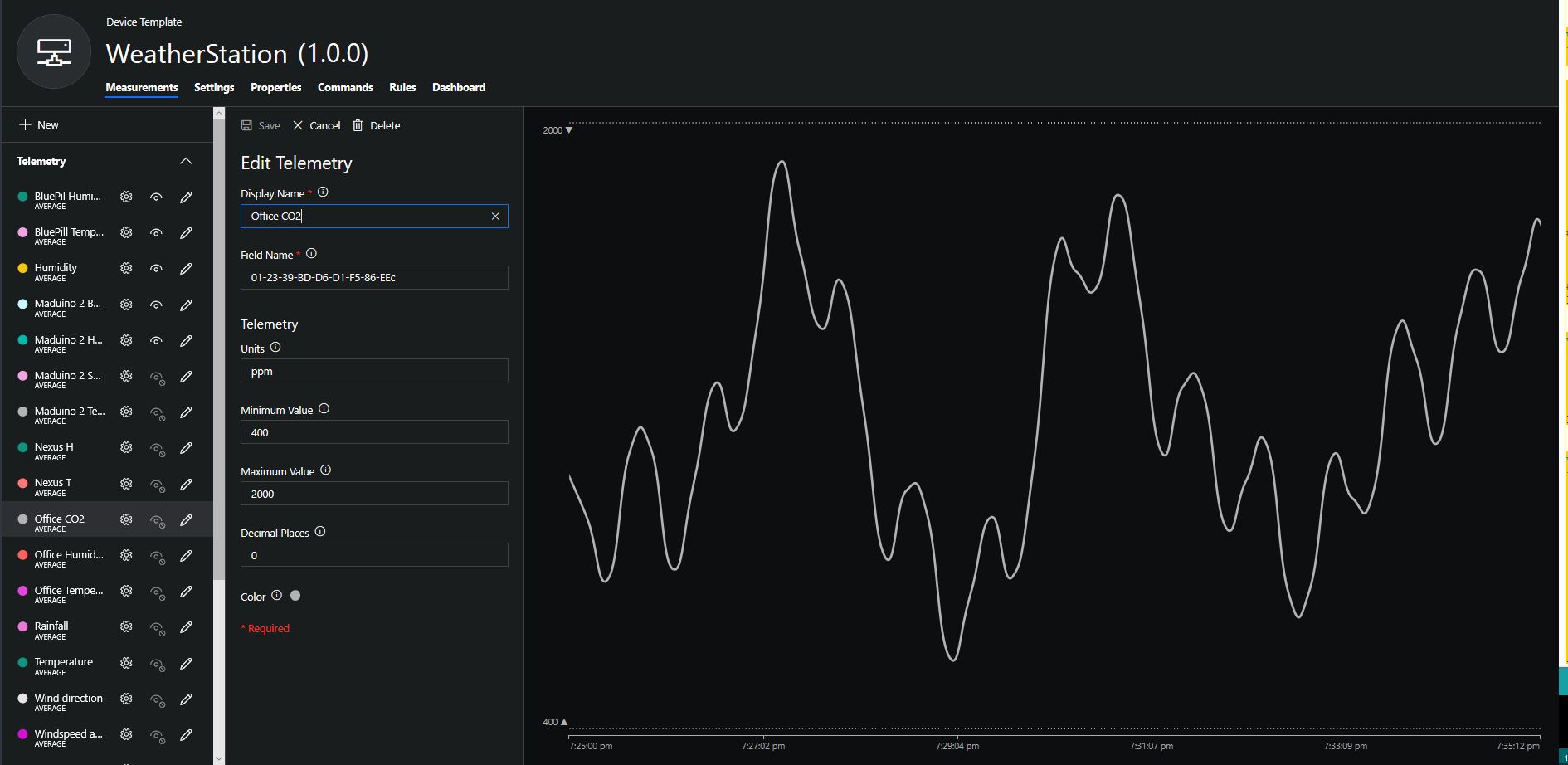
Azure IoT Central telemetry configuration

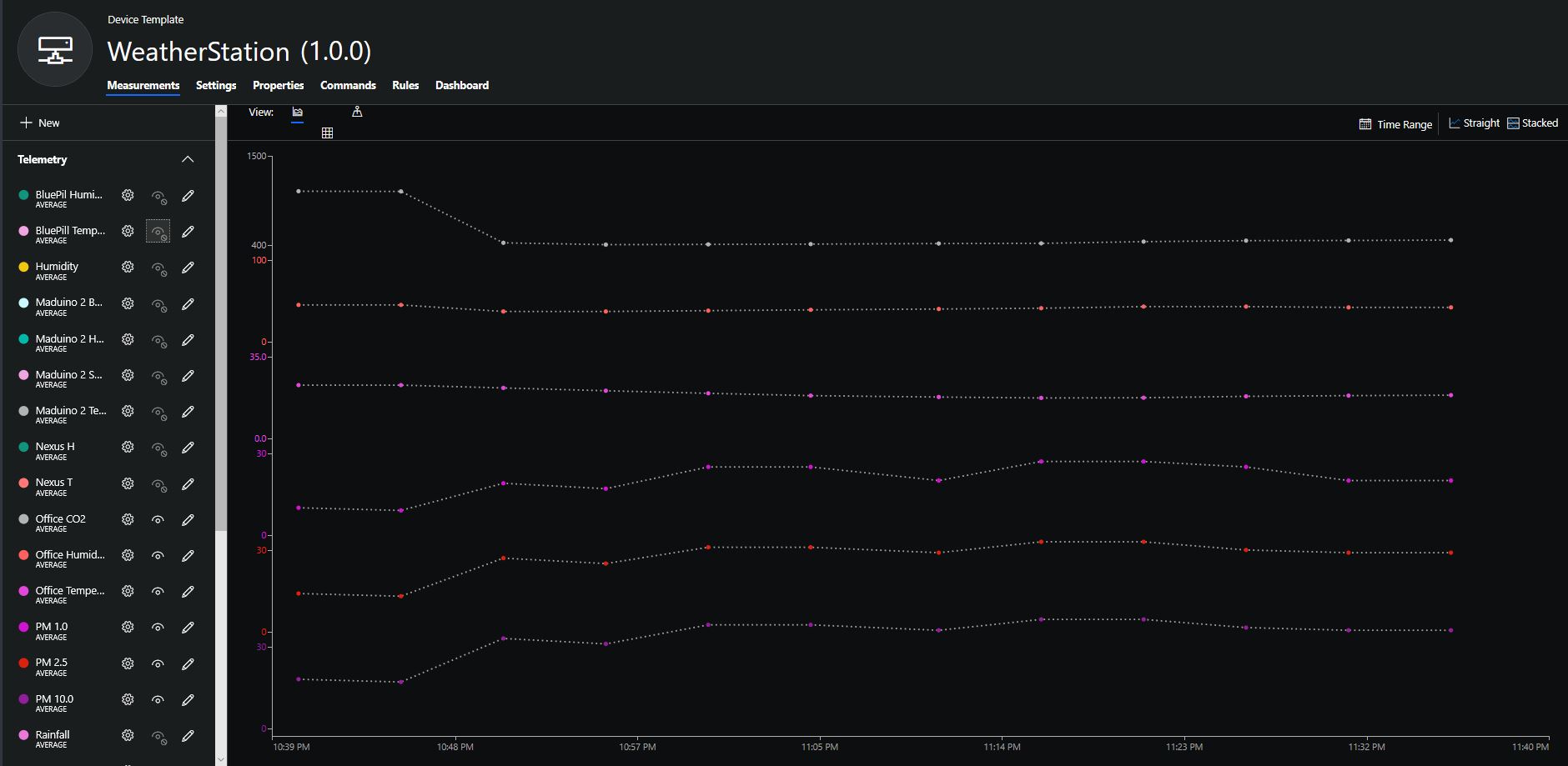
The rapidly settled into a narrow range of readings, but spiked when I took left it outside (winter in New Zealand) and the values spiked when food was being cooked in the kitchen which is next door to my office.

It would be good to run the sensor alongside a professional particulates monitor so the values could be compared and used to adjust the readings of the Grove sensor if necessary.

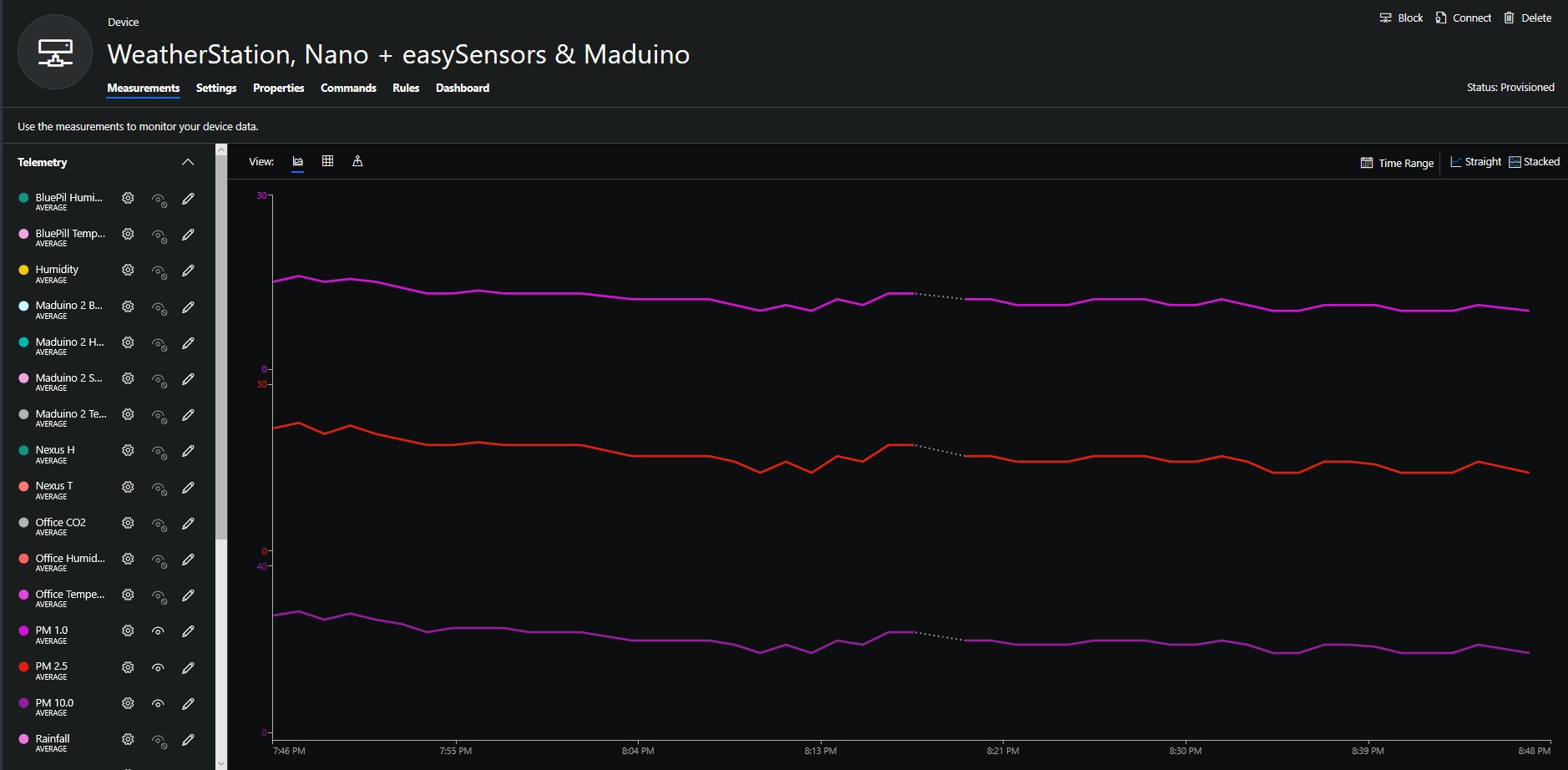
Hour of PM1, PM2.5 & PM10 readings in my office early evening
CO2 and particulates values while outside on my deck from 10:30pm to 11:30pm

Bill of materials (prices as at August 2019)
  • Seeeduino Nano USD6.90
  • Grove – Laser PM2.5 Sensor (HM3301) USD29.90
  • EasySensors Arduino Nano radio shield RFM95 USD15.00

Grove – Carbon Dioxide Sensor(SCD30) trial

In preparation for another student project to monitor the temperature, humidity and CO2 levels in a number of classrooms I purchased a couple of Grove – CO2, Temperature & Humidity Sensors (SCD30) for evaluation.

Seeeduino, Grove SCD30 and easysensors shield

Seeeduino Nano devices have a single on-board I2C socket which meant I didn’t need a Grove Shield for Arduino Nano which reduced the size and cost of the sensor node.

I downloaded the seeedstudio wiki example calibration code, compiled and uploaded it to one of my Seeeduino Nano devices. When activated for the first time a period of minimum 7 days is needed so that the sensor algorithm can find its initial parameter set. During this period the sensor has to be exposed to fresh air for at least 1 hour every day.

During the calibration process I put the device in my garage and left the big door open for at least an hour every day. Once the sensor was calibrated I bought it inside at put it on the bookcase in my office.

I modified my Easy Sensors Arduino Nano Radio Shield RFM69/95 Payload Addressing client to use the sensor.

/*
  Copyright ® 2019 August devMobile Software, All Rights Reserved

  THIS CODE AND INFORMATION IS PROVIDED "AS IS" WITHOUT WARRANTY OF ANY
  KIND, EITHER EXPRESSED OR IMPLIED, INCLUDING BUT NOT LIMITED TO THE
  IMPLIED WARRANTIES OF MERCHANTABILITY AND/OR FITNESS FOR A PARTICULAR
  PURPOSE.

  You can do what you want with this code, acknowledgment would be nice.

  http://www.devmobile.co.nz

*/
#include <stdlib.h>
#include <LoRa.h>
#include <sha204_library.h>
#include "SCD30.h"

//#define DEBUG
//#define DEBUG_TELEMETRY
//#define DEBUG_LORA

// LoRa field gateway configuration (these settings must match your field gateway)
const byte DeviceAddressMaximumLength = 15 ;
const char FieldGatewayAddress[] = {"LoRaIoT1"};
const float FieldGatewayFrequency =  915000000.0;
const byte FieldGatewaySyncWord = 0x12 ;

// Payload configuration
const int ChipSelectPin = 10;
const int ResetPin = 9;
const int InterruptPin = 2;

// LoRa radio payload configuration
const byte SensorIdValueSeperator = ' ' ;
const byte SensorReadingSeperator = ',' ;
const unsigned long SensorUploadDelay = 300000;

// ATSHA204 secure authentication, validation with crypto and hashing (currently only using for unique serial number)
const byte Atsha204Port = A3;
atsha204Class sha204(Atsha204Port);
const byte DeviceSerialNumberLength = 9 ;
byte deviceSerialNumber[DeviceSerialNumberLength] = {""};

const byte PayloadSizeMaximum = 64 ;
byte payload[PayloadSizeMaximum];
byte payloadLength = 0 ;


void setup()
{
  Serial.begin(9600);

#ifdef DEBUG
  while (!Serial);
#endif
 
  Serial.println("Setup called");

  Serial.print("Field gateway:");
  Serial.print(FieldGatewayAddress ) ;
  Serial.print(" Frequency:");
  Serial.print( FieldGatewayFrequency,0 ) ;
  Serial.print("MHz SyncWord:");
  Serial.print( FieldGatewaySyncWord ) ;
  Serial.println();
  
   // Retrieve the serial number then display it nicely
  if(sha204.getSerialNumber(deviceSerialNumber))
  {
    Serial.println("sha204.getSerialNumber failed");
    while (true); // Drop into endless loop requiring restart
  }

  Serial.print("SNo:");
  DisplayHex( deviceSerialNumber, DeviceSerialNumberLength);
  Serial.println();

  Serial.println("LoRa setup start");

  // override the default chip select and reset pins
  LoRa.setPins(ChipSelectPin, ResetPin, InterruptPin);
  if (!LoRa.begin(FieldGatewayFrequency))
  {
    Serial.println("LoRa begin failed");
    while (true); // Drop into endless loop requiring restart
  }

  // Need to do this so field gateway pays attention to messsages from this device
  LoRa.enableCrc();
  LoRa.setSyncWord(FieldGatewaySyncWord);

#ifdef DEBUG_LORA
  LoRa.dumpRegisters(Serial);
#endif
  Serial.println("LoRa Setup done.");

  // Configure the Seeedstudio CO2, temperature & humidity sensor
  Serial.println("SCD30 setup start");
  Wire.begin();
  scd30.initialize();  
  delay(100);
  Serial.println("SCD30 setup done");

  PayloadHeader((byte *)FieldGatewayAddress,strlen(FieldGatewayAddress), deviceSerialNumber, DeviceSerialNumberLength);

  Serial.println("Setup done");
  Serial.println();
}

void loop()
{
  unsigned long currentMilliseconds = millis();  
  float temperature ;
  float humidity ;
  float co2;

  Serial.println("Loop called");

  if(scd30.isAvailable())
  {
    float result[3] = {0};
    PayloadReset();

    // Read the CO2, temperature & humidity values then display nicely
    scd30.getCarbonDioxideConcentration(result);

    co2 = result[0];
    Serial.print("C:");
    Serial.print(co2, 1) ;
    Serial.println("ppm ") ;

    PayloadAdd( "C", co2, 1, false);
    
    temperature = result[1];
    Serial.print("T:");
    Serial.print(temperature, 1) ;
    Serial.println("C ") ;

    PayloadAdd( "T", temperature, 1, false);

    humidity = result[2];
    Serial.print("H:" );
    Serial.print(humidity, 0) ;
    Serial.println("% ") ;

    PayloadAdd( "H", humidity, 0, true) ;

    #ifdef DEBUG_TELEMETRY
      Serial.println();
      Serial.print("RFM9X/SX127X Payload length:");
      Serial.print(payloadLength);
      Serial.println(" bytes");
    #endif

    LoRa.beginPacket();
    LoRa.write(payload, payloadLength);
    LoRa.endPacket();
  }
  Serial.println("Loop done");
  Serial.println();
  
  delay(SensorUploadDelay - (millis() - currentMilliseconds ));
}
...
}    

The code is available on GitHub.

20:38:56.746 -> Setup called
20:38:56.746 -> Field gateway: Frequency:915000000MHz SyncWord:18
20:38:56.849 -> SNo:01-23-39-BD-D6-D1-F5-86-EE
20:38:56.884 -> LoRa setup start
20:38:56.919 -> LoRa Setup done.
20:38:56.919 -> SCD30 setup start
20:38:56.986 -> SCD30 setup done
20:38:56.986 -> Setup done
20:38:57.020 -> 
20:39:06.966 -> Received packet
20:39:06.966 -> Packet size:18
20:39:06.999 -> To len:9
20:39:06.999 -> From len:8
20:39:06.999 -> To:01-23-39-BD-D6-D1-F5-86-EE
20:39:07.034 -> From:4C-6F-52-61-49-6F-54-31
20:39:07.069 -> FieldGateway:4C-6F-52-61-49-6F-54-31
20:39:07.104 -> RSSI -55
20:39:07.139 -> Loop called
20:39:07.139 -> C:730.8ppm 
20:39:07.139 -> T:23.1C 
20:39:07.173 -> H:46% 
20:39:07.173 -> Loop done
20:39:07.208 -> 
20:39:37.123 -> Loop called
20:39:37.158 -> C:529.9ppm 
20:39:37.158 -> T:23.2C 
20:39:37.158 -> H:48% 
20:39:37.228 -> Loop done
20:39:37.228 -> 

To configure the device in Azure IoT Central (similar process for Adafruit.IO, working on support for losant, and ubidots) I copied the SNo: from the Arduino development tool logging window and appended c for the CO2 parts per million (ppm), h for the humidity % and t for the temperature °C to the unique serial number from the ATSHA204A chip. (N.B. pay attention to the case of the field names they are case sensitive)

Azure IoT Central telemetry configuration

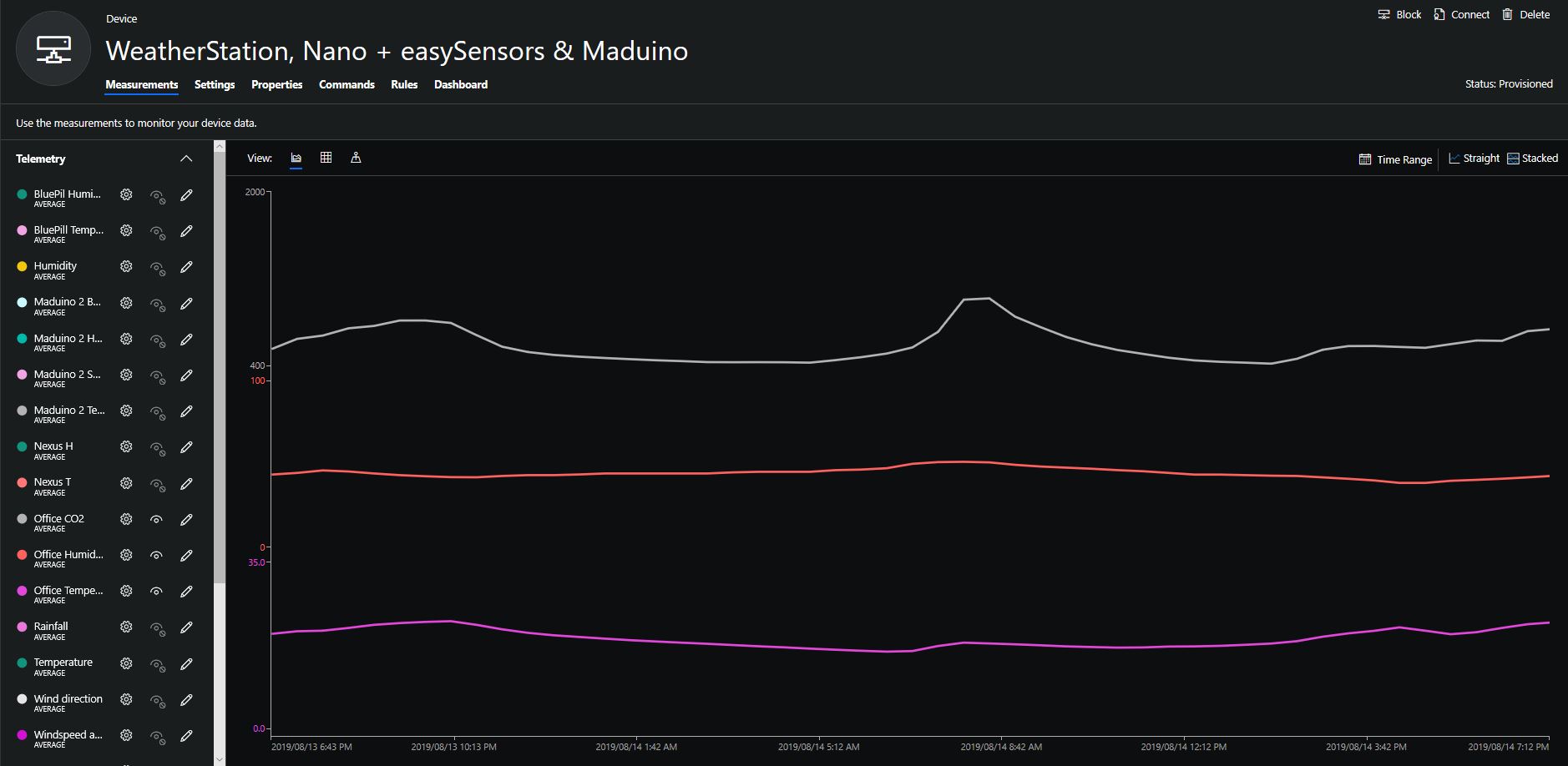
Overall the performance of the sensor is looking pretty positive, the CO2 levels fluctuate in a acceptable range (based on office occupancy), and the temperature + humidity readings track quite closely to the other two sensor nodes in my office. The only issue so far is my lack of USB-C cables to power the devices in the field

CO2, Humidity and Temperature in my office for a day

Bill of materials (prices as at August 2019)
  • Seeeduino Nano USD6.90
  • Grove – CO2, Humidity & Temperature Sensor(SCD30) USD59.95
  • EasySensors Arduino Nano radio shield RFM95 USD15.00

STM32 Blue Pill LoRaWAN node

A few weeks ago I ordered an STM32 Blue Pill LoRaWAN node from the M2M Shop on Tindie for evaluation. I have bought a few M2M client devices including a Low power LoRaWan Node Model A328, and Low power LoRaWan Node Model B1284 for projects and they have worked well. This one looked interesting as I had never used a maple like device before.

Bill of materials (Prices as at July 2019)

  • STM32 Blue Pill LoRaWAN node USD21
  • Grove – Temperature&Humidity Sensor USD11.5
  • Grove – 4 pin Female Jumper to Grove 4 pin Conversion Cable USD3.90

The two sockets on the main board aren’t Grove compatible so I used the 4 pin female to Grove 4 pin conversion cable to connect the temperature and humidity sensor.

STM32 Blue Pill LoRaWAN node test rig

I used a modified version of my Arduino client code which worked after I got the pin reset pin sorted and the female sockets in the right order.

/*
  Copyright ® 2019 July devMobile Software, All Rights Reserved

  THIS CODE AND INFORMATION IS PROVIDED "AS IS" WITHOUT WARRANTY OF ANY
  KIND, EITHER EXPRESSED OR IMPLIED, INCLUDING BUT NOT LIMITED TO THE
  IMPLIED WARRANTIES OF MERCHANTABILITY AND/OR FITNESS FOR A PARTICULAR
  PURPOSE.
  
  Adapted from LoRa Duplex communication with Sync Word

  Sends temperature & humidity data from Seeedstudio 

  https://www.seeedstudio.com/Grove-Temperature-Humidity-Sensor-High-Accuracy-Min-p-1921.html

  To my Windows 10 IoT Core RFM 9X library

  https://blog.devmobile.co.nz/2018/09/03/rfm9x-iotcore-payload-addressing/
*/
#include <itoa.h>     
#include <SPI.h>     
#include <LoRa.h>

#include <TH02_dev.h>

#define DEBUG
//#define DEBUG_TELEMETRY
//#define DEBUG_LORA

// LoRa field gateway configuration (these settings must match your field gateway)
const char DeviceAddress[] = {"BLUEPILL"};

// Azure IoT Hub FieldGateway
const char FieldGatewayAddress[] = {"LoRaIoT1"}; 
const float FieldGatewayFrequency =  915000000.0;
const byte FieldGatewaySyncWord = 0x12 ;

// Bluepill hardware configuration
const int ChipSelectPin = PA4;
const int InterruptPin = PA0;
const int ResetPin = -1;

// LoRa radio payload configuration
const byte SensorIdValueSeperator = ' ' ;
const byte SensorReadingSeperator = ',' ;
const byte PayloadSizeMaximum = 64 ;
byte payload[PayloadSizeMaximum];
byte payloadLength = 0 ;

const int LoopDelaySeconds = 300 ;

// Sensor configuration
const char SensorIdTemperature[] = {"t"};
const char SensorIdHumidity[] = {"h"};


void setup()
{
  Serial.begin(9600);
#ifdef DEBUG
  while (!Serial);
#endif
  Serial.println("Setup called");

  Serial.println("LoRa setup start");

  // override the default chip select and reset pins
  LoRa.setPins(ChipSelectPin, ResetPin, InterruptPin);
  if (!LoRa.begin(FieldGatewayFrequency))
  {
    Serial.println("LoRa begin failed");
    while (true); // Drop into endless loop requiring restart
  }

  // Need to do this so field gateways pays attention to messsages from this device
  LoRa.enableCrc();
  LoRa.setSyncWord(FieldGatewaySyncWord);

#ifdef DEBUG_LORA
  LoRa.dumpRegisters(Serial);
#endif
  Serial.println("LoRa setup done.");

  PayloadHeader((byte*)FieldGatewayAddress, strlen(FieldGatewayAddress), (byte*)DeviceAddress, strlen(DeviceAddress));

 // Configure the Seeedstudio TH02 temperature & humidity sensor
  Serial.println("TH02 setup");
  TH02.begin();
  delay(100);
  Serial.println("TH02 Setup done");  

  Serial.println("Setup done");
}

void loop() {
  // read the value from the sensor:
  double temperature = TH02.ReadTemperature();
  double humidity = TH02.ReadHumidity();

  Serial.print("Humidity: ");
  Serial.print(humidity, 0);
  Serial.print(" %\t");
  Serial.print("Temperature: ");
  Serial.print(temperature, 1);
  Serial.println(" *C");

  PayloadReset();

  PayloadAdd(SensorIdHumidity, humidity, 0) ;
  PayloadAdd(SensorIdTemperature, temperature, 1) ;

  LoRa.beginPacket();
  LoRa.write(payload, payloadLength);
  LoRa.endPacket();

  Serial.println("Loop done");

  delay(LoopDelaySeconds * 1000);
}


void PayloadHeader( byte *to, byte toAddressLength, byte *from, byte fromAddressLength)
{
  byte addressesLength = toAddressLength + fromAddressLength ;

#ifdef DEBUG_TELEMETRY
  Serial.println("PayloadHeader- ");
  Serial.print( "To Address len:");
  Serial.print( toAddressLength );
  Serial.print( " From Address len:");
  Serial.print( fromAddressLength );
  Serial.print( " Addresses length:");
  Serial.print( addressesLength );
  Serial.println( );
#endif

  payloadLength = 0 ;

  // prepare the payload header with "To" Address length (top nibble) and "From" address length (bottom nibble)
  payload[payloadLength] = (toAddressLength << 4) | fromAddressLength ;
  payloadLength += 1;

  // Copy the "To" address into payload
  memcpy(&payload[payloadLength], to, toAddressLength);
  payloadLength += toAddressLength ;

  // Copy the "From" into payload
  memcpy(&payload[payloadLength], from, fromAddressLength);
  payloadLength += fromAddressLength ;
}


void PayloadAdd( const char *sensorId, float value, byte decimalPlaces)
{
  byte sensorIdLength = strlen( sensorId ) ;

#ifdef DEBUG_TELEMETRY
  Serial.println("PayloadAdd-float ");
  Serial.print( "SensorId:");
  Serial.print( sensorId );
  Serial.print( " sensorIdLen:");
  Serial.print( sensorIdLength );
  Serial.print( " Value:");
  Serial.print( value, decimalPlaces );
  Serial.print( " payloadLength:");
  Serial.print( payloadLength);
#endif

  memcpy( &payload[payloadLength], sensorId,  sensorIdLength) ;
  payloadLength += sensorIdLength ;
  payload[ payloadLength] = SensorIdValueSeperator;
  payloadLength += 1 ;
  payloadLength += strlen( dtostrf(value, -1, decimalPlaces, (char *)&payload[payloadLength]));
  payload[ payloadLength] = SensorReadingSeperator;
  payloadLength += 1 ;

#ifdef DEBUG_TELEMETRY
  Serial.print( " payloadLength:");
  Serial.print( payloadLength);
  Serial.println( );
#endif
}


void PayloadAdd( const char *sensorId, int value )
{
  byte sensorIdLength = strlen( sensorId ) ;

#ifdef DEBUG_TELEMETRY
  Serial.println("PayloadAdd-int ");
  Serial.print( "SensorId:");
  Serial.print( sensorId );
  Serial.print( " sensorIdLen:");
  Serial.print( sensorIdLength );
  Serial.print( " Value:");
  Serial.print( value );
  Serial.print( " payloadLength:");
  Serial.print( payloadLength);
#endif

  memcpy( &payload[payloadLength], sensorId,  sensorIdLength) ;
  payloadLength += sensorIdLength ;
  payload[ payloadLength] = SensorIdValueSeperator;
  payloadLength += 1 ;
  payloadLength += strlen( itoa( value, (char *)&payload[payloadLength], 10));
  payload[ payloadLength] = SensorReadingSeperator;
  payloadLength += 1 ;

#ifdef DEBUG_TELEMETRY
  Serial.print( " payloadLength:");
  Serial.print( payloadLength);
  Serial.println( );
#endif
}

void PayloadAdd( const char *sensorId, unsigned int value )
{
  byte sensorIdLength = strlen( sensorId ) ;

#ifdef DEBUG_TELEMETRY
  Serial.println("PayloadAdd-unsigned int ");
  Serial.print( "SensorId:");
  Serial.print( sensorId );
  Serial.print( " sensorIdLen:");
  Serial.print( sensorIdLength );
  Serial.print( " Value:");
  Serial.print( value );
  Serial.print( " payloadLength:");
  Serial.print( payloadLength);
#endif

  memcpy( &payload[payloadLength], sensorId,  sensorIdLength) ;
  payloadLength += sensorIdLength ;
  payload[ payloadLength] = SensorIdValueSeperator;
  payloadLength += 1 ;
  payloadLength += strlen( utoa( value, (char *)&payload[payloadLength], 10));
  payload[ payloadLength] = SensorReadingSeperator;
  payloadLength += 1 ;

#ifdef DEBUG_TELEMETRY
  Serial.print( " payloadLength:");
  Serial.print( payloadLength);
  Serial.println( );
#endif
}


void PayloadReset()
{
  byte fromAddressLength = payload[0] & 0xf ;
  byte toAddressLength = payload[0] >> 4 ;
  byte addressesLength = toAddressLength + fromAddressLength ;

  payloadLength = addressesLength + 1;

#ifdef DEBUG_TELEMETRY
  Serial.println("PayloadReset- ");
  Serial.print( "To Address len:");
  Serial.print( toAddressLength );
  Serial.print( " From Address len:");
  Serial.print( fromAddressLength );
  Serial.print( " Addresses length:");
  Serial.print( addressesLength );
  Serial.println( );
#endif
}

To get the application to compile I also had to include itoa.h rather than stdlib.h.

maple_loader v0.1
Resetting to bootloader via DTR pulse
[Reset via USB Serial Failed! Did you select the right serial port?]
Searching for DFU device [1EAF:0003]...
Assuming the board is in perpetual bootloader mode and continuing to attempt dfu programming...

dfu-util - (C) 2007-2008 by OpenMoko Inc.

Initially I had some problems deploying my software because I hadn’t followed the instructions and run the installation batch file.

14:03:56.946 -> Setup called
14:03:56.946 -> LoRa setup start
14:03:56.946 -> LoRa setup done.
14:03:56.946 -> TH02 setup
14:03:57.046 -> TH02 Setup done
14:03:57.046 -> Setup done
14:03:57.115 -> Humidity: 76 %	Temperature: 18.9 *C
14:03:57.182 -> Loop done
14:08:57.226 -> Humidity: 74 %	Temperature: 18.7 *C
14:08:57.295 -> Loop done
14:13:57.360 -> Humidity: 76 %	Temperature: 18.3 *C
14:13:57.430 -> Loop done
14:18:57.475 -> Humidity: 74 %	Temperature: 18.2 *C
14:18:57.544 -> Loop done
14:23:57.593 -> Humidity: 70 %	Temperature: 17.8 *C
14:23:57.662 -> Loop done
14:28:57.733 -> Humidity: 71 %	Temperature: 17.8 *C
14:28:57.802 -> Loop done
14:33:57.883 -> Humidity: 73 %	Temperature: 17.9 *C
14:33:57.952 -> Loop done
14:38:57.997 -> Humidity: 73 %	Temperature: 18.0 *C
14:38:58.066 -> Loop done
14:43:58.138 -> Humidity: 73 %	Temperature: 18.1 *C
14:43:58.208 -> Loop done
14:48:58.262 -> Humidity: 73 %	Temperature: 18.3 *C
14:48:58.331 -> Loop done
14:53:58.374 -> Humidity: 73 %	Temperature: 18.2 *C
14:53:58.444 -> Loop done
14:58:58.509 -> Humidity: 73 %	Temperature: 18.3 *C
14:58:58.578 -> Loop done
15:03:58.624 -> Humidity: 65 %	Temperature: 16.5 *C
15:03:58.694 -> Loop done
15:08:58.766 -> Humidity: 71 %	Temperature: 18.8 *C
15:08:58.836 -> Loop done
15:13:58.893 -> Humidity: 75 %	Temperature: 19.1 *C
15:13:58.963 -> Loop done

I configured the device to upload to my Azure IoT Hub/Azure IoT Central gateway and after getting the device name configuration right it has been running reliably for a couple of days

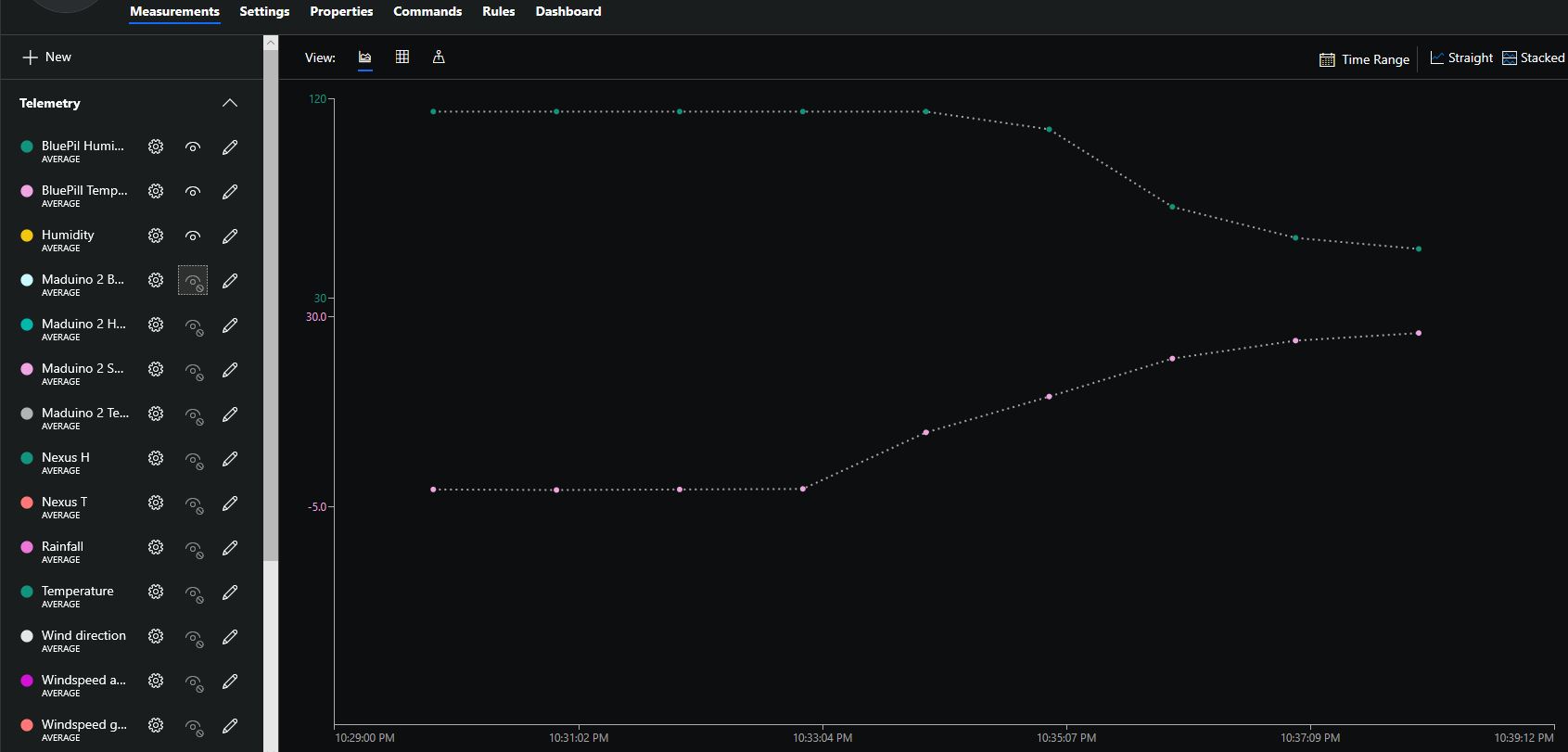
Azure IoT Central Temperature and humidity

The device was sitting outside on the deck and rapid increase in temperature is me bringing it inside.

Grove Base Hat for Raspberry PI Zero Windows 10 IoT Core

During the week a package arrived from Seeedstudio with a Grove Base Hat for RPI Zero. So I have modified my Grove Base Hat for RPI Windows 10 IoT Core library to add support for the new shield.

Grove Base Hat for Raspberry PI Zero on Raspberry PI 3

The Raspberry PI Zero hat has a two less analog ports and a different device id so some conditional compile options were necessary

namespace devMobile.Windows10IoTCore.GroveBaseHatRPI
{
#if (!GROVE_BASE_HAT_RPI && !GROVE_BASE_HAT_RPI_ZERO)
#error Library must have at least one of GROVE_BASE_HAT_RPI or GROVE_BASE_HAT_RPI_ZERO defined
#endif

#if (GROVE_BASE_HAT_RPI && GROVE_BASE_HAT_RPI_ZERO)
#error Library must have at most one of GROVE_BASE_HAT_RPI or GROVE_BASE_HAT_RPI_ZERO defined
#endif

	public class AnalogPorts : IDisposable
	{
		private const int I2CAddress = 0x04;
		private const byte RegisterDeviceId = 0x0;
		private const byte RegisterVersion = 0x02;
		private const byte RegisterPowerSupplyVoltage = 0x29;
		private const byte RegisterRawBase = 0x10;
		private const byte RegisterVoltageBase = 0x20;
		private const byte RegisterValueBase = 0x30;
#if GROVE_BASE_HAT_RPI
		private const byte DeviceId = 0x0004;
#endif
#if GROVE_BASE_HAT_RPI_ZERO
		private const byte DeviceId = 0x0005;
#endif
		private I2cDevice Device= null;
		private bool Disposed = false;

		public enum AnalogPort
		{
			A0 = 0,
			A1 = 1,
			A2 = 2,
			A3 = 3,
			A4 = 4,
			A5 = 5,
#if GROVE_BASE_HAT_RPI
			A6 = 6,
			A7 = 7,
#endif
		};

The code updates have been “smoke” tested and I have updated the GitHub repository.

Grove Base Hat for Raspberry PI Windows 10 IoT Core

After some experimentation I have a proof of concept Windows 10 IoT Core library for accessing the Analog to Digital Convertor (ADC) on a Grove Base Hat for Raspberry PI.

I can read the raw, voltage & % values just fine but the Version number isn’t quite what I expected. In the python sample code I can see the register numbers etc.

def __init__(self, address=0x04):
self.address = address
self.bus = grove.i2c.Bus()

def read_raw(self, channel):
addr = 0x10 + channel
return self.read_register(addr)

# read input voltage (mV)
def read_voltage(self, channel):
addr = 0x20 + channel
return self.read_register(addr)

# input voltage / output voltage (%)
def read(self, channel):
addr = 0x30 + channel
return self.read_register(addr)

@property
def name(self):
id = self.read_register(0x0)
if id == RPI_HAT_PID:
return RPI_HAT_NAME
elif id == RPI_ZERO_HAT_PID:
return RPI_ZERO_HAT_NAME

@property
def version(self):
return self.read_register(0x3)

When I read register 0x3 to get the version info the value changes randomly. Format = register num, byte value, word value

0,4,4 1,134,10374 2,2,2 3,82,79 4,0,0 5,0,0 6,0,0 7,0,0 8,0,0 9,0,0 10,0,0 11,0,0 12,0,0 13,0,0 14,0,0 15,0,0 
0,4,4 1,134,10374 2,2,2 3,86,69 4,0,0 5,0,0 6,0,0 7,0,0 8,0,0 9,0,0 10,0,0 11,0,0 12,0,0 13,0,0 14,0,0 15,0,0 
0,4,4 1,134,10374 2,2,2 3,32,66 4,0,0 5,0,0 6,0,0 7,0,0 8,0,0 9,0,0 10,0,0 11,0,0 12,0,0 13,0,0 14,0,0 15,0,0 

It looks like register 1 or 2 (134/10374 or 2/2) might contain the device version information.

The code is available on GitHub here. Next time I purchase some gear from Seeedstudio I’ll include a Grove Base Hat For Raspberry PI Zero and extend the software so they work as well.

public sealed class StartupTask : IBackgroundTask
{
   private ThreadPoolTimer timer;
   private BackgroundTaskDeferral deferral;
   AnalogPorts analogPorts = new AnalogPorts();

   public void Run(IBackgroundTaskInstance taskInstance)
   {
      deferral = taskInstance.GetDeferral();

      analogPorts.Initialise();

      byte version = analogPorts.Version();
      Debug.WriteLine($"Version {version}");

      double powerSupplyVoltage = analogPorts.PowerSupplyVoltage();
      Debug.WriteLine($"Power supply voltage {powerSupplyVoltage}v");

      timer = ThreadPoolTimer.CreatePeriodicTimer(AnalogPorts, TimeSpan.FromSeconds(5));
   }

   void AnalogPorts(ThreadPoolTimer timer)
   {
      try
      {
         ushort valueRaw;
         valueRaw = analogPorts.ReadRaw(AnalogPorts.AnalogPort.A0);
         Debug.WriteLine($"A0 Raw {valueRaw}");

         double valueVoltage;
         valueVoltage = analogPorts.ReadVoltage(AnalogPorts.AnalogPort.A0);
         Debug.WriteLine($"A0 {valueVoltage}v");

         double value;
         value = analogPorts.Read(AnalogPorts.AnalogPort.A0);
         Debug.WriteLine($"A0 {value}");
      }
      catch (Exception ex)
      {
         Debug.WriteLine($"AnalogPorts Read failed {ex.Message}");
      }
   }
}

Grove Base Hat for Raspberry PI Investigation

For a couple of projects I had been using the Dexter industries GrovePI+ and the Grove Base Hat for Raspberry PI looked like a cheaper alternative for many applications, but it lacked Windows 10 IoT Core support.

My first project was to build a Inter Integrated Circuit(I2C) device scanner to check that the Grove Base Hat STM32 MCU I2C client implementation on a “played nice” with Windows 10 IoT core.

My Visual Studio 2017 project (I2C Device Scanner) scans all the valid 7bit I2C addresses and in the debug output displayed the two “found” devices, a Grove- 3 Axis Accelerometer(+-16G) (ADXL345) and the Grove Base Hat for Raspberry PI.

backgroundTaskHost.exe' (CoreCLR: CoreCLR_UWP_Domain): Loaded 'C:\Data\Users\DefaultAccount\AppData\Local\DevelopmentFiles\I2CDeviceScanner-uwpVS.Debug_ARM.Bryn.Lewis\System.Diagnostics.Debug.dll'. Skipped loading symbols. Module is optimized and the debugger option 'Just My Code' is enabled.

'backgroundTaskHost.exe' (CoreCLR: CoreCLR_UWP_Domain): Loaded 'C:\Data\Users\DefaultAccount\AppData\Local\DevelopmentFiles\I2CDeviceScanner-uwpVS.Debug_ARM.Bryn.Lewis\System.Linq.dll'. Skipped loading symbols. Module is optimized and the debugger option 'Just My Code' is enabled.
Exception thrown: 'System.IO.FileNotFoundException' in devMobile.Windows10IoTCore.I2CDeviceScanner.winmd
WinRT information: Slave address was not acknowledged.
.......
Exception thrown: 'System.IO.FileNotFoundException' in devMobile.Windows10IoTCore.I2CDeviceScanner.winmd
WinRT information: Slave address was not acknowledged.

I2C Controller \\?\ACPI#MSFT8000#1#{a11ee3c6-8421-4202-a3e7-b91ff90188e4}\I2C1 has 2 devices
Address 0x4
Address 0x53
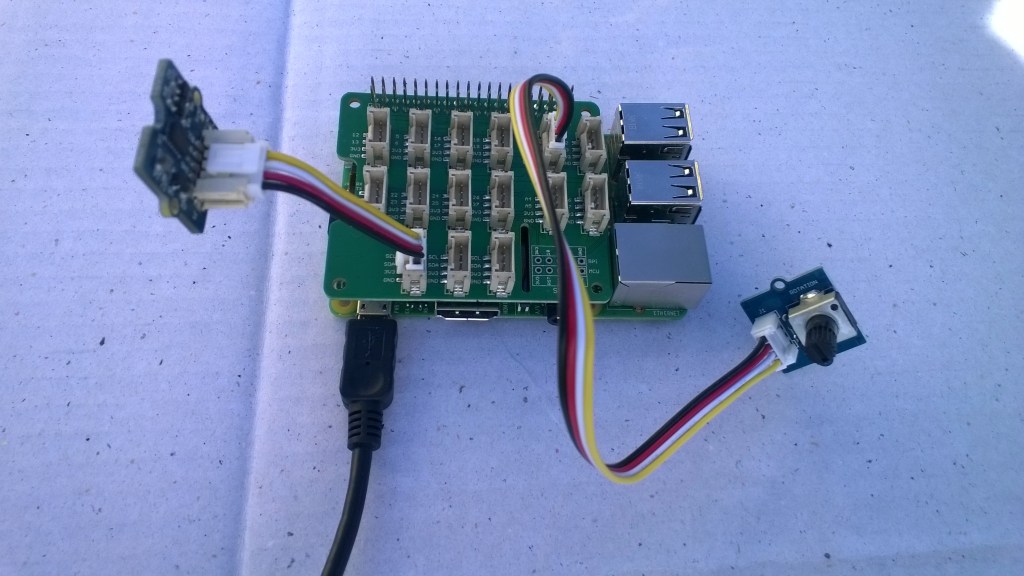
Raspberry PI with Grove Base Hat & ADXL345 & Rotary angle sensor
Raspberry PI with Grove Base Hat I2C test rig

The next step was to confirm I could read the device ID of the ADXL345 and the Grove Base Hat for RaspberryPI. I had to figure out the Grove Base Hat for RaspberryPI from the Seeedstudio Python code.

I2CDevicePinger ADXL345 Debug output

...
'backgroundTaskHost.exe' (CoreCLR: CoreCLR_UWP_Domain): Loaded 'C:\Data\Users\DefaultAccount\AppData\Local\DevelopmentFiles\I2CDevicePinger-uwpVS.Debug_ARM.Bryn.Lewis\System.Diagnostics.Debug.dll'. Skipped loading symbols. Module is optimized and the debugger option 'Just My Code' is enabled.
DeviceID 0XE5

The DeviceID for the ADXL345 matched the DEVID in the device datasheet.

I2CDevicePinger Debug output

'backgroundTaskHost.exe' (CoreCLR: CoreCLR_UWP_Domain): Loaded 'C:\Data\Users\DefaultAccount\AppData\Local\DevelopmentFiles\I2CDevicePinger-uwpVS.Debug_ARM.Bryn.Lewis\System.Diagnostics.Debug.dll'. Skipped loading symbols. Module is optimized and the debugger option 'Just My Code' is enabled.
DeviceID 0X4

The DeviceID for the Grove Base Hat for RaspberryPI matched

RPI_HAT_PID = 0x0004 in the Python code.

The last test application reads the raw value of the specified analog input

public async void Run(IBackgroundTaskInstance taskInstance)
{
   string aqs = I2cDevice.GetDeviceSelector();
   DeviceInformationCollection I2CBusControllers = await DeviceInformation.FindAllAsync(aqs);

   if (I2CBusControllers.Count != 1)
   {
      Debug.WriteLine("Unexpect number of I2C bus controllers found");
      return;
   }

   I2cConnectionSettings settings = new I2cConnectionSettings(0x04)
   {
      BusSpeed = I2cBusSpeed.StandardMode,
      SharingMode = I2cSharingMode.Shared,
   };

   using (I2cDevice device = I2cDevice.FromIdAsync(I2CBusControllers[0].Id, settings).AsTask().GetAwaiter().GetResult())
   {
      try
      {
         ushort value = 0;
         // From the Seeedstudio python
	 // 0x10 ~ 0x17: ADC raw data
	 // 0x20 ~ 0x27: input voltage
         // 0x29: output voltage (Grove power supply voltage)
         // 0x30 ~ 0x37: input voltage / output voltage						
         do
	 {
            byte[] writeBuffer = new byte[1] { 0x10 };
            byte[] readBuffer = new byte[2] { 0, 0 };

            device.WriteRead(writeBuffer, readBuffer);
            value = BitConverter.ToUInt16(readBuffer, 0);

            Debug.WriteLine($"Value {value}");

            Task.Delay(1000).GetAwaiter().GetResult();
         }
         while (value != 0);
      }
      Catch (Exception ex)
      {
         Debug.WriteLine(ex.Message);
      }
   }
}

GroveBaseHatRPIRegisterReader Debug output

'backgroundTaskHost.exe' (CoreCLR: CoreCLR_UWP_Domain): Loaded 'C:\Data\Users\DefaultAccount\AppData\Local\DevelopmentFiles\GroveBaseHatRPIRegisterReader-uwpVS.Debug_ARM.Bryn.Lewis\System.Diagnostics.Debug.dll'. Skipped loading symbols. Module is optimized and the debugger option 'Just My Code' is enabled.
Value 3685
Value 3685
Value 3688
Value 3681
Value 3681
Value 3688
Value 3688
Value 3683

The output changed when I adjusted the rotary angle sensor (0-4095) which confirmed I could reliably read the Analog input values.

The code for my test harness applications is available on github, the next step is to build a library for the Grove Base Hat for RaspberryPI

Netduino + SeeedStudio Grove LCD RGB Backlight

For the last year I have been teaching introductory programing classes using Netduino devices and Seeedstudio sensors which were sponsored by Microsoft New Zealand. The kits are based on a Grove Starter Kit for Arduino/Genuino 101 which contain a Grove LCD RGB Backlight display.

Seeedstudio have published an Arduino driver for the display and it looks like Sirsnork used this as the basis for his Netduino NetMF Port. In class a few people have commented that they have had difficulty getting the driver to work on a Netduino 2 or Netduino Plus 2 device.

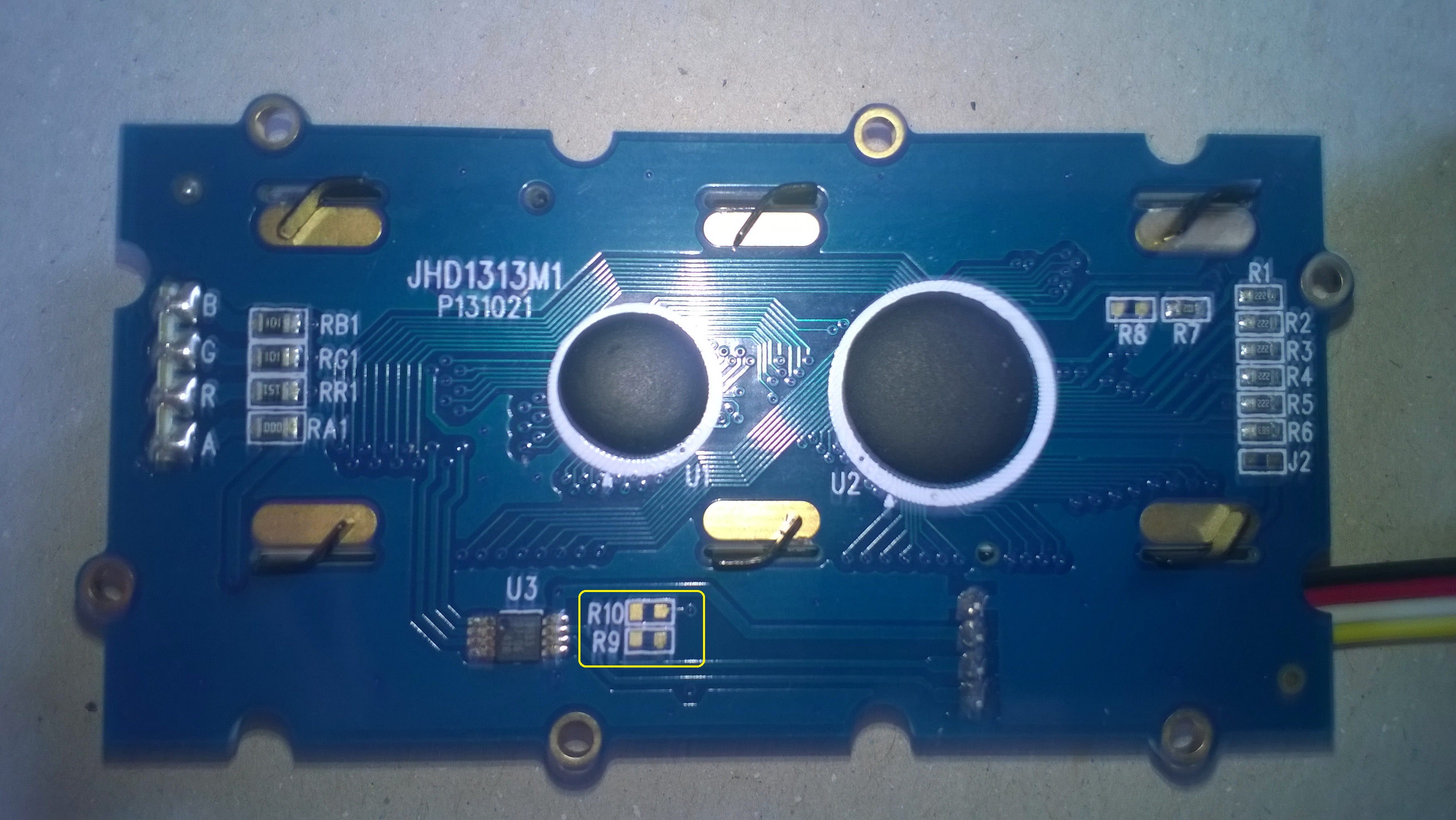
I think the two main issues are the lack of termination resistors on the Grove RGB Backlight. Possibly the missing R9 & R10 in the picture below?

SeeedStudioRGBLCDBack

I have found the easiest way to work around this issue is to have another I2C device (In this case it’s a Grove 3 Axis Accelerometer ±16G)

SeeedStudioNetduinoAndRGBLCD

The other is the need to strobe the Serial Data Line (SDA) of the I2C port on later Netduino devices to get it to work

using System;
using System.Threading;
using Microsoft.SPOT.Hardware;
using SecretLabs.NETMF.Hardware.Netduino;

namespace SeeedStudio.Grove.RGBLCD
{
   public class Program
   {
      public static void Main()
      {
         using (OutputPort i2cPort = new OutputPort(Pins.GPIO_PIN_SDA, true))
         {
            i2cPort.Write(false);
         }

.....

With the I2C bus terminated and the SDA port strobe I have found the Netduino and display work as expected.

NetMF Electric Longboard Part 1

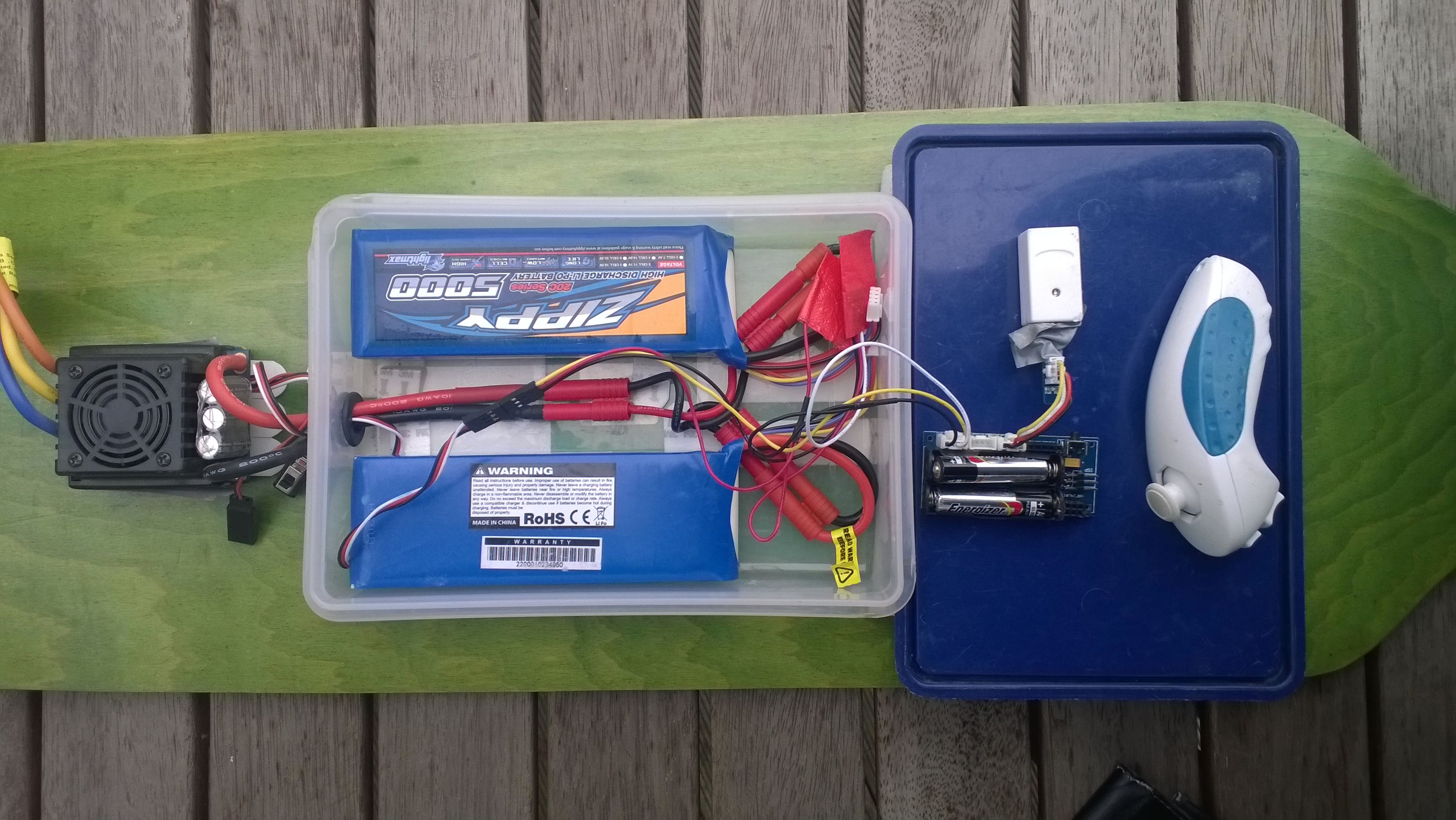
When I first built my electric longboard I started with a devicter devduino V2 running a modified version of the Wiiceiver code from AustinDavid.com. This plug n play setup has worked really well and proved quite robust considering the hostile environment it is working in.

devduino V2 longboard controller, wiresless Wiichuck ESC and batteries

devduino V2 controller

I had been thinking about purchasing a dual motor kit and experimenting with traction control and anti lock braking (after a couple of close calls indoor on a tiled floor) which would require a bit more processing power.

The first version of my NetMF controller will be powered by a GHI Electronics FEZ Lemur which is an ARM Cortex M4 based System on a Chip (SoC) running at 84MHz.

The FEZ Lemur is an Arduino pinout-compatible mainboard but with the Inter-Integrated Circuit (I2C) pins on D2-Serial Data Line(SDA) and D3-Serial Clock Line (SCL).

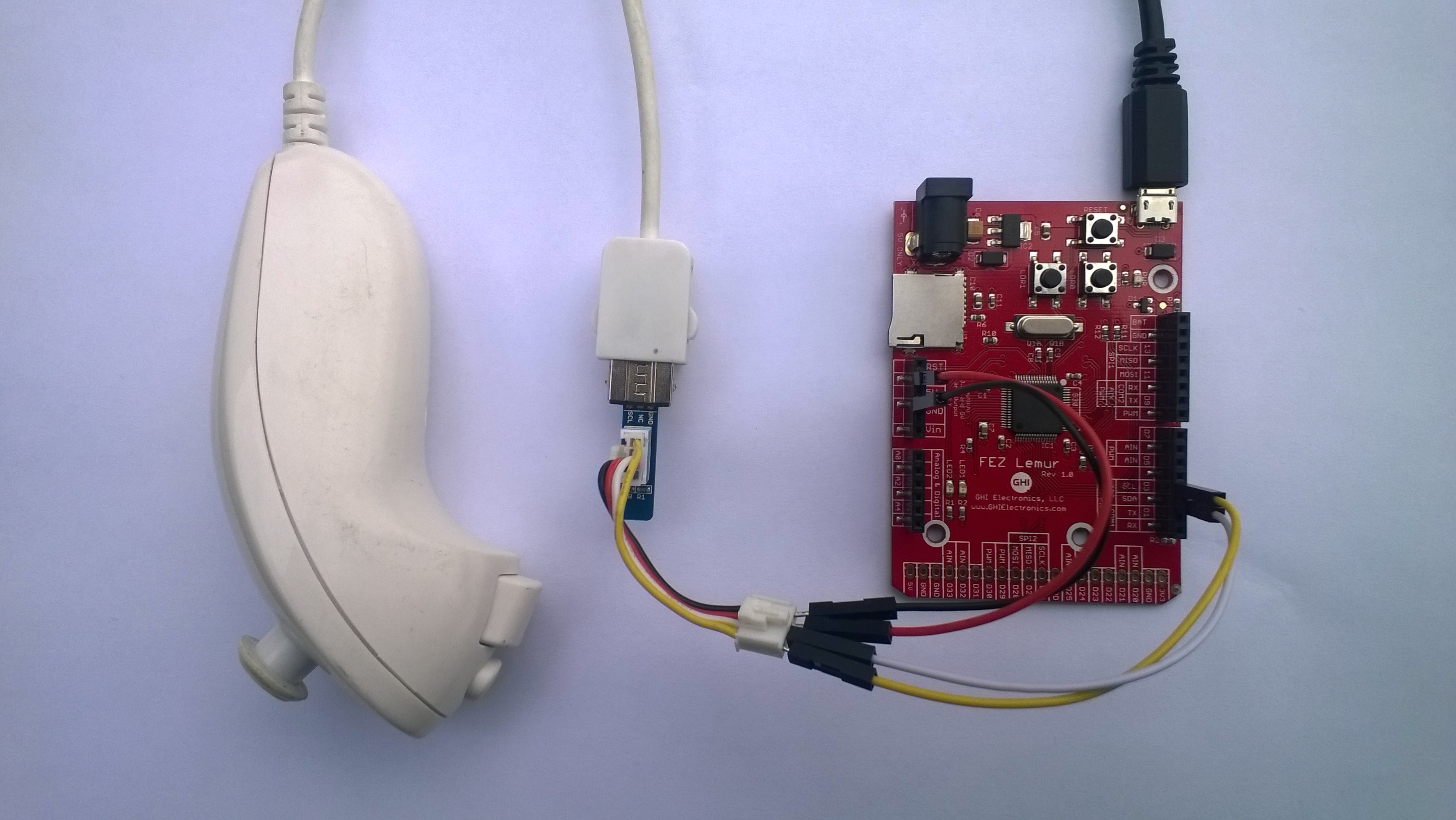
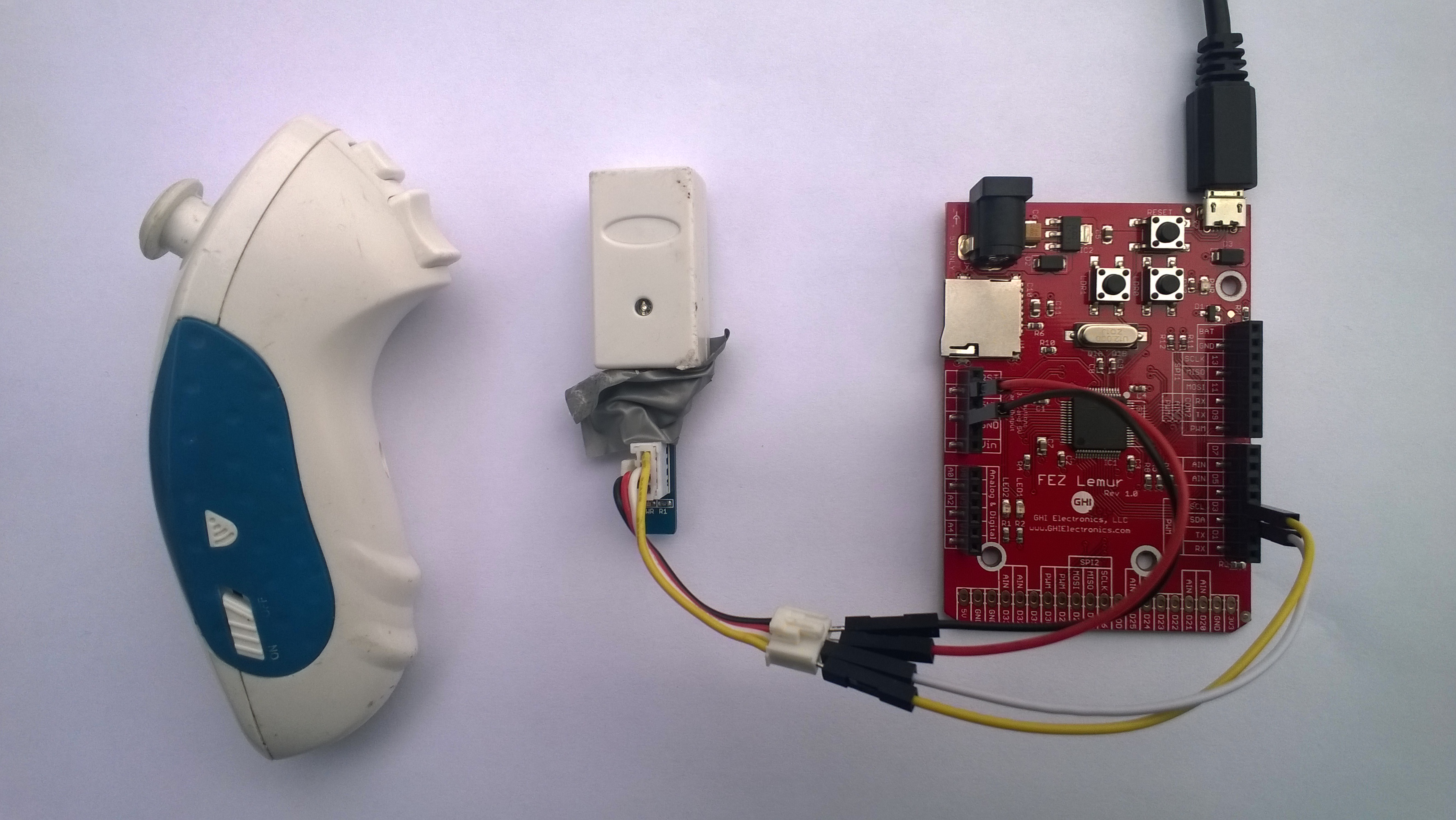
My first proof of concept (PoC) uses a standard wii Nunchuk and some jumper wires.

FEZ Lemur and Nunchuck connected with jumper wires and seeedstudio adaptor

FEZ Lemur Wii NunChuck interface

Bill of materials (Prices in USD as at Mar 2016)

I then tested my hardware setup with an application based on the driver software written by Szymon Kobalczyk and it worked. I have used this software on a couple of projects but have never been able to get to work with my wireless Wii Nunchuk.

I compared the Arduino wiiceiver code and the C# version and found the initialisation process was different. I then did some research and found that the WiiNunChuk driver of the .Net Micro Framework Toolbox by Stefan Thoolen used a similar approach as the wiiceiver code.

using System;
using System.Threading;
using Microsoft.SPOT;
using Toolbox.NETMF.Hardware;

public class Program
{
   public static void Main()
   {
      WiiNunchuk nunchuk = new WiiNunchuk();

      while (true)
      {
         // Reads all values
         nunchuk.Read();

         Debug.Print(nunchuk.AnalogStickX + " " + nunchuk.AnalogStickY);

         Thread.Sleep(100);
      }
   }
}

I then tried the wireless Wii NunChuk device and it worked (The tape is to stop the wireless dongle falling off due to vibration when mounted on my skateboard)

FEZ Lemur Wireless Wii NunChuck interface

FEZ Lemur Wireless Wii NunChuck interface

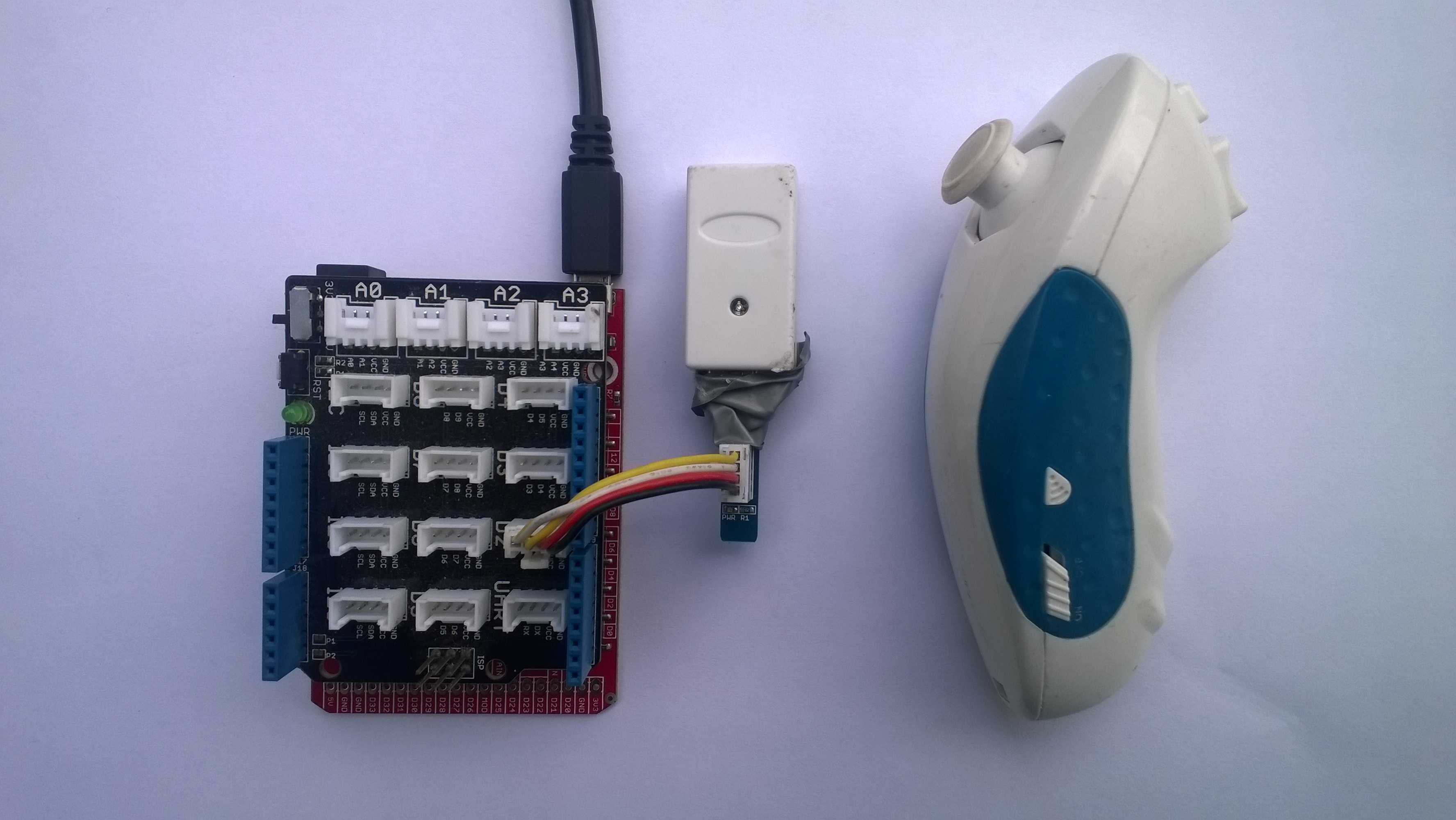
The PoC was working so now I needed to make it more robust and plug n play. For many of my projects I use the Seeedstudio Grove system which provides plug n play digital inputs, digital outputs, analog inputs and I2C connectivity for *duino (and other) format devices.

The Seeedstudio base shield V2 can be configured for *duino devices which implement I2C connectivity on the Analog Input pins 4 & 5 or dedicated pins SDA & SCL pins.

FEZ Lemur Wireless Wii NunChuck PnP interface

FEZ Lemur Wireless Wii NunChuck interface

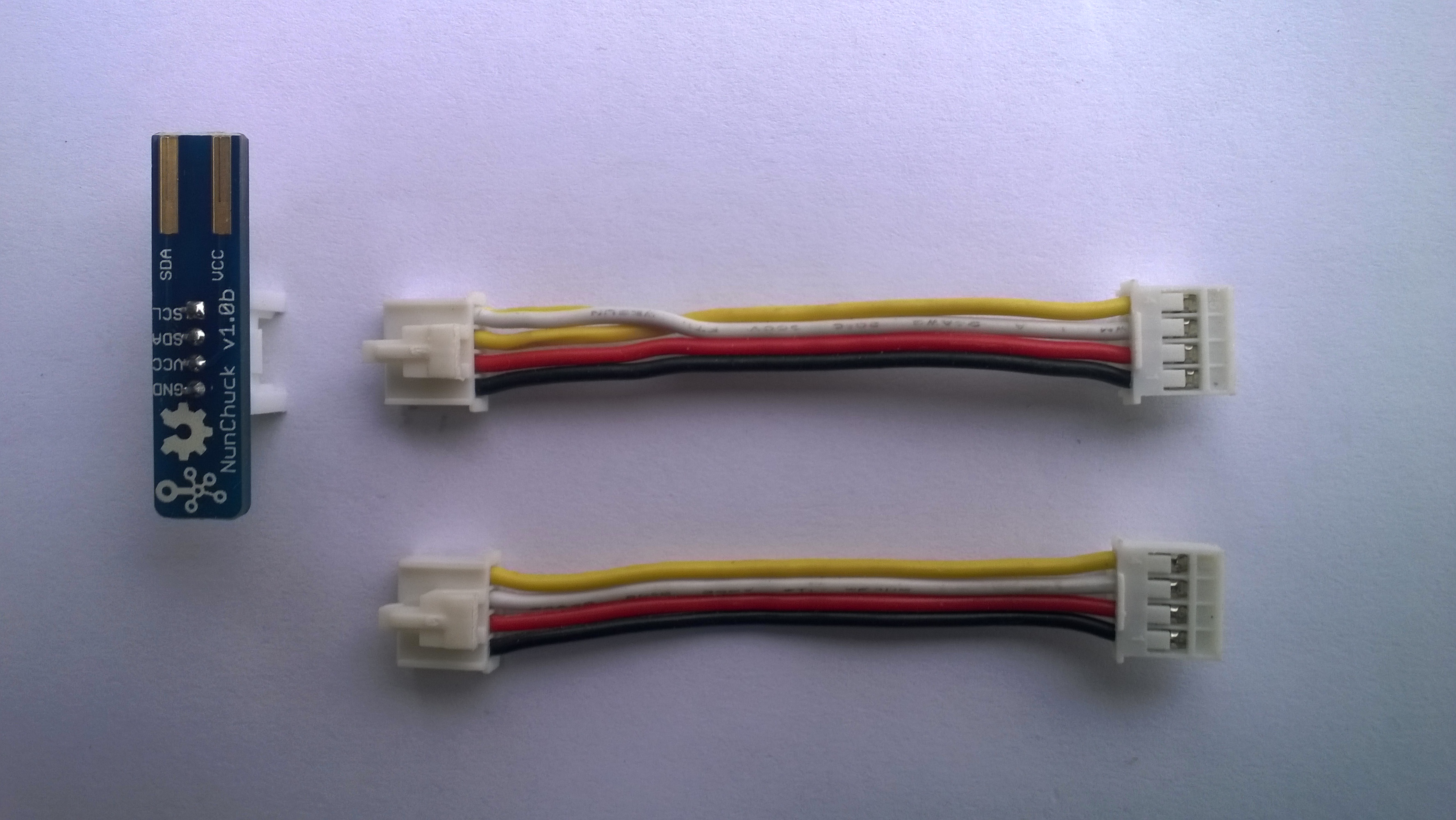
To get the SeeedStudion Base Shield to work with my FEZ Lemur I had to put a twist in the jumper cable to get the SDA & SCL the right way round and plug it into the D2 socket.

NOTE : put some tape on the top of the MicroSD card socket to stop a accidental short circuit.

Seeedstudio 5CM cable with SDA & SCL Pins reversed.

5CM cable with SDA & SCL Pins reversed

Connecting to G30_G30...Connected
128 128
128 128
128 128
128 128
128 128
128 128
128 128
128 170
80 209
63 255
128 255
128 255
128 255
128 255
244 255
255 255
255 250
255 210
255 128
255 128
255 128
255 107
255 5
255 0
255 0
128 0
128 0
41 0
24 0
0 103
0 128
0 128
8 235
77 255
128 255
128 255
128 128
128 128

Next step is to get inerface to the 150A Electronic Speed Control(ESC) working.

Netduino Silicon Labs Si7005 Device Driver

A while back I wrote a post about some problems I was having with a Silicon Labs Si7005 device and now I have had some time to package up the code.

My code strobes the I2C SDA line and then initiates a request that will always fail, from there on everything works as expected.

public SiliconLabsSI7005(byte deviceId = DeviceIdDefault, int clockRateKHz = ClockRateKHzDefault, int transactionTimeoutmSec = TransactionTimeoutmSecDefault)
{
   this.deviceId = deviceId;
   this.clockRateKHz = clockRateKHz;
   this.transactionTimeoutmSec = transactionTimeoutmSec;

   using (OutputPort i2cPort = new OutputPort(Pins.GPIO_PIN_SDA, true))
   {
      i2cPort.Write(false);
      Thread.Sleep(250);
   }

   using (I2CDevice device = new I2CDevice(new I2CDevice.Configuration(deviceId, clockRateKHz)))
   {
      byte[] writeBuffer = { RegisterIdDeviceId };
      byte[] readBuffer = new byte[1];

      // The first request always fails
      I2CDevice.I2CTransaction[] action = new I2CDevice.I2CTransaction[] 
      { 
         I2CDevice.CreateWriteTransaction(writeBuffer),
         I2CDevice.CreateReadTransaction(readBuffer)
      };

      if( device.Execute(action, transactionTimeoutmSec) == 0 )
      {
         //   throw new ApplicationException("Unable to send get device id command");
      }
   }
}

This is how the driver should be used in an application

public static void Main()
{
   SiliconLabsSI7005 sensor = new SiliconLabsSI7005();

   while (true)
   {
      double temperature = sensor.Temperature();

      double humidity = sensor.Humidity();

      Debug.Print("T:" + temperature.ToString("F1") + " H:" + humidity.ToString("F1"));

      Thread.Sleep(5000);
      }
   }

I have added code to catch failures and there is a sample application in the project. For a project I’m working on I will modify the code to use one of the I2C sharing libraries so I can have a number of devices on the bus