.NET nanoFramework SX127X LoRa library Read & Write

Now that I could reliably dump all the Dragino shield registers I wanted to be able to configure the Semtech 127X device and reset it back to factory settings. A factory reset is done by strobing the SX127X reset pin.

SX127X Reset timing diagram

SX127X Reset process

To support this I added a constructor with an additional parameter for the reset General Purpose Input Output(GPIO) pin number to the SX127XDevice class. The original constructor was retained as the SX127X reset pin is not connected on the SparkFun LoRa Gateway-1-Channel (ESP32) and a limited number of other devices.

namespace devMobile.IoT.SX127x.RegisterReadAndWrite
{
   using System;
   using System.Diagnostics;
   using System.Threading;

   using System.Device.Gpio;
   using System.Device.Spi;

#if ESP32_WROOM_32_LORA_1_CHANNEL
   using nanoFramework.Hardware.Esp32;
#endif

   public sealed class SX127XDevice
   {
      private const byte RegisterAddressMinimum = 0X0;
      private const byte RegisterAddressMaximum = 0x42;
      private const byte RegisterAddressReadMask = 0X7f;
      private const byte RegisterAddressWriteMask = 0x80;

      private readonly SpiDevice SX127XTransceiver;

      public SX127XDevice(int busId, int chipSelectLine, int resetPin)
      {
         var settings = new SpiConnectionSettings(busId, chipSelectLine)
         {
            ClockFrequency = 1000000,
            Mode = SpiMode.Mode0,// From SemTech docs pg 80 CPOL=0, CPHA=0
            SharingMode = SpiSharingMode.Shared
         };

         SX127XTransceiver = new SpiDevice(settings);

         // Factory reset pin configuration
         GpioController gpioController = new GpioController();
         gpioController.OpenPin(resetPin, PinMode.Output);

         gpioController.Write(resetPin, PinValue.Low);
         Thread.Sleep(20);
         gpioController.Write(resetPin, PinValue.High);
         Thread.Sleep(20);
      }

      public SX127XDevice(int busId, int chipSelectLine)
      {
         var settings = new SpiConnectionSettings(busId, chipSelectLine)
         {
            ClockFrequency = 1000000,
            Mode = SpiMode.Mode0,// From SemTech docs pg 80 CPOL=0, CPHA=0
            SharingMode = SpiSharingMode.Shared,
         };

         SX127XTransceiver = new SpiDevice(settings);
      }

      public Byte ReadByte(byte registerAddress)
      {
         byte[] writeBuffer = new byte[] { registerAddress &= RegisterAddressReadMask, 0x0 };
         byte[] readBuffer = new byte[writeBuffer.Length];

         SX127XTransceiver.TransferFullDuplex(writeBuffer, readBuffer);

         return readBuffer[1];
      }

      public ushort ReadWord(byte address)
      {
         byte[] writeBuffer = new byte[] { address &= RegisterAddressReadMask, 0x0, 0x0 };
         byte[] readBuffer = new byte[writeBuffer.Length];

         SX127XTransceiver.TransferFullDuplex(writeBuffer, readBuffer);

         return (ushort)(readBuffer[2] + (readBuffer[1] << 8));
      }

      public ushort ReadWordMsbLsb(byte address)
      {
         byte[] writeBuffer = new byte[] { address &= RegisterAddressReadMask, 0x0, 0x0 };
         byte[] readBuffer = new byte[writeBuffer.Length];

         SX127XTransceiver.TransferFullDuplex(writeBuffer, readBuffer);

         return (ushort)((readBuffer[1] << 8) + readBuffer[2]);
      }

      public byte[] ReadBytes(byte address, byte length)
      {
         byte[] writeBuffer = new byte[length + 1];
         byte[] readBuffer = new byte[writeBuffer.Length];
         byte[] replyBuffer = new byte[length];

         writeBuffer[0] = address &= RegisterAddressReadMask;

         SX127XTransceiver.TransferFullDuplex(writeBuffer, readBuffer);

         Array.Copy(readBuffer, 1, replyBuffer, 0, length);

         return replyBuffer;
      }

      public void WriteByte(byte address, byte value)
      {
         byte[] writeBuffer = new byte[] { address |= RegisterAddressWriteMask, value };
         byte[] readBuffer = new byte[writeBuffer.Length];

         SX127XTransceiver.TransferFullDuplex(writeBuffer, readBuffer);
      }

      public void WriteWord(byte address, ushort value)
      {
         byte[] valueBytes = BitConverter.GetBytes(value);
         byte[] writeBuffer = new byte[] { address |= RegisterAddressWriteMask, valueBytes[0], valueBytes[1] };
         byte[] readBuffer = new byte[writeBuffer.Length];

         SX127XTransceiver.TransferFullDuplex(writeBuffer, readBuffer);
      }

      public void WriteWordMsbLsb(byte address, ushort value)
      {
         byte[] valueBytes = BitConverter.GetBytes(value);
         byte[] writeBuffer = new byte[] { address |= RegisterAddressWriteMask, valueBytes[1], valueBytes[0] };
         byte[] readBuffer = new byte[writeBuffer.Length];

         SX127XTransceiver.TransferFullDuplex(writeBuffer, readBuffer);
      }

      public void WriteBytes(byte address, byte[] bytes)
      {
         byte[] writeBuffer = new byte[1 + bytes.Length];
         byte[] readBuffer = new byte[writeBuffer.Length];

         Array.Copy(bytes, 0, writeBuffer, 1, bytes.Length);
         writeBuffer[0] = address |= RegisterAddressWriteMask;

         SX127XTransceiver.TransferFullDuplex(writeBuffer, readBuffer);
      }

      public void RegisterDump()
      {
         Debug.WriteLine("Register dump");
         for (byte registerIndex = RegisterAddressMinimum; registerIndex <= RegisterAddressMaximum; registerIndex++)
         {
            byte registerValue = this.ReadByte(registerIndex);

            Debug.WriteLine($"Register 0x{registerIndex:x2} - Value 0X{registerValue:x2}");
         }

         Debug.WriteLine("");
      }
   }

   public class Program
   {
#if ESP32_WROOM_32_LORA_1_CHANNEL
      private const int SpiBusId = 1;
#endif
#if NETDUINO3_WIFI
      private const int SpiBusId = 2;
#endif
#if ST_STM32F769I_DISCOVERY
      private const int SpiBusId = 2;
#endif


      public static void Main()
      {
         byte[] frequencyBytes;
#if ESP32_WROOM_32_LORA_1_CHANNEL // No reset line for this device as it isn't connected on SX127X
         int chipSelectLine = Gpio.IO16;
#endif
#if NETDUINO3_WIFI
         // Arduino D10->PB10
         int chipSelectLine = PinNumber('B', 10);
         // Arduino D9->PE5
         int resetPinNumber = PinNumber('E', 5);
#endif
#if ST_STM32F769I_DISCOVERY
         // Arduino D10->PA11
         int chipSelectLine = PinNumber('A', 11);
         // Arduino D9->PH6
         int resetPinNumber = PinNumber('H', 6);
#endif

         Debug.WriteLine("devMobile.IoT.SX127x.RegisterReadAndWrite starting");

         try
         {
#if ESP32_WROOM_32_LORA_1_CHANNEL
            Configuration.SetPinFunction(Gpio.IO12, DeviceFunction.SPI1_MISO);
            Configuration.SetPinFunction(Gpio.IO13, DeviceFunction.SPI1_MOSI);
            Configuration.SetPinFunction(Gpio.IO14, DeviceFunction.SPI1_CLOCK);

            SX127XDevice sx127XDevice = new SX127XDevice(SpiBusId, chipSelectLine);
#endif
#if NETDUINO3_WIFI || ST_STM32F769I_DISCOVERY
            SX127XDevice sx127XDevice = new SX127XDevice(SpiBusId, chipSelectLine, resetPinNumber);
#endif
            Thread.Sleep(500);

            sx127XDevice.RegisterDump();

            while (true)
            {
               Debug.WriteLine("Read RegOpMode (read byte)");
               Byte regOpMode1 = sx127XDevice.ReadByte(0x1);
               Debug.WriteLine($"RegOpMode 0x{regOpMode1:x2}");

               Debug.WriteLine("Set LoRa mode and sleep mode (write byte)");
               sx127XDevice.WriteByte(0x01, 0b10000000);

               Debug.WriteLine("Read RegOpMode (read byte)");
               Byte regOpMode2 = sx127XDevice.ReadByte(0x1);
               Debug.WriteLine($"RegOpMode 0x{regOpMode2:x2}");

               Debug.WriteLine("Read the preamble (read word)");
               ushort preamble = sx127XDevice.ReadWord(0x20);
               Debug.WriteLine($"Preamble 0x{preamble:x2}");

	            Console.WriteLine("Read the preamble (read word)"); // Should be 0x08
			      preamble = sx127XDevice.ReadWordMsbLsb(0x20);
               Debug.WriteLine($"Preamble 0x{preamble:x2}");

               Debug.WriteLine("Read the centre frequency (read byte array)");
               frequencyBytes = sx127XDevice.ReadBytes(0x06, 3);
               Debug.WriteLine($"Frequency Msb 0x{frequencyBytes[0]:x2} Mid 0x{frequencyBytes[1]:x2} Lsb 0x{frequencyBytes[2]:x2}");

               Debug.WriteLine("Set the centre frequency to 915MHz (write byte array)");
               byte[] frequencyWriteBytes = { 0xE4, 0xC0, 0x00 };
               sx127XDevice.WriteBytes(0x06, frequencyWriteBytes);

               Debug.WriteLine("Read the centre frequency (read byte array)");
               frequencyBytes = sx127XDevice.ReadBytes(0x06, 3);
               Debug.WriteLine($"Frequency Msb 0x{frequencyBytes[0]:x2} Mid 0x{frequencyBytes[1]:x2} Lsb 0x{frequencyBytes[2]:x2}");

               sx127XDevice.RegisterDump();

               Thread.Sleep(30000);
            }
         }
         catch (Exception ex)
         {
            Debug.WriteLine(ex.Message);
         }
      }

#if NETDUINO3_WIFI || ST_STM32F769I_DISCOVERY
      static int PinNumber(char port, byte pin)
      {
         if (port < 'A' || port > 'J')
            throw new ArgumentException();

         return ((port - 'A') * 16) + pin;
      }
#endif
   }
}

The PinNumber helper is more user friendly that the raw numbers and is “inspired” by sample .NET nanoFramework General Purpose Input Output(GPIO) sample code.
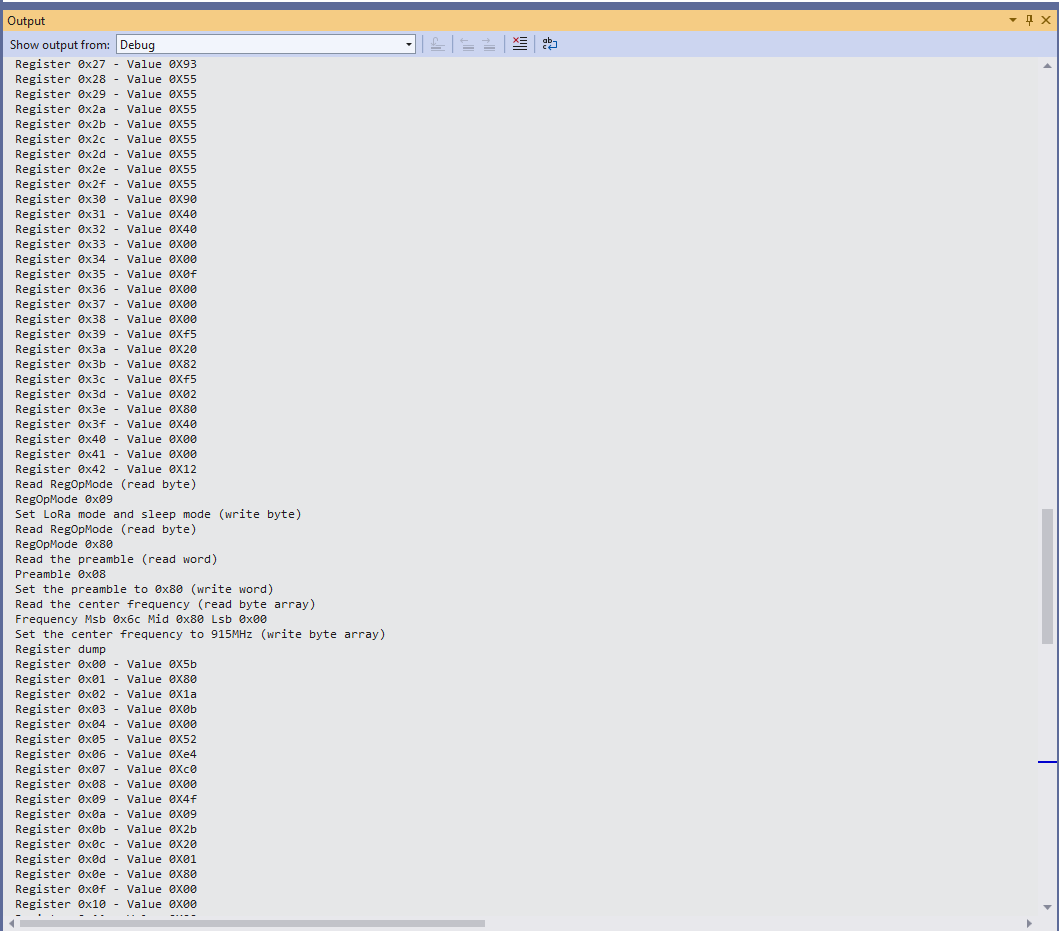
Each method was tested by read/writing suitable register(s) in the device configuration (Needed to set it into LoRa mode first).

The next step is to extract the Serial Peripheral Interface(SPI) register access functionality into a module and configure the bare minimum of settings required to get the SX127X to receive and transmit messages.

.NET nanoFramework SX127X LoRa library Registers

Over the years I have ported my HopeRF RFM9X(Now a generic Semtech SX127X ) Windows 10 IoT Core (May 2018) library to .NET microFramework(May 2018), Wilderness Labs Meadow(Jan 2020), GHI Electronics TinyCLR-OS(July 2020), .NET nanoFramework V1(May 2020) and .NET Core(Aug 2021).

All this madness started because I wasn’t confident the frequency calculation of the Emmellsoft Dragino.Lora code was correct. Over the last couple of years I have also found bugs in my Transmit Power, InvertIQ RX/TX with many others yet to be discovered.

For my updated .NET nanoFramework port I have mainly used a half a dozen Dragino LoRa shields for Arduino and Netduino 3 Wifi devices I had lying around. I have also tested the code with SparkFun LoRa Gateway-1-Channel (ESP32) and ST 32F769IDiscovery devices.

STM32F769IDiscovery, Netduino 3 Wifi, and SparkFun LoRa Gateway-1-Channel (ESP32) devices

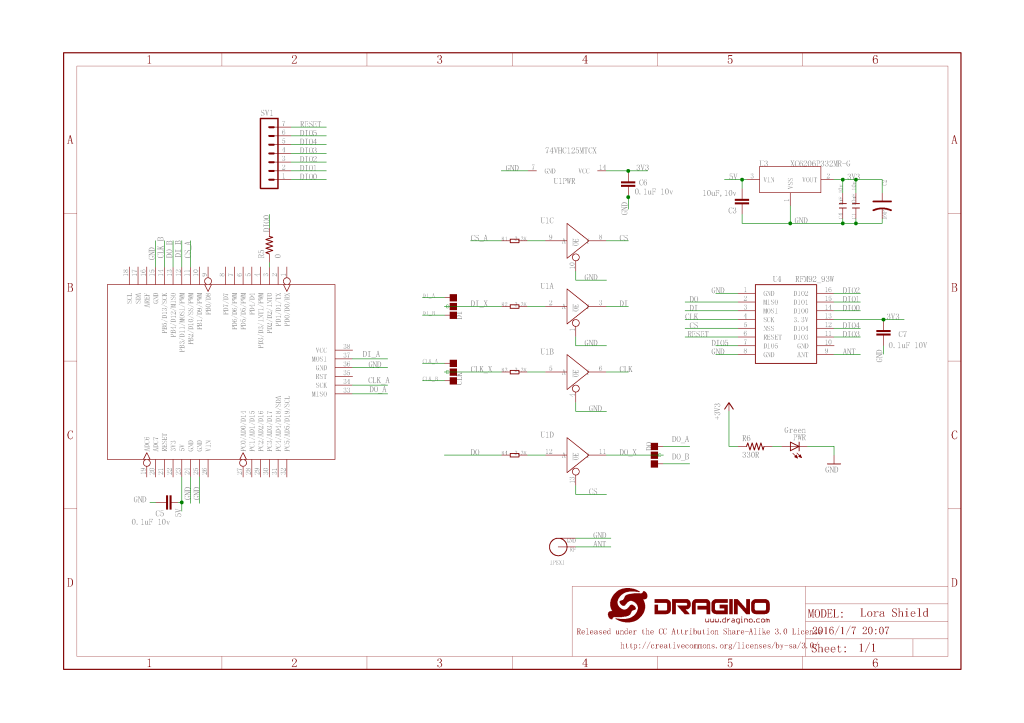
The Dragino shield uses D10 for chip select, D2 for RFM9X DI0 interrupt and D9 for Reset.

Dragino Arduino LoRa Shield Schematic

Netduino 3 Wifi pin mapping

  • D10->CS->PB10
  • D9->RST->E5

ST 32F769IDiscovery pin mapping

D10->CS->PA11
D9->RST->PH6

Sparkfun ESP32 1 Channel Gateway Schematic

SparkFun LoRa Gateway-1-Channel (ESP32) pin mapping(SX127X reset is not connected)

  • CS->PB10

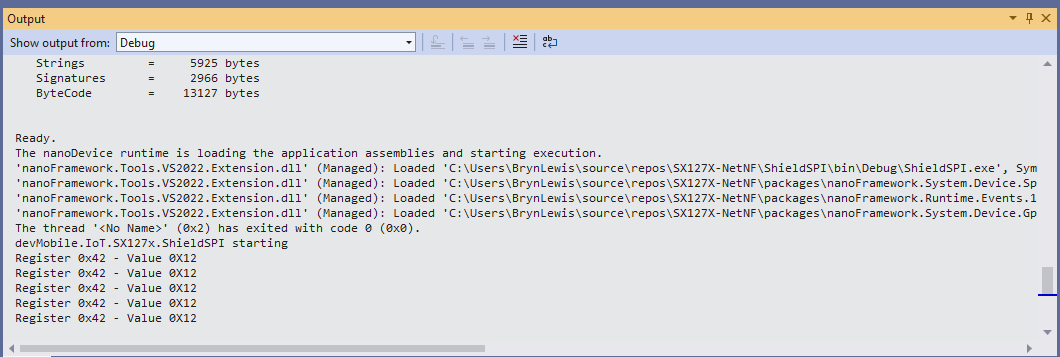
The first step was to confirm I could read a single(ShieldSPI) then scan all the Semtech SX1276 registers with the new nanoFramework System.Device.SPI Nuget (which was”inspired by” .Net Core System.Device.SPI)

namespace devMobile.IoT.SX127x.ShieldSPI
{
   using System;
   using System.Diagnostics;
   using System.Threading;

   using System.Device.Gpio;
   using System.Device.Spi;

#if ESP32_WROOM_32_LORA_1_CHANNEL
   using nanoFramework.Hardware.Esp32;
#endif

   public class Program
   {
      private const byte RegVersion = 0x42;
#if ESP32_WROOM_32_LORA_1_CHANNEL
      private const int SpiBusId = 1;
#endif
#if NETDUINO3_WIFI
      private const int SpiBusId = 2;
#endif
#if ST_STM32F769I_DISCOVERY
      private const int SpiBusId = 2;
#endif

      public static void Main()
      {
         GpioController gpioController = new GpioController();

#if ESP32_WROOM_32_LORA_1_CHANNEL // No reset line for this device as it isn't connected on SX127X
         int ledPinNumber = Gpio.IO17;
         int chipSelectLine = Gpio.IO16;
#endif
#if NETDUINO3_WIFI
         int ledPinNumber = PinNumber('A', 10);
         // Arduino D10->PB10
         int chipSelectLine = PinNumber('B', 10);
         // Arduino D9->PE5
         int resetPinNumber = PinNumber('E', 5);
#endif
#if ST_STM32F769I_DISCOVERY
         int ledPinNumber  = PinNumber('J', 5);
         // Arduino D10->PA11
         int chipSelectLine = PinNumber('A', 11);
         // Arduino D9->PH6
         int resetPinNumber = PinNumber('H', 6);
#endif
         Debug.WriteLine("devMobile.IoT.SX127x.ShieldSPI starting");

         try
         {
#if ESP32_WROOM_32_LORA_1_CHANNEL || NETDUINO3_WIFI || ST_STM32F769I_DISCOVERY
            // Setup the onboard LED
            gpioController.OpenPin(ledPinNumber, PinMode.Output);
#endif

#if NETDUINO3_WIFI || ST_STM32F769I_DISCOVERY
            // Setup the reset pin
            gpioController.OpenPin(resetPinNumber, PinMode.Output);
            gpioController.Write(resetPinNumber, PinValue.High);
#endif

#if ESP32_WROOM_32_LORA_1_CHANNEL
            Configuration.SetPinFunction(Gpio.IO12, DeviceFunction.SPI1_MISO);
            Configuration.SetPinFunction(Gpio.IO13, DeviceFunction.SPI1_MOSI);
            Configuration.SetPinFunction(Gpio.IO14, DeviceFunction.SPI1_CLOCK);
#endif

            var settings = new SpiConnectionSettings(SpiBusId, chipSelectLine)
            {
               ClockFrequency = 1000000,
               Mode = SpiMode.Mode0,// From SemTech docs pg 80 CPOL=0, CPHA=0
               SharingMode = SpiSharingMode.Shared,
            };

            using (SpiDevice device = SpiDevice.Create(settings))
            {
               Thread.Sleep(500);

               while (true)
               {
                  byte[] writeBuffer = new byte[] { RegVersion, 0x0 };
                  byte[] readBuffer = new byte[writeBuffer.Length];

                  device.TransferFullDuplex(writeBuffer, readBuffer);

                  Debug.WriteLine(String.Format("Register 0x{0:x2} - Value 0X{1:x2}", RegVersion, readBuffer[1]));

#if ESP32_WROOM_32_LORA_1_CHANNEL || NETDUINO3_WIFI || ST_STM32F769I_DISCOVERY
                  if ( gpioController.Read(ledPinNumber) == PinValue.High)
						{
                     gpioController.Write(ledPinNumber, PinValue.Low);
                  }
                  else
						{
                     gpioController.Write(ledPinNumber, PinValue.High);
                  }
#endif
                  Thread.Sleep(10000);
               }
            }
         }
         catch (Exception ex)
         {
            Debug.WriteLine(ex.Message);
         }
      }

#if NETDUINO3_WIFI || ST_STM32F769I_DISCOVERY
      static int PinNumber(char port, byte pin)
      {
         if (port < 'A' || port > 'J')
            throw new ArgumentException();

         return ((port - 'A') * 16) + pin;
      }
#endif
   }
}
Shield SPI Debug output
namespace devMobile.IoT.SX127x.RegisterScan
{
   using System;
   using System.Diagnostics;
   using System.Threading;

   using System.Device.Gpio;
   using System.Device.Spi;

#if ESP32_WROOM_32_LORA_1_CHANNEL
   using nanoFramework.Hardware.Esp32;
#endif

   public sealed class SX127XDevice
   {
      private readonly SpiDevice SX127XTransceiver;

      public SX127XDevice(int busId, int chipSelectLine)
      {

         var settings = new SpiConnectionSettings(busId, chipSelectLine)
         {
            ClockFrequency = 1000000,
            Mode = SpiMode.Mode0,// From SemTech docs pg 80 CPOL=0, CPHA=0
            SharingMode = SpiSharingMode.Shared
         };

         SX127XTransceiver = new SpiDevice(settings);
      }

      public SX127XDevice(int busId, int chipSelectLine, int resetPin)
      {
         var settings = new SpiConnectionSettings(busId, chipSelectLine)
         {
            ClockFrequency = 1000000,
            Mode = SpiMode.Mode0,// From SemTech docs pg 80 CPOL=0, CPHA=0
            SharingMode = SpiSharingMode.Shared
         };

         SX127XTransceiver = new SpiDevice(settings);

         // Factory reset pin configuration
         GpioController gpioController = new GpioController();
         gpioController.OpenPin(resetPin, PinMode.Output);

         gpioController.Write(resetPin, PinValue.Low);
         Thread.Sleep(20);
         gpioController.Write(resetPin, PinValue.High);
         Thread.Sleep(20);
      }

      public Byte RegisterReadByte(byte registerAddress)
      {
         byte[] writeBuffer = new byte[] { registerAddress, 0x0 };
         byte[] readBuffer = new byte[writeBuffer.Length];

         SX127XTransceiver.TransferFullDuplex(writeBuffer, readBuffer);

         return readBuffer[1];
      }
   }

   public class Program
   {
#if ESP32_WROOM_32_LORA_1_CHANNEL
      private const int SpiBusId = 1;
#endif
#if NETDUINO3_WIFI
      private const int SpiBusId = 2;
#endif
#if ST_STM32F769I_DISCOVERY
      private const int SpiBusId = 2;
#endif

      public static void Main()
      {
#if ESP32_WROOM_32_LORA_1_CHANNEL
         int chipSelectLine = Gpio.IO16;
#endif
#if NETDUINO3_WIFI
         // Arduino D10->PB10
         int chipSelectLine = PinNumber('B', 10);
         // Arduino D9->PE5
         int resetPinNumber = PinNumber('E', 5);
#endif
#if ST_STM32F769I_DISCOVERY
         // Arduino D10->PA11
         int chipSelectLine = PinNumber('A', 11);
         // Arduino D9->PH6
         int resetPinNumber = PinNumber('H', 6);
#endif

         Debug.WriteLine("devMobile.IoT.SX127x.RegisterScan starting");

         try
         {
#if NETDUINO3_WIFI || ST_STM32F769I_DISCOVERY
            SX127XDevice sx127XDevice = new SX127XDevice(SpiBusId, chipSelectLine, resetPinNumber);
#endif

#if ESP32_WROOM_32_LORA_1_CHANNEL
            Configuration.SetPinFunction(Gpio.IO12, DeviceFunction.SPI1_MISO);
            Configuration.SetPinFunction(Gpio.IO13, DeviceFunction.SPI1_MOSI);
            Configuration.SetPinFunction(Gpio.IO14, DeviceFunction.SPI1_CLOCK);

            SX127XDevice sx127XDevice = new SX127XDevice(SpiBusId, chipSelectLine);
#endif

            Thread.Sleep(500);

            while (true)
            {
               for (byte registerIndex = 0; registerIndex <= 0x42; registerIndex++)
               {
                  byte registerValue = sx127XDevice.RegisterReadByte(registerIndex);

                  Debug.WriteLine($"Register 0x{registerIndex:x2} - Value 0X{registerValue:x2}");
               }
               Debug.WriteLine("");

               Thread.Sleep(10000);
            }
         }
         catch (Exception ex)
         {
            Debug.WriteLine(ex.Message);
         }
      }

#if NETDUINO3_WIFI || ST_STM32F769I_DISCOVERY
      static int PinNumber(char port, byte pin)
      {
         if (port < 'A' || port > 'J')
            throw new ArgumentException();

         return ((port - 'A') * 16) + pin;
      }
#endif
   }
}
RegisterScan Debug Output

There is some SparkFun LoRa Gateway-1-Channel (ESP32) specific configuration to map the Serial Peripheral Interface(SPI) pins and an additional NuGet for ESP32 has to be added. For the initial versions I have not used more advanced .NET nanoFramework functionality like SpanByte.

.NET nanoFramework ValueChanged

If you have landed at this post you were most probably searching for issues updating .NET nanoFramework code that used ValueChanged to handle interrupts. Back in mid 2020 the initial version of my Semtech SX127X(HopeRF RFM9X) library used the Windows.Devices.Gpio Nuget package.

public Rfm9XDevice(string spiPort, int chipSelectPin, int resetPin, int interruptPin)
{
    //...
   
   // Interrupt pin for RX message & TX done notification 
   InterruptGpioPin = gpioController.OpenPin(interruptPin);
   InterruptGpioPin.SetDriveMode(GpioPinDriveMode.Input);

   InterruptGpioPin.ValueChanged += InterruptGpioPin_ValueChanged;
}

private void InterruptGpioPin_ValueChanged(object sender, GpioPinValueChangedEventArgs e)
{
   if (e.Edge != GpioPinEdge.RisingEdge)
   {
      return;
   }

   byte irqFlags = this.RegisterReadByte(0x12); // RegIrqFlags
   //...
}

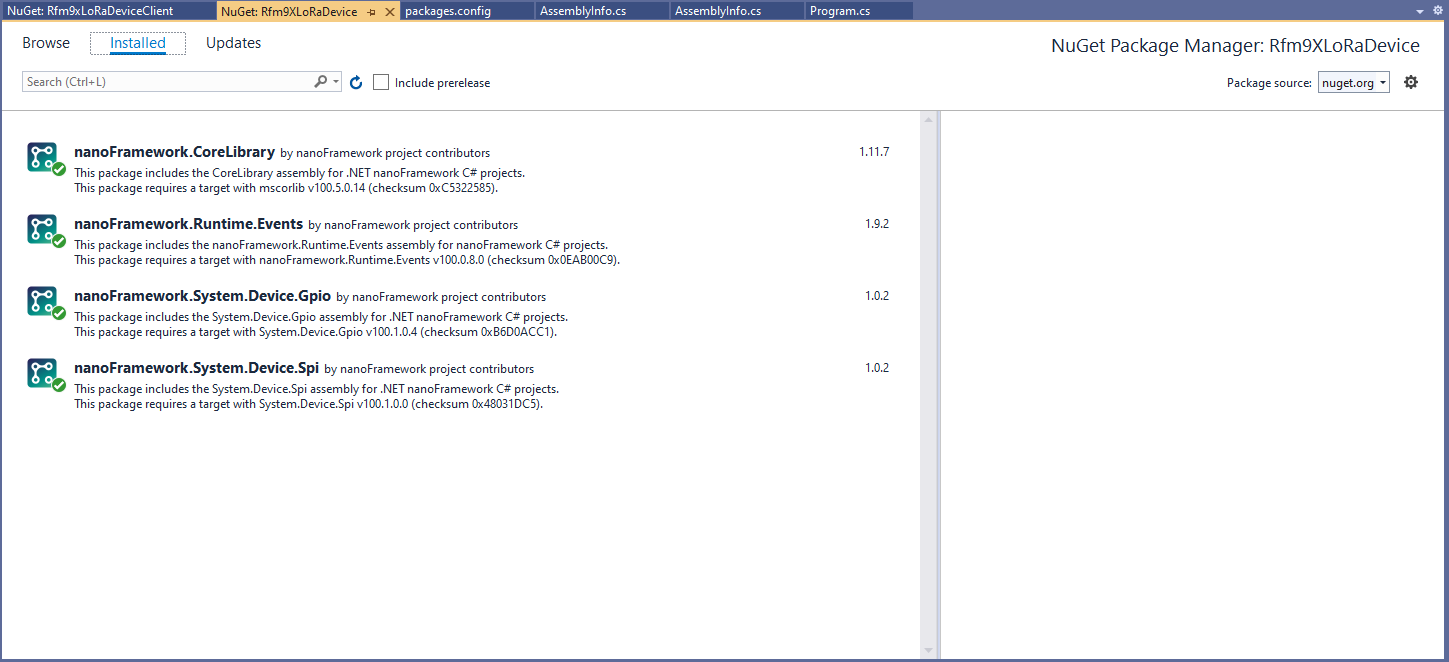
Then in March 2022 I updated the CoreLibrary, Runtime.Events, System.Devices.GPIO, System.Devices.SPI NuGets.

I then fixed all the breaking changes (For the initial versions I have not updated the code to use SpanByte etc.).

public Rfm9XDevice(int spiBusId, int chipSelectPin, int resetPin, int interruptPin)
{
   //...

   // Interrupt pin for RX message & TX done notification 
   InterruptGpioPin = gpioController.OpenPin(interruptPin);
   InterruptGpioPin.SetPinMode(PinMode.Input);

   InterruptGpioPin.ValueChanged += InterruptGpioPin_ValueChanged;
}

private void InterruptGpioPin_ValueChanged(object sender, PinValueChangedEventArgs e)
{
   if (e.ChangeType != PinEventTypes.Rising)
   {
      return;
   }

   byte irqFlags = this.RegisterReadByte(0x12); // RegIrqFlags
   //...
}

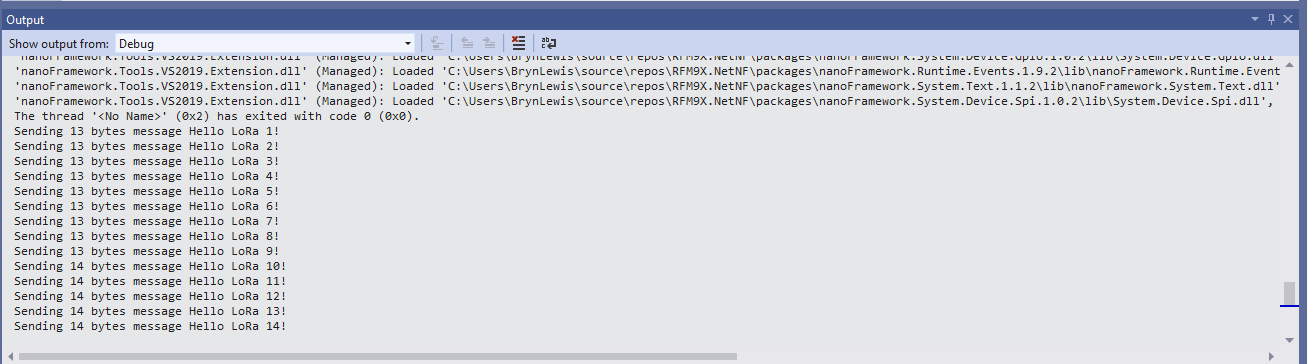
While “soak testing” the ReceiveInterrupt application I noticed that sometimes when I started the application interrupts were not processed or processing stopped after a while.

Visual Studio Debugger output showing intermittent calling of InterruptGpioPin_ValueChanged

I then found the RangeTester application wouldn’t start or run reliably. My original code was based on the Widnows.Devices.GPIO sample so I updated it based on the System.Device.GPIO sample.

public Rfm9XDevice(int spiBusId, int chipSelectPin, int resetPin, int interruptPin)
{
   //...

   // Interrupt pin for RX message & TX done notification 
   gpioController.OpenPin(interruptPin,PinMode.InputPullDown);

   gpioController.RegisterCallbackForPinValueChangedEvent(interruptPin, PinEventTypes.Rising, InterruptGpioPin_ValueChanged);
}

private void InterruptGpioPin_ValueChanged(object sender, PinValueChangedEventArgs e)
{
   byte irqFlags = this.RegisterReadByte(0x12); // RegIrqFlags
   //...
}
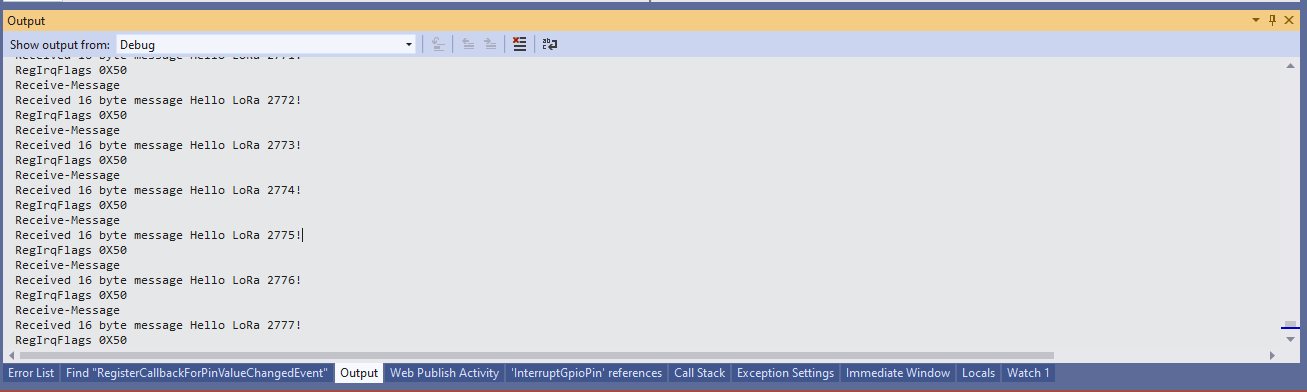
Visual Studio Debugger output showing reliable calling of InterruptGpioPin_ValueChanged

If your Windows.Devices.GPIO based project is not reliably handling interrupts after upgrading to System.Device.GPIO and fixing any “breaking changes” the implementation most probably need to be updated to use RegisterCallbackForPinValueChangedEvent as well.

.NET Core web API + Dapper – MultiMapping

Shaping recordsets with SplitOn

Sometimes there is no easy way to build a “list of lists” using the contents of multiple database tables. I have run into this problem a few times especially when building webby services which query the database of a “legacy” (aka. production) system.

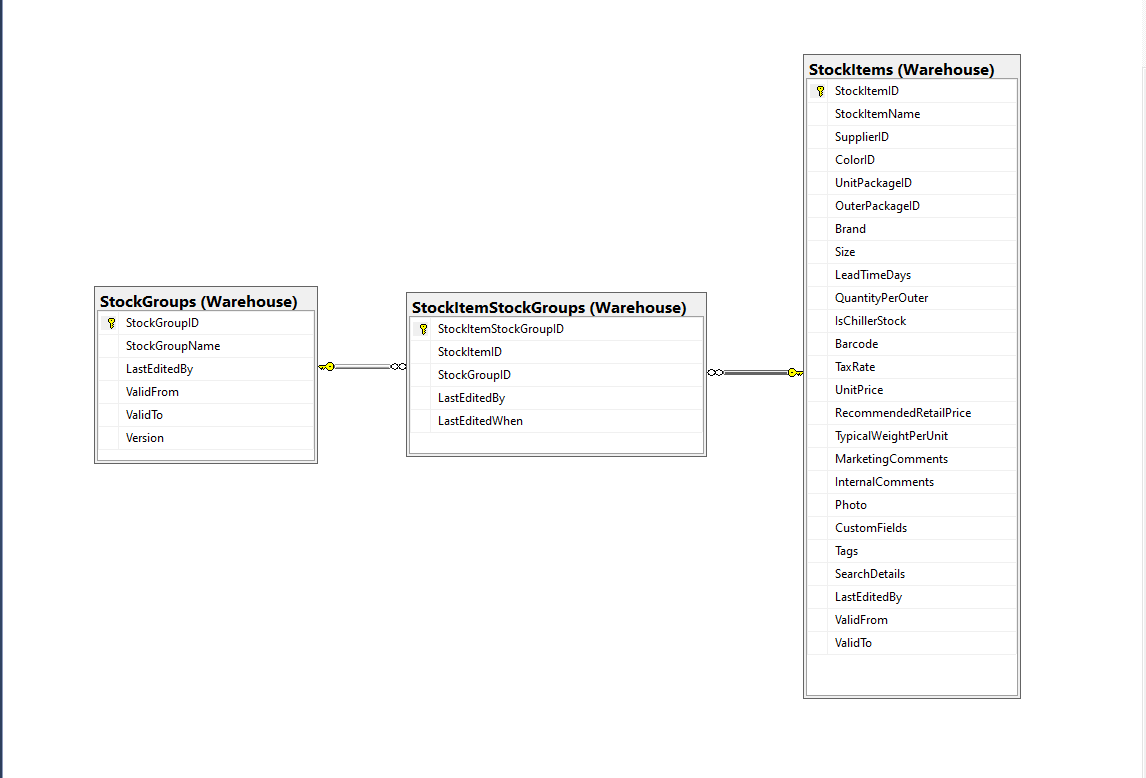
Retrieving a list of StockGroups and their StockItems from the World Wide Importers database was one of the better “real world” examples I could come up with.

SQL Server Management Studio Diagram showing relationships of tables

There is a fair bit of duplication (StockGroupID, StockGroupName) in the results set

SQL Server Management Studio StockItems-StockItemStockGroups-StockGroups query and results

There were 442 rows in the results set and 227 StockItems in the database so I ordered the query results by StockItemID and confirmed that there were many StockItems in several StockGroups.

public class StockItemListDtoV1
{
	public int Id { get; set; }

	public string Name { get; set; }

	public decimal RecommendedRetailPrice { get; set; }

	public decimal TaxRate { get; set; }
}

public class StockGroupStockItemsListDto
{
	StockGroupStockItemsListDto()
	{
		StockItems = new List<StockItemListDto>();
	}

	public int StockGroupID { get; set; }

	public string StockGroupName { get; set; }

	public List<StockItemListDto> StockItems { get; set; }
}

My initial version uses a Generic List for a StockGroup’s StockItems which is most probably not a good idea.

[Route("api/[controller]")]
[ApiController]
public class InvoiceQuerySplitOnController : ControllerBase
{
	private readonly string connectionString;
	private readonly ILogger<InvoiceQuerySplitOnController> logger;

	public InvoiceQuerySplitOnController(IConfiguration configuration, ILogger<InvoiceQuerySplitOnController> logger)
	{
		this.connectionString = configuration.GetConnectionString("WorldWideImportersDatabase");

		this.logger = logger;
	}

	[HttpGet]
	public async Task<ActionResult<IEnumerable<StockGroupStockItemsListDto>>> Get()
	{
		IEnumerable<StockGroupStockItemsListDto> response = null;

		try
		{
			using (SqlConnection db = new SqlConnection(this.connectionString))
			{
				var stockGroups = await db.QueryAsync<StockGroupStockItemsListDto, StockItemListDto, StockGroupStockItemsListDto>(
					sql: @"SELECT [StockGroups].[StockGroupID] as 'StockGroupID'" +
								",[StockGroups].[StockGroupName]" +
								",[StockItems].StockItemID as 'ID'" +
								",[StockItems].StockItemName as 'Name'" +
								",[StockItems].TaxRate" +
								",[StockItems].RecommendedRetailPrice " +
							"FROM [Warehouse].[StockGroups] " +
							"INNER JOIN[Warehouse].[StockItemStockGroups] ON ([StockGroups].[StockGroupID] = [StockItemStockGroups].[StockGroupID])" +
							"INNER JOIN[Warehouse].[StockItems] ON ([Warehouse].[StockItemStockGroups].[StockItemID] = [StockItems].[StockItemID])",
					(stockGroup, stockItem) =>
					{
						// Not certain I think using a List<> here is a good idea...
						stockGroup.StockItems.Add(stockItem);
						return stockGroup;
					},
				splitOn: "ID",
				commandType: CommandType.Text);

			response = stockGroups.GroupBy(p => p.StockGroupID).Select(g =>
			{
				var groupedStockGroup = g.First();
				groupedStockGroup.StockItems = g.Select(p => p.StockItems.Single()).ToList();
				return groupedStockGroup;
			});
		}
	}
	catch (SqlException ex)
	{
		logger.LogError(ex, "Retrieving S, Invoice Lines or Stock Item Transactions");

		return this.StatusCode(StatusCodes.Status500InternalServerError);
	}

	return this.Ok(response);
}

The MultiMapper syntax always trips me up and it usually takes a couple of attempts to get it to work.

List of StockGroups with StockItems

I have extended my DapperTransient module adding WithRetry versions of the 14 MultiMapper methods.

NOTE : Error Handling approach has changed

.NET Core web API + Dapper – QueryMultiple

Returning multiple recordsets

My current “day job” is building applications for managing portfolios of foreign currency instruments. A portfolio can contain many different types of instrument (Forwards, Options, Swaps etc.). One of the “optimisations” we use is retrieving all the different types of instruments in a portfolio with one stored procedure call.

SQL Server Management Studio Dependency viewer

The closest scenario I could come up with using the World Wide Importers database was retrieving a summary of all the information associated with an Invoice for display on a single screen.

CREATE PROCEDURE [Sales].[InvoiceSummaryGetV1](@InvoiceID as int)
AS
BEGIN

SELECT [InvoiceID]
--        ,[CustomerID]
--        ,[BillToCustomerID]
		,[OrderID]
		,[Invoices].[DeliveryMethodID]
		,[DeliveryMethodName]
--        ,[ContactPersonID]
--        ,[AccountsPersonID]
		,[SalespersonPersonID] as SalesPersonID
		,[SalesPerson].[PreferredName] as SalesPersonName
--        ,[PackedByPersonID]
		,[InvoiceDate]
		,[CustomerPurchaseOrderNumber]
		,[IsCreditNote]
		,[CreditNoteReason]
		,[Comments]
		,[DeliveryInstructions]
--        ,[InternalComments]
--        ,[TotalDryItems]
--        ,[TotalChillerItems]
		,[DeliveryRun]
		,[RunPosition] as DeliveryRunPosition
		,[ReturnedDeliveryData] as DeliveryData
		,[ConfirmedDeliveryTime] as DeliveredAt
		,[ConfirmedReceivedBy] as DeliveredTo
--        ,[LastEditedBy]
--        ,[LastEditedWhen]
	FROM [Sales].[Invoices]
	INNER JOIN [Application].[People] as SalesPerson ON (Invoices.[SalespersonPersonID] = [SalesPerson].[PersonID])
	INNER JOIN [Application].[DeliveryMethods] as DeliveryMethod ON (Invoices.[DeliveryMethodID] = DeliveryMethod.[DeliveryMethodID])
WHERE ([Invoices].[InvoiceID] = @InvoiceID)

SELECT [InvoiceLineID]
      ,[InvoiceID]
      ,[StockItemID]
      ,[Description] as StockItemDescription
      ,[InvoiceLines].[PackageTypeID]
	  ,[PackageType].[PackageTypeName]
      ,[Quantity]
      ,[UnitPrice]
      ,[TaxRate]
      ,[TaxAmount]
--      ,[LineProfit]
      ,[ExtendedPrice]
--      ,[LastEditedBy]
--      ,[LastEditedWhen]
	FROM [Sales].[InvoiceLines]
		INNER JOIN [Warehouse].[PackageTypes] as PackageType ON ([PackageType].[PackageTypeID] = [InvoiceLines].[PackageTypeID])
WHERE ([InvoiceLines].[InvoiceID] = @InvoiceID)

SELECT [StockItemTransactionID]
      ,[StockItemTransactions].[StockItemID]
      ,StockItem.[StockItemName] as StockItemName
      ,[StockItemTransactions].[TransactionTypeID]
      ,[TransactionType].[TransactionTypeName]
--      ,[CustomerID]
--      ,[InvoiceID]
--      ,[SupplierID]
--      ,[PurchaseOrderID]
      ,[TransactionOccurredWhen] as TransactionAt
      ,[Quantity]
--      ,[LastEditedBy]
--      ,[LastEditedWhen]
	FROM [Warehouse].[StockItemTransactions]
	INNER JOIN [Warehouse].[StockItems] as StockItem ON ([StockItemTransactions].StockItemID = [StockItem].StockItemID)
	INNER JOIN [Application].[TransactionTypes] as TransactionType ON ([StockItemTransactions].[TransactionTypeID] = TransactionType.[TransactionTypeID])
	WHERE ([StockItemTransactions].[InvoiceID] = @InvoiceID)

END

The stored procedure returns 3 recordsets, a “summary” of the Order, a summary of the associated OrderLines and a summary of the associated StockItemTransactions.

public async Task<ActionResult<Model.InvoiceSummaryGetDtoV1>>Get([Range(1, int.MaxValue, ErrorMessage = "Invoice id must greater than 0")] int id)
{
	Model.InvoiceSummaryGetDtoV1 response = null;

	try
	{
		using (SqlConnection db = new SqlConnection(this.connectionString))
		{
			var invoiceSummary = await db.QueryMultipleWithRetryAsync("[Sales].[InvoiceSummaryGetV1]", param: new { InvoiceId = id }, commandType: CommandType.StoredProcedure);

			response = await invoiceSummary.ReadSingleOrDefaultWithRetryAsync<Model.InvoiceSummaryGetDtoV1>();
			if (response == default)
			{
				logger.LogInformation("Invoice:{0} not found", id);

				return this.NotFound($"Invoice:{id} not found");
			}

			response.InvoiceLines = (await invoiceSummary.ReadWithRetryAsync<Model.InvoiceLineSummaryListDtoV1>()).ToArray();

			response.StockItemTransactions = (await invoiceSummary.ReadWithRetryAsync<Model.StockItemTransactionSummaryListDtoV1>()).ToArray();
		}
	}
	catch (SqlException ex)
	{
		logger.LogError(ex, "Retrieving Invoice, Invoice Lines or Stock Item Transactions");

		return this.StatusCode(StatusCodes.Status500InternalServerError);
	}

	return this.Ok(response);
}

I use Google Chrome, Mozilla Firefox, Microsoft Edgeium, and Opera but the screen capture was done with FireFox mainly because it formats the Java Script Object Notation(JSON) response payloads nicely.

FireFox displaying Invoice Summary response

I had to extend the DapperTransient module to add SqlMapper extension (plus all the different overloads) retry methods.

NOTE : Error Handling approach has been updated

Smartish Edge Camera – Azure Storage basics

This project is another reworked version of on my ML.Net YoloV5 + Camera + GPIO on ARM64 Raspberry PI which supports only the uploading of camera and marked up images to Azure Storage.

My backyard test-rig consists of a Unv IPC675LFW Pan Tilt Zoom(PTZ) Security Camera, Power over Ethernet(PoE) module, and a Raspberry Pi 4B 8G.

Raspberry PI 4 B backyard test rig

The application can be compiled with Raspberry PI V2 Camera or Unv Security Camera (The security camera configuration may work for other cameras/vendors).

The appsetings.json file has configuration options for the Azure Storage Account, DeviceID (Used for the Azure Blob storage container name), the list of object classes of interest (based on the YoloV5 image classes) , and the image blob storage file names (used to “bucket” images).

{
  "Logging": {
    "LogLevel": {
      "Default": "Information",
      "Microsoft": "Warning",
      "Microsoft.Hosting.Lifetime": "Information"
    }
  },

  "Application": {
    "DeviceId": "edgecamera",

    "ImageTimerDue": "0.00:00:15",
    "ImageTimerPeriod": "0.00:00:30",

    "ImageCameraFilepath": "ImageCamera.jpg",
    "ImageMarkedUpFilepath": "ImageMarkedup.jpg",

    "ImageCameraUpload": true,
    "ImageMarkedupUpload": true,

    "YoloV5ModelPath": "YoloV5/yolov5s.onnx",

    "PredicitionScoreThreshold": 0.7,
    "PredictionLabelsOfInterest": [
      "bicycle",
      "person",
      "car"
    ],
    "OutputImageMarkup": true
  },

  "SecurityCamera": {
    "CameraUrl": "",
    "CameraUserName": "",
    "CameraUserPassword": ""
  },

  "RaspberryPICamera": {
    "ProcessWaitForExit": 1000,
    "Rotation": 180
  },

  "AzureStorage": {
    "ConnectionString": "FhisIsNotTheConnectionStringYouAreLookingFor",
    "ImageCameraFilenameFormat": "{0:yyyyMMdd}/camera/{0:HHmmss}.jpg",
    "ImageMarkedUpFilenameFormat": "{0:yyyyMMdd}/markedup/{0:HHmmss}.jpg"
  }
}

Part of this refactor was injecting(DI) the logging and configuration dependencies.

public class Program
{
	public static void Main(string[] args)
	{
		CreateHostBuilder(args).Build().Run();
	}

	public static IHostBuilder CreateHostBuilder(string[] args) =>
		 Host.CreateDefaultBuilder(args)
			.ConfigureServices((hostContext, services) =>
			{
				services.Configure<ApplicationSettings>(hostContext.Configuration.GetSection("Application"));
				services.Configure<SecurityCameraSettings>(hostContext.Configuration.GetSection("SecurityCamera"));
				services.Configure<RaspberryPICameraSettings>(hostContext.Configuration.GetSection("RaspberryPICamera"));
				services.Configure<AzureStorageSettings>(hostContext.Configuration.GetSection("AzureStorage"));
			})
			.ConfigureLogging(logging =>
			{
				logging.ClearProviders();
				logging.AddSimpleConsole(c => c.TimestampFormat = "[HH:mm:ss.ff]");
			})
			.UseSystemd()
			.ConfigureServices((hostContext, services) =>
			{
			  services.AddHostedService<Worker>();
			});
		}
	}
}

After the You Only Look Once(YOLOV5)+ML.Net+Open Neural Network Exchange(ONNX) plumbing has loaded a timer with a configurable due time and period is started.

private async void ImageUpdateTimerCallback(object state)
{
	DateTime requestAtUtc = DateTime.UtcNow;

	// Just incase - stop code being called while photo already in progress
	if (_cameraBusy)
	{
		return;
	}
	_cameraBusy = true;

	_logger.LogInformation("Image processing start");

	try
	{
#if CAMERA_RASPBERRY_PI
		RaspberryPIImageCapture();
#endif
#if CAMERA_SECURITY
		SecurityCameraImageCapture();
#endif
		if (_applicationSettings.ImageCameraUpload)
		{
					await AzureStorageImageUpload(requestAtUtc, _applicationSettings.ImageCameraFilepath, 
 azureStorageSettings.ImageCameraFilenameFormat);
		}

		List<YoloPrediction> predictions;

		using (Image image = Image.FromFile(_applicationSettings.ImageCameraFilepath))
		{
			_logger.LogTrace("Prediction start");
			predictions = _scorer.Predict(image);
			_logger.LogTrace("Prediction done");

			OutputImageMarkup(image, predictions, _applicationSettings.ImageMarkedUpFilepath);
		}

		if (_logger.IsEnabled(LogLevel.Trace))
		{
			_logger.LogTrace("Predictions {0}", predictions.Select(p => new { p.Label.Name, p.Score }));
		}

		var predictionsOfInterest = predictions.Where(p => p.Score > _applicationSettings.PredicitionScoreThreshold).Select(c => c.Label.Name).Intersect(_applicationSettings.PredictionLabelsOfInterest, StringComparer.OrdinalIgnoreCase);
		if (_logger.IsEnabled(LogLevel.Trace))
		{
			_logger.LogTrace("Predictions of interest {0}", predictionsOfInterest.ToList());
		}

		if (_applicationSettings.ImageMarkedupUpload && predictionsOfInterest.Any())
		{
			await AzureStorageImageUpload(requestAtUtc, _applicationSettings.ImageMarkedUpFilepath, _azureStorageSettings.ImageMarkedUpFilenameFormat);
		}

		var predictionsTally = predictions.Where(p => p.Score >= _applicationSettings.PredicitionScoreThreshold)
									.GroupBy(p => p.Label.Name)
									.Select(p => new
									{
										Label = p.Key,
										Count = p.Count()
									});

		if (_logger.IsEnabled(LogLevel.Information))
		{
			_logger.LogInformation("Predictions tally {0}", predictionsTally.ToList());
		}
	}
	catch (Exception ex)
	{
		_logger.LogError(ex, "Camera image download, post procesing, image upload, or telemetry failed");
	}
	finally
	{
		_cameraBusy = false;
	}

	TimeSpan duration = DateTime.UtcNow - requestAtUtc;

	_logger.LogInformation("Image processing done {0:f2} sec", duration.TotalSeconds);
}

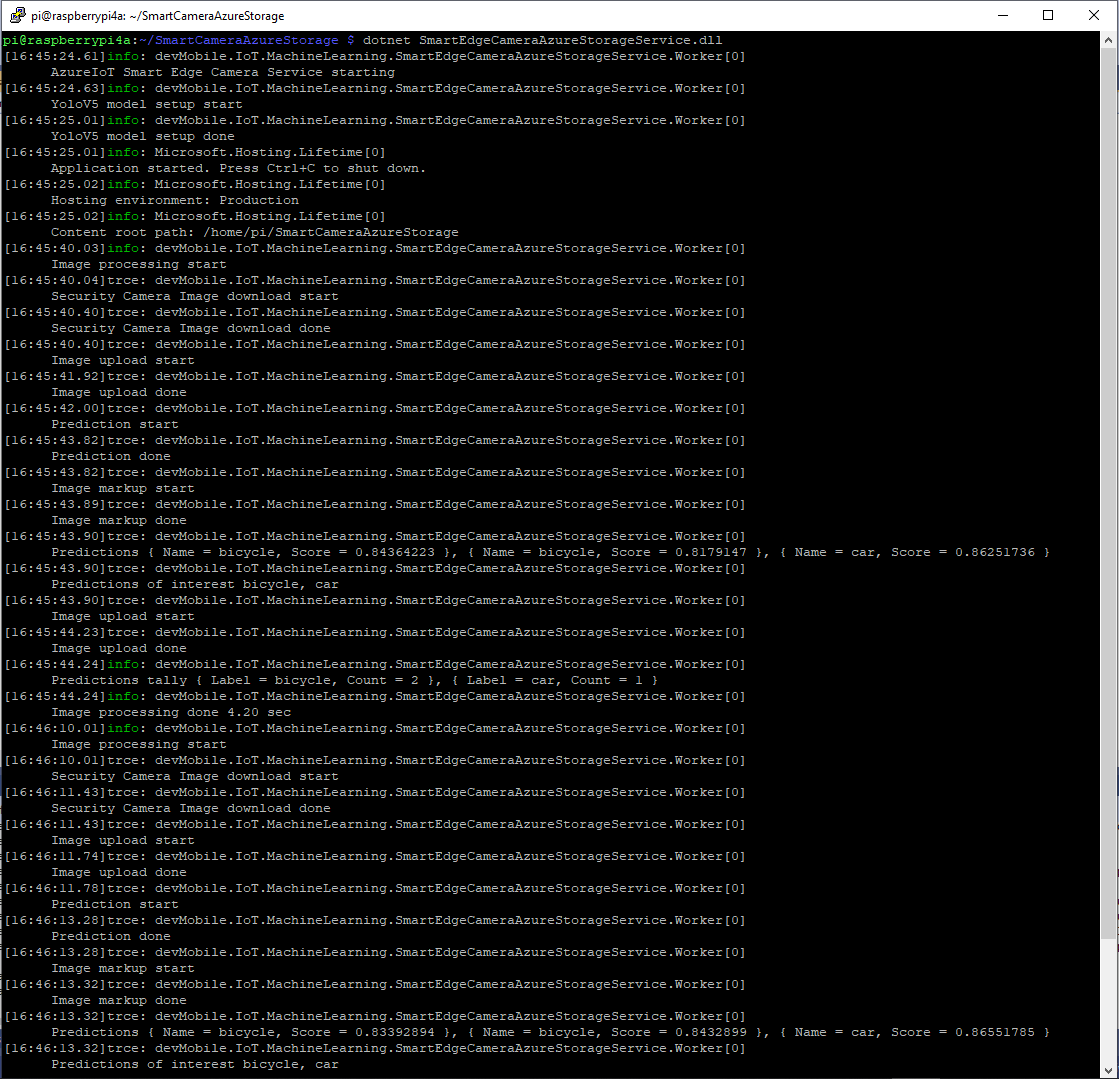
In the ImageUpdateTimerCallback method a camera image is captured (by my Raspberry Pi Camera Module 2 or IPC675LFW Security Camera) and written to the local file system.

Raspberry PI4B console displaying image processing and uploading

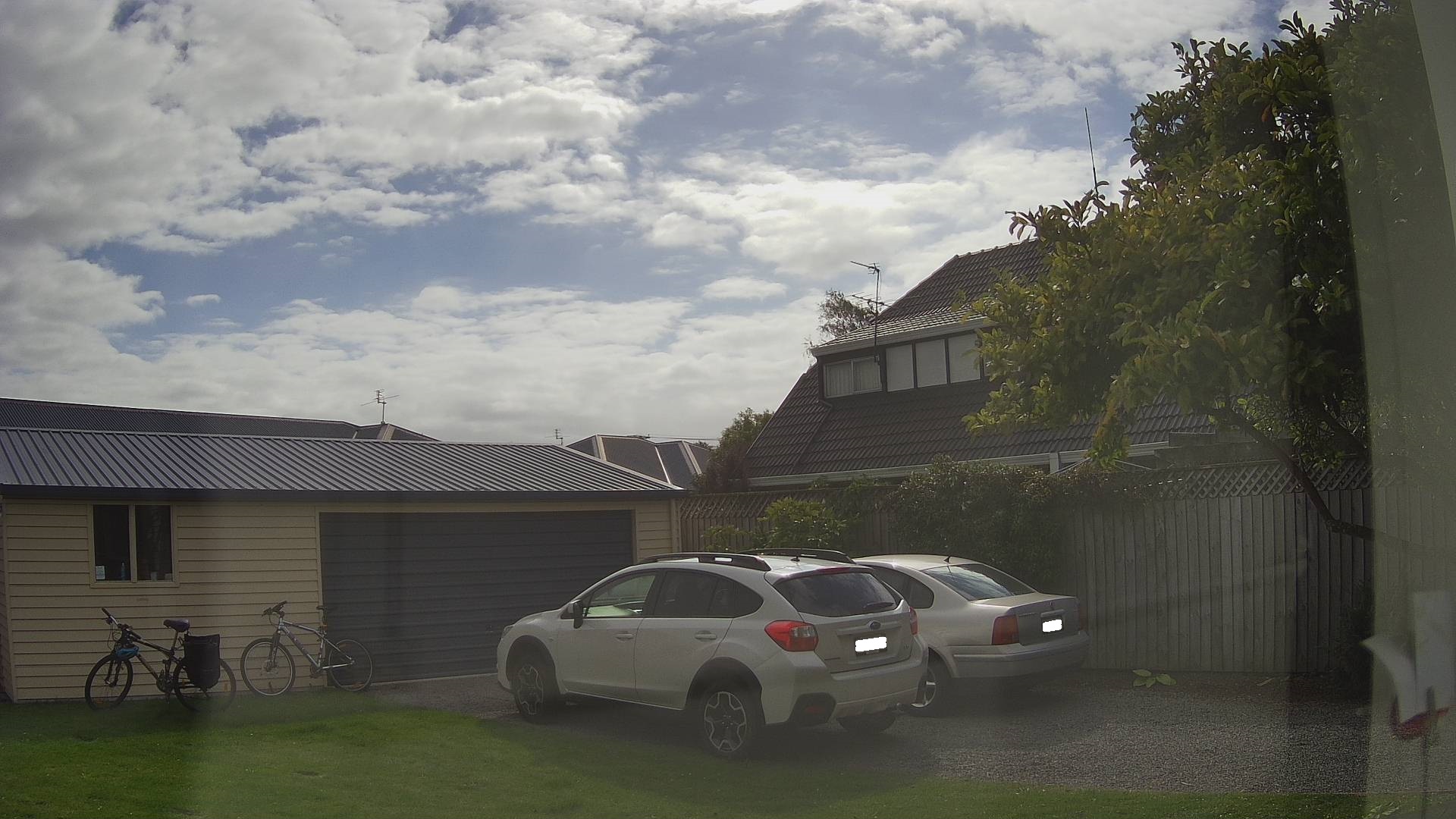
The MentalStack YoloV5 model ML.Net support library processes the camera image on the local filesystem. The prediction output (can be inspected with Netron) is parsed generating list of objects that have been detected, their Minimum Bounding Rectangle(MBR) and class.

Image from security camera
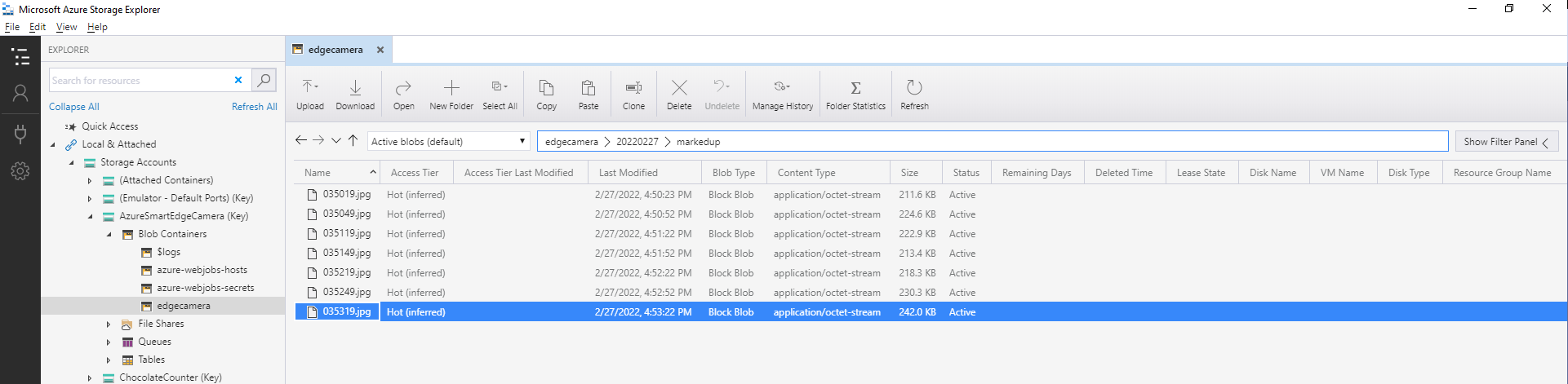
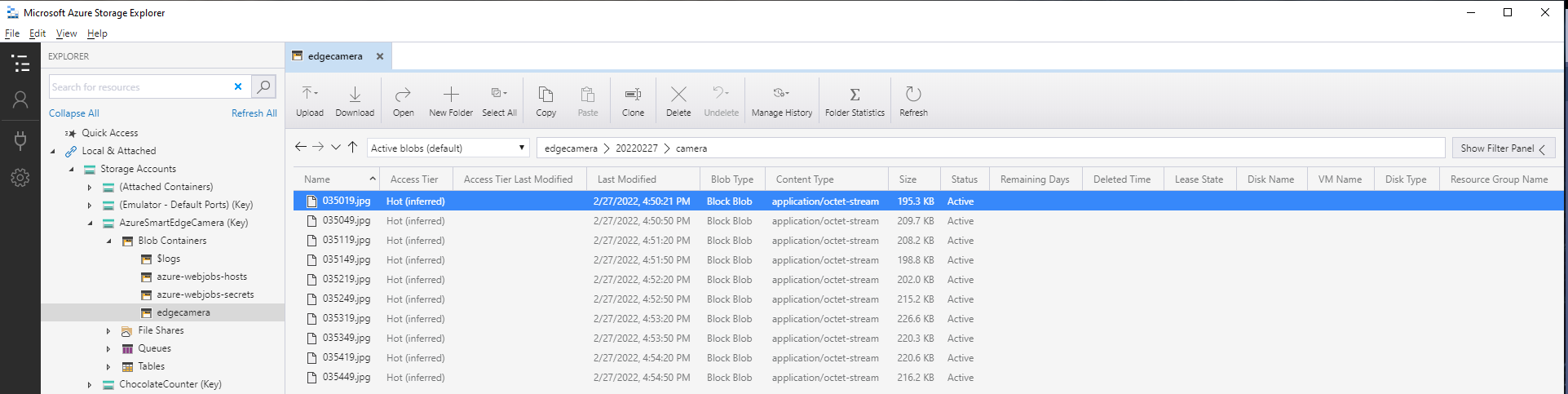
Azure IoT Storage Explorer displaying list of camera images

The list of predictions is post processed with a Language Integrated Query(LINQ) which filters out predictions with a score below a configurable threshold(PredicitionScoreThreshold) and returns a count of each class. If this list intersects with the configurable PredictionLabelsOfInterest a marked up image is uploaded to Azure Storage.

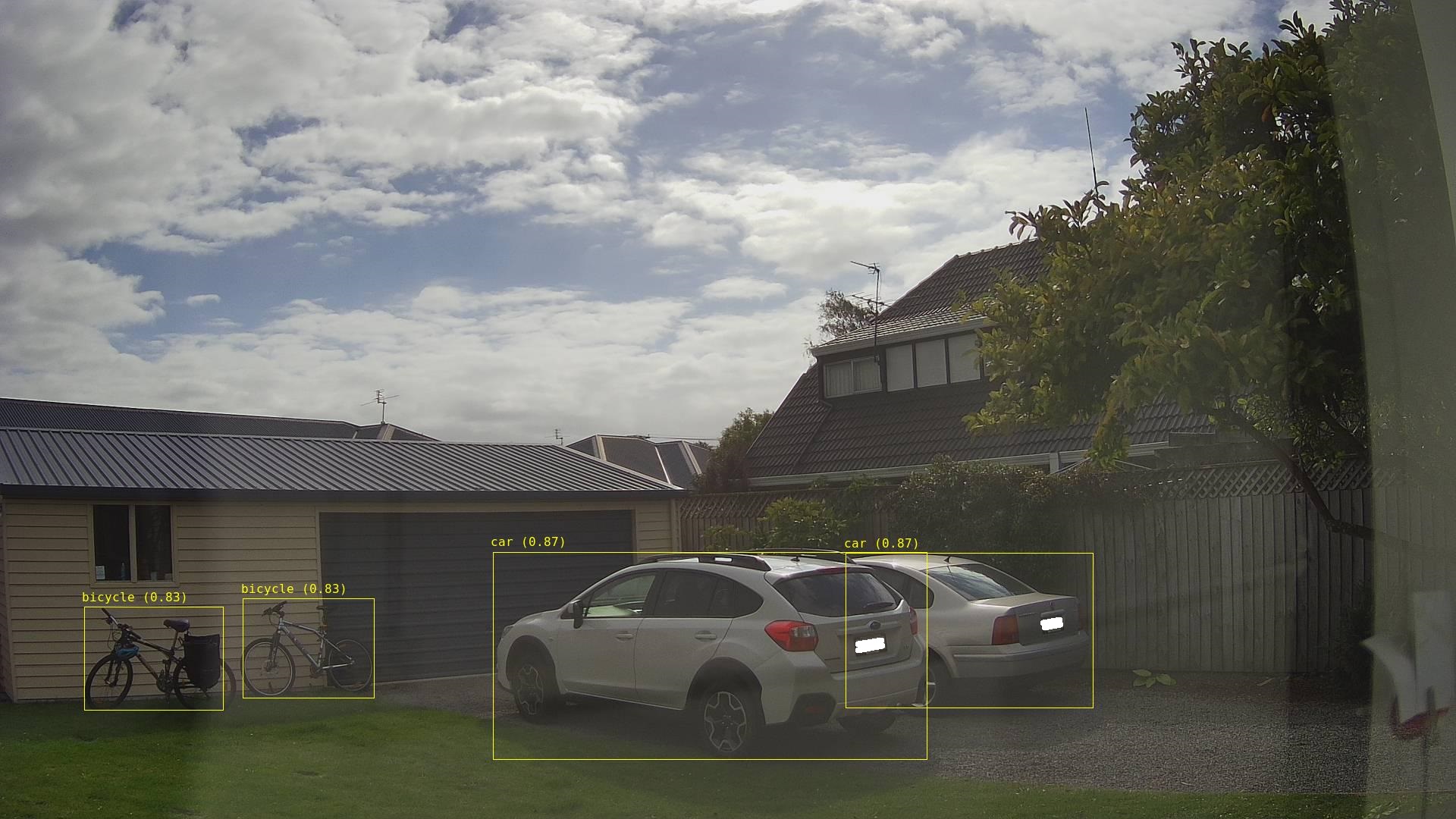
Image from security camera marked up with Minimum Bounding Boxes(MBRs)
Azure IoT Storage Explorer displaying list of marked up camera images

The current implementation is quite limited, the camera image upload, object detection and image upload if there are objects of interest is implemented in a single timer callback. I’m considering implementing two timers one for the uploading of camera images (time lapse camera) and the other for running the object detection process and uploading marked up images.

Marked up images are uploaded if any of the objects detected (with a score greater than PredicitionScoreThreshold) is in the PredictionLabelsOfInterest. I’m considering adding a PredicitionScoreThreshold and minimum count for individual prediction classes, and optionally marked up image upload only when the list of objects detected has changed.

Azure Smartish Edge Camera – Background Service

This is a “note to self” post about deploying a .NET Core Worker Service to a Raspberry PI 4B 8G running Raspberry PI OS (Bullseye). After reading many posts, then a lot of trial and error this approach appeared to work reliably for my system configuration.(Though YMMV with other distros etc.)

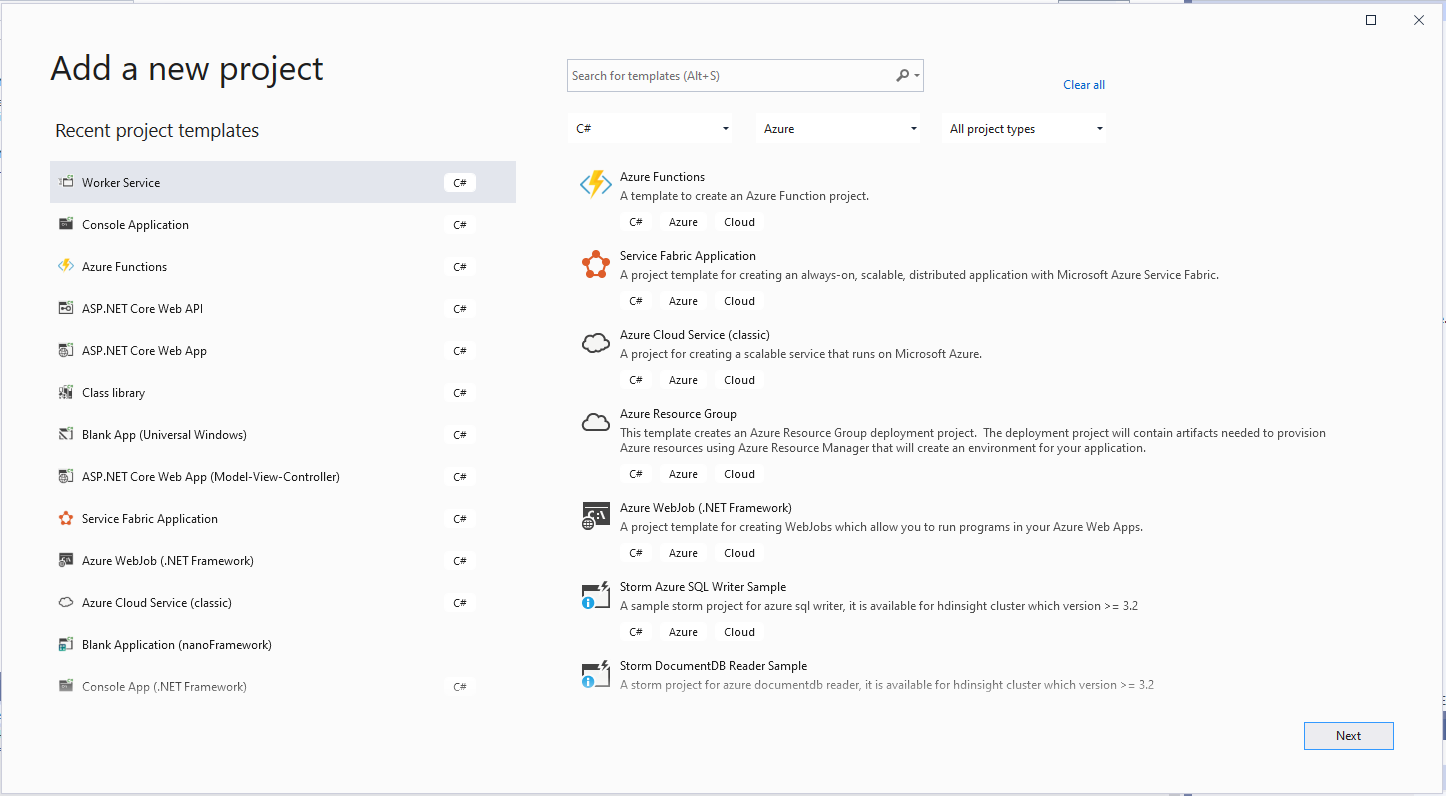
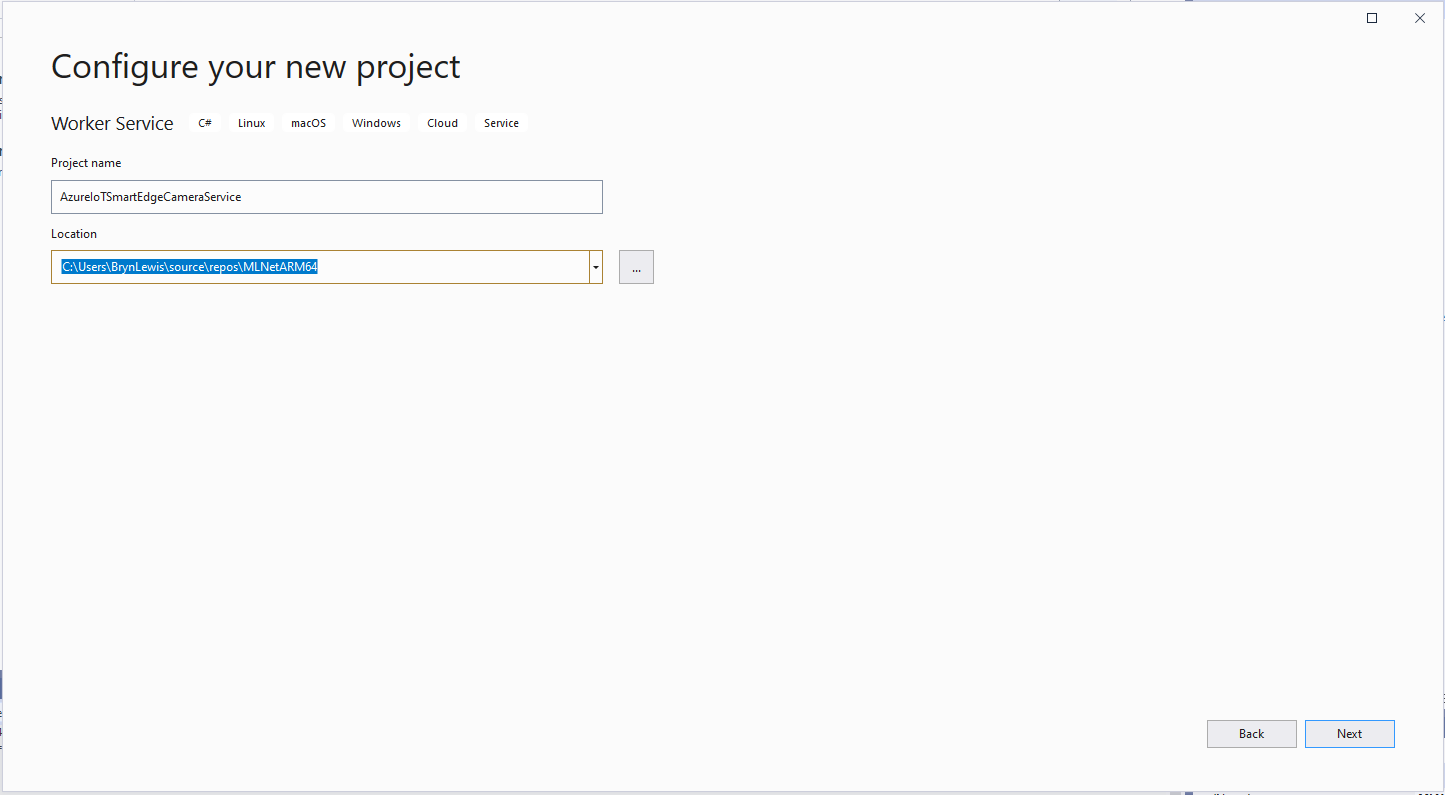
The first step was to create a new Worker Service project in Visual Studio 2019

VS 2019 Add new Worker Service project wizard
VS 2019 Add new Worker Service project name
Visual Studio 2019 NuGet management

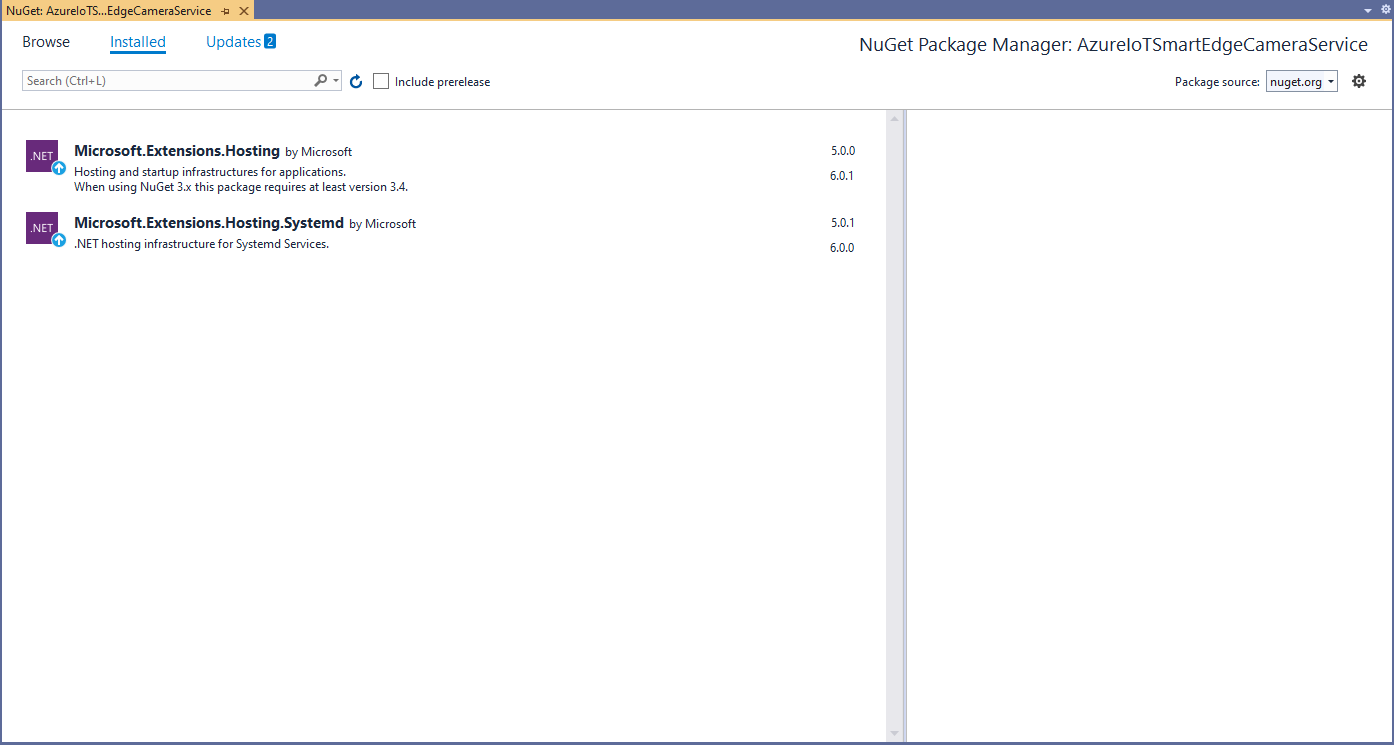
I intentionally did not update the Microsoft.Extensions.Hosting and Microsoft.Extensions.Hosting.Systemd (for UseSystemd) NuGet packages for my initial development.

using Microsoft.Extensions.DependencyInjection;
using Microsoft.Extensions.Hosting;

namespace devMobile.IoT.MachineLearning.AzureIoTSmartEdgeCameraService
{
	public class Program
	{
		public static void Main(string[] args)
		{
			CreateHostBuilder(args).Build().Run();
		}

		public static IHostBuilder CreateHostBuilder(string[] args) =>
			 Host.CreateDefaultBuilder(args)
					.UseSystemd()
				  .ConfigureServices((hostContext, services) =>
				  {
					  services.AddHostedService<Worker>();
				  });
	}
}

program.cs

using System;
using System.Threading;
using System.Threading.Tasks;

using Microsoft.Extensions.Hosting;
using Microsoft.Extensions.Logging;

namespace devMobile.IoT.MachineLearning.AzureIoTSmartEdgeCameraService
{
	public class Worker : BackgroundService
	{
		private readonly ILogger<Worker> _logger;

		public Worker(ILogger<Worker> logger)
		{
			_logger = logger;
		}

		protected override async Task ExecuteAsync(CancellationToken stoppingToken)
		{
			while (!stoppingToken.IsCancellationRequested)
			{
				_logger.LogInformation("Worker running at: {time}", DateTimeOffset.Now);

				await Task.Delay(1000, stoppingToken);
			}
		}
	}
}

Worker.cs

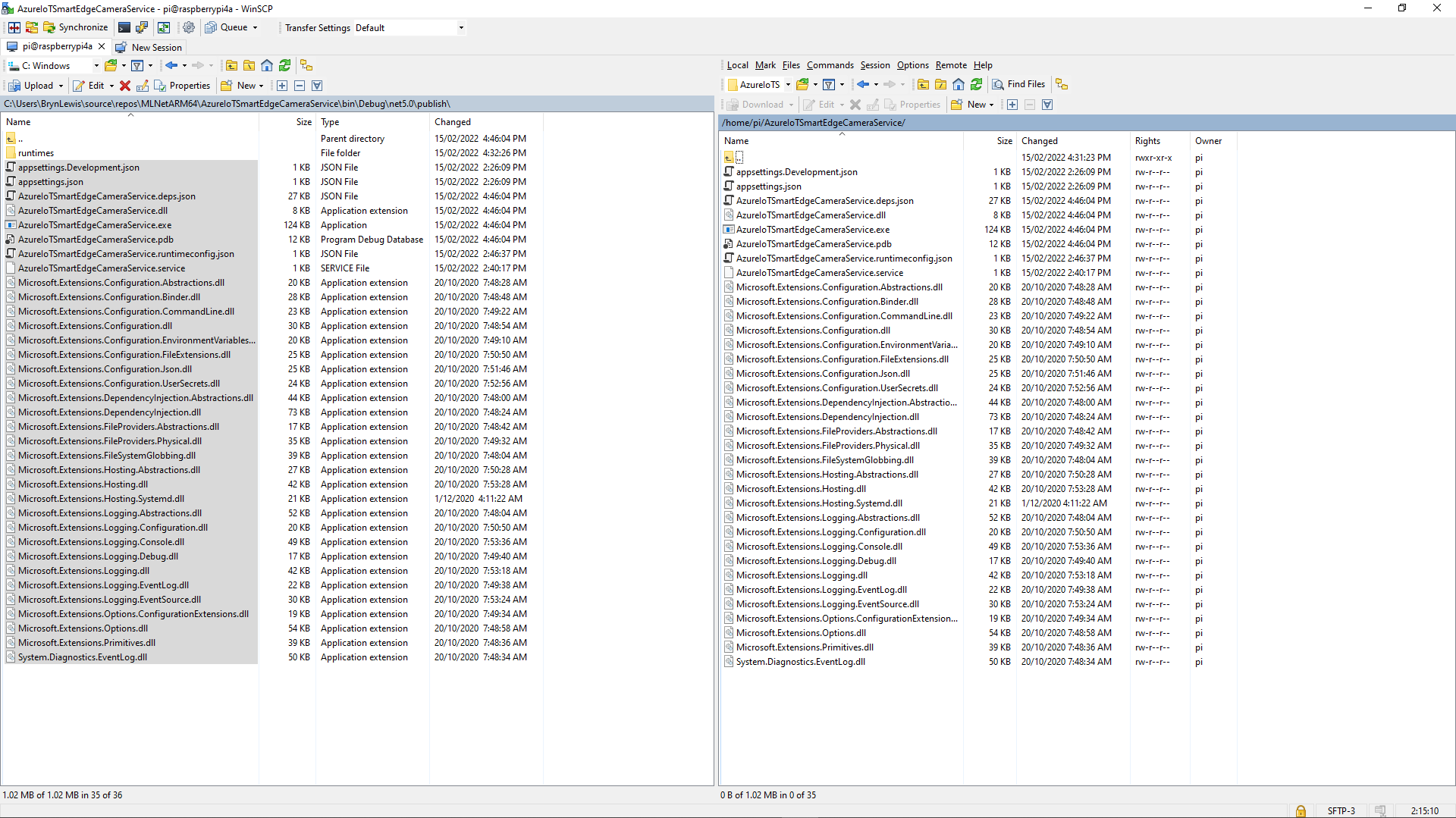
The first step was to create a new directory (AzureIoTSmartEdgeCameraService) on the device. In Visual Studio 2019 I “published” my application and copied the contents of the “publish” folder to the Raspberry PI with Winscp. (This intermediary folder was to avoid issues with the permissions of the /usr/sbin/ & etc/systemd/system folders)

Using Winscp to copy files to AzureIoTSmartEdgeCameraService folder on my device
Install service

Test in application directory
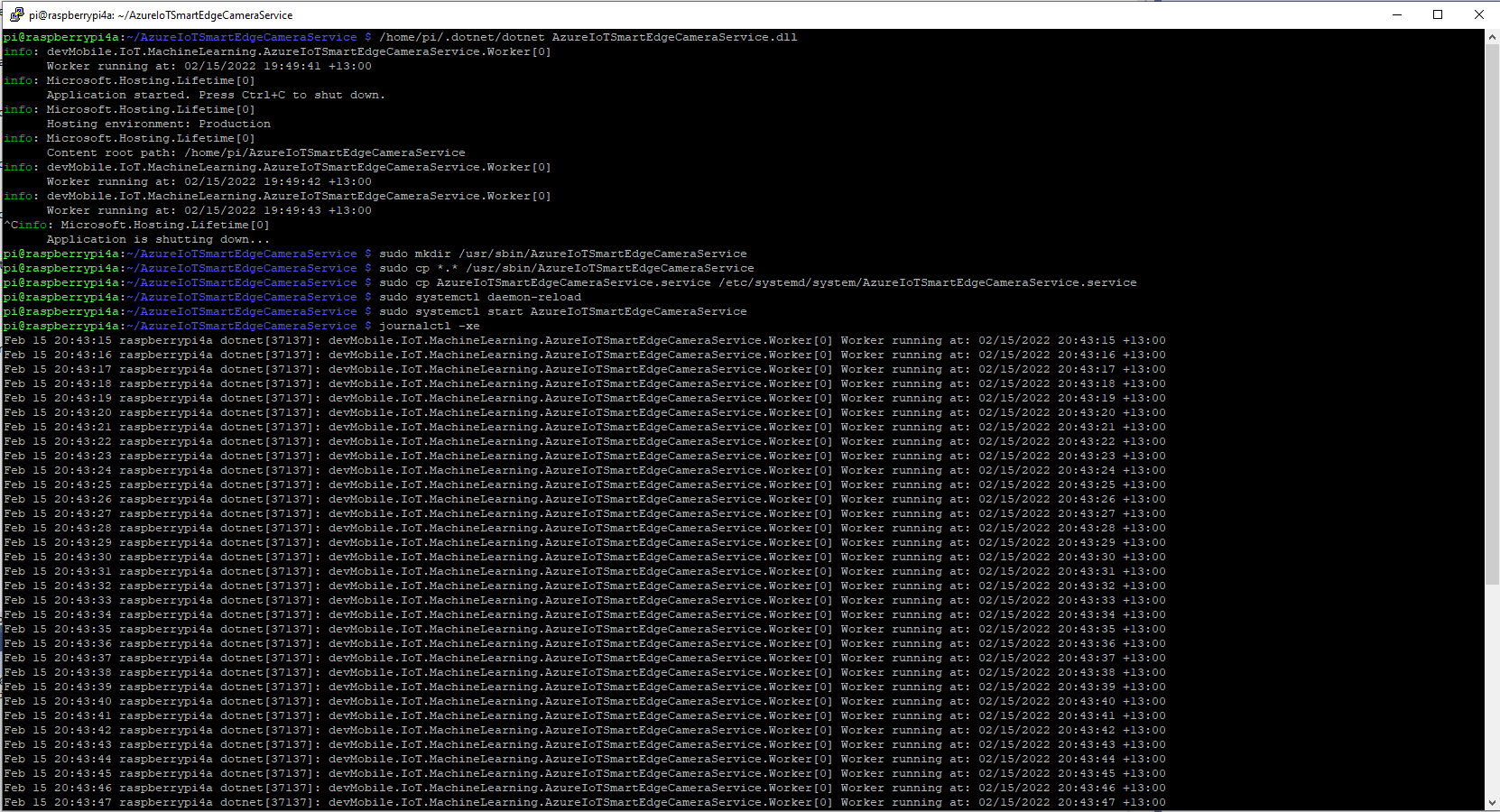
	/home/pi/.dotnet/dotnet AzureIoTSmartEdgeCameraService.dll

Make service directory
	sudo mkdir /usr/sbin/AzureIoTSmartEdgeCameraService

Copy files to service directory
	sudo cp *.* /usr/sbin/AzureIoTSmartEdgeCameraService

Copy .service file to systemd folderclear
	sudo cp AzureIoTSmartEdgeCameraService.service /etc/systemd/system/AzureIoTSmartEdgeCameraService.service
 
Force reload of systemd configuration
	sudo systemctl daemon-reload

Start the Azure IoT SmartEdge Camera service
	sudo systemctl start AzureIoTSmartEdgeCameraService
Installing and starting the AzureIoTSmartEdgeCameraService
Uninstall service
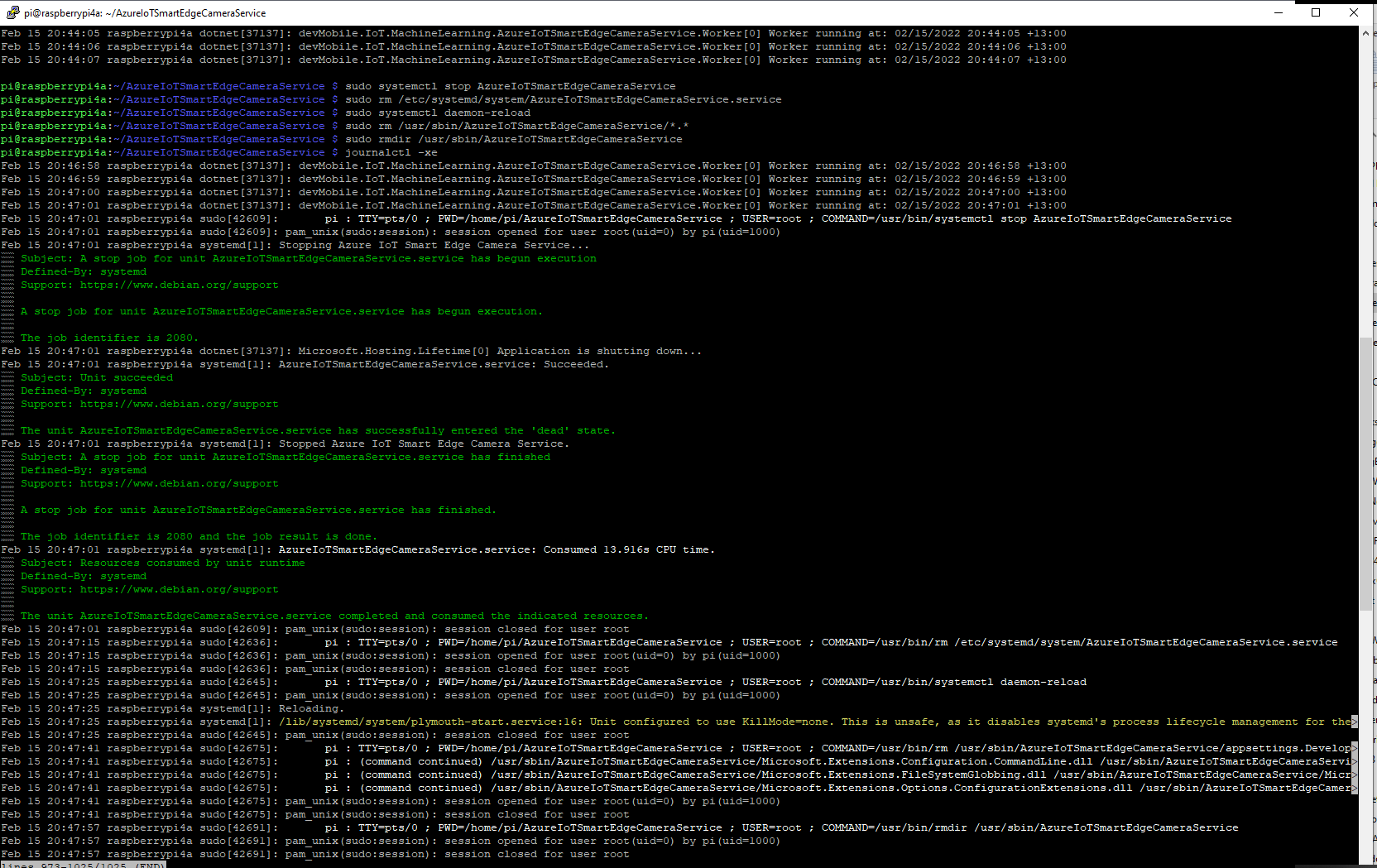
	sudo systemctl stop AzureIoTSmartEdgeCameraService

	sudo rm /etc/systemd/system/AzureIoTSmartEdgeCameraService.service

	sudo systemctl daemon-reload

	sudo rm /usr/sbin/AzureIoTSmartEdgeCameraService/*.*

	sudo rmdir /usr/sbin/AzureIoTSmartEdgeCameraService

	See what is happening
	journalctl -xe

Stopping and removing the AzureIoTSmartEdgeCameraService

It took a lot of attempts to get a clean install then uninstall for the screen captures.

.NET Core web API + Dapper – Caching

Response Cache

In the beginning this was long long post about In-memory caching, distributed caching, Response caching, Response caching with middleware and Object reuse with ObjectPool. As I was re-reading the post before publishing it I came to the realisation that these different caching approaches didn’t require Dapper.

I started again, but kept the first section as it covers one of the simplest possible approaches to caching using the [ResponseCache] attribute and VaryByQueryKeys.
[HttpGet("Response")]
[ResponseCache(Duration = StockItemsListResponseCacheDuration)]
public async Task<ActionResult<IEnumerable<Model.StockItemListDtoV1>>> GetResponse()
{
	IEnumerable<Model.StockItemListDtoV1> response = null;

	logger.LogInformation("Response cache load");

	try
	{
		response = await dapper.QueryAsync<Model.StockItemListDtoV1>(sql: @"SELECT [StockItemID] as ""ID"", [StockItemName] as ""Name"", [RecommendedRetailPrice], [TaxRate] FROM [Warehouse].[StockItems]", commandType: CommandType.Text);
	}
	catch (SqlException ex)
	{
		logger.LogError(ex, "Retrieving list of StockItems");

		return this.StatusCode(StatusCodes.Status500InternalServerError);
	}

	return this.Ok(response);
}

[HttpGet("ResponseVarying")]
[ResponseCache(Duration = StockItemsListResponseCacheDuration, VaryByQueryKeys = new string[] { "id" })]
public async Task<ActionResult<Model.StockItemGetDtoV1>> Get([FromQuery(Name = "id"), Range(1, int.MaxValue, ErrorMessage = "Stock item id must greater than 0")] int id)
{
	Model.StockItemGetDtoV1 response = null;

	logger.LogInformation("Response cache varying load id:{0}", id);

	try
	{
		response = await dapper.QuerySingleOrDefaultAsync<Model.StockItemGetDtoV1>(sql: "[Warehouse].[StockItemsStockItemLookupV1]", param: new { stockItemId = id }, commandType: CommandType.StoredProcedure);
		if (response == default)
		{
			logger.LogInformation("StockItem:{0} not found", id);

			return this.NotFound($"StockItem:{id} not found");
		}
	}
	catch (SqlException ex)
	{
		logger.LogError(ex, "Looking up StockItem with Id:{0}", id);

		return this.StatusCode(StatusCodes.Status500InternalServerError);
	}

	return this.Ok(response);
}

I use Google Chrome, Mozilla Firefox, Microsoft Edgeium, and Opera but the screen captures have been done with FireFox mainly because it formats the Java Script Object Notation(JSON) response payloads nicely.

All the browsers appeared to respect the cache control headers but Firefox was the only one which did not initiate a new request when I pressed return in the Uniform Resource Locator(URL) field.

Firefox displaying list of stock items

I used Telerik Fiddler and FiddlerFox to capture the HTTP GET method request and response payloads.

Fiddler Fox extension details
Response payload for a list of StockItems with cache control headers highlighted
Firefox displaying single stock item
Response payload for a single StockItem with cache control headers highlighted

Dapper Cache

The Dapper Extensions Library has built in support for In-memory and Redis caching. The Dapper.Extensions Library extends Dapper’s functionality. It requires minimal configuration but I was tripped up by the default connection string requirement because I was using Dependency Injection

Dapper.Extensions NuGet package configuration

The configuration code in the application startup.cs supports in-memory and Redis caches.

// This method gets called by the runtime. Use this method to add services to the container.
public void ConfigureServices(IServiceCollection services)
{
	services.AddControllers();

	services.AddResponseCaching();

	services.AddDapperForMSSQL();

#if DAPPER_EXTENSIONS_CACHE_MEMORY
	services.AddDapperCachingInMemory(new MemoryConfiguration
	{
		AllMethodsEnableCache = false
	});
#endif
#if DAPPER_EXTENSIONS_CACHE_REDIS
	services.AddDapperCachingInRedis(new RedisConfiguration
	{
		AllMethodsEnableCache = false,
		KeyPrefix = Configuration.GetValue<string>("RedisKeyPrefix"),
		ConnectionString = Configuration.GetConnectionString("RedisConnection")
	}); 
#endif
	services.AddApplicationInsightsTelemetry();
}

The StockItemsCachingController was rewritten with the Dapper.Extensions QueryAsync and QuerySingleOrDefaultAsync methods.

[HttpGet("DapperMemory")]
public async Task<ActionResult<IEnumerable<Model.StockItemListDtoV1>>> GetDapper()
{
	List<Model.StockItemListDtoV1> response;

	logger.LogInformation("Dapper cache load");

	try
	{
		response = await dapper.QueryAsync<Model.StockItemListDtoV1>(
							sql: @"SELECT [StockItemID] as ""ID"", [StockItemName] as ""Name"", [RecommendedRetailPrice], [TaxRate] FROM [Warehouse].[StockItems]",
							commandType: CommandType.Text,
							enableCache: true,
							cacheExpire: TimeSpan.Parse(this.Configuration.GetValue<string>("DapperCachingDuration"))
					);

	}
	catch (SqlException ex)
	{
		logger.LogError(ex, "Retrieving list of StockItems");

		return this.StatusCode(StatusCodes.Status500InternalServerError);
	}

	return this.Ok(response);
}

[HttpGet("DapperMemoryVarying")]
public async Task<ActionResult<Model.StockItemGetDtoV1>> GetDapperVarying([FromQuery(Name = "id"), Range(1, int.MaxValue, ErrorMessage = "Stock item id must greater than 0")] int id)
{
	Model.StockItemGetDtoV1 response = null;

	logger.LogInformation("Dapper cache varying load id:{0}", id);

	try
	{
		response = await dapper.QuerySingleOrDefaultAsync<Model.StockItemGetDtoV1>(
					sql: "[Warehouse].[StockItemsStockItemLookupV1]",
					param: new { stockItemId = id },
					commandType: CommandType.StoredProcedure,
					cacheKey: $"StockItem:{id}",
					enableCache: true,
					cacheExpire: TimeSpan.Parse(this.Configuration.GetValue<string>("DapperCachingDuration"))
							);
		if (response == default)
		{
			logger.LogInformation("StockItem:{0} not found", id);

			return this.NotFound($"StockItem:{id} not found");
		}
	}
	catch (SqlException ex)
	{
		logger.LogError(ex, "Looking up StockItem with Id:{0}", id);

		return this.StatusCode(StatusCodes.Status500InternalServerError);
	}

	return this.Ok(response);
}

Both the Dapper.Extensions In-Memory and Redis cache reduced the number of database requests to the bare minimum. In a larger application the formatting of the cacheKey (cacheKey: “StockItems” & cacheKey: $”StockItem:{id}”) would be important to stop database query result collisions.

SQL Server Profiler displaying the list and single record requests.

I used Memurai which is a Microsoft Windows version of Redis for testing on my development machine before deploying to Microsoft Azure and using Azure Cache for Redis. Memurai runs as a Windows Service and supports master, replica, cluster node or sentinel roles.

Memurai running as a Windows Service on my development machine

When the Web API project was restarted the contents in-memory cache were lost. The Redis cache contents survive a restart and can be access from multiple clients.

The Dapper.Extensions Query, QueryAsync, QueryFirstOrDefaultAsync, QuerySingleOrDefault, QuerySingleOrDefaultAsync, QueryMultiple, QueryMultipleAsync, ExecuteReader, ExecuteReaderAsync, QueryPageAsync, QueryPageAsync, QueryPlainPage, QueryPlainPageAsync, Execute, ExecuteAsync, ExecuteScalar, ExecuteScalarAsync, BeginTransaction, CommitTransactionm and RollbackTransaction do not appear to a versions which “Retry” actions when there is a “Transient” failure. If there is no solution available I will build one using the approach in my DapperTransient module.

NOTE : Error Handling approach has been updated

ML.Net YoloV5 + Camera + GPIO on ARM64 Raspberry PI

This project builds on my ML.Net YoloV5 + Camera on ARM64 Raspberry PI post and adds support for turning a Light Emitting Diode(LED) on if the label of any object detected in an image is in the PredictionLabelsOfInterest list.

{
  "ApplicationSettings": {
    "ImageTimerDue": "0.00:00:15",
    "ImageTimerPeriod": "0.00:00:30",

    "CameraUrl": "...",
    "CameraUserName": "..",
    "CameraUserPassword": "...",

    "LedPinNumer": 5,

    "InputImageFilenameLocal": "InputLatest.jpg",
    "OutputImageFilenameLocal": "OutputLatest.jpg",

    "ProcessWaitForExit": 10000,

    "YoloV5ModelPath": "Assets/yolov5/yolov5s.onnx",

    "PredicitionScoreThreshold": 0.5,

    "PredictionLabelsOfInterest": [
      "bicycle",
      "person",
      "bench"
    ]
  }
}

The test-rig has consists of a Unv ADZK-10 Security Camera, Power over Ethernet(PoE) module, D-Link 8 port switch, Raspberry PI 8G 4b with a Seeedstudio Grove-Base Hat for Raspberry Pi, and Grove-Blue LED Button.

Test-rig configuration

class Program
{
	private static Model.ApplicationSettings _applicationSettings;
	private static bool _cameraBusy = false;
	private static YoloScorer<YoloCocoP5Model> _scorer = null;
#if GPIO_SUPPORT
	private static GpioController _gpiocontroller;
#endif

	static async Task Main(string[] args)
	{
		Console.WriteLine($"{DateTime.UtcNow:yy-MM-dd HH:mm:ss} YoloV5ObjectDetectionCamera starting");

		try
		{
			// load the app settings into configuration
			var configuration = new ConfigurationBuilder()
				 .AddJsonFile("appsettings.json", false, true)
				 .Build();

			_applicationSettings = configuration.GetSection("ApplicationSettings").Get<Model.ApplicationSettings>();

#if GPIO_SUPPORT
			Console.WriteLine($" {DateTime.UtcNow:yy-MM-dd HH:mm:ss:fff} GPIO setup start");

			_gpiocontroller = new GpioController(PinNumberingScheme.Logical);

			_gpiocontroller.OpenPin(_applicationSettings.ButtonPinNumer, PinMode.InputPullDown);

			_gpiocontroller.OpenPin(_applicationSettings.LedPinNumer, PinMode.Output);
			_gpiocontroller.Write(_applicationSettings.LedPinNumer, PinValue.Low);

			Console.WriteLine($" {DateTime.UtcNow:yy-MM-dd HH:mm:ss:fff} GPIO setup done");
#endif

			_scorer = new YoloScorer<YoloCocoP5Model>(_applicationSettings.YoloV5ModelPath);

			Timer imageUpdatetimer = new Timer(ImageUpdateTimerCallback, null, _applicationSettings.ImageImageTimerDue, _applicationSettings.ImageTimerPeriod);

			Console.WriteLine($"{DateTime.UtcNow:yy-MM-dd HH:mm:ss} press <ctrl^c> to exit");
			Console.WriteLine();

			try
			{
				await Task.Delay(Timeout.Infinite);
			}
			catch (TaskCanceledException)
			{
				Console.WriteLine($"{DateTime.UtcNow:yy-MM-dd HH:mm:ss} Application shutown requested");
			}
		}
		catch (Exception ex)
		{
				Console.WriteLine($"{DateTime.UtcNow:yy-MM-dd HH:mm:ss} Application shutown failure {ex.Message}", ex);
		}
	}

	private static void ImageUpdateTimerCallback(object state)
	{
		DateTime requestAtUtc = DateTime.UtcNow;

		// Just incase - stop code being called while photo already in progress
		if (_cameraBusy)
		{
			return;
		}
		_cameraBusy = true;

		Console.WriteLine($"{DateTime.UtcNow:yy-MM-dd HH:mm:ss} Image processing start");

		try
		{
#if SECURITY_CAMERA
			Console.WriteLine($" {DateTime.UtcNow:yy-MM-dd HH:mm:ss:fff} Security Camera Image download start");

			NetworkCredential networkCredential = new NetworkCredential()
			{
				UserName = _applicationSettings.CameraUserName,
				Password = _applicationSettings.CameraUserPassword,
			};

			using (WebClient client = new WebClient())
			{
				client.Credentials = networkCredential;

				client.DownloadFile(_applicationSettings.CameraUrl, _applicationSettings.InputImageFilenameLocal);
			}
			Console.WriteLine($" {DateTime.UtcNow:yy-MM-dd HH:mm:ss:fff} Security Camera Image download done");
#endif

#if RASPBERRY_PI_CAMERA
			Console.WriteLine($" {DateTime.UtcNow:yy-MM-dd HH:mm:ss:fff} Raspberry PI Image capture start");

			using (Process process = new Process())
			{
				process.StartInfo.FileName = @"libcamera-jpeg";
				process.StartInfo.Arguments = $"-o {_applicationSettings.InputImageFilenameLocal} --nopreview -t1 --rotation 180";
				process.StartInfo.RedirectStandardError = true;

				process.Start();

				if (!process.WaitForExit(_applicationSettings.ProcessWaitForExit) || (process.ExitCode != 0))
				{
					Console.WriteLine($"{DateTime.UtcNow:yy-MM-dd HH:mm:ss:fff} Image update failure {process.ExitCode}");
				}
			}

			Console.WriteLine($" {DateTime.UtcNow:yy-MM-dd HH:mm:ss:fff} Raspberry PI Image capture done");
#endif

			List<YoloPrediction> predictions;

			// Process the image on local file system
			using (Image image = Image.FromFile(_applicationSettings.InputImageFilenameLocal))
			{
				Console.WriteLine($" {DateTime.UtcNow:yy-MM-dd HH:mm:ss:fff} YoloV5 inferencing start");
				predictions = _scorer.Predict(image);
				Console.WriteLine($" {DateTime.UtcNow:yy-MM-dd HH:mm:ss:fff} YoloV5 inferencing done");

#if OUTPUT_IMAGE_MARKUP
				using (Graphics graphics = Graphics.FromImage(image))
				{
					Console.WriteLine($" {DateTime.UtcNow:yy-MM-dd HH:mm:ss:fff} Image markup start");

					foreach (var prediction in predictions) // iterate predictions to draw results
					{
						double score = Math.Round(prediction.Score, 2);

						graphics.DrawRectangles(new Pen(prediction.Label.Color, 1), new[] { prediction.Rectangle });

						var (x, y) = (prediction.Rectangle.X - 3, prediction.Rectangle.Y - 23);

						graphics.DrawString($"{prediction.Label.Name} ({score})", new Font("Consolas", 16, GraphicsUnit.Pixel), new SolidBrush(prediction.Label.Color), new PointF(x, y));
					}

					image.Save(_applicationSettings.OutputImageFilenameLocal);

					Console.WriteLine($" {DateTime.UtcNow:yy-MM-dd HH:mm:ss:fff} Image markup done");
				}
#endif
			}

#if PREDICTION_CLASSES
			Console.WriteLine($" {DateTime.UtcNow:yy-MM-dd HH:mm:ss:fff} Image classes start");
			foreach (var prediction in predictions)
			{
				Console.WriteLine($"  Name:{prediction.Label.Name} Score:{prediction.Score:f2} Valid:{prediction.Score > _applicationSettings.PredicitionScoreThreshold}");
			}
			Console.WriteLine($" {DateTime.UtcNow:yy-MM-dd HH:mm:ss:fff} Image classes done");
#endif

#if PREDICTION_CLASSES_OF_INTEREST
			IEnumerable<string> predictionsOfInterest= predictions.Where(p=>p.Score > _applicationSettings.PredicitionScoreThreshold).Select(c => c.Label.Name).Intersect(_applicationSettings.PredictionLabelsOfInterest, StringComparer.OrdinalIgnoreCase);

			if (predictionsOfInterest.Any())
			{
				Console.WriteLine($" {DateTime.UtcNow:yy-MM-dd HH:mm:ss} Camera image comtains {String.Join(",", predictionsOfInterest)}");
			}

   #if GPIO_SUPPORT
		   if (predictionsOfInterest.Any())
			{
				_gpiocontroller.Write(_applicationSettings.LedPinNumer, PinValue.High);
			}
			else
			{
				_gpiocontroller.Write(_applicationSettings.LedPinNumer, PinValue.Low);
			}
	#endif
#endif
		}
		catch (Exception ex)
		{
			Console.WriteLine($"{DateTime.UtcNow:yy-MM-dd HH:mm:ss} Camera image download, upload or post procesing failed {ex.Message}");
		}
		finally
		{
			_cameraBusy = false;
		}

		TimeSpan duration = DateTime.UtcNow - requestAtUtc;

		Console.WriteLine($"{DateTime.UtcNow:yy-MM-dd HH:mm:ss} Image processing done {duration.TotalSeconds:f2} sec");
		Console.WriteLine();
	}
}

The name of the digital output pin, input image, output image and yoloV5 model file names are configured in the appsettings.json file.

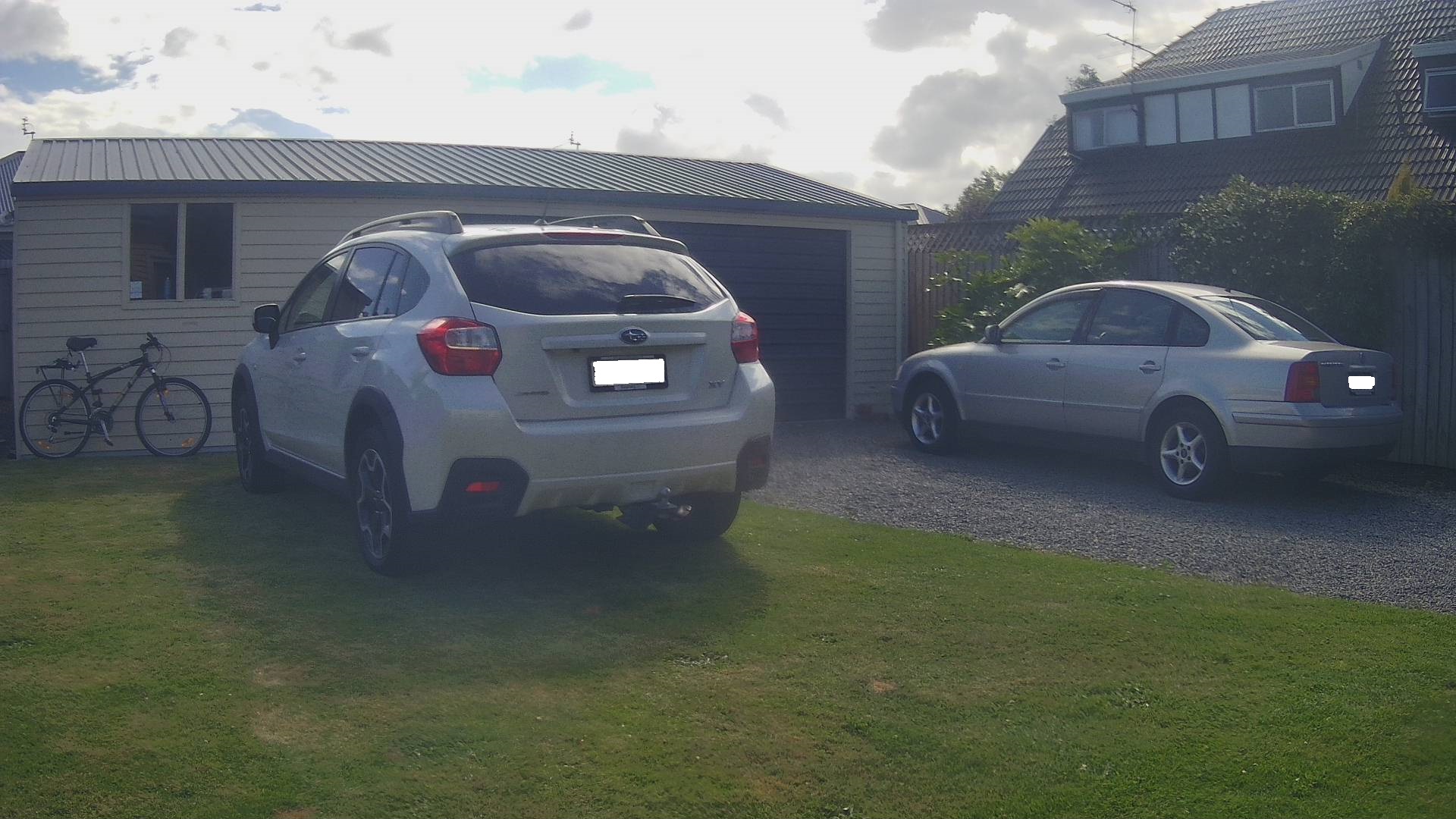
Mountain bike leaning against garage
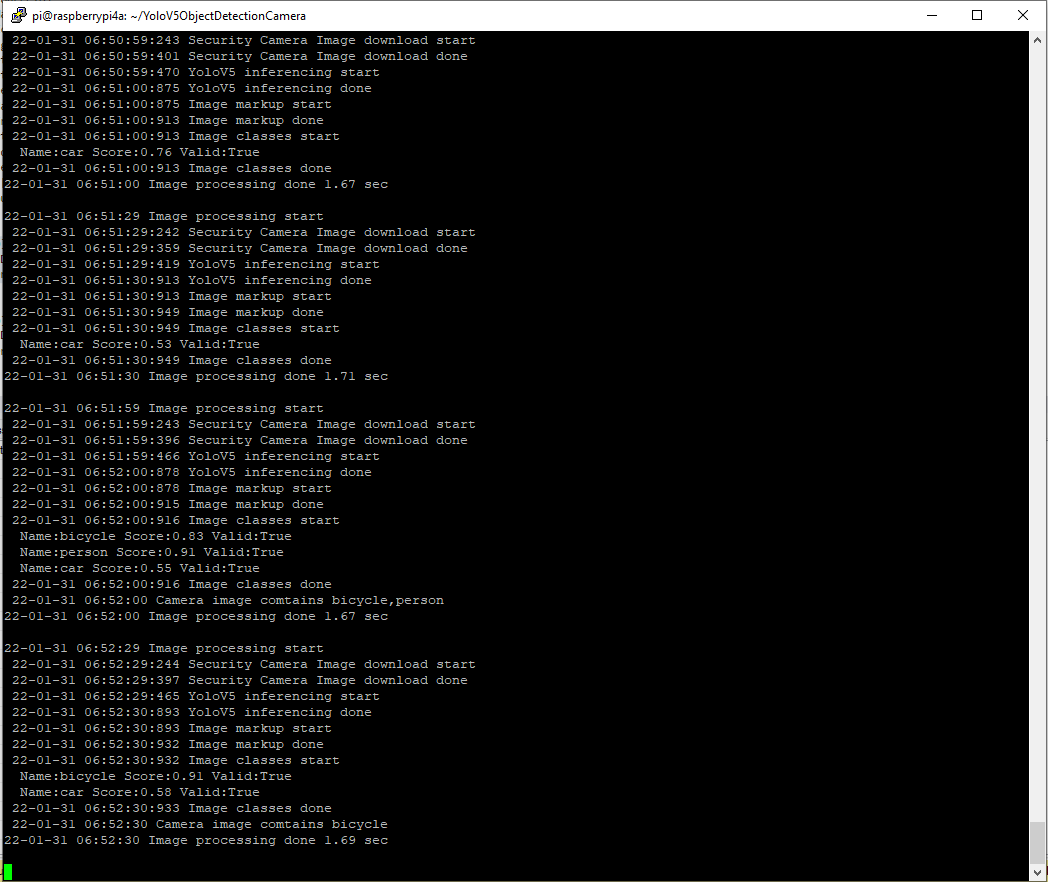
YoloV5 based application console

The 22-01-31 06:52 “person” detection is me moving the mountain bike into position.

Marked up image of my mountain bike leaning against the garage

Summary

Once the YoloV5s model was loaded, inferencing was taking roughly 1.45 seconds. The application is starting to get a bit “nasty” so for the next version I’ll need to do some refactoring.

ML.Net YoloV5 + Camera on ARM64 Raspberry PI

Building on my previous post I modified the code to support capturing images with a security camera(Unv ADZK-10) or a Raspberry PI Camera V2.

namespace devMobile.IoT.MachineLearning.ObjectDetectionCamera
{
	class Program
	{
		private static Model.ApplicationSettings _applicationSettings;
		private static YoloScorer<YoloCocoP5Model> _scorer = null;
		private static bool _cameraBusy = false;

		static async Task Main(string[] args)
		{
			Console.WriteLine($"{DateTime.UtcNow:yy-MM-dd HH:mm:ss} ObjectDetectionCamera starting");

			try
			{
				// load the app settings into configuration
				var configuration = new ConfigurationBuilder()
					 .AddJsonFile("appsettings.json", false, true)
					 .Build();

				_applicationSettings = configuration.GetSection("ApplicationSettings").Get<Model.ApplicationSettings>();

				_scorer = new YoloScorer<YoloCocoP5Model>(_applicationSettings.YoloV5ModelPath);

				Timer imageUpdatetimer = new Timer(ImageUpdateTimerCallback, null, _applicationSettings.ImageImageTimerDue, _applicationSettings.ImageTimerPeriod);

				Console.WriteLine($" {DateTime.UtcNow:yy-MM-dd HH:mm:ss} press <ctrl^c> to exit");

				try
				{
					await Task.Delay(Timeout.Infinite);
				}
				catch (TaskCanceledException)
				{
					Console.WriteLine($"{DateTime.UtcNow:yy-MM-dd HH:mm:ss} Application shutown requested");
				}
			}
			catch (Exception ex)
			{
				Console.WriteLine($"{DateTime.UtcNow:yy-MM-dd HH:mm:ss} Application shutown failure {ex.Message}", ex);
			}
		}

		private static async void ImageUpdateTimerCallback(object state)
		{
			DateTime requestAtUtc = DateTime.UtcNow;

			// Just incase - stop code being called while photo already in progress
			if (_cameraBusy)
			{
				return;
			}
			_cameraBusy = true;

			try
			{
#if SECURITY_CAMERA
				Console.WriteLine($" {DateTime.UtcNow:yy-MM-dd HH:mm:ss} Security Camera Image download start");

				NetworkCredential networkCredential = new NetworkCredential()
				{
					UserName = _applicationSettings.CameraUserName,
					Password = _applicationSettings.CameraUserPassword,
				};

				using (WebClient client = new WebClient())
				{
					client.Credentials = networkCredential;

					client.DownloadFile(_applicationSettings.CameraUrl, _applicationSettings.InputImageFilenameLocal);
				}
				Console.WriteLine($" {DateTime.UtcNow:yy-MM-dd HH:mm:ss} Security Camera Image download done");
#endif

#if RASPBERRY_PI_CAMERA
				Console.WriteLine($" {DateTime.UtcNow:yy-MM-dd HH:mm:ss} Raspberry PI Image capture start");

				using (Process process = new Process())
				{
					process.StartInfo.FileName = @"libcamera-jpeg";
					process.StartInfo.Arguments = $"-o {_applicationSettings.InputImageFilenameLocal} --nopreview -t1 --rotation 180";
					process.StartInfo.RedirectStandardError = true;

					process.Start();

					if (!process.WaitForExit(_applicationSettings.ProcessWaitForExit) || (process.ExitCode != 0))
					{
						Console.WriteLine($"{DateTime.UtcNow:yy-MM-dd HH:mm:ss} Image update failure {process.ExitCode}");
					}
				}

				Console.WriteLine($" {DateTime.UtcNow:yy-MM-dd HH:mm:ss} Raspberry PI Image capture done");
#endif

				// Process the image on local file system
				using (Image image = Image.FromFile(_applicationSettings.InputImageFilenameLocal))
				{
					Console.WriteLine($" {DateTime.UtcNow:yy-MM-dd HH:mm:ss} YoloV5 inferencing start");
					System.Collections.Generic.List<YoloPrediction> predictions = _scorer.Predict(image);
					Console.WriteLine($" {DateTime.UtcNow:yy-MM-dd HH:mm:ss} YoloV5 inferencing done");

					using (Graphics graphics = Graphics.FromImage(image))
					{
						foreach (var prediction in predictions) // iterate predictions to draw results
						{
							double score = Math.Round(prediction.Score, 2);

							graphics.DrawRectangles(new Pen(prediction.Label.Color, 1), new[] { prediction.Rectangle });

							var (x, y) = (prediction.Rectangle.X - 3, prediction.Rectangle.Y - 23);

							graphics.DrawString($"{prediction.Label.Name} ({score})", new Font("Consolas", 16, GraphicsUnit.Pixel), new SolidBrush(prediction.Label.Color), new PointF(x, y));

							Console.WriteLine($"  {prediction.Label.Name} {score:f1}");

						}

						image.Save(_applicationSettings.OutputImageFilenameLocal);
					}
				}
				Console.WriteLine($" {DateTime.UtcNow:yy-MM-dd HH:mm:ss} YoloV5 inferencing done");
			}
			catch (Exception ex)
			{
				Console.WriteLine($"{DateTime.UtcNow:yy-MM-dd HH:mm:ss} Camera image download, upload or post procesing failed {ex.Message}");
			}
			finally
			{
				_cameraBusy = false;
			}

			TimeSpan duration = DateTime.UtcNow - requestAtUtc;

			Console.WriteLine($"{DateTime.UtcNow:yy-MM-dd HH:mm:ss} Image Update done {duration.TotalSeconds:f1} sec");
		}
	}
}

The name of the input image, output image and yoloV5 model file names are configured in the appsettings.json file.

Raspberry PI Camera V2 Results

Raspberry PI Camera V2 source image
ObjectDectionCamera application running on my RaspberryPI4
Raspberry PI Camera V2 image with MBRs

Security camera Results

Security Camera source image
ObjectDetectionCamera application running on RaspberryPI 8G 4B
Security Camera image with MBRs

Summary

The RaspberryPI Camera V2 images were 3280×2464 2.04M and the security camera images were 1920 x1080 464K so there was a significant quality and size difference.

When I ran the YoloV5s model application on my development box (Intel(R) Core(TM) i7-8700T CPU @ 2.40GHz) a security camera image took less than a second to process.

ObjectDetectionCamera application running on my development box

On the RaspberryPI V4b 8G the Raspberry PI Camera V2 images took roughly 1.52 seconds and security camera images roughly 1.47 seconds.

I was “standing on the shoulders of giants” the Mentalstack code just worked. With a pretrained yoloV5 model, the ML.Net Open Neural Network Exchange(ONNX) plumbing I had a working solution in a couple of hours.