Random wanderings through Microsoft Azure esp. PaaS plumbing, the IoT bits, AI on Micro controllers, AI on Edge Devices, .NET nanoFramework, .NET Core on *nix and ML.NET+ONNX
public static void Main()
{
	Debug.WriteLine("devMobile.IoT.LoRaWAN.nanoFramework.RAK3172 BreakoutSerial starting");

	try
	{
		// set GPIO functions for COM2 (this is UART1 on ESP32)
#if ESP32_WROOM
		Configuration.SetPinFunction(Gpio.IO17, DeviceFunction.COM2_TX);
		Configuration.SetPinFunction(Gpio.IO16, DeviceFunction.COM2_RX);
#endif

		Debug.Write("Ports:");
		foreach (string port in SerialPort.GetPortNames())
		{
			Debug.Write($" {port}");
		}
		Debug.WriteLine("");

		using (_SerialPort = new SerialPort(SerialPortId))
		{
			// set parameters
			_SerialPort.BaudRate = 115200;
			_SerialPort.Parity = Parity.None;
			_SerialPort.DataBits = 8;
			_SerialPort.StopBits = StopBits.One;
			_SerialPort.Handshake = Handshake.None;
			_SerialPort.NewLine = "\r\n";
			_SerialPort.ReadTimeout = 1000;

			//_SerialPort.WatchChar = '\n'; // May 2022 WatchChar event didn't fire github issue https://github.com/nanoframework/Home/issues/1035

#if SERIAL_ASYNC_READ
			_SerialPort.DataReceived += SerialDevice_DataReceived;
#endif

			_SerialPort.Open();

			_SerialPort.WatchChar = '\n';

			_SerialPort.ReadExisting(); // Running at 115K2 this was necessary

...

			for (int i = 0; i < 5; i++)
			{
				string atCommand;
				atCommand = "AT+VER=?";
				//atCommand = "AT+SN=?"; // Empty response?
				//atCommand = "AT+HWMODEL=?";
				//atCommand = "AT+HWID=?";
				//atCommand = "AT+DEVEUI=?";
				//atCommand = "AT+APPEUI=?";
				//atCommand = "AT+APPKEY=?";
				//atCommand = "ATR";
				//atCommand = "AT+SLEEP=4000";
				Debug.WriteLine("");
				Debug.WriteLine($"{i} TX:{atCommand} bytes:{atCommand.Length}--------------------------------");
				_SerialPort.WriteLine(atCommand);

				Thread.Sleep(5000);
			}
		}
...
		Debug.WriteLine("Done");
	}
	catch (Exception ex)
	{
		Debug.WriteLine(ex.Message);
	}
}
After resetting the device I modified the code to display some of the configuration.
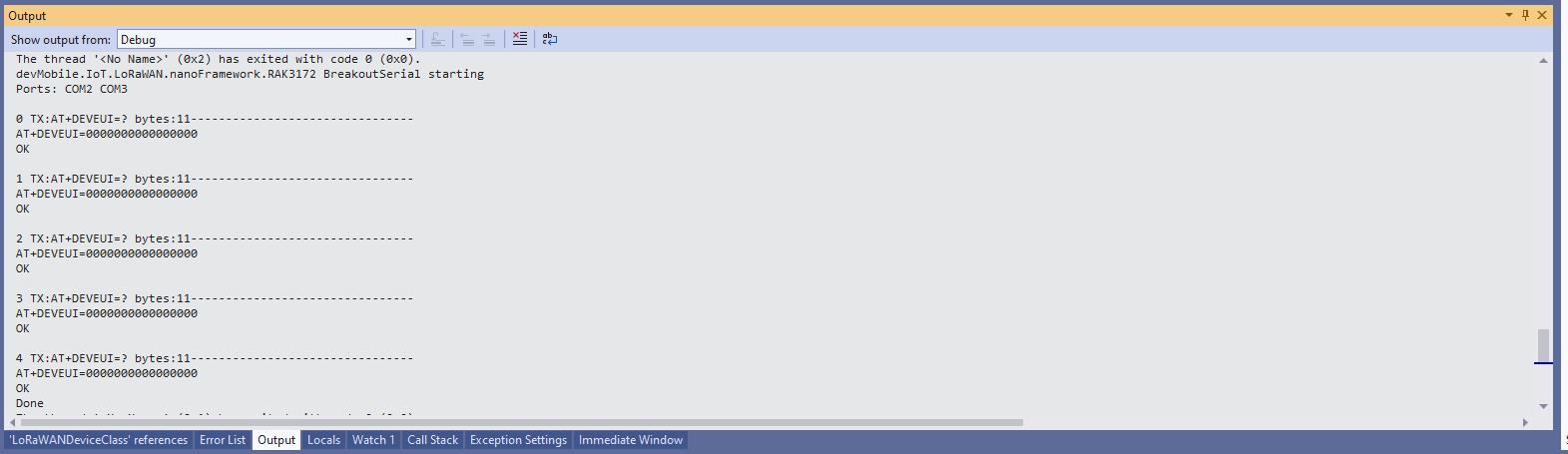
DevEUI after ATR command
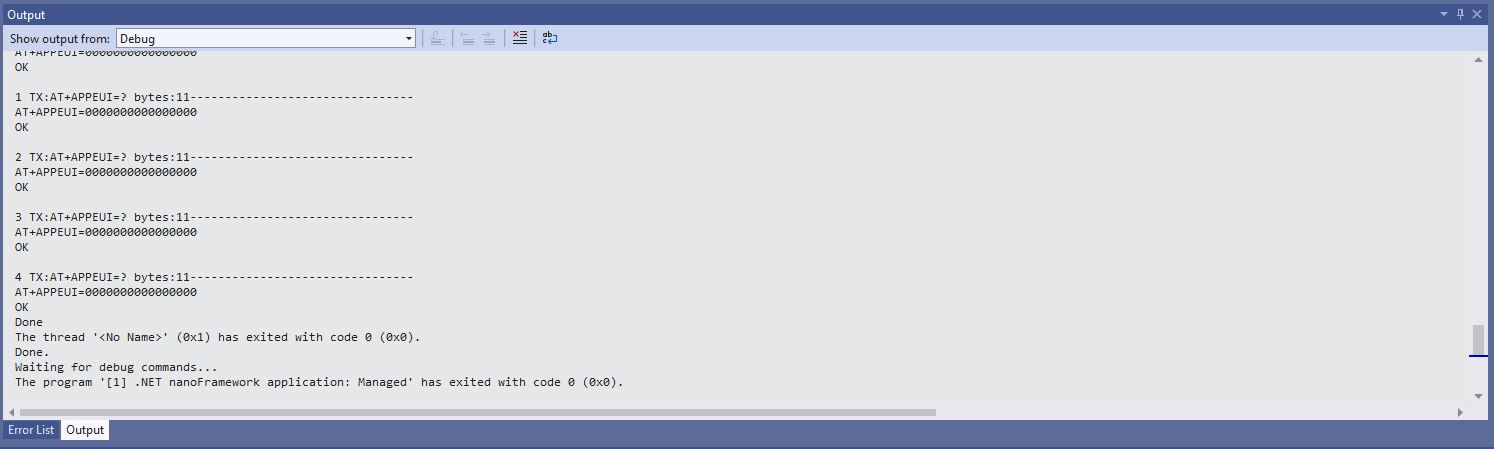
JoinEUI after ATR command
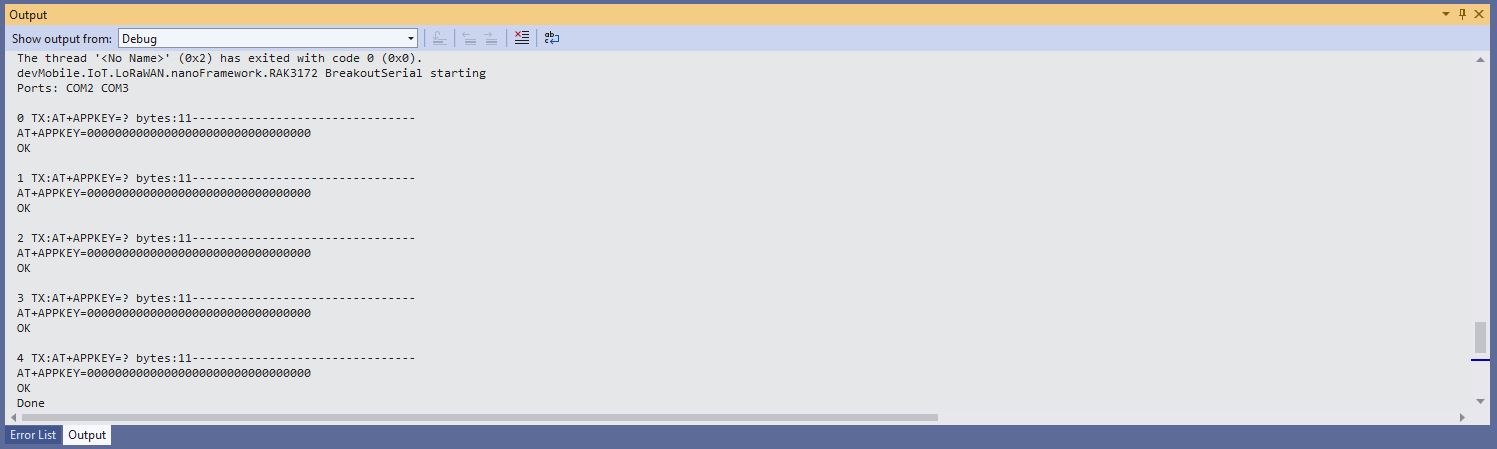
AppKey after ATR command
To reconfigure the device I ran the RAK3172LoRaWANDeviceClient application with DEVICE_DEVEUI_SET, OTAA, UNCONFIRMED, REGION_SET and ADR_SET defined. The testrig could then successfully connect to The Things Network and when the device was power cycled the configuration was retained.
public Result FactoryReset()
{
#if DIAGNOSTICS
	Debug.WriteLine($" {DateTime.UtcNow:hh:mm:ss} ATR");
#endif
	Result result = SendCommand("OK", "ATR", CommandTimeoutDefault);
	if (result != Result.Success)
	{
#if DIAGNOSTICS
		Debug.WriteLine($" {DateTime.UtcNow:hh:mm:ss} ATR failed {result}");
#endif
		return result;
	}

	return Result.Success;
}
Read-only replicas of an Azure SQL Database database with Active geo-replication are easy to setup but there are some disadvantages. e.g. bi-directional synchronisation is not supported, not all tables or selected columns of some tables might not be needed\should not be accessible for reporting, the overhead of replicating tables used for transaction processing might impact on the performance of the solution etc. Azure SQL Data Sync is a service built on Azure SQL Database that can synchronise selected data bi-directionally across multiple databases, both on-premises and in the cloud.
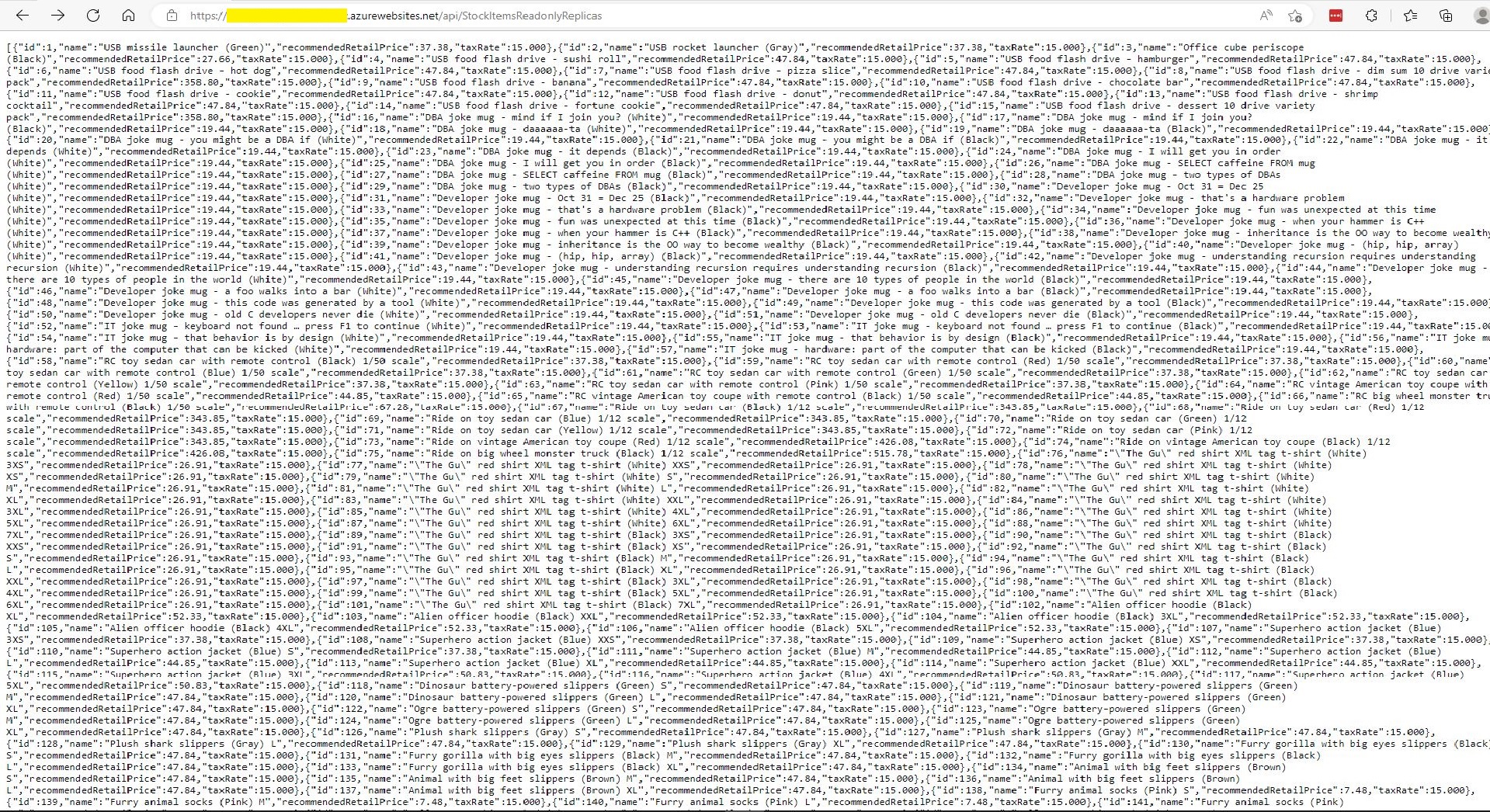
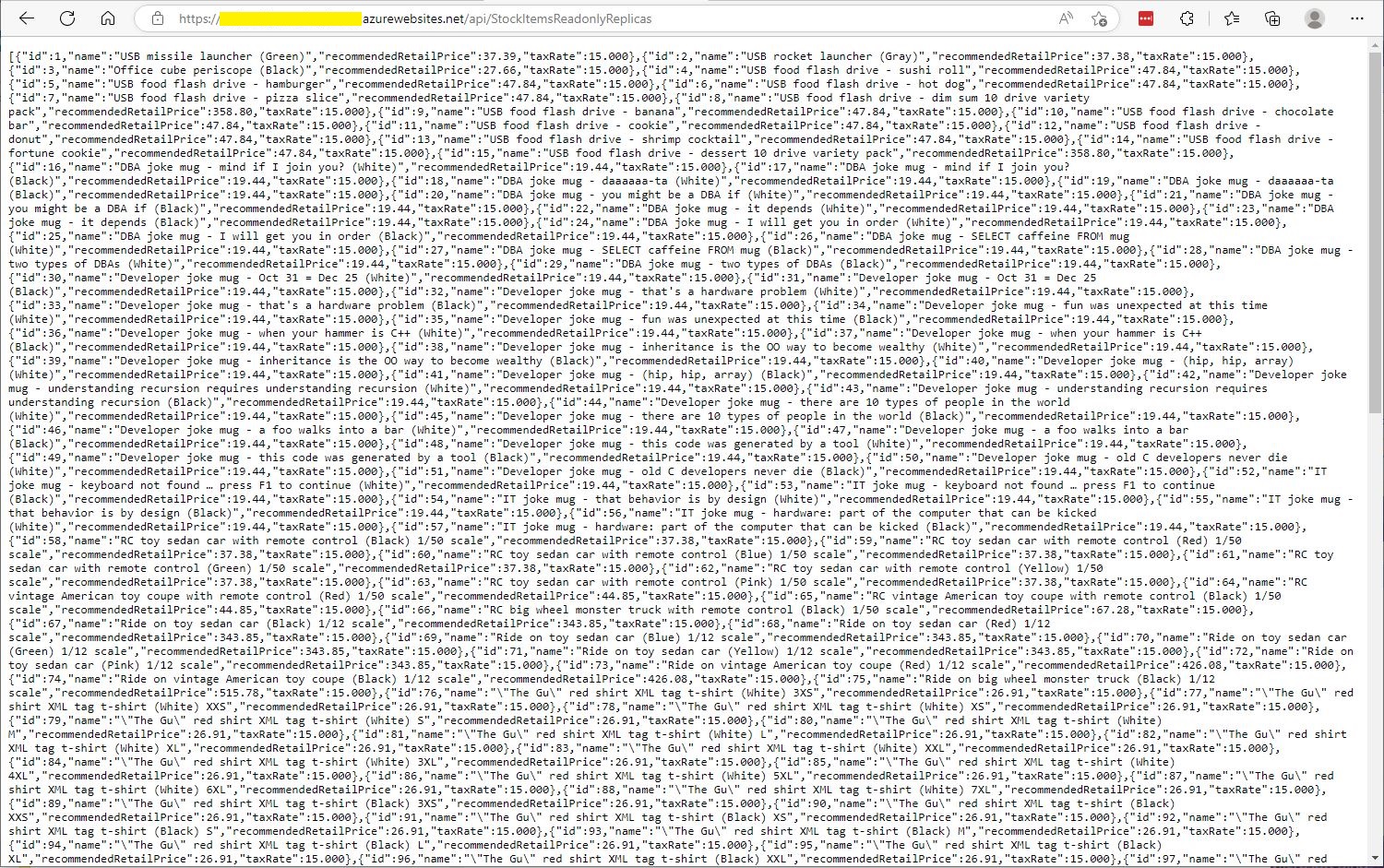
StockItemsReadOnlyReplicas Controller JSON after first replication completed
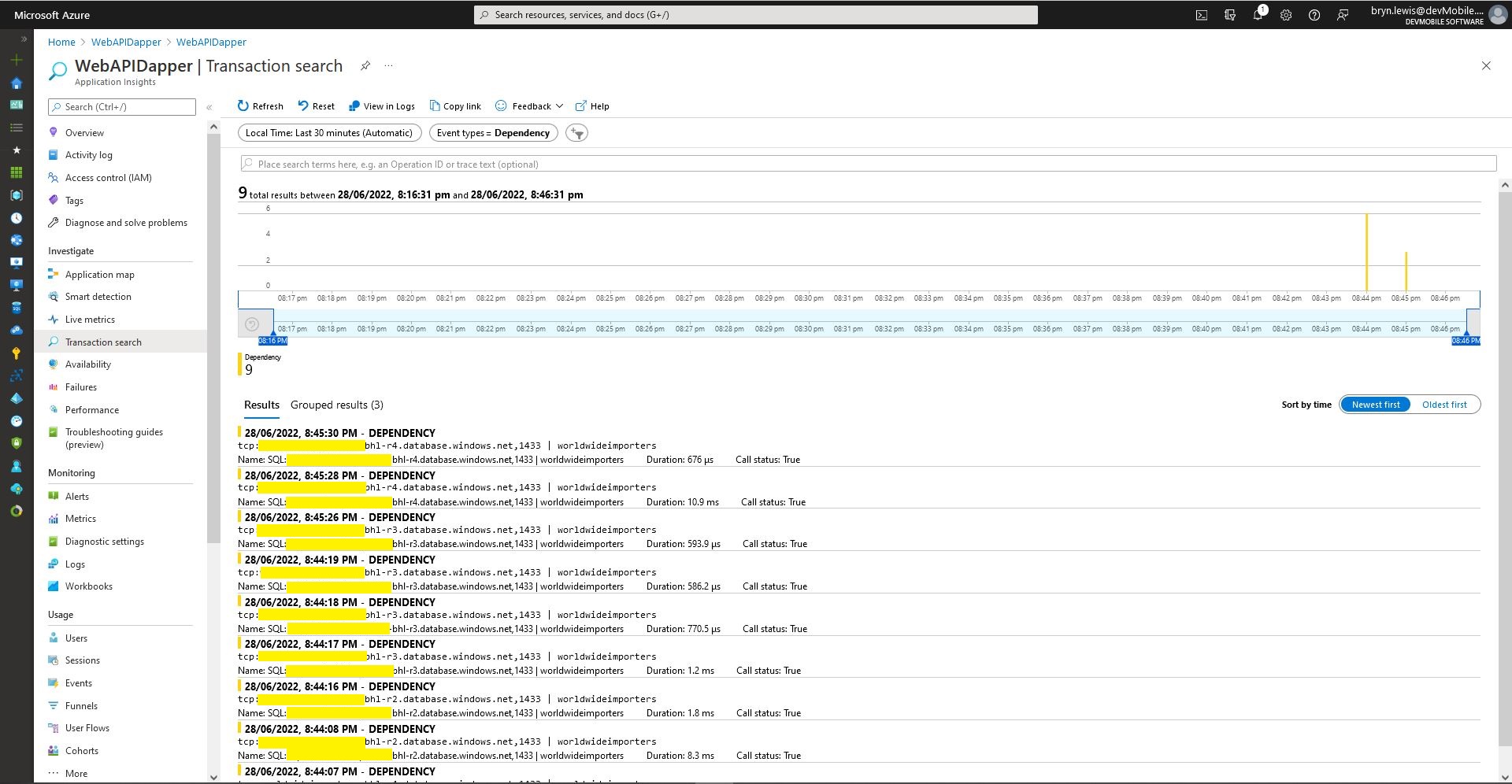
Azure application Insights Dependencies showing usage of different synchronised databases
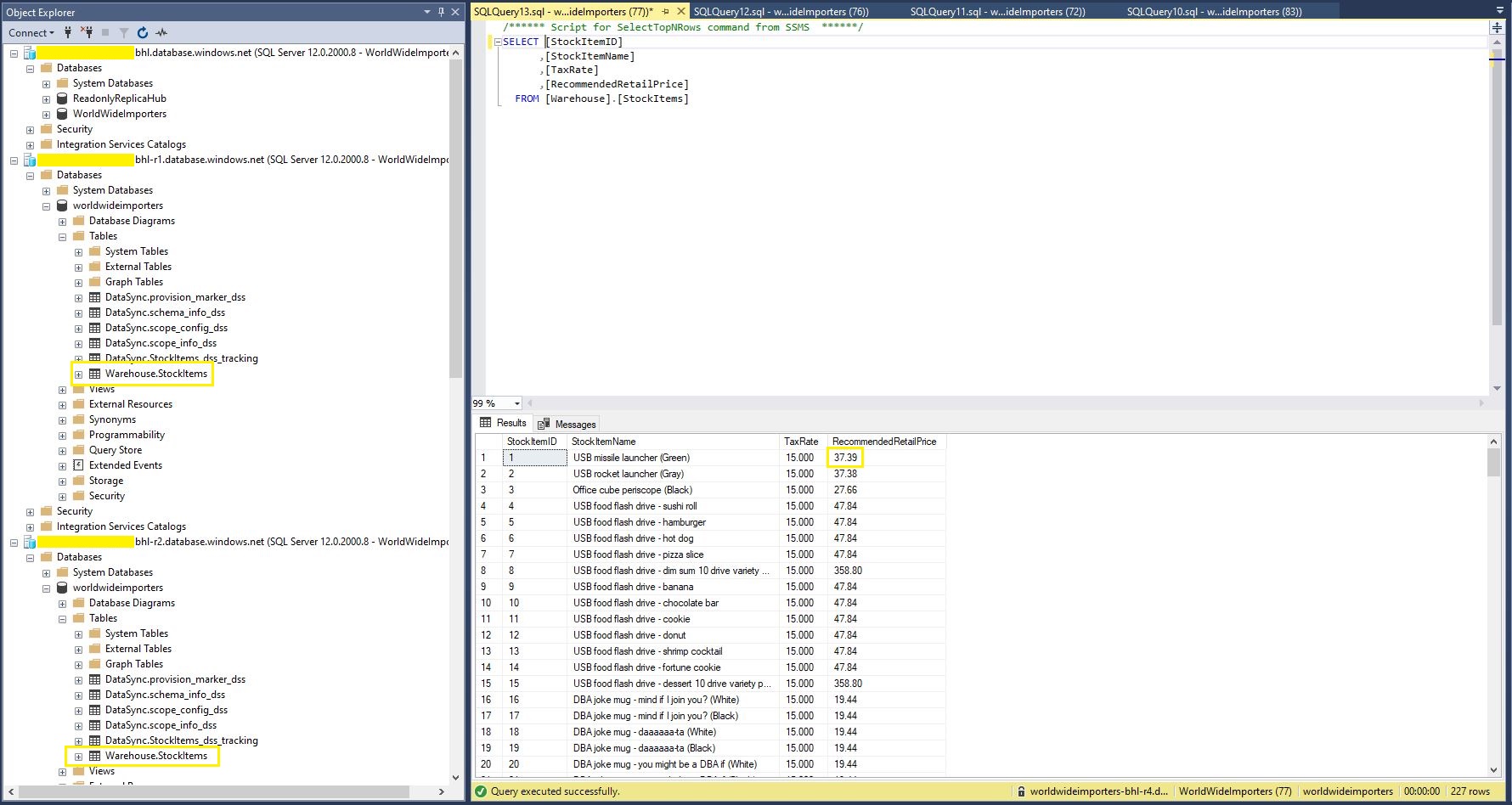
StockItems table in source database with updated RRP
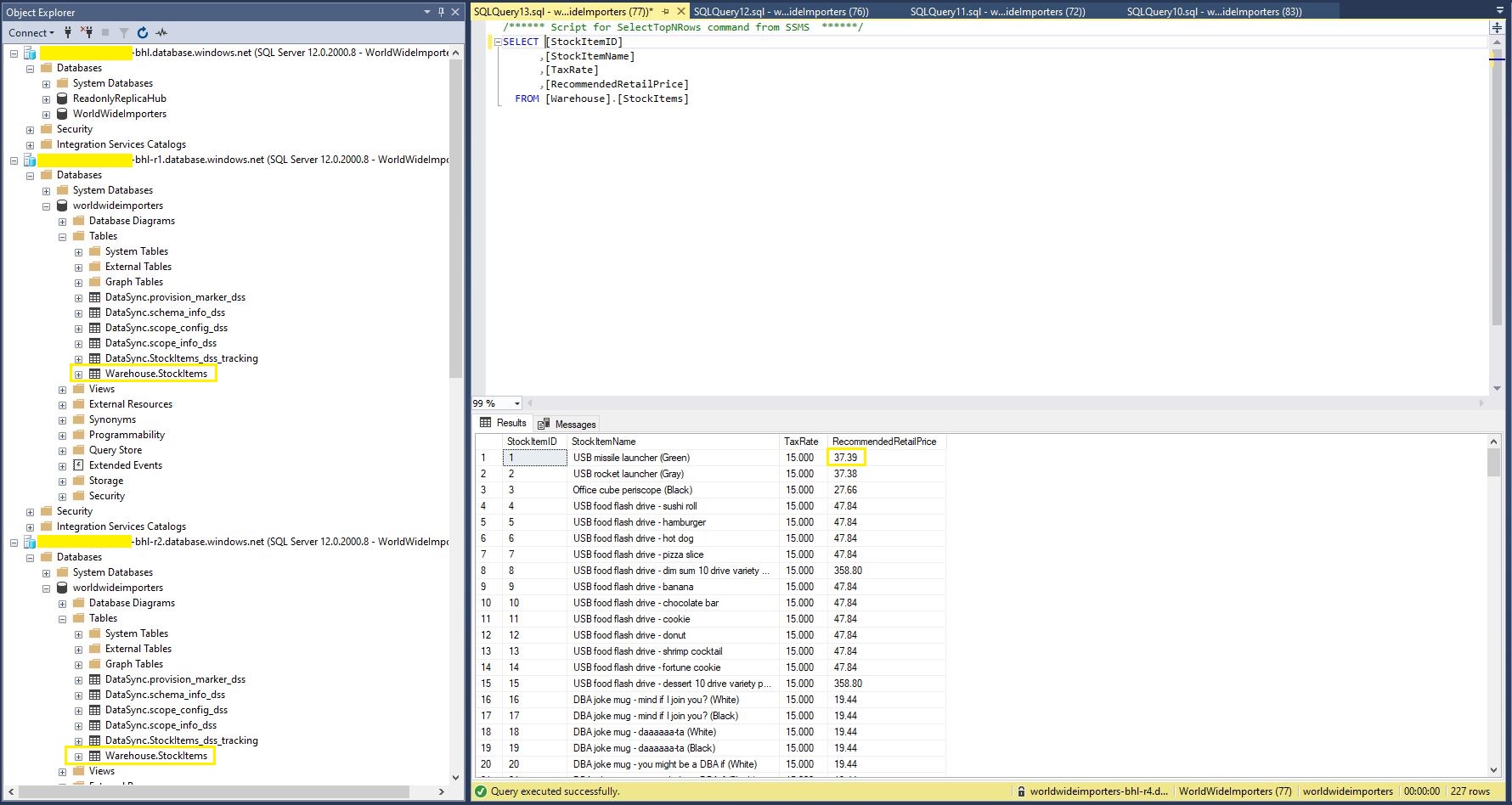
StockItems table in destination database with updated RRP after next scheduled snychronisation
StockItems table in destination database after next scheduled synchronisation
The Azure SQL Database Data Sync was pretty easy to setup (configuration in the hub database tripped me up initially). For a production scenario where only a portion of the database (e.g. shaped by Customer, Geography, security considerations, or a bi-directional requirement) it would be an effective solution, though for some applications the delay between synchronisations might be an issue.
namespace devMobile.WebAPIDapper.Lists.Controllers
{
    [ApiController]
    [Route("api/[controller]")]
    public class StockItemsRetryADONetController : ControllerBase
    {
        private readonly string connectionString;
        private readonly ILogger<StockItemsRetryADONetController> logger;

        // This is a bit nasty but sufficient for PoC
        private readonly int NumberOfRetries = 3;
        private readonly TimeSpan TimeBeforeNextExecution = TimeSpan.Parse("00:00:01");
        private readonly TimeSpan MaximumInterval = TimeSpan.Parse("00:00:30");
        private readonly List<int> TransientErrors = new List<int>()
        {
            49920, // Cannot process rquest. Too many operations in progress for subscription
			49919, // Cannot process create or update request.Too many create or update operations in progress for subscription
			49918, // Cannot process request. Not enough resources to process request.
			41839, // Transaction exceeded the maximum number of commit dependencies.
			41325, // The current transaction failed to commit due to a serializable validation failure.
			41305, // The current transaction failed to commit due to a repeatable read validation failure.
			41302, // The current transaction attempted to update a record that has been updated since the transaction started.
			41301, // Dependency failure: a dependency was taken on another transaction that later failed to commit.
			40613, // Database XXXX on server YYYY is not currently available. Please retry the connection later.
			40501, // The service is currently busy. Retry the request after 10 seconds
			40197, // The service has encountered an error processing your request. Please try again
			20041, // Transaction rolled back. Could not execute trigger. Retry your transaction.
			17197, // Login failed due to timeout; the connection has been closed. This error may indicate heavy server load.
			14355, // The MSSQLServerADHelper service is busy. Retry this operation later.
			11001, // Connection attempt failed
			10936, // The request limit for the elastic pool has been reached.
			10929, // The server is currently too busy to support requests.
			10928, // The limit for the database is has been reached
			10922, // Operation failed. Rerun the statement.
			10060, // A network-related or instance-specific error occurred while establishing a connection to SQL Server.
			10054, // A transport-level error has occurred when sending the request to the server.
			10053, // A transport-level error has occurred when receiving results from the server.
			9515, // An XML schema has been altered or dropped, and the query plan is no longer valid. Please rerun the query batch.
			8651, // Could not perform the operation because the requested memory grant was not available in resource pool
			8645, // A timeout occurred while waiting for memory resources to execute the query in resource pool, Rerun the query
			8628, // A timeout occurred while waiting to optimize the query. Rerun the query.
			4221, // Login to read-secondary failed due to long wait on 'HADR_DATABASE_WAIT_FOR_TRANSITION_TO_VERSIONING'. The replica is not available for login because row versions are missing for transactions that were in-flight when the replica was recycled
			4060, // Cannot open database requested by the login. The login failed.
			3966, // Transaction is rolled back when accessing version store. It was earlier marked as victim when the version store was shrunk due to insufficient space in tempdb. Retry the transaction.
			3960, // Snapshot isolation transaction aborted due to update conflict. You cannot use snapshot isolation to access table directly or indirectly in database
			3935, // A FILESTREAM transaction context could not be initialized. This might be caused by a resource shortage. Retry the operation.
			1807, // Could not obtain exclusive lock on database 'model'. Retry the operation later.
			1221, // The Database Engine is attempting to release a group of locks that are not currently held by the transaction. Retry the transaction.
			1205, // Deadlock
			1204, // The instance of the SQL Server Database Engine cannot obtain a LOCK resource at this time. Rerun your statement.
			1203, // A process attempted to unlock a resource it does not own. Retry the transaction.
			997, // A connection was successfully established with the server, but then an error occurred during the login process.
			921, // Database has not been recovered yet. Wait and try again.
			669, // The row object is inconsistent. Please rerun the query.
			617, // Descriptor for object in database not found in the hash table during attempt to un-hash it. Rerun the query. If a cursor is involved, close and reopen the cursor.
			601, // Could not continue scan with NOLOCK due to data movement.
			233, // The client was unable to establish a connection because of an error during connection initialization process before login.
			121, // The semaphore timeout period has expired.
			64, // A connection was successfully established with the server, but then an error occurred during the login process.
			20, // The instance of SQL Server you attempted to connect to does not support encryption.
		};
...
}
After some experimentation the most reliable way I could reproduce a transient failure (usually SQL Error 11001-“An error has occurred while establishing a connection to the server”) was by modifying the database connection string or unplugging the network cable after a connection had been explicitly opened or command executed.
namespace devMobile.WebAPIDapper.Lists.Controllers
{
    [ApiController]
    [Route("api/[controller]")]
    public class StockItemsRetryADONetController : ControllerBase
    {
...
		[HttpGet("Dapper")]
		public async Task<ActionResult<IEnumerable<Model.StockItemListDtoV1>>> GetDapper()
        {
            IEnumerable<Model.StockItemListDtoV1> response = null;

            SqlRetryLogicOption sqlRetryLogicOption = new SqlRetryLogicOption()
            {
                NumberOfTries = NumberOfRetries,
                DeltaTime = TimeBeforeNextExecution,
                MaxTimeInterval = MaximumInterval,
                TransientErrors = TransientErrors,
                //AuthorizedSqlCondition = x => string.IsNullOrEmpty(x) || Regex.IsMatch(x, @"^SELECT", RegexOptions.IgnoreCase),
            };

            SqlRetryLogicBaseProvider sqlRetryLogicProvider = SqlConfigurableRetryFactory.CreateFixedRetryProvider(sqlRetryLogicOption);

            using (SqlConnection db = new SqlConnection(this.connectionString))
            {
                db.RetryLogicProvider = sqlRetryLogicProvider;

                db.RetryLogicProvider.Retrying += new EventHandler<SqlRetryingEventArgs>(OnDapperRetrying);

                await db.OpenAsync(); // Did explicitly so I could yank out the LAN cable.

                response = await db.QueryAsync<Model.StockItemListDtoV1>(sql: @"SELECT [StockItemID] as ""ID"", [StockItemName] as ""Name"", [RecommendedRetailPrice], [TaxRate] FROM [Warehouse].[StockItems]", commandType: CommandType.Text);
            }

            return this.Ok(response);
        }

        protected void OnDapperRetrying(object sender, SqlRetryingEventArgs args)
        {
            logger.LogInformation("Dapper retrying for {RetryCount} times for {args.Delay.TotalMilliseconds:0.} mSec - Error code: {Number}", args.RetryCount, args.Delay.TotalMilliseconds, (args.Exceptions[0] as SqlException).Number);
        }
...
    }
}
ADO.Net RetryLogicProvider retrying request 3 times
I then added an OpenAsync just before the Dapper query so I could open the database connection, pause the program with a breakpoint, unplug the LAN cable and then continue execution. The QueryAsync failed without any retries and modifying the AuthorizedSqlCondition didn’t seem change the way different SQL statement failures were handled.
There was limited documentation about how to use ADO.Net retry functionality so I hacked up another method to try and figure out what I had done wrong. The method uses the same SqlRetryLogicOption configuration for retrying connection and command failures.
namespace devMobile.WebAPIDapper.Lists.Controllers
{
    [ApiController]
    [Route("api/[controller]")]
    public class StockItemsRetryADONetController : ControllerBase
    {
...
        [HttpGet("AdoNet")]
        public async Task<ActionResult<IEnumerable<Model.StockItemListDtoV1>>> GetAdoNet()
        {
            List<Model.StockItemListDtoV1> response = new List<Model.StockItemListDtoV1>();

            // Both connection and command share same logic not really an issue for nasty demo
            SqlRetryLogicOption sqlRetryLogicOption = new SqlRetryLogicOption()
            {
                NumberOfTries = NumberOfRetries,
                DeltaTime = TimeBeforeNextExecution,
                MaxTimeInterval = MaximumInterval,
                TransientErrors = TransientErrors,
                //AuthorizedSqlCondition = x => string.IsNullOrEmpty(x) || Regex.IsMatch(x, @"^SELECT", RegexOptions.IgnoreCase),
            };

            SqlRetryLogicBaseProvider sqlRetryLogicProvider = SqlConfigurableRetryFactory.CreateFixedRetryProvider(sqlRetryLogicOption);


            // This ADO.Net is a bit overkill but just wanted to highlight ADO.Net vs. Dapper
            using (SqlConnection sqlConnection = new SqlConnection(this.connectionString))
            {
                sqlConnection.RetryLogicProvider = sqlRetryLogicProvider;
                sqlConnection.RetryLogicProvider.Retrying += new EventHandler<SqlRetryingEventArgs>(OnConnectionRetrying);

                await sqlConnection.OpenAsync(); // Did explicitly so I could yank out the LAN cable.

                using (SqlCommand sqlCommand = new SqlCommand())
                {
                    sqlCommand.Connection = sqlConnection;
                    sqlCommand.CommandText = @"SELECT [StockItemID] as ""ID"", [StockItemName] as ""Name"", [RecommendedRetailPrice], [TaxRate] FROM [Warehouse].[StockItems]";
                    sqlCommand.CommandType = CommandType.Text;

                    sqlCommand.RetryLogicProvider = sqlRetryLogicProvider;
                    sqlCommand.RetryLogicProvider.Retrying += new EventHandler<SqlRetryingEventArgs>(OnCommandRetrying);

                    // Over kill but makes really obvious
                    using (SqlDataReader sqlDataReader = await sqlCommand.ExecuteReaderAsync(CommandBehavior.CloseConnection))
                    {
                        while (await sqlDataReader.ReadAsync())
                        {
                            response.Add(new Model.StockItemListDtoV1()
                            {
                                Id = sqlDataReader.GetInt32("Id"),
                                Name = sqlDataReader.GetString("Name"),
                                RecommendedRetailPrice = sqlDataReader.GetDecimal("RecommendedRetailPrice"),
                                TaxRate = sqlDataReader.GetDecimal("TaxRate"),
                            });
                        }
                    }
                };
            }

            return this.Ok(response);
        }

        protected void OnConnectionRetrying(object sender, SqlRetryingEventArgs args)
        {
            logger.LogInformation("Connection retrying for {RetryCount} times for {args.Delay.TotalMilliseconds:0.} mSec - Error code: {Number}", args.RetryCount, args.Delay.TotalMilliseconds, (args.Exceptions[0] as SqlException).Number);
        }

        protected void OnCommandRetrying(object sender, SqlRetryingEventArgs args)
        {
            logger.LogInformation("Command retrying for {RetryCount} times for {args.Delay.TotalMilliseconds:0.} mSec - Error code: {Number}", args.RetryCount, args.Delay.TotalMilliseconds, (args.Exceptions[0] as SqlException).Number);
        }
    }
}
I modified the NetworkJoinOTAA sample(based on the asynchronous version of BreakOutSerial) to send the required sequence of AT commands and displays the responses.
namespace devMobile.IoT.LoRaWAN.nanoFramework.RAK3172
{
	using System;
	using System.Diagnostics;
	using System.IO.Ports;
	using System.Threading;
#if ESP32_WROOM
	using global::nanoFramework.Hardware.Esp32; //need NuGet nanoFramework.Hardware.Esp32
#endif

	public class Program
	{
#if ESP32_WROOM
		private const string SerialPortId = "COM2";
#endif
#if ST_STM32F769I_DISCOVERY
		private const string SerialPortId = "COM6";
#endif
		private const string DevEui = "...";
		private const string DevAddress = "...";
		private const string NwksKey = "...";
		private const string AppsKey = "...";
		private const byte MessagePort = 1;
		private const string Payload = "A0EEE456D02AFF4AB8BAFD58101D2A2A"; // Hello LoRaWAN

		public static void Main()
		{
			Debug.WriteLine("devMobile.IoT.LoRaWAN.nanoFramework.RAK3172.NetworkJoinABP starting");

			try
			{
				// set GPIO functions for COM2 (this is UART1 on ESP32)
#if ESP32_WROOM
				Configuration.SetPinFunction(Gpio.IO17, DeviceFunction.COM2_TX);
				Configuration.SetPinFunction(Gpio.IO16, DeviceFunction.COM2_RX);
#endif

				Debug.Write("Ports:");
				foreach (string port in SerialPort.GetPortNames())
				{
					Debug.Write($" {port}");
				}
				Debug.WriteLine("");

				using (SerialPort serialPort = new SerialPort(SerialPortId))
				{
					// set parameters
					serialPort.BaudRate = 115200;
					serialPort.Parity = Parity.None;
					serialPort.DataBits = 8;
					serialPort.StopBits = StopBits.One;
					serialPort.Handshake = Handshake.None;
					serialPort.NewLine = "\r\n";
					serialPort.ReadTimeout = 1000;

					serialPort.DataReceived += SerialDevice_DataReceived;

					serialPort.Open();

					serialPort.WatchChar = '\n';

					serialPort.ReadExisting(); // Running at 115K2 this was necessary

					// Set the Device EUI
					Console.WriteLine("Set Device EUI");
					serialPort.WriteLine($"AT+DEVEUI={DevEui}");

					// Set the Working mode to LoRaWAN
					Console.WriteLine("Set Work mode");
					serialPort.WriteLine("AT+NWM=1");

					// Set the Region to AS923
					Console.WriteLine("Set Region");
					serialPort.WriteLine("AT+BAND=8");

					// Set the JoinMode
					Console.WriteLine("Set Join mode");
					serialPort.WriteLine("AT+NJM=0");

					// Set the DevAddress
					Console.WriteLine("Set Device Address");
					serialPort.WriteLine($"AT+DEVADDR={DevAddress}");

					// Set the Network Session Key
					Console.WriteLine("Set NwksKey");
					serialPort.WriteLine($"AT+NWKSKEY={NwksKey}");

					// Set the Application Session Key
					Console.WriteLine("Set AppsKey");
					serialPort.WriteLine($"AT+APPSKEY={AppsKey}");

					// Set the Confirm flag
					Console.WriteLine("Set Confirm off");
					serialPort.WriteLine("AT+CFM=0");

					// Join the network
					Console.WriteLine("Start Join");
					serialPort.WriteLine("AT+JOIN=1:0:10:2");

					// Wait for the +EVT:JOINED

					while (true)
					{
						Console.WriteLine("Sending");
						serialPort.WriteLine($"AT+SEND={MessagePort}:{Payload}");

						Thread.Sleep(300000);
					}
				}
			}
			catch (Exception ex)
			{
				Debug.WriteLine(ex.Message);
			}
		}

		private static void SerialDevice_DataReceived(object sender, SerialDataReceivedEventArgs e)
		{
			SerialPort serialPort = (SerialPort)sender;

			switch (e.EventType)
			{
				case SerialData.Chars:
					break;

				case SerialData.WatchChar:
					string response = serialPort.ReadExisting();
					Debug.Write(response);
					break;
				default:
					Debug.Assert(false, $"e.EventType {e.EventType} unknown");
					break;
			}
		}
	}
}
The NetworkJoinABP application assumes that all of the AT commands succeed.
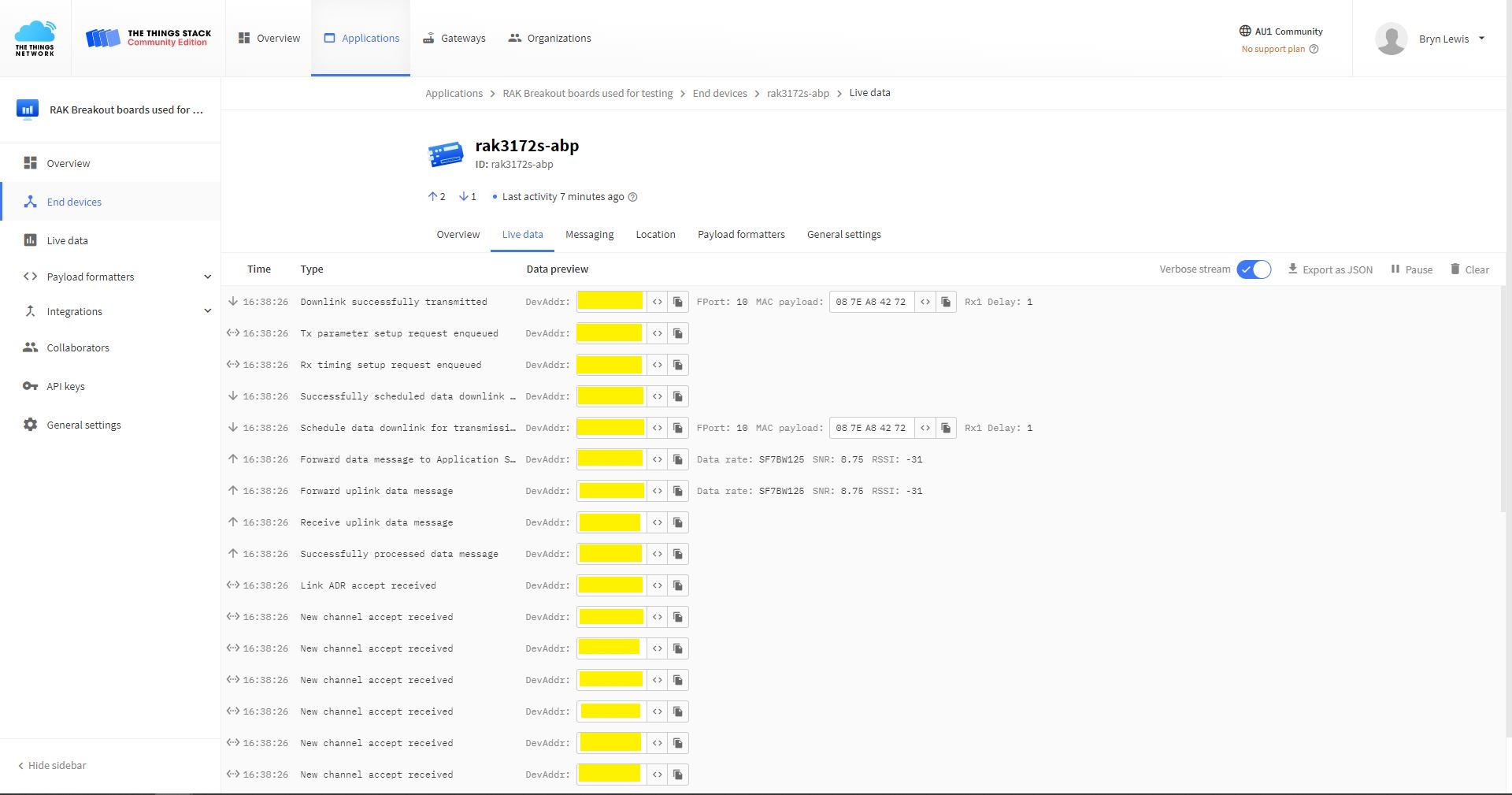
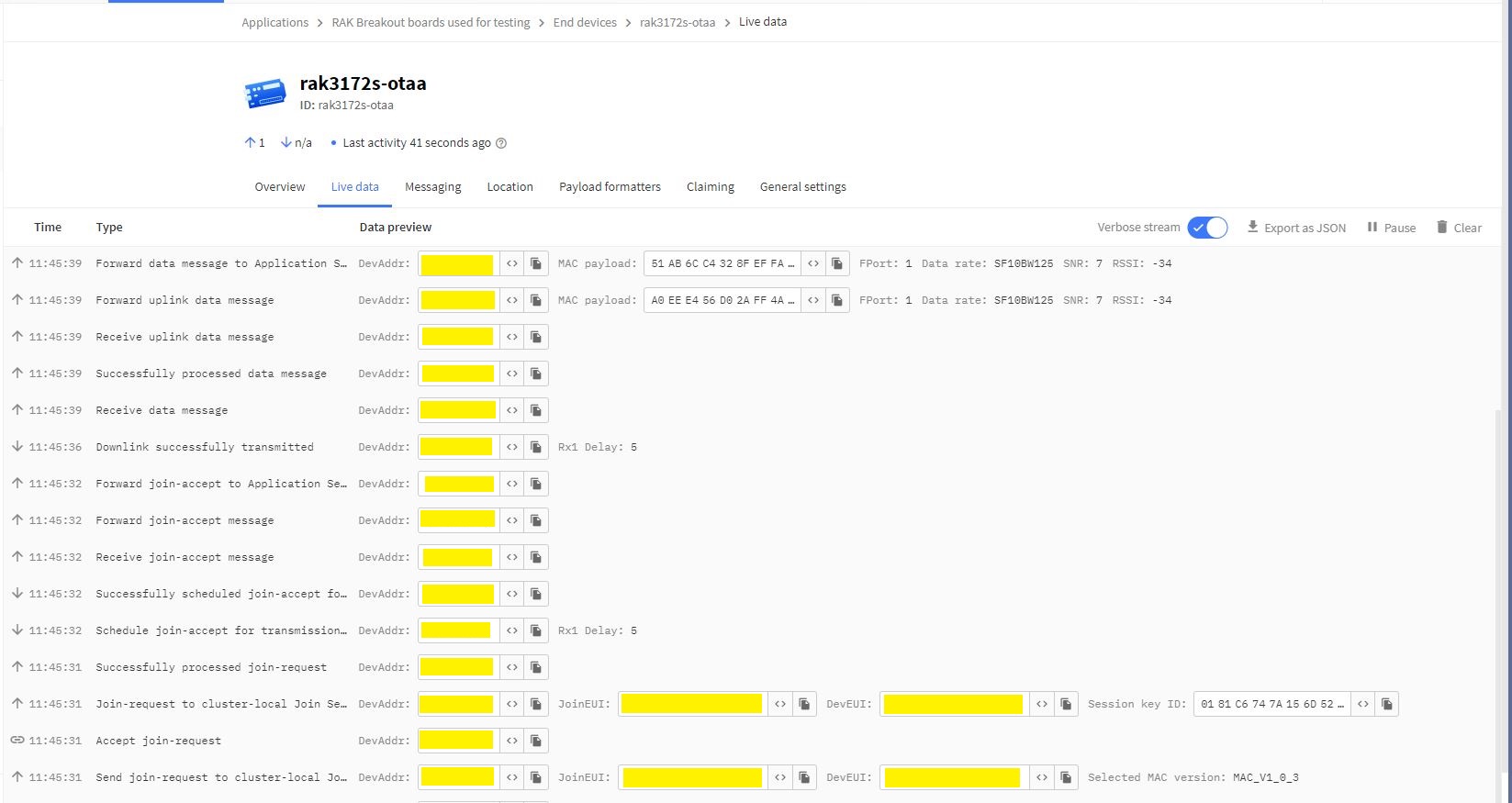
TTN Console live data tab connection process
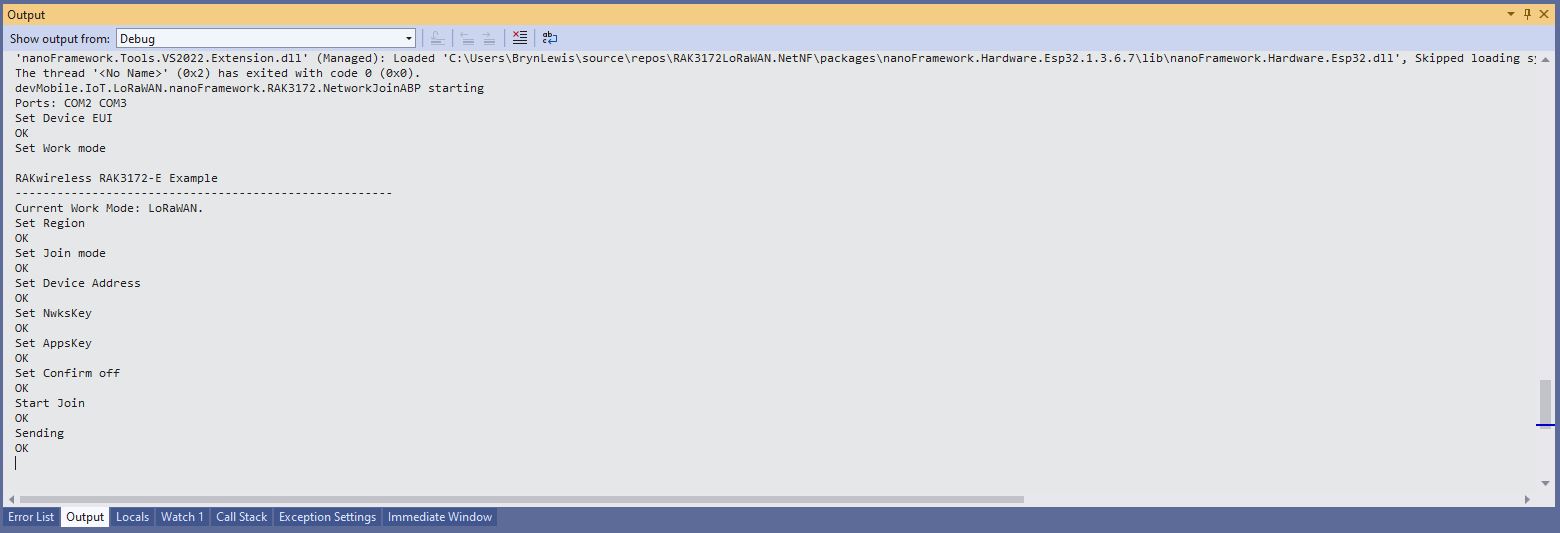
Visual Studio Output windows displaying connection process and a D2C message
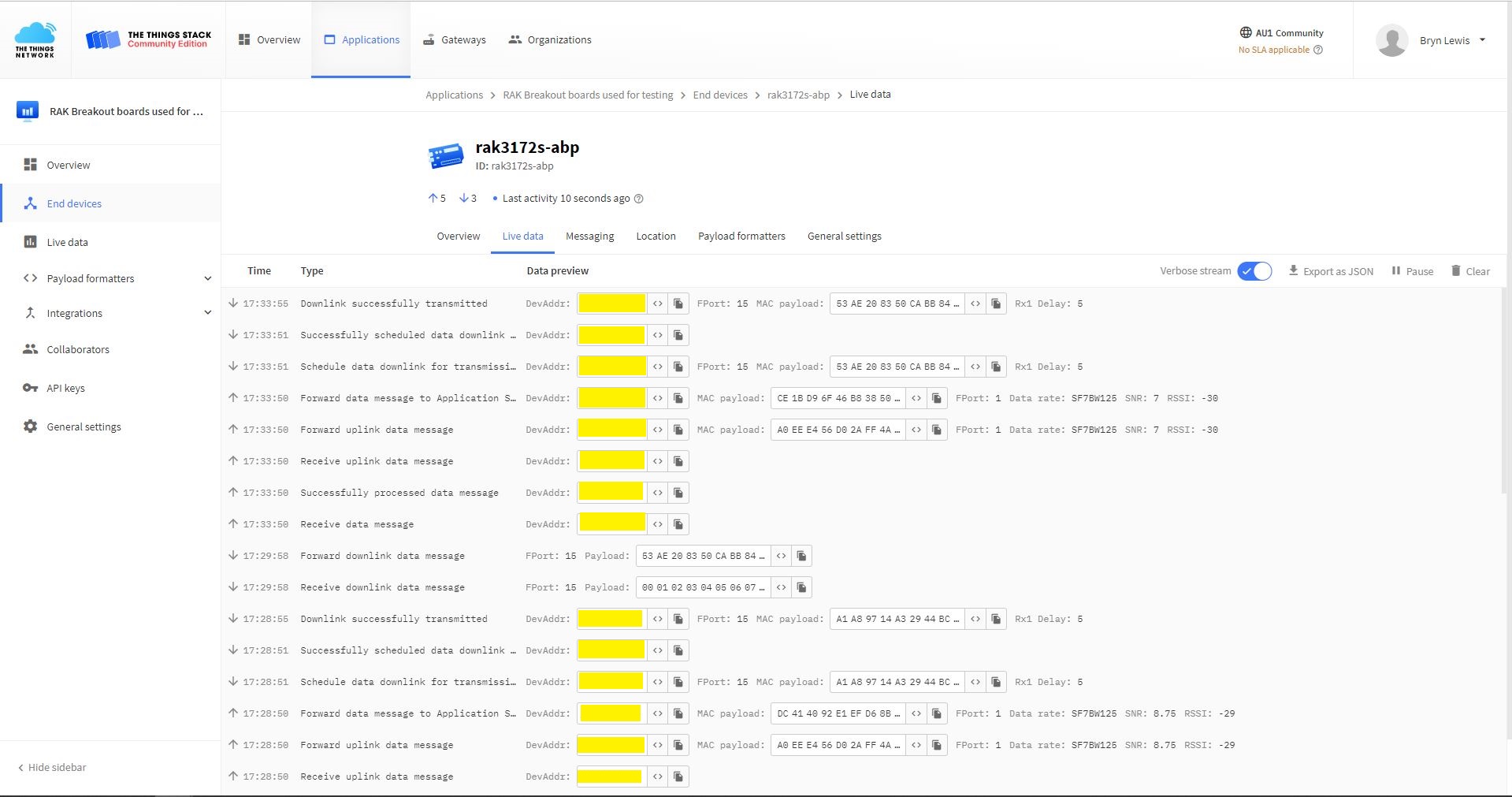
TTN Console live data tab connection process with a couple of D2C messages
Visual Studio Output windows displaying connection process and a couple of C2D messages
#define ST_STM32F769I_DISCOVERY      // nanoff --target ST_STM32F769I_DISCOVERY --update
//#define ESP32_WROOM   //nanoff --target ESP32_REV0 --serialport COM17 --update

namespace devMobile.IoT.LoRaWAN.nanoFramework.RAK3172
{
	using System;
	using System.Diagnostics;
	using System.IO.Ports;
	using System.Threading;
#if ESP32_WROOM
	using global::nanoFramework.Hardware.Esp32; //need NuGet nanoFramework.Hardware.Esp32
#endif

	public class Program
	{
#if ESP32_WROOM
		private const string SerialPortId = "COM2";
#endif
#if ST_STM32F769I_DISCOVERY
		private const string SerialPortId = "COM6";
#endif
		private const string DevEui = "...";
		private const string AppEui = "...";
		private const string AppKey = "...";
		private const byte MessagePort = 1;
		private const string Payload = "A0EEE456D02AFF4AB8BAFD58101D2A2A"; // Hello LoRaWAN

		public static void Main()
		{
			Debug.WriteLine("devMobile.IoT.LoRaWAN.nanoFramework.RAK3172 NetworkJoinOTAA starting");

			try
			{
				// set GPIO functions for COM2 (this is UART1 on ESP32)
#if ESP32_WROOM
				Configuration.SetPinFunction(Gpio.IO17, DeviceFunction.COM2_TX);
				Configuration.SetPinFunction(Gpio.IO16, DeviceFunction.COM2_RX);
#endif

				Debug.Write("Ports:");
				foreach (string port in SerialPort.GetPortNames())
				{
					Debug.Write($" {port}");
				}
				Debug.WriteLine("");

				using (SerialPort serialPort = new SerialPort(SerialPortId))
				{
					// set parameters
					serialPort.BaudRate = 115200;
					serialPort.Parity = Parity.None;
					serialPort.DataBits = 8;
					serialPort.StopBits = StopBits.One;
					serialPort.Handshake = Handshake.None;
					serialPort.NewLine = "\r\n";
					serialPort.ReadTimeout = 1000;

					serialPort.DataReceived += SerialDevice_DataReceived;

					serialPort.Open();

					serialPort.WatchChar = '\n';

					serialPort.ReadExisting(); // Running at 115K2 this was necessary

					// Set the devEUI
					Console.WriteLine("Set Dev Eui");
					serialPort.WriteLine($"AT+DEVEUI={DevEui}");

					// Set the Working mode to LoRaWAN
					Console.WriteLine("Set Work mode");
					serialPort.WriteLine("AT+NWM=1");

					// Set the Region to AS923
					Console.WriteLine("Set Region");
					serialPort.WriteLine("AT+BAND=8");

					// Set the JoinMode
					Console.WriteLine("Set Join mode");
					serialPort.WriteLine("AT+NJM=1");

					// Set the appEUI
					Console.WriteLine("Set App Eui");
					serialPort.WriteLine($"AT+APPEUI={AppEui}");

					// Set the appKey
					Console.WriteLine("Set App Key");
					serialPort.WriteLine($"AT+APPKEY={AppKey}");

					// Set the Confirm flag
					Console.WriteLine("Set Confirm off");
					serialPort.WriteLine("AT+CFM=0");

					// Join the network
					Console.WriteLine("Start Join");
					serialPort.WriteLine("AT+JOIN=1:0:10:2");

					// Wait for the +EVT:JOINED

					while (true)
					{
						Console.WriteLine("Sending");
						serialPort.WriteLine($"AT+SEND={MessagePort}:{Payload}");

						Thread.Sleep(300000);
					}
				}
			}
			catch (Exception ex)
			{
				Debug.WriteLine(ex.Message);
			}
		}

		private static void SerialDevice_DataReceived(object sender, SerialDataReceivedEventArgs e)
		{
			SerialPort serialPort = (SerialPort)sender;

			switch (e.EventType)
			{
				case SerialData.Chars:
					break;

				case SerialData.WatchChar:
					string response = serialPort.ReadExisting();
					Debug.Write(response);
					break;
				default:
					Debug.Assert(false, $"e.EventType {e.EventType} unknown");
					break;
			}
		}
	}
}
Visual Studio Debug Output displaying Configuration-Join-Send
Things Network(TTN) Live Data tab display successful join then D2C message
The NetworkJoinOTAA application assumes that all of the AT commands succeed. I usually step though the application in the debugger so I can monitor progress.
One of the easiest ways to create read-only replicas of an Azure SQL Database database is with Active geo-replication(it’s also useful for disaster recovery with geo-failure to a geo-secondary in a different Azure Region).
I then created replicas in the same region (if the application had a global customer base creating read only geo replicas in regions close to users might be worth considering) for the read-only queries.
Azure SQL Database no replicas configured
Azure Portal Create Geo Replica
I created four replicas which is the maximum number supported. If more replicas were required a secondary of a secondary (a process known as chaining) could be use to create additional geo-replicas
Azure Portal Primary Database and four Geo-replicas
Azure Application Insights showing multiple Geo-Replicas being used.
The Azure Database Geo-replication was pretty easy to setup. For a production scenario where only a portion of the database (e.g. shaped by Customer or Geography) is required it might not be the “right hammer”.
WebAPI Dapper Azure Resource Group
The other limitation I encountered was the resources used by the replication of “transaction processing” tables (in the World Wide Importers database tables like the Sales.OrderLines, Sales.CustomerTransactions etc.) which often wouldn’t be required for read-only applications.
The company builds a Software as a Service(Saas) product for managing portfolios of foreign currency forwards, options, swaps etc. Part of the solution has an application which customers use to get an “aggregated” view of their purchases.
The database queries to lookup reference data (forward curves etc.), return a shaped dataset for each supported instrument type, then “aggregating” the information with C# code consumes significant database and processing resources.
The configuration strings of the read-only replicas are loaded as the application starts.
// This method gets called by the runtime. Use this method to add services to the container.
public void ConfigureServices(IServiceCollection services)
{
	services.AddControllers();

	var errorHandlerSettings = Configuration.GetSection(nameof(ErrorHandlerSettings));
	services.Configure<ErrorHandlerSettings>(errorHandlerSettings);

	var readonlyReplicaServersConnectionStringSettings = Configuration.GetSection("ReadonlyReplicaServersConnectionStringSettings");
	services.Configure<List<string>>(readonlyReplicaServersConnectionStringSettings);

	services.AddResponseCaching();

	services.AddDapperForMSSQL();
#if DAPPER_EXTENSIONS_CACHE_MEMORY
	services.AddDapperCachingInMemory(new MemoryConfiguration
	{
		AllMethodsEnableCache = false
 	});
#endif
#if DAPPER_EXTENSIONS_CACHE_REDIS
	services.AddDapperCachingInRedis(new RedisConfiguration
	{
		AllMethodsEnableCache = false,
		KeyPrefix = Configuration.GetValue<string>("RedisKeyPrefix"),
		ConnectionString = Configuration.GetConnectionString("RedisConnection")
	});
#endif
	services.AddApplicationInsightsTelemetry();
}
Then code was added to the controller to randomly select which read-only replica to use. More complex approaches were considered but not implemented for the initial version.
[ApiController]
[Route("api/[controller]")]
public class StockItemsReadonlyReplicasController : ControllerBase
{
    private readonly ILogger<StockItemsReadonlyReplicasController> logger;
    private readonly List<string> readonlyReplicasConnectionStrings;

    public StockItemsReadonlyReplicasController(ILogger<StockItemsReadonlyReplicasController> logger, IOptions<List<string>> readonlyReplicasServerConnectionStrings)
    {
        this.logger = logger;

        this.readonlyReplicasConnectionStrings = readonlyReplicasServerConnectionStrings.Value;
    }

    [HttpGet]
    public async Task<ActionResult<IEnumerable<Model.StockItemListDtoV1>>> Get()
    {
        IEnumerable<Model.StockItemListDtoV1> response = null;

        if (readonlyReplicasConnectionStrings.Count == 0)
        {
            logger.LogError("No readonly replica server Connection strings configured");

            return this.StatusCode(StatusCodes.Status500InternalServerError);
        }

        Random random = new Random(); // maybe this should be instantiated ever call, but "danger here by thy threading"

        string connectionString = readonlyReplicasConnectionStrings[random.Next(0, readonlyReplicasConnectionStrings.Count)];

        logger.LogTrace("Connection string {connectionString}", connectionString);

        using (SqlConnection db = new SqlConnection(connectionString))
        {
            response = await db.QueryAsync<Model.StockItemListDtoV1>(sql: @"SELECT [StockItemID] as ""ID"", [StockItemName] as ""Name"", [RecommendedRetailPrice], [TaxRate] FROM [Warehouse].[StockItems]", commandType: CommandType.Text);
        }

        return this.Ok(response);
    }
}
The Read-only replica server connection string setup template in appsettings.Development.json.
The Manage UserSecrets(Secrets.json) functionality was used for testing on my development machine. In production Azure App Service the array of connections strings was configured with ReadonlyReplicaServersConnectionStringSettings:0, ReadonlyReplicaServersConnectionStringSettings:1 etc. syntax
Sample application Azure App Service Configuration
Azure Application Insights with connections to different read-only replicas highlighted
I had incorrectly configured the firewall on one of the read-only replica database servers so roughly one in four connection attempts failed.
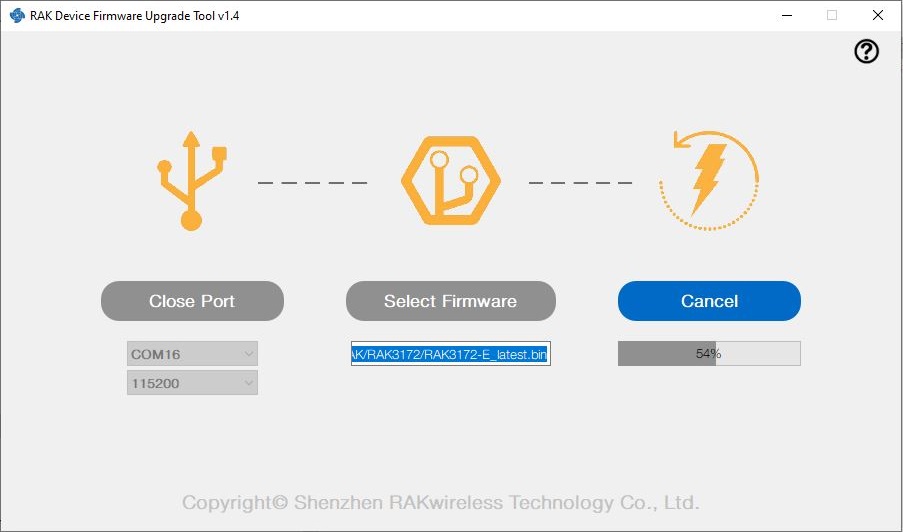
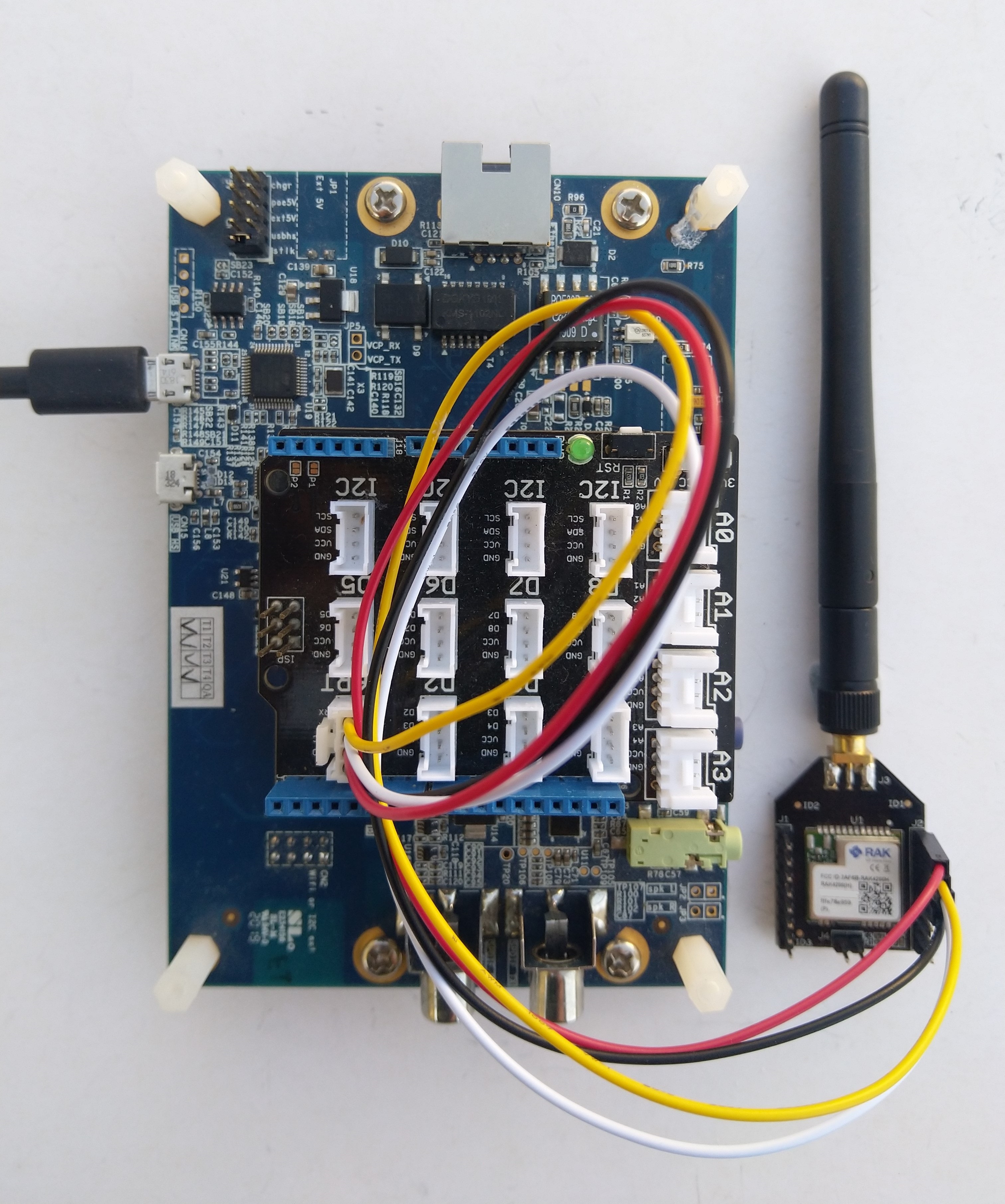
I have been working on a .NET nanoFramework library for the RAKwirelessRAK3172 module for the last couple of weeks. The devices had been in a box under my desk for a couple of months so first step was to flash them with the latest firmware using my FTDI test harness.
My sample code has compile time options for synchronous and asynchronous operation. I also include the different nanoff command lines to make updating the test devices easier.
//---------------------------------------------------------------------------------
// Copyright (c) May 2022, devMobile Software
//
// Licensed under the Apache License, Version 2.0 (the "License");
// you may not use this file except in compliance with the License.
// You may obtain a copy of the License at
//
//     http://www.apache.org/licenses/LICENSE-2.0
//
// Unless required by applicable law or agreed to in writing, software
// distributed under the License is distributed on an "AS IS" BASIS,
// WITHOUT WARRANTIES OR CONDITIONS OF ANY KIND, either express or implied.
// See the License for the specific language governing permissions and
// limitations under the License.
//
// https://docs.rakwireless.com/Product-Categories/WisDuo/RAK4200-Breakout-Board/AT-Command-Manual/
//---------------------------------------------------------------------------------
#define SERIAL_ASYNC_READ
//#define SERIAL_THREADED_READ
#define ST_STM32F769I_DISCOVERY      // nanoff --target ST_STM32F769I_DISCOVERY --update
//#define ESP32_WROOM   // nanoff --target ESP32_REV0 --serialport COM17 --update
...

namespace devMobile.IoT.LoRaWAN.nanoFramework.RAK3172
{
	using System;
	using System.Diagnostics;
	using System.IO.Ports;
	using System.Threading;
#if ESP32_WROOM
	using global::nanoFramework.Hardware.Esp32; //need NuGet nanoFramework.Hardware.Esp32
#endif

	public class Program
	{
		private static SerialPort _SerialPort;
#if SERIAL_THREADED_READ
		private static Boolean _Continue = true;
#endif
#if ESP32_WROOM
		private const string SerialPortId = "COM2";
#endif
...
#if ST_STM32F769I_DISCOVERY
		private const string SerialPortId = "COM6";
#endif

		public static void Main()
		{
#if SERIAL_THREADED_READ
			Thread readThread = new Thread(SerialPortProcessor);
#endif

			Debug.WriteLine("devMobile.IoT.LoRaWAN.nanoFramework.RAK3172 BreakoutSerial starting");

			try
			{
				// set GPIO functions for COM2 (this is UART1 on ESP32)
#if ESP32_WROOM
				Configuration.SetPinFunction(Gpio.IO16, DeviceFunction.COM2_TX);
				Configuration.SetPinFunction(Gpio.IO17, DeviceFunction.COM2_RX);
#endif

				Debug.Write("Ports:");
				foreach (string port in SerialPort.GetPortNames())
				{
					Debug.Write($" {port}");
				}
				Debug.WriteLine("");

				using (_SerialPort = new SerialPort(SerialPortId))
				{
					// set parameters
					_SerialPort.BaudRate = 115200;
					_SerialPort.Parity = Parity.None;
					_SerialPort.DataBits = 8;
					_SerialPort.StopBits = StopBits.One;
					_SerialPort.Handshake = Handshake.None;
					_SerialPort.NewLine = "\r\n";
					_SerialPort.ReadTimeout = 1000;

					//_SerialPort.WatchChar = '\n'; // May 2022 WatchChar event didn't fire github issue https://github.com/nanoframework/Home/issues/1035

#if SERIAL_ASYNC_READ
					_SerialPort.DataReceived += SerialDevice_DataReceived;
#endif

					_SerialPort.Open();

					_SerialPort.WatchChar = '\n';

#if SERIAL_THREADED_READ
					readThread.Start();
#endif

					for (int i = 0; i < 5; i++)
					{
						string atCommand;
						atCommand = "AT+VER=?";

                  Debug.WriteLine("");
						Debug.WriteLine($"{i} TX:{atCommand} bytes:{atCommand.Length}--------------------------------");
						_SerialPort.WriteLine(atCommand);

						Thread.Sleep(5000);
					}
				}
				Debug.WriteLine("Done");
			}
			catch (Exception ex)
			{
				Debug.WriteLine(ex.Message);
			}
		}

#if SERIAL_ASYNC_READ
		private static void SerialDevice_DataReceived(object sender, SerialDataReceivedEventArgs e)
		{
			SerialPort serialPort = (SerialPort)sender;

			switch (e.EventType)
			{
				case SerialData.Chars:
					break;

				case SerialData.WatchChar:
					string response = serialPort.ReadExisting();
					Debug.Write(response);
					break;
				default:
					Debug.Assert(false, $"e.EventType {e.EventType} unknown");
					break;
			}
		}
#endif

#if SERIAL_THREADED_READ
		public static void SerialPortProcessor()
		{

			while (_Continue)
			{
				try
				{
					string response = _SerialPort.ReadLine();
					//string response = _SerialPort.ReadExisting();
					Debug.Write(response);
				}
				catch (TimeoutException ex)
				{
					Debug.WriteLine($"Timeout:{ex.Message}");
				}
			}
		}
#endif
	}
}
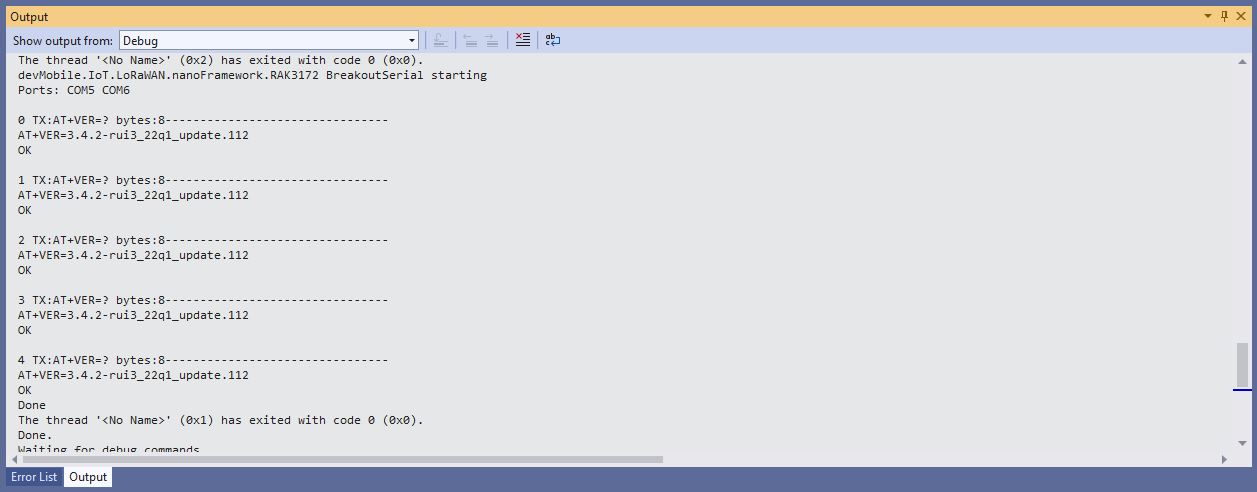
When I requested the RAK3172 version information with “AT+VER=?” the response was spilt over two lines which is a bit of a Pain in the Arse (PitA). The RAK3172 firmware also defaults 115200 baud which seems overkill considering the throughput of a LoRaWAN link.
For some historical reason I can’t remember my controllers often had an outer try/catch and associated logging. I think may have been ensure no “sensitive” information was returned to the caller even if the application was incorrectly deployed. So I could revisit my approach I added a controller with two methods one which returns an HTTP 500 error and another which has un-caught exception.
[Route("api/[controller]")]
[ApiController]
public class StockItemsNok500Controller : ControllerBase
{
	private readonly string connectionString;
	private readonly ILogger<StockItemsNok500Controller> logger;

	public StockItemsNok500Controller(IConfiguration configuration, ILogger<StockItemsNok500Controller> logger)
	{
		this.connectionString = configuration.GetConnectionString("WorldWideImportersDatabase");

		this.logger = logger;
	}

	public async Task<ActionResult<IEnumerable<Model.StockItemListDtoV1>>> Get500()
	{
		IEnumerable<Model.StockItemListDtoV1> response = null;

		try
		{
			using (SqlConnection db = new SqlConnection(this.connectionString))
			{
				response = await db.QueryWithRetryAsync<Model.StockItemListDtoV1>(sql: @"SELECT [StockItemID] as ""ID"", [StockItemName] as ""Name"", [RecommendedRetailPrice], [TaxRate] FROM [Warehouse].[StockItem500]", commandType: CommandType.Text);
			}
		}
		catch (SqlException ex)
		{
			logger.LogError(ex, "Retrieving list of StockItems");

			return this.StatusCode(StatusCodes.Status500InternalServerError);
		}

		return this.Ok(response);
	}
}
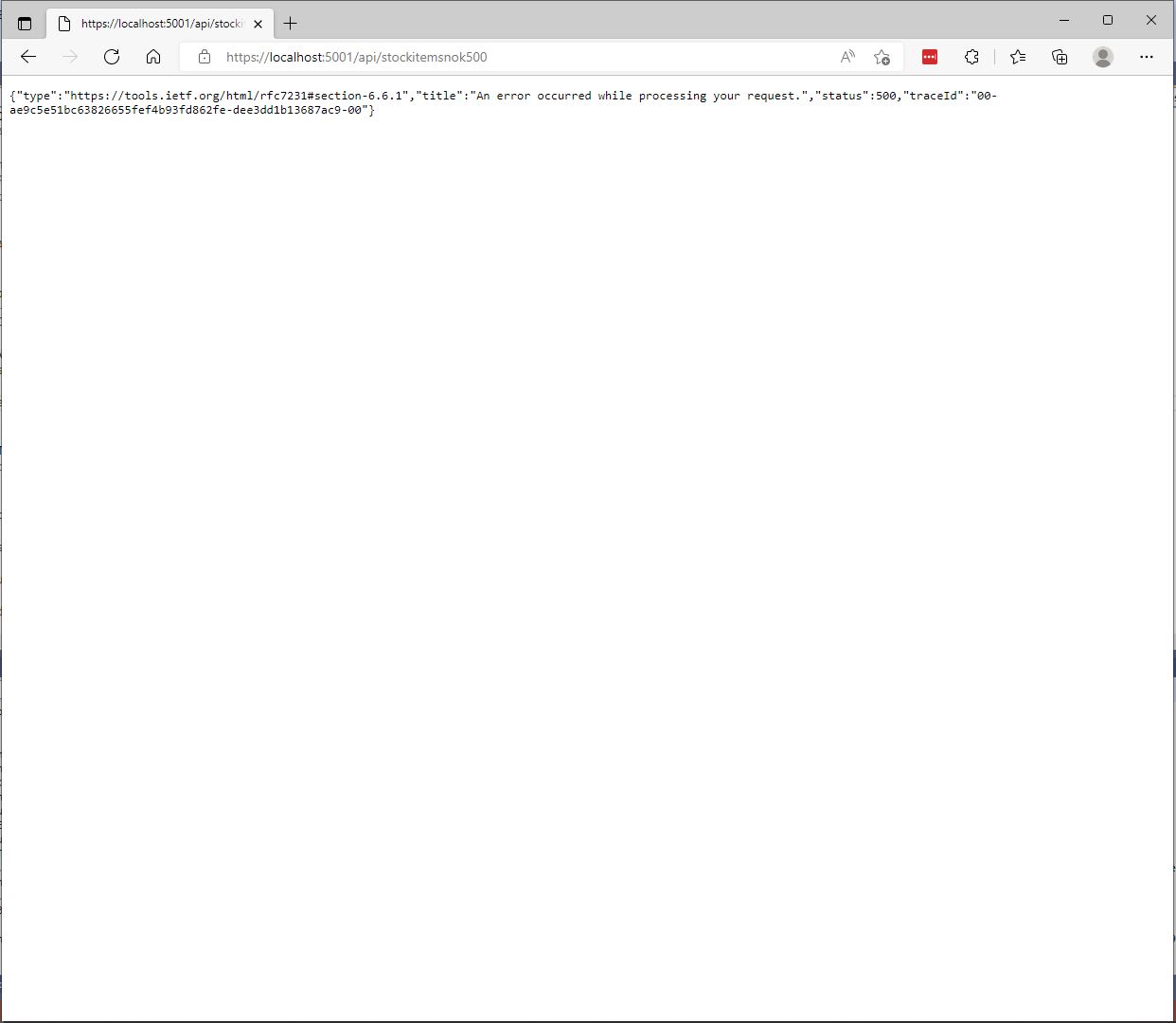
The information returned to a caller was generic and the only useful information was the “traceId”.
StockItemsNok500Controller error page
[Route("api/[controller]")]
[ApiController]
public class StockItemsNokExceptionController : ControllerBase
{
	private readonly string connectionString;

	public StockItemsNokExceptionController(IConfiguration configuration)
	{
		this.connectionString = configuration.GetConnectionString("WorldWideImportersDatabase");
	}

	public async Task<ActionResult<IEnumerable<Model.StockItemListDtoV1>>> GetException()
	{
		IEnumerable<Model.StockItemListDtoV1> response = null;

		using (SqlConnection db = new SqlConnection(this.connectionString))
		{
			response = await db.QueryWithRetryAsync<Model.StockItemListDtoV1>(sql: @"SELECT [StockItemID] as ""ID"", [StockItemName] as ""Name"", [RecommendedRetailPrice], [TaxRate] FROM [Warehouse].[StockItemsException]", commandType: CommandType.Text);
		}

		return this.Ok(response);
	}
}
In “Development” mode the information returned to the caller contains a detailed stack trace that reveals implementation details which are useful for debugging but would also be useful to an attacker.
Developer StockItemsNok Controller Exception page
When not in “Development” mode no additional information is returned (not even a TraceId).
Production StockItemsNok500Controller Exception
The diagnostic stacktrace information logged by the two different controllers was essentially the same
System.Data.SqlClient.SqlException:
   at System.Data.SqlClient.SqlCommand+<>c.<ExecuteDbDataReaderAsync>b__126_0 (System.Data.SqlClient, Version=4.6.1.3, Culture=neutral, PublicKeyToken=b03f5f7f11d50a3a)
   at System.Threading.Tasks.ContinuationResultTaskFromResultTask`2.InnerInvoke (System.Private.CoreLib, Version=6.0.0.0, Culture=neutral, PublicKeyToken=7cec85d7bea7798e)
   at System.Threading.Tasks.Task+<>c.<.cctor>b__272_0 (System.Private.CoreLib, Version=6.0.0.0, Culture=neutral, PublicKeyToken=7cec85d7bea7798e)
   at System.Threading.ExecutionContext.RunInternal (System.Private.CoreLib, Version=6.0.0.0, Culture=neutral, PublicKeyToken=7cec85d7bea7798e)
   at System.Runtime.ExceptionServices.ExceptionDispatchInfo.Throw (System.Private.CoreLib, Version=6.0.0.0, Culture=neutral, PublicKeyToken=7cec85d7bea7798e)
   at System.Threading.ExecutionContext.RunInternal (System.Private.CoreLib, Version=6.0.0.0, Culture=neutral, PublicKeyToken=7cec85d7bea7798e)
   at System.Threading.Tasks.Task.ExecuteWithThreadLocal (System.Private.CoreLib, Version=6.0.0.0, Culture=neutral, PublicKeyToken=7cec85d7bea7798e)
   at System.Runtime.ExceptionServices.ExceptionDispatchInfo.Throw (System.Private.CoreLib, Version=6.0.0.0, Culture=neutral, PublicKeyToken=7cec85d7bea7798e)
   at System.Runtime.CompilerServices.TaskAwaiter.ThrowForNonSuccess (System.Private.CoreLib, Version=6.0.0.0, Culture=neutral, PublicKeyToken=7cec85d7bea7798e)
   at System.Runtime.CompilerServices.TaskAwaiter.HandleNonSuccessAndDebuggerNotification (System.Private.CoreLib, Version=6.0.0.0, Culture=neutral, PublicKeyToken=7cec85d7bea7798e)
   at Dapper.SqlMapper+<QueryAsync>d__33`1.MoveNext (Dapper, Version=2.0.0.0, Culture=neutral, PublicKeyToken=null: /_/Dapper/SqlMapper.Async.cs:418)
   at System.Runtime.ExceptionServices.ExceptionDispatchInfo.Throw (System.Private.CoreLib, Version=6.0.0.0, Culture=neutral, PublicKeyToken=7cec85d7bea7798e)
   at System.Runtime.CompilerServices.TaskAwaiter.ThrowForNonSuccess (System.Private.CoreLib, Version=6.0.0.0, Culture=neutral, PublicKeyToken=7cec85d7bea7798e)
   at System.Runtime.CompilerServices.TaskAwaiter.HandleNonSuccessAndDebuggerNotification (System.Private.CoreLib, Version=6.0.0.0, Culture=neutral, PublicKeyToken=7cec85d7bea7798e)
   at Polly.Retry.AsyncRetryEngine+<ImplementationAsync>d__0`1.MoveNext (Polly, Version=7.0.0.0, Culture=neutral, PublicKeyToken=c8a3ffc3f8f825cc)
   at System.Runtime.ExceptionServices.ExceptionDispatchInfo.Throw (System.Private.CoreLib, Version=6.0.0.0, Culture=neutral, PublicKeyToken=7cec85d7bea7798e)
   at System.Runtime.CompilerServices.TaskAwaiter.ThrowForNonSuccess (System.Private.CoreLib, Version=6.0.0.0, Culture=neutral, PublicKeyToken=7cec85d7bea7798e)
   at System.Runtime.CompilerServices.TaskAwaiter.HandleNonSuccessAndDebuggerNotification (System.Private.CoreLib, Version=6.0.0.0, Culture=neutral, PublicKeyToken=7cec85d7bea7798e)
   at System.Runtime.CompilerServices.ConfiguredTaskAwaitable`1+ConfiguredTaskAwaiter.GetResult (System.Private.CoreLib, Version=6.0.0.0, Culture=neutral, PublicKeyToken=7cec85d7bea7798e)
   at Polly.AsyncPolicy+<ExecuteAsync>d__21`1.MoveNext (Polly, Version=7.0.0.0, Culture=neutral, PublicKeyToken=c8a3ffc3f8f825cc)
   at System.Runtime.ExceptionServices.ExceptionDispatchInfo.Throw (System.Private.CoreLib, Version=6.0.0.0, Culture=neutral, PublicKeyToken=7cec85d7bea7798e)
   at System.Runtime.CompilerServices.TaskAwaiter.ThrowForNonSuccess (System.Private.CoreLib, Version=6.0.0.0, Culture=neutral, PublicKeyToken=7cec85d7bea7798e)
   at System.Runtime.CompilerServices.TaskAwaiter.HandleNonSuccessAndDebuggerNotification (System.Private.CoreLib, Version=6.0.0.0, Culture=neutral, PublicKeyToken=7cec85d7bea7798e)
   at System.Runtime.CompilerServices.TaskAwaiter`1.GetResult (System.Private.CoreLib, Version=6.0.0.0, Culture=neutral, PublicKeyToken=7cec85d7bea7798e)
   at devMobile.WebAPIDapper.Lists.Controllers.StockItemsNokController+<Get500>d__4.MoveNext (ListsClassic, Version=1.0.0.0, Culture=neutral, PublicKeyToken=null: C:\Users\BrynLewis\source\repos\WebAPIDapper\Lists\Controllers\14.StockItemsNokController.cs:70)
One customer wanted their client application to display a corporate help desk number for staff to call for support. This information was made configurable
namespace devMobile.WebAPIDapper.Lists
{
	public class ErrorHandlerSettings
	{
		public string Detail { get; set; } = "devMobile Lists Classic API failure";

		public string Title { get; set; } = "System Error";
	}
}
{
 ...
  },
  "ErrorHandlerSettings": {
    "Title": "Webpage has died",
    "Detail": "Something has gone wrong call the help desk on 0800-RebootIt"
  },
...
}
namespace devMobile.WebAPIDapper.Lists.Controllers
{
	using Microsoft.AspNetCore.Mvc;
	using Microsoft.Extensions.Hosting;
	using Microsoft.Extensions.Options;


	[ApiController]
	public class ErrorController : Controller
	{
		private readonly ErrorHandlerSettings errorHandlerSettings;

		public ErrorController(IOptions<ErrorHandlerSettings> errorHandlerSettings)
		{
			this.errorHandlerSettings = errorHandlerSettings.Value;
		}

		[Route("/error")]
		public IActionResult HandleError([FromServices] IHostEnvironment hostEnvironment)
		{
			return Problem(detail: errorHandlerSettings.Detail, title: errorHandlerSettings.Title);
		}
	}
}
StockItemsNok Controller Error page with configurable title and details
Another customer wanted their client application to display a corporate help desk number based on the source hostname.
ClientA.SaasApplicationProvider.co.nz
ClientB.SaasApplicationProvider.co.nz
ClientC.SaasApplicationProvider.co.nz
SaasApplication.ClientD.co.nz
This information was also made configurable
namespace devMobile.WebAPIDapper.Lists
{
	using System.Collections.Generic;

	public class UrlSpecificSetting
	{
		public string Title { get; set; } = "";

		public string Detail { get; set; } = "";

		public UrlSpecificSetting()
		{
		}

		public UrlSpecificSetting(string title, string detail)
		{
			this.Title = title;
			this.Detail = detail;
		}
	}

	public class ErrorHandlerSettings
	{
		public string Title { get; set; } = "System Error";

		public string Detail { get; set; } = "devMobile Lists Classic API failure";

		public Dictionary<string, UrlSpecificSetting> UrlSpecificSettings { get; set; }

		public ErrorHandlerSettings()
		{
		}

		public ErrorHandlerSettings(string title, string detail, Dictionary<string, UrlSpecificSetting> urlSpecificSettings )
		{
			Title = title;

			Detail = detail;

			UrlSpecificSettings = urlSpecificSettings;
		}
	}
}
We considered storing the title and details message in the database but that approach was discounted as we wanted to minimise dependencies.
{
 ...
  "ErrorHandlerSettings": {
    "Detail": "Default detail",
    "Title": "Default title",
    "UrlSpecificSettings": {
      "localhost": {
        "Title": "Title for localhost",
        "Detail": "Detail for localhost"
      },
      "127.0.0.1": {
        "Title": "Title for 127.0.0.1",
        "Detail": "Detail for 127.0.0.1"
      }
    }
  }
}
namespace devMobile.WebAPIDapper.Lists.Controllers
{
	using Microsoft.AspNetCore.Mvc;
	using Microsoft.Extensions.Hosting;
	using Microsoft.Extensions.Options;


	[ApiController]
	public class ErrorController : Controller
	{
		private readonly ErrorHandlerSettings errorHandlerSettings;

		public ErrorController(IOptions<ErrorHandlerSettings> errorHandlerSettings)
		{
			this.errorHandlerSettings = errorHandlerSettings.Value;
		}

		[Route("/error")]
		public IActionResult HandleError([FromServices] IHostEnvironment hostEnvironment)
		{
			if (!this.errorHandlerSettings.UrlSpecificSettings.ContainsKey(this.Request.Host.Host))
			{
				return Problem(detail: errorHandlerSettings.Detail, title: errorHandlerSettings.Title);
			}

			return Problem(errorHandlerSettings.UrlSpecificSettings[this.Request.Host.Host].Title, errorHandlerSettings.UrlSpecificSettings[this.Request.Host.Host].Detail);
		}
	}
}
The sample configuration has custom title and details text for localhost and 127.0.0.1 with a default title and details text for all other hostnames.
StockItemsNok Controller Error page with 127.0.0.1 specific title and details
StockItemsNok Controller Error page with localhost specific title and details
One customer had a staff member who would take a photo of the client application error page with their mobile and email it to us which made it really easy to track down issues. This was especially usefully as they were in an awkward timezone.
Application Insights TraceId search
Application Insights TraceId search result with exception details
With a customisable error page my approach with the outer try/catch has limited benefit and just adds complexity.
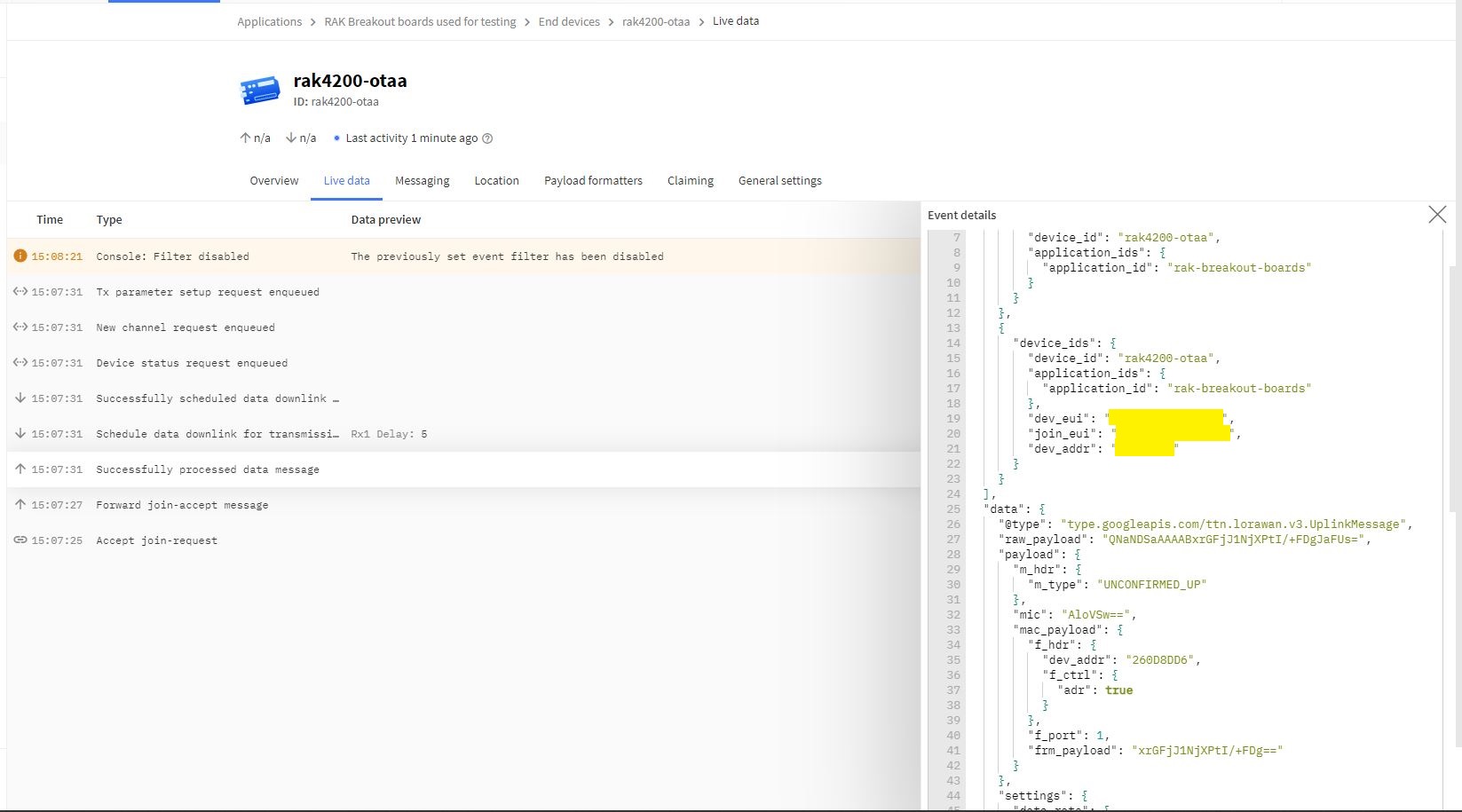
I then ran the RAK4200LoRaWANDeviceClient with DEVICE_DEVEUI_SET (devEui from label on the device), OTAA to configure the AppEui and AppKey and the device connected to The Things Network on the second attempt (typo in the DevEui).
public static void Main()
{
	Result result;

	Debug.WriteLine("devMobile.IoT.RAK4200LoRaWANDeviceClient starting");

	try
	{
		// set GPIO functions for COM2 (this is UART1 on ESP32)
#if ESP32_WROOM
		Configuration.SetPinFunction(Gpio.IO16, DeviceFunction.COM2_TX);
		Configuration.SetPinFunction(Gpio.IO17, DeviceFunction.COM2_RX);
#endif

		Debug.Write("Ports:");
		foreach (string port in SerialPort.GetPortNames())
		{
			Debug.Write($" {port}");
		}
		Debug.WriteLine("");

		using (Rak4200LoRaWanDevice device = new Rak4200LoRaWanDevice())
		{
			result = device.Initialise(SerialPortId, 9600, Parity.None, 8, StopBits.One);
			if (result != Result.Success)
			{
				Debug.WriteLine($"Initialise failed {result}");
				return;
			}

#if CONFIRMED
			device.OnMessageConfirmation += OnMessageConfirmationHandler;
#endif
			device.OnReceiveMessage += OnReceiveMessageHandler;

#if FACTORY_RESET
			Debug.WriteLine($"{DateTime.UtcNow:hh:mm:ss} FactoryReset");
			result = device.FactoryReset();
			if (result != Result.Success)
			{
				Debug.WriteLine($"FactoryReset failed {result}");
				return;
			}
#endif

#if DEVICE_DEVEUI_SET
			Debug.WriteLine($"{DateTime.UtcNow:hh:mm:ss} Device EUI");
			result = device.DeviceEui(Config.devEui);
			if (result != Result.Success)
			{
				Debug.WriteLine($"ADR on failed {result}");
				return;
			}
#endif

#if REGION_SET
			Debug.WriteLine($"{DateTime.UtcNow:hh:mm:ss} Region{Region}");
			result = device.Region(Region);
			if (result != Result.Success)
			{
				Debug.WriteLine($"Region on failed {result}");
				return;
			}
#endif

#if ADR_SET
			Debug.WriteLine($"{DateTime.UtcNow:hh:mm:ss} ADR On");
			result = device.AdrOn();
			if (result != Result.Success)
			{
				Debug.WriteLine($"ADR on failed {result}");
				return;
			}
#endif
#if CONFIRMED
			Debug.WriteLine($"{DateTime.UtcNow:hh:mm:ss} Confirmed");
			result = device.UplinkMessageConfirmationOn();
			if (result != Result.Success)
			{
				Debug.WriteLine($"Confirm on failed {result}");
				return;
			}
#endif
#if UNCONFIRMED
			Debug.WriteLine($"{DateTime.UtcNow:hh:mm:ss} Unconfirmed");
			result = device.UplinkMessageConfirmationOff();
			if (result != Result.Success)
			{
				Debug.WriteLine($"Confirm off failed {result}");
				return;
			}
#endif

#if OTAA
			Debug.WriteLine($"{DateTime.UtcNow:hh:mm:ss} OTAA");
			result = device.OtaaInitialise(Config.JoinEui, Config.AppKey);
			if (result != Result.Success)
			{
				Debug.WriteLine($"OTAA Initialise failed {result}");
				return;
			}
#endif

#if ABP
			Debug.WriteLine($"{DateTime.UtcNow:hh:mm:ss} ABP");
			result = device.AbpInitialise(Config.DevAddress, Config.NwksKey, Config.AppsKey);
			if (result != Result.Success)
			{
				Debug.WriteLine($"ABP Initialise failed {result}");
				return;
			}
#endif

			Debug.WriteLine($"{DateTime.UtcNow:hh:mm:ss} Join start Timeout:{JoinTimeOut:hh:mm:ss}");
			result = device.Join(JoinTimeOut);
			if (result != Result.Success)
			{
				Debug.WriteLine($"Join failed {result}");
				return;
			}
			Debug.WriteLine($"{DateTime.UtcNow:hh:mm:ss} Join finish");

			while (true)
			{
#if PAYLOAD_BCD
				Debug.WriteLine($"{DateTime.UtcNow:hh:mm:ss} Send Timeout:{SendTimeout:hh:mm:ss} port:{MessagePort} payload BCD:{PayloadBcd}");
				result = device.Send(MessagePort, PayloadBcd, SendTimeout);
#endif
#if PAYLOAD_BYTES
				Debug.WriteLine($"{DateTime.UtcNow:hh:mm:ss} Send Timeout:{SendTimeout:hh:mm:ss} port:{MessagePort} payload Bytes:{BitConverter.ToString(PayloadBytes)}");
				result = device.Send(MessagePort, PayloadBytes, SendTimeout);
#endif
				if (result != Result.Success)
				{
					Debug.WriteLine($"Send failed {result}");
				}

				Thread.Sleep(new TimeSpan(0, 5, 0));
			}
		}
	}
	catch (Exception ex)
	{
		Debug.WriteLine(ex.Message);
	}
}
Visual Studio Debug output for RAK4200LoRaWANDeviceClient minimal configuration connection
The Things Network “Live Data” for RAK4200LoRaWANDeviceClient minimal configuration connection
One of my client’s products has a configuration mode (button pressed as device starts) which enables a serial port (headers on board + FTDI module) for in field configuration of the onboard RAK4200 module.