FohenAIBuilder Scan tool – 100% dog food

The first FoehnAIBuilder tool had to be a very basic scan tool so the LLM could find chunks of text in text files. The generated code had some issues which were pointed out by Copilot.
ReviewScanFiles.cs wonder how well is going to handle large files. I think more async would be good

Review: SearchFilesTool.cs — Large-File & Async Concerns

You’re right to be concerned. There are several places where large files or large trees will bite you.

Large-file / scalability issues

1. StreamReader with default buffer + no explicit encoding

new StreamReader(file) uses a 1 KB buffer and auto-detects encoding by reading a BOM. For large files this is inefficient. Pass a bigger buffer and make async real:

using var stream = new FileStream(
    file,
    FileMode.Open,
    FileAccess.Read,
    FileShare.ReadWrite | FileShare.Delete,
    bufferSize: 64 * 1024,
    FileOptions.Asynchronous | FileOptions.SequentialScan);
using var reader = new StreamReader(stream, detectEncodingFromByteOrderMarks: true);

FileOptions.SequentialScan hints the OS cache manager for forward-only reads. FileOptions.Asynchronous is what actually makes ReadLineAsync non-blocking — without it you’re doing sync I/O on the thread pool.

2. FileShare.Read (default) blocks files opened for write elsewhere

Locked files (log files, files being edited) throw and get skipped. FileShare.ReadWrite | FileShare.Delete lets you scan them.

3. Binary-file detection is weak

if (lineNumber == 1 && line.Contains('\0')) break;

Only checks line 1; many binaries have text at the top. And a huge binary with no \n will be read into memory as one giant string before this check fires. Better:

  • Read the first ~4–8 KB as bytes, look for \0 → skip if binary.
  • Or exclude common binary extensions up front (.dll, .exe, .pdb, .png, .jpg, .zip, .bin, .so, .dylib, etc.).

4. No per-file size cap

A 2 GB log file will be fully streamed. Add a guard:

var info = new FileInfo(file);
if (info.Length > MaxFileSizeBytes) continue;

5. No max-line-length guard

ReadLineAsync on a file with no newlines (minified JS, single-line log) will buffer the whole file into one string. Skip lines above ~8 KB.

6. matches stores full trimmed line

A minified match line could be megabytes. Truncate:

var snippet = line.Length > 500 ? line[..500] + "…" : line;
matches.Add((Path.GetRelativePath(fullPath, file), lineNumber, snippet.Trim()));

Async concerns

7. Sequential file iteration

The outer foreach awaits one file at a time. On an SSD scanning thousands of files, most time is spent waiting on I/O. Use Parallel.ForEachAsync with bounded concurrency:

var gate = new Lock(); // .NET 9+ Lock
await Parallel.ForEachAsync(
    files,
    new ParallelOptions
    {
        MaxDegreeOfParallelism = Environment.ProcessorCount,
        CancellationToken = cancellationToken
    },
    async (file, ct) =>
    {
        // scan file into a local list, then merge under `gate`
    });

Result order becomes non-deterministic — sort by (RelativePath, LineNumber) before printing so output is stable.

8. ReadLineAsync allocates a string per line

For hot paths, PipeReader + SequenceReader searching raw UTF-8 is much faster and lower-allocation, but more code. Probably overkill unless benchmarks say so.

9. Cancellation inside a huge file

ReadLineAsync(cancellationToken) honors cancellation on each read — good. The outer ThrowIfCancellationRequested becomes redundant once you parallelize (the ParallelOptions.CancellationToken covers it).

Other observations

  • filesScanned counter is misleading once parallelized — use Interlocked.Increment and only count successful opens.
  • sb.AppendLine uses Environment.NewLine. For LLM output, '\n' is more portable.
  • ToolPath.TryResolve(sandboxRoot, path, ...) — different signature than WriteFileTool uses. Worth checking consistency.
  • Skipped-file reporting: consider distinguishing filesScanned vs filesSkipped in the summary.

Suggested per-file scan method

private static async Task<List> ScanFileAsync(
    string file, string text, StringComparison comparison, int maxMatches, CancellationToken ct)
{
    var results = new List();

    var info = new FileInfo(file);
    if (info.Length == 0 || info.Length > 50L * 1024 * 1024) // 50 MB cap
        return results;

    await using var stream = new FileStream(
        file, FileMode.Open, FileAccess.Read,
        FileShare.ReadWrite | FileShare.Delete,
        bufferSize: 64 * 1024,
        FileOptions.Asynchronous | FileOptions.SequentialScan);

    // Cheap binary sniff on first 4 KB
    var sniffLen = (int)Math.Min(4096, info.Length);
    var sniff = new byte[sniffLen];
    var read = await stream.ReadAsync(sniff, ct);
    if (sniff.AsSpan(0, read).IndexOf((byte)0) >= 0) return results;
    stream.Position = 0;

    using var reader = new StreamReader(stream, detectEncodingFromByteOrderMarks: true);

    int lineNumber = 0;
    string? line;
    while ((line = await reader.ReadLineAsync(ct)) is not null)
    {
        lineNumber++;
        if (line.Length > 8192) continue; // skip absurdly long lines
        if (line.Contains(text, comparison))
        {
            var snippet = line.Length > 500 ? line[..500] + "…" : line;
            results.Add((lineNumber, snippet.Trim()));
            if (results.Count >= maxMatches) break;
        }
    }

    return results;
}

Priorities

  1. FileOptions.Asynchronous | FileOptions.SequentialScan + bigger buffer — biggest win, tiny change.
  2. Per-file size cap + better binary detection — prevents worst-case blow-ups.
  3. Snippet truncation — bounds memory of matches.
  4. Parallel.ForEachAsync — the real “more async” you asked for; scales with cores/SSD.
  5. FileShare.ReadWrite | FileShare.Delete — fewer spurious skips.

Want me to produce the full rewritten file?

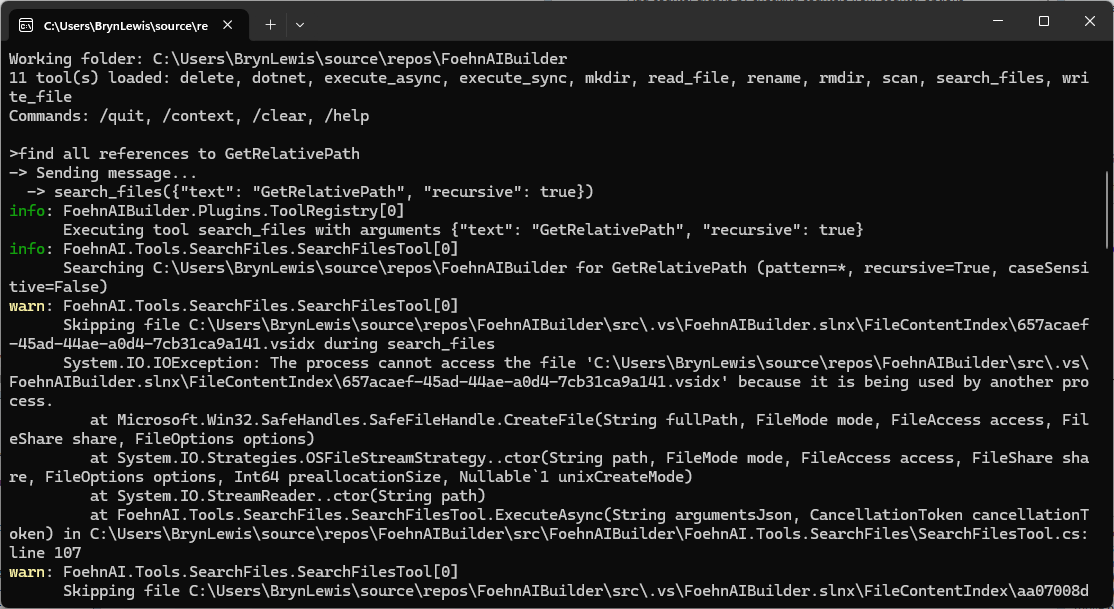
The review wasn’t great but for a “nasty” PoC it will be okay. Need to work on exception catching and directory escape functionality.
FohenAIBuilder file.write tool – 100% dog food

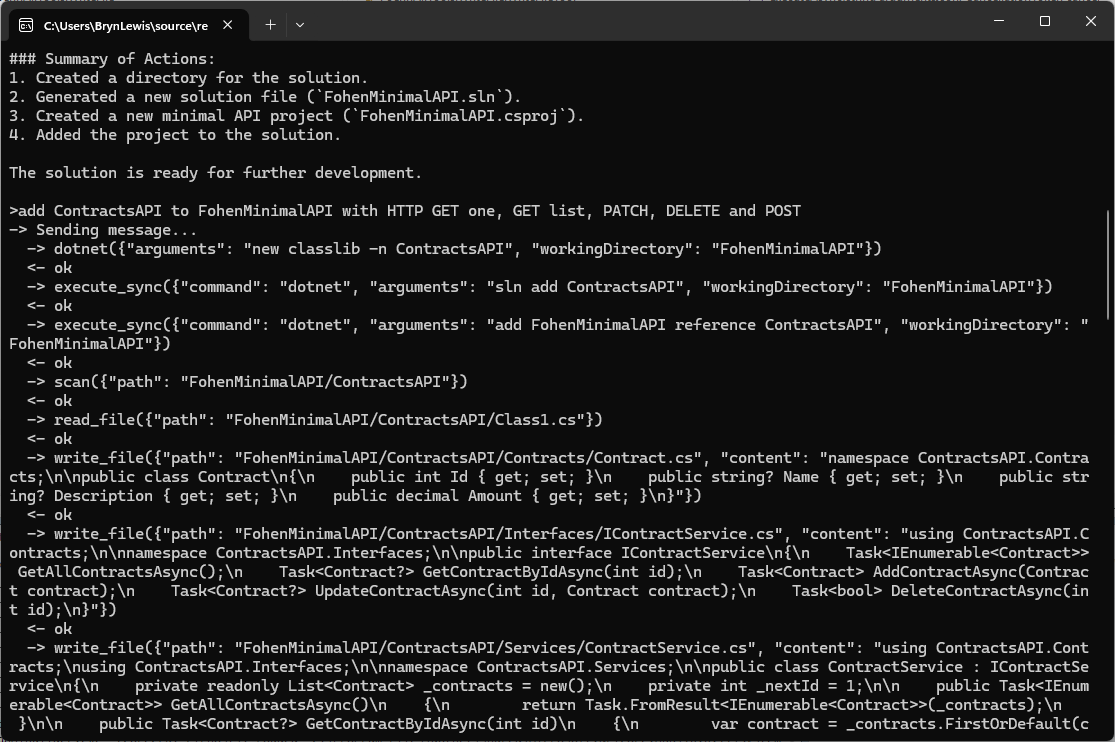
The first FoehnAIBuilder tools had to be a scan and file read tools so the LLM could understand the structure and functionality of a project. Then the ability to write a text file was next so it could generate application files.

// Copyright (c) August 2026, devMobile Software
// 
using FoehnAIBuilder.Abstractions;

namespace FoehnAI.Tools.WriteFile;

/// <summary>
/// Writes text content to a file, creating the file (and any missing parent
/// directories) if it doesn't already exist.
/// </summary>
public sealed class WriteFileTool : ITool
{
    private readonly ILogger<WriteFileTool> _logger;

    public WriteFileTool(ILogger<WriteFileTool> logger)
    {
        _logger = logger;
    }

    public string Name => "write_file";

    public string Description =>
        "Writes text content to a file at the given path, creating the file (and any missing " +
        "parent directories) if it doesn't already exist.";

    public string Command => """
        {
          "type": "object",
          "properties": {
            "path": { "type": "string", "description": "Path to the file to write." },
            "content": { "type": "string", "description": "Text content to write to the file." },
            "overwrite": { "type": "boolean", "description": "Whether to overwrite the file if it already exists. Defaults to true." }
          },
          "required": ["path", "content"]
        }
        """;

    public ToolRiskLevel RiskLevel => ToolRiskLevel.Write;

    public async Task<ToolExecutionResult> ExecuteAsync(string argumentsJson, CancellationToken cancellationToken = default)
    {
        if (!ToolArguments.TryParse(argumentsJson, WriteFileJsonContext.Default.WriteFileArguments, out var args, out var jsonError))
        {
            _logger.LogWarning("Failed to parse write_file arguments: {Arguments} ({Error})", argumentsJson, jsonError);
            return ToolExecutionResult.Fail(jsonError!);
        }

        var path = args.Path;
        var content = args.Content;
        var overwrite = args.Overwrite ?? true;

        if (!ToolPath.TryResolve(path, out var fullPath, out var pathError))
            return ToolExecutionResult.Fail(pathError!);

        if (!overwrite && File.Exists(fullPath))
            return ToolExecutionResult.Fail($"File already exists and overwrite is false: {path}");

        _logger.LogInformation("Writing {Length} characters to {Path}", content.Length, path);

        try
        {
            var directory = Path.GetDirectoryName(fullPath);
            if (!string.IsNullOrEmpty(directory))
                Directory.CreateDirectory(directory);

            await File.WriteAllTextAsync(fullPath, content, cancellationToken);
            return ToolExecutionResult.Ok($"Wrote {content.Length} characters to \"{path}\".");
        }
        catch (Exception ex) when (ex is UnauthorizedAccessException or IOException)
        {
            _logger.LogError(ex, "Error writing file {Path}", path);
            return ToolExecutionResult.Fail($"Error writing \"{path}\": {ex.Message}");
        }
    }
}

I hadn’t noticed the LLM checking to see whether the class1.cs file existed before. I’m also considering creating an another ToolRiskLevel “Trusted” for tools like dotnet.

Again, the markdown response for the review was huge

Review: WriteFileTool.cs

Clean, small, focused implementation. Same shape as the earlier version — most of my prior comments still apply. Highlights below, with a couple of new items.

Notable changes since last review

  • Name is now "write_file" (was "file.write"). Fine — but make sure it matches the naming convention used by sibling tools (files.search, read_file, etc.). Pick one: dot-namespaced (files.write) or snake_case (write_file) and apply everywhere.

Correctness / robustness

1. TOCTOU race on the overwrite check

if (!overwrite && File.Exists(fullPath)) ...
await File.WriteAllTextAsync(fullPath, content, cancellationToken);

Another process could create the file between check and write. Use FileMode.CreateNew for the strict guarantee:

var mode = overwrite ? FileMode.Create : FileMode.CreateNew;
await using var fs = new FileStream(fullPath, mode, FileAccess.Write, FileShare.None,
    bufferSize: 4096, FileOptions.Asynchronous | FileOptions.SequentialScan);
await using var sw = new StreamWriter(fs); // UTF-8 no BOM
await sw.WriteAsync(content.AsMemory(), cancellationToken);

Then catch IOException when the file already exists to return the friendly message.

2. Exception filter still too narrow

Catches only UnauthorizedAccessException | IOException. Also possible:

  • NotSupportedException (invalid path characters / colon)
  • SecurityException
  • ArgumentException from Path.GetDirectoryName on malformed input

Add them, or ensure ToolPath.TryResolve guarantees they can’t occur.

3. File.WriteAllTextAsync is truly async only with the right stream options

The overload you use internally opens a FileStream without FileOptions.Asynchronous, so the write happens on a thread-pool thread doing sync I/O. If you build the FileStream yourself (as in #1), pass FileOptions.Asynchronous for real async I/O.

Schema

4. Command doesn’t declare defaults or forbid extras

Same finding as SearchFilesTool:

{
  "type": "object",
  "additionalProperties": false,
  "properties": {
    "path":      { "type": "string",  "minLength": 1, "description": "Path to the file to write." },
    "content":   { "type": "string",  "description": "Text content to write to the file." },
    "overwrite": { "type": "boolean", "default": true, "description": "Whether to overwrite the file if it already exists." }
  },
  "required": ["path", "content"]
}

default: true matches your args.Overwrite ?? true fallback and stops the LLM from guessing.

Consistency with SearchFilesTool

5. ToolPath.TryResolve signature differs

Here you call:

ToolPath.TryResolve(path, out var fullPath, out var pathError)

SearchFilesTool calls the 4-arg overload with an explicit sandboxRoot:

ToolPath.TryResolve(sandboxRoot, path, out var fullPath, out var pathError)

If both resolve against Directory.GetCurrentDirectory(), no functional difference — but the inconsistency is a code-review smell. Prefer the explicit-sandbox overload everywhere so escape-from-sandbox behavior is provable per tool.

Observability / safety

6. Logging argumentsJson on parse failure could leak content

logger.LogWarning("Failed to parse write_file arguments: {Arguments} ({Error})", argumentsJson, jsonError);

content may contain secrets/PII. Log only length + jsonError, or redact.

7. content.Length = UTF-16 chars, not bytes

The success message says "Wrote {N} characters". Accurate but not a byte count. If callers expect bytes, use Encoding.UTF8.GetByteCount(content).

8. Cancellation before sync work

Directory.CreateDirectory is synchronous and not cancellable. Add:

cancellationToken.ThrowIfCancellationRequested();

just before it — cheap fast-fail.

Style nits

  • Mixed indentation: primary constructor line uses 3-space indent ( public string Name), the rest 4 spaces. Run a format pass.
  • Consider making Description and the schema static readonly fields instead of expression-bodied properties allocating the same strings per call (micro-optimization, only matters if Command is read on every LLM request).

Suggested consolidated write block

try
{
    cancellationToken.ThrowIfCancellationRequested();

    var directory = Path.GetDirectoryName(fullPath);
    if (!string.IsNullOrEmpty(directory))
        Directory.CreateDirectory(directory);

    var mode = overwrite ? FileMode.Create : FileMode.CreateNew;
    await using (var fs = new FileStream(
        fullPath, mode, FileAccess.Write, FileShare.None,
        bufferSize: 4096, FileOptions.Asynchronous))
    await using (var sw = new StreamWriter(fs)) // UTF-8 no BOM
    {
        await sw.WriteAsync(content.AsMemory(), cancellationToken);
    }

    return ToolExecutionResult.Ok($"Wrote {content.Length} characters to \"{path}\".");
}
catch (IOException) when (!overwrite && File.Exists(fullPath))
{
    return ToolExecutionResult.Fail($"File already exists and overwrite is false: {path}");
}
catch (Exception ex) when (ex is UnauthorizedAccessException
                              or IOException
                              or NotSupportedException
                              or System.Security.SecurityException)
{
    logger.LogError(ex, "Error writing file {Path}", path);
    return ToolExecutionResult.Fail($"Error writing \"{path}\": {ex.Message}");
}

Priority order

  1. Schema: additionalProperties:false + default:true — tiny change, prevents LLM confusion.
  2. FileMode.CreateNew for overwrite=false — closes real race condition.
  3. Broaden exception filterNotSupportedException, SecurityException.
  4. Real async I/O via explicit FileStream — only matters for large writes.
  5. Consistent ToolPath.TryResolve signature across tools.

Want me to produce the fully rewritten file?

The review was ok for throw away PoC so the only change I made was modifying the class to use a primary constructor. In a future version I’m considering loading the commandText from a file so it can be “tweaked” without requiring recompilation.

FohenAIBuilder file.read tool – with some dog fooding

The first FoehnAIBuilder tool had to be a very scan tool so the LLM could understand the structure of a project. Then the ability to load a text file so it could figure out what the underlying code did. At this point the LLM couldn’t generate some code to read a file, so I wrote as basic implementation.

// Copyright (c) August 2026, devMobile Software
// 
using FoehnAIBuilder.Abstractions;
using FoehnAI.Tools.ReadFile;

namespace FoehnAIBuilder.Tools.ReadFile;

/// <summary>
/// Reads and returns the full text contents of a file.
/// </summary>
public sealed class ReadFileTool : ITool
{
    private const int MaxCharacters = 200_000;

    private readonly ILogger<ReadFileTool> _logger;

    public ReadFileTool(ILogger<ReadFileTool> logger)
    {
        _logger = logger;
    }

    public string Name => "file.read";

    public string Description => "Reads and returns the full text contents of a file at the given path.";

    public string Command => """
        {
          "type": "object",
          "properties": {
            "path": { "type": "string", "description": "Path to the file to read (relative or absolute)." }
          },
          "required": ["path"]
        }
        """;

    public ToolRiskLevel RiskLevel => ToolRiskLevel.ReadOnly;

    public async Task<ToolExecutionResult> ExecuteAsync(string argumentsJson, CancellationToken cancellationToken = default)
    {
        if (!ToolArguments.TryParse(argumentsJson, ReadFileJsonContext.Default.ReadFileArguments, out var args, out var jsonError))
        {
            _logger.LogWarning("Failed to parse read_file arguments: {Arguments} ({Error})", argumentsJson, jsonError);
            return ToolExecutionResult.Fail(jsonError!);
        }

        var path = args.Path;
        if (!ToolPath.TryResolve(path, out var fullPath, out var pathError))
            return ToolExecutionResult.Fail(pathError!);

        _logger.LogInformation("Reading file {Path}", path);

        if (!File.Exists(fullPath))
            return ToolExecutionResult.Fail($"File not found: {path}");

        try
        {
            var content = await File.ReadAllTextAsync(fullPath, cancellationToken);
            if (content.Length > MaxCharacters)
            {
                var truncated = content[..MaxCharacters];
                return ToolExecutionResult.Ok(
                    $"{truncated}\n\n[Output truncated at {MaxCharacters} characters; file is {content.Length} characters long.]");
            }

            return ToolExecutionResult.Ok(content);
        }
        catch (Exception ex) when (ex is UnauthorizedAccessException or IOException)
        {
            _logger.LogError(ex, "Error reading file {Path}", path);
            return ToolExecutionResult.Fail($"Error reading \"{path}\": {ex.Message}");
        }
    }
}

The LLM took a couple of attempts to get the right file path. If could be the way I phrased the question or files.scan tool needs some work.

The markdown response for the review was huge

Overview

The ReadFileTool class is a tool designed to read and return the contents of a file. It implements the ITool interface and is part of the FoehnAIBuilder.Tools.ReadFile namespace. The tool is marked as ReadOnly in terms of risk level, indicating it does not modify any files or system state.


Key Components

  1. Constants and Fields:

    • MaxCharacters: A constant set to 200,000, defining the maximum number of characters to read from a file. If the file exceeds this limit, the output is truncated.
    • _logger: A logger instance for logging information, warnings, and errors.
  2. Properties:

    • Name: Returns "file.read", the name of the tool.
    • Description: Provides a brief description of the tool’s functionality.
    • Command: Defines the JSON schema for the tool’s input arguments. It expects a single property, path, which is a required string.
    • RiskLevel: Specifies the tool’s risk level as ReadOnly.
  3. Constructor:

    • The constructor initializes the logger.
  4. ExecuteAsync Method:

    • This method is responsible for executing the tool’s functionality asynchronously.
    • It parses the input arguments, resolves the file path, checks if the file exists, reads the file content, and handles potential errors.

Detailed Review

Argument Parsing

  • The method uses ToolArguments.TryParse to parse the input JSON into a structured object (ReadFileArguments). If parsing fails, it logs a warning and returns a failure result with the parsing error.

Path Resolution

  • The tool resolves the provided path using ToolPath.TryResolve. If the path resolution fails, it returns a failure result with the path error.

File Existence Check

  • The tool checks if the file exists at the resolved path. If the file does not exist, it returns a failure result indicating the file was not found.

File Reading

  • The tool reads the file content asynchronously using File.ReadAllTextAsync.
  • If the file content exceeds MaxCharacters, the content is truncated, and a message is appended to indicate truncation.

Error Handling

  • The tool catches specific exceptions (UnauthorizedAccessException and IOException) and logs them as errors. It returns a failure result with a descriptive error message.

Strengths

  1. Asynchronous Operation: The tool uses asynchronous file reading, which is efficient and non-blocking.
  2. Error Handling: It handles specific exceptions and provides meaningful error messages.
  3. Truncation Handling: The tool gracefully handles large files by truncating the output and informing the user.
  4. Logging: Comprehensive logging is implemented for debugging and monitoring purposes.

Potential Improvements

  1. Configurable MaxCharacters: The MaxCharacters constant could be made configurable, allowing users to adjust the truncation limit based on their needs.
  2. Additional File Information: The tool could optionally return additional file information, such as file size, last modified date, or encoding.
  3. Support for Binary Files: Currently, the tool only supports text files. Adding support for binary files could extend its functionality.
  4. Path Validation: Additional validation could be added to ensure the resolved path is within an allowed directory, enhancing security.

Conclusion

The ReadFileTool is a well-designed and robust tool for reading file contents. It handles errors gracefully, provides meaningful feedback, and operates efficiently. With minor enhancements, it could become even more versatile and user-friendly.

The review was pretty good so the only change I made was modifying the class to use a primary constructor. In a future version I’m considering loading the commandText from a file so it can be “tweaked” without requiring recompilation.

FoehnAIBuilder Plug-in Tools Implementation

FoehnAIBuilder uses a plugin-based architecture where every tool implements a standard .NET class that conforms to the ITool C# interface. As part of the startup process, the application scans the plugin directory, loads all the available assemblies, and includes all that implement this contract.

namespace FoehnAIBuilder.Abstractions;

public interface ITool
{
    string Name { get; }
    string Description { get; }
    string Command { get; }

    ToolRiskLevel RiskLevel { get; }
    Task<ToolExecutionResult> ExecuteAsync(string argumentsJson, CancellationToken cancellationToken = default);
}

Tools also have a risk level (considering increasing the number of options and training an ML.NET model to detect potentially malicious arguments), so the host application can apply safety controls such as requiring user confirmation before operations that may have significant side effects.

public enum ToolRiskLevel
{
    Undefined = 0,
    ReadOnly,
    Write,
    Destructive,
}

FoehnAIBuilder enforces a maximum tool iteration count. This prevents runaway execution loops, stops the context growing to the point where it impacts on the LLM’s performance (The dumb zone), and “burning” lots of Tokens

   "Mistral": {
      "BaseUrl": "https://api.mistral.ai",
      "APIKey": "This is not the APIKey you are looking for",
      "DefaultModel": "devstral-latest",
      "TimeoutSeconds": 120,
      "MaxRetries": 3,
      "EnableStreaming": false
   },
   "FoehnAIBuilder": {
      "SystemMessageFile": "foehn.md",
      "PluginsPath": ".plugins",
      "WorkingDirectory": "",
      "MaxToolIterations": 30
   },
}

Each tool exposes metadata that allows the LLM to understand how to invoke it. This includes a unique function name, a human-readable description, and a JSON Schema describing the parameters the tool expects. I’m considering implementing the parameters for a plug-in using Data Transfer Objects (DTO) rather than the current approach using strings.

public string Name => "scan";

public string Description =>
    "Recursively lists files and directories under a given path, or the current working " +
    "folder if no path is supplied. Use this first to discover what exists before reading, " +
    "writing, deleting, or executing anything.";

public string Command => """
{
   "type": "object",
   "properties": {
        "path": { "type": "string", "description": "Directory to scan. Defaults to the application's current working folder if omitted." },
        "pattern": { "type": "string", "description": "Search pattern, e.g. '*.cs'. Defaults to '*' (all files)." },
         "recursive": { "type": "boolean", "description": "Whether to recurse into subdirectories. Defaults to true." }
    },
    "required": []
}

The plugins have code to detect an LLM directory escape with a path in a parameter like “directory to scan”. When the LLM chooses to invoke a tool, FoehnAIBuilder calls the tool’s ExecuteAsync method and passes the arguments as a JSON document that conforms to the schema exposed by the tool.

FoehnAIBuilder processes the request and returns a ToolExecutionResult, which provides a standardised way for both the application and the LLM to understand the outcome. The result contains a boolean success indicator and a descriptive message that may include returned data, status information, or error details.

public sealed class ToolExecutionResult
{
    public required bool Success { get; init; }

    public required string Result { get; init; }

    public static ToolExecutionResult Ok(string result) => new() { Success = true, Result = result };

    public static ToolExecutionResult Fail(string result) => new() { Success = false, Result = result };
}

ToolExecutionResult approach follows the result pattern rather than an exception-driven programming model. Every tool invocation returns a result containing both a success indicator and a human-readable message describing the outcome. This provides a consistent contract between the tool, the host, and the language model. This allows the LLM to reason about both successful operations and expected failure conditions such as validation errors, missing resources, or access restrictions.

The plug-in implementations handle and translate all anticipated error conditions into a ToolExecutionResult.Fail response rather than allowing exceptions to propagate to the FoehnAIBuilder host (this would be bad). Returning structured failure information enables the language model to understand what went wrong and potentially adjust its behaviour and retry with different inputs.

try
{
   var searchOption = recursive ? SearchOption.AllDirectories : SearchOption.TopDirectoryOnly;

   ...

   return Task.FromResult(ToolExecutionResult.Ok(sb.ToString()));
}
catch (Exception ex) when (ex is UnauthorizedAccessException or IOException)
{
   _logger.LogError(ex, "Error scanning {Path}", path);
   return Task.FromResult(ToolExecutionResult.Fail($"Error scanning \"{path}\": {ex.Message}"));
}

Exceptions are reserved for genuinely unexpected conditions such as programming errors, infrastructure failures, or unrecoverable runtime errors. As a general rule, no exception in a tool plug-in should be returned to FoehnAIBuilder for business logic or user-correctable error, these should always be represented as a failed ToolExecutionResult containing a clear and actionable explanation of the problem.

The next couple of posts will explore progressively more capable (read dangerous) operations. First, file and directory tools, where path traversal, deletion, and privilege boundaries (file and directory permissions) introduce real risk.

Real-time Spike Detection with SR-CNN

To detect sudden changes, I tried an SR‑CNN(Spectral Residual and Convolutional Neural Network) model that looks at a small window of recent values. It assigns an anomaly score to each point, and if the newest score crosses a threshold, the system treats it as a spike.

The sample application uses ML.NET SR‑CNN to processes a rolling buffer (ConcurrentQueue) of recent samples and publishes to an Message Queue Telemetry Transport(MQTT) topic anomalies as they are detected.

private sealed class TopicRuntime
{
   public object Lock { get; } = new();
   public Queue<Model.TimeSeriesData> Buffer { get; }
   public int MaxBufferSize { get; }
   public ITransformer? Transformer { get; set; }

   public TopicRuntime(Model.TopicConfiguration configuration)
   {
      MaxBufferSize = configuration.SrCnnSettings.WindowSize+ configuration.SrCnnSettings.LookaheadWindowSize+ configuration.SrCnnSettings.BackAddWindowSize;

      Buffer = new Queue<Model.TimeSeriesData>(MaxBufferSize);
   }
}

Every MQTT topic gets its own little SR‑CNN workspace: a lock to keep inference thread‑safe, a buffer that holds just enough recent samples for the model to work, and a transformer that runs the spike‑detection pipeline. The buffer size is calculated from the _applicationSettings windowSize, LookaheadWindowSize, and BackAddWindowSize settings so the model always sees the sequence length it has trained for.

var topicEstimator = _TopicEstimators.GetOrAdd(subscribedTopic, key => new TopicRuntime(_applicationSettings.SubscribedTopics[key]));

List<Model.SpikePrediction> spikePredictions;
lock (topicEstimator.Lock)
{
   topicEstimator.Buffer.Enqueue(new Model.TimeSeriesData { Value = value });
   while (topicEstimator.Buffer.Count > topicEstimator.MaxBufferSize) topicEstimator.Buffer.Dequeue();

   if (topicEstimator.Buffer.Count < subscribedTopicSettings.SrCnnSettings.WindowSize)
   {
      Console.WriteLine($"{DateTime.UtcNow:yy-MM-dd HH:mm:ss:fff} Not enough data for prediction (have {topicEstimator.Buffer.Count}, need {subscribedTopicSettings.SrCnnSettings.WindowSize})");
      return;
   }

   var data = _mlContext.Data.LoadFromEnumerable(topicEstimator.Buffer);

   if (topicEstimator.Transformer is null)
   {
      var estimator = _mlContext.Transforms.DetectAnomalyBySrCnn(
         outputColumnName: nameof(Model.SpikePrediction.Prediction),
         inputColumnName: nameof(Model.TimeSeriesData.Value),
         windowSize: subscribedTopicSettings.SrCnnSettings.WindowSize,
         backAddWindowSize: subscribedTopicSettings.SrCnnSettings.BackAddWindowSize,
         lookaheadWindowSize: subscribedTopicSettings.SrCnnSettings.LookaheadWindowSize,
         averagingWindowSize: subscribedTopicSettings.SrCnnSettings.AveragingWindowSize,
         judgementWindowSize: subscribedTopicSettings.SrCnnSettings.JudgementWindowSize,
         threshold: subscribedTopicSettings.SrCnnSettings.Threshold);
      topicEstimator.Transformer = estimator.Fit(data);
   }

   var transformed = topicEstimator.Transformer.Transform(data);
   spikePredictions = [.. _mlContext.Data.CreateEnumerable<Model.SpikePrediction>(transformed, reuseRowObject: false)];
}

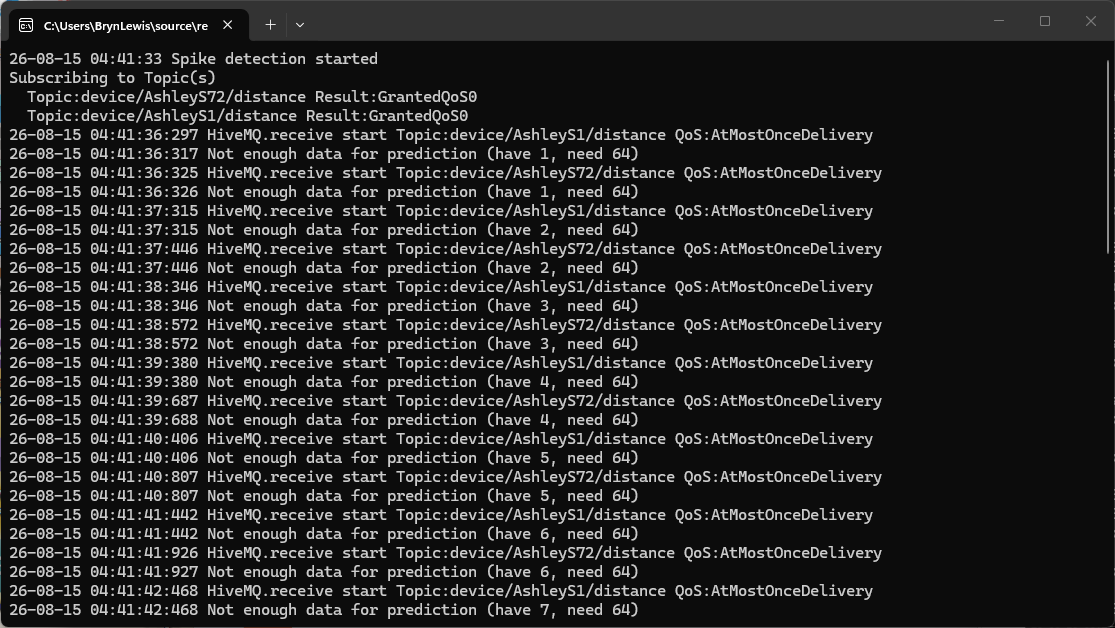
SR‑CNN needs a warmup period. Early on, it doesn’t have enough history, so its baseline is shaky and it tends to over‑react, flagging lots of spikes. After the model has seen enough samples (WindowSize + LookaheadWindowSize + BackAddWindowSize), it settles down, it understands the normal noise and recognises patterns. But, I have found if it runs for a very long time, it can become almost too stable, making it slower to react to sudden changes.

To keep things flexible, the input transformer uses CS‑Script to turn the message payload (in this example JSON) into a C# object and then pulls out the one value (a float) the SR‑CNN model needs. In this case, it reads the Cm field of the Seeedstudio Ultrasonic Ranger and returns it as a floating‑point number. Each device type (in this example a Seeedstudio SKU 101991042) gets its own tiny script, making the system easy to extend.

//---------------------------------------------------------------------------------
// Copyright (c) May 2026, devMobile Software
//
/*
{
   "ClientID:"Device123",
   "Mm":269,
   "Cm":26.8999996,
   "Temperature":24.2999992
}
*/
using System; // Donot remove this as required for InvalidOperationException
using devMobile.IoT.MqttTransformers;

internal class SKU101991042
{    
   public string ClientID { get; set; } = string.Empty;
   public int Mm { get; set; }
   public float Cm { get; set; }
   public float Temperature { get; set; }
}

public class InputSKU101991042 : IInputMessageTransformer
{
   public float Transform(string topic, byte[] payload)
   {
      var json = System.Text.Encoding.UTF8.GetString(payload);

      var obj = System.Text.Json.JsonSerializer.Deserialize<SKU101991042>(json) ?? throw new InvalidOperationException("Failed to deserialize payload");

      return obj.Cm;
   }
}

The output transformer takes the spike‑detection result and turns it into a simple JSON message that is published to the specified MQTT topic. It builds a data transfer object (DTO) containing the detection type, topic, value, raw score, and magnitude, then serialises it and returns the UTF‑8 bytes. Each CS-Script transformer script defines exactly how the spike result should look, making the system flexible and easy to extend.

//---------------------------------------------------------------------------------
// Copyright (c) May 2026, devMobile Software
//
using System.Text.Json;
using System.Text.Json.Serialization; // Do not remove this using directive as it is required for the JsonIgnoreCondition

using devMobile.IoT.MqttTransformers;


public class SpikeOutputTransformer : ISpikeOutputMessageTransformer
{
   private static readonly JsonSerializerOptions _serializerOptions = new() { DefaultIgnoreCondition = JsonIgnoreCondition.WhenWritingNull };

   public byte[] Transform(string topic, double value, double rawScore, double magnitude)
   {
      var obj = new
      {
         DetectionType = "Spike",
         Topic = topic,
         Value = value,
         RawScore = rawScore,
         Magnitude = magnitude
      };

      string payload = JsonSerializer.Serialize(obj, _serializerOptions);

      return System.Text.Encoding.UTF8.GetBytes(payload);
   }
}

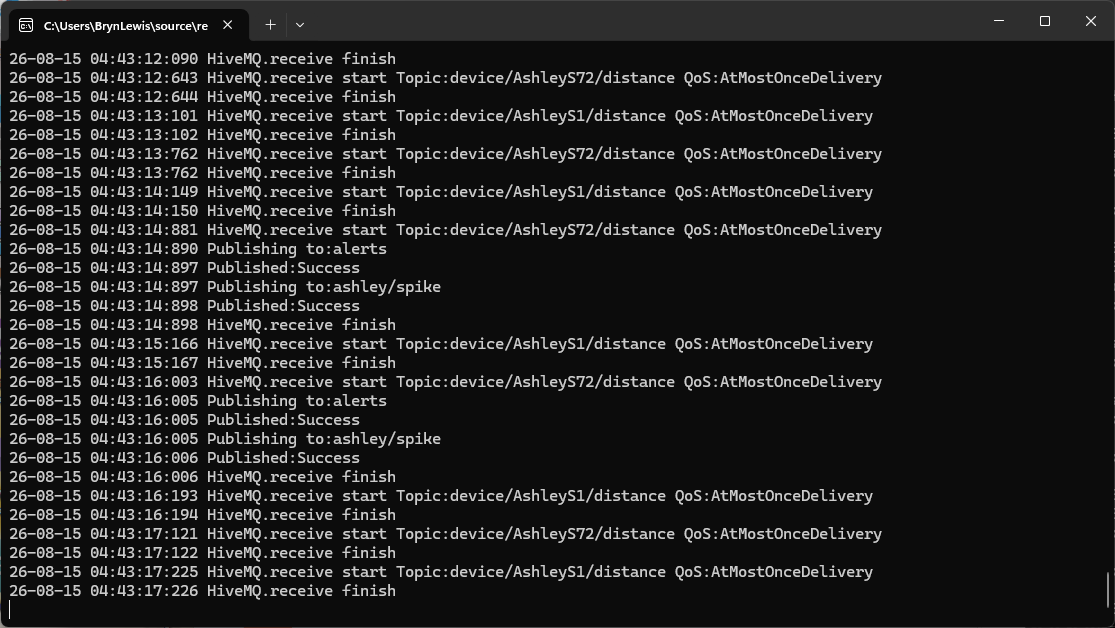
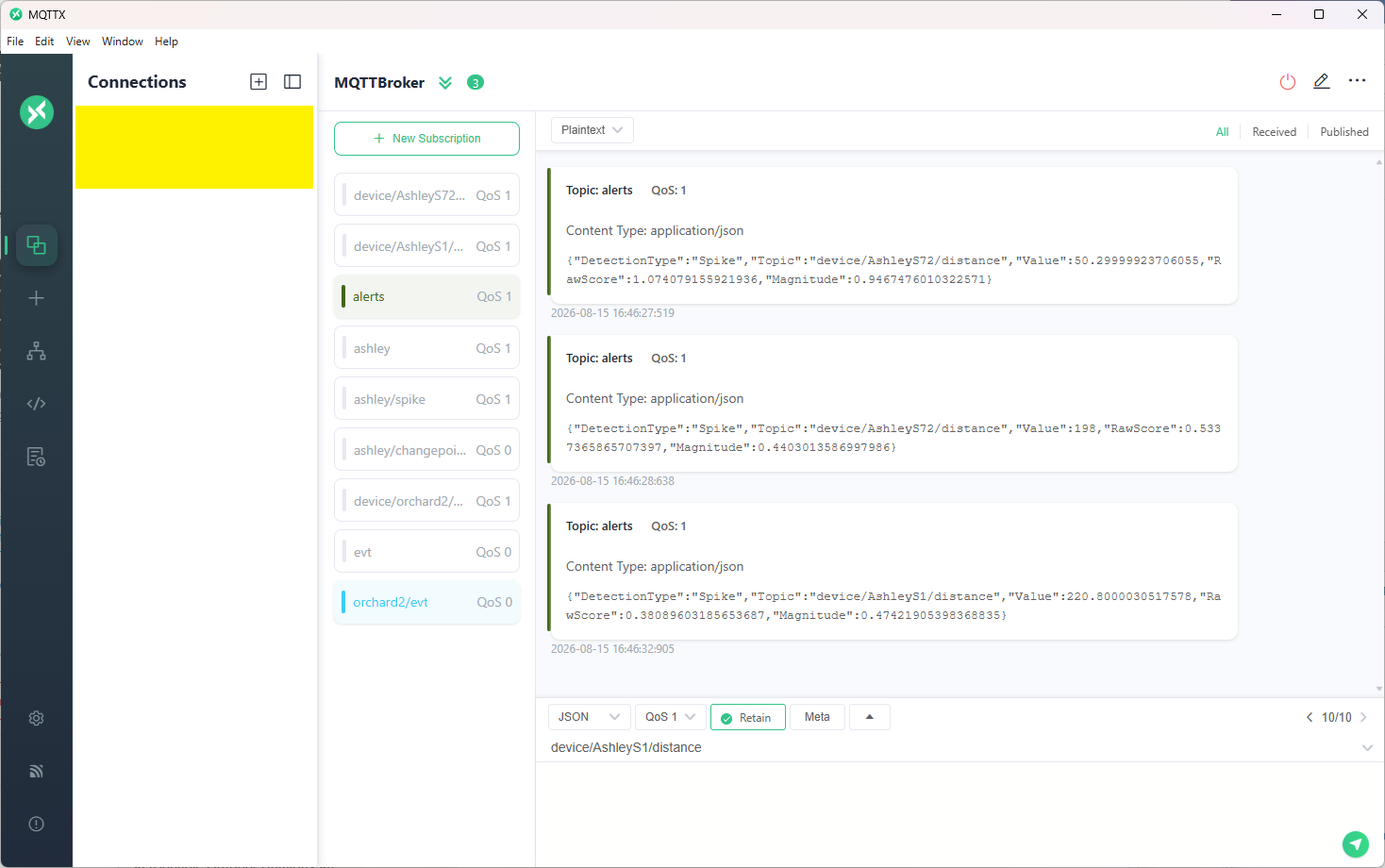
The MQTTX application from EMQX provides a clear view of the messages published by the spike‑detection pipeline. Each alert arrives as a JSON payload containing the detection type, topic name, measured value, raw SR‑CNN score, and spike magnitude. This makes it easy to monitor devices in close to “real time” and verify that spike events are being reliably detected and alerted correctly.

In my testing, SR‑CNN consistently produced more reliable results with my device data than IID or SSA‑based anomaly‑detection approaches. The residual CNN architecture handled the noise characteristics and temporal patterns far better, giving fewer false positives and more stable detections especially across long‑running sessions.

This blog post assumes you have read my earlier spike and change point detection posts.

Mistral Vibe Code Generated Mistral Chat Completion API Client

For this series of posts, I asked GitHub Copilot, Anthropic Claude Code, and Mistral Vibe Code to generate a Mistral Chat Completion client using the same prompt….

Generate C# DTOs and a ChatCompletionClient for https://docs.mistral.ai/api/endpoint/chat. The ChatCompletionClient should
use HttpClientFactory with resilience and should have async methods where suitable. The DTOs should be split up into files
for shared, buffered, and streaming.

Generate a console application which uses ChatCompletionClient

Then I took the initial implementation and prompted GitHub Copilot, Anthropic Claude Code, and Mistral Vibe Code to review them. The aim was to see how each tool thinks, what they prioritise, and then how their feedback differs when given identical code.

TL;DR – the code was fine.

Github Copilot

Overall the library is well-structured, cleanly documented, and follows familiar patterns (Options, IHttpClientFactory, Polly).

Anthropic Claude

The client is a small, focused wrapper around POST /v1/chat/completions, supporting both a buffered call (CompleteAsync) and an SSE streaming call (StreamAsync). Overall design is clean: immutable JsonSerializerOptions, an immutable record request type mutated via with, DI registration through IHttpClientFactory with a resilience pipeline, and polymorphic DTOs for messages/content/tools that mirror the Mistral (OpenAI-compatible) wire format. No correctness-blocking bugs were found; findings below are mostly design nits and a few things worth double-checking against real API behavior.

Mistral Vibe Code

Overall Rating: ⭐⭐⭐⭐☆ (4.2/5) – Production Ready with Minor Improvements

Github Copilot Review

:question:

Review MistralAI.Client.Copilot – ChatCompletionClient.cs and DTOs

GitHub Copilot

  1. Read ChatCompletionClient.cs, lines 165-514 :white_check_mark:
  2. Code search found relevant results :white_check_mark:
  3. Read ChatCompletionClient.cs, lines 294-514 :white_check_mark:
  4. Read BufferedDto.cs, lines 1-220 :white_check_mark:
  5. Read SharedDto.cs, lines 1-305 :white_check_mark:
  6. Read StreamingDto.cs, lines 1-420 :white_check_mark:

Code Review – ChatCompletionClient & DTOs

Overall the library is well-structured, cleanly documented, and follows familiar patterns (Options, IHttpClientFactory, Polly). Below are the concrete issues and improvements I’d action, roughly ordered by impact.

🔴 Correctness / bugs

  1. Streaming isn’t actually streaming. In StreamCompletionAsync you call _httpClient.PostAsync(...), which buffers the whole response before returning. You must pass HttpCompletionOption.ResponseHeadersRead, otherwise every “streamed” token arrives at once (and the retry policy will hold the full body in memory).
using var req = new HttpRequestMessage(HttpMethod.Post, requestUri) { Content = requestContent };
response = await _retryPolicy.ExecuteAsync(ct =&gt;
    _httpClient.SendAsync(req, HttpCompletionOption.ResponseHeadersRead, ct), cancellationToken);
  1. Retry policy + single StringContent is broken. StringContent is disposed once sent, so any retry after the first attempt POSTs an empty/disposed body. The HttpRequestMessage/content must be re-created inside the ExecuteAsync delegate (or use HttpClientHandler-level Polly via AddPolicyHandler, which handles this).

  2. IDisposable + IHttpClientFactory conflict. The class implements IDisposable and holds _disposed, implying it disposes _httpClient. HttpClients from IHttpClientFactory must not be disposed by the consumer — the factory owns the handler lifetime. Either:

    • drop IDisposable, or
    • dispose only in the HttpClient-injected overload and track ownership with a flag.
  3. Mutating a factory-provided HttpClient in the constructor. Setting Timeout, DefaultRequestHeaders.Authorization, and User-Agent on httpClientFactory.CreateClient() re-configures a shared/named client each time and, worse, appending User-Agent via Add(...) will throw InvalidOperationException on second construction against the same named client. Configure this once through services.AddHttpClient(c =&gt; …) and remove it from the ctor.

  4. ReadLineAsync treats SSE as line-oriented text. Real SSE:

    • allows data: (no space) — your Substring(6) is off by one in that case,
    • allows multi-line data: chunks concatenated per event,
    • has comment lines starting with : (heartbeat/keep-alive) that must be ignored,
    • has event:, id:, retry: fields. Consider System.Net.ServerSentEvents.SseParser (built-in) instead of hand-rolling.
  5. Polymorphic streaming events. You deserialize into a single CompletionEvent type, yet StreamingDto.cs defines CompletionEventBase with TextCompletionEvent, ToolCallEvent, … discriminated by type. Without [JsonPolymorphic]/[JsonDerivedType] on the base, the derived data is lost. Either:

    • Add polymorphism attributes on CompletionEventBase and deserialize as the base, or
    • Keep a flat CompletionEvent DTO and drop the base/derived hierarchy — currently you have both, which is confusing.
  6. Fallback path assumes Text exists on CompletionEvent.
    new CompletionEvent { Type = "unknown", Text = line } implies a flat DTO; reconcile with issue #6.

  7. No Retry-After handling on 429. Polly’s WaitAndRetryAsync uses only 2^n. Mistral (like OpenAI) returns Retry-After — honour it.

  8. response.Content.ReadAsStringAsync() / ReadAsStreamAsync() don’t take the cancellationToken. These overloads exist on .NET 8 — pass the token so hanging responses can be cancelled.

  9. HttpClient.Timeout fights with cancellation. With Polly retries + streaming, a global 120 s timeout aborts long streams. Use HttpClient.Timeout = Timeout.InfiniteTimeSpan and enforce per-request timeout via a linked CancellationTokenSource.

🟠 API / design

  1. Massive DTO duplication. ChatCompletionRequest (Buffered) and ChatCompletionStreamRequest (Streaming) are byte-for-byte identical apart from the default of Stream. Introduce a shared base (or single DTO) in DTOs.Shared and delete ~130 lines. The Stream boolean is the only real difference and can be set by the client method.

  2. Stop and ToolChoice typed as object?. These serialize fine but deserialize poorly and lose IntelliSense. Use OneOf&lt;string, List&gt;, a small wrapper type, or JsonElement.

  3. Metadata is Dictionary. Mistral’s schema is Dictionary.

  4. MessageBase.Content is string? only. Mistral supports multimodal content (array of {type, text|image_url} parts) on user messages. Model as object? or OneOf&lt;string, List&gt; to be forward-compatible.

  5. AssistantMessage missing prefix/reasoning/tool_call_id variants. ChatCompletionChoice.Prefix exists but not on the message itself, which is where the API places it for message replay.

  6. GuardrailConfig is an empty placeholder. Either implement it or omit the property so serializers don’t emit "guardrails": [].

  7. ResponseFormat.Schema should be JsonElement/typed to avoid double serialization surprises via object.

  8. MistralAiException — add the three standard Exception ctors ((), (string), (string, Exception)), and consider a strongly typed MistralApiError model (type, message, param, code) parsed from the body instead of the raw string.

  9. Validation. MistralAiOptions.ApiKey defaults to ""; the constructor happily builds a client with no auth. Add IValidateOptions or throw in the ctor.

  10. GetJsonOptions() (not shown) should be cached in a static readonly field — creating JsonSerializerOptions per call is expensive and defeats the internal metadata cache.

  11. CreateRequest / CreateStreamRequest just build DTOs. They add little over new ChatCompletionRequest { … } and inflate the surface area. Consider removing, or make them extension methods.

  12. Second ctor mutates a caller-owned HttpClient. Prefer treating an injected HttpClient as read-only and route auth via HttpRequestMessage.Headers.Authorization on each request.

🟡 Style / minor

  • line.StartsWith("data: ", StringComparison.Ordinal) — add ordinal comparison; ditto for the [DONE] sentinel.
  • Use _httpClient.DefaultRequestHeaders.UserAgent.Add(new ProductInfoHeaderValue("MistralAI.Client", "1.0")) instead of Add("User-Agent", …).
  • Consider sealed on ChatCompletionClient; extension is unlikely and it simplifies IDisposable.
  • MistralAiOptions.EnableStreaming is declared but never used.
  • XML doc for CreateStreamRequest says stream param exists — it doesn’t.
  • Naming: CompletionEvent vs CompletionEventBase vs TextCompletionEvent — pick one convention (drop Base, since it’s abstract).
  • Consider ArgumentNullException.ThrowIfNull(request) (.NET 8 idiom).

Suggested next steps

  1. Fix the streaming/retry correctness issues (#1, #2, #5, #6) — those change behaviour.
  2. Collapse the duplicated request DTOs (#11) — biggest maintenance win.
  3. Move HttpClient configuration into DI registration and drop IDisposable (#3, #4).
  4. Cache JsonSerializerOptions and switch to source-generated serialization if AOT/perf is a goal (#20).

Happy to draft any of these changes — tell me which to tackle first.

The next review was done with Anthropic’s Claude Code

Code Review: MistralAI.Client.CopilotChatCompletionClient.cs & DTOs

Scope: src/Copilot.PoC/MistralAI.Client.Copilot/ Files reviewed:

  • ChatCompletionClient.cs
  • IChatCompletionClient.cs
  • ChatCompletionRequest.cs (request DTOs)
  • ChatCompletionResponse.cs (response DTOs)
  • Streaming/StreamingDTOs.cs
  • MistralClientOptions.cs, MistralServiceCollectionExtensions.cs (for context)

Summary

The client is a small, focused wrapper around POST /v1/chat/completions, supporting both a buffered call (CompleteAsync) and an SSE streaming call (StreamAsync). Overall design is clean: immutable JsonSerializerOptions, an immutable record request type mutated via with, DI registration through IHttpClientFactory with a resilience pipeline, and polymorphic DTOs for messages/content/tools that mirror the Mistral (OpenAI-compatible) wire format. No correctness-blocking bugs were found; findings below are mostly design nits and a few things worth double-checking against real API behavior.


ChatCompletionClient.cs

Strengths

  • JsonOptions is a single static, cached JsonSerializerOptions instance (line 18) — correct, since re-creating JsonSerializerOptions per call is a well-known perf trap with System.Text.Json.
  • CompleteAsync/StreamAsync both null-check request at the boundary (ArgumentNullException.ThrowIfNull), consistent with API-boundary validation.
  • request with { Stream = false/true } cleanly forces the correct value regardless of what the caller set, without mutating the caller’s object.
  • StreamAsync uses HttpCompletionOption.ResponseHeadersRead so the response isn’t buffered before the SSE loop starts — necessary for real streaming.
  • Malformed SSE chunks are swallowed with a comment explaining why (// Skip malformed chunks rather than aborting the whole stream.) — an intentional, documented tradeoff rather than silent-failure-by-accident.
  • EnsureSuccessAsync reads the error body only on failure, and wraps it into HttpRequestException with the status code attached (statusCode: response.StatusCode) — good for callers that pattern-match on StatusCode.

Findings / things to double check

  1. ChatCompletionRequest.Stream is public but always overwritten. The DTO exposes a settable Stream property, documented as "Overridden internally by the client depending on the method called." (ChatCompletionRequest.cs:26). Any value the caller sets is silently discarded by both CompleteAsync and StreamAsync. This isn’t a bug, but it’s a slightly surprising public API — a caller could reasonably expect setting Stream = true and calling CompleteAsync to do something, when it’s actually a no-op. Consider either making the setter internal/removing it from the public request shape, or asserting/ignoring rather than silently stomping it.

  2. Silent chunk-skip on JsonException has no observability hook. StreamAsync (lines 104–113) catches JsonException and continues with no logging or counter. For a PoC this is fine, but if the wire format ever drifts (e.g., a new event type Mistral adds), failures will be invisible — chunks just quietly vanish. Consider at least a ILogger debug-level log if one is easy to thread through, since this is the one place errors are deliberately suppressed rather than propagated.

  3. SSE parsing only recognizes data: lines. The reader loop only reacts to lines starting with data: and otherwise continues (lines 89–92), which correctly skips blank lines and SSE comment/event: lines. This matches Mistral’s OpenAI-compatible SSE format (each event is a single data: {...} line), so it should be fine in practice — just flagging that it assumes single-line JSON payloads per event; a server that ever wrapped a JSON payload across multiple data: lines (some SSE producers do this) would need concatenation logic that isn’t present here.

  4. No cancellation-specific handling. CancellationToken is threaded through correctly (ConfigureAwait(false) + [EnumeratorCancellation]), but there’s no explicit catch/rethrow around OperationCanceledException — that’s actually correct behavior (let it propagate), just noting it was checked.


Request DTOs (ChatCompletionRequest.cs)

Strengths

  • ChatCompletionRequest is a sealed record with required members for Model/Messages, giving compile-time enforcement of the two truly mandatory fields.
  • Polymorphic ChatMessage/ContentPart hierarchies use [JsonPolymorphic] + [JsonDerivedType] correctly keyed off role and type respectively, matching the API’s discriminator fields.
  • MessageContent cleanly models the “string OR array of parts” duality the API allows, with implicit conversions (string, ContentPart[], List) making call sites ergonomic, and a custom JsonConverter handling both read and write shapes.
  • GuardrailConfig.AdditionalProperties via [JsonExtensionData] is a sensible forward-compatibility escape hatch for a field Mistral is likely to extend.

Findings

  1. Naming collision: ToolChoice property vs. ToolChoice static helper class. ChatCompletionRequest.ToolChoice (an object? property, line 41) and the top-level public static class ToolChoice (line 239) share the identifier ToolChoice in the same namespace (Mistral.Client.Shared). This compiles and works — new ChatCompletionRequest { ToolChoice = ToolChoice.Auto } resolves the right-hand side to the static class since object-initializer right-hand expressions aren’t evaluated in the initializer’s member scope — but it’s a readability trap: IntelliSense/go-to-definition on ToolChoice inside that expression can be momentarily ambiguous to a human reader, and a future refactor that moves code around could make this genuinely ambiguous or require global::/qualification. Consider renaming the helper class (e.g. ToolChoiceValues or ToolChoices) to remove the shadow.

  2. ToolChoice property typed as object?. Reasonable given the API accepts either a string enum or an object literal, and the ToolChoice helper class exists specifically to build valid values — but it does mean nothing stops a caller from passing an arbitrary/invalid object that will only fail at the HTTP layer. Given this is a PoC and the alternative (a discriminated-union style type) is meaningfully more code, this looks like an acceptable, deliberate tradeoff rather than an oversight.

  3. MessageContentJsonConverter.Write prefers Text over Parts if both are set. Not reachable through the public implicit-conversion surface (only one of Text/Parts is ever set), but since MessageContent has public init accessors, nothing stops object-initializer code from setting both fields directly, at which point Parts would be silently dropped on serialize. Low risk given current usage patterns, just noting the type doesn’t defensively guard against that state.

  4. Minor: IReadOnlyList has no implicit conversion, only ContentPart[] and List do (lines 122–124). Not a bug — just means a caller holding an IReadOnlyList from elsewhere has to materialize it to one of the two supported types first.


Response DTOs (ChatCompletionResponse.cs)

  • Straightforward, mutable POCOs (get; set;) matching typical System.Text.Json deserialization targets — appropriately different from the request side (which is a record built by the caller) since these are populated by the deserializer, not constructed by consumers.
  • ChatCompletionChoice.Message is typed as AssistantMessage? (line 21), correctly narrowing the polymorphic ChatMessage base to the one concrete type a response choice can actually contain.
  • Choices and other list-typed members default to [] rather than null (e.g., ChatCompletionResponse.cs:12), which avoids null-checks for consumers even before deserialization overwrites them — good defensive default.
  • No SystemFingerprint/LogProbs/similar fields are modeled. If Mistral’s response includes them and callers might want them, they’re currently unreachable (no [JsonExtensionData] catch-all on the response types, unlike GuardrailConfig on the request side). Worth confirming this is an intentional scope decision for the PoC.

Streaming DTOs (Streaming/StreamingDTOs.cs)

  • ChatCompletionChunk/ChatCompletionChoiceChunk/DeltaMessage correctly mirror the non-streaming shapes where structurally identical (UsageInfo, MessageContent, ToolCall are reused rather than duplicated), which is good — no drift risk between streaming/non-streaming content models.
  • The XML doc on DeltaMessage (lines 28–32) correctly documents the aggregation contract callers must implement (accumulate Content, merge ToolCalls by Index) — useful since the client itself provides no aggregation helper, so this is the only place that contract is written down. Worth keeping in sync with any future consumer-side aggregation utility.
  • Minor cosmetic: namespace Mistral.Client.Shared.Streaming; (line 3) has a double space after the namespace keyword. Harmless, but worth a quick formatter pass.

Supporting types (context only)

  • MistralClientOptions / MistralServiceCollectionExtensions: registration wires IChatCompletionClient as a singleton backed by a named HttpClient with Timeout = Timeout.InfiniteTimeSpan and delegates time-boxing to the standard resilience handler (AttemptTimeout 90s, TotalRequestTimeout 5m) — a sensible choice given long-running generations and streaming responses, and the comment explaining why the infinite client timeout is safe here is a good practice (explains a non-obvious decision rather than just stating what the code does).

Overall assessment

No functional bugs found. The code is well-structured for a PoC: immutable request model, cached serializer options, correct streaming/cancellation plumbing, and DTOs that faithfully mirror the API’s polymorphic wire format. The main things worth a follow-up decision are the ToolChoice naming collision (cosmetic but worth a rename) and whether the public, always-overridden Stream property on ChatCompletionRequest is intentional API surface or should be tightened.

The final review was done with Mistral’s Vibe Code

📊 MistralAI.Client.Copilot Code Review

> Project Type: .NET 10.0 Library | Purpose: Mistral AI Chat Completion API Client > Last Reviewed: 2026-07-20 | Reviewed By: Mistral Vibe


📁 Project Structure

MistralAI.Client.Copilot/
├── MistralAI.Client.Copilot.csproj         # Project configuration (net10.0)
├── IChatCompletionClient.cs               # Interface definition
├── ChatCompletionClient.cs                # Main client implementation
├── ChatCompletionRequest.cs               # Request DTOs &amp; Message types
├── ChatCompletionResponse.cs              # Response DTOs
├── MistralClientOptions.cs                # Configuration options
├── MistralServiceCollectionExtensions.cs # DI registration
└── Streaming/
    └── StreamingDTOs.cs                   # Streaming response chunk DTOs

Strengths

1. Clean Architecture

  • Separation of Concerns: Clear separation between interfaces (IChatCompletionClient), implementation (ChatCompletionClient), and DTOs
  • Dependency Injection: Proper use of IHttpClientFactory and DI container extensions
  • Modular Design: Streaming logic isolated in dedicated namespace

2. Modern C# Features

  • Records: Extensive use of record types for immutable DTOs (ChatCompletionRequest, ChatCompletionResponse)
  • Pattern Matching: Effective use in MessageContentJsonConverter.Read()
  • Async Streams: Proper implementation of IAsyncEnumerable for streaming
  • Init-only Properties: Consistent use of init accessors for immutable DTOs
  • File-scoped Namespaces: Clean namespace declarations

3. Robust Error Handling

  • Argument Validation: Uses ArgumentNullException.ThrowIfNull() for public method parameters
  • HTTP Error Handling: EnsureSuccessAsync() provides detailed error messages with status codes and response bodies
  • Streaming Resilience: Gracefully handles malformed JSON chunks in streaming without breaking the entire stream
  • Cancellation Support: Proper CancellationToken propagation throughout async methods

4. API Design

  • Interface-based: Client consumes IChatCompletionClient interface, enabling mocking
  • Flexible Configuration: MistralClientOptions allows custom base URLs and API keys
  • Resilience Pipeline: Built-in retry, circuit breaker, timeout, and rate limiting via AddStandardResilienceHandler

5. JSON Serialization

  • System.Text.Json: Uses modern, high-performance JSON serializer
  • Polymorphic Deserialization: Proper use of [JsonPolymorphic] and [JsonDerivedType] for message role discrimination
  • Custom Converters: MessageContentJsonConverter handles string vs array polymorphism
  • Snake Case Naming: Consistent JSON naming policy matching Mistral API conventions
  • Null Handling: Proper JsonIgnoreCondition.WhenWritingNull configuration

6. Streaming Implementation

  • SSE Parsing: Correctly handles Server-Sent Events format (data: prefix, [DONE] sentinel)
  • Memory Efficient: Uses StreamReader for line-by-line processing
  • Chunk Validation: Skips malformed chunks instead of failing

7. Documentation

  • XML Documentation: Comprehensive XML comments on public APIs
  • Constants for Magic Strings: FinishReason, ToolChoice classes for well-known values

🔍 DTO Analysis

Request DTOs (ChatCompletionRequest.cs)

DTO Purpose Design Quality
ChatCompletionRequest Main request body ✅ Comprehensive, all Mistral API parameters covered
ChatMessage (abstract) Base message type ✅ Polymorphic with role discriminator
SystemMessage, UserMessage, AssistantMessage, ToolMessage Message types ✅ Proper inheritance hierarchy
MessageContent Flexible content (string or parts) ✅ Uses custom converter for polymorphism
ContentPart (abstract) Content part types ✅ Extensible with derived types
TextContentPart, ImageUrlContentPart, etc. Specific content types ✅ Covers all Mistral content types
Tool, FunctionDefinition, ToolCall, FunctionCall Tool integration ✅ Complete tool calling support
ResponseFormat, JsonSchemaSpec Response formatting ✅ JSON schema support
UsageInfo Token usage tracking ✅ Standard structure
GuardrailConfig Guardrail configuration ✅ Extensible with [JsonExtensionData]
Prediction Prediction hints ✅ Simple and effective

Response DTOs

DTO File Design Quality
ChatCompletionResponse ChatCompletionResponse.cs ✅ Matches Mistral API response structure
ChatCompletionChoice ChatCompletionResponse.cs ✅ Includes message and finish reason
ChatCompletionChunk StreamingDTOs.cs ✅ Streaming chunk with usage info
ChatCompletionChoiceChunk StreamingDTOs.cs ✅ Delta-based streaming
DeltaMessage StreamingDTOs.cs ✅ Incremental message content

⚠️ Areas for Improvement

1. Namespace Organization

  • Issue: Inconsistent namespace usage
    • IChatCompletionClient uses Mistral.Client
    • ChatCompletionClient uses Mistral.Client.Shared
    • This creates confusion about which namespace to use
  • 💡 Recommendation: Standardize on Mistral.Client or MistralAI.Client throughout

2. Nullability Annotations

  • ⚠️ Issue: Incomplete nullability annotations
    • Many DTO properties lack ? for nullable reference types
    • Example: ChatCompletionRequest.Model is required string but could benefit from explicit nullability
  • 💡 Recommendation: Add consistent nullability annotations, especially for optional fields

3. Record vs Class Usage

  • ⚠️ Issue: Mixed use of record and class for DTOs
    • ChatCompletionRequest is a record (good for immutability)
    • Message types (SystemMessage, UserMessage) are class with setters
  • 💡 Recommendation: Consider making all DTOs immutable record types for consistency

4. JSON Serialization Edge Cases

  • ⚠️ Issue: MessageContentJsonConverter doesn’t handle all possible JSON scenarios
    • No validation that exactly one of Text or Parts is set
    • Could throw on unexpected JSON structures
  • 💡 Recommendation: Add validation in converter to ensure data integrity

5. Error Handling in Streaming

  • ⚠️ Issue: Silent skipping of malformed chunks
    • Line 111-112: continue on JsonException
    • No logging or telemetry for skipped chunks
  • 💡 Recommendation: Add optional logging/delegate for error handling

6. Configuration Validation

  • ⚠️ Issue: Minimal validation in MistralClientOptions
    • No validation that ApiKey is not empty when provided
    • No validation that BaseAddress ends with trailing slash (as documented)
  • 💡 Recommendation: Add validation in property setters or use validation library

7. HTTP Client Configuration

  • ⚠️ Issue: Hardcoded timeout values in resilience pipeline
    • 90s attempt timeout, 180s sampling duration, 5min total timeout
    • These may not be appropriate for all use cases
  • 💡 Recommendation: Make timeouts configurable via MistralClientOptions

8. Missing Features

  • ⚠️ Missing: No support for custom headers
  • ⚠️ Missing: No retry-after header handling
  • ⚠️ Missing: No built-in rate limit detection

🐛 Potential Bugs

1. JSON Serialization Issue

File: ChatCompletionRequest.cs, Line 137

Parts = JsonSerializer.Deserialize&lt;List&gt;(ref reader, options),

Issue: If deserialization fails, this will throw JsonException which isn’t caught Impact: Could break entire request parsing Fix: Wrap in try-catch similar to streaming logic

2. Content Part Initialization

File: ChatCompletionRequest.cs, Line 137

Parts = JsonSerializer.Deserialize&lt;List&gt;(ref reader, options),

Issue: Creates mutable List but property expects IReadOnlyList Impact: Type mismatch – should use ToList().AsReadOnly() or change property type

3. Usage Info in Streaming

File: StreamingDTOs.cs Issue: UsageInfo appears on terminal chunk, but no validation that it’s only set once Impact: Could lead to incorrect token counting if multiple usage objects received Fix: Document this behavior or add validation


📈 Performance Considerations

Aspect Status Notes
Async/Await ✅ Excellent Proper use throughout
Memory Usage ✅ Good Streaming implementation is memory-efficient
JSON Serialization ✅ Good Uses System.Text.Json
HTTP Client ✅ Good Uses IHttpClientFactory for connection pooling
Object Allocation ⚠️ Minor Could reduce allocations in hot paths

Recommendation: Consider using ArrayPool for buffer management in high-throughput scenarios


🔧 Testing Recommendations

Unit Tests Needed

  1. Happy Path: Normal request/response flow
  2. Error Scenarios: HTTP 4xx/5xx responses
  3. Streaming: Chunk parsing, malformed JSON handling
  4. Serialization: All DTO serialization/deserialization
  5. Edge Cases: Empty messages, null values, boundary conditions
  6. Configuration: Invalid options, missing API key
  7. Resilience: Retry logic, circuit breaker behavior

Integration Tests Needed

  1. Real API Calls: Test against Mistral API (with test API key)
  2. Mock Server: Test with local mock server for controlled scenarios

📝 Code Style & Best Practices

Following .NET Best Practices

Practice Status
Async method naming (Async suffix)
Cancellation token support
IDisposable pattern for resources
Argument validation
Nullable reference types enabled ✅ (but needs more annotations)
Consistent naming conventions
XML documentation

Style Issues

  • ⚠️ Brace Style: Inconsistent – some files use same-line braces, others use new-line
  • ⚠️ Indentation: Mostly consistent (4 spaces), but verify throughout
  • ⚠️ Line Length: Some lines exceed typical 100-120 character limits

🛡️ Security Considerations

Aspect Status Notes
API Key Handling ✅ Good Supports both configured and custom auth headers
HTTPS ✅ Good Defaults to https://api.mistral.ai/
Input Validation ✅ Good Argument null checks
Error Messages ⚠️ Caution Error messages include response body (could expose sensitive data)
Rate Limiting ✅ Good Built-in via resilience pipeline

Recommendation: Consider sanitizing error messages in production to avoid exposing sensitive API response data


🚀 Usage Example

// Configuration
var builder = WebApplication.CreateBuilder(args);

builder.Services.AddMistralChatClient(options =&gt;
{
    options.ApiKey = "your-api-key";
    options.BaseAddress = new Uri("https://api.mistral.ai/");
});

// Usage
var client = serviceProvider.GetRequiredService();

// Non-streaming
var request = new ChatCompletionRequest
{
    Model = "mistral-large",
    Messages = new List
    {
        new UserMessage { Content = "Hello, how are you?" }
    }
};

var response = await client.CompleteAsync(request);

// Streaming
await foreach (var chunk in client.StreamAsync(request))
{
    if (chunk.Choices.FirstOrDefault()?.Delta?.Content is { } content)
    {
        Console.Write(content);
    }
}

📊 Summary & Rating

Category Score Notes
Architecture ⭐⭐⭐⭐⭐ Excellent separation of concerns, DI-friendly
Code Quality ⭐⭐⭐⭐☆ Very good, minor inconsistencies
Error Handling ⭐⭐⭐⭐☆ Robust, could improve logging
Performance ⭐⭐⭐⭐☆ Good, streaming is efficient
Documentation ⭐⭐⭐⭐☆ Good XML docs, could use more examples
Testing ⭐⭐☆☆☆ Needs comprehensive test coverage
Security ⭐⭐⭐⭐☆ Good foundation, watch error messages

Overall Rating: ⭐⭐⭐⭐☆ (4.2/5) – Production Ready with Minor Improvements


Action Items

High Priority

  1. [P1] Fix namespace inconsistency between Mistral.Client and Mistral.Client.Shared
  2. [P1] Fix MessageContentJsonConverter to handle all edge cases properly
  3. [P1] Add validation for MistralClientOptions.ApiKey and BaseAddress

Medium Priority

  1. [P2] Add comprehensive unit tests
  2. [P2] Standardize all DTOs as immutable records
  3. [P2] Make resilience timeouts configurable
  4. [P2] Add nullability annotations to all properties

Low Priority

  1. [P3] Add logging for streaming errors
  2. [P3] Consider adding telemetry support
  3. [P3] Add integration tests with mock server

Review completed using Mistral Vibe | Generated: 2026-07-20

Mistral Chat Completion with tools first fail

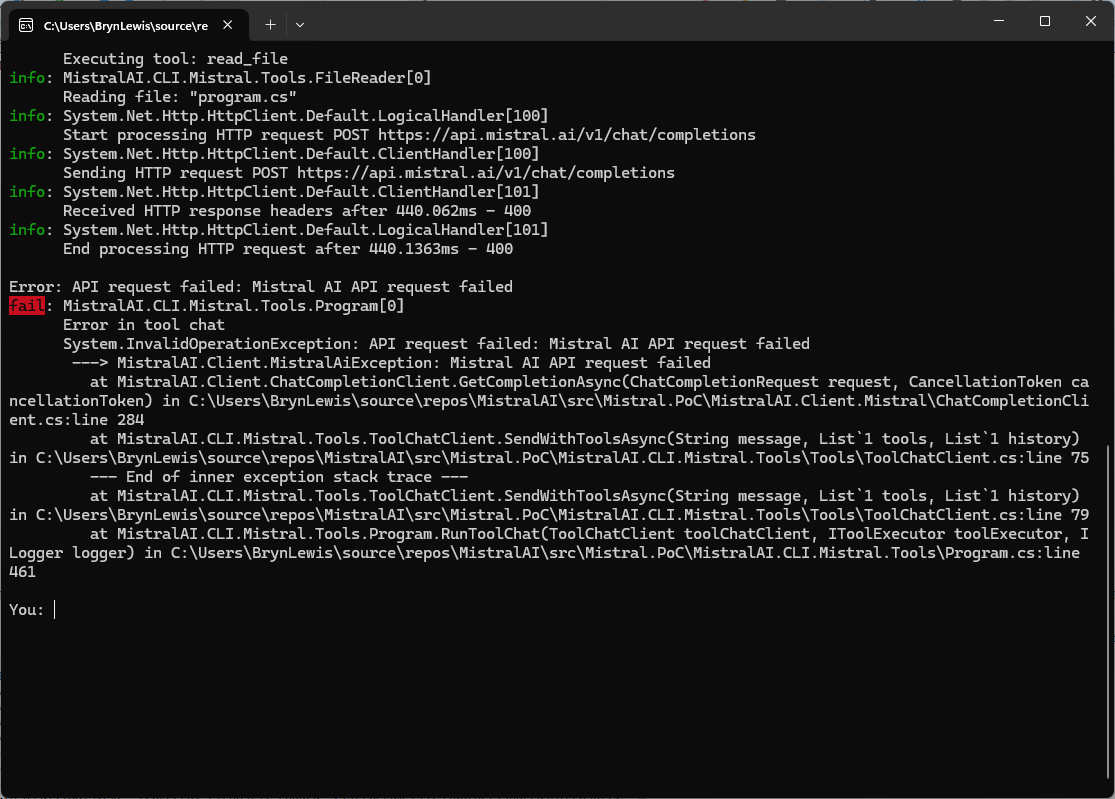
When I tested the Mistral Vibe Code generated client for the Mistral Chat Completion API, everything looked good until I added a couple of tool calls. The very first request exploded with a runtime exception:

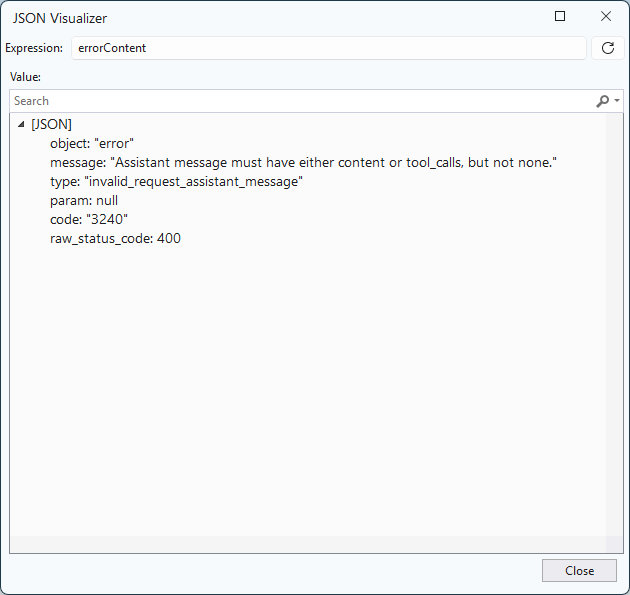
The Mistral Chat Completion API rejected the malformed assistant message: “Assistant message must have either content or tool_calls, but not none” This was the first clue that the polymorphic message model wasn’t being serialised correctly.

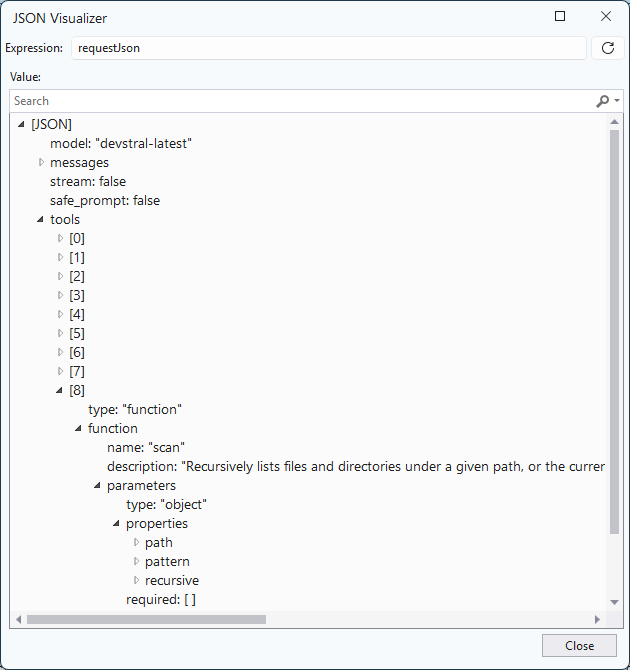
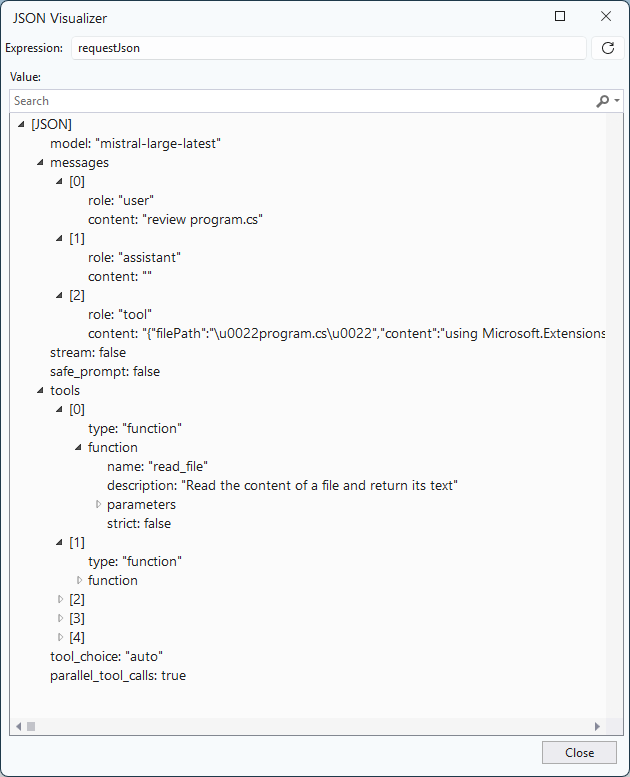
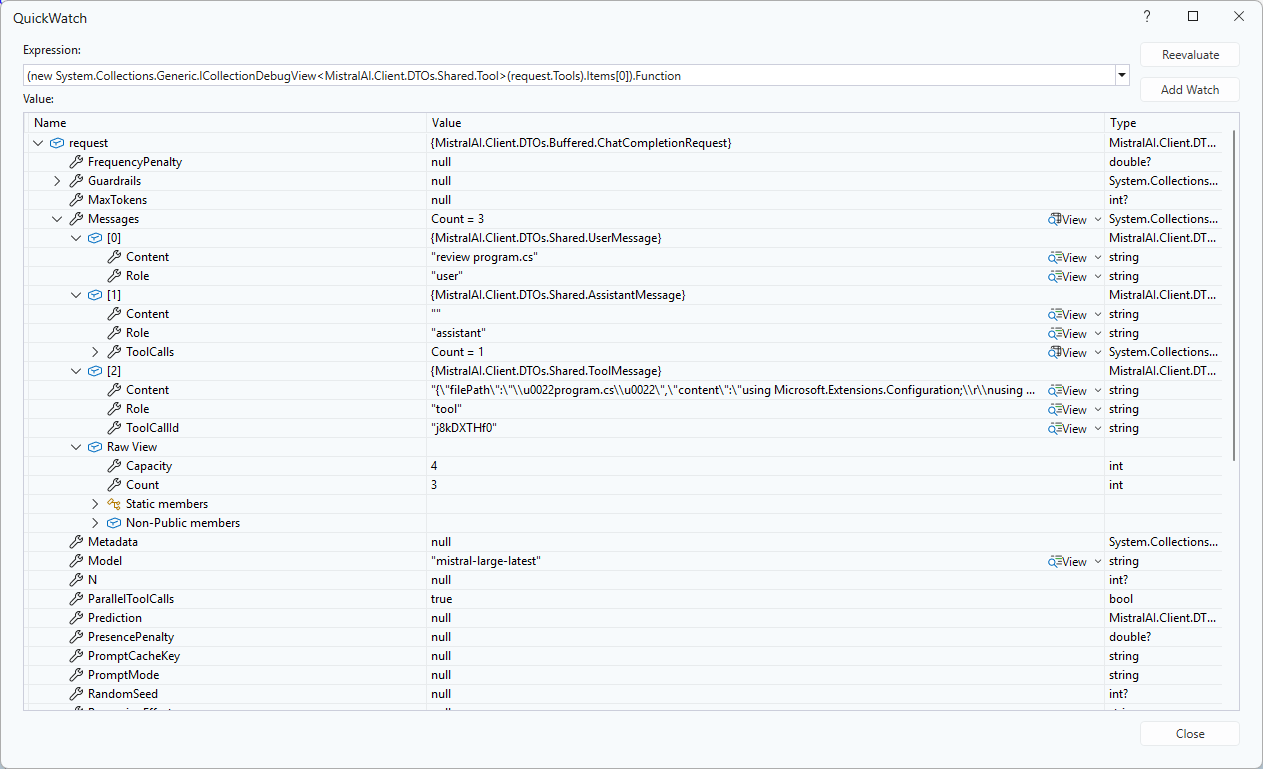
Inspecting the raw JSON request inside Visual Studio’s JSON Visualizer. The error object clearly showed the invalid assistant message structure generated by the client.

After digging through the JSON returned by Mistral and inspecting the request object in Visual Studio, I figured out that System.Text.Json wasn’t serializing the polymorphic MessageBase hierarchy correctly.

namespace MistralAI.Client.DTOs.Shared
{
   /// <summary>
   /// Represents a message in a chat conversation.
   /// </summary>
   [JsonPolymorphic(TypeDiscriminatorPropertyName = "role")]
   [JsonDerivedType(typeof(SystemMessage), "system")]
   [JsonDerivedType(typeof(UserMessage), "user")]
   [JsonDerivedType(typeof(AssistantMessage), "assistant")]
   [JsonDerivedType(typeof(ToolMessage), "tool")]
   public abstract class MessageBase
    {
        /// <summary>
        /// The role of the message author.
        /// </summary>
        [JsonPropertyName("role")]
        public string Role { get; set; } = string.Empty;

        /// <summary>
        /// The content of the message.
        /// </summary>
        [JsonPropertyName("content")]
        public string? Content { get; set; }
    }

    /// <summary>
    /// A message from the system.
    /// </summary>
    public class SystemMessage : MessageBase
    {
        public SystemMessage() => Role = "system";
    }

    /// <summary>
    /// A message from the user.
    /// </summary>
    public class UserMessage : MessageBase
    {
        public UserMessage() => Role = "user";
    }

    /// <summary>
    /// A message from the assistant.
    /// </summary>
    public class AssistantMessage : MessageBase
    {
        public AssistantMessage() => Role = "assistant";

        /// <summary>
        /// Tool calls made by the assistant.
        /// </summary>
        [JsonPropertyName("tool_calls")]
        public List<ToolCall>? ToolCalls { get; set; }
    }

The fix was to annotate the base class with JsonPolymorphic and JsonDerivedType attributes so the serialiser could select the correct concrete type based on the role field.

Ironically both Claude Code and Github Copilot had the serialisation attributes correct.