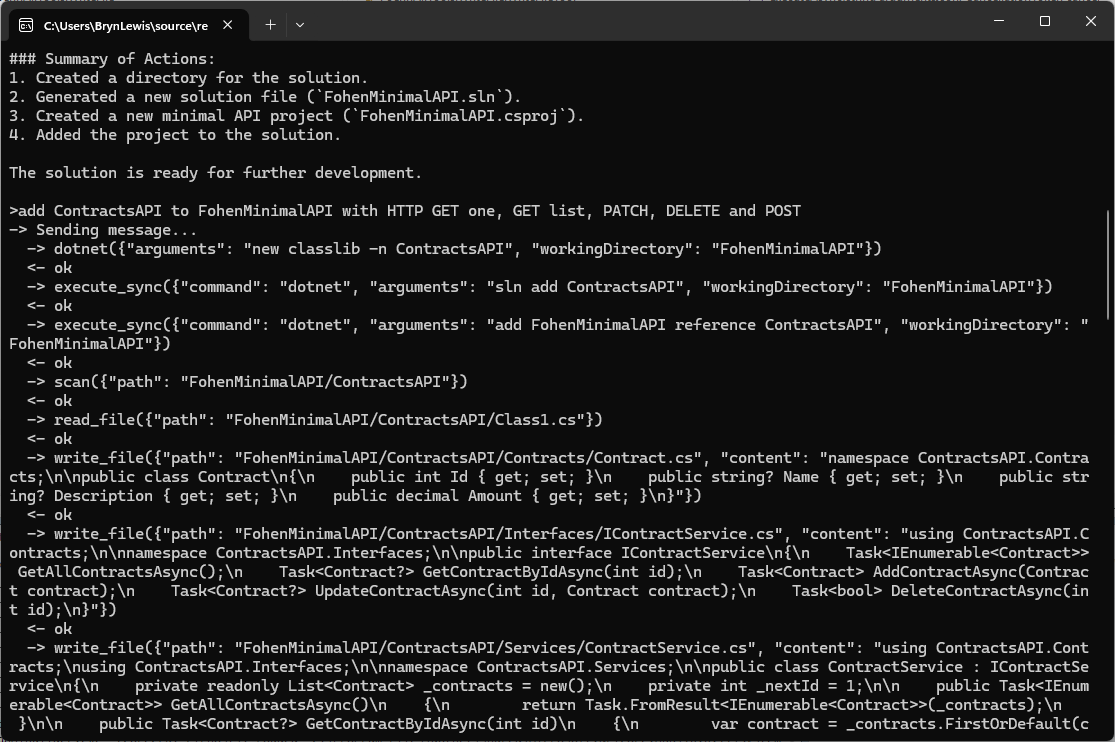
The first FoehnAIBuilder tools had to be a scan and file read tools so the LLM could understand the structure and functionality of a project. Then the ability to write a text file was next so it could generate application files.
// Copyright (c) August 2026, devMobile Software
//
using FoehnAIBuilder.Abstractions;

namespace FoehnAI.Tools.WriteFile;

/// <summary>
/// Writes text content to a file, creating the file (and any missing parent
/// directories) if it doesn't already exist.
/// </summary>
public sealed class WriteFileTool : ITool
{
    private readonly ILogger<WriteFileTool> _logger;

    public WriteFileTool(ILogger<WriteFileTool> logger)
    {
        _logger = logger;
    }

    public string Name => "write_file";

    public string Description =>
        "Writes text content to a file at the given path, creating the file (and any missing " +
        "parent directories) if it doesn't already exist.";

    public string Command => """
        {
          "type": "object",
          "properties": {
            "path": { "type": "string", "description": "Path to the file to write." },
            "content": { "type": "string", "description": "Text content to write to the file." },
            "overwrite": { "type": "boolean", "description": "Whether to overwrite the file if it already exists. Defaults to true." }
          },
          "required": ["path", "content"]
        }
        """;

    public ToolRiskLevel RiskLevel => ToolRiskLevel.Write;

    public async Task<ToolExecutionResult> ExecuteAsync(string argumentsJson, CancellationToken cancellationToken = default)
    {
        if (!ToolArguments.TryParse(argumentsJson, WriteFileJsonContext.Default.WriteFileArguments, out var args, out var jsonError))
        {
            _logger.LogWarning("Failed to parse write_file arguments: {Arguments} ({Error})", argumentsJson, jsonError);
            return ToolExecutionResult.Fail(jsonError!);
        }

        var path = args.Path;
        var content = args.Content;
        var overwrite = args.Overwrite ?? true;

        if (!ToolPath.TryResolve(path, out var fullPath, out var pathError))
            return ToolExecutionResult.Fail(pathError!);

        if (!overwrite && File.Exists(fullPath))
            return ToolExecutionResult.Fail($"File already exists and overwrite is false: {path}");

        _logger.LogInformation("Writing {Length} characters to {Path}", content.Length, path);

        try
        {
            var directory = Path.GetDirectoryName(fullPath);
            if (!string.IsNullOrEmpty(directory))
                Directory.CreateDirectory(directory);

            await File.WriteAllTextAsync(fullPath, content, cancellationToken);
            return ToolExecutionResult.Ok($"Wrote {content.Length} characters to \"{path}\".");
        }
        catch (Exception ex) when (ex is UnauthorizedAccessException or IOException)
        {
            _logger.LogError(ex, "Error writing file {Path}", path);
            return ToolExecutionResult.Fail($"Error writing \"{path}\": {ex.Message}");
        }
    }
}
I hadn’t noticed the LLM checking to see whether the class1.cs file existed before. I’m also considering creating an another ToolRiskLevel “Trusted” for tools like dotnet.
Again, the markdown response for the review was huge
Review: WriteFileTool.cs
Clean, small, focused implementation. Same shape as the earlier version — most of my prior comments still apply. Highlights below, with a couple of new items.
Notable changes since last review
Nameis now"write_file"(was"file.write"). Fine — but make sure it matches the naming convention used by sibling tools (files.search,read_file, etc.). Pick one: dot-namespaced (files.write) or snake_case (write_file) and apply everywhere.
Correctness / robustness
1. TOCTOU race on the overwrite check
if (!overwrite && File.Exists(fullPath)) ...
await File.WriteAllTextAsync(fullPath, content, cancellationToken);
Another process could create the file between check and write. Use FileMode.CreateNew for the strict guarantee:
var mode = overwrite ? FileMode.Create : FileMode.CreateNew;
await using var fs = new FileStream(fullPath, mode, FileAccess.Write, FileShare.None,
    bufferSize: 4096, FileOptions.Asynchronous | FileOptions.SequentialScan);
await using var sw = new StreamWriter(fs); // UTF-8 no BOM
await sw.WriteAsync(content.AsMemory(), cancellationToken);
Then catch IOException when the file already exists to return the friendly message.
2. Exception filter still too narrow
Catches only UnauthorizedAccessException | IOException. Also possible:
NotSupportedException(invalid path characters / colon)SecurityExceptionArgumentExceptionfromPath.GetDirectoryNameon malformed input
Add them, or ensure ToolPath.TryResolve guarantees they can’t occur.
3. File.WriteAllTextAsync is truly async only with the right stream options
The overload you use internally opens a FileStream without FileOptions.Asynchronous, so the write happens on a thread-pool thread doing sync I/O. If you build the FileStream yourself (as in #1), pass FileOptions.Asynchronous for real async I/O.
Schema
4. Command doesn’t declare defaults or forbid extras
Same finding as SearchFilesTool:
{
  "type": "object",
  "additionalProperties": false,
  "properties": {
    "path":      { "type": "string",  "minLength": 1, "description": "Path to the file to write." },
    "content":   { "type": "string",  "description": "Text content to write to the file." },
    "overwrite": { "type": "boolean", "default": true, "description": "Whether to overwrite the file if it already exists." }
  },
  "required": ["path", "content"]
}
default: true matches your args.Overwrite ?? true fallback and stops the LLM from guessing.
Consistency with SearchFilesTool
5. ToolPath.TryResolve signature differs
Here you call:
ToolPath.TryResolve(path, out var fullPath, out var pathError)
SearchFilesTool calls the 4-arg overload with an explicit sandboxRoot:
ToolPath.TryResolve(sandboxRoot, path, out var fullPath, out var pathError)
If both resolve against Directory.GetCurrentDirectory(), no functional difference — but the inconsistency is a code-review smell. Prefer the explicit-sandbox overload everywhere so escape-from-sandbox behavior is provable per tool.
Observability / safety
6. Logging argumentsJson on parse failure could leak content
logger.LogWarning("Failed to parse write_file arguments: {Arguments} ({Error})", argumentsJson, jsonError);
content may contain secrets/PII. Log only length + jsonError, or redact.
7. content.Length = UTF-16 chars, not bytes
The success message says "Wrote {N} characters". Accurate but not a byte count. If callers expect bytes, use Encoding.UTF8.GetByteCount(content).
8. Cancellation before sync work
Directory.CreateDirectory is synchronous and not cancellable. Add:
cancellationToken.ThrowIfCancellationRequested();
just before it — cheap fast-fail.
Style nits
- Mixed indentation: primary constructor line uses 3-space indent (
public string Name), the rest 4 spaces. Run a format pass. - Consider making
Descriptionand the schemastatic readonlyfields instead of expression-bodied properties allocating the same strings per call (micro-optimization, only matters ifCommandis read on every LLM request).
Suggested consolidated write block
try
{
    cancellationToken.ThrowIfCancellationRequested();

    var directory = Path.GetDirectoryName(fullPath);
    if (!string.IsNullOrEmpty(directory))
        Directory.CreateDirectory(directory);

    var mode = overwrite ? FileMode.Create : FileMode.CreateNew;
    await using (var fs = new FileStream(
        fullPath, mode, FileAccess.Write, FileShare.None,
        bufferSize: 4096, FileOptions.Asynchronous))
    await using (var sw = new StreamWriter(fs)) // UTF-8 no BOM
    {
        await sw.WriteAsync(content.AsMemory(), cancellationToken);
    }

    return ToolExecutionResult.Ok($"Wrote {content.Length} characters to \"{path}\".");
}
catch (IOException) when (!overwrite && File.Exists(fullPath))
{
    return ToolExecutionResult.Fail($"File already exists and overwrite is false: {path}");
}
catch (Exception ex) when (ex is UnauthorizedAccessException
                              or IOException
                              or NotSupportedException
                              or System.Security.SecurityException)
{
    logger.LogError(ex, "Error writing file {Path}", path);
    return ToolExecutionResult.Fail($"Error writing \"{path}\": {ex.Message}");
}
Priority order
- Schema:
additionalProperties:false+default:true— tiny change, prevents LLM confusion. FileMode.CreateNewfor overwrite=false — closes real race condition.- Broaden exception filter —
NotSupportedException,SecurityException. - Real async I/O via explicit
FileStream— only matters for large writes. - Consistent
ToolPath.TryResolvesignature across tools.
Want me to produce the fully rewritten file?
The review was ok for throw away PoC so the only change I made was modifying the class to use a primary constructor. In a future version I’m considering loading the commandText from a file so it can be “tweaked” without requiring recompilation.

