.NET nanoFramework BME680 Library Debugging Part 2

Reading the RAK1906 WisBlock Environment Sensor/BME680 GasResistance was failing randomly so I decided to dig a bit deeper. I checked the termination resistors, made sure the sensor was firmly seated on the RAK5005, and tried another Inter-Integrated Circuit(I²C) device on the same physical port.

I then used Visual Studio 2022 Debugger to “single step” further into the BME680 code and the first thing that looked a bit odd was the TryReadTemperatureCore, TryReadPressureCore, TryReadHumidityCore and TryReadGasResistanceCore return values were ignored.

/// <summary>
/// Performs a synchronous reading.
/// </summary>
/// <returns><see cref="Bme680ReadResult"/></returns>
public Bme680ReadResult Read()
{
   SetPowerMode(Bme680PowerMode.Forced);
   Thread.Sleep((int)GetMeasurementDuration(HeaterProfile).Milliseconds);

    TryReadTemperatureCore(out Temperature temperature);
    TryReadPressureCore(out Pressure pressure, skipTempFineRead: true);
    TryReadHumidityCore(out RelativeHumidity humidity, skipTempFineRead: true);
    TryReadGasResistanceCore(out ElectricResistance gasResistance);

    return new Bme680ReadResult(temperature, pressure, humidity, gasResistance);
}

I then single stepped into the TryReadTemperatureCore which was returning a boolean indicating whether the read was success.

private bool TryReadTemperatureCore(out Temperature temperature)
{
    if (TemperatureSampling == Sampling.Skipped)
    {
        temperature = default;
        return false;
    }

    var temp = (int)Read24BitsFromRegister((byte)Bme680Register.TEMPDATA, Endianness.BigEndian);

    temperature = CompensateTemperature(temp >> 4);
    return true;
}

This library was based on the dotnet/iot Bmxx80 code, it looked similar, but I missed an important detail lots more ?’s…

Console.WriteLine("Hello BME680!");

// The I2C bus ID on the Raspberry Pi 3.
const int busId = 1;
// set this to the current sea level pressure in the area for correct altitude readings
Pressure defaultSeaLevelPressure = WeatherHelper.MeanSeaLevel;

I2cConnectionSettings i2cSettings = new(busId, Bme680.DefaultI2cAddress);
I2cDevice i2cDevice = I2cDevice.Create(i2cSettings);

using Bme680 bme680 = new Bme680(i2cDevice, Temperature.FromDegreesCelsius(20.0));

while (true)
{
    // reset will change settings back to default
    bme680.Reset();

    // 10 consecutive measurement with default settings
    for (var i = 0; i < 10; i++)
    {
        // Perform a synchronous measurement
        var readResult = bme680.Read();

        // Print out the measured data
        Console.WriteLine($"Gas resistance: {readResult.GasResistance?.Ohms:0.##}Ohm");
        Console.WriteLine($"Temperature: {readResult.Temperature?.DegreesCelsius:0.#}\u00B0C");
        Console.WriteLine($"Pressure: {readResult.Pressure?.Hectopascals:0.##}hPa");
        Console.WriteLine($"Relative humidity: {readResult.Humidity?.Percent:0.#}%");

        if (readResult.Temperature.HasValue && readResult.Pressure.HasValue)
        {
            var altValue = WeatherHelper.CalculateAltitude(readResult.Pressure.Value, defaultSeaLevelPressure, readResult.Temperature.Value);
            Console.WriteLine($"Altitude: {altValue.Meters:0.##}m");
        }

        if (readResult.Temperature.HasValue && readResult.Humidity.HasValue)
        {
            // WeatherHelper supports more calculations, such as saturated vapor pressure, actual vapor pressure and absolute humidity.
            Console.WriteLine($"Heat index: {WeatherHelper.CalculateHeatIndex(readResult.Temperature.Value, readResult.Humidity.Value).DegreesCelsius:0.#}\u00B0C");
            Console.WriteLine($"Dew point: {WeatherHelper.CalculateDewPoint(readResult.Temperature.Value, readResult.Humidity.Value).DegreesCelsius:0.#}\u00B0C");
        }

        // when measuring the gas resistance on each cycle it is important to wait a certain interval
        // because a heating plate is activated which will heat up the sensor without sleep, this can
        // falsify all readings coming from the sensor
        Thread.Sleep(1000);
    }
    ...
}

The Bme680 Read() method checked the TryReadTemperatureCore, TryReadPressureCore, TryReadHumidityCore & TryReadGasResistanceCore return values.

/// <summary>
/// Performs a synchronous reading.
/// </summary>
/// <returns><see cref="Bme680ReadResult"/></returns>
public Bme680ReadResult Read()
{
    SetPowerMode(Bme680PowerMode.Forced);
    Thread.Sleep((int)GetMeasurementDuration(HeaterProfile).Milliseconds);

    var tempSuccess = TryReadTemperatureCore(out var temperature);
    var pressSuccess = TryReadPressureCore(out var pressure, skipTempFineRead: true);
    var humiditySuccess = TryReadHumidityCore(out var humidity, skipTempFineRead: true);
    var gasSuccess = TryReadGasResistanceCore(out var gasResistance);

    return new Bme680ReadResult(tempSuccess ? temperature : null, pressSuccess ? pressure : null, humiditySuccess ? humidity : null, gasSuccess ? gasResistance : null);
}

The dotnet/iot Bmxx80 library uses Nullable reference types which are not supported by the nanoFramework(Sept 2022), and this was overlooked when the library was ported.

I have created a Github issue.

.NET nanoFramework BME680 Library Debugging Part 1

I was intending to use a RAK1906 WisBlock Environment Sensor/BME680 for my nanoFramework RAK11200 Azure IoT Hub HTTP basic project, but the test application kept failing.

RAK1120+RAK5005+RAK106 Test setup

My test setup was a RAKwireless RAK11200 WisBlock WiFi Module, RAK5005 WisBlock Base Board and a RAK1906 WisBlock Environmental Sensor. I used the RAK1906 Sensor because it has nanoFramework.IoTDevice library support.

Visual Studio 2022 Output Window Output window when application failed

When I connected to the device with Tera Term it confirmed that the device was in a “kernel panic” loop.

nanoFramework Kernel Panic loop captured with Tera Term

Before I could debug the BME680 sample I had to get the Bmxx80 & Bmxx80.sample projects to compile (update NuGet packages and remove NerdBank.GitVersioning references).

BMXX80 Solution from nanoFramework.IoT.Device

I then used the Visual Studio 2022 Debugger to “single step” into the library code

/// <summary>
/// Sets the power mode to the given mode
/// </summary>
/// <param name="powerMode">The <see cref="Bme680PowerMode"/> to set.</param>
/// <exception cref="ArgumentOutOfRangeException">Thrown when the power mode does not match a defined mode in <see cref="Bme680PowerMode"/>.</exception>
[Property("PowerMode")]
public void SetPowerMode(Bme680PowerMode powerMode)
{
    //if (!powerMode.Equals(Bme680PowerMode.Forced) &&
    //    !powerMode.Equals(Bme680PowerMode.Sleep))
    //{
    //   throw new ArgumentOutOfRangeException();
    //}

    var status = Read8BitsFromRegister((byte)Bme680Register.CTRL_MEAS);
    status = (byte)((status & (byte)~Bme680Mask.PWR_MODE) | (byte)powerMode);

    SpanByte command = new[]
    {
        (byte)Bme680Register.CTRL_MEAS, status
    };
    _i2cDevice.Write(command);
}

The first problem was the two powerMode.Equals statements used to validate the powerMode parameter around line 287 in Bme680.cs so I commented them out.

Exception when getting the “GasResistance” value

On start-up references to readResult.GasResistance.Ohms would regularly fail, so I commented out everywhere it was used.

Exception when getting the “Barometric Pressure” value

Then references to readResult.Pressure.Hectopascals would randomly fail, so I commented out everywhere it was used.

public static void RunSample()
{
    Debug.WriteLine("Hello BME680!");

    //////////////////////////////////////////////////////////////////////
    Configuration.SetPinFunction(Gpio.IO04, DeviceFunction.I2C1_DATA);
    Configuration.SetPinFunction(Gpio.IO05, DeviceFunction.I2C1_CLOCK);

    // The I2C bus ID on the MCU.
    const int busId = 1;
    // set this to the current sea level pressure in the area for correct altitude readings
    Pressure defaultSeaLevelPressure = WeatherHelper.MeanSeaLevel;

    I2cConnectionSettings i2cSettings = new(busId, Bme680.DefaultI2cAddress);
    I2cDevice i2cDevice = I2cDevice.Create(i2cSettings);

    using Bme680 bme680 = new Bme680(i2cDevice, Temperature.FromDegreesCelsius(20.0));

    while (true)
    {
        // reset will change settings back to default
        bme680.Reset();

        // 10 consecutive measurement with default settings
        for (var i = 0; i < 10; i++)
        {
            // Perform a synchronous measurement
            var readResult = bme680.Read();

            // Print out the measured data
            //Debug.WriteLine($"Gas resistance: {readResult.GasResistance.Ohms}Ohm");
            Debug.WriteLine($"Temperature: {readResult.Temperature.DegreesCelsius}\u00B0C");
            //Debug.WriteLine($"Pressure: {readResult.Pressure.Hectopascals}hPa");
            Debug.WriteLine($"Relative humidity: {readResult.Humidity.Percent}%");

            /* 
            if (!readResult.Temperature.Equals(null) && !readResult.Pressure.Equals(null))
            {
                var altValue = WeatherHelper.CalculateAltitude(readResult.Pressure, defaultSeaLevelPressure, readResult.Temperature);
                Debug.WriteLine($"Altitude: {altValue.Meters}m");
            }

            if (!readResult.Temperature.Equals(null) && !readResult.Humidity.Equals(null))
            {
                // WeatherHelper supports more calculations, such as saturated vapor pressure, actual vapor pressure and absolute humidity.
                Debug.WriteLine($"Heat index: {WeatherHelper.CalculateHeatIndex(readResult.Temperature, readResult. Humidity).DegreesCelsius}\u00B0C");
                Debug.WriteLine($"Dew point: {WeatherHelper.CalculateDewPoint(readResult.Temperature, readResult.Humidity).DegreesCelsius}\u00B0C");
            }
            */

            // when measuring the gas resistance on each cycle it is important to wait a certain interval
            // because a heating plate is activated which will heat up the sensor without sleep, this can
            // falsify all readings coming from the sensor
            Thread.Sleep(1000);
        }
...
}
Visual Studio Debugger output displaying temperature and humidity values

After commenting the out all the .Equal, readResult.GasResistance.Ohms and readResult.Pressure.Hectopascals references the application would run for hours displaying only temperature and relative humidity values.

Next step is figuring out why the readResult.GasResistance.Ohms and readResult.Pressure.Hectopascals are failing.

I have created Github issue for the .Equals crash.

.NET nanoFramework RAK11200 – Azure IoT Hub HTTP SAS Tokens

This is the simplest .NET nanoFramework Azure IoT Hub client I could come up with (inspired by this nanoFramework sample).

My test setup was a RAKwireless RAK11200 WisBlock WiFi Module, RAK5005 WisBlock Base Board or RAK19001 WisBlock Dual IO Base Board and RAK1901 WisBlock Temperature and Humidity Sensor

RAK112000+RAK5005-O+RAK1901 Test rig
RAK112000+RAK19001+RAK1901 Test rig

I used a RAK1901 WisBlock Temperature and Humidity Sensor because it has nanoFramework.IoTDevice library support

public class Program
{
    private static TimeSpan SensorUpdatePeriod = new TimeSpan(0, 30, 0);

    private static HttpClient _httpClient;

    public static void Main()
    {
        Debug.WriteLine("devMobile.IoT.RAK.Wisblock.AzureIoHub.RAK1901 starting");

        Configuration.SetPinFunction(Gpio.IO04, DeviceFunction.I2C1_DATA);
        Configuration.SetPinFunction(Gpio.IO05, DeviceFunction.I2C1_CLOCK);

        if (!WifiNetworkHelper.ConnectDhcp(Config.Ssid, Config.Password, requiresDateTime: true))
        {
            if (NetworkHelper.HelperException != null)
            {
                Debug.WriteLine($"WifiNetworkHelper.ConnectDhcp failed {NetworkHelper.HelperException}");
            }

            Thread.Sleep(Timeout.Infinite);
        }

        _httpClient = new HttpClient
        {
            SslProtocols = System.Net.Security.SslProtocols.Tls12,
            HttpsAuthentCert = new X509Certificate(Config.DigiCertBaltimoreCyberTrustRoot),
            BaseAddress = new Uri($"https://{Config.AzureIoTHubHostName}.azure-devices.net/devices/{Config.DeviceID}/messages/events?api-version=2020-03-13"),
        };
        _httpClient.DefaultRequestHeaders.Add("Authorization", Config.SasKey);

        I2cConnectionSettings settings = new(1, Shtc3.DefaultI2cAddress);
        I2cDevice device = I2cDevice.Create(settings);
        Shtc3 shtc3 = new(device);

        while (true)
        {
            if (shtc3.TryGetTemperatureAndHumidity(out var temperature, out var relativeHumidity))
            {
                Debug.WriteLine($"Temperature {temperature.DegreesCelsius:F1}°C  Humidity {relativeHumidity.Value:F0}%");

                string payload = $"{{\"RelativeHumidity\":{relativeHumidity.Value:F0},\"Temperature\":{temperature.DegreesCelsius.ToString("F1")}}}";

                try
                {
                    using (HttpContent content = new StringContent(payload))
                    using (HttpResponseMessage response = _httpClient.Post("", content))
                    {
                        Console.WriteLine($"{DateTime.UtcNow:HH:mm:ss} Response code:{response.StatusCode}");

                        response.EnsureSuccessStatusCode();
                    }
                }
                catch(Exception ex)
                {
                    Debug.WriteLine($"Azure IoT Hub POST failed:{ex.Message}");
                }
            }

            Thread.Sleep(SensorUpdatePeriod);
        }
    }
}

I generated the Azure IoT Hub Shared Access Signature(SAS) Tokens (10800 minutes is 1 week) with Azure IoT Explorer (Trim the SAS key so it starts with SharedAccessSignature sr=….)

Azure IoT Explorer SAS Token Generation

I was using Azure IoT Explorer to monitor the telemetry and found that the initial versions of the application would fail after 6 or 7 hours. After reviewing the code I added a couple of “using” statements which appear to have fixed the problem as the soak test has been running for 12hrs, 24hrs, 36hrs, 48hrs, 96hrs

.NET nanoFramework RAK2305 – I2C SHT3C

The RAKwireless RAK2305 WisBlock WiFi Interface module is also based on an Expressif ESP32 processor which is supported by the .NET nanoFramework. The RAK2305 WisBlock WiFi Interface module plugs into an IO Slot rather than a Core Slot so I wanted to see if Inter-Integrated Circuit(I2C) bus devices would work with it.

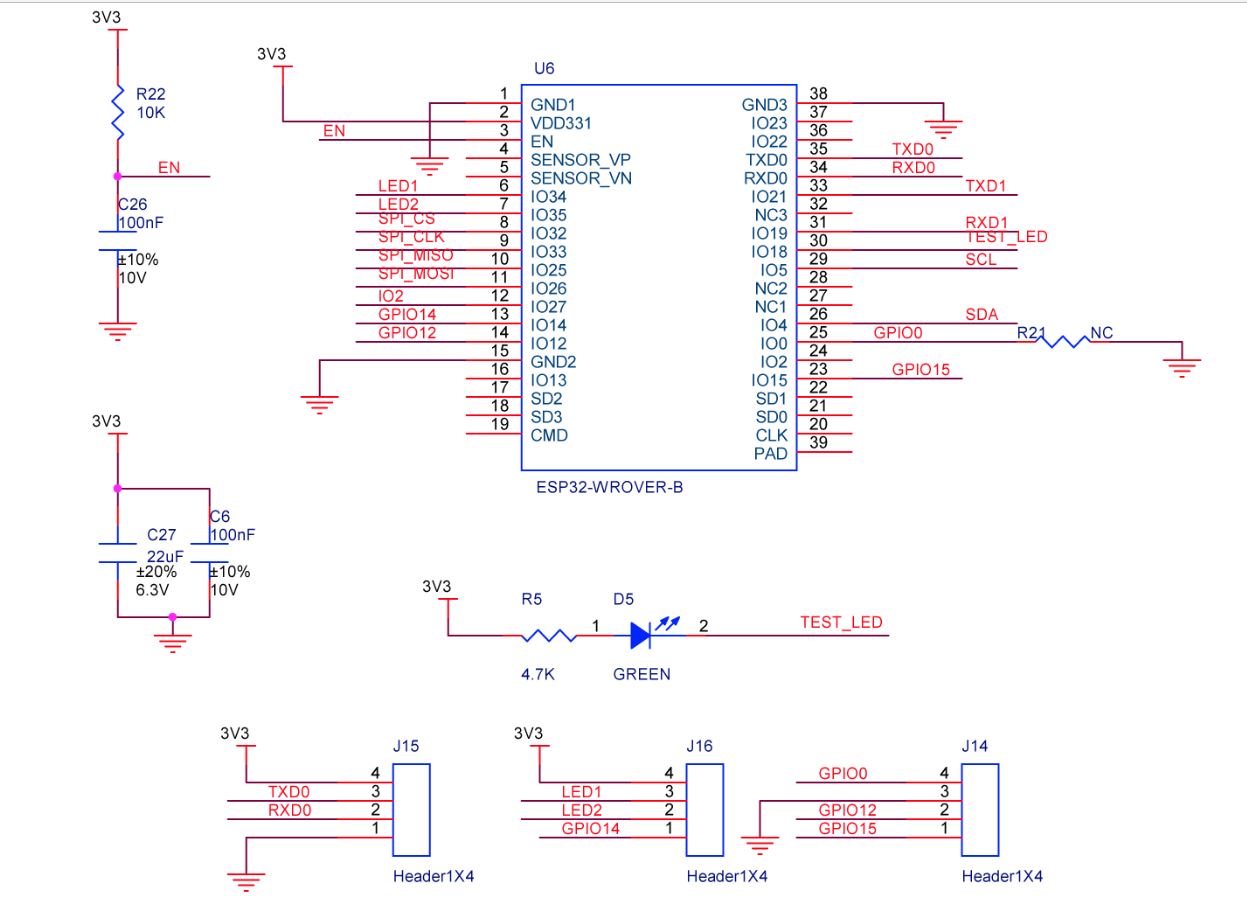
RAL2305 Schematic

The RAK2305 WisBlock WiFi Interface has one I2C port and TXD0/RXD0 are not connected to the base board’s Universal Serial Bus(USB) port.

RAK2305, RAK5005-O and RAK1901 test rig with the FTDI 3V3 pin disconnected

The I2C1 the SDA(serial data) and SCL(serial clock line) have to be mapped to physical pins on the Expressif ESP32 processor using the nanoFramework ESP32 support NuGet. package

                Configuration.SetPinFunction(Gpio.IO04, DeviceFunction.I2C1_DATA);
                Configuration.SetPinFunction(Gpio.IO05, DeviceFunction.I2C1_CLOCK)

The test project uses a RAK1901 WisBlock Temperature and Humidity Sensor(SHTC3) WisBlock Sensor (which has nanoFramework.IoTDevice library support) plugged into a RAK5005 WisBlock Base Board.

//---------------------------------------------------------------------------------
// Copyright (c) September 2022, devMobile Software
//
// Licensed under the Apache License, Version 2.0 (the "License");
// you may not use this file except in compliance with the License.
// You may obtain a copy of the License at
//
//     http://www.apache.org/licenses/LICENSE-2.0
//
// Unless required by applicable law or agreed to in writing, software
// distributed under the License is distributed on an "AS IS" BASIS,
// WITHOUT WARRANTIES OR CONDITIONS OF ANY KIND, either express or implied.
// See the License for the specific language governing permissions and
// limitations under the License.
//
// https://docs.rakwireless.com/Product-Categories/WisBlock/RAK2305
//
// https://docs.rakwireless.com/Product-Categories/WisBlock/RAK11200
//
// https://store.rakwireless.com/products/rak1901-shtc3-temperature-humidity-sensor
//
// https://github.com/nanoframework/nanoFramework.IoT.Device/tree/develop/devices/Shtc3
//
//---------------------------------------------------------------------------------
namespace devMobile.IoT.RAK.Wisblock.RAK1901
{
   using System;
   using System.Diagnostics;
   using System.Device.I2c;
   using System.Threading;

   using nanoFramework.Hardware.Esp32;

   using Iot.Device.Shtc3;

   public class Program
   {
      public static void Main()
      {
         Debug.WriteLine("devMobile.IoT.RAK.Wisblock.RAK11200RAK1901 starting");

         try
         {
            // RAK11200 & RAK2305
            Configuration.SetPinFunction(Gpio.IO04, DeviceFunction.I2C1_DATA);
            Configuration.SetPinFunction(Gpio.IO05, DeviceFunction.I2C1_CLOCK);

            I2cConnectionSettings settings = new(1, Shtc3.DefaultI2cAddress);

            using (I2cDevice device = I2cDevice.Create(settings))
            using (Shtc3 shtc3 = new(device))
            {
               while (true)
               {
                  if (shtc3.TryGetTemperatureAndHumidity(out var temperature, out var relativeHumidity))
                  {
                     Debug.WriteLine($"Temperature {temperature.DegreesCelsius:F1}°C  Humidity {relativeHumidity.Value:F0}%");
                  }

                  Thread.Sleep(10000);
               }
            }
         }
         catch (Exception ex)
         {
            Debug.WriteLine($"SHTC3 initialisation or read failed {ex.Message}");

            Thread.Sleep(Timeout.Infinite);
         }
      }
   }
}
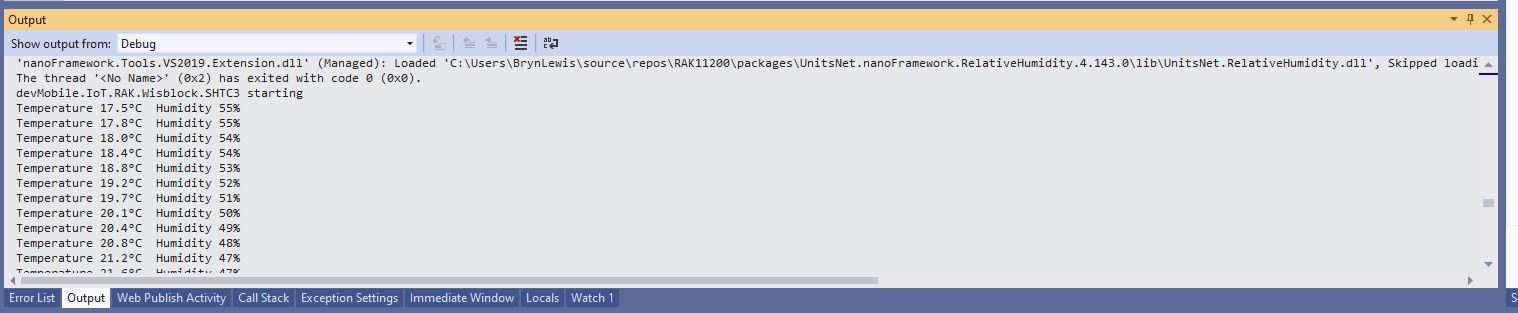
Visual Studio Output window displaying SHT31 temperature & humidity values

I tried to get the RAK2305 WisBlock WiFi Interface going on a RAK19001 WisBlock Dual IO Base Board but the RAK1901 WisBlock Temperature and Humidity Sensor wouldn’t work in any of the six WisBlock sensor ports.

RAK2305, RAK19001 and RAK1903 test rig with the FTDI 3V3 pin disconnected

The header pins I had to soldered onto RAK2305 WisBlock WiFi Interface had to be trimmed to it would fit on the RAK19001 WisBlock Dual IO Base Board.

RAK2305 Clearance issue on RAK19001

One of the RAK19001 WisBlock Dual IO Base Board product features is

“The power supply for the WisBlock modules boards can be controlled by the WisBlock Core modules to minimize power consumption”.

My configuration does not have WisBlock Core module so I think the WisBlock Sensor Module were not powered.

.NET nanoFramework RAK11200 – I2C SHT3C & SHT31

The RAKwireless RAK11200 WisBlock WiFi Module module is based on an Expressif ESP32 processor which is supported by the .NET nanoFramework and I wanted to explore the different ways Inter-Integrated Circuit(I2C) devices could be connected.

The RAK11200 WisBlock WiFi Module has two I2C ports and on the RAK5005 WisBlock Base Board the Wisblock Sensor, and RAK1920 WisBlock Sensor Adapter Module Grove Socket are connected to I2C1.

RAK11200 Schematic

The I2C1 the SDA(serial data) and SCL(serial clock line) have to be mapped to physical pins on the RAK11200 WisBlock WiFi Module using the nanoFramework ESP32 support NuGet. package

                Configuration.SetPinFunction(Gpio.IO04, DeviceFunction.I2C1_DATA);
                Configuration.SetPinFunction(Gpio.IO05, DeviceFunction.I2C1_CLOCK)

The first sample project uses a RAK1901 SHTC3 WisBlock Sensor because it plugs into the RAK5005 WisBlock Base Board.

RAK5005 Baseboard, RAK1901 Sensor and RAK11200 Core WisBlock modules
public static void Main()
{
    Debug.WriteLine("devMobile.IoT.RAK.Wisblock.SHTC3 starting");

    try
    {
        Configuration.SetPinFunction(Gpio.IO04, DeviceFunction.I2C1_DATA);
        Configuration.SetPinFunction(Gpio.IO05, DeviceFunction.I2C1_CLOCK);

        I2cConnectionSettings settings = new(1, Shtc3.DefaultI2cAddress);

        using (I2cDevice device = I2cDevice.Create(settings))
        using (Shtc3 shtc3 = new(device))
        {
            while (true)
            {
                if (shtc3.TryGetTemperatureAndHumidity(out var temperature, out var relativeHumidity))
                {
                    Debug.WriteLine($"Temperature {temperature.DegreesCelsius:F1}°C  Humidity {relativeHumidity.Value:F0}%");
                }

                Thread.Sleep(10000);
            }
        }
    }
    catch (Exception ex)
    {
        Debug.WriteLine($"SHTC3 initialisation or read failed {ex.Message}");

        Thread.Sleep(Timeout.Infinite);
    }
}
Visual Studio Output window displaying SHT3C temperature & humidity values

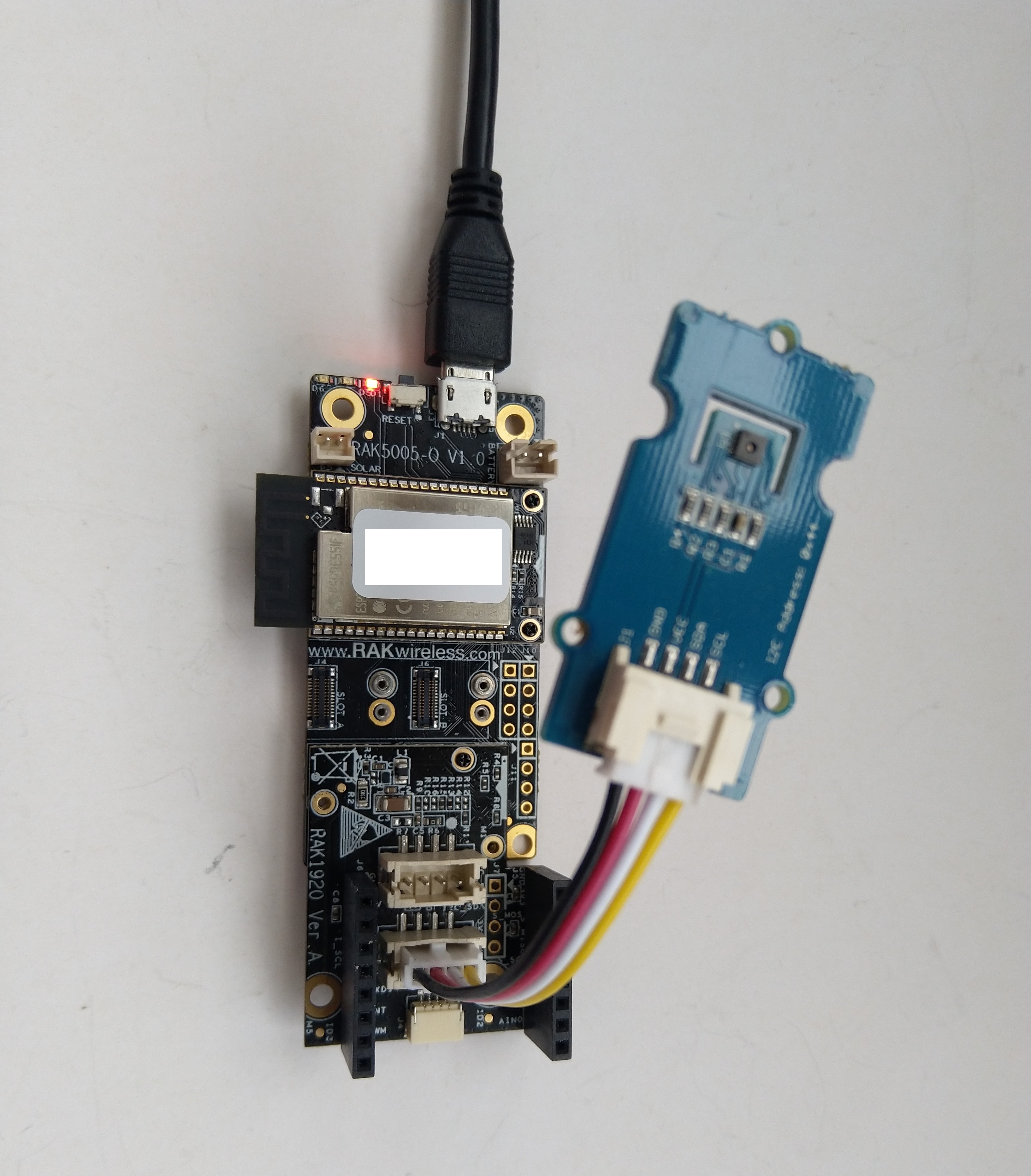
The second sample uses a Seeedstudio Grove – Temperature & Humidity Sensor (SHT31) pluged into a RAK1920 Sensor Adapter for Click, QWIIC and Grove Modules.

RAK5005 Baseboard, RAK1920 Sensor, RAK11200 Core WisBlock modules and Seeedstudio Grove SHT31
public static void Main()
{
    Debug.WriteLine("devMobile.IoT.RAK.Wisblock.SHT31 starting");

    try
    {
        Configuration.SetPinFunction(Gpio.IO04, DeviceFunction.I2C1_DATA);
        Configuration.SetPinFunction(Gpio.IO05, DeviceFunction.I2C1_CLOCK);

        I2cConnectionSettings settings = new(1, (byte)I2cAddress.AddrLow);

        using (I2cDevice device = I2cDevice.Create(settings))
        using (Sht3x sht31 = new(device))
        {

            while (true)
            {
                var temperature = sht31.Temperature;
                var relativeHumidity = sht31.Humidity;

                Debug.WriteLine($"Temperature {temperature.DegreesCelsius:F1}°C  Humidity {relativeHumidity.Value:F0}%");

                Thread.Sleep(10000);
            }
        }
    }
    catch (Exception ex)
    {
        Debug.WriteLine($"SHT31 initialisation or read failed {ex.Message}");

        Thread.Sleep(Timeout.Infinite);
     }
}
Visual Studio Output window displaying SHT31 temperature & humidity values

The SHTC3 and SHT31 sensors were used because they both have nanoFramework.IoTDevice library support.

Sensirion SHT 20 library for .NET Core 5.0

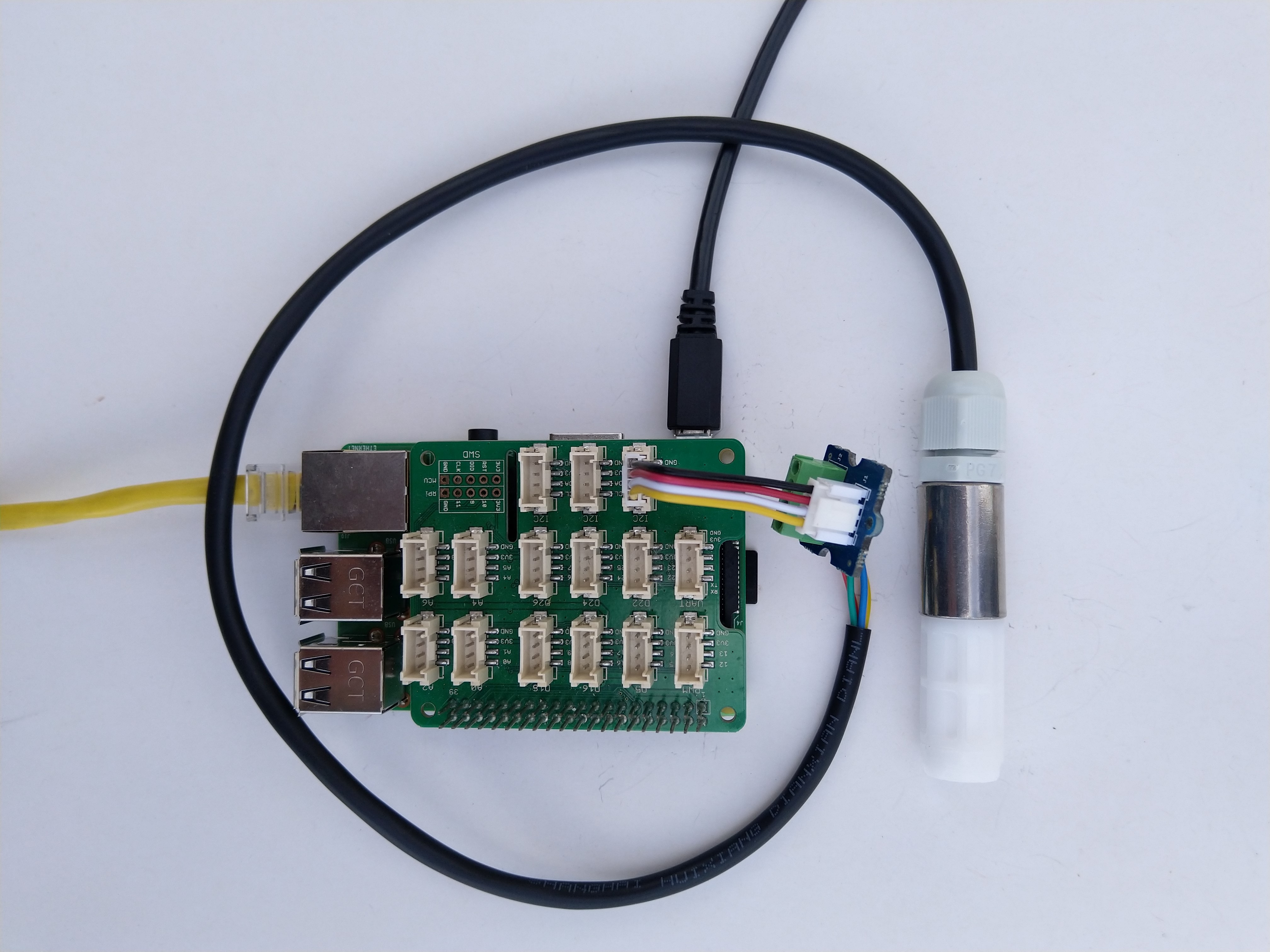
As part of project I needed to connect a Sensirion SHT20 driver to a.NET Core 5 application running on a Raspberry Pi so I wrote this library. For initial testing I used a DF Robot Waterproof SHT20 temperature and humidity sensor, Seeedstudio Gove Base Hat, Grove Screw Terminal, and a Grove – Universal 4 Pin Buckled 5cm Cable.

Sensirion SHT20 connected to Raspberry PI3

I have included sample application in the Github repository to show how to use the library

namespace devMobile.IoT.NetCore.Sensirion
{
	using System;
	using System.Device.I2c;
	using System.Threading;

	class Program
	{
		static void Main(string[] args)
		{
			// bus id on the raspberry pi 3
			const int busId = 1;

			I2cConnectionSettings i2cConnectionSettings = new(busId, Sht20.DefaultI2cAddress);

			using I2cDevice i2cDevice = I2cDevice.Create(i2cConnectionSettings);

			using (Sht20 sht20 = new Sht20(i2cDevice))
			{
				sht20.Reset();

				while (true)
				{
					double temperature = sht20.Temperature();
					double humidity = sht20.Humidity();

#if HEATER_ON_OFF
					sht20.HeaterOn();
					Console.WriteLine($"{DateTime.Now:HH:mm:ss} HeaterOn:{sht20.IsHeaterOn()}");
#endif
					Console.WriteLine($"{DateTime.Now:HH:mm:ss} Temperature:{temperature:F1}°C Humidity:{humidity:F0}% HeaterOn:{sht20.IsHeaterOn()}");
#if HEATER_ON_OFF
					sht20.HeaterOff();
					Console.WriteLine($"{DateTime.Now:HH:mm:ss} HeaterOn:{sht20.IsHeaterOn()}");
#endif

					Thread.Sleep(1000);
				}
			}
		}
	}
}

The Sensiron SHT20 has a heater which is intended to be used for functionality diagnosis – relative humidity drops upon rising temperature. The heater consumes about 5.5mW and provides a temperature increase of about 0.5 – 1.5°C.

Beware when the device is soft reset the heater bit is not cleared.

Grove Base Hat for Raspberry PI with .NET Core 5.0

Over the weekend I ported my Windows 10 IoT Core library for Seeedstudio Grove Base Hat for RPI Zero and Grove Base Hat for Raspberry Pi to .NET Core 5.

RaspberryP and RaspberryPI Zero testrig

I have included sample application to show how to use the library

namespace devMobile.IoT.NetCore.GroveBaseHat
{
	using System;
	using System.Device.I2c;
	using System.Threading;

	class Program
	{
		static void Main(string[] args)
		{
			// bus id on the raspberry pi 3
			const int busId = 1;

			I2cConnectionSettings i2cConnectionSettings = new(busId, AnalogPorts.DefaultI2cAddress);

			using (I2cDevice i2cDevice = I2cDevice.Create(i2cConnectionSettings))
			using (AnalogPorts AnalogPorts = new AnalogPorts(i2cDevice))
			{
				Console.WriteLine($"{DateTime.Now:HH:mm:SS} Version:{AnalogPorts.Version()}");
				Console.WriteLine();

				double powerSupplyVoltage = AnalogPorts.PowerSupplyVoltage();
				Console.WriteLine($"{DateTime.Now:HH:mm:SS} Power Supply Voltage:{powerSupplyVoltage:F2}v");

				while (true)
				{
					double value = AnalogPorts.Read(AnalogPorts.AnalogPort.A0);
					double rawValue = AnalogPorts.ReadRaw(AnalogPorts.AnalogPort.A0);
					double voltageValue = AnalogPorts.ReadVoltage(AnalogPorts.AnalogPort.A0);

					Console.WriteLine($"{DateTime.Now:HH:mm:SS} Value:{value:F2} Raw:{rawValue:F2} Voltage:{voltageValue:F2}v");
					Console.WriteLine();

					Thread.Sleep(1000);
				}
			}
		}
	}
}

The GROVE_BASE_HAT_RPI and GROVE_BASE_HAT_RPI_ZERO are used to specify the number of available analog ports.

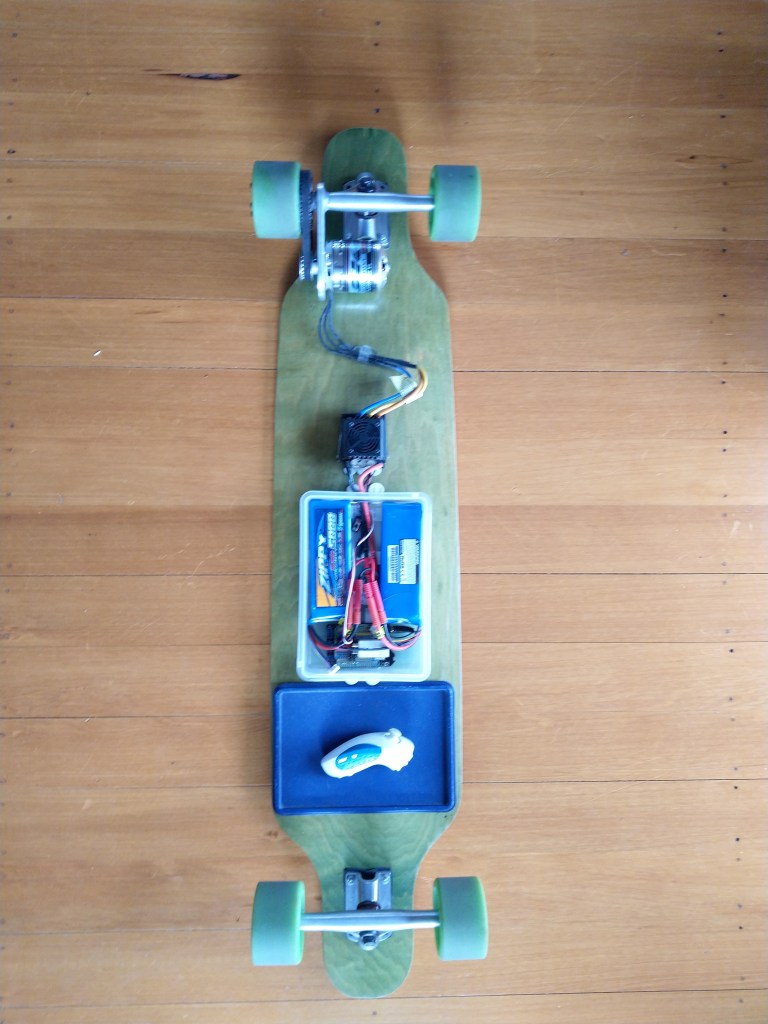
netNF Electric Longboard Part 4

The Rideable Prototype

After some experimentation I gave up on the radio control(RC) servo library for controlling my Longboard’s Electronic Speed Control(ESC).

My new longboard controller uses the following parts

  • Netduino 3 Wifi
  • Generic wireless wii nuchuk
  • generic Arduino protoshield

I reused the initial protoshield and only had to shift the PWM output to the ESC from pin 8 to pin 7.

FEZ Panda III Protoshield for longboard with RC Servo for testing
Protoshield for longboard RC Servo test
public class Program
{
   private const double PulseFrequency = 50.0;
   private const double PulseDurationMinimum = 0.05; // 1000uSec
   private const double PulseDurationMaximum = 0.1; // 2000uSec
   private const double WiiNunchukYMinimum = 0.0;
   private const double WiiNunchukYMaximum = 255.0;
   private const int ThrottleUpdatePeriod = 100;

   public static void Main()
   {
      Debug.WriteLine("devMobile.Longboard starting");
      Debug.WriteLine($"I2C:{I2cDevice.GetDeviceSelector()}");
      Debug.WriteLine($"PWM:{PwmController.GetDeviceSelector()}");

      try
      {
         Debug.WriteLine("LED Starting");
         GpioPin led = GpioController.GetDefault().OpenPin(PinNumber('A', 10));
         led.SetDriveMode(GpioPinDriveMode.Output);
         led.Write(GpioPinValue.Low);

         Debug.WriteLine("LED Starting");
         WiiNunchuk nunchuk = new WiiNunchuk("I2C1");

         Debug.WriteLine("ESC Starting");
         PwmController pwm = PwmController.FromId("TIM5");
         PwmPin pwmPin = pwm.OpenPin(PinNumber('A', 1));
         pwmPin.Controller.SetDesiredFrequency(PulseFrequency);
         pwmPin.Start();

         Debug.WriteLine("Thread.Sleep Starting");
         Thread.Sleep(2000);

         Debug.WriteLine("Mainloop Starting");
         while (true)
         {
            nunchuk.Read();

            double duration = Map(nunchuk.AnalogStickY, WiiNunchukYMinimum, WiiNunchukYMaximum, PulseDurationMinimum, PulseDurationMaximum);
            Debug.WriteLine($"Value:{nunchuk.AnalogStickY} Duration:{duration:F3}");

            pwmPin.SetActiveDutyCyclePercentage(duration);
            led.Toggle();
            Thread.Sleep(ThrottleUpdatePeriod);
         }
      }
      catch (Exception ex)
      {
         Debug.WriteLine(ex.Message);
      }
   }

   private static int PinNumber(char port, byte pin)
   {
      if (port < 'A' || port > 'J')
         throw new ArgumentException();

      return ((port - 'A') * 16) + pin;
   }

   private static double Map(double x, double inputMinimum, double inputMaximum, double outputMinimum, double outputMaximum)
   {
      return (x - inputMinimum) * (outputMaximum - outputMinimum) / (inputMaximum - inputMinimum) + outputMinimum;
   }
}

The nanoFramework code polls the wii nunchuk for the joystick position every 100mSec and then updates the PWM duty cycle.

By convention the ESSC PWM frequency is 50Hz (a pulse ever 20mSec) and the duration of the pulse is 1000uSec(minimum throttle) to 2000uSec(maximum throttle), note the change of units.

After converting to the same units there is a pulse every 20mSec and its duration is 1mSec too 2mSec. Then converting the durations to the active duty cycle percentage (for the PWM SetActiveDutyCyclePercentage) the duration of the pulse is 5% to 10%.

I need to re-calibrate the ESC for these durations and ensure that reverse is disabled. Then tinker with the brake (braking percent & percent drag brake) and acceleration(initial acceleration low, medium, high, very high) configurations of my ESC to make the longboard easier to ride.

Next I will look at configurable throttle maps (to make it easier for new and different weight users), then using one of the wii-nunchuk buttons for cruise control (keeping the throttle steady when riding is difficult) and how the software reacts when the connection with nunchuk fails

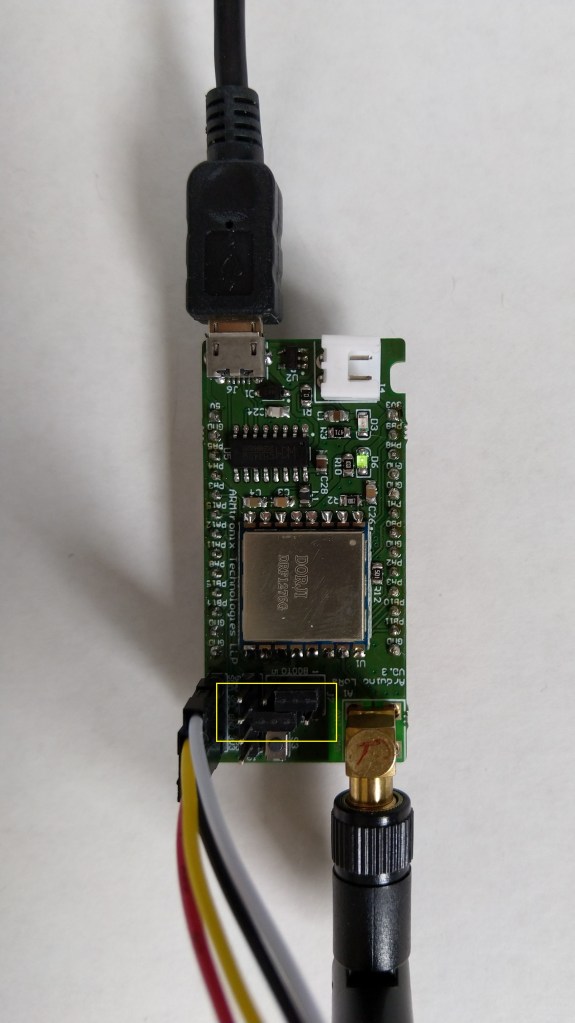
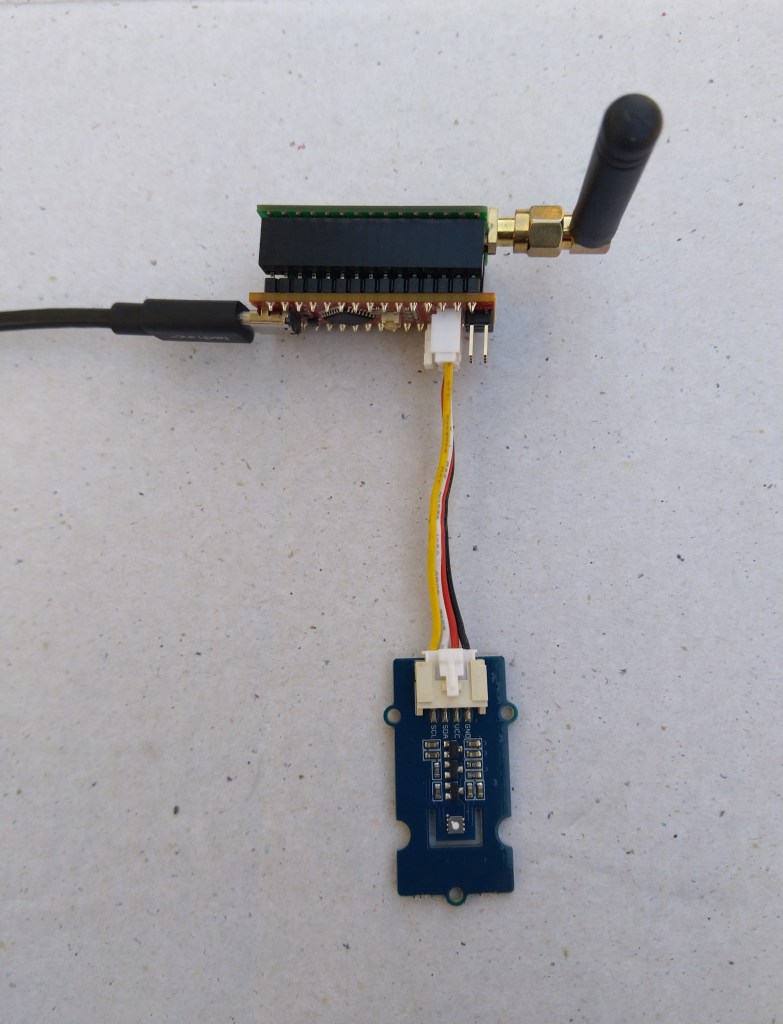
Armtronix IA005 SX1276 loRa node

A month ago I ordered a pair of IA005: SX1276 Lora node STM32F103 devices from the Armtronix shop on Tindie for evaluation. At USD18 each these devices were competitively priced and I was interested in trialling another maple like device.

Bill of materials (Prices as at December 2019)

  • IA005 SX1276 loRa node USD36 (USD18 each)
  • Grove – Temperature&Humidity Sensor USD11.5
  • Grove – 4 pin Female Jumper to Grove 4 pin Conversion Cable USD3.90
Armtronix device with Seeedstudio temperature & humidity sensor

I used a modified version of my Arduino client code which worked after I got the pins sorted and the female jumper sockets in the right order.

/*
  Copyright ® 2019 December devMobile Software, All Rights Reserved

  THIS CODE AND INFORMATION IS PROVIDED "AS IS" WITHOUT WARRANTY OF ANY
  KIND, EITHER EXPRESSED OR IMPLIED, INCLUDING BUT NOT LIMITED TO THE
  IMPLIED WARRANTIES OF MERCHANTABILITY AND/OR FITNESS FOR A PARTICULAR
  PURPOSE.

  You can do what you want with this code, acknowledgment would be nice.

  http://www.devmobile.co.nz

*/
#include <stdlib.h>
#include <LoRa.h>
#include <TH02_dev.h>

//#define DEBUG
//#define DEBUG_TELEMETRY
//#define DEBUG_LORA

// LoRa field gateway configuration (these settings must match your field gateway)
const char FieldGatewayAddress[] = {"LoRaIoT1"};
const char DeviceAddress[] = {"ArmTronix01"};
const float FieldGatewayFrequency =  915000000.0;
const byte FieldGatewaySyncWord = 0x12 ;

// Payload configuration
const int ChipSelectPin = PA4;
const int InterruptPin = PA11;
const int ResetPin = PC13;

// LoRa radio payload configuration
const byte SensorIdValueSeperator = ' ' ;
const byte SensorReadingSeperator = ',' ;
const int LoopSleepDelaySeconds = 30 ;

const byte PayloadSizeMaximum = 64 ;
byte payload[PayloadSizeMaximum];
byte payloadLength = 0 ;


void setup()
{
  Serial.begin(9600);
#ifdef DEBUG
  while (!Serial);
#endif
  Serial.println("Setup called");

  Serial.println("LoRa setup start");
  
  // override the default chip select and reset pins
  LoRa.setPins(ChipSelectPin, ResetPin, InterruptPin); 
  if (!LoRa.begin(FieldGatewayFrequency))
  {
    Serial.println("LoRa begin failed");
    while (true); // Drop into endless loop requiring restart
  }

  // Need to do this so field gateways pays attention to messsages from this device
  LoRa.enableCrc();
  LoRa.setSyncWord(FieldGatewaySyncWord);

#ifdef DEBUG_LORA
  LoRa.dumpRegisters(Serial);
#endif
  Serial.println("LoRa Setup done.");

  // Configure the Seeedstudio TH02 temperature & humidity sensor
  Serial.println("TH02 setup start");
  TH02.begin();
  delay(100);
  Serial.println("TH02 setup done");

  PayloadHeader((byte*)FieldGatewayAddress,strlen(FieldGatewayAddress), (byte*)DeviceAddress, strlen(DeviceAddress));

  Serial.println("Setup done");
  Serial.println();
}


void loop()
{
  float temperature ;
  float humidity ;

  Serial.println("Loop called");

  PayloadReset();

  // Read the temperature & humidity & battery voltage values then display nicely
  temperature = TH02.ReadTemperature();
  Serial.print("T:");
  Serial.print( temperature, 1 ) ;
  Serial.println( "C " ) ;

  PayloadAdd( "T", temperature, 1);

  humidity = TH02.ReadHumidity();
  Serial.print("H:");
  Serial.print( humidity, 0 ) ;
  Serial.println( "% " ) ;

  PayloadAdd( "H", humidity, 0) ;

#ifdef DEBUG_TELEMETRY
  Serial.print( "RFM9X/SX127X Payload len:");
  Serial.print( payloadLength );
  Serial.println( " bytes" );
#endif

  LoRa.beginPacket();
  LoRa.write( payload, payloadLength );
  LoRa.endPacket();

  Serial.println("Loop done");
  Serial.println();
  delay(LoopSleepDelaySeconds * 1000l);
}


void PayloadHeader( byte *to, byte toAddressLength, byte *from, byte fromAddressLength)
{
  byte addressesLength = toAddressLength + fromAddressLength ;

#ifdef DEBUG_TELEMETRY
  Serial.print("PayloadHeader- ");
  Serial.print( "To len:");
  Serial.print( toAddressLength );
  Serial.print( " From len:");
  Serial.print( fromAddressLength );
  Serial.print( " Header len:");
  Serial.print( addressesLength );
  Serial.println( );
#endif

  payloadLength = 0 ;

  // prepare the payload header with "To" Address length (top nibble) and "From" address length (bottom nibble)
  payload[payloadLength] = (toAddressLength << 4) | fromAddressLength ;
  payloadLength += 1;

  // Copy the "To" address into payload
  memcpy(&payload[payloadLength], to, toAddressLength);
  payloadLength += toAddressLength ;

  // Copy the "From" into payload
  memcpy(&payload[payloadLength], from, fromAddressLength);
  payloadLength += fromAddressLength ;
}


void PayloadAdd( const char *sensorId, float value, byte decimalPlaces)
{
  byte sensorIdLength = strlen( sensorId ) ;

#ifdef DEBUG_TELEMETRY
  Serial.print("PayloadAdd-float ");
  Serial.print( "SensorId:");
  Serial.print( sensorId );
  Serial.print( " Len:");
  Serial.print( sensorIdLength );
  Serial.print( " Value:");
  Serial.print( value, decimalPlaces );
  Serial.print( " payloadLen:");
  Serial.print( payloadLength);
#endif

  memcpy( &payload[payloadLength], sensorId,  sensorIdLength) ;
  payloadLength += sensorIdLength ;
  payload[ payloadLength] = SensorIdValueSeperator;
  payloadLength += 1 ;
  payloadLength += strlen( dtostrf(value, -1, decimalPlaces, (char *)&payload[payloadLength]));
  payload[ payloadLength] = SensorReadingSeperator;
  payloadLength += 1 ;
  
#ifdef DEBUG_TELEMETRY
  Serial.print( " payloadLen:");
  Serial.println( payloadLength);
#endif
}


void PayloadAdd( const char *sensorId, int value )
{
  byte sensorIdLength = strlen( sensorId ) ;

#ifdef DEBUG_TELEMETRY
  Serial.print("PayloadAdd-int ");
  Serial.print( "SensorId:");
  Serial.print( sensorId );
  Serial.print( " Len:");
  Serial.print( sensorIdLength );
  Serial.print( " Value:");
  Serial.print( value );
  Serial.print( " payloadLen:");
  Serial.print( payloadLength);
#endif  

  memcpy( &payload[payloadLength], sensorId,  sensorIdLength) ;
  payloadLength += sensorIdLength ;
  payload[ payloadLength] = SensorIdValueSeperator;
  payloadLength += 1 ;
  payloadLength += strlen( itoa( value,(char *)&payload[payloadLength],10));
  payload[ payloadLength] = SensorReadingSeperator;
  payloadLength += 1 ;
  
#ifdef DEBUG_TELEMETRY
  Serial.print( " payloadLen:");
  Serial.println( payloadLength);
#endif
}


void PayloadAdd( const char *sensorId, unsigned int value )
{
  byte sensorIdLength = strlen( sensorId ) ;

#ifdef DEBUG_TELEMETRY
  Serial.print("PayloadAdd-unsigned int ");
  Serial.print( "SensorId:");
  Serial.print( sensorId );
  Serial.print( " Len:");
  Serial.print( sensorIdLength );
  Serial.print( " Value:");
  Serial.print( value );
  Serial.print( " payloadLen:");
  Serial.print( payloadLength);
#endif  

  memcpy( &payload[payloadLength], sensorId,  sensorIdLength) ;
  payloadLength += sensorIdLength ;
  payload[ payloadLength] = SensorIdValueSeperator;
  payloadLength += 1 ;
  payloadLength += strlen( utoa( value,(char *)&payload[payloadLength],10));
  payload[ payloadLength] = SensorReadingSeperator;
  payloadLength += 1 ;

#ifdef DEBUG_TELEMETRY
  Serial.print( " payloadLen:");
  Serial.println( payloadLength);
#endif
}


void PayloadReset()
{
  byte fromAddressLength = payload[0] & 0xf ;
  byte toAddressLength = payload[0] >> 4 ;
  byte addressesLength = toAddressLength + fromAddressLength ;

  payloadLength = addressesLength + 1;

#ifdef DEBUG_TELEMETRY
  Serial.print("PayloadReset- ");
  Serial.print( "To len:");
  Serial.print( toAddressLength );
  Serial.print( " From len:");
  Serial.print( fromAddressLength );
  Serial.print( " Header len:");
  Serial.println( addressesLength );
#endif
}

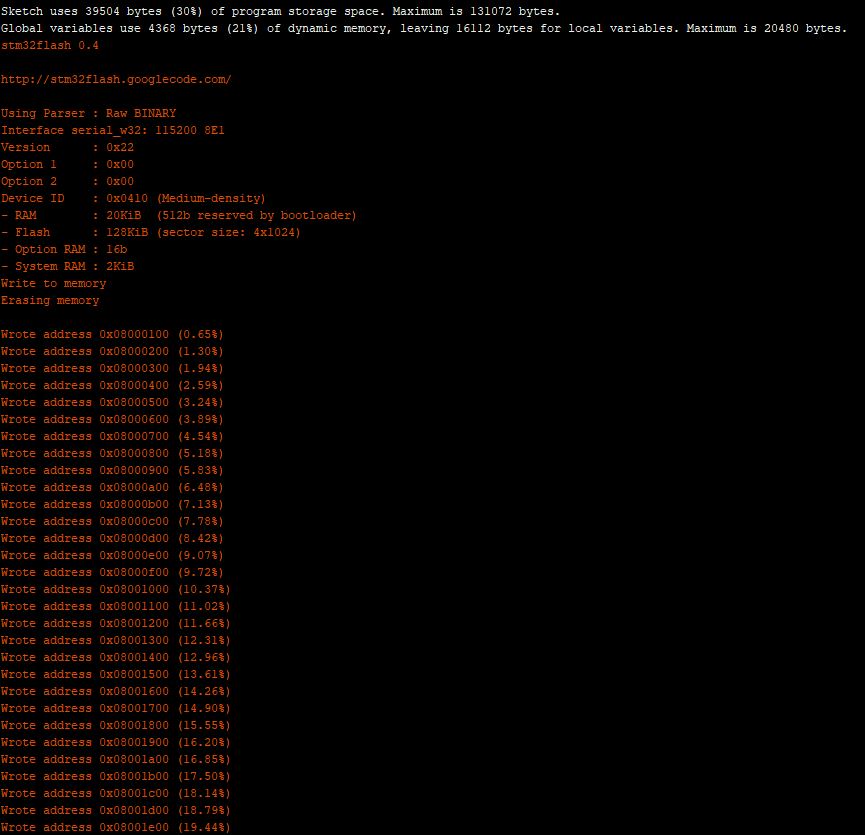
To get the application to download I had to configure the board in the Arduino IDE

Then change the jumpers

Initially I had some problems deploying my software because I hadn’t followed the instructions (the wiki everyone referred to appeared to be offline) and run the installation batch file (New dev machine since my previous maple based project).

15:40:56.207 -> LoRa Setup done.
15:40:56.207 -> TH02 setup start
15:40:56.307 -> TH02 setup done
15:40:56.307 -> PayloadHeader- To len:8 From len:11 Header len:19
15:40:56.354 -> Setup done
15:40:56.354 -> 
15:40:56.354 -> Loop called
15:40:56.354 -> PayloadReset- To len:8 From len:11 Header len:19
15:40:56.408 -> T:23.9C 
15:40:56.408 -> PayloadAdd-float SensorId:T Len:1 Value:23.9 payloadLen:20 payloadLen:27
15:40:56.508 -> H:70% 
15:40:56.508 -> PayloadAdd-float SensorId:H Len:1 Value:70 payloadLen:27 payloadLen:32
15:40:56.608 -> RFM9X/SX127X Payload len:32 bytes
15:40:56.655 -> Loop done
15:40:56.655 -> 
15:41:26.647 -> Loop called
15:41:26.647 -> PayloadReset- To len:8 From len:11 Header len:19
15:41:26.684 -> T:24.0C 
15:41:26.730 -> PayloadAdd-float SensorId:T Len:1 Value:24.0 payloadLen:20 payloadLen:27
15:41:26.784 -> H:69% 
15:41:26.784 -> PayloadAdd-float SensorId:H Len:1 Value:69 payloadLen:27 payloadLen:32
15:41:26.884 -> RFM9X/SX127X Payload len:32 bytes
15:41:26.931 -> Loop done
15:41:26.931 -> 
15:41:56.904 -> Loop called
15:41:56.904 -> PayloadReset- To len:8 From len:11 Header len:19
15:41:56.948 -> T:24.1C 
15:41:56.982 -> PayloadAdd-float SensorId:T Len:1 Value:24.1 payloadLen:20 payloadLen:27
15:41:57.054 -> H:69% 
15:41:57.054 -> PayloadAdd-float SensorId:H Len:1 Value:69 payloadLen:27 payloadLen:32
15:41:57.157 -> RFM9X/SX127X Payload len:32 bytes
15:41:57.191 -> Loop done
15:41:57.191 -> 
15:42:27.211 -> Loop called
15:42:27.211 -> PayloadReset- To len:8 From len:11 Header len:19
15:42:27.258 -> T:24.1C 
15:42:27.258 -> PayloadAdd-float SensorId:T Len:1 Value:24.1 payloadLen:20 payloadLen:27
15:42:27.343 -> H:69% 
15:42:27.343 -> PayloadAdd-float SensorId:H Len:1 Value:69 payloadLen:27 payloadLen:32
15:42:27.427 -> RFM9X/SX127X Payload len:32 bytes
15:42:27.481 -> Loop done
15:42:27.481 -> 
15:42:57.504 -> Loop called
15:42:57.504 -> PayloadReset- To len:8 From len:11 Header len:19
15:42:57.504 -> T:24.1C 
15:42:57.550 -> PayloadAdd-float SensorId:T Len:1 Value:24.1 payloadLen:20 payloadLen:27
15:42:57.604 -> H:68% 
15:42:57.604 -> PayloadAdd-float SensorId:H Len:1 Value:68 payloadLen:27 payloadLen:32
15:42:57.704 -> RFM9X/SX127X Payload len:32 bytes
15:42:57.755 -> Loop done
15:42:57.755 -> 

I configured the device to upload to my Azure IoT Hub/Azure IoT Central gateway and it has been running reliably for a couple of days.

Azure IoT Central temperature and humidity values

Initially I had some configuration problems but I contacted Armtronix support and they promptly provided a couple of updated links for product and device documentation.

Grove-VOC and eCO2 Gas Sensor (SGP30)

In preparation for a project to monitor the fumes (initially Volatile Organic Compounds) levels around the 3D Printers and Laser Cutters in a school makerspace I purchased a Grove -VOC and eCO2 Gas Sensor (SGP30) for evaluation.

Seeeduino Nano easySensors shield and Grove VOC & eCO2 Sensor

Seeeduino Nano devices have a single on-board I2C socket which meant I didn’t need a Grove Shield for Arduino Nano which reduced the size and cost of the sensor node.

I downloaded the sample code from the Seeedstudio wiki and modified my Easy Sensors Arduino Nano Radio Shield RFM69/95 Payload Addressing client to use the sensor.

My first attempt failed with an issues accessing an Analog port to read the serial number from the Microchip ATSHA204 security chip. After looking at the Seeed SGP30 library source code (based on Sensiron samples) I think the my Nano device was running out of memory. I then searched for other Arduino compatible SGP30 libraries and rebuilt he application with the one from Sparkfun,

/*
  Copyright ® 2019 August devMobile Software, All Rights Reserved

  THIS CODE AND INFORMATION IS PROVIDED "AS IS" WITHOUT WARRANTY OF ANY
  KIND, EITHER EXPRESSED OR IMPLIED, INCLUDING BUT NOT LIMITED TO THE
  IMPLIED WARRANTIES OF MERCHANTABILITY AND/OR FITNESS FOR A PARTICULAR
  PURPOSE.

  You can do what you want with this code, acknowledgment would be nice.
  http://www.devmobile.co.nz

  Seeedstudio Grove - VOC and eCO2 Gas Sensor (SGP30)
  https://www.seeedstudio.com/Grove-VOC-and-eCO2-Gas-Sensor-SGP30-p-3071.html

  Seeeduino Nano 
  https://www.seeedstudio.com/Seeeduino-Nano-p-4111.html
  
  Polycarbonate enclosure approx 3.5" x 4.5"
    2 x Cable glands
    1 x Grommet to seal SMA antenna connector
    3M command adhesive strips to hold battery & device in place
   
*/
#include <stdlib.h>
#include "SparkFun_SGP30_Arduino_Library.h" 
#include <LoRa.h>
#include <sha204_library.h>

//#define DEBUG
//#define DEBUG_TELEMETRY
//#define DEBUG_LORA
#define DEBUG_VOC_AND_CO2

#define UNITS_VOC "ppb"
#define UNITS_CO2 "ppm"

// LoRa field gateway configuration (these settings must match your field gateway)
const byte DeviceAddressMaximumLength = 15 ;
const char FieldGatewayAddress[] = {"LoRaIoT1"};
const float FieldGatewayFrequency =  915000000.0;
const byte FieldGatewaySyncWord = 0x12 ;

// Payload configuration
const int ChipSelectPin = 10;
const int ResetPin = 9;
const int InterruptPin = 2;

// LoRa radio payload configuration
const byte SensorIdValueSeperator = ' ' ;
const byte SensorReadingSeperator = ',' ;
const unsigned long SensorUploadDelay = 60000;

// ATSHA204 secure authentication, validation with crypto and hashing (currently only using for unique serial number)
const byte Atsha204Port = A3;
atsha204Class sha204(Atsha204Port);
const byte DeviceSerialNumberLength = 9 ;
byte deviceSerialNumber[DeviceSerialNumberLength] = {""};

SGP30 mySensor; //create an object of the SGP30 class

const byte PayloadSizeMaximum = 64 ;
byte payload[PayloadSizeMaximum];
byte payloadLength = 0 ;


void setup()
{
  Serial.begin(9600);

#ifdef DEBUG
  while (!Serial);
#endif
 
  Serial.println("Setup called");

  Serial.print("Field gateway:");
  Serial.print(FieldGatewayAddress ) ;
  Serial.print(" Frequency:");
  Serial.print( FieldGatewayFrequency,0 ) ;
  Serial.print("MHz SyncWord:");
  Serial.print( FieldGatewaySyncWord ) ;
  Serial.println();
  
   // Retrieve the serial number then display it nicely
  if(sha204.getSerialNumber(deviceSerialNumber))
  {
    Serial.println("sha204.getSerialNumber failed");
    while (true); // Drop into endless loop requiring restart
  }

  Serial.print("SNo:");
  DisplayHex( deviceSerialNumber, DeviceSerialNumberLength);
  Serial.println();

  Serial.println("LoRa setup start");

  // override the default chip select and reset pins
  LoRa.setPins(ChipSelectPin, ResetPin, InterruptPin);
  if (!LoRa.begin(FieldGatewayFrequency))
  {
    Serial.println("LoRa begin failed");
    while (true); // Drop into endless loop requiring restart
  }

  // Need to do this so field gateway pays attention to messsages from this device
  LoRa.enableCrc();
  LoRa.setSyncWord(FieldGatewaySyncWord);

#ifdef DEBUG_LORA
  LoRa.dumpRegisters(Serial);
#endif
  Serial.println("LoRa Setup done.");

  // Configure the DF Robot SHT20, temperature & humidity sensor
  Serial.println("SGP30 setup start");  
  Wire.begin();
  if(mySensor.begin() == false)
  {
    Serial.println("SQP-30 initialisation failed");
    while (true); // Drop into endless loop requiring restart
  }
  mySensor.initAirQuality();
  delay(1000);  
  Serial.println("SGP30 setup done");

  PayloadHeader((byte *)FieldGatewayAddress,strlen(FieldGatewayAddress), deviceSerialNumber, DeviceSerialNumberLength);

  Serial.println("Setup done");
  Serial.println();
}


void loop()
{
  unsigned long currentMilliseconds = millis();  

  Serial.println("Loop called");

  mySensor.measureAirQuality();

  PayloadReset();  

  PayloadAdd( "v", mySensor.TVOC, false);
     
  PayloadAdd( "c", mySensor.CO2, false);
  
  #ifdef DEBUG_VOC_AND_CO2  
    Serial.print("VoC:");
    Serial.print( mySensor.TVOC ) ;
    Serial.print( UNITS_VOC ) ;
    Serial.print(" Co2:");
    Serial.print( mySensor.CO2 ) ;
    Serial.println( UNITS_CO2 ) ;
  #endif

  #ifdef DEBUG_TELEMETRY
    Serial.println();
    Serial.print("RFM9X/SX127X Payload length:");
    Serial.print(payloadLength);
    Serial.println(" bytes");
  #endif

  LoRa.beginPacket();
  LoRa.write(payload, payloadLength);
  LoRa.endPacket();

  Serial.println("Loop done");
  Serial.println();

  delay(SensorUploadDelay - (millis() - currentMilliseconds ));
}


void PayloadHeader( const byte *to, byte toAddressLength, const byte *from, byte fromAddressLength)
{
  byte addressesLength = toAddressLength + fromAddressLength ;

  payloadLength = 0 ;

  // prepare the payload header with "To" Address length (top nibble) and "From" address length (bottom nibble)
  
  payload[payloadLength] = (toAddressLength << 4) | fromAddressLength ;
  payloadLength += 1;

  // Copy the "To" address into payload
  memcpy(&payload[payloadLength], to, toAddressLength);
  payloadLength += toAddressLength ;

  // Copy the "From" into payload
  memcpy(&payload[payloadLength], from, fromAddressLength);
  payloadLength += fromAddressLength ;
}


void PayloadAdd( const char *sensorId, float value, byte decimalPlaces, bool last)
{
  byte sensorIdLength = strlen( sensorId ) ;

  memcpy( &payload[payloadLength], sensorId,  sensorIdLength) ;
  payloadLength += sensorIdLength ;
  payload[ payloadLength] = SensorIdValueSeperator;
  payloadLength += 1 ;
  payloadLength += strlen( dtostrf(value, -1, decimalPlaces, (char *)&payload[payloadLength]));
  if (!last)
  {
    payload[ payloadLength] = SensorReadingSeperator;
    payloadLength += 1 ;
  }
  
#ifdef DEBUG_TELEMETRY
  Serial.print("PayloadAdd float-payloadLength:");
  Serial.print( payloadLength);
  Serial.println( );
#endif
}


void PayloadAdd( char *sensorId, int value, bool last )
{
  byte sensorIdLength = strlen(sensorId) ;

  memcpy(&payload[payloadLength], sensorId,  sensorIdLength) ;
  payloadLength += sensorIdLength ;
  payload[ payloadLength] = SensorIdValueSeperator;
  payloadLength += 1 ;
  payloadLength += strlen(itoa( value,(char *)&payload[payloadLength],10));
  if (!last)
  {
    payload[ payloadLength] = SensorReadingSeperator;
    payloadLength += 1 ;
  }
  
#ifdef DEBUG_TELEMETRY
  Serial.print("PayloadAdd int-payloadLength:" );
  Serial.print(payloadLength);
  Serial.println( );
#endif
}


void PayloadAdd( char *sensorId, unsigned int value, bool last )
{
  byte sensorIdLength = strlen(sensorId) ;

  memcpy(&payload[payloadLength], sensorId,  sensorIdLength) ;
  payloadLength += sensorIdLength ;
  payload[ payloadLength] = SensorIdValueSeperator;
  payloadLength += 1 ;
  payloadLength += strlen(utoa( value,(char *)&payload[payloadLength],10));
  if (!last)
  {
    payload[ payloadLength] = SensorReadingSeperator;
    payloadLength += 1 ;
  }
  
#ifdef DEBUG_TELEMETRY
  Serial.print("PayloadAdd uint-payloadLength:");
  Serial.print(payloadLength);
  Serial.println( );
#endif
}


void PayloadReset()
{
  byte fromAddressLength = payload[0] & 0xf ;
  byte toAddressLength = payload[0] >> 4 ;
  
  payloadLength = toAddressLength + fromAddressLength + 1;
}


void DisplayHex( byte *byteArray, byte length) 
{
  for (int i = 0; i < length ; i++)
  {
    // Add a leading zero
    if ( byteArray[i] < 16)
    {
      Serial.print("0");
    }
    Serial.print(byteArray[i], HEX);
    if ( i < (length-1)) // Don't put a - after last digit
    {
      Serial.print("-");
    }
  }
}    

The code is available on GitHub.

11:32:52.947 -> Setup called
11:32:52.947 -> Field gateway:LoRaIoT1 Frequency:915000000MHz SyncWord:18
11:32:53.085 -> SNo:01-23-21-61-D6-D1-F5-86-EE
11:32:53.118 -> LoRa setup start
11:32:53.118 -> LoRa Setup done.
11:32:53.153 -> SGP30 setup start
11:32:54.083 -> SGP30 setup done
11:32:54.117 -> Setup done
11:32:54.117 -> 
11:32:54.117 -> Loop called
11:32:54.152 -> VoC:0ppb Co2:400ppm
11:32:54.187 -> Loop done
11:32:54.187 -> 
11:33:54.092 -> Loop called
11:33:54.127 -> VoC:0ppb Co2:400ppm
11:33:54.195 -> Loop done
11:33:54.195 -> 
11:34:54.098 -> Loop called
11:34:54.133 -> VoC:17ppb Co2:425ppm
11:34:54.201 -> Loop done
11:34:54.201 -> 
11:35:54.109 -> Loop called
11:35:54.142 -> VoC:11ppb Co2:421ppm
11:35:54.210 -> Loop done
11:35:54.210 -> 
11:36:54.109 -> Loop called
11:36:54.143 -> VoC:3ppb Co2:409ppm
11:36:54.212 -> Loop done
11:36:54.212 -> 
11:37:54.135 -> Loop called
11:37:54.135 -> VoC:12ppb Co2:400ppm
11:37:54.204 -> Loop done
11:37:54.204 -> 
11:38:54.126 -> Loop called
11:38:54.161 -> VoC:11ppb Co2:439ppm
11:38:54.231 -> Loop done

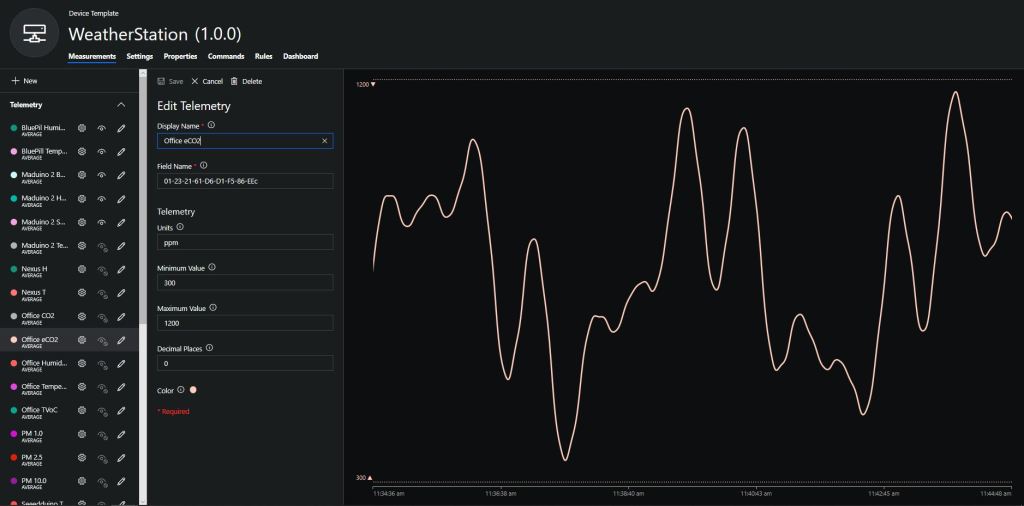
To configure the device in Azure IoT Central (similar process for Adafruit.IO, working on support for losant, and ubidots) I copied the SNo: from the Arduino development tool logging window and appended c for the CO2 parts per million (ppm), v for VOC parts per billion (ppb) unique serial number from the ATSHA204A chip. (N.B. pay attention to the case of the field names they are case sensitive)

Azure IoT Central configuration

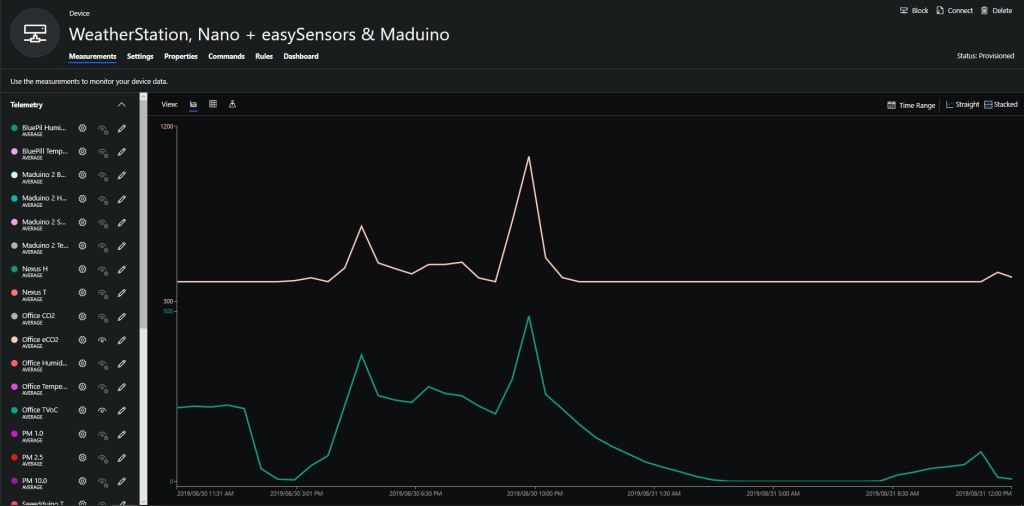
Overall the performance of the VoC sensor data is looking pretty positive, the eCO2 readings need some further investigation as they track the VOC levels. The large spike in the graph below is me putting an open vivid marker on my desk near the sensor.

eCO2 and VOC levels in my office for a day

Bill of materials (prices as at August 2019)

  • Seeeduino Nano USD6.90
  • Grove – VOC and eCO2 Gas Sensor (SGP30) USD15.90
  • EasySensors Arduino Nano radio shield RFM95 USD15.00