TinyCLR OS LoRa library Part2

Register Dump

Next step was to dump all registers (0x00 thru 0x42) of the SX1276/7/8/9 device.

//---------------------------------------------------------------------------------
// Copyright (c) March 2020, devMobile Software
//
// Licensed under the Apache License, Version 2.0 (the "License");
// you may not use this file except in compliance with the License.
// You may obtain a copy of the License at
//
//     http://www.apache.org/licenses/LICENSE-2.0
//
// Unless required by applicable law or agreed to in writing, software
// distributed under the License is distributed on an "AS IS" BASIS,
// WITHOUT WARRANTIES OR CONDITIONS OF ANY KIND, either express or implied.
// See the License for the specific language governing permissions and
// limitations under the License.
//
//---------------------------------------------------------------------------------
namespace devMobile.IoT.Rfm9x.RegisterScan
{
   using System;
   using System.Diagnostics;
   using System.Threading;
   using GHIElectronics.TinyCLR.Devices.Spi;
   using GHIElectronics.TinyCLR.Pins;

   public sealed class Rfm9XDevice
   {
      private SpiDevice rfm9XLoraModem;

      public Rfm9XDevice(int chipSelectPin)
      {
         var settings = new SpiConnectionSettings()
         {
            ChipSelectType = SpiChipSelectType.Gpio,
            ChipSelectLine = chipSelectPin,
            Mode = SpiMode.Mode0,
            ClockFrequency = 500000,
            DataBitLength = 8,
            ChipSelectActiveState = false,
         };

         SpiController spiCntroller = SpiController.FromName(FEZ.SpiBus.Spi1);

         rfm9XLoraModem = spiCntroller.GetDevice(settings);
      }

      public Byte RegisterReadByte(byte registerAddress)
      {
         byte[] writeBuffer = new byte[] { registerAddress, 0x0 };
         byte[] readBuffer = new byte[writeBuffer.Length];
         Debug.Assert(rfm9XLoraModem != null);

         rfm9XLoraModem.TransferFullDuplex(writeBuffer, readBuffer);

         return readBuffer[1];
      }
   }

   class Program
   {
      static void Main()
      {
         Rfm9XDevice rfm9XDevice = new Rfm9XDevice(FEZ.GpioPin.D10);

         while (true)
         {
            for (byte registerIndex = 0; registerIndex <= 0x42; registerIndex++)
            {
               byte registerValue = rfm9XDevice.RegisterReadByte(registerIndex);

               Debug.WriteLine($"Register 0x{registerIndex:x2} - Value 0X{registerValue:x2}");
            }
            Debug.WriteLine("");

            Thread.Sleep(10000);
         }
      }
   }
}


The output of the application looked like this

Found debugger!

Create TS.

Loading Deployment Assemblies.

Attaching deployed file.

   Assembly: mscorlib (1.0.0.0)  Attaching deployed file.

   Assembly: GHIElectronics.TinyCLR.Devices.Spi (1.0.0.0)  Attaching deployed file.

   Assembly: GHIElectronics.TinyCLR.Devices.Gpio (1.0.0.0)  Attaching deployed file.

   Assembly: GHIElectronics.TinyCLR.Native (1.0.0.0)  Attaching deployed file.

   Assembly: RegisterScan (1.0.0.0)  Resolving.

The debugging target runtime is loading the application assemblies and starting execution.
Ready.

'GHIElectronics.TinyCLR.VisualStudio.ProjectSystem.dll' (Managed): Loaded 'C:\Users\BrynLewis\source\repos\RFM9X.TinyCLR\RegisterScan\bin\Debug\pe\..\GHIElectronics.TinyCLR.Native.dll'
'GHIElectronics.TinyCLR.VisualStudio.ProjectSystem.dll' (Managed): Loaded 'C:\Users\BrynLewis\source\repos\RFM9X.TinyCLR\RegisterScan\bin\Debug\pe\..\GHIElectronics.TinyCLR.Devices.Gpio.dll'
'GHIElectronics.TinyCLR.VisualStudio.ProjectSystem.dll' (Managed): Loaded 'C:\Users\BrynLewis\source\repos\RFM9X.TinyCLR\RegisterScan\bin\Debug\pe\..\GHIElectronics.TinyCLR.Devices.Spi.dll'
'GHIElectronics.TinyCLR.VisualStudio.ProjectSystem.dll' (Managed): Loaded 'C:\Users\BrynLewis\source\repos\RFM9X.TinyCLR\RegisterScan\bin\Debug\pe\..\RegisterScan.exe', Symbols loaded.
The thread '<No Name>' (0x2) has exited with code 0 (0x0).
Register 0x00 - Value 0X00
Register 0x01 - Value 0X09
Register 0x02 - Value 0X1a
Register 0x03 - Value 0X0b
Register 0x04 - Value 0X00
Register 0x05 - Value 0X52
Register 0x06 - Value 0X6c
Register 0x07 - Value 0X80
Register 0x08 - Value 0X00
Register 0x09 - Value 0X4f
Register 0x0a - Value 0X09
Register 0x0b - Value 0X2b
Register 0x0c - Value 0X20
Register 0x0d - Value 0X08
Register 0x0e - Value 0X02
Register 0x0f - Value 0X0a
Register 0x10 - Value 0Xff
Register 0x11 - Value 0X70
Register 0x12 - Value 0X15
Register 0x13 - Value 0X0b
Register 0x14 - Value 0X28
Register 0x15 - Value 0X0c
Register 0x16 - Value 0X12
Register 0x17 - Value 0X47
Register 0x18 - Value 0X32
Register 0x19 - Value 0X3e
Register 0x1a - Value 0X00
Register 0x1b - Value 0X00
Register 0x1c - Value 0X00
Register 0x1d - Value 0X00
Register 0x1e - Value 0X00
Register 0x1f - Value 0X40
Register 0x21 - Value 0X00
Register 0x22 - Value 0X00
Register 0x23 - Value 0X00
Register 0x24 - Value 0X05
Register 0x25 - Value 0X00
Register 0x26 - Value 0X03
Register 0x27 - Value 0X93
Register 0x28 - Value 0X55
Register 0x29 - Value 0X55
Register 0x2a - Value 0X55
Register 0x2b - Value 0X55
Register 0x2c - Value 0X55
Register 0x2d - Value 0X55
Register 0x2e - Value 0X55
Register 0x2f - Value 0X55
Register 0x30 - Value 0X90
Register 0x31 - Value 0X40
Register 0x32 - Value 0X40
Register 0x33 - Value 0X00
Register 0x34 - Value 0X00
Register 0x35 - Value 0X0f
Register 0x36 - Value 0X00
Register 0x37 - Value 0X00
Register 0x38 - Value 0X00
Register 0x39 - Value 0Xf5
Register 0x3a - Value 0X20
Register 0x3b - Value 0X82
Register 0x3c - Value 0Xf7
Register 0x3d - Value 0X02
Register 0x3e - Value 0X80
Register 0x3f - Value 0X40
Register 0x40 - Value 0X00
Register 0x41 - Value 0X00
Register 0x42 - Value 0X12

The device was not in LoRa mode (Bit 7 of RegOpMode 0x01) so the next step was to read and write registers so I could change its configuration.

Overall the SPI implementation was closer to Windows 10 IoT Core model than expected.

TinyCLR OS LoRa library Part1

After writing my Windows 10 IoT Core RFM9X library and porting it to .NetMF and Wilderness Labs Meadow I figured another port to GHI Electronics TinyCLR-OS on a FEZ device shouldn’t take too long.

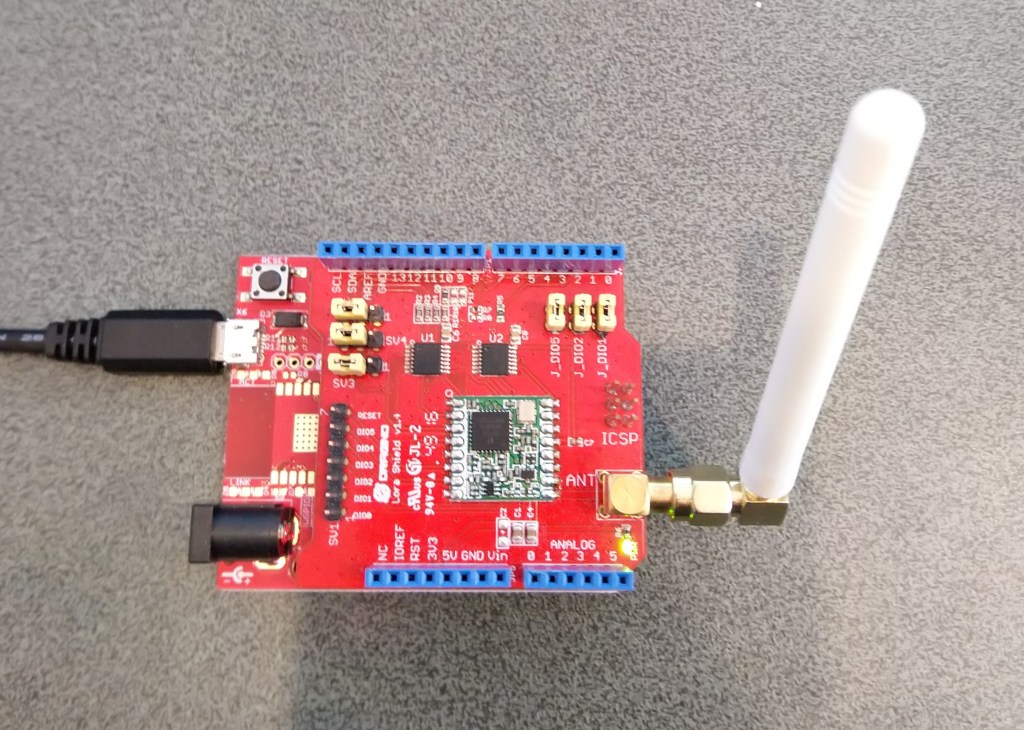
To get started I used a Dragino LoRa shield for Arduino which looked compatible with my FEZT18-N and FEZT18-W devices.

Dragino Arduino LoRa Shield Schematic

The shield uses D10 for chip select, D2 for RFM9X DI0 interrupt and D9 for Reset. The shield ships with the SPI lines configured for ICSP so the three jumpers diagonally across the shield from the antenna connector need to be swapped to the side closest to the edge of the shield.

First step was to confirm I could (using the TinyCLR SPI NuGet library) read a couple of the Semtech SX1276 registers.

//---------------------------------------------------------------------------------
// Copyright (c) March 2020, devMobile Software
//
// Licensed under the Apache License, Version 2.0 (the "License");
// you may not use this file except in compliance with the License.
// You may obtain a copy of the License at
//
//     http://www.apache.org/licenses/LICENSE-2.0
//
// Unless required by applicable law or agreed to in writing, software
// distributed under the License is distributed on an "AS IS" BASIS,
// WITHOUT WARRANTIES OR CONDITIONS OF ANY KIND, either express or implied.
// See the License for the specific language governing permissions and
// limitations under the License.
//
//---------------------------------------------------------------------------------
namespace devMobile.IoT.Rfm9x.ShieldSpi
{
   using System;
   using System.Diagnostics;

   using System.Threading;
   using GHIElectronics.TinyCLR.Devices.Spi;
   using GHIElectronics.TinyCLR.Pins;

   class Program
   {
      static void Main()
      {
         var settings = new SpiConnectionSettings()
         {
            ChipSelectType = SpiChipSelectType.Gpio,
            ChipSelectLine = FEZ.GpioPin.D10,
            Mode = SpiMode.Mode0,
            ClockFrequency = 500000,
            DataBitLength = 8,
            ChipSelectActiveState = false,
         };

         var controller = SpiController.FromName(FEZ.SpiBus.Spi1);
         var device = controller.GetDevice(settings);

         Thread.Sleep(500);

         while (true)
         {
            byte register;
            byte[] writeBuffer;
            byte[] readBuffer;

            // Silicon Version info
            register = 0x42; // RegVersion expecting 0x12

            // Frequency
            //register = 0x06; // RegFrfMsb expecting 0x6C
            //register = 0x07; // RegFrfMid expecting 0x80
            //register = 0x08; // RegFrfLsb expecting 0x00

            //register = 0x17; //RegPayoadLength expecting 0x47

            // Preamble length 
            //register = 0x18; // RegPreambleMsb expecting 0x32
            //register = 0x19; // RegPreambleLsb expecting 0x3E

            writeBuffer = new byte[] { register,  0x0 };
            readBuffer = new byte[writeBuffer.Length];

            device.TransferFullDuplex(writeBuffer, readBuffer);

            Debug.WriteLine("Value = 0x" + BytesToHexString(readBuffer));

            Thread.Sleep(1000);
         }
      }

      private static string BytesToHexString(byte[] bytes)
      {
         string hexString = string.Empty;

         // Create a character array for hexidecimal conversion.
         const string hexChars = "0123456789ABCDEF";

         // Loop through the bytes.
         for (byte b = 0; b < bytes.Length; b++)
         {
            if (b > 0)
               hexString += "-";

            // Grab the top 4 bits and append the hex equivalent to the return string.        
            hexString += hexChars[bytes[b] >> 4];

            // Mask off the upper 4 bits to get the rest of it.
            hexString += hexChars[bytes[b] & 0x0F];
         }

         return hexString;
      }
   }
}

After trying many permutations of settings I could successfully read the RegVersion and default frequency values

The debugging target runtime is loading the application assemblies and starting execution.
Ready.

'GHIElectronics.TinyCLR.VisualStudio.ProjectSystem.dll' (Managed): Loaded 'C:\Users\BrynLewis\source\repos\RFM9X.TinyCLR\ShieldSPI\bin\Debug\pe\..\GHIElectronics.TinyCLR.Native.dll'
'GHIElectronics.TinyCLR.VisualStudio.ProjectSystem.dll' (Managed): Loaded 'C:\Users\BrynLewis\source\repos\RFM9X.TinyCLR\ShieldSPI\bin\Debug\pe\..\GHIElectronics.TinyCLR.Devices.Gpio.dll'
'GHIElectronics.TinyCLR.VisualStudio.ProjectSystem.dll' (Managed): Loaded 'C:\Users\BrynLewis\source\repos\RFM9X.TinyCLR\ShieldSPI\bin\Debug\pe\..\GHIElectronics.TinyCLR.Devices.Spi.dll'
'GHIElectronics.TinyCLR.VisualStudio.ProjectSystem.dll' (Managed): Loaded 'C:\Users\BrynLewis\source\repos\RFM9X.TinyCLR\ShieldSPI\bin\Debug\pe\..\ShieldSPI.exe', Symbols loaded.
The thread '<No Name>' (0x2) has exited with code 0 (0x0).
Value = 0x00-12
Value = 0x00-12
Value = 0x00-12
Value = 0x00-12

Overall the SPI implementation felt closer to Windows 10 IoT Core model than expected.

.Net Meadow nRF24L01 library Part3

While testing my initial port of the the techfooninja nRF24L01P library to a Wilderness Labs Meadow I noticed that the power level value was a bit odd.

nRF24L01P Test Harness
The program '[16720] App.exe' has exited with code 0 (0x0).
 IsPowered: True
 Address: Dev01
 PA: 15
 IsAutoAcknowledge: True
 Channel: 15
 DataRate: DR250Kbps
 Power: 15
 IsDynamicAcknowledge: False
 IsDynamicPayload: True
 IsEnabled: False
 Frequency: 2415
 IsInitialized: True
 IsPowered: True
 00:00:18-TX 8 byte message hello 17
 Data Sent!
00:00:18-TX Succeeded!
 00:00:48-TX 8 byte message hello 48
 Data Sent!

Looking at nRF24L01P datasheet and how this has been translated into code

/// <summary>
///   The power level for the radio.
/// </summary>
public PowerLevel PowerLevel
{
  get
   {
      var regValue = Execute(Commands.R_REGISTER, Registers.RF_SETUP, new byte[1])[1] & 0xF8;
      var newValue = (regValue - 1) >> 1;
      return (PowerLevel)newValue;
   }
  set
   {
      var regValue = Execute(Commands.R_REGISTER, Registers.RF_SETUP, new byte[1])[1] & 0xF8;

      byte newValue = (byte)((byte)value << 1 + 1);

      Execute(Commands.W_REGISTER, Registers.RF_SETUP,
              new[]
                  {
                     (byte) (newValue | regValue)
                  });
   }
}

The power level enumeration is declared in PowerLevel.cs

namespace Radios.RF24
{
    /// <summary>
    ///   Power levels the radio can operate with
    /// </summary>
    public enum PowerLevel : byte
    {
        /// <summary>
        ///   Minimum power setting for the radio
        /// </summary>
        Minimum = 0,

        /// <summary>
        ///   Low power setting for the radio
        /// </summary>
        Low,

        /// <summary>
        ///   High power setting for the radio
        /// </summary>
        High,

        /// <summary>
        ///   Max power setting for the radio
        /// </summary>
        Max,

        /// <summary>
        ///   Error with the power setting
        /// </summary>
        Error
    }
}

No debugging support or Debug.WriteLine in beta 3.7 (March 2020) so first step was to insert a Console.Writeline so I could see what the RF_SETUP register value was.

The program '[11212] App.exe' has exited with code 0 (0x0).
 Address: Dev01
 PowerLevel regValue 00100101
 PowerLevel: 15
 IsAutoAcknowledge: True
 Channel: 15
 DataRate: DR250Kbps
 IsDynamicAcknowledge: False
 IsDynamicPayload: True
 IsEnabled: False
 Frequency: 2415
 IsInitialized: True
 IsPowered: True
 00:00:18-TX 8 byte message hello 17
 Data Sent!
00:00:18-TX Succeeded!

The PowerLevel setting appeared to make no difference and the bits 5, 2 & 0 were set which meant 250Kbps & high power which I was expecting.

The RF_SETUP register in the datasheet, contains the following settings (WARNING – some nRF24L01 registers differ from nRF24L01P)

After looking at the code my initial “quick n dirty” fix was to mask out the existing power level bits and then mask in the new setting.

public PowerLevel PowerLevel
      {
         get
         {
            byte regValue = Execute(Commands.R_REGISTER, Registers.RF_SETUP, new byte[1])[1];;
            Console.WriteLine($"PowerLevel regValue {Convert.ToString(regValue, 2).PadLeft(8, '0')}");
            var newValue = (regValue & 0x06) >> 1;
            
            return (PowerLevel)newValue;
         }
         set
         {
            byte regValue = Execute(Commands.R_REGISTER, Registers.RF_SETUP, new byte[1])[1];
            regValue &= 0b11111000;
            regValue |= (byte)((byte)value << 1);

            Execute(Commands.W_REGISTER, Registers.RF_SETUP,
                    new[]
                        {
                            (byte)regValue
                        });
         }
      }

I wonder if the code mighty be simpler if I used a similar approach to my Windows 10 IoT RFM9X LoRa library

// RegModemConfig1
public enum RegModemConfigBandwidth : byte
{
	_7_8KHz = 0b00000000,
	_10_4KHz = 0b00010000,
	_15_6KHz = 0b00100000,
	_20_8KHz = 0b00110000,
	_31_25KHz = 0b01000000,
	_41_7KHz = 0b01010000,
	_62_5KHz = 0b01100000,
	_125KHz = 0b01110000,
	_250KHz = 0b10000000,
	_500KHz = 0b10010000
}
public const RegModemConfigBandwidth RegModemConfigBandwidthDefault = RegModemConfigBandwidth._125KHz;

...

[Flags]
enum RegIrqFlagsMask : byte
{
	RxTimeoutMask = 0b10000000,
	RxDoneMask = 0b01000000,
	PayLoadCrcErrorMask = 0b00100000,
	ValidHeadrerMask = 0b00010000,
	TxDoneMask = 0b00001000,
	CadDoneMask = 0b00000100,
	FhssChangeChannelMask = 0b00000010,
	CadDetectedMask = 0b00000001,
}

[Flags]
enum RegIrqFlags : byte
{
	RxTimeout = 0b10000000,
	RxDone = 0b01000000,
	PayLoadCrcError = 0b00100000,
	ValidHeadrer = 0b00010000,
	TxDone = 0b00001000,
	CadDone = 0b00000100,
	FhssChangeChannel = 0b00000010,
	CadDetected = 0b00000001,
	ClearAll = 0b11111111,
}

This would require some significant modifications to the Techfooninja library. e.g. the PowerLevel enumeration

namespace Radios.RF24
{
    /// <summary>
    ///   Power levels the radio can operate with
    /// </summary>
    public enum PowerLevel : byte
    {
        /// <summary>
        ///   Minimum power setting for the radio
        /// </summary>
        Minimum = 0b00000000,

        /// <summary>
        ///   Low power setting for the radio
        /// </summary>
        Low = 0b00000010,

        /// <summary>
        ///   High power setting for the radio
        /// </summary>
        High = 0b00000100,

        /// <summary>
        ///   Max power setting for the radio
        /// </summary>
        Max = 0b00000110,
    }
}

I need to do some more testing of the of library to see if the pattern is repeated.

Wilderness Labs nRF24L01 Wireless field gateway Meadow client

After a longish pause in development work on my nrf24L01 AdaFruit.IO and Azure IOT Hub field gateways I figured a client based on my port of the techfooninja nRF24 library to Wilderness Labs Meadow would be a good test.

This sample client is an Wilderness Labs Meadow with a Sensiron SHT31 Temperature & humidity sensor (supported by meadow foundation), and a generic nRF24L01 device connected with jumper cables.

Bill of materials (prices as at March 2020)

  • Wilderness Labs Meadow 7F Micro device USD50
  • Seeedstudio Temperature and Humidity Sensor(SHT31) USD11.90
  • Seeedstudio 4 pin Male Jumper to Grove 4 pin Conversion Cable USD2.90
  • 2.4G Wireless Module nRF24L01+PA USD9.90

The initial version of the code was pretty basic with limited error handling and no power conservation support.

namespace devMobile.IoT.FieldGateway.Client
{
   using System;
   using System.Text;
   using System.Threading;

   using Radios.RF24;

   using Meadow;
   using Meadow.Devices;
   using Meadow.Foundation.Leds;
   using Meadow.Foundation.Sensors.Atmospheric;
   using Meadow.Hardware;
   using Meadow.Peripherals.Leds;

   public class MeadowClient : App<F7Micro, MeadowClient>
   {
      private const string BaseStationAddress = "Base1";
      private const string DeviceAddress = "WLAB1";
      private const byte nRF24Channel = 15;
      private RF24 Radio = new RF24();
      private readonly TimeSpan periodTime = new TimeSpan(0, 0, 60);
      private readonly Sht31D sensor;
      private readonly ILed Led;

      public MeadowClient()
      {
         Led = new Led(Device, Device.Pins.OnboardLedGreen);

         try
         {
            sensor = new Sht31D(Device.CreateI2cBus());

            var config = new Meadow.Hardware.SpiClockConfiguration(
                           2000,
                           SpiClockConfiguration.Mode.Mode0);

            ISpiBus spiBus = Device.CreateSpiBus(
               Device.Pins.SCK,
               Device.Pins.MOSI,
               Device.Pins.MISO, config);

            Radio.OnDataReceived += Radio_OnDataReceived;
            Radio.OnTransmitFailed += Radio_OnTransmitFailed;
            Radio.OnTransmitSuccess += Radio_OnTransmitSuccess;

            Radio.Initialize(Device, spiBus, Device.Pins.D09, Device.Pins.D10, Device.Pins.D11);
            //Radio.Address = Encoding.UTF8.GetBytes(Environment.MachineName);
            Radio.Address = Encoding.UTF8.GetBytes(DeviceAddress);

            Radio.Channel = nRF24Channel;
            Radio.PowerLevel = PowerLevel.Low;
            Radio.DataRate = DataRate.DR250Kbps;
            Radio.IsEnabled = true;

            Radio.IsAutoAcknowledge = true;
            Radio.IsDyanmicAcknowledge = false;
            Radio.IsDynamicPayload = true;

            Console.WriteLine($"Address: {Encoding.UTF8.GetString(Radio.Address)}");
            Console.WriteLine($"PowerLevel: {Radio.PowerLevel}");
            Console.WriteLine($"IsAutoAcknowledge: {Radio.IsAutoAcknowledge}");
            Console.WriteLine($"Channel: {Radio.Channel}");
            Console.WriteLine($"DataRate: {Radio.DataRate}");
            Console.WriteLine($"IsDynamicAcknowledge: {Radio.IsDyanmicAcknowledge}");
            Console.WriteLine($"IsDynamicPayload: {Radio.IsDynamicPayload}");
            Console.WriteLine($"IsEnabled: {Radio.IsEnabled}");
            Console.WriteLine($"Frequency: {Radio.Frequency}");
            Console.WriteLine($"IsInitialized: {Radio.IsInitialized}");
            Console.WriteLine($"IsPowered: {Radio.IsPowered}");
         }
         catch (Exception ex)
         {
            Console.WriteLine(ex.Message);
         }

         while (true)
         {
            sensor.Update();

            Console.WriteLine($"{DateTime.UtcNow:HH:mm:ss}-TX T:{sensor.Temperature:0.0}C H:{sensor.Humidity:0}%");

            Led.IsOn = true;

            string values = "T " + sensor.Temperature.ToString("F1") + ",H " + sensor.Humidity.ToString("F0");

            // Stuff the 2 byte header ( payload type & deviceIdentifierLength ) + deviceIdentifier into payload
            byte[] payload = new byte[1 + Radio.Address.Length + values.Length];
            payload[0] = (byte)((1 << 4) | Radio.Address.Length);
            Array.Copy(Radio.Address, 0, payload, 1, Radio.Address.Length);
            Encoding.UTF8.GetBytes(values, 0, values.Length, payload, Radio.Address.Length + 1);

            Radio.SendTo(Encoding.UTF8.GetBytes(BaseStationAddress), payload);

            Thread.Sleep(periodTime);
         }
      }

      private void Radio_OnDataReceived(byte[] data)
      {
         // Display as Unicode
         string unicodeText = Encoding.UTF8.GetString(data);
         Console.WriteLine($"{DateTime.UtcNow:HH:mm:ss}-RX Unicode Length {0} Unicode Length {1} Unicode text {2}", data.Length, unicodeText.Length, unicodeText);

         // display as hex
         Console.WriteLine($"{DateTime.UtcNow:HH:mm:ss}-RX Hex Length {data.Length} Payload {BitConverter.ToString(data)}");
      }

      private void Radio_OnTransmitSuccess()
      {
         Led.IsOn = false;

         Console.WriteLine($"{DateTime.UtcNow:HH:mm:ss}-TX Succeeded!");
      }

      private void Radio_OnTransmitFailed()
      {
         Console.WriteLine($"{DateTime.UtcNow:HH:mm:ss}-TX failed!");
      }
   }
}

After sorting out power to the SHT31 (I had to push the jumper cable further into the back of the jumper cable plug). I could see temperature and humidity values getting uploaded to Adafruit.IO.

Visual Studio 2019 debug output

Adafruit.IO “automagically” provisions new feeds which is helpful when building a proof of concept (PoC)

Adafruit.IO feed with default feed IDs

I then modified the feed configuration to give it a user friendly name.

Feed Configuration

All up configuration took about 10 minutes.

Meadow device temperature and humidity

.Net Meadow nRF24L01 library Part2

After getting SPI connectivity going my next step porting the techfooninja nRF24L01P library to a Wilderness Labs Meadow was rewriting the SPI port initialisation, plus GetStatus and Execute methods.

nRF24L01P Test Harness

I added a digital output port for the Chip Select and because I can specify the interrupt trigger edge I removed the test from the interrupt handler.

 public void Initialize(IIODevice device, ISpiBus spiBus, IPin chipEnablePin, IPin chipSelectLine, IPin interruptPin)
{
   _SpiBus = spiBus;

   _cePin = device.CreateDigitalOutputPort(chipEnablePin, false);

   _csPin = device.CreateDigitalOutputPort(chipSelectLine, false);

   _irqPin = device.CreateDigitalInputPort(interruptPin, InterruptMode.EdgeFalling, resistorMode: ResistorMode.PullUp);
   _irqPin.Changed += InterruptGpioPin_ValueChanged;

   // Module reset time
   Task.Delay(100).GetAwaiter().GetResult();

   IsInitialized = true;

   // Set reasonable default values
   Address = Encoding.UTF8.GetBytes("NRF1");
   DataRate = DataRate.DR2Mbps;
   IsDynamicPayload = true;
   IsAutoAcknowledge = true;

   FlushReceiveBuffer();
   FlushTransferBuffer();
   ClearIrqMasks();
   SetRetries(5, 60);

   // Setup, CRC enabled, Power Up, PRX
   SetReceiveMode();
}

The core of the Initialise method was moved to the Meadow application startup.

public MeadowApp()
{
   try
   {
		var config = new Meadow.Hardware.SpiClockConfiguration(
			2000,
			SpiClockConfiguration.Mode.Mode0);

		ISpiBus spiBus = Device.CreateSpiBus(
			Device.Pins.SCK,
			Device.Pins.MOSI,
			Device.Pins.MISO,config);

		Radio.OnDataReceived += Radio_OnDataReceived;
		Radio.OnTransmitFailed += Radio_OnTransmitFailed;
		Radio.OnTransmitSuccess += Radio_OnTransmitSuccess;

		Radio.Initialize(Device, spiBus, Device.Pins.D09, Device.Pins.D10, Device.Pins.D11);
		Radio.Address = Encoding.UTF8.GetBytes(DeviceAddress);

		Radio.Channel = nRF24Channel;
		Radio.PowerLevel = PowerLevel.High;
		Radio.DataRate = DataRate.DR250Kbps;
		Radio.IsEnabled = true;

		Radio.IsAutoAcknowledge = true;
		Radio.IsDyanmicAcknowledge = false;
		Radio.IsDynamicPayload = true;

		Console.WriteLine($"Address: {Encoding.UTF8.GetString(Radio.Address)}");
		Console.WriteLine($"PA: {Radio.PowerLevel}");
		Console.WriteLine($"IsAutoAcknowledge: {Radio.IsAutoAcknowledge}");
		Console.WriteLine($"Channel: {Radio.Channel}");
		Console.WriteLine($"DataRate: {Radio.DataRate}");
		Console.WriteLine($"Power: {Radio.PowerLevel}");
		Console.WriteLine($"IsDynamicAcknowledge: {Radio.IsDyanmicAcknowledge}");
		Console.WriteLine($"IsDynamicPayload: {Radio.IsDynamicPayload}");
		Console.WriteLine($"IsEnabled: {Radio.IsEnabled}");
		Console.WriteLine($"Frequency: {Radio.Frequency}");
		Console.WriteLine($"IsInitialized: {Radio.IsInitialized}");
		Console.WriteLine($"IsPowered: {Radio.IsPowered}");
	}
	catch (Exception ex)
	{
		Console.WriteLine(ex.Message);

		return;
	}

I modified the GetStatus and ExecuteMethods to use the ExchangeData method

   /// <summary>
      ///   Executes a command in NRF24L01+ (for details see module datasheet)
      /// </summary>
      /// <param name = "command">Command</param>
      /// <param name = "addres">Register to write to or read from</param>
      /// <param name = "data">Data to write or buffer to read to</param>
      /// <returns>Response byte array. First byte is the status register</returns>
      public byte[] Execute(byte command, byte addres, byte[] data)
      {
         CheckIsInitialized();

         // This command requires module to be in power down or standby mode
         if (command == Commands.W_REGISTER)
            IsEnabled = false;

         // Create SPI Buffers with Size of Data + 1 (For Command)
         var writeBuffer = new byte[data.Length + 1];
         var readBuffer = new byte[data.Length + 1];

         // Add command and address to SPI buffer
         writeBuffer[0] = (byte)(command | addres);

         // Add data to SPI buffer
         Array.Copy(data, 0, writeBuffer, 1, data.Length);

         // Do SPI Read/Write
         _SpiBus.ExchangeData(_csPin, ChipSelectMode.ActiveLow, writeBuffer, readBuffer);

         // Enable module back if it was disabled
         if (command == Commands.W_REGISTER && _enabled)
            IsEnabled = true;

         // Return ReadBuffer
         return readBuffer;
      }

      /// <summary>
      ///   Gets module basic status information
      /// </summary>
      /// <returns>Status object representing the current status of the radio</returns>
      public Status GetStatus()
      {
         CheckIsInitialized();

         var readBuffer = new byte[1];
         _SpiBus.ExchangeData(_csPin, ChipSelectMode.ActiveLow, new[] { Commands.NOP }, readBuffer);

         return new Status(readBuffer[0]);
      }

After these modifications I can send and receive messages but the PowerLevel doesn’t look right.

The program '[16720] App.exe' has exited with code 0 (0x0).
 IsPowered: True
 Address: Dev01
 PA: 15
 IsAutoAcknowledge: True
 Channel: 15
 DataRate: DR250Kbps
 Power: 15
 IsDynamicAcknowledge: False
 IsDynamicPayload: True
 IsEnabled: False
 Frequency: 2415
 IsInitialized: True
 IsPowered: True
 00:00:18-TX 8 byte message hello 17
 Data Sent!
00:00:18-TX Succeeded!
 00:00:48-TX 8 byte message hello 48
 Data Sent!

Time to dig into the nRF24L01P datasheet.

.Net Meadow nRF24L01 library Part1

After debugging Windows 10 IoT Core & .NetMF nRF24L01P libraries I figured a port to a Wilderness Labs Meadow device shouldn’t be “rocket science”.

I couldn’t source an nRF24L01 feather wing so built a test rig with jumpers

nRF24L01P Test Harness
//---------------------------------------------------------------------------------
// Copyright (c) Feb 2020, devMobile Software
//
// Licensed under the Apache License, Version 2.0 (the "License");
// you may not use this file except in compliance with the License.
// You may obtain a copy of the License at
//
//     http://www.apache.org/licenses/LICENSE-2.0
//
// Unless required by applicable law or agreed to in writing, software
// distributed under the License is distributed on an "AS IS" BASIS,
// WITHOUT WARRANTIES OR CONDITIONS OF ANY KIND, either express or implied.
// See the License for the specific language governing permissions and
// limitations under the License.
//
//---------------------------------------------------------------------------------
namespace devMobile.IoT.nRf24L01
{
   using System;
   using System.Text;
   using System.Threading;
   using Meadow;
   using Meadow.Devices;
   using Meadow.Hardware;

   public class MeadowApp : App<F7Micro, MeadowApp>
   {
      const byte SETUP_AW = 0x03;
      const byte RX_ADDR_P0 = 0x0A;
      const byte R_REGISTER = 0b00000000;
      const byte W_REGISTER = 0b00100000;
      ISpiBus spiBus;
      SpiPeripheral nrf24L01Device;
      IDigitalOutputPort spiPeriphChipSelect;
      IDigitalOutputPort ChipEnable;


      public MeadowApp()
      {
         ConfigureSpiPort();
         SetPipe0RxAddress("ZYXWV");
      }

      public void ConfigureSpiPort()
      {
         try
         {
            ChipEnable = Device.CreateDigitalOutputPort(Device.Pins.D09, initialState: false);
            if (ChipEnable == null)
            {
               Console.WriteLine("chipEnable == null");
            }

            var spiClockConfiguration = new SpiClockConfiguration(2000, SpiClockConfiguration.Mode.Mode0);
            spiBus = Device.CreateSpiBus(Device.Pins.SCK,
                                         Device.Pins.MOSI,
                                         Device.Pins.MISO,
                                         spiClockConfiguration);
            if (spiBus == null)
            {
               Console.WriteLine("spiBus == null");
            }

            Console.WriteLine("Creating SPI NSS Port...");
            spiPeriphChipSelect = Device.CreateDigitalOutputPort(Device.Pins.D10, initialState: true);
            if (spiPeriphChipSelect == null)
            {
               Console.WriteLine("spiPeriphChipSelect == null");
            }

            Console.WriteLine("nrf24L01Device Device...");
            nrf24L01Device = new SpiPeripheral(spiBus, spiPeriphChipSelect);
            if (nrf24L01Device == null)
            {
               Console.WriteLine("nrf24L01Device == null");
            }

            Thread.Sleep(100);

            Console.WriteLine("ConfigureSpiPort Done...");
         }
         catch (Exception ex)
         {
            Console.WriteLine("ConfigureSpiPort " + ex.Message);
         }
      }

      public void SetPipe0RxAddress(string address)
      {
         try
         {
            // Read the Address width
            byte[] txBuffer1 = new byte[] { SETUP_AW | R_REGISTER, 0x0 };
            Console.WriteLine(" txBuffer:" + BitConverter.ToString(txBuffer1));

            /*
            // Appears to work but not certain it does
            Console.WriteLine(" nrf24L01Device.WriteRead...SETUP_AW");
            byte[] rxBuffer1 = nrf24L01Device.WriteRead(txBuffer1, (ushort)txBuffer1.Length);
            Console.WriteLine(" nrf24L01Device.WriteRead...SETUP_AW");
            */

            byte[] rxBuffer1 = new byte[txBuffer1.Length];
            Console.WriteLine(" spiBus.ExchangeData...RX_ADDR_P0");
            spiBus.ExchangeData(spiPeriphChipSelect, ChipSelectMode.ActiveLow, txBuffer1, rxBuffer1);

            Console.WriteLine(" rxBuffer:" + BitConverter.ToString(rxBuffer1));

            // Extract then adjust the address width
            byte addressWidthValue = rxBuffer1[1];
            addressWidthValue &= 0b00000011;
            addressWidthValue += 2;
            Console.WriteLine("Address width 0x{0:x2} - Value 0X{1:x2} - Bits {2} Value adjusted {3}", SETUP_AW, rxBuffer1[1], Convert.ToString(rxBuffer1[1], 2).PadLeft(8, '0'), addressWidthValue);
            Console.WriteLine();

            // Write Pipe0 Receive address
            Console.WriteLine("Address write 1");
            byte[] txBuffer2 = new byte[addressWidthValue + 1];
            txBuffer2[0] = RX_ADDR_P0 | W_REGISTER;
            Array.Copy(Encoding.UTF8.GetBytes(address), 0, txBuffer2, 1, addressWidthValue);
            Console.WriteLine(" txBuffer:" + BitConverter.ToString(txBuffer2));

            Console.WriteLine(" nrf24L01Device.Write...RX_ADDR_P0");
            nrf24L01Device.WriteBytes(txBuffer2);
            Console.WriteLine();

            // Read Pipe0 Receive address
            Console.WriteLine("Address read 1");
            byte[] txBuffer3 = new byte[addressWidthValue + 1];
            txBuffer3[0] = RX_ADDR_P0 | R_REGISTER;
            Console.WriteLine(" txBuffer:" + BitConverter.ToString(txBuffer3));

            /*
            // Broken returns  Address 0x0a - RX Buffer 5A-5A-5A-5A-59-58 RX Address 5A-5A-5A-59-58 Address ZZZYX
            Console.WriteLine(" nrf24L01Device.WriteRead...RX_ADDR_P0");
            byte[] rxBuffer3 = nrf24L01Device.WriteRead(txBuffer3, (ushort)txBuffer3.Length);
            */

            byte[] rxBuffer3 = new byte[addressWidthValue + 1];
            Console.WriteLine(" spiBus.ExchangeData...RX_ADDR_P0");
            spiBus.ExchangeData(spiPeriphChipSelect, ChipSelectMode.ActiveLow, txBuffer3, rxBuffer3);

            Console.WriteLine("Address 0x{0:x2} - RX Buffer {1} RX Address {2} Address {3}", RX_ADDR_P0, BitConverter.ToString(rxBuffer3, 0), BitConverter.ToString(rxBuffer3, 1), UTF8Encoding.UTF8.GetString(rxBuffer3, 1, addressWidthValue));
         }
         catch (Exception ex)
         {
            Console.WriteLine("ReadDeviceIDDiy " + ex.Message);
         }
      }
   }
}

After lots of tinkering with SPI configuration options and trialing different methods (spiBus vs.SpiPeripheral) I can read and write my nRF24L01 device receive port address

 Creating SPI NSS Port...
 nrf24L01Device Device...
 ConfigureSpiPort Done...
  txBuffer:03-00
  spiBus.ExchangeData...RX_ADDR_P0
  rxBuffer:0E-03
 Address width 0x03 - Value 0X03 - Bits 00000011 Value adjusted 5
 
 Address write 1
  txBuffer:2A-5A-59-58-57-56
  nrf24L01Device.Write...RX_ADDR_P0
 
 Address read 1
  txBuffer:0A-00-00-00-00-00
  spiBus.ExchangeData...RX_ADDR_P0
 Address 0x0a - RX Buffer 0E-5A-59-58-57-56 RX Address 5A-59-58-57-56 Address ZYXWV

I need to investigate why the first byte of the buffer returned by nrf24L01Device.ReadBytes and nrf24L01Device.WriteRead is wrong.

AllThingsTalk with MQTTnet

As I’m testing my Message Queue Telemetry Transport(MQTT) LoRa gateway I’m building a proof of concept(PoC) .Net core console application for each IoT platform I would like to support.

This PoC was to confirm that I could connect to the AllThingsTalk MQTT API then format topics and payloads correctly.

MQTTNet Console Client

The AllThingsTalk MQTT broker, username, and device ID are required command line parameters.

namespace devmobile.Mqtt.TestClient.AllThingsTalk
{
	using System;
	using System.Diagnostics;
	using System.Threading;
	using System.Threading.Tasks;

	using MQTTnet;
	using MQTTnet.Client;
	using MQTTnet.Client.Disconnecting;
	using MQTTnet.Client.Options;
	using MQTTnet.Client.Receiving;

	using Newtonsoft.Json;
	using Newtonsoft.Json.Linq;

	class Program
	{
		private static IMqttClient mqttClient = null;
		private static IMqttClientOptions mqttOptions = null;
		private static string server;
		private static string username;
		private static string deviceID;

		static void Main(string[] args)
		{
			MqttFactory factory = new MqttFactory();
			mqttClient = factory.CreateMqttClient();

			if ((args.Length != 3))
			{
				Console.WriteLine("[MQTT Server] [UserName] [ClientID]");
				Console.WriteLine("Press <enter> to exit");
				Console.ReadLine();
				return;
			}

			server = args[0];
			username = args[1];
			deviceID = args[2];

			Console.WriteLine($"MQTT Server:{server} DeviceID:{deviceID}");

			// AllThingsTalk formatted device state update topic
			string topicD2C = $"device/{deviceID}/state";

			mqttOptions = new MqttClientOptionsBuilder()
				.WithTcpServer(server)
				.WithCredentials(username, "HighlySecurePassword")
				.WithClientId(deviceID)
				.WithTls()
				.Build();

			mqttClient.UseDisconnectedHandler(new MqttClientDisconnectedHandlerDelegate(e => MqttClient_Disconnected(e)));
			mqttClient.UseApplicationMessageReceivedHandler(new MqttApplicationMessageReceivedHandlerDelegate(e => MqttClient_ApplicationMessageReceived(e)));
			mqttClient.ConnectAsync(mqttOptions).Wait();

			// AllThingsTalk formatted device command with wildcard topic
			string topicC2D = $"device/{deviceID}/asset/+/command";

			mqttClient.SubscribeAsync(topicC2D, MQTTnet.Protocol.MqttQualityOfServiceLevel.AtLeastOnce).GetAwaiter().GetResult();

			while (true)
			{
				JObject payloadJObject = new JObject();

				double temperature = 22.0 + (DateTime.UtcNow.Millisecond / 1000.0);
				temperature = Math.Round( temperature, 1 );
				double humidity = 50 + (DateTime.UtcNow.Millisecond / 100.0);
				humidity = Math.Round(humidity, 1);

				JObject temperatureJObject = new JObject
				{
					{ "value", temperature }
				};
				payloadJObject.Add("Temperature", temperatureJObject);

				JObject humidityJObject = new JObject
				{
					{ "value", humidity }
				};
				payloadJObject.Add("Humidity", humidityJObject);

				string payload = JsonConvert.SerializeObject(payloadJObject);
				Console.WriteLine($"Topic:{topicD2C} Payload:{payload}");

				var message = new MqttApplicationMessageBuilder()
					.WithTopic(topicD2C)
					.WithPayload(payload)
					.WithAtMostOnceQoS()
//					.WithAtLeastOnceQoS()
					.Build();

				Console.WriteLine("PublishAsync start");
				mqttClient.PublishAsync(message).Wait();
				Console.WriteLine("PublishAsync finish");

				Thread.Sleep(15100);
			}
		}

		private static void MqttClient_ApplicationMessageReceived(MqttApplicationMessageReceivedEventArgs e)
		{
			Console.WriteLine($"ClientId:{e.ClientId} Topic:{e.ApplicationMessage.Topic} Payload:{e.ApplicationMessage.ConvertPayloadToString()}");
		}

		private static async void MqttClient_Disconnected(MqttClientDisconnectedEventArgs e)
		{
			Debug.WriteLine("Disconnected");
			await Task.Delay(TimeSpan.FromSeconds(5));

			try
			{
				await mqttClient.ConnectAsync(mqttOptions);
			}
			catch (Exception ex)
			{
				Debug.WriteLine("Reconnect failed {0}", ex.Message);
			}
		}
	}

The AllThingsTalk device configuration was relatively easy but I need to investigate “Gateway” functionality and configuration further.

Configuring an Asset
Configuration a watchdog to check for sensor data
Sending a command to an actuator
Processing a command on the client

The ability to look at message payloads in the Debug tab would be very helpful when working out why a payload was not being processed as expected.

Asset debug information

Overall the AllThingsTalk configuration went fairly smoothly, though I need to investigate the “Gateway” configuration and functionality further. The way that assets are name by the system could make support in my MQTT Gateway more complex.

Azure IoT Hub, Event Grid to Application Insights

For a second Proof of Concept (PoC) I wanted to upload sensor data from my MQTT LoRa Telemetry Field Gateway to an Azure IoT Hub, then using Azure EventGrid subscribe to the stream of telemetry data events, logging the payloads in Azure Application Insights (the aim was minimal code so no database etc.).

The first step was to create and deploy a simple Azure Function for unpacking the telemetry event payload.

Azure IoT Hub Azure Function Handler

Then wire the Azure function to the Microsoft.Devices.Device.Telemetry Event Type

Azure IoT Hub Event Metrics

On the Windows 10 IoT Core device in the Event Tracing Window(ETW) logging on the device I could see LoRa messages arriving and being unpacked.

Windows 10 Device ETW showing message payload

Then in Application Insights after some mucking around with code I could see in a series of Trace statements the event payload as it was unpacked.

{"id":"29108ebf-e5d5-7b95-e739-7d9048209d53","topic":"/SUBSCRIPTIONS/12345678-9012-3456-7890-123456789012/RESOURCEGROUPS/AZUREIOTHUBEVENTGRIDAZUREFUNCTION/PROVIDERS/MICROSOFT.DEVICES/IOTHUBS/FIELDGATEWAYHUB",
"subject":"devices/MQTTNetClient",
"eventType":"Microsoft.Devices.DeviceTelemetry",
"eventTime":"2020-02-01T04:30:51.427Z",
"data":
{
 "properties":{},
"systemProperties":{"iothub-connection-device-id":"MQTTNetClient","iothub-connection-auth-method":"{\"scope\":\"device\",\"type\":\"sas\",\"issuer\":\"iothub\",\"acceptingIpFilterRule\":null}",
"iothub-connection-auth-generation-id":"637149890997219611",
"iothub-enqueuedtime":"2020-02-01T04:30:51.427Z",
"iothub-message-source":"Telemetry"
},
"body":"eyJPZmZpY2VUZW1wZXJhdHVyZSI6IjIyLjUiLCJPZmZpY2VIdW1pZGl0eSI6IjkyIn0="
},
"dataVersion":"",
"metadataVersion":"1"
}
Application Insights logging with message unpacking
Application Insights logging message payload

Then in the last log entry the decoded message payload

/*
    Copyright ® 2020 Feb devMobile Software, All Rights Reserved
 
    MIT License

    Permission is hereby granted, free of charge, to any person obtaining a copy
    of this software and associated documentation files (the "Software"), to deal
    in the Software without restriction, including without limitation the rights
    to use, copy, modify, merge, publish, distribute, sublicense, and/or sell
    copies of the Software, and to permit persons to whom the Software is
    furnished to do so, subject to the following conditions:

    The above copyright notice and this permission notice shall be included in all
    copies or substantial portions of the Software.

    THE SOFTWARE IS PROVIDED "AS IS", WITHOUT WARRANTY OF ANY KIND, EXPRESS OR
    IMPLIED, INCLUDING BUT NOT LIMITED TO THE WARRANTIES OF MERCHANTABILITY,
    FITNESS FOR A PARTICULAR PURPOSE AND NONINFRINGEMENT. IN NO EVENT SHALL THE
    AUTHORS OR COPYRIGHT HOLDERS BE LIABLE FOR ANY CLAIM, DAMAGES OR OTHER
    LIABILITY, WHETHER IN AN ACTION OF CONTRACT, TORT OR OTHERWISE, ARISING FROM,
    OUT OF OR IN CONNECTION WITH THE SOFTWARE OR THE USE OR OTHER DEALINGS IN THE
    SOFTWARE

    Default URL for triggering event grid function in the local environment.
    http://localhost:7071/runtime/webhooks/EventGrid?functionName=functionname
 */
namespace EventGridProcessorAzureIotHub
{
   using System;
   using System.IO;
   using System.Reflection;

   using Microsoft.Azure.WebJobs;
   using Microsoft.Azure.EventGrid.Models;
   using Microsoft.Azure.WebJobs.Extensions.EventGrid;

   using log4net;
   using log4net.Config;
   using Newtonsoft.Json;

   public static class Telemetry
    {
        [FunctionName("Telemetry")]
        public static void Run([EventGridTrigger]Microsoft.Azure.EventGrid.Models.EventGridEvent eventGridEvent, ExecutionContext executionContext )//, TelemetryClient telemetryClient)
        {
			ILog log = log4net.LogManager.GetLogger(System.Reflection.MethodBase.GetCurrentMethod().DeclaringType);

		   var logRepository = LogManager.GetRepository(Assembly.GetEntryAssembly());
			XmlConfigurator.Configure(logRepository, new FileInfo(Path.Combine(executionContext.FunctionAppDirectory, "log4net.config")));

         log.Info($"eventGridEvent.Data-{eventGridEvent}");

         log.Info($"eventGridEvent.Data.ToString()-{eventGridEvent.Data.ToString()}");

        IotHubDeviceTelemetryEventData iOThubDeviceTelemetryEventData = (IotHubDeviceTelemetryEventData)JsonConvert.DeserializeObject(eventGridEvent.Data.ToString(), typeof(IotHubDeviceTelemetryEventData));

         log.Info($"iOThubDeviceTelemetryEventData.Body.ToString()-{iOThubDeviceTelemetryEventData.Body.ToString()}");

         byte[] base64EncodedBytes = System.Convert.FromBase64String(iOThubDeviceTelemetryEventData.Body.ToString());

         log.Info($"System.Text.Encoding.UTF8.GetString(-{System.Text.Encoding.UTF8.GetString(base64EncodedBytes)}");
      }
	}
}

Overall it took roughly half a page of code (mainly generated by a tool) to unpack and log the contents of an Azure IoT Hub EventGrid payload to Application Insights.

Azure IoT Hub MQTT+TLS Overheads

An Azure IoT Hub has a series of metrics and one I had been using was “Total Device Data Usage”. To better understand what it was displaying I modified my Azure IoT Hub MQTT Test Application to display the size of the JOSN payload.

MQTTNet based client displaying payload length

The size of the packets sent and the total device data appeared to map pretty well but I was also interested in the Transport Layer Security (TLS) and Messaging Queuing Telemetry Transport (MQTT) overheads.

Azure IoT Hub Metrics

To get an idea of the overheads I fired up LiveTcpUdpWatch by Nirsoft and noted down the traffic measure on port 8883.

Conenction LiveTcpUdpWatch main screen

Launching the MQTTNet client sending every 30 seconds resulted in traffic like this

4179b - Establishing connection
4284b - 105b
4317b - 33b
4386b - 69b
4455b - 69b
4524b - 69b
4593b - 69b
4662b - 69b
4731b - 69b
4800b - 69b
4869b - 69b
4938b - 69b
5007b - 69b
5076b - 69b
5145b - 69b
5214b - 69b
5288b - 69b

So it looks like my very rough numbers are close to the numbers discussed in the above article. I need to explore the impact of keep-alive messages and other background operations.

Azure IOT Hub and Event Grid Part2

I did notice that the .DeviceConnected and .DeviceDisconnected events did take a while to arrive. When I started the field gateway application on the Windows 10 IoT Core device I would get several DeviceTelemetry events before the DeviceConnected event arrived.

I was using Advanced Message Queueing Protocol (AMQP) so I modified the configuration file so I could try all the available options.

C# TransportType enumeration

namespace Microsoft.Azure.Devices.Client
{
	//
	// Summary:
	//     Transport types supported by DeviceClient - AMQP/TCP, HTTP 1.1, MQTT/TCP, AMQP/WS,
	//     MQTT/WS
	public enum TransportType
	{
		//
		// Summary:
		//     Advanced Message Queuing Protocol transport. Try Amqp over TCP first and fallback
		//     to Amqp over WebSocket if that fails
		Amqp = 0,
		//
		// Summary:
		//     HyperText Transfer Protocol version 1 transport.
		Http1 = 1,
		//
		// Summary:
		//     Advanced Message Queuing Protocol transport over WebSocket only.
		Amqp_WebSocket_Only = 2,
		//
		// Summary:
		//     Advanced Message Queuing Protocol transport over native TCP only
		Amqp_Tcp_Only = 3,
		//
		// Summary:
		//     Message Queuing Telemetry Transport. Try Mqtt over TCP first and fallback to
		//     Mqtt over WebSocket if that fails
		Mqtt = 4,
		//
		// Summary:
		//     Message Queuing Telemetry Transport over Websocket only.
		Mqtt_WebSocket_Only = 5,
		//
		// Summary:
		//     Message Queuing Telemetry Transport over native TCP only
		Mqtt_Tcp_Only = 6
	}
}

Windows 10 IoT Core LoRa Telemetry Field gateway config.json file

{
   "AzureIoTHubDeviceConnectionString": "HostName=FieldGatewayHub.azure-devices.net;DeviceId=LoRa915MHz;SharedAccessKey=y12345678901234567890123456789012345678/arg=",

   "AzureIoTHubTransportType-Amqp": "amqp",
   "AzureIoTHubTransportType-Http1": "Http1",
   "AzureIoTHubTransportType-Amqp_WebSocket_Only": "Amqp_WebSocket_Only",
   "AzureIoTHubTransportType-Amqp_Tcp_Only": "Amqp_Tcp_Only",
   "AzureIoTHubTransportType-Mqtt": "Mqtt",
   "AzureIoTHubTransportType-Mqtt_WebSocket_Only": "Mqtt_WebSocket_Only",
   "AzureIoTHubTransportType-Amqp": "Mqtt_Tcp_Only",

   "AzureIoTHubTransportType": "Mqtt_Tcp_Only",
   "SensorIDIsDeviceIDSensorID": false,
   "Address": "LoRaIoT1",
   "Frequency": 915000000.0,
   "PABoost": true
}

So in alphabetical order here are my not terribly scientific results

AMQP

Device ETW

Device Telemetry messages

{
"id":"07e9a772-d86a-963d-139a-9d2ea2a0866c",
"topic":"/SUBSCRIPTIONS/12345678-9012-3456-7890-D12345678901/RESOURCEGROUPS/AZUREIOTHUBEVENTGRIDAZUREFUNCTION/PROVIDERS/MICROSOFT.DEVICES/IOTHUBS/FIELDGATEWAYHUB",
"subject":"devices/LoRa915MHz",
"eventType":"Microsoft.Devices.DeviceTelemetry","eventTime":"2020-01-25T00:57:18.477Z",
"data":{"properties":{},
"systemProperties":{"iothub-connection-device-id":"LoRa915MHz","iothub-connection-auth-method":"{\"scope\":\"device\",\"type\":\"sas\",\"issuer\":\"iothub\",\"acceptingIpFilterRule\":null}",
"iothub-connection-auth-generation-id":"637149227434620853",
"iothub-enqueuedtime":"2020-01-25T00:57:18.477Z",
"iothub-message-source":"Telemetry"},
"body":"eyJQYWNrZXRTTlIiOiIxMC4wIiwiUGFja2V0UlNTSSI6LTcxLCJSU1NJIjotMTEwLCJEZXZpY2VBZGRyZXNzQkNEIjoiNEQtNjEtNjQtNzUtNjktNkUtNkYtMzIiLCJhdCI6Ijg0LjAiLCJhaCI6IjUwIiwid3NhIjoiMSIsIndzZyI6IjMiLCJ3ZCI6IjE5My44OCIsInIiOiIwLjAwIn0="},
"dataVersion":"",
"metadataVersion":"1"
}
…
{
"id":"ca8e8531-10da-ec99-aad7-49e68f3f9500","topic":"/SUBSCRIPTIONS/712345678-9012-3456-7890-D12345678901/RESOURCEGROUPS/AZUREIOTHUBEVENTGRIDAZUREFUNCTION/PROVIDERS/MICROSOFT.DEVICES/IOTHUBS/FIELDGATEWAYHUB",
"subject":"devices/LoRa915MHz",
"eventType":"Microsoft.Devices.DeviceTelemetry",
"eventTime":"2020-01-25T01:02:23.377Z",
"data":{
"properties":{},
"systemProperties":{"iothub-connection-device-id":"LoRa915MHz",
"iothub-connection-auth-method":"{\"scope\":\"device\",\"type\":\"sas\",\"issuer\":\"iothub\",\"acceptingIpFilterRule\":null}",
"iothub-connection-auth-generation-id":"637149227434620853",
"iothub-enqueuedtime":"2020-01-25T01:02:23.377Z",
"iothub-message-source":"Telemetry"},
"body":"eyJQYWNrZXRTTlIiOiI5LjgiLCJQYWNrZXRSU1NJIjotNzAsIlJTU0kiOi0xMDgsIkRldmljZUFkZHJlc3NCQ0QiOiI0RC02MS02NC03NS02OS02RS02Ri0zMiIsImF0IjoiODUuMSIsImFoIjoiNTEiLCJ3c2EiOiIxIiwid3NnIjoiMyIsIndkIjoiMjM5LjI1IiwiciI6IjAuMDAifQ=="},
"dataVersion":"",
"metadataVersion":"1"
}

Device connectivity messages

{
"id":"d8a393ff-6549-69d2-d728-37eee2437693",
"source":"/SUBSCRIPTIONS/12345678-9012-3456-7890-D12345678901/RESOURCEGROUPS/AZUREIOTHUBEVENTGRIDAZUREFUNCTION/PROVIDERS/MICROSOFT.DEVICES/IOTHUBS/FIELDGATEWAYHUB",
"specversion":"1.0",
"type":"Microsoft.Devices.DeviceConnected",
"dataschema":"#",
"subject":"devices/LoRa915MHz",
"time":"2020-01-25T01:01:28.4887191Z","data":{"deviceConnectionStateEventInfo":{"sequenceNumber":"000000000000000001D5CDC11D3AACA90000000700000000000000000000001E"},
"hubName":"FieldGatewayHub",
"deviceId":"LoRa915MHz"}
}

{
"id":"b345d18a-bdf5-3397-35c1-fd5c35046d85",
"source":"/SUBSCRIPTIONS/12345678-9012-3456-7890-D12345678901/RESOURCEGROUPS/AZUREIOTHUBEVENTGRIDAZUREFUNCTION/PROVIDERS/MICROSOFT.DEVICES/IOTHUBS/FIELDGATEWAYHUB",
"specversion":"1.0",
"type":"Microsoft.Devices.DeviceDisconnected",
"dataschema":"#",
"subject":"devices/LoRa915MHz",
"time":"2020-01-25T01:02:24.9605306Z",
"data":{"deviceConnectionStateEventInfo":{"sequenceNumber":"000000000000000001D5CDC11D3AACA90000000700000000000000000000001F"},
"hubName":"FieldGatewayHub",
"deviceId":"LoRa915MHz"}
}

The first telemetry data arrived 00:57:18, the DeviceConnected arrived 01:01:28 so approximately a 4 minute delay, the DeviceDisconnected arrived within a minute of me shutting the device down.

Amqp-Tcp-Only

Device Telemetry messages

{
"id":"b8cdbc73-5cb8-134c-a328-beed47be5f27",
"topic":"/SUBSCRIPTIONS/12345678-9012-3456-7890-D12345678901/RESOURCEGROUPS/AZUREIOTHUBEVENTGRIDAZUREFUNCTION/PROVIDERS/MICROSOFT.DEVICES/IOTHUBS/FIELDGATEWAYHUB","subject":"devices/LoRa915MHz",
"eventType":"Microsoft.Devices.DeviceTelemetry",
"eventTime":"2020-01-25T04:16:48.732Z",
"data":{"properties":{},
"systemProperties":{"iothub-connection-device-id":"LoRa915MHz",
"iothub-connection-auth-method":"{\"scope\":\"device\",\"type\":\"sas\",\"issuer\":\"iothub\",\"acceptingIpFilterRule\":null}",
"iothub-connection-auth-generation-id":"637149227434620853",
"iothub-enqueuedtime":"2020-01-25T04:16:48.732Z",
"iothub-message-source":"Telemetry"},
"body":"eyJQYWNrZXRTTlIiOiI5LjUiLCJQYWNrZXRSU1NJIjotNzIsIlJTU0kiOi0xMDcsIkRldmljZUFkZHJlc3NCQ0QiOiI0RC02MS02NC03NS02OS02RS02Ri0zMiIsImF0IjoiODYuNSIsImFoIjoiNDUiLCJ3c2EiOiIxIiwid3NnIjoiMiIsIndkIjoiOTkuNzUiLCJyIjoiMC4wMCJ9"},
"dataVersion":"",
"metadataVersion":"1"
}
...
{
"id":"56aaf46d-e1ee-9419-2621-aa97c0564778",
"topic":"/SUBSCRIPTIONS/12345678-9012-3456-7890-D12345678901/RESOURCEGROUPS/AZUREIOTHUBEVENTGRIDAZUREFUNCTION/PROVIDERS/MICROSOFT.DEVICES/IOTHUBS/FIELDGATEWAYHUB",
"subject":"devices/LoRa915MHz",
"eventType":"Microsoft.Devices.DeviceTelemetry",
"eventTime":"2020-01-25T04:21:53.402Z",
"data":{"properties":{},
"systemProperties":{"iothub-connection-device-id":"LoRa915MHz",
"iothub-connection-auth-method":"{\"scope\":\"device\",\"type\":\"sas\",\"issuer\":\"iothub\",\"acceptingIpFilterRule\":null}",
"iothub-connection-auth-generation-id":"637149227434620853",
"iothub-enqueuedtime":"2020-01-25T04:21:53.402Z",
"iothub-message-source":"Telemetry"},
"body":"eyJQYWNrZXRTTlIiOiI5LjUiLCJQYWNrZXRSU1NJIjotNzEsIlJTU0kiOi0xMDksIkRldmljZUFkZHJlc3NCQ0QiOiI0RC02MS02NC03NS02OS02RS02Ri0zMiIsImF0IjoiODQuOSIsImFoIjoiNDYiLCJ3c2EiOiIzIiwid3NnIjoiNyIsIndkIjoiMjE3LjUwIiwiciI6IjAuMDAifQ=="},
"dataVersion":"",
"metadataVersion":"1"
}

Device connectivity messages

{
"id":"a157468c-7d65-00b1-73d6-12e43fd1356b",
"source":"/SUBSCRIPTIONS/12345678-9012-3456-7890-D12345678901/RESOURCEGROUPS/AZUREIOTHUBEVENTGRIDAZUREFUNCTION/PROVIDERS/MICROSOFT.DEVICES/IOTHUBS/FIELDGATEWAYHUB",
"specversion":"1.0",
"type":"Microsoft.Devices.DeviceConnected",
"dataschema":"#",
"subject":"devices/LoRa915MHz",
"time":"2020-01-25T04:20:39.7309538Z",
"data":{"deviceConnectionStateEventInfo":{"sequenceNumber":"000000000000000001D5CDC11D3AACA900000007000000000000000000000026"},
"hubName":"FieldGatewayHub",
"deviceId":"LoRa915MHz"}
}

{
"id":"2e6d7e57-3db3-9e1d-c01b-b0f787b16e05",
"source":"/SUBSCRIPTIONS/12345678-9012-3456-7890-D12345678901/RESOURCEGROUPS/AZUREIOTHUBEVENTGRIDAZUREFUNCTION/PROVIDERS/MICROSOFT.DEVICES/IOTHUBS/FIELDGATEWAYHUB",
"specversion":"1.0",
"type":"Microsoft.Devices.DeviceDisconnected",
"dataschema":"#",
"subject":"devices/LoRa915MHz",
"time":"2020-01-25T04:22:33.5276985Z",
"data":{"deviceConnectionStateEventInfo":{"sequenceNumber":"000000000000000001D5CDC11D3AACA900000007000000000000000000000027"},
"hubName":"FieldGatewayHub",
"deviceId":"LoRa915MHz"}
}

The first telemetry data arrived 04:16:48, the DeviceConnected arrived 04:20:39 so approximately a 4 minute delay, the DeviceDisconnected arrived within a minute of me shutting the device down.

Amqp WebSocket Only

Device Telemetry messages

{
"id":"f82943da-425c-f49c-49b0-13ff2609544b",
"source":"/SUBSCRIPTIONS/12345678-9012-3456-7890-D12345678901/RESOURCEGROUPS/AZUREIOTHUBEVENTGRIDAZUREFUNCTION/PROVIDERS/MICROSOFT.DEVICES/IOTHUBS/FIELDGATEWAYHUB",
"specversion":"1.0",
"type":"Microsoft.Devices.DeviceTelemetry",
"dataschema":"#",
"subject":"devices/LoRa915MHz",
"time":"2020-01-25T04:05:36.723Z",
"data":{"properties":{},
"systemProperties":{"iothub-connection-device-id":"LoRa915MHz",
"iothub-connection-auth-method":"{\"scope\":\"device\",\"type\":\"sas\",\"issuer\":\"iothub\",\"acceptingIpFilterRule\":null}",
"iothub-connection-auth-generation-id":"637149227434620853",
"iothub-enqueuedtime":"2020-01-25T04:05:36.723Z",
"iothub-message-source":"Telemetry"},
"body":"eyJQYWNrZXRTTlIiOiI5LjMiLCJQYWNrZXRSU1NJIjotNzEsIlJTU0kiOi0xMDksIkRldmljZUFkZHJlc3NCQ0QiOiI0RC02MS02NC03NS02OS02RS02Ri0zMiIsImF0IjoiODUuMyIsImFoIjoiNDMiLCJ3c2EiOiIyIiwid3NnIjoiMyIsIndkIjoiMjcyLjYzIiwiciI6IjAuMDAifQ=="}
}
...
{
"id":"8419d4f7-3340-8e29-6370-29f95d40e68c",
"source":"/SUBSCRIPTIONS/12345678-9012-3456-7890-D12345678901/RESOURCEGROUPS/AZUREIOTHUBEVENTGRIDAZUREFUNCTION/PROVIDERS/MICROSOFT.DEVICES/IOTHUBS/FIELDGATEWAYHUB",
"specversion":"1.0",
"type":"Microsoft.Devices.DeviceTelemetry",
"dataschema":"#",
"subject":"devices/LoRa915MHz",
"time":"2020-01-25T04:11:42.684Z",
"data":{"properties":{},"systemProperties":{"iothub-connection-device-id":"LoRa915MHz",
"iothub-connection-auth-method":"{\"scope\":\"device\",\"type\":\"sas\",\"issuer\":\"iothub\",\"acceptingIpFilterRule\":null}",
"iothub-connection-auth-generation-id":"637149227434620853",
"iothub-enqueuedtime":"2020-01-25T04:11:42.684Z",
"iothub-message-source":"Telemetry"},
"body":"eyJQYWNrZXRTTlIiOiI5LjgiLCJQYWNrZXRSU1NJIjotNzEsIlJTU0kiOi0xMTIsIkRldmljZUFkZHJlc3NCQ0QiOiI0RC02MS02NC03NS02OS02RS02Ri0zMiIsImF0IjoiODcuMyIsImFoIjoiNDMiLCJ3c2EiOiIxIiwid3NnIjoiMyIsIndkIjoiMjcuMDAiLCJyIjoiMC4wMCJ9"}
}

Device connectivity messages

{
"id":"7f10a3e3-0c2c-2b18-e38c-d5ea498304ab",
"source":"/SUBSCRIPTIONS/12345678-9012-3456-7890-D12345678901/RESOURCEGROUPS/AZUREIOTHUBEVENTGRIDAZUREFUNCTION/PROVIDERS/MICROSOFT.DEVICES/IOTHUBS/FIELDGATEWAYHUB",
"specversion":"1.0",
"type":"Microsoft.Devices.DeviceConnected",
"dataschema":"#",
"subject":"devices/LoRa915MHz",
"time":"2020-01-25T04:09:52.5786541Z",
"data":{"deviceConnectionStateEventInfo":{"sequenceNumber":"000000000000000001D5CDC11D3AACA900000007000000000000000000000024"},
"hubName":"FieldGatewayHub",
"deviceId":"LoRa915MHz"}
}

{"id":"474a695b-8c4f-e3fe-0b1b-b6bc6b6d4dbe",
"source":"/SUBSCRIPTIONS/12345678-9012-3456-7890-D12345678901/RESOURCEGROUPS/AZUREIOTHUBEVENTGRIDAZUREFUNCTION/PROVIDERS/MICROSOFT.DEVICES/IOTHUBS/FIELDGATEWAYHUB",
"specversion":"1.0",
"type":"Microsoft.Devices.DeviceDisconnected",
"dataschema":"#",
"subject":"devices/LoRa915MHz",
"time":"2020-01-25T04:11:53.076926Z",
"data":{"deviceConnectionStateEventInfo":{"sequenceNumber":"000000000000000001D5CDC11D3AACA900000007000000000000000000000025"},
"hubName":"FieldGatewayHub",
"deviceId":"LoRa915MHz"}
}

The first telemetry data arrived 04:05:36, DeviceConnected arrived 04:09:52 so approximately a 4 minute delay, the DeviceDisconnected arrived within a minute of me shutting the device down.

HTTP

I waited for 20 minutes and there wasn’t a DeviceConnected message which I sort of expected as HTTP is a connectionless protocol.

MQTT

Device ETW

Device Telemetry messages

{
"id":"bc26c412-c694-3954-5888-baa118cc9f88",
"source":"/SUBSCRIPTIONS/12345678-9012-3456-7890-D12345678901/RESOURCEGROUPS/AZUREIOTHUBEVENTGRIDAZUREFUNCTION/PROVIDERS/MICROSOFT.DEVICES/IOTHUBS/FIELDGATEWAYHUB",
"specversion":"1.0",
"type":"Microsoft.Devices.DeviceTelemetry",
"dataschema":"#",
"subject":"devices/LoRa915MHz","time":"2020-01-25T01:11:33.493Z",
"data":{"properties":{},
"systemProperties":{"iothub-connection-device-id":"LoRa915MHz",
"iothub-connection-auth-method":"{\"scope\":\"device\",\"type\":\"sas\",\"issuer\":\"iothub\",\"acceptingIpFilterRule\":null}",
"iothub-connection-auth-generation-id":"637149227434620853",
"iothub-enqueuedtime":"2020-01-25T01:11:33.493Z",
"iothub-message-source":"Telemetry"},
"body":"eyJQYWNrZXRTTlIiOiI5LjUiLCJQYWNrZXRSU1NJIjotNzEsIlJTU0kiOi0xMTEsIkRldmljZUFkZHJlc3NCQ0QiOiI0RC02MS02NC03NS02OS02RS02Ri0zMiIsImF0IjoiODUuNiIsImFoIjoiNTAiLCJ3c2EiOiIyIiwid3NnIjoiNCIsIndkIjoiMjg1LjAwIiwiciI6IjAuMDAifQ=="}
}
...
{
"id":"de95b90f-ac96-5c76-7a46-00f5a0eef8cf",
"source":"/SUBSCRIPTIONS/12345678-9012-3456-7890-D12345678901/RESOURCEGROUPS/AZUREIOTHUBEVENTGRIDAZUREFUNCTION/PROVIDERS/MICROSOFT.DEVICES/IOTHUBS/FIELDGATEWAYHUB",
"specversion":"1.0",
"type":"Microsoft.Devices.DeviceTelemetry",
"dataschema":"#",
"subject":"devices/LoRa915MHz",
"time":"2020-01-25T01:12:12.101Z",
"data":{"properties":{},
"systemProperties":{"iothub-connection-device-id":"LoRa915MHz","iothub-connection-auth-method":"{\"scope\":\"device\",\"type\":\"sas\",\"issuer\":\"iothub\",\"acceptingIpFilterRule\":null}",
"iothub-connection-auth-generation-id":"637149227434620853",
"iothub-enqueuedtime":"2020-01-25T01:12:12.101Z",
"iothub-message-source":"Telemetry"},
"body":"eyJQYWNrZXRTTlIiOiIxMC4wIiwiUGFja2V0UlNTSSI6LTU4LCJSU1NJIjotMTA5LCJEZXZpY2VBZGRyZXNzQkNEIjoiMDEtMjMtMjktMDctMjMtMEMtODgtNjMtRUUiLCJoIjoiMzQiLCJ0IjoiNDEuOCIsInMiOiI0IiwidiI6IjQuMDcifQ=="}
}

Device connectivity messages

{
"id":"f8f5ee54-394d-05e3-784d-87bc648e8267",
"source":"/SUBSCRIPTIONS/12345678-9012-3456-7890-D12345678901/RESOURCEGROUPS/AZUREIOTHUBEVENTGRIDAZUREFUNCTION/PROVIDERS/MICROSOFT.DEVICES/IOTHUBS/FIELDGATEWAYHUB",
"specversion":"1.0",
"type":"Microsoft.Devices.DeviceConnected",
"dataschema":"#",
"subject":"devices/LoRa915MHz",
"time":"2020-01-25T01:11:25.2530139Z",
"data":{"deviceConnectionStateEventInfo":{"sequenceNumber":"000000000000000001D5CDC11D3AACA900000007000000000000000000000020"},
"hubName":"FieldGatewayHub",
"deviceId":"LoRa915MHz"}
}

{
"id":"82d6aa6c-4c71-9623-a4ac-9e562345afad",
"source":"/SUBSCRIPTIONS/12345678-9012-3456-7890-D12345678901/RESOURCEGROUPS/AZUREIOTHUBEVENTGRIDAZUREFUNCTION/PROVIDERS/MICROSOFT.DEVICES/IOTHUBS/FIELDGATEWAYHUB",
"specversion":"1.0",
"type":"Microsoft.Devices.DeviceDisconnected",
"dataschema":"#",
"subject":"devices/LoRa915MHz",
"time":"2020-01-25T01:12:26.6368519Z",
"data":{"deviceConnectionStateEventInfo":{"sequenceNumber":"000000000000000001D5CDC11D3AACA900000007000000000000000000000021"},
"hubName":"FieldGatewayHub",
"deviceId":"LoRa915MHz"}
}

The first telemetry data arrived 01:11:33, the DeviceConnected arrived 01:11:25 so they arrived in order and within 10 seconds, the DeviceDisconnected arrived within a 15 seconds of me shutting the device down.

Mqtt-TCP-Only

Device ETW

Device Telemetry messages

{
"id":"bb86bfd9-6d12-4a27-2444-bd6953be7ffd",
"topic":"/SUBSCRIPTIONS/12345678-9012-3456-7890-D12345678901/RESOURCEGROUPS/AZUREIOTHUBEVENTGRIDAZUREFUNCTION/PROVIDERS/MICROSOFT.DEVICES/IOTHUBS/FIELDGATEWAYHUB",
"subject":"devices/LoRa915MHz",
"eventType":"Microsoft.Devices.DeviceTelemetry",
"eventTime":"2020-01-25T04:42:15.345Z",
"data":{"properties":{},"systemProperties":{"iothub-connection-device-id":"LoRa915MHz","iothub-connection-auth-method":"{\"scope\":\"device\",\"type\":\"sas\",\"issuer\":\"iothub\",\"acceptingIpFilterRule\":null}","iothub-connection-auth-generation-id":"637149227434620853","iothub-enqueuedtime":"2020-01-25T04:42:15.345Z","iothub-message-source":"Telemetry"},"body":"eyJQYWNrZXRTTlIiOiIxMC44IiwiUGFja2V0UlNTSSI6LTcxLCJSU1NJIjotMTA4LCJEZXZpY2VBZGRyZXNzQkNEIjoiNEQtNjEtNjQtNzUtNjktNkUtNkYtMzIiLCJhdCI6Ijg2LjkiLCJhaCI6IjQ1Iiwid3NhIjoiMSIsIndzZyI6IjMiLCJ3ZCI6IjI5LjYzIiwiciI6IjAuMDAifQ=="},"dataVersion":"","metadataVersion":"1"
}
...
{
"id":"c5991ed8-42f2-437a-9161-a526248c955f",
"topic":"/SUBSCRIPTIONS/12345678-9012-3456-7890-D12345678901/RESOURCEGROUPS/AZUREIOTHUBEVENTGRIDAZUREFUNCTION/PROVIDERS/MICROSOFT.DEVICES/IOTHUBS/FIELDGATEWAYHUB","subject":"devices/LoRa915MHz",
"eventType":"Microsoft.Devices.DeviceTelemetry",
"eventTime":"2020-01-25T04:44:16.986Z",
"data":{"properties":{},
"systemProperties":{"iothub-connection-device-id":"LoRa915MHz","iothub-connection-auth-method":"{\"scope\":\"device\",\"type\":\"sas\",\"issuer\":\"iothub\",\"acceptingIpFilterRule\":null}",
"iothub-connection-auth-generation-id":"637149227434620853",
"iothub-enqueuedtime":"2020-01-25T04:44:16.986Z",
"iothub-message-source":"Telemetry"},
"body":"eyJQYWNrZXRTTlIiOiIxMC4wIiwiUGFja2V0UlNTSSI6LTcxLCJSU1NJIjotMTEyLCJEZXZpY2VBZGRyZXNzQkNEIjoiNEQtNjEtNjQtNzUtNjktNkUtNkYtMzIiLCJhdCI6Ijg4LjIiLCJhaCI6IjQ0Iiwid3NhIjoiMiIsIndzZyI6IjMiLCJ3ZCI6IjYxLjUwIiwiciI6IjAuMDAifQ=="},
"dataVersion":"",
"metadataVersion":"1"}
}

Device connectivity messages

{
"id":"7861f3c1-5f1d-e9a1-c214-19feea2bf1a3","source":"/SUBSCRIPTIONS/12345678-9012-3456-7890-D12345678901/RESOURCEGROUPS/AZUREIOTHUBEVENTGRIDAZUREFUNCTION/PROVIDERS/MICROSOFT.DEVICES/IOTHUBS/FIELDGATEWAYHUB",
"specversion":"1.0",
"type":"Microsoft.Devices.DeviceConnected",
"dataschema":"#",
"subject":"devices/LoRa915MHz",
"time":"2020-01-25T04:42:06.0123436Z",
"data":{"deviceConnectionStateEventInfo":{"sequenceNumber":"000000000000000001D5CDC11D3AACA90000000700000000000000000000002A"},
"hubName":"FieldGatewayHub",
"deviceId":"LoRa915MHz"}
}

{
"id":"c2090a7b-c827-73cc-d1e8-7d49fe4a03a1",
"source":"/SUBSCRIPTIONS/12345678-9012-3456-7890-D12345678901/RESOURCEGROUPS/AZUREIOTHUBEVENTGRIDAZUREFUNCTION/PROVIDERS/MICROSOFT.DEVICES/IOTHUBS/FIELDGATEWAYHUB",
"specversion":"1.0",
"type":"Microsoft.Devices.DeviceDisconnected",
"dataschema":"#",
"subject":"devices/LoRa915MHz",
"time":"2020-01-25T04:44:48.816748Z",
"data":{"deviceConnectionStateEventInfo":{"sequenceNumber":"000000000000000001D5CDC11D3AACA90000000700000000000000000000002B"},
"hubName":"FieldGatewayHub",
"deviceId":"LoRa915MHz"}
}

The first telemetry data arrived 04:42:15, the DeviceConnected arrived 04:42:06 so they arrived in order and within 10 seconds, the DeviceDisconnected arrived within a 20 seconds of me shutting device down.

Mqtt-Web-Socket-Only

Device ETW

Device Telemetry messages

{
"id":"3afa1a9c-f30d-d051-077e-cd25cc3b2245",
"source":"/SUBSCRIPTIONS/12345678-9012-3456-7890-D12345678901/RESOURCEGROUPS/AZUREIOTHUBEVENTGRIDAZUREFUNCTION/PROVIDERS/MICROSOFT.DEVICES/IOTHUBS/FIELDGATEWAYHUB",
"specversion":"1.0",
"type":"Microsoft.Devices.DeviceTelemetry",
"dataschema":"#",
"subject":"devices/LoRa915MHz",
"time":"2020-01-25T04:36:08.871Z",
"data":{"properties":{},
"systemProperties":{"iothub-connection-device-id":"LoRa915MHz",
"iothub-connection-auth-method":"{\"scope\":\"device\",\"type\":\"sas\",\"issuer\":\"iothub\",\"acceptingIpFilterRule\":null}",
"iothub-connection-auth-generation-id":"637149227434620853",
"iothub-enqueuedtime":"2020-01-25T04:36:08.871Z",
"iothub-message-source":"Telemetry"},
"body":"eyJQYWNrZXRTTlIiOiI5LjUiLCJQYWNrZXRSU1NJIjotNzAsIlJTU0kiOi0xMTIsIkRldmljZUFkZHJlc3NCQ0QiOiI0RC02MS02NC03NS02OS02RS02Ri0zMiIsImF0IjoiODMuOCIsImFoIjoiNDciLCJ3c2EiOiIwIiwid3NnIjoiMSIsIndkIjoiMzQ3LjI1IiwiciI6IjAuMDAifQ=="}
}
...
{
"id":"fa082b67-db32-312d-e716-1b1d37f57d94",
"source":"/SUBSCRIPTIONS/12345678-9012-3456-7890-D12345678901/RESOURCEGROUPS/AZUREIOTHUBEVENTGRIDAZUREFUNCTION/PROVIDERS/MICROSOFT.DEVICES/IOTHUBS/FIELDGATEWAYHUB",
"specversion":"1.0",
"type":"Microsoft.Devices.DeviceTelemetry",
"dataschema":"#",
"subject":"devices/LoRa915MHz",
"time":"2020-01-25T04:37:09.516Z",
"data":{"properties":{},
"systemProperties":{"iothub-connection-device-id":"LoRa915MHz","iothub-connection-auth-method":"{\"scope\":\"device\",\"type\":\"sas\",\"issuer\":\"iothub\",\"acceptingIpFilterRule\":null}",
"iothub-connection-auth-generation-id":"637149227434620853",
"iothub-enqueuedtime":"2020-01-25T04:37:09.516Z",
"iothub-message-source":"Telemetry"},
"body":"eyJQYWNrZXRTTlIiOiI5LjgiLCJQYWNrZXRSU1NJIjotNzEsIlJTU0kiOi0xMTEsIkRldmljZUFkZHJlc3NCQ0QiOiI0RC02MS02NC03NS02OS02RS02Ri0zMiIsImF0IjoiODQuNCIsImFoIjoiNDciLCJ3c2EiOiIxIiwid3NnIjoiMiIsIndkIjoiMzU4LjUwIiwiciI6IjAuMDAifQ=="}
}

Device connectivity messages

{
"id":"245e4d68-06e6-4d76-1167-39a9a67b01ac",
"source":"/SUBSCRIPTIONS/12345678-9012-3456-7890-D12345678901/RESOURCEGROUPS/AZUREIOTHUBEVENTGRIDAZUREFUNCTION/PROVIDERS/MICROSOFT.DEVICES/IOTHUBS/FIELDGATEWAYHUB",
"specversion":"1.0",
"type":"Microsoft.Devices.DeviceConnected",
"dataschema":"#",
"subject":"devices/LoRa915MHz","time":"2020-01-25T04:36:03.8275263Z",
"data":{"deviceConnectionStateEventInfo":{"sequenceNumber":"000000000000000001D5CDC11D3AACA900000007000000000000000000000028"},
"hubName":"FieldGatewayHub",
"deviceId":"LoRa915MHz"}
}

{
"id":"9612e8af-84e0-a679-4c7d-28c5e968da3c",
"source":"/SUBSCRIPTIONS/12345678-9012-3456-7890-D12345678901/RESOURCEGROUPS/AZUREIOTHUBEVENTGRIDAZUREFUNCTION/PROVIDERS/MICROSOFT.DEVICES/IOTHUBS/FIELDGATEWAYHUB",
"specversion":"1.0",
"type":"Microsoft.Devices.DeviceDisconnected",
"dataschema":"#",
"subject":"devices/LoRa915MHz",
"time":"2020-01-25T04:37:47.5794771Z",
"data":{"deviceConnectionStateEventInfo":{"sequenceNumber":"000000000000000001D5CDC11D3AACA900000007000000000000000000000029"},
"hubName":"FieldGatewayHub",
"deviceId":"LoRa915MHz"}
}

The first telemetry data arrived 04:36:08, the DeviceConnected arrived 04:36:03 so they arrived in order and within 10 seconds, the DeviceDisconnected arrived within a 30 seconds of me shutting device down.

Summary

My LoRa sensors nodes are sending data roughly every minute which reduces the precision of the times.

It looks like for AMQP based messaging it can take 4-5 minutes for a Devices.DeviceConnected message to arrive, for based MQTT messaging it’s 5-10 seconds.