Wireless-Tag WT32-SC01 nanoFramework Chuck Norris API Client

Back in 2013 built a demo application which called the Chuck Norris API(ICNAPI) to demonstrate .NET Micro Framework Hypertext Transfer Protocol(HTTP) connectivity and this a new version for the .NET nanoFramework.

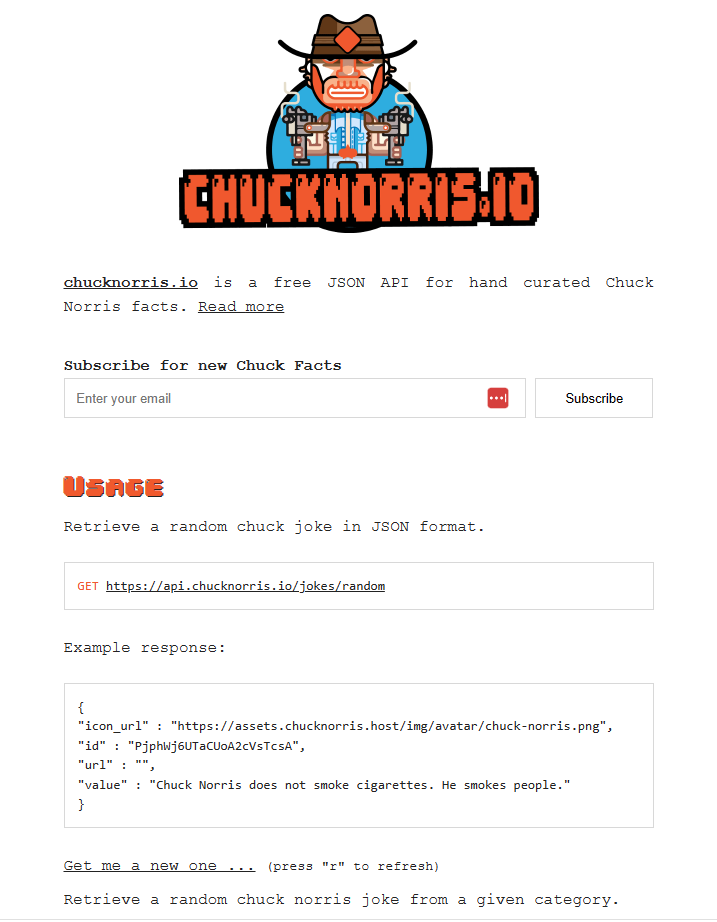
Chuck Norris API Home page

The application uses a System.Net.Http httpClient to call the ICNAPI and nanoFramework.Json to deserialize the responses.

namespace devMobile.IoT.WT32SC01.ChuckNorrisAPI
{
...
    internal class Joke
    {
        public string id { get; set; }
        public string url { get; set; }
        public string value { get; set; }
    }

    public class Program
    {
        public static void Main()
        {
            HttpClient httpClient;

            Debug.WriteLine($"{DateTime.UtcNow:HH:mm:ss} Wifi connecting");

            if (!WifiNetworkHelper.ConnectDhcp(Config.Ssid, Config.Password, requiresDateTime: true))
            {
                if (NetworkHelper.HelperException != null)
                {
                    Debug.WriteLine($"{DateTime.UtcNow:HH:mm:ss} WifiNetworkHelper.ConnectDhcp failed {NetworkHelper.HelperException}");
                }

                Thread.Sleep(Timeout.Infinite);
            }

            Debug.WriteLine($"{DateTime.UtcNow:HH:mm:ss} Wifi connected");

            using (httpClient = new HttpClient())
            {
                httpClient.SslProtocols = System.Net.Security.SslProtocols.Tls12;
                httpClient.HttpsAuthentCert = new X509Certificate(Config.LetsEncryptCACertificate);
                httpClient.BaseAddress = new Uri(Config.ChuckNorrisAPIUrl);

                while (true)
                {
                    Debug.WriteLine($"{DateTime.UtcNow:HH:mm:ss} HTTP request to: {httpClient.BaseAddress.AbsoluteUri}");

                    var response = httpClient.GetString("");

                    Debug.WriteLine($"{DateTime.UtcNow:HH:mm:ss} HTTP request done");

                    Joke joke = (Joke)JsonConvert.DeserializeObject(response, typeof(Joke));

                    Debug.WriteLine($"Joke: {joke.value} ");

                    Thread.Sleep(Config.RequestDelay);
                }
            }
        }
    }
}
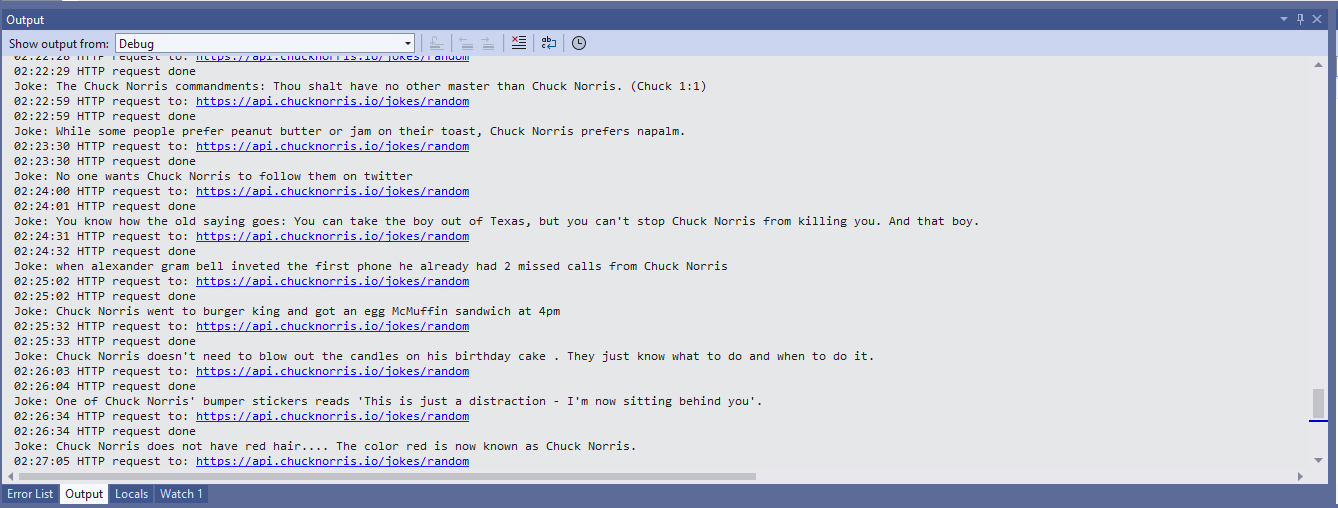
Visual Studio 2022 Debug output displaying Chuck Norris facts

The application configuration is stored in a separate file(config.cs) to reduce the likelihood of me accidently checking it into source control.

namespace devMobile.IoT.WT32SC01.ChuckNorrisAPI
{
    internal class Config
    {
        public const string Ssid = "";
        public const string Password = "";
        public const string ChuckNorrisAPIUrl = "https://api.chucknorris.io/jokes/random";

        public const string LetsEncryptCACertificate =
                 @"-----BEGIN CERTIFICATE-----
MIICGzCCAaGgAwIBAgIQQdKd0XLq7qeAwSxs6S+HUjAKBggqhkjOPQQDAzBPMQsw
CQYDVQQGEwJVUzEpMCcGA1UEChMgSW50ZXJuZXQgU2VjdXJpdHkgUmVzZWFyY2gg
R3JvdXAxFTATBgNVBAMTDElTUkcgUm9vdCBYMjAeFw0yMDA5MDQwMDAwMDBaFw00
MDA5MTcxNjAwMDBaME8xCzAJBgNVBAYTAlVTMSkwJwYDVQQKEyBJbnRlcm5ldCBT
ZWN1cml0eSBSZXNlYXJjaCBHcm91cDEVMBMGA1UEAxMMSVNSRyBSb290IFgyMHYw
EAYHKoZIzj0CAQYFK4EEACIDYgAEzZvVn4CDCuwJSvMWSj5cz3es3mcFDR0HttwW
+1qLFNvicWDEukWVEYmO6gbf9yoWHKS5xcUy4APgHoIYOIvXRdgKam7mAHf7AlF9
ItgKbppbd9/w+kHsOdx1ymgHDB/qo0IwQDAOBgNVHQ8BAf8EBAMCAQYwDwYDVR0T
AQH/BAUwAwEB/zAdBgNVHQ4EFgQUfEKWrt5LSDv6kviejM9ti6lyN5UwCgYIKoZI
zj0EAwMDaAAwZQIwe3lORlCEwkSHRhtFcP9Ymd70/aTSVaYgLXTWNLxBo1BfASdW
tL4ndQavEi51mI38AjEAi/V3bNTIZargCyzuFJ0nN6T5U6VR5CmD1/iQMVtCnwr1
/q4AaOeMSQ+2b1tbFfLn
            -----END CERTIFICATE-----";

        public static readonly TimeSpan RequestDelay = new TimeSpan(0, 30, 0); 
    }
}

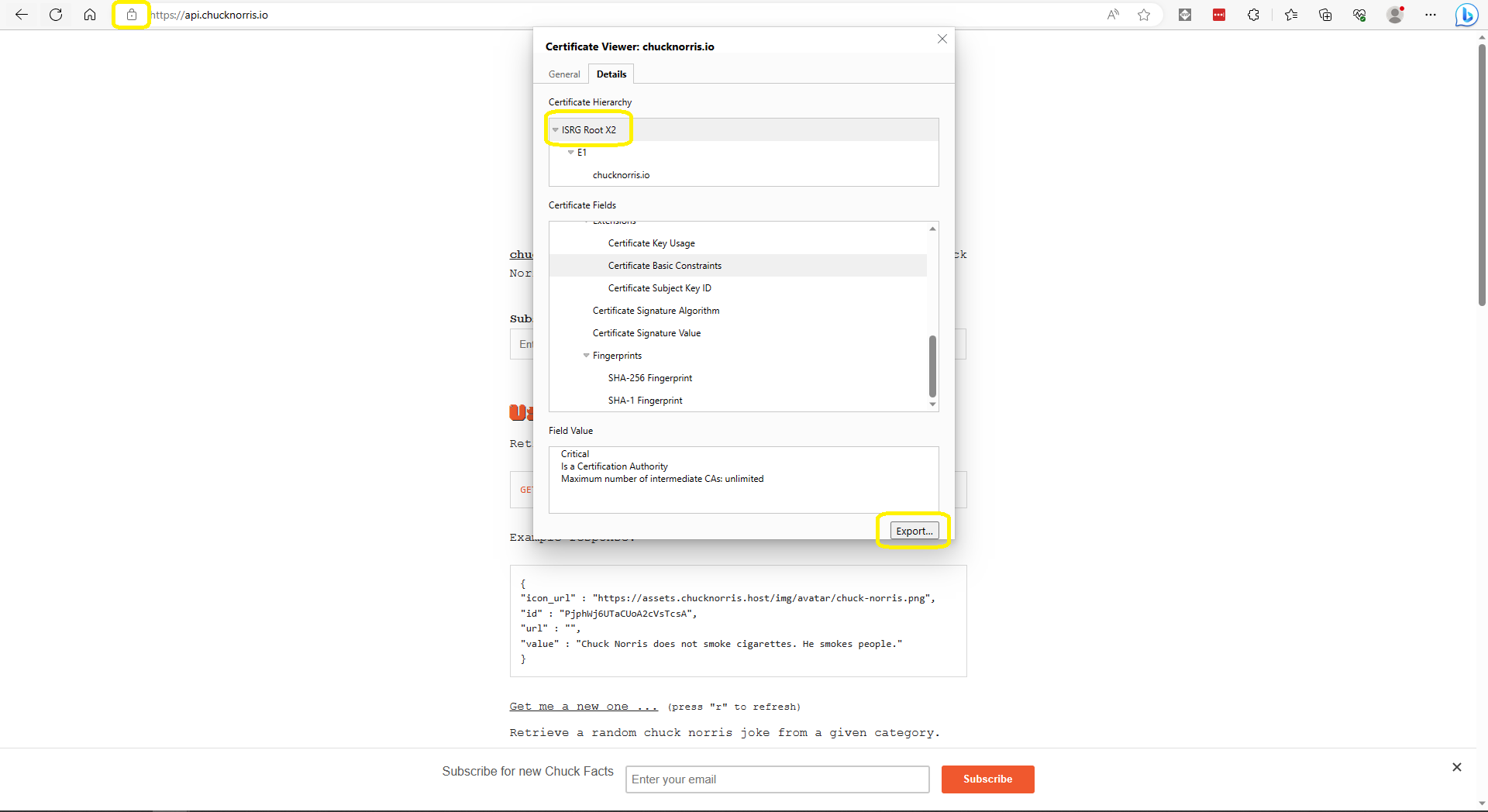
The ICNAPI supports HTTPS requests so I used the Micrsoft Edgium Certificate Viewer to download the Let’s Encrypt Internet Security Group(ISRG) Root X2 certificate.

Microsoft Edge Certificate View download

Some of the Chuck Norris facts are not suitable for school students so the request Uniform Resource Locator (URL) can be modified to ensure only “age appropriate” ones are returned.

Wireless-Tag WT32-SC01 nanoFramework getting started

Last week an ESP32 Development Board – WT32-SC01 with 3.5in 320×480 Multi-Touch capactive Screen, support Bluetooth & Wifi arrived from Elecrow. The development board was USD39.90 (June 2023) and appeared to be sourced from Wireless-Tag Technology.

WT32-SC01 packaging

The first step was to flash the WT32-SC01 with the latest version of the .NET nanoFramework for ESP32 devices. To get the device into “boot” mode I used a jumper wire to connect GPIO0 to ground before powering it up.

WT32-SC01 boot loader mode jumper

The .NET nanoFramework nanoff utility identified the device, downloaded the runtime package, and updated the device.

updating the WT32-SC01 with the nanoff utility

The next step was to run the blank NET nanoFramework sample application.

using System;
using System.Diagnostics;
using System.Threading;

namespace HelloWorld
{
    public class Program
    {
        public static void Main()
        {
            Debug.WriteLine("Hello from nanoFramework!");

            Thread.Sleep(Timeout.Infinite);

            // Browse our samples repository: https://github.com/nanoframework/samples
            // Check our documentation online: https://docs.nanoframework.net/
            // Join our lively Discord community: https://discord.gg/gCyBu8T
        }
    }
}

Microsoft Visual Studio 2022 displaying output of .NET nanoFramework Blank application

The WT32-SC01 doesn’t have a user LED so I modified the .NET nanoFramework blinky sample to flash the Liquid Crystal Display(LCD) backlight.

//
// Copyright (c) .NET Foundation and Contributors
// See LICENSE file in the project root for full license information.
//

using System.Device.Gpio;
using System;
using System.Threading;
using nanoFramework.Hardware.Esp32;

namespace Blinky
{
    public class Program
    {
        private static GpioController s_GpioController;
        public static void Main()
        {
            s_GpioController = new GpioController();

            // IO23 is LCD backlight
            GpioPin led = s_GpioController.OpenPin(Gpio.IO23,PinMode.Output ); 

            led.Write(PinValue.Low);

            while (true)
            {
                led.Toggle();
                Thread.Sleep(125);
                led.Toggle();
                Thread.Sleep(125);
                led.Toggle();
                Thread.Sleep(125);
                led.Toggle();
                Thread.Sleep(525);
            }
        }
    }
}

The

Flashing WT32-SC01 LCD backlight

Next steps getting the LCD+Touch panel and Wifi working

.NET nanoFramework Qorvo DW1000 – RAK13801 Device SPI

When developing libraries it’s good to have a selection of different platforms for testing as this can significantly improve the quality and robustness of the implementation. A few months ago I noticed that RAK Wireless have a UWB Module Decawave DW1000 Wisblock so I added one to an order.

My second Qorvo DW1000 setup is a RAK120000 Wisblock Core module, on a RAK19007 WisBlock Base with a RAK13801 WisBlock Wireless module

RAK12000 + RAK19007 + RAK13801 test platform

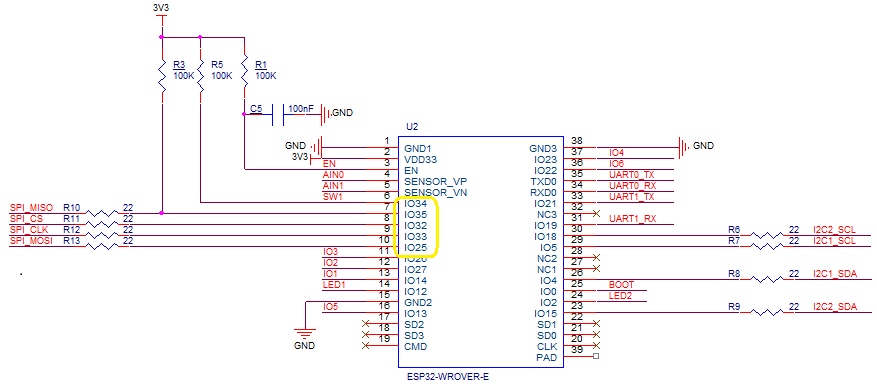
The Qorvo DW1000 module has a Serial Peripheral Interface (SPI) so the Master In Slave Out(MISO), Master Out Slave In(MOSI), Serial Clock(SCLK) and Chip Slave Select(CSS) pins of the RAK11200 WisBiock Core Module have to be setup using the Configuration.SetPinFunction method of the nanoFramework.Hardware.Esp32 library.

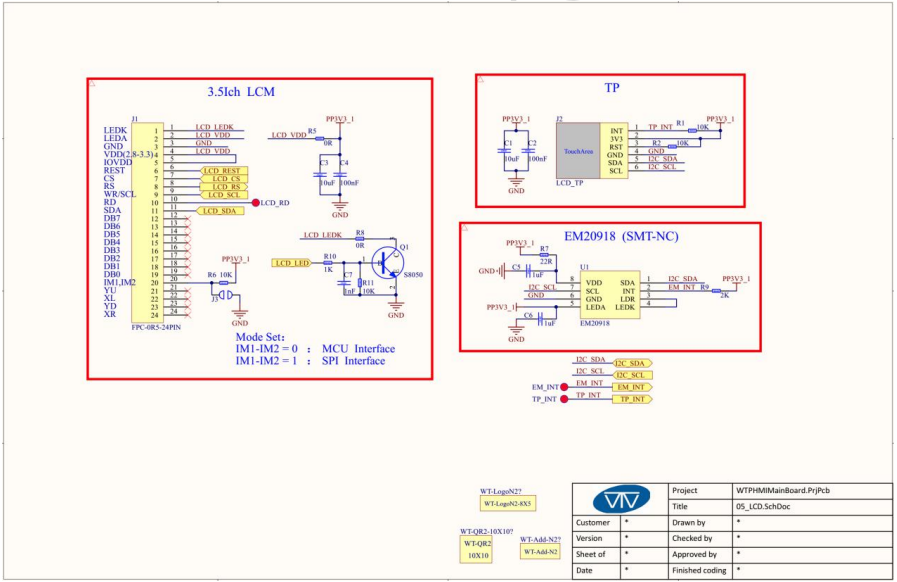
RAK11200 Schematic with SPI pins highlighted.
RAK13801 Schematic with SPI pins highlighted.

I have added a couple of C# processor directives (MAKERFABS_ESP32UWB & RAK11200_RAK1907_RAK13801) so the platform that the Qorvo DW1000 module is running on can be configured.

public class Program
{
#if MAKERFABS_ESP32UWB
    private const int SpiBusId = 1;
    private const int chipSelectLine = Gpio.IO04;
#endif
#if RAK11200_RAK1907_RAK13801
    private const int SpiBusId = 1;
    private const int chipSelectLine = Gpio.IO32;
#endif

    public static void Main()
    {
        Thread.Sleep(5000);

        Debug.WriteLine("devMobile.IoT.Dw1000.ShieldSPI starting");

        try
        {
#if MAKERFABS_ESP32UWB
            Configuration.SetPinFunction(Gpio.IO19, DeviceFunction.SPI1_MISO);
            Configuration.SetPinFunction(Gpio.IO23, DeviceFunction.SPI1_MOSI);
            Configuration.SetPinFunction(Gpio.IO18, DeviceFunction.SPI1_CLOCK);
#endif
#if RAK11200_RAK1907_RAK13801
            Configuration.SetPinFunction(Gpio.IO35, DeviceFunction.SPI1_MISO);
            Configuration.SetPinFunction(Gpio.IO25, DeviceFunction.SPI1_MOSI);
            Configuration.SetPinFunction(Gpio.IO33, DeviceFunction.SPI1_CLOCK);
#endif
            var settings = new SpiConnectionSettings(SpiBusId, chipSelectLine)
            {
                ClockFrequency = 2000000,
                Mode = SpiMode.Mode0,
            };

            using (SpiDevice device = SpiDevice.Create(settings))
            {
                while (true)
                {
                    byte[] writeBuffer = new byte[] { 0x0, 0x0, 0x0, 0x0, 0x0 }; // 0x0 = DEV_ID
                    byte[] readBuffer = new byte[writeBuffer.Length];

                    device.TransferFullDuplex(writeBuffer, readBuffer); // 15, 48, 1, 202, 222

                    uint ridTag = (uint)(readBuffer[4]<< 8 | readBuffer[3]);
                    byte model = readBuffer[2];
                    byte ver = (byte)(readBuffer[1] >> 4);
                    byte rev = (byte)(readBuffer[1] & 0x0f);

                    Debug.WriteLine(String.Format($"RIDTAG 0x{ridTag:X2} MODEL 0x{model:X2} VER 0X{ver:X2} REV 0x{rev:X2}"));

                   Thread.Sleep(10000);
                }
            }
        }
        catch (Exception ex)
        {
            Debug.WriteLine(ex.Message);
        }
    }
}

The alignment of the RAK11200 WisBiock Core Module pins and labels on the circuit diagram tripped me up. My initial configuration caused the device to reboot every time the application started.

Visual Studio 2022 Debug window displaying the decoded value from Register 0x0

At the top of test applications, I usually have a brief delay i.e Thread.Sleep(5000) so I can attach the debugger or erase the flash before the application crashes.

.NET nanoFramework RAK3172 LoRaWAN library basic connectivity

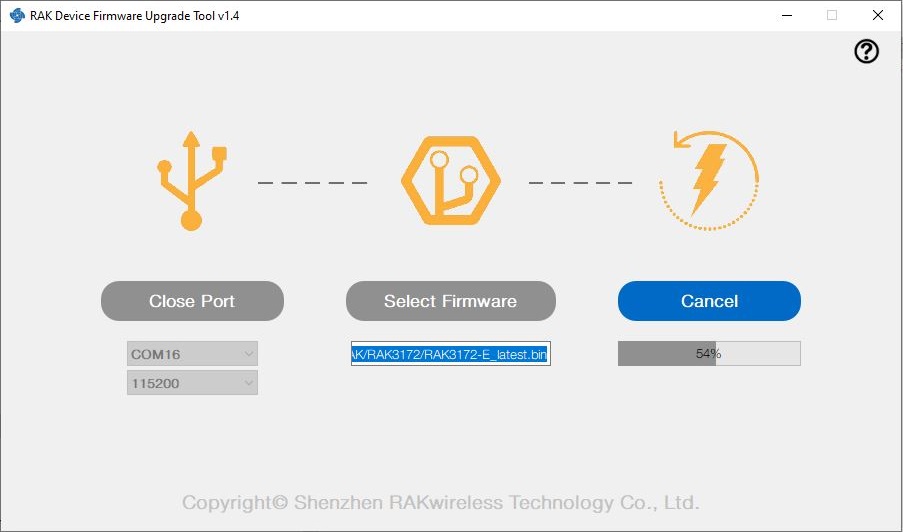
I have been working on a .NET nanoFramework library for the RAKwireless RAK3172 module for the last couple of weeks. The devices had been in a box under my desk for a couple of months so first step was to flash them with the latest firmware using my FTDI test harness.

RAK 3172 STM32F769I Discovery test rig

I use two hardware configurations for testing

My sample code has compile time options for synchronous and asynchronous operation. I also include the different nanoff command lines to make updating the test devices easier.

//---------------------------------------------------------------------------------
// Copyright (c) May 2022, devMobile Software
//
// Licensed under the Apache License, Version 2.0 (the "License");
// you may not use this file except in compliance with the License.
// You may obtain a copy of the License at
//
//     http://www.apache.org/licenses/LICENSE-2.0
//
// Unless required by applicable law or agreed to in writing, software
// distributed under the License is distributed on an "AS IS" BASIS,
// WITHOUT WARRANTIES OR CONDITIONS OF ANY KIND, either express or implied.
// See the License for the specific language governing permissions and
// limitations under the License.
//
// https://docs.rakwireless.com/Product-Categories/WisDuo/RAK4200-Breakout-Board/AT-Command-Manual/
//---------------------------------------------------------------------------------
#define SERIAL_ASYNC_READ
//#define SERIAL_THREADED_READ
#define ST_STM32F769I_DISCOVERY      // nanoff --target ST_STM32F769I_DISCOVERY --update 
//#define ESP32_WROOM   // nanoff --target ESP32_REV0 --serialport COM17 --update
...

namespace devMobile.IoT.LoRaWAN.nanoFramework.RAK3172
{
	using System;
	using System.Diagnostics;
	using System.IO.Ports;
	using System.Threading;
#if ESP32_WROOM
	using global::nanoFramework.Hardware.Esp32; //need NuGet nanoFramework.Hardware.Esp32
#endif

	public class Program
	{
		private static SerialPort _SerialPort;
#if SERIAL_THREADED_READ
		private static Boolean _Continue = true;
#endif
#if ESP32_WROOM
		private const string SerialPortId = "COM2";
#endif
...
#if ST_STM32F769I_DISCOVERY
		private const string SerialPortId = "COM6";
#endif

		public static void Main()
		{
#if SERIAL_THREADED_READ
			Thread readThread = new Thread(SerialPortProcessor);
#endif

			Debug.WriteLine("devMobile.IoT.LoRaWAN.nanoFramework.RAK3172 BreakoutSerial starting");

			try
			{
				// set GPIO functions for COM2 (this is UART1 on ESP32)
#if ESP32_WROOM
				Configuration.SetPinFunction(Gpio.IO16, DeviceFunction.COM2_TX);
				Configuration.SetPinFunction(Gpio.IO17, DeviceFunction.COM2_RX);
#endif

				Debug.Write("Ports:");
				foreach (string port in SerialPort.GetPortNames())
				{
					Debug.Write($" {port}");
				}
				Debug.WriteLine("");

				using (_SerialPort = new SerialPort(SerialPortId))
				{
					// set parameters
					_SerialPort.BaudRate = 115200;
					_SerialPort.Parity = Parity.None;
					_SerialPort.DataBits = 8;
					_SerialPort.StopBits = StopBits.One;
					_SerialPort.Handshake = Handshake.None;
					_SerialPort.NewLine = "\r\n";
					_SerialPort.ReadTimeout = 1000;

					//_SerialPort.WatchChar = '\n'; // May 2022 WatchChar event didn't fire github issue https://github.com/nanoframework/Home/issues/1035

#if SERIAL_ASYNC_READ
					_SerialPort.DataReceived += SerialDevice_DataReceived;
#endif

					_SerialPort.Open();

					_SerialPort.WatchChar = '\n';

#if SERIAL_THREADED_READ
					readThread.Start();
#endif

					for (int i = 0; i < 5; i++)
					{
						string atCommand;
						atCommand = "AT+VER=?";

                  Debug.WriteLine("");
						Debug.WriteLine($"{i} TX:{atCommand} bytes:{atCommand.Length}--------------------------------");
						_SerialPort.WriteLine(atCommand);

						Thread.Sleep(5000);
					}
				}
				Debug.WriteLine("Done");
			}
			catch (Exception ex)
			{
				Debug.WriteLine(ex.Message);
			}
		}

#if SERIAL_ASYNC_READ
		private static void SerialDevice_DataReceived(object sender, SerialDataReceivedEventArgs e)
		{
			SerialPort serialPort = (SerialPort)sender;

			switch (e.EventType)
			{
				case SerialData.Chars:
					break;

				case SerialData.WatchChar:
					string response = serialPort.ReadExisting();
					Debug.Write(response);
					break;
				default:
					Debug.Assert(false, $"e.EventType {e.EventType} unknown");
					break;
			}
		}
#endif

#if SERIAL_THREADED_READ
		public static void SerialPortProcessor()
		{

			while (_Continue)
			{
				try
				{
					string response = _SerialPort.ReadLine();
					//string response = _SerialPort.ReadExisting();
					Debug.Write(response);
				}
				catch (TimeoutException ex) 
				{
					Debug.WriteLine($"Timeout:{ex.Message}");
				}
			}
		}
#endif
	}
}

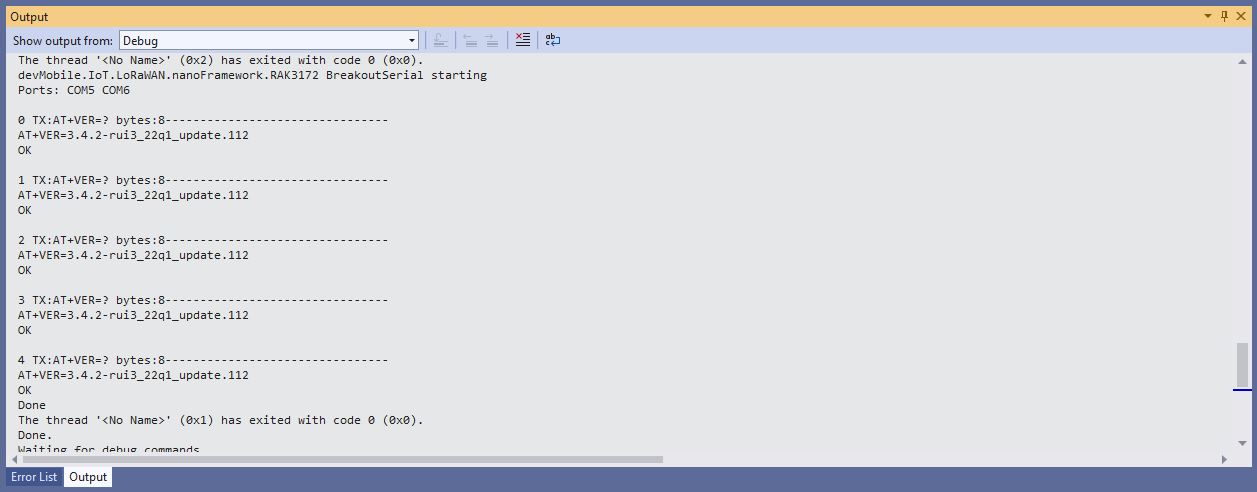
When I requested the RAK3172 version information with “AT+VER=?” the response was spilt over two lines which is a bit of a Pain in the Arse (PitA). The RAK3172 firmware also defaults 115200 baud which seems overkill considering the throughput of a LoRaWAN link.

Visual Studio Debug Output of Breakout Serial Application

While building the test application I encountered a few issues (STM32F769I DISCOVERY SerialPort.GetPortNames() port name text gets shorter, STM32F769I DISCOVERY Inconsistent SerialPort WatchChar behaviour after erase->power cycle->run & erase->run and No SerialPort.WatchChar events if WatchChar set before SerialPort opened) which slowed down development. The speed the nanoFramework team triages then fixes issues is amazing for a team of volunteers dotted around the world.

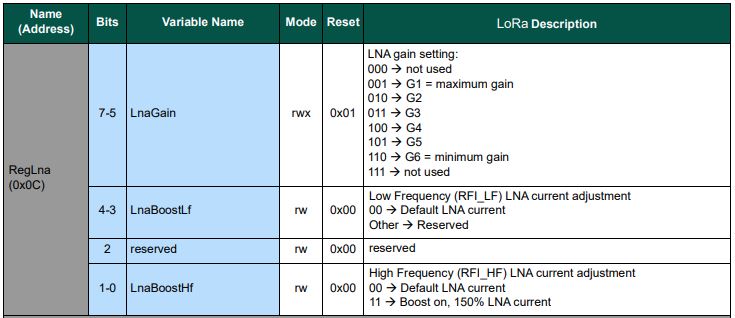
.NET nanoFramework SX127X LoRa library RegLna LnaGain

Every so often I print my code out (landscape for notes in margin, double sided to save paper, and colour so it looks like Visual Studio 2022) and within 100 lines noticed the first of no doubt many issues. The SX127X RegLNA enumeration was wrong.

// RegLna
[Flags]
public enum RegLnaLnaGain : byte
{
	G1 = 0b00000001,
	G2 = 0b00000010,
	G3 = 0b00000011,
	G4 = 0b00000100,
	G5 = 0b00000101,
	G6 = 0b00000110
}
SX127X RegLna options

The LnaGain value is bits 5-7 rather than rather than bits 0-2 which could be a problem if the specified lnaGain and lnaBoost values are not the default values.

// Set RegLna if any of the settings not defaults
if ((lnaGain != Configuration.LnaGainDefault) || (lnaBoost != Configuration.LnaBoostDefault))
{
	byte regLnaValue = (byte)lnaGain;

	regLnaValue |= Configuration.RegLnaLnaBoostLfDefault;
	regLnaValue |= Configuration.RegLnaLnaBoostHfDefault;

	if (lnaBoost)
	{
		if (_frequency > Configuration.SX127XMidBandThreshold)
		{
			regLnaValue |= Configuration.RegLnaLnaBoostHfOn;
		}
		else
		{
			regLnaValue |= Configuration.RegLnaLnaBoostLfOn;
		}
	}
	_registerManager.WriteByte((byte)Configuration.Registers.RegLna, regLnaValue);
}

The default lnaGain is G1 and the default lnaBoost is false so if the gain was set to G3(011) then LnaBoostHf current would be 150% and LnaGain would be 000 which is a reserved value.

// RegLna
[Flags]
public enum RegLnaLnaGain : byte
{
	G1 = 0b00100000,
	G2 = 0b01000000,
	G3 = 0b01100000,
	G4 = 0b10000000,
	G5 = 0b10100000,
	G6 = 0b11000000
}

I need to check my usage of Configuration.SX127XMidBandThreshold for LnaBoostLf vs. LnaBoostHf is correct.(arduino-LoRa)

.NET nanoFramework SX127X LoRa library “it’s all about timing”

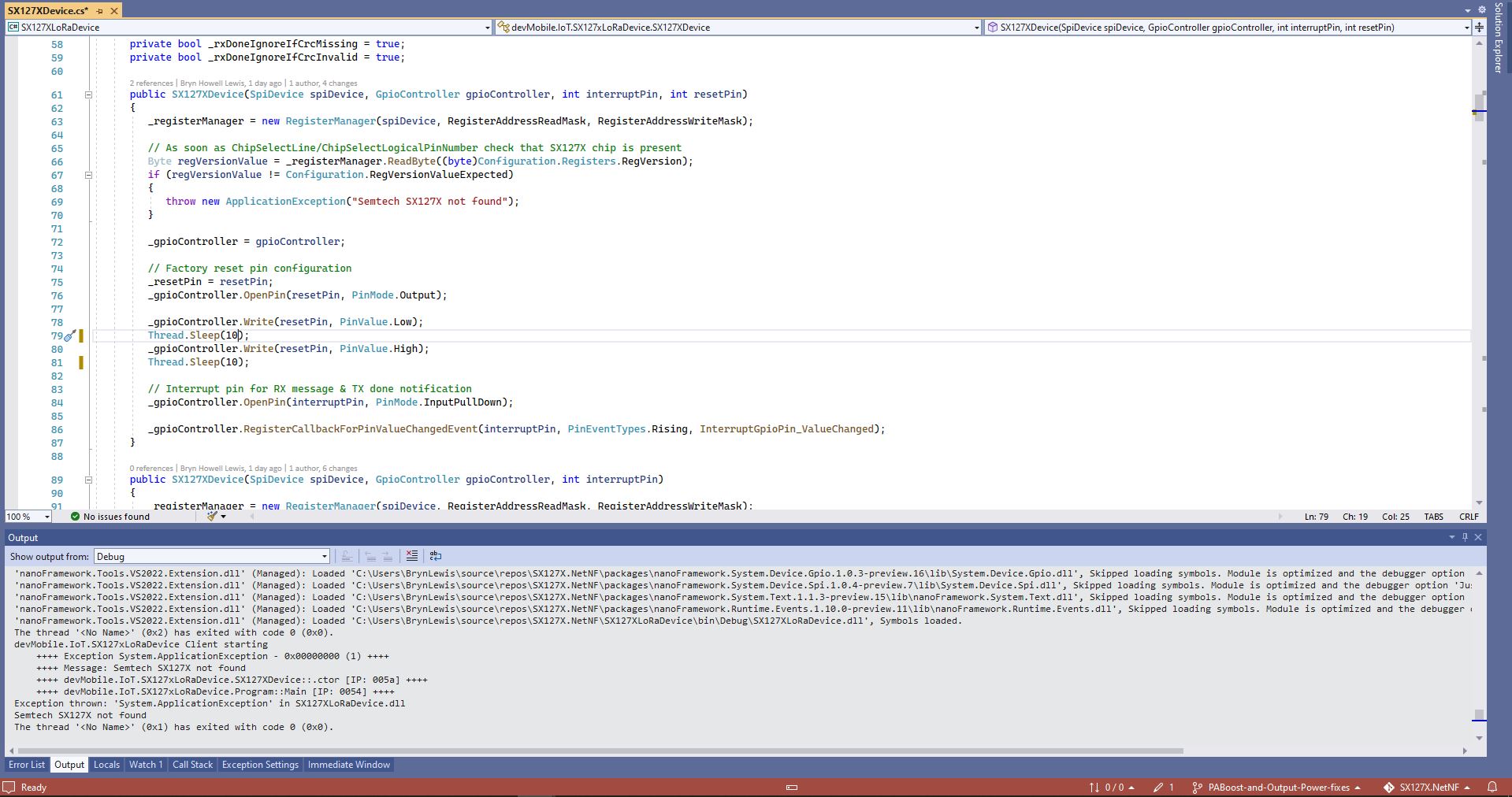
Every so often my nanoFramework SX127X library RangeTester application wouldn’t start. When I poked around with the Visual Studio 2022 debugger the issue went away(a “Heisenbug” in the wild) which made figuring out what was going on impossible.

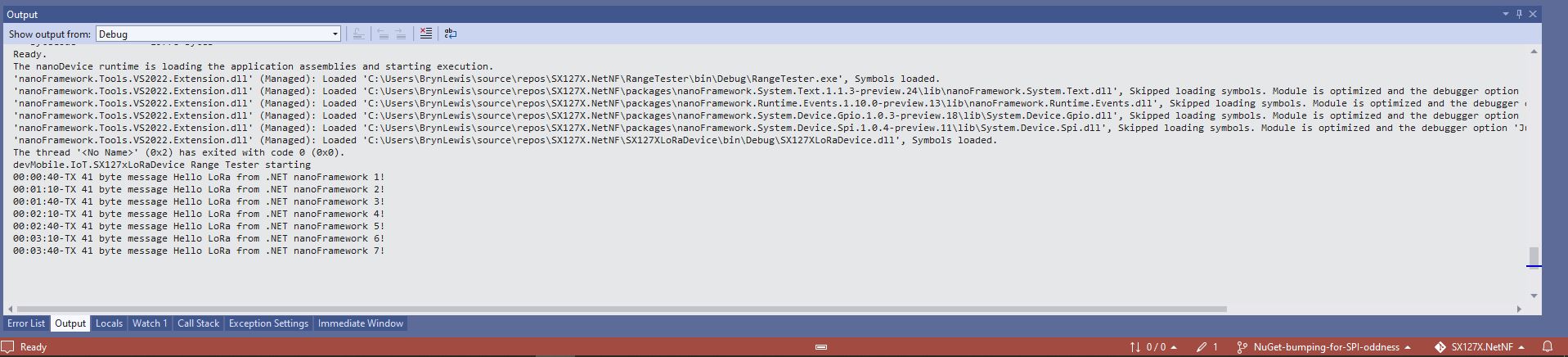
One afternoon the issue occurred several times in a row, the application wouldn’t startup because the SX127X device detection failed and message transmission was also not being confirmed.(TX Done).

Visual Studio output windows with SX127X detection failure
Visual Studio output windows with no Transmit confirmations
public SX127XDevice(SpiDevice spiDevice, GpioController gpioController, int interruptPin, int resetPin)
{
	_gpioController = gpioController;

	// Factory reset pin configuration
	_resetPin = resetPin;
	_gpioController.OpenPin(resetPin, PinMode.Output);

	_gpioController.Write(resetPin, PinValue.Low);
	Thread.Sleep(20);
	_gpioController.Write(resetPin, PinValue.High);
	Thread.Sleep(100);

	_registerManager = new RegisterManager(spiDevice, RegisterAddressReadMask, RegisterAddressWriteMask);

	// Once the pins setup check that SX127X chip is present
	Byte regVersionValue = _registerManager.ReadByte((byte)Configuration.Registers.RegVersion);
	if (regVersionValue != Configuration.RegVersionValueExpected)
	{
		throw new ApplicationException("Semtech SX127X not found");
	}

	// Interrupt pin for RX message & TX done notification 
	_gpioController.OpenPin(interruptPin, PinMode.InputPullDown);

	_gpioController.RegisterCallbackForPinValueChangedEvent(interruptPin, PinEventTypes.Rising, InterruptGpioPin_ValueChanged);
}

I could single step through the code and inspect variables with the debugger and it looks like a timing issue with order of the strobing of the reset pin and the initialisation of the RegisterManager. I’ll spend and hour starting and stopping the application, then smoke test the code for 24 hours with a couple of other devices generating traffic just to check.

.NET nanoFramework SX127X LoRa library playing nice with others

So nanoFramework applications using my SX127X library.NetNF can access other General Purpose Input Output(GPIO) ports and Serial Peripheral Interface(SPI) devices I have added SpiDevice and GpioController parameters to the two constructors.

// Hardware configuration support
private readonly int ResetPin;
private readonly GpioController _gpioController = null;
private readonly SpiDevice _sx127xTransceiver = null;
private readonly Object SX127XRegFifoLock = new object();
private double Frequency = FrequencyDefault;
private bool RxDoneIgnoreIfCrcMissing = true;
private bool RxDoneIgnoreIfCrcInvalid = true;

public SX127XDevice(SpiDevice spiDevice, GpioController gpioController, int interruptPin, int resetPin)
{
	_sx127xTransceiver = spiDevice;

	_gpioController = gpioController;

	// As soon as ChipSelectLine/ChipSelectLogicalPinNumber check that SX127X chip is present
	Byte regVersionValue = this.ReadByte((byte)Registers.RegVersion);
	if (regVersionValue != RegVersionValueExpected)
	{
		throw new ApplicationException("Semtech SX127X not found");
	}

	// Factory reset pin configuration
	ResetPin = resetPin;
	_gpioController.OpenPin(resetPin, PinMode.Output);

	_gpioController.Write(resetPin, PinValue.Low);
	Thread.Sleep(20);
	_gpioController.Write(resetPin, PinValue.High);
	Thread.Sleep(20);

	// Interrupt pin for RX message & TX done notification 
	_gpioController.OpenPin(interruptPin, PinMode.InputPullDown);

	_gpioController.RegisterCallbackForPinValueChangedEvent(interruptPin, PinEventTypes.Rising, InterruptGpioPin_ValueChanged);
}

public SX127XDevice(SpiDevice spiDevice, GpioController gpioController, int interruptPin)
{
	_sx127xTransceiver = spiDevice;

	_gpioController = gpioController;

	// As soon as ChipSelectLine/ChipSelectLogicalPinNumber check that SX127X chip is present
	Byte regVersionValue = this.ReadByte((byte)Registers.RegVersion);
	if (regVersionValue != RegVersionValueExpected)
	{
		throw new ApplicationException("Semtech SX127X not found");
	}

	// Interrupt pin for RX message & TX done notification 
	_gpioController.OpenPin(interruptPin, PinMode.InputPullDown);

	_gpioController.RegisterCallbackForPinValueChangedEvent(interruptPin, PinEventTypes.Rising, InterruptGpioPin_ValueChanged);
}

I then “over refactored”(broke) the constructor without the resetPin by removing the GpioController parameter which is necessary for the RegisterCallbackForPinValueChangedEvent.

.NET nanoFramework SX127X LoRa library on Github

The source code of my nanoFramework SX127X library is now available on GitHub. I have tested the library and sample applications on Netduino 3Wifi, Sparkfun LoRa Gateway 1 Channel ESP32 for LoRaWAN and ST Micro STM32F7691 Discovery devices.(I can add more platform configurations if there is interest).

STM32F769I Discovery, Netduino 3 Wifi and Sparkfun testrig

I started with a proof of concept update of my RFM9X for nanoFramework library to the new nanoFramework System.Device model (“inspired” by .Net Core System.Device) which was slow going. I then tried “back porting” my SX127X for .Net Core library to the .NET nanoFramework which was much quicker.

namespace devMobile.IoT.SX127xLoRaDevice
{
	using System;
	using System.Text;
	using System.Threading;

	class Program
	{
		private const double Frequency = 915000000.0;
#if ESP32_WROOM_32_LORA_1_CHANNEL
      private const int SpiBusId = 1;
#endif
#if NETDUINO3_WIFI
		private const int SpiBusId = 2;
#endif
#if ST_STM32F769I_DISCOVERY
		private const int SpiBusId = 2;
#endif
		private static SX127XDevice sx127XDevice;

		static void Main(string[] args)
		{
			int SendCount = 0;
#if ESP32_WROOM_32_LORA_1_CHANNEL // No reset line for this device as it isn't connected on SX127X
			int chipSelectLine = Gpio.IO16;
			int interruptPinNumber = Gpio.IO26;
#endif
#if NETDUINO3_WIFI
			// Arduino D10->PB10
			int chipSelectLine = PinNumber('B', 10);
			// Arduino D9->PE5
			int resetPinNumber = PinNumber('E', 5);
			// Arduino D2 -PA3
			int interruptPinNumber = PinNumber('A', 3);
#endif
#if ST_STM32F769I_DISCOVERY
			// Arduino D10->PA11
			int chipSelectLine = PinNumber('A', 11);
			// Arduino D9->PH6
			int resetPinNumber = PinNumber('H', 6);
			// Arduino D2->PA4
			int interruptPinNumber = PinNumber('J', 1);
#endif
			Console.WriteLine("devMobile.IoT.SX127xLoRaDevice Client starting");

			try
			{
#if ESP32_WROOM_32_LORA_1_CHANNEL
				Configuration.SetPinFunction(Gpio.IO12, DeviceFunction.SPI1_MISO);
				Configuration.SetPinFunction(Gpio.IO13, DeviceFunction.SPI1_MOSI);
				Configuration.SetPinFunction(Gpio.IO14, DeviceFunction.SPI1_CLOCK);

				sx127XDevice = new SX127XDevice(SpiBusId, chipSelectLine, interruptPinNumber);
#endif
#if NETDUINO3_WIFI || ST_STM32F769I_DISCOVERY
				sx127XDevice = new SX127XDevice(SpiBusId, chipSelectLine, interruptPinNumber, resetPinNumber);
#endif

				sx127XDevice.Initialise(SX127XDevice.RegOpModeMode.ReceiveContinuous,
							Frequency,
							lnaGain: SX127XDevice.RegLnaLnaGain.G3,
							lnaBoost:true, 
							powerAmplifier: SX127XDevice.PowerAmplifier.PABoost,
							rxPayloadCrcOn: true,
							rxDoneignoreIfCrcMissing: false
							);

#if DEBUG
				sx127XDevice.RegisterDump();
#endif

				sx127XDevice.OnReceive += SX127XDevice_OnReceive;
				sx127XDevice.Receive();
				sx127XDevice.OnTransmit += SX127XDevice_OnTransmit;

				Thread.Sleep(500);

				while (true)
				{
					string messageText = $"Hello LoRa from .NET nanoFramework {SendCount += 1}!";

					byte[] messageBytes = UTF8Encoding.UTF8.GetBytes(messageText);
					//Console.WriteLine($"{DateTime.UtcNow:HH:mm:ss}-TX {messageBytes.Length} byte message {messageText}");
					//sx127XDevice.Send(messageBytes);

					Thread.Sleep(50000);
				}
			}
			catch (Exception ex)
			{
				Console.WriteLine(ex.Message);
			}
		}

		private static void SX127XDevice_OnReceive(object sender, SX127XDevice.OnDataReceivedEventArgs e)
		{
			try
			{
				// Remove unprintable characters from messages
				for (int index = 0; index < e.Data.Length; index++)
				{
					if ((e.Data[index] < 0x20) || (e.Data[index] > 0x7E))
					{
						e.Data[index] = 0x7C;
					}
				}

				string messageText = UTF8Encoding.UTF8.GetString(e.Data, 0, e.Data.Length);

				Console.WriteLine($"{DateTime.UtcNow:HH:mm:ss}-RX PacketSnr {e.PacketSnr:0.0} Packet RSSI {e.PacketRssi}dBm RSSI {e.Rssi}dBm = {e.Data.Length} byte message {messageText}");
			}
			catch (Exception ex)
			{
				Console.WriteLine(ex.Message);
			}
		}

		private static void SX127XDevice_OnTransmit(object sender, SX127XDevice.OnDataTransmitedEventArgs e)
		{
			sx127XDevice.SetMode(SX127XDevice.RegOpModeMode.ReceiveContinuous);

			Console.WriteLine($"{DateTime.UtcNow:HH:mm:ss}-TX Done");
		}

#if NETDUINO3_WIFI || ST_STM32F769I_DISCOVERY
		static int PinNumber(char port, byte pin)
		{
			if (port < 'A' || port > 'J')
				throw new ArgumentException();

			return ((port - 'A') * 16) + pin;
		}
#endif
	}
}

The sample application shows how to configure the library for different devices (SPI port, interrupt pin and optional reset pin) then send/receive payloads. The library is intended to be initialised then run for long periods of time (I’m looking at a month long soak test next) rather than changing configuration while running. The initialise method has many parameters which have “reasonable” default values. (Posts coming about optimising power consumption and range).

I’m looking at extending the library with optional functionality like tamper detection via signing and privacy via payload encryption, and mesh network support.

.NET nanoFramework SX127X LoRa library with Interrupts

To test the nanoFramework transmit and receive with interrupts implementation I used three Dragino LoRa Shields, a Seeeduino V4.2 and a pair of Netduino 3 Wifi devices.

Seeeduino and nanoFramework

I started with transmit as I was confident my Netduino 3 Wifi & Seeeduino + Dragino LoRa Shields could receive messages.

Interrupt pin configuration
SX127X ReqIrqFlags options

The TransmitInterrupt application loads the message to be sent into the First In First Out(FIFO) buffer, RegDioMapping1 is set to interrupt onTxDone(PacketSent-00), then RegRegOpMode-Mode is set to Transmit. When the message has been sent InterruptGpioPin_ValueChanged is called, and the TxDone(0b00001000) flag is set in the RegIrqFlags register.

The ReceiveInterrupt application sets the RegDioMapping1 to interrupt on RxDone(PacketReady-00), then the RegRegOpMode-Mode is set to Receive(TX-101). When a message is received InterruptGpioPin_ValueChanged is called, with the RxDone(0b00001000) flag set in the RegIrqFlags register, and then the message is read from First In First Out(FIFO) buffer.

namespace devMobile.IoT.SX127x.ReceiveTransmitInterrupt
{
...
   public sealed class SX127XDevice
   {
...
      public SX127XDevice(int busId, int chipSelectLine, int interruptPin, int resetPin)
      {
         var settings = new SpiConnectionSettings(busId, chipSelectLine)
         {
            ClockFrequency = 1000000,
            Mode = SpiMode.Mode0,// From SemTech docs pg 80 CPOL=0, CPHA=0
            SharingMode = SpiSharingMode.Shared
         };

         SX127XTransceiver = new SpiDevice(settings);

         GpioController gpioController = new GpioController();


         // Factory reset pin configuration
         gpioController.OpenPin(resetPin, PinMode.Output);

         gpioController.Write(resetPin, PinValue.Low);
         Thread.Sleep(20);
         gpioController.Write(resetPin, PinValue.High);
         Thread.Sleep(20);

         // Interrupt pin for RX message & TX done notification 
         gpioController.OpenPin(interruptPin, PinMode.InputPullDown);

         gpioController.RegisterCallbackForPinValueChangedEvent(interruptPin, PinEventTypes.Rising, InterruptGpioPin_ValueChanged);
      }
...
   }

      private void InterruptGpioPin_ValueChanged(object sender, PinValueChangedEventArgs e)
      {
         byte irqFlags = this.ReadByte(0x12); // RegIrqFlags
         Debug.WriteLine($"RegIrqFlags 0X{irqFlags:x2}");

         if ((irqFlags & 0b01000000) == 0b01000000)  // RxDone 
         {
            Debug.WriteLine("Receive-Message");
            byte currentFifoAddress = this.ReadByte(0x10); // RegFifiRxCurrent
            this.WriteByte(0x0d, currentFifoAddress); // RegFifoAddrPtr

            byte numberOfBytes = this.ReadByte(0x13); // RegRxNbBytes

            // Allocate buffer for message
            byte[] messageBytes = this.ReadBytes(0X0, numberOfBytes);

            // Remove unprintable characters from messages
            for (int index = 0; index < messageBytes.Length; index++)
            {
               if ((messageBytes[index] < 0x20) || (messageBytes[index] > 0x7E))
               {
                  messageBytes[index] = 0x20;
               }
            }

            string messageText = UTF8Encoding.UTF8.GetString(messageBytes, 0, messageBytes.Length);
            Debug.WriteLine($"Received {messageBytes.Length} byte message {messageText}");
         }

         if ((irqFlags & 0b00001000) == 0b00001000)  // TxDone
         {
            this.WriteByte(0x01, 0b10000101); // RegOpMode set LoRa & RxContinuous
            Debug.WriteLine("Transmit-Done");
         }

         this.WriteByte(0x40, 0b00000000); // RegDioMapping1 0b00000000 DI0 RxReady & TxReady
         this.WriteByte(0x12, 0xff);// RegIrqFlags
      }

   public class Program
   {
...
   #if NETDUINO3_WIFI
      private const int SpiBusId = 2;
#endif
...

      public static void Main()
      {
         int SendCount = 0;
...
#if NETDUINO3_WIFI
         // Arduino D10->PB10
         int chipSelectLine = PinNumber('B', 10);
         // Arduino D9->PE5
         int resetPinNumber = PinNumber('E', 5);
         // Arduino D2 -PA3
         int interruptPinNumber = PinNumber('A', 3);
#endif
...
  
       Debug.WriteLine("devMobile.IoT.SX127x.ReceiveTransmitInterrupt starting");

         try
         {
...
#if NETDUINO3_WIFI || ST_STM32F769I_DISCOVERY
            SX127XDevice sx127XDevice = new SX127XDevice(SpiBusId, chipSelectLine, interruptPinNumber, resetPinNumber);
#endif
            Thread.Sleep(500);

            // Put device into LoRa + Sleep mode
            sx127XDevice.WriteByte(0x01, 0b10000000); // RegOpMode 

            // Set the frequency to 915MHz
            byte[] frequencyWriteBytes = { 0xE4, 0xC0, 0x00 }; // RegFrMsb, RegFrMid, RegFrLsb
            sx127XDevice.WriteBytes(0x06, frequencyWriteBytes);

            // More power PA Boost
            sx127XDevice.WriteByte(0x09, 0b10000000); // RegPaConfig

            sx127XDevice.WriteByte(0x01, 0b10000101); // RegOpMode set LoRa & RxContinuous

            while (true)
            {
               // Set the Register Fifo address pointer
               sx127XDevice.WriteByte(0x0E, 0x00); // RegFifoTxBaseAddress 

               // Set the Register Fifo address pointer
               sx127XDevice.WriteByte(0x0D, 0x0); // RegFifoAddrPtr 

               string messageText = $"Hello LoRa {SendCount += 1}!";

               // load the message into the fifo
               byte[] messageBytes = UTF8Encoding.UTF8.GetBytes(messageText);
               sx127XDevice.WriteBytes(0x0, messageBytes); // RegFifo 

               // Set the length of the message in the fifo
               sx127XDevice.WriteByte(0x22, (byte)messageBytes.Length); // RegPayloadLength
               sx127XDevice.WriteByte(0x40, 0b01000000); // RegDioMapping1 0b00000000 DI0 RxReady & TxReady
               sx127XDevice.WriteByte(0x01, 0b10000011); // RegOpMode 

               Debug.WriteLine($"Sending {messageBytes.Length} bytes message {messageText}");

               Thread.Sleep(10000);
            }
         }
         catch (Exception ex)
         {
            Debug.WriteLine(ex.Message);
         }
      }
...
   }
}
ReceiveTransmitInterrupt application output

The ReceiveTransmitInterrupt application combines the functionality TransmitInterrupt and ReceiveInterrupt programs. The key differences are the RegDioMapping1 setup and in InterruptGpioPin_ValueChanged where the TxDone & RxDone flags in the RegIrqFlags register specify how the interrupt is handled.

.NET nanoFramework SX127X LoRa library Basic Receive & Transmit

For testing nanoFramework device transmit and receive functionality I used an Arduino/Seeeduino with a Dragino LoRa Shield (running one of the Arduino-LoRa samples) as a client device. This was so I could “bootstrap” connectivity and test interoperability with other libraries/platforms.

Arduino/Netduino devices for .NET nanoFramework interoperability test-rig

I started with transmit as I was confident my Seeeduino + Dragino LoRa Shield could receive messages. The TransmitBasic application puts the device into LoRa + Sleep mode as after reset/powering up the device is in FSK/OOK, Low Frequency + Standby mode).

SX127X RegOpMode options

After loading the message to be sent into the First In First Out(FIFO) buffer, the RegOpMode-Mode is set to Transmit(TX-011), and then the RegIrqFlags register is polled until the TxDone flag is set.

SX127X ReqIrqFlags options
public static void Main()
{
  int SendCount = 0;
...
  Debug.WriteLine("devMobile.IoT.SX127x.TransmitBasic starting");

   try
   {
...
#if NETDUINO3_WIFI || ST_STM32F769I_DISCOVERY
      SX127XDevice sx127XDevice = new SX127XDevice(SpiBusId, chipSelectLine, resetPinNumber);
#endif
     Thread.Sleep(500);

     // Put device into LoRa + Standby mode
     sx127XDevice.WriteByte(0x01, 0b10000000); // RegOpMode 

      // Set the frequency to 915MHz
      byte[] frequencyBytes = { 0xE4, 0xC0, 0x00 }; // RegFrMsb, RegFrMid, RegFrLsb
      sx127XDevice.WriteBytes(0x06, frequencyBytes);

      // More power PA Boost
      sx127XDevice.WriteByte(0x09, 0b10000000); // RegPaConfig

      sx127XDevice.RegisterDump();

      while (true)
      {
         sx127XDevice.WriteByte(0x0E, 0x0); // RegFifoTxBaseAddress 

         // Set the Register Fifo address pointer
         sx127XDevice.WriteByte(0x0D, 0x0); // RegFifoAddrPtr 

         string messageText = $"Hello LoRa from .NET nanoFramework {SendCount += 1}!";

         // load the message into the fifo
         byte[] messageBytes = UTF8Encoding.UTF8.GetBytes(messageText);
         sx127XDevice.WriteBytes(0x0, messageBytes); // RegFifo

         // Set the length of the message in the fifo
         sx127XDevice.WriteByte(0x22, (byte)messageBytes.Length); // RegPayloadLength

         Debug.WriteLine($"Sending {messageBytes.Length} bytes message {messageText}");
         // Set the mode to LoRa + Transmit
         sx127XDevice.WriteByte(0x01, 0b10000011); // RegOpMode 

         // Wait until send done, no timeouts in PoC
         Debug.WriteLine("Send-wait");
         byte irqFlags = sx127XDevice.ReadByte(0x12); // RegIrqFlags
         while ((irqFlags & 0b00001000) == 0)  // wait until TxDone cleared
         {
            Thread.Sleep(10);
            irqFlags = sx127XDevice.ReadByte(0x12); // RegIrqFlags
            Debug.Write(".");
         }
         Debug.WriteLine("");
         sx127XDevice.WriteByte(0x12, 0b00001000); // clear TxDone bit
         Debug.WriteLine("Send-Done");

         Thread.Sleep(30000);
         }
      }
      catch (Exception ex)
      {
         Debug.WriteLine(ex.Message);
      }
   }
}
Transmit Basic application output

Once the TransmitBasic application was sending messages reliably I started working on the ReceiveBasic application. As the ReceiveBasic application starts up the SX127X RegOpMode has to be set to sleep/standby so the device can be configured. TOnce that is completed RegOpMode-Mode is set to RxContinuous(101), and the RegIrqFlags register is polled until the RxDone flag is set.

public static void Main()
{
...
   Debug.WriteLine("devMobile.IoT.SX127x.ReceiveBasic starting");

   try
   {
...
#if NETDUINO3_WIFI || ST_STM32F769I_DISCOVERY
      SX127XDevice sx127XDevice = new SX127XDevice(SpiBusId, chipSelectLine, resetPinNumber);
#endif
      Thread.Sleep(500);

      // Put device into LoRa + Sleep mode
      sx127XDevice.WriteByte(0x01, 0b10000000); // RegOpMode 

      // Set the frequency to 915MHz
      byte[] frequencyBytes = { 0xE4, 0xC0, 0x00 }; // RegFrMsb, RegFrMid, RegFrLsb
      sx127XDevice.WriteBytes(0x06, frequencyBytes);

      sx127XDevice.WriteByte(0x0F, 0x0); // RegFifoRxBaseAddress 

      sx127XDevice.WriteByte(0x01, 0b10000101); // RegOpMode set LoRa & RxContinuous

       while (true)
       {
          // Wait until a packet is received, no timeouts in PoC
         Debug.WriteLine("Receive-Wait");
         byte irqFlags = sx127XDevice.ReadByte(0x12); // RegIrqFlags
         while ((irqFlags & 0b01000000) == 0)  // wait until RxDone cleared
         {
            Thread.Sleep(100);
            irqFlags = sx127XDevice.ReadByte(0x12); // RegIrqFlags
            Debug.Write(".");
         }
         Debug.WriteLine("");
         Debug.WriteLine($"RegIrqFlags 0X{irqFlags:X2}");
         Debug.WriteLine("Receive-Message");
         byte currentFifoAddress = sx127XDevice.ReadByte(0x10); // RegFifiRxCurrent
         sx127XDevice.WriteByte(0x0d, currentFifoAddress); // RegFifoAddrPtr

         byte numberOfBytes = sx127XDevice.ReadByte(0x13); // RegRxNbBytes

         // Read the message from the FIFO
         byte[] messageBytes = sx127XDevice.ReadBytes(0x00, numberOfBytes);

         sx127XDevice.WriteByte(0x0d, 0);
         sx127XDevice.WriteByte(0x12, 0b11111111); // RegIrqFlags clear all the bits

         // Remove unprintable characters from messages
         for (int index = 0; index < messageBytes.Length; index++)
         {
            if ((messageBytes[index] < 0x20) || (messageBytes[index] > 0x7E))
            {
               messageBytes[index] = 0x20;
            }
         }

         string messageText = UTF8Encoding.UTF8.GetString(messageBytes, 0, messageBytes.Length);
         Debug.WriteLine($"Received {messageBytes.Length} byte message {messageText}");

         Debug.WriteLine("Receive-Done");
      }
    }
   catch (Exception ex)
   {
      Debug.WriteLine(ex.Message);
   }
}
Receive Basic application output

Every so often the ReceiveBasic application would display a message sent on the same frequency by a device somewhere nearby.

ReceiveBasic application messages from unknown source

I need to do some more investigation into whether writing 0b00001000 (Transmit) vs. 0b11111111(Receive) to RegIrqFlags is important.