.Net Meadow RFM95/96/97/98 LoRa library Part3

Register Read and Write

Now that I could reliably dump all the Arduino shield registers I wanted to be able to configure the Semtech 1276/7/8/9 device and reset it back to factory settings.

A factory reset is done by strobing the reset pin on the device. To support this my Rfm9XDevice class constructor gained an additional parameter, the reset GPIO pin.

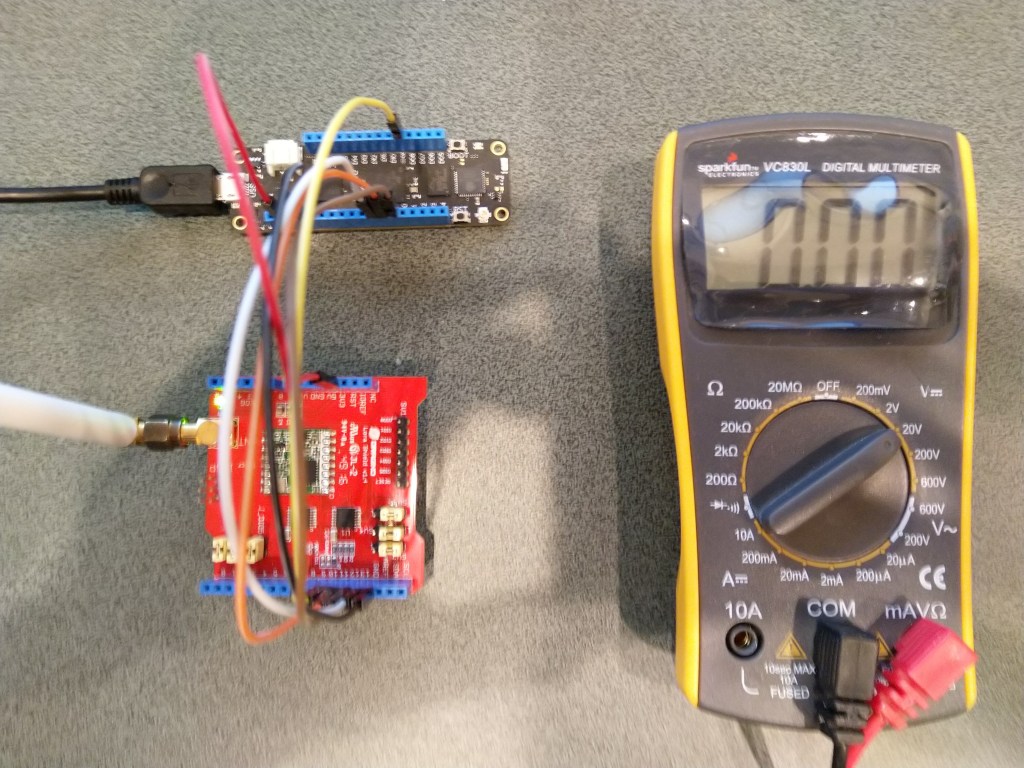
Arduino shield connected to Meadow with jumper wires

To configure the RFM9X I wrote some wrapper functions for the Meadow SPI API to read/write byte values, word values and arrays of bytes. The Meadow APIs (Dec 2019) return an additional byte at the start of each reply (unlike the .NetMF and Windows 10 IoT Core APIs) which has to be removed.

Each method was tested by read/writing suitable register(s) in the device configuration (Needed to set it into LoRa mode first).

//---------------------------------------------------------------------------------
// Copyright (c) December 2019, devMobile Software
//
// Licensed under the Apache License, Version 2.0 (the "License");
// you may not use this file except in compliance with the License.
// You may obtain a copy of the License at
//
//     http://www.apache.org/licenses/LICENSE-2.0
//
// Unless required by applicable law or agreed to in writing, software
// distributed under the License is distributed on an "AS IS" BASIS,
// WITHOUT WARRANTIES OR CONDITIONS OF ANY KIND, either express or implied.
// See the License for the specific language governing permissions and
// limitations under the License.
//
//---------------------------------------------------------------------------------
namespace devMobile.IoT.Rfm9x.ReadAndWrite
{
   using System;
    using System.Diagnostics;
    using System.Runtime.InteropServices.WindowsRuntime;
    using System.Threading.Tasks;

   using Meadow;
   using Meadow.Devices;
   using Meadow.Hardware;

   public sealed class Rfm9XDevice
   {
      private SpiPeripheral Rfm9XLoraModem;
      private IDigitalOutputPort ChipSelectGpioPin;
		private const byte RegisterAddressReadMask = 0X7f;
		private const byte RegisterAddressWriteMask = 0x80;

		public Rfm9XDevice(IIODevice device, ISpiBus spiBus, IPin chipSelectPin, IPin resetPin)
      {
         // Chip select pin configuration
         ChipSelectGpioPin = device.CreateDigitalOutputPort(chipSelectPin, initialState: true);
         if (ChipSelectGpioPin == null)
         {
            Console.WriteLine("ChipSelectGpioPin == null");
         }

         // Factory reset pin configuration
         IDigitalOutputPort resetGpioPin = device.CreateDigitalOutputPort(resetPin);
         if (resetGpioPin == null)
         {
            Console.WriteLine("resetGpioPin == null");
         }
         resetGpioPin.State = false;
         Task.Delay(10);
         resetGpioPin.State = true;
         Task.Delay(10);

			Rfm9XLoraModem = new SpiPeripheral(spiBus, ChipSelectGpioPin);
         if (Rfm9XLoraModem == null)
         {
            Console.WriteLine("Rfm9XLoraModem == null");
         }
      }

      public Byte RegisterReadByte(byte address)
      {
         byte[] writeBuffer = new byte[] { address &= RegisterAddressReadMask };
			Debug.Assert(Rfm9XLoraModem != null);

			byte[] readBuffer = Rfm9XLoraModem.WriteRead(writeBuffer, 2);

         return readBuffer[1];
      }

		public ushort RegisterReadWord(byte address)
		{
			byte[] writeBuffer = new byte[] { address &= RegisterAddressReadMask };
			Debug.Assert(Rfm9XLoraModem != null);

			byte[] readBuffer = Rfm9XLoraModem.WriteRead(writeBuffer, 3);

			return (ushort)(readBuffer[2] + (readBuffer[1] << 8));
		}

		public byte[] RegisterRead(byte address, int length)
		{
			byte[] writeBuffer = new byte[] { address &= RegisterAddressReadMask };
			byte[] repyBuffer = new byte[length + 1];
			Debug.Assert(Rfm9XLoraModem != null);

			byte[] readBuffer = Rfm9XLoraModem.WriteRead(writeBuffer, (ushort)repyBuffer.Length);

			Array.Copy(readBuffer, 1, repyBuffer, 0, length);

			return repyBuffer;
		}

		public void RegisterWriteByte(byte address, byte value)
		{
			byte[] writeBuffer = new byte[] { address |= RegisterAddressWriteMask, value };
			Debug.Assert(Rfm9XLoraModem != null);

			Rfm9XLoraModem.WriteBytes(writeBuffer);
		}

		public void RegisterWriteWord(byte address, ushort value)
		{
			byte[] valueBytes = BitConverter.GetBytes(value);
			byte[] writeBuffer = new byte[] { address |= RegisterAddressWriteMask, valueBytes[0], valueBytes[1] };
			Debug.Assert(Rfm9XLoraModem != null);

			Rfm9XLoraModem.WriteBytes(writeBuffer);
		}
		public void RegisterWrite(byte address, [ReadOnlyArray()] byte[] bytes)
		{
			byte[] writeBuffer = new byte[1 + bytes.Length];
			Debug.Assert(Rfm9XLoraModem != null);

			Array.Copy(bytes, 0, writeBuffer, 1, bytes.Length);
			writeBuffer[0] = address |= RegisterAddressWriteMask;

			Rfm9XLoraModem.WriteBytes(writeBuffer);
		}

		public void RegisterDump()
		{
			Console.WriteLine("Register dump");
			for (byte registerIndex = 0; registerIndex <= 0x42; registerIndex++)
			{
				byte registerValue = this.RegisterReadByte(registerIndex);

				Console.WriteLine("Register 0x{0:x2} - Value 0X{1:x2} - Bits {2}", registerIndex, registerValue, Convert.ToString(registerValue, 2).PadLeft(8, '0'));
			}
		}
	}

	public class MeadowApp : App<F7Micro, MeadowApp>
   {
      private Rfm9XDevice rfm9XDevice;

      public MeadowApp()
      {
			ISpiBus spiBus = Device.CreateSpiBus(500);
         if (spiBus == null)
         {
            Console.WriteLine("spiBus == null");
         }

			rfm9XDevice = new Rfm9XDevice(Device, spiBus, Device.Pins.D09, Device.Pins.D11);

			while (true)
         {
				rfm9XDevice.RegisterDump();

				Byte regOpMode = rfm9XDevice.RegisterReadByte(0x1);

				Console.WriteLine("Set LoRa mode and sleep mode (write byte)");
				rfm9XDevice.RegisterWriteByte(0x01, 0b10000000); // 

				Console.WriteLine("Read the preamble (read word)");
				ushort preamble = rfm9XDevice.RegisterReadWord(0x20);
				Console.WriteLine("Preamble 0x{0:x2} - Bits {1}", preamble, Convert.ToString(preamble, 2).PadLeft(16, '0'));

				Console.WriteLine("Set the preamble to 0x80 (write word)");
				rfm9XDevice.RegisterWriteWord(0x20, 0x80);

				Console.WriteLine("Read the centre frequency (read byte array)");
				byte[] frequencyReadBytes = rfm9XDevice.RegisterRead(0x06, 3);
				Console.WriteLine("Frequency Msb 0x{0:x2} Mid 0x{1:x2} Lsb 0x{2:x2}", frequencyReadBytes[0], frequencyReadBytes[1], frequencyReadBytes[2]);

				Console.WriteLine("Set the centre frequency to 916MHz ( write byte array)");
				byte[] frequencyWriteBytes = { 0xE4, 0xC0, 0x00 };
				rfm9XDevice.RegisterWrite(0x06, frequencyWriteBytes);

				rfm9XDevice.RegisterDump();

				Task.Delay(30000).Wait();
			}
		}
   }
}

The output of the application looked like this

'App.exe' (CLR v4.0.30319: DefaultDomain): Loaded 'C:\WINDOWS\Microsoft.Net\assembly\GAC_64\mscorlib\v4.0_4.0.0.0__b77a5c561934e089\mscorlib.dll'. 
'App.exe' (CLR v4.0.30319: DefaultDomain): Loaded 'C:\Users\BrynLewis\source\repos\RFM9X.Meadow\RegisterReadAndWrite\bin\Debug\net472\App.exe'. Symbols loaded.
'App.exe' (CLR v4.0.30319: App.exe): Loaded 'C:\Users\BrynLewis\source\repos\RFM9X.Meadow\RegisterReadAndWrite\bin\Debug\net472\Meadow.dll'. 
The program '[31296] App.exe: Program Trace' has exited with code 0 (0x0).
The program '[31296] App.exe' has exited with code 0 (0x0).
.
.
DirectRegisterAccess = True
==========================================================
Ignore the exceptions generated by the DateTime call here.
==========================================================
.
Register dump
.
Register 0x00 - Value 0X00 - Bits 00000000
Register 0x01 - Value 0X09 - Bits 00001001
Register 0x02 - Value 0X1a - Bits 00011010
Register 0x03 - Value 0X0b - Bits 00001011
Register 0x04 - Value 0X00 - Bits 00000000
Register 0x05 - Value 0X52 - Bits 01010010
Register 0x06 - Value 0X6c - Bits 01101100
Register 0x07 - Value 0X80 - Bits 10000000
Register 0x08 - Value 0X00 - Bits 00000000
Register 0x09 - Value 0X4f - Bits 01001111
Register 0x0a - Value 0X09 - Bits 00001001
Register 0x0b - Value 0X2b - Bits 00101011
Register 0x0c - Value 0X20 - Bits 00100000
Register 0x0d - Value 0X08 - Bits 00001000
Register 0x0e - Value 0X02 - Bits 00000010
Register 0x0f - Value 0X0a - Bits 00001010
Register 0x10 - Value 0Xff - Bits 11111111
Register 0x11 - Value 0X70 - Bits 01110000
Register 0x12 - Value 0X15 - Bits 00010101
Register 0x13 - Value 0X0b - Bits 00001011
Register 0x14 - Value 0X28 - Bits 00101000
Register 0x15 - Value 0X0c - Bits 00001100
Register 0x16 - Value 0X12 - Bits 00010010
Register 0x17 - Value 0X47 - Bits 01000111
Register 0x18 - Value 0X32 - Bits 00110010
Register 0x19 - Value 0X3e - Bits 00111110
Register 0x1a - Value 0X00 - Bits 00000000
Register 0x1b - Value 0X00 - Bits 00000000
Register 0x1c - Value 0X00 - Bits 00000000
Register 0x1d - Value 0X00 - Bits 00000000
Register 0x1e - Value 0X00 - Bits 00000000
Register 0x1f - Value 0X40 - Bits 01000000
Register 0x20 - Value 0X00 - Bits 00000000
Register 0x21 - Value 0X00 - Bits 00000000
Register 0x22 - Value 0X00 - Bits 00000000
Register 0x23 - Value 0X00 - Bits 00000000
Register 0x24 - Value 0X05 - Bits 00000101
Register 0x25 - Value 0X00 - Bits 00000000
Register 0x26 - Value 0X03 - Bits 00000011
Register 0x27 - Value 0X93 - Bits 10010011
Register 0x28 - Value 0X55 - Bits 01010101
Register 0x29 - Value 0X55 - Bits 01010101
Register 0x2a - Value 0X55 - Bits 01010101
Register 0x2b - Value 0X55 - Bits 01010101
Register 0x2c - Value 0X55 - Bits 01010101
Register 0x2d - Value 0X55 - Bits 01010101
Register 0x2e - Value 0X55 - Bits 01010101
Register 0x2f - Value 0X55 - Bits 01010101
Register 0x30 - Value 0X90 - Bits 10010000
Register 0x31 - Value 0X40 - Bits 01000000
Register 0x32 - Value 0X40 - Bits 01000000
Register 0x33 - Value 0X00 - Bits 00000000
Register 0x34 - Value 0X00 - Bits 00000000
Register 0x35 - Value 0X0f - Bits 00001111
Register 0x36 - Value 0X00 - Bits 00000000
Register 0x37 - Value 0X00 - Bits 00000000
Register 0x38 - Value 0X00 - Bits 00000000
Register 0x39 - Value 0Xf5 - Bits 11110101
Register 0x3a - Value 0X20 - Bits 00100000
Register 0x3b - Value 0X82 - Bits 10000010
Register 0x3c - Value 0X00 - Bits 00000000
Register 0x3d - Value 0X02 - Bits 00000010
Register 0x3e - Value 0X80 - Bits 10000000
Register 0x3f - Value 0X40 - Bits 01000000
Register 0x40 - Value 0X00 - Bits 00000000
Register 0x41 - Value 0X00 - Bits 00000000
Register 0x42 - Value 0X12 - Bits 00010010
Set LoRa mode and sleep mode (write byte)
Read the preamble (read word)
Preamble 0x08 - Bits 0000000000001000
Set the preamble to 0x80 (write word)
Read the centre frequency (read byte array)
Frequency Msb 0x6c Mid 0x80 Lsb 0x00
Set the centre frequency to 916MHz ( write byte array)
Register dump
Register 0x00 - Value 0Xf4 - Bits 11110100
Register 0x01 - Value 0X80 - Bits 10000000
Register 0x02 - Value 0X1a - Bits 00011010
Register 0x03 - Value 0X0b - Bits 00001011
Register 0x04 - Value 0X00 - Bits 00000000
Register 0x05 - Value 0X52 - Bits 01010010
Register 0x06 - Value 0Xe4 - Bits 11100100
Register 0x07 - Value 0Xc0 - Bits 11000000
Register 0x08 - Value 0X00 - Bits 00000000
Register 0x09 - Value 0X4f - Bits 01001111
Register 0x0a - Value 0X09 - Bits 00001001
Register 0x0b - Value 0X2b - Bits 00101011
Register 0x0c - Value 0X20 - Bits 00100000
Register 0x0d - Value 0X02 - Bits 00000010
Register 0x0e - Value 0X80 - Bits 10000000
Register 0x0f - Value 0X00 - Bits 00000000
Register 0x10 - Value 0X00 - Bits 00000000
Register 0x11 - Value 0X00 - Bits 00000000
Register 0x12 - Value 0X00 - Bits 00000000
Register 0x13 - Value 0X00 - Bits 00000000
Register 0x14 - Value 0X00 - Bits 00000000
Register 0x15 - Value 0X00 - Bits 00000000
Register 0x16 - Value 0X00 - Bits 00000000
Register 0x17 - Value 0X00 - Bits 00000000
Register 0x18 - Value 0X10 - Bits 00010000
Register 0x19 - Value 0X00 - Bits 00000000
Register 0x1a - Value 0X00 - Bits 00000000
Register 0x1b - Value 0X00 - Bits 00000000
Register 0x1c - Value 0X00 - Bits 00000000
Register 0x1d - Value 0X72 - Bits 01110010
Register 0x1e - Value 0X70 - Bits 01110000
Register 0x1f - Value 0X64 - Bits 01100100
Register 0x20 - Value 0X80 - Bits 10000000
Register 0x21 - Value 0X00 - Bits 00000000
Register 0x22 - Value 0X01 - Bits 00000001
Register 0x23 - Value 0Xff - Bits 11111111
Register 0x24 - Value 0X00 - Bits 00000000
Register 0x25 - Value 0X00 - Bits 00000000
Register 0x26 - Value 0X04 - Bits 00000100
Register 0x27 - Value 0X00 - Bits 00000000
Register 0x28 - Value 0X00 - Bits 00000000
Register 0x29 - Value 0X00 - Bits 00000000
Register 0x2a - Value 0X00 - Bits 00000000
Register 0x2b - Value 0X00 - Bits 00000000
Register 0x2c - Value 0X00 - Bits 00000000
Register 0x2d - Value 0X50 - Bits 01010000
Register 0x2e - Value 0X14 - Bits 00010100
Register 0x2f - Value 0X45 - Bits 01000101
Register 0x30 - Value 0X55 - Bits 01010101
Register 0x31 - Value 0Xc3 - Bits 11000011
Register 0x32 - Value 0X05 - Bits 00000101
Register 0x33 - Value 0X27 - Bits 00100111
Register 0x34 - Value 0X1c - Bits 00011100
Register 0x35 - Value 0X0a - Bits 00001010
Register 0x36 - Value 0X03 - Bits 00000011
Register 0x37 - Value 0X0a - Bits 00001010
Register 0x38 - Value 0X42 - Bits 01000010
Register 0x39 - Value 0X12 - Bits 00010010
Register 0x3a - Value 0X49 - Bits 01001001
Register 0x3b - Value 0X1d - Bits 00011101
Register 0x3c - Value 0X00 - Bits 00000000
Register 0x3d - Value 0Xaf - Bits 10101111
Register 0x3e - Value 0X00 - Bits 00000000
Register 0x3f - Value 0X00 - Bits 00000000
Register 0x40 - Value 0X00 - Bits 00000000
Register 0x41 - Value 0X00 - Bits 00000000
Register 0x42 - Value 0X12 - Bits 00010010

The next step is to extract the SPI register access functionality into a module and configure the bare minimum of settings required to get the RFM9X to transmit.
.Net Meadow RFM95/96/97/98 LoRa library Part2

Register Dump

Next step was to dump all registers (0x00 thru 0x42) of the SX1276/7/8/9 device

//---------------------------------------------------------------------------------
// Copyright (c) December 2019, devMobile Software
//
// Licensed under the Apache License, Version 2.0 (the "License");
// you may not use this file except in compliance with the License.
// You may obtain a copy of the License at
//
//     http://www.apache.org/licenses/LICENSE-2.0
//
// Unless required by applicable law or agreed to in writing, software
// distributed under the License is distributed on an "AS IS" BASIS,
// WITHOUT WARRANTIES OR CONDITIONS OF ANY KIND, either express or implied.
// See the License for the specific language governing permissions and
// limitations under the License.
//
//---------------------------------------------------------------------------------
namespace devMobile.IoT.Rfm9x.RegisterScan
{
   using System;
   using System.Threading.Tasks;

   using Meadow;
   using Meadow.Devices;
   using Meadow.Hardware;

   public sealed class Rfm9XDevice
   {
      private SpiPeripheral sx127xDevice;
      private IDigitalOutputPort spiPeriphChipSelect;

      public Rfm9XDevice(IIODevice device, ISpiBus spiBus, IPin chipSelectPin)
      {
         spiPeriphChipSelect = device.CreateDigitalOutputPort(chipSelectPin, initialState: true);
         if (spiPeriphChipSelect == null)
         {
            Console.WriteLine("spiPeriphChipSelect == null");
         }

         sx127xDevice = new SpiPeripheral(spiBus, spiPeriphChipSelect);
         if (sx127xDevice == null)
         {
            Console.WriteLine("sx127xDevice == null");
         }
      }

      public Byte RegisterReadByte(byte registerAddress)
      {
         byte[] txBuffer = new byte[] { registerAddress };

         byte[] rxBuffer = sx127xDevice.WriteRead(txBuffer, 2);

         return rxBuffer[1];
      }
   }

   public class MeadowApp : App<F7Micro, MeadowApp>
   {
      private Rfm9XDevice rfm9XDevice;

      public MeadowApp()
      {
         ISpiBus spiBus = Device.CreateSpiBus(500);
         if (spiBus == null)
         {
            Console.WriteLine("spiBus == null");
         }

         rfm9XDevice = new Rfm9XDevice(Device, spiBus, Device.Pins.D09);

         while (true)
         {
            for (byte registerIndex = 0; registerIndex <= 0x42; registerIndex++)
            {
               byte registerValue = rfm9XDevice.RegisterReadByte(registerIndex);

               Console.WriteLine("Register 0x{0:x2} - Value 0X{1:x2} - Bits {2}", registerIndex, registerValue, Convert.ToString(registerValue, 2).PadLeft(8, '0'));
            }

            Task.Delay(10000).Wait();
         }
      }
   }
}

The output of the application looked like this

'App.exe' (CLR v4.0.30319: DefaultDomain): Loaded 'C:\WINDOWS\Microsoft.Net\assembly\GAC_64\mscorlib\v4.0_4.0.0.0__b77a5c561934e089\mscorlib.dll'. 
'App.exe' (CLR v4.0.30319: DefaultDomain): Loaded 'C:\Users\BrynLewis\source\repos\RFM9X.Meadow\RegisterScan\bin\Debug\net472\App.exe'. Symbols loaded.
'App.exe' (CLR v4.0.30319: App.exe): Loaded 'C:\Users\BrynLewis\source\repos\RFM9X.Meadow\RegisterScan\bin\Debug\net472\Meadow.dll'. 
The program '[3148] App.exe: Program Trace' has exited with code 0 (0x0).
The program '[3148] App.exe' has exited with code 0 (0x0).
.
.
DirectRegisterAccess = True
==========================================================
Ignore the exceptions generated by the DateTime call here.
==========================================================
.
Register 0x00 - Value 0X00 - Bits 00000000
Register 0x01 - Value 0X09 - Bits 00001001
Register 0x02 - Value 0X1a - Bits 00011010
Register 0x03 - Value 0X0b - Bits 00001011
Register 0x04 - Value 0X00 - Bits 00000000
Register 0x05 - Value 0X52 - Bits 01010010
Register 0x06 - Value 0X6c - Bits 01101100
Register 0x07 - Value 0X80 - Bits 10000000
Register 0x08 - Value 0X00 - Bits 00000000
Register 0x09 - Value 0X4f - Bits 01001111
Register 0x0a - Value 0X09 - Bits 00001001
Register 0x0b - Value 0X2b - Bits 00101011
Register 0x0c - Value 0X20 - Bits 00100000
Register 0x0d - Value 0X08 - Bits 00001000
Register 0x0e - Value 0X02 - Bits 00000010
Register 0x0f - Value 0X0a - Bits 00001010
Register 0x10 - Value 0Xff - Bits 11111111
Register 0x11 - Value 0X71 - Bits 01110001
Register 0x12 - Value 0X15 - Bits 00010101
Register 0x13 - Value 0X0b - Bits 00001011
Register 0x14 - Value 0X28 - Bits 00101000
Register 0x15 - Value 0X0c - Bits 00001100
Register 0x16 - Value 0X12 - Bits 00010010
Register 0x17 - Value 0X47 - Bits 01000111
Register 0x18 - Value 0X32 - Bits 00110010
Register 0x19 - Value 0X3e - Bits 00111110
Register 0x1a - Value 0X00 - Bits 00000000
Register 0x1b - Value 0X00 - Bits 00000000
Register 0x1c - Value 0X00 - Bits 00000000
Register 0x1d - Value 0X00 - Bits 00000000
Register 0x1e - Value 0X00 - Bits 00000000
Register 0x1f - Value 0X40 - Bits 01000000
Register 0x20 - Value 0X00 - Bits 00000000
Register 0x21 - Value 0X00 - Bits 00000000
Register 0x22 - Value 0X00 - Bits 00000000
Register 0x23 - Value 0X00 - Bits 00000000
Register 0x24 - Value 0X05 - Bits 00000101
Register 0x25 - Value 0X00 - Bits 00000000
Register 0x26 - Value 0X03 - Bits 00000011
Register 0x27 - Value 0X93 - Bits 10010011
Register 0x28 - Value 0X55 - Bits 01010101
Register 0x29 - Value 0X55 - Bits 01010101
Register 0x2a - Value 0X55 - Bits 01010101
Register 0x2b - Value 0X55 - Bits 01010101
Register 0x2c - Value 0X55 - Bits 01010101
Register 0x2d - Value 0X55 - Bits 01010101
Register 0x2e - Value 0X55 - Bits 01010101
Register 0x2f - Value 0X55 - Bits 01010101
Register 0x30 - Value 0X90 - Bits 10010000
Register 0x31 - Value 0X40 - Bits 01000000
Register 0x32 - Value 0X40 - Bits 01000000
Register 0x33 - Value 0X00 - Bits 00000000
Register 0x34 - Value 0X00 - Bits 00000000
Register 0x35 - Value 0X0f - Bits 00001111
Register 0x36 - Value 0X00 - Bits 00000000
Register 0x37 - Value 0X00 - Bits 00000000
Register 0x38 - Value 0X00 - Bits 00000000
Register 0x39 - Value 0Xf5 - Bits 11110101
Register 0x3a - Value 0X20 - Bits 00100000
Register 0x3b - Value 0X82 - Bits 10000010
Register 0x3c - Value 0Xfd - Bits 11111101
Register 0x3d - Value 0X02 - Bits 00000010
Register 0x3e - Value 0X80 - Bits 10000000
Register 0x3f - Value 0X40 - Bits 01000000
Register 0x40 - Value 0X00 - Bits 00000000
Register 0x41 - Value 0X00 - Bits 00000000
Register 0x42 - Value 0X12 - Bits 00010010

I also started to refactor the code, passing the Meadow IIODevice & ISpiBus into the constructor, and extracting the Read functionality.

The device was not in LoRa mode (Bit 7 of RegOpMode 0x01) so the next step was to read and write registers so I could change its configuration.

.Net Meadow RFM95/96/97/98 LoRa library Part1

After writing Windows 10 IoT Core & .NetMF RFM9X libraries I figured a port to a Wilderness Labs Meadow device shouldn’t be “rocket science”.

To get started I used a Dragino LoRa shield for Arduino which looked compatible with my Meadow device.

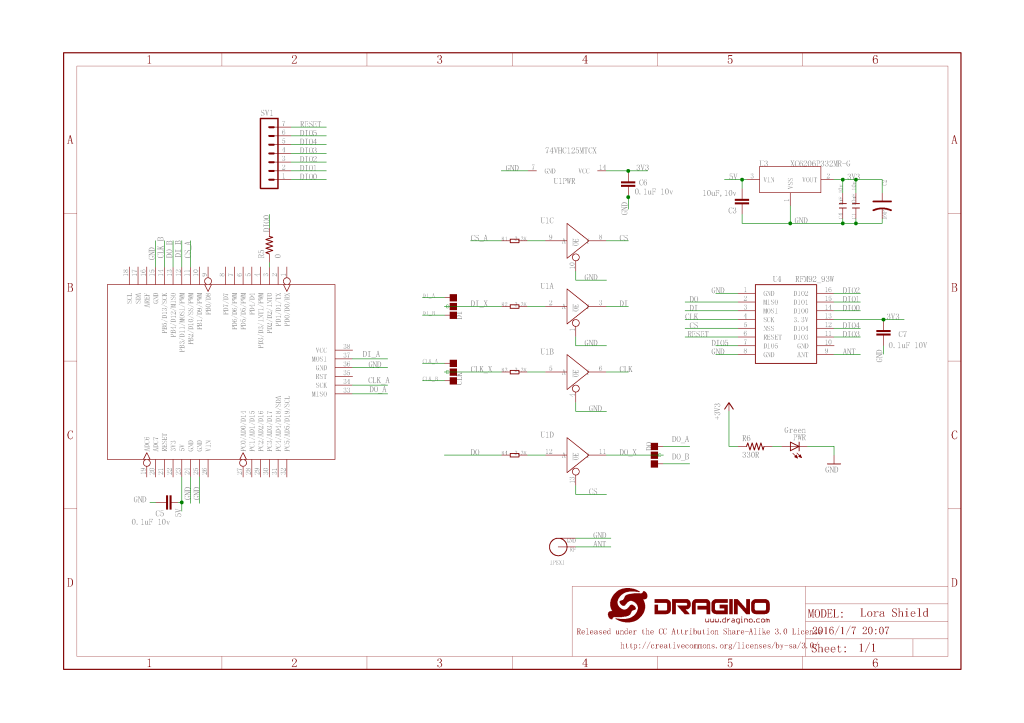
Dragino shield schematic

The shield ships with the SPI lines configured for ICSP so the three jumpers diagonally across the shield from the antenna connector need to be swapped to the side closest to the edge of the shield.

Dragino Arduino shield based test harness
//---------------------------------------------------------------------------------
// Copyright (c) Dec 2019, devMobile Software
//
// Licensed under the Apache License, Version 2.0 (the "License");
// you may not use this file except in compliance with the License.
// You may obtain a copy of the License at
//
//     http://www.apache.org/licenses/LICENSE-2.0
//
// Unless required by applicable law or agreed to in writing, software
// distributed under the License is distributed on an "AS IS" BASIS,
// WITHOUT WARRANTIES OR CONDITIONS OF ANY KIND, either express or implied.
// See the License for the specific language governing permissions and
// limitations under the License.
//
//---------------------------------------------------------------------------------
namespace devMobile.IoT.Rfm9x
{
   using System;
   using System.Threading.Tasks;
   using Meadow;
   using Meadow.Devices;
   using Meadow.Hardware;

   public class MeadowApp : App<F7Micro, MeadowApp>
   {
      const byte RegVersion = 0x42;
      ISpiBus spiBus;
      SpiPeripheral sx127xDevice;
      IDigitalOutputPort spiPeriphChipSelect;

      public MeadowApp()
      {
         ConfigureSpiPort();
         //ReadDeviceID();
         ReadDeviceIDDiy();
      }

      public void ConfigureSpiPort()
      {
         try
         {
            spiBus = Device.CreateSpiBus(500);
            if (spiBus == null)
            {
               Console.WriteLine("spiBus == null");
            }

            Console.WriteLine("Creating SPI NSS Port...");
            spiPeriphChipSelect = Device.CreateDigitalOutputPort(Device.Pins.D09);
            if (spiPeriphChipSelect == null)
            {
               Console.WriteLine("spiPeriphChipSelect == null");
            }
   
            Console.WriteLine("sx127xDevice Device...");
            sx127xDevice = new SpiPeripheral(spiBus, spiPeriphChipSelect);
            if (sx127xDevice == null)
            {
               Console.WriteLine("sx127xDevice == null");
            }

            Console.WriteLine("ConfigureSpiPort Done...");
         }
         catch (Exception ex)
         {
            Console.WriteLine("ConfigureSpiPort " + ex.Message);
         }
      }

      
      public void ReadDeviceID()
      {
         Task.Delay(500).Wait();

         while (true)
         {
            try
            {
               Console.WriteLine("sx127xDevice.ReadRegister...1");

               byte registerValue = sx127xDevice.ReadRegister(RegVersion);

               Console.WriteLine("sx127xDevice.ReadRegister...2");

               Console.WriteLine("Register 0x{0:x2} - Value 0X{1:x2} - Bits {2}", RegVersion, registerValue, Convert.ToString(registerValue, 2).PadLeft(8, '0'));
            }
            catch (Exception ex)
            {
               Console.WriteLine("ReadDeviceID " + ex.Message);
            }

            Task.Delay(10000).Wait();
         }
      }

      public void ReadDeviceIDDiy()
      {
         var txBuffer = new byte[2];
         var rxBuffer = new byte[2];

         Task.Delay(500).Wait();

         while (true)
         {
            try
            {
               Console.WriteLine("spiBus.ExchangeData...1");

               txBuffer[0] = RegVersion;

               spiBus.ExchangeData(spiPeriphChipSelect, ChipSelectMode.ActiveLow, txBuffer, rxBuffer, 2);

               Console.WriteLine("spiBus.ExchangeData...2");

               byte registerValue = rxBuffer[1];

               Console.WriteLine("Register 0x{0:x2} - Value 0X{1:x2} - Bits {2}", RegVersion, registerValue, Convert.ToString(registerValue, 2).PadLeft(8, '0'));
            }
            catch (Exception ex)
            {
               Console.WriteLine("ReadDeviceIDDiy " + ex.Message);
            }

            Task.Delay(10000).Wait();
         }
      }
   }
}

After some trial and error (using beta 3.6) I found that the ReadRegister method didn’t work as expected (possibly related to this issue) and I had to manually assemble the request to read the SX127X RegVersion register.

'App.exe' (CLR v4.0.30319: DefaultDomain): Loaded 'C:\WINDOWS\Microsoft.Net\assembly\GAC_64\mscorlib\v4.0_4.0.0.0__b77a5c561934e089\mscorlib.dll'. 
'App.exe' (CLR v4.0.30319: DefaultDomain): Loaded 'C:\Users\BrynLewis\source\repos\RFX9X.Meadow\FeatherWingSPI\bin\Debug\net472\App.exe'. Symbols loaded.
'App.exe' (CLR v4.0.30319: App.exe): Loaded 'C:\Users\BrynLewis\source\repos\RFX9X.Meadow\FeatherWingSPI\bin\Debug\net472\Meadow.dll'. 
The program '[22324] App.exe: Program Trace' has exited with code 0 (0x0).
The program '[22324] App.exe' has exited with code 0 (0x0).
.
.
DirectRegisterAccess = True
==========================================================
Ignore the exceptions generated by the DateTime call here.
==========================================================
.
Creating SPI NSS Port...
sx127xDevice Device...
ConfigureSpiPort Done...
spiBus.ExchangeData...1
spiBus.ExchangeData...2
Register 0x42 - Value 0X12 - Bits 00010010
spiBus.ExchangeData...1
spiBus.ExchangeData...2
Register 0x42 - Value 0X12 - Bits 00010010
spiBus.ExchangeData...1
spiBus.ExchangeData...2
Register 0x42 - Value 0X12 - Bits 00010010
spiBus.ExchangeData...1
spiBus.ExchangeData...2

Maduino LoRa Air Temperature and Soil Moisture

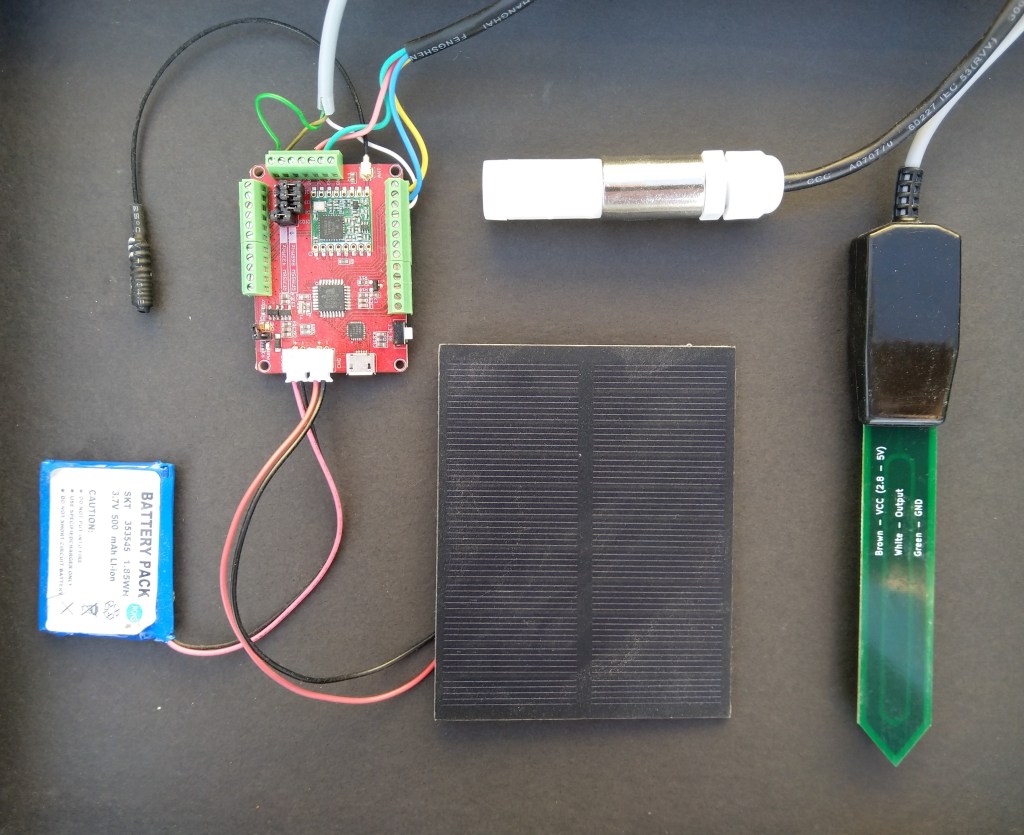
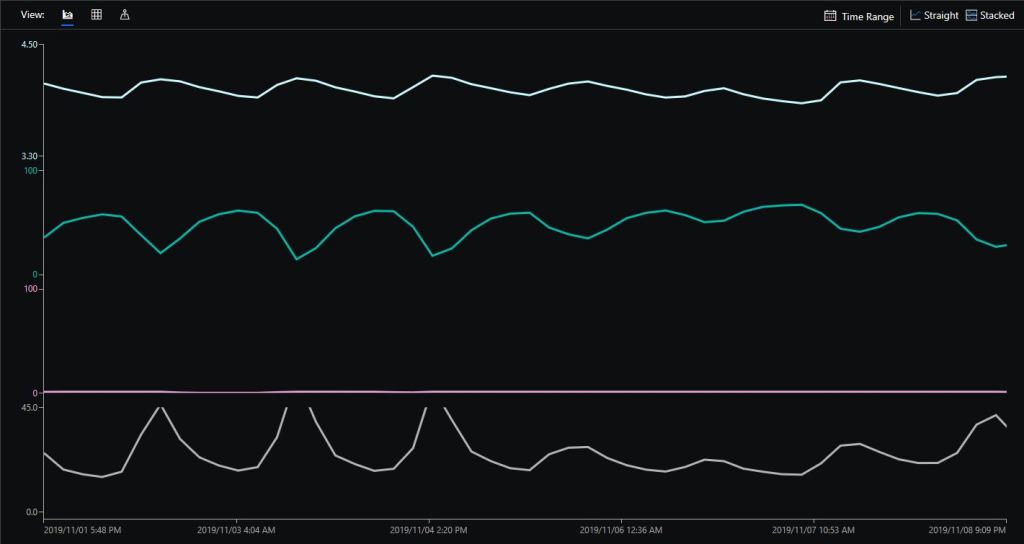
This is a demo MakerFabs Maduino LoRa Radio 868MHz client (based on Maduino LoRa 868MHz example) that uploads telemetry data to my Windows 10 IoT Core on Raspberry PI AdaFruit.IO and Azure IoT Hub field gateways.

The code is available on github

Sample hardware
Azure IoT Central data visualisation

The Maduino device in the picture is a custom version with an onboard Microchip ATSHA204 crypto and authentication chip (currently only use for the unique 72 bit serial number) and a voltage divider connected to the analog pin A6 to monitor the battery voltage.

There are compile time options ATSHA204 & BATTERY_VOLTAGE_MONITOR which can be used to selectively enable this functionality.

I use the Arduino lowpower library to aggressively sleep the device between measurements

// Adjust the delay so period is close to desired sec as possible, first do 8sec chunks. 
  int delayCounter = SensorUploadDelay / 8 ;
  for( int i = 0 ; i < delayCounter ; i++ )
  {
     LowPower.powerDown(SLEEP_8S, ADC_OFF, BOD_OFF);  
  }
  
  // Then to 4 sec chunk
  delayCounter =  ( SensorUploadDelay % 8 ) / 4;
  for( int i = 0 ; i < delayCounter ; i++ )
  {
     LowPower.powerDown(SLEEP_4S, ADC_OFF, BOD_OFF);  
  }

  // Then to 2 sec chunk
  delayCounter =  ( SensorUploadDelay % 4 ) / 2 ;
  for( int i = 0 ; i < delayCounter ; i++ )
  {
     LowPower.powerDown(SLEEP_2S, ADC_OFF, BOD_OFF);  
  }

  // Then to 1 sec chunk
  delayCounter =  ( SensorUploadDelay % 2 ) ;
  for( int i = 0 ; i < delayCounter ; i++ )
  {
     LowPower.powerDown(SLEEP_1S, ADC_OFF, BOD_OFF);  
  }
}

I use a spare digital PIN for powering the soil moisture probe so it can be powered down when not in use. I have included a short delay after powering up the device to allow the reading to settle.

  // Turn on soil mosture sensor, take reading then turn off to save power
  digitalWrite(SoilMoistureSensorEnablePin, HIGH);
  delay(SoilMoistureSensorEnableDelay);
  int soilMoistureADCValue = analogRead(SoilMoistureSensorPin);
  digitalWrite(SoilMoistureSensorEnablePin, LOW);
  int soilMoisture = map(soilMoistureADCValue,SoilMoistureSensorMinimum,SoilMoistureSensorMaximum, SoilMoistureValueMinimum, SoilMoistureValueMaximum); 
  PayloadAdd( "s", soilMoisture, false);

Bill of materials (Prices Nov 2019)

  • Maduino LoRa Radion (868MHz) 18.90
  • SHT20 I2C Temperature & Humidity Sensor (Waterproof Probe) USD22.50
  • Pinotech SoilWatch 10 – Soil moisture sensor USD23
  • Elecrow 1 Watt solar panel with wires USD3.80
  • 500 mAh LI-Ion battery

The software could easily be modified to support additional sensors.

Nexus LoRa Radio 915 MHz Payload Addressing client

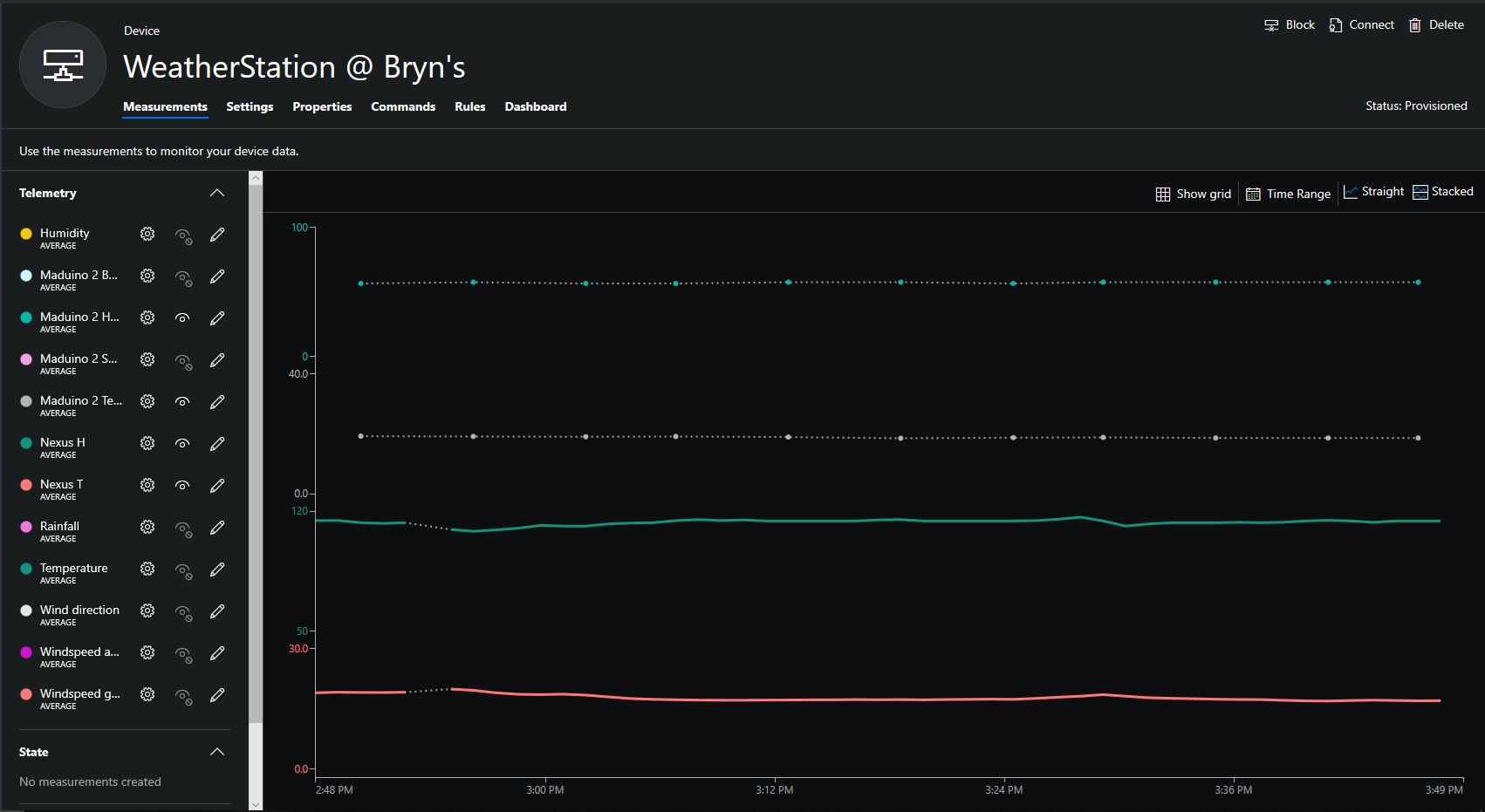
This is a demo Ingenuity Micro Nexus client (based on the Netduino example for my RFM9XLoRaNetMF library) that uploads temperature and humidity data to my Azure IoT Hubs/Central or AdaFruit.IO on Raspberry PI field gateways

Bill of materials (Prices June 2019).

// <copyright file="client.cs" company="devMobile Software">
// Copyright ® 2019 Feb devMobile Software, All Rights Reserved
//
//  MIT License
//
//  Permission is hereby granted, free of charge, to any person obtaining a copy
// of this software and associated documentation files (the "Software"), to deal
// in the Software without restriction, including without limitation the rights
// to use, copy, modify, merge, publish, distribute, sublicense, and/or sell
// copies of the Software, and to permit persons to whom the Software is
// furnished to do so, subject to the following conditions:
//
// The above copyright notice and this permission notice shall be included in all copies or substantial portions of the Software.
//
// THE SOFTWARE IS PROVIDED "AS IS", WITHOUT WARRANTY OF ANY KIND, EXPRESS OR
// IMPLIED, INCLUDING BUT NOT LIMITED TO THE WARRANTIES OF MERCHANTABILITY,
// FITNESS FOR A PARTICULAR PURPOSE AND NONINFRINGEMENT. IN NO EVENT SHALL THE
// AUTHORS OR COPYRIGHT HOLDERS BE LIABLE FOR ANY CLAIM, DAMAGES OR OTHER
// LIABILITY, WHETHER IN AN ACTION OF CONTRACT, TORT OR OTHERWISE, ARISING FROM,
// OUT OF OR IN CONNECTION WITH THE SOFTWARE OR THE USE OR OTHER DEALINGS IN THE
// SOFTWARE"
//
// </copyright>
namespace devMobile.IoT.Nexus.FieldGateway
{
	using System;
	using System.Text;
	using System.Threading;
	using Microsoft.SPOT;
	using Microsoft.SPOT.Hardware;

	using devMobile.IoT.NetMF.ISM;
	using devMobile.NetMF.Sensor;
	using IngenuityMicro.Nexus;

	class NexusClient
	{
		private Rfm9XDevice rfm9XDevice;
		private readonly TimeSpan dueTime = new TimeSpan(0, 0, 15);
		private readonly TimeSpan periodTime = new TimeSpan(0, 0, 60);
		private readonly SiliconLabsSI7005 sensor = new SiliconLabsSI7005();
		private readonly Led _led = new Led();
		private readonly byte[] fieldGatewayAddress = Encoding.UTF8.GetBytes("LoRaIoT1");
		private readonly byte[] deviceAddress = Encoding.UTF8.GetBytes("Nexus915");

		public NexusClient()
		{
			rfm9XDevice = new Rfm9XDevice(SPI.SPI_module.SPI3, (Cpu.Pin)28, (Cpu.Pin)15, (Cpu.Pin)26);
			_led.Set(0, 0, 0);
		}

		public void Run()
		{

			rfm9XDevice.Initialise(frequency: 915000000, paBoost: true, rxPayloadCrcOn: true);
			rfm9XDevice.Receive(deviceAddress);

			rfm9XDevice.OnDataReceived += rfm9XDevice_OnDataReceived;
			rfm9XDevice.OnTransmit += rfm9XDevice_OnTransmit;

			Timer humidityAndtemperatureUpdates = new Timer(HumidityAndTemperatureTimerProc, null, dueTime, periodTime);

			Thread.Sleep(Timeout.Infinite);
		}


		private void HumidityAndTemperatureTimerProc(object state)
		{
			_led.Set(0, 128, 0);

			double humidity = sensor.Humidity();
			double temperature = sensor.Temperature();

			Debug.Print(DateTime.UtcNow.ToString("hh:mm:ss") + " H:" + humidity.ToString("F1") + " T:" + temperature.ToString("F1"));

			rfm9XDevice.Send(fieldGatewayAddress, Encoding.UTF8.GetBytes("t " + temperature.ToString("F1") + ",H " + humidity.ToString("F0")));
		}

		void rfm9XDevice_OnTransmit()
		{
			_led.Set(0, 0, 0);

			Debug.Print("Transmit-Done");
		}

		void rfm9XDevice_OnDataReceived(byte[] address, float packetSnr, int packetRssi, int rssi, byte[] data)
		{
			try
			{
				string messageText = new string(UTF8Encoding.UTF8.GetChars(data));
				string addressText = new string(UTF8Encoding.UTF8.GetChars(address));

				Debug.Print(DateTime.UtcNow.ToString("HH:MM:ss") + "-Rfm9X PacketSnr " + packetSnr.ToString("F1") + " Packet RSSI " + packetRssi + "dBm RSSI " + rssi + "dBm = " + data.Length + " byte message " + @"""" + messageText + @"""");
			}
			catch (Exception ex)
			{
				Debug.Print(ex.Message);
			}
		}
	}
}

Overall the development process was good with no modifications to my RFM9X.NetMF library or SI7005 library (bar removing a Netduino I2C work around) required

Nexus device with Seeedstudio Temperature & Humidity Sensors
Nexus Sensor data in Azure IoT Hub Field Gateway ETW Logging
Nexus temperature & humidity data displayed in Azure IoT Central

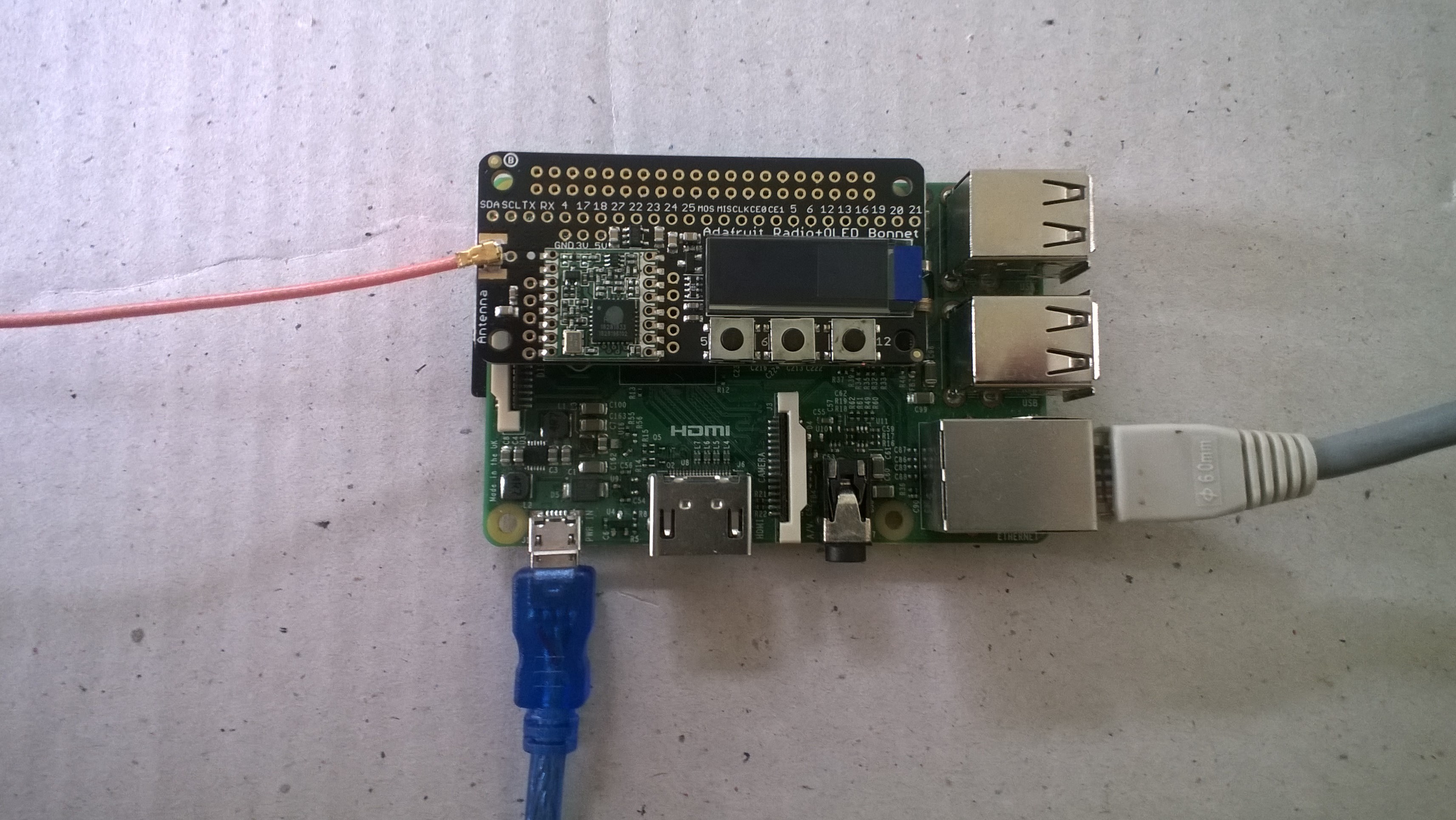
RFM9X.IoTCore Adafruit LoRa Radio Bonnet support

The RFM9X chip select line on the Adafruit LoRa Radio Bonnet 868 or 915MHz with OLED RFM95W is connected to pin 26(CS1), the reset line to pin 22(GPIO25) and the interrupt line to pin 15(GPIO22).

When I ran the RFM9XLoRaDeviceClient from my RFM9X.IoTCore library with the following configuration

#if ADAFRUIT_RADIO_BONNET
	private const byte ResetLine = 25;
	private const byte InterruptLine = 22;
	private Rfm9XDevice rfm9XDevice = new Rfm9XDevice(ChipSelectPin.CS1, ResetLine, InterruptLine);
#endif

public void Run(IBackgroundTaskInstance taskInstance)
{
	rfm9XDevice.Initialise(Frequency, paBoost: true, rxPayloadCrcOn : true);
#if DEBUG
	rfm9XDevice.RegisterDump();
#endif
	rfm9XDevice.OnReceive += Rfm9XDevice_OnReceive;
#if ADDRESSED_MESSAGES_PAYLOAD
	rfm9XDevice.Receive(UTF8Encoding.UTF8.GetBytes(Environment.MachineName));
#else
	rfm9XDevice.Receive();
#endif
	rfm9XDevice.OnTransmit += Rfm9XDevice_OnTransmit;

	Task.Delay(10000).Wait();

	while (true)
	{
		string messageText = string.Format("Hello from {0} ! {1}", Environment.MachineName, MessageCount);
		MessageCount -= 1;

		byte[] messageBytes = UTF8Encoding.UTF8.GetBytes(messageText);
		Debug.WriteLine("{0:HH:mm:ss}-TX {1} byte message {2}", DateTime.Now, messageBytes.Length, messageText);
#if ADDRESSED_MESSAGES_PAYLOAD
		this.rfm9XDevice.Send(UTF8Encoding.UTF8.GetBytes("AddressHere"), messageBytes);
#else
		this.rfm9XDevice.Send(messageBytes);
#endif
		Task.Delay(10000).Wait();
	}
}
#endif

I could see messages being sent and received in the debug output

Register 0x3e - Value 0X00 - Bits 00000000
Register 0x3f - Value 0X00 - Bits 00000000
Register 0x40 - Value 0X00 - Bits 00000000
Register 0x41 - Value 0X00 - Bits 00000000
Register 0x42 - Value 0X12 - Bits 00010010
...
The thread 0xec4 has exited with code 0 (0x0).
The thread 0x868 has exited with code 0 (0x0).
22:21:47-RX PacketSnr 9.8 Packet RSSI -80dBm RSSI -122dBm = 59 byte message "�LoRaIoT1Maduino2at 62.8,ah 77,wsa 1,wsg 3,wd 34.88,r 0.00,"
22:21:52-TX 31 byte message Hello from AdaFruitIOLoRa ! 255
22:21:52-TX Done
The thread 0xbf8 has exited with code 0 (0x0).
The program '[3380] backgroundTaskHost.exe' has exited with code -1 (0xffffffff).

Next step modify my Adafruit IO and Azure IoT Hub/Central field gateways.

Adafruit LoRa Radio Bonnet with OLED – RadioFruit

Today a package arrived from Adafruit which contained an Adafruit LoRa Radio Bonnet 868 or 915MHz with OLED RFM95W.

The shield has a small OLED screen and 3 buttons connected to General Purpose Input Output(GPIO) pins.

The first step was to check the pin assignments of the 3 buttons.

/*
    Copyright ® 2019 Feb devMobile Software, All Rights Reserved
 
    MIT License

    Permission is hereby granted, free of charge, to any person obtaining a copy
    of this software and associated documentation files (the "Software"), to deal
    in the Software without restriction, including without limitation the rights
    to use, copy, modify, merge, publish, distribute, sublicense, and/or sell
    copies of the Software, and to permit persons to whom the Software is
    furnished to do so, subject to the following conditions:

    The above copyright notice and this permission notice shall be included in all
    copies or substantial portions of the Software.

    THE SOFTWARE IS PROVIDED "AS IS", WITHOUT WARRANTY OF ANY KIND, EXPRESS OR
    IMPLIED, INCLUDING BUT NOT LIMITED TO THE WARRANTIES OF MERCHANTABILITY,
    FITNESS FOR A PARTICULAR PURPOSE AND NONINFRINGEMENT. IN NO EVENT SHALL THE
    AUTHORS OR COPYRIGHT HOLDERS BE LIABLE FOR ANY CLAIM, DAMAGES OR OTHER
    LIABILITY, WHETHER IN AN ACTION OF CONTRACT, TORT OR OTHERWISE, ARISING FROM,
    OUT OF OR IN CONNECTION WITH THE SOFTWARE OR THE USE OR OTHER DEALINGS IN THE
    SOFTWARE

	 Adafruit documentation page
	 https://learn.adafruit.com/adafruit-radio-bonnets/pinouts

    Button 1: GPIO 5 
    Button 2: GPIO 6
    Button 3: GPIO 12 

 */
namespace devMobile.IoT.Rfm9x.AdafruitButtons
{
	using System;
	using System.Diagnostics;
	using Windows.ApplicationModel.Background;
	using Windows.Devices.Gpio;

	public sealed class StartupTask : IBackgroundTask
    {
		private BackgroundTaskDeferral backgroundTaskDeferral = null;
		private GpioPin InterruptGpioPin1 = null;
		private GpioPin InterruptGpioPin2 = null;
		private GpioPin InterruptGpioPin3 = null;
		private const int InterruptPinNumber1 = 5;
		private const int InterruptPinNumber2 = 6;
		private const int InterruptPinNumber3 = 12;
		private readonly TimeSpan debounceTimeout = new TimeSpan(0, 0, 15);


		public void Run(IBackgroundTaskInstance taskInstance)
        {
			Debug.WriteLine("Application startup");

			try
			{
				GpioController gpioController = GpioController.GetDefault();

				InterruptGpioPin1 = gpioController.OpenPin(InterruptPinNumber1);
				InterruptGpioPin1.SetDriveMode(GpioPinDriveMode.InputPullUp);
				InterruptGpioPin1.ValueChanged += InterruptGpioPin_ValueChanged; ;

				InterruptGpioPin2 = gpioController.OpenPin(InterruptPinNumber2);
				InterruptGpioPin2.SetDriveMode(GpioPinDriveMode.InputPullUp);
				InterruptGpioPin2.ValueChanged += InterruptGpioPin_ValueChanged; ;

				InterruptGpioPin3 = gpioController.OpenPin(InterruptPinNumber3);
				InterruptGpioPin3.SetDriveMode(GpioPinDriveMode.InputPullUp);
				InterruptGpioPin3.ValueChanged += InterruptGpioPin_ValueChanged; ;

				Debug.WriteLine("Digital Input Interrupt configuration success");
			}
			catch (Exception ex)
			{
				Debug.WriteLine($"Digital Input Interrupt configuration failed " + ex.Message);
				return;
			}

			//enable task to continue running in background
			backgroundTaskDeferral = taskInstance.GetDeferral();
		}

		private void InterruptGpioPin_ValueChanged(GpioPin sender, GpioPinValueChangedEventArgs args)
		{
			Debug.WriteLine($"Digital Input Interrupt {sender.PinNumber} triggered {args.Edge}");
		}
	}
}

When I ran the application it produced the following output when I pressed the three buttons (left->right) which confirmed I had the correct GPIO pins configuration.

Application startup
'backgroundTaskHost.exe' (CoreCLR: CoreCLR_UWP_Domain): Loaded 'C:\Data\Programs\WindowsApps\Microsoft.NET.CoreFramework.Debug.2.2_2.2.27129.1_arm__8wekyb3d8bbwe\System.Runtime.WindowsRuntime.dll'. Skipped loading symbols. Module is optimized and the debugger option 'Just My Code' is enabled.
Digital Input Interrupt configuration success
Digital Input Interrupt 5 triggered FallingEdge
Digital Input Interrupt 5 triggered RisingEdge
Digital Input Interrupt 6 triggered FallingEdge
Digital Input Interrupt 6 triggered RisingEdge
Digital Input Interrupt 12 triggered FallingEdge
Digital Input Interrupt 12 triggered RisingEdge

The next step was to get the Serial Peripheral Interface (SPI) interface for the module working.

/*
    Copyright ® 2019 Feb devMobile Software, All Rights Reserved
 
    MIT License

    Permission is hereby granted, free of charge, to any person obtaining a copy
    of this software and associated documentation files (the "Software"), to deal
    in the Software without restriction, including without limitation the rights
    to use, copy, modify, merge, publish, distribute, sublicense, and/or sell
    copies of the Software, and to permit persons to whom the Software is
    furnished to do so, subject to the following conditions:

    The above copyright notice and this permission notice shall be included in all
    copies or substantial portions of the Software.

    THE SOFTWARE IS PROVIDED "AS IS", WITHOUT WARRANTY OF ANY KIND, EXPRESS OR
    IMPLIED, INCLUDING BUT NOT LIMITED TO THE WARRANTIES OF MERCHANTABILITY,
    FITNESS FOR A PARTICULAR PURPOSE AND NONINFRINGEMENT. IN NO EVENT SHALL THE
    AUTHORS OR COPYRIGHT HOLDERS BE LIABLE FOR ANY CLAIM, DAMAGES OR OTHER
    LIABILITY, WHETHER IN AN ACTION OF CONTRACT, TORT OR OTHERWISE, ARISING FROM,
    OUT OF OR IN CONNECTION WITH THE SOFTWARE OR THE USE OR OTHER DEALINGS IN THE
    SOFTWARE

	 Adafruit documentation page
	 https://learn.adafruit.com/adafruit-radio-bonnets/pinouts

	 CS : CE1
	 RST : GPIO25
	 IRQ : GPIO22 (DIO0)
	 Unused : GPIO23 (DIO1)
	 Unused : GPIO24 (DIO2)
 */
namespace devMobile.IoT.Rfm9x.AdafruitSPI
{
	using System;
	using System.Diagnostics;
	using System.Threading;
	using Windows.ApplicationModel.Background;
	using Windows.Devices.Spi;

	public sealed class StartupTask : IBackgroundTask
	{
		public void Run(IBackgroundTaskInstance taskInstance)
		{
			SpiController spiController = SpiController.GetDefaultAsync().AsTask().GetAwaiter().GetResult();
			var settings = new SpiConnectionSettings(1)
			{
				ClockFrequency = 500000,
				Mode = SpiMode.Mode0,   // From SemTech docs pg 80 CPOL=0, CPHA=0
			};

			SpiDevice Device = spiController.GetDevice(settings);

			while (true)
			{
				byte[] writeBuffer = new byte[] { 0x42 }; // RegVersion
				byte[] readBuffer = new byte[1];

				Device.TransferSequential(writeBuffer, readBuffer);

				byte registerValue = readBuffer[0];
				Debug.WriteLine("Register 0x{0:x2} - Value 0X{1:x2} - Bits {2}", 0x42, registerValue, Convert.ToString(registerValue, 2).PadLeft(8, '0'));

				Thread.Sleep(10000);
			}
		}
	}
}

The output confirm the code worked

'backgroundTaskHost.exe' (CoreCLR: CoreCLR_UWP_Domain): Loaded 'C:\Data\Programs\WindowsApps\Microsoft.NET.CoreFramework.Debug.2.2_2.2.27129.1_arm__8wekyb3d8bbwe\System.Threading.Thread.dll'. Skipped loading symbols. Module is optimized and the debugger option 'Just My Code' is enabled.
Register 0x42 - Value 0X12 - Bits 00010010

The next step is to build support for this shield into my RFM9X.IoTCore library and get the OLED working.

Windows 10 IoT Core Field Gateways “less is more”

After looking back at the technical support interactions for my Azure IoT Hubs Windows 10 IoT Core Field Gateway & AdaFruit.IO LoRa Windows 10 IoT Core Field Gateway I think removing a “feature” might make it easier for first time users.

In an early version of the software I used to provide a sample configuration JSON file in the associated GitHub repository. Users had to download this file to a computer, update it with their Azure IOT Hub or Azure IoT Central connection string or AdafruitIO APIKey , frequency and device address, then upload to the field gateway.

In a later version of the software I added code which created an empty configuration file with defaults for all settings, many of which were a distraction as the majority of users would never change them.

More settings meant there was more scope for users to change settings which broke the device samples and the gateway.

I have removed the code to generate the full configuration file (starting with Azure IOT Hub field gateway) and included a sample configuration file with the minimum required settings in the GitHub repositories and installers.

I am assuming that if a user wants to change advanced settings they can look at the code and/or documentation and figure out the setting names and valid values.

The new sample configuration file for a Azure IoT Hub telemetry only gateway is

{
  "AzureIoTHubDeviceConnectionString": "Azure IOT Hub connection string",
  "AzureIoTHubTransportType": "amqp",
  "SensorIDIsDeviceIDSensorID": false,
  "Address": "Device address",
  "Frequency": 915000000.0
}

The prebuilt installers available on GitHub post version 1.0.13.0 (Azure IoT Hub) and 1.0.5.0 (Adafruit.IO) will implement this model.

Moteino M0 Payload Addressing client

Last week a package arrived from LowPowerLab with some Moteino0 devices and accessories . With this gear I have built yet another client for my Azure IoT Hub and AdaFruit.IOLoRa Field Gateways.

It took me a while longer that usual to get the Motenio working as the sketch setup call appeared to hang in DEBUG builds.

After staring at the code for a while I noticed that I hadn’t changed LoRa.dumpRegisters method parameter from Serial to SerialUSB. A couple of hours lost due to a dumb typo by me.

Now that the device is running well, I’ll look at reducing power consumption and splitting the the payload packing code into a library.

/*
  Copyright ® 2018 November devMobile Software, All Rights Reserved

  THIS CODE AND INFORMATION IS PROVIDED "AS IS" WITHOUT WARRANTY OF ANY
  KIND, EITHER EXPRESSED OR IMPLIED, INCLUDING BUT NOT LIMITED TO THE
  IMPLIED WARRANTIES OF MERCHANTABILITY AND/OR FITNESS FOR A PARTICULAR
  PURPOSE.

  You can do what you want with this code, acknowledgment would be nice.

  http://www.devmobile.co.nz

*/
#include <stdlib.h>
#include <avr/dtostrf.h>
#include <LoRa.h>
#include <TH02_dev.h>

//#define DEBUG
//#define DEBUG_TELEMETRY
//#define DEBUG_LORA

// LoRa field gateway configuration (these settings must match your field gateway)
const char FieldGatewayAddress[] = {"LoRaIoT1"};
const char DeviceAddress[] = {"Moteino01"};
const float FieldGatewayFrequency =  915000000.0;
const byte FieldGatewaySyncWord = 0x12 ;

// Payload configuration
const int ChipSelectPin = A2;
const int InterruptPin = 9;
const int ResetPin = -1;

// LoRa radio payload configuration
const byte SensorIdValueSeperator = ' ' ;
const byte SensorReadingSeperator = ',' ;
const int LoopSleepDelaySeconds = 10 ;

const byte PayloadSizeMaximum = 64 ;
byte payload[PayloadSizeMaximum];
byte payloadLength = 0 ;


void setup()
{
  SerialUSB.begin(9600);
#ifdef DEBUG
  while (!SerialUSB);
#endif
  SerialUSB.println("Setup called");

  SerialUSB.println("LoRa setup start");
  
  // override the default chip select and reset pins
  LoRa.setPins( ChipSelectPin, ResetPin, InterruptPin ); 
  if (!LoRa.begin(FieldGatewayFrequency))
  {
    SerialUSB.println("LoRa begin failed");
    while (true); // Drop into endless loop requiring restart
  }

  // Need to do this so field gateways pays attention to messsages from this device
  LoRa.enableCrc();
  LoRa.setSyncWord(FieldGatewaySyncWord);

#ifdef DEBUG_LORA
  LoRa.dumpRegisters(USBSerial);
#endif
  SerialUSB.println("LoRa Setup done.");

  // Configure the Seeedstudio TH02 temperature & humidity sensor
  SerialUSB.println("TH02 setup start");
  TH02.begin();
  delay(100);
  SerialUSB.println("TH02 setup done");

  PayloadHeader((byte*)FieldGatewayAddress,strlen(FieldGatewayAddress), (byte*)DeviceAddress, strlen(DeviceAddress));

  SerialUSB.println("Setup done");
  SerialUSB.println();
}


void loop()
{
  float temperature ;
  float humidity ;

  SerialUSB.println("Loop called");

  PayloadReset();

  // Read the temperature & humidity & battery voltage values then display nicely
  temperature = TH02.ReadTemperature();
  SerialUSB.print("T:");
  SerialUSB.print( temperature, 1 ) ;
  SerialUSB.println( "C " ) ;

  PayloadAdd( "T", temperature, 1);

  humidity = TH02.ReadHumidity();
  SerialUSB.print("H:");
  SerialUSB.print( humidity, 0 ) ;
  SerialUSB.println( "% " ) ;

  PayloadAdd( "H", humidity, 0) ;

#ifdef DEBUG_TELEMETRY
  SerialUSB.println();
  SerialUSB.print( "RFM9X/SX127X Payload length:");
  SerialUSB.print( payloadLength );
  SerialUSB.println( " bytes" );
#endif

  LoRa.beginPacket();
  LoRa.write( payload, payloadLength );
  LoRa.endPacket();

  SerialUSB.println("Loop done");
  SerialUSB.println();
  delay(LoopSleepDelaySeconds * 1000l);
}


void PayloadHeader( byte *to, byte toAddressLength, byte *from, byte fromAddressLength)
{
  byte addressesLength = toAddressLength + fromAddressLength ;

#ifdef DEBUG_TELEMETRY
  SerialUSB.println("PayloadHeader- ");
  SerialUSB.print( "To Address len:");
  SerialUSB.print( toAddressLength );
  SerialUSB.print( " From Address len:");
  SerialUSB.print( fromAddressLength );
  SerialUSB.print( " Addresses length:");
  SerialUSB.print( addressesLength );
  SerialUSB.println( );
#endif

  payloadLength = 0 ;

  // prepare the payload header with "To" Address length (top nibble) and "From" address length (bottom nibble)
  payload[payloadLength] = (toAddressLength << 4) | fromAddressLength ;
  payloadLength += 1;

  // Copy the "To" address into payload
  memcpy(&payload[payloadLength], to, toAddressLength);
  payloadLength += toAddressLength ;

  // Copy the "From" into payload
  memcpy(&payload[payloadLength], from, fromAddressLength);
  payloadLength += fromAddressLength ;
}


void PayloadAdd( const char *sensorId, float value, byte decimalPlaces)
{
  byte sensorIdLength = strlen( sensorId ) ;

#ifdef DEBUG_TELEMETRY
  SerialUSB.println("PayloadAdd-float ");
  SerialUSB.print( "SensorId:");
  SerialUSB.print( sensorId );
  SerialUSB.print( " sensorIdLen:");
  SerialUSB.print( sensorIdLength );
  SerialUSB.print( " Value:");
  SerialUSB.print( value, decimalPlaces );
  SerialUSB.print( " payloadLength:");
  SerialUSB.print( payloadLength);
#endif

  memcpy( &payload[payloadLength], sensorId,  sensorIdLength) ;
  payloadLength += sensorIdLength ;
  payload[ payloadLength] = SensorIdValueSeperator;
  payloadLength += 1 ;
  payloadLength += strlen( dtostrf(value, -1, decimalPlaces, (char *)&payload[payloadLength]));
  payload[ payloadLength] = SensorReadingSeperator;
  payloadLength += 1 ;
  
#ifdef DEBUG_TELEMETRY
  SerialUSB.print( " payloadLength:");
  SerialUSB.print( payloadLength);
  SerialUSB.println( );
#endif
}


void PayloadAdd( const char *sensorId, int value )
{
  byte sensorIdLength = strlen( sensorId ) ;

#ifdef DEBUG_TELEMETRY
  SerialUSB.println("PayloadAdd-int ");
  SerialUSB.print( "SensorId:");
  SerialUSB.print( sensorId );
  SerialUSB.print( " sensorIdLen:");
  SerialUSB.print( sensorIdLength );
  SerialUSB.print( " Value:");
  SerialUSB.print( value );
  SerialUSB.print( " payloadLength:");
  SerialUSB.print( payloadLength);
#endif  

  memcpy( &payload[payloadLength], sensorId,  sensorIdLength) ;
  payloadLength += sensorIdLength ;
  payload[ payloadLength] = SensorIdValueSeperator;
  payloadLength += 1 ;
  payloadLength += strlen( itoa( value,(char *)&payload[payloadLength],10));
  payload[ payloadLength] = SensorReadingSeperator;
  payloadLength += 1 ;
  
#ifdef DEBUG_TELEMETRY
  SerialUSB.print( " payloadLength:");
  SerialUSB.print( payloadLength);
  SerialUSB.println( );
#endif
}


void PayloadAdd( const char *sensorId, unsigned int value )
{
  byte sensorIdLength = strlen( sensorId ) ;

#ifdef DEBUG_TELEMETRY
  SerialUSB.println("PayloadAdd-unsigned int ");
  SerialUSB.print( "SensorId:");
  SerialUSB.print( sensorId );
  SerialUSB.print( " sensorIdLen:");
  SerialUSB.print( sensorIdLength );
  SerialUSB.print( " Value:");
  SerialUSB.print( value );
  SerialUSB.print( " payloadLength:");
  SerialUSB.print( payloadLength);
#endif  

  memcpy( &payload[payloadLength], sensorId,  sensorIdLength) ;
  payloadLength += sensorIdLength ;
  payload[ payloadLength] = SensorIdValueSeperator;
  payloadLength += 1 ;
  payloadLength += strlen( utoa( value,(char *)&payload[payloadLength],10));
  payload[ payloadLength] = SensorReadingSeperator;
  payloadLength += 1 ;

#ifdef DEBUG_TELEMETRY
  SerialUSB.print( " payloadLength:");
  SerialUSB.print( payloadLength);
  SerialUSB.println( );
#endif
}


void PayloadReset()
{
  byte fromAddressLength = payload[0] & 0xf ;
  byte toAddressLength = payload[0] >> 4 ;
  byte addressesLength = toAddressLength + fromAddressLength ;

  payloadLength = addressesLength + 1;

#ifdef DEBUG_TELEMETRY
  SerialUSB.println("PayloadReset- ");
  SerialUSB.print( "To Address len:");
  SerialUSB.print( toAddressLength );
  SerialUSB.print( " From Address len:");
  SerialUSB.print( fromAddressLength );
  SerialUSB.print( " Addresses length:");
  SerialUSB.print( addressesLength );
  SerialUSB.println( );
#endif
}
Azure IoT Central

Bill of materials (prices as at November 2018)

  • Moteino M0 USD34.95
  • Seeedstudio Temperature and Humidity Sensor Pro USD11.50
  • Seeedstudio 4 pin Male Jumper to Grove 4 pin Conversion Cable USD2.90

Easy Sensors Arduino Nano Radio Shield RFM69/95 Payload Addressing client

After not much project work for a while some new RFM9X devices arrived from EasySensors in Belarus.

This sample client built with an Arduino Nano clone and an Arduino Nano radio shield RFM69/95 or NRF24L01+.

I used the shield’s onboard SHA204A crypto and authentication chip, a Seeedstudio Temperature & Humidity sensor and uploaded the data to Azure IoT Central (Will also work with my AdaFruit.IO LoRa field gateway).

/*
  Copyright ® 2018 November devMobile Software, All Rights Reserved

  THIS CODE AND INFORMATION IS PROVIDED "AS IS" WITHOUT WARRANTY OF ANY
  KIND, EITHER EXPRESSED OR IMPLIED, INCLUDING BUT NOT LIMITED TO THE
  IMPLIED WARRANTIES OF MERCHANTABILITY AND/OR FITNESS FOR A PARTICULAR
  PURPOSE.

  You can do what you want with this code, acknowledgment would be nice.

  http://www.devmobile.co.nz

*/
#include <stdlib.h>
#include <LoRa.h>
#include <sha204_library.h>
#include <TH02_dev.h>

//#define DEBUG
//#define DEBUG_TELEMETRY
//#define DEBUG_LORA

// LoRa field gateway configuration (these settings must match your field gateway)
const char FieldGatewayAddress[] = {"LoRaIoT1"};
const float FieldGatewayFrequency =  915000000.0;
const byte FieldGatewaySyncWord = 0x12 ;

// Payload configuration
const int ChipSelectPin = 10;
const int ResetPin = 9;

// LoRa radio payload configuration
const byte SensorIdValueSeperator = ' ' ;
const byte SensorReadingSeperator = ',' ;
const int LoopSleepDelaySeconds = 60 ;

// ATSHA204 secure authentication, validation with crypto and hashing (currently only using for unique serial number)
const byte Atsha204Port = A3;
atsha204Class sha204(Atsha204Port);
const byte DeviceSerialNumberLength = 9 ;
byte deviceSerialNumber[DeviceSerialNumberLength] = {""};

const byte PayloadSizeMaximum = 64 ;
byte payload[PayloadSizeMaximum];
byte payloadLength = 0 ;


void setup()
{
  Serial.begin(9600);

#if DEBUG
  while (!Serial);
#endif
 
  Serial.println("Setup called");

  Serial.print("Field gateway:");
  Serial.print( FieldGatewayAddress ) ;
  Serial.print(" Frequency:");
  Serial.print( FieldGatewayFrequency,0 ) ;
  Serial.print("MHz SyncWord:");
  Serial.print( FieldGatewaySyncWord ) ;
  Serial.println();
  
   // Retrieve the serial number then display it nicely
  if(sha204.getSerialNumber(deviceSerialNumber))
  {
    Serial.println("sha204.getSerialNumber failed");
    while (true); // Drop into endless loop requiring restart
  }

  Serial.print("SNo:");
  for (int i = 0; i < sizeof( deviceSerialNumber) ; i++)
  {
    // Add a leading zero
    if ( deviceSerialNumber[i] < 16)
    {
      Serial.print("0");
    }
    Serial.print(deviceSerialNumber[i], HEX);
    Serial.print(" ");
  }
  Serial.println();

  Serial.println("LoRa setup start");

  // override the default chip select and reset pins
  LoRa.setPins(ChipSelectPin, ResetPin);
  if (!LoRa.begin(FieldGatewayFrequency))
  {
    Serial.println("LoRa begin failed");
    while (true); // Drop into endless loop requiring restart
  }

  // Need to do this so field gateway pays attention to messsages from this device
  LoRa.enableCrc();
  LoRa.setSyncWord(FieldGatewaySyncWord);

#ifdef DEBUG_LORA
  LoRa.dumpRegisters(Serial);
#endif
  Serial.println("LoRa Setup done.");

  // Configure the Seeedstudio TH02 temperature & humidity sensor
  Serial.println("TH02 setup start");
  TH02.begin();
  delay(100);
  Serial.println("TH02 setup done");

  PayloadHeader(FieldGatewayAddress,strlen(FieldGatewayAddress), deviceSerialNumber, DeviceSerialNumberLength);

  Serial.println("Setup done");
  Serial.println();
}


void loop()
{
  float temperature ;
  float humidity ;

  Serial.println("Loop called");

  PayloadReset();

  // Read the temperature & humidity values then display nicely
  temperature = TH02.ReadTemperature();
  Serial.print("T:");
  Serial.print(temperature, 1) ;
  Serial.println("C ") ;

  PayloadAdd( "T", temperature, 1);

  humidity = TH02.ReadHumidity();
  Serial.print("H:" );
  Serial.print(humidity, 0) ;
  Serial.println("% ") ;

  PayloadAdd( "H", humidity, 0) ;

#ifdef DEBUG_TELEMETRY
  Serial.println();
  Serial.print("RFM9X/SX127X Payload length:");
  Serial.print(payloadLength);
  Serial.println(" bytes");
#endif

  LoRa.beginPacket();
  LoRa.write(payload, payloadLength);
  LoRa.endPacket();

  Serial.println("Loop done");
  Serial.println();
  delay(LoopSleepDelaySeconds * 1000l);
}


void PayloadHeader(byte *to, byte toAddressLength, byte *from, byte fromAddressLength)
{
  byte addressesLength = toAddressLength + fromAddressLength ;

  payloadLength = 0 ;

  // prepare the payload header with "To" Address length (top nibble) and "From" address length (bottom nibble)
  
  payload[payloadLength] = (toAddressLength << 4) | fromAddressLength ;
  payloadLength += 1;

  // Copy the "To" address into payload
  memcpy(&payload[payloadLength], to, toAddressLength);
  payloadLength += toAddressLength ;

  // Copy the "From" into payload
  memcpy(&payload[payloadLength], from, fromAddressLength);
  payloadLength += fromAddressLength ;
}


void PayloadAdd( char *sensorId, float value, byte decimalPlaces)
{
  byte sensorIdLength = strlen( sensorId ) ;

  memcpy( &payload[payloadLength], sensorId,  sensorIdLength) ;
  payloadLength += sensorIdLength ;
  payload[ payloadLength] = SensorIdValueSeperator;
  payloadLength += 1 ;
  payloadLength += strlen( dtostrf(value, -1, decimalPlaces, (char *)&payload[payloadLength]));
  payload[ payloadLength] = SensorReadingSeperator;
  payloadLength += 1 ;
  
#ifdef DEBUG_TELEMETRY
  Serial.print("PayloadAdd float-payloadLength:");
  Serial.print( payloadLength);
  Serial.println( );
#endif
}


void PayloadAdd( char *sensorId, int value )
{
  byte sensorIdLength = strlen(sensorId) ;

  memcpy(&payload[payloadLength], sensorId,  sensorIdLength) ;
  payloadLength += sensorIdLength ;
  payload[ payloadLength] = SensorIdValueSeperator;
  payloadLength += 1 ;
  payloadLength += strlen(itoa( value,(char *)&payload[payloadLength],10));
  payload[ payloadLength] = SensorReadingSeperator;
  payloadLength += 1 ;
  
#ifdef DEBUG_TELEMETRY
  Serial.print("PayloadAdd int-payloadLength:" );
  Serial.print(payloadLength);
  Serial.println( );
#endif
}


void PayloadAdd( char *sensorId, unsigned int value )
{
  byte sensorIdLength = strlen(sensorId) ;

  memcpy(&payload[payloadLength], sensorId,  sensorIdLength) ;
  payloadLength += sensorIdLength ;
  payload[ payloadLength] = SensorIdValueSeperator;
  payloadLength += 1 ;
  payloadLength += strlen(utoa( value,(char *)&payload[payloadLength],10));
  payload[ payloadLength] = SensorReadingSeperator;
  payloadLength += 1 ;

#ifdef DEBUG_TELEMETRY
  Serial.print("PayloadAdd uint-payloadLength:");
  Serial.print(payloadLength);
  Serial.println( );
#endif
}


void PayloadReset()
{
  byte fromAddressLength = payload[0] & 0xf ;
  byte toAddressLength = payload[0] >> 4 ;
  
  payloadLength = toAddressLength + fromAddressLength + 1;
}

Arduino monitor output

ArduinoNanoEasySensorsRF95ShieldArduinoLogging

Prototype hardware

ArduinoNanoEasySensorsRF95ShieldHardware

Bill of materials (prices as at November 2018)

  • Arduino Nano clone USD4.70
  • Easy Sensors Arduino Nano Radio Shield for RFM95 USD16
  • Seeedstudio Temperature and Humidity Sensor Pro USD11.50
  • Seeedstudio 4 pin Male Jumper to Grove 4 pin Conversion Cable USD2.90

Azure IoT Central temperature and humidity display.

ArduinoNanoEasySensorsRF95ShieldAzureIoTCentral