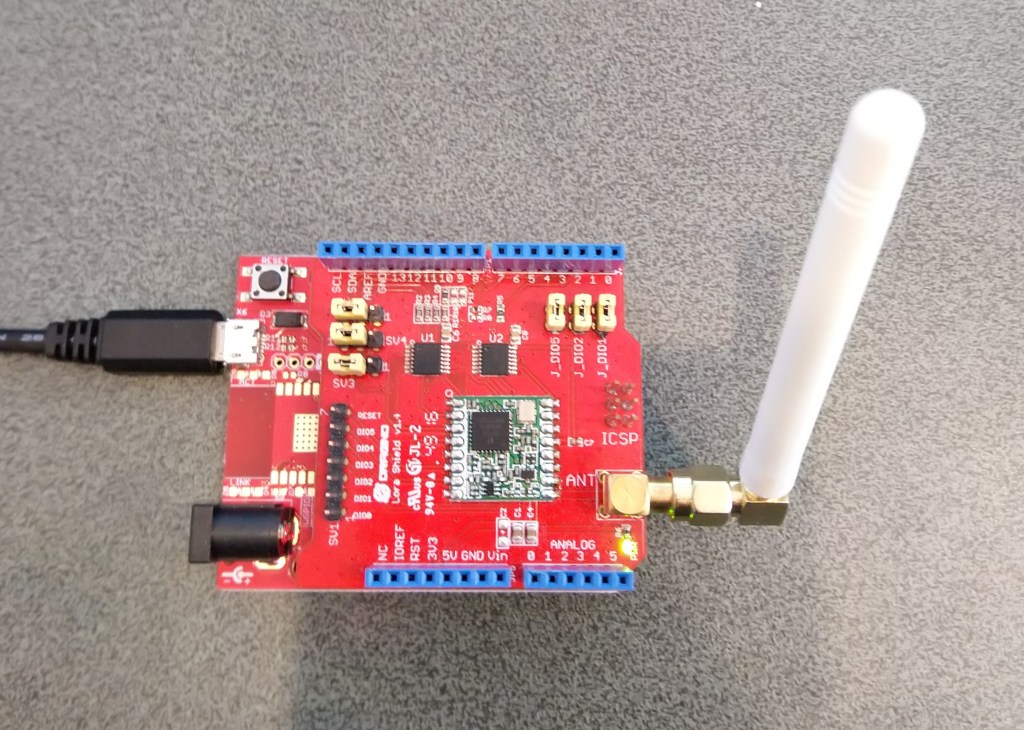
nanoFramework LoRa library Part3

Register Read and Write

Now that I could reliably dump all the Dragino shield registers I wanted to be able to configure the Semtech 127X device and reset it back to factory settings. A factory reset is done by strobing the reset pin on the device.
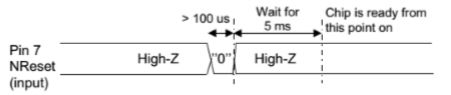
SX127X Reset process

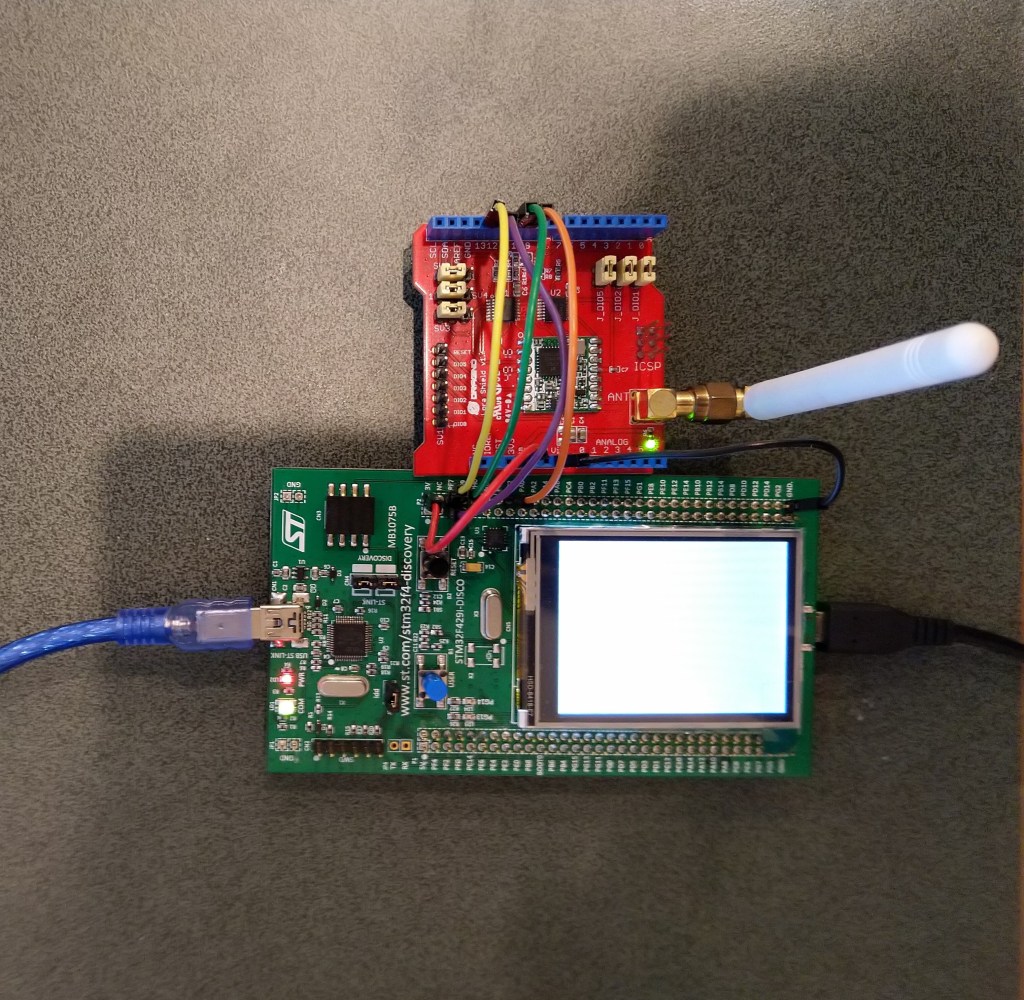
To support this my Rfm9XDevice class constructor gained an additional parameter the reset GPIO pin number(my test harness also gained a jumper wire, the blue one). The PinNumber helper is more user friendly that the raw numbers and is “inspired” by sample nanoFramework code
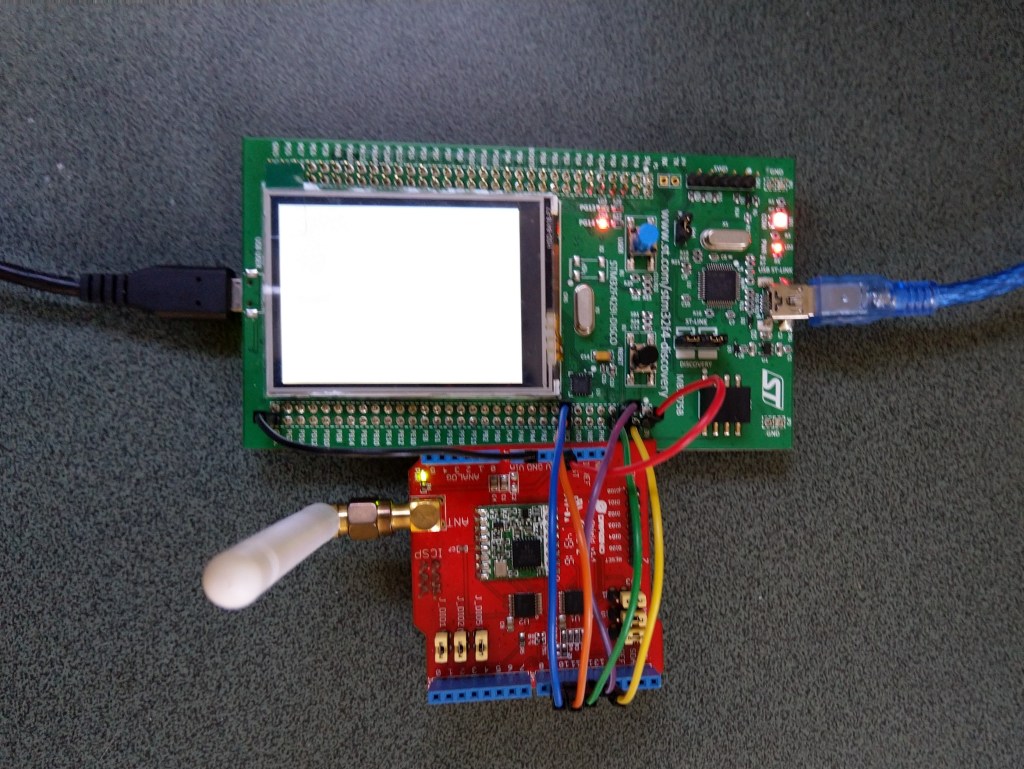
To configure the RFM9X I wrote some wrapper functions for the nanoFramwork SPI API to read/write byte values, word values and arrays of bytes.

  • SCK->PF7->D10
  • MISO->PF8->D12
  • MOSI->PF9->D11
  • CS->PC2->D10
  • Reset->PC1->D9

Each method was tested by read/writing suitable register(s) in the device configuration (Needed to set it into LoRa mode first).

namespace devMobile.IoT.Rfm9x.RegisterReadAndWrite
{
   using System;
   using System.Threading;

   using Windows.Devices.Gpio;
   using Windows.Devices.Spi;

   public sealed class Rfm9XDevice
   {
      private SpiDevice rfm9XLoraModem;
      private const byte RegisterAddressReadMask = 0X7f;
      private const byte RegisterAddressWriteMask = 0x80;

      public Rfm9XDevice(string spiPort, int chipSelectPin, int resetPin)
      {
         var settings = new SpiConnectionSettings(chipSelectPin)
         {
            ClockFrequency = 1000000,
            Mode = SpiMode.Mode0,// From SemTech docs pg 80 CPOL=0, CPHA=0
            SharingMode = SpiSharingMode.Shared
         };

         rfm9XLoraModem = SpiDevice.FromId(spiPort, settings);

         // Factory reset pin configuration
         GpioController gpioController = GpioController.GetDefault();
         GpioPin resetGpioPin = gpioController.OpenPin(resetPin);
         resetGpioPin.SetDriveMode(GpioPinDriveMode.Output);
         resetGpioPin.Write(GpioPinValue.Low);
         Thread.Sleep(10);
         resetGpioPin.Write(GpioPinValue.High);
         Thread.Sleep(10);
      }

      public Byte RegisterReadByte(byte registerAddress)
      {
         byte[] writeBuffer = new byte[] { registerAddress &= RegisterAddressReadMask, 0x0 };
         byte[] readBuffer = new byte[writeBuffer.Length];

         rfm9XLoraModem.TransferFullDuplex(writeBuffer, readBuffer);

         return readBuffer[1];
      }

      public ushort RegisterReadWord(byte address)
      {
         byte[] writeBuffer = new byte[] { address &= RegisterAddressReadMask, 0x0, 0x0 };
         byte[] readBuffer = new byte[writeBuffer.Length];

         rfm9XLoraModem.TransferFullDuplex(writeBuffer, readBuffer);

         return (ushort)(readBuffer[2] + (readBuffer[1] << 8));
      }

      public byte[] RegisterRead(byte address, int length)
      {
         byte[] writeBuffer = new byte[length + 1];
         byte[] readBuffer = new byte[length + 1];
         byte[] repyBuffer = new byte[length];

         writeBuffer[0] = address &= RegisterAddressReadMask;

         rfm9XLoraModem.TransferFullDuplex(writeBuffer, readBuffer);

         Array.Copy(readBuffer, 1, repyBuffer, 0, length);

         return repyBuffer;
      }

      public void RegisterWriteByte(byte address, byte value)
      {
         byte[] writeBuffer = new byte[] { address |= RegisterAddressWriteMask, value };

         rfm9XLoraModem.Write(writeBuffer);
      }

      public void RegisterWriteWord(byte address, ushort value)
      {
         byte[] valueBytes = BitConverter.GetBytes(value);
         byte[] writeBuffer = new byte[] { address |= RegisterAddressWriteMask, valueBytes[0], valueBytes[1] };

         rfm9XLoraModem.Write(writeBuffer);
      }

      public void RegisterWrite(byte address, byte[] bytes)
      {
         byte[] writeBuffer = new byte[1 + bytes.Length];

         Array.Copy(bytes, 0, writeBuffer, 1, bytes.Length);
         writeBuffer[0] = address |= RegisterAddressWriteMask;

         rfm9XLoraModem.Write(writeBuffer);
      }

      public void RegisterDump()
      {
         Console.WriteLine("Register dump");
         for (byte registerIndex = 0; registerIndex <= 0x42; registerIndex++)
         {
            byte registerValue = this.RegisterReadByte(registerIndex);

            Console.WriteLine($"Register 0x{registerIndex:x2} - Value 0X{registerValue:x2}");
         }
      }
   }

   class Program
   {
      static void Main()
      {
         Rfm9XDevice rfm9XDevice = new Rfm9XDevice("SPI5", PinNumber('C', 2), PinNumber('C', 3));

         rfm9XDevice.RegisterDump();

         while (true)
         {
            Console.WriteLine("Read RegOpMode (read byte)");
            Byte regOpMode1 = rfm9XDevice.RegisterReadByte(0x1);
            Console.WriteLine($"RegOpMode 0x{regOpMode1:x2}");

            Console.WriteLine("Set LoRa mode and sleep mode (write byte)");
            rfm9XDevice.RegisterWriteByte(0x01, 0b10000000);

            Console.WriteLine("Read RegOpMode (read byte)");
            Byte regOpMode2 = rfm9XDevice.RegisterReadByte(0x1);
            Console.WriteLine($"RegOpMode 0x{regOpMode2:x2}");

            Console.WriteLine("Read the preamble (read word)");
            ushort preamble = rfm9XDevice.RegisterReadWord(0x20);
            Console.WriteLine($"Preamble 0x{preamble:x2}");

            Console.WriteLine("Set the preamble to 0x80 (write word)");
            rfm9XDevice.RegisterWriteWord(0x20, 0x80);

            Console.WriteLine("Read the center frequency (read byte array)");
            byte[] frequencyReadBytes = rfm9XDevice.RegisterRead(0x06, 5);
            Console.WriteLine($"Frequency Msb 0x{frequencyReadBytes[0]:x2} Mid 0x{frequencyReadBytes[1]:x2} Lsb 0x{frequencyReadBytes[2]:x2}");

            Console.WriteLine("Set the center frequency to 916MHz (write byte array)");
            byte[] frequencyWriteBytes = { 0xE4, 0xC0, 0x00 };
            rfm9XDevice.RegisterWrite(0x06, frequencyWriteBytes);

            rfm9XDevice.RegisterDump();

            Thread.Sleep(30000);
         }
      }

      static int PinNumber(char port, byte pin)
      {
         if (port < 'A' || port > 'J')
            throw new ArgumentException();

         return ((port - 'A') * 16) + pin;
      }
   }

The output of the application looked like this

Attaching to nanoDevice...
Waiting for nanoDevice to initialize...
Updating nanoDevice debugger engine.
The nanoDevice runtime is loading the application assemblies and starting execution.
'nanoFramework.Tools.VS2019.Extension.dll' (Managed): Loaded 'C:\Users\BrynLewis\source\repos\RFM9X.NetNF\RegisterReadAndWrite\bin\Debug\RegisterReadAndWrite.exe', Symbols loaded.
'nanoFramework.Tools.VS2019.Extension.dll' (Managed): Loaded 'C:\Users\BrynLewis\source\repos\RFM9X.NetNF\packages\nanoFramework.Windows.Devices.Spi.1.3.0-preview.12\lib\Windows.Devices.Spi.dll', Symbols loaded.
'nanoFramework.Tools.VS2019.Extension.dll' (Managed): Loaded 'C:\Users\BrynLewis\source\repos\RFM9X.NetNF\packages\nanoFramework.Runtime.Events.1.4.2-preview.1\lib\nanoFramework.Runtime.Events.dll', Symbols loaded.
'nanoFramework.Tools.VS2019.Extension.dll' (Managed): Loaded 'C:\Users\BrynLewis\source\repos\RFM9X.NetNF\packages\nanoFramework.Windows.Devices.Gpio.1.4.1-preview.13\lib\Windows.Devices.Gpio.dll', Symbols loaded.
The thread '<No Name>' (0x2) has exited with code 0 (0x0).
Register dump
Register 0x00 - Value 0X00
Register 0x01 - Value 0X09
Register 0x02 - Value 0X1A
Register 0x03 - Value 0X0B
Register 0x04 - Value 0X00
Register 0x05 - Value 0X52
Register 0x06 - Value 0X6C
Register 0x07 - Value 0X80
Register 0x08 - Value 0X00
Register 0x09 - Value 0X4F
Register 0x0A - Value 0X09
Register 0x0B - Value 0X2B
Register 0x0C - Value 0X20
Register 0x0D - Value 0X08
Register 0x0E - Value 0X02
Register 0x0F - Value 0X0A
Register 0x10 - Value 0XFF
Register 0x11 - Value 0X70
Register 0x12 - Value 0X15
Register 0x13 - Value 0X0B
Register 0x14 - Value 0X28
Register 0x15 - Value 0X0C
Register 0x16 - Value 0X12
Register 0x17 - Value 0X47
Register 0x18 - Value 0X32
Register 0x19 - Value 0X3E
Register 0x1A - Value 0X00
Register 0x1B - Value 0X00
Register 0x1C - Value 0X00
Register 0x1D - Value 0X00
Register 0x1E - Value 0X00
Register 0x1F - Value 0X40
Register 0x20 - Value 0X00
Register 0x21 - Value 0X00
Register 0x22 - Value 0X00
Register 0x23 - Value 0X00
Register 0x24 - Value 0X05
Register 0x25 - Value 0X00
Register 0x26 - Value 0X03
Register 0x27 - Value 0X93
Register 0x28 - Value 0X55
Register 0x29 - Value 0X55
Register 0x2A - Value 0X55
Register 0x2B - Value 0X55
Register 0x2C - Value 0X55
Register 0x2D - Value 0X55
Register 0x2E - Value 0X55
Register 0x2F - Value 0X55
Register 0x30 - Value 0X90
Register 0x31 - Value 0X40
Register 0x32 - Value 0X40
Register 0x33 - Value 0X00
Register 0x34 - Value 0X00
Register 0x35 - Value 0X0F
Register 0x36 - Value 0X00
Register 0x37 - Value 0X00
Register 0x38 - Value 0X00
Register 0x39 - Value 0XF5
Register 0x3A - Value 0X20
Register 0x3B - Value 0X82
Register 0x3C - Value 0XF8
Register 0x3D - Value 0X02
Register 0x3E - Value 0X80
Register 0x3F - Value 0X40
Register 0x40 - Value 0X00
Register 0x41 - Value 0X00
Register 0x42 - Value 0X12
Read RegOpMode (read byte)
RegOpMode 0x09
Set LoRa mode and sleep mode (write byte)
Read RegOpMode (read byte)
RegOpMode 0x80
Read the preamble (read word)
Preamble 0x08
Set the preamble to 0x80 (write word)
Read the center frequency (read byte array)
Frequency Msb 0x6C Mid 0x80 Lsb 0x00
Set the center frequency to 916MHz (write byte array)
Register dump
Register 0x00 - Value 0X8F
Register 0x01 - Value 0X80
Register 0x02 - Value 0XFF
Register 0x03 - Value 0XFF
Register 0x04 - Value 0X00
Register 0x05 - Value 0X52
Register 0x06 - Value 0XE4
Register 0x07 - Value 0XC0
Register 0x08 - Value 0X00
Register 0x09 - Value 0XFF
Register 0x0A - Value 0X7F
Register 0x0B - Value 0X3F
Register 0x0C - Value 0X3F
Register 0x0D - Value 0X00
Register 0x0E - Value 0XFF
Register 0x0F - Value 0X00
Register 0x10 - Value 0X00
Register 0x11 - Value 0X00
Register 0x12 - Value 0X00
Register 0x13 - Value 0X00
Register 0x14 - Value 0X00
Register 0x15 - Value 0X00
Register 0x16 - Value 0X00
Register 0x17 - Value 0X00
Register 0x18 - Value 0X10
Register 0x19 - Value 0X00
Register 0x1A - Value 0X00
Register 0x1B - Value 0X00
Register 0x1C - Value 0X00
Register 0x1D - Value 0X72
Register 0x1E - Value 0X70
Register 0x1F - Value 0X64
Register 0x20 - Value 0X80
Register 0x21 - Value 0X00
Register 0x22 - Value 0XFF
Register 0x23 - Value 0XFF
Register 0x24 - Value 0XFF
Register 0x25 - Value 0X00
Register 0x26 - Value 0X04
Register 0x27 - Value 0X00
Register 0x28 - Value 0X00
Register 0x29 - Value 0X00
Register 0x2A - Value 0X00
Register 0x2B - Value 0X00
Register 0x2C - Value 0X00
Register 0x2D - Value 0X50
Register 0x2E - Value 0X14
Register 0x2F - Value 0X45
Register 0x30 - Value 0X55
Register 0x31 - Value 0XC3
Register 0x32 - Value 0X05
Register 0x33 - Value 0X27
Register 0x34 - Value 0X1C
Register 0x35 - Value 0X0A
Register 0x36 - Value 0X03
Register 0x37 - Value 0X0A
Register 0x38 - Value 0X42
Register 0x39 - Value 0X12
Register 0x3A - Value 0X49
Register 0x3B - Value 0X1D
Register 0x3C - Value 0X00
Register 0x3D - Value 0XAF
Register 0x3E - Value 0X00
Register 0x3F - Value 0X00
Register 0x40 - Value 0X00
Register 0x41 - Value 0X00
Register 0x42 - Value 0X12

The next step is to extract the SPI register access functionality into a module and configure the bare minimum of settings required to get the SX127X to transmit.
nanoFramework LoRa library Part2

Register Dump

Next step was to dump all registers (0x00 thru 0x42) of the SX1276/7/8/9 device.

I’m using “SPI5” for my testing as I could be confident in the pin numbers I copied from the nanoFramework SPI sample application.

namespace devMobile.IoT.Rfm9x.RegisterScan
{
   using System;
   using System.Threading;

   using Windows.Devices.Spi;

   public sealed class Rfm9XDevice
   {
      private SpiController spiController = SpiController.GetDefault();
      private SpiDevice rfm9XLoraModem;

      public Rfm9XDevice(string SpiPort, int chipSelectPin)
      {

         var settings = new SpiConnectionSettings(chipSelectPin)
         {
            ClockFrequency = 500000,
            Mode = SpiMode.Mode0,// From SemTech docs pg 80 CPOL=0, CPHA=0
            SharingMode = SpiSharingMode.Shared
         };

         rfm9XLoraModem = SpiDevice.FromId(SpiPort, settings);
      }

      public Byte RegisterReadByte(byte registerAddress)
      {
         byte[] writeBuffer = new byte[] { registerAddress };
         byte[] readBuffer = new byte[1];

         rfm9XLoraModem.TransferSequential(writeBuffer, readBuffer);

         return readBuffer[0];
      }
   }

   public class Program
   {
      public static void Main()
      {
         try
         {
            Rfm9XDevice rfm9XDevice = new Rfm9XDevice("SPI5", PinNumber('C', 2));

            Thread.Sleep(500);

            while (true)
            {
               for (byte registerIndex = 0; registerIndex <= 0x42; registerIndex++)
               {
                  byte registerValue = rfm9XDevice.RegisterReadByte(registerIndex);

                  Console.WriteLine($"Register 0x{registerIndex:x2} - Value 0X{registerValue:x2}");
               }
               Console.WriteLine("");

               Thread.Sleep(10000);
            }
         }
         catch (Exception ex)
         {
            Console.WriteLine(ex.Message);
         }
      }

      static int PinNumber(char port, byte pin)
      {
         if (port < 'A' || port > 'J')
            throw new ArgumentException();

         return ((port - 'A') * 16) + pin;
      }
   }
}

The output of the application looked like this

Attaching to nanoDevice...
Waiting for nanoDevice to initialize...
Updating nanoDevice debugger engine.
The nanoDevice runtime is loading the application assemblies and starting execution.
'nanoFramework.Tools.VS2019.Extension.dll' (Managed): Loaded 'C:\Users\BrynLewis\source\repos\RFM9X.NetNF\RegisterScan\bin\Debug\RegisterScan.exe', Symbols loaded.
'nanoFramework.Tools.VS2019.Extension.dll' (Managed): Loaded 'C:\Users\BrynLewis\source\repos\RFM9X.NetNF\packages\nanoFramework.Windows.Devices.Spi.1.3.0-preview.12\lib\Windows.Devices.Spi.dll', Symbols loaded.
'nanoFramework.Tools.VS2019.Extension.dll' (Managed): Loaded 'C:\Users\BrynLewis\source\repos\RFM9X.NetNF\packages\nanoFramework.Runtime.Events.1.4.2-preview.1\lib\nanoFramework.Runtime.Events.dll', Symbols loaded.
'nanoFramework.Tools.VS2019.Extension.dll' (Managed): Loaded 'C:\Users\BrynLewis\source\repos\RFM9X.NetNF\packages\nanoFramework.Windows.Devices.Gpio.1.4.1-preview.13\lib\Windows.Devices.Gpio.dll', Symbols loaded.
The thread '<No Name>' (0x2) has exited with code 0 (0x0).
Register 0x00 - Value 0X00
Register 0x01 - Value 0X09
Register 0x02 - Value 0X1A
Register 0x03 - Value 0X0B
Register 0x04 - Value 0X00
Register 0x05 - Value 0X52
Register 0x06 - Value 0X6C
Register 0x07 - Value 0X80
Register 0x08 - Value 0X00
Register 0x09 - Value 0X4F
Register 0x0A - Value 0X09
Register 0x0B - Value 0X2B
Register 0x0C - Value 0X20
Register 0x0D - Value 0X08
Register 0x0E - Value 0X02
Register 0x0F - Value 0X0A
Register 0x10 - Value 0XFF
Register 0x11 - Value 0X70
Register 0x12 - Value 0X15
Register 0x13 - Value 0X0B
Register 0x14 - Value 0X28
Register 0x15 - Value 0X0C
Register 0x16 - Value 0X12
Register 0x17 - Value 0X47
Register 0x18 - Value 0X32
Register 0x19 - Value 0X3E
Register 0x1A - Value 0X00
Register 0x1B - Value 0X00
Register 0x1C - Value 0X00
Register 0x1D - Value 0X00
Register 0x1E - Value 0X00
Register 0x1F - Value 0X40
Register 0x20 - Value 0X00
Register 0x21 - Value 0X00
Register 0x22 - Value 0X00
Register 0x23 - Value 0X00
Register 0x24 - Value 0X05
Register 0x25 - Value 0X00
Register 0x26 - Value 0X03
Register 0x27 - Value 0X93
Register 0x28 - Value 0X55
Register 0x29 - Value 0X55
Register 0x2A - Value 0X55
Register 0x2B - Value 0X55
Register 0x2C - Value 0X55
Register 0x2D - Value 0X55
Register 0x2E - Value 0X55
Register 0x2F - Value 0X55
Register 0x30 - Value 0X90
Register 0x31 - Value 0X40
Register 0x32 - Value 0X40
Register 0x33 - Value 0X00
Register 0x34 - Value 0X00
Register 0x35 - Value 0X0F
Register 0x36 - Value 0X00
Register 0x37 - Value 0X00
Register 0x38 - Value 0X00
Register 0x39 - Value 0XF5
Register 0x3A - Value 0X20
Register 0x3B - Value 0X82
Register 0x3C - Value 0XFB
Register 0x3D - Value 0X02
Register 0x3E - Value 0X80
Register 0x3F - Value 0X40
Register 0x40 - Value 0X00
Register 0x41 - Value 0X00
Register 0x42 - Value 0X12

The device was not in LoRa mode (Bit 7 of RegOpMode 0x01) so the next step was to read and write registers so I could change its configuration.

I’m running (April 2020) preview versions NuGets (1.7.0-preview.12) and having to re-flash the device more often than is desirable.

nanoFramework LoRa library Part1

After writing my Windows 10 IoT Core RFM9X library and porting it to .NetMF, Wilderness Labs Meadow and GHI Electronics TinyCLR-OS I figured yet another platform port shouldn’t take too long.

To get started I used a Dragino LoRa shield for Arduino and jumper wires to connect it to my STM32F4 Discovery Kit running the nanoFramework.

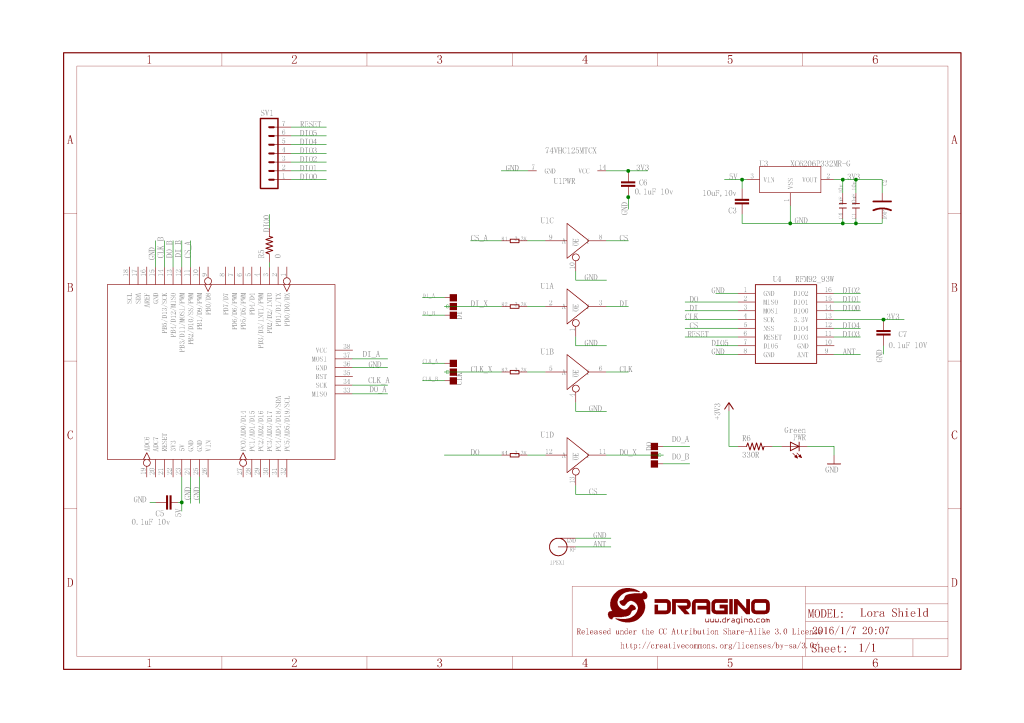
Dragino Arduino LoRa Shield Schematic

My initial pin mapping was

  • SCK->PF7->D10
  • MISO->PF8->D12
  • MOSI->PF9->D11
  • CS->PC2->D10

The shield uses D10 for chip select, D2 for RFM9X DI0 interrupt and D9 for Reset. The shield ships with the SPI lines configured for ICSP so the three jumpers diagonally across the shield from the antenna connector need to be swapped to the side closest to the edge of the shield.

STM32F429 Discovery kit with Dragino Shield

First step was to confirm I could (using the nanoFramework GPIO and SPI Nuget packages) read a couple of the Semtech SX1276 registers.

//---------------------------------------------------------------------------------
// Copyright (c) April 2020, devMobile Software
//
// Licensed under the Apache License, Version 2.0 (the "License");
// you may not use this file except in compliance with the License.
// You may obtain a copy of the License at
//
//     http://www.apache.org/licenses/LICENSE-2.0
//
// Unless required by applicable law or agreed to in writing, software
// distributed under the License is distributed on an "AS IS" BASIS,
// WITHOUT WARRANTIES OR CONDITIONS OF ANY KIND, either express or implied.
// See the License for the specific language governing permissions and
// limitations under the License.
//
//---------------------------------------------------------------------------------
namespace devMobile.IoT.Rfm9x.ShieldSPI
{
   using System;
   using System.Threading;

   using Windows.Devices.Gpio;
   using Windows.Devices.Spi;

   public class Program
   {
      public static void Main()
      {
         try
         {
            GpioController gpioController = GpioController.GetDefault();

            GpioPin chipSelectGpioPin = gpioController.OpenPin(PinNumber('C', 2));
            chipSelectGpioPin.SetDriveMode(GpioPinDriveMode.Output);

            var settings = new SpiConnectionSettings(chipSelectGpioPin.PinNumber)
            {
               ClockFrequency = 500000,
               Mode = SpiMode.Mode0,// From SemTech docs pg 80 CPOL=0, CPHA=0
               //Mode = SpiMode.Mode1,
               //Mode = SpiMode.Mode2,
               //Mode = SpiMode.Mode3,
               SharingMode = SpiSharingMode.Shared,
               //SharingMode = SpiSharingMode.Exclusive,
            };
            

            SpiDevice Device = SpiDevice.FromId("SPI5", settings);

            Thread.Sleep(500);

            while (true)
            {
               byte[] writeBuffer = new byte[] { 0x42 };
               byte[] readBuffer = new byte[1];
            
               //Device.Write(writeBuffer);
               //Device.Read(readBuffer);
               Device.TransferSequential(writeBuffer, readBuffer);

               byte registerValue = readBuffer[0];
               Console.WriteLine(String.Format("Register 0x{0:x2} - Value 0X{1:x2}", 0x42, registerValue));

               Thread.Sleep(10000);
            }
         }
         catch (Exception ex)
         {
            Console.WriteLine(ex.Message);
         }
      }

      static int PinNumber(char port, byte pin)
      {
         if (port < 'A' || port > 'J')
            throw new ArgumentException();

         return ((port - 'A') * 16) + pin;
      }
   }
}

After trying many permutations of settings I could successfully read the RegVersion and default frequency values

Attaching to nanoDevice...
Waiting for nanoDevice to initialize...
Updating nanoDevice debugger engine.
The nanoDevice runtime is loading the application assemblies and starting execution.
'nanoFramework.Tools.VS2019.Extension.dll' (Managed): Loaded 'C:\Users\BrynLewis\source\repos\RFM9X.NetNF\ShieldSPI\bin\Debug\ShieldSPI.exe', Symbols loaded.
'nanoFramework.Tools.VS2019.Extension.dll' (Managed): Loaded 'C:\Users\BrynLewis\source\repos\RFM9X.NetNF\packages\nanoFramework.Windows.Devices.Spi.1.3.0-preview.12\lib\Windows.Devices.Spi.dll', Symbols loaded.
'nanoFramework.Tools.VS2019.Extension.dll' (Managed): Loaded 'C:\Users\BrynLewis\source\repos\RFM9X.NetNF\packages\nanoFramework.Runtime.Events.1.4.2-preview.1\lib\nanoFramework.Runtime.Events.dll', Symbols loaded.
'nanoFramework.Tools.VS2019.Extension.dll' (Managed): Loaded 'C:\Users\BrynLewis\source\repos\RFM9X.NetNF\packages\nanoFramework.Windows.Devices.Gpio.1.4.1-preview.13\lib\Windows.Devices.Gpio.dll', Symbols loaded.
The thread '<No Name>' (0x2) has exited with code 0 (0x0).
Register 0x42 - Value 0X12

Mapping the Discovery board pins to corresponding SPI and GPIO pins was a bit painful

Azure Function Log4Net configuration Revisted

In a previous post I showed how I configured Apache Log4Net and Azure Application Insights to work with an Azure Function, this is the code updated to .Net Core V3.1.

With the different versions of the libraries involved (Early April 2020) this was what I found worked for me so YMMV.

Initially the logging to Application Insights wasn’t working even though it was configured in the ApplicationIngisghts.config file. After some experimentation I found setting the APPINSIGHTS_INSTRUMENTATIONKEY environment variable was the only way I could get it to work.

namespace ApplicationInsightsAzureFunctionLog4NetClient
{
	using System;
	using System.IO;
	using System.Reflection;
	using log4net;
	using log4net.Config;
	using Microsoft.ApplicationInsights;
	using Microsoft.ApplicationInsights.Extensibility;
	using Microsoft.Azure.WebJobs;

	public static class ApplicationInsightsTimer
	{
		[FunctionName("ApplicationInsightsTimerLog4Net")]
		public static void Run([TimerTrigger("0 */1 * * * *")]TimerInfo myTimer, ExecutionContext executionContext)
		{
         ILog log = log4net.LogManager.GetLogger(System.Reflection.MethodBase.GetCurrentMethod().DeclaringType);

         using (TelemetryConfiguration telemetryConfiguration = TelemetryConfiguration.CreateDefault())
         {
            TelemetryClient telemetryClient = new TelemetryClient(telemetryConfiguration);
 
            var logRepository = LogManager.GetRepository(Assembly.GetEntryAssembly());
            XmlConfigurator.Configure(logRepository, new FileInfo(Path.Combine(executionContext.FunctionAppDirectory, "log4net.config")));

            log.Debug("This is a Log4Net Debug message");
            log.Info("This is a Log4Net Info message");
            log.Warn("This is a Log4Net Warning message");
            log.Error("This is a Log4Net Error message");
            log.Fatal("This is a Log4Net Fatal message");

            telemetryClient.Flush();
         }
      }
   }
}

I did notice that there were a number of exceptions which warrant further investigation.

'func.exe' (CoreCLR: clrhost): Loaded 'C:\Users\BrynLewis\source\repos\AzureApplicationInsightsClients\ApplicationInsightsAzureFunctionLog4NetClient\bin\Debug\netcoreapp3.1\bin\log4net.dll'. 
Exception thrown: 'System.IO.FileNotFoundException' in System.Private.CoreLib.dll
'func.exe' (CoreCLR: clrhost): Loaded 'C:\Users\BrynLewis\AppData\Local\AzureFunctionsTools\Releases\2.47.1\cli_x64\System.Xml.XmlDocument.dll'. 
'func.exe' (CoreCLR: clrhost): Loaded 'C:\Users\BrynLewis\source\repos\AzureApplicationInsightsClients\ApplicationInsightsAzureFunctionLog4NetClient\bin\Debug\netcoreapp3.1\bin\Microsoft.ApplicationInsights.Log4NetAppender.dll'. 
'func.exe' (CoreCLR: clrhost): Loaded 'C:\Users\BrynLewis\AppData\Local\AzureFunctionsTools\Releases\2.47.1\cli_x64\System.Reflection.TypeExtensions.dll'. 
Application Insights Telemetry: {"name":"Microsoft.ApplicationInsights.64b1950b90bb46aaa36c26f5dce0cad3.Message","time":"2020-04-09T09:22:33.2274370Z","iKey":"1234567890123-1234-12345-123456789012","tags":{"ai.cloud.roleInstance":"DESKTOP-C9IPNQ1","ai.operation.id":"bc6c4d10cebd954c9d815ad06add2582","ai.operation.parentId":"|bc6c4d10cebd954c9d815ad06add2582.d8fa83b88b175348.","ai.operation.name":"ApplicationInsightsTimerLog4Net","ai.location.ip":"0.0.0.0","ai.internal.sdkVersion":"log4net:2.13.1-12554","ai.internal.nodeName":"DESKTOP-C9IPNQ1"},"data":{"baseType":"MessageData","baseData":{"ver":2,"message":"This is a Log4Net Info message","severityLevel":"Information","properties":{"Domain":"NOT AVAILABLE","InvocationId":"91063ef9-70d0-4318-a1e0-e49ade07c51b","ThreadName":"14","ClassName":"?","LogLevel":"Information","ProcessId":"15824","Category":"Function.ApplicationInsightsTimerLog4Net","MethodName":"?","Identity":"NOT AVAILABLE","FileName":"?","LoggerName":"ApplicationInsightsAzureFunctionLog4NetClient.ApplicationInsightsTimer","LineNumber":"?"}}}}

The latest code for my Azure Function Log4net to Applications Insights sample is available on here.

Apache Log4net .NET Core and Application Insights

In the previous post I revisited my sample .NET application that used Apache log4net and Azure Application Insights. This post updates the application to .NET Core V3.1.

I had to remove the ability to set the instrumentation key via the command line as I couldn’t get it to work.

I tried initialising the logger after loading the telemetry configuration, passing the InstrumentationKey in as a parameter of the TelemetryConfiguration constructor etc. and it made no difference.

The only other option that appeared to work was setting the instrumentation key via an Environment Variable called APPINSIGHTS_INSTRUMENTATIONKEY

   class Program
   {
      private static ILog log = log4net.LogManager.GetLogger(System.Reflection.MethodBase.GetCurrentMethod().DeclaringType);

      static void Main(string[] args)
      {
         using (TelemetryConfiguration telemetryConfiguration = TelemetryConfiguration.CreateDefault())
         {
            TelemetryClient telemetryClient = new TelemetryClient(telemetryConfiguration);

            var logRepository = LogManager.GetRepository(Assembly.GetEntryAssembly());
            XmlConfigurator.Configure(logRepository, new FileInfo(Path.Combine(Environment.CurrentDirectory, "log4net.config")));

            log.Debug("This is a Log4Net Debug message");
            log.Info("This is a Log4Net Info message");
            log.Warn("This is a Log4Net Warning message");
            log.Error("This is a Log4Net Error message");
            log.Fatal("This is a Log4Net Fatal message");

            telemetryClient.Flush();
         }

         Console.WriteLine("Press <enter> to exit");
         Console.ReadLine();
      }
   }

I updated the Log4Net setup to use the ManagedColoredConsoleAppender which required a couple of modifications to the Log4Net.config file. (Initially it was failing because I was using the non US spelling of log4net.Appender.ManagedColoredConsoleAppender)

 <appender name="ColoredConsoleAppender" type="log4net.Appender.ManagedColoredConsoleAppender">
      <mapping>
         <level value="ERROR" />
         <foreColor value="White" />
         <backColor value="Red" />
      </mapping>
      <mapping>
         <level value="DEBUG" />
         <backColor value="Green" />
      </mapping>
      <layout type="log4net.Layout.PatternLayout">
         <conversionPattern value="%date [%thread] %-5level %logger [%property{NDC}] - %message%newline" />
      </layout>
   </appender>

I did notice that after a several seconds while waiting for the enter key to be pressed there were a number of exceptions which warrants further investigation.

devMobile.Azure.ApplicationInsightsLog4NetCoreClient.Program: 2020-04-08 17:14:23,455 [1] FATAL devMobile.Azure.ApplicationInsightsLog4NetCoreClient.Program – This is a Log4Net Fatal message
‘ApplicationInsightsLog4NetCoreClient.exe’ (CoreCLR: clrhost): Loaded ‘C:\Program Files\dotnet\shared\Microsoft.NETCore.App\3.1.3\System.Security.Cryptography.Encoding.dll’.
Exception thrown: ‘System.Threading.Tasks.TaskCanceledException’ in System.Private.CoreLib.dll
Exception thrown: ‘System.Threading.Tasks.TaskCanceledException’ in System.Net.Http.dll
Exception thrown: ‘System.Threading.Tasks.TaskCanceledException’ in System.Private.CoreLib.dll
Exception thrown: ‘System.Threading.Tasks.TaskCanceledException’ in System.Net.Http.dll
Exception thrown: ‘System.Threading.Tasks.TaskCanceledException’ in System.Private.CoreLib.dll
Exception thrown: ‘System.Threading.Tasks.TaskCanceledException’ in System.Net.Http.dll
Exception thrown: ‘System.Threading.Tasks.TaskCanceledException’ in System.Private.CoreLib.dll
The program ‘[13920] ApplicationInsightsLog4NetCoreClient.exe’ has exited with code 0 (0x0).
The program ‘[13920] ApplicationInsightsLog4NetCoreClient.exe: Program Trace’ has exited with code 0 (0x0).

A sample project is available here.

“Don’t forget to flush” .Net Core Application Insights

This post updates a previous post “Don’t forget to flush Application insights Revisited” for .Net Core 3.X and shows the small change required by the deprecation of on of the TelemetryClient constructor overloads.

warning CS0618: ‘TelemetryClient.TelemetryClient()’ is obsolete: ‘We do not recommend using TelemetryConfiguration.Active on .NET Core. See https://github.com/microsoft/ApplicationInsights-dotnet/issues/1152 for more details’

   class Program
   {
      static void Main(string[] args)
      {
#if INSTRUMENTATION_KEY_TELEMETRY_CONFIGURATION
         if (args.Length != 1)
         {
            Console.WriteLine("Usage AzureApplicationInsightsClientConsole <instrumentationKey>");
            return;
         }

         TelemetryConfiguration telemetryConfiguration = new TelemetryConfiguration(args[0]);
         TelemetryClient telemetryClient = new TelemetryClient(telemetryConfiguration);
         telemetryClient.TrackTrace("INSTRUMENTATION_KEY_TELEMETRY_CONFIGURATION", SeverityLevel.Information);
#endif
#if INSTRUMENTATION_KEY_APPLICATION_INSIGHTS_CONFIG
         TelemetryConfiguration telemetryConfiguration = TelemetryConfiguration.CreateDefault();
         TelemetryClient telemetryClient = new TelemetryClient(telemetryConfiguration);
         telemetryClient.TrackTrace("INSTRUMENTATION_KEY_APPLICATION_INSIGHTS_CONFIG", SeverityLevel.Information);
#endif
         telemetryClient.Context.User.Id = Environment.UserName;
         telemetryClient.Context.Device.Id = Environment.MachineName;
         telemetryClient.Context.Operation.Name = "Test harness";

         telemetryClient.TrackTrace("This is a .Net Core AI API Verbose message", SeverityLevel.Verbose);
         telemetryClient.TrackTrace("This is a .Net Core AI API Information message", SeverityLevel.Information);
         telemetryClient.TrackTrace("This is a .Net Core AI API Warning message", SeverityLevel.Warning);
         telemetryClient.TrackTrace("This is a .Net Core AI API Error message", SeverityLevel.Error);
         telemetryClient.TrackTrace("This is a .Net Core AI API Critical message", SeverityLevel.Critical);

         telemetryClient.Flush();

         telemetryConfiguration.Dispose(); // In real-world use a using or similar approach to ensure cleaned up

         Console.WriteLine("Press <enter> to exit");
         Console.ReadLine();
      }
   }

A sample project is available here

Apache Log4net and Application Insights Revisited

In a previous post I showed how we configured a client’s application to use Apache log4net and Azure Application Insights.

I modified the code to allow the Instrumentation Key input via a command line parameter or from the ApplicationInsights.config file.

class Program
{
   private static ILog log = log4net.LogManager.GetLogger(System.Reflection.MethodBase.GetCurrentMethod().DeclaringType);

   static void Main(string[] args)
   {
      if (( args.Length != 0) && (args.Length != 1 ))
      {
         Console.WriteLine("Usage AzureApplicationInsightsClientConsole");
         Console.WriteLine("      AzureApplicationInsightsClientConsole <instrumentationKey>");
         return;
      }

      if (args.Length == 1)
      {
         TelemetryConfiguration.Active.InstrumentationKey = args[0];
      }

      log.Debug("This is a Log4Net Debug message");
      log.Info("This is a Log4Net Info message");
      log.Warn("This is a Log4Net Warning message");
      log.Error("This is an Log4Net Error message");
      log.Fatal("This is a Log4Net Fatal message");

      TelemetryConfiguration.Active.TelemetryChannel.Flush();

      Console.WriteLine("Press <enter> to exit>");
      Console.ReadLine();
   }
}

I updated the Log4Net setup to use the ManagedColoredConsoleAppender which required a couple of modifications to the Log4Net.config file. (I had to remove HighIntensity)

 <appender name="ColoredConsoleAppender" type="log4net.Appender.ManagedColoredConsoleAppender">
      <mapping>
         <level value="ERROR" />
         <foreColor value="White" />
         <backColor value="Red" />
      </mapping>
      <mapping>
         <level value="DEBUG" />
         <backColor value="Green" />
      </mapping>
      <layout type="log4net.Layout.PatternLayout">
         <conversionPattern value="%date [%thread] %-5level %logger [%property{NDC}] - %message%newline" />
      </layout>
   </appender>

A sample project is available here.

“Don’t forget to flush” Application Insights Revisited

This post revisits a previous post “Don’t forget to flush” Application insights and shows how to configure the instrumentation key in code or via the ApplicationInsights.config file.

 class Program
   {
      static void Main(string[] args)
      {
#if INSTRUMENTATION_KEY_TELEMETRY_CONFIGURATION
         if (args.Length != 1)
         {
            Console.WriteLine("Usage AzureApplicationInsightsClientConsole <instrumentationKey>");
            return;
         }

         TelemetryConfiguration telemetryConfiguration = new TelemetryConfiguration(args[0]);
         TelemetryClient telemetryClient = new TelemetryClient(telemetryConfiguration);
         telemetryClient.TrackTrace("INSTRUMENTATION_KEY_TELEMETRY_CONFIGURATION", SeverityLevel.Information);
#endif
#if INSTRUMENTATION_KEY_APPLICATION_INSIGHTS_CONFIG
         TelemetryClient telemetryClient = new TelemetryClient();
         telemetryClient.TrackTrace("INSTRUMENTATION_KEY_APPLICATION_INSIGHTS_CONFIG", SeverityLevel.Information);
#endif
         telemetryClient.TrackTrace("This is an AI API Verbose message", SeverityLevel.Verbose);
         telemetryClient.TrackTrace("This is an AI API Information message", SeverityLevel.Information);
         telemetryClient.TrackTrace("This is an AI API Warning message", SeverityLevel.Warning);
         telemetryClient.TrackTrace("This is an AI API Error message", SeverityLevel.Error);
         telemetryClient.TrackTrace("This is an AI API Critical message", SeverityLevel.Critical);

         telemetryClient.Flush();

         Console.WriteLine("Press <enter> to exit");
         Console.ReadLine();
      }

A sample project is available here

RFM9X.TinyCLR on Github

The source code of V1.0 of my GHI Electronics TinyCLR-OS RFM9X/SX127X library is on GitHub.

I initially started with a Dragino LoRa Shield for Arduino but have tested with an Elecrow RFM95 shield as well.

Dragino LoRa Shield for Arduino based test harness

A sample application which shows how to send/receive address/un-addresses payloads

//---------------------------------------------------------------------------------
// Copyright (c) March 2020, devMobile Software
//
// Licensed under the Apache License, Version 2.0 (the "License");
// you may not use this file except in compliance with the License.
// You may obtain a copy of the License at
//
//     http://www.apache.org/licenses/LICENSE-2.0
//
// Unless required by applicable law or agreed to in writing, software
// distributed under the License is distributed on an "AS IS" BASIS,
// WITHOUT WARRANTIES OR CONDITIONS OF ANY KIND, either express or implied.
// See the License for the specific language governing permissions and
// limitations under the License.
//
//---------------------------------------------------------------------------------
namespace devMobile.IoT.Rfm9x.LoRaDeviceClient
{
   using System;
   using System.Diagnostics;
   using System.Text;
   using System.Threading;

   using GHIElectronics.TinyCLR.Pins;

   using devMobile.IoT.Rfm9x;

   class Program
   {
      static void Main()
      {
			const string DeviceName = "FEZLoRa";
#if ADDRESSED_MESSAGES_PAYLOAD
			const string HostName = "LoRaIoT1";
#endif
			const double Frequency = 915000000.0;
			byte MessageCount = System.Byte.MaxValue;
			Rfm9XDevice rfm9XDevice = new Rfm9XDevice(FEZ.GpioPin.D10, FEZ.GpioPin.D9, FEZ.GpioPin.D2);

			rfm9XDevice.Initialise(Frequency, paBoost: true, rxPayloadCrcOn: true);
#if DEBUG
			rfm9XDevice.RegisterDump();
#endif

			rfm9XDevice.OnReceive += Rfm9XDevice_OnReceive;
#if ADDRESSED_MESSAGES_PAYLOAD
			rfm9XDevice.Receive(UTF8Encoding.UTF8.GetBytes(DeviceName));
#else
			rfm9XDevice.Receive();
#endif
			rfm9XDevice.OnTransmit += Rfm9XDevice_OnTransmit;

			Thread.Sleep(10000);

			while (true)
			{
				string messageText = string.Format("Hello from {0} ! {1}", DeviceName, MessageCount);
				MessageCount -= 1;

				byte[] messageBytes = UTF8Encoding.UTF8.GetBytes(messageText);
				Debug.WriteLine($"{DateTime.Now:HH:mm:ss}-TX {messageBytes.Length} byte message {messageText}");
#if ADDRESSED_MESSAGES_PAYLOAD
				rfm9XDevice.Send(UTF8Encoding.UTF8.GetBytes(HostName), messageBytes);
#else
				rfm9XDevice.Send(messageBytes);
#endif
				Thread.Sleep(10000);
			}
		}

		private static void Rfm9XDevice_OnReceive(object sender, Rfm9XDevice.OnDataReceivedEventArgs e)
		{
			try
			{
				string messageText = UTF8Encoding.UTF8.GetString(e.Data);

#if ADDRESSED_MESSAGES_PAYLOAD
				string addressText = UTF8Encoding.UTF8.GetString(e.Address);

				Debug.WriteLine($@"{DateTime.Now:HH:mm:ss}-RX From {addressText} PacketSnr {e.PacketSnr} Packet RSSI {e.PacketRssi}dBm RSSI {e.Rssi}dBm = {e.Data.Length} byte message ""{messageText}""");
#else
				Debug.WriteLine($@"{DateTime.Now:HH:mm:ss}-RX PacketSnr {e.PacketSnr} Packet RSSI {e.PacketRssi}dBm RSSI {e.Rssi}dBm = {e.Data.Length} byte message ""{messageText}""");
#endif
			}
			catch (Exception ex)
			{
				Debug.WriteLine(ex.Message);
			}
		}

		private static void Rfm9XDevice_OnTransmit(object sender, Rfm9XDevice.OnDataTransmitedEventArgs e)
		{
			Debug.WriteLine($"{DateTime.Now:HH:mm:ss}-TX Done");
		}
	}
}


The addressing support is pretty basic as my goal was a library that I could extend with optional functionality like tamper detection via signing and privacy via payload encryption, mesh network support etc.

The library works but should be treated as late beta.

TinyCLR OS LoRa library Part8

Transmit and Receive with Interrupts

For the final iteration of the “nasty” test harness I got the interrupts working for the transmitting and receiving of messages. It’s not quite simultaneous, the code sends a message every 10 seconds then goes back to receive continuous mode after each message has been sent.

      public Rfm9XDevice(int chipSelectPin, int resetPin, int interruptPin)
      {
         var settings = new SpiConnectionSettings()
         {
            ChipSelectType = SpiChipSelectType.Gpio,
            ChipSelectLine = chipSelectPin,
            Mode = SpiMode.Mode0,
            ClockFrequency = 500000,
            DataBitLength = 8,
            ChipSelectActiveState = false,
         };

         SpiController spiCntroller = SpiController.FromName(FEZ.SpiBus.Spi1);

         rfm9XLoraModem = spiCntroller.GetDevice(settings);

         // Factory reset pin configuration
         GpioController gpioController = GpioController.GetDefault();
         GpioPin resetGpioPin = gpioController.OpenPin(resetPin);
         resetGpioPin.SetDriveMode(GpioPinDriveMode.Output);
         resetGpioPin.Write(GpioPinValue.Low);
         Thread.Sleep(10);
         resetGpioPin.Write(GpioPinValue.High);
         Thread.Sleep(10);

         // Interrupt pin for RX message & TX done notification 
         InterruptGpioPin = gpioController.OpenPin(interruptPin);
         resetGpioPin.SetDriveMode(GpioPinDriveMode.Input);

         InterruptGpioPin.ValueChanged += InterruptGpioPin_ValueChanged;
      }

      private void InterruptGpioPin_ValueChanged(GpioPin sender, GpioPinValueChangedEventArgs e)
      {
         if (e.Edge != GpioPinEdge.RisingEdge)
         {
            return;
         }

         byte irqFlags = this.RegisterReadByte(0x12); // RegIrqFlags
         Debug.WriteLine($"RegIrqFlags 0X{irqFlags:x2}");

         if ((irqFlags & 0b01000000) == 0b01000000)  // RxDone 
         {
            Debug.WriteLine("Receive-Message");
            byte currentFifoAddress = this.RegisterReadByte(0x10); // RegFifiRxCurrent
            this.RegisterWriteByte(0x0d, currentFifoAddress); // RegFifoAddrPtr

            byte numberOfBytes = this.RegisterReadByte(0x13); // RegRxNbBytes

            // Allocate buffer for message
            byte[] messageBytes = this.RegisterRead(0X0, numberOfBytes);

            string messageText = UTF8Encoding.UTF8.GetString(messageBytes);
            Debug.WriteLine($"Received {messageBytes.Length} byte message {messageText}");
         }

         if ((irqFlags & 0b00001000) == 0b00001000)  // TxDone
         {
            this.RegisterWriteByte(0x01, 0b10000101); // RegOpMode set LoRa & RxContinuous
            Debug.WriteLine("Transmit-Done");
         }

         this.RegisterWriteByte(0x40, 0b00000000); // RegDioMapping1 0b00000000 DI0 RxReady & TxReady
         this.RegisterWriteByte(0x12, 0xff);// RegIrqFlags
      }

…

      public void RegisterDump()
      {
         Debug.WriteLine("Register dump");
         for (byte registerIndex = 0; registerIndex <= 0x42; registerIndex++)
         {
            byte registerValue = this.RegisterReadByte(registerIndex);

            Debug.WriteLine($"Register 0x{registerIndex:x2} - Value 0X{registerValue:x2}");
         }
      }
   }

   class Program
   {
      static void Main()
      {
         Rfm9XDevice rfm9XDevice = new Rfm9XDevice(FEZ.GpioPin.D10, FEZ.GpioPin.D9, FEZ.GpioPin.D2);
         int sendCount = 0;

         // Put device into LoRa + Sleep mode
         rfm9XDevice.RegisterWriteByte(0x01, 0b10000000); // RegOpMode 

         // Set the frequency to 915MHz
         byte[] frequencyWriteBytes = { 0xE4, 0xC0, 0x00 }; // RegFrMsb, RegFrMid, RegFrLsb
         rfm9XDevice.RegisterWrite(0x06, frequencyWriteBytes);

         rfm9XDevice.RegisterWriteByte(0x0F, 0x0); // RegFifoRxBaseAddress 

         // More power PA Boost
         rfm9XDevice.RegisterWriteByte(0x09, 0b10000000); // RegPaConfig

         rfm9XDevice.RegisterWriteByte(0x01, 0b10000101); // RegOpMode set LoRa & RxContinuous

         while (true)
         {
            rfm9XDevice.RegisterWriteByte(0x0E, 0x0); // RegFifoTxBaseAddress 

            // Set the Register Fifo address pointer
            rfm9XDevice.RegisterWriteByte(0x0D, 0x0); // RegFifoAddrPtr 

            string messageText = $"Hello LoRa {sendCount += 1}!";

            // load the message into the fifo
            byte[] messageBytes = UTF8Encoding.UTF8.GetBytes(messageText);
            rfm9XDevice.RegisterWrite(0x0, messageBytes); // RegFifo 

            // Set the length of the message in the fifo
            rfm9XDevice.RegisterWriteByte(0x22, (byte)messageBytes.Length); // RegPayloadLength
            rfm9XDevice.RegisterWriteByte(0x40, 0b01000000); // RegDioMapping1 0b00000000 DI0 RxReady & TxReady
            rfm9XDevice.RegisterWriteByte(0x01, 0b10000011); // RegOpMode 

            Debug.WriteLine($"Sending {messageBytes.Length} bytes message {messageText}");

            Thread.Sleep(10000);
         }
      }
   }

The diagnostic output shows inbound and outbound messages (Arduino then Meadow diagnostics)

'GHIElectronics.TinyCLR.VisualStudio.ProjectSystem.dll' (Managed): Loaded 'C:\Users\BrynLewis\source\repos\RFM9X.TinyCLR\ReceiveTransmitInterrupt\bin\Debug\pe\..\ReceiveTransmitInterrupt.exe', Symbols loaded.
The thread '<No Name>' (0x2) has exited with code 0 (0x0).
Sending 13 bytes message Hello LoRa 1!
RegIrqFlags 0X08
Transmit-Done
RegIrqFlags 0X50
Receive-Message
Received 17 byte message HeLoRa World! 156
Sending 13 bytes message Hello LoRa 2!
RegIrqFlags 0X08
Transmit-Done
RegIrqFlags 0X50
Receive-Message
Received 17 byte message HeLoRa World! 158
Sending 13 bytes message Hello LoRa 3!
RegIrqFlags 0X08
Transmit-Done
RegIrqFlags 0X50
Receive-Message
Received 17 byte message HeLoRa World! 160
Sending 13 bytes message Hello LoRa 4!
RegIrqFlags 0X08
Transmit-Done
RegIrqFlags 0X50
Receive-Message
Received 17 byte message HeLoRa World! 162
Sending 13 bytes message Hello LoRa 5!
RegIrqFlags 0X08
Transmit-Done
RegIrqFlags 0X50
Receive-Message
Received 17 byte message HeLoRa World! 164
Sending 13 bytes message Hello LoRa 6!
RegIrqFlags 0X08
Transmit-Done

20:55:09.280 -> Sending HeLoRa World! 152
20:55:25.179 -> Message: Hello LoRa 1!
20:55:25.179 -> RSSI: -44
20:55:25.212 -> Snr: 9.50
20:55:25.212 -> 
20:55:30.707 -> Sending HeLoRa World! 156
20:55:35.182 -> Message: Hello LoRa 2!
20:55:35.182 -> RSSI: -43
20:55:35.215 -> Snr: 9.50
20:55:35.215 -> 
20:55:41.358 -> Sending HeLoRa World! 158
20:55:45.181 -> Message: Hello LoRa 3!
20:55:45.181 -> RSSI: -44
20:55:45.214 -> Snr: 9.50
20:55:45.214 -> 
20:55:52.032 -> Sending HeLoRa World! 160
20:55:55.190 -> Message: Hello LoRa 4!
20:55:55.190 -> RSSI: -44
20:55:55.258 -> Snr: 9.50
20:55:55.258 -> 
20:56:02.451 -> Sending HeLoRa World! 162
20:56:05.206 -> Message: Hello LoRa 5!
20:56:05.206 -> RSSI: -41
20:56:05.241 -> Snr: 9.00
20:56:05.241 -> 
20:56:12.685 -> Sending HeLoRa World! 164
20:56:15.226 -> Message: Hello LoRa 6!
20:56:15.226 -> RSSI: -41
20:56:15.261 -> Snr: 9.25
20:56:15.261 -> 
20:56:22.817 -> Sending HeLoRa World! 166
20:56:25.248 -> Message: Hello LoRa 7!
20:56:25.248 -> RSSI: -36
20:56:25.283 -> Snr: 10.00
20:56:25.283 -> 

Next step is some refactoring to extract the register access code and merging with my Windows 10 IoT Core RMF9X library code base.