The Things Network Client Part2

MQTT connectivity

In a previous post I couldn’t add a TTN V3EndDevice to an application (I’m going try again soon) using the REST API so I figured would try out the MQTT API. My aim was to get notifications of when a Device was created/updated/deleted in an Application.

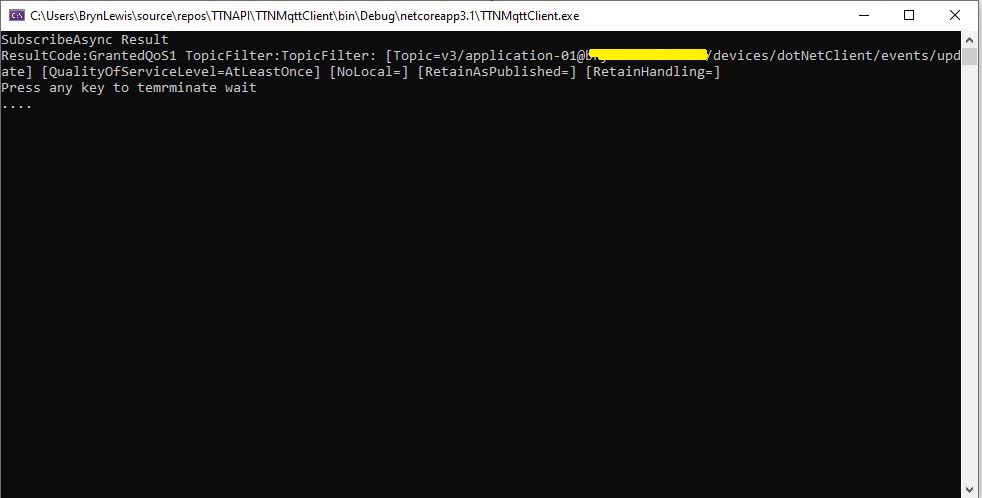
After some tinkering with the format of MQTT usernames and passwords I can connect to my V3 instance and successfully subscribe to topics. But, currently(Aug 2020) I’m not receiving any messages when I create, update or delete a Device. I have tried different Quality of Service QoS settings etc. and I wonder if my topic names aren’t quite right.
.Net Core MQTT Client

I wanted notifications so I could “automagically” provision a device in an Azure IoT Hub (maybe with a tag indicating it’s an “orphan” so it is discoverable) or in Azure IoT Central when a Device was created in TTN.

This looked like a good approach as my Azure IoT Hub applications have other devices which are not connected via LoRaWAN, and there are many specialised LoRaWAN settings which would need to be validated, stored etc. by my software. (maybe TTN device templates would make this easier). The TTN software is pretty good at managing devices so why would I “re-invent the wheel”.

I built a “nasty” console application using MQTTNet so that I could figure out how to connect to my V3 setup and subscribe to topics.

namespace devMobile.TheThingsNetwork.MqttClient
{
   using System;
   using System.Diagnostics;
   using System.Threading;
   using System.Threading.Tasks;

   using MQTTnet;
   using MQTTnet.Client;
   using MQTTnet.Client.Disconnecting;
   using MQTTnet.Client.Options;
   using MQTTnet.Client.Receiving;
   using MQTTnet.Client.Subscribing;

   class Program
   {
      private static IMqttClient mqttClient = null;
      private static IMqttClientOptions mqttOptions = null;
      private static string server;
      private static string username;
      private static string password;
      private static string clientId;

      static async Task Main(string[] args)
      {
         MqttFactory factory = new MqttFactory();
         mqttClient = factory.CreateMqttClient();

         if (args.Length != 4)
         {
            Console.WriteLine("[MQTT Server] [UserName] [Password] [ClientID]");
            Console.WriteLine("Press <enter> to exit");
            Console.ReadLine();
            return;
         }

         server = args[0];
         username = args[1];
         password = args[2];
         clientId = args[3];

         mqttOptions = new MqttClientOptionsBuilder()
            .WithTcpServer(server)
            .WithCredentials(username, password)
            .WithClientId(clientId)
            .WithTls()
            .Build();

         mqttClient.UseDisconnectedHandler(new MqttClientDisconnectedHandlerDelegate(e => MqttClient_Disconnected(e)));
         mqttClient.UseApplicationMessageReceivedHandler(new MqttApplicationMessageReceivedHandlerDelegate(e => MqttClient_ApplicationMessageReceived(e)));
         await mqttClient.ConnectAsync(mqttOptions);

         // Different topics I have tried
         string topic;
         topic = $"v3/{username}/devices/{clientId}/events/update";
         //topic = $"v3/{username}/devices/{clientId}/events/create";
         //topic = $"v3/{username}/devices/{clientId}/events/delete";
         //topic = $"v3/{username}/devices/+/events/+";
         //topic = $"v3/{username}/devices/+/events/create";
         //topic = $"v3/{username}/devices/+/events/update";
         //topic = $"v3/{username}/devices/+/events/delete";
         //topic = $"v3/{username}/devices/+/events/+";

         MqttClientSubscribeResult result;

         // Different QoS I have tried
         //result = await mqttClient.SubscribeAsync(topic, MQTTnet.Protocol.MqttQualityOfServiceLevel.AtMostOnce);
         result = await mqttClient.SubscribeAsync(topic, MQTTnet.Protocol.MqttQualityOfServiceLevel.AtLeastOnce);
         //result = await mqttClient.SubscribeAsync(topic, MQTTnet.Protocol.MqttQualityOfServiceLevel.ExactlyOnce);

         Console.WriteLine("SubscribeAsync Result");
         foreach ( var resultItem in result.Items)
         {
            Console.WriteLine($"ResultCode:{resultItem.ResultCode} TopicFilter:{resultItem.TopicFilter}");
         }                     

         Console.WriteLine("Press any key to temrminate wait");
         while (!Console.KeyAvailable)
         {
            Console.Write(".");

            Thread.Sleep(30100);
         }

         Console.WriteLine("Press <enter> to exit");
         Console.ReadLine();
         return;
      }

      private static void MqttClient_ApplicationMessageReceived(MqttApplicationMessageReceivedEventArgs e)
      {
         Console.WriteLine($"ClientId:{e.ClientId} Topic:{e.ApplicationMessage.Topic} Payload:{e.ApplicationMessage.ConvertPayloadToString()}");
      }

      private static async void MqttClient_Disconnected(MqttClientDisconnectedEventArgs e)
      {
         Debug.WriteLine("Disconnected");
         await Task.Delay(TimeSpan.FromSeconds(5));

         try
         {
            await mqttClient.ConnectAsync(mqttOptions);
         }
         catch (Exception ex)
         {
            Debug.WriteLine("Reconnect failed {0}", ex.Message);
         }
      }
   }
}

I’m going to post some questions on the TTN forums and Slack community to see if what I’m trying to do is supported/possible.

I got some helpful responses on the TTN forums and it looks like what I want todo is not supported by the V3 stack (Aug2020) and I will have to use gRPC.

The Things Network Client Part1

Basic connectivity

Over the last few months I have been using the community version of The Things Network(TTN) to test my LoRaWAN RakWireless RAK811 EVB based nanoFramework and TinyCLR clients.

As I was manually configuring TTN clients references to an application programming interface(API) caught my attention. In my day job I use tools from SmartBear and RicoSuter to generate .Net Core clients (for APSP.NET Core Web APIs I have build) from their OpenAPI descriptions.

The first step was to download the API swagger from The Things Network Github repository.

Things Network Github repository

I then used nSwagStudio to generate a C# client from a local copy of the API swagger (in the future I will use download the swagger and use the command line tools).

nSwag User Interface

At this point I had a basic client for the TTN network stack API which lacked support for the TTN security model etc. After looking at the TTN API documentation I figured out I need to add a header which contained an API Key from the TTN application configuration.

namespace TheThingsNetwork.API
{
	public partial class EndDeviceRegistryClient
	{
		public string ApiKey { set; get; }

		partial void PrepareRequest(System.Net.Http.HttpClient client, System.Net.Http.HttpRequestMessage request, string url)
		{
			if (!client.DefaultRequestHeaders.Contains("Authorization"))
			{
				client.DefaultRequestHeaders.Add("Authorization", $"Bearer {ApiKey}");
			}
		}
	}
}

In the TTN console on the overview page for my application I created an Access Key.

I then added some attributes to one of my devices so I had some addition device configuration data to display(I figured these could be useful for Azure IoT Hub configuration parameters etc. more about this later..)

Basic Device configuration in TTN Enterprise

I built a nasty console application which displayed some basic device configuration information to confirm I could authenticate and enumerate.

//---------------------------------------------------------------------------------
// Copyright (c) August 2020, devMobile Software
//
// Licensed under the Apache License, Version 2.0 (the "License");
// you may not use this file except in compliance with the License.
// You may obtain a copy of the License at
//
//     http://www.apache.org/licenses/LICENSE-2.0
//
// Unless required by applicable law or agreed to in writing, software
// distributed under the License is distributed on an "AS IS" BASIS,
// WITHOUT WARRANTIES OR CONDITIONS OF ANY KIND, either express or implied.
// See the License for the specific language governing permissions and
// limitations under the License.
//
// SECURITY_ANONYMISE
//---------------------------------------------------------------------------------
namespace TheThingsNetwork.EndDeviceClient
{
	using System;
	using System.Collections.Generic;
	using System.Net.Http;
	using TheThingsNetwork.API;

	class Program
	{
		static void Main(string[] args)
		{
			Console.WriteLine("TheThingsNetwork.EndDeviceClient starting");

			if (args.Length != 3)
			{
				Console.WriteLine("EndDeviceClient <baseURL> <applicationId> <apiKey>");
				Console.WriteLine("Press <enter> to exit");
				Console.ReadLine();
				return;
			}
			string baseUrl = args[0];
#if !SECURITY_ANONYMISE
			Console.WriteLine($"baseURL: {baseUrl}");
#endif
			string applicationId = args[1];
#if !SECURITY_ANONYMISE
			Console.WriteLine($"applicationId: {applicationId}");
#endif
			string apiKey = args[2];
#if !SECURITY_ANONYMISE
			Console.WriteLine($"apiKey: {apiKey}");
			Console.WriteLine();
#endif

			using (HttpClient httpClient = new HttpClient())
			{
				EndDeviceRegistryClient endDeviceRegistryClient = new EndDeviceRegistryClient(baseUrl, httpClient);
				endDeviceRegistryClient.ApiKey = apiKey;

				try
				{
					V3EndDevices endDevices = endDeviceRegistryClient.ListAsync(applicationId).GetAwaiter().GetResult();

					foreach (V3EndDevice v3EndDevice in endDevices.End_devices)
					{
#if SECURITY_ANONYMISE
						v3EndDevice.Ids.Dev_eui[7] = 0x0;
						v3EndDevice.Ids.Dev_eui[8] = 0x0;
						v3EndDevice.Ids.Dev_eui[9] = 0x0;
						v3EndDevice.Ids.Dev_eui[10] = 0x0;
						v3EndDevice.Ids.Dev_eui[11] = 0x0;
#endif
						Console.WriteLine($"Device ID:{v3EndDevice.Ids.Device_id} DevEUI:{Convert.ToBase64String(v3EndDevice.Ids.Dev_eui)}");
						Console.WriteLine($"   CreatedAt: {v3EndDevice.Created_at:dd-MM-yy HH:mm:ss} UpdatedAt: {v3EndDevice.Updated_at:dd-MM-yy HH:mm:ss}");

						string[] fieldMaskPaths = { "name", "description", "attributes" };

						var endDevice = endDeviceRegistryClient.GetAsync(applicationId, v3EndDevice.Ids.Device_id, field_mask_paths: fieldMaskPaths).GetAwaiter().GetResult();

						Console.WriteLine($"   Name: {endDevice.Name}");
						Console.WriteLine($"   Description: {endDevice.Description}");
						if (endDevice.Attributes != null)
						{
							foreach (KeyValuePair<string, string> attribute in endDevice.Attributes)
							{
								Console.WriteLine($"      Key: {attribute.Key} Name: {attribute.Value}");
							}
						}
						Console.WriteLine();
					}
				}
				catch (Exception ex)
				{
					Console.WriteLine(ex.Message);
				}

				Console.WriteLine("Press <enter> to exit");
				Console.ReadLine();
			}
		}
	}
}

I added some code so I could anonymise the displayed configuration so I could take screen grabs without revealing any sensitive information.

TTN API Client V1

Initially I struggled with versioning issues as the TTN community network is running V2 and the github repository was for V3. I approached TTN and they gave me access to a “limited” account on the enterprise network.

I also struggled with the number of blank fields in responses and spent some time learning GO (the programming language TTN is built with) to figure out how to use fieldMaskPaths etc.

string[] fieldMaskPaths = { "name", "description", "attributes" };

V3EndDevice endDevice = endDeviceRegistryClient.GetAsync(applicationId, v3EndDevice.Ids.Device_id, field_mask_paths: fieldMaskPaths).GetAwaiter().GetResult();

Overall things went pretty well but I expect to basic GO programing skills one this project is finished.

As hinted at earlier in this post the end goal of this project is to build an Azure IoT hub integration.

nanoFramework LoRa library Part2

Register Dump

Next step was to dump all registers (0x00 thru 0x42) of the SX1276/7/8/9 device.

I’m using “SPI5” for my testing as I could be confident in the pin numbers I copied from the nanoFramework SPI sample application.

namespace devMobile.IoT.Rfm9x.RegisterScan
{
   using System;
   using System.Threading;

   using Windows.Devices.Spi;

   public sealed class Rfm9XDevice
   {
      private SpiController spiController = SpiController.GetDefault();
      private SpiDevice rfm9XLoraModem;

      public Rfm9XDevice(string SpiPort, int chipSelectPin)
      {

         var settings = new SpiConnectionSettings(chipSelectPin)
         {
            ClockFrequency = 500000,
            Mode = SpiMode.Mode0,// From SemTech docs pg 80 CPOL=0, CPHA=0
            SharingMode = SpiSharingMode.Shared
         };

         rfm9XLoraModem = SpiDevice.FromId(SpiPort, settings);
      }

      public Byte RegisterReadByte(byte registerAddress)
      {
         byte[] writeBuffer = new byte[] { registerAddress };
         byte[] readBuffer = new byte[1];

         rfm9XLoraModem.TransferSequential(writeBuffer, readBuffer);

         return readBuffer[0];
      }
   }

   public class Program
   {
      public static void Main()
      {
         try
         {
            Rfm9XDevice rfm9XDevice = new Rfm9XDevice("SPI5", PinNumber('C', 2));

            Thread.Sleep(500);

            while (true)
            {
               for (byte registerIndex = 0; registerIndex <= 0x42; registerIndex++)
               {
                  byte registerValue = rfm9XDevice.RegisterReadByte(registerIndex);

                  Console.WriteLine($"Register 0x{registerIndex:x2} - Value 0X{registerValue:x2}");
               }
               Console.WriteLine("");

               Thread.Sleep(10000);
            }
         }
         catch (Exception ex)
         {
            Console.WriteLine(ex.Message);
         }
      }

      static int PinNumber(char port, byte pin)
      {
         if (port < 'A' || port > 'J')
            throw new ArgumentException();

         return ((port - 'A') * 16) + pin;
      }
   }
}

The output of the application looked like this

Attaching to nanoDevice...
Waiting for nanoDevice to initialize...
Updating nanoDevice debugger engine.
The nanoDevice runtime is loading the application assemblies and starting execution.
'nanoFramework.Tools.VS2019.Extension.dll' (Managed): Loaded 'C:\Users\BrynLewis\source\repos\RFM9X.NetNF\RegisterScan\bin\Debug\RegisterScan.exe', Symbols loaded.
'nanoFramework.Tools.VS2019.Extension.dll' (Managed): Loaded 'C:\Users\BrynLewis\source\repos\RFM9X.NetNF\packages\nanoFramework.Windows.Devices.Spi.1.3.0-preview.12\lib\Windows.Devices.Spi.dll', Symbols loaded.
'nanoFramework.Tools.VS2019.Extension.dll' (Managed): Loaded 'C:\Users\BrynLewis\source\repos\RFM9X.NetNF\packages\nanoFramework.Runtime.Events.1.4.2-preview.1\lib\nanoFramework.Runtime.Events.dll', Symbols loaded.
'nanoFramework.Tools.VS2019.Extension.dll' (Managed): Loaded 'C:\Users\BrynLewis\source\repos\RFM9X.NetNF\packages\nanoFramework.Windows.Devices.Gpio.1.4.1-preview.13\lib\Windows.Devices.Gpio.dll', Symbols loaded.
The thread '<No Name>' (0x2) has exited with code 0 (0x0).
Register 0x00 - Value 0X00
Register 0x01 - Value 0X09
Register 0x02 - Value 0X1A
Register 0x03 - Value 0X0B
Register 0x04 - Value 0X00
Register 0x05 - Value 0X52
Register 0x06 - Value 0X6C
Register 0x07 - Value 0X80
Register 0x08 - Value 0X00
Register 0x09 - Value 0X4F
Register 0x0A - Value 0X09
Register 0x0B - Value 0X2B
Register 0x0C - Value 0X20
Register 0x0D - Value 0X08
Register 0x0E - Value 0X02
Register 0x0F - Value 0X0A
Register 0x10 - Value 0XFF
Register 0x11 - Value 0X70
Register 0x12 - Value 0X15
Register 0x13 - Value 0X0B
Register 0x14 - Value 0X28
Register 0x15 - Value 0X0C
Register 0x16 - Value 0X12
Register 0x17 - Value 0X47
Register 0x18 - Value 0X32
Register 0x19 - Value 0X3E
Register 0x1A - Value 0X00
Register 0x1B - Value 0X00
Register 0x1C - Value 0X00
Register 0x1D - Value 0X00
Register 0x1E - Value 0X00
Register 0x1F - Value 0X40
Register 0x20 - Value 0X00
Register 0x21 - Value 0X00
Register 0x22 - Value 0X00
Register 0x23 - Value 0X00
Register 0x24 - Value 0X05
Register 0x25 - Value 0X00
Register 0x26 - Value 0X03
Register 0x27 - Value 0X93
Register 0x28 - Value 0X55
Register 0x29 - Value 0X55
Register 0x2A - Value 0X55
Register 0x2B - Value 0X55
Register 0x2C - Value 0X55
Register 0x2D - Value 0X55
Register 0x2E - Value 0X55
Register 0x2F - Value 0X55
Register 0x30 - Value 0X90
Register 0x31 - Value 0X40
Register 0x32 - Value 0X40
Register 0x33 - Value 0X00
Register 0x34 - Value 0X00
Register 0x35 - Value 0X0F
Register 0x36 - Value 0X00
Register 0x37 - Value 0X00
Register 0x38 - Value 0X00
Register 0x39 - Value 0XF5
Register 0x3A - Value 0X20
Register 0x3B - Value 0X82
Register 0x3C - Value 0XFB
Register 0x3D - Value 0X02
Register 0x3E - Value 0X80
Register 0x3F - Value 0X40
Register 0x40 - Value 0X00
Register 0x41 - Value 0X00
Register 0x42 - Value 0X12

The device was not in LoRa mode (Bit 7 of RegOpMode 0x01) so the next step was to read and write registers so I could change its configuration.

I’m running (April 2020) preview versions NuGets (1.7.0-preview.12) and having to re-flash the device more often than is desirable.

Azure Function Log4Net configuration Revisted

In a previous post I showed how I configured Apache Log4Net and Azure Application Insights to work with an Azure Function, this is the code updated to .Net Core V3.1.

With the different versions of the libraries involved (Early April 2020) this was what I found worked for me so YMMV.

Initially the logging to Application Insights wasn’t working even though it was configured in the ApplicationIngisghts.config file. After some experimentation I found setting the APPINSIGHTS_INSTRUMENTATIONKEY environment variable was the only way I could get it to work.

namespace ApplicationInsightsAzureFunctionLog4NetClient
{
	using System;
	using System.IO;
	using System.Reflection;
	using log4net;
	using log4net.Config;
	using Microsoft.ApplicationInsights;
	using Microsoft.ApplicationInsights.Extensibility;
	using Microsoft.Azure.WebJobs;

	public static class ApplicationInsightsTimer
	{
		[FunctionName("ApplicationInsightsTimerLog4Net")]
		public static void Run([TimerTrigger("0 */1 * * * *")]TimerInfo myTimer, ExecutionContext executionContext)
		{
         ILog log = log4net.LogManager.GetLogger(System.Reflection.MethodBase.GetCurrentMethod().DeclaringType);

         using (TelemetryConfiguration telemetryConfiguration = TelemetryConfiguration.CreateDefault())
         {
            TelemetryClient telemetryClient = new TelemetryClient(telemetryConfiguration);
 
            var logRepository = LogManager.GetRepository(Assembly.GetEntryAssembly());
            XmlConfigurator.Configure(logRepository, new FileInfo(Path.Combine(executionContext.FunctionAppDirectory, "log4net.config")));

            log.Debug("This is a Log4Net Debug message");
            log.Info("This is a Log4Net Info message");
            log.Warn("This is a Log4Net Warning message");
            log.Error("This is a Log4Net Error message");
            log.Fatal("This is a Log4Net Fatal message");

            telemetryClient.Flush();
         }
      }
   }
}

I did notice that there were a number of exceptions which warrant further investigation.

'func.exe' (CoreCLR: clrhost): Loaded 'C:\Users\BrynLewis\source\repos\AzureApplicationInsightsClients\ApplicationInsightsAzureFunctionLog4NetClient\bin\Debug\netcoreapp3.1\bin\log4net.dll'. 
Exception thrown: 'System.IO.FileNotFoundException' in System.Private.CoreLib.dll
'func.exe' (CoreCLR: clrhost): Loaded 'C:\Users\BrynLewis\AppData\Local\AzureFunctionsTools\Releases\2.47.1\cli_x64\System.Xml.XmlDocument.dll'. 
'func.exe' (CoreCLR: clrhost): Loaded 'C:\Users\BrynLewis\source\repos\AzureApplicationInsightsClients\ApplicationInsightsAzureFunctionLog4NetClient\bin\Debug\netcoreapp3.1\bin\Microsoft.ApplicationInsights.Log4NetAppender.dll'. 
'func.exe' (CoreCLR: clrhost): Loaded 'C:\Users\BrynLewis\AppData\Local\AzureFunctionsTools\Releases\2.47.1\cli_x64\System.Reflection.TypeExtensions.dll'. 
Application Insights Telemetry: {"name":"Microsoft.ApplicationInsights.64b1950b90bb46aaa36c26f5dce0cad3.Message","time":"2020-04-09T09:22:33.2274370Z","iKey":"1234567890123-1234-12345-123456789012","tags":{"ai.cloud.roleInstance":"DESKTOP-C9IPNQ1","ai.operation.id":"bc6c4d10cebd954c9d815ad06add2582","ai.operation.parentId":"|bc6c4d10cebd954c9d815ad06add2582.d8fa83b88b175348.","ai.operation.name":"ApplicationInsightsTimerLog4Net","ai.location.ip":"0.0.0.0","ai.internal.sdkVersion":"log4net:2.13.1-12554","ai.internal.nodeName":"DESKTOP-C9IPNQ1"},"data":{"baseType":"MessageData","baseData":{"ver":2,"message":"This is a Log4Net Info message","severityLevel":"Information","properties":{"Domain":"NOT AVAILABLE","InvocationId":"91063ef9-70d0-4318-a1e0-e49ade07c51b","ThreadName":"14","ClassName":"?","LogLevel":"Information","ProcessId":"15824","Category":"Function.ApplicationInsightsTimerLog4Net","MethodName":"?","Identity":"NOT AVAILABLE","FileName":"?","LoggerName":"ApplicationInsightsAzureFunctionLog4NetClient.ApplicationInsightsTimer","LineNumber":"?"}}}}

The latest code for my Azure Function Log4net to Applications Insights sample is available on here.

Apache Log4net .NET Core and Application Insights

In the previous post I revisited my sample .NET application that used Apache log4net and Azure Application Insights. This post updates the application to .NET Core V3.1.

I had to remove the ability to set the instrumentation key via the command line as I couldn’t get it to work.

I tried initialising the logger after loading the telemetry configuration, passing the InstrumentationKey in as a parameter of the TelemetryConfiguration constructor etc. and it made no difference.

The only other option that appeared to work was setting the instrumentation key via an Environment Variable called APPINSIGHTS_INSTRUMENTATIONKEY

   class Program
   {
      private static ILog log = log4net.LogManager.GetLogger(System.Reflection.MethodBase.GetCurrentMethod().DeclaringType);

      static void Main(string[] args)
      {
         using (TelemetryConfiguration telemetryConfiguration = TelemetryConfiguration.CreateDefault())
         {
            TelemetryClient telemetryClient = new TelemetryClient(telemetryConfiguration);

            var logRepository = LogManager.GetRepository(Assembly.GetEntryAssembly());
            XmlConfigurator.Configure(logRepository, new FileInfo(Path.Combine(Environment.CurrentDirectory, "log4net.config")));

            log.Debug("This is a Log4Net Debug message");
            log.Info("This is a Log4Net Info message");
            log.Warn("This is a Log4Net Warning message");
            log.Error("This is a Log4Net Error message");
            log.Fatal("This is a Log4Net Fatal message");

            telemetryClient.Flush();
         }

         Console.WriteLine("Press <enter> to exit");
         Console.ReadLine();
      }
   }

I updated the Log4Net setup to use the ManagedColoredConsoleAppender which required a couple of modifications to the Log4Net.config file. (Initially it was failing because I was using the non US spelling of log4net.Appender.ManagedColoredConsoleAppender)

 <appender name="ColoredConsoleAppender" type="log4net.Appender.ManagedColoredConsoleAppender">
      <mapping>
         <level value="ERROR" />
         <foreColor value="White" />
         <backColor value="Red" />
      </mapping>
      <mapping>
         <level value="DEBUG" />
         <backColor value="Green" />
      </mapping>
      <layout type="log4net.Layout.PatternLayout">
         <conversionPattern value="%date [%thread] %-5level %logger [%property{NDC}] - %message%newline" />
      </layout>
   </appender>

I did notice that after a several seconds while waiting for the enter key to be pressed there were a number of exceptions which warrants further investigation.

devMobile.Azure.ApplicationInsightsLog4NetCoreClient.Program: 2020-04-08 17:14:23,455 [1] FATAL devMobile.Azure.ApplicationInsightsLog4NetCoreClient.Program – This is a Log4Net Fatal message
‘ApplicationInsightsLog4NetCoreClient.exe’ (CoreCLR: clrhost): Loaded ‘C:\Program Files\dotnet\shared\Microsoft.NETCore.App\3.1.3\System.Security.Cryptography.Encoding.dll’.
Exception thrown: ‘System.Threading.Tasks.TaskCanceledException’ in System.Private.CoreLib.dll
Exception thrown: ‘System.Threading.Tasks.TaskCanceledException’ in System.Net.Http.dll
Exception thrown: ‘System.Threading.Tasks.TaskCanceledException’ in System.Private.CoreLib.dll
Exception thrown: ‘System.Threading.Tasks.TaskCanceledException’ in System.Net.Http.dll
Exception thrown: ‘System.Threading.Tasks.TaskCanceledException’ in System.Private.CoreLib.dll
Exception thrown: ‘System.Threading.Tasks.TaskCanceledException’ in System.Net.Http.dll
Exception thrown: ‘System.Threading.Tasks.TaskCanceledException’ in System.Private.CoreLib.dll
The program ‘[13920] ApplicationInsightsLog4NetCoreClient.exe’ has exited with code 0 (0x0).
The program ‘[13920] ApplicationInsightsLog4NetCoreClient.exe: Program Trace’ has exited with code 0 (0x0).

A sample project is available here.

“Don’t forget to flush” .Net Core Application Insights

This post updates a previous post “Don’t forget to flush Application insights Revisited” for .Net Core 3.X and shows the small change required by the deprecation of on of the TelemetryClient constructor overloads.

warning CS0618: ‘TelemetryClient.TelemetryClient()’ is obsolete: ‘We do not recommend using TelemetryConfiguration.Active on .NET Core. See https://github.com/microsoft/ApplicationInsights-dotnet/issues/1152 for more details’

   class Program
   {
      static void Main(string[] args)
      {
#if INSTRUMENTATION_KEY_TELEMETRY_CONFIGURATION
         if (args.Length != 1)
         {
            Console.WriteLine("Usage AzureApplicationInsightsClientConsole <instrumentationKey>");
            return;
         }

         TelemetryConfiguration telemetryConfiguration = new TelemetryConfiguration(args[0]);
         TelemetryClient telemetryClient = new TelemetryClient(telemetryConfiguration);
         telemetryClient.TrackTrace("INSTRUMENTATION_KEY_TELEMETRY_CONFIGURATION", SeverityLevel.Information);
#endif
#if INSTRUMENTATION_KEY_APPLICATION_INSIGHTS_CONFIG
         TelemetryConfiguration telemetryConfiguration = TelemetryConfiguration.CreateDefault();
         TelemetryClient telemetryClient = new TelemetryClient(telemetryConfiguration);
         telemetryClient.TrackTrace("INSTRUMENTATION_KEY_APPLICATION_INSIGHTS_CONFIG", SeverityLevel.Information);
#endif
         telemetryClient.Context.User.Id = Environment.UserName;
         telemetryClient.Context.Device.Id = Environment.MachineName;
         telemetryClient.Context.Operation.Name = "Test harness";

         telemetryClient.TrackTrace("This is a .Net Core AI API Verbose message", SeverityLevel.Verbose);
         telemetryClient.TrackTrace("This is a .Net Core AI API Information message", SeverityLevel.Information);
         telemetryClient.TrackTrace("This is a .Net Core AI API Warning message", SeverityLevel.Warning);
         telemetryClient.TrackTrace("This is a .Net Core AI API Error message", SeverityLevel.Error);
         telemetryClient.TrackTrace("This is a .Net Core AI API Critical message", SeverityLevel.Critical);

         telemetryClient.Flush();

         telemetryConfiguration.Dispose(); // In real-world use a using or similar approach to ensure cleaned up

         Console.WriteLine("Press <enter> to exit");
         Console.ReadLine();
      }
   }

A sample project is available here

Apache Log4net and Application Insights Revisited

In a previous post I showed how we configured a client’s application to use Apache log4net and Azure Application Insights.

I modified the code to allow the Instrumentation Key input via a command line parameter or from the ApplicationInsights.config file.

class Program
{
   private static ILog log = log4net.LogManager.GetLogger(System.Reflection.MethodBase.GetCurrentMethod().DeclaringType);

   static void Main(string[] args)
   {
      if (( args.Length != 0) && (args.Length != 1 ))
      {
         Console.WriteLine("Usage AzureApplicationInsightsClientConsole");
         Console.WriteLine("      AzureApplicationInsightsClientConsole <instrumentationKey>");
         return;
      }

      if (args.Length == 1)
      {
         TelemetryConfiguration.Active.InstrumentationKey = args[0];
      }

      log.Debug("This is a Log4Net Debug message");
      log.Info("This is a Log4Net Info message");
      log.Warn("This is a Log4Net Warning message");
      log.Error("This is an Log4Net Error message");
      log.Fatal("This is a Log4Net Fatal message");

      TelemetryConfiguration.Active.TelemetryChannel.Flush();

      Console.WriteLine("Press <enter> to exit>");
      Console.ReadLine();
   }
}

I updated the Log4Net setup to use the ManagedColoredConsoleAppender which required a couple of modifications to the Log4Net.config file. (I had to remove HighIntensity)

 <appender name="ColoredConsoleAppender" type="log4net.Appender.ManagedColoredConsoleAppender">
      <mapping>
         <level value="ERROR" />
         <foreColor value="White" />
         <backColor value="Red" />
      </mapping>
      <mapping>
         <level value="DEBUG" />
         <backColor value="Green" />
      </mapping>
      <layout type="log4net.Layout.PatternLayout">
         <conversionPattern value="%date [%thread] %-5level %logger [%property{NDC}] - %message%newline" />
      </layout>
   </appender>

A sample project is available here.

TinyCLR OS LoRa library Part2

Register Dump

Next step was to dump all registers (0x00 thru 0x42) of the SX1276/7/8/9 device.

//---------------------------------------------------------------------------------
// Copyright (c) March 2020, devMobile Software
//
// Licensed under the Apache License, Version 2.0 (the "License");
// you may not use this file except in compliance with the License.
// You may obtain a copy of the License at
//
//     http://www.apache.org/licenses/LICENSE-2.0
//
// Unless required by applicable law or agreed to in writing, software
// distributed under the License is distributed on an "AS IS" BASIS,
// WITHOUT WARRANTIES OR CONDITIONS OF ANY KIND, either express or implied.
// See the License for the specific language governing permissions and
// limitations under the License.
//
//---------------------------------------------------------------------------------
namespace devMobile.IoT.Rfm9x.RegisterScan
{
   using System;
   using System.Diagnostics;
   using System.Threading;
   using GHIElectronics.TinyCLR.Devices.Spi;
   using GHIElectronics.TinyCLR.Pins;

   public sealed class Rfm9XDevice
   {
      private SpiDevice rfm9XLoraModem;

      public Rfm9XDevice(int chipSelectPin)
      {
         var settings = new SpiConnectionSettings()
         {
            ChipSelectType = SpiChipSelectType.Gpio,
            ChipSelectLine = chipSelectPin,
            Mode = SpiMode.Mode0,
            ClockFrequency = 500000,
            DataBitLength = 8,
            ChipSelectActiveState = false,
         };

         SpiController spiCntroller = SpiController.FromName(FEZ.SpiBus.Spi1);

         rfm9XLoraModem = spiCntroller.GetDevice(settings);
      }

      public Byte RegisterReadByte(byte registerAddress)
      {
         byte[] writeBuffer = new byte[] { registerAddress, 0x0 };
         byte[] readBuffer = new byte[writeBuffer.Length];
         Debug.Assert(rfm9XLoraModem != null);

         rfm9XLoraModem.TransferFullDuplex(writeBuffer, readBuffer);

         return readBuffer[1];
      }
   }

   class Program
   {
      static void Main()
      {
         Rfm9XDevice rfm9XDevice = new Rfm9XDevice(FEZ.GpioPin.D10);

         while (true)
         {
            for (byte registerIndex = 0; registerIndex <= 0x42; registerIndex++)
            {
               byte registerValue = rfm9XDevice.RegisterReadByte(registerIndex);

               Debug.WriteLine($"Register 0x{registerIndex:x2} - Value 0X{registerValue:x2}");
            }
            Debug.WriteLine("");

            Thread.Sleep(10000);
         }
      }
   }
}


The output of the application looked like this

Found debugger!

Create TS.

Loading Deployment Assemblies.

Attaching deployed file.

   Assembly: mscorlib (1.0.0.0)  Attaching deployed file.

   Assembly: GHIElectronics.TinyCLR.Devices.Spi (1.0.0.0)  Attaching deployed file.

   Assembly: GHIElectronics.TinyCLR.Devices.Gpio (1.0.0.0)  Attaching deployed file.

   Assembly: GHIElectronics.TinyCLR.Native (1.0.0.0)  Attaching deployed file.

   Assembly: RegisterScan (1.0.0.0)  Resolving.

The debugging target runtime is loading the application assemblies and starting execution.
Ready.

'GHIElectronics.TinyCLR.VisualStudio.ProjectSystem.dll' (Managed): Loaded 'C:\Users\BrynLewis\source\repos\RFM9X.TinyCLR\RegisterScan\bin\Debug\pe\..\GHIElectronics.TinyCLR.Native.dll'
'GHIElectronics.TinyCLR.VisualStudio.ProjectSystem.dll' (Managed): Loaded 'C:\Users\BrynLewis\source\repos\RFM9X.TinyCLR\RegisterScan\bin\Debug\pe\..\GHIElectronics.TinyCLR.Devices.Gpio.dll'
'GHIElectronics.TinyCLR.VisualStudio.ProjectSystem.dll' (Managed): Loaded 'C:\Users\BrynLewis\source\repos\RFM9X.TinyCLR\RegisterScan\bin\Debug\pe\..\GHIElectronics.TinyCLR.Devices.Spi.dll'
'GHIElectronics.TinyCLR.VisualStudio.ProjectSystem.dll' (Managed): Loaded 'C:\Users\BrynLewis\source\repos\RFM9X.TinyCLR\RegisterScan\bin\Debug\pe\..\RegisterScan.exe', Symbols loaded.
The thread '<No Name>' (0x2) has exited with code 0 (0x0).
Register 0x00 - Value 0X00
Register 0x01 - Value 0X09
Register 0x02 - Value 0X1a
Register 0x03 - Value 0X0b
Register 0x04 - Value 0X00
Register 0x05 - Value 0X52
Register 0x06 - Value 0X6c
Register 0x07 - Value 0X80
Register 0x08 - Value 0X00
Register 0x09 - Value 0X4f
Register 0x0a - Value 0X09
Register 0x0b - Value 0X2b
Register 0x0c - Value 0X20
Register 0x0d - Value 0X08
Register 0x0e - Value 0X02
Register 0x0f - Value 0X0a
Register 0x10 - Value 0Xff
Register 0x11 - Value 0X70
Register 0x12 - Value 0X15
Register 0x13 - Value 0X0b
Register 0x14 - Value 0X28
Register 0x15 - Value 0X0c
Register 0x16 - Value 0X12
Register 0x17 - Value 0X47
Register 0x18 - Value 0X32
Register 0x19 - Value 0X3e
Register 0x1a - Value 0X00
Register 0x1b - Value 0X00
Register 0x1c - Value 0X00
Register 0x1d - Value 0X00
Register 0x1e - Value 0X00
Register 0x1f - Value 0X40
Register 0x21 - Value 0X00
Register 0x22 - Value 0X00
Register 0x23 - Value 0X00
Register 0x24 - Value 0X05
Register 0x25 - Value 0X00
Register 0x26 - Value 0X03
Register 0x27 - Value 0X93
Register 0x28 - Value 0X55
Register 0x29 - Value 0X55
Register 0x2a - Value 0X55
Register 0x2b - Value 0X55
Register 0x2c - Value 0X55
Register 0x2d - Value 0X55
Register 0x2e - Value 0X55
Register 0x2f - Value 0X55
Register 0x30 - Value 0X90
Register 0x31 - Value 0X40
Register 0x32 - Value 0X40
Register 0x33 - Value 0X00
Register 0x34 - Value 0X00
Register 0x35 - Value 0X0f
Register 0x36 - Value 0X00
Register 0x37 - Value 0X00
Register 0x38 - Value 0X00
Register 0x39 - Value 0Xf5
Register 0x3a - Value 0X20
Register 0x3b - Value 0X82
Register 0x3c - Value 0Xf7
Register 0x3d - Value 0X02
Register 0x3e - Value 0X80
Register 0x3f - Value 0X40
Register 0x40 - Value 0X00
Register 0x41 - Value 0X00
Register 0x42 - Value 0X12

The device was not in LoRa mode (Bit 7 of RegOpMode 0x01) so the next step was to read and write registers so I could change its configuration.

Overall the SPI implementation was closer to Windows 10 IoT Core model than expected.

AllThingsTalk with MQTTnet

As I’m testing my Message Queue Telemetry Transport(MQTT) LoRa gateway I’m building a proof of concept(PoC) .Net core console application for each IoT platform I would like to support.

This PoC was to confirm that I could connect to the AllThingsTalk MQTT API then format topics and payloads correctly.

MQTTNet Console Client

The AllThingsTalk MQTT broker, username, and device ID are required command line parameters.

namespace devmobile.Mqtt.TestClient.AllThingsTalk
{
	using System;
	using System.Diagnostics;
	using System.Threading;
	using System.Threading.Tasks;

	using MQTTnet;
	using MQTTnet.Client;
	using MQTTnet.Client.Disconnecting;
	using MQTTnet.Client.Options;
	using MQTTnet.Client.Receiving;

	using Newtonsoft.Json;
	using Newtonsoft.Json.Linq;

	class Program
	{
		private static IMqttClient mqttClient = null;
		private static IMqttClientOptions mqttOptions = null;
		private static string server;
		private static string username;
		private static string deviceID;

		static void Main(string[] args)
		{
			MqttFactory factory = new MqttFactory();
			mqttClient = factory.CreateMqttClient();

			if ((args.Length != 3))
			{
				Console.WriteLine("[MQTT Server] [UserName] [ClientID]");
				Console.WriteLine("Press <enter> to exit");
				Console.ReadLine();
				return;
			}

			server = args[0];
			username = args[1];
			deviceID = args[2];

			Console.WriteLine($"MQTT Server:{server} DeviceID:{deviceID}");

			// AllThingsTalk formatted device state update topic
			string topicD2C = $"device/{deviceID}/state";

			mqttOptions = new MqttClientOptionsBuilder()
				.WithTcpServer(server)
				.WithCredentials(username, "HighlySecurePassword")
				.WithClientId(deviceID)
				.WithTls()
				.Build();

			mqttClient.UseDisconnectedHandler(new MqttClientDisconnectedHandlerDelegate(e => MqttClient_Disconnected(e)));
			mqttClient.UseApplicationMessageReceivedHandler(new MqttApplicationMessageReceivedHandlerDelegate(e => MqttClient_ApplicationMessageReceived(e)));
			mqttClient.ConnectAsync(mqttOptions).Wait();

			// AllThingsTalk formatted device command with wildcard topic
			string topicC2D = $"device/{deviceID}/asset/+/command";

			mqttClient.SubscribeAsync(topicC2D, MQTTnet.Protocol.MqttQualityOfServiceLevel.AtLeastOnce).GetAwaiter().GetResult();

			while (true)
			{
				JObject payloadJObject = new JObject();

				double temperature = 22.0 + (DateTime.UtcNow.Millisecond / 1000.0);
				temperature = Math.Round( temperature, 1 );
				double humidity = 50 + (DateTime.UtcNow.Millisecond / 100.0);
				humidity = Math.Round(humidity, 1);

				JObject temperatureJObject = new JObject
				{
					{ "value", temperature }
				};
				payloadJObject.Add("Temperature", temperatureJObject);

				JObject humidityJObject = new JObject
				{
					{ "value", humidity }
				};
				payloadJObject.Add("Humidity", humidityJObject);

				string payload = JsonConvert.SerializeObject(payloadJObject);
				Console.WriteLine($"Topic:{topicD2C} Payload:{payload}");

				var message = new MqttApplicationMessageBuilder()
					.WithTopic(topicD2C)
					.WithPayload(payload)
					.WithAtMostOnceQoS()
//					.WithAtLeastOnceQoS()
					.Build();

				Console.WriteLine("PublishAsync start");
				mqttClient.PublishAsync(message).Wait();
				Console.WriteLine("PublishAsync finish");

				Thread.Sleep(15100);
			}
		}

		private static void MqttClient_ApplicationMessageReceived(MqttApplicationMessageReceivedEventArgs e)
		{
			Console.WriteLine($"ClientId:{e.ClientId} Topic:{e.ApplicationMessage.Topic} Payload:{e.ApplicationMessage.ConvertPayloadToString()}");
		}

		private static async void MqttClient_Disconnected(MqttClientDisconnectedEventArgs e)
		{
			Debug.WriteLine("Disconnected");
			await Task.Delay(TimeSpan.FromSeconds(5));

			try
			{
				await mqttClient.ConnectAsync(mqttOptions);
			}
			catch (Exception ex)
			{
				Debug.WriteLine("Reconnect failed {0}", ex.Message);
			}
		}
	}

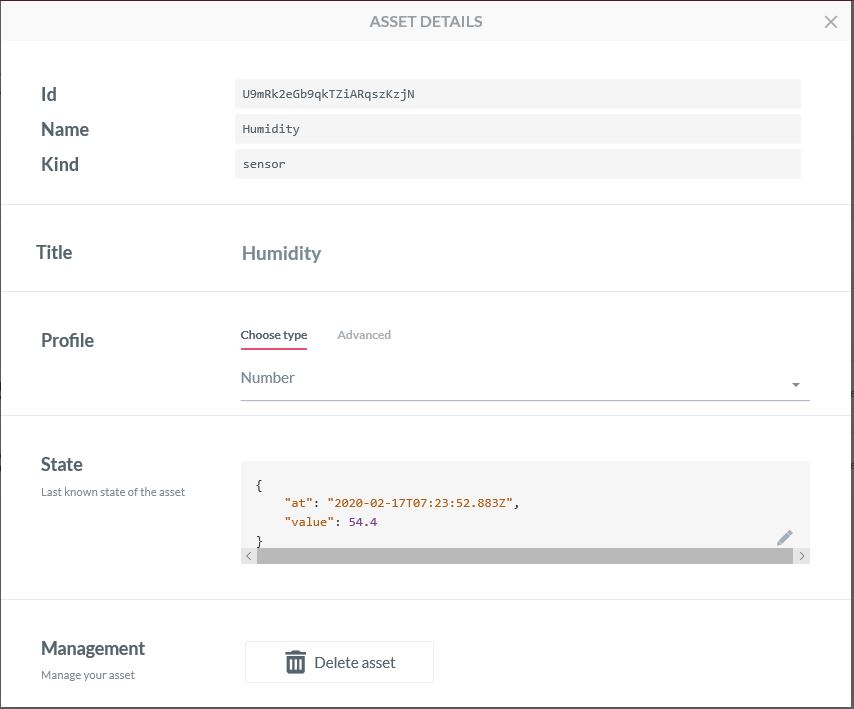
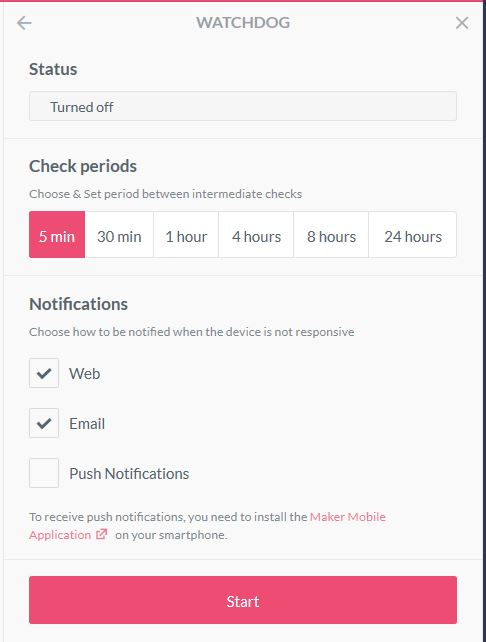
The AllThingsTalk device configuration was relatively easy but I need to investigate “Gateway” functionality and configuration further.

Configuring an Asset
Configuration a watchdog to check for sensor data
Sending a command to an actuator
Processing a command on the client

The ability to look at message payloads in the Debug tab would be very helpful when working out why a payload was not being processed as expected.

Asset debug information

Overall the AllThingsTalk configuration went fairly smoothly, though I need to investigate the “Gateway” configuration and functionality further. The way that assets are name by the system could make support in my MQTT Gateway more complex.

Azure IoT Hub, Event Grid to Application Insights

For a second Proof of Concept (PoC) I wanted to upload sensor data from my MQTT LoRa Telemetry Field Gateway to an Azure IoT Hub, then using Azure EventGrid subscribe to the stream of telemetry data events, logging the payloads in Azure Application Insights (the aim was minimal code so no database etc.).

The first step was to create and deploy a simple Azure Function for unpacking the telemetry event payload.

Azure IoT Hub Azure Function Handler

Then wire the Azure function to the Microsoft.Devices.Device.Telemetry Event Type

Azure IoT Hub Event Metrics

On the Windows 10 IoT Core device in the Event Tracing Window(ETW) logging on the device I could see LoRa messages arriving and being unpacked.

Windows 10 Device ETW showing message payload

Then in Application Insights after some mucking around with code I could see in a series of Trace statements the event payload as it was unpacked.

{"id":"29108ebf-e5d5-7b95-e739-7d9048209d53","topic":"/SUBSCRIPTIONS/12345678-9012-3456-7890-123456789012/RESOURCEGROUPS/AZUREIOTHUBEVENTGRIDAZUREFUNCTION/PROVIDERS/MICROSOFT.DEVICES/IOTHUBS/FIELDGATEWAYHUB",
"subject":"devices/MQTTNetClient",
"eventType":"Microsoft.Devices.DeviceTelemetry",
"eventTime":"2020-02-01T04:30:51.427Z",
"data":
{
 "properties":{},
"systemProperties":{"iothub-connection-device-id":"MQTTNetClient","iothub-connection-auth-method":"{\"scope\":\"device\",\"type\":\"sas\",\"issuer\":\"iothub\",\"acceptingIpFilterRule\":null}",
"iothub-connection-auth-generation-id":"637149890997219611",
"iothub-enqueuedtime":"2020-02-01T04:30:51.427Z",
"iothub-message-source":"Telemetry"
},
"body":"eyJPZmZpY2VUZW1wZXJhdHVyZSI6IjIyLjUiLCJPZmZpY2VIdW1pZGl0eSI6IjkyIn0="
},
"dataVersion":"",
"metadataVersion":"1"
}
Application Insights logging with message unpacking
Application Insights logging message payload

Then in the last log entry the decoded message payload

/*
    Copyright ® 2020 Feb devMobile Software, All Rights Reserved
 
    MIT License

    Permission is hereby granted, free of charge, to any person obtaining a copy
    of this software and associated documentation files (the "Software"), to deal
    in the Software without restriction, including without limitation the rights
    to use, copy, modify, merge, publish, distribute, sublicense, and/or sell
    copies of the Software, and to permit persons to whom the Software is
    furnished to do so, subject to the following conditions:

    The above copyright notice and this permission notice shall be included in all
    copies or substantial portions of the Software.

    THE SOFTWARE IS PROVIDED "AS IS", WITHOUT WARRANTY OF ANY KIND, EXPRESS OR
    IMPLIED, INCLUDING BUT NOT LIMITED TO THE WARRANTIES OF MERCHANTABILITY,
    FITNESS FOR A PARTICULAR PURPOSE AND NONINFRINGEMENT. IN NO EVENT SHALL THE
    AUTHORS OR COPYRIGHT HOLDERS BE LIABLE FOR ANY CLAIM, DAMAGES OR OTHER
    LIABILITY, WHETHER IN AN ACTION OF CONTRACT, TORT OR OTHERWISE, ARISING FROM,
    OUT OF OR IN CONNECTION WITH THE SOFTWARE OR THE USE OR OTHER DEALINGS IN THE
    SOFTWARE

    Default URL for triggering event grid function in the local environment.
    http://localhost:7071/runtime/webhooks/EventGrid?functionName=functionname
 */
namespace EventGridProcessorAzureIotHub
{
   using System;
   using System.IO;
   using System.Reflection;

   using Microsoft.Azure.WebJobs;
   using Microsoft.Azure.EventGrid.Models;
   using Microsoft.Azure.WebJobs.Extensions.EventGrid;

   using log4net;
   using log4net.Config;
   using Newtonsoft.Json;

   public static class Telemetry
    {
        [FunctionName("Telemetry")]
        public static void Run([EventGridTrigger]Microsoft.Azure.EventGrid.Models.EventGridEvent eventGridEvent, ExecutionContext executionContext )//, TelemetryClient telemetryClient)
        {
			ILog log = log4net.LogManager.GetLogger(System.Reflection.MethodBase.GetCurrentMethod().DeclaringType);

		   var logRepository = LogManager.GetRepository(Assembly.GetEntryAssembly());
			XmlConfigurator.Configure(logRepository, new FileInfo(Path.Combine(executionContext.FunctionAppDirectory, "log4net.config")));

         log.Info($"eventGridEvent.Data-{eventGridEvent}");

         log.Info($"eventGridEvent.Data.ToString()-{eventGridEvent.Data.ToString()}");

        IotHubDeviceTelemetryEventData iOThubDeviceTelemetryEventData = (IotHubDeviceTelemetryEventData)JsonConvert.DeserializeObject(eventGridEvent.Data.ToString(), typeof(IotHubDeviceTelemetryEventData));

         log.Info($"iOThubDeviceTelemetryEventData.Body.ToString()-{iOThubDeviceTelemetryEventData.Body.ToString()}");

         byte[] base64EncodedBytes = System.Convert.FromBase64String(iOThubDeviceTelemetryEventData.Body.ToString());

         log.Info($"System.Text.Encoding.UTF8.GetString(-{System.Text.Encoding.UTF8.GetString(base64EncodedBytes)}");
      }
	}
}

Overall it took roughly half a page of code (mainly generated by a tool) to unpack and log the contents of an Azure IoT Hub EventGrid payload to Application Insights.