.Net Meadow RFM95/96/97/98 LoRa library Part7

Transmit Interrupt

Starting with the TransmitBasic sample application I modified the code so that a hardware interrupt (specified in RegDioMapping1) was generated on TxDone (FIFO Payload Transmission completed).

The application inserts a message into the RFM95 transmit FIFO every 10 seconds with confirmation of transmission displayed shortly afterwards

      public Rfm9XDevice(IIODevice device, ISpiBus spiBus, IPin chipSelectPin, IPin resetPin, IPin interruptPin)
      {
         // Chip select pin configuration
         ChipSelectGpioPin = device.CreateDigitalOutputPort(chipSelectPin, initialState: true);
         if (ChipSelectGpioPin == null)
         {
            Console.WriteLine("ChipSelectGpioPin == null");
         }

         // Factory reset pin configuration
         IDigitalOutputPort resetGpioPin = device.CreateDigitalOutputPort(resetPin);
         if (resetGpioPin == null)
         {
            Console.WriteLine("resetGpioPin == null");
         }
         resetGpioPin.State = false;
         Task.Delay(10);
         resetGpioPin.State = true;
         Task.Delay(10);

         // Interrupt pin for RX message & TX done notification 
         InterruptGpioPin = device.CreateDigitalInputPort(interruptPin, InterruptMode.EdgeRising);
         InterruptGpioPin.Changed += InterruptGpioPin_ValueChanged;

         Rfm9XLoraModem = new SpiPeripheral(spiBus, ChipSelectGpioPin);
         if (Rfm9XLoraModem == null)
         {
            Console.WriteLine("Rfm9XLoraModem == null");
         }
      }

      private void InterruptGpioPin_ValueChanged(object sender, DigitalInputPortEventArgs args)
      {
        byte irqFlags = this.RegisterReadByte(0x12); // RegIrqFlags
        this.RegisterWriteByte(0x12, 0xff);// Clear RegIrqFlags

        //Console.WriteLine(string.Format("RegIrqFlags:{0}", Convert.ToString(irqFlags, 2).PadLeft(8, '0')));
         if ((irqFlags & 0b00001000) == 0b00001000)  // TxDone
         {
            Console.WriteLine("Transmit-Done");
         }
      }
…
   public class MeadowApp : App<F7Micro, MeadowApp>
   {
      private Rfm9XDevice rfm9XDevice;

      public MeadowApp()
      {
         ISpiBus spiBus = Device.CreateSpiBus(500);
         if (spiBus == null)
         {
            Console.WriteLine("spiBus == null");
         }

         rfm9XDevice = new Rfm9XDevice(Device, spiBus, Device.Pins.D09, Device.Pins.D11, Device.Pins.D10);

         // Put device into LoRa + Sleep mode
         rfm9XDevice.RegisterWriteByte(0x01, 0b10000000); // RegOpMode 

         // Set the frequency to 915MHz
         byte[] frequencyWriteBytes = { 0xE4, 0xC0, 0x00 }; // RegFrMsb, RegFrMid, RegFrLsb
         rfm9XDevice.RegisterWrite(0x06, frequencyWriteBytes);

         // More power PA Boost
         rfm9XDevice.RegisterWriteByte(0x09, 0b10000000); // RegPaConfig

         // Interrupt on TxDone
         rfm9XDevice.RegisterWriteByte(0x40, 0b01000000); // RegDioMapping1 0b00000000 DI0 TxDone

         while (true)
         {
            // Set the Register Fifo address pointer
            rfm9XDevice.RegisterWriteByte(0x0E, 0x00); // RegFifoTxBaseAddress 

            // Set the Register Fifo address pointer
            rfm9XDevice.RegisterWriteByte(0x0D, 0x0); // RegFifoAddrPtr 

            string messageText = "Hello LoRa!";

            // load the message into the fifo
            byte[] messageBytes = UTF8Encoding.UTF8.GetBytes(messageText);
            rfm9XDevice.RegisterWrite(0x0, messageBytes); // RegFifo 

            // Set the length of the message in the fifo
            rfm9XDevice.RegisterWriteByte(0x22, (byte)messageBytes.Length); // RegPayloadLength
            Console.WriteLine("Sending {0} bytes message {1}", messageBytes.Length, messageText);
            rfm9XDevice.RegisterWriteByte(0x01, 0b10000011); // RegOpMode 

            Task.Delay(10000).Wait();
         }
      }
   }

The output in the debug window

'App.exe' (CLR v4.0.30319: DefaultDomain): Loaded 'C:\WINDOWS\Microsoft.Net\assembly\GAC_64\mscorlib\v4.0_4.0.0.0__b77a5c561934e089\mscorlib.dll'. 
'App.exe' (CLR v4.0.30319: DefaultDomain): Loaded 'C:\Users\BrynLewis\source\repos\RFM9X.Meadow\TransmitInterrupt\bin\Debug\net472\App.exe'. Symbols loaded.
'App.exe' (CLR v4.0.30319: App.exe): Loaded 'C:\Users\BrynLewis\source\repos\RFM9X.Meadow\TransmitInterrupt\bin\Debug\net472\Meadow.dll'. 
The program '[11164] App.exe: Program Trace' has exited with code 0 (0x0).
The program '[11164] App.exe' has exited with code 0 (0x0).
.
.
DirectRegisterAccess = True
.
.
Sending 11 bytes message Hello LoRa!
Transmit-Done
Sending 11 bytes message Hello LoRa!
Transmit-Done
Sending 11 bytes message Hello LoRa!
Transmit-Done

On the Arduino test client the serial monitor displayed

13:02:09.098 -> Sending HeLoRa World! 4
13:02:19.130 -> Message: ⸮LoRaIoT1Maduino2at 79.7,ah 39,wsa 6,wsg 13,wd 28.13,r 0.00,
13:02:19.177 -> RSSI: -72
13:02:19.177 -> Snr: 9.25
13:02:19.177 -> 
13:02:19.431 -> Sending HeLoRa World! 6
13:02:29.994 -> Sending HeLoRa World! 8
13:02:32.000 -> Message: Hello LoRa!
13:02:32.000 -> RSSI: -46
13:02:32.047 -> Snr: 9.50
13:02:32.047 -> 
13:02:40.750 -> Sending HeLoRa World! 10
13:02:42.260 -> Message: Hello LoRa!
13:02:42.260 -> RSSI: -45
13:02:42.314 -> Snr: 9.50
13:02:42.314 -> 
13:02:51.286 -> Sending HeLoRa World! 12
13:02:52.541 -> Message: Hello LoRa!
13:02:52.541 -> RSSI: -45
13:02:52.541 -> Snr: 9.75
13:02:52.541 -> 
13:03:02.112 -> Sending HeLoRa World! 14
13:03:02.745 -> Message: Hello LoRa!
13:03:02.745 -> RSSI: -45
13:03:02.792 -> Snr: 9.50
13:03:02.792 -> 

Now that I’m confident my hardware is all working the next step will be building a full featured client based on my Windows 10 IoT Core library.

.Net Meadow RFM95/96/97/98 LoRa library Part6

Receive Interrupt

This proof of concept (PoC) was to confirm I could configure the Semtech 127X then handle the received messages using a Meadow event handler. The event handler code is based on the implementation in my Windows IoT 10 Core library.

I had added a few Console.WriteLine statements (Debug.Print currently doesn’t work Dec 2019) so I could see what was going on. But, using Console.WriteLine in the event handler caused me some problems which I had to debug. The irqFlags bit mask indicated there was a message in the FIFO but it wasn’t displayed and the interrupt mask wasn’t getting reset. As a temporary fix I refactored the code so the Console.WriteLine was the last statement in the EventHandler(which may cause other issues).

public Rfm9XDevice(IIODevice device, ISpiBus spiBus, IPin chipSelectPin, IPin resetPin, IPin interruptPin)
      {
         // Chip select pin configuration
         ChipSelectGpioPin = device.CreateDigitalOutputPort(chipSelectPin, initialState: true);
         if (ChipSelectGpioPin == null)
         {
            Console.WriteLine("ChipSelectGpioPin == null");
         }

         // Factory reset pin configuration
         IDigitalOutputPort resetGpioPin = device.CreateDigitalOutputPort(resetPin);
         if (resetGpioPin == null)
         {
            Console.WriteLine("resetGpioPin == null");
         }
         resetGpioPin.State = false;
         Task.Delay(10);
         resetGpioPin.State = true;
         Task.Delay(10);

         // Interrupt pin for RX message & TX done notification 
         InterruptGpioPin = device.CreateDigitalInputPort(interruptPin, InterruptMode.EdgeRising);
         InterruptGpioPin.Changed += InterruptGpioPin_ValueChanged;

         Rfm9XLoraModem = new SpiPeripheral(spiBus, ChipSelectGpioPin);
         if (Rfm9XLoraModem == null)
         {
            Console.WriteLine("Rfm9XLoraModem == null");
         }
      }
...
      private void InterruptGpioPin_ValueChanged(object sender, DigitalInputPortEventArgs args)
      {
         byte irqFlags = this.RegisterReadByte(0x12); // RegIrqFlags
         byte numberOfBytes = 0;
         string messageText = "";

         //Console.WriteLine(string.Format("RegIrqFlags:{0}", Convert.ToString(irqFlags, 2).PadLeft(8, '0')));
         if ((irqFlags & 0b01000000) == 0b01000000)
         {
            //Console.WriteLine("Receive-Message");
            byte currentFifoAddress = this.RegisterReadByte(0x10); // RegFifiRxCurrent
            this.RegisterWriteByte(0x0d, currentFifoAddress); // RegFifoAddrPtr

            numberOfBytes = this.RegisterReadByte(0x13); // RegRxNbBytes
            byte[] messageBytes = this.RegisterRead(0x00, numberOfBytes); // RegFifo
            messageText = UTF8Encoding.UTF8.GetString(messageBytes);
         }

         this.RegisterWriteByte(0x12, 0xff);// RegIrqFlags
         if (numberOfBytes > 0)
         {
            Console.WriteLine("Received {0} byte message {1}", numberOfBytes, messageText);
         }
      }
...
public class MeadowApp : App
{
private Rfm9XDevice rfm9XDevice;
  public MeadowApp()
  {
     ISpiBus spiBus = Device.CreateSpiBus(500);
     if (spiBus == null)
     {
        Console.WriteLine("spiBus == null");
     }

     rfm9XDevice = new Rfm9XDevice(Device, spiBus, Device.Pins.D09, Device.Pins.D11, Device.Pins.D10);

     // Put device into LoRa + Sleep mode
     rfm9XDevice.RegisterWriteByte(0x01, 0b10000000); // RegOpMode 

     // Set the frequency to 915MHz
     byte[] frequencyWriteBytes = { 0xE4, 0xC0, 0x00 }; // RegFrMsb, RegFrMid, RegFrLsb
     rfm9XDevice.RegisterWrite(0x06, frequencyWriteBytes);

     rfm9XDevice.RegisterWriteByte(0x0F, 0x0); // RegFifoRxBaseAddress 

     rfm9XDevice.RegisterWriteByte(0x40, 0b00000000); // RegDioMapping1 0b00000000 DI0 RxReady & TxReady

     rfm9XDevice.RegisterWriteByte(0x01, 0b10000101); // RegOpMode set LoRa & RxContinuous

     rfm9XDevice.RegisterDump();

     Console.WriteLine("Receive-Wait");
     Task.Delay(-1).Wait();
  }
}

The output in the output debug window looked like this

'App.exe' (CLR v4.0.30319: DefaultDomain): Loaded 'C:\WINDOWS\Microsoft.Net\assembly\GAC_64\mscorlib\v4.0_4.0.0.0__b77a5c561934e089\mscorlib.dll'. 
'App.exe' (CLR v4.0.30319: DefaultDomain): Loaded 'C:\Users\BrynLewis\source\repos\RFM9X.Meadow\ReceiveInterrupt\bin\Debug\net472\App.exe'. Symbols loaded.
'App.exe' (CLR v4.0.30319: App.exe): Loaded 'C:\Users\BrynLewis\source\repos\RFM9X.Meadow\ReceiveInterrupt\bin\Debug\net472\Meadow.dll'. 
The program '[40348] App.exe: Program Trace' has exited with code 0 (0x0).
The program '[40348] App.exe' has exited with code 0 (0x0).
.
.
DirectRegisterAccess = True
.
.
Register dump
Register 0x00 - Value 0X6c - Bits 01101100
…
Register 0x42 - Value 0X12 - Bits 00010010
Receive-Wait
Received 15 byte message HeLoRa World! 0
Received 59 byte message ???LoRaIoT1Maduino2at 57.2,ah 67,wsa 1,wsg 3,wd 56.63,r 0.00,
Received 15 byte message HeLoRa World! 2
Received 15 byte message HeLoRa World! 4
Received 15 byte message HeLoRa World! 6
Received 15 byte message HeLoRa World! 8
Received 16 byte message HeLoRa World! 10

Next steps will be wiring up the transmit done interrupt, then building a full featured client based on my Windows 10 IoT Core library.
.Net Meadow RFM95/96/97/98 LoRa library Part5

Receive Basic

For testing this code I used the same version of the LoRaSetSyncWord example as Transmit Basic

20:57:40.239 -> LoRa init succeeded.
20:57:40.759 -> Sending HeLoRa World! 0
20:57:40.968 -> Message: ⸮LoRaIoT1Maduino2at 57.7,ah 64,wsa 1,wsg 2,wd 88.13,r 0.00,
20:57:41.036 -> RSSI: -72
20:57:41.036 -> Snr: 9.50
20:57:41.036 -> 
20:57:51.766 -> Sending HeLoRa World! 2
20:58:02.532 -> Sending HeLoRa World! 4
20:58:12.845 -> Sending HeLoRa World! 6
20:58:23.434 -> Sending HeLoRa World! 8
20:58:34.190 -> Sending HeLoRa World! 10
20:58:42.005 -> Message: ⸮LoRaIoT1Maduino2at 57.6,ah 64,wsa 2,wsg 5,wd 74.25,r 0.00,
20:58:42.074 -> RSSI: -72
20:58:42.074 -> Snr: 9.75

The Meadow code builds on my Windows 10 IoT Core Receive Basic and the Meadow Transmit Basic samples.

public class MeadowApp : App<F7Micro, MeadowApp>
{
	private Rfm9XDevice rfm9XDevice;

	public MeadowApp()
	{
		ISpiBus spiBus = Device.CreateSpiBus(500);
		if (spiBus == null)
		{
			Console.WriteLine("spiBus == null");
		}

		rfm9XDevice = new Rfm9XDevice(Device, spiBus, Device.Pins.D09, Device.Pins.D11);

		// Put device into LoRa + Sleep mode
		rfm9XDevice.RegisterWriteByte(0x01, 0b10000000); // RegOpMode 

		// Set the frequency to 915MHz
		byte[] frequencyWriteBytes = { 0xE4, 0xC0, 0x00 }; // RegFrMsb, RegFrMid, RegFrLsb
		rfm9XDevice.RegisterWrite(0x06, frequencyWriteBytes);

		rfm9XDevice.RegisterWriteByte(0x0F, 0x0); // RegFifoRxBaseAddress 

		rfm9XDevice.RegisterWriteByte(0x01, 0b10000101); // RegOpMode set LoRa & RxContinuous

		while (true)
		{
			// Wait until a packet is received, no timeouts in PoC
			Console.WriteLine("Receive-Wait");
			byte IrqFlags = rfm9XDevice.RegisterReadByte(0x12); // RegIrqFlags
			while ((IrqFlags & 0b01000000) == 0)  // wait until RxDone cleared
			{
				Task.Delay(100).Wait();
				IrqFlags = rfm9XDevice.RegisterReadByte(0x12); // RegIrqFlags
				Console.Write(".");
			}
			Console.WriteLine("");
			Console.WriteLine(string.Format("RegIrqFlags {0}", Convert.ToString((byte)IrqFlags, 2).PadLeft(8, '0')));
			Console.WriteLine("Receive-Message");
			byte currentFifoAddress = rfm9XDevice.RegisterReadByte(0x10); // RegFifiRxCurrent
			rfm9XDevice.RegisterWriteByte(0x0d, currentFifoAddress); // RegFifoAddrPtr

			byte numberOfBytes = rfm9XDevice.RegisterReadByte(0x13); // RegRxNbBytes

			byte[] messageBytes = rfm9XDevice.RegisterRead(0x00, numberOfBytes); // RegFifo

			rfm9XDevice.RegisterWriteByte(0x0d, 0);
			rfm9XDevice.RegisterWriteByte(0x12, 0b11111111); // RegIrqFlags clear all the bits

			string messageText = UTF8Encoding.UTF8.GetString(messageBytes);
			Console.WriteLine("Received {0} byte message {1}", messageBytes.Length, messageText);

			Console.WriteLine("Receive-Done");
		}
	}
}

The receive code works reliably but has no error detection or correction capability, so every so often a message gets corrupted. Which is can be seen in the Debug output below.

'App.exe' (CLR v4.0.30319: DefaultDomain): Loaded 'C:\WINDOWS\Microsoft.Net\assembly\GAC_64\mscorlib\v4.0_4.0.0.0__b77a5c561934e089\mscorlib.dll'. 
'App.exe' (CLR v4.0.30319: DefaultDomain): Loaded 'C:\Users\BrynLewis\source\repos\RFM9X.Meadow\ReceiveBasic\bin\Debug\net472\App.exe'. Symbols loaded.
'App.exe' (CLR v4.0.30319: App.exe): Loaded 'C:\Users\BrynLewis\source\repos\RFM9X.Meadow\ReceiveBasic\bin\Debug\net472\Meadow.dll'. 
The program '[18208] App.exe: Program Trace' has exited with code 0 (0x0).
The program '[18208] App.exe' has exited with code 0 (0x0).
.
.
DirectRegisterAccess = True
.
.
Receive-Wait
RegIrqFlags 01010000
Receive-Message
Received 61 byte message ???LoRaIoT1Maduino2at 57.7,ah 64,wsa 2,wsg 4,wd 254.25,r 0.00,
Receive-Done
Receive-Wait
RegIrqFlags 01110000
Receive-Message
Received 60 byte message ???LoReE??????!???ngvyno2at,57/7-ah 6???,w???a 2,w?????????6,7$.13,r 0.00-
Receive-Done
Receive-Wait
RegIrqFlags 01010000
Receive-Message
Received 16 byte message HeLoRa World! 0
Receive-Done
Receive-Wait
RegIrqFlags 01000000
Receive-Message
Received 60 byte message ???LoRaIoT1Maduino2at 57.7,ah 64,wsa 1,wsg 2,wd 88.13,r 0.00,
Receive-Done
Receive-Wait
RegIrqFlags 01010000
Receive-Message
Received 16 byte message HeLoRa World! 2
Receive-Done
Receive-Wait

I will look at implementing some sort of carrier-sense multiple access with collision avoidance solution to reduce the number of corrupted messages when two (or possibly more devices) transmit at the same time.

Transmitting/receiving with interrupts or design goals next.

.Net Meadow RFM95/96/97/98 LoRa library Part4

Transmit Basic

I had a couple of Armtronix IA005 SX1276 loRa nodes sitting on my desk from a recent post so I used one of them running a modified version of the Arduino LoRa library LoRaSetSyncWord example to receive messages from my Meadow device.

/*
  LoRa Duplex communication with Sync Word
 
  Sends a message every half second, and polls continually
  for new incoming messages. Sets the LoRa radio's Sync Word.
 
  Spreading factor is basically the radio's network ID. Radios with different
  Sync Words will not receive each other's transmissions. This is one way you
  can filter out radios you want to ignore, without making an addressing scheme.
 
  See the Semtech datasheet, http://www.semtech.com/images/datasheet/sx1276.pdf
  for more on Sync Word.
 
  created 28 April 2017
  by Tom Igoe
*/
#include <stdlib.h>
#include <LoRa.h>
const int csPin = PA4;          // LoRa radio chip select
const int resetPin = PC13;       // LoRa radio reset
const int irqPin = PA11;         // change for your board; must be a hardware interrupt pin
 
byte msgCount = 0;            // count of outgoing messages
int interval = 2000;          // interval between sends
long lastSendTime = 0;        // time of last packet send
 
void setup() {
  Serial.begin(9600);                   // initialize serial
  while (!Serial);
 
  Serial.println("LoRa Duplex - Set sync word");
 
  // override the default CS, reset, and IRQ pins (optional)
  LoRa.setPins(csPin, resetPin, irqPin);// set CS, reset, IRQ pin
 
  if (!LoRa.begin(915E6)) {             // initialize ratio at 915 MHz
    Serial.println("LoRa init failed. Check your connections.");
    while (true);                       // if failed, do nothing
  }
 
  LoRa.setSyncWord(0x12);           // ranges from 0-0xFF, default 0x34, see API docs
 
  LoRa.dumpRegisters(Serial);
  Serial.println("LoRa init succeeded.");
}
 
void loop() {
  if (millis() - lastSendTime > interval) {
    String message = "HeLoRa World! ";   // send a message
    message += msgCount;
    sendMessage(message);
    Serial.println("Sending " + message);
    lastSendTime = millis();            // timestamp the message
    interval = random(1000) + 10000;    // 10-11 seconds
    msgCount++;
  }
 
  // parse for a packet, and call onReceive with the result:
  onReceive(LoRa.parsePacket());
}
 
void sendMessage(String outgoing) {
  LoRa.beginPacket();                   // start packet
  LoRa.print(outgoing);                 // add payload
  LoRa.endPacket();                     // finish packet and send it
  msgCount++;                           // increment message ID
}
 
void onReceive(int packetSize) {
  if (packetSize == 0) return;          // if there's no packet, return
 
  // read packet header bytes:
  String incoming = "";
 
  while (LoRa.available()) {
    incoming += (char)LoRa.read();
  }
 
  Serial.println("Message: " + incoming);
  Serial.println("RSSI: " + String(LoRa.packetRssi()));
  Serial.println("Snr: " + String(LoRa.packetSnr()));
  Serial.println();
}

The Meadow application

	public class MeadowApp : App<F7Micro, MeadowApp>
	{
		private Rfm9XDevice rfm9XDevice;

		public MeadowApp()
		{
			ISpiBus spiBus = Device.CreateSpiBus(500);
			if (spiBus == null)
			{
				Console.WriteLine("spiBus == null");
			}

			rfm9XDevice = new Rfm9XDevice(Device, spiBus, Device.Pins.D09, Device.Pins.D11);

			// Put device into LoRa + Sleep mode
			rfm9XDevice.RegisterWriteByte(0x01, 0b10000000); // RegOpMode 

			// Set the frequency to 915MHz
			byte[] frequencyWriteBytes = { 0xE4, 0xC0, 0x00 }; // RegFrMsb, RegFrMid, RegFrLsb
			rfm9XDevice.RegisterWrite(0x06, frequencyWriteBytes);

			// More power PA Boost
			rfm9XDevice.RegisterWriteByte(0x09, 0b10000000); // RegPaConfig

			while (true)
			{
				rfm9XDevice.RegisterWriteByte(0x0E, 0x0); // RegFifoTxBaseAddress 

				// Set the Register Fifo address pointer
				rfm9XDevice.RegisterWriteByte(0x0D, 0x0); // RegFifoAddrPtr 

				string messageText = "Hello LoRa!";

				// load the message into the fifo
				byte[] messageBytes = UTF8Encoding.UTF8.GetBytes(messageText);
				foreach (byte b in messageBytes)
				{
					rfm9XDevice.RegisterWriteByte(0x0, b); // RegFifo
				}

				// Set the length of the message in the fifo
				rfm9XDevice.RegisterWriteByte(0x22, (byte)messageBytes.Length); // RegPayloadLength

				Console.WriteLine("Sending {0} bytes message {1}", messageBytes.Length, messageText);
				/// Set the mode to LoRa + Transmit
				rfm9XDevice.RegisterWriteByte(0x01, 0b10000011); // RegOpMode 

				// Wait until send done, no timeouts in PoC
				Console.WriteLine("Send-wait");
				byte IrqFlags = rfm9XDevice.RegisterReadByte(0x12); // RegIrqFlags
				while ((IrqFlags & 0b00001000) == 0)  // wait until TxDone cleared
				{
					Task.Delay(10).Wait();
					IrqFlags = rfm9XDevice.RegisterReadByte(0x12); // RegIrqFlags
					Console.Write(".");
				}
				Console.WriteLine("");
				rfm9XDevice.RegisterWriteByte(0x12, 0b00001000); // clear TxDone bit
				Console.WriteLine("Send-Done");

				Task.Delay(30000).Wait();
			}
		}

When I ran the meadow application after some messing around with the jumper wires.

'App.exe' (CLR v4.0.30319: DefaultDomain): Loaded 'C:\WINDOWS\Microsoft.Net\assembly\GAC_64\mscorlib\v4.0_4.0.0.0__b77a5c561934e089\mscorlib.dll'. 
'App.exe' (CLR v4.0.30319: DefaultDomain): Loaded 'C:\Users\BrynLewis\source\repos\RFM9X.Meadow\TransmitBasic\bin\Debug\net472\App.exe'. Symbols loaded.
'App.exe' (CLR v4.0.30319: App.exe): Loaded 'C:\Users\BrynLewis\source\repos\RFM9X.Meadow\TransmitBasic\bin\Debug\net472\Meadow.dll'. 
The program '[37572] App.exe: Program Trace' has exited with code 0 (0x0).
The program '[37572] App.exe' has exited with code 0 (0x0).
.
.
DirectRegisterAccess = True
.
.
Sending 11 bytes message Hello LoRa!
Send-wait
Send-Done
Sending 11 bytes message Hello LoRa!
Send-wait
.
Send-Done

I could the see the messages arriving at the Armtronix device in the Arduino monitor (the other messages in the monitor are my solar powered weather station and soil moisture monitoring node).

12:47:55.198 -> Sending HeLoRa World! 10
12:48:05.745 -> Sending HeLoRa World! 12
12:48:06.663 -> Message: ⸮LoRaIoT1Maduino2at 85.8,ah 19,wsa 5,wsg 8,wd 123.38,r 0.00,
12:48:06.730 -> RSSI: -71
12:48:06.730 -> Snr: 10.00
12:48:06.730 ->
12:48:08.770 -> Message: Hello LoRa!
12:48:08.770 -> RSSI: -47
12:48:08.804 -> Snr: 9.00
12:48:08.804 ->
12:48:16.555 -> Sending HeLoRa World! 14
12:48:26.847 -> Sending HeLoRa World! 16
12:48:37.154 -> Sending HeLoRa World! 18
12:48:39.469 -> Message: Hello LoRa!
12:48:39.469 -> RSSI: -46
12:48:39.536 -> Snr: 9.00
12:48:39.536 ->
12:48:47.311 -> Sending HeLoRa World! 20
12:48:58.094 -> Sending HeLoRa World! 22
12:49:07.748 -> Message: ⸮LoRaIoT1Maduino2at 86.0,ah 19,wsa 5,wsg 15,wd 155.63,r 0.00,
12:49:07.817 -> RSSI: -71
12:49:07.817 -> Snr: 9.50
12:49:07.817 ->
12:49:08.464 -> Sending HeLoRa World! 24
12:49:10.097 -> Message: Hello LoRa!
12:49:10.097 -> RSSI: -46
12:49:10.130 -> Snr: 9.75
12:49:10.130 ->
12:49:19.373 -> Sending HeLoRa World! 26
12:49:30.125 -> Sending HeLoRa World! 28
12:49:40.262 -> Sending HeLoRa World! 30
12:49:40.671 -> Message: Hello LoRa!
12:49:40.671 -> RSSI: -46
12:49:40.705 -> Snr: 9.25
12:49:40.705 ->
12:49:50.725 -> Sending HeLoRa World! 32
12:50:01.081 -> Sending HeLoRa World! 34
12:50:08.800 -> Message: ⸮LoRaIoT1Maduino2at 85.6,ah 19,wsa 5,wsg 11,wd 159.00,r 0.00,
12:50:08.868 -> RSSI: -72
12:50:08.868 -> Snr: 10.00
12:50:08.868 ->
12:50:11.219 -> Message: Hello LoRa!
12:50:11.219 -> RSSI: -46
12:50:11.252 -> Snr: 9.25
12:50:11.252 ->
12:50:11.526 -> Sending HeLoRa World! 36
12:50:21.731 -> Sending HeLoRa World! 38
12:50:32.696 -> Sending HeLoRa World! 40
12:50:41.741 -> Message: Hello LoRa!
12:50:41.741 -> RSSI: -46
12:50:41.775 -> Snr: 9.25
12:50:41.775 ->
12:50:43.685 -> Sending HeLoRa World! 42
12:50:54.566 -> Sending HeLoRa World! 44
12:51:05.604 -> Sending HeLoRa World! 46
12:51:09.852 -> Message: ⸮LoRaIoT1Maduino2at 85.3,ah 19,wsa 2,wsg 8,wd 150.75,r 0.00,
12:51:09.954 -> RSSI: -71
12:51:09.954 -> Snr: 9.50
12:51:09.954 ->
12:51:12.400 -> Message: Hello LoRa!
12:51:12.400 -> RSSI: -46
12:51:12.433 -> Snr: 9.00
12:51:12.433 ->
12:51:16.511 -> Sending HeLoRa World! 48
12:51:27.530 -> Sending HeLoRa World! 50
12:51:37.796 -> Sending HeLoRa World! 52
12:51:42.968 -> Message: Hello LoRa!
12:51:42.968 -> RSSI: -45
12:51:43.003 -> Snr: 9.25
12:51:43.003 ->
12:51:48.389 -> Sending HeLoRa World! 54
12:51:59.052 -> Sending HeLoRa World! 56
12:52:09.251 -> Sending HeLoRa World! 58
12:52:10.912 -> Message: ⸮LoRaIoT1Maduino2at 85.1,ah 19,wsa 2,wsg 6,wd 84.00,r 0.00,
12:52:11.013 -> RSSI: -70
12:52:11.013 -> Snr: 9.75
12:52:11.013 ->
12:52:13.546 -> Message: Hello LoRa!
12:52:13.546 -> RSSI: -46
12:52:13.581 -> Snr: 9.75
12:52:13.581 ->

This PoC code is getting a bit nasty with magic numbers and no error checking. The next step is getting a basic packet receive working…

.Net Meadow RFM95/96/97/98 LoRa library Part3

Register Read and Write

Now that I could reliably dump all the Arduino shield registers I wanted to be able to configure the Semtech 1276/7/8/9 device and reset it back to factory settings.

A factory reset is done by strobing the reset pin on the device. To support this my Rfm9XDevice class constructor gained an additional parameter, the reset GPIO pin.

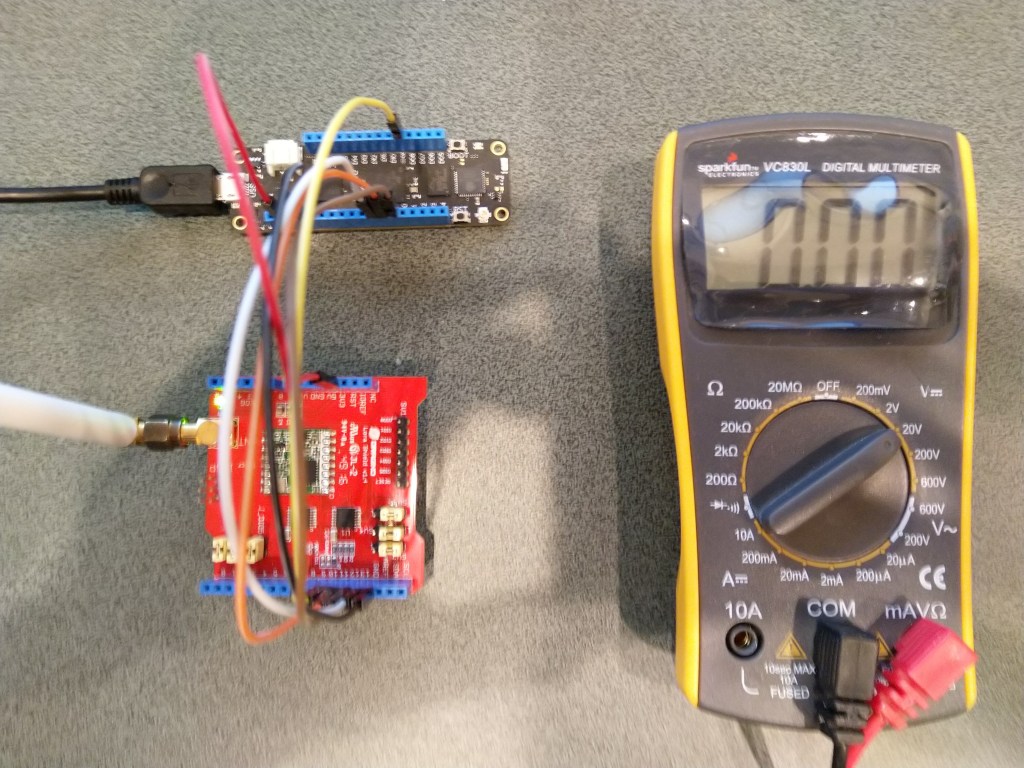
Arduino shield connected to Meadow with jumper wires

To configure the RFM9X I wrote some wrapper functions for the Meadow SPI API to read/write byte values, word values and arrays of bytes. The Meadow APIs (Dec 2019) return an additional byte at the start of each reply (unlike the .NetMF and Windows 10 IoT Core APIs) which has to be removed.

Each method was tested by read/writing suitable register(s) in the device configuration (Needed to set it into LoRa mode first).

//---------------------------------------------------------------------------------
// Copyright (c) December 2019, devMobile Software
//
// Licensed under the Apache License, Version 2.0 (the "License");
// you may not use this file except in compliance with the License.
// You may obtain a copy of the License at
//
//     http://www.apache.org/licenses/LICENSE-2.0
//
// Unless required by applicable law or agreed to in writing, software
// distributed under the License is distributed on an "AS IS" BASIS,
// WITHOUT WARRANTIES OR CONDITIONS OF ANY KIND, either express or implied.
// See the License for the specific language governing permissions and
// limitations under the License.
//
//---------------------------------------------------------------------------------
namespace devMobile.IoT.Rfm9x.ReadAndWrite
{
   using System;
    using System.Diagnostics;
    using System.Runtime.InteropServices.WindowsRuntime;
    using System.Threading.Tasks;

   using Meadow;
   using Meadow.Devices;
   using Meadow.Hardware;

   public sealed class Rfm9XDevice
   {
      private SpiPeripheral Rfm9XLoraModem;
      private IDigitalOutputPort ChipSelectGpioPin;
		private const byte RegisterAddressReadMask = 0X7f;
		private const byte RegisterAddressWriteMask = 0x80;

		public Rfm9XDevice(IIODevice device, ISpiBus spiBus, IPin chipSelectPin, IPin resetPin)
      {
         // Chip select pin configuration
         ChipSelectGpioPin = device.CreateDigitalOutputPort(chipSelectPin, initialState: true);
         if (ChipSelectGpioPin == null)
         {
            Console.WriteLine("ChipSelectGpioPin == null");
         }

         // Factory reset pin configuration
         IDigitalOutputPort resetGpioPin = device.CreateDigitalOutputPort(resetPin);
         if (resetGpioPin == null)
         {
            Console.WriteLine("resetGpioPin == null");
         }
         resetGpioPin.State = false;
         Task.Delay(10);
         resetGpioPin.State = true;
         Task.Delay(10);

			Rfm9XLoraModem = new SpiPeripheral(spiBus, ChipSelectGpioPin);
         if (Rfm9XLoraModem == null)
         {
            Console.WriteLine("Rfm9XLoraModem == null");
         }
      }

      public Byte RegisterReadByte(byte address)
      {
         byte[] writeBuffer = new byte[] { address &= RegisterAddressReadMask };
			Debug.Assert(Rfm9XLoraModem != null);

			byte[] readBuffer = Rfm9XLoraModem.WriteRead(writeBuffer, 2);

         return readBuffer[1];
      }

		public ushort RegisterReadWord(byte address)
		{
			byte[] writeBuffer = new byte[] { address &= RegisterAddressReadMask };
			Debug.Assert(Rfm9XLoraModem != null);

			byte[] readBuffer = Rfm9XLoraModem.WriteRead(writeBuffer, 3);

			return (ushort)(readBuffer[2] + (readBuffer[1] << 8));
		}

		public byte[] RegisterRead(byte address, int length)
		{
			byte[] writeBuffer = new byte[] { address &= RegisterAddressReadMask };
			byte[] repyBuffer = new byte[length + 1];
			Debug.Assert(Rfm9XLoraModem != null);

			byte[] readBuffer = Rfm9XLoraModem.WriteRead(writeBuffer, (ushort)repyBuffer.Length);

			Array.Copy(readBuffer, 1, repyBuffer, 0, length);

			return repyBuffer;
		}

		public void RegisterWriteByte(byte address, byte value)
		{
			byte[] writeBuffer = new byte[] { address |= RegisterAddressWriteMask, value };
			Debug.Assert(Rfm9XLoraModem != null);

			Rfm9XLoraModem.WriteBytes(writeBuffer);
		}

		public void RegisterWriteWord(byte address, ushort value)
		{
			byte[] valueBytes = BitConverter.GetBytes(value);
			byte[] writeBuffer = new byte[] { address |= RegisterAddressWriteMask, valueBytes[0], valueBytes[1] };
			Debug.Assert(Rfm9XLoraModem != null);

			Rfm9XLoraModem.WriteBytes(writeBuffer);
		}
		public void RegisterWrite(byte address, [ReadOnlyArray()] byte[] bytes)
		{
			byte[] writeBuffer = new byte[1 + bytes.Length];
			Debug.Assert(Rfm9XLoraModem != null);

			Array.Copy(bytes, 0, writeBuffer, 1, bytes.Length);
			writeBuffer[0] = address |= RegisterAddressWriteMask;

			Rfm9XLoraModem.WriteBytes(writeBuffer);
		}

		public void RegisterDump()
		{
			Console.WriteLine("Register dump");
			for (byte registerIndex = 0; registerIndex <= 0x42; registerIndex++)
			{
				byte registerValue = this.RegisterReadByte(registerIndex);

				Console.WriteLine("Register 0x{0:x2} - Value 0X{1:x2} - Bits {2}", registerIndex, registerValue, Convert.ToString(registerValue, 2).PadLeft(8, '0'));
			}
		}
	}

	public class MeadowApp : App<F7Micro, MeadowApp>
   {
      private Rfm9XDevice rfm9XDevice;

      public MeadowApp()
      {
			ISpiBus spiBus = Device.CreateSpiBus(500);
         if (spiBus == null)
         {
            Console.WriteLine("spiBus == null");
         }

			rfm9XDevice = new Rfm9XDevice(Device, spiBus, Device.Pins.D09, Device.Pins.D11);

			while (true)
         {
				rfm9XDevice.RegisterDump();

				Byte regOpMode = rfm9XDevice.RegisterReadByte(0x1);

				Console.WriteLine("Set LoRa mode and sleep mode (write byte)");
				rfm9XDevice.RegisterWriteByte(0x01, 0b10000000); // 

				Console.WriteLine("Read the preamble (read word)");
				ushort preamble = rfm9XDevice.RegisterReadWord(0x20);
				Console.WriteLine("Preamble 0x{0:x2} - Bits {1}", preamble, Convert.ToString(preamble, 2).PadLeft(16, '0'));

				Console.WriteLine("Set the preamble to 0x80 (write word)");
				rfm9XDevice.RegisterWriteWord(0x20, 0x80);

				Console.WriteLine("Read the centre frequency (read byte array)");
				byte[] frequencyReadBytes = rfm9XDevice.RegisterRead(0x06, 3);
				Console.WriteLine("Frequency Msb 0x{0:x2} Mid 0x{1:x2} Lsb 0x{2:x2}", frequencyReadBytes[0], frequencyReadBytes[1], frequencyReadBytes[2]);

				Console.WriteLine("Set the centre frequency to 916MHz ( write byte array)");
				byte[] frequencyWriteBytes = { 0xE4, 0xC0, 0x00 };
				rfm9XDevice.RegisterWrite(0x06, frequencyWriteBytes);

				rfm9XDevice.RegisterDump();

				Task.Delay(30000).Wait();
			}
		}
   }
}

The output of the application looked like this

'App.exe' (CLR v4.0.30319: DefaultDomain): Loaded 'C:\WINDOWS\Microsoft.Net\assembly\GAC_64\mscorlib\v4.0_4.0.0.0__b77a5c561934e089\mscorlib.dll'. 
'App.exe' (CLR v4.0.30319: DefaultDomain): Loaded 'C:\Users\BrynLewis\source\repos\RFM9X.Meadow\RegisterReadAndWrite\bin\Debug\net472\App.exe'. Symbols loaded.
'App.exe' (CLR v4.0.30319: App.exe): Loaded 'C:\Users\BrynLewis\source\repos\RFM9X.Meadow\RegisterReadAndWrite\bin\Debug\net472\Meadow.dll'. 
The program '[31296] App.exe: Program Trace' has exited with code 0 (0x0).
The program '[31296] App.exe' has exited with code 0 (0x0).
.
.
DirectRegisterAccess = True
==========================================================
Ignore the exceptions generated by the DateTime call here.
==========================================================
.
Register dump
.
Register 0x00 - Value 0X00 - Bits 00000000
Register 0x01 - Value 0X09 - Bits 00001001
Register 0x02 - Value 0X1a - Bits 00011010
Register 0x03 - Value 0X0b - Bits 00001011
Register 0x04 - Value 0X00 - Bits 00000000
Register 0x05 - Value 0X52 - Bits 01010010
Register 0x06 - Value 0X6c - Bits 01101100
Register 0x07 - Value 0X80 - Bits 10000000
Register 0x08 - Value 0X00 - Bits 00000000
Register 0x09 - Value 0X4f - Bits 01001111
Register 0x0a - Value 0X09 - Bits 00001001
Register 0x0b - Value 0X2b - Bits 00101011
Register 0x0c - Value 0X20 - Bits 00100000
Register 0x0d - Value 0X08 - Bits 00001000
Register 0x0e - Value 0X02 - Bits 00000010
Register 0x0f - Value 0X0a - Bits 00001010
Register 0x10 - Value 0Xff - Bits 11111111
Register 0x11 - Value 0X70 - Bits 01110000
Register 0x12 - Value 0X15 - Bits 00010101
Register 0x13 - Value 0X0b - Bits 00001011
Register 0x14 - Value 0X28 - Bits 00101000
Register 0x15 - Value 0X0c - Bits 00001100
Register 0x16 - Value 0X12 - Bits 00010010
Register 0x17 - Value 0X47 - Bits 01000111
Register 0x18 - Value 0X32 - Bits 00110010
Register 0x19 - Value 0X3e - Bits 00111110
Register 0x1a - Value 0X00 - Bits 00000000
Register 0x1b - Value 0X00 - Bits 00000000
Register 0x1c - Value 0X00 - Bits 00000000
Register 0x1d - Value 0X00 - Bits 00000000
Register 0x1e - Value 0X00 - Bits 00000000
Register 0x1f - Value 0X40 - Bits 01000000
Register 0x20 - Value 0X00 - Bits 00000000
Register 0x21 - Value 0X00 - Bits 00000000
Register 0x22 - Value 0X00 - Bits 00000000
Register 0x23 - Value 0X00 - Bits 00000000
Register 0x24 - Value 0X05 - Bits 00000101
Register 0x25 - Value 0X00 - Bits 00000000
Register 0x26 - Value 0X03 - Bits 00000011
Register 0x27 - Value 0X93 - Bits 10010011
Register 0x28 - Value 0X55 - Bits 01010101
Register 0x29 - Value 0X55 - Bits 01010101
Register 0x2a - Value 0X55 - Bits 01010101
Register 0x2b - Value 0X55 - Bits 01010101
Register 0x2c - Value 0X55 - Bits 01010101
Register 0x2d - Value 0X55 - Bits 01010101
Register 0x2e - Value 0X55 - Bits 01010101
Register 0x2f - Value 0X55 - Bits 01010101
Register 0x30 - Value 0X90 - Bits 10010000
Register 0x31 - Value 0X40 - Bits 01000000
Register 0x32 - Value 0X40 - Bits 01000000
Register 0x33 - Value 0X00 - Bits 00000000
Register 0x34 - Value 0X00 - Bits 00000000
Register 0x35 - Value 0X0f - Bits 00001111
Register 0x36 - Value 0X00 - Bits 00000000
Register 0x37 - Value 0X00 - Bits 00000000
Register 0x38 - Value 0X00 - Bits 00000000
Register 0x39 - Value 0Xf5 - Bits 11110101
Register 0x3a - Value 0X20 - Bits 00100000
Register 0x3b - Value 0X82 - Bits 10000010
Register 0x3c - Value 0X00 - Bits 00000000
Register 0x3d - Value 0X02 - Bits 00000010
Register 0x3e - Value 0X80 - Bits 10000000
Register 0x3f - Value 0X40 - Bits 01000000
Register 0x40 - Value 0X00 - Bits 00000000
Register 0x41 - Value 0X00 - Bits 00000000
Register 0x42 - Value 0X12 - Bits 00010010
Set LoRa mode and sleep mode (write byte)
Read the preamble (read word)
Preamble 0x08 - Bits 0000000000001000
Set the preamble to 0x80 (write word)
Read the centre frequency (read byte array)
Frequency Msb 0x6c Mid 0x80 Lsb 0x00
Set the centre frequency to 916MHz ( write byte array)
Register dump
Register 0x00 - Value 0Xf4 - Bits 11110100
Register 0x01 - Value 0X80 - Bits 10000000
Register 0x02 - Value 0X1a - Bits 00011010
Register 0x03 - Value 0X0b - Bits 00001011
Register 0x04 - Value 0X00 - Bits 00000000
Register 0x05 - Value 0X52 - Bits 01010010
Register 0x06 - Value 0Xe4 - Bits 11100100
Register 0x07 - Value 0Xc0 - Bits 11000000
Register 0x08 - Value 0X00 - Bits 00000000
Register 0x09 - Value 0X4f - Bits 01001111
Register 0x0a - Value 0X09 - Bits 00001001
Register 0x0b - Value 0X2b - Bits 00101011
Register 0x0c - Value 0X20 - Bits 00100000
Register 0x0d - Value 0X02 - Bits 00000010
Register 0x0e - Value 0X80 - Bits 10000000
Register 0x0f - Value 0X00 - Bits 00000000
Register 0x10 - Value 0X00 - Bits 00000000
Register 0x11 - Value 0X00 - Bits 00000000
Register 0x12 - Value 0X00 - Bits 00000000
Register 0x13 - Value 0X00 - Bits 00000000
Register 0x14 - Value 0X00 - Bits 00000000
Register 0x15 - Value 0X00 - Bits 00000000
Register 0x16 - Value 0X00 - Bits 00000000
Register 0x17 - Value 0X00 - Bits 00000000
Register 0x18 - Value 0X10 - Bits 00010000
Register 0x19 - Value 0X00 - Bits 00000000
Register 0x1a - Value 0X00 - Bits 00000000
Register 0x1b - Value 0X00 - Bits 00000000
Register 0x1c - Value 0X00 - Bits 00000000
Register 0x1d - Value 0X72 - Bits 01110010
Register 0x1e - Value 0X70 - Bits 01110000
Register 0x1f - Value 0X64 - Bits 01100100
Register 0x20 - Value 0X80 - Bits 10000000
Register 0x21 - Value 0X00 - Bits 00000000
Register 0x22 - Value 0X01 - Bits 00000001
Register 0x23 - Value 0Xff - Bits 11111111
Register 0x24 - Value 0X00 - Bits 00000000
Register 0x25 - Value 0X00 - Bits 00000000
Register 0x26 - Value 0X04 - Bits 00000100
Register 0x27 - Value 0X00 - Bits 00000000
Register 0x28 - Value 0X00 - Bits 00000000
Register 0x29 - Value 0X00 - Bits 00000000
Register 0x2a - Value 0X00 - Bits 00000000
Register 0x2b - Value 0X00 - Bits 00000000
Register 0x2c - Value 0X00 - Bits 00000000
Register 0x2d - Value 0X50 - Bits 01010000
Register 0x2e - Value 0X14 - Bits 00010100
Register 0x2f - Value 0X45 - Bits 01000101
Register 0x30 - Value 0X55 - Bits 01010101
Register 0x31 - Value 0Xc3 - Bits 11000011
Register 0x32 - Value 0X05 - Bits 00000101
Register 0x33 - Value 0X27 - Bits 00100111
Register 0x34 - Value 0X1c - Bits 00011100
Register 0x35 - Value 0X0a - Bits 00001010
Register 0x36 - Value 0X03 - Bits 00000011
Register 0x37 - Value 0X0a - Bits 00001010
Register 0x38 - Value 0X42 - Bits 01000010
Register 0x39 - Value 0X12 - Bits 00010010
Register 0x3a - Value 0X49 - Bits 01001001
Register 0x3b - Value 0X1d - Bits 00011101
Register 0x3c - Value 0X00 - Bits 00000000
Register 0x3d - Value 0Xaf - Bits 10101111
Register 0x3e - Value 0X00 - Bits 00000000
Register 0x3f - Value 0X00 - Bits 00000000
Register 0x40 - Value 0X00 - Bits 00000000
Register 0x41 - Value 0X00 - Bits 00000000
Register 0x42 - Value 0X12 - Bits 00010010

The next step is to extract the SPI register access functionality into a module and configure the bare minimum of settings required to get the RFM9X to transmit.

.Net Meadow RFM95/96/97/98 LoRa library Part2

Register Dump

Next step was to dump all registers (0x00 thru 0x42) of the SX1276/7/8/9 device

//---------------------------------------------------------------------------------
// Copyright (c) December 2019, devMobile Software
//
// Licensed under the Apache License, Version 2.0 (the "License");
// you may not use this file except in compliance with the License.
// You may obtain a copy of the License at
//
//     http://www.apache.org/licenses/LICENSE-2.0
//
// Unless required by applicable law or agreed to in writing, software
// distributed under the License is distributed on an "AS IS" BASIS,
// WITHOUT WARRANTIES OR CONDITIONS OF ANY KIND, either express or implied.
// See the License for the specific language governing permissions and
// limitations under the License.
//
//---------------------------------------------------------------------------------
namespace devMobile.IoT.Rfm9x.RegisterScan
{
   using System;
   using System.Threading.Tasks;

   using Meadow;
   using Meadow.Devices;
   using Meadow.Hardware;

   public sealed class Rfm9XDevice
   {
      private SpiPeripheral sx127xDevice;
      private IDigitalOutputPort spiPeriphChipSelect;

      public Rfm9XDevice(IIODevice device, ISpiBus spiBus, IPin chipSelectPin)
      {
         spiPeriphChipSelect = device.CreateDigitalOutputPort(chipSelectPin, initialState: true);
         if (spiPeriphChipSelect == null)
         {
            Console.WriteLine("spiPeriphChipSelect == null");
         }

         sx127xDevice = new SpiPeripheral(spiBus, spiPeriphChipSelect);
         if (sx127xDevice == null)
         {
            Console.WriteLine("sx127xDevice == null");
         }
      }

      public Byte RegisterReadByte(byte registerAddress)
      {
         byte[] txBuffer = new byte[] { registerAddress };

         byte[] rxBuffer = sx127xDevice.WriteRead(txBuffer, 2);

         return rxBuffer[1];
      }
   }

   public class MeadowApp : App<F7Micro, MeadowApp>
   {
      private Rfm9XDevice rfm9XDevice;

      public MeadowApp()
      {
         ISpiBus spiBus = Device.CreateSpiBus(500);
         if (spiBus == null)
         {
            Console.WriteLine("spiBus == null");
         }

         rfm9XDevice = new Rfm9XDevice(Device, spiBus, Device.Pins.D09);

         while (true)
         {
            for (byte registerIndex = 0; registerIndex <= 0x42; registerIndex++)
            {
               byte registerValue = rfm9XDevice.RegisterReadByte(registerIndex);

               Console.WriteLine("Register 0x{0:x2} - Value 0X{1:x2} - Bits {2}", registerIndex, registerValue, Convert.ToString(registerValue, 2).PadLeft(8, '0'));
            }

            Task.Delay(10000).Wait();
         }
      }
   }
}

The output of the application looked like this

'App.exe' (CLR v4.0.30319: DefaultDomain): Loaded 'C:\WINDOWS\Microsoft.Net\assembly\GAC_64\mscorlib\v4.0_4.0.0.0__b77a5c561934e089\mscorlib.dll'. 
'App.exe' (CLR v4.0.30319: DefaultDomain): Loaded 'C:\Users\BrynLewis\source\repos\RFM9X.Meadow\RegisterScan\bin\Debug\net472\App.exe'. Symbols loaded.
'App.exe' (CLR v4.0.30319: App.exe): Loaded 'C:\Users\BrynLewis\source\repos\RFM9X.Meadow\RegisterScan\bin\Debug\net472\Meadow.dll'. 
The program '[3148] App.exe: Program Trace' has exited with code 0 (0x0).
The program '[3148] App.exe' has exited with code 0 (0x0).
.
.
DirectRegisterAccess = True
==========================================================
Ignore the exceptions generated by the DateTime call here.
==========================================================
.
Register 0x00 - Value 0X00 - Bits 00000000
Register 0x01 - Value 0X09 - Bits 00001001
Register 0x02 - Value 0X1a - Bits 00011010
Register 0x03 - Value 0X0b - Bits 00001011
Register 0x04 - Value 0X00 - Bits 00000000
Register 0x05 - Value 0X52 - Bits 01010010
Register 0x06 - Value 0X6c - Bits 01101100
Register 0x07 - Value 0X80 - Bits 10000000
Register 0x08 - Value 0X00 - Bits 00000000
Register 0x09 - Value 0X4f - Bits 01001111
Register 0x0a - Value 0X09 - Bits 00001001
Register 0x0b - Value 0X2b - Bits 00101011
Register 0x0c - Value 0X20 - Bits 00100000
Register 0x0d - Value 0X08 - Bits 00001000
Register 0x0e - Value 0X02 - Bits 00000010
Register 0x0f - Value 0X0a - Bits 00001010
Register 0x10 - Value 0Xff - Bits 11111111
Register 0x11 - Value 0X71 - Bits 01110001
Register 0x12 - Value 0X15 - Bits 00010101
Register 0x13 - Value 0X0b - Bits 00001011
Register 0x14 - Value 0X28 - Bits 00101000
Register 0x15 - Value 0X0c - Bits 00001100
Register 0x16 - Value 0X12 - Bits 00010010
Register 0x17 - Value 0X47 - Bits 01000111
Register 0x18 - Value 0X32 - Bits 00110010
Register 0x19 - Value 0X3e - Bits 00111110
Register 0x1a - Value 0X00 - Bits 00000000
Register 0x1b - Value 0X00 - Bits 00000000
Register 0x1c - Value 0X00 - Bits 00000000
Register 0x1d - Value 0X00 - Bits 00000000
Register 0x1e - Value 0X00 - Bits 00000000
Register 0x1f - Value 0X40 - Bits 01000000
Register 0x20 - Value 0X00 - Bits 00000000
Register 0x21 - Value 0X00 - Bits 00000000
Register 0x22 - Value 0X00 - Bits 00000000
Register 0x23 - Value 0X00 - Bits 00000000
Register 0x24 - Value 0X05 - Bits 00000101
Register 0x25 - Value 0X00 - Bits 00000000
Register 0x26 - Value 0X03 - Bits 00000011
Register 0x27 - Value 0X93 - Bits 10010011
Register 0x28 - Value 0X55 - Bits 01010101
Register 0x29 - Value 0X55 - Bits 01010101
Register 0x2a - Value 0X55 - Bits 01010101
Register 0x2b - Value 0X55 - Bits 01010101
Register 0x2c - Value 0X55 - Bits 01010101
Register 0x2d - Value 0X55 - Bits 01010101
Register 0x2e - Value 0X55 - Bits 01010101
Register 0x2f - Value 0X55 - Bits 01010101
Register 0x30 - Value 0X90 - Bits 10010000
Register 0x31 - Value 0X40 - Bits 01000000
Register 0x32 - Value 0X40 - Bits 01000000
Register 0x33 - Value 0X00 - Bits 00000000
Register 0x34 - Value 0X00 - Bits 00000000
Register 0x35 - Value 0X0f - Bits 00001111
Register 0x36 - Value 0X00 - Bits 00000000
Register 0x37 - Value 0X00 - Bits 00000000
Register 0x38 - Value 0X00 - Bits 00000000
Register 0x39 - Value 0Xf5 - Bits 11110101
Register 0x3a - Value 0X20 - Bits 00100000
Register 0x3b - Value 0X82 - Bits 10000010
Register 0x3c - Value 0Xfd - Bits 11111101
Register 0x3d - Value 0X02 - Bits 00000010
Register 0x3e - Value 0X80 - Bits 10000000
Register 0x3f - Value 0X40 - Bits 01000000
Register 0x40 - Value 0X00 - Bits 00000000
Register 0x41 - Value 0X00 - Bits 00000000
Register 0x42 - Value 0X12 - Bits 00010010

I also started to refactor the code, passing the Meadow IIODevice & ISpiBus into the constructor, and extracting the Read functionality.

The device was not in LoRa mode (Bit 7 of RegOpMode 0x01) so the next step was to read and write registers so I could change its configuration.

.Net Meadow RFM95/96/97/98 LoRa library Part1

After writing Windows 10 IoT Core & .NetMF RFM9X libraries I figured a port to a Wilderness Labs Meadow device shouldn’t be “rocket science”.

To get started I used a Dragino LoRa shield for Arduino which looked compatible with my Meadow device.

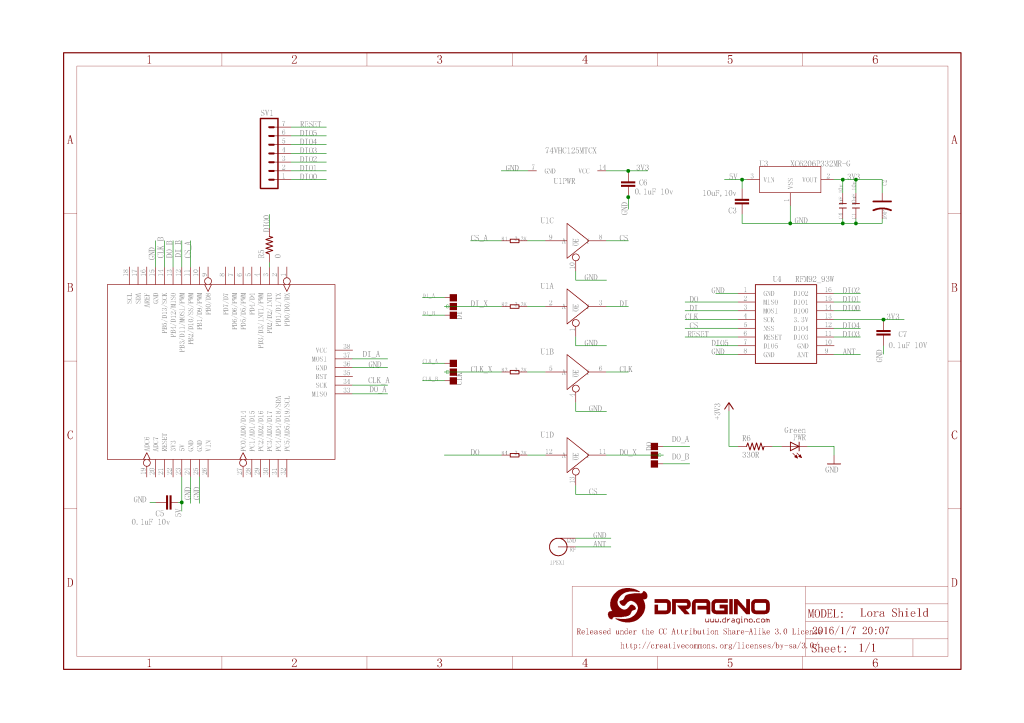
Dragino shield schematic

The shield ships with the SPI lines configured for ICSP so the three jumpers diagonally across the shield from the antenna connector need to be swapped to the side closest to the edge of the shield.

Dragino Arduino shield based test harness
//---------------------------------------------------------------------------------
// Copyright (c) Dec 2019, devMobile Software
//
// Licensed under the Apache License, Version 2.0 (the "License");
// you may not use this file except in compliance with the License.
// You may obtain a copy of the License at
//
//     http://www.apache.org/licenses/LICENSE-2.0
//
// Unless required by applicable law or agreed to in writing, software
// distributed under the License is distributed on an "AS IS" BASIS,
// WITHOUT WARRANTIES OR CONDITIONS OF ANY KIND, either express or implied.
// See the License for the specific language governing permissions and
// limitations under the License.
//
//---------------------------------------------------------------------------------
namespace devMobile.IoT.Rfm9x
{
   using System;
   using System.Threading.Tasks;
   using Meadow;
   using Meadow.Devices;
   using Meadow.Hardware;

   public class MeadowApp : App<F7Micro, MeadowApp>
   {
      const byte RegVersion = 0x42;
      ISpiBus spiBus;
      SpiPeripheral sx127xDevice;
      IDigitalOutputPort spiPeriphChipSelect;

      public MeadowApp()
      {
         ConfigureSpiPort();
         //ReadDeviceID();
         ReadDeviceIDDiy();
      }

      public void ConfigureSpiPort()
      {
         try
         {
            spiBus = Device.CreateSpiBus(500);
            if (spiBus == null)
            {
               Console.WriteLine("spiBus == null");
            }

            Console.WriteLine("Creating SPI NSS Port...");
            spiPeriphChipSelect = Device.CreateDigitalOutputPort(Device.Pins.D09);
            if (spiPeriphChipSelect == null)
            {
               Console.WriteLine("spiPeriphChipSelect == null");
            }
   
            Console.WriteLine("sx127xDevice Device...");
            sx127xDevice = new SpiPeripheral(spiBus, spiPeriphChipSelect);
            if (sx127xDevice == null)
            {
               Console.WriteLine("sx127xDevice == null");
            }

            Console.WriteLine("ConfigureSpiPort Done...");
         }
         catch (Exception ex)
         {
            Console.WriteLine("ConfigureSpiPort " + ex.Message);
         }
      }

      
      public void ReadDeviceID()
      {
         Task.Delay(500).Wait();

         while (true)
         {
            try
            {
               Console.WriteLine("sx127xDevice.ReadRegister...1");

               byte registerValue = sx127xDevice.ReadRegister(RegVersion);

               Console.WriteLine("sx127xDevice.ReadRegister...2");

               Console.WriteLine("Register 0x{0:x2} - Value 0X{1:x2} - Bits {2}", RegVersion, registerValue, Convert.ToString(registerValue, 2).PadLeft(8, '0'));
            }
            catch (Exception ex)
            {
               Console.WriteLine("ReadDeviceID " + ex.Message);
            }

            Task.Delay(10000).Wait();
         }
      }

      public void ReadDeviceIDDiy()
      {
         var txBuffer = new byte[2];
         var rxBuffer = new byte[2];

         Task.Delay(500).Wait();

         while (true)
         {
            try
            {
               Console.WriteLine("spiBus.ExchangeData...1");

               txBuffer[0] = RegVersion;

               spiBus.ExchangeData(spiPeriphChipSelect, ChipSelectMode.ActiveLow, txBuffer, rxBuffer, 2);

               Console.WriteLine("spiBus.ExchangeData...2");

               byte registerValue = rxBuffer[1];

               Console.WriteLine("Register 0x{0:x2} - Value 0X{1:x2} - Bits {2}", RegVersion, registerValue, Convert.ToString(registerValue, 2).PadLeft(8, '0'));
            }
            catch (Exception ex)
            {
               Console.WriteLine("ReadDeviceIDDiy " + ex.Message);
            }

            Task.Delay(10000).Wait();
         }
      }
   }
}

After some trial and error (using beta 3.6) I found that the ReadRegister method didn’t work as expected (possibly related to this issue) and I had to manually assemble the request to read the SX127X RegVersion register.

'App.exe' (CLR v4.0.30319: DefaultDomain): Loaded 'C:\WINDOWS\Microsoft.Net\assembly\GAC_64\mscorlib\v4.0_4.0.0.0__b77a5c561934e089\mscorlib.dll'. 
'App.exe' (CLR v4.0.30319: DefaultDomain): Loaded 'C:\Users\BrynLewis\source\repos\RFX9X.Meadow\FeatherWingSPI\bin\Debug\net472\App.exe'. Symbols loaded.
'App.exe' (CLR v4.0.30319: App.exe): Loaded 'C:\Users\BrynLewis\source\repos\RFX9X.Meadow\FeatherWingSPI\bin\Debug\net472\Meadow.dll'. 
The program '[22324] App.exe: Program Trace' has exited with code 0 (0x0).
The program '[22324] App.exe' has exited with code 0 (0x0).
.
.
DirectRegisterAccess = True
==========================================================
Ignore the exceptions generated by the DateTime call here.
==========================================================
.
Creating SPI NSS Port...
sx127xDevice Device...
ConfigureSpiPort Done...
spiBus.ExchangeData...1
spiBus.ExchangeData...2
Register 0x42 - Value 0X12 - Bits 00010010
spiBus.ExchangeData...1
spiBus.ExchangeData...2
Register 0x42 - Value 0X12 - Bits 00010010
spiBus.ExchangeData...1
spiBus.ExchangeData...2
Register 0x42 - Value 0X12 - Bits 00010010
spiBus.ExchangeData...1
spiBus.ExchangeData...2

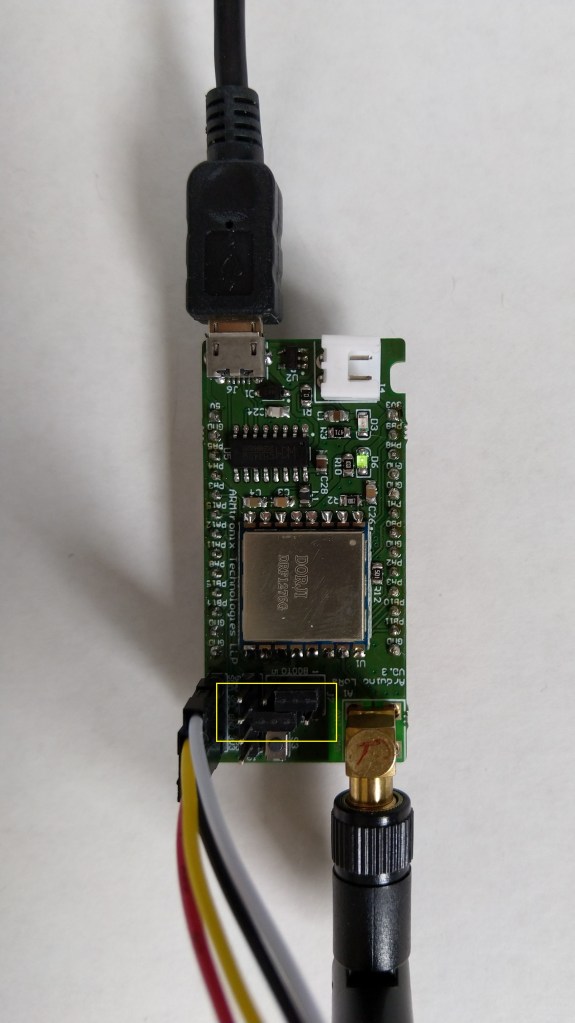
Armtronix IA005 SX1276 loRa node

A month ago I ordered a pair of IA005: SX1276 Lora node STM32F103 devices from the Armtronix shop on Tindie for evaluation. At USD18 each these devices were competitively priced and I was interested in trialling another maple like device.

Bill of materials (Prices as at December 2019)

  • IA005 SX1276 loRa node USD36 (USD18 each)
  • Grove – Temperature&Humidity Sensor USD11.5
  • Grove – 4 pin Female Jumper to Grove 4 pin Conversion Cable USD3.90
Armtronix device with Seeedstudio temperature & humidity sensor

I used a modified version of my Arduino client code which worked after I got the pins sorted and the female jumper sockets in the right order.

/*
  Copyright ® 2019 December devMobile Software, All Rights Reserved

  THIS CODE AND INFORMATION IS PROVIDED "AS IS" WITHOUT WARRANTY OF ANY
  KIND, EITHER EXPRESSED OR IMPLIED, INCLUDING BUT NOT LIMITED TO THE
  IMPLIED WARRANTIES OF MERCHANTABILITY AND/OR FITNESS FOR A PARTICULAR
  PURPOSE.

  You can do what you want with this code, acknowledgment would be nice.

  http://www.devmobile.co.nz

*/
#include <stdlib.h>
#include <LoRa.h>
#include <TH02_dev.h>

//#define DEBUG
//#define DEBUG_TELEMETRY
//#define DEBUG_LORA

// LoRa field gateway configuration (these settings must match your field gateway)
const char FieldGatewayAddress[] = {"LoRaIoT1"};
const char DeviceAddress[] = {"ArmTronix01"};
const float FieldGatewayFrequency =  915000000.0;
const byte FieldGatewaySyncWord = 0x12 ;

// Payload configuration
const int ChipSelectPin = PA4;
const int InterruptPin = PA11;
const int ResetPin = PC13;

// LoRa radio payload configuration
const byte SensorIdValueSeperator = ' ' ;
const byte SensorReadingSeperator = ',' ;
const int LoopSleepDelaySeconds = 30 ;

const byte PayloadSizeMaximum = 64 ;
byte payload[PayloadSizeMaximum];
byte payloadLength = 0 ;


void setup()
{
  Serial.begin(9600);
#ifdef DEBUG
  while (!Serial);
#endif
  Serial.println("Setup called");

  Serial.println("LoRa setup start");
  
  // override the default chip select and reset pins
  LoRa.setPins(ChipSelectPin, ResetPin, InterruptPin); 
  if (!LoRa.begin(FieldGatewayFrequency))
  {
    Serial.println("LoRa begin failed");
    while (true); // Drop into endless loop requiring restart
  }

  // Need to do this so field gateways pays attention to messsages from this device
  LoRa.enableCrc();
  LoRa.setSyncWord(FieldGatewaySyncWord);

#ifdef DEBUG_LORA
  LoRa.dumpRegisters(Serial);
#endif
  Serial.println("LoRa Setup done.");

  // Configure the Seeedstudio TH02 temperature & humidity sensor
  Serial.println("TH02 setup start");
  TH02.begin();
  delay(100);
  Serial.println("TH02 setup done");

  PayloadHeader((byte*)FieldGatewayAddress,strlen(FieldGatewayAddress), (byte*)DeviceAddress, strlen(DeviceAddress));

  Serial.println("Setup done");
  Serial.println();
}


void loop()
{
  float temperature ;
  float humidity ;

  Serial.println("Loop called");

  PayloadReset();

  // Read the temperature & humidity & battery voltage values then display nicely
  temperature = TH02.ReadTemperature();
  Serial.print("T:");
  Serial.print( temperature, 1 ) ;
  Serial.println( "C " ) ;

  PayloadAdd( "T", temperature, 1);

  humidity = TH02.ReadHumidity();
  Serial.print("H:");
  Serial.print( humidity, 0 ) ;
  Serial.println( "% " ) ;

  PayloadAdd( "H", humidity, 0) ;

#ifdef DEBUG_TELEMETRY
  Serial.print( "RFM9X/SX127X Payload len:");
  Serial.print( payloadLength );
  Serial.println( " bytes" );
#endif

  LoRa.beginPacket();
  LoRa.write( payload, payloadLength );
  LoRa.endPacket();

  Serial.println("Loop done");
  Serial.println();
  delay(LoopSleepDelaySeconds * 1000l);
}


void PayloadHeader( byte *to, byte toAddressLength, byte *from, byte fromAddressLength)
{
  byte addressesLength = toAddressLength + fromAddressLength ;

#ifdef DEBUG_TELEMETRY
  Serial.print("PayloadHeader- ");
  Serial.print( "To len:");
  Serial.print( toAddressLength );
  Serial.print( " From len:");
  Serial.print( fromAddressLength );
  Serial.print( " Header len:");
  Serial.print( addressesLength );
  Serial.println( );
#endif

  payloadLength = 0 ;

  // prepare the payload header with "To" Address length (top nibble) and "From" address length (bottom nibble)
  payload[payloadLength] = (toAddressLength << 4) | fromAddressLength ;
  payloadLength += 1;

  // Copy the "To" address into payload
  memcpy(&payload[payloadLength], to, toAddressLength);
  payloadLength += toAddressLength ;

  // Copy the "From" into payload
  memcpy(&payload[payloadLength], from, fromAddressLength);
  payloadLength += fromAddressLength ;
}


void PayloadAdd( const char *sensorId, float value, byte decimalPlaces)
{
  byte sensorIdLength = strlen( sensorId ) ;

#ifdef DEBUG_TELEMETRY
  Serial.print("PayloadAdd-float ");
  Serial.print( "SensorId:");
  Serial.print( sensorId );
  Serial.print( " Len:");
  Serial.print( sensorIdLength );
  Serial.print( " Value:");
  Serial.print( value, decimalPlaces );
  Serial.print( " payloadLen:");
  Serial.print( payloadLength);
#endif

  memcpy( &payload[payloadLength], sensorId,  sensorIdLength) ;
  payloadLength += sensorIdLength ;
  payload[ payloadLength] = SensorIdValueSeperator;
  payloadLength += 1 ;
  payloadLength += strlen( dtostrf(value, -1, decimalPlaces, (char *)&payload[payloadLength]));
  payload[ payloadLength] = SensorReadingSeperator;
  payloadLength += 1 ;
  
#ifdef DEBUG_TELEMETRY
  Serial.print( " payloadLen:");
  Serial.println( payloadLength);
#endif
}


void PayloadAdd( const char *sensorId, int value )
{
  byte sensorIdLength = strlen( sensorId ) ;

#ifdef DEBUG_TELEMETRY
  Serial.print("PayloadAdd-int ");
  Serial.print( "SensorId:");
  Serial.print( sensorId );
  Serial.print( " Len:");
  Serial.print( sensorIdLength );
  Serial.print( " Value:");
  Serial.print( value );
  Serial.print( " payloadLen:");
  Serial.print( payloadLength);
#endif  

  memcpy( &payload[payloadLength], sensorId,  sensorIdLength) ;
  payloadLength += sensorIdLength ;
  payload[ payloadLength] = SensorIdValueSeperator;
  payloadLength += 1 ;
  payloadLength += strlen( itoa( value,(char *)&payload[payloadLength],10));
  payload[ payloadLength] = SensorReadingSeperator;
  payloadLength += 1 ;
  
#ifdef DEBUG_TELEMETRY
  Serial.print( " payloadLen:");
  Serial.println( payloadLength);
#endif
}


void PayloadAdd( const char *sensorId, unsigned int value )
{
  byte sensorIdLength = strlen( sensorId ) ;

#ifdef DEBUG_TELEMETRY
  Serial.print("PayloadAdd-unsigned int ");
  Serial.print( "SensorId:");
  Serial.print( sensorId );
  Serial.print( " Len:");
  Serial.print( sensorIdLength );
  Serial.print( " Value:");
  Serial.print( value );
  Serial.print( " payloadLen:");
  Serial.print( payloadLength);
#endif  

  memcpy( &payload[payloadLength], sensorId,  sensorIdLength) ;
  payloadLength += sensorIdLength ;
  payload[ payloadLength] = SensorIdValueSeperator;
  payloadLength += 1 ;
  payloadLength += strlen( utoa( value,(char *)&payload[payloadLength],10));
  payload[ payloadLength] = SensorReadingSeperator;
  payloadLength += 1 ;

#ifdef DEBUG_TELEMETRY
  Serial.print( " payloadLen:");
  Serial.println( payloadLength);
#endif
}


void PayloadReset()
{
  byte fromAddressLength = payload[0] & 0xf ;
  byte toAddressLength = payload[0] >> 4 ;
  byte addressesLength = toAddressLength + fromAddressLength ;

  payloadLength = addressesLength + 1;

#ifdef DEBUG_TELEMETRY
  Serial.print("PayloadReset- ");
  Serial.print( "To len:");
  Serial.print( toAddressLength );
  Serial.print( " From len:");
  Serial.print( fromAddressLength );
  Serial.print( " Header len:");
  Serial.println( addressesLength );
#endif
}

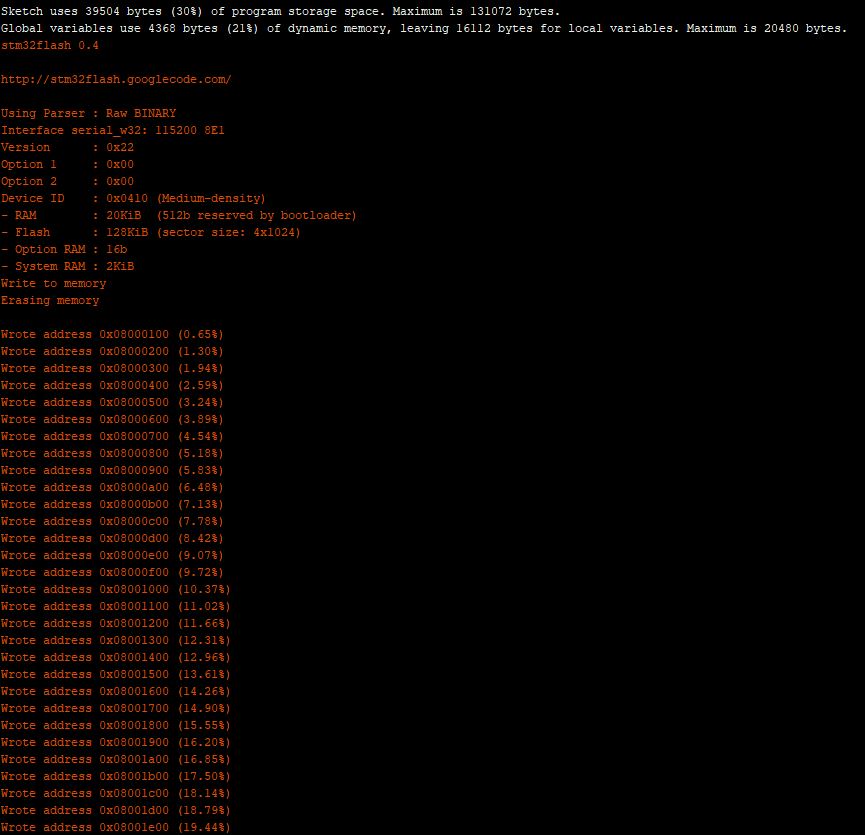
To get the application to download I had to configure the board in the Arduino IDE

Then change the jumpers

Initially I had some problems deploying my software because I hadn’t followed the instructions (the wiki everyone referred to appeared to be offline) and run the installation batch file (New dev machine since my previous maple based project).

15:40:56.207 -> LoRa Setup done.
15:40:56.207 -> TH02 setup start
15:40:56.307 -> TH02 setup done
15:40:56.307 -> PayloadHeader- To len:8 From len:11 Header len:19
15:40:56.354 -> Setup done
15:40:56.354 -> 
15:40:56.354 -> Loop called
15:40:56.354 -> PayloadReset- To len:8 From len:11 Header len:19
15:40:56.408 -> T:23.9C 
15:40:56.408 -> PayloadAdd-float SensorId:T Len:1 Value:23.9 payloadLen:20 payloadLen:27
15:40:56.508 -> H:70% 
15:40:56.508 -> PayloadAdd-float SensorId:H Len:1 Value:70 payloadLen:27 payloadLen:32
15:40:56.608 -> RFM9X/SX127X Payload len:32 bytes
15:40:56.655 -> Loop done
15:40:56.655 -> 
15:41:26.647 -> Loop called
15:41:26.647 -> PayloadReset- To len:8 From len:11 Header len:19
15:41:26.684 -> T:24.0C 
15:41:26.730 -> PayloadAdd-float SensorId:T Len:1 Value:24.0 payloadLen:20 payloadLen:27
15:41:26.784 -> H:69% 
15:41:26.784 -> PayloadAdd-float SensorId:H Len:1 Value:69 payloadLen:27 payloadLen:32
15:41:26.884 -> RFM9X/SX127X Payload len:32 bytes
15:41:26.931 -> Loop done
15:41:26.931 -> 
15:41:56.904 -> Loop called
15:41:56.904 -> PayloadReset- To len:8 From len:11 Header len:19
15:41:56.948 -> T:24.1C 
15:41:56.982 -> PayloadAdd-float SensorId:T Len:1 Value:24.1 payloadLen:20 payloadLen:27
15:41:57.054 -> H:69% 
15:41:57.054 -> PayloadAdd-float SensorId:H Len:1 Value:69 payloadLen:27 payloadLen:32
15:41:57.157 -> RFM9X/SX127X Payload len:32 bytes
15:41:57.191 -> Loop done
15:41:57.191 -> 
15:42:27.211 -> Loop called
15:42:27.211 -> PayloadReset- To len:8 From len:11 Header len:19
15:42:27.258 -> T:24.1C 
15:42:27.258 -> PayloadAdd-float SensorId:T Len:1 Value:24.1 payloadLen:20 payloadLen:27
15:42:27.343 -> H:69% 
15:42:27.343 -> PayloadAdd-float SensorId:H Len:1 Value:69 payloadLen:27 payloadLen:32
15:42:27.427 -> RFM9X/SX127X Payload len:32 bytes
15:42:27.481 -> Loop done
15:42:27.481 -> 
15:42:57.504 -> Loop called
15:42:57.504 -> PayloadReset- To len:8 From len:11 Header len:19
15:42:57.504 -> T:24.1C 
15:42:57.550 -> PayloadAdd-float SensorId:T Len:1 Value:24.1 payloadLen:20 payloadLen:27
15:42:57.604 -> H:68% 
15:42:57.604 -> PayloadAdd-float SensorId:H Len:1 Value:68 payloadLen:27 payloadLen:32
15:42:57.704 -> RFM9X/SX127X Payload len:32 bytes
15:42:57.755 -> Loop done
15:42:57.755 -> 

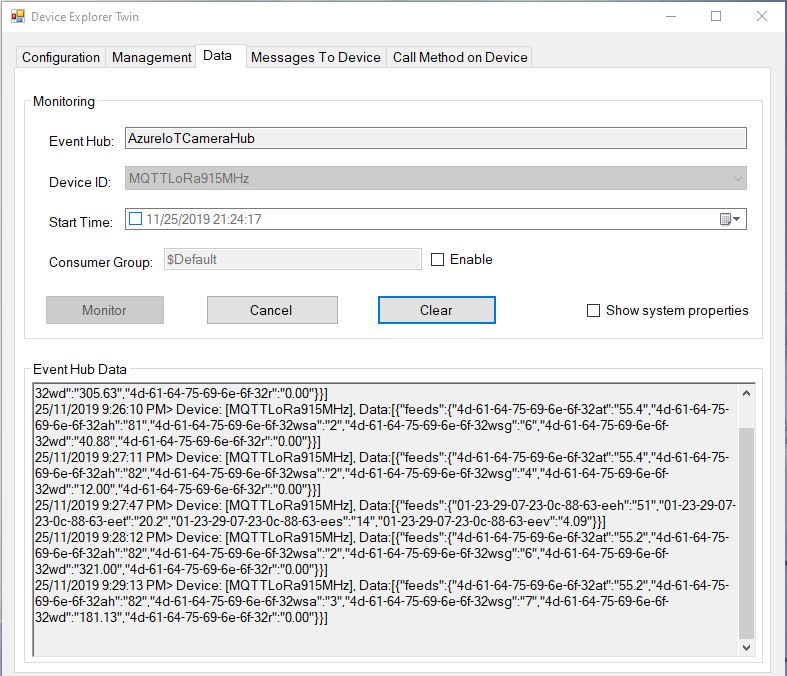
I configured the device to upload to my Azure IoT Hub/Azure IoT Central gateway and it has been running reliably for a couple of days.

Azure IoT Central temperature and humidity values

Initially I had some configuration problems but I contacted Armtronix support and they promptly provided a couple of updated links for product and device documentation.

Azure IoT Hub MQTT LoRa Field Gateway

Back in April I started working on an MQTT LoRa Field gateway which was going to support a selection of different Software as a service(SaaS) Internet of Things IoT) platforms.

I now have a working Azure IoT Hub plug-in (Azure IoT Central support as planned as well) with the first iteration focused on Device to Cloud (D2C) messaging. In a future iteration I will add Cloud to Device messaging(C2D).

My applications use a lightweight, easy to implemented protocol which is intended for hobbyist and educational use rather than commercial applications (I have been working on a more secure version as yet another side project)

I have a number of sample Arduino with Dragino LoRa Shield for Arduino, MakerFabs Maduino, Dragino LoRa Mini Dev, M2M Low power Node and Netduino with Elecrow LoRa RFM95 Shield etc. clients. These work with both my platform specific (Adafruit.IO, Azure IoT Hub/Central) gateways and protocol specific field gateways.

Azure IoT Hub Device Explorer Data Display

When the application is first started it creates a minimal configuration file which should be downloaded, the missing information filled out, then uploaded using the File explorer in the Windows device portal.

{
  "MQTTUserName": "YourIoTHubHub.azure-devices.net/MQTTLoRa915MHz/api-version=2018-06-30",
  "MQTTPassword": "SharedAccessSignature sr=YourIoTHubHub.azure-devices.net%2Fdevices%2FMQTTLoRa915MHz&sig=123456789012345678901234567890123456789012345%3D&se=1574673583",
  "MQTTClientID": "MQTTLoRa915MHz",
  "MQTTServer": "YourIoTHubHub.azure-devices.net",
  "Address": "LoRaIoT1",
  "Frequency": 915000000.0,
  "MessageHandlerAssembly": "Mqtt.IoTCore.FieldGateway.LoRa.AzureIoTHub",
  "PlatformSpecificConfiguration": ""
}

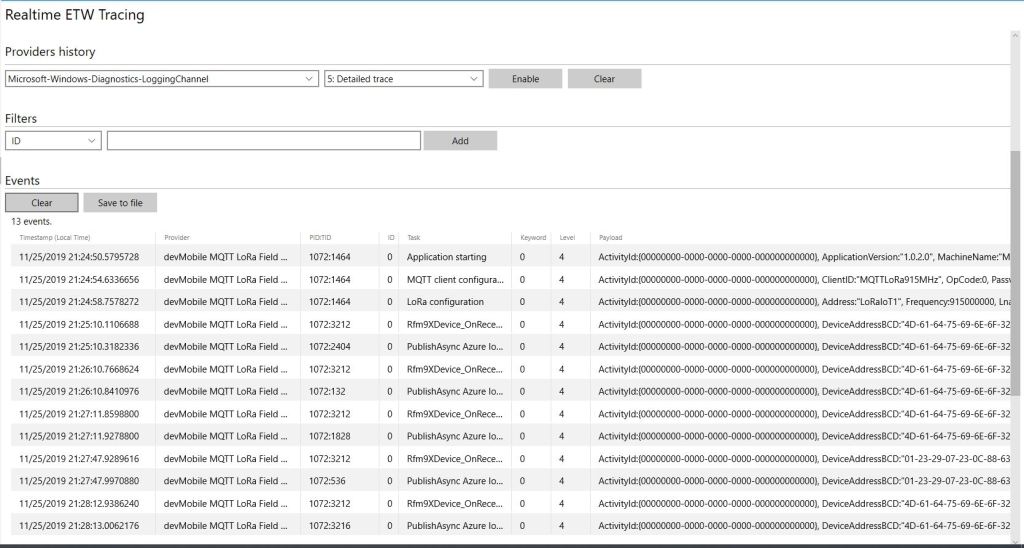
The application logs debugging information to the Windows 10 IoT Core ETW logging Microsoft-Windows-Diagnostics-LoggingChannel

MQTT LoRa Gateway with Azure IoT Hub plug-in

The message handler uploads all values in an inbound messages in one MQTT message.

namespace devMobile.Mqtt.IoTCore.FieldGateway
{
   using System;
   using System.Diagnostics;
   using System.Text;
   using Windows.Foundation.Diagnostics;

   using devMobile.IoT.Rfm9x;
   using MQTTnet;
   using MQTTnet.Client;
   using Newtonsoft.Json.Linq;
   using Newtonsoft.Json;

   public class MessageHandler : IMessageHandler
   {
      private LoggingChannel Logging { get; set; }
      private IMqttClient MqttClient { get; set; }
      private Rfm9XDevice Rfm9XDevice { get; set; }
      private string PlatformSpecificConfiguration { get; set; }

      void IMessageHandler.Initialise(LoggingChannel logging, IMqttClient mqttClient, Rfm9XDevice rfm9XDevice, string platformSpecificConfiguration)
      {
         LoggingFields processInitialiseLoggingFields = new LoggingFields();

         this.Logging = logging;
         this.MqttClient = mqttClient;
         this.Rfm9XDevice = rfm9XDevice;
         this.PlatformSpecificConfiguration = platformSpecificConfiguration;
      }

      async void IMessageHandler.Rfm9XOnReceive(Rfm9XDevice.OnDataReceivedEventArgs e)
      {
         LoggingFields processReceiveLoggingFields = new LoggingFields();
         char[] sensorReadingSeparators = { ',' };
         char[] sensorIdAndValueSeparators = { ' ' };

         processReceiveLoggingFields.AddString("PacketSNR", e.PacketSnr.ToString("F1"));
         processReceiveLoggingFields.AddInt32("PacketRSSI", e.PacketRssi);
         processReceiveLoggingFields.AddInt32("RSSI", e.Rssi);

         string addressBcdText = BitConverter.ToString(e.Address);
         processReceiveLoggingFields.AddInt32("DeviceAddressLength", e.Address.Length);
         processReceiveLoggingFields.AddString("DeviceAddressBCD", addressBcdText);

         string messageText;
         try
         {
            messageText = UTF8Encoding.UTF8.GetString(e.Data);
            processReceiveLoggingFields.AddString("MessageText", messageText);
         }
         catch (Exception ex)
         {
            processReceiveLoggingFields.AddString("Exception", ex.ToString());
            this.Logging.LogEvent("PayloadProcess failure converting payload to text", processReceiveLoggingFields, LoggingLevel.Warning);
            return;
         }

         // Chop up the CSV text
         string[] sensorReadings = messageText.Split(sensorReadingSeparators, StringSplitOptions.RemoveEmptyEntries);
         if (sensorReadings.Length < 1)
         {
            this.Logging.LogEvent("PayloadProcess payload contains no sensor readings", processReceiveLoggingFields, LoggingLevel.Warning);
            return;
         }

         JObject payloadJObject = new JObject();

         JObject feeds = new JObject();

         // Chop up each sensor read into an ID & value
         foreach (string sensorReading in sensorReadings)
         {
            string[] sensorIdAndValue = sensorReading.Split(sensorIdAndValueSeparators, StringSplitOptions.RemoveEmptyEntries);

            // Check that there is an id & value
            if (sensorIdAndValue.Length != 2)
            {
               this.Logging.LogEvent("PayloadProcess payload invalid format", processReceiveLoggingFields, LoggingLevel.Warning);
               return;
            }

            string sensorId = string.Concat(addressBcdText, sensorIdAndValue[0]);
            string value = sensorIdAndValue[1];

            feeds.Add(sensorId.ToLower(), value);
         }
         payloadJObject.Add("feeds", feeds);

         string topic = $"devices/{MqttClient.Options.ClientId}/messages/events/";

         try
         {
            var message = new MqttApplicationMessageBuilder()
               .WithTopic(topic)
               .WithPayload(JsonConvert.SerializeObject(payloadJObject))
               .WithAtLeastOnceQoS()
               .Build();
            Debug.WriteLine(" {0:HH:mm:ss} MQTT Client PublishAsync start", DateTime.UtcNow);
            await MqttClient.PublishAsync(message);
            Debug.WriteLine(" {0:HH:mm:ss} MQTT Client PublishAsync finish", DateTime.UtcNow);

            this.Logging.LogEvent("PublishAsync Azure IoTHub payload", processReceiveLoggingFields, LoggingLevel.Information);
         }
         catch (Exception ex)
         {
            processReceiveLoggingFields.AddString("Exception", ex.ToString());
            this.Logging.LogEvent("PublishAsync Azure IoTHub payload", processReceiveLoggingFields, LoggingLevel.Error);
         }
      }

      void IMessageHandler.MqttApplicationMessageReceived(MqttApplicationMessageReceivedEventArgs e)
      {
         LoggingFields processReceiveLoggingFields = new LoggingFields();

         processReceiveLoggingFields.AddString("ClientId", e.ClientId);
#if DEBUG
         processReceiveLoggingFields.AddString("Payload", e.ApplicationMessage.ConvertPayloadToString());
#endif
         processReceiveLoggingFields.AddString("QualityOfServiceLevel", e.ApplicationMessage.QualityOfServiceLevel.ToString());
         processReceiveLoggingFields.AddBoolean("Retain", e.ApplicationMessage.Retain);
         processReceiveLoggingFields.AddString("Topic", e.ApplicationMessage.Topic);

         this.Logging.LogEvent("MqttApplicationMessageReceived topic not processed", processReceiveLoggingFields, LoggingLevel.Error);
      }

      void IMessageHandler.Rfm9xOnTransmit(Rfm9XDevice.OnDataTransmitedEventArgs e)
      {
      }
   }
}

The formatting of the username and generation of password are password are a bit awkward and will be fixed in a future refactoring. Along with regenerating the SAS connection token just before it is due to expire.

ubidots MQTT LoRa Field Gateway

Back in April I started working on an MQTT LoRa Field gateway which was going to support a selection of different Software as a service(SaaS) Internet of Things(IoT) platforms.

After a long pause in development I have a working ubidots client and have 3 proof of concept (PoC) integrations for Adafruit.IO, AskSensors, and Losant. I am also working on Azure IoT Hub, Azure IoT Central. The first iteration is focused on Device to Cloud (D2C) messaging in the next iteration I will add Cloud to Device where viable(C2D).

My applications use a lightweight, easy to implemented protocol which is intended for hobbyist and educational use rather than commercial applications (I have been working on a more secure version as yet another side project)

I have a number of sample Arduino with Dragino LoRa Shield for Arduino, MakerFabs Maduino, Dragino LoRa Mini Dev, M2M Low power Node and Netduino with Elecrow LoRa RFM95 Shield etc. clients. These work with both my platform specific (Adafruit.IO, Azure IoT Central) gateways and protocol specific field gateways.

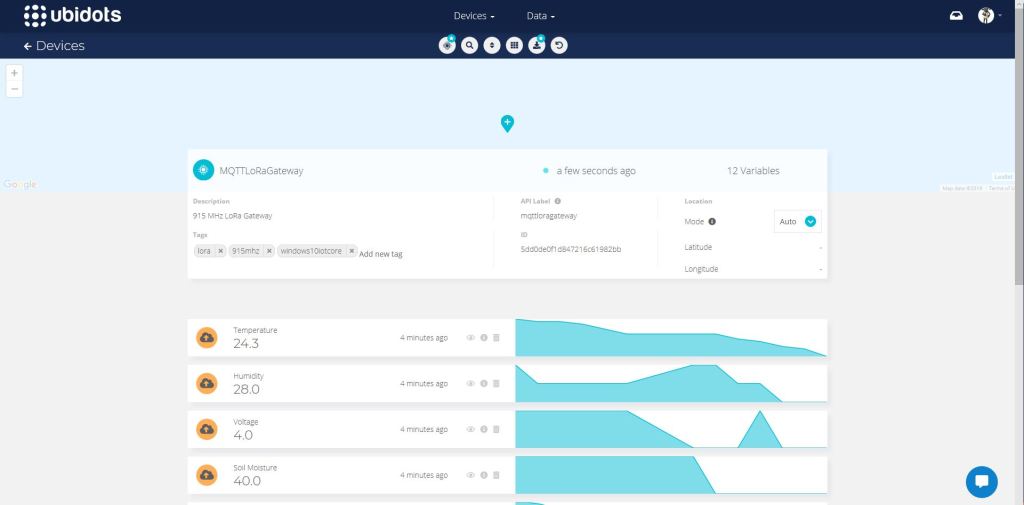
Ubidots dashboard

When the application is first started it creates a minimal configuration file which should be downloaded, the missing information filled out, then uploaded using the File explorer in the Windows device portal.

{
  "MQTTUserName": "Ubidots generated usname here",
  "MQTTPassword": "NotVerySecure",
  "MQTTClientID": "MQTTLoRaGateway",
  "MQTTServer": "industrial.api.ubidots.com",
  "Address": "LoRaIoT1",
  "Frequency": 915000000.0,
  "MessageHandlerAssembly": "Mqtt.IoTCore.FieldGateway.LoRa.Ubidots",
  "PlatformSpecificConfiguration": ""
}

The application logs debugging information to the Windows 10 IoT Core ETW logging Microsoft-Windows-Diagnostics-LoggingChannel

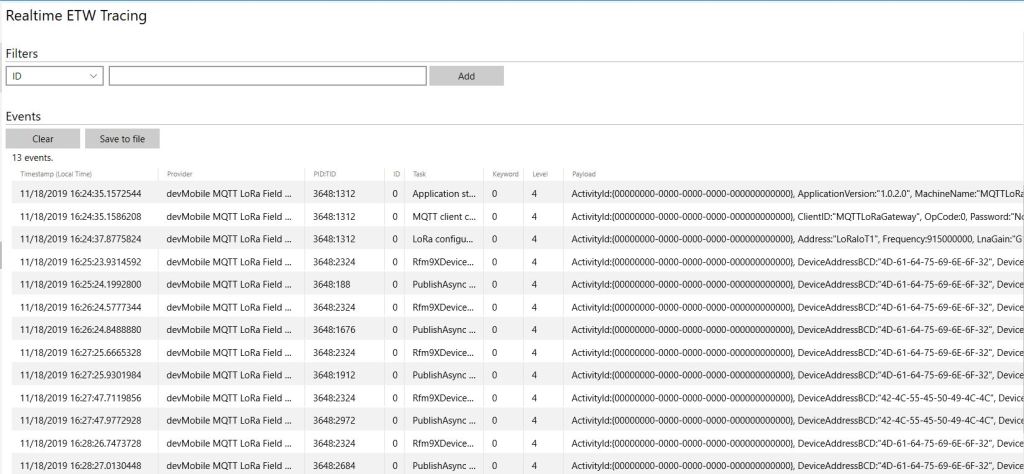
MQTT LoRa Field Gateway with ubidots plugin generated telemetry
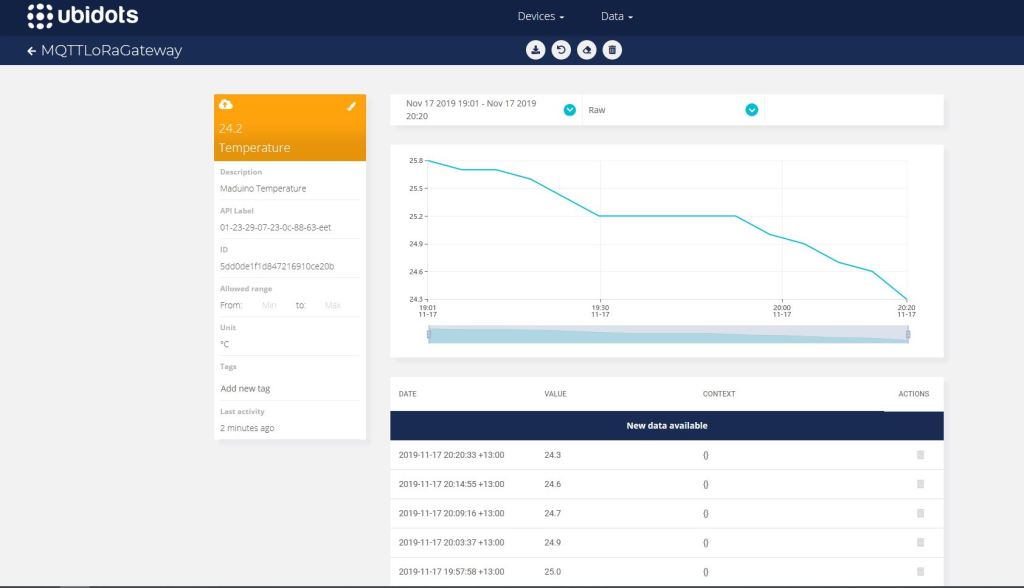
ubidots device management
ubidot managment

The message handler uploads all values in an inbound messages in one MQTT message using the ubidots MQTT message format

async void IMessageHandler.Rfm9XOnReceive(object sender, Rfm9XDevice.OnDataReceivedEventArgs e)
{
	LoggingFields processReceiveLoggingFields = new LoggingFields();
	JObject telemetryDataPoint = new JObject();
	char[] sensorReadingSeparators = { ',' };
	char[] sensorIdAndValueSeparators = { ' ' };

	processReceiveLoggingFields.AddString("PacketSNR", e.PacketSnr.ToString("F1"));
	processReceiveLoggingFields.AddInt32("PacketRSSI", e.PacketRssi);
	processReceiveLoggingFields.AddInt32("RSSI", e.Rssi);

	string addressBcdText = BitConverter.ToString(e.Address);
	processReceiveLoggingFields.AddInt32("DeviceAddressLength", e.Address.Length);
	processReceiveLoggingFields.AddString("DeviceAddressBCD", addressBcdText);

	string messageText;
	try
	{
		messageText = UTF8Encoding.UTF8.GetString(e.Data);
		processReceiveLoggingFields.AddString("MessageText", messageText);
	}
	catch (Exception ex)
	{
		processReceiveLoggingFields.AddString("Exception", ex.ToString());
		this.Logging.LogEvent("PayloadProcess failure converting payload to text", processReceiveLoggingFields, LoggingLevel.Warning);
		return;
	}

	// Chop up the CSV text
	string[] sensorReadings = messageText.Split(sensorReadingSeparators, StringSplitOptions.RemoveEmptyEntries);
	if (sensorReadings.Length < 1)
	{
		this.Logging.LogEvent("PayloadProcess payload contains no sensor readings", processReceiveLoggingFields, LoggingLevel.Warning);
		return;
	}

	// Chop up each sensor read into an ID & value
	foreach (string sensorReading in sensorReadings)
	{
		string[] sensorIdAndValue = sensorReading.Split(sensorIdAndValueSeparators, StringSplitOptions.RemoveEmptyEntries);
		// Check that there is an id & value
		if (sensorIdAndValue.Length != 2)
		{
			this.Logging.LogEvent("PayloadProcess payload invalid format", processReceiveLoggingFields, LoggingLevel.Warning);
			return;
		}

		string sensorId = sensorIdAndValue[0];
		string value = sensorIdAndValue[1];

		telemetryDataPoint.Add(addressBcdText + sensorId, Convert.ToDouble(value));
	}
	processReceiveLoggingFields.AddString("MQTTClientId", MqttClient.Options.ClientId);

	string stateTopic = string.Format(stateTopicFormat, MqttClient.Options.ClientId);

	try
	{
		var message = new MqttApplicationMessageBuilder()
			.WithTopic(stateTopic)
			.WithPayload(JsonConvert.SerializeObject(telemetryDataPoint))
			.WithAtLeastOnceQoS()
			.Build();
		Debug.WriteLine(" {0:HH:mm:ss} MQTT Client PublishAsync start", DateTime.UtcNow);
		await MqttClient.PublishAsync(message);
		Debug.WriteLine(" {0:HH:mm:ss} MQTT Client PublishAsync finish", DateTime.UtcNow);

		this.Logging.LogEvent("PublishAsync Ubidots payload", processReceiveLoggingFields, LoggingLevel.Information);
	}
	catch (Exception ex)
	{
		processReceiveLoggingFields.AddString("Exception", ex.ToString());
		this.Logging.LogEvent("PublishAsync Ubidots payload", processReceiveLoggingFields, LoggingLevel.Error);
	}
}

The “automagic” provisioning of feeds does make setting up small scale systems easier, though I’m not certain how well it would scale.

Some of the fields weren’t obviously editable e.g.”ÄPI Label” in device configuration which I only discovered by clicking on them..

The limitations of the free account meant I couldn’t evaluate ubidots in much depth but what was available appeared to be robust and reliable (Nov 2019).