.NET nanoFramework SX127X LoRa library Basic Receive & Transmit

For testing nanoFramework device transmit and receive functionality I used an Arduino/Seeeduino with a Dragino LoRa Shield (running one of the Arduino-LoRa samples) as a client device. This was so I could “bootstrap” connectivity and test interoperability with other libraries/platforms.

Arduino/Netduino devices for .NET nanoFramework interoperability test-rig

I started with transmit as I was confident my Seeeduino + Dragino LoRa Shield could receive messages. The TransmitBasic application puts the device into LoRa + Sleep mode as after reset/powering up the device is in FSK/OOK, Low Frequency + Standby mode).

SX127X RegOpMode options

After loading the message to be sent into the First In First Out(FIFO) buffer, the RegOpMode-Mode is set to Transmit(TX-011), and then the RegIrqFlags register is polled until the TxDone flag is set.

SX127X ReqIrqFlags options
public static void Main()
{
  int SendCount = 0;
...
  Debug.WriteLine("devMobile.IoT.SX127x.TransmitBasic starting");

   try
   {
...
#if NETDUINO3_WIFI || ST_STM32F769I_DISCOVERY
      SX127XDevice sx127XDevice = new SX127XDevice(SpiBusId, chipSelectLine, resetPinNumber);
#endif
     Thread.Sleep(500);

     // Put device into LoRa + Standby mode
     sx127XDevice.WriteByte(0x01, 0b10000000); // RegOpMode 

      // Set the frequency to 915MHz
      byte[] frequencyBytes = { 0xE4, 0xC0, 0x00 }; // RegFrMsb, RegFrMid, RegFrLsb
      sx127XDevice.WriteBytes(0x06, frequencyBytes);

      // More power PA Boost
      sx127XDevice.WriteByte(0x09, 0b10000000); // RegPaConfig

      sx127XDevice.RegisterDump();

      while (true)
      {
         sx127XDevice.WriteByte(0x0E, 0x0); // RegFifoTxBaseAddress 

         // Set the Register Fifo address pointer
         sx127XDevice.WriteByte(0x0D, 0x0); // RegFifoAddrPtr 

         string messageText = $"Hello LoRa from .NET nanoFramework {SendCount += 1}!";

         // load the message into the fifo
         byte[] messageBytes = UTF8Encoding.UTF8.GetBytes(messageText);
         sx127XDevice.WriteBytes(0x0, messageBytes); // RegFifo

         // Set the length of the message in the fifo
         sx127XDevice.WriteByte(0x22, (byte)messageBytes.Length); // RegPayloadLength

         Debug.WriteLine($"Sending {messageBytes.Length} bytes message {messageText}");
         // Set the mode to LoRa + Transmit
         sx127XDevice.WriteByte(0x01, 0b10000011); // RegOpMode 

         // Wait until send done, no timeouts in PoC
         Debug.WriteLine("Send-wait");
         byte irqFlags = sx127XDevice.ReadByte(0x12); // RegIrqFlags
         while ((irqFlags & 0b00001000) == 0)  // wait until TxDone cleared
         {
            Thread.Sleep(10);
            irqFlags = sx127XDevice.ReadByte(0x12); // RegIrqFlags
            Debug.Write(".");
         }
         Debug.WriteLine("");
         sx127XDevice.WriteByte(0x12, 0b00001000); // clear TxDone bit
         Debug.WriteLine("Send-Done");

         Thread.Sleep(30000);
         }
      }
      catch (Exception ex)
      {
         Debug.WriteLine(ex.Message);
      }
   }
}
Transmit Basic application output

Once the TransmitBasic application was sending messages reliably I started working on the ReceiveBasic application. As the ReceiveBasic application starts up the SX127X RegOpMode has to be set to sleep/standby so the device can be configured. TOnce that is completed RegOpMode-Mode is set to RxContinuous(101), and the RegIrqFlags register is polled until the RxDone flag is set.

public static void Main()
{
...
   Debug.WriteLine("devMobile.IoT.SX127x.ReceiveBasic starting");

   try
   {
...
#if NETDUINO3_WIFI || ST_STM32F769I_DISCOVERY
      SX127XDevice sx127XDevice = new SX127XDevice(SpiBusId, chipSelectLine, resetPinNumber);
#endif
      Thread.Sleep(500);

      // Put device into LoRa + Sleep mode
      sx127XDevice.WriteByte(0x01, 0b10000000); // RegOpMode 

      // Set the frequency to 915MHz
      byte[] frequencyBytes = { 0xE4, 0xC0, 0x00 }; // RegFrMsb, RegFrMid, RegFrLsb
      sx127XDevice.WriteBytes(0x06, frequencyBytes);

      sx127XDevice.WriteByte(0x0F, 0x0); // RegFifoRxBaseAddress 

      sx127XDevice.WriteByte(0x01, 0b10000101); // RegOpMode set LoRa & RxContinuous

       while (true)
       {
          // Wait until a packet is received, no timeouts in PoC
         Debug.WriteLine("Receive-Wait");
         byte irqFlags = sx127XDevice.ReadByte(0x12); // RegIrqFlags
         while ((irqFlags & 0b01000000) == 0)  // wait until RxDone cleared
         {
            Thread.Sleep(100);
            irqFlags = sx127XDevice.ReadByte(0x12); // RegIrqFlags
            Debug.Write(".");
         }
         Debug.WriteLine("");
         Debug.WriteLine($"RegIrqFlags 0X{irqFlags:X2}");
         Debug.WriteLine("Receive-Message");
         byte currentFifoAddress = sx127XDevice.ReadByte(0x10); // RegFifiRxCurrent
         sx127XDevice.WriteByte(0x0d, currentFifoAddress); // RegFifoAddrPtr

         byte numberOfBytes = sx127XDevice.ReadByte(0x13); // RegRxNbBytes

         // Read the message from the FIFO
         byte[] messageBytes = sx127XDevice.ReadBytes(0x00, numberOfBytes);

         sx127XDevice.WriteByte(0x0d, 0);
         sx127XDevice.WriteByte(0x12, 0b11111111); // RegIrqFlags clear all the bits

         // Remove unprintable characters from messages
         for (int index = 0; index < messageBytes.Length; index++)
         {
            if ((messageBytes[index] < 0x20) || (messageBytes[index] > 0x7E))
            {
               messageBytes[index] = 0x20;
            }
         }

         string messageText = UTF8Encoding.UTF8.GetString(messageBytes, 0, messageBytes.Length);
         Debug.WriteLine($"Received {messageBytes.Length} byte message {messageText}");

         Debug.WriteLine("Receive-Done");
      }
    }
   catch (Exception ex)
   {
      Debug.WriteLine(ex.Message);
   }
}
Receive Basic application output

Every so often the ReceiveBasic application would display a message sent on the same frequency by a device somewhere nearby.
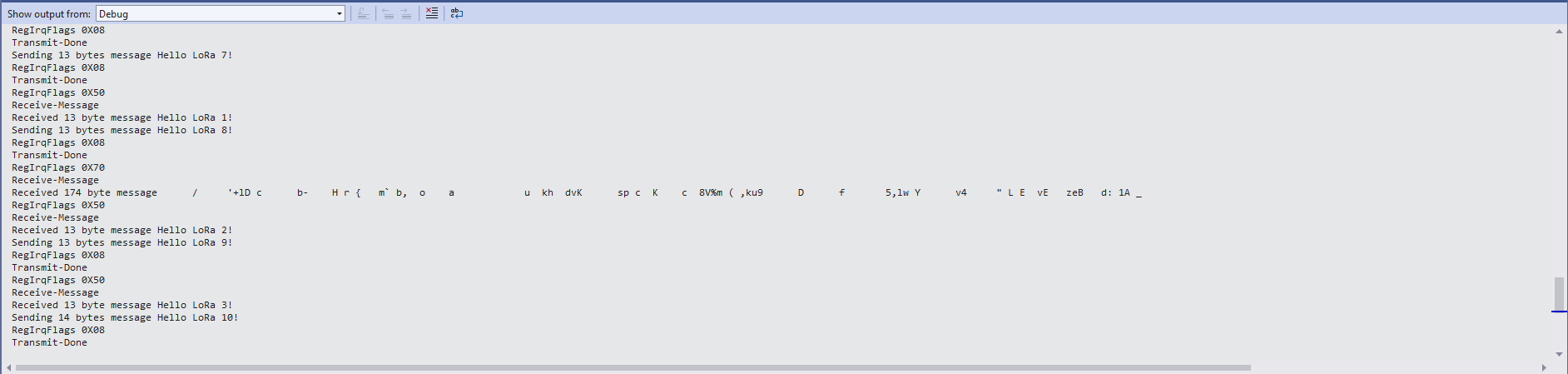
ReceiveBasic application messages from unknown source

I need to do some more investigation into whether writing 0b00001000 (Transmit) vs. 0b11111111(Receive) to RegIrqFlags is important.

.NET nanoFramework SX127X LoRa library Read & Write

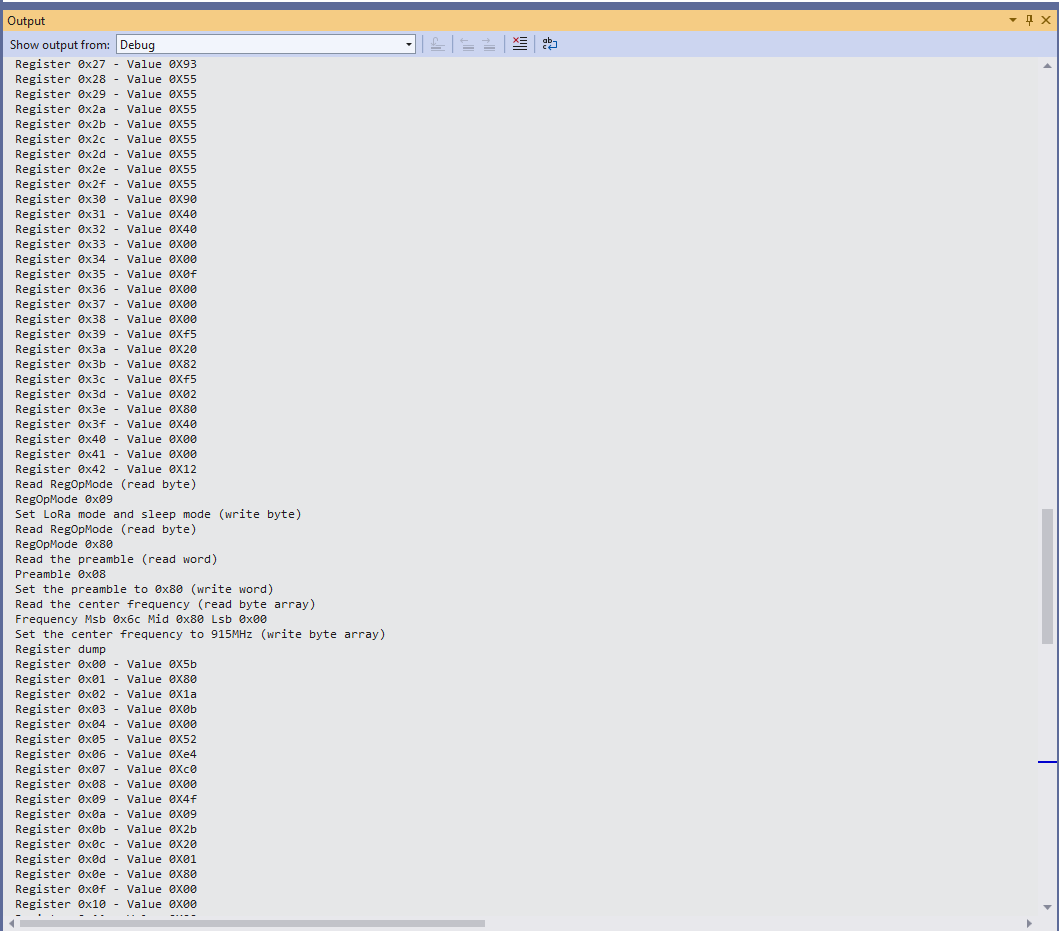
Now that I could reliably dump all the Dragino shield registers I wanted to be able to configure the Semtech 127X device and reset it back to factory settings. A factory reset is done by strobing the SX127X reset pin.

SX127X Reset timing diagram

SX127X Reset process

To support this I added a constructor with an additional parameter for the reset General Purpose Input Output(GPIO) pin number to the SX127XDevice class. The original constructor was retained as the SX127X reset pin is not connected on the SparkFun LoRa Gateway-1-Channel (ESP32) and a limited number of other devices.

namespace devMobile.IoT.SX127x.RegisterReadAndWrite
{
   using System;
   using System.Diagnostics;
   using System.Threading;

   using System.Device.Gpio;
   using System.Device.Spi;

#if ESP32_WROOM_32_LORA_1_CHANNEL
   using nanoFramework.Hardware.Esp32;
#endif

   public sealed class SX127XDevice
   {
      private const byte RegisterAddressMinimum = 0X0;
      private const byte RegisterAddressMaximum = 0x42;
      private const byte RegisterAddressReadMask = 0X7f;
      private const byte RegisterAddressWriteMask = 0x80;

      private readonly SpiDevice SX127XTransceiver;

      public SX127XDevice(int busId, int chipSelectLine, int resetPin)
      {
         var settings = new SpiConnectionSettings(busId, chipSelectLine)
         {
            ClockFrequency = 1000000,
            Mode = SpiMode.Mode0,// From SemTech docs pg 80 CPOL=0, CPHA=0
            SharingMode = SpiSharingMode.Shared
         };

         SX127XTransceiver = new SpiDevice(settings);

         // Factory reset pin configuration
         GpioController gpioController = new GpioController();
         gpioController.OpenPin(resetPin, PinMode.Output);

         gpioController.Write(resetPin, PinValue.Low);
         Thread.Sleep(20);
         gpioController.Write(resetPin, PinValue.High);
         Thread.Sleep(20);
      }

      public SX127XDevice(int busId, int chipSelectLine)
      {
         var settings = new SpiConnectionSettings(busId, chipSelectLine)
         {
            ClockFrequency = 1000000,
            Mode = SpiMode.Mode0,// From SemTech docs pg 80 CPOL=0, CPHA=0
            SharingMode = SpiSharingMode.Shared,
         };

         SX127XTransceiver = new SpiDevice(settings);
      }

      public Byte ReadByte(byte registerAddress)
      {
         byte[] writeBuffer = new byte[] { registerAddress &= RegisterAddressReadMask, 0x0 };
         byte[] readBuffer = new byte[writeBuffer.Length];

         SX127XTransceiver.TransferFullDuplex(writeBuffer, readBuffer);

         return readBuffer[1];
      }

      public ushort ReadWord(byte address)
      {
         byte[] writeBuffer = new byte[] { address &= RegisterAddressReadMask, 0x0, 0x0 };
         byte[] readBuffer = new byte[writeBuffer.Length];

         SX127XTransceiver.TransferFullDuplex(writeBuffer, readBuffer);

         return (ushort)(readBuffer[2] + (readBuffer[1] << 8));
      }

      public ushort ReadWordMsbLsb(byte address)
      {
         byte[] writeBuffer = new byte[] { address &= RegisterAddressReadMask, 0x0, 0x0 };
         byte[] readBuffer = new byte[writeBuffer.Length];

         SX127XTransceiver.TransferFullDuplex(writeBuffer, readBuffer);

         return (ushort)((readBuffer[1] << 8) + readBuffer[2]);
      }

      public byte[] ReadBytes(byte address, byte length)
      {
         byte[] writeBuffer = new byte[length + 1];
         byte[] readBuffer = new byte[writeBuffer.Length];
         byte[] replyBuffer = new byte[length];

         writeBuffer[0] = address &= RegisterAddressReadMask;

         SX127XTransceiver.TransferFullDuplex(writeBuffer, readBuffer);

         Array.Copy(readBuffer, 1, replyBuffer, 0, length);

         return replyBuffer;
      }

      public void WriteByte(byte address, byte value)
      {
         byte[] writeBuffer = new byte[] { address |= RegisterAddressWriteMask, value };
         byte[] readBuffer = new byte[writeBuffer.Length];

         SX127XTransceiver.TransferFullDuplex(writeBuffer, readBuffer);
      }

      public void WriteWord(byte address, ushort value)
      {
         byte[] valueBytes = BitConverter.GetBytes(value);
         byte[] writeBuffer = new byte[] { address |= RegisterAddressWriteMask, valueBytes[0], valueBytes[1] };
         byte[] readBuffer = new byte[writeBuffer.Length];

         SX127XTransceiver.TransferFullDuplex(writeBuffer, readBuffer);
      }

      public void WriteWordMsbLsb(byte address, ushort value)
      {
         byte[] valueBytes = BitConverter.GetBytes(value);
         byte[] writeBuffer = new byte[] { address |= RegisterAddressWriteMask, valueBytes[1], valueBytes[0] };
         byte[] readBuffer = new byte[writeBuffer.Length];

         SX127XTransceiver.TransferFullDuplex(writeBuffer, readBuffer);
      }

      public void WriteBytes(byte address, byte[] bytes)
      {
         byte[] writeBuffer = new byte[1 + bytes.Length];
         byte[] readBuffer = new byte[writeBuffer.Length];

         Array.Copy(bytes, 0, writeBuffer, 1, bytes.Length);
         writeBuffer[0] = address |= RegisterAddressWriteMask;

         SX127XTransceiver.TransferFullDuplex(writeBuffer, readBuffer);
      }

      public void RegisterDump()
      {
         Debug.WriteLine("Register dump");
         for (byte registerIndex = RegisterAddressMinimum; registerIndex <= RegisterAddressMaximum; registerIndex++)
         {
            byte registerValue = this.ReadByte(registerIndex);

            Debug.WriteLine($"Register 0x{registerIndex:x2} - Value 0X{registerValue:x2}");
         }

         Debug.WriteLine("");
      }
   }

   public class Program
   {
#if ESP32_WROOM_32_LORA_1_CHANNEL
      private const int SpiBusId = 1;
#endif
#if NETDUINO3_WIFI
      private const int SpiBusId = 2;
#endif
#if ST_STM32F769I_DISCOVERY
      private const int SpiBusId = 2;
#endif


      public static void Main()
      {
         byte[] frequencyBytes;
#if ESP32_WROOM_32_LORA_1_CHANNEL // No reset line for this device as it isn't connected on SX127X
         int chipSelectLine = Gpio.IO16;
#endif
#if NETDUINO3_WIFI
         // Arduino D10->PB10
         int chipSelectLine = PinNumber('B', 10);
         // Arduino D9->PE5
         int resetPinNumber = PinNumber('E', 5);
#endif
#if ST_STM32F769I_DISCOVERY
         // Arduino D10->PA11
         int chipSelectLine = PinNumber('A', 11);
         // Arduino D9->PH6
         int resetPinNumber = PinNumber('H', 6);
#endif

         Debug.WriteLine("devMobile.IoT.SX127x.RegisterReadAndWrite starting");

         try
         {
#if ESP32_WROOM_32_LORA_1_CHANNEL
            Configuration.SetPinFunction(Gpio.IO12, DeviceFunction.SPI1_MISO);
            Configuration.SetPinFunction(Gpio.IO13, DeviceFunction.SPI1_MOSI);
            Configuration.SetPinFunction(Gpio.IO14, DeviceFunction.SPI1_CLOCK);

            SX127XDevice sx127XDevice = new SX127XDevice(SpiBusId, chipSelectLine);
#endif
#if NETDUINO3_WIFI || ST_STM32F769I_DISCOVERY
            SX127XDevice sx127XDevice = new SX127XDevice(SpiBusId, chipSelectLine, resetPinNumber);
#endif
            Thread.Sleep(500);

            sx127XDevice.RegisterDump();

            while (true)
            {
               Debug.WriteLine("Read RegOpMode (read byte)");
               Byte regOpMode1 = sx127XDevice.ReadByte(0x1);
               Debug.WriteLine($"RegOpMode 0x{regOpMode1:x2}");

               Debug.WriteLine("Set LoRa mode and sleep mode (write byte)");
               sx127XDevice.WriteByte(0x01, 0b10000000);

               Debug.WriteLine("Read RegOpMode (read byte)");
               Byte regOpMode2 = sx127XDevice.ReadByte(0x1);
               Debug.WriteLine($"RegOpMode 0x{regOpMode2:x2}");

               Debug.WriteLine("Read the preamble (read word)");
               ushort preamble = sx127XDevice.ReadWord(0x20);
               Debug.WriteLine($"Preamble 0x{preamble:x2}");

	            Console.WriteLine("Read the preamble (read word)"); // Should be 0x08
			      preamble = sx127XDevice.ReadWordMsbLsb(0x20);
               Debug.WriteLine($"Preamble 0x{preamble:x2}");

               Debug.WriteLine("Read the centre frequency (read byte array)");
               frequencyBytes = sx127XDevice.ReadBytes(0x06, 3);
               Debug.WriteLine($"Frequency Msb 0x{frequencyBytes[0]:x2} Mid 0x{frequencyBytes[1]:x2} Lsb 0x{frequencyBytes[2]:x2}");

               Debug.WriteLine("Set the centre frequency to 915MHz (write byte array)");
               byte[] frequencyWriteBytes = { 0xE4, 0xC0, 0x00 };
               sx127XDevice.WriteBytes(0x06, frequencyWriteBytes);

               Debug.WriteLine("Read the centre frequency (read byte array)");
               frequencyBytes = sx127XDevice.ReadBytes(0x06, 3);
               Debug.WriteLine($"Frequency Msb 0x{frequencyBytes[0]:x2} Mid 0x{frequencyBytes[1]:x2} Lsb 0x{frequencyBytes[2]:x2}");

               sx127XDevice.RegisterDump();

               Thread.Sleep(30000);
            }
         }
         catch (Exception ex)
         {
            Debug.WriteLine(ex.Message);
         }
      }

#if NETDUINO3_WIFI || ST_STM32F769I_DISCOVERY
      static int PinNumber(char port, byte pin)
      {
         if (port < 'A' || port > 'J')
            throw new ArgumentException();

         return ((port - 'A') * 16) + pin;
      }
#endif
   }
}

The PinNumber helper is more user friendly that the raw numbers and is “inspired” by sample .NET nanoFramework General Purpose Input Output(GPIO) sample code.

Each method was tested by read/writing suitable register(s) in the device configuration (Needed to set it into LoRa mode first).

The next step is to extract the Serial Peripheral Interface(SPI) register access functionality into a module and configure the bare minimum of settings required to get the SX127X to receive and transmit messages.

.NET nanoFramework SX127X LoRa library Registers

Over the years I have ported my HopeRF RFM9X(Now a generic Semtech SX127X ) Windows 10 IoT Core (May 2018) library to .NET microFramework(May 2018), Wilderness Labs Meadow(Jan 2020), GHI Electronics TinyCLR-OS(July 2020), .NET nanoFramework V1(May 2020) and .NET Core(Aug 2021).

All this madness started because I wasn’t confident the frequency calculation of the Emmellsoft Dragino.Lora code was correct. Over the last couple of years I have also found bugs in my Transmit Power, InvertIQ RX/TX with many others yet to be discovered.

For my updated .NET nanoFramework port I have mainly used a half a dozen Dragino LoRa shields for Arduino and Netduino 3 Wifi devices I had lying around. I have also tested the code with SparkFun LoRa Gateway-1-Channel (ESP32) and ST 32F769IDiscovery devices.

STM32F769IDiscovery, Netduino 3 Wifi, and SparkFun LoRa Gateway-1-Channel (ESP32) devices

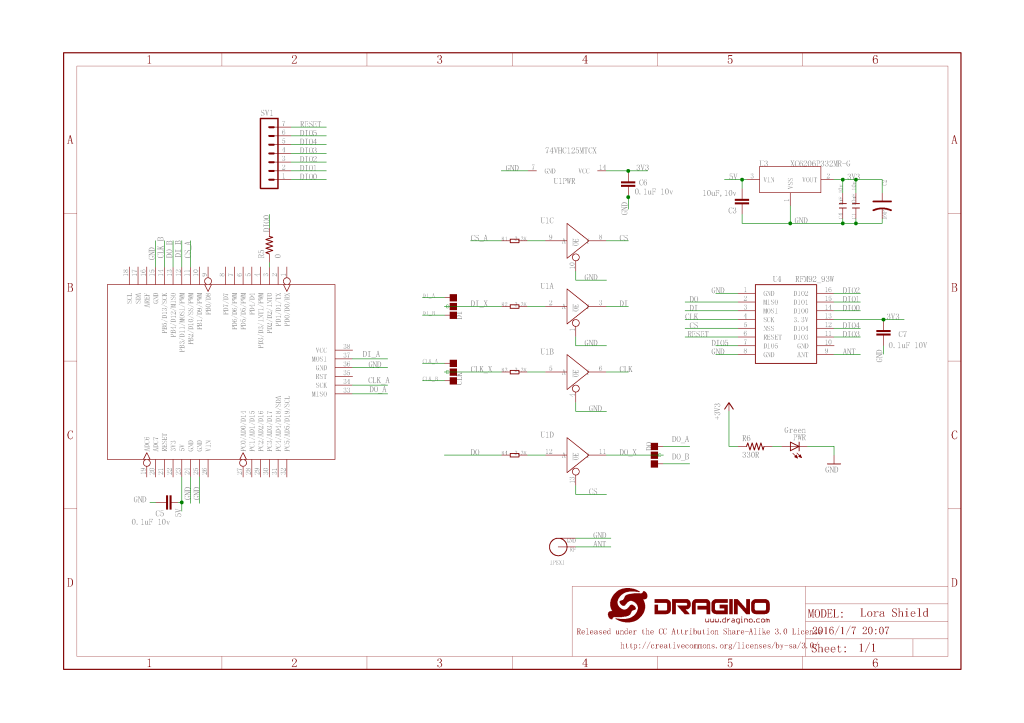
The Dragino shield uses D10 for chip select, D2 for RFM9X DI0 interrupt and D9 for Reset.

Dragino Arduino LoRa Shield Schematic

Netduino 3 Wifi pin mapping

  • D10->CS->PB10
  • D9->RST->E5

ST 32F769IDiscovery pin mapping

D10->CS->PA11
D9->RST->PH6

Sparkfun ESP32 1 Channel Gateway Schematic

SparkFun LoRa Gateway-1-Channel (ESP32) pin mapping(SX127X reset is not connected)

  • CS->PB10

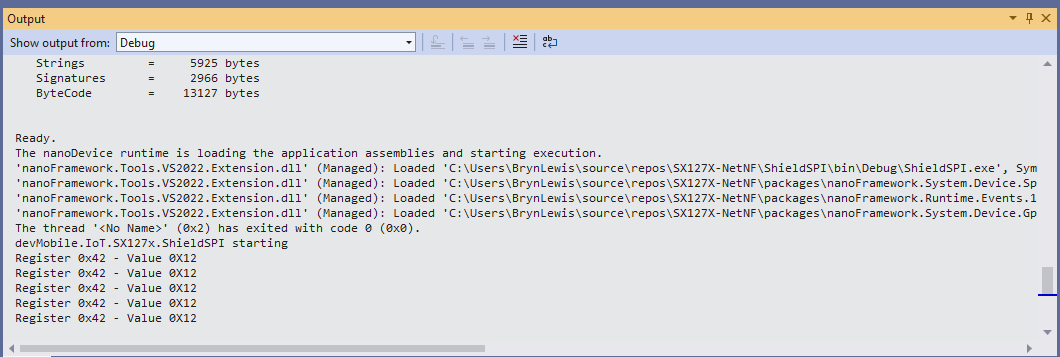
The first step was to confirm I could read a single(ShieldSPI) then scan all the Semtech SX1276 registers with the new nanoFramework System.Device.SPI Nuget (which was”inspired by” .Net Core System.Device.SPI)

namespace devMobile.IoT.SX127x.ShieldSPI
{
   using System;
   using System.Diagnostics;
   using System.Threading;

   using System.Device.Gpio;
   using System.Device.Spi;

#if ESP32_WROOM_32_LORA_1_CHANNEL
   using nanoFramework.Hardware.Esp32;
#endif

   public class Program
   {
      private const byte RegVersion = 0x42;
#if ESP32_WROOM_32_LORA_1_CHANNEL
      private const int SpiBusId = 1;
#endif
#if NETDUINO3_WIFI
      private const int SpiBusId = 2;
#endif
#if ST_STM32F769I_DISCOVERY
      private const int SpiBusId = 2;
#endif

      public static void Main()
      {
         GpioController gpioController = new GpioController();

#if ESP32_WROOM_32_LORA_1_CHANNEL // No reset line for this device as it isn't connected on SX127X
         int ledPinNumber = Gpio.IO17;
         int chipSelectLine = Gpio.IO16;
#endif
#if NETDUINO3_WIFI
         int ledPinNumber = PinNumber('A', 10);
         // Arduino D10->PB10
         int chipSelectLine = PinNumber('B', 10);
         // Arduino D9->PE5
         int resetPinNumber = PinNumber('E', 5);
#endif
#if ST_STM32F769I_DISCOVERY
         int ledPinNumber  = PinNumber('J', 5);
         // Arduino D10->PA11
         int chipSelectLine = PinNumber('A', 11);
         // Arduino D9->PH6
         int resetPinNumber = PinNumber('H', 6);
#endif
         Debug.WriteLine("devMobile.IoT.SX127x.ShieldSPI starting");

         try
         {
#if ESP32_WROOM_32_LORA_1_CHANNEL || NETDUINO3_WIFI || ST_STM32F769I_DISCOVERY
            // Setup the onboard LED
            gpioController.OpenPin(ledPinNumber, PinMode.Output);
#endif

#if NETDUINO3_WIFI || ST_STM32F769I_DISCOVERY
            // Setup the reset pin
            gpioController.OpenPin(resetPinNumber, PinMode.Output);
            gpioController.Write(resetPinNumber, PinValue.High);
#endif

#if ESP32_WROOM_32_LORA_1_CHANNEL
            Configuration.SetPinFunction(Gpio.IO12, DeviceFunction.SPI1_MISO);
            Configuration.SetPinFunction(Gpio.IO13, DeviceFunction.SPI1_MOSI);
            Configuration.SetPinFunction(Gpio.IO14, DeviceFunction.SPI1_CLOCK);
#endif

            var settings = new SpiConnectionSettings(SpiBusId, chipSelectLine)
            {
               ClockFrequency = 1000000,
               Mode = SpiMode.Mode0,// From SemTech docs pg 80 CPOL=0, CPHA=0
               SharingMode = SpiSharingMode.Shared,
            };

            using (SpiDevice device = SpiDevice.Create(settings))
            {
               Thread.Sleep(500);

               while (true)
               {
                  byte[] writeBuffer = new byte[] { RegVersion, 0x0 };
                  byte[] readBuffer = new byte[writeBuffer.Length];

                  device.TransferFullDuplex(writeBuffer, readBuffer);

                  Debug.WriteLine(String.Format("Register 0x{0:x2} - Value 0X{1:x2}", RegVersion, readBuffer[1]));

#if ESP32_WROOM_32_LORA_1_CHANNEL || NETDUINO3_WIFI || ST_STM32F769I_DISCOVERY
                  if ( gpioController.Read(ledPinNumber) == PinValue.High)
						{
                     gpioController.Write(ledPinNumber, PinValue.Low);
                  }
                  else
						{
                     gpioController.Write(ledPinNumber, PinValue.High);
                  }
#endif
                  Thread.Sleep(10000);
               }
            }
         }
         catch (Exception ex)
         {
            Debug.WriteLine(ex.Message);
         }
      }

#if NETDUINO3_WIFI || ST_STM32F769I_DISCOVERY
      static int PinNumber(char port, byte pin)
      {
         if (port < 'A' || port > 'J')
            throw new ArgumentException();

         return ((port - 'A') * 16) + pin;
      }
#endif
   }
}
Shield SPI Debug output
namespace devMobile.IoT.SX127x.RegisterScan
{
   using System;
   using System.Diagnostics;
   using System.Threading;

   using System.Device.Gpio;
   using System.Device.Spi;

#if ESP32_WROOM_32_LORA_1_CHANNEL
   using nanoFramework.Hardware.Esp32;
#endif

   public sealed class SX127XDevice
   {
      private readonly SpiDevice SX127XTransceiver;

      public SX127XDevice(int busId, int chipSelectLine)
      {

         var settings = new SpiConnectionSettings(busId, chipSelectLine)
         {
            ClockFrequency = 1000000,
            Mode = SpiMode.Mode0,// From SemTech docs pg 80 CPOL=0, CPHA=0
            SharingMode = SpiSharingMode.Shared
         };

         SX127XTransceiver = new SpiDevice(settings);
      }

      public SX127XDevice(int busId, int chipSelectLine, int resetPin)
      {
         var settings = new SpiConnectionSettings(busId, chipSelectLine)
         {
            ClockFrequency = 1000000,
            Mode = SpiMode.Mode0,// From SemTech docs pg 80 CPOL=0, CPHA=0
            SharingMode = SpiSharingMode.Shared
         };

         SX127XTransceiver = new SpiDevice(settings);

         // Factory reset pin configuration
         GpioController gpioController = new GpioController();
         gpioController.OpenPin(resetPin, PinMode.Output);

         gpioController.Write(resetPin, PinValue.Low);
         Thread.Sleep(20);
         gpioController.Write(resetPin, PinValue.High);
         Thread.Sleep(20);
      }

      public Byte RegisterReadByte(byte registerAddress)
      {
         byte[] writeBuffer = new byte[] { registerAddress, 0x0 };
         byte[] readBuffer = new byte[writeBuffer.Length];

         SX127XTransceiver.TransferFullDuplex(writeBuffer, readBuffer);

         return readBuffer[1];
      }
   }

   public class Program
   {
#if ESP32_WROOM_32_LORA_1_CHANNEL
      private const int SpiBusId = 1;
#endif
#if NETDUINO3_WIFI
      private const int SpiBusId = 2;
#endif
#if ST_STM32F769I_DISCOVERY
      private const int SpiBusId = 2;
#endif

      public static void Main()
      {
#if ESP32_WROOM_32_LORA_1_CHANNEL
         int chipSelectLine = Gpio.IO16;
#endif
#if NETDUINO3_WIFI
         // Arduino D10->PB10
         int chipSelectLine = PinNumber('B', 10);
         // Arduino D9->PE5
         int resetPinNumber = PinNumber('E', 5);
#endif
#if ST_STM32F769I_DISCOVERY
         // Arduino D10->PA11
         int chipSelectLine = PinNumber('A', 11);
         // Arduino D9->PH6
         int resetPinNumber = PinNumber('H', 6);
#endif

         Debug.WriteLine("devMobile.IoT.SX127x.RegisterScan starting");

         try
         {
#if NETDUINO3_WIFI || ST_STM32F769I_DISCOVERY
            SX127XDevice sx127XDevice = new SX127XDevice(SpiBusId, chipSelectLine, resetPinNumber);
#endif

#if ESP32_WROOM_32_LORA_1_CHANNEL
            Configuration.SetPinFunction(Gpio.IO12, DeviceFunction.SPI1_MISO);
            Configuration.SetPinFunction(Gpio.IO13, DeviceFunction.SPI1_MOSI);
            Configuration.SetPinFunction(Gpio.IO14, DeviceFunction.SPI1_CLOCK);

            SX127XDevice sx127XDevice = new SX127XDevice(SpiBusId, chipSelectLine);
#endif

            Thread.Sleep(500);

            while (true)
            {
               for (byte registerIndex = 0; registerIndex <= 0x42; registerIndex++)
               {
                  byte registerValue = sx127XDevice.RegisterReadByte(registerIndex);

                  Debug.WriteLine($"Register 0x{registerIndex:x2} - Value 0X{registerValue:x2}");
               }
               Debug.WriteLine("");

               Thread.Sleep(10000);
            }
         }
         catch (Exception ex)
         {
            Debug.WriteLine(ex.Message);
         }
      }

#if NETDUINO3_WIFI || ST_STM32F769I_DISCOVERY
      static int PinNumber(char port, byte pin)
      {
         if (port < 'A' || port > 'J')
            throw new ArgumentException();

         return ((port - 'A') * 16) + pin;
      }
#endif
   }
}
RegisterScan Debug Output

There is some SparkFun LoRa Gateway-1-Channel (ESP32) specific configuration to map the Serial Peripheral Interface(SPI) pins and an additional NuGet for ESP32 has to be added. For the initial versions I have not used more advanced .NET nanoFramework functionality like SpanByte.

nanoFramework Seeed LoRa-E5 on Github

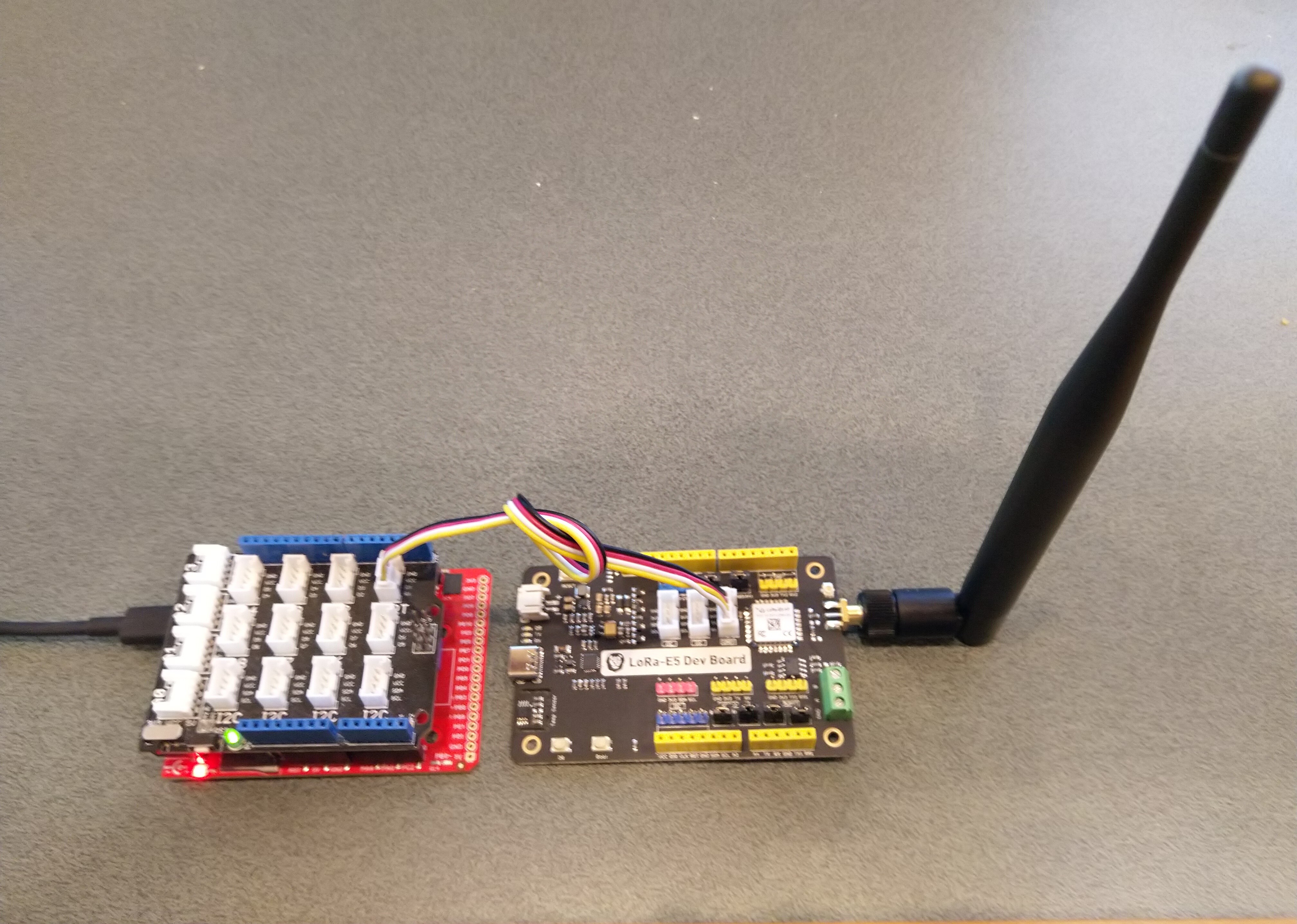
The source code of my nanoFramework C# Seeed LoRa-E5 library is live on GitHub. My initial test rig was based on an STM32F691DISCOVERY board which has an Arduino Uno R3 format socket for a Grove Base Shield V2.0. I then connected it to my LoRa-E5 Development Kit with a Grove – Universal 4 Pin 20cm Unbuckled Cable(TX/RX reversed)

STM32F769I test rig with Seeedstudio Grove Base shield V2 and LoRa-E5 Development Kit

So far the demo application has been running for a couple of weeks

The thread '<No Name>' (0x2) has exited with code 0 (0x0).
devMobile.IoT.SeeedE5LoRaWANDeviceClient starting
12:00:01 Join start Timeout:25 Seconds
12:00:07 Join finish
12:00:07 Send Timeout:10 Seconds payload BCD:010203040506070809
12:00:13 Sleep
12:05:13 Wakeup
12:05:13 Send Timeout:10 Seconds payload BCD:010203040506070809
12:05:20 Sleep
12:10:20 Wakeup
12:10:20 Send Timeout:10 Seconds payload BCD:010203040506070809
12:10:27 Sleep
12:15:27 Wakeup
12:15:27 Send Timeout:10 Seconds payload BCD:010203040506070809
12:15:34 Sleep
...
11:52:40 Wakeup
11:52:40 Send Timeout:10 Seconds payload BCD:010203040506070809
11:52:45 Sleep
11:57:45 Wakeup
11:57:45 Send Timeout:10 Seconds payload BCD:010203040506070809
11:57:52 Sleep
12:02:52 Wakeup
12:02:52 Send Timeout:10 Seconds payload BCD:010203040506070809
12:02:59 Sleep
12:07:59 Wakeup
12:07:59 Send Timeout:10 Seconds payload BCD:010203040506070809
12:08:07 Sleep
12:13:07 Wakeup
12:13:07 Send Timeout:10 Seconds payload BCD:010203040506070809
12:13:14 Sleep

I have tested the Over The Air Activation(OTAA) code and will work on testing the other functionality over the coming week,

public static void Main()
{
   Result result;

   Debug.WriteLine("devMobile.IoT.SeeedE5LoRaWANDeviceClient starting");

   try
   {
      using (SeeedE5LoRaWANDevice device = new SeeedE5LoRaWANDevice())
      {
         result = device.Initialise(SerialPortId, 9600, UartParity.None, 8, UartStopBitCount.One);
         if (result != Result.Success)
         {
            Debug.WriteLine($"Initialise failed {result}");
            return;
         }

#if CONFIRMED
         device.OnMessageConfirmation += OnMessageConfirmationHandler;
#endif
         device.OnReceiveMessage += OnReceiveMessageHandler;

#if RESET
         Debug.WriteLine($"{DateTime.UtcNow:hh:mm:ss} Reset");
         result = device.Reset();
         if (result != Result.Success)
         {
            Debug.WriteLine($"Reset failed {result}");
            return;
          }
#endif

         Debug.WriteLine($"{DateTime.UtcNow:hh:mm:ss} Region {Region}");
         result = device.Region(Region);
         if (result != Result.Success)
         {
            Debug.WriteLine($"Region failed {result}");
            return;
         }

         Debug.WriteLine($"{DateTime.UtcNow:hh:mm:ss} ADR On");
         result = device.AdrOn();
         if (result != Result.Success)
         {
            Debug.WriteLine($"ADR on failed {result}");
            return;
         }

               Debug.WriteLine($"{DateTime.UtcNow:hh:mm:ss} Port");
               result = device.Port(MessagePort);
               if (result != Result.Success)
               {
                  Debug.WriteLine($"Port on failed {result}");
                  return;
               }

#if OTAA
               Debug.WriteLine($"{DateTime.UtcNow:hh:mm:ss} OTAA");
               result = device.OtaaInitialise(Config.AppEui, Config.AppKey);
               if (result != Result.Success)
               {
                  Debug.WriteLine($"OTAA Initialise failed {result}");
                  return;
               }
#endif

#if ABP
               Debug.WriteLine($"{DateTime.UtcNow:hh:mm:ss} ABP");
               result = device.AbpInitialise(DevAddress, NwksKey, AppsKey);
               if (result != Result.Success)
               {
                  Debug.WriteLine($"ABP Initialise failed {result}");
                  return;
               }
#endif

               Debug.WriteLine($"{DateTime.UtcNow:hh:mm:ss} Join start Timeout:{JoinTimeOut.TotalSeconds} Seconds");
               result = device.Join(true, JoinTimeOut);
               if (result != Result.Success)
               {
                  Debug.WriteLine($"Join failed {result}");
                  return;
               }
               Debug.WriteLine($"{DateTime.UtcNow:hh:mm:ss} Join finish");

               while (true)
               {
#if PAYLOAD_BCD
                  Debug.WriteLine($"{DateTime.UtcNow:hh:mm:ss} Send Timeout:{SendTimeout.TotalSeconds} Seconds payload BCD:{PayloadBcd}");
#if CONFIRMED
                  result = device.Send(PayloadBcd, true, SendTimeout);
#else
                  result = device.Send(PayloadBcd, false, SendTimeout);
#endif
#endif

#if PAYLOAD_BYTES
                  Debug.WriteLine($"{DateTime.UtcNow:hh:mm:ss} Send Timeout:{SendTimeout.TotalSeconds} Seconds payload Bytes:{BitConverter.ToString(PayloadBytes)}");
#if CONFIRMED
                  result = device.Send(PayloadBytes, true, SendTimeout);
#else
                  result = device.Send(PayloadBytes, false, SendTimeout);
#endif
#endif
                  if (result != Result.Success)
                  {
                     Debug.WriteLine($"Send failed {result}");
                  }

                  Debug.WriteLine($"{DateTime.UtcNow:hh:mm:ss} Sleep");
                  result = device.Sleep();
                  if (result != Result.Success)
                  {
                     Debug.WriteLine($"Sleep failed {result}");
                     return;
                  }

                  Thread.Sleep(300000);

                  Debug.WriteLine($"{DateTime.UtcNow:hh:mm:ss} Wakeup");
                  result = device.Wakeup();
                  if (result != Result.Success)
                  {
                     Debug.WriteLine($"Wakeup failed {result}");
                     return;
                  }
               }
            }
         }
         catch (Exception ex)
         {
            Debug.WriteLine(ex.Message);
         }
      }

The Region, ADR and OtaaInitialise methods only need to be called when the device is first powered up and after a reset.

The library works but should be treated as late beta.

Seeed LoRa-E5 Wakeup

Over the last week I have been working on GHI Electronics TinyCLR-0SV2RC1 and nanoFramework and C# libraries for the LoRa-E5 module from Seeedstudio.

The initial test rigs were based on an Arduino Uno R3 format socket for a Grove Base Shield V2.0 which I then connected to my LoRa-E5 Development Kit with a Grove – Universal 4 Pin 20cm Unbuckled Cable(TX/RX reversed)

Fezduino device with Seeedstudio Grove base shield and LoRa-E5 development Kit

While testing I noticed that every so often that when I restarted the test application application, rebooted or power cycled the nanoFramework or Fezduino device the Seeed LoRa-E5 wouldn’t connect.

After some trial and error manually entering commands in Terraterm I found that if the LoRa-E5 had been put to sleep (AT+LOWPOWER) the response to the first command (usually setting the region with AT+DR=AS923) would be unexpected. The problem was more obvious when I used devices that were configured for “soak testing” because the gap between messages was much longer (5min vs. 30 seconds)

AT+VER
+VER: 4.0.11

AT+UART=TIMEOUT, 30000 
+UART: TIMEOUT, 30000

AT+LOWPOWER
+LOWPOWER: SLEEP

AT+DR=AS923
AT+LOWPOWER: WAKEUP

AT+DR=AS923
+DR: AS923

AT+JOIN FORCE
+JOIN: Start
+JOIN: FORCE
+JOIN: Network joined
+JOIN: NetID 000013 DevAddr 26:08:46:70
+JOIN: Done

AT+CMSGHEX="00 01 02 03 04"
+CMSGHEX: Start
+CMSGHEX: Wait ACK
+CMSGHEX: FPENDING
+CMSGHEX: ACK Received
+CMSGHEX: RXWIN1, RSSI -29, SNR 9.0
+CMSGHEX: Done

After trying several different approaches which weren’t very robust I settled on sending a wakeup command (AT+LOWPOWER: WAKEUP with an expected response of +LOWPOWER: WAKEUP) and ignoring the result.

public Result Initialise(string serialPortId, int baudRate, UartParity serialParity, int dataBits, UartStopBitCount stopBitCount)
{
    if ((serialPortId == null) || (serialPortId == ""))
    {
       throw new ArgumentException("Invalid SerialPortId", "serialPortId");
    }
    if ((baudRate < BaudRateMinimum) || (baudRate > BaudRateMaximum))
    {
       throw new ArgumentException("Invalid BaudRate", "baudRate");
    }

   serialDevice = UartController.FromName(serialPortId);

   // set parameters
   serialDevice.SetActiveSettings(new UartSetting()
   {
      BaudRate = baudRate,
      Parity = serialParity,
      StopBits = stopBitCount,
      Handshaking = UartHandshake.None,
      DataBits = dataBits
   });

   serialDevice.Enable();

   atCommandExpectedResponse = string.Empty;

   serialDevice.DataReceived += SerialDevice_DataReceived;

   // Ignoring the return from this is intentional
   this.SendCommand("+LOWPOWER: WAKEUP", "AT+LOWPOWER: WAKEUP", SendTimeoutMinimum);

   return Result.Success;
}

This modification has been applied to both libraries. I will also check that the RAK811 nanoFramework and TinyCLR libraries don’t have the same issue.

TinyCLR OS V2 Seeed LoRa-E5 on Github

The source code of my GHI Electronics TinyCLR-0SV2RC1 Seeed LoRa-E5 library is live on GitHub. The initial test harness uses a Fezduinoand a LoRa-E5 Development Kit.

Fezduino device with Seeedstudio Grove base shield and LoRa-E5 development Kit

So far the demo application has been running for 24 hours

The thread '<No Name>' (0x2) has exited with code 0 (0x0).
devMobile.IoT.SeeedE5LoRaWANDeviceClient starting
12:00:01 Join start Timeout:25 Seconds
12:00:07 Join finish
12:00:07 Send Timeout:10 Seconds payload BCD:010203040506070809
12:00:13 Sleep
12:05:13 Wakeup
12:05:13 Send Timeout:10 Seconds payload BCD:010203040506070809
12:05:20 Sleep
12:10:20 Wakeup
12:10:20 Send Timeout:10 Seconds payload BCD:010203040506070809
12:10:27 Sleep
12:15:27 Wakeup
12:15:27 Send Timeout:10 Seconds payload BCD:010203040506070809
12:15:34 Sleep
...
11:52:40 Wakeup
11:52:40 Send Timeout:10 Seconds payload BCD:010203040506070809
11:52:45 Sleep
11:57:45 Wakeup
11:57:45 Send Timeout:10 Seconds payload BCD:010203040506070809
11:57:52 Sleep
12:02:52 Wakeup
12:02:52 Send Timeout:10 Seconds payload BCD:010203040506070809
12:02:59 Sleep
12:07:59 Wakeup
12:07:59 Send Timeout:10 Seconds payload BCD:010203040506070809
12:08:07 Sleep
12:13:07 Wakeup
12:13:07 Send Timeout:10 Seconds payload BCD:010203040506070809
12:13:14 Sleep

I have tested the Over The Air Activation(OTAA) code and will work on testing the other functionality over the coming week,

public static void Main()
{
   Result result;

   Debug.WriteLine("devMobile.IoT.SeeedE5LoRaWANDeviceClient starting");

   try
   {
      using (SeeedE5LoRaWANDevice device = new SeeedE5LoRaWANDevice())
      {
         result = device.Initialise(SerialPortId, 9600, UartParity.None, 8, UartStopBitCount.One);
         if (result != Result.Success)
         {
            Debug.WriteLine($"Initialise failed {result}");
            return;
         }

#if CONFIRMED
         device.OnMessageConfirmation += OnMessageConfirmationHandler;
#endif
         device.OnReceiveMessage += OnReceiveMessageHandler;

#if RESET
         Debug.WriteLine($"{DateTime.UtcNow:hh:mm:ss} Reset");
         result = device.Reset();
         if (result != Result.Success)
         {
            Debug.WriteLine($"Reset failed {result}");
            return;
          }
#endif

         Debug.WriteLine($"{DateTime.UtcNow:hh:mm:ss} Region {Region}");
         result = device.Region(Region);
         if (result != Result.Success)
         {
            Debug.WriteLine($"Region failed {result}");
            return;
         }

         Debug.WriteLine($"{DateTime.UtcNow:hh:mm:ss} ADR On");
         result = device.AdrOn();
         if (result != Result.Success)
         {
            Debug.WriteLine($"ADR on failed {result}");
            return;
         }

               Debug.WriteLine($"{DateTime.UtcNow:hh:mm:ss} Port");
               result = device.Port(MessagePort);
               if (result != Result.Success)
               {
                  Debug.WriteLine($"Port on failed {result}");
                  return;
               }

#if OTAA
               Debug.WriteLine($"{DateTime.UtcNow:hh:mm:ss} OTAA");
               result = device.OtaaInitialise(Config.AppEui, Config.AppKey);
               if (result != Result.Success)
               {
                  Debug.WriteLine($"OTAA Initialise failed {result}");
                  return;
               }
#endif

#if ABP
               Debug.WriteLine($"{DateTime.UtcNow:hh:mm:ss} ABP");
               result = device.AbpInitialise(DevAddress, NwksKey, AppsKey);
               if (result != Result.Success)
               {
                  Debug.WriteLine($"ABP Initialise failed {result}");
                  return;
               }
#endif

               Debug.WriteLine($"{DateTime.UtcNow:hh:mm:ss} Join start Timeout:{JoinTimeOut.TotalSeconds} Seconds");
               result = device.Join(true, JoinTimeOut);
               if (result != Result.Success)
               {
                  Debug.WriteLine($"Join failed {result}");
                  return;
               }
               Debug.WriteLine($"{DateTime.UtcNow:hh:mm:ss} Join finish");

               while (true)
               {
#if PAYLOAD_BCD
                  Debug.WriteLine($"{DateTime.UtcNow:hh:mm:ss} Send Timeout:{SendTimeout.TotalSeconds} Seconds payload BCD:{PayloadBcd}");
#if CONFIRMED
                  result = device.Send(PayloadBcd, true, SendTimeout);
#else
                  result = device.Send(PayloadBcd, false, SendTimeout);
#endif
#endif

#if PAYLOAD_BYTES
                  Debug.WriteLine($"{DateTime.UtcNow:hh:mm:ss} Send Timeout:{SendTimeout.TotalSeconds} Seconds payload Bytes:{BitConverter.ToString(PayloadBytes)}");
#if CONFIRMED
                  result = device.Send(PayloadBytes, true, SendTimeout);
#else
                  result = device.Send(PayloadBytes, false, SendTimeout);
#endif
#endif
                  if (result != Result.Success)
                  {
                     Debug.WriteLine($"Send failed {result}");
                  }

                  Debug.WriteLine($"{DateTime.UtcNow:hh:mm:ss} Sleep");
                  result = device.Sleep();
                  if (result != Result.Success)
                  {
                     Debug.WriteLine($"Sleep failed {result}");
                     return;
                  }

                  Thread.Sleep(300000);

                  Debug.WriteLine($"{DateTime.UtcNow:hh:mm:ss} Wakeup");
                  result = device.Wakeup();
                  if (result != Result.Success)
                  {
                     Debug.WriteLine($"Wakeup failed {result}");
                     return;
                  }
               }
            }
         }
         catch (Exception ex)
         {
            Debug.WriteLine(ex.Message);
         }
      }

The Region, ADR and OtaaInitialise methods only need to be called when the device is first powered up and after a reset.

The library works but should be treated as late beta.

RAK811/RAK4200 AS923 Join Channels

When running an application which used my TinyCLR V2 RAK811 Module library on a FezDuino with a modified RAK811 LPWAN Evaluation Board(EVB) most join attempts on my Things Industries(TTI) instance would fail. This was a bit odd as connecting to The Things Network(TTN) was pretty reliable.

The thread '<No Name>' (0x2) has exited with code 0 (0x0).
devMobile.IoT.Rak811LoRaWanDeviceClient starting
12:00:12 Region AS923
12:00:12 ADR On
12:00:12 Unconfirmed
12:00:12 OTAA
12:00:13 Join start Timeout:30Sec
Join failed 26
The thread '<No Name>' (0x1) has exited with code 0 (0x0).
Done.

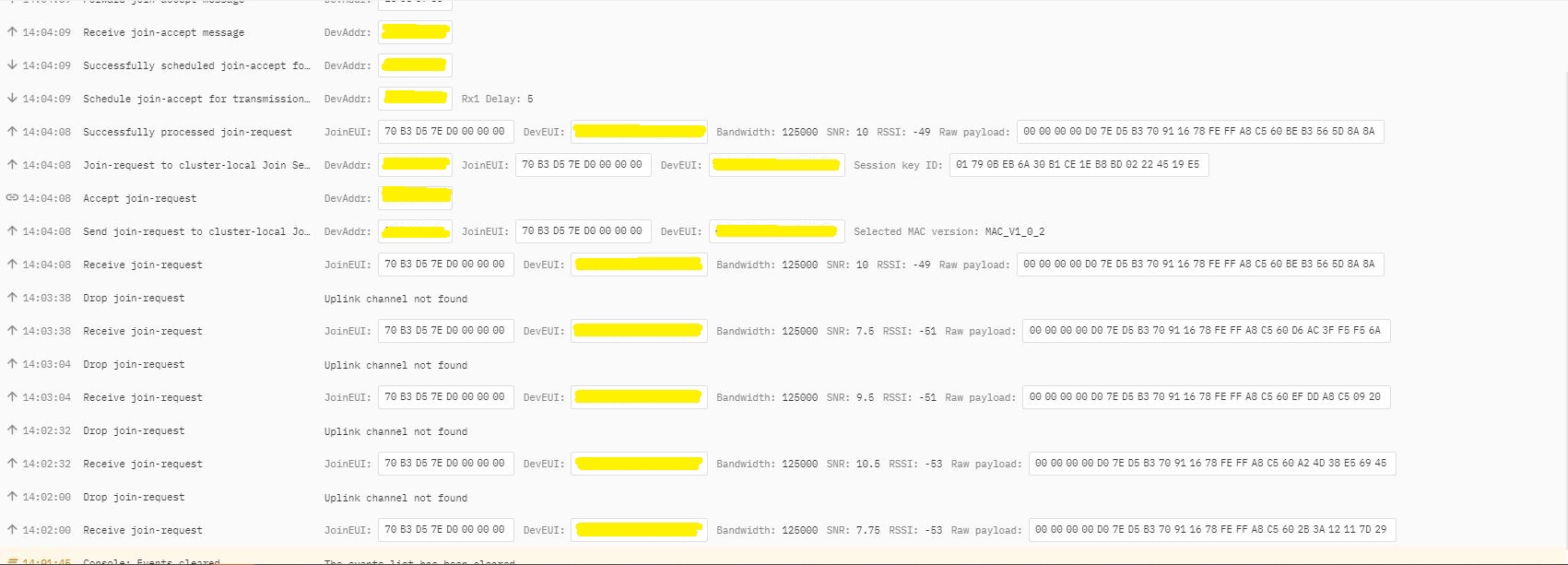
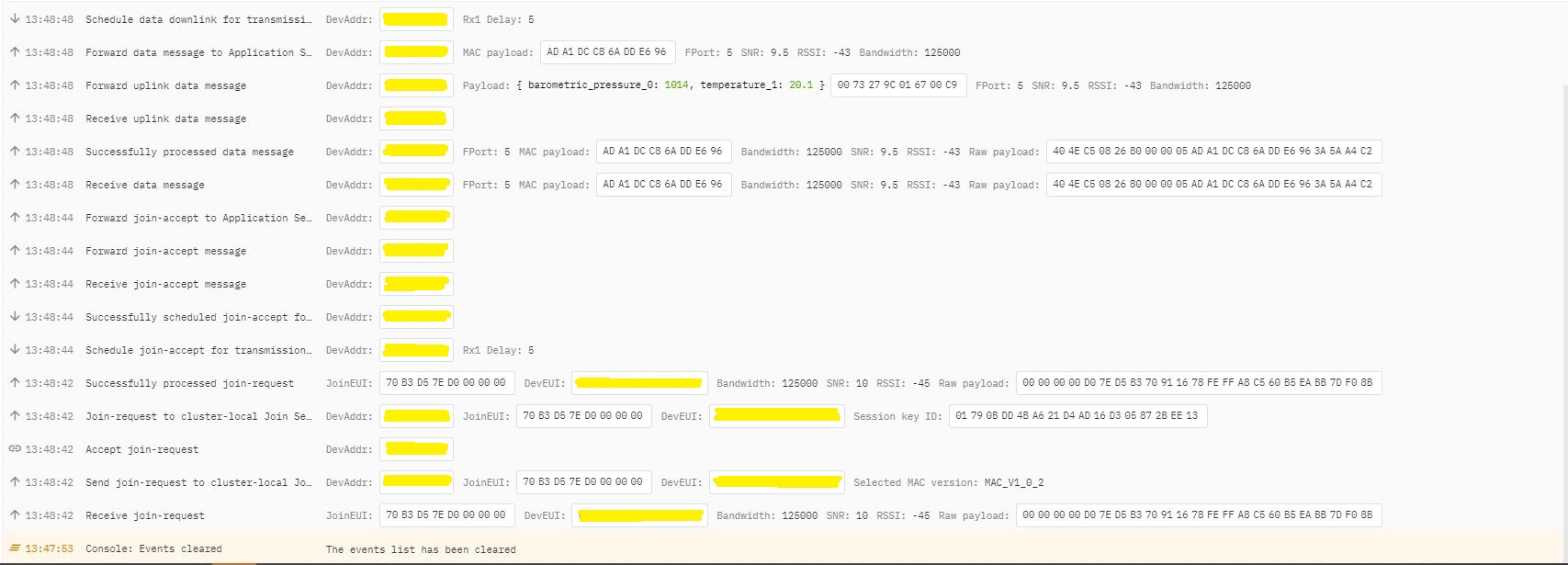
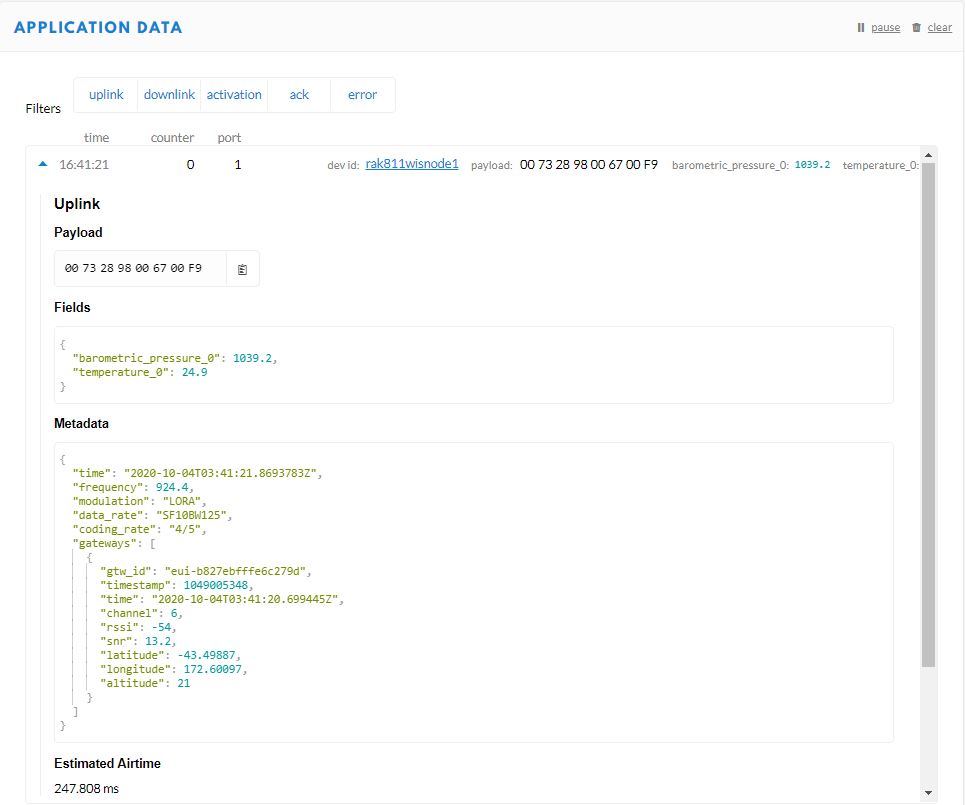
In TTI end device live data tab I could see the the joins attempts were failing with “Uplink channel Not found”

The Things Industries device live data tab “uplink channel not found” failures
The Things Industries device live data tab “uplink channel not found” detail

Initially I assumed this was an issue with my configuration of the RAKwireless RAK7258 gateway in my office that I was using for testing. After some discussions with a helpful TTI support person they suggested that I try disabling all bar the first two channels the RAK811 module was configured to use then see if worked.

I modified the intialise method of my TinyCLR V2 RAK811 Module library to disable all bar the first two channels

result = SendCommand("OK", "at+set_config=lora:ch_mask:2:0", CommandTimeoutDefault);
if (result != Result.Success)
{
#if DIAGNOSTICS
   Debug.WriteLine($" {DateTime.UtcNow:hh:mm:ss} at+set_config=lora:ch_mask:2:0 {result}");
#endif
   return result;
}

result = SendCommand("OK", "at+set_config=lora:ch_mask:3:0", CommandTimeoutDefault);
if (result != Result.Success)
{
#if DIAGNOSTICS
   Debug.WriteLine($" {DateTime.UtcNow:hh:mm:ss} at+set_config=lora:ch_mask:3:0 {result}");
#endif
   return result;
}

result = SendCommand("OK", "at+set_config=lora:ch_mask:4:0", CommandTimeoutDefault);
if (result != Result.Success)
{
#if DIAGNOSTICS
   Debug.WriteLine($" {DateTime.UtcNow:hh:mm:ss} at+set_config=lora:ch_mask:4:0 {result}");
#endif
   return result;
}

result = SendCommand("OK", "at+set_config=lora:ch_mask:5:0", CommandTimeoutDefault);
if (result != Result.Success)
{
#if DIAGNOSTICS
    Debug.WriteLine($" {DateTime.UtcNow:hh:mm:ss} at+set_config=lora:ch_mask:5:0 {result}");
#endif
   return result;
}

result = SendCommand("OK", "at+set_config=lora:ch_mask:6:0", CommandTimeoutDefault);
if (result != Result.Success)
{
#if DIAGNOSTICS
   Debug.WriteLine($" {DateTime.UtcNow:hh:mm:ss} at+set_config=lora:ch_mask:6:0 {result}");
#endif
   return result;
}

result = SendCommand("OK", "at+set_config=lora:ch_mask:7:0", CommandTimeoutDefault);
if (result != Result.Success)
{
#if DIAGNOSTICS
   Debug.WriteLine($" {DateTime.UtcNow:hh:mm:ss} at+set_config=lora:ch_mask:7:0 {result}");
#endif
   return result;
}

After modifying the code my Fezduino joined reliably.

The thread ” (0x2) has exited with code 0 (0x0).
devMobile.IoT.Rak811LoRaWanDeviceClient starting
12:00:12 Region AS923
12:00:12 ADR On
12:00:12 Unconfirmed
12:00:12 OTAA
12:00:13 Join start Timeout:30Sec
12:00:18 Join finish
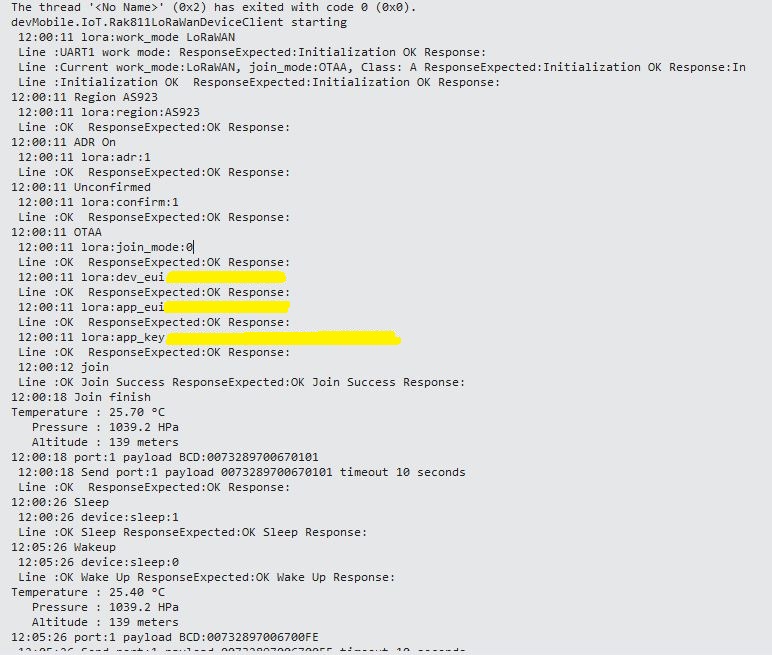
Temperature : 19.9 °C
Pressure : 1014.0 HPa
Altitude : 143 meters
12:00:19 port:5 payload BCD:0073279C016700C8
12:00:44 Sleep
12:01:44 Wakeup
Temperature : 20.1 °C
Pressure : 1014.0 HPa
Altitude : 143 meters
12:01:44 port:5 payload BCD:0073279C016700C9
12:02:09 Sleep

The Things Industries device live data tab successful join.

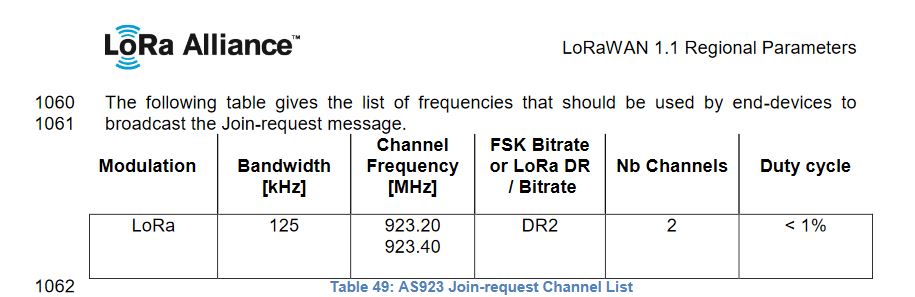
After some further discussion with TTI support it looks like the RAK811 module doesn’t send join requests on the frequencies specified for the AS923 region in the LoRaWAN™1.1Regional Parameters.

LoRaWAN Regional Parameters AS923 Join-request frequencies

After confirming the join-request channel issue I went back to the RAKwireless forums with some new terms to search for and found that others were having a similar issue but with RAK4200 modules. My “best guess” is that the TTI implementation is more strict about join-request frequencies than the TTN

Low Power Payload (LPP) Encoder

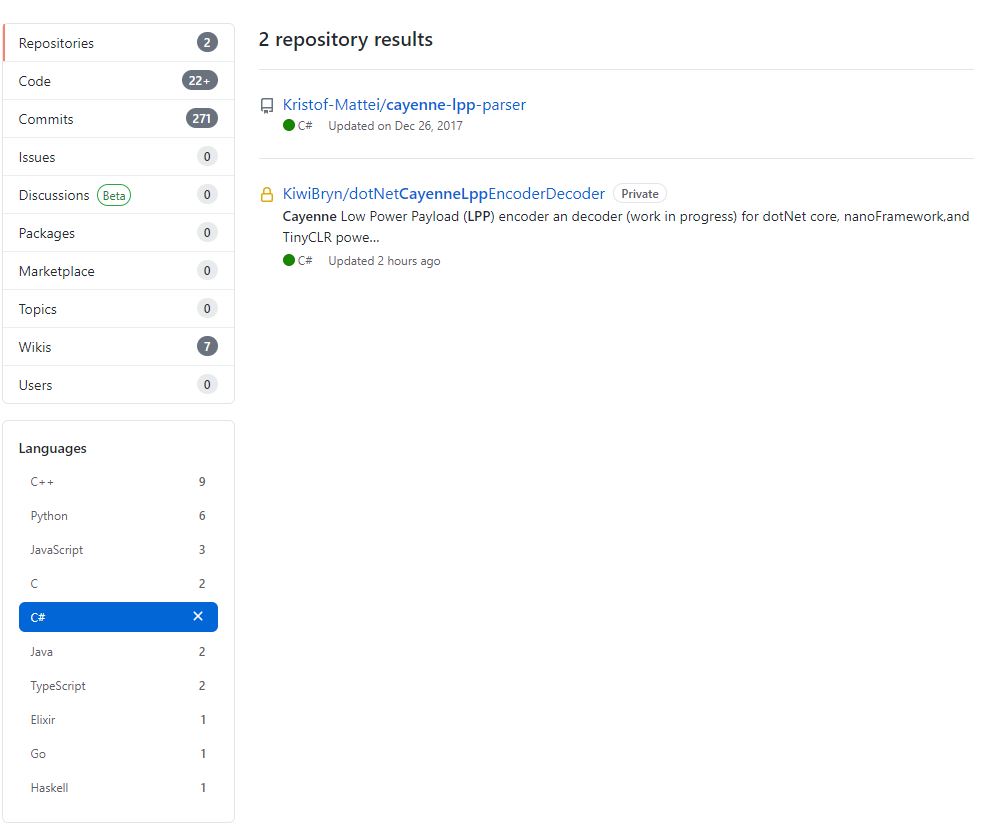
I originally started building my own Low Power Protocol(LPP) encoder because I could only find one other Github repository with a C# implementation. There hadn’t been any updates for a while and I wasn’t confident that I could make the code work on my nanoFramework and TinyCLR devices.

I started with the sample Mbed C code and did a largely mechanical conversion to C#. I then revisited some of the mathematics where floating point values were converted to an integer.

The original C++ code (understandably) had some language specific approaches which didn’t map well into C#. I then translated the code to C#

public void TemperatureAdd(byte channel, float celsius)
{
   if ((index + TemperatureSize) > buffer.Length)
   {
      throw new ApplicationException("TemperatureAdd insufficent buffer capacity");
   }

   short val = (short)(celsius * 10);

   buffer[index++] = channel;
   buffer[index++] = (byte)DataType.Temperature;
   buffer[index++] = (byte)(val >> 8);
   buffer[index++] = (byte)val;
}

One of my sensors was sending values with more decimal places than LPP supported and I noticed the value was not getting rounded e.g. 2.99 ->2.9 not 3.0 etc. So I revised my implementation to use Math.Round (which is supported by the nanoFramework and TinyCLR).

public void DigitalInputAdd(byte channel, bool value)
{
   #region Guard conditions
   if ((channel < Constants.ChannelMinimum) || (channel > Constants.ChannelMaximum))
   {
      throw new ArgumentException($"channel must be between {Constants.ChannelMinimum} and {Constants.ChannelMaximum}", "channel");
   }

   if ((index + Constants.DigitalInputSize) > buffer.Length)
   {
      throw new ApplicationException($"Datatype DigitalInput insufficent buffer capacity, {buffer.Length - index} bytes available");
   }
   #endregion

   buffer[index++] = channel;
   buffer[index++] = (byte)Enumerations.DataType.DigitalInput;

   // I know this is fugly but it works on all platforms
   if (value)
   {
      buffer[index++] = 1;
   }
   else
   {
     buffer[index++] = 0;
   }
 }

I then extracted out the channel and buffer size validation but I’m not certain this makes the code anymore readable/understandable

public void DigitalInputAdd(byte channel, bool value)
{
   IsChannelNumberValid(channel);
   IsBufferSizeSufficient(Enumerations.DataType.DigitalInput);

   buffer[index++] = channel;
   buffer[index++] = (byte)Enumerations.DataType.DigitalInput;

   // I know this is fugly but it works on all platforms
   if (value)
   {
      buffer[index++] = 1;
   }
   else
   {
      buffer[index++] = 0;
   }
}

The code runs on netCore, nanoFramework, and TinyCLRV2 just needs a few more unit tests and it will be ready for production. I started with an LPP encoder which I needed for one of my applications. I’m also working an approach for a decoder which will run on all my target platforms with minimal modification or compile time directives.

Low Power Payload (LPP) Encoder

Reducing the size of message payloads is important for LoRa/LoRaWAN communications, as it reduces power consumption and bandwidth usage. One of the more common formats is Low Power Payload(LPP) which is based on the IPSO Alliance Smart Objects Guidelines and is natively supported by The Things Network(TTN).

 private enum DataType : byte
{
   DigitalInput = 0, // 1 byte
   DigitialOutput = 1, // 1 byte
   AnalogInput = 2, // 2 bytes, 0.01 signed
   AnalogOutput = 3, // 2 bytes, 0.01 signed
   Luminosity = 101, // 2 bytes, 1 lux unsigned
   Presence = 102, // 1 byte, 1
   Temperature = 103, // 2 bytes, 0.1°C signed
   RelativeHumidity = 104, // 1 byte, 0.5% unsigned
   Accelerometer = 113, // 2 bytes per axis, 0.001G
   BarometricPressure = 115, // 2 bytes 0.1 hPa Unsigned
   Gyrometer = 134, // 2 bytes per axis, 0.01 °/s
   Gps = 136, // 3 byte lon/lat 0.0001 °, 3 bytes alt 0.01m
}

My implementation was “inspired” by some C/C++ sample code. The first step was to allocate a buffer to store the byte encoded values. I pre allocated the buffer to try and reduce the impacts of garbage collection. The code uses a manually incremented index into the buffer for performance reasons, plus the inconsistent support of System.Collections.Generic and Language Integrated Query(LINQ) on my three embedded platforms. The maximum length message that can be sent is limited by coding rate, duty cycle and bandwidth of the LoRa channel.

public Encoder(byte bufferSize)
{
   if ((bufferSize < BufferSizeMinimum) || ( bufferSize > BufferSizeMaximum))
   {
      throw new ArgumentException($"BufferSize must be between {BufferSizeMinimum} and {BufferSizeMaximum}", "bufferSize");
   }

   buffer = new byte[bufferSize];
}

For a simple data types like a digital input a single byte (True or False ) is used. The channel parameter is included so that multiple values of the same data type can be included in a message.

public void DigitalInputAdd(byte channel, bool value)
{
   if ((index + DigitalInputSize) > buffer.Length)
   {
     throw new ApplicationException("DigitalInputAdd insufficent buffer capacity");
   }

   buffer[index++] = channel;
   buffer[index++] = (byte)DataType.DigitalInput;
   // I know this is fugly but it works on all platforms
   if (value)
   {
      buffer[index++] = 1;
   }
   else
   {
      buffer[index++] = 0;
   }
}

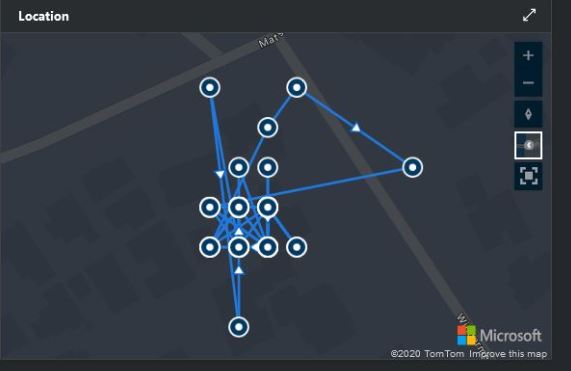
For more complex data types like a Global Positioning System(GPS) location (Latitude, Longitude and Altitude) the values are converted to 32bit signed integers and only 3 of the 4 bytes are used.

public void GpsAdd(byte channel, float latitude, float longitude, float meters)
{
   if ((index + GpsSize) > buffer.Length)
   {
     throw new ApplicationException("GpsAdd insufficent buffer capacity");
   }

   int lat = (int)(latitude * 10000);
   int lon = (int)(longitude * 10000);
   int alt = (int)(meters * 100);

   buffer[index++] = channel;
   buffer[index++] = (byte)DataType.Gps;

   buffer[index++] = (byte)(lat >> 16);
   buffer[index++] = (byte)(lat >> 8);
   buffer[index++] = (byte)lat;
   buffer[index++] = (byte)(lon >> 16);
   buffer[index++] = (byte)(lon >> 8);
   buffer[index++] = (byte)lon;
   buffer[index++] = (byte)(alt >> 16);
   buffer[index++] = (byte)(alt >> 8);
   buffer[index++] = (byte)alt;
}
Azure IoT Central map position granularity

Before the message can be sent it needs to be converted to its Binary Coded Decimal(BCD) representation and all formatting characters removed.

public string Bcd()
{
   StringBuilder payloadBcd = new StringBuilder(BitConverter.ToString(buffer, 0, index));

   payloadBcd = payloadBcd.Replace("-", "");

   return payloadBcd.ToString();
}

TTN Device Data Display
Visual Studio 2019 Debug output

The implementation had to be revised a couple of times so It would work with desktop and GHI Electronics TinyCLRV2 powered devices. There maybe some modifications required as I port it to nanoFramework and Wilderness Labs Meadow devices.

RFM9X.TinyCLR V2 RC2 on Github

The source code of RC2 of my GHI Electronics TinyCLR-0SV2RC1 RFM9X/SX127X library is live on GitHub. The sample application now supports Fezduino(dragino_LoRa shield for Arduino + others), Fezportal and the SC2010 Dev board (with CascoLogix LoRa Click) . I will add FezFeather and Fezstick support soon.

//---------------------------------------------------------------------------------
// Copyright (c) March/April 2020, devMobile Software
//
// Licensed under the Apache License, Version 2.0 (the "License");
// you may not use this file except in compliance with the License.
// You may obtain a copy of the License at
//
//     http://www.apache.org/licenses/LICENSE-2.0
//
// Unless required by applicable law or agreed to in writing, software
// distributed under the License is distributed on an "AS IS" BASIS,
// WITHOUT WARRANTIES OR CONDITIONS OF ANY KIND, either express or implied.
// See the License for the specific language governing permissions and
// limitations under the License.
//
// Need one of TINYCLR_V2_SC20100DEV_MIKROBUS_1/TINYCLR_V2_SC20100DEV_MIKROBUS_2/TINYCLR_V2_FEZDUINO/TINYCLR_V2_FEZPORTAL defined
//---------------------------------------------------------------------------------
namespace devMobile.IoT.Rfm9x.LoRaDeviceClient
{
	using System;
	using System.Diagnostics;
	using System.Text;
	using System.Threading;

	using GHIElectronics.TinyCLR.Pins;

	using devMobile.IoT.Rfm9x;

	class Program
   {
      static void Main()
      {
#if TINYCLR_V2_SC20100DEV_MIKROBUS_1 || TINYCLR_V2_SC20100DEV_MIKROBUS_2
			const string DeviceName = "SC20100DEVLoRa";
#endif
#if TINYCLR_V2_FEZDUINO
			const string DeviceName = "FezduinoLoRa";
#endif
#if TINYCLR_V2_FEZPORTAL
			const string DeviceName = "FezportalLoRa";
#endif
#if ADDRESSED_MESSAGES_PAYLOAD
			const string HostName = "LoRaIoT1";
#endif
			const double Frequency = 915000000.0;
			byte MessageCount = System.Byte.MaxValue;
#if TINYCLR_V2_SC20100DEV_MIKROBUS_1
         Rfm9XDevice rfm9XDevice = new Rfm9XDevice(SC20100.SpiBus.Spi3, SC20100.GpioPin.PD3, SC20100.GpioPin.PD4, SC20100.GpioPin.PC5);
#endif
#if TINYCLR_V2_SC20100DEV_MIKROBUS_2
			Rfm9XDevice rfm9XDevice = new Rfm9XDevice(SC20100.SpiBus.Spi3, SC20100.GpioPin.PD14, SC20100.GpioPin.PD15, SC20100.GpioPin.PA8);
#endif
#if TINYCLR_V2_FEZDUINO
			Rfm9XDevice rfm9XDevice = new Rfm9XDevice(SC20100.SpiBus.Spi6, SC20100.GpioPin.PB1, SC20100.GpioPin.PA15, SC20100.GpioPin.PA1);
#endif
#if TINYCLR_V2_FEZPORTAL
         Rfm9XDevice rfm9XDevice = new Rfm9XDevice(SC20100.SpiBus.Spi3, SC20100.GpioPin.PC13, SC20100.GpioPin.PD4,SC20100.GpioPin.PC2);
#endif

			rfm9XDevice.Initialise(Frequency, paBoost: true, rxPayloadCrcOn: true);
#if DEBUG
			rfm9XDevice.RegisterDump();
#endif

			rfm9XDevice.OnReceive += Rfm9XDevice_OnReceive;
#if ADDRESSED_MESSAGES_PAYLOAD
			rfm9XDevice.Receive(UTF8Encoding.UTF8.GetBytes(DeviceName));
#else
			rfm9XDevice.Receive();
#endif
			rfm9XDevice.OnTransmit += Rfm9XDevice_OnTransmit;

			Thread.Sleep(10000);

			while (true)
			{
				string messageText = string.Format("Hello from {0} ! {1}", DeviceName, MessageCount);
				MessageCount -= 1;

				byte[] messageBytes = UTF8Encoding.UTF8.GetBytes(messageText);
				Debug.WriteLine($"{DateTime.Now:HH:mm:ss}-TX {messageBytes.Length} byte message {messageText}");
#if ADDRESSED_MESSAGES_PAYLOAD
				rfm9XDevice.Send(UTF8Encoding.UTF8.GetBytes(HostName), messageBytes);
#else
				rfm9XDevice.Send(messageBytes);
#endif
				Thread.Sleep(10000);
			}
		}

		private static void Rfm9XDevice_OnReceive(object sender, Rfm9XDevice.OnDataReceivedEventArgs e)
		{
			try
			{
				string messageText = UTF8Encoding.UTF8.GetString(e.Data);

#if ADDRESSED_MESSAGES_PAYLOAD
				string addressText = UTF8Encoding.UTF8.GetString(e.Address);

				Debug.WriteLine($@"{DateTime.Now:HH:mm:ss}-RX From {addressText} PacketSnr {e.PacketSnr} Packet RSSI {e.PacketRssi}dBm RSSI {e.Rssi}dBm = {e.Data.Length} byte message ""{messageText}""");
#else
				Debug.WriteLine($@"{DateTime.Now:HH:mm:ss}-RX PacketSnr {e.PacketSnr} Packet RSSI {e.PacketRssi}dBm RSSI {e.Rssi}dBm = {e.Data.Length} byte message ""{messageText}""");
#endif
			}
			catch (Exception ex)
			{
				Debug.WriteLine(ex.Message);
			}
		}

		private static void Rfm9XDevice_OnTransmit(object sender, Rfm9XDevice.OnDataTransmitedEventArgs e)
		{
			Debug.WriteLine($"{DateTime.Now:HH:mm:ss}-TX Done");
		}
	}
}

The library works but should be treated as late beta.