nanoFramework LoRa library Part5

Receive Basic

This code implements the reception of messages builds on my transmit basic sample. I had to add a simple for loop to replace un-printable characters in the received message with spaces as nanoFramework UTF8Encoding.UTF8.GetString was throwing exceptions.

23:06:19.172 -> Sending HeLoRa World! 94
23:06:29.556 -> Sending HeLoRa World! 96
23:06:40.274 -> Sending HeLoRa World! 98
23:06:51.064 -> Sending HeLoRa World! 100
23:07:02.012 -> Sending HeLoRa World! 102
23:07:12.534 -> Sending HeLoRa World! 104
23:07:17.657 -> Message: ⸮LoRaIoT1Maduino2at 50.2,ah 90,wsa 4,wsg 11,wd 184.13,r 0.00,
23:07:17.725 -> Length: 61
23:07:17.725 -> FirstChar: 136
23:07:17.793 -> RSSI: -81
23:07:17.793 -> Snr: 9.50
23:07:17.793 -> 
23:07:23.216 -> Sending HeLoRa World! 106
23:07:34.228 -> Sending HeLoRa World! 108
23:07:44.907 -> Sending HeLoRa World! 110
23:07:55.930 -> Sending HeLoRa World! 112

For testing this code I used the same version of the LoRaSetSyncWord example as Transmit Basic

   class Program
   {
#if ST_STM32F429I_DISCOVERY
      private const string SpiBusId = "SPI5";
#endif
#if ESP32_WROOM_32_LORA_1_CHANNEL
      private const string SpiBusId = "SPI1";
#endif

      static void Main()
      {
#if ST_STM32F429I_DISCOVERY
         int chipSelectPinNumber = PinNumber('C', 2);
         int resetPinNumber = PinNumber('C', 3);
#endif
#if ESP32_WROOM_32_LORA_1_CHANNEL
         int chipSelectPinNumber = Gpio.IO16;
#endif

         try
         {
#if ESP32_WROOM_32_LORA_1_CHANNEL
            Configuration.SetPinFunction(Gpio.IO12, DeviceFunction.SPI1_MISO);
            Configuration.SetPinFunction(Gpio.IO13, DeviceFunction.SPI1_MOSI);
            Configuration.SetPinFunction(Gpio.IO14, DeviceFunction.SPI1_CLOCK);
            Rfm9XDevice rfm9XDevice = new Rfm9XDevice(SpiBusId, chipSelectPinNumber);
#endif
#if ST_STM32F429I_DISCOVERY
            Rfm9XDevice rfm9XDevice = new Rfm9XDevice(SpiBusId, chipSelectPinNumber, resetPinNumber);
#endif
             Thread.Sleep(500);

            // Put device into LoRa + Sleep mode
            rfm9XDevice.RegisterWriteByte(0x01, 0b10000000); // RegOpMode 

            // Set the frequency to 915MHz
            byte[] frequencyWriteBytes = { 0xE4, 0xC0, 0x00 }; // RegFrMsb, RegFrMid, RegFrLsb
            rfm9XDevice.RegisterWrite(0x06, frequencyWriteBytes);

            rfm9XDevice.RegisterWriteByte(0x0F, 0x0); // RegFifoRxBaseAddress 

            rfm9XDevice.RegisterWriteByte(0x01, 0b10000101); // RegOpMode set LoRa & RxContinuous

            while (true)
            {
               // Wait until a packet is received, no timeouts in PoC
               Console.WriteLine("Receive-Wait");
               byte irqFlags = rfm9XDevice.RegisterReadByte(0x12); // RegIrqFlags
               while ((irqFlags & 0b01000000) == 0)  // wait until RxDone cleared
               {
                  Thread.Sleep(100);
                  irqFlags = rfm9XDevice.RegisterReadByte(0x12); // RegIrqFlags
                  Console.Write(".");
               }
               Console.WriteLine("");
               Console.WriteLine($"RegIrqFlags 0X{irqFlags:X2}");
               Console.WriteLine("Receive-Message");
               byte currentFifoAddress = rfm9XDevice.RegisterReadByte(0x10); // RegFifiRxCurrent
               rfm9XDevice.RegisterWriteByte(0x0d, currentFifoAddress); // RegFifoAddrPtr

               byte numberOfBytes = rfm9XDevice.RegisterReadByte(0x13); // RegRxNbBytes

               byte[] messageBytes = rfm9XDevice.RegisterRead(0x00, numberOfBytes); // RegFifo

               rfm9XDevice.RegisterWriteByte(0x0d, 0);
               rfm9XDevice.RegisterWriteByte(0x12, 0b11111111); // RegIrqFlags clear all the bits

               // Remove unprintable characters from messages
               for( int index = 0; index < messageBytes.Length; index++)
               {
                  if ((messageBytes[index] < 0x20) || (messageBytes[index] > 0x7E))
                  {
                     messageBytes[index] = 0x20;
                  }
               }

               string messageText = UTF8Encoding.UTF8.GetString(messageBytes, 0, messageBytes.Length);
               Console.WriteLine($"Received {messageBytes.Length} byte message {messageText}");

               Console.WriteLine("Receive-Done");
            }
         }
         catch (Exception ex)
         {
            Console.WriteLine(ex.Message);
         }
      }

#if ST_STM32F429I_DISCOVERY
      static int PinNumber(char port, byte pin)
      {
         if (port < 'A' || port > 'J')
            throw new ArgumentException();

         return ((port - 'A') * 16) + pin;
      }
#endif
   }

The receive code works reliably but has no error detection or correction capability.

The thread '<No Name>' (0x2) has exited with code 0 (0x0).
Receive-Wait
................................................................
RegIrqFlags 0X50
Receive-Message
Received 17 byte message HeLoRa World! 114
Receive-Done
Receive-Wait
.......................................................................................................
RegIrqFlags 0X50
Receive-Message
Received 17 byte message HeLoRa World! 116
Receive-Done
Receive-Wait
.....................
RegIrqFlags 0X50
Receive-Message
Received 60 byte message  LoRaIoT1Maduino2at 50.2,ah 90,wsa 3,wsg 5,wd 178.50,r 0.00,
Receive-Done
Receive-Wait
.......................................................................................
RegIrqFlags 0X50
Receive-Message
Received 17 byte message HeLoRa World! 118
Receive-Done
Receive-Wait

I will look at implementing some sort of carrier-sense multiple access with collision avoidance solution to reduce the number of corrupted messages when two (or possibly more devices) transmit at the same time.

nanoFramework LoRa library Part4B

Transmit Basic Revisited

After finding some possible SPI library issues (April 2020) with my STM32F429 Discovery + Dragino LoRa shield for Arduino test rig I wanted to trial my code on another nanoFramework platform.

I had ordered a Sparkfun LoRa Gateway 1 Channel ESP32 for a LoRaWAN research project from a local supplier and an unexpected “bonus” was that the ESP32 WROOM platform is supported by the nanoFramework.

Sparkfun LoRa Gateway 1 Channel with wire antenna

I am using this in conjunction with my Armtronix IA005 SX1276 loRa node and my STM32F429 Discovery + Dragino LoRa shield for Arduino test rig.

STM32F429 Discovery+ Dragino LoRa shield with Armtronix device

The code now works on STM32F429 Discovery and ESP32 WROOM platforms. (manual update nanoFramework.Hardware.Esp32 NuGet reference required)

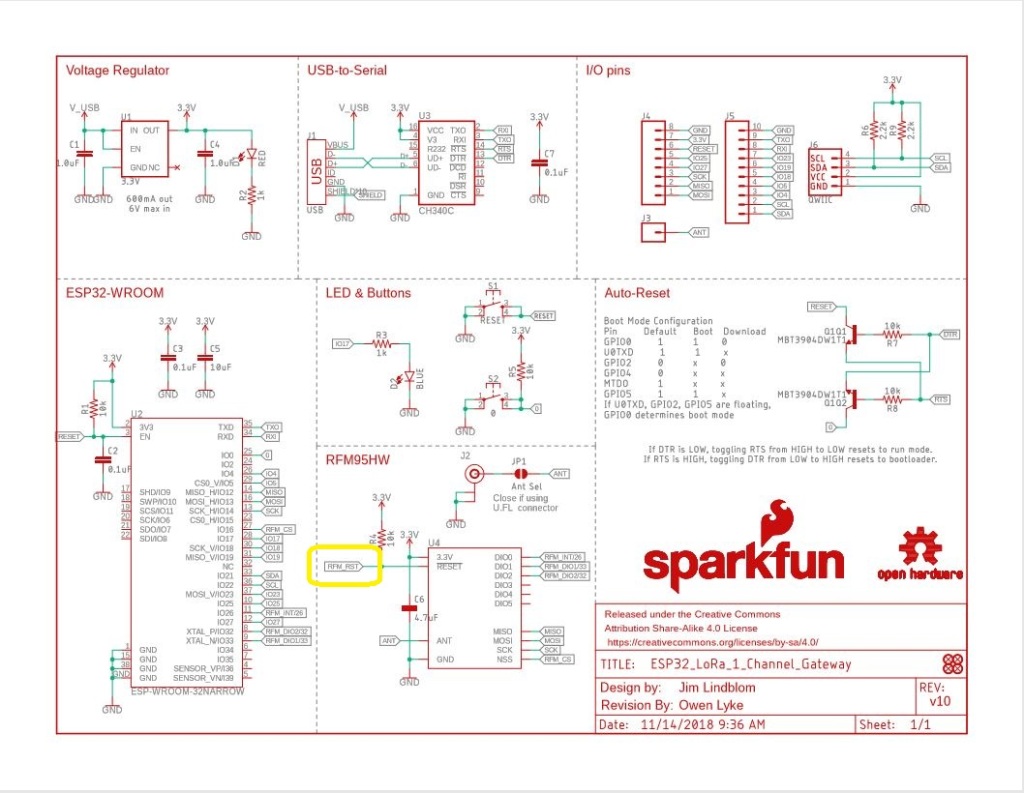
Sparkfun LoRa Gateway 1 Channel schematic

One disadvantage of the SparkFun device is that the reset pin on the SX127X doesn’t appear to be connected to the ESP32 so I can’t factory reset the device in code.

//#define ST_STM32F429I_DISCOVERY       //nanoff --target ST_STM32F429I_DISCOVERY --update
#define ESP32_WROOM_32_LORA_1_CHANNEL   //nanoff --target ESP32_WROOM_32 --serialport COM4 --update
namespace devMobile.IoT.Rfm9x.TransmitBasic
{
   using System;
   using System.Text;
   using System.Threading;

   using Windows.Devices.Gpio;
   using Windows.Devices.Spi;

#if ESP32_WROOM_32_LORA_1_CHANNEL
   using nanoFramework.Hardware.Esp32;
#endif

   public sealed class Rfm9XDevice
   {
      private SpiDevice rfm9XLoraModem;
      private const byte RegisterAddressReadMask = 0X7f;
      private const byte RegisterAddressWriteMask = 0x80;

      public Rfm9XDevice(string spiPort, int chipSelectPin, int resetPin)
      {
         var settings = new SpiConnectionSettings(chipSelectPin)
         {
            ClockFrequency = 1000000,
            //DataBitLength = 8,
            Mode = SpiMode.Mode0,// From SemTech docs pg 80 CPOL=0, CPHA=0
            SharingMode = SpiSharingMode.Shared,
         };

         rfm9XLoraModem = SpiDevice.FromId(spiPort, settings);

         // Factory reset pin configuration
         GpioController gpioController = GpioController.GetDefault();
         GpioPin resetGpioPin = gpioController.OpenPin(resetPin);
         resetGpioPin.SetDriveMode(GpioPinDriveMode.Output);
         resetGpioPin.Write(GpioPinValue.Low);
         Thread.Sleep(10);
         resetGpioPin.Write(GpioPinValue.High);
         Thread.Sleep(10);
      }

      public Rfm9XDevice(string spiPort, int chipSelectPin)
      {
         var settings = new SpiConnectionSettings(chipSelectPin)
         {
            ClockFrequency = 1000000,
            Mode = SpiMode.Mode0,// From SemTech docs pg 80 CPOL=0, CPHA=0
            SharingMode = SpiSharingMode.Shared,
         };

         rfm9XLoraModem = SpiDevice.FromId(spiPort, settings);
      }

      public Byte RegisterReadByte(byte registerAddress)
      {
         byte[] writeBuffer = new byte[] { registerAddress &= RegisterAddressReadMask, 0x0 };
         byte[] readBuffer = new byte[writeBuffer.Length];

         rfm9XLoraModem.TransferFullDuplex(writeBuffer, readBuffer);

         return readBuffer[1];
      }

      public ushort RegisterReadWord(byte address)
      {
         byte[] writeBuffer = new byte[] { address &= RegisterAddressReadMask, 0x0, 0x0 };
         byte[] readBuffer = new byte[writeBuffer.Length];

         rfm9XLoraModem.TransferFullDuplex(writeBuffer, readBuffer);

         return (ushort)(readBuffer[2] + (readBuffer[1] << 8));
      }

      public byte[] RegisterRead(byte address, int length)
      {
         byte[] writeBuffer = new byte[length + 1];
         byte[] readBuffer = new byte[writeBuffer.Length];
         byte[] repyBuffer = new byte[length];

         writeBuffer[0] = address &= RegisterAddressReadMask;

         rfm9XLoraModem.TransferFullDuplex(writeBuffer, readBuffer);

         Array.Copy(readBuffer, 1, repyBuffer, 0, length);

         return repyBuffer;
      }

      public void RegisterWriteByte(byte address, byte value)
      {
         byte[] writeBuffer = new byte[] { address |= RegisterAddressWriteMask, value };
         byte[] readBuffer = new byte[writeBuffer.Length];

         rfm9XLoraModem.TransferFullDuplex(writeBuffer, readBuffer);
      }

      public void RegisterWriteWord(byte address, ushort value)
      {
         byte[] valueBytes = BitConverter.GetBytes(value);
         byte[] writeBuffer = new byte[] { address |= RegisterAddressWriteMask, valueBytes[0], valueBytes[1] };
         byte[] readBuffer = new byte[writeBuffer.Length];

         rfm9XLoraModem.TransferFullDuplex(writeBuffer,readBuffer);
      }

      public void RegisterWrite(byte address, byte[] bytes)
      {
         byte[] writeBuffer = new byte[1 + bytes.Length];
         byte[] readBuffer = new byte[writeBuffer.Length];

         Array.Copy(bytes, 0, writeBuffer, 1, bytes.Length);
         writeBuffer[0] = address |= RegisterAddressWriteMask;

         rfm9XLoraModem.TransferFullDuplex(writeBuffer, readBuffer);
      }

      public void RegisterDump()
      {
         Console.WriteLine("Register dump");
         for (byte registerIndex = 0; registerIndex <= 0x42; registerIndex++)
         {
            byte registerValue = this.RegisterReadByte(registerIndex);

            Console.WriteLine($"Register 0x{registerIndex:x2} - Value 0X{registerValue:x2}");
         }
      }
   }

   class Program
   {
#if ST_STM32F429I_DISCOVERY
      private const string SpiBusId = "SPI5";
#endif
#if ESP32_WROOM_32_LORA_1_CHANNEL
      private const string SpiBusId = "SPI1";
#endif

      static void Main()
      {
         int SendCount = 0;
#if ST_STM32F429I_DISCOVERY
         int chipSelectPinNumber = PinNumber('C', 2);
         int resetPinNumber = PinNumber('C', 3);
#endif
#if ESP32_WROOM_32_LORA_1_CHANNEL
         int chipSelectPinNumber = Gpio.IO16;
#endif
         try
         {
#if ESP32_WROOM_32_LORA_1_CHANNEL
            Configuration.SetPinFunction(Gpio.IO12, DeviceFunction.SPI1_MISO);
            Configuration.SetPinFunction(Gpio.IO13, DeviceFunction.SPI1_MOSI);
            Configuration.SetPinFunction(Gpio.IO14, DeviceFunction.SPI1_CLOCK);
            Rfm9XDevice rfm9XDevice = new Rfm9XDevice(SpiBusId, chipSelectPinNumber);
#endif
#if ST_STM32F429I_DISCOVERY
            Rfm9XDevice rfm9XDevice = new Rfm9XDevice(SpiBusId, chipSelectPinNumber, resetPinNumber);
#endif
            Thread.Sleep(500);

            // Put device into LoRa + Standby mode
            rfm9XDevice.RegisterWriteByte(0x01, 0b10000001); // RegOpMode 

            // Set the frequency to 915MHz
            byte[] frequencyWriteBytes = { 0xE4, 0xC0, 0x00 }; // RegFrMsb, RegFrMid, RegFrLsb
            rfm9XDevice.RegisterWrite(0x06, frequencyWriteBytes);

            // More power PA Boost
            rfm9XDevice.RegisterWriteByte(0x09, 0b10000000); // RegPaConfig

            rfm9XDevice.RegisterDump();

            while (true)
            {
               rfm9XDevice.RegisterWriteByte(0x0E, 0x0); // RegFifoTxBaseAddress 

               // Set the Register Fifo address pointer
               rfm9XDevice.RegisterWriteByte(0x0D, 0x0); // RegFifoAddrPtr 

               string messageText = $"Hello LoRa {SendCount += 1}!";

               // load the message into the fifo
               byte[] messageBytes = UTF8Encoding.UTF8.GetBytes(messageText);
               rfm9XDevice.RegisterWrite(0x0, messageBytes); // RegFifo

               // Set the length of the message in the fifo
               rfm9XDevice.RegisterWriteByte(0x22, (byte)messageBytes.Length); // RegPayloadLength

               Console.WriteLine($"Sending {messageBytes.Length} bytes message {messageText}");
               /// Set the mode to LoRa + Transmit
               rfm9XDevice.RegisterWriteByte(0x01, 0b10000011); // RegOpMode 

               // Wait until send done, no timeouts in PoC
               Console.WriteLine("Send-wait");
               byte IrqFlags = rfm9XDevice.RegisterReadByte(0x12); // RegIrqFlags
               while ((IrqFlags & 0b00001000) == 0)  // wait until TxDone cleared
               {
                  Thread.Sleep(10);
                  IrqFlags = rfm9XDevice.RegisterReadByte(0x12); // RegIrqFlags
                  Console.WriteLine(".");
               }
               Console.WriteLine("");
               rfm9XDevice.RegisterWriteByte(0x12, 0b00001000); // clear TxDone bit
               Console.WriteLine("Send-Done");

               Thread.Sleep(10000);
            }
         }
         catch (Exception ex)
         {
            Console.WriteLine(ex.Message);
         }
      }

#if ST_STM32F429I_DISCOVERY
      static int PinNumber(char port, byte pin)
      {
         if (port < 'A' || port > 'J')
            throw new ArgumentException();

         return ((port - 'A') * 16) + pin;
      }
#endif
   }
}

When I initially ran the application in Visual Studio 2019 the text below was displayed in the output window.

Register dump
Register 0x00 - Value 0X00
Register 0x01 - Value 0X80
Register 0x02 - Value 0X1A
Register 0x03 - Value 0X0B
Register 0x04 - Value 0X00
…
Register 0x3E - Value 0X00
Register 0x3F - Value 0X00
Register 0x40 - Value 0X00
Register 0x41 - Value 0X00
Register 0x42 - Value 0X12
Sending 13 bytes message Hello LoRa 1!
Send-wait
.
.
.
.
.
Send-Done
Sending 13 bytes message Hello LoRa 2!
Send-wait
.
.
.
.
.
Send-Done

I could the see the messages arriving at the Armtronix device in the Arduino monitor.

18:21:46.299 -> Sending HeLoRa World! 188
18:21:48.700 -> Message: p8V⸮⸮⸮⸮⸮Kg
18:21:48.700 -> Length: 13
18:21:48.734 -> FirstChar: 112
18:21:48.734 -> RSSI: -70
18:21:48.734 -> Snr: 9.50
18:21:48.769 -> 
18:21:50.193 -> Message: Hello LoRa 10!
18:21:50.193 -> Length: 14
18:21:50.226 -> FirstChar: 72
18:21:50.226 -> RSSI: -49
18:21:50.226 -> Snr: 10.00
18:21:50.260 -> 
18:21:56.652 -> Sending HeLoRa World! 190
18:21:58.765 -> Message: Hello LoRa 2!
18:21:58.765 -> Length: 13
18:21:58.798 -> FirstChar: 72
18:21:58.798 -> RSSI: -71
18:21:58.798 -> Snr: 9.75
18:21:58.832 -> 
18:22:00.268 -> Message: Hello LoRa 11!
18:22:00.268 -> Length: 14
18:22:00.302 -> FirstChar: 72
18:22:00.302 -> RSSI: -49
18:22:00.302 -> Snr: 10.00
18:22:00.336 -> 

The first message was getting corrupted (only when running in the debugger) which after some trial and error I think was most probably due to my RegOpMode register mode configuration.

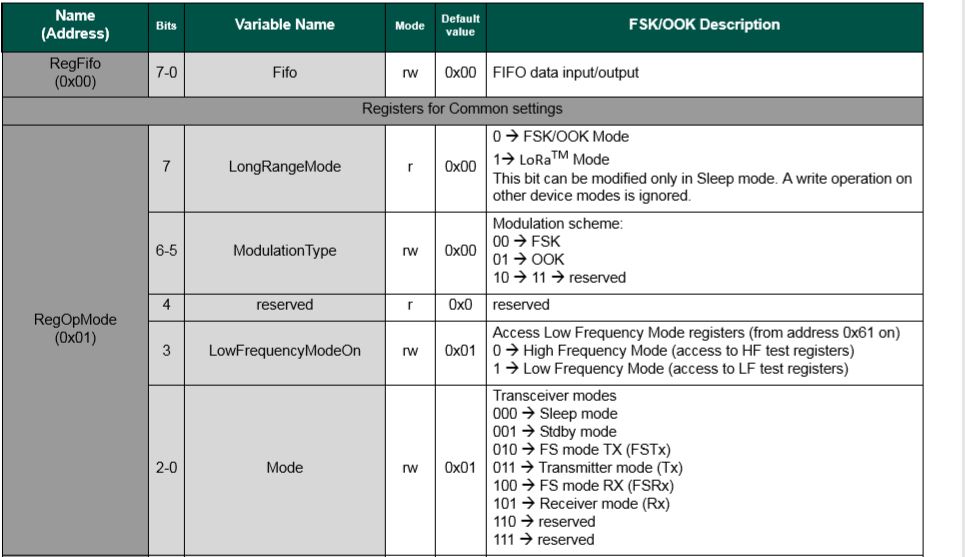
SX127X RegOpMode details
// Put device into LoRa + Sleep mode
rfm9XDevice.RegisterWriteByte(0x01, 0b10000000);

// Put device into LoRa + Standby mode
rfm9XDevice.RegisterWriteByte(0x01, 0b10000001); 

After a couple of years and half a dozen platform ports still finding bugs in my samples…

TinyCLR OS V2 LoRa library Part4

Transmit and Receive with Interrupts

For the final revision of the “nasty” test harness I ensured interrupts were working for the simultaneous transmission and reception of messages. It’s not quite simultaneous, the code sends a message every 10 seconds then goes back to receive continuous mode after each message has been sent.

private void InterruptGpioPin_ValueChanged(GpioPin sender, GpioPinValueChangedEventArgs e)
{
   if (e.Edge != GpioPinEdge.RisingEdge)
   {
      return;
   }

   byte irqFlags = this.RegisterReadByte(0x12); // RegIrqFlags
   Debug.WriteLine($"RegIrqFlags 0X{irqFlags:x2}");

   if ((irqFlags & 0b01000000) == 0b01000000)  // RxDone 
   {
      Debug.WriteLine("Receive-Message");
      byte currentFifoAddress = this.RegisterReadByte(0x10); // RegFifiRxCurrent
      this.RegisterWriteByte(0x0d, currentFifoAddress); // RegFifoAddrPtr

      byte numberOfBytes = this.RegisterReadByte(0x13); // RegRxNbBytes

      // Allocate buffer for message
      byte[] messageBytes = this.RegisterRead(0X0, numberOfBytes);

      string messageText = UTF8Encoding.UTF8.GetString(messageBytes);
      Debug.WriteLine($"Received {messageBytes.Length} byte message {messageText}");
   }

  if ((irqFlags & 0b00001000) == 0b00001000)  // TxDone
  {
      this.RegisterWriteByte(0x01, 0b10000101); // RegOpMode set LoRa & RxContinuous
      Debug.WriteLine("Transmit-Done");
  }

   this.RegisterWriteByte(0x40, 0b00000000); // RegDioMapping1 0b00000000 DI0 RxReady & TxReady
   this.RegisterWriteByte(0x12, 0xff);// RegIrqFlags
}
…
class Program
{
   static void Main()
   {
      Rfm9XDevice rfm9XDevice = new Rfm9XDevice(SC20100.SpiBus.Spi3, SC20100.GpioPin.PA13, SC20100.GpioPin.PA14, SC20100.GpioPin.PE4);
      int sendCount = 0;

      // Put device into LoRa + Sleep mode
      rfm9XDevice.RegisterWriteByte(0x01, 0b10000000); // RegOpMode 

      // Set the frequency to 915MHz
      byte[] frequencyWriteBytes = { 0xE4, 0xC0, 0x00 }; // RegFrMsb, RegFrMid, RegFrLsb
      rfm9XDevice.RegisterWrite(0x06, frequencyWriteBytes);

      rfm9XDevice.RegisterWriteByte(0x0F, 0x0); // RegFifoRxBaseAddress 

      // More power PA Boost
      rfm9XDevice.RegisterWriteByte(0x09, 0b10000000); // RegPaConfig

      rfm9XDevice.RegisterWriteByte(0x01, 0b10000101); // RegOpMode set LoRa & RxContinuous

      while (true)
      {
         rfm9XDevice.RegisterWriteByte(0x0E, 0x0); // RegFifoTxBaseAddress 

         // Set the Register Fifo address pointer
         rfm9XDevice.RegisterWriteByte(0x0D, 0x0); // RegFifoAddrPtr 

         string messageText = $"Hello LoRa {sendCount += 1}!";

         // load the message into the fifo
         byte[] messageBytes = UTF8Encoding.UTF8.GetBytes(messageText);
         rfm9XDevice.RegisterWrite(0x0, messageBytes); // RegFifo 

         // Set the length of the message in the fifo
         rfm9XDevice.RegisterWriteByte(0x22, (byte)messageBytes.Length); // RegPayloadLength
         rfm9XDevice.RegisterWriteByte(0x40, 0b01000000); // RegDioMapping1 0b00000000 DI0 RxReady & TxReady
         rfm9XDevice.RegisterWriteByte(0x01, 0b10000011); // RegOpMode 

         Debug.WriteLine($"Sending {messageBytes.Length} bytes message {messageText}");

         Thread.Sleep(10000);
      }
   }
}

The diagnostic output shows inbound and outbound messages

Found debugger!
Create TS.
Loading Deployment Assemblies.
Attaching deployed file.
Assembly: mscorlib (2.0.0.0)  Attaching deployed file.
Assembly: GHIElectronics.TinyCLR.Devices.Spi (2.0.0.0)  Attaching deployed file.
Assembly: GHIElectronics.TinyCLR.Native (2.0.0.0)  Attaching deployed file.
Assembly: GHIElectronics.TinyCLR.Devices.Gpio (2.0.0.0)  Attaching deployed file.
Assembly: ReceiveTransmitInterrupt (1.0.0.0)  Resolving.
The debugging target runtime is loading the application assemblies and starting execution.
Ready.
'GHIElectronics.TinyCLR.VisualStudio.ProjectSystem.dll' (Managed): Loaded 'C:\Users\BrynLewis\source\repos\RFM9X.TinyCLR\ReceiveTransmitInterrupt\bin\Debug\pe\..\GHIElectronics.TinyCLR.Native.dll'
'GHIElectronics.TinyCLR.VisualStudio.ProjectSystem.dll' (Managed): Loaded 'C:\Users\BrynLewis\source\repos\RFM9X.TinyCLR\ReceiveTransmitInterrupt\bin\Debug\pe\..\GHIElectronics.TinyCLR.Devices.Gpio.dll'
'GHIElectronics.TinyCLR.VisualStudio.ProjectSystem.dll' (Managed): Loaded 'C:\Users\BrynLewis\source\repos\RFM9X.TinyCLR\ReceiveTransmitInterrupt\bin\Debug\pe\..\GHIElectronics.TinyCLR.Devices.Spi.dll'
'GHIElectronics.TinyCLR.VisualStudio.ProjectSystem.dll' (Managed): Loaded 'C:\Users\BrynLewis\source\repos\RFM9X.TinyCLR\ReceiveTransmitInterrupt\bin\Debug\pe\..\ReceiveTransmitInterrupt.exe', Symbols loaded.
The thread '<No Name>' (0x2) has exited with code 0 (0x0).
Sending 13 bytes message Hello LoRa 1!
RegIrqFlags 0X08
Transmit-Done
Sending 13 bytes message Hello LoRa 2!
RegIrqFlags 0X08
Transmit-Done
Sending 13 bytes message Hello LoRa 3!
RegIrqFlags 0X08
Transmit-Done
RegIrqFlags 0X50
Receive-Message
Received 59 byte message  �LoRaIoT1Maduino2at 77.9,ah 24,wsa 0,wsg 1,wd 12.38,r 0.00,
Sending 13 bytes message Hello LoRa 4!
RegIrqFlags 0X08
Transmit-Done
15:11:42.775 -> ync word
15:11:42.775 -> 0x0: 0x8A
15:11:42.775 -> 0x1: 0x81
15:11:42.798 -> 0x2: 0x1A
15:11:42.798 -> 0x3: 0xB
15:11:42.798 -> 0x4: 0x0
15:11:42.798 -> 0x5: 0x52
…
15:11:44.223 -> 0x7B: 0x0
15:11:44.223 -> 0x7C: 0x0
15:11:44.256 -> 0x7D: 0x0
15:11:44.256 -> 0x7E: 0x0
15:11:44.256 -> 0x7F: 0x0
15:11:44.291 -> LoRa init succeeded.
15:11:44.839 -> Sending HeLoRa World! 0
15:11:48.788 -> Message: ⸮LoRaIoT1Maduino2at 77.5,ah 25,wsa 1,wsg 5,wd 21.00,r 0.00,
15:11:48.856 -> Length: 59
15:11:48.856 -> FirstChar: 136
15:11:48.891 -> RSSI: -83
15:11:48.891 -> Snr: 9.50
15:11:48.891 -> 
15:11:49.234 -> Message: Hello LoRa 22!
15:11:49.234 -> Length: 14
15:11:49.268 -> FirstChar: 72
15:11:49.268 -> RSSI: -47
15:11:49.268 -> Snr: 9.75
15:11:49.303 -> 
15:11:55.815 -> Sending HeLoRa World! 2
15:11:59.219 -> Message: Hello LoRa 23!
15:11:59.219 -> Length: 14
15:11:59.254 -> FirstChar: 72
15:11:59.254 -> RSSI: -48
15:11:59.254 -> Snr: 9.75
15:11:59.288 -> 
15:12:06.597 -> Sending HeLoRa World! 4
15:12:09.218 -> Message: Hello LoRa 24!
15:12:09.218 -> Length: 14
15:12:09.253 -> FirstChar: 72
15:12:09.253 -> RSSI: -46
15:12:09.253 -> Snr: 9.25
15:12:09.287 -> 
15:12:16.919 -> Sending HeLoRa World! 6
15:12:19.240 -> Message: Hello LoRa 25!
15:12:19.240 -> Length: 14
15:12:19.275 -> FirstChar: 72
15:12:19.275 -> RSSI: -47
15:12:19.275 -> Snr: 9.75
15:12:19.309 -> 

The final step is back porting all the necessary changes to my Rfm9XDevice class then functionality and stress testing.

TinyCLR OS V2 LoRa library Part3

Transmit and Receive Basic

I had an Armtronix IA005 SX1276 loRa node sitting on my desk so used it running a modified version of the Arduino LoRa library LoRaSetSyncWord example to send messages to and receive messages from my SC20100 device.

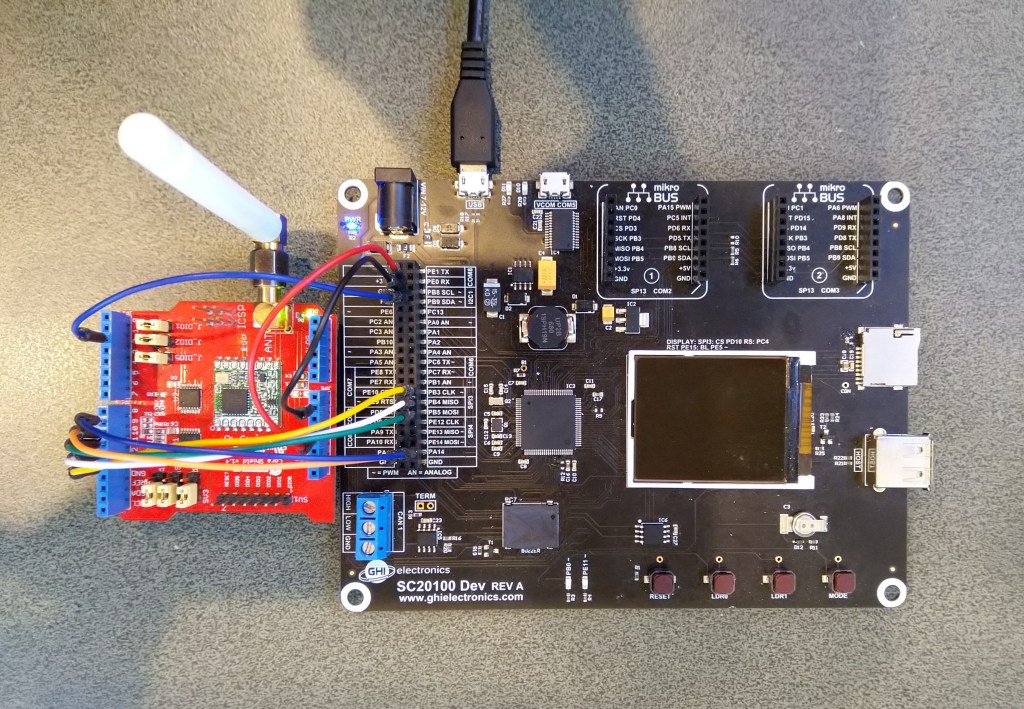
Armtronix and SC20100 TinyCLR V2 testrig

The SC20100 transmit application configures the SX127X, sends a message, waits until transmission is completed, then repeats every 30 seconds.

   class Program
   {
      static void Main()
      {
         Rfm9XDevice rfm9XDevice = new Rfm9XDevice(SC20100.SpiBus.Spi3, SC20100.GpioPin.PA13, SC20100.GpioPin.PA14);

         int SendCount = 0;

         // Put device into LoRa + Sleep mode
         rfm9XDevice.RegisterWriteByte(0x01, 0b10000000); // RegOpMode 

         // Set the frequency to 915MHz
         byte[] frequencyWriteBytes = { 0xE4, 0xC0, 0x00 }; // RegFrMsb, RegFrMid, RegFrLsb
         rfm9XDevice.RegisterWrite(0x06, frequencyWriteBytes);

         // More power PA Boost
         rfm9XDevice.RegisterWriteByte(0x09, 0b10000000); // RegPaConfig

         //rfm9XDevice.RegisterDump();

         while (true)
         {
            rfm9XDevice.RegisterWriteByte(0x0E, 0x0); // RegFifoTxBaseAddress 

            // Set the Register Fifo address pointer
            rfm9XDevice.RegisterWriteByte(0x0D, 0x0); // RegFifoAddrPtr 

            string messageText = $"Hello LoRa {SendCount += 1}!";
               
            // load the message into the fifo
            byte[] messageBytes = UTF8Encoding.UTF8.GetBytes(messageText);
            rfm9XDevice.RegisterWrite(0x0, messageBytes); // RegFifo

            // Set the length of the message in the fifo
            rfm9XDevice.RegisterWriteByte(0x22, (byte)messageBytes.Length); // RegPayloadLength

            Debug.WriteLine($"Sending {messageBytes.Length} bytes message {messageText}");
            /// Set the mode to LoRa + Transmit
            rfm9XDevice.RegisterWriteByte(0x01, 0b10000011); // RegOpMode 

            // Wait until send done, no timeouts in PoC
            Debug.WriteLine("Send-wait");
            byte IrqFlags = rfm9XDevice.RegisterReadByte(0x12); // RegIrqFlags
            while ((IrqFlags & 0b00001000) == 0)  // wait until TxDone cleared
            {
               Thread.Sleep(10);
               IrqFlags = rfm9XDevice.RegisterReadByte(0x12); // RegIrqFlags
               Debug.WriteLine(".");
            }
            rfm9XDevice.RegisterWriteByte(0x12, 0b00001000); // clear TxDone bit
            Debug.WriteLine("Send-Done");

            Thread.Sleep(30000);
         }
      }
   }

When I ran the SC20100 application in Visual Studio

'GHIElectronics.TinyCLR.VisualStudio.ProjectSystem.dll' (Managed): Loaded 'C:\Users\BrynLewis\source\repos\RFM9X.TinyCLR\TransmitBasic\bin\Debug\pe\..\TransmitBasic.exe', Symbols loaded.
The thread '<No Name>' (0x2) has exited with code 0 (0x0).
Sending 13 bytes message Hello LoRa 1!
Send-wait
.
.
.
.
Send-Done
Sending 13 bytes message Hello LoRa 2!
Send-wait
.
.
.
.
Send-Done

I could the see the messages arriving at the Armtronix device in the Arduino monitor.

14:13:34.722 -> Message: Hello LoRa 1!
14:13:34.722 -> Length: 13
14:13:34.756 -> FirstChar: 72
14:13:34.756 -> RSSI: -48
14:13:34.756 -> Snr: 9.75
14:13:34.790 -> 
14:13:36.658 -> Sending HeLoRa World! 24
14:13:47.105 -> Sending HeLoRa World! 26
14:13:57.740 -> Sending HeLoRa World! 28
14:14:04.745 -> Message: Hello LoRa 2!
14:14:04.745 -> Length: 13
14:14:04.779 -> FirstChar: 72
14:14:04.779 -> RSSI: -49
14:14:04.779 -> Snr: 9.50
14:14:04.847 -> 

The SC20100 receive application configures the SX127X, polls a status register to looking to see if a message has arrived, displays it as text and then goes back to waiting.

   class Program
   {
      static void Main()
      {
         Rfm9XDevice rfm9XDevice = new Rfm9XDevice(SC20100.SpiBus.Spi3, SC20100.GpioPin.PA13, SC20100.GpioPin.PA14);

         // Put device into LoRa + Sleep mode
         rfm9XDevice.RegisterWriteByte(0x01, 0b10000000); // RegOpMode 

         // Set the frequency to 915MHz
         byte[] frequencyWriteBytes = { 0xE4, 0xC0, 0x00 }; // RegFrMsb, RegFrMid, RegFrLsb
         rfm9XDevice.RegisterWrite(0x06, frequencyWriteBytes);

         rfm9XDevice.RegisterWriteByte(0x0F, 0x0); // RegFifoRxBaseAddress 

         rfm9XDevice.RegisterWriteByte(0x01, 0b10000101); // RegOpMode set LoRa & RxContinuous

         while (true)
         {
            // Wait until a packet is received, no timeouts in PoC
            Debug.WriteLine("Receive-Wait");
            byte irqFlags = rfm9XDevice.RegisterReadByte(0x12); // RegIrqFlags
            while ((irqFlags & 0b01000000) == 0)  // wait until RxDone cleared
            {
               Thread.Sleep(100);
               irqFlags = rfm9XDevice.RegisterReadByte(0x12); // RegIrqFlags
               //Debug.Write(".");
            }
            Debug.WriteLine("");
            Debug.WriteLine($"RegIrqFlags 0X{irqFlags:X2}");
            Debug.WriteLine("Receive-Message");
            byte currentFifoAddress = rfm9XDevice.RegisterReadByte(0x10); // RegFifiRxCurrent
            rfm9XDevice.RegisterWriteByte(0x0d, currentFifoAddress); // RegFifoAddrPtr

            byte numberOfBytes = rfm9XDevice.RegisterReadByte(0x13); // RegRxNbBytes

            byte[] messageBytes = rfm9XDevice.RegisterRead(0x00, numberOfBytes); // RegFifo

            rfm9XDevice.RegisterWriteByte(0x0d, 0);
            rfm9XDevice.RegisterWriteByte(0x12, 0b11111111); // RegIrqFlags clear all the bits

            string messageText = UTF8Encoding.UTF8.GetString(messageBytes);
            Debug.WriteLine($"Received {messageBytes.Length} byte message {messageText}");

            Debug.WriteLine("Receive-Done");
         }
      }
   }

When I ran the SC20100 application in Visual Studio

'GHIElectronics.TinyCLR.VisualStudio.ProjectSystem.dll' (Managed): Loaded 'C:\Users\BrynLewis\source\repos\RFM9X.TinyCLR\ReceiveBasic\bin\Debug\pe\..\ReceiveBasic.exe', Symbols loaded.
The thread '<No Name>' (0x2) has exited with code 0 (0x0).
Receive-Wait

RegIrqFlags 0X50
Receive-Message
Received 16 byte message HeLoRa World! 74
Receive-Done
Receive-Wait

RegIrqFlags 0X50
Receive-Message
Received 59 byte message  �LoRaIoT1Maduino2at 64.6,ah 66,wsa 2,wsg 3,wd 37.13,r 0.00,
Receive-Done
Receive-Wait

RegIrqFlags 0X50
Receive-Message
Received 16 byte message HeLoRa World! 76
Receive-Done
Receive-Wait

RegIrqFlags 0X50
Receive-Message
Received 16 byte message HeLoRa World! 78
Receive-Done
Receive-Wait

I could the see the messages arriving at the Armtronix device in the Arduino monitor.

14:18:02.785 -> Sending HeLoRa World! 74
14:18:09.270 -> Message: ⸮LoRaIoT1Maduino2at 64.6,ah 66,wsa 2,wsg 3,wd 37.13,r 0.00,
14:18:09.339 -> Length: 59
14:18:09.339 -> FirstChar: 136
14:18:09.407 -> RSSI: -83
14:18:09.407 -> Snr: 9.75
14:18:09.407 -> 
14:18:13.249 -> Sending HeLoRa World! 76
14:18:23.416 -> Sending HeLoRa World! 78
14:18:33.582 -> Sending HeLoRa World! 80
14:18:43.883 -> Sending HeLoRa World! 82
14:18:54.136 -> Sending HeLoRa World! 84

I’ll merge the transmit and receive on interrupt samples in the next post as a final step before porting the core library modules.

TinyCLR OS V2 LoRa library Part1

Shortly after finishing my TinyCLR OS V1 LoRa Library port GHI Electronics started talking publicly about their new SITCore hardware and updated TinyCLR.

To get started I used a Dragino LoRa shield for Arduino and some jumper leads to connect it to the SC20100 device I had been sent

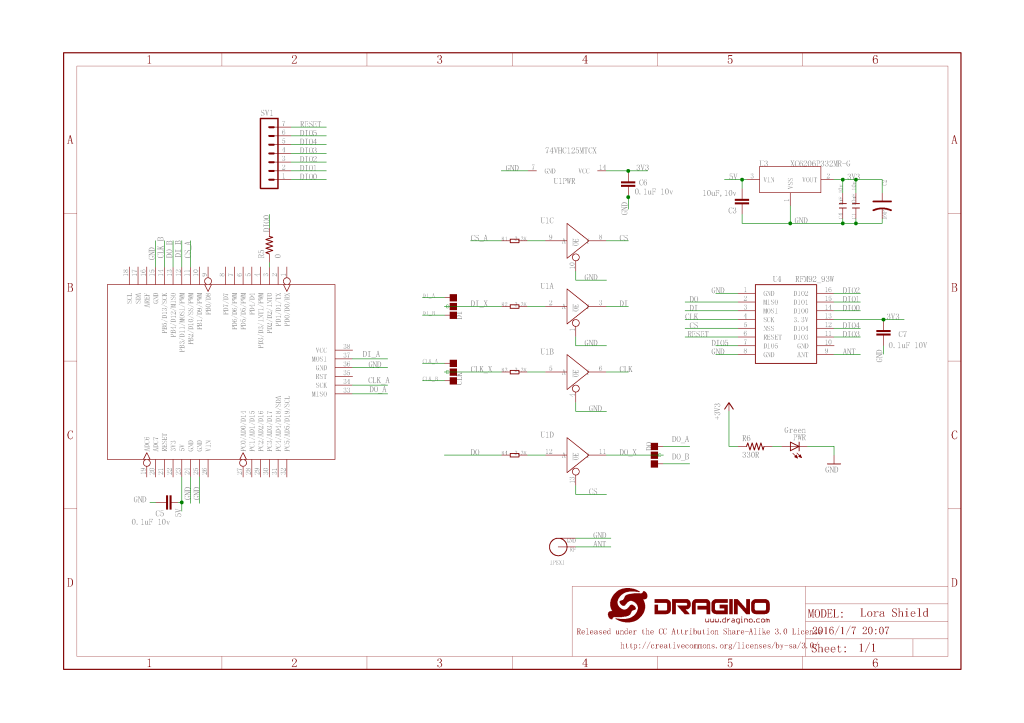
Dragino Arduino LoRa Shield Schematic

The shield uses D10 for chip select, D2 for RFM9X DI0 interrupt and D9 for Reset. The shield ships with the SPI lines configured for ICSP so the three jumpers diagonally across the shield from the antenna connector need to be swapped to the side closest to the edge of the shield.

SC20100 Device with Dragino Shield

First step was to confirm I could (using the TinyCLR SPI NuGet library) read a couple of the Semtech SX1276 registers.

namespace devMobile.IoT.Rfm9x.ShieldSpi
{
   using System;
   using System.Diagnostics;

   using System.Threading;
   using GHIElectronics.TinyCLR.Devices.Spi;
   using GHIElectronics.TinyCLR.Pins;

   class Program
   {
      static void Main()
      {
         var settings = new SpiConnectionSettings()
         {
            ChipSelectType = SpiChipSelectType.Gpio,
            //ChipSelectLine = FEZ.GpioPin.D10,
            ChipSelectLine = GHIElectronics.TinyCLR.Devices.Gpio.GpioController.GetDefault().OpenPin(SC20100.GpioPin.PA13), 
            Mode = SpiMode.Mode0,
            //Mode = SpiMode.Mode1,
            //Mode = SpiMode.Mode2,
            //Mode = SpiMode.Mode3,
            ClockFrequency = 500000,
            //DataBitLength = 8, Removed as part of TiyCLR V2 Upgrade
            //ChipSelectActiveState = true
            ChipSelectActiveState = false,
            //ChipSelectHoldTime = new TimeSpan(0, 0, 0, 0, 500),
            //ChipSelectSetupTime = new TimeSpan(0, 0, 0, 0, 500),
         };

         //var controller = SpiController.FromName(FEZ.SpiBus.Spi1);
         var controller = SpiController.FromName(SC20100.SpiBus.Spi3);
         var device = controller.GetDevice(settings);

         Thread.Sleep(500);

         while (true)
         {
            byte register;
            byte[] writeBuffer;
            byte[] readBuffer;

            // Silicon Version info
            register = 0x42; // RegVersion expecting 0x12

            // Frequency
            //register = 0x06; // RegFrfMsb expecting 0x6C
            //register = 0x07; // RegFrfMid expecting 0x80
            //register = 0x08; // RegFrfLsb expecting 0x00

            //register = 0x17; //RegPayoadLength expecting 0x47

            // Preamble length 
            //register = 0x18; // RegPreambleMsb expecting 0x32
            //register = 0x19; // RegPreambleLsb expecting 0x3E

            //register <<= 1;
            //register |= 0x80;

            //writeBuffer = new byte[] { register };
            writeBuffer = new byte[] { register, 0x0 };
            //writeBuffer = new byte[] {register, 0x0, 0x0};
            //writeBuffer = new byte[] {register, 0x0, 0x0, 0x0};

            readBuffer = new byte[writeBuffer.Length];

            //device.TransferSequential(writeBuffer, readBuffer);
            device.TransferFullDuplex(writeBuffer, readBuffer);

            Debug.WriteLine("Value = 0x" + BytesToHexString(readBuffer));

            Thread.Sleep(1000);
         }
      }

      private static string BytesToHexString(byte[] bytes)
      {
         string hexString = string.Empty;

         // Loop through the bytes.
         for (byte b = 0; b < bytes.Length; b++)
         {
            if (b > 0)
               hexString += "-";

            hexString += bytes[b].ToString("x2");
         }

         return hexString;
      }
   }
}

After updating the way the chip select line was configured I could successfully read the RegVersion and default frequency values

'GHIElectronics.TinyCLR.VisualStudio.ProjectSystem.dll' (Managed): Loaded 'C:\Users\BrynLewis\source\repos\RFM9X.TinyCLR\ShieldSPI\bin\Debug\pe\..\GHIElectronics.TinyCLR.Native.dll'
'GHIElectronics.TinyCLR.VisualStudio.ProjectSystem.dll' (Managed): Loaded 'C:\Users\BrynLewis\source\repos\RFM9X.TinyCLR\ShieldSPI\bin\Debug\pe\..\GHIElectronics.TinyCLR.Devices.Gpio.dll'
'GHIElectronics.TinyCLR.VisualStudio.ProjectSystem.dll' (Managed): Loaded 'C:\Users\BrynLewis\source\repos\RFM9X.TinyCLR\ShieldSPI\bin\Debug\pe\..\GHIElectronics.TinyCLR.Devices.Spi.dll'
'GHIElectronics.TinyCLR.VisualStudio.ProjectSystem.dll' (Managed): Loaded 'C:\Users\BrynLewis\source\repos\RFM9X.TinyCLR\ShieldSPI\bin\Debug\pe\..\ShieldSPI.exe', Symbols loaded.
The thread '<No Name>' (0x2) has exited with code 0 (0x0).
Value = 0x00-12
Value = 0x00-12
Value = 0x00-12
Value = 0x00-12
Value = 0x00-12

I also updated the BytesToHexString method to use the byte.ToString( string format) overload which is implemented by the TinyCLR runtime.

nanoFramework LoRa library Part4A

Transmit Basic

I had a couple of Armtronix IA005 SX1276 loRa nodes sitting on my desk from a recent post so I used one of them running a modified version of the Arduino LoRa library LoRaSetSyncWord example to receive messages from my STM32F429 Discovery + Dragino LoRa shield for Arduino test rig.

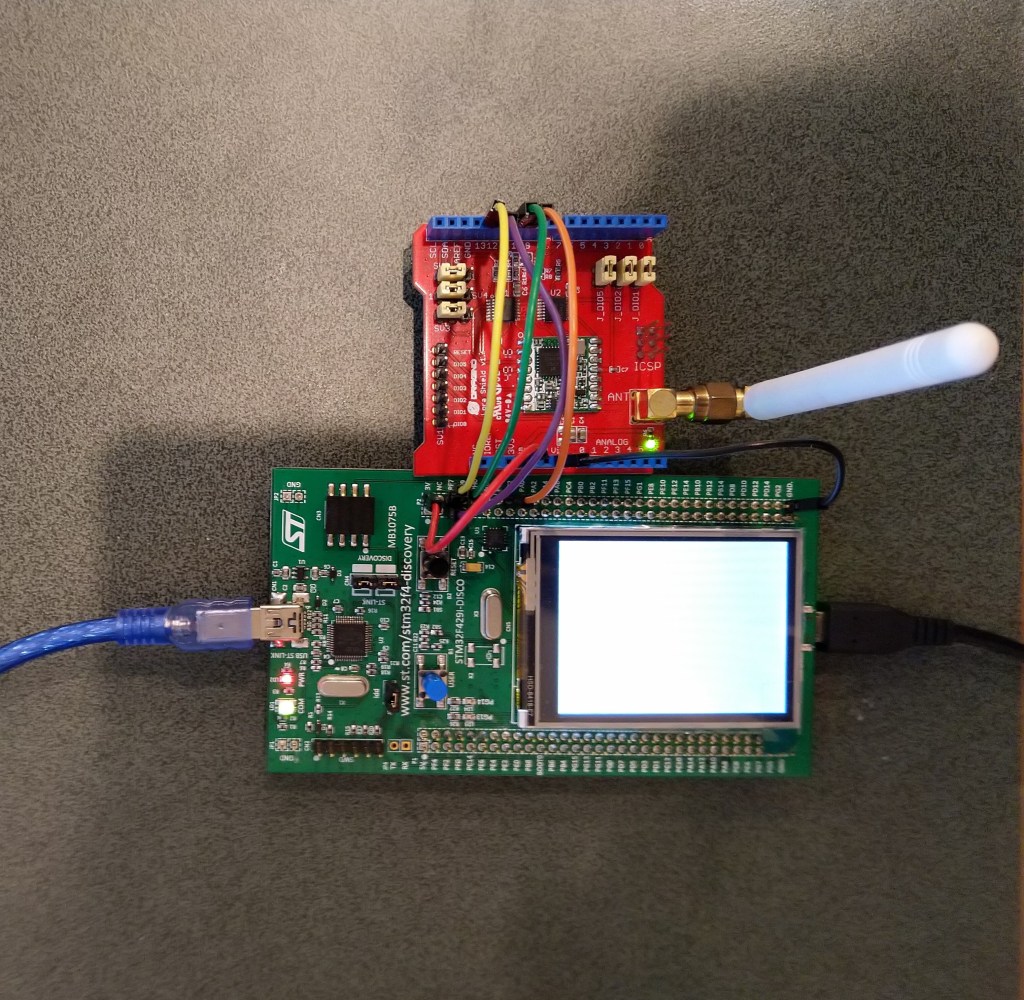
STM32F429 Discovery+ Dragino LoRa shield with Armtronix device
/*
  LoRa Duplex communication with Sync Word
 
  Sends a message every half second, and polls continually
  for new incoming messages. Sets the LoRa radio's Sync Word.
 
  Spreading factor is basically the radio's network ID. Radios with different
  Sync Words will not receive each other's transmissions. This is one way you
  can filter out radios you want to ignore, without making an addressing scheme.
 
  See the Semtech datasheet, http://www.semtech.com/images/datasheet/sx1276.pdf
  for more on Sync Word.
 
  created 28 April 2017
  by Tom Igoe
*/
#include <stdlib.h>
#include <LoRa.h>
const int csPin = PA4;          // LoRa radio chip select
const int resetPin = PC13;       // LoRa radio reset
const int irqPin = PA11;         // change for your board; must be a hardware interrupt pin
 
byte msgCount = 0;            // count of outgoing messages
int interval = 2000;          // interval between sends
long lastSendTime = 0;        // time of last packet send
 
void setup() {
  Serial.begin(9600);                   // initialize serial
  while (!Serial);
 
  Serial.println("LoRa Duplex - Set sync word");
 
  // override the default CS, reset, and IRQ pins (optional)
  LoRa.setPins(csPin, resetPin, irqPin);// set CS, reset, IRQ pin
 
  if (!LoRa.begin(915E6)) {             // initialize ratio at 915 MHz
    Serial.println("LoRa init failed. Check your connections.");
    while (true);                       // if failed, do nothing
  }
 
  LoRa.setSyncWord(0x12);           // ranges from 0-0xFF, default 0x34, see API docs
 
  LoRa.dumpRegisters(Serial);
  Serial.println("LoRa init succeeded.");
}
 
void loop() {
  if (millis() - lastSendTime > interval) {
    String message = "HeLoRa World! ";   // send a message
    message += msgCount;
    sendMessage(message);
    Serial.println("Sending " + message);
    lastSendTime = millis();            // timestamp the message
    interval = random(1000) + 10000;    // 10-11 seconds
    msgCount++;
  }
 
  // parse for a packet, and call onReceive with the result:
  onReceive(LoRa.parsePacket());
}
 
void sendMessage(String outgoing) {
  LoRa.beginPacket();                   // start packet
  LoRa.print(outgoing);                 // add payload
  LoRa.endPacket();                     // finish packet and send it
  msgCount++;                           // increment message ID
}
 
void onReceive(int packetSize) {
  if (packetSize == 0) return;          // if there's no packet, return
 
  // read packet header bytes:
  String incoming = "";
 
  while (LoRa.available()) {
    incoming += (char)LoRa.read();
  }
 
  Serial.println("Message: " + incoming);
  Serial.println("RSSI: " + String(LoRa.packetRssi()));
  Serial.println("Snr: " + String(LoRa.packetSnr()));
  Serial.println();
}

The STM32F429 Discovery application

namespace devMobile.IoT.Rfm9x.TransmitBasic
{
   using System;
   using System.Text;
   using System.Threading;

   using Windows.Devices.Gpio;
   using Windows.Devices.Spi;

   public sealed class Rfm9XDevice
   {
      private SpiDevice rfm9XLoraModem;
      private GpioPin chipSelectGpioPin;
      private const byte RegisterAddressReadMask = 0X7f;
      private const byte RegisterAddressWriteMask = 0x80;

      public Rfm9XDevice(string spiPort, int chipSelectPin, int resetPin)
      {
         var settings = new SpiConnectionSettings(chipSelectPin)
         {
            ClockFrequency = 500000,
//            DataBitLength = 8,
            Mode = SpiMode.Mode0,// From SemTech docs pg 80 CPOL=0, CPHA=0
            SharingMode = SpiSharingMode.Shared,
         };

         rfm9XLoraModem = SpiDevice.FromId(spiPort, settings);

         GpioController gpioController = GpioController.GetDefault();

         // Chip select pin configuration
         chipSelectGpioPin = gpioController.OpenPin(chipSelectPin);
         chipSelectGpioPin.SetDriveMode(GpioPinDriveMode.Output);

         // Factory reset pin configuration
         GpioPin resetGpioPin = gpioController.OpenPin(resetPin);
         resetGpioPin.SetDriveMode(GpioPinDriveMode.Output);
         resetGpioPin.Write(GpioPinValue.Low);
         Thread.Sleep(10);
         resetGpioPin.Write(GpioPinValue.High);
         Thread.Sleep(10);
      }

      public Byte RegisterReadByte(byte registerAddress)
      {
         byte[] writeBuffer = new byte[] { registerAddress &= RegisterAddressReadMask, 0x0 };
         byte[] readBuffer = new byte[writeBuffer.Length];

         rfm9XLoraModem.TransferFullDuplex(writeBuffer, readBuffer);

         return readBuffer[1];
      }

      public ushort RegisterReadWord(byte address)
      {
         byte[] writeBuffer = new byte[] { address &= RegisterAddressReadMask, 0x0, 0x0 };
         byte[] readBuffer = new byte[writeBuffer.Length];

         rfm9XLoraModem.TransferFullDuplex(writeBuffer, readBuffer);

         return (ushort)(readBuffer[2] + (readBuffer[1] << 8));
      }

      public byte[] RegisterRead(byte address, int length)
      {
         byte[] writeBuffer = new byte[length + 1];
         byte[] readBuffer = new byte[length + 1];
         byte[] repyBuffer = new byte[length];

         writeBuffer[0] = address &= RegisterAddressReadMask;

         rfm9XLoraModem.TransferFullDuplex(writeBuffer, readBuffer);

         Array.Copy(readBuffer, 1, repyBuffer, 0, length);

         return repyBuffer;
      }

      public void RegisterWriteByte(byte address, byte value)
      {
         byte[] writeBuffer = new byte[] { address |= RegisterAddressWriteMask, value };

         rfm9XLoraModem.Write(writeBuffer);
      }

      public void RegisterWriteWord(byte address, ushort value)
      {
         byte[] valueBytes = BitConverter.GetBytes(value);
         byte[] writeBuffer = new byte[] { address |= RegisterAddressWriteMask, valueBytes[0], valueBytes[1] };

         rfm9XLoraModem.Write(writeBuffer);
      }

      public void RegisterWrite(byte address, byte[] bytes)
      {
         byte[] writeBuffer = new byte[1 + bytes.Length];

         Array.Copy(bytes, 0, writeBuffer, 1, bytes.Length);
         writeBuffer[0] = address |= RegisterAddressWriteMask;

         rfm9XLoraModem.Write(writeBuffer);
      }

      public void RegisterDump()
      {
         Console.WriteLine("Register dump");
         for (byte registerIndex = 0; registerIndex <= 0x42; registerIndex++)
         {
            byte registerValue = this.RegisterReadByte(registerIndex);

            Console.WriteLine($"Register 0x{registerIndex:x2} - Value 0X{registerValue:x2}");
         }
      }
   }

   class Program
   {
      static void Main()
      {
         Rfm9XDevice rfm9XDevice = new Rfm9XDevice("SPI5", PinNumber('C', 2), PinNumber('C', 3));
         int SendCount = 0;

         // Put device into LoRa + Sleep mode
         rfm9XDevice.RegisterWriteByte(0x01, 0b10000000); // RegOpMode 

         // Set the frequency to 915MHz
         byte[] frequencyWriteBytes = { 0xE4, 0xC0, 0x00 }; // RegFrMsb, RegFrMid, RegFrLsb
         rfm9XDevice.RegisterWrite(0x06, frequencyWriteBytes);

         // More power PA Boost
         rfm9XDevice.RegisterWriteByte(0x09, 0b10000000); // RegPaConfig

         rfm9XDevice.RegisterDump();

         while (true)
         {
            rfm9XDevice.RegisterWriteByte(0x0E, 0x0); // RegFifoTxBaseAddress 

            // Set the Register Fifo address pointer
            rfm9XDevice.RegisterWriteByte(0x0D, 0x0); // RegFifoAddrPtr 

            string messageText = $"Hello LoRa {SendCount += 1}!";

            // load the message into the fifo
            byte[] messageBytes = UTF8Encoding.UTF8.GetBytes(messageText);
            rfm9XDevice.RegisterWrite(0x0, messageBytes); // RegFifo

            // Set the length of the message in the fifo
            rfm9XDevice.RegisterWriteByte(0x22, (byte)messageBytes.Length); // RegPayloadLength

            Console.WriteLine($"Sending {messageBytes.Length} bytes message {messageText}");
            /// Set the mode to LoRa + Transmit
            rfm9XDevice.RegisterWriteByte(0x01, 0b10000011); // RegOpMode 

            // Wait until send done, no timeouts in PoC
            Console.WriteLine("Send-wait");
            byte IrqFlags = rfm9XDevice.RegisterReadByte(0x12); // RegIrqFlags
            while ((IrqFlags & 0b00001000) == 0)  // wait until TxDone cleared
            {
               Thread.Sleep(10);
               IrqFlags = rfm9XDevice.RegisterReadByte(0x12); // RegIrqFlags
               Console.WriteLine(".");
            }
            rfm9XDevice.RegisterWriteByte(0x12, 0b00001000); // clear TxDone bit
            Console.WriteLine("Send-Done");

            Thread.Sleep(10000);
         }
      }

      static int PinNumber(char port, byte pin)
      {
         if (port < 'A' || port > 'J')
            throw new ArgumentException();

         return ((port - 'A') * 16) + pin;
      }
   }

When I ran the nanoFramework application in Visual Studio 2019 the text below was displayed in the output window.

Sending 13 bytes message Hello LoRa 1!
Send-wait
.
.
.
.
.
Send-Done
Sending 13 bytes message Hello LoRa 2!
Send-wait
.
.
.
.
.
Send-Done

I could the see the messages arriving at the Armtronix device in the Arduino monitor.

10:48:31.215 -> Sending HeLoRa World! 202
10:48:40.870 -> Message: ⸮Hello LoRa 1
10:48:40.870 -> Length: 13
10:48:40.905 -> FirstChar: 143
10:48:40.905 -> RSSI: -41
10:48:40.905 -> Snr: 9.00
10:48:40.940 -> 
10:48:41.630 -> Sending HeLoRa World! 204
10:48:50.946 -> Message: ⸮Hello LoRa 2
10:48:50.946 -> Length: 13
10:48:50.981 -> FirstChar: 143
10:48:50.981 -> RSSI: -34
10:48:50.981 -> Snr: 9.25

This nano Frameowork proof of concept (PoC) code is not working as expected. There is a single byte containing 0X8F (the ⸮) prepended to each message.

I downloaded the nanoFramework Windows.Devices.Spi project, and removed the Nerdbank.GitVersioning library. I could then build, deploy and single step through the nanoFramework SPI library.

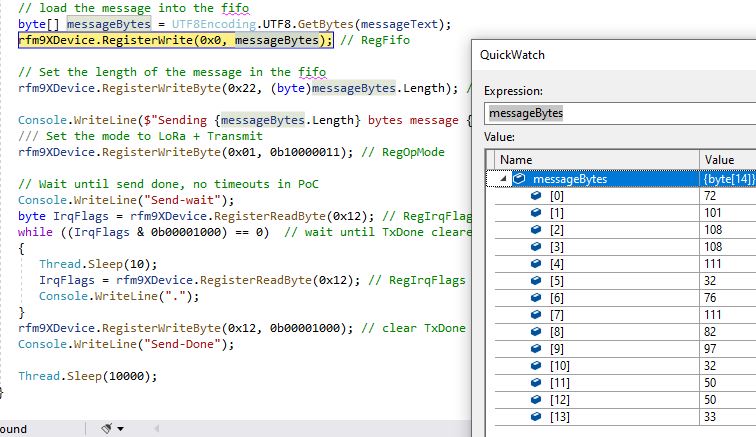
Bytes to be sent in the Transmit Basic code
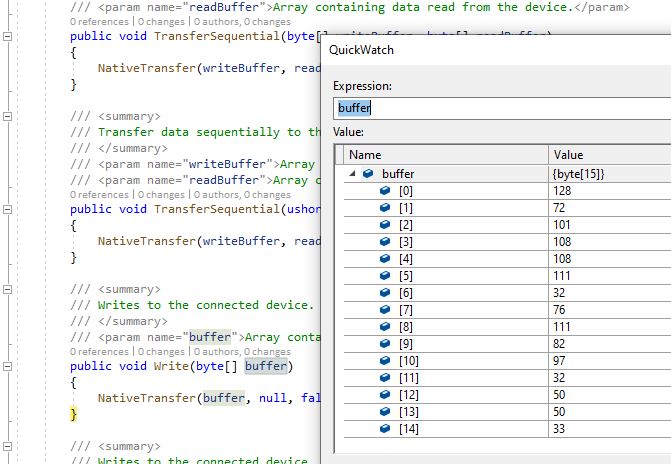
Bytes to be sent in the Windows.Devices.Spi library just before the firmware call

The extra byte prepended to the message is the write mask which is expected.

nanoFramework LoRa library Part1

After writing my Windows 10 IoT Core RFM9X library and porting it to .NetMF, Wilderness Labs Meadow and GHI Electronics TinyCLR-OS I figured yet another platform port shouldn’t take too long.

To get started I used a Dragino LoRa shield for Arduino and jumper wires to connect it to my STM32F4 Discovery Kit running the nanoFramework.

Dragino Arduino LoRa Shield Schematic

My initial pin mapping was

  • SCK->PF7->D10
  • MISO->PF8->D12
  • MOSI->PF9->D11
  • CS->PC2->D10

The shield uses D10 for chip select, D2 for RFM9X DI0 interrupt and D9 for Reset. The shield ships with the SPI lines configured for ICSP so the three jumpers diagonally across the shield from the antenna connector need to be swapped to the side closest to the edge of the shield.

STM32F429 Discovery kit with Dragino Shield

First step was to confirm I could (using the nanoFramework GPIO and SPI Nuget packages) read a couple of the Semtech SX1276 registers.

//---------------------------------------------------------------------------------
// Copyright (c) April 2020, devMobile Software
//
// Licensed under the Apache License, Version 2.0 (the "License");
// you may not use this file except in compliance with the License.
// You may obtain a copy of the License at
//
//     http://www.apache.org/licenses/LICENSE-2.0
//
// Unless required by applicable law or agreed to in writing, software
// distributed under the License is distributed on an "AS IS" BASIS,
// WITHOUT WARRANTIES OR CONDITIONS OF ANY KIND, either express or implied.
// See the License for the specific language governing permissions and
// limitations under the License.
//
//---------------------------------------------------------------------------------
namespace devMobile.IoT.Rfm9x.ShieldSPI
{
   using System;
   using System.Threading;

   using Windows.Devices.Gpio;
   using Windows.Devices.Spi;

   public class Program
   {
      public static void Main()
      {
         try
         {
            GpioController gpioController = GpioController.GetDefault();

            GpioPin chipSelectGpioPin = gpioController.OpenPin(PinNumber('C', 2));
            chipSelectGpioPin.SetDriveMode(GpioPinDriveMode.Output);

            var settings = new SpiConnectionSettings(chipSelectGpioPin.PinNumber)
            {
               ClockFrequency = 500000,
               Mode = SpiMode.Mode0,// From SemTech docs pg 80 CPOL=0, CPHA=0
               //Mode = SpiMode.Mode1,
               //Mode = SpiMode.Mode2,
               //Mode = SpiMode.Mode3,
               SharingMode = SpiSharingMode.Shared,
               //SharingMode = SpiSharingMode.Exclusive,
            };
            

            SpiDevice Device = SpiDevice.FromId("SPI5", settings);

            Thread.Sleep(500);

            while (true)
            {
               byte[] writeBuffer = new byte[] { 0x42 };
               byte[] readBuffer = new byte[1];
            
               //Device.Write(writeBuffer);
               //Device.Read(readBuffer);
               Device.TransferSequential(writeBuffer, readBuffer);

               byte registerValue = readBuffer[0];
               Console.WriteLine(String.Format("Register 0x{0:x2} - Value 0X{1:x2}", 0x42, registerValue));

               Thread.Sleep(10000);
            }
         }
         catch (Exception ex)
         {
            Console.WriteLine(ex.Message);
         }
      }

      static int PinNumber(char port, byte pin)
      {
         if (port < 'A' || port > 'J')
            throw new ArgumentException();

         return ((port - 'A') * 16) + pin;
      }
   }
}

After trying many permutations of settings I could successfully read the RegVersion and default frequency values

Attaching to nanoDevice...
Waiting for nanoDevice to initialize...
Updating nanoDevice debugger engine.
The nanoDevice runtime is loading the application assemblies and starting execution.
'nanoFramework.Tools.VS2019.Extension.dll' (Managed): Loaded 'C:\Users\BrynLewis\source\repos\RFM9X.NetNF\ShieldSPI\bin\Debug\ShieldSPI.exe', Symbols loaded.
'nanoFramework.Tools.VS2019.Extension.dll' (Managed): Loaded 'C:\Users\BrynLewis\source\repos\RFM9X.NetNF\packages\nanoFramework.Windows.Devices.Spi.1.3.0-preview.12\lib\Windows.Devices.Spi.dll', Symbols loaded.
'nanoFramework.Tools.VS2019.Extension.dll' (Managed): Loaded 'C:\Users\BrynLewis\source\repos\RFM9X.NetNF\packages\nanoFramework.Runtime.Events.1.4.2-preview.1\lib\nanoFramework.Runtime.Events.dll', Symbols loaded.
'nanoFramework.Tools.VS2019.Extension.dll' (Managed): Loaded 'C:\Users\BrynLewis\source\repos\RFM9X.NetNF\packages\nanoFramework.Windows.Devices.Gpio.1.4.1-preview.13\lib\Windows.Devices.Gpio.dll', Symbols loaded.
The thread '<No Name>' (0x2) has exited with code 0 (0x0).
Register 0x42 - Value 0X12

Mapping the Discovery board pins to corresponding SPI and GPIO pins was a bit painful

TinyCLR OS LoRa library Part8

Transmit and Receive with Interrupts

For the final iteration of the “nasty” test harness I got the interrupts working for the transmitting and receiving of messages. It’s not quite simultaneous, the code sends a message every 10 seconds then goes back to receive continuous mode after each message has been sent.

      public Rfm9XDevice(int chipSelectPin, int resetPin, int interruptPin)
      {
         var settings = new SpiConnectionSettings()
         {
            ChipSelectType = SpiChipSelectType.Gpio,
            ChipSelectLine = chipSelectPin,
            Mode = SpiMode.Mode0,
            ClockFrequency = 500000,
            DataBitLength = 8,
            ChipSelectActiveState = false,
         };

         SpiController spiCntroller = SpiController.FromName(FEZ.SpiBus.Spi1);

         rfm9XLoraModem = spiCntroller.GetDevice(settings);

         // Factory reset pin configuration
         GpioController gpioController = GpioController.GetDefault();
         GpioPin resetGpioPin = gpioController.OpenPin(resetPin);
         resetGpioPin.SetDriveMode(GpioPinDriveMode.Output);
         resetGpioPin.Write(GpioPinValue.Low);
         Thread.Sleep(10);
         resetGpioPin.Write(GpioPinValue.High);
         Thread.Sleep(10);

         // Interrupt pin for RX message & TX done notification 
         InterruptGpioPin = gpioController.OpenPin(interruptPin);
         resetGpioPin.SetDriveMode(GpioPinDriveMode.Input);

         InterruptGpioPin.ValueChanged += InterruptGpioPin_ValueChanged;
      }

      private void InterruptGpioPin_ValueChanged(GpioPin sender, GpioPinValueChangedEventArgs e)
      {
         if (e.Edge != GpioPinEdge.RisingEdge)
         {
            return;
         }

         byte irqFlags = this.RegisterReadByte(0x12); // RegIrqFlags
         Debug.WriteLine($"RegIrqFlags 0X{irqFlags:x2}");

         if ((irqFlags & 0b01000000) == 0b01000000)  // RxDone 
         {
            Debug.WriteLine("Receive-Message");
            byte currentFifoAddress = this.RegisterReadByte(0x10); // RegFifiRxCurrent
            this.RegisterWriteByte(0x0d, currentFifoAddress); // RegFifoAddrPtr

            byte numberOfBytes = this.RegisterReadByte(0x13); // RegRxNbBytes

            // Allocate buffer for message
            byte[] messageBytes = this.RegisterRead(0X0, numberOfBytes);

            string messageText = UTF8Encoding.UTF8.GetString(messageBytes);
            Debug.WriteLine($"Received {messageBytes.Length} byte message {messageText}");
         }

         if ((irqFlags & 0b00001000) == 0b00001000)  // TxDone
         {
            this.RegisterWriteByte(0x01, 0b10000101); // RegOpMode set LoRa & RxContinuous
            Debug.WriteLine("Transmit-Done");
         }

         this.RegisterWriteByte(0x40, 0b00000000); // RegDioMapping1 0b00000000 DI0 RxReady & TxReady
         this.RegisterWriteByte(0x12, 0xff);// RegIrqFlags
      }

…

      public void RegisterDump()
      {
         Debug.WriteLine("Register dump");
         for (byte registerIndex = 0; registerIndex <= 0x42; registerIndex++)
         {
            byte registerValue = this.RegisterReadByte(registerIndex);

            Debug.WriteLine($"Register 0x{registerIndex:x2} - Value 0X{registerValue:x2}");
         }
      }
   }

   class Program
   {
      static void Main()
      {
         Rfm9XDevice rfm9XDevice = new Rfm9XDevice(FEZ.GpioPin.D10, FEZ.GpioPin.D9, FEZ.GpioPin.D2);
         int sendCount = 0;

         // Put device into LoRa + Sleep mode
         rfm9XDevice.RegisterWriteByte(0x01, 0b10000000); // RegOpMode 

         // Set the frequency to 915MHz
         byte[] frequencyWriteBytes = { 0xE4, 0xC0, 0x00 }; // RegFrMsb, RegFrMid, RegFrLsb
         rfm9XDevice.RegisterWrite(0x06, frequencyWriteBytes);

         rfm9XDevice.RegisterWriteByte(0x0F, 0x0); // RegFifoRxBaseAddress 

         // More power PA Boost
         rfm9XDevice.RegisterWriteByte(0x09, 0b10000000); // RegPaConfig

         rfm9XDevice.RegisterWriteByte(0x01, 0b10000101); // RegOpMode set LoRa & RxContinuous

         while (true)
         {
            rfm9XDevice.RegisterWriteByte(0x0E, 0x0); // RegFifoTxBaseAddress 

            // Set the Register Fifo address pointer
            rfm9XDevice.RegisterWriteByte(0x0D, 0x0); // RegFifoAddrPtr 

            string messageText = $"Hello LoRa {sendCount += 1}!";

            // load the message into the fifo
            byte[] messageBytes = UTF8Encoding.UTF8.GetBytes(messageText);
            rfm9XDevice.RegisterWrite(0x0, messageBytes); // RegFifo 

            // Set the length of the message in the fifo
            rfm9XDevice.RegisterWriteByte(0x22, (byte)messageBytes.Length); // RegPayloadLength
            rfm9XDevice.RegisterWriteByte(0x40, 0b01000000); // RegDioMapping1 0b00000000 DI0 RxReady & TxReady
            rfm9XDevice.RegisterWriteByte(0x01, 0b10000011); // RegOpMode 

            Debug.WriteLine($"Sending {messageBytes.Length} bytes message {messageText}");

            Thread.Sleep(10000);
         }
      }
   }

The diagnostic output shows inbound and outbound messages (Arduino then Meadow diagnostics)

'GHIElectronics.TinyCLR.VisualStudio.ProjectSystem.dll' (Managed): Loaded 'C:\Users\BrynLewis\source\repos\RFM9X.TinyCLR\ReceiveTransmitInterrupt\bin\Debug\pe\..\ReceiveTransmitInterrupt.exe', Symbols loaded.
The thread '<No Name>' (0x2) has exited with code 0 (0x0).
Sending 13 bytes message Hello LoRa 1!
RegIrqFlags 0X08
Transmit-Done
RegIrqFlags 0X50
Receive-Message
Received 17 byte message HeLoRa World! 156
Sending 13 bytes message Hello LoRa 2!
RegIrqFlags 0X08
Transmit-Done
RegIrqFlags 0X50
Receive-Message
Received 17 byte message HeLoRa World! 158
Sending 13 bytes message Hello LoRa 3!
RegIrqFlags 0X08
Transmit-Done
RegIrqFlags 0X50
Receive-Message
Received 17 byte message HeLoRa World! 160
Sending 13 bytes message Hello LoRa 4!
RegIrqFlags 0X08
Transmit-Done
RegIrqFlags 0X50
Receive-Message
Received 17 byte message HeLoRa World! 162
Sending 13 bytes message Hello LoRa 5!
RegIrqFlags 0X08
Transmit-Done
RegIrqFlags 0X50
Receive-Message
Received 17 byte message HeLoRa World! 164
Sending 13 bytes message Hello LoRa 6!
RegIrqFlags 0X08
Transmit-Done

20:55:09.280 -> Sending HeLoRa World! 152
20:55:25.179 -> Message: Hello LoRa 1!
20:55:25.179 -> RSSI: -44
20:55:25.212 -> Snr: 9.50
20:55:25.212 -> 
20:55:30.707 -> Sending HeLoRa World! 156
20:55:35.182 -> Message: Hello LoRa 2!
20:55:35.182 -> RSSI: -43
20:55:35.215 -> Snr: 9.50
20:55:35.215 -> 
20:55:41.358 -> Sending HeLoRa World! 158
20:55:45.181 -> Message: Hello LoRa 3!
20:55:45.181 -> RSSI: -44
20:55:45.214 -> Snr: 9.50
20:55:45.214 -> 
20:55:52.032 -> Sending HeLoRa World! 160
20:55:55.190 -> Message: Hello LoRa 4!
20:55:55.190 -> RSSI: -44
20:55:55.258 -> Snr: 9.50
20:55:55.258 -> 
20:56:02.451 -> Sending HeLoRa World! 162
20:56:05.206 -> Message: Hello LoRa 5!
20:56:05.206 -> RSSI: -41
20:56:05.241 -> Snr: 9.00
20:56:05.241 -> 
20:56:12.685 -> Sending HeLoRa World! 164
20:56:15.226 -> Message: Hello LoRa 6!
20:56:15.226 -> RSSI: -41
20:56:15.261 -> Snr: 9.25
20:56:15.261 -> 
20:56:22.817 -> Sending HeLoRa World! 166
20:56:25.248 -> Message: Hello LoRa 7!
20:56:25.248 -> RSSI: -36
20:56:25.283 -> Snr: 10.00
20:56:25.283 -> 

Next step is some refactoring to extract the register access code and merging with my Windows 10 IoT Core RMF9X library code base.

TinyCLR OS LoRa library Part7

Transmit Interrupt

Starting with the TransmitBasic sample application I modified the code so that a hardware interrupt (specified in RegDioMapping1) was generated on TxDone (FIFO Payload Transmission completed).

The application inserts a message into the RFM95 transmit FIFO every 10 seconds with confirmation of transmission displayed shortly afterwards

      public Rfm9XDevice(int chipSelectPin, int resetPin, int interruptPin)
      {
         var settings = new SpiConnectionSettings()
         {
            ChipSelectType = SpiChipSelectType.Gpio,
            ChipSelectLine = chipSelectPin,
            Mode = SpiMode.Mode0,
            ClockFrequency = 500000,
            DataBitLength = 8,
            ChipSelectActiveState = false,
         };

         SpiController spiCntroller = SpiController.FromName(FEZ.SpiBus.Spi1);

         rfm9XLoraModem = spiCntroller.GetDevice(settings);

         // Factory reset pin configuration
         GpioController gpioController = GpioController.GetDefault();
         GpioPin resetGpioPin = gpioController.OpenPin(resetPin);
         resetGpioPin.SetDriveMode(GpioPinDriveMode.Output);
         resetGpioPin.Write(GpioPinValue.Low);
         Thread.Sleep(10);
         resetGpioPin.Write(GpioPinValue.High);
         Thread.Sleep(10);

         // Interrupt pin for RX message & TX done notification 
         InterruptGpioPin = gpioController.OpenPin(interruptPin);
         resetGpioPin.SetDriveMode(GpioPinDriveMode.Input);

         InterruptGpioPin.ValueChanged += InterruptGpioPin_ValueChanged;
      }

      private void InterruptGpioPin_ValueChanged(GpioPin sender, GpioPinValueChangedEventArgs e)
      {
         if (e.Edge != GpioPinEdge.RisingEdge)
         {
            return;
         }

         byte irqFlags = this.RegisterReadByte(0x12); // RegIrqFlags
         Debug.WriteLine($"RegIrqFlags 0X{irqFlags:x2}");

         if ((irqFlags & 0b00001000) == 0b00001000)  // TxDone
         {
            Debug.WriteLine("Transmit-Done");
         }

         this.RegisterWriteByte(0x12, 0xff);// RegIrqFlags
      }
…
   class Program
   {
      static void Main()
      {
         Rfm9XDevice rfm9XDevice = new Rfm9XDevice(FEZ.GpioPin.D10, FEZ.GpioPin.D9, FEZ.GpioPin.D2);
         int SendCount = 0;

         // Put device into LoRa + Sleep mode
         rfm9XDevice.RegisterWriteByte(0x01, 0b10000000); // RegOpMode 

         // Set the frequency to 915MHz
         byte[] frequencyWriteBytes = { 0xE4, 0xC0, 0x00 }; // RegFrMsb, RegFrMid, RegFrLsb
         rfm9XDevice.RegisterWrite(0x06, frequencyWriteBytes);

         // More power PA Boost
         rfm9XDevice.RegisterWriteByte(0x09, 0b10000000); // RegPaConfig

         // Interrupt on TxDone
         rfm9XDevice.RegisterWriteByte(0x40, 0b01000000); // RegDioMapping1 0b00000000 DI0 TxDone

         while (true)
         {
            // Set the Register Fifo address pointer
            rfm9XDevice.RegisterWriteByte(0x0E, 0x00); // RegFifoTxBaseAddress 

            // Set the Register Fifo address pointer
            rfm9XDevice.RegisterWriteByte(0x0D, 0x0); // RegFifoAddrPtr 

            string messageText = $"Hello LoRa {SendCount += 1}!";

            // load the message into the fifo
            byte[] messageBytes = UTF8Encoding.UTF8.GetBytes(messageText);
            rfm9XDevice.RegisterWrite(0x0, messageBytes); // RegFifo 

            // Set the length of the message in the fifo
            rfm9XDevice.RegisterWriteByte(0x22, (byte)messageBytes.Length); // RegPayloadLength
            Debug.WriteLine($"Sending {messageBytes.Length} bytes message {messageText}");
            rfm9XDevice.RegisterWriteByte(0x01, 0b10000011); // RegOpMode 

            Thread.Sleep(10000);
         }
      }
   }

The output in the debug window

'GHIElectronics.TinyCLR.VisualStudio.ProjectSystem.dll' (Managed): Loaded 'C:\Users\BrynLewis\source\repos\RFM9X.TinyCLR\TransmitInterrupt\bin\Debug\pe\..\TransmitInterrupt.exe', Symbols loaded.
The thread '<No Name>' (0x2) has exited with code 0 (0x0).
Sending 13 bytes message Hello LoRa 1!
RegIrqFlags 0X08
Transmit-Done
Sending 13 bytes message Hello LoRa 2!
RegIrqFlags 0X08
Transmit-Done
Sending 13 bytes message Hello LoRa 3!
RegIrqFlags 0X08
Transmit-Done
Sending 13 bytes message Hello LoRa 4!
RegIrqFlags 0X08
Transmit-Done
Sending 13 bytes message Hello LoRa 5!
RegIrqFlags 0X08
Transmit-Done

On the Arduino test client the serial monitor displayed

19:39:55.595 -> LoRa init succeeded.
19:39:56.157 -> Sending HeLoRa World! 0
19:39:58.742 -> Message: Hello LoRa 5!
19:39:58.742 -> RSSI: -36
19:39:58.789 -> Snr: 9.50
19:39:58.789 -> 
19:40:07.151 -> Sending HeLoRa World! 2
19:40:11.920 -> Message: Hello LoRa 1!
19:40:11.920 -> RSSI: -41
19:40:11.967 -> Snr: 9.75
19:40:11.967 -> 
19:40:17.924 -> Sending HeLoRa World! 4
19:40:21.905 -> Message: Hello LoRa 2!
19:40:21.905 -> RSSI: -41
19:40:21.952 -> Snr: 9.50
19:40:21.952 -> 
19:40:28.248 -> Sending HeLoRa World! 6
19:40:31.928 -> Message: Hello LoRa 3!
19:40:31.928 -> RSSI: -36
19:40:31.975 -> Snr: 9.50
19:40:31.975 -> 
19:40:38.803 -> Sending HeLoRa World! 8
19:40:41.928 -> Message: Hello LoRa 4!
19:40:41.928 -> RSSI: -34
19:40:41.975 -> Snr: 9.25
19:40:41.975 -> 

Now that I’m confident my hardware is all working as expected the next step will be building a client which has a receive and transmit interrupt handler.

TinyCLR OS LoRa library Part6

Receive Interrupt

This proof of concept (PoC) was to confirm I could configure the Semtech 127X then handle the received messages using a TinyCLR GpioPinValueChangedEventHandler.

   public sealed class Rfm9XDevice
   {
      private SpiDevice rfm9XLoraModem;
      private GpioPin InterruptGpioPin = null;
      private const byte RegisterAddressReadMask = 0X7f;
      private const byte RegisterAddressWriteMask = 0x80;

      public Rfm9XDevice(int chipSelectPin, int resetPin, int interruptPin)
      {
         var settings = new SpiConnectionSettings()
         {
            ChipSelectType = SpiChipSelectType.Gpio,
            ChipSelectLine = chipSelectPin,
            Mode = SpiMode.Mode0,
            ClockFrequency = 500000,
            DataBitLength = 8,
            ChipSelectActiveState = false,
         };

         SpiController spiCntroller = SpiController.FromName(FEZ.SpiBus.Spi1);

         rfm9XLoraModem = spiCntroller.GetDevice(settings);

         // Factory reset pin configuration
         GpioController gpioController = GpioController.GetDefault();
         GpioPin resetGpioPin = gpioController.OpenPin(resetPin);
         resetGpioPin.SetDriveMode(GpioPinDriveMode.Output);
         resetGpioPin.Write(GpioPinValue.Low);
         Thread.Sleep(10);
         resetGpioPin.Write(GpioPinValue.High);
         Thread.Sleep(10);

         // Interrupt pin for RX message & TX done notification 
         InterruptGpioPin = gpioController.OpenPin(interruptPin);
         resetGpioPin.SetDriveMode(GpioPinDriveMode.Input);

         InterruptGpioPin.ValueChanged += InterruptGpioPin_ValueChanged;
      }

      private void InterruptGpioPin_ValueChanged(GpioPin sender, GpioPinValueChangedEventArgs e)
      {
         if (e.Edge != GpioPinEdge.RisingEdge)
         {
            return;
         }

         byte irqFlags = this.RegisterReadByte(0x12); // RegIrqFlags
         Debug.WriteLine($"RegIrqFlags 0X{irqFlags:x2}");
         if ((irqFlags & 0b01000000) == 0b01000000)  // RxDone 
         {
            Debug.WriteLine("Receive-Message");
            byte currentFifoAddress = this.RegisterReadByte(0x10); // RegFifiRxCurrent
            this.RegisterWriteByte(0x0d, currentFifoAddress); // RegFifoAddrPtr

            byte numberOfBytes = this.RegisterReadByte(0x13); // RegRxNbBytes

            // Get number of bytes in the message
            byte[] messageBytes = this.RegisterRead(0x00, numberOfBytes);

            string messageText = UTF8Encoding.UTF8.GetString(messageBytes);
            Debug.WriteLine($"Received {messageBytes.Length} byte message {messageText}");
         }

         this.RegisterWriteByte(0x12, 0xff);// RegIrqFlags
      }
...
   class Program
   {
      static void Main()
      {
         Rfm9XDevice rfm9XDevice = new Rfm9XDevice(FEZ.GpioPin.D10, FEZ.GpioPin.D9, FEZ.GpioPin.D2);

         // Put device into LoRa + Sleep mode
         rfm9XDevice.RegisterWriteByte(0x01, 0b10000000); // RegOpMode 

         // Set the frequency to 915MHz
         byte[] frequencyWriteBytes = { 0xE4, 0xC0, 0x00 }; // RegFrMsb, RegFrMid, RegFrLsb
         rfm9XDevice.RegisterWrite(0x06, frequencyWriteBytes);

         rfm9XDevice.RegisterWriteByte(0x0F, 0x0); // RegFifoRxBaseAddress 

         rfm9XDevice.RegisterWriteByte(0x40, 0b00000000); // RegDioMapping1 0b00000000 DI0 RxReady & TxReady

         rfm9XDevice.RegisterWriteByte(0x01, 0b10000101); // RegOpMode set LoRa & RxContinuous

         rfm9XDevice.RegisterDump();

         Debug.WriteLine("Receive-Wait");
         Thread.Sleep(Timeout.Infinite);
      }
   }

The output in the output debug window looked like this

'C:\Users\BrynLewis\source\repos\RFM9X.TinyCLR\ReceiveInterrupt\bin\Debug\pe\..\ReceiveInterrupt.exe', Symbols loaded.
The thread '<No Name>' (0x2) has exited with code 0 (0x0).
Register dump
Register 0x00 - Value 0X88
Register 0x01 - Value 0X85
Register 0x02 - Value 0X1a
..
Register 0x41 - Value 0X00
Register 0x42 - Value 0X12
Receive-Wait
RegIrqFlags 0X50
Receive-Message
Received 15 byte message HeLoRa World! 0
RegIrqFlags 0X50
Receive-Message
Received 15 byte message HeLoRa World! 2
RegIrqFlags 0X50
Receive-Message
Received 15 byte message HeLoRa World! 4
RegIrqFlags 0X50
Receive-Message
Received 15 byte message HeLoRa World! 6
RegIrqFlags 0X50
Receive-Message
Received 15 byte message HeLoRa World! 8
RegIrqFlags 0X50
Receive-Message
Received 16 byte message HeLoRa World! 10
RegIrqFlags 0X50
Receive-Message
Received 16 byte message HeLoRa World! 12

Next steps will be wiring up the transmit done interrupt, then building a full featured client based on my Windows 10 IoT Core library.