Random wanderings through Microsoft Azure esp. PaaS plumbing, the IoT bits, AI on Micro controllers, AI on Edge Devices, .NET nanoFramework, .NET Core on *nix and ML.NET+ONNX
I modified the application so I could provide the InstrumentationKey via the command line or the ApplicationInsights.Config file.(I have a minimalist config for this sample)
namespace devMobile.Azure.ApplicationInsightsNLogClient
{
   class Program
   {
      private static Logger log = LogManager.GetLogger(System.Reflection.MethodBase.GetCurrentMethod().DeclaringType.ToString());

      static void Main(string[] args)
      {
         if ((args.Length != 0) && (args.Length != 1))
         {
            Console.WriteLine("Usage ApplicationInsightsNLogClient");
            Console.WriteLine("      ApplicationInsightsNLogClient <instrumentationKey>");
            return;
         }

         if (args.Length == 1)
         {
            TelemetryConfiguration.Active.InstrumentationKey = args[0];
         }

         log.Trace("This is an nLog Trace message");
         log.Debug("This is an nLog Debug message");
         log.Info("This is an nLog Info message");
         log.Warn("This is an nLog Warning message");
         log.Error("This is an nLog Error message");
         log.Fatal("This is an nLog Fatal message");

         TelemetryConfiguration.Active.TelemetryChannel.Flush();

			Console.WriteLine("Press <enter> to exit>");
			Console.ReadLine();
		}
	}
}
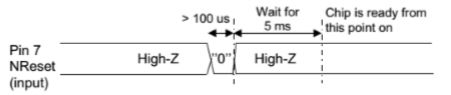
Now that I could reliably dump all the Dragino shield registers I wanted to be able to configure the Semtech 127X device and reset it back to factory settings. A factory reset is done by strobing the reset pin on the device.
SX127X Reset process
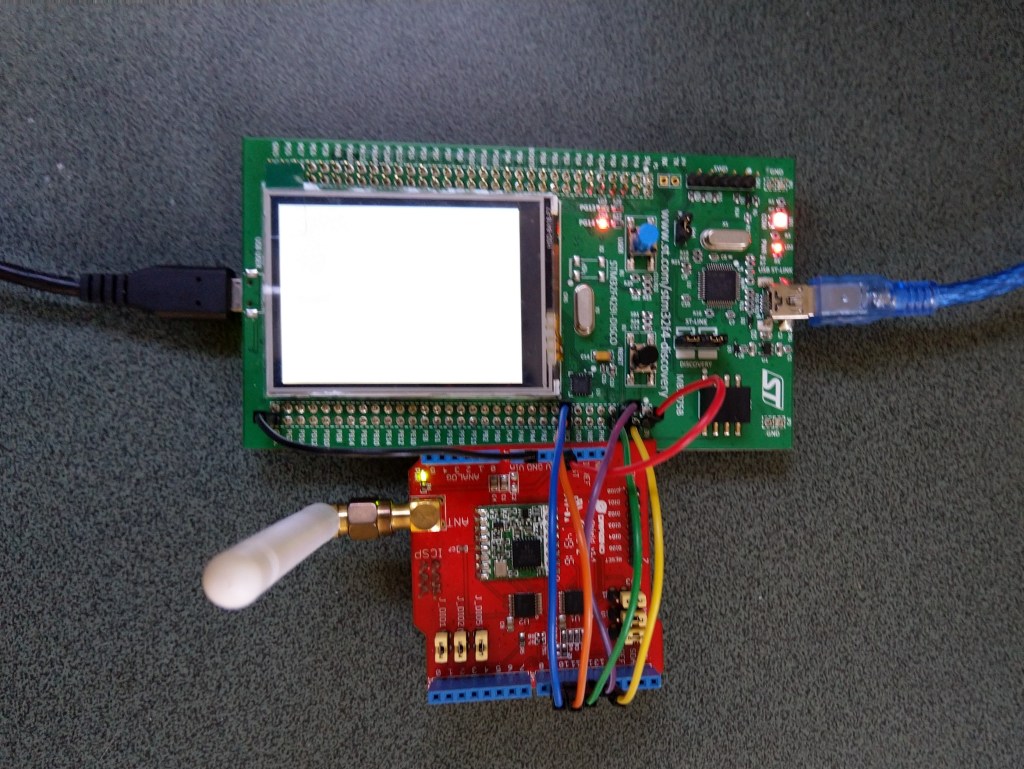
To support this my Rfm9XDevice class constructor gained an additional parameter the reset GPIO pin number(my test harness also gained a jumper wire, the blue one). The PinNumber helper is more user friendly that the raw numbers and is “inspired” by sample nanoFramework code
To configure the RFM9X I wrote some wrapper functions for the nanoFramwork SPIAPI to read/write byte values, word values and arrays of bytes.
SCK->PF7->D10
MISO->PF8->D12
MOSI->PF9->D11
CS->PC2->D10
Reset->PC1->D9
Each method was tested by read/writing suitable register(s) in the device configuration (Needed to set it into LoRa mode first).
namespace devMobile.IoT.Rfm9x.RegisterReadAndWrite
{
   using System;
   using System.Threading;

   using Windows.Devices.Gpio;
   using Windows.Devices.Spi;

   public sealed class Rfm9XDevice
   {
      private SpiDevice rfm9XLoraModem;
      private const byte RegisterAddressReadMask = 0X7f;
      private const byte RegisterAddressWriteMask = 0x80;

      public Rfm9XDevice(string spiPort, int chipSelectPin, int resetPin)
      {
         var settings = new SpiConnectionSettings(chipSelectPin)
         {
            ClockFrequency = 1000000,
            Mode = SpiMode.Mode0,// From SemTech docs pg 80 CPOL=0, CPHA=0
            SharingMode = SpiSharingMode.Shared
         };

         rfm9XLoraModem = SpiDevice.FromId(spiPort, settings);

         // Factory reset pin configuration
         GpioController gpioController = GpioController.GetDefault();
         GpioPin resetGpioPin = gpioController.OpenPin(resetPin);
         resetGpioPin.SetDriveMode(GpioPinDriveMode.Output);
         resetGpioPin.Write(GpioPinValue.Low);
         Thread.Sleep(10);
         resetGpioPin.Write(GpioPinValue.High);
         Thread.Sleep(10);
      }

      public Byte RegisterReadByte(byte registerAddress)
      {
         byte[] writeBuffer = new byte[] { registerAddress &= RegisterAddressReadMask, 0x0 };
         byte[] readBuffer = new byte[writeBuffer.Length];

         rfm9XLoraModem.TransferFullDuplex(writeBuffer, readBuffer);

         return readBuffer[1];
      }

      public ushort RegisterReadWord(byte address)
      {
         byte[] writeBuffer = new byte[] { address &= RegisterAddressReadMask, 0x0, 0x0 };
         byte[] readBuffer = new byte[writeBuffer.Length];

         rfm9XLoraModem.TransferFullDuplex(writeBuffer, readBuffer);

         return (ushort)(readBuffer[2] + (readBuffer[1] << 8));
      }

      public byte[] RegisterRead(byte address, int length)
      {
         byte[] writeBuffer = new byte[length + 1];
         byte[] readBuffer = new byte[length + 1];
         byte[] repyBuffer = new byte[length];

         writeBuffer[0] = address &= RegisterAddressReadMask;

         rfm9XLoraModem.TransferFullDuplex(writeBuffer, readBuffer);

         Array.Copy(readBuffer, 1, repyBuffer, 0, length);

         return repyBuffer;
      }

      public void RegisterWriteByte(byte address, byte value)
      {
         byte[] writeBuffer = new byte[] { address |= RegisterAddressWriteMask, value };

         rfm9XLoraModem.Write(writeBuffer);
      }

      public void RegisterWriteWord(byte address, ushort value)
      {
         byte[] valueBytes = BitConverter.GetBytes(value);
         byte[] writeBuffer = new byte[] { address |= RegisterAddressWriteMask, valueBytes[0], valueBytes[1] };

         rfm9XLoraModem.Write(writeBuffer);
      }

      public void RegisterWrite(byte address, byte[] bytes)
      {
         byte[] writeBuffer = new byte[1 + bytes.Length];

         Array.Copy(bytes, 0, writeBuffer, 1, bytes.Length);
         writeBuffer[0] = address |= RegisterAddressWriteMask;

         rfm9XLoraModem.Write(writeBuffer);
      }

      public void RegisterDump()
      {
         Console.WriteLine("Register dump");
         for (byte registerIndex = 0; registerIndex <= 0x42; registerIndex++)
         {
            byte registerValue = this.RegisterReadByte(registerIndex);

            Console.WriteLine($"Register 0x{registerIndex:x2} - Value 0X{registerValue:x2}");
         }
      }
   }

   class Program
   {
      static void Main()
      {
         Rfm9XDevice rfm9XDevice = new Rfm9XDevice("SPI5", PinNumber('C', 2), PinNumber('C', 3));

         rfm9XDevice.RegisterDump();

         while (true)
         {
            Console.WriteLine("Read RegOpMode (read byte)");
            Byte regOpMode1 = rfm9XDevice.RegisterReadByte(0x1);
            Console.WriteLine($"RegOpMode 0x{regOpMode1:x2}");

            Console.WriteLine("Set LoRa mode and sleep mode (write byte)");
            rfm9XDevice.RegisterWriteByte(0x01, 0b10000000);

            Console.WriteLine("Read RegOpMode (read byte)");
            Byte regOpMode2 = rfm9XDevice.RegisterReadByte(0x1);
            Console.WriteLine($"RegOpMode 0x{regOpMode2:x2}");

            Console.WriteLine("Read the preamble (read word)");
            ushort preamble = rfm9XDevice.RegisterReadWord(0x20);
            Console.WriteLine($"Preamble 0x{preamble:x2}");

            Console.WriteLine("Set the preamble to 0x80 (write word)");
            rfm9XDevice.RegisterWriteWord(0x20, 0x80);

            Console.WriteLine("Read the center frequency (read byte array)");
            byte[] frequencyReadBytes = rfm9XDevice.RegisterRead(0x06, 5);
            Console.WriteLine($"Frequency Msb 0x{frequencyReadBytes[0]:x2} Mid 0x{frequencyReadBytes[1]:x2} Lsb 0x{frequencyReadBytes[2]:x2}");

            Console.WriteLine("Set the center frequency to 916MHz (write byte array)");
            byte[] frequencyWriteBytes = { 0xE4, 0xC0, 0x00 };
            rfm9XDevice.RegisterWrite(0x06, frequencyWriteBytes);

            rfm9XDevice.RegisterDump();

            Thread.Sleep(30000);
         }
      }

      static int PinNumber(char port, byte pin)
      {
         if (port < 'A' || port > 'J')
            throw new ArgumentException();

         return ((port - 'A') * 16) + pin;
      }
   }
The output of the application looked like this
Attaching to nanoDevice...
Waiting for nanoDevice to initialize...
Updating nanoDevice debugger engine.
The nanoDevice runtime is loading the application assemblies and starting execution.
'nanoFramework.Tools.VS2019.Extension.dll' (Managed): Loaded 'C:\Users\BrynLewis\source\repos\RFM9X.NetNF\RegisterReadAndWrite\bin\Debug\RegisterReadAndWrite.exe', Symbols loaded.
'nanoFramework.Tools.VS2019.Extension.dll' (Managed): Loaded 'C:\Users\BrynLewis\source\repos\RFM9X.NetNF\packages\nanoFramework.Windows.Devices.Spi.1.3.0-preview.12\lib\Windows.Devices.Spi.dll', Symbols loaded.
'nanoFramework.Tools.VS2019.Extension.dll' (Managed): Loaded 'C:\Users\BrynLewis\source\repos\RFM9X.NetNF\packages\nanoFramework.Runtime.Events.1.4.2-preview.1\lib\nanoFramework.Runtime.Events.dll', Symbols loaded.
'nanoFramework.Tools.VS2019.Extension.dll' (Managed): Loaded 'C:\Users\BrynLewis\source\repos\RFM9X.NetNF\packages\nanoFramework.Windows.Devices.Gpio.1.4.1-preview.13\lib\Windows.Devices.Gpio.dll', Symbols loaded.
The thread '<No Name>' (0x2) has exited with code 0 (0x0).
Register dump
Register 0x00 - Value 0X00
Register 0x01 - Value 0X09
Register 0x02 - Value 0X1A
Register 0x03 - Value 0X0B
Register 0x04 - Value 0X00
Register 0x05 - Value 0X52
Register 0x06 - Value 0X6C
Register 0x07 - Value 0X80
Register 0x08 - Value 0X00
Register 0x09 - Value 0X4F
Register 0x0A - Value 0X09
Register 0x0B - Value 0X2B
Register 0x0C - Value 0X20
Register 0x0D - Value 0X08
Register 0x0E - Value 0X02
Register 0x0F - Value 0X0A
Register 0x10 - Value 0XFF
Register 0x11 - Value 0X70
Register 0x12 - Value 0X15
Register 0x13 - Value 0X0B
Register 0x14 - Value 0X28
Register 0x15 - Value 0X0C
Register 0x16 - Value 0X12
Register 0x17 - Value 0X47
Register 0x18 - Value 0X32
Register 0x19 - Value 0X3E
Register 0x1A - Value 0X00
Register 0x1B - Value 0X00
Register 0x1C - Value 0X00
Register 0x1D - Value 0X00
Register 0x1E - Value 0X00
Register 0x1F - Value 0X40
Register 0x20 - Value 0X00
Register 0x21 - Value 0X00
Register 0x22 - Value 0X00
Register 0x23 - Value 0X00
Register 0x24 - Value 0X05
Register 0x25 - Value 0X00
Register 0x26 - Value 0X03
Register 0x27 - Value 0X93
Register 0x28 - Value 0X55
Register 0x29 - Value 0X55
Register 0x2A - Value 0X55
Register 0x2B - Value 0X55
Register 0x2C - Value 0X55
Register 0x2D - Value 0X55
Register 0x2E - Value 0X55
Register 0x2F - Value 0X55
Register 0x30 - Value 0X90
Register 0x31 - Value 0X40
Register 0x32 - Value 0X40
Register 0x33 - Value 0X00
Register 0x34 - Value 0X00
Register 0x35 - Value 0X0F
Register 0x36 - Value 0X00
Register 0x37 - Value 0X00
Register 0x38 - Value 0X00
Register 0x39 - Value 0XF5
Register 0x3A - Value 0X20
Register 0x3B - Value 0X82
Register 0x3C - Value 0XF8
Register 0x3D - Value 0X02
Register 0x3E - Value 0X80
Register 0x3F - Value 0X40
Register 0x40 - Value 0X00
Register 0x41 - Value 0X00
Register 0x42 - Value 0X12
Read RegOpMode (read byte)
RegOpMode 0x09
Set LoRa mode and sleep mode (write byte)
Read RegOpMode (read byte)
RegOpMode 0x80
Read the preamble (read word)
Preamble 0x08
Set the preamble to 0x80 (write word)
Read the center frequency (read byte array)
Frequency Msb 0x6C Mid 0x80 Lsb 0x00
Set the center frequency to 916MHz (write byte array)
Register dump
Register 0x00 - Value 0X8F
Register 0x01 - Value 0X80
Register 0x02 - Value 0XFF
Register 0x03 - Value 0XFF
Register 0x04 - Value 0X00
Register 0x05 - Value 0X52
Register 0x06 - Value 0XE4
Register 0x07 - Value 0XC0
Register 0x08 - Value 0X00
Register 0x09 - Value 0XFF
Register 0x0A - Value 0X7F
Register 0x0B - Value 0X3F
Register 0x0C - Value 0X3F
Register 0x0D - Value 0X00
Register 0x0E - Value 0XFF
Register 0x0F - Value 0X00
Register 0x10 - Value 0X00
Register 0x11 - Value 0X00
Register 0x12 - Value 0X00
Register 0x13 - Value 0X00
Register 0x14 - Value 0X00
Register 0x15 - Value 0X00
Register 0x16 - Value 0X00
Register 0x17 - Value 0X00
Register 0x18 - Value 0X10
Register 0x19 - Value 0X00
Register 0x1A - Value 0X00
Register 0x1B - Value 0X00
Register 0x1C - Value 0X00
Register 0x1D - Value 0X72
Register 0x1E - Value 0X70
Register 0x1F - Value 0X64
Register 0x20 - Value 0X80
Register 0x21 - Value 0X00
Register 0x22 - Value 0XFF
Register 0x23 - Value 0XFF
Register 0x24 - Value 0XFF
Register 0x25 - Value 0X00
Register 0x26 - Value 0X04
Register 0x27 - Value 0X00
Register 0x28 - Value 0X00
Register 0x29 - Value 0X00
Register 0x2A - Value 0X00
Register 0x2B - Value 0X00
Register 0x2C - Value 0X00
Register 0x2D - Value 0X50
Register 0x2E - Value 0X14
Register 0x2F - Value 0X45
Register 0x30 - Value 0X55
Register 0x31 - Value 0XC3
Register 0x32 - Value 0X05
Register 0x33 - Value 0X27
Register 0x34 - Value 0X1C
Register 0x35 - Value 0X0A
Register 0x36 - Value 0X03
Register 0x37 - Value 0X0A
Register 0x38 - Value 0X42
Register 0x39 - Value 0X12
Register 0x3A - Value 0X49
Register 0x3B - Value 0X1D
Register 0x3C - Value 0X00
Register 0x3D - Value 0XAF
Register 0x3E - Value 0X00
Register 0x3F - Value 0X00
Register 0x40 - Value 0X00
Register 0x41 - Value 0X00
Register 0x42 - Value 0X12
The next step is to extract the SPI register access functionality into a module and configure the bare minimum of settings required to get the SX127X to transmit.
With the different versions of the libraries involved (Early April 2020) this was what I found worked for me so YMMV.
Initially the logging to Application Insights wasn’t working even though it was configured in the ApplicationIngisghts.config file. After some experimentation I found setting the APPINSIGHTS_INSTRUMENTATIONKEY environment variable was the only way I could get it to work.
namespace ApplicationInsightsAzureFunctionLog4NetClient
{
	using System;
	using System.IO;
	using System.Reflection;
	using log4net;
	using log4net.Config;
	using Microsoft.ApplicationInsights;
	using Microsoft.ApplicationInsights.Extensibility;
	using Microsoft.Azure.WebJobs;

	public static class ApplicationInsightsTimer
	{
		[FunctionName("ApplicationInsightsTimerLog4Net")]
		public static void Run([TimerTrigger("0 */1 * * * *")]TimerInfo myTimer, ExecutionContext executionContext)
		{
         ILog log = log4net.LogManager.GetLogger(System.Reflection.MethodBase.GetCurrentMethod().DeclaringType);

         using (TelemetryConfiguration telemetryConfiguration = TelemetryConfiguration.CreateDefault())
         {
            TelemetryClient telemetryClient = new TelemetryClient(telemetryConfiguration);

            var logRepository = LogManager.GetRepository(Assembly.GetEntryAssembly());
            XmlConfigurator.Configure(logRepository, new FileInfo(Path.Combine(executionContext.FunctionAppDirectory, "log4net.config")));

            log.Debug("This is a Log4Net Debug message");
            log.Info("This is a Log4Net Info message");
            log.Warn("This is a Log4Net Warning message");
            log.Error("This is a Log4Net Error message");
            log.Fatal("This is a Log4Net Fatal message");

            telemetryClient.Flush();
         }
      }
   }
}
I did notice that there were a number of exceptions which warrant further investigation.
'func.exe' (CoreCLR: clrhost): Loaded 'C:\Users\BrynLewis\source\repos\AzureApplicationInsightsClients\ApplicationInsightsAzureFunctionLog4NetClient\bin\Debug\netcoreapp3.1\bin\log4net.dll'.
Exception thrown: 'System.IO.FileNotFoundException' in System.Private.CoreLib.dll
Exception thrown: 'System.IO.FileNotFoundException' in System.Private.CoreLib.dll
Exception thrown: 'System.IO.FileNotFoundException' in System.Private.CoreLib.dll
Exception thrown: 'System.IO.FileNotFoundException' in System.Private.CoreLib.dll
Exception thrown: 'System.IO.FileNotFoundException' in System.Private.CoreLib.dll
Exception thrown: 'System.IO.FileNotFoundException' in System.Private.CoreLib.dll
'func.exe' (CoreCLR: clrhost): Loaded 'C:\Users\BrynLewis\AppData\Local\AzureFunctionsTools\Releases\2.47.1\cli_x64\System.Xml.XmlDocument.dll'.
'func.exe' (CoreCLR: clrhost): Loaded 'C:\Users\BrynLewis\source\repos\AzureApplicationInsightsClients\ApplicationInsightsAzureFunctionLog4NetClient\bin\Debug\netcoreapp3.1\bin\Microsoft.ApplicationInsights.Log4NetAppender.dll'.
'func.exe' (CoreCLR: clrhost): Loaded 'C:\Users\BrynLewis\AppData\Local\AzureFunctionsTools\Releases\2.47.1\cli_x64\System.Reflection.TypeExtensions.dll'.
Application Insights Telemetry: {"name":"Microsoft.ApplicationInsights.64b1950b90bb46aaa36c26f5dce0cad3.Message","time":"2020-04-09T09:22:33.2274370Z","iKey":"1234567890123-1234-12345-123456789012","tags":{"ai.cloud.roleInstance":"DESKTOP-C9IPNQ1","ai.operation.id":"bc6c4d10cebd954c9d815ad06add2582","ai.operation.parentId":"|bc6c4d10cebd954c9d815ad06add2582.d8fa83b88b175348.","ai.operation.name":"ApplicationInsightsTimerLog4Net","ai.location.ip":"0.0.0.0","ai.internal.sdkVersion":"log4net:2.13.1-12554","ai.internal.nodeName":"DESKTOP-C9IPNQ1"},"data":{"baseType":"MessageData","baseData":{"ver":2,"message":"This is a Log4Net Info message","severityLevel":"Information","properties":{"Domain":"NOT AVAILABLE","InvocationId":"91063ef9-70d0-4318-a1e0-e49ade07c51b","ThreadName":"14","ClassName":"?","LogLevel":"Information","ProcessId":"15824","Category":"Function.ApplicationInsightsTimerLog4Net","MethodName":"?","Identity":"NOT AVAILABLE","FileName":"?","LoggerName":"ApplicationInsightsAzureFunctionLog4NetClient.ApplicationInsightsTimer","LineNumber":"?"}}}}
The latest code for my Azure Function Log4net to Applications Insights sample is available on here.
I had to remove the ability to set the instrumentation key via the command line as I couldn’t get it to work.
I tried initialising the logger after loading the telemetry configuration, passing the InstrumentationKey in as a parameter of the TelemetryConfiguration constructor etc. and it made no difference.
The only other option that appeared to work was setting the instrumentation key via an Environment Variable called APPINSIGHTS_INSTRUMENTATIONKEY
   class Program
   {
      private static ILog log = log4net.LogManager.GetLogger(System.Reflection.MethodBase.GetCurrentMethod().DeclaringType);

      static void Main(string[] args)
      {
         using (TelemetryConfiguration telemetryConfiguration = TelemetryConfiguration.CreateDefault())
         {
            TelemetryClient telemetryClient = new TelemetryClient(telemetryConfiguration);

            var logRepository = LogManager.GetRepository(Assembly.GetEntryAssembly());
            XmlConfigurator.Configure(logRepository, new FileInfo(Path.Combine(Environment.CurrentDirectory, "log4net.config")));

            log.Debug("This is a Log4Net Debug message");
            log.Info("This is a Log4Net Info message");
            log.Warn("This is a Log4Net Warning message");
            log.Error("This is a Log4Net Error message");
            log.Fatal("This is a Log4Net Fatal message");

            telemetryClient.Flush();
         }

         Console.WriteLine("Press <enter> to exit");
         Console.ReadLine();
      }
   }
I updated the Log4Net setup to use the ManagedColoredConsoleAppender which required a couple of modifications to the Log4Net.config file. (Initially it was failing because I was using the non US spelling of log4net.Appender.ManagedColoredConsoleAppender)
I did notice that after a several seconds while waiting for the enter key to be pressed there were a number of exceptions which warrants further investigation.
devMobile.Azure.ApplicationInsightsLog4NetCoreClient.Program: 2020-04-08 17:14:23,455 [1] FATAL devMobile.Azure.ApplicationInsightsLog4NetCoreClient.Program – This is a Log4Net Fatal message ‘ApplicationInsightsLog4NetCoreClient.exe’ (CoreCLR: clrhost): Loaded ‘C:\Program Files\dotnet\shared\Microsoft.NETCore.App\3.1.3\System.Security.Cryptography.Encoding.dll’. Exception thrown: ‘System.Threading.Tasks.TaskCanceledException’ in System.Private.CoreLib.dll Exception thrown: ‘System.Threading.Tasks.TaskCanceledException’ in System.Private.CoreLib.dll Exception thrown: ‘System.Threading.Tasks.TaskCanceledException’ in System.Private.CoreLib.dll Exception thrown: ‘System.Threading.Tasks.TaskCanceledException’ in System.Private.CoreLib.dll Exception thrown: ‘System.Threading.Tasks.TaskCanceledException’ in System.Net.Http.dll Exception thrown: ‘System.Threading.Tasks.TaskCanceledException’ in System.Private.CoreLib.dll Exception thrown: ‘System.Threading.Tasks.TaskCanceledException’ in System.Private.CoreLib.dll Exception thrown: ‘System.Threading.Tasks.TaskCanceledException’ in System.Private.CoreLib.dll Exception thrown: ‘System.Threading.Tasks.TaskCanceledException’ in System.Net.Http.dll Exception thrown: ‘System.Threading.Tasks.TaskCanceledException’ in System.Private.CoreLib.dll Exception thrown: ‘System.Threading.Tasks.TaskCanceledException’ in System.Net.Http.dll Exception thrown: ‘System.Threading.Tasks.TaskCanceledException’ in System.Private.CoreLib.dll Exception thrown: ‘System.Threading.Tasks.TaskCanceledException’ in System.Private.CoreLib.dll Exception thrown: ‘System.Threading.Tasks.TaskCanceledException’ in System.Private.CoreLib.dll The program ‘[13920] ApplicationInsightsLog4NetCoreClient.exe’ has exited with code 0 (0x0). The program ‘[13920] ApplicationInsightsLog4NetCoreClient.exe: Program Trace’ has exited with code 0 (0x0).
   class Program
   {
      static void Main(string[] args)
      {
#if INSTRUMENTATION_KEY_TELEMETRY_CONFIGURATION
         if (args.Length != 1)
         {
            Console.WriteLine("Usage AzureApplicationInsightsClientConsole <instrumentationKey>");
            return;
         }

         TelemetryConfiguration telemetryConfiguration = new TelemetryConfiguration(args[0]);
         TelemetryClient telemetryClient = new TelemetryClient(telemetryConfiguration);
         telemetryClient.TrackTrace("INSTRUMENTATION_KEY_TELEMETRY_CONFIGURATION", SeverityLevel.Information);
#endif
#if INSTRUMENTATION_KEY_APPLICATION_INSIGHTS_CONFIG
         TelemetryConfiguration telemetryConfiguration = TelemetryConfiguration.CreateDefault();
         TelemetryClient telemetryClient = new TelemetryClient(telemetryConfiguration);
         telemetryClient.TrackTrace("INSTRUMENTATION_KEY_APPLICATION_INSIGHTS_CONFIG", SeverityLevel.Information);
#endif
         telemetryClient.Context.User.Id = Environment.UserName;
         telemetryClient.Context.Device.Id = Environment.MachineName;
         telemetryClient.Context.Operation.Name = "Test harness";

         telemetryClient.TrackTrace("This is a .Net Core AI API Verbose message", SeverityLevel.Verbose);
         telemetryClient.TrackTrace("This is a .Net Core AI API Information message", SeverityLevel.Information);
         telemetryClient.TrackTrace("This is a .Net Core AI API Warning message", SeverityLevel.Warning);
         telemetryClient.TrackTrace("This is a .Net Core AI API Error message", SeverityLevel.Error);
         telemetryClient.TrackTrace("This is a .Net Core AI API Critical message", SeverityLevel.Critical);

         telemetryClient.Flush();

         telemetryConfiguration.Dispose(); // In real-world use a using or similar approach to ensure cleaned up

         Console.WriteLine("Press <enter> to exit");
         Console.ReadLine();
      }
   }
I modified the code to allow the Instrumentation Key input via a command line parameter or from the ApplicationInsights.config file.
class Program
{
   private static ILog log = log4net.LogManager.GetLogger(System.Reflection.MethodBase.GetCurrentMethod().DeclaringType);

   static void Main(string[] args)
   {
      if (( args.Length != 0) && (args.Length != 1 ))
      {
         Console.WriteLine("Usage AzureApplicationInsightsClientConsole");
         Console.WriteLine("      AzureApplicationInsightsClientConsole <instrumentationKey>");
         return;
      }

      if (args.Length == 1)
      {
         TelemetryConfiguration.Active.InstrumentationKey = args[0];
      }

      log.Debug("This is a Log4Net Debug message");
      log.Info("This is a Log4Net Info message");
      log.Warn("This is a Log4Net Warning message");
      log.Error("This is an Log4Net Error message");
      log.Fatal("This is a Log4Net Fatal message");

      TelemetryConfiguration.Active.TelemetryChannel.Flush();

      Console.WriteLine("Press <enter> to exit>");
      Console.ReadLine();
   }
}
I updated the Log4Net setup to use the ManagedColoredConsoleAppender which required a couple of modifications to the Log4Net.config file. (I had to remove HighIntensity)
This post revisits a previous post “Don’t forget to flush” Application insights and shows how to configure the instrumentation key in code or via the ApplicationInsights.config file.
 class Program
   {
      static void Main(string[] args)
      {
#if INSTRUMENTATION_KEY_TELEMETRY_CONFIGURATION
         if (args.Length != 1)
         {
            Console.WriteLine("Usage AzureApplicationInsightsClientConsole <instrumentationKey>");
            return;
         }

         TelemetryConfiguration telemetryConfiguration = new TelemetryConfiguration(args[0]);
         TelemetryClient telemetryClient = new TelemetryClient(telemetryConfiguration);
         telemetryClient.TrackTrace("INSTRUMENTATION_KEY_TELEMETRY_CONFIGURATION", SeverityLevel.Information);
#endif
#if INSTRUMENTATION_KEY_APPLICATION_INSIGHTS_CONFIG
         TelemetryClient telemetryClient = new TelemetryClient();
         telemetryClient.TrackTrace("INSTRUMENTATION_KEY_APPLICATION_INSIGHTS_CONFIG", SeverityLevel.Information);
#endif
         telemetryClient.TrackTrace("This is an AI API Verbose message", SeverityLevel.Verbose);
         telemetryClient.TrackTrace("This is an AI API Information message", SeverityLevel.Information);
         telemetryClient.TrackTrace("This is an AI API Warning message", SeverityLevel.Warning);
         telemetryClient.TrackTrace("This is an AI API Error message", SeverityLevel.Error);
         telemetryClient.TrackTrace("This is an AI API Critical message", SeverityLevel.Critical);

         telemetryClient.Flush();

         Console.WriteLine("Press <enter> to exit");
         Console.ReadLine();
      }
/*
  LoRa Duplex communication with Sync Word

  Sends a message every half second, and polls continually
  for new incoming messages. Sets the LoRa radio's Sync Word.

  Spreading factor is basically the radio's network ID. Radios with different
  Sync Words will not receive each other's transmissions. This is one way you
  can filter out radios you want to ignore, without making an addressing scheme.

  See the Semtech datasheet, http://www.semtech.com/images/datasheet/sx1276.pdf
  for more on Sync Word.

  created 28 April 2017
  by Tom Igoe
*/
#include <stdlib.h>
#include <LoRa.h>
const int csPin = PA4;          // LoRa radio chip select
const int resetPin = PC13;       // LoRa radio reset
const int irqPin = PA11;         // change for your board; must be a hardware interrupt pin

byte msgCount = 0;            // count of outgoing messages
int interval = 2000;          // interval between sends
long lastSendTime = 0;        // time of last packet send

void setup() {
  Serial.begin(9600);                   // initialize serial
  while (!Serial);

  Serial.println("LoRa Duplex - Set sync word");

  // override the default CS, reset, and IRQ pins (optional)
  LoRa.setPins(csPin, resetPin, irqPin);// set CS, reset, IRQ pin

  if (!LoRa.begin(915E6)) {             // initialize ratio at 915 MHz
    Serial.println("LoRa init failed. Check your connections.");
    while (true);                       // if failed, do nothing
  }

  LoRa.setSyncWord(0x12);           // ranges from 0-0xFF, default 0x34, see API docs

  LoRa.dumpRegisters(Serial);
  Serial.println("LoRa init succeeded.");
}

void loop() {
  if (millis() - lastSendTime > interval) {
    String message = "HeLoRa World! ";   // send a message
    message += msgCount;
    sendMessage(message);
    Serial.println("Sending " + message);
    lastSendTime = millis();            // timestamp the message
    interval = random(1000) + 10000;    // 10-11 seconds
    msgCount++;
  }

  // parse for a packet, and call onReceive with the result:
  onReceive(LoRa.parsePacket());
}

void sendMessage(String outgoing) {
  LoRa.beginPacket();                   // start packet
  LoRa.print(outgoing);                 // add payload
  LoRa.endPacket();                     // finish packet and send it
  msgCount++;                           // increment message ID
}

void onReceive(int packetSize) {
  if (packetSize == 0) return;          // if there's no packet, return

  // read packet header bytes:
  String incoming = "";

  while (LoRa.available()) {
    incoming += (char)LoRa.read();
  }

  Serial.println("Message: " + incoming);
  Serial.println("RSSI: " + String(LoRa.packetRssi()));
  Serial.println("Snr: " + String(LoRa.packetSnr()));
  Serial.println();
}
The FEZT-18N application
   class Program
   {
      static void Main()
      {
         Rfm9XDevice rfm9XDevice = new Rfm9XDevice(FEZ.GpioPin.D10, FEZ.GpioPin.D9);
         int SendCount = 0;

         // Put device into LoRa + Sleep mode
         rfm9XDevice.RegisterWriteByte(0x01, 0b10000000); // RegOpMode

         // Set the frequency to 915MHz
         byte[] frequencyWriteBytes = { 0xE4, 0xC0, 0x00 }; // RegFrMsb, RegFrMid, RegFrLsb
         rfm9XDevice.RegisterWrite(0x06, frequencyWriteBytes);

         // More power PA Boost
         rfm9XDevice.RegisterWriteByte(0x09, 0b10000000); // RegPaConfig

         while (true)
         {
            rfm9XDevice.RegisterWriteByte(0x0E, 0x0); // RegFifoTxBaseAddress

            // Set the Register Fifo address pointer
            rfm9XDevice.RegisterWriteByte(0x0D, 0x0); // RegFifoAddrPtr

            string messageText = $"Hello LoRa {SendCount += 1}!";

            // load the message into the fifo
            byte[] messageBytes = UTF8Encoding.UTF8.GetBytes(messageText);
            rfm9XDevice.RegisterWrite(0x0, messageBytes); // RegFifo

            // Set the length of the message in the fifo
            rfm9XDevice.RegisterWriteByte(0x22, (byte)messageBytes.Length); // RegPayloadLength

            Debug.WriteLine($"Sending {messageBytes.Length} bytes message {messageText}");
            /// Set the mode to LoRa + Transmit
            rfm9XDevice.RegisterWriteByte(0x01, 0b10000011); // RegOpMode

            // Wait until send done, no timeouts in PoC
            Debug.WriteLine("Send-wait");
            byte IrqFlags = rfm9XDevice.RegisterReadByte(0x12); // RegIrqFlags
            while ((IrqFlags & 0b00001000) == 0)  // wait until TxDone cleared
            {
               Thread.Sleep(10);
               IrqFlags = rfm9XDevice.RegisterReadByte(0x12); // RegIrqFlags
               Debug.WriteLine(".");
            }
            rfm9XDevice.RegisterWriteByte(0x12, 0b00001000); // clear TxDone bit
            Debug.WriteLine("Send-Done");

            Thread.Sleep(30000);
         }
      }
Now that I could reliably dump all the Dragino shield registers I wanted to be able to configure the Semtech 1276/7/8/9 device and reset it back to factory settings.
A factory reset is done by strobing the reset pin on the device. To support this my Rfm9XDevice class constructor gained an additional parameter, the reset GPIO pin number (an integer not a “strongly typed” identifier).
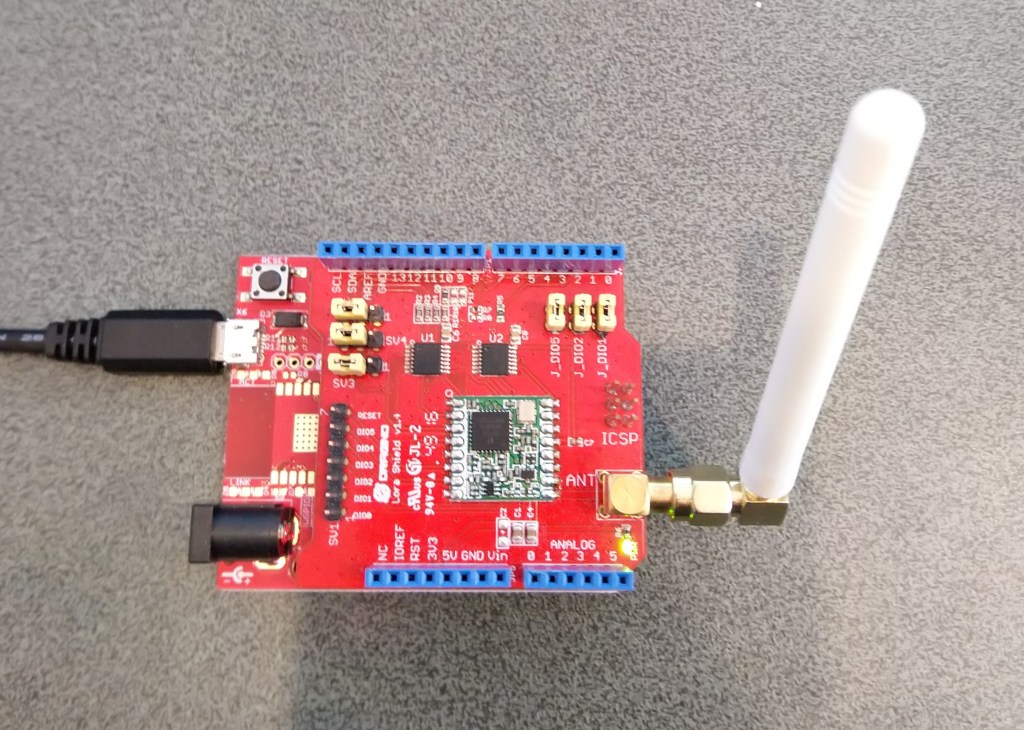
Dragino Shield on FEZT18-N
To configure the RFM9X I wrote some wrapper functions for the FEZSPIAPI to read/write byte values, word values and arrays of bytes. The TinyCLR-OS APIs (Mar 2019) return an additional byte at the start of each reply which has to be removed.
Each method was tested by read/writing suitable register(s) in the device configuration (Needed to set it into LoRa mode first).
//---------------------------------------------------------------------------------
// Copyright (c) March 2020, devMobile Software
//
// Licensed under the Apache License, Version 2.0 (the "License");
// you may not use this file except in compliance with the License.
// You may obtain a copy of the License at
//
//     http://www.apache.org/licenses/LICENSE-2.0
//
// Unless required by applicable law or agreed to in writing, software
// distributed under the License is distributed on an "AS IS" BASIS,
// WITHOUT WARRANTIES OR CONDITIONS OF ANY KIND, either express or implied.
// See the License for the specific language governing permissions and
// limitations under the License.
//
//---------------------------------------------------------------------------------
namespace devMobile.IoT.Rfm9x.RegisterReadAndWrite
{
   using System;
   using System.Diagnostics;
   using System.Threading;
   using GHIElectronics.TinyCLR.Devices.Gpio;
   using GHIElectronics.TinyCLR.Devices.Spi;
   using GHIElectronics.TinyCLR.Pins;

   public sealed class Rfm9XDevice
   {
      private SpiDevice rfm9XLoraModem;
      private const byte RegisterAddressReadMask = 0X7f;
      private const byte RegisterAddressWriteMask = 0x80;

      public Rfm9XDevice(int chipSelectPin, int resetPin)
      {
         var settings = new SpiConnectionSettings()
         {
            ChipSelectType = SpiChipSelectType.Gpio,
            ChipSelectLine = chipSelectPin,
            Mode = SpiMode.Mode0,
            ClockFrequency = 500000,
            DataBitLength = 8,
            ChipSelectActiveState = false,
         };

         SpiController spiCntroller = SpiController.FromName(FEZ.SpiBus.Spi1);

         rfm9XLoraModem = spiCntroller.GetDevice(settings);

         // Factory reset pin configuration
         GpioController gpioController = GpioController.GetDefault();
         GpioPin resetGpioPin = gpioController.OpenPin(resetPin);
         resetGpioPin.SetDriveMode(GpioPinDriveMode.Output);
         resetGpioPin.Write(GpioPinValue.Low);
         Thread.Sleep(10);
         resetGpioPin.Write(GpioPinValue.High);
         Thread.Sleep(10);
      }

      public Byte RegisterReadByte(byte registerAddress)
      {
         byte[] writeBuffer = new byte[] { registerAddress &= RegisterAddressReadMask, 0x0 };
         byte[] readBuffer = new byte[writeBuffer.Length];
         Debug.Assert(rfm9XLoraModem != null);

         rfm9XLoraModem.TransferFullDuplex(writeBuffer, readBuffer);

         return readBuffer[1];
      }

      public ushort RegisterReadWord(byte address)
      {
         byte[] writeBuffer = new byte[] { address &= RegisterAddressReadMask, 0x0, 0x0 };
         byte[] readBuffer = new byte[writeBuffer.Length];
         Debug.Assert(rfm9XLoraModem != null);

         rfm9XLoraModem.TransferFullDuplex(writeBuffer, readBuffer);

         return (ushort)(readBuffer[2] + (readBuffer[1] << 8));
      }

      public byte[] RegisterRead(byte address, int length)
      {
         byte[] writeBuffer = new byte[length + 1];
         byte[] readBuffer = new byte[length + 1];
         byte[] repyBuffer = new byte[length];
         Debug.Assert(rfm9XLoraModem != null);

         writeBuffer[0] = address &= RegisterAddressReadMask;

         rfm9XLoraModem.TransferFullDuplex(writeBuffer, readBuffer);

         Array.Copy(readBuffer, 1, repyBuffer, 0, length);

         return repyBuffer;
      }

      public void RegisterWriteByte(byte address, byte value)
      {
         byte[] writeBuffer = new byte[] { address |= RegisterAddressWriteMask, value };
         Debug.Assert(rfm9XLoraModem != null);

         rfm9XLoraModem.Write(writeBuffer);
      }

      public void RegisterWriteWord(byte address, ushort value)
      {
         byte[] valueBytes = BitConverter.GetBytes(value);
         byte[] writeBuffer = new byte[] { address |= RegisterAddressWriteMask, valueBytes[0], valueBytes[1] };
         Debug.Assert(rfm9XLoraModem != null);

         rfm9XLoraModem.Write(writeBuffer);
      }

      public void RegisterWrite(byte address, byte[] bytes)
      {
         byte[] writeBuffer = new byte[1 + bytes.Length];
         Debug.Assert(rfm9XLoraModem != null);

         Array.Copy(bytes, 0, writeBuffer, 1, bytes.Length);
         writeBuffer[0] = address |= RegisterAddressWriteMask;

         rfm9XLoraModem.Write(writeBuffer);
      }

      public void RegisterDump()
      {
         Debug.WriteLine("Register dump");
         for (byte registerIndex = 0; registerIndex <= 0x42; registerIndex++)
         {
            byte registerValue = this.RegisterReadByte(registerIndex);

            Debug.WriteLine($"Register 0x{registerIndex:x2} - Value 0X{registerValue:x2}");
         }
      }
   }

   class Program
   {
      static void Main()
      {
         Rfm9XDevice rfm9XDevice = new Rfm9XDevice(FEZ.GpioPin.D10, FEZ.GpioPin.D9);

         rfm9XDevice.RegisterDump();

         while (true)
         {
            Debug.WriteLine("Read RegOpMode (read byte)");
            Byte regOpMode1 = rfm9XDevice.RegisterReadByte(0x1);
            Debug.WriteLine($"RegOpMode 0x{regOpMode1:x2}");

            Debug.WriteLine("Set LoRa mode and sleep mode (write byte)");
            rfm9XDevice.RegisterWriteByte(0x01, 0b10000000);

            Debug.WriteLine("Read RegOpMode (read byte)");
            Byte regOpMode2 = rfm9XDevice.RegisterReadByte(0x1);
            Debug.WriteLine($"RegOpMode 0x{regOpMode2:x2}");

            Debug.WriteLine("Read the preamble (read word)");
            ushort preamble = rfm9XDevice.RegisterReadWord(0x20);
            Debug.WriteLine($"Preamble 0x{preamble:x2}");

            Debug.WriteLine("Set the preamble to 0x80 (write word)");
            rfm9XDevice.RegisterWriteWord(0x20, 0x80);

            Debug.WriteLine("Read the center frequency (read byte array)");
            byte[] frequencyReadBytes = rfm9XDevice.RegisterRead(0x06, 5);
            Debug.WriteLine($"Frequency Msb 0x{frequencyReadBytes[0]:x2} Mid 0x{frequencyReadBytes[1]:x2} Lsb 0x{frequencyReadBytes[2]:x2}");

            Debug.WriteLine("Set the center frequency to 916MHz (write byte array)");
            byte[] frequencyWriteBytes = { 0xE4, 0xC0, 0x00 };
            rfm9XDevice.RegisterWrite(0x06, frequencyWriteBytes);

            rfm9XDevice.RegisterDump();

            Thread.Sleep(30000);
         }
      }
   }
}
The output of the application looked like this
'GHIElectronics.TinyCLR.VisualStudio.ProjectSystem.dll' (Managed): Loaded 'C:\Users\BrynLewis\source\repos\RFM9X.TinyCLR\RegisterReadAndWrite\bin\Debug\pe\..\GHIElectronics.TinyCLR.Native.dll'
'GHIElectronics.TinyCLR.VisualStudio.ProjectSystem.dll' (Managed): Loaded 'C:\Users\BrynLewis\source\repos\RFM9X.TinyCLR\RegisterReadAndWrite\bin\Debug\pe\..\GHIElectronics.TinyCLR.Devices.Gpio.dll'
'GHIElectronics.TinyCLR.VisualStudio.ProjectSystem.dll' (Managed): Loaded 'C:\Users\BrynLewis\source\repos\RFM9X.TinyCLR\RegisterReadAndWrite\bin\Debug\pe\..\GHIElectronics.TinyCLR.Devices.Spi.dll'
'GHIElectronics.TinyCLR.VisualStudio.ProjectSystem.dll' (Managed): Loaded 'C:\Users\BrynLewis\source\repos\RFM9X.TinyCLR\RegisterReadAndWrite\bin\Debug\pe\..\RegisterReadAndWrite.exe', Symbols loaded.
The thread '<No Name>' (0x2) has exited with code 0 (0x0).
Register dump
Register 0x00 - Value 0X00
Register 0x01 - Value 0X09
Register 0x02 - Value 0X1a
Register 0x03 - Value 0X0b
Register 0x04 - Value 0X00
Register 0x05 - Value 0X52
Register 0x06 - Value 0X6c
Register 0x07 - Value 0X80
Register 0x08 - Value 0X00
Register 0x09 - Value 0X4f
Register 0x0a - Value 0X09
Register 0x0b - Value 0X2b
Register 0x0c - Value 0X20
Register 0x0d - Value 0X08
Register 0x0e - Value 0X02
Register 0x0f - Value 0X0a
Register 0x10 - Value 0Xff
Register 0x11 - Value 0X70
Register 0x12 - Value 0X15
Register 0x13 - Value 0X0b
Register 0x14 - Value 0X28
Register 0x15 - Value 0X0c
Register 0x16 - Value 0X12
Register 0x17 - Value 0X47
Register 0x18 - Value 0X32
Register 0x19 - Value 0X3e
Register 0x1a - Value 0X00
Register 0x1b - Value 0X00
Register 0x1c - Value 0X00
Register 0x1d - Value 0X00
Register 0x1e - Value 0X00
Register 0x1f - Value 0X40
Register 0x20 - Value 0X00
Register 0x21 - Value 0X00
Register 0x22 - Value 0X00
Register 0x23 - Value 0X00
Register 0x24 - Value 0X05
Register 0x25 - Value 0X00
Register 0x26 - Value 0X03
Register 0x27 - Value 0X93
Register 0x28 - Value 0X55
Register 0x29 - Value 0X55
Register 0x2a - Value 0X55
Register 0x2b - Value 0X55
Register 0x2c - Value 0X55
Register 0x2d - Value 0X55
Register 0x2e - Value 0X55
Register 0x2f - Value 0X55
Register 0x30 - Value 0X90
Register 0x31 - Value 0X40
Register 0x32 - Value 0X40
Register 0x33 - Value 0X00
Register 0x34 - Value 0X00
Register 0x35 - Value 0X0f
Register 0x36 - Value 0X00
Register 0x37 - Value 0X00
Register 0x38 - Value 0X00
Register 0x39 - Value 0Xf5
Register 0x3a - Value 0X20
Register 0x3b - Value 0X82
Register 0x3c - Value 0Xf3
Register 0x3d - Value 0X02
Register 0x3e - Value 0X80
Register 0x3f - Value 0X40
Register 0x40 - Value 0X00
Register 0x41 - Value 0X00
Register 0x42 - Value 0X12
Read RegOpMode (read byte)
RegOpMode 0x09
Set LoRa mode and sleep mode (write byte)
Read RegOpMode (read byte)
RegOpMode 0x80
Read the preamble (read word)
Preamble 0x08
Set the preamble to 0x80 (write word)
Read the center frequency (read byte array)
Frequency Msb 0x6c Mid 0x80 Lsb 0x00
Set the center frequency to 916MHz (write byte array)
Register dump
Register 0x00 - Value 0X01
Register 0x01 - Value 0X80
Register 0x02 - Value 0X1a
Register 0x03 - Value 0X0b
Register 0x04 - Value 0X00
Register 0x05 - Value 0X52
Register 0x06 - Value 0Xe4
Register 0x07 - Value 0Xc0
Register 0x08 - Value 0X00
Register 0x09 - Value 0X4f
Register 0x0a - Value 0X09
Register 0x0b - Value 0X2b
Register 0x0c - Value 0X20
Register 0x0d - Value 0X01
Register 0x0e - Value 0X80
Register 0x0f - Value 0X00
Register 0x10 - Value 0X00
Register 0x11 - Value 0X00
Register 0x12 - Value 0X00
Register 0x13 - Value 0X00
Register 0x14 - Value 0X00
Register 0x15 - Value 0X00
Register 0x17 - Value 0X00
Register 0x18 - Value 0X10
Register 0x19 - Value 0X00
Register 0x1a - Value 0X00
Register 0x1b - Value 0X00
Register 0x1c - Value 0X00
Register 0x1d - Value 0X72
Register 0x1e - Value 0X70
Register 0x1f - Value 0X64
Register 0x20 - Value 0X80
Register 0x21 - Value 0X00
Register 0x22 - Value 0X01
Register 0x23 - Value 0Xff
Register 0x24 - Value 0X00
Register 0x25 - Value 0X00
Register 0x26 - Value 0X04
Register 0x27 - Value 0X00
Register 0x28 - Value 0X00
Register 0x29 - Value 0X00
Register 0x2a - Value 0X00
Register 0x2b - Value 0X00
Register 0x2c - Value 0X00
Register 0x2d - Value 0X50
Register 0x2e - Value 0X14
Register 0x2f - Value 0X45
Register 0x30 - Value 0X55
Register 0x31 - Value 0Xc3
Register 0x32 - Value 0X05
Register 0x33 - Value 0X27
Register 0x34 - Value 0X1c
Register 0x35 - Value 0X0a
Register 0x36 - Value 0X03
Register 0x37 - Value 0X0a
Register 0x38 - Value 0X42
Register 0x39 - Value 0X12
Register 0x3a - Value 0X49
Register 0x3b - Value 0X1d
Register 0x3c - Value 0X00
Register 0x3d - Value 0Xaf
Register 0x3e - Value 0X00
Register 0x3f - Value 0X00
Register 0x40 - Value 0X00
Register 0x41 - Value 0X00
Register 0x42 - Value 0X12
The next step is to extract the SPI register access functionality into a module and configure the bare minimum of settings required to get the SX127X to transmit.
public class MeadowApp : App<F7Micro, MeadowApp>
{
	private Rfm9XDevice rfm9XDevice;

	public MeadowApp()
	{
		ISpiBus spiBus = Device.CreateSpiBus(500);
		if (spiBus == null)
		{
			Console.WriteLine("spiBus == null");
		}

		rfm9XDevice = new Rfm9XDevice(Device, spiBus, Device.Pins.D09, Device.Pins.D11);

		// Put device into LoRa + Sleep mode
		rfm9XDevice.RegisterWriteByte(0x01, 0b10000000); // RegOpMode

		// Set the frequency to 915MHz
		byte[] frequencyWriteBytes = { 0xE4, 0xC0, 0x00 }; // RegFrMsb, RegFrMid, RegFrLsb
		rfm9XDevice.RegisterWrite(0x06, frequencyWriteBytes);

		rfm9XDevice.RegisterWriteByte(0x0F, 0x0); // RegFifoRxBaseAddress

		rfm9XDevice.RegisterWriteByte(0x01, 0b10000101); // RegOpMode set LoRa & RxContinuous

		while (true)
		{
			// Wait until a packet is received, no timeouts in PoC
			Console.WriteLine("Receive-Wait");
			byte IrqFlags = rfm9XDevice.RegisterReadByte(0x12); // RegIrqFlags
			while ((IrqFlags & 0b01000000) == 0)  // wait until RxDone cleared
			{
				Task.Delay(100).Wait();
				IrqFlags = rfm9XDevice.RegisterReadByte(0x12); // RegIrqFlags
				Console.Write(".");
			}
			Console.WriteLine("");
			Console.WriteLine(string.Format("RegIrqFlags {0}", Convert.ToString((byte)IrqFlags, 2).PadLeft(8, '0')));
			Console.WriteLine("Receive-Message");
			byte currentFifoAddress = rfm9XDevice.RegisterReadByte(0x10); // RegFifiRxCurrent
			rfm9XDevice.RegisterWriteByte(0x0d, currentFifoAddress); // RegFifoAddrPtr

			byte numberOfBytes = rfm9XDevice.RegisterReadByte(0x13); // RegRxNbBytes

			byte[] messageBytes = rfm9XDevice.RegisterRead(0x00, numberOfBytes); // RegFifo

			rfm9XDevice.RegisterWriteByte(0x0d, 0);
			rfm9XDevice.RegisterWriteByte(0x12, 0b11111111); // RegIrqFlags clear all the bits

			string messageText = UTF8Encoding.UTF8.GetString(messageBytes);
			Console.WriteLine("Received {0} byte message {1}", messageBytes.Length, messageText);

			Console.WriteLine("Receive-Done");
		}
	}
}
The receive code works reliably but has no error detection or correction capability, so every so often a message gets corrupted. Which is can be seen in the Debug output below.
'App.exe' (CLR v4.0.30319: DefaultDomain): Loaded 'C:\WINDOWS\Microsoft.Net\assembly\GAC_64\mscorlib\v4.0_4.0.0.0__b77a5c561934e089\mscorlib.dll'.
'App.exe' (CLR v4.0.30319: DefaultDomain): Loaded 'C:\Users\BrynLewis\source\repos\RFM9X.Meadow\ReceiveBasic\bin\Debug\net472\App.exe'. Symbols loaded.
'App.exe' (CLR v4.0.30319: App.exe): Loaded 'C:\Users\BrynLewis\source\repos\RFM9X.Meadow\ReceiveBasic\bin\Debug\net472\Meadow.dll'.
The program '[18208] App.exe: Program Trace' has exited with code 0 (0x0).
The program '[18208] App.exe' has exited with code 0 (0x0).
.
.
DirectRegisterAccess = True
.
.
Receive-Wait
RegIrqFlags 01010000
Receive-Message
Received 61 byte message ???LoRaIoT1Maduino2at 57.7,ah 64,wsa 2,wsg 4,wd 254.25,r 0.00,
Receive-Done
Receive-Wait
RegIrqFlags 01110000
Receive-Message
Received 60 byte message ???LoReE??????!???ngvyno2at,57/7-ah 6???,w???a 2,w?????????6,7$.13,r 0.00-
Receive-Done
Receive-Wait
RegIrqFlags 01010000
Receive-Message
Received 16 byte message HeLoRa World! 0
Receive-Done
Receive-Wait
RegIrqFlags 01000000
Receive-Message
Received 60 byte message ???LoRaIoT1Maduino2at 57.7,ah 64,wsa 1,wsg 2,wd 88.13,r 0.00,
Receive-Done
Receive-Wait
RegIrqFlags 01010000
Receive-Message
Received 16 byte message HeLoRa World! 2
Receive-Done
Receive-Wait

 devMobile's blog