Grove Base Hat for Raspberry PI Investigation

For a couple of projects I had been using the Dexter industries GrovePI+ and the Grove Base Hat for Raspberry PI looked like a cheaper alternative for many applications, but it lacked Windows 10 IoT Core support.

My first project was to build a Inter Integrated Circuit(I2C) device scanner to check that the Grove Base Hat STM32 MCU I2C client implementation on a “played nice” with Windows 10 IoT core.

My Visual Studio 2017 project (I2C Device Scanner) scans all the valid 7bit I2C addresses and in the debug output displayed the two “found” devices, a Grove- 3 Axis Accelerometer(+-16G) (ADXL345) and the Grove Base Hat for Raspberry PI.

backgroundTaskHost.exe' (CoreCLR: CoreCLR_UWP_Domain): Loaded 'C:\Data\Users\DefaultAccount\AppData\Local\DevelopmentFiles\I2CDeviceScanner-uwpVS.Debug_ARM.Bryn.Lewis\System.Diagnostics.Debug.dll'. Skipped loading symbols. Module is optimized and the debugger option 'Just My Code' is enabled.

'backgroundTaskHost.exe' (CoreCLR: CoreCLR_UWP_Domain): Loaded 'C:\Data\Users\DefaultAccount\AppData\Local\DevelopmentFiles\I2CDeviceScanner-uwpVS.Debug_ARM.Bryn.Lewis\System.Linq.dll'. Skipped loading symbols. Module is optimized and the debugger option 'Just My Code' is enabled.
Exception thrown: 'System.IO.FileNotFoundException' in devMobile.Windows10IoTCore.I2CDeviceScanner.winmd
WinRT information: Slave address was not acknowledged.
.......
Exception thrown: 'System.IO.FileNotFoundException' in devMobile.Windows10IoTCore.I2CDeviceScanner.winmd
WinRT information: Slave address was not acknowledged.

I2C Controller \\?\ACPI#MSFT8000#1#{a11ee3c6-8421-4202-a3e7-b91ff90188e4}\I2C1 has 2 devices
Address 0x4
Address 0x53
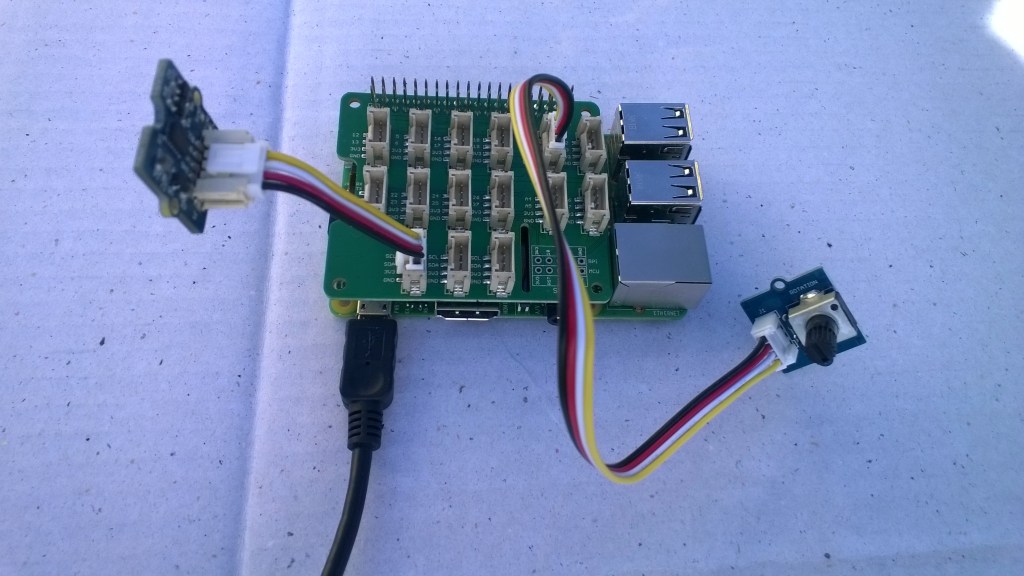
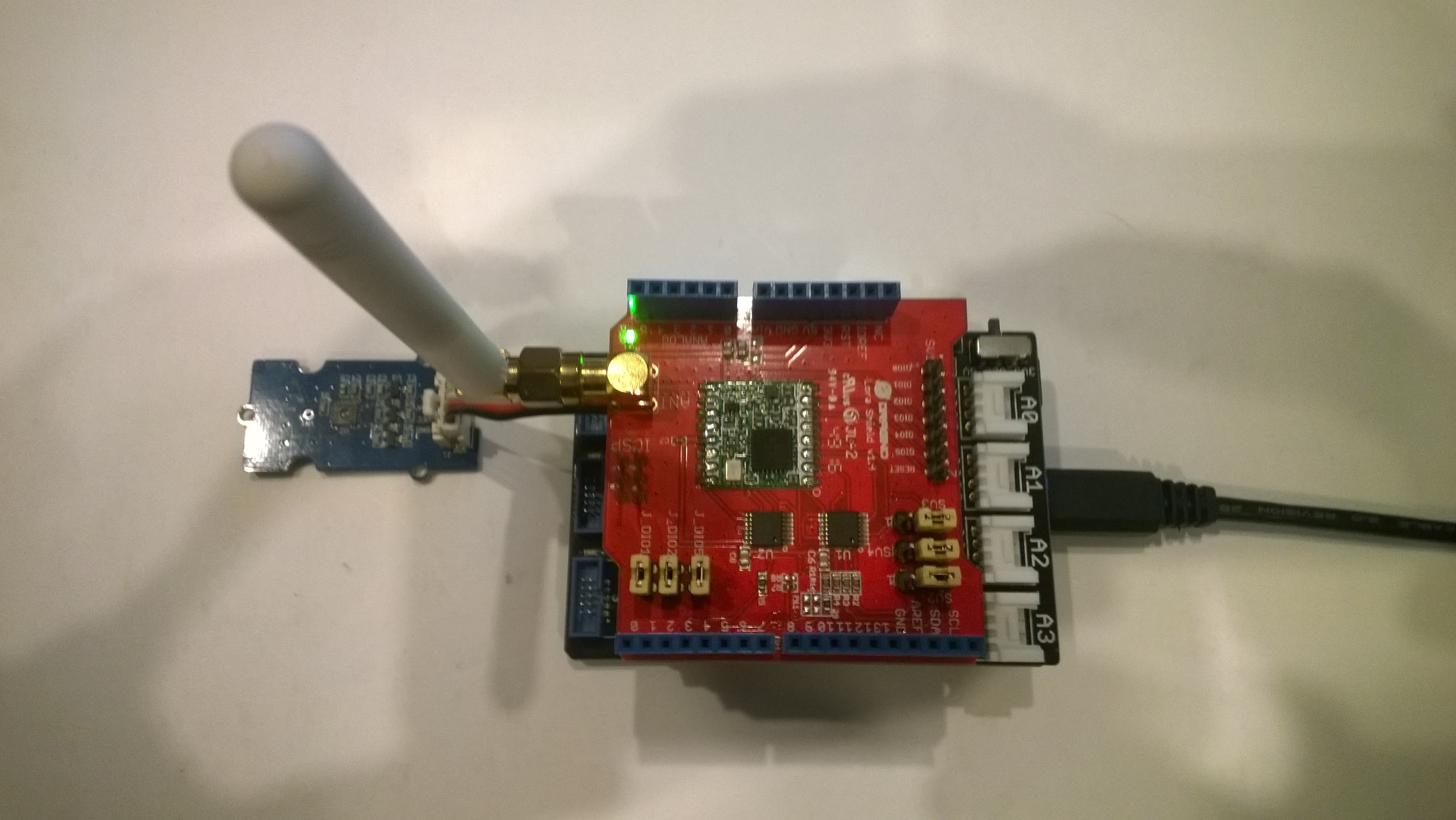
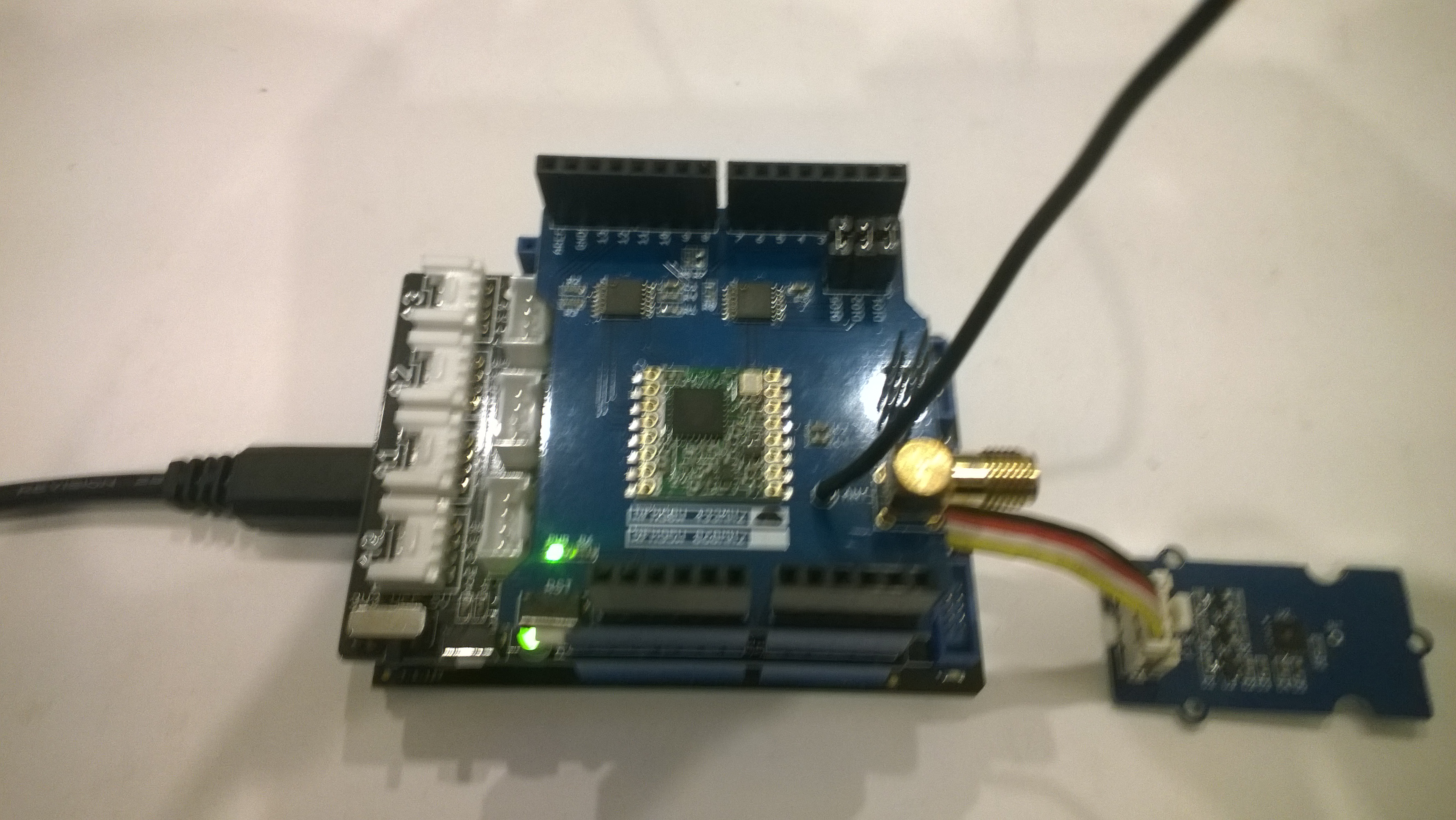
Raspberry PI with Grove Base Hat & ADXL345 & Rotary angle sensor
Raspberry PI with Grove Base Hat I2C test rig

The next step was to confirm I could read the device ID of the ADXL345 and the Grove Base Hat for RaspberryPI. I had to figure out the Grove Base Hat for RaspberryPI from the Seeedstudio Python code.

I2CDevicePinger ADXL345 Debug output

...
'backgroundTaskHost.exe' (CoreCLR: CoreCLR_UWP_Domain): Loaded 'C:\Data\Users\DefaultAccount\AppData\Local\DevelopmentFiles\I2CDevicePinger-uwpVS.Debug_ARM.Bryn.Lewis\System.Diagnostics.Debug.dll'. Skipped loading symbols. Module is optimized and the debugger option 'Just My Code' is enabled.
DeviceID 0XE5

The DeviceID for the ADXL345 matched the DEVID in the device datasheet.

I2CDevicePinger Debug output

'backgroundTaskHost.exe' (CoreCLR: CoreCLR_UWP_Domain): Loaded 'C:\Data\Users\DefaultAccount\AppData\Local\DevelopmentFiles\I2CDevicePinger-uwpVS.Debug_ARM.Bryn.Lewis\System.Diagnostics.Debug.dll'. Skipped loading symbols. Module is optimized and the debugger option 'Just My Code' is enabled.
DeviceID 0X4

The DeviceID for the Grove Base Hat for RaspberryPI matched

RPI_HAT_PID = 0x0004 in the Python code.

The last test application reads the raw value of the specified analog input

public async void Run(IBackgroundTaskInstance taskInstance)
{
   string aqs = I2cDevice.GetDeviceSelector();
   DeviceInformationCollection I2CBusControllers = await DeviceInformation.FindAllAsync(aqs);

   if (I2CBusControllers.Count != 1)
   {
      Debug.WriteLine("Unexpect number of I2C bus controllers found");
      return;
   }

   I2cConnectionSettings settings = new I2cConnectionSettings(0x04)
   {
      BusSpeed = I2cBusSpeed.StandardMode,
      SharingMode = I2cSharingMode.Shared,
   };

   using (I2cDevice device = I2cDevice.FromIdAsync(I2CBusControllers[0].Id, settings).AsTask().GetAwaiter().GetResult())
   {
      try
      {
         ushort value = 0;
         // From the Seeedstudio python
	 // 0x10 ~ 0x17: ADC raw data
	 // 0x20 ~ 0x27: input voltage
         // 0x29: output voltage (Grove power supply voltage)
         // 0x30 ~ 0x37: input voltage / output voltage						
         do
	 {
            byte[] writeBuffer = new byte[1] { 0x10 };
            byte[] readBuffer = new byte[2] { 0, 0 };

            device.WriteRead(writeBuffer, readBuffer);
            value = BitConverter.ToUInt16(readBuffer, 0);

            Debug.WriteLine($"Value {value}");

            Task.Delay(1000).GetAwaiter().GetResult();
         }
         while (value != 0);
      }
      Catch (Exception ex)
      {
         Debug.WriteLine(ex.Message);
      }
   }
}

GroveBaseHatRPIRegisterReader Debug output

'backgroundTaskHost.exe' (CoreCLR: CoreCLR_UWP_Domain): Loaded 'C:\Data\Users\DefaultAccount\AppData\Local\DevelopmentFiles\GroveBaseHatRPIRegisterReader-uwpVS.Debug_ARM.Bryn.Lewis\System.Diagnostics.Debug.dll'. Skipped loading symbols. Module is optimized and the debugger option 'Just My Code' is enabled.
Value 3685
Value 3685
Value 3688
Value 3681
Value 3681
Value 3688
Value 3688
Value 3683

The output changed when I adjusted the rotary angle sensor (0-4095) which confirmed I could reliably read the Analog input values.

The code for my test harness applications is available on github, the next step is to build a library for the Grove Base Hat for RaspberryPI
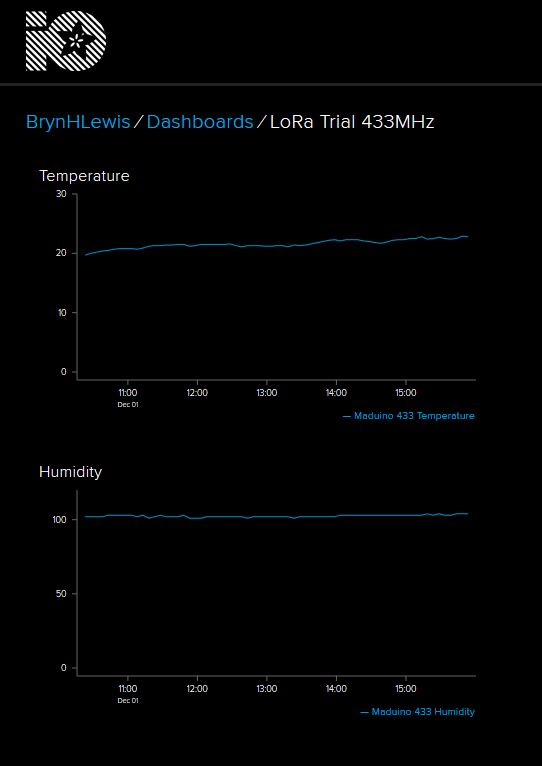
Adafruit.IO LoRa Field Gateway BCD Addressing

After some testing with more client devices, especially the Easy Sensors Arduino Nano radio shield RFM69/95 or NRF24L01+ I have decided to move to non text addresses for devices and the LoRa field gateway.

THIS IS A BREAKING CHANGE

The unique identifier provided by the SHA204A crypto and authentication chip on the EasySensors shield highlighted this issue. The Binary Coded Decimal(BCD) version of the 72 bit identifier was too long to fit in the from address.

My later Arduino based sample clients have some helper functions to populate the message header, add values, and prepare the message payload for reuse.

On the server side I have added code to log the build version and Raspbery PI shield type

// Log the Application build, shield information etc.
LoggingFields appllicationBuildInformation = new LoggingFields();
#if DRAGINO
   appllicationBuildInformation.AddString("Shield", "DraginoLoRaGPSHat");
#endif
…
#if UPUTRONICS_RPIPLUS_CS1
   appllicationBuildInformation.AddString("Shield", "UputronicsPiPlusLoRaExpansionBoardCS1");
#endif
appllicationBuildInformation.AddString("Timezone", TimeZoneSettings.CurrentTimeZoneDisplayName);
appllicationBuildInformation.AddString("OSVersion", Environment.OSVersion.VersionString);
appllicationBuildInformation.AddString("MachineName", Environment.MachineName);

// This is from the application manifest 
Package package = Package.Current;
PackageId packageId = package.Id;
PackageVersion version = packageId.Version;

appllicationBuildInformation.AddString("ApplicationVersion", string.Format($"{version.Major}.{version.Minor}.{version.Build}.{version.Revision}"));
this.loggingChannel.LogEvent("Application starting", appllicationBuildInformation, LoggingLevel.Information);

Then when the message payload is populated the from address byte array is converted to BCD

private async void Rfm9XDevice_OnReceive(object sender, Rfm9XDevice.OnDataReceivedEventArgs e)
{
   string addressBcdText;
   string messageBcdText;
   string messageText = "";
   char[] sensorReadingSeparator = new char[] { ',' };
   char[] sensorIdAndValueSeparator = new char[] { ' ' };

   addressBcdText = BitConverter.ToString(e.Address);

   messageBcdText = BitConverter.ToString(e.Data);
   try
   {
      messageText = UTF8Encoding.UTF8.GetString(e.Data);
   }
   catch (Exception)
   {
      this.loggingChannel.LogMessage("Failure converting payload to text", LoggingLevel.Error);
   return;
   }

#if DEBUG
    Debug.WriteLine(@"{0:HH:mm:ss}-RX From {1} PacketSnr {2:0.0} Packet RSSI {3}dBm RSSI {4}dBm = {5} byte message ""{6}""", DateTime.Now, addressBcdText, e.PacketSnr, e.PacketRssi, e.Rssi, e.Data.Length, messageText);
#endif
   LoggingFields messagePayload = new LoggingFields();
   messagePayload.AddInt32("AddressLength", e.Address.Length);
   messagePayload.AddString("Address-BCD", addressBcdText);
   messagePayload.AddInt32("Message-Length", e.Data.Length);
   messagePayload.AddString("Message-BCD", messageBcdText);
   messagePayload.AddString("Nessage-Unicode", messageText);
   messagePayload.AddDouble("Packet SNR", e.PacketSnr);
   messagePayload.AddInt32("Packet RSSI", e.PacketRssi);
   messagePayload.AddInt32("RSSI", e.Rssi);
   this.loggingChannel.LogEvent("Message Data", messagePayload, LoggingLevel.Verbose);

			
   // Check the address is not to short/long 
   if (e.Address.Length < AddressLengthMinimum)
   {
      this.loggingChannel.LogMessage("From address too short", LoggingLevel.Warning);
      return;
   }

   if (e.Address.Length > MessageLengthMaximum)
   {
      this.loggingChannel.LogMessage("From address too long", LoggingLevel.Warning);
      return;
   }

   // Check the payload is not too short/long 
   if (e.Data.Length < MessageLengthMinimum)
   {
      this.loggingChannel.LogMessage("Message too short to contain any data", LoggingLevel.Warning);
      return;
   }

   if (e.Data.Length > MessageLengthMaximum)
   {
      this.loggingChannel.LogMessage("Message too long to contain valid data", LoggingLevel.Warning);
      return;
   }

   // Adafruit IO is case sensitive & only does lower case ?
   string deviceId = addressBcdText.ToLower();

   // Chop up the CSV text payload
   string[] sensorReadings = messageText.Split(sensorReadingSeparator, StringSplitOptions.RemoveEmptyEntries);
   if (sensorReadings.Length == 0)
   {
      this.loggingChannel.LogMessage("Payload contains no sensor readings", LoggingLevel.Warning);
      return;
   }

   Group_feed_data groupFeedData = new Group_feed_data();

   LoggingFields sensorData = new LoggingFields();
   sensorData.AddString("DeviceID", deviceId);

   // Chop up each sensor reading into an ID & value
   foreach (string sensorReading in sensorReadings)
   {
      string[] sensorIdAndValue = sensorReading.Split(sensorIdAndValueSeparator, StringSplitOptions.RemoveEmptyEntries);

      // Check that there is an id & value
      if (sensorIdAndValue.Length != 2)
      {
         this.loggingChannel.LogMessage("Sensor reading invalid format", LoggingLevel.Warning);
         return;
      }

      string sensorId = sensorIdAndValue[0].ToLower();
      string value = sensorIdAndValue[1];

      // Construct the sensor ID from SensordeviceID & Value ID
      groupFeedData.Feeds.Add(new Anonymous2() { Key = string.Format("{0}{1}", deviceId, sensorId), Value = value });

      sensorData.AddString(sensorId, value);

      Debug.WriteLine(" Sensor {0}{1} Value {2}", deviceId, sensorId, value);
   }
   this.loggingChannel.LogEvent("Sensor readings", sensorData, LoggingLevel.Verbose);

   try
   {
      Debug.WriteLine(" CreateGroupDataAsync start");
      await this.adaFruitIOClient.CreateGroupDataAsync(this.applicationSettings.AdaFruitIOUserName,
this.applicationSettings.AdaFruitIOGroupName.ToLower(), groupFeedData);
      Debug.WriteLine(" CreateGroupDataAsync finish");
   }
   catch (Exception ex)
   {
      Debug.WriteLine(" CreateGroupDataAsync failed {0}", ex.Message);
				this.loggingChannel.LogMessage("CreateGroupDataAsync failed " + ex.Message, LoggingLevel.Error);
   }
}
AfaFruit.IO Data Display

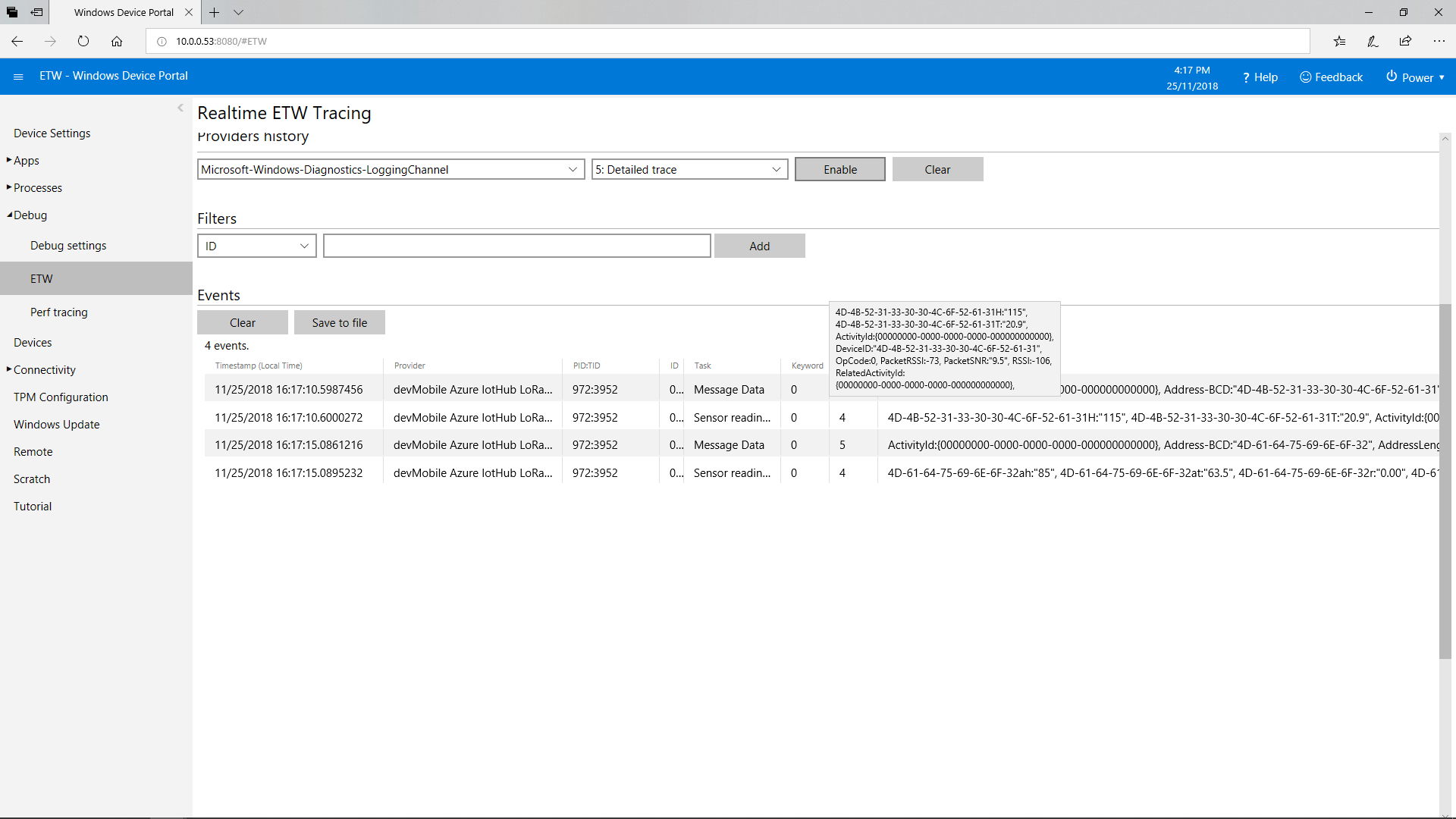
This does mean longer field names but I usually copy n paste them from the Arduino serial monitor or the Event Tracing For Windows (ETW) logging.

AdaFruit.IO Field gateway ETW Logging

Azure IoT Hubs LoRa Field Gateway BCD Addressing

After some testing with more client devices, especially the Easy Sensors Arduino Nano radio shield RFM69/95 or NRF24L01+ I have decided to move to non text addresses for devices and the LoRa field gateway.

THIS IS A BREAKING CHANGE

The unique identifier provided by the SHA204A crypto and authentication chip on the EasySensors shield highlighted this issue. The Binary Coded Decimal(BCD) version of the 72 bit identifier was too long to fit in the from address.

My Arduino MKR1300 sample code has some helper functions to populate the message header, add values, and prepare the message payload for reuse.

On the server side I have added code to log the build version and Raspbery PI shield type

// Log the Application build, shield information etc.
LoggingFields appllicationBuildInformation = new LoggingFields();

#if DRAGINO
   appllicationBuildInformation.AddString("Shield", "DraginoLoRaGPSHat");
#endif

...

#if UPUTRONICS_RPIPLUS_CS1
   appllicationBuildInformation.AddString("Shield", "UputronicsPiPlusLoRaExpansionBoardCS1");
#endif
appllicationBuildInformation.AddString("Timezone", TimeZoneSettings.CurrentTimeZoneDisplayName);
appllicationBuildInformation.AddString("OSVersion", Environment.OSVersion.VersionString);
appllicationBuildInformation.AddString("MachineName", Environment.MachineName);

// This is from the application manifest 
Package package = Package.Current;
PackageId packageId = package.Id;
PackageVersion version = packageId.Version;

appllicationBuildInformation.AddString("ApplicationVersion", string.Format($"{version.Major}.{version.Minor}.{version.Build}.{version.Revision}"));
this.logging.LogEvent("Application starting", appllicationBuildInformation, LoggingLevel.Information);

Then when the message payload is populated the from address byte array is converted to BCD

private async void Rfm9XDevice_OnReceive(object sender, Rfm9XDevice.OnDataReceivedEventArgs e)
{
   string addressBcdText;
   string messageBcdText;
   string messageText = "";
   char[] sensorReadingSeparators = new char[] { ',' };
   char[] sensorIdAndValueSeparators = new char[] { ' ' };

   addressBcdText = BitConverter.ToString(e.Address);
   messageBcdText = BitConverter.ToString(e.Data);
   try
   {
      messageText = UTF8Encoding.UTF8.GetString(e.Data);
   }
   catch (Exception)
   {
      this.logging.LogMessage("Failure converting payload to text", 
   LoggingLevel.Error);
      return;
   }


#if DEBUG
   Debug.WriteLine(@"{0:HH:mm:ss}-RX From {1} PacketSnr {2:0.0} Packet 
   RSSI {3}dBm RSSI {4}dBm = {5} byte message ""{6}""", DateTime.Now, 
   messageBcdText, e.PacketSnr, e.PacketRssi, e.Rssi, e.Data.Length, 
   messageText);
#endif
   LoggingFields messagePayload = new LoggingFields();
   messagePayload.AddInt32("AddressLength", e.Address.Length);
   messagePayload.AddString("Address-BCD", addressBcdText);
   messagePayload.AddInt32("Message-Length", e.Data.Length);
   messagePayload.AddString("Message-BCD", messageBcdText);
   messagePayload.AddString("Message-Unicode", messageText);
   messagePayload.AddDouble("Packet SNR", e.PacketSnr);
   messagePayload.AddInt32("Packet RSSI", e.PacketRssi);
   messagePayload.AddInt32("RSSI", e.Rssi);
   this.logging.LogEvent("Message Data", messagePayload, LoggingLevel.Verbose);

//...

   JObject telemetryDataPoint = new JObject(); // This could be simplified but for field gateway will use this style
   LoggingFields sensorData = new LoggingFields();

   telemetryDataPoint.Add("DeviceID", addressBcdText);
   sensorData.AddString("DeviceID", addressBcdText);
   telemetryDataPoint.Add("PacketSNR", e.PacketSnr.ToString("F1"));
   sensorData.AddString("PacketSNR", e.PacketSnr.ToString("F1"));
   telemetryDataPoint.Add("PacketRSSI", e.PacketRssi);
   sensorData.AddInt32("PacketRSSI", e.PacketRssi);
   telemetryDataPoint.Add("RSSI", e.Rssi);
   sensorData.AddInt32("RSSI", e.Rssi);

   //Chop up each sensor read into an ID & value
   foreach (string sensorReading in sensorReadings)
   {
      string[] sensorIdAndValue = sensorReading.Split(sensorIdAndValueSeparators, StringSplitOptions.RemoveEmptyEntries);

      // Check that there is an id & value
      if (sensorIdAndValue.Length != 2)
      {
         this.logging.LogMessage("Sensor reading invalid format", LoggingLevel.Warning);
         return;
      }

      string sensorId = sensorIdAndValue[0];
      string value = sensorIdAndValue[1];

      try
      {
         if (this.applicationSettings.SensorIDIsDeviceIDSensorID)
         {
            // Construct the sensor ID from SensordeviceID & Value ID
            telemetryDataPoint.Add(string.Format("{0}{1}", addressBcdText, sensorId), value);

            sensorData.AddString(string.Format("{0}{1}", addressBcdText, sensorId), value);
            Debug.WriteLine(" Sensor {0}{1} Value {2}", addressBcdText, sensorId, value);
         }
         else
         {
            telemetryDataPoint.Add(sensorId, value);
            sensorData.AddString(sensorId, value);
            Debug.WriteLine(" Device {0} Sensor {1} Value {2}", addressBcdText, sensorId, value);
         }
      }
      catch (Exception ex)
      {
         this.logging.LogMessage("Sensor reading invalid JSON format " + ex.Message, LoggingLevel.Warning);
         return;
      }
   }

  this.logging.LogEvent("Sensor readings", sensorData, LoggingLevel.Information);

   try
   {
      using (Message message = new Message(Encoding.ASCII.GetBytes(JsonConvert.SerializeObject(telemetryDataPoint))))
      {
         Debug.WriteLine(" AzureIoTHubClient SendEventAsync start");
         await this.azureIoTHubClient.SendEventAsync(message);
         Debug.WriteLine(" AzureIoTHubClient SendEventAsync finish");
      }
   }
   catch (Exception ex)
   {
      this.logging.LogMessage("AzureIoTHubClient SendEventAsync failed " + ex.Message, LoggingLevel.Error);
   }
}

This does mean longer field names but I usually copy n paste them from the Arduino serial monitor of the Event Tracing For Windows (ETW) logging.

Azure IoT Hub LoRa Field Gateway ETW Logging

IoT.Net LoRa Radio 915 MHz Payload Addressing client

This is a demo ingenuity micro IoT.Net client (based on one of the examples in my RFM9XLoRaNetMF library) that uploads telemetry data to my Windows 10 IoT Core on Raspberry PI field gateway. 

Thought the silk screen says RFM69 this is a prototype running an RFM95 module.

iotnetlora.jpg

Bill of materials (Prices Sep 2018)

  • IoT.Net device (Beta tester will add price when available)

The device has an onboard MCP9808 temperature sensor which kept the BoM really short. I have had to make some modifications to my RFM9XLoRaNetMF library as the IoT.Net device uses a different SPI port. The code for this devices and the changes will be uploaded to GitHub in the next couple of days.

//---------------------------------------------------------------------------------
// Copyright (c) Sept 2018, devMobile Software
//
// Licensed under the Apache License, Version 2.0 (the "License");
// you may not use this file except in compliance with the License.
// You may obtain a copy of the License at
//
//     http://www.apache.org/licenses/LICENSE-2.0
//
// Unless required by applicable law or agreed to in writing, software
// distributed under the License is distributed on an "AS IS" BASIS,
// WITHOUT WARRANTIES OR CONDITIONS OF ANY KIND, either express or implied.
// See the License for the specific language governing permissions and
// limitations under the License.
// git remote add origin https://github.com/KiwiBryn/FieldGateway.LoRa.IoTNetClient.git
// git push -u origin master
//---------------------------------------------------------------------------------
namespace devMobile.IoT.IoTNet.FieldGateway
{
	using System;
	using System.Text;
	using System.Threading;
	using Microsoft.SPOT;
	using Microsoft.SPOT.Hardware;
	using devMobile.IoT.NetMF.ISM;
	using IngenuityMicro.Sensors;

	class IoTNetClient
	{
		private readonly Rfm9XDevice rfm9XDevice;
		private readonly TimeSpan dueTime = new TimeSpan(0, 0, 10);
		private readonly TimeSpan periodTime = new TimeSpan(0, 0, 30);
		private readonly MCP9808 mcp9808 = new MCP9808();
		private readonly OutputPort _led = new OutputPort((Cpu.Pin)16 + 8, false);
		private readonly byte[] fieldGatewayAddress = Encoding.UTF8.GetBytes("LoRaIoT1");
		private readonly byte[] deviceAddress = Encoding.UTF8.GetBytes("IoTNet1");

		public IoTNetClient()
		{
			rfm9XDevice = new Rfm9XDevice( SPI.SPI_module.SPI3, (Cpu.Pin)16 + 9, (Cpu.Pin)5, (Cpu.Pin)4);
		}

		public void Run()
		{
			rfm9XDevice.Initialise(frequency: 915000000, paBoost: true, rxPayloadCrcOn: true);
			rfm9XDevice.Receive(deviceAddress);

			rfm9XDevice.OnDataReceived += rfm9XDevice_OnDataReceived;
			rfm9XDevice.OnTransmit += rfm9XDevice_OnTransmit;

			Timer temperatureUpdates = new Timer(TemperatureTimerProc, null, dueTime, periodTime);

			Thread.Sleep(Timeout.Infinite);
		}

		private void TemperatureTimerProc(object state)
		{
			_led.Write(true);

			double temperature = mcp9808.ReadTempInC();

			Debug.Print(DateTime.UtcNow.ToString("hh:mm:ss") + "  T:" + temperature.ToString("F1"));

			rfm9XDevice.Send(fieldGatewayAddress, Encoding.UTF8.GetBytes("t " + temperature.ToString("F1")));

			_led.Write(true);
		}

		void rfm9XDevice_OnTransmit()
		{
			Debug.Print("Transmit-Done");
			_led.Write(false);
		}

		void rfm9XDevice_OnDataReceived(byte[] address, float packetSnr, int packetRssi, int rssi, byte[] data)
		{
			try
			{
				string messageText = new string(UTF8Encoding.UTF8.GetChars(data));
				string addressText = new string(UTF8Encoding.UTF8.GetChars(address));

				Debug.Print(DateTime.UtcNow.ToString("HH:MM:ss") + "-Rfm9X PacketSnr " + packetSnr.ToString("F1") + " Packet RSSI " + packetRssi + "dBm RSSI " + rssi + "dBm = " + data.Length + " byte message " + @"""" + messageText + @"""");
			}
			catch (Exception ex)
			{
				Debug.Print(ex.Message);
			}
		}
	}
}
}

.Net Framework debug output Field Gateway

22:55:39-RX From IoTNet1 PacketSnr 9.5 Packet RSSI -50dBm RSSI -110dBm = 6 byte message "t 23.6"
 Sensor IoTNet1t Value 23.6
 AzureIoTHubClient SendEventAsync start
 AzureIoTHubClient SendEventAsync finish
The thread 0xbec has exited with code 0 (0x0).
The thread 0xbb4 has exited with code 0 (0x0).
The thread 0xa0c has exited with code 0 (0x0).
The thread 0x13c has exited with code 0 (0x0).
22:56:09-RX From IoTNet1 PacketSnr 9.3 Packet RSSI -44dBm RSSI -102dBm = 6 byte message "t 23.8"
 Sensor IoTNet1t Value 23.8
 AzureIoTHubClient SendEventAsync start
 AzureIoTHubClient SendEventAsync finish

A small footprint, battery powered .NetMF 4.4 LoRa device designed and made in New Zealand with Visual Studio 2017 support is great.

Netduino LoRa Radio 433/868/915 MHz Payload Addressing client

This is a demo Netduino client (based on one of the examples in my RFM9XLoRaNetMF library) that uploads telemetry data to my Windows 10 IoT Core on Raspberry PI field gateway proof of concept(PoC).

Bill of materials (Prices Sep 2018)

//---------------------------------------------------------------------------------
// Copyright (c) 2017, devMobile Software
//
// Licensed under the Apache License, Version 2.0 (the "License");
// you may not use this file except in compliance with the License.
// You may obtain a copy of the License at
//
//     http://www.apache.org/licenses/LICENSE-2.0
//
// Unless required by applicable law or agreed to in writing, software
// distributed under the License is distributed on an "AS IS" BASIS,
// WITHOUT WARRANTIES OR CONDITIONS OF ANY KIND, either express or implied.
// See the License for the specific language governing permissions and
// limitations under the License.
//---------------------------------------------------------------------------------
namespace devMobile.IoT.Netduino.FieldGateway
{
   using System;
   using System.Text;
   using System.Threading;
   using Microsoft.SPOT;
   using Microsoft.SPOT.Hardware;
   using SecretLabs.NETMF.Hardware.Netduino;
   using devMobile.IoT.NetMF.ISM;
   using devMobile.NetMF.Sensor;

   class NetduinoClient
   {
      Rfm9XDevice rfm9XDevice;
      private readonly TimeSpan dueTime = new TimeSpan(0, 0, 15);
      private readonly TimeSpan periodTime = new TimeSpan(0, 0, 300);
      private readonly SiliconLabsSI7005 sensor = new SiliconLabsSI7005();
      private readonly OutputPort _led = new OutputPort(Pins.ONBOARD_LED, false);
      private readonly byte[] fieldGatewayAddress = Encoding.UTF8.GetBytes("LoRaIoT1");
      private readonly byte[] deviceAddress = Encoding.UTF8.GetBytes("Netduino1");

      public NetduinoClient()
      {
         rfm9XDevice = new Rfm9XDevice(Pins.GPIO_PIN_D10, Pins.GPIO_PIN_D9, Pins.GPIO_PIN_D2);
      }

      public void Run()
      {
         //rfm9XDevice.Initialise(frequency: 915000000, paBoost: true, rxPayloadCrcOn: true);
         rfm9XDevice.Initialise(frequency: 433000000, paBoost: true, rxPayloadCrcOn: true);
         rfm9XDevice.Receive(deviceAddress);

         rfm9XDevice.OnDataReceived += rfm9XDevice_OnDataReceived;
         rfm9XDevice.OnTransmit += rfm9XDevice_OnTransmit;

         Timer humidityAndtemperatureUpdates = new Timer(HumidityAndTemperatureTimerProc, null, dueTime, periodTime);

         Thread.Sleep(Timeout.Infinite);
      }

      private void HumidityAndTemperatureTimerProc(object state)
      {
         _led.Write(true);

         double humidity = sensor.Humidity();
         double temperature = sensor.Temperature();

         Debug.Print(DateTime.UtcNow.ToString("hh:mm:ss") + " H:" + humidity.ToString("F1") + " T:" + temperature.ToString("F1"));

         rfm9XDevice.Send(fieldGatewayAddress, Encoding.UTF8.GetBytes( "t " + temperature.ToString("F1") + ",H " + humidity.ToString("F0")));

         _led.Write(true);
      }

      void rfm9XDevice_OnTransmit()
      {
         Debug.Print("Transmit-Done");
         _led.Write(false);
      }

      void rfm9XDevice_OnDataReceived(byte[] address, float packetSnr, int packetRssi, int rssi, byte[] data)
      {
         try
         {
            string messageText = new string(UTF8Encoding.UTF8.GetChars(data));
            string addressText = new string(UTF8Encoding.UTF8.GetChars(address));

            Debug.Print(DateTime.UtcNow.ToString("HH:MM:ss") + "-Rfm9X PacketSnr " + packetSnr.ToString("F1") + " Packet RSSI " + packetRssi + "dBm RSSI " + rssi + "dBm = " + data.Length + " byte message " + @"""" + messageText + @"""");
         }
         catch (Exception ex)
         {
            Debug.Print(ex.Message);
         }
      }
   }
}

The code is available on GitHub
FieldGatewayNetduinoLoRaElecrow915
Elecrow shield
FieldGatewayNetduinoLoRaDragino915
Dragino shield
FieldGatewayNetduinLoRaMakerFabs433
MakerFabs shield
Net Micro Framework debug output from device

The thread '' (0x2) has exited with code 0 (0x0).
12:00:18 H:96.9 T:19.6
Transmit-Done
12:05:17 H:95.1 T:20.1
Transmit-Done

.Net Framework debug output Field Gateway

The thread 0x1550 has exited with code 0 (0x0).
21:21:49-RX From Netduino1 PacketSnr 9.5 Packet RSSI -40dBm RSSI -107dBm = 11 byte message "t 19.6,H 97"
 Sensor Netduino1t Value 19.6
 Sensor Netduino1H Value 97
 AzureIoTHubClient SendEventAsync start
 AzureIoTHubClient SendEventAsync finish
...
21:26:49-RX From Netduino1 PacketSnr 9.5 Packet RSSI -33dBm RSSI -103dBm = 11 byte message "t 20.1,H 95"
 Sensor Netduino1t Value 20.1
 Sensor Netduino1H Value 95
 AzureIoTHubClient SendEventAsync start
 AzureIoTHubClient SendEventAsync finish
The thread 0xfbc has exited with code 0 (0x0).

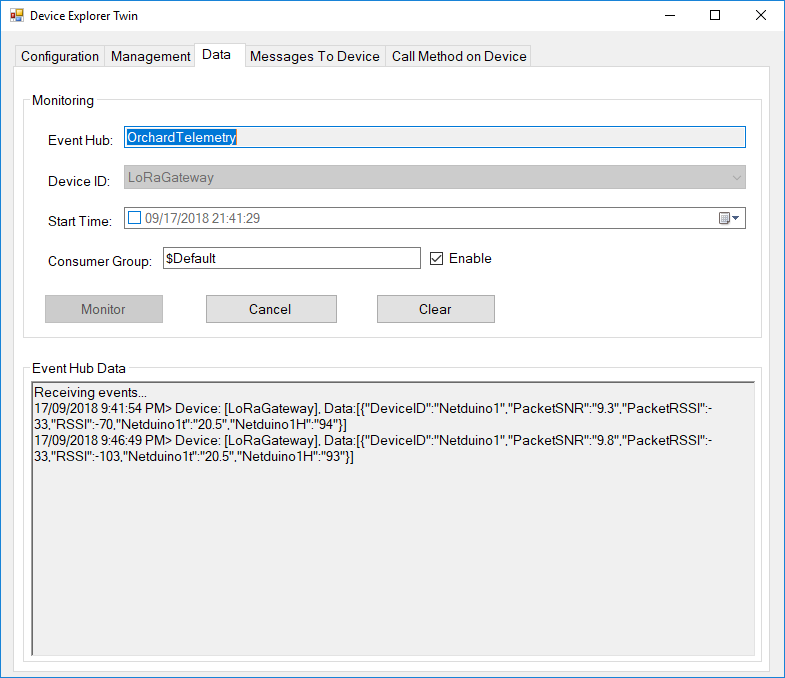
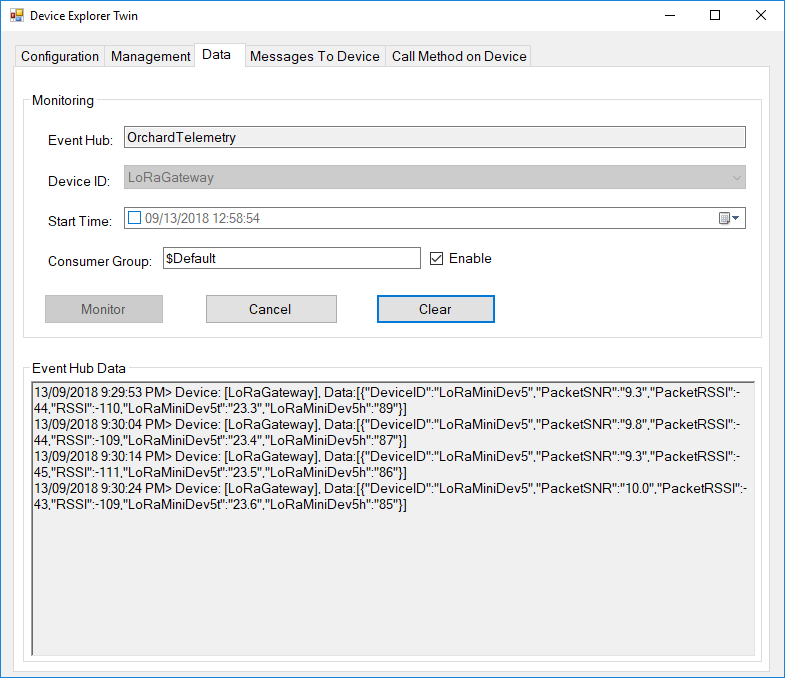
Then in my Azure IoT Hub

AzureIOTHubExplorerScreenGrab20180917

Low power LoRaWan Node Model B1248 Payload Addressing Client

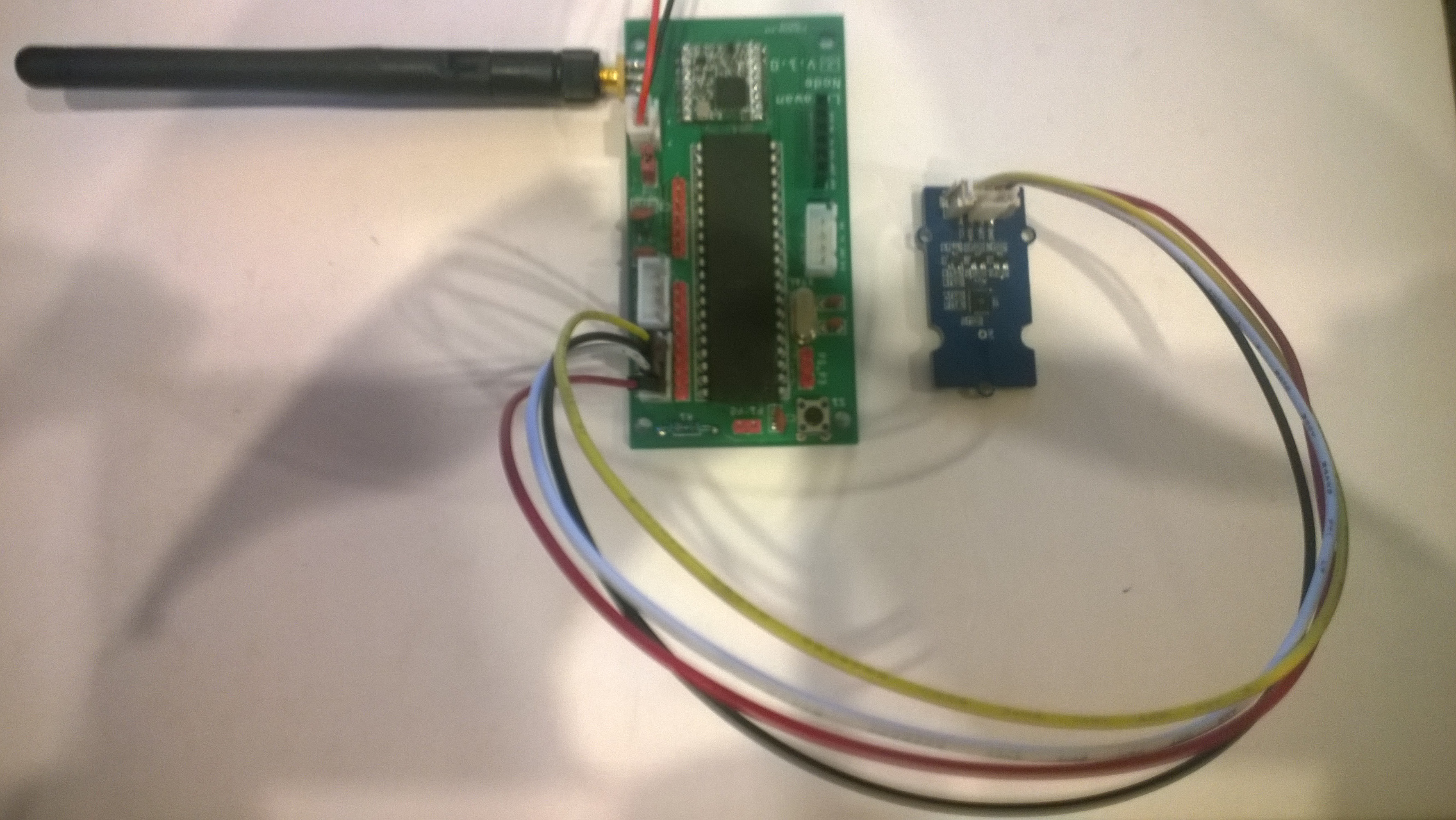
This is a demo M2M Low power LoRaWan Node Model B1284 client (based on one of the examples from Arduino-LoRa) that uploads telemetry data to my Windows 10 IoT Core on Raspberry PI AdaFruit.IO and Azure IoT Hub field gateways.

LoraWanNodeV1_0_0

The compiler used by the Arduino tooling for this processor was stricter about byte-char conversions so a couple of extra casts were necessary.

/*
  Adapted from LoRa Duplex communication with Sync Word

  Sends temperature & humidity data from Seeedstudio 

  https://www.seeedstudio.com/Grove-Temperature-Humidity-Sensor-High-Accuracy-Min-p-1921.html

  To my Windows 10 IoT Core RFM 9X library

  https://blog.devmobile.co.nz/2018/09/03/rfm9x-iotcore-payload-addressing/

*/
#include               // include libraries
#include
#include
const int csPin = 14;          // LoRa radio chip select
const int resetPin = 9;       // LoRa radio reset
const int irqPin = 2;         // change for your board; must be a hardware interrupt pin

// Field gateway configuration
const char FieldGatewayAddress[] = "LoRaIoT1";
const float FieldGatewayFrequency =  915000000.0;
const byte FieldGatewaySyncWord = 0x12 ;

// Payload configuration
const int PayloadSizeMaximum = 64 ;
byte payload[PayloadSizeMaximum] = "";
const byte SensorReadingSeperator = ',' ;

// Manual serial number configuration
const char DeviceId[] = {"M2MNodeV100"};

const int LoopSleepDelaySeconds = 10 ;

void setup() {
  Serial.begin(9600);
  while (!Serial);

  Serial.println("LoRa Setup");

  // override the default CS, reset, and IRQ pins (optional)
  LoRa.setPins(csPin, resetPin, irqPin);// set CS, reset, IRQ pin

  if (!LoRa.begin(FieldGatewayFrequency))
  {
    Serial.println("LoRa init failed. Check your connections.");
    while (true);
  }

  // Need to do this so field gateway pays attention to messsages from this device
  LoRa.enableCrc();
  LoRa.setSyncWord(FieldGatewaySyncWord);  

  //LoRa.dumpRegisters(Serial);
  Serial.println("LoRa Setup done.");

  // Configure the Seeedstudio TH02 temperature & humidity sensor
  Serial.println("TH02 setup");
  TH02.begin();
  delay(100);
  Serial.println("TH02 Setup done");  

  Serial.println("Setup done");
}

void loop()
{
  int payloadLength = 0 ;
  float temperature ;
  float humidity ;

  Serial.println("Loop called");
  memset(payload, 0, sizeof(payload));

  // prepare the payload header with "To" Address length (top nibble) and "From" address length (bottom nibble)
  payload[0] = (strlen(FieldGatewayAddress)<< 4) | strlen( DeviceId ) ;
  payloadLength += 1;

  // Copy the "To" address into payload
  memcpy(&payload[payloadLength], FieldGatewayAddress, strlen(FieldGatewayAddress));
  payloadLength += strlen(FieldGatewayAddress) ;

  // Copy the "From" into payload
  memcpy(&payload[payloadLength], DeviceId, strlen(DeviceId));
  payloadLength += strlen(DeviceId) ;

  // Read the temperature and humidity values then display nicely
  temperature = TH02.ReadTemperature();
  humidity = TH02.ReadHumidity();

  Serial.print("T:");
  Serial.print( temperature, 1 ) ;
  Serial.print( "C" ) ;

  Serial.print(" H:");
  Serial.print( humidity, 0 ) ;
  Serial.println( "%" ) ;

  // Copy the temperature into the payload
  payload[ payloadLength] = 't';
  payloadLength += 1 ;
  payload[ payloadLength] = ' ';
  payloadLength += 1 ;
  payloadLength += strlen( dtostrf(temperature, -1, 1, (char*)&payload[payloadLength]));
  payload[ payloadLength] = SensorReadingSeperator;
  payloadLength += sizeof(SensorReadingSeperator) ;

  // Copy the humidity into the payload
  payload[ payloadLength] = 'h';
  payloadLength += 1 ;
  payload[ payloadLength] = ' ';
  payloadLength += 1 ;
  payloadLength += strlen( dtostrf(humidity, -1, 0, (char *)&payload[payloadLength]));  

  // display info about payload then send it (No ACK) with LoRa unlike nRF24L01
  Serial.print( "RFM9X/SX127X Payload length:");
  Serial.print( payloadLength );
  Serial.println( " bytes" );

  LoRa.beginPacket();
  LoRa.write( payload, payloadLength );
  LoRa.endPacket();      

  Serial.println("Loop done");

  delay(LoopSleepDelaySeconds * 1000l);
}

Bill of materials (Prices Sep 2018)

  • M2M Low power LoRaWan Node Model B1284 USD40
  • Seeedstudio Temperature&Humidity Sensor USD11.50
  • 4 pin Female Jumper to Grove 4 pin Conversion Cable USD2.90

The code is pretty basic (like the other samples), it shows how to pack the payload and set the necessary RFM9X/SX127X LoRa module configuration, has no power conservation, advanced wireless configuration etc.

The Grove 4 pin Female Jumper to Grove 4 pin Conversion Cable was a quick & convenient way to get the I2C Grove temperature and humidity sensor connected up.

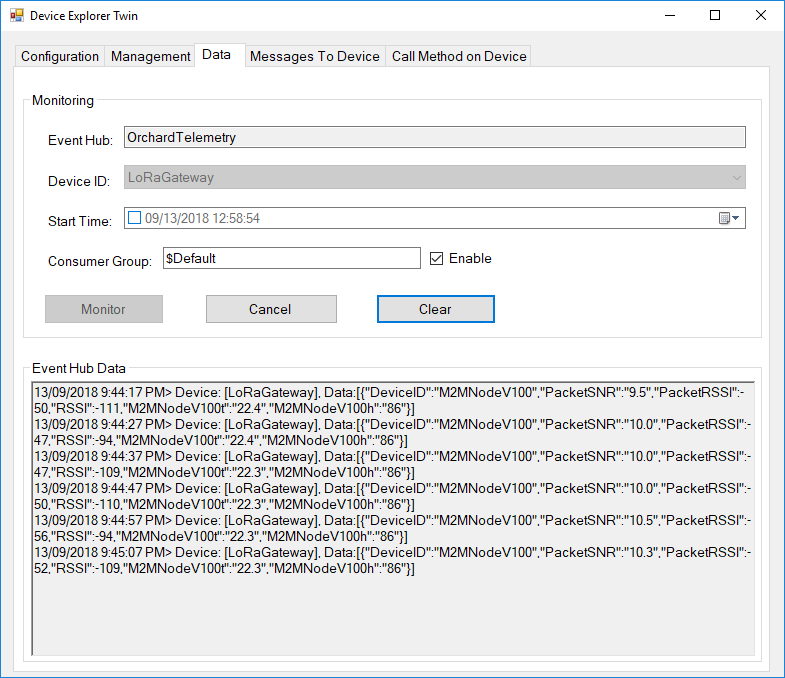
Then in my Azure IoT Hub monitoring software

M2MNodeV100EventHub

Maduino LoRa Radio 868MHz Payload Addressing client

This is a demo MakerFabs Maduino LoRa Radio 868MHz client (based on one of the examples from Arduino-LoRa) that uploads telemetry data to my Windows 10 IoT Core on Raspberry PI AdaFruit.IO and Azure IoT Hub field gateways.

The code is available on Github

MaduinoLoRa86820180914
/*
Adapted from LoRa Duplex communication with Sync Word Sends temperature & humidity data from Seeedstudio https://www.seeedstudio.com/Grove-Temperature-Humidity-Sensor-High-Accuracy-Min-p-1921.html To my Windows 10 IoT Core RFM 9X library https://blog.devmobile.co.nz/2018/09/03/rfm9x-iotcore-payload-addressing/*/#include // include libraries#include#includeconst int csPin = 10; // LoRa radio chip selectconst int resetPin = 9; // LoRa radio resetconst int irqPin = 2; // change for your board; must be a hardware interrupt pin// Field gateway configurationconst char FieldGatewayAddress[] = "LoRaIoT1";const float FieldGatewayFrequency = 915000000.0;//const float FieldGatewayFrequency = 433000000.0;const byte FieldGatewaySyncWord = 0x12 ;// Payload configurationconst int PayloadSizeMaximum = 64 ;byte payload[PayloadSizeMaximum] = "";const byte SensorReadingSeperator = ',' ;// Manual serial number configurationconst char DeviceId[] = {"Maduino1"};const int LoopSleepDelaySeconds = 10 ;void setup() { Serial.begin(9600); while (!Serial); Serial.println("LoRa Setup"); // override the default CS, reset, and IRQ pins (optional) LoRa.setPins(csPin, resetPin, irqPin);// set CS, reset, IRQ pin if (!LoRa.begin(FieldGatewayFrequency)) { Serial.println("LoRa init failed. Check your connections."); while (true); } // Need to do this so field gateways pays attention to messsages from this device LoRa.enableCrc(); LoRa.setSyncWord(FieldGatewaySyncWord); //LoRa.dumpRegisters(Serial); Serial.println("LoRa Setup done."); // Configure the Seeedstudio TH02 temperature &amp;amp;amp;amp;amp;amp;amp;amp;amp; humidity sensor Serial.println("TH02 setup"); TH02.begin(); delay(100); Serial.println("TH02 Setup done"); Serial.println("Setup done");}void loop(){ int payloadLength = 0 ; float temperature ; float humidity ; Serial.println("Loop called"); memset(payload, 0, sizeof(payload)); // prepare the payload header with "To" Address length (top nibble) and "From" address length (bottom nibble) &lt;&lt; 4) | strlen( DeviceId ) ; payloadLength += 1; // Copy the "To" address into payload memcpy(&amp;amp;amp;amp;amp;amp;amp;amp;amp;payload[payloadLength], FieldGatewayAddress, strlen(FieldGatewayAddress)); payloadLength += strlen(FieldGatewayAddress) ; // Copy the "From" into payload memcpy(&amp;amp;amp;amp;amp;amp;amp;amp;amp;payload[payloadLength], DeviceId, strlen(DeviceId)); payloadLength += strlen(DeviceId) ; // Read the temperature and humidity values then display nicely temperature = TH02.ReadTemperature(); humidity = TH02.ReadHumidity(); Serial.print("T:"); Serial.print( temperature, 1 ) ; Serial.print( "C" ) ; Serial.print(" H:"); Serial.print( humidity, 0 ) ; Serial.println( "%" ) ; // Copy the temperature into the payload payload[ payloadLength] = 't'; payloadLength += 1 ; payload[ payloadLength] = ' '; payloadLength += 1 ; payloadLength += strlen( dtostrf(temperature, -1, 1, (char*)&amp;payload[payloadLength])); payload[ payloadLength] = SensorReadingSeperator; payloadLength += sizeof(SensorReadingSeperator) ; // Copy the humidity into the payload payload[ payloadLength] = 'h'; payloadLength += 1 ; payload[ payloadLength] = ' '; payloadLength += 1 ; payloadLength += strlen( dtostrf(humidity, -1, 0, (char *)&amp;[payloadLength])); // display info about payload then send it (No ACK) with LoRa unlike nRF24L01 Serial.print( "RFM9X/SX127X Payload length:"); Serial.print( payloadLength ); Serial.println( " bytes" ); LoRa.beginPacket(); LoRa.write( payload, payloadLength ); LoRa.endPacket(); Serial.println("Loop done"); delay(LoopSleepDelaySeconds * 1000l);}

In the debugging output the data looked like this

13:40:28-RX From Maduino1 PacketSnr 9.8 Packet RSSI -65dBm RSSI -110dBm = 11 byte message "t 33.7,h 51"
 Sensor Maduino1t Value 33.7
 Sensor Maduino1h Value 51
 AzureIoTHubClient SendEventAsync start
 AzureIoTHubClient SendEventAsync finish
The thread 0x268 has exited with code 0 (0x0).
The thread 0xb28 has exited with code 0 (0x0).
13:40:38-RX From Maduino1 PacketSnr 9.5 Packet RSSI -66dBm RSSI -112dBm = 11 byte message "t 33.9,h 51"
 Sensor Maduino1t Value 33.9
 Sensor Maduino1h Value 51
 AzureIoTHubClient SendEventAsync start
 AzureIoTHubClient SendEventAsync finish
13:40:49-RX From Maduino1 PacketSnr 9.5 Packet RSSI -66dBm RSSI -110dBm = 11 byte message "t 34.0,h 51"
 Sensor Maduino1t Value 34.0
 Sensor Maduino1h Value 51
 AzureIoTHubClient SendEventAsync start
 AzureIoTHubClient SendEventAsync finish


Bill of materials (Prices Sep 2018)


  • Maduino LoRa Radion (868MHz) USD14.10
  • Seeedstudio Temperature&Humidity Sensor USD11.50
  • 4 pin Female Jumper to Grove 4 pin Conversion Cable USD2.90
  • 1 Watt solar panel with wires USD3.80
  • 3000 mAh LI-Ion battery

There is also a 433MHz version available at the same price


The code is pretty basic, it shows how to pack the payload and set the necessary RFM9X/SX127X LoRa module configuration, has no power conservation, advanced wireless configuration etc.


The onboard sockets for battery and charging make the device easier to package and power in the field.


The Grove 4 pin Female Jumper to Grove 4 pin Conversion Cable was a quick & convenient way to get the I2C Grove temperature and humidity sensor connected up.


Then in my Azure IoT Hub monitoring software


MaduinoLoRaAzureIoT20180914
			

Low power LoRaWan Node Model A328 Payload Addressing Client

This is a demo M2M Low power LoRaWan Node Model A328 client (based on one of the examples from Arduino-LoRa) that uploads telemetry data to my Windows 10 IoT Core on Raspberry PI AdaFruit.IO and Azure IoT Hub field gateways.

M2MNodeV351

/*
  Adapted from LoRa Duplex communication with Sync Word

  Sends temperature & humidity data from Seeedstudio 

  https://www.seeedstudio.com/Grove-Temperature-Humidity-Sensor-High-Accuracy-Min-p-1921.html

  To my Windows 10 IoT Core RFM 9X library

  https://blog.devmobile.co.nz/2018/09/03/rfm9x-iotcore-payload-addressing/

*/
#include               // include libraries
#include
#include 

const int csPin = 10;          // LoRa radio chip select
const int resetPin = 9;       // LoRa radio reset
const int irqPin = 2;         // change for your board; must be a hardware interrupt pin

// Field gateway configuration
const char FieldGatewayAddress[] = "LoRaIoT1";
const float FieldGatewayFrequency =  915000000.0;
const byte FieldGatewaySyncWord = 0x12 ;

// Payload configuration
const int PayloadSizeMaximum = 64 ;
byte payload[PayloadSizeMaximum] = "";
const byte SensorReadingSeperator = ',' ;

// Manual serial number configuration
const char DeviceId[] = {"M2MNodeV351"};

const int LoopSleepDelaySeconds = 10 ;

void setup() {
  Serial.begin(9600);
  while (!Serial);

  Serial.println("LoRa Setup");

  // override the default CS, reset, and IRQ pins (optional)
  LoRa.setPins(csPin, resetPin, irqPin);// set CS, reset, IRQ pin

  if (!LoRa.begin(FieldGatewayFrequency))
  {
    Serial.println("LoRa init failed. Check your connections.");
    while (true);
  }

  // Need to do this so field gateways pays attention to messages from this device
  LoRa.enableCrc();
  LoRa.setSyncWord(FieldGatewaySyncWord);  

  //LoRa.dumpRegisters(Serial);
  Serial.println("LoRa Setup done.");

  // Configure the Seeedstudio TH02 temperature & humidity sensor
  Serial.println("TH02 setup");
  TH02.begin();
  delay(100);
  Serial.println("TH02 Setup done");  

  Serial.println("Setup done");
}

void loop()
{
  int payloadLength = 0 ;
  float temperature ;
  float humidity ;

  Serial.println("Loop called");
  memset(payload, 0, sizeof(payload));

  // prepare the payload header with "To" Address length (top nibble) and "From" address length (bottom nibble)
 payload[0] = (strlen(FieldGatewayAddress) << 4) | strlen( DeviceId ) ;   payloadLength += 1;

  // Copy the "To" address into payload
  memcpy(&payload[payloadLength], FieldGatewayAddress, strlen(FieldGatewayAddress));
  payloadLength += strlen(FieldGatewayAddress) ;

  // Copy the "From" into payload
  memcpy(&payload[payloadLength], DeviceId, strlen(DeviceId));
  payloadLength += strlen(DeviceId) ;

  // Read the temperature and humidity values then display nicely
  temperature = TH02.ReadTemperature();
  humidity = TH02.ReadHumidity();

  Serial.print("T:");
  Serial.print( temperature, 1 ) ;
  Serial.print( "C" ) ;

  Serial.print(" H:");
  Serial.print( humidity, 0 ) ;
  Serial.println( "%" ) ;

  // Copy the temperature into the payload
  payload[ payloadLength] = 't';
  payloadLength += 1 ;
  payload[ payloadLength] = ' ';
  payloadLength += 1 ;
  payloadLength += strlen( dtostrf(temperature, -1, 1, &payload[payloadLength]));
  payload[ payloadLength] = SensorReadingSeperator;
  payloadLength += sizeof(SensorReadingSeperator) ;

  // Copy the humidity into the payload
  payload[ payloadLength] = 'h';
  payloadLength += 1 ;
  payload[ payloadLength] = ' ';
  payloadLength += 1 ;
  payloadLength += strlen( dtostrf(humidity, -1, 0, &payload[payloadLength]));  

  // display info about payload then send it (No ACK) with LoRa unlike nRF24L01
  Serial.print( "RFM9X/SX127X Payload length:");
  Serial.print( payloadLength );
  Serial.println( " bytes" );

  LoRa.beginPacket();
  LoRa.write( payload, payloadLength );
  LoRa.endPacket();      

  Serial.println("Loop done");

  delay(LoopSleepDelaySeconds * 1000l);
}

Bill of materials (Prices Sep 2018)

  • M2M Low power LoRaWan Node Model A328 USD30
  • Seeedstudio Temperature & Humidity Sensor USD11.50
  • 4 pin Female Jumper to Grove 4 pin Conversion Cable USD2.90

The code is pretty basic, it shows how to pack the payload and set the necessary RFM9X/SX127X LoRa module configuration, has no power conservation, advanced wireless configuration etc.

The Grove 4 pin Female Jumper to Grove 4 pin Conversion Cable was a quick & convenient way to get the I2C Grove temperature and humidity sensor connected up.

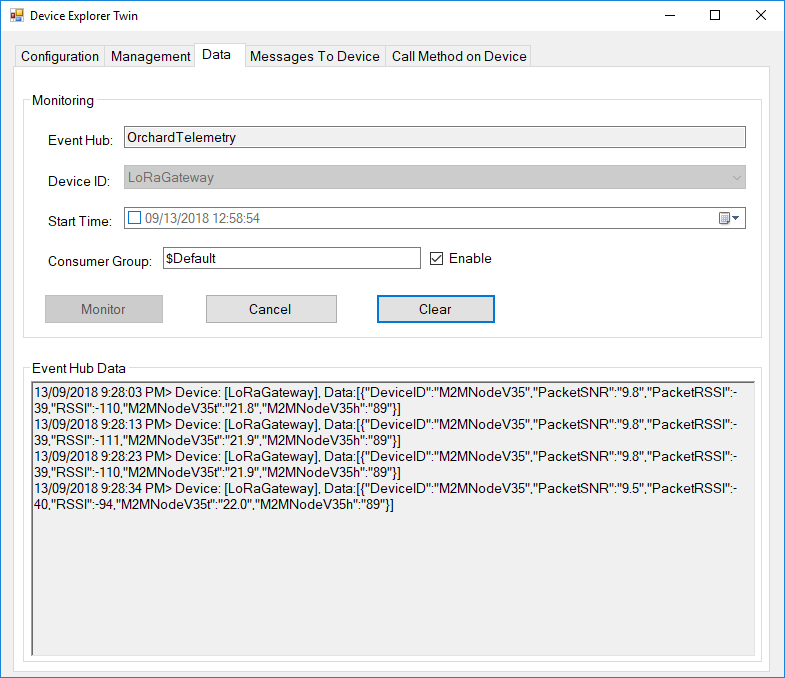
Then in my Azure IoT Hub monitoring software

M2MNodeV35EventHub

Dragino LoRaMiniDev Payload Addressing Client

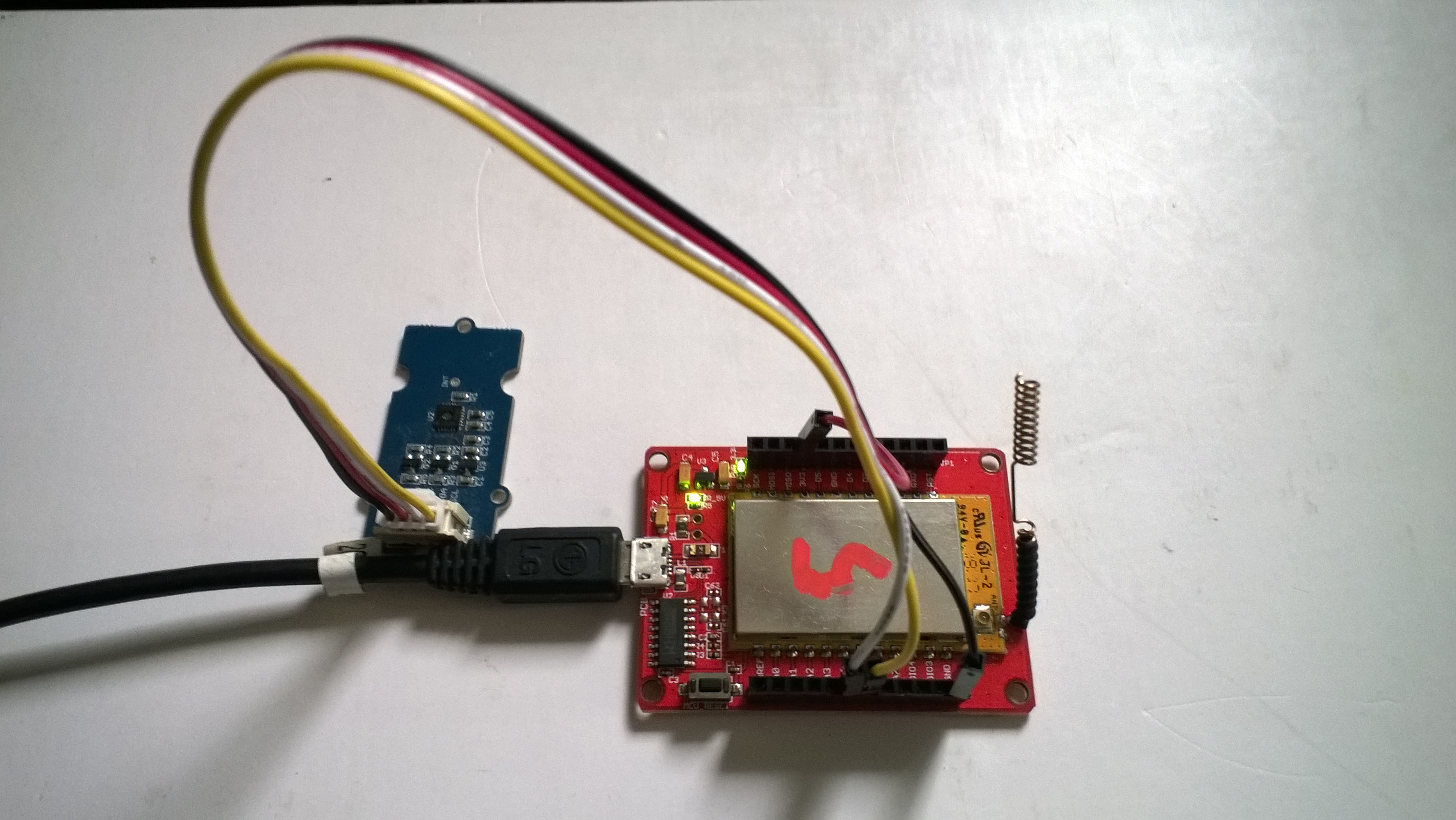
This is a demo Dragino LoRa Mini Dev featuring LoRa® technology client (based on one of the examples from Arduino-LoRa) that uploads telemetry data to my AdaFruit.IO and Azure IoT Hubs Windows 10 IoT Core on Raspberry PI proof of concept (PoC) field gateways.

LoRaMiniDevTH02

Bill of materials (Prices Sep 2018)

  • Draguino LoRa MiniDev USD23
  • Seeedstudio Temperature&Humidity Sensor USD11.50 NZD20
  • 4 pin Male Jumper to Grove 4 pin Conversion Cable USD2.90

The code is pretty basic, it shows how to pack the payload and set the necessary RFM9X/SX127X LoRa module configuration, has no power conservation, advanced wireless configuration etc.

The Grove 4 pin Male Jumper to Grove 4 pin Conversion Cable was a quick & convenient way to get the I2C Grove temperature and humidity sensor connected up.

/*
Adapted from LoRa Duplex communication with Sync Word

Sends temperature & humidity data from Seeedstudio

https://www.seeedstudio.com/Grove-Temperature-Humidity-Sensor-High-Accuracy-Min-p-1921.html

To my Windows 10 IoT Core RFM 9X library

https://blog.devmobile.co.nz/2018/09/03/rfm9x-iotcore-payload-addressing/

*/
#include
#include
#include
const int csPin = 10;          // LoRa radio chip select
const int resetPin = 9;       // LoRa radio reset
const int irqPin = 2;         // change for your board; must be a hardware interrupt pin

// Field gateway configuration
const byte FieldGatewayAddress[] = "LoRaIoT1";
const float FieldGatewayFrequency =  915000000.0;
//const float FieldGatewayFrequency =  433000000.0;
const byte FieldGatewaySyncWord = 0x12 ;

// Payload configuration
const int PayloadSizeMaximum = 64 ;
char payload[PayloadSizeMaximum] = "";
const byte SensorReadingSeperator = ',' ;

// Manual serial number configuration
char DeviceId[] = {"LoRaMiniDev5"};

const int LoopSleepDelaySeconds = 10 ;

void setup() {
Serial.begin(9600);
while (!Serial);

Serial.print("LoRa Setup-");
Serial.println( DeviceId ) ;

// override the default CS, reset, and IRQ pins (optional)
LoRa.setPins(csPin, resetPin, irqPin);// set CS, reset, IRQ pin

if (!LoRa.begin(FieldGatewayFrequency))
{
Serial.println("LoRa init failed. Check your connections.");
while (true);
}

// Need to do this so field gateways pays attention to messsages from this device
LoRa.enableCrc();
LoRa.setSyncWord(FieldGatewaySyncWord);

//LoRa.dumpRegisters(Serial);
Serial.println("LoRa Setup done.");

// Configure the Seeedstudio TH02 temperature & humidity sensor
Serial.println("TH02 setup");
TH02.begin();
delay(100);
Serial.println("TH02 Setup done");

Serial.println("Setup done");
}

void loop()
{
int payloadLength = 0 ;
float temperature ;
float humidity ;

Serial.println("Loop called");
memset(payload, 0, sizeof(payload));

// prepare the payload header with "To" Address length (top nibble) and "From" address length (bottom nibble)
payload[0] = (strlen(FieldGatewayAddress)<<4) | strlen( DeviceId ) ;
payloadLength += 1;

// Copy the "To" address into payload
memcpy(&payload[payloadLength], FieldGatewayAddress, strlen(FieldGatewayAddress));
payloadLength += strlen(FieldGatewayAddress) ;

// Copy the "From" into payload
memcpy(&payload[payloadLength], DeviceId, strlen(DeviceId));
payloadLength += strlen(DeviceId) ;

// Read the temperature and humidity values then display nicely
temperature = TH02.ReadTemperature();
humidity = TH02.ReadHumidity();

Serial.print("T:");
Serial.print( temperature, 1 ) ;
Serial.print( "C" ) ;

Serial.print(" H:");
Serial.print( humidity, 0 ) ;
Serial.println( "%" ) ;

// Copy the temperature into the payload
payload[ payloadLength] = 't';
payloadLength += 1 ;
payload[ payloadLength] = ' ';
payloadLength += 1 ;
payloadLength += strlen( dtostrf(temperature, -1, 1, &payload[payloadLength]));
payload[ payloadLength] = SensorReadingSeperator;
payloadLength += sizeof(SensorReadingSeperator) ;

// Copy the humidity into the payload
payload[ payloadLength] = 'h';
payloadLength += 1 ;
payload[ payloadLength] = ' ';
payloadLength += 1 ;
payloadLength += strlen( dtostrf(humidity, -1, 0, &payload[payloadLength]));

// display info about payload then send it (No ACK) with LoRa unlike nRF24L01
Serial.print( "RFM9X/SX127X Payload length:");
Serial.print( payloadLength );
Serial.println( " bytes" );

LoRa.beginPacket();
LoRa.write( payload, payloadLength );
LoRa.endPacket();

Serial.println("Loop done");

delay(LoopSleepDelaySeconds * 1000l);
}

In the debug output window the messages from the device looked like this

09:53:05-RX From LoRaMiniDev5 PacketSnr 9.3 Packet RSSI -65dBm RSSI -109dBm = 11 byte message "t 16.8,h 98"
Sensor LoRaMiniDev5t Value 16.8
Sensor LoRaMiniDev5h Value 98
AzureIoTHubClient SendEventAsync start
AzureIoTHubClient SendEventAsync finish
The thread 0xba0 has exited with code 0 (0x0).
The thread 0xb24 has exited with code 0 (0x0).
09:53:15-RX From LoRaMiniDev5 PacketSnr 9.3 Packet RSSI -65dBm RSSI -108dBm = 11 byte message "t 16.7,h 98"
Sensor LoRaMiniDev5t Value 16.7
Sensor LoRaMiniDev5h Value 98
AzureIoTHubClient SendEventAsync start
AzureIoTHubClient SendEventAsync finish
The thread 0x76c has exited with code 0 (0x0).
The thread 0x91c has exited with code 0 (0x0).

Then in my Azure IoT Hub monitoring software
DraginoLoraMinDevEventHub
The dragino LoRa Mini Dev with an external antenna connector would be a good indoor data acquisition node for student project when powered by a 2nd hand cellphone charger.

RFM9X.IoTCore Uputronics Raspberry PI LoRa(TM) Expansion Board

The Raspberry Pi+ LoRa(TM) Expansion Board has two RF modules. In my setup CE0 was 915MHz and CE1 was 433MHz so I modified the demo application so I could run both ports independently or simultaneously.

#if UPUTRONICS_RPIPLUS_CS0 && !UPUTRONICS_RPIPLUS_CS1
private const byte InterruptLine = 25;
private Rfm9XDevice rfm9XDevice = new Rfm9XDevice(ChipSelectPin.CS0, InterruptLine);
#endif
#if !UPUTRONICS_RPIPLUS_CS0 && UPUTRONICS_RPIPLUS_CS1
private const byte InterruptLine = 16;
private Rfm9XDevice rfm9XDevice = new Rfm9XDevice(ChipSelectPin.CS1, InterruptLine);
#endif
#if UPUTRONICS_RPIPLUS_CS0 && UPUTRONICS_RPIPLUS_CS1 // 433MHz and 915MHz in my setup
private const byte InterruptLineCS0 = 25;
private Rfm9XDevice rfm9XDeviceCS0 = new Rfm9XDevice(ChipSelectPin.CS0, InterruptLineCS0);
private const byte InterruptLineCS1 = 16;
private Rfm9XDevice rfm9XDeviceCS1 = new Rfm9XDevice(ChipSelectPin.CS1, InterruptLineCS1);
#endif

The in the run method

#if UPUTRONICS_RPIPLUS_CS0 && UPUTRONICS_RPIPLUS_CS1
public void Run(IBackgroundTaskInstance taskInstance)
{
rfm9XDeviceCS0.Initialise(915000000.0, paBoost: true, rxPayloadCrcOn: true);
rfm9XDeviceCS1.Initialise(433000000.0, paBoost: true, rxPayloadCrcOn: true);
#if DEBUG
rfm9XDeviceCS0.RegisterDump();
rfm9XDeviceCS1.RegisterDump();
#endif

rfm9XDeviceCS0.OnReceive += Rfm9XDevice_OnReceive;
rfm9XDeviceCS1.OnReceive += Rfm9XDevice_OnReceive;
#if ADDRESSED_MESSAGES_PAYLOAD
rfm9XDeviceCS0.Receive(UTF8Encoding.UTF8.GetBytes(Environment.MachineName));
rfm9XDeviceCS1.Receive(UTF8Encoding.UTF8.GetBytes(Environment.MachineName));
#else
rfm9XDeviceCS0.Receive();
rfm9XDeviceCS1.Receive();
#endif
rfm9XDeviceCS0.OnTransmit += Rfm9XDevice_OnTransmit;
rfm9XDeviceCS1.OnTransmit += Rfm9XDevice_OnTransmit;

Task.Delay(10000).Wait();

while (true)
{
string messageText = string.Format("Hello from {0} ! {1}", Environment.MachineName, MessageCount);
MessageCount -= 1;

byte[] messageBytes = UTF8Encoding.UTF8.GetBytes(messageText);
Debug.WriteLine("{0:HH:mm:ss}-TX {1} byte message {2}", DateTime.Now, messageBytes.Length, messageText);
#if ADDRESSED_MESSAGES_PAYLOAD
this.rfm9XDeviceCS0.Send(UTF8Encoding.UTF8.GetBytes("Netduino"), messageBytes);
this.rfm9XDeviceCS1.Send(UTF8Encoding.UTF8.GetBytes("Arduino1"), messageBytes);
#else
this.rfm9XDeviceCS0.Send(messageBytes);
this.rfm9XDeviceCS1.Send(messageBytes);
#endif
Task.Delay(10000).Wait();
}
}

#else

public void Run(IBackgroundTaskInstance taskInstance)
{
rfm9XDevice.Initialise(433000000, paBoost: true, rxPayloadCrcOn : true);
rfm9XDevice.Initialise(915000000, paBoost: true, rxPayloadCrcOn : true);
#if DEBUG
rfm9XDevice.RegisterDump();
#endif

rfm9XDevice.OnReceive += Rfm9XDevice_OnReceive;
#if ADDRESSED_MESSAGES_PAYLOAD
rfm9XDevice.Receive(UTF8Encoding.UTF8.GetBytes(Environment.MachineName));
#else
rfm9XDevice.Receive();
#endif
rfm9XDevice.OnTransmit += Rfm9XDevice_OnTransmit;

Task.Delay(10000).Wait();

while (true)
{
string messageText = string.Format("Hello from {0} ! {1}", Environment.MachineName, MessageCount);
MessageCount -= 1;

byte[] messageBytes = UTF8Encoding.UTF8.GetBytes(messageText);
Debug.WriteLine("{0:HH:mm:ss}-TX {1} byte message {2}", DateTime.Now, messageBytes.Length, messageText);
#if ADDRESSED_MESSAGES_PAYLOAD
this.rfm9XDevice.Send(UTF8Encoding.UTF8.GetBytes("AddressHere"), messageBytes);
#else
this.rfm9XDevice.Send(messageBytes);
#endif
Task.Delay(10000).Wait();
}
}
#endif

In the debugger output I could see addressed messages being sent to and arriving from a 433MHz Arduino device and a 915MHz Netduino device.

The thread 0x5f8 has exited with code 0 (0x0).
22:06:44-RX From Netduino PacketSnr 9.5 Packet RSSI -49dBm RSSI -110dBm = 20 byte message "Hello NetMF LoRa! 82"
22:06:47-RX From Arduino1 PacketSnr 9.8 Packet RSSI -56dBm RSSI -101dBm = 11 byte message "t 20.2,h 90"
22:06:48-TX 25 byte message Hello from LoRaIoT1 ! 163
22:06:49-TX Done
22:06:49-TX Done
The thread 0xe9c has exited with code 0 (0x0).
22:06:54-RX From Netduino PacketSnr 9.8 Packet RSSI -46dBm RSSI -111dBm = 20 byte message "Hello NetMF LoRa! 83"
22:06:57-RX From Arduino1 PacketSnr 9.8 Packet RSSI -61dBm RSSI -93dBm = 11 byte message "t 20.3,h 90"
22:06:58-TX 25 byte message Hello from LoRaIoT1 ! 162
22:06:59-TX Done
22:06:59-TX Done
The thread 0xf88 has exited with code 0 (0x0).
22:07:04-RX From Netduino PacketSnr 9.5 Packet RSSI -48dBm RSSI -110dBm = 20 byte message "Hello NetMF LoRa! 84"
22:07:07-RX From Arduino1 PacketSnr 9.8 Packet RSSI -61dBm RSSI -93dBm = 11 byte message "t 20.2,h 90"
22:07:09-TX 25 byte message Hello from LoRaIoT1 ! 161
22:07:09-TX Done
22:07:09-TX Done

This particular configuration has not been extensively tested yet and should be treated as early Beta (11 Sept 2018)