Microsoft IoT Central basic desktop client

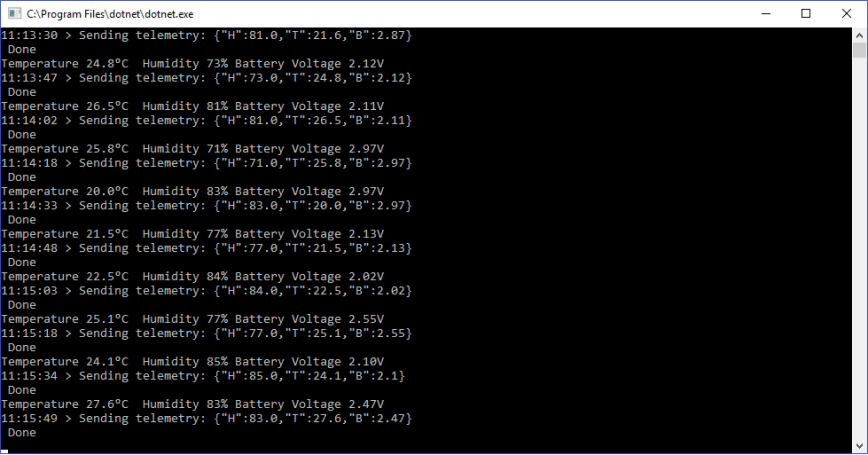
One of the replacement Internet of Things services which looked worth evaluating was Microsoft’s IoT Central. My first project was to build the simplest possible desktop client (.Net Core) which simulates a limited number of sensors (sensor names, value formats etc. configured in code) and only sends data to the cloud (no device management, control or provisioning capabilities).

The only required dependencies are the Newtonsoft.Json &  Microsoft.Azure.DevicesClient NuGet packages

/*

Copyright ® 2018 Jan devMobile Software, All Rights Reserved

THIS CODE AND INFORMATION IS PROVIDED "AS IS" WITHOUT WARRANTY OF ANY
KIND, EITHER EXPRESSED OR IMPLIED, INCLUDING BUT NOT LIMITED TO THE
IMPLIED WARRANTIES OF MERCHANTABILITY AND/OR FITNESS FOR A PARTICULAR
PURPOSE
You can do what you want with this code, acknowledgement would be nice.
http://www.devmobile.co.nz

*/
using System;
using System.Text;
using System.Threading;
using Microsoft.Azure.Devices.Client;
using Newtonsoft.Json;

namespace devMobile.IoT.MicrosoftIoTCentral.Desktop.Basic
{
 class Program
 {
 private const string DeviceConnectionString = "YourDeviceConnectionStringFromIoTCentralGoesHere";
 const double temperatureBase = 20.0;
 const double temperatureRange = 10.0;
 const double humidityBase = 70.0;
 const double humidityRange = 20.0;
 const double batteryVoltageBase = 3.00;
 const double batteryVoltageRange = -1.00;
 static readonly TimeSpan feedUpdateDelay = new TimeSpan(0, 0, 15);

private class TelemetryDataPoint
 {
 [JsonProperty(PropertyName = "H")]
 public double Humidity { get; set; }
 [JsonProperty(PropertyName = "T")]
 public double Temperature { get; set; }
 [JsonProperty(PropertyName = "B")]
 public double BatteryVoltage { get; set; }
 }

static void Main(string[] args)
 {
 DeviceClient Client ;
 Random random = new Random();

try
 {
 Console.WriteLine("Connecting to IoI hub");
 Client = DeviceClient.CreateFromConnectionString(DeviceConnectionString, TransportType.Mqtt);

while (true)
 {
 double temperature = temperatureBase + random.NextDouble() * temperatureRange;
 double humidity = humidityBase + random.NextDouble() * humidityRange;
 double batteryVoltage = batteryVoltageBase + random.NextDouble() * batteryVoltageRange;

Console.WriteLine("Temperature {0}°C Humidity {1}% Battery Voltage {2}V", temperature.ToString("F1"), humidity.ToString("F0"), batteryVoltage.ToString("F2"));

// Populate the data point - this has a static structure and name which could be a problem for field gateway
 TelemetryDataPoint telemetryDataPoint = new TelemetryDataPoint()
 {
 BatteryVoltage = Math.Round(batteryVoltage, 2),
 Humidity = Math.Round(humidity, 0),
 Temperature = Math.Round( temperature, 1 )
 };

string messageString = JsonConvert.SerializeObject(telemetryDataPoint);
 Message message = new Message(Encoding.ASCII.GetBytes(messageString));

Console.WriteLine("{0:hh:mm:ss} > Sending telemetry: {1}", DateTime.Now, messageString);
 Client.SendEventAsync(message).Wait();
 Console.WriteLine(" Done");

Thread.Sleep(feedUpdateDelay);
 }
 }
 catch (Exception ex)
 {
 Console.WriteLine("Error connecting or sending data to IoT Central: {0}", ex.Message);
 Console.WriteLine("Press <ENTER> to exit");
 Console.ReadLine();
 }
 }
 }
}

I manually provisioned the device by copying the device connection string in the IoT Central dashboard
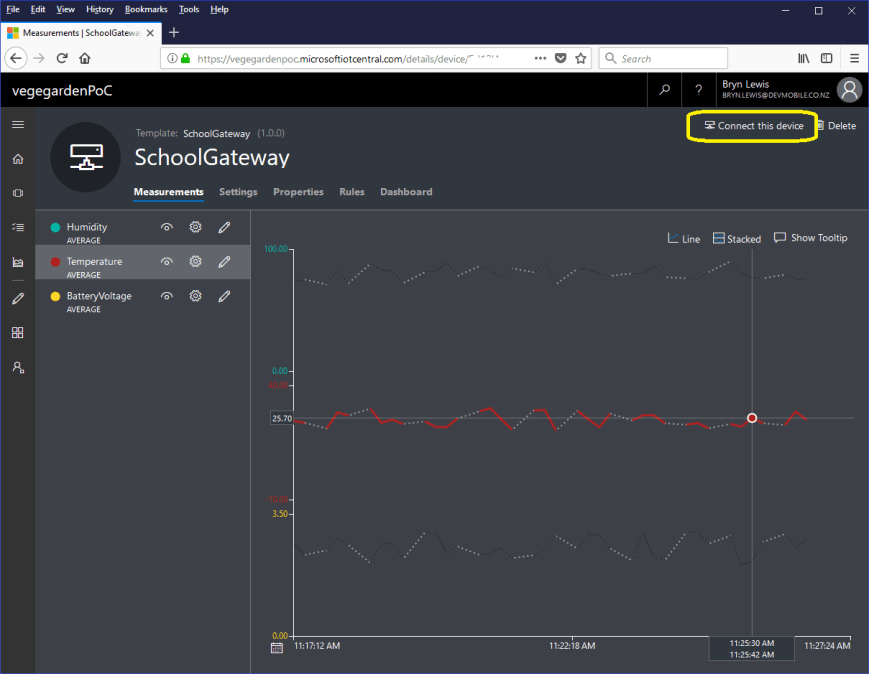
IoTCentralDashboardBasicClient

DesktopClientSimple

Simple dotNet Core 2 IoTCentral Client

A functional client in less than 100 lines of code with support for individual device configuration. For my FieldGateway I’m going to need more flexibility in the construction of telemetry payloads, device provisioning and configuration support.

AdaFruit IO Swagger based desktop HTTP client

Manually building clients for complex RESTful APIs (like AdaFruit.IO) can be a bit tedious so I figured I would try generating a C# http client from the Swagger OpenAPI specification(OAS) metadata.

My initial attempts using the Swagger Editor and NSwag on the AdaFruit.IO public API description didn’t go so well. (for more info see this AdaFruit.IO support forum thread) You may need to manually modify the type of the id field in Data & DataResponse, plus possibly other responses.

After figuring out how to set the API key, my code which uploads simulates three individual feeds and one feed group appears to work reliably.

/*

Copyright ® 2018 Jan devMobile Software, All Rights Reserved

THIS CODE AND INFORMATION IS PROVIDED "AS IS" WITHOUT WARRANTY OF ANY
KIND, EITHER EXPRESSED OR IMPLIED, INCLUDING BUT NOT LIMITED TO THE
IMPLIED WARRANTIES OF MERCHANTABILITY AND/OR FITNESS FOR A PARTICULAR
PURPOSE.

http://www.devmobile.co.nz

*/
using System;
using System.Diagnostics;
using System.Threading.Tasks;
using AdaFruit.IO;

namespace AdaFruit.IO
{
public partial class Client
{
string adaFruitIOApiKey = "yourAPIKey";

partial void PrepareRequest(System.Net.Http.HttpClient client, System.Net.Http.HttpRequestMessage request, string url)
{
client.DefaultRequestHeaders.Add("X-AIO-Key", adaFruitIOApiKey);
}
}
}

namespace devMobile.IoT.Adafruit.IO.Desktop
{
class Program
{
static void Main(string[] args)
{
string userName = "YourUserName"; // This is mixed case & case sensitive
// The feed group and feed key are forced to lower case by UI
const string feedGroup = "devduinov2-dot-2";
const string temperatureKey = "t";
const double temperatureBase = 20.0;
const double temperatureRange = 10.0;
const string humidityKey = "h";
const double humidityBase = 70.0;
const double humidityRange = 20.0;
const string batteryVoltageKey = "v";
const double batteryVoltageBase = 3.00;
const double batteryVoltageRange = -1.00;
TimeSpan feedUpdateDelay = new TimeSpan(0, 0, 15);
TimeSpan groupUpdateDelay = new TimeSpan(0, 0, 30);
Random random = new Random();

while (true)
{
Client client = new Client();
double temperature = temperatureBase + random.NextDouble() * temperatureRange;
double humidity = humidityBase + random.NextDouble() * humidityRange;
double batteryVoltage = batteryVoltageBase + random.NextDouble() * batteryVoltageRange;

Debug.WriteLine("Temperature {0}°C  Humidity {1}%  Battery Voltage {2}V", temperature.ToString("F1"), humidity.ToString("F0"), batteryVoltage.ToString("F2"));

// First Update the 3 feeds individually
// Temperature
Datum temperatureDatum = new Datum()
{
Value = temperature.ToString("F1"),
};
client.CreateDataAsync(userName, temperatureKey, temperatureDatum).Wait();
Task.Delay(feedUpdateDelay).Wait();

// Humidity
Datum humidityDatum = new Datum()
{
Value = humidity.ToString("F0"),
};
client.CreateDataAsync(userName, humidityKey, humidityDatum).Wait();
Task.Delay(feedUpdateDelay).Wait();

// Battery
Datum batteryDatum = new Datum()
{
Value = batteryVoltage.ToString("F2"),
};
client.CreateDataAsync(userName, batteryVoltageKey, batteryDatum).Wait();
Task.Delay(feedUpdateDelay).Wait();

// Then update a feed in a group
Group_feed_data devDuinoData = new Group_feed_data();

devDuinoData.Feeds.Add(new Anonymous2() { Key = temperatureKey, Value = temperature.ToString("F1")});
devDuinoData.Feeds.Add(new Anonymous2() { Key = humidityKey, Value = humidity.ToString("F0")});
devDuinoData.Feeds.Add(new Anonymous2() { Key = batteryVoltageKey, Value = batteryVoltage.ToString("F2")});

client.CreateGroupDataAsync(userName, feedGroup, devDuinoData).Wait();
Task.Delay(groupUpdateDelay).Wait();
}
}
}
}

AdaFruit IO basic Netduino HTTP client

I use Netduino devices for teaching and my students often build projects which need a cloud based service like AdaFruit.IO to capture, store and display their sensor data.

My Proof of Concept (PoC) which uses a slightly modified version of the AdaFruit.IO basic desktop HTTP client code has been running on several Netduino 2 Plus, Netduino 3 Ethernet and Netduino 3 Wifi devices for the last couple of days and looks pretty robust.

The Netduino 3 Wifi device also supports https for improved security and privacy. They also make great field gateways as they can run off solar/battery power.

N2PN3WDashBoard

The devices have been uploading temperature and humidity measurements from a Silicon labs Si7005 sensor. (Outside sensor suffering from sunstrike)

N3WifiTemperatureAndHumiditySensor

program.cs

*

Copyright ® 2017 December devMobile Software, All Rights Reserved

THIS CODE AND INFORMATION IS PROVIDED "AS IS" WITHOUT WARRANTY OF ANY
KIND, EITHER EXPRESSED OR IMPLIED, INCLUDING BUT NOT LIMITED TO THE
IMPLIED WARRANTIES OF MERCHANTABILITY AND/OR FITNESS FOR A PARTICULAR
PURPOSE.

http://www.devmobile.co.nz

*/
using System;
using System.Net;
using System.Threading;
using Microsoft.SPOT;
using Microsoft.SPOT.Hardware;
using Microsoft.SPOT.Net.NetworkInformation;
using SecretLabs.NETMF.Hardware.Netduino;
using devMobile.NetMF.Sensor;
using devMobile.IoT.NetMF;

namespace devMobile.IoT.AdaFruitIO.NetMF.Client
{
public class Program
{
private const string adaFruitIOApiBaseUrl = @"https://IO.adafruit.com/api/v2/";
private const string group = "netduino3";
private const string temperatureFeedKey = "t";
private const string humidityFeedKey = "h";
private const string adaFruitUserName = "YourUserName";
private const string adaFruitIOApiKey = "YourAPIKey";
private static readonly TimeSpan timerDueAfter = new TimeSpan(0, 0, 15);
private static readonly TimeSpan timerPeriod = new TimeSpan(0, 0, 30);
private static OutputPort led = new OutputPort(Pins.ONBOARD_LED, false);
private static SiliconLabsSI7005 sensor = new SiliconLabsSI7005();
private static AdaFruitIoClient adaFruitIoClient = new AdaFruitIoClient(adaFruitUserName, adaFruitIOApiKey, adaFruitIOApiBaseUrl);

public static void Main()
{
// Wait for Network address if DHCP
NetworkInterface networkInterface = NetworkInterface.GetAllNetworkInterfaces()[0];
if (networkInterface.IsDhcpEnabled)
{
Debug.Print(" Waiting for DHCP IP address");

while (NetworkInterface.GetAllNetworkInterfaces()[0].IPAddress == IPAddress.Any.ToString())
{
Debug.Print(" .");
led.Write(!led.Read());
Thread.Sleep(250);
}
led.Write(false);
}

// Display network config for debugging
Debug.Print("Network configuration");
Debug.Print(" Network interface type : " + networkInterface.NetworkInterfaceType.ToString());
Debug.Print(" MAC Address : " + BytesToHexString(networkInterface.PhysicalAddress));
Debug.Print(" DHCP enabled : " + networkInterface.IsDhcpEnabled.ToString());
Debug.Print(" Dynamic DNS enabled : " + networkInterface.IsDynamicDnsEnabled.ToString());
Debug.Print(" IP Address : " + networkInterface.IPAddress.ToString());
Debug.Print(" Subnet Mask : " + networkInterface.SubnetMask.ToString());
Debug.Print(" Gateway : " + networkInterface.GatewayAddress.ToString());

foreach (string dnsAddress in networkInterface.DnsAddresses)
{
Debug.Print(" DNS Server : " + dnsAddress.ToString());
}

Timer humidityAndtemperatureUpdates = new Timer(HumidityAndTemperatureTimerProc, null, timerDueAfter, timerPeriod);

Thread.Sleep(Timeout.Infinite);
}

static private void HumidityAndTemperatureTimerProc(object state)
{
led.Write(true);

try
{
double humidity = sensor.Humidity();

Debug.Print(" Humidity " + humidity.ToString("F0") + "%");
adaFruitIoClient.FeedUpdate(group, humidityFeedKey, humidity.ToString("F0"));
}
catch (Exception ex)
{
Debug.Print("Humidifty read+update failed " + ex.Message);

return;
}

try
{
double temperature = sensor.Temperature();

Debug.Print(" Temperature " + temperature.ToString("F1") + "°C");
adaFruitIoClient.FeedUpdate(group, temperatureFeedKey, temperature.ToString("F1"));
}
catch (Exception ex)
{
Debug.Print("Temperature read+update failed " + ex.Message);

return;
}

led.Write(false);
}

private static string BytesToHexString(byte[] bytes)
{
string hexString = string.Empty;

// Create a character array for hexidecimal conversion.
const string hexChars = "0123456789ABCDEF";

// Loop through the bytes.
for (byte b = 0; b < bytes.Length; b++)          {             if (b > 0)
hexString += "-";

// Grab the top 4 bits and append the hex equivalent to the return string.
hexString += hexChars[bytes[b] >> 4];

// Mask off the upper 4 bits to get the rest of it.
hexString += hexChars[bytes[b] & 0x0F];
}

return hexString;
}
}
}

AdaFruit.IO client.cs, handles feed groups and individual feeds

/*

Copyright ® 2017 December devMobile Software, All Rights Reserved

THIS CODE AND INFORMATION IS PROVIDED "AS IS" WITHOUT WARRANTY OF ANY
KIND, EITHER EXPRESSED OR IMPLIED, INCLUDING BUT NOT LIMITED TO THE
IMPLIED WARRANTIES OF MERCHANTABILITY AND/OR FITNESS FOR A PARTICULAR
PURPOSE.

http://www.devmobile.co.nz

*/
using System;
using System.IO;
using System.Net;
using System.Text;
using Microsoft.SPOT;

namespace devMobile.IoT.NetMF
{
public class AdaFruitIoClient
{
private const string apiBaseUrlDefault = @"http://IO.adafruit.com/api/v2/";
private string apiBaseUrl = "";
private string userName = "";
private string apiKey = "";
private int httpRequestTimeoutmSec;
private int httpRequestReadWriteTimeoutmSec;

public AdaFruitIoClient(string userName, string apiKey, string apiBaseUrl = apiBaseUrlDefault, int httpRequestTimeoutmSec = 2500, int httpRequestReadWriteTimeoutmSec = 5000)
{
this.apiBaseUrl = apiBaseUrl;
this.userName = userName;
this.apiKey = apiKey;
this.httpRequestReadWriteTimeoutmSec = httpRequestReadWriteTimeoutmSec;
this.httpRequestTimeoutmSec = httpRequestTimeoutmSec;
}

public void FeedUpdate(string group, string feedKey, string value)
{
string feedUrl;

if (group.Trim() == string.Empty)
{
feedUrl = apiBaseUrl + userName + @"/feeds/" + feedKey + @"/data";
}
else
{
feedUrl = apiBaseUrl + userName + @"/feeds/" + group.Trim() + "." + feedKey + @"/data";
}

HttpWebRequest request = (HttpWebRequest)WebRequest.Create(feedUrl);
{
string payload = @"{""value"": """ + value + @"""}";
byte[] buffer = Encoding.UTF8.GetBytes(payload);

DateTime httpRequestedStartedAtUtc = DateTime.UtcNow;

request.Method = "POST";
request.ContentLength = buffer.Length;
request.ContentType = @"application/json";
request.Headers.Add("X-AIO-Key", apiKey);
request.KeepAlive = false;
request.Timeout = this.httpRequestTimeoutmSec;
request.ReadWriteTimeout = this.httpRequestReadWriteTimeoutmSec;

using (Stream stream = request.GetRequestStream())
{
stream.Write(buffer, 0, buffer.Length);
}

using (var response = (HttpWebResponse)request.GetResponse())
{
Debug.Print(" Status: " + response.StatusCode + " : " + response.StatusDescription);
}

TimeSpan duration = DateTime.UtcNow - httpRequestedStartedAtUtc;
Debug.Print(" Duration: " + duration.ToString());
}
}
}
}

Bill of materials for PoC

AdaFruit IO basic desktop HTTP client

AdaFruit IO meets my basic criteria as it has support for HTTP/S clients (it also has an MQTT interface which I will look at in a future post) and the API is well documented.

My first Proof of Concept (PoC) was to build a desktop client which used the HttpWebRequest (for ease of porting to NetMF) classes to upload data.

The program uploaded one of three simulated values to AdaFruit.IO every 10 seconds.

I found the username, group, and feed keys to be case sensitive so pay close attention to the values displayed in the webby UI or copy n paste.

program.cs

 class Program
   {
      static void Main(string[] args)
      {
         string adaFruitIOApiBaseUrl = "https://IO.adafruit.com/api/v2/";
         string adaFruitIOUserName = "YourUserName"; // This is mixed case & case sensitive
         string adaFruitIOApiKey = "YourAPIKey";
         // The feed group and feed key are forced to lower case by UI
         const string feedGroup = "";
         //const string feedGroup = "devduinov2-dot-2";
         const string temperatureKey = "t";
         const double temperatureBase = 20.0;
         const double temperatureRange = 10.0;
         const string humidityKey = "h";
         const double humidityBase = 70.0;
         const double humidityRange = 20.0;
         const string batteryVoltageKey = "v";
         const double batteryVoltageBase = 3.00;
         const double batteryVoltageRange = -1.00;
         TimeSpan dataUpdateDelay = new TimeSpan(0, 0, 10);
         Random random = new Random();

         while (true)
         {
            double temperature = temperatureBase + random.NextDouble() * temperatureRange;
            Console.WriteLine("Temperature {0}°C", temperature.ToString("F1"));
            AdaFruitIoFeedUpdate(adaFruitIOApiBaseUrl, adaFruitIOUserName, adaFruitIOApiKey, feedGroup, temperatureKey, temperature.ToString("F1"));

            Thread.Sleep(dataUpdateDelay);

            double humidity = humidityBase + random.NextDouble() * humidityRange;
            Console.WriteLine("Humidity {0}%", humidity.ToString("F0"));
            AdaFruitIoFeedUpdate(adaFruitIOApiBaseUrl, adaFruitIOUserName, adaFruitIOApiKey, feedGroup, humidityKey, humidity.ToString("F0"));

            Thread.Sleep(dataUpdateDelay);

            double batteryVoltage = batteryVoltageBase + random.NextDouble() * batteryVoltageRange;
            Console.WriteLine("Battery voltage {0}V", batteryVoltage.ToString("F2"));
            AdaFruitIoFeedUpdate(adaFruitIOApiBaseUrl, adaFruitIOUserName, adaFruitIOApiKey, feedGroup, batteryVoltageKey, batteryVoltage.ToString("F2"));

            Thread.Sleep(dataUpdateDelay);
         }
      }

client.cs

      public void AdaFruitIoFeedUpdate(string apiBaseUrl, string userName, string apiKey, string group, string feedKey, string value, int httpRequestTimeoutmSec = 2500, int httpRequestReadWriteTimeoutmSec = 5000)
      {
         string feedUrl;

         if (group.Trim() == string.Empty)
         {
            feedUrl = apiBaseUrl + userName + @"/feeds/" + feedKey + @"/data";
         }
         else
         {
            feedUrl = apiBaseUrl + userName + @"/feeds/" + group.Trim() + "." + feedKey + @"/data";
         }

         Console.WriteLine(" Feed URL :{0}", feedUrl);

         try
         {
            HttpWebRequest request = (HttpWebRequest)WebRequest.Create(feedUrl);
            {
               string payload = @"{""value"": """ + value + @"""}";

               byte[] buffer = Encoding.UTF8.GetBytes(payload);

               DateTime httpRequestedStartedAtUtc = DateTime.UtcNow;

               request.Method = "POST";
               request.ContentLength = buffer.Length;
               request.ContentType = @"application/json";
               request.Headers.Add("X-AIO-Key", apiKey);
               request.KeepAlive = false;
               request.Timeout = httpRequestTimeoutmSec;
               request.ReadWriteTimeout = httpRequestReadWriteTimeoutmSec;

               using (Stream stream = request.GetRequestStream())
               {
                  stream.Write(buffer, 0, buffer.Length);
               }

               using (var response = (HttpWebResponse)request.GetResponse())
               {
                  Console.WriteLine(" Status: " + response.StatusCode + " : " + response.StatusDescription);
               }

               TimeSpan duration = DateTime.UtcNow - httpRequestedStartedAtUtc;
               Console.WriteLine(" Duration: " + duration.ToString());
            }
         }
         catch (Exception ex)
         {
            Console.WriteLine(ex.Message);
            throw;
         }
      }
   }

This approach seemed to work pretty reliably

DesktopHTTPRequest

Xively Personal is being retired

This is going to cause me a problem especially my Netduino based nRF24 Xively Field gateway which gets used in quite a few of my student projects. I’m looking for a replacement Internet of Things service which has http/s and/or mqtt, amqp support, C & C#  client libraries (which I can get to work on Windows 10 IoT Core & NetMF) would be a bonus.

From the Xively email

”After careful consideration, LogMeIn has made the decision to retire Xively Personal from its current line of products effective January 15, 2018 at 12:00PM ET . Please note that LogMeIn will continue to offer our Xively Enterprise edition – there is no change to that edition and we will continue to support that platform as part of our IoT business.

Retiring a product is never an easy decision, and we recognize it does introduce potential challenges to active users. So we want to make sure you have all the information you need to make as seamless a transition as possible.

Access to your account:
Your Xively Personal account will remain active until January 15th. Please note that devices will not be accessible via the Xively Personal service once it is retired.

Transferring your products to another IoT service:
Should you choose to switch to another service, there are essentially two options.

1) Migrate to Xively Enterprise: The latest Enterprise version of Xively is built on a more modern and reliable architecture, which brings the benefits of pre-built hardware integrations, identity and device management features, MQTT messaging, and best-in-class security, but it may require some reconfiguring of your current devices. We do offer a 30 day free trial of Xively Enterprise should you want to try it out for yourself.

2) Migrate to another free service: If your use is primarily for experimenting and personal projects, there are several free IoT platform options on the market, such as Adafruit, Thingspeak, or SparkFun.”

One of the suggestions – Sparkfun Phant has been retired

Some possible alternatives in no particular order (this list may grow)

AdaFruit.IO – The internet of things for everyone

Microsoft IoT Central – Enterprise-grade IoT SaaS

ThingSpeak – The open IoT platform with MATLAB analytics

Blynk – Democratizing the Internet of Things

Thinger.io platform

SenseIoT – Internet of Things Data Hosting Platform

Temboo – Tools for Digital Transformation

Carriots by Altair

Nearbus – An IoT Open Project

ubidots – An application Builder for the Internet of Things

Kii Cloud

Artik – End-to-end IoT Platform

goplusplatform – Connect your things with GO+

I’m initially looking for a platform which is the “least painful” transition from Xively.

nRF24 Windows 10 IoT Core Background Task

First step is to build a basic Windows 10 IoT Core background task which can receive and display messages sent from a variety of devices across an nRF24L01 wireless link.

If you create a new “Windows IoT Core” “Background Application” project then copy this code into StartupTasks.cs the namespace has to be changed in the C# file, project properties\library\Default namespace and “Package.appxmanifest”\declarations\Entry Point.

/*

Copyright ® 2017 December devMobile Software, All Rights Reserved

THIS CODE AND INFORMATION IS PROVIDED "AS IS" WITHOUT WARRANTY OF ANY
KIND, EITHER EXPRESSED OR IMPLIED, INCLUDING BUT NOT LIMITED TO THE
IMPLIED WARRANTIES OF MERCHANTABILITY AND/OR FITNESS FOR A PARTICULAR
PURPOSE.

http://www.devmobile.co.nz

*/
using System;
using System.Diagnostics;
using System.Text;
using Radios.RF24;
using Windows.ApplicationModel.Background;

namespace devmobile.IoTCore.nRF24BackgroundTask
{
    public sealed class StartupTask : IBackgroundTask
    {
      private const byte ChipEnablePin = 25;
      private const byte ChipSelectPin = 0;
      private const byte nRF24InterruptPin = 17;
      private const string BaseStationAddress = "Base1";
      private const byte nRF24Channel = 10;
      private RF24 Radio = new RF24();
      private BackgroundTaskDeferral deferral;

      public void Run(IBackgroundTaskInstance taskInstance)
        {
         Radio.OnDataReceived += Radio_OnDataReceived;
         Radio.OnTransmitFailed += Radio_OnTransmitFailed;
         Radio.OnTransmitSuccess += Radio_OnTransmitSuccess;

         Radio.Initialize(ChipEnablePin, ChipSelectPin, nRF24InterruptPin);
         Radio.Address = Encoding.UTF8.GetBytes(BaseStationAddress);
         Radio.Channel = nRF24Channel;
         Radio.PowerLevel = PowerLevel.High;
         Radio.DataRate = DataRate.DR250Kbps;
         Radio.IsEnabled = true;

         Debug.WriteLine("Address: " + Encoding.UTF8.GetString(Radio.Address));
         Debug.WriteLine("PA: " + Radio.PowerLevel);
         Debug.WriteLine("IsAutoAcknowledge: " + Radio.IsAutoAcknowledge);
         Debug.WriteLine("Channel: " + Radio.Channel);
         Debug.WriteLine("DataRate: " + Radio.DataRate);
         Debug.WriteLine("IsDynamicAcknowledge: " + Radio.IsDyanmicAcknowledge);
         Debug.WriteLine("IsDynamicPayload: " + Radio.IsDynamicPayload);
         Debug.WriteLine("IsEnabled: " + Radio.IsEnabled);
         Debug.WriteLine("Frequency: " + Radio.Frequency);
         Debug.WriteLine("IsInitialized: " + Radio.IsInitialized);
         Debug.WriteLine("IsPowered: " + Radio.IsPowered);

         deferral = taskInstance.GetDeferral();

         Debug.WriteLine("Run completed");
      }

      private void Radio_OnDataReceived(byte[] data)
      {
         // Display as Unicode
         string unicodeText = Encoding.UTF8.GetString(data);
         Debug.WriteLine("Unicode - Payload Length {0} Unicode Length {1} Unicode text {2}", data.Length, unicodeText.Length, unicodeText);

         // display as hex
         Debug.WriteLine("Hex - Length {0} Payload {1}", data.Length, BitConverter.ToString(data));
      }

      private void Radio_OnTransmitSuccess()
      {
         Debug.WriteLine("Transmit Succeeded!");
      }

      private void Radio_OnTransmitFailed()
      {
         Debug.WriteLine("Transmit Failed!");
      }
   }
}

This was displayed in the output window of Visual Studio

Address: Base1
PA: 15
IsAutoAcknowledge: True
Channel: 10
DataRate: DR250Kbps
IsDynamicAcknowledge: False
IsDynamicPayload: True
IsEnabled: True
Frequency: 2410
IsInitialized: True
IsPowered: True
Run completed

Interrupt Triggered: FallingEdge
Unicode – Payload Length 19 Unicode Length 19 Unicode text T  23.8,H  73,V 3.26
Hex – Length 19 Payload 54-20-32-33-2E-38-2C-48-20-20-37-33-2C-56-20-33-2E-32-36
Interrupt Triggered: RisingEdge

Note the odd formatting of the Temperature and humidity values which is due to the way dtostrf function in the Atmel AVR library works.

Also noticed the techfooninja nRF24 library has configurable output power level which I will try to retrofit onto the Gralin NetMF library.

Next, several simple Arduino, devDuino V2.2, Seeeduino V4.2 and Netduino 2/3 clients (plus possibly some others)

nRF24 Windows 10 IoT Core reboot

My first live deployment of the nRF24L01 Windows 10 IoT Core field gateway is now scheduled for mid Q1 2018 so time for a reboot. After digging out my Raspbery PI 2/3 devices and the nRF24L01+ shield (with modifications detailed here) I have a basic plan with some milestones.

My aim is to be able to wirelessly acquire data from several dozen Arduino, devduino, seeeduino, and Netduino devices, Then, using a field gateway on a Raspberry PI running Windows 10 IoT Core upload it to Microsoft IoT Central

First bit of code – Bleepy a simple background application to test the piezo beeper on the RPI NRF24 Shield

namespace devmobile.IoTCore.Bleepy
{
   public sealed class StartupTask : IBackgroundTask
   {
      private BackgroundTaskDeferral deferral;
      private const int ledPinNumber = 4;
      private GpioPin ledGpioPin;
      private ThreadPoolTimer timer;

      public void Run(IBackgroundTaskInstance taskInstance)
      {
         var gpioController = GpioController.GetDefault();
         if (gpioController == null)
         {
            Debug.WriteLine("GpioController.GetDefault failed");
            return;
         }

         ledGpioPin = gpioController.OpenPin(ledPinNumber);
         if (ledGpioPin == null)
         {
            Debug.WriteLine("gpioController.OpenPin failed");
            return;
         }

         ledGpioPin.SetDriveMode(GpioPinDriveMode.Output);

         this.timer = ThreadPoolTimer.CreatePeriodicTimer(Timer_Tick, TimeSpan.FromMilliseconds(500));

         deferral = taskInstance.GetDeferral();

         Debug.WriteLine("Rum completed");
      }

      private void Timer_Tick(ThreadPoolTimer timer)
      {
         GpioPinValue currentPinValue = ledGpioPin.Read();

         if (currentPinValue == GpioPinValue.High)
         {
            ledGpioPin.Write(GpioPinValue.Low);
         }
         else
         {
            ledGpioPin.Write(GpioPinValue.High);
         }
      }
   }
}

Note the blob of blu tack over the piezo beeper to mute noise
nRF24ShieldMuted

.Net Core & WCF TransportWithMessageCredential

In one of my day jobs I look after a system which has been around since 2010 (Early adopter of Microsoft Azure, developement started on .Net 3.5). The product has a number of Windows Communication Foundation(WCF) services hosted in an Azure CloudService.

A client built with .Net Core wanted to be able to call one of the services which was implemented using wsHttpBinding and TransportWithMessageCredential and this proved a bit more painful than expected…

I first tried the Visual Studio 2017 Microsoft WCF Web Service Reference Provider fromt the WCF Core Team.

The “add connected service” extension dialog allowed me to select an endpoint

ConfigureWCFWebSeriveReference

But the code generation process failed

WCFWebServiceReferenceError.png

The error message wasn’t particularly helpful so I used the command line utility svcutil to generate client classes. Which I used to built a .net core client with and the associated .Net Core WCF NuGet packages.

The console application failed when I called the service with a “PlatformNotSupportedException”. After some searching I found that the .Net Core WCF libraries don’t support TransportWithMessageCredential (September 2017).

Some more searching lead to a StackOverflow article where an answer suggested using the SimpleSOAPClient NuGet package. I then created a new client using the generated classes as the basis for the ones used in my SimpleSOAPClient proof of concept(PoC)

[System.Diagnostics.DebuggerStepThroughAttribute()]
[System.CodeDom.Compiler.GeneratedCodeAttribute("System.ServiceModel", "4.0.0.0")]
[System.ServiceModel.MessageContractAttribute(WrapperName="Redeem", WrapperNamespace="http://qwertyuiop.com/services2011/08", IsWrapped=true)]
public partial class RedeemRequest
{
    [System.ServiceModel.MessageBodyMemberAttribute(Namespace="http://qwertyuiop.com/services2011/08", Order=1)]
    public string voucherCode;

    [System.ServiceModel.MessageBodyMemberAttribute(Namespace="http://qwertyuiop.com/services2011/08", Order=2)]
    public string merchantId;

    [System.ServiceModel.MessageBodyMemberAttribute(Namespace="http://qwertyuiop.com/services2011/08", Order=3)]
    public string merchantReference;

    [System.ServiceModel.MessageBodyMemberAttribute(Namespace="http://qwertyuiop.com/services2011/08", Order=4)]
    public string terminalId;

    public RedeemRequest()
    {
    }

    public RedeemRequest(string voucherCode, string merchantId, string merchantReference, string terminalId)
    {
        this.voucherCode = voucherCode;
        this.merchantId = merchantId;
        this.merchantReference = merchantReference;
        this.terminalId = terminalId;
    }
}

became

[XmlRoot("Redeem", Namespace = "http://qwertyuiop.com/services2011/08")]
public partial class RedeemRequest
{
   [XmlElement("voucherCode")]
   public string voucherCode;
   [XmlElement("transactionAmount")]
   public decimal transactionAmount;
   [XmlElement("merchantId")]
   public string merchantId;
   [XmlElement("merchantReference")]
   public string merchantReference;
   [XmlElement("terminalId")]
   public string terminalId;
}

This client failed with a SOAPAction related exception so I fired up Telerik Fiddler and found that the header was missing. When I manually added the header in the request composer (after dragging one of my failed requests onto the composer tab) it worked.

I had a look at the code in the SimpleSOAPClient repository to see how to add a custom HTTP Header to a request.

RedeemRequest redeemRequest = new RedeemRequest()
{
   merchantId = "......",
   merchantReference = "......",
   terminalId = "......",
   voucherCode = "......",
};

using (var client = SoapClient.Prepare())
{
   client.HttpClient.DefaultRequestHeaders.Add("SOAPAction", "http://qwertyuiop.com/services2011/08/IRedemptionProxyServiceV1/Redeem");
   var responseEnvelope = await client.SendAsync(
      "https://qwertyuiop.com/RedemptionProxy.svc",
      "https://qwertyuiop.com/services2011/08/IRedemptionProxyServiceV1/Redeem",
      SoapEnvelope.Prepare()
      .WithHeaders(KnownHeader.Oasis.Security.UsernameTokenAndPasswordText(".....", "......"))
      .Body(redeemRequest), ct);

      var response = responseEnvelope.Body<RedeemResponse>();

      Console.WriteLine("Redeem Result:{0}  Message:{1}", response.Result, response.messageText);
   }
}

After sorting out a few typos my request worked as expected. Only a couple of hours lost from my life, hopefully this post will help someone else.

nRF24 Windows 10 IoT Core Test Harness

After modifying the Raspbery PI nRF24L01 shields I built a single page single button Universal Windows Platforms(UWP) test harness (using the techfooninja RF24 library) to check everything was working as expected.

I used a couple of Netduinos and Raspbery PI devices to as test clients.

public sealed partial class MainPage : Page
{
   private const byte ChipEnablePin = 25;
   private const byte ChipSelectPin = 0;
   private const byte InterruptPin = 17;
   private const byte Channel = 10;
   private RF24 radio;

   public MainPage()
   {
      this.InitializeComponent();

      this.radio = new RF24();

      this.radio.OnDataReceived += this.Radio_OnDataReceived;
      this.radio.OnTransmitFailed += this.Radio_OnTransmitFailed;
      this.radio.OnTransmitSuccess += this.Radio_OnTransmitSuccess;

      this.radio.Initialize(ChipEnablePin, ChipSelectPin, InterruptPin);
      this.radio.Address = Encoding.UTF8.GetBytes("Base1");
      this.radio.Channel = Channel;
      this.radio.PowerLevel = PowerLevel.Low;
      this.radio.DataRate = DataRate.DR250Kbps;

      this.radio.IsEnabled = true;

      Debug.WriteLine("Address: " + Encoding.UTF8.GetString(this.radio.Address));
      Debug.WriteLine("Channel: " + this.radio.Channel);
      Debug.WriteLine("DataRate: " + this.radio.DataRate);
      Debug.WriteLine("PA: " + this.radio.PowerLevel);
      Debug.WriteLine("IsAutoAcknowledge: " + this.radio.IsAutoAcknowledge);
      Debug.WriteLine("IsDynamicAcknowledge: " + this.radio.IsDynamicAcknowledge);
      Debug.WriteLine("IsDynamicPayload: " + this.radio.IsDynamicPayload);
      Debug.WriteLine("IsEnabled: " + this.radio.IsEnabled);
      Debug.WriteLine("IsInitialized: " + this.radio.IsInitialized);
      Debug.WriteLine("IsPowered: " + this.radio.IsPowered);
   }

   private void Radio_OnDataReceived(byte[] data)
   {
     string dataUTF8 = Encoding.UTF8.GetString(data);

     Debug.WriteLine(string.Format("Received: {0}", dataUTF8));
   }

   private void buttonSend_Click(object sender, Windows.UI.Xaml.RoutedEventArgs e)
   {
      this.radio.SendTo(Encoding.UTF8.GetBytes("Duino"), Encoding.UTF8.GetBytes(DateTime.UtcNow.ToString("yy-MM-dd hh:mm:ss"))) ;
   }

   private void Radio_OnTransmitSuccess()
   {
      Debug.WriteLine("Radio_OnTransmitSuccess");
   }

   private void Radio_OnTransmitFailed()
   {
      Debug.WriteLine("Radio_OnTransmitFailed");
   }
}

Interrupt Triggered: FallingEdge
Data Sent!
Radio_OnTransmitSuccess
Interrupt Triggered: RisingEdge
Interrupt Triggered: FallingEdge
Received: 20.4 70.7
Interrupt Triggered: RisingEdge
Interrupt Triggered: FallingEdge
Data Sent!
Radio_OnTransmitSuccess
Interrupt Triggered: RisingEdge
Interrupt Triggered: FallingEdge
Received: 20.3 70.8
Interrupt Triggered: RisingEdge

The Raspberry PI could reliably receive and transmit messages.

nRF24 Windows 10 IoT Core Hardware

Taking my own advice I decided to purchase a couple of Raspberry Pi to NRF24L01 shields from Ceech a vendor on Tindie.

The nRF24L01 libraries for my .Net Micro framework and WIndows 10 IoT Core devices use an interrupt driver approach rather than polling status registers to see what is going on.

Like most Raspberry PI shields intended to be used with a *nix based operating system the interrupt pin was not connected to a General Purpose Input/Output (GPIO) pin.

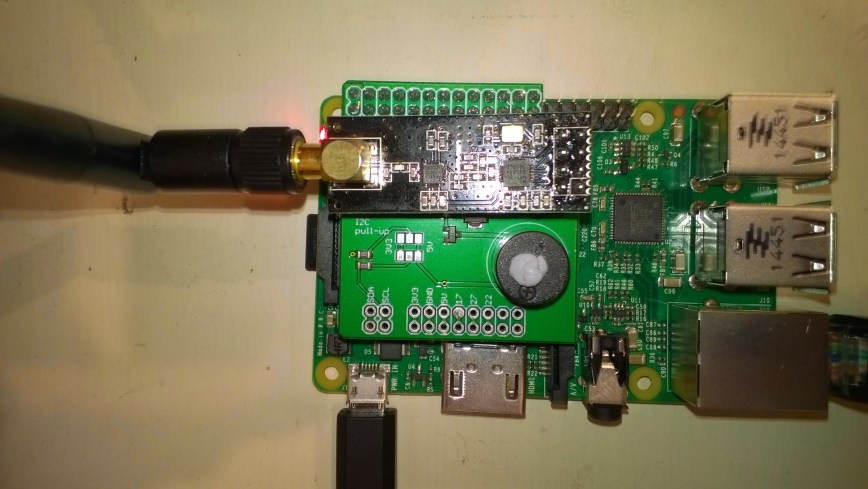
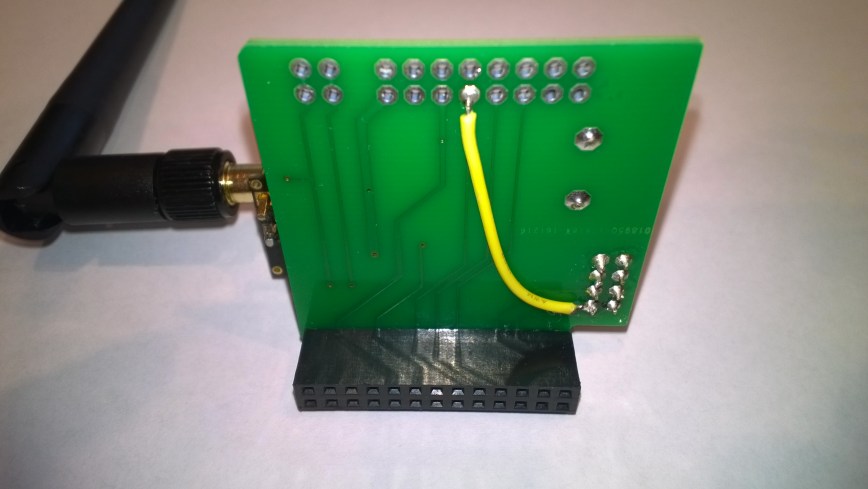
NRF24PiPlateModification

My first step was to add a jumper wire from the pin 8 on the nRF24L01 to GPIO pin 17 on Raspberry PI connector.

I then downloaded the techfooninja Radios.RF24 library for Windows IoT core and update the configuration to suit my modifcations. In the TestApp the modifications were limited to changing the interrupt pin from GPI 4 to GPO 17

private const byte IRQ_PIN = 4;

private const byte IRQ_PIN = 17;

I used a socket for the nRF24L01 device so I can trial different devices, for a production system I would solder the device to the shield to improve reliability.

RPiWithnRF24Plate

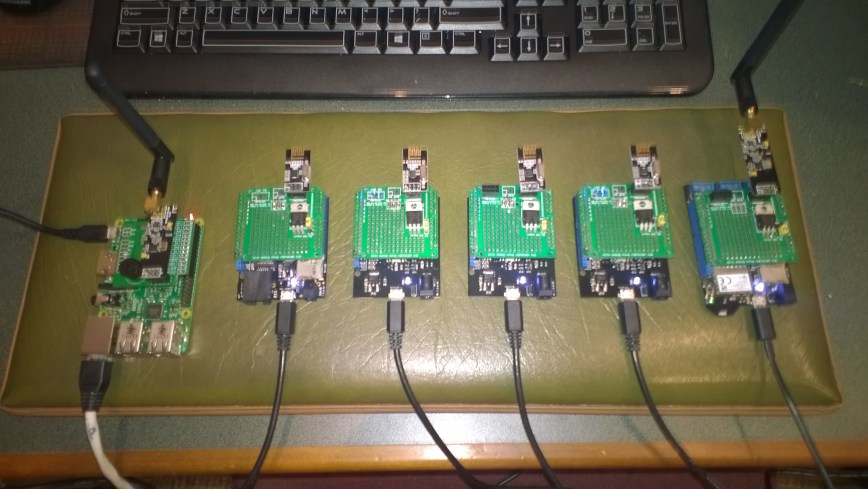
I then ran the my test application software in a stress test rig overnight to check for any reliability issues. The 5 x netduino devices were sending messages every 500mSec

RPIStressTester