.NET nanoFramework RAK4200 Library Usage

After a two week “soak test” using a Sparkfun Thing Plus ESP32 WROOM and RAK4200 Breakout Board completed with no failures, this final post covers the usage of the RAK4200LoRaWAN-NetNF library in a “real-world” application.

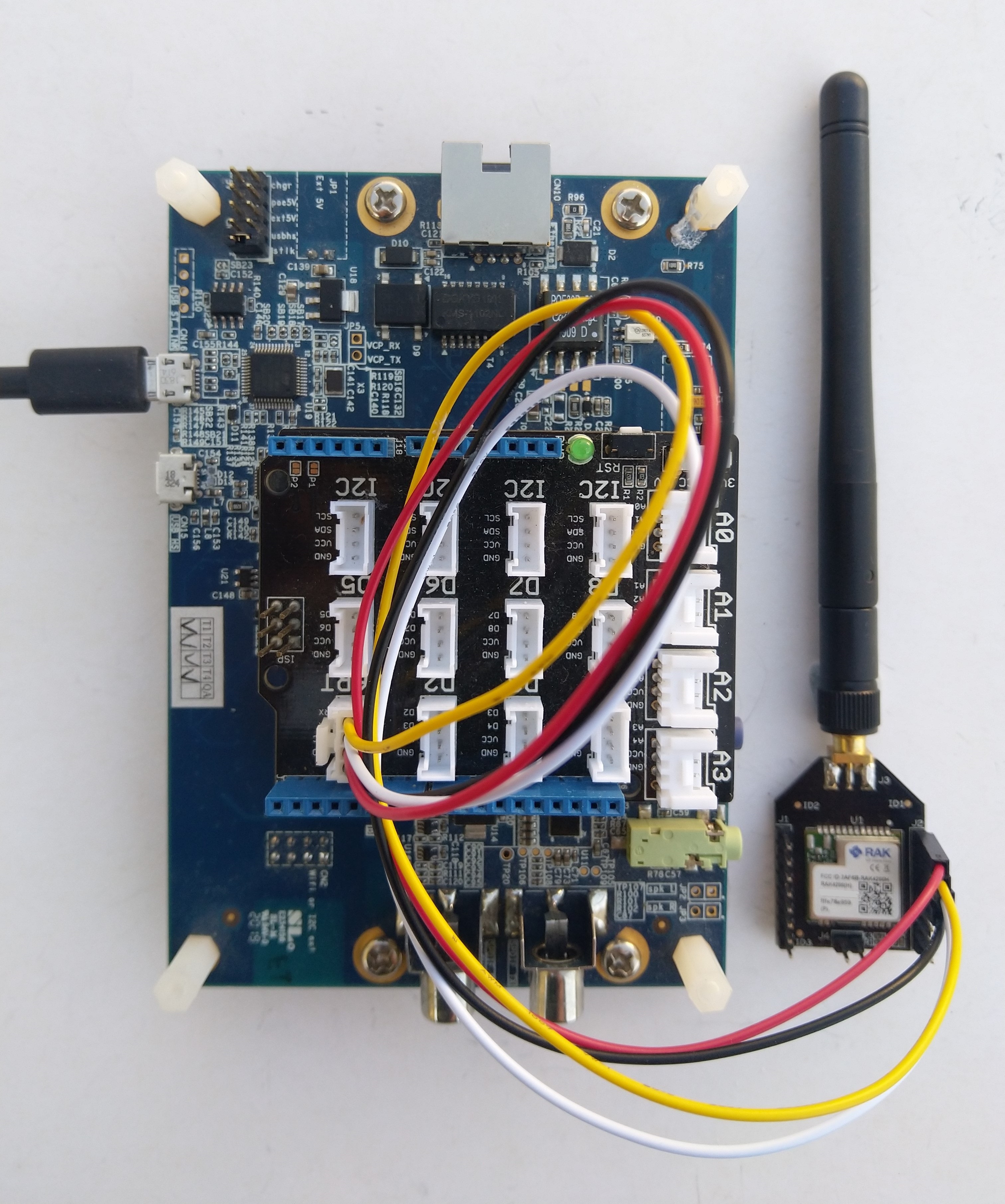
Discovery kit with STM32F769NI MCU and RAK4200 Breakout Board test rig

After a factory reset the DevEUI, JoinEUI (was AppEUI), and AppKey were reset, but the rest of the configuration appeared to be retained.

OK Work Mode: LoRaWAN
Region: AS923
MulticastEnable: false
DutycycleEnable: false
Send_repeat_cnt: 0
Join_mode: OTAA
DevEui: 0000000000000000
AppEui: 0000000000000000
AppKey: 00000000000000000000000000000000
Class: A
Joined Network:false
IsConfirm: unconfirm
AdrEnable: true
EnableRepeaterSupport: false
RX2_CHANNEL_FREQUENCY: 923200000, RX2_CHANNEL_DR:2
RX_WINDOW_DURATION: 3000ms
RECEIVE_DELAY_1: 1000ms
RECEIVE_DELAY_2: 2000ms
JOIN_ACCEPT_DELAY_1: 5000ms
JOIN_ACCEPT_DELAY_2: 6000ms
Current Datarate: 5
Primeval Datarate: 5
ChannelsTxPower: 0
UpLinkCounter: 0
DownLinkCounter: 0

I then ran the RAK4200LoRaWANDeviceClient with DEVICE_DEVEUI_SET (devEui from label on the device), OTAA to configure the AppEui and AppKey and the device connected to The Things Network on the second attempt (typo in the DevEui).

public static void Main()
{
	Result result;

	Debug.WriteLine("devMobile.IoT.RAK4200LoRaWANDeviceClient starting");

	try
	{
		// set GPIO functions for COM2 (this is UART1 on ESP32)
#if ESP32_WROOM
		Configuration.SetPinFunction(Gpio.IO16, DeviceFunction.COM2_TX);
		Configuration.SetPinFunction(Gpio.IO17, DeviceFunction.COM2_RX);
#endif

		Debug.Write("Ports:");
		foreach (string port in SerialPort.GetPortNames())
		{
			Debug.Write($" {port}");
		}
		Debug.WriteLine("");

		using (Rak4200LoRaWanDevice device = new Rak4200LoRaWanDevice())
		{
			result = device.Initialise(SerialPortId, 9600, Parity.None, 8, StopBits.One);
			if (result != Result.Success)
			{
				Debug.WriteLine($"Initialise failed {result}");
				return;
			}

#if CONFIRMED
			device.OnMessageConfirmation += OnMessageConfirmationHandler;
#endif
			device.OnReceiveMessage += OnReceiveMessageHandler;

#if FACTORY_RESET
			Debug.WriteLine($"{DateTime.UtcNow:hh:mm:ss} FactoryReset");
			result = device.FactoryReset();
			if (result != Result.Success)
			{
				Debug.WriteLine($"FactoryReset failed {result}");
				return;
			}
#endif

#if DEVICE_DEVEUI_SET
			Debug.WriteLine($"{DateTime.UtcNow:hh:mm:ss} Device EUI");
			result = device.DeviceEui(Config.devEui);
			if (result != Result.Success)
			{
				Debug.WriteLine($"ADR on failed {result}");
				return;
			}
#endif

#if REGION_SET
			Debug.WriteLine($"{DateTime.UtcNow:hh:mm:ss} Region{Region}");
			result = device.Region(Region);
			if (result != Result.Success)
			{
				Debug.WriteLine($"Region on failed {result}");
				return;
			}
#endif

#if ADR_SET
			Debug.WriteLine($"{DateTime.UtcNow:hh:mm:ss} ADR On");
			result = device.AdrOn();
			if (result != Result.Success)
			{
				Debug.WriteLine($"ADR on failed {result}");
				return;
			}
#endif
#if CONFIRMED
			Debug.WriteLine($"{DateTime.UtcNow:hh:mm:ss} Confirmed");
			result = device.UplinkMessageConfirmationOn();
			if (result != Result.Success)
			{
				Debug.WriteLine($"Confirm on failed {result}");
				return;
			}
#endif
#if UNCONFIRMED
			Debug.WriteLine($"{DateTime.UtcNow:hh:mm:ss} Unconfirmed");
			result = device.UplinkMessageConfirmationOff();
			if (result != Result.Success)
			{
				Debug.WriteLine($"Confirm off failed {result}");
				return;
			}
#endif

#if OTAA
			Debug.WriteLine($"{DateTime.UtcNow:hh:mm:ss} OTAA");
			result = device.OtaaInitialise(Config.JoinEui, Config.AppKey);
			if (result != Result.Success)
			{
				Debug.WriteLine($"OTAA Initialise failed {result}");
				return;
			}
#endif

#if ABP
			Debug.WriteLine($"{DateTime.UtcNow:hh:mm:ss} ABP");
			result = device.AbpInitialise(Config.DevAddress, Config.NwksKey, Config.AppsKey);
			if (result != Result.Success)
			{
				Debug.WriteLine($"ABP Initialise failed {result}");
				return;
			}
#endif

			Debug.WriteLine($"{DateTime.UtcNow:hh:mm:ss} Join start Timeout:{JoinTimeOut:hh:mm:ss}");
			result = device.Join(JoinTimeOut);
			if (result != Result.Success)
			{
				Debug.WriteLine($"Join failed {result}");
				return;
			}
			Debug.WriteLine($"{DateTime.UtcNow:hh:mm:ss} Join finish");

			while (true)
			{
#if PAYLOAD_BCD
				Debug.WriteLine($"{DateTime.UtcNow:hh:mm:ss} Send Timeout:{SendTimeout:hh:mm:ss} port:{MessagePort} payload BCD:{PayloadBcd}");
				result = device.Send(MessagePort, PayloadBcd, SendTimeout);
#endif
#if PAYLOAD_BYTES
				Debug.WriteLine($"{DateTime.UtcNow:hh:mm:ss} Send Timeout:{SendTimeout:hh:mm:ss} port:{MessagePort} payload Bytes:{BitConverter.ToString(PayloadBytes)}");
				result = device.Send(MessagePort, PayloadBytes, SendTimeout);
#endif
				if (result != Result.Success)
				{
					Debug.WriteLine($"Send failed {result}");
				}

				Thread.Sleep(new TimeSpan(0, 5, 0));
			}
		}
	}
	catch (Exception ex)
	{
		Debug.WriteLine(ex.Message);
	}
}

After configuring my Discovery kit with STM32F769NI MCU and RAK4200 Breakout Board test rig the RAK4200LoRaWANDeviceClient application could successfully connect to The Things Network with just ST_STM32F769I_DISCOVERY, PAYLOAD_BCD or PAYLOAD_BYTES and CONFIRMED or UNCONFIRMED defined.

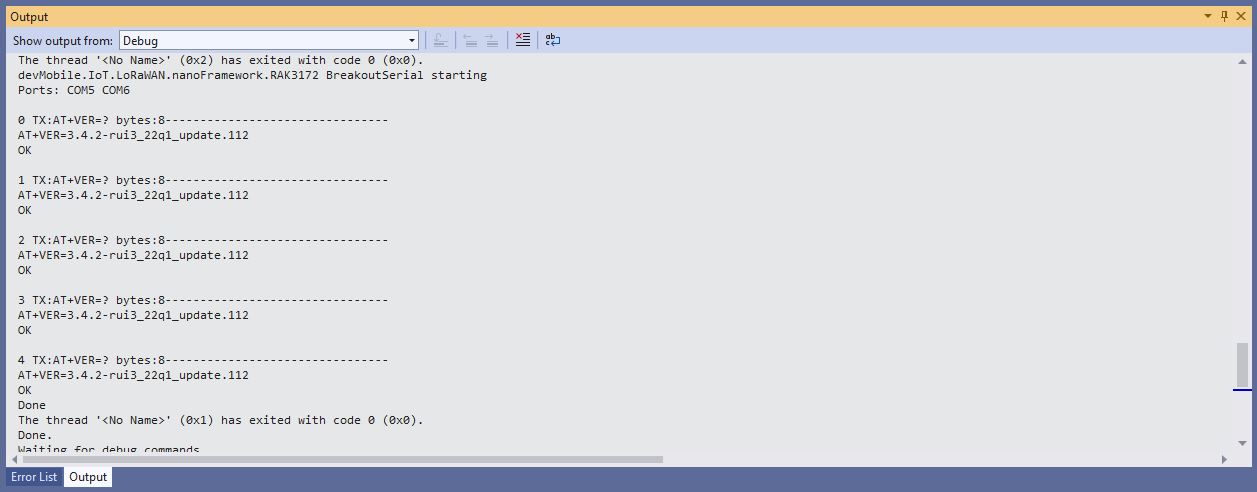
Visual Studio Debug output for RAK4200LoRaWANDeviceClient minimal configuration connection
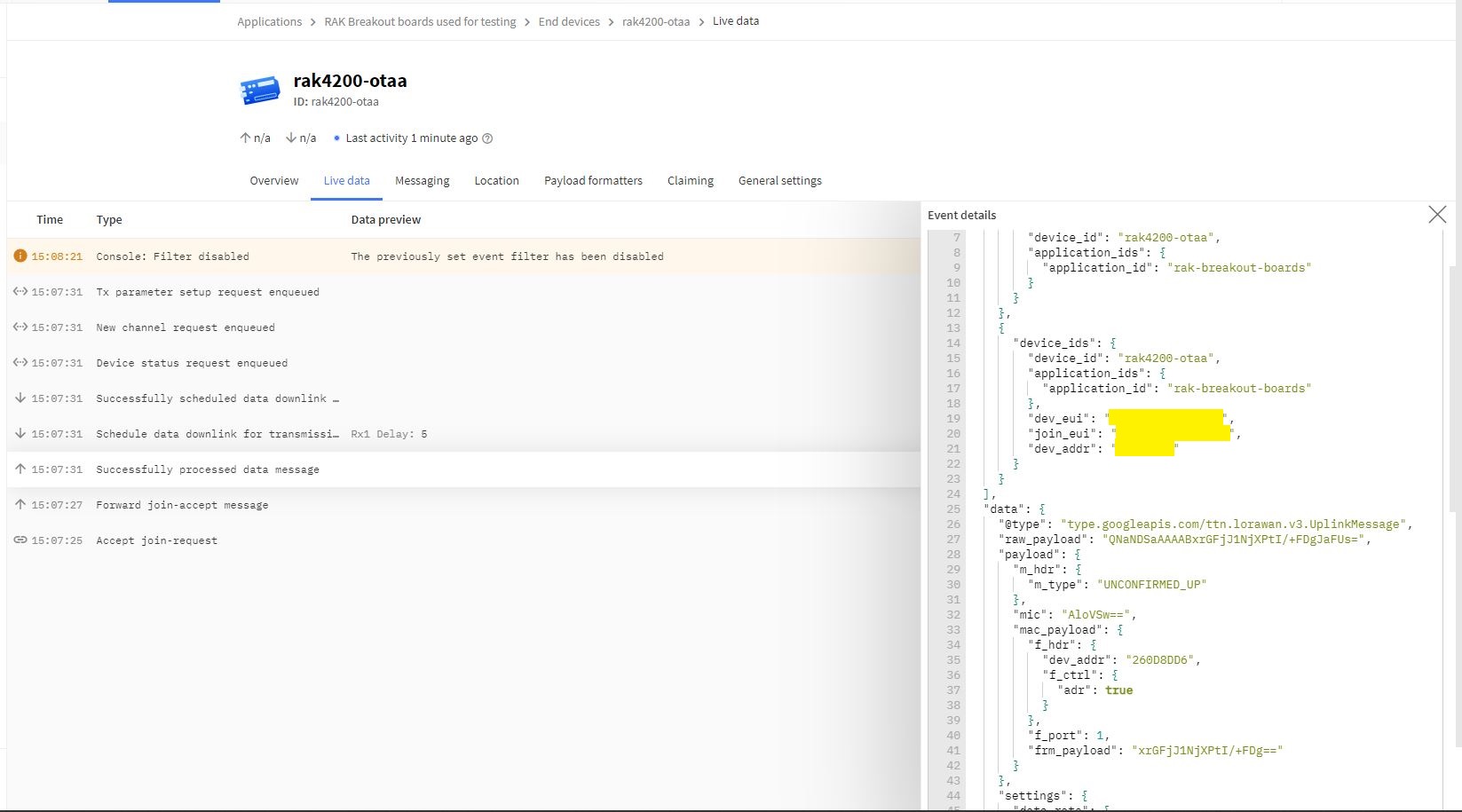
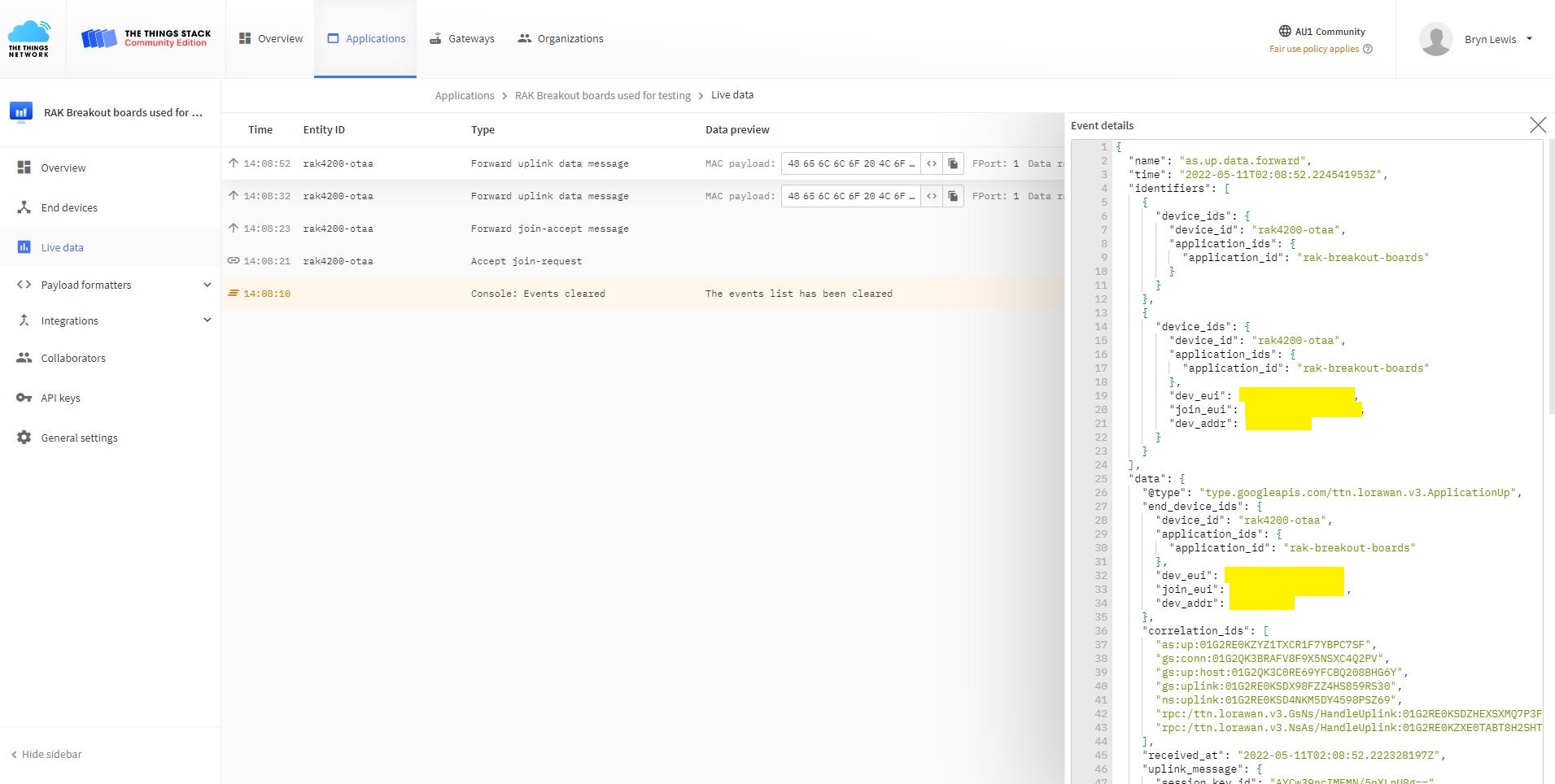
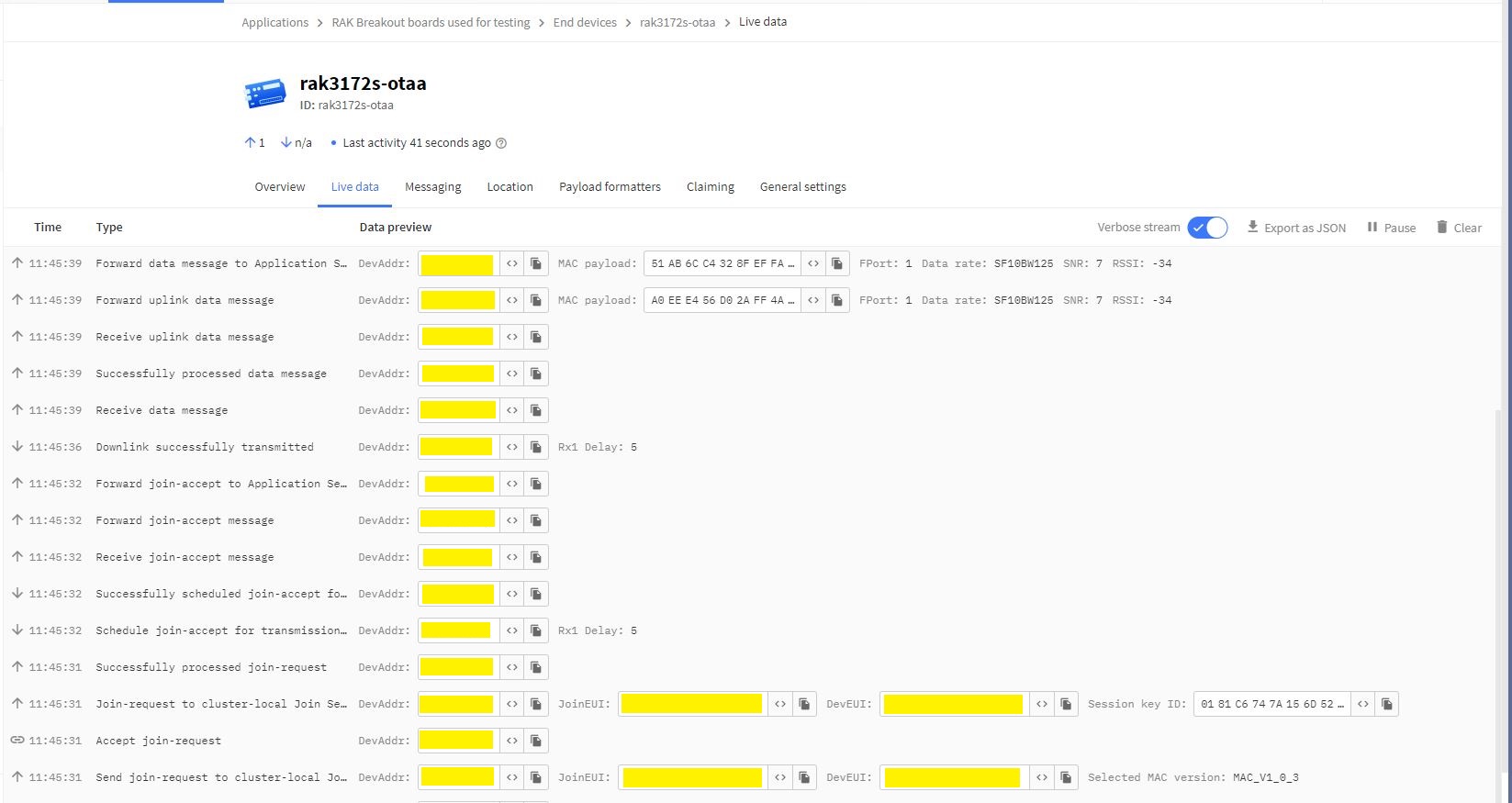
The Things Network “Live Data” for RAK4200LoRaWANDeviceClient minimal configuration connection

One of my client’s products has a configuration mode (button pressed as device starts) which enables a serial port (headers on board + FTDI module) for in field configuration of the onboard RAK4200 module.

.NET nanoFramework RAK4200 Factory Reset

The RAKwireless RAK4200 module has a really useful “reset to factory” AT Command

at+set_config=lora:default_parameters

To see what settings were erased I modified the BreakOutSerial application to send additional AT commands and display the responses.

public static void Main()
{
...
	Debug.WriteLine("devMobile.IoT.LoRaWAN.nanoFramework.RAK4200 BreakoutSerial starting");

	try
	{
		// set GPIO functions for COM2 (this is UART1 on ESP32)
#if ESP32_WROOM
		Configuration.SetPinFunction(Gpio.IO16, DeviceFunction.COM2_TX);
		Configuration.SetPinFunction(Gpio.IO17, DeviceFunction.COM2_RX);
#endif

		Debug.Write("Ports:");
		foreach (string port in SerialPort.GetPortNames())
		{
			Debug.Write($" {port}");
		}
		Debug.WriteLine("");

		using (_SerialPort = new SerialPort(SerialPortId))
		{
			// set parameters
			_SerialPort.BaudRate = 9600;
			//_SerialPort.BaudRate = 115200;
			_SerialPort.Parity = Parity.None;
			_SerialPort.DataBits = 8;
			_SerialPort.StopBits = StopBits.One;
			_SerialPort.Handshake = Handshake.None;
			_SerialPort.NewLine = "\r\n";

			//_SerialPort.ReadBufferSize = 128; 
			//_SerialPort.ReadBufferSize = 256; 
			_SerialPort.ReadBufferSize = 512; 
			//_SerialPort.ReadBufferSize = 1024;
			_SerialPort.ReadTimeout = 1000;

			//_SerialPort.WatchChar = '\n'; // May 2022 WatchChar event didn't fire github issue https://github.com/nanoframework/Home/issues/1035

#if SERIAL_ASYNC_READ
			_SerialPort.DataReceived += SerialDevice_DataReceived;
#endif

			_SerialPort.Open();

			_SerialPort.WatchChar = '\n';
...
			for (int i = 0; i < 5; i++)
			{
				string atCommand;
				atCommand = "at+version";
				//atCommand = "at+set_config=device:uart:1:9600";
				atCommand = "at+get_config=lora:status";
				//atCommand = "at+get_config=device:status";
				//atCommand = "at+get_config=lora:channel";
				//atCommand = "at+help";
				//atCommand = "at+set_config=device:restart";
				//atCommand = "at+set_config=lora:default_parameters";
				Debug.WriteLine("");
				Debug.WriteLine($"{i} TX:{atCommand} bytes:{atCommand.Length}--------------------------------");
				_SerialPort.WriteLine(atCommand);

				Thread.Sleep(5000);
			}
		}
		Debug.WriteLine("Done");
	}
	catch (Exception ex)
	{
		Debug.WriteLine(ex.Message);
	}
}

#if SERIAL_ASYNC_READ
private static void SerialDevice_DataReceived(object sender, SerialDataReceivedEventArgs e)
{
	SerialPort serialPort = (SerialPort)sender;

	switch (e.EventType)
	{
		case SerialData.Chars:
			break;

		case SerialData.WatchChar:
			string response = serialPort.ReadExisting();
			Debug.Write(response);
			break;
		default:
			Debug.Assert(false, $"e.EventType {e.EventType} unknown");
			break;
	}
}
#endif
...
}

After configuring my Sparkfun Thing Plus ESP32 WROOM + RAK42000 Breakout Board test rig the RAK4200LoRaWANDeviceClient application could successfully connect to The Things Network .

The thread '' (0x2) has exited with code 0 (0x0).
devMobile.IoT.LoRaWAN.nanoFramework.RAK4200 BreakoutSerial starting
0 TX:at+get_config=lora:status bytes:25--------------------------------
OK Work Mode: LoRaWAN
Region: AS923
MulticastEnable: false
DutycycleEnable: false
Send_repeat_cnt: 0
Join_mode: OTAA
DevEui:  6..............9
AppEui: 7..............4
AppKey: A.............................9
Class: A
Joined Network:false
IsConfirm: unconfirm
AdrEnable: true
EnableRepeaterSupport: false
RX2_CHANNEL_FREQUENCY: 923200000, RX2_CHANNEL_DR:2
RX_WINDOW_DURATION: 3000ms
RECEIVE_DELAY_1: 1000ms
RECEIVE_DELAY_2: 2000ms
JOIN_ACCEPT_DELAY_1: 5000ms
JOIN_ACCEPT_DELAY_2: 6000ms
Current Datarate: 5
Primeval Datarate: 5
ChannelsTxPower: 0
UpLinkCounter: 0
DownLinkCounter: 0

I then reset the RAK4200 device to “factory defaults”

The thread '<No Name>' (0x2) has exited with code 0 (0x0).
devMobile.IoT.LoRaWAN.nanoFramework.RAK4200 BreakoutSerial starting
Ports: COM5 COM6

0 TX:at+set_config=lora:default_parameters bytes:37--------------------------------
OK

The testrig would no longer connect as the device and network settings were invalid.

The thread '<No Name>' (0x2) has exited with code 0 (0x0).
devMobile.IoT.LoRaWAN.nanoFramework.RAK4200 BreakoutSerial starting
Ports: COM5 COM6

0 TX:at+get_config=lora:status bytes:25--------------------------------
OK Work Mode: LoRaWAN
Region: AS923
MulticastEnable: false
DutycycleEnable: false
Send_repeat_cnt: 0
Join_mode: OTAA
DevEui: 0000000000000000
AppEui: 0000000000000000
AppKey: 00000000000000000000000000000000
Class: A
Joined Network:false
IsConfirm: unconfirm
AdrEnable: true
EnableRepeaterSupport: false
RX2_CHANNEL_FREQUENCY: 923200000, RX2_CHANNEL_DR:2
RX_WINDOW_DURATION: 3000ms
RECEIVE_DELAY_1: 1000ms
RECEIVE_DELAY_2: 2000ms
JOIN_ACCEPT_DELAY_1: 5000ms
JOIN_ACCEPT_DELAY_2: 6000ms
Current Datarate: 5
Primeval Datarate: 5
ChannelsTxPower: 0
UpLinkCounter: 0
DownLinkCounter: 0

To “restore” the device configuration I ran the RAK4200LoRaWANDeviceClient application with DEVICE_DEVEUI_SET, OTAA, UNCONFIRMED, REGION_SET and ADR_SET defined.

The thread '<No Name>' (0x2) has exited with code 0 (0x0).
devMobile.IoT.LoRaWAN.nanoFramework.RAK4200 BreakoutSerial starting
Ports: COM2 COM3

0 TX:at+get_config=lora:status bytes:25--------------------------------
OK Work Mode: LoRaWAN
Region: AS923
MulticastEnable: false
DutycycleEnable: false
Send_repeat_cnt: 0
Join_mode: OTAA
DevEui: 6..............9
AppEui: 7.............4
AppKey: A.............................9
Class: A
Joined Network:false
IsConfirm: unconfirm
AdrEnable: true
EnableRepeaterSupport: false
RX2_CHANNEL_FREQUENCY: 923200000, RX2_CHANNEL_DR:2
RX_WINDOW_DURATION: 3000ms
RECEIVE_DELAY_1: 1000ms
RECEIVE_DELAY_2: 2000ms
JOIN_ACCEPT_DELAY_1: 5000ms
JOIN_ACCEPT_DELAY_2: 6000ms
Current Datarate: 5
Primeval Datarate: 5
ChannelsTxPower: 0
UpLinkCounter: 0
DownLinkCounter: 0

The testrig would then successfully connect to The Things Network. When the testrig was power cycled the device the configuration was retained.

.NET nanoFramework RAK4200 LoRaWAN library ABP Join

After getting my RAKwireless RAK4200 module to reliably connect to The Things Network(TTN) using Over The Air Activation(OTAA) the next step was to built an Activation By Personalisation(ABP) sample application.

I modified the NetworkJoinOTAA sample(based on the asynchronous version of BreakOutSerial) to send the required sequence of AT commands and display the responses.

namespace devMobile.IoT.LoRaWAN.nanoFramework.RAK4200
{
   using System;
   using System.Diagnostics;
   using System.IO.Ports;
   using System.Text;
   using System.Threading;
#if ESP32_WROOM
   using global::nanoFramework.Hardware.Esp32; ///need NuGet nanoFramework.Hardware.Esp32
#endif

   public class Program
   {
#if ST_STM32F769I_DISCOVERY
      private const string SerialPortId = "COM6";
#endif
#if ESP32_WROOM
      private const string SerialPortId = "COM2";
#endif
      private const string DevEui = "...";
      private const string AppEui = "...";
      private const string AppKey = "...";
      private const byte MessagePort = 1;
      private const string Payload = "01020304"; // Is AQIDBA==

      public static void Main()
      {
         string response;

         Debug.WriteLine("devMobile.IoT.Rak4200.NetworkJoinOTAA starting");

         try
         {
#if ESP32_WROOM
            Configuration.SetPinFunction(Gpio.IO16, DeviceFunction.COM2_TX);
            Configuration.SetPinFunction(Gpio.IO17, DeviceFunction.COM2_RX);
#endif

            Debug.Write("Ports:");
            foreach (string port in SerialPort.GetPortNames())
            {
               Debug.Write($" {port}");
            }
            Debug.WriteLine("");

            using (SerialPort serialDevice = new SerialPort(SerialPortId))
            {
               // set parameters
               serialDevice.BaudRate = 9600;
               //_SerialPort.BaudRate = 115200;
               serialDevice.Parity = Parity.None;
               serialDevice.StopBits = StopBits.One;
               serialDevice.Handshake = Handshake.None;
               serialDevice.DataBits = 8;

               serialDevice.ReadTimeout = 10000;
               //serialDevice.ReadBufferSize = 128; 
               //serialDevice.ReadBufferSize = 256; 
               serialDevice.ReadBufferSize = 512;
               //serialDevice.ReadBufferSize = 1024;

               serialDevice.NewLine = "\r\n";

               serialDevice.DataReceived += SerialDevice_DataReceived;

               serialDevice.Open();

               serialDevice.WatchChar = '\n';

               // clear out the RX buffer
               serialDevice.ReadExisting();
               response = serialDevice.ReadExisting();
               Debug.WriteLine($"Response :{response.Trim()} bytes:{response.Length}");
               Thread.Sleep(500);

               // Set the Working mode to LoRaWAN
               Debug.WriteLine("lora:work_mode:0");
               serialDevice.WriteLine("at+set_config=lora:work_mode:0");
               Thread.Sleep(1500);

               // Set the JoinMode
               Debug.WriteLine("lora:join_mode");
               serialDevice.WriteLine("at+set_config=lora:join_mode:0");
               Thread.Sleep(500);

               // Set the Class
               Debug.WriteLine("lora:class");
               serialDevice.WriteLine("at+set_config=lora:class:0");
               Thread.Sleep(500);

               // Set the Region to AS923
               Debug.WriteLine("lora:region");
               serialDevice.WriteLine("at+set_config=lora:region:AS923");
               Thread.Sleep(500);

               // Set the devEUI
               Debug.WriteLine("lora:dev_eui");
               serialDevice.WriteLine($"at+set_config=lora:dev_eui:{DevEui}");
               Thread.Sleep(500);

               // Set the appEUI
               Debug.WriteLine("lora:app_eui");
               serialDevice.WriteLine($"at+set_config=lora:app_eui:{AppEui}");
               Thread.Sleep(500);

               // Set the appKey
               Debug.WriteLine("lora:app_key");
               serialDevice.WriteLine($"at+set_config=lora:app_key:{AppKey}");
               Thread.Sleep(500);

               // Set the Confirm flag
               Debug.WriteLine("lora:confirm");
               serialDevice.WriteLine("at+set_config=lora:confirm:0");
               Thread.Sleep(500);

               Debug.WriteLine("lora:adr");
               serialDevice.WriteLine("at+set_config=lora:adr:1");
               Thread.Sleep(500);

               // Join the network
               Debug.WriteLine("at+join");
               serialDevice.WriteLine("at+join");
               Thread.Sleep(10000);

               byte counter = 1;
               while (true)
               {
                  // Send the BCD messages
                  string payload = $"{Payload}{counter:X2}";
                  Debug.WriteLine($"at+send=lora:{MessagePort}:{payload}");
                  serialDevice.WriteLine($"at+send=lora:{MessagePort}:{payload}");

                  counter += 1;

                  Thread.Sleep(300000);
               }
            }
         }
         catch (Exception ex)
         {
            Debug.WriteLine(ex.Message);
         }
      }

      private static void SerialDevice_DataReceived(object sender, SerialDataReceivedEventArgs e)
      {
         SerialPort serialPort = (SerialPort)sender;
         string response;

         switch (e.EventType)
         {
            case SerialData.Chars:
               break;

            case SerialData.WatchChar:
               response = serialPort.ReadExisting();
               Debug.Write(response);
               break;
            default:
               Debug.Assert(false, $"e.EventType {e.EventType} unknown");
               break;
         }
      }
   }
}

The NetworkJoinABP application assumes that all of the AT commands succeed.

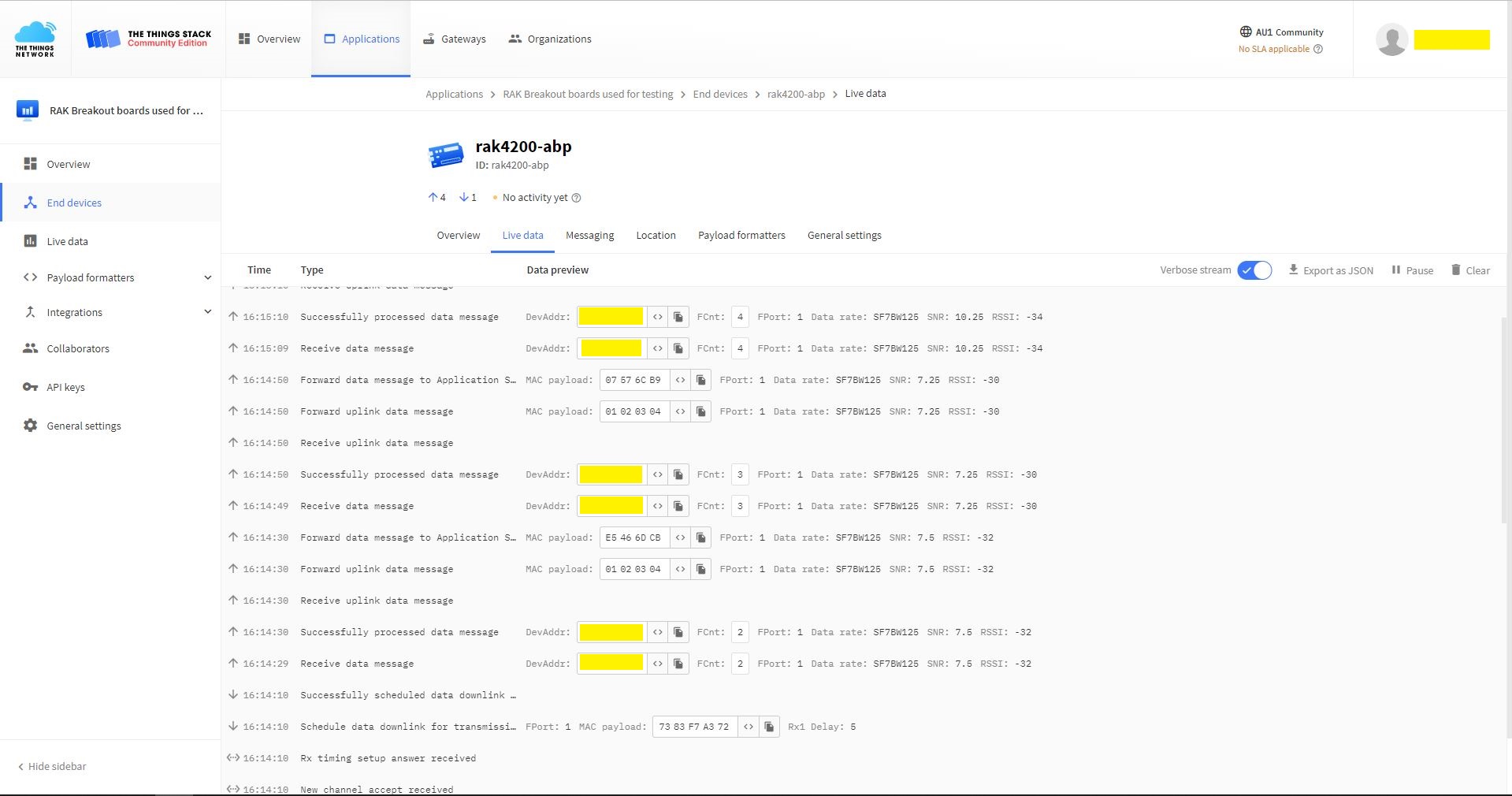
TTN Console live data tab connection process
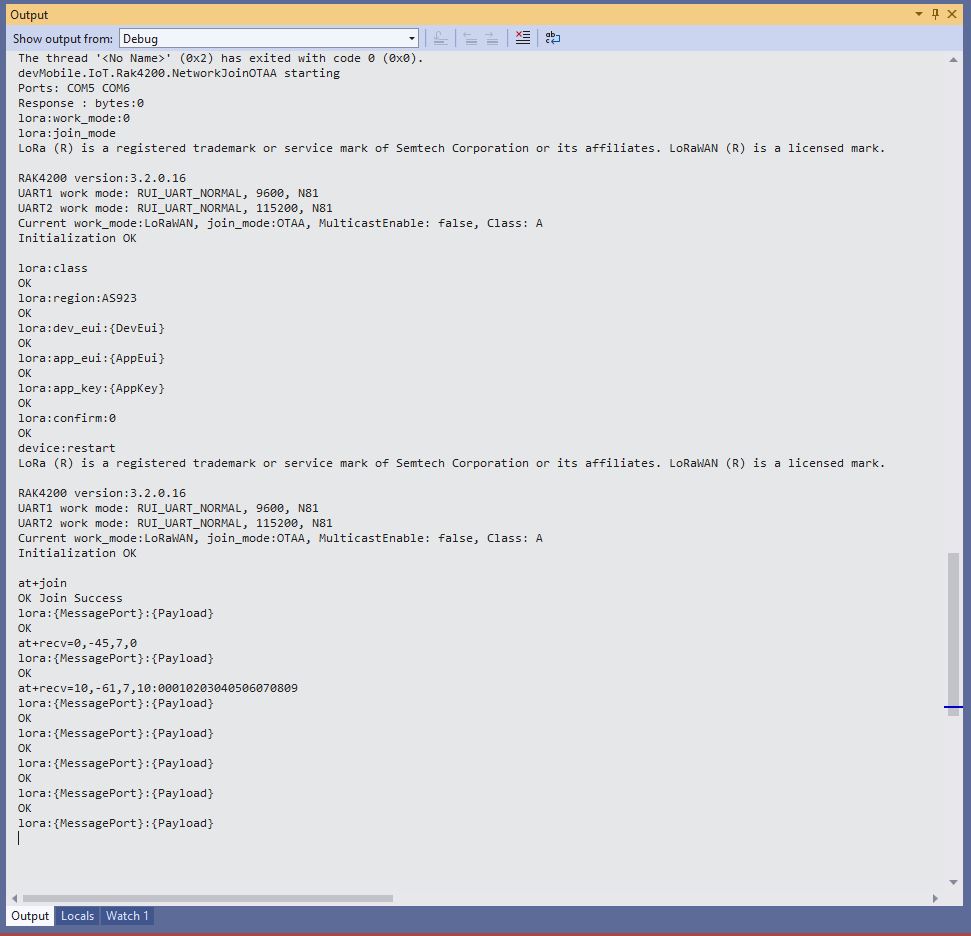
Visual Studio Output windows displaying connection process and a D2C message

I have been using at+set_config=lora:default_parameters set the WisDuo RAK4200 back to factory settings so I can figure out what settings are persisted by a “at+set_config=device:restart” and which ones need to be set every time the application is run.

.NET nanoFramework RAK4200 LoRaWAN library OTAA Join

When I first tried Over The Air Activation(OTAA) to connect to The Things Network(TTN) with my RAKwireless RAK4200 module it didn’t work. I built another test harness with an FTDI module so I could send AT commands with the RAK Serial Port Tool to my RAK4200 module.

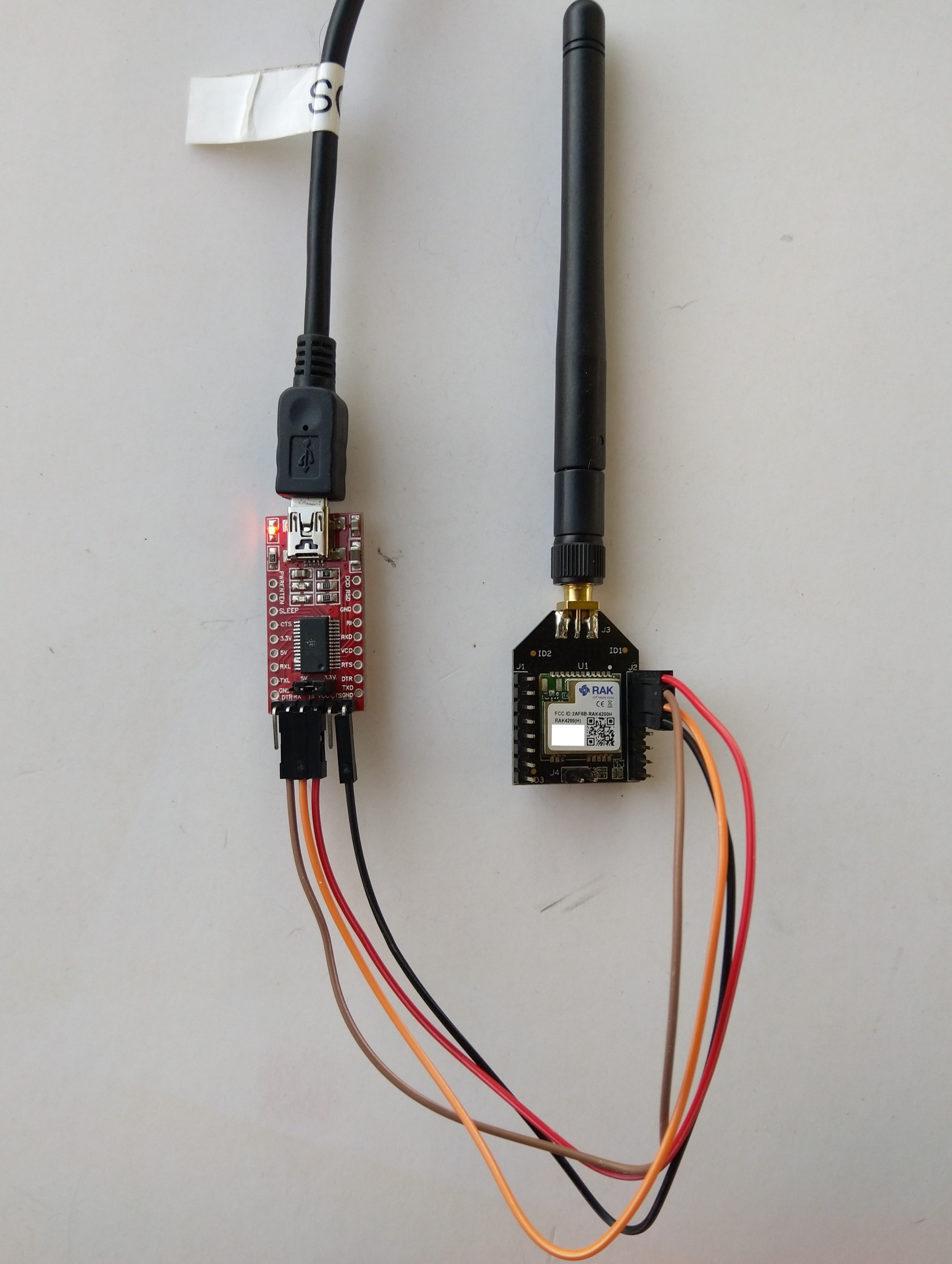
RAK4200 -> FTDI -? PC test harness

The default baud rate is 115200 but I sent “at+set_config=device:uart:1:9600” to the RAK4200 module.

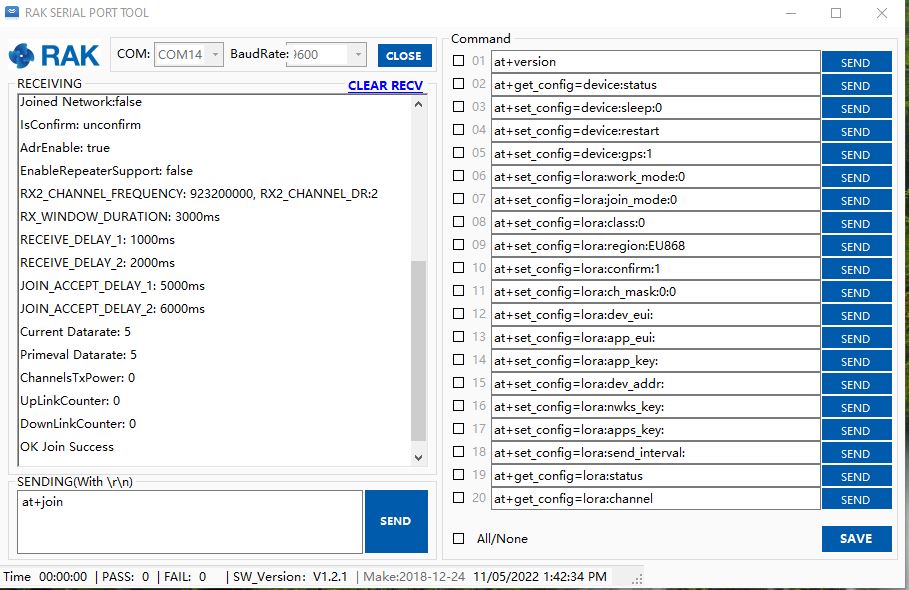
RAK Serial Port Tool initiating at+join command

With the RAK Serial Port Tool I could get the RAK4200 connected to TTN and send unconfirmed messages. The sequence of commands I used was

at+set_config=lora:join_mode:0
at+set_config=lora:class:0
at+set_config=lora:region:AS923
at+set_config=lora:dev_eui:XXXX
at+set_config=lora:app_eui:XXXX
at+set_config=lora:app_key:XXXX
at+set_config=device:restart
at+join
at+send=lora:2:48656c6c6f204c6f526157414e

I then returned to my STM32F769I Discovery, RAK4200 Breakoutboard, Seeedstudio Grove Base Shield for Arduino and a Seeedstudio Grove-4 pin Female Jumper to Grove 4 pin Conversion Cable based test harness.

RAK4200, STM32F769I Discovery test harness

I modified the NetworkJoinOTAA sample(based on the asynchronous version of BreakOutSerial) to send the same sequence of AT commands and display the responses.

namespace devMobile.IoT.LoRaWAN.nanoFramework.RAK4200
{
   using System;
	using System.Diagnostics;
   using System.IO.Ports;
   using System.Threading;

   public class Program
	{
      private const string SerialPortId = "COM6";
      private const string DevEui = "...";
      private const string AppEui = "...";
      private const string AppKey = "...";
      private const byte MessagePort = 1;
      private const string Payload = "48656c6c6f204c6f526157414e"; // Hello LoRaWAN

      public static void Main()
      {
         string response;

         Debug.WriteLine("devMobile.IoT.Rak4200.NetworkJoinOTAA starting");

         Debug.Write("Ports:");
         foreach (string port in SerialPort.GetPortNames())
         {
            Debug.Write($" {port}");
         }
         Debug.WriteLine("");

         try
         {
            using (SerialPort serialDevice = new SerialPort(SerialPortId))
            {
               // set parameters
               serialDevice.BaudRate = 9600;
               //_SerialPort.BaudRate = 115200;
               serialDevice.Parity = Parity.None;
               serialDevice.StopBits = StopBits.One;
               serialDevice.Handshake = Handshake.None;
               serialDevice.DataBits = 8;

               serialDevice.ReadTimeout = 10000;

               serialDevice.NewLine = "\r\n";

               serialDevice.DataReceived += SerialDevice_DataReceived;

               serialDevice.Open();

               serialDevice.WatchChar = '\n';

               // clear out the RX buffer
               serialDevice.ReadExisting();
               response = serialDevice.ReadExisting();
               Debug.WriteLine($"Response :{response.Trim()} bytes:{response.Length}");
               Thread.Sleep(500);

               // Set the Working mode to LoRaWAN
               Console.WriteLine("lora:work_mode:0");
               serialDevice.WriteLine("at+set_config=lora:work_mode:0");

               // Set the JoinMode
               Console.WriteLine("lora:join_mode");
               serialDevice.WriteLine("at+set_config=lora:join_mode:0");
               Thread.Sleep(500);

               // Set the Class
               Console.WriteLine("lora:class");
               serialDevice.WriteLine("at+set_config=lora:class:0");
               Thread.Sleep(500);

               // Set the Region to AS923
               Console.WriteLine("lora:region:AS923");
               serialDevice.WriteLine("at+set_config=lora:region:AS923");
               Thread.Sleep(500);

               // Set the devEUI
               Console.WriteLine("lora:dev_eui:{DevEui}");
               serialDevice.WriteLine($"at+set_config=lora:dev_eui:{DevEui}");
               Thread.Sleep(500);

               // Set the appEUI
               Console.WriteLine("lora:app_eui:{AppEui}");
               serialDevice.WriteLine($"at+set_config=lora:app_eui:{AppEui}");
               Thread.Sleep(500);

               // Set the appKey
               Console.WriteLine("lora:app_key:{AppKey}");
               serialDevice.WriteLine($"at+set_config=lora:app_key:{AppKey}");
               Thread.Sleep(500);

               // Set the Confirm flag
               Console.WriteLine("lora:confirm:0");
               serialDevice.WriteLine("at+set_config=lora:confirm:0");
               Thread.Sleep(500);

               // Reset the device
               Console.WriteLine("device:restart");
               serialDevice.WriteLine($"at+set_config=device:restart");
               Thread.Sleep(10000);

               // Join the network
               Console.WriteLine("at+join");
               serialDevice.WriteLine("at+join");
               Thread.Sleep(10000);

               while (true)
               {
                  // Send the BCD messages
                  Console.WriteLine("lora:{MessagePort}:{Payload}");
                  serialDevice.WriteLine($"at+send=lora:{MessagePort}:{Payload}");

                  Thread.Sleep(20000);
               }
            }
         }
         catch (Exception ex)
         {
            Debug.WriteLine(ex.Message);
         }
      }

      private static void SerialDevice_DataReceived(object sender, SerialDataReceivedEventArgs e)
      {
         SerialPort serialPort = (SerialPort)sender;
         string response;

         switch (e.EventType)
         {
            case SerialData.Chars:
               break;

            case SerialData.WatchChar:
               response = serialPort.ReadExisting();
               Debug.Write(response);
               break;
            default:
               Debug.Assert(false, $"e.EventType {e.EventType} unknown");
               break;
         }
      }
   }
}
The NetworkJoinOTAA application assumes that all of the AT commands succeed

Visual Studio Output windows displaying connection process and a D2C message
TTN Console live data tab connection process
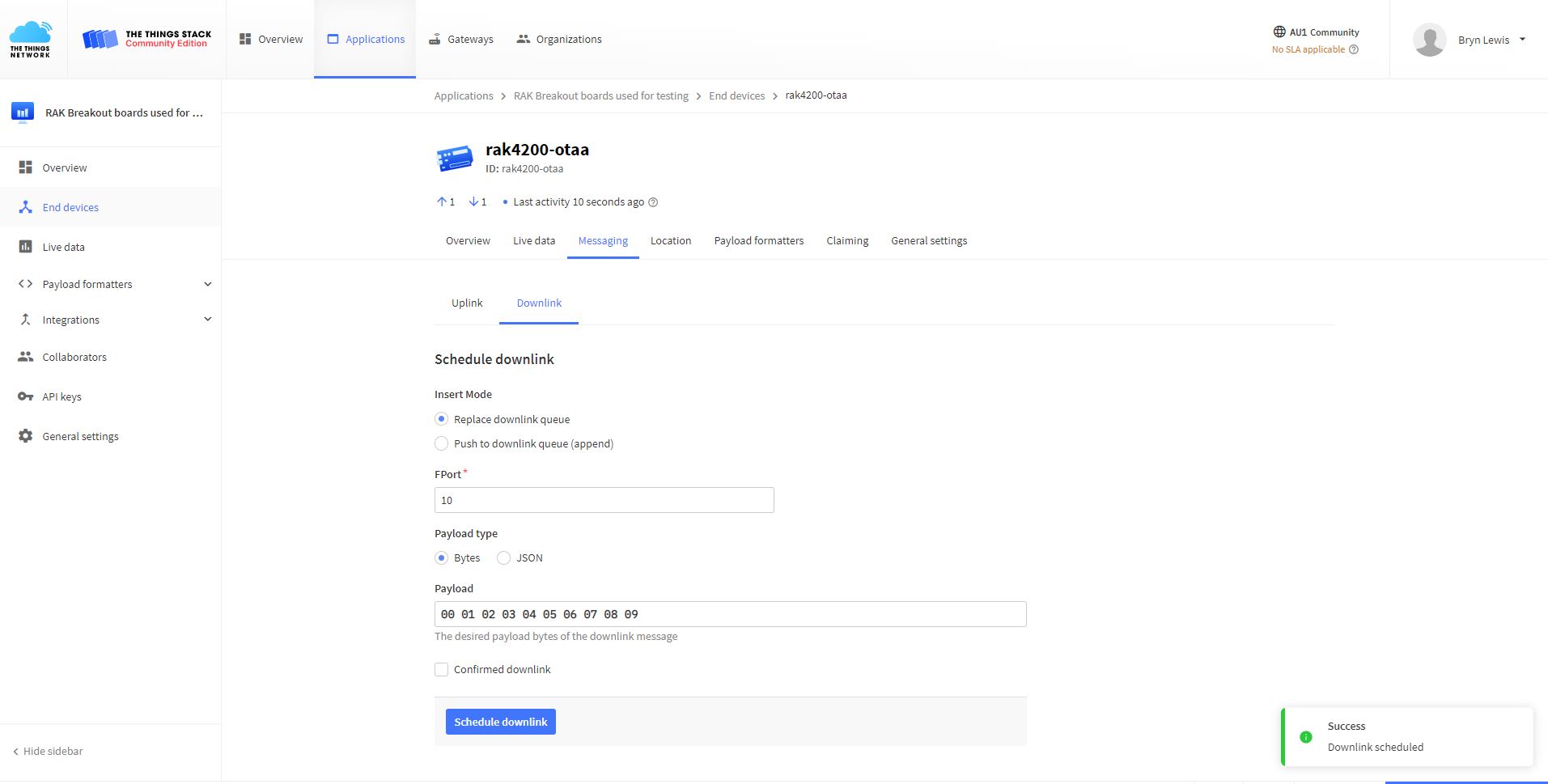
TTN Console live messaging tab C2D message

I need to find a way to set the RAK4200 back to factory settings so I can figure out what settings are persisted by the “at+set_config=device:restart” and which ones need to be set every time the application is run.

.NET nanoFramework RAK4200 LoRaWAN library basic connectivity

Over the last couple of evenings I have been working on a .NET nanoFramework library for the RAKwireless RAK4200 module using a STM32F769I Discovery, RAK4200 Breakoutboard, Seeedstudio Grove Base Shield for Arduino and a Seeedstudio Grove-4 pin Female Jumper to Grove 4 pin Conversion Cable.

RAK 4200 STM32F769I Discovery testrig

My sample code has compile time options for synchronous and asynchronous operation.

//---------------------------------------------------------------------------------
// Copyright (c) May 2022, devMobile Software
//
// Licensed under the Apache License, Version 2.0 (the "License");
// you may not use this file except in compliance with the License.
// You may obtain a copy of the License at
//
//     http://www.apache.org/licenses/LICENSE-2.0
//
// Unless required by applicable law or agreed to in writing, software
// distributed under the License is distributed on an "AS IS" BASIS,
// WITHOUT WARRANTIES OR CONDITIONS OF ANY KIND, either express or implied.
// See the License for the specific language governing permissions and
// limitations under the License.
//
//---------------------------------------------------------------------------------
//#define SERIAL_SYNC_READ
#define SERIAL_ASYNC_READ
//#define SERIAL_THREADED_READ
#define ST_STM32F769I_DISCOVERY      // nanoff --target ST_STM32F769I_DISCOVERY --update 
...

namespace devMobile.IoT.LoRaWAN.nanoFramework.RAK4200
{
	using System;
	using System.Diagnostics;
	using System.IO.Ports;
	using System.Threading;

	public class Program
	{
		private static SerialPort _SerialPort;
#if SERIAL_THREADED_READ
		private static Boolean _Continue = true;
#endif
...
#if ST_STM32F769I_DISCOVERY
		private const string SerialPortId = "COM6";
#endif

		public static void Main()
		{
#if SERIAL_THREADED_READ
			Thread readThread = new Thread(SerialPortProcessor);
#endif

			Debug.WriteLine("devMobile.IoT.LoRaWAN.nanoFramework.RAK4200 BreakoutSerial starting");

			Debug.Write("Ports:");
			foreach (string port in SerialPort.GetPortNames())
			{
				Debug.Write($" {port}");
			}
			Debug.WriteLine("");

			try
			{
				// set GPIO functions for COM2 (this is UART1 on ESP32)
#if ESP32_WROOM
				Configuration.SetPinFunction(Gpio.IO04, DeviceFunction.COM2_TX);
            Configuration.SetPinFunction(Gpio.IO05, DeviceFunction.COM2_RX);
#endif

				_SerialPort = new SerialPort(SerialPortId);

				// set parameters
				_SerialPort.BaudRate = 115200;
				_SerialPort.Parity = Parity.None;
				_SerialPort.DataBits = 8;
				_SerialPort.StopBits = StopBits.One;
				_SerialPort.Handshake = Handshake.None;

				_SerialPort.ReadTimeout = 1000;
				_SerialPort.NewLine = "\r\n";

				//_SerialPort.WatchChar = '\n'; // May 2022 WatchChar event didn't fire github issue https://github.com/nanoframework/Home/issues/1035

				_SerialPort.Open();

				_SerialPort.WatchChar = '\n';

#if SERIAL_THREADED_READ
				readThread.Start();
#endif

#if SERIAL_ASYNC_READ
				_SerialPort.DataReceived += SerialDevice_DataReceived;
#endif

				while (true)
				{
					string atCommand = "at+version";
					Debug.WriteLine($"TX:{atCommand} bytes:{atCommand.Length}");
					_SerialPort.WriteLine(atCommand);

#if SERIAL_SYNC_READ
					// Read the response
					string response = _SerialPort.ReadLine();
					Debug.WriteLine($"RX:{response.Trim()} bytes:{response.Length}");
#endif
					Thread.Sleep(15000);
				}
			}
			catch (Exception ex)
			{
				Debug.WriteLine(ex.Message);
			}
		}

#if SERIAL_ASYNC_READ
		private static void SerialDevice_DataReceived(object sender, SerialDataReceivedEventArgs e)
		{
			SerialPort serialPort = (SerialPort)sender;
			string response;

			switch (e.EventType)
			{
				case SerialData.Chars:
					/*
					response = serialPort.ReadExisting();

					if ( response.Length>0)
					{ 
						Debug.WriteLine($"RX Char:{response.Trim()} bytes:{response.Length}");
					}
					*/
					break;
				case SerialData.WatchChar:
					response = serialPort.ReadExisting();

					if (response.Length > 0)
					{
						Debug.WriteLine($"RX WatchChar :{response.Trim()} bytes:{response.Length}");
					}
					break;
				default:
					Debug.Assert(false, $"e.EventType {e.EventType} unknown");
					break;
			}
		}
#endif

#if SERIAL_THREADED_READ
		public static void SerialPortProcessor()
		{
			string response;

			while (_Continue)
			{
				try
				{
					response = _SerialPort.ReadLine();
					//response = _SerialPort.ReadExisting();
					Console.WriteLine($"RX:{response} bytes:{response.Length}");
				}
				catch (TimeoutException ex) 
				{
					Console.WriteLine($"Timeout:{ex.Message}");
				}
			}
		}
#endif
	}
}

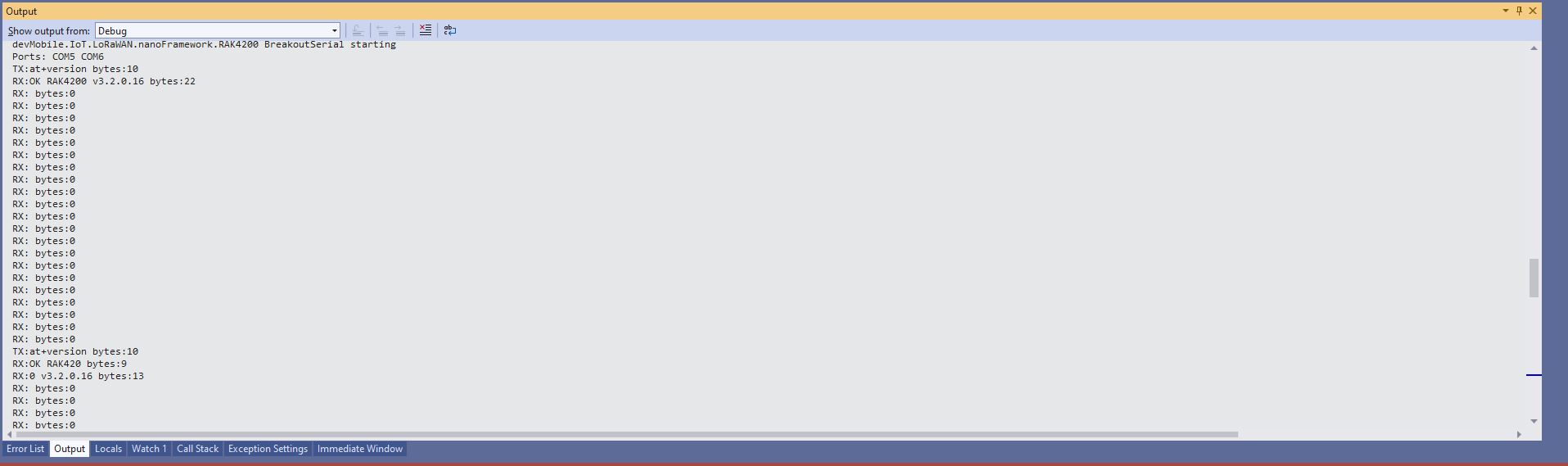
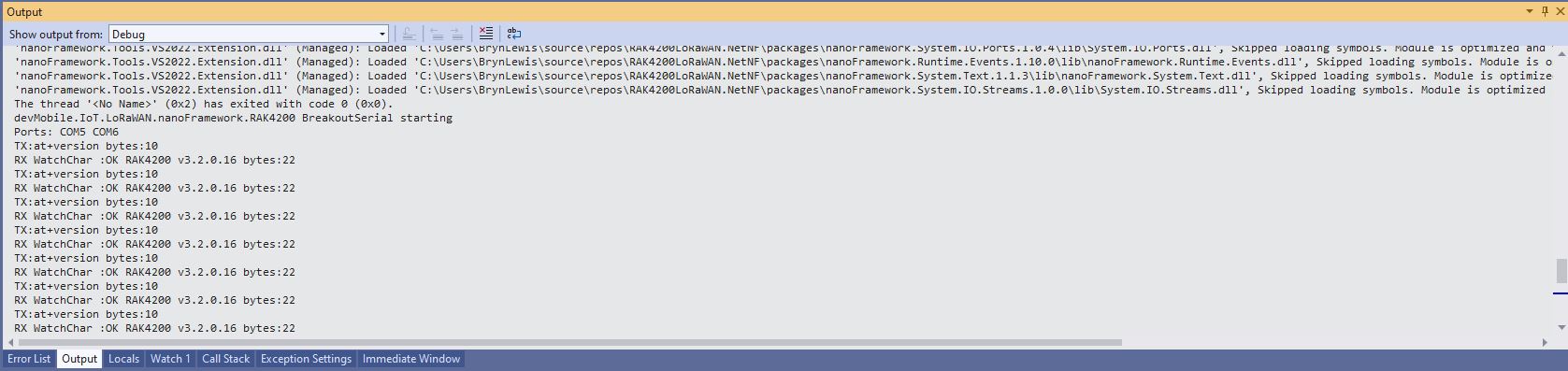
When I requested the RAK4200 Module version information with “at+version” the response was a single line (unlike the RAK3172 version where the response is three lines). The asynchronous version of the application displays character(s) as they arrive so a response could be split across multiple SerialDataReceived events.

Asynchronous approach with multiple SerialData.Chars events

With the initial version of SerialDevice_DataReceived event handler the firmware version response was available in the first SerialData.Chars event, then a SerialData.Chars event fired for each character

Asynchronous approach with SerialData.Chars events with an empty buffer removed

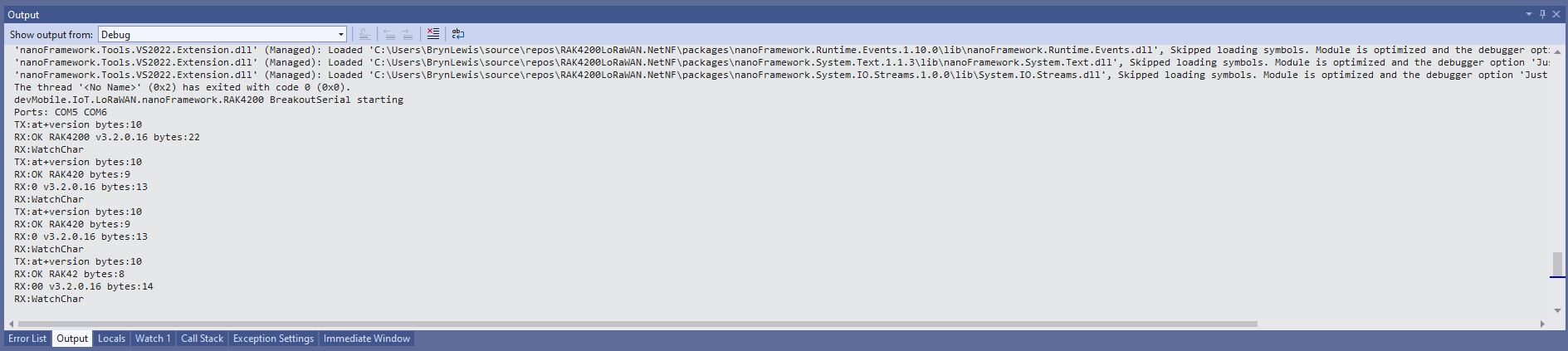
I also noticed that the “SerialData.WatchChar” event was not firing. After some experimentation I found that if I set the SerialPort.WatchChar before opening the serial port there were no events, but if I set SerialPort.WatchChar after opening the serial port events were fired as expected(See note re github issue in code)

Asynchronous approach with SerialPort.WatchChar work as expected

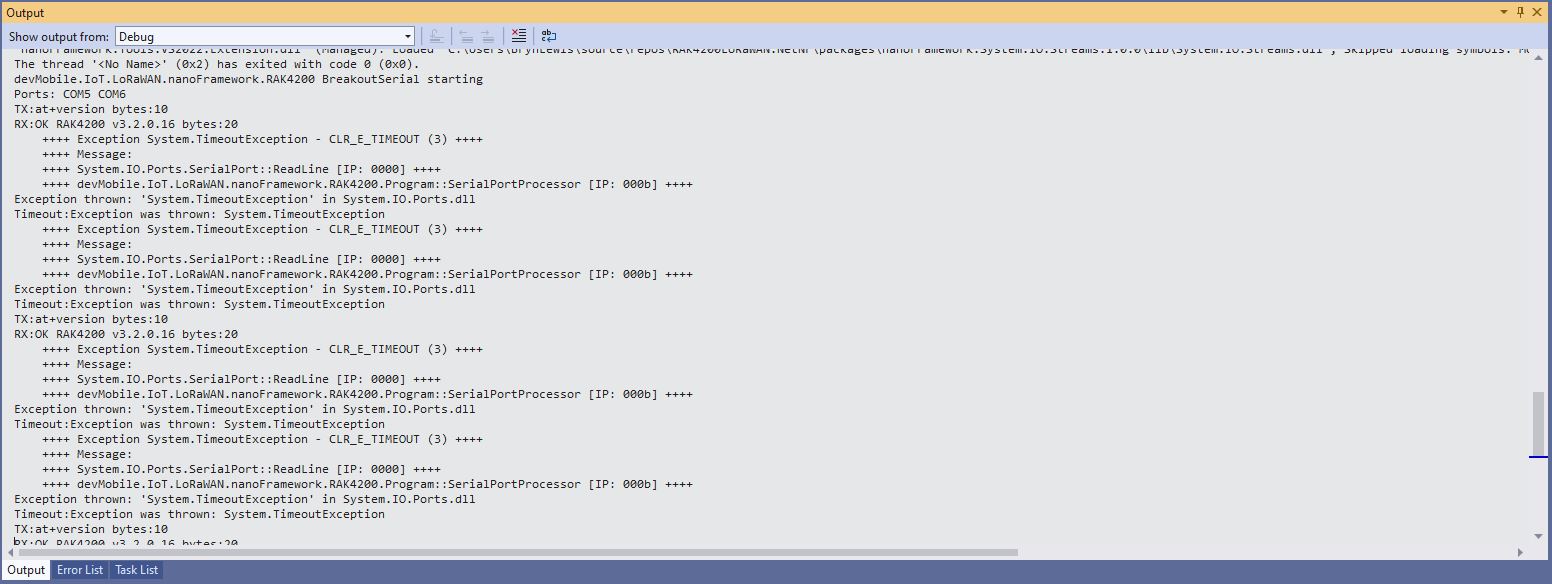
I also implemented a threaded approach for reading characters from the serial port. Normally using Exceptions for flow control is not a good idea but in this case I can’t see an alternative approach.

Thread approach SerialPort.ReadLine() timeouts

The RAK4200 Module defaults 115200 baud which seems overkill considering the throughput of a LoRaWAN link.

RAK7258 Local server and Message Queuing Telemetry Transport(MQTT)

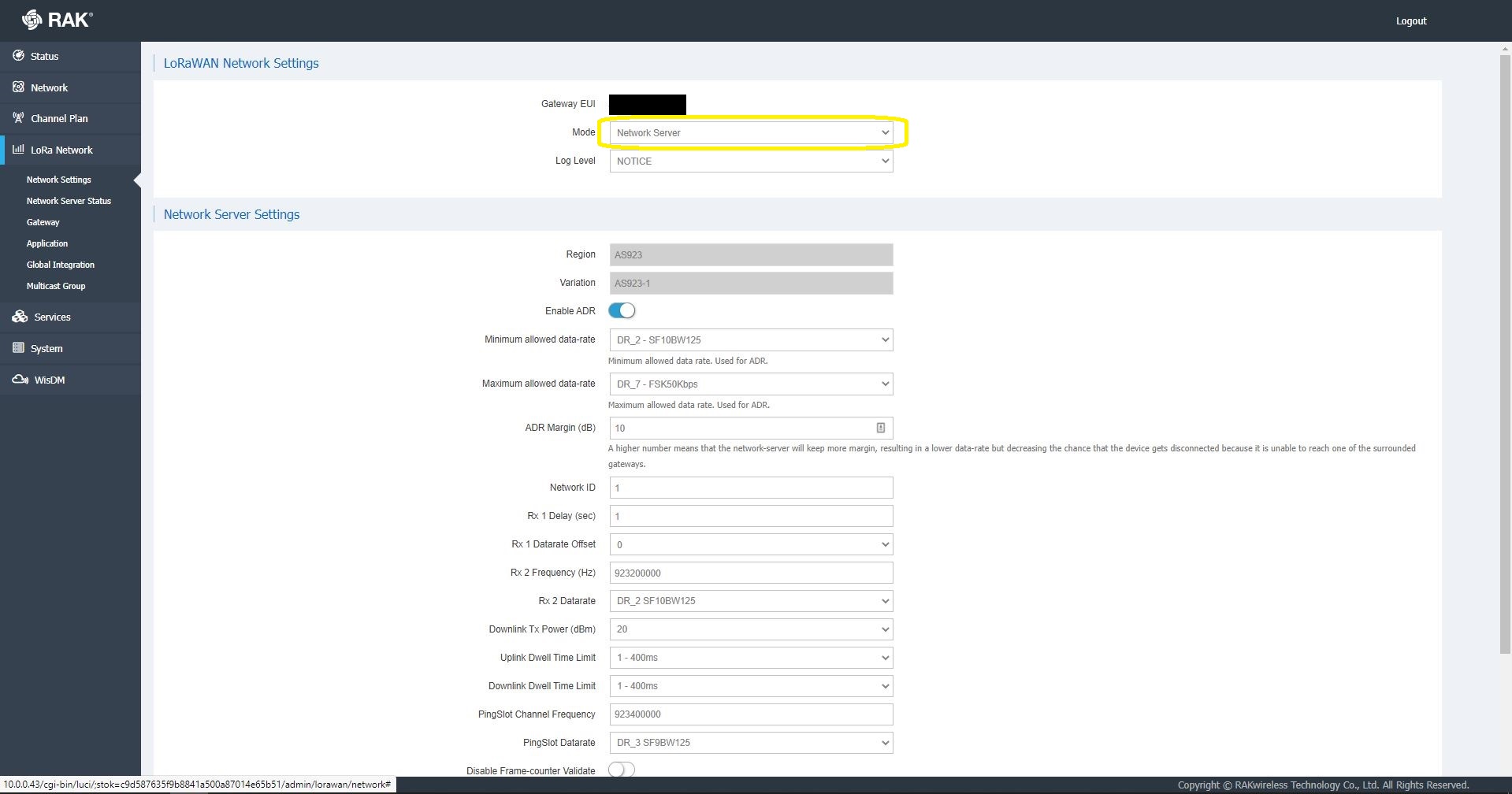
This post was originally about getting the built in Network Server of my RAKWireless RAK7258 WisGate Edge Lite to connect to an Azure IoT Hub or Azure IoT Central. The RAK7258 had been connected to The Things Industries(TTI) network so I updated the firmware and checked the “mode” in the LoRaWAN Network settings.

RAK 7258 LoRaWAN Network settings

Azure IoT Hub is not a fully featured MQTT broker so I initially looked at running Eclipse Mosquitto or HiveMQ locally but this seemed like a lot of effort for a Proof of Concept(PoC).

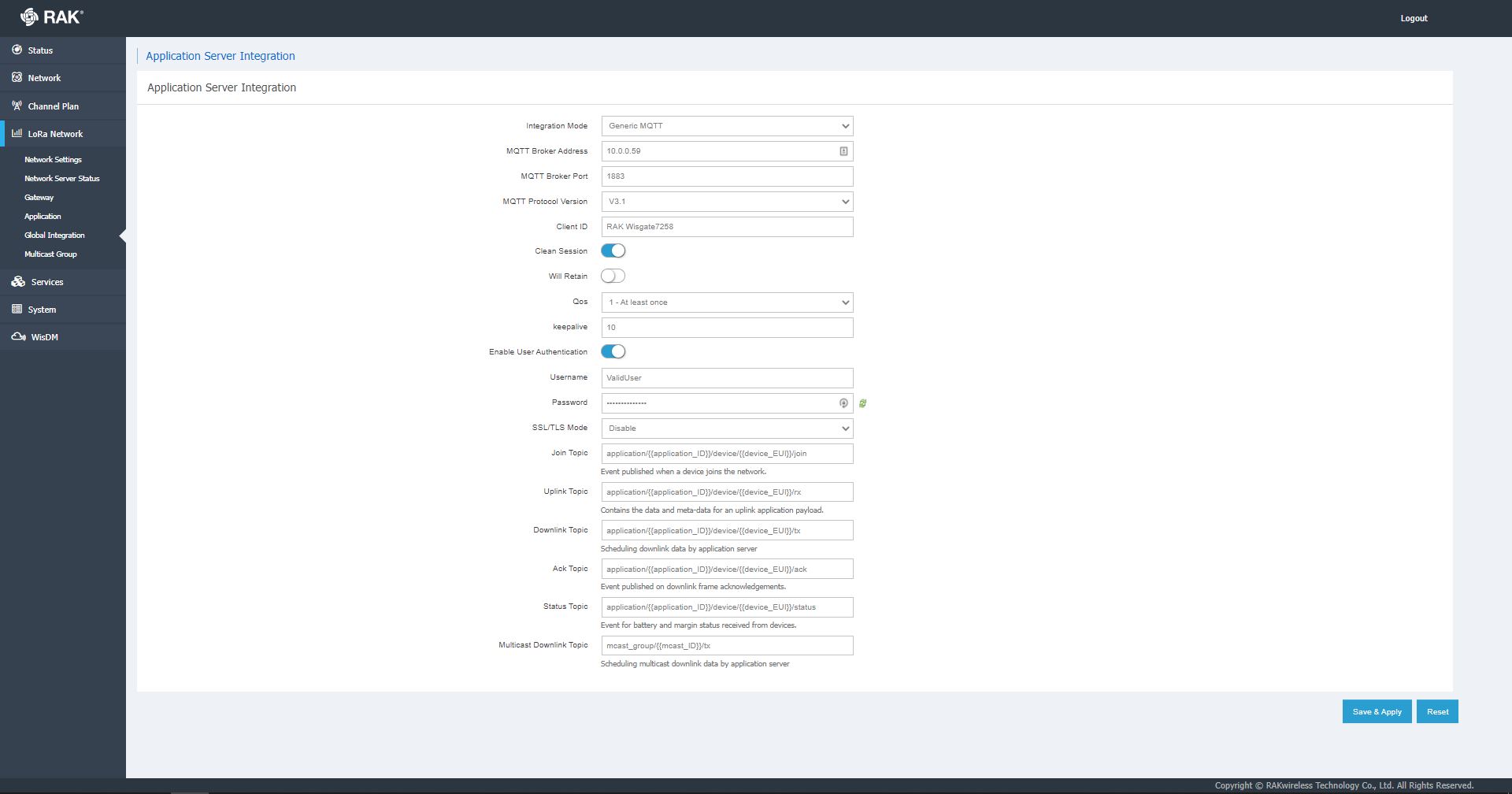
RAK 7258 Network Server Global Integration settings

I have used MQTTNet in a few other projects (The Things Network(TTN) V3 Azure IoT Connector, The Things Network V2 MQTT SQL Connector, Windows 10 IoT Core MQTT Field gateway etc.) and there was a sample application which showed ho to build a simple server so that became my preferred approach.

I then started exploring how applications and devices are provisioned in the RAK Network Server.

RAK 7258 Network Server applications list

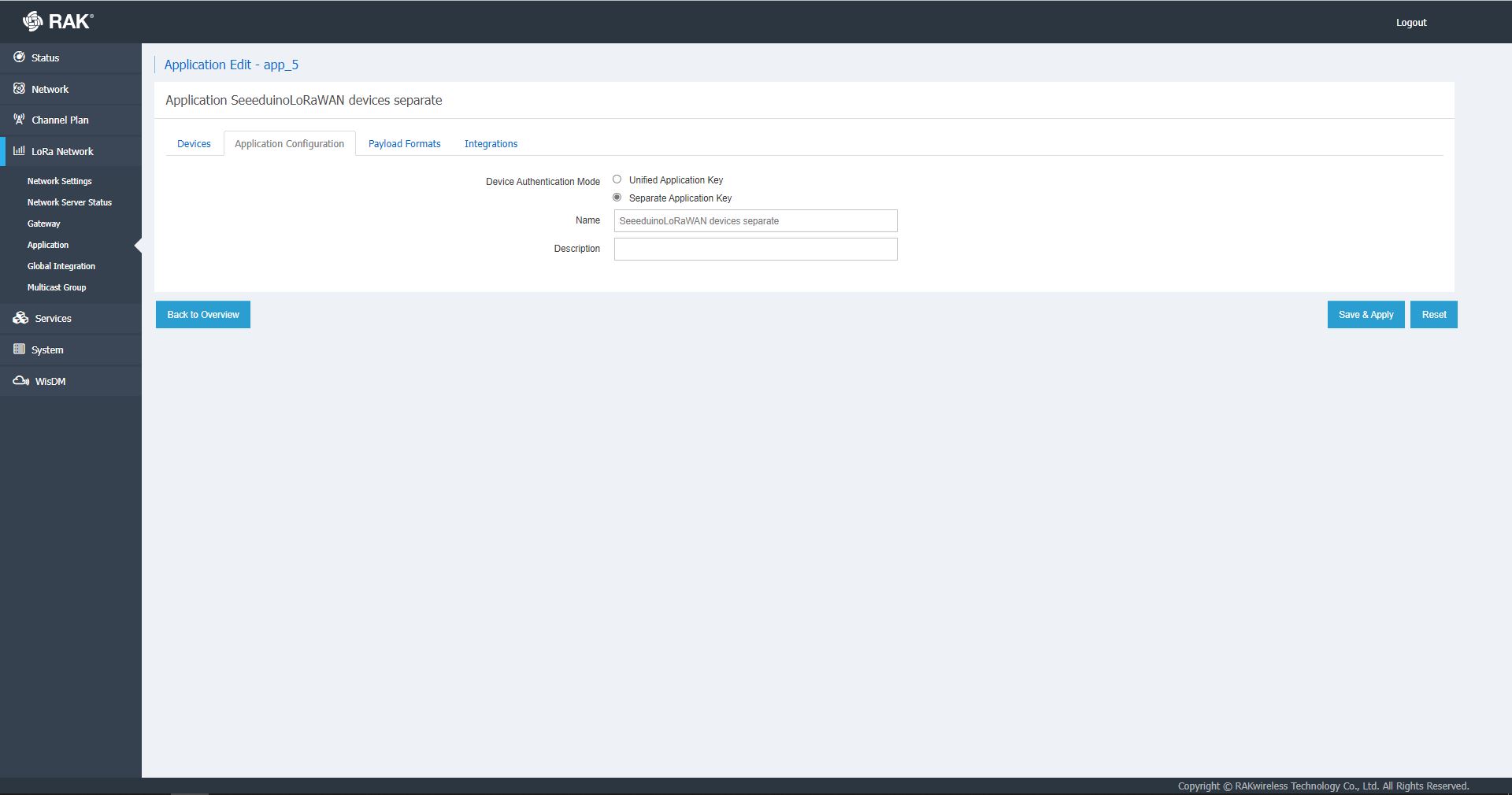
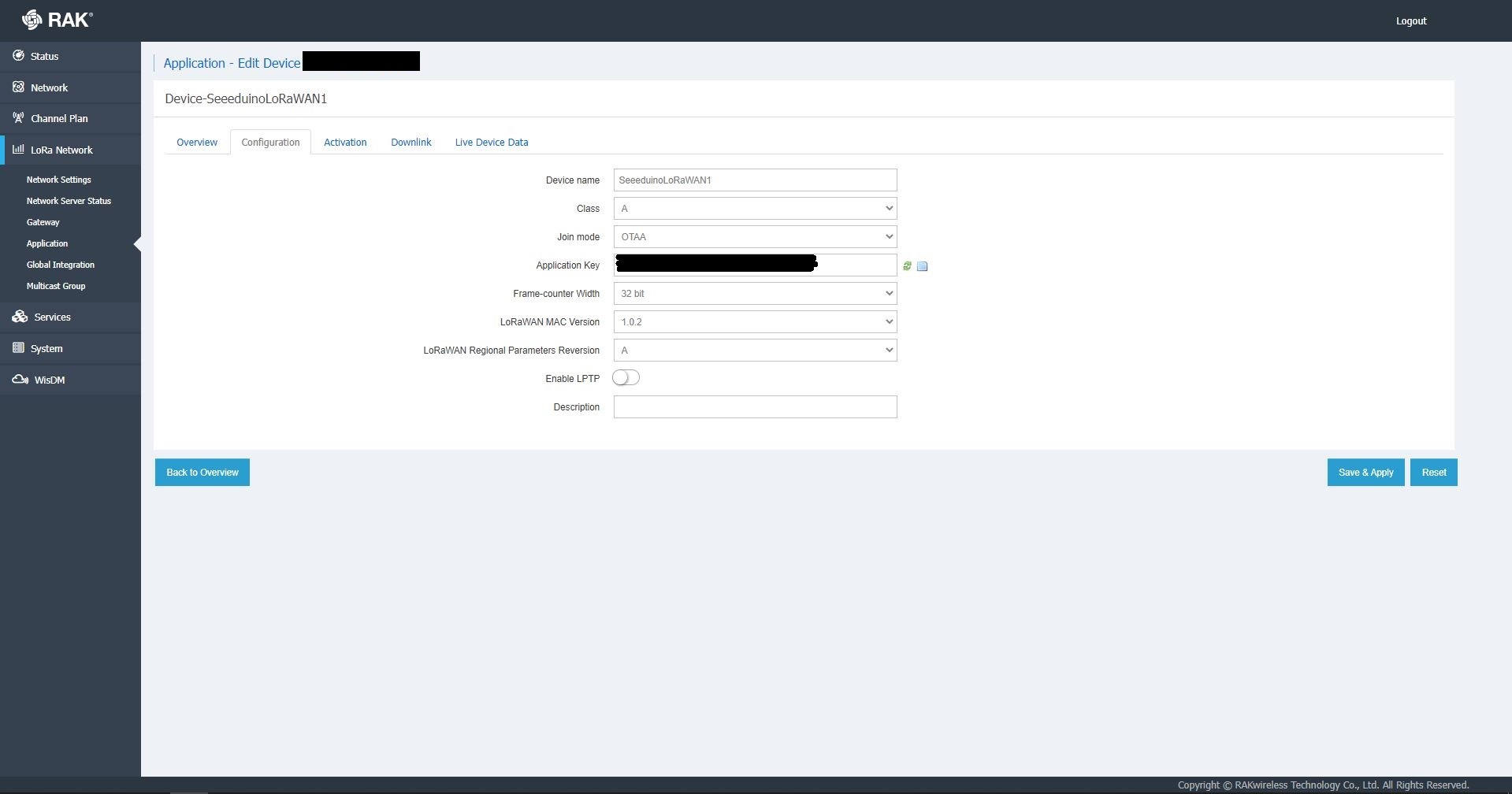
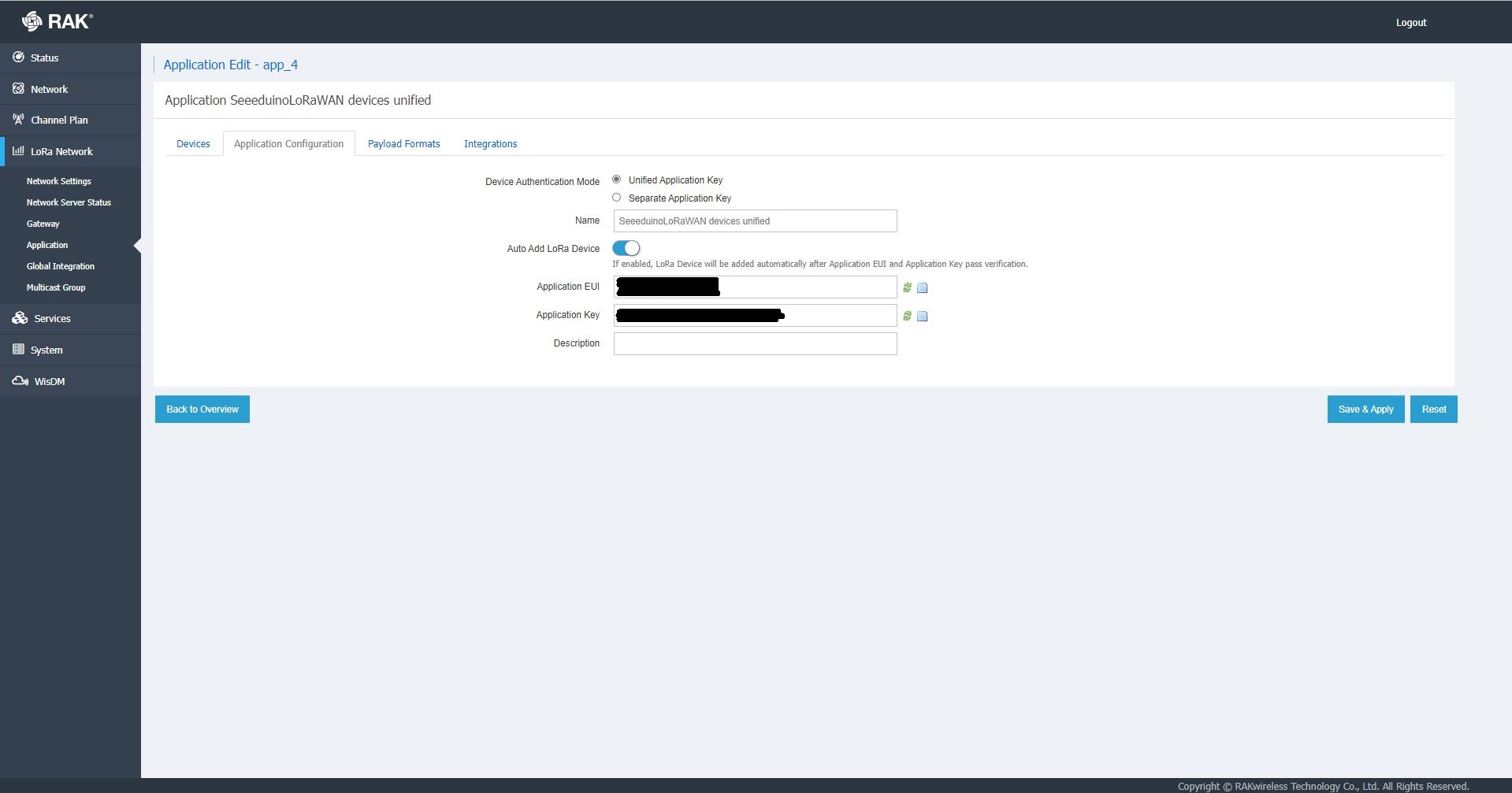
The network server software has “unified” and “separate” “Device authentication mode”s and will “auto Add LoRa Device”s if enabled.

RAK 7258 Network Server Separate Application basic setup
RAK 7258 Network Server Separate Application device basic setup
RAK 7258 Network Server Unified Application device basic setup

Applications also have configurable payload formats(raw & LPP) and integrations (uplink messages plus join, ack, and device notifications etc.)

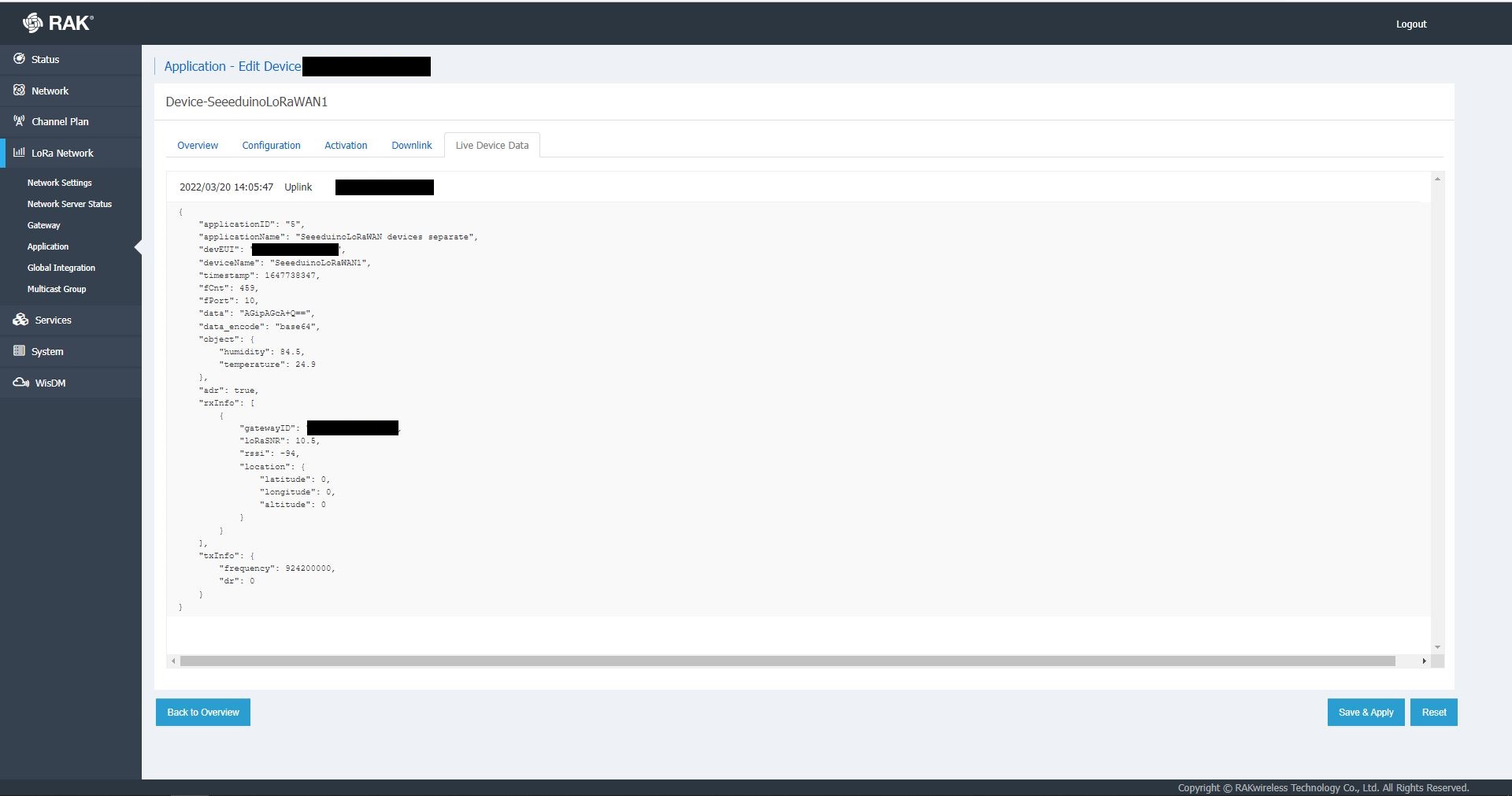
RAK7258 live device data display

In the sample server I could see how ValidatingConnectionAsync was used to check the clientID, username and password when a device connected. I just wanted to display messages and payloads without having to use an MQTT client and it looked like InterceptingPublishAsync was a possible solution.

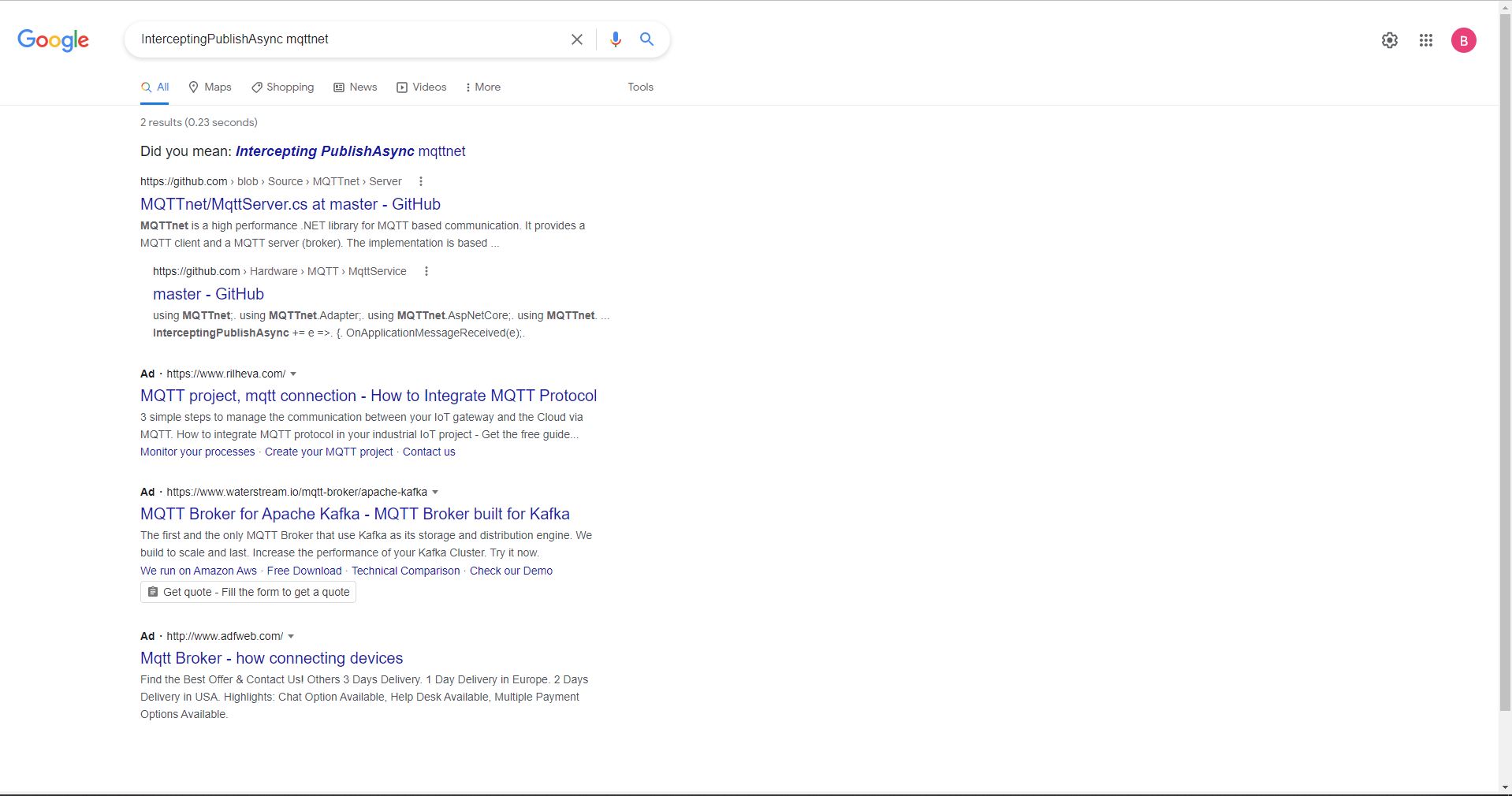
But the search results were a bit sparse…

InterceptingPublishAsync + MQTTNet search results

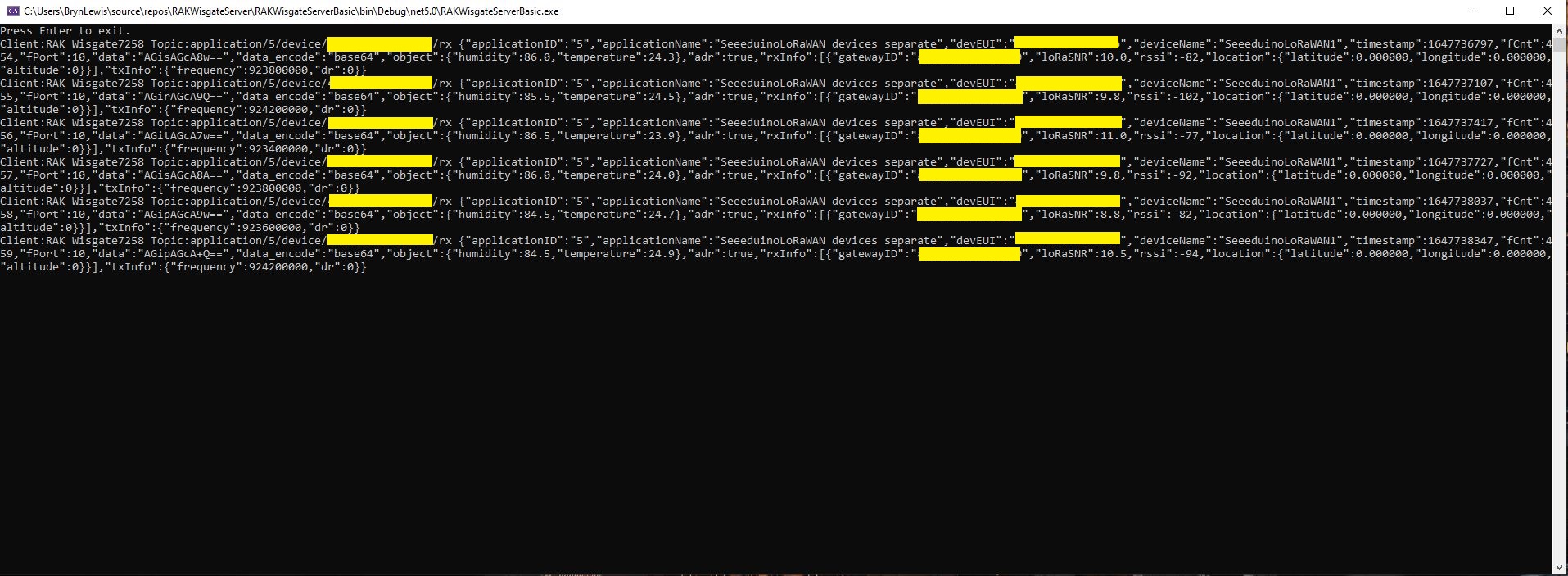
After some reading the MQTTNet documentation and some experimentation I could display the message payload (same as in the live device data display) in a “nasty” console application.

namespace devMobile.IoT.RAKWisgate.ServerBasic
{
   using System;
	using System.Threading.Tasks;

   using MQTTnet;
   using MQTTnet.Protocol;
   using MQTTnet.Server;

   public static class Program
   {
      static async Task Main(string[] args)
      {
         var mqttFactory = new MqttFactory();

         var mqttServerOptions = new MqttServerOptionsBuilder()
             .WithDefaultEndpoint()
             .Build();

         using (var mqttServer = mqttFactory.CreateMqttServer(mqttServerOptions))
         {
            mqttServer.InterceptingPublishAsync += e =>
            {
               Console.WriteLine($"Client:{e.ClientId} Topic:{e.ApplicationMessage.Topic} {e.ApplicationMessage.ConvertPayloadToString()}");

               return Task.CompletedTask;
            };

            mqttServer.ValidatingConnectionAsync += e =>
            {
               if (e.ClientId != "RAK Wisgate7258")
               {
                  e.ReasonCode = MqttConnectReasonCode.ClientIdentifierNotValid;
               }

               if (e.Username != "ValidUser")
               {
                  e.ReasonCode = MqttConnectReasonCode.BadUserNameOrPassword;
               }

               if (e.Password != "TopSecretPassword")
               {
                  e.ReasonCode = MqttConnectReasonCode.BadUserNameOrPassword;
               }

               return Task.CompletedTask;
            };

            await mqttServer.StartAsync();

            Console.WriteLine("Press Enter to exit.");
            Console.ReadLine();

            await mqttServer.StopAsync();
         }
      }
   }
}
MQTTNet based console application displaying device payloads

The process of provisioning Applications and Devices is quite different (The use of the AppEUI/JoinEUI is odd) to The Things Network(TTN) and other platforms I have used so I will explore this some more in future post(s).

libcamera-jpeg on Raspberry Pi OS Bullseye Duration

The image capture process was taking about 5 seconds which a bit longer than I was expecting.

libcamera-jpeg -o rotated.jpg --rotation 180

The libcamera-jpeg program has a lot of command line parameters.

pi@raspberrypi4a:~ $ libcamera-jpeg --help
Valid options are:
  -h [ --help ] [=arg(=1)] (=0)         Print this help message
  --version [=arg(=1)] (=0)             Displays the build version number
  -v [ --verbose ] [=arg(=1)] (=0)      Output extra debug and diagnostics
  -c [ --config ] [=arg(=config.txt)]   Read the options from a file. If no filename is specified, default to
                                        config.txt. In case of duplicate options, the ones provided on the command line
                                        will be used. Note that the config file must only contain the long form
                                        options.
  --info-text arg (=#%frame (%fps fps) exp %exp ag %ag dg %dg)
                                        Sets the information string on the titlebar. Available values:
                                        %frame (frame number)
                                        %fps (framerate)
                                        %exp (shutter speed)
                                        %ag (analogue gain)
                                        %dg (digital gain)
                                        %rg (red colour gain)
                                        %bg (blue colour gain)
                                        %focus (focus FoM value)
                                        %aelock (AE locked status)
  --width arg (=0)                      Set the output image width (0 = use default value)
  --height arg (=0)                     Set the output image height (0 = use default value)
  -t [ --timeout ] arg (=5000)          Time (in ms) for which program runs
  -o [ --output ] arg                   Set the output file name
  --post-process-file arg               Set the file name for configuring the post-processing
  --rawfull [=arg(=1)] (=0)             Force use of full resolution raw frames
  -n [ --nopreview ] [=arg(=1)] (=0)    Do not show a preview window
  -p [ --preview ] arg (=0,0,0,0)       Set the preview window dimensions, given as x,y,width,height e.g. 0,0,640,480
  -f [ --fullscreen ] [=arg(=1)] (=0)   Use a fullscreen preview window
  --qt-preview [=arg(=1)] (=0)          Use Qt-based preview window (WARNING: causes heavy CPU load, fullscreen not
                                        supported)
  --hflip [=arg(=1)] (=0)               Request a horizontal flip transform
  --vflip [=arg(=1)] (=0)               Request a vertical flip transform
  --rotation arg (=0)                   Request an image rotation, 0 or 180
  --roi arg (=0,0,0,0)                  Set region of interest (digital zoom) e.g. 0.25,0.25,0.5,0.5
  --shutter arg (=0)                    Set a fixed shutter speed
  --analoggain arg (=0)                 Set a fixed gain value (synonym for 'gain' option)
  --gain arg                            Set a fixed gain value
  --metering arg (=centre)              Set the metering mode (centre, spot, average, custom)
  --exposure arg (=normal)              Set the exposure mode (normal, sport)
  --ev arg (=0)                         Set the EV exposure compensation, where 0 = no change
  --awb arg (=auto)                     Set the AWB mode (auto, incandescent, tungsten, fluorescent, indoor, daylight,
                                        cloudy, custom)
  --awbgains arg (=0,0)                 Set explict red and blue gains (disable the automatic AWB algorithm)
  --flush [=arg(=1)] (=0)               Flush output data as soon as possible
  --wrap arg (=0)                       When writing multiple output files, reset the counter when it reaches this
                                        number
  --brightness arg (=0)                 Adjust the brightness of the output images, in the range -1.0 to 1.0
  --contrast arg (=1)                   Adjust the contrast of the output image, where 1.0 = normal contrast
  --saturation arg (=1)                 Adjust the colour saturation of the output, where 1.0 = normal and 0.0 =
                                        greyscale
  --sharpness arg (=1)                  Adjust the sharpness of the output image, where 1.0 = normal sharpening
  --framerate arg (=30)                 Set the fixed framerate for preview and video modes
  --denoise arg (=auto)                 Sets the Denoise operating mode: auto, off, cdn_off, cdn_fast, cdn_hq
  --viewfinder-width arg (=0)           Width of viewfinder frames from the camera (distinct from the preview window
                                        size
  --viewfinder-height arg (=0)          Height of viewfinder frames from the camera (distinct from the preview window
                                        size)
  --tuning-file arg (=-)                Name of camera tuning file to use, omit this option for libcamera default
                                        behaviour
  --lores-width arg (=0)                Width of low resolution frames (use 0 to omit low resolution stream
  --lores-height arg (=0)               Height of low resolution frames (use 0 to omit low resolution stream
  -q [ --quality ] arg (=93)            Set the JPEG quality parameter
  -x [ --exif ] arg                     Add these extra EXIF tags to the output file
  --timelapse arg (=0)                  Time interval (in ms) between timelapse captures
  --framestart arg (=0)                 Initial frame counter value for timelapse captures
  --datetime [=arg(=1)] (=0)            Use date format for output file names
  --timestamp [=arg(=1)] (=0)           Use system timestamps for output file names
  --restart arg (=0)                    Set JPEG restart interval
  -k [ --keypress ] [=arg(=1)] (=0)     Perform capture when ENTER pressed
  -s [ --signal ] [=arg(=1)] (=0)       Perform capture when signal received
  --thumb arg (=320:240:70)             Set thumbnail parameters as width:height:quality
  -e [ --encoding ] arg (=jpg)          Set the desired output encoding, either jpg, png, rgb, bmp or yuv420
  -r [ --raw ] [=arg(=1)] (=0)          Also save raw file in DNG format
  --latest arg                          Create a symbolic link with this name to most recent saved file
  --immediate [=arg(=1)] (=0)           Perform first capture immediately, with no preview phase
pi@raspberrypi4a:~ $

My libcamera-jpeg application is run “headless” so I tried turning off the image preview functionality.

libcamera-jpeg -o rotatednopreview.jpg --nopreview

When I ran libcamera-jpeg in a console windows or my application this didn’t appear to make any noticeable difference.

libcamera-jpeg run from the command line with –nopreview

libcamera-jpeg run by my application with –nopreview

I then had another look at the libcamera-jpeg command line parameters to see if any looked useful for reducing the time that it took to take a save an image and this one caught my attention.

I had assumed the delay was related to how long the preview window was displayed.

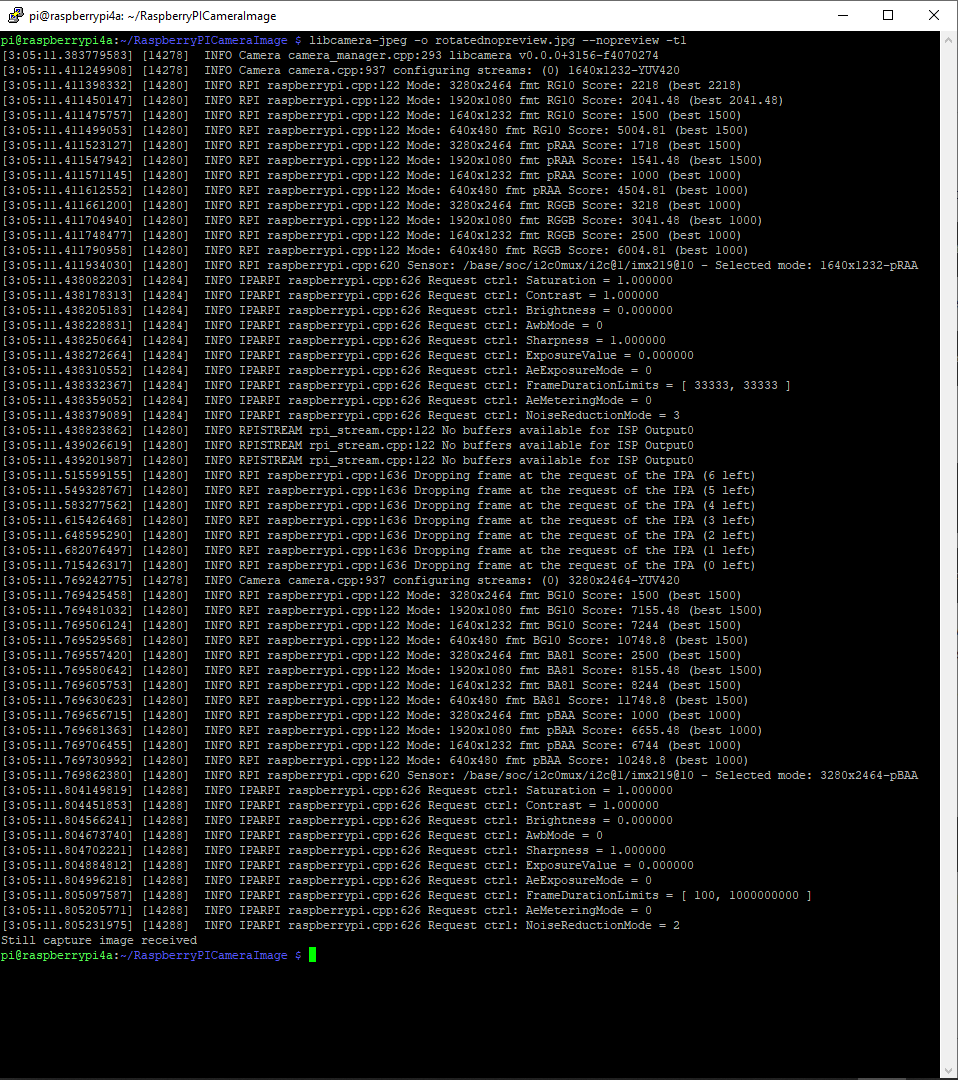
libcamera-jpeg run from the command line with –nopreview –t1

I modified the application (V5) then ran it from the command line and the time reduced to less than a second.

private static void ImageUpdateTimerCallback(object state)
{
	try
	{
		Console.WriteLine($"{DateTime.UtcNow:yy-MM-dd HH:mm:ss} Image update start");

		// Just incase - stop code being called while photo already in progress
		if (_cameraBusy)
		{
			return;
		}

		Console.WriteLine($" {DateTime.UtcNow:yy-MM-dd HH:mm:ss} Image capture start");

		using (Process process = new Process())
		{
			process.StartInfo.FileName = @"libcamera-jpeg";
			// V1 it works
			//process.StartInfo.Arguments = $"-o {_applicationSettings.ImageFilenameLocal}";
			// V3a Image right way up
			//process.StartInfo.Arguments = $"-o {_applicationSettings.ImageFilenameLocal} --vflip --hflip";
			// V3b Image right way up
			//process.StartInfo.Arguments = $"-o {_applicationSettings.ImageFilenameLocal} --rotation 180";
			// V4 Image no preview
			//process.StartInfo.Arguments = $"-o {_applicationSettings.ImageFilenameLocal} --rotation 180 --nopreview";
			// V5 Image no preview, no timeout
			process.StartInfo.Arguments = $"-o {_applicationSettings.ImageFilenameLocal} --nopreview -t1 --rotation 180";
			//process.StartInfo.RedirectStandardOutput = true;
			// V2 No diagnostics
			process.StartInfo.RedirectStandardError = true;
			//process.StartInfo.UseShellExecute = false;
			//process.StartInfo.CreateNoWindow = true; 

			process.Start();

			if (!process.WaitForExit(10000) || (process.ExitCode != 0))
			{
				Console.WriteLine($"{DateTime.UtcNow:yy-MM-dd HH:mm:ss} Image update failure {process.ExitCode}");
			}
		}

		Console.WriteLine($" {DateTime.UtcNow:yy-MM-dd HH:mm:ss} Image capture done");
	}
	catch (Exception ex)
	{
		Console.WriteLine($"{DateTime.UtcNow:yy-MM-dd HH:mm:ss} Image update error {ex.Message}");
	}
	finally
	{
		_cameraBusy = false;
	}
}
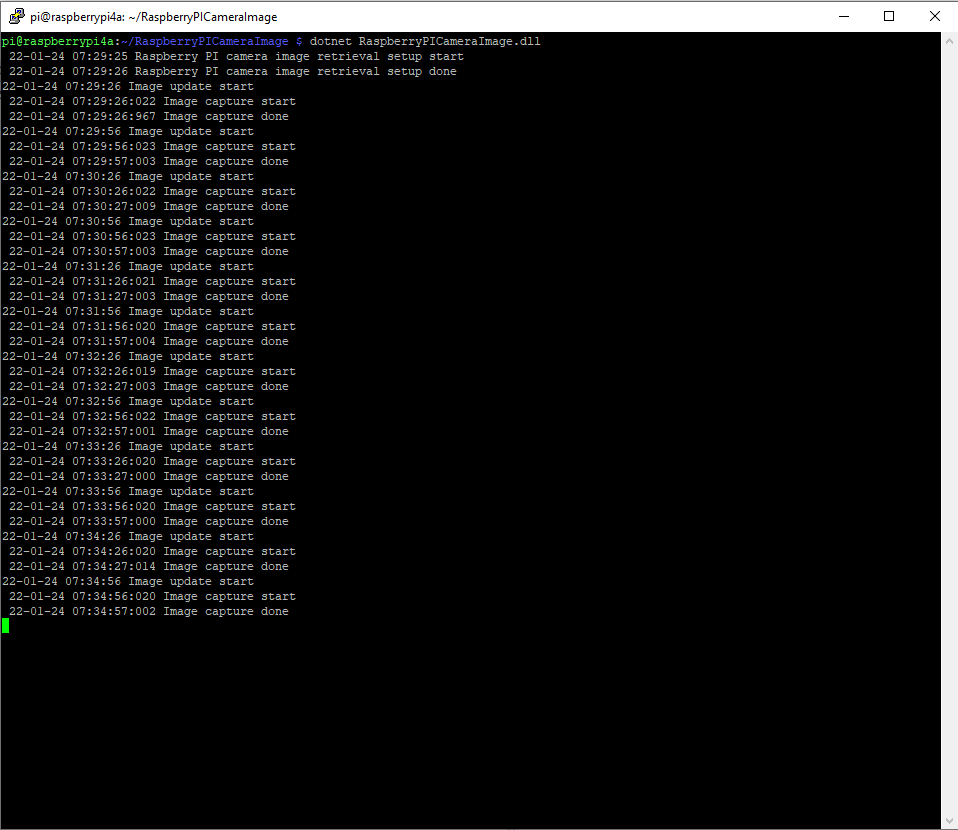
libcamera-jpeg run by my application with –nopreview -t1

The image capture process now takes less that a second which is much better (but not a lot less than retrieving an image from one of my security cameras).

libcamera on Raspberry Pi OS Bullseye

This is a “note to self” post about using libcamera(replacement for raspistill) on my Raspberry PI 4 Model B to capture an image from my Raspberry Pi Camera Module 2 with an application built with .NET Core.

I wanted one of my ML.Net demos to use the Raspberry PI Camera rather than a security camera (so it was more portable) but it took a bit more work than I expected.

Version 1 used Process.Start to launch the libcamera-jpeg application with a command line to store an image to the local file system.

libcamera-jpeg -o latest.jpg
libcamera-jpeg with diagnostic information displayed

There was a lot of diagnostic information which I didn’t want displayed so after reading many stackoverflow posts (lots of different approaches none of which worked in my scenario), then some trial and error I found that I only had to enable RedirectStandardError.

libcamera-jpeg without diagnostic information displayed

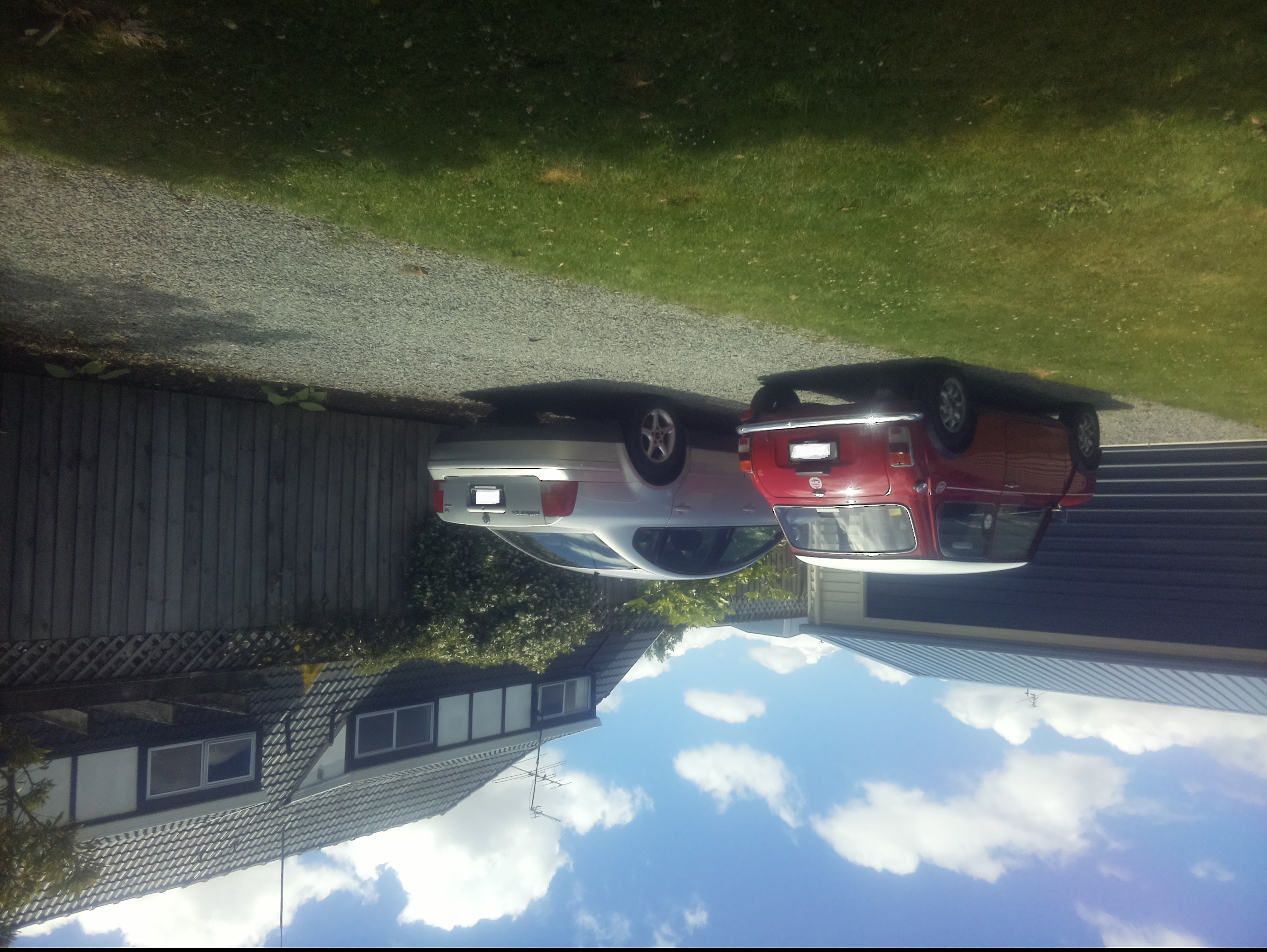
At this point there was a lot less noise but the image was upside down.

Inverted picture of my 30th anniversary Mini Cooper in the backyard

I then added a vertical flip to the command line parameters

libcamera-jpeg -o latest.jpg --vflip
My 30th anniversary Mini Cooper in the backyard

The image was backwards so I added a horizontal flip to the commandline parameters

libcamera-jpeg -o latest.jpg --vflip --hflip

or

libcamera-jpeg -o latest.jpg --rotation 180
My 30th anniversary Mini Cooper in the backyard with the correct orientation

The libcamera code is in a Timer callback so I added the _cameraBusy boolean flag to stop reentrancy problems.

private static void ImageUpdateTimerCallback(object state)
{
	try
	{
		Console.WriteLine($"{DateTime.UtcNow:yy-MM-dd HH:mm:ss} Image update start");

		// Just incase - stop code being called while photo already in progress
		if (_cameraBusy)
		{
			return;
		}

		Console.WriteLine($" {DateTime.UtcNow:yy-MM-dd HH:mm:ss} Image capture start");

		using (Process process = new Process())
		{
			process.StartInfo.FileName = @"libcamera-jpeg";
			// V1 it works
			//process.StartInfo.Arguments = $"-o {_applicationSettings.ImageFilenameLocal}";
			// V3 Image right way up
			//process.StartInfo.Arguments = $"-o {_applicationSettings.ImageFilenameLocal} --vflip";
			// V3 Image right way round
			process.StartInfo.Arguments = $"-o {_applicationSettings.ImageFilenameLocal} --vflip --hflip";
			//process.StartInfo.RedirectStandardOutput = true;
			// V2 No diagnostics
			process.StartInfo.RedirectStandardError = true;
			//process.StartInfo.UseShellExecute = false;
			//process.StartInfo.CreateNoWindow = true; 

			process.Start();

			if (!process.WaitForExit(10000) || (process.ExitCode != 0))
			{
				Console.WriteLine($"{DateTime.UtcNow:yy-MM-dd HH:mm:ss} Image update failure {process.ExitCode}");
			}
		}

		Console.WriteLine($" {DateTime.UtcNow:yy-MM-dd HH:mm:ss} Image capture done");
	}
	catch (Exception ex)
	{
		Console.WriteLine($"{DateTime.UtcNow:yy-MM-dd HH:mm:ss} Image update error {ex.Message}");
	}
	finally
	{
		_cameraBusy = false;
	}
}

This was the simplest way I could get an image onto the local file system without lots of dependencies on third party libraries. The image capture process takes about 5 seconds which a bit longer than I was expecting.

.NET Core RAK3172 LoRaWAN library Part1

Basic connectivity

Over the weekend I have been working on a .NET Core C# library for the RAKwireless RAK3172 module using a RAK3172S breakout board, Seeedstudio Grove Base Hat for Raspberry PI and a Seeedstudio Grove-4 pin Female Jumper to Grove 4 pin Conversion Cable.

Raspberry Pi3 with Grove Base Hat and RAK3172 Breakout (using UART2)

The RaspberryPI OS is a bit more strict than the other devices I use about port access. To allow my .Net Core application to access a serial port I connected to the device with ExtraPutty, then ran the RaspberyPI configuration tool, from the command prompt with “sudo raspi-config”
RaspberyPI OS Software Configuration tool mains screen
RaspberryPI OS IO Serial Port configuration
Raspberry PI OS disabling remote serial login shell
RaspberryPI OS enabling serial port access

Once serial port access was enabled I could enumerate them with SerialPort.GetPortNames() which is in the System.IO.Ports NuGet package. My sample code has compile time options for synchronous and asynchronous operation.

//---------------------------------------------------------------------------------
// Copyright (c) September 2021, devMobile Software
//
// Licensed under the Apache License, Version 2.0 (the "License");
// you may not use this file except in compliance with the License.
// You may obtain a copy of the License at
//
//     http://www.apache.org/licenses/LICENSE-2.0
//
// Unless required by applicable law or agreed to in writing, software
// distributed under the License is distributed on an "AS IS" BASIS,
// WITHOUT WARRANTIES OR CONDITIONS OF ANY KIND, either express or implied.
// See the License for the specific language governing permissions and
// limitations under the License.
//
//---------------------------------------------------------------------------------
namespace devMobile.IoT.NetCore.RAK3172.ShieldSerial
{
	using System;
	using System.Diagnostics;
	using System.IO.Ports;
	using System.Threading;

	public class Program
	{
		private const string SerialPortId = "/dev/ttyS0";

		public static void Main()
		{
			SerialPort serialPort;

			Debug.WriteLine("devMobile.IoT.NetCore.Rak3172.pHatSerial starting");

			Debug.WriteLine(String.Join(",", SerialPort.GetPortNames()));

			try
			{
				serialPort = new SerialPort(SerialPortId);

				// set parameters
				serialPort.BaudRate = 9600;
				serialPort.Parity = Parity.None;
				serialPort.DataBits = 8;
				serialPort.StopBits = StopBits.One;
				serialPort.Handshake = Handshake.None;

				serialPort.ReadTimeout = 1000;

				serialPort.NewLine = "\r\n";

				serialPort.Open();

#if SERIAL_ASYNC_READ
				serialPort.DataReceived += SerialDevice_DataReceived;
#endif

				while (true)
				{
					serialPort.WriteLine("AT+VER=?");

#if SERIAL_SYNC_READ
					// Read the response
					string response = serialPort.ReadLine();
					Debug.WriteLine($"RX:{response.Trim()} bytes:{response.Length}");

					// Read the blank line
					response = serialPort.ReadLine();
					Debug.WriteLine($"RX:{response.Trim()} bytes:{response.Length}");

					// Read the result
					response = serialPort.ReadLine();
					Debug.WriteLine($"RX:{response.Trim()} bytes:{response.Length}");
#endif

					Thread.Sleep(20000);
				}
			}
			catch (Exception ex)
			{
				Debug.WriteLine(ex.Message);
			}
		}

#if SERIAL_ASYNC_READ
		private static void SerialDevice_DataReceived(object sender, SerialDataReceivedEventArgs e)
		{
			SerialPort serialPort = (SerialPort)sender;

			switch (e.EventType)
			{
				case SerialData.Chars:
					string response = serialPort.ReadExisting();

					Debug.WriteLine($"RX:{response.Trim()} bytes:{response.Length}");
					break;

				case SerialData.Eof:
					Debug.WriteLine("RX :EoF");
					break;
				default:
					Debug.Assert(false, $"e.EventType {e.EventType} unknown");
					break;
			}
		}
#endif
	}
}

When I requested the RAK3172 version information with the AT+VER? command the response was three lines, consisting of the version information, a blank line, then the result of the command. If I sent an invalid command the response was two lines, a blank line then “AT_ERROR”

AT+VER? response synchronous

The asynchronous version of the application displays character(s) as they arrive so a response could be split across multiple SerialDataReceived events

AT+VER? response asynchronous

Unlike the RAK811 module the RAK3172 defaults 9600 baud which means there is no need to change the baudrate before using the device. I use the excellent RaspberryDebugger to download application and debug them on my Raspberry PI 3.

.NET Core Seeed LoRaE5 LoRaWAN library Part1

Basic connectivity

Over the weekend I started building a .Net Core C# library for a Seeedstudio LoRa-E5 Development Kit which was connected to a Raspberry PI 3 with a Grove Base Hat for Raspberry Pi

The RaspberryPI OS is a bit more strict than the other devices I use about port access. To allow my .Net Core application to access a serial port I connected to the device with ExtraPutty, then ran the RaspberyPI configuration tool, from the command prompt with “sudo raspi-config”

RaspberyPI OS Software Configuration tool mains screen
RaspberryPI OS IO Serial Port configuration
Raspberry PI OS disabling remote serial login shell
RaspberryPI OS enabling serial port access

Once serial port access was enabled I could enumerate them with SerialPort.GetPortNames() which is in the System.IO.Ports NuGet package. The code has compile time options for synchronous and asynchronous operation.

//---------------------------------------------------------------------------------
// Copyright (c) September 2021, devMobile Software
//
// Licensed under the Apache License, Version 2.0 (the "License");
// you may not use this file except in compliance with the License.
// You may obtain a copy of the License at
//
//     http://www.apache.org/licenses/LICENSE-2.0
//
// Unless required by applicable law or agreed to in writing, software
// distributed under the License is distributed on an "AS IS" BASIS,
// WITHOUT WARRANTIES OR CONDITIONS OF ANY KIND, either express or implied.
// See the License for the specific language governing permissions and
// limitations under the License.
//
//---------------------------------------------------------------------------------
namespace devMobile.IoT.NetCore.SeeedLoRaE5.ShieldSerial
{
	using System;
	using System.Diagnostics;
	using System.IO.Ports;
	using System.Threading;

	public class Program
	{
		private const string SerialPortId = "/dev/ttyS0";

		public static void Main()
		{
			SerialPort serialPort;

			Debug.WriteLine("devMobile.IoT.NetCore.SeeedLoRaE5.ShieldSerial starting");

			Debug.WriteLine(String.Join(",", SerialPort.GetPortNames()));

			try
			{
				serialPort = new SerialPort(SerialPortId);

				// set parameters
				serialPort.BaudRate = 9600;
				serialPort.Parity = Parity.None;
				serialPort.DataBits = 8;
				serialPort.StopBits = StopBits.One;
				serialPort.Handshake = Handshake.None;

				serialPort.ReadTimeout = 1000;

				serialPort.NewLine = "\r\n";

				serialPort.Open();

#if SERIAL_ASYNC_READ
				serialPort.DataReceived += SerialDevice_DataReceived;
#endif

				while (true)
				{
					serialPort.WriteLine("AT+VER");

#if SERIAL_SYNC_READ
					string response = serialPort.ReadLine();

					Debug.WriteLine($"RX:{response.Trim()} bytes:{response.Length}");
#endif

					Thread.Sleep(20000);
				}
			}
			catch (Exception ex)
			{
				Debug.WriteLine(ex.Message);
			}
		}

#if SERIAL_ASYNC_READ
		private static void SerialDevice_DataReceived(object sender, SerialDataReceivedEventArgs e)
		{
			SerialPort serialPort = (SerialPort)sender;

			switch (e.EventType)
			{
				case SerialData.Chars:
					string response = serialPort.ReadExisting();

					Debug.WriteLine($"RX:{response.Trim()} bytes:{response.Length}");
					break;

				case SerialData.Eof:
					Debug.WriteLine("RX :EoF");
					break;
				default:
					Debug.Assert(false, $"e.EventType {e.EventType} unknown");
					break;
			}
		}
#endif
	}
}

The synchronous version of the test client requests the Seeeduino LoRa-E5 version information with the AT+VER command.

Synchronously reading characters from the Seeeduino LoRa-E5

The asynchronous version of the application displays character(s) as they arrive so a response can be split across multiple SerialDataReceived events.

Asynchronous versions displaying partial responses

I use the excellent RaspberryDebugger to download the application and debug it on my Raspberry PI 3.