Windows 10 IoT Core image capture

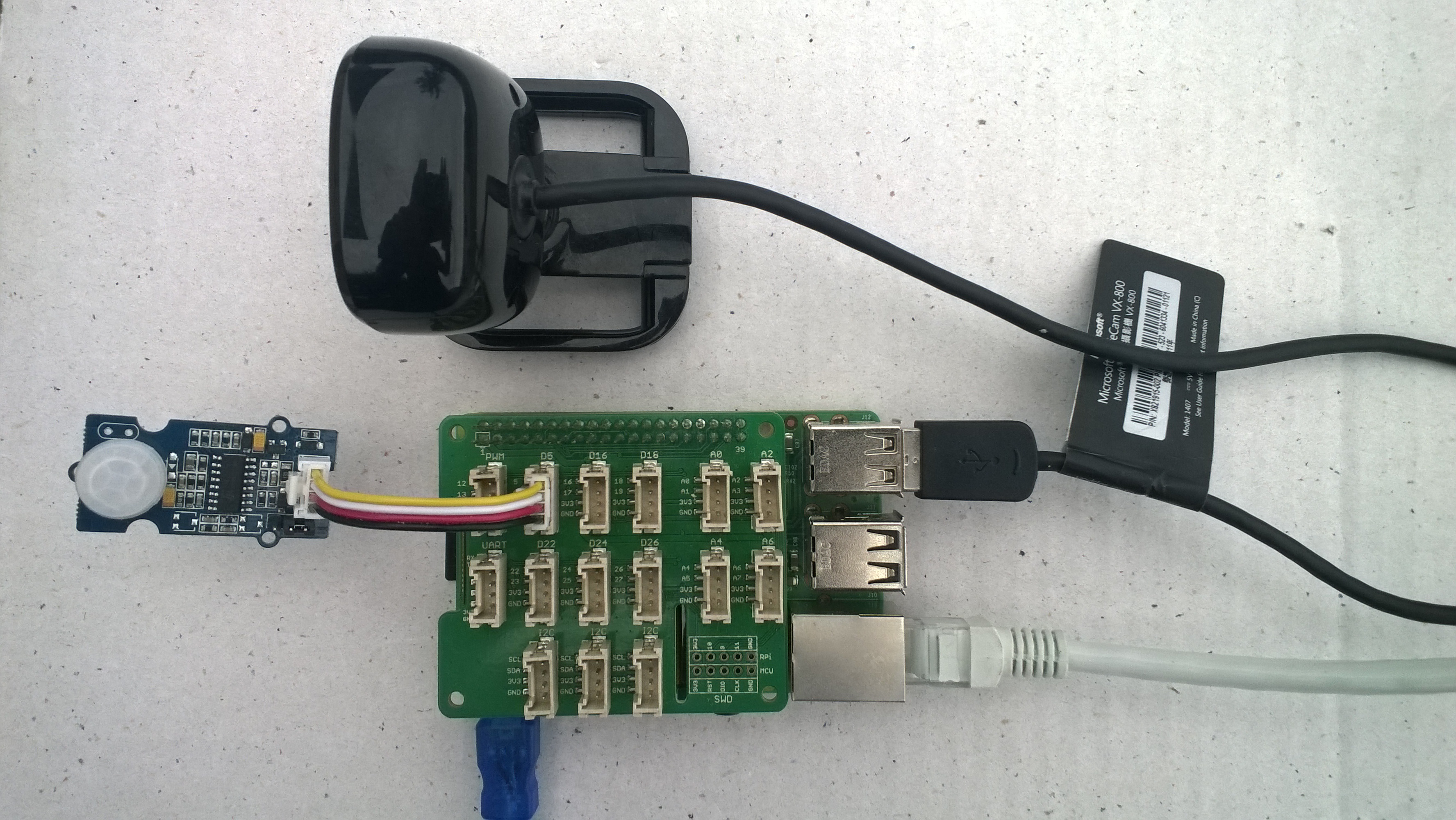
Initiating image capture in response to a trigger was the next step, my plan is to use a button, or a proximity sensor like the passive infrared (PIR) module in the second image to trigger a photo.

Simple mechanical button trigger
PIR Sensor trigger

For my test rig (in addition to a RaspberryPI & generic USB Web camera) I’m using some Seeedstudio gear

The first step was to write an interrupt handler for the digital input, I figured triggering on the button push rather than release would make device more responsive.

/*
    Copyright ® 2019 Feb devMobile Software, All Rights Reserved
 
    MIT License
...
*/
namespace devMobile.Windows10IotCore.IoT.DigitalInputTrigger
{
	using System;
	using System.Diagnostics;
	using Windows.ApplicationModel.Background;
	using Windows.Devices.Gpio;

	public sealed class StartupTask : IBackgroundTask
	{
		private BackgroundTaskDeferral backgroundTaskDeferral = null;
		private GpioPin InterruptGpioPin = null;
		private const int InterruptPinNumber = 5;

		public void Run(IBackgroundTaskInstance taskInstance)
		{
			Debug.WriteLine("Application startup");

			try
			{
				GpioController gpioController = GpioController.GetDefault();

				InterruptGpioPin = gpioController.OpenPin(InterruptPinNumber);
				InterruptGpioPin.SetDriveMode(GpioPinDriveMode.InputPullUp);
				InterruptGpioPin.ValueChanged += InterruptGpioPin_ValueChanged;

				Debug.WriteLine("Digital Input Interrupt configuration success");
			}
			catch (Exception ex)
			{
				Debug.WriteLine($"Digital Input Interrupt configuration failed " + ex.Message);
				return;
			}

			//enable task to continue running in background
			backgroundTaskDeferral = taskInstance.GetDeferral();
		}

		private void InterruptGpioPin_ValueChanged(GpioPin sender, GpioPinValueChangedEventArgs args)
		{
			Debug.WriteLine($"{DateTime.UtcNow.ToLongTimeString()} Digital Input Interrupt {sender.PinNumber} triggered {args.Edge}");
		}
	}
}

Then I added in the camera functionality and made the interrupt handler async and await the camera and file system calls.

/*
    Copyright ® 2019 Feb devMobile Software, All Rights Reserved
 
    MIT License
...
*/
namespace devMobile.Windows10IotCore.IoT.PhotoDigitalInputTrigger
{
	using System;
	using System.Diagnostics;
	using Windows.ApplicationModel.Background;
	using Windows.Devices.Gpio;
	using Windows.Foundation.Diagnostics;
	using Windows.Media.Capture;
	using Windows.Media.MediaProperties;
	using Windows.Storage;

	public sealed class StartupTask : IBackgroundTask
	{
		private readonly LoggingChannel logging = new LoggingChannel("devMobile Photo Digital Input Trigger demo", null, new Guid("4bd2826e-54a1-4ba9-bf63-92b73ea1ac4a"));
		private BackgroundTaskDeferral backgroundTaskDeferral = null;
		private GpioPin InterruptGpioPin = null;
		private const int InterruptPinNumber = 5;
		private MediaCapture mediaCapture;
		private const string ImageFilenameFormat = "Image{0:yyMMddhhmmss}.jpg";
		private volatile bool CameraBusy = false;

		public void Run(IBackgroundTaskInstance taskInstance)
		{
			LoggingFields startupInformation = new LoggingFields();

			this.logging.LogEvent("Application starting");

			try
			{
				mediaCapture = new MediaCapture();
				mediaCapture.InitializeAsync().AsTask().Wait();
				Debug.WriteLine("Camera configuration success");

				GpioController gpioController = GpioController.GetDefault();

				InterruptGpioPin = gpioController.OpenPin(InterruptPinNumber);
				InterruptGpioPin.SetDriveMode(GpioPinDriveMode.InputPullUp);
				InterruptGpioPin.ValueChanged += InterruptGpioPin_ValueChanged;
				Debug.WriteLine("Digital Input Interrupt configuration success");
			}
			catch (Exception ex)
			{
				this.logging.LogMessage("Camera or digital input configuration failed " + ex.Message, LoggingLevel.Error);
				return;
			}

			startupInformation.AddString("PrimaryUse", mediaCapture.VideoDeviceController.PrimaryUse.ToString());
			startupInformation.AddInt32("Interrupt pin", InterruptPinNumber);

			this.logging.LogEvent("Application started", startupInformation);

			//enable task to continue running in background
			backgroundTaskDeferral = taskInstance.GetDeferral();
		}

		private async void InterruptGpioPin_ValueChanged(GpioPin sender, GpioPinValueChangedEventArgs args)
		{
			DateTime currentTime = DateTime.UtcNow;
			Debug.WriteLine($"{DateTime.UtcNow.ToLongTimeString()} Digital Input Interrupt {sender.PinNumber} triggered {args.Edge}");

			if (args.Edge == GpioPinEdge.RisingEdge)
			{
				return;
			}

			// Just incase - stop code being called while photo already in progress
			if (CameraBusy)
			{
				return;
			}
			CameraBusy = true;

			try
			{
				string filename = string.Format(ImageFilenameFormat, currentTime);

				IStorageFile photoFile = await KnownFolders.PicturesLibrary.CreateFileAsync(filename, CreationCollisionOption.ReplaceExisting);
				ImageEncodingProperties imageProperties = ImageEncodingProperties.CreateJpeg();
				await mediaCapture.CapturePhotoToStorageFileAsync(imageProperties, photoFile);

				LoggingFields imageInformation = new LoggingFields();

				imageInformation.AddDateTime("TakenAtUTC", currentTime);
				imageInformation.AddString("Filename", filename);
				imageInformation.AddString("Path", photoFile.Path);

				this.logging.LogEvent("Captured image saved to storage", imageInformation);
			}
			catch (Exception ex)
			{
				this.logging.LogMessage("Camera photo or save failed " + ex.Message, LoggingLevel.Error);
			}
			CameraBusy = false;
		}
	}
}

I found that contactor bounce was an issue (Grove- Touch Sensor OK) with larger mechanical buttons so I added the CameraBusy boolean flag to try and prevent re-entrancy problems. I’ll trial some other types of proximity and beam based on real-world student projects.
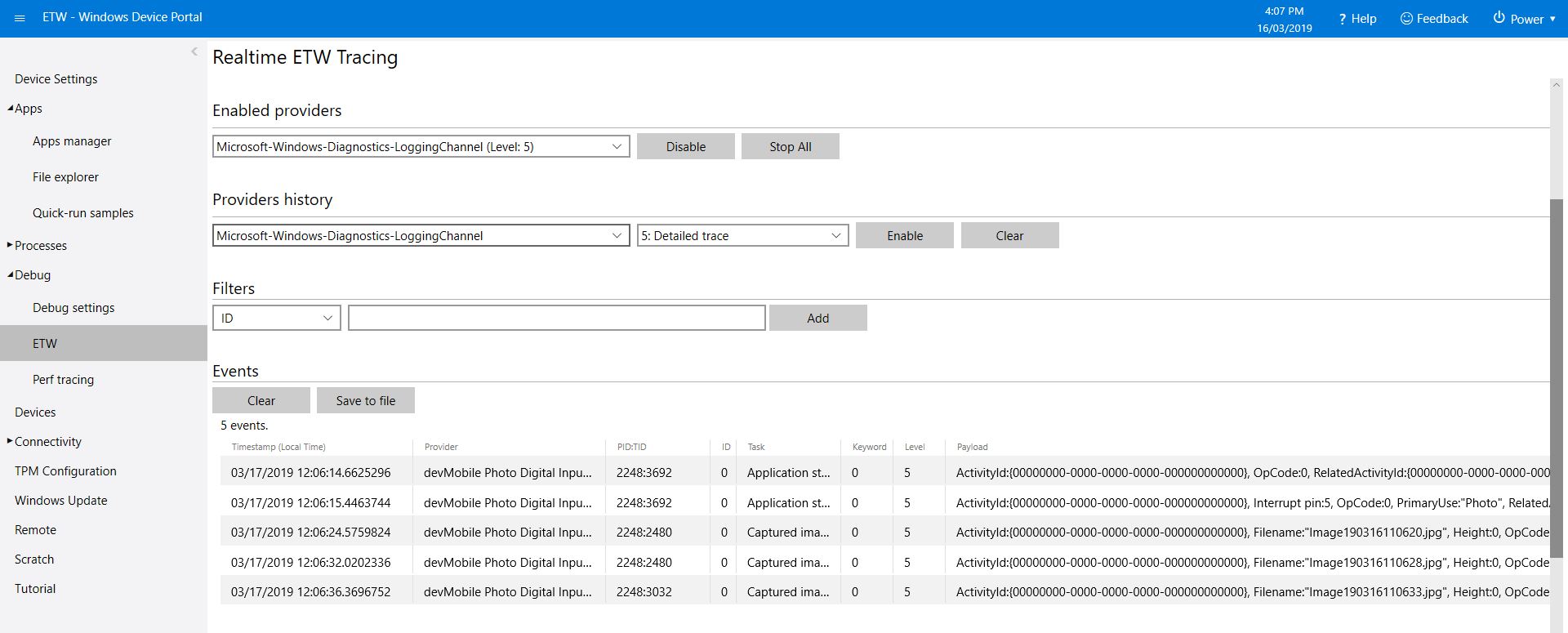
ETW logging or PIR triggered image capture

The code is available on GitHub and is a bit of a work in progress.
Windows 10 IoT Core image capture, upload and processing

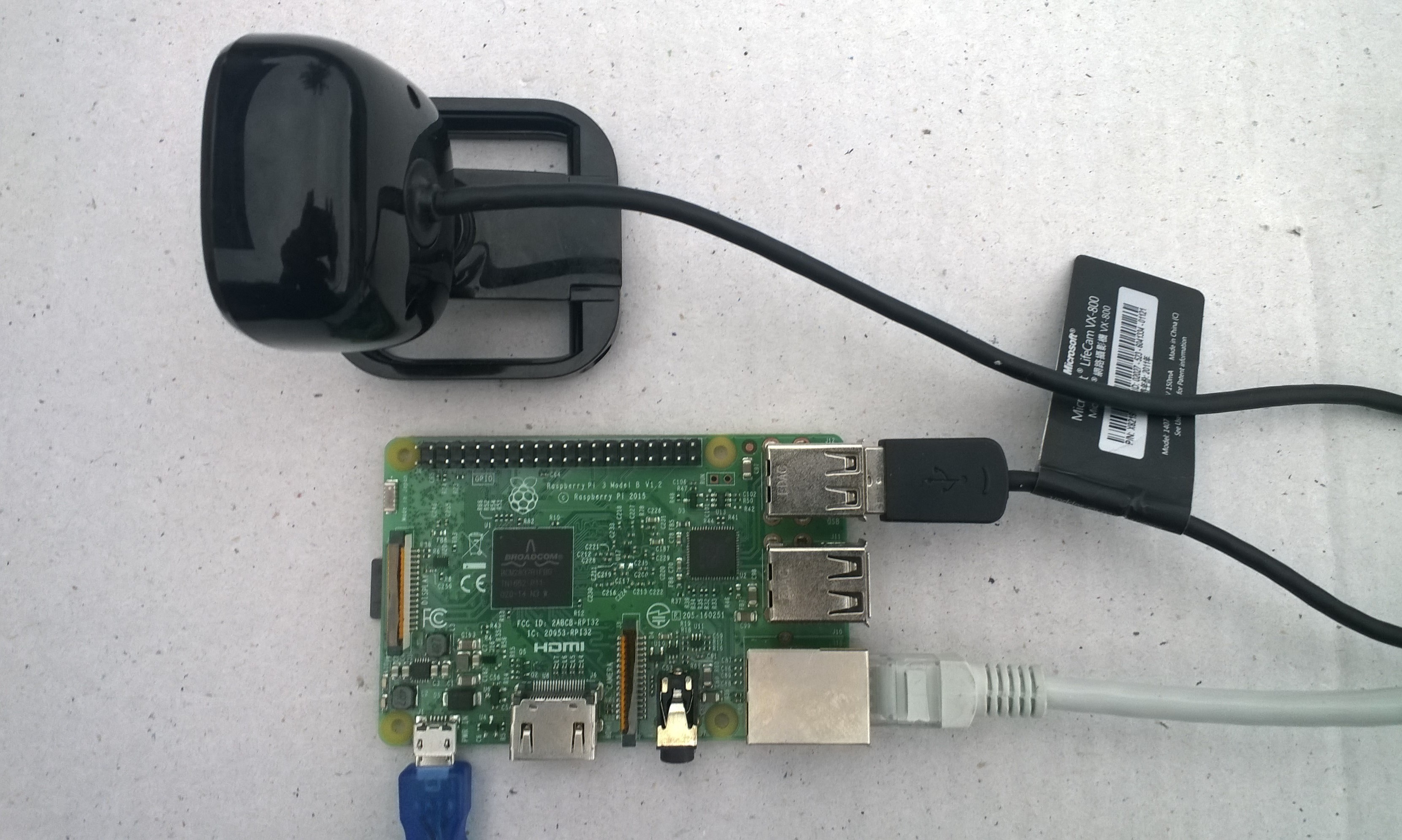
One of my students wanted to do some image processing so to help her project along I am writing a series posts about capturing images on a Windows 10 IoT Core device. I’ll cover initiating the capturing of an image, uploading the image too Azure Blob storage, uploading the image to Azure blob storage associated with an Azure IoT Hub, then processing the images with the Azure Custom Vision Service.

USB Camera test rig

First step was to capture an image from a USB web camera and store it in the local file system.

/*
    Copyright ® 2019 Feb devMobile Software, All Rights Reserved

    MIT License
…
*/
namespace devMobile.Windows10IotCore.IoT.PhotoTimer
{
	using System;
	using System.Threading;
	using Windows.ApplicationModel.Background;
	using Windows.Foundation.Diagnostics;
	using Windows.Media.Capture;
	using Windows.Media.MediaProperties;
	using Windows.Storage;

	public sealed class StartupTask : IBackgroundTask
	{
		private readonly LoggingChannel logging = new LoggingChannel("devMobile Timer Photo demo", null, new Guid("4bd2826e-54a1-4ba9-bf63-92b73ea1ac4a"));
		private BackgroundTaskDeferral backgroundTaskDeferral = null;
		private Timer ImageUpdatetimer;
		private readonly TimeSpan ImageUpdateDueDefault = new TimeSpan(0, 0, 15);
		private readonly TimeSpan ImageUpdatePeriodDefault = new TimeSpan(0, 5, 0);
		private MediaCapture mediaCapture;
		private const string ImageFilenameFormat = "Image{0:yyMMddhhmmss}.jpg";

		public void Run(IBackgroundTaskInstance taskInstance)
		{
			LoggingFields startupInformation = new LoggingFields();

			this.logging.LogEvent("Application starting");

			try
			{
				mediaCapture = new MediaCapture();
				mediaCapture.InitializeAsync().AsTask().Wait();

				ImageUpdatetimer = new Timer(ImageUpdateTimerCallback, null, ImageUpdateDueDefault, ImageUpdatePeriodDefault);

			}
			catch (Exception ex)
			{
				this.logging.LogMessage("Camera configuration failed " + ex.Message, LoggingLevel.Error);
				return;
			}

			startupInformation.AddString("PrimaryUse", mediaCapture.VideoDeviceController.PrimaryUse.ToString());
			startupInformation.AddTimeSpan("Due", ImageUpdateDueDefault);
			startupInformation.AddTimeSpan("Period", ImageUpdatePeriodDefault);

			this.logging.LogEvent("Application started", startupInformation);

			//enable task to continue running in background
			backgroundTaskDeferral = taskInstance.GetDeferral();
		}

		private void ImageUpdateTimerCallback(object state)
		{
			DateTime currentTime = DateTime.UtcNow;

			try
			{
				string filename = string.Format(ImageFilenameFormat, currentTime);

				IStorageFile photoFile = KnownFolders.PicturesLibrary.CreateFileAsync(filename, CreationCollisionOption.ReplaceExisting).AsTask().Result;
				ImageEncodingProperties imageProperties = ImageEncodingProperties.CreateJpeg();
				mediaCapture.CapturePhotoToStorageFileAsync(imageProperties, photoFile).AsTask().Wait();

				LoggingFields imageInformation = new LoggingFields();
				imageInformation.AddDateTime("TakenAtUTC", currentTime);
				imageInformation.AddString("Filename", filename);
				imageInformation.AddString("Path", photoFile.Path);
				this.logging.LogEvent("Image saved to storage", imageInformation);
			}
			catch (Exception ex)
			{
				this.logging.LogMessage("Image capture or save to local storage failed " + ex.Message, LoggingLevel.Error);
			}
		}
	}
}

To get my camera to work I had to enable “pictures library”, “microphone” and “webcam” in the capabilities section of the application manifest.

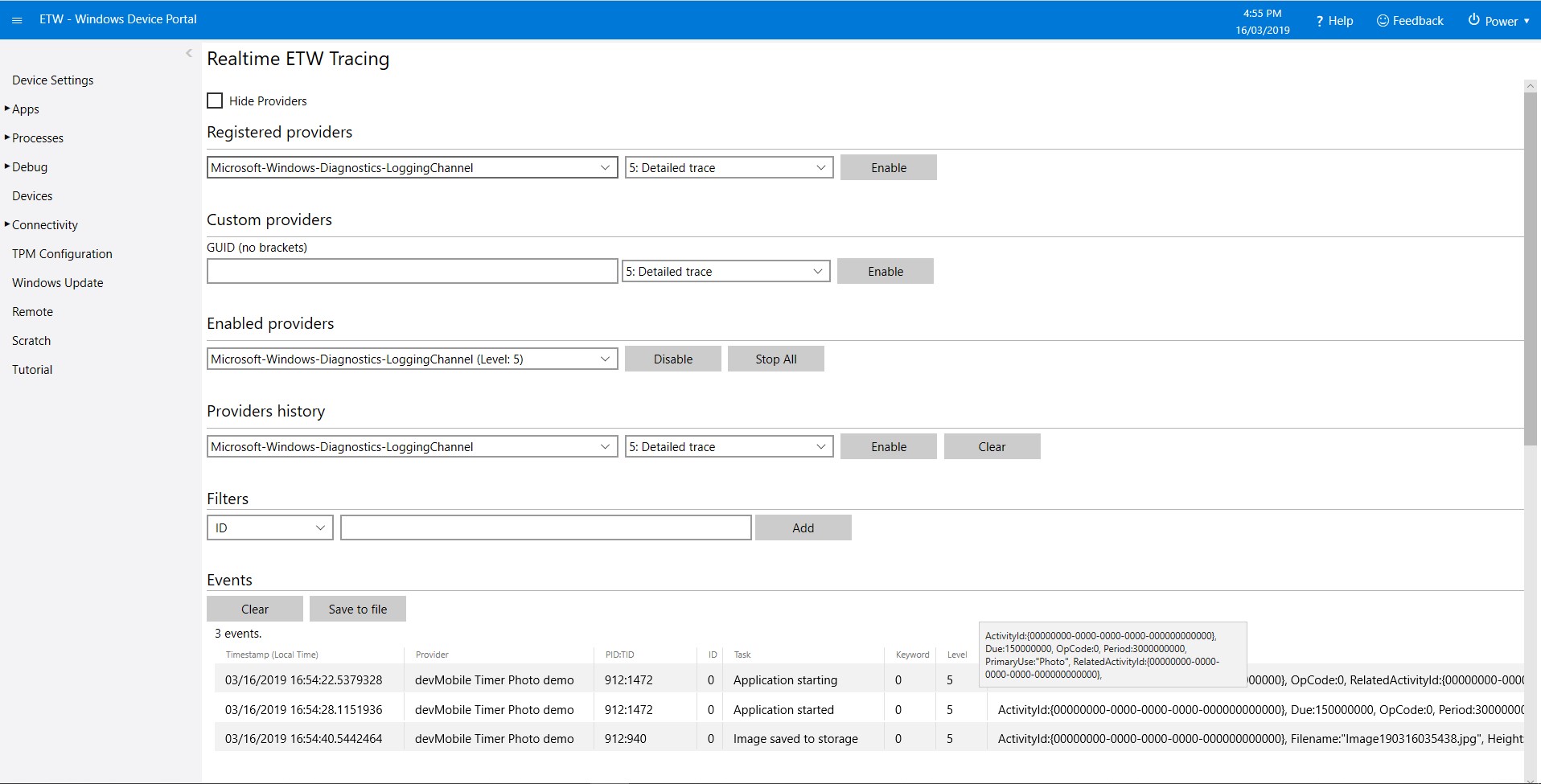
As the application starts up and captures images it logs information to the Windows 10 IoT Core ETW logging

Windows 10 IoT Core Portal ETW Logging
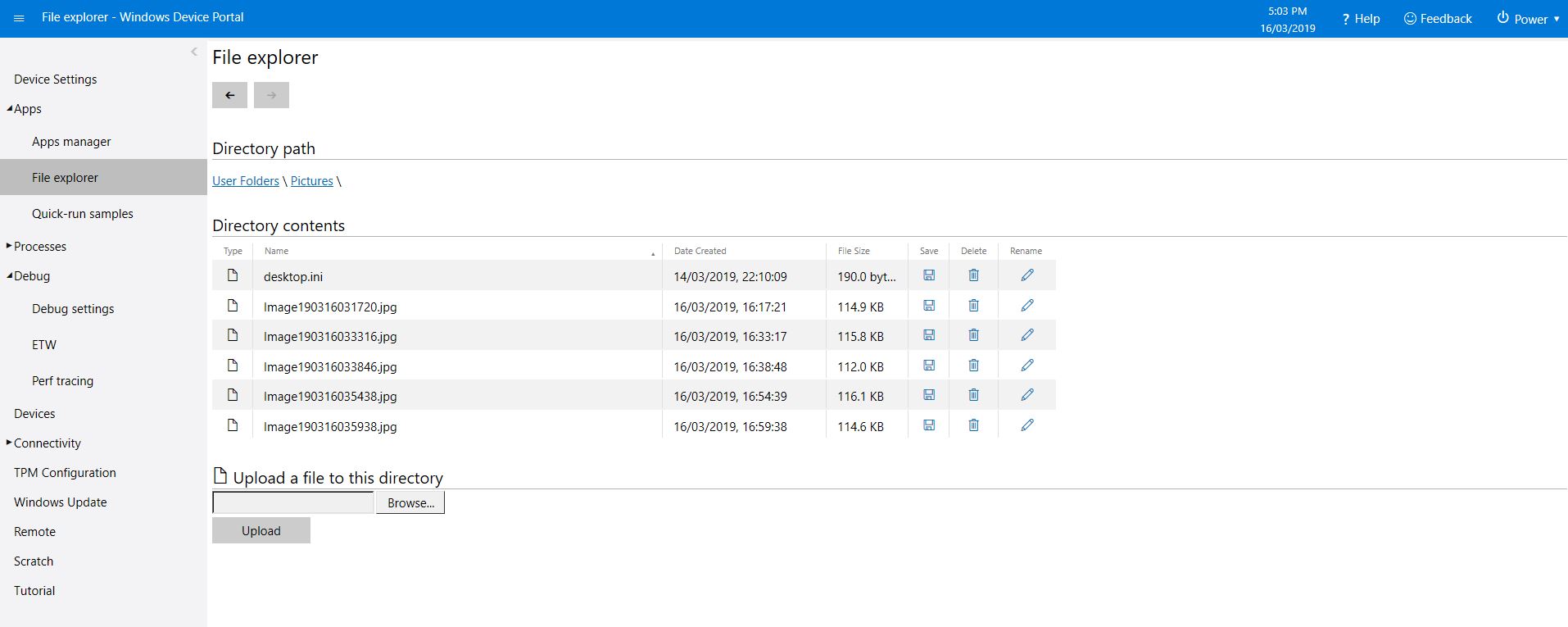
Camera images in \user folders\pictures

The code is available on GitHub and is a bit of a work in progress.
RFM9X.IoTCore Adafruit LoRa Radio Bonnet support

The RFM9X chip select line on the Adafruit LoRa Radio Bonnet 868 or 915MHz with OLED RFM95W is connected to pin 26(CS1), the reset line to pin 22(GPIO25) and the interrupt line to pin 15(GPIO22).

When I ran the RFM9XLoRaDeviceClient from my RFM9X.IoTCore library with the following configuration

#if ADAFRUIT_RADIO_BONNET
	private const byte ResetLine = 25;
	private const byte InterruptLine = 22;
	private Rfm9XDevice rfm9XDevice = new Rfm9XDevice(ChipSelectPin.CS1, ResetLine, InterruptLine);
#endif

public void Run(IBackgroundTaskInstance taskInstance)
{
	rfm9XDevice.Initialise(Frequency, paBoost: true, rxPayloadCrcOn : true);
#if DEBUG
	rfm9XDevice.RegisterDump();
#endif
	rfm9XDevice.OnReceive += Rfm9XDevice_OnReceive;
#if ADDRESSED_MESSAGES_PAYLOAD
	rfm9XDevice.Receive(UTF8Encoding.UTF8.GetBytes(Environment.MachineName));
#else
	rfm9XDevice.Receive();
#endif
	rfm9XDevice.OnTransmit += Rfm9XDevice_OnTransmit;

	Task.Delay(10000).Wait();

	while (true)
	{
		string messageText = string.Format("Hello from {0} ! {1}", Environment.MachineName, MessageCount);
		MessageCount -= 1;

		byte[] messageBytes = UTF8Encoding.UTF8.GetBytes(messageText);
		Debug.WriteLine("{0:HH:mm:ss}-TX {1} byte message {2}", DateTime.Now, messageBytes.Length, messageText);
#if ADDRESSED_MESSAGES_PAYLOAD
		this.rfm9XDevice.Send(UTF8Encoding.UTF8.GetBytes("AddressHere"), messageBytes);
#else
		this.rfm9XDevice.Send(messageBytes);
#endif
		Task.Delay(10000).Wait();
	}
}
#endif

I could see messages being sent and received in the debug output

Register 0x3e - Value 0X00 - Bits 00000000
Register 0x3f - Value 0X00 - Bits 00000000
Register 0x40 - Value 0X00 - Bits 00000000
Register 0x41 - Value 0X00 - Bits 00000000
Register 0x42 - Value 0X12 - Bits 00010010
...
The thread 0xec4 has exited with code 0 (0x0).
The thread 0x868 has exited with code 0 (0x0).
22:21:47-RX PacketSnr 9.8 Packet RSSI -80dBm RSSI -122dBm = 59 byte message "�LoRaIoT1Maduino2at 62.8,ah 77,wsa 1,wsg 3,wd 34.88,r 0.00,"
22:21:52-TX 31 byte message Hello from AdaFruitIOLoRa ! 255
22:21:52-TX Done
The thread 0xbf8 has exited with code 0 (0x0).
The program '[3380] backgroundTaskHost.exe' has exited with code -1 (0xffffffff).

Next step modify my Adafruit IO and Azure IoT Hub/Central field gateways.

Grove Base Hat for Raspberry PI Investigation

For a couple of projects I had been using the Dexter industries GrovePI+ and the Grove Base Hat for Raspberry PI looked like a cheaper alternative for many applications, but it lacked Windows 10 IoT Core support.

My first project was to build a Inter Integrated Circuit(I2C) device scanner to check that the Grove Base Hat STM32 MCU I2C client implementation on a “played nice” with Windows 10 IoT core.

My Visual Studio 2017 project (I2C Device Scanner) scans all the valid 7bit I2C addresses and in the debug output displayed the two “found” devices, a Grove- 3 Axis Accelerometer(+-16G) (ADXL345) and the Grove Base Hat for Raspberry PI.

backgroundTaskHost.exe' (CoreCLR: CoreCLR_UWP_Domain): Loaded 'C:\Data\Users\DefaultAccount\AppData\Local\DevelopmentFiles\I2CDeviceScanner-uwpVS.Debug_ARM.Bryn.Lewis\System.Diagnostics.Debug.dll'. Skipped loading symbols. Module is optimized and the debugger option 'Just My Code' is enabled.

'backgroundTaskHost.exe' (CoreCLR: CoreCLR_UWP_Domain): Loaded 'C:\Data\Users\DefaultAccount\AppData\Local\DevelopmentFiles\I2CDeviceScanner-uwpVS.Debug_ARM.Bryn.Lewis\System.Linq.dll'. Skipped loading symbols. Module is optimized and the debugger option 'Just My Code' is enabled.
Exception thrown: 'System.IO.FileNotFoundException' in devMobile.Windows10IoTCore.I2CDeviceScanner.winmd
WinRT information: Slave address was not acknowledged.
.......
Exception thrown: 'System.IO.FileNotFoundException' in devMobile.Windows10IoTCore.I2CDeviceScanner.winmd
WinRT information: Slave address was not acknowledged.

I2C Controller \\?\ACPI#MSFT8000#1#{a11ee3c6-8421-4202-a3e7-b91ff90188e4}\I2C1 has 2 devices
Address 0x4
Address 0x53
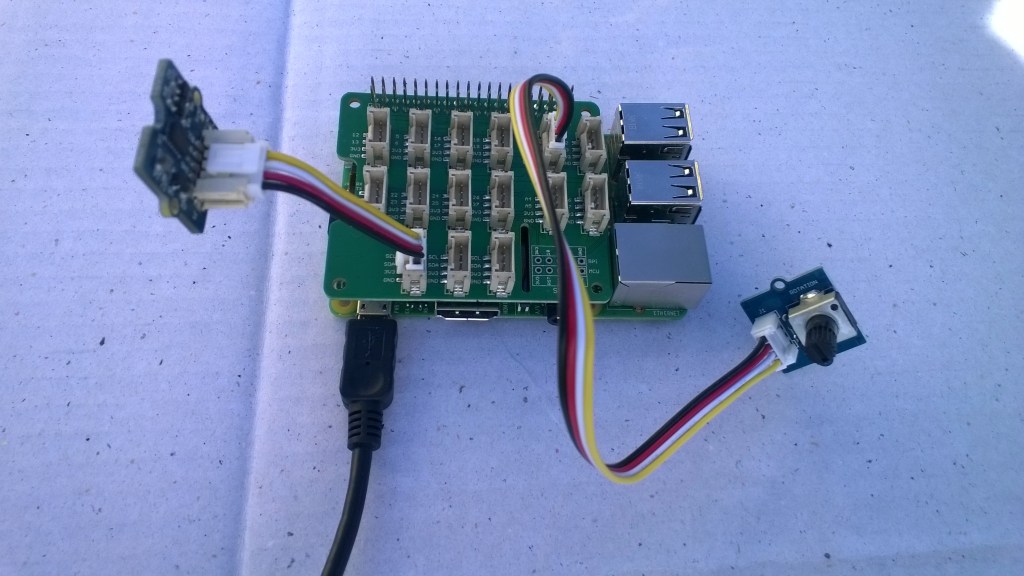
Raspberry PI with Grove Base Hat & ADXL345 & Rotary angle sensor
Raspberry PI with Grove Base Hat I2C test rig

The next step was to confirm I could read the device ID of the ADXL345 and the Grove Base Hat for RaspberryPI. I had to figure out the Grove Base Hat for RaspberryPI from the Seeedstudio Python code.

I2CDevicePinger ADXL345 Debug output

...
'backgroundTaskHost.exe' (CoreCLR: CoreCLR_UWP_Domain): Loaded 'C:\Data\Users\DefaultAccount\AppData\Local\DevelopmentFiles\I2CDevicePinger-uwpVS.Debug_ARM.Bryn.Lewis\System.Diagnostics.Debug.dll'. Skipped loading symbols. Module is optimized and the debugger option 'Just My Code' is enabled.
DeviceID 0XE5

The DeviceID for the ADXL345 matched the DEVID in the device datasheet.

I2CDevicePinger Debug output

'backgroundTaskHost.exe' (CoreCLR: CoreCLR_UWP_Domain): Loaded 'C:\Data\Users\DefaultAccount\AppData\Local\DevelopmentFiles\I2CDevicePinger-uwpVS.Debug_ARM.Bryn.Lewis\System.Diagnostics.Debug.dll'. Skipped loading symbols. Module is optimized and the debugger option 'Just My Code' is enabled.
DeviceID 0X4

The DeviceID for the Grove Base Hat for RaspberryPI matched

RPI_HAT_PID = 0x0004 in the Python code.

The last test application reads the raw value of the specified analog input

public async void Run(IBackgroundTaskInstance taskInstance)
{
   string aqs = I2cDevice.GetDeviceSelector();
   DeviceInformationCollection I2CBusControllers = await DeviceInformation.FindAllAsync(aqs);

   if (I2CBusControllers.Count != 1)
   {
      Debug.WriteLine("Unexpect number of I2C bus controllers found");
      return;
   }

   I2cConnectionSettings settings = new I2cConnectionSettings(0x04)
   {
      BusSpeed = I2cBusSpeed.StandardMode,
      SharingMode = I2cSharingMode.Shared,
   };

   using (I2cDevice device = I2cDevice.FromIdAsync(I2CBusControllers[0].Id, settings).AsTask().GetAwaiter().GetResult())
   {
      try
      {
         ushort value = 0;
         // From the Seeedstudio python
	 // 0x10 ~ 0x17: ADC raw data
	 // 0x20 ~ 0x27: input voltage
         // 0x29: output voltage (Grove power supply voltage)
         // 0x30 ~ 0x37: input voltage / output voltage						
         do
	 {
            byte[] writeBuffer = new byte[1] { 0x10 };
            byte[] readBuffer = new byte[2] { 0, 0 };

            device.WriteRead(writeBuffer, readBuffer);
            value = BitConverter.ToUInt16(readBuffer, 0);

            Debug.WriteLine($"Value {value}");

            Task.Delay(1000).GetAwaiter().GetResult();
         }
         while (value != 0);
      }
      Catch (Exception ex)
      {
         Debug.WriteLine(ex.Message);
      }
   }
}

GroveBaseHatRPIRegisterReader Debug output

'backgroundTaskHost.exe' (CoreCLR: CoreCLR_UWP_Domain): Loaded 'C:\Data\Users\DefaultAccount\AppData\Local\DevelopmentFiles\GroveBaseHatRPIRegisterReader-uwpVS.Debug_ARM.Bryn.Lewis\System.Diagnostics.Debug.dll'. Skipped loading symbols. Module is optimized and the debugger option 'Just My Code' is enabled.
Value 3685
Value 3685
Value 3688
Value 3681
Value 3681
Value 3688
Value 3688
Value 3683

The output changed when I adjusted the rotary angle sensor (0-4095) which confirmed I could reliably read the Analog input values.

The code for my test harness applications is available on github, the next step is to build a library for the Grove Base Hat for RaspberryPI

Azure IoT Hubs LoRa Windows 10 IoT Core Field Gateway

This project is now live on github.com, sample Arduino with Dragino LoRa Shield for Arduino, MakerFabs Maduino, Dragino LoRa Mini Dev, M2M Low power Node and Netduino with Elecrow LoRa RFM95 Shield clients uploaded in the next couple of days.

AzureIOTHubExplorerScreenGrab20180912

The bare minimum configuration is

{
  "AzureIoTHubDeviceConnectionString": "HostName=qwertyuiop.azure-devices.net;DeviceId=LoRaGateway;SharedAccessKey=1234567890qwertyuiop987654321qwertyuiop1234g=",
  "AzureIoTHubTransportType": "Amqp",
  "SensorIDIsDeviceIDSensorID": true,
  "Address": "LoRaIoT1",
  "Frequency": 915000000.0
}

So far battery life and wireless communications range for the Arduino clients is looking pretty good. CRC presence checking and validation is turned so have a look at one of the sample clients.

ArduinoUnoR3DraginoLoRa
It took a bit longer than expected as upgrading to the latest version (v1.18.0 as at 12 Sep 2018) of Microsoft.Azure.Devices.Client (from 1.6.3) broke my field gateway with timeouts and exceptions.

I’ll be doing some more testing over the next couple of weeks so it is a work in progress.

AdaFruit.IO LoRa Windows 10 IoT Core Field Gateway

This project is now live on github.com, sample Arduino with Dragino LoRa Shield for Arduino, MakerFabs Maduino, Dragino LoRa Mini Dev, M2M Low power Node and Netduino with Elecrow LoRa RFM95 Shield clients uploaded in the next couple of days.

AdaFruit.IO.LoRaScreenShot
While building this AdaFruit.IO LoRa field gateway, and sample clients I revisited my RFM9XLoRa-Net library a couple of times adding functionality and renaming constants to make it more consistent. I made many of the default values public so they could be used in the field gateway config file.
The bare minimum configuration is

{
“AdaFruitIOUserName”: “——“,
“AdaFruitIOApiKey”: “——“,
“AdaFruitIOGroupName”: “——”
“Address”: “——“,
“Frequency”: 915000000.0
}

So far battery life and wireless communications range for the Arduino clients is looking pretty good.

ArduinoUnoR3DraginoLoRa

Re-reading the SX1276 datasheet

I sat down and read the Semtech SX1276 datasheet paying close attention to any references to CRCs and headers. Then to test some ideas I modified my Receive Basic test harness to see if I could reliably reproduce the problem with my stress test harness.LoRaStress2

public sealed class StartupTask : IBackgroundTask
	{
		private const int ChipSelectLine = 25;
		private const int ResetLine = 17;
		private Rfm9XDevice rfm9XDevice = new Rfm9XDevice(ChipSelectLine, ResetLine);

		public void Run(IBackgroundTaskInstance taskInstance)
		{
			// Put device into LoRa + Sleep mode
			rfm9XDevice.RegisterWriteByte(0x01, 0b10000000); // RegOpMode 

			// Set the frequency to 915MHz
			byte[] frequencyWriteBytes = { 0xE4, 0xC0, 0x00 }; // RegFrMsb, RegFrMid, RegFrLsb
			rfm9XDevice.RegisterWrite(0x06, frequencyWriteBytes);

			rfm9XDevice.RegisterWriteByte(0x0F, 0x0); // RegFifoRxBaseAddress 

			rfm9XDevice.RegisterWriteByte(0x01, 0b10000101); // RegOpMode set LoRa & RxContinuous

			while (true)
			{
				// Wait until a packet is received, no timeouts in PoC
				Debug.WriteLine("Receive-Wait");
				byte IrqFlags = rfm9XDevice.RegisterReadByte(0x12); // RegIrqFlags
				while ((IrqFlags & 0b01000000) == 0)  // wait until RxDone cleared
				{
					Task.Delay(20).Wait();
					IrqFlags = rfm9XDevice.RegisterReadByte(0x12); // RegIrqFlags
					Debug.Write(".");
				}
				Debug.WriteLine("");

				if ((IrqFlags & 0b00100000) == 0b00100000)
				{
					Debug.WriteLine("Payload CRC error");
				}

				byte regHopChannel = rfm9XDevice.RegisterReadByte(0x1C);
				Debug.WriteLine(string.Format("regHopChannel {0}", Convert.ToString((byte)regHopChannel, 2).PadLeft(8, '0')));

				byte currentFifoAddress = rfm9XDevice.RegisterReadByte(0x10); // RegFifiRxCurrent
				rfm9XDevice.RegisterWriteByte(0x0d, currentFifoAddress); // RegFifoAddrPtr*
				byte numberOfBytes = rfm9XDevice.RegisterReadByte(0x13); // RegRxNbBytes

				// Allocate buffer for message
				byte[] messageBytes = new byte[numberOfBytes];

				for (int i = 0; i < numberOfBytes; i++)
				{
					messageBytes[i] = rfm9XDevice.RegisterReadByte(0x00); // RegFifo
				}
				rfm9XDevice.RegisterWriteByte(0x12, 0xff); // RegIrqFlags clear all the bits

				string messageText = UTF8Encoding.UTF8.GetString(messageBytes);
				Debug.WriteLine("Received {0} byte message {1}", messageBytes.Length, messageText);
				Debug.WriteLine(string.Format("RegIrqFlags {0}", Convert.ToString((byte)IrqFlags, 2).PadLeft(8, '0')));
				Debug.WriteLine("Receive-Done");
			}
		}
	}

The RegHopChannel register has a flag indicating whether there was a CRC extracted from the packet header.

regHopChannel 00000000
Received 23 byte message 1 Hello Arduino LoRa! 1
RegIrqFlags 01010000
Receive-Done
Receive-Wait
…………………………..
regHopChannel 00000000
Received 23 byte message 1 Hello Arduino LoRa! 2
RegIrqFlags 01010000
Receive-Done
Receive-Wait
……………………………
regHopChannel 00000000
Received 23 byte message 1 Hello Arduino LoRa! 3
RegIrqFlags 01010000
Receive-Done
Receive-Wait

I then modified my Arduino-LoRa library based client to include a CRC

void setup() {
  Serial.begin(9600);                   // initialize serial
  while (!Serial);

  Serial.println("LoRa Duplex - Set sync word");

  // override the default CS, reset, and IRQ pins (optional)
  LoRa.setPins(csPin, resetPin, irqPin);// set CS, reset, IRQ pin

  if (!LoRa.begin(915E6)) {             // initialize ratio at 915 MHz
    Serial.println("LoRa init failed. Check your connections.");
    while (true);                       // if failed, do nothing
  }

  LoRa.enableCrc();  // BHL This was my change

  LoRa.setSyncWord(0x12);           // ranges from 0-0xFF, default 0x34, see API docs

  LoRa.dumpRegisters(Serial);
  Serial.println("LoRa init succeeded.");
}

void loop() {
  if (millis() - lastSendTime > interval) {
    String message = "5 Hello Arduino LoRa! ";   // send a message
    message += msgCount;
    sendMessage(message);
    Serial.println("Sending " + message);
    lastSendTime = millis();            // timestamp the message
    //interval = random(2000) + 1000;    // 2-3 seconds
    interval = 1000;
  }

  // parse for a packet, and call onReceive with the result:
  onReceive(LoRa.parsePacket());
}

void sendMessage(String outgoing) {
  LoRa.beginPacket();                   // start packet
  LoRa.print(outgoing);                 // add payload
  LoRa.endPacket();                     // finish packet and send it
  msgCount++;                           // increment message ID
}

void onReceive(int packetSize) {
  if (packetSize == 0) return;          // if there's no packet, return

  // read packet header bytes:
  String incoming = "";

  while (LoRa.available()) {
    incoming += (char)LoRa.read();
  }

  Serial.println("Message: " + incoming);
  Serial.println("RSSI: " + String(LoRa.packetRssi()));
  Serial.println("Snr: " + String(LoRa.packetSnr()));
  Serial.println();
}

When I powered up a single client and the payload had a CRC

...............................
regHopChannel 01000000
Received 23 byte message 6 Hello Arduino LoRa! 6
RegIrqFlags 01010000
Receive-Done
Receive-Wait
.................................
regHopChannel 01000000
Received 23 byte message 6 Hello Arduino LoRa! 7
RegIrqFlags 01010000
Receive-Done
Receive-Wait
.................................
regHopChannel 01000000
Received 23 byte message 6 Hello Arduino LoRa! 8
RegIrqFlags 01010000
Receive-Done
Receive-Wait
...............................

Then when I increased the number of clients I started getting corrupted messages with CRC errors.

Received 24 byte message 6 Hello Arduino LoRa! 32
RegIrqFlags 01010000
Receive-Done
Receive-Wait
...............
regHopChannel 01000001
Received 25 byte message 8 Hello Arduino LoRa! 114
RegIrqFlags 01010000
Receive-Done
Receive-Wait
Payload CRC error
regHopChannel 01000000
Received 24 byte message s��=��(��p�^j�\ʏ�����
RegIrqFlags 01100000
Receive-Done
Receive-Wait
.............
regHopChannel 01000000
Received 24 byte message 6 Hello Arduino LoRa! 33
RegIrqFlags 01010000
Receive-Done
Receive-Wait
...............
regHopChannel 01000001
Received 25 byte message 8 Hello Arduino LoRa! 115
RegIrqFlags 01010000
Receive-Done
Receive-Wait

I need to do some more testing but now I think the problem was the RegIrqFlags PayloadCRCError flag was never going to get set because there was no CRC on the payload.

Poetry in Klingon

Along time ago I read an article which said “There is no easy way to program in parallel it’s like writing poetry in Klingon”. Little did I know that you can buy bound books of Klingon poetry.

I had noticed odd characters getting displayed every so often, especially when I had many devices working. Initially, I though it was two (or more) of the devices interfering with each other but after looking at the logging the payload CRC was OK

RegIrqFlags 01010000 = RxDone + Validheader (The PayloadCrcError bit is not set)

Received 23 byte message Hello Arduino LoRa! 142
RegIrqFlags 01010000
RX-Done
Received 23 byte message Hello Arduino LoRa! 216
The thread 0xea4 has exited with code 0 (0x0).
The thread 0x1034 has exited with code 0 (0x0).
RegIrqFlags 01010000
RX-Done
Received 23 byte message Ngllo Arduino /R�� �44
RegIrqFlags 01010000
RX-Done
Received 23 byte message Hello Arduino LoRa! 218
RegIrqFlags 01010000
RX-Done

I think the problem is that under load the receive and transmit code are accessing the SX127X FIFO and messing things up or the CRC isn’t getting attached.

I’ll put a lock around where bytes are inserted into and read from the FIFO, check the sequencing of register reads and do some more stress testing.

I turned off sending of messages and still got the corruption.

Then I went back to by Receive Basic example and it still had the problem. Looks like it might be something to do with the way I access the FIFO.

egIrqFlags 01010000
Receive-Message
Received 23 byte message Hello Arduino LoRa! 112
Receive-Done
Receive-Wait
........................
RegIrqFlags 01010000
Receive-Message
Received 23 byte message Hello Arduino LoRa! 110
Receive-Done
Receive-Wait
.....
RegIrqFlags 01110000
Receive-Message
Received 19 byte message Hello NetMFh���u�P
Receive-Done
Receive-Wait
.

RFM95/96/97/98 shield library Part 10

Enums & Masks

The code was filled with “magic numbers” so it was time to get rid of them. In C# there are bit constants which I missed for my backport to .NetMF.

I sat down with the Semtech SX1276 datasheet and started typing in register names and adding constants and enums for all the bit masks, flags and defaults.

The initialisation of the RFM9X is now done in one of two constructors and an initialise method. Much like the approach used in the nRF24L01P libraries I use on Windows 10 IoT Core and .NetMF.

A few weeks ago I had a failed attempt at building a library which tried to hide as much of the hardware and wireless implementation details from the user as possible. Realistically if you’re building systems using LoRa, a basic understanding of the technology plus any regional regulatory requirements (frequency use, duty cycles etc.) is necessary.

	sealed class Rfm9XDevice
	{
		// Registers from SemTech SX127X Datasheet
		enum Registers : byte
		{
			MinValue = RegOpMode,
			RegFifo = 0x0,
			RegOpMode = 0x01,
			//Reserved 0x02-0x06
			RegFrMsb = 0x06,
			RegFrMid = 0x7,
			RegFrLsb = 0x08,
			RegPAConfig = 0x09,
			//RegPARamp = 0x0A, // not inlcuded as FSK/OOK functionality
			RegOcp = 0x0B,
			RegLna = 0x0C,
			RegFifoAddrPtr = 0x0D,
			//RegFifoTxBaseAddr = 0x0E
			RegFifoRxCurrent =0x10,
			RegIrqFlagsMask = 0x11,
			RegIrqFlags = 0x12,
			// RegRxNdBytes = 0x13
			// RegRxHeaderCnValueMsb=0x14
			// RegRxHeaderCnValueLsb=0x15
			// RegRxPacketCntValueMsb=0x16
			// RegRxPacketCntValueMsb=0x17
			// RegModemStat=0x18
			// RegPktSnrVale=0x19
			// RegPktRssiValue=0x1A
			// RegRssiValue=0x1B
			// RegHopChannel=0x1C
			RegModemConfig1 = 0x1D,
			RegModemConfig2 = 0x1E,
			RegSymbTimeout = 0x1F,
			RegPreambleMsb = 0x20,
			RegPreambleLsb = 0x21,
			RegPayloadLength = 0x22,
			RegMaxPayloadLength = 0x23,
			RegHopPeriod = 0x24,
			// RegFifiRxByteAddr = 0x25
			RegModemConfig3 = 0x26,
			RegPpmCorrection = 0x27,
			// RegFeiMsb = 0x28
			// RegFeiMid = 0x29
			// RegFeiLsb = 0x2A
			// Reserved 0x2B
			// RegRssiWideband = 0x2C
			// Reserved 0x2D-0x30
			RegDetectOptimize = 0x31,
			// Reserved 0x32
			RegInvertIQ = 0x33,
			// Reserved 0x34-0x36
			RegDetectionThreshold = 0x37,
			// Reserved 0x38
			RegSyncWord = 0x39,
			RegDioMapping1 = 0x40,
			RegVersion = 0x42,

			MaxValue = RegVersion,
		}

		// RegOpMode mode flags
		private const byte RegOpModeLongRangeModeLoRa = 0b10000000;
		private const byte RegOpModeLongRangeModeFskOok = 0b00000000;
		private const byte RegOpModeLongRangeModeDefault = RegOpModeLongRangeModeFskOok;

		private const byte RegOpModeAcessSharedRegLoRa = 0b00000000;
		private const byte RegOpModeAcessSharedRegFsk = 0b01000000;
		private const byte RegOpModeAcessSharedRegDefault = RegOpModeAcessSharedRegLoRa;

		private const byte RegOpModeLowFrequencyModeOnHighFrequency = 0b00000000;
		private const byte RegOpModeLowFrequencyModeOnLowFrequency = 0b00001000;
		private const byte RegOpModeLowFrequencyModeOnDefault = RegOpModeLowFrequencyModeOnLowFrequency;

		[Flags]
		public enum RegOpModeMode : byte
		{
			Sleep = 0b00000000,
			StandBy = 0b00000001,
			FrequencySynthesisTX = 0b00000010,
			Transmit = 0b00000011,
			FrequencySynthesisRX = 0b00000100,
			ReceiveContinuous = 0b00000101,
			ReceiveSingle = 0b00000110,
			ChannelActivityDetection = 0b00000111,
		};

		// Frequency configuration magic numbers from Semtech SX127X specs
		private const double RH_RF95_FXOSC = 32000000.0;
		private const double RH_RF95_FSTEP = RH_RF95_FXOSC / 524288.0;

		// RegFrMsb, RegFrMid, RegFrLsb
		private const double FrequencyDefault = 434000000.0;

One constructor is for shields where the chip select pin is connected to one of the two standard lines CS0/CS1.

// Constructor for shields with chip select connected to CS0/CS1 e.g. Elecrow/Electronic tricks
		public Rfm9XDevice(ChipSelectPin chipSelectPin, int resetPinNumber, int interruptPinNumber)
		{
			RegisterManager = new RegisterManager(chipSelectPin);

			// Check that SX127X chip is present
			Byte regVersionValue = RegisterManager.ReadByte((byte)Registers.RegVersion);
			if (regVersionValue != RegVersionValueExpected)
			{
				throw new ApplicationException("Semtech SX127X not found");
			}

			GpioController gpioController = GpioController.GetDefault();

The other is for shields with the chip select connected to another pin (the chip select has to be set to one of the default pins even though I am implementing the drive logic in code

	// Constructor for shields with chip select not connected to CS0/CS1 (but needs to be configured anyway) e.g. Dragino
		public Rfm9XDevice(ChipSelectPin chipSelectPin, int chipSelectPinNumber, int resetPinNumber, int interruptPinNumber)
		{
			RegisterManager = new RegisterManager(chipSelectPin, chipSelectPinNumber);

			// Check that SX127X chip is present
			Byte regVersionValue = RegisterManager.ReadByte((byte)Registers.RegVersion);
			if (regVersionValue != RegVersionValueExpected)
			{
				throw new ApplicationException("Semtech SX127X not found");	
			}

			GpioController gpioController = GpioController.GetDefault();

The Initialise method has a large number of parameters (most of them can be ignored and defaults used). I only set registers if the configuration has been changed from the default value. This is fine for most settings, but some (like RegSymbTimeoutMsb & RegSymbTimeoutLsb span two registers and are combined with other settings.

public void Initialise(RegOpModeMode modeAfterInitialise, // RegOpMode
			double frequency = FrequencyDefault, // RegFrMsb, RegFrMid, RegFrLsb
			bool paBoost = false, byte maxPower = RegPAConfigMaxPowerDefault, byte outputPower = RegPAConfigOutputPowerDefault, // RegPaConfig
			bool ocpOn = true, byte ocpTrim = RegOcpOcpTrimDefault, // RegOcp
			RegLnaLnaGain lnaGain = LnaGainDefault, bool lnaBoostLF = false, bool lnaBoostHf = false, // RegLna
			RegModemConfigBandwidth bandwidth = RegModemConfigBandwidthDefault, RegModemConfigCodingRate codingRate = RegModemConfigCodingRateDefault, RegModemConfigImplicitHeaderModeOn implicitHeaderModeOn = RegModemConfigImplicitHeaderModeOnDefault, //RegModemConfig1
         RegModemConfig2SpreadingFactor spreadingFactor = RegModemConfig2SpreadingFactorDefault, bool txContinuousMode = false, bool rxPayloadCrcOn = false,
			ushort symbolTimeout = SymbolTimeoutDefault,
			ushort preambleLength = PreambleLengthDefault,
			byte payloadLength = PayloadLengthDefault,
			byte payloadMaxLength = PayloadMaxLengthDefault,
			byte freqHoppingPeriod = FreqHoppingPeriodDefault,
			bool lowDataRateOptimize = false, bool agcAutoOn = false,
			byte ppmCorrection = ppmCorrectionDefault,
			RegDetectOptimizeDectionOptimize detectionOptimize=RegDetectOptimizeDectionOptimizeDefault,
         bool invertIQ = false,
			RegisterDetectionThreshold detectionThreshold = RegisterDetectionThresholdDefault,
         byte syncWord = RegSyncWordDefault )
		{
			Frequency = frequency; // Store this away for RSSI adjustments
			RegOpModeModeCurrent = modeAfterInitialise;

			// Strobe Reset pin briefly to factory reset SX127X chip
			ResetGpioPin.Write(GpioPinValue.Low);
			Task.Delay(10);
			ResetGpioPin.Write(GpioPinValue.High);
			Task.Delay(10);

			// Put the device into sleep mode so registers can be changed
			SetMode(RegOpModeMode.Sleep);

			// Configure RF Carrier frequency
			if (frequency != FrequencyDefault)
			{
				byte[] bytes = BitConverter.GetBytes((long)(frequency / RH_RF95_FSTEP));
				RegisterManager.WriteByte((byte)Registers.RegFrMsb, bytes[2]);
				RegisterManager.WriteByte((byte)Registers.RegFrMid, bytes[1]);
				RegisterManager.WriteByte((byte)Registers.RegFrLsb, bytes[0]);
			}

Next step is add event handlers for inbound and outbound messages, then the finally split the device specific code into a stand alone library.


.Net MicroFramework LoRa library Part9

Receive and Transmit Interrupts

For the second to last development iteration of my RFM9X LoRa NetMF library client I have got the interrupt handler working for transmitting and receiving messages. My code sends a message every 10 seconds then goes back to waiting in receive mode .

//---------------------------------------------------------------------------------
// Copyright (c) August 2018, devMobile Software
//
// Licensed under the Apache License, Version 2.0 (the "License");
// you may not use this file except in compliance with the License.
// You may obtain a copy of the License at
//
//     http://www.apache.org/licenses/LICENSE-2.0
//
// Unless required by applicable law or agreed to in writing, software
// distributed under the License is distributed on an "AS IS" BASIS,
// WITHOUT WARRANTIES OR CONDITIONS OF ANY KIND, either express or implied.
// See the License for the specific language governing permissions and
// limitations under the License.
//
//---------------------------------------------------------------------------------
namespace devMobile.IoT.NetMF.Rfm9X.ReceiveTransmitInterrupt
{
   using System;
   using System.Text;
   using System.Threading;
   using Microsoft.SPOT;
   using Microsoft.SPOT.Hardware;
   using SecretLabs.NETMF.Hardware.Netduino;

   public sealed class Rfm9XDevice
   {
      private const byte RegisterAddressReadMask = 0X7f;
      private const byte RegisterAddressWriteMask = 0x80;

      private SPI Rfm9XLoraModem = null;
      private OutputPort ResetGpioPin = null;
      private InterruptPort InterruptPin = null;

      public Rfm9XDevice(Cpu.Pin chipSelect, Cpu.Pin resetPin, Cpu.Pin interruptPin)
      {
         // Factory reset pin configuration
         ResetGpioPin = new OutputPort(Pins.GPIO_PIN_D9, true);
         ResetGpioPin.Write(false);
         Thread.Sleep(10);
         ResetGpioPin.Write(true);
         Thread.Sleep(10);

         this.Rfm9XLoraModem = new SPI(new SPI.Configuration(chipSelect, false, 0, 0, false, false, 2000, SPI.SPI_module.SPI1));

         InterruptPin = new InterruptPort(interruptPin, false, Port.ResistorMode.Disabled, Port.InterruptMode.InterruptEdgeHigh);

         InterruptPin.OnInterrupt += InterruptPin_OnInterrupt;

         Thread.Sleep(100);
      }

      public Rfm9XDevice(Cpu.Pin chipSelect, Cpu.Pin reset)
      {
         // Factory reset pin configuration
         ResetGpioPin = new OutputPort(Pins.GPIO_PIN_D9, true);
         ResetGpioPin.Write(false);
         Thread.Sleep(10);
         ResetGpioPin.Write(true);
         Thread.Sleep(10);

         this.Rfm9XLoraModem = new SPI(new SPI.Configuration(chipSelect, false, 0, 0, false, false, 2000, SPI.SPI_module.SPI1));

         Thread.Sleep(100);
      }

      public Byte RegisterReadByte(byte registerAddress)
      {
         byte[] writeBuffer = new byte[] { registerAddress };
         byte[] readBuffer = new byte[1];
         Debug.Assert(Rfm9XLoraModem != null);

         Rfm9XLoraModem.WriteRead(writeBuffer, readBuffer, 1);

         return readBuffer[0];
      }

      public ushort RegisterReadWord(byte address)
      {
         byte[] writeBuffer = new byte[] { address &= RegisterAddressReadMask };
         byte[] readBuffer = new byte[2];
         Debug.Assert(Rfm9XLoraModem != null);

         readBuffer[0] = RegisterReadByte(address);
         readBuffer[1] = RegisterReadByte(address += 1);

         return (ushort)(readBuffer[1] + (readBuffer[0] << 8));
      }

      public byte[] RegisterRead(byte address, int length)
      {
         byte[] writeBuffer = new byte[] { address &= RegisterAddressReadMask };
         byte[] readBuffer = new byte[length];
         Debug.Assert(Rfm9XLoraModem != null);

         for (byte index = 0; index < length; index++)
         {
            readBuffer[index] = RegisterReadByte(address += 1);
         }

         return readBuffer;
      }

      public void RegisterWriteByte(byte address, byte value)
      {
         byte[] writeBuffer = new byte[] { address |= RegisterAddressWriteMask, value };
         Debug.Assert(Rfm9XLoraModem != null);

         Rfm9XLoraModem.Write(writeBuffer);
      }

      public void RegisterWriteWord(byte address, ushort value)
      {
         byte[] valueBytes = BitConverter.GetBytes(value);
         byte[] writeBuffer = new byte[] { address |= RegisterAddressWriteMask, valueBytes[0], valueBytes[1] };
         Debug.Assert(Rfm9XLoraModem != null);

         Rfm9XLoraModem.Write(writeBuffer);
      }

      public void RegisterWrite(byte address, byte[] bytes)
      {
         byte[] writeBuffer = new byte[1 + bytes.Length];
         Debug.Assert(Rfm9XLoraModem != null);

         Array.Copy(bytes, 0, writeBuffer, 1, bytes.Length);
         writeBuffer[0] = address |= RegisterAddressWriteMask;

         Rfm9XLoraModem.Write(writeBuffer);
      }

      public void RegisterDump()
      {
         Debug.Print("---Registers 0x00 thru 0x42---");
         for (byte registerIndex = 0; registerIndex  4];

         // Mask off the upper 4 bits to get the rest of it.
         hexString += hexChars[singlebyte & 0x0F];

         return hexString;
      }

      private static string WordToHexString(ushort singleword)
      {
         string hexString = string.Empty;

         byte[] bytes = BitConverter.GetBytes(singleword);

         hexString += ByteToHexString(bytes[1]);

         hexString += ByteToHexString(bytes[0]);

         return hexString;
      }

      public class Program
      {
         public static void Main()
         {
            Rfm9XDevice rfm9XDevice = new Rfm9XDevice(Pins.GPIO_PIN_D10, Pins.GPIO_PIN_D9, Pins.GPIO_PIN_D2);
            byte MessageCount = Byte.MinValue;

            // Put device into LoRa + Sleep mode
            rfm9XDevice.RegisterWriteByte(0x01, 0x80); // RegOpMode 

            // Set the frequency to 915MHz
            byte[] frequencyWriteBytes = { 0xE4, 0xC0, 0x00 }; // RegFrMsb, RegFrMid, RegFrLsb
            rfm9XDevice.RegisterWrite(0x06, frequencyWriteBytes);

            rfm9XDevice.RegisterWriteByte(0x0F, 0x0); // RegFifoRxBaseAddress 

            // More power - PA_BOOST
            rfm9XDevice.RegisterWriteByte(0x09, 0x80); // RegPaConfig

            //rfm9XDevice.RegisterWriteByte(0x40, 0x0);

            rfm9XDevice.RegisterWriteByte(0x01, 0x85); // RegOpMode set LoRa & RxContinuous

            while (true)
            {
               rfm9XDevice.RegisterWriteByte(0x0E, 0x0); // RegFifoTxBaseAddress 

               // Set the Register Fifo address pointer
               rfm9XDevice.RegisterWriteByte(0x0D, 0x0); // RegFifoAddrPtr 

               string messageText = "Hello NetMF LoRa! " + MessageCount.ToString() ;
               MessageCount += 1;

               // load the message into the fifo
               byte[] messageBytes = UTF8Encoding.UTF8.GetBytes(messageText);
               foreach (byte b in messageBytes)
               {
                  rfm9XDevice.RegisterWriteByte(0x0, b); // RegFifo
               }

               // Set the length of the message in the fifo
               rfm9XDevice.RegisterWriteByte(0x22, (byte)messageBytes.Length); // RegPayloadLength

               rfm9XDevice.RegisterWriteByte(0x40, 0x40); // RegDioMapping1 

               /// Set the mode to LoRa + Transmit
               rfm9XDevice.RegisterWriteByte(0x01, 0x83); // RegOpMode
               Debug.Print("Sending " + messageBytes.Length + " bytes message " + messageText);

               Thread.Sleep(10000);
            }
         }
      }
   }
}

On the Netduino3 device messages were being sent and received

The thread '' (0x2) has exited with code 0 (0x0).
Sending 19 bytes message Hello NetMF LoRa! 0
RegIrqFlags 08
Transmit-Done
Sending 19 bytes message Hello NetMF LoRa! 1
RegIrqFlags 08
Transmit-Done
Sending 19 bytes message Hello NetMF LoRa! 2
RegIrqFlags 08
Transmit-Done
Sending 19 bytes message Hello NetMF LoRa! 3
RegIrqFlags 08
Transmit-Done
RegIrqFlags 50
Receive-Message
Received 15 byte message HeLoRa World! 0
RegIrqFlags 50
Receive-Message
Received 15 byte message HeLoRa World! 2
Sending 19 bytes message Hello NetMF LoRa! 4
RegIrqFlags 08
Transmit-Done
RegIrqFlags 50
Receive-Message

On my Windows 10 Core device I could see messages arriving

RegIrqFlags 01010000
RX-Done
Received 19 byte message Hello NetMF LoRa! 1
The thread 0x168 has exited with code 0 (0x0).
RegIrqFlags 01010000
RX-Done
Received 19 byte message Hello NetMF LoRa! 2
The thread 0x8 has exited with code 0 (0x0).
RegIrqFlags 01010000
RX-Done

This library is going to be quite a bit smaller/lighter than my Windows 10 IoT Core one so the next so next step event handlers and refactoring.