Christchurch Azure User Group Session April 2026

Faster, Cheaper, Scalable: Architecting High-Performance Azure Apps with Caching

Details

“There are 2 hard problems in computer science: cache invalidation, naming things, and off-by-1 errors.” — Leon Bambrick

Join us as Microsoft MVP Bryn Lewis shows us how caching is the ultimate “cheat code” for cloud architecture. When implemented correctly, it’s the fastest way to slash your Azure consumption costs, reduce database contention, and keep your application responsive under massive load. But move beyond simple lookups – your deployment model and caching strategy can make or break your app’s reliability. In this session, we’ll move from the browser edge to the distributed core:

  • Optimizing the Edge: Leverage RFC-standard HTTP semantics to offload traffic to CDNs and browsers, cutting ingress/egress costs before requests even reach your App Service.
  • Saving Compute: See how ASP.NET Core Output Caching rescues your CPU from redundant work, allowing you to scale out less frequently and save on your monthly Azure bill.
  • Modern Object Strategies: A deep dive into HybridCache and FusionCache. We’ll compare L1/L2 strategies and master “the dark arts” of stampede protection and cache invalidation to ensure high availability.
  • The Power of Azure Cache for Redis: We’ll close by configuring Redis as a distributed L2 cache, ensuring your cloud applications stay fast, synchronized, and resilient across multiple instances.

The code I used to double check my assumptions is available on GitHub. This repo demonstrates various .NET caching strategies (FusionCache, HybridCache, OutputCache, Redis, etc.) against a real Azure SQL Server backend.

Dapper Extensions

All the demo projects use my DapperExtensions project, so every cache benchmark hits the database through the same resilient layer, meaning the retry logic “should never” skew the results.

DIYCache – Rolling your own cache in 80 lines

The cache is a ConcurrentDictionary<string,CacheItem<T>>> registered as a singleton. The GET endpoint uses the cache-aside pattern, return if valid and not expired, otherwise hit the database, and store the result with a configurable TTL, then return. A companion DELETE endpoint evicts a specific entry with a single TryRemove call. The cache has no background eviction, or stampede protection, and the size is “unbounded”

Fusion Cache – Scale with configuration

FusionCache is a read through cache with Fast L1/Shared L2 support which hides the checking, fetching, and storing in three separate steps, with a factory lambda to manage the process. Cache invalidation uses tags, each entry is stamped at write time, and a single RemoveByTagAsync call evicts every matching entry. In the sample project Stack Exchange Redis is opt-in via configuration. Add the required connection string and FusionCache becomes a two-tier cache: fast in-memory L1 backed by distributed Redis L2. Add a backplane connection string and invalidation signals propagate across all running instances. The same code works as a single-process cache in development and a fully distributed one in production with no code changes. Realistically it was what I was hoping HybridCache would be

HTTP Head – RFC 9111 IETF “HTTP Caching”.

The HTTPHead project shows how HTTP’s HEAD method and ETags can eliminate unnecessary data transfers. When a client fetches a neighborhood record via GET, it receives an ETag derived from the Azure SQL Server rowversion (replaces the TimeStamp which has been deprecated) column. On subsequent checks, it sends that ETag to the HEAD endpoint, which queries only the version column and returns 304 Not Modified or 200 OK no payload needed. The PUT endpoint uses optimistic concurrency, rejecting updates where the ETag no longer matches. This ensures clients only download data that has actually changed.

Hybrid Cache – If only

HybridCache is a two-tier cache that sits in front of both an in-process L1 cache and an optional Redis L2 cache behind a single GetOrCreateAsync call. In the sample code NeighborHood lookups are cached with a 5-minute in-memory expiry and a 30-minute Stack Exchange Redis expiry, so repeated requests within the same process never leave the machine, while distributed deployments still share a warm cache across instances.

Hybrid Cache Serialization – When less sent to the L2 Cache is more

The HybridCacheSerialization project extends the HybridCache sample by swapping the default JSON serializer for others like Neuecc MessagePack. HybridCache exposes an IHybridCacheSerializer interface, so developers can plug in different serialisers. In the sample the Data Transfer Object(DTO) is decorated with [MessagePackObject] and [Key(n)] attributes to control the binary layout (MessagePack message format is supported by many languages). The payoff is compact, fast binary payloads stored in Stack Exchange Redis instead of verbose JSON. This is worthwhile when cached objects are large, retrieved frequently, or bandwidth between app and cache is a latency/jitter/cost concern.

Object Cache – Barely sufficient

The ObjectCache project is the simplest (non-DIY) option using just IMemoryCache. Neighborhood lookups are wrapped in GetOrCreateAsync: a hit returns the cached object instantly, a miss queries Azure SQL Server and caches the result for 5 minutes. In this example a database miss isn’t just returned as NotFound and forgotten, this is cached too, for 1 minute, so a flood of requests for a non-existent record won’t hammer the database. A DELETE endpoint lets callers evict a specific entry on demand.

Output Cache – Avoiding regeneration, but don’t cross the streams.

The OutputCache project demonstrates ASP.NET Core’s OutputCaching middleware, a response-level cache that stores the fully serialized HTTP responses rather than the underlying objects. Output caching short-circuits the entire endpoint and serves the cached bytes directly. The project has named policies (“short”, “medium”, “neighborhood”) defined at startup and applied to endpoints with .CacheOutput(), inline policies defined inline as a lambda, Stack Exchange Redis can be dropped in
as the backing store with no code changes

MIDDLEWARE ORDER MATTERS- Place AFTER authentication/authorization so user identity and policies respected

Redis Cache – Old school and amazingly Fast

The RedisCache project goes bare-metal, using the Stack Exchange Redis IConnectionMultiplexer directly rather than any .NET caching abstraction. The cache-aside pattern used, check Redis first, then fall back to the database on a miss, then write the result back with a 30-second TTL. This sample uses source-generated JSON serializationvia JsonSerializerContext: serialization and deserialization use pre-compiled code paths rather than runtime reflection, which keeps allocation low and throughput high on the hot path. This also enables Ahead of Time(AoT) compilation support.

ResponseCache – RFC 9110 IETF “HTTP Semantics”

The ResponseCache project covers ASP.NET Core’s older ResponseCaching middleware, which caches responses based on standard HTTP Cache-Control headers rather than any framework-specific API. The endpoint sets Cache-Control: public, max-age=90 directly on the response headers and the middleware handles the rest. ResponseCache has largely been replaced by Output Cache though it matters when managing the caching behaviour of downstream proxies and Content Delivery Networks(CDNs), because the Cache-Control headers it emits are understood by the full HTTP stack.

Response Compression – When less sent to the client is more

The ResponseCompression middleware is server-side complement to caching that reduces payload size rather than request database traffic. The sample supports Gzip (faster,universally supported) and Brotli (better compression ratio, higher CPU cost), with an optionalflag to tune the trade-off between speed and size.

The application/json content-type isn’t compressed by default so it must be added explicitly to the Multipurpose Internet Mail Extension(MIME) type list; EnableForHttps must be opted into deliberately since compressing encrypted responses can expose reflected secrets (the CRIME/BREACH attacks); and Azure App Service containers apply their own platform-level gzip, so enabling this middleware there risks double-compression. Clients must send Accept-Encoding: gzip for compression as it’s not automatic.

The full source is available in the CHCAzureUGC202604 repository alongside the caching demos it supports
The Things Network HTTP Integration Part4

Out stupiding myself

This is the forth in a series of posts about building an HTTP Integration for a The Things Network(TTN) application.

Unpacking the payload_fields property was causing me some issues. I tried many different approaches but they all failed.

public class PayloadV4
{
   public string app_id { get; set; }
   public string dev_id { get; set; }
   public string hardware_serial { get; set; }
   public int port { get; set; }
   public int counter { get; set; }
   public bool is_retry { get; set; }
   public string payload_raw { get; set; }
   //public JsonObject payload_fields { get; set; }
   //public JObject payload_fields { get; set; }
   //public JToken payload_fields { get; set; }
   //public JContainer payload_fields { get; set; }
   //public dynamic payload_fields { get; set; }
   public Object payload_fields { get; set; }
   public MetadataV4 metadata { get; set; }
   public string downlink_url { get; set; }
}

I tried using the excellent JsonSubTypes library to build a polymorphic convertor, which failed.

...
public class PolymorphicJsonConverter : JsonConverter
{
   public override object ReadJson(JsonReader reader, Type objectType, object existingValue, JsonSerializer serializer)
   {
      JObject item = JObject.Load(reader);
      var type = item["type"].Value<string>();

      if (type == "PayloadFieldDigitalInput")
      {
         return item.ToObject<PayloadFieldDigitalInput>();
      }
      else if (type == "PayloadFieldDigitalInput")
      {
         return item.ToObject<PayloadFieldDigitalOutput>();
      }
      else if (type == "PayloadFieldAnalogInput")
      {
         return item.ToObject<PayloadFieldDigitalOutput>();
      }
      else if (type == "PayloadFieldAnalogInput")
      {
         return item.ToObject<PayloadFieldDigitalOutput>();
      }
      else
      {
         return null;
      }
    }
...
}

It was about this point I figured that I was down a very deep rabbit hole and I should just embrace my “stupid”.

I realised I shouldn’t unpack the payload as the number of generated classes required and the complexity of other approaches was going to rapidly get out of hand. Using an Object and recursively traversing its contents with System.Text.Json looked like a viable approach.

public class GatewayV4 
{
   public string gtw_id { get; set; }
   public ulong timestamp { get; set; }
   public DateTime time { get; set; }
   public int channel { get; set; }
   public int rssi { get; set; }
   public double snr { get; set; }
   public int rf_chain { get; set; }
   public double latitude { get; set; }
   public double longitude { get; set; }
   public int altitude { get; set; }
}

public class MetadataV4
{
   public string time { get; set; }
   public double frequency { get; set; }
   public string modulation { get; set; }
   public string data_rate { get; set; }
   public string coding_rate { get; set; }
   public List<GatewayV4> gateways { get; set; }
}

public class PayloadV4
{
   public string app_id { get; set; }
   public string dev_id { get; set; }
   public string hardware_serial { get; set; }
   public int port { get; set; }
   public int counter { get; set; }
   public bool is_retry { get; set; }
   public string payload_raw { get; set; }
   // finally settled on an Object
   public Object payload_fields { get; set; }
   public MetadataV4 metadata { get; set; }
   public string downlink_url { get; set; }
}

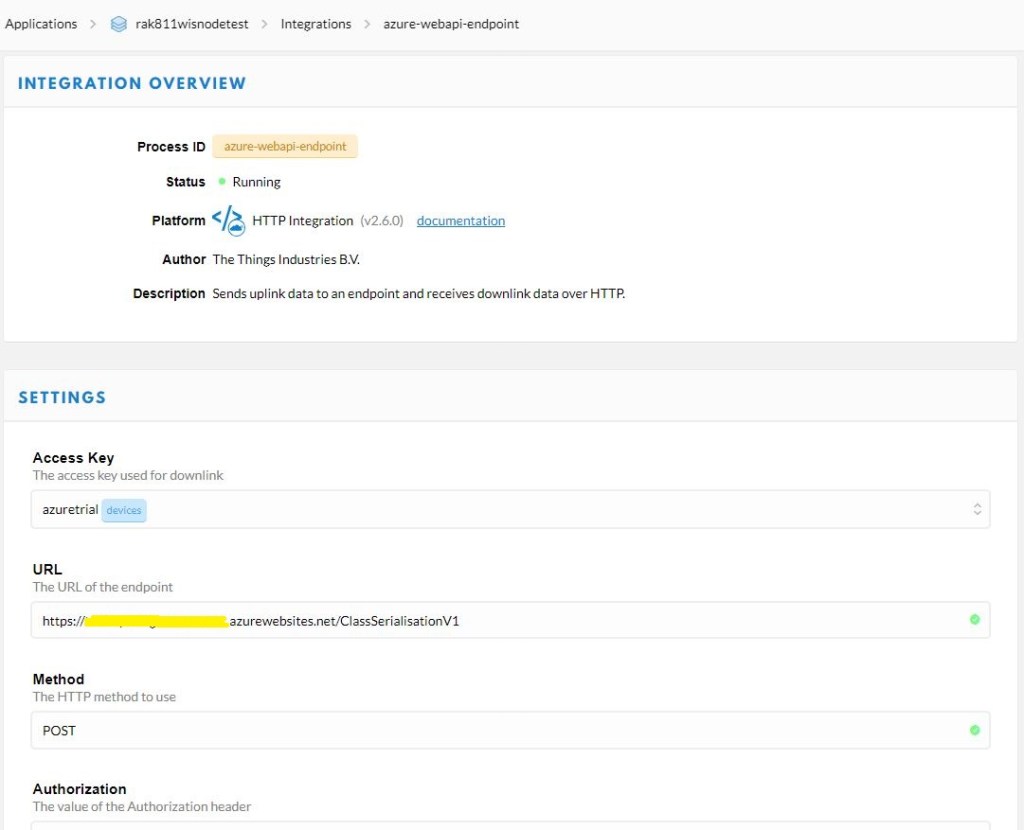
So, I added yet another new to controller to my application to deserialise the body of the POST from the TTN Application Integration.

[Route("[controller]")]
[ApiController]
public class ClassSerialisationV4Fields : ControllerBase
{
   private static readonly ILog log = log4net.LogManager.GetLogger(System.Reflection.MethodBase.GetCurrentMethod().DeclaringType);

   public string Index()
   {
      return "move along nothing to see";
   }

   [HttpPost]
   public IActionResult Post([FromBody] PayloadV4 payload)
   {
      string payloadFieldsUnpacked = string.Empty;
         
      // Check that the post data is good
      if (!this.ModelState.IsValid)
      {
         log.WarnFormat("ClassSerialisationV4Fields validation failed {0}", this.ModelState.Messages());

         return this.BadRequest(this.ModelState);
      }

      JsonElement jsonElement = (JsonElement)payload.payload_fields;
      foreach (var property in jsonElement.EnumerateObject())
      {
         // Special handling for nested properties
         if (property.Name.StartsWith("gps_") || property.Name.StartsWith("accelerometer_") || property.Name.StartsWith("gyrometer_"))
         {
            payloadFieldsUnpacked += $"Property Name:{property.Name}\r\n";
            JsonElement gpsElement = (JsonElement)property.Value;
            foreach (var gpsProperty in gpsElement.EnumerateObject())
            {
               payloadFieldsUnpacked += $" Property Name:{gpsProperty.Name} Property Value:{gpsProperty.Value}\r\n";
            }
         }
         else
         {
            payloadFieldsUnpacked += $"Property Name:{property.Name} Property Value:{property.Value}\r\n";
         }
      }

      log.Info(payloadFieldsUnpacked);

      return this.Ok();
   }
}

In the body of the events in Azure Application Insights I could see messages and the format looked fine for simple payloads

Property Name:analog_in_1 Property Value:0.5
Property Name:digital_in_1 Property Value:1
Property Name:gps_1
 Property Name:altitude Property Value:755
 Property Name:latitude Property Value:4.34
 Property Name:longitude Property Value:40.22
Property Name:luminosity_1 Property Value:100
Property Name:temperature_1 Property Value:27.2

Then with payloads with lots of nested fields.

Property Name:accelerometer_0
 Property Name:x Property Value:0
 Property Name:y Property Value:0
 Property Name:z Property Value:1
Property Name:gps_1
 Property Name:alt Property Value:6.19
 Property Name:lat Property Value:-43.5309
 Property Name:lon Property Value:172.6371
Property Name:gyrometer_1
 Property Name:x Property Value:0
 Property Name:y Property Value:0
 Property Name:z Property Value:0

To make it faster to debug the unpacking of messages I built another “nasty” console application.

class Program
{
   static void Main(string[] args)
   {
      try
      {
         using (StreamReader r = new StreamReader(args[0]))
         {
            Payload payload = JsonConvert.DeserializeObject<Payload>(File.ReadAllText(args[0]));

            JObject payloadFields = (JObject)payload.payload_fields;

            foreach (JProperty child in payloadFields.Children())
            {
               EnumerateChildren(0, child);
            }
         }
      }
      catch (Exception ex)
      {
         Console.WriteLine(ex.Message);
      }

      Console.WriteLine();
      Console.WriteLine("Press <enter> to exit");

      Console.ReadLine();
   }

   static void EnumerateChildren(int indent, JToken token)
   {
      string prepend = string.Empty.PadLeft(indent);

      if (token is JProperty)
         if (token.First is JValue)
         {
            JProperty property = (JProperty)token;
            Console.WriteLine($"{prepend} Name:{property.Name} Value:{property.Value}");
         }
         else
         {
            JProperty property = (JProperty)token;
            Console.WriteLine($"{prepend}Name:{property.Name}");
            indent = indent + 3;
         }

      foreach (JToken token2 in token.Children())
      {
         EnumerateChildren(indent, token2);
      }
   }
}

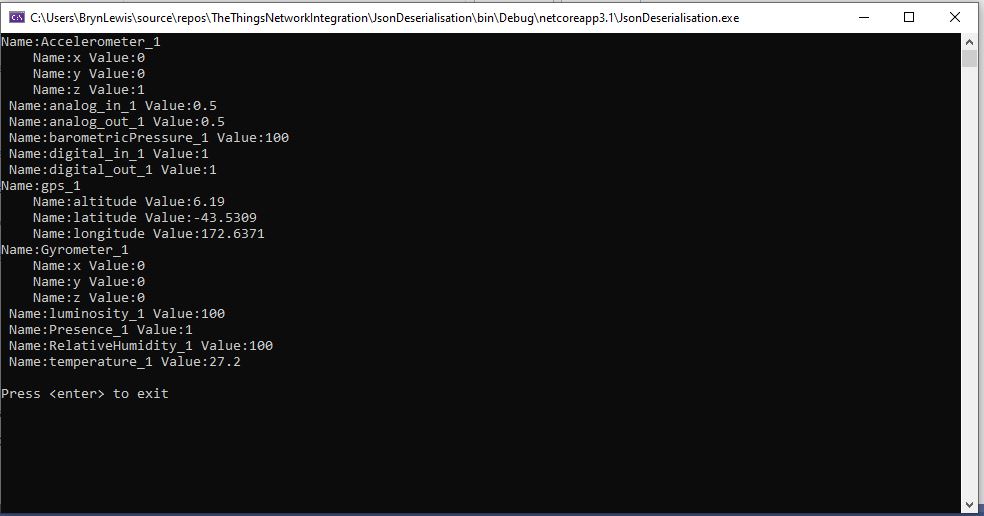
The application displayed the structure of the object nicely indented so it was easier to visualise.

JSON Deserialisation test harness

This application was largely re-written as part of the next post as a result of a System.Text.Json limitation.

The Things Network HTTP Integration Part3

When Serialisation goes bad- payload_fields

This is the third in a series of posts about building an HTTP Integration for a The Things Network(TTN) application.

In part 1 & part 2 I had been ignoring the payload_fields property of the Payload class. The documentation indicates that payload_fields property is populated when an uplink message is Decoded.

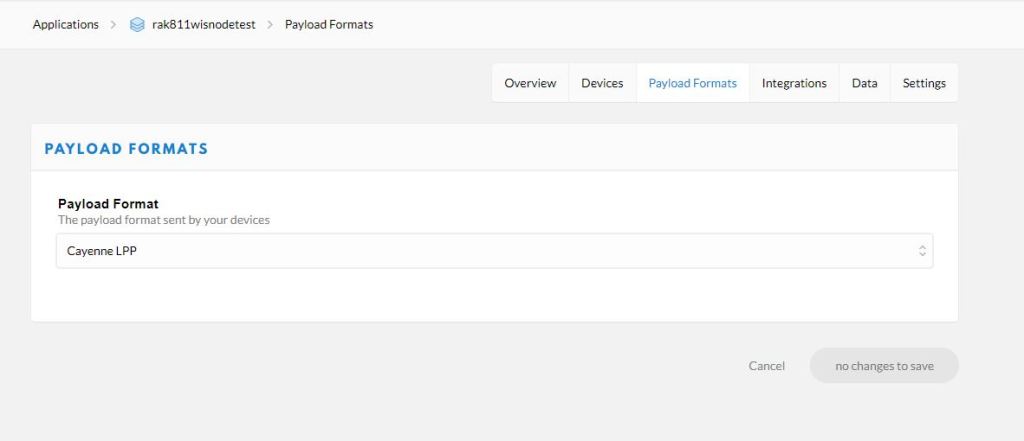
There is a built in decoder for Low Power Payload(LPP) which looked like the simplest option to start with.

TTN Application integration payload decoder selection

I modified the Seeeduino LoRaWAN Over The Air Activation(OTAA) sample application and added the LPP library from Electronic Cats.

#include <LoRaWan.h>

LPP lpp(64);
char buffer[256];

void setup(void)
{
    SerialUSB.begin(9600);
    while(!SerialUSB);

    lora.init();

    memset(buffer, 0, 256);
    lora.getVersion(buffer, 256, 1);
    SerialUSB.print("Ver:");
    SerialUSB.print(buffer); 
 
    memset(buffer, 0, 256);
    lora.getId(buffer, 256, 1);
    SerialUSB.print("ID:");
    SerialUSB.println(buffer);

    lora.setKey(NULL, NULL, "12345678901234567890123456789012");
    lora.setId(NULL, "1234567890123456", "1234567890123456");

    lora.setPort(10);
        
    lora.setDeciveMode(LWOTAA);
    lora.setDataRate(DR0, AS923);

    lora.setDutyCycle(false);
    lora.setJoinDutyCycle(false);
 
    lora.setPower(14);

    while(!lora.setOTAAJoin(JOIN, 10));
}
 
void loop(void)
{   
    bool result = false;

    lpp.reset ();

    // Original LPPv1 data types only these work
    //
    lpp.addAnalogInput( 0, 0.01234) ;
    lpp.addAnalogOutput( 0, 0.56789);
    lpp.addDigitalInput(0, false);    
    lpp.addDigitalInput(1, true);    
    
    lpp.addGPS (1, -43.5309, 172.6371, 6.192);
    lpp.addAccelerometer(0, 0.0, 0.0, 1.0);
    lpp.addGyrometer(1, 0.0,0.0,0.0);
    
    lpp.addLuminosity(0, 0);    // Pitch black
    lpp.addLuminosity(1, 8000); // 40w fluro   
    lpp.addPresence(0, 0);
    lpp.addPresence(1, 1);

    lpp.addBarometricPressure(0,0.0);
    lpp.addBarometricPressure(0,1013.25);
    lpp.addRelativeHumidity (0, 50.0);
    lpp.addRelativeHumidity (1, 60.0);
    lpp.addTemperature (0, -273.00);
    lpp.addTemperature (1, 0.0);
    lpp.addTemperature (2, 100.0);

    // Additional data types don't think any of these worked
    //lpp.addUnixTime(1, millis()); 
    //lpp.addGenericSensor(1, 1.23456);
    //lpp.addVoltage(1, 4.5);
    //lpp.addCurrent(0, 1.0);
    //lpp.addFrequency (1, 50); 
    //lpp.addPercentage(1, 50);
    //lpp.addAltitude(1, 20.5);
    //lpp.addPower(1, 1500);
    //lpp.addDistance(1, 120.0);
    //lpp.addEnergy(1, 2.345);
    //lpp.addDirection(1, -98.76);
    //lpp.addSwitch(0, 1);
    //lpp.addConcentration(0, 10);
    //lpp.addColour(1, 255, 255, 255);

    uint8_t *lppBuffer = lpp.getBuffer();
    uint8_t lppLen = lpp.getSize();

    SerialUSB.print("Length is: ");
    SerialUSB.println(lppLen);

    // Dump buffer content for debugging
    PrintHexBuffer (lppBuffer, lppLen);    

    //result = lora.transferPacket("Hello World!", 10);
    result = lora.transferPacket(lppBuffer, lppLen);

    if(result)
    {
        short length;
        short rssi;
 
        memset(buffer, 0, sizeof(buffer));
        length = lora.receivePacket(buffer, 256, &rssi);
 
        if(length)
        {
            SerialUSB.print("Length is: ");
            SerialUSB.println(length);
            SerialUSB.print("RSSI is: ");
            SerialUSB.println(rssi);
            SerialUSB.print("Data is: ");
            for(unsigned char i = 0; i < length; i ++)
            {
                SerialUSB.print("0x");
                SerialUSB.print(buffer[i], HEX);
                SerialUSB.print(" ");
            }
            SerialUSB.println();
        }
    }
    delay( 30000);
}

void PrintHexBuffer( uint8_t *buffer, uint8_t size )
{

    for( uint8_t i = 0; i < size; i++ )
    {
        if(buffer[i] < 0x10)
        {
            Serial.print('0');
        }
        SerialUSB.print( buffer[i], HEX );
        Serial.print(" ");
    }
    SerialUSB.println( );
}

I then copied and saved to files the payloads from the Azure Application Insights events generated when an uplink messages were processed.

{
   "app_id": "rak811wisnodetest",
   "dev_id": "seeeduinolorawan4",
   "hardware_serial": "1234567890123456",
   "port": 10,
   "counter": 1,
   "is_retry": true,
   "payload_raw": "AWcBEAFlAGQBAAEBAgAyAYgAqYgGIxgBJuw=",
   "payload_fields": {
      "analog_in_1": 0.5,
      "digital_in_1": 1,
      "gps_1": {
         "altitude": 755,
         "latitude": 4.34,
         "longitude": 40.22
      },
      "luminosity_1": 100,
      "temperature_1": 27.2
   },
   "metadata": {
      "time": "2020-08-28T10:41:04.496594225Z",
      "frequency": 923.4,
      "modulation": "LORA",
      "data_rate": "SF12BW125",
      "coding_rate": "4/5",
      "gateways": [
         {
            "gtw_id": "eui-b827ebfffe6c279d",
            "timestamp": 3971612260,
            "time": "2020-08-28T10:41:03.313471Z",
            "channel": 1,
            "rssi": -53,
            "snr": 11.2,
            "rf_chain": 0,
            "latitude": -43.49885,
            "longitude": 172.60095,
            "altitude": 25
         }
      ]
   },
   "downlink_url": "https://integrations.thethingsnetwork.org/ttn-eu/api/v2/down/rak811wisnodetest/azure-webapi-endpoint?key=ttn-account-v2.12345678901234567_12345_1234567-dduo"
}

I used JSON2Csharp to generate C# classes which would deserialise the above uplink message.

// Third version of classes for unpacking HTTP payload 
public class Gps1V3
{
   public int altitude { get; set; }
   public double latitude { get; set; }
   public double longitude { get; set; }
}

public class PayloadFieldsV3
{
   public double analog_in_1 { get; set; }
   public int digital_in_1 { get; set; }
   public Gps1V3 gps_1 { get; set; }
   public int luminosity_1 { get; set; }
   public double temperature_1 { get; set; }
}

public class GatewayV3 
{
   public string gtw_id { get; set; }
   public ulong timestamp { get; set; }
   public DateTime time { get; set; }
   public int channel { get; set; }
   public int rssi { get; set; }
   public double snr { get; set; }
   public int rf_chain { get; set; }
   public double latitude { get; set; }
   public double longitude { get; set; }
   public int altitude { get; set; }
}

public class MetadataV3
{
   public string time { get; set; }
   public double frequency { get; set; }
   public string modulation { get; set; }
   public string data_rate { get; set; }
   public string coding_rate { get; set; }
   public List<GatewayV3> gateways { get; set; }
}

public class PayloadV3
{
   public string app_id { get; set; }
   public string dev_id { get; set; }
   public string hardware_serial { get; set; }
   public int port { get; set; }
   public int counter { get; set; }
   public bool is_retry { get; set; }
   public string payload_raw { get; set; }
   public PayloadFieldsV3 payload_fields { get; set; }
   public MetadataV3 metadata { get; set; }
   public string downlink_url { get; set; }
}

I added a new to controller to my application which used the generated classes to deserialise the body of the POST from the TTN Application Integration.

[Route("[controller]")]
[ApiController]
public class ClassSerialisationV3Fields : ControllerBase
{
   private static readonly ILog log = log4net.LogManager.GetLogger(System.Reflection.MethodBase.GetCurrentMethod().DeclaringType);

   public string Index()
   {
      return "move along nothing to see";
   }

   [HttpPost]
   public IActionResult Post([FromBody] PayloadV3 payload)
   {
      // Check that the post data is good
      if (!this.ModelState.IsValid)
      {
         log.WarnFormat("ClassSerialisationV3Fields validation failed {0}", this.ModelState.Messages());

         return this.BadRequest(this.ModelState);
      }

      log.Info($"DevEUI:{payload.hardware_serial} Payload Base64:{payload.payload_raw} analog_in_1:{payload.payload_fields.analog_in_1} digital_in_1:{payload.payload_fields.digital_in_1} gps_1:{payload.payload_fields.gps_1.latitude},{payload.payload_fields.gps_1.longitude},{payload.payload_fields.gps_1.altitude} luminosity_1:{payload.payload_fields.luminosity_1} temperature_1:{payload.payload_fields.temperature_1}");

      return this.Ok();
   }
}

I then updated the TTN application integration to send messages to my new endpoint. In the body of the Application Insights events I could see the devEUI, port, and the payload fields had been extracted from the message.

DevEUI:1234567890123456 Payload Base64:AWcBEAFlAGQBAAEBAgAyAYgAqYgGIxgBJuw= analog_in_1:0.5 digital_in_1:1 gps_1:4.34,40.22,755 luminosity_1:100 temperature_1:27.2

This arrangement was pretty nasty and sort of worked but in the “real world” would not have been viable. I would need to generate lots of custom classes for each application taking into account the channel numbers (e,g, analog_in_1,analog_in_2) and datatypes used.

I also explored which datatypes were supported by the TTN decoder, after some experimentation (Aug 2019) it looks like only the LPPV1 ones are.

  • AnalogInput
  • AnalogOutput
  • DigitalInput
  • DigitalOutput
  • GPS
  • Accelerometer
  • Gyrometer
  • Luminosity
  • Presence
  • BarometricPressure
  • RelativeHumidity
  • Temperature

What I need is a more flexible way to stored and decode payload_fields property..

The Things Network HTTP Integration Part2

Basic JSON Deserialisation

This is the second in a series of posts about building an HTTP Integration for a The Things Network(TTN) application.

I used JSON2Csharp and a payload I downloaded in Part 1 to generate C# classes which would deserialise my minimalist messages.

// First version of classes for unpacking HTTP payload https://json2csharp.com/
public class GatewayV1
{
   public string gtw_id { get; set; }
   public int timestamp { get; set; }
   public DateTime time { get; set; }
   public int channel { get; set; }
   public int rssi { get; set; }
   public double snr { get; set; }
   public int rf_chain { get; set; }
   public double latitude { get; set; }
   public double longitude { get; set; }
   public int altitude { get; set; }
}

public class MetadataV1
{
   public string time { get; set; }
   public double frequency { get; set; }
   public string modulation { get; set; }
   public string data_rate { get; set; }
   public string coding_rate { get; set; }
   public List<GatewayV1> gateways { get; set; }
}

public class PayloadV1
{
   public string app_id { get; set; }
   public string dev_id { get; set; }
   public string hardware_serial { get; set; }
   public int port { get; set; }
   public int counter { get; set; }
   public bool confirmed { get; set; }
   public string payload_raw { get; set; }
   public MetadataV1 metadata { get; set; }
   public string downlink_url { get; set; }
}

I added a new to controller to my application which used the generated classes to deserialise the body of the POST from the TTN Application Integration.

[Route("[controller]")]
[ApiController]
public class ClassSerialisationV1 : ControllerBase
{
   private static readonly ILog log = log4net.LogManager.GetLogger(System.Reflection.MethodBase.GetCurrentMethod().DeclaringType);

   public string Index()
   {
      return "move along nothing to see";
   }

   [HttpPost]
   public IActionResult Post([FromBody] PayloadV1 payload)
   {
      // Check that the post data is good
      if (!this.ModelState.IsValid)
      {
         log.WarnFormat("ClassSerialisationV1 validation failed {0}", this.ModelState.Messages());

         return this.BadRequest(this.ModelState);
      }
      log.Info($"DevEUI:{payload.hardware_serial} Payload Base64:{payload.payload_raw}");

      return this.Ok();
   }
}

I then updated the TTN application integration to send messages to my new endpoint.

TTN Application configuration overview

In the body of the Application Insights events I could see the devEUI, port, and the raw payload had been extracted from the message.

DevEUI:1234567890123456 Port:1 Payload Base64:VGlueUNMUiBMb1JhV0FO

I then added another controller which decoded the Base64 encoded payload_raw.

[Route("[controller]")]
[ApiController]
public class ClassSerialisationV2Base64Decoded : ControllerBase
{
   private static readonly ILog log = log4net.LogManager.GetLogger(System.Reflection.MethodBase.GetCurrentMethod().DeclaringType);

   public string Index()
   {
      return "move along nothing to see";
   }

   [HttpPost]
   public IActionResult Post([FromBody] PayloadV2 payload)
   {
      // Check that the post data is good
      if (!this.ModelState.IsValid)
      {
         log.WarnFormat("ClassSerialisationV2BCDDecoded validation failed {0}", this.ModelState.Messages());

         return this.BadRequest(this.ModelState);
      }

      log.Info($"DevEUI:{payload.hardware_serial} Port:{payload.port} Payload:{ Encoding.UTF8.GetString(Convert.FromBase64String(payload.payload_raw))}");

      return this.Ok();
   }
}
DevEUI:1234567890123456 Port:1 Payload:TinyCLR LoRaWAN

Then after a while the deserialisation started to fail with an HTTP 400-Bad request. When I ran the same request with Telerik Fiddler on my desktop the raw response was

HTTP/1.1 400 Bad Request
Transfer-Encoding: chunked
Content-Type: application/problem+json; charset=utf-8
Server: Microsoft-IIS/10.0
Request-Context: appId=cid-v1:f4f72f2e-1144-4578-923f-d3ebdcfb7766
X-Powered-By: ASP.NET
Date: Mon, 31 Aug 2020 09:07:30 GMT

17a
{"type":"https://tools.ietf.org/html/rfc7231#section-6.5.1",
"title":"One or more validation errors occurred.",
"status":400,
"traceId":"00-45033ec030b63d4ebb82b95b67cb8142-9fc52a18be202848-00",
"errors":{
"$.metadata.gateways[0].timestamp":["The JSON value could not be converted to System.Int32. 
Path: $.metadata.gateways[0].timestamp | LineNumber: 21 | BytePositionInLine: 35."]}}
0

The line in the payload was the gateway timestamp. The value was 2,426,973,100 which larger than 2,147,483,647 the maximum number that can be stored in a signed 32 bit integer. The JSON2CSharp generator had made a reasonable choice of datatype but in this case the range was not sufficient.

public class GatewayV2 
{
   public string gtw_id { get; set; }
   public ulong timestamp { get; set; }
   public DateTime time { get; set; }
   public int channel { get; set; }
   public int rssi { get; set; }
   public double snr { get; set; }
   public int rf_chain { get; set; }
   public double latitude { get; set; }
   public double longitude { get; set; }
   public int altitude { get; set; }
}

I checked the TTN code where the variable was declared as an unsigned 64 bit integer.

This issue could occur for other variables so I need to manually check all the generated classes.

The Things Network HTTP Integration Part1

Infrastructure and payloads

This is the first in a series of posts about building an HTTP Integration for a The Things Network(TTN) application. I have assumed that readers are familiar with the configuration and operation of a TTN instance so I’m not going to cover that in detail.

I’m using a Seeeduino LoRaWAN device as a client so I configured the sample Over the Air Activation(OTAA) application to connect to my local RAK7246 Developer gateway.

#include <LoRaWan.h>

unsigned char data[] = {0x53, 0x65, 0x65, 0x65, 0x64, 0x75, 0x69, 0x6E, 0x6F, 0x20, 0x4C, 0x6F, 0x52, 0x61, 0x57, 0x41, 0x4E};
char buffer[256];

void setup(void)
{
  SerialUSB.begin(9600);
  while (!SerialUSB);

  lora.init();

  memset(buffer, 0, 256);
  lora.getVersion(buffer, 256, 1);
  SerialUSB.print("Ver:");
  SerialUSB.print(buffer);

  memset(buffer, 0, 256);
  lora.getId(buffer, 256, 1);
  SerialUSB.print(buffer);
  SerialUSB.print("ID:");

  lora.setKey(NULL, NULL, "12345678901234567890123456789012");
  lora.setId(NULL, "1234567890123456", "1234567890123456");

  lora.setPort(10);

  lora.setDeciveMode(LWOTAA);
  lora.setDataRate(DR0, AS923);

  lora.setDutyCycle(false);
  lora.setJoinDutyCycle(false);

  lora.setPower(14);


  while (!lora.setOTAAJoin(JOIN, 10))
  {
    SerialUSB.println("");
  }
    SerialUSB.println( "Joined");
}

void loop(void)
{
  bool result = false;

  //result = lora.transferPacket("Hello World!", 10);
  result = lora.transferPacket(data, sizeof(data));

  if (result)
  {
    short length;
    short rssi;

    memset(buffer, 0, 256);
    length = lora.receivePacket(buffer, 256, &rssi);

    if (length)
    {
      SerialUSB.print("Length is: ");
      SerialUSB.println(length);
      SerialUSB.print("RSSI is: ");
      SerialUSB.println(rssi);
      SerialUSB.print("Data is: ");
      for (unsigned char i = 0; i < length; i ++)
      {
        SerialUSB.print("0x");
        SerialUSB.print(buffer[i], HEX);
        SerialUSB.print(" ");
      }
      SerialUSB.println();
    }
  }
  delay( 10000);
}

The SetKey and SetId parameters are not obvious and it would be much easier if there were two methods one for OTTA and the other for Activation by-Personalization(ABP).
I then built an Net Core 3.1 Web API application which had a single controller to receive messages from TTN.

[Route("[controller]")]
[ApiController]
public class Raw : ControllerBase
{
   private static readonly ILog log = log4net.LogManager.GetLogger(System.Reflection.MethodBase.GetCurrentMethod().DeclaringType);

   [HttpGet]
   public string Index()
   {
      return "move along nothing to see";
   }

   [HttpPost]
   public void PostRaw([FromBody]JsonElement body)
   {
      string json = JsonSerializer.Serialize(body);

      log.Info(json);
   }
}

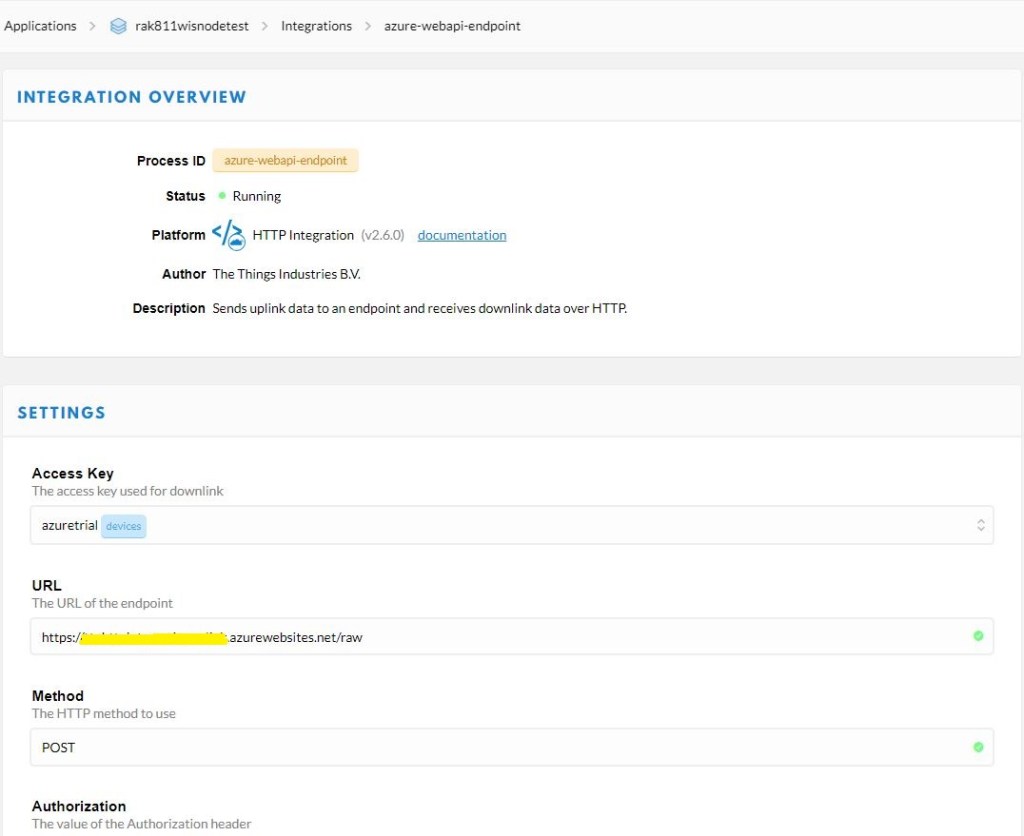
I then configured my TTN application integration to send messages to my shinny new endpoint

TTN Application configuration overview

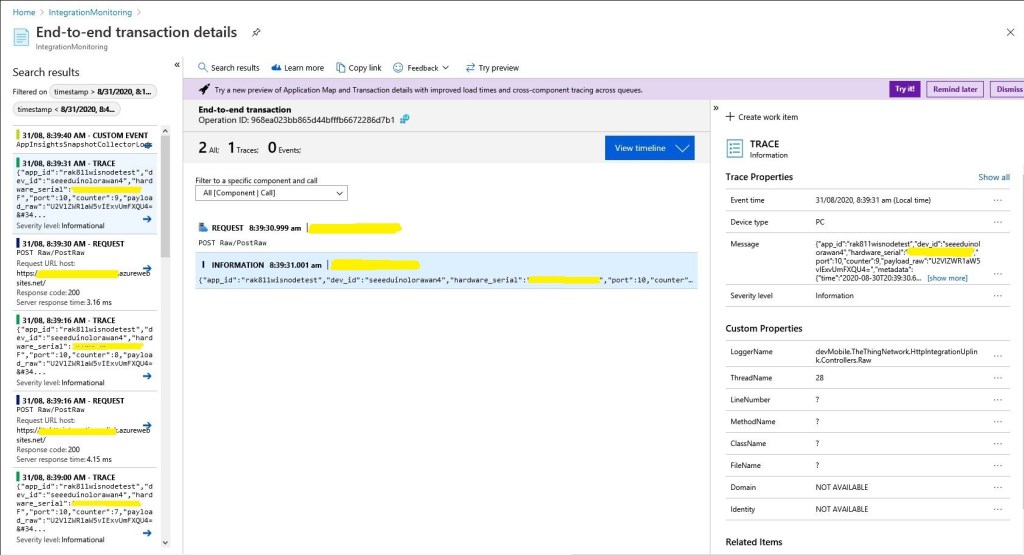
My controller logged events to Azure application Insights so I could see if there were any errors and inspect message payloads. The TTN developers provide sample payloads to illustrate the message format but they were a bit chunky for my initial testing.

Application Insights event list

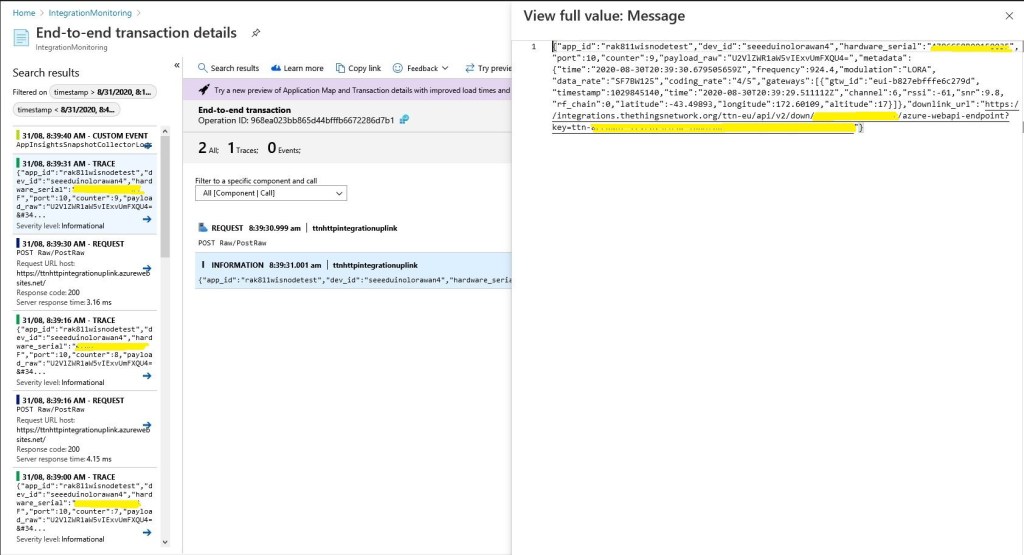
I could then inspect individual events and payloads

Application Insights event display

At this point I could download message payloads and save them locally.

{
   "app_id": "rak811wisnodetest",
   "dev_id": "rak811wisnode1",
   "hardware_serial": "1234567890123456",
   "port": 1,
   "counter": 2,
   "confirmed": true,
   "payload_raw": "VGlueUNMUiBMb1JhV0FO",
   "metadata": {
      "time": "2020-08-26T00:50:36.182774822Z",
      "frequency": 924.2,
      "modulation": "LORA",
      "data_rate": "SF7BW125",
      "coding_rate": "4/5",
      "gateways": [
         {
            "gtw_id": "eui-b827ebfffe6c279d",
            "timestamp": 1584148244,
            "time": "2020-08-26T00:50:35.012774Z",
            "channel": 5,
            "rssi": -63,
            "snr": 9.2,
            "rf_chain": 0,
            "latitude": -43.49889,
            "longitude": 172.60104,
            "altitude": 16
         }
      ]
   },
   "downlink_url": "https://integrations.thethingsnetwork.org/ttn-eu/api/v2/down/rak811wisnodetest/azure-webapi-endpoint?key=ttn-account-v2.12345678901234567_12345_1234567-dduo"

}

These were useful because I could then use a tool like Telerik Fiddler to submit messages to my application when it was running locally in the Visual Studio 2019 debugger.