Mistral Vibe Code Generated Mistral Chat Completion API Client

For this series of posts, I asked GitHub Copilot, Anthropic Claude Code, and Mistral Vibe Code to generate a Mistral Chat Completion client using the same prompt….

Generate C# DTOs and a ChatCompletionClient for https://docs.mistral.ai/api/endpoint/chat. The ChatCompletionClient should
use HttpClientFactory with resilience and should have async methods where suitable. The DTOs should be split up into files
for shared, buffered, and streaming.

Generate a console application which uses ChatCompletionClient

Then I took the initial implementation and prompted GitHub Copilot, Anthropic Claude Code, and Mistral Vibe Code to review them. The aim was to see how each tool thinks, what they prioritise, and then how their feedback differs when given identical code.

TL;DR – the code was fine.

Github Copilot

Overall the library is well-structured, cleanly documented, and follows familiar patterns (Options, IHttpClientFactory, Polly).

Anthropic Claude

The client is a small, focused wrapper around POST /v1/chat/completions, supporting both a buffered call (CompleteAsync) and an SSE streaming call (StreamAsync). Overall design is clean: immutable JsonSerializerOptions, an immutable record request type mutated via with, DI registration through IHttpClientFactory with a resilience pipeline, and polymorphic DTOs for messages/content/tools that mirror the Mistral (OpenAI-compatible) wire format. No correctness-blocking bugs were found; findings below are mostly design nits and a few things worth double-checking against real API behavior.

Mistral Vibe Code

Overall Rating: ⭐⭐⭐⭐☆ (4.2/5) – Production Ready with Minor Improvements

Github Copilot Review

:question:

Review MistralAI.Client.Copilot – ChatCompletionClient.cs and DTOs

GitHub Copilot

  1. Read ChatCompletionClient.cs, lines 165-514 :white_check_mark:
  2. Code search found relevant results :white_check_mark:
  3. Read ChatCompletionClient.cs, lines 294-514 :white_check_mark:
  4. Read BufferedDto.cs, lines 1-220 :white_check_mark:
  5. Read SharedDto.cs, lines 1-305 :white_check_mark:
  6. Read StreamingDto.cs, lines 1-420 :white_check_mark:

Code Review – ChatCompletionClient & DTOs

Overall the library is well-structured, cleanly documented, and follows familiar patterns (Options, IHttpClientFactory, Polly). Below are the concrete issues and improvements I’d action, roughly ordered by impact.

🔴 Correctness / bugs

  1. Streaming isn’t actually streaming. In StreamCompletionAsync you call _httpClient.PostAsync(...), which buffers the whole response before returning. You must pass HttpCompletionOption.ResponseHeadersRead, otherwise every “streamed” token arrives at once (and the retry policy will hold the full body in memory).
using var req = new HttpRequestMessage(HttpMethod.Post, requestUri) { Content = requestContent };
response = await _retryPolicy.ExecuteAsync(ct =>
    _httpClient.SendAsync(req, HttpCompletionOption.ResponseHeadersRead, ct), cancellationToken);
  1. Retry policy + single StringContent is broken. StringContent is disposed once sent, so any retry after the first attempt POSTs an empty/disposed body. The HttpRequestMessage/content must be re-created inside the ExecuteAsync delegate (or use HttpClientHandler-level Polly via AddPolicyHandler, which handles this).

  2. IDisposable + IHttpClientFactory conflict. The class implements IDisposable and holds _disposed, implying it disposes _httpClient. HttpClients from IHttpClientFactory must not be disposed by the consumer — the factory owns the handler lifetime. Either:

    • drop IDisposable, or
    • dispose only in the HttpClient-injected overload and track ownership with a flag.
  3. Mutating a factory-provided HttpClient in the constructor. Setting Timeout, DefaultRequestHeaders.Authorization, and User-Agent on httpClientFactory.CreateClient() re-configures a shared/named client each time and, worse, appending User-Agent via Add(...) will throw InvalidOperationException on second construction against the same named client. Configure this once through services.AddHttpClient(c => …) and remove it from the ctor.

  4. ReadLineAsync treats SSE as line-oriented text. Real SSE:

    • allows data: (no space) — your Substring(6) is off by one in that case,
    • allows multi-line data: chunks concatenated per event,
    • has comment lines starting with : (heartbeat/keep-alive) that must be ignored,
    • has event:, id:, retry: fields. Consider System.Net.ServerSentEvents.SseParser (built-in) instead of hand-rolling.
  5. Polymorphic streaming events. You deserialize into a single CompletionEvent type, yet StreamingDto.cs defines CompletionEventBase with TextCompletionEvent, ToolCallEvent, … discriminated by type. Without [JsonPolymorphic]/[JsonDerivedType] on the base, the derived data is lost. Either:

    • Add polymorphism attributes on CompletionEventBase and deserialize as the base, or
    • Keep a flat CompletionEvent DTO and drop the base/derived hierarchy — currently you have both, which is confusing.
  6. Fallback path assumes Text exists on CompletionEvent.
    new CompletionEvent { Type = "unknown", Text = line } implies a flat DTO; reconcile with issue #6.

  7. No Retry-After handling on 429. Polly’s WaitAndRetryAsync uses only 2^n. Mistral (like OpenAI) returns Retry-After — honour it.

  8. response.Content.ReadAsStringAsync() / ReadAsStreamAsync() don’t take the cancellationToken. These overloads exist on .NET 8 — pass the token so hanging responses can be cancelled.

  9. HttpClient.Timeout fights with cancellation. With Polly retries + streaming, a global 120 s timeout aborts long streams. Use HttpClient.Timeout = Timeout.InfiniteTimeSpan and enforce per-request timeout via a linked CancellationTokenSource.

🟠 API / design

  1. Massive DTO duplication. ChatCompletionRequest (Buffered) and ChatCompletionStreamRequest (Streaming) are byte-for-byte identical apart from the default of Stream. Introduce a shared base (or single DTO) in DTOs.Shared and delete ~130 lines. The Stream boolean is the only real difference and can be set by the client method.

  2. Stop and ToolChoice typed as object?. These serialize fine but deserialize poorly and lose IntelliSense. Use OneOf<string, List>, a small wrapper type, or JsonElement.

  3. Metadata is Dictionary. Mistral’s schema is Dictionary.

  4. MessageBase.Content is string? only. Mistral supports multimodal content (array of {type, text|image_url} parts) on user messages. Model as object? or OneOf<string, List> to be forward-compatible.

  5. AssistantMessage missing prefix/reasoning/tool_call_id variants. ChatCompletionChoice.Prefix exists but not on the message itself, which is where the API places it for message replay.

  6. GuardrailConfig is an empty placeholder. Either implement it or omit the property so serializers don’t emit "guardrails": [].

  7. ResponseFormat.Schema should be JsonElement/typed to avoid double serialization surprises via object.

  8. MistralAiException — add the three standard Exception ctors ((), (string), (string, Exception)), and consider a strongly typed MistralApiError model (type, message, param, code) parsed from the body instead of the raw string.

  9. Validation. MistralAiOptions.ApiKey defaults to ""; the constructor happily builds a client with no auth. Add IValidateOptions or throw in the ctor.

  10. GetJsonOptions() (not shown) should be cached in a static readonly field — creating JsonSerializerOptions per call is expensive and defeats the internal metadata cache.

  11. CreateRequest / CreateStreamRequest just build DTOs. They add little over new ChatCompletionRequest { … } and inflate the surface area. Consider removing, or make them extension methods.

  12. Second ctor mutates a caller-owned HttpClient. Prefer treating an injected HttpClient as read-only and route auth via HttpRequestMessage.Headers.Authorization on each request.

🟡 Style / minor

  • line.StartsWith("data: ", StringComparison.Ordinal) — add ordinal comparison; ditto for the [DONE] sentinel.
  • Use _httpClient.DefaultRequestHeaders.UserAgent.Add(new ProductInfoHeaderValue("MistralAI.Client", "1.0")) instead of Add("User-Agent", …).
  • Consider sealed on ChatCompletionClient; extension is unlikely and it simplifies IDisposable.
  • MistralAiOptions.EnableStreaming is declared but never used.
  • XML doc for CreateStreamRequest says stream param exists — it doesn’t.
  • Naming: CompletionEvent vs CompletionEventBase vs TextCompletionEvent — pick one convention (drop Base, since it’s abstract).
  • Consider ArgumentNullException.ThrowIfNull(request) (.NET 8 idiom).

Suggested next steps

  1. Fix the streaming/retry correctness issues (#1, #2, #5, #6) — those change behaviour.
  2. Collapse the duplicated request DTOs (#11) — biggest maintenance win.
  3. Move HttpClient configuration into DI registration and drop IDisposable (#3, #4).
  4. Cache JsonSerializerOptions and switch to source-generated serialization if AOT/perf is a goal (#20).

Happy to draft any of these changes — tell me which to tackle first.

The next review was done with Anthropic’s Claude Code

Code Review: MistralAI.Client.CopilotChatCompletionClient.cs & DTOs

Scope: src/Copilot.PoC/MistralAI.Client.Copilot/ Files reviewed:

  • ChatCompletionClient.cs
  • IChatCompletionClient.cs
  • ChatCompletionRequest.cs (request DTOs)
  • ChatCompletionResponse.cs (response DTOs)
  • Streaming/StreamingDTOs.cs
  • MistralClientOptions.cs, MistralServiceCollectionExtensions.cs (for context)

Summary

The client is a small, focused wrapper around POST /v1/chat/completions, supporting both a buffered call (CompleteAsync) and an SSE streaming call (StreamAsync). Overall design is clean: immutable JsonSerializerOptions, an immutable record request type mutated via with, DI registration through IHttpClientFactory with a resilience pipeline, and polymorphic DTOs for messages/content/tools that mirror the Mistral (OpenAI-compatible) wire format. No correctness-blocking bugs were found; findings below are mostly design nits and a few things worth double-checking against real API behavior.


ChatCompletionClient.cs

Strengths

  • JsonOptions is a single static, cached JsonSerializerOptions instance (line 18) — correct, since re-creating JsonSerializerOptions per call is a well-known perf trap with System.Text.Json.
  • CompleteAsync/StreamAsync both null-check request at the boundary (ArgumentNullException.ThrowIfNull), consistent with API-boundary validation.
  • request with { Stream = false/true } cleanly forces the correct value regardless of what the caller set, without mutating the caller’s object.
  • StreamAsync uses HttpCompletionOption.ResponseHeadersRead so the response isn’t buffered before the SSE loop starts — necessary for real streaming.
  • Malformed SSE chunks are swallowed with a comment explaining why (// Skip malformed chunks rather than aborting the whole stream.) — an intentional, documented tradeoff rather than silent-failure-by-accident.
  • EnsureSuccessAsync reads the error body only on failure, and wraps it into HttpRequestException with the status code attached (statusCode: response.StatusCode) — good for callers that pattern-match on StatusCode.

Findings / things to double check

  1. ChatCompletionRequest.Stream is public but always overwritten. The DTO exposes a settable Stream property, documented as "Overridden internally by the client depending on the method called." (ChatCompletionRequest.cs:26). Any value the caller sets is silently discarded by both CompleteAsync and StreamAsync. This isn’t a bug, but it’s a slightly surprising public API — a caller could reasonably expect setting Stream = true and calling CompleteAsync to do something, when it’s actually a no-op. Consider either making the setter internal/removing it from the public request shape, or asserting/ignoring rather than silently stomping it.

  2. Silent chunk-skip on JsonException has no observability hook. StreamAsync (lines 104–113) catches JsonException and continues with no logging or counter. For a PoC this is fine, but if the wire format ever drifts (e.g., a new event type Mistral adds), failures will be invisible — chunks just quietly vanish. Consider at least a ILogger debug-level log if one is easy to thread through, since this is the one place errors are deliberately suppressed rather than propagated.

  3. SSE parsing only recognizes data: lines. The reader loop only reacts to lines starting with data: and otherwise continues (lines 89–92), which correctly skips blank lines and SSE comment/event: lines. This matches Mistral’s OpenAI-compatible SSE format (each event is a single data: {...} line), so it should be fine in practice — just flagging that it assumes single-line JSON payloads per event; a server that ever wrapped a JSON payload across multiple data: lines (some SSE producers do this) would need concatenation logic that isn’t present here.

  4. No cancellation-specific handling. CancellationToken is threaded through correctly (ConfigureAwait(false) + [EnumeratorCancellation]), but there’s no explicit catch/rethrow around OperationCanceledException — that’s actually correct behavior (let it propagate), just noting it was checked.


Request DTOs (ChatCompletionRequest.cs)

Strengths

  • ChatCompletionRequest is a sealed record with required members for Model/Messages, giving compile-time enforcement of the two truly mandatory fields.
  • Polymorphic ChatMessage/ContentPart hierarchies use [JsonPolymorphic] + [JsonDerivedType] correctly keyed off role and type respectively, matching the API’s discriminator fields.
  • MessageContent cleanly models the “string OR array of parts” duality the API allows, with implicit conversions (string, ContentPart[], List) making call sites ergonomic, and a custom JsonConverter handling both read and write shapes.
  • GuardrailConfig.AdditionalProperties via [JsonExtensionData] is a sensible forward-compatibility escape hatch for a field Mistral is likely to extend.

Findings

  1. Naming collision: ToolChoice property vs. ToolChoice static helper class. ChatCompletionRequest.ToolChoice (an object? property, line 41) and the top-level public static class ToolChoice (line 239) share the identifier ToolChoice in the same namespace (Mistral.Client.Shared). This compiles and works — new ChatCompletionRequest { ToolChoice = ToolChoice.Auto } resolves the right-hand side to the static class since object-initializer right-hand expressions aren’t evaluated in the initializer’s member scope — but it’s a readability trap: IntelliSense/go-to-definition on ToolChoice inside that expression can be momentarily ambiguous to a human reader, and a future refactor that moves code around could make this genuinely ambiguous or require global::/qualification. Consider renaming the helper class (e.g. ToolChoiceValues or ToolChoices) to remove the shadow.

  2. ToolChoice property typed as object?. Reasonable given the API accepts either a string enum or an object literal, and the ToolChoice helper class exists specifically to build valid values — but it does mean nothing stops a caller from passing an arbitrary/invalid object that will only fail at the HTTP layer. Given this is a PoC and the alternative (a discriminated-union style type) is meaningfully more code, this looks like an acceptable, deliberate tradeoff rather than an oversight.

  3. MessageContentJsonConverter.Write prefers Text over Parts if both are set. Not reachable through the public implicit-conversion surface (only one of Text/Parts is ever set), but since MessageContent has public init accessors, nothing stops object-initializer code from setting both fields directly, at which point Parts would be silently dropped on serialize. Low risk given current usage patterns, just noting the type doesn’t defensively guard against that state.

  4. Minor: IReadOnlyList has no implicit conversion, only ContentPart[] and List do (lines 122–124). Not a bug — just means a caller holding an IReadOnlyList from elsewhere has to materialize it to one of the two supported types first.


Response DTOs (ChatCompletionResponse.cs)

  • Straightforward, mutable POCOs (get; set;) matching typical System.Text.Json deserialization targets — appropriately different from the request side (which is a record built by the caller) since these are populated by the deserializer, not constructed by consumers.
  • ChatCompletionChoice.Message is typed as AssistantMessage? (line 21), correctly narrowing the polymorphic ChatMessage base to the one concrete type a response choice can actually contain.
  • Choices and other list-typed members default to [] rather than null (e.g., ChatCompletionResponse.cs:12), which avoids null-checks for consumers even before deserialization overwrites them — good defensive default.
  • No SystemFingerprint/LogProbs/similar fields are modeled. If Mistral’s response includes them and callers might want them, they’re currently unreachable (no [JsonExtensionData] catch-all on the response types, unlike GuardrailConfig on the request side). Worth confirming this is an intentional scope decision for the PoC.

Streaming DTOs (Streaming/StreamingDTOs.cs)

  • ChatCompletionChunk/ChatCompletionChoiceChunk/DeltaMessage correctly mirror the non-streaming shapes where structurally identical (UsageInfo, MessageContent, ToolCall are reused rather than duplicated), which is good — no drift risk between streaming/non-streaming content models.
  • The XML doc on DeltaMessage (lines 28–32) correctly documents the aggregation contract callers must implement (accumulate Content, merge ToolCalls by Index) — useful since the client itself provides no aggregation helper, so this is the only place that contract is written down. Worth keeping in sync with any future consumer-side aggregation utility.
  • Minor cosmetic: namespace Mistral.Client.Shared.Streaming; (line 3) has a double space after the namespace keyword. Harmless, but worth a quick formatter pass.

Supporting types (context only)

  • MistralClientOptions / MistralServiceCollectionExtensions: registration wires IChatCompletionClient as a singleton backed by a named HttpClient with Timeout = Timeout.InfiniteTimeSpan and delegates time-boxing to the standard resilience handler (AttemptTimeout 90s, TotalRequestTimeout 5m) — a sensible choice given long-running generations and streaming responses, and the comment explaining why the infinite client timeout is safe here is a good practice (explains a non-obvious decision rather than just stating what the code does).

Overall assessment

No functional bugs found. The code is well-structured for a PoC: immutable request model, cached serializer options, correct streaming/cancellation plumbing, and DTOs that faithfully mirror the API’s polymorphic wire format. The main things worth a follow-up decision are the ToolChoice naming collision (cosmetic but worth a rename) and whether the public, always-overridden Stream property on ChatCompletionRequest is intentional API surface or should be tightened.

The final review was done with Mistral’s Vibe Code

📊 MistralAI.Client.Copilot Code Review

> Project Type: .NET 10.0 Library | Purpose: Mistral AI Chat Completion API Client > Last Reviewed: 2026-07-20 | Reviewed By: Mistral Vibe


📁 Project Structure

MistralAI.Client.Copilot/
├── MistralAI.Client.Copilot.csproj         # Project configuration (net10.0)
├── IChatCompletionClient.cs               # Interface definition
├── ChatCompletionClient.cs                # Main client implementation
├── ChatCompletionRequest.cs               # Request DTOs & Message types
├── ChatCompletionResponse.cs              # Response DTOs
├── MistralClientOptions.cs                # Configuration options
├── MistralServiceCollectionExtensions.cs # DI registration
└── Streaming/
    └── StreamingDTOs.cs                   # Streaming response chunk DTOs

Strengths

1. Clean Architecture

  • Separation of Concerns: Clear separation between interfaces (IChatCompletionClient), implementation (ChatCompletionClient), and DTOs
  • Dependency Injection: Proper use of IHttpClientFactory and DI container extensions
  • Modular Design: Streaming logic isolated in dedicated namespace

2. Modern C# Features

  • Records: Extensive use of record types for immutable DTOs (ChatCompletionRequest, ChatCompletionResponse)
  • Pattern Matching: Effective use in MessageContentJsonConverter.Read()
  • Async Streams: Proper implementation of IAsyncEnumerable for streaming
  • Init-only Properties: Consistent use of init accessors for immutable DTOs
  • File-scoped Namespaces: Clean namespace declarations

3. Robust Error Handling

  • Argument Validation: Uses ArgumentNullException.ThrowIfNull() for public method parameters
  • HTTP Error Handling: EnsureSuccessAsync() provides detailed error messages with status codes and response bodies
  • Streaming Resilience: Gracefully handles malformed JSON chunks in streaming without breaking the entire stream
  • Cancellation Support: Proper CancellationToken propagation throughout async methods

4. API Design

  • Interface-based: Client consumes IChatCompletionClient interface, enabling mocking
  • Flexible Configuration: MistralClientOptions allows custom base URLs and API keys
  • Resilience Pipeline: Built-in retry, circuit breaker, timeout, and rate limiting via AddStandardResilienceHandler

5. JSON Serialization

  • System.Text.Json: Uses modern, high-performance JSON serializer
  • Polymorphic Deserialization: Proper use of [JsonPolymorphic] and [JsonDerivedType] for message role discrimination
  • Custom Converters: MessageContentJsonConverter handles string vs array polymorphism
  • Snake Case Naming: Consistent JSON naming policy matching Mistral API conventions
  • Null Handling: Proper JsonIgnoreCondition.WhenWritingNull configuration

6. Streaming Implementation

  • SSE Parsing: Correctly handles Server-Sent Events format (data: prefix, [DONE] sentinel)
  • Memory Efficient: Uses StreamReader for line-by-line processing
  • Chunk Validation: Skips malformed chunks instead of failing

7. Documentation

  • XML Documentation: Comprehensive XML comments on public APIs
  • Constants for Magic Strings: FinishReason, ToolChoice classes for well-known values

🔍 DTO Analysis

Request DTOs (ChatCompletionRequest.cs)

DTO Purpose Design Quality
ChatCompletionRequest Main request body ✅ Comprehensive, all Mistral API parameters covered
ChatMessage (abstract) Base message type ✅ Polymorphic with role discriminator
SystemMessage, UserMessage, AssistantMessage, ToolMessage Message types ✅ Proper inheritance hierarchy
MessageContent Flexible content (string or parts) ✅ Uses custom converter for polymorphism
ContentPart (abstract) Content part types ✅ Extensible with derived types
TextContentPart, ImageUrlContentPart, etc. Specific content types ✅ Covers all Mistral content types
Tool, FunctionDefinition, ToolCall, FunctionCall Tool integration ✅ Complete tool calling support
ResponseFormat, JsonSchemaSpec Response formatting ✅ JSON schema support
UsageInfo Token usage tracking ✅ Standard structure
GuardrailConfig Guardrail configuration ✅ Extensible with [JsonExtensionData]
Prediction Prediction hints ✅ Simple and effective

Response DTOs

DTO File Design Quality
ChatCompletionResponse ChatCompletionResponse.cs ✅ Matches Mistral API response structure
ChatCompletionChoice ChatCompletionResponse.cs ✅ Includes message and finish reason
ChatCompletionChunk StreamingDTOs.cs ✅ Streaming chunk with usage info
ChatCompletionChoiceChunk StreamingDTOs.cs ✅ Delta-based streaming
DeltaMessage StreamingDTOs.cs ✅ Incremental message content

⚠️ Areas for Improvement

1. Namespace Organization

  • Issue: Inconsistent namespace usage
    • IChatCompletionClient uses Mistral.Client
    • ChatCompletionClient uses Mistral.Client.Shared
    • This creates confusion about which namespace to use
  • 💡 Recommendation: Standardize on Mistral.Client or MistralAI.Client throughout

2. Nullability Annotations

  • ⚠️ Issue: Incomplete nullability annotations
    • Many DTO properties lack ? for nullable reference types
    • Example: ChatCompletionRequest.Model is required string but could benefit from explicit nullability
  • 💡 Recommendation: Add consistent nullability annotations, especially for optional fields

3. Record vs Class Usage

  • ⚠️ Issue: Mixed use of record and class for DTOs
    • ChatCompletionRequest is a record (good for immutability)
    • Message types (SystemMessage, UserMessage) are class with setters
  • 💡 Recommendation: Consider making all DTOs immutable record types for consistency

4. JSON Serialization Edge Cases

  • ⚠️ Issue: MessageContentJsonConverter doesn’t handle all possible JSON scenarios
    • No validation that exactly one of Text or Parts is set
    • Could throw on unexpected JSON structures
  • 💡 Recommendation: Add validation in converter to ensure data integrity

5. Error Handling in Streaming

  • ⚠️ Issue: Silent skipping of malformed chunks
    • Line 111-112: continue on JsonException
    • No logging or telemetry for skipped chunks
  • 💡 Recommendation: Add optional logging/delegate for error handling

6. Configuration Validation

  • ⚠️ Issue: Minimal validation in MistralClientOptions
    • No validation that ApiKey is not empty when provided
    • No validation that BaseAddress ends with trailing slash (as documented)
  • 💡 Recommendation: Add validation in property setters or use validation library

7. HTTP Client Configuration

  • ⚠️ Issue: Hardcoded timeout values in resilience pipeline
    • 90s attempt timeout, 180s sampling duration, 5min total timeout
    • These may not be appropriate for all use cases
  • 💡 Recommendation: Make timeouts configurable via MistralClientOptions

8. Missing Features

  • ⚠️ Missing: No support for custom headers
  • ⚠️ Missing: No retry-after header handling
  • ⚠️ Missing: No built-in rate limit detection

🐛 Potential Bugs

1. JSON Serialization Issue

File: ChatCompletionRequest.cs, Line 137

Parts = JsonSerializer.Deserialize<List>(ref reader, options),

Issue: If deserialization fails, this will throw JsonException which isn’t caught Impact: Could break entire request parsing Fix: Wrap in try-catch similar to streaming logic

2. Content Part Initialization

File: ChatCompletionRequest.cs, Line 137

Parts = JsonSerializer.Deserialize<List>(ref reader, options),

Issue: Creates mutable List but property expects IReadOnlyList Impact: Type mismatch – should use ToList().AsReadOnly() or change property type

3. Usage Info in Streaming

File: StreamingDTOs.cs Issue: UsageInfo appears on terminal chunk, but no validation that it’s only set once Impact: Could lead to incorrect token counting if multiple usage objects received Fix: Document this behavior or add validation


📈 Performance Considerations

Aspect Status Notes
Async/Await ✅ Excellent Proper use throughout
Memory Usage ✅ Good Streaming implementation is memory-efficient
JSON Serialization ✅ Good Uses System.Text.Json
HTTP Client ✅ Good Uses IHttpClientFactory for connection pooling
Object Allocation ⚠️ Minor Could reduce allocations in hot paths

Recommendation: Consider using ArrayPool for buffer management in high-throughput scenarios


🔧 Testing Recommendations

Unit Tests Needed

  1. Happy Path: Normal request/response flow
  2. Error Scenarios: HTTP 4xx/5xx responses
  3. Streaming: Chunk parsing, malformed JSON handling
  4. Serialization: All DTO serialization/deserialization
  5. Edge Cases: Empty messages, null values, boundary conditions
  6. Configuration: Invalid options, missing API key
  7. Resilience: Retry logic, circuit breaker behavior

Integration Tests Needed

  1. Real API Calls: Test against Mistral API (with test API key)
  2. Mock Server: Test with local mock server for controlled scenarios

📝 Code Style & Best Practices

Following .NET Best Practices

Practice Status
Async method naming (Async suffix)
Cancellation token support
IDisposable pattern for resources
Argument validation
Nullable reference types enabled ✅ (but needs more annotations)
Consistent naming conventions
XML documentation

Style Issues

  • ⚠️ Brace Style: Inconsistent – some files use same-line braces, others use new-line
  • ⚠️ Indentation: Mostly consistent (4 spaces), but verify throughout
  • ⚠️ Line Length: Some lines exceed typical 100-120 character limits

🛡️ Security Considerations

Aspect Status Notes
API Key Handling ✅ Good Supports both configured and custom auth headers
HTTPS ✅ Good Defaults to https://api.mistral.ai/
Input Validation ✅ Good Argument null checks
Error Messages ⚠️ Caution Error messages include response body (could expose sensitive data)
Rate Limiting ✅ Good Built-in via resilience pipeline

Recommendation: Consider sanitizing error messages in production to avoid exposing sensitive API response data


🚀 Usage Example

// Configuration
var builder = WebApplication.CreateBuilder(args);

builder.Services.AddMistralChatClient(options =>
{
    options.ApiKey = "your-api-key";
    options.BaseAddress = new Uri("https://api.mistral.ai/");
});

// Usage
var client = serviceProvider.GetRequiredService();

// Non-streaming
var request = new ChatCompletionRequest
{
    Model = "mistral-large",
    Messages = new List
    {
        new UserMessage { Content = "Hello, how are you?" }
    }
};

var response = await client.CompleteAsync(request);

// Streaming
await foreach (var chunk in client.StreamAsync(request))
{
    if (chunk.Choices.FirstOrDefault()?.Delta?.Content is { } content)
    {
        Console.Write(content);
    }
}

📊 Summary & Rating

Category Score Notes
Architecture ⭐⭐⭐⭐⭐ Excellent separation of concerns, DI-friendly
Code Quality ⭐⭐⭐⭐☆ Very good, minor inconsistencies
Error Handling ⭐⭐⭐⭐☆ Robust, could improve logging
Performance ⭐⭐⭐⭐☆ Good, streaming is efficient
Documentation ⭐⭐⭐⭐☆ Good XML docs, could use more examples
Testing ⭐⭐☆☆☆ Needs comprehensive test coverage
Security ⭐⭐⭐⭐☆ Good foundation, watch error messages

Overall Rating: ⭐⭐⭐⭐☆ (4.2/5) – Production Ready with Minor Improvements


Action Items

High Priority

  1. [P1] Fix namespace inconsistency between Mistral.Client and Mistral.Client.Shared
  2. [P1] Fix MessageContentJsonConverter to handle all edge cases properly
  3. [P1] Add validation for MistralClientOptions.ApiKey and BaseAddress

Medium Priority

  1. [P2] Add comprehensive unit tests
  2. [P2] Standardize all DTOs as immutable records
  3. [P2] Make resilience timeouts configurable
  4. [P2] Add nullability annotations to all properties

Low Priority

  1. [P3] Add logging for streaming errors
  2. [P3] Consider adding telemetry support
  3. [P3] Add integration tests with mock server

Review completed using Mistral Vibe | Generated: 2026-07-20

ONNXRuntime.AI-Faster R-CNN C# Sample differences

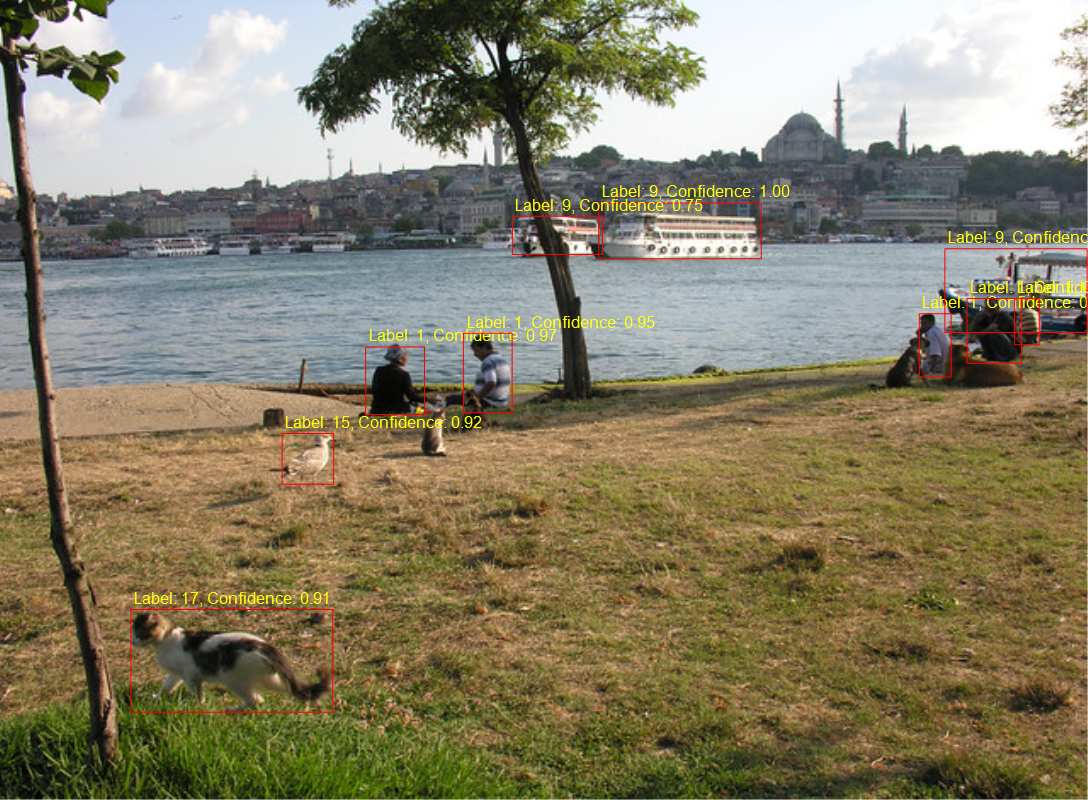
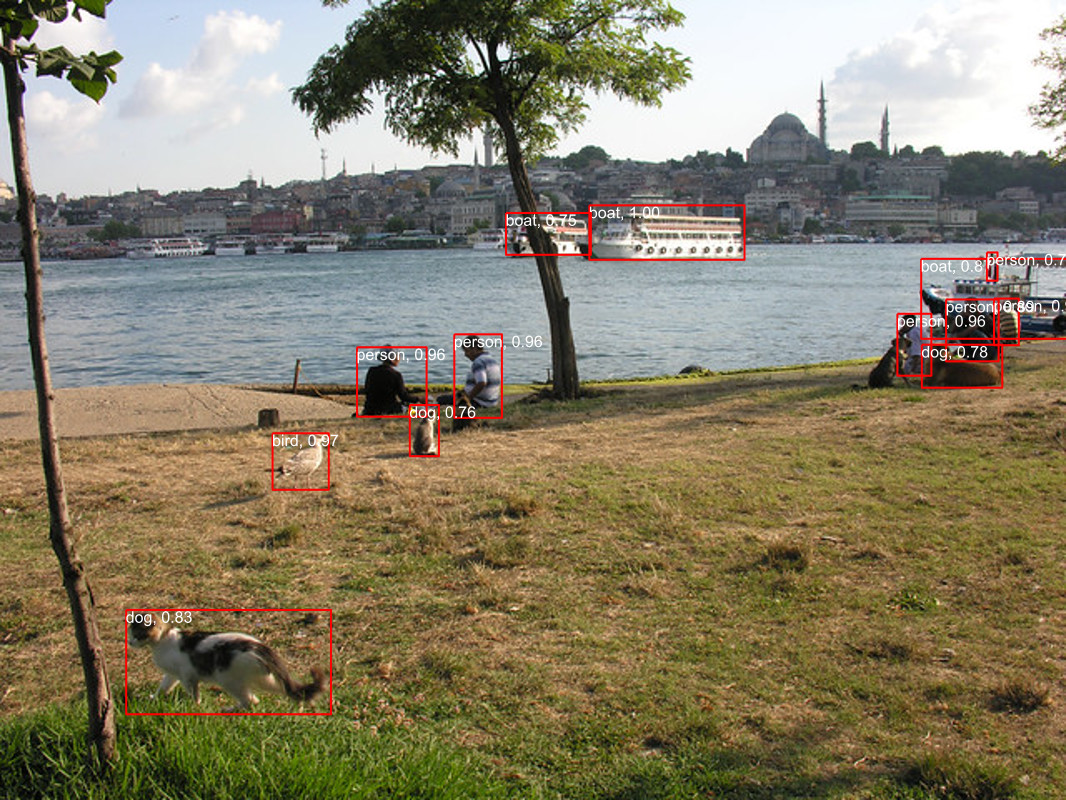
After building Faster R-CCN object detection applications with Copilot and Github Copilot the results when compared with the onnxruntime.ai Object detection with Faster RCNN Deep Learning in C# sample (which hasn’t been updated for years) were slightly different.

The sample image was 640×480 pixels

The FasterRCNNObjectDetectionApplicationGitHubCopilot application scaled image was initially 1056×800 then 1088×800 pixels.

The initial version the dimensions were “rounded down” to the next multiple of 32

// Calculate scale factor to fit within the range while maintaining aspect ratio
float scale = Math.Min((float)maxSize / Math.Max(originalWidth, originalHeight),
                                (float)minSize / Math.Min(originalWidth, originalHeight));

// Calculate new dimensions
int newWidth = (int)(originalWidth * scale);
int newHeight = (int)(originalHeight * scale);

// Ensure dimensions are divisible by 32
newWidth = (newWidth / divisor) * divisor;
newHeight = (newHeight / divisor) * divisor;
Scaled 1056×800

Then for the second version the dimensions were “rounded up” to the next multiple of 32

// Calculate scale factor to fit within the range while maintaining aspect ratio
float scale = Math.Min((float)maxSize / Math.Max(originalWidth, originalHeight),
                                (float)minSize / Math.Min(originalWidth, originalHeight));

// Calculate new dimensions
int newWidth = (int)(originalWidth * scale);
int newHeight = (int)(originalHeight * scale);

// Ensure dimensions are divisible by 32
newWidth = (int)(Math.Ceiling(newWidth / 32f) * 32f);
newHeight = (int)(Math.Ceiling(newHeight / 32f) * 32f);
Scaled 1088×800
Marked up 1088×800

The FasterRCNNObjectDetectionApplicationOriginal application scaled the input image to 1066×800

Scaled image 1066×800

The FasterRCNNObjectDetectionApplicationOriginal application pillar boxed/padded the image to 1088×800 as the DenseTensor was loaded.

using Image<Rgb24> image = Image.Load<Rgb24>(imageFilePath);

Console.WriteLine($"Before x:{image.Width} y:{image.Height}");

// Resize image
float ratio = 800f / Math.Min(image.Width, image.Height);
image.Mutate(x => x.Resize((int)(ratio * image.Width), (int)(ratio * image.Height)));

Console.WriteLine($"After x:{image.Width} y:{image.Height}");

// Preprocess image
var paddedHeight = (int)(Math.Ceiling(image.Height / 32f) * 32f);
var paddedWidth = (int)(Math.Ceiling(image.Width / 32f) * 32f);

Console.WriteLine($"Padded x:{paddedWidth} y:{paddedHeight}");

Tensor<float> input = new DenseTensor<float>(new[] { 3, paddedHeight, paddedWidth });
var mean = new[] { 102.9801f, 115.9465f, 122.7717f };
image.ProcessPixelRows(accessor =>
{
   for (int y = paddedHeight - accessor.Height; y < accessor.Height; y++)
   {
      Span<Rgb24> pixelSpan = accessor.GetRowSpan(y);
      for (int x = paddedWidth - accessor.Width; x < accessor.Width; x++)
      {
         input[0, y, x] = pixelSpan[x].B - mean[0];
         input[1, y, x] = pixelSpan[x].G - mean[1];
         input[2, y, x] = pixelSpan[x].R - mean[2];
      }
   }
});
Marked up image 1066×800

I think the three different implementations of the preprocessing steps and the graphics libraries used probably caused the differences in the results. The way an image is “resized” by System.Graphics.Common vs. ImageSharp(resampled, cropped and centered or padded and pillar boxed) could make a significant difference to the results.

ONNXRuntime.AI-Faster R-CNN C# Sample oddness

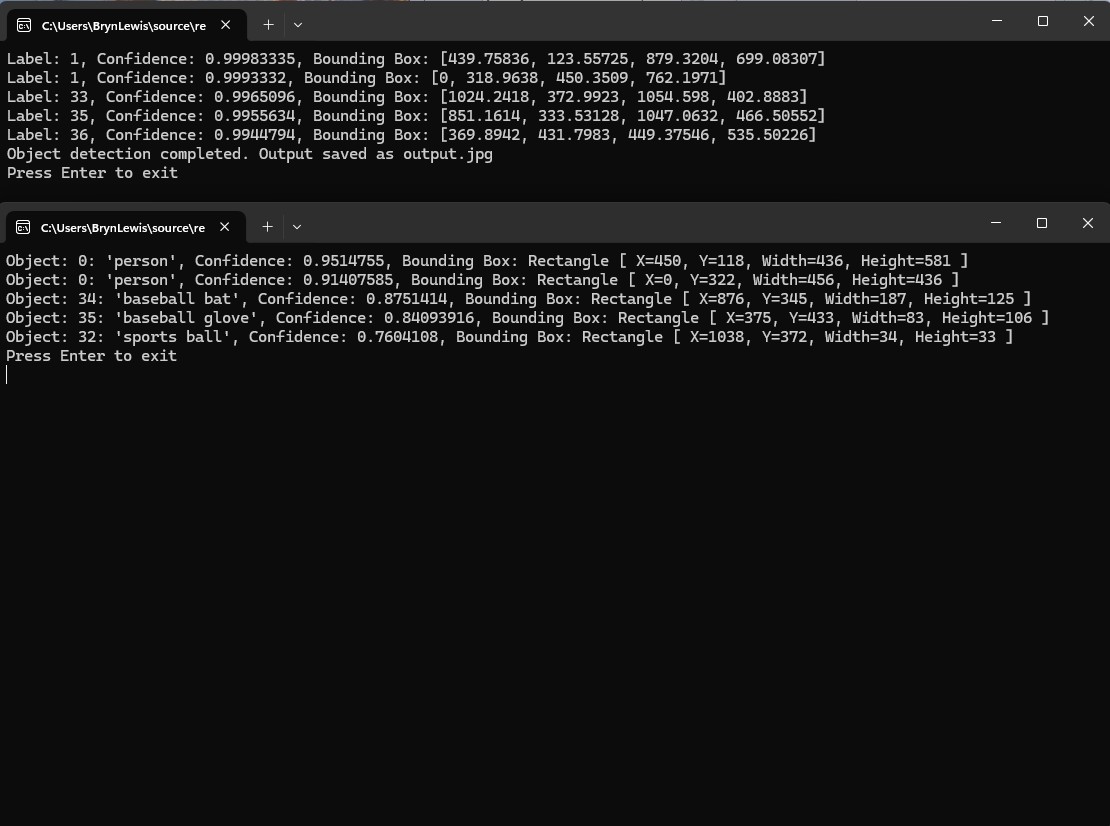
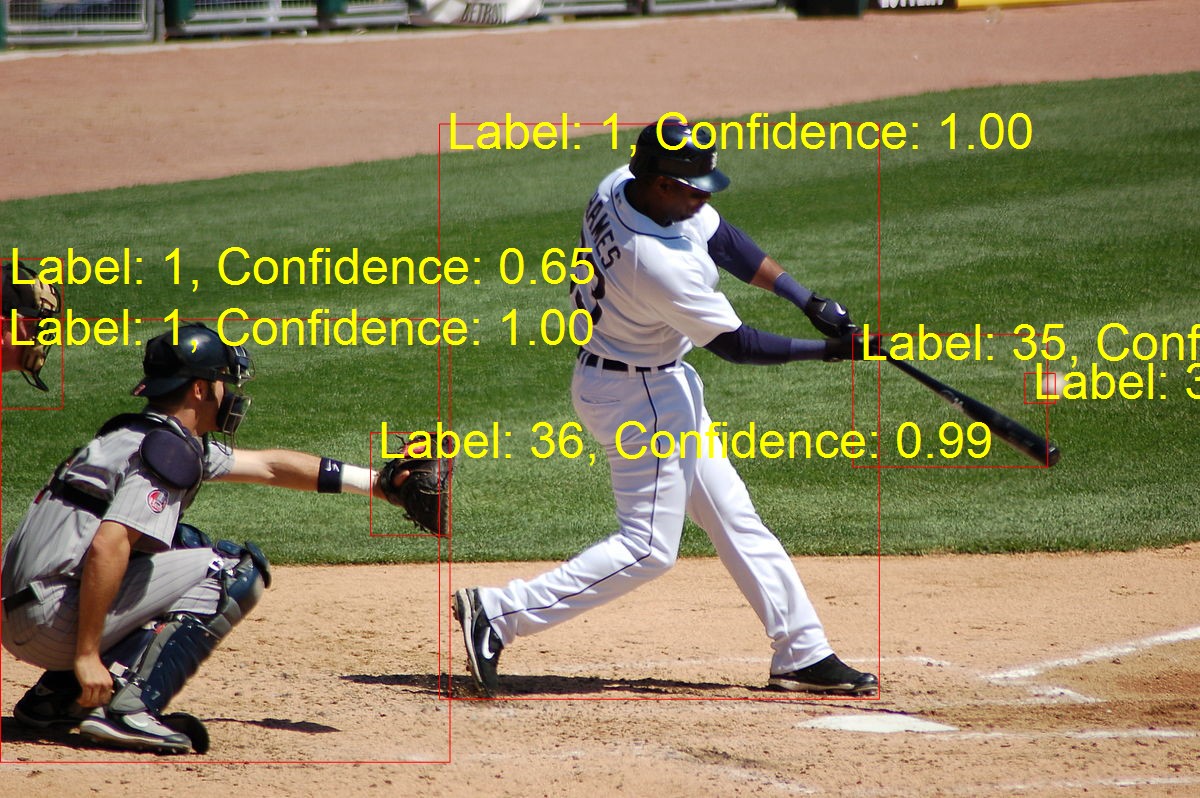
After building Faster R-CCN object detection applications with Copilot and Github Copilot the results when compared with Utralytics Yolo (with YoloSharp) didn’t look too bad.

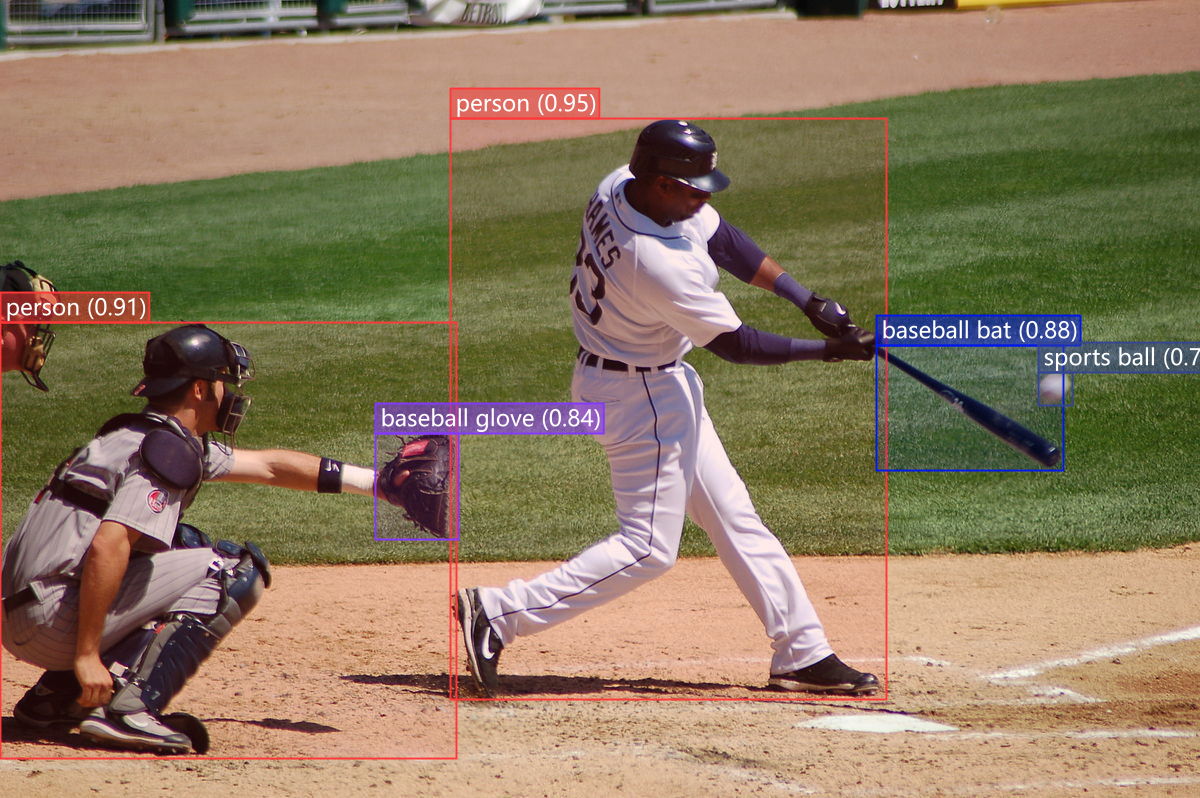
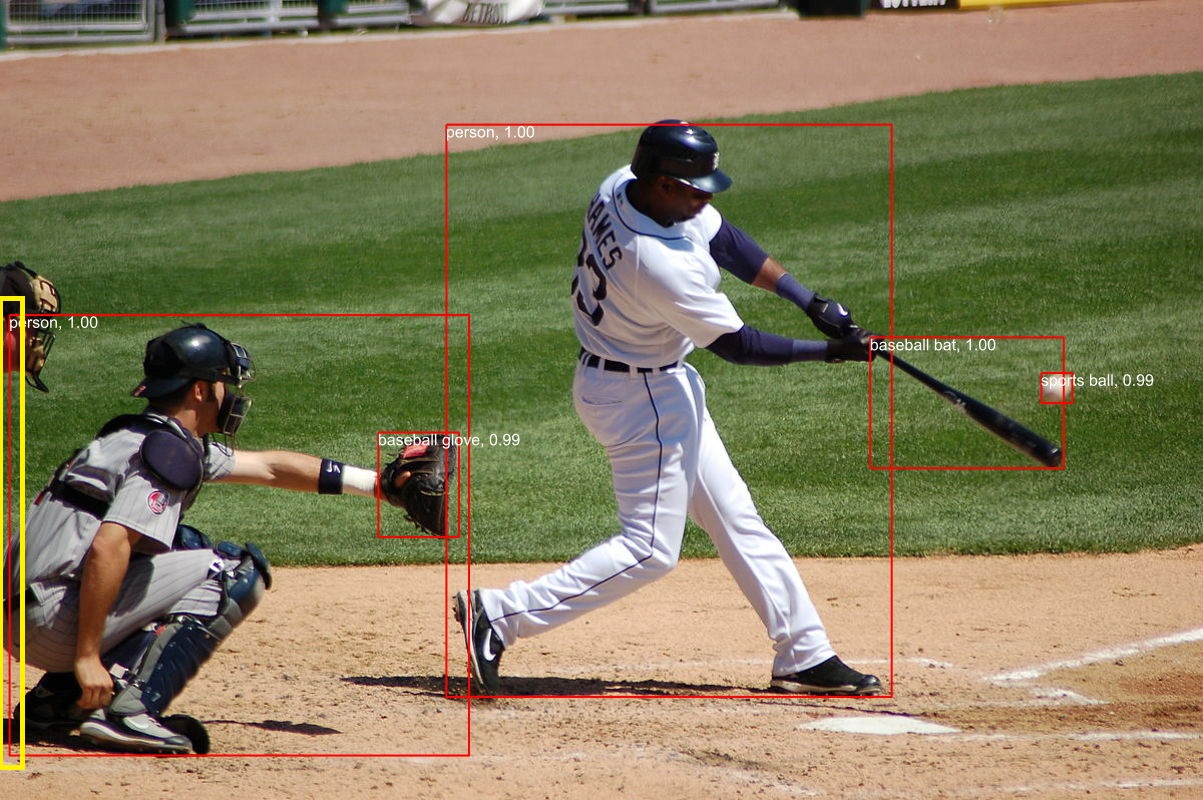
The input image sports.jpg 1200×798 pixels

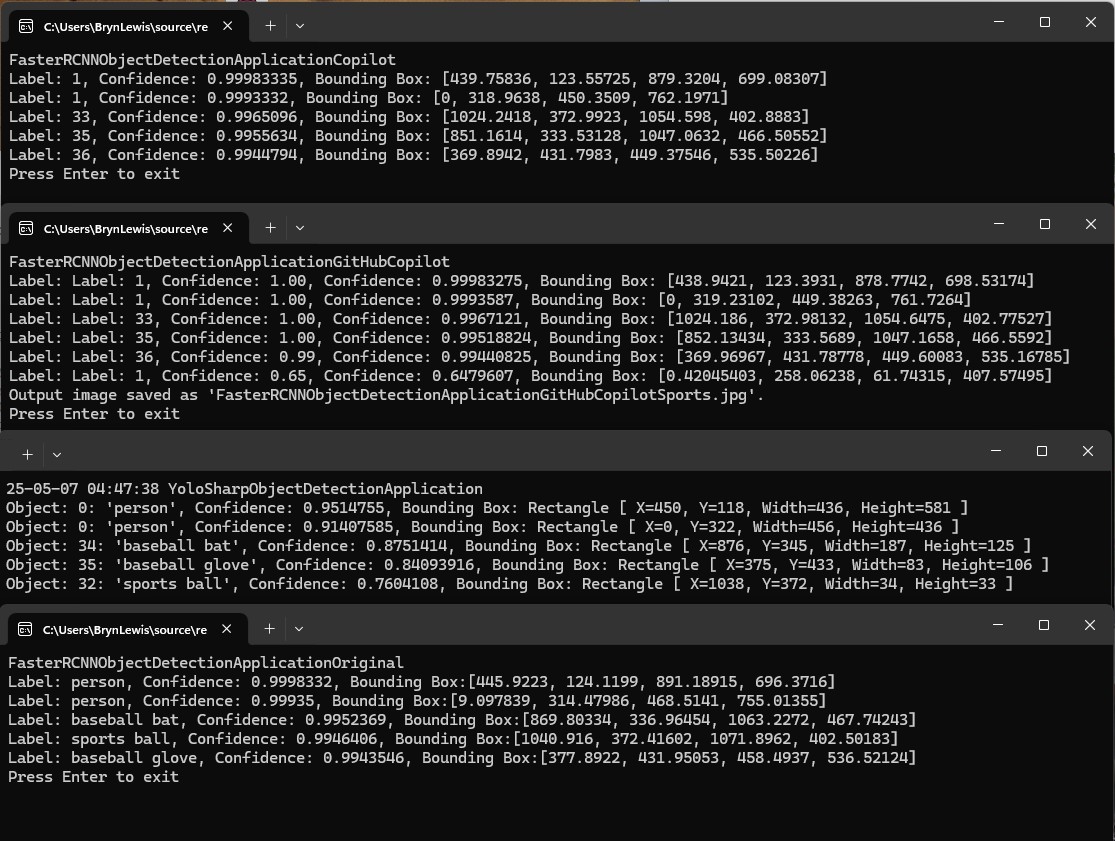
The GithubCopilot FasterRCNNObjectDetectionApplicationCopilot application only generated labels, confidences and minimum bounding box coordinates.

The FasterRCNNObjectDetectionApplicationGitHubCopilot application the marked-up image was 1200×798 pixels

The YoloSharpObjectDetectionApplication application marked-up image was 1200×798 pixels

I went back to the onnxruntime.ai Object detection with Faster RCNN Deep Learning in C# sample source code to check my implementations and the highlighted area on the left caught my attention.

The FasterRCNNObjectDetectionApplicationOriginal application marked up image was 1023×800

I downloaded the sample code which hadn’t been updated for years.

public static void Main(string[] args)
{
   Console.WriteLine("FasterRCNNObjectDetectionApplicationOriginal");

   // Read paths
   string modelFilePath = args[0];
   string imageFilePath = args[1];
   string outImageFilePath = args[2];

   // Read image
   using Image<Rgb24> image = Image.Load<Rgb24>(imageFilePath);

   // Resize image
   float ratio = 800f / Math.Min(image.Width, image.Height);
   image.Mutate(x => x.Resize((int)(ratio * image.Width), (int)(ratio * image.Height)));

   // Preprocess image
   var paddedHeight = (int)(Math.Ceiling(image.Height / 32f) * 32f);
   var paddedWidth = (int)(Math.Ceiling(image.Width / 32f) * 32f);
   Tensor<float> input = new DenseTensor<float>(new[] { 3, paddedHeight, paddedWidth });
   var mean = new[] { 102.9801f, 115.9465f, 122.7717f };
   image.ProcessPixelRows(accessor =>
   {
      for (int y = paddedHeight - accessor.Height; y < accessor.Height; y++)
      {
         Span<Rgb24> pixelSpan = accessor.GetRowSpan(y);
         for (int x = paddedWidth - accessor.Width; x < accessor.Width; x++)
         {
            input[0, y, x] = pixelSpan[x].B - mean[0];
            input[1, y, x] = pixelSpan[x].G - mean[1];
            input[2, y, x] = pixelSpan[x].R - mean[2];
         }
      }
   });

   // Setup inputs and outputs
   var inputs = new List<NamedOnnxValue>
      {
            NamedOnnxValue.CreateFromTensor("image", input)
      };

   // Run inference
   using var session = new InferenceSession(modelFilePath);
   using IDisposableReadOnlyCollection<DisposableNamedOnnxValue> results = session.Run(inputs);

   // Postprocess to get predictions
   var resultsArray = results.ToArray();
   float[] boxes = resultsArray[0].AsEnumerable<float>().ToArray();
   long[] labels = resultsArray[1].AsEnumerable<long>().ToArray();
   float[] confidences = resultsArray[2].AsEnumerable<float>().ToArray();
   var predictions = new List<Prediction>();
   var minConfidence = 0.7f;
   for (int i = 0; i < boxes.Length - 4; i += 4)
   {
      var index = i / 4;
      if (confidences[index] >= minConfidence)
      {
         predictions.Add(new Prediction
         {
            Box = new Box(boxes[i], boxes[i + 1], boxes[i + 2], boxes[i + 3]),
            Label = LabelMap.Labels[labels[index]],
            Confidence = confidences[index]
         });
      }
   }

   // Put boxes, labels and confidence on image and save for viewing
   using var outputImage = File.OpenWrite(outImageFilePath);
   Font font = SystemFonts.CreateFont("Arial", 16);
   foreach (var p in predictions)
   {
      Console.WriteLine($"Label: {p.Label}, Confidence: {p.Confidence}, Bounding Box:[{p.Box.Xmin}, {p.Box.Ymin}, {p.Box.Xmax}, {p.Box.Ymax}]");
      image.Mutate(x =>
      {
         x.DrawLine(Color.Red, 2f, new PointF[] {

                  new PointF(p.Box.Xmin, p.Box.Ymin),
                  new PointF(p.Box.Xmax, p.Box.Ymin),

                  new PointF(p.Box.Xmax, p.Box.Ymin),
                  new PointF(p.Box.Xmax, p.Box.Ymax),

                  new PointF(p.Box.Xmax, p.Box.Ymax),
                  new PointF(p.Box.Xmin, p.Box.Ymax),

                  new PointF(p.Box.Xmin, p.Box.Ymax),
                  new PointF(p.Box.Xmin, p.Box.Ymin)
               });
         x.DrawText($"{p.Label}, {p.Confidence:0.00}", font, Color.White, new PointF(p.Box.Xmin, p.Box.Ymin));
      });
   }
   image.SaveAsJpeg(outputImage);

   Console.WriteLine("Press Enter to exit");
   Console.ReadLine();
}

I then compared the output of the object detection applications and the onnxruntime.ai Object detection with Faster RCNN Deep Learning in C# sample was different.

After some investigation I think the scaling of the image used for inferencing (based on the requirements on the model), then the scaling of the minimum bounding rectangles isn’t quite right.

Building Edge AI with Copilot – Faster R-CNN Client

Introduction

To better understand how Copilot and Github Copilot generated code was impacted by the wording and order of prompts I re-played one of my previous sessions.

The generated code looked “reasonable” and vaguely familiar.

static void Main(string[] args)
{
    // Paths to the ONNX model and the image file (adjust these paths as needed)
    string modelPath = @"..\\..\\..\\..\\Models\\FasterRCNN-10.onnx";
    string imagePath = "sports.jpg";

    // Create the OnnxInference session
    using var session = new InferenceSession(modelPath);

    // Load the image from disk using ImageSharp
    using var image = Image.Load<Rgb24>(imagePath);

    // Resize the image to fit within the range and adjust dimensions to be divisible by 32
    ResizeImage(image);

    // Extract tensor data from the image (with shape [3, height, width])
    var inputTensor = ExtractTensorFromImage(image);

    // Create NamedOnnxValue input (ensure that the input name "image" matches your model's input)
    var inputs = new List<NamedOnnxValue>
    {
        NamedOnnxValue.CreateFromTensor("image", inputTensor)
    };

    // Run the model inference  
    using IDisposableReadOnlyCollection<DisposableNamedOnnxValue> results = session.Run(inputs);

    // Process and display the outputs (bounding boxes, labels, and confidences)
    ProcessOutput(results);

    Console.WriteLine("Press Enter to exit");
    Console.ReadLine();
}

/// <summary>
/// Resizes the input image such that both width and height are within the range [800, 1333]
/// and ensures the dimensions are divisible by 32.
/// </summary>
private static void ResizeImage(Image<Rgb24> image)
{
   const int minSize = 800;
   const int maxSize = 1333;
   int originalWidth = image.Width;
   int originalHeight = image.Height;

   // Determine the scaling factor so that the smallest side is at least minSize and the largest does not exceed maxSize.
   float scale = Math.Min((float)maxSize / Math.Max(originalWidth, originalHeight),
                                   (float)minSize / Math.Min(originalWidth, originalHeight));

   // Compute the new dimensions based on the scale
   int newWidth = (int)(originalWidth * scale);
   int newHeight = (int)(originalHeight * scale);

   // Adjust dimensions to be divisible by 32
   newWidth = (newWidth / 32) * 32;
   newHeight = (newHeight / 32) * 32;

   image.Mutate(x => x.Resize(newWidth, newHeight));
}

/// <summary>
/// Converts the resized image into a DenseTensor<float> with shape [3, height, width].
/// The image is processed to subtract the Faster‑RCNN channel means (B, G, R order).
/// </summary>
private static DenseTensor<float> ExtractTensorFromImage(Image<Rgb24> image)
{
   int width = image.Width;
   int height = image.Height;

   // Create a tensor with shape [channels, height, width]
   var tensor = new DenseTensor<float>(new[] { 3, height, width });

   // Faster‑RCNN channel means (order: blue, green, red)
   float[] mean = { 102.9801f, 115.9465f, 122.7717f };

   // Process each pixel row; ImageSharp provides efficient pixel row access.
   image.ProcessPixelRows(accessor =>
   {
      for (int y = 0; y < height; y++)
      {
         var pixelRow = accessor.GetRowSpan(y);
         for (int x = 0; x < width; x++)
         {
             // Subtract the channel mean value (ensuring B, G, R order)
             tensor[0, y, x] = pixelRow[x].B - mean[0];
             tensor[1, y, x] = pixelRow[x].G - mean[1];
             tensor[2, y, x] = pixelRow[x].R - mean[2];
         }
      }
   });

return tensor;
}

/// <summary>
/// Processes the model output, extracting bounding boxes, labels, and confidences.
/// Only detections with confidence scores above a defined threshold are printed.
/// </summary>
private static void ProcessOutput(IDisposableReadOnlyCollection<DisposableNamedOnnxValue> output)
{
    // Note: The output node names ("6379", "6381", "6383") are model-specific.
    // They correspond, respectively, to boxes, labels, and confidence scores.
    var boxesTensor = output.First(x => x.Name == "6379").AsTensor<float>();
    var labelsTensor = output.First(x => x.Name == "6381").AsTensor<long>();
    var confidencesTensor = output.First(x => x.Name == "6383").AsTensor<float>();

    float[] boxes = boxesTensor.ToArray();
    long[] labels = labelsTensor.ToArray();
    float[] confidences = confidencesTensor.ToArray();

    const float minConfidence = 0.7f;

    // Each bounding box is represented by 4 values: x1, y1, x2, y2.
    for (int i = 0; i < boxes.Length; i += 4)
    {
        int detectionIndex = i / 4;
        if (confidences[detectionIndex] >= minConfidence)
        {
           long label = labels[detectionIndex];
           float confidence = confidences[detectionIndex];
           float x1 = boxes[i];
           float y1 = boxes[i + 1];
           float x2 = boxes[i + 2];
           float y2 = boxes[i + 3];
           Console.WriteLine($"Label: {label}, Confidence: {confidence}, Bounding Box: [{x1}, {y1}, {x2}, {y2}]");
        }
    }
}

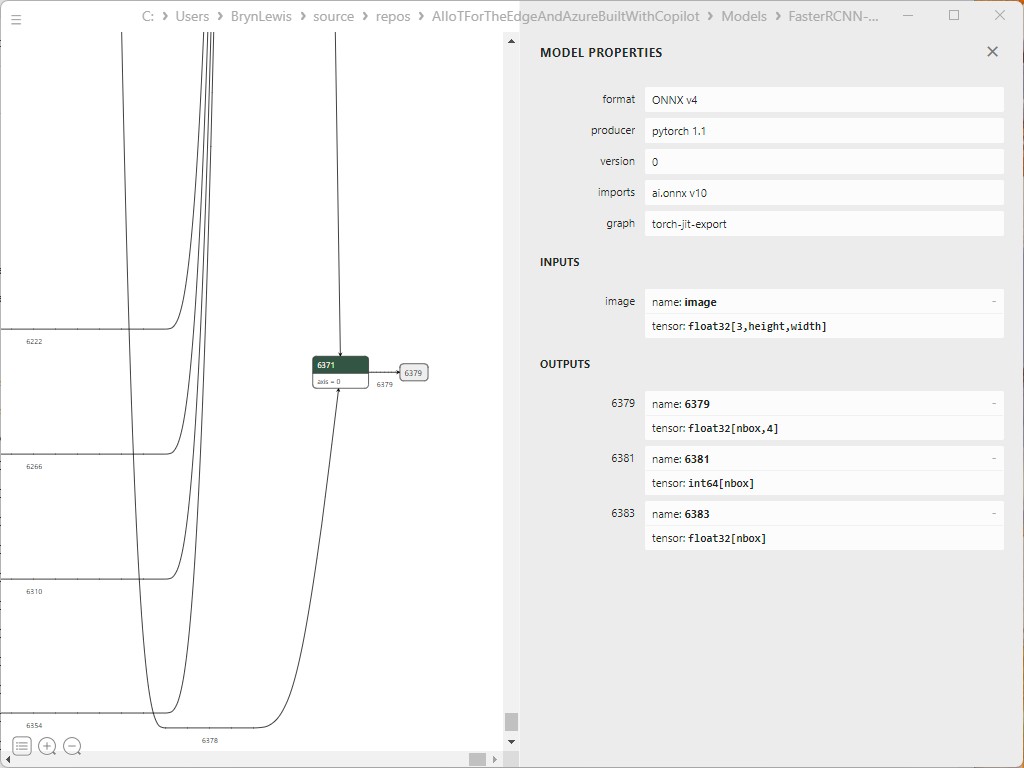
The Copilot generated code had the names of the output tensors (6379,6381, 6383), the mean calculation and the order of the colours (B,G,R) correct. The name of the image file and the path to the model file in The Explanation and Additional information looked a lot like mine.

All I had to do was add the Microsoft.ML.OnnxRuntime and SixLabors.ImageSharp NuGets then the code compiled and ran first time. I then checked the results, and they looked reasonable.

The similarities between the generated code for the different blog posts was suspicious so I asked…

Summary

The Copilot generated code in this post in this was “inspired” the Copilot code generated for my Building Edge AI with GitHub Copilot – Faster R-CNN Client, Building Edge AI with GitHub Copilot – Faster R-CNN Client Revisited or AIIoTForTheEdgeAndAzureBuiltWithCopilot repository.

The Github Copilot generated code in my AIIoTForTheEdgeAndAzureBuiltWithCopilot repository was then “inspired” by the Object detection with Faster RCNN Deep Learning in C# and Image recognition with ResNet50v2 in C# samples.

The Copilot generated code in this post is not suitable for production

Building Edge AI with GitHub Copilot – Faster R-CNN Client Revisited

Introduction

While building the first GitHub Copilot version I noticed that when System.Drawing.Common was changed to Sixlabors.ImageSharp made a significant difference to the generated code. For this post I’ll be using GitHub Copilot to generate code for a console application that uses a Faster R-CNN ONNX model to process an image loaded from disk.

please write a C# console application that uses Onnx to run a ONNX Faster-RCNN object detection model on an image loaded from disk

I manually added the System.Drawing.Commom, Microsoft.ML.OnnxRuntime NuGet packages, using directives and then the code compiled.

static void Main(string[] args)
{
   // Path to the ONNX model and input image
   string modelPath = "FasterRCNN-10.onnx";
   string imagePath = "sports.jpg";

   // Load the image
   Bitmap image = new Bitmap(imagePath);
   var inputTensor = PreprocessImage(image);

   // Load the ONNX model
   using var session = new InferenceSession(modelPath);

   // Create input data
   var inputName = session.InputMetadata.Keys.First();
   var inputs = new List<NamedOnnxValue>
   {
         NamedOnnxValue.CreateFromTensor(inputName, inputTensor)
   };

   //// Run inference
   using IDisposableReadOnlyCollection<DisposableNamedOnnxValue> results = session.Run(inputs);

   // Process output
   foreach (var result in results)
   {
      Console.WriteLine($"{result.Name}: {string.Join(", ", result.AsEnumerable<float>())}");
   }
}

static DenseTensor<float> PreprocessImage(Bitmap image)
{
   // Resize image to model's expected input size (e.g., 224x224)
   int targetWidth = 224;
   int targetHeight = 224;
   Bitmap resizedImage = new Bitmap(image, new Size(targetWidth, targetHeight));

   // Convert image to float array and normalize
   var input = new DenseTensor<float>(new[] { 1, 3, targetHeight, targetWidth });
   for (int y = 0; y < targetHeight; y++)
   {
      for (int x = 0; x < targetWidth; x++)
      {
         Color pixel = resizedImage.GetPixel(x, y);
         input[0, 0, y, x] = pixel.R / 255f;
         input[0, 1, y, x] = pixel.G / 255f;
         input[0, 2, y, x] = pixel.B / 255f;
      }
   }

   return input;
}

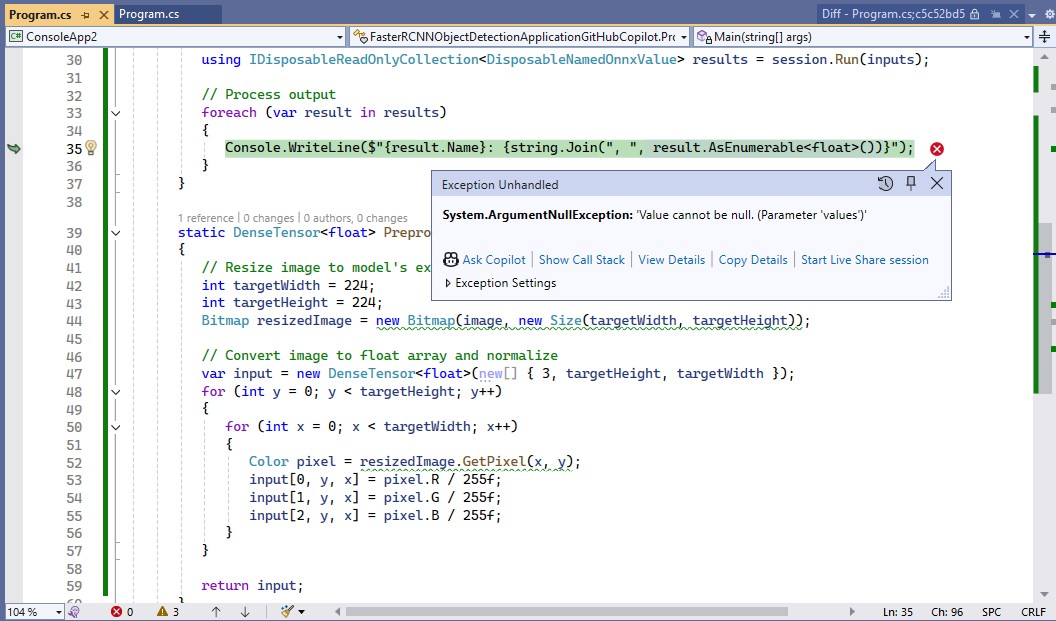
I fixed the paths to the ONNX model and image file, so the application ran but there was an error.

The dimensions of the input tensor were wrong based on the Faster R-CNN documentation because the declaration had an extra dimension.

Change dimensions of tensor by removing batch from declaration

static DenseTensor<float> PreprocessImage(Bitmap image)
{
   // Resize image to model's expected input size (e.g., 224x224)
   int targetWidth = 224;
   int targetHeight = 224;
   Bitmap resizedImage = new Bitmap(image, new Size(targetWidth, targetHeight));

   // Convert image to float array and normalize
   var input = new DenseTensor<float>(new[] { 3, targetHeight, targetWidth });
   for (int y = 0; y < targetHeight; y++)
   {
      for (int x = 0; x < targetWidth; x++)
      {
         Color pixel = resizedImage.GetPixel(x, y);
         input[0, y, x] = pixel.R / 255f;
         input[1, y, x] = pixel.G / 255f;
         input[2, y, x] = pixel.B / 255f;
      }
   }

   return input;
}

GitHub Copilot fixed the tensor declaration by removing the batch id, then the application ran but there was an error.

The dimensions of the input image were wrong so, based on the Faster R-CNN documentation I used GitHub Copilot to resize the image

resize the image such that both height and width are within the range of [800, 1333], such that both height and width are divisible by 32

static Bitmap ResizeImageForModel(Bitmap image)
{
   // Define the target range and divisibility
   const int minSize = 800;
   const int maxSize = 1333;
   const int divisor = 32;

   // Get original dimensions
   int originalWidth = image.Width;
   int originalHeight = image.Height;

   // Calculate scale factor to fit within the range while maintaining aspect ratio
   float scale = Math.Min((float)maxSize / Math.Max(originalWidth, originalHeight),
                          (float)minSize / Math.Min(originalWidth, originalHeight));

   // Calculate new dimensions
   int newWidth = (int)(originalWidth * scale);
   int newHeight = (int)(originalHeight * scale);

   // Ensure dimensions are divisible by 32
   newWidth = (newWidth / divisor) * divisor;
   newHeight = (newHeight / divisor) * divisor;

   // Resize the image
   return new Bitmap(image, new Size(newWidth, newHeight));
}

GitHub Copilot fixed the image resizing, so the application ran but there was still an error.

The processing of the output tensor was wrong so, based on the Faster R-CNN documentation I used GitHub Copilot to add the code required to “correctly” display the results.

Display label, confidence and bounding box

I also manually added the using directive for System.Drawing.Drawing2D

static void ProcessOutput(IDisposableReadOnlyCollection<DisposableNamedOnnxValue> results, Bitmap image)
{
   // Extract output tensors
   var boxes = results.First(r => r.Name == "boxes").AsEnumerable<float>().ToArray();
   var labels = results.First(r => r.Name == "labels").AsEnumerable<long>().ToArray();
   var scores = results.First(r => r.Name == "scores").AsEnumerable<float>().ToArray();

   using Graphics graphics = Graphics.FromImage(image);
   graphics.SmoothingMode = SmoothingMode.AntiAlias;

   for (int i = 0; i < labels.Length; i++)
   {
      if (scores[i] < 0.5) continue; // Filter low-confidence detections

      // Extract bounding box coordinates
      float x1 = boxes[i * 4];
      float y1 = boxes[i * 4 + 1];
      float x2 = boxes[i * 4 + 2];
      float y2 = boxes[i * 4 + 3];

      // Draw bounding box
      RectangleF rect = new RectangleF(x1, y1, x2 - x1, y2 - y1);
      graphics.DrawRectangle(Pens.Red, rect.X, rect.Y, rect.Width, rect.Height);

      // Display label and confidence
      string label = $"Label: {labels[i]}, Confidence: {scores[i]:0.00}";
      graphics.DrawString(label, new Font("Arial", 12), Brushes.Yellow, new PointF(x1, y1 - 20));
   }

   // Save the image with annotations
   image.Save("output.jpg");
   Console.WriteLine("Output image saved as 'output.jpg'.");
}

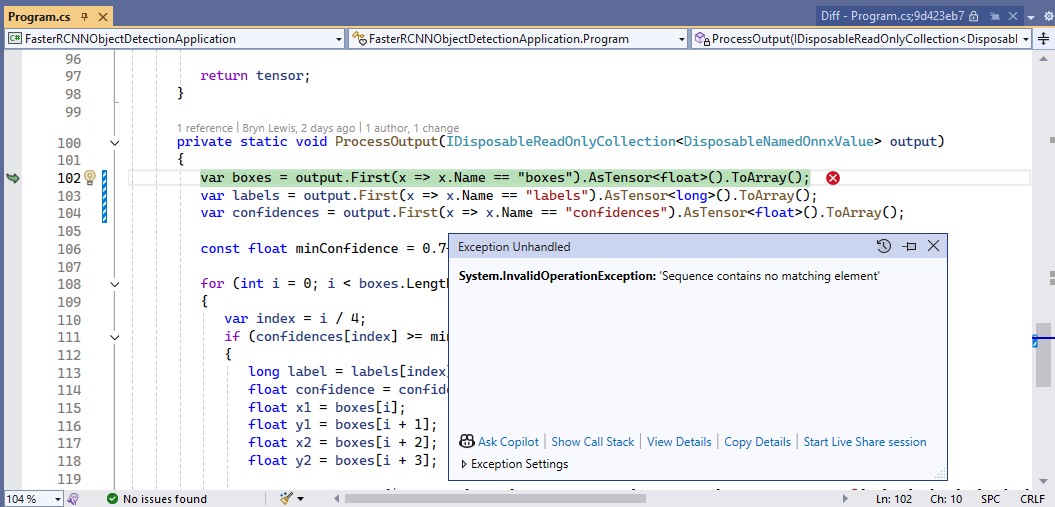
The application ran but there was an error because the output tensor names were wrong.

I used Netron to determine the correct output tensor names.

It was quicker to manually fix the output tensor names

static void ProcessOutput(IDisposableReadOnlyCollection<DisposableNamedOnnxValue> results, Bitmap image)
 {
    // Extract output tensors
    var boxes = results.First(r => r.Name == "6379").AsEnumerable<float>().ToArray();
    var labels = results.First(r => r.Name == "6381").AsEnumerable<long>().ToArray();
    var scores = results.First(r => r.Name == "6383").AsEnumerable<float>().ToArray();

    using Graphics graphics = Graphics.FromImage(image);
    graphics.SmoothingMode = SmoothingMode.AntiAlias;

    for (int i = 0; i < labels.Length; i++)
    {
       if (scores[i] < 0.5) continue; // Filter low-confidence detections

       // Extract bounding box coordinates
       float x1 = boxes[i * 4];
       float y1 = boxes[i * 4 + 1];
       float x2 = boxes[i * 4 + 2];
       float y2 = boxes[i * 4 + 3];

       // Draw bounding box
       RectangleF rect = new RectangleF(x1, y1, x2 - x1, y2 - y1);
       graphics.DrawRectangle(Pens.Red, rect.X, rect.Y, rect.Width, rect.Height);

       // Display label and confidence
       string label = $"Label: {labels[i]}, Confidence: {scores[i]:0.00}";
       graphics.DrawString(label, new Font("Arial", 12), Brushes.Yellow, new PointF(x1, y1 - 20));
    }

    // Save the image with annotations
    image.Save("output.jpg");
    Console.WriteLine("Output image saved as 'output.jpg'.");
 }

The application ran but the results were bad, so I checked format of the input tensor and figured out the mean adjustment was missing.

Apply mean to each channel

I used GitHub Copilot to add code for the mean adjustment for each pixel

static DenseTensor<float> PreprocessImage(Bitmap image)
{
   // Resize image to model's expected input size  
   Bitmap resizedImage = ResizeImageForModel(image);

   // Apply FasterRCNN mean values to each channel  
   float[] mean = { 102.9801f, 115.9465f, 122.7717f };

   // Convert image to float array and normalize  
   var input = new DenseTensor<float>(new[] { 3, resizedImage.Height, resizedImage.Width });
   for (int y = 0; y < resizedImage.Height; y++)
   {
      for (int x = 0; x < resizedImage.Width; x++)
      {
         Color pixel = resizedImage.GetPixel(x, y);
         input[0, y, x] = (pixel.R - mean[0]) / 255f;
         input[1, y, x] = (pixel.G - mean[1]) / 255f;
         input[2, y, x] = (pixel.B - mean[2]) / 255f;
      }
   }

   return input;
}

The application ran but the results were still bad, so I checked format of the input tensor and figured out the mean adjustment was wrong. It was quicker to manually fix up the mean calculation.

static DenseTensor<float> PreprocessImage(Bitmap image)
{
   // Resize image to model's expected input size  
   Bitmap resizedImage = ResizeImageForModel(image);

   // Apply FasterRCNN mean values to each channel  
   float[] mean = { 102.9801f, 115.9465f, 122.7717f };

   // Convert image to float array and normalize  
   var input = new DenseTensor<float>(new[] { 3, resizedImage.Height, resizedImage.Width });
   for (int y = 0; y < resizedImage.Height; y++)
   {
      for (int x = 0; x < resizedImage.Width; x++)
      {
         Color pixel = resizedImage.GetPixel(x, y);

         input[0, y, x] = pixel.R - mean[0];
         input[1, y, x] = pixel.G - mean[1];
         input[2, y, x] = pixel.B - mean[2];
      }
   }

   return input;
}

The application ran but the results were still bad, so I checked format of the input tensor and figured out the input tensor was BGR rather than RGB.

Change to B,G,R

static DenseTensor<float> PreprocessImage(Bitmap image)
{
   // Resize image to model's expected input size  
   Bitmap resizedImage = ResizeImageForModel(image);

   // Apply FasterRCNN mean values to each channel  
   float[] mean = { 102.9801f, 115.9465f, 122.7717f };

   // Convert image to float array and normalize  
   var input = new DenseTensor<float>(new[] { 3, resizedImage.Height, resizedImage.Width });
   for (int y = 0; y < resizedImage.Height; y++)
   {
      for (int x = 0; x < resizedImage.Width; x++)
      {
         Color pixel = resizedImage.GetPixel(x, y);
         input[0, y, x] = pixel.B - mean[0] ;
         input[1, y, x] = pixel.G - mean[1] ;
         input[2, y, x] = pixel.R - mean[2] ;
      }
   }

   return input;
}

Finally, the application minimum bounding rectangles (MBRs), labels and confidences looked correct.

Summary

The GitHub Copilot generated code looked like it was “inspired” by the onnxruntime.ai Object detection with Faster RCNN Deep Learning in C# sample.

The additional code for marking up the image in the ProcessOutput was unexpected and I wonder if there wasn’t a Sixlabors.ImageSharp example for “inspiration”

The Copilot generated code in this post is not suitable for production

Building Edge AI with GitHub Copilot – Faster R-CNN Client

Introduction

For this post I’ll be using GitHub Copilot to generate code for a console application that uses a Faster R-CNN ONNX model to process an image loaded from disk.

please write a C# console application that uses Onnx to run a ONNX Faster-RCNN object detection model on an image loaded from disk

I added the System.Drawing.Common and Microsoft.ML.OnnxRuntime NuGet packages, required using directives then the code compiled. The ProcessOutput method was stubbed out so I will need to figure out the format of the output tensor

static void Main(string[] args)
{
   string modelPath = "FasterRCNN-10.onnx";
   string imagePath = "sports.jpg";

   using var session = new InferenceSession(modelPath);
   using var image = new Bitmap(imagePath);

   var inputTensor = ExtractTensorFromImage(image);
   var inputs = new List<NamedOnnxValue>
   {
       NamedOnnxValue.CreateFromTensor("image", inputTensor)
   };

   using IDisposableReadOnlyCollection<DisposableNamedOnnxValue> results = session.Run(inputs);
   var output = results.First().AsEnumerable<float>().ToArray();

   // Process the output (e.g., draw bounding boxes on the image)
   ProcessOutput(output, image);

   image.Save("output.jpg", ImageFormat.Jpeg);
   Console.WriteLine("Object detection completed. Output saved as output.jpg");
}

private static DenseTensor<float> ExtractTensorFromImage(Bitmap image)
{
   int width = image.Width;
   int height = image.Height;
   var tensor = new DenseTensor<float>(new[] { 1, 3, height, width });

   for (int y = 0; y < height; y++)
   {
      for (int x = 0; x < width; x++)
      {
         Color pixel = image.GetPixel(x, y);
         tensor[0, 0, y, x] = pixel.R / 255.0f;
         tensor[0, 1, y, x] = pixel.G / 255.0f;
         tensor[0, 2, y, x] = pixel.B / 255.0f;
      }
   }

   return tensor;
}

private static void ProcessOutput(float[] output, Bitmap image)
{
   // Implement the logic to process the output and draw bounding boxes on the image
   // This is a placeholder for the actual implementation
}

I fixed the paths to the ONNX model and image files, so the application ran but there was an error.

The dimensions of the input tensor were wrong because the declaration included a batch id.

Change dimensions of tensor by removing batch from declaration

private static DenseTensor<float> ExtractTensorFromImage(Bitmap image)
{
   int width = image.Width;
   int height = image.Height;
   var tensor = new DenseTensor<float>(new[] { 3, height, width });

   for (int y = 0; y < height; y++)
   {
      for (int x = 0; x < width; x++)
      {
         Color pixel = image.GetPixel(x, y);
         tensor[0, y, x] = pixel.R / 255.0f;
         tensor[1, y, x] = pixel.G / 255.0f;
         tensor[2, y, x] = pixel.B / 255.0f;
      }
   }

   return tensor;
 }

GitHub Copilot fixed the tensor declaration by removing the batch id. The application also used System.Drawing which is not supported on my target embedded platforms.

change from System.Drawing to ImageSharp

I added the SixLabors.ImageSharp and removed System.Drawing.Common NuGets. Then updated the using directives as required.

using var image = Image.Load<Rgb24>(imagePath);
...
private static DenseTensor<float> ExtractTensorFromImage(Image<Rgb24> image)
{
   int width = image.Width;
   int height = image.Height;
   var tensor = new DenseTensor<float>(new[] { 3, height, width });

   image.ProcessPixelRows(accessor =>
   {
      for (int y = 0; y < height; y++)
      {
         var pixelRow = accessor.GetRowSpan(y);
         for (int x = 0; x < width; x++)
         {
            tensor[0, y, x] = pixelRow[x].R / 255.0f;
            tensor[1, y, x] = pixelRow[x].G / 255.0f;
            tensor[2, y, x] = pixelRow[x].B / 255.0f;
         }
      }
   });

   return tensor;
}

The application ran but there was an error as the dimensions of the input image were wrong.

Based on the Faster R-CNN documentation I used ImageSharp to resize the image

Use ImageSharp to resize the image such that both height and width are within the range of [800, 1333], such that both height and width are divisible by 32.

 private static void ResizeImage(Image<Rgb24> image)
 {
    const int minSize = 800;
    const int maxSize = 1333;

    int originalWidth = image.Width;
    int originalHeight = image.Height;

    float scale = Math.Min((float)maxSize / Math.Max(originalWidth, originalHeight), (float)minSize / Math.Min(originalWidth, originalHeight));
    int newWidth = (int)(originalWidth * scale);
    int newHeight = (int)(originalHeight * scale);

    // Ensure dimensions are divisible by 32
    newWidth = (newWidth / 32) * 32;
    newHeight = (newHeight / 32) * 32;

    image.Mutate(x => x.Resize(newWidth, newHeight));
 }

The application ran but the results were bad, so I checked format of the input tensor and figured out the R,G,B values need to be adjusted.

Apply mean to each channel

private static DenseTensor<float> ExtractTensorFromImage(Image<Rgb24> image)
{
   int width = image.Width;
   int height = image.Height;
   var tensor = new DenseTensor<float>(new[] { 3, height, width });

   // Mean values for each channel
   float[] mean = { 0.485f, 0.456f, 0.406f };

   image.ProcessPixelRows(accessor =>
   {
      for (int y = 0; y < height; y++)
      {
         var pixelRow = accessor.GetRowSpan(y);
         for (int x = 0; x < width; x++)
         {
            tensor[0, y, x] = (pixelRow[x].R / 255.0f) - mean[0];
            tensor[1, y, x] = (pixelRow[x].G / 255.0f) - mean[1];
            tensor[2, y, x] = (pixelRow[x].B / 255.0f) - mean[2];
         }
      }
   });

   return tensor;
 }

The application ran but the results were still bad, so I checked format of the input tensor and figured out the Resnet50 means had be used and the input tensor was BGR rather than RGB

Use FasterRCNN means not resnet ones
Change to B,G,R

private static DenseTensor<float> ExtractTensorFromImage(Image<Rgb24> image)
{
   int width = image.Width;
   int height = image.Height;
   var tensor = new DenseTensor<float>(new[] { 3, height, width });

   // Mean values for each channel for FasterRCNN
   float[] mean = { 102.9801f, 115.9465f, 122.7717f };

   image.ProcessPixelRows(accessor =>
   {
      for (int y = 0; y < height; y++)
      {
         var pixelRow = accessor.GetRowSpan(y);
         for (int x = 0; x < width; x++)
         {
            tensor[0, y, x] = pixelRow[x].B - mean[0];
            tensor[1, y, x] = pixelRow[x].G - mean[1];
            tensor[2, y, x] = pixelRow[x].R - mean[2];
         }
      }
   });

   return tensor;
}

When I inspected the values in the output tensor in the debugger they looked “reasonable” so got GitHub Copilot to add the code required to display the results.

Display label, confidence and bounding box

The application ran but there was an exception because the names of the output tensor “dimensions” were wrong.

I used Netron to get the correct output tensor “dimension” names.

I then manually fixed the output tensor “dimension” names

private static void ProcessOutput(IDisposableReadOnlyCollection<DisposableNamedOnnxValue> output)
{
   var boxes = output.First(x => x.Name == "6379").AsTensor<float>().ToArray();
   var labels = output.First(x => x.Name == "6381").AsTensor<long>().ToArray();
   var confidences = output.First(x => x.Name == "6383").AsTensor<float>().ToArray();

   const float minConfidence = 0.7f;

   for (int i = 0; i < boxes.Length; i += 4)
   {
      var index = i / 4;
      if (confidences[index] >= minConfidence)
      {
         long label = labels[index];
         float confidence = confidences[index];
         float x1 = boxes[i];
         float y1 = boxes[i + 1];
         float x2 = boxes[i + 2];
         float y2 = boxes[i + 3];

         Console.WriteLine($"Label: {label}, Confidence: {confidence}, Bounding Box: [{x1}, {y1}, {x2}, {y2}]");
      }
   }
}

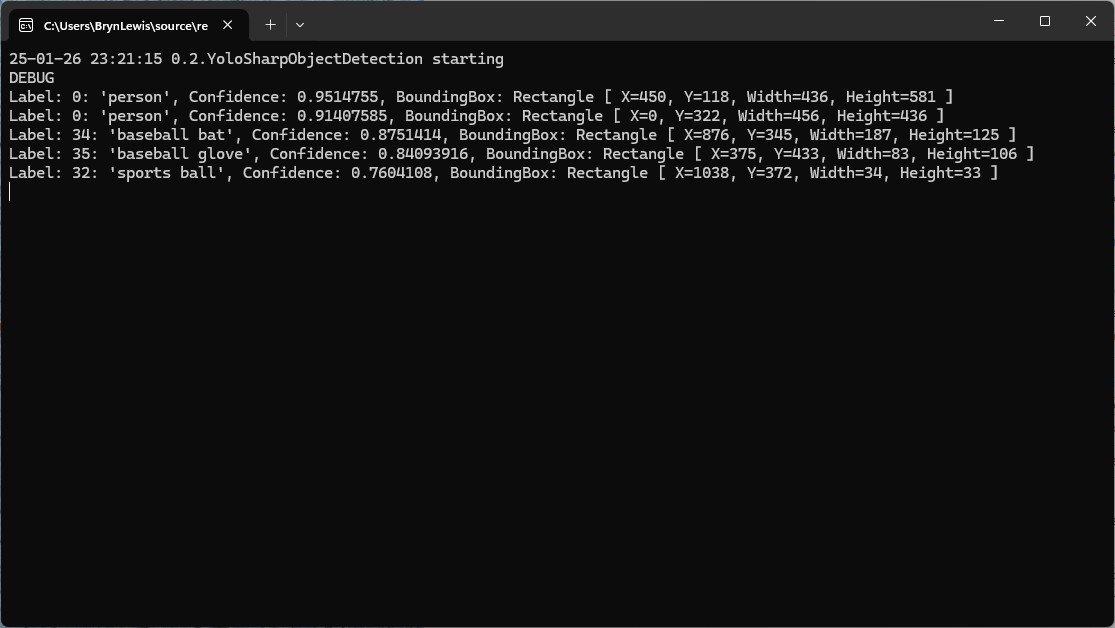
I manually compared the output of the console application with equivalent YoloSharp application output and the results looked close enough.

Summary

The Copilot prompts required to generate code were significantly more complex than previous examples and I had to regularly refer to the documentation to figure out what was wrong. The code wasn’t great and Copilot didn’t add much value

The Copilot generated code in this post is not suitable for production

Building Edge AI with Github Copilot- Security Camera HTTP YoloSharp

When I started with the Security Camera HTTP code and added code to process the images with Ultralytics Object Detection model I found the order of the prompts could make a difference. My first attempt at adding YoloSharp to the SecurityCameraHttpClient application with Github Copilot didn’t go well and needed some “human intervention”. When I thought more about the order of the prompts the adding the same functionality went a lot better.

// Use a stream rather than loading image from a file
// Use YoloSharp to run an onnx Object Detection model on the image
// Make the YoloPredictor a class variable
// Save image if object with specified image class name detected
// Modify so objectDetected supports multiple image class names
// Modify code to make use of GPU configurable
// Make display of detections configurable in app settings
// Make saving of image configurable in app settings

internal class Program
{
   private static HttpClient _client;
   private static bool _isRetrievingImage = false;
   private static ApplicationSettings _applicationSettings;
   private static YoloPredictor _yoloPredictor;

   static void Main(string[] args)
   {
      Console.WriteLine($"{DateTime.UtcNow:yy-MM-dd HH:mm:ss} SecurityCameraClient starting");
#if RELEASE
         Console.WriteLine("RELEASE");
#else
         Console.WriteLine("DEBUG");
#endif

      var configuration = new ConfigurationBuilder()
            .AddJsonFile("appsettings.json", false, true)
            .AddUserSecrets<Program>()
            .Build();

      _applicationSettings = configuration.GetSection("ApplicationSettings").Get<ApplicationSettings>();

      // Initialize YoloPredictor with GPU configuration
      _yoloPredictor = new YoloPredictor(_applicationSettings.OnnxModelPath, new YoloPredictorOptions()
      {
         UseCuda = _applicationSettings.UseCuda, // Configurable GPU usage
      });

      using (HttpClientHandler handler = new HttpClientHandler { Credentials = new NetworkCredential(_applicationSettings.Username, _applicationSettings.Password) })
      using (_client = new HttpClient(handler))
      using (var timer = new Timer(async _ => await RetrieveImageAsync(), null, _applicationSettings.TimerDue, _applicationSettings.TimerPeriod))
      {
         Console.WriteLine("Press any key to exit...");
         Console.ReadKey();
      }
   }

      private static async Task RetrieveImageAsync()
      {
         if (_isRetrievingImage) return;

         _isRetrievingImage = true;
         try
         {
            Console.WriteLine($"{DateTime.UtcNow:yy-MM-dd HH:mm:ss.fff} SecurityCameraClient download starting");

            HttpResponseMessage response = await _client.GetAsync(_applicationSettings.CameraUrl);
            response.EnsureSuccessStatusCode();

            using (Stream imageStream = await response.Content.ReadAsStreamAsync())
            {
               var detections = _yoloPredictor.Detect(imageStream);
               bool objectDetected = false;

               foreach (var detection in detections)
               {
                  if (_applicationSettings.LogDetections) // Check if logging detections is enabled
                  {
                     Console.WriteLine($"Detected {detection.Name.Name} with confidence {detection.Confidence}");
                  }

                  if (_applicationSettings.ClassNames.Contains(detection.Name.Name))
                  {
                     objectDetected = true;
                  }
               }

               if (objectDetected && _applicationSettings.SaveImage) // Check if saving images is enabled
               {
                  string savePath = string.Format(_applicationSettings.SavePath, DateTime.UtcNow);
                  using (FileStream fileStream = new FileStream(savePath, FileMode.Create, FileAccess.Write, FileShare.None))
                  {
                     imageStream.Position = 0;
                     await imageStream.CopyToAsync(fileStream);
                  }
               }
            }

            Console.WriteLine($"{DateTime.UtcNow:yy-MM-dd HH:mm:ss.fff} SecurityCameraClient download done");
         }
         catch (Exception ex)
         {
            Console.WriteLine($"An error occurred: {ex.Message}");
         }
         finally
         {
            _isRetrievingImage = false;
         }
      }
}

public class ApplicationSettings
{
   public string CameraUrl { get; set; } = "";
   public string SavePath { get; set; } = "";
   public string Username { get; set; } = "";
   public string Password { get; set; } = "";
   public TimeSpan TimerDue { get; set; } = TimeSpan.Zero;
   public TimeSpan TimerPeriod { get; set; } = TimeSpan.Zero;
   public string OnnxModelPath { get; set; } = "";
   public bool UseCuda { get; set; } = false; // Configurable GPU usage
   public List<string> ClassNames { get; set; } //= new List<string>();
   public bool LogDetections { get; set; } = false; // Configurable logging of detections 
   public bool SaveImage { get; set; } = false; // Configurable saving of images
   }
}

The interactions Visual Studio IntelliSense with the GitHub Copilot prompts was interesting.

I wonder if this is because Visual Studio Intellisense has local context, whereas Github Copilot has “cloud” context.

It took a couple of failed attempts to find the best order, which I think would reduce over time.

The Copilot generated code in this post is not suitable for production

Building Edge AI with Github Copilot- Security Camera HTTP

I use GitHub Copilot with Visual Studio 2020 and I wanted to see if I could write a simple application only using “Ask Copilot”. Retrieving a static image from a security camera (like my HiLook IPC-T250H) felt like a reasonable challenge.

please write a console application that uses an HttpClient to retrieve an image from a security camera

static async Task Main(string[] args)
{
   string cameraUrl = "http://your-security-camera-url/image.jpg";
   string savePath = "downloaded_image.jpg";

   using (HttpClient client = new HttpClient())
   {
      try
      {
         HttpResponseMessage response = await client.GetAsync(cameraUrl);
         response.EnsureSuccessStatusCode();

         byte[] imageBytes = await response.Content.ReadAsByteArrayAsync();
         await File.WriteAllBytesAsync(savePath, imageBytes);

         Console.WriteLine("Image downloaded successfully.");
      }
      catch (Exception ex)
      {
         Console.WriteLine($"An error occurred: {ex.Message}");
      }
   }
}
}

The Github Copilot generated code compiled first time and looked reasonable for a Proof of Concept (PoC). After changing the “cameraUrl” the program could retrieve an image from one of my cameras when I disabled authentication.

please write a console application that uses an httpclient to retrieve an image from a security camera. The security camera needs a username and password

static async Task Main(string[] args)
{
   string cameraUrl = "http://your-security-camera-url/image";
   string username = "your-username";
   string password = "your-password";

   using (HttpClient client = new HttpClient())
   {
      var byteArray = new System.Text.ASCIIEncoding().GetBytes($"{username}:{password}");
      client.DefaultRequestHeaders.Authorization = new AuthenticationHeaderValue("Basic", Convert.ToBase64String(byteArray));

      HttpResponseMessage response = await client.GetAsync(cameraUrl);
      response.EnsureSuccessStatusCode();

      byte[] imageBytes = await response.Content.ReadAsByteArrayAsync();
      File.WriteAllBytes("camera_image.jpg", imageBytes);

      Console.WriteLine("Image retrieved and saved as camera_image.jpg");
   }

Github Copilot had taken my request literally and implemented Hypertext Transfer Protocol (HTTP/1.1): Authentication (RFC7235). My HiLook IPC-T250H only supports Digest Authentication(RFC2617) so I tried

please modify the security code to support Digest authentication

static async Task Main(string[] args)
{
   string cameraUrl = "http://your-security-camera-url/image";
   string username = "your-username";
   string password = "your-password";

   using (HttpClient client = new HttpClient())
   {
      HttpResponseMessage response = await client.GetAsync(cameraUrl);

      if (response.StatusCode == System.Net.HttpStatusCode.Unauthorized)
      {
         var wwwAuthenticateHeader = response.Headers.WwwAuthenticate.FirstOrDefault();
         if (wwwAuthenticateHeader != null && wwwAuthenticateHeader.Scheme == "Digest")
         {
            var digestHeader = wwwAuthenticateHeader.Parameter;
            var digestResponse = CreateDigestHeader(digestHeader, cameraUrl, username, password, "GET");

            client.DefaultRequestHeaders.Authorization = new AuthenticationHeaderValue("Digest", digestResponse);

            response = await client.GetAsync(cameraUrl);
            response.EnsureSuccessStatusCode();

            byte[] imageBytes = await response.Content.ReadAsByteArrayAsync();
            File.WriteAllBytes("camera_image.jpg", imageBytes);

            Console.WriteLine("Image retrieved and saved as camera_image.jpg");
         }
      }
   }
}

private static string CreateDigestHeader(string digestHeader, string url, string username, string password, string method)
{
   var headerValues = digestHeader.Split(',').Select(v => v.Trim().Split('=')).ToDictionary(v => v[0], v => v[1].Trim('"'));

   string ha1 = CalculateMD5Hash($"{username}:{headerValues["realm"]}:{password}");
   string ha2 = CalculateMD5Hash($"{method}:{url}");
   string response = CalculateMD5Hash($"{ha1}:{headerValues["nonce"]}:{headerValues["nc"]}:{headerValues["cnonce"]}:{headerValues["qop"]}:{ha2}");

   return $"username=\"{username}\", realm=\"{headerValues["realm"]}\", nonce=\"{headerValues["nonce"]}\", uri=\"{url}\", qop={headerValues["qop"]}, nc={headerValues["nc"]}, cnonce=\"{headerValues["cnonce"]}\", response=\"{response}\", opaque=\"{headerValues["opaque"]}\"";
}

private static string CalculateMD5Hash(string input)
{
   using (MD5 md5 = MD5.Create())
   {
      byte[] inputBytes = Encoding.ASCII.GetBytes(input);
      byte[] hashBytes = md5.ComputeHash(inputBytes);
      return BitConverter.ToString(hashBytes).Replace("-", "").ToLower();
   }
}

Github Copilot had taken my request literally and implemented Digest Authentication(RFC2617) so I did some “research”. The Copilot desktop application suggested using NetworkCredential which supports Basic, and digest (also NTLM, and Kerberos) authentication.

modify the code to use a NetworkCredential to authenticate with the security camera

using System.Net;

namespace SecurityCameraClient
{
   internal class Program
   {
      static async Task Main(string[] args)
      {
         string cameraUrl = "http://your-security-camera-url/image.jpg";
         string savePath = "downloaded_image.jpg";
         string username = "your-username";
         string password = "your-password";

         using (HttpClientHandler handler = new HttpClientHandler { Credentials = new NetworkCredential(username, password) })
         using (HttpClient client = new HttpClient(handler))
         {
            try
            {
               HttpResponseMessage response = await client.GetAsync(cameraUrl);
               response.EnsureSuccessStatusCode();

               byte[] imageBytes = await response.Content.ReadAsByteArrayAsync();
               await File.WriteAllBytesAsync(savePath, imageBytes);

               Console.WriteLine("Image downloaded successfully.");
            }
            catch (Exception ex)
            {
               Console.WriteLine($"An error occurred: {ex.Message}");
            }
         }
      }
   }
}

The Github Copilot generated code compiled and after changing the “cameraUrl”, “username” and “password” the program could retrieve an image from each of my cameras.

I wanted the application to retrieve images regularly, but the first Github Copilot generated code was pretty ugly (it used a System.Timers.Timer). After “consulting” the Copilot desktop application

modify the code to use a System.Threading Timer so an image is retrieved every 1000mSec

using System.Net;

namespace SecurityCameraClient
{
   internal class Program
   {
      private static Timer _timer;
      private static HttpClient _client;
      private static string _cameraUrl = "http://your-security-camera-url/image.jpg";
      string savePath = "downloaded_image.jpg";

      static void Main(string[] args)
      {
         string username = "your-username";
         string password = "your-password";

         HttpClientHandler handler = new HttpClientHandler { Credentials = new NetworkCredential(username, password) };
         _client = new HttpClient(handler, disposeHandler: true);

         _timer = new Timer(async _ => await RetrieveImageAsync(), null, 0, 1000);

         Console.WriteLine("Press any key to exit...");
         Console.ReadKey();

         _timer.Dispose();
         _client.Dispose();
      }

      private static async Task RetrieveImageAsync()
      {
         try
         {
            HttpResponseMessage response = await _client.GetAsync(_cameraUrl);
            response.EnsureSuccessStatusCode();

            byte[] imageBytes = await response.Content.ReadAsByteArrayAsync();
            await File.WriteAllBytesAsync(_savePath, imageBytes);

            Console.WriteLine("Image downloaded successfully.");
         }
         catch (Exception ex)
         {
            Console.WriteLine($"An error occurred: {ex.Message}");
         }
      }
   }
}

By this stage I was an elite “prompt engineer” and after a couple of revisions of my Github Copilot prompt to released unmanaged resources (the initial version used .Dispose and was a bit ugly).

modify the code to dispose of the HttpClientHandler, HttpClient and Timer with “using” statements

The application had a reentrancy issue when retrieving an image from a camera took too long

modify the code to stop RetrieveImageAsync getting called while an image is already being retrieved

I then decided to try a “cosmetic” change

modify the code _timer does not have to be class level variable

The savePath was a constant and I wanted to store a series of images

modify the code to use String.Format to generate the savepath

For the final version I modified the program adding a Console.Writeline to display the build type, retrieving the SavePath, dueTime, and period from the appsettings.json. The Microsoft.Configuration.UserSecrets configuration source was used for the CameraUrl, UserName, and Password.

using System.Net;

using Microsoft.Extensions.Configuration;

namespace SecurityCameraClient
{
   internal class Program
   {
      private static HttpClient _client;
      private static bool _isRetrievingImage = false;
      private static ApplicationSettings _applicationSettings;

      static void Main(string[] args)
      {
         Console.WriteLine($"{DateTime.UtcNow:yy-MM-dd HH:mm:ss} SecurityCameraClient starting");
#if RELEASE
         Console.WriteLine("RELEASE");
#else
         Console.WriteLine("DEBUG");
#endif

         var configuration = new ConfigurationBuilder()
              .AddJsonFile("appsettings.json", false, true)
         .AddUserSecrets<Program>()
         .Build();

         _applicationSettings = configuration.GetSection("ApplicationSettings").Get<ApplicationSettings>();

         using (HttpClientHandler handler = new HttpClientHandler { Credentials = new NetworkCredential(_applicationSettings.Username, _applicationSettings.Password) })
         using (_client = new HttpClient(handler))
         using (var timer = new Timer(async _ => await RetrieveImageAsync(), null, _applicationSettings.TimerDue, _applicationSettings.TimerPeriod))
         {
            Console.WriteLine("Press any key to exit...");
            Console.ReadKey();
         }
      }

      private static async Task RetrieveImageAsync()
      {
         if (_isRetrievingImage) return;

         _isRetrievingImage = true;
         try
         {
            HttpResponseMessage response = await _client.GetAsync(_applicationSettings.CameraUrl);
            response.EnsureSuccessStatusCode();

            byte[] imageBytes = await response.Content.ReadAsByteArrayAsync();
            string savePath = string.Format(_applicationSettings.SavePath, DateTime.UtcNow);
            await File.WriteAllBytesAsync(savePath, imageBytes);

            Console.WriteLine("Image downloaded successfully.");
         }
         catch (Exception ex)
         {
            Console.WriteLine($"An error occurred: {ex.Message}");
         }
         finally
         {
            _isRetrievingImage = false;
         }
      }
   }

   public class ApplicationSettings
   {
      public string CameraUrl { get; set; } = "";

      public string SavePath { get; set; } = "";

      public string Username { get; set; } = "";

      public string Password { get; set; } = "";

      public TimeSpan TimerDue { get; set; } = TimeSpan.Zero;

      public TimeSpan TimerPeriod { get; set; } = TimeSpan.Zero;
   }
}

Overall, my Github Copilot experience was pretty good, and got better as my “prompt engineering” improved.

The Github Copilot “decision” to implement Hypertext Transfer Protocol (HTTP/1.1): Authentication (RFC7235) and Digest Authentication(RFC2617) was “sub optimal”