FohenAIBuilder Scan tool – 100% dog food

The first FoehnAIBuilder tool had to be a very basic scan tool so the LLM could find chunks of text in text files. The generated code had some issues which were pointed out by Copilot.
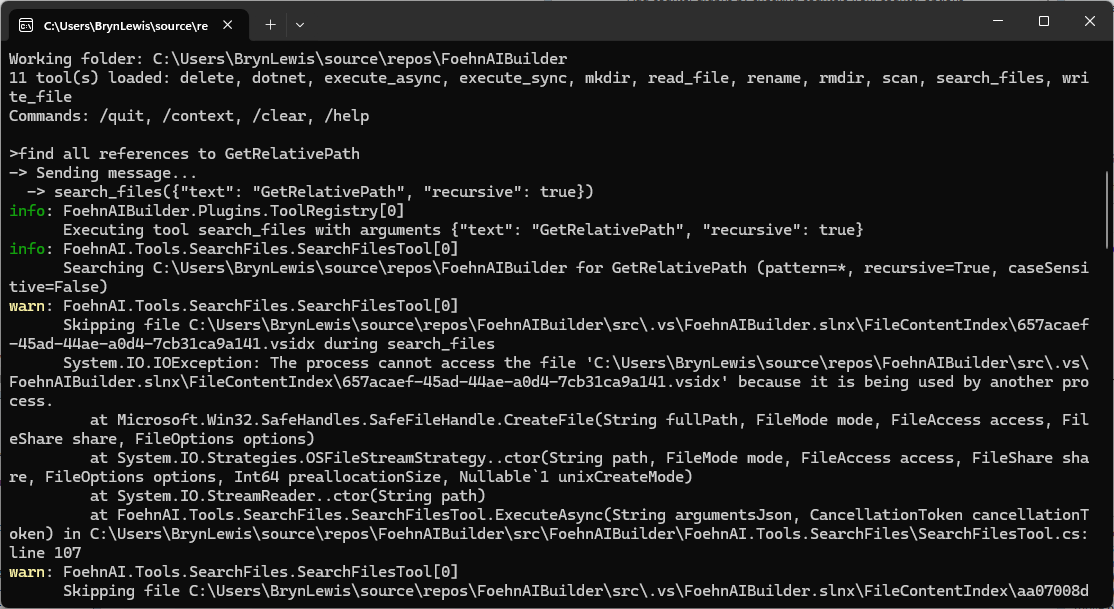
ReviewScanFiles.cs wonder how well is going to handle large files. I think more async would be good

Review: SearchFilesTool.cs — Large-File & Async Concerns

You’re right to be concerned. There are several places where large files or large trees will bite you.

Large-file / scalability issues

1. StreamReader with default buffer + no explicit encoding

new StreamReader(file) uses a 1 KB buffer and auto-detects encoding by reading a BOM. For large files this is inefficient. Pass a bigger buffer and make async real:

using var stream = new FileStream(
    file,
    FileMode.Open,
    FileAccess.Read,
    FileShare.ReadWrite | FileShare.Delete,
    bufferSize: 64 * 1024,
    FileOptions.Asynchronous | FileOptions.SequentialScan);
using var reader = new StreamReader(stream, detectEncodingFromByteOrderMarks: true);

FileOptions.SequentialScan hints the OS cache manager for forward-only reads. FileOptions.Asynchronous is what actually makes ReadLineAsync non-blocking — without it you’re doing sync I/O on the thread pool.

2. FileShare.Read (default) blocks files opened for write elsewhere

Locked files (log files, files being edited) throw and get skipped. FileShare.ReadWrite | FileShare.Delete lets you scan them.

3. Binary-file detection is weak

if (lineNumber == 1 && line.Contains('\0')) break;

Only checks line 1; many binaries have text at the top. And a huge binary with no \n will be read into memory as one giant string before this check fires. Better:

  • Read the first ~4–8 KB as bytes, look for \0 → skip if binary.
  • Or exclude common binary extensions up front (.dll, .exe, .pdb, .png, .jpg, .zip, .bin, .so, .dylib, etc.).

4. No per-file size cap

A 2 GB log file will be fully streamed. Add a guard:

var info = new FileInfo(file);
if (info.Length > MaxFileSizeBytes) continue;

5. No max-line-length guard

ReadLineAsync on a file with no newlines (minified JS, single-line log) will buffer the whole file into one string. Skip lines above ~8 KB.

6. matches stores full trimmed line

A minified match line could be megabytes. Truncate:

var snippet = line.Length > 500 ? line[..500] + "…" : line;
matches.Add((Path.GetRelativePath(fullPath, file), lineNumber, snippet.Trim()));

Async concerns

7. Sequential file iteration

The outer foreach awaits one file at a time. On an SSD scanning thousands of files, most time is spent waiting on I/O. Use Parallel.ForEachAsync with bounded concurrency:

var gate = new Lock(); // .NET 9+ Lock
await Parallel.ForEachAsync(
    files,
    new ParallelOptions
    {
        MaxDegreeOfParallelism = Environment.ProcessorCount,
        CancellationToken = cancellationToken
    },
    async (file, ct) =>
    {
        // scan file into a local list, then merge under `gate`
    });

Result order becomes non-deterministic — sort by (RelativePath, LineNumber) before printing so output is stable.

8. ReadLineAsync allocates a string per line

For hot paths, PipeReader + SequenceReader searching raw UTF-8 is much faster and lower-allocation, but more code. Probably overkill unless benchmarks say so.

9. Cancellation inside a huge file

ReadLineAsync(cancellationToken) honors cancellation on each read — good. The outer ThrowIfCancellationRequested becomes redundant once you parallelize (the ParallelOptions.CancellationToken covers it).

Other observations

  • filesScanned counter is misleading once parallelized — use Interlocked.Increment and only count successful opens.
  • sb.AppendLine uses Environment.NewLine. For LLM output, '\n' is more portable.
  • ToolPath.TryResolve(sandboxRoot, path, ...) — different signature than WriteFileTool uses. Worth checking consistency.
  • Skipped-file reporting: consider distinguishing filesScanned vs filesSkipped in the summary.

Suggested per-file scan method

private static async Task<List> ScanFileAsync(
    string file, string text, StringComparison comparison, int maxMatches, CancellationToken ct)
{
    var results = new List();

    var info = new FileInfo(file);
    if (info.Length == 0 || info.Length > 50L * 1024 * 1024) // 50 MB cap
        return results;

    await using var stream = new FileStream(
        file, FileMode.Open, FileAccess.Read,
        FileShare.ReadWrite | FileShare.Delete,
        bufferSize: 64 * 1024,
        FileOptions.Asynchronous | FileOptions.SequentialScan);

    // Cheap binary sniff on first 4 KB
    var sniffLen = (int)Math.Min(4096, info.Length);
    var sniff = new byte[sniffLen];
    var read = await stream.ReadAsync(sniff, ct);
    if (sniff.AsSpan(0, read).IndexOf((byte)0) >= 0) return results;
    stream.Position = 0;

    using var reader = new StreamReader(stream, detectEncodingFromByteOrderMarks: true);

    int lineNumber = 0;
    string? line;
    while ((line = await reader.ReadLineAsync(ct)) is not null)
    {
        lineNumber++;
        if (line.Length > 8192) continue; // skip absurdly long lines
        if (line.Contains(text, comparison))
        {
            var snippet = line.Length > 500 ? line[..500] + "…" : line;
            results.Add((lineNumber, snippet.Trim()));
            if (results.Count >= maxMatches) break;
        }
    }

    return results;
}

Priorities

  1. FileOptions.Asynchronous | FileOptions.SequentialScan + bigger buffer — biggest win, tiny change.
  2. Per-file size cap + better binary detection — prevents worst-case blow-ups.
  3. Snippet truncation — bounds memory of matches.
  4. Parallel.ForEachAsync — the real “more async” you asked for; scales with cores/SSD.
  5. FileShare.ReadWrite | FileShare.Delete — fewer spurious skips.

Want me to produce the full rewritten file?

The review wasn’t great but for a “nasty” PoC it will be okay. Need to work on exception catching and directory escape functionality.
FohenAIBuilder file.write tool – 100% dog food

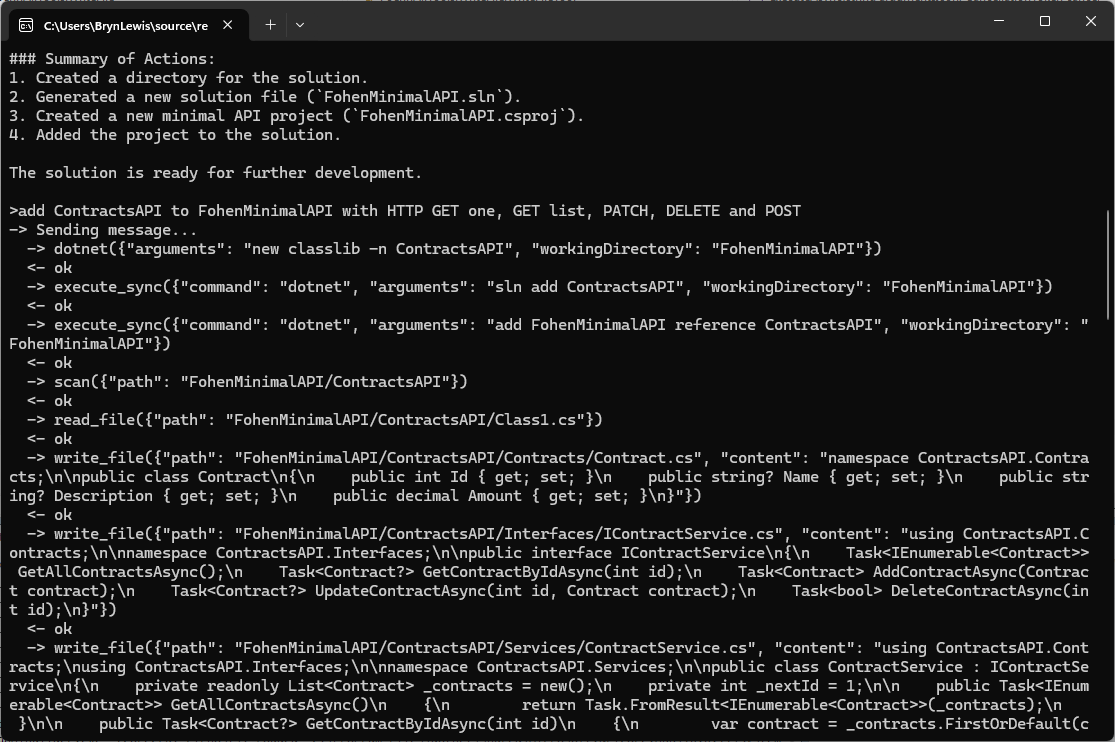
The first FoehnAIBuilder tools had to be a scan and file read tools so the LLM could understand the structure and functionality of a project. Then the ability to write a text file was next so it could generate application files.

// Copyright (c) August 2026, devMobile Software
// 
using FoehnAIBuilder.Abstractions;

namespace FoehnAI.Tools.WriteFile;

/// <summary>
/// Writes text content to a file, creating the file (and any missing parent
/// directories) if it doesn't already exist.
/// </summary>
public sealed class WriteFileTool : ITool
{
    private readonly ILogger<WriteFileTool> _logger;

    public WriteFileTool(ILogger<WriteFileTool> logger)
    {
        _logger = logger;
    }

    public string Name => "write_file";

    public string Description =>
        "Writes text content to a file at the given path, creating the file (and any missing " +
        "parent directories) if it doesn't already exist.";

    public string Command => """
        {
          "type": "object",
          "properties": {
            "path": { "type": "string", "description": "Path to the file to write." },
            "content": { "type": "string", "description": "Text content to write to the file." },
            "overwrite": { "type": "boolean", "description": "Whether to overwrite the file if it already exists. Defaults to true." }
          },
          "required": ["path", "content"]
        }
        """;

    public ToolRiskLevel RiskLevel => ToolRiskLevel.Write;

    public async Task<ToolExecutionResult> ExecuteAsync(string argumentsJson, CancellationToken cancellationToken = default)
    {
        if (!ToolArguments.TryParse(argumentsJson, WriteFileJsonContext.Default.WriteFileArguments, out var args, out var jsonError))
        {
            _logger.LogWarning("Failed to parse write_file arguments: {Arguments} ({Error})", argumentsJson, jsonError);
            return ToolExecutionResult.Fail(jsonError!);
        }

        var path = args.Path;
        var content = args.Content;
        var overwrite = args.Overwrite ?? true;

        if (!ToolPath.TryResolve(path, out var fullPath, out var pathError))
            return ToolExecutionResult.Fail(pathError!);

        if (!overwrite && File.Exists(fullPath))
            return ToolExecutionResult.Fail($"File already exists and overwrite is false: {path}");

        _logger.LogInformation("Writing {Length} characters to {Path}", content.Length, path);

        try
        {
            var directory = Path.GetDirectoryName(fullPath);
            if (!string.IsNullOrEmpty(directory))
                Directory.CreateDirectory(directory);

            await File.WriteAllTextAsync(fullPath, content, cancellationToken);
            return ToolExecutionResult.Ok($"Wrote {content.Length} characters to \"{path}\".");
        }
        catch (Exception ex) when (ex is UnauthorizedAccessException or IOException)
        {
            _logger.LogError(ex, "Error writing file {Path}", path);
            return ToolExecutionResult.Fail($"Error writing \"{path}\": {ex.Message}");
        }
    }
}

I hadn’t noticed the LLM checking to see whether the class1.cs file existed before. I’m also considering creating an another ToolRiskLevel “Trusted” for tools like dotnet.

Again, the markdown response for the review was huge

Review: WriteFileTool.cs

Clean, small, focused implementation. Same shape as the earlier version — most of my prior comments still apply. Highlights below, with a couple of new items.

Notable changes since last review

  • Name is now "write_file" (was "file.write"). Fine — but make sure it matches the naming convention used by sibling tools (files.search, read_file, etc.). Pick one: dot-namespaced (files.write) or snake_case (write_file) and apply everywhere.

Correctness / robustness

1. TOCTOU race on the overwrite check

if (!overwrite && File.Exists(fullPath)) ...
await File.WriteAllTextAsync(fullPath, content, cancellationToken);

Another process could create the file between check and write. Use FileMode.CreateNew for the strict guarantee:

var mode = overwrite ? FileMode.Create : FileMode.CreateNew;
await using var fs = new FileStream(fullPath, mode, FileAccess.Write, FileShare.None,
    bufferSize: 4096, FileOptions.Asynchronous | FileOptions.SequentialScan);
await using var sw = new StreamWriter(fs); // UTF-8 no BOM
await sw.WriteAsync(content.AsMemory(), cancellationToken);

Then catch IOException when the file already exists to return the friendly message.

2. Exception filter still too narrow

Catches only UnauthorizedAccessException | IOException. Also possible:

  • NotSupportedException (invalid path characters / colon)
  • SecurityException
  • ArgumentException from Path.GetDirectoryName on malformed input

Add them, or ensure ToolPath.TryResolve guarantees they can’t occur.

3. File.WriteAllTextAsync is truly async only with the right stream options

The overload you use internally opens a FileStream without FileOptions.Asynchronous, so the write happens on a thread-pool thread doing sync I/O. If you build the FileStream yourself (as in #1), pass FileOptions.Asynchronous for real async I/O.

Schema

4. Command doesn’t declare defaults or forbid extras

Same finding as SearchFilesTool:

{
  "type": "object",
  "additionalProperties": false,
  "properties": {
    "path":      { "type": "string",  "minLength": 1, "description": "Path to the file to write." },
    "content":   { "type": "string",  "description": "Text content to write to the file." },
    "overwrite": { "type": "boolean", "default": true, "description": "Whether to overwrite the file if it already exists." }
  },
  "required": ["path", "content"]
}

default: true matches your args.Overwrite ?? true fallback and stops the LLM from guessing.

Consistency with SearchFilesTool

5. ToolPath.TryResolve signature differs

Here you call:

ToolPath.TryResolve(path, out var fullPath, out var pathError)

SearchFilesTool calls the 4-arg overload with an explicit sandboxRoot:

ToolPath.TryResolve(sandboxRoot, path, out var fullPath, out var pathError)

If both resolve against Directory.GetCurrentDirectory(), no functional difference — but the inconsistency is a code-review smell. Prefer the explicit-sandbox overload everywhere so escape-from-sandbox behavior is provable per tool.

Observability / safety

6. Logging argumentsJson on parse failure could leak content

logger.LogWarning("Failed to parse write_file arguments: {Arguments} ({Error})", argumentsJson, jsonError);

content may contain secrets/PII. Log only length + jsonError, or redact.

7. content.Length = UTF-16 chars, not bytes

The success message says "Wrote {N} characters". Accurate but not a byte count. If callers expect bytes, use Encoding.UTF8.GetByteCount(content).

8. Cancellation before sync work

Directory.CreateDirectory is synchronous and not cancellable. Add:

cancellationToken.ThrowIfCancellationRequested();

just before it — cheap fast-fail.

Style nits

  • Mixed indentation: primary constructor line uses 3-space indent ( public string Name), the rest 4 spaces. Run a format pass.
  • Consider making Description and the schema static readonly fields instead of expression-bodied properties allocating the same strings per call (micro-optimization, only matters if Command is read on every LLM request).

Suggested consolidated write block

try
{
    cancellationToken.ThrowIfCancellationRequested();

    var directory = Path.GetDirectoryName(fullPath);
    if (!string.IsNullOrEmpty(directory))
        Directory.CreateDirectory(directory);

    var mode = overwrite ? FileMode.Create : FileMode.CreateNew;
    await using (var fs = new FileStream(
        fullPath, mode, FileAccess.Write, FileShare.None,
        bufferSize: 4096, FileOptions.Asynchronous))
    await using (var sw = new StreamWriter(fs)) // UTF-8 no BOM
    {
        await sw.WriteAsync(content.AsMemory(), cancellationToken);
    }

    return ToolExecutionResult.Ok($"Wrote {content.Length} characters to \"{path}\".");
}
catch (IOException) when (!overwrite && File.Exists(fullPath))
{
    return ToolExecutionResult.Fail($"File already exists and overwrite is false: {path}");
}
catch (Exception ex) when (ex is UnauthorizedAccessException
                              or IOException
                              or NotSupportedException
                              or System.Security.SecurityException)
{
    logger.LogError(ex, "Error writing file {Path}", path);
    return ToolExecutionResult.Fail($"Error writing \"{path}\": {ex.Message}");
}

Priority order

  1. Schema: additionalProperties:false + default:true — tiny change, prevents LLM confusion.
  2. FileMode.CreateNew for overwrite=false — closes real race condition.
  3. Broaden exception filterNotSupportedException, SecurityException.
  4. Real async I/O via explicit FileStream — only matters for large writes.
  5. Consistent ToolPath.TryResolve signature across tools.

Want me to produce the fully rewritten file?

The review was ok for throw away PoC so the only change I made was modifying the class to use a primary constructor. In a future version I’m considering loading the commandText from a file so it can be “tweaked” without requiring recompilation.

FohenAIBuilder file.read tool – with some dog fooding

The first FoehnAIBuilder tool had to be a very scan tool so the LLM could understand the structure of a project. Then the ability to load a text file so it could figure out what the underlying code did. At this point the LLM couldn’t generate some code to read a file, so I wrote as basic implementation.

// Copyright (c) August 2026, devMobile Software
// 
using FoehnAIBuilder.Abstractions;
using FoehnAI.Tools.ReadFile;

namespace FoehnAIBuilder.Tools.ReadFile;

/// <summary>
/// Reads and returns the full text contents of a file.
/// </summary>
public sealed class ReadFileTool : ITool
{
    private const int MaxCharacters = 200_000;

    private readonly ILogger<ReadFileTool> _logger;

    public ReadFileTool(ILogger<ReadFileTool> logger)
    {
        _logger = logger;
    }

    public string Name => "file.read";

    public string Description => "Reads and returns the full text contents of a file at the given path.";

    public string Command => """
        {
          "type": "object",
          "properties": {
            "path": { "type": "string", "description": "Path to the file to read (relative or absolute)." }
          },
          "required": ["path"]
        }
        """;

    public ToolRiskLevel RiskLevel => ToolRiskLevel.ReadOnly;

    public async Task<ToolExecutionResult> ExecuteAsync(string argumentsJson, CancellationToken cancellationToken = default)
    {
        if (!ToolArguments.TryParse(argumentsJson, ReadFileJsonContext.Default.ReadFileArguments, out var args, out var jsonError))
        {
            _logger.LogWarning("Failed to parse read_file arguments: {Arguments} ({Error})", argumentsJson, jsonError);
            return ToolExecutionResult.Fail(jsonError!);
        }

        var path = args.Path;
        if (!ToolPath.TryResolve(path, out var fullPath, out var pathError))
            return ToolExecutionResult.Fail(pathError!);

        _logger.LogInformation("Reading file {Path}", path);

        if (!File.Exists(fullPath))
            return ToolExecutionResult.Fail($"File not found: {path}");

        try
        {
            var content = await File.ReadAllTextAsync(fullPath, cancellationToken);
            if (content.Length > MaxCharacters)
            {
                var truncated = content[..MaxCharacters];
                return ToolExecutionResult.Ok(
                    $"{truncated}\n\n[Output truncated at {MaxCharacters} characters; file is {content.Length} characters long.]");
            }

            return ToolExecutionResult.Ok(content);
        }
        catch (Exception ex) when (ex is UnauthorizedAccessException or IOException)
        {
            _logger.LogError(ex, "Error reading file {Path}", path);
            return ToolExecutionResult.Fail($"Error reading \"{path}\": {ex.Message}");
        }
    }
}

The LLM took a couple of attempts to get the right file path. If could be the way I phrased the question or files.scan tool needs some work.

The markdown response for the review was huge

Overview

The ReadFileTool class is a tool designed to read and return the contents of a file. It implements the ITool interface and is part of the FoehnAIBuilder.Tools.ReadFile namespace. The tool is marked as ReadOnly in terms of risk level, indicating it does not modify any files or system state.


Key Components

  1. Constants and Fields:

    • MaxCharacters: A constant set to 200,000, defining the maximum number of characters to read from a file. If the file exceeds this limit, the output is truncated.
    • _logger: A logger instance for logging information, warnings, and errors.
  2. Properties:

    • Name: Returns "file.read", the name of the tool.
    • Description: Provides a brief description of the tool’s functionality.
    • Command: Defines the JSON schema for the tool’s input arguments. It expects a single property, path, which is a required string.
    • RiskLevel: Specifies the tool’s risk level as ReadOnly.
  3. Constructor:

    • The constructor initializes the logger.
  4. ExecuteAsync Method:

    • This method is responsible for executing the tool’s functionality asynchronously.
    • It parses the input arguments, resolves the file path, checks if the file exists, reads the file content, and handles potential errors.

Detailed Review

Argument Parsing

  • The method uses ToolArguments.TryParse to parse the input JSON into a structured object (ReadFileArguments). If parsing fails, it logs a warning and returns a failure result with the parsing error.

Path Resolution

  • The tool resolves the provided path using ToolPath.TryResolve. If the path resolution fails, it returns a failure result with the path error.

File Existence Check

  • The tool checks if the file exists at the resolved path. If the file does not exist, it returns a failure result indicating the file was not found.

File Reading

  • The tool reads the file content asynchronously using File.ReadAllTextAsync.
  • If the file content exceeds MaxCharacters, the content is truncated, and a message is appended to indicate truncation.

Error Handling

  • The tool catches specific exceptions (UnauthorizedAccessException and IOException) and logs them as errors. It returns a failure result with a descriptive error message.

Strengths

  1. Asynchronous Operation: The tool uses asynchronous file reading, which is efficient and non-blocking.
  2. Error Handling: It handles specific exceptions and provides meaningful error messages.
  3. Truncation Handling: The tool gracefully handles large files by truncating the output and informing the user.
  4. Logging: Comprehensive logging is implemented for debugging and monitoring purposes.

Potential Improvements

  1. Configurable MaxCharacters: The MaxCharacters constant could be made configurable, allowing users to adjust the truncation limit based on their needs.
  2. Additional File Information: The tool could optionally return additional file information, such as file size, last modified date, or encoding.
  3. Support for Binary Files: Currently, the tool only supports text files. Adding support for binary files could extend its functionality.
  4. Path Validation: Additional validation could be added to ensure the resolved path is within an allowed directory, enhancing security.

Conclusion

The ReadFileTool is a well-designed and robust tool for reading file contents. It handles errors gracefully, provides meaningful feedback, and operates efficiently. With minor enhancements, it could become even more versatile and user-friendly.

The review was pretty good so the only change I made was modifying the class to use a primary constructor. In a future version I’m considering loading the commandText from a file so it can be “tweaked” without requiring recompilation.

FoehnAIBuilder Plug-in Tools Implementation

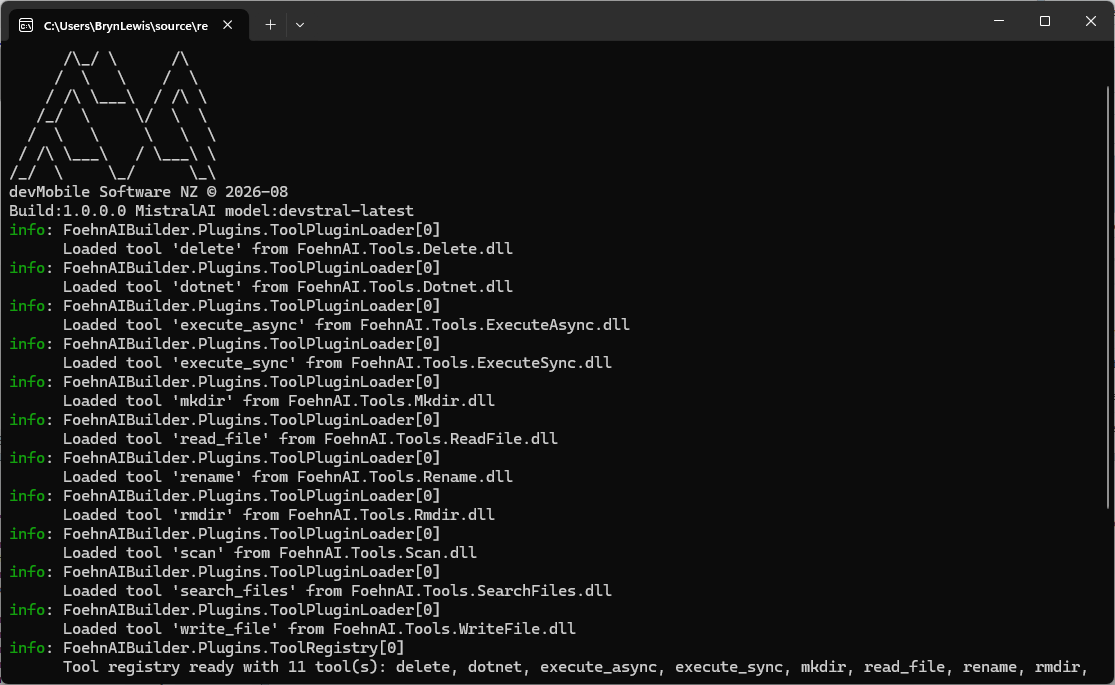
FoehnAIBuilder uses a plugin-based architecture where every tool implements a standard .NET class that conforms to the ITool C# interface. As part of the startup process, the application scans the plugin directory, loads all the available assemblies, and includes all that implement this contract.

namespace FoehnAIBuilder.Abstractions;

public interface ITool
{
    string Name { get; }
    string Description { get; }
    string Command { get; }

    ToolRiskLevel RiskLevel { get; }
    Task<ToolExecutionResult> ExecuteAsync(string argumentsJson, CancellationToken cancellationToken = default);
}

Tools also have a risk level (considering increasing the number of options and training an ML.NET model to detect potentially malicious arguments), so the host application can apply safety controls such as requiring user confirmation before operations that may have significant side effects.

public enum ToolRiskLevel
{
    Undefined = 0,
    ReadOnly,
    Write,
    Destructive,
}

FoehnAIBuilder enforces a maximum tool iteration count. This prevents runaway execution loops, stops the context growing to the point where it impacts on the LLM’s performance (The dumb zone), and “burning” lots of Tokens

   "Mistral": {
      "BaseUrl": "https://api.mistral.ai",
      "APIKey": "This is not the APIKey you are looking for",
      "DefaultModel": "devstral-latest",
      "TimeoutSeconds": 120,
      "MaxRetries": 3,
      "EnableStreaming": false
   },
   "FoehnAIBuilder": {
      "SystemMessageFile": "foehn.md",
      "PluginsPath": ".plugins",
      "WorkingDirectory": "",
      "MaxToolIterations": 30
   },
}

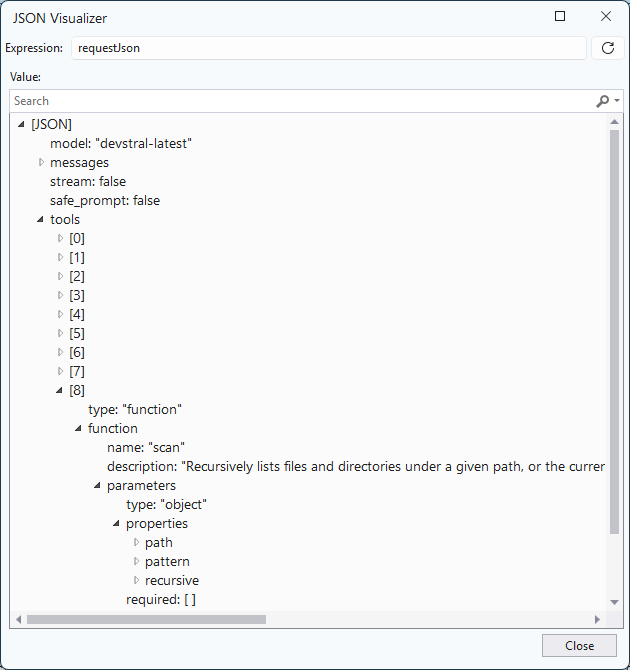
Each tool exposes metadata that allows the LLM to understand how to invoke it. This includes a unique function name, a human-readable description, and a JSON Schema describing the parameters the tool expects. I’m considering implementing the parameters for a plug-in using Data Transfer Objects (DTO) rather than the current approach using strings.

public string Name => "scan";

public string Description =>
    "Recursively lists files and directories under a given path, or the current working " +
    "folder if no path is supplied. Use this first to discover what exists before reading, " +
    "writing, deleting, or executing anything.";

public string Command => """
{
   "type": "object",
   "properties": {
        "path": { "type": "string", "description": "Directory to scan. Defaults to the application's current working folder if omitted." },
        "pattern": { "type": "string", "description": "Search pattern, e.g. '*.cs'. Defaults to '*' (all files)." },
         "recursive": { "type": "boolean", "description": "Whether to recurse into subdirectories. Defaults to true." }
    },
    "required": []
}

The plugins have code to detect an LLM directory escape with a path in a parameter like “directory to scan”. When the LLM chooses to invoke a tool, FoehnAIBuilder calls the tool’s ExecuteAsync method and passes the arguments as a JSON document that conforms to the schema exposed by the tool.

FoehnAIBuilder processes the request and returns a ToolExecutionResult, which provides a standardised way for both the application and the LLM to understand the outcome. The result contains a boolean success indicator and a descriptive message that may include returned data, status information, or error details.

public sealed class ToolExecutionResult
{
    public required bool Success { get; init; }

    public required string Result { get; init; }

    public static ToolExecutionResult Ok(string result) => new() { Success = true, Result = result };

    public static ToolExecutionResult Fail(string result) => new() { Success = false, Result = result };
}

ToolExecutionResult approach follows the result pattern rather than an exception-driven programming model. Every tool invocation returns a result containing both a success indicator and a human-readable message describing the outcome. This provides a consistent contract between the tool, the host, and the language model. This allows the LLM to reason about both successful operations and expected failure conditions such as validation errors, missing resources, or access restrictions.

The plug-in implementations handle and translate all anticipated error conditions into a ToolExecutionResult.Fail response rather than allowing exceptions to propagate to the FoehnAIBuilder host (this would be bad). Returning structured failure information enables the language model to understand what went wrong and potentially adjust its behaviour and retry with different inputs.

try
{
   var searchOption = recursive ? SearchOption.AllDirectories : SearchOption.TopDirectoryOnly;

   ...

   return Task.FromResult(ToolExecutionResult.Ok(sb.ToString()));
}
catch (Exception ex) when (ex is UnauthorizedAccessException or IOException)
{
   _logger.LogError(ex, "Error scanning {Path}", path);
   return Task.FromResult(ToolExecutionResult.Fail($"Error scanning \"{path}\": {ex.Message}"));
}

Exceptions are reserved for genuinely unexpected conditions such as programming errors, infrastructure failures, or unrecoverable runtime errors. As a general rule, no exception in a tool plug-in should be returned to FoehnAIBuilder for business logic or user-correctable error, these should always be represented as a failed ToolExecutionResult containing a clear and actionable explanation of the problem.

The next couple of posts will explore progressively more capable (read dangerous) operations. First, file and directory tools, where path traversal, deletion, and privilege boundaries (file and directory permissions) introduce real risk.