Uputronics Raspberry Pi+ LoRa(TM) Expansion Board

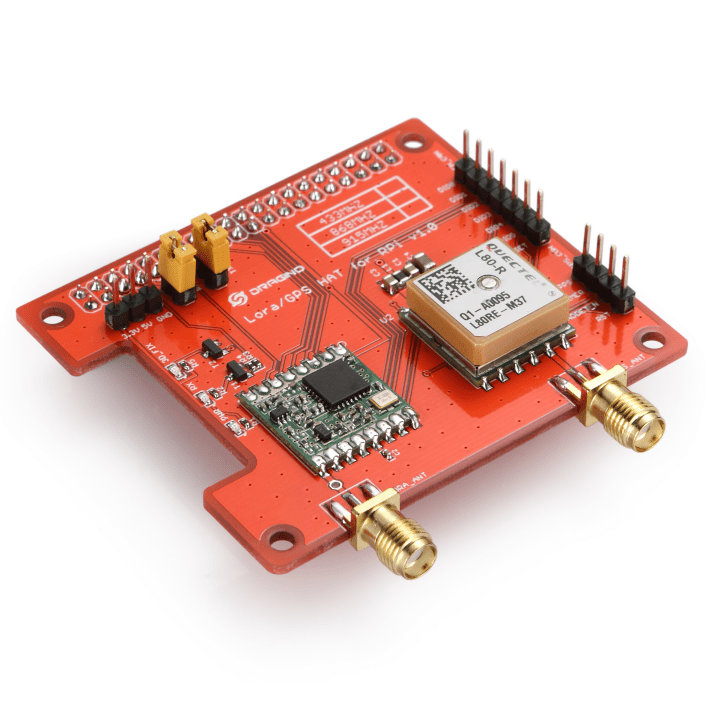
The second package to arrive was a Raspberry Pi+ LoRa(TM) Expansion Board populated with HopeRF 434MHz & 915MHz modules. It was in a small cardboard box with bolts+spacers and had a small set of printed instructions.

The shield has four user controlable Light Emitting Diodes(LED) connected to General Purpose Input Output(GPIO) pins which will be useful  for providing feedback when trying to debug faults etc..
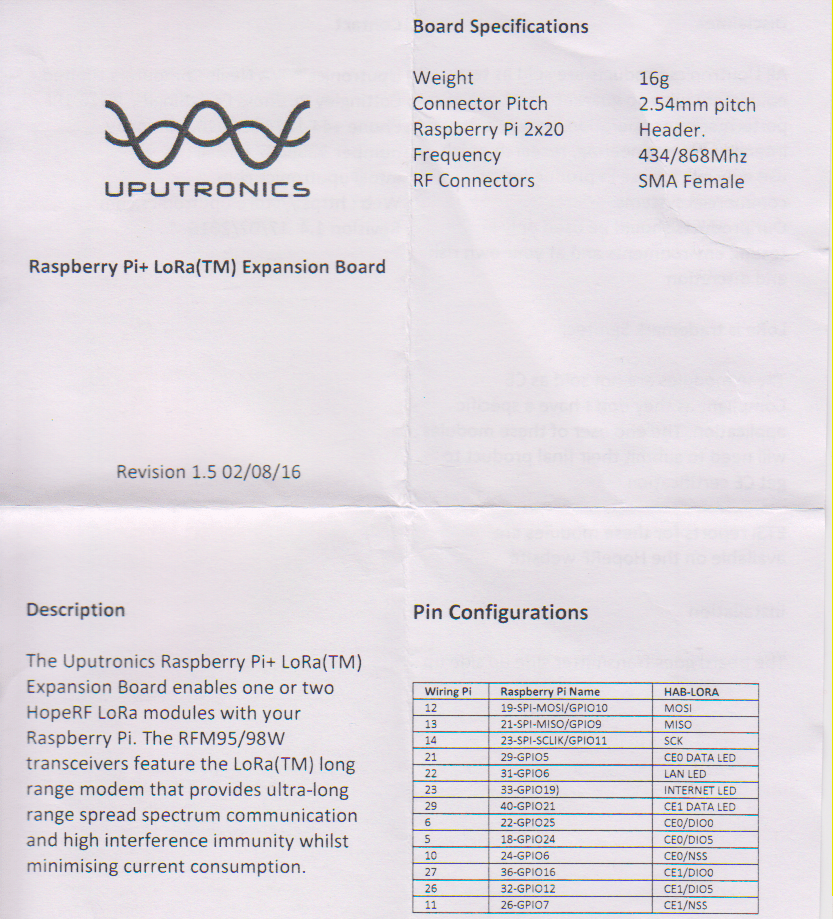
uputronicsPiPlusHelp

Some of the pin numbers are also printed on the shield silk screen.UputronicsRPIPlusShield
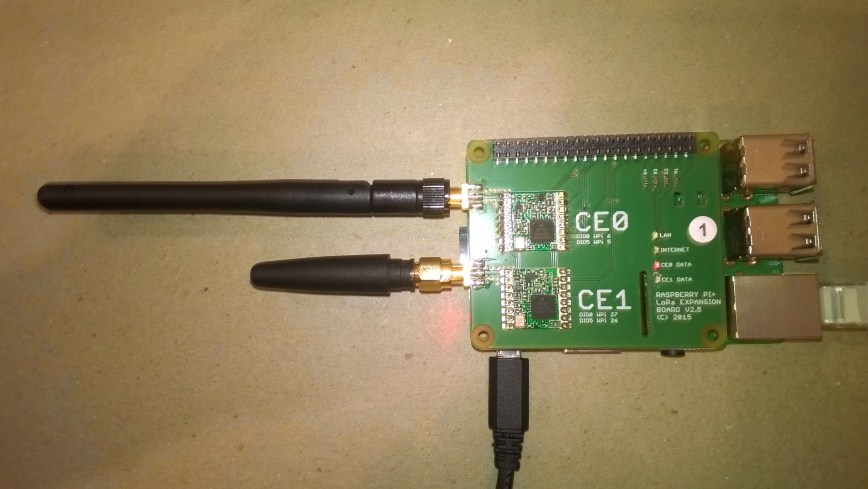
This time the first step was to check the pin assignments of the 4 LEDs

//---------------------------------------------------------------------------------
// Copyright (c) September 2018, devMobile Software
//
// Licensed under the Apache License, Version 2.0 (the "License");
// you may not use this file except in compliance with the License.
// You may obtain a copy of the License at
//
//     http://www.apache.org/licenses/LICENSE-2.0
//
// Unless required by applicable law or agreed to in writing, software
// distributed under the License is distributed on an "AS IS" BASIS,
// WITHOUT WARRANTIES OR CONDITIONS OF ANY KIND, either express or implied.
// See the License for the specific language governing permissions and
// limitations under the License.
//
//---------------------------------------------------------------------------------
namespace devMobile.IoT.Rfm9x.UputronicsRPIPlusLed
{
using System;
using System.Threading;
using Windows.ApplicationModel.Background;
using Windows.Devices.Gpio;

public sealed class StartupTask : IBackgroundTask
{
public void Run(IBackgroundTaskInstance taskInstance)
{
GpioController gpioController = GpioController.GetDefault();

GpioPin ce01LedPin = gpioController.OpenPin(5);
ce01LedPin.SetDriveMode(GpioPinDriveMode.Output);
ce01LedPin.Write(GpioPinValue.Low);

GpioPin ceo2LedPin = gpioController.OpenPin(21);
ceo2LedPin.SetDriveMode(GpioPinDriveMode.Output);
ceo2LedPin.Write(GpioPinValue.High);

GpioPin lanLedPin = gpioController.OpenPin(6);
lanLedPin.SetDriveMode(GpioPinDriveMode.Output);
lanLedPin.Write(GpioPinValue.Low);

GpioPin internetLedPin = gpioController.OpenPin(13);
internetLedPin.SetDriveMode(GpioPinDriveMode.Output);
internetLedPin.Write(GpioPinValue.High);

while (true)
{
if (ce01LedPin.Read() == GpioPinValue.High)
{
ce01LedPin.Write(GpioPinValue.Low);
}
else
{
ce01LedPin.Write(GpioPinValue.High);
}

if (ceo2LedPin.Read() == GpioPinValue.High)
{
ceo2LedPin.Write(GpioPinValue.Low);
}
else
{
ceo2LedPin.Write(GpioPinValue.High);
}

if (lanLedPin.Read() == GpioPinValue.High)
{
lanLedPin.Write(GpioPinValue.Low);
}
else
{
lanLedPin.Write(GpioPinValue.High);
}

if (internetLedPin.Read() == GpioPinValue.High)
{
internetLedPin.Write(GpioPinValue.Low);
}
else
{
internetLedPin.Write(GpioPinValue.High);
}

Thread.Sleep(500);
}
}
}
}

I think there is a small issue with the internet LED it should be GPIO13 (which matches the pin number)

The next step was to get the Serial Peripheral Interface (SPI) interface for both modules working.

//---------------------------------------------------------------------------------
// Copyright (c) September 2018, devMobile Software
//
// Licensed under the Apache License, Version 2.0 (the "License");
// you may not use this file except in compliance with the License.
// You may obtain a copy of the License at
//
//     http://www.apache.org/licenses/LICENSE-2.0
//
// Unless required by applicable law or agreed to in writing, software
// distributed under the License is distributed on an "AS IS" BASIS,
// WITHOUT WARRANTIES OR CONDITIONS OF ANY KIND, either express or implied.
// See the License for the specific language governing permissions and
// limitations under the License.
//
//---------------------------------------------------------------------------------
namespace devMobile.IoT.Rfm9x.UputronicsRPIPlusSPI
{
using System;
using System.Diagnostics;
using System.Threading;
using Windows.ApplicationModel.Background;
using Windows.Devices.Spi;

public sealed class StartupTask : IBackgroundTask
{
public void Run(IBackgroundTaskInstance taskInstance)
{
#if CS0
const int chipSelectPinNumber = 0;
#endif
#if CS1
const int chipSelectPinNumber = 1;
#endif
SpiController spiController = SpiController.GetDefaultAsync().AsTask().GetAwaiter().GetResult();
var settings = new SpiConnectionSettings(chipSelectPinNumber)
{
ClockFrequency = 500000,
Mode = SpiMode.Mode0,   // From SemTech docs pg 80 CPOL=0, CPHA=0
};
SpiDevice Device = spiController.GetDevice(settings);

while (true)
{
byte[] writeBuffer = new byte[] { 0x42 }; // RegVersion
byte[] readBuffer = new byte[1];

// Read the RegVersion silicon ID to check SPI works
Device.TransferSequential(writeBuffer, readBuffer);

#if CS0
Debug.WriteLine("CS0 Register RegVer 0x{0:x2} - Value 0X{1:x2} - Bits {2}", writeBuffer[0], readBuffer[0], Convert.ToString(readBuffer[0], 2).PadLeft(8, '0'));
#endif
#if CS1
Debug.WriteLine("CS1 Register RegVer 0x{0:x2} - Value 0X{1:x2} - Bits {2}", writeBuffer[0], readBuffer[0], Convert.ToString(readBuffer[0], 2).PadLeft(8, '0'));
#endif
Thread.Sleep(10000);
}
}
}
}

Like the other uputronics shield I have tested this appears not to have the reset line of the RFM9X connected.

The output confirmed the code worked with both CS0 and CS1 defined

CS0 Register RegVer 0x42 - Value 0X12 - Bits 00010010
CS1 Register RegVer 0x42 - Value 0X12 - Bits 00010010

Would have been more useful to read RegFrMsb = 0x06, RegFrMid = 0x7, and RegFrLsb = 0x08 so I could see the different default frequencies of the two HopeRF modules. The next step is to build support for this shield into my RFM9X.IoTCore library.
RFM9X.IoTCore Uputronics Raspberry PiZero LoRa(TM) Expansion Board

I had to make some modifications to my RFM9X.IoT core library to support the Uputronics Raspberry PiZero LoRa(TM) Expansion Board as it doesn’t appear to have the HopeRF 9X reset pin connected.

I create another overload of the class constructor

// Constructor for RPI shields with chip select connected to CS0/CS1 and no reset pin e.g. Uputronics
public Rfm9XDevice(ChipSelectPin chipSelectPin, int interruptPinNumber)
{
	RegisterManager = new RegisterManager(chipSelectPin);

	// Check that SX127X chip is present
	Byte regVersionValue = RegisterManager.ReadByte((byte)Registers.RegVersion);
	if (regVersionValue != RegVersionValueExpected)
	{
		throw new ApplicationException("Semtech SX127X not found");
	}

	GpioController gpioController = GpioController.GetDefault();

	// Interrupt pin for RX message, TX done etc. notifications
	InterruptGpioPin = gpioController.OpenPin(interruptPinNumber);
	InterruptGpioPin.SetDriveMode(GpioPinDriveMode.Input);

	InterruptGpioPin.ValueChanged += InterruptGpioPin_ValueChanged;
}

Then disabled the strobing of the reset pin if it was not configured in the Initialise method

ublic void Initialise(
	double frequency = FrequencyDefault, // RegFrMsb, RegFrMid, RegFrLsb
	bool rxDoneignoreIfCrcMissing = true, bool rxDoneignoreIfCrcInvalid = true,
	bool paBoost = PABoostDefault, byte maxPower = RegPAConfigMaxPowerDefault, byte outputPower = RegPAConfigOutputPowerDefault, // RegPaConfig
	bool ocpOn = RegOcpDefault, byte ocpTrim = RegOcpOcpTrimDefault, // RegOcp
	RegLnaLnaGain lnaGain = LnaGainDefault, bool lnaBoost = LnaBoostDefault, // RegLna
	RegModemConfigBandwidth bandwidth = RegModemConfigBandwidthDefault, RegModemConfigCodingRate codingRate = RegModemConfigCodingRateDefault, RegModemConfigImplicitHeaderModeOn implicitHeaderModeOn = RegModemConfigImplicitHeaderModeOnDefault, //RegModemConfig1
	RegModemConfig2SpreadingFactor spreadingFactor = RegModemConfig2SpreadingFactorDefault, bool txContinuousMode = false, bool rxPayloadCrcOn = false,
	ushort symbolTimeout = SymbolTimeoutDefault,
	ushort preambleLength = PreambleLengthDefault,
	byte payloadLength = PayloadLengthDefault,
	byte payloadMaxLength = PayloadMaxLengthDefault,
	byte freqHoppingPeriod = FreqHoppingPeriodDefault,
	bool lowDataRateOptimize = LowDataRateOptimizeDefault, bool agcAutoOn = AgcAutoOnDefault,
	byte ppmCorrection = ppmCorrectionDefault,
	RegDetectOptimizeDectionOptimize detectionOptimize = RegDetectOptimizeDectionOptimizeDefault,
	bool invertIQ = InvertIqDefault,
	RegisterDetectionThreshold detectionThreshold = RegisterDetectionThresholdDefault,
	byte syncWord = RegSyncWordDefault)
{
	Frequency = frequency; // Store this away for RSSI adjustments
	RxDoneIgnoreIfCrcMissing = rxDoneignoreIfCrcMissing;
	RxDoneIgnoreIfCrcInvalid = rxDoneignoreIfCrcInvalid;

	// If the HopeRF module doesn't have the reset pin connected (e.g. uputroncis) not point in resetting it
	if (ResetGpioPin != null)
	{
		// Strobe Reset pin briefly to factory reset SX127X chip
		ResetGpioPin.Write(GpioPinValue.Low);
		Task.Delay(10);
		ResetGpioPin.Write(GpioPinValue.High);
		Task.Delay(10);
	}

In the calling application the constructor is called when UPUTRONICS_RPIZERO_CS0 or UPUTRONICS_RPIZERO_CS0 is defined.

#endif
#if UPUTRONICS_RPIZERO_CS0
	private const byte InterruptLine = 25;
	private Rfm9XDevice rfm9XDevice = new Rfm9XDevice(ChipSelectPin.CS0, InterruptLine);
#endif
#if UPUTRONICS_RPIZERO_CS1
	private const byte InterruptLine = 16;
	private Rfm9XDevice rfm9XDevice = new Rfm9XDevice(ChipSelectPin.CS1, InterruptLine);
#endif

I rebuilt the test application with the necessary uputronics definitions and it worked.

Register 0x40 - Value 0X00 - Bits 00000000
Register 0x41 - Value 0X00 - Bits 00000000
Register 0x42 - Value 0X12 - Bits 00010010
'backgroundTaskHost.exe' (CoreCLR: CoreCLR_UWP_Domain): <span id="mce_SELREST_start" style="overflow:hidden;line-height:0;"></span>Loaded 'C:\Data\Users\DefaultAccount\AppData\Local\DevelopmentFiles\Rfm9xLoRaDeviceClient-uwpVS.Debug_ARM.Bryn.Lewis\System.Threading.dll'. Skipped loading symbols. Module is optimized and the debugger option 'Just My Code' is enabled.
14:26:42-TX 25 byte message Hello from LoRaIoT1 ! 255
14:26:42-TX Done
14:26:42-RX PacketSnr 9.5 Packet RSSI -55dBm RSSI -112dBm = 24 byte message "11 Hello Arduino LoRa! 0"
14:26:43-RX PacketSnr 9.3 Packet RSSI -56dBm RSSI -110dBm = 24 byte message "11 Hello Arduino LoRa! 1"
14:26:44-RX PacketSnr 9.8 Packet RSSI -58dBm RSSI -111dBm = 24 byte message "11 Hello Arduino LoRa! 2"
14:26:45-RX PacketSnr 9.5 Packet RSSI -58dBm RSSI -111dBm = 24 byte message "11 Hello Arduino LoRa! 3"
14:26:46-RX PacketSnr 9.3 Packet RSSI -58dBm RSSI -112dBm = 24 byte message "11 Hello Arduino LoRa! 4"
The thread 0x154 has exited with code 0 (0x0).
14:26:47-RX PacketSnr 9.8 Packet RSSI -58dBm RSSI -114dBm = 24 byte message "11

I back integrated the code into my Adafruit.IO LoRa gateway and it worked (second time after I fixed the conditional compile directive) just need to do some further stress and soak testing.


Uputronics Raspberry PiZero LoRa(TM) Expansion Board

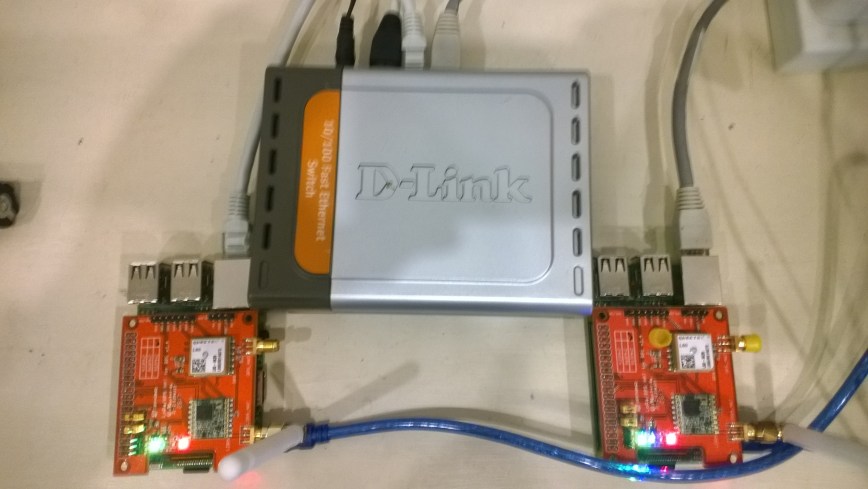
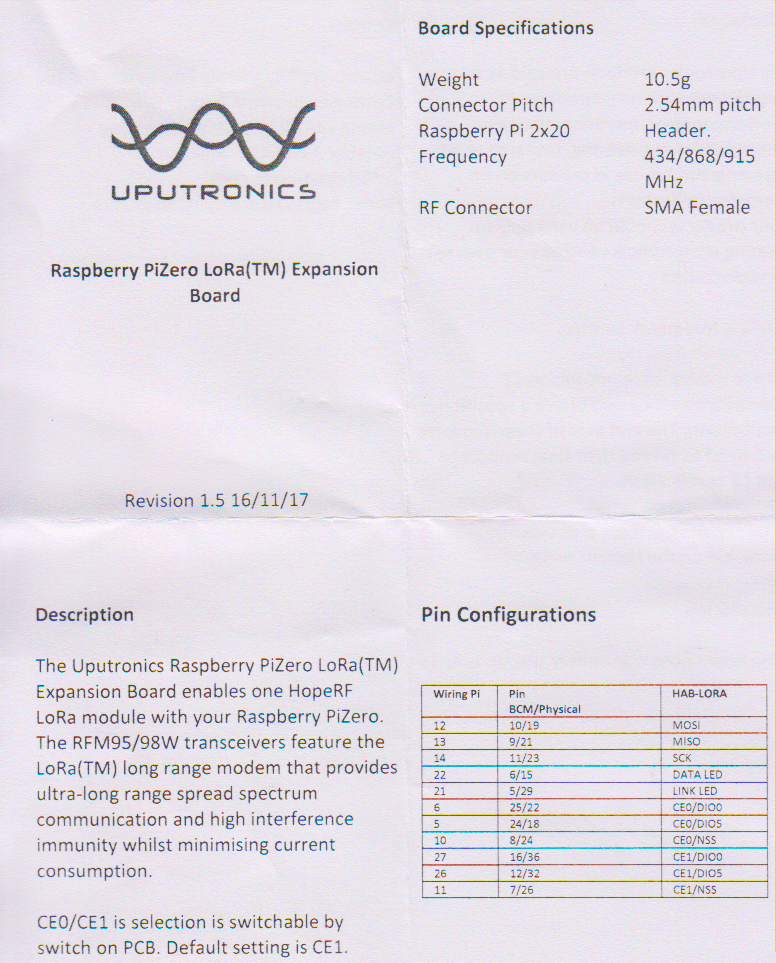
During the week another couple of Raspberry PI2/3/Zero shields arrived from uputronics. The two Raspberry PiZero LoRa(TM) Expansion Boards had arrived earlier so I unpacked them first. They were in small cardboard boxes with bolts+spacers and had a small set of printed instructions which was quite professional.uputronicsPiZeroLoRaHelp.png
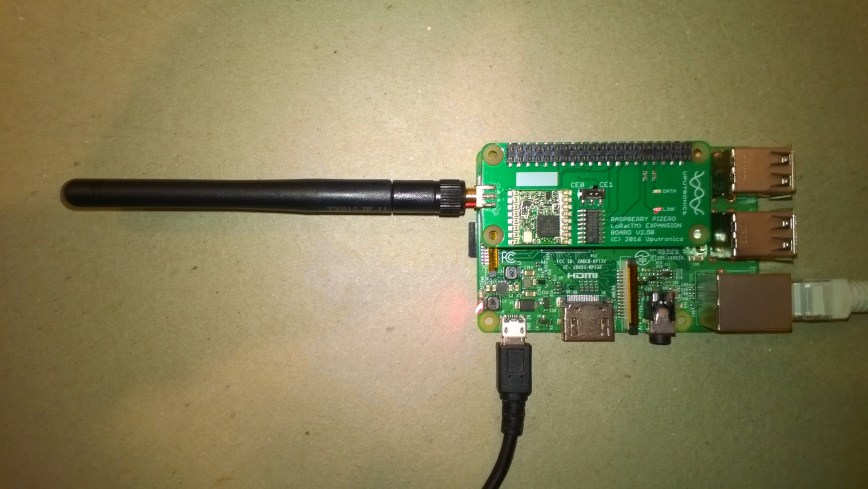
These shields also have a switch for configuring the chip select line which is quite a neat feature and means they can be stacked. Unlike the other shields I have tested these appear not to have the reset line of the RFM9X connected.

UputronicsRPIZeroShield

The first step was to get the SPI connectivity sorted

//---------------------------------------------------------------------------------
// Copyright (c) August 2018, devMobile Software
//
// Licensed under the Apache License, Version 2.0 (the "License");
// you may not use this file except in compliance with the License.
// You may obtain a copy of the License at
//
//     http://www.apache.org/licenses/LICENSE-2.0
//
// Unless required by applicable law or agreed to in writing, software
// distributed under the License is distributed on an "AS IS" BASIS,
// WITHOUT WARRANTIES OR CONDITIONS OF ANY KIND, either express or implied.
// See the License for the specific language governing permissions and
// limitations under the License.
//
//---------------------------------------------------------------------------------
namespace devMobile.IoT.Rfm9x.UputronicsRPZeroSPI
{
	using System;
	using System.Diagnostics;
	using System.Threading;
	using Windows.ApplicationModel.Background;
	using Windows.Devices.Spi;

	public sealed class StartupTask : IBackgroundTask
	{
		public void Run(IBackgroundTaskInstance taskInstance)
		{
#if CS0
			const int chipSelectPinNumber = 0;
#endif
#if CS1
			const int chipSelectPinNumber = 1;
#endif
			SpiController spiController = SpiController.GetDefaultAsync().AsTask().GetAwaiter().GetResult();
			var settings = new SpiConnectionSettings(chipSelectPinNumber)
			{
				ClockFrequency = 500000,
				Mode = SpiMode.Mode0,   // From SemTech docs pg 80 CPOL=0, CPHA=0
			};
			SpiDevice Device = spiController.GetDevice(settings);

			while (true)
			{
				byte[] writeBuffer = new byte[] { 0x42 }; // RegVersion
				byte[] readBuffer = new byte[1];

				// Read the RegVersion silicon ID to check SPI works
				Device.TransferSequential(writeBuffer, readBuffer);

				Debug.WriteLine("Register RegVer 0x{0:x2} - Value 0X{1:x2} - Bits {2}", writeBuffer[0], readBuffer[0], Convert.ToString(readBuffer[0], 2).PadLeft(8, '0'));

				Thread.Sleep(10000);
			}
		}
	}
}

The output confirmed the code worked with both CS0 and CS1 defined

Register RegVer 0x42 - Value 0X12 - Bits 00010010
The program '[2144] backgroundTaskHost.exe' has exited with code -1 (0xffffffff).

The shield has two onboard Light Emitting Diodes (LEDs) so I wrote a simple test application to flash them alternately.

//---------------------------------------------------------------------------------
// Copyright (c) July 2018, devMobile Software
//
// Licensed under the Apache License, Version 2.0 (the "License");
// you may not use this file except in compliance with the License.
// You may obtain a copy of the License at
//
//     http://www.apache.org/licenses/LICENSE-2.0
//
// Unless required by applicable law or agreed to in writing, software
// distributed under the License is distributed on an "AS IS" BASIS,
// WITHOUT WARRANTIES OR CONDITIONS OF ANY KIND, either express or implied.
// See the License for the specific language governing permissions and
// limitations under the License.
//
//---------------------------------------------------------------------------------
namespace devMobile.IoT.Rfm9x.UputronicsRPZeroLed
{
	using System;
	using System.Threading;
	using Windows.ApplicationModel.Background;
	using Windows.Devices.Gpio;

	public sealed class StartupTask : IBackgroundTask
	{
		public void Run(IBackgroundTaskInstance taskInstance)
		{
			GpioController gpioController = GpioController.GetDefault();
			GpioPin dataLedPin = gpioController.OpenPin(13);
			dataLedPin.SetDriveMode(GpioPinDriveMode.Output);
			dataLedPin.Write(GpioPinValue.Low);
			GpioPin linkLedPin = gpioController.OpenPin(6);
			linkLedPin.SetDriveMode(GpioPinDriveMode.Output);
			linkLedPin.Write(GpioPinValue.High);

			while (true)
			{

				if (dataLedPin.Read() == GpioPinValue.High)
				{
					dataLedPin.Write(GpioPinValue.Low);
				}
				else
				{
					dataLedPin.Write(GpioPinValue.High);
				}

				if (linkLedPin.Read() == GpioPinValue.High)
				{
					linkLedPin.Write(GpioPinValue.Low);
				}
				else
				{
					linkLedPin.Write(GpioPinValue.High);
				}

				Thread.Sleep(500);
			}
		}
	}
}

The two LEDs are labelled Data and Link but the pin numbers in the documentation were for an RPI Zero so didn’t match the ones I had to configure in code for my RPI3.

Overall the shield was professionally packaged and appears well engineered.

RFM9X.IoTCore Payload Addressing

The reason for RFM9XLoRaNet was so that I could build a field gateway to upload telemetry data from “cheap n cheerful” *duino devices to Azure IoT Hubs and AdaFruit.IO.

I have extended the Windows10IoTCore sample application and library to show how the conditional compilation directive ADDRESSED_MESSAGES_PAYLOAD controls the configuration.

When the application is started the RFM9X is in sleep mode, then when the Receive method is called the device is set to ReceiveContinuous.

public void Run(IBackgroundTaskInstance taskInstance)
{
   rfm9XDevice.Initialise(915000000.0, paBoost: true, rxPayloadCrcOn : true);

#if DEBUG
   rfm9XDevice.RegisterDump();
#endif

#if ADDRESSED_MESSAGES_PAYLOAD
   rfm9XDevice.OnReceive += Rfm9XDevice_OnReceive;
   rfm9XDevice.Receive(UTF8Encoding.UTF8.GetBytes(Environment.MachineName));
#else
   rfm9XDevice.Receive();
#endif
   rfm9XDevice.OnTransmit += Rfm9XDevice_OnTransmit;

   Task.Delay(10000).Wait();

   while (true)
   {
      string messageText = string.Format("Hello from {0} ! {1}", Environment.MachineName, NessageCount);
      MessageCount -= 1;

      byte[] messageBytes = UTF8Encoding.UTF8.GetBytes(messageText);
      Debug.WriteLine("{0:HH:mm:ss}-TX {1} byte message {2}", DateTime.Now, messageBytes.Length, messageText);
#if ADDRESSED_MESSAGES_PAYLOAD
      this.rfm9XDevice.Send(UTF8Encoding.UTF8.GetBytes("AddressGoesHere"), messageBytes);
#else
      this.rfm9XDevice.Send(messageBytes);
#endif
      Task.Delay(10000).Wait();
   }
}

On receipt of a message, the message is parsed and the to/from addresses and payload extracted (ADDRESSED_MESSAGES defined) or passed to the client application for processing.

private void Rfm9XDevice_OnReceive(object sender, Rfm9XDevice.OnDataReceivedEventArgs e)
{
   try
   {
      string messageText = UTF8Encoding.UTF8.GetString(e.Data);

#if ADDRESSED_MESSAGES_PAYLOAD
      string addressText = UTF8Encoding.UTF8.GetString(e.Address);

      Debug.WriteLine(@"{0:HH:mm:ss}-RX From {1} PacketSnr {2:0.0} Packet RSSI {3}dBm RSSI {4}dBm = {5} byte message ""{6}""", DateTime.Now, addressText, e.PacketSnr, e.PacketRssi, e.Rssi, e.Data.Length, messageText);
#else
      Debug.WriteLine(@"{0:HH:mm:ss}-RX PacketSnr {1:0.0} Packet RSSI {2}dBm RSSI {3}dBm = {4} byte message ""{5}""", DateTime.Now, e.PacketSnr, e.PacketRssi, e.Rssi, e.Data.Length, messageText);
#endif
   }
   catch (Exception ex)
   {
      Debug.WriteLine(ex.Message);
   }
}

The addressing implementation needs further testing and I’m building sample .NetMF and *duino clients.

RFM9X.IoTCore on Github

After a month of posts the source code of V0.9 of my RFM9X/SX127X library is on GitHub. I included all of the source for my test harness and proof of concept(PoC) applications so other people can follow along with “my learning experience”.

I started wanting a library to for a LoRa telemetry field gateway and ended up writing one (which is usually not a good idea). My use case was a device that was configured, then run for long periods of time, was not battery powered, and if settings were changed could be restarted. I need to trial with some more hardware, frequency bands, variety of clients, initialisation configurations and backport the last round of fixes to my .NetMF library.

I am also looking at writing an RFM69 library using a pair of shields (434MHz & 915MHz)  from seegel-systeme.

The simplest possible application using the new library (a fair bit of the code is to support the different supported shields)

//---------------------------------------------------------------------------------
// Copyright (c) August 2018, devMobile Software
//
// Licensed under the Apache License, Version 2.0 (the "License");
// you may not use this file except in compliance with the License.
// You may obtain a copy of the License at
//
//     http://www.apache.org/licenses/LICENSE-2.0
//
// Unless required by applicable law or agreed to in writing, software
// distributed under the License is distributed on an "AS IS" BASIS,
// WITHOUT WARRANTIES OR CONDITIONS OF ANY KIND, either express or implied.
// See the License for the specific language governing permissions and
// limitations under the License.
//
//---------------------------------------------------------------------------------
namespace devMobile.IoT.Rfm9x.LoRaDeviceClient
{
using System;
using System.Diagnostics;
using System.Text;
using System.Threading.Tasks;

using devMobile.IoT.Rfm9x;
using Windows.ApplicationModel.Background;

public sealed class StartupTask : IBackgroundTask
{
private byte NessageCount = Byte.MaxValue;
#if DRAGINO
private const byte ChipSelectLine = 25;
private const byte ResetLine = 17;
private const byte InterruptLine = 4;
private Rfm9XDevice rfm9XDevice = new Rfm9XDevice(ChipSelectPin.CS0, ChipSelectLine, ResetLine, InterruptLine);
#endif
#if M2M
private const byte ChipSelectLine = 25;
private const byte ResetLine = 17;
private const byte InterruptLine = 4;
private Rfm9XDevice rfm9XDevice = new Rfm9XDevice(ChipSelectPin.CS0, ChipSelectLine, ResetLine, InterruptLine);
#endif
#if ELECROW
private const byte ResetLine = 22;
private const byte InterruptLine = 25;
private Rfm9XDevice rfm9XDevice = new Rfm9XDevice(ChipSelectPin.CS1, ResetLine, InterruptLine);
#endif
#if ELECTRONIC_TRICKS
private const byte ResetLine = 22;
private const byte InterruptLine = 25;
private Rfm9XDevice rfm9XDevice = new Rfm9XDevice(ChipSelectPin.CS0, 22, 25);
#endif

public void Run(IBackgroundTaskInstance taskInstance)
{
rfm9XDevice.Initialise(Rfm9XDevice.RegOpModeMode.ReceiveContinuous, 915000000.0, paBoost: true);

#if DEBUG
rfm9XDevice.RegisterDump();
#endif
rfm9XDevice.OnReceive += Rfm9XDevice_OnReceive;
rfm9XDevice.OnTransmit += Rfm9XDevice_OnTransmit;

Task.Delay(10000).Wait();

while (true)
{
string messageText = string.Format("Hello W10 IoT Core LoRa! {0}", NessageCount);
NessageCount -= 1;

byte[] messageBytes = UTF8Encoding.UTF8.GetBytes(messageText);
Debug.WriteLine("{0:HH:mm:ss}-TX {1} byte message {2}", DateTime.Now, messageBytes.Length, messageText);
this.rfm9XDevice.Send(messageBytes);

Task.Delay(10000).Wait();
}
}

private void Rfm9XDevice_OnReceive(object sender, Rfm9XDevice.OnDataReceivedEventArgs e)
{
try
{
string messageText = UTF8Encoding.UTF8.GetString(e.Data);

Debug.WriteLine("{0:HH:mm:ss}-RX {1} byte message {2}", DateTime.Now, e.Data.Length, messageText);
}
catch (Exception ex)
{
Debug.WriteLine(ex.Message);
}
}

private void Rfm9XDevice_OnTransmit(object sender, Rfm9XDevice.OnDataTransmitedEventArgs e)
{
Debug.WriteLine("{0:HH:mm:ss}-TX Done", DateTime.Now);
}
}
}

I have a shield from uputronics on order which should arrive from the UK in roughly a week. This shield has two RFM9X devices onboard (In my case 434MHz & 915MHz) so it will be interesting to see how my library copes with two instances of the stack running together.

I need to do more testing (especially of the initialisation options) and will add basic device addressing soon so my field gateway will only see messages which it is interested in.

Re-reading the SX1276 datasheet

I sat down and read the Semtech SX1276 datasheet paying close attention to any references to CRCs and headers. Then to test some ideas I modified my Receive Basic test harness to see if I could reliably reproduce the problem with my stress test harness.LoRaStress2

public sealed class StartupTask : IBackgroundTask
	{
		private const int ChipSelectLine = 25;
		private const int ResetLine = 17;
		private Rfm9XDevice rfm9XDevice = new Rfm9XDevice(ChipSelectLine, ResetLine);

		public void Run(IBackgroundTaskInstance taskInstance)
		{
			// Put device into LoRa + Sleep mode
			rfm9XDevice.RegisterWriteByte(0x01, 0b10000000); // RegOpMode 

			// Set the frequency to 915MHz
			byte[] frequencyWriteBytes = { 0xE4, 0xC0, 0x00 }; // RegFrMsb, RegFrMid, RegFrLsb
			rfm9XDevice.RegisterWrite(0x06, frequencyWriteBytes);

			rfm9XDevice.RegisterWriteByte(0x0F, 0x0); // RegFifoRxBaseAddress 

			rfm9XDevice.RegisterWriteByte(0x01, 0b10000101); // RegOpMode set LoRa & RxContinuous

			while (true)
			{
				// Wait until a packet is received, no timeouts in PoC
				Debug.WriteLine("Receive-Wait");
				byte IrqFlags = rfm9XDevice.RegisterReadByte(0x12); // RegIrqFlags
				while ((IrqFlags & 0b01000000) == 0)  // wait until RxDone cleared
				{
					Task.Delay(20).Wait();
					IrqFlags = rfm9XDevice.RegisterReadByte(0x12); // RegIrqFlags
					Debug.Write(".");
				}
				Debug.WriteLine("");

				if ((IrqFlags & 0b00100000) == 0b00100000)
				{
					Debug.WriteLine("Payload CRC error");
				}

				byte regHopChannel = rfm9XDevice.RegisterReadByte(0x1C);
				Debug.WriteLine(string.Format("regHopChannel {0}", Convert.ToString((byte)regHopChannel, 2).PadLeft(8, '0')));

				byte currentFifoAddress = rfm9XDevice.RegisterReadByte(0x10); // RegFifiRxCurrent
				rfm9XDevice.RegisterWriteByte(0x0d, currentFifoAddress); // RegFifoAddrPtr*
				byte numberOfBytes = rfm9XDevice.RegisterReadByte(0x13); // RegRxNbBytes

				// Allocate buffer for message
				byte[] messageBytes = new byte[numberOfBytes];

				for (int i = 0; i < numberOfBytes; i++)
				{
					messageBytes[i] = rfm9XDevice.RegisterReadByte(0x00); // RegFifo
				}
				rfm9XDevice.RegisterWriteByte(0x12, 0xff); // RegIrqFlags clear all the bits

				string messageText = UTF8Encoding.UTF8.GetString(messageBytes);
				Debug.WriteLine("Received {0} byte message {1}", messageBytes.Length, messageText);
				Debug.WriteLine(string.Format("RegIrqFlags {0}", Convert.ToString((byte)IrqFlags, 2).PadLeft(8, '0')));
				Debug.WriteLine("Receive-Done");
			}
		}
	}

The RegHopChannel register has a flag indicating whether there was a CRC extracted from the packet header.

regHopChannel 00000000
Received 23 byte message 1 Hello Arduino LoRa! 1
RegIrqFlags 01010000
Receive-Done
Receive-Wait
…………………………..
regHopChannel 00000000
Received 23 byte message 1 Hello Arduino LoRa! 2
RegIrqFlags 01010000
Receive-Done
Receive-Wait
……………………………
regHopChannel 00000000
Received 23 byte message 1 Hello Arduino LoRa! 3
RegIrqFlags 01010000
Receive-Done
Receive-Wait

I then modified my Arduino-LoRa library based client to include a CRC

void setup() {
  Serial.begin(9600);                   // initialize serial
  while (!Serial);

  Serial.println("LoRa Duplex - Set sync word");

  // override the default CS, reset, and IRQ pins (optional)
  LoRa.setPins(csPin, resetPin, irqPin);// set CS, reset, IRQ pin

  if (!LoRa.begin(915E6)) {             // initialize ratio at 915 MHz
    Serial.println("LoRa init failed. Check your connections.");
    while (true);                       // if failed, do nothing
  }

  LoRa.enableCrc();  // BHL This was my change

  LoRa.setSyncWord(0x12);           // ranges from 0-0xFF, default 0x34, see API docs

  LoRa.dumpRegisters(Serial);
  Serial.println("LoRa init succeeded.");
}

void loop() {
  if (millis() - lastSendTime > interval) {
    String message = "5 Hello Arduino LoRa! ";   // send a message
    message += msgCount;
    sendMessage(message);
    Serial.println("Sending " + message);
    lastSendTime = millis();            // timestamp the message
    //interval = random(2000) + 1000;    // 2-3 seconds
    interval = 1000;
  }

  // parse for a packet, and call onReceive with the result:
  onReceive(LoRa.parsePacket());
}

void sendMessage(String outgoing) {
  LoRa.beginPacket();                   // start packet
  LoRa.print(outgoing);                 // add payload
  LoRa.endPacket();                     // finish packet and send it
  msgCount++;                           // increment message ID
}

void onReceive(int packetSize) {
  if (packetSize == 0) return;          // if there's no packet, return

  // read packet header bytes:
  String incoming = "";

  while (LoRa.available()) {
    incoming += (char)LoRa.read();
  }

  Serial.println("Message: " + incoming);
  Serial.println("RSSI: " + String(LoRa.packetRssi()));
  Serial.println("Snr: " + String(LoRa.packetSnr()));
  Serial.println();
}

When I powered up a single client and the payload had a CRC

...............................
regHopChannel 01000000
Received 23 byte message 6 Hello Arduino LoRa! 6
RegIrqFlags 01010000
Receive-Done
Receive-Wait
.................................
regHopChannel 01000000
Received 23 byte message 6 Hello Arduino LoRa! 7
RegIrqFlags 01010000
Receive-Done
Receive-Wait
.................................
regHopChannel 01000000
Received 23 byte message 6 Hello Arduino LoRa! 8
RegIrqFlags 01010000
Receive-Done
Receive-Wait
...............................

Then when I increased the number of clients I started getting corrupted messages with CRC errors.

Received 24 byte message 6 Hello Arduino LoRa! 32
RegIrqFlags 01010000
Receive-Done
Receive-Wait
...............
regHopChannel 01000001
Received 25 byte message 8 Hello Arduino LoRa! 114
RegIrqFlags 01010000
Receive-Done
Receive-Wait
Payload CRC error
regHopChannel 01000000
Received 24 byte message s��=��(��p�^j�\ʏ�����
RegIrqFlags 01100000
Receive-Done
Receive-Wait
.............
regHopChannel 01000000
Received 24 byte message 6 Hello Arduino LoRa! 33
RegIrqFlags 01010000
Receive-Done
Receive-Wait
...............
regHopChannel 01000001
Received 25 byte message 8 Hello Arduino LoRa! 115
RegIrqFlags 01010000
Receive-Done
Receive-Wait

I need to do some more testing but now I think the problem was the RegIrqFlags PayloadCRCError flag was never going to get set because there was no CRC on the payload.

RFM95/96/97/98 shield library Part 10

Enums & Masks

The code was filled with “magic numbers” so it was time to get rid of them. In C# there are bit constants which I missed for my backport to .NetMF.

I sat down with the Semtech SX1276 datasheet and started typing in register names and adding constants and enums for all the bit masks, flags and defaults.

The initialisation of the RFM9X is now done in one of two constructors and an initialise method. Much like the approach used in the nRF24L01P libraries I use on Windows 10 IoT Core and .NetMF.

A few weeks ago I had a failed attempt at building a library which tried to hide as much of the hardware and wireless implementation details from the user as possible. Realistically if you’re building systems using LoRa, a basic understanding of the technology plus any regional regulatory requirements (frequency use, duty cycles etc.) is necessary.

	sealed class Rfm9XDevice
	{
		// Registers from SemTech SX127X Datasheet
		enum Registers : byte
		{
			MinValue = RegOpMode,
			RegFifo = 0x0,
			RegOpMode = 0x01,
			//Reserved 0x02-0x06
			RegFrMsb = 0x06,
			RegFrMid = 0x7,
			RegFrLsb = 0x08,
			RegPAConfig = 0x09,
			//RegPARamp = 0x0A, // not inlcuded as FSK/OOK functionality
			RegOcp = 0x0B,
			RegLna = 0x0C,
			RegFifoAddrPtr = 0x0D,
			//RegFifoTxBaseAddr = 0x0E
			RegFifoRxCurrent =0x10,
			RegIrqFlagsMask = 0x11,
			RegIrqFlags = 0x12,
			// RegRxNdBytes = 0x13
			// RegRxHeaderCnValueMsb=0x14
			// RegRxHeaderCnValueLsb=0x15
			// RegRxPacketCntValueMsb=0x16
			// RegRxPacketCntValueMsb=0x17
			// RegModemStat=0x18
			// RegPktSnrVale=0x19
			// RegPktRssiValue=0x1A
			// RegRssiValue=0x1B
			// RegHopChannel=0x1C
			RegModemConfig1 = 0x1D,
			RegModemConfig2 = 0x1E,
			RegSymbTimeout = 0x1F,
			RegPreambleMsb = 0x20,
			RegPreambleLsb = 0x21,
			RegPayloadLength = 0x22,
			RegMaxPayloadLength = 0x23,
			RegHopPeriod = 0x24,
			// RegFifiRxByteAddr = 0x25
			RegModemConfig3 = 0x26,
			RegPpmCorrection = 0x27,
			// RegFeiMsb = 0x28
			// RegFeiMid = 0x29
			// RegFeiLsb = 0x2A
			// Reserved 0x2B
			// RegRssiWideband = 0x2C
			// Reserved 0x2D-0x30
			RegDetectOptimize = 0x31,
			// Reserved 0x32
			RegInvertIQ = 0x33,
			// Reserved 0x34-0x36
			RegDetectionThreshold = 0x37,
			// Reserved 0x38
			RegSyncWord = 0x39,
			RegDioMapping1 = 0x40,
			RegVersion = 0x42,

			MaxValue = RegVersion,
		}

		// RegOpMode mode flags
		private const byte RegOpModeLongRangeModeLoRa = 0b10000000;
		private const byte RegOpModeLongRangeModeFskOok = 0b00000000;
		private const byte RegOpModeLongRangeModeDefault = RegOpModeLongRangeModeFskOok;

		private const byte RegOpModeAcessSharedRegLoRa = 0b00000000;
		private const byte RegOpModeAcessSharedRegFsk = 0b01000000;
		private const byte RegOpModeAcessSharedRegDefault = RegOpModeAcessSharedRegLoRa;

		private const byte RegOpModeLowFrequencyModeOnHighFrequency = 0b00000000;
		private const byte RegOpModeLowFrequencyModeOnLowFrequency = 0b00001000;
		private const byte RegOpModeLowFrequencyModeOnDefault = RegOpModeLowFrequencyModeOnLowFrequency;

		[Flags]
		public enum RegOpModeMode : byte
		{
			Sleep = 0b00000000,
			StandBy = 0b00000001,
			FrequencySynthesisTX = 0b00000010,
			Transmit = 0b00000011,
			FrequencySynthesisRX = 0b00000100,
			ReceiveContinuous = 0b00000101,
			ReceiveSingle = 0b00000110,
			ChannelActivityDetection = 0b00000111,
		};

		// Frequency configuration magic numbers from Semtech SX127X specs
		private const double RH_RF95_FXOSC = 32000000.0;
		private const double RH_RF95_FSTEP = RH_RF95_FXOSC / 524288.0;

		// RegFrMsb, RegFrMid, RegFrLsb
		private const double FrequencyDefault = 434000000.0;

One constructor is for shields where the chip select pin is connected to one of the two standard lines CS0/CS1.

// Constructor for shields with chip select connected to CS0/CS1 e.g. Elecrow/Electronic tricks
		public Rfm9XDevice(ChipSelectPin chipSelectPin, int resetPinNumber, int interruptPinNumber)
		{
			RegisterManager = new RegisterManager(chipSelectPin);

			// Check that SX127X chip is present
			Byte regVersionValue = RegisterManager.ReadByte((byte)Registers.RegVersion);
			if (regVersionValue != RegVersionValueExpected)
			{
				throw new ApplicationException("Semtech SX127X not found");
			}

			GpioController gpioController = GpioController.GetDefault();

The other is for shields with the chip select connected to another pin (the chip select has to be set to one of the default pins even though I am implementing the drive logic in code

	// Constructor for shields with chip select not connected to CS0/CS1 (but needs to be configured anyway) e.g. Dragino
		public Rfm9XDevice(ChipSelectPin chipSelectPin, int chipSelectPinNumber, int resetPinNumber, int interruptPinNumber)
		{
			RegisterManager = new RegisterManager(chipSelectPin, chipSelectPinNumber);

			// Check that SX127X chip is present
			Byte regVersionValue = RegisterManager.ReadByte((byte)Registers.RegVersion);
			if (regVersionValue != RegVersionValueExpected)
			{
				throw new ApplicationException("Semtech SX127X not found");	
			}

			GpioController gpioController = GpioController.GetDefault();

The Initialise method has a large number of parameters (most of them can be ignored and defaults used). I only set registers if the configuration has been changed from the default value. This is fine for most settings, but some (like RegSymbTimeoutMsb & RegSymbTimeoutLsb span two registers and are combined with other settings.

public void Initialise(RegOpModeMode modeAfterInitialise, // RegOpMode
			double frequency = FrequencyDefault, // RegFrMsb, RegFrMid, RegFrLsb
			bool paBoost = false, byte maxPower = RegPAConfigMaxPowerDefault, byte outputPower = RegPAConfigOutputPowerDefault, // RegPaConfig
			bool ocpOn = true, byte ocpTrim = RegOcpOcpTrimDefault, // RegOcp
			RegLnaLnaGain lnaGain = LnaGainDefault, bool lnaBoostLF = false, bool lnaBoostHf = false, // RegLna
			RegModemConfigBandwidth bandwidth = RegModemConfigBandwidthDefault, RegModemConfigCodingRate codingRate = RegModemConfigCodingRateDefault, RegModemConfigImplicitHeaderModeOn implicitHeaderModeOn = RegModemConfigImplicitHeaderModeOnDefault, //RegModemConfig1
         RegModemConfig2SpreadingFactor spreadingFactor = RegModemConfig2SpreadingFactorDefault, bool txContinuousMode = false, bool rxPayloadCrcOn = false,
			ushort symbolTimeout = SymbolTimeoutDefault,
			ushort preambleLength = PreambleLengthDefault,
			byte payloadLength = PayloadLengthDefault,
			byte payloadMaxLength = PayloadMaxLengthDefault,
			byte freqHoppingPeriod = FreqHoppingPeriodDefault,
			bool lowDataRateOptimize = false, bool agcAutoOn = false,
			byte ppmCorrection = ppmCorrectionDefault,
			RegDetectOptimizeDectionOptimize detectionOptimize=RegDetectOptimizeDectionOptimizeDefault,
         bool invertIQ = false,
			RegisterDetectionThreshold detectionThreshold = RegisterDetectionThresholdDefault,
         byte syncWord = RegSyncWordDefault )
		{
			Frequency = frequency; // Store this away for RSSI adjustments
			RegOpModeModeCurrent = modeAfterInitialise;

			// Strobe Reset pin briefly to factory reset SX127X chip
			ResetGpioPin.Write(GpioPinValue.Low);
			Task.Delay(10);
			ResetGpioPin.Write(GpioPinValue.High);
			Task.Delay(10);

			// Put the device into sleep mode so registers can be changed
			SetMode(RegOpModeMode.Sleep);

			// Configure RF Carrier frequency
			if (frequency != FrequencyDefault)
			{
				byte[] bytes = BitConverter.GetBytes((long)(frequency / RH_RF95_FSTEP));
				RegisterManager.WriteByte((byte)Registers.RegFrMsb, bytes[2]);
				RegisterManager.WriteByte((byte)Registers.RegFrMid, bytes[1]);
				RegisterManager.WriteByte((byte)Registers.RegFrLsb, bytes[0]);
			}

Next step is add event handlers for inbound and outbound messages, then the finally split the device specific code into a stand alone library.


RFM95/96/97/98 shield library Part2

Register Dump

Next step was to dump all registers (0x00 thru 0x40) of the SX1276/7/8/9 device

//---------------------------------------------------------------------------------
// Copyright (c) July 2018, devMobile Software
//
// Licensed under the Apache License, Version 2.0 (the "License");
// you may not use this file except in compliance with the License.
// You may obtain a copy of the License at
//
// http://www.apache.org/licenses/LICENSE-2.0
//
// Unless required by applicable law or agreed to in writing, software
// distributed under the License is distributed on an "AS IS" BASIS,
// WITHOUT WARRANTIES OR CONDITIONS OF ANY KIND, either express or implied.
// See the License for the specific language governing permissions and
// limitations under the License.
//
//---------------------------------------------------------------------------------
namespace devMobile.IoT.Rfm9x.RegisterScan
{
   using System;
   using System.Diagnostics;
   using System.Threading.Tasks;
   using Windows.ApplicationModel.Background;
   using Windows.Devices.Gpio;
   using Windows.Devices.Spi;

   public sealed class Rfm9XDevice
   {
      private SpiDevice rfm9XLoraModem;
      private GpioPin chipSelectGpioPin;

      public Rfm9XDevice(int chipSelectPin)
      {
         SpiController spiController = SpiController.GetDefaultAsync().AsTask().GetAwaiter().GetResult();
         var settings = new SpiConnectionSettings(0)
         {
            ClockFrequency = 500000,
            Mode = SpiMode.Mode0,
         };

         GpioController gpioController = GpioController.GetDefault();
         chipSelectGpioPin = gpioController.OpenPin(chipSelectPin);
         chipSelectGpioPin.SetDriveMode(GpioPinDriveMode.Output);
         chipSelectGpioPin.Write(GpioPinValue.High);

         rfm9XLoraModem = spiController.GetDevice(settings);
      }

      public Byte RegisterReadByte(byte registerAddress)
      {
         byte[] writeBuffer = new byte[] { registerAddress };
         byte[] readBuffer = new byte[1];
         Debug.Assert(rfm9XLoraModem != null);

         chipSelectGpioPin.Write(GpioPinValue.Low);
         rfm9XLoraModem.Write(writeBuffer);
         rfm9XLoraModem.Read(readBuffer);
         chipSelectGpioPin.Write(GpioPinValue.High);

         return readBuffer[0];
      }
   }

   public sealed class StartupTask : IBackgroundTask
   {
      private const int ChipSelectLine = 25;
      private Rfm9XDevice rfm9XDevice = new Rfm9XDevice(ChipSelectLine);

      public void Run(IBackgroundTaskInstance taskInstance)
      {
         while (true)
         {
            for (byte registerIndex = 0; registerIndex <= 0x42; registerIndex++)
            {
               byte registerValue = rfm9XDevice.RegisterReadByte(registerIndex);

               Debug.WriteLine("Register 0x{0:x2} - Value 0X{1:x2} - Bits {2}", registerIndex, registerValue, Convert.ToString(registerValue, 2).PadLeft(8, '0'));
            }

            Task.Delay(10000).Wait();
         }
      }
   }
}

The output of the application looked like this

Register 0x00 – Value 0X00 – Bits 00000000
Register 0x01 – Value 0X09 – Bits 00001001
Register 0x02 – Value 0X1a – Bits 00011010
Register 0x03 – Value 0X0b – Bits 00001011
Register 0x04 – Value 0X00 – Bits 00000000
Register 0x05 – Value 0X52 – Bits 01010010
Register 0x06 – Value 0X6c – Bits 01101100
Register 0x07 – Value 0X80 – Bits 10000000
Register 0x08 – Value 0X00 – Bits 00000000
Register 0x09 – Value 0X4f – Bits 01001111
Register 0x0a – Value 0X09 – Bits 00001001
Register 0x0b – Value 0X2b – Bits 00101011
Register 0x0c – Value 0X20 – Bits 00100000
Register 0x0d – Value 0X08 – Bits 00001000
Register 0x0e – Value 0X02 – Bits 00000010
Register 0x0f – Value 0X0a – Bits 00001010
Register 0x10 – Value 0Xff – Bits 11111111
Register 0x11 – Value 0X71 – Bits 01110001
Register 0x12 – Value 0X15 – Bits 00010101
Register 0x13 – Value 0X0b – Bits 00001011
Register 0x14 – Value 0X28 – Bits 00101000
Register 0x15 – Value 0X0c – Bits 00001100
Register 0x16 – Value 0X12 – Bits 00010010
Register 0x17 – Value 0X47 – Bits 01000111
Register 0x18 – Value 0X32 – Bits 00110010
Register 0x19 – Value 0X3e – Bits 00111110
Register 0x1a – Value 0X00 – Bits 00000000
Register 0x1b – Value 0X00 – Bits 00000000
Register 0x1c – Value 0X00 – Bits 00000000
Register 0x1d – Value 0X00 – Bits 00000000
Register 0x1e – Value 0X00 – Bits 00000000
Register 0x1f – Value 0X40 – Bits 01000000
Register 0x20 – Value 0X00 – Bits 00000000
Register 0x21 – Value 0X00 – Bits 00000000
Register 0x22 – Value 0X00 – Bits 00000000
Register 0x23 – Value 0X00 – Bits 00000000
Register 0x24 – Value 0X05 – Bits 00000101
Register 0x25 – Value 0X00 – Bits 00000000
Register 0x26 – Value 0X03 – Bits 00000011
Register 0x27 – Value 0X93 – Bits 10010011
Register 0x28 – Value 0X55 – Bits 01010101
Register 0x29 – Value 0X55 – Bits 01010101
Register 0x2a – Value 0X55 – Bits 01010101
Register 0x2b – Value 0X55 – Bits 01010101
Register 0x2c – Value 0X55 – Bits 01010101
Register 0x2d – Value 0X55 – Bits 01010101
Register 0x2e – Value 0X55 – Bits 01010101
Register 0x2f – Value 0X55 – Bits 01010101
Register 0x30 – Value 0X90 – Bits 10010000
Register 0x31 – Value 0X40 – Bits 01000000
Register 0x32 – Value 0X40 – Bits 01000000
Register 0x33 – Value 0X00 – Bits 00000000
Register 0x34 – Value 0X00 – Bits 00000000
Register 0x35 – Value 0X0f – Bits 00001111
Register 0x36 – Value 0X00 – Bits 00000000
Register 0x37 – Value 0X00 – Bits 00000000
Register 0x38 – Value 0X00 – Bits 00000000
Register 0x39 – Value 0Xf5 – Bits 11110101
Register 0x3a – Value 0X20 – Bits 00100000
Register 0x3b – Value 0X82 – Bits 10000010
Register 0x3c – Value 0Xff – Bits 11111111
Register 0x3d – Value 0X02 – Bits 00000010
Register 0x3e – Value 0X80 – Bits 10000000
Register 0x3f – Value 0X40 – Bits 01000000
Register 0x40 – Value 0X00 – Bits 00000000
Register 0x41 – Value 0X00 – Bits 00000000
Register 0x42 – Value 0X12 – Bits 00010010
Register 0x00 – Value 0X00 – Bits 00000000
Register 0x01 – Value 0X09 – Bits 00001001
Register 0x02 – Value 0X1a – Bits 00011010
Register 0x03 – Value 0X0b – Bits 00001011
Register 0x04 – Value 0X00 – Bits 00000000
Register 0x05 – Value 0X52 – Bits 01010010
Register 0x06 – Value 0X6c – Bits 01101100
Register 0x07 – Value 0X80 – Bits 10000000
Register 0x08 – Value 0X00 – Bits 00000000
Register 0x09 – Value 0X4f – Bits 01001111
Register 0x0a – Value 0X09 – Bits 00001001
Register 0x0b – Value 0X2b – Bits 00101011
Register 0x0c – Value 0X20 – Bits 00100000
Register 0x0d – Value 0X08 – Bits 00001000
Register 0x0e – Value 0X02 – Bits 00000010
Register 0x0f – Value 0X0a – Bits 00001010
Register 0x10 – Value 0Xff – Bits 11111111
Register 0x11 – Value 0X71 – Bits 01110001
Register 0x12 – Value 0X15 – Bits 00010101
Register 0x13 – Value 0X0b – Bits 00001011
Register 0x14 – Value 0X28 – Bits 00101000
Register 0x15 – Value 0X0c – Bits 00001100
Register 0x16 – Value 0X12 – Bits 00010010
Register 0x17 – Value 0X47 – Bits 01000111
Register 0x18 – Value 0X32 – Bits 00110010
Register 0x19 – Value 0X3e – Bits 00111110
Register 0x1a – Value 0X00 – Bits 00000000
Register 0x1b – Value 0X00 – Bits 00000000
Register 0x1c – Value 0X00 – Bits 00000000
Register 0x1d – Value 0X00 – Bits 00000000
Register 0x1e – Value 0X00 – Bits 00000000
Register 0x1f – Value 0X40 – Bits 01000000
Register 0x20 – Value 0X00 – Bits 00000000
Register 0x21 – Value 0X00 – Bits 00000000
Register 0x22 – Value 0X00 – Bits 00000000
Register 0x23 – Value 0X00 – Bits 00000000
Register 0x24 – Value 0X05 – Bits 00000101
Register 0x25 – Value 0X00 – Bits 00000000
Register 0x26 – Value 0X03 – Bits 00000011
Register 0x27 – Value 0X93 – Bits 10010011
Register 0x28 – Value 0X55 – Bits 01010101
Register 0x29 – Value 0X55 – Bits 01010101
Register 0x2a – Value 0X55 – Bits 01010101
Register 0x2b – Value 0X55 – Bits 01010101
Register 0x2c – Value 0X55 – Bits 01010101
Register 0x2d – Value 0X55 – Bits 01010101
Register 0x2e – Value 0X55 – Bits 01010101
Register 0x2f – Value 0X55 – Bits 01010101
Register 0x30 – Value 0X90 – Bits 10010000
Register 0x31 – Value 0X40 – Bits 01000000
Register 0x32 – Value 0X40 – Bits 01000000
Register 0x33 – Value 0X00 – Bits 00000000
Register 0x34 – Value 0X00 – Bits 00000000
Register 0x35 – Value 0X0f – Bits 00001111
Register 0x36 – Value 0X00 – Bits 00000000
Register 0x37 – Value 0X00 – Bits 00000000
Register 0x38 – Value 0X00 – Bits 00000000
Register 0x39 – Value 0Xf5 – Bits 11110101
Register 0x3a – Value 0X20 – Bits 00100000
Register 0x3b – Value 0X82 – Bits 10000010
Register 0x3c – Value 0Xff – Bits 11111111
Register 0x3d – Value 0X02 – Bits 00000010
Register 0x3e – Value 0X80 – Bits 10000000
Register 0x3f – Value 0X40 – Bits 01000000
Register 0x40 – Value 0X00 – Bits 00000000
Register 0x41 – Value 0X00 – Bits 00000000
Register 0x42 – Value 0X12 – Bits 00010010

I also started to refactor the code (extracting the Read functionality and format the output in both hexadecimal and binary (convert.ToString in base2 + padleft) to make comparison of register values with the datasheet easier.

The device was not in LoRa mode (Bit 7 of RegOpMode 0x01) so the next step was to read and write registers so I could change its configuration.

RFM95/96/97/98 shield library Part1

Register Read

Over the last couple of weeks I have been working on a Windows 10 IoT Core C# library for my Dragino LoRa GPS hat for Raspberry PI. I initially started with the Dragino.LoRa library but after some experimentation and hacking I decided to write my own library (which is usually not a good idea).

DraginoLoraGPSHat

I wanted a lightweight LoRa only library (hopefully possible to backport to .NetMF) which didn’t try to hide how the Semtech 1276 chip functioned, and in the future could be configured to work with other vendors’ shields (dragino, electronictricks, elecrow, m2m).

I’m also working on an RFM69 Raspberry PI shield based on an electronictricks PCB populated with a RFM69HCW so I figured the experience of building a library would be useful.

The first step was to build a basic universal windows platform (UWP) background task to confirm that I could reliably communicate with the shield over SPI bus by reading a single register value (RegVersion the silicon version specified in the vendor datasheet).

//---------------------------------------------------------------------------------
// Copyright (c) July 2018, devMobile Software
//
// Licensed under the Apache License, Version 2.0 (the "License");
// you may not use this file except in compliance with the License.
// You may obtain a copy of the License at
//
//     http://www.apache.org/licenses/LICENSE-2.0
//
// Unless required by applicable law or agreed to in writing, software
// distributed under the License is distributed on an "AS IS" BASIS,
// WITHOUT WARRANTIES OR CONDITIONS OF ANY KIND, either express or implied.
// See the License for the specific language governing permissions and
// limitations under the License.
//
//---------------------------------------------------------------------------------
namespace devMobile.IoT.Rfm9x.RegisterRead
{
   using System;
   using System.Diagnostics;
   using System.Threading.Tasks;
   using Windows.ApplicationModel.Background;
   using Windows.Devices.Gpio;
   using Windows.Devices.Spi;

   public sealed class StartupTask : IBackgroundTask
   {
      private const int ChipSelectLine = 25;
      private SpiDevice rfm9XLoraModem;

      public void Run(IBackgroundTaskInstance taskInstance)
      {
         // Have to setup the SPI bus with custom Chip Select line rather than std CE0/CE1
         SpiController spiController = SpiController.GetDefaultAsync().AsTask().GetAwaiter().GetResult();
         var settings = new SpiConnectionSettings(0)
         {
            ClockFrequency = 500000,
            Mode = SpiMode.Mode0,
         };

         GpioController gpioController = GpioController.GetDefault();
         GpioPin chipSelectGpioPin = gpioController.OpenPin(ChipSelectLine);
         chipSelectGpioPin.SetDriveMode(GpioPinDriveMode.Output);
         chipSelectGpioPin.Write(GpioPinValue.High);

         rfm9XLoraModem = spiController.GetDevice(settings);

         while (true)
         {
            byte[] writeBuffer = new byte[]{ 0x42 }; // RegVersion
            byte[] readBuffer = new byte[1];

            chipSelectGpioPin.Write(GpioPinValue.Low);
            rfm9XLoraModem.Write(writeBuffer);
            rfm9XLoraModem.Read(readBuffer);
            chipSelectGpioPin.Write(GpioPinValue.High);

            Debug.WriteLine("RegVersion {0:x2}", readBuffer[0]);

            Task.Delay(10000).Wait();
            }
         }
   }
}

The dragino shield has the chip select (also know as slave select) line connected to pin 25 rather than the usual CS0 (pin 24) & CS1 (pin 26) so it has to be manually strobed.

'backgroundTaskHost.exe' (CoreCLR: CoreCLR_UWP_Domain): Loaded 'C:\Data\Users\DefaultAccount\AppData\Local\DevelopmentFiles\RegisterRead-uwpVS.Debug_ARM.Bryn.Lewis\System.Diagnostics.Debug.dll'. Skipped loading symbols. Module is optimized and the debugger option 'Just My Code' is enabled.
RegVersion 12
RegVersion 12

Next step was to dump all the registers of the HopeRF module.

Windows 10 IoT Core LoRa library

I have a pair of Windows 10 IoT Core nRF24L01 field gateway projects, one for AdaFruit.IO and the other for Azure IoTHub (Including Azure IoT Central). I use these field gateways for small scale indoor and outdoor deployments.

For larger systems e.g a school campus I was looking for something with a bit more range (line of site + in building penetration) and clients with lower power consumption (suitable for long term battery or solar power).

Other makers had had success with RFM69(proprietary) and RFM9X (LoRA) based devices and shields/hats so I had a look at both technologies.

To kick things off I purchased

I then did some searching and downloaded two commonly used libraries

Initially I trialled the emmellsoft Windows 10 IoT Core Dragino.LoRa code on a couple of Raspberry PI devices.

RPIDraginoP2P

After updating the Windows 10 Min/Max versions, plus the NuGet packages and setting the processor type to ARM the code compiled, downloaded and ran which was a pretty good start.

I could see messages being transmitted and received by the two devices


Packet RSSI: -33, RSSI: -91, SNR: 8, Length: 5

Message Received: CRC OK, Rssi=-91, PacketRssi=-33, PacketSnr=8, Buffer:[55, ff, 00, aa, 01], 2018-07-30 09:27:48

Successfully sent in 110 milliseconds.

Packet RSSI: -15, RSSI: -100, SNR: 9.2, Length: 5

Message Received: CRC OK, Rssi=-100, PacketRssi=-15, PacketSnr=9.2, Buffer:[55, ff, 00, aa, 02], 2018-07-30 09:27:53

Successfully sent in 36 milliseconds.

Packet RSSI: -35, RSSI: -101, SNR: 9, Length: 5

Message Received: CRC OK, Rssi=-101, PacketRssi=-35, PacketSnr=9, Buffer:[55, ff, 00, aa, 03], 2018-07-30 09:27:58

Successfully sent in 36 milliseconds.

I added my first attempt at device configuration for New Zealand (based on EU settings) in Dragino.LoRa\Radio\TransceiverSettings.cs


public static readonly TransceiverSettings ANZ915 = new TransceiverSettings(

RadioModemKind.Lora,

915000000,

BandWidth.BandWidth_125_00_kHz,

SpreadingFactor.SF7,

CodingRate.FourOfFive,

8,

true,

false,

LoraSyncWord.Public);

The LoraSyncWord.Public would turn out to be a problem later!

Then I modified the sender and receiver sample application MainPage.xaml.cs files to reference my settings


private static TransceiverSettings GetRadioSettings()

{

// *********************************************************************************************

// #1/2. YOUR EDITING IS REQUIRED HERE!

//

// Choose transeiver settings:

// *********************************************************************************************

return TransceiverSettings.Standard.ANZ915;

}

I modified one of the RadioHead sample Arduino applications (centre frequency) and deployed it to a LoRa MiniDev device. I could see messages getting sent but they were not getting received by the RPI(s).

So I dumped the registers for the SX127X device in the HopeRF RFM95 module on both devices,

DraginoLoraMinDev

From the device on RPI Hat


SX1276/77/78/79 detected, starting.

1-85

2-1A

3-B

4-0

5-52

6-E4

7-C0

8-0

9-85

A-9

B-2B

C-23

D-0

E-80

F-0

10-0

11-0

12-0

13-0

14-0

15-0

16-0

17-0

18-4

19-0

1A-0

1B-42

1C-0

1D-72

1E-74

1F-9F

20-0

21-8

22-1

23-FF

24-0

25-0

26-4

27-0

28-0

29-0

2A-0

2B-0

2C-9

2D-50

2E-14

2F-45

30-55

31-C3

32-5

33-27

34-1C

35-A

36-3

37-A

38-42

39-34

The LoRa transceiver is initiated successfully.

I printed out the Radiohead and emmellsoft registers then manually compared them using the SX1276 datasheet for reference.

I found the 3 registers which contain the MSB, ISB and LSB for the centre frequency weren’t being calculated correctly (checked this by changing the frequency to 434MHz and comparing the register values to the worked example in the datasheet).

I manually “brute forced” the centre frequency registers in LoRaTransceiver.cs Init() and the RPI could then detect a signal but couldn’t decode the messages.

I went back to the Register dumps and found the SyncWord (odd name as it is a byte) were different. After updating the RPI settings the devices could exchange packets..


const double RH_RF95_FXOSC = 32000000.0;

const double RH_RF95_FSTEP = RH_RF95_FXOSC / 524288.0;

long frf = (long)(Settings.Frequency / RH_RF95_FSTEP);

byte[] bytes = BitConverter.GetBytes(frf);

byte[] x6 = { bytes[2] };

RegisterManager.WriteRegister(6, x6);

byte[] x7 = { bytes[1] };

RegisterManager.WriteRegister(7, x7);

byte[] x8 = { bytes[0] };

RegisterManager.WriteRegister(8, x8);

RegisterManager.Write(new LoraRegisterSyncWord(Settings.LoraSyncWord.Value));

This was not a long term solution, lots of code, and register setting changes with limited explanation…