.NET nanoFramework Seeedstudio HM3301 library on Github

The source code of my .NET nanoFramework Seeedstudio Grove – Laser PM2.5 Dust Sensor HM3301 library is now available on GitHub. I have tested the library and sample application with Sparkfun Thing Plus and ST Micro STM32F7691 Discovery devices. (I can validate on more platform configurations if there is interest).

Important: make sure you setup the I2C pins especially on ESP32 Devices before creating the I2cDevice,
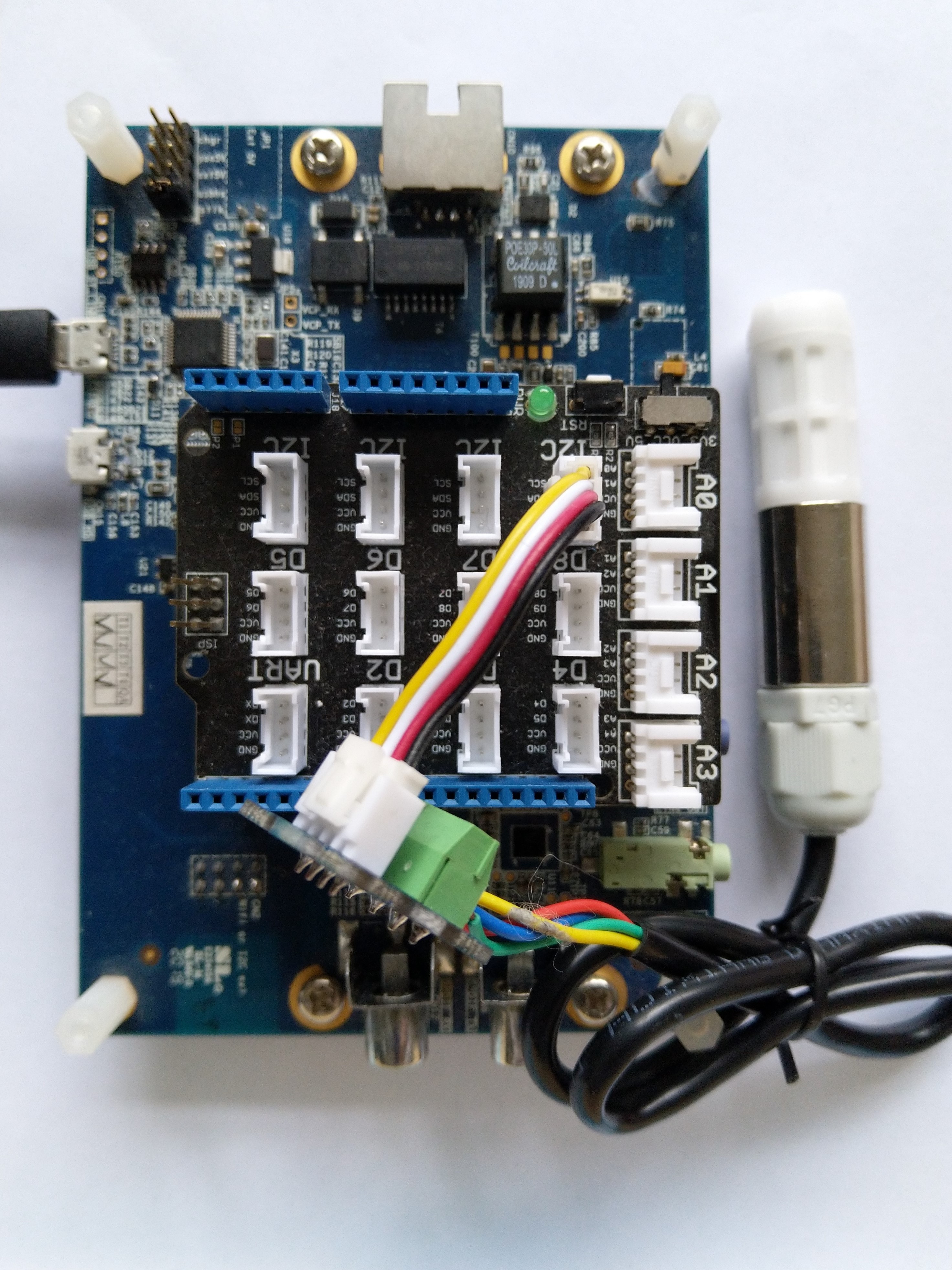
SHT20 +STM32F769 Discovery test rig

The .NET nanoFramework device libraries use a TryGet… pattern to retrieve sensor values, this library throws an exception if reading a sensor value fails. I’m not certain which approach is “better” as reading the Seeedstudio Grove – Laser PM2.5 Dust Sensor has never failed. The only time reading the “values” buffer failed was when I unplugged the device which I think is “exceptional”.

//---------------------------------------------------------------------------------
// Copyright (c) April 2023, devMobile Software
//
// Licensed under the Apache License, Version 2.0 (the "License");
// you may not use this file except in compliance with the License.
// You may obtain a copy of the License at
//
//     http://www.apache.org/licenses/LICENSE-2.0
//
// Unless required by applicable law or agreed to in writing, software
// distributed under the License is distributed on an "AS IS" BASIS,
// WITHOUT WARRANTIES OR CONDITIONS OF ANY KIND, either express or implied.
// See the License for the specific language governing permissions and
// limitations under the License.
//
// nanoff --target ST_STM32F769I_DISCOVERY --update 
// nanoff --platform ESP32 --serialport COM7 --update
//
//---------------------------------------------------------------------------------
#define ST_STM32F769I_DISCOVERY 
//#define  SPARKFUN_ESP32_THING_PLUS
namespace devMobile.IoT.Device.SeeedstudioHM3301
{
    using System;
    using System.Device.I2c;
    using System.Threading;

#if SPARKFUN_ESP32_THING_PLUS
    using nanoFramework.Hardware.Esp32;
#endif

    class Program
    {
        static void Main(string[] args)
        {
            const int busId = 1;

            Thread.Sleep(5000);

#if SPARKFUN_ESP32_THING_PLUS
            Configuration.SetPinFunction(Gpio.IO23, DeviceFunction.I2C1_DATA);
            Configuration.SetPinFunction(Gpio.IO22, DeviceFunction.I2C1_CLOCK);
#endif
            I2cConnectionSettings i2cConnectionSettings = new(busId, SeeedstudioHM3301.DefaultI2cAddress);

            using I2cDevice i2cDevice = I2cDevice.Create(i2cConnectionSettings);
            {
                using (SeeedstudioHM3301 seeedstudioHM3301 = new SeeedstudioHM3301(i2cDevice))
                {
                    while (true)
                    {
                        SeeedstudioHM3301.ParticulateMeasurements particulateMeasurements = seeedstudioHM3301.Read();

                        Console.WriteLine($"Standard PM1.0: {particulateMeasurements.Standard.PM1_0} ug/m3   PM2.5: {particulateMeasurements.Standard.PM2_5} ug/m3  PM10.0: {particulateMeasurements.Standard.PM10_0} ug/m3 ");
                        Console.WriteLine($"Atmospheric PM1.0: {particulateMeasurements.Atmospheric.PM1_0} ug/m3   PM2.5: {particulateMeasurements.Atmospheric.PM2_5} ug/m3  PM10.0: {particulateMeasurements.Standard.PM10_0} ug/m3");

                        // Always 0, checked payload so not a conversion issue. will check in Seeedstudio forums
                        // Console.WriteLine($"Count 0.3um: {particulateMeasurements.Count.Diameter0_3}/l 0.5um: {particulateMeasurements.Count.Diameter0_5} /l 1.0um : {particulateMeasurements.Count.Diameter1_0}/l 2.5um : {particulateMeasurements.Count.Diameter2_5}/l 5.0um : {particulateMeasurements.Count.Diameter5_0}/l 10.0um : {particulateMeasurements.Count.Diameter10_0}/l");

                        Thread.Sleep(new TimeSpan(0,1,0));
                    }
                }
            }
        }
    }
}

I’m going to soak test the library for a week to check that is working okay, then most probably refactor the code so it can be added to the nanoFramework IoT.Device Library repository.

.NET nanoFramework SHT20 library on Github

The full source code (just need to do readme) of my .NET nanoFramework Sensirion SHT20 temperature and humidity(Waterproof) library is now available on GitHub. I have tested the library and sample application with Sparkfun Thing Plus and ST Micro STM32F7691 Discovery devices. (I can validate on more platform configurations if there is interest).

Important: make sure you setup the I2C pins especially on ESP32 Devices before creating the I2cDevice,

SHT20 +STM32F769 Discovery test rig

The .NET nanoFramework device libraries use a TryGet… pattern to retrieve sensor value, this library throws an exception if reading a sensor value fails. I’m not certain which approach is “better” as reading Sensirion SHT20 temperature and humidity(Waterproof) has never failed The only time reading a value failed was when I unplugged the device which I think is “exceptional”.

//---------------------------------------------------------------------------------
// Copyright (c) March 2023, devMobile Software
//
// Licensed under the Apache License, Version 2.0 (the "License");
// you may not use this file except in compliance with the License.
// You may obtain a copy of the License at
//
//     http://www.apache.org/licenses/LICENSE-2.0
//
// Unless required by applicable law or agreed to in writing, software
// distributed under the License is distributed on an "AS IS" BASIS,
// WITHOUT WARRANTIES OR CONDITIONS OF ANY KIND, either express or implied.
// See the License for the specific language governing permissions and
// limitations under the License.
//
// nanoff --target ST_STM32F769I_DISCOVERY --update 
// nanoff --platform ESP32 --serialport COM7 --update
//
//---------------------------------------------------------------------------------
#define ST_STM32F769I_DISCOVERY 
//#define  SPARKFUN_ESP32_THING_PLUS
namespace devMobile.IoT.Device.Sht20
{
    using System;
    using System.Device.I2c;
    using System.Threading;

#if SPARKFUN_ESP32_THING_PLUS
    using nanoFramework.Hardware.Esp32;
#endif

    class Program
    {
        static void Main(string[] args)
        {
            const int busId = 1;

            Thread.Sleep(5000);

#if SPARKFUN_ESP32_THING_PLUS
            Configuration.SetPinFunction(Gpio.IO23, DeviceFunction.I2C1_DATA);
            Configuration.SetPinFunction(Gpio.IO22, DeviceFunction.I2C1_CLOCK);
#endif

            I2cConnectionSettings i2cConnectionSettings = new(busId, Sht20.DefaultI2cAddress);

            using I2cDevice i2cDevice = I2cDevice.Create(i2cConnectionSettings);
            {
                using (Sht20 sht20 = new Sht20(i2cDevice))
                {
                    sht20.Reset();

                    while (true)
                    {
                        double temperature = sht20.Temperature();
                        double humidity = sht20.Humidity();
#if HEATER_ON_OFF
					    sht20.HeaterOn();
					    Console.WriteLine($"{DateTime.Now:HH:mm:ss} HeaterOn:{sht20.IsHeaterOn()}");
#endif
                        Console.WriteLine($"{DateTime.UtcNow:HH:mm:ss} Temperature:{temperature:F1}°C Humidity:{humidity:F0}% HeaterOn:{sht20.IsHeaterOn()}");
#if HEATER_ON_OFF
					    sht20.HeaterOff();
					    Console.WriteLine($"{DateTime.Now:HH:mm:ss} HeaterOn:{sht20.IsHeaterOn()}");
#endif
                        Thread.Sleep(1000);
                    }
                }
            }
        }
    }
}

I’m going to soak test the library for a week to check that is working okay, then most probably refactor the code so it can be added to the nanoFramework IoT.Device Library repository.
.NET nanoFramework Seeedstudio HM3301 Basic connectivity

This is a “throw away” .NET nanoFramework application for investigating how Seeedstudio Grove HM3301 Inter Integrated Circuit bus(I²C) connectivity works.

Seeedstudio Grove HM3301 Sensor

My test setup is a simple .NET nanoFramework console application running on an STM32F7691 Discovery board.

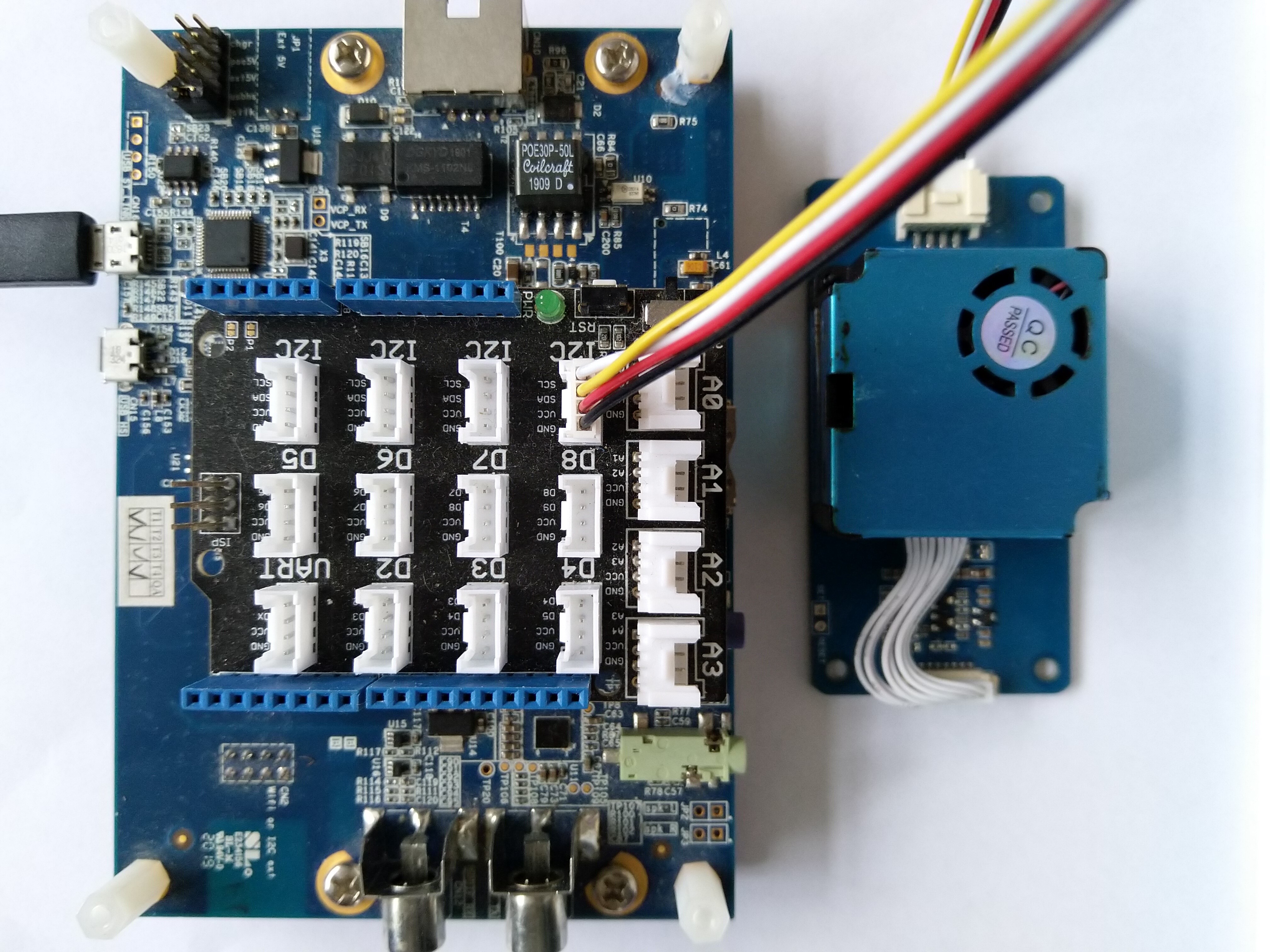
Seeedstudio Grove HM3301 + STM32F769 Discovery test rig

The HM3301I2C application has lots of magic numbers from the HM3301 datasheet and is just a tool for exploring how the sensor works.

public static void Main()
{
    I2cConnectionSettings i2cConnectionSettings = new(1, 0x40);

    // i2cDevice.Dispose
    I2cDevice i2cDevice = I2cDevice.Create(i2cConnectionSettings);

    while (true)
    {
        byte[] writeBuffer = new byte[1];
        byte[] readBuffer = new byte[29];

        writeBuffer[0] = 0x88;

        i2cDevice.WriteRead(writeBuffer, readBuffer);

        //i2cDevice.WriteByte(0x88);
        //i2cDevice.Read(readBuffer);

        ushort standardParticulatePm1 = (ushort)(readBuffer[4] << 8);
        standardParticulatePm1 |= readBuffer[5];

        ushort standardParticulatePm25 = (ushort)(readBuffer[6] << 8);
        standardParticulatePm25 |= readBuffer[7];

        ushort standardParticulatePm10 = (ushort)(readBuffer[8] << 8);
                standardParticulatePm10 |= readBuffer[9];

        Console.WriteLine($"{DateTime.UtcNow:HH:mm:ss} Standard particulate    PM 1.0: {standardParticulatePm1}  PM 2.5: {standardParticulatePm25}  PM 10.0: {standardParticulatePm10} ug/m3");

        ushort atmosphericPm1 = (ushort)(readBuffer[10] << 8);
        atmosphericPm1 |= readBuffer[11];

        ushort atmosphericPm25 = (ushort)(readBuffer[12] << 8);
        atmosphericPm25 |= readBuffer[13];

        ushort atmosphericPm10 = (ushort)(readBuffer[14] << 8);
        atmosphericPm10 |= readBuffer[15];

        Console.WriteLine($"{DateTime.UtcNow:HH:mm:ss} Atmospheric particulate PM 1.0: {atmosphericPm1:3}  PM 2.5: {atmosphericPm25}  PM 10.0: {atmosphericPm10} ug/m3");


        ushort particulateCountPm03 = (ushort)(readBuffer[16] << 8);
        particulateCountPm03 |= readBuffer[17];

        ushort particulateCountPm05 = (ushort)(readBuffer[18] << 8);
        particulateCountPm05 |= readBuffer[19];

        ushort particulateCountPm1 = (ushort)(readBuffer[20] << 8);
        particulateCountPm1 |= readBuffer[21];

        Console.WriteLine($"{DateTime.UtcNow:HH:mm:ss} Particulate count       PM 0.3: {particulateCountPm03:3}  PM 0.5: {particulateCountPm05}  PM 1.0: {particulateCountPm1} ug/m3");


        ushort particleCountPm25 = (ushort)(readBuffer[22] << 8);
        particleCountPm25 |= readBuffer[23];

        ushort particleCountPm5 = (ushort)(readBuffer[24] << 8);
        particleCountPm5 |= readBuffer[25];

        ushort particleCountPm10 = (ushort)(readBuffer[26] << 8);
        particleCountPm10 |= readBuffer[27];

        Console.WriteLine($"{DateTime.UtcNow:HH:mm:ss} Particle count/0.1L     PM 2.5: {particleCountPm25}  PM 5.0: {particleCountPm5}  PM 10.0: {particleCountPm10} particles/0.1L");


        byte checksum = 0;
        for (int i = 0; i < readBuffer.Length - 1; i++)
        {
            checksum += readBuffer[i];
        }
        Console.WriteLine($"{DateTime.UtcNow:HH:mm:ss} Checksum payload:{readBuffer[28]} calculated:{checksum}");
        Console.WriteLine("");

        Thread.Sleep(5000);
    }
}

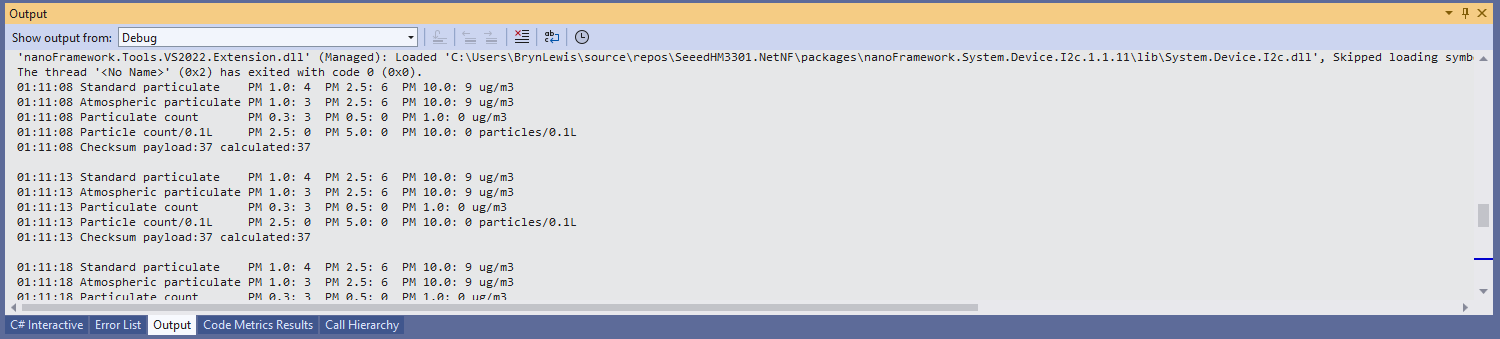
The unpacking of the value standard particulate, particulate count and particle count values is fairly repetitive, but I will fix it in the next version.

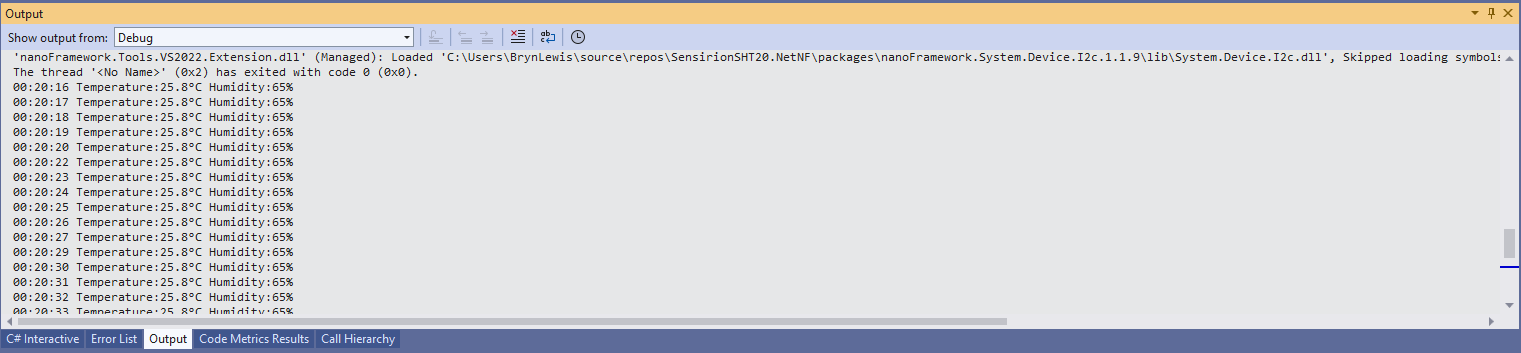
Visual Studio 2022 Debug output

The checksum calculation isn’t great even a simple cyclic redundancy check(CRC) would be an improvement on summing the 28 bytes of the payload.

.NET nanoFramework SHT20 Basic connectivity

A couple of years ago I wrote a .NET Core library for the Sensirion SHT20 temperature and humidity(Waterproof) sensor from DFRobot. This .NET nanoFramework version was “inspired” by the .NET Core library version, though I have added some message validation functionality.

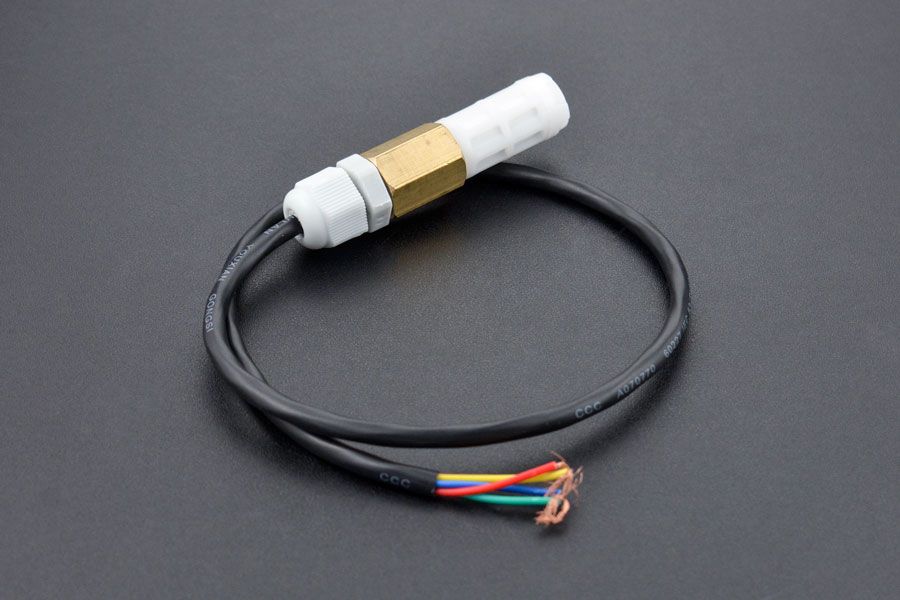
DF Robot SHT20 Waterproof sensor

My test setup is a simple .NET nanoFramework console application running on an STM32F7691 Discovery board.

Discovery STM32F769 + SHT20 Testrig

The SH20DeviceI2C application has lots of magic numbers from the SHT20 datasheet and was just a tool for exploring how the sensor works.

 public static void Main()
{
    I2cConnectionSettings i2cConnectionSettings = new(1, 0x40);

    // i2cDevice.Dispose in final program
    I2cDevice i2cDevice = I2cDevice.Create(i2cConnectionSettings);

    while (true)
    {
        byte[] readBuffer = new byte[3] { 0, 0, 0 };

        // First temperature
        i2cDevice.WriteByte(0xF3);

        //Thread.Sleep(50); // no go -46.8
        //Thread.Sleep(60);
        Thread.Sleep(70);
        //Thread.Sleep(90);
        //Thread.Sleep(110);

        i2cDevice.Read(readBuffer);

        ushort temperatureRaw = (ushort)(readBuffer[0] << 8);
        temperatureRaw += readBuffer[1];

        //Debug.WriteLine($"Raw {temperatureRaw}");

        double temperature = temperatureRaw * (175.72 / 65536.0) - 46.85;

        // Then read the Humidity
        i2cDevice.WriteByte(0xF5);

        //Thread.Sleep(50);  
        //Thread.Sleep(60);  
        Thread.Sleep(70);  
        //Thread.Sleep(90);  
        //Thread.Sleep(110);   
                
        i2cDevice.Read(readBuffer);

        ushort humidityRaw = (ushort)(readBuffer[0] << 8);
        humidityRaw += readBuffer[1];

        //Debug.WriteLine($"Raw {humidityRaw}");

        double humidity = humidityRaw * (125.0 / 65536.0) - 6.0;

        //Console.WriteLine($"{DateTime.UtcNow:HH:mm:ss} Temperature:{temperature:F1}°C");
        //Console.WriteLine($"{DateTime.UtcNow:HH:mm:ss} Humidity:{humidity:F0}%");
        Console.WriteLine($"{DateTime.UtcNow:HH:mm:ss} Temperature:{temperature:F1}°C Humidity:{humidity:F0}%");

        Thread.Sleep(1000);
    }
}

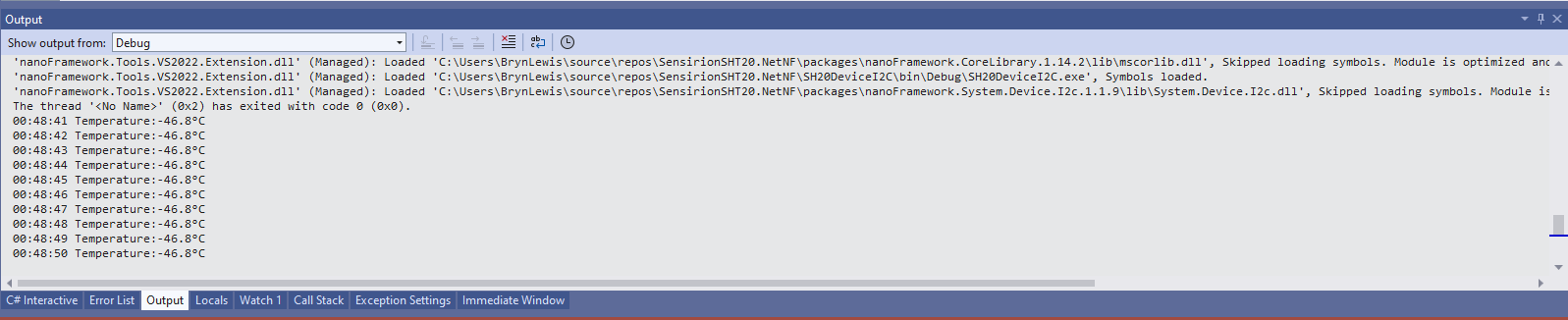
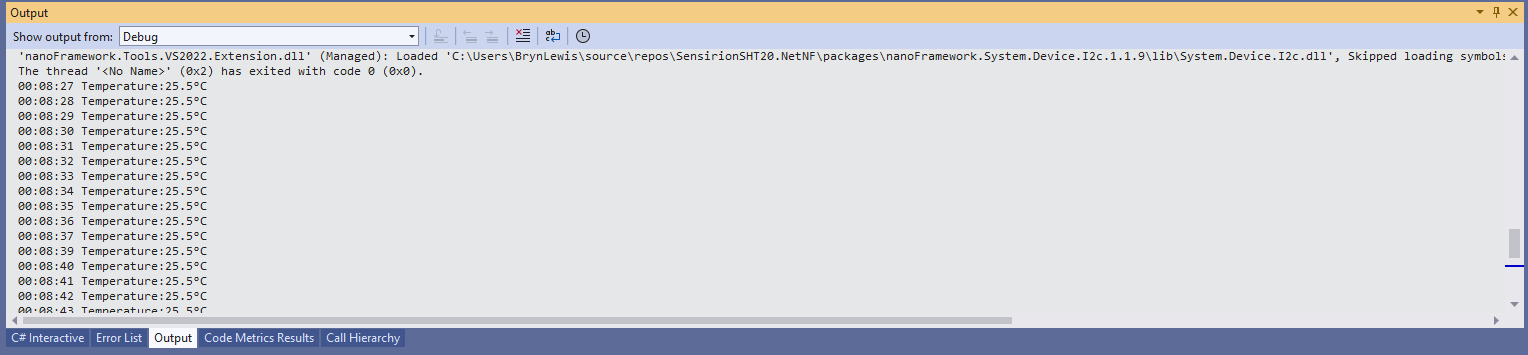
While tinkering with the sensor I found that having a short delay between initiating the temperature reading (TemperatureNoHold = 0xF3 was used so as not to hang up the I2C bus) and reading the value was important.

Temperature value without Thread.Sleep

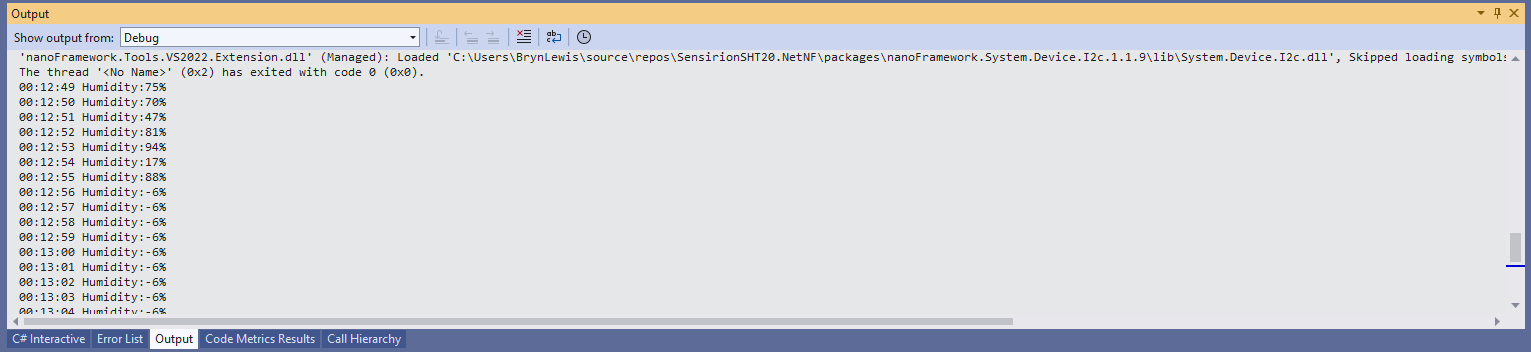
When I ran the application without a Thread.Sleep(70) the temperature and/or humidity the values were incorrect and sometimes quite random.

Temperature value with Thread.Sleep(70)
Humidity value without Thread.Sleep
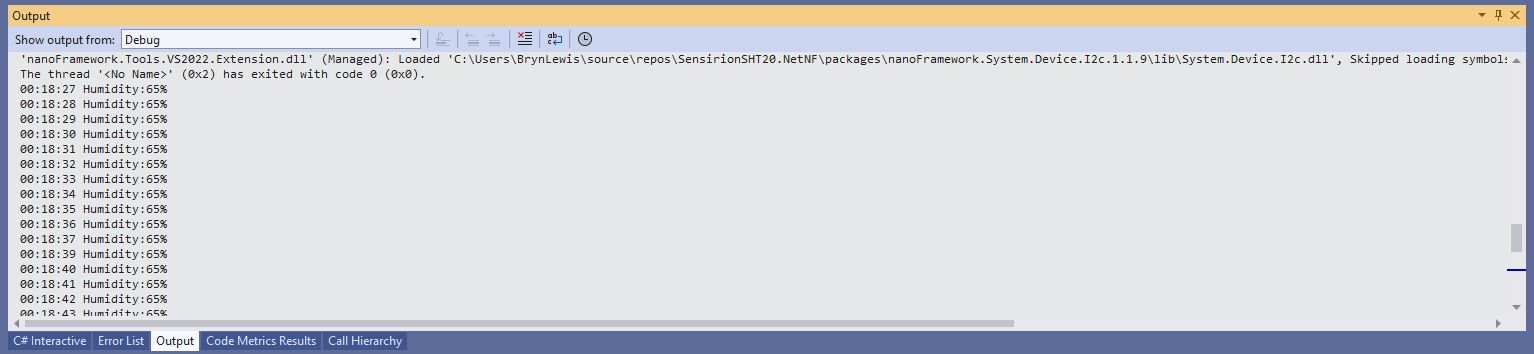
Humidity value with Thread.Sleep(70)
Temperature and Humidity values with Thread.Sleep(70)

The .NET Core library didn’t validate the message payload Cyclic Redundancy Check (CRC) so I have added that in this version

void CheckCrc(byte[] bytes, byte bytesLen, byte checksum)
{
    var crc = 0;

    for (var i = 0; i < bytesLen; i++)
    {
        crc ^= bytes[i];
        for (var bit = 8; bit > 0; --bit)
        {
            crc = ((crc & 0x80) == 0x80) ? ((crc << 1) ^ CrcPolynomial) : (crc << 1);
        }
    }

    if (crc != checksum)
    {
        throw new Exception("CRC Error");
    }
}

The CheckCrc is called in Temperature and Humidity methods.

public double Temperature()
{
    byte[] readBuffer = new byte[3] { 0, 0, 0 };
    if (_i2cDevice == null)
    {
        throw new ArgumentNullException(nameof(_i2cDevice));
    }

    _i2cDevice.WriteByte(TemperatureNoHold);

    Thread.Sleep(ReadingWaitmSec);

    _i2cDevice.Read(readBuffer);

    CheckCrc(readBuffer, 2, readBuffer[2]);

    ushort temperatureRaw = (ushort)(readBuffer[0] << 8);
    temperatureRaw += readBuffer[1];

    double temperature = temperatureRaw * (175.72 / 65536.0) - 46.85;

    return temperature;
}

I’m going to soak test the library for a week to check that is working okay, then refactor the code so it can be added to the nanoFramework IoT.Device Library repository.
.NET nanoFramework RAK3172 Library Usage

After a two week “soak test” using a Sparkfun Thing Plus ESP32 WROOM and RAK3172 Breakout Board completed with no failures, this final post covers the usage of the RAK3172LoRaWAN-NetNF library in a “real-world” application.

Before a factory reset the DevEUI, JoinEUI (was AppEUI), and AppKey were values I had configured earlier

12:02:04 0 TX:AT+DEVEUI=? bytes:11--------------------------------
AT+DEVEUI=A..............1
OK

12:03:05 0 TX:AT+APPEUI=? bytes:11--------------------------------
AT+APPEUI=A..............8
OK

12:04:03 0 TX:AT+APPKEY=? bytes:11--------------------------------
AT+APPKEY=C..............................F
OK

After a factory reset the DevEUI, JoinEUI (was AppEUI), and AppKey were default values

12:00:21 0 TX:AT+DEVEUI=? bytes:11--------------------------------
AT+DEVEUI=0000000000000000
OK

12:01:09 0 TX:AT+APPEUI=? bytes:11--------------------------------
AT+APPEUI=0000000000000000
OK

12:01:48 0 TX:AT+APPKEY=? bytes:11--------------------------------
AT+APPKEY=00000000000000000000000000000000
OK

I then ran the RAK3172LoRaWANDeviceClient with the following preprocessor directives defined to reconfigure the RAK3172 module.

//---------------------------------------------------------------------------------
//#define ST_STM32F769I_DISCOVERY      // nanoff --target ST_STM32F769I_DISCOVERY --update 
#define ESP32_WROOM   // nanoff --target ESP32_REV0 --serialport COM17 --update
#define DEVICE_DEVEUI_SET
//#define FACTORY_RESET
///#define PAYLOAD_BCD
#define PAYLOAD_BYTES
#define OTAA
//#define ABP
//#define CONFIRMED
#define UNCONFIRMED
#define REGION_SET
#define ADR_SET
//#define SLEEP
namespace devMobile.IoT.LoRaWAN
{
...
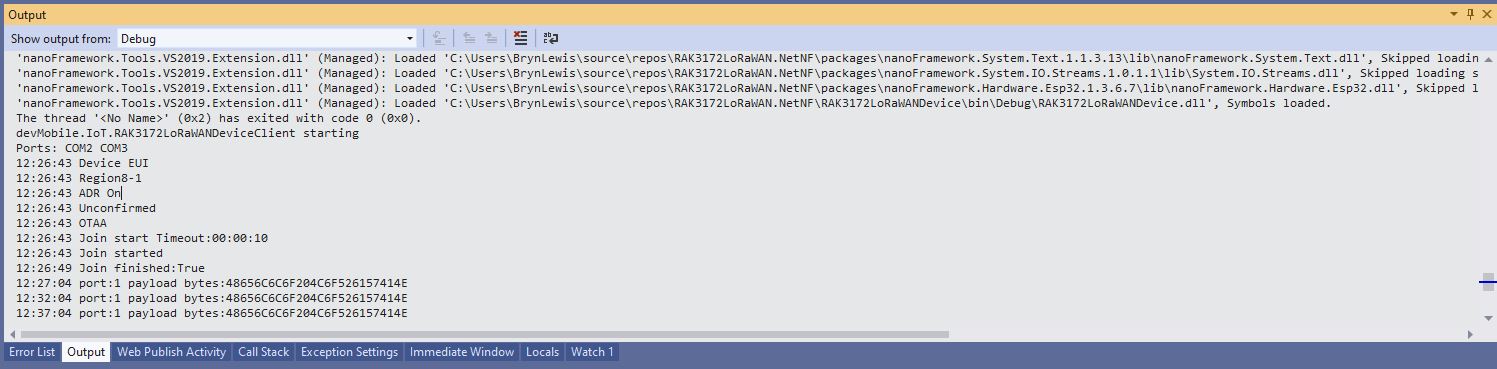
Visual Studio Debug output for RAK3172LoRaWANDeviceClient full configuration

I could then run the RAK3172LoRaWANDeviceClient with only PAYLOAD_BCD or PAYLOAD_BYTES defined

//---------------------------------------------------------------------------------
//#define ST_STM32F769I_DISCOVERY      // nanoff --target ST_STM32F769I_DISCOVERY --update 
#define ESP32_WROOM   // nanoff --target ESP32_REV0 --serialport COM17 --update
//#define DEVICE_DEVEUI_SET
//#define FACTORY_RESET
///#define PAYLOAD_BCD
#define PAYLOAD_BYTES
//#define OTAA
//#define ABP
//#define CONFIRMED
//#define UNCONFIRMED
//#define REGION_SET
//#define ADR_SET
//#define SLEEP
namespace devMobile.IoT.LoRaWAN
{
...
Visual Studio Debug output for RAK3172LoRaWANDeviceClient minimal configuration
public static void Main()
{
	Result result;

	Debug.WriteLine("devMobile.IoT.RAK3172LoRaWANDeviceClient starting");

	try
	{
		// set GPIO functions for COM2 (this is UART1 on ESP32)
#if ESP32_WROOM
		Configuration.SetPinFunction(Gpio.IO17, DeviceFunction.COM2_TX);
		Configuration.SetPinFunction(Gpio.IO16, DeviceFunction.COM2_RX);
#endif

		Debug.Write("Ports:");
		foreach (string port in SerialPort.GetPortNames())
		{
			Debug.Write($" {port}");
		}
		Debug.WriteLine("");

		using (Rak3172LoRaWanDevice device = new Rak3172LoRaWanDevice())
		{
			result = device.Initialise(SerialPortId, 115200, Parity.None, 8, StopBits.One);
			if (result != Result.Success)
			{
				Debug.WriteLine($"Initialise failed {result}");
				return;
			}

			MessageSendTimer = new Timer(SendMessageTimerCallback, device, Timeout.Infinite, Timeout.Infinite);
					
			device.OnJoinCompletion += OnJoinCompletionHandler;
			device.OnReceiveMessage += OnReceiveMessageHandler;
#if CONFIRMED
			device.OnMessageConfirmation += OnMessageConfirmationHandler;
#endif

#if FACTORY_RESET
			Debug.WriteLine($"{DateTime.UtcNow:hh:mm:ss} FactoryReset");
			result = device.FactoryReset();
			if (result != Result.Success)
			{
				Debug.WriteLine($"FactoryReset failed {result}");
				return;
			}
#endif

#if DEVICE_DEVEUI_SET
			Debug.WriteLine($"{DateTime.UtcNow:hh:mm:ss} Device EUI");
			result = device.DeviceEui(Config.devEui);
			if (result != Result.Success)
			{
				Debug.WriteLine($"DeviceEUI set failed {result}");
				return;
			}
#endif

#if REGION_SET
			Debug.WriteLine($"{DateTime.UtcNow:hh:mm:ss} Region{Band}");
			result = device.Band(Band);
			if (result != Result.Success)
			{
				Debug.WriteLine($"Band on failed {result}");
				return;
			}
#endif

#if ADR_SET
			Debug.WriteLine($"{DateTime.UtcNow:hh:mm:ss} ADR On");
			result = device.AdrOn();
			if (result != Result.Success)
			{
				Debug.WriteLine($"ADR on failed {result}");
				return;
			}
#endif
#if CONFIRMED
			Debug.WriteLine($"{DateTime.UtcNow:hh:mm:ss} Confirmed");
			result = device.UplinkMessageConfirmationOn();
			if (result != Result.Success)
			{
				Debug.WriteLine($"Confirm on failed {result}");
				return;
			}
#endif
#if UNCONFIRMED
			Debug.WriteLine($"{DateTime.UtcNow:hh:mm:ss} Unconfirmed");
			result = device.UplinkMessageConfirmationOff();
			if (result != Result.Success)
			{
				Debug.WriteLine($"Confirm off failed {result}");
				return;
			}
#endif

#if OTAA
			Debug.WriteLine($"{DateTime.UtcNow:hh:mm:ss} OTAA");
			result = device.OtaaInitialise(Config.JoinEui, Config.AppKey);
			if (result != Result.Success)
			{
				Debug.WriteLine($"OTAA Initialise failed {result}");
				return;
			}
#endif

#if ABP
			Debug.WriteLine($"{DateTime.UtcNow:hh:mm:ss} ABP");
			result = device.AbpInitialise(Config.DevAddress, Config.NwksKey, Config.AppsKey);
			if (result != Result.Success)
			{
				Debug.WriteLine($"ABP Initialise failed {result}");
				return;
			}
#endif

			Debug.WriteLine($"{DateTime.UtcNow:hh:mm:ss} Join start Timeout:{JoinTimeOut:hh:mm:ss}");
			result = device.Join(JoinTimeOut);
			if (result != Result.Success)
			{
				Debug.WriteLine($"Join failed {result}");
				return;
			}
			Debug.WriteLine($"{DateTime.UtcNow:hh:mm:ss} Join started");

			Thread.Sleep(Timeout.Infinite);
		}
	}
	catch (Exception ex)
	{
		Debug.WriteLine(ex.Message);
	}
}

One of the major differences between the RAK4200 and RAK3127 libraries is the way a LoRaWAN network join is handled. The RAK4200 library Join method blocks until it succeeds of fails, the RAK3172 library Join method returns immediately then an EventHandler is called with the result.

private static void OnJoinCompletionHandler(bool result)
{
	Debug.WriteLine($"{DateTime.UtcNow:hh:mm:ss} Join finished:{result}");

	if (result)
	{
		MessageSendTimer.Change(MessageSendTimerDue, MessageSendTimerPeriod);
	}
}

The new RAK Wireless LoRaWAN modules use the RUI3 AT Commands so the RAK3172 library will most probably be retired and uses as the basis for a generic RUI3 library.

.NET nanoFramework RAK3172 LoRaWAN library basic connectivity

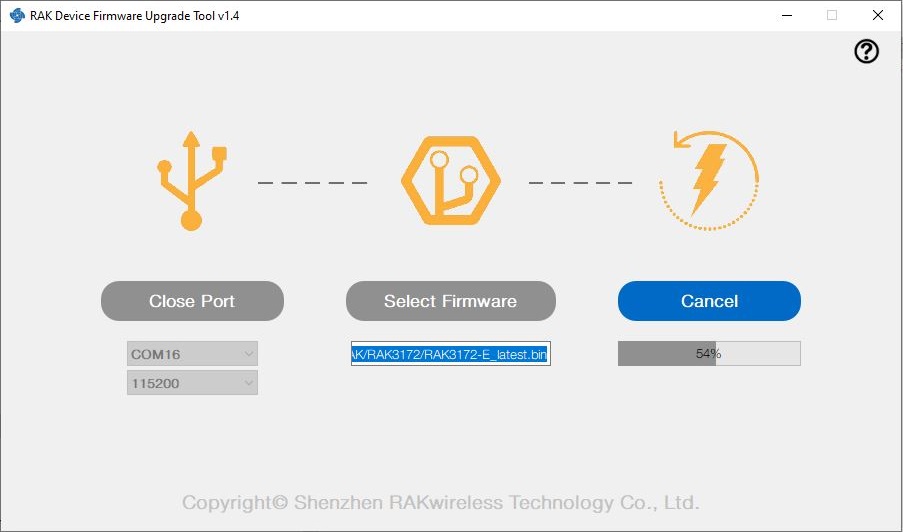
I have been working on a .NET nanoFramework library for the RAKwireless RAK3172 module for the last couple of weeks. The devices had been in a box under my desk for a couple of months so first step was to flash them with the latest firmware using my FTDI test harness.

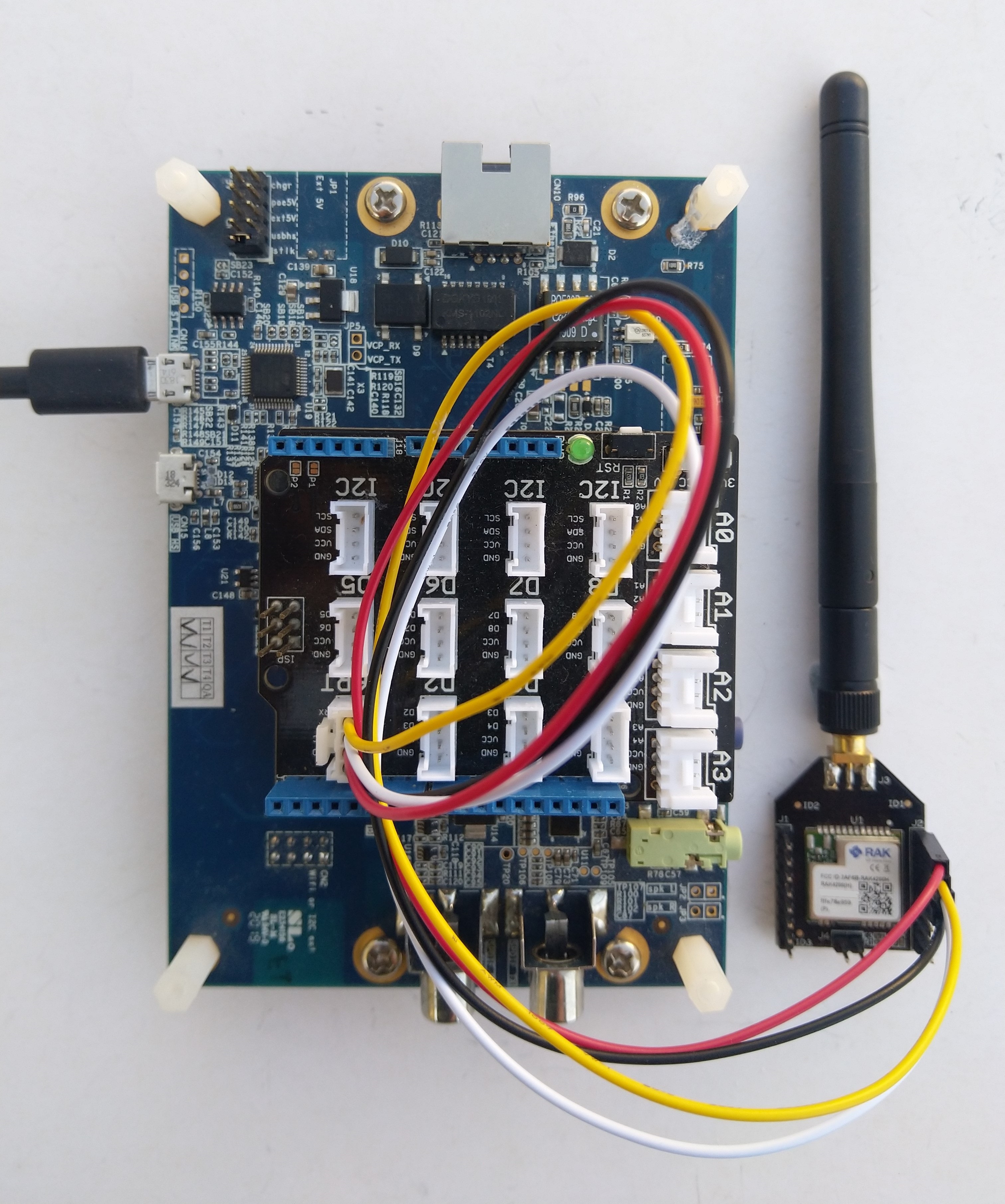
RAK 3172 STM32F769I Discovery test rig

I use two hardware configurations for testing

My sample code has compile time options for synchronous and asynchronous operation. I also include the different nanoff command lines to make updating the test devices easier.

//---------------------------------------------------------------------------------
// Copyright (c) May 2022, devMobile Software
//
// Licensed under the Apache License, Version 2.0 (the "License");
// you may not use this file except in compliance with the License.
// You may obtain a copy of the License at
//
//     http://www.apache.org/licenses/LICENSE-2.0
//
// Unless required by applicable law or agreed to in writing, software
// distributed under the License is distributed on an "AS IS" BASIS,
// WITHOUT WARRANTIES OR CONDITIONS OF ANY KIND, either express or implied.
// See the License for the specific language governing permissions and
// limitations under the License.
//
// https://docs.rakwireless.com/Product-Categories/WisDuo/RAK4200-Breakout-Board/AT-Command-Manual/
//---------------------------------------------------------------------------------
#define SERIAL_ASYNC_READ
//#define SERIAL_THREADED_READ
#define ST_STM32F769I_DISCOVERY      // nanoff --target ST_STM32F769I_DISCOVERY --update 
//#define ESP32_WROOM   // nanoff --target ESP32_REV0 --serialport COM17 --update
...

namespace devMobile.IoT.LoRaWAN.nanoFramework.RAK3172
{
	using System;
	using System.Diagnostics;
	using System.IO.Ports;
	using System.Threading;
#if ESP32_WROOM
	using global::nanoFramework.Hardware.Esp32; //need NuGet nanoFramework.Hardware.Esp32
#endif

	public class Program
	{
		private static SerialPort _SerialPort;
#if SERIAL_THREADED_READ
		private static Boolean _Continue = true;
#endif
#if ESP32_WROOM
		private const string SerialPortId = "COM2";
#endif
...
#if ST_STM32F769I_DISCOVERY
		private const string SerialPortId = "COM6";
#endif

		public static void Main()
		{
#if SERIAL_THREADED_READ
			Thread readThread = new Thread(SerialPortProcessor);
#endif

			Debug.WriteLine("devMobile.IoT.LoRaWAN.nanoFramework.RAK3172 BreakoutSerial starting");

			try
			{
				// set GPIO functions for COM2 (this is UART1 on ESP32)
#if ESP32_WROOM
				Configuration.SetPinFunction(Gpio.IO16, DeviceFunction.COM2_TX);
				Configuration.SetPinFunction(Gpio.IO17, DeviceFunction.COM2_RX);
#endif

				Debug.Write("Ports:");
				foreach (string port in SerialPort.GetPortNames())
				{
					Debug.Write($" {port}");
				}
				Debug.WriteLine("");

				using (_SerialPort = new SerialPort(SerialPortId))
				{
					// set parameters
					_SerialPort.BaudRate = 115200;
					_SerialPort.Parity = Parity.None;
					_SerialPort.DataBits = 8;
					_SerialPort.StopBits = StopBits.One;
					_SerialPort.Handshake = Handshake.None;
					_SerialPort.NewLine = "\r\n";
					_SerialPort.ReadTimeout = 1000;

					//_SerialPort.WatchChar = '\n'; // May 2022 WatchChar event didn't fire github issue https://github.com/nanoframework/Home/issues/1035

#if SERIAL_ASYNC_READ
					_SerialPort.DataReceived += SerialDevice_DataReceived;
#endif

					_SerialPort.Open();

					_SerialPort.WatchChar = '\n';

#if SERIAL_THREADED_READ
					readThread.Start();
#endif

					for (int i = 0; i < 5; i++)
					{
						string atCommand;
						atCommand = "AT+VER=?";

                  Debug.WriteLine("");
						Debug.WriteLine($"{i} TX:{atCommand} bytes:{atCommand.Length}--------------------------------");
						_SerialPort.WriteLine(atCommand);

						Thread.Sleep(5000);
					}
				}
				Debug.WriteLine("Done");
			}
			catch (Exception ex)
			{
				Debug.WriteLine(ex.Message);
			}
		}

#if SERIAL_ASYNC_READ
		private static void SerialDevice_DataReceived(object sender, SerialDataReceivedEventArgs e)
		{
			SerialPort serialPort = (SerialPort)sender;

			switch (e.EventType)
			{
				case SerialData.Chars:
					break;

				case SerialData.WatchChar:
					string response = serialPort.ReadExisting();
					Debug.Write(response);
					break;
				default:
					Debug.Assert(false, $"e.EventType {e.EventType} unknown");
					break;
			}
		}
#endif

#if SERIAL_THREADED_READ
		public static void SerialPortProcessor()
		{

			while (_Continue)
			{
				try
				{
					string response = _SerialPort.ReadLine();
					//string response = _SerialPort.ReadExisting();
					Debug.Write(response);
				}
				catch (TimeoutException ex) 
				{
					Debug.WriteLine($"Timeout:{ex.Message}");
				}
			}
		}
#endif
	}
}

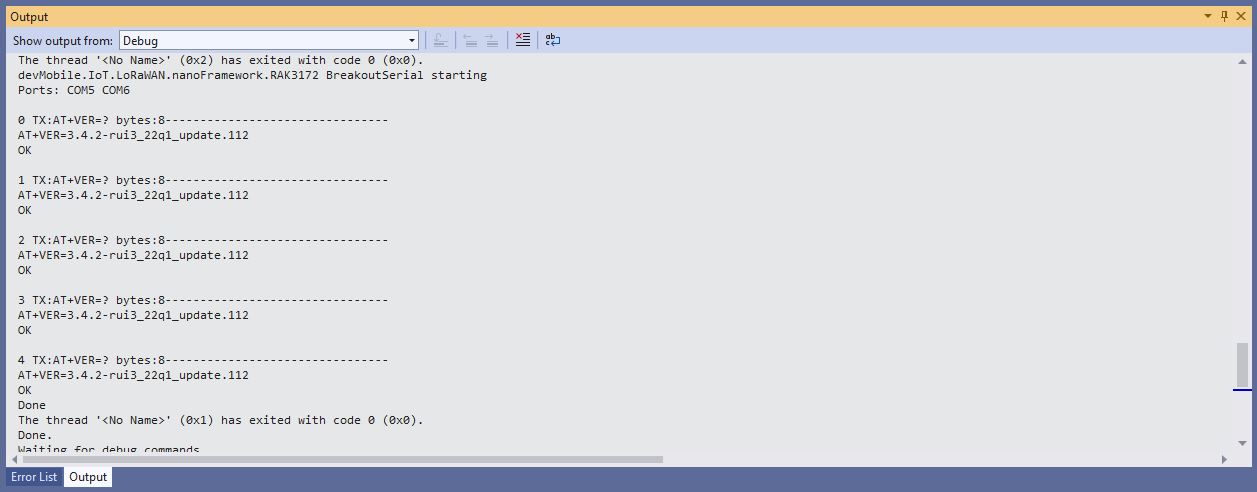
When I requested the RAK3172 version information with “AT+VER=?” the response was spilt over two lines which is a bit of a Pain in the Arse (PitA). The RAK3172 firmware also defaults 115200 baud which seems overkill considering the throughput of a LoRaWAN link.

Visual Studio Debug Output of Breakout Serial Application

While building the test application I encountered a few issues (STM32F769I DISCOVERY SerialPort.GetPortNames() port name text gets shorter, STM32F769I DISCOVERY Inconsistent SerialPort WatchChar behaviour after erase->power cycle->run & erase->run and No SerialPort.WatchChar events if WatchChar set before SerialPort opened) which slowed down development. The speed the nanoFramework team triages then fixes issues is amazing for a team of volunteers dotted around the world.

.NET nanoFramework RAK4200 Library Usage

After a two week “soak test” using a Sparkfun Thing Plus ESP32 WROOM and RAK4200 Breakout Board completed with no failures, this final post covers the usage of the RAK4200LoRaWAN-NetNF library in a “real-world” application.

Discovery kit with STM32F769NI MCU and RAK4200 Breakout Board test rig

After a factory reset the DevEUI, JoinEUI (was AppEUI), and AppKey were reset, but the rest of the configuration appeared to be retained.

OK Work Mode: LoRaWAN
Region: AS923
MulticastEnable: false
DutycycleEnable: false
Send_repeat_cnt: 0
Join_mode: OTAA
DevEui: 0000000000000000
AppEui: 0000000000000000
AppKey: 00000000000000000000000000000000
Class: A
Joined Network:false
IsConfirm: unconfirm
AdrEnable: true
EnableRepeaterSupport: false
RX2_CHANNEL_FREQUENCY: 923200000, RX2_CHANNEL_DR:2
RX_WINDOW_DURATION: 3000ms
RECEIVE_DELAY_1: 1000ms
RECEIVE_DELAY_2: 2000ms
JOIN_ACCEPT_DELAY_1: 5000ms
JOIN_ACCEPT_DELAY_2: 6000ms
Current Datarate: 5
Primeval Datarate: 5
ChannelsTxPower: 0
UpLinkCounter: 0
DownLinkCounter: 0

I then ran the RAK4200LoRaWANDeviceClient with DEVICE_DEVEUI_SET (devEui from label on the device), OTAA to configure the AppEui and AppKey and the device connected to The Things Network on the second attempt (typo in the DevEui).

public static void Main()
{
	Result result;

	Debug.WriteLine("devMobile.IoT.RAK4200LoRaWANDeviceClient starting");

	try
	{
		// set GPIO functions for COM2 (this is UART1 on ESP32)
#if ESP32_WROOM
		Configuration.SetPinFunction(Gpio.IO16, DeviceFunction.COM2_TX);
		Configuration.SetPinFunction(Gpio.IO17, DeviceFunction.COM2_RX);
#endif

		Debug.Write("Ports:");
		foreach (string port in SerialPort.GetPortNames())
		{
			Debug.Write($" {port}");
		}
		Debug.WriteLine("");

		using (Rak4200LoRaWanDevice device = new Rak4200LoRaWanDevice())
		{
			result = device.Initialise(SerialPortId, 9600, Parity.None, 8, StopBits.One);
			if (result != Result.Success)
			{
				Debug.WriteLine($"Initialise failed {result}");
				return;
			}

#if CONFIRMED
			device.OnMessageConfirmation += OnMessageConfirmationHandler;
#endif
			device.OnReceiveMessage += OnReceiveMessageHandler;

#if FACTORY_RESET
			Debug.WriteLine($"{DateTime.UtcNow:hh:mm:ss} FactoryReset");
			result = device.FactoryReset();
			if (result != Result.Success)
			{
				Debug.WriteLine($"FactoryReset failed {result}");
				return;
			}
#endif

#if DEVICE_DEVEUI_SET
			Debug.WriteLine($"{DateTime.UtcNow:hh:mm:ss} Device EUI");
			result = device.DeviceEui(Config.devEui);
			if (result != Result.Success)
			{
				Debug.WriteLine($"ADR on failed {result}");
				return;
			}
#endif

#if REGION_SET
			Debug.WriteLine($"{DateTime.UtcNow:hh:mm:ss} Region{Region}");
			result = device.Region(Region);
			if (result != Result.Success)
			{
				Debug.WriteLine($"Region on failed {result}");
				return;
			}
#endif

#if ADR_SET
			Debug.WriteLine($"{DateTime.UtcNow:hh:mm:ss} ADR On");
			result = device.AdrOn();
			if (result != Result.Success)
			{
				Debug.WriteLine($"ADR on failed {result}");
				return;
			}
#endif
#if CONFIRMED
			Debug.WriteLine($"{DateTime.UtcNow:hh:mm:ss} Confirmed");
			result = device.UplinkMessageConfirmationOn();
			if (result != Result.Success)
			{
				Debug.WriteLine($"Confirm on failed {result}");
				return;
			}
#endif
#if UNCONFIRMED
			Debug.WriteLine($"{DateTime.UtcNow:hh:mm:ss} Unconfirmed");
			result = device.UplinkMessageConfirmationOff();
			if (result != Result.Success)
			{
				Debug.WriteLine($"Confirm off failed {result}");
				return;
			}
#endif

#if OTAA
			Debug.WriteLine($"{DateTime.UtcNow:hh:mm:ss} OTAA");
			result = device.OtaaInitialise(Config.JoinEui, Config.AppKey);
			if (result != Result.Success)
			{
				Debug.WriteLine($"OTAA Initialise failed {result}");
				return;
			}
#endif

#if ABP
			Debug.WriteLine($"{DateTime.UtcNow:hh:mm:ss} ABP");
			result = device.AbpInitialise(Config.DevAddress, Config.NwksKey, Config.AppsKey);
			if (result != Result.Success)
			{
				Debug.WriteLine($"ABP Initialise failed {result}");
				return;
			}
#endif

			Debug.WriteLine($"{DateTime.UtcNow:hh:mm:ss} Join start Timeout:{JoinTimeOut:hh:mm:ss}");
			result = device.Join(JoinTimeOut);
			if (result != Result.Success)
			{
				Debug.WriteLine($"Join failed {result}");
				return;
			}
			Debug.WriteLine($"{DateTime.UtcNow:hh:mm:ss} Join finish");

			while (true)
			{
#if PAYLOAD_BCD
				Debug.WriteLine($"{DateTime.UtcNow:hh:mm:ss} Send Timeout:{SendTimeout:hh:mm:ss} port:{MessagePort} payload BCD:{PayloadBcd}");
				result = device.Send(MessagePort, PayloadBcd, SendTimeout);
#endif
#if PAYLOAD_BYTES
				Debug.WriteLine($"{DateTime.UtcNow:hh:mm:ss} Send Timeout:{SendTimeout:hh:mm:ss} port:{MessagePort} payload Bytes:{BitConverter.ToString(PayloadBytes)}");
				result = device.Send(MessagePort, PayloadBytes, SendTimeout);
#endif
				if (result != Result.Success)
				{
					Debug.WriteLine($"Send failed {result}");
				}

				Thread.Sleep(new TimeSpan(0, 5, 0));
			}
		}
	}
	catch (Exception ex)
	{
		Debug.WriteLine(ex.Message);
	}
}

After configuring my Discovery kit with STM32F769NI MCU and RAK4200 Breakout Board test rig the RAK4200LoRaWANDeviceClient application could successfully connect to The Things Network with just ST_STM32F769I_DISCOVERY, PAYLOAD_BCD or PAYLOAD_BYTES and CONFIRMED or UNCONFIRMED defined.

Visual Studio Debug output for RAK4200LoRaWANDeviceClient minimal configuration connection
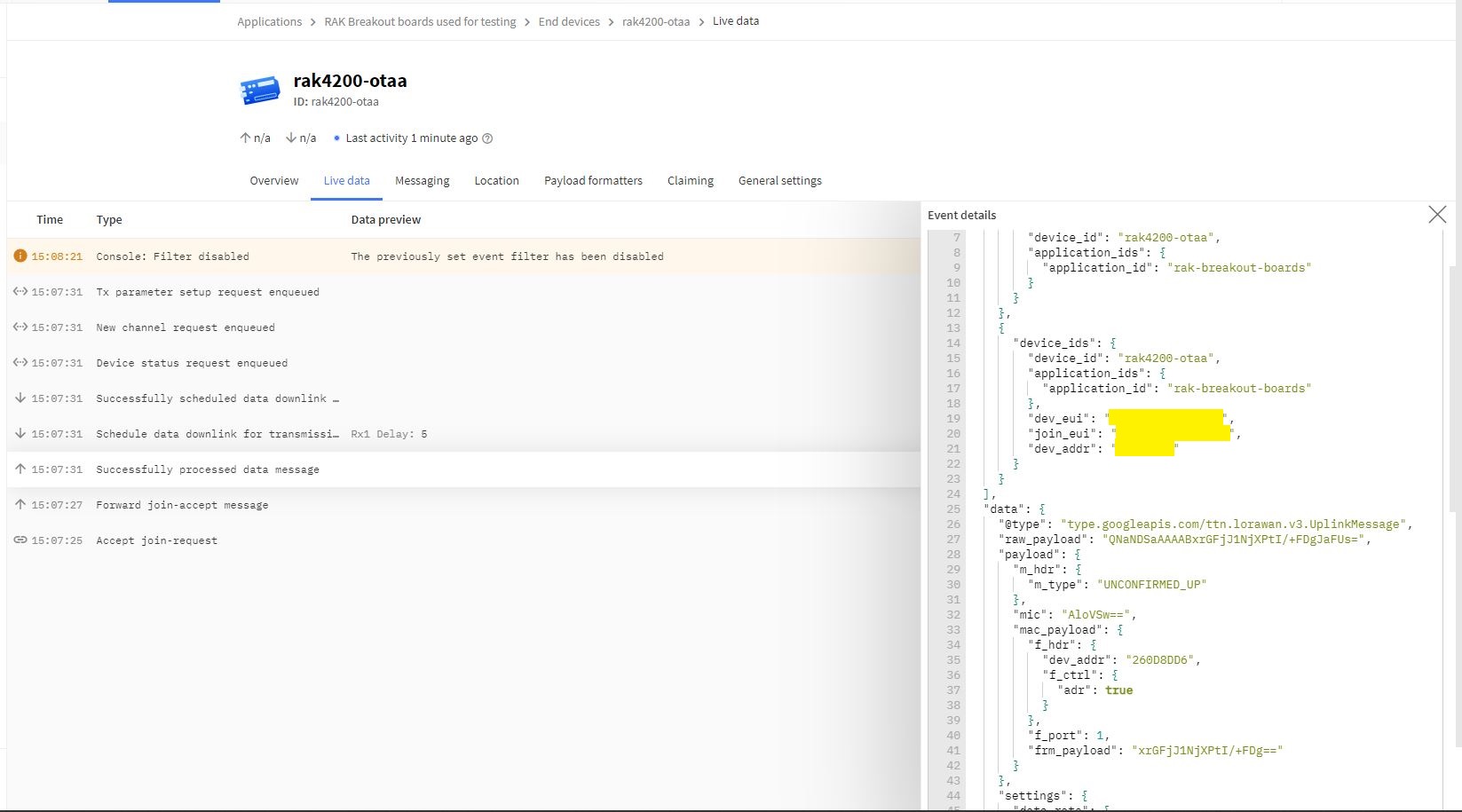
The Things Network “Live Data” for RAK4200LoRaWANDeviceClient minimal configuration connection

One of my client’s products has a configuration mode (button pressed as device starts) which enables a serial port (headers on board + FTDI module) for in field configuration of the onboard RAK4200 module.

.NET nanoFramework RAK4200 LoRaWAN library OTAA Join

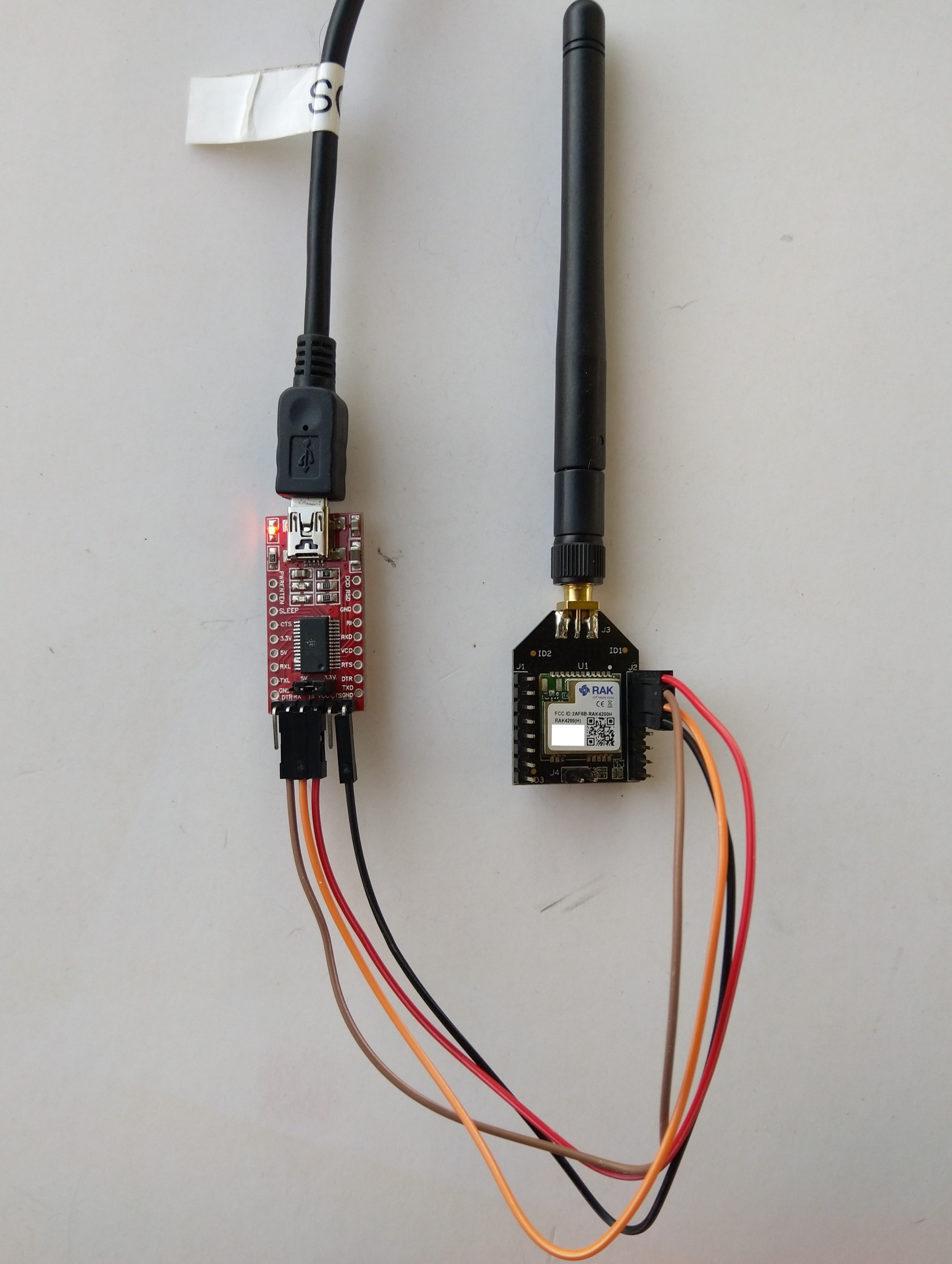
When I first tried Over The Air Activation(OTAA) to connect to The Things Network(TTN) with my RAKwireless RAK4200 module it didn’t work. I built another test harness with an FTDI module so I could send AT commands with the RAK Serial Port Tool to my RAK4200 module.

RAK4200 -> FTDI -? PC test harness

The default baud rate is 115200 but I sent “at+set_config=device:uart:1:9600” to the RAK4200 module.

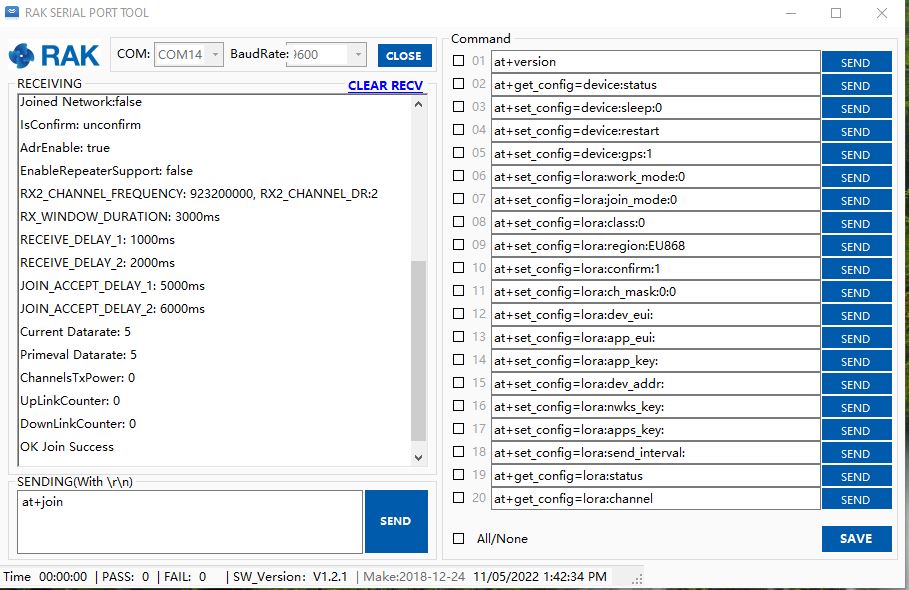
RAK Serial Port Tool initiating at+join command

With the RAK Serial Port Tool I could get the RAK4200 connected to TTN and send unconfirmed messages. The sequence of commands I used was

at+set_config=lora:join_mode:0
at+set_config=lora:class:0
at+set_config=lora:region:AS923
at+set_config=lora:dev_eui:XXXX
at+set_config=lora:app_eui:XXXX
at+set_config=lora:app_key:XXXX
at+set_config=device:restart
at+join
at+send=lora:2:48656c6c6f204c6f526157414e

I then returned to my STM32F769I Discovery, RAK4200 Breakoutboard, Seeedstudio Grove Base Shield for Arduino and a Seeedstudio Grove-4 pin Female Jumper to Grove 4 pin Conversion Cable based test harness.

RAK4200, STM32F769I Discovery test harness

I modified the NetworkJoinOTAA sample(based on the asynchronous version of BreakOutSerial) to send the same sequence of AT commands and display the responses.

namespace devMobile.IoT.LoRaWAN.nanoFramework.RAK4200
{
   using System;
	using System.Diagnostics;
   using System.IO.Ports;
   using System.Threading;

   public class Program
	{
      private const string SerialPortId = "COM6";
      private const string DevEui = "...";
      private const string AppEui = "...";
      private const string AppKey = "...";
      private const byte MessagePort = 1;
      private const string Payload = "48656c6c6f204c6f526157414e"; // Hello LoRaWAN

      public static void Main()
      {
         string response;

         Debug.WriteLine("devMobile.IoT.Rak4200.NetworkJoinOTAA starting");

         Debug.Write("Ports:");
         foreach (string port in SerialPort.GetPortNames())
         {
            Debug.Write($" {port}");
         }
         Debug.WriteLine("");

         try
         {
            using (SerialPort serialDevice = new SerialPort(SerialPortId))
            {
               // set parameters
               serialDevice.BaudRate = 9600;
               //_SerialPort.BaudRate = 115200;
               serialDevice.Parity = Parity.None;
               serialDevice.StopBits = StopBits.One;
               serialDevice.Handshake = Handshake.None;
               serialDevice.DataBits = 8;

               serialDevice.ReadTimeout = 10000;

               serialDevice.NewLine = "\r\n";

               serialDevice.DataReceived += SerialDevice_DataReceived;

               serialDevice.Open();

               serialDevice.WatchChar = '\n';

               // clear out the RX buffer
               serialDevice.ReadExisting();
               response = serialDevice.ReadExisting();
               Debug.WriteLine($"Response :{response.Trim()} bytes:{response.Length}");
               Thread.Sleep(500);

               // Set the Working mode to LoRaWAN
               Console.WriteLine("lora:work_mode:0");
               serialDevice.WriteLine("at+set_config=lora:work_mode:0");

               // Set the JoinMode
               Console.WriteLine("lora:join_mode");
               serialDevice.WriteLine("at+set_config=lora:join_mode:0");
               Thread.Sleep(500);

               // Set the Class
               Console.WriteLine("lora:class");
               serialDevice.WriteLine("at+set_config=lora:class:0");
               Thread.Sleep(500);

               // Set the Region to AS923
               Console.WriteLine("lora:region:AS923");
               serialDevice.WriteLine("at+set_config=lora:region:AS923");
               Thread.Sleep(500);

               // Set the devEUI
               Console.WriteLine("lora:dev_eui:{DevEui}");
               serialDevice.WriteLine($"at+set_config=lora:dev_eui:{DevEui}");
               Thread.Sleep(500);

               // Set the appEUI
               Console.WriteLine("lora:app_eui:{AppEui}");
               serialDevice.WriteLine($"at+set_config=lora:app_eui:{AppEui}");
               Thread.Sleep(500);

               // Set the appKey
               Console.WriteLine("lora:app_key:{AppKey}");
               serialDevice.WriteLine($"at+set_config=lora:app_key:{AppKey}");
               Thread.Sleep(500);

               // Set the Confirm flag
               Console.WriteLine("lora:confirm:0");
               serialDevice.WriteLine("at+set_config=lora:confirm:0");
               Thread.Sleep(500);

               // Reset the device
               Console.WriteLine("device:restart");
               serialDevice.WriteLine($"at+set_config=device:restart");
               Thread.Sleep(10000);

               // Join the network
               Console.WriteLine("at+join");
               serialDevice.WriteLine("at+join");
               Thread.Sleep(10000);

               while (true)
               {
                  // Send the BCD messages
                  Console.WriteLine("lora:{MessagePort}:{Payload}");
                  serialDevice.WriteLine($"at+send=lora:{MessagePort}:{Payload}");

                  Thread.Sleep(20000);
               }
            }
         }
         catch (Exception ex)
         {
            Debug.WriteLine(ex.Message);
         }
      }

      private static void SerialDevice_DataReceived(object sender, SerialDataReceivedEventArgs e)
      {
         SerialPort serialPort = (SerialPort)sender;
         string response;

         switch (e.EventType)
         {
            case SerialData.Chars:
               break;

            case SerialData.WatchChar:
               response = serialPort.ReadExisting();
               Debug.Write(response);
               break;
            default:
               Debug.Assert(false, $"e.EventType {e.EventType} unknown");
               break;
         }
      }
   }
}

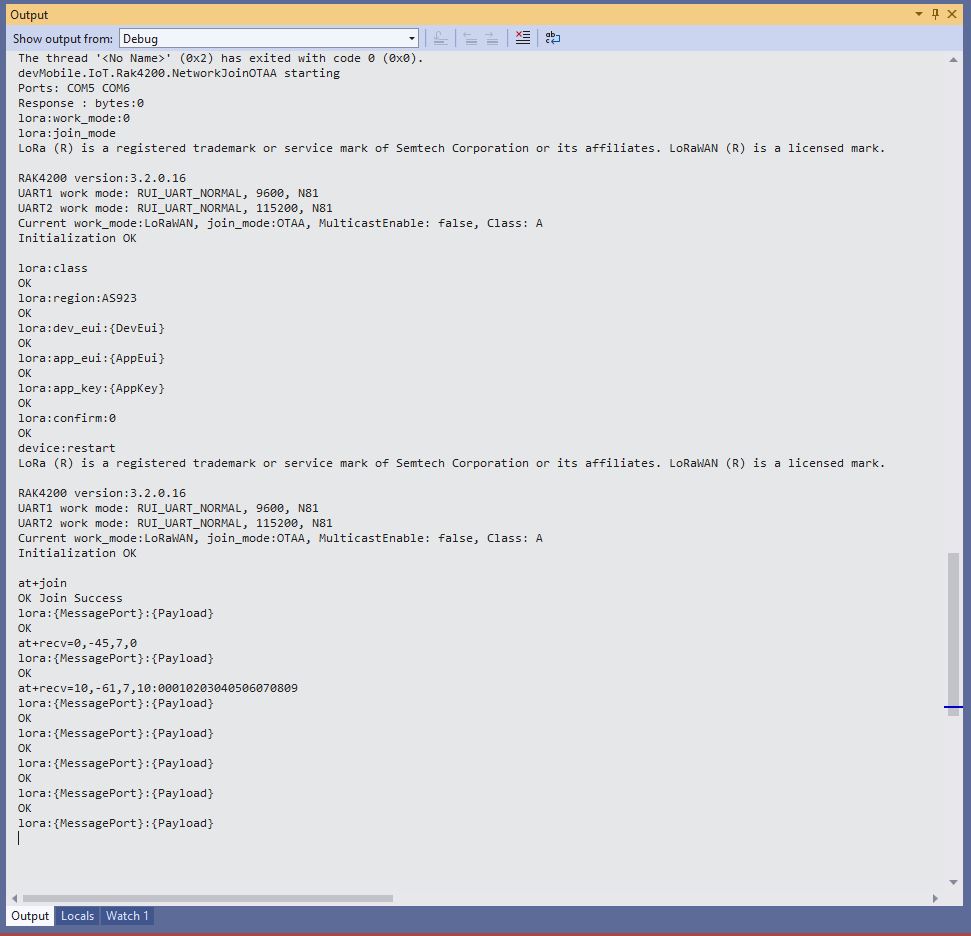
The NetworkJoinOTAA application assumes that all of the AT commands succeed

Visual Studio Output windows displaying connection process and a D2C message
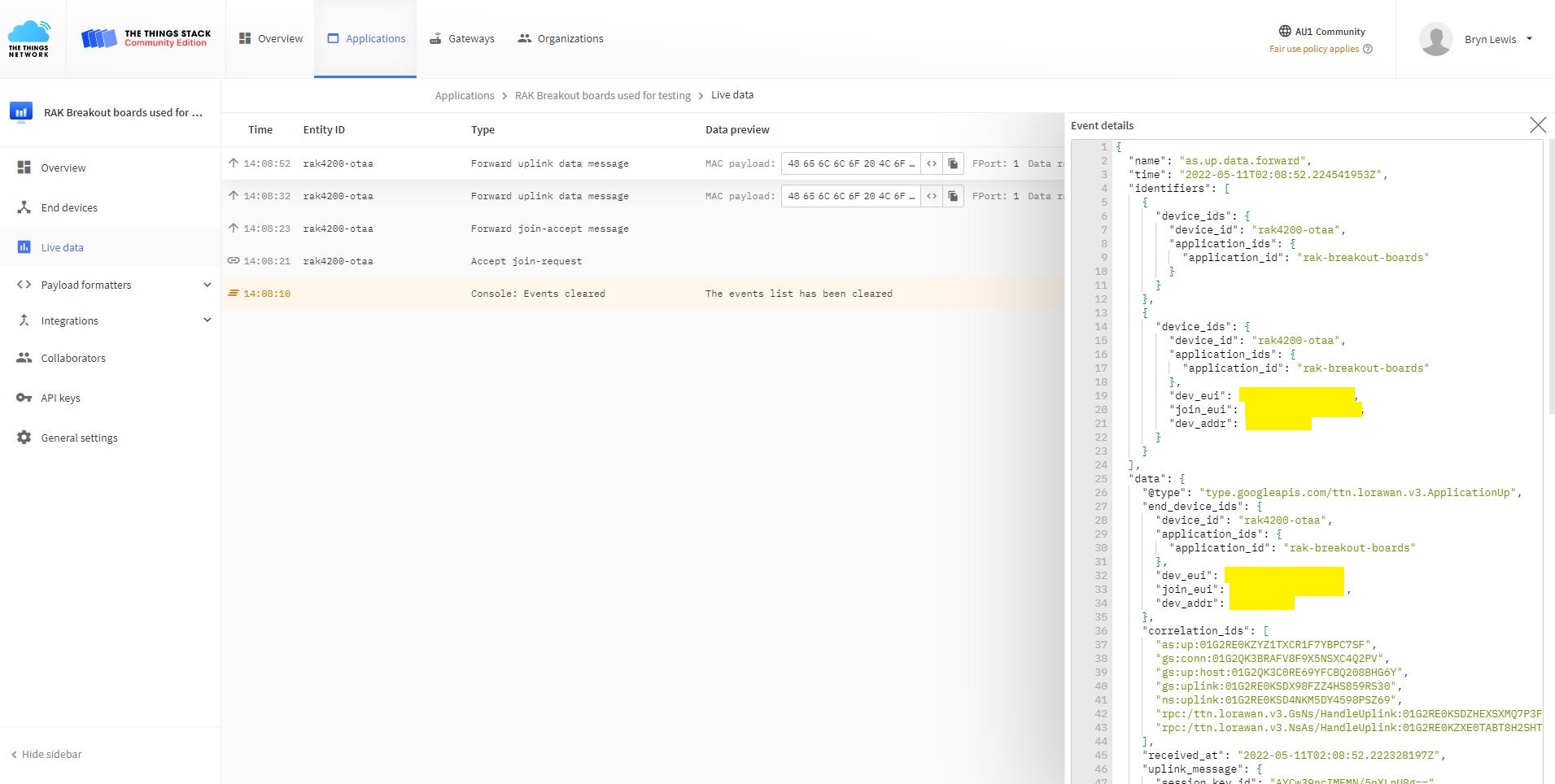
TTN Console live data tab connection process
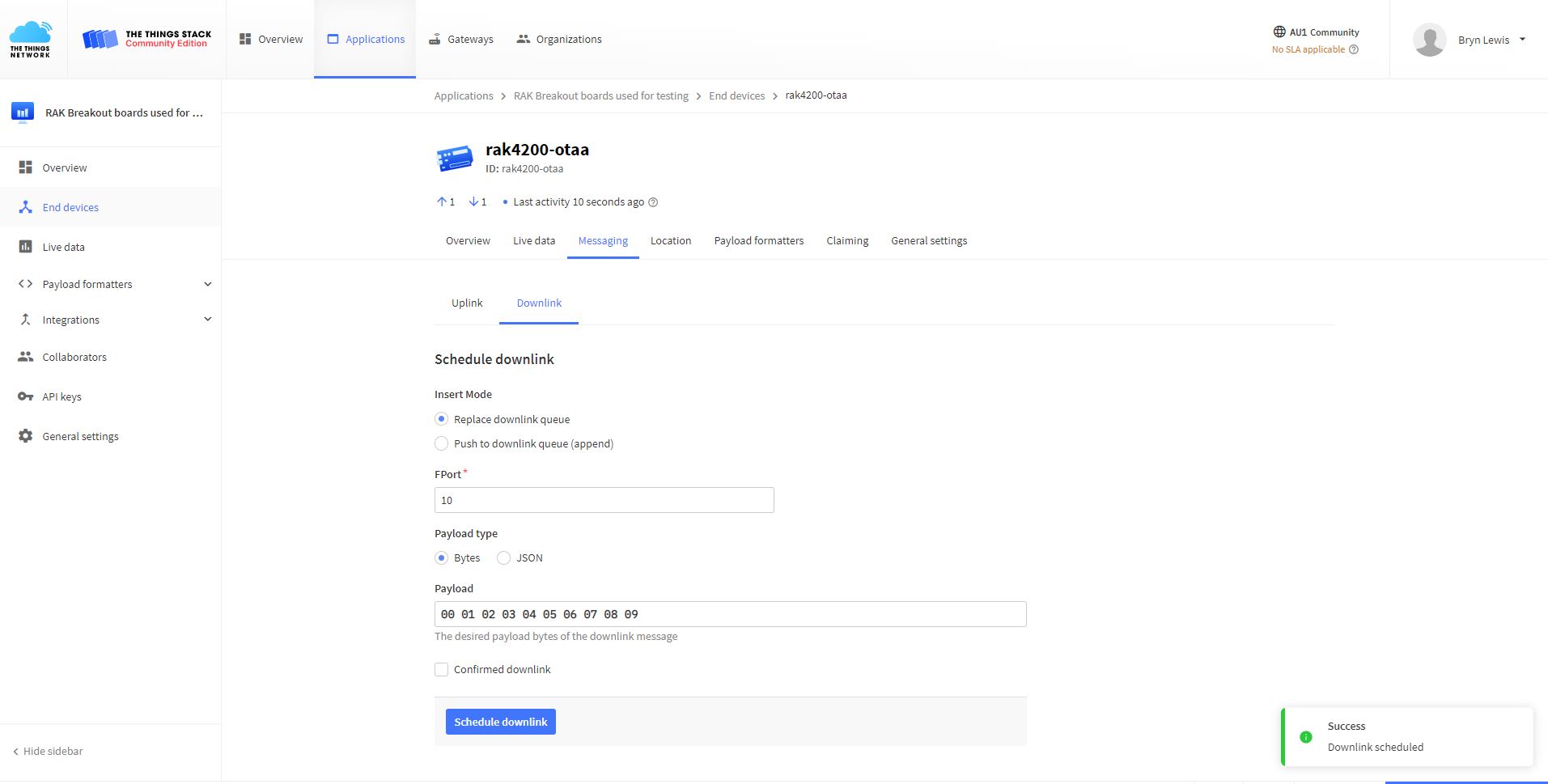
TTN Console live messaging tab C2D message

I need to find a way to set the RAK4200 back to factory settings so I can figure out what settings are persisted by the “at+set_config=device:restart” and which ones need to be set every time the application is run.

.NET nanoFramework SX127X LoRa library Regression Testing

After the big refactor the SparkFun LoRa Gateway-1-Channel (ESP32) configuration wouldn’t compile because, the constant for the interrupt pin number didn’t exist (interruptPinNumber vs. dio0PinNumber). A “using” for the Nuget Package nanoFramework.Hardware.Esp32 was also missing.

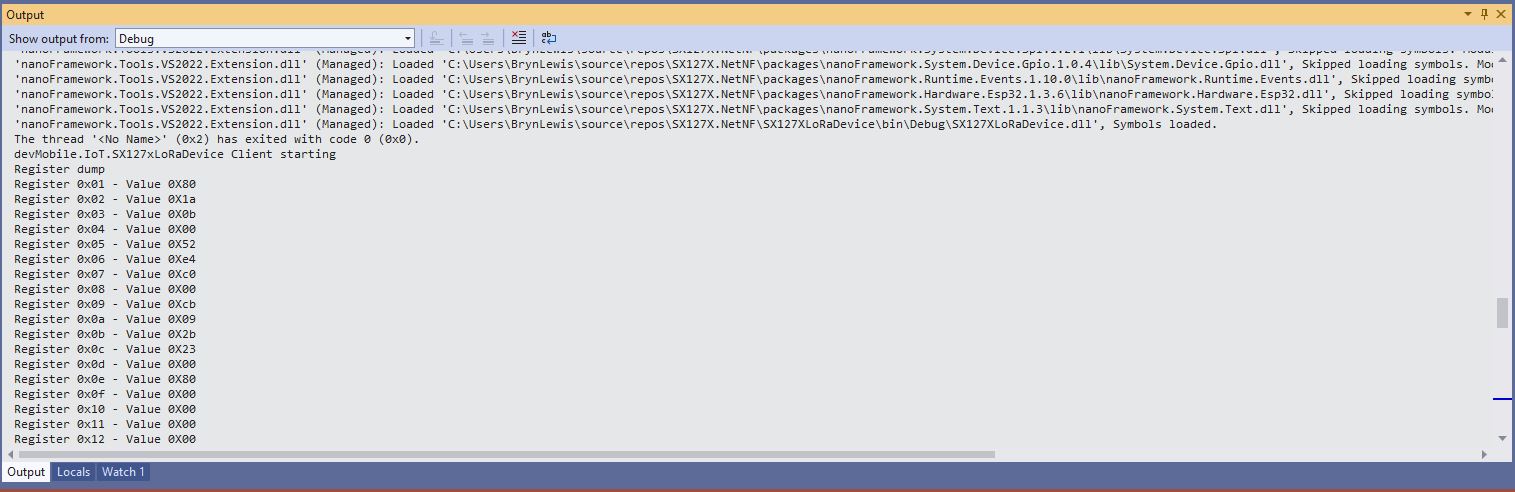
While “smoke testing” the application I noticed that if I erased the flash, power cycled the device, then ran the application the first execution would fail because the Semtech SX127X could not be detected.

SX127XLoRaDeviceClient first execution startup failure
SX127XLoRaDeviceClient second execution startup success

As part of debugging I built the SparkFun LoRa Gateway-1-Channel (ESP32) version of ShieldSPI and it worked…

After printing the code out and reviewing it I noticed that the Configuration.SetPinFunction for the Serial Peripheral Interface(SPI) Master Out Slave In(MOSI), MOSI(Master In Slave Out) and Clock pins was after the opening of the SPI port.

static void Main(string[] args)
{
	byte SendCount = 0;
#if ESP32_WROOM_32_LORA_1_CHANNEL // No reset line for this device as it isn't connected on SX127X
	int chipSelectLine = Gpio.IO16;
	int dio0PinNumber = Gpio.IO26;
#endif
#if NETDUINO3_WIFI
	// Arduino D10->PB10
	int chipSelectLine = PinNumber('B', 10);
	// Arduino D9->PE5
	int resetPinNumber = PinNumber('E', 5);
	// Arduino D2 -PA3
	int dio0PinNumber = PinNumber('A', 3);
#endif
#if ST_STM32F769I_DISCOVERY
	// Arduino D10->PA11
	int chipSelectLine = PinNumber('A', 11);
	// Arduino D9->PH6
	int resetPinNumber = PinNumber('H', 6);
	// Arduino D2->PA4
	int dio0PinNumber = PinNumber('J', 1);
#endif
	Console.WriteLine("devMobile.IoT.SX127xLoRaDevice Range Tester starting");

	try
	{
#f ESP32_WROOM_32_LORA_1_CHANNEL
		Configuration.SetPinFunction(Gpio.IO12, DeviceFunction.SPI1_MISO);
		Configuration.SetPinFunction(Gpio.IO13, DeviceFunction.SPI1_MOSI);
		Configuration.SetPinFunction(Gpio.IO14, DeviceFunction.SPI1_CLOCK);
#endif

		var settings = new SpiConnectionSettings(SpiBusId, chipSelectLine)
		{
			ClockFrequency = 1000000,
			Mode = SpiMode.Mode0,// From SemTech docs pg 80 CPOL=0, CPHA=0
			SharingMode = SpiSharingMode.Shared
		};

		using (_gpioController = new GpioController())
		using (SpiDevice spiDevice = new SpiDevice(settings))
		{

#if ESP32_WROOM_32_LORA_1_CHANNEL
			_sx127XDevice = new SX127XDevice(spiDevice, _gpioController, dio0Pin: dio0PinNumber);
#endif

#if NETDUINO3_WIFI || ST_STM32F769I_DISCOVERY
			_sx127XDevice = new SX127XDevice(spiDevice, _gpioController, dio0Pin: dio0PinNumber, resetPin:resetPinNumber);
#endif
...

		}
		catch (Exception ex)
		{
				Console.WriteLine(ex.Message);
		}
	}

I assume that the first execution after erasing the flash and power cycling the device, the SPI port pin assignments were not configured when the port was opened, then on the next execution the port was pre-configured.

The RangeTester application flashes on onboard Light Emitting Diode(LED) every time a valid message is received. But, on the ESP32 it turned on when the first message arrived and didn’t turn off. After discussion on the nanoFramework Discord this has been identified as an issue(May 2022).

The library is designed to be a approximate .NET nanoFramework equivalent of Arduino-LoRa so it doesn’t support/implement all of the functionality of the Semtech SX127X.

.NET nanoFramework RAK4200 LoRaWAN library basic connectivity

Over the last couple of evenings I have been working on a .NET nanoFramework library for the RAKwireless RAK4200 module using a STM32F769I Discovery, RAK4200 Breakoutboard, Seeedstudio Grove Base Shield for Arduino and a Seeedstudio Grove-4 pin Female Jumper to Grove 4 pin Conversion Cable.

RAK 4200 STM32F769I Discovery testrig

My sample code has compile time options for synchronous and asynchronous operation.

//---------------------------------------------------------------------------------
// Copyright (c) May 2022, devMobile Software
//
// Licensed under the Apache License, Version 2.0 (the "License");
// you may not use this file except in compliance with the License.
// You may obtain a copy of the License at
//
//     http://www.apache.org/licenses/LICENSE-2.0
//
// Unless required by applicable law or agreed to in writing, software
// distributed under the License is distributed on an "AS IS" BASIS,
// WITHOUT WARRANTIES OR CONDITIONS OF ANY KIND, either express or implied.
// See the License for the specific language governing permissions and
// limitations under the License.
//
//---------------------------------------------------------------------------------
//#define SERIAL_SYNC_READ
#define SERIAL_ASYNC_READ
//#define SERIAL_THREADED_READ
#define ST_STM32F769I_DISCOVERY      // nanoff --target ST_STM32F769I_DISCOVERY --update 
...

namespace devMobile.IoT.LoRaWAN.nanoFramework.RAK4200
{
	using System;
	using System.Diagnostics;
	using System.IO.Ports;
	using System.Threading;

	public class Program
	{
		private static SerialPort _SerialPort;
#if SERIAL_THREADED_READ
		private static Boolean _Continue = true;
#endif
...
#if ST_STM32F769I_DISCOVERY
		private const string SerialPortId = "COM6";
#endif

		public static void Main()
		{
#if SERIAL_THREADED_READ
			Thread readThread = new Thread(SerialPortProcessor);
#endif

			Debug.WriteLine("devMobile.IoT.LoRaWAN.nanoFramework.RAK4200 BreakoutSerial starting");

			Debug.Write("Ports:");
			foreach (string port in SerialPort.GetPortNames())
			{
				Debug.Write($" {port}");
			}
			Debug.WriteLine("");

			try
			{
				// set GPIO functions for COM2 (this is UART1 on ESP32)
#if ESP32_WROOM
				Configuration.SetPinFunction(Gpio.IO04, DeviceFunction.COM2_TX);
            Configuration.SetPinFunction(Gpio.IO05, DeviceFunction.COM2_RX);
#endif

				_SerialPort = new SerialPort(SerialPortId);

				// set parameters
				_SerialPort.BaudRate = 115200;
				_SerialPort.Parity = Parity.None;
				_SerialPort.DataBits = 8;
				_SerialPort.StopBits = StopBits.One;
				_SerialPort.Handshake = Handshake.None;

				_SerialPort.ReadTimeout = 1000;
				_SerialPort.NewLine = "\r\n";

				//_SerialPort.WatchChar = '\n'; // May 2022 WatchChar event didn't fire github issue https://github.com/nanoframework/Home/issues/1035

				_SerialPort.Open();

				_SerialPort.WatchChar = '\n';

#if SERIAL_THREADED_READ
				readThread.Start();
#endif

#if SERIAL_ASYNC_READ
				_SerialPort.DataReceived += SerialDevice_DataReceived;
#endif

				while (true)
				{
					string atCommand = "at+version";
					Debug.WriteLine($"TX:{atCommand} bytes:{atCommand.Length}");
					_SerialPort.WriteLine(atCommand);

#if SERIAL_SYNC_READ
					// Read the response
					string response = _SerialPort.ReadLine();
					Debug.WriteLine($"RX:{response.Trim()} bytes:{response.Length}");
#endif
					Thread.Sleep(15000);
				}
			}
			catch (Exception ex)
			{
				Debug.WriteLine(ex.Message);
			}
		}

#if SERIAL_ASYNC_READ
		private static void SerialDevice_DataReceived(object sender, SerialDataReceivedEventArgs e)
		{
			SerialPort serialPort = (SerialPort)sender;
			string response;

			switch (e.EventType)
			{
				case SerialData.Chars:
					/*
					response = serialPort.ReadExisting();

					if ( response.Length>0)
					{ 
						Debug.WriteLine($"RX Char:{response.Trim()} bytes:{response.Length}");
					}
					*/
					break;
				case SerialData.WatchChar:
					response = serialPort.ReadExisting();

					if (response.Length > 0)
					{
						Debug.WriteLine($"RX WatchChar :{response.Trim()} bytes:{response.Length}");
					}
					break;
				default:
					Debug.Assert(false, $"e.EventType {e.EventType} unknown");
					break;
			}
		}
#endif

#if SERIAL_THREADED_READ
		public static void SerialPortProcessor()
		{
			string response;

			while (_Continue)
			{
				try
				{
					response = _SerialPort.ReadLine();
					//response = _SerialPort.ReadExisting();
					Console.WriteLine($"RX:{response} bytes:{response.Length}");
				}
				catch (TimeoutException ex) 
				{
					Console.WriteLine($"Timeout:{ex.Message}");
				}
			}
		}
#endif
	}
}

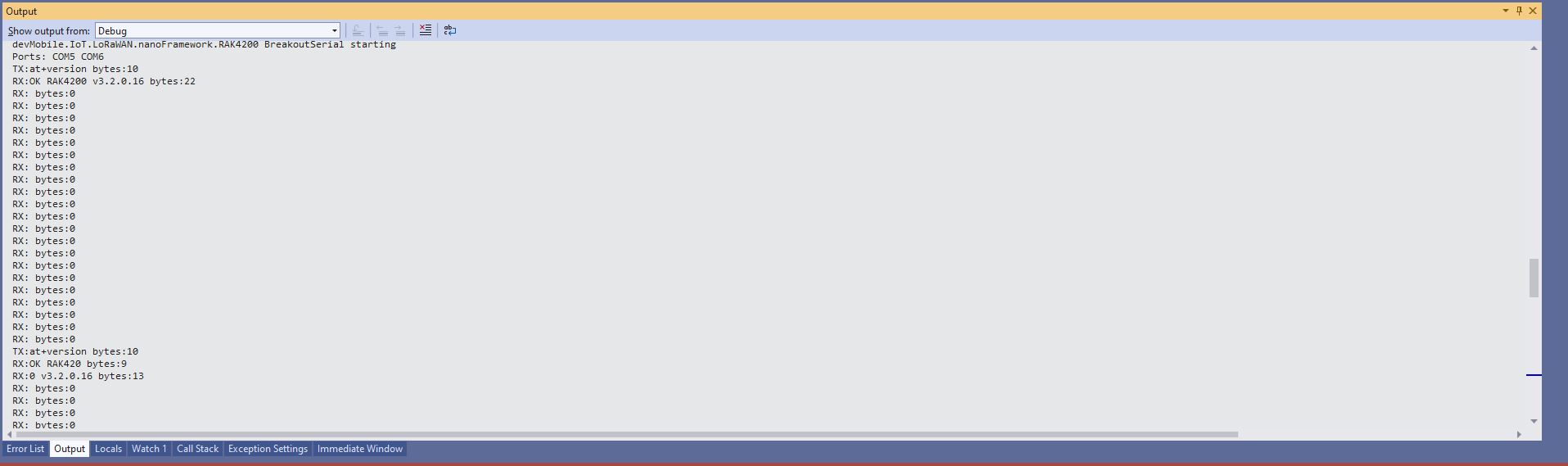
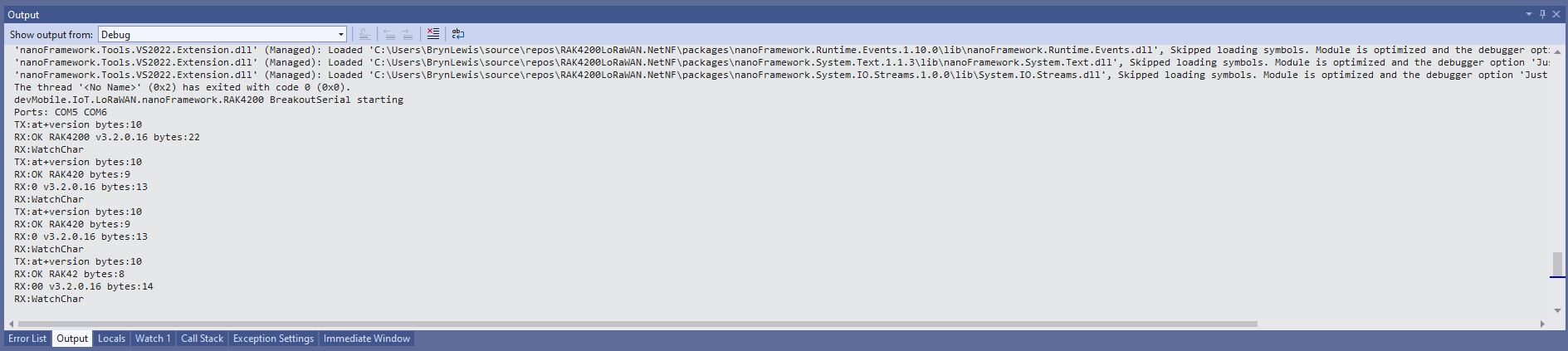
When I requested the RAK4200 Module version information with “at+version” the response was a single line (unlike the RAK3172 version where the response is three lines). The asynchronous version of the application displays character(s) as they arrive so a response could be split across multiple SerialDataReceived events.

Asynchronous approach with multiple SerialData.Chars events

With the initial version of SerialDevice_DataReceived event handler the firmware version response was available in the first SerialData.Chars event, then a SerialData.Chars event fired for each character

Asynchronous approach with SerialData.Chars events with an empty buffer removed

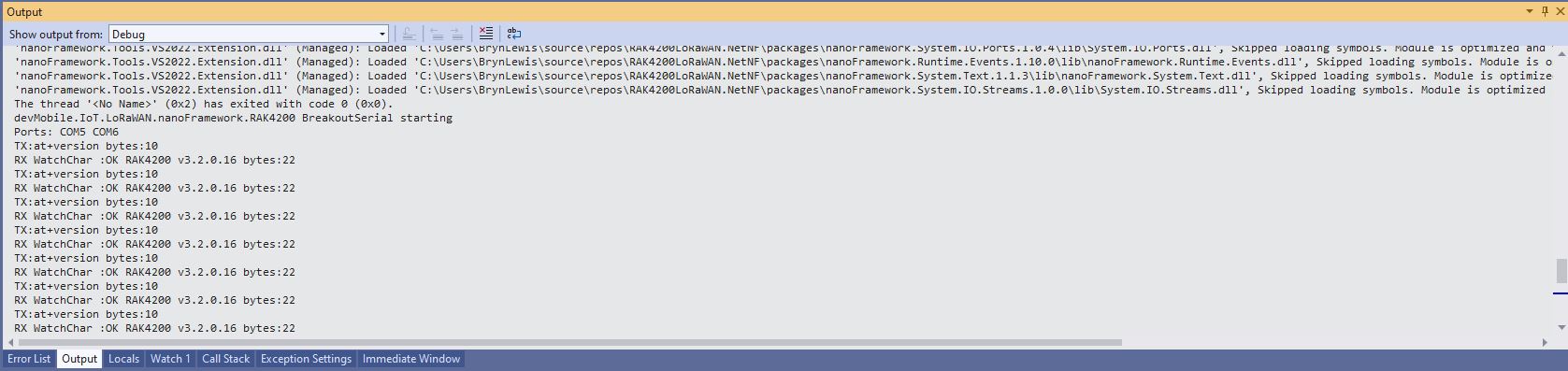
I also noticed that the “SerialData.WatchChar” event was not firing. After some experimentation I found that if I set the SerialPort.WatchChar before opening the serial port there were no events, but if I set SerialPort.WatchChar after opening the serial port events were fired as expected(See note re github issue in code)

Asynchronous approach with SerialPort.WatchChar work as expected

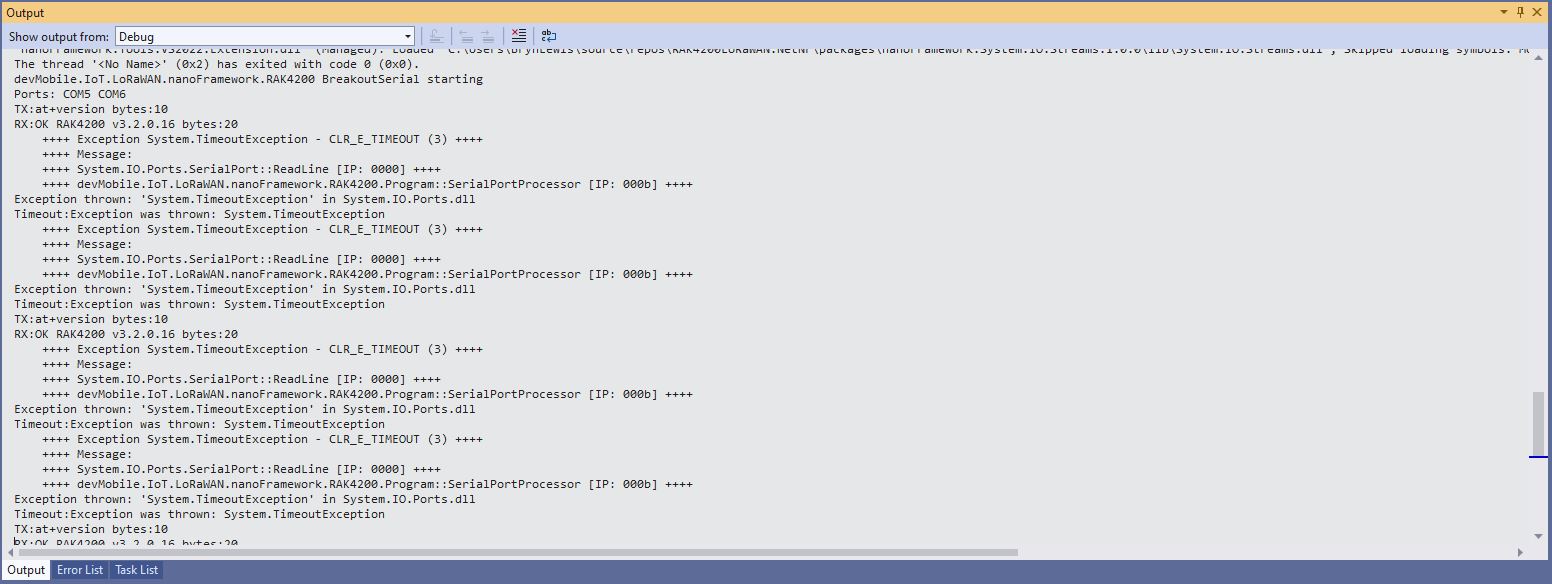
I also implemented a threaded approach for reading characters from the serial port. Normally using Exceptions for flow control is not a good idea but in this case I can’t see an alternative approach.

Thread approach SerialPort.ReadLine() timeouts

The RAK4200 Module defaults 115200 baud which seems overkill considering the throughput of a LoRaWAN link.