Random wanderings through Microsoft Azure esp. PaaS plumbing, the IoT bits, AI on Micro controllers, AI on Edge Devices, .NET nanoFramework, .NET Core on *nix and ML.NET+ONNX
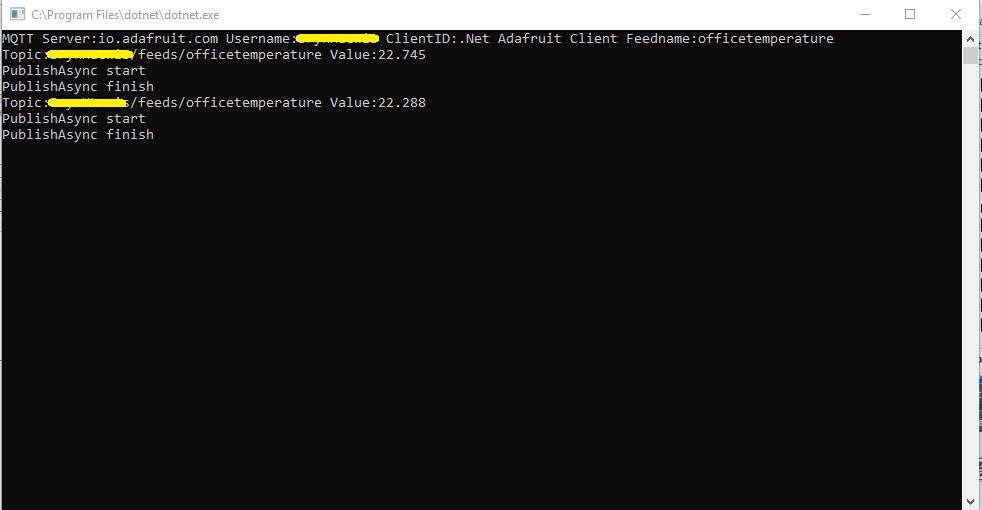
Before building the Message Queue Telemetry Transport(MQTT) gateway I built a proof of concept(PoC) .Net core console application. This was to confirm that I could connect to the Adafruit.IO MQTT broker and format the topic (with and without group name) and payload correctly. The Adafruit IO MQTT documentation suggests an approach for naming topics which allows a bit more structure for feed names than the RESTAPI.
The MQTT broker, username, API key, client ID, optional group name (to keep MQTT aligned with REST API terminology) and feed name are command line options.
For this PoC I used the MQTTnet package which is available via NuGet. It appeared to be reasonably well supported and has had recent updates.
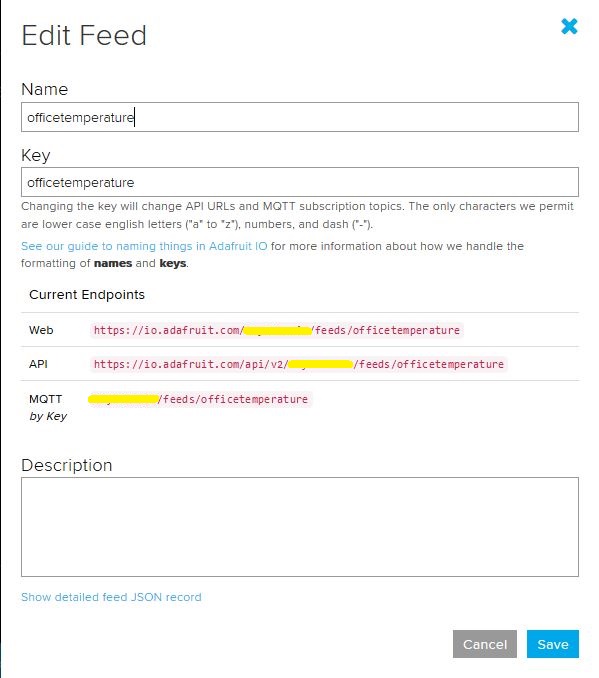
Overall the process went pretty well, I found that looking at the topic names in the Adafruit IO feed setup screens helped a lot. A couple of times I was tripped up by mixed case in my text fields.
.Net Core 2 client with group nameAdafruit IO feed setup with group nameConsole client without group nameAdafruit IO feed setup without group name
I am also going to try building some clients with the Eclipse Paho project .net client so I can compare a couple of different libraries.
I increased delay between readings to 10sec and reduced the baud rate of the serial logging to 9600baud.
/*
  This test code is write for Arduino AVR Series(UNO, Leonardo, Mega)
  If you want to use with LinkIt ONE, please connect the module to D0/1 and modify:

  // #include <SoftwareSerial.h>
  // SoftwareSerial s_serial(2, 3);      // TX, RX

  #define sensor Serial1
*/


#include <SoftwareSerial.h>
SoftwareSerial s_serial(2, 3);      // TX, RX

#define sensor s_serial

const unsigned char cmd_get_sensor[] =
{
    0xff, 0x01, 0x86, 0x00, 0x00,
    0x00, 0x00, 0x00, 0x79
};

unsigned char dataRevice[9];
int temperature;
int CO2PPM;

void setup()
{
    sensor.begin(9600);
    Serial.begin(9600);
    Serial.println("get a 'g', begin to read from sensor!");
    Serial.println("********************************************************");
    Serial.println();
}

void loop()
{
    if(dataRecieve())
    {
        Serial.print("Temperature: ");
        Serial.print(temperature);
        Serial.print("  CO2: ");
        Serial.print(CO2PPM);
        Serial.println("");
    }
    delay(10000);
}

bool dataRecieve(void)
{
    byte data[9];
    int i = 0;

    //transmit command data
    for(i=0; i<sizeof(cmd_get_sensor); i++)
    {
        sensor.write(cmd_get_sensor[i]);
    }
    delay(10);
    //begin reveiceing data
    if(sensor.available())
    {
        while(sensor.available())
        {
            for(int i=0;i<9; i++)
            {
                data[i] = sensor.read();
            }
        }
    }

    for(int j=0; j<9; j++)
    {
        Serial.print(data[j]);
        Serial.print(" ");
    }
    Serial.println("");

    if((i != 9) || (1 + (0xFF ^ (byte)(data[1] + data[2] + data[3] + data[4] + data[5] + data[6] + data[7]))) != data[8])
    {
        return false;
    }

    CO2PPM = (int)data[2] * 256 + (int)data[3];
    temperature = (int)data[4] - 40;

    return true;
}
The debug output wasn’t too promising there weren’t any C02 parts per million (ppm) values and the response payloads looked wrong. So I downloaded the MH-Z16 NDIR CO2 Sensor datasheet for some background. The datasheet didn’t mention any temperature data in the message payloads so I removed that code.
The response payload validation code was all on one line and hard to figure out what it was doing.
To make debugging easier I split the payload validation code into several steps so I could see what was failing.
/*
  This test code is write for Arduino AVR Series(UNO, Leonardo, Mega)
  If you want to use with LinkIt ONE, please connect the module to D0/1 and modify:

  // #include <SoftwareSerial.h>
  // SoftwareSerial s_serial(2, 3);      // TX, RX

  #define sensor Serial1
*/


#include <SoftwareSerial.h>
SoftwareSerial s_serial(2, 3);      // TX, RX

#define sensor s_serial

const unsigned char cmd_get_sensor[] =
{
    0xff, 0x01, 0x86, 0x00, 0x00,
    0x00, 0x00, 0x00, 0x79
};

unsigned char dataRevice[9];
int CO2PPM;

void setup()
{
    sensor.begin(9600);
    Serial.begin(9600);
    Serial.println("get a 'g', begin to read from sensor!");
    Serial.println("********************************************************");
    Serial.println();
}

void loop()
{
    if(dataRecieve())
    {
        Serial.print("  CO2: ");
        Serial.print(CO2PPM);
        Serial.println("");
    }
    delay(10000);
}

bool dataRecieve(void)
{
    byte data[9];
    int i = 0;

    //transmit command data
    for(i=0; i<sizeof(cmd_get_sensor); i++)
    {
        sensor.write(cmd_get_sensor[i]);
    }
    delay(10);
    //begin reveiceing data
    if(sensor.available())
    {
        while(sensor.available())
        {
            for(int i=0;i<9; i++)
            {
                data[i] = sensor.read();
            }
        }
    }

    for(int j=0; j<9; j++)
    {
        Serial.print(data[j]);
        Serial.print(" ");
    }
    Serial.println("");

    // First calculate then validate the check sum as there is no point in proceeding if the packet is corrupted. (code inspired by datasheet algorithm)
    byte checksum = 0 ;
    for(int j=1; j<8; j++)
    {
      checksum += data[j];
    }
    checksum=0xff-checksum;
    checksum+=1;

    if  (checksum != data[8])
    {
      Serial.println("Error checksum");
      return false;
    }

    // Then check the start byte to make sure response is what we were expecting
    if ( data[0] != 0xFF )
    {
        Serial.println("Error start byte");
        return false;
    }

    // Then check the command byte to make sure response is what we were expecting
    if ( data[1] != 0x86 )
    {
        Serial.println("Error command");
        return false;
    }


    CO2PPM = (int)data[2] * 256 + (int)data[3];

    return true;
}
From these modifications I could see the payload was messed up and based on the datasheet message descriptions it looked like it was offset by a byte or two.
I had a look at the code and the delay(10) after sending the sensor reading request message caught my attention. I have found that often delay(x) commands are used to “tweak” the code to get it to work.
These “tweaks” often break when code is run on a different device or sensor firmware is updated changing the timing of individual bytes, or request-response processes.
I removed the delay(10) replaced it with a serial.flush() and changed the code to display the payload bytes in hexadecimal.
/*
  This test code is write for Arduino AVR Series(UNO, Leonardo, Mega)
  If you want to use with LinkIt ONE, please connect the module to D0/1 and modify:

  // #include <SoftwareSerial.h>
  // SoftwareSerial s_serial(2, 3);      // TX, RX

  #define sensor Serial1
*/


#include <SoftwareSerial.h>
SoftwareSerial s_serial(2, 3);      // TX, RX

#define sensor s_serial

const unsigned char cmd_get_sensor[] =
{
    0xff, 0x01, 0x86, 0x00, 0x00,
    0x00, 0x00, 0x00, 0x79
};

unsigned char dataRevice[9];
int CO2PPM;

void setup()
{
    sensor.begin(9600);
    Serial.begin(9600);
    Serial.println("get a 'g', begin to read from sensor!");
    Serial.println("********************************************************");
    Serial.println();
}

void loop()
{
    if(dataRecieve())
    {
        Serial.print("  CO2: ");
        Serial.print(CO2PPM);
        Serial.println("");
    }
    delay(10000);
}

bool dataRecieve(void)
{
    byte data[9];
    int i = 0;

    //transmit command data
    for(i=0; i<sizeof(cmd_get_sensor); i++)
    {
        sensor.write(cmd_get_sensor[i]);
    }
    Serial.flush();

    //begin reveiceing data
    if(sensor.available())
    {
        while(sensor.available())
        {
            for(int i=0;i<9; i++)
            {
                data[i] = sensor.read();
            }
        }
    }

    for(int j=0; j<9; j++)
    {
        Serial.print(data[j],HEX);
        Serial.print(" ");
    }
    Serial.println("");

    // First calculate then validate the check sum as there is no point in proceeding if the packet is corrupted. (code inspired by datasheet algorithm)
    byte checksum = 0 ;
    for(int j=1; j<8; j++)
    {
      checksum += data[j];
    }
    checksum=0xff-checksum;
    checksum+=1;

    if  (checksum != data[8])
    {
      Serial.println("Error checksum");
      return false;
    }

    // Then check the start byte to make sure response is what we were expecting
    if ( data[0] != 0xFF )
    {
        Serial.println("Error start byte");
        return false;
    }

    // Then check the command byte to make sure response is what we were expecting
    if ( data[1] != 0x86 )
    {
        Serial.println("Error command");
        return false;
    }


    CO2PPM = (int)data[2] * 256 + (int)data[3];

    return true;
}
The initial values from the sensor were a bit high, but after leaving the device running for 3 minutes (Preheat time in the documentation) they settled down into a reasonable range
Now that the device is running well, I’ll look at reducing power consumption and splitting the the payload packing code into a library. Also noticed an extra “,” on the end of a message so need to come up with a better way of doing the payload packing.
/*
  Copyright ® 2018 December devMobile Software, All Rights Reserved

  THIS CODE AND INFORMATION IS PROVIDED "AS IS" WITHOUT WARRANTY OF ANY
  KIND, EITHER EXPRESSED OR IMPLIED, INCLUDING BUT NOT LIMITED TO THE
  IMPLIED WARRANTIES OF MERCHANTABILITY AND/OR FITNESS FOR A PARTICULAR
  PURPOSE.

  You can do what you want with this code, acknowledgment would be nice.

  http://www.devmobile.co.nz

*/
#include <stdlib.h>

#include <LoRa.h>
#include <avr/dtostrf.h>
#include "DHT.h"

#define DEBUG
//#define DEBUG_TELEMETRY
//#define DEBUG_LORA

// LoRa field gateway configuration (these settings must match your field gateway)
const char FieldGatewayAddress[] = {"LoRaIoT1"};
const char DeviceAddress[] = {"SparkFunX1"};
const float FieldGatewayFrequency =  915000000.0;
const byte FieldGatewaySyncWord = 0x12 ;

// Payload configuration
const int InterruptPin = 12;
const int ChipSelectPin = 6;

// LoRa radio payload configuration
const byte SensorIdValueSeperator = ' ' ;
const byte SensorReadingSeperator = ',' ;
const int LoopSleepDelaySeconds = 10 ;

const byte PayloadSizeMaximum = 64 ;
byte payload[PayloadSizeMaximum];
byte payloadLength = 0 ;

#define DHTPIN 4     // what digital pin we're connected to

// Uncomment whatever type you're using!
//#define DHTTYPE DHT11   // DHT 11
#define DHTTYPE DHT22   // DHT 22  (AM2302), AM2321
//#define DHTTYPE DHT21   // DHT 21 (AM2301)

DHT dht(DHTPIN, DHTTYPE);


void setup()
{
  SerialUSB.begin(9600);
#ifdef DEBUG
  while (!SerialUSB);
#endif
  SerialUSB.println("Setup called");

  SerialUSB.println("LoRa setup start");

  // override the default chip select and reset pins
  LoRa.setPins(InterruptPin, ChipSelectPin);
  if (!LoRa.begin(FieldGatewayFrequency))
  {
    SerialUSB.println("LoRa begin failed");
    while (true); // Drop into endless loop requiring restart
  }

  // Need to do this so field gateways pays attention to messsages from this device
  LoRa.enableCrc();
  LoRa.setSyncWord(FieldGatewaySyncWord);

#ifdef DEBUG_LORA
  LoRa.dumpRegisters(SerialUSB);
#endif
  SerialUSB.println("LoRa Setup done.");

  // Configure the Seeedstudio TH02 temperature & humidity sensor
  SerialUSB.println("DHT setup start");
  dht.begin();
  delay(100);
  SerialUSB.println("DHT setup done");

  PayloadHeader((byte*)FieldGatewayAddress,strlen(FieldGatewayAddress), (byte*)DeviceAddress, strlen(DeviceAddress));

  SerialUSB.println("Setup done");
  SerialUSB.println();
}


void loop()
{
  float temperature = 17.2;
  float humidity = 75.0;

  SerialUSB.println("Loop called");

  PayloadReset();

  // Read the temperature & humidity & battery voltage values then display nicely
  temperature = dht.readTemperature();
  humidity = dht.readHumidity();
  if (isnan(humidity) || isnan(temperature))
  {
    SerialUSB.println("Failed to read from DHT sensor!");
    return;
  }

  SerialUSB.print("T:");
  SerialUSB.print( temperature, 1 ) ;
  SerialUSB.println( "C " ) ;
  PayloadAdd( "T", temperature, 1);

  SerialUSB.print("H:");
  SerialUSB.print( humidity, 0 ) ;
  SerialUSB.println( "% " ) ;
  PayloadAdd( "H", humidity, 0) ;

#ifdef DEBUG_TELEMETRY
  SerialUSB.println();
  SerialUSB.print( "RFM9X/SX127X Payload length:");
  SerialUSB.print( payloadLength );
  SerialUSB.println( " bytes" );
#endif

  LoRa.beginPacket();
  LoRa.write( payload, payloadLength );
  LoRa.endPacket();

  SerialUSB.println("Loop done");
  SerialUSB.println();
  delay(LoopSleepDelaySeconds * 1000l);
}


void PayloadHeader( byte *to, byte toAddressLength, byte *from, byte fromAddressLength)
{
  byte addressesLength = toAddressLength + fromAddressLength ;

#ifdef DEBUG_TELEMETRY
  SerialUSB.println("PayloadHeader- ");
  SerialUSB.print( "To Address len:");
  SerialUSB.print( toAddressLength );
  SerialUSB.print( " From Address len:");
  SerialUSB.print( fromAddressLength );
  SerialUSB.print( " Addresses length:");
  SerialUSB.print( addressesLength );
  SerialUSB.println( );
#endif

  payloadLength = 0 ;

  // prepare the payload header with "To" Address length (top nibble) and "From" address length (bottom nibble)
  payload[payloadLength] = (toAddressLength << 4) | fromAddressLength ;
  payloadLength += 1;

  // Copy the "To" address into payload
  memcpy(&payload[payloadLength], to, toAddressLength);
  payloadLength += toAddressLength ;

  // Copy the "From" into payload
  memcpy(&payload[payloadLength], from, fromAddressLength);
  payloadLength += fromAddressLength ;
}


void PayloadAdd( char *sensorId, float value, byte decimalPlaces)
{
  byte sensorIdLength = strlen( sensorId ) ;

#ifdef DEBUG_TELEMETRY
  SerialUSB.println("PayloadAdd-float ");
  SerialUSB.print( "SensorId:");
  SerialUSB.print( sensorId );
  SerialUSB.print( " sensorIdLen:");
  SerialUSB.print( sensorIdLength );
  SerialUSB.print( " Value:");
  SerialUSB.print( value, decimalPlaces );
  SerialUSB.print( " payloadLength:");
  SerialUSB.print( payloadLength);
#endif

  memcpy( &payload[payloadLength], sensorId,  sensorIdLength) ;
  payloadLength += sensorIdLength ;
  payload[ payloadLength] = SensorIdValueSeperator;
  payloadLength += 1 ;
  payloadLength += strlen( dtostrf(value, -1, decimalPlaces, (char *)&payload[payloadLength]));
  payload[ payloadLength] = SensorReadingSeperator;
  payloadLength += 1 ;

#ifdef DEBUG_TELEMETRY
  SerialUSB.print( " payloadLength:");
  SerialUSB.print( payloadLength);
  SerialUSB.println( );
#endif
}


void PayloadAdd( char *sensorId, int value )
{
  byte sensorIdLength = strlen( sensorId ) ;

#ifdef DEBUG_TELEMETRY
  SerialUSB.println("PayloadAdd-int ");
  SerialUSB.print( "SensorId:");
  SerialUSB.print( sensorId );
  SerialUSB.print( " sensorIdLen:");
  SerialUSB.print( sensorIdLength );
  SerialUSB.print( " Value:");
  SerialUSB.print( value );
  SerialUSB.print( " payloadLength:");
  SerialUSB.print( payloadLength);
#endif

  memcpy( &payload[payloadLength], sensorId,  sensorIdLength) ;
  payloadLength += sensorIdLength ;
  payload[ payloadLength] = SensorIdValueSeperator;
  payloadLength += 1 ;
  payloadLength += strlen( itoa( value,(char *)&payload[payloadLength],10));
  payload[ payloadLength] = SensorReadingSeperator;
  payloadLength += 1 ;

#ifdef DEBUG_TELEMETRY
  SerialUSB.print( " payloadLength:");
  SerialUSB.print( payloadLength);
  SerialUSB.println( );
#endif
}


void PayloadAdd( char *sensorId, unsigned int value )
{
  byte sensorIdLength = strlen( sensorId ) ;

#ifdef DEBUG_TELEMETRY
  SerialUSB.println("PayloadAdd-unsigned int ");
  SerialUSB.print( "SensorId:");
  SerialUSB.print( sensorId );
  SerialUSB.print( " sensorIdLen:");
  SerialUSB.print( sensorIdLength );
  SerialUSB.print( " Value:");
  SerialUSB.print( value );
  SerialUSB.print( " payloadLength:");
  SerialUSB.print( payloadLength);
#endif

  memcpy( &payload[payloadLength], sensorId,  sensorIdLength) ;
  payloadLength += sensorIdLength ;
  payload[ payloadLength] = SensorIdValueSeperator;
  payloadLength += 1 ;
  payloadLength += strlen( utoa( value,(char *)&payload[payloadLength],10));
  payload[ payloadLength] = SensorReadingSeperator;
  payloadLength += 1 ;

#ifdef DEBUG_TELEMETRY
  SerialUSB.print( " payloadLength:");
  SerialUSB.print( payloadLength);
  SerialUSB.println( );
#endif
}


void PayloadReset()
{
  byte fromAddressLength = payload[0] & 0xf ;
  byte toAddressLength = payload[0] >> 4 ;
  byte addressesLength = toAddressLength + fromAddressLength ;

  payloadLength = addressesLength + 1;

#ifdef DEBUG_TELEMETRY
  SerialUSB.println("PayloadReset- ");
  SerialUSB.print( "To Address len:");
  SerialUSB.print( toAddressLength );
  SerialUSB.print( " From Address len:");
  SerialUSB.print( fromAddressLength );
  SerialUSB.print( " Addresses length:");
  SerialUSB.print( addressesLength );
  SerialUSB.println( );
#endif
}
Last week a package arrived from LowPowerLab with some Moteino0 devices and accessories . With this gear I have built yet another client for my Azure IoT Hub and AdaFruit.IOLoRa Field Gateways.
It took me a while longer that usual to get the Motenio working as the sketch setup call appeared to hang in DEBUG builds.
After staring at the code for a while I noticed that I hadn’t changed LoRa.dumpRegisters method parameter from Serial to SerialUSB. A couple of hours lost due to a dumb typo by me.
Now that the device is running well, I’ll look at reducing power consumption and splitting the the payload packing code into a library.
/*
  Copyright ® 2018 November devMobile Software, All Rights Reserved

  THIS CODE AND INFORMATION IS PROVIDED "AS IS" WITHOUT WARRANTY OF ANY
  KIND, EITHER EXPRESSED OR IMPLIED, INCLUDING BUT NOT LIMITED TO THE
  IMPLIED WARRANTIES OF MERCHANTABILITY AND/OR FITNESS FOR A PARTICULAR
  PURPOSE.

  You can do what you want with this code, acknowledgment would be nice.

  http://www.devmobile.co.nz

*/
#include <stdlib.h>
#include <avr/dtostrf.h>
#include <LoRa.h>
#include <TH02_dev.h>

//#define DEBUG
//#define DEBUG_TELEMETRY
//#define DEBUG_LORA

// LoRa field gateway configuration (these settings must match your field gateway)
const char FieldGatewayAddress[] = {"LoRaIoT1"};
const char DeviceAddress[] = {"Moteino01"};
const float FieldGatewayFrequency =  915000000.0;
const byte FieldGatewaySyncWord = 0x12 ;

// Payload configuration
const int ChipSelectPin = A2;
const int InterruptPin = 9;
const int ResetPin = -1;

// LoRa radio payload configuration
const byte SensorIdValueSeperator = ' ' ;
const byte SensorReadingSeperator = ',' ;
const int LoopSleepDelaySeconds = 10 ;

const byte PayloadSizeMaximum = 64 ;
byte payload[PayloadSizeMaximum];
byte payloadLength = 0 ;


void setup()
{
  SerialUSB.begin(9600);
#ifdef DEBUG
  while (!SerialUSB);
#endif
  SerialUSB.println("Setup called");

  SerialUSB.println("LoRa setup start");

  // override the default chip select and reset pins
  LoRa.setPins( ChipSelectPin, ResetPin, InterruptPin );
  if (!LoRa.begin(FieldGatewayFrequency))
  {
    SerialUSB.println("LoRa begin failed");
    while (true); // Drop into endless loop requiring restart
  }

  // Need to do this so field gateways pays attention to messsages from this device
  LoRa.enableCrc();
  LoRa.setSyncWord(FieldGatewaySyncWord);

#ifdef DEBUG_LORA
  LoRa.dumpRegisters(USBSerial);
#endif
  SerialUSB.println("LoRa Setup done.");

  // Configure the Seeedstudio TH02 temperature & humidity sensor
  SerialUSB.println("TH02 setup start");
  TH02.begin();
  delay(100);
  SerialUSB.println("TH02 setup done");

  PayloadHeader((byte*)FieldGatewayAddress,strlen(FieldGatewayAddress), (byte*)DeviceAddress, strlen(DeviceAddress));

  SerialUSB.println("Setup done");
  SerialUSB.println();
}


void loop()
{
  float temperature ;
  float humidity ;

  SerialUSB.println("Loop called");

  PayloadReset();

  // Read the temperature & humidity & battery voltage values then display nicely
  temperature = TH02.ReadTemperature();
  SerialUSB.print("T:");
  SerialUSB.print( temperature, 1 ) ;
  SerialUSB.println( "C " ) ;

  PayloadAdd( "T", temperature, 1);

  humidity = TH02.ReadHumidity();
  SerialUSB.print("H:");
  SerialUSB.print( humidity, 0 ) ;
  SerialUSB.println( "% " ) ;

  PayloadAdd( "H", humidity, 0) ;

#ifdef DEBUG_TELEMETRY
  SerialUSB.println();
  SerialUSB.print( "RFM9X/SX127X Payload length:");
  SerialUSB.print( payloadLength );
  SerialUSB.println( " bytes" );
#endif

  LoRa.beginPacket();
  LoRa.write( payload, payloadLength );
  LoRa.endPacket();

  SerialUSB.println("Loop done");
  SerialUSB.println();
  delay(LoopSleepDelaySeconds * 1000l);
}


void PayloadHeader( byte *to, byte toAddressLength, byte *from, byte fromAddressLength)
{
  byte addressesLength = toAddressLength + fromAddressLength ;

#ifdef DEBUG_TELEMETRY
  SerialUSB.println("PayloadHeader- ");
  SerialUSB.print( "To Address len:");
  SerialUSB.print( toAddressLength );
  SerialUSB.print( " From Address len:");
  SerialUSB.print( fromAddressLength );
  SerialUSB.print( " Addresses length:");
  SerialUSB.print( addressesLength );
  SerialUSB.println( );
#endif

  payloadLength = 0 ;

  // prepare the payload header with "To" Address length (top nibble) and "From" address length (bottom nibble)
  payload[payloadLength] = (toAddressLength << 4) | fromAddressLength ;
  payloadLength += 1;

  // Copy the "To" address into payload
  memcpy(&payload[payloadLength], to, toAddressLength);
  payloadLength += toAddressLength ;

  // Copy the "From" into payload
  memcpy(&payload[payloadLength], from, fromAddressLength);
  payloadLength += fromAddressLength ;
}


void PayloadAdd( const char *sensorId, float value, byte decimalPlaces)
{
  byte sensorIdLength = strlen( sensorId ) ;

#ifdef DEBUG_TELEMETRY
  SerialUSB.println("PayloadAdd-float ");
  SerialUSB.print( "SensorId:");
  SerialUSB.print( sensorId );
  SerialUSB.print( " sensorIdLen:");
  SerialUSB.print( sensorIdLength );
  SerialUSB.print( " Value:");
  SerialUSB.print( value, decimalPlaces );
  SerialUSB.print( " payloadLength:");
  SerialUSB.print( payloadLength);
#endif

  memcpy( &payload[payloadLength], sensorId,  sensorIdLength) ;
  payloadLength += sensorIdLength ;
  payload[ payloadLength] = SensorIdValueSeperator;
  payloadLength += 1 ;
  payloadLength += strlen( dtostrf(value, -1, decimalPlaces, (char *)&payload[payloadLength]));
  payload[ payloadLength] = SensorReadingSeperator;
  payloadLength += 1 ;

#ifdef DEBUG_TELEMETRY
  SerialUSB.print( " payloadLength:");
  SerialUSB.print( payloadLength);
  SerialUSB.println( );
#endif
}


void PayloadAdd( const char *sensorId, int value )
{
  byte sensorIdLength = strlen( sensorId ) ;

#ifdef DEBUG_TELEMETRY
  SerialUSB.println("PayloadAdd-int ");
  SerialUSB.print( "SensorId:");
  SerialUSB.print( sensorId );
  SerialUSB.print( " sensorIdLen:");
  SerialUSB.print( sensorIdLength );
  SerialUSB.print( " Value:");
  SerialUSB.print( value );
  SerialUSB.print( " payloadLength:");
  SerialUSB.print( payloadLength);
#endif

  memcpy( &payload[payloadLength], sensorId,  sensorIdLength) ;
  payloadLength += sensorIdLength ;
  payload[ payloadLength] = SensorIdValueSeperator;
  payloadLength += 1 ;
  payloadLength += strlen( itoa( value,(char *)&payload[payloadLength],10));
  payload[ payloadLength] = SensorReadingSeperator;
  payloadLength += 1 ;

#ifdef DEBUG_TELEMETRY
  SerialUSB.print( " payloadLength:");
  SerialUSB.print( payloadLength);
  SerialUSB.println( );
#endif
}


void PayloadAdd( const char *sensorId, unsigned int value )
{
  byte sensorIdLength = strlen( sensorId ) ;

#ifdef DEBUG_TELEMETRY
  SerialUSB.println("PayloadAdd-unsigned int ");
  SerialUSB.print( "SensorId:");
  SerialUSB.print( sensorId );
  SerialUSB.print( " sensorIdLen:");
  SerialUSB.print( sensorIdLength );
  SerialUSB.print( " Value:");
  SerialUSB.print( value );
  SerialUSB.print( " payloadLength:");
  SerialUSB.print( payloadLength);
#endif

  memcpy( &payload[payloadLength], sensorId,  sensorIdLength) ;
  payloadLength += sensorIdLength ;
  payload[ payloadLength] = SensorIdValueSeperator;
  payloadLength += 1 ;
  payloadLength += strlen( utoa( value,(char *)&payload[payloadLength],10));
  payload[ payloadLength] = SensorReadingSeperator;
  payloadLength += 1 ;

#ifdef DEBUG_TELEMETRY
  SerialUSB.print( " payloadLength:");
  SerialUSB.print( payloadLength);
  SerialUSB.println( );
#endif
}


void PayloadReset()
{
  byte fromAddressLength = payload[0] & 0xf ;
  byte toAddressLength = payload[0] >> 4 ;
  byte addressesLength = toAddressLength + fromAddressLength ;

  payloadLength = addressesLength + 1;

#ifdef DEBUG_TELEMETRY
  SerialUSB.println("PayloadReset- ");
  SerialUSB.print( "To Address len:");
  SerialUSB.print( toAddressLength );
  SerialUSB.print( " From Address len:");
  SerialUSB.print( fromAddressLength );
  SerialUSB.print( " Addresses length:");
  SerialUSB.print( addressesLength );
  SerialUSB.println( );
#endif
}
For my application I directly access the on-board Semtech SX127X chip by passing the Murata CMWX1ZZABZ functionality. To do this I (November 2018) I had to upgrade the device firmware using the Arduino updater.
Arduino MKR1300 WAN device with Grove Shield & patch antenna
The application is a modified version of my Arduino code with additional debugging support and payload formatting functionality.
/*
  Copyright ® 2018 November devMobile Software, All Rights Reserved

  THIS CODE AND INFORMATION IS PROVIDED "AS IS" WITHOUT WARRANTY OF ANY
  KIND, EITHER EXPRESSED OR IMPLIED, INCLUDING BUT NOT LIMITED TO THE
  IMPLIED WARRANTIES OF MERCHANTABILITY AND/OR FITNESS FOR A PARTICULAR
  PURPOSE.

  You can do what you want with this code, acknowledgment would be nice.

  http://www.devmobile.co.nz

*/
#include <stdlib.h>
#include <avr/dtostrf.h>
#include <LoRa.h>
#include <TH02_dev.h>

#define DEBUG
//#define DEBUG_TELEMETRY
//#define DEBUG_LORA

// LoRa field gateway configuration (these settings must match your field gateway)
const char FieldGatewayAddress[] = {"LoRaIoT1"};
const char DeviceAddress[] = {"MKR1300LoRa1"};
const float FieldGatewayFrequency =  915000000.0;
const byte FieldGatewaySyncWord = 0x12 ;

// Payload configuration
const int InterruptPin = LORA_IRQ_DUMB;
const int ChipSelectPin = 6;
const int ResetPin = 1;

// LoRa radio payload configuration
const byte SensorIdValueSeperator = ' ' ;
const byte SensorReadingSeperator = ',' ;
const int LoopSleepDelaySeconds = 60 ;

const byte PayloadSizeMaximum = 64 ;
byte payload[PayloadSizeMaximum];
byte payloadLength = 0 ;


void setup()
{
  Serial.begin(9600);
#ifdef DEBUG
  while (!Serial);
#endif
  Serial.println("Setup called");

  Serial.println("LoRa setup start");

  // override the default chip select and reset pins
  LoRa.setPins(InterruptPin, ChipSelectPin, ResetPin);
  if (!LoRa.begin(FieldGatewayFrequency))
  {
    Serial.println("LoRa begin failed");
    while (true); // Drop into endless loop requiring restart
  }

  // Need to do this so field gateways pays attention to messsages from this device
  LoRa.enableCrc();
  LoRa.setSyncWord(FieldGatewaySyncWord);

#ifdef DEBUG_LORA
  LoRa.dumpRegisters(Serial);
#endif
  Serial.println("LoRa Setup done.");

  // Configure the Seeedstudio TH02 temperature & humidity sensor
  Serial.println("TH02 setup start");
  TH02.begin();
  delay(100);
  Serial.println("TH02 setup done");

  PayloadHeader((byte*)FieldGatewayAddress,strlen(FieldGatewayAddress), (byte*)DeviceAddress, strlen(DeviceAddress));

  Serial.println("Setup done");
  Serial.println();
}


void loop()
{
  float temperature ;
  float humidity ;

  Serial.println("Loop called");

  PayloadReset();

  // Read the temperature & humidity & battery voltage values then display nicely
  temperature = TH02.ReadTemperature();
  Serial.print("T:");
  Serial.print( temperature, 1 ) ;
  Serial.println( "C " ) ;

  PayloadAdd( "T", temperature, 1);

  humidity = TH02.ReadHumidity();
  Serial.print("H:");
  Serial.print( humidity, 0 ) ;
  Serial.println( "% " ) ;

  PayloadAdd( "H", humidity, 0) ;

#ifdef DEBUG_TELEMETRY
  Serial.println();
  Serial.print( "RFM9X/SX127X Payload length:");
  Serial.print( payloadLength );
  Serial.println( " bytes" );
#endif

  LoRa.beginPacket();
  LoRa.write( payload, payloadLength );
  LoRa.endPacket();

  Serial.println("Loop done");
  Serial.println();
  delay(LoopSleepDelaySeconds * 1000l);
}


void PayloadHeader( byte *to, byte toAddressLength, byte *from, byte fromAddressLength)
{
  byte addressesLength = toAddressLength + fromAddressLength ;

#ifdef DEBUG_TELEMETRY
  Serial.println("PayloadHeader- ");
  Serial.print( "To Address len:");
  Serial.print( toAddressLength );
  Serial.print( " From Address len:");
  Serial.print( fromAddressLength );
  Serial.print( " Addresses length:");
  Serial.print( addressesLength );
  Serial.println( );
#endif

  payloadLength = 0 ;

  // prepare the payload header with "To" Address length (top nibble) and "From" address length (bottom nibble)
  payload[payloadLength] = (toAddressLength << 4) | fromAddressLength ;
  payloadLength += 1;

  // Copy the "To" address into payload
  memcpy(&payload[payloadLength], to, toAddressLength);
  payloadLength += toAddressLength ;

  // Copy the "From" into payload
  memcpy(&payload[payloadLength], from, fromAddressLength);
  payloadLength += fromAddressLength ;
}


void PayloadAdd( char *sensorId, float value, byte decimalPlaces)
{
  byte sensorIdLength = strlen( sensorId ) ;

#ifdef DEBUG_TELEMETRY
  Serial.println("PayloadAdd-float ");
  Serial.print( "SensorId:");
  Serial.print( sensorId );
  Serial.print( " sensorIdLen:");
  Serial.print( sensorIdLength );
  Serial.print( " Value:");
  Serial.print( value, decimalPlaces );
  Serial.print( " payloadLength:");
  Serial.print( payloadLength);
#endif

  memcpy( &payload[payloadLength], sensorId,  sensorIdLength) ;
  payloadLength += sensorIdLength ;
  payload[ payloadLength] = SensorIdValueSeperator;
  payloadLength += 1 ;
  payloadLength += strlen( dtostrf(value, -1, decimalPlaces, (char *)&payload[payloadLength]));
  payload[ payloadLength] = SensorReadingSeperator;
  payloadLength += 1 ;

#ifdef DEBUG_TELEMETRY
  Serial.print( " payloadLength:");
  Serial.print( payloadLength);
  Serial.println( );
#endif
}


void PayloadAdd( char *sensorId, int value )
{
  byte sensorIdLength = strlen( sensorId ) ;

#ifdef DEBUG_TELEMETRY
  Serial.println("PayloadAdd-int ");
  Serial.print( "SensorId:");
  Serial.print( sensorId );
  Serial.print( " sensorIdLen:");
  Serial.print( sensorIdLength );
  Serial.print( " Value:");
  Serial.print( value );
  Serial.print( " payloadLength:");
  Serial.print( payloadLength);
#endif

  memcpy( &payload[payloadLength], sensorId,  sensorIdLength) ;
  payloadLength += sensorIdLength ;
  payload[ payloadLength] = SensorIdValueSeperator;
  payloadLength += 1 ;
  payloadLength += strlen( itoa( value,(char *)&payload[payloadLength],10));
  payload[ payloadLength] = SensorReadingSeperator;
  payloadLength += 1 ;

#ifdef DEBUG_TELEMETRY
  Serial.print( " payloadLength:");
  Serial.print( payloadLength);
  Serial.println( );
#endif
}


void PayloadAdd( char *sensorId, unsigned int value )
{
  byte sensorIdLength = strlen( sensorId ) ;

#ifdef DEBUG_TELEMETRY
  Serial.println("PayloadAdd-unsigned int ");
  Serial.print( "SensorId:");
  Serial.print( sensorId );
  Serial.print( " sensorIdLen:");
  Serial.print( sensorIdLength );
  Serial.print( " Value:");
  Serial.print( value );
  Serial.print( " payloadLength:");
  Serial.print( payloadLength);
#endif

  memcpy( &payload[payloadLength], sensorId,  sensorIdLength) ;
  payloadLength += sensorIdLength ;
  payload[ payloadLength] = SensorIdValueSeperator;
  payloadLength += 1 ;
  payloadLength += strlen( utoa( value,(char *)&payload[payloadLength],10));
  payload[ payloadLength] = SensorReadingSeperator;
  payloadLength += 1 ;

#ifdef DEBUG_TELEMETRY
  Serial.print( " payloadLength:");
  Serial.print( payloadLength);
  Serial.println( );
#endif
}


void PayloadReset()
{
  byte fromAddressLength = payload[0] & 0xf ;
  byte toAddressLength = payload[0] >> 4 ;
  byte addressesLength = toAddressLength + fromAddressLength ;

  payloadLength = addressesLength + 1;

#ifdef DEBUG_TELEMETRY
  Serial.println("PayloadReset- ");
  Serial.print( "To Address len:");
  Serial.print( toAddressLength );
  Serial.print( " From Address len:");
  Serial.print( fromAddressLength );
  Serial.print( " Addresses length:");
  Serial.print( addressesLength );
  Serial.println( );
#endif
}
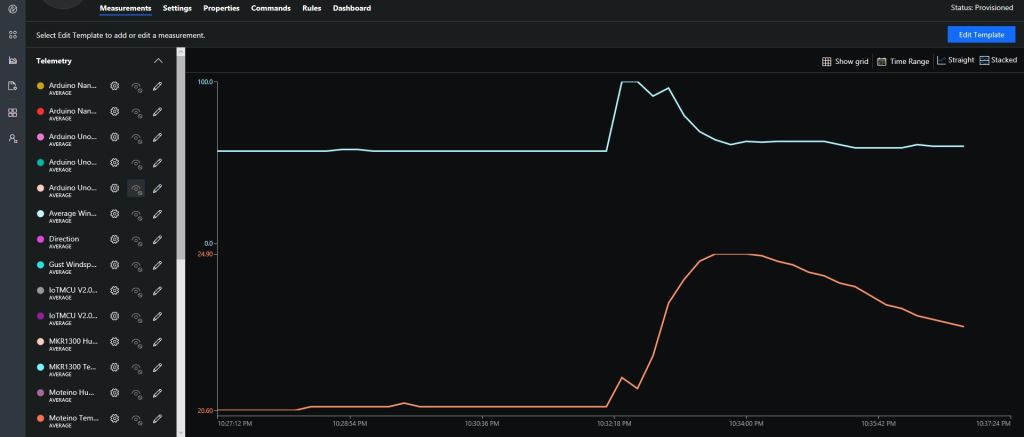
After updating the firmware configuring the data to display in Azure IoT Central (or AdaFruit.IO) took minimal time.
After not much development on my nrf24L01AdaFruit.IO and Azure IOT Hub field gateways for a while some new nRF24L01 devices arrived in the post last week.
This project is now live on Hackster.IO and github.com with sample *duino, Devduino and Netduino clients. While building the AdaFruit.IO field gateway, Azure IOT Hub field gateways and sample clients I changed the structure of the message payload and spent a bit of time removing non-core functionality and code.
The diagnostics logging code was refactored several times and after reading this reference on docs.Microsoft.com I settled on the published approach.
I considered using the built in Universal Windows Platform (UWP) application data class but this would have made configuration in the field hard for most of the targeted users school students & IT departments.
I have the application running at my house and it has proved pretty robust, last week I though it had crashed because the telemetry data stopped for about 20 minutes. I had a look at the Device portal and it was because Windows 10 IoT core had downloaded some updates, applied them and then rebooted automatically (as configured).
I put a socket on the Raspberry PI nRF24L01 Shield rather than soldering the module to the board so that I could compare the performance of the Low and High power modules. The antenna end of the high power module tends to droop so I put a small piece of plastic foam underneath to prop them up.
I had code to generate an empty JSON configuration but I removed that as it added complexity compared to putting a sample in the github repository.
I considered using a binary format (the nRF24L01 max message length is 32 bytes) but the code required to make it sufficiently flexible rapidly got out of hand and as most of my devices didn’t have a lot of sensors (battery/solar powered *duinos) and it wasn’t a major hassle to send another message so I removed it.
I need to tidy up the project and remove the unused Visual Assets and have a look at the automated update support.
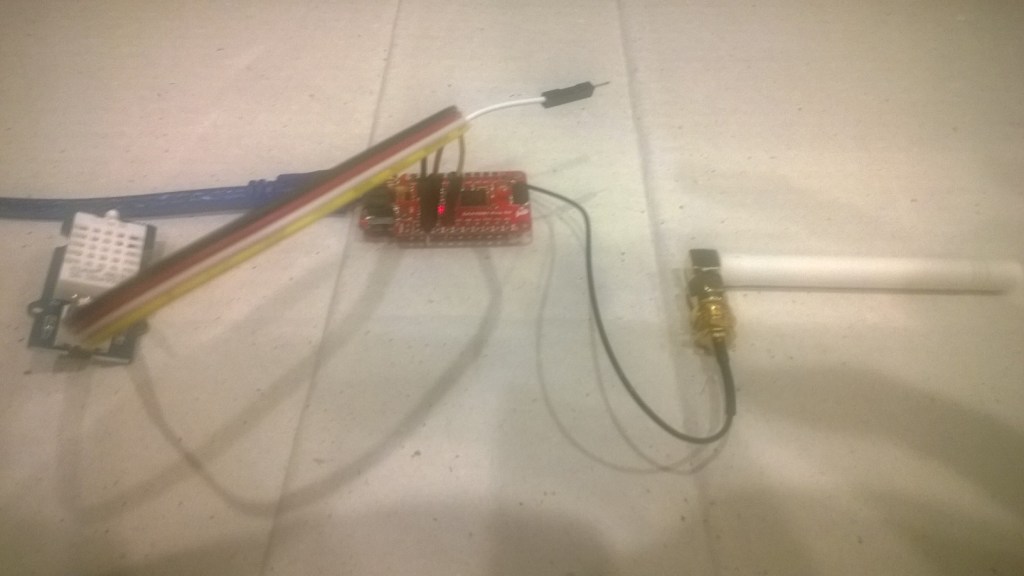
This client is a devDuino V2.2 device with an AdaFruit AM2315 temperature & humidity sensor. This sensor is powered by two AAA batteries and has an on-board support for unique device identification and encryption.
In this first iteration the focus was accessing the SHA204A crypto and authentication chip, the AM2315 sensor and message payload assembly. Reducing the power consumption, improving reliability etc. will be covered in future posts.
/*
Copyright ® 2018 Jan devMobile Software, All Rights Reserved

THIS CODE AND INFORMATION IS PROVIDED "AS IS" WITHOUT WARRANTY OF ANY
KIND, EITHER EXPRESSED OR IMPLIED, INCLUDING BUT NOT LIMITED TO THE
IMPLIED WARRANTIES OF MERCHANTABILITY AND/OR FITNESS FOR A PARTICULAR
PURPOSE.

You can do what you want with this code, acknowledgment would be nice.

http://www.devmobile.co.nz

*/
#include <RF24.h>
#include <Adafruit_AM2315.h>
#include <sha204_library.h>

// nRF24L01 ISM wireless module setup
RF24 radio(7,6);
const int nRFPayloadSize = 32 ;
char payload[nRFPayloadSize] = "";
const byte FieldGatewayAddress[5] = "Base1";
const byte FieldGatewayChannel = 10 ;
const rf24_pa_dbm_e RadioPALevel = RF24_PA_MAX;
const rf24_datarate_e RadioDataRate = RF24_250KBPS;

// ATSHA204 secure authentication, validation with crypto and hashing (initially only used for unique serial number)
atsha204Class sha204(A2);
const int SerialNumberLength = 9 ;
uint8_t serialNumber[SerialNumberLength];

// AM2315 I2C Outdoors temperature and humdity sensor
Adafruit_AM2315 am2315;

const int LoopSleepDelay = 30000 ;

void setup()
{
  Serial.begin(9600);
  Serial.println("Setup called");

  // Retrieve the serial number then display it nicely
  sha204.getSerialNumber(serialNumber);

  Serial.print("SNo:");
  for (int i=0; i<SerialNumberLength; i++)
  {
    // Add a leading zero
    if ( serialNumber[i] < 16)
    {
      Serial.print("0");
    }
    Serial.print(serialNumber[i], HEX);
    Serial.print(" ");
  }
  Serial.println();

  // Configure the AM2315 temperature & humidity sensor
  Serial.println("AM2315 setup");
  am2315.begin();

  // Configure the nRF24 module
  Serial.println("nRF24 setup");
  radio.begin();
  radio.setPALevel(RadioPALevel);
  radio.setDataRate(RadioDataRate) ;
  radio.setChannel(FieldGatewayChannel);
  radio.enableDynamicPayloads();
  radio.openWritingPipe(FieldGatewayAddress);

  delay(1000);

  Serial.println("Setup done");
}

void loop()
{
  float temperature ;
  float humidity ;
  float batteryVoltage ;

  Serial.println("Loop called");
  memset( payload, 0, sizeof( payload));

  // prepare the payload header
  int payloadLength = 0 ;
  payload[0] = 1 ; // Sensor device unique ID header with CSV payload
  payloadLength += 1;

  // Copy the ATSHA204 device serial number into the payload
  payload[1] = SerialNumberLength ;
  payloadLength += 1;
  memcpy( &payload[payloadLength], serialNumber, SerialNumberLength);
  payloadLength += SerialNumberLength ;

  // Read the temperature, humidity & battery voltage values then display nicely
  am2315.readTemperatureAndHumidity(temperature, humidity);
  Serial.print("T:");
  Serial.print( temperature, 1 ) ;
  Serial.print( "C" ) ;

  Serial.print(" H:");
  Serial.print( humidity, 0 ) ;
  Serial.print( "%" ) ;

  batteryVoltage = readVcc() / 1000.0 ;
  Serial.print(" B:");
  Serial.print( batteryVoltage, 2 ) ;
  Serial.println( "V" ) ;

  // Copy the temperature into the payload
  payload[ payloadLength] = 'T';
  payloadLength += 1 ;
  dtostrf(temperature, 6, 1, &payload[payloadLength]);
  payloadLength += 6;
  payload[ payloadLength] = ',';
  payloadLength += 1 ;

  // Copy the humidity into the payload
  payload[ payloadLength] = 'H';
  payloadLength += 1 ;
  dtostrf(humidity, 4, 0, &payload[payloadLength]);
  payloadLength += 4;
  payload[ payloadLength] = ',';
  payloadLength += 1 ;

  // Copy the battery voltage into the payload
  payload[ payloadLength] = 'V';
  payloadLength += 1 ;

  dtostrf(batteryVoltage, 5, 2, &payload[payloadLength]);
  payloadLength += 5;

  // Powerup the nRF24 chipset then send the payload to base station
  Serial.print( "Payload length:");
  Serial.println( payloadLength );

  radio.powerUp();
  delay(500);

  Serial.println( "nRF24 write" ) ;
  boolean result = radio.write(payload, payloadLength);
  if (result)
    Serial.println("Write Ok...");
  else
    Serial.println("Write failed.");

 Serial.println( "nRF24 power down" ) ;
 radio.powerDown();

 delay(LoopSleepDelay);
}
The nRF24L01P is widely supported with messages up to 32 bytes long, low power consumption and 250kbps, 1Mbps and 2Mbps data rates.
The aim is to keep the protocol simple (telemetry only initially) to implement and debug as the client side code will be utilised by high school student projects.
The first byte of the message specifies the message type
0 = Echo
The message is displayed by the field gateway as text & hexadecimal.





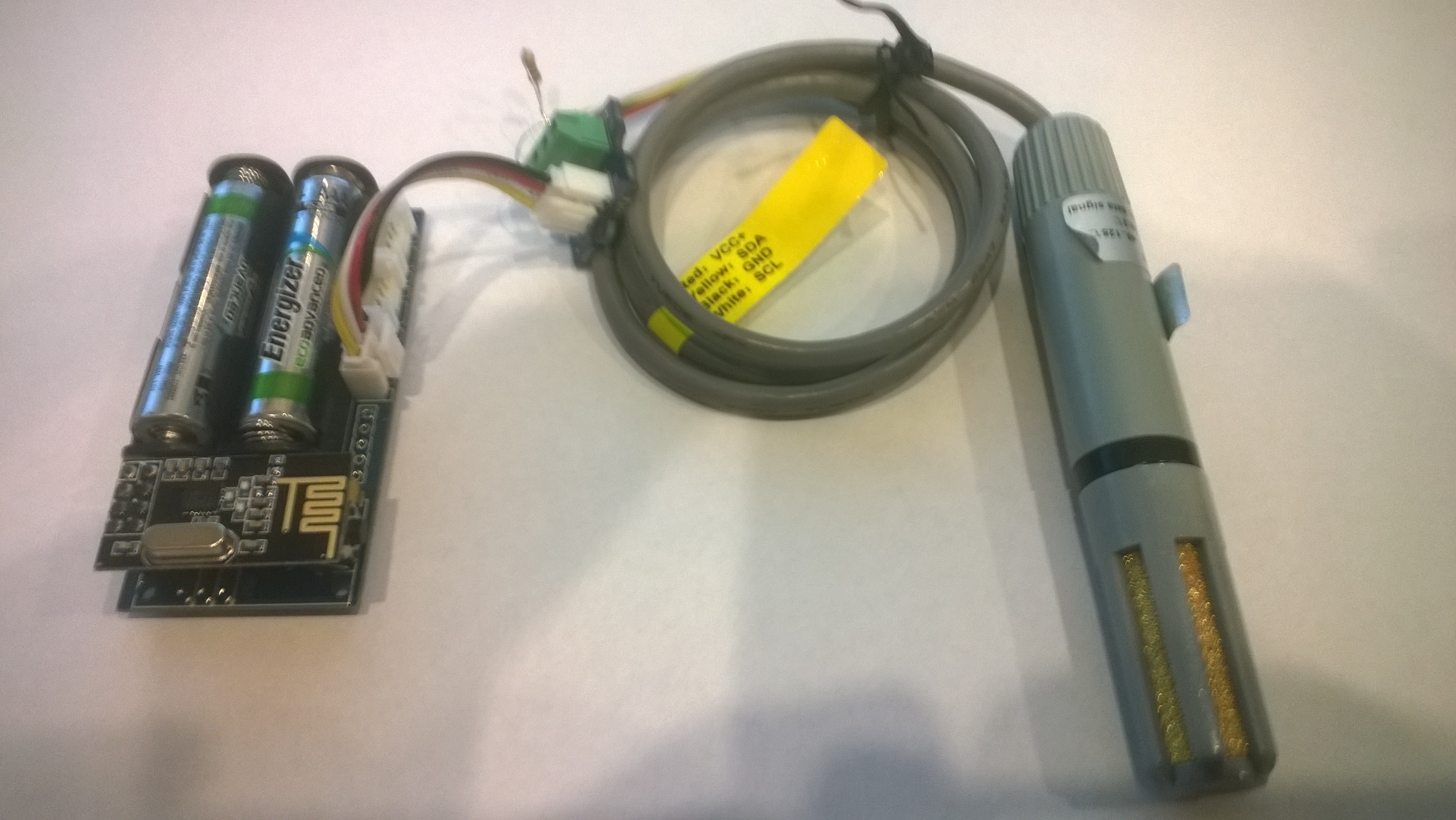 Bill of materials (prices as at Jan 2018)
 devMobile's blog