Random wanderings through Microsoft Azure esp. PaaS plumbing, the IoT bits, AI on Micro controllers, AI on Edge Devices, .NET nanoFramework, .NET Core on *nix and ML.NET+ONNX
The application I’m currently working on has some tables with many columns and these were proving painful to update with HTTP PUT methods. Over the last couple of releases, I have been extending the customer facing API with PATCH methods so the client can specify only the values to changed.
The JSON Patch is a format for specifying updates to be applied to a resource.
Stock Items list before HTTP Patch operation
A JSON Patch document has an array of operations which identify a particular type of change.
Using Telerik Fiddler Composer functionality to apply an HTTP PATCH
Stock Items list after HTTP Patch operation
The StockItemPatchDtoV1 class is decorated with DataAnnotations to ensure the contents are valid.
public class StockItemPatchDtoV1
{
    [Required]
    [StringLength(100, MinimumLength = 1, ErrorMessage = "The name text must be at least {2} and no more than {1} characters long")]  // These would be constants in a real application
    public string Name { get; set; }

    [Required]
    [Range(0.0, 100.0)] // These would be constants in a real application
    public decimal UnitPrice { get; set; }

    [Required]
    [Range(0.0, 1000000.0)] // These would be constants in a real application
    public decimal RecommendedRetailPrice { get; set; }
}
The StockItemsController [HttpPatch(“{id}”)] method retrieves the stock item to be updated, then uses ApplyTo method and TryValidateModel to update only the specified fields.
[HttpPatch("{id}")]
public async Task<ActionResult<Model.StockItemGetDtoV1>> Patch([FromBody] JsonPatchDocument<Model.StockItemPatchDtoV1> stockItemPatch, int id)
{
    Model.StockItemGetDtoV1 stockItem;

    using (IDbConnection db = dapperContext.ConnectionCreate())
    {
        stockItem = await db.QuerySingleOrDefaultWithRetryAsync<Model.StockItemGetDtoV1>(sql: "[Warehouse].[StockItemsStockItemLookupV1]", param: new { stockItemId = id }, commandType: CommandType.StoredProcedure);

        if (stockItem == default)
        {
            logger.LogInformation("StockItem:{id} not found", id);

            return this.NotFound($"StockItem:{id} not found");
        }

        Model.StockItemPatchDtoV1 stockItemPatchDto = mapper.Map<Model.StockItemPatchDtoV1>(stockItem);

        stockItemPatch.ApplyTo(stockItemPatchDto, ModelState);

        if (!ModelState.IsValid || !TryValidateModel(stockItemPatchDto))
        {
            logger.LogInformation("stockItemPatchDto invalid {0}", string.Join(Environment.NewLine, ModelState.Values.SelectMany(v => v.Errors).Select(v => v.ErrorMessage + " " + v.Exception))); // would extract this out into shared module

            return BadRequest(ModelState);
        }

        mapper.Map(stockItemPatchDto, stockItem);

        await db.ExecuteWithRetryAsync(sql: "UPDATE Warehouse.StockItems SET StockItemName=@Name, UnitPrice=@UnitPrice, RecommendedRetailPrice=@RecommendedRetailPrice WHERE StockItemId=@Id", param: stockItem, commandType: CommandType.Text);
    }

    return this.Ok();
}
Initially the HTTP Patch method returned this error message.
HTTP/1.1 400 Bad Request
Content-Type: application/problem+json; charset=utf-8
Date: Tue, 27 Jun 2023 09:20:30 GMT
Server: Kestrel
Transfer-Encoding: chunked

1d7
{"type":"https://tools.ietf.org/html/rfc7231#section-6.5.1","title":"One or more validation errors occurred.","status":400,"traceId":"00-665a6ee9ed1105a105237c421793af5d-1719bda40c0b7d5d-00","errors":{"$":["The JSON value could not be converted to Microsoft.AspNetCore.JsonPatch.JsonPatchDocument`1[devMobile.WebAPIDapper.HttpPatch.Model.StockItemPatchDtoV1]. Path: $ | LineNumber: 0 | BytePositionInLine: 1."],"stockItemPatch":["The stockItemPatch field is required."]}}
0
So far, to keep the code really obvious (tends to be more verbose) I have limited the use Dependency Injection(DI). I have been “injecting” an instance of an IConfiguration interface then retrieving the database connection string and other configuration. This isn’t a great approach as the database connection string name is in multiple files etc.
namespace devMobile.WebAPIDapper.ListsDIBasic
{
   using System.Data;
   using System.Data.SqlClient;

   using Microsoft.Extensions.Configuration;

   public interface IDapperContext
   {
      public IDbConnection ConnectionCreate();
      public IDbConnection ConnectionCreate(string connectionStringName);

      public IDbConnection ConnectionReadCreate();
      public IDbConnection ConnectionWriteCreate();
   }

   public class DapperContext : IDapperContext
   {
      private readonly IConfiguration _configuration;

      public DapperContext(IConfiguration configuration)
      {
         _configuration = configuration;
      }

      public IDbConnection ConnectionCreate()
      {
         return new SqlConnection(_configuration.GetConnectionString("default"));
      }

      public IDbConnection ConnectionCreate(string connectionStringName)
      {
         return new SqlConnection(_configuration.GetConnectionString(connectionStringName));
      }

      public IDbConnection ConnectionReadCreate()
      {
         return new SqlConnection(_configuration.GetConnectionString("default-read"));
      }

      public IDbConnection ConnectionWriteCreate()
      {
         return new SqlConnection(_configuration.GetConnectionString("default-write"));
      }
   }
}
public class Program
{
    public static void Main(string[] args)
    {
        var builder = WebApplication.CreateBuilder(args);

        // Add services to the container.
        //builder.Services.AddSingleton<IDapperContext>(s => new DapperContext(builder.Configuration));
        //builder.Services.AddTransient<IDapperContext>(s => new DapperContext(builder.Configuration));
        //builder.Services.AddScoped<IDapperContext>(s => new DapperContext(builder.Configuration));

        builder.Services.AddControllers();

        var app = builder.Build();

        // Configure the HTTP request pipeline.

        app.UseHttpsRedirection();

        app.MapControllers();

        app.Run();
    }
}
Then in the StockItems controller the IDapperContext interface implementation is used to create an IDbConnection for Dapper operations to use. I also added “WAITFOR DELAY ’00:00:02″ to the query to extend the duration of the requests.
[ApiController]
[Route("api/[controller]")]
public class StockItemsController : ControllerBase
{
   private readonly ILogger<StockItemsController> logger;
   private readonly IDapperContext dapperContext;

   public StockItemsController(ILogger<StockItemsController> logger, IDapperContext dapperContext)
   {
      this.logger = logger;

      this.dapperContext = dapperContext;
   }

   [HttpGet]
   public async Task<ActionResult<IEnumerable<Model.StockItemListDtoV1>>> Get()
   {
      IEnumerable<Model.StockItemListDtoV1> response;

      using (IDbConnection db = dapperContext.ConnectionCreate())
      {
         //response = await db.QueryWithRetryAsync<Model.StockItemListDtoV1>(sql: @"SELECT [StockItemID] as ""ID"", [StockItemName] as ""Name"", [RecommendedRetailPrice], [TaxRate] FROM [Warehouse].[StockItems]", commandType: CommandType.Text);
         response = await db.QueryWithRetryAsync<Model.StockItemListDtoV1>(sql: @"SELECT [StockItemID] as ""ID"", [StockItemName] as ""Name"", [RecommendedRetailPrice], [TaxRate] FROM [Warehouse].[StockItems]; WAITFOR DELAY '00:00:02'", commandType: CommandType.Text);
      }

      return this.Ok(response);
   }
...
}
I ran a stress testing application which simulated 50 concurrent users. When the stress test rig was stopped all the connections in the pool were closed after roughly 5 minutes.
SQL Server Management Studio(SSMS) sp_who query – stress test
public class Program
{
    public static void Main(string[] args)
    {
        var builder = WebApplication.CreateBuilder(args);

        // Add services to the container.

        //builder.Services.AddSingleton<IDbConnection>(s => new SqlConnection(builder.Configuration.GetConnectionString("default")));
        //builder.Services.AddScoped<IDbConnection>(s => new SqlConnection(builder.Configuration.GetConnectionString("default")));
        //builder.Services.AddTransient<IDbConnection>(s => new SqlConnection(builder.Configuration.GetConnectionString("default")));

        builder.Services.AddControllers();

        var app = builder.Build();

        app.UseHttpsRedirection();

        app.MapControllers();

        app.Run();
    }
}
The code in the get method was reduced. I also added “WAITFOR DELAY ’00:00:02″ to the query to extend the duration of the requests.
public class StockItemsController : ControllerBase
{
   private readonly ILogger<StockItemsController> logger;
   private readonly IDbConnection dbConnection;

   public StockItemsController(ILogger<StockItemsController> logger, IDbConnection dbConnection)
   {
      this.logger = logger;

      this.dbConnection = dbConnection;
   }

   [HttpGet]
   public async Task<ActionResult<IEnumerable<Model.StockItemListDtoV1>>> Get()
   {
      // return this.Ok(await dbConnection.QueryWithRetryAsync<Model.StockItemListDtoV1>(sql: @"SELECT [StockItemID] as ""ID"", [StockItemName] as ""Name"", [RecommendedRetailPrice], [TaxRate] FROM [Warehouse].[StockItems]; WAITFOR DELAY '00:00:02';", commandType: CommandType.Text));
      return this.Ok(await dbConnection.QueryWithRetryAsync<Model.StockItemListDtoV1>(sql: @"SELECT [StockItemID] as ""ID"", [StockItemName] as ""Name"", [RecommendedRetailPrice], [TaxRate] FROM [Warehouse].[StockItems]", commandType: CommandType.Text));
    }
...
}
With the stress test rig running the number of active connections was roughly the same as the DapperContext based implementation.
I don’t like this approach so will stick with DapperContext
The theme of this post is controlling users’ ability to read and write rows in a table. The best scenario I could come up with using the World Wide Importers database was around controlling access to Customer information.
This would be a representative set of “project requirements”…
Salespeople tend to look after categories of Customers
Kayla – Novelty Shops
Hudson – Supermarkets
Issabella – Computer Stores
Sophia – Gift Stores, Novelty Shops
Amy – Corporates
Anthony – Novelty Stores
Alica – Coporates
Stella – Supermarkets
But some Salespeople have direct relationships with Customers
No changes to the database which could break the existing solution
In a previous engagement we added CustomerCategoryPerson and CustomerPerson like tables to the database to control read/write access to Customers’ information.
The CustomerCategoryPerson table links the CustomerCategory and Person tables with a flag (IsWritable) which indicates whether the Person can read/write Customer information for all the Customers in a CustomerCategory.
CREATE TABLE [Sales].[CustomerCategoryPerson](
	[CustomerCategoryPersonID] [int] IDENTITY(1,1) NOT NULL,
	[CustomerCategoryId] [int] NOT NULL,
	[PersonId] [int] NOT NULL,
	[IsWritable] [bit] NOT NULL,
	[LastUpdatedBy] [int] NOT NULL,
 CONSTRAINT [PK_CustomerCategoryPerson] PRIMARY KEY CLUSTERED
(
	[CustomerCategoryPersonID] ASC
)...
The CustomerPerson table links the Customer and Person tables with a flag (IsWritable) which indicates whether a Person can read/write a Customer’s information.
CREATE TABLE [Sales].[CustomerPerson](
	[CustomerPersonId] [int] IDENTITY(1,1) NOT NULL,
	[CustomerID] [int] NOT NULL,
	[PersonId] [int] NOT NULL,
	[IsWritable] [bit] NOT NULL,
	[LastEditedBy] [int] NOT NULL,
 CONSTRAINT [PK_CustomerPerson] PRIMARY KEY CLUSTERED
(
	[CustomerPersonId] ASC
)...
Users can do “wildcard” searches for Customers and the results set has to be limited to “their” customers and customers in the customer categories they are assigned too.
ALTER PROCEDURE [Sales].[CustomersNameSearchUnionV1]
@UserId as int,
@SearchText nvarchar(20),
@MaximumRowsToReturn int
AS
BEGIN
	-- Individual assignment
    SELECT TOP(@MaximumRowsToReturn) [Customers].[CustomerID] as "ID", [Customers].[CustomerName] as "Name", [Customers].[IsOnCreditHold] as "IsOnCreditHold"
    FROM Sales.Customers
	INNER JOIN [Sales].[CustomerPerson] ON ([Sales].[Customers].[CustomerId] = [Sales].[CustomerPerson].[CustomerId])
    WHERE ((CustomerName LIKE N'%' + @SearchText + N'%')
		AND ([Sales].[CustomerPerson].PersonId = @UserId))
    --ORDER BY [CustomerName]

	UNION

	-- group assignment
   SELECT TOP(@MaximumRowsToReturn) [Customers].[CustomerID] as "ID", [Customers].[CustomerName] as "Name", [Customers].[IsOnCreditHold] as "IsOnCreditHold"
   FROM [Sales].[Customers]
      INNER JOIN [Sales].[CustomerCategories] ON ([Sales].[Customers].[CustomerCategoryID] = [Sales].[CustomerCategories].[CustomerCategoryID])
      INNER JOIN [Sales].[CustomerCategoryPerson] ON ([Sales].[Customers].[CustomerCategoryID] = [CustomerCategoryPerson].[CustomerCategoryID])
    WHERE ((CustomerName LIKE N'%' + @SearchText + N'%')
		AND ([Sales].[CustomerCategoryPerson].PersonId = @UserId))

END;
This approach increases the complexity and reduces the maintainability of stored procedures which have to control the reading/writing of Customer information. Several times I have extracted customer information read\write controls to a couple of database views, one for controlling read access.
CREATE VIEW [Sales].[CustomerPersonReadV1]
AS
-- Individual assignment
   SELECT [Sales].[Customers].[CustomerID], [Sales].[CustomerPerson].[PersonID], [Sales].[Customers].[CustomerCategoryID]
   FROM [Sales].[Customers]
      INNER JOIN [Sales].[CustomerPerson] ON ( [Sales].[Customers].[CustomerID] = CustomerPerson.CustomerID)

UNION -- Takes care of duplicates

-- Group assignment
   SELECT [Sales].[Customers].[CustomerID], [Sales].[CustomerCategoryPerson].[PersonID], [Sales].[Customers].[CustomerCategoryID]
   FROM [Sales].[Customers]
      --INNER JOIN [Sales].[CustomerCategories] ON ([Sales].[Customers].[CustomerCategoryID] = [Sales].[CustomerCategories].[CustomerCategoryID])
      INNER JOIN [Sales].[CustomerCategoryPerson] ON ([Sales].[Customers].[CustomerCategoryID] = [CustomerCategoryPerson].[CustomerCategoryID])
The other database for controlling write access
CREATE VIEW [Sales].[CustomerPersonWriteV1]
AS
-- Individual assignment
   SELECT [Sales].[Customers].[CustomerID], [Sales].[CustomerPerson].[PersonID], [Sales].[Customers].[CustomerCategoryID]
   FROM [Sales].[Customers]
      INNER JOIN [Sales].[CustomerPerson] ON (([Sales].[Customers].[CustomerID] = [CustomerPerson].[CustomerID]) AND ([Sales].[CustomerPerson].[IsWritable] = 1))

UNION -- Takes care of duplicates

-- Group assignment
   SELECT [Sales].[Customers].[CustomerID], [Sales].[CustomerCategoryPerson].[PersonID], [Sales].[Customers].[CustomerCategoryID]
   FROM [Sales].[Customers]
      INNER JOIN [Sales].[CustomerCategories] ON ([Sales].[Customers].[CustomerCategoryID] = [Sales].[CustomerCategories].[CustomerCategoryID])
      INNER JOIN [Sales].[CustomerCategoryPerson] ON ([Sales].[Customers].[CustomerCategoryID] = [CustomerCategoryPerson].[CustomerCategoryID] AND ([Sales].[CustomerCategoryPerson].[IsWritable] = 1))
The versioning of database views uses the same approach as stored procedures. When a view is updated (the columns returned changes , updated constraints etc.) the version number is incremented. Then we work through the dependencies list checking and updating the view version used and re-testing.
SQL Server Management Studio displaying objects which depend on the view
These two views are the UNION of the users individual and group access permissions. (If a user has Write they also have Read access). This reduces the complexity of stored procedures used for reading from and writing to the Customer table.
CREATE PROCEDURE [Sales].[CustomersListV1]
@UserId as int
AS
BEGIN
SELECT [Customers].[CustomerID] as "ID", [Customers].[CustomerName] as "Name", [Customers].[IsOnCreditHold] as "IsOnCreditHold"
	FROM [Sales].[Customers]
		INNER JOIN [Sales].[CustomerPersonReadV1] ON ([Sales].[Customers].[CustomerID] = [Sales].[CustomerPersonReadV1].CustomerID)
    WHERE ([Sales].[CustomerPersonReadV1].PersonId = @UserId)
	ORDER BY Name
END
The GET method of the Customer controller returns a list of all the Customers the current user has read only access to using their individual and group assignment.
[HttpGet(), Authorize(Roles = "SalesPerson,SalesAdministrator")]
[ProducesResponseType(StatusCodes.Status200OK, Type = typeof(List<Models.CustomerListDtoV1>))]
public async Task<ActionResult<IEnumerable<Models.CustomerListDtoV1>>> Get()
{
      IEnumerable<Models.CustomerListDtoV1> response;

      using (SqlConnection db = new SqlConnection(this.connectionString))
      {
         response = await db.QueryWithRetryAsync<Models.CustomerListDtoV1>(sql: "[Sales].[CustomersListV1]", param: new { userId = HttpContext.PersonId() }, commandType: CommandType.StoredProcedure);
      }

   return this.Ok(response);
}
The CustomerPersonWriteV1 view is used to stop users without IsWritable set (individual or group) updating a Customers IsOnCreditHold flag.
CREATE PROCEDURE [Sales].[CustomerCreditHoldStatusUpdateV1]
@UserID int,
@CustomerId int,
@IsOnCreditHold Bit
AS
BEGIN
    UPDATE [Sales].[Customers]
    SET IsOnCreditHold = @IsOnCreditHold, LastEditedBy = @UserID
	FROM [Sales].[Customers]
		INNER JOIN [Sales].[CustomerPersonWriteV1] ON ([Sales].[Customers].[CustomerID] = [Sales].[CustomerPersonWriteV1].CustomerID)
    WHERE (([Sales].[CustomerPersonWriteV1].PersonId = @UserId)
		AND ([Sales].[Customers].[CustomerID] = @CustomerId )
		AND (IsOnCreditHold <> @IsOnCreditHold))

END
The PUT CreditHold method uses a combination of roles (Aministrator,SalesAdministrator,SalesPerson) and database views (CustomerPersonWriteV1) to control the updating of customer data.
[HttpPut("{customerId}/CreditStatus", Name ="CreditHold")]
[Authorize(Roles = "Aministrator,SalesAdministrator,SalesPerson")]
[ProducesResponseType(StatusCodes.Status200OK)]
[ProducesResponseType(StatusCodes.Status409Conflict)]
public async Task<IActionResult> CustomerCeditHold(int customerId, [FromBody] Models.CustomerCreditHoldUpdateV1 request )
{
    request.UserId = HttpContext.PersonId();
    request.CustomerId = customerId;

    using (SqlConnection db = new SqlConnection(connectionString))
    {
        if (await db.ExecuteWithRetryAsync("[Sales].[CustomerCreditHoldStatusUpdateV1]", param: request, commandType: CommandType.StoredProcedure) != 1)
        {
            logger.LogWarning("Person {UserId} Customer {CustomerId} IsOnCreditHold {IsOnCreditHold} update failed", request.UserId, request.CustomerId, request.IsOnCreditHold);

            return this.Conflict();
        }
    }

    return this.Ok();
}
My customers usually don’t have a lot of automated testing so minimising the impact of changes across the database and codebase is critical. Sometimes we duplicate code (definitely not DRY) so that the amount of functionality that has to be retested is reduced. We ensure this is time allocated for revisiting these decisions and remediating as required.
The permissions required for an on-premises system running in a trusted environment are often minimalist. The World Wide Importers database People table has IsSystemUser, IsEmployee, IsSalesperson which is representative of the granularity of permissions I have encountered in Windows Forms .NET, ASP.NET Web Forms and other “legacy” applications.
CREATE TABLE [Application].[People](
    [PersonID] [int] NOT NULL,
    [FullName] nvarchar NOT NULL,
    [PreferredName] nvarchar NOT NULL,
    [SearchName] AS (concat([PreferredName],N' ',[FullName])) PERSISTED NOT NULL,
    [IsPermittedToLogon] [bit] NOT NULL,
    [LogonName] nvarchar NULL,
    [IsExternalLogonProvider] [bit] NOT NULL,
    [HashedPassword] varbinary NULL,
    [IsSystemUser] [bit] NOT NULL,
    [IsEmployee] [bit] NOT NULL,
    [IsSalesperson] [bit] NOT NULL,
    [UserPreferences] nvarchar NULL,
    [PhoneNumber] nvarchar NULL,
    [FaxNumber] nvarchar NULL,
    [EmailAddress] nvarchar NULL,
    [Photo] varbinary NULL,
    [CustomFields] nvarchar NULL,
    [OtherLanguages] AS (json_query([CustomFields],N'$.OtherLanguages')),
    [LastEditedBy] [int] NOT NULL,
    [ValidFrom] datetime2 GENERATED ALWAYS AS ROW START NOT NULL,
    [ValidTo] datetime2 GENERATED ALWAYS AS ROW END NOT NULL,
CONSTRAINT [PK_Application_People] PRIMARY KEY CLUSTERED
(
    [PersonID] ASC
)
The existing application appears to have a method for a Person to change their password which calls the [Website].[ChangePassword] stored procedure (I was surprised that the stored procedure didn’t set the LastEditedBy value).
CREATE PROCEDURE [Website].[ChangePassword]
@PersonID int,
@OldPassword nvarchar(40),
@NewPassword nvarchar(40)
WITH EXECUTE AS OWNER
AS
BEGIN
    SET NOCOUNT ON;
    SET XACT_ABORT ON;

    UPDATE [Application].People
    SET IsPermittedToLogon = 1,
        HashedPassword = HASHBYTES(N'SHA2_256', @NewPassword + FullName)
    WHERE PersonID = @PersonID
    AND PersonID <> 1
    AND HashedPassword = HASHBYTES(N'SHA2_256', @OldPassword + FullName);

    IF @@ROWCOUNT = 0
    BEGIN
        PRINT N'The PersonID must be valid, and the old password must be valid.';
        PRINT N'If the user has also changed name, please contact the IT staff to assist.';
        THROW 51000, N'Invalid Password Change', 1;
        RETURN -1;
    END;
END;
The new version removes the PersonId special case (Assumed that PersonId 1 can’t logon and the use of Throw). I think the use of Throw can add significant complexity to the exception handling of the WebAPI controller that calls the stored procedure
ALTER PROCEDURE [Website].[PersonPasswordChangeV1]
	@UserID int,
	@PasswordOld nvarchar(40),
	@PasswordNew nvarchar(40)
WITH EXECUTE AS OWNER
AS
BEGIN
    UPDATE [Application].People
    SET IsPermittedToLogon = 1
        ,HashedPassword = HASHBYTES(N'SHA2_256', @PasswordNew + FullName)
		,LastEditedBy = @UserID
    WHERE ((PersonID = @UserID )
		AND (HashedPassword = HASHBYTES(N'SHA2_256', @PasswordOld + FullName)))
END;
The PasswordChange method of the Person Controller only requires the caller to be authenticated.
/// <summary>
/// Changes current user's password.
/// </summary>
/// <param name="request">Current password and new password</param>
/// <response code="200">Password changed.</response>
/// <response code="401">Unauthorised, bearer token missing or expired.</response>
/// <response code="409">Previous password invalid or User name has changed.</response>
[Authorize()]
[HttpPut(Name = "PasswordChange")]
public async Task<ActionResult> PasswordChange([FromBody] Models.PersonPasswordChangeRequest request)
{
    request.UserID = HttpContext.PersonId();

    using (SqlConnection db = new SqlConnection(connectionString))
    {
        if (await db.ExecuteWithRetryAsync("[WebSite].[PersonPasswordChangeV1]", param: request, commandType: CommandType.StoredProcedure) != 1)
        {
            logger.LogWarning("Person {0} password change failed", request.UserID);

            return this.Conflict();
        }
    }

    return this.Ok();
}
The new application will have functionality for resetting a Person’s password. Access to this functionality will be restricted to people with the “Administrator” and “PasswordReset” roles.
CREATE PROCEDURE [Website].[PersonPasswordResetV1]
@UserID int,
@PersonID int,
@Password nvarchar(40)
WITH EXECUTE AS OWNER
AS
BEGIN
    UPDATE [Application].People
    SET IsPermittedToLogon = 1
        ,HashedPassword = HASHBYTES(N'SHA2_256', @Password + FullName)
		,LastEditedBy = @UserID
    WHERE PersonID = @PersonID
END;
One of the conventions we often use, is that the first parameter of any stored procedure that is called once a User has logged on is their unique identifier which is used for data access permissions and change tracking.
[Authorize(Roles = "Administrator")]
[HttpPut("{personId:int}", Name = "PasswordReset")]
public async Task<ActionResult> PasswordReset([Range(1, int.MaxValue, ErrorMessage = "Person id must greater than 1")] int personId, [FromBody] Models.PersonPasswordResetRequest request)
{
    request.UserId = HttpContext.PersonId();
    request.PersonID = personId;

    using (SqlConnection db = new SqlConnection(connectionString))
    {
        if (await db.ExecuteWithRetryAsync("[WebSite].[PersonPasswordResetV1]", param: request, commandType: CommandType.StoredProcedure) != 1)
        {
            logger.LogWarning("Person {0} password change failed", request.PersonID);

            return this.Conflict();
        }
    }

    return this.Ok();
}
For a couple of applications, we have added “Permissions” and “PersonPermissions” tables alongside the existing authorisation functionality to reduce the likely hood of any unintended side effects.
CREATE TABLE [Application].[Permissions](
	[PermissionID] [int] IDENTITY(1,1) NOT NULL,
	[Name] [nvarchar](20) NOT NULL,
	[Description] [nvarchar](50) NOT NULL,
	[LastEditedBy] [int] NOT NULL,
	[ValidFrom] [datetime2](7) GENERATED ALWAYS AS ROW START HIDDEN NOT NULL,
	[ValidUntil] [datetime2](7) GENERATED ALWAYS AS ROW END HIDDEN NOT NULL,
 CONSTRAINT [PK_Permissions] PRIMARY KEY CLUSTERED
(
	[PermissionID] ASC
)...
CREATE TABLE [Application].[PersonPermissions](
	[PersonPermissionId] [int] IDENTITY(1,1) NOT NULL,
	[PersonId] [int] NOT NULL,
	[PermIssionId] [int] NOT NULL,
	[Active] [bit] NOT NULL,
	[ValidFrom] [datetime2](7) GENERATED ALWAYS AS ROW START HIDDEN NOT NULL,
	[ValidUntil] [datetime2](7) GENERATED ALWAYS AS ROW END HIDDEN NOT NULL,
 CONSTRAINT [PK_PersonPermissions] PRIMARY KEY CLUSTERED
(
	[PersonPermissionId] ASC
)...
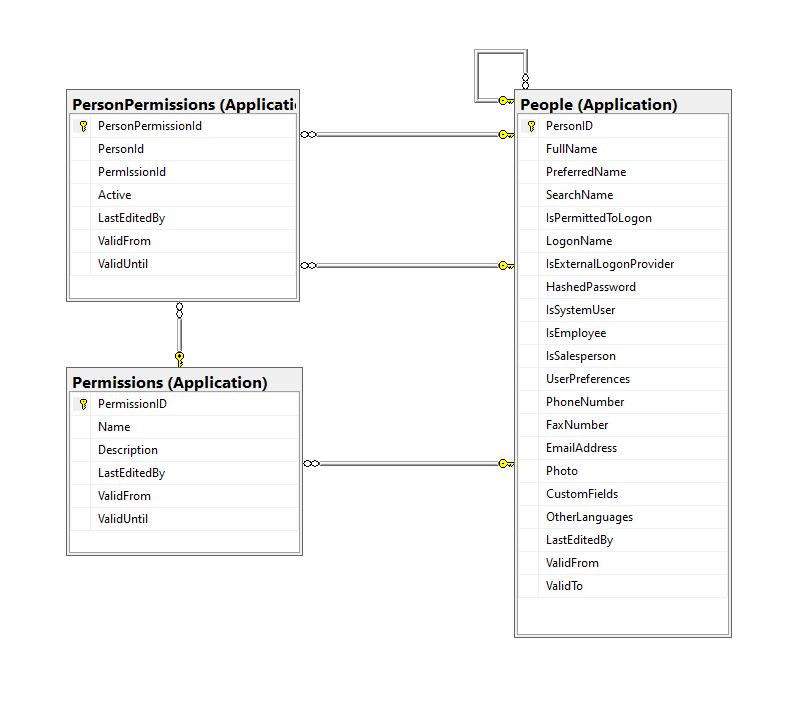
Permissions, PersonPermissions and People with Foreign Keys
The additional permissions (from the Person record) and the PersonPermissions table required some modifications to the PersonAuthenticateLookupByLogonNameV1 stored procedure and the addition of the PersonPermissionsByPersonIdV1 stored procedure.
ALTER PROCEDURE [Website].[PersonAuthenticateLookupByLogonNameV2]
@LogonName nvarchar(50),
@Password nvarchar(40)
AS
BEGIN
	SELECT PersonID
		,FullName
		,EmailAddress
		,IsSystemUser
		,IsEmployee
		,IsSalesPerson
	FROM [Application].[People]
	WHERE (( LogonName = @LogonName)
		AND (IsPermittedToLogon = 1)
		AND (HASHBYTES(N'SHA2_256', @Password + FullName) = HashedPassword))
The IsSystemUser, IsEmployee and IsSalesPerson bit flags were added to the stored procedure and Data Transfer Object(DTO)
private class PersonAuthenticateLogonDetailsDto
{
    public int PersonID { get; set; }

    public string FullName { get; set; }

    public string EmailAddress { get; set; }

    public bool IsSystemUser { get; set; }

    public bool IsEmployee { get; set; }

    public bool IsSalesPerson { get; set; }
}
The PersonPermissionsByPersonIdV1 retrieves a list of the permissions of the User who has been authenticated.
ALTER PROCEDURE [Website].[PersonPermissionsByPersonIdV1]
	@PersonId AS int
AS
BEGIN

	SELECT [Application].[Permissions].[Name]
	FROM [Application].[Permissions]
		INNER JOIN [Application].[PersonPermissions] ON ([Application].[Permissions].PermissionID = [Application].[PersonPermissions].[PermissionId] )
	WHERE [Application].[PersonPermissions].[PersonId] = @PersonId
	ORDER BY [Application].[Permissions].[Name]

END
The Person’s permissions(effectively roles) are added as claims, the IsSystemUser, IsEmployee and IsSalesPerson flags are also added to the list of claims so they can be used in the new application.
[HttpPost("logon")]
public async Task<ActionResult> Logon([FromBody] Models.LogonRequest request )
{
    PersonAuthenticateLogonDetailsDto userLogonUserDetails;
    IEnumerable<string> permissions;
    var claims = new List<Claim>();

    using (SqlConnection db = new SqlConnection(configuration.GetConnectionString("WorldWideImportersDatabase")))
    {
        userLogonUserDetails = await db.QuerySingleOrDefaultWithRetryAsync<PersonAuthenticateLogonDetailsDto>("[Website].[PersonAuthenticateLookupByLogonNameV2]", param: request, commandType: CommandType.StoredProcedure);
        if (userLogonUserDetails == null)
        {
            logger.LogWarning("Login attempt by user {0} failed", request.LogonName);

           return this.Unauthorized();
        }

        // Lookup the Person's permissions
        permissions = await db.QueryWithRetryAsync<string>("[Website].[PersonPermissionsByPersonIdV1]", new { userLogonUserDetails.PersonID }, commandType: CommandType.StoredProcedure);
    }

    // Setup the primary SID + name info
    claims.Add(new Claim(ClaimTypes.PrimarySid, userLogonUserDetails.PersonID.ToString()));
    if (userLogonUserDetails.IsSystemUser)
    {
       claims.Add(new Claim(ClaimTypes.Role, "SystemUser"));
    }
    if (userLogonUserDetails.IsEmployee)
    {
       claims.Add(new Claim(ClaimTypes.Role, "Employee"));
    }
    if (userLogonUserDetails.IsSalesPerson)
    {
        claims.Add(new Claim(ClaimTypes.Role, "SalesPerson"));
    }

    foreach(string permission in permissions)
    {
        claims.Add(new Claim(ClaimTypes.Role, permission));
    }

    var authSigningKey = new SymmetricSecurityKey(Encoding.UTF8.GetBytes(jwtIssuerOptions.SecretKey));

    var token = new JwtSecurityToken(
         issuer: jwtIssuerOptions.Issuer,
          audience: jwtIssuerOptions.Audience,
          expires: DateTime.UtcNow.Add(jwtIssuerOptions.TokenExpiresAfter),
          claims: claims,
          signingCredentials: new SigningCredentials(authSigningKey, SecurityAlgorithms.HmacSha256));

    return this.Ok(new
   {
        token = new JwtSecurityTokenHandler().WriteToken(token),
        expiration = token.ValidTo,
    });
}
We try to reduce the number of roles a User requires by having core roles (Administrator, Sales consultant, Warehouse administrator etc.) with additional roles for each task that can be added as required (ResetPassword, CustomerIsOnCreditHold Set/Clear etc.)
/// <summary>
/// Gets a list of the current User's roles.
/// </summary>
/// <response code="200">List of claims returned.</response>
/// <response code="401">Unauthorised, bearer token missing or expired.</response>
/// <returns>list of claims.</returns>
[HttpGet]
[ProducesResponseType(StatusCodes.Status200OK, Type = typeof(List<string>))]
public List<string> Get()
{
    List<string> claimNames = new List<string>();

    foreach (var claim in this.User.Claims.Where(c => c.Type == ClaimTypes.Role))
    {
        claimNames.Add(claim.Value);
    }

    return claimNames;
}
We have found this approach to be a robust way to add granular authorisation for new functionality to a “legacy’ application without breaking the existing solution. I have ignored a user being disabled after a number of failed logins, password complexity rules etc. as these tend to be application specific and not really related to the use of Dapper.
Most blog posts talk about building “green fields” applications, I have found hardly any cover “muddy fields” development where you have to deal with “legacy” code.
Not all “legacy” code is bad, I work on one code base which is nearly 20years old. It started as a spreadsheet plug-in and has grown of time to a SaaS application. There is very little of the original code left it has just been carefully re-factored over the years with time allocated to chip away at technical debt.
A couple of recent contracts have been maintaining and “remediating” legacy codebases which have been in production for upto a decade. The applications are delivering business value (can’t stop working) and the customer’s budgets are limited (they can only afford incremental change). As a result of this we end up making tactical decisions to keep the application working and longer-term ones to improve the “ilities“(taking into account the customer’s priorities).
It is rare to have a “green fields” project, so my plan was to use the next couple of WebAPI + Dapper posts to illustrate the sort of challenges we have encountered.
Customer: “we want to put a nice webby frontend on our existing bespoke solution” (“putting lipstick on a pig”).
Customer: The user’s login details are stored in the database and we can’t change the login process as the help desk won’t cope.
The remediation of Authentication and Authorisation(A&A) functionality can be particularly painful and is often driven by compliance issues e.g. EU GDPR, The Privacy Act 202 etc.
Lots of NULL values which often makes application code more complex
Duplicates in LoginName column e.g. “NO LOGON”
Some “magic” values e.g. “NO LOGON”
Why does the “Data Conversion Only” person have a photo?
The IsExternalLogonProvider is always false.
The UserPreferences, CustomFields and OtherLanguages columns contain Java Script Object Notation(JSON), need to see how these a generated, updated and used.
The application must have an existing external user provisioning process. It looks like a Person record is created by an Administrator then the User sets their password on first Logon. (not certain if there are any password complexity rules enforced)
An application I worked on didn’t have any enforcement of password complexity and minimum length in earlier versions. This caused issues when a number of their clients couldn’t logon to the new application because their existing password was too short. We updated the logon field rules and retained minimum complexity and length rules on change and reset password field validation. We then forced 5-10% of users per month (so the helpdesk wasn’t overwhelmed by support calls) to update their passwords.
ALTER PROCEDURE [Website].[ActivateWebsiteLogon]
@PersonID int,
@LogonName nvarchar(50),
@InitialPassword nvarchar(40)
WITH EXECUTE AS OWNER
AS
BEGIN
    SET NOCOUNT ON;
    SET XACT_ABORT ON;

    UPDATE [Application].People
    SET IsPermittedToLogon = 1,
        LogonName = @LogonName,
        HashedPassword = HASHBYTES(N'SHA2_256', @InitialPassword + FullName),
        UserPreferences = (SELECT UserPreferences FROM [Application].People WHERE PersonID = 1) -- Person 1 has User Preferences template
    WHERE PersonID = @PersonID
    AND PersonID <> 1
    AND IsPermittedToLogon = 0;

    IF @@ROWCOUNT = 0
    BEGIN
        PRINT N'The PersonID must be valid, must not be person 1, and must not already be enabled';
        THROW 51000, N'Invalid PersonID', 1;
        RETURN -1;
    END;
END;
The password hash is seeded with the persons FullName, this could be a problem if a user changes their name.
The user selects their LoginName, this needs further investigate as duplicates could be an issue
XACT_ABORT ON + THROW for validation and state management is odd, need to check how SqlExceptions are handled in application code.
PersonID magic number handling adds complexity and needs further investigation.
EXECUTE AS OWNER caught my attention, checked only one Database user for application.
The LastEditBy isn’t set to the PersonID which seems a bit odd.
Based on the [Website].[ActivateWebsiteLogon] (couldn’t find Logon so reviewed ChangePassword) this is my first attempt at a stored procedure which validates a user’s LogonName and Password.
CREATE PROCEDURE [Application].[PersonAuthenticateLookupByLogonNameV1]
@LogonName nvarchar(50),
@Password nvarchar(40)
AS
BEGIN
	SELECT PersonID, FullName, EmailAddress
	FROM [Application].[People]
	WHERE (( LogonName = @LogonName)
		AND (IsPermittedToLogon = 1)
		AND (HASHBYTES(N'SHA2_256', @Password + FullName) = HashedPassword))
END
GO
We use the ..VX approach to reduce issues when doing canary and rolling deployments. If the parameter list or return dataset of a stored procedure changes (even if we think it is backwards compatible) the version number is incremented so that different versions of the application can be run concurrently and backing out application updates is less fraught.
public class LogonRequest
{
    [JsonRequired]
    [MinLength(Constants.LogonNameLengthMinimum)]
    [MaxLength(Constants.LogonNameLengthMaximum)]
    public string LogonName { get; set; }

    [JsonRequired]
    [MinLength(Constants.PasswordLengthMinimum)]
    [MaxLength(Constants.PasswordLengthMaximum)]
    public string Password { get; set; }
}
Then a Proof of Concept (PoC) AuthenticationController to process a login request.
Swagger Docs Authentication controller Login
The Logon method calls the PersonAuthenticateLookupByLogonNameV1 stored procedure to validate the LoginName and password. In this iteration the only claim added to the JSON Web Token(JWT) is the PersonId. We try and keep the JWTs small as possible as one customer’s application failed randomly because a couple of user’s JWTs were so large (lots of roles) that some versions of browsers choked.
public AuthenticationController(IConfiguration configuration, ILogger<AuthenticationController> logger, IOptions<Model.JwtIssuerOptions> jwtIssuerOptions)
{
    this.configuration = configuration;
    this.logger = logger;
    this.jwtIssuerOptions = jwtIssuerOptions.Value;
 }

[HttpPost("login")]
public async Task<ActionResult> Login([FromBody] Model.LoginRequest request )
{
    var claims = new List<Claim>();

    using (SqlConnection db = new SqlConnection(configuration.GetConnectionString("WorldWideImportersDatabase")))
    {
        UserLogonUserDetailsDto userLogonUserDetails = await db.QuerySingleOrDefaultWithRetryAsync<UserLogonUserDetailsDto>("[Application].[PersonAuthenticateLookupByLogonNameV1]", param: request, commandType: CommandType.StoredProcedure);
        if (userLogonUserDetails == null)
        {
             logger.LogWarning("Login attempt by user {0} failed", request.LogonName);

             return this.Unauthorized();
        }

        // Setup the primary SID + name info
        claims.Add(new Claim(ClaimTypes.PrimarySid, userLogonUserDetails.PersonID.ToString()));
    }

    var authSigningKey = new SymmetricSecurityKey(Encoding.UTF8.GetBytes(jwtIssuerOptions.SecretKey));

    var token = new JwtSecurityToken(
              issuer: jwtIssuerOptions.Issuer,
              audience: jwtIssuerOptions.Audience,
              expires: DateTime.UtcNow.Add(jwtIssuerOptions.TokenExpiresAfter),
              claims: claims,
              signingCredentials: new SigningCredentials(authSigningKey, SecurityAlgorithms.HmacSha256));

        return this.Ok(new
        {
            token = new JwtSecurityTokenHandler().WriteToken(token),
            expiration = token.ValidTo,
        });
    }
}
After a successful logon the Token has to be copied (I regularly miss the first or the last character) from the response payload to the Authorisation form.
The Swagger UI Authentication method after a successful Logon with the bearer token highlighted
I decorated the SystemController DeploymentVersion deployment with the [Authorize] attribute to force a check that the user is authenticated.
/// <summary>
/// WebAPI controller for handling System Dapper functionality.
/// </summary>
[Route("api/[controller]")]
[ApiController]
public class SystemController : ControllerBase
{
    /// <summary>
    /// Returns the Application version in [Major].[Minor].[Build].Revision] format.
    /// </summary>
    /// <response code="200">List of claims returned.</response>
    /// <response code="401">Unauthorised, bearer token missing or expired.</response>
    /// <returns>Returns the Application version in [Major].[Minor].[Build].Revision] format.</returns>
    [HttpGet("DeploymentVersion"), Authorize]
    public string DeploymentVersion()
    {
        return Assembly.GetExecutingAssembly().GetName().Version.ToString();
    }
}
If the bearer token is missing, invalid (I accidentally didn’t copy either the first or last character) or expired the method call will fail with a 401 Unauthorized error.
Swagger UI System Controller DeploymentVersion method failing because the JWT is missing, invalid or expired
Controlling access to controllers and methods of controllers is probably not granular for most applications so adding “coarse” and “fine grained” authorisation to an existing application and the configuration of Swashbuckle and application request processing middleware to support JWTs will be covered in a couple of future posts.
For remediation projects we try to keep the code as simple as possible (but no simpler), by minimising the plumbing and only using advanced language features etc. where it adds value.
I’m leaning towards using Dependency Injection for configuration information, so the way connection strings and jwtIssuerOptions is going to be harmonised. In a future version of the application the jwtIssuerOptions will be migrated to an Azure Key Vault.
A customer with large application which had a lot of ADO.Net code was comfortable Dapper DynamicParameters. Hundreds of stored procedures with input (some output) parameters were used to manage access to data. The main advantage of this approach was “familiarity” and the use of DynamicParameters made mapping of C# variable and stored procedure parameters (with different naming conventions) obvious.
[HttpGet("Dynamic")]
public async Task<ActionResult<IEnumerable<Model.StockItemListDtoV1>>> GetDynamic(
            [Required][MinLength(3, ErrorMessage = "The name search text must be at least {1} characters long"), MaxLength(20, ErrorMessage = "The name search text must be no more that {1} characters long")] string searchText,
            [Required][Range(1, int.MaxValue, ErrorMessage = "MaximumRowsToReturn must be greater than or equal to {1}")] int maximumRowsToReturn)
{
    IEnumerable<Model.StockItemListDtoV1> response = null;

    using (SqlConnection db = new SqlConnection(this.connectionString))
    {
        DynamicParameters parameters = new DynamicParameters();

        parameters.Add("MaximumRowsToReturn", maximumRowsToReturn);
        parameters.Add("SearchText", searchText);

        response = await db.QueryWithRetryAsync<Model.StockItemListDtoV1>(sql: "[Warehouse].[StockItemsNameSearchV1]", param: parameters, commandType: CommandType.StoredProcedure);
    }

    return this.Ok(response);
}
Error message displayed when SearchText field missing
Error message displayed when SearchText is too short
Error message displayed when SearchText too long
Successful query of StockItems table
The developers at another company used anonymous typed variables everywhere. They also had similar C# and stored procedure parameter naming conventions so there was minimal (in the example code only maximumRowsToReturn vs. stockItemsMaximum) mapping required. They found mapping stored procedure output parameters was problematic. For longer parameter lists they struggled with formatting the code in a way which was readable.
 [HttpGet("Anonymous")]
public async Task<ActionResult<IEnumerable<Model.StockItemListDtoV1>>> GetAnonymous(
            [Required][MinLength(3, ErrorMessage = "The name search text must be at least {1} characters long"), MaxLength(20, ErrorMessage = "The name search text must be no more that {1} characters long")] string searchText,
            [Required][Range(1, 100, ErrorMessage = "The maximum number of stock items to return must be greater than or equal to {1} and less then or equal {2}")] int stockItemsMaximum)
{
   IEnumerable<Model.StockItemListDtoV1> response = null;

   using (SqlConnection db = new SqlConnection(this.connectionString))
   {
      response = await db.QueryWithRetryAsync<Model.StockItemListDtoV1>(sql: "[Warehouse].[StockItemsNameSearchV1]", new { searchText, maximumRowsToReturn = stockItemsMaximum }, commandType: CommandType.StoredProcedure);
   }

   return this.Ok(response);
}
public class StockItemNameSearchDtoV1
{
   [Required]
   [MinLength(3, ErrorMessage = "The name search text must be at least {1} characters long"), MaxLength(20, ErrorMessage = "The name search text must be no more that {1} characters long")]
   public string SearchText { get; set; }

   [Required]
   [Range(1, 100, ErrorMessage = "The maximum number of rows to return must be greater than or equal to {1} and less then or equal {2}")]
   public int MaximumRowsToReturn { get; set; }
}
[HttpGet("AutomagicDefault")]
public async Task<ActionResult<IEnumerable<Model.StockItemListDtoV1>>> GetDefault([FromQuery] Model.StockItemNameSearchDtoV1 request)
{
   IEnumerable<Model.StockItemListDtoV1> response = null;

   using (SqlConnection db = new SqlConnection(this.connectionString))
   {
      response = await db.QueryWithRetryAsync<Model.StockItemListDtoV1>(sql: "[Warehouse].[StockItemsNameSearchV1]", param: request, commandType: CommandType.StoredProcedure);
   }

   return this.Ok(response);
}
At another customer the developers used Data Transfer Objects(DTOs)/Plain Old CLR Objects(POCOs) to access the database which had several hundred stored procedures. They had no control over the stored procedure parameter names so they mapped query string parameters to the properties of their POCOs.
public class StockItemNameSearchDtoV2
{
   [Required]
   [FromQuery(Name = "SearchText")]
   [MinLength(3, ErrorMessage = "The name search text must be at least {1} characters long"), MaxLength(20, ErrorMessage = "The name search text must be no more than {1} characters long")]
   public string SearchText { get; set; }

   [Required]
   [FromQuery(Name = "StockItemsMaximum")]
   [Range(1, 100, ErrorMessage = "The maximum number of stock items to return must be greater than or equal to {1} and less then or equal {2}")]
   public int MaximumRowsToReturn { get; set; }
}
[HttpGet("AutomagicMapped")]
public async Task<ActionResult<IEnumerable<Model.StockItemListDtoV1>>> GetMapperDecorated([FromQuery] Model.StockItemNameSearchDtoV2 request)
{
   IEnumerable<Model.StockItemListDtoV1> response = null;

   using (SqlConnection db = new SqlConnection(this.connectionString))
   {
      response = await db.QueryWithRetryAsync<Model.StockItemListDtoV1>(sql: "[Warehouse].[StockItemsNameSearchV1]", param: request, commandType: CommandType.StoredProcedure);
   }

   return this.Ok(response);
}
I don’t think that [FromQuery] decorations on POCOs is a good idea. If the classes are only used for one method I would consider moving them into the controller file.
//
// https://localhost:5001/api/StockItemsParameter/Array?StockItemId=1&StockItemId=5&StockItemId=10
//
[HttpGet("Array")]
public async Task<ActionResult<IEnumerable<Model.StockItemListDtoV1>>> GetArray(
   [FromQuery(Name = "stockItemID")][Required(), MinLength(1, ErrorMessage = "Minimum of {1} StockItem id(s)"), MaxLength(100, ErrorMessage = "Maximum {1} StockItem ids")] int[] stockItemIDs)
{
    IEnumerable<Model.StockItemListDtoV1> response = null;

    using (SqlConnection db = new SqlConnection(this.connectionString))
    {
        response = await db.QueryWithRetryAsync<Model.StockItemListDtoV1>(sql: @"SELECT [StockItemID] as ""ID"", [StockItemName] as ""Name"", [RecommendedRetailPrice], [TaxRate] FROM [Warehouse].[StockItems] WHERE  StockItemID IN @StockItemIds ", new { StockItemIDs = stockItemIDs }, commandType: CommandType.Text);
    }

    return this.Ok(response);
}
A customer wanted users to be able search for items selected in a multiple selection list so a DapperWHERE IN value array was used.
Dapper WHERE IN with no StockItemIds on the query string
Dapper WHERE IN with several StockItemIds on query string
To explore how this worked I downloaded the Dapper source code and reference the project in my solution.
After single stepping through the Dapper source code I found where the array of StockTtems was getting mapped into a “generated” parameterised SQL statement.
Dapper generated parameterised SQL Statement
Based on my customer’s experiences a “mix ‘and ‘n’ match” approach to parameterising Dapper queries looks like a reasonable approach.
[HttpGet("IEnumerableSmall")]
public async Task<ActionResult<IEnumerable<Model.StockItemListDtoV1>>> GetIEnumerableSmall([FromQuery] bool buffered = false)
{
	IEnumerable<Model.StockItemListDtoV1> response = null;

	using (SqlConnection db = new SqlConnection(this.connectionString))
	{
		logger.LogInformation("IEnumerableSmall start Buffered:{buffered}", buffered);

		response = await db.QueryWithRetryAsync<Model.StockItemListDtoV1>(
			sql: @"SELECT [SI1].[StockItemID] as ""ID"", [SI1].[StockItemName] as ""Name"", [SI1].[RecommendedRetailPrice], [SI1].[TaxRate]" +
				   "FROM [Warehouse].[StockItems] as SI1",
			buffered,
			commandType: CommandType.Text);

		logger.LogInformation("IEnumerableSmall done");
	}

	return this.Ok(response);
}
The easiest way to increase the size of the returned record was with CROSS JOIN(s). This is the first (and most probably the last time) I have used a cross join in a “real” application.
[HttpGet("IEnumerableMedium")]
public async Task<ActionResult<IEnumerable<Model.StockItemListDtoV1>>> GetIEnumerableMedium([FromQuery] bool buffered = false)
{
	IEnumerable<Model.StockItemListDtoV1> response = null;

	using (SqlConnection db = new SqlConnection(this.connectionString))
	{
		logger.LogInformation("IEnumerableMedium start Buffered:{buffered}", buffered);

		response = await db.QueryWithRetryAsync<Model.StockItemListDtoV1>(
					sql: @" SELECT [SI2].[StockItemID] as ""ID"", [SI2].[StockItemName] as ""Name"", [SI2].[RecommendedRetailPrice], [SI2].[TaxRate]" +
									"FROM [Warehouse].[StockItems] as SI1" +
									"CROSS JOIN[Warehouse].[StockItems] as SI2",
					buffered,
					commandType: CommandType.Text);

		logger.LogInformation("IEnumerableMedium done");
	}

	return this.Ok(response);
}
The medium controller returns 51,529 (227 x 227) rows and the large controller upto 11,697,083 (227 x 227 x 227) rows.
[HttpGet("IEnumerableLarge")]
public async Task<ActionResult<IEnumerable<Model.StockItemListDtoV1>>> GetIEnumerableLarge()
{
	IEnumerable<Model.StockItemListDtoV1> response = null;

	using (SqlConnection db = new SqlConnection(this.connectionString))
	{
		logger.LogInformation("IEnumerableLarge start");

		response = await db.QueryWithRetryAsync<Model.StockItemListDtoV1>(
				sql: $@"SELECT [SI3].[StockItemID] as ""ID"", [SI3].[StockItemName] as ""Name"", [SI3].[RecommendedRetailPrice], [SI3].[TaxRate]" +
						"FROM [Warehouse].[StockItems] as SI1" +
						"   CROSS JOIN[Warehouse].[StockItems] as SI2" +
						"	CROSS JOIN[Warehouse].[StockItems] as SI3",
				commandType: CommandType.Text);

		logger.LogInformation("IEnumerableLarge done");
	}

	return this.Ok(response);
}
if (command.Buffered)
{
   var buffer = new List<T>();
   var convertToType = Nullable.GetUnderlyingType(effectiveType) ?? effectiveType;
   while (await reader.ReadAsync(cancel).ConfigureAwait(false))
   {
      object val = func(reader);
      buffer.Add(GetValue<T>(reader, effectiveType, val));
   }
   while (await reader.NextResultAsync(cancel).ConfigureAwait(false))
   { /* ignore subsequent result sets */ }
   command.OnCompleted();
   return buffer;
}
else
{
   // can't use ReadAsync / cancellation; but this will have to do
   wasClosed = false; // don't close if handing back an open reader; rely on the command-behavior
   var deferred = ExecuteReaderSync<T>(reader, func, command.Parameters);
   reader = null; // to prevent it being disposed before the caller gets to see it
   return deferred;
 }
IEnumberableLarge method (buffered=false) response sizes and timings
IEnumberableLarge method (buffered=true) response sizes and timings
The unbuffered buffered version was slower Time To Last Byte(TTLB) and failed earlier which I was expecting.
[HttpGet("IAsyncEnumerableLarge")]
public async Task<ActionResult<IAsyncEnumerable<Model.StockItemListDtoV1>>> GetAsyncEnumerableLarge([FromQuery] bool buffered = false, [FromQuery]int recordCount = 10)
{
    IEnumerable<Model.StockItemListDtoV1> response = null;

    using (SqlConnection db = new SqlConnection(this.connectionString))
    {
        logger.LogInformation("IAsyncEnumerableLarge start RecordCount:{recordCount} Buffered:{buffered}", recordCount, buffered);

        response = await db.QueryWithRetryAsync<Model.StockItemListDtoV1>(
            sql: $@"SELECT TOP({recordCount}) [SI3].[StockItemID] as ""ID"", [SI3].[StockItemName] as ""Name"", [SI3].[RecommendedRetailPrice], [SI3].[TaxRate]" +
                    "FROM [Warehouse].[StockItems] as SI1" +
                    "   CROSS JOIN[Warehouse].[StockItems] as SI2" +
                    "   CROSS JOIN[Warehouse].[StockItems] as SI3",
        buffered,
        commandType: CommandType.Text);

        logger.LogInformation("IAsyncEnumerableLarge done");
    }

    return this.Ok(response);
}
IAsyncEnumberableLarge method response sizes and timings
[HttpGet("IAsyncEnumerableLargeYield")]
public async IAsyncEnumerable<Model.StockItemListDtoV1> GetAsyncEnumerableLargeYield([FromQuery] int recordCount = 10)
{
	int rowCount = 0;

	using (SqlConnection db = new SqlConnection(this.connectionString))
	{
		logger.LogInformation("IAsyncEnumerableLargeYield start RecordCount:{recordCount}", recordCount);

		CommandDefinition commandDefinition = new CommandDefinition(
			$@"SELECT TOP({recordCount}) [SI3].[StockItemID] as ""ID"", [SI3].[StockItemName] as ""Name"", [SI3].[RecommendedRetailPrice], [SI3].[TaxRate]" +
						"FROM [Warehouse].[StockItems] as SI1" +
						"   CROSS JOIN[Warehouse].[StockItems] as SI2" +
						"	CROSS JOIN[Warehouse].[StockItems] as SI3",
			//commandTimeout:
			CommandType.Text,
			//flags: CommandFlags.Pipelined
		);

		using var reader = await db.ExecuteReaderWithRetryAsync(commandDefinition);

		var rowParser = reader.GetRowParser<Model.StockItemListDtoV1>();

		while (await reader.ReadAsync())
		{
			rowCount++;

			if ((rowCount % 10000) == 0)
			{
				logger.LogInformation("Row count:{0}", rowCount);
			}

			yield return rowParser(reader);
		}
		logger.LogInformation("IAsyncEnumerableLargeYield done");
	}
}
When this post was written (August 2022) Dapper IAsyncEnumerable understanding was limited so I trialed the approach suggested in the StackOverflow post.
IAsyncEnumberableLargeYield method response sizes and timings
The IAsyncEnumerableLargeYield was faster to start responding, the overall duration was less and returned significantly more records 7000000 vs. 13000000. I assume this was because the response was streamed so there wasn’t a timeout.
Azure Application Insights displaying the IAsyncEnumerable with yield method executing
The results of my tests should be treated as “indicative” rather than “definitive”. In a future post I compare the scalability of different approaches. The number of records returned by the IAsyncEnumerableLargeYield not realistic and in a “real-world” scenario paging or an alternate approach should be used.
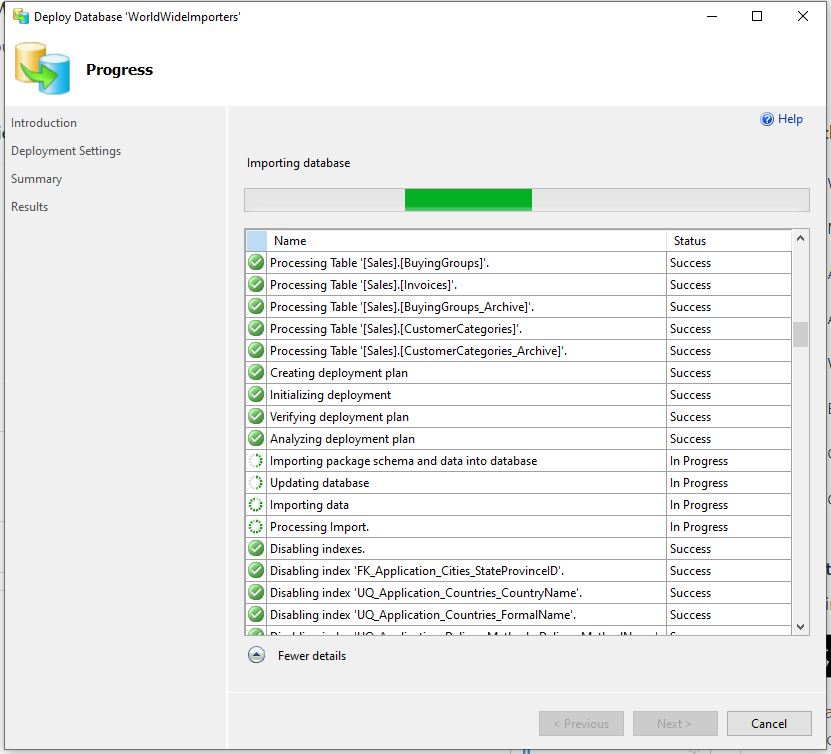
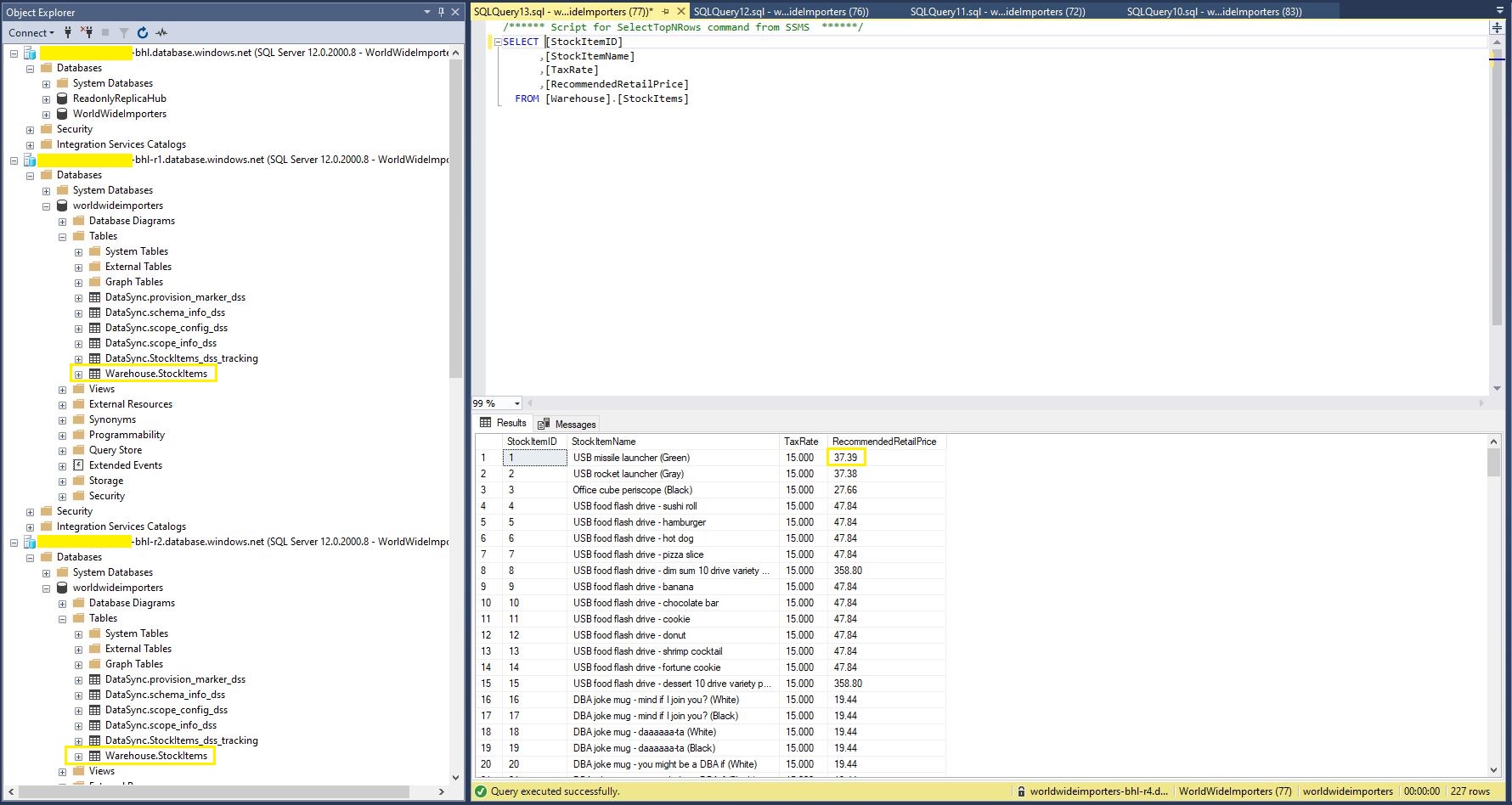
Read-only replicas of an Azure SQL Database database with Active geo-replication are easy to setup but there are some disadvantages. e.g. bi-directional synchronisation is not supported, not all tables or selected columns of some tables might not be needed\should not be accessible for reporting, the overhead of replicating tables used for transaction processing might impact on the performance of the solution etc. Azure SQL Data Sync is a service built on Azure SQL Database that can synchronise selected data bi-directionally across multiple databases, both on-premises and in the cloud.
StockItemsReadOnlyReplicas Controller JSON after first replication completed
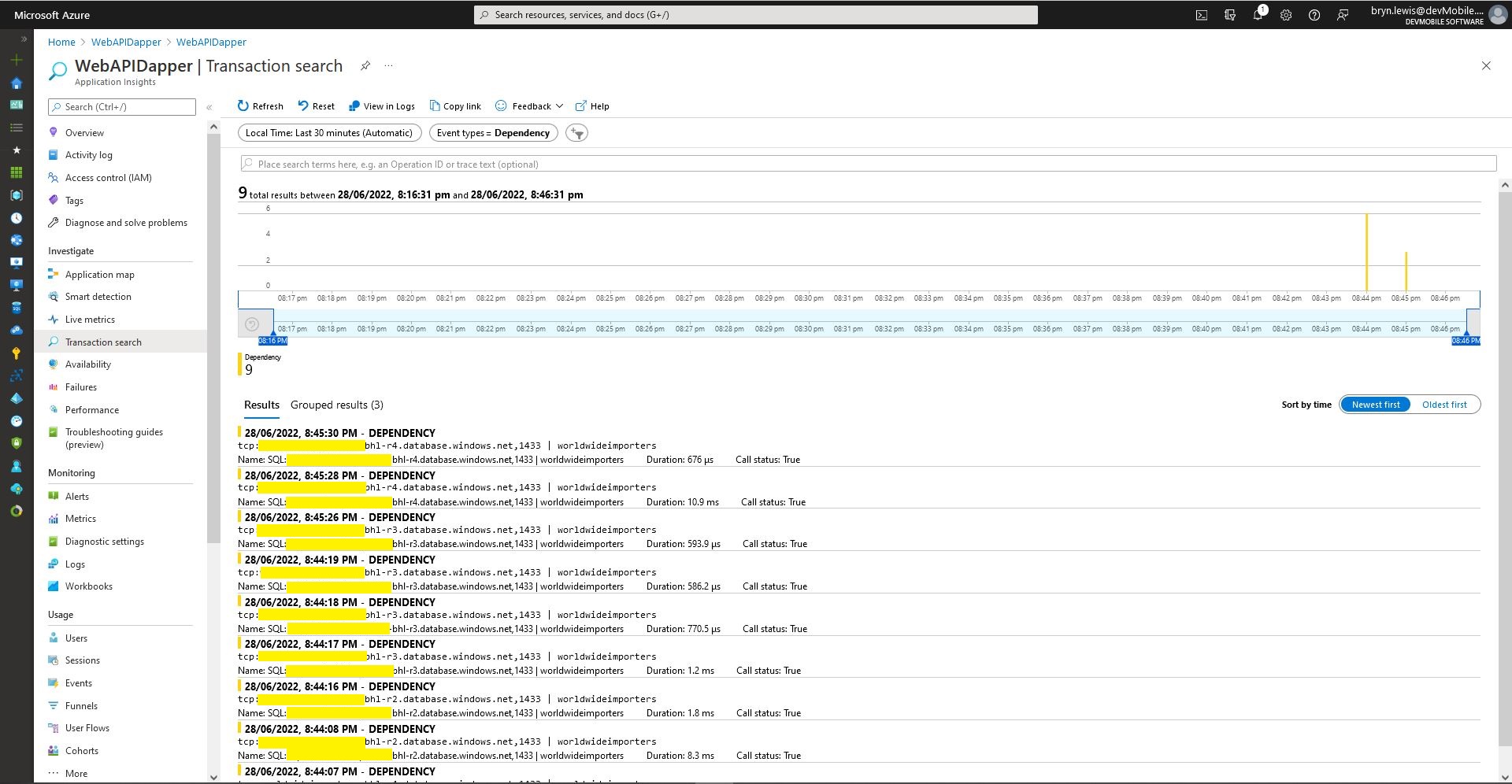
Azure application Insights Dependencies showing usage of different synchronised databases
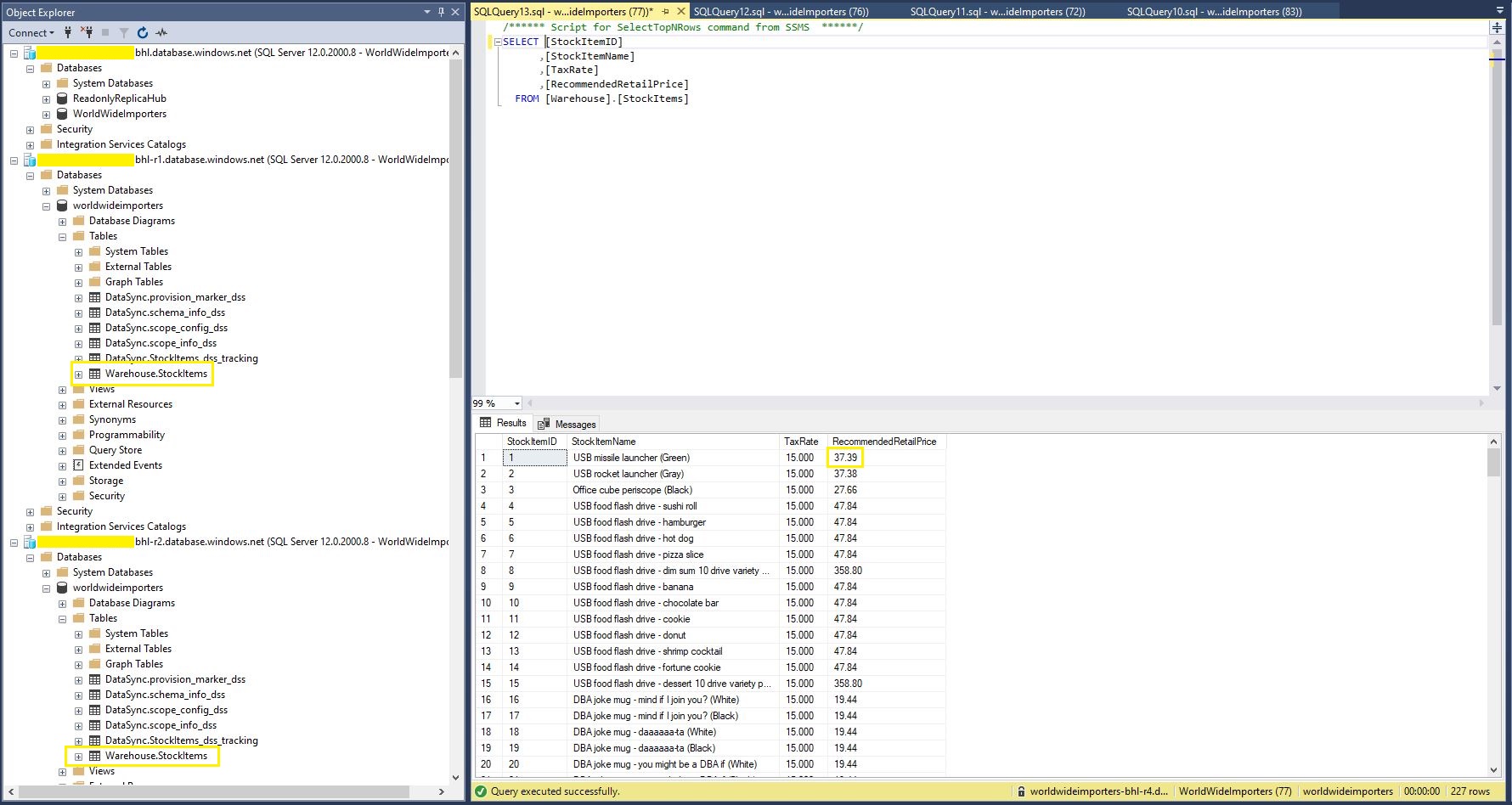
StockItems table in source database with updated RRP
StockItems table in destination database with updated RRP after next scheduled snychronisation
StockItems table in destination database after next scheduled synchronisation
The Azure SQL Database Data Sync was pretty easy to setup (configuration in the hub database tripped me up initially). For a production scenario where only a portion of the database (e.g. shaped by Customer, Geography, security considerations, or a bi-directional requirement) it would be an effective solution, though for some applications the delay between synchronisations might be an issue.
namespace devMobile.WebAPIDapper.Lists.Controllers
{
    [ApiController]
    [Route("api/[controller]")]
    public class StockItemsRetryADONetController : ControllerBase
    {
        private readonly string connectionString;
        private readonly ILogger<StockItemsRetryADONetController> logger;

        // This is a bit nasty but sufficient for PoC
        private readonly int NumberOfRetries = 3;
        private readonly TimeSpan TimeBeforeNextExecution = TimeSpan.Parse("00:00:01");
        private readonly TimeSpan MaximumInterval = TimeSpan.Parse("00:00:30");
        private readonly List<int> TransientErrors = new List<int>()
        {
            49920, // Cannot process rquest. Too many operations in progress for subscription
			49919, // Cannot process create or update request.Too many create or update operations in progress for subscription
			49918, // Cannot process request. Not enough resources to process request.
			41839, // Transaction exceeded the maximum number of commit dependencies.
			41325, // The current transaction failed to commit due to a serializable validation failure.
			41305, // The current transaction failed to commit due to a repeatable read validation failure.
			41302, // The current transaction attempted to update a record that has been updated since the transaction started.
			41301, // Dependency failure: a dependency was taken on another transaction that later failed to commit.
			40613, // Database XXXX on server YYYY is not currently available. Please retry the connection later.
			40501, // The service is currently busy. Retry the request after 10 seconds
			40197, // The service has encountered an error processing your request. Please try again
			20041, // Transaction rolled back. Could not execute trigger. Retry your transaction.
			17197, // Login failed due to timeout; the connection has been closed. This error may indicate heavy server load.
			14355, // The MSSQLServerADHelper service is busy. Retry this operation later.
			11001, // Connection attempt failed
			10936, // The request limit for the elastic pool has been reached.
			10929, // The server is currently too busy to support requests.
			10928, // The limit for the database is has been reached
			10922, // Operation failed. Rerun the statement.
			10060, // A network-related or instance-specific error occurred while establishing a connection to SQL Server.
			10054, // A transport-level error has occurred when sending the request to the server.
			10053, // A transport-level error has occurred when receiving results from the server.
			9515, // An XML schema has been altered or dropped, and the query plan is no longer valid. Please rerun the query batch.
			8651, // Could not perform the operation because the requested memory grant was not available in resource pool
			8645, // A timeout occurred while waiting for memory resources to execute the query in resource pool, Rerun the query
			8628, // A timeout occurred while waiting to optimize the query. Rerun the query.
			4221, // Login to read-secondary failed due to long wait on 'HADR_DATABASE_WAIT_FOR_TRANSITION_TO_VERSIONING'. The replica is not available for login because row versions are missing for transactions that were in-flight when the replica was recycled
			4060, // Cannot open database requested by the login. The login failed.
			3966, // Transaction is rolled back when accessing version store. It was earlier marked as victim when the version store was shrunk due to insufficient space in tempdb. Retry the transaction.
			3960, // Snapshot isolation transaction aborted due to update conflict. You cannot use snapshot isolation to access table directly or indirectly in database
			3935, // A FILESTREAM transaction context could not be initialized. This might be caused by a resource shortage. Retry the operation.
			1807, // Could not obtain exclusive lock on database 'model'. Retry the operation later.
			1221, // The Database Engine is attempting to release a group of locks that are not currently held by the transaction. Retry the transaction.
			1205, // Deadlock
			1204, // The instance of the SQL Server Database Engine cannot obtain a LOCK resource at this time. Rerun your statement.
			1203, // A process attempted to unlock a resource it does not own. Retry the transaction.
			997, // A connection was successfully established with the server, but then an error occurred during the login process.
			921, // Database has not been recovered yet. Wait and try again.
			669, // The row object is inconsistent. Please rerun the query.
			617, // Descriptor for object in database not found in the hash table during attempt to un-hash it. Rerun the query. If a cursor is involved, close and reopen the cursor.
			601, // Could not continue scan with NOLOCK due to data movement.
			233, // The client was unable to establish a connection because of an error during connection initialization process before login.
			121, // The semaphore timeout period has expired.
			64, // A connection was successfully established with the server, but then an error occurred during the login process.
			20, // The instance of SQL Server you attempted to connect to does not support encryption.
		};
...
}
After some experimentation the most reliable way I could reproduce a transient failure (usually SQL Error 11001-“An error has occurred while establishing a connection to the server”) was by modifying the database connection string or unplugging the network cable after a connection had been explicitly opened or command executed.
namespace devMobile.WebAPIDapper.Lists.Controllers
{
    [ApiController]
    [Route("api/[controller]")]
    public class StockItemsRetryADONetController : ControllerBase
    {
...
		[HttpGet("Dapper")]
		public async Task<ActionResult<IEnumerable<Model.StockItemListDtoV1>>> GetDapper()
        {
            IEnumerable<Model.StockItemListDtoV1> response = null;

            SqlRetryLogicOption sqlRetryLogicOption = new SqlRetryLogicOption()
            {
                NumberOfTries = NumberOfRetries,
                DeltaTime = TimeBeforeNextExecution,
                MaxTimeInterval = MaximumInterval,
                TransientErrors = TransientErrors,
                //AuthorizedSqlCondition = x => string.IsNullOrEmpty(x) || Regex.IsMatch(x, @"^SELECT", RegexOptions.IgnoreCase),
            };

            SqlRetryLogicBaseProvider sqlRetryLogicProvider = SqlConfigurableRetryFactory.CreateFixedRetryProvider(sqlRetryLogicOption);

            using (SqlConnection db = new SqlConnection(this.connectionString))
            {
                db.RetryLogicProvider = sqlRetryLogicProvider;

                db.RetryLogicProvider.Retrying += new EventHandler<SqlRetryingEventArgs>(OnDapperRetrying);

                await db.OpenAsync(); // Did explicitly so I could yank out the LAN cable.

                response = await db.QueryAsync<Model.StockItemListDtoV1>(sql: @"SELECT [StockItemID] as ""ID"", [StockItemName] as ""Name"", [RecommendedRetailPrice], [TaxRate] FROM [Warehouse].[StockItems]", commandType: CommandType.Text);
            }

            return this.Ok(response);
        }

        protected void OnDapperRetrying(object sender, SqlRetryingEventArgs args)
        {
            logger.LogInformation("Dapper retrying for {RetryCount} times for {args.Delay.TotalMilliseconds:0.} mSec - Error code: {Number}", args.RetryCount, args.Delay.TotalMilliseconds, (args.Exceptions[0] as SqlException).Number);
        }
...
    }
}
ADO.Net RetryLogicProvider retrying request 3 times
I then added an OpenAsync just before the Dapper query so I could open the database connection, pause the program with a breakpoint, unplug the LAN cable and then continue execution. The QueryAsync failed without any retries and modifying the AuthorizedSqlCondition didn’t seem change the way different SQL statement failures were handled.
There was limited documentation about how to use ADO.Net retry functionality so I hacked up another method to try and figure out what I had done wrong. The method uses the same SqlRetryLogicOption configuration for retrying connection and command failures.
namespace devMobile.WebAPIDapper.Lists.Controllers
{
    [ApiController]
    [Route("api/[controller]")]
    public class StockItemsRetryADONetController : ControllerBase
    {
...
        [HttpGet("AdoNet")]
        public async Task<ActionResult<IEnumerable<Model.StockItemListDtoV1>>> GetAdoNet()
        {
            List<Model.StockItemListDtoV1> response = new List<Model.StockItemListDtoV1>();

            // Both connection and command share same logic not really an issue for nasty demo
            SqlRetryLogicOption sqlRetryLogicOption = new SqlRetryLogicOption()
            {
                NumberOfTries = NumberOfRetries,
                DeltaTime = TimeBeforeNextExecution,
                MaxTimeInterval = MaximumInterval,
                TransientErrors = TransientErrors,
                //AuthorizedSqlCondition = x => string.IsNullOrEmpty(x) || Regex.IsMatch(x, @"^SELECT", RegexOptions.IgnoreCase),
            };

            SqlRetryLogicBaseProvider sqlRetryLogicProvider = SqlConfigurableRetryFactory.CreateFixedRetryProvider(sqlRetryLogicOption);


            // This ADO.Net is a bit overkill but just wanted to highlight ADO.Net vs. Dapper
            using (SqlConnection sqlConnection = new SqlConnection(this.connectionString))
            {
                sqlConnection.RetryLogicProvider = sqlRetryLogicProvider;
                sqlConnection.RetryLogicProvider.Retrying += new EventHandler<SqlRetryingEventArgs>(OnConnectionRetrying);

                await sqlConnection.OpenAsync(); // Did explicitly so I could yank out the LAN cable.

                using (SqlCommand sqlCommand = new SqlCommand())
                {
                    sqlCommand.Connection = sqlConnection;
                    sqlCommand.CommandText = @"SELECT [StockItemID] as ""ID"", [StockItemName] as ""Name"", [RecommendedRetailPrice], [TaxRate] FROM [Warehouse].[StockItems]";
                    sqlCommand.CommandType = CommandType.Text;

                    sqlCommand.RetryLogicProvider = sqlRetryLogicProvider;
                    sqlCommand.RetryLogicProvider.Retrying += new EventHandler<SqlRetryingEventArgs>(OnCommandRetrying);

                    // Over kill but makes really obvious
                    using (SqlDataReader sqlDataReader = await sqlCommand.ExecuteReaderAsync(CommandBehavior.CloseConnection))
                    {
                        while (await sqlDataReader.ReadAsync())
                        {
                            response.Add(new Model.StockItemListDtoV1()
                            {
                                Id = sqlDataReader.GetInt32("Id"),
                                Name = sqlDataReader.GetString("Name"),
                                RecommendedRetailPrice = sqlDataReader.GetDecimal("RecommendedRetailPrice"),
                                TaxRate = sqlDataReader.GetDecimal("TaxRate"),
                            });
                        }
                    }
                };
            }

            return this.Ok(response);
        }

        protected void OnConnectionRetrying(object sender, SqlRetryingEventArgs args)
        {
            logger.LogInformation("Connection retrying for {RetryCount} times for {args.Delay.TotalMilliseconds:0.} mSec - Error code: {Number}", args.RetryCount, args.Delay.TotalMilliseconds, (args.Exceptions[0] as SqlException).Number);
        }

        protected void OnCommandRetrying(object sender, SqlRetryingEventArgs args)
        {
            logger.LogInformation("Command retrying for {RetryCount} times for {args.Delay.TotalMilliseconds:0.} mSec - Error code: {Number}", args.RetryCount, args.Delay.TotalMilliseconds, (args.Exceptions[0] as SqlException).Number);
        }
    }
}
One of the easiest ways to create read-only replicas of an Azure SQL Database database is with Active geo-replication(it’s also useful for disaster recovery with geo-failure to a geo-secondary in a different Azure Region).
I then created replicas in the same region (if the application had a global customer base creating read only geo replicas in regions close to users might be worth considering) for the read-only queries.
Azure SQL Database no replicas configured
Azure Portal Create Geo Replica
I created four replicas which is the maximum number supported. If more replicas were required a secondary of a secondary (a process known as chaining) could be use to create additional geo-replicas
Azure Portal Primary Database and four Geo-replicas
Azure Application Insights showing multiple Geo-Replicas being used.
The Azure Database Geo-replication was pretty easy to setup. For a production scenario where only a portion of the database (e.g. shaped by Customer or Geography) is required it might not be the “right hammer”.
WebAPI Dapper Azure Resource Group
The other limitation I encountered was the resources used by the replication of “transaction processing” tables (in the World Wide Importers database tables like the Sales.OrderLines, Sales.CustomerTransactions etc.) which often wouldn’t be required for read-only applications.