.NET Core web API + Dapper – MiniProfiler

The time to open the home page of one of the “legacy” applications I was working on was slowly increasing over time. After a quick investigation it looked like there a couple of Azure SQL stored procedures which were called many times as the home page was opening were the problem.

The application used a combination of ADO.Net and Dapper to access the Azure SQL database, so Stack Overflow MiniProfiler looked like a good option.

There were quite a few samples online like the one below which “inspired” my approach.

using (SqlConnection connection = new SqlConnection(_configuration.GetConnectionString("default")))
{
   using (ProfiledDbConnection connection = new ProfiledDbConnection((IDbConnection)connection, MiniProfiler.Current))
   {
      await connection.OpenAsync();

      using (ProfiledDbCommand command = (ProfiledDbCommand)connection.CreateCommand())
      {
         command.CommandText = @"SELECT [StockItemID] as ""ID"", [StockItemName] as ""Name"", [RecommendedRetailPrice], [TaxRate] FROM [Warehouse].[StockItems];
         command.CommandType = CommandType.Text;

                 using (ProfiledDbDataReader reader = (ProfiledDbDataReader)await command.ExecuteReaderAsync())
                 {
                     var rowParser = reader.GetRowParser<Model.StockItemListDtoV1>();

                     while (await reader.ReadAsync())
                     {
                         response.Add(rowParser(reader));
                     }

                     await reader.CloseAsync();
                 }
             }

             await connection.CloseAsync();
       }
}

A simple modification of the WebAPI Dapper PerformanceProfiling project program.cs file enabled MiniProfiler for the project.

public static void Main(string[] args)
{
    var builder = WebApplication.CreateBuilder(args);

    // Add services to the container.
    builder.Services.AddTransient<IDapperContext>(s => new DapperContext(builder.Configuration));

    builder.Services.AddControllers();

    builder.Services.AddMiniProfiler(options =>
    {
        options.RouteBasePath = "/profiler";
        //options.SqlFormatter = new StackExchange.Profiling.SqlFormatters.InlineFormatter();
        options.TrackConnectionOpenClose = true;
        //options.PopupShowTrivial = false
    });

    var app = builder.Build();

    app.UseMiniProfiler();

    // Configure the HTTP request pipeline.

    app.UseHttpsRedirection();

    app.MapControllers();

    app.Run();
}

For simple Dapper calls, the modifications to WebAPI controllers were minimal, and could be done largely with Visual Studio 2022 “search & replace.”

[HttpGet("Dapper")]
public async Task<ActionResult<IEnumerable<Model.StockItemListDtoV1>>> GetDapper()
{
    IEnumerable<Model.StockItemListDtoV1> response;

    using (IDbConnection db = dapperContext.ConnectionCreate())
    {
        response = await db.QueryAsync<Model.StockItemListDtoV1>(sql: sqlCommandText, commandType: CommandType.Text);
    }

    return this.Ok(response);
}
World Wide Importers database list of stockitems

The World Wide Importers database has approximately 250 StockItems which was representative of one of the problematic queries.

[HttpGet("DapperProfiled")]
public async Task<ActionResult<IEnumerable<Model.StockItemListDtoV1>>> GetDapperProfiled()
{
    IEnumerable<Model.StockItemListDtoV1> response;

    using (IDbConnection db = new ProfiledDbConnection((DbConnection)dapperContext.ConnectionCreate(), MiniProfiler.Current))
    {
        response = await db.QueryAsync<Model.StockItemListDtoV1>(sql: sqlCommandText, commandType: CommandType.Text);
    }

    return this.Ok(response);
 }

When I executed the GetDapperProfiler() method of the StockItems controller on my development box it took roughly 2.4 seconds.

MiniProfiler results for StockItems query running on my desktop

I sometimes ran the website on my development box so when I used “toggle trivial gaps” it was easier to see what where the delays were.

When I executed the GetDapperProfiler() method of the StockItems controller running in an Azure AppService it took roughly 20 mSec.

MiniProfiler results for StockItems query running in an Azure AppService

In one application a QueryMultipleAsync is used to retrieve information about a product and a list of its attributes. The World Wide Importers database has Invoices which have invoice lines and Transactions which was representative of another problematic query.

[HttpGet("DapperProfiledQueryMultiple")]
public async Task<ActionResult<IEnumerable<Model.StockItemListDtoV1>>> GetDapperProfiledQueryMultiple([Required][Range(1, int.MaxValue, ErrorMessage = "Invoice id must greater than 0")] int id)
{
    Model.InvoiceSummaryGetDtoV1 response = null;

    using (ProfiledDbConnection db = new ProfiledDbConnection((DbConnection)dapperContext.ConnectionCreate(), MiniProfiler.Current))
    {
        var invoiceSummary = await db.QueryMultipleAsync("[Sales].[InvoiceSummaryGetV1]", param: new { InvoiceId = id }, commandType: CommandType.StoredProcedure);

        response = await invoiceSummary.ReadSingleOrDefaultAsync<Model.InvoiceSummaryGetDtoV1>();
        if (response == default)
        {
            return this.NotFound($"Invoice:{id} not found");
        }

        response.InvoiceLines = await invoiceSummary.ReadAsync<Model.InvoiceLineSummaryListDtoV1>();

        response.StockItemTransactions = await invoiceSummary.ReadAsync<Model.StockItemTransactionSummaryListDtoV1>();
    }

    return this.Ok(response);
}
World Wide Importers database list of invoice lines and transactions for a StockItem
MiniProfiler results for Invoice Item Query Multiple running in an Azure AppService

I couldn’t see any results for reading the StockItem Invoice lines and Transactions so I wrapped each ReadAsync with a MiniProfiler.Current.Step.

[HttpGet("DapperProfiledQueryMultipleStep")]
public async Task<ActionResult<IEnumerable<Model.StockItemListDtoV1>>> GetDapperProfiledQueryMultipleStep([Required][Range(1, int.MaxValue, ErrorMessage = "Invoice id must greater than 0")] int id)
{
    Model.InvoiceSummaryGetDtoV1 response = null;

    using (IDbConnection db = new ProfiledDbConnection((DbConnection)dapperContext.ConnectionCreate(), MiniProfiler.Current))
    {
        SqlMapper.GridReader invoiceSummary;

        using (MiniProfiler.Current.Step("db.QueryMultipleAsync"))
        {
            invoiceSummary = await db.QueryMultipleAsync("[Sales].[InvoiceSummaryGetV1]", param: new { InvoiceId = id }, commandType: CommandType.StoredProcedure);
        }

        using (MiniProfiler.Current.Step("invoiceSummary.ReadSingleOrDefaultAsync"))
        {
            response = await invoiceSummary.ReadSingleOrDefaultAsync<Model.InvoiceSummaryGetDtoV1>();
        }
        if (response == default)
        {
            return this.NotFound($"Invoice:{id} not found");
        }

        using (MiniProfiler.Current.Step("invoiceSummaryLine.ReadAsync"))
        {
            response.InvoiceLines = await invoiceSummary.ReadAsync<Model.InvoiceLineSummaryListDtoV1>();
        }

        using (MiniProfiler.Current.Step("TransactionSummary.ReadAsync"))
        {
            response.StockItemTransactions = await invoiceSummary.ReadAsync<Model.StockItemTransactionSummaryListDtoV1>();
        }
    }

    return this.Ok(response);
}

With larger lists every so often there were ReadAsync calls that took a more than a “trivial” amount of time. I surmise was some sort of batching done by the underlying ReadAsync + NextResultAsync methods of a SqlDataReader.

Need to investigate the use of

using (IDbConnection db = new ProfiledDbConnection(new SqlConnection(_configuration.GetConnectionString("default"), MiniProfiler.Current))
{
//...
}

.NET Core web API + Dapper – HTTP Patch

The application I’m currently working on has some tables with many columns and these were proving painful to update with HTTP PUT methods. Over the last couple of releases, I have been extending the customer facing API with PATCH methods so the client can specify only the values to changed.

{ 
    "op": "replace", 
    "path": "/name", 
    "value": "USB missile launcher (Green)." 
},
{ 
    "op": "replace", 
    "path": "/UnitPrice", 
    "value": 25
},
{ 
    "op": "replace", 
    "path": "/recommendedRetailPrice", 
    "value": 37.41
}

The JSON Patch is a format for specifying updates to be applied to a resource.

Stock Items list before HTTP Patch operation

A JSON Patch document has an array of operations which identify a particular type of change.

Using Telerik Fiddler Composer functionality to apply an HTTP PATCH
Stock Items list after HTTP Patch operation

The StockItemPatchDtoV1 class is decorated with DataAnnotations to ensure the contents are valid.

public class StockItemPatchDtoV1
{
    [Required]
    [StringLength(100, MinimumLength = 1, ErrorMessage = "The name text must be at least {2} and no more than {1} characters long")]  // These would be constants in a real application
    public string Name { get; set; }

    [Required]
    [Range(0.0, 100.0)] // These would be constants in a real application
    public decimal UnitPrice { get; set; }

    [Required]
    [Range(0.0, 1000000.0)] // These would be constants in a real application
    public decimal RecommendedRetailPrice { get; set; }
}

The StockItemsController [HttpPatch(“{id}”)] method retrieves the stock item to be updated, then uses ApplyTo method and TryValidateModel to update only the specified fields.

[HttpPatch("{id}")]
public async Task<ActionResult<Model.StockItemGetDtoV1>> Patch([FromBody] JsonPatchDocument<Model.StockItemPatchDtoV1> stockItemPatch, int id)
{
    Model.StockItemGetDtoV1 stockItem;

    using (IDbConnection db = dapperContext.ConnectionCreate())
    {
        stockItem = await db.QuerySingleOrDefaultWithRetryAsync<Model.StockItemGetDtoV1>(sql: "[Warehouse].[StockItemsStockItemLookupV1]", param: new { stockItemId = id }, commandType: CommandType.StoredProcedure);

        if (stockItem == default)
        {
            logger.LogInformation("StockItem:{id} not found", id);

            return this.NotFound($"StockItem:{id} not found");
        }

        Model.StockItemPatchDtoV1 stockItemPatchDto = mapper.Map<Model.StockItemPatchDtoV1>(stockItem);

        stockItemPatch.ApplyTo(stockItemPatchDto, ModelState);

        if (!ModelState.IsValid || !TryValidateModel(stockItemPatchDto))
        {
            logger.LogInformation("stockItemPatchDto invalid {0}", string.Join(Environment.NewLine, ModelState.Values.SelectMany(v => v.Errors).Select(v => v.ErrorMessage + " " + v.Exception))); // would extract this out into shared module

            return BadRequest(ModelState);
        }

        mapper.Map(stockItemPatchDto, stockItem);

        await db.ExecuteWithRetryAsync(sql: "UPDATE Warehouse.StockItems SET StockItemName=@Name, UnitPrice=@UnitPrice, RecommendedRetailPrice=@RecommendedRetailPrice WHERE StockItemId=@Id", param: stockItem, commandType: CommandType.Text);
    }

    return this.Ok();
}

Initially the HTTP Patch method returned this error message.

HTTP/1.1 400 Bad Request
Content-Type: application/problem+json; charset=utf-8
Date: Tue, 27 Jun 2023 09:20:30 GMT
Server: Kestrel
Transfer-Encoding: chunked

1d7
{"type":"https://tools.ietf.org/html/rfc7231#section-6.5.1","title":"One or more validation errors occurred.","status":400,"traceId":"00-665a6ee9ed1105a105237c421793af5d-1719bda40c0b7d5d-00","errors":{"$":["The JSON value could not be converted to Microsoft.AspNetCore.JsonPatch.JsonPatchDocument`1[devMobile.WebAPIDapper.HttpPatch.Model.StockItemPatchDtoV1]. Path: $ | LineNumber: 0 | BytePositionInLine: 1."],"stockItemPatch":["The stockItemPatch field is required."]}}
0

After some research I worked out that I had forgotten to wire up the Newtonsoft JSON support with builder.Services.AddControllers().AddNewtonsoftJson();

Wireless-Tag WT32-SC01 nanoFramework Chuck Norris API Client

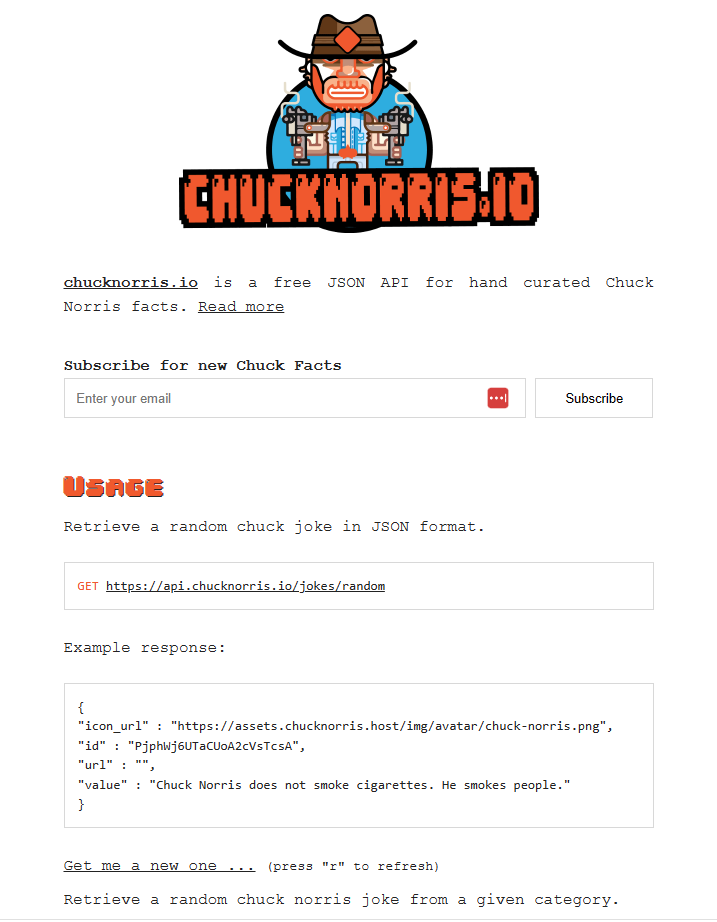
Back in 2013 built a demo application which called the Chuck Norris API(ICNAPI) to demonstrate .NET Micro Framework Hypertext Transfer Protocol(HTTP) connectivity and this a new version for the .NET nanoFramework.

Chuck Norris API Home page

The application uses a System.Net.Http httpClient to call the ICNAPI and nanoFramework.Json to deserialize the responses.

namespace devMobile.IoT.WT32SC01.ChuckNorrisAPI
{
...
    internal class Joke
    {
        public string id { get; set; }
        public string url { get; set; }
        public string value { get; set; }
    }

    public class Program
    {
        public static void Main()
        {
            HttpClient httpClient;

            Debug.WriteLine($"{DateTime.UtcNow:HH:mm:ss} Wifi connecting");

            if (!WifiNetworkHelper.ConnectDhcp(Config.Ssid, Config.Password, requiresDateTime: true))
            {
                if (NetworkHelper.HelperException != null)
                {
                    Debug.WriteLine($"{DateTime.UtcNow:HH:mm:ss} WifiNetworkHelper.ConnectDhcp failed {NetworkHelper.HelperException}");
                }

                Thread.Sleep(Timeout.Infinite);
            }

            Debug.WriteLine($"{DateTime.UtcNow:HH:mm:ss} Wifi connected");

            using (httpClient = new HttpClient())
            {
                httpClient.SslProtocols = System.Net.Security.SslProtocols.Tls12;
                httpClient.HttpsAuthentCert = new X509Certificate(Config.LetsEncryptCACertificate);
                httpClient.BaseAddress = new Uri(Config.ChuckNorrisAPIUrl);

                while (true)
                {
                    Debug.WriteLine($"{DateTime.UtcNow:HH:mm:ss} HTTP request to: {httpClient.BaseAddress.AbsoluteUri}");

                    var response = httpClient.GetString("");

                    Debug.WriteLine($"{DateTime.UtcNow:HH:mm:ss} HTTP request done");

                    Joke joke = (Joke)JsonConvert.DeserializeObject(response, typeof(Joke));

                    Debug.WriteLine($"Joke: {joke.value} ");

                    Thread.Sleep(Config.RequestDelay);
                }
            }
        }
    }
}
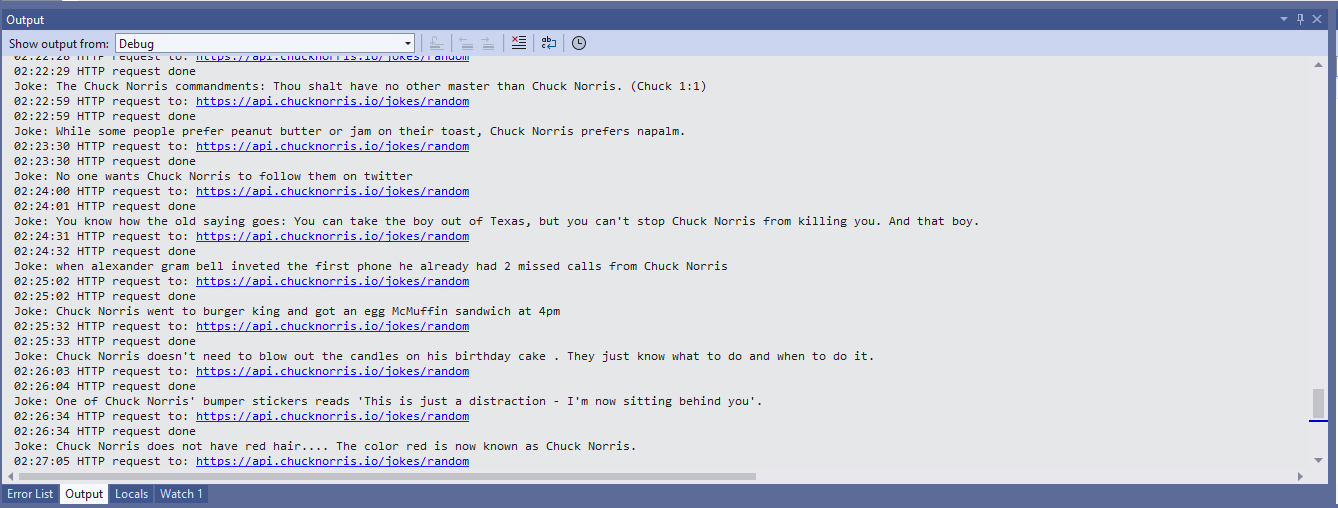
Visual Studio 2022 Debug output displaying Chuck Norris facts

The application configuration is stored in a separate file(config.cs) to reduce the likelihood of me accidently checking it into source control.

namespace devMobile.IoT.WT32SC01.ChuckNorrisAPI
{
    internal class Config
    {
        public const string Ssid = "";
        public const string Password = "";
        public const string ChuckNorrisAPIUrl = "https://api.chucknorris.io/jokes/random";

        public const string LetsEncryptCACertificate =
                 @"-----BEGIN CERTIFICATE-----
MIICGzCCAaGgAwIBAgIQQdKd0XLq7qeAwSxs6S+HUjAKBggqhkjOPQQDAzBPMQsw
CQYDVQQGEwJVUzEpMCcGA1UEChMgSW50ZXJuZXQgU2VjdXJpdHkgUmVzZWFyY2gg
R3JvdXAxFTATBgNVBAMTDElTUkcgUm9vdCBYMjAeFw0yMDA5MDQwMDAwMDBaFw00
MDA5MTcxNjAwMDBaME8xCzAJBgNVBAYTAlVTMSkwJwYDVQQKEyBJbnRlcm5ldCBT
ZWN1cml0eSBSZXNlYXJjaCBHcm91cDEVMBMGA1UEAxMMSVNSRyBSb290IFgyMHYw
EAYHKoZIzj0CAQYFK4EEACIDYgAEzZvVn4CDCuwJSvMWSj5cz3es3mcFDR0HttwW
+1qLFNvicWDEukWVEYmO6gbf9yoWHKS5xcUy4APgHoIYOIvXRdgKam7mAHf7AlF9
ItgKbppbd9/w+kHsOdx1ymgHDB/qo0IwQDAOBgNVHQ8BAf8EBAMCAQYwDwYDVR0T
AQH/BAUwAwEB/zAdBgNVHQ4EFgQUfEKWrt5LSDv6kviejM9ti6lyN5UwCgYIKoZI
zj0EAwMDaAAwZQIwe3lORlCEwkSHRhtFcP9Ymd70/aTSVaYgLXTWNLxBo1BfASdW
tL4ndQavEi51mI38AjEAi/V3bNTIZargCyzuFJ0nN6T5U6VR5CmD1/iQMVtCnwr1
/q4AaOeMSQ+2b1tbFfLn
            -----END CERTIFICATE-----";

        public static readonly TimeSpan RequestDelay = new TimeSpan(0, 30, 0); 
    }
}

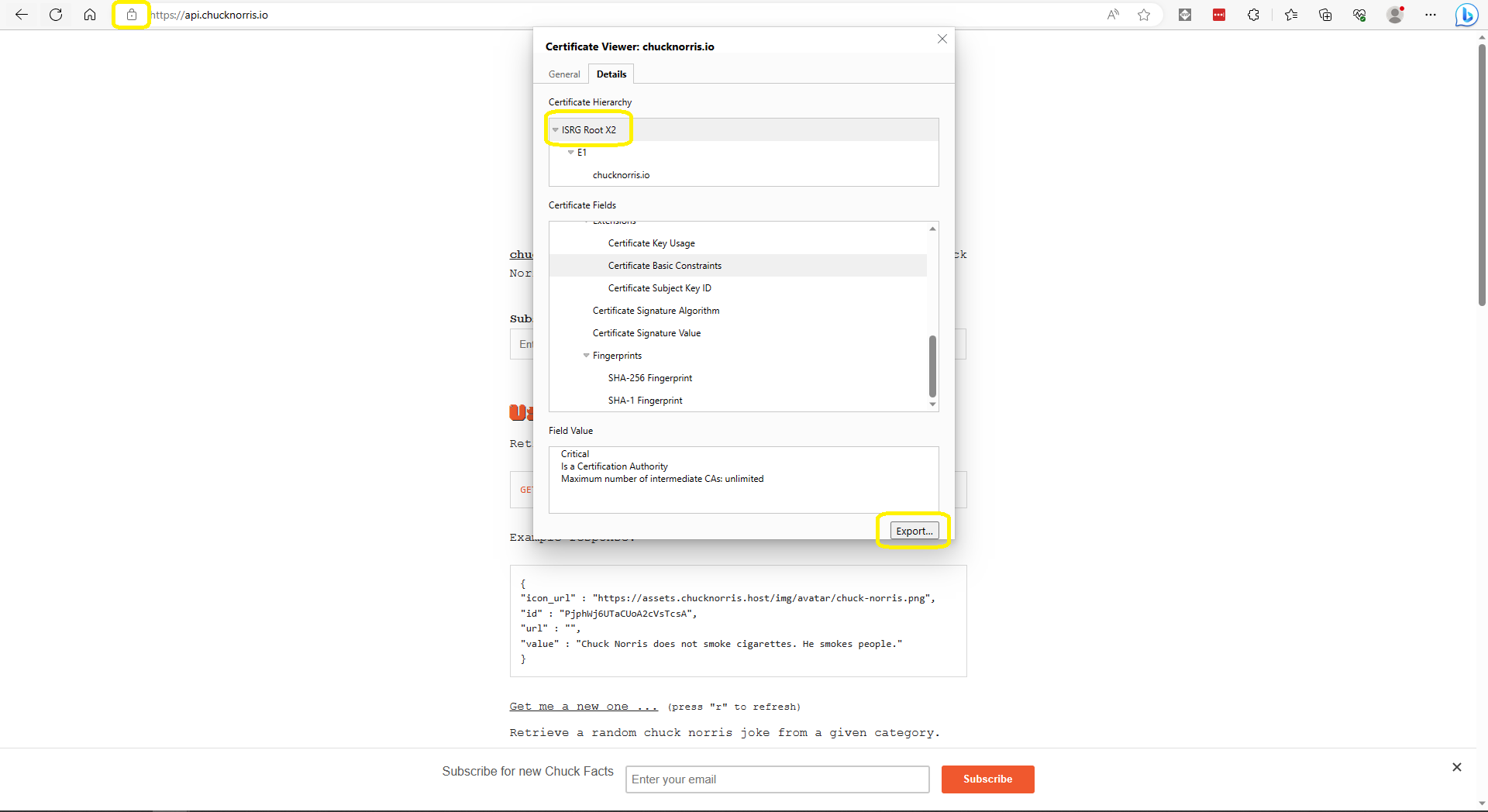
The ICNAPI supports HTTPS requests so I used the Micrsoft Edgium Certificate Viewer to download the Let’s Encrypt Internet Security Group(ISRG) Root X2 certificate.

Microsoft Edge Certificate View download

Some of the Chuck Norris facts are not suitable for school students so the request Uniform Resource Locator (URL) can be modified to ensure only “age appropriate” ones are returned.

.NET Core web API + Dapper – Dependency Injection

So far, to keep the code really obvious (tends to be more verbose) I have limited the use Dependency Injection(DI). I have been “injecting” an instance of an IConfiguration interface then retrieving the database connection string and other configuration. This isn’t a great approach as the database connection string name is in multiple files etc.

public CustomerController(IConfiguration configuration, ILogger<CustomerController> logger)
{
    this.connectionString = configuration.GetConnectionString("WorldWideImportersDatabase");
    this.logger = logger;
}

I wanted to explore the impact(s) of different DI approaches on ADO.Net connection pooling. With the system idle I used exec sp_who to see how many connections there were to my SQL Azure database.

SQL Server Management Studio(SSMS) sp_who query – Idle

Dapper Context approach

The application I’m currently working on uses a Command and Query Responsibility Segregation(CQRS) like approach. The application is largely “read only” so we have replicas of the database to improve the performance of queries hence the ConnectionReadCreate and ConnectionWriteCreate methods.

namespace devMobile.WebAPIDapper.ListsDIBasic
{
   using System.Data;
   using System.Data.SqlClient;

   using Microsoft.Extensions.Configuration;

   public interface IDapperContext 
   {
      public IDbConnection ConnectionCreate();
      public IDbConnection ConnectionCreate(string connectionStringName);

      public IDbConnection ConnectionReadCreate();
      public IDbConnection ConnectionWriteCreate();
   }

   public class DapperContext : IDapperContext
   {
      private readonly IConfiguration _configuration;

      public DapperContext(IConfiguration configuration)
      {
         _configuration = configuration;
      }

      public IDbConnection ConnectionCreate()
      { 
         return new SqlConnection(_configuration.GetConnectionString("default"));
      }

      public IDbConnection ConnectionCreate(string connectionStringName)
      {
         return new SqlConnection(_configuration.GetConnectionString(connectionStringName));
      }

      public IDbConnection ConnectionReadCreate()
      {
         return new SqlConnection(_configuration.GetConnectionString("default-read"));
      }

      public IDbConnection ConnectionWriteCreate()
      {
         return new SqlConnection(_configuration.GetConnectionString("default-write"));
      }
   }
}

I have experimented with how the IDapperContext context is constructed in the application startup with builder.Services.AddSingleton, builder.Services.AddScopedand and builder.Services.AddTransient.

public class Program
{
    public static void Main(string[] args)
    {
        var builder = WebApplication.CreateBuilder(args);

        // Add services to the container.
        //builder.Services.AddSingleton<IDapperContext>(s => new DapperContext(builder.Configuration));
        //builder.Services.AddTransient<IDapperContext>(s => new DapperContext(builder.Configuration));
        //builder.Services.AddScoped<IDapperContext>(s => new DapperContext(builder.Configuration));

        builder.Services.AddControllers();

        var app = builder.Build();

        // Configure the HTTP request pipeline.

        app.UseHttpsRedirection();

        app.MapControllers();

        app.Run();
    }
}

Then in the StockItems controller the IDapperContext interface implementation is used to create an IDbConnection for Dapper operations to use. I also added “WAITFOR DELAY ’00:00:02″ to the query to extend the duration of the requests.

[ApiController]
[Route("api/[controller]")]
public class StockItemsController : ControllerBase
{
   private readonly ILogger<StockItemsController> logger;
   private readonly IDapperContext dapperContext;

   public StockItemsController(ILogger<StockItemsController> logger, IDapperContext dapperContext)
   {
      this.logger = logger;

      this.dapperContext = dapperContext;
   }

   [HttpGet]
   public async Task<ActionResult<IEnumerable<Model.StockItemListDtoV1>>> Get()
   {
      IEnumerable<Model.StockItemListDtoV1> response;

      using (IDbConnection db = dapperContext.ConnectionCreate())
      {
         //response = await db.QueryWithRetryAsync<Model.StockItemListDtoV1>(sql: @"SELECT [StockItemID] as ""ID"", [StockItemName] as ""Name"", [RecommendedRetailPrice], [TaxRate] FROM [Warehouse].[StockItems]", commandType: CommandType.Text);
         response = await db.QueryWithRetryAsync<Model.StockItemListDtoV1>(sql: @"SELECT [StockItemID] as ""ID"", [StockItemName] as ""Name"", [RecommendedRetailPrice], [TaxRate] FROM [Warehouse].[StockItems]; WAITFOR DELAY '00:00:02'", commandType: CommandType.Text);
      }

      return this.Ok(response);
   }
...
}
I ran a stress testing application which simulated 50 concurrent users. When the stress test rig was stopped all the connections in the pool were closed after roughly 5 minutes.

SQL Server Management Studio(SSMS) sp_who query – stress test

Nasty approach

I then tried using DI to create a new connection for each request using builder.Services.AddScoped

public class Program
{
    public static void Main(string[] args)
    {
        var builder = WebApplication.CreateBuilder(args);

        // Add services to the container.

        //builder.Services.AddSingleton<IDbConnection>(s => new SqlConnection(builder.Configuration.GetConnectionString("default")));
        //builder.Services.AddScoped<IDbConnection>(s => new SqlConnection(builder.Configuration.GetConnectionString("default")));
        //builder.Services.AddTransient<IDbConnection>(s => new SqlConnection(builder.Configuration.GetConnectionString("default")));

        builder.Services.AddControllers();

        var app = builder.Build();

        app.UseHttpsRedirection();

        app.MapControllers();

        app.Run();
    }
}

The code in the get method was reduced. I also added “WAITFOR DELAY ’00:00:02″ to the query to extend the duration of the requests.

public class StockItemsController : ControllerBase
{
   private readonly ILogger<StockItemsController> logger;
   private readonly IDbConnection dbConnection;

   public StockItemsController(ILogger<StockItemsController> logger, IDbConnection dbConnection)
   {
      this.logger = logger;

      this.dbConnection = dbConnection;
   }

   [HttpGet]
   public async Task<ActionResult<IEnumerable<Model.StockItemListDtoV1>>> Get()
   {
      // return this.Ok(await dbConnection.QueryWithRetryAsync<Model.StockItemListDtoV1>(sql: @"SELECT [StockItemID] as ""ID"", [StockItemName] as ""Name"", [RecommendedRetailPrice], [TaxRate] FROM [Warehouse].[StockItems]; WAITFOR DELAY '00:00:02';", commandType: CommandType.Text));
      return this.Ok(await dbConnection.QueryWithRetryAsync<Model.StockItemListDtoV1>(sql: @"SELECT [StockItemID] as ""ID"", [StockItemName] as ""Name"", [RecommendedRetailPrice], [TaxRate] FROM [Warehouse].[StockItems]", commandType: CommandType.Text));
    }
...
}

With the stress test rig running the number of active connections was roughly the same as the DapperContext based implementation.

I don’t like this approach so will stick with DapperContext

Wireless-Tag WT32-SC01 nanoFramework getting started

Last week an ESP32 Development Board – WT32-SC01 with 3.5in 320×480 Multi-Touch capactive Screen, support Bluetooth & Wifi arrived from Elecrow. The development board was USD39.90 (June 2023) and appeared to be sourced from Wireless-Tag Technology.

WT32-SC01 packaging

The first step was to flash the WT32-SC01 with the latest version of the .NET nanoFramework for ESP32 devices. To get the device into “boot” mode I used a jumper wire to connect GPIO0 to ground before powering it up.

WT32-SC01 boot loader mode jumper

The .NET nanoFramework nanoff utility identified the device, downloaded the runtime package, and updated the device.

updating the WT32-SC01 with the nanoff utility

The next step was to run the blank NET nanoFramework sample application.

using System;
using System.Diagnostics;
using System.Threading;

namespace HelloWorld
{
    public class Program
    {
        public static void Main()
        {
            Debug.WriteLine("Hello from nanoFramework!");

            Thread.Sleep(Timeout.Infinite);

            // Browse our samples repository: https://github.com/nanoframework/samples
            // Check our documentation online: https://docs.nanoframework.net/
            // Join our lively Discord community: https://discord.gg/gCyBu8T
        }
    }
}

Microsoft Visual Studio 2022 displaying output of .NET nanoFramework Blank application

The WT32-SC01 doesn’t have a user LED so I modified the .NET nanoFramework blinky sample to flash the Liquid Crystal Display(LCD) backlight.

//
// Copyright (c) .NET Foundation and Contributors
// See LICENSE file in the project root for full license information.
//

using System.Device.Gpio;
using System;
using System.Threading;
using nanoFramework.Hardware.Esp32;

namespace Blinky
{
    public class Program
    {
        private static GpioController s_GpioController;
        public static void Main()
        {
            s_GpioController = new GpioController();

            // IO23 is LCD backlight
            GpioPin led = s_GpioController.OpenPin(Gpio.IO23,PinMode.Output ); 

            led.Write(PinValue.Low);

            while (true)
            {
                led.Toggle();
                Thread.Sleep(125);
                led.Toggle();
                Thread.Sleep(125);
                led.Toggle();
                Thread.Sleep(125);
                led.Toggle();
                Thread.Sleep(525);
            }
        }
    }
}

The

Flashing WT32-SC01 LCD backlight

Next steps getting the LCD+Touch panel and Wifi working

.NET nanoFramework RAK11200 – Brownout Voltage Revisited

The voltage my test setup was calculating looked wrong, then I realised that the sample calculation in the RAK Wireless forums wasn’t applicable to my setup.

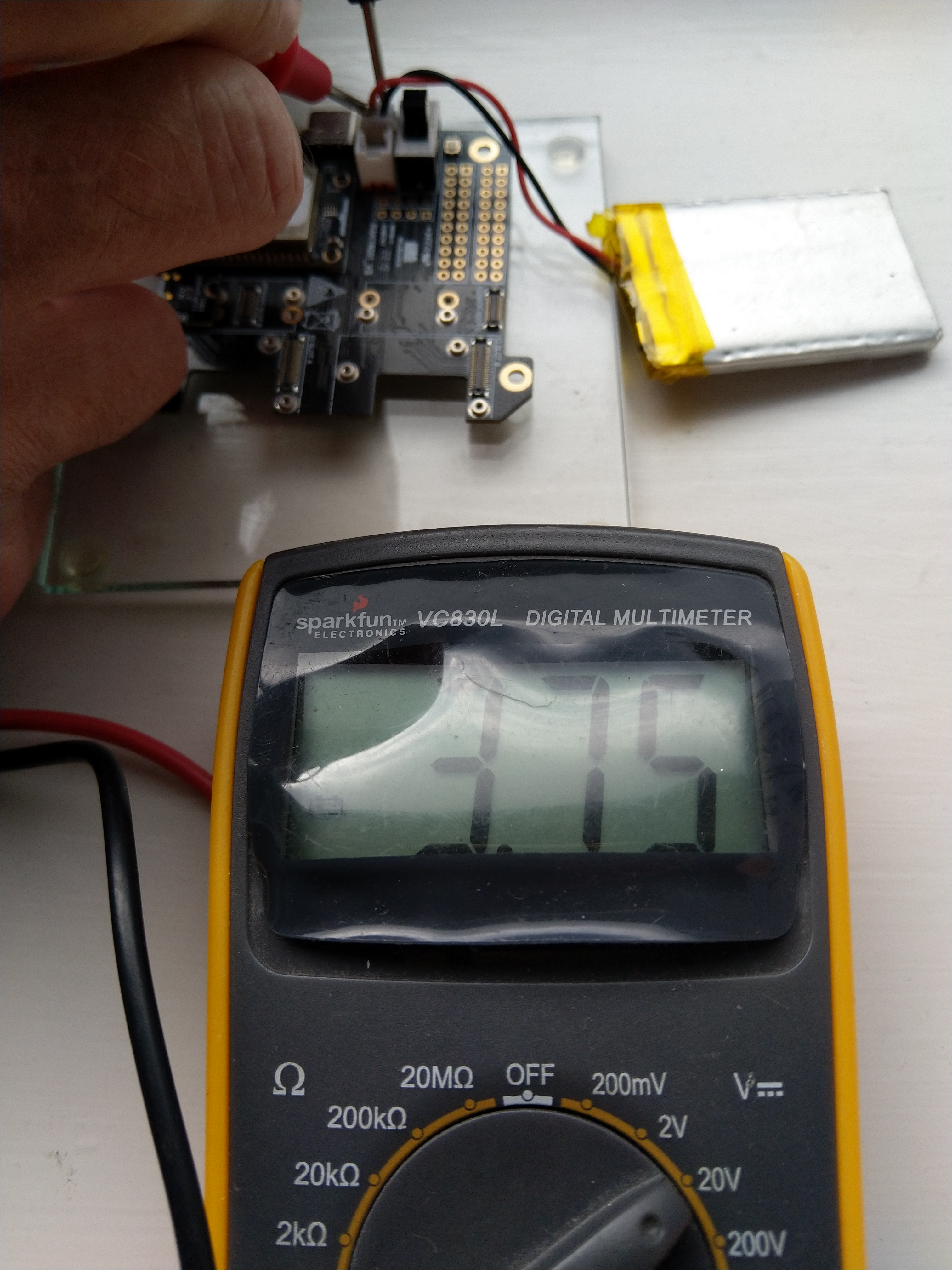
I reassembled my RAK11200 WisBlock WiFi Module, RAK19001 WisBlock Base Board, RAK1901 WisBlock Temperature and Humidity Sensor, 1200mAH Lithium Polymer (LiPo) battery, SKU920100 Solar Board test setup, put a new 9V battery (I had forgotten to turn it off last-time) in my multimeter then collected some data. A=ReadValue(), C= ReadRatio(), E= measured battery voltage.

Excel spreadsheet for calculating ratio

I updated the formula used to calculate the battery voltage and deployed the application

public static void Main()
{
    Debug.WriteLine($"{DateTime.UtcNow:HH:mm:ss} devMobile.IoT.RAK.Wisblock.AzureIoTHub.RAK11200.PowerSleep starting");

    Thread.Sleep(5000);

    try
    {
        double batteryVoltage;

        Configuration.SetPinFunction(Gpio.IO04, DeviceFunction.I2C1_DATA);
        Configuration.SetPinFunction(Gpio.IO05, DeviceFunction.I2C1_CLOCK);

        Debug.WriteLine($"{DateTime.UtcNow:HH:mm:ss} Battery voltage measurement");

        // Configure Analog input (AIN0) port then read the "battery charge"
        AdcController adcController = new AdcController();

        using (AdcChannel batteryVoltageAdcChannel = adcController.OpenChannel(AdcControllerChannel))
        {
            batteryVoltage = batteryVoltageAdcChannel.ReadValue() / 723.7685;

            Debug.WriteLine($" BatteryVoltage {batteryVoltage:F2}");

            if (batteryVoltage < Config.BatteryVoltageBrownOutThreshold)
            {
                Sleep.EnableWakeupByTimer(Config.FailureRetryInterval);
                Sleep.StartDeepSleep();
            }
        }
        catch (Exception ex)
        {
...    
}

To test the accuracy of the voltage calculation I am going to run my setup on the office windowsill for a week regularly measuring the voltage. Then, turn the solar panel over (so the battery is not getting charged) and monitor the battery discharging until the RAK11200 WisBlock WiFi Module won’t connect to the network.

.NET nanoFramework RAK11200 – Brownout Voltage

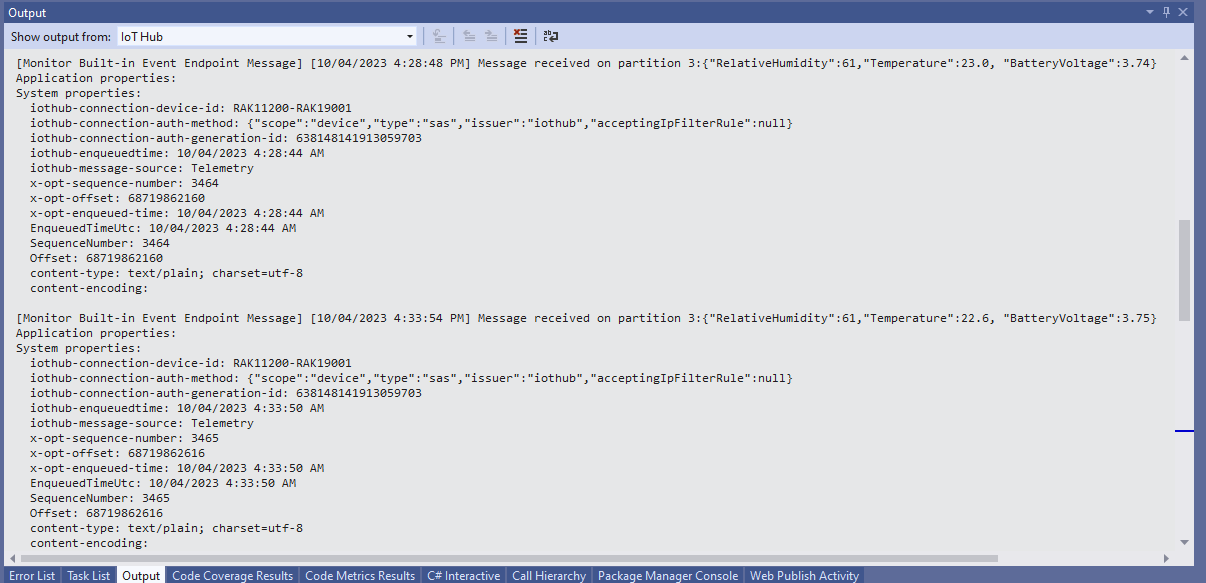
My test setup was a RAK11200 WisBlock WiFi Module, RAK19001 WisBlock Base Board, RAK1901 WisBlock Temperature and Humidity Sensor, 1200mAH Lithium Polymer (LiPo) battery and SKU920100 Solar Board. The test setup uploads temperature, humidity and battery voltage telemetry to an Azure IoT Hub every 5 minutes (short delay so battery life reduced).

The first step was to check that I could get a “battery voltage” value for the RAKWireless RAK11200 WisBlock WiFi Module on a RAK19001 WisBlock Base Board for managing “brownouts” and send to my Azure IoT Hub.

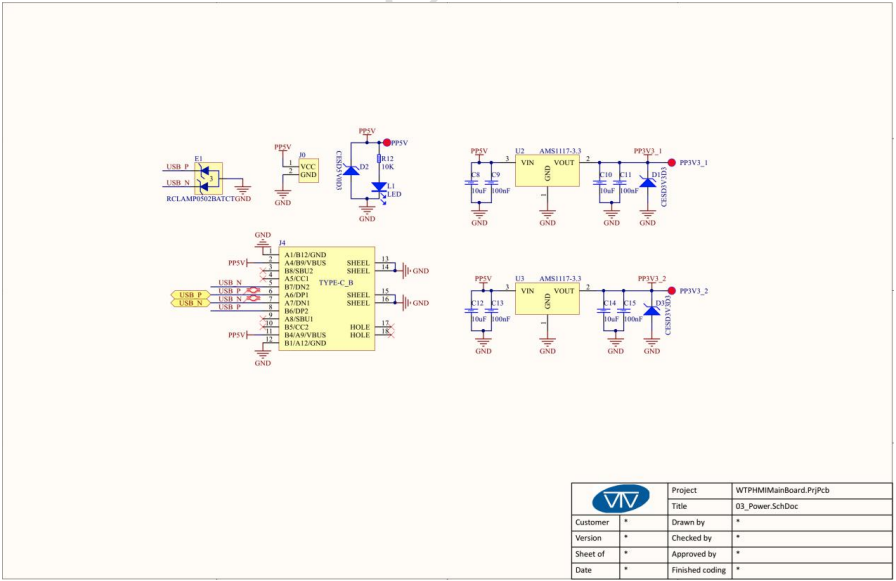
RAK19001 Power supply schematic

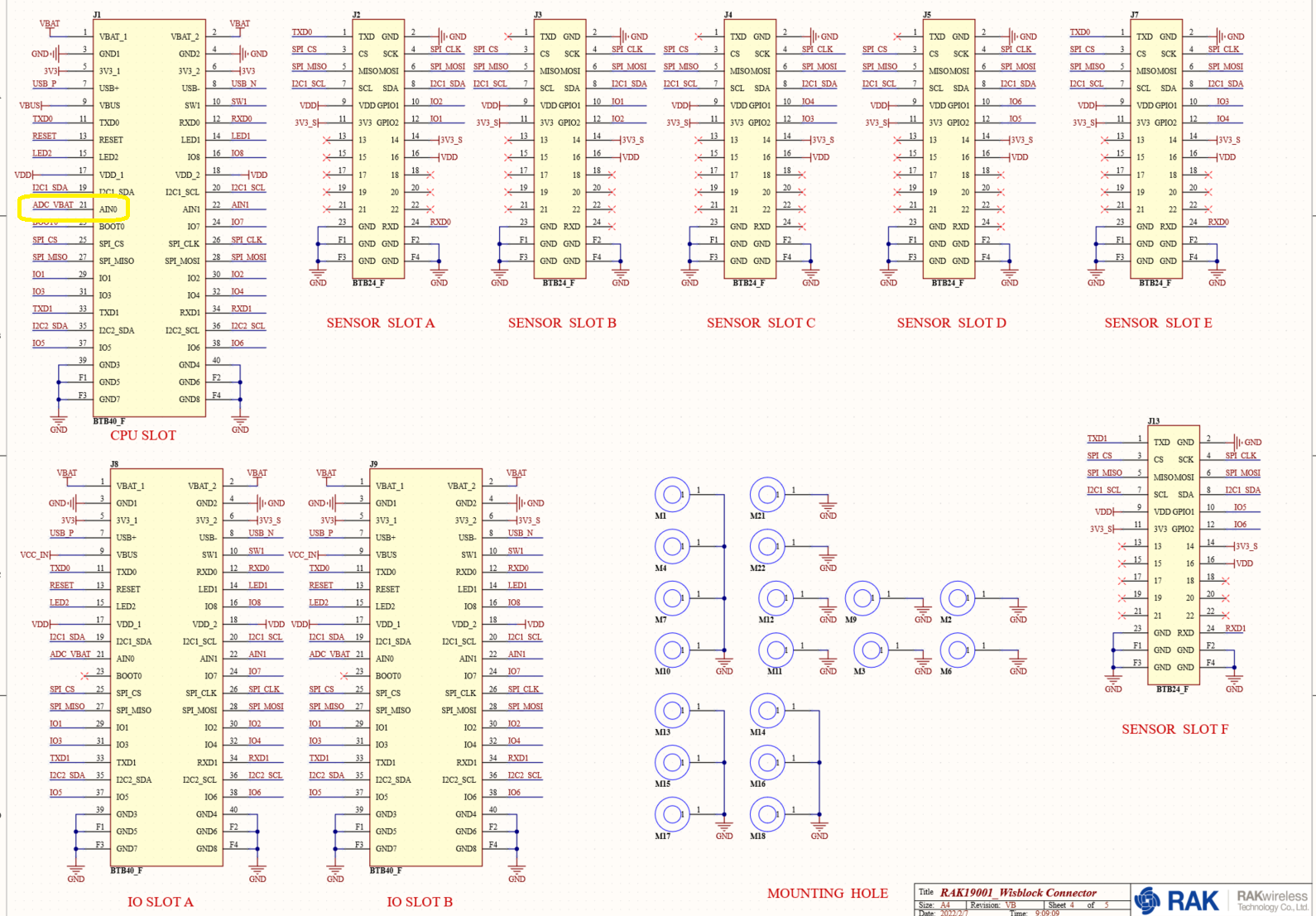
The RAK19001 WisBlock Base Board has a voltage divider (R4&R5 with output ADC_VBAT) which is connected to pin 21(AIN0) on the CPU slot connector.

RAK19001 connector schematic

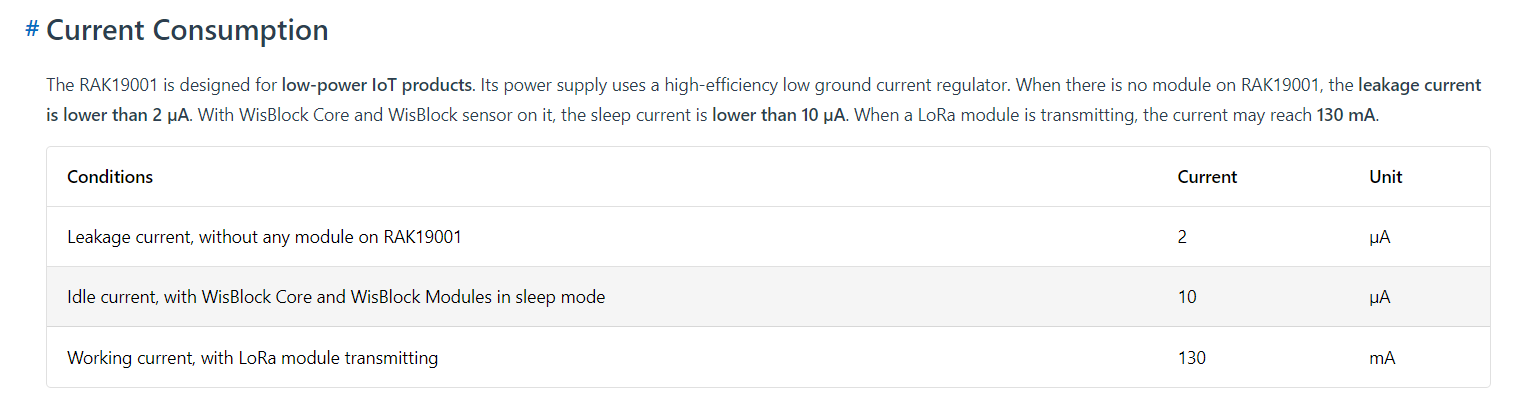
The RAK19001 WisBlock Base Board has quite a low leakage current so the majority of the power consumption should be the RAK11200 WisBlock WiFi Module.

RAK19001 leakage current from specifications

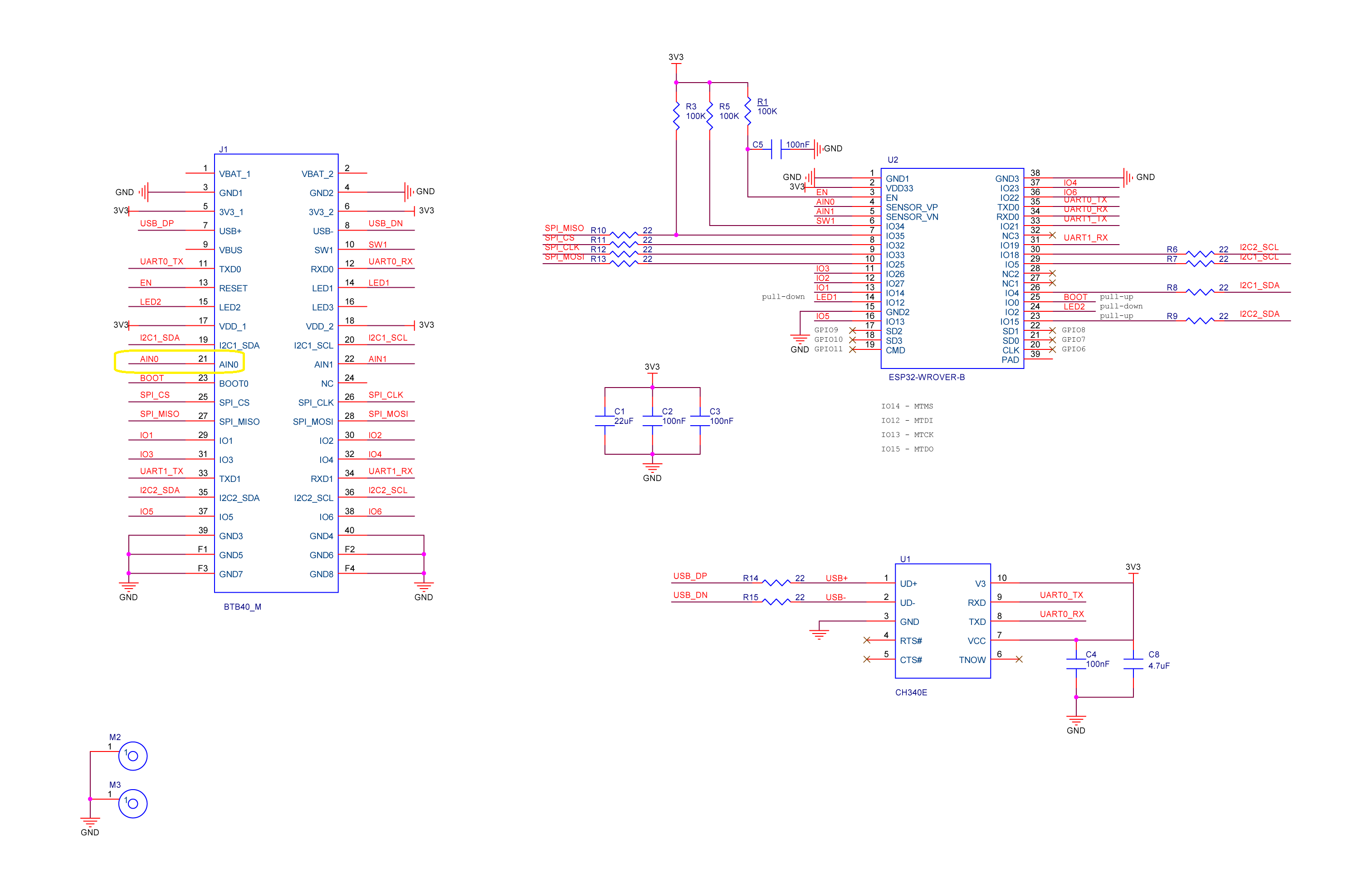
I used AdcController + AdcChannel to read AIN0 and modified the code using the formula (for a RAK4631 module) in the RAK Wireless forums to calculate the battery voltage. (UPDATE This calculation is not applicable to my scenario)

RAK11200 Schematic with battery voltage analog input highlighted

When “slept” the RAK11200 WisBlock WiFi Module power consumption is very low

RAK11200 low power current from specifications
public static void Main()
{
    Debug.WriteLine($"{DateTime.UtcNow:HH:mm:ss} devMobile.IoT.RAK.Wisblock.AzureIoTHub.RAK11200.PowerSleep starting");

    Thread.Sleep(5000); // This do debugger can attach consider removing in realease version

    try
    {
        double batteryVoltage;

        Configuration.SetPinFunction(Gpio.IO04, DeviceFunction.I2C1_DATA);
        Configuration.SetPinFunction(Gpio.IO05, DeviceFunction.I2C1_CLOCK);

        Debug.WriteLine($"{DateTime.UtcNow:HH:mm:ss} Battery voltage measurement");

        // Configure Analog input (AIN0) port then read the "battery charge"
        AdcController adcController = new AdcController();

        using (AdcChannel batteryVoltageAdcChannel = adcController.OpenChannel(AdcControllerChannel))
        {

            // https://forum.rakwireless.com/t/custom-li-ion-battery-voltage-calculation-in-rak4630/4401/7
            // When I checked with multimeter I had to increase 1.72 to 1.9
            batteryVoltage = batteryVoltageAdcChannel.ReadValue() * (3.0 / 4096) * 1.9;

            Debug.WriteLine($" BatteryVoltage {batteryVoltage:F2}");

            if (batteryVoltage < Config.BatteryVoltageBrownOutThreshold)
            {
                Sleep.EnableWakeupByTimer(Config.FailureRetryInterval);
                Sleep.StartDeepSleep();
            }
        }

        Debug.WriteLine($"{DateTime.UtcNow:HH:mm:ss} Wifi connecting");

        if (!WifiNetworkHelper.ConnectDhcp(Config.Ssid, Config.Password, requiresDateTime: true))
        {
            if (NetworkHelper.HelperException != null)
            {
                Debug.WriteLine($"{DateTime.UtcNow:HH:mm:ss} WifiNetworkHelper.ConnectDhcp failed {NetworkHelper.HelperException}");
            }

            Sleep.EnableWakeupByTimer(Config.FailureRetryInterval);
            Sleep.StartDeepSleep();
        }
        Debug.WriteLine($"{DateTime.UtcNow:HH:mm:ss} Wifi connected");

        // Configure the SHTC3 
        I2cConnectionSettings settings = new(I2cDeviceBusID, Shtc3.DefaultI2cAddress);

        string payload ;

        using (I2cDevice device = I2cDevice.Create(settings))
        using (Shtc3 shtc3 = new(device))
        {
            if (shtc3.TryGetTemperatureAndHumidity(out var temperature, out var relativeHumidity))
            {
                Debug.WriteLine($" Temperature {temperature.DegreesCelsius:F1}°C Humidity {relativeHumidity.Value:F0}% BatteryVoltage {batteryVoltage:F2}");

                payload = $"{{\"RelativeHumidity\":{relativeHumidity.Value:F0},\"Temperature\":{temperature.DegreesCelsius:F1}, \"BatteryVoltage\":{batteryVoltage:F2}}}";
            }
            else
            {
                Debug.WriteLine($" BatteryVoltage {batteryVoltage:F2}");

                payload = $"{{\"BatteryVoltage\":{batteryVoltage:F2}}}";
            }

#if SLEEP_SHT3C
            shtc3.Sleep();
#endif
        }

        // Configure the HttpClient uri, certificate, and authorization
        string uri = $"{Config.AzureIoTHubHostName}.azure-devices.net/devices/{Config.DeviceID}";

        HttpClient httpClient = new HttpClient()
        {
            SslProtocols = System.Net.Security.SslProtocols.Tls12,
            HttpsAuthentCert = new X509Certificate(Config.DigiCertBaltimoreCyberTrustRoot),
            BaseAddress = new Uri($"https://{uri}/messages/events?api-version=2020-03-13"),
        };
        httpClient.DefaultRequestHeaders.Add("Authorization", SasTokenGenerate(uri, Config.Key, DateTime.UtcNow.Add(Config.SasTokenRenewFor)));

        Debug.WriteLine($"{DateTime.UtcNow:HH:mm:ss} Azure IoT Hub device {Config.DeviceID} telemetry update start");

        HttpResponseMessage response = httpClient.Post("", new StringContent(payload));

        Debug.WriteLine($"{DateTime.UtcNow:HH:mm:ss} Response code:{response.StatusCode}");

        response.EnsureSuccessStatusCode();
    }
    catch (Exception ex)
    {
        Debug.WriteLine($"{DateTime.UtcNow:HH:mm:ss} Azure IoT Hub telemetry update failed:{ex.Message} {ex?.InnerException?.Message}");

        Sleep.EnableWakeupByTimer(Config.FailureRetryInterval);
        Sleep.StartDeepSleep();
    }

    Sleep.EnableWakeupByTimer(Config.TelemetryUploadInterval);
#if SLEEP_LIGHT
    Sleep.StartLightSleep();
#endif
#if SLEEP_DEEP
    Sleep.StartDeepSleep();
#endif
}

The nanoFramework.Hardware.Esp32.Sleep functionality supports LightSleep and DeepSleep states. The ESP32 device can be “woken up” by GPIO pin(s), Touch pad activity or by a Timer.

RAK11200+RAK19007+RAK1901+ LiPo battery test rig

After some “tinkering” I found the voltage calculation was surprisingly accurate (usually within 0.01V) for my RAK19001 and RAK19007 base boards.

When the battery voltage was close to its minimum working voltage of the ESP32 device it would reboot when the WifiNetworkHelper.ConnectDhcp method was called. This would quickly drain the battery flat even when the solar panel was trying to charge the battery.

Now, before trying to connect to the wireless network the battery voltage is checked and if too low (more experimentation required) the device goes into a deep sleep for a configurable period (more experimentation required). This is so the solar panel can charge the battery to a level where wireless connectivity will work.

Swarm Space – Asset Tracker Payload Formatter

After writing Swarm Space – Payload Formatter Debugging I then tested it creating a new payload formatter for my new Swarm Asset Tracker.

Swarm Asset Tracker device

The Swarm Asset Tracker has a slightly different payload to the Swarm Eval Kit which is detailed in the product manual.

Swarm Asset Tracker JSON payload

The first message sent shortly after I powered up the device had the latitude and longitude of Null Island

The Asset Tracker UserApplicationId is 65002 and the payload is similar to the Swarm Eval Kit. I created some message payloads (location of Christchurch Cathedral) for testing.

The JSON payload sent by my Swarm Asset Tracker

{
  "dt": 1677396395,
  "lt": -43.5333,
  "ln": 172.6333,
  "al": 25,
  "sp": 0,
  "hd": 126,
  "gj": 92,
  "gs": 1,
  "bv": 4103,
  "tp": 20,
  "rs": -110,
  "tr": -107,
  "ts": 3,
  "td": 1677396357,
  "hp": 166,
  "vp": 187,
  "tf": 36526
}

The Base64 representation of the payload sent by my Swarm Asset Tracker

ew0KICAiZHQiOiAxNjc3Mzk2Mzk1LA0KICAibHQiOiAtNDMuNTMzMywNCiAgImxuIjogMTcyLjYzMzMsDQogICJhbCI6IDI1LA0KICAic3AiOiAwLA0KICAiaGQiOiAxMjYsDQogICJnaiI6IDkyLA0KICAiZ3MiOiAxLA0KICAiYnYiOiA0MTAzLA0KICAidHAiOiAyMCwNCiAgInJzIjogLTExMCwNCiAgInRyIjogLTEwNywNCiAgInRzIjogMywNCiAgInRkIjogMTY3NzM5NjM1NywNCiAgImhwIjogMTY2LA0KICAidnAiOiAxODcsDQogICJ0ZiI6IDM2NTI2DQp9

The initial version of my payload formatter

using System;
using System.Collections.Generic;
using System.Globalization;
using Newtonsoft.Json.Linq;

public class FormatterUplink : PayloadFormatter.IFormatterUplink
{
    public JObject Evaluate(IDictionary<string, string> properties, uint organisationId, uint deviceId, byte deviceType, ushort userApplicationId, JObject payloadJson, string payloadText, byte[] payloadBytes)
    {
        JObject telemetryEvent = new JObject();

        if ((payloadText != "") && (payloadJson != null))
        {
            JObject location = new JObject();

            location.Add("lat", payloadJson.GetValue("lt"));
            location.Add("lon", payloadJson.GetValue("ln"));
            location.Add("alt", payloadJson.GetValue("al"));

            telemetryEvent.Add("DeviceLocation", location);
        }

        // Course & speed
        telemetryEvent.Add("Course", payloadJson.GetValue("hd"));
        telemetryEvent.Add("Speed", payloadJson.GetValue("sp"));

        // Battery voltage
        telemetryEvent.Add("BatteryVoltage", payloadJson.GetValue("bv"));

        // RSSI
        telemetryEvent.Add("RSSI", payloadJson.GetValue("rs"));

        properties.Add("iothub-creation-time-utc", DateTimeOffset.FromUnixTimeSeconds((long)payloadJson.GetValue("dt")).ToString("s", CultureInfo.InvariantCulture));

        return telemetryEvent;
    }
}

The PayloadFormatterMaintenanceApplication command line I used for testing my Swarm Asset Tracker payload formatter

The console output of my Swarm Asset Tracker payload formatter

The PayloadFormatterMaintenanceApplication is better than trying to debug a payload formatter in a staging/production environment.

Currently the payload formatters still have to be manually uploaded to the application’s Azure Blob Storage for final testing.

Swarm Space – Payload Formatter Debugging

After Swarm Space – Uplink Payload Formatters revisited I wrote a couple of payload formatters and they were easy to get wrong and the Azure Application Insights error messages were unhelpful.

namespace PayloadFormatter // Additional namespace for shortening interface when usage in formatter code
{
    using System.Collections.Generic;

    using Newtonsoft.Json.Linq;

    public interface IFormatterUplink
    {
        public JObject Evaluate(IDictionary<string, string> properties, uint organisationId, uint deviceId, byte deviceType, ushort userApplicationId, JObject payloadJson, string payloadText, byte[] payloadBytes);
    }

    public interface IFormatterDownlink
    {
        public byte[] Evaluate(IDictionary<string, string> properties, uint organisationId, uint deviceId, byte deviceType, ushort userApplicationId, JObject payloadJson, string payloadText, byte[] payloadBytes);
    }
}

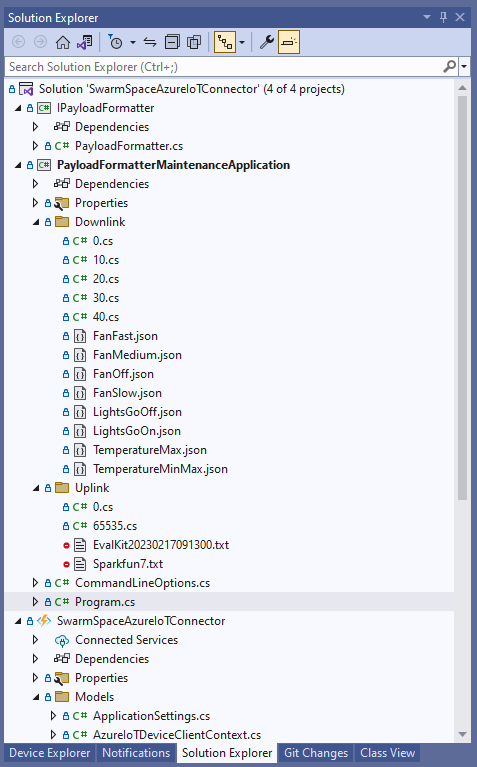
The definitions of the uplink & downlink payload formatter evaluator interfaces have been updated and shifted to a new project.

Visual Studio 2022 Solution with payloadformatter maintenance application

I built a console application to help with developing and debugging uplink or downlink formatters. The application has a number of command line parameters which specify the formatter to be used, UserApplicationId, OrganizationId, DeviceType etc.

public class CommandLineOptions
{
    [Option('d', "Direction", Required = true, HelpText = "Test Uplink or DownLink formatter")]
	public string Direction { get; set; }

    [Option('p', "filename", HelpText = "Uplink or Downlink Payload file name")]
    public string PayloadFilename { get; set; } = string.Empty;

    [Option('o', "OrganisationId", Required = true, HelpText = "Organisation unique identifier")]
    public uint OrganizationId { get; set; }

    [Option('i', "DeviceId", Required = true, HelpText = "Device unique identitifer")]
    public uint DeviceId { get; set; }

    [Option('t', "DeviceType", Required = true, HelpText = "Device type number")]
    public byte DeviceType { get; set; }

    [Option('u', "UserApplicationId", Required = true, HelpText = "User Application Id")]
    public ushort UserApplicationId { get; set; }

    [Option('h', "SwarmHiveReceivedAtUtc", HelpText = "Swarm Hive received at time UTC")]
    public DateTime? SwarmHiveReceivedAtUtc { get; set; }

    [Option('w', "UplinkWebHookReceivedAtUtc", HelpText = "Webhook received at time UTC")]
    public DateTime? UplinkWebHookReceivedAtUtc { get; set; }

    [Option('s', "Status", HelpText = "Uplink local file system file name")]
    public byte? Status { get; set; }

    [Option('c', "Client", HelpText = "Uplink local file system file name")]
    public string Client { get; set; } 
 }

The downlink formatter (similar approach for uplink) loads the sample file as an array of bytes, then tries to convert it to text, and finally to JSON. Then the formatter code is “compiled” and the executed with the file payload and command line parameters.

private static async Task DownlinkFormatterCore(CommandLineOptions options)
{
    Dictionary<string, string> properties = new Dictionary<string, string>();

    string formatterFolder = Path.Combine(Environment.CurrentDirectory, "downlink");
    Console.WriteLine($"Downlink- uplinkFormatterFolder: {formatterFolder}");

    string formatterFile = Path.Combine(formatterFolder, $"{options.UserApplicationId}.cs");
    Console.WriteLine($"Downlink- UserApplicationId: {options.UserApplicationId}");
    Console.WriteLine($"Downlink- Payload formatter file: {formatterFile}");

    PayloadFormatter.IFormatterDownlink evalulator;
    try
    {
        evalulator = CSScript.Evaluator.LoadFile<PayloadFormatter.IFormatterDownlink>(formatterFile);
     }
    catch (CSScriptLib.CompilerException cex)
    {
        Console.Write($"Loading or compiling file:{formatterFile} failed Exception:{cex}");
        return;
    }

    string payloadFilename = Path.Combine(formatterFolder, options.PayloadFilename);
    Console.WriteLine($"Downlink- payloadFilename:{payloadFilename}");
    byte[] uplinkBytes;

    try
    {
        uplinkBytes = File.ReadAllBytes(payloadFilename);
    }
    catch (DirectoryNotFoundException dex)
    {
        Console.WriteLine($"Uplink payload filename directory {formatterFolder} not found:{dex}");
        return;
    }
    catch (FileNotFoundException fnfex)
    {
        Console.WriteLine($"Uplink payload filename {payloadFilename} not found:{fnfex}");
        return;
    }
    catch (FormatException fex)
    {
        Console.WriteLine($"Uplink payload file invalid format {payloadFilename} not found:{fex}");
        return;
    }

    // See if payload can be converted to a string
    string uplinkText = string.Empty;
    try
    {
        uplinkText = Encoding.UTF8.GetString(uplinkBytes);
    }
    catch (FormatException fex)
    {
        Console.WriteLine("Encoding.UTF8.GetString failed:{0}", fex.Message);
    }

    // See if payload can be converted to JSON
    JObject uplinkJson;
    try
    {
        uplinkJson = JObject.Parse(uplinkText);
    }
    catch (JsonReaderException jrex)
    {
        Console.WriteLine("JObject.Parse failed Exception:{1}", jrex);

        uplinkJson = new JObject();
    }

    Console.WriteLine("Properties");
    foreach (var property in properties)
    {
        Console.WriteLine($"{property.Key}:{property.Value}");
    }

    // Transform the byte and optional text and JSON payload
    Byte[] payload;
    try
    {
        payload = evalulator.Evaluate(properties, options.OrganizationId, options.DeviceId, options.DeviceType, options.UserApplicationId, uplinkJson, uplinkText, uplinkBytes);
    }
    catch (Exception ex)
    {
        Console.WriteLine($"evalulatorUplink.Evaluate failed Exception:{ex}");
        return;
    }

    Console.WriteLine("Payload");
    Console.WriteLine(Convert.ToBase64String(payload));
}

The sample JSON payload is what would be sent by Azure IoT Central to a device to configure the fan speed

Azure IoT Central M138 Breakout device template with the Fan Status command selected
{
  "FanStatus": 2
}

If the downlink payload formatter is compiled and executes successfully the Base64 representation output is displayed

using System;
using System.Collections.Generic;
using Newtonsoft.Json.Linq;

public class FormatterDownlink : PayloadFormatter.IFormatterDownlink
{
    public byte[] Evaluate(IDictionary<string, string> properties, uint organisationId, uint deviceId, byte deviceType, ushort userApplicationId, JObject payloadJson, string payloadText, byte[] payloadBytes)
    {
        byte? status = payloadJson.Value<byte?>("FanStatus");

        if ( status.HasValue ) 
        { 
            return new byte[] { status.Value };
        }

        return new byte[]{};
    }
}

If the downlink payload formatter syntax is incorrect e.g. { status.Value ; }; an error message with the line and column is displayed.

using System;
using System.Collections.Generic;
using Newtonsoft.Json.Linq;

public class FormatterDownlink : PayloadFormatter.IFormatterDownlink
{
    public byte[] Evaluate(IDictionary<string, string> properties, uint organisationId, uint deviceId, byte deviceType, ushort userApplicationId, JObject payloadJson, string payloadText, byte[] payloadBytes)
    {
        byte? status = payloadJson.Value<byte?>("FanStatus");

        if ( status.HasValue ) 
        {
            return new byte[] { status.Value ; };
        }

        return new byte[]{};
    }
}

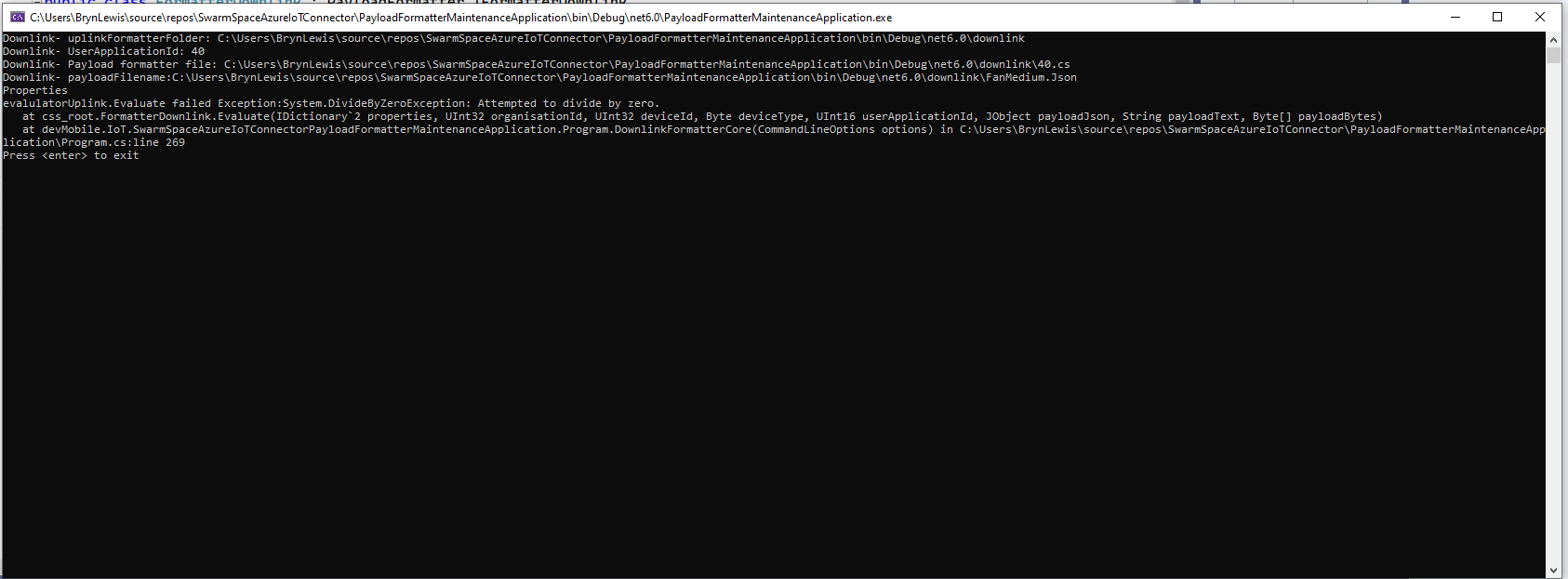
If the downlink payload formatter syntax is correct but execution fails (in the example code division by zero) an error message is displayed.

using System;
using System.Collections.Generic;
using Newtonsoft.Json.Linq;

public class FormatterDownlink : PayloadFormatter.IFormatterDownlink
{
    public byte[] Evaluate(IDictionary<string, string> properties, uint organisationId, uint deviceId, byte deviceType, ushort userApplicationId, JObject payloadJson, string payloadText, byte[] payloadBytes)
    {
        byte? status = payloadJson.Value<byte?>("FanStatus");

        if ( status.HasValue ) 
        {
            int divideByZero = 10;

            divideByZero = divideByZero / 0;

            return new byte[] { status.Value };
        }

        return new byte[]{};
    }
}

The PayloadFormatterMaintenanceApplication makes it significantly easier to develop formatters. Currently the payload formatters have to be manually uploaded to the application’s Azure Blob Storage for final testing.

Swarm Space – Replacing the OpenAPI Client

At the start of this project I used NSwag and Open API Swagger definition file (provided by Swarm Space technical support) to generate a Swarm Space Bumble bee hive client and the core of a simulator.

Swarm Space Bumble hive classes in Visual Studio 2022

My SwarmSpaceAzureIoTConnector project only needed to login, get a list of devices and send messages so all the additional functionality was never going to be used. The method to send a message didn’t work, the class used for the payload (UserMessage) appears to be wrong.

OpenAPI Swagger docs for sending a message

The Open API Swagger definition for sending a message to a device

"post": {
        "tags": [ "messages" ],
        "summary": "POST user messages",
        "description": "<p>This endpoint submits a JSON formatted UserMessage object for delivery to a Swarm device. A JSON object is returned with a newly assigned <code>packetId</code> and <code>status</code> of<code>OK</code> on success, or <code>ERROR</code> (with a description of the error) on failure.</p><p>The current user must have access to the <code>userApplicationId</code> and <code>device</code> given inside the UserMessage JSON. The device must also have the ability to receive messages from the Hive (\"two-way communication\") enabled. If these conditions are not met, a response with status code 403 (Forbidden) will be returned.</p><p>Note that the <code>data</code> field is the <b>Base64-encoded</b> version of the data to be sent. This allows the sending of binary, as well as text, data.</p>",
        "operationId": "addApplicationMessage",
        "requestBody": {
          "content": { "application/json": { "schema": { "$ref": "#/components/schemas/UserMessage" } } },
          "required": true
        },
        "responses": {
          "401": {
            "description": "Unauthorized",
            "content": { "*/*": { "schema": { "$ref": "#/components/schemas/ApiError" } } }
          },
          "403": {
            "description": "Forbidden",
            "content": { "*/*": { "schema": { "$ref": "#/components/schemas/ApiError" } } }
          },
          "400": {
            "description": "Bad Request",
            "content": { "*/*": { "schema": { "$ref": "#/components/schemas/ApiError" } } }
          },
          "200": {
            "description": "OK",
            "content": { "application/json": { "schema": { "$ref": "#/components/schemas/PacketPostReturn" } } }
          }
        }
      }
    },

The Open API Swagger definition for a UserMessage

[System.CodeDom.Compiler.GeneratedCode("NJsonSchema", "13.17.0.0 (NJsonSchema v10.8.0.0 (Newtonsoft.Json v13.0.0.0))")]
    public partial class UserMessage
    {
        /// <summary>
        /// Swarm packet ID
        /// </summary>
        [Newtonsoft.Json.JsonProperty("packetId", Required = Newtonsoft.Json.Required.Always)]
        public long PacketId { get; set; }

        /// <summary>
        /// Swarm message ID. There may be multiple messages for a single message ID. A message ID represents an intent to send a message, but there may be multiple Swarm packets that are required to fulfill that intent. For example, if a Hive -&gt; device message fails to reach its destination, automatic retry attempts to send that message will have the same message ID.
        /// </summary>
        [Newtonsoft.Json.JsonProperty("messageId", Required = Newtonsoft.Json.Required.DisallowNull, NullValueHandling = Newtonsoft.Json.NullValueHandling.Ignore)]
        public long MessageId { get; set; }

        /// <summary>
        /// Swarm device type
        /// </summary>
        [Newtonsoft.Json.JsonProperty("deviceType", Required = Newtonsoft.Json.Required.Always)]
        public int DeviceType { get; set; }

        /// <summary>
        /// Swarm device ID
        /// </summary>
        [Newtonsoft.Json.JsonProperty("deviceId", Required = Newtonsoft.Json.Required.Always)]
        public int DeviceId { get; set; }

        /// <summary>
        /// Swarm device name
        /// </summary>
        [Newtonsoft.Json.JsonProperty("deviceName", Required = Newtonsoft.Json.Required.DisallowNull, NullValueHandling = Newtonsoft.Json.NullValueHandling.Ignore)]
        public string DeviceName { get; set; }

        /// <summary>
        /// Direction of message
        /// </summary>
        [Newtonsoft.Json.JsonProperty("direction", Required = Newtonsoft.Json.Required.Always)]
        public int Direction { get; set; }

        /// <summary>
        /// Message data type, always = 6
        /// </summary>
        [Newtonsoft.Json.JsonProperty("dataType", Required = Newtonsoft.Json.Required.Always)]
        public int DataType { get; set; }

        /// <summary>
        /// Application ID
        /// </summary>
        [Newtonsoft.Json.JsonProperty("userApplicationId", Required = Newtonsoft.Json.Required.Always)]
        public int UserApplicationId { get; set; }

        /// <summary>
        /// Organization ID
        /// </summary>
        [Newtonsoft.Json.JsonProperty("organizationId", Required = Newtonsoft.Json.Required.Always)]
        public int OrganizationId { get; set; }

        /// <summary>
        /// Length of data (in bytes) before base64 encoding
        /// </summary>
        [Newtonsoft.Json.JsonProperty("len", Required = Newtonsoft.Json.Required.DisallowNull, NullValueHandling = Newtonsoft.Json.NullValueHandling.Ignore)]
        public int Len { get; set; }

        /// <summary>
        /// Base64 encoded data string
        /// </summary>
        [Newtonsoft.Json.JsonProperty("data", Required = Newtonsoft.Json.Required.Always)]
        [System.ComponentModel.DataAnnotations.Required(AllowEmptyStrings = true)]
        public byte[] Data { get; set; }

        /// <summary>
        /// Swarm packet ID of acknowledging packet from device
        /// </summary>
        [Newtonsoft.Json.JsonProperty("ackPacketId", Required = Newtonsoft.Json.Required.DisallowNull, NullValueHandling = Newtonsoft.Json.NullValueHandling.Ignore)]
        public long AckPacketId { get; set; }

        /// <summary>
        /// Message status. Possible values:
        /// <br/>0 = incoming message (from a device)
        /// <br/>1 = outgoing message (to a device)
        /// <br/>2 = incoming message, acknowledged as seen by customer. OR a outgoing message packet is on groundstation
        /// <br/>3 = outgoing message, packet is on satellite
        /// <br/>-1 = error
        /// <br/>-3 = failed to deliver, retrying
        /// <br/>-4 = failed to deliver, will not re-attempt
        /// <br/>
        /// </summary>
        [Newtonsoft.Json.JsonProperty("status", Required = Newtonsoft.Json.Required.DisallowNull, NullValueHandling = Newtonsoft.Json.NullValueHandling.Ignore)]
        public int Status { get; set; }

        /// <summary>
        /// Time that the message was received by the Hive
        /// </summary>
        [Newtonsoft.Json.JsonProperty("hiveRxTime", Required = Newtonsoft.Json.Required.Always)]
        [System.ComponentModel.DataAnnotations.Required(AllowEmptyStrings = true)]
        public System.DateTimeOffset HiveRxTime { get; set; }

        private System.Collections.Generic.IDictionary<string, object> _additionalProperties;

        [Newtonsoft.Json.JsonExtensionData]
        public System.Collections.Generic.IDictionary<string, object> AdditionalProperties
        {
            get { return _additionalProperties ?? (_additionalProperties = new System.Collections.Generic.Dictionary<string, object>()); }
            set { _additionalProperties = value; }
        }

    }

After several attempts I gave up and have rebuilt the required Bumble bee hive integration with RestSharp

public async Task SendAsync(uint organisationId, uint deviceId, byte deviceType, ushort userApplicationId, byte[] data, CancellationToken cancellationToken)
{
    await TokenRefresh(cancellationToken);

    _logger.LogInformation("SendAsync: OrganizationId:{0} DeviceType:{1} DeviceId:{2} UserApplicationId:{3} Data:{4} Enabled:{5}", organisationId, deviceType, deviceId, userApplicationId, Convert.ToBase64String(data), _bumblebeeHiveSettings.DownlinkEnabled);

    Models.MessageSendRequest message = new Models.MessageSendRequest()
    {
        OrganizationId = (int)organisationId,
        DeviceType = deviceType,
        DeviceId = (int)deviceId,
        UserApplicationId = userApplicationId,
        Data = data,
    };

    RestClientOptions restClientOptions = new RestClientOptions()
    {
        BaseUrl = new Uri(_bumblebeeHiveSettings.BaseUrl),
        ThrowOnAnyError = true,
    };

    using (RestClient client = new RestClient(restClientOptions))
    {
        RestRequest request = new RestRequest("api/v1/messages", Method.Post);

        request.AddBody(message);

        request.AddHeader("Authorization", $"bearer {_token}");

        // To save the limited monthly allocation of mesages downlinks can be disabled
        if (_bumblebeeHiveSettings.DownlinkEnabled)
        {
           var response = await client.PostAsync<Models.MessageSendResponse>(request, cancellationToken);

            _logger.LogInformation("SendAsync-Result:{Status} PacketId:{PacketId}", response.Status, response.PacketId);
        }
    }
}

The new Data Transfer Objects(DTOs) were “inspired” by the NSwag generated ones.

public partial class MessageSendRequest
{
    /// <summary>
    /// Swarm device type
    /// </summary>
    [Newtonsoft.Json.JsonProperty("deviceType", Required = Newtonsoft.Json.Required.Always)]
    public int DeviceType { get; set; }

    /// <summary>
    /// Swarm device ID
    /// </summary>
    [Newtonsoft.Json.JsonProperty("deviceId", Required = Newtonsoft.Json.Required.Always)]
    public int DeviceId { get; set; }

    /// <summary>
    /// Application ID
    /// </summary>
    [Newtonsoft.Json.JsonProperty("userApplicationId", Required = Newtonsoft.Json.Required.Always)]
    public int UserApplicationId { get; set; }

    /// <summary>
    /// Organization ID
    /// </summary>
    [Newtonsoft.Json.JsonProperty("organizationId", Required = Newtonsoft.Json.Required.Always)]
    public int OrganizationId { get; set; }

    /// <summary>
    /// Base64 encoded data string
    /// </summary>
    [Newtonsoft.Json.JsonProperty("data", Required = Newtonsoft.Json.Required.Always)]
    [System.ComponentModel.DataAnnotations.Required(AllowEmptyStrings = true)]
    public byte[] Data { get; set; }
}

public class MessageSendResponse
{
    /// <summary>
    /// Swarm packet ID.
    /// </summary>
    [Newtonsoft.Json.JsonProperty("packetId", Required = Newtonsoft.Json.Required.Always)]
    public long PacketId { get; set; }

    /// <summary>
    /// Submission status, "OK" or "ERROR" with a description of the error.
    /// </summary>
    [Newtonsoft.Json.JsonProperty("status", Required = Newtonsoft.Json.Required.Always)]
    [System.ComponentModel.DataAnnotations.Required(AllowEmptyStrings = true)]
    public string Status { get; set; }
}

The RestSharp based approach is significantly smaller and less complex….