Myriota Connector – Azure IoT Hub Downlink refactoring

The myriota Azure IoT Hub Cloud Identity Translation Gateway downlink message handler was getting a bit “chunky”. So, I started by stripping the code back to the absolute bare minimum that would “work”.

public async Task AzureIoTHubMessageHandler(Message message, object userContext)
{
   Models.DeviceConnectionContext context = (Models.DeviceConnectionContext)userContext;

   _logger.LogInformation("Downlink- IoT Hub TerminalId:{termimalId} LockToken:{LockToken}", context.TerminalId, message.LockToken);

   try
   {

      await context.DeviceClient.CompleteAsync(message);
   }
   catch (Exception ex)
   {
      await context.DeviceClient.RejectAsync(message);

      _logger.LogError(ex, "Downlink- IoT Hub TerminalID:{terminalId} LockToken:{LockToken} failed", context.TerminalId, message.LockToken );
   }
}

Then the code was then extended so it worked for “sunny day” scenarios. The payload formatter was successfully retrieved from the configured Azure Storage Blob, CS-Script successfully compiled the payload formatter, the message payload was valid text, the message text was valid Javascript Object Notation(JSON), the JSON was successfully processed by the compiled payload formatter, and finally the payload was accepted by the Myriota Cloud API.

public async Task AzureIoTHubMessageHandler(Message message, object userContext)
{
   Models.DeviceConnectionContext context = (Models.DeviceConnectionContext)userContext;

   _logger.LogInformation("Downlink- IoT Hub TerminalId:{termimalId} LockToken:{LockToken}", context.TerminalId, message.LockToken);

   string payloadFormatter;

   // Use default formatter and replace with message specific formatter if configured.
   if (!message.Properties.TryGetValue(Constants.IoTHubDownlinkPayloadFormatterProperty, out payloadFormatter) || string.IsNullOrEmpty(payloadFormatter))
   {
      payloadFormatter = context.PayloadFormatterDownlink;
   }

   _logger.LogInformation("Downlink- IoT Hub TerminalID:{termimalId} LockToken:{LockToken} Payload formatter:{payloadFormatter} ", context.TerminalId, message.LockToken, payloadFormatter);

   try
   {
      IFormatterDownlink payloadFormatterDownlink = await _payloadFormatterCache.DownlinkGetAsync(payloadFormatter);

      byte[] messageBytes = message.GetBytes();

      string messageText = Encoding.UTF8.GetString(messageBytes);

      JObject messageJson = JObject.Parse(messageText);

      byte[] payloadBytes = payloadFormatterDownlink.Evaluate(message.Properties, context.TerminalId, messageJson, messageBytes);

      string messageId = await _myriotaModuleAPI.SendAsync(context.TerminalId, payloadBytes);

      _logger.LogInformation("Downlink- IoT Hub TerminalID:{terminalId} LockToken:{LockToken} MessageID:{messageId} sent", context.TerminalId, message.LockToken, messageId);
      
      await context.DeviceClient.CompleteAsync(message);
   }
   catch (Exception ex)
   {
      await context.DeviceClient.RejectAsync(message);

      _logger.LogError(ex, "Downlink- IoT Hub TerminalID:{terminalId} LockToken:{LockToken} failed", context.TerminalId, message.LockToken);
   }
}

Then code was then extended to handle message payloads which were problematic but not “failures”

public async Task AzureIoTHubMessageHandler(Message message, object userContext)
{
   Models.DeviceConnectionContext context = (Models.DeviceConnectionContext)userContext;

   _logger.LogInformation("Downlink- IoT Hub TerminalId:{termimalId} LockToken:{LockToken}", context.TerminalId, message.LockToken);

   string payloadFormatter;

   // Use default formatter and replace with message specific formatter if configured.
   if (!message.Properties.TryGetValue(Constants.IoTHubDownlinkPayloadFormatterProperty, out payloadFormatter) || string.IsNullOrEmpty(payloadFormatter))
   {
      payloadFormatter = context.PayloadFormatterDownlink;
   }

   _logger.LogInformation("Downlink- IoT Hub TerminalID:{termimalId} LockToken:{LockToken} Payload formatter:{payloadFormatter} ", context.TerminalId, message.LockToken, payloadFormatter);

   try
   {
      // If this fails payload broken
      byte[] messageBytes = message.GetBytes();

      string messageText = string.Empty;
      JObject messageJson = null;

      // These will fail for some messages, gets bytes only
      try
      {
         messageText = Encoding.UTF8.GetString(messageBytes);

         messageJson = JObject.Parse(messageText);
      }
      catch (ArgumentException aex)
      {
         _logger.LogInformation("Downlink-DeviceID:{DeviceId} LockToken:{LockToken} messageBytes:{2} not valid Text", context.TerminalId, message.LockToken, BitConverter.ToString(messageBytes));
      }
      catch( JsonReaderException jex)
      {
         _logger.LogInformation("Downlink-DeviceID:{DeviceId} LockToken:{LockToken} messageText:{2} not valid json", context.TerminalId, message.LockToken, BitConverter.ToString(messageBytes));
      }

      IFormatterDownlink payloadFormatterDownlink = await _payloadFormatterCache.DownlinkGetAsync(payloadFormatter);

      byte[] payloadBytes = payloadFormatterDownlink.Evaluate(message.Properties, context.TerminalId, messageJson, messageBytes);

      string messageId = await _myriotaModuleAPI.SendAsync(context.TerminalId, payloadBytes);

      await context.DeviceClient.CompleteAsync(message);

      _logger.LogInformation("Downlink- IoT Hub TerminalID:{terminalId} LockToken:{LockToken} MessageID:{messageId} sent", context.TerminalId, message.LockToken, messageId);
   }
   catch (Exception ex)
   {
      await context.DeviceClient.RejectAsync(message);

      _logger.LogError(ex, "Downlink- IoT Hub TerminalID:{terminalId} LockToken:{LockToken} failed", context.TerminalId, message.LockToken);
   }
   finally
   {
      message.Dispose();
   }
}

Then finally the code was modified to gracefully handle broken payloads returned by the payload formatter evaluation, some comments were added, and the non-managed resources of the DeviceClient.Message disposed.

public async Task AzureIoTHubMessageHandler(Message message, object userContext)
{
   Models.DeviceConnectionContext context = (Models.DeviceConnectionContext)userContext;

   _logger.LogInformation("Downlink- IoT Hub TerminalId:{termimalId} LockToken:{LockToken}", context.TerminalId, message.LockToken);

   // Use default formatter and replace with message specific formatter if configured.
   string payloadFormatter;
   if (!message.Properties.TryGetValue(Constants.IoTHubDownlinkPayloadFormatterProperty, out payloadFormatter) || string.IsNullOrEmpty(payloadFormatter))
   {
      payloadFormatter = context.PayloadFormatterDownlink;
   }

   _logger.LogInformation("Downlink- IoT Hub TerminalID:{termimalId} LockToken:{LockToken} Payload formatter:{payloadFormatter} ", context.TerminalId, message.LockToken, payloadFormatter);

   try
   {
      // If this fails payload broken
      byte[] messageBytes = message.GetBytes();

      // This will fail for some messages, payload formatter gets bytes only
      string messageText = string.Empty;
      try
      {
         messageText = Encoding.UTF8.GetString(messageBytes);
      }
      catch (ArgumentException aex)
      {
         _logger.LogInformation("Downlink- IoT Hub TerminalID:{TerminalId} LockToken:{LockToken} messageBytes:{2} not valid Text", context.TerminalId, message.LockToken, BitConverter.ToString(messageBytes));
      }

      // This will fail for some messages, payload formatter gets bytes only
      JObject? messageJson = null;
      try
      {
         messageJson = JObject.Parse(messageText);
      }
      catch ( JsonReaderException jex)
      {
         _logger.LogInformation("Downlink- IoT Hub TerminalID:{TerminalId} LockToken:{LockToken} messageText:{2} not valid json", context.TerminalId, message.LockToken, BitConverter.ToString(messageBytes));
      }

      // This shouldn't fail, but it could for lots of diffent reasons, invalid path to blob, syntax error, interface broken etc.
      IFormatterDownlink payloadFormatterDownlink = await _payloadFormatterCache.DownlinkGetAsync(payloadFormatter);

      // This shouldn't fail, but it could for lots of different reasons, null references, divide by zero, out of range etc.
      byte[] payloadBytes = payloadFormatterDownlink.Evaluate(message.Properties, context.TerminalId, messageJson, messageBytes);

      // Validate payload before calling Myriota control message send API method
      if (payloadBytes is null)
      {
         _logger.LogWarning("Downlink- IoT Hub TerminalID:{terminalId} LockToken:{LockToken} payload formatter:{payloadFormatter} Evaluate returned null", context.TerminalId, message.LockToken, payloadFormatter);

         await context.DeviceClient.RejectAsync(message);

         return;
      }

      if ((payloadBytes.Length < Constants.DownlinkPayloadMinimumLength) || (payloadBytes.Length > Constants.DownlinkPayloadMaximumLength))
      {
         _logger.LogWarning("Downlink- IoT Hub TerminalID:{terminalId} LockToken:{LockToken} payloadData length:{Length} invalid must be {DownlinkPayloadMinimumLength} to {DownlinkPayloadMaximumLength} bytes", context.TerminalId, message.LockToken, payloadBytes.Length, Constants.DownlinkPayloadMinimumLength, Constants.DownlinkPayloadMaximumLength);

         await context.DeviceClient.RejectAsync(message);

         return;
      }

      // This shouldn't fail, but it could few reasons mainly connectivity & message queuing etc.
      _logger.LogInformation("Downlink- IoT Hub TerminalID:{TerminalId} LockToken:{LockToken} PayloadData:{payloadData} Length:{Length} sending", context.TerminalId, message.LockToken, Convert.ToHexString(payloadBytes), payloadBytes.Length);

      // Finally send the message using Myriota API
      string messageId = await _myriotaModuleAPI.SendAsync(context.TerminalId, payloadBytes);

      _logger.LogInformation("Downlink- IoT Hub TerminalID:{TerminalId} LockToken:{LockToken} MessageID:{messageId} sent", context.TerminalId, message.LockToken, messageId);

      await context.DeviceClient.CompleteAsync(message);

      _logger.LogInformation("Downlink- IoT Hub TerminalID:{terminalId} LockToken:{LockToken} MessageID:{messageId} sent", context.TerminalId, message.LockToken, messageId);
   }
   catch (Exception ex)
   {
      await context.DeviceClient.RejectAsync(message);

      _logger.LogError(ex, "Downlink- IoT Hub TerminalID:{terminalId} LockToken:{LockToken} failed", context.TerminalId, message.LockToken);
   }
   finally
   {
      // Mop up the non managed resources of message
      message.Dispose();
   }
}

As the code was being extended, I tested different failures to make sure the Application Insights logging messages were useful. The first failure mode tested was the Azure Storage Blob, path was broken or the blob was missing.

Visual Studio 2022 Debugger blob not found exception message
Application Insights blob not found exception logging

Then a series of “broken” payload formatters were created to test CS-Script compile time failures.

// Broken interface implementation
using System;
using System.Collections.Generic;

using Newtonsoft.Json;
using Newtonsoft.Json.Linq;

public class FormatterDownlink : PayloadFormatter.IFormatterDownlink
{
   public byte[] Evaluate(IDictionary<string, string> properties, string terminalId, byte[] payloadBytes)
   {
      return payloadBytes;
   }
}
Visual Studio 2022 Debugger interface implementation broken exception message
Application Insights interface implementation broken exception logging
// Broken syntax
using System;
using System.Collections.Generic;

using Newtonsoft.Json;
using Newtonsoft.Json.Linq;

public class FormatterDownlink : PayloadFormatter.IFormatterDownlink
{
   public byte[] Evaluate(IDictionary<string, string> properties, string terminalId, JObject payloadJson, byte[] payloadBytes)
   {
      return payloadBytes
   }
}
Visual Studio 2022 Debugger syntax error exception message
Application Insights syntax error exception logging
// Runtime error
using System;
using System.Collections.Generic;

using Newtonsoft.Json;
using Newtonsoft.Json.Linq;

public class FormatterDownlink : PayloadFormatter.IFormatterDownlink
{
   public byte[] Evaluate(IDictionary<string, string> properties, string terminalId, JObject payloadJson, byte[] payloadBytes)
   {
      payloadBytes[20] = 0;

      return payloadBytes;
   }
}
Visual Studio 2022 Debugger runtime error exception message
Application Insights syntax error exception logging

Invalid Myriota Cloud API send control message payload

Visual Studio 2022 Debugger Myriota send failure exception message
Application Insights Myriota send failure exception logging

The final test was sending a downlink message which was valid JSON, contained the correct information for the specified payload formatter and was successfully processed by the Myriota Cloud API.

Azure IoT Explorer with valid JSON payload and payload formatter name
Azure function output of successful downlink message
Application Insights successful downlink message logging

After a couple of hours the I think the downlink messageHandler implementation was significantly improved.

Myriota Connector – Payload formatters revisited again

The myriota Azure IoT Hub Cloud Identity Translation Gateway payload formatters use compiled C# code to convert uplink/downlink packet payloads to JSON/byte array. While trying out different formatters I had “compile” and “evaluation” errors which would have been a lot easier to debug if there was more diagnostic information in the Azure Application Insights logging.

namespace PayloadFormatter // Additional namespace for shortening interface when usage in formatter code
{
    using System.Collections.Generic;

    using Newtonsoft.Json.Linq;

    public interface IFormatterUplink
    {
        public JObject Evaluate(IDictionary<string, string> properties, string terminalId, DateTime timestamp, byte[] payloadBytes);
    }

    public interface IFormatterDownlink
    {
        public byte[] Evaluate(IDictionary<string, string> properties, string terminalId, JObject? payloadJson, byte[] payloadBytes);
    }
}

An uplink payload formatter is loaded from Azure Storage Blob, compiled with Oleg Shilo’s CS-Script then cached in memory with Alastair Crabtree’s LazyCache.

// Get the payload formatter from Azure Storage container, compile, and then cache binary.
IFormatterUplink formatterUplink;

try
{
   formatterUplink = await _payloadFormatterCache.UplinkGetAsync(context.PayloadFormatterUplink, cancellationToken);
}
catch (Azure.RequestFailedException aex)
{
   _logger.LogError(aex, "Uplink- PayloadID:{0} payload formatter load failed", payload.Id);

   return payload;
}
catch (NullReferenceException nex)
{
   _logger.LogError(nex, "Uplink- PayloadID:{id} formatter:{formatter} compilation failed missing interface", payload.Id, context.PayloadFormatterUplink);

   return payload;
}
catch (CSScriptLib.CompilerException cex)
{
   _logger.LogError(cex, "Uplink- PayloadID:{id} formatter:{formatter} compiler failed", payload.Id, context.PayloadFormatterUplink);

   return payload;
}
catch (Exception ex)
{
   _logger.LogError(ex, "Uplink- PayloadID:{id} formatter:{formatter} compilation failed", payload.Id, context.PayloadFormatterUplink);

   return payload;
}

If the Azure Storage blob is missing or the payload formatter code incorrect an exception is thrown. I added specialised exception handers for Azure.RequestFailedException, NullReferenceException and CSScriptLib.CompilerException to add more detail to the Azure Application Insights logging.

// Process the payload with configured formatter
Dictionary<string, string> properties = new Dictionary<string, string>();
JObject telemetryEvent;

try
{
   telemetryEvent = formatterUplink.Evaluate(properties, packet.TerminalId, packet.Timestamp, payloadBytes);
}
catch (Exception ex)
{
   _logger.LogError(ex, "Uplink- PayloadId:{0} TerminalId:{1} Value:{2} Bytes:{3} payload formatter evaluate failed", payload.Id, packet.TerminalId, packet.Value, Convert.ToHexString(payloadBytes));

   return payload;
}

if (telemetryEvent is null)
{
   _logger.LogError("Uplink- PayloadId:{0} TerminalId:{1} Value:{2} Bytes:{3} payload formatter evaluate failed returned null", payload.Id, packet.TerminalId, packet.Value, Convert.ToHexString(payloadBytes));

   return payload;
}

The Evaluate method can return many different types of exception so in the initial version only the “generic” exception is caught and logged.

using System;
using System.Collections.Generic;

using Newtonsoft.Json;
using Newtonsoft.Json.Linq;

public class FormatterUplink : PayloadFormatter.IFormatterUplink
{
    public JObject Evaluate(IDictionary<string, string> properties, string terminalId, DateTime timestamp, byte[] payloadBytes)
    {
        JObject telemetryEvent = new JObject();

        telemetryEvent.Add("Bytes", BitConverter.ToString(payloadBytes));
        telemetryEvent.Add("Bytes", BitConverter.ToString(payloadBytes));

        return telemetryEvent;
    }
}

There are a number (which should grow over time) of test uplink/downlink payload formatters for testing different compile and execution failures.

Azure IoT Storage Explorer container with sample formatter blobs.

I used Azure Storage Explorer to upload my test payload formatters to the uplink/downlink Azure Storage containers.

Myriota Connector – Uplink Payload Formatters Test Harness

The myriota Azure IoT Hub Cloud Identity Translation Gateway payload formatters use compiled C# code to convert uplink packet payloads to JSON.

...
public class FormatterUplink : PayloadFormatter.IFormatterUplink
{
    public JObject Evaluate(IDictionary<string, string> properties, string application, string terminalId, DateTime timestamp, byte[] payloadBytes)
    {
        JObject telemetryEvent = new JObject();

        if (payloadBytes is null)
        {
            return telemetryEvent;
        }

        telemetryEvent.Add("SequenceNumber", BitConverter.ToUInt16(payloadBytes));

        JObject location = new JObject();

        double latitude = BitConverter.ToInt32(payloadBytes, 2) / 10000000.0;
        location.Add("lat", latitude);

        double longitude = BitConverter.ToInt32(payloadBytes, 6) / 10000000.0;
        location.Add("lon", longitude);

        location.Add("alt", 0);

        telemetryEvent.Add("DeviceLocation", location);

        UInt32 packetimestamp = BitConverter.ToUInt32(payloadBytes, 10);

        DateTime fixAtUtc = DateTime.UnixEpoch.AddSeconds(packetimestamp);

        telemetryEvent.Add("FixAtUtc", fixAtUtc);

        properties.Add("iothub-creation-time-utc", fixAtUtc.ToString("s", CultureInfo.InvariantCulture));

        return telemetryEvent;
    }
}

When writing payload formatters, the Visual Studio 2022 syntax highlighting is really useful for spotting syntax errors and with the “Downlink Payload Formatter Test Harness” application payload formatters can be executed and debugged before deployment with Azure Storage Explorer.

private static void ApplicationCore(CommandLineOptions options)
{
    Dictionary<string, string> properties = new Dictionary<string, string>();

    Console.WriteLine($"Uplink formatter file:{options.FormatterPath}");

    PayloadFormatter.IFormatterUplink evalulatorUplink;
    try
    {
        evalulatorUplink = CSScript.Evaluator.LoadFile<PayloadFormatter.IFormatterUplink>(options.FormatterPath);
    }
    catch (CSScriptLib.CompilerException cex)
    {
        Console.Write($"Loading or compiling file:{options.FormatterPath} failed Exception:{cex}");
        return;
    }

    byte[] payloadBytes;
    try
    {
        payloadBytes = Convert.FromHexString(options.PayloadHex);
    }
    catch (FormatException fex)
    {
        Console.WriteLine("Convert.FromHexString failed:{0}", fex.Message);
        return;
    }

    DateTime timeStamp;
    if (options.TimeStamp.HasValue)
    {
        timeStamp = options.TimeStamp.Value;
    }
    else
    {
        timeStamp = DateTime.UtcNow;
    }

    JObject telemetryEvent;

    try
    {
        telemetryEvent = evalulatorUplink.Evaluate(properties, options.Application, options.TerminalId, timeStamp, payloadBytes);
    }
    catch (Exception ex)
    {
        Console.WriteLine($"evalulatorUplink.Evaluate failed Exception:{ex}");
        return;
    }

    telemetryEvent.TryAdd("Application", options.Application);
    telemetryEvent.TryAdd("TerminalId", options.TerminalId);
    if ( options.TimeStamp.HasValue)
    {
        telemetryEvent.TryAdd("TimeStamp", options.TimeStamp.Value.ToString("s", CultureInfo.InvariantCulture));
    }
    telemetryEvent.TryAdd("DataLength", payloadBytes.Length);
    telemetryEvent.TryAdd("Data", Convert.ToHexString( payloadBytes));

    Console.WriteLine("Properties:");
    foreach (var property in properties)
    {
        Console.WriteLine($"{property.Key}:{property.Value}");
    }
    Console.WriteLine("");

    Console.WriteLine("JSON Telemetry event payload");
    Console.WriteLine(telemetryEvent.ToString(Formatting.Indented));
}

-f C:\Users\…\PayloadFormatters\Uplink\tracker.cs -t 0088812345 -a Tracker -h 3800bd9812e6fed5e066bd8e0c65cccccccccccc

The myriota uplink packet payload are only 20 bytes long (40 Hex characters) which can be copied n paste from the uplink queue messages.

Myriota Connector – Uplink Payload formatters revisited

The myriota Azure IoT Hub Cloud Identity Translation Gateway payload formatters use compiled C# code to convert uplink packet payloads to JSON.

namespace PayloadFormattercode
{
    using System.Collections.Generic;

    using Newtonsoft.Json.Linq;

    public interface IFormatterUplink
    {
        public JObject Evaluate(IDictionary<string, string> properties, string application, string terminalId, DateTime timestamp, JObject payloadJson, string payloadText, byte[] payloadBytes);
    }
..
}

The myriota uplink packet payload is only 20 bytes long so it is very unlikely that the payloadText and payloadJSON parameters would ever be populated so I removed them from the interface. The uplink message handler interface has been updated and the code to convert (if possible) the payload bytes to text and then to JSON deleted.

namespace PayloadFormatter
{
    using System.Collections.Generic;

    using Newtonsoft.Json.Linq;

    public interface IFormatterUplink
    {
        public JObject Evaluate(IDictionary<string, string> properties, string application, string terminalId, DateTime timestamp, byte[] payloadBytes);
    }
...
}

All of the sample payload formatters have been updated to reflect the updated parameters. The sample Tracker.cs payload formatter unpacks a message from Myriota Dev Kit running the Tracker sample and returns an Azure IoT Central compatible location telemetry payload.

/*
myriota tracker payload format

typedef struct {
  uint16_t sequence_number;
  int32_t latitude;   // scaled by 1e7, e.g. -891234567 (south 89.1234567)
  int32_t longitude;  // scaled by 1e7, e.g. 1791234567 (east 179.1234567)
  uint32_t time;      // epoch timestamp of last fix
} __attribute__((packed)) tracker_message; 

*/ 
using System;
using System.Collections.Generic;
using System.Globalization;

using Newtonsoft.Json;
using Newtonsoft.Json.Linq;


public class FormatterUplink : PayloadFormatter.IFormatterUplink
{
    public JObject Evaluate(IDictionary<string, string> properties, string application, string terminalId, DateTime timestamp, byte[] payloadBytes)
    {
        JObject telemetryEvent = new JObject();

        if (payloadBytes is null)
        {
            return telemetryEvent;
        }

        telemetryEvent.Add("SequenceNumber", BitConverter.ToUInt16(payloadBytes));

        JObject location = new JObject();

        double latitude = BitConverter.ToInt32(payloadBytes, 2) / 10000000.0;
        location.Add("lat", latitude);

        double longitude = BitConverter.ToInt32(payloadBytes, 6) / 10000000.0;
        location.Add("lon", longitude);

        location.Add("alt", 0);

        telemetryEvent.Add("DeviceLocation", location);

        UInt32 packetimestamp = BitConverter.ToUInt32(payloadBytes, 10);

        DateTime fixAtUtc = DateTime.UnixEpoch.AddSeconds(packetimestamp);

        telemetryEvent.Add("FixAtUtc", fixAtUtc);

        properties.Add("iothub-creation-time-utc", fixAtUtc.ToString("s", CultureInfo.InvariantCulture));

        return telemetryEvent;
    }
}

If a message payload is text or JSON it can still be converted in the payload formatter.

.NET Core web API + Dapper – Redis Cache

The IDistributedCache has Memory, SQL Server and Redis implementations so I wanted to explore how the Stack Exchange Redis library works. The ConnectionMultiplexer class in the Stack Exchange Redis library hides the details of managing connections to multiple Redis servers, connection timeouts etc. The object is fairly “chunky” so it should be initialized once and reused for the lifetime of the program.

public static void Main(string[] args)
{
    var builder = WebApplication.CreateBuilder(args);

    // Add services to the container.
    builder.Services.AddApplicationInsightsTelemetry();

    // Add services to the container.
    builder.Services.AddTransient<IDapperContext>(s => new DapperContext(builder.Configuration));

    builder.Services.AddControllers();

    builder.Services.AddSingleton<IConnectionMultiplexer>(s => ConnectionMultiplexer.Connect(builder.Configuration.GetConnectionString("Redis")));

    var app = builder.Build();

    // Configure the HTTP request pipeline.
    app.UseHttpsRedirection();
    app.MapControllers();

    app.Run();
}

I trialed the initial versions of my Redis project with Memurai on my development machine, then configured an Azure Cache for Redis. I then load tested the project with several Azure AppService client and there was a significant improvement in response time.

[ApiController]
[Route("api/[controller]")]
public class StockItemsController : ControllerBase
{
    private const int StockItemSearchMaximumRowsToReturn = 15;
    private readonly TimeSpan StockItemListExpiration = new TimeSpan(0, 5, 0);

    private const string sqlCommandText = @"SELECT [StockItemID] as ""ID"", [StockItemName] as ""Name"", [RecommendedRetailPrice], [TaxRate] FROM [Warehouse].[StockItems]";
    //private const string sqlCommandText = @"SELECT [StockItemID] as ""ID"", [StockItemName] as ""Name"", [RecommendedRetailPrice], [TaxRate] FROM [Warehouse].[StockItems]; WAITFOR DELAY '00:00:02'";

    private readonly ILogger<StockItemsController> logger;
    private readonly IDbConnection dbConnection;
    private readonly IDatabase redisCache;

    public StockItemsController(ILogger<StockItemsController> logger, IDapperContext dapperContext, IConnectionMultiplexer connectionMultiplexer)
    {
        this.logger = logger;
        this.dbConnection = dapperContext.ConnectionCreate();
        this.redisCache = connectionMultiplexer.GetDatabase();
    }

        [HttpGet]
    public async Task<ActionResult<IEnumerable<Model.StockItemListDtoV1>>> Get()
    {
        var cached = await redisCache.StringGetAsync("StockItems");
        if (cached.HasValue)
        {
            return Content(cached, "application/json");
        }

        var stockItems = await dbConnection.QueryWithRetryAsync<Model.StockItemListDtoV1>(sql: sqlCommandText, commandType: CommandType.Text);

#if SERIALISER_SOURCE_GENERATION
        string json = JsonSerializer.Serialize(stockItems, typeof(List<Model.StockItemListDtoV1>), Model.StockItemListDtoV1GenerationContext.Default);
#else
        string json = JsonSerializer.Serialize(stockItems);
#endif

        await redisCache.StringSetAsync("StockItems", json, expiry: StockItemListExpiration);

        return Content(json, "application/json");
    }

...

    [HttpDelete()]
    public async Task<ActionResult> ListCacheDelete()
    {
        await redisCache.KeyDeleteAsync("StockItems");

        logger.LogInformation("StockItems list removed");

        return this.Ok();
    }
}

Like Regular Expressions in .NET, the System.Test.Json object serialisations can be compiled to MSIL code instead of high-level internal instructions. This allows .NET’s just-in-time (JIT) compiler to convert the serialisation to native machine code for higher performance.

public class StockItemListDtoV1
{
    public int Id { get; set; }

    public string Name { get; set; }

    public decimal RecommendedRetailPrice { get; set; }

    public decimal TaxRate { get; set; }
}

[JsonSourceGenerationOptions(PropertyNamingPolicy = JsonKnownNamingPolicy.CamelCase)]
[JsonSerializable(typeof(List<StockItemListDtoV1>))]
public partial class StockItemListDtoV1GenerationContext : JsonSerializerContext
{
}

The cost of constructing the Serialiser may be higher, but the cost of performing serialisation with it is much smaller.

[HttpGet]
public async Task<ActionResult<IEnumerable<Model.StockItemListDtoV1>>> Get()
{
    var cached = await redisCache.StringGetAsync("StockItems");
    if (cached.HasValue)
    {
        return Content(cached, "application/json");
    }

    var stockItems = await dbConnection.QueryWithRetryAsync<Model.StockItemListDtoV1>(sql: sqlCommandText, commandType: CommandType.Text);

#if SERIALISER_SOURCE_GENERATION
    string json = JsonSerializer.Serialize(stockItems, typeof(List<Model.StockItemListDtoV1>), Model.StockItemListDtoV1GenerationContext.Default);
#else
    string json = JsonSerializer.Serialize(stockItems);
#endif

    await redisCache.StringSetAsync("StockItems", json, expiry: StockItemListExpiration);

    return Content(json, "application/json");
}

I used Telerik Fiddler to empty the cache then load the StockItems list 10 times (more tests would improve the quality of the results). The first trial was with the “conventional” serialiser

The average time for the conventional serialiser was 0.028562 seconds

The average time for the generated version was 0.030546 seconds. But, if the initial compilation step was ignored the average duration dropped to 0.000223 seconds a significant improvement.

Myriota – Uplink Payload formatters and caching

My myriota Azure IoT Hub Cloud Identity Translation Gateway payload formatters uses C# code (compiled with CS-Script cached with Alastair Crabtrees’s LazyCache) to convert uplink packet payloads to JSON.

I have found that putting the C/C++ structure for the uplink payload at the top of the convertor really helpful.

/*
myriota tracker payload format

typedef struct {
  uint16_t sequence_number;
  int32_t latitude;   // scaled by 1e7, e.g. -891234567 (south 89.1234567)
  int32_t longitude;  // scaled by 1e7, e.g. 1791234567 (east 179.1234567)
  uint32_t time;      // epoch timestamp of last fix
} __attribute__((packed)) tracker_message; 

*/ 
using System;
using System.Collections.Generic;

using Newtonsoft.Json;
using Newtonsoft.Json.Linq;


public class FormatterUplink : PayloadFormatter.IFormatterUplink
{
    public JObject Evaluate(IDictionary<string, string> properties, string application, string terminalId, DateTime timestamp, JObject payloadJson, string payloadText, byte[] payloadBytes)
    {
        JObject telemetryEvent = new JObject();

        telemetryEvent.Add("SequenceNumber", BitConverter.ToUInt16(payloadBytes));

        double latitude = BitConverter.ToInt32(payloadBytes, 2) / 10000000.0;
        telemetryEvent.Add("Latitude", latitude);

        double longitude = BitConverter.ToInt32(payloadBytes, 6) / 10000000.0;
        telemetryEvent.Add("Longitude", longitude);

        UInt32 packetimestamp = BitConverter.ToUInt32(payloadBytes, 10);
        DateTime lastFix = DateTime.UnixEpoch.AddSeconds(packetimestamp);

       properties.Add("iothub-creation-time-utc", lastFix .ToString("s", CultureInfo.InvariantCulture));

       return telemetryEvent;
    }
}

The sample Tracker.cs payload formatter unpacks a message from Myriota Dev Kit running the Tracker sample and returns an Azure IoT Central compatible location telemetry payload.

BEWARE : I think the Azure IoT Central Position lat, lon + alt values might be case sensitive.

Azure IoT Explorer displaying Tracker.cs payload formatter output

The identity payload formatter to use is configured as part of the Destination webhook Uniform Resource Locator (URL).

Myriota Destination configuration application name URL configuration
namespace devMobile.IoT.MyriotaAzureIoTConnector.Connector.Models
{
    public class UplinkPayloadQueueDto
    {
        public string Application { get; set; }
        public string EndpointRef { get; set; }
        public DateTime PayloadReceivedAtUtc { get; set; }
        public DateTime PayloadArrivedAtUtc { get; set; }
        public QueueData Data { get; set; }
        public string Id { get; set; }
        public Uri CertificateUrl { get; set; }
        public string Signature { get; set; }
    }

    public class QueueData
    {
        public List<QueuePacket> Packets { get; set; }
    }

    public class QueuePacket
    {
        public string TerminalId { get; set; }

        public DateTime Timestamp { get; set; }

        public string Value { get; set; }
    }
}

A pair of Azure Blob Storage containers are used to store the uplink/downlink (coming soon) formatter files. The compiled payload formatters are cached with Uplink/Downlink + Application (from the UplinkPayloadQueueDto) as the key.

Azure IoT Storage Explorer uplink payload formatters

The default uplink and downlink formatters used when there is no payload formatter for “Application” are configured in the application settings.

.NET Core web API + Dapper – MiniProfiler Revisited

While exploring some of the functionality of MiniProfiler there were some 3rd party examples which caught my attention.

using (SqlConnection connection = new SqlConnection(@"Data Source=...; Initial Catalog=SyncDB; Trusted_Connection=Yes"))
{
    using (ProfiledDbConnection profiledDbConnection = new ProfiledDbConnection(connection, MiniProfiler.Current))
    {
    if (profiledDbConnection.State != System.Data.ConnectionState.Open)
        profiledDbConnection.Open();
    using (SqlCommand command = new SqlCommand("Select * From Authors", connection))
    {
        using (ProfiledDbCommand profiledDbCommand = new ProfiledDbCommand(command, connection, MiniProfiler.Current))
        {                               
            var data = profiledDbCommand.ExecuteReader();

            //Write code here to populate the list of Authors
        }
    }
}                  

“Inspired” by code like this my first attempt to retrieve a list of stock items didn’t look right.

[HttpGet("AdoProfiledOtt")]
public async Task<ActionResult<IEnumerable<Model.StockItemListDtoV1>>> GetAdoProfiledOtt()
{
    List<Model.StockItemListDtoV1> response = new List<Model.StockItemListDtoV1>();

    using (SqlConnection connection = new SqlConnection(configuration.GetConnectionString("default")))
    {
        using (ProfiledDbConnection profiledDbConnection = new ProfiledDbConnection(connection, MiniProfiler.Current))
        {
            await profiledDbConnection.OpenAsync();

            using (SqlCommand command = new SqlCommand(sqlCommandText, connection))
            {
                using (ProfiledDbCommand profiledDbCommand = new ProfiledDbCommand(command, profiledDbConnection, MiniProfiler.Current))
                {
                    using (SqlDataReader reader = await command.ExecuteReaderAsync())
                    {
                        using (ProfiledDbDataReader profiledDbDataReader = new ProfiledDbDataReader(reader, MiniProfiler.Current))
                        {
                            var rowParser = profiledDbDataReader.GetRowParser<Model.StockItemListDtoV1>();

                            while (await profiledDbDataReader.ReadAsync())
                            {
                                response.Add(rowParser(profiledDbDataReader));
                            }
                        }
                    }
                }
            }

            await profiledDbConnection.CloseAsync();
        }
    }
}

Often Dapper has functionality like closing the connection if it needed to open it to reduce the amount of code required and this code looked verbose.

[HttpGet]
public async Task<ActionResult<IEnumerable<Model.StockItemListDtoV1>>> Get()
{
	IEnumerable<Model.StockItemListDtoV1> response = null;

	using (SqlConnection db = new SqlConnection(this.connectionString))
	{
		response = await db.QueryWithRetryAsync<Model.StockItemListDtoV1>(sql: @"SELECT [StockItemID] as ""ID"", [StockItemName] as ""Name"", [RecommendedRetailPrice], [TaxRate] FROM [Warehouse].[StockItems]", commandType: CommandType.Text);
	}
	return this.Ok(response);
}

It seemed a bit odd that so many “usings” were needed so I had a look at ProfiledDBConnection.cs

/// <summary>
/// Initializes a new instance of the <see cref="ProfiledDbConnection"/> class.
/// Returns a new <see cref="ProfiledDbConnection"/> that wraps <paramref name="connection"/>,
/// providing query execution profiling. If profiler is null, no profiling will occur.
/// </summary>
/// <param name="connection"><c>Your provider-specific flavour of connection, e.g. SqlConnection, OracleConnection</c></param>
/// <param name="profiler">The currently started <see cref="MiniProfiler"/> or null.</param>
/// <exception cref="ArgumentNullException">Throws when <paramref name="connection"/> is <c>null</c>.</exception>
public ProfiledDbConnection(DbConnection connection, IDbProfiler? profiler)
{
    _connection = connection ?? throw new ArgumentNullException(nameof(connection));
    _connection.StateChange += StateChangeHandler;

    if (profiler != null)
    {
        _profiler = profiler;
    }
}
...
/// <summary>
/// Dispose the underlying connection.
/// </summary>
/// <param name="disposing">false if preempted from a <c>finalizer</c></param>
protected override void Dispose(bool disposing)
{
    if (disposing && _connection != null)
    {
        _connection.StateChange -= StateChangeHandler;
        _connection.Dispose();
    }
    base.Dispose(disposing);
    _connection = null!;
    _profiler = null;
}

One less “using” required as ProfiledDbConnection “automagically” disposes the SqlConnection. It also seemed a bit odd that the SqlCommand had a “using” so I had a look at ProfiledDbCommand.cs

 /// <summary>
/// Initializes a new instance of the <see cref="ProfiledDbCommand"/> class.
/// </summary>
/// <param name="command">The command.</param>
/// <param name="connection">The connection.</param>
/// <param name="profiler">The profiler.</param>
/// <exception cref="ArgumentNullException">Throws when <paramref name="command"/> is <c>null</c>.</exception>
public ProfiledDbCommand(DbCommand command, DbConnection? connection, IDbProfiler? profiler)
{
    _command = command ?? throw new ArgumentNullException(nameof(command));

    if (connection != null)
    {
        _connection = connection;
        UnwrapAndAssignConnection(connection);
    }

    if (profiler != null)
    {
        _profiler = profiler;
    }
}
...
/// <summary>
/// Releases all resources used by this command.
/// </summary>
/// <param name="disposing">false if this is being disposed in a <c>finalizer</c>.</param>
protected override void Dispose(bool disposing)
{
   if (disposing && _command != null)
   {
       _command.Dispose();
    }
    _command = null!;
    base.Dispose(disposing);
}

Another “using” not required as ProfiledDbCommand “automagically” disposes the SqlCommand as well. It also seemed a bit odd that the SqlDataReader had a using so I had a look at profileDbDataReader.cs

/// <summary>
/// Initializes a new instance of the <see cref="ProfiledDbDataReader"/> class (with <see cref="CommandBehavior.Default"/>).
/// </summary>
/// <param name="reader">The reader.</param>
/// <param name="profiler">The profiler.</param>
public ProfiledDbDataReader(DbDataReader reader, IDbProfiler profiler) : this(reader, CommandBehavior.Default, profiler) { }

/// <summary>
/// Initializes a new instance of the <see cref="ProfiledDbDataReader"/> class.
/// </summary>
/// <param name="reader">The reader.</param>
/// <param name="behavior">The behavior specified during command execution.</param>
/// <param name="profiler">The profiler.</param>
public ProfiledDbDataReader(DbDataReader reader, CommandBehavior behavior, IDbProfiler? profiler)
{
    WrappedReader = reader;
    Behavior = behavior;
    _profiler = profiler;
}
...
/// <summary>
/// The <see cref="DbDataReader"/> that is being used.
/// </summary>
public DbDataReader WrappedReader { get; }

/// <inheritdoc cref="DbDataReader.Dispose(bool)"/>
protected override void Dispose(bool disposing)
{
    // reader can be null when we're not profiling, but we've inherited from ProfiledDbCommand and are returning a
    // an unwrapped reader from the base command
    WrappedReader?.Dispose();
    base.Dispose(disposing);
}

Another “using” not required as ProfiledDbDataReader “automagically” disposes the SqlDataReader. This was my final version of profiling the System.Data.SqlClient code to retrieve a list of stock items.

[HttpGet("AdoProfiled")]
public async Task<ActionResult<IEnumerable<Model.StockItemListDtoV1>>> GetProfiledAdo()
{
    List<Model.StockItemListDtoV1> response = new List<Model.StockItemListDtoV1>();

    using (ProfiledDbConnection profiledDbConnection = new ProfiledDbConnection((SqlConnection)dapperContext.ConnectionCreate(), MiniProfiler.Current))
    {
        await profiledDbConnection.OpenAsync();

        using (ProfiledDbCommand profiledDbCommand = new ProfiledDbCommand(new SqlCommand(sqlCommandText), profiledDbConnection, MiniProfiler.Current))
        {
            DbDataReader reader = await profiledDbCommand.ExecuteReaderAsync();

            using (ProfiledDbDataReader profiledDbDataReader = new ProfiledDbDataReader(reader, MiniProfiler.Current))
            {
                var rowParser = profiledDbDataReader.GetRowParser<Model.StockItemListDtoV1>();

                while (await profiledDbDataReader.ReadAsync())
                {
                    response.Add(rowParser(profiledDbDataReader));
                }
            }
        }
    }

    return this.Ok(response);
}

The profileDbDataReader.cs implementation was “sparse” and when loading a longer list of stock items there were some ReadAsync calls which took a bit longer.

/// <summary>
/// The profiled database data reader.
/// </summary>
public class ProfiledDbDataReader : DbDataReader
{
    private readonly IDbProfiler? _profiler;

    /// <summary>
    /// Initializes a new instance of the <see cref="ProfiledDbDataReader"/> class (with <see cref="CommandBehavior.Default"/>).
    /// </summary>
    /// <param name="reader">The reader.</param>
    /// <param name="profiler">The profiler.</param>
    public ProfiledDbDataReader(DbDataReader reader, IDbProfiler profiler) : this(reader, CommandBehavior.Default, profiler) { }

    /// <summary>
    /// Initializes a new instance of the <see cref="ProfiledDbDataReader"/> class.
    /// </summary>
    /// <param name="reader">The reader.</param>
    /// <param name="behavior">The behavior specified during command execution.</param>
    /// <param name="profiler">The profiler.</param>
    public ProfiledDbDataReader(DbDataReader reader, CommandBehavior behavior, IDbProfiler? profiler)
    {
        WrappedReader = reader;
        Behavior = behavior;
        _profiler = profiler;
    }

    /// <summary>Gets the behavior specified during command execution.</summary>
    public CommandBehavior Behavior { get; }

    /// <inheritdoc cref="DbDataReader.Depth"/>
    public override int Depth => WrappedReader.Depth;

    /// <inheritdoc cref="DbDataReader.FieldCount"/>
    public override int FieldCount => WrappedReader.FieldCount;

    /// <inheritdoc cref="DbDataReader.HasRows"/>
    public override bool HasRows => WrappedReader.HasRows;

    /// <inheritdoc cref="DbDataReader.IsClosed"/>
    public override bool IsClosed => WrappedReader.IsClosed;

    /// <inheritdoc cref="DbDataReader.RecordsAffected"/>
    public override int RecordsAffected => WrappedReader.RecordsAffected;

    /// <summary>
    /// The <see cref="DbDataReader"/> that is being used.
    /// </summary>
    public DbDataReader WrappedReader { get; }

    /// <inheritdoc cref="DbDataReader.this[string]"/>
    public override object this[string name] => WrappedReader[name];

    /// <inheritdoc cref="DbDataReader.this[int]"/>
    public override object this[int ordinal] => WrappedReader[ordinal];
...
    /// <inheritdoc cref="DbDataReader.GetString(int)"/>
    public override string GetString(int ordinal) => WrappedReader.GetString(ordinal);

    /// <inheritdoc cref="DbDataReader.GetValue(int)"/>
    public override object GetValue(int ordinal) => WrappedReader.GetValue(ordinal);

    /// <inheritdoc cref="DbDataReader.GetValues(object[])"/>
    public override int GetValues(object[] values) => WrappedReader.GetValues(values);

    /// <inheritdoc cref="DbDataReader.IsDBNull(int)"/>
    public override bool IsDBNull(int ordinal) => WrappedReader.IsDBNull(ordinal);

    /// <inheritdoc cref="DbDataReader.IsDBNullAsync(int, CancellationToken)"/>
    public override Task<bool> IsDBNullAsync(int ordinal, CancellationToken cancellationToken) => WrappedReader.IsDBNullAsync(ordinal, cancellationToken);

    /// <inheritdoc cref="DbDataReader.NextResult()"/>
    public override bool NextResult() => WrappedReader.NextResult();

    /// <inheritdoc cref="DbDataReader.NextResultAsync(CancellationToken)"/>
    public override Task<bool> NextResultAsync(CancellationToken cancellationToken) => WrappedReader.NextResultAsync(cancellationToken);

    /// <inheritdoc cref="DbDataReader.Read()"/>
    public override bool Read() => WrappedReader.Read();

    /// <inheritdoc cref="DbDataReader.ReadAsync(CancellationToken)"/>
    public override Task<bool> ReadAsync(CancellationToken cancellationToken) => WrappedReader.ReadAsync(cancellationToken);

    /// <inheritdoc cref="DbDataReader.Close()"/>
    public override void Close()
    {
        // reader can be null when we're not profiling, but we've inherited from ProfiledDbCommand and are returning a
        // an unwrapped reader from the base command
        WrappedReader?.Close();
        _profiler?.ReaderFinish(this);
    }

    /// <inheritdoc cref="DbDataReader.GetSchemaTable()"/>
    public override DataTable? GetSchemaTable() => WrappedReader.GetSchemaTable();

    /// <inheritdoc cref="DbDataReader.Dispose(bool)"/>
    protected override void Dispose(bool disposing)
    {
        // reader can be null when we're not profiling, but we've inherited from ProfiledDbCommand and are returning a
        // an unwrapped reader from the base command
        WrappedReader?.Dispose();
        base.Dispose(disposing);
    }
}

In the [HttpGet(“DapperProfiledQueryMultipleStep”)] method I wrapped ReadAsync and could see in the profiling that every so often a call did take significantly longer.

using (MiniProfiler.Current.Step("invoiceSummaryLine.ReadAsync"))
{
   response.InvoiceLines = await invoiceSummary.ReadAsync<Model.InvoiceLineSummaryListDtoV1>();
}

I did consider modifying profileDbDataReader.cs to add some instrumentation to the Read… and Get… methods but, the authors of miniprofiler are way way smarter than me so there must be a reason why they didn’t.

.NET Core web API + Dapper – Distributed Cache

I have used LazyCache for several projects (The Things Network V2 HTTP, The Things Industries V2 MQTT The Things Industries V3 and Swarm Space Azure IoT Connector etc.) to cache Azure IoT Hub DeviceClient and other object instances.

The note on the wiki page “For LazyCache v2+ users, you should consider switching away from LazyCache to IDistributedCache. More information at #59“ caught my attention.

I have written other posts about caching Dapper query results with the Dapper Extension Library which worked well but had some configuration limitations. I also have posts about off-loading read-only workloads with Azure Active geo-replication or SQL Data Sync for Azure, which worked well in some scenarios but had limitations (performance and operational costs).

The IDistributedCache has Memory, SQL Server and Redis implementations so I built an Azure AppService to explore the functionality in more detail. In another project I had been working with the Azure SignalR Service and the use of the MessagePack library(rather than serialised JSON) caught my attention so I have added basic support for that as well.

I explored the in-memory implementation (AddDistributedMemoryCache) on my development machine and found “tinkering” with the configuration options had little impact on the performance of my trivial sample application.

public static void Main(string[] args)
{
    var builder = WebApplication.CreateBuilder(args);

    // Add services to the container.
    builder.Services.AddApplicationInsightsTelemetry();

    // Add services to the container.
    builder.Services.AddSingleton<IDapperContext>(s => new DapperContext(builder.Configuration));

    builder.Services.AddControllers();

#if SERIALISATION_MESSAGE_PACK
    //MessagePackSerializer.DefaultOptions = MessagePack.Resolvers.ContractlessStandardResolver.Options;
    //MessagePackSerializer.DefaultOptions = MessagePack.Resolvers.ContractlessStandardResolver.Options.WithCompression(MessagePackCompression.Lz4Block);
    MessagePackSerializer.DefaultOptions = MessagePack.Resolvers.ContractlessStandardResolver.Options.WithCompression(MessagePackCompression.Lz4BlockArray);
#endif

#if DISTRIBUTED_CACHE_MEMORY
    builder.Services.AddDistributedMemoryCache(options =>
    {
       options.SizeLimit = 1000 * 1024 * 1024; // 1000MB
    });
    builder.Services.AddDistributedMemoryCache();
#endif

#if DISTRIBUTED_CACHE_REDIS
    var configurationOptions = new ConfigurationOptions
    {
        EndPoints = { builder.Configuration.GetSection("RedisConnection").GetValue<string>("EndPoints") },
        AllowAdmin = true,
        Password = builder.Configuration.GetSection("RedisConnection").GetValue<string>("Password"),
        Ssl = true,
        ConnectRetry = 5,
        ConnectTimeout = 10000,
        SslProtocols = System.Security.Authentication.SslProtocols.Tls12,
        AbortOnConnectFail = false,
    };

    builder.Services.AddStackExchangeRedisCache(options =>
    {
        options.InstanceName = "Dapper WebAPI Instance";
        options.ConfigurationOptions = configurationOptions;
    });
#endif

#if DISTRIBUTED_CACHE_SQL_SERVER
    builder.Services.AddDistributedSqlServerCache(options =>
    {
        options.ConnectionString = builder.Configuration.GetConnectionString("CacheDatabase");
        options.SchemaName = "dbo";
        options.TableName = "StockItemsCache";
    });
#endif

    var app = builder.Build();

    // Configure the HTTP request pipeline.
    app.UseHttpsRedirection();
    app.MapControllers();
    app.Run();
}

I tested the SQL Server implementation (AddDistributedSqlServerCached) using the SQL Server on my development machine, and Azure SQL as a backing store. I did consider using SQL Azure In-Memory OLTP but the performance improvement with my trivial example would most probably not worth the additional cost of the required SKU.

CREATE TABLE [dbo].[StockItemsCache](
	[Id] [nvarchar](449) NOT NULL,
	[Value] [varbinary](max) NOT NULL,
	[ExpiresAtTime] [datetimeoffset](7) NOT NULL,
	[SlidingExpirationInSeconds] [bigint] NULL,
	[AbsoluteExpiration] [datetimeoffset](7) NULL,
PRIMARY KEY CLUSTERED 
(
	[Id] ASC
)WITH (PAD_INDEX = OFF, STATISTICS_NORECOMPUTE = OFF, IGNORE_DUP_KEY = OFF, ALLOW_ROW_LOCKS = ON, ALLOW_PAGE_LOCKS = ON, OPTIMIZE_FOR_SEQUENTIAL_KEY = OFF) ON [PRIMARY]
) ON [PRIMARY] TEXTIMAGE_ON [PRIMARY]
GO

The table used to store the data wasn’t very complex and I could view the data associated with a cache key in SQL Server Mangement studio.

SQL Server Managment Studio displaying cache table contents

One of the applications I work on uses a complex SQL Server Stored procedure to load reference data (updated daily) and being able to purge the cache at the end of this process like this might be useful. For a geographically distributed application putting the Azure SQL instance “closer” to the application’s users might be worth considering.

I trialed the Redis implementation with Memurai (on my development machine) and Azure Cache for Redis with multiple Azure AppService clients and there was a significant improvement in performance.

[HttpGet]
public async Task<ActionResult<IEnumerable<Model.StockItemListDtoV1>>> Get()
{
    var utcNow = DateTime.UtcNow;

    var cached = await distributedCache.GetAsync("StockItems");
    if (cached != null)
    {
#if SERIALISATION_JSON
        return this.Ok(JsonSerializer.Deserialize<List<Model.StockItemListDtoV1>>(cached));
#endif
#if SERIALISATION_MESSAGE_PACK
        return this.Ok(MessagePackSerializer.Deserialize<List<Model.StockItemListDtoV1>>(cached));
#endif
    }

    var stockItems = await dbConnection.QueryWithRetryAsync<Model.StockItemListDtoV1>(sql: sqlCommandText, commandType: CommandType.Text);

#if SERIALISATION_JSON
    await distributedCache.SetAsync("StockItems", JsonSerializer.SerializeToUtf8Bytes(stockItems), new DistributedCacheEntryOptions()
#endif
#if SERIALISATION_MESSAGE_PACK
    await distributedCache.SetAsync("StockItems", MessagePackSerializer.Serialize(stockItems), new DistributedCacheEntryOptions()
#endif
    {
        AbsoluteExpiration = new DateTime(utcNow.Year, utcNow.Month, DateTime.DaysInMonth(utcNow.Year, utcNow.Month), StockItemListAbsoluteExpiration.Hours, StockItemListAbsoluteExpiration.Minutes, StockItemListAbsoluteExpiration.Seconds)
    });

    return this.Ok(stockItems);
}

[HttpGet("NoLoad")]
public async Task<ActionResult<IEnumerable<Model.StockItemListDtoV1>>> GetNoLoad()
{
    var cached = await distributedCache.GetAsync("StockItems");
    if (cached == null)
    {
        return this.NoContent();
    }

#if SERIALISATION_JSON
    return this.Ok(JsonSerializer.Deserialize<List<Model.StockItemListDtoV1>>(cached));
#endif
#if SERIALISATION_MESSAGE_PACK
        return this.Ok(MessagePackSerializer.Deserialize<List<Model.StockItemListDtoV1>>(cached));
#endif
}

In my test environment the JSON payload for a list of stock items was a bit “chunky” at 25K bytes, so I added compile time configurable support for the MessagePack library. This significantly reduced the size of the payload LZ4Block (5K bytes) and LZ4BlockArray (5K2 bytes) which should reduce network traffic.

Assuming the overheads of JSON vs. MessagePack serialisation are similar and the much smaller MessagePack library payload I would most probably use MessagePack and LZ4BlockArray (For improved compatibility with other implementations) compression.

.NET Core web API + Dapper – Distributed Cache Redis HMGET Error

Initially, I was running the WebAPI Dapper DistributedCache application on my development box and it ran third/forth time after sorting out the Azure Cache for Redis connection string and firewall configuration.

StockItems list served from the cache running on my Desktop
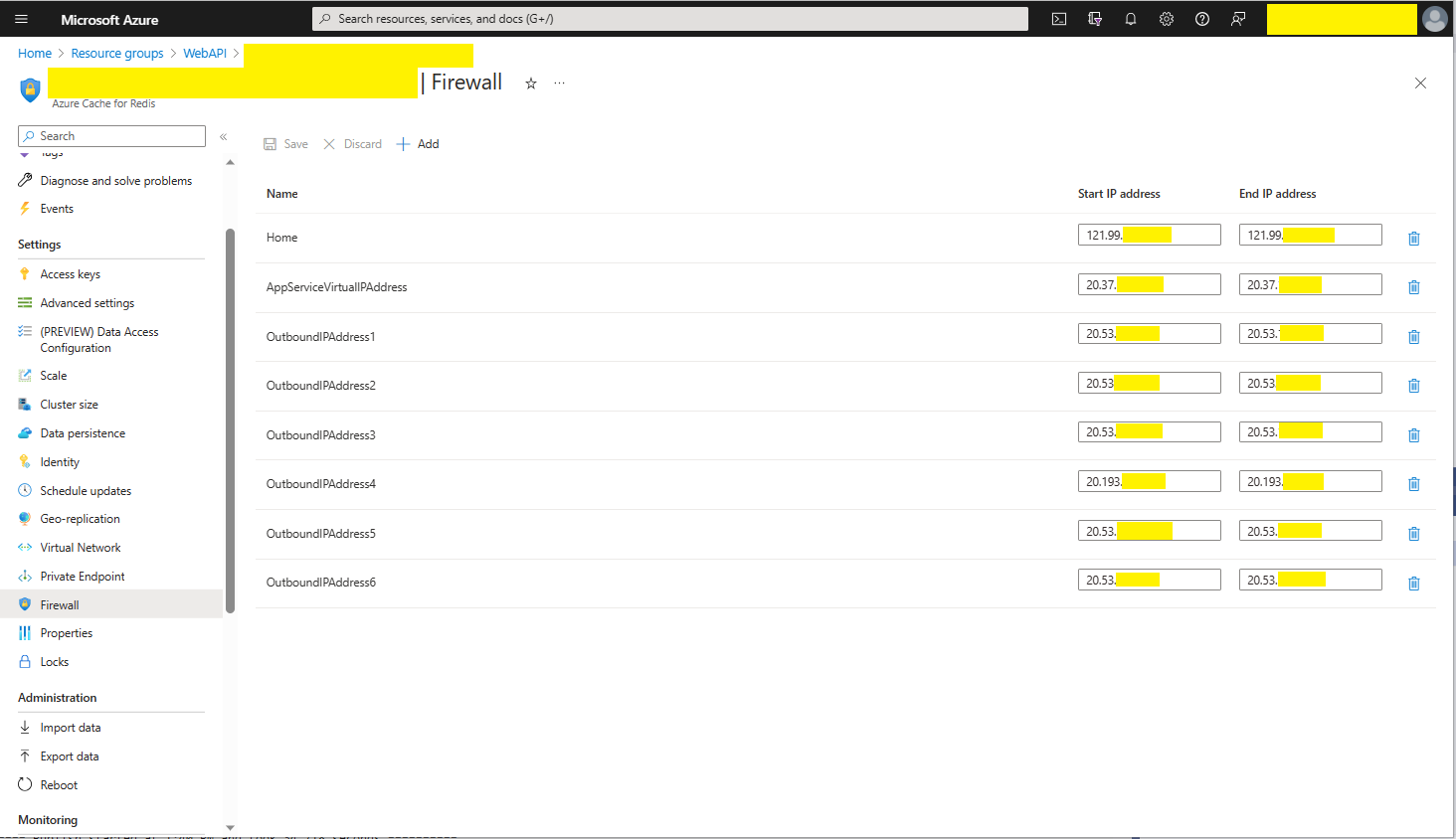
The Azure Cache for Redis firewall configuration for my home office

I then deployed the WebAPI Dapper DistributedCache application to an Azure AppService and it failed (spoiler alert it wasn’t DNS).

Azure AppService hosted StockItems list code failing in web browser

I then fired up Azure Application Insights to look at the logging information.

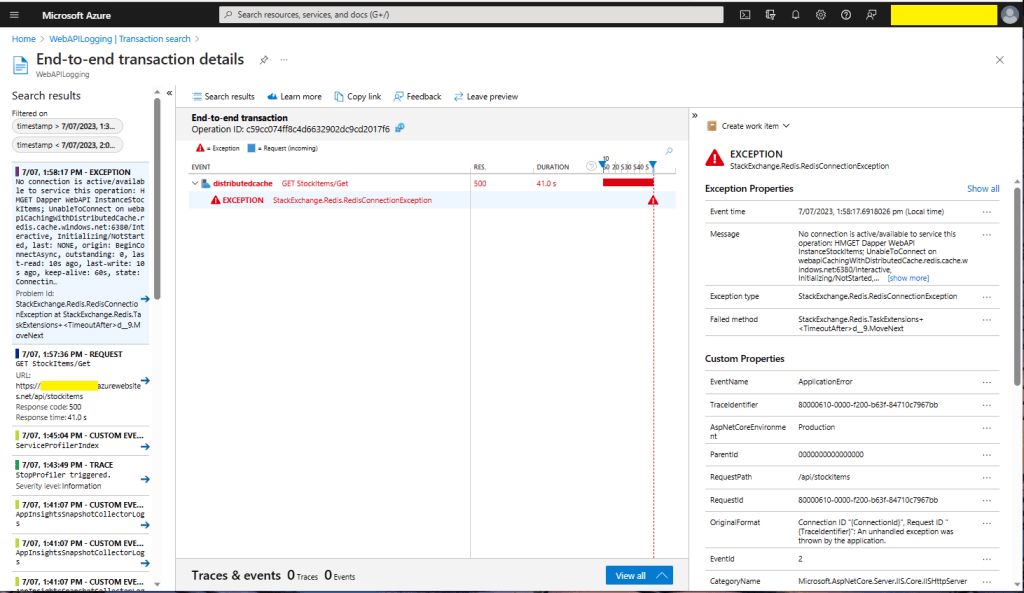
Azure Application Insights diagnostic information

There were many questions and tentative answers on stackoverflow some of them I tried, and which didn’t work in my scenario.

No connection is active/available to service this operation: HMGET Dapper WebAPI InstanceStockItems; 
UnableToConnect on xxxxxxxxxxxxxxxxxxxxxxxxxxx.redis.cache.windows.net:6380/Interactive, 
Initializing/NotStarted, 
last: NONE, 
origin: BeginConnectAsync, 
outstanding: 0, 
last-read: 10s ago, last-write: 10s ago, keep-alive: 60s, 
state: Connecting, 
mgr: 10 of 10 available, 
last-heartbeat: never, global: 10s ago, 
v: 2.2.4.27433, 
mc: 1/1/0, mgr: 10 of 10 available, 
clientName: XXXXXXXXXXXX, <----------------------This was important
IOCP: (Busy=0,Free=1000,Min=1,Max=1000), 
WORKER: (Busy=5,Free=1018,Min=1,Max=1023), 
v: 2.2.4.27433 
UnableToConnect on xxxxxxxxxxxxxxxxxxxxxxxxxxx.cache.windows.net:6380/Interactive, 
Initializing/NotStarted, 
last: NONE, 
origin: BeginConnectAsync, 
outstanding: 0, 
last-read: 10s ago, last-write: 10s ago, keep-alive: 60s, 
state: Connecting, 
mgr: 10 of 10 available, 
last-heartbeat: never, global: 10s ago, 
v: 2.2.4.27433 

I then recreated my configuration from scratch so none of my random changes based on stackoverflow posts would mess my next round of debugging.

Azure AppService Virtual, Outbound and Additional Outbound IP Addresses

The error appeared to be a networking issue, most probably the firewall blocking connections so I added the Azure AppService Virtual IP Address which didn’t work…

Firewall configuration for Azure AppService Virtual IP Address

I then went back and re-read the error message and noticed “clientName: XXXXXXXXXXXX,”. The Azure AppService client name wasn’t the default domain…

Firewall configuration for Azure AppService Virtual and outbound IP Addresses

I then added the Outbound IP addresses to the firewall and the Azure AppService could connect to my Azure Cache for Redis instance.

StockItems list served from the cache running in an AppService

As soon as I realised it wasn’t DNS I should have “stopped counted to ten”, debugged the issue carefully and not immediately gone to stackoverflow.

.NET Core web API + Dapper – LazyCache

I have used Alastair Crabtree’s LazyCache (read-through in-memory cache) on a couple of other projects e.g. The Things Industries V3 Connector (DeviceClient instances) and Swarm Space Azure IoT Connector (DeviceClient Instances and CS-Script binaries).

Adding LazyCache support to an ASP.Net Core WebAPI application is one line of code.

public static void Main(string[] args)
{
    var builder = WebApplication.CreateBuilder(args);

    // Add services to the container.
    builder.Services.AddApplicationInsightsTelemetry();

    // Add services to the container.
    builder.Services.AddTransient<IDapperContext>(s => new DapperContext(builder.Configuration));

    builder.Services.AddControllers();

    // Register IAppCache as a singleton CachingService
    builder.Services.AddLazyCache();

    var app = builder.Build();

    // Configure the HTTP request pipeline.

    app.UseHttpsRedirection();

    app.MapControllers();

    app.Run();
}

One of the applications I work uses a lot of “reference” data which is effectively static e.g. national/regional holidays in countries where they have customers, and data which is updated on a schedule e.g. exchange rates downloaded at a known time every day.

//...
 private readonly TimeSpan StockItemListAbsoluteExpirationTime = new TimeSpan(23, 59, 59);
//....

private async Task<IEnumerable<Model.StockItemListDtoV1>> GetStockItemsAsync()
{
    return await dbConnection.QueryWithRetryAsync<Model.StockItemListDtoV1>(sql: sqlCommandText, commandType: CommandType.Text);
}

[HttpGet]
public async Task<ActionResult<IEnumerable<Model.StockItemListDtoV1>>> Get()
{
    MemoryCacheEntryOptions memoryCacheEntryOptions = new MemoryCacheEntryOptions()
    {
        Priority = CacheItemPriority.NeverRemove,
        AbsoluteExpiration = DateTime.UtcNow.Date.Add(StockItemListAbsoluteExpirationTime)
    };

    return this.Ok(await cache.GetOrAddAsync("StockItems", () => GetStockItemsAsync(), memoryCacheEntryOptions));
}

[HttpDelete()]
public ActionResult Delete()
{
    cache.Remove("StockItems");

    return this.Ok();
}

For the holiday information updates, the dataset could be deleted(“burped”) then refreshed the next time it is referenced or deleted then re-loaded. For exchange rate updates the cache could automatically expire the dataset shortly after the scheduled download.

When I deployed my demo application to an Azure AppService the requests (using the composer tab of Telerik Fiddler) took longer than when the application was running on my development box which was unexpected. I think this was because the JavaScript Object Notation(JSON) response payload was larger than the AzureSQL Tabular Data Stream(TDS) payload.

The LazyCache source code hasn’t been updated for quite a while (but it is quite stable and works well) and moving to other libraries has been recommended in the wiki.