Ask Sensors with MQTTnet

After a 6 month pause I’m back working on my Message Queue Telemetry Transport(MQTT) LoRa gateway.

As I’m testing my Message Queue Telemetry Transport(MQTT) LoRa gateway I’m building a proof of concept(PoC) .Net core console application for each IoT platform I would like to support.

This PoC was to confirm that I could connect to the Ask Sensors MQTT API then format topics and payloads correctly.
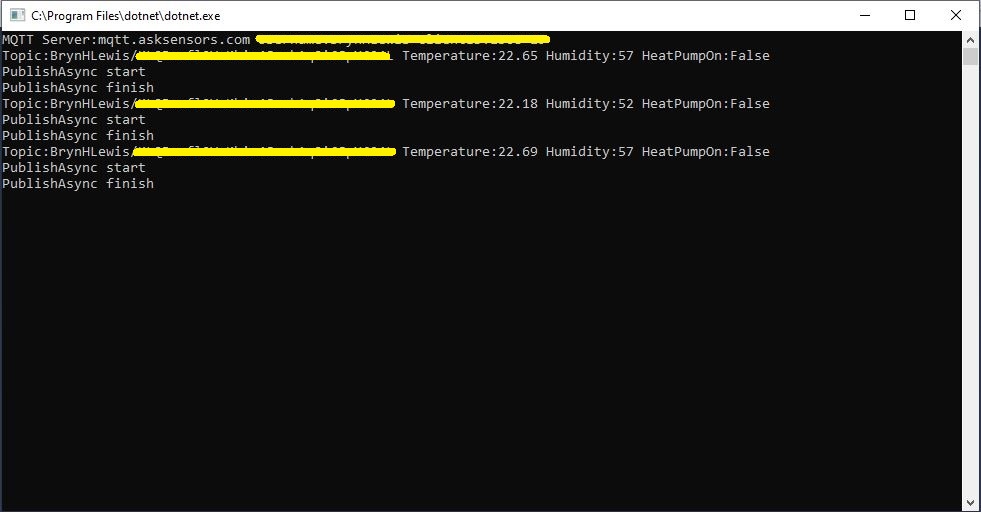
Console test application

The MQTT broker, username, password, and client ID are command line options.

class Program
{
	private static IMqttClient mqttClient = null;
	private static IMqttClientOptions mqttOptions = null;
	private static string server;
	private static string username;
	private static string apiKey;
	private static string clientID;

	static void Main(string[] args)
	{
		MqttFactory factory = new MqttFactory();
		mqttClient = factory.CreateMqttClient();
		bool heatPumpOn = false;

		if (args.Length != 4)
		{
			Console.WriteLine("[MQTT Server] [UserName] [APIKey] [ClientID]");
			Console.WriteLine("Press <enter> to exit");
			Console.ReadLine();
			return;
		}

		server = args[0];
		username = args[1];
		apiKey = args[2];
		clientID = args[3];

		Console.WriteLine($"MQTT Server:{server} Username:{username} ClientID:{clientID}");

		mqttOptions = new MqttClientOptionsBuilder()
			.WithTcpServer(server)
			.WithCredentials(username, "")
			.WithClientId(clientID)
			//.WithTls() // This is a bit of a worry
			.Build();

		mqttClient.ApplicationMessageReceived += MqttClient_ApplicationMessageReceived;
		mqttClient.Disconnected += MqttClient_Disconnected;
		mqttClient.ConnectAsync(mqttOptions).Wait();

		// AskSensors formatted client state update topic
		string stateTopic = $"{username}/{apiKey}";

		while (true)
		{
			string payloadText;
			double temperature = 22.0 + (DateTime.UtcNow.Millisecond / 1000.0);
			double humidity = 50 + (DateTime.UtcNow.Millisecond / 100.0);
			double speed = 10 + (DateTime.UtcNow.Millisecond / 100.0);
			Console.WriteLine($"Topic:{stateTopic} Temperature:{temperature:0.00} Humidity:{humidity:0} HeatPumpOn:{heatPumpOn}");

			// First JSON attempt didn't work
			payloadText = @"{""Humidity"":55}";

            // Second attempt worked
            payloadText = $"module1=22";

            // Third attempt with "real" values injected
            payloadText = $"module1={temperature}&m2={humidity}";

            var message = new MqttApplicationMessageBuilder()
					.WithTopic(stateTopic)
					.WithPayload(payloadText)
					.WithQualityOfServiceLevel(global::MQTTnet.Protocol.MqttQualityOfServiceLevel.AtLeastOnce)
				   .WithExactlyOnceQoS()
				   //.WithAtLeastOnceQoS()
				   //.WithRetainFlag()
				   .Build();

				Console.WriteLine("PublishAsync start");
				mqttClient.PublishAsync(message).Wait();
				Console.WriteLine("PublishAsync finish");

				Thread.Sleep(30100);
			}
		}

	private static async void MqttClient_Disconnected(object sender, MqttClientDisconnectedEventArgs e)
	{
		Debug.WriteLine("Disconnected");
		await Task.Delay(TimeSpan.FromSeconds(5));

		try
		{
			await mqttClient.ConnectAsync(mqttOptions);
		}
		catch (Exception ex)
		{
			Debug.WriteLine("Reconnect failed {0}", ex.Message);
		}
	}

The Ask Sensors screen designer has 8 different types of Graph (line, bar, scatter, gauge, table, binary. digital, map)
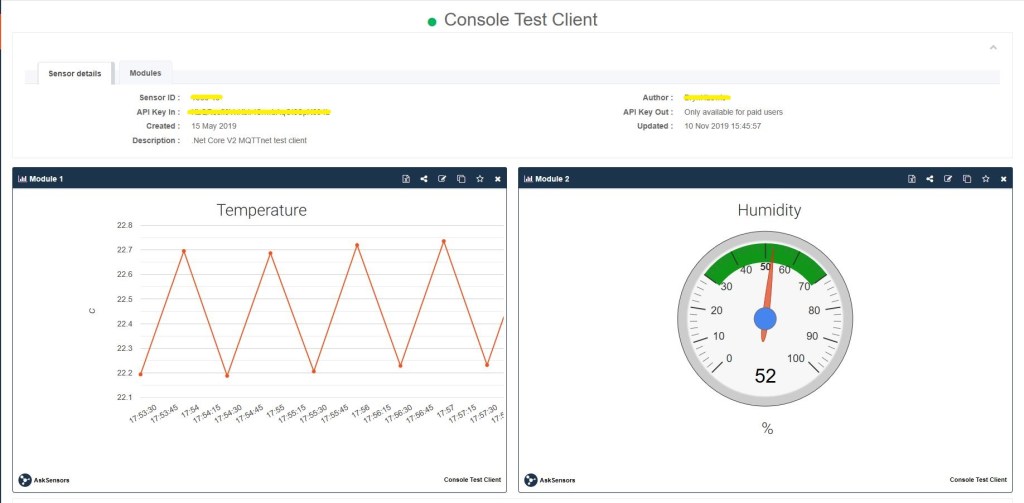
Ask sensors dashboard configuration was fairly simple, though sequential numbering of inputs (modules) might require some mapping code.

Overall the initial configuration went smoothly after I figured out the payload format (not JSON), though the functionality (of a free subscription) did appear to be quite limited.

Since I first started building my MQTT gateway there have been several breaking updates to the MQTTNet API which so I will have to refresh all the applications in my solution.
Ubidots with MQTTnet

As I’m testing my Message Queue Telemetry Transport(MQTT) LoRa gateway I’m building a proof of concept(PoC) .Net core console application for each IoT platform I would like to support.

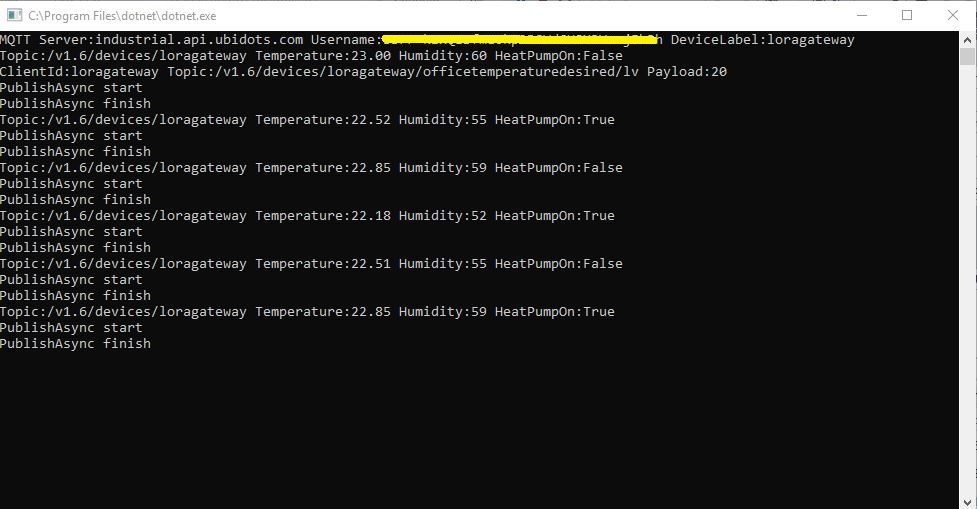
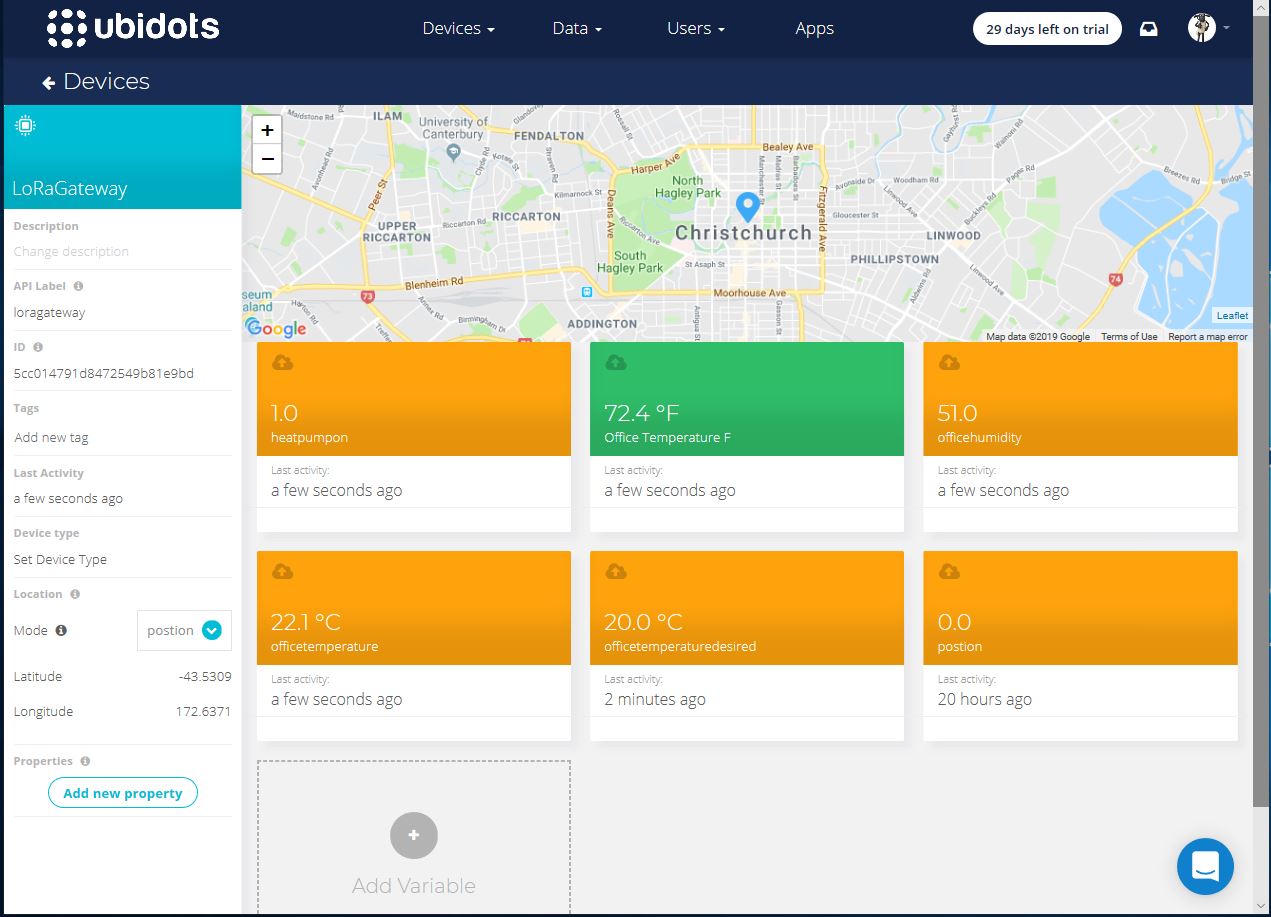
This PoC was to confirm that I could connect to the ubidots MQTT API then format the topics and payloads correctly. The ubidots screen designer has “variables” (both actual sensors & synthetic calculated ones) which present as topics so I built a client which could subscribe to these.

.Net Core V2 MQTTnet client

The MQTT broker, username, password, and client ID are command line options.

class Program
{
	private static IMqttClient mqttClient = null;
	private static IMqttClientOptions mqttOptions = null;
	private static string server;
	private static string username;
	private static string deviceLabel;

	static void Main(string[] args)
	{
		MqttFactory factory = new MqttFactory();
		mqttClient = factory.CreateMqttClient();
		bool heatPumpOn = false;

		if (args.Length != 3)
		{
			Console.WriteLine("[MQTT Server] [UserName] [Password] [ClientID]");
			Console.WriteLine("Press <enter> to exit");
			Console.ReadLine();
			return;
		}

		server = args[0];
		username = args[1];
		deviceLabel = args[2];

		Console.WriteLine($"MQTT Server:{server} Username:{username} DeviceLabel:{deviceLabel}");

		mqttOptions = new MqttClientOptionsBuilder()
			.WithTcpServer(server)
			.WithCredentials(username, "NotVerySecret")
			.WithClientId(deviceLabel)
			.WithTls()
			.Build();

		mqttClient.ApplicationMessageReceived += MqttClient_ApplicationMessageReceived;
		mqttClient.Disconnected += MqttClient_Disconnected;
		mqttClient.ConnectAsync(mqttOptions).Wait();

		// Setup a subscription for commands sent to client
		string commandTopic = $"/v1.6/devices/{deviceLabel}/officetemperaturedesired/lv";
		mqttClient.SubscribeAsync(commandTopic).GetAwaiter().GetResult();

		//// Ubidots formatted client state update topic
		string stateTopic = $"/v1.6/devices/{deviceLabel}";

		while (true)
		{
			string payloadText;
			double temperature = 22.0 + (DateTime.UtcNow.Millisecond / 1000.0);
			double humidity = 50 + (DateTime.UtcNow.Millisecond / 100.0);
			double speed = 10 + (DateTime.UtcNow.Millisecond / 100.0);
			Console.WriteLine($"Topic:{stateTopic} Temperature:{temperature:0.00} Humidity:{humidity:0} HeatPumpOn:{heatPumpOn}");

			// First attempt which worked
			//payloadText = @"{""OfficeTemperature"":22.5}";

			// Second attempt to work out data format with "real" values injected
			//payloadText = @"{ ""officetemperature"":"+ temperature.ToString("F2") + @",""officehumidity"":" + humidity.ToString("F0") + @"}";

			// Third attempt with Jobject which sort of worked but number serialisation was sub optimal
			JObject payloadJObject = new JObject(); 
			payloadJObject.Add("OfficeTemperature", temperature.ToString("F2"));
			payloadJObject.Add("OfficeHumidity", humidity.ToString("F0"));

			if (heatPumpOn)
			{
				payloadJObject.Add("HeatPumpOn", 1);
			}
			else
			{
				payloadJObject.Add("HeatPumpOn", 0);
			}
			heatPumpOn = !heatPumpOn;
			payloadText = JsonConvert.SerializeObject(payloadJObject);

			/*
			// Forth attempt with JOBject, timestamps and gps 
			JObject payloadJObject = new JObject();
			JObject context = new JObject();
			context.Add("lat", "-43.5309325");
			context.Add("lng", "172.637119");// Christchurch Cathederal
			//context.Add("timestamp", ((DateTimeOffset)(DateTime.UtcNow)).ToUnixTimeSeconds()); // This field is optional and can be commented out
			JObject position = new JObject();
			position.Add("context", context);
			position.Add("value", "0");
			payloadJObject.Add("postion", position);
			payloadText = JsonConvert.SerializeObject(payloadJObject);
			*/

			var message = new MqttApplicationMessageBuilder()
				.WithTopic(stateTopic)
				.WithPayload(payloadText)
				.WithQualityOfServiceLevel(global::MQTTnet.Protocol.MqttQualityOfServiceLevel.AtLeastOnce)
			//.WithExactlyOnceQoS()// With ubidots this caused the publish to hang
			.WithAtLeastOnceQoS()
			.WithRetainFlag() 
			.Build();

			Console.WriteLine("PublishAsync start");
			mqttClient.PublishAsync(message).Wait();
			Console.WriteLine("PublishAsync finish");

			Thread.Sleep(30100);
		}
	}

	private static void MqttClient_ApplicationMessageReceived(object sender, MqttApplicationMessageReceivedEventArgs e)
	{
		Console.WriteLine($"ClientId:{e.ClientId} Topic:{e.ApplicationMessage.Topic} Payload:{e.ApplicationMessage.ConvertPayloadToString()}");
	}

	private static async void MqttClient_Disconnected(object sender, MqttClientDisconnectedEventArgs e)
	{
		Debug.WriteLine("Disconnected");
		await Task.Delay(TimeSpan.FromSeconds(5));

		try
		{
			await mqttClient.ConnectAsync(mqttOptions);
		}
		catch (Exception ex)
		{
			Debug.WriteLine("Reconnect failed {0}", ex.Message);
		}
	}
}

For this PoC I used the MQTTnet package which is available via NuGet. It appeared to be reasonably well supported and has had recent updates.

Variable configuration with device location map

Overall the initial configuration went smoothly, I found the dragging of blocks onto the dashboard and configuring them worked as expected.

The configuration of a “synthetic” variable (converting a temperature to Fahrenheit for readers from the Unites States of America, Myanmar & Liberia ) took a couple of goes to get right.

I may have missed something (April 2019) but the lack of boolean datatype variables was a bit odd.

Synthetic (calculated) variable configuration

I put a slider control on my test dashboard, associated it with a variable and my client reliably received messages when the slider was moved.

Dashboard with slider for desired temperature

Overall the Ubidots experience was pretty good and I’m going to spend some more time working with the device, data, users configurations to see how well it works for a “real-world” project.

I found (April 2019) that to get MQTTS going I had to install a Ubidots provided certificate

MQTT with TLS guidance and certificate download link

When my .Net Core application didn’t work I tried one my MQTT debugging tools and they didn’t work either with the Ubitdots MQTT brokers. The Ubidots forum people were quite helpful, but making it not necessary to install a certificate or making it really obvious in the documentation that this was required would be a good thing.

Losant IoT with MQTTnet

As I’m testing my Message Queue Telemetry Transport(MQTT) LoRa gateway I’m building a proof of concept(PoC) .Net core console application for each IoT platform I would like to support.

This PoC was to confirm that I could connect to the Losant MQTT API then format the topics and payloads correctly. The Losant screen designer has “Blocks” which generate commands for devices so I extended the test client to see how well this worked.

The MQTT broker, username, password, and client ID are command line options.

class Program
{
	private static IMqttClient mqttClient = null;
	private static IMqttClientOptions mqttOptions = null;
	private static string server;
	private static string username;
	private static string password;
	private static string clientId;

	static void Main(string[] args)
	{
		MqttFactory factory = new MqttFactory();
		mqttClient = factory.CreateMqttClient();
		bool heatPumpOn = false;

		if (args.Length != 4)
		{
			Console.WriteLine("[MQTT Server] [UserName] [Password] [ClientID]");
			Console.WriteLine("Press <enter> to exit");
			Console.ReadLine();
		}

		server = args[0];
		username = args[1];
		password = args[2];
		clientId = args[3];

		Console.WriteLine($"MQTT Server:{server} Username:{username} ClientID:{clientId}");

		mqttOptions = new MqttClientOptionsBuilder()
			.WithTcpServer(server)
			.WithCredentials(username, password)
			.WithClientId(clientId)
			.WithTls()
			.Build();

		mqttClient.ApplicationMessageReceived += MqttClient_ApplicationMessageReceived;
		mqttClient.Disconnected += MqttClient_Disconnected;
		mqttClient.ConnectAsync(mqttOptions).Wait();

		// Setup a subscription for commands sent to client
		string commandTopic = $"losant/{clientId}/command";
		mqttClient.SubscribeAsync(commandTopic);

		// Losant formatted client state update topic
		string stateTopic = $"losant/{clientId}/state";

		while (true)
		{
			string payloadText;
			double temperature = 22.0 + +(DateTime.UtcNow.Millisecond / 1000.0);
			double humidity = 50 + +(DateTime.UtcNow.Millisecond / 1000.0);
			Console.WriteLine($"Topic:{stateTopic} Temperature:{temperature} Humidity:{humidity} HeatPumpOn:{heatPumpOn}");

			// First attempt which worked
			//payloadText = @"{""data"":{ ""OfficeTemperature"":22.5}}";

			// Second attempt to work out data format with "real" values injected
			payloadText = @"{""data"":{ ""OfficeTemperature"":"+ temperature.ToString("f1") + @",""OfficeHumidity"":" + humidity.ToString("F0") + @"}}";

			// Third attempt with Jobject which sort of worked but number serialisation is sub optimal
			//JObject payloadJObject = new JObject(); 
			//payloadJObject.Add("time", DateTime.UtcNow.ToString("u")); // This field is optional and can be commented out

			//JObject data = new JObject();
			//data.Add("OfficeTemperature", temperature.ToString("F1"));
			//data.Add("OfficeHumidity", humidity.ToString("F0"));

			//data.Add("HeatPumpOn", heatPumpOn);
			//heatPumpOn = !heatPumpOn;
			//payloadJObject.Add( "data", data);

			//payloadText = JsonConvert.SerializeObject(payloadJObject);

			// Forth attempt with JOBject and gps info https://docs.losant.com/devices/state/
			//JObject payloadJObject = new JObject(); 
			//payloadJObject.Add("time", DateTime.UtcNow.ToString("u")); // This field is optional and can be commented out
			//JObject data = new JObject();
			//data.Add("GPS", "-43.5309325, 172.637119"); // Christchurch Cathederal
			//payloadJObject.Add("data", data);
			//payloadText = JsonConvert.SerializeObject(payloadJObject);

			var message = new MqttApplicationMessageBuilder()
				.WithTopic(stateTopic)
				.WithPayload(payloadText)
				.WithQualityOfServiceLevel(global::MQTTnet.Protocol.MqttQualityOfServiceLevel.AtLeastOnce)
				//.WithExactlyOnceQoS() With Losant this caused the publish to hang
				.WithAtLeastOnceQoS()
				//.WithRetainFlag() Losant doesn't allow this flag
				.Build();

			Console.WriteLine("PublishAsync start");
				mqttClient.PublishAsync(message).Wait();
			Console.WriteLine("PublishAsync finish");

			Thread.Sleep(30100);
		}
	}

	private static void MqttClient_ApplicationMessageReceived(object sender, MqttApplicationMessageReceivedEventArgs e)
	{
		Console.WriteLine($"ClientId:{e.ClientId} Topic:{e.ApplicationMessage.Topic} Payload:{e.ApplicationMessage.ConvertPayloadToString()}");
	}

	private static async void MqttClient_Disconnected(object sender, MqttClientDisconnectedEventArgs e)
	{
		Debug.WriteLine("Disconnected");
		await Task.Delay(TimeSpan.FromSeconds(5));

		try
		{
			await mqttClient.ConnectAsync(mqttOptions);
		}
		catch (Exception ex)
		{
			Debug.WriteLine("Reconnect failed {0}", ex.Message);
		}
	}
}

For this PoC I used the MQTTnet package which is available via NuGet. It appeared to be reasonably well supported and has had recent updates.

Overall the initial configuration went really smoothly, I found the dragging of blocks onto the dashboard and configuring them worked well.

Losant device configuration screen with trace logging

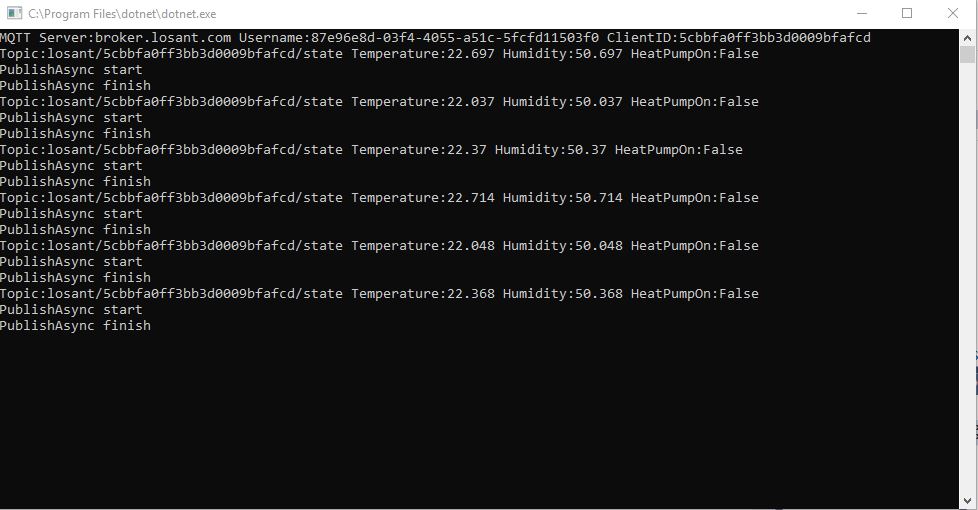
Losant .Net Core V2 client uploading simulated sensor readings

The device log made bringing up a new device easy and the error messages displayed when I had badly formatted payloads were helpful (unlike many other packages I have used).

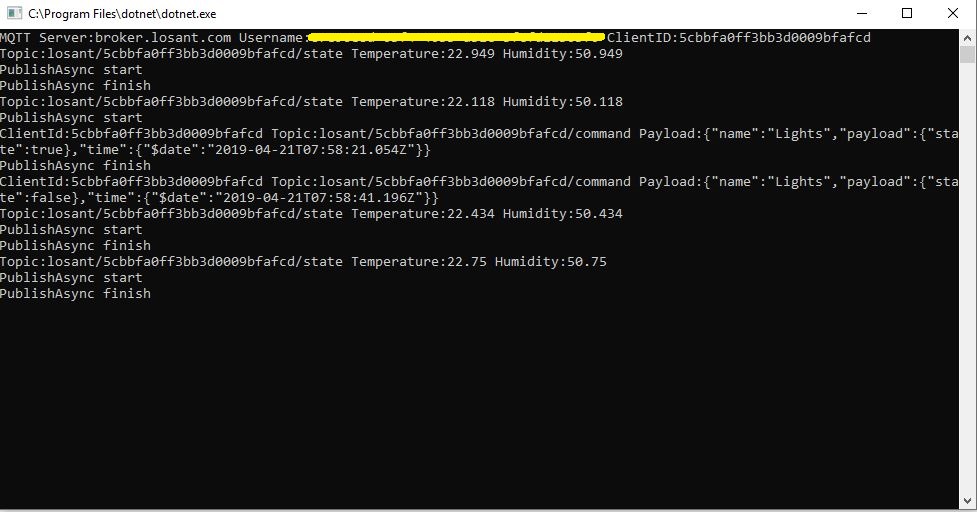
I put a button block on the overview screen, associated it with a command publication and my client reliably received messages when the button was pressed

Losant .Net Core V2 client processing command

Overall the Losant experience was pretty good and I’m going to spend some more time working with the application designer, devices recipes, webhooks, integrations and workflows etc. to see how well it works for a “real-world” project.

Adafruit MQTT with MQTTnet

Before building the Message Queue Telemetry Transport(MQTT) gateway I built a proof of concept(PoC) .Net core console application. This was to confirm that I could connect to the Adafruit.IO MQTT broker and format the topic (with and without group name) and payload correctly. The Adafruit IO MQTT documentation suggests an approach for naming topics which allows a bit more structure for feed names than the REST API.

The MQTT broker, username, API key, client ID, optional group name (to keep MQTT aligned with REST API terminology) and feed name are command line options.

class Program
{
	private static IMqttClient mqttClient = null;
	private static IMqttClientOptions mqttOptions = null;
	private static string server;
	private static string username;
	private static string password;
	private static string clientId;
	private static string groupname;
	private static string feedname;

	static void Main(string[] args)
	{
		MqttFactory factory = new MqttFactory();
		mqttClient = factory.CreateMqttClient();

		if ((args.Length != 5) && (args.Length != 6))
		{
			Console.WriteLine("[MQTT Server] [UserName] [Password] [ClientID] [GroupName] [FeedName]");
			Console.WriteLine("[MQTT Server] [UserName] [Password] [ClientID] [FeedName]");
			Console.WriteLine("Press <enter> to exit");
			Console.ReadLine();
			return;
		}

		server = args[0];
		username = args[1];
		password = args[2];
		clientId = args[3];
		if (args.Length == 5)
		{
			feedname = args[4].ToLower();
			Console.WriteLine($"MQTT Server:{server} Username:{username} ClientID:{clientId} Feedname:{feedname}");
		}

		if (args.Length == 6)
		{
			groupname = args[4].ToLower();
			feedname = args[5].ToLower();
			Console.WriteLine($"MQTT Server:{server} Username:{username} ClientID:{clientId} Groupname:{groupname} Feedname:{feedname}");
		}

		mqttOptions = new MqttClientOptionsBuilder()
			.WithTcpServer(server)
			.WithCredentials(username, password)
			.WithClientId(clientId)
			.WithTls()
			.Build();

		mqttClient.Disconnected += MqttClient_Disconnected;
		mqttClient.ConnectAsync(mqttOptions).Wait();

		// Adafruit.IO format for topics which are called feeds
		string topic = string.Empty;

		if (args.Length == 5)
		{
			topic = $"{args[1]}/feeds/{feedname}";
		}

		if (args.Length == 6)
		{
			topic = $"{args[1]}/feeds/{groupname}.{feedname}";
		}

		while (true)
		{
			string value = "22." + DateTime.UtcNow.Millisecond.ToString();
			Console.WriteLine($"Topic:{topic} Value:{value}");

			var message = new MqttApplicationMessageBuilder()
				.WithTopic(topic)
				.WithPayload(value)
				.WithQualityOfServiceLevel(MQTTnet.Protocol.MqttQualityOfServiceLevel.AtLeastOnce)
				.WithRetainFlag()
				.Build();

			Console.WriteLine("PublishAsync start");
			mqttClient.PublishAsync(message).Wait();
			Console.WriteLine("PublishAsync finish");

			Thread.Sleep(30100);
		}
	}

	private static async void MqttClient_Disconnected(object sender, MqttClientDisconnectedEventArgs e)
	{
		Debug.WriteLine("Disconnected");
		await Task.Delay(TimeSpan.FromSeconds(5));

		try
		{
			await mqttClient.ConnectAsync(mqttOptions);
		}
		catch (Exception ex)
		{
			Debug.WriteLine("Reconnect failed {0}", ex.Message);
		}
	}
}

For this PoC I used the MQTTnet package which is available via NuGet. It appeared to be reasonably well supported and has had recent updates.

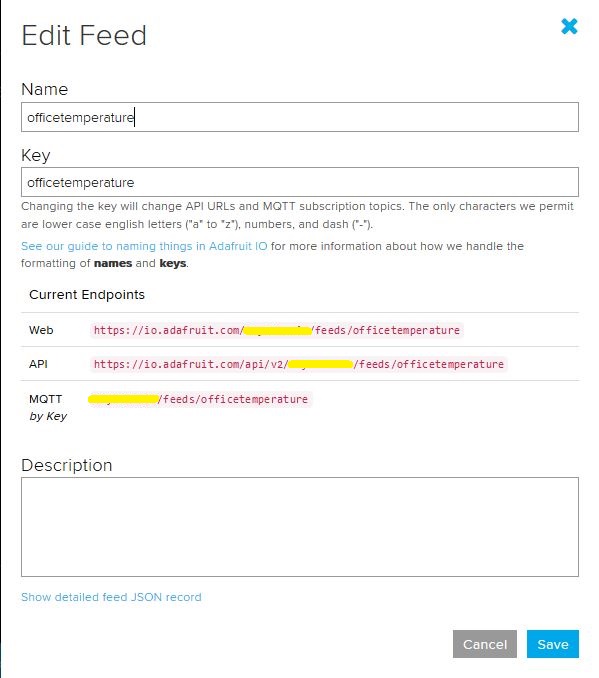
Overall the process went pretty well, I found that looking at the topic names in the Adafruit IO feed setup screens helped a lot. A couple of times I was tripped up by mixed case in my text fields.

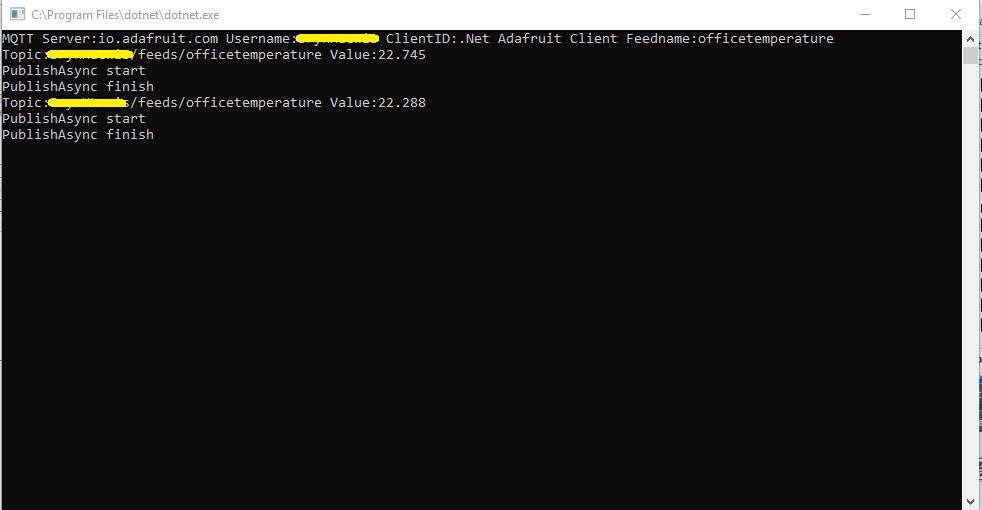
.Net Core 2 client with group name
Adafruit IO feed setup with group name
Console client without group name
Adafruit IO feed setup without group name

I am also going to try building some clients with the Eclipse Paho project .net client so I can compare a couple of different libraries.

SparkFun Pro RF – LoRa, 915MHz Payload Addressing Client

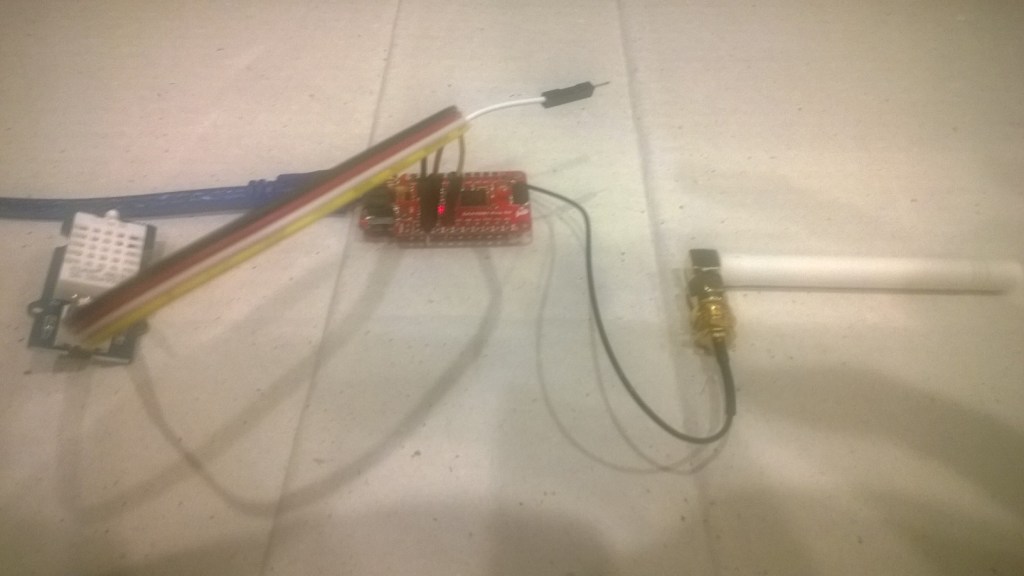
Last week a package arrived from NiceGear with a SparkFun Pro RF – LoRa, 915MHz and some cables. With this gear I have built yet another client for my Azure IoT Hub and AdaFruit.IOLoRa Field Gateways.

Now that the device is running well, I’ll look at reducing power consumption and splitting the the payload packing code into a library. Also noticed an extra “,” on the end of a message so need to come up with a better way of doing the payload packing.

/*
  Copyright ® 2018 December devMobile Software, All Rights Reserved

  THIS CODE AND INFORMATION IS PROVIDED "AS IS" WITHOUT WARRANTY OF ANY
  KIND, EITHER EXPRESSED OR IMPLIED, INCLUDING BUT NOT LIMITED TO THE
  IMPLIED WARRANTIES OF MERCHANTABILITY AND/OR FITNESS FOR A PARTICULAR
  PURPOSE.

  You can do what you want with this code, acknowledgment would be nice.

  http://www.devmobile.co.nz

*/
#include <stdlib.h>

#include <LoRa.h>
#include <avr/dtostrf.h>
#include "DHT.h"

#define DEBUG
//#define DEBUG_TELEMETRY
//#define DEBUG_LORA

// LoRa field gateway configuration (these settings must match your field gateway)
const char FieldGatewayAddress[] = {"LoRaIoT1"};
const char DeviceAddress[] = {"SparkFunX1"};
const float FieldGatewayFrequency =  915000000.0;
const byte FieldGatewaySyncWord = 0x12 ;

// Payload configuration
const int InterruptPin = 12;
const int ChipSelectPin = 6;

// LoRa radio payload configuration
const byte SensorIdValueSeperator = ' ' ;
const byte SensorReadingSeperator = ',' ;
const int LoopSleepDelaySeconds = 10 ;

const byte PayloadSizeMaximum = 64 ;
byte payload[PayloadSizeMaximum];
byte payloadLength = 0 ;

#define DHTPIN 4     // what digital pin we're connected to

// Uncomment whatever type you're using!
//#define DHTTYPE DHT11   // DHT 11
#define DHTTYPE DHT22   // DHT 22  (AM2302), AM2321
//#define DHTTYPE DHT21   // DHT 21 (AM2301)

DHT dht(DHTPIN, DHTTYPE);


void setup()
{
  SerialUSB.begin(9600);
#ifdef DEBUG
  while (!SerialUSB);
#endif
  SerialUSB.println("Setup called");

  SerialUSB.println("LoRa setup start");
  
  // override the default chip select and reset pins
  LoRa.setPins(InterruptPin, ChipSelectPin); 
  if (!LoRa.begin(FieldGatewayFrequency))
  {
    SerialUSB.println("LoRa begin failed");
    while (true); // Drop into endless loop requiring restart
  }

  // Need to do this so field gateways pays attention to messsages from this device
  LoRa.enableCrc();
  LoRa.setSyncWord(FieldGatewaySyncWord);

#ifdef DEBUG_LORA
  LoRa.dumpRegisters(SerialUSB);
#endif
  SerialUSB.println("LoRa Setup done.");

  // Configure the Seeedstudio TH02 temperature & humidity sensor
  SerialUSB.println("DHT setup start");
  dht.begin();
  delay(100);
  SerialUSB.println("DHT setup done");

  PayloadHeader((byte*)FieldGatewayAddress,strlen(FieldGatewayAddress), (byte*)DeviceAddress, strlen(DeviceAddress));

  SerialUSB.println("Setup done");
  SerialUSB.println();
}


void loop()
{
  float temperature = 17.2;
  float humidity = 75.0;

  SerialUSB.println("Loop called");

  PayloadReset();

  // Read the temperature & humidity & battery voltage values then display nicely
  temperature = dht.readTemperature();
  humidity = dht.readHumidity();
  if (isnan(humidity) || isnan(temperature)) 
  {
    SerialUSB.println("Failed to read from DHT sensor!");
    return;
  } 
   
  SerialUSB.print("T:");
  SerialUSB.print( temperature, 1 ) ;
  SerialUSB.println( "C " ) ;
  PayloadAdd( "T", temperature, 1);

  SerialUSB.print("H:");
  SerialUSB.print( humidity, 0 ) ;
  SerialUSB.println( "% " ) ;
  PayloadAdd( "H", humidity, 0) ;

#ifdef DEBUG_TELEMETRY
  SerialUSB.println();
  SerialUSB.print( "RFM9X/SX127X Payload length:");
  SerialUSB.print( payloadLength );
  SerialUSB.println( " bytes" );
#endif

  LoRa.beginPacket();
  LoRa.write( payload, payloadLength );
  LoRa.endPacket();

  SerialUSB.println("Loop done");
  SerialUSB.println();
  delay(LoopSleepDelaySeconds * 1000l);
}


void PayloadHeader( byte *to, byte toAddressLength, byte *from, byte fromAddressLength)
{
  byte addressesLength = toAddressLength + fromAddressLength ;

#ifdef DEBUG_TELEMETRY
  SerialUSB.println("PayloadHeader- ");
  SerialUSB.print( "To Address len:");
  SerialUSB.print( toAddressLength );
  SerialUSB.print( " From Address len:");
  SerialUSB.print( fromAddressLength );
  SerialUSB.print( " Addresses length:");
  SerialUSB.print( addressesLength );
  SerialUSB.println( );
#endif

  payloadLength = 0 ;

  // prepare the payload header with "To" Address length (top nibble) and "From" address length (bottom nibble)
  payload[payloadLength] = (toAddressLength << 4) | fromAddressLength ;
  payloadLength += 1;

  // Copy the "To" address into payload
  memcpy(&payload[payloadLength], to, toAddressLength);
  payloadLength += toAddressLength ;

  // Copy the "From" into payload
  memcpy(&payload[payloadLength], from, fromAddressLength);
  payloadLength += fromAddressLength ;
}


void PayloadAdd( char *sensorId, float value, byte decimalPlaces)
{
  byte sensorIdLength = strlen( sensorId ) ;

#ifdef DEBUG_TELEMETRY
  SerialUSB.println("PayloadAdd-float ");
  SerialUSB.print( "SensorId:");
  SerialUSB.print( sensorId );
  SerialUSB.print( " sensorIdLen:");
  SerialUSB.print( sensorIdLength );
  SerialUSB.print( " Value:");
  SerialUSB.print( value, decimalPlaces );
  SerialUSB.print( " payloadLength:");
  SerialUSB.print( payloadLength);
#endif

  memcpy( &payload[payloadLength], sensorId,  sensorIdLength) ;
  payloadLength += sensorIdLength ;
  payload[ payloadLength] = SensorIdValueSeperator;
  payloadLength += 1 ;
  payloadLength += strlen( dtostrf(value, -1, decimalPlaces, (char *)&payload[payloadLength]));
  payload[ payloadLength] = SensorReadingSeperator;
  payloadLength += 1 ;
  
#ifdef DEBUG_TELEMETRY
  SerialUSB.print( " payloadLength:");
  SerialUSB.print( payloadLength);
  SerialUSB.println( );
#endif
}


void PayloadAdd( char *sensorId, int value )
{
  byte sensorIdLength = strlen( sensorId ) ;

#ifdef DEBUG_TELEMETRY
  SerialUSB.println("PayloadAdd-int ");
  SerialUSB.print( "SensorId:");
  SerialUSB.print( sensorId );
  SerialUSB.print( " sensorIdLen:");
  SerialUSB.print( sensorIdLength );
  SerialUSB.print( " Value:");
  SerialUSB.print( value );
  SerialUSB.print( " payloadLength:");
  SerialUSB.print( payloadLength);
#endif  

  memcpy( &payload[payloadLength], sensorId,  sensorIdLength) ;
  payloadLength += sensorIdLength ;
  payload[ payloadLength] = SensorIdValueSeperator;
  payloadLength += 1 ;
  payloadLength += strlen( itoa( value,(char *)&payload[payloadLength],10));
  payload[ payloadLength] = SensorReadingSeperator;
  payloadLength += 1 ;
  
#ifdef DEBUG_TELEMETRY
  SerialUSB.print( " payloadLength:");
  SerialUSB.print( payloadLength);
  SerialUSB.println( );
#endif
}


void PayloadAdd( char *sensorId, unsigned int value )
{
  byte sensorIdLength = strlen( sensorId ) ;

#ifdef DEBUG_TELEMETRY
  SerialUSB.println("PayloadAdd-unsigned int ");
  SerialUSB.print( "SensorId:");
  SerialUSB.print( sensorId );
  SerialUSB.print( " sensorIdLen:");
  SerialUSB.print( sensorIdLength );
  SerialUSB.print( " Value:");
  SerialUSB.print( value );
  SerialUSB.print( " payloadLength:");
  SerialUSB.print( payloadLength);
#endif  

  memcpy( &payload[payloadLength], sensorId,  sensorIdLength) ;
  payloadLength += sensorIdLength ;
  payload[ payloadLength] = SensorIdValueSeperator;
  payloadLength += 1 ;
  payloadLength += strlen( utoa( value,(char *)&payload[payloadLength],10));
  payload[ payloadLength] = SensorReadingSeperator;
  payloadLength += 1 ;

#ifdef DEBUG_TELEMETRY
  SerialUSB.print( " payloadLength:");
  SerialUSB.print( payloadLength);
  SerialUSB.println( );
#endif
}


void PayloadReset()
{
  byte fromAddressLength = payload[0] & 0xf ;
  byte toAddressLength = payload[0] >> 4 ;
  byte addressesLength = toAddressLength + fromAddressLength ;

  payloadLength = addressesLength + 1;

#ifdef DEBUG_TELEMETRY
  SerialUSB.println("PayloadReset- ");
  SerialUSB.print( "To Address len:");
  SerialUSB.print( toAddressLength );
  SerialUSB.print( " From Address len:");
  SerialUSB.print( fromAddressLength );
  SerialUSB.print( " Addresses length:");
  SerialUSB.print( addressesLength );
  SerialUSB.println( );
#endif
}
  • SparkFun Pro RF – LoRa, 915MHz USD29.95 NZD49
  • Grove – Temperature & Humidity Sensor Pro (AM2302) USD9.90
  • Seeedstudio 4 pin Male Jumper to Grove 4 pin Conversion Cable USD2.90

Moteino M0 Payload Addressing client

Last week a package arrived from LowPowerLab with some Moteino0 devices and accessories . With this gear I have built yet another client for my Azure IoT Hub and AdaFruit.IOLoRa Field Gateways.

It took me a while longer that usual to get the Motenio working as the sketch setup call appeared to hang in DEBUG builds.

After staring at the code for a while I noticed that I hadn’t changed LoRa.dumpRegisters method parameter from Serial to SerialUSB. A couple of hours lost due to a dumb typo by me.

Now that the device is running well, I’ll look at reducing power consumption and splitting the the payload packing code into a library.

/*
  Copyright ® 2018 November devMobile Software, All Rights Reserved

  THIS CODE AND INFORMATION IS PROVIDED "AS IS" WITHOUT WARRANTY OF ANY
  KIND, EITHER EXPRESSED OR IMPLIED, INCLUDING BUT NOT LIMITED TO THE
  IMPLIED WARRANTIES OF MERCHANTABILITY AND/OR FITNESS FOR A PARTICULAR
  PURPOSE.

  You can do what you want with this code, acknowledgment would be nice.

  http://www.devmobile.co.nz

*/
#include <stdlib.h>
#include <avr/dtostrf.h>
#include <LoRa.h>
#include <TH02_dev.h>

//#define DEBUG
//#define DEBUG_TELEMETRY
//#define DEBUG_LORA

// LoRa field gateway configuration (these settings must match your field gateway)
const char FieldGatewayAddress[] = {"LoRaIoT1"};
const char DeviceAddress[] = {"Moteino01"};
const float FieldGatewayFrequency =  915000000.0;
const byte FieldGatewaySyncWord = 0x12 ;

// Payload configuration
const int ChipSelectPin = A2;
const int InterruptPin = 9;
const int ResetPin = -1;

// LoRa radio payload configuration
const byte SensorIdValueSeperator = ' ' ;
const byte SensorReadingSeperator = ',' ;
const int LoopSleepDelaySeconds = 10 ;

const byte PayloadSizeMaximum = 64 ;
byte payload[PayloadSizeMaximum];
byte payloadLength = 0 ;


void setup()
{
  SerialUSB.begin(9600);
#ifdef DEBUG
  while (!SerialUSB);
#endif
  SerialUSB.println("Setup called");

  SerialUSB.println("LoRa setup start");
  
  // override the default chip select and reset pins
  LoRa.setPins( ChipSelectPin, ResetPin, InterruptPin ); 
  if (!LoRa.begin(FieldGatewayFrequency))
  {
    SerialUSB.println("LoRa begin failed");
    while (true); // Drop into endless loop requiring restart
  }

  // Need to do this so field gateways pays attention to messsages from this device
  LoRa.enableCrc();
  LoRa.setSyncWord(FieldGatewaySyncWord);

#ifdef DEBUG_LORA
  LoRa.dumpRegisters(USBSerial);
#endif
  SerialUSB.println("LoRa Setup done.");

  // Configure the Seeedstudio TH02 temperature & humidity sensor
  SerialUSB.println("TH02 setup start");
  TH02.begin();
  delay(100);
  SerialUSB.println("TH02 setup done");

  PayloadHeader((byte*)FieldGatewayAddress,strlen(FieldGatewayAddress), (byte*)DeviceAddress, strlen(DeviceAddress));

  SerialUSB.println("Setup done");
  SerialUSB.println();
}


void loop()
{
  float temperature ;
  float humidity ;

  SerialUSB.println("Loop called");

  PayloadReset();

  // Read the temperature & humidity & battery voltage values then display nicely
  temperature = TH02.ReadTemperature();
  SerialUSB.print("T:");
  SerialUSB.print( temperature, 1 ) ;
  SerialUSB.println( "C " ) ;

  PayloadAdd( "T", temperature, 1);

  humidity = TH02.ReadHumidity();
  SerialUSB.print("H:");
  SerialUSB.print( humidity, 0 ) ;
  SerialUSB.println( "% " ) ;

  PayloadAdd( "H", humidity, 0) ;

#ifdef DEBUG_TELEMETRY
  SerialUSB.println();
  SerialUSB.print( "RFM9X/SX127X Payload length:");
  SerialUSB.print( payloadLength );
  SerialUSB.println( " bytes" );
#endif

  LoRa.beginPacket();
  LoRa.write( payload, payloadLength );
  LoRa.endPacket();

  SerialUSB.println("Loop done");
  SerialUSB.println();
  delay(LoopSleepDelaySeconds * 1000l);
}


void PayloadHeader( byte *to, byte toAddressLength, byte *from, byte fromAddressLength)
{
  byte addressesLength = toAddressLength + fromAddressLength ;

#ifdef DEBUG_TELEMETRY
  SerialUSB.println("PayloadHeader- ");
  SerialUSB.print( "To Address len:");
  SerialUSB.print( toAddressLength );
  SerialUSB.print( " From Address len:");
  SerialUSB.print( fromAddressLength );
  SerialUSB.print( " Addresses length:");
  SerialUSB.print( addressesLength );
  SerialUSB.println( );
#endif

  payloadLength = 0 ;

  // prepare the payload header with "To" Address length (top nibble) and "From" address length (bottom nibble)
  payload[payloadLength] = (toAddressLength << 4) | fromAddressLength ;
  payloadLength += 1;

  // Copy the "To" address into payload
  memcpy(&payload[payloadLength], to, toAddressLength);
  payloadLength += toAddressLength ;

  // Copy the "From" into payload
  memcpy(&payload[payloadLength], from, fromAddressLength);
  payloadLength += fromAddressLength ;
}


void PayloadAdd( const char *sensorId, float value, byte decimalPlaces)
{
  byte sensorIdLength = strlen( sensorId ) ;

#ifdef DEBUG_TELEMETRY
  SerialUSB.println("PayloadAdd-float ");
  SerialUSB.print( "SensorId:");
  SerialUSB.print( sensorId );
  SerialUSB.print( " sensorIdLen:");
  SerialUSB.print( sensorIdLength );
  SerialUSB.print( " Value:");
  SerialUSB.print( value, decimalPlaces );
  SerialUSB.print( " payloadLength:");
  SerialUSB.print( payloadLength);
#endif

  memcpy( &payload[payloadLength], sensorId,  sensorIdLength) ;
  payloadLength += sensorIdLength ;
  payload[ payloadLength] = SensorIdValueSeperator;
  payloadLength += 1 ;
  payloadLength += strlen( dtostrf(value, -1, decimalPlaces, (char *)&payload[payloadLength]));
  payload[ payloadLength] = SensorReadingSeperator;
  payloadLength += 1 ;
  
#ifdef DEBUG_TELEMETRY
  SerialUSB.print( " payloadLength:");
  SerialUSB.print( payloadLength);
  SerialUSB.println( );
#endif
}


void PayloadAdd( const char *sensorId, int value )
{
  byte sensorIdLength = strlen( sensorId ) ;

#ifdef DEBUG_TELEMETRY
  SerialUSB.println("PayloadAdd-int ");
  SerialUSB.print( "SensorId:");
  SerialUSB.print( sensorId );
  SerialUSB.print( " sensorIdLen:");
  SerialUSB.print( sensorIdLength );
  SerialUSB.print( " Value:");
  SerialUSB.print( value );
  SerialUSB.print( " payloadLength:");
  SerialUSB.print( payloadLength);
#endif  

  memcpy( &payload[payloadLength], sensorId,  sensorIdLength) ;
  payloadLength += sensorIdLength ;
  payload[ payloadLength] = SensorIdValueSeperator;
  payloadLength += 1 ;
  payloadLength += strlen( itoa( value,(char *)&payload[payloadLength],10));
  payload[ payloadLength] = SensorReadingSeperator;
  payloadLength += 1 ;
  
#ifdef DEBUG_TELEMETRY
  SerialUSB.print( " payloadLength:");
  SerialUSB.print( payloadLength);
  SerialUSB.println( );
#endif
}


void PayloadAdd( const char *sensorId, unsigned int value )
{
  byte sensorIdLength = strlen( sensorId ) ;

#ifdef DEBUG_TELEMETRY
  SerialUSB.println("PayloadAdd-unsigned int ");
  SerialUSB.print( "SensorId:");
  SerialUSB.print( sensorId );
  SerialUSB.print( " sensorIdLen:");
  SerialUSB.print( sensorIdLength );
  SerialUSB.print( " Value:");
  SerialUSB.print( value );
  SerialUSB.print( " payloadLength:");
  SerialUSB.print( payloadLength);
#endif  

  memcpy( &payload[payloadLength], sensorId,  sensorIdLength) ;
  payloadLength += sensorIdLength ;
  payload[ payloadLength] = SensorIdValueSeperator;
  payloadLength += 1 ;
  payloadLength += strlen( utoa( value,(char *)&payload[payloadLength],10));
  payload[ payloadLength] = SensorReadingSeperator;
  payloadLength += 1 ;

#ifdef DEBUG_TELEMETRY
  SerialUSB.print( " payloadLength:");
  SerialUSB.print( payloadLength);
  SerialUSB.println( );
#endif
}


void PayloadReset()
{
  byte fromAddressLength = payload[0] & 0xf ;
  byte toAddressLength = payload[0] >> 4 ;
  byte addressesLength = toAddressLength + fromAddressLength ;

  payloadLength = addressesLength + 1;

#ifdef DEBUG_TELEMETRY
  SerialUSB.println("PayloadReset- ");
  SerialUSB.print( "To Address len:");
  SerialUSB.print( toAddressLength );
  SerialUSB.print( " From Address len:");
  SerialUSB.print( fromAddressLength );
  SerialUSB.print( " Addresses length:");
  SerialUSB.print( addressesLength );
  SerialUSB.println( );
#endif
}
Azure IoT Central

Bill of materials (prices as at November 2018)

  • Moteino M0 USD34.95
  • Seeedstudio Temperature and Humidity Sensor Pro USD11.50
  • Seeedstudio 4 pin Male Jumper to Grove 4 pin Conversion Cable USD2.90

Arduino MKR1300 WAN Payload Addressing client

Last week a package arrived from SeeedStudio with some Arduino devices and Grove shields. With this gear I have built yet another client for my Azure IoT Hub and AdaFruit.IO  LoRa Field Gateways.

For my application I directly access the on-board Semtech SX127X chip by passing the Murata CMWX1ZZABZ functionality. To do this I (November 2018) I had to upgrade the device firmware using the Arduino updater.

Arduino MKR1300 WAN device with Grove Shield & patch antenna

The application is a modified version of my Arduino code with additional debugging support and payload formatting functionality.

/*
  Copyright ® 2018 November devMobile Software, All Rights Reserved

  THIS CODE AND INFORMATION IS PROVIDED "AS IS" WITHOUT WARRANTY OF ANY
  KIND, EITHER EXPRESSED OR IMPLIED, INCLUDING BUT NOT LIMITED TO THE
  IMPLIED WARRANTIES OF MERCHANTABILITY AND/OR FITNESS FOR A PARTICULAR
  PURPOSE.

  You can do what you want with this code, acknowledgment would be nice.

  http://www.devmobile.co.nz

*/
#include <stdlib.h>
#include <avr/dtostrf.h>
#include <LoRa.h>
#include <TH02_dev.h>

#define DEBUG
//#define DEBUG_TELEMETRY
//#define DEBUG_LORA

// LoRa field gateway configuration (these settings must match your field gateway)
const char FieldGatewayAddress[] = {"LoRaIoT1"};
const char DeviceAddress[] = {"MKR1300LoRa1"};
const float FieldGatewayFrequency =  915000000.0;
const byte FieldGatewaySyncWord = 0x12 ;

// Payload configuration
const int InterruptPin = LORA_IRQ_DUMB;
const int ChipSelectPin = 6;
const int ResetPin = 1;

// LoRa radio payload configuration
const byte SensorIdValueSeperator = ' ' ;
const byte SensorReadingSeperator = ',' ;
const int LoopSleepDelaySeconds = 60 ;

const byte PayloadSizeMaximum = 64 ;
byte payload[PayloadSizeMaximum];
byte payloadLength = 0 ;


void setup()
{
  Serial.begin(9600);
#ifdef DEBUG
  while (!Serial);
#endif
  Serial.println("Setup called");

  Serial.println("LoRa setup start");
  
  // override the default chip select and reset pins
  LoRa.setPins(InterruptPin, ChipSelectPin, ResetPin); 
  if (!LoRa.begin(FieldGatewayFrequency))
  {
    Serial.println("LoRa begin failed");
    while (true); // Drop into endless loop requiring restart
  }

  // Need to do this so field gateways pays attention to messsages from this device
  LoRa.enableCrc();
  LoRa.setSyncWord(FieldGatewaySyncWord);

#ifdef DEBUG_LORA
  LoRa.dumpRegisters(Serial);
#endif
  Serial.println("LoRa Setup done.");

  // Configure the Seeedstudio TH02 temperature & humidity sensor
  Serial.println("TH02 setup start");
  TH02.begin();
  delay(100);
  Serial.println("TH02 setup done");

  PayloadHeader((byte*)FieldGatewayAddress,strlen(FieldGatewayAddress), (byte*)DeviceAddress, strlen(DeviceAddress));

  Serial.println("Setup done");
  Serial.println();
}


void loop()
{
  float temperature ;
  float humidity ;

  Serial.println("Loop called");

  PayloadReset();

  // Read the temperature & humidity & battery voltage values then display nicely
  temperature = TH02.ReadTemperature();
  Serial.print("T:");
  Serial.print( temperature, 1 ) ;
  Serial.println( "C " ) ;

  PayloadAdd( "T", temperature, 1);

  humidity = TH02.ReadHumidity();
  Serial.print("H:");
  Serial.print( humidity, 0 ) ;
  Serial.println( "% " ) ;

  PayloadAdd( "H", humidity, 0) ;

#ifdef DEBUG_TELEMETRY
  Serial.println();
  Serial.print( "RFM9X/SX127X Payload length:");
  Serial.print( payloadLength );
  Serial.println( " bytes" );
#endif

  LoRa.beginPacket();
  LoRa.write( payload, payloadLength );
  LoRa.endPacket();

  Serial.println("Loop done");
  Serial.println();
  delay(LoopSleepDelaySeconds * 1000l);
}


void PayloadHeader( byte *to, byte toAddressLength, byte *from, byte fromAddressLength)
{
  byte addressesLength = toAddressLength + fromAddressLength ;

#ifdef DEBUG_TELEMETRY
  Serial.println("PayloadHeader- ");
  Serial.print( "To Address len:");
  Serial.print( toAddressLength );
  Serial.print( " From Address len:");
  Serial.print( fromAddressLength );
  Serial.print( " Addresses length:");
  Serial.print( addressesLength );
  Serial.println( );
#endif

  payloadLength = 0 ;

  // prepare the payload header with "To" Address length (top nibble) and "From" address length (bottom nibble)
  payload[payloadLength] = (toAddressLength << 4) | fromAddressLength ;
  payloadLength += 1;

  // Copy the "To" address into payload
  memcpy(&payload[payloadLength], to, toAddressLength);
  payloadLength += toAddressLength ;

  // Copy the "From" into payload
  memcpy(&payload[payloadLength], from, fromAddressLength);
  payloadLength += fromAddressLength ;
}


void PayloadAdd( char *sensorId, float value, byte decimalPlaces)
{
  byte sensorIdLength = strlen( sensorId ) ;

#ifdef DEBUG_TELEMETRY
  Serial.println("PayloadAdd-float ");
  Serial.print( "SensorId:");
  Serial.print( sensorId );
  Serial.print( " sensorIdLen:");
  Serial.print( sensorIdLength );
  Serial.print( " Value:");
  Serial.print( value, decimalPlaces );
  Serial.print( " payloadLength:");
  Serial.print( payloadLength);
#endif

  memcpy( &payload[payloadLength], sensorId,  sensorIdLength) ;
  payloadLength += sensorIdLength ;
  payload[ payloadLength] = SensorIdValueSeperator;
  payloadLength += 1 ;
  payloadLength += strlen( dtostrf(value, -1, decimalPlaces, (char *)&payload[payloadLength]));
  payload[ payloadLength] = SensorReadingSeperator;
  payloadLength += 1 ;
  
#ifdef DEBUG_TELEMETRY
  Serial.print( " payloadLength:");
  Serial.print( payloadLength);
  Serial.println( );
#endif
}


void PayloadAdd( char *sensorId, int value )
{
  byte sensorIdLength = strlen( sensorId ) ;

#ifdef DEBUG_TELEMETRY
  Serial.println("PayloadAdd-int ");
  Serial.print( "SensorId:");
  Serial.print( sensorId );
  Serial.print( " sensorIdLen:");
  Serial.print( sensorIdLength );
  Serial.print( " Value:");
  Serial.print( value );
  Serial.print( " payloadLength:");
  Serial.print( payloadLength);
#endif  

  memcpy( &payload[payloadLength], sensorId,  sensorIdLength) ;
  payloadLength += sensorIdLength ;
  payload[ payloadLength] = SensorIdValueSeperator;
  payloadLength += 1 ;
  payloadLength += strlen( itoa( value,(char *)&payload[payloadLength],10));
  payload[ payloadLength] = SensorReadingSeperator;
  payloadLength += 1 ;
  
#ifdef DEBUG_TELEMETRY
  Serial.print( " payloadLength:");
  Serial.print( payloadLength);
  Serial.println( );
#endif
}


void PayloadAdd( char *sensorId, unsigned int value )
{
  byte sensorIdLength = strlen( sensorId ) ;

#ifdef DEBUG_TELEMETRY
  Serial.println("PayloadAdd-unsigned int ");
  Serial.print( "SensorId:");
  Serial.print( sensorId );
  Serial.print( " sensorIdLen:");
  Serial.print( sensorIdLength );
  Serial.print( " Value:");
  Serial.print( value );
  Serial.print( " payloadLength:");
  Serial.print( payloadLength);
#endif  

  memcpy( &payload[payloadLength], sensorId,  sensorIdLength) ;
  payloadLength += sensorIdLength ;
  payload[ payloadLength] = SensorIdValueSeperator;
  payloadLength += 1 ;
  payloadLength += strlen( utoa( value,(char *)&payload[payloadLength],10));
  payload[ payloadLength] = SensorReadingSeperator;
  payloadLength += 1 ;

#ifdef DEBUG_TELEMETRY
  Serial.print( " payloadLength:");
  Serial.print( payloadLength);
  Serial.println( );
#endif
}


void PayloadReset()
{
  byte fromAddressLength = payload[0] & 0xf ;
  byte toAddressLength = payload[0] >> 4 ;
  byte addressesLength = toAddressLength + fromAddressLength ;

  payloadLength = addressesLength + 1;

#ifdef DEBUG_TELEMETRY
  Serial.println("PayloadReset- ");
  Serial.print( "To Address len:");
  Serial.print( toAddressLength );
  Serial.print( " From Address len:");
  Serial.print( fromAddressLength );
  Serial.print( " Addresses length:");
  Serial.print( addressesLength );
  Serial.println( );
#endif
}

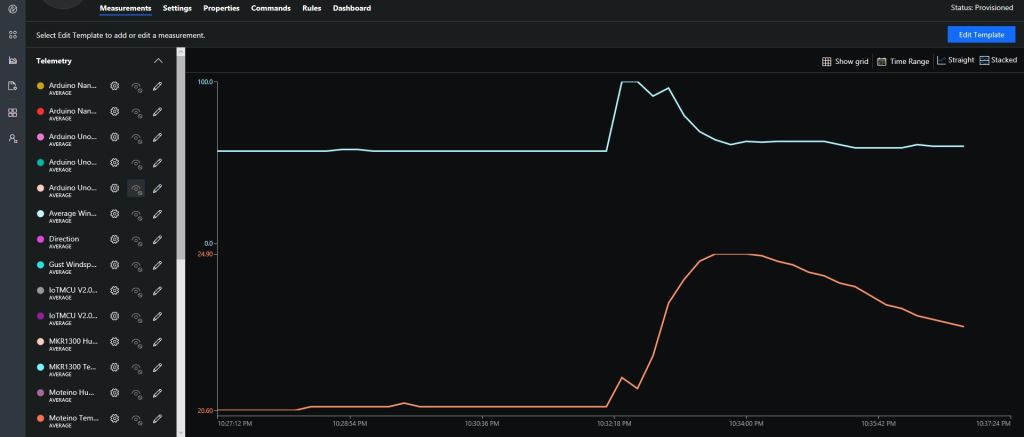
After updating the firmware configuring the data to display in Azure IoT Central (or AdaFruit.IO) took minimal time.

Arduino MKR 1300 Data in Azure IoT Central

Bill of materials (Prices as at Nov 2018)

  • Arduino MKR WAN 1300 USD39.80
  • Arduino MKR Connection Carrier (Grove Compatible) USD22.80
  • Grove Temperature & Humidity Sensor USD11.50

So far the battery life is looking pretty good considering all I have done is used Delay to stop the loop method for 60 seconds.

Next steps are to see if I can retrieve a unique identifier from the Murata firmware and improve battery life by hibernating the processor etc.

Easy Sensors Arduino Nano Radio Shield RFM69/95 Payload Addressing client

After not much project work for a while some new RFM9X devices arrived from EasySensors in Belarus.

This sample client built with an Arduino Nano clone and an Arduino Nano radio shield RFM69/95 or NRF24L01+.

I used the shield’s onboard SHA204A crypto and authentication chip, a Seeedstudio Temperature & Humidity sensor and uploaded the data to Azure IoT Central (Will also work with my AdaFruit.IO LoRa field gateway).

/*
  Copyright ® 2018 November devMobile Software, All Rights Reserved

  THIS CODE AND INFORMATION IS PROVIDED "AS IS" WITHOUT WARRANTY OF ANY
  KIND, EITHER EXPRESSED OR IMPLIED, INCLUDING BUT NOT LIMITED TO THE
  IMPLIED WARRANTIES OF MERCHANTABILITY AND/OR FITNESS FOR A PARTICULAR
  PURPOSE.

  You can do what you want with this code, acknowledgment would be nice.

  http://www.devmobile.co.nz

*/
#include <stdlib.h>
#include <LoRa.h>
#include <sha204_library.h>
#include <TH02_dev.h>

//#define DEBUG
//#define DEBUG_TELEMETRY
//#define DEBUG_LORA

// LoRa field gateway configuration (these settings must match your field gateway)
const char FieldGatewayAddress[] = {"LoRaIoT1"};
const float FieldGatewayFrequency =  915000000.0;
const byte FieldGatewaySyncWord = 0x12 ;

// Payload configuration
const int ChipSelectPin = 10;
const int ResetPin = 9;

// LoRa radio payload configuration
const byte SensorIdValueSeperator = ' ' ;
const byte SensorReadingSeperator = ',' ;
const int LoopSleepDelaySeconds = 60 ;

// ATSHA204 secure authentication, validation with crypto and hashing (currently only using for unique serial number)
const byte Atsha204Port = A3;
atsha204Class sha204(Atsha204Port);
const byte DeviceSerialNumberLength = 9 ;
byte deviceSerialNumber[DeviceSerialNumberLength] = {""};

const byte PayloadSizeMaximum = 64 ;
byte payload[PayloadSizeMaximum];
byte payloadLength = 0 ;


void setup()
{
  Serial.begin(9600);

#if DEBUG
  while (!Serial);
#endif
 
  Serial.println("Setup called");

  Serial.print("Field gateway:");
  Serial.print( FieldGatewayAddress ) ;
  Serial.print(" Frequency:");
  Serial.print( FieldGatewayFrequency,0 ) ;
  Serial.print("MHz SyncWord:");
  Serial.print( FieldGatewaySyncWord ) ;
  Serial.println();
  
   // Retrieve the serial number then display it nicely
  if(sha204.getSerialNumber(deviceSerialNumber))
  {
    Serial.println("sha204.getSerialNumber failed");
    while (true); // Drop into endless loop requiring restart
  }

  Serial.print("SNo:");
  for (int i = 0; i < sizeof( deviceSerialNumber) ; i++)
  {
    // Add a leading zero
    if ( deviceSerialNumber[i] < 16)
    {
      Serial.print("0");
    }
    Serial.print(deviceSerialNumber[i], HEX);
    Serial.print(" ");
  }
  Serial.println();

  Serial.println("LoRa setup start");

  // override the default chip select and reset pins
  LoRa.setPins(ChipSelectPin, ResetPin);
  if (!LoRa.begin(FieldGatewayFrequency))
  {
    Serial.println("LoRa begin failed");
    while (true); // Drop into endless loop requiring restart
  }

  // Need to do this so field gateway pays attention to messsages from this device
  LoRa.enableCrc();
  LoRa.setSyncWord(FieldGatewaySyncWord);

#ifdef DEBUG_LORA
  LoRa.dumpRegisters(Serial);
#endif
  Serial.println("LoRa Setup done.");

  // Configure the Seeedstudio TH02 temperature & humidity sensor
  Serial.println("TH02 setup start");
  TH02.begin();
  delay(100);
  Serial.println("TH02 setup done");

  PayloadHeader(FieldGatewayAddress,strlen(FieldGatewayAddress), deviceSerialNumber, DeviceSerialNumberLength);

  Serial.println("Setup done");
  Serial.println();
}


void loop()
{
  float temperature ;
  float humidity ;

  Serial.println("Loop called");

  PayloadReset();

  // Read the temperature & humidity values then display nicely
  temperature = TH02.ReadTemperature();
  Serial.print("T:");
  Serial.print(temperature, 1) ;
  Serial.println("C ") ;

  PayloadAdd( "T", temperature, 1);

  humidity = TH02.ReadHumidity();
  Serial.print("H:" );
  Serial.print(humidity, 0) ;
  Serial.println("% ") ;

  PayloadAdd( "H", humidity, 0) ;

#ifdef DEBUG_TELEMETRY
  Serial.println();
  Serial.print("RFM9X/SX127X Payload length:");
  Serial.print(payloadLength);
  Serial.println(" bytes");
#endif

  LoRa.beginPacket();
  LoRa.write(payload, payloadLength);
  LoRa.endPacket();

  Serial.println("Loop done");
  Serial.println();
  delay(LoopSleepDelaySeconds * 1000l);
}


void PayloadHeader(byte *to, byte toAddressLength, byte *from, byte fromAddressLength)
{
  byte addressesLength = toAddressLength + fromAddressLength ;

  payloadLength = 0 ;

  // prepare the payload header with "To" Address length (top nibble) and "From" address length (bottom nibble)
  
  payload[payloadLength] = (toAddressLength << 4) | fromAddressLength ;
  payloadLength += 1;

  // Copy the "To" address into payload
  memcpy(&payload[payloadLength], to, toAddressLength);
  payloadLength += toAddressLength ;

  // Copy the "From" into payload
  memcpy(&payload[payloadLength], from, fromAddressLength);
  payloadLength += fromAddressLength ;
}


void PayloadAdd( char *sensorId, float value, byte decimalPlaces)
{
  byte sensorIdLength = strlen( sensorId ) ;

  memcpy( &payload[payloadLength], sensorId,  sensorIdLength) ;
  payloadLength += sensorIdLength ;
  payload[ payloadLength] = SensorIdValueSeperator;
  payloadLength += 1 ;
  payloadLength += strlen( dtostrf(value, -1, decimalPlaces, (char *)&payload[payloadLength]));
  payload[ payloadLength] = SensorReadingSeperator;
  payloadLength += 1 ;
  
#ifdef DEBUG_TELEMETRY
  Serial.print("PayloadAdd float-payloadLength:");
  Serial.print( payloadLength);
  Serial.println( );
#endif
}


void PayloadAdd( char *sensorId, int value )
{
  byte sensorIdLength = strlen(sensorId) ;

  memcpy(&payload[payloadLength], sensorId,  sensorIdLength) ;
  payloadLength += sensorIdLength ;
  payload[ payloadLength] = SensorIdValueSeperator;
  payloadLength += 1 ;
  payloadLength += strlen(itoa( value,(char *)&payload[payloadLength],10));
  payload[ payloadLength] = SensorReadingSeperator;
  payloadLength += 1 ;
  
#ifdef DEBUG_TELEMETRY
  Serial.print("PayloadAdd int-payloadLength:" );
  Serial.print(payloadLength);
  Serial.println( );
#endif
}


void PayloadAdd( char *sensorId, unsigned int value )
{
  byte sensorIdLength = strlen(sensorId) ;

  memcpy(&payload[payloadLength], sensorId,  sensorIdLength) ;
  payloadLength += sensorIdLength ;
  payload[ payloadLength] = SensorIdValueSeperator;
  payloadLength += 1 ;
  payloadLength += strlen(utoa( value,(char *)&payload[payloadLength],10));
  payload[ payloadLength] = SensorReadingSeperator;
  payloadLength += 1 ;

#ifdef DEBUG_TELEMETRY
  Serial.print("PayloadAdd uint-payloadLength:");
  Serial.print(payloadLength);
  Serial.println( );
#endif
}


void PayloadReset()
{
  byte fromAddressLength = payload[0] & 0xf ;
  byte toAddressLength = payload[0] >> 4 ;
  
  payloadLength = toAddressLength + fromAddressLength + 1;
}

Arduino monitor output

ArduinoNanoEasySensorsRF95ShieldArduinoLogging

Prototype hardware

ArduinoNanoEasySensorsRF95ShieldHardware

Bill of materials (prices as at November 2018)

  • Arduino Nano clone USD4.70
  • Easy Sensors Arduino Nano Radio Shield for RFM95 USD16
  • Seeedstudio Temperature and Humidity Sensor Pro USD11.50
  • Seeedstudio 4 pin Male Jumper to Grove 4 pin Conversion Cable USD2.90

Azure IoT Central temperature and humidity display.

ArduinoNanoEasySensorsRF95ShieldAzureIoTCentral

Easy Sensors Wireless field gateway Arduino Nano client

After not much development on my nrf24L01 AdaFruit.IO and Azure IOT Hub field gateways for a while some new nRF24L01 devices arrived in the post last week.

This sample client is an Arduino Nano clone with an Arduino Nano radio shield for NRF24L01+.

I use the shield’s onboard SHA204A crypto and authentication chip, and a Seeedstudio Temperature & Humidity sensor with the data uploaded to adafruit.io.

/*
  Copyright ® 2018 September devMobile Software, All Rights Reserved

  THIS CODE AND INFORMATION IS PROVIDED "AS IS" WITHOUT WARRANTY OF ANY
  KIND, EITHER EXPRESSED OR IMPLIED, INCLUDING BUT NOT LIMITED TO THE
  IMPLIED WARRANTIES OF MERCHANTABILITY AND/OR FITNESS FOR A PARTICULAR
  PURPOSE.

  You can do what you want with this code, acknowledgment would be nice.

  http://www.devmobile.co.nz

*/
#include &lt;RF24.h&gt;
#include &lt;sha204_library.h&gt;
#include &lt;TH02_dev.h&gt;

// RF24 radio( ChipeEnable , ChipSelect )
RF24 radio(9, 10);
const byte FieldGatewayChannel = 15 ;
const byte FieldGatewayAddress[] = {"Base1"};
const rf24_datarate_e RadioDataRate = RF24_250KBPS;
const rf24_pa_dbm_e RadioPALevel = RF24_PA_HIGH;

// Payload configuration
const int PayloadSizeMaximum = 32 ;
char payload[PayloadSizeMaximum] = "";
const byte DeviceIdPlusCsvSensorReadings = 1 ;
const byte SensorReadingSeperator = ',' ;

// ATSHA204 secure authentication, validation with crypto and hashing (only using for unique serial number)
atsha204Class sha204(A3);
const int DeviceSerialNumberLength = 9 ;
uint8_t deviceSerialNumber[DeviceSerialNumberLength] = {""};
const int LoopSleepDelaySeconds = 10 ;

void setup()
{
  Serial.begin(9600);
  Serial.println("Setup called");

  // Retrieve the serial number then display it nicely
  sha204.getSerialNumber(deviceSerialNumber);

  Serial.print("SNo:");
  for (int i = 0; i &lt; sizeof( deviceSerialNumber) ; i++)
  {
    // Add a leading zero
    if ( deviceSerialNumber[i] &lt; 16)
    {
      Serial.print("0");
    }
    Serial.print(deviceSerialNumber[i], HEX);
    Serial.print(" ");
  }

  Serial.println();

  // Configure the Seeedstudio TH02 temperature &amp; humidity sensor
  Serial.println("TH02 setup");
  TH02.begin();
  delay(100);

  // Configure the nRF24 module
  Serial.println("nRF24 setup");
  radio.begin();
  radio.setChannel(FieldGatewayChannel);
  radio.openWritingPipe(FieldGatewayAddress);
  radio.setDataRate(RadioDataRate) ;
  radio.setPALevel(RadioPALevel);
  radio.enableDynamicPayloads();

  Serial.println("Setup done");
}

void loop()
{
  int payloadLength = 0 ;
  float temperature ;
  float humidity ;

  Serial.println("Loop called");
  memset( payload, 0, sizeof( payload));

  // prepare the payload header with PayloadMessageType (top nibble) and DeviceID length (bottom nibble)
  payload[0] = (DeviceIdPlusCsvSensorReadings &lt;&lt; 4) | sizeof(deviceSerialNumber) ;
  payloadLength += 1;

  // Copy the device serial number into the payload
  memcpy( &amp;payload[payloadLength], deviceSerialNumber, sizeof( deviceSerialNumber));
  payloadLength += sizeof( deviceSerialNumber) ;

  // Read the temperature, humidity &amp; battery voltage values then display nicely
  temperature = TH02.ReadTemperature();
  Serial.print("T:");
  Serial.print( temperature, 1 ) ;
  Serial.print( "C" ) ;

  humidity = TH02.ReadHumidity();
  Serial.print(" H:");
  Serial.print( humidity, 0 ) ;
  Serial.println( "%" ) ;

  // Copy the temperature into the payload
  payload[ payloadLength] = 't';
  payloadLength += 1 ;
  dtostrf(temperature, 6, 1, &amp;payload[payloadLength]);
  payloadLength += 6;

  payload[ payloadLength] = ',';
  payloadLength += 1 ;

  // Copy the humidity into the payload
  payload[ payloadLength] = 'h';
  payloadLength += 1 ;
  dtostrf(humidity, 4, 0, &amp;payload[payloadLength]);
  payloadLength += 4;

  // Powerup the nRF24 chipset then send the payload to base station
  Serial.print( "Payload length:");
  Serial.println( payloadLength );

  Serial.println( "nRF24 write" ) ;
  boolean result = radio.write(payload, payloadLength);
  if (result)
    Serial.println("Write Ok...");
  else
    Serial.println("Write failed.");

  Serial.println("Loop done");
  delay(LoopSleepDelaySeconds * 1000l);
}

Arduino monitor output

NanoArduinoNrf24

Prototype hardware

ArduinoNanonRF24

Bill of materials (prices as at Sep 2018)

  • Arduino Nano clone USD4.70
  • Easy Sensors Arduino Nano Radio Shield for nRF24L01 USD13
  • Seeedstudio Temperature and Humidity Sensor Pro USD11.50
  • Seeedstudio 4 pin Male Jumper to Grove 4 pin Conversion Cable USD2.90

Adafruit.IO temperature display when I moved the sensor outside.

NanoNrf24

Azure IoT Hub nRF24L01 Windows 10 IoT Core Field Gateway

This project is now live on Hackster.IO and github.com with sample *duino, Devduino and Netduino clients. While building the AdaFruit.IO field gateway, Azure IOT Hub field gateways and sample clients I changed the structure of the message payload and spent a bit of time removing non-core functionality and code.

The diagnostics logging code was refactored several times and after reading this reference on docs.Microsoft.com I settled on the published approach.

I considered using the built in Universal Windows Platform (UWP) application data class but this would have made configuration in the field hard for most of the targeted users school students & IT departments.

I have the application running at my house and it has proved pretty robust, last week I though it had crashed because the telemetry data stopped for about 20 minutes. I had a look at the Device portal and it was because Windows 10 IoT core had downloaded some updates, applied them and then rebooted automatically (as configured).

I put a socket on the Raspberry PI nRF24L01 Shield rather than soldering the module to the board so that I could compare the performance of the Low and High power modules. The antenna end of the high power module tends to droop so I put a small piece of plastic foam underneath to prop them up.

I had code to generate an empty JSON configuration but I removed that as it added complexity compared to putting a sample in the github repository.

I considered using a binary format (the nRF24L01 max message length is 32 bytes) but the code required to make it sufficiently flexible rapidly got out of hand and as most of my devices didn’t have a lot of sensors (battery/solar powered *duinos) and it wasn’t a major hassle to send another message so I removed it.

I need to tidy up the project and remove the unused Visual Assets and have a look at the automated update support.