AllThingsTalk with MQTTnet

As I’m testing my Message Queue Telemetry Transport(MQTT) LoRa gateway I’m building a proof of concept(PoC) .Net core console application for each IoT platform I would like to support.

This PoC was to confirm that I could connect to the AllThingsTalk MQTT API then format topics and payloads correctly.

MQTTNet Console Client

The AllThingsTalk MQTT broker, username, and device ID are required command line parameters.

namespace devmobile.Mqtt.TestClient.AllThingsTalk
{
	using System;
	using System.Diagnostics;
	using System.Threading;
	using System.Threading.Tasks;

	using MQTTnet;
	using MQTTnet.Client;
	using MQTTnet.Client.Disconnecting;
	using MQTTnet.Client.Options;
	using MQTTnet.Client.Receiving;

	using Newtonsoft.Json;
	using Newtonsoft.Json.Linq;

	class Program
	{
		private static IMqttClient mqttClient = null;
		private static IMqttClientOptions mqttOptions = null;
		private static string server;
		private static string username;
		private static string deviceID;

		static void Main(string[] args)
		{
			MqttFactory factory = new MqttFactory();
			mqttClient = factory.CreateMqttClient();

			if ((args.Length != 3))
			{
				Console.WriteLine("[MQTT Server] [UserName] [ClientID]");
				Console.WriteLine("Press <enter> to exit");
				Console.ReadLine();
				return;
			}

			server = args[0];
			username = args[1];
			deviceID = args[2];

			Console.WriteLine($"MQTT Server:{server} DeviceID:{deviceID}");

			// AllThingsTalk formatted device state update topic
			string topicD2C = $"device/{deviceID}/state";

			mqttOptions = new MqttClientOptionsBuilder()
				.WithTcpServer(server)
				.WithCredentials(username, "HighlySecurePassword")
				.WithClientId(deviceID)
				.WithTls()
				.Build();

			mqttClient.UseDisconnectedHandler(new MqttClientDisconnectedHandlerDelegate(e => MqttClient_Disconnected(e)));
			mqttClient.UseApplicationMessageReceivedHandler(new MqttApplicationMessageReceivedHandlerDelegate(e => MqttClient_ApplicationMessageReceived(e)));
			mqttClient.ConnectAsync(mqttOptions).Wait();

			// AllThingsTalk formatted device command with wildcard topic
			string topicC2D = $"device/{deviceID}/asset/+/command";

			mqttClient.SubscribeAsync(topicC2D, MQTTnet.Protocol.MqttQualityOfServiceLevel.AtLeastOnce).GetAwaiter().GetResult();

			while (true)
			{
				JObject payloadJObject = new JObject();

				double temperature = 22.0 + (DateTime.UtcNow.Millisecond / 1000.0);
				temperature = Math.Round( temperature, 1 );
				double humidity = 50 + (DateTime.UtcNow.Millisecond / 100.0);
				humidity = Math.Round(humidity, 1);

				JObject temperatureJObject = new JObject
				{
					{ "value", temperature }
				};
				payloadJObject.Add("Temperature", temperatureJObject);

				JObject humidityJObject = new JObject
				{
					{ "value", humidity }
				};
				payloadJObject.Add("Humidity", humidityJObject);

				string payload = JsonConvert.SerializeObject(payloadJObject);
				Console.WriteLine($"Topic:{topicD2C} Payload:{payload}");

				var message = new MqttApplicationMessageBuilder()
					.WithTopic(topicD2C)
					.WithPayload(payload)
					.WithAtMostOnceQoS()
//					.WithAtLeastOnceQoS()
					.Build();

				Console.WriteLine("PublishAsync start");
				mqttClient.PublishAsync(message).Wait();
				Console.WriteLine("PublishAsync finish");

				Thread.Sleep(15100);
			}
		}

		private static void MqttClient_ApplicationMessageReceived(MqttApplicationMessageReceivedEventArgs e)
		{
			Console.WriteLine($"ClientId:{e.ClientId} Topic:{e.ApplicationMessage.Topic} Payload:{e.ApplicationMessage.ConvertPayloadToString()}");
		}

		private static async void MqttClient_Disconnected(MqttClientDisconnectedEventArgs e)
		{
			Debug.WriteLine("Disconnected");
			await Task.Delay(TimeSpan.FromSeconds(5));

			try
			{
				await mqttClient.ConnectAsync(mqttOptions);
			}
			catch (Exception ex)
			{
				Debug.WriteLine("Reconnect failed {0}", ex.Message);
			}
		}
	}

The AllThingsTalk device configuration was relatively easy but I need to investigate “Gateway” functionality and configuration further.
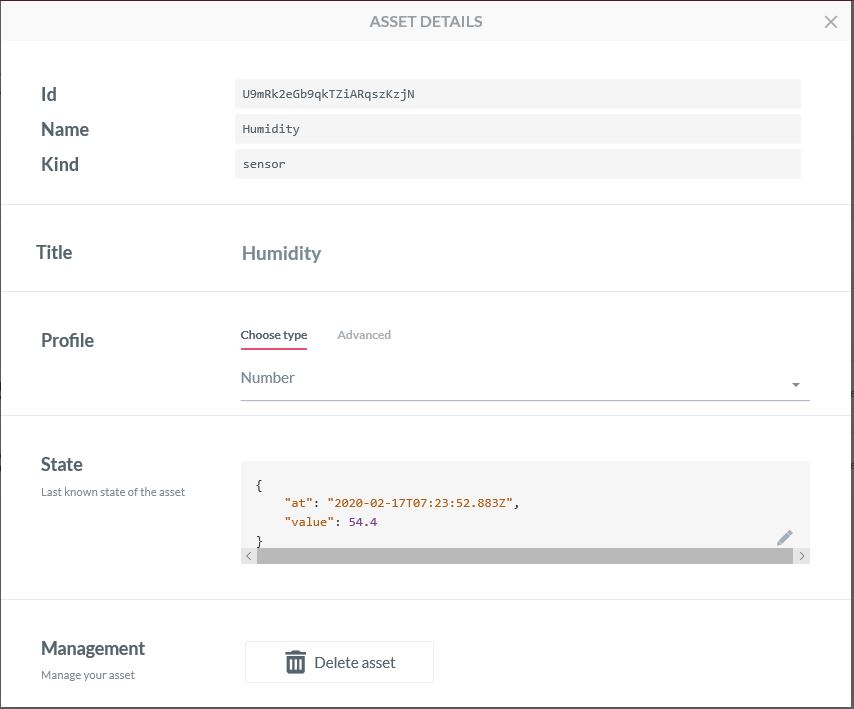
Configuring an Asset
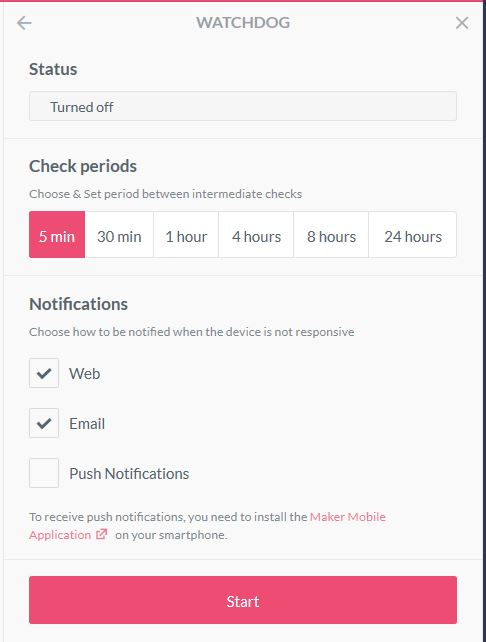
Configuration a watchdog to check for sensor data
Sending a command to an actuator
Processing a command on the client

The ability to look at message payloads in the Debug tab would be very helpful when working out why a payload was not being processed as expected.

Asset debug information

Overall the AllThingsTalk configuration went fairly smoothly, though I need to investigate the “Gateway” configuration and functionality further. The way that assets are name by the system could make support in my MQTT Gateway more complex.
.Net Meadow RFM95/96/97/98 LoRa library Part1

After writing Windows 10 IoT Core & .NetMF RFM9X libraries I figured a port to a Wilderness Labs Meadow device shouldn’t be “rocket science”.

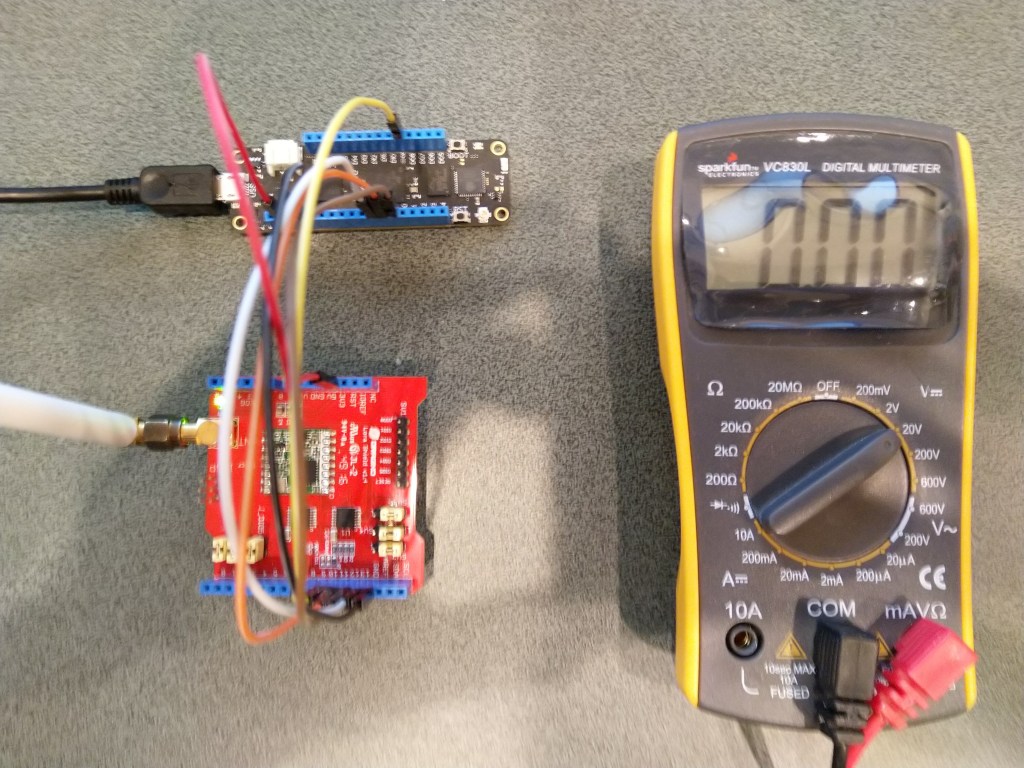
To get started I used a Dragino LoRa shield for Arduino which looked compatible with my Meadow device.

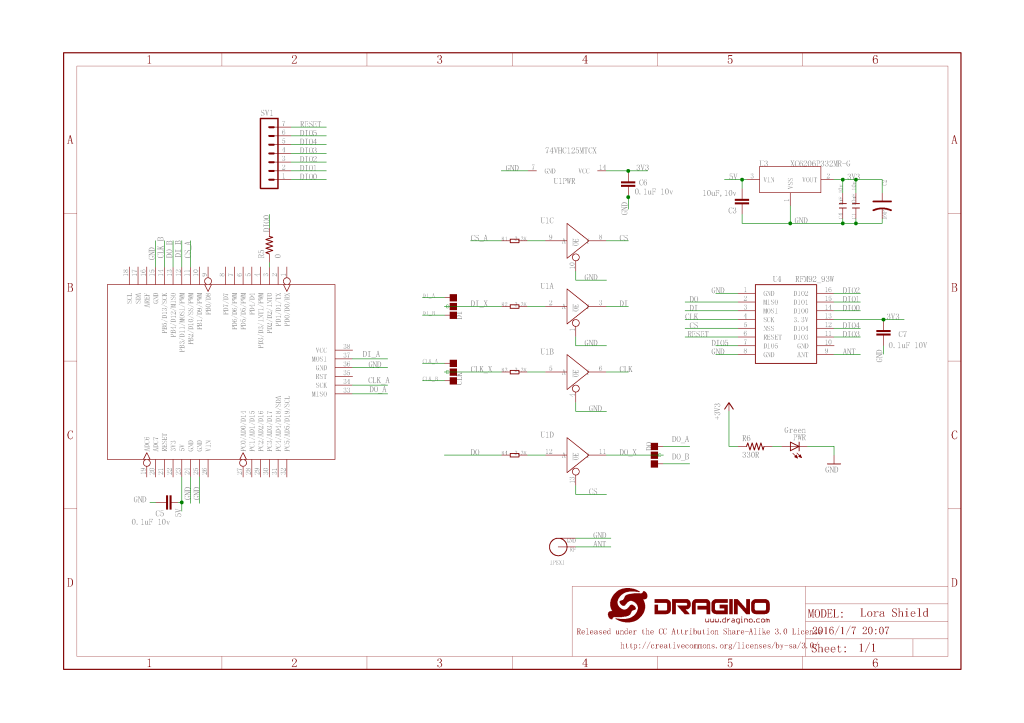
Dragino shield schematic

The shield ships with the SPI lines configured for ICSP so the three jumpers diagonally across the shield from the antenna connector need to be swapped to the side closest to the edge of the shield.

Dragino Arduino shield based test harness
//---------------------------------------------------------------------------------
// Copyright (c) Dec 2019, devMobile Software
//
// Licensed under the Apache License, Version 2.0 (the "License");
// you may not use this file except in compliance with the License.
// You may obtain a copy of the License at
//
//     http://www.apache.org/licenses/LICENSE-2.0
//
// Unless required by applicable law or agreed to in writing, software
// distributed under the License is distributed on an "AS IS" BASIS,
// WITHOUT WARRANTIES OR CONDITIONS OF ANY KIND, either express or implied.
// See the License for the specific language governing permissions and
// limitations under the License.
//
//---------------------------------------------------------------------------------
namespace devMobile.IoT.Rfm9x
{
   using System;
   using System.Threading.Tasks;
   using Meadow;
   using Meadow.Devices;
   using Meadow.Hardware;

   public class MeadowApp : App<F7Micro, MeadowApp>
   {
      const byte RegVersion = 0x42;
      ISpiBus spiBus;
      SpiPeripheral sx127xDevice;
      IDigitalOutputPort spiPeriphChipSelect;

      public MeadowApp()
      {
         ConfigureSpiPort();
         //ReadDeviceID();
         ReadDeviceIDDiy();
      }

      public void ConfigureSpiPort()
      {
         try
         {
            spiBus = Device.CreateSpiBus(500);
            if (spiBus == null)
            {
               Console.WriteLine("spiBus == null");
            }

            Console.WriteLine("Creating SPI NSS Port...");
            spiPeriphChipSelect = Device.CreateDigitalOutputPort(Device.Pins.D09);
            if (spiPeriphChipSelect == null)
            {
               Console.WriteLine("spiPeriphChipSelect == null");
            }
   
            Console.WriteLine("sx127xDevice Device...");
            sx127xDevice = new SpiPeripheral(spiBus, spiPeriphChipSelect);
            if (sx127xDevice == null)
            {
               Console.WriteLine("sx127xDevice == null");
            }

            Console.WriteLine("ConfigureSpiPort Done...");
         }
         catch (Exception ex)
         {
            Console.WriteLine("ConfigureSpiPort " + ex.Message);
         }
      }

      
      public void ReadDeviceID()
      {
         Task.Delay(500).Wait();

         while (true)
         {
            try
            {
               Console.WriteLine("sx127xDevice.ReadRegister...1");

               byte registerValue = sx127xDevice.ReadRegister(RegVersion);

               Console.WriteLine("sx127xDevice.ReadRegister...2");

               Console.WriteLine("Register 0x{0:x2} - Value 0X{1:x2} - Bits {2}", RegVersion, registerValue, Convert.ToString(registerValue, 2).PadLeft(8, '0'));
            }
            catch (Exception ex)
            {
               Console.WriteLine("ReadDeviceID " + ex.Message);
            }

            Task.Delay(10000).Wait();
         }
      }

      public void ReadDeviceIDDiy()
      {
         var txBuffer = new byte[2];
         var rxBuffer = new byte[2];

         Task.Delay(500).Wait();

         while (true)
         {
            try
            {
               Console.WriteLine("spiBus.ExchangeData...1");

               txBuffer[0] = RegVersion;

               spiBus.ExchangeData(spiPeriphChipSelect, ChipSelectMode.ActiveLow, txBuffer, rxBuffer, 2);

               Console.WriteLine("spiBus.ExchangeData...2");

               byte registerValue = rxBuffer[1];

               Console.WriteLine("Register 0x{0:x2} - Value 0X{1:x2} - Bits {2}", RegVersion, registerValue, Convert.ToString(registerValue, 2).PadLeft(8, '0'));
            }
            catch (Exception ex)
            {
               Console.WriteLine("ReadDeviceIDDiy " + ex.Message);
            }

            Task.Delay(10000).Wait();
         }
      }
   }
}

After some trial and error (using beta 3.6) I found that the ReadRegister method didn’t work as expected (possibly related to this issue) and I had to manually assemble the request to read the SX127X RegVersion register.

'App.exe' (CLR v4.0.30319: DefaultDomain): Loaded 'C:\WINDOWS\Microsoft.Net\assembly\GAC_64\mscorlib\v4.0_4.0.0.0__b77a5c561934e089\mscorlib.dll'. 
'App.exe' (CLR v4.0.30319: DefaultDomain): Loaded 'C:\Users\BrynLewis\source\repos\RFX9X.Meadow\FeatherWingSPI\bin\Debug\net472\App.exe'. Symbols loaded.
'App.exe' (CLR v4.0.30319: App.exe): Loaded 'C:\Users\BrynLewis\source\repos\RFX9X.Meadow\FeatherWingSPI\bin\Debug\net472\Meadow.dll'. 
The program '[22324] App.exe: Program Trace' has exited with code 0 (0x0).
The program '[22324] App.exe' has exited with code 0 (0x0).
.
.
DirectRegisterAccess = True
==========================================================
Ignore the exceptions generated by the DateTime call here.
==========================================================
.
Creating SPI NSS Port...
sx127xDevice Device...
ConfigureSpiPort Done...
spiBus.ExchangeData...1
spiBus.ExchangeData...2
Register 0x42 - Value 0X12 - Bits 00010010
spiBus.ExchangeData...1
spiBus.ExchangeData...2
Register 0x42 - Value 0X12 - Bits 00010010
spiBus.ExchangeData...1
spiBus.ExchangeData...2
Register 0x42 - Value 0X12 - Bits 00010010
spiBus.ExchangeData...1
spiBus.ExchangeData...2

Bosch IoT Suite with MQTTnet

As I’m testing my Message Queue Telemetry Transport(MQTT) LoRa gateway I’m building a proof of concept(PoC) .Net core console application for each IoT platform I would like to support.

This PoC was to confirm that I could connect to the Bosch IoT Suite MQTT API then format topics and payloads correctly.

MQTTNet Console Client

The Bosch IoT Hub MQTT broker, username, password, and clientID are the required command line parameters. For this PoC I ran out of time to get cloud to device (C2D) messaging or any presentation functionality working.

/*
    Copyright ® 2019 December devMobile Software, All Rights Reserved
 
    MIT License

    Permission is hereby granted, free of charge, to any person obtaining a copy
    of this software and associated documentation files (the "Software"), to deal
    in the Software without restriction, including without limitation the rights
    to use, copy, modify, merge, publish, distribute, sublicense, and/or sell
    copies of the Software, and to permit persons to whom the Software is
    furnished to do so, subject to the following conditions:

    The above copyright notice and this permission notice shall be included in all
    copies or substantial portions of the Software.

    THE SOFTWARE IS PROVIDED "AS IS", WITHOUT WARRANTY OF ANY KIND, EXPRESS OR
    IMPLIED, INCLUDING BUT NOT LIMITED TO THE WARRANTIES OF MERCHANTABILITY,
    FITNESS FOR A PARTICULAR PURPOSE AND NONINFRINGEMENT. IN NO EVENT SHALL THE
    AUTHORS OR COPYRIGHT HOLDERS BE LIABLE FOR ANY CLAIM, DAMAGES OR OTHER
    LIABILITY, WHETHER IN AN ACTION OF CONTRACT, TORT OR OTHERWISE, ARISING FROM,
    OUT OF OR IN CONNECTION WITH THE SOFTWARE OR THE USE OR OTHER DEALINGS IN THE
    SOFTWARE

	 A quick and dirty test client to explore how BoschIoT Suite MQTT connectivity works
 */
namespace devMobile.Mqtt.TestClient.BoschIoTSuite
{
   using System;
   using System.Diagnostics;
   using System.Threading;
   using System.Threading.Tasks;

   using MQTTnet;
   using MQTTnet.Client;
   using MQTTnet.Client.Disconnecting;
   using MQTTnet.Client.Options;
   using MQTTnet.Client.Receiving;
   using Newtonsoft.Json;
   using Newtonsoft.Json.Linq;

   class Program
   {
      private static IMqttClient mqttClient = null;
      private static IMqttClientOptions mqttOptions = null;
      private static string server;
      private static string username;
      private static string password;
      private static string clientId;

      static void Main(string[] args)
      {
         MqttFactory factory = new MqttFactory();
         mqttClient = factory.CreateMqttClient();

         if (args.Length != 4) 
         {
            Console.WriteLine("[MQTT Server] [UserName] [Password] [ClientID]");
            Console.WriteLine("Press <enter> to exit");
            Console.ReadLine();
            return;
         }

         server = args[0];
         username = args[1];
         password = args[2];
         clientId = args[3];

         mqttOptions = new MqttClientOptionsBuilder()
            .WithTcpServer(server)
            .WithCredentials(username, password)
            .WithClientId(clientId)
            .WithTls()
            .Build();

         mqttClient.UseDisconnectedHandler(new MqttClientDisconnectedHandlerDelegate(e => MqttClient_Disconnected(e)));
         mqttClient.UseApplicationMessageReceivedHandler(new MqttApplicationMessageReceivedHandlerDelegate(e => MqttClient_ApplicationMessageReceived(e)));
         mqttClient.ConnectAsync(mqttOptions).Wait();

         string topicD2C = "telemetry";

         while (true)
         {
            JObject payloadJObject = new JObject();

            payloadJObject.Add("OfficeTemperature", "22." + DateTime.UtcNow.Millisecond.ToString());
            payloadJObject.Add("OfficeHumidity", (DateTime.UtcNow.Second + 40).ToString());

            string payload = JsonConvert.SerializeObject(payloadJObject);
            Console.WriteLine($"Topic:{topicD2C} Payload:{payload}");

            var message = new MqttApplicationMessageBuilder()
               .WithTopic(topicD2C)
               .WithPayload(payload)
               .WithAtMostOnceQoS() // Anthing but this causes timeout
               .WithRetainFlag()
            .Build();

            Console.WriteLine("PublishAsync start");
            mqttClient.PublishAsync(message).Wait();
            Console.WriteLine("PublishAsync finish");

            Thread.Sleep(30100);
         }
      }

      private static void MqttClient_ApplicationMessageReceived(MqttApplicationMessageReceivedEventArgs e)
      {
         Console.WriteLine($"ClientId:{e.ClientId} Topic:{e.ApplicationMessage.Topic} Payload:{e.ApplicationMessage.ConvertPayloadToString()}");
      }

      private static async void MqttClient_Disconnected(MqttClientDisconnectedEventArgs e)
      {
         Debug.WriteLine("Disconnected");
         await Task.Delay(TimeSpan.FromSeconds(5));

         try
         {
            await mqttClient.ConnectAsync(mqttOptions);
         }
         catch (Exception ex)
         {
            Debug.WriteLine("Reconnect failed {0}", ex.Message);
         }
      }
   }
}

The bosch IoT Hub device configuration was via a swagger API but I need to spend some more time figuring out how to configure the data analysis and presentation tools.

I adapted the steps in the IoT Hub Documentation for Sending Device Data using MQTT. The first step was to create a free Hub subscription.

IoT Hub Subscription

Then using the device registry swagger UI page to add a new device.

Device Registry Swagger UI

After a couple of failed attempts I worked out the format of the Authorisation details (I think the username format in the online documentation might be wrong)

Swagger UI Authorisation form
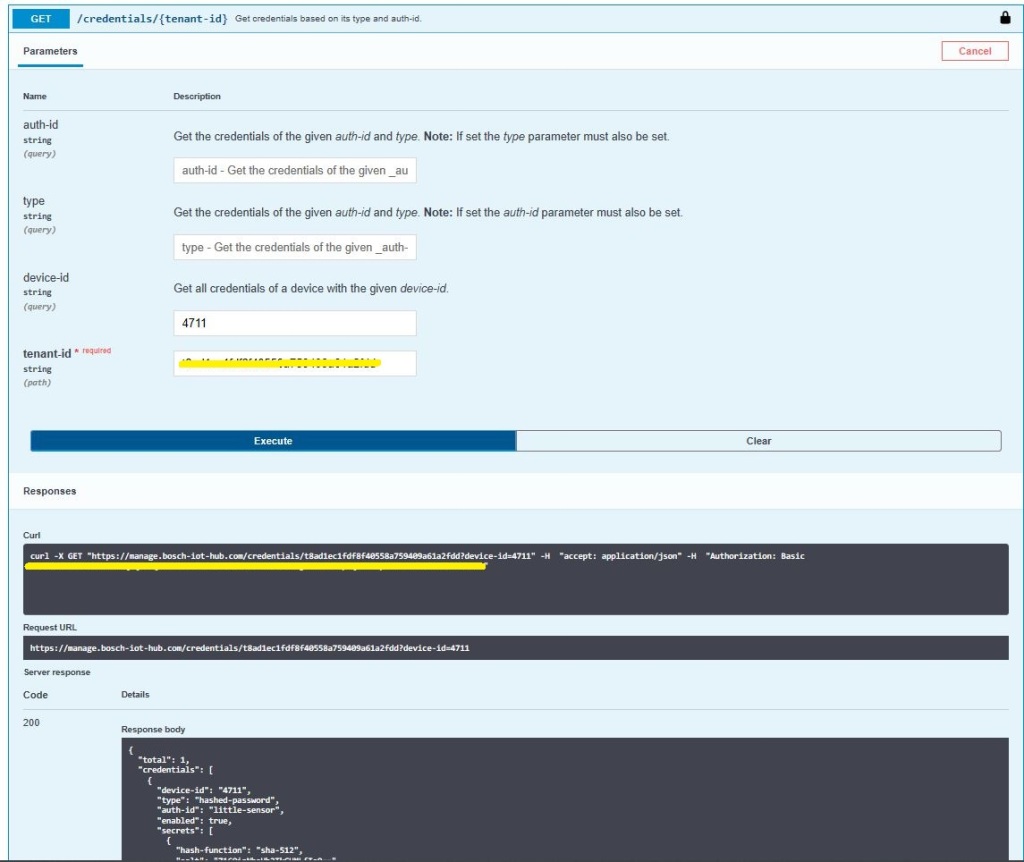
Querying the available devices

Of the 10+ SaaS IoT services I have setup the Bosch IoT Suite was the hardest to get working. I think this was becuase it is meant to be managed via the API from a in-house application. In a future post I’ll get configure the cloud to device messaging, plus analysis and display functionality.

wolkabout with MQTTnet

As I’m testing my Message Queue Telemetry Transport(MQTT) LoRa gateway I’m building a proof of concept(PoC) .Net core console application for each IoT platform I would like to support.

This PoC was to confirm that I could connect to the walkabout MQTT API then format topics and payloads correctly.

MQTTNet Console Client

The walkabout MQTT broker, username, API Key, and device ID are the required command line parameters. For this PoC I couldn’t get cloud to device (C2D) or Transport Layer Security(TLS) working so will have to do some more research.

namespace devmobile.Mqtt.TestClient.WolkAbout
{
   using System;
   using System.Diagnostics;
   using System.Threading;
   using System.Threading.Tasks;

   using MQTTnet;
   using MQTTnet.Client;
   using MQTTnet.Client.Disconnecting;
   using MQTTnet.Client.Options;

   using Newtonsoft.Json;
   using Newtonsoft.Json.Linq;

   class Program
   {
      private static IMqttClient mqttClient = null;
      private static IMqttClientOptions mqttOptions = null;
      private static string server;
      private static string username;
      private static string apiKey;
      private static string clientID;

      static void Main(string[] args)
      {
         MqttFactory factory = new MqttFactory();
         mqttClient = factory.CreateMqttClient();

         if ((args.Length != 4) )
            {
            Console.WriteLine("[MQTT Server] [UserName] [APIKey] [ClientID]");
            Console.WriteLine("Press <enter> to exit");
            Console.ReadLine();
            return;
         }

         server = args[0];
         username = args[1];
         apiKey = args[2];
         clientID = args[3];

         Console.WriteLine($"MQTT Server:{server} Username:{username} ClientID:{clientID}");

         // wolkabout formatted client state update topic
         string topicD2C = $"readings/{username}/";

         mqttOptions = new MqttClientOptionsBuilder()
            .WithTcpServer(server)
            .WithCredentials(username, apiKey)
            .WithClientId(clientID)
            //.WithTls()
            .Build();

         mqttClient.UseDisconnectedHandler(new MqttClientDisconnectedHandlerDelegate(e => MqttClient_Disconnected(e)));
         mqttClient.ConnectAsync(mqttOptions).Wait();

         while (true)
         {
            JObject payloadJObject = new JObject();

            double temperature = 22.0 + (DateTime.UtcNow.Millisecond / 1000.0);
            double humidity = 50 + (DateTime.UtcNow.Millisecond / 100.0);

            payloadJObject.Add("Temperature", temperature);
            payloadJObject.Add("Humidity", humidity);

            string payload = JsonConvert.SerializeObject(payloadJObject);
            Console.WriteLine($"Topic:{topicD2C} Payload:{payload}");

            var message = new MqttApplicationMessageBuilder()
               .WithTopic(topicD2C)
               .WithPayload(payload)
               .WithAtLeastOnceQoS()
               .Build();

            Console.WriteLine("PublishAsync start");
            mqttClient.PublishAsync(message).Wait();
            Console.WriteLine("PublishAsync finish");

            Thread.Sleep(30100);
         }
      }

      private static async void MqttClient_Disconnected(MqttClientDisconnectedEventArgs e)
      {
         Debug.WriteLine("Disconnected");
         await Task.Delay(TimeSpan.FromSeconds(5));

         try
         {
            await mqttClient.ConnectAsync(mqttOptions);
         }
         catch (Exception ex)
         {
            Debug.WriteLine("Reconnect failed {0}", ex.Message);
         }
      }
   }

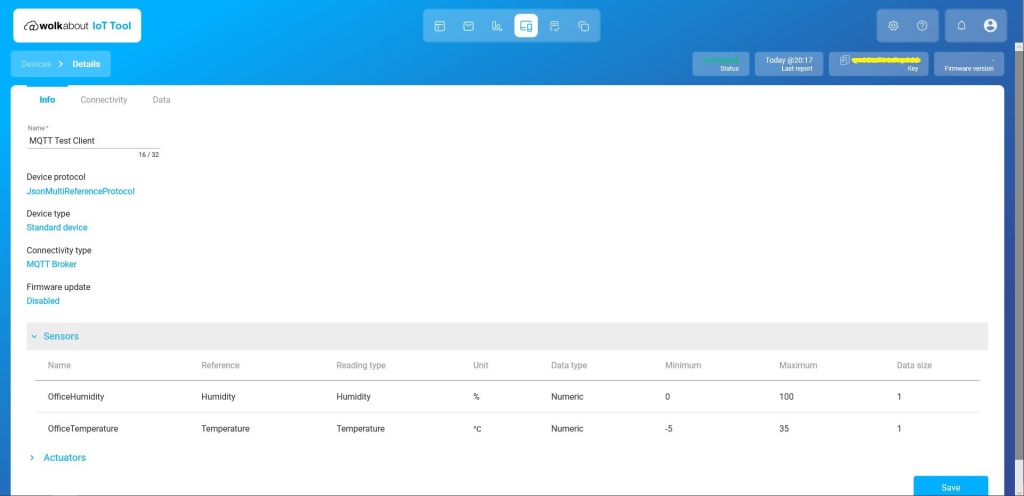
The walkabout device configuration was relatively easy but I need watch the instructional videos again to better understand the device and data semantics relationship.

Data semantics configuration
Devices setup
Device Setup
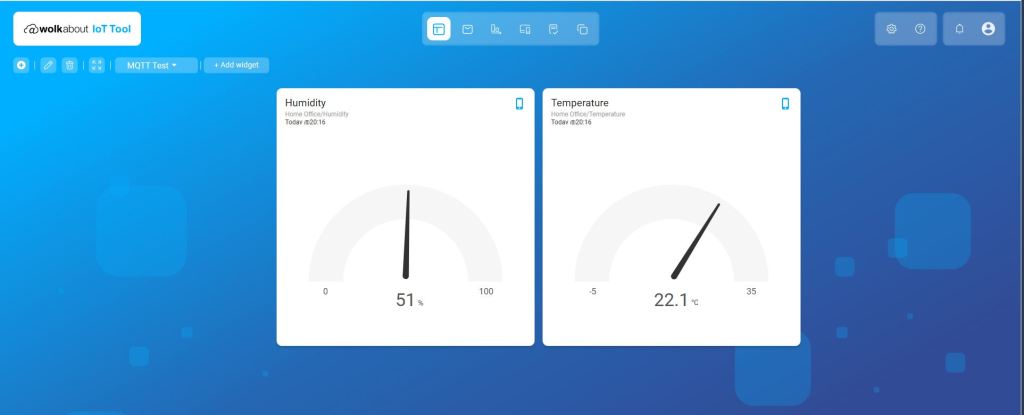
My first dashboard

SmartWorks with MQTTnet

As I’m testing my Message Queue Telemetry Transport(MQTT) LoRa gateway I’m building a proof of concept(PoC) .Net core console application for each IoT platform I would like to support.

This PoC was to confirm that I could connect to the SmartWorks (formerly Carriots) MQTT API then format topics and payloads correctly.

MQTTNet Console Client

The SmartWorks MQTT broker, username, and device ID are the required command line parameters. I didn’t notice any configuration options for cloud to device (C2D) messaging which maybe due to my device configuration or the free trial I was using.

namespace devMobile.Mqtt.TestClient.SmartWorks
{
   using System;
   using System.Diagnostics;
   using System.Threading;
   using System.Threading.Tasks;

   using MQTTnet;
   using MQTTnet.Client;
   using MQTTnet.Client.Disconnecting;
   using MQTTnet.Client.Options;
   using MQTTnet.Client.Receiving;
   using Newtonsoft.Json;
   using Newtonsoft.Json.Linq;

   class Program
   {
      private static IMqttClient mqttClient = null;
      private static IMqttClientOptions mqttOptions = null;
      private static string server;
      private static string username;
      private static string clientId;
      private static string commandTopic;
      private static string groupname;
      private static string feedname;

      static void Main(string[] args)
      {
         MqttFactory factory = new MqttFactory();
         mqttClient = factory.CreateMqttClient();

         if (args.Length != 3) 
         {
            Console.WriteLine("[MQTT Server] [UserName] [ClientID]");
            Console.WriteLine("Press <enter> to exit");
            Console.ReadLine();
            return;
         }

         server = args[0];
         username = args[1];
         clientId = args[2];

         mqttOptions = new MqttClientOptionsBuilder()
            .WithTcpServer(server)
            .WithCredentials(username, "")
            .WithClientId(clientId)
            .WithTls()
            .Build();

         mqttClient.UseDisconnectedHandler(new MqttClientDisconnectedHandlerDelegate(e => MqttClient_Disconnected(e)));
         mqttClient.ConnectAsync(mqttOptions).Wait();

         // Adafruit.IO format for topics which are called feeds
         string topicD2C = $"{username}/streams";

         while (true)
         {
            JObject payloadJObject = new JObject();

            payloadJObject.Add("at", "now");
            payloadJObject.Add("device", clientId);
            payloadJObject.Add("protocol", "v2");

            double temperature = 22.0 + (DateTime.UtcNow.Millisecond / 1000.0);
            double humidity = 50 + (DateTime.UtcNow.Millisecond / 100.0);

            JObject dataJObject = new JObject();
            dataJObject.Add("OfficeTemperature", temperature);
            dataJObject.Add("OfficeHumidity", humidity);

            payloadJObject.Add("data", dataJObject);

            string payload = JsonConvert.SerializeObject(payloadJObject);
            Console.WriteLine($"Topic:{topicD2C} Payload:{payload}");

            var message = new MqttApplicationMessageBuilder()
               .WithTopic(topicD2C)
               .WithPayload(payload)
               .WithAtLeastOnceQoS()
            .Build();

            Console.WriteLine("PublishAsync start");
            mqttClient.PublishAsync(message).Wait();
            Console.WriteLine("PublishAsync finish");

            Thread.Sleep(30100);
         }
      }

      private static async void MqttClient_Disconnected(MqttClientDisconnectedEventArgs e)
      {
         Debug.WriteLine("Disconnected");
         await Task.Delay(TimeSpan.FromSeconds(5));

         try
         {
            await mqttClient.ConnectAsync(mqttOptions);
         }
         catch (Exception ex)
         {
            Debug.WriteLine("Reconnect failed {0}", ex.Message);
         }
      }
   }
}

The ThingsBoard device configuration was relatively easy with convenient buttons to copy the Device ID (Client ID in test client) and Access Token (UserName in test client). I need to revisit the Device and Group configuration to see if I can make the automatically generated names more user friendly.

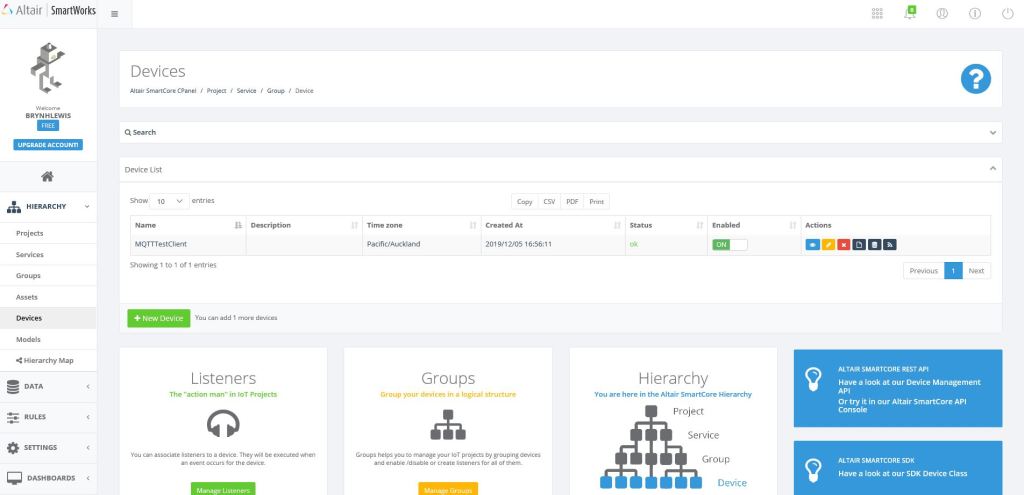
Devices configuration

The Device configuration form has a tab which has a link for the “Data Streams” form which was useful for debugging.

Device configuration

I have emailed SmartWorks support about a free trial of their dashboard product as it is not available in the free trial.

Device data stream query form

Overall the initial configuration went smoothly but the lack of any dashboard functionality in the free trial was quite limiting.

ThingsBoard with MQTTnet

As I’m testing my Message Queue Telemetry Transport(MQTT) LoRa gateway I’m building a proof of concept(PoC) .Net core console application for each IoT platform I would like to support.

This PoC was to confirm that I could connect to the ThingsBoard MQTT API then format topics and payloads correctly.

MQTTNet Console Client

The ThingsBoard MQTT broker, username, and client ID are the minimum command line options required with the CommandTopic optional.

   class Program
   {
      private static IMqttClient mqttClient = null;
      private static IMqttClientOptions mqttOptions = null;
      private static string server;
      private static string username;
      private static string clientId;
      private const string telemetryTopic = "v1/devices/me/telemetry";
      private static string commandTopic;

      static void Main(string[] args)
      {
         MqttFactory factory = new MqttFactory();
         mqttClient = factory.CreateMqttClient();

         if ((args.Length != 3) && (args.Length != 4))
         {
            Console.WriteLine("[MQTT Server] [UserName] [ClientID]");
            Console.WriteLine("[MQTT Server] [UserName] [ClientID] [CommandTopic]");
            Console.WriteLine("Press <enter> to exit");
            Console.ReadLine();
            return;
         }

         server =  args[0];
         username = args[1];
         clientId =  args[2];
         
         if (args.Length == 3)
         {
            Console.WriteLine($"MQTT Server:{server} ClientID:{clientId}");
         }

         if (args.Length == 4)
         {
            commandTopic = args[3];
            Console.WriteLine($"MQTT Server:{server} ClientID:{clientId} CommandTopic:{commandTopic}");
         }

         mqttOptions = new MqttClientOptionsBuilder()
            .WithTcpServer(server)
            .WithCredentials(username, "")
            .WithClientId(clientId)
            //.WithTls() blows up if this enabled, need to do more research on certificate config.
            .Build();

         mqttClient.UseDisconnectedHandler(new MqttClientDisconnectedHandlerDelegate(e => MqttClient_Disconnected(e)));
         mqttClient.UseApplicationMessageReceivedHandler(new MqttApplicationMessageReceivedHandlerDelegate(e => MqttClient_ApplicationMessageReceived(e)));
         mqttClient.ConnectAsync(mqttOptions).Wait();

         if (args.Length == 4)
         {
            mqttClient.SubscribeAsync(commandTopic, MQTTnet.Protocol.MqttQualityOfServiceLevel.AtLeastOnce).GetAwaiter().GetResult();
         }

         while (true)
         {
            JObject payloadJObject = new JObject();

            payloadJObject.Add("OfficeTemperature", "22." + DateTime.UtcNow.Millisecond.ToString());
            payloadJObject.Add("OfficeHumidity", (DateTime.UtcNow.Second + 40).ToString());

            string payload = JsonConvert.SerializeObject(payloadJObject);
            Console.WriteLine($"Topic:{telemetryTopic} Payload:{payload}");

            var message = new MqttApplicationMessageBuilder()
               .WithTopic(telemetryTopic)
               .WithPayload(payload)
               .WithAtLeastOnceQoS()
            .Build();

            Console.WriteLine("PublishAsync start");
            mqttClient.PublishAsync(message).Wait();
            Console.WriteLine("PublishAsync finish");

            Thread.Sleep(30100);
         }
      }

      private static void MqttClient_ApplicationMessageReceived(MqttApplicationMessageReceivedEventArgs e)
      {
         Console.WriteLine($"ClientId:{e.ClientId} Topic:{e.ApplicationMessage.Topic} Payload:{e.ApplicationMessage.ConvertPayloadToString()}");
      }

      private static async void MqttClient_Disconnected(MqttClientDisconnectedEventArgs e)
      {
         Debug.WriteLine("Disconnected");
         await Task.Delay(TimeSpan.FromSeconds(5));

         try
         {
            await mqttClient.ConnectAsync(mqttOptions);
         }
         catch (Exception ex)
         {
            Debug.WriteLine("Reconnect failed {0}", ex.Message);
         }
      }

The ThingsBoard device configuration was relatively easy with convenient buttons to copy the Device ID (Client ID in test client) and Access Token (UserName in test client). After looking at the source code for some of the other samples I figured out the ThingsBoard MQTT setup does not use the password field.

Device setup

The Device configuration form has a tab which displays the last telemetry which was useful for debugging. (I need to investigate the MQTT API support for claiming devices)

Device Telemetry display

To get telemetry data displayed on my dashboard I “added” it to my dashboard from the Entity configuration form. (I need to spend some more time watching the video tutorials to understand this process).

Device Entity View Setup

The dashboard designer had a number of “widgets” and what appeared to be the ability to add custom ones. Most forms also had “customer” option which appeared to be for multi-tenant support.

Selecting a dashboard graph widget
Configuring the y Axis Range for graph widget
Dashboard display home office Humidity & Temperature Information

Overall the initial configuration went smoothly after I figured out that the password was not required, and that Transport Layer Security(TLS) required some additional configuration.

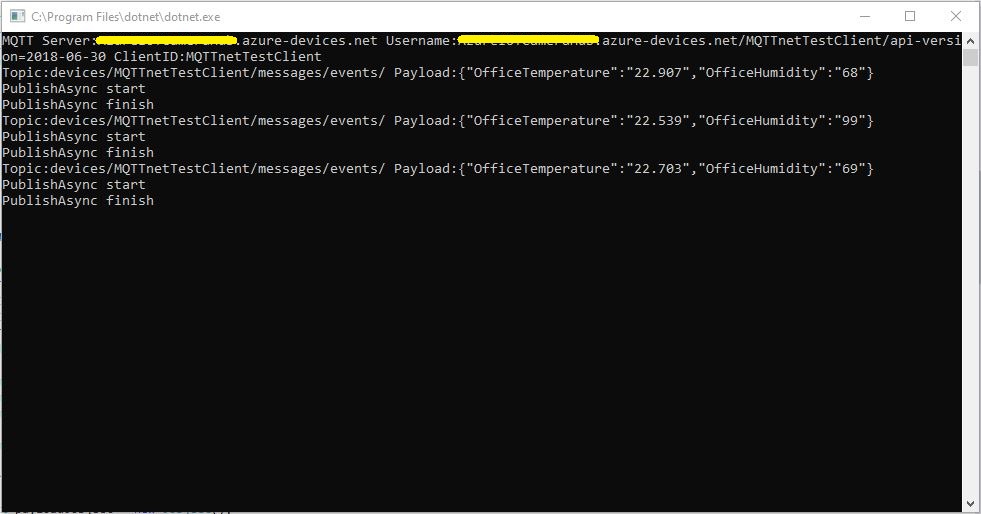
Azure IoT Hub with MQTTnet

As I’m testing my Message Queue Telemetry Transport(MQTT) LoRa gateway I’m building a proof of concept(PoC) .Net core console application for each IoT platform I would like to support.

This PoC was to confirm that my device could connect to the Microsoft Azure IoT Hub MQTT API then format topics and payloads correctly.

Azure IoT Hub MQTT Console Client

I had tried with a couple of different MQTT libraries from micro controllers and embedded devices without success. With the benefit of hindsight (plus this article) I think I had the SAS key format wrong.

The Azure IoT Hub MQTT broker requires only a server name (fully resolved CName), device ID and SAS Key.

   class Program
   {
      private static IMqttClient mqttClient = null;
      private static IMqttClientOptions mqttOptions = null;
      private static string server;
      private static string username;
      private static string password;
      private static string clientId;
      private static string topicD2C;
      private static string topicC2D;

      static void Main(string[] args)
      {
         MqttFactory factory = new MqttFactory();
         mqttClient = factory.CreateMqttClient();

         if (args.Length != 3)
         {
            Console.WriteLine("[AzureIoTHubHostName] [deviceID] [SASKey]");
            Console.WriteLine("Press <enter> to exit");
            Console.ReadLine();
            return;
         }

         server = args[0];
         clientId = args[1];
         sasKey= args[2];

         username = $"{server}/{clientId}/api-version=2018-06-30";
         topicD2C = $"devices/{clientId}/messages/events/";
         topicC2D = $"devices/{clientId}/messages/devicebound/#";

         Console.WriteLine($"MQTT Server:{server} Username:{username} ClientID:{clientId}");

         mqttOptions = new MqttClientOptionsBuilder()
            .WithTcpServer(server, 8883)
            .WithCredentials(username, sasKey)
            .WithClientId(clientId)
            .WithTls()
            .Build();

         mqttClient.UseDisconnectedHandler(new MqttClientDisconnectedHandlerDelegate(e => MqttClient_Disconnected(e)));
         mqttClient.UseApplicationMessageReceivedHandler(new MqttApplicationMessageReceivedHandlerDelegate(e => MqttClient_ApplicationMessageReceived(e)));
         mqttClient.ConnectAsync(mqttOptions).Wait();

         mqttClient.SubscribeAsync(topicC2D, MQTTnet.Protocol.MqttQualityOfServiceLevel.AtLeastOnce).GetAwaiter().GetResult();

         while (true)
         {
            JObject payloadJObject = new JObject();

            payloadJObject.Add("OfficeTemperature", "22." + DateTime.UtcNow.Millisecond.ToString());
            payloadJObject.Add("OfficeHumidity", (DateTime.UtcNow.Second + 40).ToString());

            string payload = JsonConvert.SerializeObject(payloadJObject);
            Console.WriteLine($"Topic:{topicD2C} Payload:{payload}");

            var message = new MqttApplicationMessageBuilder()
               .WithTopic(topicD2C)
               .WithPayload(payload)
               .WithAtLeastOnceQoS()
            .Build();

            Console.WriteLine("PublishAsync start");
            mqttClient.PublishAsync(message).Wait();
            Console.WriteLine("PublishAsync finish");

            Thread.Sleep(30100);
         }
      }

      private static void MqttClient_ApplicationMessageReceived(MqttApplicationMessageReceivedEventArgs e)
      {
         Console.WriteLine($"ClientId:{e.ClientId} Topic:{e.ApplicationMessage.Topic} Payload:{e.ApplicationMessage.ConvertPayloadToString()}");
      }

      private static async void MqttClient_Disconnected(MqttClientDisconnectedEventArgs e)
      {
         Debug.WriteLine("Disconnected");
         await Task.Delay(TimeSpan.FromSeconds(5));

         try
         {
            await mqttClient.ConnectAsync(mqttOptions);
         }
         catch (Exception ex)
         {
            Debug.WriteLine("Reconnect failed {0}", ex.Message);
         }
      }
   }

Overall the initial configuration went smoothly after I figured out the required Quality of Service (QoS) settings, and the SAS Key format.

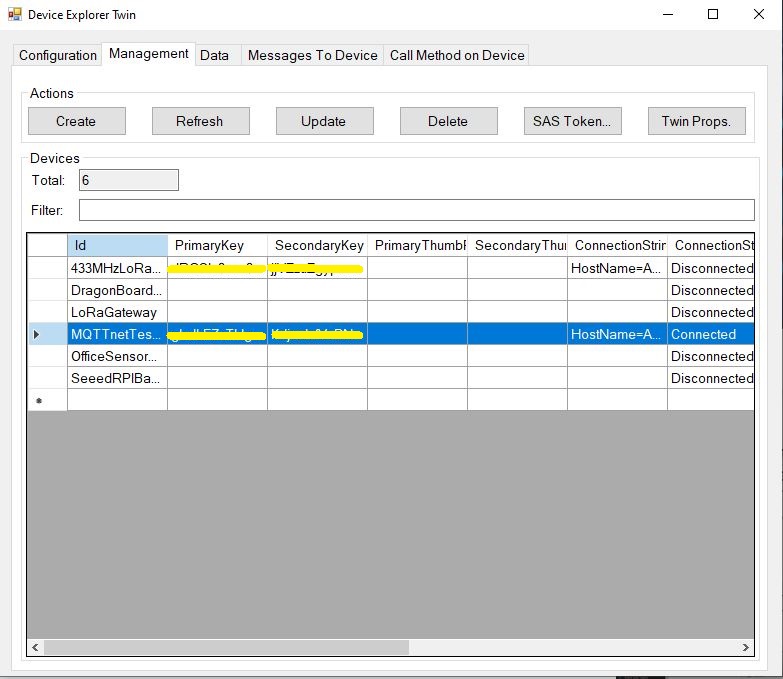
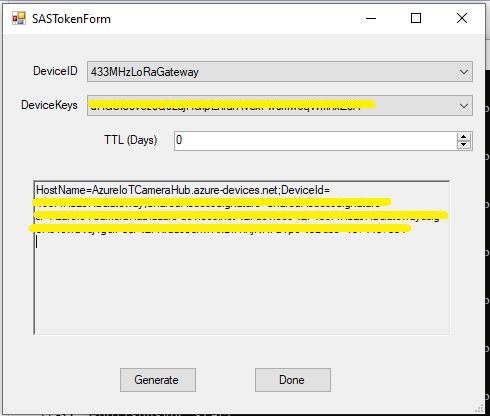
Using the approach described in the Microsoft documentation I manually generated the SAS Key.(In my Netduino samples I have code for generating a SAS Key in my HTTPS Azure IoT Hub Client)

Azure Device Explorer Device Management
Azure Device Explorer SAS Key Generator

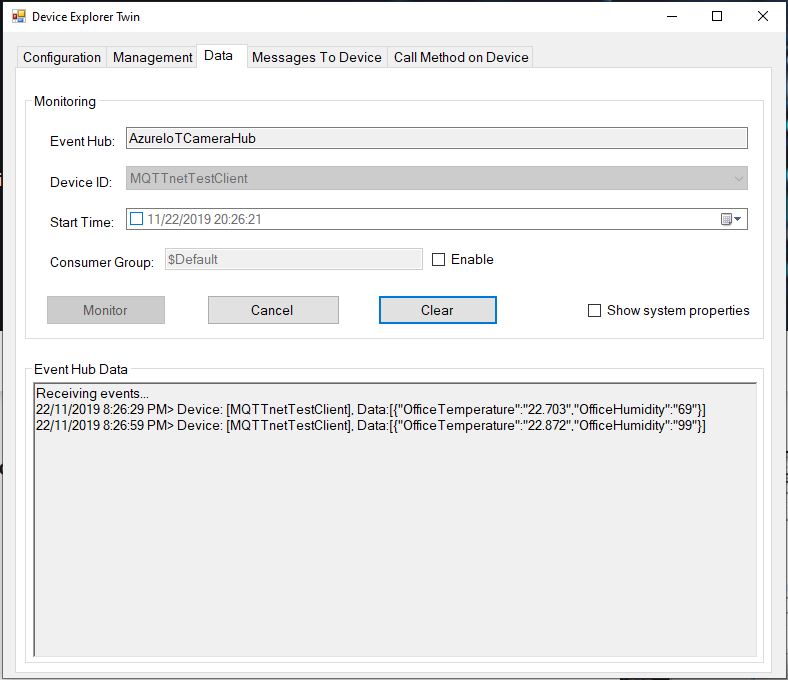
Once I had the configuration correct I could see telemetry from the device and send it messages.

Azure Device Explorer Data View

In a future post I will upload data to the Azure IoT Central for display. Then explore using a “module” attached to a device which maybe useful for my field gateway.

Thingspeak with MQTTnet

As I’m testing my Message Queue Telemetry Transport(MQTT) LoRa gateway I’m building a proof of concept(PoC) .Net core console application for each IoT platform I would like to support.

This PoC was to confirm that I could connect to the Thingspeak MQTT API then format topics and payloads correctly.

MQTT Console Client

The Thingspeak MQTT broker, username, password, and client ID, Channel, writeAPIKey, ClientID, channelData, are the minimum command line options required. The channelSubscribe, readAPIkey and field are optional.

   class Program
   {
      private static IMqttClient mqttClient = null;
      private static IMqttClientOptions mqttOptions = null;
      private static string server;
      private static string username;
      private static string password;
      private static string writeApiKey;
      private static string clientId;
      private static string channelData;
      private static string channelSubscribe;
      private static string readApiKey;
      private static string field;

      static void Main(string[] args)
      {
         MqttFactory factory = new MqttFactory();
         mqttClient = factory.CreateMqttClient();

         if ((args.Length != 6) && (args.Length != 8) && (args.Length != 9))
         {
            Console.WriteLine("[MQTT Server] [UserName] [Password] [WriteAPIKey] [ClientID] [Channel]");
            Console.WriteLine("[MQTT Server] [UserName] [Password] [WriteAPIKey] [ClientID] [Channel] [channelSubscribe] [ReadApiKey]");
            Console.WriteLine("[MQTT Server] [UserName] [Password] [WriteAPIKey] [ClientID] [Channel] [channelSubscribe] [ReadApiKey] [Field]");
            Console.WriteLine("Press <enter> to exit");
            Console.ReadLine();
            return;
         }

         server = args[0];
         username = args[1];
         password = args[2];
         writeApiKey = args[3];
         clientId = args[4];
         channelData = args[5];

         if (args.Length == 6)
         {
            Console.WriteLine($"MQTT Server:{server} Username:{username} ClientID:{clientId} ChannelData:{channelData}");
         }

         if (args.Length == 8)
         {
            channelSubscribe = args[6];
            readApiKey = args[7];
            Console.WriteLine($"MQTT Server:{server} Username:{username} ClientID:{clientId} ChannelData:{channelData} ChannelSubscribe:{channelSubscribe}");
         }

         if (args.Length == 9)
         {
            channelSubscribe = args[6];
            readApiKey = args[7];
            field = args[8];
            Console.WriteLine($"MQTT Server:{server} Username:{username} ClientID:{clientId} ChannelData:{channelData} ChannelSubscribe:{channelSubscribe} Field:{field}");
         }

         mqttOptions = new MqttClientOptionsBuilder()
            .WithTcpServer(server)
            .WithCredentials(username, password)
            .WithClientId(clientId)
            .WithTls()
            .Build();

         mqttClient.ConnectAsync(mqttOptions).Wait();

         if (args.Length == 8)
         {
            string topic = $"channels/{channelSubscribe}/subscribe/fields/+/{readApiKey}";
            
            Console.WriteLine($"Subscribe Topic:{topic}");

            mqttClient.SubscribeAsync(topic, MQTTnet.Protocol.MqttQualityOfServiceLevel.AtMostOnce).Wait(); 
            mqttClient.UseApplicationMessageReceivedHandler(new MqttApplicationMessageReceivedHandlerDelegate(e => MqttClient_ApplicationMessageReceived(e)));
         }
         if (args.Length == 9)
         {
            string topic = $"channels/{channelSubscribe}/subscribe/fields/{field}/{readApiKey}";

            Console.WriteLine($"Subscribe Topic:{topic}");

            mqttClient.SubscribeAsync(topic, MQTTnet.Protocol.MqttQualityOfServiceLevel.AtMostOnce).Wait();
            mqttClient.UseApplicationMessageReceivedHandler(new MqttApplicationMessageReceivedHandlerDelegate(e => MqttClient_ApplicationMessageReceived(e)));
         }

         mqttClient.UseDisconnectedHandler(new MqttClientDisconnectedHandlerDelegate(e => MqttClient_Disconnected(e)));

         string topicTemperatureData = $"channels/{channelData}/publish/{writeApiKey}";

         Console.WriteLine();

         while (true)
         {
            string value = "field1=22." + DateTime.UtcNow.Millisecond.ToString() + "&field2=60." + DateTime.UtcNow.Millisecond.ToString();
            Console.WriteLine($"Publish Topic {topicTemperatureData}  Value {value}");

            var message = new MqttApplicationMessageBuilder()
               .WithTopic(topicTemperatureData)
               .WithPayload(value)
               .WithQualityOfServiceLevel(MQTTnet.Protocol.MqttQualityOfServiceLevel.AtMostOnce)
//               .WithRetainFlag()
            .Build();

            Console.WriteLine("PublishAsync start");
            mqttClient.PublishAsync(message).Wait();
            Console.WriteLine("PublishAsync finish");
            Console.WriteLine();

            Thread.Sleep(30100);
         }
      }

      private static void MqttClient_ApplicationMessageReceived(MqttApplicationMessageReceivedEventArgs e)
      {
         Console.WriteLine($"ApplicationMessageReceived ClientId:{e.ClientId} Topic:{e.ApplicationMessage.Topic} Qos:{e.ApplicationMessage.QualityOfServiceLevel} Payload:{e.ApplicationMessage.ConvertPayloadToString()}");
         Console.WriteLine();
      }

      private static async void MqttClient_Disconnected(MqttClientDisconnectedEventArgs e)
      {
         Debug.WriteLine("Disconnected");
         await Task.Delay(TimeSpan.FromSeconds(5));

         try
         {
            await mqttClient.ConnectAsync(mqttOptions);
         }
         catch (Exception ex)
         {
            Debug.WriteLine("Reconnect failed {0}", ex.Message);
         }
      }
   }
Channel configuration

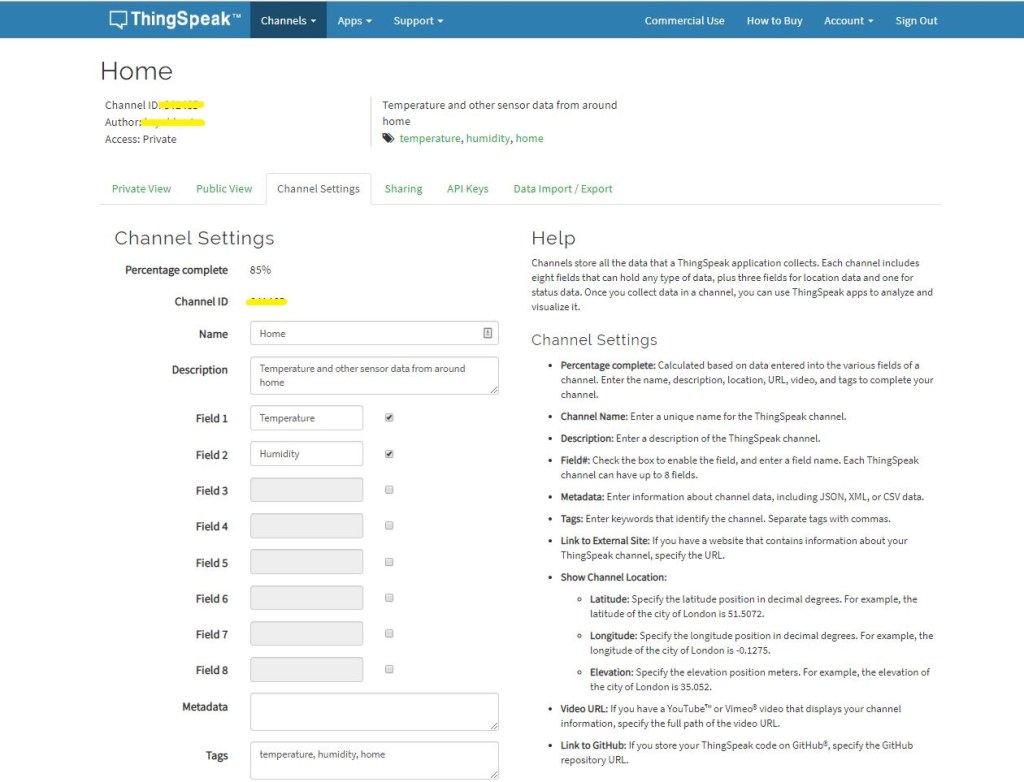
The ThingSpeak channel setup has many attributes (link to an external site, link to a GitHub repository, fields for elevation, latitude, longitude etc. ) but only 8 data fields which seems a bit limiting (some of my sensor nodes report more than 8 values).

Dashboard

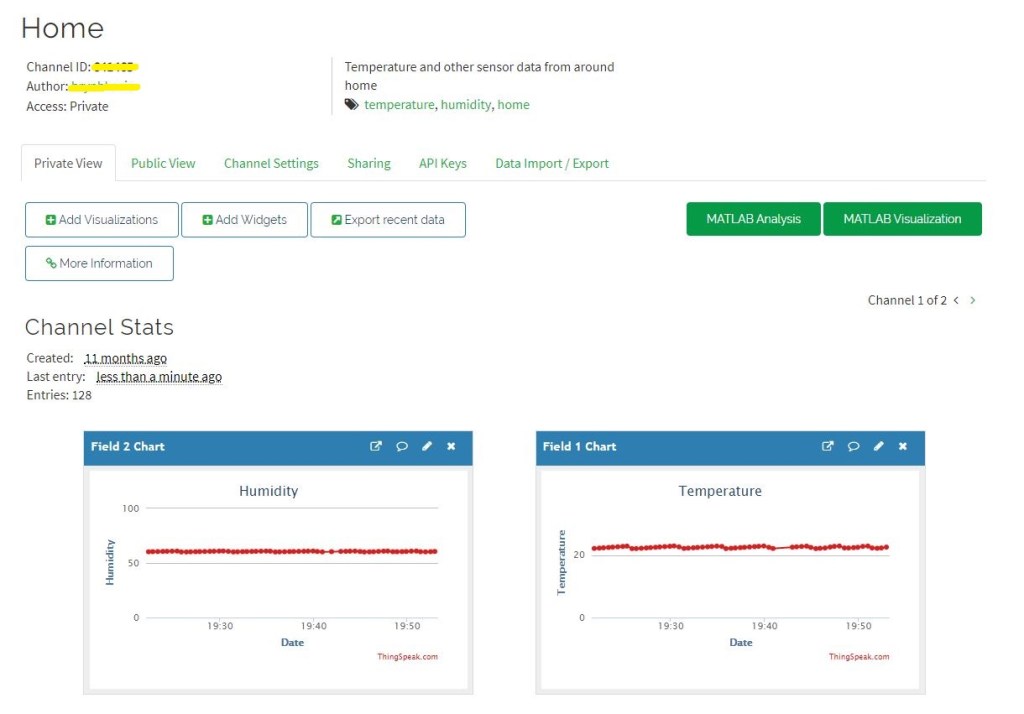
The Thingspeak dashboard configuration was fairly simple, though the maximum of eight sequentially numbered of inputs (Fields) might require some mapping code.

Overall the initial configuration went smoothly after I figured out the required Quality of Service (QoS) settings, retain flag usage and the different APIKeys on the publish vs. subscribe topics.

I have not explored the advanced analysis enabled by the tight integration with MATLAB which could be quite an advantage for applications requiring that sort of functionality.

ubidots MQTT LoRa Field Gateway

Back in April I started working on an MQTT LoRa Field gateway which was going to support a selection of different Software as a service(SaaS) Internet of Things(IoT) platforms.

After a long pause in development I have a working ubidots client and have 3 proof of concept (PoC) integrations for Adafruit.IO, AskSensors, and Losant. I am also working on Azure IoT Hub, Azure IoT Central. The first iteration is focused on Device to Cloud (D2C) messaging in the next iteration I will add Cloud to Device where viable(C2D).

My applications use a lightweight, easy to implemented protocol which is intended for hobbyist and educational use rather than commercial applications (I have been working on a more secure version as yet another side project)

I have a number of sample Arduino with Dragino LoRa Shield for Arduino, MakerFabs Maduino, Dragino LoRa Mini Dev, M2M Low power Node and Netduino with Elecrow LoRa RFM95 Shield etc. clients. These work with both my platform specific (Adafruit.IO, Azure IoT Central) gateways and protocol specific field gateways.

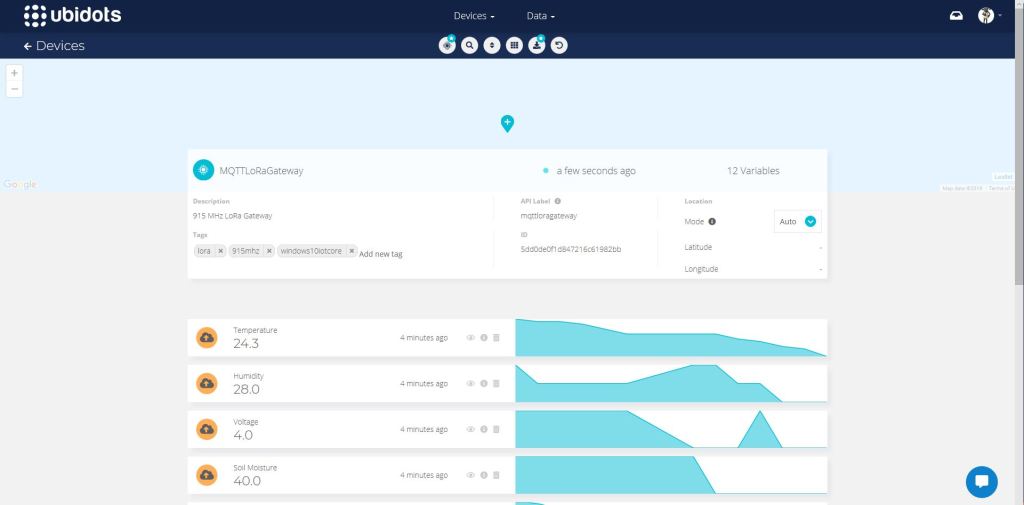
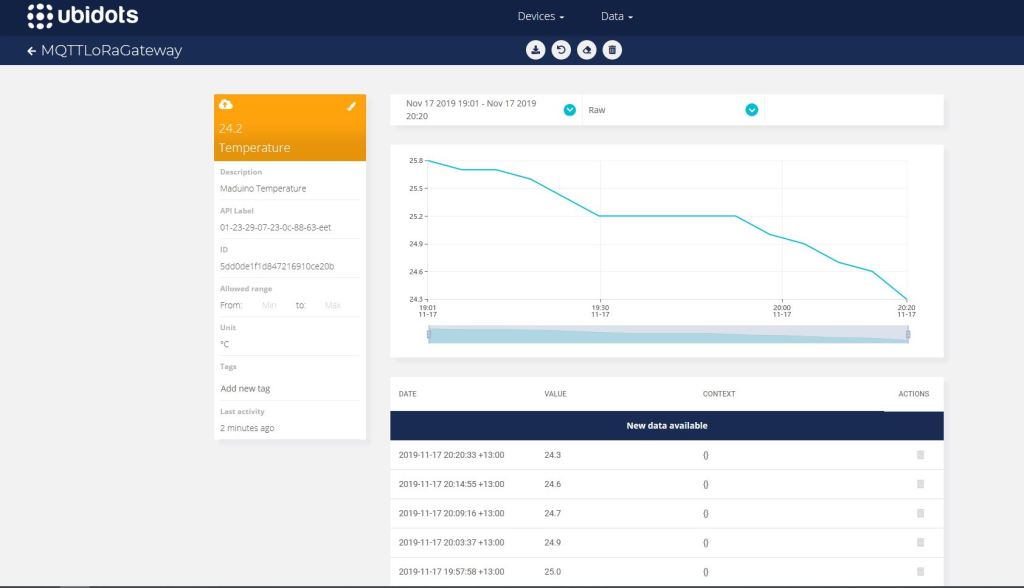
Ubidots dashboard

When the application is first started it creates a minimal configuration file which should be downloaded, the missing information filled out, then uploaded using the File explorer in the Windows device portal.

{
  "MQTTUserName": "Ubidots generated usname here",
  "MQTTPassword": "NotVerySecure",
  "MQTTClientID": "MQTTLoRaGateway",
  "MQTTServer": "industrial.api.ubidots.com",
  "Address": "LoRaIoT1",
  "Frequency": 915000000.0,
  "MessageHandlerAssembly": "Mqtt.IoTCore.FieldGateway.LoRa.Ubidots",
  "PlatformSpecificConfiguration": ""
}

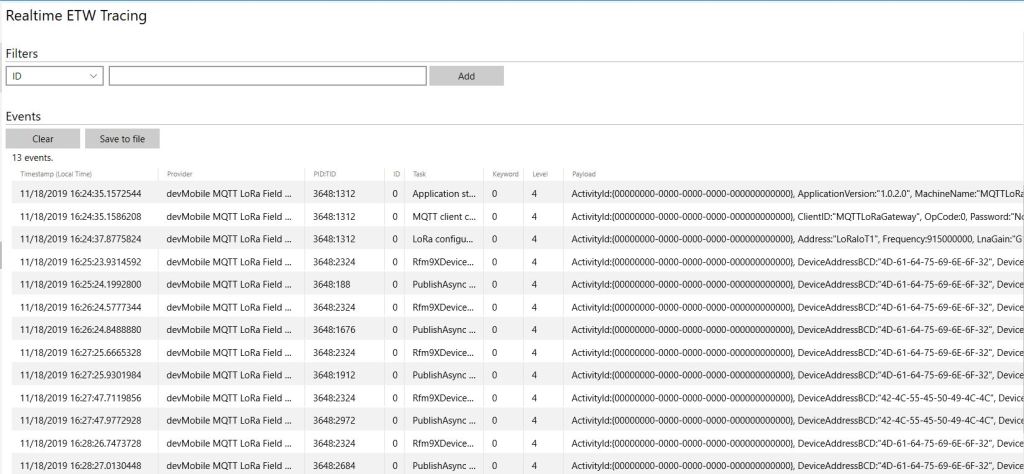
The application logs debugging information to the Windows 10 IoT Core ETW logging Microsoft-Windows-Diagnostics-LoggingChannel

MQTT LoRa Field Gateway with ubidots plugin generated telemetry
ubidots device management
ubidot managment

The message handler uploads all values in an inbound messages in one MQTT message using the ubidots MQTT message format

async void IMessageHandler.Rfm9XOnReceive(object sender, Rfm9XDevice.OnDataReceivedEventArgs e)
{
	LoggingFields processReceiveLoggingFields = new LoggingFields();
	JObject telemetryDataPoint = new JObject();
	char[] sensorReadingSeparators = { ',' };
	char[] sensorIdAndValueSeparators = { ' ' };

	processReceiveLoggingFields.AddString("PacketSNR", e.PacketSnr.ToString("F1"));
	processReceiveLoggingFields.AddInt32("PacketRSSI", e.PacketRssi);
	processReceiveLoggingFields.AddInt32("RSSI", e.Rssi);

	string addressBcdText = BitConverter.ToString(e.Address);
	processReceiveLoggingFields.AddInt32("DeviceAddressLength", e.Address.Length);
	processReceiveLoggingFields.AddString("DeviceAddressBCD", addressBcdText);

	string messageText;
	try
	{
		messageText = UTF8Encoding.UTF8.GetString(e.Data);
		processReceiveLoggingFields.AddString("MessageText", messageText);
	}
	catch (Exception ex)
	{
		processReceiveLoggingFields.AddString("Exception", ex.ToString());
		this.Logging.LogEvent("PayloadProcess failure converting payload to text", processReceiveLoggingFields, LoggingLevel.Warning);
		return;
	}

	// Chop up the CSV text
	string[] sensorReadings = messageText.Split(sensorReadingSeparators, StringSplitOptions.RemoveEmptyEntries);
	if (sensorReadings.Length < 1)
	{
		this.Logging.LogEvent("PayloadProcess payload contains no sensor readings", processReceiveLoggingFields, LoggingLevel.Warning);
		return;
	}

	// Chop up each sensor read into an ID & value
	foreach (string sensorReading in sensorReadings)
	{
		string[] sensorIdAndValue = sensorReading.Split(sensorIdAndValueSeparators, StringSplitOptions.RemoveEmptyEntries);
		// Check that there is an id & value
		if (sensorIdAndValue.Length != 2)
		{
			this.Logging.LogEvent("PayloadProcess payload invalid format", processReceiveLoggingFields, LoggingLevel.Warning);
			return;
		}

		string sensorId = sensorIdAndValue[0];
		string value = sensorIdAndValue[1];

		telemetryDataPoint.Add(addressBcdText + sensorId, Convert.ToDouble(value));
	}
	processReceiveLoggingFields.AddString("MQTTClientId", MqttClient.Options.ClientId);

	string stateTopic = string.Format(stateTopicFormat, MqttClient.Options.ClientId);

	try
	{
		var message = new MqttApplicationMessageBuilder()
			.WithTopic(stateTopic)
			.WithPayload(JsonConvert.SerializeObject(telemetryDataPoint))
			.WithAtLeastOnceQoS()
			.Build();
		Debug.WriteLine(" {0:HH:mm:ss} MQTT Client PublishAsync start", DateTime.UtcNow);
		await MqttClient.PublishAsync(message);
		Debug.WriteLine(" {0:HH:mm:ss} MQTT Client PublishAsync finish", DateTime.UtcNow);

		this.Logging.LogEvent("PublishAsync Ubidots payload", processReceiveLoggingFields, LoggingLevel.Information);
	}
	catch (Exception ex)
	{
		processReceiveLoggingFields.AddString("Exception", ex.ToString());
		this.Logging.LogEvent("PublishAsync Ubidots payload", processReceiveLoggingFields, LoggingLevel.Error);
	}
}

The “automagic” provisioning of feeds does make setting up small scale systems easier, though I’m not certain how well it would scale.

Some of the fields weren’t obviously editable e.g.”ÄPI Label” in device configuration which I only discovered by clicking on them..

The limitations of the free account meant I couldn’t evaluate ubidots in much depth but what was available appeared to be robust and reliable (Nov 2019).

Adafruit MQTT Cloud to Device Messaging

After getting MQ Telemetry Transport (MQTT) Device to Cloud (D2C) messaging working for AdaFruit.IO I have also got Cloud to Device (C2D) messaging working as well.

The MQTT broker, username, API key, client ID, optional group name (to keep MQTT aligned with REST API terminology), command topic and feed name are command line options.

The Adafruit IO MQTT documentation suggests an approach for naming topics which allows a bit more structure for feed (D2C and C2D) names than the REST API (which only does D2C).

class Program
{
	private static IMqttClient mqttClient = null;
	private static IMqttClientOptions mqttOptions = null;
	private static string server;
	private static string username;
	private static string password;
	private static string clientId;
	private static string commandTopic;
	private static string groupname;
	private static string feedname;

	static void Main(string[] args)
	{
		MqttFactory factory = new MqttFactory();
		mqttClient = factory.CreateMqttClient();

		if ((args.Length != 6) && (args.Length != 7))
		{
			Console.WriteLine("[MQTT Server] [UserName] [Password] [ClientID] [CommandTopic] [GroupName] [FeedName]");
			Console.WriteLine("[MQTT Server] [UserName] [Password] [ClientID] [CommandTopic] [FeedName]");
			Console.WriteLine("Press <enter> to exit");
			Console.ReadLine();
			return;
		}

		server = args[0];
		username = args[1];
		password = args[2];
		clientId = args[3];
		commandTopic = args[4];
		if (args.Length == 6)
		{
			feedname = args[5].ToLower();
			Console.WriteLine($"MQTT Server:{server} Username:{username} ClientID:{clientId} CommandTopic:{commandTopic} Feedname:{feedname}");
		}

		if (args.Length == 7)
		{
			groupname = args[5].ToLower();
			feedname = args[6].ToLower();
			Console.WriteLine($"MQTT Server:{server} Username:{username} ClientID:{clientId} CommandTopic:{commandTopic} Groupname:{groupname} Feedname:{feedname}");
		}

		mqttOptions = new MqttClientOptionsBuilder()
			.WithTcpServer(server)
			.WithCredentials(username, password)
			.WithClientId(clientId)
			.WithTls()
			.Build();

		mqttClient.Disconnected += MqttClient_Disconnected;
		mqttClient.ConnectAsync(mqttOptions).Wait();
		mqttClient.ApplicationMessageReceived += MqttClient_ApplicationMessageReceived;

		// Adafruit.IO format for topics which are called feeds
		string topic = string.Empty;

		if (args.Length == 6)
		{
			topic = $"{username}/feeds/{feedname}";				
		}

		if (args.Length == 7)
		{
			topic = $"{username}/feeds/{groupname}.{feedname}";
		}

		mqttClient.SubscribeAsync(commandTopic, MQTTnet.Protocol.MqttQualityOfServiceLevel.AtLeastOnce).GetAwaiter().GetResult();

		while (true)
		{
			string value = "22." + DateTime.UtcNow.Millisecond.ToString();
			Console.WriteLine($"Topic:{topic} Value:{value}");

			var message = new MqttApplicationMessageBuilder()
				.WithTopic(topic)
				.WithPayload(value)
				.WithQualityOfServiceLevel(MQTTnet.Protocol.MqttQualityOfServiceLevel.AtLeastOnce)
			.WithRetainFlag()
			.Build();

			Console.WriteLine("PublishAsync start");
			mqttClient.PublishAsync(message).Wait();
			Console.WriteLine("PublishAsync finish");

			Thread.Sleep(30100);
		}
	}

	private static void MqttClient_ApplicationMessageReceived(object sender, MqttApplicationMessageReceivedEventArgs e)
	{
		Console.WriteLine($"ClientId:{e.ClientId} Topic:{e.ApplicationMessage.Topic} Payload:{e.ApplicationMessage.ConvertPayloadToString()}");
	}

	private static async void MqttClient_Disconnected(object sender, MqttClientDisconnectedEventArgs e)
	{
		Debug.WriteLine("Disconnected");
		await Task.Delay(TimeSpan.FromSeconds(5));

		try
		{
			await mqttClient.ConnectAsync(mqttOptions);
		}
		catch (Exception ex)
		{
			Debug.WriteLine("Reconnect failed {0}", ex.Message);
		}
	}
}

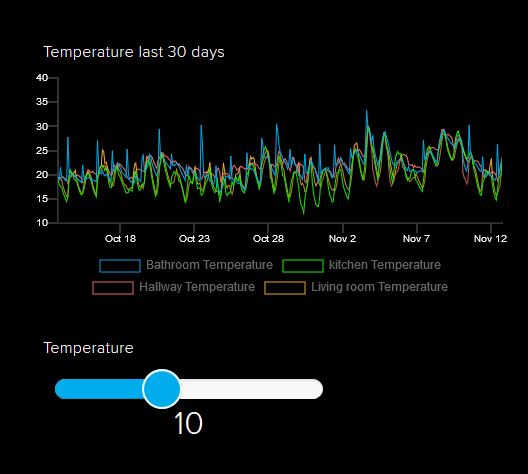
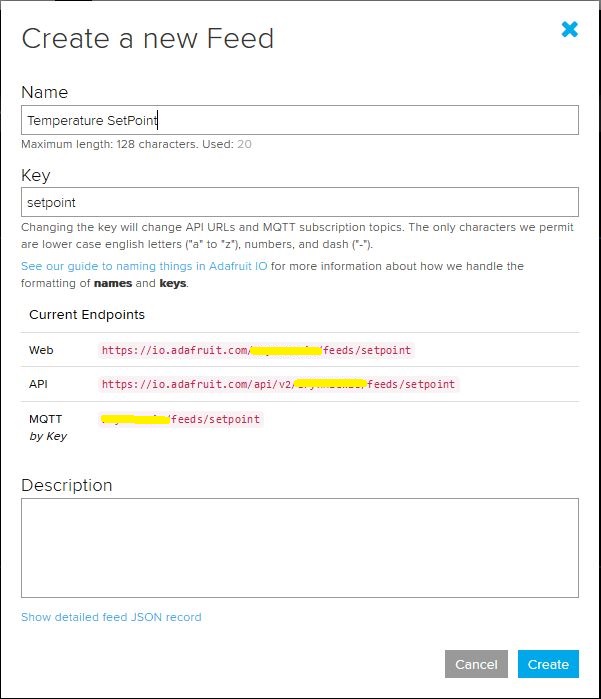
I configured a slider on the dashboard for my home called “setpoint” (yet again I was tripped up “automatically” camel casing the name because I’m a C# developer) which my MQTT client subscribed to.

AdaFruit.IO Home monitoring dashboard
setpoint feed configuration

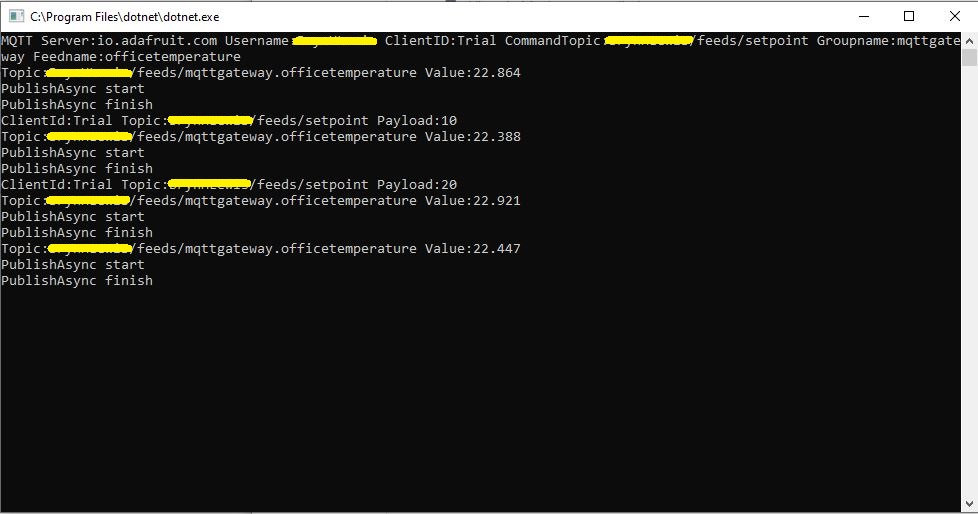
After figuring out the format of the command topic I found that when the slider was moved the MQTT client subscription event fired reliably.

AdaFruit Client showing the setpoint value change notifications

Overall the process went pretty well, though the manual configuration of the subscriptions to AdaFruit.IO feeds could become a bit of a problem at scale.