Random wanderings through Microsoft Azure esp. PaaS plumbing, the IoT bits, AI on Micro controllers, AI on Edge Devices, .NET nanoFramework, .NET Core on *nix and ML.NET+ONNX
Visual Studio Solution explorer Azure Functions projects
All of the examples now have a program.vb which initialises the Trigger.
Namespace VBNet....TriggerIsolated
    Friend Class Program
        Public Shared Sub Main(ByVal args As String())
            Call FunctionsDebugger.Enable()

            Dim host = New HostBuilder().ConfigureFunctionsWorkerDefaults().Build()

            host.Run()
        End Sub
    End Class
End Namespace
Namespace devMobile.Azure.VBNetBlobTriggerIsolated
    Public Class BlobTrigger
        Private ReadOnly _logger As ILogger

        Public Sub New(ByVal loggerFactory As ILoggerFactory)
            _logger = loggerFactory.CreateLogger(Of BlobTrigger)()
        End Sub

        <[Function]("vbnetblobtriggerisolated")>
        Public Sub Run(
        <BlobTrigger("vbnetblobtriggerisolated/{name}", Connection:="blobendpoint")> ByVal myBlob As String, ByVal name As String)

            _logger.LogInformation($"VB.Net NET 4.8 Isolated Blob trigger function Processed blob Name: {name}  Data: {myBlob}")
        End Sub
    End Class
End Namespace
Azure BlobTrigger function running in the desktop emulator
Azure BlobTrigger Function logging in Application Insights
I used Telerik Fiddler to POST messages to the desktop emulator and Azure endpoints.
Namespace VBNetHttpTriggerIsolated
    Public Class HttpTrigger
        Private Shared executionCount As Int32
        Private ReadOnly _logger As ILogger

        Public Sub New(ByVal loggerFactory As ILoggerFactory)
            _logger = loggerFactory.CreateLogger(Of HttpTrigger)()
        End Sub

        <[Function]("Notifications")>
        Public Function Run(
        <HttpTrigger(AuthorizationLevel.Anonymous, "get", "post")> ByVal req As HttpRequestData) As HttpResponseData
            Interlocked.Increment(executionCount)

            _logger.LogInformation("VB.Net NET 4.8 Isolated HTTP trigger Execution count:{executionCount} Method:{req.Method}", executionCount, req.Method)

            Dim response = req.CreateResponse(HttpStatusCode.OK)
            response.Headers.Add("Content-Type", "text/plain; charset=utf-8")

            Return response
        End Function
    End Class
End Namespace
Azure HttpTrigger Function running in the desktop emulator
Azure HttpTrigger Function logging in Application Insights
Namespace devMobile.Azure.VBNetQueueTriggerIsolated

    Public Class QueueTrigger
        Private Shared _logger As ILogger
        Private Shared _concurrencyCount As Integer = 0
        Private Shared _executionCount As Integer = 0

        Public Sub New(ByVal loggerFactory As ILoggerFactory)
            _logger = loggerFactory.CreateLogger(Of QueueTrigger)()
        End Sub

        <[Function]("VBNetQueueTriggerIsolated")>
        Public Sub Run(
        <QueueTrigger("vbnetqueuetriggerisolated", Connection:="QueueEndpoint")> ByVal message As String)
            Interlocked.Increment(_concurrencyCount)
            Interlocked.Increment(_executionCount)

            _logger.LogInformation("VB.Net .NET 4.8 Isolated Queue Trigger Concurrency:{_concurrencyCount} ExecutionCount:{_executionCount} Message:{message}", _concurrencyCount, _executionCount, message)

            Interlocked.Decrement(_concurrencyCount)
        End Sub
    End Class
End Namespace
Azure QueueTrigger Function running in the desktop emulator
Azure QueueTrigger Function logging in Application Insights
Namespace devMobile.Azure.VBNetTimerTriggerIsolated
    Public Class TimerTrigger
        Private Shared _logger As ILogger
        Private Shared _executionCount As Integer = 0

        Public Sub New(ByVal loggerFactory As ILoggerFactory)
            _logger = loggerFactory.CreateLogger(Of TimerTrigger)()
        End Sub

        <[Function]("Timer")>
        Public Sub Run(
        <TimerTrigger("0 */1 * * * *")> ByVal myTimer As MyInfo)

            Interlocked.Increment(_executionCount)
            _logger.LogInformation("VB.Net Isolated TimerTrigger next trigger:{0} Execution count:{1}", myTimer.ScheduleStatus.Next, _executionCount)
        End Sub
    End Class
Azure TimerTrigger Function running in the desktop emulator
Azure TimerTrigger Function logging in Application Insights
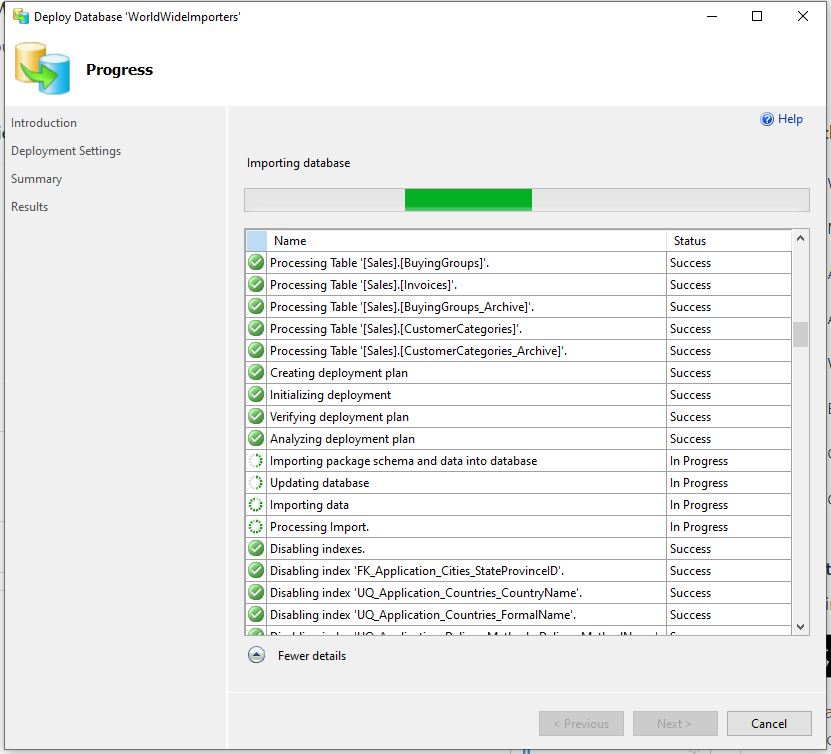
Read-only replicas of an Azure SQL Database database with Active geo-replication are easy to setup but there are some disadvantages. e.g. bi-directional synchronisation is not supported, not all tables or selected columns of some tables might not be needed\should not be accessible for reporting, the overhead of replicating tables used for transaction processing might impact on the performance of the solution etc. Azure SQL Data Sync is a service built on Azure SQL Database that can synchronise selected data bi-directionally across multiple databases, both on-premises and in the cloud.
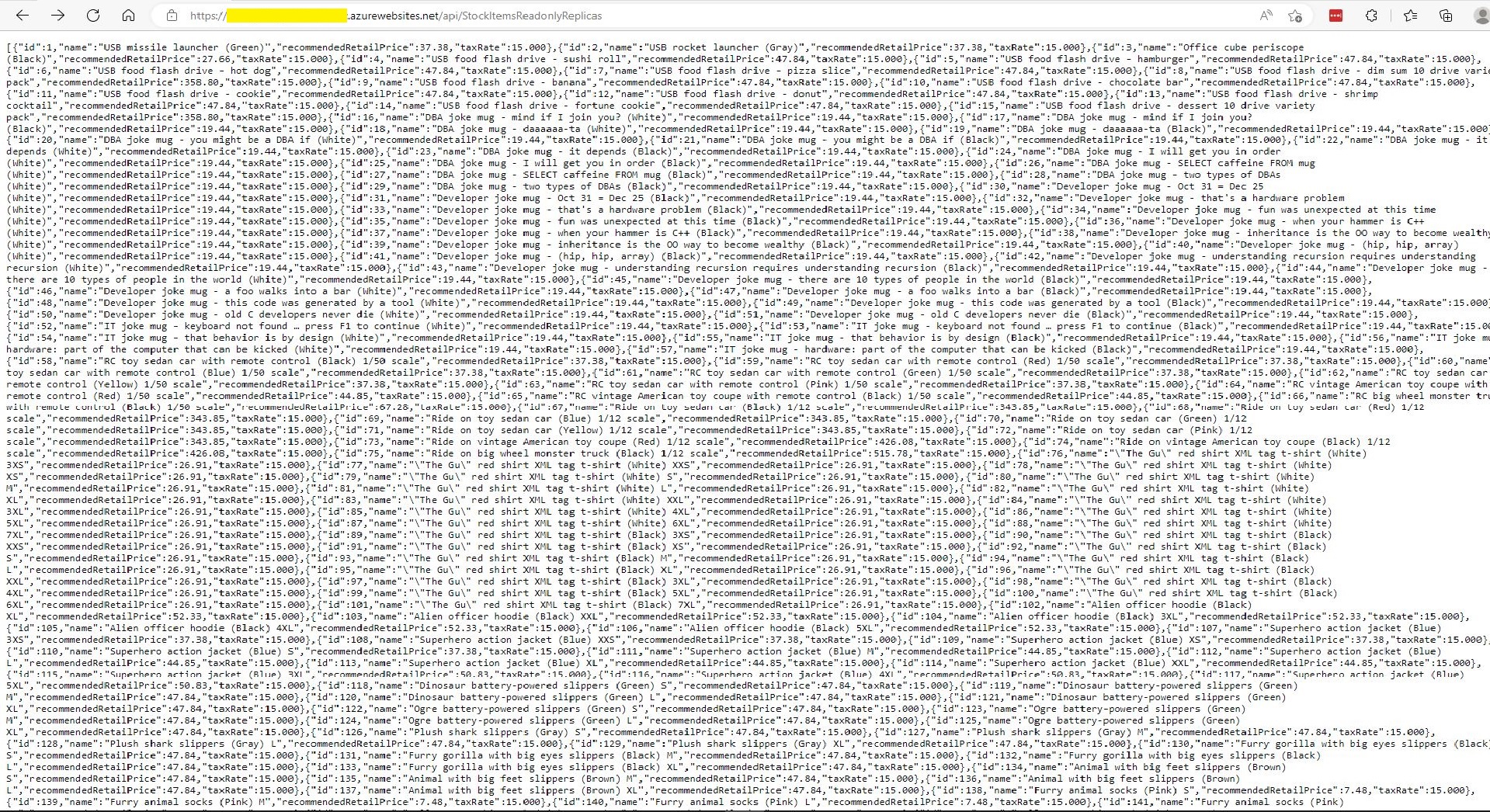
StockItemsReadOnlyReplicas Controller JSON after first replication completed
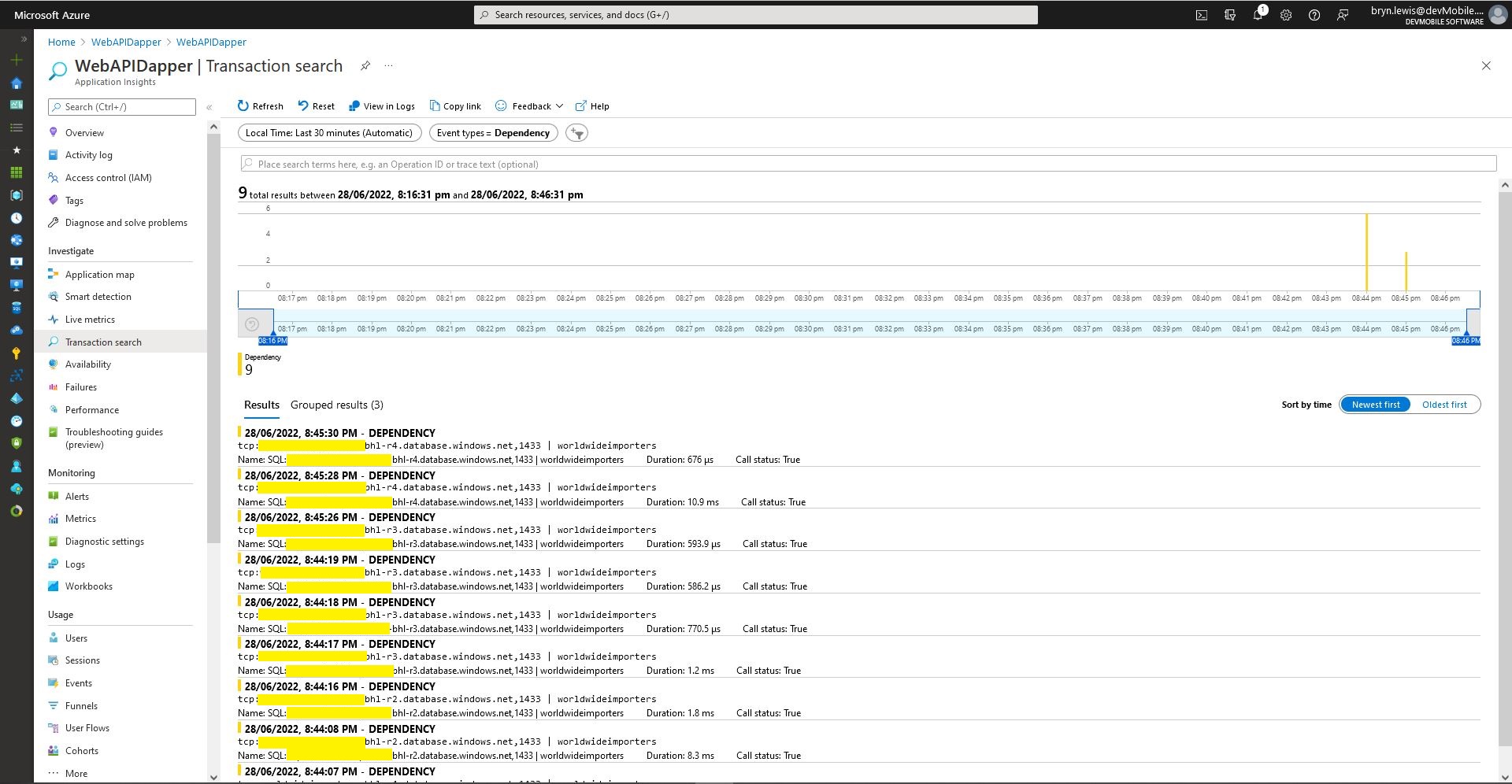
Azure application Insights Dependencies showing usage of different synchronised databases
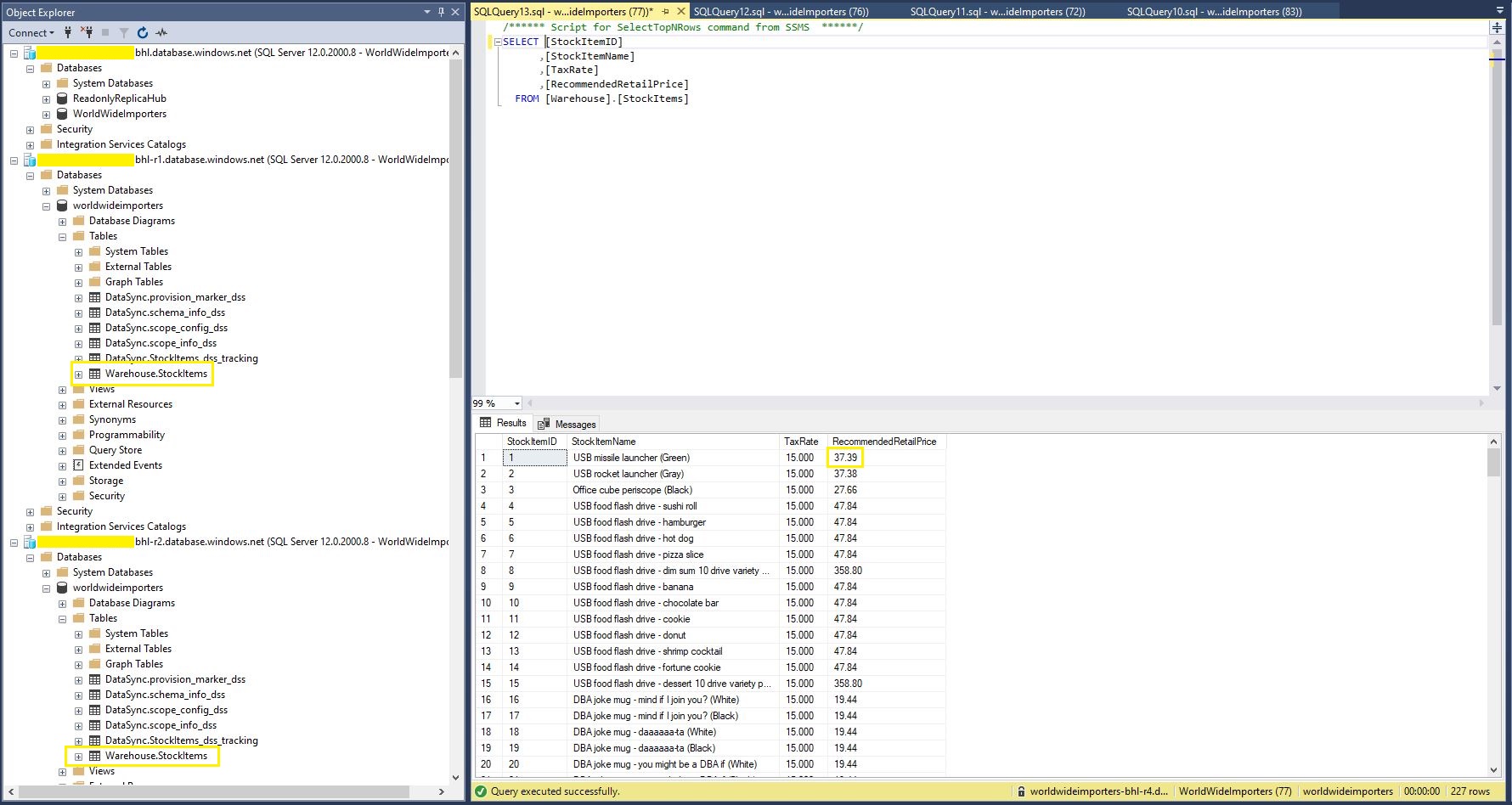
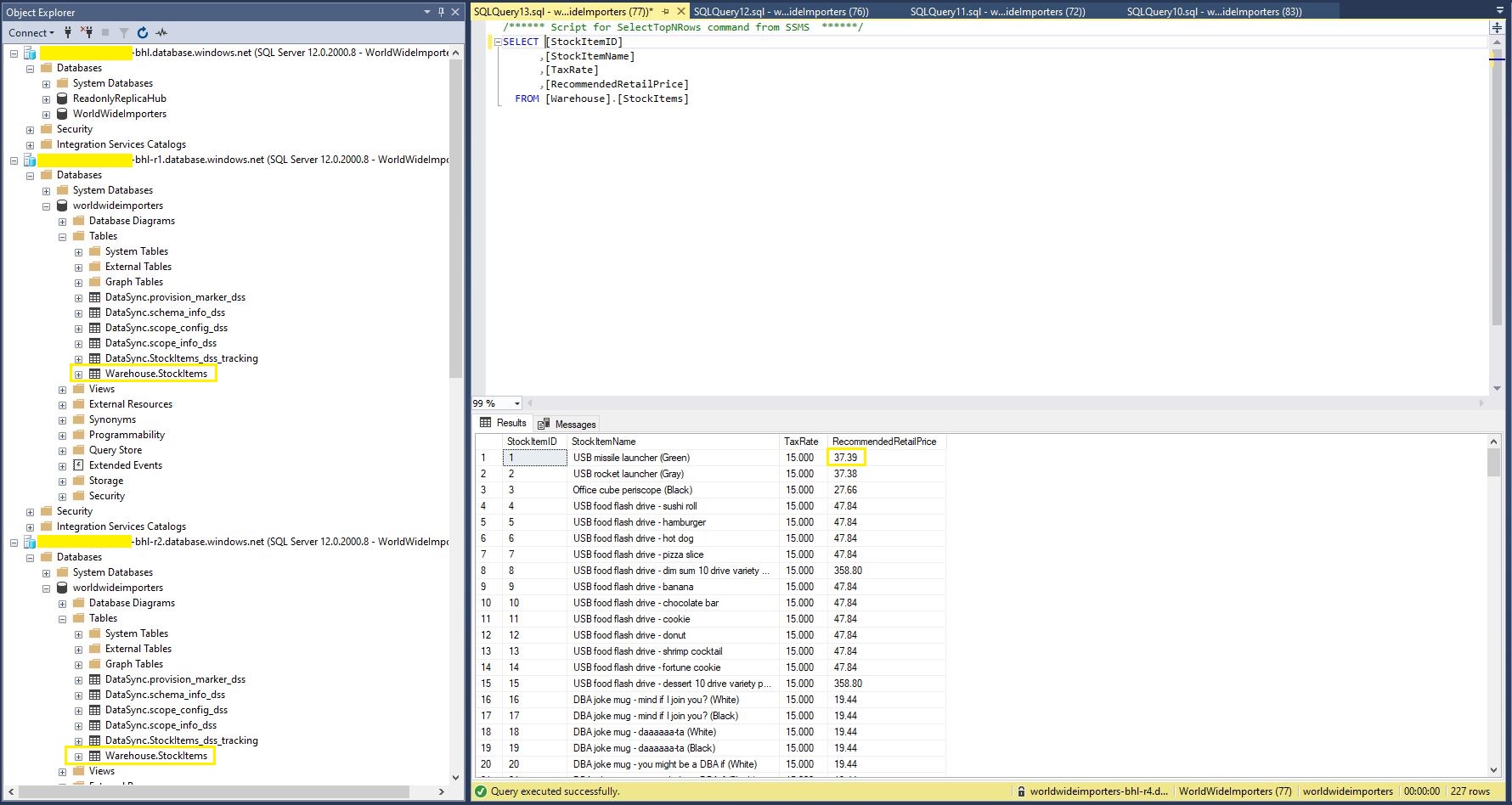
StockItems table in source database with updated RRP
StockItems table in destination database with updated RRP after next scheduled snychronisation
StockItems table in destination database after next scheduled synchronisation
The Azure SQL Database Data Sync was pretty easy to setup (configuration in the hub database tripped me up initially). For a production scenario where only a portion of the database (e.g. shaped by Customer, Geography, security considerations, or a bi-directional requirement) it would be an effective solution, though for some applications the delay between synchronisations might be an issue.
One of the easiest ways to create read-only replicas of an Azure SQL Database database is with Active geo-replication(it’s also useful for disaster recovery with geo-failure to a geo-secondary in a different Azure Region).
I then created replicas in the same region (if the application had a global customer base creating read only geo replicas in regions close to users might be worth considering) for the read-only queries.
Azure SQL Database no replicas configured
Azure Portal Create Geo Replica
I created four replicas which is the maximum number supported. If more replicas were required a secondary of a secondary (a process known as chaining) could be use to create additional geo-replicas
Azure Portal Primary Database and four Geo-replicas
Azure Application Insights showing multiple Geo-Replicas being used.
The Azure Database Geo-replication was pretty easy to setup. For a production scenario where only a portion of the database (e.g. shaped by Customer or Geography) is required it might not be the “right hammer”.
WebAPI Dapper Azure Resource Group
The other limitation I encountered was the resources used by the replication of “transaction processing” tables (in the World Wide Importers database tables like the Sales.OrderLines, Sales.CustomerTransactions etc.) which often wouldn’t be required for read-only applications.
The company builds a Software as a Service(Saas) product for managing portfolios of foreign currency forwards, options, swaps etc. Part of the solution has an application which customers use to get an “aggregated” view of their purchases.
The database queries to lookup reference data (forward curves etc.), return a shaped dataset for each supported instrument type, then “aggregating” the information with C# code consumes significant database and processing resources.
The configuration strings of the read-only replicas are loaded as the application starts.
// This method gets called by the runtime. Use this method to add services to the container.
public void ConfigureServices(IServiceCollection services)
{
	services.AddControllers();

	var errorHandlerSettings = Configuration.GetSection(nameof(ErrorHandlerSettings));
	services.Configure<ErrorHandlerSettings>(errorHandlerSettings);

	var readonlyReplicaServersConnectionStringSettings = Configuration.GetSection("ReadonlyReplicaServersConnectionStringSettings");
	services.Configure<List<string>>(readonlyReplicaServersConnectionStringSettings);

	services.AddResponseCaching();

	services.AddDapperForMSSQL();
#if DAPPER_EXTENSIONS_CACHE_MEMORY
	services.AddDapperCachingInMemory(new MemoryConfiguration
	{
		AllMethodsEnableCache = false
 	});
#endif
#if DAPPER_EXTENSIONS_CACHE_REDIS
	services.AddDapperCachingInRedis(new RedisConfiguration
	{
		AllMethodsEnableCache = false,
		KeyPrefix = Configuration.GetValue<string>("RedisKeyPrefix"),
		ConnectionString = Configuration.GetConnectionString("RedisConnection")
	});
#endif
	services.AddApplicationInsightsTelemetry();
}
Then code was added to the controller to randomly select which read-only replica to use. More complex approaches were considered but not implemented for the initial version.
[ApiController]
[Route("api/[controller]")]
public class StockItemsReadonlyReplicasController : ControllerBase
{
    private readonly ILogger<StockItemsReadonlyReplicasController> logger;
    private readonly List<string> readonlyReplicasConnectionStrings;

    public StockItemsReadonlyReplicasController(ILogger<StockItemsReadonlyReplicasController> logger, IOptions<List<string>> readonlyReplicasServerConnectionStrings)
    {
        this.logger = logger;

        this.readonlyReplicasConnectionStrings = readonlyReplicasServerConnectionStrings.Value;
    }

    [HttpGet]
    public async Task<ActionResult<IEnumerable<Model.StockItemListDtoV1>>> Get()
    {
        IEnumerable<Model.StockItemListDtoV1> response = null;

        if (readonlyReplicasConnectionStrings.Count == 0)
        {
            logger.LogError("No readonly replica server Connection strings configured");

            return this.StatusCode(StatusCodes.Status500InternalServerError);
        }

        Random random = new Random(); // maybe this should be instantiated ever call, but "danger here by thy threading"

        string connectionString = readonlyReplicasConnectionStrings[random.Next(0, readonlyReplicasConnectionStrings.Count)];

        logger.LogTrace("Connection string {connectionString}", connectionString);

        using (SqlConnection db = new SqlConnection(connectionString))
        {
            response = await db.QueryAsync<Model.StockItemListDtoV1>(sql: @"SELECT [StockItemID] as ""ID"", [StockItemName] as ""Name"", [RecommendedRetailPrice], [TaxRate] FROM [Warehouse].[StockItems]", commandType: CommandType.Text);
        }

        return this.Ok(response);
    }
}
The Read-only replica server connection string setup template in appsettings.Development.json.
The Manage UserSecrets(Secrets.json) functionality was used for testing on my development machine. In production Azure App Service the array of connections strings was configured with ReadonlyReplicaServersConnectionStringSettings:0, ReadonlyReplicaServersConnectionStringSettings:1 etc. syntax
Sample application Azure App Service Configuration
Azure Application Insights with connections to different read-only replicas highlighted
I had incorrectly configured the firewall on one of the read-only replica database servers so roughly one in four connection attempts failed.
For some historical reason I can’t remember my controllers often had an outer try/catch and associated logging. I think may have been ensure no “sensitive” information was returned to the caller even if the application was incorrectly deployed. So I could revisit my approach I added a controller with two methods one which returns an HTTP 500 error and another which has un-caught exception.
[Route("api/[controller]")]
[ApiController]
public class StockItemsNok500Controller : ControllerBase
{
	private readonly string connectionString;
	private readonly ILogger<StockItemsNok500Controller> logger;

	public StockItemsNok500Controller(IConfiguration configuration, ILogger<StockItemsNok500Controller> logger)
	{
		this.connectionString = configuration.GetConnectionString("WorldWideImportersDatabase");

		this.logger = logger;
	}

	public async Task<ActionResult<IEnumerable<Model.StockItemListDtoV1>>> Get500()
	{
		IEnumerable<Model.StockItemListDtoV1> response = null;

		try
		{
			using (SqlConnection db = new SqlConnection(this.connectionString))
			{
				response = await db.QueryWithRetryAsync<Model.StockItemListDtoV1>(sql: @"SELECT [StockItemID] as ""ID"", [StockItemName] as ""Name"", [RecommendedRetailPrice], [TaxRate] FROM [Warehouse].[StockItem500]", commandType: CommandType.Text);
			}
		}
		catch (SqlException ex)
		{
			logger.LogError(ex, "Retrieving list of StockItems");

			return this.StatusCode(StatusCodes.Status500InternalServerError);
		}

		return this.Ok(response);
	}
}
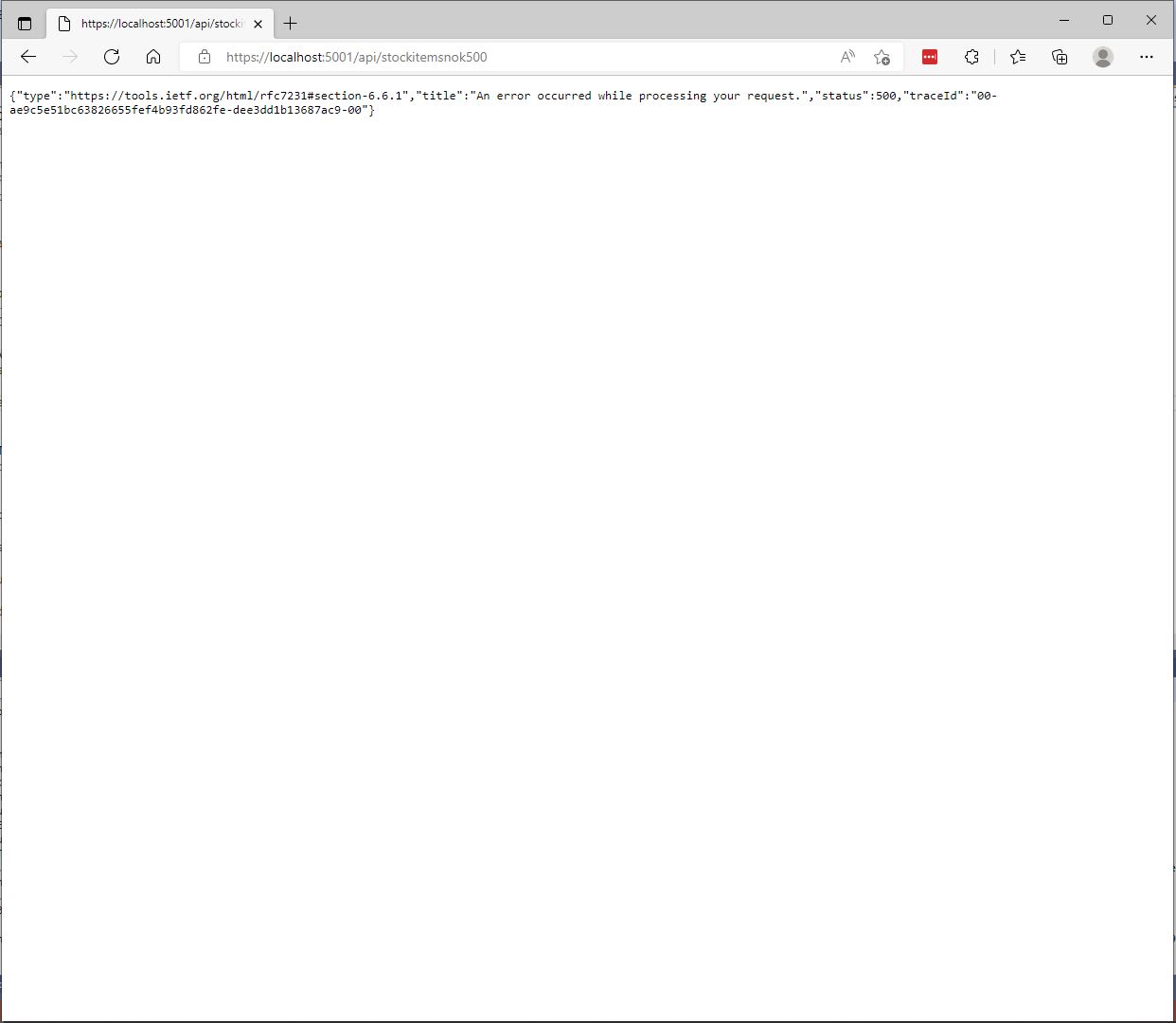
The information returned to a caller was generic and the only useful information was the “traceId”.
StockItemsNok500Controller error page
[Route("api/[controller]")]
[ApiController]
public class StockItemsNokExceptionController : ControllerBase
{
	private readonly string connectionString;

	public StockItemsNokExceptionController(IConfiguration configuration)
	{
		this.connectionString = configuration.GetConnectionString("WorldWideImportersDatabase");
	}

	public async Task<ActionResult<IEnumerable<Model.StockItemListDtoV1>>> GetException()
	{
		IEnumerable<Model.StockItemListDtoV1> response = null;

		using (SqlConnection db = new SqlConnection(this.connectionString))
		{
			response = await db.QueryWithRetryAsync<Model.StockItemListDtoV1>(sql: @"SELECT [StockItemID] as ""ID"", [StockItemName] as ""Name"", [RecommendedRetailPrice], [TaxRate] FROM [Warehouse].[StockItemsException]", commandType: CommandType.Text);
		}

		return this.Ok(response);
	}
}
In “Development” mode the information returned to the caller contains a detailed stack trace that reveals implementation details which are useful for debugging but would also be useful to an attacker.
Developer StockItemsNok Controller Exception page
When not in “Development” mode no additional information is returned (not even a TraceId).
Production StockItemsNok500Controller Exception
The diagnostic stacktrace information logged by the two different controllers was essentially the same
System.Data.SqlClient.SqlException:
   at System.Data.SqlClient.SqlCommand+<>c.<ExecuteDbDataReaderAsync>b__126_0 (System.Data.SqlClient, Version=4.6.1.3, Culture=neutral, PublicKeyToken=b03f5f7f11d50a3a)
   at System.Threading.Tasks.ContinuationResultTaskFromResultTask`2.InnerInvoke (System.Private.CoreLib, Version=6.0.0.0, Culture=neutral, PublicKeyToken=7cec85d7bea7798e)
   at System.Threading.Tasks.Task+<>c.<.cctor>b__272_0 (System.Private.CoreLib, Version=6.0.0.0, Culture=neutral, PublicKeyToken=7cec85d7bea7798e)
   at System.Threading.ExecutionContext.RunInternal (System.Private.CoreLib, Version=6.0.0.0, Culture=neutral, PublicKeyToken=7cec85d7bea7798e)
   at System.Runtime.ExceptionServices.ExceptionDispatchInfo.Throw (System.Private.CoreLib, Version=6.0.0.0, Culture=neutral, PublicKeyToken=7cec85d7bea7798e)
   at System.Threading.ExecutionContext.RunInternal (System.Private.CoreLib, Version=6.0.0.0, Culture=neutral, PublicKeyToken=7cec85d7bea7798e)
   at System.Threading.Tasks.Task.ExecuteWithThreadLocal (System.Private.CoreLib, Version=6.0.0.0, Culture=neutral, PublicKeyToken=7cec85d7bea7798e)
   at System.Runtime.ExceptionServices.ExceptionDispatchInfo.Throw (System.Private.CoreLib, Version=6.0.0.0, Culture=neutral, PublicKeyToken=7cec85d7bea7798e)
   at System.Runtime.CompilerServices.TaskAwaiter.ThrowForNonSuccess (System.Private.CoreLib, Version=6.0.0.0, Culture=neutral, PublicKeyToken=7cec85d7bea7798e)
   at System.Runtime.CompilerServices.TaskAwaiter.HandleNonSuccessAndDebuggerNotification (System.Private.CoreLib, Version=6.0.0.0, Culture=neutral, PublicKeyToken=7cec85d7bea7798e)
   at Dapper.SqlMapper+<QueryAsync>d__33`1.MoveNext (Dapper, Version=2.0.0.0, Culture=neutral, PublicKeyToken=null: /_/Dapper/SqlMapper.Async.cs:418)
   at System.Runtime.ExceptionServices.ExceptionDispatchInfo.Throw (System.Private.CoreLib, Version=6.0.0.0, Culture=neutral, PublicKeyToken=7cec85d7bea7798e)
   at System.Runtime.CompilerServices.TaskAwaiter.ThrowForNonSuccess (System.Private.CoreLib, Version=6.0.0.0, Culture=neutral, PublicKeyToken=7cec85d7bea7798e)
   at System.Runtime.CompilerServices.TaskAwaiter.HandleNonSuccessAndDebuggerNotification (System.Private.CoreLib, Version=6.0.0.0, Culture=neutral, PublicKeyToken=7cec85d7bea7798e)
   at Polly.Retry.AsyncRetryEngine+<ImplementationAsync>d__0`1.MoveNext (Polly, Version=7.0.0.0, Culture=neutral, PublicKeyToken=c8a3ffc3f8f825cc)
   at System.Runtime.ExceptionServices.ExceptionDispatchInfo.Throw (System.Private.CoreLib, Version=6.0.0.0, Culture=neutral, PublicKeyToken=7cec85d7bea7798e)
   at System.Runtime.CompilerServices.TaskAwaiter.ThrowForNonSuccess (System.Private.CoreLib, Version=6.0.0.0, Culture=neutral, PublicKeyToken=7cec85d7bea7798e)
   at System.Runtime.CompilerServices.TaskAwaiter.HandleNonSuccessAndDebuggerNotification (System.Private.CoreLib, Version=6.0.0.0, Culture=neutral, PublicKeyToken=7cec85d7bea7798e)
   at System.Runtime.CompilerServices.ConfiguredTaskAwaitable`1+ConfiguredTaskAwaiter.GetResult (System.Private.CoreLib, Version=6.0.0.0, Culture=neutral, PublicKeyToken=7cec85d7bea7798e)
   at Polly.AsyncPolicy+<ExecuteAsync>d__21`1.MoveNext (Polly, Version=7.0.0.0, Culture=neutral, PublicKeyToken=c8a3ffc3f8f825cc)
   at System.Runtime.ExceptionServices.ExceptionDispatchInfo.Throw (System.Private.CoreLib, Version=6.0.0.0, Culture=neutral, PublicKeyToken=7cec85d7bea7798e)
   at System.Runtime.CompilerServices.TaskAwaiter.ThrowForNonSuccess (System.Private.CoreLib, Version=6.0.0.0, Culture=neutral, PublicKeyToken=7cec85d7bea7798e)
   at System.Runtime.CompilerServices.TaskAwaiter.HandleNonSuccessAndDebuggerNotification (System.Private.CoreLib, Version=6.0.0.0, Culture=neutral, PublicKeyToken=7cec85d7bea7798e)
   at System.Runtime.CompilerServices.TaskAwaiter`1.GetResult (System.Private.CoreLib, Version=6.0.0.0, Culture=neutral, PublicKeyToken=7cec85d7bea7798e)
   at devMobile.WebAPIDapper.Lists.Controllers.StockItemsNokController+<Get500>d__4.MoveNext (ListsClassic, Version=1.0.0.0, Culture=neutral, PublicKeyToken=null: C:\Users\BrynLewis\source\repos\WebAPIDapper\Lists\Controllers\14.StockItemsNokController.cs:70)
One customer wanted their client application to display a corporate help desk number for staff to call for support. This information was made configurable
namespace devMobile.WebAPIDapper.Lists
{
	public class ErrorHandlerSettings
	{
		public string Detail { get; set; } = "devMobile Lists Classic API failure";

		public string Title { get; set; } = "System Error";
	}
}
{
 ...
  },
  "ErrorHandlerSettings": {
    "Title": "Webpage has died",
    "Detail": "Something has gone wrong call the help desk on 0800-RebootIt"
  },
...
}
namespace devMobile.WebAPIDapper.Lists.Controllers
{
	using Microsoft.AspNetCore.Mvc;
	using Microsoft.Extensions.Hosting;
	using Microsoft.Extensions.Options;


	[ApiController]
	public class ErrorController : Controller
	{
		private readonly ErrorHandlerSettings errorHandlerSettings;

		public ErrorController(IOptions<ErrorHandlerSettings> errorHandlerSettings)
		{
			this.errorHandlerSettings = errorHandlerSettings.Value;
		}

		[Route("/error")]
		public IActionResult HandleError([FromServices] IHostEnvironment hostEnvironment)
		{
			return Problem(detail: errorHandlerSettings.Detail, title: errorHandlerSettings.Title);
		}
	}
}
StockItemsNok Controller Error page with configurable title and details
Another customer wanted their client application to display a corporate help desk number based on the source hostname.
ClientA.SaasApplicationProvider.co.nz
ClientB.SaasApplicationProvider.co.nz
ClientC.SaasApplicationProvider.co.nz
SaasApplication.ClientD.co.nz
This information was also made configurable
namespace devMobile.WebAPIDapper.Lists
{
	using System.Collections.Generic;

	public class UrlSpecificSetting
	{
		public string Title { get; set; } = "";

		public string Detail { get; set; } = "";

		public UrlSpecificSetting()
		{
		}

		public UrlSpecificSetting(string title, string detail)
		{
			this.Title = title;
			this.Detail = detail;
		}
	}

	public class ErrorHandlerSettings
	{
		public string Title { get; set; } = "System Error";

		public string Detail { get; set; } = "devMobile Lists Classic API failure";

		public Dictionary<string, UrlSpecificSetting> UrlSpecificSettings { get; set; }

		public ErrorHandlerSettings()
		{
		}

		public ErrorHandlerSettings(string title, string detail, Dictionary<string, UrlSpecificSetting> urlSpecificSettings )
		{
			Title = title;

			Detail = detail;

			UrlSpecificSettings = urlSpecificSettings;
		}
	}
}
We considered storing the title and details message in the database but that approach was discounted as we wanted to minimise dependencies.
{
 ...
  "ErrorHandlerSettings": {
    "Detail": "Default detail",
    "Title": "Default title",
    "UrlSpecificSettings": {
      "localhost": {
        "Title": "Title for localhost",
        "Detail": "Detail for localhost"
      },
      "127.0.0.1": {
        "Title": "Title for 127.0.0.1",
        "Detail": "Detail for 127.0.0.1"
      }
    }
  }
}
namespace devMobile.WebAPIDapper.Lists.Controllers
{
	using Microsoft.AspNetCore.Mvc;
	using Microsoft.Extensions.Hosting;
	using Microsoft.Extensions.Options;


	[ApiController]
	public class ErrorController : Controller
	{
		private readonly ErrorHandlerSettings errorHandlerSettings;

		public ErrorController(IOptions<ErrorHandlerSettings> errorHandlerSettings)
		{
			this.errorHandlerSettings = errorHandlerSettings.Value;
		}

		[Route("/error")]
		public IActionResult HandleError([FromServices] IHostEnvironment hostEnvironment)
		{
			if (!this.errorHandlerSettings.UrlSpecificSettings.ContainsKey(this.Request.Host.Host))
			{
				return Problem(detail: errorHandlerSettings.Detail, title: errorHandlerSettings.Title);
			}

			return Problem(errorHandlerSettings.UrlSpecificSettings[this.Request.Host.Host].Title, errorHandlerSettings.UrlSpecificSettings[this.Request.Host.Host].Detail);
		}
	}
}
The sample configuration has custom title and details text for localhost and 127.0.0.1 with a default title and details text for all other hostnames.
StockItemsNok Controller Error page with 127.0.0.1 specific title and details
StockItemsNok Controller Error page with localhost specific title and details
One customer had a staff member who would take a photo of the client application error page with their mobile and email it to us which made it really easy to track down issues. This was especially usefully as they were in an awkward timezone.
Application Insights TraceId search
Application Insights TraceId search result with exception details
With a customisable error page my approach with the outer try/catch has limited benefit and just adds complexity.
Sometimes there is no easy way to build a “list of lists” using the contents of multiple database tables. I have run into this problem a few times especially when building webby services which query the database of a “legacy” (aka. production) system.
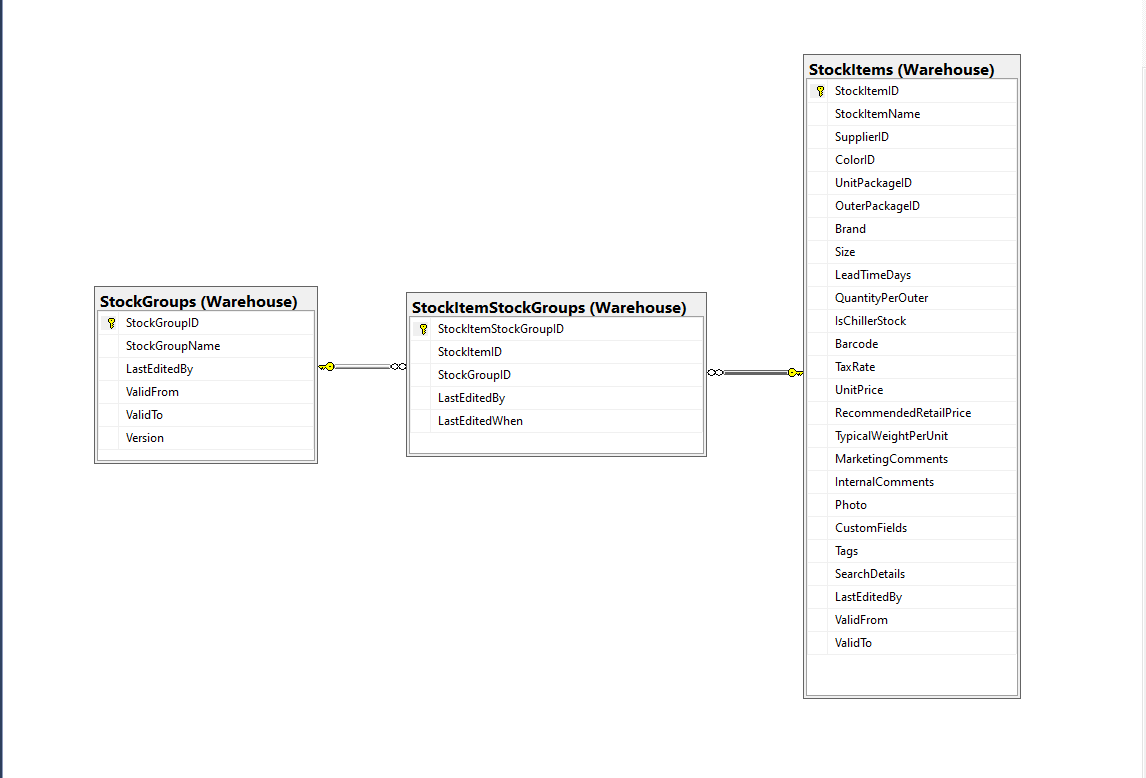
Retrieving a list of StockGroups and their StockItems from the World Wide Importers database was one of the better “real world” examples I could come up with.
SQL Server Management Studio Diagram showing relationships of tables
There is a fair bit of duplication (StockGroupID, StockGroupName) in the results set
SQL Server Management Studio StockItems-StockItemStockGroups-StockGroups query and results
There were 442 rows in the results set and 227 StockItems in the database so I ordered the query results by StockItemID and confirmed that there were many StockItems in several StockGroups.
public class StockItemListDtoV1
{
	public int Id { get; set; }

	public string Name { get; set; }

	public decimal RecommendedRetailPrice { get; set; }

	public decimal TaxRate { get; set; }
}

public class StockGroupStockItemsListDto
{
	StockGroupStockItemsListDto()
	{
		StockItems = new List<StockItemListDto>();
	}

	public int StockGroupID { get; set; }

	public string StockGroupName { get; set; }

	public List<StockItemListDto> StockItems { get; set; }
}
My initial version uses a Generic List for a StockGroup’s StockItems which is most probably not a good idea.
[Route("api/[controller]")]
[ApiController]
public class InvoiceQuerySplitOnController : ControllerBase
{
	private readonly string connectionString;
	private readonly ILogger<InvoiceQuerySplitOnController> logger;

	public InvoiceQuerySplitOnController(IConfiguration configuration, ILogger<InvoiceQuerySplitOnController> logger)
	{
		this.connectionString = configuration.GetConnectionString("WorldWideImportersDatabase");

		this.logger = logger;
	}

	[HttpGet]
	public async Task<ActionResult<IEnumerable<StockGroupStockItemsListDto>>> Get()
	{
		IEnumerable<StockGroupStockItemsListDto> response = null;

		try
		{
			using (SqlConnection db = new SqlConnection(this.connectionString))
			{
				var stockGroups = await db.QueryAsync<StockGroupStockItemsListDto, StockItemListDto, StockGroupStockItemsListDto>(
					sql: @"SELECT [StockGroups].[StockGroupID] as 'StockGroupID'" +
								",[StockGroups].[StockGroupName]" +
								",[StockItems].StockItemID as 'ID'" +
								",[StockItems].StockItemName as 'Name'" +
								",[StockItems].TaxRate" +
								",[StockItems].RecommendedRetailPrice " +
							"FROM [Warehouse].[StockGroups] " +
							"INNER JOIN[Warehouse].[StockItemStockGroups] ON ([StockGroups].[StockGroupID] = [StockItemStockGroups].[StockGroupID])" +
							"INNER JOIN[Warehouse].[StockItems] ON ([Warehouse].[StockItemStockGroups].[StockItemID] = [StockItems].[StockItemID])",
					(stockGroup, stockItem) =>
					{
						// Not certain I think using a List<> here is a good idea...
						stockGroup.StockItems.Add(stockItem);
						return stockGroup;
					},
				splitOn: "ID",
				commandType: CommandType.Text);

			response = stockGroups.GroupBy(p => p.StockGroupID).Select(g =>
			{
				var groupedStockGroup = g.First();
				groupedStockGroup.StockItems = g.Select(p => p.StockItems.Single()).ToList();
				return groupedStockGroup;
			});
		}
	}
	catch (SqlException ex)
	{
		logger.LogError(ex, "Retrieving S, Invoice Lines or Stock Item Transactions");

		return this.StatusCode(StatusCodes.Status500InternalServerError);
	}

	return this.Ok(response);
}
The MultiMapper syntax always trips me up and it usually takes a couple of attempts to get it to work.
List of StockGroups with StockItems
I have extended my DapperTransient module adding WithRetry versions of the 14 MultiMapper methods.
My current “day job” is building applications for managing portfolios of foreign currency instruments. A portfolio can contain many different types of instrument (Forwards, Options, Swaps etc.). One of the “optimisations” we use is retrieving all the different types of instruments in a portfolio with one stored procedure call.
SQL Server Management Studio Dependency viewer
The closest scenario I could come up with using the World Wide Importers database was retrieving a summary of all the information associated with an Invoice for display on a single screen.
CREATE PROCEDURE [Sales].[InvoiceSummaryGetV1](@InvoiceID as int)
AS
BEGIN

SELECT [InvoiceID]
--        ,[CustomerID]
--        ,[BillToCustomerID]
		,[OrderID]
		,[Invoices].[DeliveryMethodID]
		,[DeliveryMethodName]
--        ,[ContactPersonID]
--        ,[AccountsPersonID]
		,[SalespersonPersonID] as SalesPersonID
		,[SalesPerson].[PreferredName] as SalesPersonName
--        ,[PackedByPersonID]
		,[InvoiceDate]
		,[CustomerPurchaseOrderNumber]
		,[IsCreditNote]
		,[CreditNoteReason]
		,[Comments]
		,[DeliveryInstructions]
--        ,[InternalComments]
--        ,[TotalDryItems]
--        ,[TotalChillerItems]
		,[DeliveryRun]
		,[RunPosition] as DeliveryRunPosition
		,[ReturnedDeliveryData] as DeliveryData
		,[ConfirmedDeliveryTime] as DeliveredAt
		,[ConfirmedReceivedBy] as DeliveredTo
--        ,[LastEditedBy]
--        ,[LastEditedWhen]
	FROM [Sales].[Invoices]
	INNER JOIN [Application].[People] as SalesPerson ON (Invoices.[SalespersonPersonID] = [SalesPerson].[PersonID])
	INNER JOIN [Application].[DeliveryMethods] as DeliveryMethod ON (Invoices.[DeliveryMethodID] = DeliveryMethod.[DeliveryMethodID])
WHERE ([Invoices].[InvoiceID] = @InvoiceID)

SELECT [InvoiceLineID]
      ,[InvoiceID]
      ,[StockItemID]
      ,[Description] as StockItemDescription
      ,[InvoiceLines].[PackageTypeID]
	  ,[PackageType].[PackageTypeName]
      ,[Quantity]
      ,[UnitPrice]
      ,[TaxRate]
      ,[TaxAmount]
--      ,[LineProfit]
      ,[ExtendedPrice]
--      ,[LastEditedBy]
--      ,[LastEditedWhen]
	FROM [Sales].[InvoiceLines]
		INNER JOIN [Warehouse].[PackageTypes] as PackageType ON ([PackageType].[PackageTypeID] = [InvoiceLines].[PackageTypeID])
WHERE ([InvoiceLines].[InvoiceID] = @InvoiceID)

SELECT [StockItemTransactionID]
      ,[StockItemTransactions].[StockItemID]
      ,StockItem.[StockItemName] as StockItemName
      ,[StockItemTransactions].[TransactionTypeID]
      ,[TransactionType].[TransactionTypeName]
--      ,[CustomerID]
--      ,[InvoiceID]
--      ,[SupplierID]
--      ,[PurchaseOrderID]
      ,[TransactionOccurredWhen] as TransactionAt
      ,[Quantity]
--      ,[LastEditedBy]
--      ,[LastEditedWhen]
	FROM [Warehouse].[StockItemTransactions]
	INNER JOIN [Warehouse].[StockItems] as StockItem ON ([StockItemTransactions].StockItemID = [StockItem].StockItemID)
	INNER JOIN [Application].[TransactionTypes] as TransactionType ON ([StockItemTransactions].[TransactionTypeID] = TransactionType.[TransactionTypeID])
	WHERE ([StockItemTransactions].[InvoiceID] = @InvoiceID)

END
The stored procedure returns 3 recordsets, a “summary” of the Order, a summary of the associated OrderLines and a summary of the associated StockItemTransactions.
public async Task<ActionResult<Model.InvoiceSummaryGetDtoV1>>Get([Range(1, int.MaxValue, ErrorMessage = "Invoice id must greater than 0")] int id)
{
	Model.InvoiceSummaryGetDtoV1 response = null;

	try
	{
		using (SqlConnection db = new SqlConnection(this.connectionString))
		{
			var invoiceSummary = await db.QueryMultipleWithRetryAsync("[Sales].[InvoiceSummaryGetV1]", param: new { InvoiceId = id }, commandType: CommandType.StoredProcedure);

			response = await invoiceSummary.ReadSingleOrDefaultWithRetryAsync<Model.InvoiceSummaryGetDtoV1>();
			if (response == default)
			{
				logger.LogInformation("Invoice:{0} not found", id);

				return this.NotFound($"Invoice:{id} not found");
			}

			response.InvoiceLines = (await invoiceSummary.ReadWithRetryAsync<Model.InvoiceLineSummaryListDtoV1>()).ToArray();

			response.StockItemTransactions = (await invoiceSummary.ReadWithRetryAsync<Model.StockItemTransactionSummaryListDtoV1>()).ToArray();
		}
	}
	catch (SqlException ex)
	{
		logger.LogError(ex, "Retrieving Invoice, Invoice Lines or Stock Item Transactions");

		return this.StatusCode(StatusCodes.Status500InternalServerError);
	}

	return this.Ok(response);
}
I started again, but kept the first section as it covers one of the simplest possible approaches to caching using the [ResponseCache] attribute and VaryByQueryKeys.
[HttpGet("Response")]
[ResponseCache(Duration = StockItemsListResponseCacheDuration)]
public async Task<ActionResult<IEnumerable<Model.StockItemListDtoV1>>> GetResponse()
{
	IEnumerable<Model.StockItemListDtoV1> response = null;

	logger.LogInformation("Response cache load");

	try
	{
		response = await dapper.QueryAsync<Model.StockItemListDtoV1>(sql: @"SELECT [StockItemID] as ""ID"", [StockItemName] as ""Name"", [RecommendedRetailPrice], [TaxRate] FROM [Warehouse].[StockItems]", commandType: CommandType.Text);
	}
	catch (SqlException ex)
	{
		logger.LogError(ex, "Retrieving list of StockItems");

		return this.StatusCode(StatusCodes.Status500InternalServerError);
	}

	return this.Ok(response);
}

[HttpGet("ResponseVarying")]
[ResponseCache(Duration = StockItemsListResponseCacheDuration, VaryByQueryKeys = new string[] { "id" })]
public async Task<ActionResult<Model.StockItemGetDtoV1>> Get([FromQuery(Name = "id"), Range(1, int.MaxValue, ErrorMessage = "Stock item id must greater than 0")] int id)
{
	Model.StockItemGetDtoV1 response = null;

	logger.LogInformation("Response cache varying load id:{0}", id);

	try
	{
		response = await dapper.QuerySingleOrDefaultAsync<Model.StockItemGetDtoV1>(sql: "[Warehouse].[StockItemsStockItemLookupV1]", param: new { stockItemId = id }, commandType: CommandType.StoredProcedure);
		if (response == default)
		{
			logger.LogInformation("StockItem:{0} not found", id);

			return this.NotFound($"StockItem:{id} not found");
		}
	}
	catch (SqlException ex)
	{
		logger.LogError(ex, "Looking up StockItem with Id:{0}", id);

		return this.StatusCode(StatusCodes.Status500InternalServerError);
	}

	return this.Ok(response);
}
All the browsers appeared to respect the cache control headers but Firefox was the only one which did not initiate a new request when I pressed return in the Uniform Resource Locator(URL) field.
[HttpGet("DapperMemory")]
public async Task<ActionResult<IEnumerable<Model.StockItemListDtoV1>>> GetDapper()
{
	List<Model.StockItemListDtoV1> response;

	logger.LogInformation("Dapper cache load");

	try
	{
		response = await dapper.QueryAsync<Model.StockItemListDtoV1>(
							sql: @"SELECT [StockItemID] as ""ID"", [StockItemName] as ""Name"", [RecommendedRetailPrice], [TaxRate] FROM [Warehouse].[StockItems]",
							commandType: CommandType.Text,
							enableCache: true,
							cacheExpire: TimeSpan.Parse(this.Configuration.GetValue<string>("DapperCachingDuration"))
					);

	}
	catch (SqlException ex)
	{
		logger.LogError(ex, "Retrieving list of StockItems");

		return this.StatusCode(StatusCodes.Status500InternalServerError);
	}

	return this.Ok(response);
}

[HttpGet("DapperMemoryVarying")]
public async Task<ActionResult<Model.StockItemGetDtoV1>> GetDapperVarying([FromQuery(Name = "id"), Range(1, int.MaxValue, ErrorMessage = "Stock item id must greater than 0")] int id)
{
	Model.StockItemGetDtoV1 response = null;

	logger.LogInformation("Dapper cache varying load id:{0}", id);

	try
	{
		response = await dapper.QuerySingleOrDefaultAsync<Model.StockItemGetDtoV1>(
					sql: "[Warehouse].[StockItemsStockItemLookupV1]",
					param: new { stockItemId = id },
					commandType: CommandType.StoredProcedure,
					cacheKey: $"StockItem:{id}",
					enableCache: true,
					cacheExpire: TimeSpan.Parse(this.Configuration.GetValue<string>("DapperCachingDuration"))
							);
		if (response == default)
		{
			logger.LogInformation("StockItem:{0} not found", id);

			return this.NotFound($"StockItem:{id} not found");
		}
	}
	catch (SqlException ex)
	{
		logger.LogError(ex, "Looking up StockItem with Id:{0}", id);

		return this.StatusCode(StatusCodes.Status500InternalServerError);
	}

	return this.Ok(response);
}
Both the Dapper.Extensions In-Memory and Redis cache reduced the number of database requests to the bare minimum. In a larger application the formatting of the cacheKey (cacheKey: “StockItems” & cacheKey: $”StockItem:{id}”) would be important to stop database query result collisions.
SQL Server Profiler displaying the list and single record requests.
Memurai running as a Windows Service on my development machine
When the Web API project was restarted the contents in-memory cache were lost. The Redis cache contents survive a restart and can be access from multiple clients.
namespace devMobile.IoT.TheThingsIndustries.HttpInputStorageQueueOutput
{
	using System.Net;
	using System.Threading.Tasks;

	using Microsoft.Azure.Functions.Worker;
	using Microsoft.Azure.Functions.Worker.Http;
	using Microsoft.Azure.WebJobs;
	using Microsoft.Extensions.Logging;


	[StorageAccount("AzureWebJobsStorage")]
	public static class Webhooks
	{
		[Function("Uplink")]
		public static async Task<HttpTriggerUplinkOutputBindingType> Uplink([HttpTrigger(AuthorizationLevel.Function, "post")] HttpRequestData req, FunctionContext context)
		{
			var logger = context.GetLogger("UplinkMessage");

			logger.LogInformation("Uplink processed");

			var response = req.CreateResponse(HttpStatusCode.OK);

			return new HttpTriggerUplinkOutputBindingType()
			{
				Name = await req.ReadAsStringAsync(),
				HttpReponse = response
			};
		}

		public class HttpTriggerUplinkOutputBindingType
		{
			[QueueOutput("uplink")]
			public string Name { get; set; }

			public HttpResponseData HttpReponse { get; set; }
		}

...

		[Function("Failed")]
		public static async Task<HttpTriggerFailedOutputBindingType> Failed([HttpTrigger(AuthorizationLevel.Function, "post")] HttpRequestData req, FunctionContext context)
		{
			var logger = context.GetLogger("Failed");

			logger.LogInformation("Failed procssed");

			var response = req.CreateResponse(HttpStatusCode.OK);

			return new HttpTriggerFailedOutputBindingType()
			{
				Name = await req.ReadAsStringAsync(),
				HttpReponse = response
			};
		}

		public class HttpTriggerFailedOutputBindingType
		{
			[QueueOutput("failed")]
			public string Name { get; set; }

			public HttpResponseData HttpReponse { get; set; }
		}
	}
}
Azure Functions Desktop Development environment running my functions
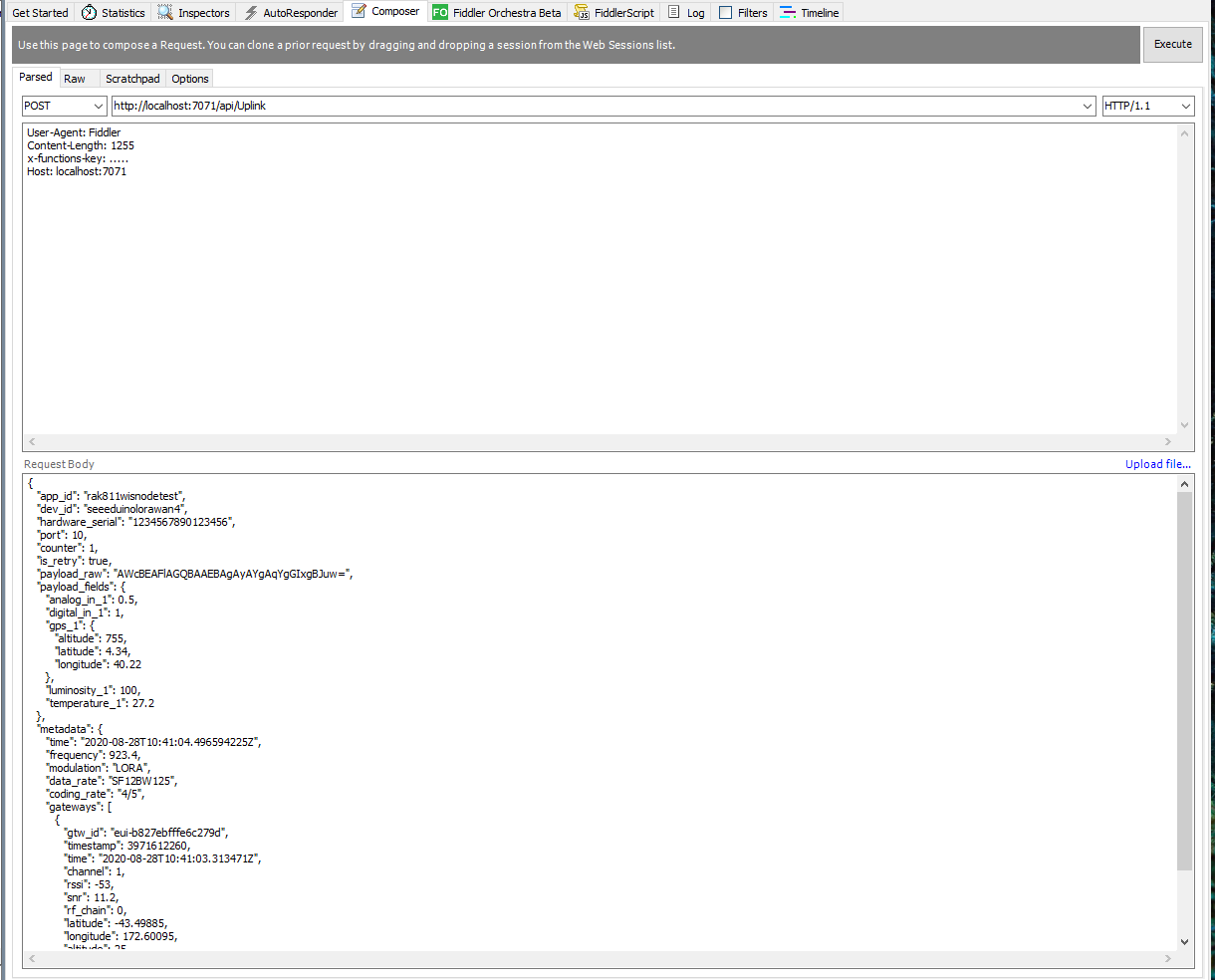
I used Telerik Fiddler with some sample payloads to test my application.
Telerik Fiddler Request Composer “posting” sample message to desktop endpoint
Once the functions were running reliably on my desktop, I created an Azure Service Plan, deployed the code, then generated an API Key for securing my HTTPTrigger endpoints.
Azure Functions Host Key configuration dialog
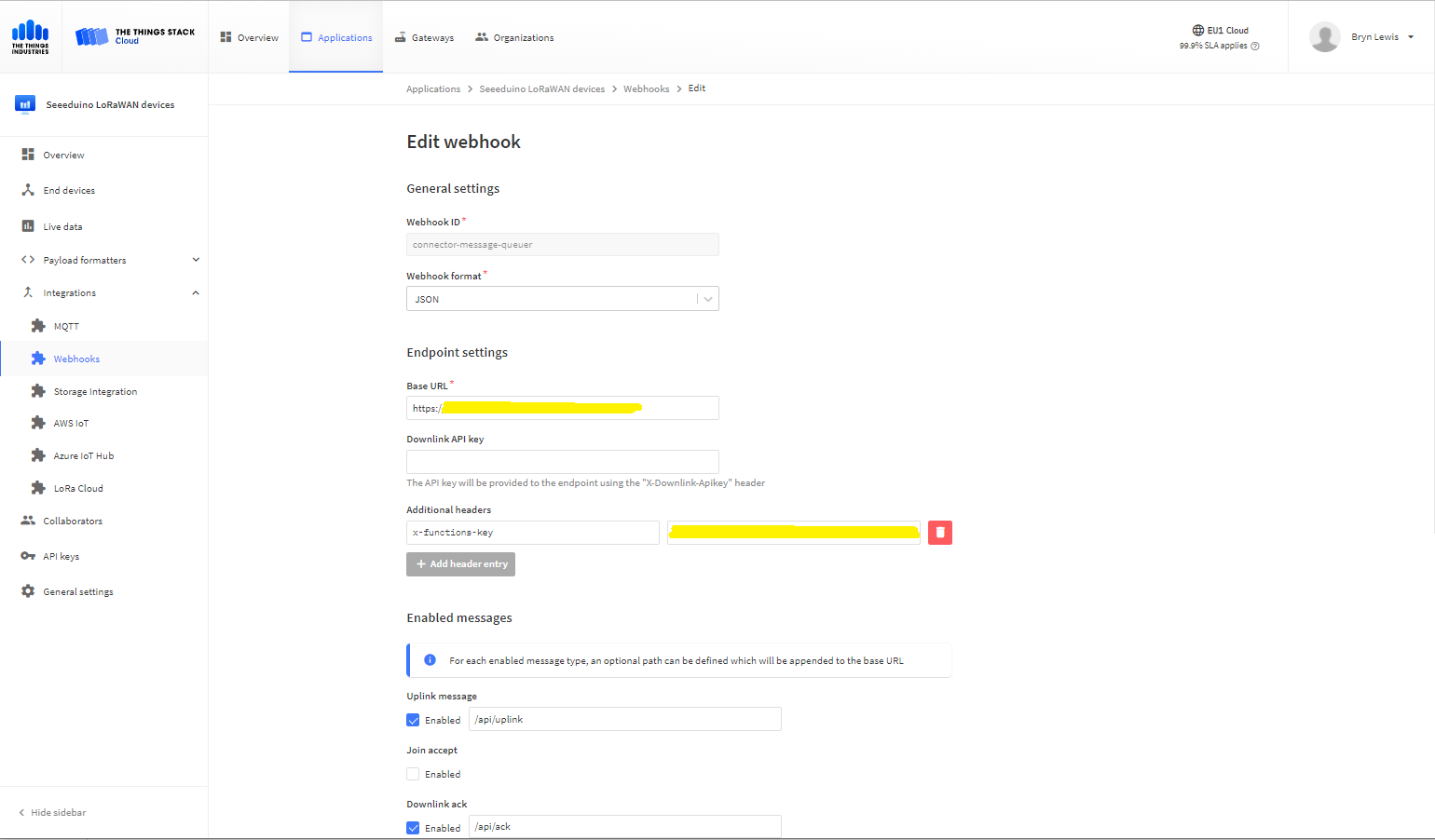
I then added a TTI Webhook Integration to my TTI SeeduinoLoRaWAN application, manually configured the endpoint, enabled the different messages I wanted to process and set the x-functions-key header.
TTI Application Webhook configuration
After a short delay I could see messages in the message uplink queue with Azure Storage Explorer
Azure Storage Explorer displaying content of my uplink queue
Building a new version of my TTIV3 Azure IoT connector is a useful learning exercise but I’m still deciding whether is it worth the effort as TTI has one now?
Earlier in the year I built Things Network(TTN)V2 and V3 connectors and after using these in production applications I have learnt a lot about what I had got wrong, less wrong and what I had got right.
Using a TTN V3MQTTApplication integration wasn’t a great idea. The management of state was very complex. The storage of application keys in a app.settings file made configuration easy but was bad for security.
The use of Azure Key Vault in the TTNV2 connector was a good approach, but the process of creation and updating of the settings needs to be easier.
Using TTN device registry as the “single source of truth” was a good decision as managing the amount of LoRaWAN network, application and device specific configuration in an Azure IoT Hub would be non-trivial.













 devMobile's blog