libcamera on Raspberry Pi OS Bullseye

This is a “note to self” post about using libcamera(replacement for raspistill) on my Raspberry PI 4 Model B to capture an image from my Raspberry Pi Camera Module 2 with an application built with .NET Core.

I wanted one of my ML.Net demos to use the Raspberry PI Camera rather than a security camera (so it was more portable) but it took a bit more work than I expected.

Version 1 used Process.Start to launch the libcamera-jpeg application with a command line to store an image to the local file system.

libcamera-jpeg -o latest.jpg
libcamera-jpeg with diagnostic information displayed

There was a lot of diagnostic information which I didn’t want displayed so after reading many stackoverflow posts (lots of different approaches none of which worked in my scenario), then some trial and error I found that I only had to enable RedirectStandardError.

libcamera-jpeg without diagnostic information displayed

At this point there was a lot less noise but the image was upside down.
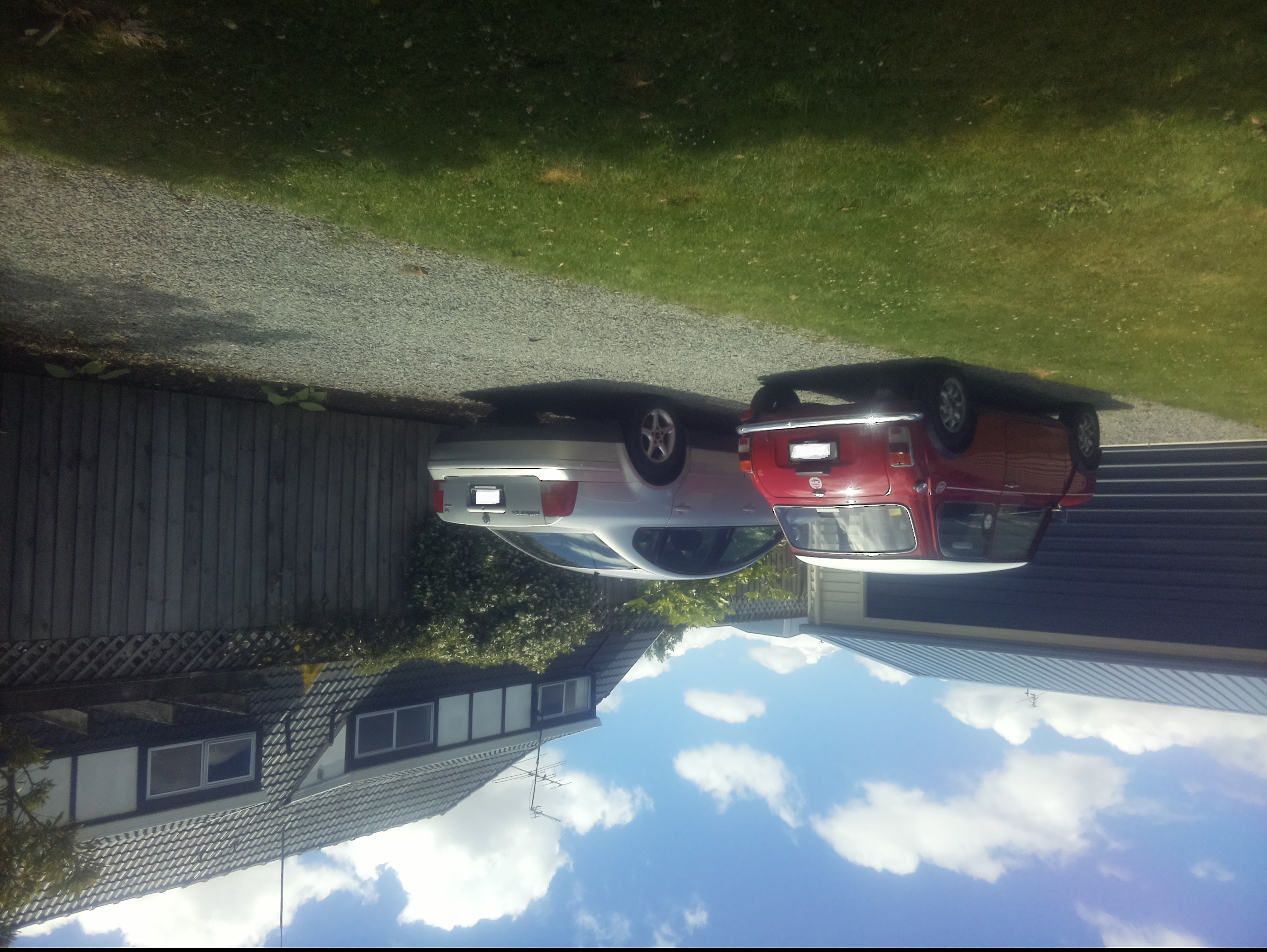
Inverted picture of my 30th anniversary Mini Cooper in the backyard

I then added a vertical flip to the command line parameters

libcamera-jpeg -o latest.jpg --vflip

My 30th anniversary Mini Cooper in the backyard

The image was backwards so I added a horizontal flip to the commandline parameters

libcamera-jpeg -o latest.jpg --vflip --hflip

or

libcamera-jpeg -o latest.jpg --rotation 180

My 30th anniversary Mini Cooper in the backyard with the correct orientation

The libcamera code is in a Timer callback so I added the _cameraBusy boolean flag to stop reentrancy problems.

private static void ImageUpdateTimerCallback(object state)
{
	try
	{
		Console.WriteLine($"{DateTime.UtcNow:yy-MM-dd HH:mm:ss} Image update start");

		// Just incase - stop code being called while photo already in progress
		if (_cameraBusy)
		{
			return;
		}

		Console.WriteLine($" {DateTime.UtcNow:yy-MM-dd HH:mm:ss} Image capture start");

		using (Process process = new Process())
		{
			process.StartInfo.FileName = @"libcamera-jpeg";
			// V1 it works
			//process.StartInfo.Arguments = $"-o {_applicationSettings.ImageFilenameLocal}";
			// V3 Image right way up
			//process.StartInfo.Arguments = $"-o {_applicationSettings.ImageFilenameLocal} --vflip";
			// V3 Image right way round
			process.StartInfo.Arguments = $"-o {_applicationSettings.ImageFilenameLocal} --vflip --hflip";
			//process.StartInfo.RedirectStandardOutput = true;
			// V2 No diagnostics
			process.StartInfo.RedirectStandardError = true;
			//process.StartInfo.UseShellExecute = false;
			//process.StartInfo.CreateNoWindow = true; 

			process.Start();

			if (!process.WaitForExit(10000) || (process.ExitCode != 0))
			{
				Console.WriteLine($"{DateTime.UtcNow:yy-MM-dd HH:mm:ss} Image update failure {process.ExitCode}");
			}
		}

		Console.WriteLine($" {DateTime.UtcNow:yy-MM-dd HH:mm:ss} Image capture done");
	}
	catch (Exception ex)
	{
		Console.WriteLine($"{DateTime.UtcNow:yy-MM-dd HH:mm:ss} Image update error {ex.Message}");
	}
	finally
	{
		_cameraBusy = false;
	}
}

This was the simplest way I could get an image onto the local file system without lots of dependencies on third party libraries. The image capture process takes about 5 seconds which a bit longer than I was expecting.
Sensirion SHT 20 library for .NET Core 5.0

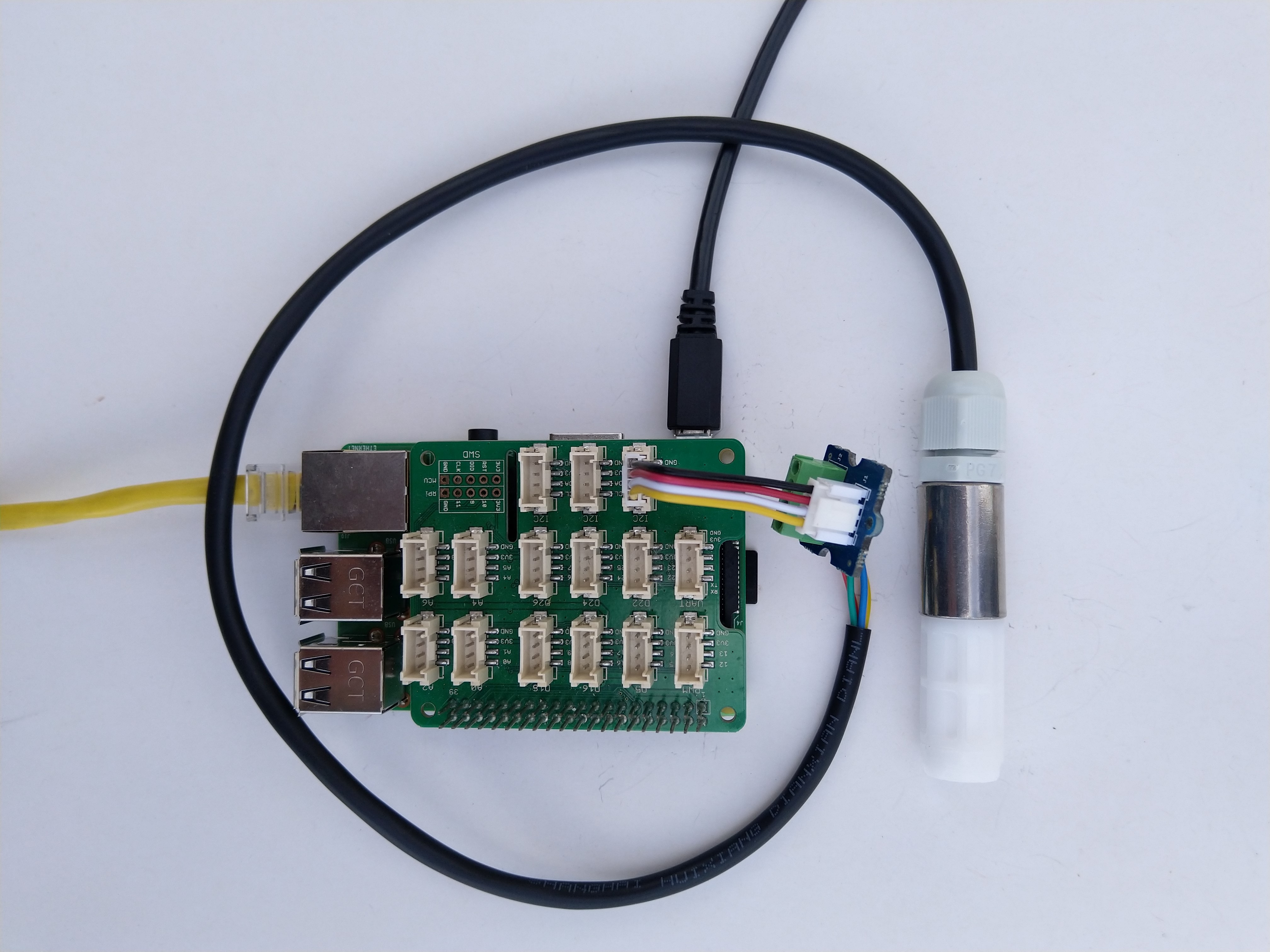
As part of project I needed to connect a Sensirion SHT20 driver to a.NET Core 5 application running on a Raspberry Pi so I wrote this library. For initial testing I used a DF Robot Waterproof SHT20 temperature and humidity sensor, Seeedstudio Gove Base Hat, Grove Screw Terminal, and a Grove – Universal 4 Pin Buckled 5cm Cable.

Sensirion SHT20 connected to Raspberry PI3

I have included sample application in the Github repository to show how to use the library

namespace devMobile.IoT.NetCore.Sensirion
{
	using System;
	using System.Device.I2c;
	using System.Threading;

	class Program
	{
		static void Main(string[] args)
		{
			// bus id on the raspberry pi 3
			const int busId = 1;

			I2cConnectionSettings i2cConnectionSettings = new(busId, Sht20.DefaultI2cAddress);

			using I2cDevice i2cDevice = I2cDevice.Create(i2cConnectionSettings);

			using (Sht20 sht20 = new Sht20(i2cDevice))
			{
				sht20.Reset();

				while (true)
				{
					double temperature = sht20.Temperature();
					double humidity = sht20.Humidity();

#if HEATER_ON_OFF
					sht20.HeaterOn();
					Console.WriteLine($"{DateTime.Now:HH:mm:ss} HeaterOn:{sht20.IsHeaterOn()}");
#endif
					Console.WriteLine($"{DateTime.Now:HH:mm:ss} Temperature:{temperature:F1}°C Humidity:{humidity:F0}% HeaterOn:{sht20.IsHeaterOn()}");
#if HEATER_ON_OFF
					sht20.HeaterOff();
					Console.WriteLine($"{DateTime.Now:HH:mm:ss} HeaterOn:{sht20.IsHeaterOn()}");
#endif

					Thread.Sleep(1000);
				}
			}
		}
	}
}

The Sensiron SHT20 has a heater which is intended to be used for functionality diagnosis – relative humidity drops upon rising temperature. The heater consumes about 5.5mW and provides a temperature increase of about 0.5 – 1.5°C.

Beware when the device is soft reset the heater bit is not cleared.

Grove Base Hat for Raspberry PI with .NET Core 5.0

Over the weekend I ported my Windows 10 IoT Core library for Seeedstudio Grove Base Hat for RPI Zero and Grove Base Hat for Raspberry Pi to .NET Core 5.

RaspberryP and RaspberryPI Zero testrig

I have included sample application to show how to use the library

namespace devMobile.IoT.NetCore.GroveBaseHat
{
	using System;
	using System.Device.I2c;
	using System.Threading;

	class Program
	{
		static void Main(string[] args)
		{
			// bus id on the raspberry pi 3
			const int busId = 1;

			I2cConnectionSettings i2cConnectionSettings = new(busId, AnalogPorts.DefaultI2cAddress);

			using (I2cDevice i2cDevice = I2cDevice.Create(i2cConnectionSettings))
			using (AnalogPorts AnalogPorts = new AnalogPorts(i2cDevice))
			{
				Console.WriteLine($"{DateTime.Now:HH:mm:SS} Version:{AnalogPorts.Version()}");
				Console.WriteLine();

				double powerSupplyVoltage = AnalogPorts.PowerSupplyVoltage();
				Console.WriteLine($"{DateTime.Now:HH:mm:SS} Power Supply Voltage:{powerSupplyVoltage:F2}v");

				while (true)
				{
					double value = AnalogPorts.Read(AnalogPorts.AnalogPort.A0);
					double rawValue = AnalogPorts.ReadRaw(AnalogPorts.AnalogPort.A0);
					double voltageValue = AnalogPorts.ReadVoltage(AnalogPorts.AnalogPort.A0);

					Console.WriteLine($"{DateTime.Now:HH:mm:SS} Value:{value:F2} Raw:{rawValue:F2} Voltage:{voltageValue:F2}v");
					Console.WriteLine();

					Thread.Sleep(1000);
				}
			}
		}
	}
}

The GROVE_BASE_HAT_RPI and GROVE_BASE_HAT_RPI_ZERO are used to specify the number of available analog ports.

.NET Core RAK811 LoRaWAN library Part3

The massive refactor

After refactoring my RAK3172 device library I have applied a similar approach to code on my RAK811 device library. My test-rig is a RaspberryPI 3B with a PI Supply RAK811 pHat and external antenna.

PI Supply RAK811 LoRaWAN pHat

In the new code a Thread reads lines of text from the SerialPort and processes them, checking for command responses, failures and downlink messages.

Unlike most of the devices I have worked with the RAK811 Join and Send commands are synchronous so return once the process has completed. The RAK811 responses also have quite a few empty, null prefixed or null suffixed lines which is a bit odd.

public void SerialPortProcessor()
{
	string line;

	while (CommandProcessResponses)
	{
		try
		{
#if DIAGNOSTICS
			Debug.WriteLine($" {DateTime.UtcNow:hh:mm:ss} ReadLine before");
#endif
			line = SerialDevice.ReadLine().Trim('\0').Trim();
#if DIAGNOSTICS
			Debug.WriteLine($" {DateTime.UtcNow:hh:mm:ss} ReadLine after:{line}");
#endif
			// consume empty lines
			if (String.IsNullOrWhiteSpace(line))
			{
				continue;
			}

			// Consume the response from set work mode
			if (line.StartsWith("?LoRa (R)") || line.StartsWith("RAK811 ") || line.StartsWith("UART1 ") || line.StartsWith("UART3 ") || line.StartsWith("LoRa work mode"))
			{
				continue;
			}

			// See if device successfully joined network
			if (line.StartsWith("OK Join Success"))
			{
				OnJoinCompletion?.Invoke(true);

				CommandResponseExpectedEvent.Set();

				continue;
			}

			if (line.StartsWith("at+recv="))
			{
				string[] payloadFields = line.Split("=,:".ToCharArray());

				byte port = byte.Parse(payloadFields[1]);
				int rssi = int.Parse(payloadFields[2]);
				int snr = int.Parse(payloadFields[3]);
				int length = int.Parse(payloadFields[4]);

				if (this.OnMessageConfirmation != null)
				{
					OnMessageConfirmation?.Invoke(rssi, snr);
				}
				if (length > 0)
				{
					string payload = payloadFields[5];

					if (this.OnReceiveMessage != null)
					{
						OnReceiveMessage.Invoke(port, rssi, snr, payload);
					}
				}
				continue;
			}

			switch (line)
			{
				case "OK":
				case "Initialization OK":
				case "OK Wake Up":
				case "OK Sleep":
					CommandResult = Result.Success;
					break;

				case "ERROR: 1":
					CommandResult = Result.ATCommandUnsuported;
					break;
				case "ERROR: 2":
					CommandResult = Result.ATCommandInvalidParameter;
					break;
				case "ERROR: 3": //There is an error when reading or writing flash.
				case "ERROR: 4": //There is an error when reading or writing through IIC.
					CommandResult = Result.ErrorReadingOrWritingFlash;
					break;
				case "ERROR: 5": //There is an error when sending through UART
					CommandResult = Result.ATCommandInvalidParameter;
					break;
				case "ERROR: 41": //The BLE works in an invalid state, so that it can’t be operated.
					CommandResult = Result.ResponseInvalid;
					break;
				case "ERROR: 80":
					CommandResult = Result.LoRaBusy;
					break;
				case "ERROR: 81":
					CommandResult = Result.LoRaServiceIsUnknown;
					break;
				case "ERROR: 82":
					CommandResult = Result.LoRaParameterInvalid;
					break;
				case "ERROR: 83":
					CommandResult = Result.LoRaFrequencyInvalid;
					break;
				case "ERROR: 84":
					CommandResult = Result.LoRaDataRateInvalid;
					break;
				case "ERROR: 85":
					CommandResult = Result.LoRaFrequencyAndDataRateInvalid;
					break;
				case "ERROR: 86":
					CommandResult = Result.LoRaDeviceNotJoinedNetwork;
					break;
				case "ERROR: 87":
					CommandResult = Result.LoRaPacketToLong;
					break;
				case "ERROR: 88":
					CommandResult = Result.LoRaServiceIsClosedByServer;
					break;
				case "ERROR: 89":
					CommandResult = Result.LoRaRegionUnsupported;
					break;
				case "ERROR: 90":
					CommandResult = Result.LoRaDutyCycleRestricted;
					break;
				case "ERROR: 91":
					CommandResult = Result.LoRaNoValidChannelFound;
					break;
				case "ERROR: 92":
					CommandResult = Result.LoRaNoFreeChannelFound;
					break;
				case "ERROR: 93":
					CommandResult = Result.StatusIsError;
					break;
				case "ERROR: 94":
					CommandResult = Result.LoRaTransmitTimeout;
					break;
				case "ERROR: 95":
					CommandResult = Result.LoRaRX1Timeout;
					break;
				case "ERROR: 96":
					CommandResult = Result.LoRaRX2Timeout;
					break;
				case "ERROR: 97":
					CommandResult = Result.LoRaRX1ReceiveError;
					break;
				case "ERROR: 98":
					CommandResult = Result.LoRaRX2ReceiveError;
					break;
				case "ERROR: 99":
					CommandResult = Result.LoRaJoinFailed;
					break;
				case "ERROR: 100":
					CommandResult = Result.LoRaDownlinkRepeated;
					break;
				case "ERROR: 101":
					CommandResult = Result.LoRaPayloadSizeNotValidForDataRate;
					break;
				case "ERROR: 102":
					CommandResult = Result.LoRaTooManyDownlinkFramesLost;
					break;
				case "ERROR: 103":
					CommandResult = Result.LoRaAddressFail;
					break;
				case "ERROR: 104":
					CommandResult = Result.LoRaMicVerifyError;
					break;
				default:
					CommandResult = Result.ResponseInvalid;
					break;
			}
		}
		catch (TimeoutException)
		{
			// Intentionally ignored, not certain this is a good idea
		}

		CommandResponseExpectedEvent.Set();
	}
}

After a lot of testing I think my thread based approach works reliably. Initially, I was having some signal strength issues because I had forgotten to configure the external antenna. I need to add some validation to the metrics and payload field unpacking (though I’m not certain what todo if they are the wrong format).

.NET Core RAK3172 LoRaWAN library Part5

The massive refactor

After getting Activation By Personalisation(ABP) and Over The Air Activation(OTAA) working on my RAK3172 test rig I was looking at the code and SerialDataReceivedEventHandler was really ugly.

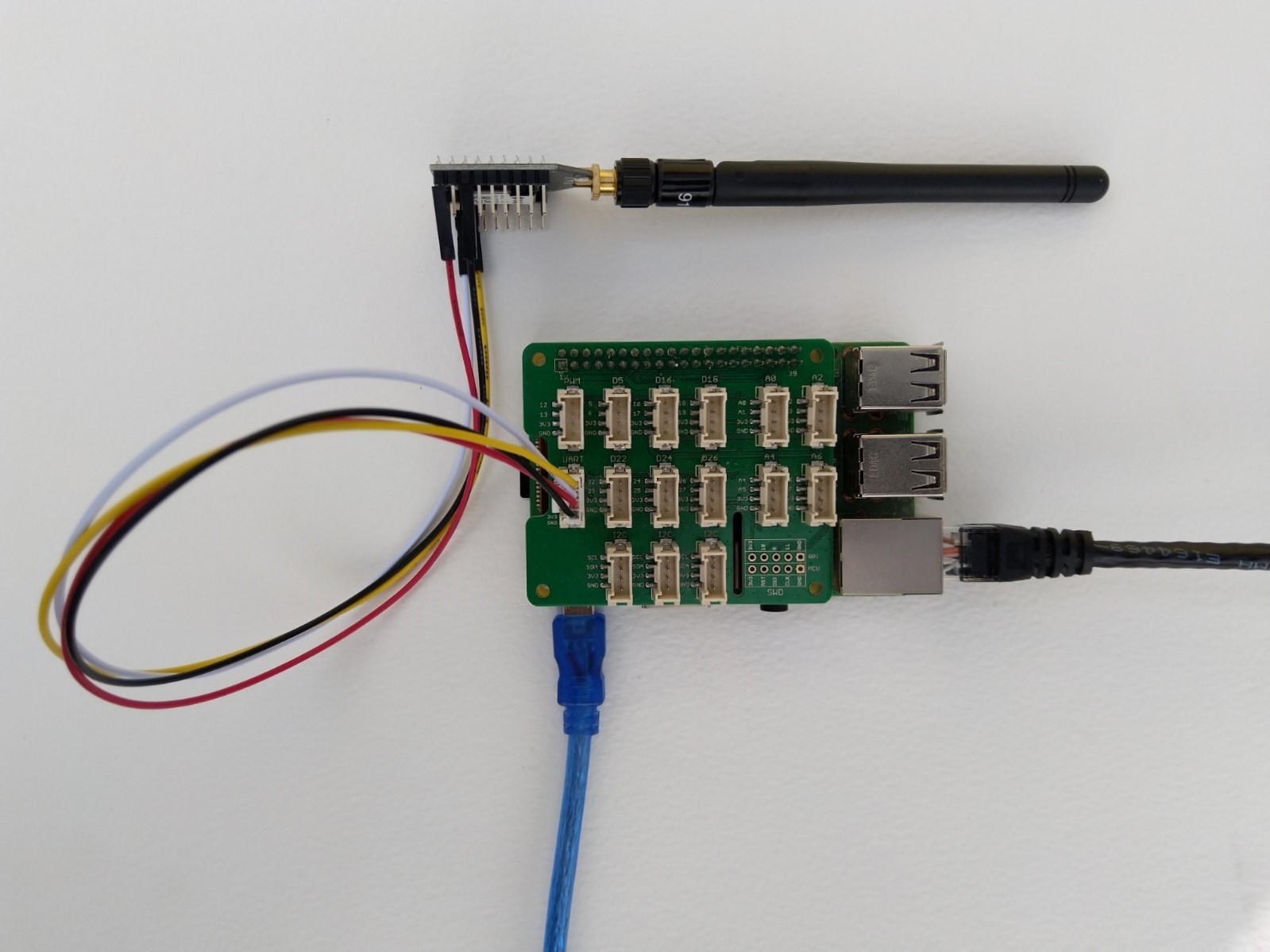
Raspberry Pi3 with Grove Base Hat and RAK3172 Breakout (using UART2)

After some experimentation in the BreakOutSerial project I decided to reimplement the RAK3172 command processing. In the new code a Thread reads lines of text from the SerialPort and processes them. I have replaced the Join and Send(Confirmed) methods with ones that block only while the command are sent to the RAK3172. Then, when completed the OnJoinCompletion or OnMessagesConfirmation event handlers are called.

private Result SendCommand(string command)
{
	if (command == null)
	{
		throw new ArgumentNullException(nameof(command));
	}

	if (command == string.Empty)
	{
		throw new ArgumentException($"command cannot be empty", nameof(command));
	}

	serialDevice.WriteLine(command);

	this.CommandResponseExpectedEvent.Reset();

	if (!this.CommandResponseExpectedEvent.WaitOne(CommandTimeoutDefaultmSec, false))
	{
		return Result.Timeout;
	}

	return CommandResult;
}

private void SerialPortProcessor()
{
	string line;

	while (CommandProcessResponses)
	{
		try
		{
#if DIAGNOSTICS
			Debug.WriteLine($" {DateTime.UtcNow:hh:mm:ss} ReadLine before");
#endif
			line = serialDevice.ReadLine();
#if DIAGNOSTICS
			Debug.WriteLine($" {DateTime.UtcNow:hh:mm:ss} ReadLine after:{line}");
#endif

			// See if device successfully joined network
			if (line.StartsWith("+EVT:JOINED"))
			{
				OnJoinCompletion?.Invoke(true);

				continue;
			}

			// See if device failed ot join network
			if (line.StartsWith("+EVT:JOIN FAILED"))
			{
				OnJoinCompletion?.Invoke(false);

				continue;
			}

			// Applicable only if confirmed messages enabled 
			if (line.StartsWith("+EVT:SEND CONFIRMED OK"))
			{
				OnMessageConfirmation?.Invoke();

				continue;
			}

			// Check for A/B/C downlink message
			if (line.StartsWith("+EVT:RX_1") || line.StartsWith("+EVT:RX_2") || line.StartsWith("+EVT:RX_3") || line.StartsWith("+EVT:RX_C"))
			{
				// TODO beef up validation, nto certain what todo if borked
				string[] metricsFields= line.Split(' ', ',');

				int rssi = int.Parse(metricsFields[3]);
				int snr = int.Parse(metricsFields[6]);

				line = serialDevice.ReadLine();

#if DIAGNOSTICS
				Debug.WriteLine($" {DateTime.UtcNow:HH:mm:ss} UNICAST :{line}");
#endif
				line = serialDevice.ReadLine();
#if DIAGNOSTICS
				Debug.WriteLine($" {DateTime.UtcNow:HH:mm:ss} Payload:{line}");
#endif
				// TODO beef up validation, nto certain what todo if borked
				string[] payloadFields = line.Split(':');

				byte port = byte.Parse(payloadFields[1]);
				string payload = payloadFields[2];

				OnReceiveMessage?.Invoke(port, rssi, snr, payload);

				continue;
			}

#if DIAGNOSTICS
           Debug.WriteLine($" {DateTime.UtcNow:hh:mm:ss} ReadLine Result");
#endif
			line = serialDevice.ReadLine();
#if DIAGNOSTICS
             Debug.WriteLine($" {DateTime.UtcNow:hh:mm:ss} ReadLine Result:{line}");
#endif
			switch (line)
			{
				case "OK":
					CommandResult = Result.Success;
					break;
				case "AT_ERROR":
					CommandResult = Result.AtError;
					break;
				case "AT_PARAM_ERROR":
					CommandResult = Result.ParameterError;
					break;
				case "AT_BUSY_ERROR":
					CommandResult = Result.BusyError;
					break;
				case "AT_TEST_PARAM_OVERFLOW":
					CommandResult = Result.ParameterOverflow;
					break;
				case "AT_NO_NETWORK_JOINED":
					CommandResult = Result.NotJoined;
					break;
				case "AT_RX_ERROR":
					CommandResult = Result.ReceiveError;
					break;
				case "AT_DUTYCYLE_RESTRICTED":
					CommandResult = Result.DutyCycleRestricted;
					break;
				default:
					CommandResult = Result.Undefined;
					break;
			}

			CommandResponseExpectedEvent.Set();
		}
		catch (TimeoutException)
		{
			// Intentionally ignored, not certain this is a good idea
		}
	}
}

After a lot of testing I think my thread based approach works reliably. I also had to modify the code to shutdown the command processor thread and free any non managed resources.

/// <summary>
/// Ensures unmanaged serial port and thread resources are released in a "responsible" manner.
/// </summary>
public void Dispose()
{
	CommandProcessResponses = false;

	if (CommandResponsesProcessorThread != null)
	{
		CommandResponsesProcessorThread.Join();
		CommandResponsesProcessorThread = null;
	}

	if (serialDevice != null)
	{
		serialDevice.Dispose();
		serialDevice = null;
	}
}

I need to add some validation to the metrics and payload field unpacking (though I’m not certain what todo if they are the wrong format) and review the handling of multi-line event messages.

.NET Core RAK3172 LoRaWAN library Part4

Starting again with Threads

After getting Activation By Personalisation(ABP) and Over The Air Activation(OTAA) working on my RAK3172 test rig I was looking at the code and SerialDataReceivedEventHandler was really ugly.

Raspberry Pi3 with Grove Base Hat and RAK3172 Breakout (using UART2)

After some experimentation in the BreakOutSerial project I decided to reimplement the RAK3172 command processing. In the new code a Thread reads lines of text from the SerialPort and processes them. I have replaced the Join and Send(Confirmed) methods with ones that block only while the command are sent to the RAK3172. Then, when completed the OnJoinCompletion or OnMessagesConfirmation event handlers are called.

private Result SendCommand(string command)
{
   if (command == null)
   {
      throw new ArgumentNullException(nameof(command));
   }

   if (command == string.Empty)
   {
      throw new ArgumentException($"command invalid length cannot be empty", nameof(command));
    }

   serialDevice.ReadTimeout = (int)CommandTimeoutDefault.TotalMilliseconds;
   serialDevice.WriteLine(command);

   this.atExpectedEvent.Reset();

   if (!this.atExpectedEvent.WaitOne((int)CommandTimeoutDefault.TotalMilliseconds, false))
      return Result.Timeout;

   return result;
}

public void SerialPortProcessor()
{
   string line;

   while (true)
   {
      this.serialDevice.ReadTimeout = -1;

      Debug.WriteLine("ReadLine before");
      line = serialDevice.ReadLine();
      Debug.WriteLine($"ReadLine after:{line}");

            // check for +EVT:JOINED
      if (line.StartsWith("+EVT:JOINED"))
      {
            OnJoinCompletion?.Invoke(true);

            continue;
      }

      if (line.StartsWith("+EVT:JOIN FAILED"))
      {
	     OnJoinCompletion?.Invoke(false);

         continue;
      }

      if (line.StartsWith("+EVT:SEND CONFIRMED OK"))
      {
         OnMessageConfirmation?.Invoke();

         continue;
      }

      // Check for A/B/C downlink message
      if (line.StartsWith("+EVT:RX_1") || line.StartsWith("+EVT:RX_2") || line.StartsWith("+EVT:RX_3") || line.StartsWith("+EVT:RX_C"))
      {
         string[] fields1 = line.Split(' ', ',');

         int rssi = int.Parse(fields1[3]);
         int snr = int.Parse(fields1[6]);
 
         line = serialDevice.ReadLine();
         Console.WriteLine($"{DateTime.UtcNow:HH:mm:ss} UNICAST :{line}");

         line = serialDevice.ReadLine();
         Console.WriteLine($"{DateTime.UtcNow:HH:mm:ss} Payload:{line}");

         string[] fields2 = line.Split(':');

         int port = int.Parse(fields2[1]);
         string payload = fields2[2];

         OnReceiveMessage?.Invoke(port, rssi, snr, payload);

         continue;
      }

      try
      {
         this.serialDevice.ReadTimeout = 3000;

         Debug.WriteLine("ReadLine Result");
         line = serialDevice.ReadLine();
         Debug.WriteLine($"ReadLine Result after:{line}");

         switch (line)
         {
            case "OK":
               result = Result.Success;
               break;
         case "AT_ERROR":
               result = Result.Error;
               break;
         case "AT_PARAM_ERROR":
               result = Result.ParameterError;
               break;
         case "AT_BUSY_ERROR":
               result = Result.BusyError;
               break;
         case "AT_TEST_PARAM_OVERFLOW":
               result = Result.ParameterOverflow;
               break;
         case "AT_NO_NETWORK_JOINED":
               result = Result.NotJoined;
               break;
         case "AT_RX_ERROR":
               result = Result.ReceiveError;
               break;
         case "AT_DUTYCYLE_RESTRICTED":
               result = Result.DutyCycleRestricted;
               break;
         default:
               result = Result.Undefined;
               break;
         }
      }
      catch (TimeoutException) 
      {
         result = Result.Timeout;
      }
   atExpectedEvent.Set();
}

The code is not suitable for production but it confirmed my thread based approach works. I need to add code to shutdown the message processing thread in a controlled way, support for Class B & C devices, replace the OnJoinCompletionHandler timer magic numbers and soak test for 5-7 days.

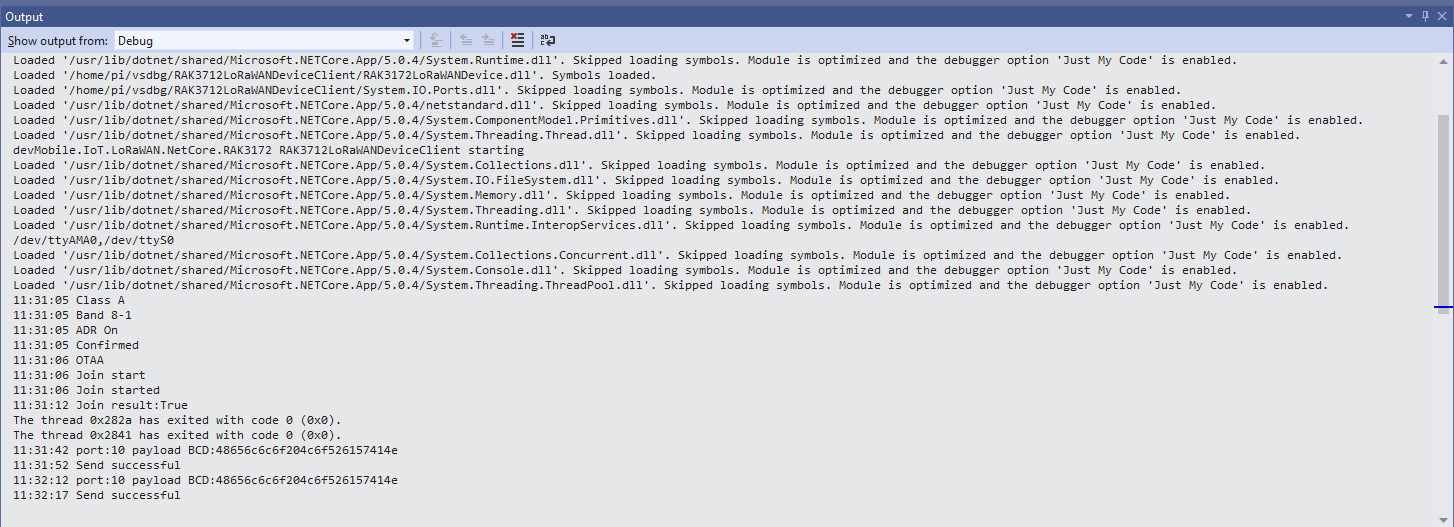
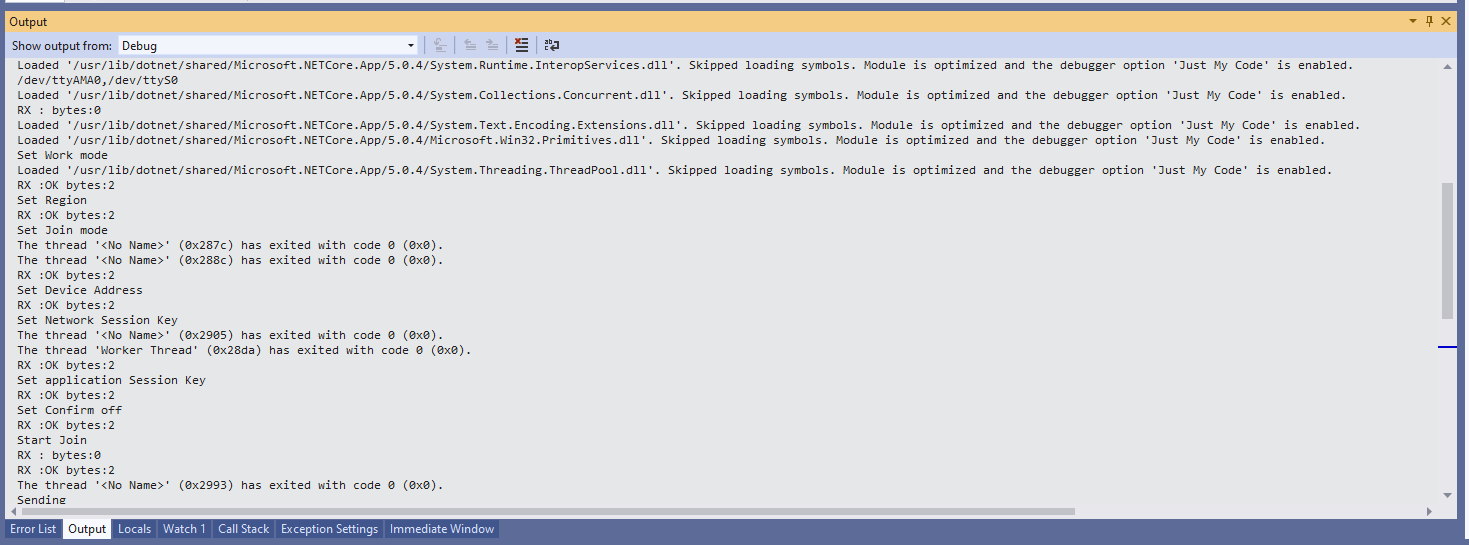
Visual Studio Displaying RAK3172 device joining network then sending messages

In the Visual Studio 2019 debug output I could see messages getting sent and then after a short delay they were visible in the TTN console.

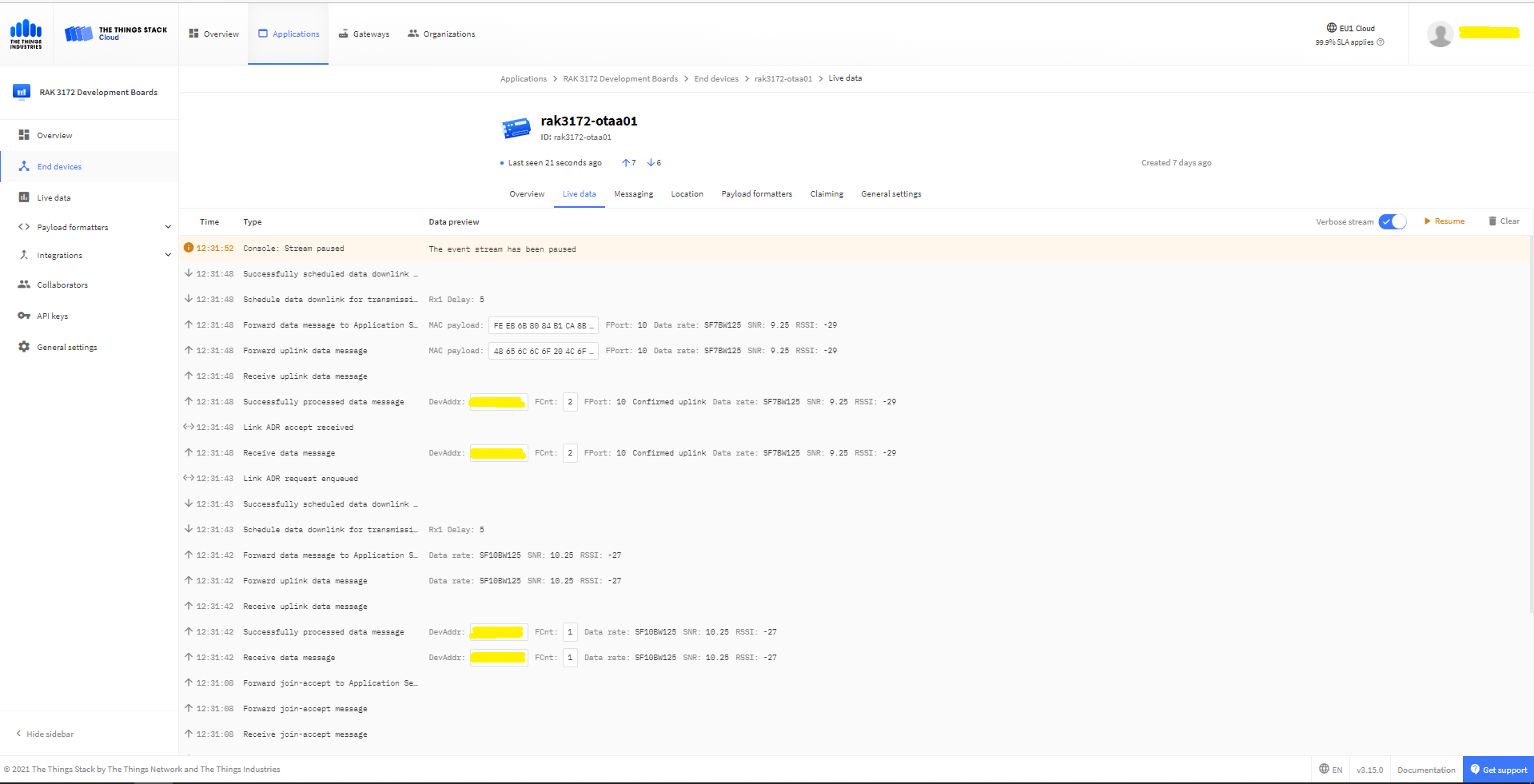
TTN Displaying RAK3172 device joining network then sending messages

.NET Core RAK3172 LoRaWAN library Part3

Nasty ABP connect

After getting basic connectivity for my RAK3172 test rig sorted I wanted to see if I could get the device connected to The Things Network(TTN) via the RAK7246G LPWAN Developer Gateway on my bookcase.

Raspberry Pi3 with Grove Base Hat and RAK3172 Breakout (using UART2)

My Activation By Personalisation (ABP) implementation is very “nasty” (just like the OTAA one) I have assumed that there would be no timeouts or failures and I only send one BCD message “48656c6c6f204c6f526157414e” which is “hello LoRaWAN”.

The code just sequentially steps through the necessary configuration to join the TTN network with a suitable delay after each command is sent.

//---------------------------------------------------------------------------------
// Copyright (c) September 2021, devMobile Software
//
// Licensed under the Apache License, Version 2.0 (the "License");
// you may not use this file except in compliance with the License.
// You may obtain a copy of the License at
//
//     http://www.apache.org/licenses/LICENSE-2.0
//
// Unless required by applicable law or agreed to in writing, software
// distributed under the License is distributed on an "AS IS" BASIS,
// WITHOUT WARRANTIES OR CONDITIONS OF ANY KIND, either express or implied.
// See the License for the specific language governing permissions and
// limitations under the License.
//
//---------------------------------------------------------------------------------
namespace devMobile.IoT.NetCore.RAK3172.NetworkJoinABP
{
	using System;
	using System.Diagnostics;
	using System.IO.Ports;
	using System.Threading;

	public class Program
	{
		private const string SerialPortId = "/dev/ttyS0";
		private const string DevAddress = "...";
		private const string NwksKey = "...";
		private const string AppsKey = "...";
		private const byte MessagePort = 1;
		private const string Payload = "A0EEE456D02AFF4AB8BAFD58101D2A2A"; // Hello LoRaWAN

		public static void Main()
		{
			string response;

			Debug.WriteLine("devMobile.IoT.NetCore.Rak3172.NetworkJoinOTAA starting");

			Debug.WriteLine(String.Join(",", SerialPort.GetPortNames()));

			try
			{
				using (SerialPort serialPort = new SerialPort(SerialPortId))
				{
					// set parameters
					serialPort.BaudRate = 9600;
					serialPort.DataBits = 8;
					serialPort.Parity = Parity.None;
					serialPort.StopBits = StopBits.One;
					serialPort.Handshake = Handshake.None;

					serialPort.ReadTimeout = 5000;

					serialPort.NewLine = "\r\n";

					serialPort.Open();

					// clear out the RX buffer
					response = serialPort.ReadExisting();
					Debug.WriteLine($"RX :{response.Trim()} bytes:{response.Length}");
					Thread.Sleep(500);

					// Set the Working mode to LoRaWAN
					Console.WriteLine("Set Work mode");
					serialPort.WriteLine("AT+NWM=1");
					// Read the blank line
					response = serialPort.ReadLine();
					// Read the response
					response = serialPort.ReadLine();
					Debug.WriteLine($"RX :{response.Trim()} bytes:{response.Length}");

					// Set the Region to AS923
					Console.WriteLine("Set Region");
					serialPort.WriteLine("AT+BAND=8-1");
					// Read the blank line
					response = serialPort.ReadLine();
					// Read the response
					response = serialPort.ReadLine();
					Debug.WriteLine($"RX :{response.Trim()} bytes:{response.Length}");

					// Set the JoinMode
					Console.WriteLine("Set Join mode");
					serialPort.WriteLine("AT+NJM=0");
					// Read the blank line
					response = serialPort.ReadLine();
					// Read the response
					response = serialPort.ReadLine();
					Debug.WriteLine($"RX :{response.Trim()} bytes:{response.Length}");

					// Set the device address
					Console.WriteLine("Set Device Address");
					serialPort.WriteLine($"AT+DEVADDR={DevAddress}");
					// Read the blank line
					response = serialPort.ReadLine();
					// Read the response
					response = serialPort.ReadLine();
					Debug.WriteLine($"RX :{response.Trim()} bytes:{response.Length}");

					// Set the network session key
					Console.WriteLine("Set Network Session Key");
					serialPort.WriteLine($"AT+NWKSKEY={NwksKey}");
					// Read the blank line
					response = serialPort.ReadLine();
					// Read the response
					response = serialPort.ReadLine();
					Debug.WriteLine($"RX :{response.Trim()} bytes:{response.Length}");

					// Set the application session key
					Console.WriteLine("Set application Session Key");
					serialPort.WriteLine($"AT+APPSKEY={AppsKey}");
					// Read the blank line
					response = serialPort.ReadLine();
					// Read the response
					response = serialPort.ReadLine();
					Debug.WriteLine($"RX :{response.Trim()} bytes:{response.Length}");

					// Set the Confirm flag
					Console.WriteLine("Set Confirm off");
					serialPort.WriteLine("AT+CFM=0");
					// Read the blank line
					response = serialPort.ReadLine();
					// Read the response
					response = serialPort.ReadLine();
					Debug.WriteLine($"RX :{response.Trim()} bytes:{response.Length}");

					// Join the network
					Console.WriteLine("Start Join");
					serialPort.WriteLine("AT+JOIN=1:0:10:2");

					// Read the blank line
					response = serialPort.ReadLine();

					// Read the Result
					response = serialPort.ReadLine();
					Debug.WriteLine($"RX :{response.Trim()} bytes:{response.Length}");

					Thread.Sleep(10000);

					// Read the +EVT:JOINED
					response = serialPort.ReadLine();
					Debug.WriteLine($"RX :{response.Trim()} bytes:{response.Length}");

					while (true)
					{
						Console.WriteLine("Sending");
						serialPort.WriteLine($"AT+SEND={MessagePort}:{Payload}");

						// Read the blank line
						response = serialPort.ReadLine();

						// Read the result
						Console.WriteLine("Send result");
						response = serialPort.ReadLine();
						Debug.WriteLine($"RX :{response.Trim()} bytes:{response.Length}");

						Thread.Sleep(300000);
					}
				}
			}
			catch (Exception ex)
			{
				Debug.WriteLine(ex.Message);
			}
		}
	}
}

The code is not suitable for production but it confirmed my software and hardware configuration worked.

In the Visual Studio 2019 debug output I could see messages getting sent and then after a short delay they were visible in the TTN console.

The RAK3172 command format is quite different from other modules I have used e.g. Requesting the firmware version information

  • TX- AT+VER=?
  • RX- Blank Line
  • RX- V1.0.2
  • RX- OK

Requesting the APPEUI

  • TX- AT+DEVADDR=?
  • RX- 11223344
  • RX- Blank line
  • RX- OK

I think the RAK3172 module ships with a default DEVEUI so in this code and my library I have assumed it will be configured as part of a “provisioning” process.

.NET Core RAK3172 LoRaWAN library Part2

Nasty OTAA connect

After getting basic connectivity for my RAK3172 test rig sorted I wanted to see if I could get the device connected to The Things Network(TTN) via the RAK7246G LPWAN Developer Gateway on my bookcase.

Raspberry Pi3 with Grove Base Hat and RAK3172 Breakout (using UART2)

My Over the Air Activation (OTAA) implementation is very “nasty” I have assumed that there would be no timeouts or failures and I only send one BCD message “48656c6c6f204c6f526157414e” which is “hello LoRaWAN”.

The code just sequentially steps through the necessary configuration to join the TTN network with a suitable delay after each command is sent.

//---------------------------------------------------------------------------------
// Copyright (c) September 2021, devMobile Software
//
// Licensed under the Apache License, Version 2.0 (the "License");
// you may not use this file except in compliance with the License.
// You may obtain a copy of the License at
//
//     http://www.apache.org/licenses/LICENSE-2.0
//
// Unless required by applicable law or agreed to in writing, software
// distributed under the License is distributed on an "AS IS" BASIS,
// WITHOUT WARRANTIES OR CONDITIONS OF ANY KIND, either express or implied.
// See the License for the specific language governing permissions and
// limitations under the License.
//
//---------------------------------------------------------------------------------
namespace devMobile.IoT.NetCore.RAK3172.NetworkJoinOTAA
{
	using System;
	using System.Diagnostics;
	using System.IO.Ports;
	using System.Threading;

	public class Program
	{
		private const string SerialPortId = "/dev/ttyS0";
		private const string AppEui = "...";
		private const string AppKey = "...";
		private const byte MessagePort = 1;
		private const string Payload = "A0EEE456D02AFF4AB8BAFD58101D2A2A"; // Hello LoRaWAN

		public static void Main()
		{
			string response;

			Debug.WriteLine("devMobile.IoT.NetCore.Rak3172.NetworkJoinOTAA starting");

			Debug.WriteLine(String.Join(",", SerialPort.GetPortNames()));

			try
			{
				using (SerialPort serialPort = new SerialPort(SerialPortId))
				{
					// set parameters
					serialPort.BaudRate = 9600;
					serialPort.DataBits = 8;
					serialPort.Parity = Parity.None;
					serialPort.StopBits = StopBits.One;
					serialPort.Handshake = Handshake.None;

					serialPort.ReadTimeout = 5000;

					serialPort.NewLine = "\r\n";

					serialPort.Open();

					// clear out the RX buffer
					response = serialPort.ReadExisting();
					Debug.WriteLine($"RX :{response.Trim()} bytes:{response.Length}");
					Thread.Sleep(500);


					// Set the Working mode to LoRaWAN
					Console.WriteLine("Set Work mode");
					serialPort.WriteLine("AT+NWM=1");
					// Read the blank line
					response = serialPort.ReadLine();
					// Read the response
					response = serialPort.ReadLine();
					Debug.WriteLine($"RX :{response.Trim()} bytes:{response.Length}");

					// Set the Region to AS923
					Console.WriteLine("Set Region");
					serialPort.WriteLine("AT+BAND=8-1");
					// Read the blank line
					response = serialPort.ReadLine();
					// Read the response
					response = serialPort.ReadLine();
					Debug.WriteLine($"RX :{response.Trim()} bytes:{response.Length}");

					// Set the JoinMode
					Console.WriteLine("Set Join mode");
					serialPort.WriteLine("AT+NJM=1");
					// Read the blank line
					response = serialPort.ReadLine();
					// Read the response
					response = serialPort.ReadLine();
					Debug.WriteLine($"RX :{response.Trim()} bytes:{response.Length}");

					// Set the appEUI
					Console.WriteLine("Set App Eui");
					serialPort.WriteLine($"AT+APPEUI={AppEui}");
					// Read the blank line
					response = serialPort.ReadLine();
					// Read the response
					response = serialPort.ReadLine();
					Debug.WriteLine($"RX :{response.Trim()} bytes:{response.Length}");

					// Set the appKey
					Console.WriteLine("Set App Key");
					serialPort.WriteLine($"AT+APPKEY={AppKey}");
					// Read the blank line
					response = serialPort.ReadLine();
					// Read the response
					response = serialPort.ReadLine();
					Debug.WriteLine($"RX :{response.Trim()} bytes:{response.Length}");

					// Set the Confirm flag
					Console.WriteLine("Set Confirm off");
					serialPort.WriteLine("AT+CFM=0");
					// Read the blank line
					response = serialPort.ReadLine();
					// Read the response
					response = serialPort.ReadLine(); 
					Debug.WriteLine($"RX :{response.Trim()} bytes:{response.Length}");

					// Join the network
					Console.WriteLine("Start Join");
					serialPort.WriteLine("AT+JOIN=1:0:10:2");

					// Read the blank line
					response = serialPort.ReadLine();

					// Read the Result
					response = serialPort.ReadLine();
					Debug.WriteLine($"RX :{response.Trim()} bytes:{response.Length}");

					Thread.Sleep(10000);

					// Read the +EVT:JOINED
					response = serialPort.ReadLine();
					Debug.WriteLine($"RX :{response.Trim()} bytes:{response.Length}");

					while (true)
					{
						Console.WriteLine("Sending");
						serialPort.WriteLine($"AT+SEND={MessagePort}:{Payload}");

						// Read the blank line
						response = serialPort.ReadLine();

						// Read the result
						Console.WriteLine("Send result");
						response = serialPort.ReadLine();
						Debug.WriteLine($"RX :{response.Trim()} bytes:{response.Length}");

						Thread.Sleep(300000);
					}
				}
			}
			catch (Exception ex)
			{
				Debug.WriteLine(ex.Message);
			}
		}
	}
}

The code is not suitable for production but it confirmed my software and hardware configuration worked.

In the Visual Studio 2019 debug output I could see messages getting sent and then after a short delay they were visible in the TTN console.

The RAK3172 command format is quite different from other modules I have used e.g. Requesting the firmware version information

  • TX- AT+VER=?
  • RX- Blank Line
  • RX- V1.0.2
  • RX- OK

Requesting the APPEUI

  • TX- AT+APPEUI=?
  • RX- 1122334455667788
  • RX- Blank line
  • RX- OK

I think the RAK3172 module ships with a default DEVEUI so in this code and my library I have assumed it will be configured as part of a “provisioning” process.

.NET Core Seeed LoRaE5 LoRaWAN library Part2

Nasty OTAA connect

After getting basic connectivity for my Seeed LoRa-E5 test rig sorted I used RAK7246G LPWAN Developer Gateway on my bookcase to connect to The Things Network(TTN)

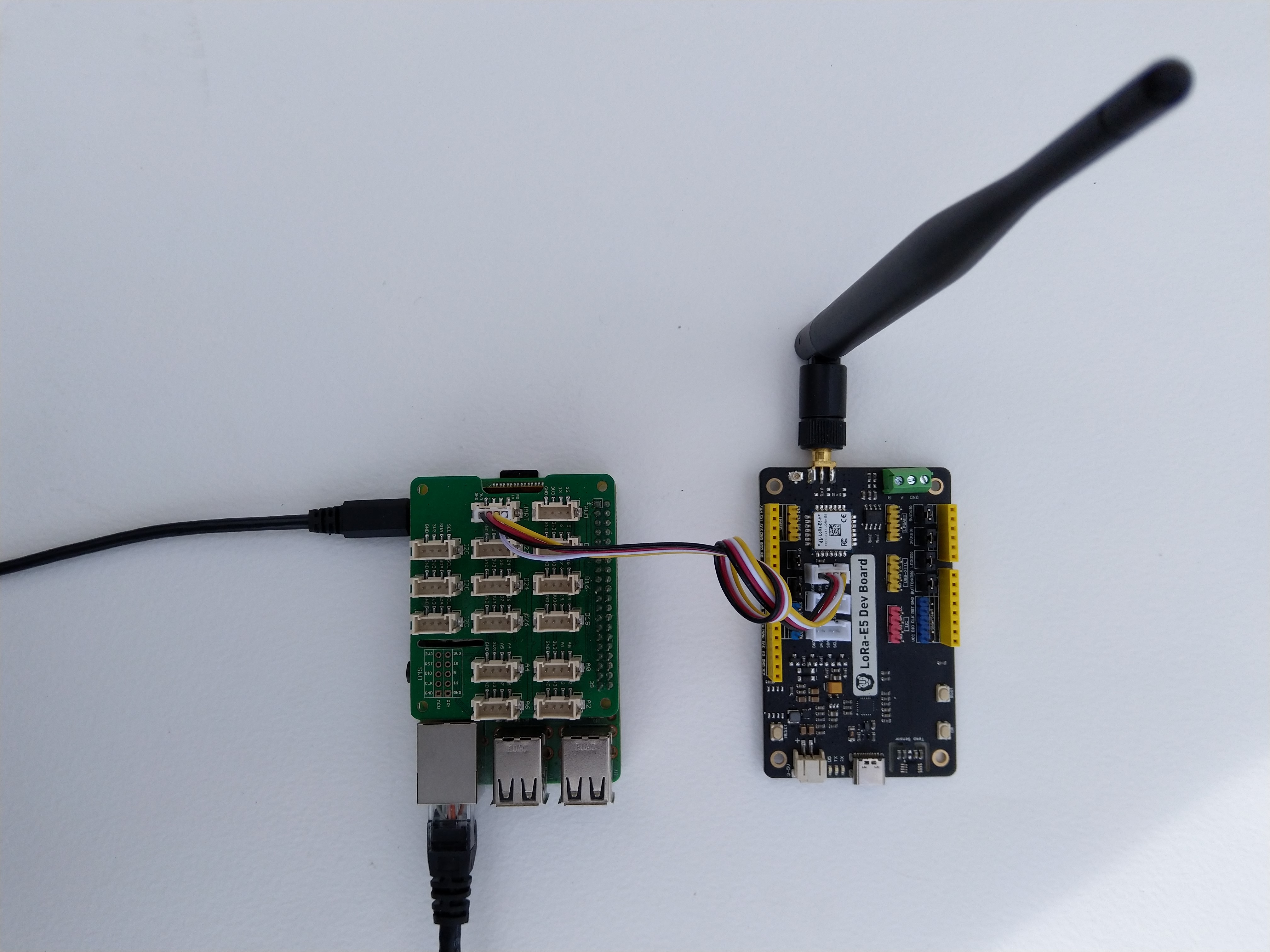
Seeed LoRa-E5 Development kit connected to Gove bas shield on a Raspberry PI3

My Over the Air Activation (OTAA) implementation is very “nasty” I have assumed that there would be no timeouts or failures and I only send one BCD message “48656c6c6f204c6f526157414e” which is “hello LoRaWAN”.

The code just sequentially steps through the necessary configuration to join the TTN network with a suitable delay after each command is sent. There also appeared to be quite a variation in response times, especially for joining the network(most probably network related) and the progress of sending a message.

//---------------------------------------------------------------------------------
// Copyright (c) September 2021, devMobile Software
//
// Licensed under the Apache License, Version 2.0 (the "License");
// you may not use this file except in compliance with the License.
// You may obtain a copy of the License at
//
//     http://www.apache.org/licenses/LICENSE-2.0
//
// Unless required by applicable law or agreed to in writing, software
// distributed under the License is distributed on an "AS IS" BASIS,
// WITHOUT WARRANTIES OR CONDITIONS OF ANY KIND, either express or implied.
// See the License for the specific language governing permissions and
// limitations under the License.
//
//---------------------------------------------------------------------------------
namespace devMobile.IoT.NetCore.SeeedLoRaE5.NetworkJoinOTAA
{
	using System;
	using System.Diagnostics;
	using System.IO.Ports;
	using System.Threading;

	class Program
	{
		private const string SerialPortId = "/dev/ttyS0";

		private const string AppKey = "................................";
		private const string AppEui = "................";

		private const byte MessagePort = 15;

		//private const string Payload = "48656c6c6f204c6f526157414e"; // Hello LoRaWAN
		private const string Payload = "01020304"; // AQIDBA==
		//private const string Payload = "04030201"; // BAMCAQ==

		public static void Main()
		{
			string response;

			Debug.WriteLine("devMobile.IoT.SeeedLoRaE5.NetworkJoinOTAA starting");

			Debug.WriteLine(String.Join(",", SerialPort.GetPortNames()));

			try
			{
				using (SerialPort serialDevice = new SerialPort(SerialPortId))
				{
					// set parameters
					serialDevice.BaudRate = 9600;
					serialDevice.Parity = Parity.None;
					serialDevice.StopBits = StopBits.One;
					serialDevice.Handshake = Handshake.None;
					serialDevice.DataBits = 8;

					serialDevice.ReadTimeout = 10000;

					serialDevice.NewLine = "\r\n";

					serialDevice.Open();

					// clear out the RX buffer
					serialDevice.ReadExisting();
					response = serialDevice.ReadExisting();
					Debug.WriteLine($"Response :{response.Trim()} bytes:{response.Length}");
					Thread.Sleep(500);

					// Set the Region to AS923
					serialDevice.WriteLine("AT+DR=AS923\r\n");
					response = serialDevice.ReadLine();
					Debug.WriteLine($"Response :{response.Trim()} bytes:{response.Length}");

					// Set the Join mode
					serialDevice.WriteLine("AT +MODE=LWOTAA\r\n");
					response = serialDevice.ReadLine();
					Debug.WriteLine($"Response :{response.Trim()} bytes:{response.Length}");

					// Set the appEUI
					serialDevice.WriteLine($"AT+ID=AppEui,\"{AppEui}\"\r\n");
					response = serialDevice.ReadLine();
					Debug.WriteLine($"Response :{response.Trim()} bytes:{response.Length}");

					// Set the appKey
					serialDevice.WriteLine($"AT+KEY=APPKEY,{AppKey}\r\n");
					response = serialDevice.ReadLine();
					Debug.WriteLine($"Response :{response.Trim()} bytes:{response.Length}");

					// Set the port number
					serialDevice.WriteLine($"AT+PORT={MessagePort}\r\n");
					response = serialDevice.ReadLine();
					Debug.WriteLine($"Response :{response.Trim()} bytes:{response.Length}");

					// Join the network
					serialDevice.WriteLine("AT+JOIN\r\n");

					// Join start
					response = serialDevice.ReadLine();
					Debug.WriteLine($"Response :{response.Trim()} bytes:{response.Length}");

					// JOIN normal
					response = serialDevice.ReadLine();
					Debug.WriteLine($"Response :{response.Trim()} bytes:{response.Length}");

					Thread.Sleep(5000);

					// network joined
					response = serialDevice.ReadLine();
					Debug.WriteLine($"Response :{response.Trim()} bytes:{response.Length}");

					// Net ID
					response = serialDevice.ReadLine();
					Debug.WriteLine($"Response :{response.Trim()} bytes:{response.Length}");

					// Join done
					response = serialDevice.ReadLine();
					Debug.WriteLine($"Response :{response.Trim()} bytes:{response.Length}");

					while (true)
					{
						Debug.WriteLine("Sending");

						serialDevice.WriteLine($"AT+MSGHEX=\"{Payload}\"\r\n");

						// Start
						response = serialDevice.ReadLine();
						Debug.WriteLine($"Response :{response.Trim()} bytes:{response.Length}");

						// Fpending
						response = serialDevice.ReadLine();
						Debug.WriteLine($"Response :{response.Trim()} bytes:{response.Length}");

						//Read metrics
						response = serialDevice.ReadLine();
						Debug.WriteLine($"Response :{response.Trim()} bytes:{response.Length}");

						//Done
						response = serialDevice.ReadLine();
						Debug.WriteLine($"Response :{response.Trim()} bytes:{response.Length}");

						Thread.Sleep(30000);
					}
				}
			}
			catch (Exception ex)
			{
				Debug.WriteLine(ex.Message);
			}
		}
	}
}

The code is not suitable for production but it confirmed my software and hardware configuration worked.

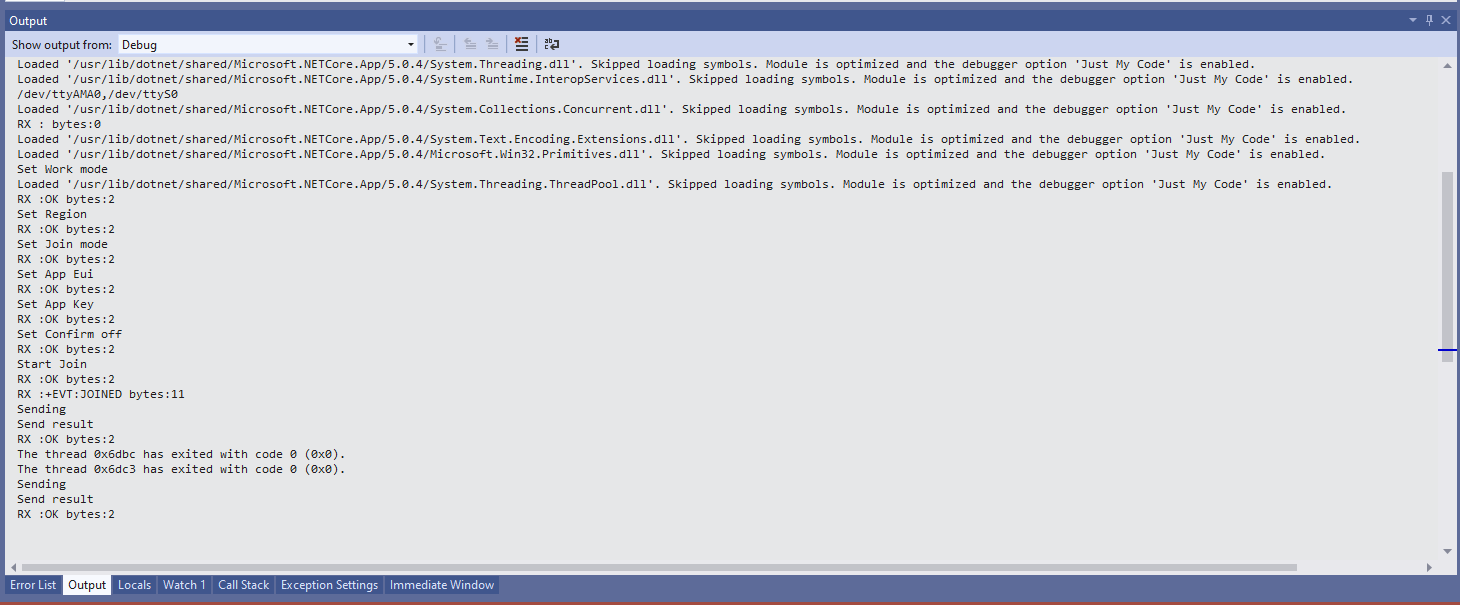
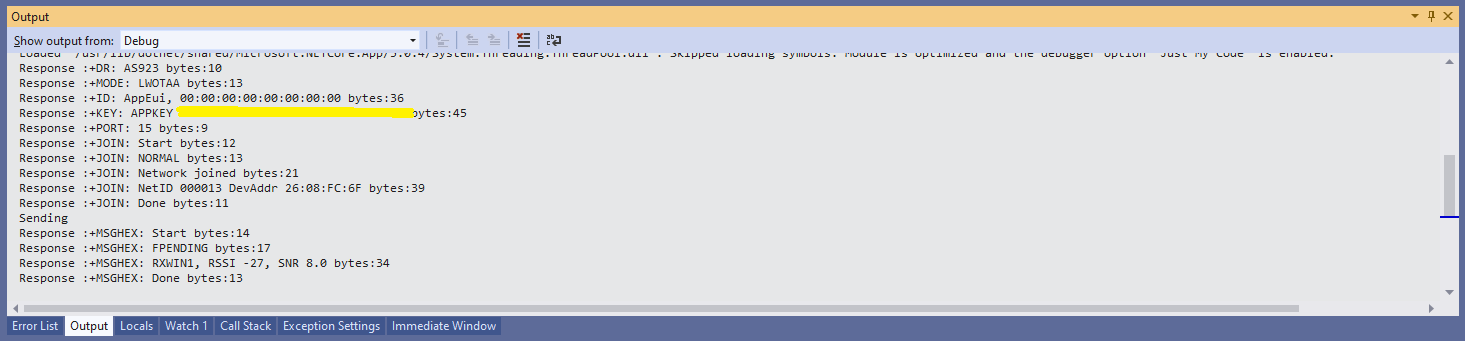
Visual Studio debugger output window showing network join and sensing a message

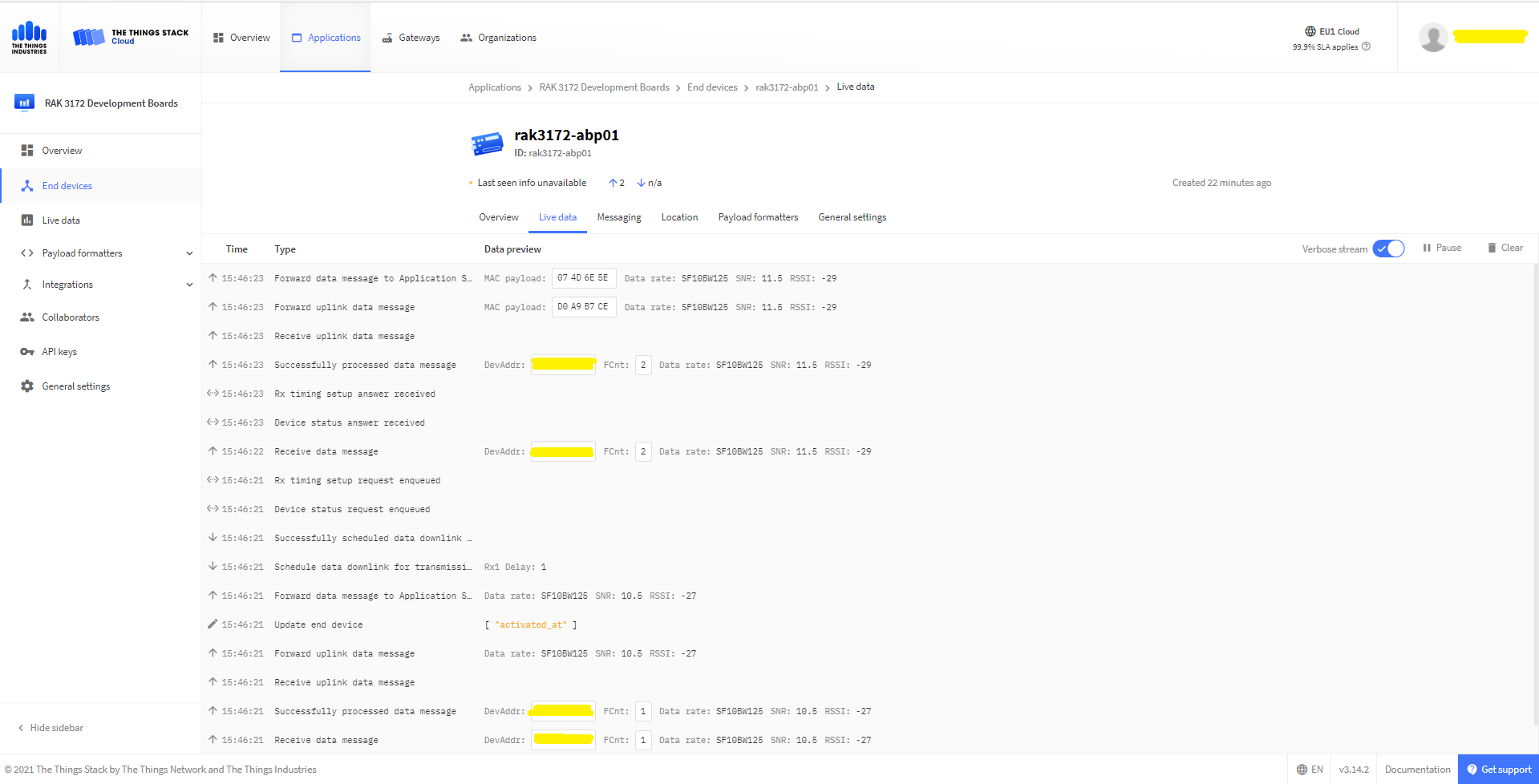
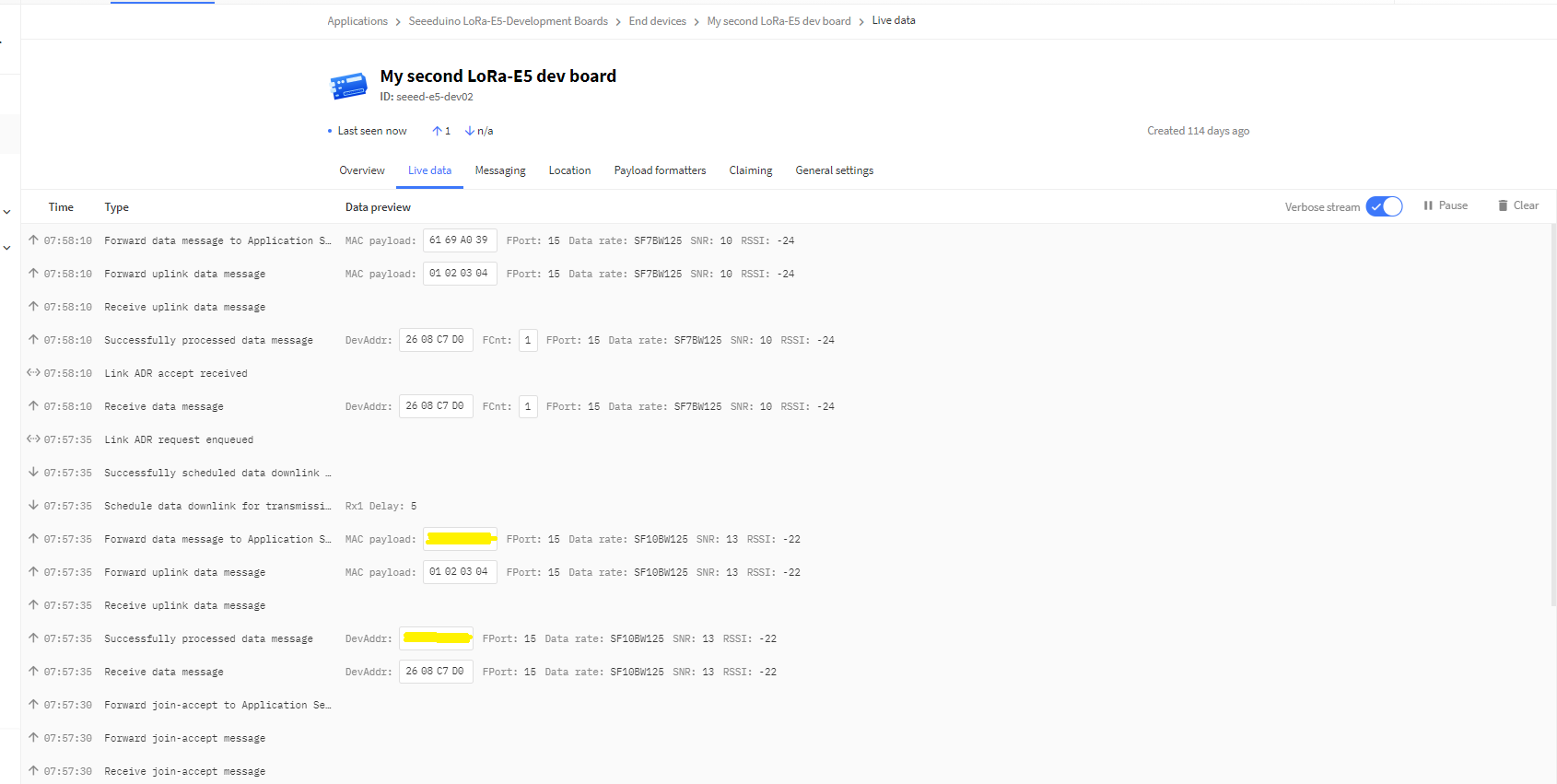
In the Visual Studio 2019 debug output I could see messages getting sent and then after a short delay they were visible in the TTN console.

The Things Industries Live Data view showing network join and sensing a message

Most of the LoRaWAN modems I have worked with reply “OK” when a command is successful. The SeeedLoRa-E5 often returns the payload of the request in the response which makes the code a little bit more complex.

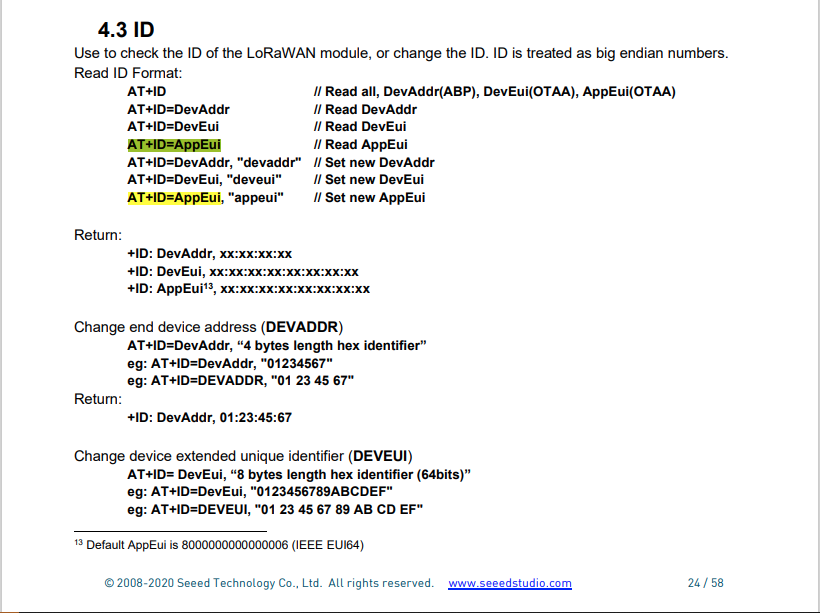
AppEui command structure in AT Command documentation

For example the AppEui can be passed in as “00:00:00:00:00:00:00:00” or “0000000000000000” but in the response the format is always “00:00:00:00:00:00:00:00”

.NET Core RAK811 LoRaWAN library Part2

Nasty OTAA connect

After getting basic connectivity for my IoT LoRa Node pHAT for Raspberry Pi test rig sorted I wanted to see if I could get the device connected to The Things Network(TTN) via the RAK7246G LPWAN Developer Gateway on my bookcase.

IoT LoRa Node pHAT for Raspberry Pi mounted on a Raspberry PI3

My Over the Air Activation (OTAA) implementation is very “nasty” I have assumed that there would be no timeouts or failures and I only send one BCD message “48656c6c6f204c6f526157414e” which is “hello LoRaWAN”.

The code just sequentially steps through the necessary configuration to join the TTN network with a suitable delay after each command is sent. I had some problems with re-opening the serial port if my application had previously failed with an uncaught exception. After some experimentation I added some code to ensure the port was closed when an exception occurred.

//---------------------------------------------------------------------------------
// Copyright (c) September 2021, devMobile Software
//
// Licensed under the Apache License, Version 2.0 (the "License");
// you may not use this file except in compliance with the License.
// You may obtain a copy of the License at
//
//     http://www.apache.org/licenses/LICENSE-2.0
//
// Unless required by applicable law or agreed to in writing, software
// distributed under the License is distributed on an "AS IS" BASIS,
// WITHOUT WARRANTIES OR CONDITIONS OF ANY KIND, either express or implied.
// See the License for the specific language governing permissions and
// limitations under the License.
//
//---------------------------------------------------------------------------------
namespace devMobile.IoT.NetCore.Rak811.NetworkJoinOTAA
{
	using System;
	using System.Diagnostics;
	using System.IO.Ports;
	using System.Threading;

	public class Program
	{
		private const string SerialPortId = "/dev/ttyS0";
		private const string AppEui = "...";
		private const string AppKey = "...";
		private const byte MessagePort = 1;
		private const string Payload = "A0EEE456D02AFF4AB8BAFD58101D2A2A"; // Hello LoRaWAN

		public static void Main()
		{
			string response;

			Debug.WriteLine("devMobile.IoT.NetCore.Rak811.NetworkJoinOTAA starting");

			Debug.WriteLine(String.Join(",", SerialPort.GetPortNames()));

			try
			{
				using (SerialPort serialPort = new SerialPort(SerialPortId))
				{
					// set parameters
					serialPort.BaudRate = 9600;
					serialPort.DataBits = 8;
					serialPort.Parity = Parity.None;
					serialPort.StopBits = StopBits.One;
					serialPort.Handshake = Handshake.None;

					serialPort.ReadTimeout = 5000;

					serialPort.NewLine = "\r\n";

					serialPort.Open();

					// clear out the RX buffer
					response = serialPort.ReadExisting();
					Debug.WriteLine($"RX :{response.Trim()} bytes:{response.Length}");
					Thread.Sleep(500);

					// Set the Working mode to LoRaWAN
					Console.WriteLine("Set Work mode");
					serialPort.WriteLine("at+set_config=lora:work_mode:0");
					Thread.Sleep(5000);
					response = serialPort.ReadExisting();
					response = response.Trim('\0');
					Debug.WriteLine($"RX :{response.Trim()} bytes:{response.Length}");

					// Set the Region to AS923
					Console.WriteLine("Set Region");
					serialPort.WriteLine("at+set_config=lora:region:AS923");
					response = serialPort.ReadLine();
					Debug.WriteLine($"RX :{response.Trim()} bytes:{response.Length}");

					// Set the JoinMode
					Console.WriteLine("Set Join mode");
					serialPort.WriteLine("at+set_config=lora:join_mode:0");
					response = serialPort.ReadLine();
					Debug.WriteLine($"RX :{response.Trim()} bytes:{response.Length}");

					// Set the appEUI
					Console.WriteLine("Set App Eui");
					serialPort.WriteLine($"at+set_config=lora:app_eui:{AppEui}");
					response = serialPort.ReadLine();
					Debug.WriteLine($"RX :{response.Trim()} bytes:{response.Length}");

					// Set the appKey
					Console.WriteLine("Set App Key");
					serialPort.WriteLine($"at+set_config=lora:app_key:{AppKey}");
					response = serialPort.ReadLine();
					Debug.WriteLine($"RX :{response.Trim()} bytes:{response.Length}");

					// Set the Confirm flag
					Console.WriteLine("Set Confirm off");
					serialPort.WriteLine("at+set_config=lora:confirm:0");
					response = serialPort.ReadLine();
					Debug.WriteLine($"RX :{response.Trim()} bytes:{response.Length}");
					
					// Join the network
					Console.WriteLine("Start Join");
					serialPort.WriteLine("at+join");
					Thread.Sleep(10000);
					response = serialPort.ReadLine();
					Debug.WriteLine($"RX :{response.Trim()} bytes:{response.Length}");

					while (true)
					{
						Console.WriteLine("Sending");
						serialPort.WriteLine($"at+send=lora:{MessagePort}:{Payload}");
						Thread.Sleep(1000);

						// The OK
						Console.WriteLine("Send result");
						response = serialPort.ReadLine();
						Debug.WriteLine($"RX :{response.Trim()} bytes:{response.Length}");

						// The Signal strength information etc.
						Console.WriteLine("Network confirmation");
						response = serialPort.ReadLine();
						Debug.WriteLine($"RX :{response.Trim()} bytes:{response.Length}");

						Thread.Sleep(20000);
					}
				}
			}
			catch (Exception ex)
			{
				Debug.WriteLine(ex.Message);
			}
		}
	}
}

The code is not suitable for production but it confirmed my software and hardware configuration worked.

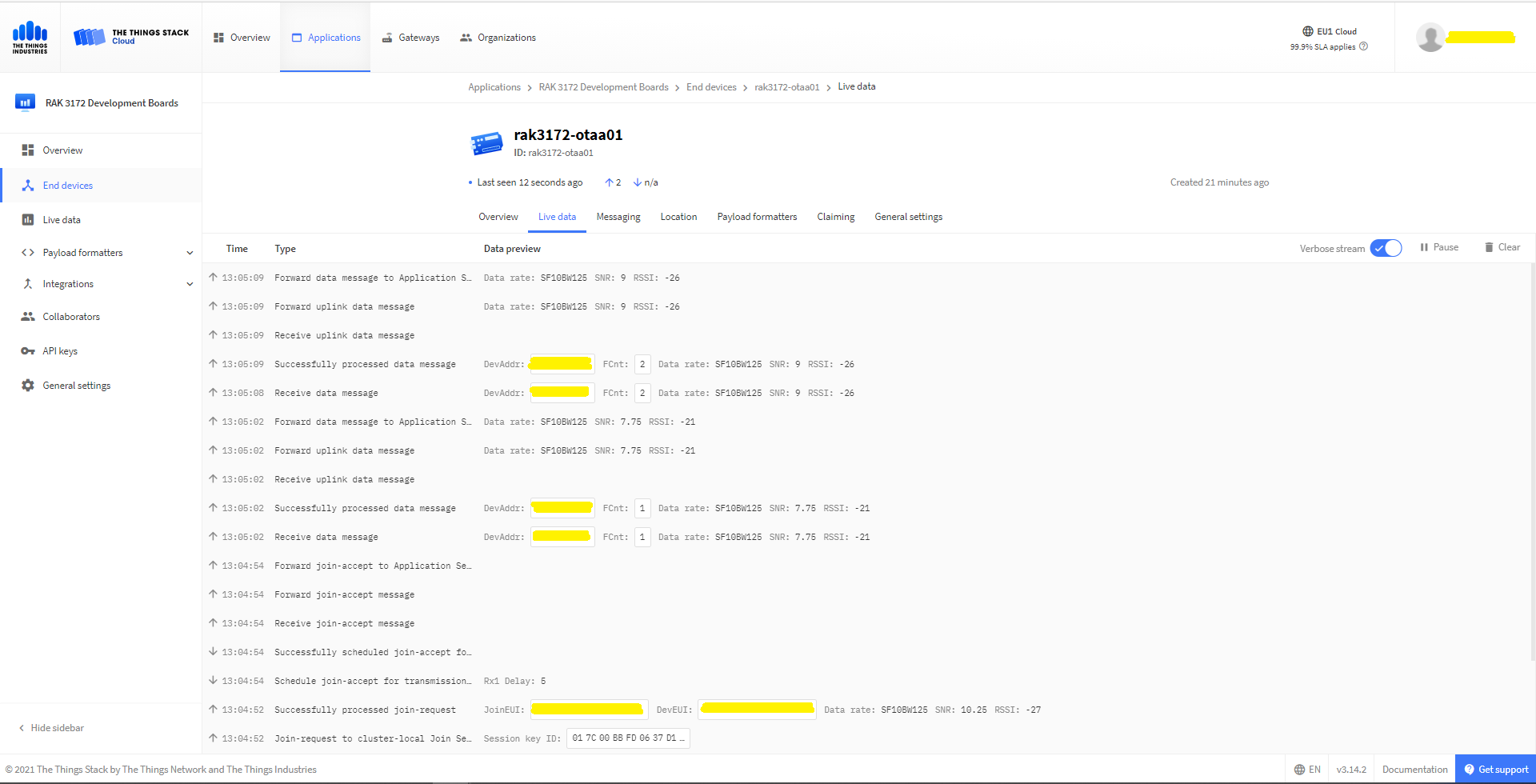
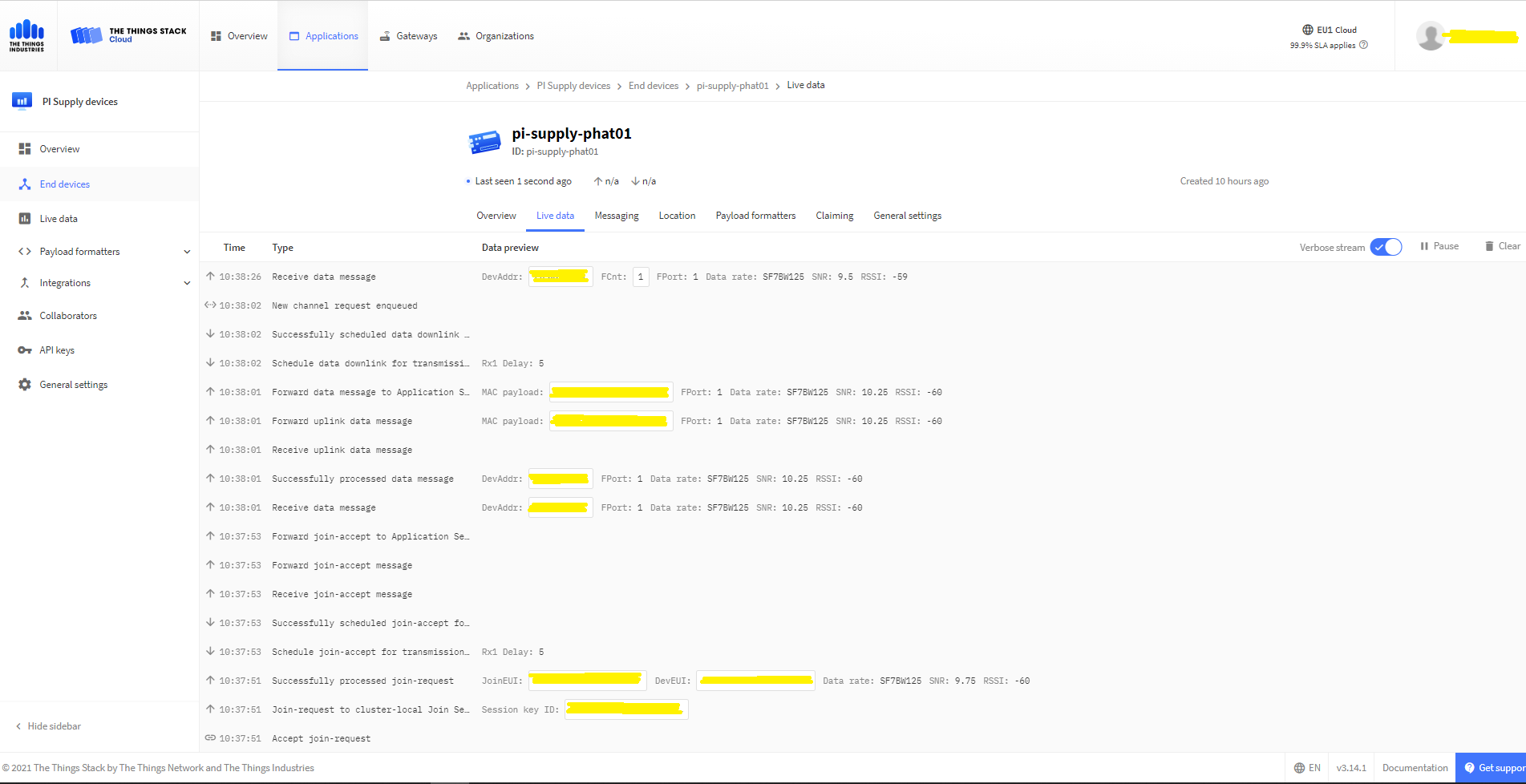
In the Visual Studio 2019 debug output I could see messages getting sent and then after a short delay they were visible in the TTN console.

The Things Industries Live Data Tab showing my device connecting and sending messages

The RAK811 doesn’t fully implement the AS923 specification but I have a work around detailed in another post.