Windows 10 IoT Core Cognitive Services Azure IoT Hub Client

This application builds on Windows 10 IoT Core Cognitive Services Vision API client. It uses my Lego brick classifier model and a new m&m object detection model.
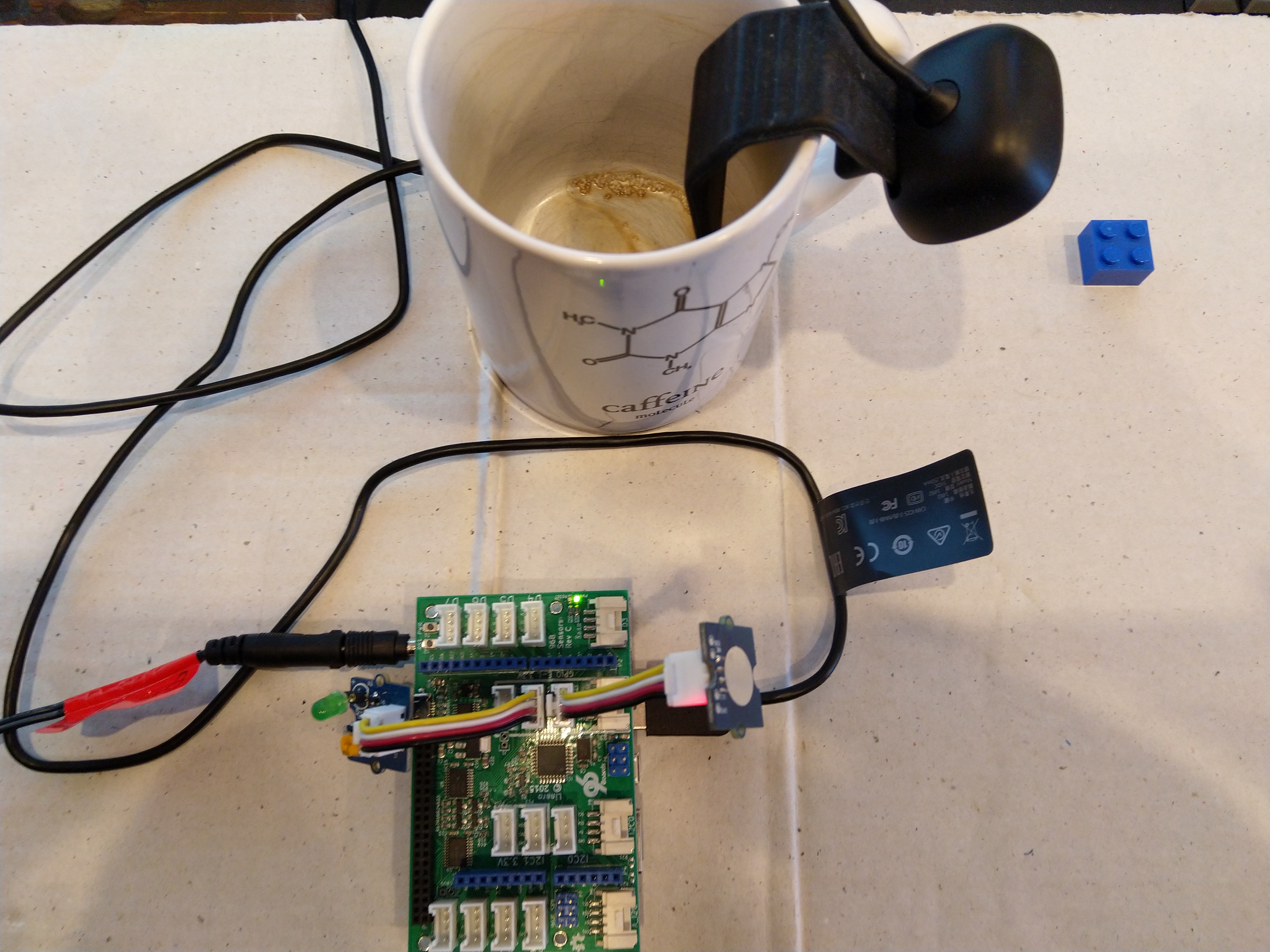
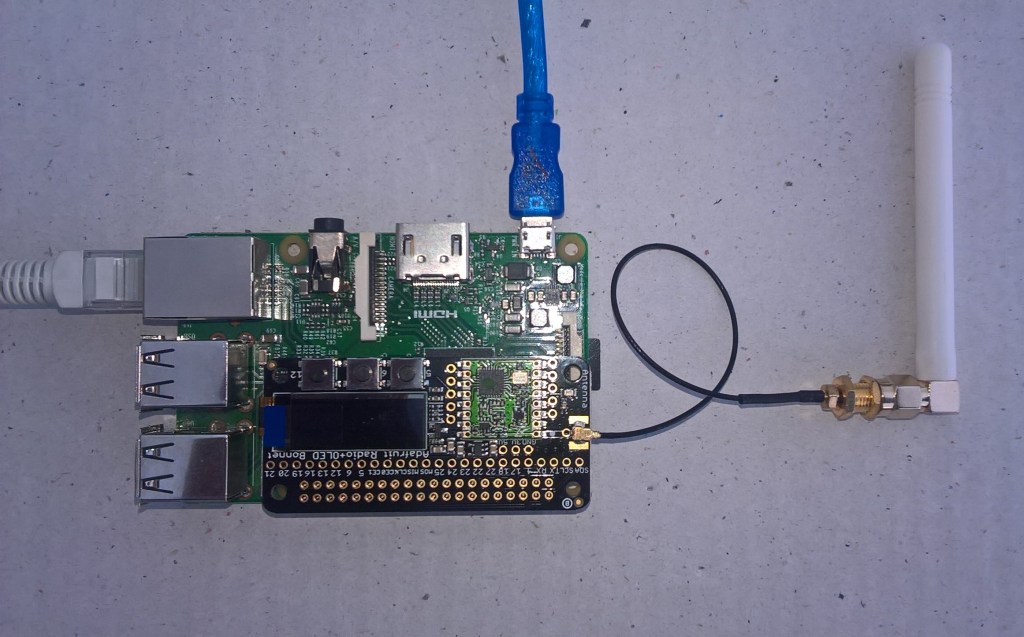
m&m counter test rig

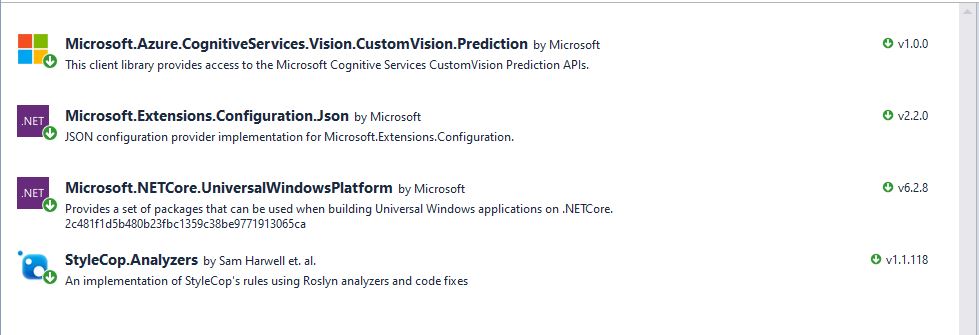
I created a new Visual Studio 2017 Windows IoT Core project and copied across the Windows 10 IoT Core Cognitive Services Custom Vision API code, (changing the namespace and manifest details) and added the Azure Devices Client NuGet package.
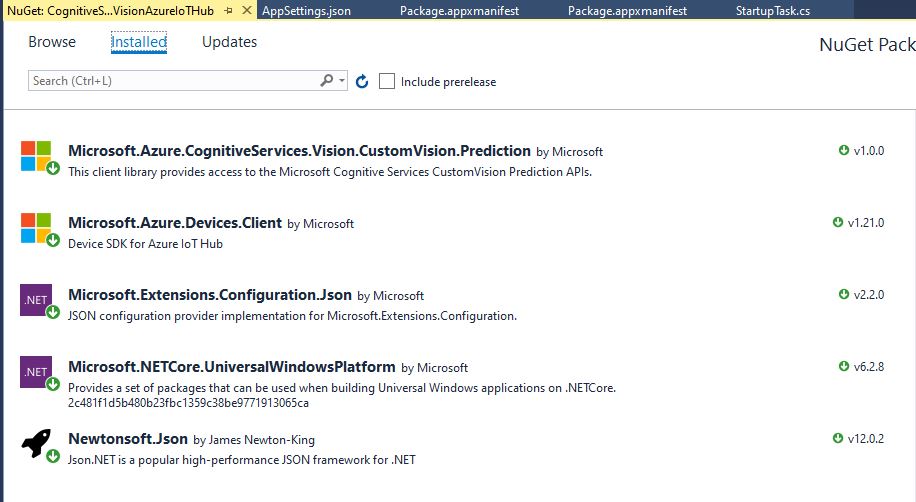
Azure Devices Client NuGet

In the start up code I added code to initialise the Azure IoT Hub client, retrieve the device twin settings, and update the device twin properties.

try
{
	this.azureIoTHubClient = DeviceClient.CreateFromConnectionString(this.azureIoTHubConnectionString, this.transportType);
}
catch (Exception ex)
{
	this.logging.LogMessage("AzureIOT Hub DeviceClient.CreateFromConnectionString failed " + ex.Message, LoggingLevel.Error);
	return;
}

try
{
	TwinCollection reportedProperties = new TwinCollection();

	// This is from the OS
	reportedProperties["Timezone"] = TimeZoneSettings.CurrentTimeZoneDisplayName;
	reportedProperties["OSVersion"] = Environment.OSVersion.VersionString;
	reportedProperties["MachineName"] = Environment.MachineName;

	reportedProperties["ApplicationDisplayName"] = package.DisplayName;
	reportedProperties["ApplicationName"] = packageId.Name;
	reportedProperties["ApplicationVersion"] = string.Format($"{version.Major}.{version.Minor}.{version.Build}.{version.Revision}");

	// Unique identifier from the hardware
	SystemIdentificationInfo systemIdentificationInfo = SystemIdentification.GetSystemIdForPublisher();
	using (DataReader reader = DataReader.FromBuffer(systemIdentificationInfo.Id))
	{
		byte[] bytes = new byte[systemIdentificationInfo.Id.Length];
		reader.ReadBytes(bytes);
		reportedProperties["SystemId"] = BitConverter.ToString(bytes);
	}
	this.azureIoTHubClient.UpdateReportedPropertiesAsync(reportedProperties).Wait();
}
catch (Exception ex)
{
	this.logging.LogMessage("Azure IoT Hub client UpdateReportedPropertiesAsync failed " + ex.Message, LoggingLevel.Error);
	return;
}

try
{
	LoggingFields configurationInformation = new LoggingFields();

	Twin deviceTwin = this.azureIoTHubClient.GetTwinAsync().GetAwaiter().GetResult();

	if (!deviceTwin.Properties.Desired.Contains("ImageUpdateDue") || !TimeSpan.TryParse(deviceTwin.Properties.Desired["ImageUpdateDue"].value.ToString(), out imageUpdateDue))
	{
		this.logging.LogMessage("DeviceTwin.Properties ImageUpdateDue setting missing or invalid format", LoggingLevel.Warning);
		return;
	}
	configurationInformation.AddTimeSpan("ImageUpdateDue", imageUpdateDue);

	if (!deviceTwin.Properties.Desired.Contains("ImageUpdatePeriod") || !TimeSpan.TryParse(deviceTwin.Properties.Desired["ImageUpdatePeriod"].value.ToString(), out imageUpdatePeriod))
	{
		this.logging.LogMessage("DeviceTwin.Properties ImageUpdatePeriod setting missing or invalid format", LoggingLevel.Warning);
		return;
	}
…
	if (!deviceTwin.Properties.Desired.Contains("DebounceTimeout") || !TimeSpan.TryParse(deviceTwin.Properties.Desired["DebounceTimeout"].value.ToString(), out debounceTimeout))
	{
		this.logging.LogMessage("DeviceTwin.Properties DebounceTimeout setting missing or invalid format", LoggingLevel.Warning);
		return;
	}
				configurationInformation.AddTimeSpan("DebounceTimeout", debounceTimeout);

	this.logging.LogEvent("Configuration settings", configurationInformation);
}
catch (Exception ex)
{
	this.logging.LogMessage("Azure IoT Hub client GetTwinAsync failed or property missing/invalid" + ex.Message, LoggingLevel.Error);
	return;
}

When the digital input (configured in the app.settings file) is strobed or the timer fires (configured in the device properties) an image is captured, uploaded to Azure Cognitive Services Custom Vision for processing.

The returned results are then post processed to make them Azure IoT Central friendly, and finally uploaded to an Azure IoT Hub.

For testing I have used a simple object detection model.
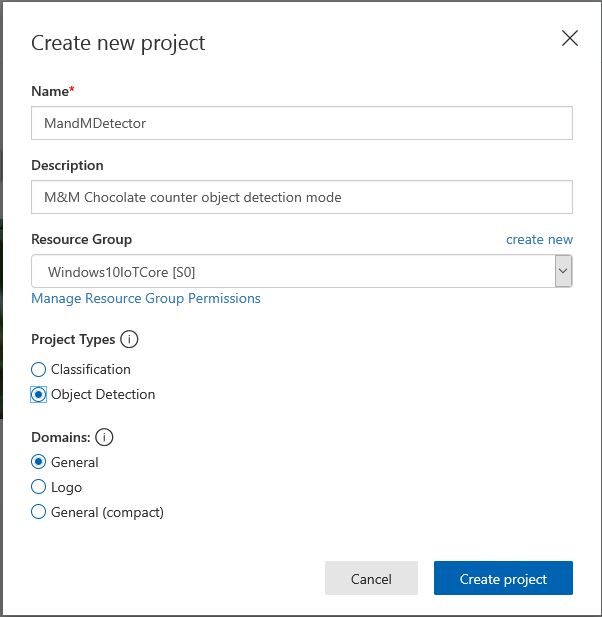
I trained the model with images of 6 different colours of m&m’s.
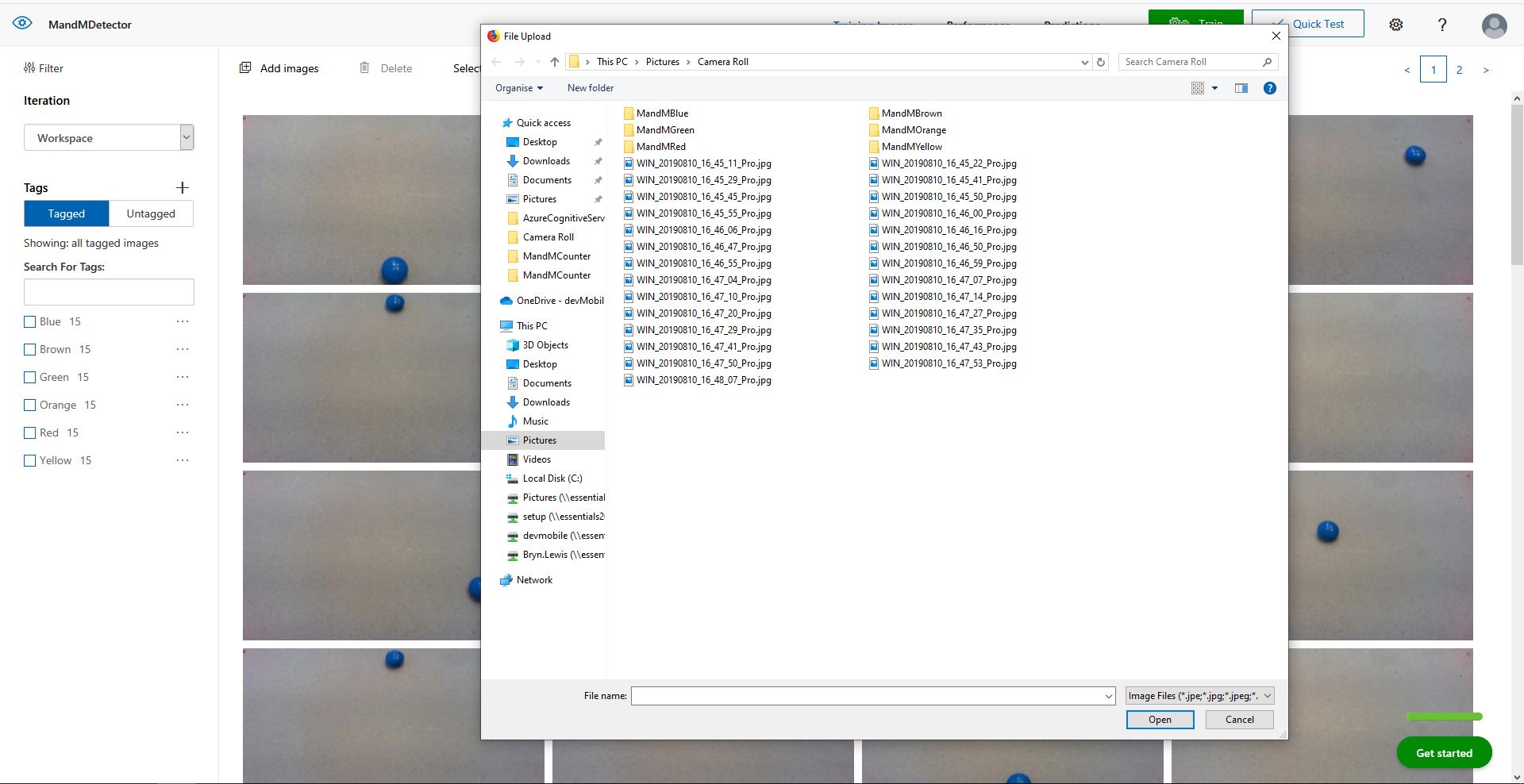
For my first dataset I tagged the location of a single m&m of each of the colour in 15 images.
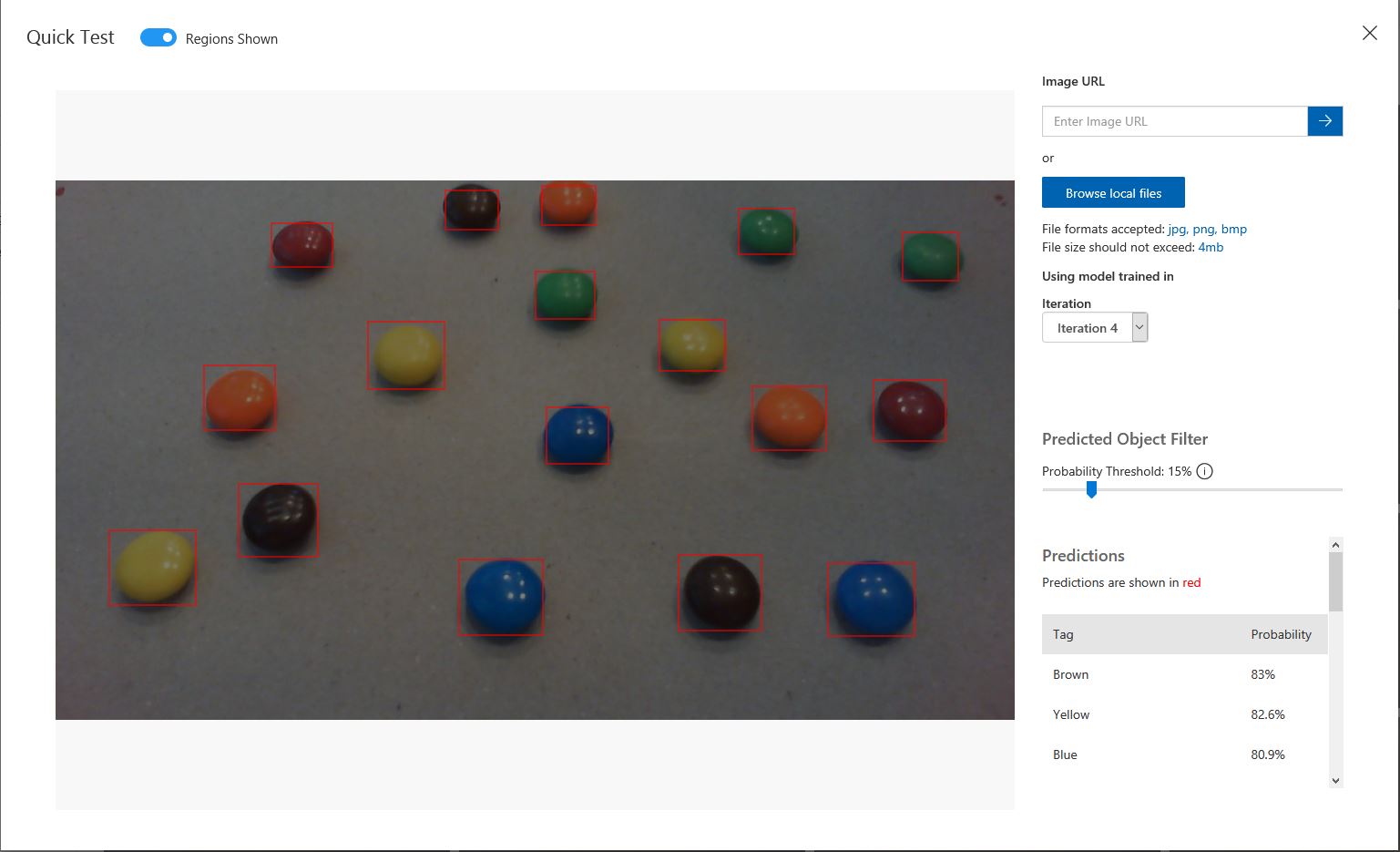
Testing the training of the model

I then trained the model multiple times adding additional images where the model was having trouble distiguishing colours.

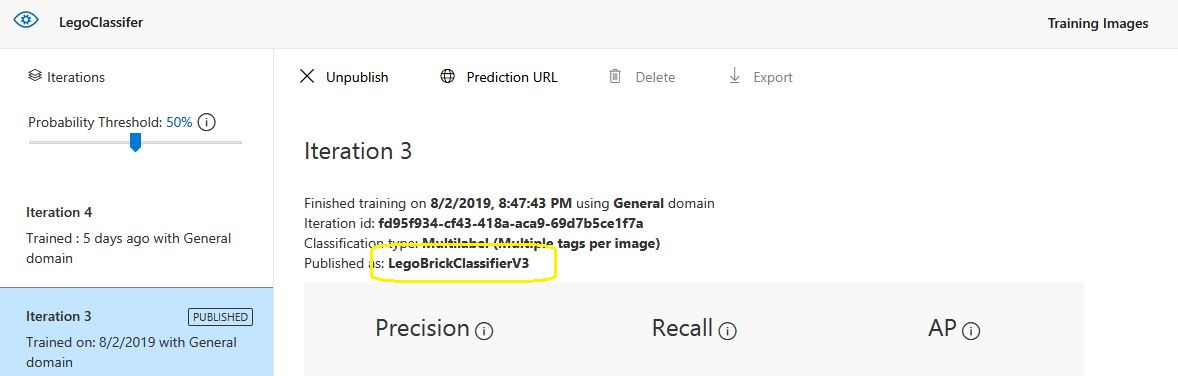
The published name comes from the training performance tab

Project settings

The projectID, AzureCognitiveServicesSubscriptionKey (PredictionKey) and PublishedName (From the Performance tab in project) are from the custom vision project properties.

All of the Custom Vision model settings are configured in the Azure IoT Hub device properties.
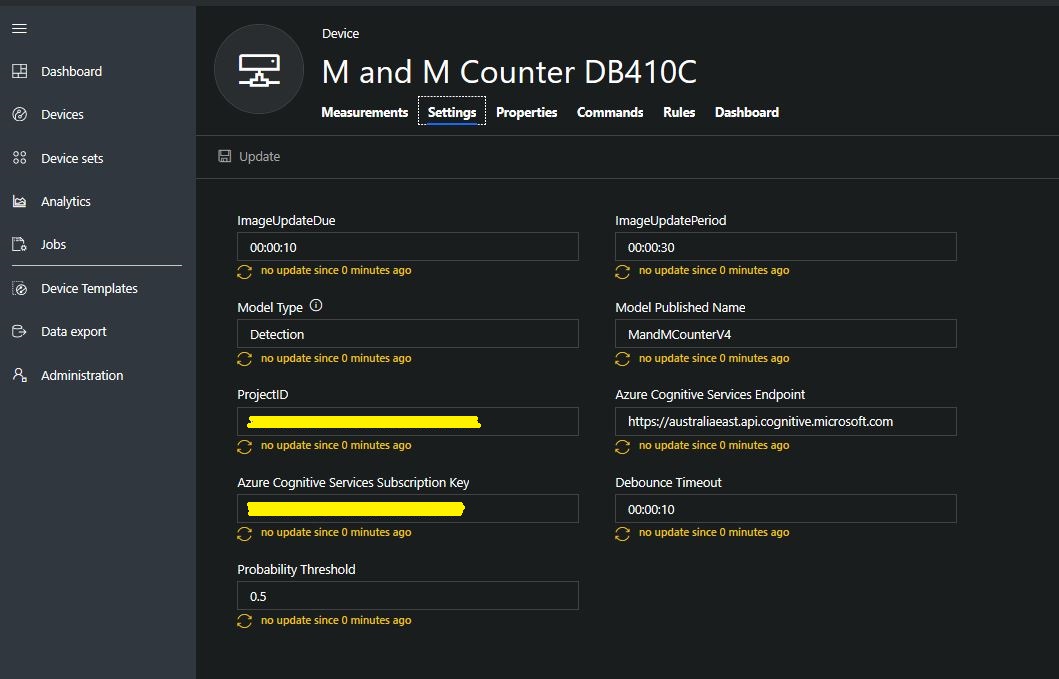
The app.settings file contains only the hardware configuration settings and the Azure IoT Hub connection string.

{
  "InterruptPinNumber": 24,
  "interruptTriggerOn": "RisingEdge",
  "DisplayPinNumber": 35,
  "AzureIoTHubConnectionString": "",
  "TransportType": "Mqtt"
} 

The LED connected to the display pin is illuminated while an image is being processed or briefly flashed if the insufficient time between image captures has passed.

The image data is post processed differently based on the model.

// Post process the predictions based on the type of model
switch (modelType)
{
	case ModelType.Classification:
		// Use only the tags above the specified minimum probability
		foreach (var prediction in imagePrediction.Predictions)
		{
			if (prediction.Probability >= probabilityThreshold)
			{
				// Display and log the individual tag probabilities
				Debug.WriteLine($" Tag valid:{prediction.TagName} {prediction.Probability:0.00}");
				imageInformation.AddDouble($"Tag valid:{prediction.TagName}", prediction.Probability);
					telemetryDataPoint.Add(prediction.TagName, prediction.Probability);
			}
		}
		break;

	case ModelType.Detection:
		// Group the tags to get the count, include only the predictions above the specified minimum probability
		var groupedPredictions = from prediction in imagePrediction.Predictions
										 where prediction.Probability >= probabilityThreshold
										 group prediction by new { prediction.TagName }
				into newGroup
										 select new
										 {
											 TagName = newGroup.Key.TagName,
											 Count = newGroup.Count(),
										 };

		// Display and log the agregated predictions
		foreach (var prediction in groupedPredictions)
		{
			Debug.WriteLine($" Tag valid:{prediction.TagName} {prediction.Count}");
			imageInformation.AddInt32($"Tag valid:{prediction.TagName}", prediction.Count);
			telemetryDataPoint.Add(prediction.TagName, prediction.Count);
		}
		break;
	default:
		throw new ArgumentException("ModelType Invalid");
}

For a classifier only the tags with a probability greater than or equal the specified threshold are uploaded.

For a detection model the instances of each tag are counted. Only the tags with a prediction value greater than the specified threshold are included in the count.

19-08-14 05:26:14 Timer triggered
Prediction count 33
 Tag:Blue 0.0146500813
 Tag:Blue 0.61186564
 Tag:Blue 0.0923164859
 Tag:Blue 0.7813785
 Tag:Brown 0.0100603029
 Tag:Brown 0.128318727
 Tag:Brown 0.0135991769
 Tag:Brown 0.687322736
 Tag:Brown 0.846672833
 Tag:Brown 0.1826635
 Tag:Brown 0.0183384717
 Tag:Green 0.0200069249
 Tag:Green 0.367765248
 Tag:Green 0.011428359
 Tag:Orange 0.678825438
 Tag:Orange 0.03718319
 Tag:Orange 0.8643157
 Tag:Orange 0.0296728313
 Tag:Red 0.02141669
 Tag:Red 0.7183208
 Tag:Red 0.0183610674
 Tag:Red 0.0130951973
 Tag:Red 0.82097
 Tag:Red 0.0618815944
 Tag:Red 0.0130757084
 Tag:Yellow 0.04150853
 Tag:Yellow 0.0106579047
 Tag:Yellow 0.0210028365
 Tag:Yellow 0.03392527
 Tag:Yellow 0.129197285
 Tag:Yellow 0.8089519
 Tag:Yellow 0.03723789
 Tag:Yellow 0.74729687
 Tag valid:Blue 2
 Tag valid:Brown 2
 Tag valid:Orange 2
 Tag valid:Red 2
 Tag valid:Yellow 2
 05:26:17 AzureIoTHubClient SendEventAsync start
 05:26:18 AzureIoTHubClient SendEventAsync finish

The debugging output of the application includes the different categories identified in the captured image.

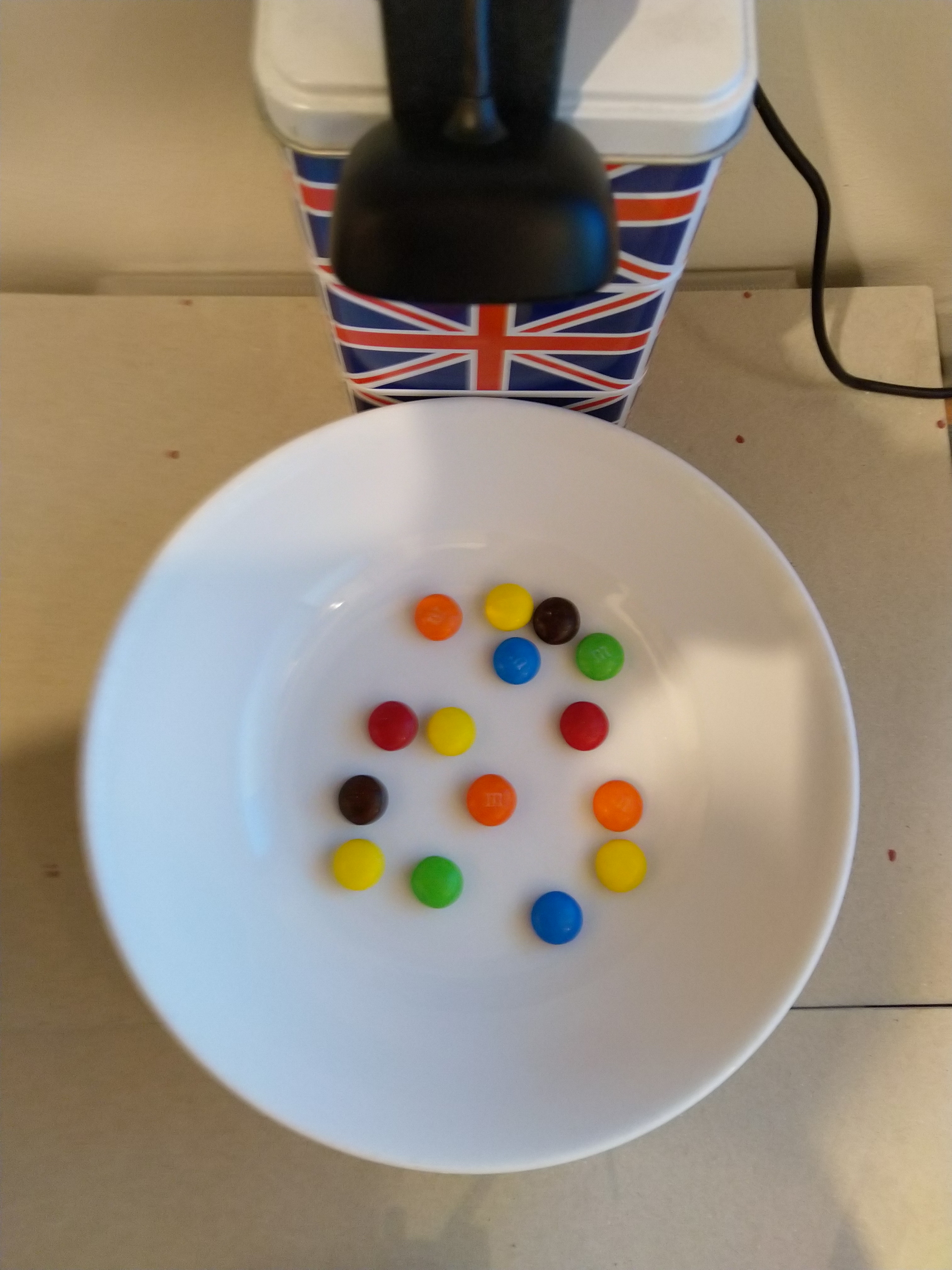
I found my small model was pretty good at detection of individual m&m as long as the ambient lighting was consistent, and the background fairly plain.

Sample image from test rig

Every so often the camera contrast setting went bad and could only be restored by restarting the device which needs further investigation.

Image with contrast problem

This application could be the basis for projects which need to run an Azure Cognitive Services model to count or classify then upload the results to an Azure IoT Hub or Azure IoT Central for presentation.

With a suitable model this application could be used to count the number of people in a room, which could be displayed along with the ambient temperature, humidity, CO2, and noise levels in Azure IoT Central.
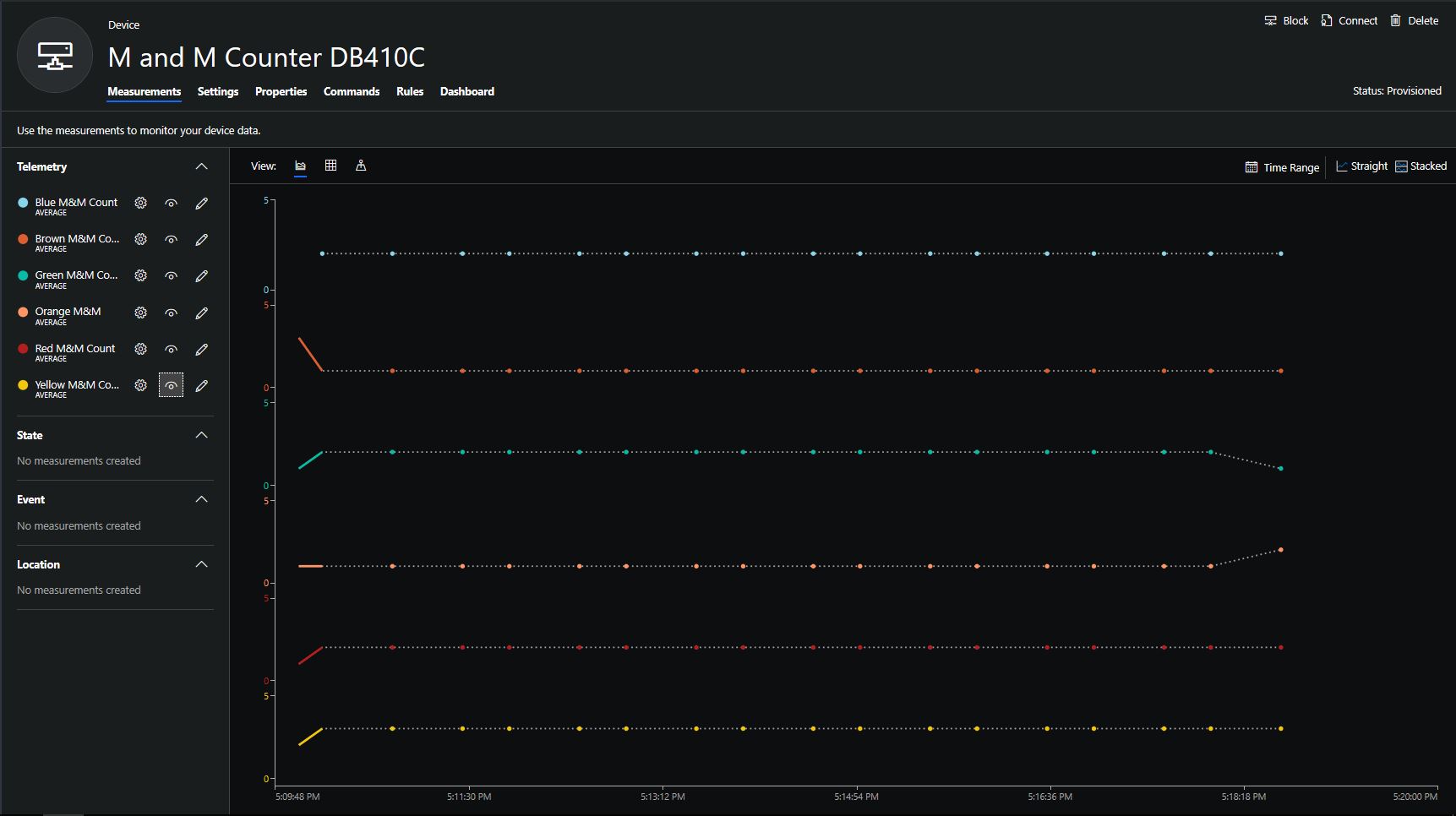
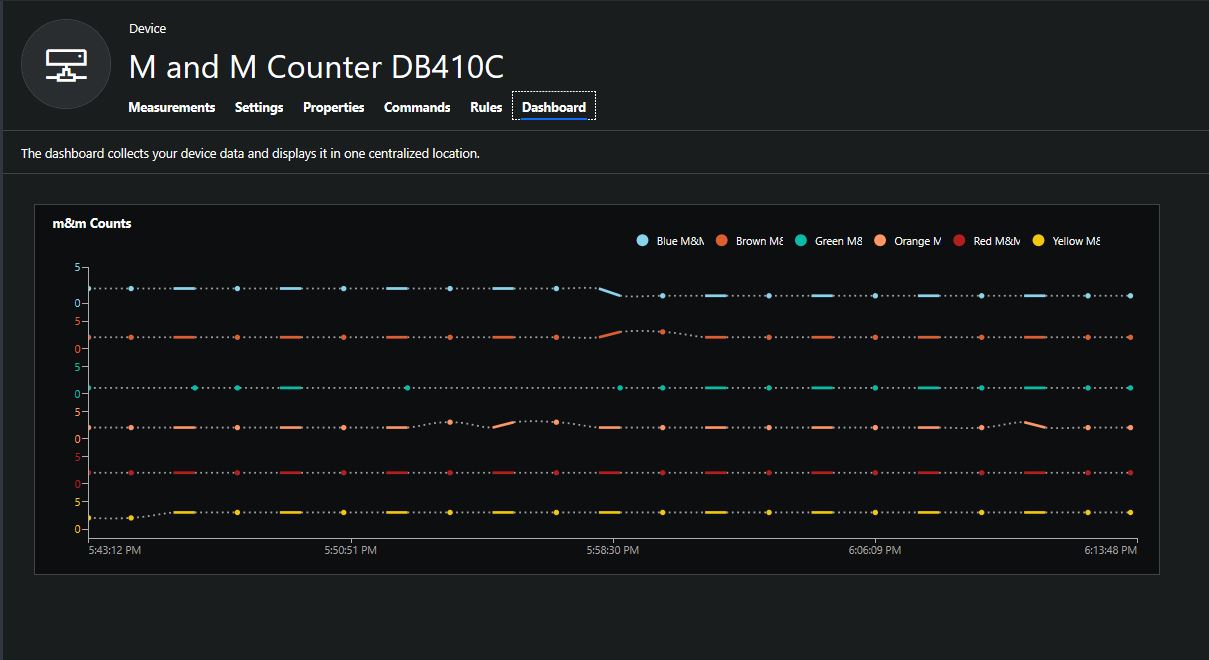
The code for this application is available In on GitHub.
Windows 10 IoT Core Cognitive Services Custom Vision API

This application was inspired by one of teachers I work with wanting to count ducks in the stream on the school grounds. The school was having problems with water quality and the they wanted to see if the number of ducks was a factor. (Manually counting the ducks several times a day would be impractical).

I didn’t have a source of training images so built an image classifier using my son’s Lego for testing. In a future post I will build an object detection model once I have some sample images of the stream captured by my Windows 10 IoT Core time lapse camera application.

To start with I added the Azure Cognitive Services Custom Vision API NuGet packages to a new Visual Studio 2017 Windows IoT Core project.

Azure Custom Vision Service NuGet packacges

Then I initialised the Computer Vision API client

try
{
	this.customVisionClient = new CustomVisionPredictionClient(new System.Net.Http.DelegatingHandler[] { })
	{
		ApiKey = this.azureCognitiveServicesSubscriptionKey,
		Endpoint = this.azureCognitiveServicesEndpoint,
	};
}
catch (Exception ex)
{
	this.logging.LogMessage("Azure Cognitive Services Custom Vision Client configuration failed " + ex.Message, LoggingLevel.Error);
	return;
}

Every time the digital input is strobed by the infra red proximity sensor or touch button an image is captured, uploaded for processing, and results displayed in the debug output.

For testing I have used a simple multiclass classifier that I trained with a selection of my son’s Lego. I tagged the brick size height x width x length (1x2x3, smallest of width/height first) and colour (red, green, blue etc.)

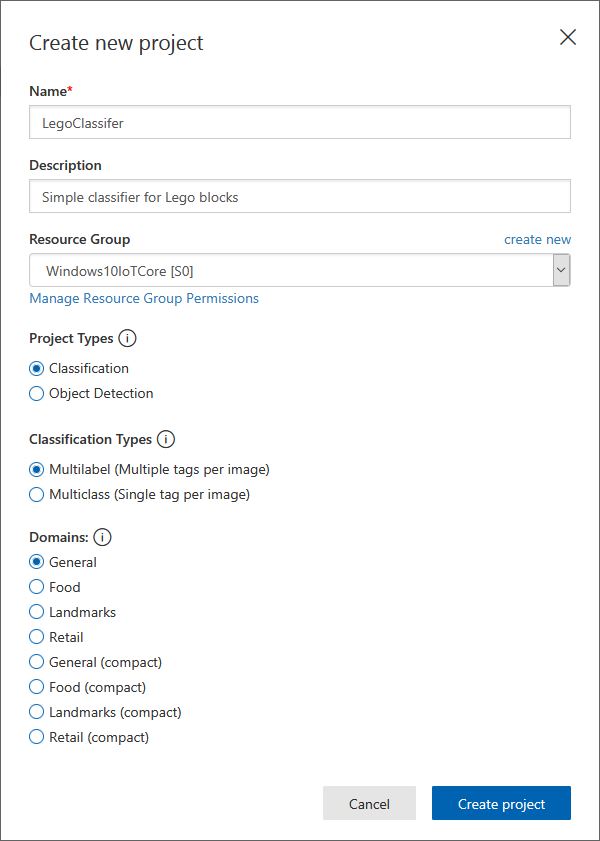
Azure Cognitive Services Classifier project creation
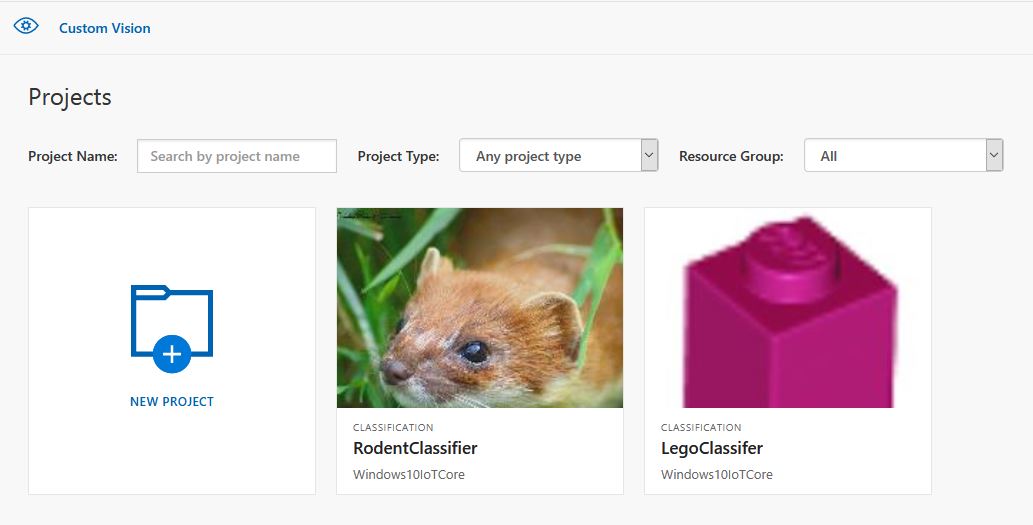
Custom vision projects
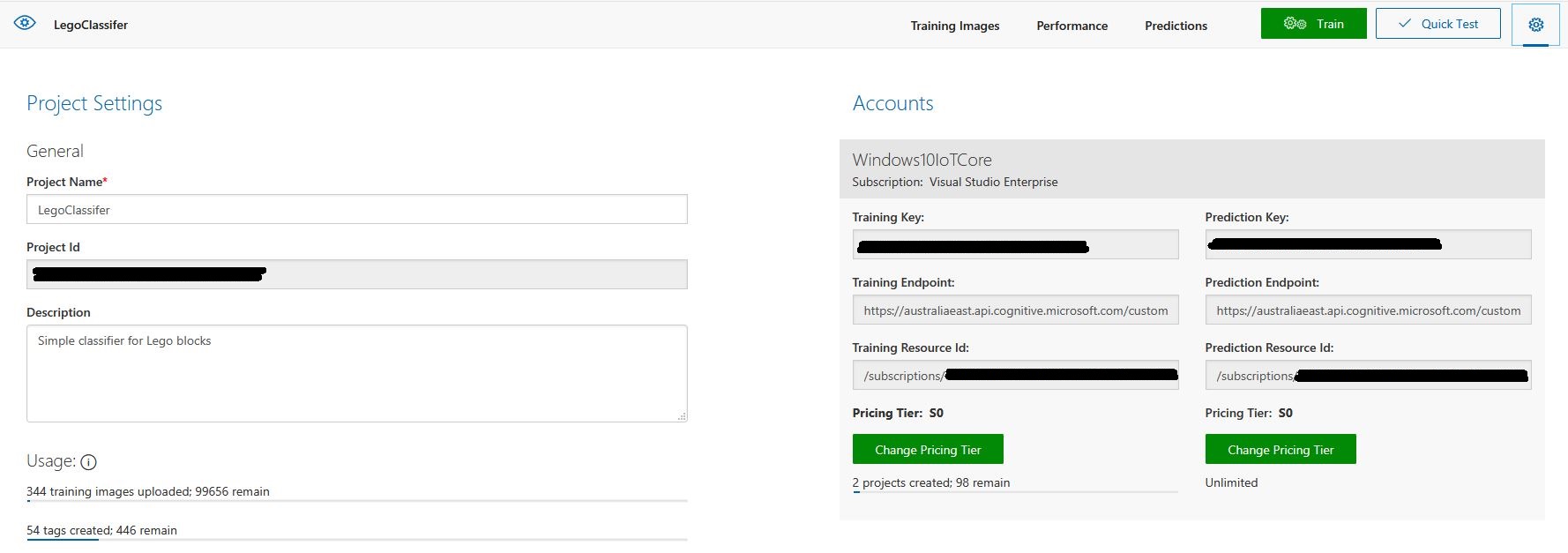
Lego classifier project properties

The projectID, AzureCognitiveServicesSubscriptionKey (PredictionKey) and PublishedName (From the Performance tab in project) in the app.settings file come from the custom vision project properties.

{
  "InterruptPinNumber": 24,
  "interruptTriggerOn": "RisingEdge",
  "DisplayPinNumber": 35,
  "AzureCognitiveServicesEndpoint": "https://australiaeast.api.cognitive.microsoft.com",
  "AzureCognitiveServicesSubscriptionKey": "41234567890123456789012345678901s,
  "DebounceTimeout": "00:00:30",
  "PublishedName": "LegoBrickClassifierV3",
  "TriggerTag": "1x2x4",
  "TriggerThreshold": "0.4",
  "ProjectID": "c1234567-abcdefghijklmn-1234567890ab"
} 

The sample application only supports one trigger tag + probability and if this condition satisfied the Light Emitting Diode (LED) is turned on for 5 seconds. If an image is being processed or the minimum period between images has not passed the LED is illuminated for 5 milliseconds .

private async void InterruptGpioPin_ValueChanged(GpioPin sender, GpioPinValueChangedEventArgs args)
{
	DateTime currentTime = DateTime.UtcNow;
	Debug.WriteLine($"Digital Input Interrupt {sender.PinNumber} triggered {args.Edge}");

	if (args.Edge != this.interruptTriggerOn)
	{
		return;
	}

	// Check that enough time has passed for picture to be taken
	if ((currentTime - this.imageLastCapturedAtUtc) < this.debounceTimeout)
	{
		this.displayGpioPin.Write(GpioPinValue.High);
		this.displayOffTimer.Change(this.timerPeriodDetectIlluminated, this.timerPeriodInfinite);
		return;
	}

	this.imageLastCapturedAtUtc = currentTime;

	// Just incase - stop code being called while photo already in progress
	if (this.cameraBusy)
	{
		this.displayGpioPin.Write(GpioPinValue.High);
		this.displayOffTimer.Change(this.timerPeriodDetectIlluminated, this.timerPeriodInfinite);
		return;
	}

	this.cameraBusy = true;

	try
	{
		using (Windows.Storage.Streams.InMemoryRandomAccessStream captureStream = new Windows.Storage.Streams.InMemoryRandomAccessStream())
		{
			this.mediaCapture.CapturePhotoToStreamAsync(ImageEncodingProperties.CreateJpeg(), captureStream).AsTask().Wait();
			captureStream.FlushAsync().AsTask().Wait();
			captureStream.Seek(0);

			IStorageFile photoFile = await KnownFolders.PicturesLibrary.CreateFileAsync(ImageFilename, CreationCollisionOption.ReplaceExisting);
			ImageEncodingProperties imageProperties = ImageEncodingProperties.CreateJpeg();
			await this.mediaCapture.CapturePhotoToStorageFileAsync(imageProperties, photoFile);

			ImageAnalysis imageAnalysis = await this.computerVisionClient.AnalyzeImageInStreamAsync(captureStream.AsStreamForRead());

			Debug.WriteLine($"Tag count {imageAnalysis.Categories.Count}");

			if (imageAnalysis.Categories.Intersect(this.categoryList, new CategoryComparer()).Any())
			{
				this.displayGpioPin.Write(GpioPinValue.High);

				// Start the timer to turn the LED off
				this.displayOffTimer.Change(this.timerPeriodFaceIlluminated, this.timerPeriodInfinite);
					}

					LoggingFields imageInformation = new LoggingFields();

					imageInformation.AddDateTime("TakenAtUTC", currentTime);
					imageInformation.AddInt32("Pin", sender.PinNumber);
					Debug.WriteLine($"Categories:{imageAnalysis.Categories.Count}");
					imageInformation.AddInt32("Categories", imageAnalysis.Categories.Count);
					foreach (Category category in imageAnalysis.Categories)
					{
						Debug.WriteLine($" Category:{category.Name} {category.Score}");
						imageInformation.AddDouble($"Category:{category.Name}", category.Score);
					}

					this.logging.LogEvent("Captured image processed by Cognitive Services", imageInformation);
				}
			}
			catch (Exception ex)
			{
				this.logging.LogMessage("Camera photo or save failed " + ex.Message, LoggingLevel.Error);
			}
			finally
			{
				this.cameraBusy = false;
			}
		}

		private void TimerCallback(object state)
		{
			this.displayGpioPin.Write(GpioPinValue.Low);
		}

		internal class CategoryComparer : IEqualityComparer<Category>
		{
			public bool Equals(Category x, Category y)
			{
				if (string.Equals(x.Name, y.Name, StringComparison.OrdinalIgnoreCase))
				{
					return true;
				}

				return false;
			}

			public int GetHashCode(Category obj)
			{
				return obj.Name.GetHashCode();
			}
		}

I found my small model was pretty good at tagging images of Lego bricks as long as the ambient lighting was consistent and the background fairly plain.

When tagging many bricks my ability to distinguish pearl light grey, light grey, sand blue and grey bricks was a problem. I should have started with a limited palette (red, green, blue) of colours and shapes for my models while evaluating different tagging approaches.

The debugging output of the application includes the different categories identified in the captured image.

Digital Input Interrupt 24 triggered RisingEdge
Digital Input Interrupt 24 triggered FallingEdge
Prediction count 54
 Tag:Lime 0.529844046
 Tag:1x1x2 0.4441353
 Tag:Green 0.252290249
 Tag:1x1x3 0.1790101
 Tag:1x2x3 0.132092983
 Tag:Turquoise 0.128928885
 Tag:DarkGreen 0.09383947
 Tag:DarkTurquoise 0.08993266
 Tag:1x2x2 0.08145093
 Tag:1x2x4 0.060960535
 Tag:LightBlue 0.0525473
 Tag:MediumAzure 0.04958712
 Tag:Violet 0.04894981
 Tag:SandGreen 0.048463434
 Tag:LightOrange 0.044860106
 Tag:1X1X1 0.0426577441
 Tag:Azure 0.0416654423
 Tag:Aqua 0.0400410332
 Tag:OliveGreen 0.0387720577
 Tag:Blue 0.035169173
 Tag:White 0.03497391
 Tag:Pink 0.0321456343
 Tag:Transparent 0.0246597622
 Tag:MediumBlue 0.0245670844
 Tag:BrightPink 0.0223842952
 Tag:Flesh 0.0221406389
 Tag:Magenta 0.0208457354
 Tag:Purple 0.0188888311
 Tag:DarkPurple 0.0187285
 Tag:MaerskBlue 0.017609369
 Tag:DarkPink 0.0173041821
 Tag:Lavender 0.0162359159
 Tag:PearlLightGrey 0.0152829709
 Tag:1x1x4 0.0133710662
 Tag:Red 0.0122602312
 Tag:Yellow 0.0118704
 Tag:Clear 0.0114340987
 Tag:LightYellow 0.009903331
 Tag:Black 0.00877647
 Tag:BrightLightYellow 0.00871937349
 Tag:Mediumorange 0.0078356415
 Tag:Tan 0.00738664949
 Tag:Sand 0.00713921571
 Tag:Grey 0.00710422
 Tag:Orange 0.00624707434
 Tag:SandBlue 0.006215865
 Tag:DarkGrey 0.00613187673
 Tag:DarkBlue 0.00578308525
 Tag:DarkOrange 0.003790971
 Tag:DarkTan 0.00348462746
 Tag:LightGrey 0.00321317
 Tag:ReddishBrown 0.00304117263
 Tag:LightBluishGrey 0.00273489812
 Tag:Brown 0.00199119

I’m going to run this application repeatedly, adding more images and retraining the model to see how it performs. Once the model is working wll I’ll try downloading it and running it on a device

Custom Vision Test Harness running on my desk

This sample could be used as a basis for projects like this cat door which stops your pet bringing in dead or wounded animals. The model could be trained with tags to indicate whether the cat is carrying a “present” for their human and locking the door if it is.

RFM69 hat library Part12D

Enums and Masks – Packet lengths, addressing & CRCs

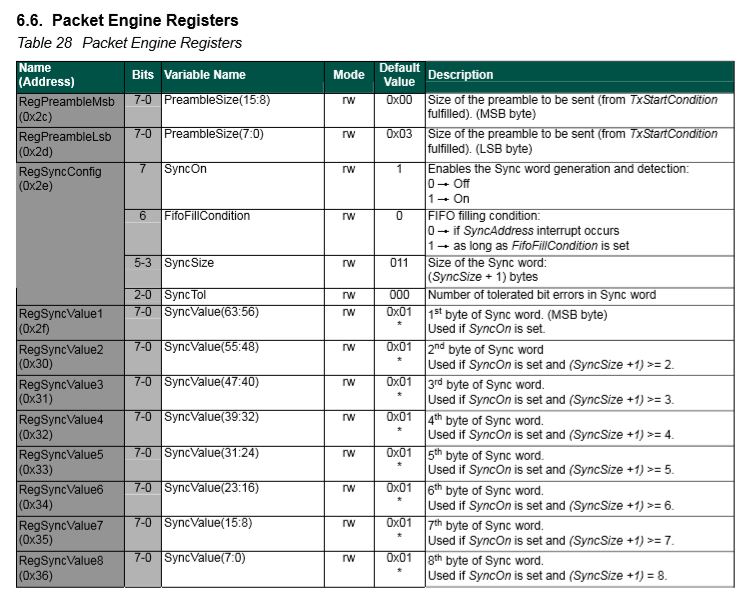
The RFM69CW/RFM69HCW module (based on the Semtech SX1231/SX1231H) has configurable (RegSyncConfig) synchronisation sequences (the length, tolerance for errors and the individual byte values).

By default synchronisation is enabled and a default sequence of bytes is used, in my library synchronisation is NOT enabled until a SyncValue is provided.

I added some additional constants and enumerations for the other settings configured in RegSyncConfig.

// RegSyncConfig 
// This is private because default ignored and flag set based on SyncValues parameter being specified rather than default
private enum RegSyncConfigSyncOn
{
	Off = 0b00000000,
	On = 0b10000000
}

public enum RegSyncConfigFifoFileCondition
{
	SyncAddressInterrupt = 0b00000000,
	FifoFillCondition =    0b01000000
}

private const RegSyncConfigFifoFileCondition SyncFifoFileConditionDefault = RegSyncConfigFifoFileCondition.SyncAddressInterrupt;
readonly byte[] SyncValuesDefault = {0x01, 0x01, 0x01, 0x01};
public const byte SyncValuesSizeDefault = 4;
public const byte SyncValuesSizeMinimum = 1;
public const byte SyncValuesSizeMaximum = 8;

private const byte SyncToleranceDefault = 0;
public const byte SyncToleranceMinimum = 0;
public const byte SyncToleranceMaximum = 7;

I also added some guard conditions to the initialise method which validate the syncFifoFileCondition, syncTolerance and syncValues length.

public void Initialise(RegOpModeMode modeAfterInitialise,
	BitRate bitRate = BitRateDefault,
	ushort frequencyDeviation = frequencyDeviationDefault,
	double frequency = FrequencyDefault,
	ListenModeIdleResolution listenModeIdleResolution = ListenModeIdleResolutionDefault, ListenModeRXTime listenModeRXTime = ListenModeRXTimeDefault, ListenModeCrieria listenModeCrieria = ListenModeCrieriaDefault, ListenModeEnd listenModeEnd = ListenModeEndDefault,
	byte listenCoefficientIdle = ListenCoefficientIdleDefault,
	byte listenCoefficientReceive = ListenCoefficientReceiveDefault,
	bool pa0On = pa0OnDefault, bool pa1On = pa1OnDefaut, bool pa2On = pa2OnDefault, byte outputpower = OutputpowerDefault,
	PaRamp paRamp = PaRampDefault,
	bool ocpOn = OcpOnDefault, byte ocpTrim = OcpTrimDefault,
	LnaZin lnaZin = LnaZinDefault, LnaCurrentGain lnaCurrentGain = LnaCurrentGainDefault, LnaGainSelect lnaGainSelect = LnaGainSelectDefault,
	byte dccFrequency = DccFrequencyDefault, RxBwMant rxBwMant = RxBwMantDefault, byte RxBwExp = RxBwExpDefault,
	byte dccFreqAfc = DccFreqAfcDefault, byte rxBwMantAfc = RxBwMantAfcDefault, byte bxBwExpAfc = RxBwExpAfcDefault,
	ushort preambleSize = PreambleSizeDefault,
	RegSyncConfigFifoFileCondition? syncFifoFileCondition = null, byte? syncTolerance = null, byte[] syncValues = null,
	RegPacketConfig1PacketFormat packetFormat = RegPacketConfig1PacketFormat.FixedLength,
	RegPacketConfig1DcFree packetDcFree = RegPacketConfig1DcFreeDefault,
	bool packetCrc = PacketCrcOnDefault,
	bool packetCrcAutoClearOff = PacketCrcAutoClearOffDefault,
	RegPacketConfig1CrcAddressFiltering packetAddressFiltering = PacketAddressFilteringDefault,
	byte payloadLength = PayloadLengthDefault,
	byte addressNode = NodeAddressDefault, byte addressbroadcast = BroadcastAddressDefault,
	TxStartCondition txStartCondition = TxStartConditionDefault, byte fifoThreshold = FifoThresholdDefault,
	byte interPacketRxDelay = InterPacketRxDelayDefault, bool restartRx = RestartRxDefault, bool autoRestartRx = AutoRestartRxDefault,
	byte[] aesKey = null
	)
{
	RegOpModeModeCurrent = modeAfterInitialise;
	PacketFormat = packetFormat;

	#region RegSyncConfig + RegSyncValue1 to RegSyncValue8 guard conditions
	if (syncValues != null)
	{
		// If sync enabled (i.e. SyncValues array provided) check that SyncValues not to short/long and SyncTolerance not to small/big
		if ((syncValues.Length < SyncValuesSizeMinimum) || (syncValues.Length > SyncValuesSizeMaximum))
		{
			throw new ArgumentException($"The syncValues array length must be between {SyncValuesSizeMinimum} and {SyncValuesSizeMaximum} bytes", "syncValues");
		}
		if (syncTolerance.HasValue)
		{
			if ((syncTolerance < SyncToleranceMinimum) || (syncTolerance > SyncToleranceMaximum))
			{
				throw new ArgumentException($"The syncTolerance size must be between {SyncToleranceMinimum} and {SyncToleranceMaximum}", "syncTolerance");
			}
		}
	}
	else
	{
		// If sync not enabled (i.e. SyncValues array null) check that no syncFifoFileCondition or syncTolerance configuration specified
		if (syncFifoFileCondition.HasValue)
		{
			throw new ArgumentException($"If Sync not enabled syncFifoFileCondition is not supported", "syncFifoFileCondition");
		}

		if (syncTolerance.HasValue)
		{
			throw new ArgumentException($"If Sync not enabled SyncTolerance is not supported", "syncTolerance");
		}
	}
	#endregion

I also ensure that the syncFifoFileCondition and syncTolerance are not specified if synchronisation is not enabled.

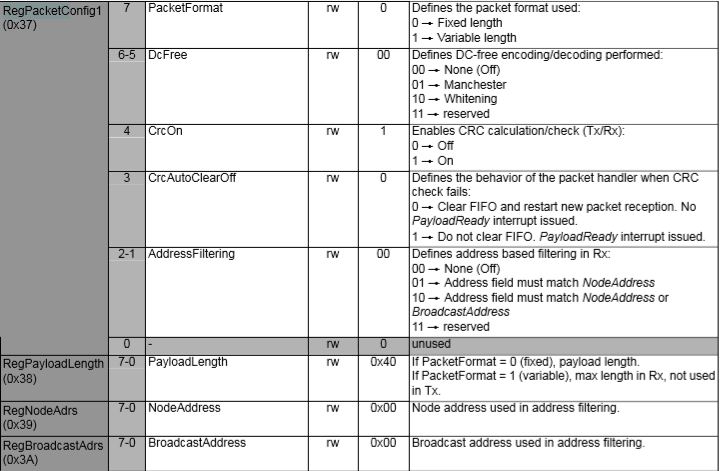
The library also supports the built in RFRM69 node and broadcast addressing which is enabled when the AddressNode and/or AddressBroadcast parameters of the Initialise method are set.

RegPacketConfig1 address filtering options

My first attempt at getting encryption and addressing working together failed badly, the Windows 10 IoT Core device didn’t receive any addressed messages when encryption was enabled. So, I went back and re-read the datasheet again and noticed

“If the address filtering is expected then AddressFiltering must be enabled on the transmitter side as well to prevent address byte to be encrypted”(Sic).

The Arduino client code had to be modified so I could set the node + broadcast address registers and AddressFiltering bit flag in RegPacketConfig1

My RMRFM69.h modifications

enum moduleType {RFM65, RFM65C, RFM69, RFM69C, RFM69H, RFM69HC};
	
 #define ADDRESS_NODE_DEFAULT 0x0
 #define ADDRESS_BROADCAST_DEFAULT 0x0
 #define ADDRESSING_ENABLED_NODE 0x2
 #define ADDRESSING_ENABLED_NODE_AND_BROADCAST 0x4

	class RMRFM69
	{
	 public:
		 RMRFM69(SPIClass &spiPort, byte csPin, byte dio0Pin, byte rstPin);
		 modulationType Modulation; //OOK/FSK/GFSK
		 moduleType COB;				//Chip on board
		 uint32_t Frequency;			//unit: KHz
		 uint32_t SymbolTime;			//unit: ns
		 uint32_t Devation;				//unit: KHz
		 word BandWidth;				//unit: KHz
		 byte OutputPower;				//unit: dBm   range: 0-31 [-18dBm~+13dBm] for RFM69/RFM69C
										//            range: 0-31 [-11dBm~+20dBm] for RFM69H/RFM69HC
		 word PreambleLength;			//unit: byte

		 bool CrcDisable; //fasle: CRC enable�� & use CCITT 16bit
						  //true : CRC disable
		 bool CrcMode;	//false: CCITT

		 bool FixedPktLength; //false: for contain packet length in Tx message, the same mean with variable lenth
							  //true : for doesn't include packet length in Tx message, the same mean with fixed length
		 bool AesOn;		  //false:
							  //true:
		 bool AfcOn;		  //false:
							  //true:
		 byte SyncLength;	 //unit: none, range: 1-8[Byte], value '0' is not allowed!
		 byte SyncWord[8];
		 byte PayloadLength; //PayloadLength is need to be set a value, when FixedPktLength is true.
		 byte AesKey[16];	//AES Key block, note [0]->[15] == MSB->LSB
		 byte AddressNode = ADDRESS_NODE_DEFAULT;
		 byte AddressBroadcast = ADDRESS_BROADCAST_DEFAULT;

		 void vInitialize(void);
		 void vConfig(void);
		 void vGoRx(void);
		 void vGoStandby(void);
		 void vGoSleep(void);
		 bool bSendMessage(byte msg[], byte length);
		 bool bSendMessage(byte Address, byte msg[], byte length);
		 byte bGetMessage(byte msg[]);
		 void vRF69SetAesKey(void);
		 void vTrigAfc(void);

		 void vDirectRx(void);			  //go continuous rx mode, with init. inside
		 void vChangeFreq(uint32_t freq); //change frequency
		 byte bReadRssi(void);			  //read rssi value
		 void dumpRegisters(Stream& out);
	

My RMRFM69.cpp modifications in vConfig

 if(!CrcDisable)
 	{
 	i += CrcOn;
	if(CrcMode)
		i += CrcCalc_IBM;
	else
		i += CrcCalc_CCITT;
	}

if((AddressNode!=ADDRESS_NODE_DEFAULT) || (AddressBroadcast==ADDRESS_BROADCAST_DEFAULT))
   {
      i += ADDRESSING_ENABLED_NODE;
   }

if((AddressNode!=ADDRESS_NODE_DEFAULT) || (AddressBroadcast!=ADDRESS_BROADCAST_DEFAULT))
  {
     i += ADDRESSING_ENABLED_NODE_AND_BROADCAST;
  }

 vSpiWrite(((word)RegPacketConfig1<<8)+i);		

I also validate the lengths of the messages to be sent taking into account whether encryption is enabled\disabled.

RFM69 hat library receive lockup debugging

Every so often my Enums & Masks test harness locked up and stopped receiving messages from my test rig. This seemed to happen more often when the send functionality of my library was not being used.

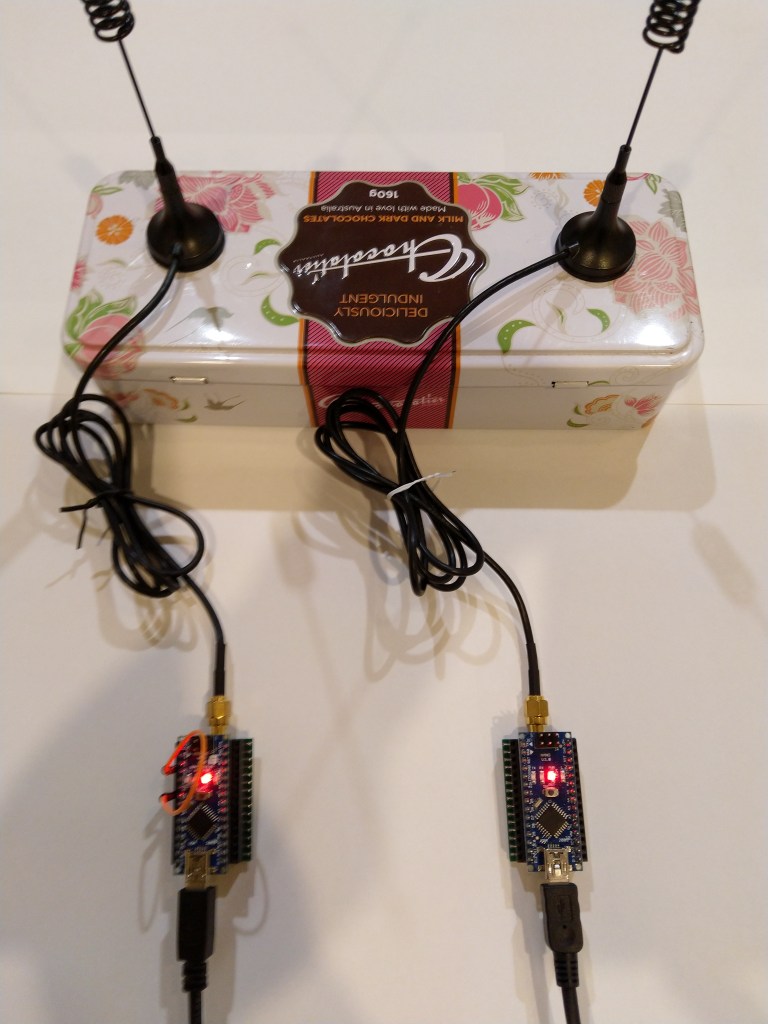
easysensors RFM69HCW test rig

After 5 to 30 minutes (a couple of times it was 5 to 8 hours overnight) the application stopped receiving messages and wouldn’t resume until the application (device reset) was restarted or the RegOpmode-Mode was quickly changed to sleep then back to receive.

private void InterruptGpioPin2_ValueChanged(GpioPin sender, GpioPinValueChangedEventArgs args)
{
    Debug.WriteLine("InterruptGpioPin2_ValueChanged");

    rfm69Device.SetMode(Rfm69HcwDevice.RegOpModeMode.Sleep);
    rfm69Device.SetMode(Rfm69HcwDevice.RegOpModeMode.Receive);
}

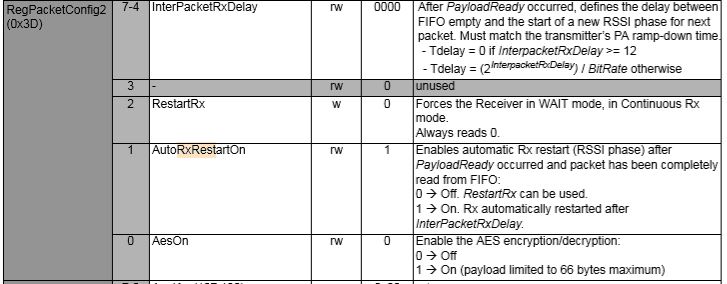
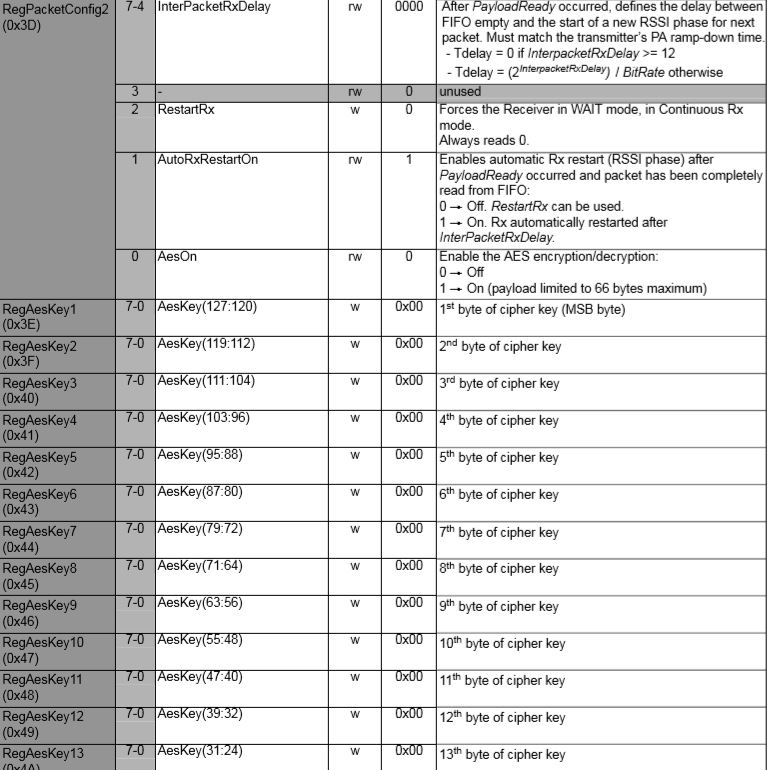
After re-reading the Semtech SX1231 datasheet one of the other possible solutions involved writing to the RegPacketConfig2-RestartRX bit

RegPacketConfig2 configuration options

Of the different approaches I found this code was the most reliable way of restarting reception of packets.

private void InterruptGpioPin3_ValueChanged(GpioPin sender, GpioPinValueChangedEventArgs args)
{
	Debug.WriteLine("InterruptGpioPin3_ValueChanged");

	byte regpacketConfig2 = rfm69Device.RegisterManager.ReadByte(0x3d);
	regpacketConfig2 |= (byte)0x04;
	rfm69Device.RegisterManager.WriteByte(0x3d, regpacketConfig2);
}

I had noticed this code in the Low Power Lab and wondered what it was for. The HopeRF library didn’t appear to have code like this to restart reception which was interesting.

void RFM69::send(uint16_t toAddress, const void* buffer, uint8_t bufferSize, bool requestACK)
{
  writeReg(REG_PACKETCONFIG2, (readReg(REG_PACKETCONFIG2) & 0xFB) | RF_PACKET2_RXRESTART); // avoid RX deadlocks
  uint32_t now = millis();
  while (!canSend() && millis() - now < RF69_CSMA_LIMIT_MS) receiveDone();
  sendFrame(toAddress, buffer, bufferSize, requestACK, false);
}

// should be called immediately after reception in case sender wants ACK
void RFM69::sendACK(const void* buffer, uint8_t bufferSize) {
  ACK_REQUESTED = 0;   // TWS added to make sure we don't end up in a timing race and infinite loop sending Acks
  uint16_t sender = SENDERID;
  int16_t _RSSI = RSSI; // save payload received RSSI value
  writeReg(REG_PACKETCONFIG2, (readReg(REG_PACKETCONFIG2) & 0xFB) | RF_PACKET2_RXRESTART); // avoid RX deadlocks
  uint32_t now = millis();
  while (!canSend() && millis() - now < RF69_CSMA_LIMIT_MS) receiveDone();
  SENDERID = sender;    // TWS: Restore SenderID after it gets wiped out by receiveDone()
  sendFrame(sender, buffer, bufferSize, false, true);
  RSSI = _RSSI; // restore payload RSSI
}

void RFM69::receiveBegin() {
  DATALEN = 0;
  SENDERID = 0;
  TARGETID = 0;
  PAYLOADLEN = 0;
  ACK_REQUESTED = 0;
  ACK_RECEIVED = 0;
#if defined(RF69_LISTENMODE_ENABLE)
  RF69_LISTEN_BURST_REMAINING_MS = 0;
#endif
  RSSI = 0;
  if (readReg(REG_IRQFLAGS2) & RF_IRQFLAGS2_PAYLOADREADY)
    writeReg(REG_PACKETCONFIG2, (readReg(REG_PACKETCONFIG2) & 0xFB) | RF_PACKET2_RXRESTART); // avoid RX deadlocks
  writeReg(REG_DIOMAPPING1, RF_DIOMAPPING1_DIO0_01); // set DIO0 to "PAYLOADREADY" in receive mode
  setMode(RF69_MODE_RX);
}

In the debug output you can see that clock frequencies of the two test devices are slightly different. Every so often they transmit close enough to corrupt one of the message payloads which causes the deadlock.

22:20:26.379 Address 0X99 10011001
22:20:26 Received 14 byte message Hello World:10
22:20:26.561 RegIrqFlags2 01100110
22:20:26.576 Address 0X66 01100110
22:20:26 Received 14 byte message Hello World:26
.22:20:27.501 RegIrqFlags2 01100110
22:20:27.517 Address 0X99 10011001
22:20:27 Received 14 byte message Hello World:11
22:20:27.699 RegIrqFlags2 01100110
22:20:27.714 Address 0X66 01100110
22:20:27 Received 14 byte message Hello World:27
...............................

Now I need to back integrate the fix into the send & receive message methods of my code, then stress test the library with even more client devices.

RFM69 hat library receive lockups issue

Sometimes while testing code you notice something odd. Every so often the Enums & Masks application locks up and stops receiving messages from my test rig.

easysensors RFM69HCW test rig

The symptom is that after 5 to 30 minutes the application stops receiving messages

21:37:37.568 RegIrqFlags1 11011001
21:37:37.583 Address 0X99 10011001
21:37:37 Received 14 byte message Hello World:61
..21:37:38.693 RegIrqFlags2 01100110
21:37:38.706 RegIrqFlags1 11011001
21:37:38.724 Address 0X99 10011001
21:37:38 Received 14 byte message Hello World:62
............The thread 0xba8 has exited with code 0 (0x0).
.................................................................................................................................................The thread 0xf90 has exited with code 0 (0x0).
.....................The thread 0xe30 has exited with code 0 (0x0).
.......................The thread 0xa04 has exited with code 0 (0x0).
................................The thread 0xc8c has exited with code 0 (0x0).
..........................................................................................The thread 0xc38 has exited with code 0 (0x0).
......................The thread 0xf68 has exited with code 0 (0x0).
......................................................................................The thread 0x1c8 has exited with code 0 (0x0).
..........The thread 0xeb8 has exited with code 0 (0x0).
..............................................................The thread 0xbb8 has exited with code 0 (0x0).
..........The thread 0xdc0 has exited with code 0 (0x0).
...............................The thread 0x820 has exited with code 0 (0x0).
....................................The thread 0xaac has exited with code 0 (0x0).
......The thread 0xbf0 has exited with code 0 (0x0).
............................................The thread 0x4e8 has exited with code 0 (0x0).
...............................The thread 0x1b4 has exited with code 0 (0x0).
...............................................................The thread 0xbdc has exited with code 0 (0x0).
....................The thread 0xb60 has exited with code 0 (0x0).
.........................................................................................................The thread 0x510 has exited with code 0 (0x0).
........The thread 0xf60 has exited with code 0 (0x0).
........................................................The thread 0x3c0 has exited with code 0 (0x0).
......................................The thread 0xa4c has exited with code 0 (0x0).
..................................................................The thread 0x9e0 has exited with code 0 (0x0).
....................The thread 0xd74 has exited with code 0 (0x0).
............................The thread 0xfa0 has exited with code 0 (0x0).
..................................................................................................The thread 0xfe0 has exited with code 0 (0x0).
....................................................................................The thread 0xdd4 has exited with code 0 (0x0).
........................The thread 0xc00 has exited with code 0 (0x0).
..................................The thread 0x478 has exited with code 0 (0x0).
.........................The thread 0x88c has exited with code 0 (0x0).
...........................................The thread 0x280 has exited with code 0 (0x0).
..........................................The thread 0x8e4 has exited with code 0 (0x0).
............The thread 0x410 has exited with code 0 (0x0).
..............................................The thread 0xa70 has exited with code 0 (0x0).
................The thread 0x994 has exited with code 0 (0x0).
....................The thread 0x298 has exited with code 0 (0x0).
..............The thread 0x3a4 has exited with code 0 (0x0).
............................................................The thread 0xa2c has exited with code 0 (0x0).
..........The thread 0x208 has exited with code 0 (0x0).
..........................................................................The thread 0xbd4 has exited with code 0 (0x0).
............The thread 0xfdc has exited with code 0 (0x0).
........................................................................The thread 0x36c has exited with code 0 (0x0).
...........22:08:57.638 RegIrqFlags2 01100110
22:08:57.658 RegIrqFlags1 11011001
22:08:57.676 Address 0X66 01100110
22:08:57 Received 15 byte message Hello World:157
22:08:57.807 RegIrqFlags2 01100110

But, every so often it would after many minutes start up again without me doing anything (I noticed this after leaving application running overnight). I could get the application to restart by putting a break point on the Debug.Write(“.”) and toggling the OperationMode from Sleep to Receive

Using Visual Studio Immediate Windows to execute SetMode

I have found if the device is transmitting every so often the lockups are also much less likely. To help with debugging the issue I have wired up the three buttons on the Adafruit Radio Bonnet to call different diagnostic code

public void Run(IBackgroundTaskInstance taskInstance)
{
	byte[] syncValues = { 0xAA, 0x2D, 0xD4 };
	byte[] aesKeyValues = { 0x0, 0x01, 0x02, 0x03, 0x04, 0x05, 0x06, 0x07, 0x08, 0x09, 0x0A, 0x0B, 0x0C, 0x0D, 0X0E, 0X0F };

	GpioController gpioController = GpioController.GetDefault();

	InterruptGpioPin1 = gpioController.OpenPin(5);
	InterruptGpioPin1.SetDriveMode(GpioPinDriveMode.InputPullUp);
	InterruptGpioPin1.ValueChanged += InterruptGpioPin1_ValueChanged; ;

	InterruptGpioPin1 = gpioController.OpenPin(6);
	InterruptGpioPin1.SetDriveMode(GpioPinDriveMode.InputPullUp);
	InterruptGpioPin1.ValueChanged += InterruptGpioPin2_ValueChanged; ;

	InterruptGpioPin1 = gpioController.OpenPin(12);
	InterruptGpioPin1.SetDriveMode(GpioPinDriveMode.InputPullUp);
	InterruptGpioPin1.ValueChanged += InterruptGpioPin3_ValueChanged; ;

…

private void InterruptGpioPin1_ValueChanged(GpioPin sender, GpioPinValueChangedEventArgs args)
{
   Debug.WriteLine("InterruptGpioPin1_ValueChanged");
   rfm69Device.SetMode(Rfm69HcwDevice.RegOpModeMode.Sleep);
   rfm69Device.SetMode(Rfm69HcwDevice.RegOpModeMode.Receive);
}

private void InterruptGpioPin2_ValueChanged(GpioPin sender, GpioPinValueChangedEventArgs args)
{
   Debug.WriteLine("Receive-Wait");
   byte IrqFlags = rfm69Device.RegisterManager.ReadByte(0x28); // RegIrqFlags2
   while ((IrqFlags & 0b00000100) == 0)  // wait until PayLoadReady set
   {
      Task.Delay(20).Wait();
      IrqFlags = rfm69Device.RegisterManager.ReadByte(0x28); // RegIrqFlags2
      Debug.WriteLine(string.Format("RegIrqFlags {0}", Convert.ToString((byte)IrqFlags, 2).PadLeft(8, '0')));
       Debug.Write(".");
   }
   Debug.WriteLine("");

   // Read the length
   byte numberOfBytes = rfm69Device.RegisterManager.ReadByte(0x0);

   // Allocate buffer for message
   byte[] messageBytes = new byte[numberOfBytes];

  for (int i = 0; i < numberOfBytes; i++)
  {
     messageBytes[i] = rfm69Device.RegisterManager.ReadByte(0x00); // RegFifo
   }

  string messageText = UTF8Encoding.UTF8.GetString(messageBytes);
  Debug.WriteLine("Received {0} byte message {1}", messageBytes.Length, messageText);

  Debug.WriteLine("Receive-Done");
}

private void InterruptGpioPin3_ValueChanged(GpioPin sender, GpioPinValueChangedEventArgs args)
{
   Debug.WriteLine("Receive-No wait");

  // Read the length
  byte numberOfBytes = rfm69Device.RegisterManager.ReadByte(0x0);

  // Allocate buffer for message
  byte[] messageBytes = new byte[numberOfBytes];

  for (int i = 0; i < numberOfBytes; i++)
  {
      messageBytes[i] = rfm69Device.RegisterManager.ReadByte(0x00); // RegFifo
   }

  string messageText = UTF8Encoding.UTF8.GetString(messageBytes);
  Debug.WriteLine("Received {0} byte message {1}", messageBytes.Length, messageText);

  Debug.WriteLine("Receive-Done");
}

Looks like this maybe a bit of a heisenbug as it takes a longish time to appear and poking around in the debugger and adding more diagnostics changes the frequency the error.

Received 16 byte message 
Receive-Done
.............................Receive-No wait
Received 16 byte message 
Receive-Done
Receive-No wait
Received 16 byte message 
Receive-Done
....Receive-No wait
Received 16 byte message 
Receive-Done
Receive-No wait
Received 16 byte message 
Receive-Done
.............

Pressing button one restarts inbound messages for a while, button two sits in an endless loop, button three reads in a 16 byte message of 0x10 characters, which I think is buffer length. I have added code to catch exceptions and stop re-entrancy but it never seems to get triggered.

private void InterruptGpioPin_ValueChanged(GpioPin sender, GpioPinValueChangedEventArgs args)
{
	if (args.Edge != GpioPinEdge.RisingEdge)
	{
		return;
	}

	if (InIrqHandler)
	{
		Debug.WriteLine("{0:HH:mm:ss.fff} InIrqHandler+++++++++++++++++++++++++++++++++++++++++++++++++++++++++", DateTime.Now);
		return;
	}
	InIrqHandler = true;

	try
	{
		RegIrqFlags2 irqFlags2 = (RegIrqFlags2)RegisterManager.ReadByte((byte)Registers.RegIrqFlags2);
		Debug.WriteLine("{0:HH:mm:ss.fff} RegIrqFlags2 {1}", DateTime.Now, Convert.ToString((byte)irqFlags2, 2).PadLeft(8, '0'));

		if ((irqFlags2 & RegIrqFlags2.PayloadReady) == RegIrqFlags2.PayloadReady)
		{
			if ((irqFlags2 & RegIrqFlags2.CrcOk) == RegIrqFlags2.CrcOk)
			{
				RegIrqFlags1 irqFlags1 = (RegIrqFlags1)RegisterManager.ReadByte((byte)Registers.RegIrqFlags1); // RegIrqFlags1

				//	SetMode(RegOpModeMode.Sleep);

				// Read the length of the buffer
				byte numberOfBytes = RegisterManager.ReadByte(0x0);
					Debug.WriteLine("{0:HH:mm:ss.fff} RegIrqFlags1 {1}", DateTime.Now, Convert.ToString((byte)irqFlags1, 2).PadLeft(8, '0'));
				if (((irqFlags1 & RegIrqFlags1.SynAddressMatch) == RegIrqFlags1.SynAddressMatch) && DeviceAddressingEnabled)
				{
					byte address = RegisterManager.ReadByte(0x0);
					Debug.WriteLine("{0:HH:mm:ss.fff} Address 0X{1:X2} {2}", DateTime.Now, address, Convert.ToString((byte)address, 2).PadLeft(8, '0'));
					numberOfBytes--;
				}

				// Allocate buffer for message
				byte[] messageBytes = new byte[numberOfBytes];

				for (int i = 0; i < numberOfBytes; i++)
				{
					messageBytes[i] = RegisterManager.ReadByte(0x00); // RegFifo
				}
				//SetMode(RegOpModeMode.Receive);

				string messageText = UTF8Encoding.UTF8.GetString(messageBytes);
					Debug.WriteLine("{0:HH:mm:ss} Received {1} byte message {2}", DateTime.Now, messageBytes.Length, messageText);
			}
			else
			{
				Debug.WriteLine("{0:HH:mm:ss} Received message CRC NOK++++++++++++", DateTime.Now);
			}
		}

		if ((irqFlags2 & RegIrqFlags2.PacketSent) == RegIrqFlags2.PacketSent)  // PacketSent set
		{
			RegisterManager.WriteByte(0x01, 0b00010000); // RegOpMode set ReceiveMode
			Debug.WriteLine("{0:HH:mm:ss.fff} Transmit-Done", DateTime.Now);
		}
	}
	catch (Exception ex)
	{
		Debug.WriteLine($"################### {ex.Source}");
		Debug.WriteLine($"################### {ex.Message}");
		Debug.WriteLine($"################### {ex.StackTrace}");
	}
	finally
	{
		InIrqHandler = false;
	}
}


I need to have a look at the Low Power Lab and HopeRF libraries to see how they handle message received interrupts.

RFM69 hat library Part12C

Enums and Masks – Synchronisation

The RFM69CW/RFM69HCW module (based on the Semtech SX1231/SX1231H) has configurable (RegSyncConfig) synchronisation sequences (the length, tolerance for errors and the individual byte values).

By default synchronisation is enabled and a default sequence of bytes is used, in my library synchronisation is NOT enabled until a SyncValue is provided.

I added some additional constants and enumerations for the other settings configured in RegSyncConfig.

// RegSyncConfig 
// This is private because default ignored and flag set based on SyncValues parameter being specified rather than default
private enum RegSyncConfigSyncOn
{
	Off = 0b00000000,
	On = 0b10000000
}

public enum RegSyncConfigFifoFileCondition
{
	SyncAddressInterrupt = 0b00000000,
	FifoFillCondition =    0b01000000
}

private const RegSyncConfigFifoFileCondition SyncFifoFileConditionDefault = RegSyncConfigFifoFileCondition.SyncAddressInterrupt;
readonly byte[] SyncValuesDefault = {0x01, 0x01, 0x01, 0x01};
public const byte SyncValuesSizeDefault = 4;
public const byte SyncValuesSizeMinimum = 1;
public const byte SyncValuesSizeMaximum = 8;

private const byte SyncToleranceDefault = 0;
public const byte SyncToleranceMinimum = 0;
public const byte SyncToleranceMaximum = 7;

I also added some guard conditions to the initialise method which validate the syncFifoFileCondition, syncTolerance and syncValues length.

public void Initialise(RegOpModeMode modeAfterInitialise,
	BitRate bitRate = BitRateDefault,
	ushort frequencyDeviation = frequencyDeviationDefault,
	double frequency = FrequencyDefault,
	ListenModeIdleResolution listenModeIdleResolution = ListenModeIdleResolutionDefault, ListenModeRXTime listenModeRXTime = ListenModeRXTimeDefault, ListenModeCrieria listenModeCrieria = ListenModeCrieriaDefault, ListenModeEnd listenModeEnd = ListenModeEndDefault,
	byte listenCoefficientIdle = ListenCoefficientIdleDefault,
	byte listenCoefficientReceive = ListenCoefficientReceiveDefault,
	bool pa0On = pa0OnDefault, bool pa1On = pa1OnDefaut, bool pa2On = pa2OnDefault, byte outputpower = OutputpowerDefault,
	PaRamp paRamp = PaRampDefault,
	bool ocpOn = OcpOnDefault, byte ocpTrim = OcpTrimDefault,
	LnaZin lnaZin = LnaZinDefault, LnaCurrentGain lnaCurrentGain = LnaCurrentGainDefault, LnaGainSelect lnaGainSelect = LnaGainSelectDefault,
	byte dccFrequency = DccFrequencyDefault, RxBwMant rxBwMant = RxBwMantDefault, byte RxBwExp = RxBwExpDefault,
	byte dccFreqAfc = DccFreqAfcDefault, byte rxBwMantAfc = RxBwMantAfcDefault, byte bxBwExpAfc = RxBwExpAfcDefault,
	ushort preambleSize = PreambleSizeDefault,
	RegSyncConfigFifoFileCondition? syncFifoFileCondition = null, byte? syncTolerance = null, byte[] syncValues = null,
	RegPacketConfig1PacketFormat packetFormat = RegPacketConfig1PacketFormat.FixedLength,
	RegPacketConfig1DcFree packetDcFree = RegPacketConfig1DcFreeDefault,
	bool packetCrc = PacketCrcOnDefault,
	bool packetCrcAutoClearOff = PacketCrcAutoClearOffDefault,
	RegPacketConfig1CrcAddressFiltering packetAddressFiltering = PacketAddressFilteringDefault,
	byte payloadLength = PayloadLengthDefault,
	byte addressNode = NodeAddressDefault, byte addressbroadcast = BroadcastAddressDefault,
	TxStartCondition txStartCondition = TxStartConditionDefault, byte fifoThreshold = FifoThresholdDefault,
	byte interPacketRxDelay = InterPacketRxDelayDefault, bool restartRx = RestartRxDefault, bool autoRestartRx = AutoRestartRxDefault,
	byte[] aesKey = null
	)
{
	RegOpModeModeCurrent = modeAfterInitialise;
	PacketFormat = packetFormat;

	#region RegSyncConfig + RegSyncValue1 to RegSyncValue8 guard conditions
	if (syncValues != null)
	{
		// If sync enabled (i.e. SyncValues array provided) check that SyncValues not to short/long and SyncTolerance not to small/big
		if ((syncValues.Length < SyncValuesSizeMinimum) || (syncValues.Length > SyncValuesSizeMaximum))
		{
			throw new ArgumentException($"The syncValues array length must be between {SyncValuesSizeMinimum} and {SyncValuesSizeMaximum} bytes", "syncValues");
		}
		if (syncTolerance.HasValue)
		{
			if ((syncTolerance < SyncToleranceMinimum) || (syncTolerance > SyncToleranceMaximum))
			{
				throw new ArgumentException($"The syncTolerance size must be between {SyncToleranceMinimum} and {SyncToleranceMaximum}", "syncTolerance");
			}
		}
	}
	else
	{
		// If sync not enabled (i.e. SyncValues array null) check that no syncFifoFileCondition or syncTolerance configuration specified
		if (syncFifoFileCondition.HasValue)
		{
			throw new ArgumentException($"If Sync not enabled syncFifoFileCondition is not supported", "syncFifoFileCondition");
		}

		if (syncTolerance.HasValue)
		{
			throw new ArgumentException($"If Sync not enabled SyncTolerance is not supported", "syncTolerance");
		}
	}
	#endregion

I also ensure that the syncFifoFileCondition and syncTolerance are not specified if synchronisation is not enabled.

The Arduino client code works though I need modify it so I can do more testing of the initialise method parameter options.

RFM69 hat library Part12B

Enums and Masks – Encryption

The RFM69CW/RFM69HCW module (based on the Semtech SX1231/SX1231H) has built in support for 128bit Advanced Encryption Standard(AES) encoding of message payloads. To make encryption easy to configure I added some additional constants and enumerations for the other settings configured in RegPacketConfig2.

// RegPacketConfig2
private const byte InterPacketRxDelayDefault = 0;
public const byte InterPacketRxDelayMinimum = 0x0;
public const byte InterPacketRxDelayMaximum = 0xF;

private const bool RestartRxDefault = false;
[Flags]
private enum RegPacketConfig2RestartRxDefault : byte
{
	Off = 0b00000000,
	On = 0b00000100,
}

private const bool AutoRestartRxDefault = true;
[Flags]
private enum RegPacketConfig2AutoRestartRxDefault : byte
{
	Off = 0b00000000,
	On = 0b00000010,
}

[Flags]
private enum RegPacketConfig2Aes : byte
{
	Off = 0b00000000,
	On = 0b00000001,
}
public const byte AesKeyLength = 16;

I then added some guard conditions to the initialise method to validate the InterPacketRxDelay and the encryption key length.

public void Initialise(RegOpModeMode modeAfterInitialise,
	BitRate bitRate = BitRateDefault,
	ushort frequencyDeviation = frequencyDeviationDefault,
	double frequency = FrequencyDefault,
	ListenModeIdleResolution listenModeIdleResolution = ListenModeIdleResolutionDefault, ListenModeRXTime listenModeRXTime = ListenModeRXTimeDefault, ListenModeCrieria listenModeCrieria = ListenModeCrieriaDefault, ListenModeEnd listenModeEnd = ListenModeEndDefault,
	byte listenCoefficientIdle = ListenCoefficientIdleDefault,
	byte listenCoefficientReceive = ListenCoefficientReceiveDefault,
	bool pa0On = pa0OnDefault, bool pa1On = pa1OnDefaut, bool pa2On = pa2OnDefault, byte outputpower = OutputpowerDefault,
	PaRamp paRamp = PaRampDefault,
	bool ocpOn = OcpOnDefault, byte ocpTrim = OcpTrimDefault,
	LnaZin lnaZin = LnaZinDefault, LnaCurrentGain lnaCurrentGain = LnaCurrentGainDefault, LnaGainSelect lnaGainSelect = LnaGainSelectDefault,
	byte dccFrequency = DccFrequencyDefault, RxBwMant rxBwMant = RxBwMantDefault, byte RxBwExp = RxBwExpDefault,
	byte dccFreqAfc = DccFreqAfcDefault, byte rxBwMantAfc = RxBwMantAfcDefault, byte bxBwExpAfc = RxBwExpAfcDefault,
	ushort preambleSize = PreambleSizeDefault,
	bool syncOn = SyncOnDefault, SyncFifoFileCondition syncFifoFileCondition = SyncFifoFileConditionDefault, byte syncSize = SyncSizeDefault, byte syncTolerance = SyncToleranceDefault, byte[] syncValues = null,
	RegPacketConfig1PacketFormat packetFormat = RegPacketConfig1PacketFormat.FixedLength,
	RegPacketConfig1DcFree packetDcFree = RegPacketConfig1DcFreeDefault,
	bool packetCrc = PacketCrcOnDefault,
	bool packetCrcAutoClearOff = PacketCrcAutoClearOffDefault,
	RegPacketConfig1CrcAddressFiltering packetAddressFiltering = PacketAddressFilteringDefault,
	byte payloadLength = PayloadLengthDefault,
	byte addressNode = NodeAddressDefault, byte addressbroadcast = BroadcastAddressDefault,
	TxStartCondition txStartCondition = TxStartConditionDefault, byte fifoThreshold = FifoThresholdDefault,
	byte interPacketRxDelay = InterPacketRxDelayDefault, bool restartRx = RestartRxDefault, bool autoRestartRx = AutoRestartRxDefault,
	byte[] aesKey = null
)
{
	RegOpModeModeCurrent = modeAfterInitialise;
	PacketFormat = packetFormat;

	#region Guard Conditions
	if ((interPacketRxDelay < InterPacketRxDelayMinimum ) || (interPacketRxDelay > InterPacketRxDelayMaximum))
	{
		throw new ArgumentException($"The interPacketRxDelay must be between {InterPacketRxDelayMinimum} and {InterPacketRxDelayMaximum}", "interPacketRxDelay");
	}
	if ((aesKey != null) && (aesKey.Length != AesKeyLength))
	{
		throw new ArgumentException($"The AES key must be {AesKeyLength} bytes", "aesKey");
	}
	#endregion

This required some modifications to the run method to catch the new exceptions gracefully.

public void Run(IBackgroundTaskInstance taskInstance)
{
	byte[] syncValues ={0xAA, 0x2D, 0xD4};
	byte[] aesKeyValues = {0x0, 0x01, 0x02, 0x03, 0x04, 0x05, 0x06, 0x07, 0x08, 0x09, 0x0A, 0x0B, 0x0C, 0x0D, 0X0E, 0X0F };

	rfm69Device.RegisterDump();

	try
	{
		rfm69Device.Initialise(Rfm69HcwDevice.RegOpModeMode.StandBy,
			bitRate: Rfm69HcwDevice.BitRate.bps4K8,
			frequency: 915000000.0, frequencyDeviation: 0X023d,
			dccFrequency: 0x1,rxBwMant: Rfm69HcwDevice.RxBwMant.RxBwMant20, RxBwExp:0x2,
			preambleSize: 16,
			syncSize: 3,
			syncValues: syncValues,
			packetFormat: Rfm69HcwDevice.RegPacketConfig1PacketFormat.VariableLength,
			packetCrc:true,
			aesKey: aesKeyValues
			);

		rfm69Device.RegisterDump();

		// RegDioMapping1
		rfm69Device.RegisterManager.WriteByte(0x26, 0x01);

		rfm69Device.RegisterDump();
		while (true)
		{
			string message = "hello world " + DateTime.Now.ToLongTimeString();

			byte[] messageBuffer = UTF8Encoding.UTF8.GetBytes(message);

			Debug.WriteLine("{0:HH:mm:ss.fff} Send-{1}", DateTime.Now, message);
			rfm69Device.SendMessage(messageBuffer);

			Debug.WriteLine("{0:HH:mm:ss.fff} Send-Done", DateTime.Now);

			Task.Delay(5000).Wait();
		}
	}
	catch( Exception ex)
	{
		Debug.WriteLine(ex.Message);
	}
}

The Arduino client code works though I need modify it so I can do more testing of the initialise method parameter options.

RFM69 hat library Part12A

Enums and Masks

Based on the approach I used in my RFM9X library this refactor adds enumerations and constants for initialising and then accessing the registers of the RFM69CW/RFM69HCW module (based on the Semtech SX1231/SX1231H) .

Adafruit RFM69 Radio Bonnet

There is now a even less code in the Run method in the startup.cs file and the code for configuring the RFM69 is more obvious

public sealed class StartupTask : IBackgroundTask
{
	private const int ResetPin = 25;
	private const int InterruptPin = 22;
	private Rfm69HcwDevice rfm69Device = new Rfm69HcwDevice(ChipSelectPin.CS1, ResetPin, InterruptPin);

	public void Run(IBackgroundTaskInstance taskInstance)
	{
		byte[] syncValues ={0xAA, 0x2D, 0xD4};

		rfm69Device.Initialise(Rfm69HcwDevice.RegOpModeMode.StandBy,
			bitRate: Rfm69HcwDevice.BitRate.bps4K8,
			frequency: 915000000.0, frequencyDeviation: 0X023d,
			dccFrequency: 0x1,rxBwMant: Rfm69HcwDevice.RxBwMant.RxBwMant20, RxBwExp:0x2,
			preambleSize: 16,
			syncSize: 3,
			syncValues: syncValues,
			packetFormat: Rfm69HcwDevice.RegPacketConfig1PacketFormat.VariableLength,
			packetCrc:true
		);

	// RegDioMapping1
	rfm69Device.RegisterManager.WriteByte(0x26, 0x01);

	rfm69Device.RegisterDump();

	while (true)
	{
		byte[] messageBuffer = UTF8Encoding.UTF8.GetBytes("hello world " + DateTime.Now.ToLongTimeString());

		rfm69Device.SendMessage(messageBuffer);

		Debug.WriteLine("{0:HH:mm:ss.fff} Send-Done", DateTime.Now);

		Task.Delay(5000).Wait();
	}
}

The Rasmitic library modifies a number of the default settings (e.g. RegRxBw register) so I had to reverse engineer the values. I also added SendMessage methods for both addressed and un-addressed messages.

Register dump
Register 0x01 - Value 0X04 - Bits 00000100
Register 0x02 - Value 0X00 - Bits 00000000
Register 0x03 - Value 0X1a - Bits 00011010
…
Register 0x4b - Value 0X00 - Bits 00000000
Register 0x4c - Value 0X00 - Bits 00000000
Register 0x4d - Value 0X00 - Bits 00000000
16:52:38.337 Send-Done
16:52:38.456 RegIrqFlags 00001000
16:52:38.472 Transmit-Done
The thread 0xfe4 has exited with code 0 (0x0).
The thread 0x100 has exited with code 0 (0x0).
16:52:43.391 Send-Done
16:52:43.465 RegIrqFlags 00001000
16:52:43.480 Transmit-Done
The thread 0xb94 has exited with code 0 (0x0).
16:52:48.475 Send-Done
16:52:48.550 RegIrqFlags 00001000
16:52:48.563 Transmit-Done
16:52:53.448 RegIrqFlags 01000110
16:52:53 Received 13 byte message Hello world:0
The thread 0x2b4 has exited with code 0 (0x0).
16:52:53.559 Send-Done
16:52:53.633 RegIrqFlags 00001000
16:52:53.648 Transmit-Done
16:52:54.577 RegIrqFlags 01000110
16:52:54 Received 13 byte message Hello world:1
16:52:55.706 RegIrqFlags 01000110
16:52:55 Received 13 byte message Hello world:2
16:52:56.836 RegIrqFlags 01000110
16:52:56 Received 13 byte message Hello world:3
16:52:57.965 RegIrqFlags 01000110
16:52:57 Received 13 byte message Hello world:4
The thread 0x354 has exited with code 0 (0x0).
16:52:58.634 Send-Done
16:52:58.709 RegIrqFlags 00001000
16:52:58.724 Transmit-Done
16:52:59.095 RegIrqFlags 01000110
16:52:59 Received 13 byte message Hello world:5
The program '[3736] backgroundTaskHost.exe' has exited with code -1 

The Arduino code works though I need modify it so I can do more testing of the initialise method parameter options.

16:41:03.619 -> RX start
16:41:03.619 -> 0x0: 0x0
16:41:03.654 -> 0x1: 0x10
16:41:03.654 -> 0x2: 0x0
…
16:41:04.310 -> 0x3B: 0x0
16:41:04.310 -> 0x3C: 0x1
16:41:04.344 -> 0x3D: 0x0
16:41:07.228 -> MessageIn:hello world 4:41:07 PM
16:41:12.322 -> MessageIn:hello world 4:41:12 PM
16:41:17.395 -> MessageIn:hello world 4:41:17 PM
16:41:22.448 -> MessageIn:hello world 4:41:22 PM
16:41:27.533 -> MessageIn:hello world 4:41:27 PM
16:41:32.609 -> MessageIn:hello world 4:41:32 PM
16:41:37.673 -> MessageIn:hello world 4:41:37 PM

The Initialise method has a large number of parameters but as most of these have a reasonable default I’m not to concerned.

public void Initialise(RegOpModeMode modeAfterInitialise,
			BitRate bitRate = BitRateDefault,
			ushort frequencyDeviation = frequencyDeviationDefault,
			double frequency = FrequencyDefault,
			ListenModeIdleResolution listenModeIdleResolution = ListenModeIdleResolutionDefault, ListenModeRXTime listenModeRXTime = ListenModeRXTimeDefault, ListenModeCrieria listenModeCrieria = ListenModeCrieriaDefault, ListenModeEnd listenModeEnd = ListenModeEndDefault,
			byte listenCoefficientIdle = ListenCoefficientIdleDefault,
			byte listenCoefficientReceive = ListenCoefficientReceiveDefault,
			bool pa0On = pa0OnDefault, bool pa1On = pa1OnDefaut, bool pa2On = pa2OnDefault, byte outputpower = OutputpowerDefault,
			PaRamp paRamp = PaRampDefault,
			bool ocpOn = OcpOnDefault, byte ocpTrim = OcpTrimDefault,
			LnaZin lnaZin = LnaZinDefault, LnaCurrentGain lnaCurrentGain = LnaCurrentGainDefault, LnaGainSelect lnaGainSelect = LnaGainSelectDefault,
			byte dccFrequency = DccFrequencyDefault, RxBwMant rxBwMant = RxBwMantDefault, byte RxBwExp = RxBwExpDefault,
			byte dccFreqAfc = DccFreqAfcDefault, byte rxBwMantAfc = RxBwMantAfcDefault, byte bxBwExpAfc = RxBwExpAfcDefault,
			ushort preambleSize = PreambleSizeDefault,
			bool syncOn = SyncOnDefault, SyncFifoFileCondition syncFifoFileCondition = SyncFifoFileConditionDefault, byte syncSize = SyncSizeDefault, byte syncTolerance = SyncToleranceDefault, byte[] syncValues = null,
			RegPacketConfig1PacketFormat packetFormat = RegPacketConfig1PacketFormat.FixedLength,
			RegPacketConfig1DcFree packetDcFree = RegPacketConfig1DcFreeDefault,
			bool packetCrc = PacketCrcOnDefault,
			bool packetCrcAutoClearOff = PacketCrcAutoClearOffDefault,
			RegPacketConfig1CrcAddressFiltering packetAddressFiltering = PacketAddressFilteringDefault,
			byte payloadLength = PayloadLengthDefault,
			byte addressNode = NodeAddressDefault, byte addressbroadcast = BroadcastAddressDefault
			)
		{
			RegOpModeModeCurrent = modeAfterInitialise;
			PacketFormat = packetFormat;

			// Strobe Reset pin briefly to factory reset SX1231 chip
			ResetGpioPin.Write(GpioPinValue.High);
			Task.Delay(100);
			ResetGpioPin.Write(GpioPinValue.Low);
			Task.Delay(10);

			// Put the device into sleep mode so registers can be changed
			SetMode(RegOpModeMode.Sleep);

Most of the initialise method follows a similar pattern, checking parameters associated with a Register and only setting it if the cvalues are not all the default

// Configure RF Carrier frequency RegFrMsb, RegFrMid, RegFrLsb
if (frequency != FrequencyDefault)
{
	byte[] bytes = BitConverter.GetBytes((long)(frequency / RH_RFM69HCW_FSTEP));
	RegisterManager.WriteByte((byte)Registers.RegFrfMsb, bytes[2]);
	RegisterManager.WriteByte((byte)Registers.RegFrfMid, bytes[1]);
	RegisterManager.WriteByte((byte)Registers.RegFrfLsb, bytes[0]);
}

Some registers are a bit more complex to configure e.g. RegSyncConfig

// RegSyncConfig
if ((syncOn != SyncOnDefault) ||
	 (syncFifoFileCondition != SyncFifoFileConditionDefault) ||
	 (syncSize != SyncSizeDefault) ||
	 (syncTolerance != SyncToleranceDefault))
{
	byte regSyncConfigValue= 0b00000000;

	if (syncOn)
	{
		regSyncConfigValue |= 0b10000000;
	}
	
	regSyncConfigValue |= (byte)syncFifoFileCondition;

	regSyncConfigValue |= (byte)((syncSize - 1) << 3);
	regSyncConfigValue |= (byte)syncTolerance;
	RegisterManager.WriteByte((byte)Registers.RegSyncConfig, regSyncConfigValue);
}

I have just got to finish the code for RegFifoThresh, RegPacketConfig2 and the RegAesKey1-16 registers.

Other libraries for the RRFM69 support changing configuration while the application is running which significantly increases the complexity and number of test cases. My initial version will only support configuration on start-up.

RFM69 hat library Part11

RegisterManager Refactor

I had been meaning to refactor the code for accessing the registers of the RFM69CW/RFM69HCW module (based on the Semtech SX1231/SX1231H) registers for a while.

Adafruit RFM69 Radio Bonnet

There is now a lot less code in the startup.cs file and the code for configuring the RFM69 is more obvious

/*
    Copyright ® 2019 July devMobile Software, All Rights Reserved

	 MIT License

	 Permission is hereby granted, free of charge, to any person obtaining a copy
	 of this software and associated documentation files (the "Software"), to deal
    in the Software without restriction, including without limitation the rights
	 to use, copy, modify, merge, publish, distribute, sublicense, and/or sell
	 copies of the Software, and to permit persons to whom the Software is
    furnished to do so, subject to the following conditions:

    The above copyright notice and this permission notice shall be included in all
	 copies or substantial portions of the Software.

    THE SOFTWARE IS PROVIDED "AS IS", WITHOUT WARRANTY OF ANY KIND, EXPRESS OR
	 IMPLIED, INCLUDING BUT NOT LIMITED TO THE WARRANTIES OF MERCHANTABILITY,
    FITNESS FOR A PARTICULAR PURPOSE AND NONINFRINGEMENT. IN NO EVENT SHALL THE
	 AUTHORS OR COPYRIGHT HOLDERS BE LIABLE FOR ANY CLAIM, DAMAGES OR OTHER
	 LIABILITY, WHETHER IN AN ACTION OF CONTRACT, TORT OR OTHERWISE, ARISING FROM,
    OUT OF OR IN CONNECTION WITH THE SOFTWARE OR THE USE OR OTHER DEALINGS IN THE
	 SOFTWARE

 */
namespace devMobile.IoT.Rfm69Hcw.RefactorRegisterManager
{
	using System;
	using System.Diagnostics;
	using System.Text;
	using System.Threading.Tasks;
	using Windows.ApplicationModel.Background;
	using Windows.Devices.Gpio;

	sealed class Rfm69HcwDevice
	{
		private GpioPin InterruptGpioPin = null;
		public RegisterManager RegisterManager = null; // Future refactor this will be made private

		public Rfm69HcwDevice(ChipSelectPin chipSelectPin, int resetPin, int interruptPin)
		{
			RegisterManager = new RegisterManager(chipSelectPin);

			// Factory reset pin configuration
			GpioController gpioController = GpioController.GetDefault();
			GpioPin resetGpioPin = gpioController.OpenPin(resetPin);
			resetGpioPin.SetDriveMode(GpioPinDriveMode.Output);
			resetGpioPin.Write(GpioPinValue.High);
			Task.Delay(100);
			resetGpioPin.Write(GpioPinValue.Low);
			Task.Delay(10);

			// Interrupt pin for RX message & TX done notification 
			InterruptGpioPin = gpioController.OpenPin(interruptPin);
			resetGpioPin.SetDriveMode(GpioPinDriveMode.Input);

			InterruptGpioPin.ValueChanged += InterruptGpioPin_ValueChanged;
		}

		private void InterruptGpioPin_ValueChanged(GpioPin sender, GpioPinValueChangedEventArgs args)
		{
			if (args.Edge != GpioPinEdge.RisingEdge)
			{
				return;
			}

			byte irqFlags = RegisterManager.ReadByte(0x28); // RegIrqFlags2
			Debug.WriteLine("{0:HH:mm:ss.fff} RegIrqFlags {1}", DateTime.Now, Convert.ToString((byte)irqFlags, 2).PadLeft(8, '0'));
			if ((irqFlags & 0b00000100) == 0b00000100)  // PayLoadReady set
			{
				// Read the length of the buffer
				byte numberOfBytes = RegisterManager.ReadByte(0x0);

				// Allocate buffer for message
				byte[] messageBytes = new byte[numberOfBytes];

				for (int i = 0; i < numberOfBytes; i++)
				{
					messageBytes[i] = RegisterManager.ReadByte(0x00); // RegFifo
				}

				string messageText = UTF8Encoding.UTF8.GetString(messageBytes);
				Debug.WriteLine("{0:HH:mm:ss} Received {1} byte message {2}", DateTime.Now, messageBytes.Length, messageText);
			}

			if ((irqFlags & 0b00001000) == 0b00001000)  // PacketSent set
			{
				RegisterManager.WriteByte(0x01, 0b00010000); // RegOpMode set ReceiveMode
				Debug.WriteLine("{0:HH:mm:ss.fff} Transmit-Done", DateTime.Now);
			}
		}

		public void RegisterDump()
		{
			RegisterManager.Dump(0x0, 0x40);
		}
	}
	

	public sealed class StartupTask : IBackgroundTask
	{
		private const int ResetPin = 25;
		private const int InterruptPin = 22;
		private Rfm69HcwDevice rfm69Device = new Rfm69HcwDevice(ChipSelectPin.CS1, ResetPin, InterruptPin);

		const double RH_RF6M9HCW_FXOSC = 32000000.0;
		const double RH_RFM69HCW_FSTEP = RH_RF6M9HCW_FXOSC / 524288.0;

		public void Run(IBackgroundTaskInstance taskInstance)
		{
			//rfm69Device.RegisterDump();

			// regOpMode standby
			rfm69Device.RegisterManager.WriteByte(0x01, 0b00000100);

			// BitRate MSB/LSB
			rfm69Device.RegisterManager.WriteByte(0x03, 0x34);
			rfm69Device.RegisterManager.WriteByte(0x04, 0x00);

			// Frequency deviation
			rfm69Device.RegisterManager.WriteByte(0x05, 0x02);
			rfm69Device.RegisterManager.WriteByte(0x06, 0x3d);

			// Calculate the frequency accoring to the datasheett
			byte[] bytes = BitConverter.GetBytes((uint)(915000000.0 / RH_RFM69HCW_FSTEP));
			Debug.WriteLine("Byte Hex 0x{0:x2} 0x{1:x2} 0x{2:x2} 0x{3:x2}", bytes[0], bytes[1], bytes[2], bytes[3]);
			rfm69Device.RegisterManager.WriteByte(0x07, bytes[2]);
			rfm69Device.RegisterManager.WriteByte(0x08, bytes[1]);
			rfm69Device.RegisterManager.WriteByte(0x09, bytes[0]);

			// RegRxBW
			rfm69Device.RegisterManager.WriteByte(0x19, 0x2a);

			// RegDioMapping1
			rfm69Device.RegisterManager.WriteByte(0x26, 0x01);

			// Setup preamble length to 16 (default is 3) RegPreambleMsb RegPreambleLsb
			rfm69Device.RegisterManager.WriteByte(0x2C, 0x0);
			rfm69Device.RegisterManager.WriteByte(0x2D, 0x10);

			// RegSyncConfig Set the Sync length and byte values SyncOn + 3 custom sync bytes
			rfm69Device.RegisterManager.WriteByte(0x2e, 0x90);

			// RegSyncValues1 thru RegSyncValues3
			rfm69Device.RegisterManager.WriteByte(0x2f, 0xAA);
			rfm69Device.RegisterManager.WriteByte(0x30, 0x2D);
			rfm69Device.RegisterManager.WriteByte(0x31, 0xD4);

			// RegPacketConfig1 Variable length with CRC on
			rfm69Device.RegisterManager.WriteByte(0x37, 0x90);

			rfm69Device.RegisterDump();

			while (true)
			{
				// Standby mode while loading message into FIFO
				rfm69Device.RegisterManager.WriteByte(0x01, 0b00000100);

				byte[] messageBuffer = UTF8Encoding.UTF8.GetBytes("hello world " + DateTime.Now.ToLongTimeString());
				rfm69Device.RegisterManager.WriteByte(0x0, (byte)messageBuffer.Length);
				rfm69Device.RegisterManager.Write(0x0, messageBuffer);

				// Transmit mode once FIFO loaded
				rfm69Device.RegisterManager.WriteByte(0x01, 0b00001100);

				Debug.WriteLine("{0:HH:mm:ss.fff} Send-Done", DateTime.Now);

				Task.Delay(5000).Wait();
			}
		}
	}
}

I’ll modify the constructor reset pin support to see if I can get the Seegel Systeme hat working.

Register dump
Register 0x00 - Value 0X00 - Bits 00000000
Register 0x01 - Value 0X04 - Bits 00000100
Register 0x02 - Value 0X00 - Bits 00000000
Register 0x03 - Value 0X34 - Bits 00110100
…
Register 0x3e - Value 0X00 - Bits 00000000
Register 0x3f - Value 0X00 - Bits 00000000
Register 0x40 - Value 0X00 - Bits 00000000
19:58:52.828 Send-Done
19:58:53.022 RegIrqFlags 00001000
19:58:53.036 Transmit-Done
19:58:54.188 RegIrqFlags 01000110
19:58:54 Received 14 byte message Hello world:1
The thread 0xa10 has exited with code 0 (0x0).
The thread 0xf90 has exited with code 0 (0x0).
19:58:57.652 RegIrqFlags 01000110
19:58:57 Received 14 byte message Hello world:2
19:58:57.892 Send-Done
19:58:58.039 RegIrqFlags 00001000
19:58:58.053 Transmit-Done
19:59:01.115 RegIrqFlags 01000110
19:59:01 Received 14 byte message Hello world:3
19:59:02.936 Send-Done
19:59:03.083 RegIrqFlags 00001000
19:59:03.096 Transmit-Done
19:59:04.577 RegIrqFlags 01000110
19:59:04 Received 14 byte message Hello world:4
The thread 0xa5c has exited with code 0 (0x0).
19:59:08.001 Send-Done
19:59:08.122 RegIrqFlags 01001000
19:59:08.139 Transmit-Done
19:59:11.504 RegIrqFlags 01000110
19:59:11 Received 14 byte message Hello world:6
The thread 0xb18 has exited with code 0 (0x0).
19:59:13.079 Send-Done
19:59:13.226 RegIrqFlags 00001000
19:59:13.240 Transmit-Done
19:59:14.966 RegIrqFlags 01000110
19:59:14 Received 14 byte message Hello world:7

Based how my rate of progress improved when I did this on the RFM9X library I really should have done this much earlier.

RFM69 hat library Part10

Encryption: Rasmatic/RFM69-Arduino-Library

The RFM69CW/RFM69HCW modules (based on the Semtech SX1231/SX1231H) have built in support for AES128 encryption. In this test harness I’m exploring the RFM69 AES128 implementation.

In the Arduino code I found the order of initialisation was critical. Because of the way the Rasmatic library is written the call to vRF69SetAesKey has to be after the vInitialize.

void setup() 
{
  Serial.begin(9600);

  pinMode(SENDER_DETECT_PIN, INPUT_PULLUP);  
  
  radio.Modulation     = FSK;
  radio.COB            = RFM69;
  radio.Frequency      = 915000;
  radio.OutputPower    = 10+18;          //10dBm OutputPower
  radio.PreambleLength = 16;             //16Byte preamble
  radio.FixedPktLength = false;          //packet in message which need to be send
  radio.CrcDisable     = false;          //CRC On
  radio.AesOn          = false;
  radio.SymbolTime     = 416000;         //2.4Kbps
  radio.Devation       = 35;             //35KHz for devation
  radio.BandWidth      = 100;            //100KHz for bandwidth
  radio.SyncLength     = 3;              //
  radio.SyncWord[0]    = 0xAA;
  radio.SyncWord[1]    = 0x2D;
  radio.SyncWord[2]    = 0xD4;

  // Highly secure 16byte fixed length key
  radio.AesKey[0] = 0x0;
  radio.AesKey[1] = 0x1;
  radio.AesKey[2] = 0x2;
  radio.AesKey[3] = 0x3;
  radio.AesKey[4] = 0x4;
  radio.AesKey[5] = 0x5;
  radio.AesKey[6] = 0x6;
  radio.AesKey[7] = 0x7;
  radio.AesKey[8] = 0x8;
  radio.AesKey[9] = 0x9;
  radio.AesKey[10] = 0xA;
  radio.AesKey[11] = 0xB;
  radio.AesKey[12] = 0xC;
  radio.AesKey[13] = 0xD;
  radio.AesKey[14] = 0xE;
  radio.AesKey[15] = 0xF;
  radio.AesOn = true ;

  radio.vInitialize();

  radio.vRF69SetAesKey();

When I first fired up the Arduino client on the Windows 10 IoT Core device I hadn’t configured the AES key but had enabled encryption.

19:21:25 Received 13 byte message =!{��>�_��5
19:21:26.114 RegIrqFlags 01000110
19:21:26 Received 13 byte message ���gǺm,0|��
19:21:26.273 Send-Done
19:21:26.453 RegIrqFlags 00001000
19:21:26.467 Transmit-Done
19:21:27.244 RegIrqFlags 01000110
19:21:27 Received 13 byte message w6�H�Y���#"#
19:21:28.373 RegIrqFlags 01000110
19:21:28 Received 13 byte message c�u�$mԙ���M{
...
Restart Arduino client
...
19:21:34.836 RegIrqFlags 01000110
19:21:34 Received 13 byte message ���gǺm,0|��
19:21:35.965 RegIrqFlags 01000110
19:21:35 Received 13 byte message w6�H�Y���#"#
19:21:36.429 Send-Done
19:21:36.610 RegIrqFlags 00001000
19:21:36.624 Transmit-Done
19:21:37.095 RegIrqFlags 01000110
19:21:37 Received 13 byte message c�u�$mԙ���M{
The program '[1560] backgroundTaskHost.exe' has exited with code -1 (0xffffffff).

When I restarted the Arduino client I got the same sequences of characters in the messages so it looks like the RFM69 encryption is most probably using electronic code book (ECB) rather than a mode with a changing initialisation vector(IV) e.g. cypher block chaining(CBC). (which wasn’t a surprise)

After modifying the Windows 10 IoT Core application to receive and transmit encrypted payloads

/*
    Copyright ® 2019 July devMobile Software, All Rights Reserved

	 MIT License

	 Permission is hereby granted, free of charge, to any person obtaining a copy
	 of this software and associated documentation files (the "Software"), to deal
    in the Software without restriction, including without limitation the rights
	 to use, copy, modify, merge, publish, distribute, sublicense, and/or sell
	 copies of the Software, and to permit persons to whom the Software is
    furnished to do so, subject to the following conditions:

    The above copyright notice and this permission notice shall be included in all
	 copies or substantial portions of the Software.

    THE SOFTWARE IS PROVIDED "AS IS", WITHOUT WARRANTY OF ANY KIND, EXPRESS OR
	 IMPLIED, INCLUDING BUT NOT LIMITED TO THE WARRANTIES OF MERCHANTABILITY,
    FITNESS FOR A PARTICULAR PURPOSE AND NONINFRINGEMENT. IN NO EVENT SHALL THE
	 AUTHORS OR COPYRIGHT HOLDERS BE LIABLE FOR ANY CLAIM, DAMAGES OR OTHER
	 LIABILITY, WHETHER IN AN ACTION OF CONTRACT, TORT OR OTHERWISE, ARISING FROM,
    OUT OF OR IN CONNECTION WITH THE SOFTWARE OR THE USE OR OTHER DEALINGS IN THE
	 SOFTWARE

 */
namespace devMobile.IoT.Rfm69Hcw.Encryption
{
	using System;
	using System.Diagnostics;
	using System.Runtime.InteropServices.WindowsRuntime;
	using System.Text;
	using System.Threading.Tasks;
	using Windows.ApplicationModel.Background;
	using Windows.Devices.Gpio;
	using Windows.Devices.Spi;

	public sealed class Rfm69HcwDevice
	{
		private SpiDevice Rfm69Hcw;
		private GpioPin InterruptGpioPin = null;
		private const byte RegisterAddressReadMask = 0X7f;
		private const byte RegisterAddressWriteMask = 0x80;

		public Rfm69HcwDevice(int chipSelectPin, int resetPin, int interruptPin)
		{
			SpiController spiController = SpiController.GetDefaultAsync().AsTask().GetAwaiter().GetResult();
			var settings = new SpiConnectionSettings(chipSelectPin)
			{
				ClockFrequency = 500000,
				Mode = SpiMode.Mode0,
			};

			// Factory reset pin configuration
			GpioController gpioController = GpioController.GetDefault();
			GpioPin resetGpioPin = gpioController.OpenPin(resetPin);
			resetGpioPin.SetDriveMode(GpioPinDriveMode.Output);
			resetGpioPin.Write(GpioPinValue.High);
			Task.Delay(100);
			resetGpioPin.Write(GpioPinValue.Low);
			Task.Delay(10);

			// Interrupt pin for RX message & TX done notification 
			InterruptGpioPin = gpioController.OpenPin(interruptPin);
			resetGpioPin.SetDriveMode(GpioPinDriveMode.Input);

			InterruptGpioPin.ValueChanged += InterruptGpioPin_ValueChanged;

			Rfm69Hcw = spiController.GetDevice(settings);
		}

		private void InterruptGpioPin_ValueChanged(GpioPin sender, GpioPinValueChangedEventArgs args)
		{
			if (args.Edge != GpioPinEdge.RisingEdge)
			{
				return;
			}

			byte irqFlags = this.RegisterReadByte(0x28); // RegIrqFlags2
			Debug.WriteLine("{0:HH:mm:ss.fff} RegIrqFlags {1}", DateTime.Now, Convert.ToString((byte)irqFlags, 2).PadLeft(8, '0'));
			if ((irqFlags & 0b00000100) == 0b00000100)  // PayLoadReady set
			{
				// Read the length of the buffer
				byte numberOfBytes = this.RegisterReadByte(0x0);

				// Allocate buffer for message
				byte[] messageBytes = new byte[numberOfBytes];

				for (int i = 0; i < numberOfBytes; i++)
				{
					messageBytes[i] = this.RegisterReadByte(0x00); // RegFifo
				}

				string messageText = UTF8Encoding.UTF8.GetString(messageBytes);
				Debug.WriteLine("{0:HH:mm:ss} Received {1} byte message {2}", DateTime.Now, messageBytes.Length, messageText);
			}

			if ((irqFlags & 0b00001000) == 0b00001000)  // PacketSent set
			{
				this.RegisterWriteByte(0x01, 0b00010000); // RegOpMode set ReceiveMode
				Debug.WriteLine("{0:HH:mm:ss.fff} Transmit-Done", DateTime.Now);
			}
		}

		public Byte RegisterReadByte(byte address)
		{
			byte[] writeBuffer = new byte[] { address &= RegisterAddressReadMask };
			byte[] readBuffer = new byte[1];
			Debug.Assert(Rfm69Hcw != null);

			Rfm69Hcw.TransferSequential(writeBuffer, readBuffer);

			return readBuffer[0];
		}

		public byte[] RegisterRead(byte address, int length)
		{
			byte[] writeBuffer = new byte[] { address &= RegisterAddressReadMask };
			byte[] readBuffer = new byte[length];
			Debug.Assert(Rfm69Hcw != null);

			Rfm69Hcw.TransferSequential(writeBuffer, readBuffer);

			return readBuffer;
		}

		public void RegisterWriteByte(byte address, byte value)
		{
			byte[] writeBuffer = new byte[] { address |= RegisterAddressWriteMask, value };
			Debug.Assert(Rfm69Hcw != null);

			Rfm69Hcw.Write(writeBuffer);
		}

		public void RegisterWrite(byte address, [ReadOnlyArray()] byte[] bytes)
		{
			byte[] writeBuffer = new byte[1 + bytes.Length];
			Debug.Assert(Rfm69Hcw != null);

			Array.Copy(bytes, 0, writeBuffer, 1, bytes.Length);
			writeBuffer[0] = address |= RegisterAddressWriteMask;

			Rfm69Hcw.Write(writeBuffer);
		}

		public void RegisterDump()
		{
			Debug.WriteLine("Register dump");
			for (byte registerIndex = 0; registerIndex <= 0x3D; registerIndex++)
			{
				byte registerValue = this.RegisterReadByte(registerIndex);

				Debug.WriteLine("Register 0x{0:x2} - Value 0X{1:x2} - Bits {2}", registerIndex, registerValue, Convert.ToString(registerValue, 2).PadLeft(8, '0'));
			}
		}
	}


	public sealed class StartupTask : IBackgroundTask
	{
		private const int ChipSelectLine = 1;
		private const int ResetPin = 25;
		private const int InterruptPin = 22;
		private Rfm69HcwDevice rfm69Device = new Rfm69HcwDevice(ChipSelectLine, ResetPin, InterruptPin);

		const double RH_RF6M9HCW_FXOSC = 32000000.0;
		const double RH_RFM69HCW_FSTEP = RH_RF6M9HCW_FXOSC / 524288.0;

		public void Run(IBackgroundTaskInstance taskInstance)
		{
			//rfm69Device.RegisterDump();

			// regOpMode standby
			rfm69Device.RegisterWriteByte(0x01, 0b00000100);

			// BitRate MSB/LSB
			rfm69Device.RegisterWriteByte(0x03, 0x34);
			rfm69Device.RegisterWriteByte(0x04, 0x00);

			// Frequency deviation
			rfm69Device.RegisterWriteByte(0x05, 0x02);
			rfm69Device.RegisterWriteByte(0x06, 0x3d);

			// Calculate the frequency accoring to the datasheett
			byte[] bytes = BitConverter.GetBytes((uint)(915000000.0 / RH_RFM69HCW_FSTEP));
			Debug.WriteLine("Byte Hex 0x{0:x2} 0x{1:x2} 0x{2:x2} 0x{3:x2}", bytes[0], bytes[1], bytes[2], bytes[3]);
			rfm69Device.RegisterWriteByte(0x07, bytes[2]);
			rfm69Device.RegisterWriteByte(0x08, bytes[1]);
			rfm69Device.RegisterWriteByte(0x09, bytes[0]);

			// RegRxBW
			rfm69Device.RegisterWriteByte(0x19, 0x2a);

			// RegDioMapping1
			rfm69Device.RegisterWriteByte(0x26, 0x01);

			// Setup preamble length to 16 (default is 3) RegPreambleMsb RegPreambleLsb
			rfm69Device.RegisterWriteByte(0x2C, 0x0);
			rfm69Device.RegisterWriteByte(0x2D, 0x10);

			// RegSyncConfig Set the Sync length and byte values SyncOn + 3 custom sync bytes
			rfm69Device.RegisterWriteByte(0x2e, 0x90);

			// RegSyncValues1 thru RegSyncValues3
			rfm69Device.RegisterWriteByte(0x2f, 0xAA);
			rfm69Device.RegisterWriteByte(0x30, 0x2D);
			rfm69Device.RegisterWriteByte(0x31, 0xD4);

			// RegPacketConfig1 Variable length with CRC on
			rfm69Device.RegisterWriteByte(0x37, 0x90);

			// Set the AES key and turn on AES RegPacketConfig2
			rfm69Device.RegisterWriteByte(0x3D, 0x03);
	
			rfm69Device.RegisterWriteByte(0x3E, 0x00);
			rfm69Device.RegisterWriteByte(0x3F, 0x01);
			rfm69Device.RegisterWriteByte(0x40, 0x02);
			rfm69Device.RegisterWriteByte(0x41, 0x03);
			rfm69Device.RegisterWriteByte(0x42, 0x04);
			rfm69Device.RegisterWriteByte(0x43, 0x05);
			rfm69Device.RegisterWriteByte(0x44, 0x06);
			rfm69Device.RegisterWriteByte(0x45, 0x07);
			rfm69Device.RegisterWriteByte(0x46, 0x08);
			rfm69Device.RegisterWriteByte(0x47, 0x09);
			rfm69Device.RegisterWriteByte(0x48, 0x0A);
			rfm69Device.RegisterWriteByte(0x49, 0x0B);
			rfm69Device.RegisterWriteByte(0x4A, 0x0C);
			rfm69Device.RegisterWriteByte(0x4B, 0x0D);
			rfm69Device.RegisterWriteByte(0x4C, 0x0E);
			rfm69Device.RegisterWriteByte(0x4D, 0x0F);
			
/*
			// Clear out the AES key
			rfm69Device.RegisterWriteByte(0x3E, 0x0);
			rfm69Device.RegisterWriteByte(0x3F, 0x0);
			rfm69Device.RegisterWriteByte(0x40, 0x0);
			rfm69Device.RegisterWriteByte(0x41, 0x0);
			rfm69Device.RegisterWriteByte(0x42, 0x0);
			rfm69Device.RegisterWriteByte(0x43, 0x0);
			rfm69Device.RegisterWriteByte(0x44, 0x0);
			rfm69Device.RegisterWriteByte(0x45, 0x0);
			rfm69Device.RegisterWriteByte(0x46, 0x0);
			rfm69Device.RegisterWriteByte(0x47, 0x0);
			rfm69Device.RegisterWriteByte(0x48, 0x0);
			rfm69Device.RegisterWriteByte(0x49, 0x0);
			rfm69Device.RegisterWriteByte(0x4A, 0x0);
			rfm69Device.RegisterWriteByte(0x4B, 0x0);
			rfm69Device.RegisterWriteByte(0x4C, 0x0);
			rfm69Device.RegisterWriteByte(0x4D, 0x0);
*/			

			rfm69Device.RegisterDump();

			while (true)
			{
				// Standby mode while loading message into FIFO
				rfm69Device.RegisterWriteByte(0x01, 0b00000100);

				byte[] messageBuffer = UTF8Encoding.UTF8.GetBytes("hello world " + DateTime.Now.ToLongTimeString());
				rfm69Device.RegisterWriteByte(0x0, (byte)messageBuffer.Length);
				rfm69Device.RegisterWrite(0x0, messageBuffer);

				// Transmit mode once FIFO loaded
				rfm69Device.RegisterWriteByte(0x01, 0b00001100);

				Debug.WriteLine("{0:HH:mm:ss.fff} Send-Done", DateTime.Now);

				Task.Delay(5000).Wait();
			}
		}
	}
}

I could see inbound messages from the transmit Arduino and Windows 10 device interleaved on the receive Arduino.

21:06:12.735 -> RX start
21:06:12.735 -> 0x0: 0x0
21:06:12.769 -> 0x1: 0x10
21:06:12.769 -> 0x2: 0x0
…
21:06:13.453 -> 0x3B: 0x0
21:06:13.453 -> 0x3C: 0x1
21:06:13.487 -> 0x3D: 0x1
21:06:15.218 -> MessageIn:hello world 9:06:15 PM
21:06:20.317 -> MessageIn:hello world 9:06:20 PM
21:06:24.559 -> MessageIn:Hello world:0
21:06:25.384 -> MessageIn:hello world 9:06:25 PM
21:06:28.009 -> MessageIn:Hello world:1
21:06:30.454 -> MessageIn:hello world 9:06:30 PM
21:06:31.455 -> MessageIn:Hello world:2
21:06:34.939 -> MessageIn:Hello world:3
21:06:35.596 -> MessageIn:hello world 9:06:35 PM
21:06:38.389 -> MessageIn:Hello world:4
21:06:40.666 -> MessageIn:hello world 9:06:40 PM
21:06:41.838 -> MessageIn:Hello world:5
21:06:45.316 -> MessageIn:Hello world:6
21:06:45.731 -> MessageIn:hello world 9:06:45 PM
21:06:48.761 -> MessageIn:Hello world:7
21:06:50.799 -> MessageIn:hello world 9:06:50 PM
21:06:52.214 -> MessageIn:Hello world:8

The next step will be merging and refactoring the test harness to extract the code for accessing the RFM69 registers into a separate class, then defining enumerations and constants for all the RFM69 settings.