.NET nanoFramework Qorvo DW1000 – RAK13801 Device SPI

When developing libraries it’s good to have a selection of different platforms for testing as this can significantly improve the quality and robustness of the implementation. A few months ago I noticed that RAK Wireless have a UWB Module Decawave DW1000 Wisblock so I added one to an order.

My second Qorvo DW1000 setup is a RAK120000 Wisblock Core module, on a RAK19007 WisBlock Base with a RAK13801 WisBlock Wireless module

RAK12000 + RAK19007 + RAK13801 test platform

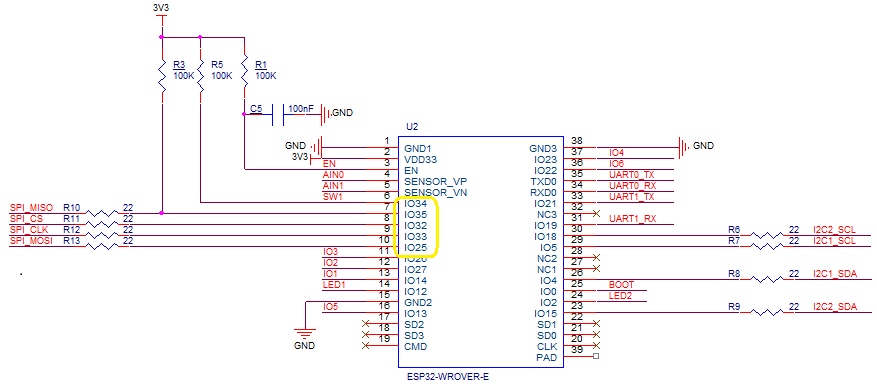
The Qorvo DW1000 module has a Serial Peripheral Interface (SPI) so the Master In Slave Out(MISO), Master Out Slave In(MOSI), Serial Clock(SCLK) and Chip Slave Select(CSS) pins of the RAK11200 WisBiock Core Module have to be setup using the Configuration.SetPinFunction method of the nanoFramework.Hardware.Esp32 library.

RAK11200 Schematic with SPI pins highlighted.
RAK13801 Schematic with SPI pins highlighted.

I have added a couple of C# processor directives (MAKERFABS_ESP32UWB & RAK11200_RAK1907_RAK13801) so the platform that the Qorvo DW1000 module is running on can be configured.

public class Program
{
#if MAKERFABS_ESP32UWB
    private const int SpiBusId = 1;
    private const int chipSelectLine = Gpio.IO04;
#endif
#if RAK11200_RAK1907_RAK13801
    private const int SpiBusId = 1;
    private const int chipSelectLine = Gpio.IO32;
#endif

    public static void Main()
    {
        Thread.Sleep(5000);

        Debug.WriteLine("devMobile.IoT.Dw1000.ShieldSPI starting");

        try
        {
#if MAKERFABS_ESP32UWB
            Configuration.SetPinFunction(Gpio.IO19, DeviceFunction.SPI1_MISO);
            Configuration.SetPinFunction(Gpio.IO23, DeviceFunction.SPI1_MOSI);
            Configuration.SetPinFunction(Gpio.IO18, DeviceFunction.SPI1_CLOCK);
#endif
#if RAK11200_RAK1907_RAK13801
            Configuration.SetPinFunction(Gpio.IO35, DeviceFunction.SPI1_MISO);
            Configuration.SetPinFunction(Gpio.IO25, DeviceFunction.SPI1_MOSI);
            Configuration.SetPinFunction(Gpio.IO33, DeviceFunction.SPI1_CLOCK);
#endif
            var settings = new SpiConnectionSettings(SpiBusId, chipSelectLine)
            {
                ClockFrequency = 2000000,
                Mode = SpiMode.Mode0,
            };

            using (SpiDevice device = SpiDevice.Create(settings))
            {
                while (true)
                {
                    byte[] writeBuffer = new byte[] { 0x0, 0x0, 0x0, 0x0, 0x0 }; // 0x0 = DEV_ID
                    byte[] readBuffer = new byte[writeBuffer.Length];

                    device.TransferFullDuplex(writeBuffer, readBuffer); // 15, 48, 1, 202, 222

                    uint ridTag = (uint)(readBuffer[4]<< 8 | readBuffer[3]);
                    byte model = readBuffer[2];
                    byte ver = (byte)(readBuffer[1] >> 4);
                    byte rev = (byte)(readBuffer[1] & 0x0f);

                    Debug.WriteLine(String.Format($"RIDTAG 0x{ridTag:X2} MODEL 0x{model:X2} VER 0X{ver:X2} REV 0x{rev:X2}"));

                   Thread.Sleep(10000);
                }
            }
        }
        catch (Exception ex)
        {
            Debug.WriteLine(ex.Message);
        }
    }
}

The alignment of the RAK11200 WisBiock Core Module pins and labels on the circuit diagram tripped me up. My initial configuration caused the device to reboot every time the application started.

Visual Studio 2022 Debug window displaying the decoded value from Register 0x0

At the top of test applications, I usually have a brief delay i.e Thread.Sleep(5000) so I can attach the debugger or erase the flash before the application crashes.

.NET nanoFramework Qorvo DW1000 – Makerfabs Device SPI

The Makerfabs ESP32 UWB(Ultra Wideband) module has a Qorvo DW1000 and Espressif ESP32 module. The Espressif ESP32 module can run the .NET nanoFramework but does not have a Qorvo DW1000 library. (March2023)

Makerfabs ESP32 UWB(Ultra Wide Band) module

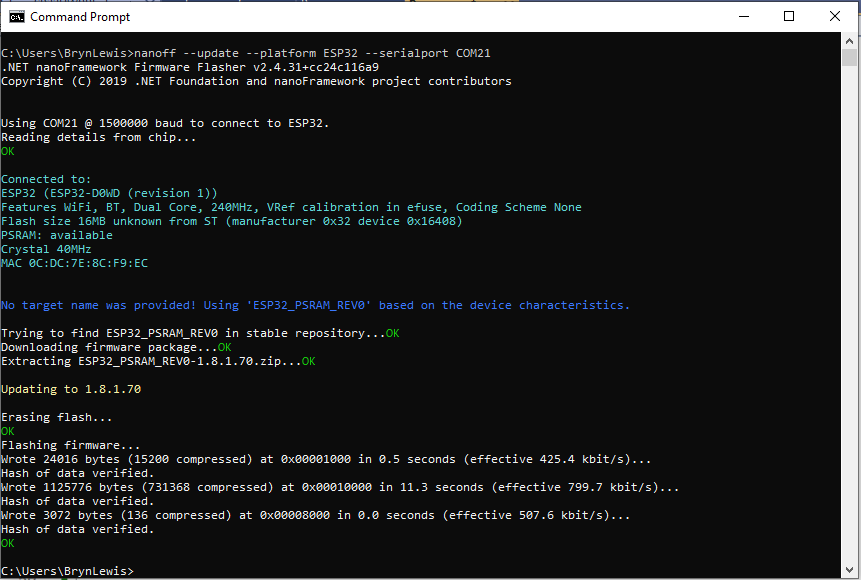
Before any coding I used nanoff to “flash” the Espressif ESP32 module with the latest version of .NET nanoFramework

Flashing Makerfabs ESP32 UWB module with nanoff

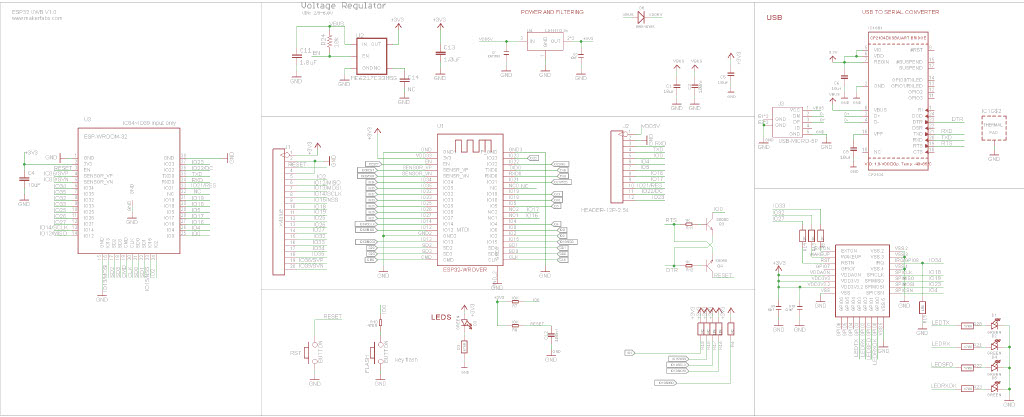
The Qorvo DW1000 module has a Serial Peripheral Interface (SPI) so the Master In Slave Out(MISO), Master Out Slave In(MOSI), Serial Clock(SCLK) and Chip Slave Select(CSS) pins have to be configured using the Configuration.SetPinFunction method of the nanoFramework.Hadware.Esp32 library

Makerfabs ESP32 UWB module schematic

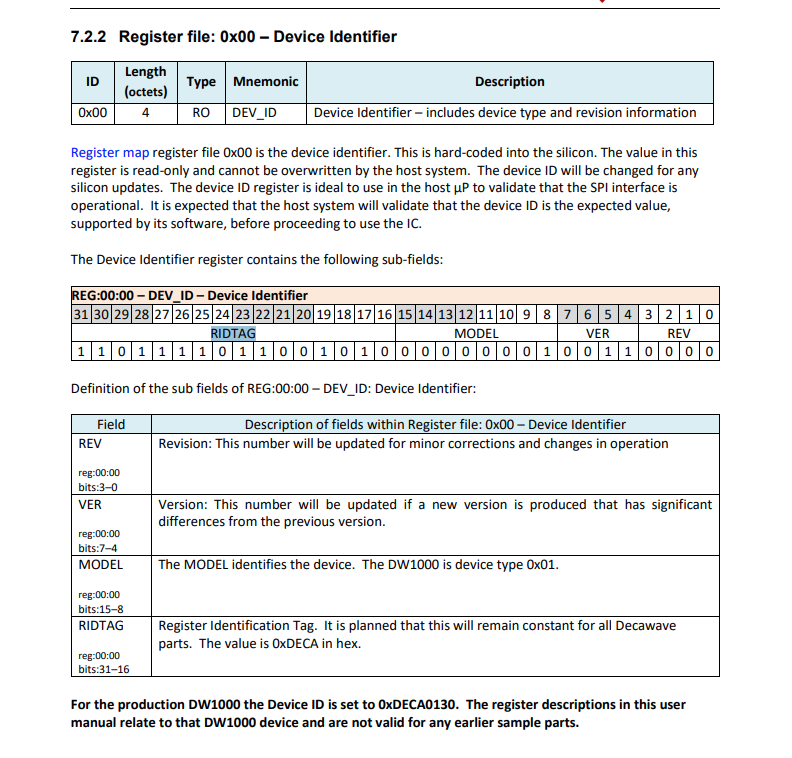
Even though SPI is an industry standard there are often subtle differences which need to be taken into account when reading from/writing to registers. The DW1000 has a static “Device Identifier” which I used to debug my “proof of concept” code.

DW1000 Datasheet Register Map documentation for Register 0x00

The DeviceSPI program reads register 0x00 and then displays the decoded payload.

public class Program
{
#if MAKERFABS_ESP32UWB
    private const int SpiBusId = 1;
    private const int chipSelectLine = Gpio.IO04;
#endif

    public static void Main()
    {
        Thread.Sleep(5000);

        Debug.WriteLine("devMobile.IoT.Dw1000.ShieldSPI starting");

        try
        {
#if MAKERFABS_ESP32UWB
            Configuration.SetPinFunction(Gpio.IO19, DeviceFunction.SPI1_MISO);
            Configuration.SetPinFunction(Gpio.IO23, DeviceFunction.SPI1_MOSI);
            Configuration.SetPinFunction(Gpio.IO18, DeviceFunction.SPI1_CLOCK);
#endif
            var settings = new SpiConnectionSettings(SpiBusId, chipSelectLine)
            {
                ClockFrequency = 2000000,
                Mode = SpiMode.Mode0,
            };

            using (SpiDevice device = SpiDevice.Create(settings))
            {
                Thread.Sleep(500);

                while (true)
                {
                    /*
                    byte[] writeBuffer = new byte[] { 0x0, 0x0, 0x0, 0x0, 0x0 }; // 0x0 = DEV_ID
                    byte[] readBuffer = new byte[writeBuffer.Length];

                    device.TransferFullDuplex(writeBuffer, readBuffer); // 15, 48, 1, 202, 222
                    */

                    byte[] writeBuffer = new byte[] { 0x0 }; // 0x0 = DEV_ID
                    byte[] readBuffer = new byte[5];

                    device.TransferFullDuplex(writeBuffer, readBuffer); // 15, 48, 1, 202, 222
                       
                    uint ridTag = (uint)(readBuffer[4]<< 8 | readBuffer[3]);
                    byte model = readBuffer[2];
                    byte ver = (byte)(readBuffer[1] >> 4);
                    byte rev = (byte)(readBuffer[1] & 0x0f);

                    Debug.WriteLine(String.Format($"RIDTAG 0x{ridTag:X2} MODEL 0x{model:X2} VER 0X{ver:X2} REV 0x{rev:X2}"));

                    Thread.Sleep(10000);
                }
            }
        }
        catch (Exception ex)
        {
            Debug.WriteLine(ex.Message);
        }
    }
}
Visual Studio 2022 Debug window displaying the decoded value from Register 0x0

The DW1000 User Manual is > 240 pages, with roughly 140 pages of detailed documentation about the DW1000 register set so progress will be slow.

.NET nanoFramework RAK11200 – Azure IoT Hub HTTP Power conservation

My test setup was a RAK11200 WisBlock WiFi Module, RAK19007 WisBlock Base Board, RAK1901 WisBlock Temperature and Humidity Sensor and Keweisi KWS-MX19 USB Tester DC 4V-30V 0-5A Current Voltage Detector to measure the power consumption of my test setup.

RAK11200 + RAK19007 +RAK1901+Keweisi KWS-MX19 test setup

The baseline version of the RAK11200 WisBlock WiFi Module software had no power conservation functionality.

public static void Main()
{
    DateTime sasTokenValidUntilUtc = DateTime.UtcNow;

    Debug.WriteLine($"{DateTime.UtcNow:HH:mm:ss} devMobile.IoT.RAK.Wisblock.AzureIoTHub.RAK11200.PowerConservation starting");

    Configuration.SetPinFunction(Gpio.IO04, DeviceFunction.I2C1_DATA);
    Configuration.SetPinFunction(Gpio.IO05, DeviceFunction.I2C1_CLOCK);

    if (!WifiNetworkHelper.ConnectDhcp(Config.Ssid, Config.Password, requiresDateTime: true))
    {
        if (NetworkHelper.HelperException != null)
        {
             Debug.WriteLine($"{DateTime.UtcNow:HH:mm:ss} WifiNetworkHelper.ConnectDhcp failed {NetworkHelper.HelperException}");
        }

        Thread.Sleep(Timeout.Infinite);
    }

    string uri = $"{Config.AzureIoTHubHostName}.azure-devices.net/devices/{Config.DeviceID}";

    // not setting Authorization here as it will change as SAS Token refreshed
    HttpClient httpClient = new HttpClient
    {
        SslProtocols = System.Net.Security.SslProtocols.Tls12,
        HttpsAuthentCert = new X509Certificate(Config.DigiCertBaltimoreCyberTrustRoot),
        BaseAddress = new Uri($"https://{uri}/messages/events?api-version=2020-03-13"),
    };

    I2cConnectionSettings settings = new(I2cDeviceBusID, Shtc3.DefaultI2cAddress);
    I2cDevice device = I2cDevice.Create(settings);
    Shtc3 shtc3 = new(device);

    AdcController adcController = new AdcController();
    AdcChannel batteryChargeAdcChannel = adcController.OpenChannel(AdcControllerChannel);

    string sasToken = "";

    while (true)
    {
        DateTime standardisedUtcNow = DateTime.UtcNow;

        Debug.WriteLine($"{DateTime.UtcNow:HH:mm:ss} Azure IoT Hub device {Config.DeviceID} telemetry update start");

        if (sasTokenValidUntilUtc <= standardisedUtcNow)
        {
            sasTokenValidUntilUtc = standardisedUtcNow.Add(Config.SasTokenRenewEvery);

            sasToken = SasTokenGenerate(uri, Config.Key, sasTokenValidUntilUtc);

            Debug.WriteLine($" Renewing SAS token for {Config.SasTokenRenewFor} valid until {sasTokenValidUntilUtc:HH:mm:ss dd-MM-yy}");
        }

        if (!shtc3.TryGetTemperatureAndHumidity(out var temperature, out var relativeHumidity))
        {
            Debug.WriteLine($" Temperature and Humidity read failed");

            continue;
        }

        double batteryCharge = batteryChargeAdcChannel.ReadRatio() * 100.0;

        Debug.WriteLine($" Temperature {temperature.DegreesCelsius:F1}°C Humidity {relativeHumidity.Value:F0}% BatteryCharge {batteryCharge:F1}%");

        string payload = $"{{\"RelativeHumidity\":{relativeHumidity.Value:F0},\"Temperature\":{temperature.DegreesCelsius.ToString("F1")}, \"BatteryCharge\":{batteryCharge:F1}}}";

        try
        {
            using (HttpContent content = new StringContent(payload))
            {
                content.Headers.Add("Authorization", sasToken);

                using (HttpResponseMessage response = httpClient.Post("", content))
                {
                    Console.WriteLine($"{DateTime.UtcNow:HH:mm:ss} Response code:{response.StatusCode}");

                    response.EnsureSuccessStatusCode();
                 }
            }
        }
        catch (Exception ex)
        {
            Debug.WriteLine($"{DateTime.UtcNow:HH:mm:ss} Azure IoT Hub POST failed:{ex.Message} {ex?.InnerException?.Message}");
        }

        Debug.WriteLine($"{DateTime.UtcNow:HH:mm:ss} Azure IoT Hub telemetry update done");

        Thread.Sleep(Config.TelemetryUploadInterval);
    }
}

When the program was “idle” the current varied between 0.067A to 0.074A with “spikes” when transmitting.

The second version of the application could be configured to “sleep” the RAK11200 WisBlock WiFi Module and RAK1901 WisBlock Temperature and Humidity Sensor. The RAK11200 WisBlock WiFi Module can be put into a LightSleep or DeepSleep.

public static void Main()
{
    Debug.WriteLine($"{DateTime.UtcNow:HH:mm:ss} devMobile.IoT.RAK.Wisblock.AzureIoTHub.RAK11200.PowerSleep starting");

    Thread.Sleep(5000);

    try
    {
        Configuration.SetPinFunction(Gpio.IO04, DeviceFunction.I2C1_DATA);
        Configuration.SetPinFunction(Gpio.IO05, DeviceFunction.I2C1_CLOCK);

        Debug.WriteLine($"{DateTime.UtcNow:HH:mm:ss} Wifi connecting");

        if (!WifiNetworkHelper.ConnectDhcp(Config.Ssid, Config.Password, requiresDateTime: true))
       {
            if (NetworkHelper.HelperException != null)
            {
                 Debug.WriteLine($"{DateTime.UtcNow:HH:mm:ss} WifiNetworkHelper.ConnectDhcp failed {NetworkHelper.HelperException}");
            }

            Sleep.EnableWakeupByTimer(Config.FailureRetryInterval);
            Sleep.StartDeepSleep();
        }

        Debug.WriteLine($"{DateTime.UtcNow:HH:mm:ss} Wifi connected");

        // Configure the SHTC3 
        I2cConnectionSettings settings = new(I2cDeviceBusID, Shtc3.DefaultI2cAddress);
        I2cDevice device = I2cDevice.Create(settings);
        Shtc3 shtc3 = new(device);

        // Assuming that if TryGetTemperatureAndHumidity fails accessing temperature or relativeHumidity will cause an exception
        shtc3.TryGetTemperatureAndHumidity(out var temperature, out var relativeHumidity);

#if SLEEP_SHT3C
        shtc3.Sleep();
#endif

        // Configure Analog input (AIN0) port then read the "battery charge"
        AdcController adcController = new AdcController();
        AdcChannel batteryChargeAdcChannel = adcController.OpenChannel(AdcControllerChannel);

        double batteryCharge = batteryChargeAdcChannel.ReadRatio() * 100.0;

        Debug.WriteLine($" Temperature {temperature.DegreesCelsius:F1}°C Humidity {relativeHumidity.Value:F0}% BatteryCharge {batteryCharge:F1}");

        // Assemble the JSON payload, should use nanoFramework.Json
        string payload = $"{{\"RelativeHumidity\":{relativeHumidity.Value:F0},\"Temperature\":{temperature.DegreesCelsius.ToString("F1")}, \"BatteryCharge\":{batteryCharge:F1}}}";

        // Configure the HttpClient uri, certificate, and authorization
        string uri = $"{Config.AzureIoTHubHostName}.azure-devices.net/devices/{Config.DeviceID}";

        HttpClient httpClient = new HttpClient()
        {
            SslProtocols = System.Net.Security.SslProtocols.Tls12,
            HttpsAuthentCert = new X509Certificate(Config.DigiCertBaltimoreCyberTrustRoot),
            BaseAddress = new Uri($"https://{uri}/messages/events?api-version=2020-03-13"),
        };
        httpClient.DefaultRequestHeaders.Add("Authorization", SasTokenGenerate(uri, Config.Key, DateTime.UtcNow.Add(Config.SasTokenRenewFor)));

        Debug.WriteLine($"{DateTime.UtcNow:HH:mm:ss} Azure IoT Hub device {Config.DeviceID} telemetry update start");

        HttpResponseMessage response = httpClient.Post("", new StringContent(payload));

        Debug.WriteLine($"{DateTime.UtcNow:HH:mm:ss} Response code:{response.StatusCode}");

        response.EnsureSuccessStatusCode();
    }
    catch (Exception ex)
    {
        Debug.WriteLine($"{DateTime.UtcNow:HH:mm:ss} Azure IoT Hub telemetry update failed:{ex.Message} {ex?.InnerException?.Message}");

        Sleep.EnableWakeupByTimer(Config.FailureRetryInterval);
        Sleep.StartDeepSleep();
    }

    Sleep.EnableWakeupByTimer(Config.TelemetryUploadInterval);
#if SLEEP_LIGHT
    Sleep.StartLightSleep();
#endif
#if SLEEP_DEEP
    Sleep.StartDeepSleep();
#endif
 }

The LightSleep or DeepSleep based code is significantly less complex because the allocation and deallocation of resources does not have to be managed because the application is restarted when the WakeUp Timer triggers.

Both LightSleep and DeepSleep reduced the idle current to 0.000A. The Keweisi KWS-MX19 USB Tester DC 4V-30V 0-5A Current Voltage Detector is not a precision laboratory instrument. I couldn’t detect if sleeping the RAK1901 WisBlock Temperature and Humidity Sensor or LightSleep vs. DeepSleep made any difference. But it did show the power consumption of my setup could be significantly reduced by using the ESP32 LightSleep and DeepSleep functionality.

.NET nanoFramework RAK11200 – Azure IoT Hub HTTP battery charge monitoring

The first step was to check that I could get a “battery charge” value for the RAKWireless RAK11200 WisBlock WiFi Module on a RAK19007 WisBlock Base Board to send to an Azure IoT Hub.

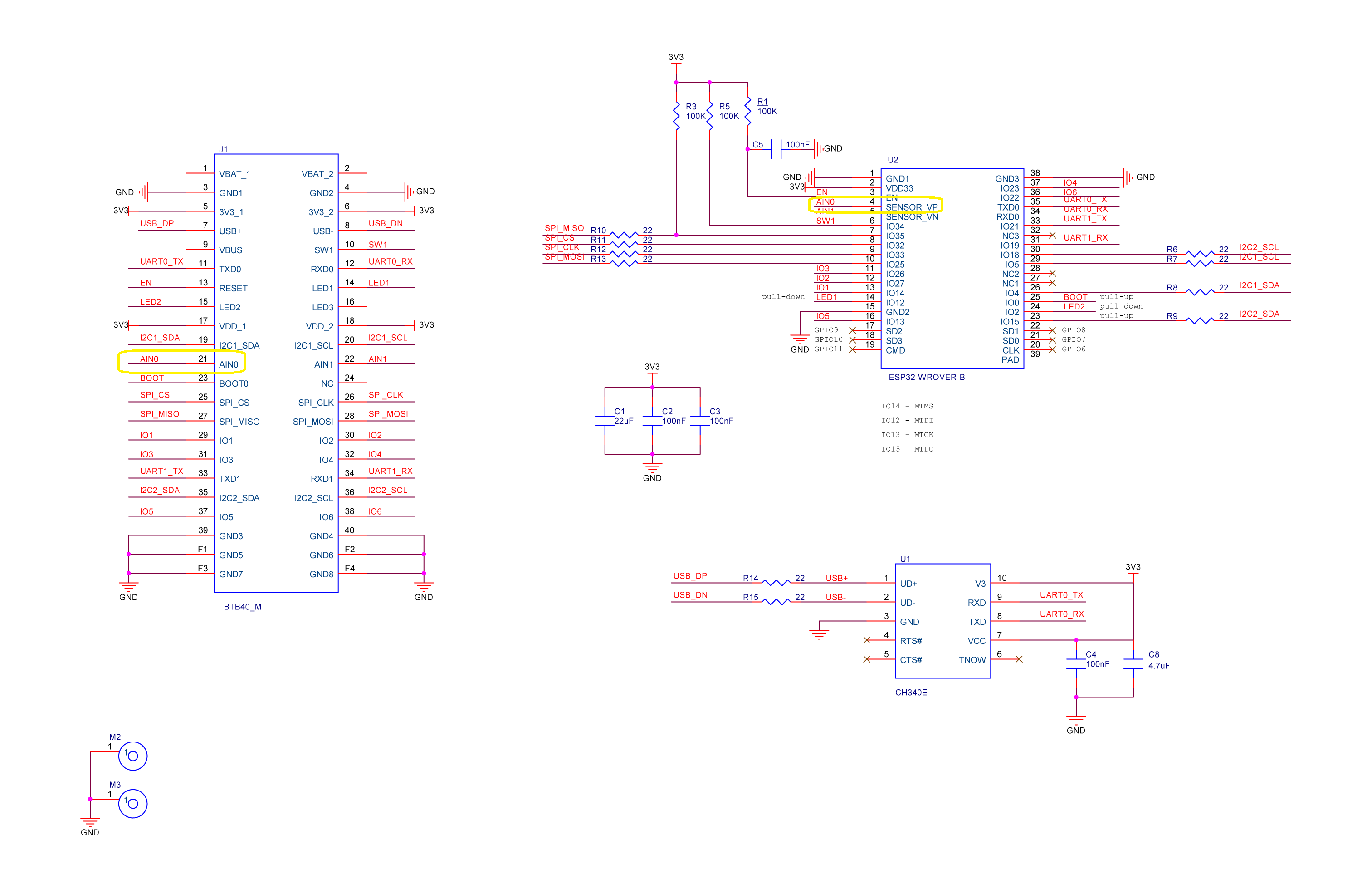
RAK1702 Schematic with voltage divider to ADC_VBAT connection highlighted
RAK1701 Schematic with ADC_VBAT to CPU slot connection highlighted

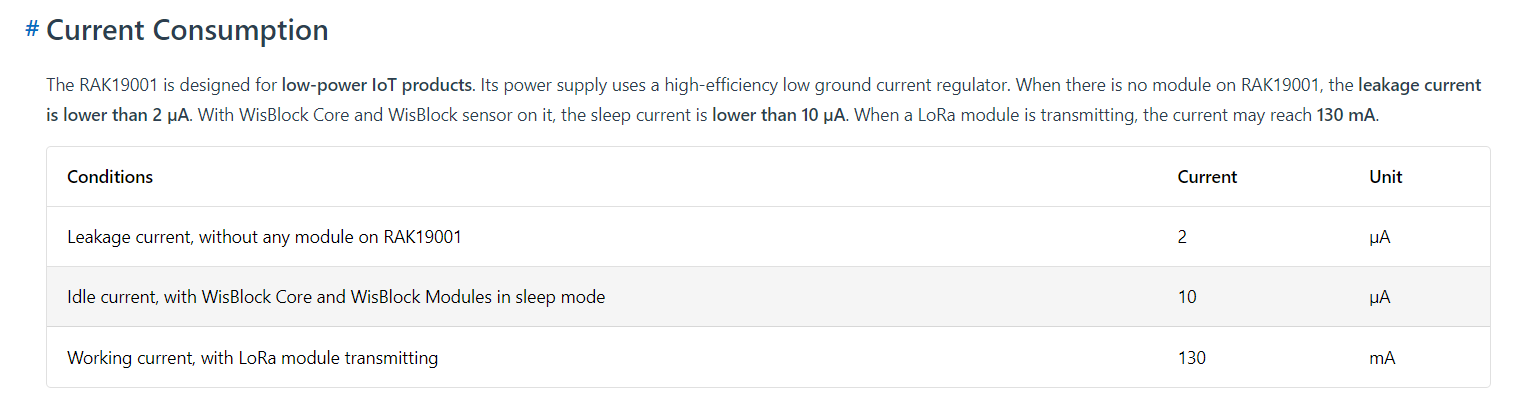
The RAK19007 WisBlock Base Board has a voltage divider (R3&R4 with output ADC_VBAT) which is connected (via R7) to pin 21(AIN0) on the CPU slot connector.
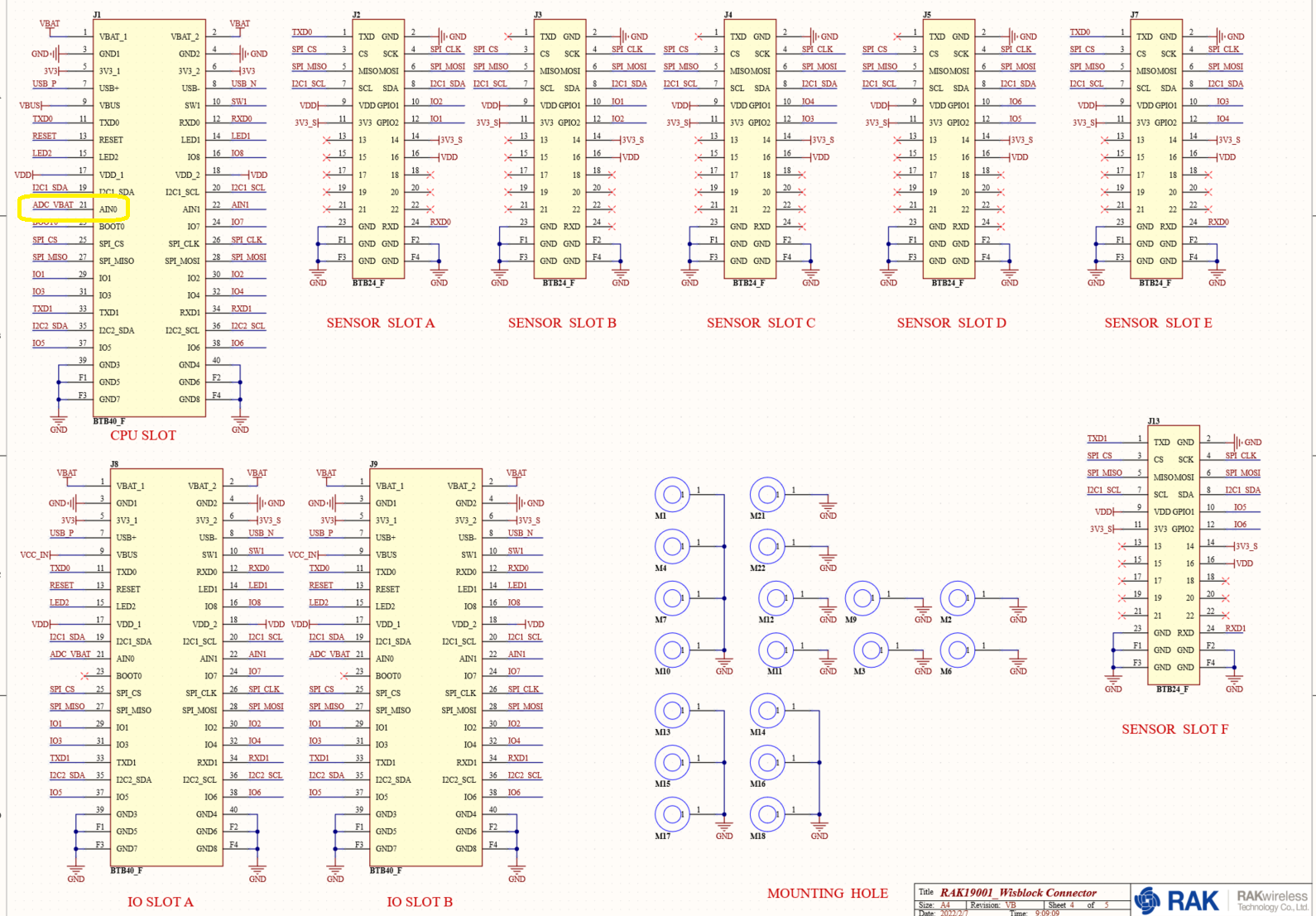
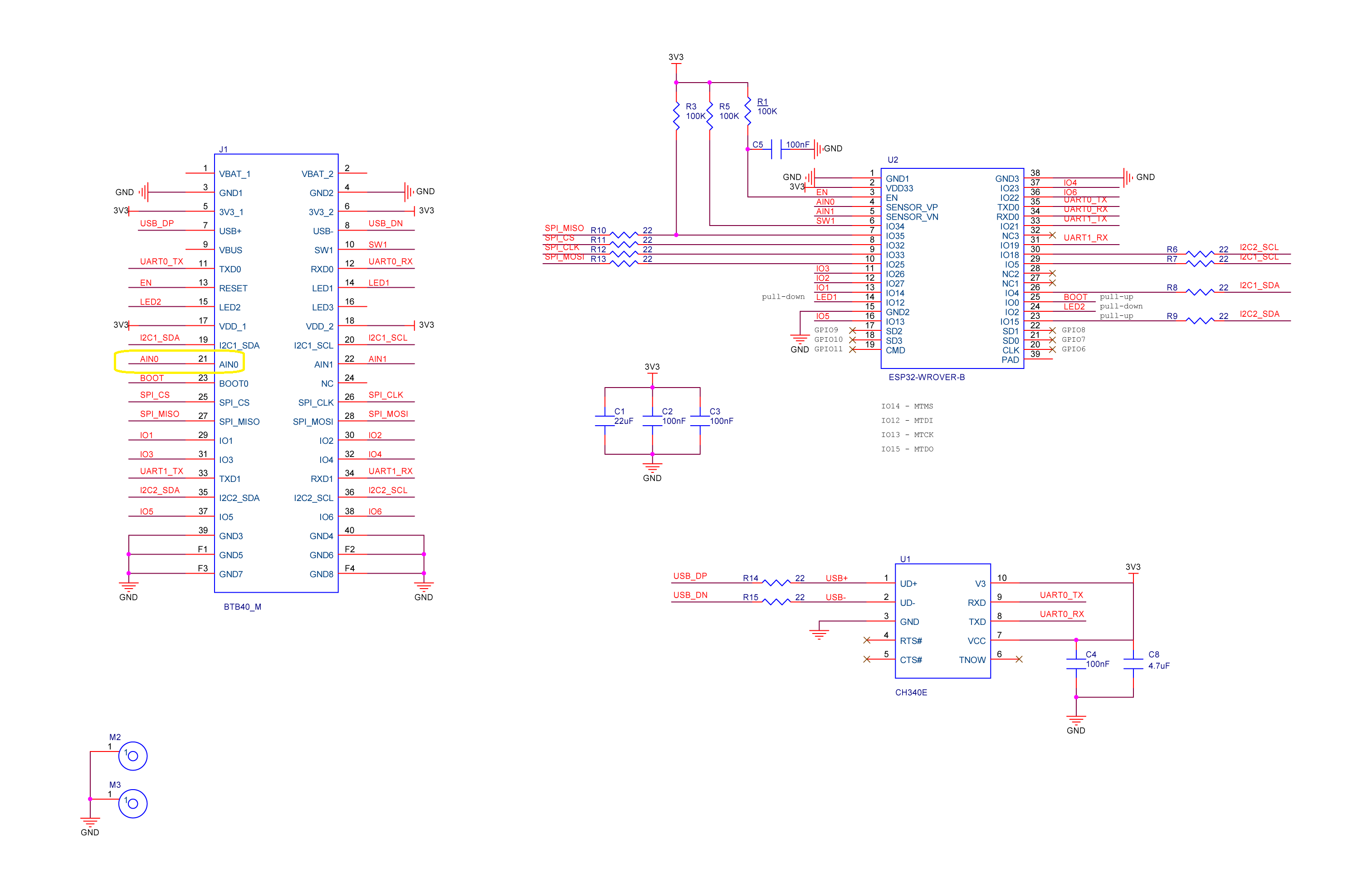
RAK11200 schematic with CPU Slot to ESP32-WROVER-B connection highlighted

The AIN0(pin 21) of the RAK11200 WisBlock WiFi Module is connected to SENSOR_VP(pin4) of the Espressif ESP32-WROVER-B so I could measure the battery charge.

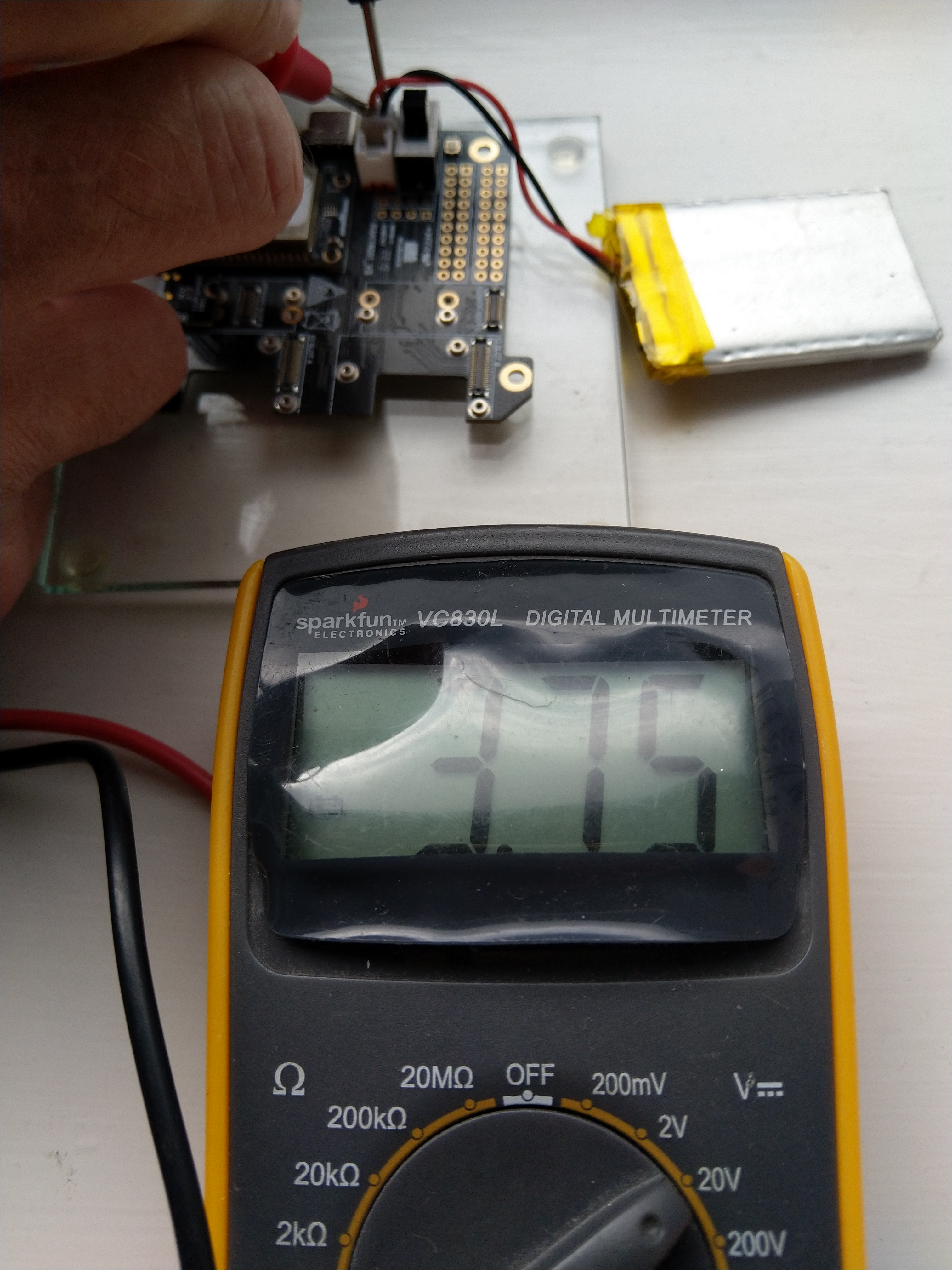
RAK11200+RAK19007+RAK1901+ LiPo battery test rig

My test setup was a RAK11200 WisBlock WiFi Module, RAK19007 WisBlock Base Board, RAK1901 WisBlock Temperature and Humidity Sensor and 1200mAH Lithium Polymer (LiPo) battery which uploads temperature, humidity and battery charge telemetry to an Azure IoT Hub every 10 minutes.

I used AdcController + AdcChannel to read the AIN0 value which was then inserted in the Java Script Object Notation(JSON) telemetry payload.

 public class Program
 {
     private const int I2cDeviceBusID = 1;
     private const int AdcControllerChannel = 0;

     public static void Main()
     {
         DateTime sasTokenValidUntilUtc = DateTime.UtcNow;

         Debug.WriteLine($"{DateTime.UtcNow:HH:mm:ss} devMobile.IoT.RAK.Wisblock.AzureIoTHub.RAK11200.PowerBaseline starting");

         Configuration.SetPinFunction(Gpio.IO04, DeviceFunction.I2C1_DATA);
         Configuration.SetPinFunction(Gpio.IO05, DeviceFunction.I2C1_CLOCK);

         if (!WifiNetworkHelper.ConnectDhcp(Config.Ssid, Config.Password, requiresDateTime: true))
         {
             if (NetworkHelper.HelperException != null)
             {
                 Debug.WriteLine($"{DateTime.UtcNow:HH:mm:ss} WifiNetworkHelper.ConnectDhcp failed {NetworkHelper.HelperException}");
             }

             Thread.Sleep(Timeout.Infinite);
         }

         string uri = $"{Config.AzureIoTHubHostName}.azure-devices.net/devices/{Config.DeviceID}";

         // not setting Authorization here as it will change as SAS Token refreshed
         HttpClient httpClient = new HttpClient
         {
             SslProtocols = System.Net.Security.SslProtocols.Tls12,
             HttpsAuthentCert = new X509Certificate(Config.DigiCertBaltimoreCyberTrustRoot),
             BaseAddress = new Uri($"https://{uri}/messages/events?api-version=2020-03-13"),
         };

         I2cConnectionSettings settings = new(I2cDeviceBusID, Shtc3.DefaultI2cAddress);
         I2cDevice device = I2cDevice.Create(settings);
         Shtc3 shtc3 = new(device);

         AdcController adcController = new AdcController();
         AdcChannel batteryChargeAdcChannel = adcController.OpenChannel(AdcControllerChannel);

         string sasToken = "";

         while (true)
         {
             DateTime standardisedUtcNow = DateTime.UtcNow;

             Debug.WriteLine($"{DateTime.UtcNow:HH:mm:ss} Azure IoT Hub device {Config.DeviceID} telemetry update start");

             if (sasTokenValidUntilUtc <= standardisedUtcNow)
             {
                 sasTokenValidUntilUtc = standardisedUtcNow.Add(Config.SasTokenRenewEvery);

                 sasToken = SasTokenGenerate(uri, Config.Key, sasTokenValidUntilUtc);

                 Debug.WriteLine($" Renewing SAS token for {Config.SasTokenRenewFor} valid until {sasTokenValidUntilUtc:HH:mm:ss dd-MM-yy}");
             }

             if (!shtc3.TryGetTemperatureAndHumidity(out var temperature, out var relativeHumidity))
             {
                 Debug.WriteLine($" Temperature and Humidity read failed");

                 continue;
             }

             double batteryCharge = batteryChargeAdcChannel.ReadRatio() * 100.0;

             Debug.WriteLine($" Temperature {temperature.DegreesCelsius:F1}°C Humidity {relativeHumidity.Value:F0}% BatteryCharge {batteryCharge:F1}%");

             string payload = $"{{\"RelativeHumidity\":{relativeHumidity.Value:F0},\"Temperature\":{temperature.DegreesCelsius.ToString("F1")}, \"BatteryCharge\":{batteryCharge:F1}}}";

             try
             {
                 using (HttpContent content = new StringContent(payload))
                 {
                     content.Headers.Add("Authorization", sasToken);

                     using (HttpResponseMessage response = httpClient.Post("", content))
                     {
                         Console.WriteLine($"{DateTime.UtcNow:HH:mm:ss} Response code:{response.StatusCode}");

                         response.EnsureSuccessStatusCode();
                     }
                 }
             }
             catch (Exception ex)
             {
                 Debug.WriteLine($"{DateTime.UtcNow:HH:mm:ss} Azure IoT Hub POST failed:{ex.Message} {ex?.InnerException?.Message}");
             }

             Debug.WriteLine($"{DateTime.UtcNow:HH:mm:ss} Azure IoT Hub telemetry update done");

             Thread.Sleep(Config.TelemetryUploadInterval);
         }
     }
...
}

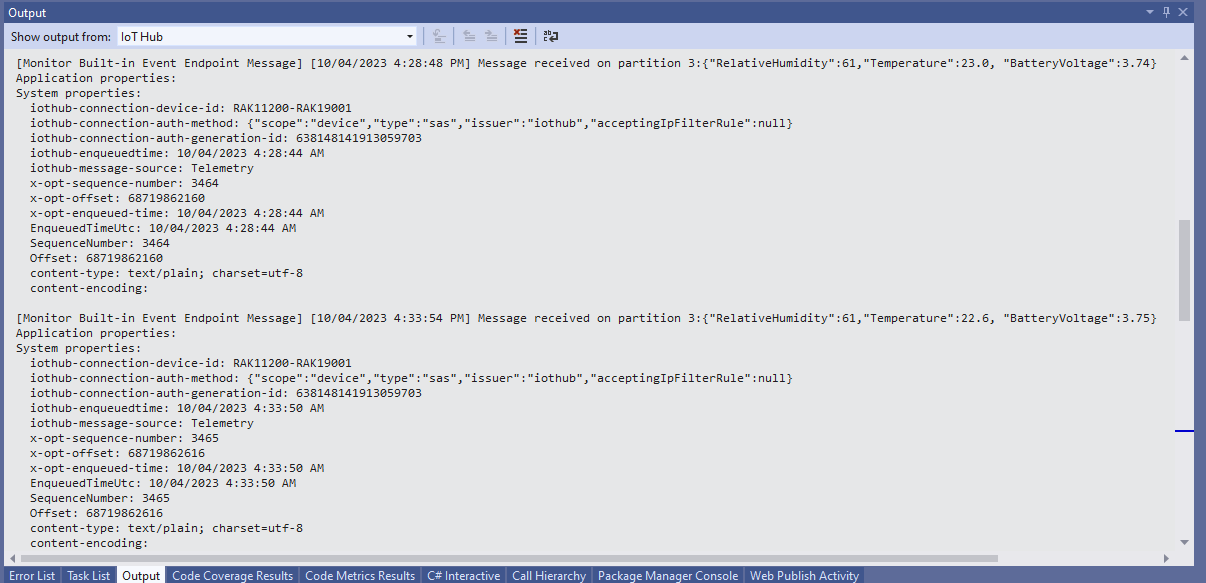
I used Azure IoT Explorer to monitor the Azure IoT Hub device telemetry to see how BatteryCharge value decreased to a level where the device wouldn’t transmit.

Azure IoT Explorer telemetry – device connected to a USB charger (11:01:19) then un-plugged (11:02:02)
Azure IoT Explorer telemetry – Last two messages sent by the device

With no use of the “power conservation” functionality of the ESP32-WROVER-B powered by a 1200mAH battery the device ran for approximately 11hrs (11:00am – 10:00pm).

RAK2305 Wisblock AIN0 pin highlighted

I think the RAK2305 will not be able to measure “battery charge” as the SENSOR_VP pin on the Espressif ESP32-WROVER-B is not connected to AIN0.

.NET nanoFramework RAK11200 – Azure IoT Hub HTTP SAS Keys

This is a significantly improved .NET nanoFramework Azure IoT Hub client (inspired by this nanoFramework sample) which “automatically” generates and then renews the SAS Token connection string used for authorisation.

RAK11200 + RAL19001 + RAK1901 test hardware

My test setup was a RAKwireless RAK11200 WisBlock WiFi Module, RAK19001 WisBlock Dual IO Base Board and RAK1901 WisBlock Temperature and Humidity Sensor

public static void Main()
{
   DateTime sasTokenValidUntilUtc = DateTime.UtcNow;

   Debug.WriteLine($"{DateTime.UtcNow:HH:mm:ss} devMobile.IoT.RAK.Wisblock.AzureIoHub.RAK1901.SasKey starting");

...         
   string uri = $"{Config.AzureIoTHubHostName}.azure-devices.net/devices/{Config.DeviceID}";

   // not setting Authorization here as it will change as SAS Token refreshed
   _httpClient = new HttpClient
   {
      SslProtocols = System.Net.Security.SslProtocols.Tls12,
      HttpsAuthentCert = new X509Certificate(Config.DigiCertBaltimoreCyberTrustRoot),
      BaseAddress = new Uri($"https://{uri}/messages/events?api-version=2020-03-13"),
   };

   I2cConnectionSettings settings = new(I2cDeviceBusID, Shtc3.DefaultI2cAddress);
   I2cDevice device = I2cDevice.Create(settings);
   Shtc3 shtc3 = new(device);

   string sasToken = "";

   while (true)
   {
      DateTime standardisedUtcNow = DateTime.UtcNow;

      Debug.WriteLine($"{DateTime.UtcNow:HH:mm:ss} Azure IoT Hub device {Config.DeviceID} telemetry update start");

      if (sasTokenValidUntilUtc <= standardisedUtcNow)
      {
         sasTokenValidUntilUtc = standardisedUtcNow.Add(Config.SasTokenRenewEvery);

         sasToken = SasTokenGenerate(uri, Config.Key, sasTokenValidUntilUtc);

         Debug.WriteLine($" Renewing SAS token for {Config.SasTokenRenewFor} valid until {sasTokenValidUntilUtc:HH:mm:ss dd-MM-yy}");
      }

      if (!shtc3.TryGetTemperatureAndHumidity(out var temperature, out var relativeHumidity))
      {
         Debug.WriteLine($" Temperature and Humidity read failed");

         continue;
      }

      Debug.WriteLine($" Temperature {temperature.DegreesCelsius:F1}°C Humidity {relativeHumidity.Value:F0}%");

      string payload = $"{{\"RelativeHumidity\":{relativeHumidity.Value:F0},\"Temperature\":{temperature.DegreesCelsius.ToString("F1")}}}";

      try
      {
         using (HttpContent content = new StringContent(payload))
         {
            content.Headers.Add("Authorization", sasToken);

            using (HttpResponseMessage response = _httpClient.Post("", content))
            {
               Console.WriteLine($"{DateTime.UtcNow:HH:mm:ss} Response code:{response.StatusCode}");

               response.EnsureSuccessStatusCode();
            }
         }
      }
     catch (Exception ex)
     {
         Debug.WriteLine($"{DateTime.UtcNow:HH:mm:ss} Azure IoT Hub POST failed:{ex.Message} {ex?.InnerException?.Message}");
      }

      Debug.WriteLine($"{DateTime.UtcNow:HH:mm:ss} Azure IoT Hub telemetry update done");

      Thread.Sleep(Config.TelemetryUploadInterval);
   }
}

How long a SAS Token is valid for and how often it has to be renewed is specified in the config.cs file

public class Config
{
   public const string DeviceID = "RAK11200-RAK19001";
   public const string AzureIoTHubHostName = "...";
   public const string Key = "...";
   public readonly static TimeSpan SasTokenRenewFor = new TimeSpan(24, 0, 0);
   public readonly static TimeSpan SasTokenRenewEvery = new TimeSpan(0, 30, 0);
   public readonly static TimeSpan TelemetryUploadInterval = new TimeSpan(0, 10, 0);

   public const string Ssid = "Orcon-Wireless";
   public const string Password = "160220502280";
...
}

The SasTokenGenerate method is based on code from an old blog post “Azure IoT Hub SAS Tokens revisited again” from, late 2019

public static string SasTokenGenerate(string resourceUri, string key, DateTime sasKeyTokenUntilUtc)
{
   long sasKeyvalidUntilUtcUnix = sasKeyTokenUntilUtc.ToUnixTimeSeconds();

   string stringToSign = $"{HttpUtility.UrlEncode(resourceUri)}\n{sasKeyvalidUntilUtcUnix}";

   var hmac = SHA.computeHMAC_SHA256(Convert.FromBase64String(key), Encoding.UTF8.GetBytes(stringToSign));

   string signature = Convert.ToBase64String(hmac);

   return $"SharedAccessSignature sr={HttpUtility.UrlEncode(resourceUri)}&sig={HttpUtility.UrlEncode(signature)}&se={sasKeyvalidUntilUtcUnix}";
}

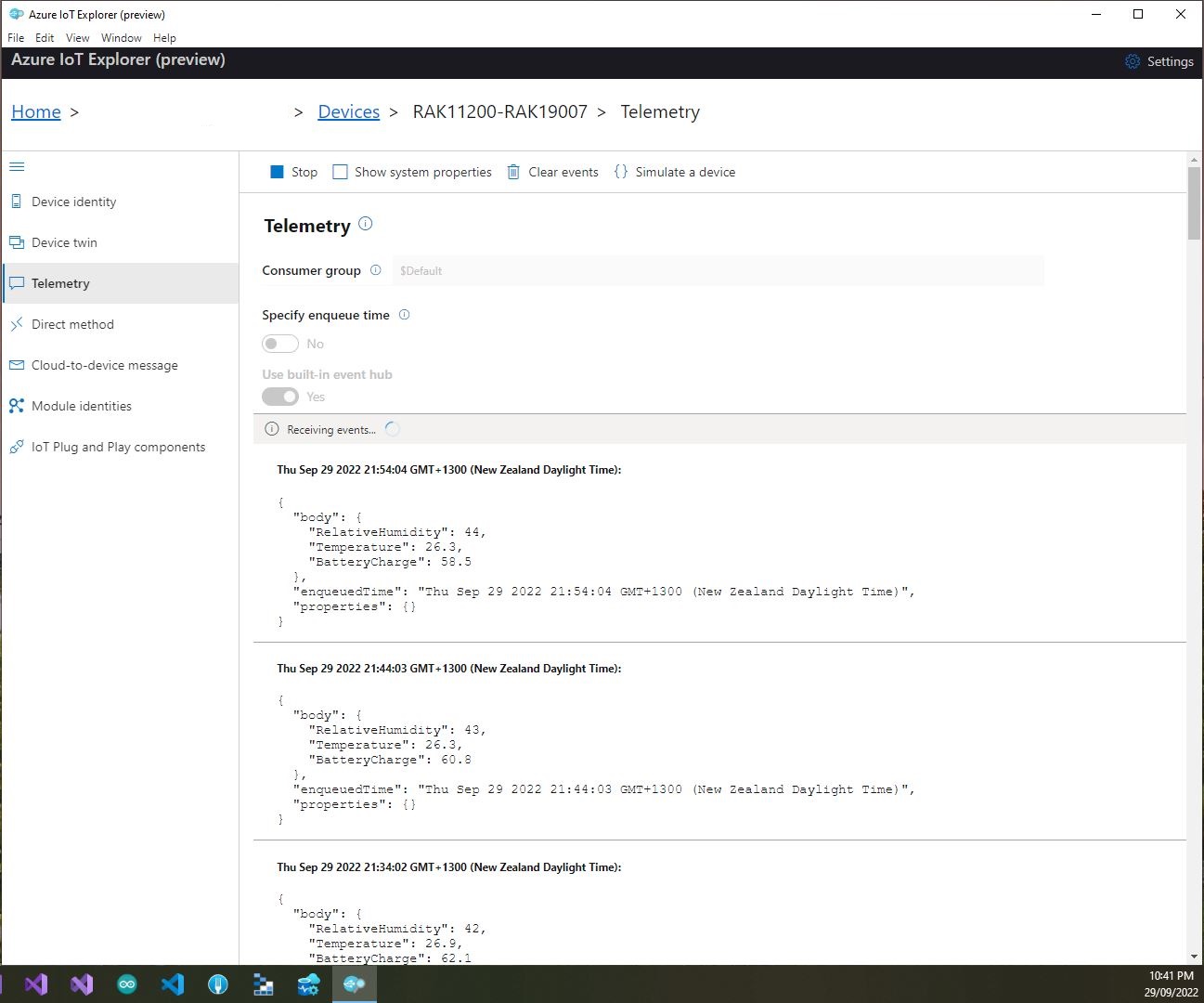
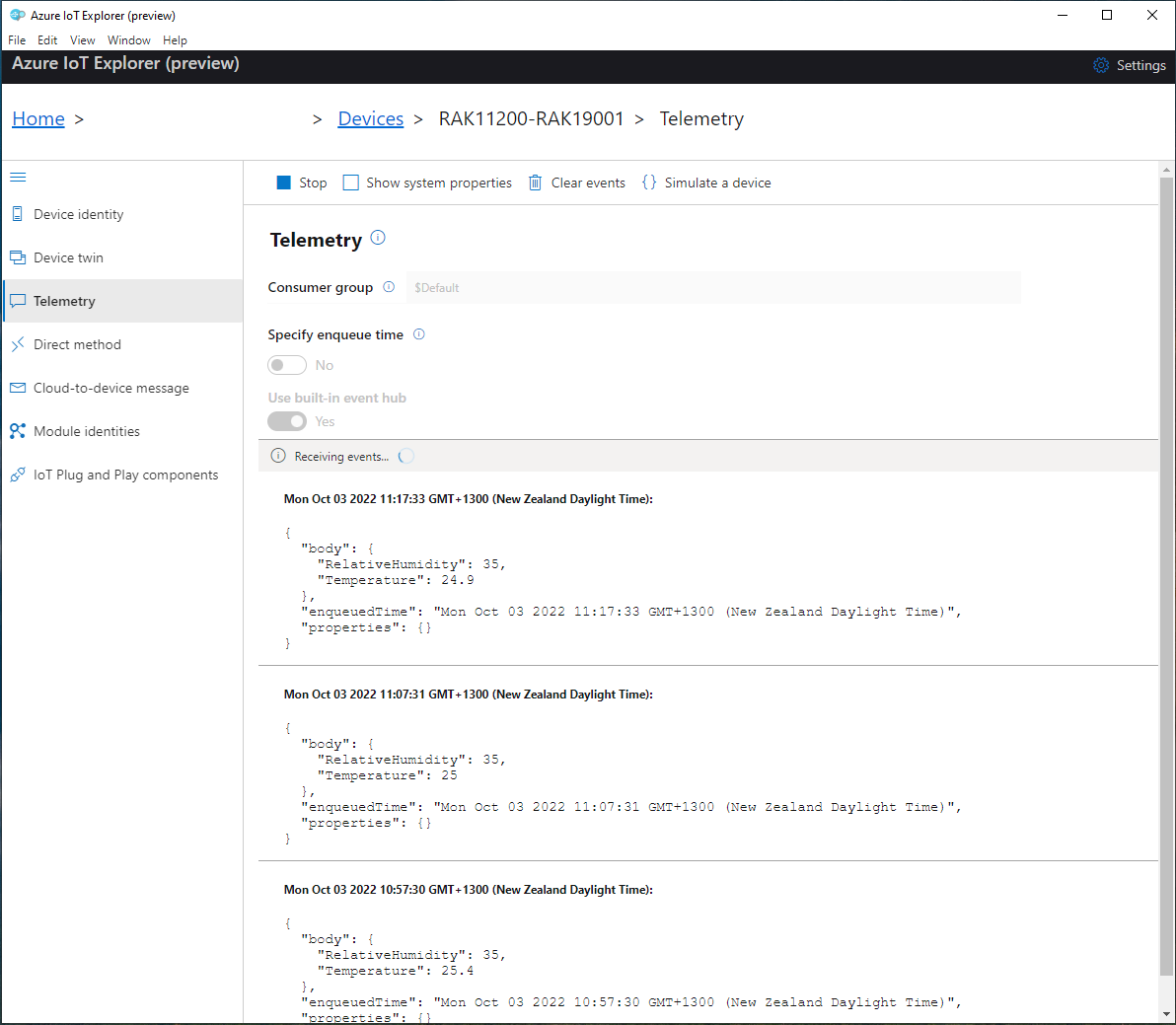
I use Azure IoT Explorer to monitor the telemetry and the application appears to run reliably for weeks

Azure IoT Explorer displaying test rig telemetry(22/09)
Azure IoT Explorer displaying test rig telemetry(03/10)

.NET nanoFramework BME680 Library Debugging Part 2

Reading the RAK1906 WisBlock Environment Sensor/BME680 GasResistance was failing randomly so I decided to dig a bit deeper. I checked the termination resistors, made sure the sensor was firmly seated on the RAK5005, and tried another Inter-Integrated Circuit(I²C) device on the same physical port.

I then used Visual Studio 2022 Debugger to “single step” further into the BME680 code and the first thing that looked a bit odd was the TryReadTemperatureCore, TryReadPressureCore, TryReadHumidityCore and TryReadGasResistanceCore return values were ignored.

/// <summary>
/// Performs a synchronous reading.
/// </summary>
/// <returns><see cref="Bme680ReadResult"/></returns>
public Bme680ReadResult Read()
{
   SetPowerMode(Bme680PowerMode.Forced);
   Thread.Sleep((int)GetMeasurementDuration(HeaterProfile).Milliseconds);

    TryReadTemperatureCore(out Temperature temperature);
    TryReadPressureCore(out Pressure pressure, skipTempFineRead: true);
    TryReadHumidityCore(out RelativeHumidity humidity, skipTempFineRead: true);
    TryReadGasResistanceCore(out ElectricResistance gasResistance);

    return new Bme680ReadResult(temperature, pressure, humidity, gasResistance);
}

I then single stepped into the TryReadTemperatureCore which was returning a boolean indicating whether the read was success.

private bool TryReadTemperatureCore(out Temperature temperature)
{
    if (TemperatureSampling == Sampling.Skipped)
    {
        temperature = default;
        return false;
    }

    var temp = (int)Read24BitsFromRegister((byte)Bme680Register.TEMPDATA, Endianness.BigEndian);

    temperature = CompensateTemperature(temp >> 4);
    return true;
}

This library was based on the dotnet/iot Bmxx80 code, it looked similar, but I missed an important detail lots more ?’s…

Console.WriteLine("Hello BME680!");

// The I2C bus ID on the Raspberry Pi 3.
const int busId = 1;
// set this to the current sea level pressure in the area for correct altitude readings
Pressure defaultSeaLevelPressure = WeatherHelper.MeanSeaLevel;

I2cConnectionSettings i2cSettings = new(busId, Bme680.DefaultI2cAddress);
I2cDevice i2cDevice = I2cDevice.Create(i2cSettings);

using Bme680 bme680 = new Bme680(i2cDevice, Temperature.FromDegreesCelsius(20.0));

while (true)
{
    // reset will change settings back to default
    bme680.Reset();

    // 10 consecutive measurement with default settings
    for (var i = 0; i < 10; i++)
    {
        // Perform a synchronous measurement
        var readResult = bme680.Read();

        // Print out the measured data
        Console.WriteLine($"Gas resistance: {readResult.GasResistance?.Ohms:0.##}Ohm");
        Console.WriteLine($"Temperature: {readResult.Temperature?.DegreesCelsius:0.#}\u00B0C");
        Console.WriteLine($"Pressure: {readResult.Pressure?.Hectopascals:0.##}hPa");
        Console.WriteLine($"Relative humidity: {readResult.Humidity?.Percent:0.#}%");

        if (readResult.Temperature.HasValue && readResult.Pressure.HasValue)
        {
            var altValue = WeatherHelper.CalculateAltitude(readResult.Pressure.Value, defaultSeaLevelPressure, readResult.Temperature.Value);
            Console.WriteLine($"Altitude: {altValue.Meters:0.##}m");
        }

        if (readResult.Temperature.HasValue && readResult.Humidity.HasValue)
        {
            // WeatherHelper supports more calculations, such as saturated vapor pressure, actual vapor pressure and absolute humidity.
            Console.WriteLine($"Heat index: {WeatherHelper.CalculateHeatIndex(readResult.Temperature.Value, readResult.Humidity.Value).DegreesCelsius:0.#}\u00B0C");
            Console.WriteLine($"Dew point: {WeatherHelper.CalculateDewPoint(readResult.Temperature.Value, readResult.Humidity.Value).DegreesCelsius:0.#}\u00B0C");
        }

        // when measuring the gas resistance on each cycle it is important to wait a certain interval
        // because a heating plate is activated which will heat up the sensor without sleep, this can
        // falsify all readings coming from the sensor
        Thread.Sleep(1000);
    }
    ...
}

The Bme680 Read() method checked the TryReadTemperatureCore, TryReadPressureCore, TryReadHumidityCore & TryReadGasResistanceCore return values.

/// <summary>
/// Performs a synchronous reading.
/// </summary>
/// <returns><see cref="Bme680ReadResult"/></returns>
public Bme680ReadResult Read()
{
    SetPowerMode(Bme680PowerMode.Forced);
    Thread.Sleep((int)GetMeasurementDuration(HeaterProfile).Milliseconds);

    var tempSuccess = TryReadTemperatureCore(out var temperature);
    var pressSuccess = TryReadPressureCore(out var pressure, skipTempFineRead: true);
    var humiditySuccess = TryReadHumidityCore(out var humidity, skipTempFineRead: true);
    var gasSuccess = TryReadGasResistanceCore(out var gasResistance);

    return new Bme680ReadResult(tempSuccess ? temperature : null, pressSuccess ? pressure : null, humiditySuccess ? humidity : null, gasSuccess ? gasResistance : null);
}

The dotnet/iot Bmxx80 library uses Nullable reference types which are not supported by the nanoFramework(Sept 2022), and this was overlooked when the library was ported.

I have created a Github issue.

.NET nanoFramework BME680 Library Debugging Part 1

I was intending to use a RAK1906 WisBlock Environment Sensor/BME680 for my nanoFramework RAK11200 Azure IoT Hub HTTP basic project, but the test application kept failing.

RAK1120+RAK5005+RAK106 Test setup

My test setup was a RAKwireless RAK11200 WisBlock WiFi Module, RAK5005 WisBlock Base Board and a RAK1906 WisBlock Environmental Sensor. I used the RAK1906 Sensor because it has nanoFramework.IoTDevice library support.

Visual Studio 2022 Output Window Output window when application failed

When I connected to the device with Tera Term it confirmed that the device was in a “kernel panic” loop.

nanoFramework Kernel Panic loop captured with Tera Term

Before I could debug the BME680 sample I had to get the Bmxx80 & Bmxx80.sample projects to compile (update NuGet packages and remove NerdBank.GitVersioning references).

BMXX80 Solution from nanoFramework.IoT.Device

I then used the Visual Studio 2022 Debugger to “single step” into the library code

/// <summary>
/// Sets the power mode to the given mode
/// </summary>
/// <param name="powerMode">The <see cref="Bme680PowerMode"/> to set.</param>
/// <exception cref="ArgumentOutOfRangeException">Thrown when the power mode does not match a defined mode in <see cref="Bme680PowerMode"/>.</exception>
[Property("PowerMode")]
public void SetPowerMode(Bme680PowerMode powerMode)
{
    //if (!powerMode.Equals(Bme680PowerMode.Forced) &&
    //    !powerMode.Equals(Bme680PowerMode.Sleep))
    //{
    //   throw new ArgumentOutOfRangeException();
    //}

    var status = Read8BitsFromRegister((byte)Bme680Register.CTRL_MEAS);
    status = (byte)((status & (byte)~Bme680Mask.PWR_MODE) | (byte)powerMode);

    SpanByte command = new[]
    {
        (byte)Bme680Register.CTRL_MEAS, status
    };
    _i2cDevice.Write(command);
}

The first problem was the two powerMode.Equals statements used to validate the powerMode parameter around line 287 in Bme680.cs so I commented them out.

Exception when getting the “GasResistance” value

On start-up references to readResult.GasResistance.Ohms would regularly fail, so I commented out everywhere it was used.

Exception when getting the “Barometric Pressure” value

Then references to readResult.Pressure.Hectopascals would randomly fail, so I commented out everywhere it was used.

public static void RunSample()
{
    Debug.WriteLine("Hello BME680!");

    //////////////////////////////////////////////////////////////////////
    Configuration.SetPinFunction(Gpio.IO04, DeviceFunction.I2C1_DATA);
    Configuration.SetPinFunction(Gpio.IO05, DeviceFunction.I2C1_CLOCK);

    // The I2C bus ID on the MCU.
    const int busId = 1;
    // set this to the current sea level pressure in the area for correct altitude readings
    Pressure defaultSeaLevelPressure = WeatherHelper.MeanSeaLevel;

    I2cConnectionSettings i2cSettings = new(busId, Bme680.DefaultI2cAddress);
    I2cDevice i2cDevice = I2cDevice.Create(i2cSettings);

    using Bme680 bme680 = new Bme680(i2cDevice, Temperature.FromDegreesCelsius(20.0));

    while (true)
    {
        // reset will change settings back to default
        bme680.Reset();

        // 10 consecutive measurement with default settings
        for (var i = 0; i < 10; i++)
        {
            // Perform a synchronous measurement
            var readResult = bme680.Read();

            // Print out the measured data
            //Debug.WriteLine($"Gas resistance: {readResult.GasResistance.Ohms}Ohm");
            Debug.WriteLine($"Temperature: {readResult.Temperature.DegreesCelsius}\u00B0C");
            //Debug.WriteLine($"Pressure: {readResult.Pressure.Hectopascals}hPa");
            Debug.WriteLine($"Relative humidity: {readResult.Humidity.Percent}%");

            /* 
            if (!readResult.Temperature.Equals(null) && !readResult.Pressure.Equals(null))
            {
                var altValue = WeatherHelper.CalculateAltitude(readResult.Pressure, defaultSeaLevelPressure, readResult.Temperature);
                Debug.WriteLine($"Altitude: {altValue.Meters}m");
            }

            if (!readResult.Temperature.Equals(null) && !readResult.Humidity.Equals(null))
            {
                // WeatherHelper supports more calculations, such as saturated vapor pressure, actual vapor pressure and absolute humidity.
                Debug.WriteLine($"Heat index: {WeatherHelper.CalculateHeatIndex(readResult.Temperature, readResult. Humidity).DegreesCelsius}\u00B0C");
                Debug.WriteLine($"Dew point: {WeatherHelper.CalculateDewPoint(readResult.Temperature, readResult.Humidity).DegreesCelsius}\u00B0C");
            }
            */

            // when measuring the gas resistance on each cycle it is important to wait a certain interval
            // because a heating plate is activated which will heat up the sensor without sleep, this can
            // falsify all readings coming from the sensor
            Thread.Sleep(1000);
        }
...
}
Visual Studio Debugger output displaying temperature and humidity values

After commenting the out all the .Equal, readResult.GasResistance.Ohms and readResult.Pressure.Hectopascals references the application would run for hours displaying only temperature and relative humidity values.

Next step is figuring out why the readResult.GasResistance.Ohms and readResult.Pressure.Hectopascals are failing.

I have created Github issue for the .Equals crash.

.NET nanoFramework RAK11200 – Azure IoT Hub HTTP SAS Tokens

This is the simplest .NET nanoFramework Azure IoT Hub client I could come up with (inspired by this nanoFramework sample).

My test setup was a RAKwireless RAK11200 WisBlock WiFi Module, RAK5005 WisBlock Base Board or RAK19001 WisBlock Dual IO Base Board and RAK1901 WisBlock Temperature and Humidity Sensor

RAK112000+RAK5005-O+RAK1901 Test rig
RAK112000+RAK19001+RAK1901 Test rig

I used a RAK1901 WisBlock Temperature and Humidity Sensor because it has nanoFramework.IoTDevice library support

public class Program
{
    private static TimeSpan SensorUpdatePeriod = new TimeSpan(0, 30, 0);

    private static HttpClient _httpClient;

    public static void Main()
    {
        Debug.WriteLine("devMobile.IoT.RAK.Wisblock.AzureIoHub.RAK1901 starting");

        Configuration.SetPinFunction(Gpio.IO04, DeviceFunction.I2C1_DATA);
        Configuration.SetPinFunction(Gpio.IO05, DeviceFunction.I2C1_CLOCK);

        if (!WifiNetworkHelper.ConnectDhcp(Config.Ssid, Config.Password, requiresDateTime: true))
        {
            if (NetworkHelper.HelperException != null)
            {
                Debug.WriteLine($"WifiNetworkHelper.ConnectDhcp failed {NetworkHelper.HelperException}");
            }

            Thread.Sleep(Timeout.Infinite);
        }

        _httpClient = new HttpClient
        {
            SslProtocols = System.Net.Security.SslProtocols.Tls12,
            HttpsAuthentCert = new X509Certificate(Config.DigiCertBaltimoreCyberTrustRoot),
            BaseAddress = new Uri($"https://{Config.AzureIoTHubHostName}.azure-devices.net/devices/{Config.DeviceID}/messages/events?api-version=2020-03-13"),
        };
        _httpClient.DefaultRequestHeaders.Add("Authorization", Config.SasKey);

        I2cConnectionSettings settings = new(1, Shtc3.DefaultI2cAddress);
        I2cDevice device = I2cDevice.Create(settings);
        Shtc3 shtc3 = new(device);

        while (true)
        {
            if (shtc3.TryGetTemperatureAndHumidity(out var temperature, out var relativeHumidity))
            {
                Debug.WriteLine($"Temperature {temperature.DegreesCelsius:F1}°C  Humidity {relativeHumidity.Value:F0}%");

                string payload = $"{{\"RelativeHumidity\":{relativeHumidity.Value:F0},\"Temperature\":{temperature.DegreesCelsius.ToString("F1")}}}";

                try
                {
                    using (HttpContent content = new StringContent(payload))
                    using (HttpResponseMessage response = _httpClient.Post("", content))
                    {
                        Console.WriteLine($"{DateTime.UtcNow:HH:mm:ss} Response code:{response.StatusCode}");

                        response.EnsureSuccessStatusCode();
                    }
                }
                catch(Exception ex)
                {
                    Debug.WriteLine($"Azure IoT Hub POST failed:{ex.Message}");
                }
            }

            Thread.Sleep(SensorUpdatePeriod);
        }
    }
}

I generated the Azure IoT Hub Shared Access Signature(SAS) Tokens (10800 minutes is 1 week) with Azure IoT Explorer (Trim the SAS key so it starts with SharedAccessSignature sr=….)

Azure IoT Explorer SAS Token Generation

I was using Azure IoT Explorer to monitor the telemetry and found that the initial versions of the application would fail after 6 or 7 hours. After reviewing the code I added a couple of “using” statements which appear to have fixed the problem as the soak test has been running for 12hrs, 24hrs, 36hrs, 48hrs, 96hrs

.NET nanoFramework RAK2305 – RAK4200 Library Usage (AS923 Sorted)

This post covers the usage of my RAK4200LoRaWAN-NetNF library with a RAK3205 WisBlock Wifi Interface Module on a RAK4200 Evaluation Board. This post was delayed because of the issue covered in .NET nanoFramework RAK2305 – RAK4200 Library Usage AS923 Issue. After posting in the RAKWireless formus RAKWireless support very quickly provided updated RAK4200 firmware which fixed the issue.

RAK2305 RAK4200 Evaluation Board based test rig

The RAK4200LoRaWANDeviceClient now reliably joins The Things Network, then sends and receives messages.

When I initially deployed the RAK4200LoRaWANDeviceClient the RAK4200LoRaWAN-NetNF library failed in the OtaaInitialise method. I think this was caused by the “at+set_config=lora:work_mode:0” command rebooting the RAK4200 Module. I have commented out the code but may move it to a standalone method if required.

// Set the Working mode to LoRaWAN, not/never going todo P2P with this library.
#if DIAGNOSTICS
Debug.WriteLine($" {DateTime.UtcNow:hh:mm:ss} at+set_config=lora:work_mode:0");
#endif
Result result = SendCommand("Initialization OK", "at+set_config=lora:work_mode:0", CommandTimeoutDefault);
if (result != Result.Success)
{
#if DIAGNOSTICS
         Debug.WriteLine($" {DateTime.UtcNow:hh:mm:ss} at+set_config=lora:work_mode:0 failed {result}");
#endif
	return result;
}

I think it would be reasonable to assume that the device is in the correct mode (the default after a reset to factory) on startup so I removed the LoRa® network work mode configuration code.

.NET nanoFramework RAK2305 – RAK4200 Library AS923 Issue

This post was going to be about how to the use my RAK4200LoRaWAN-NetNF library with a RAK3205 WisBlock Wifi Interface Module and RAK4200 Evaluation Board but there was a problem…

RAK2305 RAK4200 Evaluation Board based test rig

When I ran the RAK4200LoRaWANDeviceClient the first couple of join attempts failed which was odd as my sparkfun ESP32 thing plus with RAK4200 Breakout Board setup was very reliable.

Visual Studio Debug output for RAK4200LoRaWANDeviceClient Join failure
The Things Network RAK4200LoRaWANDeviceClient application Join failure

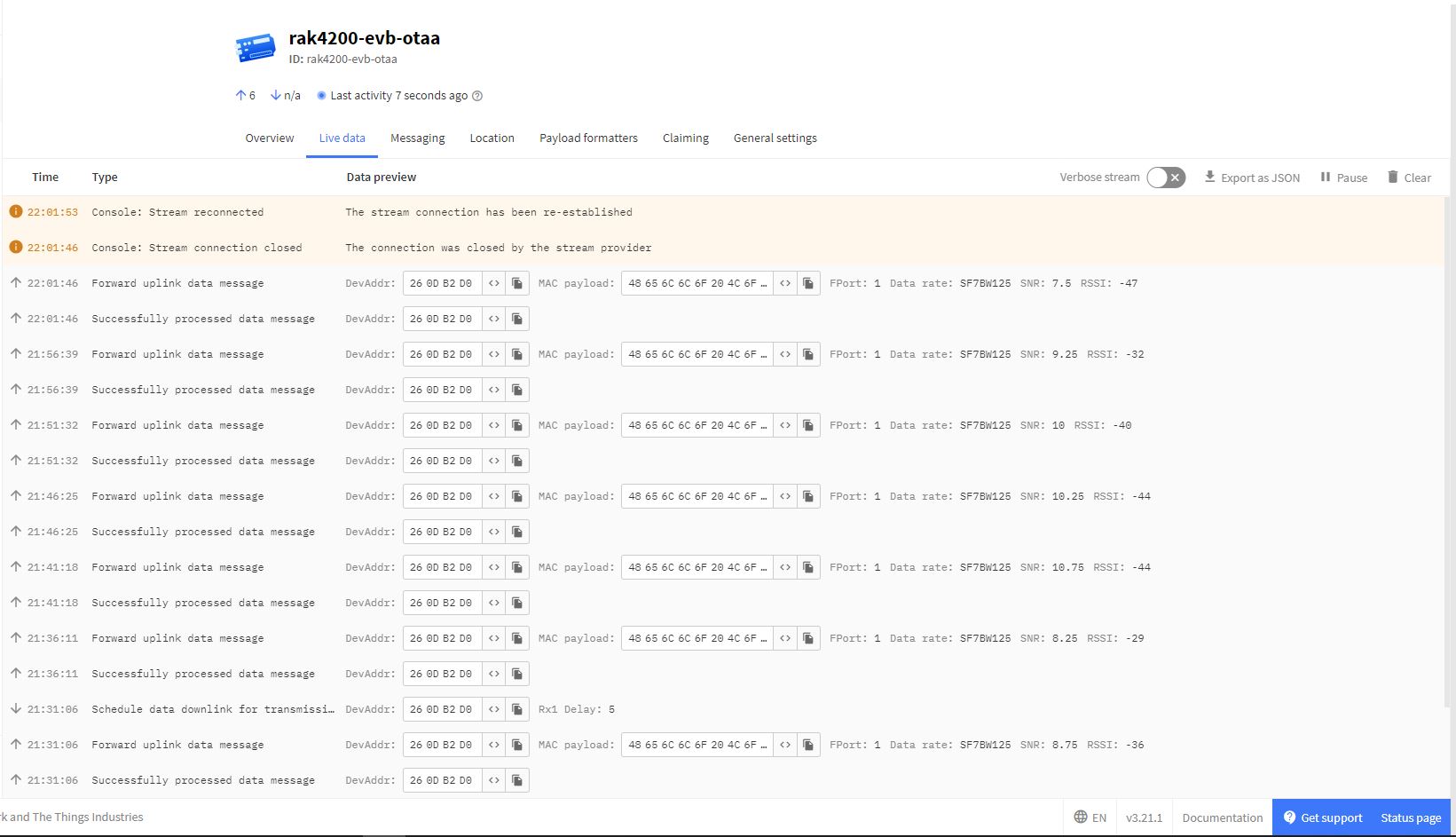
When I looked at The Things Network “Live data” tab the RAK4200 Module on the RAK4200 Evaluation Board wasn’t using the LoRaWAN AS923 Join-Request channels 923.20 & 923.40 MHz.

AS923 Join Channels

The RAK4200 Module on the appeared to be cycling through all the AS923 channels and every so often would use one the join request channels.

Visual Studio Debug output for RAK4200LoRaWANDeviceClient successful Join and Send
The Things Network RAK4200LoRaWANDeviceClient successful Join and Send

The RAK4200 Breakout Board module is running a later firmware version (V3.2.0.16) than the RAK4200 Evaluation Board module (V3.2.0.15) which is most probably the problem.

Visual Studio Debug output for RAK4200 Evaluation Board Version Request
Visual Studio Debug output for RAK4200 Breakout Board Version Request

The RAK811 module (which has been retired) also had similar issues with AS923.