Part 1, One HTTP POST, Fiddler, SSE and the 422 That Lied

TL;DR – The whole Mistral Chat Completions API contract starts as one HTTP POST. A system message, a user message, an assistant message reply, and an optional tool message result. Four different payloads, not a list of strings. Streaming is done with Server Sent Events(SSE), JSON inside JSON. The first real “bug” was an HTTP Error 422 Unprocessable Content and the error message lied by omission.

This post is the long-form version of the first demo in the talk. The first and last time Telerik Fiddler (I’m over the licensing message) appears in the session.

The starting point

The Mistral API surface is huge (and the docs changed between the start and end of the series) Chat completions, Files, Models, Embeddings etc. The samples are TypeScript, Python and curl, which tells you who the expected audience is. I am a C# developer and only cared about chat completions.

On the top left of the docs page there is(was) a Yet Another Markup Language (YAML) download for the OpenAPI specification (the clickable link disappeared overnight). The download link is still a live, and the file is 30% bigger today.

The messages array is not a list of strings. It is four different payloads SystemMessage | UserMessage | AssistantMessage | ToolMessage.

A System Message is usually a plain string. Standing instructions, no response expected, rides along on every turn. It can be an array of typed chunks a TextChunk or ThinkChunk

A UserMessage contains the prompt. The content field is not just a string either. It can be an array of typed chunks. TextChunk. ImageURLChunk. DocumentURLChunk, ReferenceChunk, FileChunk, ThinkChunk, AudioChunk, ResourceChunk or ResourceLinkChunk

An Assistant Message is what comes back. In addition to the original UserMessage and response payload it can also carry ToolCalls. A ToolMessage closes the loop. It is a structured message with which a model asks the runtime to execute a specific tool/function on its behalf, rather than producing a plain text answer.

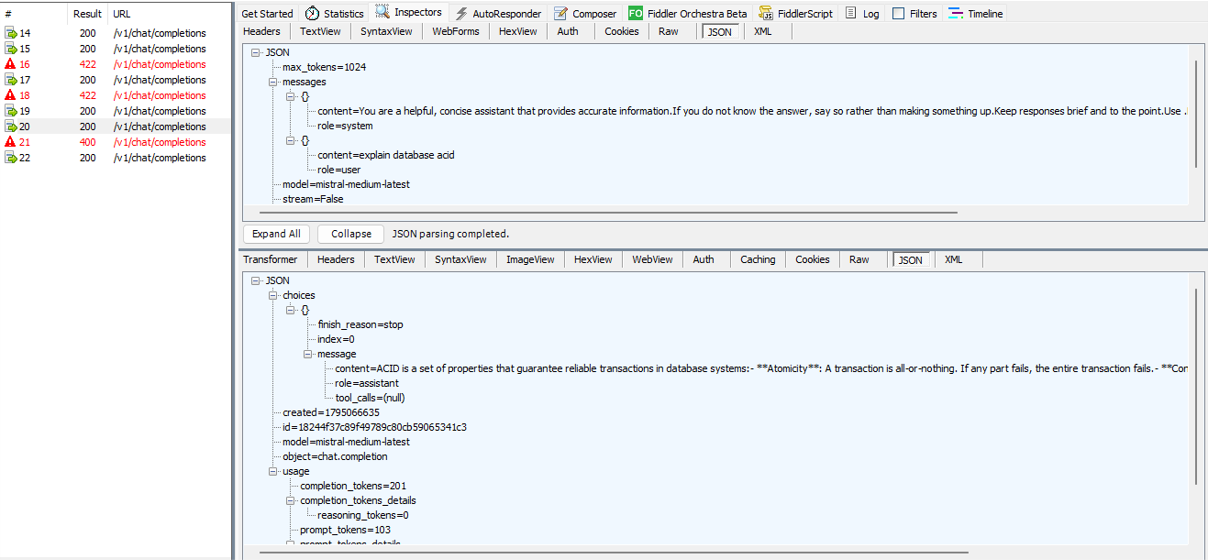
On the wire you send one HTTP POST with model name, SystemMessage,UserMessage, temperature, stream, and max_tokens (important for message truncation discussion). That is the entire contract. Later on both the request side and the response side, is this shape better dressed. Two different JSON payloads and this is where the DTO pain in Part 2 starts.

The demo

Non-streaming first. Fire the HTTP POST with stream off. One JSON, document comes back, choices[0].message.content. Easy to code. Dead to watch. A wall of silence, then everything at once.

{
   "model": "mistral-large-latest",
   "messages": [
      {
         "role": "user",
         "content": "Explain the software acronym ACID."
      }
   ]
}
{
   "id": "5272af17c792494bb8ea6871f68e1f08",
   "created": 1794546851,
   "model": "mistral-large-latest",
   "usage": {
      "prompt_tokens": 24,
      "total_tokens": 798,
      "completion_tokens": 774,
      "prompt_tokens_details": {
         "cached_tokens": 0
      },
      "completion_tokens_details": {
         "reasoning_tokens": 265
      },
      "service_tier": "standard"
   },
   "object": "chat.completion",
   "choices": [
      {
         "index": 0,
         "finish_reason": "stop",
         "message": {
            "role": "assistant",
            "tool_calls": null,
            "content": [
               {
                  "type": "thinking",
                  "thinking": [
                     {
                        "type": "text",
                        "text": "The user is asking for an explanation of the software acronym ACID. This is a fundamental concept in database systems and transaction processing. I should explain:\n\n1. What ACID stands for (Atomicity, Consistency, Isolation, Durability)\n2. What each property means in practical terms\n3. Why it matters (transactions, data integrity)\n4. Maybe a brief example to make it concrete\n5. Context (primarily used in relational databases)\n\nLet me structure this clearly:\n\n**ACID** stands for:\n- **Atomicity**: All-or-nothing. A transaction is treated as a single unit. Either all operations succeed or none do.\n- **Consistency**: The database moves from one valid state to another, maintaining all defined rules/constraints (integrity constraints, cascades, triggers).\n- **Isolation**: Concurrent transactions don't interfere with each other. Each sees the database as if it were the only one running.\n- **Durability**: Once committed, changes persist even in case of system failure (power loss, crash).\n\nI should mention this is crucial for financial systems, banking, etc. where data integrity is paramount.\n\nMaybe contrast briefly with BASE (NoSQL) to give context, but keep focus on ACID.\n\nLet me write this in a clear, educational tone."
                     }
                  ],
                  "closed": true
               },
               {
                  "type": "text",
                  "text": "**ACID** is an acronym describing the four key properties that guarantee reliable processing of database transactions. It ensures that data remains accurate and consistent even when errors, power failures, or other mishaps occur.\n\nHere is what each letter stands for:\n\n### **A — Atomicity**\nA transaction is an **\"all-or-nothing\"** proposition. Either *all* the operations in the transaction complete successfully, or *none* of them do. If any part fails, the entire transaction is rolled back to its original state.\n- **Example:** Transferring $100 from Account A to Account B requires two steps: debit A and credit B. If the credit fails, the debit is undone. You never end up with money disappearing into thin air.\n\n### **C — Consistency**\nA transaction must take the database from one **valid state to another valid state**, preserving all defined rules and constraints (data integrity, foreign keys, unique constraints, triggers, etc.).\n- **Example:** If a database rule says an account balance cannot be negative, a transaction that would make it negative will be rejected entirely, keeping the database consistent.\n\n### **I — Isolation**\nConcurrent transactions (multiple users/processes running at the same time) must not interfere with each other. Each transaction sees the database as if it were the only one executing, preventing \"dirty reads,\" non-repeatable reads, and phantom reads.\n- **Example:** If two people book the last seat on a flight simultaneously, isolation ensures only one succeeds and the other gets an error, rather than both getting the seat.\n\n### **D — Durability**\nOnce a transaction has been **committed**, it remains so permanently—even in the event of a system crash, power loss, or hardware failure. The changes are written to non-volatile storage (like disk) before the commit is acknowledged.\n- **Example:** After you see a \"payment successful\" confirmation, the record of that payment will still exist even if the server immediately loses power.\n\n---\n\n### Why it matters\nACID properties are critical in systems where correctness is non-negotiable—**banking, financial trading, inventory management, healthcare records, and e-commerce checkout systems**. They ensure that data integrity is maintained despite concurrent access, hardware failures, and software errors.\n\n*(Note: In contrast, some distributed NoSQL databases use **BASE**—Basically Available, Soft state, Eventual consistency—trading strict ACID guarantees for higher availability and scalability.)*"
               }
            ]
         }
      }
   ]
}

Flip stream to true. Same request. Now the response arrives as SSE. A stream of data: {…} events, ending in data: [DONE]. It looks faster and it genuinely is for the user. First tokens arrive while the model is still generating. But total time is the same. You have moved the wait into the stream.
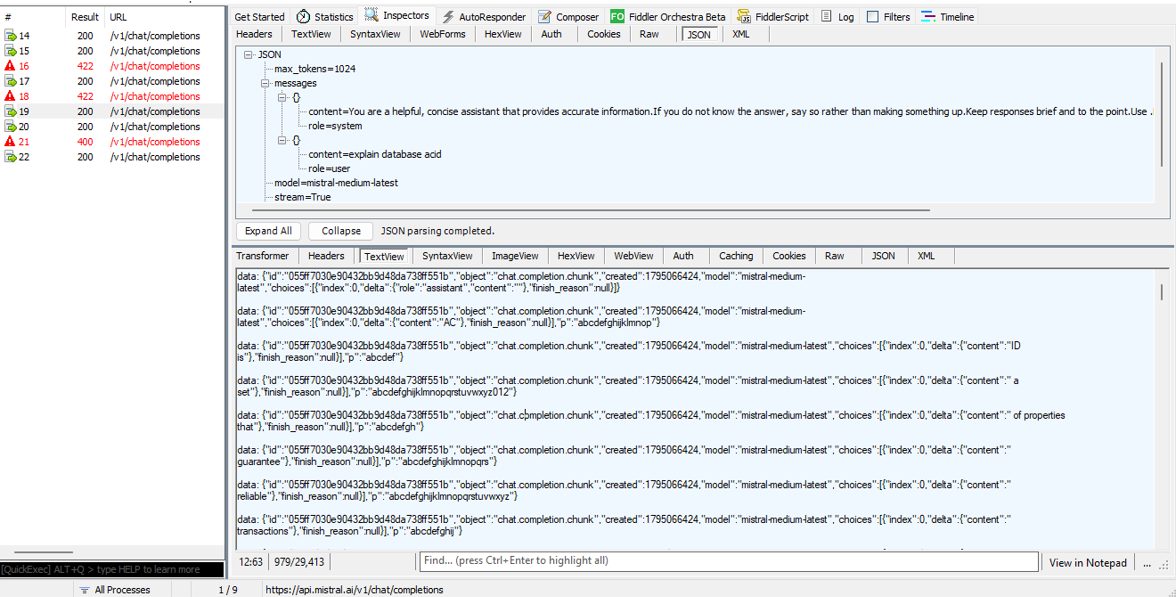
The client has to stitch the deltas back together. Fragments and tool-call arguments arrive in pieces across chunks. Second, each one of these events is a string with JSON inside it. JSON inside JSON, parsed chunk after chunk. Get a boundary slightly wrong (like I did multiple times) and nothing fails cleanly. That is why my streaming client has a whole assembly class.

The 422 Trap

My favourite bug of the session. I accidentally changed one character in the request. The c in context to a C. The API answered 422, “missing required property”.

{
   "model": "mistral-large-latest",
   "messages": [
      {
         "role": "user",
         "Content": "Explain the software acronym ACID."
      }
   ]
}

The property was not missing. The casing was wrong. The API expects snake_case and I sent .NET’s default PascalCase(I wasn’t using DataAnnotations or JsonSerializerOptions yet)

Diff the request the docs show against the request you sent. Character by character, property by property. Casing, underscores, everything. Comment out the payload and add fields back one at a time until it breaks again. Inspect the payloads in a JSON viewer in the debugger.

Not glamorous. Not clever. Just effective. That one habit saved me more time across this project than every clever thing I did combined.

My First Chat Client

A console application. Read input, send it, print the response. The reflex of every developer since 1974 (I started coding in early then got my own compute an Amstrad CPC6128). The first surprise is structural. Every run starts from zero. No memory of the previous conversation. A Memento brain wipe.

The amnesia was never the model. The model has no state at all. It is entirely the plumbing. And there is a subtle failure mode hiding here: the model had nothing to “misremember” from, so it answers confidently either way. No wrong memory is bad. No memory answering confidently is worse, because it looks the same from the outside.

It’s Stateless(WTF)?

The API is stateless by design this is a deliberate choice, not a shortcoming. If the API held your conversation server-side, every turn would have to land on the machine holding the session. i.e. a sticky session, or every machine would have to have a shared session store.

Stickiness plus unpredictable turn times, this call runs 200ms, that one runs 30 seconds, means machines sitting reserved for slow conversations while new ones starve. Stateless means any request can run anywhere, on any GPU, and that is what makes the economics of inference work.

The vendor farms the storage problem back to you. You have the conversation on disk anyway, so it is cheap for you too. In Memento terms: the cloud has no new memories, only the polaroids you mail it.

There is a quiet upside I did not spot until much later. The client re-sends the same prefix every turn, so the API has a trick for exactly this pattern: prompt cache keys. You give the request a prompt_cache_key and the recurrent prefix gets served from cache at 10% of the token price. The stateless design quietly lends you a hand. Numbers from my logs in Part 3.

What this cost

Continuity is not free. As soon as the client re-sends the story every turn, the token count on each request climbs. Convenience and cost are the same dial. The API gives you amnesia and charges you for the cure. You build the memory, then pay per turn to keep it.

Next: Part 2. The hand-typed DTOs got fed up with me, so I went looking for the spec. The spec is 49,000 lines. It did not go well.
I Built My Own Agentic Client (So You Don’t Have To)

TL;DR – I built a series of Mistral API clients in C#, starting with one raw HTTP POST in Telerik Fiddler and ending with a command line interface(CLI) that has file tools, permissioning and context management. No SDK, no libraries. This post starts the series. Everything I mention is committed at KiwiBryn/CodeCampCHC2026, numbered in talk order.

Part 0- Series Introduction

On 21 November 2026 I gave a session at Christchurch Code Camp called “I Built My Own Agentic Client (So You Don’t Have To)”. This is the long-form version, split into a series of posts.

  • Part 1 – the first demo, one HTTP POST in Telerik Fiddler, and what the messages array on the wire actually looks like.
  • Part 2 – what happened between the two demos. Hand-typed DTOs, the OpenAPI spec that would not fit.
  • Part 3 – the second demo, the Mistral CLI. File tools, permissioning, context management and the Files API.

The honest subtitle was “Fiddler to a self-building, self-improving CLI”. The plan grew backwards from there. Everything in the repo got built twice. Once by me understanding it, once by the model generating it.

The rules

Every client in the series, I built. No SDK, no libraries. Visual Studio 2026, C#/.NET, Mistral Chat Completions API, System.Text.Json.

That was the constraint for the talk and it is the constraint for these posts. Constraints make a better story than plans.

One housekeeping note. Mistral hosts data in the EU by default. There is a US endpoint which is faster from New Zealand, but it is the US of A. The European Union (EU) General Data Protection Regulation (GDPR) was a factor for the clients I build professionally. Here it is mostly an excuse to say I checked.

Why bother

Three reasons, none of them “because it is there” or “just because”

First, understanding. If every client I use, I build, then when the payload is wrong I know which layer is lying. An HTTP Error 422 Unprocessable Content does not become a GitHub issue on someone else’s SDK repo. I have the wire trace and I have the Data Transfer Obect(DTO)s.

Second, judgement. An agentic client is a small amount of code around a large amount of policy. What the model may read, what it may write, what it may delete, what gets compressed. My view is that policy should be visible in code you can read over coffee, for the same reason you do not hand your car keys to a stranger.

Third, receipts. Everything in this series is committed and numbered in the order I built it. Clone KiwiBryn/CodeCampCHC2026 and follow along.

What I am not doing

I am not arguing nobody should use an SDK. Kiota shows up in Part 2 as a deliberate sidequest and it taught me two things I use. The reason to build one yourself, once, is that after you have done it, the SDK stops being magic and starts being a trade-off you can price.

Posts in this series

  • Part 1 – One HTTP POST, Fiddler, Server Sent Events(SSE), and the 422 that lied to me.
  • Part 2 – From half-arsed DTOs to 296 lines of YAML. The spec journey, the token ladder.
  • Part 3 – The CLI. Tools, permissioning, a model that went feral, and what it cost.

Next up: Part 1, the atom everything else is built from – one HTTP POST.

Mistral Steaming Chat Completions

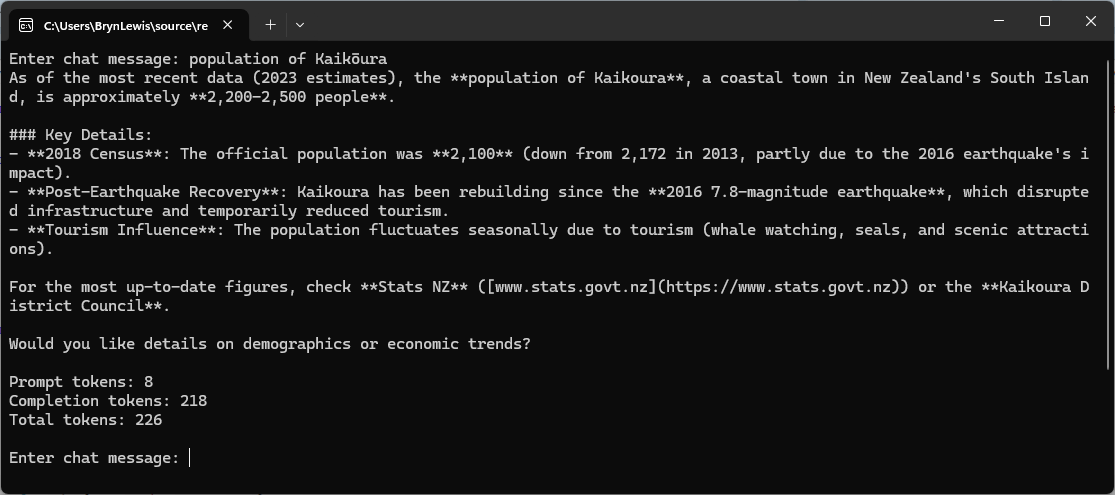
This sample demonstrates how to consume Mistral’s streaming chat completion endpoint using HttpClient and Server-Sent Events (SSE). The implementation streams tokens to the console as they arrive, supports cancellation with Ctrl+C, and captures token usage information. A CancellationTokenSource is used to support user-initiated cancellation. Pressing Ctrl+C cancels the active request without terminating the application, allowing the user to continue interacting with the chat client.

Rather than waiting for the complete response, the request is sent with Stream = true and the response is processed as an SSE stream. This provides a significantly better user experience because generated tokens are displayed as soon as they are received. Each chunk contains a delta payload that may include newly generated content.

// Ctrl+C cancels the current request and returns to the prompt; second Ctrl+C exits the process.
using var cts = new CancellationTokenSource();
Console.CancelKeyPress += (_, e) =>
{
   if (!cts.IsCancellationRequested)
   {
      e.Cancel = true;
      cts.Cancel();
   }
};

while (!cts.IsCancellationRequested)
{
   Console.Write("Enter chat message: ");
   var content = Console.ReadLine();
   if (string.IsNullOrWhiteSpace(content)) break;

   var request = new ChatStreamingCompletionRequest
   {
      Model = settings.ModelName,
      Messages =
      [
         new ChatMessage { Role = "user", Content = content }
      ],
      Stream = true,
   };

   try
   {
      using var httpRequest = new HttpRequestMessage(HttpMethod.Post, "chat/completions")
      {
         Content = JsonContent.Create(request, options: jsonSerializerOptions)
      };

      using var httpResponse = await httpClient.SendAsync(httpRequest, HttpCompletionOption.ResponseHeadersRead, cts.Token);
      if (!httpResponse.IsSuccessStatusCode)
      {
         var body = await httpResponse.Content.ReadAsStringAsync(cts.Token);
         throw new HttpRequestException($"Mistral API {(int)httpResponse.StatusCode}: {body}", null, httpResponse.StatusCode);
      }

      await using var stream = await httpResponse.Content.ReadAsStreamAsync(cts.Token);
      using var reader = new StreamReader(stream);

      TokenUsage? finalUsage = null;
      string? finishReason = null;

      string? line;
      // Mistral emits single-line `data:` chunks, so per-line dispatch is sufficient (no multi-line SSE concatenation required).
      while ((line = await reader.ReadLineAsync(cts.Token)) is not null)
      {
         // SSE framing: blank line separates events, lines without "data:" are ignored (e.g. ":" keep-alive comments, "event:" / "id:" / "retry:" fields).
         if (string.IsNullOrEmpty(line)) continue;
         if (!line.StartsWith("data:", StringComparison.Ordinal)) continue;

         var payload = line.AsSpan(5).TrimStart();
         if (payload.SequenceEqual("[DONE]")) break;

         var chunk = JsonSerializer.Deserialize<ChatCompletionChunk>(payload, jsonSerializerOptions);
         if (chunk is null) continue;

         foreach (var choice in chunk.Choices)
         {
            if (!string.IsNullOrEmpty(choice.Delta.Content))
            {
               Console.Write(choice.Delta.Content);
            }
            if (choice.FinishReason is not null)
            {
               finishReason = choice.FinishReason;
            }
         }

         if (chunk.Usage is not null)
         {
            finalUsage = chunk.Usage;
         }
      }

      Console.WriteLine();
      Console.WriteLine();
      if (finalUsage is not null)
      {
         Console.WriteLine($"Prompt tokens: {finalUsage.PromptTokens}");
         Console.WriteLine($"Completion tokens: {finalUsage.CompletionTokens}");
         Console.WriteLine($"Total tokens: {finalUsage.TotalTokens}");
      }
      if (finishReason is not null)
      {
         Console.WriteLine($"Finish reason: {finishReason}");
      }
      Console.WriteLine();
   }
   catch (OperationCanceledException) when (cts.IsCancellationRequested)
   {
      Console.WriteLine();
      Console.WriteLine("Request cancelled.");
      // Reset the CTS so the next prompt iteration is cancellable again.
      cts.TryReset();
   }
   catch (HttpRequestException ex)
   {
      Console.WriteLine($"Request failed: {(int?)ex.StatusCode ?? 0} {ex.Message}");
   }
   catch (TaskCanceledException)
   {
      Console.WriteLine("Request timed out.");
   }
   catch (JsonException ex)
   {
      Console.WriteLine($"Failed to parse response: {ex.Message}");
   }
   catch (IOException ex)
   {
      Console.WriteLine($"Stream error: {ex.Message}");
   }
   catch (Exception ex)
   {
      Console.WriteLine($"Unexpected error: {ex.GetType().Name}: {ex.Message}");
   }
}

Uses HttpCompletionOption.ResponseHeadersRead to begin processing data as soon as headers are received.

public sealed class ChatStreamingCompletionRequest
{
   [JsonPropertyName("model")] public required string Model { get; init; }
   [JsonPropertyName("messages")] public required List<ChatMessage> Messages { get; init; }
   [JsonPropertyName("temperature")] public double? Temperature { get; init; }
   [JsonPropertyName("max_tokens")] public int? MaxTokens { get; init; }
   [JsonPropertyName("stream")] public bool? Stream { get; init; } 
   [JsonPropertyName("response_format")] public ResponseFormat? ResponseFormat { get; init; }
}

public sealed class ChatMessage
{
   [JsonPropertyName("role")] public required string Role { get; init; }
   [JsonPropertyName("content")] public required string Content { get; init; }
}

public sealed class ResponseFormat
{
   [JsonPropertyName("type")] public required string Type { get; init; }
}

public sealed class ChatCompletionChunk
{
   [JsonPropertyName("id")] public required string Id { get; init; }
   [JsonPropertyName("choices")] public required List<ChatCompletionDelta> Choices { get; init; }
   [JsonPropertyName("usage")] public TokenUsage? Usage { get; init; }
}

public sealed class ChatCompletionDelta
{
   [JsonPropertyName("index")] public int Index { get; init; }
   [JsonPropertyName("delta")] public required ChatMessageDelta Delta { get; init; }
   [JsonPropertyName("finish_reason")] public string? FinishReason { get; init; }
}

public sealed class ChatMessageDelta
{
   [JsonPropertyName("role")] public string? Role { get; init; }
   [JsonPropertyName("content")] public string? Content { get; init; }
}

public sealed class TokenUsage
{
   [JsonPropertyName("prompt_tokens")] public int? PromptTokens { get; init; }
   [JsonPropertyName("completion_tokens")] public int? CompletionTokens { get; init; }
   [JsonPropertyName("total_tokens")] public int? TotalTokens { get; init; }
}

When available, token usage statistics are captured from the final response chunk and displayed after generation completes.

Figured I might as well get Anthropic’s Claude to review my code.

Code Review: MistralBasicStreamingCLI

Scope: files in MistralBasicStreamingCLI/ only (Program.cs, Model.cs, ApplicationSettings.cs, appsettings.json, .csproj).

Summary

Small, single-file-ish PoC CLI that streams Mistral chat completions over SSE. Overall solid for its stated purpose (the file header calls it “horrible” — it’s actually reasonably clean). Config/secrets handling, cancellation plumbing, and exception granularity are all good practice. Findings below are ranked roughly by severity.

Findings

1. Ctrl+C behavior contradicts its own comment (Medium)

Program.cs:43 says:

> Ctrl+C cancels the current request and returns to the prompt; second Ctrl+C exits the process.

That holds only if Ctrl+C is pressed while a request is in flight — in that case the catch (OperationCanceledException) block runs and calls cts.TryReset() (line 141), so the loop continues.

But if Ctrl+C is pressed while sitting at the Console.ReadLine() prompt (before any request is sent), cts.Cancel() fires, Console.ReadLine() returns (typically null), and content fails the IsNullOrWhiteSpace check on line 58, so the loop hits break directly — no TryReset() call, no “second Ctrl+C” needed. The program exits on the first Ctrl+C in this case.

Net effect: whether Ctrl+C exits immediately or returns you to the prompt depends on exact timing (mid-request vs. at-prompt), which will look like inconsistent/buggy behavior to a user. If the two-stage cancel is intended everywhere, the prompt-read would need to be cancellable too (e.g. via a Task.Run wrapping Console.ReadLine() racing the token, or Console.KeyAvailable polling).

2. Streaming Usage block may never populate (Worth verifying)

Program.cs:116-119 and 126-128 only print token counts if chunk.Usage is not null. For OpenAI-compatible streaming APIs, the final chunk generally only carries usage when the request explicitly opts in (OpenAI requires "stream_options": {"include_usage": true}). ChatStreamingCompletionRequest (Model.cs:5-13) has no StreamOptions/equivalent property, and the request never sends one.

If Mistral’s API follows the same opt-in convention, finalUsage will always stay null and the “Prompt tokens / Completion tokens / Total tokens” lines will silently never print. If Mistral always includes usage on the last chunk regardless (some of their docs suggest this), then it’s fine as-is. Worth a quick manual test against the real API to confirm which is true — if it’s the former, add a stream_options field to the request model.

3. Redundant double-dispose of the response stream (Low)

await using var stream = await httpResponse.Content.ReadAsStreamAsync(cts.Token);
using var reader = new StreamReader(stream);

reader’s (synchronous) Dispose() runs first at scope exit and disposes the underlying stream (default leaveOpen: false). The outer await using then calls DisposeAsync() on the same, already-disposed stream. This is harmless (Stream.Dispose/DisposeAsync are idempotent) but is dead code — either drop await using in favor of a plain using, or construct StreamReader with leaveOpen: true and let the outer await using be the one real disposal.

4. No conversation history — every turn is stateless (Design note)

Each loop iteration sends a single ChatMessage { Role = "user", Content = content } (Program.cs:60-68) with no prior turns or system prompt included. So the “chat loop” is really a sequence of independent one-shot completions, not a multi-turn conversation. Likely intentional for a minimal PoC, but worth calling out in case a real chat history was expected.

5. Unused request fields (Low / cosmetic)

Temperature, MaxTokens, and ResponseFormat on ChatStreamingCompletionRequest (Model.cs:9,10,12) are never set anywhere — every request sends null for all three (and they’re omitted from the JSON payload thanks to WhenWritingNull). Not a bug, just currently-dead surface area on the model; fine to leave if they’re there for future use, otherwise consider trimming until needed.

6. appsettings.json ships an empty ApiKey (Informational, not a defect)

appsettings.json:3 has "ApiKey": "", with the real key presumably supplied via dotnet user-secrets (UserSecretsId is wired up in the .csproj). This is the correct pattern — flagging only so it stays that way and nobody “temporarily” pastes a real key into this file for a quick test and commits it.

Positives worth keeping

  • Secrets handling: AddUserSecrets() + empty placeholder in appsettings.json is the right pattern for a local PoC.
  • Startup validation: ArgumentException.ThrowIfNullOrWhiteSpace on required settings fails fast with a clear message instead of a confusing null-ref later.
  • HttpClient.Timeout = Timeout.InfiniteTimeSpan paired with a CancellationToken is the correct way to handle long-lived SSE connections — avoids the common bug of a wall-clock timeout killing a slow-but-healthy stream.
  • BaseAddress/relative-URI combination (https://api.mistral.ai/v1/ + chat/completions) is done correctly (trailing slash on base, no leading slash on relative) — a very common source of bugs elsewhere.
  • SSE line parsing correctly ignores blank lines and non-data: fields (comments, event:, id:, retry:), and checks for [DONE] before attempting to parse JSON.
  • Exception granularity: catching OperationCanceledException, HttpRequestException, TaskCanceledException, JsonException, IOException separately before a generic fallback gives useful, distinct messages per failure mode rather than one catch-all.

Suggested priority

  1. Decide/fix the Ctrl+C-at-prompt vs. Ctrl+C-mid-request inconsistency (#1) if consistent behavior matters for this PoC’s usability.
  2. Confirm whether Usage actually arrives from Mistral’s streaming endpoint without stream_options (#2) — quick manual test settles it.
  3. Everything else is cosmetic/cleanup, safe to defer.

Using strongly typed request and response Data Transfer Objects(DTOs) improved maintainability but without manual “tweaking” a request/response could fail.(esp. required & nullable). This implementation assumes that the Mistral Chat Completion API returns single-line JavaScript Object Notation(JSON) payloads in each SSE data: event, which simplified the parser implementation.