nanoFramework Seeed LoRa-E5 LoRaWAN library Part1

Basic connectivity

Over the weekend I have been working on a nanoFramework C# library for my LoRa-E5 Development Kit from Seeedstudio. My initial test rig is based on an STM32F691DISCOVERY board which has an Arduino Uno R3 format socket for a Grove Base Shield V2.0, which I then connected to my LoRa-E5 Development Kit with a Grove – Universal 4 Pin 20cm Unbuckled Cable(TX/RX reversed)

STM32F769I test rig with Seeedstudio Grove Base shield V2 and LoRa-E5 Development Kit

The code has compile time options for synchronous and asynchronous operation.

public class Program
{
   private const string SerialPortId = "COM6";

   public static void Main()
   {
      SerialDevice serialDevice;

      Debug.WriteLine("devMobile.IoT.SeeedLoRaE5.ShieldSerial starting");

      Debug.WriteLine(Windows.Devices.SerialCommunication.SerialDevice.GetDeviceSelector());

      try
      {
         serialDevice = SerialDevice.FromId(SerialPortId);

         // set parameters
         serialDevice.BaudRate = 9600;
         serialDevice.Parity = SerialParity.None;
         serialDevice.StopBits = SerialStopBitCount.One;
         serialDevice.Handshake = SerialHandshake.None;
         serialDevice.DataBits = 8;

         serialDevice.ReadTimeout = new TimeSpan(0, 0, 30);
         serialDevice.WriteTimeout = new TimeSpan(0, 0, 4);

         DataWriter outputDataWriter = new DataWriter(serialDevice.OutputStream);

#if SERIAL_SYNC_READ
         DataReader inputDataReader = new DataReader(serialDevice.InputStream);
#else
         serialDevice.DataReceived += SerialDevice_DataReceived;
#endif

         // set a watch char to be notified when it's available in the input stream
         // This doesn't appear to work with synchronous calls
         serialDevice.WatchChar = '\n';

         while (true)
         {
            uint bytesWritten = outputDataWriter.WriteString("AT+VER\r\n");
            Debug.WriteLine($"TX: {outputDataWriter.UnstoredBufferLength} bytes to output stream.");

            // calling the 'Store' method on the data writer actually sends the data
            uint txByteCount = outputDataWriter.Store();
            Debug.WriteLine($"TX: {txByteCount} bytes via {serialDevice.PortName}");

#if SERIAL_SYNC_READ
            uint bytesRead = inputDataReader.Load(50);

            Debug.WriteLine($"RXs :{bytesRead} bytes read from {serialDevice.PortName}");

            if (bytesRead > 0)
            {
               String response = inputDataReader.ReadString(bytesRead);
               Debug.WriteLine($"RX sync:{response}");
            }
#endif

            Thread.Sleep(20000);
         }
      }
      catch (Exception ex)
      {
         Debug.WriteLine(ex.Message);
      }
   }

   private static void SerialDevice_DataReceived(object sender, SerialDataReceivedEventArgs e)
   {
      switch (e.EventType)
      {
         case SerialData.Chars:
            //Debug.WriteLine("RX SerialData.Chars");
            break;

         case SerialData.WatchChar:
             Debug.WriteLine("RX: SerialData.WatchChar");
             SerialDevice serialDevice = (SerialDevice)sender;

            using (DataReader inputDataReader = new DataReader(serialDevice.InputStream))
            {
               inputDataReader.InputStreamOptions = InputStreamOptions.Partial;

               // read all available bytes from the Serial Device input stream
               uint bytesRead = inputDataReader.Load(serialDevice.BytesToRead);

               Debug.WriteLine($"RXa: {bytesRead} bytes read from {serialDevice.PortName}");

               if (bytesRead > 0)
               {
                  String response = inputDataReader.ReadString(bytesRead);
                  Debug.WriteLine($"RX:{response}");
               }
            }
            break;
         default:
            Debug.Assert(false, $"e.EventType {e.EventType} unknown");
            break;
      }
   }
}

I have reused a significant amount of code built for my nanoFramework RAK811 LoRaWAN library Part1 post.

The thread '<No Name>' (0x2) has exited with code 0 (0x0).
devMobile.IoT.SeeedLoRaE5.ShieldSerial starting
Ports available: COM5,COM6
TX: 8 bytes to output stream.
TX: 8 bytes via COM6
TX: 8 bytes to output stream.
TX: 8 bytes via COM6
RX: SerialData.WatchChar
RXa: 28 bytes read from COM6
RX:+VER: 4.0.11
+VER: 4.0.11

TX: 8 bytes to output stream.
TX: 8 bytes via COM6
RX: SerialData.WatchChar
RXa: 14 bytes read from COM6
RX:+VER: 4.0.11

TX: 8 bytes to output stream.
TX: 8 bytes via COM6
RX: SerialData.WatchChar
RXa: 14 bytes read from COM6
RX:+VER: 4.0.11

TX: 8 bytes to output stream.
TX: 8 bytes via COM6
RX: SerialData.WatchChar
RXa: 14 bytes read from COM6
RX:+VER: 4.0.11

The test rig confirmed that I had the right configuration for the hardware (TX-RX twist) and LoRa-E5 connection (serial port, baud rate, parity etc.)
TinyCLR OS V2 Seeed LoRa-E5 on Github

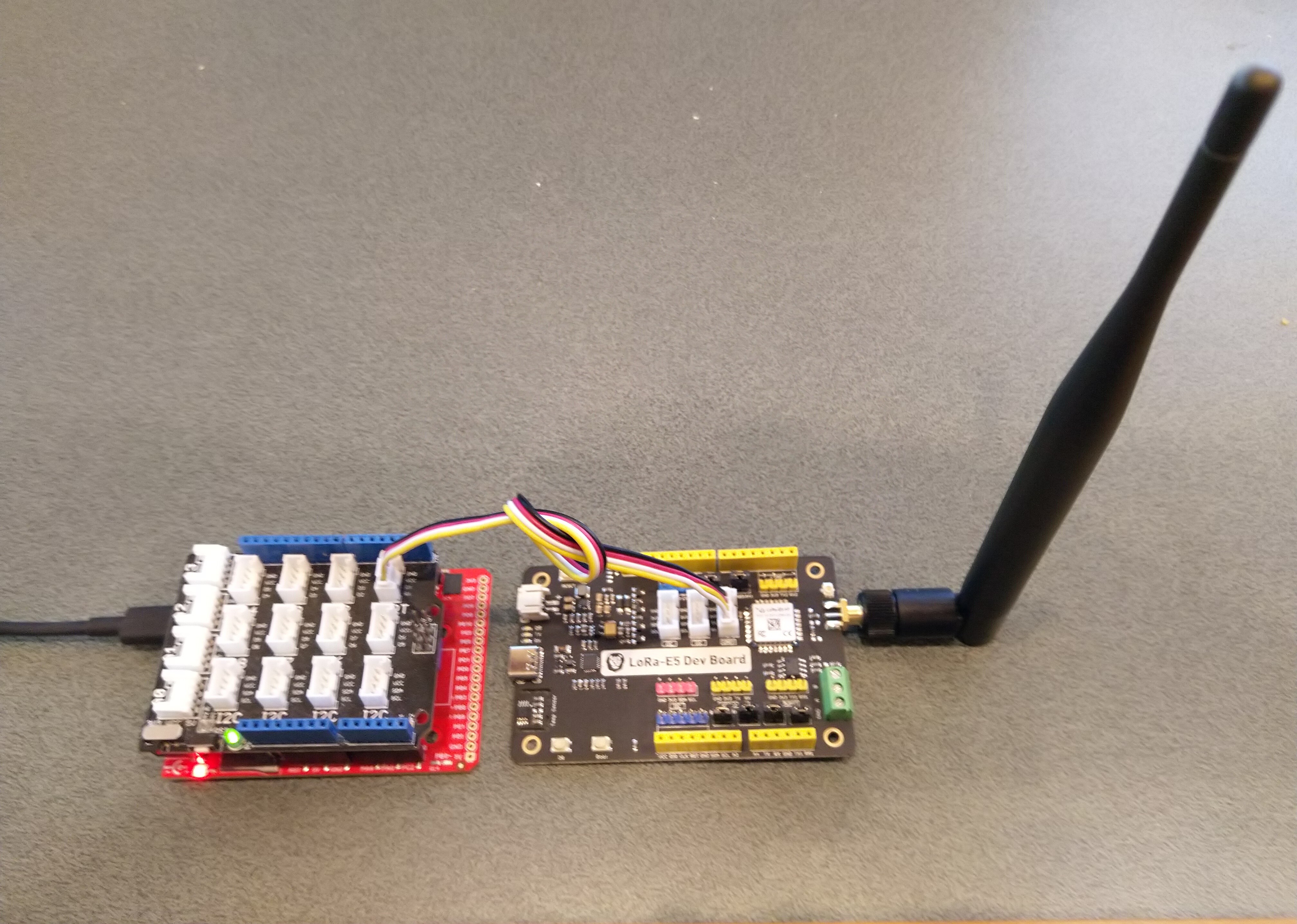
The source code of my GHI Electronics TinyCLR-0SV2RC1 Seeed LoRa-E5 library is live on GitHub. The initial test harness uses a Fezduinoand a LoRa-E5 Development Kit.

Fezduino device with Seeedstudio Grove base shield and LoRa-E5 development Kit

So far the demo application has been running for 24 hours

The thread '<No Name>' (0x2) has exited with code 0 (0x0).
devMobile.IoT.SeeedE5LoRaWANDeviceClient starting
12:00:01 Join start Timeout:25 Seconds
12:00:07 Join finish
12:00:07 Send Timeout:10 Seconds payload BCD:010203040506070809
12:00:13 Sleep
12:05:13 Wakeup
12:05:13 Send Timeout:10 Seconds payload BCD:010203040506070809
12:05:20 Sleep
12:10:20 Wakeup
12:10:20 Send Timeout:10 Seconds payload BCD:010203040506070809
12:10:27 Sleep
12:15:27 Wakeup
12:15:27 Send Timeout:10 Seconds payload BCD:010203040506070809
12:15:34 Sleep
...
11:52:40 Wakeup
11:52:40 Send Timeout:10 Seconds payload BCD:010203040506070809
11:52:45 Sleep
11:57:45 Wakeup
11:57:45 Send Timeout:10 Seconds payload BCD:010203040506070809
11:57:52 Sleep
12:02:52 Wakeup
12:02:52 Send Timeout:10 Seconds payload BCD:010203040506070809
12:02:59 Sleep
12:07:59 Wakeup
12:07:59 Send Timeout:10 Seconds payload BCD:010203040506070809
12:08:07 Sleep
12:13:07 Wakeup
12:13:07 Send Timeout:10 Seconds payload BCD:010203040506070809
12:13:14 Sleep

I have tested the Over The Air Activation(OTAA) code and will work on testing the other functionality over the coming week,

public static void Main()
{
   Result result;

   Debug.WriteLine("devMobile.IoT.SeeedE5LoRaWANDeviceClient starting");

   try
   {
      using (SeeedE5LoRaWANDevice device = new SeeedE5LoRaWANDevice())
      {
         result = device.Initialise(SerialPortId, 9600, UartParity.None, 8, UartStopBitCount.One);
         if (result != Result.Success)
         {
            Debug.WriteLine($"Initialise failed {result}");
            return;
         }

#if CONFIRMED
         device.OnMessageConfirmation += OnMessageConfirmationHandler;
#endif
         device.OnReceiveMessage += OnReceiveMessageHandler;

#if RESET
         Debug.WriteLine($"{DateTime.UtcNow:hh:mm:ss} Reset");
         result = device.Reset();
         if (result != Result.Success)
         {
            Debug.WriteLine($"Reset failed {result}");
            return;
          }
#endif

         Debug.WriteLine($"{DateTime.UtcNow:hh:mm:ss} Region {Region}");
         result = device.Region(Region);
         if (result != Result.Success)
         {
            Debug.WriteLine($"Region failed {result}");
            return;
         }

         Debug.WriteLine($"{DateTime.UtcNow:hh:mm:ss} ADR On");
         result = device.AdrOn();
         if (result != Result.Success)
         {
            Debug.WriteLine($"ADR on failed {result}");
            return;
         }

               Debug.WriteLine($"{DateTime.UtcNow:hh:mm:ss} Port");
               result = device.Port(MessagePort);
               if (result != Result.Success)
               {
                  Debug.WriteLine($"Port on failed {result}");
                  return;
               }

#if OTAA
               Debug.WriteLine($"{DateTime.UtcNow:hh:mm:ss} OTAA");
               result = device.OtaaInitialise(Config.AppEui, Config.AppKey);
               if (result != Result.Success)
               {
                  Debug.WriteLine($"OTAA Initialise failed {result}");
                  return;
               }
#endif

#if ABP
               Debug.WriteLine($"{DateTime.UtcNow:hh:mm:ss} ABP");
               result = device.AbpInitialise(DevAddress, NwksKey, AppsKey);
               if (result != Result.Success)
               {
                  Debug.WriteLine($"ABP Initialise failed {result}");
                  return;
               }
#endif

               Debug.WriteLine($"{DateTime.UtcNow:hh:mm:ss} Join start Timeout:{JoinTimeOut.TotalSeconds} Seconds");
               result = device.Join(true, JoinTimeOut);
               if (result != Result.Success)
               {
                  Debug.WriteLine($"Join failed {result}");
                  return;
               }
               Debug.WriteLine($"{DateTime.UtcNow:hh:mm:ss} Join finish");

               while (true)
               {
#if PAYLOAD_BCD
                  Debug.WriteLine($"{DateTime.UtcNow:hh:mm:ss} Send Timeout:{SendTimeout.TotalSeconds} Seconds payload BCD:{PayloadBcd}");
#if CONFIRMED
                  result = device.Send(PayloadBcd, true, SendTimeout);
#else
                  result = device.Send(PayloadBcd, false, SendTimeout);
#endif
#endif

#if PAYLOAD_BYTES
                  Debug.WriteLine($"{DateTime.UtcNow:hh:mm:ss} Send Timeout:{SendTimeout.TotalSeconds} Seconds payload Bytes:{BitConverter.ToString(PayloadBytes)}");
#if CONFIRMED
                  result = device.Send(PayloadBytes, true, SendTimeout);
#else
                  result = device.Send(PayloadBytes, false, SendTimeout);
#endif
#endif
                  if (result != Result.Success)
                  {
                     Debug.WriteLine($"Send failed {result}");
                  }

                  Debug.WriteLine($"{DateTime.UtcNow:hh:mm:ss} Sleep");
                  result = device.Sleep();
                  if (result != Result.Success)
                  {
                     Debug.WriteLine($"Sleep failed {result}");
                     return;
                  }

                  Thread.Sleep(300000);

                  Debug.WriteLine($"{DateTime.UtcNow:hh:mm:ss} Wakeup");
                  result = device.Wakeup();
                  if (result != Result.Success)
                  {
                     Debug.WriteLine($"Wakeup failed {result}");
                     return;
                  }
               }
            }
         }
         catch (Exception ex)
         {
            Debug.WriteLine(ex.Message);
         }
      }

The Region, ADR and OtaaInitialise methods only need to be called when the device is first powered up and after a reset.

The library works but should be treated as late beta.

TinyCLR OS V2 Seeed LoRa-E5 LoRaWAN library Part5

Receive of two parts

After getting basic connectivity for my Seeedstudio LoRa-E5 Development Kit and Fezduino test rig working I started to build a general purpose library for GHI Electronics TinyCLR powered devices.

The code wasn’t very robust so when I sent messages from The Things Network (TTN) EndDevice messaging tab my first implementation didn’t work.

In the Visual Studio 2019 Debug output window

The thread '<No Name>' (0x2) has exited with code 0 (0x0).
devMobile.IoT.SeeedE5.NetworkJoinOTAA starting
TX: DR 13 bytes
RX :+DR: AS923

TX: MODE 16 bytes
RX :+MODE: LWOTAA

TX: ID=AppEui 40 bytes
RX :+ID: AppEui, 00:00:00:00:00:00:00:00

TX: KEY=APPKEY 48 bytes
RX :+KEY: APPKEY 12345678901234567890123456789012

TX: PORT 11 bytes
RX :+PORT: 1

TX: JOIN 9 bytes
RX :+JOIN: Start
+JOIN: NORMAL
+JOIN: Network joined
+JOIN: NetID 000013 DevAddr 00:00:00:00
+JOIN: Done

TX: MSGHEX 22 bytes
RX :+MSGHEX: Start
+MSGHEX: FPENDING
+MSGHEX: RXWIN1, RSSI -31, SNR 8.0
+MSGHEX: Done

TX: MSGHEX 22 bytes
RX :+MSGHEX: Start
+MSGHEX: PORT: 10; RX: "0102030405"
+MSGHEX: RXWIN1, RSSI -31, SNR 15.0
+MSGHEX: Done

TX: MSGHEX 22 bytes
RX :+MSGHEX: Start
+MSGHEX: FPENDING
+MSGHEX: PORT: 20; RX: "0504030201"
+MSGHEX: RXWIN1, RSSI -31, SNR 14.0
+MSGHEX: Done

TX: MSGHEX 22 bytes
RX :+MSGHEX: Start
+MSGHEX: Done

After going back and looking at the module documentation and the diagnostic output I realised that the downlink message and confirmation were sent in two responses.

The first (optional) part of the response had the port number and message payload

+MSGHEX: PORT: 20; RX: "0504030201"

The second had the signal strength information

+MSGHEX: RXWIN1, RSSI -31, SNR 14.0

I had to add some code to the SerialDevice_DataReceived method for assembling the two responses. It would be good if the Seeedstudio LoRa-E5 only used one response. (Sample below based on RAK811)

at+send=lora:1:5A00
OK
at+recv=1,-105,-12,0

at+send=lora:1:5A00
OK
at+recv=0,-105,-12,8,00010203

The other LoRa-E5 implementation detail which frustrated me was the inclusion of labels for values e.g. PORT, RSSI, SNR etc.

 +MSGHEX: RXWIN1, RSSI -31, SNR 14.0 

It would be simpler if the first parameter was the receive window, the second Received Signal Strength Indication(RSSI) and third Signal to Noise Ratio(SNR) etc..

The inconsistent use of separators also made unpacking messages more complex (esp. ‘;’ vs ‘:’ which was hard to see)

+MSGHEX: PORT: 20; RX: “0504030201” uses ‘:’ + ‘;’ + ‘”” + ‘ ‘

+MSGHEX: RXWIN1, RSSI -31, SNR 14.0 uses ‘:’ + ‘,’ + ‘ ‘

Now that I have a proof of concept library I need to functionality and soak test it.

TinyCLR OS V2 Seeed LoRa-E5 LoRaWAN library Part4

Failure is an option

After getting basic connectivity for my Seeedstudio LoRa-E5 Development Kit and Fezduino test rig working I started to build a general purpose library for GHI Electronics TinyCLR powered devices.

The code currently isn’t very robust so when I accidentally used an invalid region, then AppEUI the responses weren’t consistent. When the region configuration failed the response was +DR: ERROR(-1) which maps to “Parameters is invalid” and when the Join failed the response was “+JOIN: Join failed”.

// Set the Region to AS923
txByteCount = serialDevice.Write(UTF8Encoding.UTF8.GetBytes("AT+DR=AS924\r\n"));
Debug.WriteLine($"TX: DR {txByteCount} bytes");
Thread.Sleep(500);

//Read the response
rxByteCount = serialDevice.BytesToRead;
if (rxByteCount > 0)
{
   byte[] rxBuffer = new byte[rxByteCount];
   serialDevice.Read(rxBuffer);
   Debug.WriteLine($"RX :{UTF8Encoding.UTF8.GetString(rxBuffer)}");
}

In the Visual Studio 2019 Debug output window

The thread '<No Name>' (0x2) has exited with code 0 (0x0).
devMobile.IoT.SeeedE5.NetworkJoinOTAA starting
TX: DR 13 bytes
RX :+DR: ERROR(-1)

When I tried an invalid AppEui and the AT+JOIN failed the error message was “+JOIN: Join failed”

In the Visual Studio 2019 Debug output window

devMobile.IoT.SeeedE5.NetworkJoinOTAA starting
TX: DR 13 bytes
RX :+DR: AS923

TX: MODE 16 bytes
RX :+MODE: LWOTAA

TX: ID=AppEui 40 bytes
RX :+ID: AppEui, 00:00:00:00:00:00:00:00

TX: KEY=APPKEY 48 bytes
RX :+KEY: APPKEY 01234567890123456789012345678901

TX: PORT 11 bytes
RX :+PORT: 1

TX: JOIN 9 bytes
RX :+JOIN: Start
+JOIN: NORMAL
+JOIN: Join failed
+JOIN: Done

I had to add some code to the SerialDevice_DataReceived method for handling the “+JOIN: Join failed” case. It would be good if the Seeedstudio LoRa-E5 reported errors in a consistent way for all commands, without the ERROR(..) marker.

TinyCLR OS V2 Seeed LoRa-E5 LoRaWAN library Part3

DevAddr, DevEui and AppEui Oddness

After getting basic connectivity for my Seeedstudio LoRa-E5 Development Kit and Fezduino test rig working I wanted to build a general purpose library for GHI Electronics TinyCLR powered devices.

The code currently isn’t very robust but this caught my attention…

devMobile.IoT.SeeedE5.NetworkJoinOTAA starting
TX: DR 13 bytes
RX :+DR: AS923

TX: MODE 16 bytes
RX :+MODE: LWOTAA

TX: ID=AppEui 40 bytes
RX :+ID: AppEui, 00:00:00:00:00:00:00:00

TX: KEY=APPKEY 48 bytes
RX :+KEY: APPKEY 0123456789ABCDEFGHIJKLMOPQRSTRU 

TX: PORT 11 bytes
RX :+PORT: 1

TX: JOIN 9 bytes
RX :+JOIN: Start
+JOIN: NORMAL
+JOIN: Network joined
+JOIN: NetID 000013 DevAddr 00:01:02:03
+JOIN: Done

In my code I validate the values returned by commands

AT+ID=AppEui, “0000000000000”

AT+ID=APPEUI, “00 00 00 00 00 00 00 00”

Response to either of the above commands

+ID: AppEui, 00:00:00:00:00:00:00:00

It just seem a bit odd that to set the AppEUI (similar for the DevEUI and DevAddr) there are two possible formats available, neither of which is the format returned.

This was unlike the RAK811 module where most commands just return OK when they are successful.

at+set_config=lora:app_eui:0000000000000001
OK

TinyCLR OS V2 Seeed LoRa-E5 LoRaWAN library Part2

Nasty OTAA connect

After getting basic connectivity for my Seeedstudio LoRa-E5 Development Kit and Fezduino test rig working I wanted to see if I could get the device connected to The Things Industries(TTI) via the RAK7258 WisGate Edge Lite on the shelf in my office.

My Over the Air Activation (OTAA) implementation is very “nasty” as it is assumed that there are no timeouts or failures and it only sends one BCD message “48656c6c6f204c6f526157414e” which is “hello LoRaWAN”. The code just sequentially steps through the necessary commands (with a suitable delay after each is sent) to join the TTI network.

public class Program
{
#if TINYCLR_V2_FEZDUINO
   private static string SerialPortId = SC20100.UartPort.Uart5;
#endif
   private const string AppKey = "................................";

   //txByteCount = serialDevice.Write(UTF8Encoding.UTF8.GetBytes($"AT+ID=AppEui,{AppEui}\r\n"));
   //private const string AppEui = "................";

   //txByteCount = serialDevice.Write(UTF8Encoding.UTF8.GetBytes($"AT+ID=AppEui,\"{AppEui}\"\r\n"));
   private const string AppEui = ".. .. .. .. .. .. .. ..";

   private const byte messagePort = 1;

   //private const string payload = "48656c6c6f204c6f526157414e"; // Hello LoRaWAN
   private const string payload = "01020304"; // AQIDBA==
   //private const string payload = "04030201"; // BAMCAQ==

   public static void Main()
   {
      UartController serialDevice;
      int txByteCount;
      int rxByteCount;

      Debug.WriteLine("devMobile.IoT.SeeedE5.NetworkJoinOTAA starting");

      try
      {
         serialDevice = UartController.FromName(SerialPortId);

         serialDevice.SetActiveSettings(new UartSetting()
         {
            BaudRate = 9600,
            Parity = UartParity.None,
            StopBits = UartStopBitCount.One,
            Handshaking = UartHandshake.None,
            DataBits = 8
         });

         serialDevice.Enable();

         // Set the Region to AS923
         txByteCount = serialDevice.Write(UTF8Encoding.UTF8.GetBytes("AT+DR=AS923\r\n"));
         Debug.WriteLine($"TX: DR {txByteCount} bytes");
         Thread.Sleep(500);

         // Read the response
         rxByteCount = serialDevice.BytesToRead;
         if (rxByteCount > 0)
         {
            byte[] rxBuffer = new byte[rxByteCount];
            serialDevice.Read(rxBuffer);
            Debug.WriteLine($"RX :{UTF8Encoding.UTF8.GetString(rxBuffer)}");
         }

         // Set the Join mode
         txByteCount = serialDevice.Write(UTF8Encoding.UTF8.GetBytes("AT+MODE=LWOTAA\r\n"));
         Debug.WriteLine($"TX: MODE {txByteCount} bytes");
         Thread.Sleep(500);

         // Read the response
         rxByteCount = serialDevice.BytesToRead;
         if (rxByteCount > 0)
         {
            byte[] rxBuffer = new byte[rxByteCount];
            serialDevice.Read(rxBuffer);
            Debug.WriteLine($"RX :{UTF8Encoding.UTF8.GetString(rxBuffer)}");
         }

         // Set the appEUI
         txByteCount = serialDevice.Write(UTF8Encoding.UTF8.GetBytes($"AT+ID=AppEui,\"{AppEui}\"\r\n"));
         Debug.WriteLine($"TX: ID=AppEui {txByteCount} bytes");
         Thread.Sleep(500);

         // Read the response
         rxByteCount = serialDevice.BytesToRead;
         if (rxByteCount > 0)
         {
            byte[] rxBuffer = new byte[rxByteCount];
            serialDevice.Read(rxBuffer);
            Debug.WriteLine($"RX :{UTF8Encoding.UTF8.GetString(rxBuffer)}");
         }
            
         // Set the appKey
         txByteCount = serialDevice.Write(UTF8Encoding.UTF8.GetBytes($"AT+KEY=APPKEY,{AppKey}\r\n"));
         Debug.WriteLine($"TX: KEY=APPKEY {txByteCount} bytes");
         Thread.Sleep(500);

         // Read the response
         rxByteCount = serialDevice.BytesToRead;
         if (rxByteCount > 0)
         {
            byte[] rxBuffer = new byte[rxByteCount];
            serialDevice.Read(rxBuffer);
            Debug.WriteLine($"RX :{UTF8Encoding.UTF8.GetString(rxBuffer)}");
         }

         // Set the PORT
         txByteCount = serialDevice.Write(UTF8Encoding.UTF8.GetBytes($"AT+PORT={messagePort}\r\n"));
         Debug.WriteLine($"TX: PORT {txByteCount} bytes");
         Thread.Sleep(500);

         // Read the response
         rxByteCount = serialDevice.BytesToRead;
         if (rxByteCount > 0)
         {
            byte[] rxBuffer = new byte[rxByteCount];
            serialDevice.Read(rxBuffer);
            Debug.WriteLine($"RX :{UTF8Encoding.UTF8.GetString(rxBuffer)}");
         }

         // Join the network
         txByteCount = serialDevice.Write(UTF8Encoding.UTF8.GetBytes("AT+JOIN\r\n"));
         Debug.WriteLine($"TX: JOIN {txByteCount} bytes");
         Thread.Sleep(10000);

         // Read the response
         rxByteCount = serialDevice.BytesToRead;
         if (rxByteCount > 0)
         {
            byte[] rxBuffer = new byte[rxByteCount];
            serialDevice.Read(rxBuffer);
            Debug.WriteLine($"RX :{UTF8Encoding.UTF8.GetString(rxBuffer)}");
         }

         while (true)
         {
            // Unconfirmed message
            txByteCount = serialDevice.Write(UTF8Encoding.UTF8.GetBytes($"AT+MSGHEX=\"{payload}\"\r\n"));
            Debug.WriteLine($"TX: MSGHEX {txByteCount} bytes");

            // Confirmed message
            //txByteCount = serialDevice.Write(UTF8Encoding.UTF8.GetBytes($"AT+CMSGHEX=\"{payload}\"\r\n"));
            //Debug.WriteLine($"TX: CMSGHEX {txByteCount} bytes");

            Thread.Sleep(10000);

            // Read the response
            rxByteCount = serialDevice.BytesToRead;
            if (rxByteCount > 0)
            {
               byte[] rxBuffer = new byte[rxByteCount];
               serialDevice.Read(rxBuffer);
               Debug.WriteLine($"RX :{UTF8Encoding.UTF8.GetString(rxBuffer)}");
            }

            Thread.Sleep(30000);
         }
      }
      catch (Exception ex)
      {
         Debug.WriteLine(ex.Message);
      }
   }
}

The code is not suitable for production but it confirmed my software and hardware configuration worked.

The thread '<No Name>' (0x2) has exited with code 0 (0x0).
devMobile.IoT.SeeedE5.NetworkJoinOTAA starting
TX: DR 13 bytes
RX :+DR: AS923

TX: MODE 16 bytes
RX :+MODE: LWOTAA

TX: ID=AppEui 40 bytes
RX :+ID: AppEui, ..:..:.:.:.:.:.:.

TX: KEY=APPKEY 48 bytes
RX :+KEY: APPKEY ................................

TX: PORT 11 bytes
RX :+PORT: 1

TX: JOIN 9 bytes
RX :+JOIN: Start
+JOIN: NORMAL
+JOIN: Network joined
+JOIN: NetID 000013 DevAddr ..:..:..:..
+JOIN: Done

TX: MSGHEX 22 bytes
RX :+MSGHEX: Start
+MSGHEX: FPENDING
+MSGHEX: RXWIN1, RSSI -41, SNR 9.0
+MSGHEX: Done

TX: MSGHEX 22 bytes
RX :+MSGHEX: Start
+MSGHEX: Done

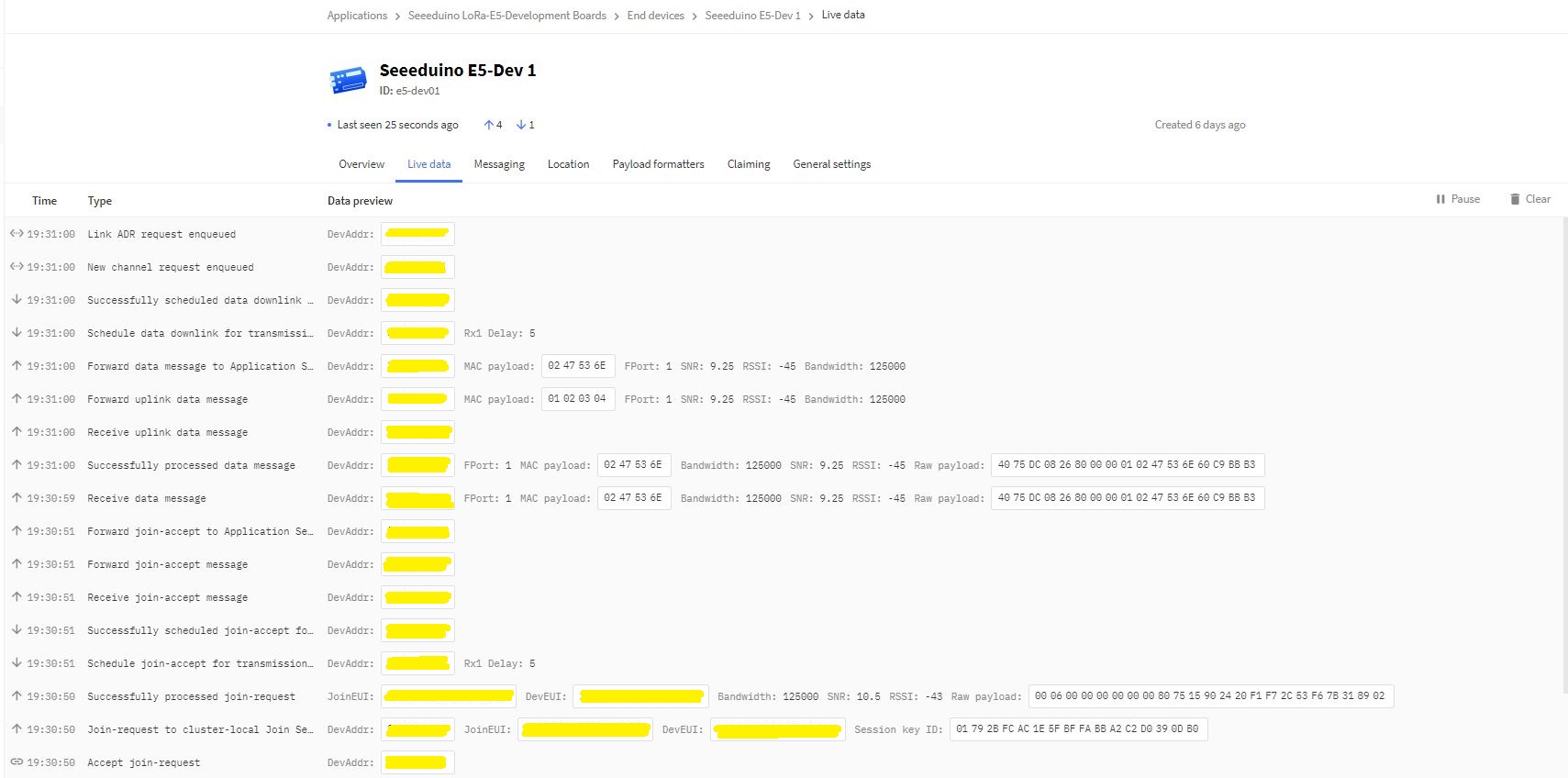
In the Visual Studio 2019 debug output I could see messages getting sent and then after a short delay they were visible in the TTI console.

Seeed E5 LoRaWAN dev Kit connecting in The Things Industries Device Live data tab

I had an issue with how the AppUI parameter was handled

   private const string AppKey = "................................";

   //txByteCount = serialDevice.Write(UTF8Encoding.UTF8.GetBytes($"AT+ID=AppEui,{AppEui}\r\n"));
   //private const string AppEui = "................";

   //txByteCount = serialDevice.Write(UTF8Encoding.UTF8.GetBytes($"AT+ID=AppEui,\"{AppEui}\"\r\n"));
   private const string AppEui = ".. .. .. .. .. .. .. ..";


It appears that If the appkey (or other string parameter) has spaces it has to be enclosed in quotations.

TinyCLR OS V2 Seeed LoRa-E5 LoRaWAN library Part1

Basic connectivity

Today I have been working on a GHI Electronics TinyCLR V2  C# library for the Seeedstudio LoRa-E5 module using my Seeedstudio LoRa-E5 Development Kit.

My initial test rig is based on an Fezduino board with a Grove Base Shield V2.0 connected to
LoRa-E5 Development Kit by a Grove – Universal 4 Pin 20cm Unbuckled Cable(TX/RX reversed)

Fezduino Seeed LoRaE5 test rig

The code has compile time options for synchronous and asynchronous operation.

public class Program
{
   private static UartController serialDevice;
   private const string ATCommand = "at+ver\r\n";
#if TINYCLR_V2_FEZDUINO
   private static readonly string SerialPortId = SC20100.UartPort.Uart5;
#endif
#if TINYCLR_V2_SC20100DEV_MIKROBUS_1
   private const string SerialPortId = SC20100.UartPort.Usart2;
#endif
#if TINYCLR_V2_SC20100DEV_MIKROBUS_2
   private const string SerialPortId = SC20100.UartPort.Uart3;
#endif

   public static void Main()
   {
      Debug.WriteLine("devMobile.IoT.SeeedE5.ShieldSerial starting");

      try
      {
         serialDevice = UartController.FromName(SerialPortId);

         serialDevice.SetActiveSettings(new UartSetting()
         {
            BaudRate = 9600,
            Parity = UartParity.None,
            StopBits = UartStopBitCount.One,
            Handshaking = UartHandshake.None,
            DataBits = 8
         });

         serialDevice.Enable();

#if SERIAL_ASYNC_READ
         serialDevice.DataReceived += SerialDevice_DataReceived;
#endif

         while (true)
         {
            byte[] txBuffer = UTF8Encoding.UTF8.GetBytes(ATCommand);

            int txByteCount = serialDevice.Write(txBuffer);
            Debug.WriteLine($"TX: {txByteCount} bytes");

#if SERIAL_SYNC_READ
            while( serialDevice.BytesToWrite>0)
            {
               Debug.WriteLine($" BytesToWrite {serialDevice.BytesToWrite}");
               Thread.Sleep(100);
            }

            int rxByteCount = serialDevice.BytesToRead;
            if (rxByteCount>0)
            {
               byte[] rxBuffer = new byte[rxByteCount];

               serialDevice.Read(rxBuffer);

               Debug.WriteLine($"RX sync:{rxByteCount} bytes read");
               String response = UTF8Encoding.UTF8.GetString(rxBuffer);
               Debug.WriteLine($"RX sync:{response}");
            }
#endif

            Thread.Sleep(20000);
         }
      }
      catch (Exception ex)
      {
         Debug.WriteLine(ex.Message);
      }
   }

#if SERIAL_ASYNC_READ
   private static void SerialDevice_DataReceived(UartController sender, DataReceivedEventArgs e)
   {
      byte[] rxBuffer = new byte[e.Count];

      sender.Read(rxBuffer, 0, e.Count);

      Debug.WriteLine($"RX Async:{e.Count} bytes read");
      String response = UTF8Encoding.UTF8.GetString(rxBuffer);
      Debug.WriteLine($"RX Async:{response}");
   }
#endif
}

When I first ran the code no data was received so I doubled checked the serial connections and figured out I had to modify the cable and reverse the TX and RX pins.

The thread '<No Name>' (0x2) has exited with code 0 (0x0).
devMobile.IoT.SeeedLoRaE5.ShieldSerial starting
TX: 8 bytes
RX Async:1 bytes read
RX Async:+
RX Async:8 bytes read
RX Async:VER: 4.0
RX Async:5 bytes read
RX Async:.11

TX: 8 bytes
RX Async:1 bytes read
RX Async:+
RX Async:9 bytes read
RX Async:VER: 4.0.
RX Async:4 bytes read
RX Async:11

The Things Network MQTT & Azure IoT Part3B

MQTT Topics and case sensitivity

To send LoRaWAN messages using The Things Network Message Queue Telemetry Transport(MQTT) Data API with JSON payloads there are two topics

  • v3/{application id}@{tenant id}/devices/{device id}/down/push.
  • v3/{application id}@{tenant id}/devices/{device id}/down/replace.

My Azure IoT Hub messages have properties for the LoRaWAN port (required), confirmed (which defaults to false), priority (which defaults to Normal) and queue(which defaults to Replace). The priority and queue enumerations are defined in TTNcommon.cs.

I used the enumeration for message priority in the JSON payload and MQTT downlink message topic.

{
  "downlinks": [{
    "f_port": 15,
    "frm_payload": "vu8=",
    "priority": "NORMAL"
  }]
}
string downlinktopic = $"v3/{ApplicationId}@{TenantId}/devices/{DeviceId}/down/{Enum.GetName(typeof(DownlinkQueue), queue)}".ToLower();

Initially when I published a message it wasn’t sent and there was no error. It was a while before I noticed that the queue setting was being being converted to the text “Push” or “Replace” based on the enumeration value name (The priority value was in the JSON which is case insensitive). I did wonder if the tenantId and ApplicationId were also case sensitive so I ensured consistent capitalisation with ToLower();

floor, ceil, trunc and casting

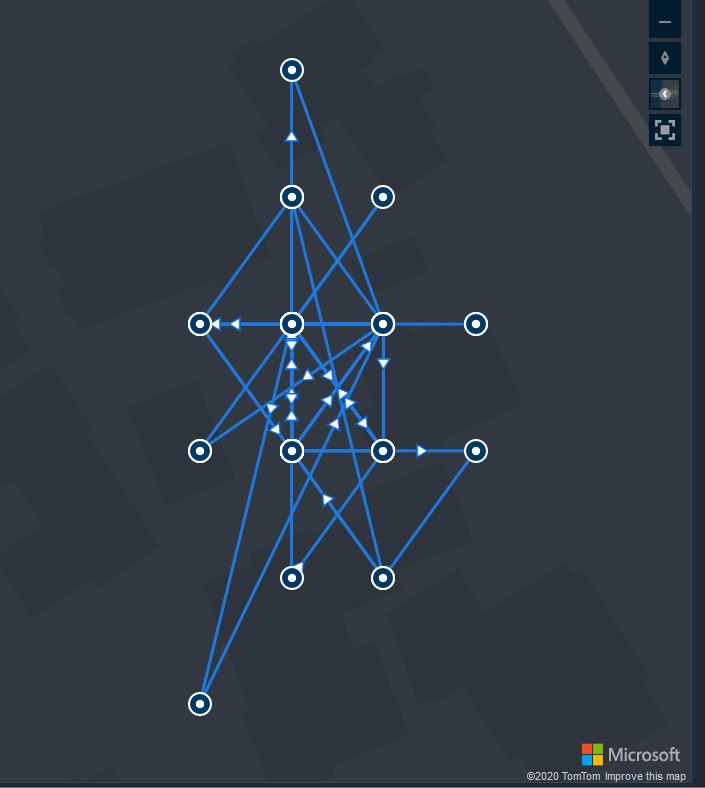
I left a Wisnode Track Lite RAK7200 outside on the deck for a day and the way the positions “snapped” to a grid caught my attention. Based on the size of my property the grid looked to be roughly 10 x 10 meters

The sample Low Power Payload Mbed C code uses a cast which is I think is the same as a floor.


“These functions round x downwards to the nearest integer, returning that value as a double. Thus, floor (1.5) is 1.0 and floor (-1.5) is -2.0.”

In the C code the latitude and longitude values are truncated to four decimal places and the altitude to two decimal places. In my C# code I used Math.Round and I wondered what impact that could have…

public void GpsLocationAdd(byte channel, float latitude, float longitude, float altitude)
{
   IsChannelNumberValid(channel);
   IsBfferSizeSufficient(Enumerations.DataType.Gps);

   if ((latitude < Constants.LatitudeMinimum ) || (latitude > Constants.LatitudeMaximum))
   {
      throw new ArgumentException($"Latitude must be between {Constants.LatitudeMinimum} and {Constants.LatitudeMaximum}", "latitude");
   }

   if ((latitude < Constants.LongitudeMinimum) || (latitude > Constants.LongitudeMaximum))
   {
      throw new ArgumentException($"Longitude must be between {Constants.LongitudeMinimum} and {Constants.LongitudeMaximum}", "latitude");
   }

   if ((altitude < Constants.AltitudeMinimum) || (altitude > Constants.AltitudeMaximum))
   {
      throw new ArgumentException($"Altitude must be between {Constants.AltitudeMinimum} and {Constants.AltitudeMaximum}", "altitude");
   }

   int lat = (int)Math.Round(latitude * 10000.0f);
   int lon = (int)Math.Round(longitude * 10000.0f);
   int alt = (int)Math.Round(altitude * 100.0f);

   buffer[index++] = channel;
   buffer[index++] = (byte)Enumerations.DataType.Gps;

   buffer[index++] = (byte)(lat >> 16);
   buffer[index++] = (byte)(lat >> 8);
   buffer[index++] = (byte)lat;
   buffer[index++] = (byte)(lon >> 16);
   buffer[index++] = (byte)(lon >> 8);
   buffer[index++] = (byte)lon;
   buffer[index++] = (byte)(alt >> 16);
   buffer[index++] = (byte)(alt >> 8);
   buffer[index++] = (byte)alt;
}

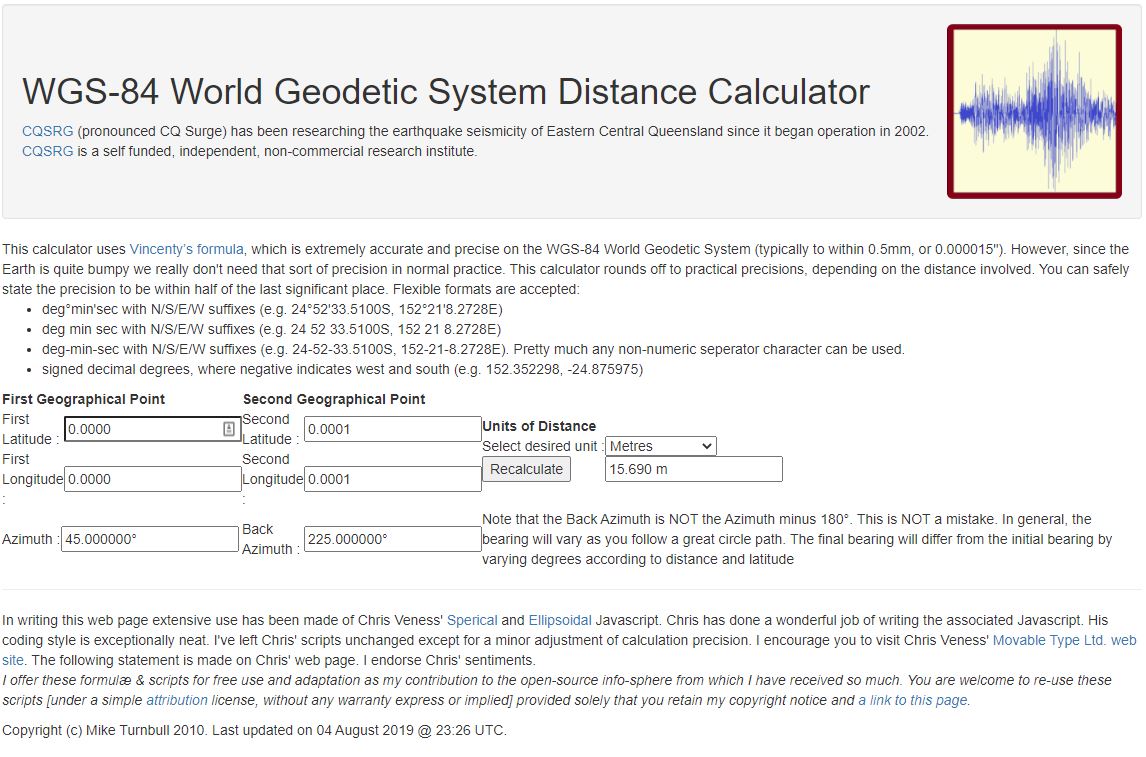
Using the WGS84 World Geodetic System Distance Calculator to calculate the distance where the Greenwich Meridian and the Equator cross off the coast of Ghana the theoretical maximum error is 15.69m.

I live in Christchurch New Zealand and the theoretical maximum distance is 13.6 m. So, in summary the LPP latitude and longitude values are most probably fine for tracking applications.

MATH131 Numerical methods was useful

Back in 1986 in my second first year at the University of Canterbury I did “MATH131 Numerical Methods” which was a year of looking at why mathematics in FORTRAN, C, and Pascal sometimes didn’t return the result you were expecting…

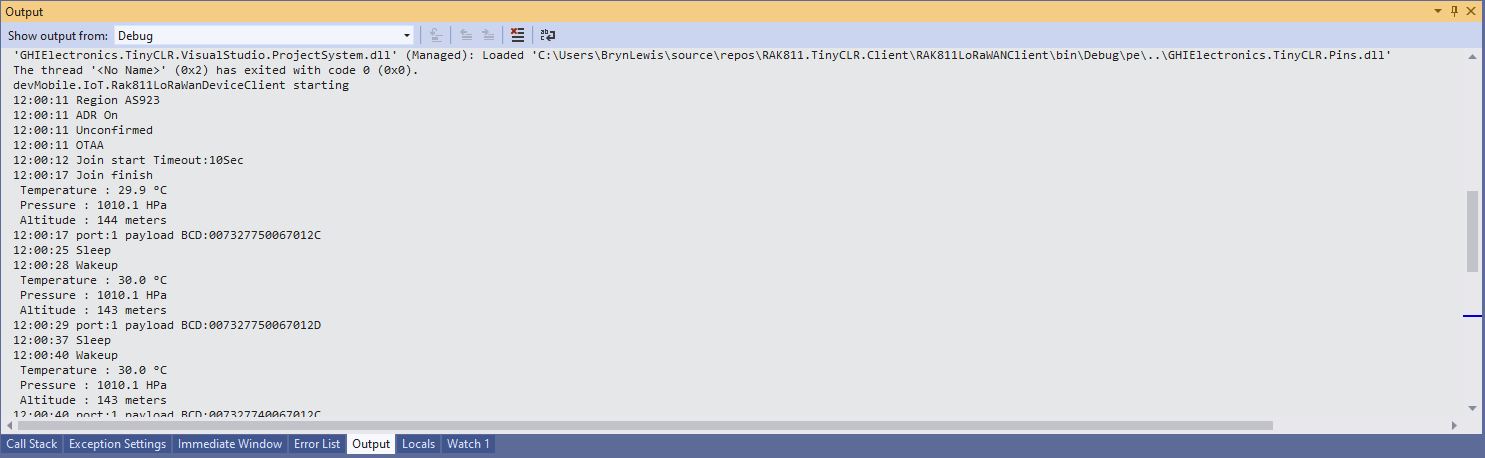
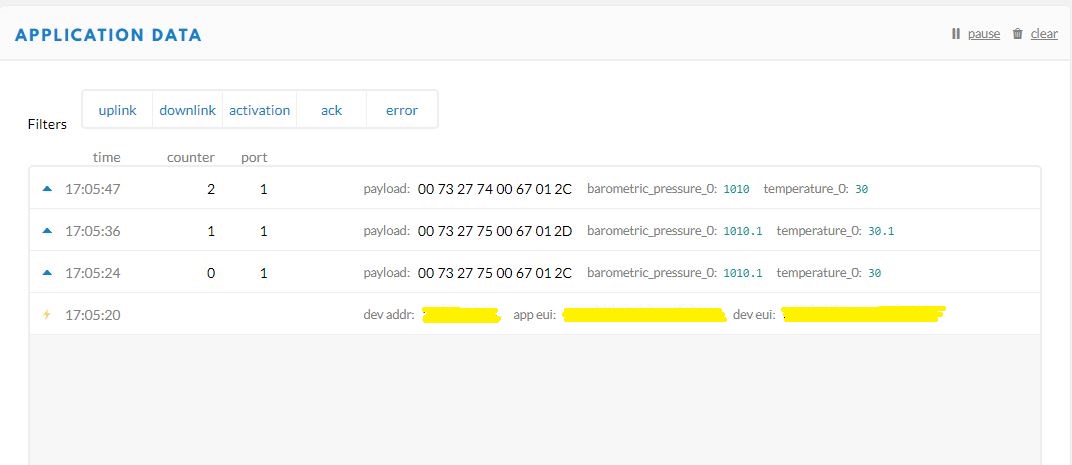
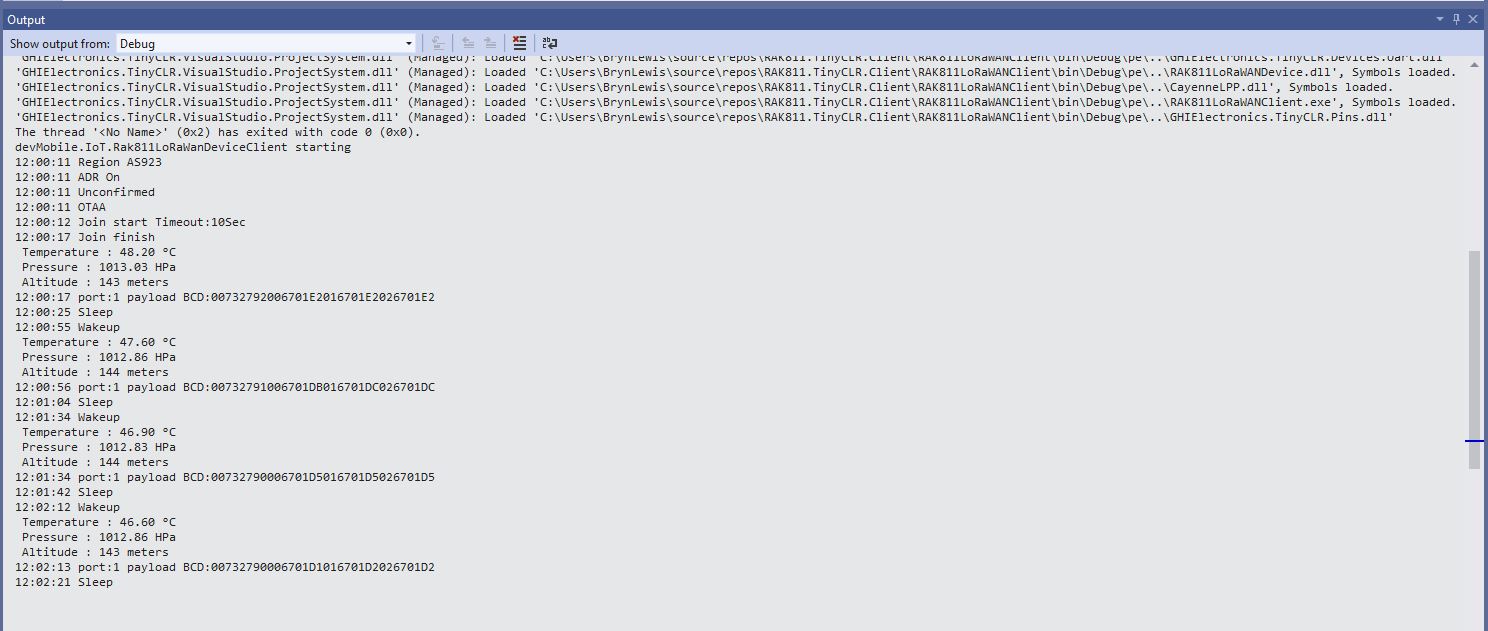
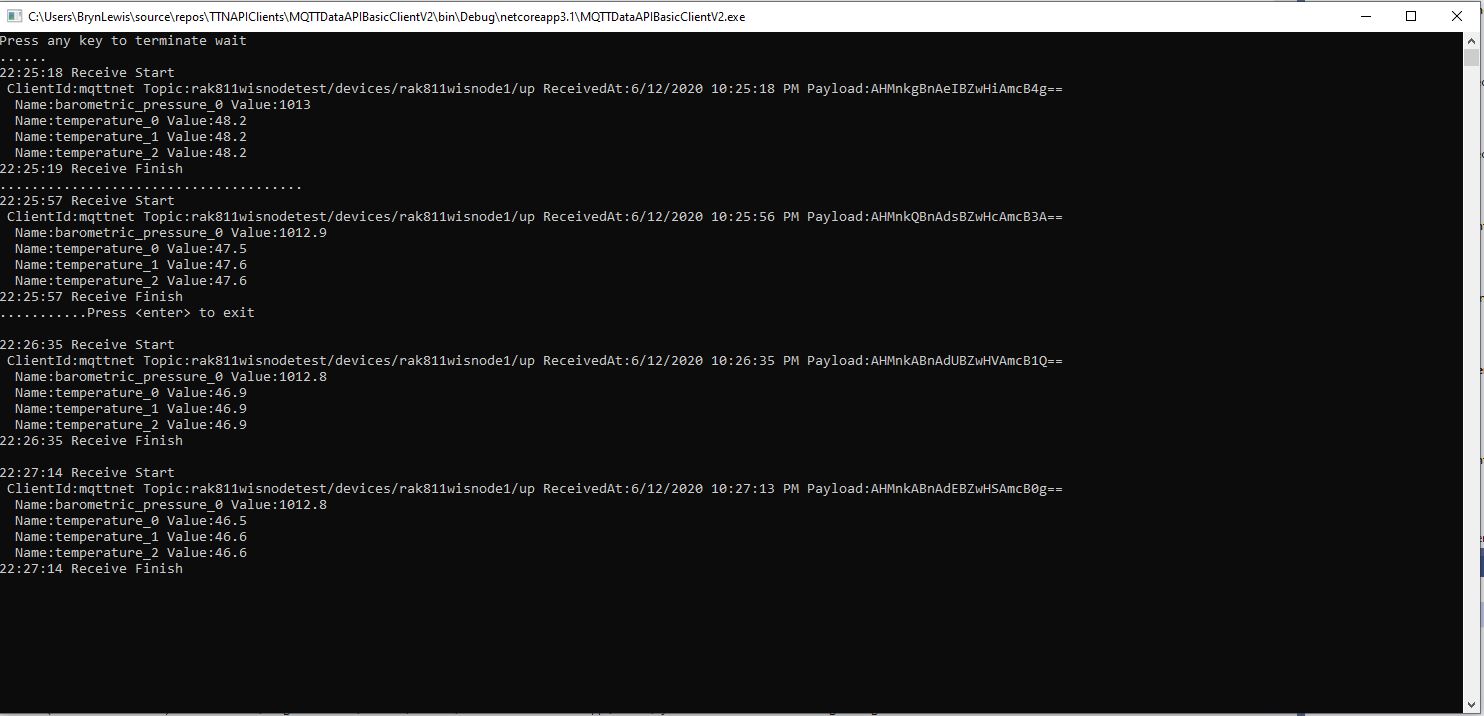
While testing my GHI Electronics TinyCLR2 RAK Wireless RAK811 LoRaWAN client I noticed the temperature numbers didn’t quite match…

Visual Studio 2019 Debug output window
The Things Network Device Application Data tab

I have implemented my own Low Power Payload encoder in C# based on the sample Mbed C code

My translation of that code to C#

public void TemperatureAdd(byte channel, float celsius)
{
   if ((index + TemperatureSize) > buffer.Length)
   {
      throw new ApplicationException("TemperatureAdd insufficent buffer capacity");
   }

   short val = (short)(celsius * 10);

   buffer[index++] = channel;
   buffer[index++] = (byte)DataType.Temperature;
   buffer[index++] = (byte)(val >> 8);
   buffer[index++] = (byte)val;
}

After looking at the code I think the issues was most probably due to the representation of the constant 10(int32), 10.0(double), and 10.0f(single) . To confirm my theory I modified the client to send the temperature with the calculation done with three different constants.

Visual Studio 2019 Debug output window
The Things Network(TTN) Message Queue Telemetry Transport(MQTT) client

After some trial and error I settled on this C# code for my decoder

public void TemperatureAdd(byte channel, float celsius)
{
   if ((index + TemperatureSize) > buffer.Length)
   {
      throw new ApplicationException("TemperatureAdd insufficent buffer capacity");
   }

   short val = (short)(celsius * 10.0f);

   buffer[index++] = channel;
   buffer[index++] = (byte)DataType.Temperature;
   buffer[index++] = (byte)(val >> 8);
   buffer[index++] = (byte)val;
}

I don’t think this is specifically an issue with the TinyCLR V2 just with number type used for the constant.