NLog and Application Insights

Another of my clients has an application which uses NLog and sooner or later they are going to want to move their logging to Azure Application Insights.

The application consists of a number of Azure websites and some embedded clients. The Azure applications log information to the local file system on each box but the number of boxes is growing so finding and tracing issues is becoming painful.

//---------------------------------------------------------------------------------
// Copyright (c) 2018, devMobile Software
//
// Licensed under the Apache License, Version 2.0 (the "License");
// you may not use this file except in compliance with the License.
// You may obtain a copy of the License at
//
//     http://www.apache.org/licenses/LICENSE-2.0
//
// Unless required by applicable law or agreed to in writing, software
// distributed under the License is distributed on an "AS IS" BASIS,
// WITHOUT WARRANTIES OR CONDITIONS OF ANY KIND, either express or implied.
// See the License for the specific language governing permissions and
// limitations under the License.
//---------------------------------------------------------------------------------
using System;
using Microsoft.ApplicationInsights.Extensibility;
using NLog;

namespace devMobile.Azure.ApplicationInsightsNLogClient
{
   class Program
   {
      private static Logger log = LogManager.GetLogger(System.Reflection.MethodBase.GetCurrentMethod().DeclaringType.ToString());

      static void Main(string[] args)
      {
         if (args.Length != 1)
         {
            Console.WriteLine("Command line argument InstrumentationKey missing");
            return;
         }
         TelemetryConfiguration.Active.InstrumentationKey = args[0];

         log.Trace("This is nLog");
         log.Debug("This is a Debug message");
         log.Info("This is a Info message");
         log.Warn("This is a Warning message");
         log.Error("This is an Error message");
         log.Fatal("This is a Fatal message");

         new Microsoft.ApplicationInsights.TelemetryClient().Flush();
      }
   }
}

Sample code ApplicationInsightsNLogClient

Two clients to go, one which uses serilog the other has a DIY system which I’m ignoring as long as possible.

Apache Log4net and Application Insights

One of my clients had built a Fintech application which uses Apache log4net and I have just finished moving the logging to Azure Application Insights.

The application used to run on a couple of dedicated servers but its core processing engine is now run on an Azure Virtual Machine Scale Set(VMSS).

The application used to log information to the local file system on each server but with more machines (upto a dozen) and them being started up and shutdown in response to customer demand this wasn’t a viable approach.

//---------------------------------------------------------------------------------
// Copyright (c) 2018, devMobile Software
//
// Licensed under the Apache License, Version 2.0 (the "License");
// you may not use this file except in compliance with the License.
// You may obtain a copy of the License at
//
//     http://www.apache.org/licenses/LICENSE-2.0
//
// Unless required by applicable law or agreed to in writing, software
// distributed under the License is distributed on an "AS IS" BASIS,
// WITHOUT WARRANTIES OR CONDITIONS OF ANY KIND, either express or implied.
// See the License for the specific language governing permissions and
// limitations under the License.
//---------------------------------------------------------------------------------
using System;
using log4net;
using Microsoft.ApplicationInsights.Extensibility;

namespace devMobile.Azure.ApplicationInsightsLog4NetClient
{
   class Program
   {
      public static ILog log = log4net.LogManager.GetLogger(System.Reflection.MethodBase.GetCurrentMethod().DeclaringType);

      static void Main(string[] args)
      {
         if (args.Length != 1)
         {
            Console.WriteLine("Command line argument InstrumentationKey missing");
            return;
         }
         TelemetryConfiguration.Active.InstrumentationKey = args[0];

         log.Info("This is Log4net");
         log.Debug("This is a Debug message");
         log.Info("This is a Info message");
         log.Warn("This is a Warning message");
         log.Error("This is an Error message");
         log.Fatal("This is a Fatal message");

         new Microsoft.ApplicationInsights.TelemetryClient().Flush();
      }
   }
}

Sample code ApplicationInsightsLog4NetClient

Microsoft Enterprise Library and Application Insights

One of my clients has a largish application (120+ projects) which uses the Microsoft Patterns and Practices Enterprise Library V6 data access, exception handling, logging and transient fault handling blocks.

To get consistent logging across Classic Cloud services, Azure websites and Azure functions etc. we are in the process of moving all our diagnostics to Azure application insights.

My proof of concept uses a community developed Enterprise Library listener and it appears to be working well.

Beware the Visual Studio configuration tool plug-in rewrites and application config file removing the application insights enterprise library trace listener setup.

The code for a smallest example application is below (I pass the instrumentation key as a command line parameter).

//---------------------------------------------------------------------------------
// Copyright (c) 2018, devMobile Software
//
// Licensed under the Apache License, Version 2.0 (the "License");
// you may not use this file except in compliance with the License.
// You may obtain a copy of the License at
//
//     http://www.apache.org/licenses/LICENSE-2.0
//
// Unless required by applicable law or agreed to in writing, software
// distributed under the License is distributed on an "AS IS" BASIS,
// WITHOUT WARRANTIES OR CONDITIONS OF ANY KIND, either express or implied.
// See the License for the specific language governing permissions and
// limitations under the License.
//---------------------------------------------------------------------------------
using System;
using Microsoft.ApplicationInsights.Extensibility;
using Microsoft.Practices.EnterpriseLibrary.Logging;
using Microsoft.Practices.EnterpriseLibrary.ExceptionHandling;
namespace ApplicationInsightsEnterpriseLibraryClient
{
   class Program
   {
      static void Main(string[] args)
      {
         if (args.Length != 1)
         {
            Console.WriteLine("Command line argument InstrumentationKey missing");
            return;
         }
         TelemetryConfiguration.Active.InstrumentationKey = args[0];

         LogWriterFactory logWriterFactory = new LogWriterFactory();
         LogWriter logWriter = logWriterFactory.Create();
         Logger.SetLogWriter(logWriter);

         ExceptionManager exceptionManager = new ExceptionPolicyFactory().CreateManager();
         ExceptionPolicy.SetExceptionManager(exceptionManager);

         logWriter.Write("This is Entlib", "General");

         logWriter.Write("Application startup", "Startup");

         logWriter.Write("General category", "General");
         logWriter.Write(new LogEntry() { Severity = System.Diagnostics.TraceEventType.Error, Categories = { "General" }, Message = "General category more complex overload", Title = "Dumpster fire" });

         try
         {
            throw new ApplicationException("Something bad has happened");
         }
         catch (Exception ex)
         {
            bool rethrow = ExceptionPolicy.HandleException(ex, "ProgramMain");
            if (rethrow)
               throw;
         }

         logWriter.Write("Application shutdown", "Shutdown");

         new Microsoft.ApplicationInsights.TelemetryClient().Flush();
      }
   }
}

Sample project ApplicationInsightsEnterpriseLibraryClient

Thanks to bveerendrakumar for sharing your code

“Don’t forget to flush” Application Insights

Revisited March 2020

An Azure solution I was working on had a .Net console application which ran on a server at the customer’s premises. It was scheduled task that uploaded some files to azure blob storage every 5 minutes.

To help with debugging I added support for Azure application Insights but after monitoring the application for a while I noticed some shutdown events were not getting uploaded.

Initially I was a bit confused because when I ran the application on my desktop it worked fine (It works on my machine). I found this was because when launched from the debugger the application would upload any files it found then wait until I pressed to exit and this was enough time for the shutdown messages to get uploaded.

The code for a smallest example application is below (I pass the instrumentation key as a command line parameter).

//---------------------------------------------------------------------------------
// Copyright (c) 2018, devMobile Software
//
// Licensed under the Apache License, Version 2.0 (the "License");
// you may not use this file except in compliance with the License.
// You may obtain a copy of the License at
//
//     http://www.apache.org/licenses/LICENSE-2.0
//
// Unless required by applicable law or agreed to in writing, software
// distributed under the License is distributed on an "AS IS" BASIS,
// WITHOUT WARRANTIES OR CONDITIONS OF ANY KIND, either express or implied.
// See the License for the specific language governing permissions and
// limitations under the License.
//---------------------------------------------------------------------------------
using System;
using Microsoft.ApplicationInsights;
using Microsoft.ApplicationInsights.Extensibility;

namespace devMobile.Azure.ApplicationInsightsClientConsole
{
   class Program
   {
      static void Main(string[] args)
      {
         if (args.Length != 1)
         {
            Console.WriteLine("Command line argument InstrumentationKey missing");
            return;
         }
         TelemetryConfiguration.Active.InstrumentationKey = args[0];

         TelemetryClient telemetryClient = new TelemetryClient();

         telemetryClient.TrackTrace("This is Application Insights native");

         telemetryClient.TrackTrace("Application startup");

         // application does stuff

         telemetryClient.TrackTrace("Application shutdown");

         telemetryClient.Flush();
      }
   }
}

Sample project AzureApplicationInsightsClientConsole

Azure IoT Hub nRF24L01 Windows 10 IoT Core Field Gateway

This project is now live on Hackster.IO and github.com with sample *duino, Devduino and Netduino clients. While building the AdaFruit.IO field gateway, Azure IOT Hub field gateways and sample clients I changed the structure of the message payload and spent a bit of time removing non-core functionality and code.

The diagnostics logging code was refactored several times and after reading this reference on docs.Microsoft.com I settled on the published approach.

I considered using the built in Universal Windows Platform (UWP) application data class but this would have made configuration in the field hard for most of the targeted users school students & IT departments.

I have the application running at my house and it has proved pretty robust, last week I though it had crashed because the telemetry data stopped for about 20 minutes. I had a look at the Device portal and it was because Windows 10 IoT core had downloaded some updates, applied them and then rebooted automatically (as configured).

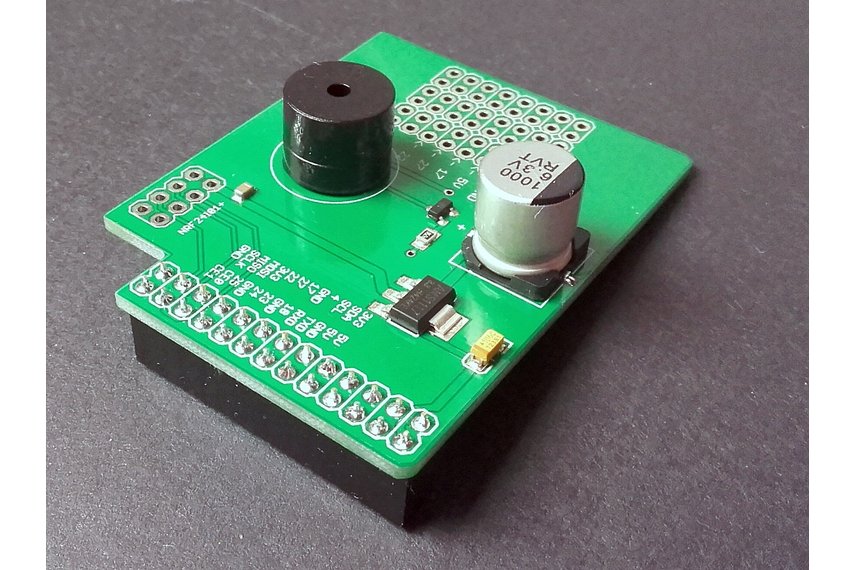
I put a socket on the Raspberry PI nRF24L01 Shield rather than soldering the module to the board so that I could compare the performance of the Low and High power modules. The antenna end of the high power module tends to droop so I put a small piece of plastic foam underneath to prop them up.

I had code to generate an empty JSON configuration but I removed that as it added complexity compared to putting a sample in the github repository.

I considered using a binary format (the nRF24L01 max message length is 32 bytes) but the code required to make it sufficiently flexible rapidly got out of hand and as most of my devices didn’t have a lot of sensors (battery/solar powered *duinos) and it wasn’t a major hassle to send another message so I removed it.

I need to tidy up the project and remove the unused Visual Assets and have a look at the automated update support.

.Net Core & WCF TransportWithMessageCredential

In one of my day jobs I look after a system which has been around since 2010 (Early adopter of Microsoft Azure, developement started on .Net 3.5). The product has a number of Windows Communication Foundation(WCF) services hosted in an Azure CloudService.

A client built with .Net Core wanted to be able to call one of the services which was implemented using wsHttpBinding and TransportWithMessageCredential and this proved a bit more painful than expected…

I first tried the Visual Studio 2017 Microsoft WCF Web Service Reference Provider fromt the WCF Core Team.

The “add connected service” extension dialog allowed me to select an endpoint

ConfigureWCFWebSeriveReference

But the code generation process failed

WCFWebServiceReferenceError.png

The error message wasn’t particularly helpful so I used the command line utility svcutil to generate client classes. Which I used to built a .net core client with and the associated .Net Core WCF NuGet packages.

The console application failed when I called the service with a “PlatformNotSupportedException”. After some searching I found that the .Net Core WCF libraries don’t support TransportWithMessageCredential (September 2017).

Some more searching lead to a StackOverflow article where an answer suggested using the SimpleSOAPClient NuGet package. I then created a new client using the generated classes as the basis for the ones used in my SimpleSOAPClient proof of concept(PoC)

[System.Diagnostics.DebuggerStepThroughAttribute()]
[System.CodeDom.Compiler.GeneratedCodeAttribute("System.ServiceModel", "4.0.0.0")]
[System.ServiceModel.MessageContractAttribute(WrapperName="Redeem", WrapperNamespace="http://qwertyuiop.com/services2011/08", IsWrapped=true)]
public partial class RedeemRequest
{
    [System.ServiceModel.MessageBodyMemberAttribute(Namespace="http://qwertyuiop.com/services2011/08", Order=1)]
    public string voucherCode;

    [System.ServiceModel.MessageBodyMemberAttribute(Namespace="http://qwertyuiop.com/services2011/08", Order=2)]
    public string merchantId;

    [System.ServiceModel.MessageBodyMemberAttribute(Namespace="http://qwertyuiop.com/services2011/08", Order=3)]
    public string merchantReference;

    [System.ServiceModel.MessageBodyMemberAttribute(Namespace="http://qwertyuiop.com/services2011/08", Order=4)]
    public string terminalId;

    public RedeemRequest()
    {
    }

    public RedeemRequest(string voucherCode, string merchantId, string merchantReference, string terminalId)
    {
        this.voucherCode = voucherCode;
        this.merchantId = merchantId;
        this.merchantReference = merchantReference;
        this.terminalId = terminalId;
    }
}

became

[XmlRoot("Redeem", Namespace = "http://qwertyuiop.com/services2011/08")]
public partial class RedeemRequest
{
   [XmlElement("voucherCode")]
   public string voucherCode;
   [XmlElement("transactionAmount")]
   public decimal transactionAmount;
   [XmlElement("merchantId")]
   public string merchantId;
   [XmlElement("merchantReference")]
   public string merchantReference;
   [XmlElement("terminalId")]
   public string terminalId;
}

This client failed with a SOAPAction related exception so I fired up Telerik Fiddler and found that the header was missing. When I manually added the header in the request composer (after dragging one of my failed requests onto the composer tab) it worked.

I had a look at the code in the SimpleSOAPClient repository to see how to add a custom HTTP Header to a request.

RedeemRequest redeemRequest = new RedeemRequest()
{
   merchantId = "......",
   merchantReference = "......",
   terminalId = "......",
   voucherCode = "......",
};

using (var client = SoapClient.Prepare())
{
   client.HttpClient.DefaultRequestHeaders.Add("SOAPAction", "http://qwertyuiop.com/services2011/08/IRedemptionProxyServiceV1/Redeem");
   var responseEnvelope = await client.SendAsync(
      "https://qwertyuiop.com/RedemptionProxy.svc",
      "https://qwertyuiop.com/services2011/08/IRedemptionProxyServiceV1/Redeem",
      SoapEnvelope.Prepare()
      .WithHeaders(KnownHeader.Oasis.Security.UsernameTokenAndPasswordText(".....", "......"))
      .Body(redeemRequest), ct);

      var response = responseEnvelope.Body<RedeemResponse>();

      Console.WriteLine("Redeem Result:{0}  Message:{1}", response.Result, response.messageText);
   }
}

After sorting out a few typos my request worked as expected. Only a couple of hours lost from my life, hopefully this post will help someone else.

nRF24L01 Raspberry PI Gateway Hardware

For those who came to my MS Ignite AU Intelligent Cloud booth session

Building Wireless Field Gateways

Connecting wireless sensor nodes to the cloud is not the mission it used to be, because the Azure team (and many OS projects) have developed tooling which can help hobbyist and professional developers build solutions. How could you build a home scale robust, reliable and secure solution with off the shelf kit without blowing the budget?

Sparkfun nRF24L01 module &Adafruit perma proto hat

NRF24L01 Raspberry PI DIY Gateway Hardware

BoM (all prices as at Feb 2016)

You will also need some short lengths of wire and a soldering iron.

For those who want an “off the shelf” solution (still requires a minor modification for interrupt support) I have used the Raspberry Pi to NRF24l01+ Shield USD9.90

2015-09-25t072754-447z-20150925_091942-855x570_q85_pad_rcrop

Instructions for modifications and software to follow.

Microsoft Sync Framework timezones

Over the last few months I have been working with the Microsoft Sync Framework and the time zone issues have been a problem.

New Zealand has a 12hr standard time or 13 hr daylight savings time offset from Coordinated Universal Time (UTC) and at a glance our customer data could look ok if treated as either local or UTC.

After some experimentation I found that it was due to Windows Communication Foundation(WCF) serialisation issues (The proposed solutions looks like it might have some limitations, especially across daylight savings time transitions).

For the initial synchronisation DateTime values in the database were unchanged, but for any later incremental synchronisations the DateTime values were adjusted to the timezone of the server (Our Azure Cloud Services are UTC timezone, though I don’t understand why Microsoft by default has them set to US locale with MM/DD/YY date formats)

In our scenario having all of the DateTime values in the cloud local looked like a reasonable option and this article provided some useful insights.

In the end I found that setting the DateSetDateTime  for every DateTime column in each DataTable in the synchronisation DataSet to unspecified in the ProcessChangeBatch (our code was based on the samples) method meant that no adjustment was applied to the incremental updates

public override void ProcessChangeBatch(ConflictResolutionPolicy resolutionPolicy, ChangeBatch sourceChanges, object changeDataRetriever, SyncCallbacks syncCallbacks, SyncSessionStatistics sessionStatistics)
{
try
{
DbSyncContext context = changeDataRetriever as DbSyncContext;

if (context != null)
{
foreach (DataTable table in context.DataSet.Tables)
{
foreach (DataColumn column in table.Columns)
{
// Switching from UnspecifiedLocal to Unspecified is allowed even after the DataSet has rows.
if ((column.DataType == typeof(DateTime)) && (column.DateTimeMode == DataSetDateTime.UnspecifiedLocal))
{
column.DateTimeMode = DataSetDateTime.Unspecified;
}
}
}
...

Hope this helps someone else

Enterprise Library V6 Logging with Azure SDK 2.8 and Azure Diagnostics 1.3

In a previous post I wrote about configuring the Enterprise Library V6 to work with Azure Diagnostics. There have been significant changes (detailed in this very helpful post) to the way the Azure Diagnostics infrastructure works for Azure SDK Versions 2.4/2.5. If the diagnostics infrastructure is not properly configured there will be no WADLogs tables created and/or trace information logged.

The following steps provision diagnostics for a Azure web role or worker role. This “cheat sheet” assumes you already have the Azure Service Management Cmdlets installed.

Add-AzureAccount This will prompt for Azure credentials

Get-AzureSubscription –Display details about your subscription(s)

SubscriptionId : 15daec19-f6e9-403c-8652-1234567890123
SubscriptionName : MyCompany
Environment : AzureCloud
DefaultAccount : me@mycompany.co.nz
IsDefault : False
IsCurrent : False
TenantId : e07af3b3-10c2-49a5-97cc-123456789012
CurrentStorageAccountName :
SubscriptionId : eba7ed1c-5503-4349-bcc7-123456789012
SubscriptionName : YourCompany
Environment : AzureCloud
DefaultAccount : you@yourcompany.co.nz
IsDefault : True
IsCurrent : True
TenantId : e07af3b3-10c2-49a5-97cc-1234567890
CurrentStorageAccountName :

If you have more than one Azure subscription you will need to select the one you want to use.

Select-AzureSubscription -Current -SubscriptionName “MyCompany” (beware names are case sensitive)

Get-AzureServiceDisplays a list of your Azure services

ServiceName : myDemoApp
Url : https://management.core.windows.net/eba7ed1c-5503-4349-bcc7-123456789012/services/hostedservices/myDemoApp
Label : myDemoApp
Description :
Location : Australia Southeast
AffinityGroup :
Status : Created
ExtendedProperties : {[ResourceGroup, myDemoApp], [ResourceLocation, Australia Southeast]}
DateModified : 7/01/2016 7:02:44 p.m.
DateCreated : 28/12/2015 6:23:44 p.m.
ReverseDnsFqdn :
WebWorkerRoleSizes : {A5, A6, A7, ExtraLarge, ExtraSmall, Large, Medium, Small, Standard_D1, Standard_D1_v2, Standard_D11, Standard_D11_v2, Standard_D12, Standard_D12_v2, Standard_D13,
Standard_D13_v2, Standard_D14, Standard_D14_v2, Standard_D2, Standard_D2_v2, Standard_D3, Standard_D3_v2, Standard_D4, Standard_D4_v2, Standard_D5_v2}
VirtualMachineRoleSizes : {A5, A6, A7, Basic_A0, Basic_A1, Basic_A2, Basic_A3, Basic_A4, ExtraLarge, ExtraSmall, Large, Medium, Small, Standard_D1, Standard_D1_v2, Standard_D11,
Standard_D11_v2, Standard_D12, Standard_D12_v2, Standard_D13, Standard_D13_v2, Standard_D14, Standard_D14_v2, Standard_D2, Standard_D2_v2, Standard_D3,
Standard_D3_v2, Standard_D4, Standard_D4_v2, Standard_D5_v2}
OperationDescription : Get-AzureService
OperationId : 73d37e69-d3d8-6769-94a2-123456789012
OperationStatus : Succeeded

Get-AzureRole -ServiceName “myDemoApp”

RoleName : WebRole
InstanceCount : 1
DeploymentID : cb4e439907774090be8d123456789012
ServiceName : myDemoApp
OperationDescription : Get-AzureRole
OperationId : 85233c60-f39a-6c01-b51a-123456789012
OperationStatus : Succeeded

RoleName : WorkerRole
InstanceCount : 1
DeploymentID : cb4e439907774090be8d123456789012
ServiceName : myDemoApp
OperationDescription : Get-AzureRole
OperationId : 85233c60-f39a-6c01-b51a-123456789012
OperationStatus : Succeeded

I then modified the role diagnostics config file (diagnostics.wadcfgx) by removing

<DiagnosticsConfiguration xmlns=”http://schemas.microsoft.com/ServiceHosting/2010/10/DiagnosticsConfiguration”&gt;
+
</DiagnosticMonitorConfiguration>

+

<PrivateConfig xmlns=”http://schemas.microsoft.com/ServiceHosting/2010/10/DiagnosticsConfiguration”&gt;
<StorageAccount endpoint=”” />
</PrivateConfig>
<IsEnabled>true</IsEnabled> – Not certain about this

I then uploaded it with the following powershell script
$storage_name = “entlib”
$key = “Storage key goes here==”
$config_path=”C:\..\diagnostics.xml”
$service_name=”myDemoApp”
$storageContext = New-AzureStorageContext -StorageAccountName $storage_name -StorageAccountKey $key
Set-AzureServiceDiagnosticsExtension -StorageContext $storageContext -DiagnosticsConfigurationPath $config_path -ServiceName $service_name -Slot Production -Role WebRole

Repeat for WorkerRole and WebRole

Enterprise Library V6 Data, Exception and Logging with Azure SDK 2.8

I have used the Enterprise library Blocks (which in different forms have been around since 2005) in quite a few projects. Individually the components are pretty good (not always best of breed) but they are well integrated and when used in the way which they were intended to be used work well.

I have just upgraded a client application to Visual Studio 2015 + .Net 4.5 + Enterprise Library V6 and some of the steps were not immediately obvious so hopefully this saves someone else some time. I have sample code for Azure Cloud Service Web and Worker roles.

For both web and worker roles I added the Azure Diagnostics listener to the listener config section of the enterprise library logging settings.

<loggingConfiguration name="" tracingEnabled="true" defaultCategory="General">
	<listeners>
    <add listenerDataType="Microsoft.Practices.EnterpriseLibrary.Logging.Configuration.SystemDiagnosticsTraceListenerData, Microsoft.Practices.EnterpriseLibrary.Logging, Version=6.0.0.0, Culture=neutral, PublicKeyToken=31bf3856ad364e35&amp;amp;quot;
         type="Microsoft.WindowsAzure.Diagnostics.DiagnosticMonitorTraceListener, Microsoft.WindowsAzure.Diagnostics, Version=2.8.0.0, Culture=neutral, PublicKeyToken=31bf3856ad364e35"
         name="AzureDiagnosticTraceListener"/>
   </listeners>
...
</loggingConfiguration>

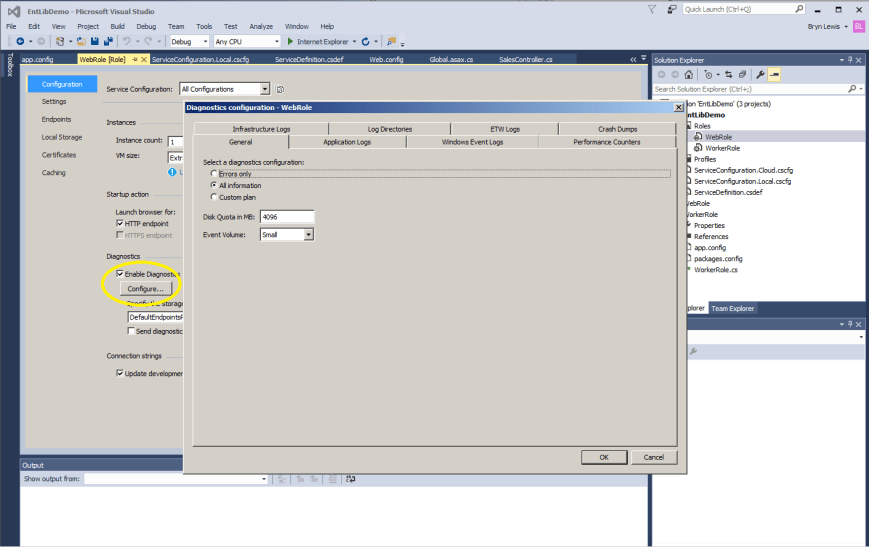
I then enabled diagnostics on the role and configured the transfer of logs.

Azure Diagnostics configuration dialog

Azure Diagnostic Configuration

This replaces the DiagnosticMonitorConfiguration based approach

DiagnosticMonitorConfiguration diagConfig = DiagnosticMonitor.GetDefaultInitialConfiguration();
diagConfig.Logs.ScheduledTransferLogLevelFilter = LogLevel.Verbose;

// Enable scheduled transfer
diagConfig.Directories.ScheduledTransferPeriod = TimeSpan.FromMinutes(1);
diagConfig.Logs.ScheduledTransferPeriod = TimeSpan.FromMinutes(1);

...
DiagnosticMonitor.Start(&amp;amp;quot;Microsoft.WindowsAzure.Plugins.Diagnostics.ConnectionString&amp;amp;quot;, diagConfig);

For the web role I configured the exception and logging blocks in the Global.asax.cs file


protected void Application_Start()
{
   AreaRegistration.RegisterAllAreas();
   GlobalConfiguration.Configure(WebApiConfig.Register);
   FilterConfig.RegisterGlobalFilters(GlobalFilters.Filters);
   RouteConfig.RegisterRoutes(RouteTable.Routes);
   BundleConfig.RegisterBundles(BundleTable.Bundles);

   // Load the Entlib logging block configuration
   LogWriterFactory logWriterFactory = new LogWriterFactory();
   LogWriter logWriter = logWriterFactory.Create();
   Logger.SetLogWriter(logWriter);

   // Load the Entlib Exception block configuration
   ExceptionPolicyFactory policyFactory = new ExceptionPolicyFactory();
   exManager = policyFactory.CreateManager();
}

For the worker role I configured the exception and logging blocks in the worker role startup

public override bool OnStart()
{
   // Set the maximum number of concurrent connections
   ServicePointManager.DefaultConnectionLimit = 12;
   ...
   LogWriterFactory logWriterFactory = new LogWriterFactory();
   LogWriter logWriter = logWriterFactory.Create();
   Logger.SetLogWriter(logWriter);
   ...
   return result;
}

Then in the webrole webapi2 API controllers you can use embedded SQL or call stored procedures with retries. (This sample code uses the Northwind database and default retry configuration)

public IEnumerable&amp;amp;lt;ProductDto&amp;amp;gt; Get()
{
var products = new List&amp;amp;lt;ProductDto&amp;amp;gt;();

WebApiApplication.exManager.Process(() =&amp;amp;gt;
{
Database db = new DatabaseProviderFactory().Create(&amp;amp;quot;NorthwindInstance&amp;amp;quot;);

RetryPolicy retry = new RetryPolicy&amp;amp;lt;SqlDatabaseTransientErrorDetectionStrategy&amp;amp;gt;(RetryStrategy.DefaultExponential);

var productAccessor = db.CreateSqlStringAccessor(
&amp;amp;quot;SELECT [ProductID],[ProductName],[QuantityPerUnit],[UnitPrice],[UnitsInStock],[Discontinued] FROM Products&amp;amp;quot;,
MapBuilder&amp;amp;lt;ProductDto&amp;amp;gt;
.MapAllProperties()
.Map(p =&amp;amp;gt; p.ID).ToColumn(&amp;amp;quot;ProductID&amp;amp;quot;)
.Map(p =&amp;amp;gt; p.Name).ToColumn(&amp;amp;quot;ProductName&amp;amp;quot;)
.Map(p =&amp;amp;gt; p.QuantityPerUnit).ToColumn(&amp;amp;quot;QuantityPerUnit&amp;amp;quot;)
.Map(p =&amp;amp;gt; p.UnitPrice).ToColumn(&amp;amp;quot;UnitPrice&amp;amp;quot;)
.Map(p =&amp;amp;gt; p.UnitsInStock).ToColumn(&amp;amp;quot;UnitsInStock&amp;amp;quot;)
.Map(p =&amp;amp;gt; p.Discontinued).ToColumn(&amp;amp;quot;Discontinued&amp;amp;quot;)
.Build());
products = retry.ExecuteAction(() =&amp;amp;gt;
{
return productAccessor.Execute().ToList();
});

}, &amp;amp;quot;ProductService&amp;amp;quot;);

return products;
}
public ProductDto Get(int id)
{
ProductDto productDto = null;

WebApiApplication.exManager.Process(() =&amp;amp;gt;
{
Database db = new DatabaseProviderFactory().Create(&amp;amp;quot;NorthwindInstance&amp;amp;quot;);

var productAccessor = db.CreateSqlStringAccessor(
&amp;amp;quot;SELECT [ProductID],[ProductName],[QuantityPerUnit],[UnitPrice],[UnitsInStock],[Discontinued] FROM Products WHERE [ProductID]=@ProductID&amp;amp;quot;,
new ProdductGetByProductIdParameterMapper(db),
MapBuilder&amp;amp;amp;lt;ProductDto&amp;amp;amp;gt;
.MapAllProperties()
.Map(p =&amp;amp;gt; p.ID).ToColumn(&amp;amp;quot;ProductID&amp;amp;quot;)
.Map(p =&amp;amp;gt; p.Name).ToColumn(&amp;amp;quot;ProductName&amp;amp;quot;)
.Map(p =&amp;amp;gt; p.QuantityPerUnit).ToColumn(&amp;amp;quot;QuantityPerUnit&amp;amp;quot;)
.Map(p =&amp;amp;gt; p.UnitPrice).ToColumn(&amp;amp;quot;UnitPrice&amp;amp;quot;)
.Map(p =&amp;amp;gt; p.UnitsInStock).ToColumn(&amp;amp;quot;UnitsInStock&amp;amp;quot;)
.Map(p =&amp;amp;gt; p.Discontinued).ToColumn(&amp;amp;quot;Discontinued&amp;amp;quot;)
.Build());

productDto = productAccessor.Execute(id).SingleOrDefault();

}, &amp;amp;quot;ProductService&amp;amp;quot;);

return productDto;
}