Random wanderings through Microsoft Azure esp. PaaS plumbing, the IoT bits, AI on Micro controllers, AI on Edge Devices, .NET nanoFramework, .NET Core on *nix and ML.NET+ONNX
While debugging my AzureIoTSmartEdgeCamera application I kept on getting file locked errors when the image from the security camera downloading which was a bit odd. So, I went back to basics and started with only the compiler directives required to build a “minimalist” version of the application.
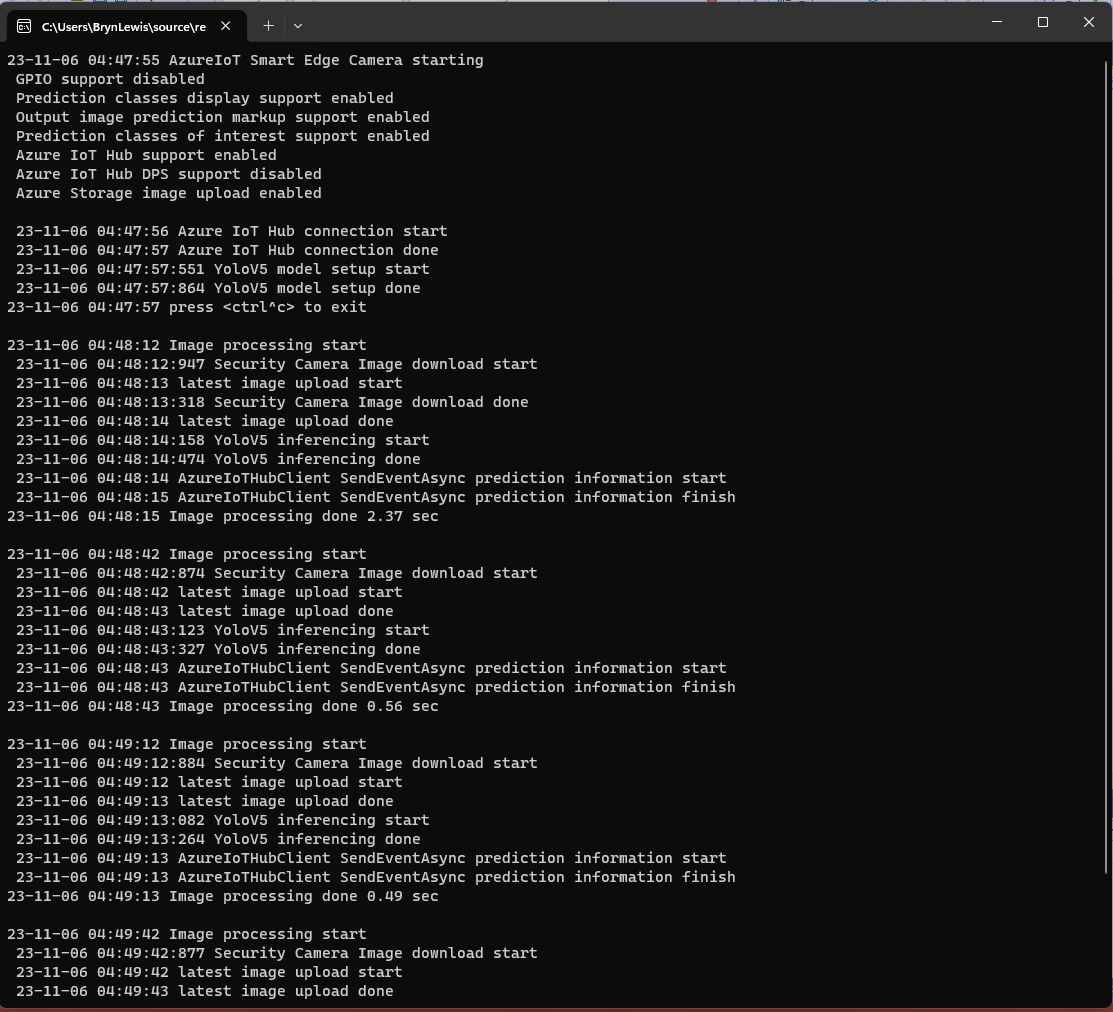
Console output of minimalist application
If I had been paying attention, I would have noticed the issue here. I had missed that in the first block of System.Console.Writelines that the image download finished after the YoloV5 inferencing started.
#if CAMERA_SECURITY
private void SecurityCameraImageCapture()
{
	_logger.LogTrace("Security Camera Image download start");

	NetworkCredential networkCredential = new NetworkCredential()
	{
		UserName = _securityCameraSettings.CameraUserName,
		Password = _securityCameraSettings.CameraUserPassword,
	};

	using (WebClient client = new WebClient())
	{
		client.Credentials = networkCredential;

		client.DownloadFile(_securityCameraSettings.CameraUrl, _applicationSettings.ImageCameraFilepath);
	}

	_logger.LogTrace("Security Camera Image download done");
}
#endif
#if CAMERA_SECURITY
      private async Task SecurityCameraImageCapture()
      {
         _logger.LogTrace("Security Camera Image download start");

         using (Stream cameraStream = await _httpClient.GetStreamAsync(_securityCameraSettings.CameraUrl))
         using (Stream fileStream = File.Create(_applicationSettings.ImageCameraFilepath))
         {
            await cameraStream.CopyToAsync(fileStream);
         }

         _logger.LogTrace("Security Camera Image download done");
      }
#endif
If I had been paying attention, I would have also noticed the issue here..
Console output of maximalist application
When I changed the compiler definitions to turn on pretty much every feature the issue became really really obvious because the “Security Camera Image download done” message wasn’t displayed.
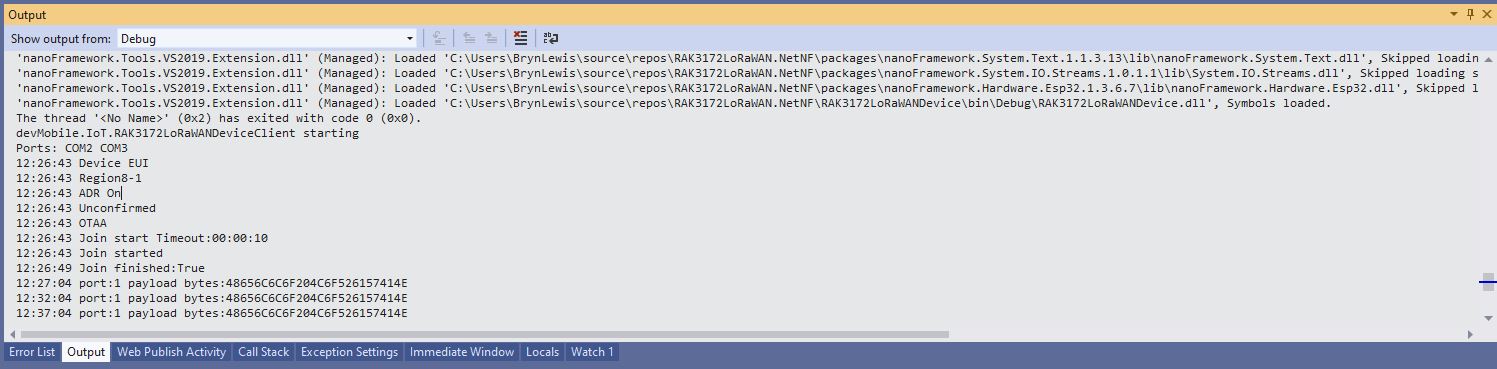
Visual Studio Debug output for RAK3172LoRaWANDeviceClient minimal configuration
public static void Main()
{
	Result result;

	Debug.WriteLine("devMobile.IoT.RAK3172LoRaWANDeviceClient starting");

	try
	{
		// set GPIO functions for COM2 (this is UART1 on ESP32)
#if ESP32_WROOM
		Configuration.SetPinFunction(Gpio.IO17, DeviceFunction.COM2_TX);
		Configuration.SetPinFunction(Gpio.IO16, DeviceFunction.COM2_RX);
#endif

		Debug.Write("Ports:");
		foreach (string port in SerialPort.GetPortNames())
		{
			Debug.Write($" {port}");
		}
		Debug.WriteLine("");

		using (Rak3172LoRaWanDevice device = new Rak3172LoRaWanDevice())
		{
			result = device.Initialise(SerialPortId, 115200, Parity.None, 8, StopBits.One);
			if (result != Result.Success)
			{
				Debug.WriteLine($"Initialise failed {result}");
				return;
			}

			MessageSendTimer = new Timer(SendMessageTimerCallback, device, Timeout.Infinite, Timeout.Infinite);

			device.OnJoinCompletion += OnJoinCompletionHandler;
			device.OnReceiveMessage += OnReceiveMessageHandler;
#if CONFIRMED
			device.OnMessageConfirmation += OnMessageConfirmationHandler;
#endif

#if FACTORY_RESET
			Debug.WriteLine($"{DateTime.UtcNow:hh:mm:ss} FactoryReset");
			result = device.FactoryReset();
			if (result != Result.Success)
			{
				Debug.WriteLine($"FactoryReset failed {result}");
				return;
			}
#endif

#if DEVICE_DEVEUI_SET
			Debug.WriteLine($"{DateTime.UtcNow:hh:mm:ss} Device EUI");
			result = device.DeviceEui(Config.devEui);
			if (result != Result.Success)
			{
				Debug.WriteLine($"DeviceEUI set failed {result}");
				return;
			}
#endif

#if REGION_SET
			Debug.WriteLine($"{DateTime.UtcNow:hh:mm:ss} Region{Band}");
			result = device.Band(Band);
			if (result != Result.Success)
			{
				Debug.WriteLine($"Band on failed {result}");
				return;
			}
#endif

#if ADR_SET
			Debug.WriteLine($"{DateTime.UtcNow:hh:mm:ss} ADR On");
			result = device.AdrOn();
			if (result != Result.Success)
			{
				Debug.WriteLine($"ADR on failed {result}");
				return;
			}
#endif
#if CONFIRMED
			Debug.WriteLine($"{DateTime.UtcNow:hh:mm:ss} Confirmed");
			result = device.UplinkMessageConfirmationOn();
			if (result != Result.Success)
			{
				Debug.WriteLine($"Confirm on failed {result}");
				return;
			}
#endif
#if UNCONFIRMED
			Debug.WriteLine($"{DateTime.UtcNow:hh:mm:ss} Unconfirmed");
			result = device.UplinkMessageConfirmationOff();
			if (result != Result.Success)
			{
				Debug.WriteLine($"Confirm off failed {result}");
				return;
			}
#endif

#if OTAA
			Debug.WriteLine($"{DateTime.UtcNow:hh:mm:ss} OTAA");
			result = device.OtaaInitialise(Config.JoinEui, Config.AppKey);
			if (result != Result.Success)
			{
				Debug.WriteLine($"OTAA Initialise failed {result}");
				return;
			}
#endif

#if ABP
			Debug.WriteLine($"{DateTime.UtcNow:hh:mm:ss} ABP");
			result = device.AbpInitialise(Config.DevAddress, Config.NwksKey, Config.AppsKey);
			if (result != Result.Success)
			{
				Debug.WriteLine($"ABP Initialise failed {result}");
				return;
			}
#endif

			Debug.WriteLine($"{DateTime.UtcNow:hh:mm:ss} Join start Timeout:{JoinTimeOut:hh:mm:ss}");
			result = device.Join(JoinTimeOut);
			if (result != Result.Success)
			{
				Debug.WriteLine($"Join failed {result}");
				return;
			}
			Debug.WriteLine($"{DateTime.UtcNow:hh:mm:ss} Join started");

			Thread.Sleep(Timeout.Infinite);
		}
	}
	catch (Exception ex)
	{
		Debug.WriteLine(ex.Message);
	}
}
One of the major differences between the RAK4200 and RAK3127 libraries is the way a LoRaWAN network join is handled. The RAK4200 library Join method blocks until it succeeds of fails, the RAK3172 library Join method returns immediately then an EventHandler is called with the result.
[HttpGet("IEnumerableSmall")]
public async Task<ActionResult<IEnumerable<Model.StockItemListDtoV1>>> GetIEnumerableSmall([FromQuery] bool buffered = false)
{
	IEnumerable<Model.StockItemListDtoV1> response = null;

	using (SqlConnection db = new SqlConnection(this.connectionString))
	{
		logger.LogInformation("IEnumerableSmall start Buffered:{buffered}", buffered);

		response = await db.QueryWithRetryAsync<Model.StockItemListDtoV1>(
			sql: @"SELECT [SI1].[StockItemID] as ""ID"", [SI1].[StockItemName] as ""Name"", [SI1].[RecommendedRetailPrice], [SI1].[TaxRate]" +
				   "FROM [Warehouse].[StockItems] as SI1",
			buffered,
			commandType: CommandType.Text);

		logger.LogInformation("IEnumerableSmall done");
	}

	return this.Ok(response);
}
The easiest way to increase the size of the returned record was with CROSS JOIN(s). This is the first (and most probably the last time) I have used a cross join in a “real” application.
[HttpGet("IEnumerableMedium")]
public async Task<ActionResult<IEnumerable<Model.StockItemListDtoV1>>> GetIEnumerableMedium([FromQuery] bool buffered = false)
{
	IEnumerable<Model.StockItemListDtoV1> response = null;

	using (SqlConnection db = new SqlConnection(this.connectionString))
	{
		logger.LogInformation("IEnumerableMedium start Buffered:{buffered}", buffered);

		response = await db.QueryWithRetryAsync<Model.StockItemListDtoV1>(
					sql: @" SELECT [SI2].[StockItemID] as ""ID"", [SI2].[StockItemName] as ""Name"", [SI2].[RecommendedRetailPrice], [SI2].[TaxRate]" +
									"FROM [Warehouse].[StockItems] as SI1" +
									"CROSS JOIN[Warehouse].[StockItems] as SI2",
					buffered,
					commandType: CommandType.Text);

		logger.LogInformation("IEnumerableMedium done");
	}

	return this.Ok(response);
}
The medium controller returns 51,529 (227 x 227) rows and the large controller upto 11,697,083 (227 x 227 x 227) rows.
[HttpGet("IEnumerableLarge")]
public async Task<ActionResult<IEnumerable<Model.StockItemListDtoV1>>> GetIEnumerableLarge()
{
	IEnumerable<Model.StockItemListDtoV1> response = null;

	using (SqlConnection db = new SqlConnection(this.connectionString))
	{
		logger.LogInformation("IEnumerableLarge start");

		response = await db.QueryWithRetryAsync<Model.StockItemListDtoV1>(
				sql: $@"SELECT [SI3].[StockItemID] as ""ID"", [SI3].[StockItemName] as ""Name"", [SI3].[RecommendedRetailPrice], [SI3].[TaxRate]" +
						"FROM [Warehouse].[StockItems] as SI1" +
						"   CROSS JOIN[Warehouse].[StockItems] as SI2" +
						"	CROSS JOIN[Warehouse].[StockItems] as SI3",
				commandType: CommandType.Text);

		logger.LogInformation("IEnumerableLarge done");
	}

	return this.Ok(response);
}
if (command.Buffered)
{
   var buffer = new List<T>();
   var convertToType = Nullable.GetUnderlyingType(effectiveType) ?? effectiveType;
   while (await reader.ReadAsync(cancel).ConfigureAwait(false))
   {
      object val = func(reader);
      buffer.Add(GetValue<T>(reader, effectiveType, val));
   }
   while (await reader.NextResultAsync(cancel).ConfigureAwait(false))
   { /* ignore subsequent result sets */ }
   command.OnCompleted();
   return buffer;
}
else
{
   // can't use ReadAsync / cancellation; but this will have to do
   wasClosed = false; // don't close if handing back an open reader; rely on the command-behavior
   var deferred = ExecuteReaderSync<T>(reader, func, command.Parameters);
   reader = null; // to prevent it being disposed before the caller gets to see it
   return deferred;
 }
IEnumberableLarge method (buffered=false) response sizes and timings
IEnumberableLarge method (buffered=true) response sizes and timings
The unbuffered buffered version was slower Time To Last Byte(TTLB) and failed earlier which I was expecting.
[HttpGet("IAsyncEnumerableLarge")]
public async Task<ActionResult<IAsyncEnumerable<Model.StockItemListDtoV1>>> GetAsyncEnumerableLarge([FromQuery] bool buffered = false, [FromQuery]int recordCount = 10)
{
    IEnumerable<Model.StockItemListDtoV1> response = null;

    using (SqlConnection db = new SqlConnection(this.connectionString))
    {
        logger.LogInformation("IAsyncEnumerableLarge start RecordCount:{recordCount} Buffered:{buffered}", recordCount, buffered);

        response = await db.QueryWithRetryAsync<Model.StockItemListDtoV1>(
            sql: $@"SELECT TOP({recordCount}) [SI3].[StockItemID] as ""ID"", [SI3].[StockItemName] as ""Name"", [SI3].[RecommendedRetailPrice], [SI3].[TaxRate]" +
                    "FROM [Warehouse].[StockItems] as SI1" +
                    "   CROSS JOIN[Warehouse].[StockItems] as SI2" +
                    "   CROSS JOIN[Warehouse].[StockItems] as SI3",
        buffered,
        commandType: CommandType.Text);

        logger.LogInformation("IAsyncEnumerableLarge done");
    }

    return this.Ok(response);
}
IAsyncEnumberableLarge method response sizes and timings
[HttpGet("IAsyncEnumerableLargeYield")]
public async IAsyncEnumerable<Model.StockItemListDtoV1> GetAsyncEnumerableLargeYield([FromQuery] int recordCount = 10)
{
	int rowCount = 0;

	using (SqlConnection db = new SqlConnection(this.connectionString))
	{
		logger.LogInformation("IAsyncEnumerableLargeYield start RecordCount:{recordCount}", recordCount);

		CommandDefinition commandDefinition = new CommandDefinition(
			$@"SELECT TOP({recordCount}) [SI3].[StockItemID] as ""ID"", [SI3].[StockItemName] as ""Name"", [SI3].[RecommendedRetailPrice], [SI3].[TaxRate]" +
						"FROM [Warehouse].[StockItems] as SI1" +
						"   CROSS JOIN[Warehouse].[StockItems] as SI2" +
						"	CROSS JOIN[Warehouse].[StockItems] as SI3",
			//commandTimeout:
			CommandType.Text,
			//flags: CommandFlags.Pipelined
		);

		using var reader = await db.ExecuteReaderWithRetryAsync(commandDefinition);

		var rowParser = reader.GetRowParser<Model.StockItemListDtoV1>();

		while (await reader.ReadAsync())
		{
			rowCount++;

			if ((rowCount % 10000) == 0)
			{
				logger.LogInformation("Row count:{0}", rowCount);
			}

			yield return rowParser(reader);
		}
		logger.LogInformation("IAsyncEnumerableLargeYield done");
	}
}
When this post was written (August 2022) Dapper IAsyncEnumerable understanding was limited so I trialed the approach suggested in the StackOverflow post.
IAsyncEnumberableLargeYield method response sizes and timings
The IAsyncEnumerableLargeYield was faster to start responding, the overall duration was less and returned significantly more records 7000000 vs. 13000000. I assume this was because the response was streamed so there wasn’t a timeout.
Azure Application Insights displaying the IAsyncEnumerable with yield method executing
The results of my tests should be treated as “indicative” rather than “definitive”. In a future post I compare the scalability of different approaches. The number of records returned by the IAsyncEnumerableLargeYield not realistic and in a “real-world” scenario paging or an alternate approach should be used.
I modified the NetworkJoinOTAA sample(based on the asynchronous version of BreakOutSerial) to send the required sequence of AT commands and displays the responses.
namespace devMobile.IoT.LoRaWAN.nanoFramework.RAK3172
{
	using System;
	using System.Diagnostics;
	using System.IO.Ports;
	using System.Threading;
#if ESP32_WROOM
	using global::nanoFramework.Hardware.Esp32; //need NuGet nanoFramework.Hardware.Esp32
#endif

	public class Program
	{
#if ESP32_WROOM
		private const string SerialPortId = "COM2";
#endif
#if ST_STM32F769I_DISCOVERY
		private const string SerialPortId = "COM6";
#endif
		private const string DevEui = "...";
		private const string DevAddress = "...";
		private const string NwksKey = "...";
		private const string AppsKey = "...";
		private const byte MessagePort = 1;
		private const string Payload = "A0EEE456D02AFF4AB8BAFD58101D2A2A"; // Hello LoRaWAN

		public static void Main()
		{
			Debug.WriteLine("devMobile.IoT.LoRaWAN.nanoFramework.RAK3172.NetworkJoinABP starting");

			try
			{
				// set GPIO functions for COM2 (this is UART1 on ESP32)
#if ESP32_WROOM
				Configuration.SetPinFunction(Gpio.IO17, DeviceFunction.COM2_TX);
				Configuration.SetPinFunction(Gpio.IO16, DeviceFunction.COM2_RX);
#endif

				Debug.Write("Ports:");
				foreach (string port in SerialPort.GetPortNames())
				{
					Debug.Write($" {port}");
				}
				Debug.WriteLine("");

				using (SerialPort serialPort = new SerialPort(SerialPortId))
				{
					// set parameters
					serialPort.BaudRate = 115200;
					serialPort.Parity = Parity.None;
					serialPort.DataBits = 8;
					serialPort.StopBits = StopBits.One;
					serialPort.Handshake = Handshake.None;
					serialPort.NewLine = "\r\n";
					serialPort.ReadTimeout = 1000;

					serialPort.DataReceived += SerialDevice_DataReceived;

					serialPort.Open();

					serialPort.WatchChar = '\n';

					serialPort.ReadExisting(); // Running at 115K2 this was necessary

					// Set the Device EUI
					Console.WriteLine("Set Device EUI");
					serialPort.WriteLine($"AT+DEVEUI={DevEui}");

					// Set the Working mode to LoRaWAN
					Console.WriteLine("Set Work mode");
					serialPort.WriteLine("AT+NWM=1");

					// Set the Region to AS923
					Console.WriteLine("Set Region");
					serialPort.WriteLine("AT+BAND=8");

					// Set the JoinMode
					Console.WriteLine("Set Join mode");
					serialPort.WriteLine("AT+NJM=0");

					// Set the DevAddress
					Console.WriteLine("Set Device Address");
					serialPort.WriteLine($"AT+DEVADDR={DevAddress}");

					// Set the Network Session Key
					Console.WriteLine("Set NwksKey");
					serialPort.WriteLine($"AT+NWKSKEY={NwksKey}");

					// Set the Application Session Key
					Console.WriteLine("Set AppsKey");
					serialPort.WriteLine($"AT+APPSKEY={AppsKey}");

					// Set the Confirm flag
					Console.WriteLine("Set Confirm off");
					serialPort.WriteLine("AT+CFM=0");

					// Join the network
					Console.WriteLine("Start Join");
					serialPort.WriteLine("AT+JOIN=1:0:10:2");

					// Wait for the +EVT:JOINED

					while (true)
					{
						Console.WriteLine("Sending");
						serialPort.WriteLine($"AT+SEND={MessagePort}:{Payload}");

						Thread.Sleep(300000);
					}
				}
			}
			catch (Exception ex)
			{
				Debug.WriteLine(ex.Message);
			}
		}

		private static void SerialDevice_DataReceived(object sender, SerialDataReceivedEventArgs e)
		{
			SerialPort serialPort = (SerialPort)sender;

			switch (e.EventType)
			{
				case SerialData.Chars:
					break;

				case SerialData.WatchChar:
					string response = serialPort.ReadExisting();
					Debug.Write(response);
					break;
				default:
					Debug.Assert(false, $"e.EventType {e.EventType} unknown");
					break;
			}
		}
	}
}
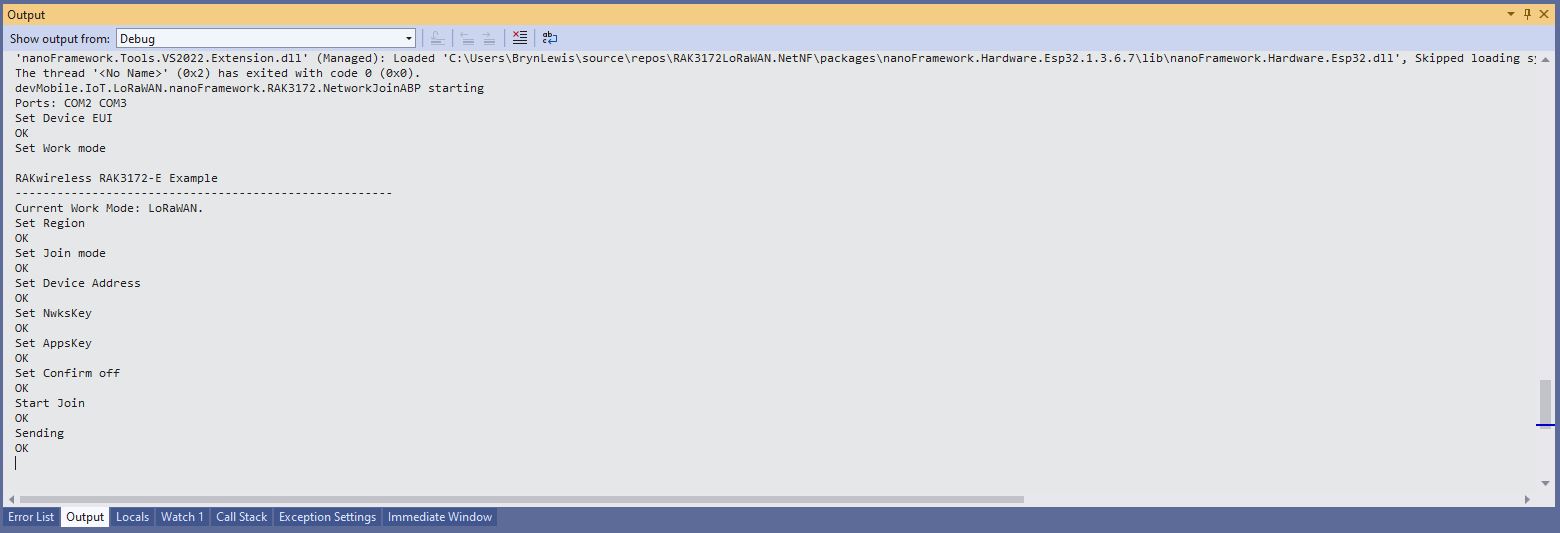
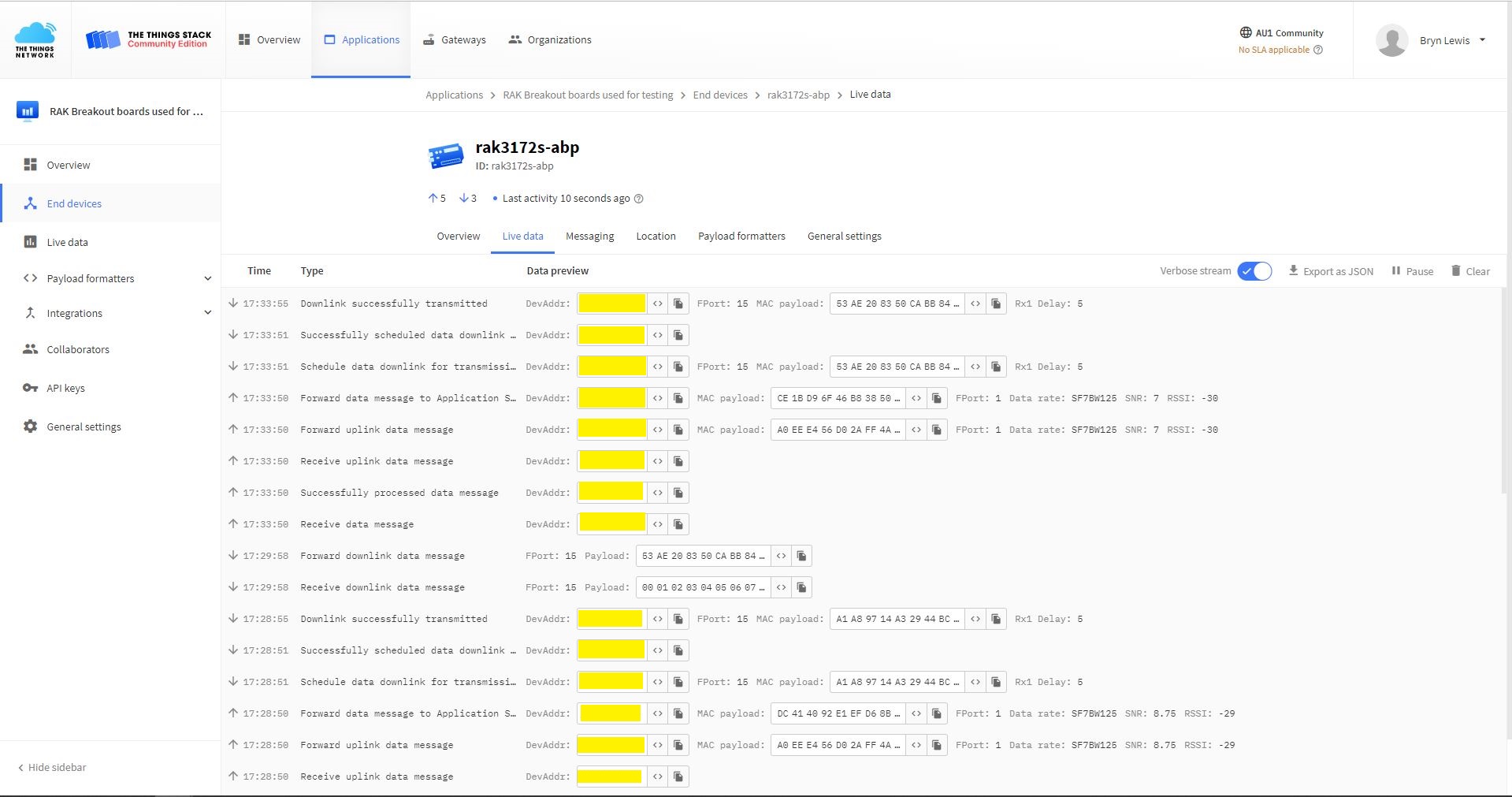
The NetworkJoinABP application assumes that all of the AT commands succeed.
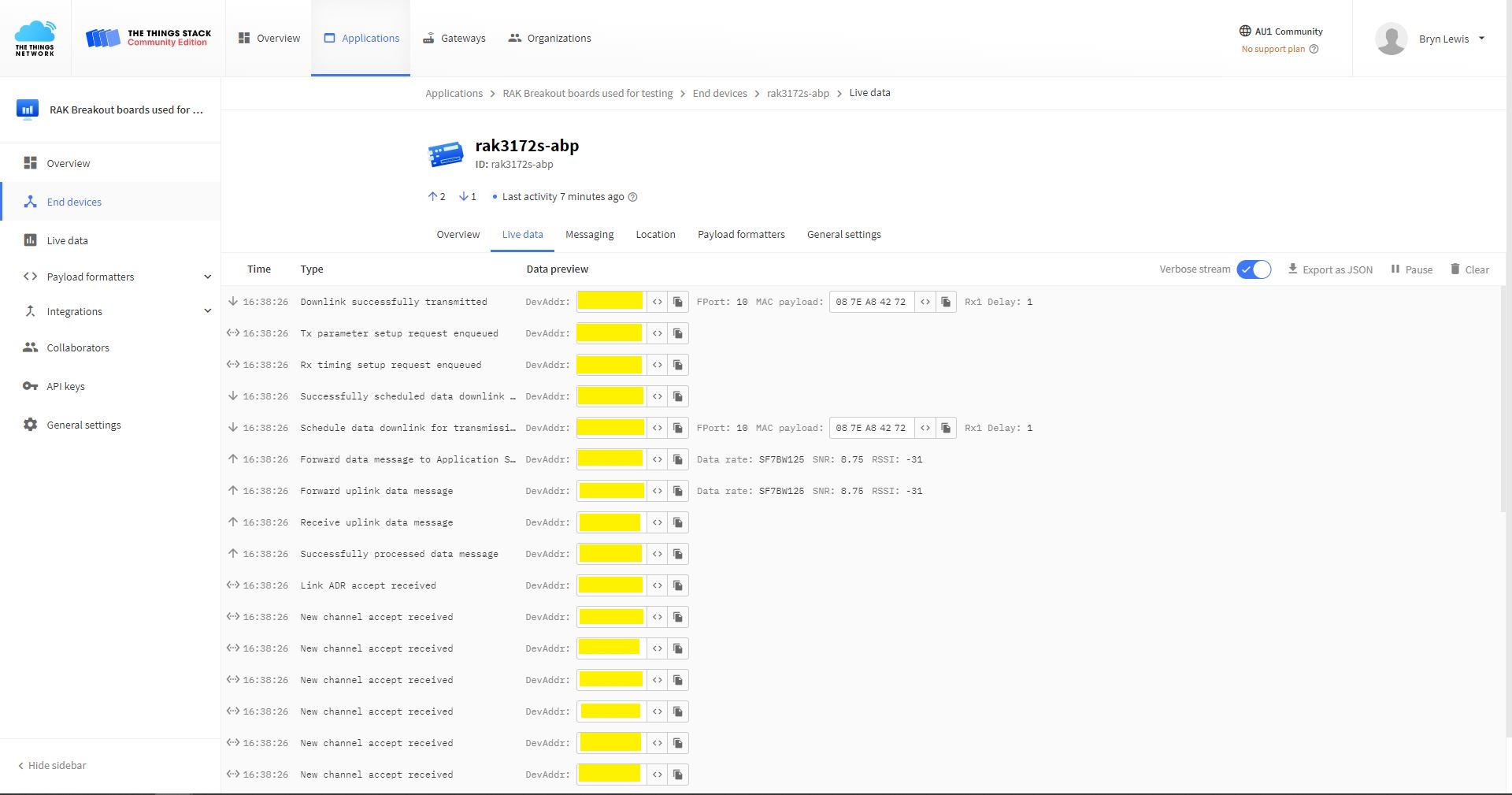
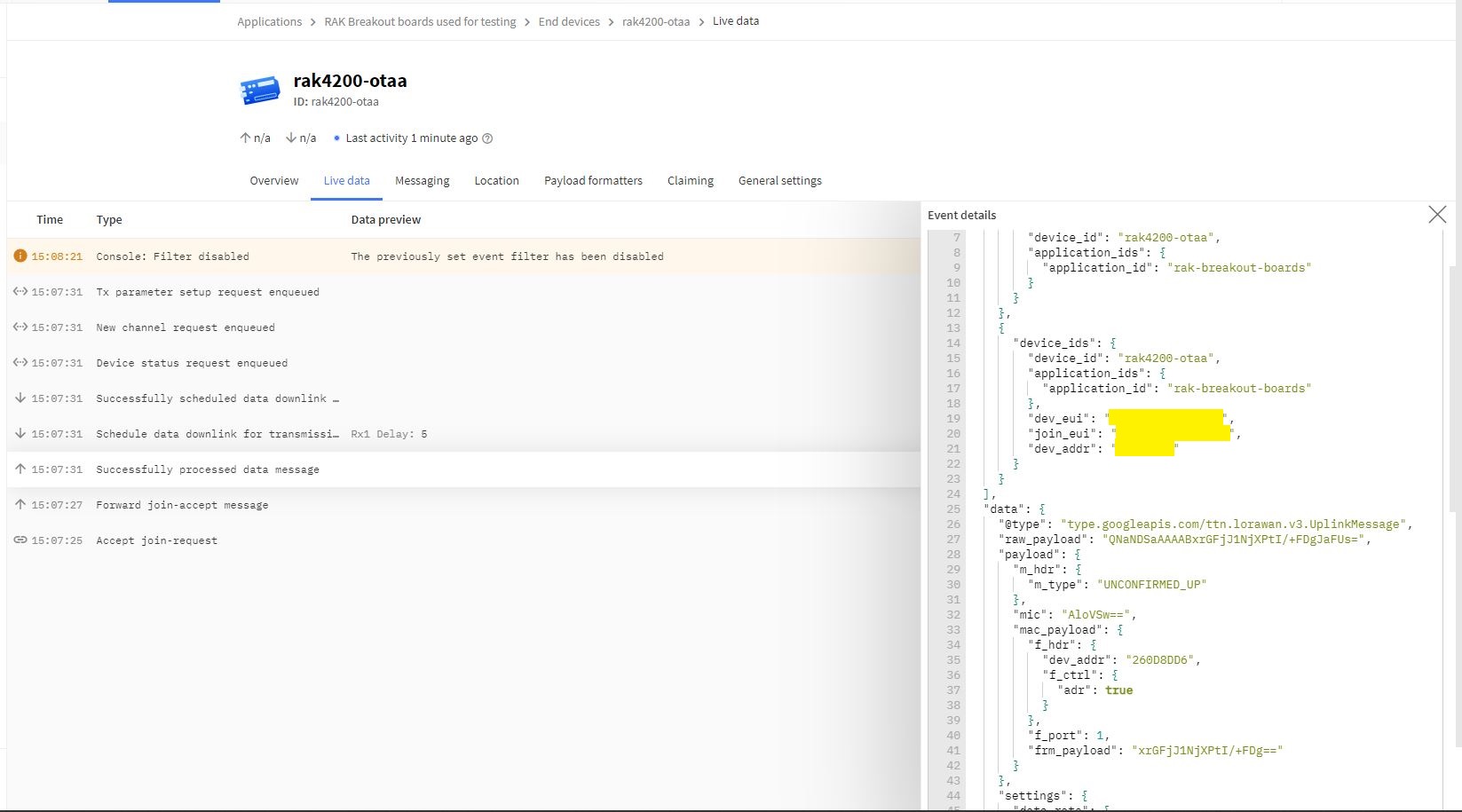
TTN Console live data tab connection process
Visual Studio Output windows displaying connection process and a D2C message
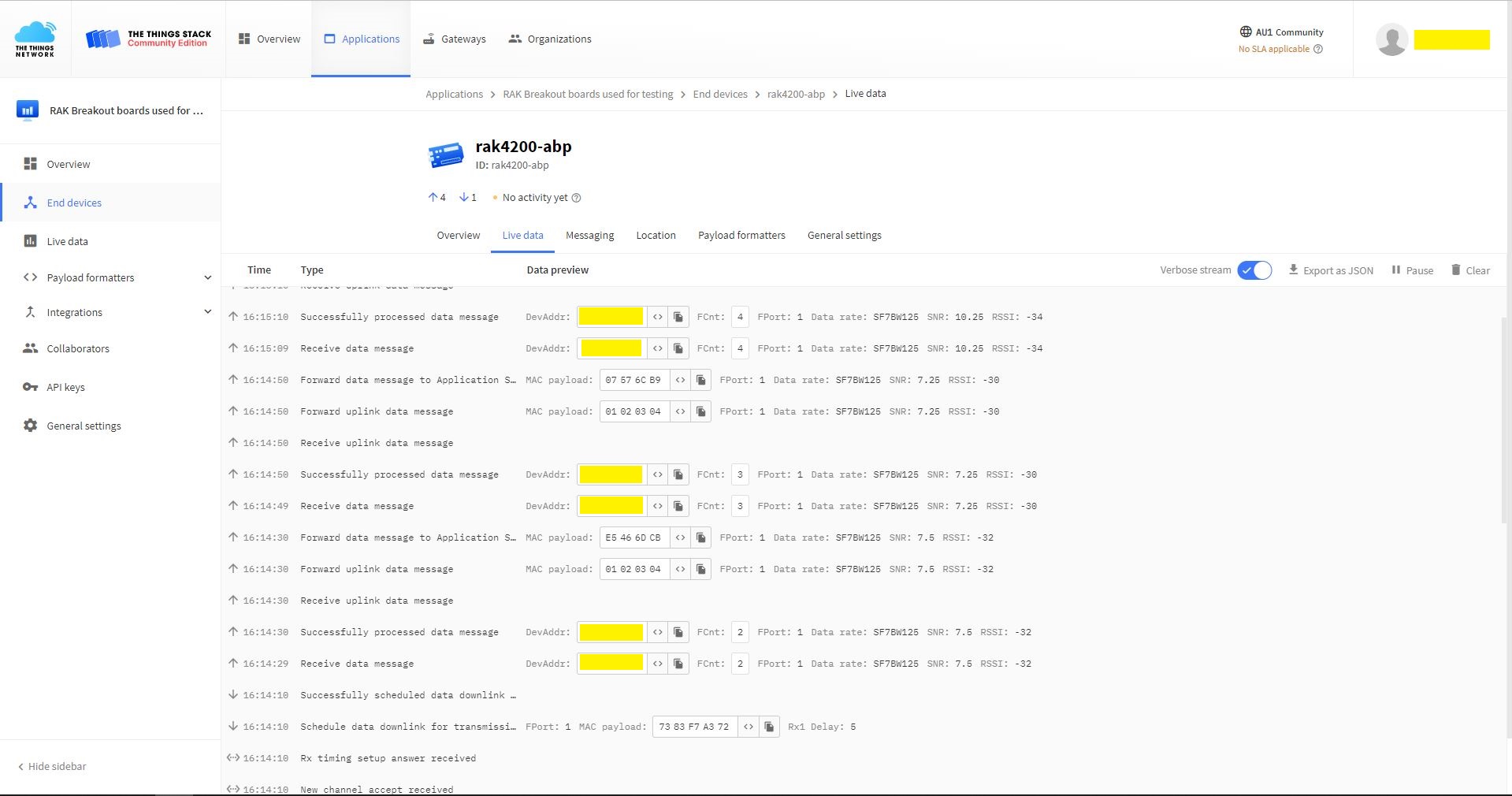
TTN Console live data tab connection process with a couple of D2C messages
Visual Studio Output windows displaying connection process and a couple of C2D messages
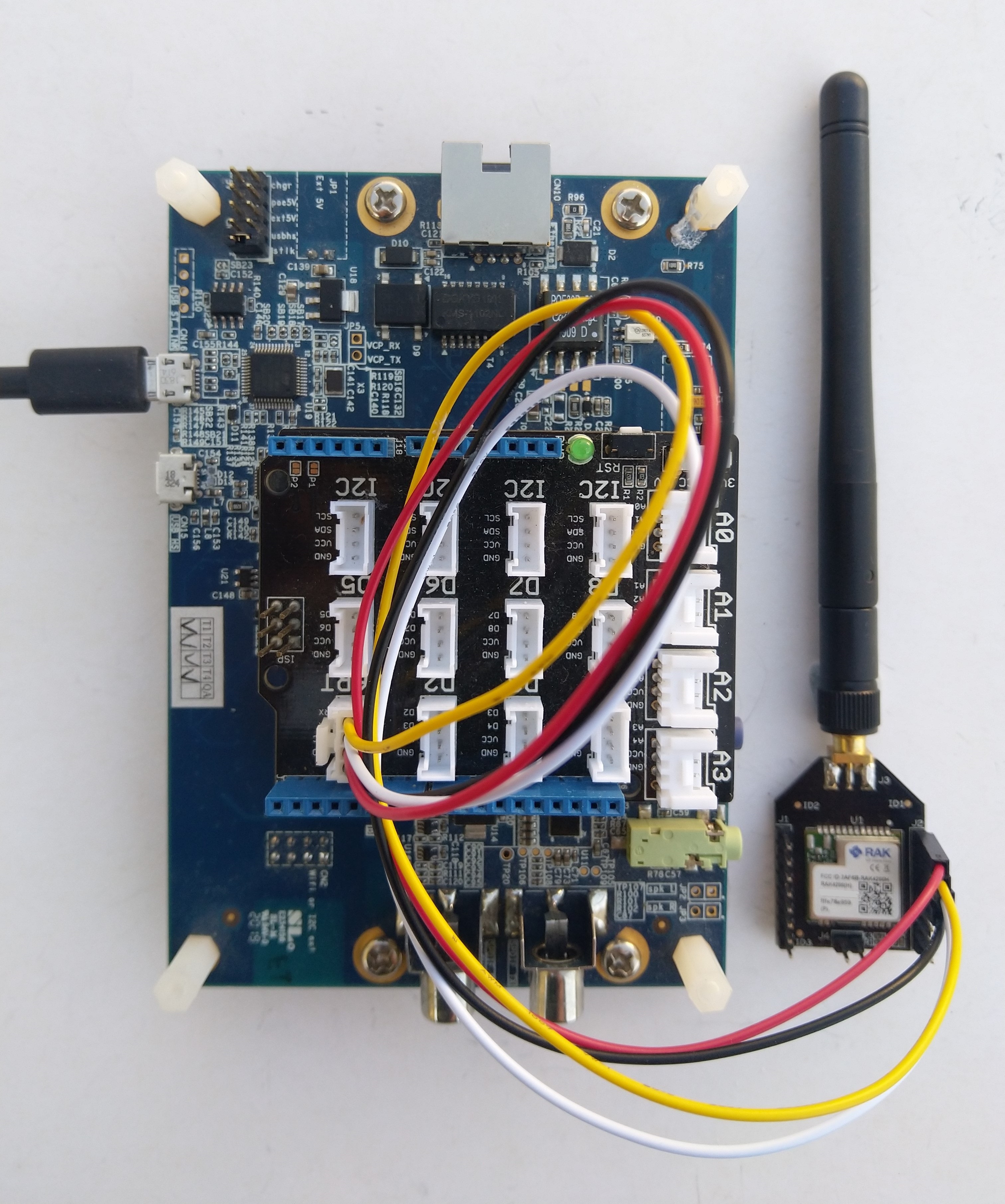
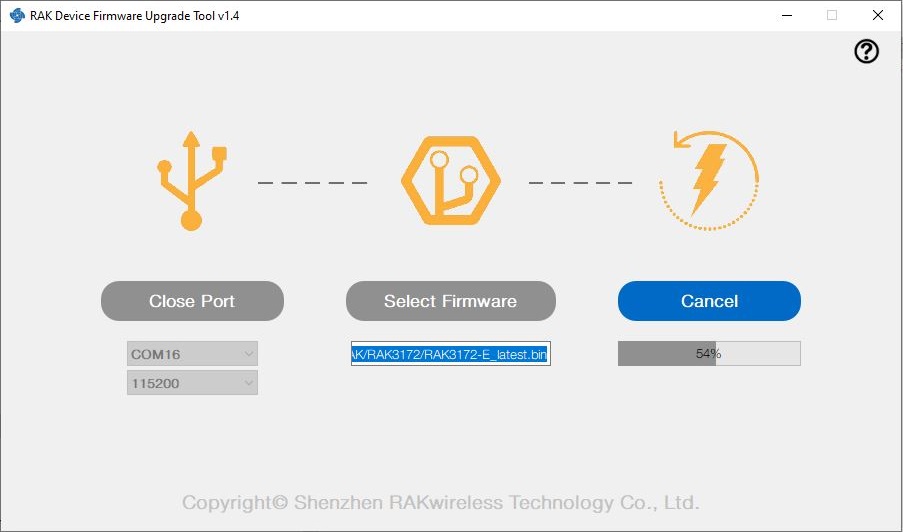
I have been working on a .NET nanoFramework library for the RAKwirelessRAK3172 module for the last couple of weeks. The devices had been in a box under my desk for a couple of months so first step was to flash them with the latest firmware using my FTDI test harness.
My sample code has compile time options for synchronous and asynchronous operation. I also include the different nanoff command lines to make updating the test devices easier.
//---------------------------------------------------------------------------------
// Copyright (c) May 2022, devMobile Software
//
// Licensed under the Apache License, Version 2.0 (the "License");
// you may not use this file except in compliance with the License.
// You may obtain a copy of the License at
//
//     http://www.apache.org/licenses/LICENSE-2.0
//
// Unless required by applicable law or agreed to in writing, software
// distributed under the License is distributed on an "AS IS" BASIS,
// WITHOUT WARRANTIES OR CONDITIONS OF ANY KIND, either express or implied.
// See the License for the specific language governing permissions and
// limitations under the License.
//
// https://docs.rakwireless.com/Product-Categories/WisDuo/RAK4200-Breakout-Board/AT-Command-Manual/
//---------------------------------------------------------------------------------
#define SERIAL_ASYNC_READ
//#define SERIAL_THREADED_READ
#define ST_STM32F769I_DISCOVERY      // nanoff --target ST_STM32F769I_DISCOVERY --update
//#define ESP32_WROOM   // nanoff --target ESP32_REV0 --serialport COM17 --update
...

namespace devMobile.IoT.LoRaWAN.nanoFramework.RAK3172
{
	using System;
	using System.Diagnostics;
	using System.IO.Ports;
	using System.Threading;
#if ESP32_WROOM
	using global::nanoFramework.Hardware.Esp32; //need NuGet nanoFramework.Hardware.Esp32
#endif

	public class Program
	{
		private static SerialPort _SerialPort;
#if SERIAL_THREADED_READ
		private static Boolean _Continue = true;
#endif
#if ESP32_WROOM
		private const string SerialPortId = "COM2";
#endif
...
#if ST_STM32F769I_DISCOVERY
		private const string SerialPortId = "COM6";
#endif

		public static void Main()
		{
#if SERIAL_THREADED_READ
			Thread readThread = new Thread(SerialPortProcessor);
#endif

			Debug.WriteLine("devMobile.IoT.LoRaWAN.nanoFramework.RAK3172 BreakoutSerial starting");

			try
			{
				// set GPIO functions for COM2 (this is UART1 on ESP32)
#if ESP32_WROOM
				Configuration.SetPinFunction(Gpio.IO16, DeviceFunction.COM2_TX);
				Configuration.SetPinFunction(Gpio.IO17, DeviceFunction.COM2_RX);
#endif

				Debug.Write("Ports:");
				foreach (string port in SerialPort.GetPortNames())
				{
					Debug.Write($" {port}");
				}
				Debug.WriteLine("");

				using (_SerialPort = new SerialPort(SerialPortId))
				{
					// set parameters
					_SerialPort.BaudRate = 115200;
					_SerialPort.Parity = Parity.None;
					_SerialPort.DataBits = 8;
					_SerialPort.StopBits = StopBits.One;
					_SerialPort.Handshake = Handshake.None;
					_SerialPort.NewLine = "\r\n";
					_SerialPort.ReadTimeout = 1000;

					//_SerialPort.WatchChar = '\n'; // May 2022 WatchChar event didn't fire github issue https://github.com/nanoframework/Home/issues/1035

#if SERIAL_ASYNC_READ
					_SerialPort.DataReceived += SerialDevice_DataReceived;
#endif

					_SerialPort.Open();

					_SerialPort.WatchChar = '\n';

#if SERIAL_THREADED_READ
					readThread.Start();
#endif

					for (int i = 0; i < 5; i++)
					{
						string atCommand;
						atCommand = "AT+VER=?";

                  Debug.WriteLine("");
						Debug.WriteLine($"{i} TX:{atCommand} bytes:{atCommand.Length}--------------------------------");
						_SerialPort.WriteLine(atCommand);

						Thread.Sleep(5000);
					}
				}
				Debug.WriteLine("Done");
			}
			catch (Exception ex)
			{
				Debug.WriteLine(ex.Message);
			}
		}

#if SERIAL_ASYNC_READ
		private static void SerialDevice_DataReceived(object sender, SerialDataReceivedEventArgs e)
		{
			SerialPort serialPort = (SerialPort)sender;

			switch (e.EventType)
			{
				case SerialData.Chars:
					break;

				case SerialData.WatchChar:
					string response = serialPort.ReadExisting();
					Debug.Write(response);
					break;
				default:
					Debug.Assert(false, $"e.EventType {e.EventType} unknown");
					break;
			}
		}
#endif

#if SERIAL_THREADED_READ
		public static void SerialPortProcessor()
		{

			while (_Continue)
			{
				try
				{
					string response = _SerialPort.ReadLine();
					//string response = _SerialPort.ReadExisting();
					Debug.Write(response);
				}
				catch (TimeoutException ex)
				{
					Debug.WriteLine($"Timeout:{ex.Message}");
				}
			}
		}
#endif
	}
}
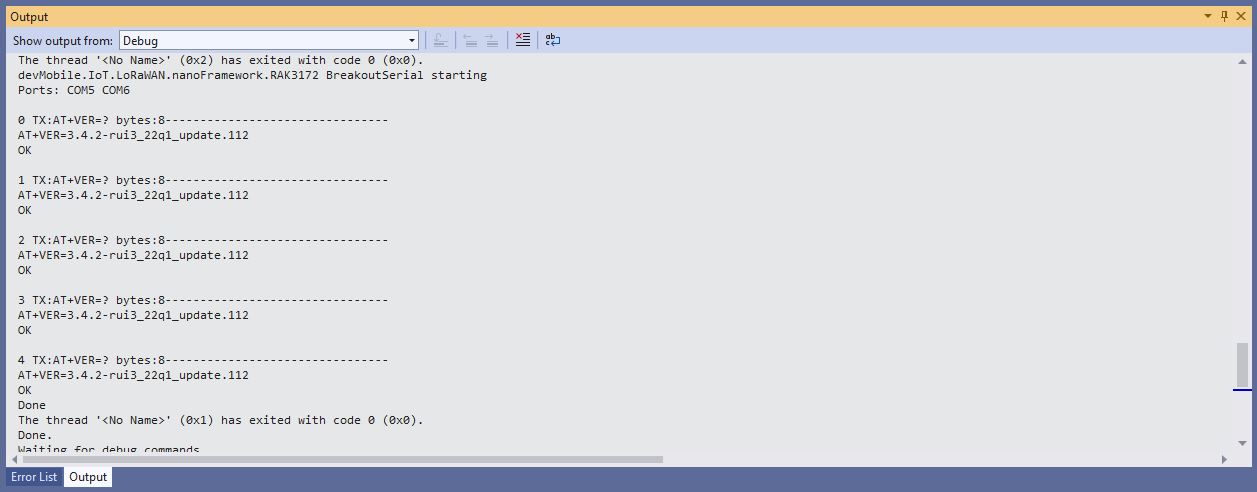
When I requested the RAK3172 version information with “AT+VER=?” the response was spilt over two lines which is a bit of a Pain in the Arse (PitA). The RAK3172 firmware also defaults 115200 baud which seems overkill considering the throughput of a LoRaWAN link.
I then ran the RAK4200LoRaWANDeviceClient with DEVICE_DEVEUI_SET (devEui from label on the device), OTAA to configure the AppEui and AppKey and the device connected to The Things Network on the second attempt (typo in the DevEui).
public static void Main()
{
Result result;
Debug.WriteLine("devMobile.IoT.RAK4200LoRaWANDeviceClient starting");
try
{
// set GPIO functions for COM2 (this is UART1 on ESP32)
#if ESP32_WROOM
Configuration.SetPinFunction(Gpio.IO16, DeviceFunction.COM2_TX);
Configuration.SetPinFunction(Gpio.IO17, DeviceFunction.COM2_RX);
#endif
Debug.Write("Ports:");
foreach (string port in SerialPort.GetPortNames())
{
Debug.Write($" {port}");
}
Debug.WriteLine("");
using (Rak4200LoRaWanDevice device = new Rak4200LoRaWanDevice())
{
result = device.Initialise(SerialPortId, 9600, Parity.None, 8, StopBits.One);
if (result != Result.Success)
{
Debug.WriteLine($"Initialise failed {result}");
return;
}
#if CONFIRMED
device.OnMessageConfirmation += OnMessageConfirmationHandler;
#endif
device.OnReceiveMessage += OnReceiveMessageHandler;
#if FACTORY_RESET
Debug.WriteLine($"{DateTime.UtcNow:hh:mm:ss} FactoryReset");
result = device.FactoryReset();
if (result != Result.Success)
{
Debug.WriteLine($"FactoryReset failed {result}");
return;
}
#endif
#if DEVICE_DEVEUI_SET
Debug.WriteLine($"{DateTime.UtcNow:hh:mm:ss} Device EUI");
result = device.DeviceEui(Config.devEui);
if (result != Result.Success)
{
Debug.WriteLine($"ADR on failed {result}");
return;
}
#endif
#if REGION_SET
Debug.WriteLine($"{DateTime.UtcNow:hh:mm:ss} Region{Region}");
result = device.Region(Region);
if (result != Result.Success)
{
Debug.WriteLine($"Region on failed {result}");
return;
}
#endif
#if ADR_SET
Debug.WriteLine($"{DateTime.UtcNow:hh:mm:ss} ADR On");
result = device.AdrOn();
if (result != Result.Success)
{
Debug.WriteLine($"ADR on failed {result}");
return;
}
#endif
#if CONFIRMED
Debug.WriteLine($"{DateTime.UtcNow:hh:mm:ss} Confirmed");
result = device.UplinkMessageConfirmationOn();
if (result != Result.Success)
{
Debug.WriteLine($"Confirm on failed {result}");
return;
}
#endif
#if UNCONFIRMED
Debug.WriteLine($"{DateTime.UtcNow:hh:mm:ss} Unconfirmed");
result = device.UplinkMessageConfirmationOff();
if (result != Result.Success)
{
Debug.WriteLine($"Confirm off failed {result}");
return;
}
#endif
#if OTAA
Debug.WriteLine($"{DateTime.UtcNow:hh:mm:ss} OTAA");
result = device.OtaaInitialise(Config.JoinEui, Config.AppKey);
if (result != Result.Success)
{
Debug.WriteLine($"OTAA Initialise failed {result}");
return;
}
#endif
#if ABP
Debug.WriteLine($"{DateTime.UtcNow:hh:mm:ss} ABP");
result = device.AbpInitialise(Config.DevAddress, Config.NwksKey, Config.AppsKey);
if (result != Result.Success)
{
Debug.WriteLine($"ABP Initialise failed {result}");
return;
}
#endif
Debug.WriteLine($"{DateTime.UtcNow:hh:mm:ss} Join start Timeout:{JoinTimeOut:hh:mm:ss}");
result = device.Join(JoinTimeOut);
if (result != Result.Success)
{
Debug.WriteLine($"Join failed {result}");
return;
}
Debug.WriteLine($"{DateTime.UtcNow:hh:mm:ss} Join finish");
while (true)
{
#if PAYLOAD_BCD
Debug.WriteLine($"{DateTime.UtcNow:hh:mm:ss} Send Timeout:{SendTimeout:hh:mm:ss} port:{MessagePort} payload BCD:{PayloadBcd}");
result = device.Send(MessagePort, PayloadBcd, SendTimeout);
#endif
#if PAYLOAD_BYTES
Debug.WriteLine($"{DateTime.UtcNow:hh:mm:ss} Send Timeout:{SendTimeout:hh:mm:ss} port:{MessagePort} payload Bytes:{BitConverter.ToString(PayloadBytes)}");
result = device.Send(MessagePort, PayloadBytes, SendTimeout);
#endif
if (result != Result.Success)
{
Debug.WriteLine($"Send failed {result}");
}
Thread.Sleep(new TimeSpan(0, 5, 0));
}
}
}
catch (Exception ex)
{
Debug.WriteLine(ex.Message);
}
}
Visual Studio Debug output for RAK4200LoRaWANDeviceClient minimal configuration connection
The Things Network “Live Data” for RAK4200LoRaWANDeviceClient minimal configuration connection
One of my client’s products has a configuration mode (button pressed as device starts) which enables a serial port (headers on board + FTDI module) for in field configuration of the onboard RAK4200 module.
The thread '' (0x2) has exited with code 0 (0x0).
devMobile.IoT.LoRaWAN.nanoFramework.RAK4200 BreakoutSerial starting
0 TX:at+get_config=lora:status bytes:25--------------------------------
OK Work Mode: LoRaWAN
Region: AS923
MulticastEnable: false
DutycycleEnable: false
Send_repeat_cnt: 0
Join_mode: OTAA
DevEui: 6..............9
AppEui: 7..............4
AppKey: A.............................9
Class: A
Joined Network:false
IsConfirm: unconfirm
AdrEnable: true
EnableRepeaterSupport: false
RX2_CHANNEL_FREQUENCY: 923200000, RX2_CHANNEL_DR:2
RX_WINDOW_DURATION: 3000ms
RECEIVE_DELAY_1: 1000ms
RECEIVE_DELAY_2: 2000ms
JOIN_ACCEPT_DELAY_1: 5000ms
JOIN_ACCEPT_DELAY_2: 6000ms
Current Datarate: 5
Primeval Datarate: 5
ChannelsTxPower: 0
UpLinkCounter: 0
DownLinkCounter: 0
I then reset the RAK4200 device to “factory defaults”
The thread '<No Name>' (0x2) has exited with code 0 (0x0).
devMobile.IoT.LoRaWAN.nanoFramework.RAK4200 BreakoutSerial starting
Ports: COM5 COM6
0 TX:at+set_config=lora:default_parameters bytes:37--------------------------------
OK
The testrig would no longer connect as the device and network settings were invalid.
The thread '<No Name>' (0x2) has exited with code 0 (0x0).
devMobile.IoT.LoRaWAN.nanoFramework.RAK4200 BreakoutSerial starting
Ports: COM5 COM6
0 TX:at+get_config=lora:status bytes:25--------------------------------
OK Work Mode: LoRaWAN
Region: AS923
MulticastEnable: false
DutycycleEnable: false
Send_repeat_cnt: 0
Join_mode: OTAA
DevEui: 0000000000000000
AppEui: 0000000000000000
AppKey: 00000000000000000000000000000000
Class: A
Joined Network:false
IsConfirm: unconfirm
AdrEnable: true
EnableRepeaterSupport: false
RX2_CHANNEL_FREQUENCY: 923200000, RX2_CHANNEL_DR:2
RX_WINDOW_DURATION: 3000ms
RECEIVE_DELAY_1: 1000ms
RECEIVE_DELAY_2: 2000ms
JOIN_ACCEPT_DELAY_1: 5000ms
JOIN_ACCEPT_DELAY_2: 6000ms
Current Datarate: 5
Primeval Datarate: 5
ChannelsTxPower: 0
UpLinkCounter: 0
DownLinkCounter: 0
To “restore” the device configuration I ran the RAK4200LoRaWANDeviceClient application with DEVICE_DEVEUI_SET, OTAA, UNCONFIRMED, REGION_SET and ADR_SET defined.
The thread '<No Name>' (0x2) has exited with code 0 (0x0).
devMobile.IoT.LoRaWAN.nanoFramework.RAK4200 BreakoutSerial starting
Ports: COM2 COM3

0 TX:at+get_config=lora:status bytes:25--------------------------------
OK Work Mode: LoRaWAN
Region: AS923
MulticastEnable: false
DutycycleEnable: false
Send_repeat_cnt: 0
Join_mode: OTAA
DevEui: 6..............9
AppEui: 7.............4
AppKey: A.............................9
Class: A
Joined Network:false
IsConfirm: unconfirm
AdrEnable: true
EnableRepeaterSupport: false
RX2_CHANNEL_FREQUENCY: 923200000, RX2_CHANNEL_DR:2
RX_WINDOW_DURATION: 3000ms
RECEIVE_DELAY_1: 1000ms
RECEIVE_DELAY_2: 2000ms
JOIN_ACCEPT_DELAY_1: 5000ms
JOIN_ACCEPT_DELAY_2: 6000ms
Current Datarate: 5
Primeval Datarate: 5
ChannelsTxPower: 0
UpLinkCounter: 0
DownLinkCounter: 0
The testrig would then successfully connect to The Things Network. When the testrig was power cycled the device the configuration was retained.
I modified the NetworkJoinOTAA sample(based on the asynchronous version of BreakOutSerial) to send the required sequence of AT commands and display the responses.
namespace devMobile.IoT.LoRaWAN.nanoFramework.RAK4200
{
   using System;
   using System.Diagnostics;
   using System.IO.Ports;
   using System.Text;
   using System.Threading;
#if ESP32_WROOM
   using global::nanoFramework.Hardware.Esp32; ///need NuGet nanoFramework.Hardware.Esp32
#endif

   public class Program
   {
#if ST_STM32F769I_DISCOVERY
      private const string SerialPortId = "COM6";
#endif
#if ESP32_WROOM
      private const string SerialPortId = "COM2";
#endif
      private const string DevEui = "...";
      private const string AppEui = "...";
      private const string AppKey = "...";
      private const byte MessagePort = 1;
      private const string Payload = "01020304"; // Is AQIDBA==

      public static void Main()
      {
         string response;

         Debug.WriteLine("devMobile.IoT.Rak4200.NetworkJoinOTAA starting");

         try
         {
#if ESP32_WROOM
            Configuration.SetPinFunction(Gpio.IO16, DeviceFunction.COM2_TX);
            Configuration.SetPinFunction(Gpio.IO17, DeviceFunction.COM2_RX);
#endif

            Debug.Write("Ports:");
            foreach (string port in SerialPort.GetPortNames())
            {
               Debug.Write($" {port}");
            }
            Debug.WriteLine("");

            using (SerialPort serialDevice = new SerialPort(SerialPortId))
            {
               // set parameters
               serialDevice.BaudRate = 9600;
               //_SerialPort.BaudRate = 115200;
               serialDevice.Parity = Parity.None;
               serialDevice.StopBits = StopBits.One;
               serialDevice.Handshake = Handshake.None;
               serialDevice.DataBits = 8;

               serialDevice.ReadTimeout = 10000;
               //serialDevice.ReadBufferSize = 128;
               //serialDevice.ReadBufferSize = 256;
               serialDevice.ReadBufferSize = 512;
               //serialDevice.ReadBufferSize = 1024;

               serialDevice.NewLine = "\r\n";

               serialDevice.DataReceived += SerialDevice_DataReceived;

               serialDevice.Open();

               serialDevice.WatchChar = '\n';

               // clear out the RX buffer
               serialDevice.ReadExisting();
               response = serialDevice.ReadExisting();
               Debug.WriteLine($"Response :{response.Trim()} bytes:{response.Length}");
               Thread.Sleep(500);

               // Set the Working mode to LoRaWAN
               Debug.WriteLine("lora:work_mode:0");
               serialDevice.WriteLine("at+set_config=lora:work_mode:0");
               Thread.Sleep(1500);

               // Set the JoinMode
               Debug.WriteLine("lora:join_mode");
               serialDevice.WriteLine("at+set_config=lora:join_mode:0");
               Thread.Sleep(500);

               // Set the Class
               Debug.WriteLine("lora:class");
               serialDevice.WriteLine("at+set_config=lora:class:0");
               Thread.Sleep(500);

               // Set the Region to AS923
               Debug.WriteLine("lora:region");
               serialDevice.WriteLine("at+set_config=lora:region:AS923");
               Thread.Sleep(500);

               // Set the devEUI
               Debug.WriteLine("lora:dev_eui");
               serialDevice.WriteLine($"at+set_config=lora:dev_eui:{DevEui}");
               Thread.Sleep(500);

               // Set the appEUI
               Debug.WriteLine("lora:app_eui");
               serialDevice.WriteLine($"at+set_config=lora:app_eui:{AppEui}");
               Thread.Sleep(500);

               // Set the appKey
               Debug.WriteLine("lora:app_key");
               serialDevice.WriteLine($"at+set_config=lora:app_key:{AppKey}");
               Thread.Sleep(500);

               // Set the Confirm flag
               Debug.WriteLine("lora:confirm");
               serialDevice.WriteLine("at+set_config=lora:confirm:0");
               Thread.Sleep(500);

               Debug.WriteLine("lora:adr");
               serialDevice.WriteLine("at+set_config=lora:adr:1");
               Thread.Sleep(500);

               // Join the network
               Debug.WriteLine("at+join");
               serialDevice.WriteLine("at+join");
               Thread.Sleep(10000);

               byte counter = 1;
               while (true)
               {
                  // Send the BCD messages
                  string payload = $"{Payload}{counter:X2}";
                  Debug.WriteLine($"at+send=lora:{MessagePort}:{payload}");
                  serialDevice.WriteLine($"at+send=lora:{MessagePort}:{payload}");

                  counter += 1;

                  Thread.Sleep(300000);
               }
            }
         }
         catch (Exception ex)
         {
            Debug.WriteLine(ex.Message);
         }
      }

      private static void SerialDevice_DataReceived(object sender, SerialDataReceivedEventArgs e)
      {
         SerialPort serialPort = (SerialPort)sender;
         string response;

         switch (e.EventType)
         {
            case SerialData.Chars:
               break;

            case SerialData.WatchChar:
               response = serialPort.ReadExisting();
               Debug.Write(response);
               break;
            default:
               Debug.Assert(false, $"e.EventType {e.EventType} unknown");
               break;
         }
      }
   }
}
The NetworkJoinABP application assumes that all of the AT commands succeed.
TTN Console live data tab connection process
Visual Studio Output windows displaying connection process and a D2C message












 devMobile's blog