Random wanderings through Microsoft Azure esp. PaaS plumbing, the IoT bits, AI on Micro controllers, AI on Edge Devices, .NET nanoFramework, .NET Core on *nix and ML.NET+ONNX
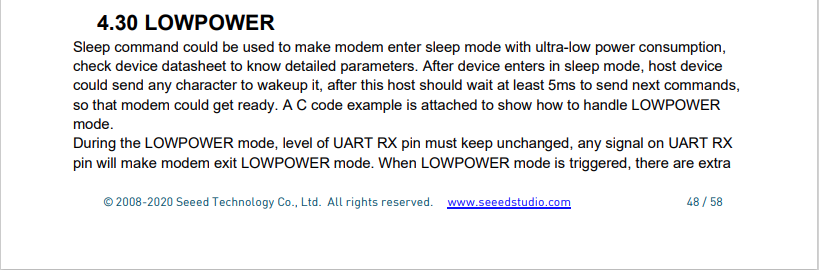
I have been soak testing Seeed LoRa-E5 equipped TinyCLR and netNF devices for the last couple of weeks and after approximately two days they would stop sending data. The code is still running but The Things Industries device live data tab is empty.
I have reviewed the code line by line and it looks okay. When I run the application on the device with the debugger attached the device does not stop transmitting (a heisenbug) which is a problem.
First step was to disable the sleep/wakeup power conservation calls and see what happens
#if PAYLOAD_COUNTER
   Debug.WriteLine($"{DateTime.UtcNow:hh:mm:ss} Send Timeout:{SendTimeout.TotalSeconds} Seconds payload Counter:{PayloadCounter}");
#if CONFIRMED
   result = device.Send(BitConverter.GetBytes(PayloadCounter), true, SendTimeout);
#else
   result = device.Send(BitConverter.GetBytes(PayloadCounter), false, SendTimeout);
#endif
   PayloadCounter += 1;
#endif

   if (result != Result.Success)
   {
      Debug.WriteLine($"Send failed {result}");
   }

   /*
   Debug.WriteLine($"{DateTime.UtcNow:hh:mm:ss} Sleep");
   result = device.Sleep();
   if (result != Result.Success)
   {
      Debug.WriteLine($"Sleep failed {result}");
      return;
   }
   */
   Thread.Sleep(60000);
   /*
   Debug.WriteLine($"{DateTime.UtcNow:hh:mm:ss} Wakeup");
   result = device.Wakeup();
   if (result != Result.Success)
   {
      Debug.WriteLine($"Wakeup failed {result}");
      return;
   }
   */
The devices have now been running fine for 4.5 days so it looks like it might be something todo with entering and/or exiting low power mode.
Fiddler Composer with the image field name and upload file button highlighted
The currentimplementation only supports the uploading of one image at a time in a field called “image”.
Fiddler console after succesfull upload
This implementation supports a “Content-Type” of “application/octet-stream” or “image/jpeg”.
[HttpPost("{id}/image")]
public async Task<ActionResult> Upload([FromRoute(Name = "id")][Range(1, int.MaxValue, ErrorMessage = "StockItem id must greater than 0")] int id, [FromForm] IFormFile image)
{
	if (image == null)
	{
		return this.BadRequest("Image image file missing");
	}

	if (image.Length == 0)
	{
		return this.BadRequest("Image image file is empty");
	}

	if ((string.Compare(image.ContentType, "application/octet-stream",true) != 0) && (string.Compare(image.ContentType, "image/jpeg", true) != 0))
	{
		return this.BadRequest("Image image file content-type is not application/octet-stream or image/jpeg");
	}

	try
	{
		using (MemoryStream ms = new MemoryStream())
		{
			await image.CopyToAsync(ms);

			ms.Seek(0, SeekOrigin.Begin);

			using (SqlConnection db = new SqlConnection(this.connectionString))
			{
				DynamicParameters parameters = new DynamicParameters();

				parameters.Add("StockItemId", id);
				parameters.Add("photo", ms, DbType.Binary, ParameterDirection.Input);

				await db.ExecuteAsync(sql: @"UPDATE [WareHouse].[StockItems] SET [Photo]=@Photo WHERE StockItemID=@StockItemId", param: parameters, commandType: CommandType.Text);
			}
		}
	}
	catch (SqlException ex)
	{
		logger.LogError(ex, "Updating photo of StockItem with ID:{0}", id);

		return this.StatusCode(StatusCodes.Status500InternalServerError);
	}

	return this.Ok();
}
After uploading the image I could download it as either a stream of bytes(displayed in Fiddler) or Base64 encoded (this had to be converted to an image)
Fiddler displaying downloaded jpeg image
This implementation doesn’t support the uploading of multiple images or the streaming of larger images but would be sufficient for uploading thumbnails etc.
I needed to add some code using Dapper to retrieve images stored in a database for a webby client. The stockItems table has a column for a photo but they were all null…
CREATE TABLE [Warehouse].[StockItems](
	[StockItemID] [int] NOT NULL,
	[StockItemName] [nvarchar](100) NOT NULL,
	[SupplierID] [int] NOT NULL,
	[ColorID] [int] NULL,
	[UnitPackageID] [int] NOT NULL,
	[OuterPackageID] [int] NOT NULL,
	[Brand] [nvarchar](50) NULL,
	[Size] [nvarchar](20) NULL,
	[LeadTimeDays] [int] NOT NULL,
	[QuantityPerOuter] [int] NOT NULL,
	[IsChillerStock] [bit] NOT NULL,
	[Barcode] [nvarchar](50) NULL,
	[TaxRate] [decimal](18, 3) NOT NULL,
	[UnitPrice] [decimal](18, 2) NOT NULL,
	[RecommendedRetailPrice] [decimal](18, 2) NULL,
	[TypicalWeightPerUnit] [decimal](18, 3) NOT NULL,
	[MarketingComments] [nvarchar](max) NULL,
	[InternalComments] [nvarchar](max) NULL,
	[Photo] [varbinary](max) NULL,
	[CustomFields] [nvarchar](max) NULL,
	[Tags]  AS (json_query([CustomFields],N'$.Tags')),
	[SearchDetails]  AS (concat([StockItemName],N' ',[MarketingComments])),
	[LastEditedBy] [int] NOT NULL,
	[ValidFrom] [datetime2](7) GENERATED ALWAYS AS ROW START NOT NULL,
	[ValidTo] [datetime2](7) GENERATED ALWAYS AS ROW END NOT NULL,
 CONSTRAINT [PK_Warehouse_StockItems] PRIMARY KEY CLUSTERED
(
	[StockItemID] ASC
)
I uploaded images of three different colours of sellotape dispensers with the following SQL
UPDATE Warehouse.StockItems
SET [Photo] =(SELECT * FROM Openrowset( Bulk 'C:\Users\BrynLewis\Pictures\TapeDispenserBlue.jpg', Single_Blob) as  MyImage) where StockItemID =

-- 203	Tape dispenser (Black)
-- 204	Tape dispenser (Red)
-- 205	Tape dispenser (Blue)
There are two options for downloading the image. The first is as a stream of bytes
[HttpGet("{id}/image")]
public async Task<ActionResult> GetImage([Range(1, int.MaxValue, ErrorMessage = "StockItem id must greater than 0")] int id)
{
	Byte[] response;

	try
	{
		using (SqlConnection db = new SqlConnection(this.connectionString))
		{
			response = await db.ExecuteScalarAsync<byte[]>(sql: @"SELECT [Photo] as ""photo"" FROM [Warehouse].[StockItems] WHERE StockItemID=@StockItemId", param: new { StockItemId = id }, commandType: CommandType.Text);
		}

		if (response == default)
		{
			logger.LogInformation("StockItem:{0} image not found", id);

			return this.NotFound($"StockItem:{id} image not found");
		}
	}
	catch (SqlException ex)
	{
		logger.LogError(ex, "Looking up a StockItem:{0} image", id);

		return this.StatusCode(StatusCodes.Status500InternalServerError);
	}

	return File(response, "image/jpeg");
}
[HttpGet("{id}/base64")]
public async Task<ActionResult> GetBase64([Range(1, int.MaxValue, ErrorMessage = "Stock item id must greater than 0")] int id)
{
	Byte[] response;

	try
	{
		using (SqlConnection db = new SqlConnection(this.connectionString))
		{
			response = await db.ExecuteScalarAsync<byte[]>(sql: @"SELECT [Photo] as ""photo"" FROM [Warehouse].[StockItems] WHERE StockItemID=@StockItemId", param: new { StockItemId = id }, commandType: CommandType.Text);
		}

		if (response == default)
		{
			logger.LogInformation("StockItem:{0} Base64 not found", id);

			return this.NotFound($"StockItem:{id} image not found");
		}
	}
	catch (SqlException ex)
	{
		logger.LogError(ex, "Looking up a StockItem withID:{0} base64", id);

		return this.StatusCode(StatusCodes.Status500InternalServerError);
	}

	return Ok("data:image/jpeg;base64," + Convert.ToBase64String(response));
}
I lost an hour from my life I will never get back figuring out that a correctly formatted/spelt content types “image/jpeg” and “data:image/jpeg;base64” were key to getting the webby client to render image.
It’s not uncommon for SQL Azure servers and databases to suffer from “transient failures”. In application logs I have seen these occur during scale up/down events, periods where my application’s performance has been temporarily impacted (but its throughput has not changed), which I assume has been some load balancing going on in the background and when network connectivity has been a bit flakey.
Now I’m using The Polly Project which builds on the concepts of TOPAZ but has been thoroughly re-engineered with lots of extensibility, an active community and modern codebase. Inspired by Ben Hyrman and several other developers I have built a minimalist wrapper for the Dapper Async methods which detects transient errors using the same approach as the Entity Framework Core library.
I did think about retry functionality for async methods which returned object/dynamic but have only implemented strongly typed ones for the initial version.
[HttpGet]
public async Task<ActionResult<IEnumerable<Model.StockItemListDtoV1>>> Get()
{
	IEnumerable<Model.StockItemListDtoV1> response = null;

	try
	{
		using (SqlConnection db = new SqlConnection(this.connectionString))
		{
			response = await db.QueryWithRetryAsync<Model.StockItemListDtoV1>(sql: @"SELECT [StockItemID] as ""ID"", [StockItemName] as ""Name"", [RecommendedRetailPrice], [TaxRate] FROM [Warehouse].[StockItems]", commandType: CommandType.Text);
		}
	}
	catch (SqlException ex)
	{
		logger.LogError(ex, "Retrieving list of StockItems");

		return this.StatusCode(StatusCodes.Status500InternalServerError);
	}

	return this.Ok(response);
}
I have struggled to get reproduceable transient failures without pausing execution in the Visual Studio debugger and tinkering with variables or scaling up/down my databases (limit to how often this can be done) or unplugging the network cable at the wrong time.
In the post net Core web API + Dapper -Web Caching I wondered why the GET returned a detailed 400 error and the HEAD didn’t when the eTag was invalid. I added a new controller to test this for .ASP.NET CoreFromHeader, FromQuery and FromRoute attributes and the responses were consistent. The GET methods returned a detailed 400 error and the HEAD methods returned a simple 400 error when a value was invalid.
/*
	http://localhost:36739/api/FromHeaderFromQueryFromRoute/FromHeaderValidation
	User-Agent: Fiddler
	Host: localhost:36739
	eTag: USB456


	HTTP/1.1 400 Bad Request
	Content-Type: application/problem+json; charset=utf-8
	Server: Microsoft-IIS/10.0
	X-Powered-By: ASP.NET
	Date: Sun, 27 Jun 2021 05:39:06 GMT
	Content-Length: 257

	{
		"type":"https://tools.ietf.org/html/rfc7231#section-6.5.1",
		"title":"One or more validation errors occurred.",
		"status":400,
		"traceId":"00-82b38ed4019b004282e49c70489a76e0-d3674e4952022949-00",
		"errors":
		{
			"eTag":["eTagMust be not more than 5 characters long"]
		}
	}
*/
[HttpGet("FromHeaderValidation")]
public ActionResult GetHeaderValidation([FromHeader(Name = "eTag")][MinLength(3, ErrorMessage = "The eTag header text must be at least 3 characters long")][MaxLength(5, ErrorMessage = "eTagMust be not more than 5 characters long")][Required(ErrorMessage ="The eTag field is required")] string request)
{
	return this.Ok(request);
}

/*
	http://localhost:36739/api/FromHeaderFromQueryFromRoute/FromHeaderValidation
	User-Agent: Fiddler
	Host: localhost:36739
	eTag: USB456


	HTTP/1.1 400 Bad Request
	Content-Length: 257
	Content-Type: application/problem+json; charset=utf-8
	Server: Microsoft-IIS/10.0
	X-Powered-By: ASP.NET
	Date: Sun, 27 Jun 2021 05:41:26 GMT
*/
[HttpHead("FromHeaderValidation")]
public ActionResult HeadHeaderValidation([FromHeader(Name = "eTag")][MinLength(3, ErrorMessage = "The eTag header text must be at least 3 characters long")][MaxLength(5, ErrorMessage = "eTagMust be not more than 5 characters long")][Required(ErrorMessage = "The eTag field is required")] string request)
{
	return this.Ok(request);
}
I was having a virtual coffee with a co-worker and they commented that a HEAD method doesn’t return a body so I went and checked the relevant Internet Engineering Task Force(IETF) Request For Comments(RFC) documentation.
RFC 2616                        HTTP/1.1                       June 1999


9.4 HEAD

   The HEAD method is identical to GET except that the server MUST NOT
   return a message-body in the response. The metainformation contained
   in the HTTP headers in response to a HEAD request SHOULD be identical
   to the information sent in response to a GET request. This method can
   be used for obtaining metainformation about the entity implied by the
   request without transferring the entity-body itself. This method is
   often used for testing hypertext links for validity, accessibility,
   and recent modification.

   The response to a HEAD request MAY be cacheable in the sense that the
   information contained in the response MAY be used to update a
   previously cached entity from that resource. If the new field values
   indicate that the cached entity differs from the current entity (as
   would be indicated by a change in Content-Length, Content-MD5, ETag
   or Last-Modified), then the cache MUST treat the cache entry as
   stale.
The short answer is I’m stupid, the longer answer is above.
On a couple of the systems I work on there are a number of queries (often complex spatial searches) which are very resource intensive but are quite readily cached. In these systems we have used HTTP GET and HEAD Request methods together so that the client only re-GETs the query results after a HEAD method indicates there have been updates.
I have been trying to keep the number of changes to my Microsoft SQL Azure World Wide Importers database to a minimum but for this post I have added a rowversion column to the StockGroups table. The rowversion data type is an automatically generated, unique 8 byte binary(12 bytes Base64 encoded) number within a database.
StockGroups table with Version column
Adding a rowversion table to an existing System Versioned table in the SQL Server Management Studio Designer is painful so I used…
ALTER TABLE [Warehouse].[StockGroups] ADD [Version] [timestamp] NULL
To reduce complexity the embedded SQL is contains two commands (normally I wouldn’t do this) one for retrieving the list StockGroups the other for retrieving the maximum StockGroup rowversion. If a StockGroup is changed the rowversion will be “automagically” updated and the maximum value will change.
[HttpGet]
public async Task<ActionResult<IEnumerable<Model.StockGroupListDtoV1>>> Get()
{
	IEnumerable<Model.StockGroupListDtoV1> response = null;

	try
	{
		using (SqlConnection db = new SqlConnection(this.connectionString))
		{
			var parameters = new DynamicParameters();

			parameters.Add("@RowVersion", dbType: DbType.Binary, direction: ParameterDirection.Output, size: ETagBytesLength);

			response = await db.QueryAsync<Model.StockGroupListDtoV1>(sql: @"SELECT [StockGroupID] as ""ID"", [StockGroupName] as ""Name""FROM [Warehouse].[StockGroups] ORDER BY Name; SELECT @RowVersion=MAX(Version) FROM [Warehouse].[StockGroups]", param: parameters, commandType: CommandType.Text);

			if (response.Any())
			{
				byte[] rowVersion = parameters.Get<byte[]>("RowVersion");

				this.HttpContext.Response.Headers.Add("ETag", Convert.ToBase64String(rowVersion));
			}
		}
	}
	catch (SqlException ex)
	{
		logger.LogError(ex, "Retrieving list of StockGroups");

		return this.StatusCode(StatusCodes.Status500InternalServerError);
	}

	return this.Ok(response);
}
I used Telerik Fiddler to to capture the GET response payload.
The HEAD method requests the maximum rwoversion value from the StockGroups table and compares it to the eTag. In a more complex scenario this could be a call to a local cache to see if a query result has bee refreshed.
[HttpHead]
public async Task<ActionResult> Head([Required][FromHeader(Name = "ETag")][MinLength(ETagBase64Length, ErrorMessage = "eTag length invalid too short")][MaxLength(ETagBase64Length, ErrorMessage = "eTag length {0} invalid too long")] string eTag)
{
	byte[] headerVersion = new byte[ETagBytesLength];

	if (!Convert.TryFromBase64String(eTag, headerVersion, out _))
	{
		logger.LogInformation("eTag invalid format");

		return this.BadRequest("eTag invalid format");
	}

	try
	{
		using (SqlConnection db = new SqlConnection(this.connectionString))
		{
			byte[] databaseVersion = await db.ExecuteScalarAsync<byte[]>(sql: "SELECT MAX(Version) FROM [Warehouse].[StockGroups]", commandType: CommandType.Text);

			if (headerVersion.SequenceEqual(databaseVersion))
			{
				return this.StatusCode(StatusCodes.Status304NotModified);
			}
		}
	}
	catch (SqlException ex)
	{
		logger.LogError(ex, "Retrieving StockItem list");

		return this.StatusCode(StatusCodes.Status500InternalServerError);
	}

	return this.Ok();
}
I used Fiddler to to capture a HEAD response payload a 304 Not modified.
HTTP/1.1 304 Not Modified
Server: Microsoft-IIS/10.0
X-Powered-By: ASP.NET
Date: Sat, 26 Jun 2021 22:09:02 GMT
I then modified the database and the response changed to 200 OK indicating the local cache should be updated with a GET.
HTTP/1.1 200 OK
Transfer-Encoding: chunked
Server: Microsoft-IIS/10.0
X-Powered-By: ASP.NET
Date: Sat, 26 Jun 2021 22:09:59 GMT
This approach combined with the use of the If-Match, If-Modified-Since, If-None-Match and If-Unmodified-since allows web and client side caches to use previously requested results when there have been no changes. This can significantly reduce the amount of network traffic and server requests.
HTTP/1.1 400 Bad Request
Content-Length: 240
Content-Type: application/problem+json; charset=utf-8
Server: Microsoft-IIS/10.0
X-Powered-By: ASP.NET
Date: Sat, 26 Jun 2021 06:28:11 GMT
This was unlike the helpful validation messages returned by the GET method of the StockItems pagination example code
{
   "type":"https://tools.ietf.org/html/rfc7231#section-6.5.1",
   "title":"One or more validation errors occurred.",
   "status":400,
   "traceId":"00-bd68c94bf05f5c4ca8752011d6a60533-48e966211dec4847-00",
   "errors":
   {
      "PageSize":["PageSize must be present and greater than 0"],
      "PageNumber":["PageNumber must be present and greater than 0"]
   }
}
The lack of diagnostic information was not helpful and I’ll explore this further in a future post. I often work on Fintech applications which are “insert only”, or nothing is deleted just marked as inactive/readonly so this approach is viable.
This StockItemsHistoryController has methods for retrieving a list of StockItems at a point in time specified by an optional query string parameter (if no value is provided the current time is assumed). To show how a temporal query can span multiple tables I included the [Purchasing].[suppliers] table which is also versioned.
[HttpGet]
public async Task<ActionResult<IEnumerable<Model.StockItemsHistoryListDtoV1>>> Get([FromQuery]DateTime? asAt)
{
	IEnumerable<Model.StockItemsHistoryListDtoV1> response = null;

	if (!asAt.HasValue)
	{
		asAt = DateTime.UtcNow;
	}

	try
	{
		using (SqlConnection db = new SqlConnection(this.connectionString))
		{
			response = await db.QueryAsync<Model.StockItemsHistoryListDtoV1>(sql: "[warehouse].[StockItemsHistoryStockItemsListAsAtV1]", param: new { asAt }, commandType: CommandType.StoredProcedure);
		}
	}
	catch (SqlException ex)
	{
		logger.LogError(ex, "Retrieving list of StockItems");

		return this.StatusCode(StatusCodes.Status500InternalServerError);
	}

	return this.Ok(response);
}
ALTER PROCEDURE [Warehouse].[StockItemsHistoryStockItemsListAsAtV1]
		@AsAt DATETIME2(7)
AS
BEGIN
	SELECT [StockItems].[StockItemID] as "ID"
		,[StockItems].[StockItemName] as "Name"
		,[StockItems].[UnitPrice]
		,[StockItems].[RecommendedRetailPrice]
		,[StockItems].[TaxRate]
		,[StockItems].[CustomFields]
		,[Suppliers].[SupplierID]
		,[Suppliers].[SupplierName]
	FROM [Warehouse].[StockItems] FOR SYSTEM_TIME AS OF @AsAt as StockItems
		INNER JOIN [Purchasing].[Suppliers] FOR SYSTEM_TIME AS OF @AsAt as Suppliers ON (StockItems.SupplierID = [Suppliers].SupplierID)
END
The query also returns the custom fields (often what was changed in StockItem history), the supplier Id and Supplier name.
The detailed history of a StockItem can be queried to illustrate how the _Archive(history) table works
ALTER PROCEDURE [Warehouse].[StockItemsHistoryStockItemHistoryListV1]
		@StockItemID int
AS
BEGIN
	SELECT[StockItems_Archive].[StockItemID] as "ID"
		,[StockItems_Archive].[StockItemName] as "Name"
		,[StockItems_Archive].[UnitPrice]
		,[StockItems_Archive].[RecommendedRetailPrice]
		,[StockItems_Archive].[TaxRate]
		,[StockItems_Archive].[CustomFields]
		,[StockItems_Archive].[ValidFrom]
		,[StockItems_Archive].[ValidTo]
	FROM [Warehouse].[StockItems_Archive]
	WHERE [StockItems_Archive].[StockItemID] = @StockItemId
	ORDER BY [ValidFrom] DESC
END
[HttpGet("{id}/history")]
public async Task<ActionResult<IEnumerable<Model.StockItemHistoryListDtoV1>>> GetHistory([Range(1, int.MaxValue, ErrorMessage = "Stock item id must greater than 0")] int id)
{
    IEnumerable<Model.StockItemHistoryListDtoV1> response = null;

    try
    {
        using (SqlConnection db = new SqlConnection(this.connectionString))
        {
            response = await db.QueryAsync<Model.StockItemHistoryListDtoV1>(sql: "[Warehouse].[StockItemsHistoryStockItemHistoryListV1]", param: new { StockItemID = id }, commandType: CommandType.StoredProcedure);
            if (response == default)
            {
                logger.LogInformation("StockItem:{0} not found", id);

                return this.NotFound($"StockItem:{id} not found");
           }
       }
   }
   catch (SqlException ex)
   {
        logger.LogError(ex, "Retrieving up a StockItem with Id:{0}", id);

        return this.StatusCode(StatusCodes.Status500InternalServerError);
     }

    return this.Ok(response);
}
The state of a StockItem plus the associated Supplier and PackageTypes tables can also be queried at a point in time (if no value is provided the current time is assumed).
[HttpGet("{id}")]
public async Task<ActionResult<Model.StockItemGetDtoV1>> Get([Range(1, int.MaxValue, ErrorMessage = "Stock item id must greater than 0")] int id, [FromQuery] DateTime? asAt)
{
	Model.StockItemGetDtoV1 response = null;

	if ( !asAt.HasValue)
	{
		asAt = DateTime.UtcNow;
	}

	try
	{
		using (SqlConnection db = new SqlConnection(this.connectionString))
		{
			response = await db.QuerySingleOrDefaultAsync<Model.StockItemGetDtoV1>(sql: "[Warehouse].[StockItemsHistoryStockItemLookupAsAtV1]", param: new { asAt, stockItemID=id }, commandType: CommandType.StoredProcedure);
			if (response == default)
			{
				logger.LogInformation("StockItem:{0} not found", id);

				return this.NotFound($"StockItem:{id} not found");
			}
		}
	}
	catch (SqlException ex)
	{
		logger.LogError(ex, "Retrieving StockItem with Id:{0}", id);

		return this.StatusCode(StatusCodes.Status500InternalServerError);
	}

	return this.Ok(response);
}
ALTER PROCEDURE [Warehouse].[StockItemsHistoryStockItemLookupAsAtV1]
		@StockItemID int,
		@AsAt DATETIME2(7)
AS
BEGIN
	SELECT[StockItem].[StockItemID] as "ID"
		,[StockItem].[StockItemName] as "Name"
		,[StockItem].[UnitPrice]
		,[StockItem].[RecommendedRetailPrice]
		,[StockItem].[TaxRate]
		,[StockItem].[typicalWeightPerUnit]
		,[StockItem].[QuantityPerOuter]
		,[UnitPackage].[PackageTypeName] as "unitPackageName"
		,[OuterPackage].[PackageTypeName] as "outerPackageName"
		,[Supplier].[SupplierID]
		,[Supplier].[SupplierName]
	FROM [Warehouse].[StockItems] FOR SYSTEM_TIME AS OF @AsAt as StockItem
		INNER JOIN[Warehouse].[PackageTypes] FOR SYSTEM_TIME AS OF @AsAt as UnitPackage ON ([StockItem].[UnitPackageID] = [UnitPackage].[PackageTypeID])
		INNER JOIN[Warehouse].[PackageTypes] FOR SYSTEM_TIME AS OF @AsAt as OuterPackage ON ([StockItem].[OuterPackageID] = [OuterPackage].[PackageTypeID])
		INNER JOIN[Purchasing].[Suppliers] FOR SYSTEM_TIME AS OF @AsAt as Supplier ON ([StockItem].SupplierID = Supplier.SupplierID)
		WHERE[StockItem].[StockItemID] = @StockItemId
END
I found it was easy to miss the “FOR SYSTEM_TIME AS OF @AsAt” on the INNER JOINs.
......
| ADD
    {
        <column_definition>
      | <computed_column_definition>
      | <table_constraint>
      | <column_set_definition>
    } [ ,...n ]
      | [ system_start_time_column_name datetime2 GENERATED ALWAYS AS ROW START
                [ HIDDEN ] [ NOT NULL ] [ CONSTRAINT constraint_name ]
            DEFAULT constant_expression [WITH VALUES] ,
                system_end_time_column_name datetime2 GENERATED ALWAYS AS ROW END
                   [ HIDDEN ] [ NOT NULL ][ CONSTRAINT constraint_name ]
            DEFAULT constant_expression [WITH VALUES] ,
                start_transaction_id_column_name bigint GENERATED ALWAYS AS TRANSACTION_ID START
        ]
       PERIOD FOR SYSTEM_TIME ( system_start_time_column_name, system_end_time_column_name )
    |
It is also possible to hide the start and end time columns which might be useful for when retrofitting this approach to a legacy application which uses SELECT * FROM … and might not handle the extra columns correctly.
As part of my “day job” I spend a lot of time working with C# and VB.Net 4.X “legacy” projects doing upgrades, bugs fixes and moving applications to Azure. For the last couple of months I have been working on a project replacing Microsoft message queue(MSMQ) queues with Azure Storage Queues so the solution is easier to deploy in Azure.
The next phase of the project is to replace a number of Windows Services with Azure Queue Trigger and Timer Trigger functions. The aim is a series of small steps which we can test before deployment rather than major changes, hence the use of V1 Azure functions for the first release.
Silver Fox systems sells a Visual Studio extension which generates an HTTP Trigger VB.Net project. I needed Timer and Queue Trigger functions so I created C# examples and then used them to figure out how to build VB.Net equivalents
Visual Studio Solution Explorer
After quite a few failed attempts I found this sequence worked for me
Add a new VB.Net class library
Provide a name for new class library
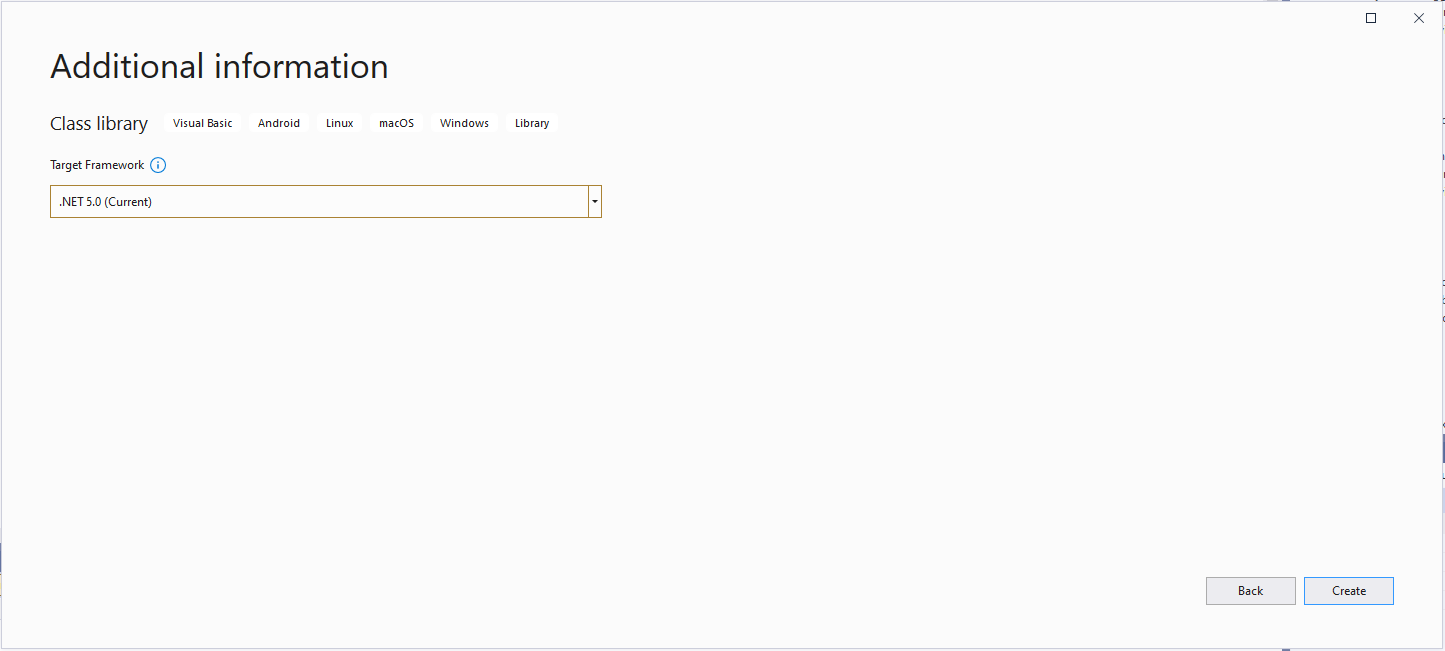
Select target framework
Even though the target platform is not .NET 5.0 ignore this and continue.
Microsoft.NET.Sdk.Functions
Added Microsoft.NET.Sdk.Functions (make sure version 1.0.38)
At this point the project should compile but won’t do much, so update the class to look like the code below.
Imports System.Threading

Imports Microsoft.Azure.WebJobs
Imports Microsoft.Extensions.Logging


Public Class TimerTrigger
   Shared executionCount As Int32

   <FunctionName("Timer")>
   Public Shared Sub Run(<TimerTrigger("0 */1 * * * *")> myTimer As TimerInfo, log As ILogger)
      Interlocked.Increment(executionCount)

      log.LogInformation("VB.Net TimerTrigger next trigger:{0} Execution count:{1}", myTimer.ScheduleStatus.Next, executionCount)

   End Sub
End Class
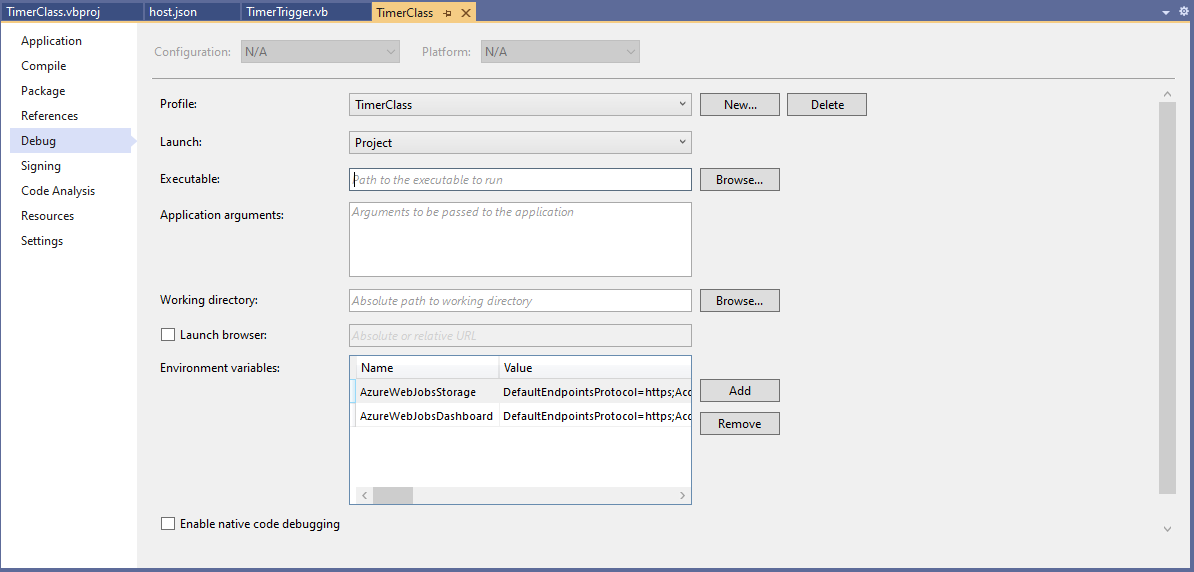
Then add an empty hosts.json file (make sure “copy if newer” is configured in properties) to the project directory, then depending on deployment model configure the AzureWebJobsStorage and AzureWebJobsDashboard connection strings via environment variables or a local.settings.json file.
Visual Studio Environment variables for AzureWebJobsStorage and AzureWebJobsDashboard connection strings
Imports System.IO
Imports System.Threading

Imports Microsoft.Azure.WebJobs
Imports Microsoft.Extensions.Logging


Public Class BlobTrigger
   Shared executionCount As Int32

   ' This function will get triggered/executed when a new message is written on an Azure Queue called events.
   <FunctionName("Notifications")>
   Public Shared Async Sub Run(<BlobTrigger("notifications/{name}", Connection:="BlobEndPoint")> payload As Stream, name As String, log As ILogger)
      Interlocked.Increment(executionCount)

      log.LogInformation("VB.Net BlobTrigger processed blob name:{0} Size:{1} bytes Execution count:{2}", name, payload.Length, executionCount)
   End Sub
End Class
Imports System.Net
Imports System.Net.Http
Imports System.Threading

Imports Microsoft.Azure.WebJobs
Imports Microsoft.Azure.WebJobs.Extensions.Http
Imports Microsoft.Extensions.Logging


Public Class HttpTrigger
   Shared executionCount As Int32

   <FunctionName("Notifications")>
   Public Shared Async Function Run(<HttpTrigger(AuthorizationLevel.Anonymous, "get", "post", Route:=Nothing)> req As HttpRequestMessage, log As ILogger) As Task(Of HttpResponseMessage)
      Interlocked.Increment(executionCount)

      log.LogInformation($"VB.Net HTTP trigger Execution count:{0} Method:{1}", executionCount, req.Method)

      Return New HttpResponseMessage(HttpStatusCode.OK)
   End Function
End Class
Imports System.Threading

Imports Microsoft.Azure.WebJobs
Imports Microsoft.Extensions.Logging


Public Class QueueTrigger
   Shared ConcurrencyCount As Long
   Shared ExecutionCount As Long

   <FunctionName("Alerts")>
   Public Shared Sub ProcessQueueMessage(<QueueTrigger("notifications", Connection:="QueueEndpoint")> message As String, log As ILogger)
      Interlocked.Increment(ConcurrencyCount)
      Interlocked.Increment(ExecutionCount)

      log.LogInformation("VB.Net Concurrency:{0} Message:{1} Execution count:{2}", ConcurrencyCount, message, ExecutionCount)

      ' Wait for a bit to force some consurrency
      Thread.Sleep(5000)

      Interlocked.Decrement(ConcurrencyCount)
   End Sub
End Class
As well as counting the number of executions I also wanted to check that >1 instances were started to process messages when the queues had many messages. I added a “queues” section to the hosts.json file so I could tinker with the options.
Imports System.Threading

Imports Microsoft.Azure.WebJobs
Imports Microsoft.Extensions.Logging


Public Class TimerTrigger
   Shared executionCount As Int32

   <FunctionName("Timer")>
   Public Shared Sub Run(<TimerTrigger("0 */1 * * * *")> myTimer As TimerInfo, log As ILogger)
      Interlocked.Increment(executionCount)

      log.LogInformation("VB.Net TimerTrigger next trigger:{0} Execution count:{1}", myTimer.ScheduleStatus.Next, executionCount)

   End Sub
End Class
The source code for the C# and VB.Net functions is available on GitHub
This StockItemsLookupController has methods for looking up a single record using the StockItemID and retrieving a list of records with a name that “matches” the search text. In my initial version the length of the embedded Structured Query Language(SQL) which spanned multiple lines was starting to get out of hand.
ALTER PROCEDURE [Warehouse].[StockItemsStockItemLookupV1]
		@StockItemID as int
AS
BEGIN
	SELECT [StockItems].[StockItemID] as "ID"
			,[StockItems].[StockItemName] as "Name"
			,[StockItems].[UnitPrice]
			,[StockItems].[RecommendedRetailPrice]
			,[StockItems].[TaxRate]
			,[StockItems].[QuantityPerOuter]
			,[StockItems].[TypicalWeightPerUnit]
			,[UnitPackage].[PackageTypeName] as "UnitPackageName"
			,[OuterPackage].[PackageTypeName] as "OuterPackageName"
			,[Supplier].[SupplierID]
			,[Supplier].[SupplierName]
	FROM[Warehouse].[StockItems] as StockItems
	INNER JOIN[Warehouse].[PackageTypes] as UnitPackage ON ([StockItems].[UnitPackageID] = [UnitPackage].[PackageTypeID])
	INNER JOIN[Warehouse].[PackageTypes] as OuterPackage ON ([StockItems].[OuterPackageID] = [OuterPackage].[PackageTypeID])
	INNER JOIN[Purchasing].[Suppliers] as Supplier ON ([StockItems].SupplierID = [Supplier].]SupplierID])
	WHERE[StockItems].[StockItemID] = @StockItemId
END
The query also returns the inner/outer packaging and the supplier name (plus supplierId for creating a link to the Supplier’s details) to make the example more realistic.
[HttpGet("{id}")]
public async Task<ActionResult<Model.StockItemGetDtoV1>> Get([Range(1, int.MaxValue, ErrorMessage = "Stock item id must greater than 0")] int id)
{
	Model.StockItemGetDtoV1 response = null;

	try
	{
		using (SqlConnection db = new SqlConnection(this.connectionString))
		{
			response = await db.QuerySingleOrDefaultAsync<Model.StockItemGetDtoV1>(sql: "[Warehouse].[StockItemsStockItemLookupV1]", param: new { stockItemId=id }, commandType: CommandType.StoredProcedure);
		}

		if (response == default)
		{
			logger.LogInformation("StockItem:{0} not found", id);

			return this.NotFound($"StockItem:{id} image not found");
		}
	}
	catch (SqlException ex)
	{
		logger.LogError(ex, "Looking up a StockItem with Id:{0}", id);

		return this.StatusCode(StatusCodes.Status500InternalServerError);
	}

	return this.Ok(response);
}
[HttpGet]
public async Task<ActionResult<IEnumerable<Model.StockItemListDtoV1>>> Get([FromQuery] Model.StockItemNameSearchDtoV1 request)
{
	IEnumerable<Model.StockItemListDtoV1> response = null;

	try
	{
		using (SqlConnection db = new SqlConnection(this.connectionString))
		{
			response = await db.QueryAsync<Model.StockItemListDtoV1>(sql: "[Warehouse].[StockItemsNameSearchV1]", param: request, commandType: CommandType.StoredProcedure);
		}
	}
	catch (SqlException ex)
	{
		logger.LogError(ex, "Searching for list of StockItems with name like:{0}", request);

		return this.StatusCode(StatusCodes.Status500InternalServerError);
	}

	return this.Ok(response);
}
The request DTO properties have Data Annotations to ensure the values are valid and suitable error messages are displayed if they are not. The controller GET method will not even be called if the DTO is missing or the values are incorrect. I would use constants for the lengths etc. and the attribute value error messages can be loaded from resource files for multiple language support.
public class StockItemNameSearchDtoV1
{
	[Required]
	[MinLength(3, ErrorMessage = "The name search text must be at least 3 characters long")]
	public string SearchText { get; set; }

	[Required]
	[Range(1, int.MaxValue, ErrorMessage = "MaximumRowsToReturn must be present and greater than 0")]
	public int MaximumRowsToReturn { get; set; }
}
The SELECT TOP command to limit the number of records returned. To improve performance the results of this query could be cached but the result set might need to be filtered based on the current user.
ALTER PROCEDURE [Warehouse].[StockItemsSearchV1]
           @SearchText nvarchar(100),
           @MaximumRowsToReturn int
AS
BEGIN
    SELECT TOP(@MaximumRowsToReturn) [StockItemID] as "ID"
		   ,[StockItemName] as "Name"
		   ,[RecommendedRetailPrice]
		   ,[TaxRate]
    FROM Warehouse.StockItems
    WHERE SearchDetails LIKE N'%' + @SearchText + N'%'
    ORDER BY [StockItemName]
END;
I have used this approach to populate a list of selectable options as a user types their search text.





 devMobile's blog