.NET Core Seeed LoRaE5 LoRaWAN library Part2

Nasty OTAA connect

After getting basic connectivity for my Seeed LoRa-E5 test rig sorted I used RAK7246G LPWAN Developer Gateway on my bookcase to connect to The Things Network(TTN)
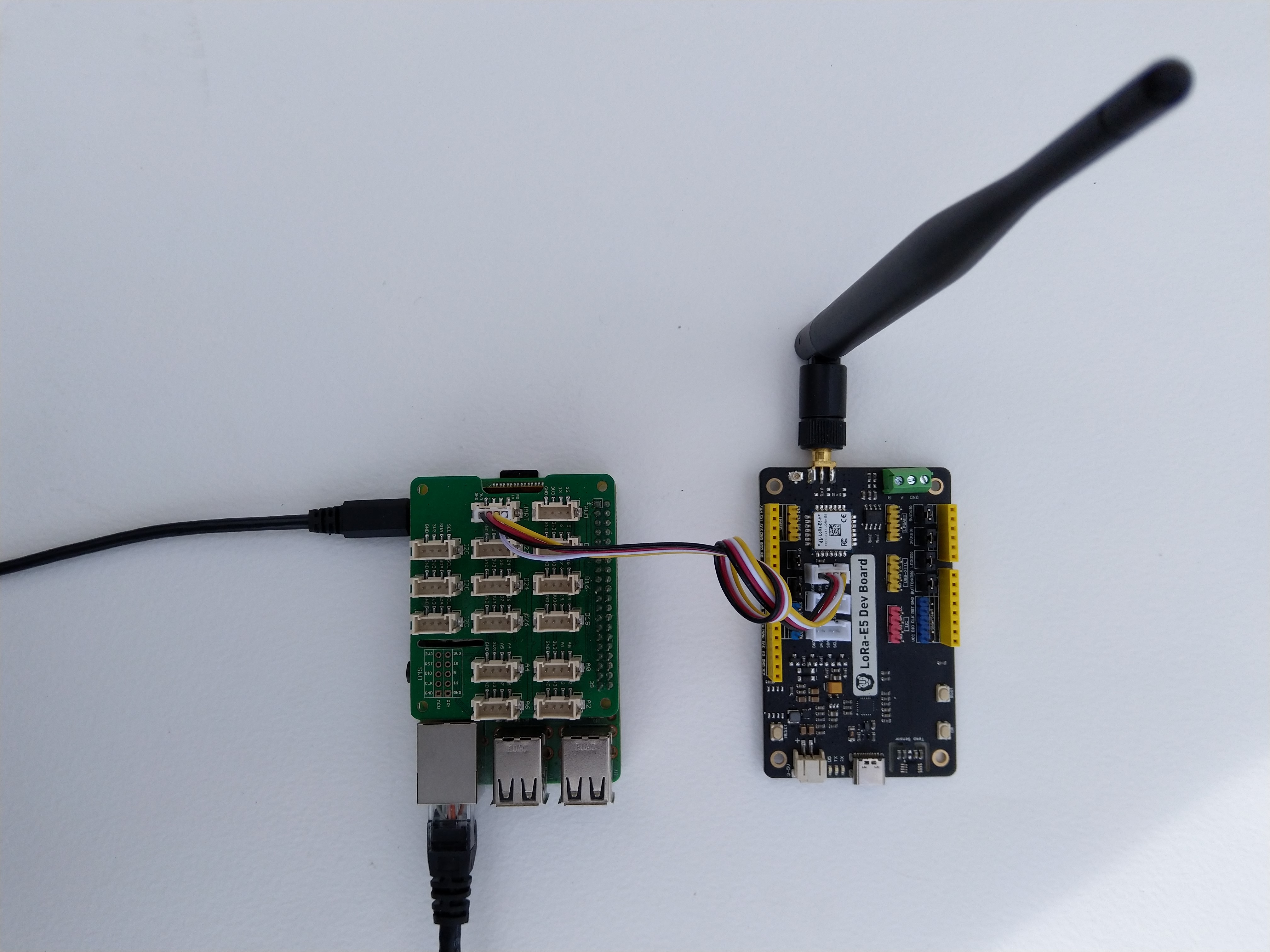
Seeed LoRa-E5 Development kit connected to Gove bas shield on a Raspberry PI3

My Over the Air Activation (OTAA) implementation is very “nasty” I have assumed that there would be no timeouts or failures and I only send one BCD message “48656c6c6f204c6f526157414e” which is “hello LoRaWAN”.

The code just sequentially steps through the necessary configuration to join the TTN network with a suitable delay after each command is sent. There also appeared to be quite a variation in response times, especially for joining the network(most probably network related) and the progress of sending a message.

//---------------------------------------------------------------------------------
// Copyright (c) September 2021, devMobile Software
//
// Licensed under the Apache License, Version 2.0 (the "License");
// you may not use this file except in compliance with the License.
// You may obtain a copy of the License at
//
//     http://www.apache.org/licenses/LICENSE-2.0
//
// Unless required by applicable law or agreed to in writing, software
// distributed under the License is distributed on an "AS IS" BASIS,
// WITHOUT WARRANTIES OR CONDITIONS OF ANY KIND, either express or implied.
// See the License for the specific language governing permissions and
// limitations under the License.
//
//---------------------------------------------------------------------------------
namespace devMobile.IoT.NetCore.SeeedLoRaE5.NetworkJoinOTAA
{
	using System;
	using System.Diagnostics;
	using System.IO.Ports;
	using System.Threading;

	class Program
	{
		private const string SerialPortId = "/dev/ttyS0";

		private const string AppKey = "................................";
		private const string AppEui = "................";

		private const byte MessagePort = 15;

		//private const string Payload = "48656c6c6f204c6f526157414e"; // Hello LoRaWAN
		private const string Payload = "01020304"; // AQIDBA==
		//private const string Payload = "04030201"; // BAMCAQ==

		public static void Main()
		{
			string response;

			Debug.WriteLine("devMobile.IoT.SeeedLoRaE5.NetworkJoinOTAA starting");

			Debug.WriteLine(String.Join(",", SerialPort.GetPortNames()));

			try
			{
				using (SerialPort serialDevice = new SerialPort(SerialPortId))
				{
					// set parameters
					serialDevice.BaudRate = 9600;
					serialDevice.Parity = Parity.None;
					serialDevice.StopBits = StopBits.One;
					serialDevice.Handshake = Handshake.None;
					serialDevice.DataBits = 8;

					serialDevice.ReadTimeout = 10000;

					serialDevice.NewLine = "\r\n";

					serialDevice.Open();

					// clear out the RX buffer
					serialDevice.ReadExisting();
					response = serialDevice.ReadExisting();
					Debug.WriteLine($"Response :{response.Trim()} bytes:{response.Length}");
					Thread.Sleep(500);

					// Set the Region to AS923
					serialDevice.WriteLine("AT+DR=AS923\r\n");
					response = serialDevice.ReadLine();
					Debug.WriteLine($"Response :{response.Trim()} bytes:{response.Length}");

					// Set the Join mode
					serialDevice.WriteLine("AT +MODE=LWOTAA\r\n");
					response = serialDevice.ReadLine();
					Debug.WriteLine($"Response :{response.Trim()} bytes:{response.Length}");

					// Set the appEUI
					serialDevice.WriteLine($"AT+ID=AppEui,\"{AppEui}\"\r\n");
					response = serialDevice.ReadLine();
					Debug.WriteLine($"Response :{response.Trim()} bytes:{response.Length}");

					// Set the appKey
					serialDevice.WriteLine($"AT+KEY=APPKEY,{AppKey}\r\n");
					response = serialDevice.ReadLine();
					Debug.WriteLine($"Response :{response.Trim()} bytes:{response.Length}");

					// Set the port number
					serialDevice.WriteLine($"AT+PORT={MessagePort}\r\n");
					response = serialDevice.ReadLine();
					Debug.WriteLine($"Response :{response.Trim()} bytes:{response.Length}");

					// Join the network
					serialDevice.WriteLine("AT+JOIN\r\n");

					// Join start
					response = serialDevice.ReadLine();
					Debug.WriteLine($"Response :{response.Trim()} bytes:{response.Length}");

					// JOIN normal
					response = serialDevice.ReadLine();
					Debug.WriteLine($"Response :{response.Trim()} bytes:{response.Length}");

					Thread.Sleep(5000);

					// network joined
					response = serialDevice.ReadLine();
					Debug.WriteLine($"Response :{response.Trim()} bytes:{response.Length}");

					// Net ID
					response = serialDevice.ReadLine();
					Debug.WriteLine($"Response :{response.Trim()} bytes:{response.Length}");

					// Join done
					response = serialDevice.ReadLine();
					Debug.WriteLine($"Response :{response.Trim()} bytes:{response.Length}");

					while (true)
					{
						Debug.WriteLine("Sending");

						serialDevice.WriteLine($"AT+MSGHEX=\"{Payload}\"\r\n");

						// Start
						response = serialDevice.ReadLine();
						Debug.WriteLine($"Response :{response.Trim()} bytes:{response.Length}");

						// Fpending
						response = serialDevice.ReadLine();
						Debug.WriteLine($"Response :{response.Trim()} bytes:{response.Length}");

						//Read metrics
						response = serialDevice.ReadLine();
						Debug.WriteLine($"Response :{response.Trim()} bytes:{response.Length}");

						//Done
						response = serialDevice.ReadLine();
						Debug.WriteLine($"Response :{response.Trim()} bytes:{response.Length}");

						Thread.Sleep(30000);
					}
				}
			}
			catch (Exception ex)
			{
				Debug.WriteLine(ex.Message);
			}
		}
	}
}

The code is not suitable for production but it confirmed my software and hardware configuration worked.
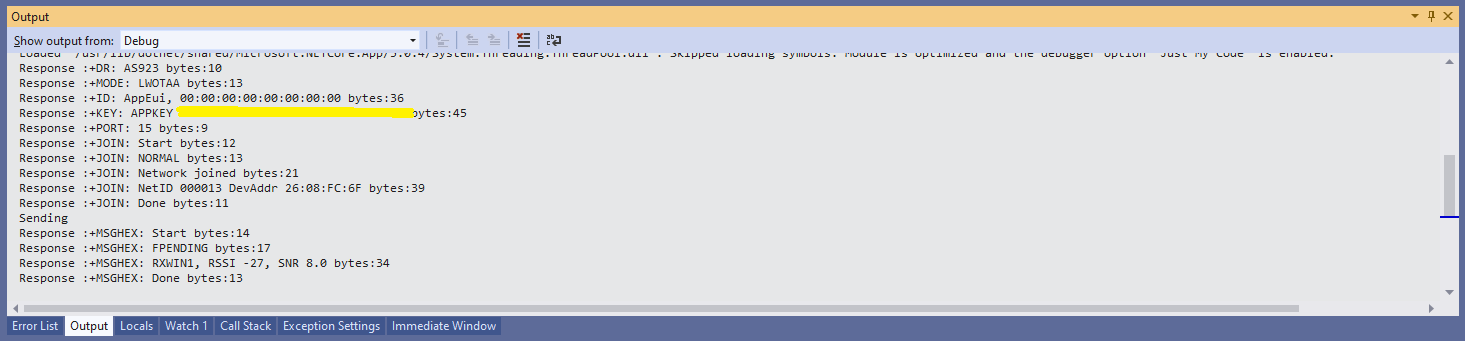
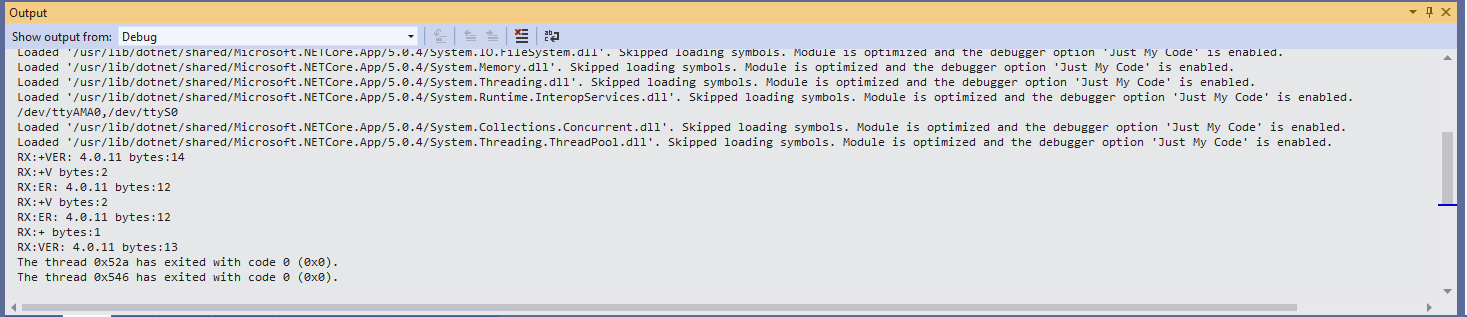
Visual Studio debugger output window showing network join and sensing a message

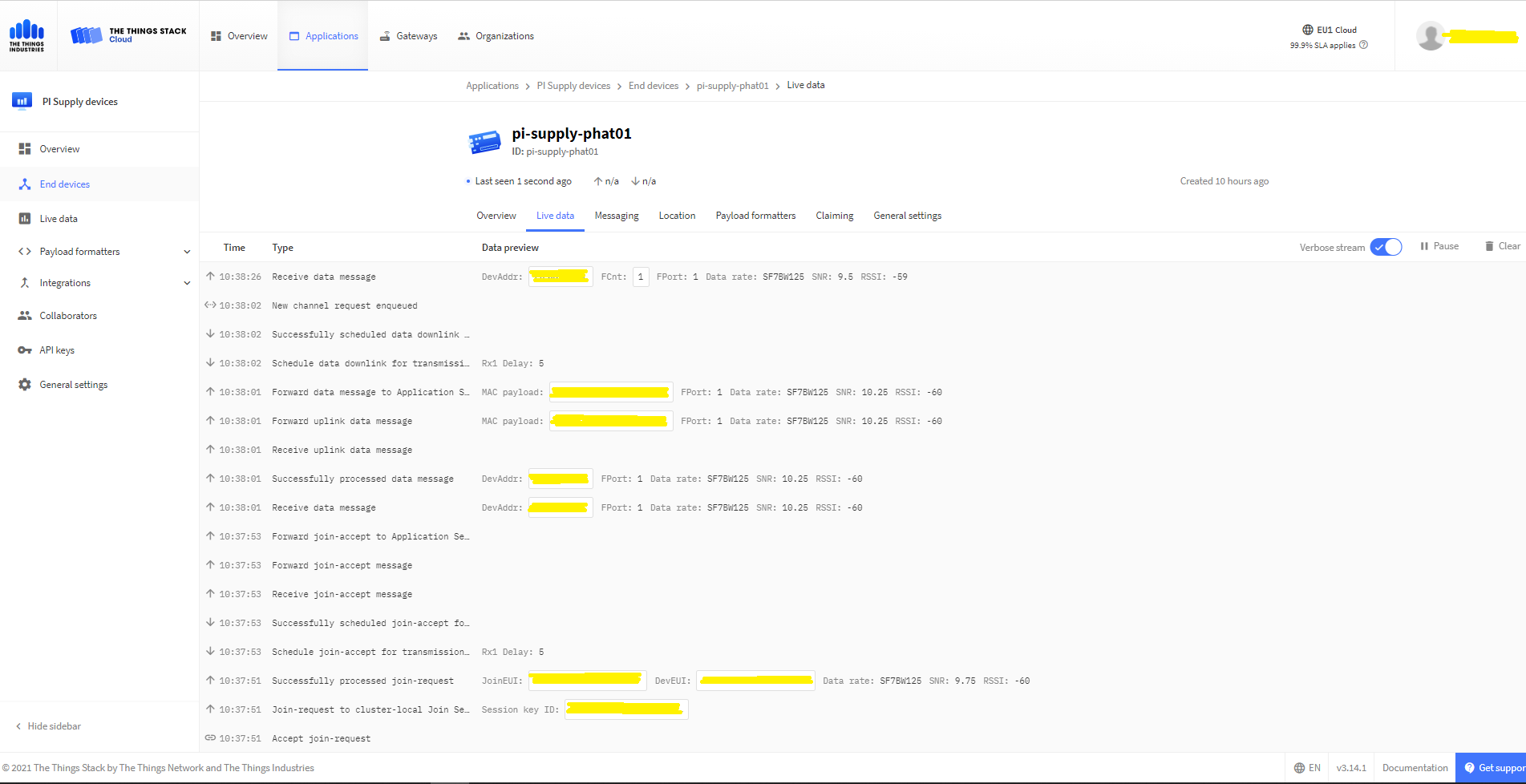
In the Visual Studio 2019 debug output I could see messages getting sent and then after a short delay they were visible in the TTN console.
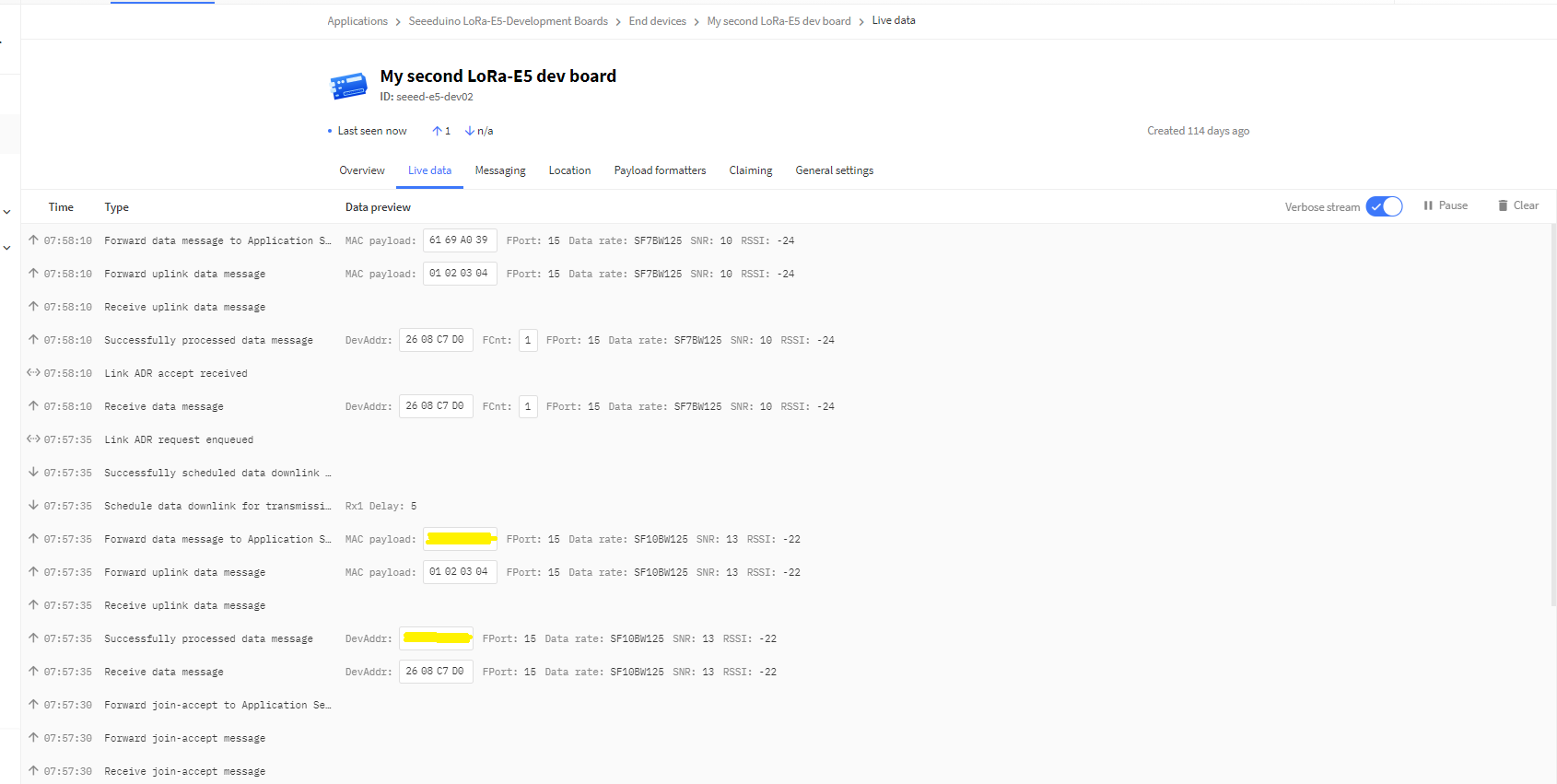
The Things Industries Live Data view showing network join and sensing a message

Most of the LoRaWAN modems I have worked with reply “OK” when a command is successful. The SeeedLoRa-E5 often returns the payload of the request in the response which makes the code a little bit more complex.
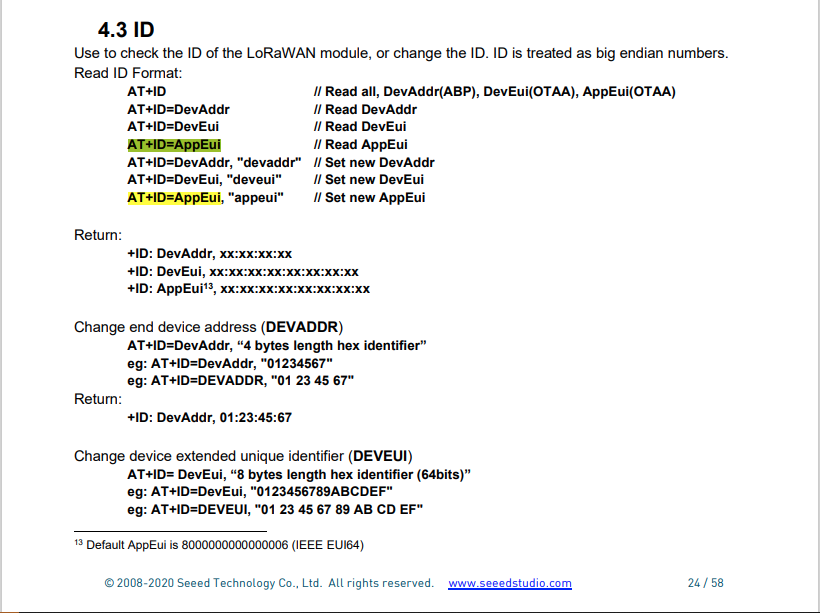
AppEui command structure in AT Command documentation

For example the AppEui can be passed in as “00:00:00:00:00:00:00:00” or “0000000000000000” but in the response the format is always “00:00:00:00:00:00:00:00”
.NET Core Seeed LoRaE5 LoRaWAN library Part1

Basic connectivity

Over the weekend I started building a .Net Core C# library for a Seeedstudio LoRa-E5 Development Kit which was connected to a Raspberry PI 3 with a Grove Base Hat for Raspberry Pi

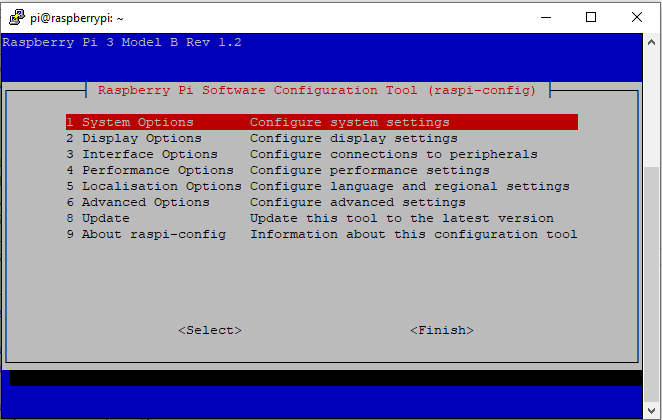
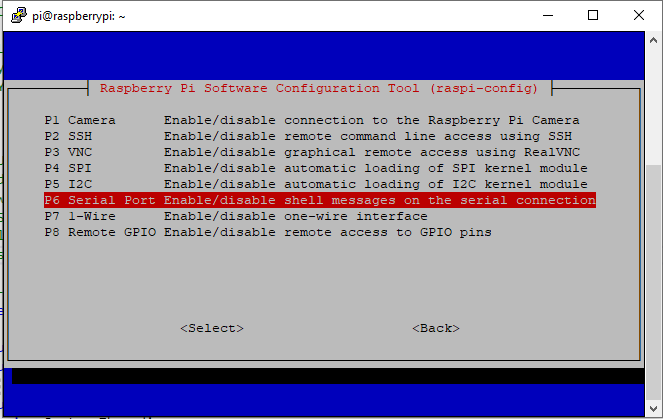
The RaspberryPI OS is a bit more strict than the other devices I use about port access. To allow my .Net Core application to access a serial port I connected to the device with ExtraPutty, then ran the RaspberyPI configuration tool, from the command prompt with “sudo raspi-config”

RaspberyPI OS Software Configuration tool mains screen
RaspberryPI OS IO Serial Port configuration
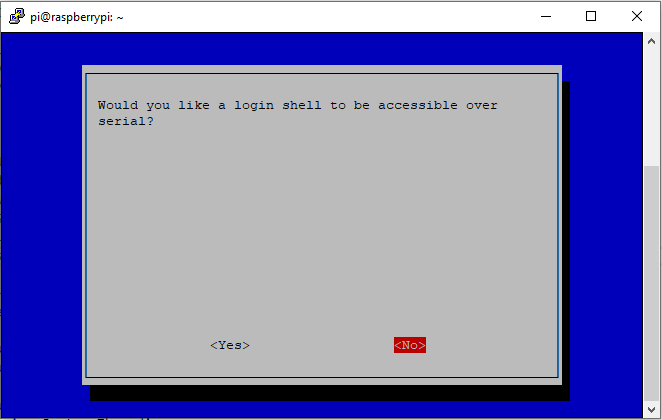
Raspberry PI OS disabling remote serial login shell
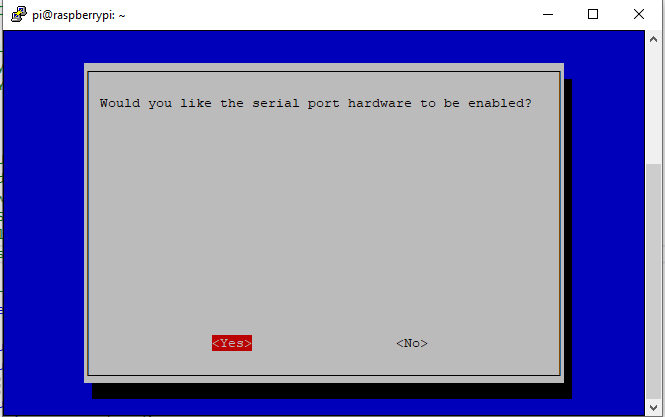
RaspberryPI OS enabling serial port access

Once serial port access was enabled I could enumerate them with SerialPort.GetPortNames() which is in the System.IO.Ports NuGet package. The code has compile time options for synchronous and asynchronous operation.

//---------------------------------------------------------------------------------
// Copyright (c) September 2021, devMobile Software
//
// Licensed under the Apache License, Version 2.0 (the "License");
// you may not use this file except in compliance with the License.
// You may obtain a copy of the License at
//
//     http://www.apache.org/licenses/LICENSE-2.0
//
// Unless required by applicable law or agreed to in writing, software
// distributed under the License is distributed on an "AS IS" BASIS,
// WITHOUT WARRANTIES OR CONDITIONS OF ANY KIND, either express or implied.
// See the License for the specific language governing permissions and
// limitations under the License.
//
//---------------------------------------------------------------------------------
namespace devMobile.IoT.NetCore.SeeedLoRaE5.ShieldSerial
{
	using System;
	using System.Diagnostics;
	using System.IO.Ports;
	using System.Threading;

	public class Program
	{
		private const string SerialPortId = "/dev/ttyS0";

		public static void Main()
		{
			SerialPort serialPort;

			Debug.WriteLine("devMobile.IoT.NetCore.SeeedLoRaE5.ShieldSerial starting");

			Debug.WriteLine(String.Join(",", SerialPort.GetPortNames()));

			try
			{
				serialPort = new SerialPort(SerialPortId);

				// set parameters
				serialPort.BaudRate = 9600;
				serialPort.Parity = Parity.None;
				serialPort.DataBits = 8;
				serialPort.StopBits = StopBits.One;
				serialPort.Handshake = Handshake.None;

				serialPort.ReadTimeout = 1000;

				serialPort.NewLine = "\r\n";

				serialPort.Open();

#if SERIAL_ASYNC_READ
				serialPort.DataReceived += SerialDevice_DataReceived;
#endif

				while (true)
				{
					serialPort.WriteLine("AT+VER");

#if SERIAL_SYNC_READ
					string response = serialPort.ReadLine();

					Debug.WriteLine($"RX:{response.Trim()} bytes:{response.Length}");
#endif

					Thread.Sleep(20000);
				}
			}
			catch (Exception ex)
			{
				Debug.WriteLine(ex.Message);
			}
		}

#if SERIAL_ASYNC_READ
		private static void SerialDevice_DataReceived(object sender, SerialDataReceivedEventArgs e)
		{
			SerialPort serialPort = (SerialPort)sender;

			switch (e.EventType)
			{
				case SerialData.Chars:
					string response = serialPort.ReadExisting();

					Debug.WriteLine($"RX:{response.Trim()} bytes:{response.Length}");
					break;

				case SerialData.Eof:
					Debug.WriteLine("RX :EoF");
					break;
				default:
					Debug.Assert(false, $"e.EventType {e.EventType} unknown");
					break;
			}
		}
#endif
	}
}

The synchronous version of the test client requests the Seeeduino LoRa-E5 version information with the AT+VER command.

Synchronously reading characters from the Seeeduino LoRa-E5

The asynchronous version of the application displays character(s) as they arrive so a response can be split across multiple SerialDataReceived events.

Asynchronous versions displaying partial responses

I use the excellent RaspberryDebugger to download the application and debug it on my Raspberry PI 3.

.NET Core RAK811 LoRaWAN library Part2

Nasty OTAA connect

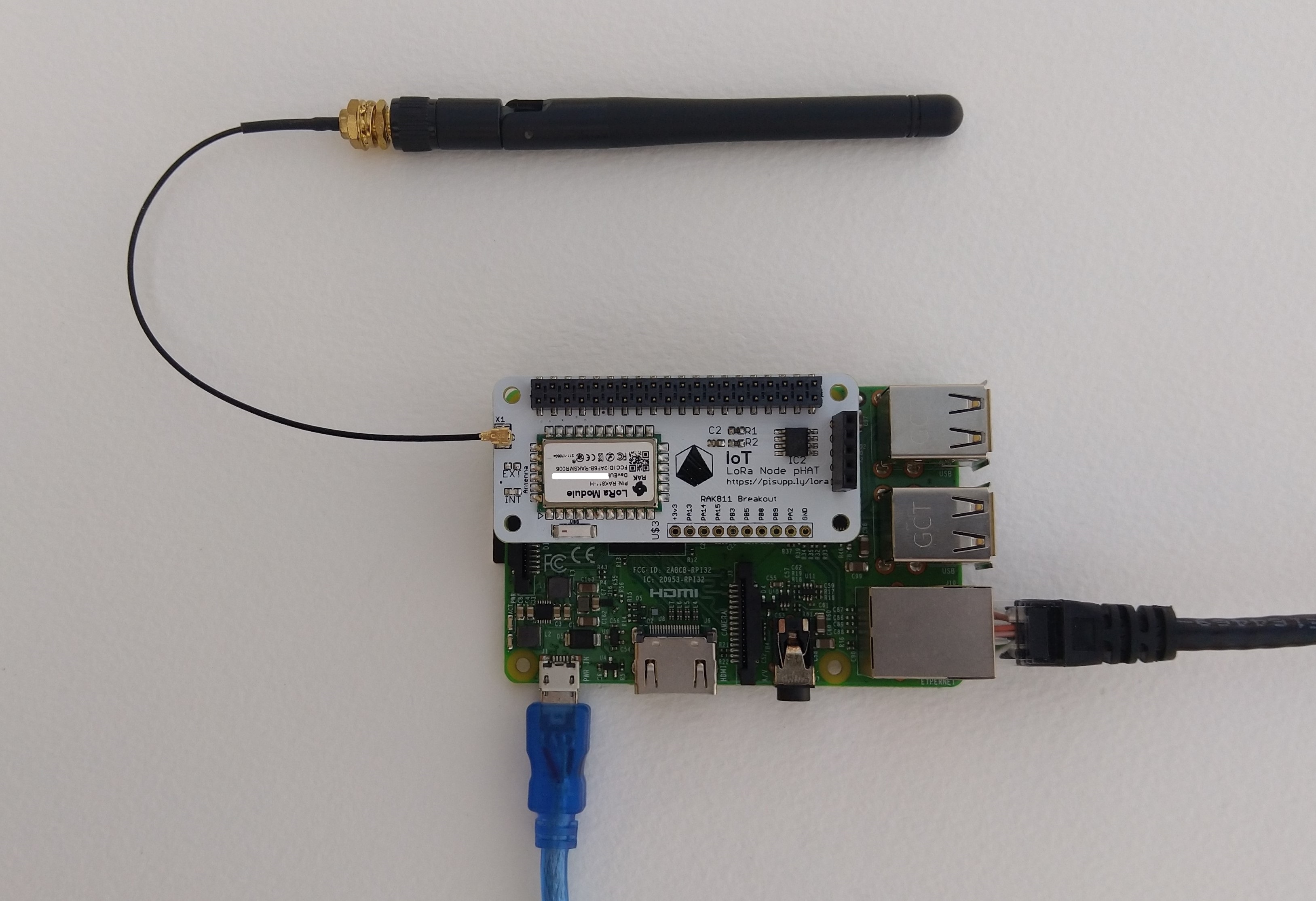
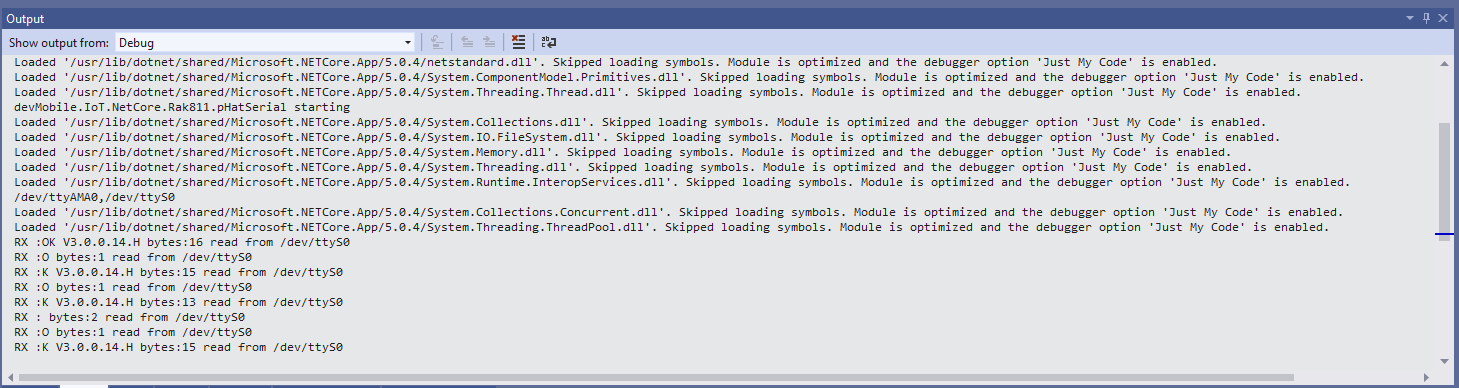
After getting basic connectivity for my IoT LoRa Node pHAT for Raspberry Pi test rig sorted I wanted to see if I could get the device connected to The Things Network(TTN) via the RAK7246G LPWAN Developer Gateway on my bookcase.

IoT LoRa Node pHAT for Raspberry Pi mounted on a Raspberry PI3

My Over the Air Activation (OTAA) implementation is very “nasty” I have assumed that there would be no timeouts or failures and I only send one BCD message “48656c6c6f204c6f526157414e” which is “hello LoRaWAN”.

The code just sequentially steps through the necessary configuration to join the TTN network with a suitable delay after each command is sent. I had some problems with re-opening the serial port if my application had previously failed with an uncaught exception. After some experimentation I added some code to ensure the port was closed when an exception occurred.

//---------------------------------------------------------------------------------
// Copyright (c) September 2021, devMobile Software
//
// Licensed under the Apache License, Version 2.0 (the "License");
// you may not use this file except in compliance with the License.
// You may obtain a copy of the License at
//
//     http://www.apache.org/licenses/LICENSE-2.0
//
// Unless required by applicable law or agreed to in writing, software
// distributed under the License is distributed on an "AS IS" BASIS,
// WITHOUT WARRANTIES OR CONDITIONS OF ANY KIND, either express or implied.
// See the License for the specific language governing permissions and
// limitations under the License.
//
//---------------------------------------------------------------------------------
namespace devMobile.IoT.NetCore.Rak811.NetworkJoinOTAA
{
	using System;
	using System.Diagnostics;
	using System.IO.Ports;
	using System.Threading;

	public class Program
	{
		private const string SerialPortId = "/dev/ttyS0";
		private const string AppEui = "...";
		private const string AppKey = "...";
		private const byte MessagePort = 1;
		private const string Payload = "A0EEE456D02AFF4AB8BAFD58101D2A2A"; // Hello LoRaWAN

		public static void Main()
		{
			string response;

			Debug.WriteLine("devMobile.IoT.NetCore.Rak811.NetworkJoinOTAA starting");

			Debug.WriteLine(String.Join(",", SerialPort.GetPortNames()));

			try
			{
				using (SerialPort serialPort = new SerialPort(SerialPortId))
				{
					// set parameters
					serialPort.BaudRate = 9600;
					serialPort.DataBits = 8;
					serialPort.Parity = Parity.None;
					serialPort.StopBits = StopBits.One;
					serialPort.Handshake = Handshake.None;

					serialPort.ReadTimeout = 5000;

					serialPort.NewLine = "\r\n";

					serialPort.Open();

					// clear out the RX buffer
					response = serialPort.ReadExisting();
					Debug.WriteLine($"RX :{response.Trim()} bytes:{response.Length}");
					Thread.Sleep(500);

					// Set the Working mode to LoRaWAN
					Console.WriteLine("Set Work mode");
					serialPort.WriteLine("at+set_config=lora:work_mode:0");
					Thread.Sleep(5000);
					response = serialPort.ReadExisting();
					response = response.Trim('\0');
					Debug.WriteLine($"RX :{response.Trim()} bytes:{response.Length}");

					// Set the Region to AS923
					Console.WriteLine("Set Region");
					serialPort.WriteLine("at+set_config=lora:region:AS923");
					response = serialPort.ReadLine();
					Debug.WriteLine($"RX :{response.Trim()} bytes:{response.Length}");

					// Set the JoinMode
					Console.WriteLine("Set Join mode");
					serialPort.WriteLine("at+set_config=lora:join_mode:0");
					response = serialPort.ReadLine();
					Debug.WriteLine($"RX :{response.Trim()} bytes:{response.Length}");

					// Set the appEUI
					Console.WriteLine("Set App Eui");
					serialPort.WriteLine($"at+set_config=lora:app_eui:{AppEui}");
					response = serialPort.ReadLine();
					Debug.WriteLine($"RX :{response.Trim()} bytes:{response.Length}");

					// Set the appKey
					Console.WriteLine("Set App Key");
					serialPort.WriteLine($"at+set_config=lora:app_key:{AppKey}");
					response = serialPort.ReadLine();
					Debug.WriteLine($"RX :{response.Trim()} bytes:{response.Length}");

					// Set the Confirm flag
					Console.WriteLine("Set Confirm off");
					serialPort.WriteLine("at+set_config=lora:confirm:0");
					response = serialPort.ReadLine();
					Debug.WriteLine($"RX :{response.Trim()} bytes:{response.Length}");
					
					// Join the network
					Console.WriteLine("Start Join");
					serialPort.WriteLine("at+join");
					Thread.Sleep(10000);
					response = serialPort.ReadLine();
					Debug.WriteLine($"RX :{response.Trim()} bytes:{response.Length}");

					while (true)
					{
						Console.WriteLine("Sending");
						serialPort.WriteLine($"at+send=lora:{MessagePort}:{Payload}");
						Thread.Sleep(1000);

						// The OK
						Console.WriteLine("Send result");
						response = serialPort.ReadLine();
						Debug.WriteLine($"RX :{response.Trim()} bytes:{response.Length}");

						// The Signal strength information etc.
						Console.WriteLine("Network confirmation");
						response = serialPort.ReadLine();
						Debug.WriteLine($"RX :{response.Trim()} bytes:{response.Length}");

						Thread.Sleep(20000);
					}
				}
			}
			catch (Exception ex)
			{
				Debug.WriteLine(ex.Message);
			}
		}
	}
}

The code is not suitable for production but it confirmed my software and hardware configuration worked.

In the Visual Studio 2019 debug output I could see messages getting sent and then after a short delay they were visible in the TTN console.

The Things Industries Live Data Tab showing my device connecting and sending messages

The RAK811 doesn’t fully implement the AS923 specification but I have a work around detailed in another post.

.NET Core RAK811 LoRaWAN library Part1

Basic connectivity

In my spare time over the last couple of days I have been working on a .Net Core C# library for a RAKWireless RAK811 based PiSupply IoT LoRa Node pHat for Raspberry PI.

Raspberry Pi3 with PI Supply RAK811 based IoT node LoRaWAN pHat

The RaspberryPI OS is a bit more strict than the other devices I use about port access. To allow my .Net Core application to access a serial port I connected to the device with ExtraPutty, then ran the RaspberyPI configuration tool, from the command prompt with “sudo raspi-config”

RaspberyPI OS Software Configuration tool mains screen
RaspberryPI OS IO Serial Port configuration
Raspberry PI OS disabling remote serial login shell
RaspberryPI OS enabling serial port access

Once serial port access was enabled I could enumerate them with SerialPort.GetPortNames() which is in the System.IO.Ports NuGet package. The code has compile time options for synchronous and asynchronous operation.

//---------------------------------------------------------------------------------
// Copyright (c) September 2021, devMobile Software
//
// Licensed under the Apache License, Version 2.0 (the "License");
// you may not use this file except in compliance with the License.
// You may obtain a copy of the License at
//
//     http://www.apache.org/licenses/LICENSE-2.0
//
// Unless required by applicable law or agreed to in writing, software
// distributed under the License is distributed on an "AS IS" BASIS,
// WITHOUT WARRANTIES OR CONDITIONS OF ANY KIND, either express or implied.
// See the License for the specific language governing permissions and
// limitations under the License.
//
//---------------------------------------------------------------------------------
namespace devMobile.IoT.NetCore.Rak811.pHatSerial
{
	using System;
	using System.Diagnostics;

	using System.IO.Ports;
	using System.Threading;

	public class Program
	{
		private const string SerialPortId = "/dev/ttyS0";

		public static void Main()
		{
			SerialPort serialPort;

			Debug.WriteLine("devMobile.IoT.NetCore.Rak811.pHatSerial starting");

			Debug.WriteLine(String.Join(",", SerialPort.GetPortNames()));

			try
			{
				serialPort = new SerialPort(SerialPortId);

				// set parameters
#if DEFAULT_BAUDRATE
				serialDevice.BaudRate = 115200;
#else
            serialPort.BaudRate = 9600;
#endif
				serialPort.Parity = Parity.None;
				serialPort.DataBits = 8;
				serialPort.StopBits = StopBits.One;
				serialPort.Handshake = Handshake.None;

				serialPort.ReadTimeout = 1000;

				serialPort.NewLine = "\r\n";

				serialPort.Open();

#if DEFAULT_BAUDRATE
				Debug.WriteLine("RAK811 baud rate set to 9600");
				serialDevice.Write("at+set_config=device:uart:1:9600");
#endif

#if SERIAL_ASYNC_READ
				serialPort.DataReceived += SerialDevice_DataReceived;
#endif

				while (true)
				{
					serialPort.WriteLine("at+version");

#if SERIAL_SYNC_READ
					string response = serialPort.ReadLine();

					Debug.WriteLine($"RX:{response.Trim()} bytes:{response.Length}");
#endif

					Thread.Sleep(20000);
				}
			}
			catch (Exception ex)
			{
				Debug.WriteLine(ex.Message);
			}
		}

#if SERIAL_ASYNC_READ
		private static void SerialDevice_DataReceived(object sender, SerialDataReceivedEventArgs e)
		{
			SerialPort serialPort = (SerialPort)sender;

			switch (e.EventType)
			{
				case SerialData.Chars:
					string response = serialPort.ReadExisting();

					Debug.WriteLine($"RX:{response.Trim()} bytes:{response.Length}");
					break;

				case SerialData.Eof:
					Debug.WriteLine("RX :EoF");
					break;
				default:
					Debug.Assert(false, $"e.EventType {e.EventType} unknown");
					break;
			}
		}
#endif
	}
}

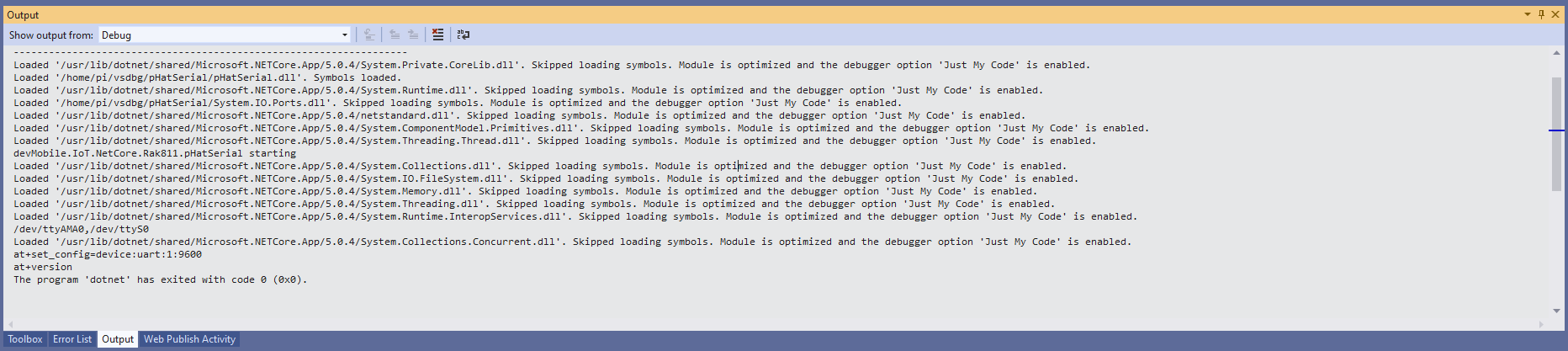
The first step was to change the RAK811 serial port speed from 115200 to 9600 baud.

Changing RAK811 serial port from 115200 to 9600 baud

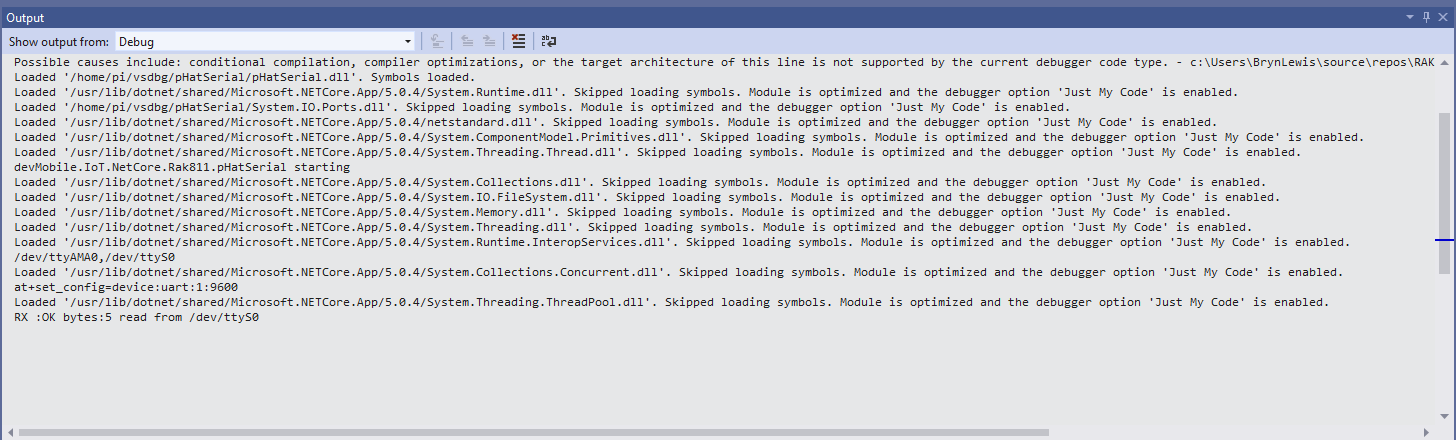
Then I requested the RAK811 version information with the at+version command.

Synchronously reading characters from the RAK811 partial response

I had to add a short delay between sending the command and reading the response.

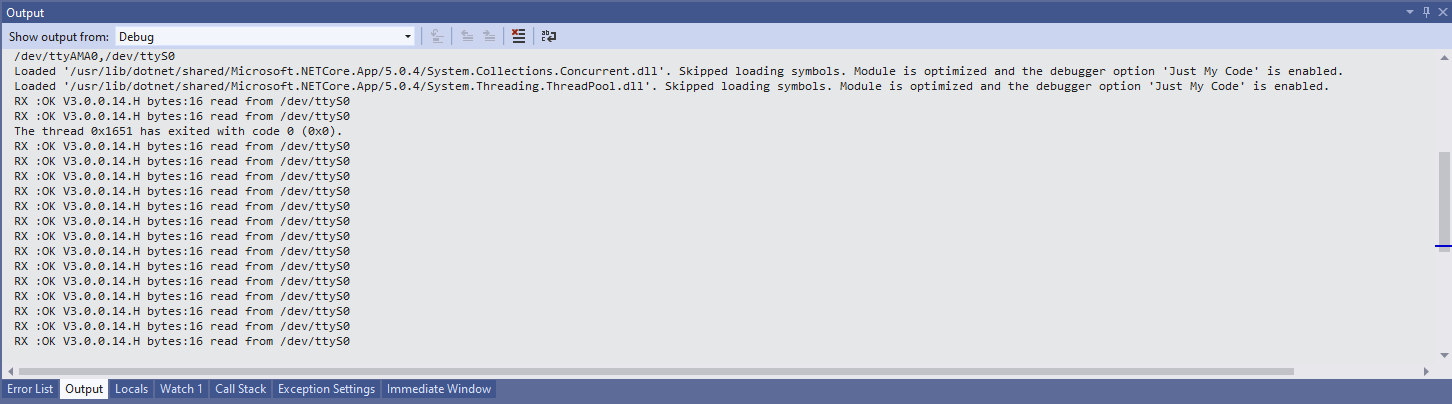
Synchronously reading characters from the RAK811 complete command responses

The asynchronous version of the application displays character(s) as they arrive so a response could be split across multiple SerialDataReceived events

Asynchronous versions displaying partial responses

I use the excellent RaspberryDebugger to download the application and debug it on my Raspberry PI 3.

SX127X InvertIQ RX & InvertIQ TX

My code was wrong, but now it’s less wrong

When I first fired up the my Seeeduino V4.2 + Dragino LoRa Shield using an application based on the Arduino-LoRa LoRaSimpleNode it didn’t work until in my library I set the sixth bit of RegInvertIQ to true.

Arduino monitor showing register dump just after startup

The first issue was my RegInvertIQ register configuration code was wrong, it looks like I copied ‘n’ paste the code and forgot fix it up.

// RegDetectOptimize
if (detectionOptimize != RegDetectOptimizeDectionOptimizeDefault)
{
	this.WriteByte((byte)Registers.RegDetectOptimize, (byte)detectionOptimize);
}

// RegInvertIQ
if (invertIQ != false)
{
	this.WriteByte((byte)Registers.RegInvertIQ, (byte)detectionThreshold);
}

// RegSyncWordDefault 
if (syncWord != RegSyncWordDefault)
{
	this.WriteByte((byte)Registers.RegSyncWord, syncWord);
}

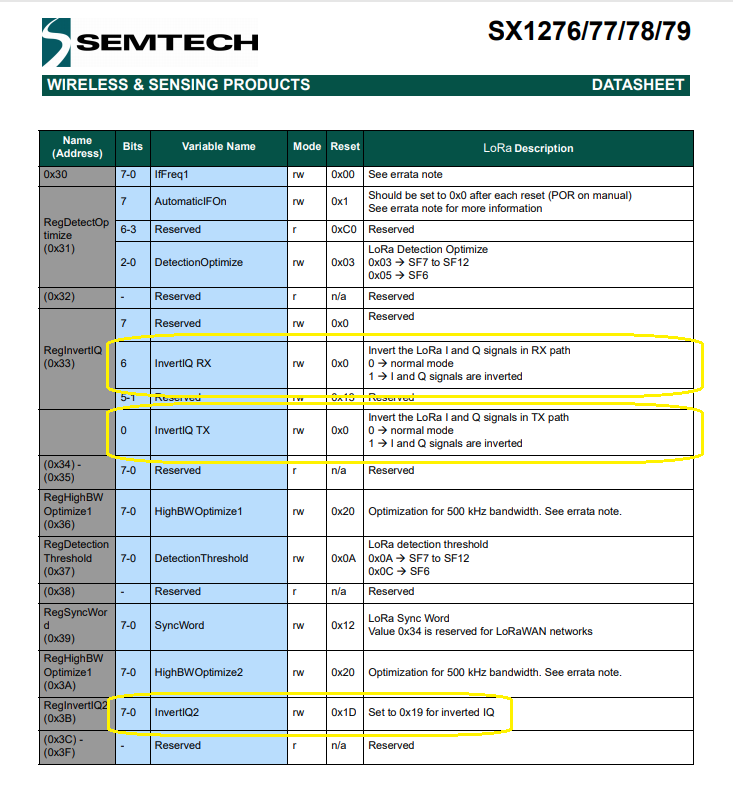
Even when I fixed up the code something still wasn’t quite right so I had a closer look at the SX127X datasheet and the LoRa-Arduino library code.

Semtech SX127X Datasheet RegInvertIQ information for TX and RX settings
void LoRaClass::enableCrc()
{
  writeRegister(REG_MODEM_CONFIG_2, readRegister(REG_MODEM_CONFIG_2) | 0x04);
}

void LoRaClass::disableCrc()
{
  writeRegister(REG_MODEM_CONFIG_2, readRegister(REG_MODEM_CONFIG_2) & 0xfb);
}

void LoRaClass::enableInvertIQ()
{
  writeRegister(REG_INVERTIQ,  0x66);
  writeRegister(REG_INVERTIQ2, 0x19);
}

void LoRaClass::disableInvertIQ()
{
  writeRegister(REG_INVERTIQ,  0x27);
  writeRegister(REG_INVERTIQ2, 0x1d);
}

void LoRaClass::setOCP(uint8_t mA)
{
  uint8_t ocpTrim = 27;

  if (mA <= 120) {
    ocpTrim = (mA - 45) / 5;
  } else if (mA <=240) {
    ocpTrim = (mA + 30) / 10;
  }

In RegInvertIQ the sixth bit is the RX flag and the zeroth bit is the TX flag, in the enable method the zeroth bit was not set(even number) and in the disable method it was set (odd number). The enable and disable method were “inverting” both the TX and RX lines.

When I did a RegisterDump the initial value of RegInvertIQ was 0x27 which is a bit odd as datasheet indicated the default value of the zeroth bit is 0.

To double check I inspected the source of a couple of libraries including the ARM Lora-net/sx126x_driver: Driver for SX126x radio (github.com)

/*!
 * RegDetectOptimize
 */
#define RFLR_DETECTIONOPTIMIZE_MASK                 0xF8
#define RFLR_DETECTIONOPTIMIZE_SF7_TO_SF12          0x03 // Default
#define RFLR_DETECTIONOPTIMIZE_SF6                  0x05

/*!
 * RegInvertIQ
 */
#define RFLR_INVERTIQ_RX_MASK                       0xBF
#define RFLR_INVERTIQ_RX_OFF                        0x00
#define RFLR_INVERTIQ_RX_ON                         0x40
#define RFLR_INVERTIQ_TX_MASK                       0xFE
#define RFLR_INVERTIQ_TX_OFF                        0x01
#define RFLR_INVERTIQ_TX_ON                         0x00

/*!
 * RegDetectionThreshold
 */
#define RFLR_DETECTIONTHRESH_SF7_TO_SF12            0x0A // Default
#define RFLR_DETECTIONTHRESH_SF6                    0x0C

/*!
 * RegInvertIQ2
 */
#define RFLR_INVERTIQ2_ON                           0x19
#define RFLR_INVERTIQ2_OFF                          0x1D

/*!
 * RegDioMapping1
 */
case MODEM_LORA:
   if (_rf_settings.lora.iq_inverted == true) {
       write_to_register(REG_LR_INVERTIQ, ((read_register(REG_LR_INVERTIQ)
                                            & RFLR_INVERTIQ_TX_MASK & RFLR_INVERTIQ_RX_MASK)
                                          | RFLR_INVERTIQ_RX_ON | RFLR_INVERTIQ_TX_OFF));
       write_to_register(REG_LR_INVERTIQ2, RFLR_INVERTIQ2_ON);
   } else {
       write_to_register(REG_LR_INVERTIQ, ((read_register(REG_LR_INVERTIQ)
                                            & RFLR_INVERTIQ_TX_MASK & RFLR_INVERTIQ_RX_MASK)
                                           | RFLR_INVERTIQ_RX_OFF | RFLR_INVERTIQ_TX_OFF));
       write_to_register(REG_LR_INVERTIQ2, RFLR_INVERTIQ2_OFF);
   }

Summary

My code supports the toggling of the RegInvertIQ “InvertIQ RX” and “InvertIQ TX” flags independently so users of the SX127X.NetCore library will need to pay attention to the configuration settings of the libraries used on other client devices.

.NET Core SX127X library Part5

Receive and Transmit with Interrupts

After confirming my TransmitInterrupt and ReceiveInterupt test-rigs worked with an Arduino device running the SandeepMistry Arduino LoRa library LoRaSimpleNode example (LoRa.enableInvertIQ disabled) I merged them together.

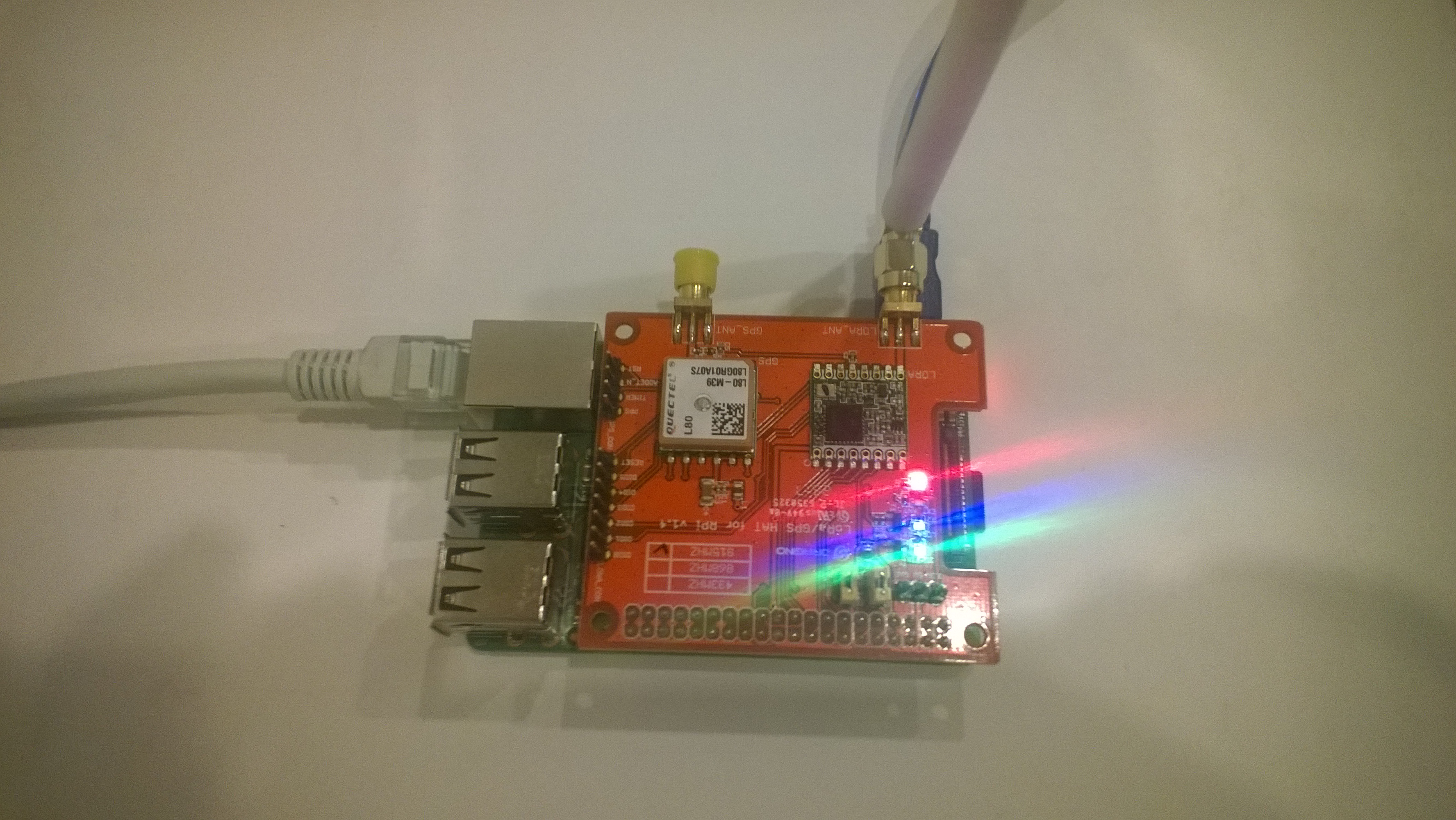
For this client I’m using a Dragino Raspberry Pi HAT featuring GPS and LoRa® technology on my Raspberry PI.

Dragino pHat on my Raspberry 3 device
Arduino Monitor output running LoRaSimpleNode example code

The Dragino Raspberry Pi HAT featuring GPS and LoRa® technology hat has the same pin configuration as the M2M 1 Channel LoRaWAN Gateway Shield for Raspberry Pi so no code changes were required.

	class Program
	{
		static void Main(string[] args)
		{
			int messageCount = 1;
			// Uptronics has no reset pin uses CS0 or CS1
			//SX127XDevice sX127XDevice = new SX127XDevice(25, chipSelectLine: 0); 
			//SX127XDevice sX127XDevice = new SX127XDevice(25, chipSelectLine: 1); 

			// M2M device has reset pin uses non standard chip select 
			//SX127XDevice sX127XDevice = new SX127XDevice(4, chipSelectLine: 0, chipSelectLogicalPinNumber: 25, resetPin: 17);
			SX127XDevice sX127XDevice = new SX127XDevice(4, chipSelectLine: 1, chipSelectLogicalPinNumber: 25, resetPinNumber: 17);

			// Put device into LoRa + Sleep mode
			sX127XDevice.WriteByte(0x01, 0b10000000); // RegOpMode 

			// Set the frequency to 915MHz
			byte[] frequencyBytes = { 0xE4, 0xC0, 0x00 }; // RegFrMsb, RegFrMid, RegFrLsb
			sX127XDevice.WriteBytes(0x06, frequencyBytes);

			sX127XDevice.WriteByte(0x0F, 0x0); // RegFifoRxBaseAddress 

			// More power PA Boost
			sX127XDevice.WriteByte(0x09, 0b10000000); // RegPaConfig

			sX127XDevice.WriteByte(0x40, 0b00000000); // RegDioMapping1 0b00000000 DI0 RxReady & TxReady

			sX127XDevice.WriteByte(0x01, 0b10000101); // RegOpMode set LoRa & RxContinuous

			while (true)
			{
				sX127XDevice.WriteByte(0x0E, 0x0); // RegFifoTxBaseAddress 

				// Set the Register Fifo address pointer
				sX127XDevice.WriteByte(0x0D, 0x0); // RegFifoAddrPtr 

				string messageText = "Hello LoRa from .NET Core! " + messageCount.ToString();
				messageCount += 1;

				// load the message into the fifo
				byte[] messageBytes = UTF8Encoding.UTF8.GetBytes(messageText);
				sX127XDevice.WriteBytes(0x00, messageBytes); // RegFifoAddrPtr 

				// Set the length of the message in the fifo
				sX127XDevice.WriteByte(0x22, (byte)messageBytes.Length); // RegPayloadLength

				sX127XDevice.WriteByte(0x40, 0b01000000); // RegDioMapping1 0b00000000 DI0 RxReady & TxReady

				sX127XDevice.WriteByte(0x01, 0b10000011); // RegOpMode 

				Debug.WriteLine($"Sending {messageBytes.Length} bytes message {messageText}");

				Thread.Sleep(10000);
			}
		}
	}

For the SX127X to transmit and receive messages the device has to be put into sleep mode (RegOpMode), the frequency set to 915MHz(RegFrMsb, RegFrMid, RegFrLsb) and the receiver enabled(RxContinuous). In addition interrupts have to be enabled(RegDioMapping1) on message received(RxReady) and message sent(TxReady).

			sX127XDevice.WriteByte(0x40, 0b00000000); // RegDioMapping1 0b00000000 DI0 RxReady & TxReady

			sX127XDevice.WriteByte(0x01, 0b10000101); // RegOpMode set LoRa & RxContinuous

When running the applications sleeps the SX127X module(RegOpMode), writes the message payload to the buffer(RegFifoAddrPtr,RegPayloadLength) then turns on the transmitter(RegOpMode). When has message arrived or a message has been sent the DI0 pin is strobed, the type of interrupt is determined (RegIrqFlags) and processed accordingly. Once the interrupt has been processed the interrupt flags(RegIrqFlags) are cleared, the receiver re-enabled and the interrupt mappings reset(RegDioMapping1) reset.

Loaded '/usr/lib/dotnet/shared/Microsoft.NETCore.App/5.0.4/System.Memory.dll'. Skipped loading symbols. Module is optimized and the debugger option 'Just My Code' is enabled.
Sending 28 bytes message Hello LoRa from .NET Core! 1
RegIrqFlags 00001000
Transmit-Done
RegIrqFlags 01010000
Receive-Message
Received 32 byte message HeLoRa World! I'm a Node! 880000
Sending 28 bytes message Hello LoRa from .NET Core! 2
RegIrqFlags 00001000
Transmit-Done
RegIrqFlags 01010000
Receive-Message
Received 32 byte message HeLoRa World! I'm a Node! 890000
Sending 28 bytes message Hello LoRa from .NET Core! 3
RegIrqFlags 00001000
Transmit-Done
RegIrqFlags 01010000
Receive-Message
Received 32 byte message HeLoRa World! I'm a Node! 900000
Sending 28 bytes message Hello LoRa from .NET Core! 4
RegIrqFlags 00001000
Transmit-Done
RegIrqFlags 01010000
Receive-Message
Received 32 byte message HeLoRa World! I'm a Node! 910000
Sending 28 bytes message Hello LoRa from .NET Core! 5
RegIrqFlags 00001000
Transmit-Done
RegIrqFlags 01010000
Receive-Message
Received 32 byte message HeLoRa World! I'm a Node! 920000

Summary

In this iteration I sent messages to and from my .Net Core 5 dotnet/iot powered Raspberry PI using a Dragino LoRa Shield 915MHz and a Seeeduino V4.2 client.

.NET Core SX127X library Part4

Receive Basic

Next step was proving I could receive a message sent by an Arduino device running the LoRaSimpleNode example from the SandeepMistry Arduino LoRa library. For some variety I’m using a Dragino Raspberry Pi HAT featuring GPS and LoRa® technology on my Raspberry PI.

Dragino pHat on my Raspberry 3 device
Arduino Monitor output running LoRaSimpleNode example code

The Dragino pHat has the same pin configuration as the M2M 1 Channel LoRaWAN Gateway Shield for Raspberry Pi so there weren’t any code changes.

class Program
{
	static void Main(string[] args)
	{
		// M2M device has reset pin uses non standard chip select 
		SX127XDevice sX127XDevice = new SX127XDevice(chipSelectLine: 1, chipSelectLogicalPinNumber: 25, resetPin: 17);

		// Put device into LoRa + Sleep mode
		sX127XDevice.WriteByte(0x01, 0b10000000); // RegOpMode 

		// Set the frequency to 915MHz
		byte[] frequencyBytes = { 0xE4, 0xC0, 0x00 }; // RegFrMsb, RegFrMid, RegFrLsb
		sX127XDevice.WriteBytes(0x06, frequencyBytes);

		sX127XDevice.WriteByte(0x0F, 0x0); // RegFifoRxBaseAddress 

		sX127XDevice.WriteByte(0x01, 0b10000101); // RegOpMode set LoRa & RxContinuous

		while (true)
		{
			// Wait until a packet is received, no timeouts in PoC
			Console.WriteLine("Receive-Wait");
			byte IrqFlags = sX127XDevice.ReadByte(0x12); // RegIrqFlags
			while ((IrqFlags & 0b01000000) == 0)  // wait until RxDone cleared
			{
				Thread.Sleep(100);
				IrqFlags = sX127XDevice.ReadByte(0x12); // RegIrqFlags
				Debug.Write(".");
			}
			Console.WriteLine("");
			Console.WriteLine($"RegIrqFlags {Convert.ToString((byte)IrqFlags, 2).PadLeft(8, '0')}");
			Console.WriteLine("Receive-Message");
			byte currentFifoAddress = sX127XDevice.ReadByte(0x10); // RegFifiRxCurrent
			sX127XDevice.WriteByte(0x0d, currentFifoAddress); // RegFifoAddrPtr

			byte numberOfBytes = sX127XDevice.ReadByte(0x13); // RegRxNbBytes

			// Read the message from the FIFO
			byte[] messageBytes = sX127XDevice.ReadBytes(0x00, numberOfBytes);

			sX127XDevice.WriteByte(0x0d, 0);
			sX127XDevice.WriteByte(0x12, 0b11111111); // RegIrqFlags clear all the bits

			string messageText = UTF8Encoding.UTF8.GetString(messageBytes);
			Console.WriteLine($"Received {messageBytes.Length} byte message {messageText}");

			Console.WriteLine("Receive-Done");
		}
	}
}

There wasn’t much code to configure the SX127X to receive messages. The device has to be put into sleep mode (RegOpMode), the frequency set to 915MHz(RegFrMsb, RegFrMid, RegFrLsb) and receiver enabled(RxContinuous).

While running the applications polls (RegIrqFlags) until a message has arrived (RxDone). It then gets a pointer to the start of the message buffer (RegFifiRxCurrent, RegFifoAddrPtr), gets the message length, and then reads the message (RegPayloadLength, RegFifo) from the buffer. Finally the flags are reset ready for the next message(RegIrqFlags)

Loaded '/usr/lib/dotnet/shared/Microsoft.NETCore.App/5.0.4/System.Memory.dll'. Skipped loading symbols. Module is optimized and the debugger option 'Just My Code' is enabled.
Sending 28 bytes message Hello LoRa from .NET Core! 1
RegIrqFlags 00001000
Transmit-Done
RegIrqFlags 01010000
Receive-Message
Received 31 byte message HeLoRa World! I'm a Node! 20000
Sending 28 bytes message Hello LoRa from .NET Core! 2
RegIrqFlags 00001000
Transmit-Done
RegIrqFlags 01010000
Receive-Message
Received 31 byte message HeLoRa World! I'm a Node! 30000
Sending 28 bytes message Hello LoRa from .NET Core! 3
RegIrqFlags 00001000
Transmit-Done
RegIrqFlags 01010000
Receive-Message
Received 31 byte message HeLoRa World! I'm a Node! 40000
Sending 28 bytes message Hello LoRa from .NET Core! 4
RegIrqFlags 00001000
Transmit-Done
RegIrqFlags 01010000
Receive-Message
Received 31 byte message HeLoRa World! I'm a Node! 50000
Sending 28 bytes message Hello LoRa from .NET Core! 5
RegIrqFlags 00001000
Transmit-Done
RegIrqFlags 01010000
Receive-Message
Received 31 byte message HeLoRa World! I'm a Node! 60000
Sending 28 bytes message Hello LoRa from .NET Core! 6
RegIrqFlags 00001000
Transmit-Done
RegIrqFlags 01010000
Receive-Message
Received 31 byte message HeLoRa World! I'm a Node! 70000
Sending 28 bytes message Hello LoRa from .NET Core! 7
RegIrqFlags 00001000
Transmit-Done
RegIrqFlags 01010000
Receive-Message
Received 31 byte message HeLoRa World! I'm a Node! 80000
Sending 28 bytes message Hello LoRa from .NET Core! 8
RegIrqFlags 00001000
Transmit-Done

Summary

In this iteration I sent a from my a Dragino LoRa Shield 915MHz on a Seeeduino V4.2 device to my .Net Core 5 dotnet/iot powered Raspberry PI.

.NET Core SX127X library Part3

Transmit Basic

Next step was proving I could send a message to an Arduino device running the LoRaSimpleNode example from the SandeepMistry Arduino LoRa library.

Seeeduino V4.2 with Dragino Tech

My first attempt didn’t have much range so I tried turning on the PA_BOOST pin (in RegPaConfig) which improved the range and Received Signal Strength Indication (RSSI).

Arduino Monitor displaying received messages

There was quite a bit of code to configure the SX127X to Transmit messages. I had to put the device into sleep mode (RegOpMode), set the frequency to 915MHz(RegFrMsb, RegFrMid, RegFrLsb), and set the output power(RegPaConfig). Then for each message reset the pointer to the start of the message buffer(RegFifoTxBaseAddress, RegFifoAddrPtr), load the message into the buffer (RegPayloadLength), then turn on the transmitter(RegOpMode), and then finally poll (RegIrqFlags) until the message was sent(TxDone).

class Program
{
	static void Main(string[] args)
	{
		Byte regOpMode;
		ushort preamble;
		byte[] frequencyBytes;

		// M2M device has reset pin uses non standard chip select 
		SX127XDevice sX127XDevice = new SX127XDevice(chipSelectLine: 1, chipSelectLogicalPinNumber: 25, resetPin: 17);

		// Put device into LoRa + Sleep mode
		sX127XDevice.WriteByte(0x01, 0b10000000); // RegOpMode 

		// Set the frequency to 915MHz
		byte[] frequencyWriteBytes = { 0xE4, 0xC0, 0x00 }; // RegFrMsb, RegFrMid, RegFrLsb
		sX127XDevice.WriteBytes(0x06, frequencyWriteBytes);

		// More power PA Boost
		sX127XDevice.WriteByte(0x09, 0b10000000); // RegPaConfig

		while (true)
		{
			sX127XDevice.WriteByte(0x0E, 0x0); // RegFifoTxBaseAddress 

			// Set the Register Fifo address pointer
			sX127XDevice.WriteByte(0x0D, 0x0); // RegFifoAddrPtr 

			string messageText = "Hello LoRa from .NET Core!";

			// load the message into the fifo
			byte[] messageBytes = UTF8Encoding.UTF8.GetBytes(messageText);
			foreach (byte b in messageBytes)
			{
				sX127XDevice.WriteByte(0x0, b); // RegFifo
			}

			// Set the length of the message in the fifo
			sX127XDevice.WriteByte(0x22, (byte)messageBytes.Length); // RegPayloadLength

			Debug.WriteLine($"Sending {messageBytes.Length} bytes message \"{messageText}\"");
			/// Set the mode to LoRa + Transmit
			sX127XDevice.WriteByte(0x01, 0b10000011); // RegOpMode 

			// Wait until send done, no timeouts in PoC
			Debug.WriteLine("Send-wait");
			byte IrqFlags = sX127XDevice.ReadByte(0x12); // RegIrqFlags
			while ((IrqFlags & 0b00001000) == 0)  // wait until TxDone cleared
			{
				Thread.Sleep(10);
				IrqFlags = sX127XDevice.ReadByte(0x12); // RegIrqFlags
				Debug.Write(".");
			}
			Debug.WriteLine("");
			sX127XDevice.WriteByte(0x12, 0b00001000); // clear TxDone bit
			Debug.WriteLine("Send-Done");

			Thread.Sleep(30000);
		}
	}
}

Loaded '/usr/lib/dotnet/shared/Microsoft.NETCore.App/5.0.4/System.Memory.dll'. Skipped loading symbols. Module is optimized and the debugger option 'Just My Code' is enabled.
Sending 26 bytes message "Hello LoRa from .NET Core!"
Send-wait
....
Send-Done
Sending 26 bytes message "Hello LoRa from .NET Core!"
Send-wait
...
Send-Done
Sending 26 bytes message "Hello LoRa from .NET Core!"
Send-wait
...
Send-Done
Sending 26 bytes message "Hello LoRa from .NET Core!"
Send-wait
...
Send-Done
Sending 26 bytes message "Hello LoRa from .NET Core!"
Send-wait
...
Send-Done
Sending 26 bytes message "Hello LoRa from .NET Core!"
Send-wait
...
Send-Done
Sending 26 bytes message "Hello LoRa from .NET Core!"
Send-wait
...
Send-Done

Summary

In this iteration I sent a message from my  .Net Core 5 dotnet/iot powered Raspberry PI to a Dragino LoRa Shield 915MHz on a Seeeduino V4.2 device. Every so often the payload was corrupted becuase I had not enabled the payload Cyclic Redundancy Check(CRC) functionality.

.NET Core SX127X library Part2

Register Reading and Writing

Now that Serial Peripheral(SPI) connectivity for my .Net Core 5 dotnet/iot SX127X library is working, the next step is to build a “generic” class for my two reference Rapsberry Pi HATS.

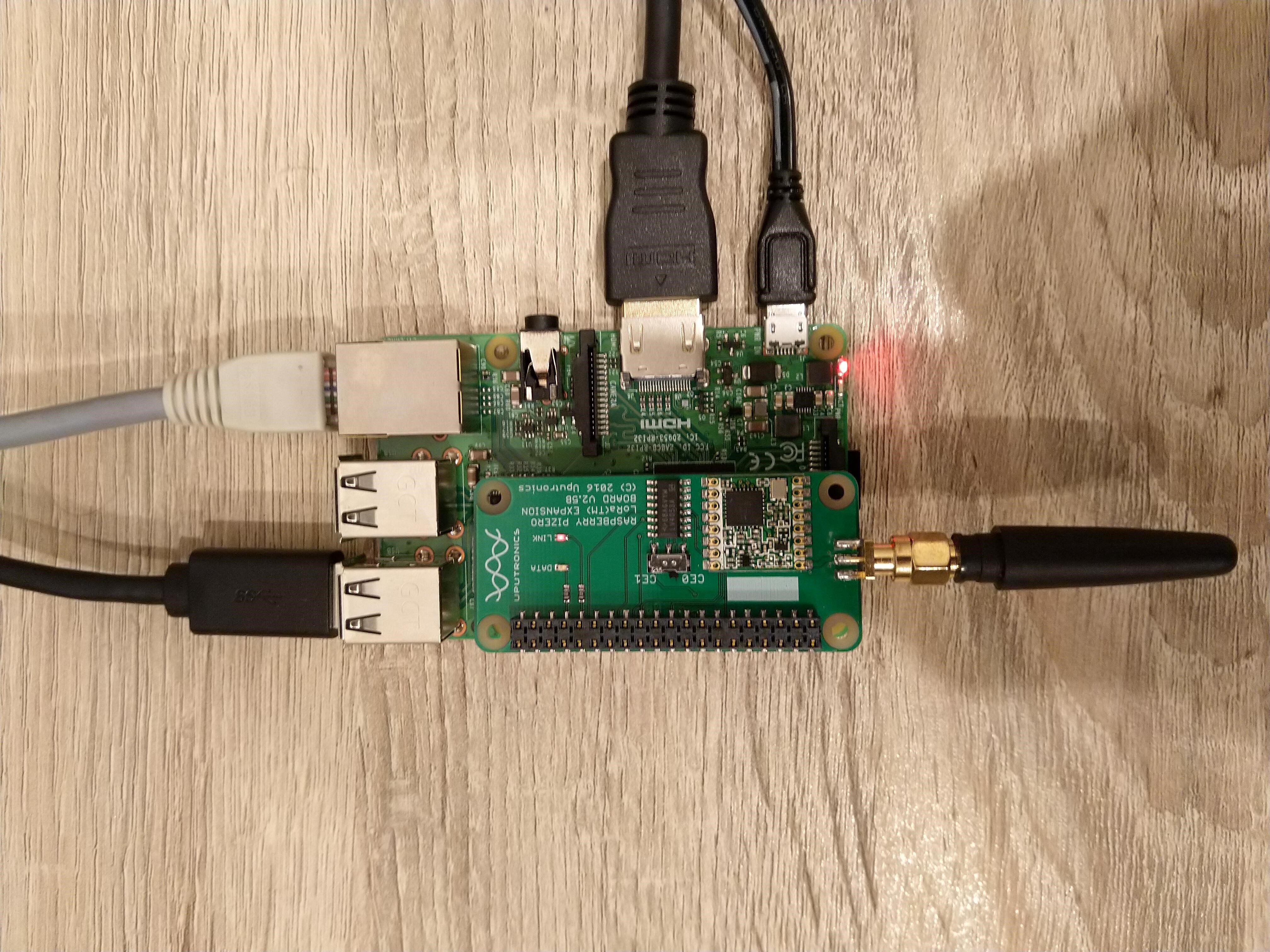
The Uputronics Raspberry PiZero LoRa(TM) Expansion Board supports both standard Chip Select(CS) lines (switch selectable which is really useful) and the reset pin is not connected.

Uputronics Raspberry PIZero LoRa Expansion board on a Raspberry PI 3 device

The M2M 1 Channel LoRaWan Gateway Shield for Raspberry PI has a “non-standard” CS pin and the reset pin is connected to pin 17.

M2M Single channel shield on Raspberry Pi 3 Device

In my previous post the spiDevice.TransferFullDuplex method worked for a standard CS line (CS0 or CS1), and for a non-standard CS pin, though the CS line configured in SpiConnectionSettings was “unusable” by other applications.

static void Main(string[] args)
{
	Byte regOpMode;
	ushort preamble;
	byte[] frequencyBytes;
	// Uptronics has no reset pin uses CS0 or CS1
	//SX127XDevice sX127XDevice = new SX127XDevice(chipSelectLine: 0); 
	//SX127XDevice sX127XDevice = new SX127XDevice(chipSelectLine: 1); 

	// M2M device has reset pin uses non standard chip select 
	//SX127XDevice sX127XDevice = new SX127XDevice(chipSelectLine: 0, chipSelectLogicalPinNumber: 25, resetPin: 17);
	SX127XDevice sX127XDevice = new SX127XDevice(chipSelectLine: 1, chipSelectLogicalPinNumber:25, resetPin: 17);

	Console.WriteLine("In FSK mode");
	sX127XDevice.RegisterDump();


	Console.WriteLine("Read RegOpMode (read byte)");
	regOpMode = sX127XDevice.ReadByte(0x1);
	Debug.WriteLine($"RegOpMode 0x{regOpMode:x2}");

	Console.WriteLine("Set LoRa mode and sleep mode (write byte)");
	sX127XDevice.WriteByte(0x01, 0b10000000);

	Console.WriteLine("Read RegOpMode (read byte)");
	regOpMode = sX127XDevice.ReadByte(0x1);
	Debug.WriteLine($"RegOpMode 0x{regOpMode:x2}");


	Console.WriteLine("In LoRa mode");
	sX127XDevice.RegisterDump();


	Console.WriteLine("Read the preamble (read word)"); // Should be 0x08
	preamble = sX127XDevice.ReadWordMsbLsb(0x20);
	Debug.WriteLine($"Preamble 0x{preamble:x2} - Bits {Convert.ToString(preamble, 2).PadLeft(16, '0')}");

	Console.WriteLine("Set the preamble to 0x8000 (write word)");
	sX127XDevice.WriteWordMsbLsb(0x20, 0x8000);

	Console.WriteLine("Read the preamble (read word)"); // Should be 0x08
	preamble = sX127XDevice.ReadWordMsbLsb(0x20);
	Debug.WriteLine($"Preamble 0x{preamble:x2} - Bits {Convert.ToString(preamble, 2).PadLeft(16, '0')}");


	Console.WriteLine("Read the centre frequency"); // RegFrfMsb 0x6c RegFrfMid 0x80 RegFrfLsb 0x00 which is 433MHz
	frequencyBytes = sX127XDevice.ReadBytes(0x06, 3);
	Console.WriteLine($"Frequency Msb 0x{frequencyBytes[0]:x2} Mid 0x{frequencyBytes[1]:x2} Lsb 0x{frequencyBytes[2]:x2}");

	Console.WriteLine("Set the centre frequency"); 
	byte[] frequencyWriteBytes = { 0xE4, 0xC0, 0x00 };
	sX127XDevice.WriteBytes(0x06, frequencyWriteBytes);

	Console.WriteLine("Read the centre frequency"); // RegFrfMsb 0xE4 RegFrfMid 0xC0 RegFrfLsb 0x00 which is 915MHz
	frequencyBytes = sX127XDevice.ReadBytes(0x06, 3);
	Console.WriteLine($"Frequency Msb 0x{frequencyBytes[0]:x2} Mid 0x{frequencyBytes[1]:x2} Lsb 0x{frequencyBytes[2]:x2}");


	sX127XDevice.RegisterDump();

	// Sleep forever
	Thread.Sleep(-1);
}

I use RegisterDump multiple times to show the updates working.

...
Loaded '/usr/lib/dotnet/shared/Microsoft.NETCore.App/5.0.4/Microsoft.Win32.Primitives.dll'. Skipped loading symbols. Module is optimized and the debugger option 'Just My Code' is enabled.
In FSK mode
Register dump
Register 0x00 - Value 0X00 - Bits 00000000
Register 0x01 - Value 0X09 - Bits 00001001
Register 0x02 - Value 0X1a - Bits 00011010
Register 0x03 - Value 0X0b - Bits 00001011
Register 0x04 - Value 0X00 - Bits 00000000
Register 0x05 - Value 0X52 - Bits 01010010
Register 0x06 - Value 0X6c - Bits 01101100
Register 0x07 - Value 0X80 - Bits 10000000
...
Register 0x1f - Value 0X40 - Bits 01000000
Register 0x20 - Value 0X00 - Bits 00000000
Register 0x21 - Value 0X00 - Bits 00000000
Register 0x22 - Value 0X00 - Bits 00000000
...
Register 0x41 - Value 0X00 - Bits 00000000
Register 0x42 - Value 0X12 - Bits 00010010

Read RegOpMode (read byte)
RegOpMode 0x09
Set LoRa mode and sleep mode (write byte)
Read RegOpMode (read byte)
RegOpMode 0x80
In LoRa mode
Register dump
Register 0x00 - Value 0Xdf - Bits 11011111
Register 0x01 - Value 0X80 - Bits 10000000
Register 0x02 - Value 0X1a - Bits 00011010
Register 0x03 - Value 0X0b - Bits 00001011
Register 0x04 - Value 0X00 - Bits 00000000
Register 0x05 - Value 0X52 - Bits 01010010
Register 0x06 - Value 0X6c - Bits 01101100
Register 0x07 - Value 0X80 - Bits 10000000
...
Register 0x1f - Value 0X64 - Bits 01100100
Register 0x20 - Value 0X00 - Bits 00000000
Register 0x21 - Value 0X08 - Bits 00001000
Register 0x22 - Value 0X01 - Bits 00000001
...
Register 0x41 - Value 0X00 - Bits 00000000
Register 0x42 - Value 0X12 - Bits 00010010

Read the preamble (read word)
Preamble 0x08 - Bits 0000000000001000
Set the preamble to 0x8000 (write word)
Read the preamble (read word)
Preamble 0x8000 - Bits 1000000000000000
Read the centre frequency
Frequency Msb 0x6c Mid 0x80 Lsb 0x00
Set the centre frequency
Read the centre frequency
Frequency Msb 0xe4 Mid 0xc0 Lsb 0x00
Register dump
Register 0x00 - Value 0Xb9 - Bits 10111001
Register 0x01 - Value 0X80 - Bits 10000000
Register 0x02 - Value 0X1a - Bits 00011010
Register 0x03 - Value 0X0b - Bits 00001011
Register 0x04 - Value 0X00 - Bits 00000000
Register 0x05 - Value 0X52 - Bits 01010010
Register 0x06 - Value 0Xe4 - Bits 11100100
Register 0x07 - Value 0Xc0 - Bits 11000000
...
Register 0x1f - Value 0X64 - Bits 01100100
Register 0x20 - Value 0X80 - Bits 10000000
Register 0x21 - Value 0X00 - Bits 00000000
Register 0x22 - Value 0X01 - Bits 00000001
...
Register 0x3f - Value 0X00 - Bits 00000000
Register 0x40 - Value 0X00 - Bits 00000000

Summary

In this iteration I added support for resetting the SX127X module (where supported by the Raspberry PI HAT) and an spiDevice.TransferFullDuplex based implementation for reading/writing individual bytes/words and reading/writing arrays of bytes.

public byte[] ReadBytes(byte registerAddress, byte length)
{
	Span<byte> writeBuffer = stackalloc byte[length + 1];
	Span<byte> readBuffer = stackalloc byte[writeBuffer.Length];

	if (SX127XTransceiver == null)
	{
		throw new ApplicationException("SX127XDevice is not initialised");
	}

	writeBuffer[0] = registerAddress &= RegisterAddressReadMask;

	if (this.ChipSelectLogicalPinNumber != 0)
	{
		gpioController.Write(ChipSelectLogicalPinNumber, PinValue.Low);
	}

	this.SX127XTransceiver.TransferFullDuplex(writeBuffer, readBuffer);

	if (this.ChipSelectLogicalPinNumber != 0)
	{
		gpioController.Write(ChipSelectLogicalPinNumber, PinValue.High);
	}

	return readBuffer[1..readBuffer.Length].ToArray();
}

I used stackalloc so the memory for the writeBuffer and readBuffer doesn’t have to be tidied up by the .Net Garbage Collector(GC).

public void WriteBytes(byte address, byte[] bytes)
{
	Span<byte> writeBuffer = stackalloc byte[bytes.Length + 1];
	Span<byte> readBuffer = stackalloc byte[writeBuffer.Length];

	if (SX127XTransceiver == null)
	{
		throw new ApplicationException("SX127XDevice is not initialised");
	}

	writeBuffer[0] = address |= RegisterAddressWriteMask;
	for (byte index = 0; index < bytes.Length; index++)
	{
		writeBuffer[index + 1] = bytes[index];
	}

	if (this.ChipSelectLogicalPinNumber != 0)
	{
		gpioController.Write(ChipSelectLogicalPinNumber, PinValue.Low);
	}

	this.SX127XTransceiver.TransferFullDuplex(writeBuffer, readBuffer);

	if (this.ChipSelectLogicalPinNumber != 0)
	{
		gpioController.Write(ChipSelectLogicalPinNumber, PinValue.High);
	}
}

In the WriteBytes method copying the bytes from the bytes[] parameter to the span with a for loop is a bit ugly but I couldn’t find a better way. One odd thing I noticed was that if I wrote a lot of debug output the text would be truncated in the output window

Frequency Msb 0xe4 Mid 0xc0 Lsb 0x00
Register dump
Register 0x00 - Value 0Xb9 - Bits 10111001
Register 0x01 - Value 0X80 - Bits 10000000
Register 0x02 - Value 0X1a - Bits 00011010
Register 0x03 - Value 0X0b - Bits 00001011
Register 0x04 - Value 0X00 - Bits 00000000
Register 0x05 - Value 0X52 - Bits 01010010
Register 0x06 - Value 0Xe4 - Bits 11100100
Register 0x07 - Value 0Xc0 - Bits 11000000
Register 0x08 - Value 0X00 - Bits 00000000
Register 0x09 - Value 0X4f - Bits 01001111
Register 0x0a - Value 0X09 - Bits 00001001
Register 0x0b - Value 0X2b - Bits 00101011
Register 0x0c - Value 0X20 - Bits 00100000
Register 0x0d - Value 0X02 - Bits 00000010
Register 0x0e - Value 0X80 - Bits 10000000
Register 0x0f - Value 0X00 - Bits 00000000
Register 0x10 - Value 0X00 - Bits 00000000
Register 0x11 - Value 0X00 - Bits 00000000
Register 0x12 - Value 0X00 - Bits 00000000
Register 0x13 - Value 0X00 - Bits 00000000
Register 0x14 - Value 0X00 - Bits 00000000
Register 0x15 - Value 0X00 - Bits 00000000
Register 0x16 - Value 0X00 - Bits 00000000
Register 0x17 - Value 0X00 - Bits 00000000
Register 0x18 - Value 0X10 - Bits 00010000
Register 0x19 - Value 0X00 - Bits 00000000
Register 0x1a - Value 0X00 - Bits 00000000
Register 0x1b - Value 0X00 - Bits 00000000
Register 0x1c - Value 0X00 - Bits 00000000
Register 0x1d - Value 0X72 - Bits 01110010
Register 0x1e - Value 0X70 - Bits 01110000
Register 0x1f - Value 0X64 - Bits 01100100
Register 0x20 - Value 0X80 - Bits 10000000
Register 0x21 - Value 0X00 - Bits 00000000
Register 0x22 - Value 0X01 - Bits 00000001
Register 0x23 - Value 0Xff - Bits 11111111
Register 0x24 - Value 0X00 - Bits 00000000
Register 0x25 - Value 0X00 - Bits 00000000
Register 0x26 - Value 0X04 - Bits 00000100
Register 0x27 - Value 0X00 - Bits 00000000
Register 0x28 - Value 0X00 - Bits 00000000
Register 0x29 - Value 0X00 - Bits 00000000
Register 0x2a - Value 0X00 - Bits 00000000
Register 0x2b - Value 0X00 - Bits 00000000
Register 0x2c - Value 0X00 - Bits 00000000
Register 0x2d - Value 0X50 - Bits 01010000
Register 0x2e - Value 0X14 - Bits 00010100
Register 0x2f - Value 0X45 - Bits 01000101
Register 0x30 - Value 0X55 - Bits 01010101
Register 0x31 - Value 0Xc3 - Bits 11000011
Register 0x32 - Value 0X05 - Bits 00000101
Register 0x33 - Value 0X27 - Bits 00100111
Register 0x34 - Value 0X1c - Bits 00011100
Register 0x35 - Value 0X0a - Bits 00001010
Register 0x36 - Value 0X03 - Bits 00000011
Register 0x37 - Value 0X0a - Bits 00001010
Register 0x38 - Value 0X42 - Bits 01000010
Register 0x39 - Value 0X12 - Bits 00010010
Register 0x3a - Value 0X49 - Bits 01001001
Register 0x3b - Value 0X1d - Bits 00011101
Register 0x3c - Value 0X00 - Bits 00000000
Register 0x3d - Value 0Xaf - Bits 10101111
Register 0x3e - Value 0X00 - Bits 00000000
Register 0x3f - Value 0X00 - Bits 00000000
Register 0x40 - Value 0X00 - Bits 00000000

.NET Core SX127X library Part1

TransferFullDuplex vs. Read Write

For testing the initial versions of my .Net Core 5 dotnet/iot SX127X library I’m using a Uputronics Raspberry PiZero LoRa(TM) Expansion Board which supports both standard Chip Select(CS) pins (switch selectable which is really useful) and an M2M 1 Channel LoRaWan Gateway Shield for Raspberry PI which has a “non-standard” CS pin.

Uputronics Raspberry PIZero LoRa Expansion board on a Raspberry PI 3 device
M2M Single channel shield on Raspberry Pi 3 Device

The spiDevice.ReadByte() and spiDevice.WriteBye() version worked with a custom chip select pin(25) and CS0 or CS1 selected in the SpiConnectionSettings (but this CS line was “unusable” by other applications). This approach also worked with standard select line (CS01 or CS1) if the SpiConnectionSettings was configured to use the “other” CS line and the selected CS pin managed by the application.

namespace devMobile.IoT.SX127x.ShieldSPIWriteRead
{
	class Program
	{
		private const int SpiBusId = 0;
		private const int ChipSelectLine = 1; // 0 or 1 for Uputronics depends on the switch, for the others choose CS pin not already in use
#if ChipSelectNonStandard
		private const int ChipSelectPinNumber = 25; // 25 for M2M, Dragino etc.
#endif
		private const byte RegisterAddress = 0x6; // RegFrfMsb 0x6c
		//private const byte RegisterAddress = 0x7; // RegFrfMid 0x80
		//private const byte RegisterAddress = 0x8; // RegFrfLsb 0x00
		//private const byte RegisterAddress = 0x42; // RegVersion 0x12

		static void Main(string[] args)
		{
#if ChipSelectNonStandard
			GpioController controller = null;

			controller = new GpioController(PinNumberingScheme.Logical);

			controller.OpenPin(ChipSelectPinNumber, PinMode.Output);
			controller.Write(ChipSelectPinNumber, PinValue.High);
#endif

			var settings = new SpiConnectionSettings(SpiBusId, ChipSelectLine)
			{
				ClockFrequency = 5000000,
				Mode = SpiMode.Mode0,   // From SemTech docs pg 80 CPOL=0, CPHA=0
			};

			SpiDevice spiDevice = SpiDevice.Create(settings);

			Thread.Sleep(500);

			while (true)
			{
#if ChipSelectNonStandard
				controller.Write(ChipSelectPinNumber, PinValue.Low);
#endif

				spiDevice.WriteByte(RegisterAddress);
				byte registerValue = spiDevice.ReadByte();

#if ChipSelectNonStandard
				controller.Write(ChipSelectPinNumber, PinValue.High);
#endif

				byte registerValue = readBuffer[writeBuffer.Length - 1];

				Console.WriteLine($"Register 0x{RegisterAddress:x2} - Value 0X{registerValue:x2} - Bits {Convert.ToString(registerValue, 2).PadLeft(8, '0')}");

				Thread.Sleep(5000);
			}
		}
	}
}

The spiDevice.TransferFullDuplex worked for a standard CS line (CS0 or CS1), and for a non-standard CS line, though the CS line configured in SpiConnectionSettings was “unusable” by other applications “.

namespace devMobile.IoT.SX127x.ShieldSPITransferFullDuplex
{
	class Program
	{
		private const int SpiBusId = 0;
		private const int ChipSelectLine = 0; // 0 or 1 for Uputronics depends on the switch, for the others choose CS pin not already in use
#if ChipSelectNonStandard
		private const int ChipSelectPinNumber = 25; // 25 for M2M, Dragino etc.
#endif
		private const byte RegisterAddress = 0x6; // RegFrfMsb 0x6c
		//private const byte RegisterAddress = 0x7; // RegFrfMid 0x80
		//private const byte RegisterAddress = 0x8; // RegFrfLsb 0x00
		//private const byte RegisterAddress = 0x42; // RegVersion 0x12

		static void Main(string[] args)
		{
#if ChipSelectNonStandard
			GpioController controller = null;

			controller = new GpioController(PinNumberingScheme.Logical);

			controller.OpenPin(ChipSelectPinNumber, PinMode.Output);
			controller.Write(ChipSelectPinNumber, PinValue.High);
#endif

			var settings = new SpiConnectionSettings(SpiBusId, ChipSelectLine)
			{
				ClockFrequency = 5000000,
				Mode = SpiMode.Mode0,   // From SemTech docs pg 80 CPOL=0, CPHA=0
			};

			SpiDevice spiDevice = SpiDevice.Create(settings);

			Thread.Sleep(500);

			while (true)
			{
				byte[] writeBuffer = new byte[] { RegisterAddress, 0 };
				byte[] readBuffer = new byte[writeBuffer.Length];

#if ChipSelectNonStandard
				controller.Write(ChipSelectPinNumber, PinValue.Low);
#endif

				spiDevice.TransferFullDuplex(writeBuffer, readBuffer);

#if ChipSelectNonStandard
				controller.Write(ChipSelectPinNumber, PinValue.High);
#endif

				byte registerValue = readBuffer[writeBuffer.Length - 1];

				Console.WriteLine($"Register 0x{RegisterAddress:x2} - Value 0X{registerValue:x2} - Bits {Convert.ToString(registerValue, 2).PadLeft(8, '0')}");

				Thread.Sleep(5000);
			}
		}
	}
}

The output when the application was working as expected

Loaded '/usr/lib/dotnet/shared/Microsoft.NETCore.App/5.0.4/Microsoft.Win32.Primitives.dll'. Skipped loading symbols. Module is optimized and the debugger option 'Just My Code' is enabled.
Register 0x06 - Value 0X6c - Bits 01101100
The program 'dotnet' has exited with code 0 (0x0).

Summary

Though the spiDevice.TransferFullDuplex code was slightly more complex it worked with both standard and non-standard CS pins.