Random wanderings through Microsoft Azure esp. PaaS plumbing, the IoT bits, AI on Micro controllers, AI on Edge Devices, .NET nanoFramework, .NET Core on *nix and ML.NET+ONNX
The thread '<No Name>' (0x2) has exited with code 0 (0x0).
devMobile.IoT.Rak811LoRaWanDeviceClient starting
12:00:12 Region AS923
12:00:12 ADR On
12:00:12 Unconfirmed
12:00:12 OTAA
12:00:13 Join start Timeout:30Sec
Join failed 26
The thread '<No Name>' (0x1) has exited with code 0 (0x0).
Done.
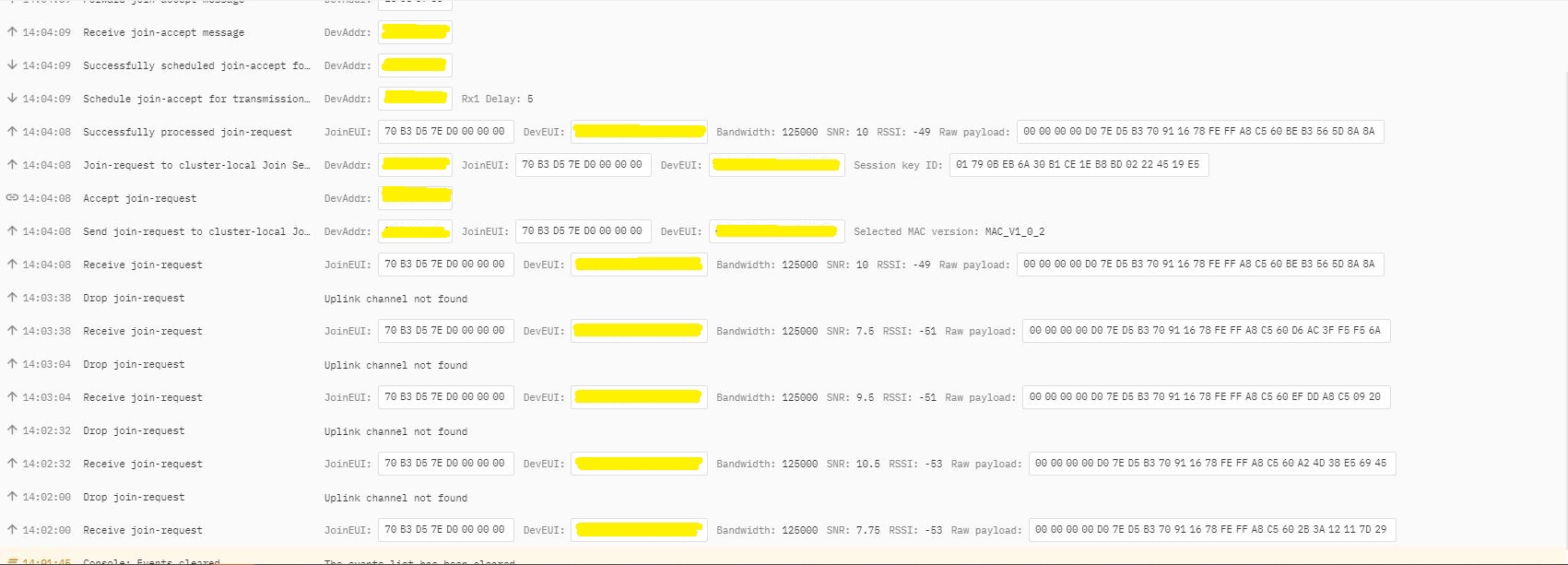
In TTI end device live data tab I could see the the joins attempts were failing with “Uplink channel Not found”
The Things Industries device live data tab “uplink channel not found” failures
The Things Industries device live data tab “uplink channel not found” detail
Initially I assumed this was an issue with my configuration of the RAKwirelessRAK7258 gateway in my office that I was using for testing. After some discussions with a helpful TTI support person they suggested that I try disabling all bar the first two channels the RAK811 module was configured to use then see if worked.
I modified the intialise method of my TinyCLR V2 RAK811 Module library to disable all bar the first two channels
result = SendCommand("OK", "at+set_config=lora:ch_mask:2:0", CommandTimeoutDefault);
if (result != Result.Success)
{
#if DIAGNOSTICS
   Debug.WriteLine($" {DateTime.UtcNow:hh:mm:ss} at+set_config=lora:ch_mask:2:0 {result}");
#endif
   return result;
}

result = SendCommand("OK", "at+set_config=lora:ch_mask:3:0", CommandTimeoutDefault);
if (result != Result.Success)
{
#if DIAGNOSTICS
   Debug.WriteLine($" {DateTime.UtcNow:hh:mm:ss} at+set_config=lora:ch_mask:3:0 {result}");
#endif
   return result;
}

result = SendCommand("OK", "at+set_config=lora:ch_mask:4:0", CommandTimeoutDefault);
if (result != Result.Success)
{
#if DIAGNOSTICS
   Debug.WriteLine($" {DateTime.UtcNow:hh:mm:ss} at+set_config=lora:ch_mask:4:0 {result}");
#endif
   return result;
}

result = SendCommand("OK", "at+set_config=lora:ch_mask:5:0", CommandTimeoutDefault);
if (result != Result.Success)
{
#if DIAGNOSTICS
    Debug.WriteLine($" {DateTime.UtcNow:hh:mm:ss} at+set_config=lora:ch_mask:5:0 {result}");
#endif
   return result;
}

result = SendCommand("OK", "at+set_config=lora:ch_mask:6:0", CommandTimeoutDefault);
if (result != Result.Success)
{
#if DIAGNOSTICS
   Debug.WriteLine($" {DateTime.UtcNow:hh:mm:ss} at+set_config=lora:ch_mask:6:0 {result}");
#endif
   return result;
}

result = SendCommand("OK", "at+set_config=lora:ch_mask:7:0", CommandTimeoutDefault);
if (result != Result.Success)
{
#if DIAGNOSTICS
   Debug.WriteLine($" {DateTime.UtcNow:hh:mm:ss} at+set_config=lora:ch_mask:7:0 {result}");
#endif
   return result;
}
After modifying the code my Fezduino joined reliably.
The thread ” (0x2) has exited with code 0 (0x0). devMobile.IoT.Rak811LoRaWanDeviceClient starting 12:00:12 Region AS923 12:00:12 ADR On 12:00:12 Unconfirmed 12:00:12 OTAA 12:00:13 Join start Timeout:30Sec 12:00:18 Join finish Temperature : 19.9 °C Pressure : 1014.0 HPa Altitude : 143 meters 12:00:19 port:5 payload BCD:0073279C016700C8 12:00:44 Sleep 12:01:44 Wakeup Temperature : 20.1 °C Pressure : 1014.0 HPa Altitude : 143 meters 12:01:44 port:5 payload BCD:0073279C016700C9 12:02:09 Sleep
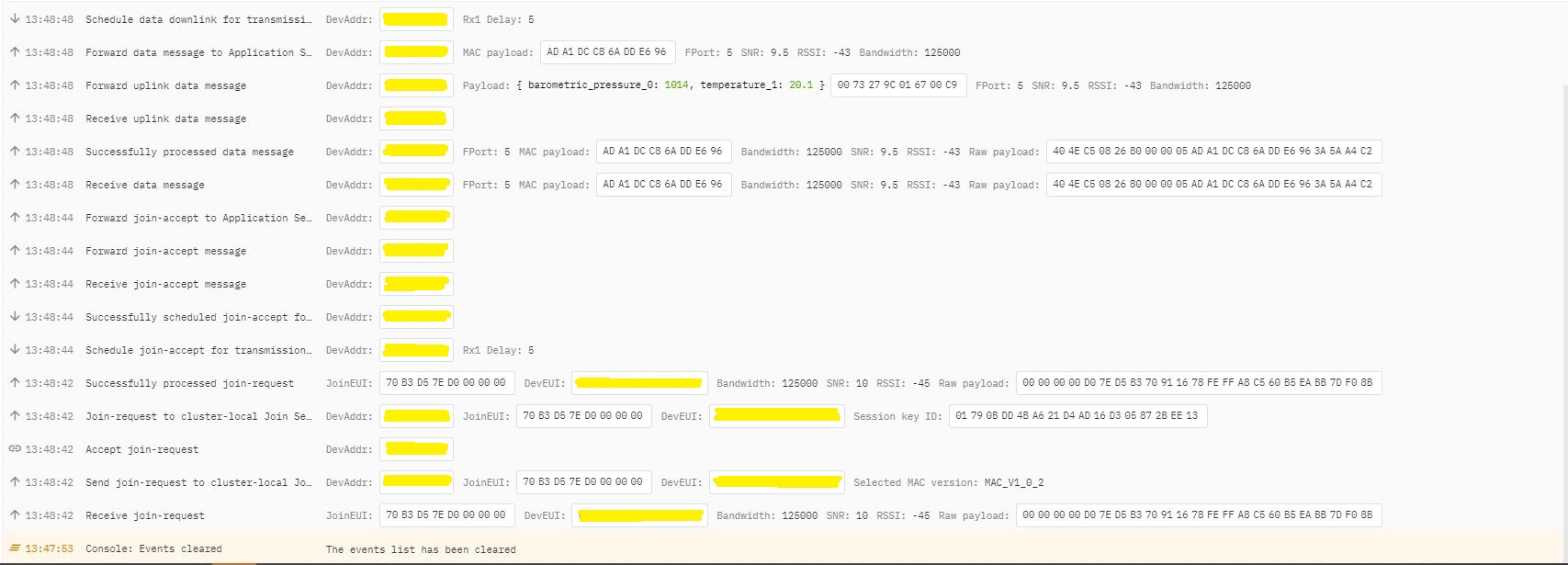
The Things Industries device live data tab successful join.
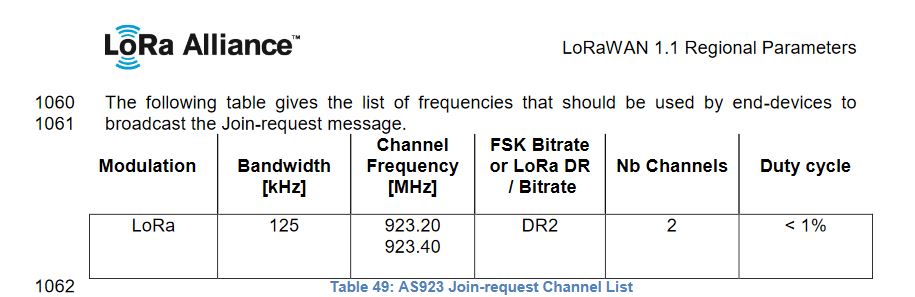
After some further discussion with TTI support it looks like the RAK811 module doesn’t send join requests on the frequencies specified for the AS923 region in the LoRaWAN™1.1Regional Parameters.
After confirming the join-request channel issue I went back to the RAKwireless forums with some new terms to search for and found that others were having a similar issue but with RAK4200 modules. My “best guess” is that the TTI implementation is more strict about join-request frequencies than the TTN
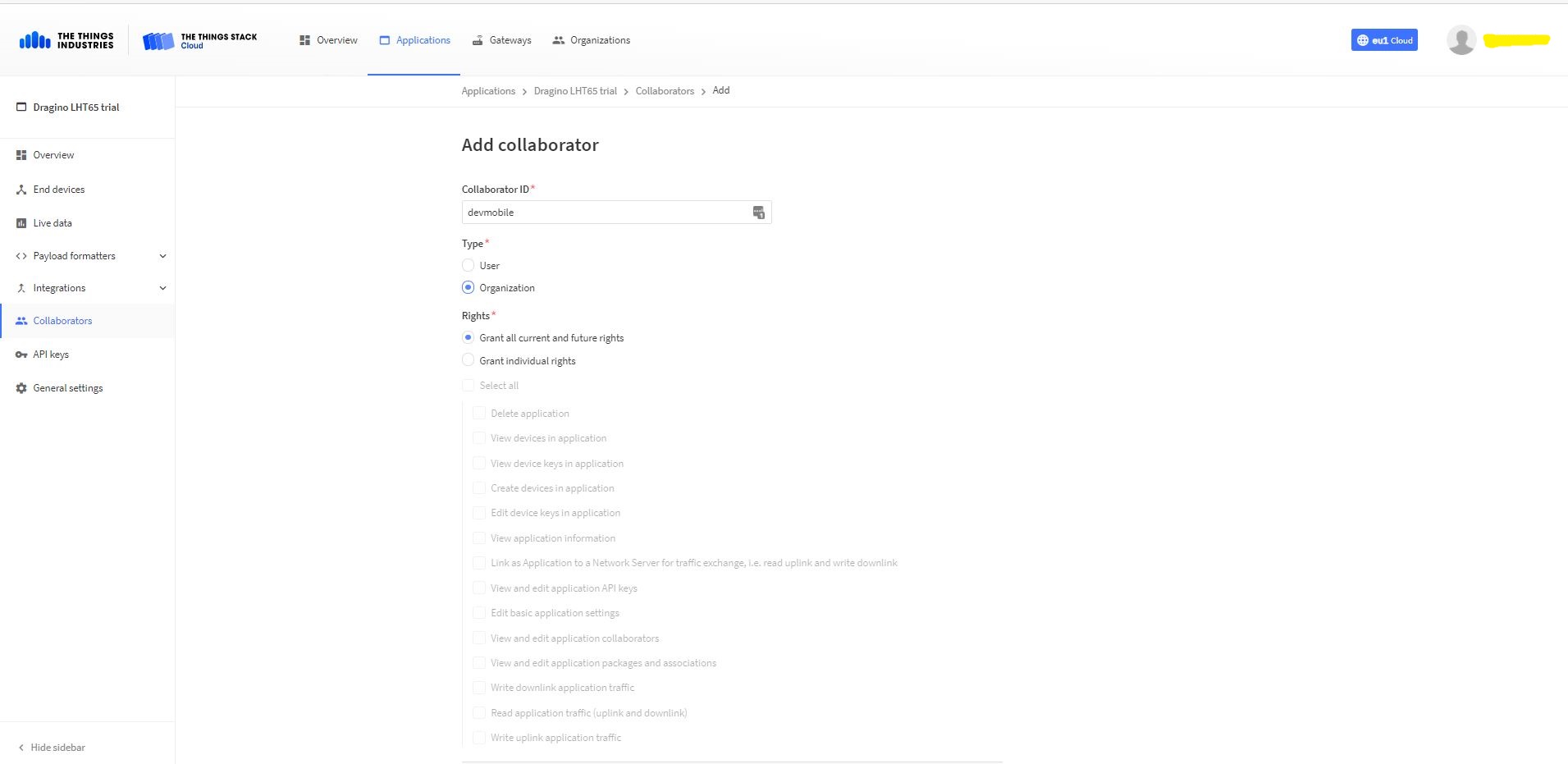
Adding devMobile as a collaborator on the new application
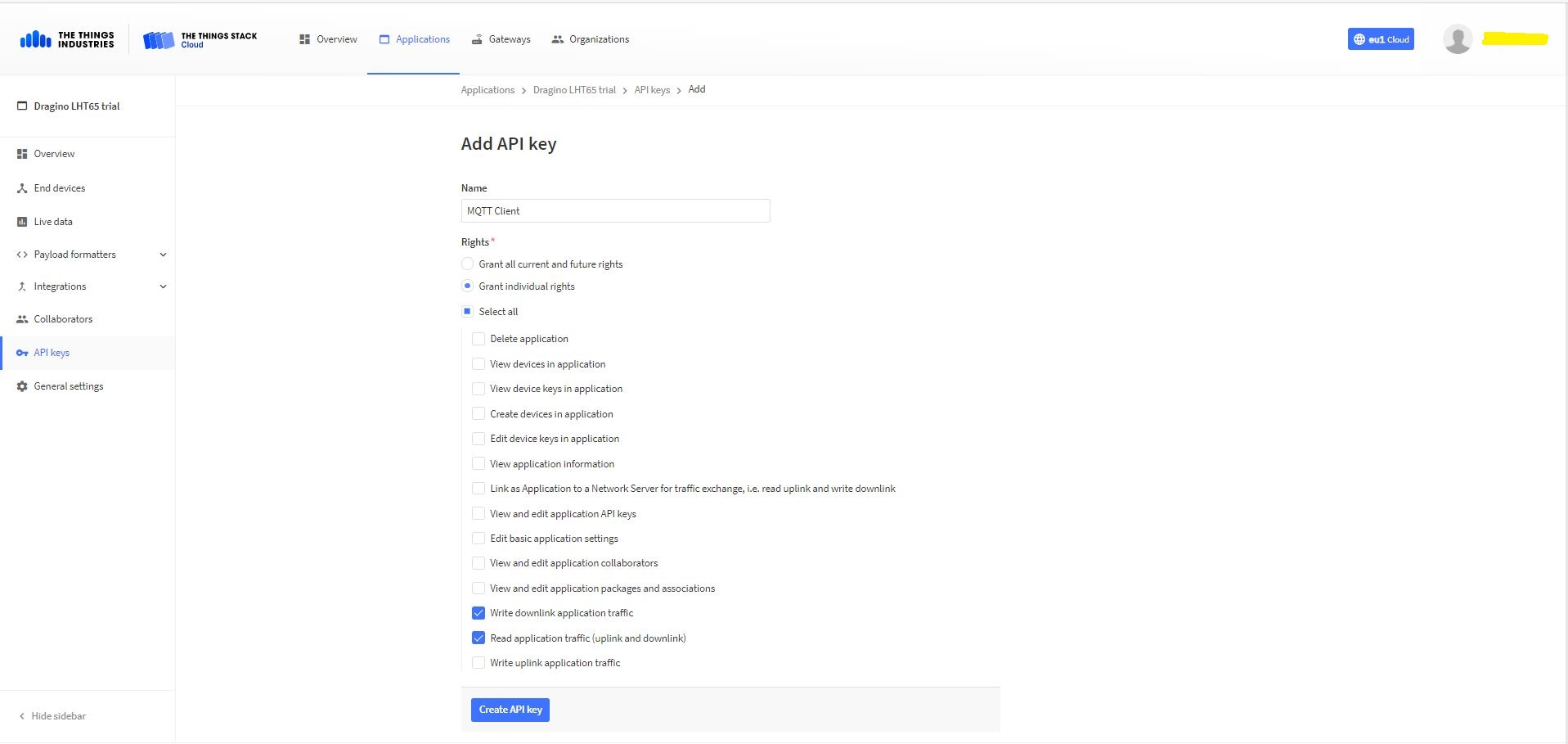
TTI Application API Key configuration
The new Application API Key used by the MQTTnetmanaged client only needs to have write downlink and read uplink traffic enabled.
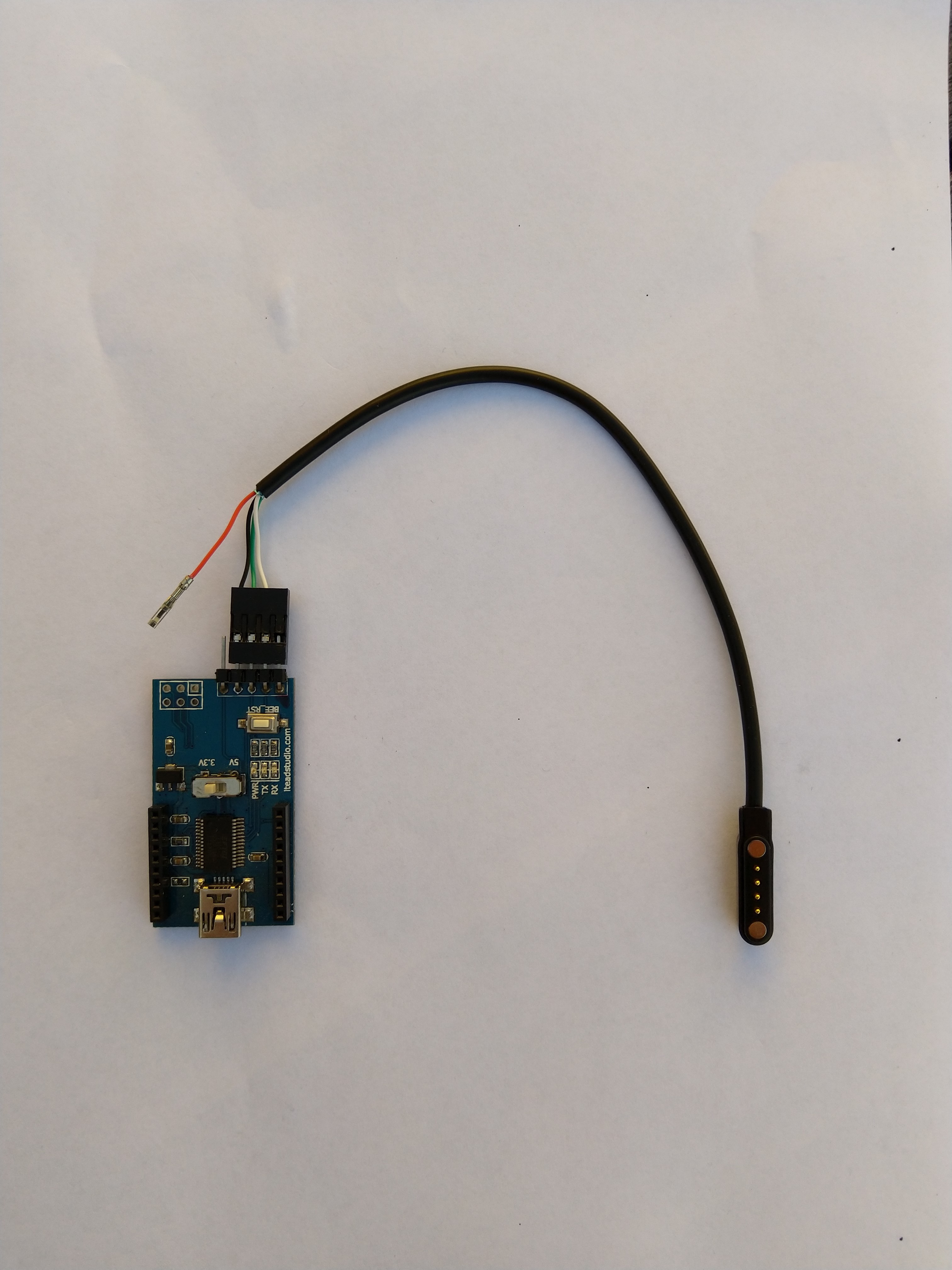
FTDI Adapter and modified LHT64 cable
So I could reliably connect to my LHT65 devices to configure them I modified a programming cable so I could use it with a spare FTDI adaptor without jumper wires. Todo this I used a small jewelers screwdriver to “pop” out the VCC cable and move the transmit data line.
After entering the device password and checking the firmware version I used the AT+CFG command to display the device settings
AT+CFG: Print all configurations

[334428]***** UpLinkCounter= 0 *****
[334430]TX on freq 923200000 Hz at DR 2
[334804]txDone
[339807]RX on freq 923200000 Hz at DR 2
[339868]rxTimeOut
[340807]RX on freq 923200000 Hz at DR 2
[340868]rxTimeOut

Correct Password

Stop Tx events,Please wait for all configurations to print
Printf all config...
AT+DEUI=a8 .. .. .. .. .. .. d6
AT+DADDR=01......D6

AT+APPKEY=9d .. .. .. .. .. .. .. .. .. .. .. .. .. .. 2e
AT+NWKSKEY=f6 .. .. .. .. .. .. .. .. .. .. .. .. .. .. 69
AT+APPSKEY=4c 35 .. .. .. .. .. .. .. .. .. .. .. .. .. 3d
AT+APPEUI=a0 .. .. .. .. .. .. 00
AT+ADR=1
AT+TXP=0
AT+DR=0
AT+DCS=0
AT+PNM=1
AT+RX2FQ=923200000
AT+RX2DR=2
AT+RX1DL=1000
AT+RX2DL=2000
AT+JN1DL=5000
AT+JN2DL=6000
AT+NJM=1
AT+NWKID=00 00 00 00
AT+FCU=0
AT+FCD=0
AT+CLASS=A
AT+NJS=0
AT+RECVB=0:
AT+RECV=0:
AT+VER=v1.7 AS923

AT+CFM=0
AT+CFS=0
AT+SNR=0
AT+RSSI=0
AT+TDC=1200000
AT+PORT=2
AT+PWORD=123456
AT+CHS=0
AT+DATE=21/3/26 07:49:15
AT+SLEEP=0
AT+EXT=4,2
AT+RTP=20
AT+BAT=3120
AT+WMOD=0
AT+ARTEMP=-40,125
AT+CITEMP=1
Start Tx events OK


[399287]***** UpLinkCounter= 0 *****

[399289]TX on freq 923400000 Hz at DR 2

[399663]txDone

[404666]RX on freq 923400000 Hz at DR 2

[404726]rxTimeOut

[405666]RX on freq 923200000 Hz at DR 2

[405726]rxTimeOut
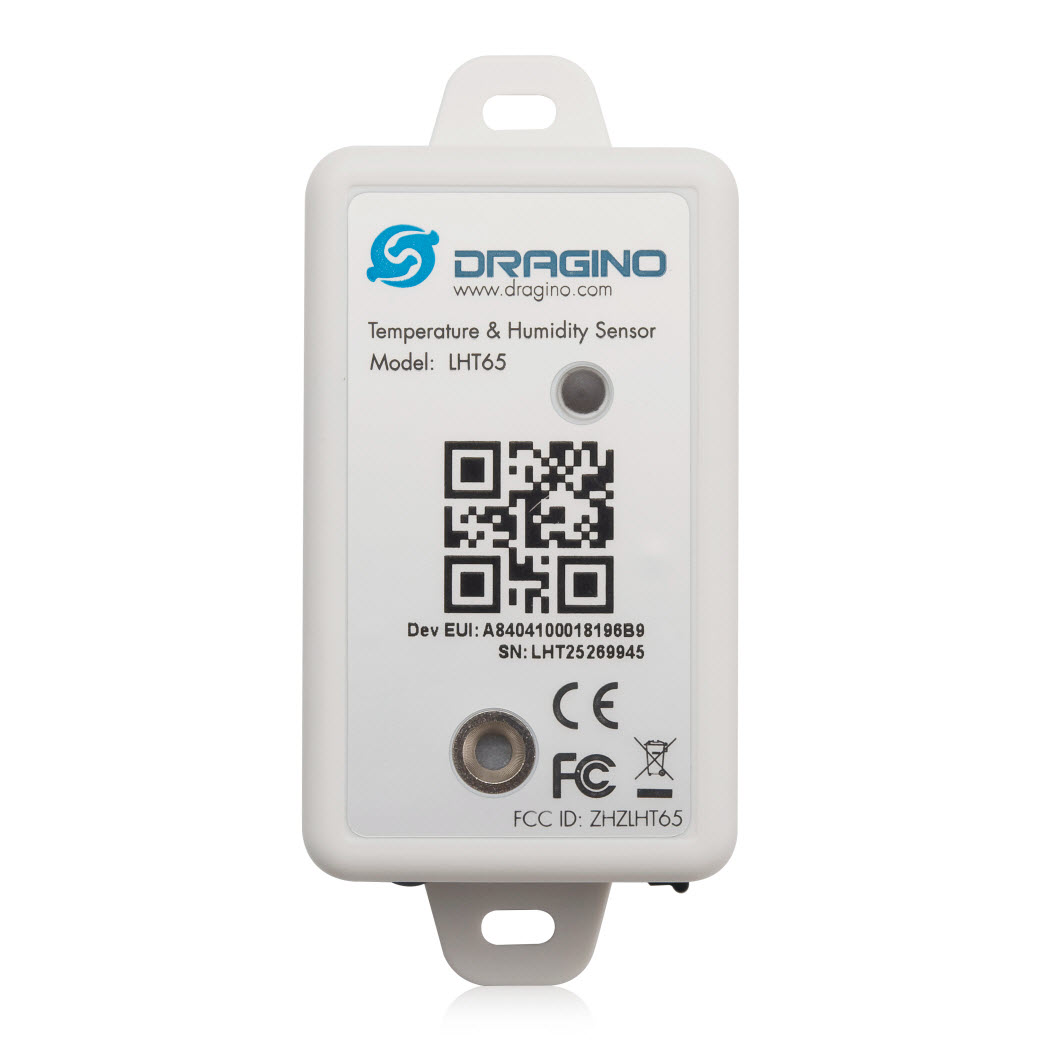
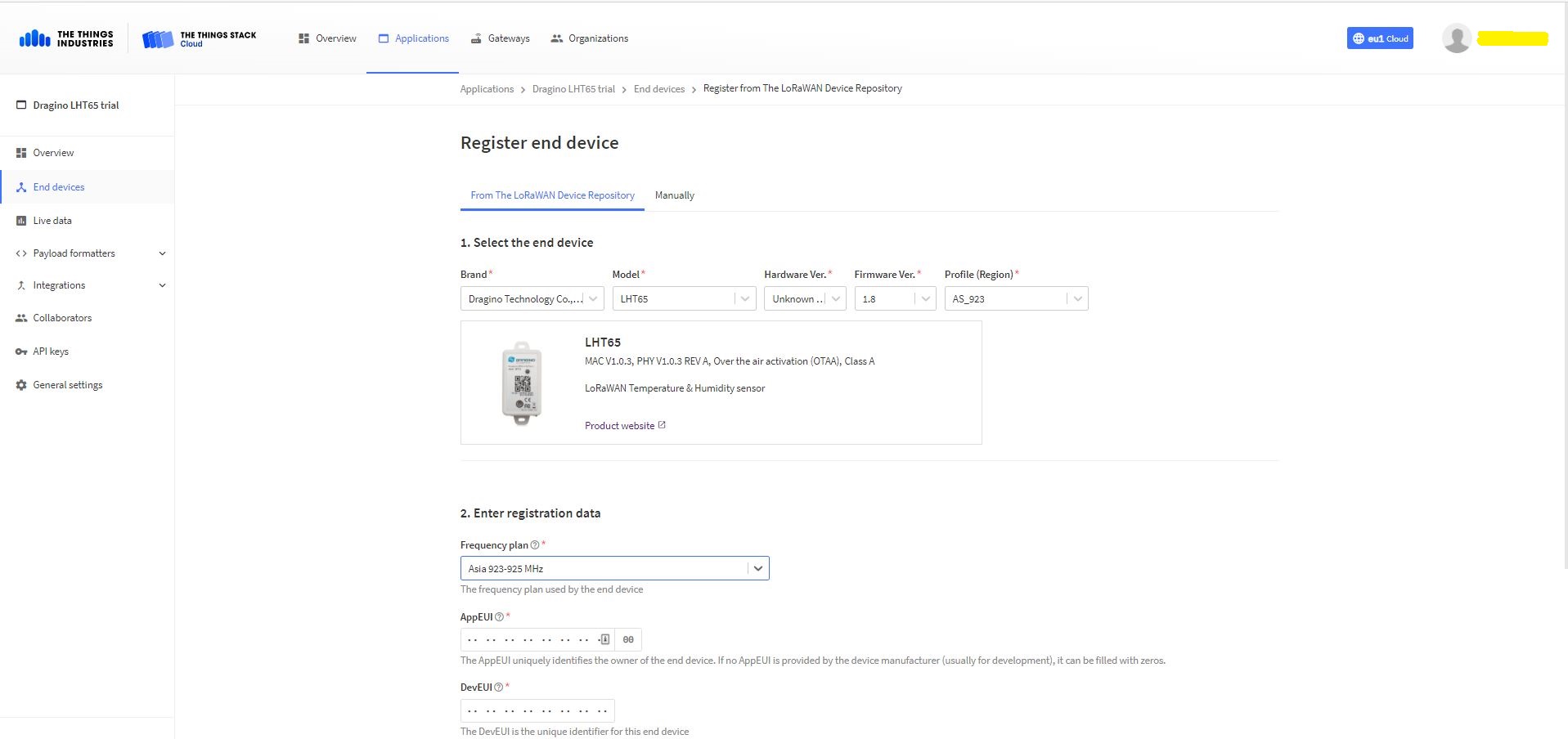
The Dragino LHT65 uses the DeviceEUI as the DeviceID which meant I had todo more redaction in my TTI/TTN and Azure Application Insights screen captures. The rules around the re-use of EndDevice ID were a pain in the arse(PITA) in my development focused tenant.
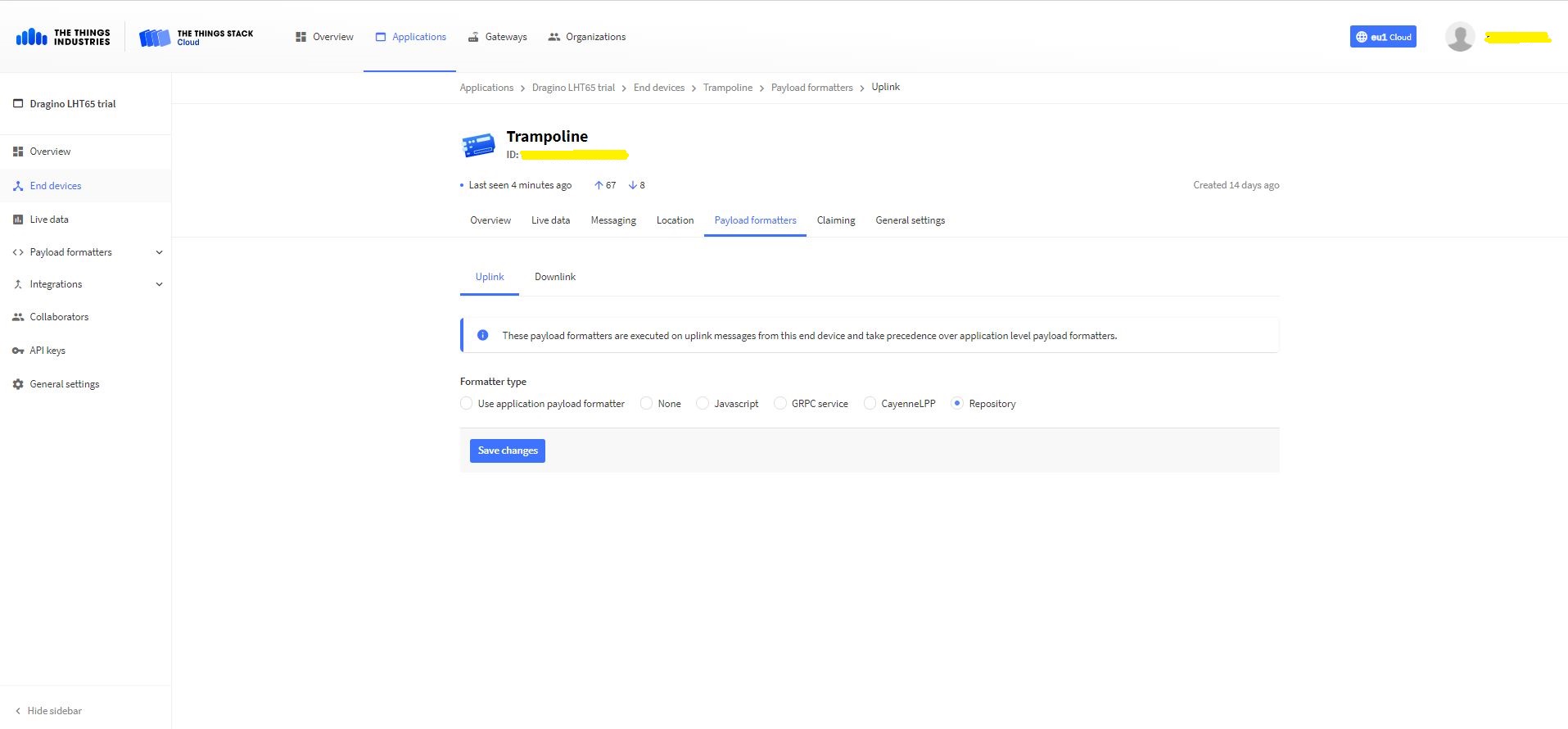
Dragino LHT 65 Device uplink payload formatter
The connector supports both uplink and downlink messages with JSON encoded payloads. The Dragino LHT65 has a vendor supplied formatter which is automatically configured when an EndDevice is created. The EndDevice formatter configuration can also be overridden at the Application level in the app.settings.json file.
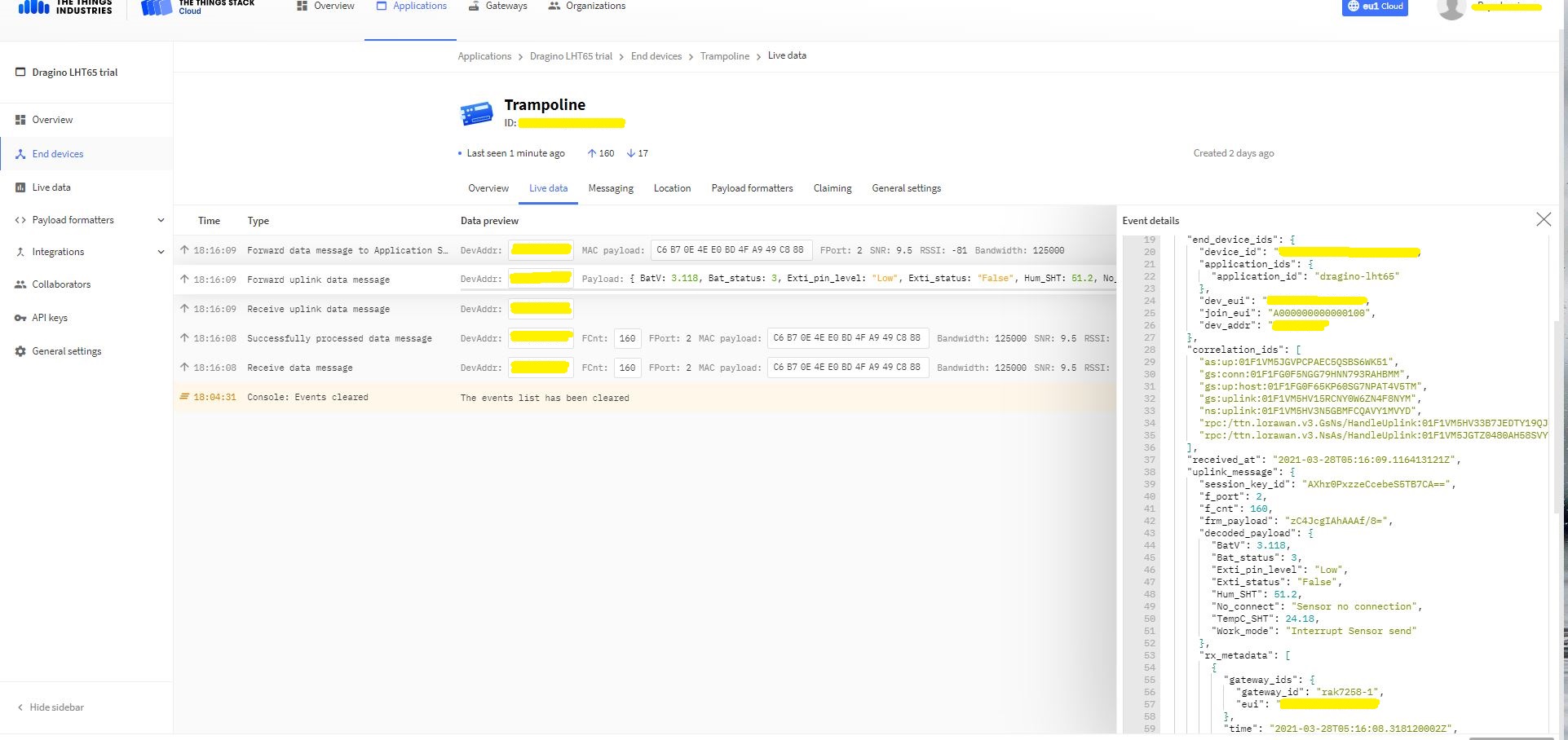
Device Live Data Uplink Data Payload
Once an EndDevice is configured in TTI/TTN I usually use the “Live data Uplink Payload” to work out the decoded payload JSON property names and data types.
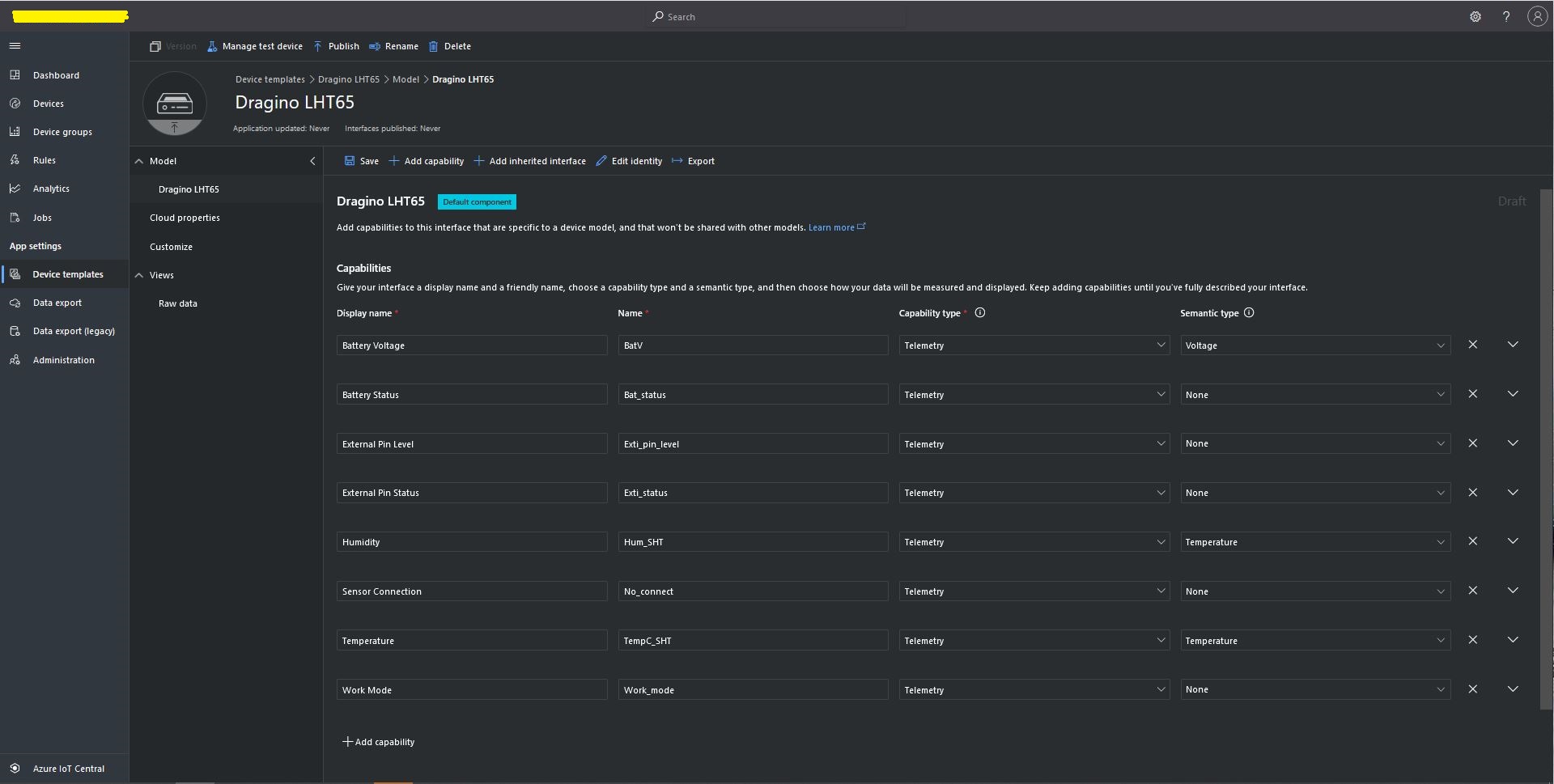
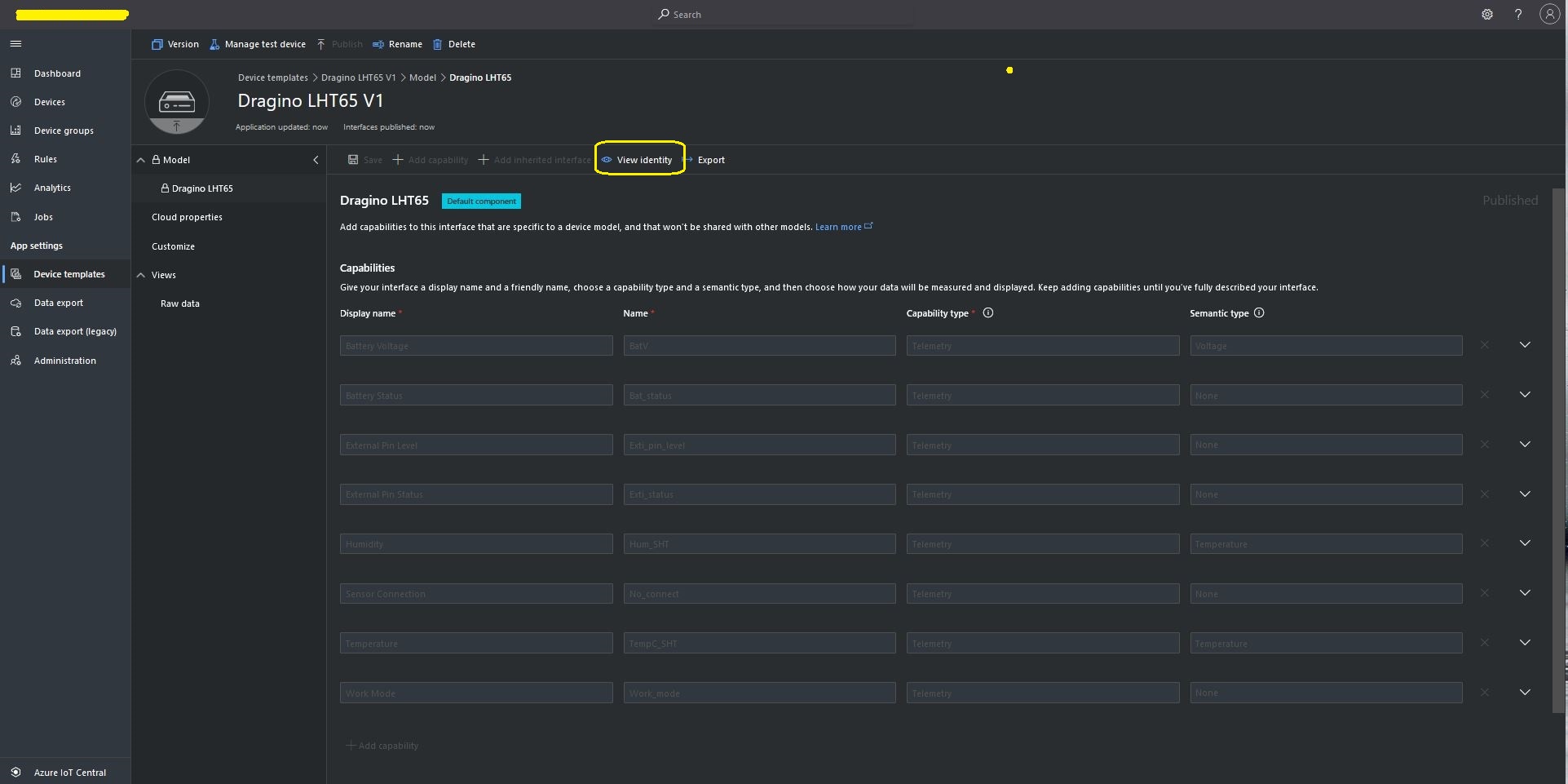
LHT65 Uplink only Azure IoT Central Device Template
LHT65 Device Template View Identity
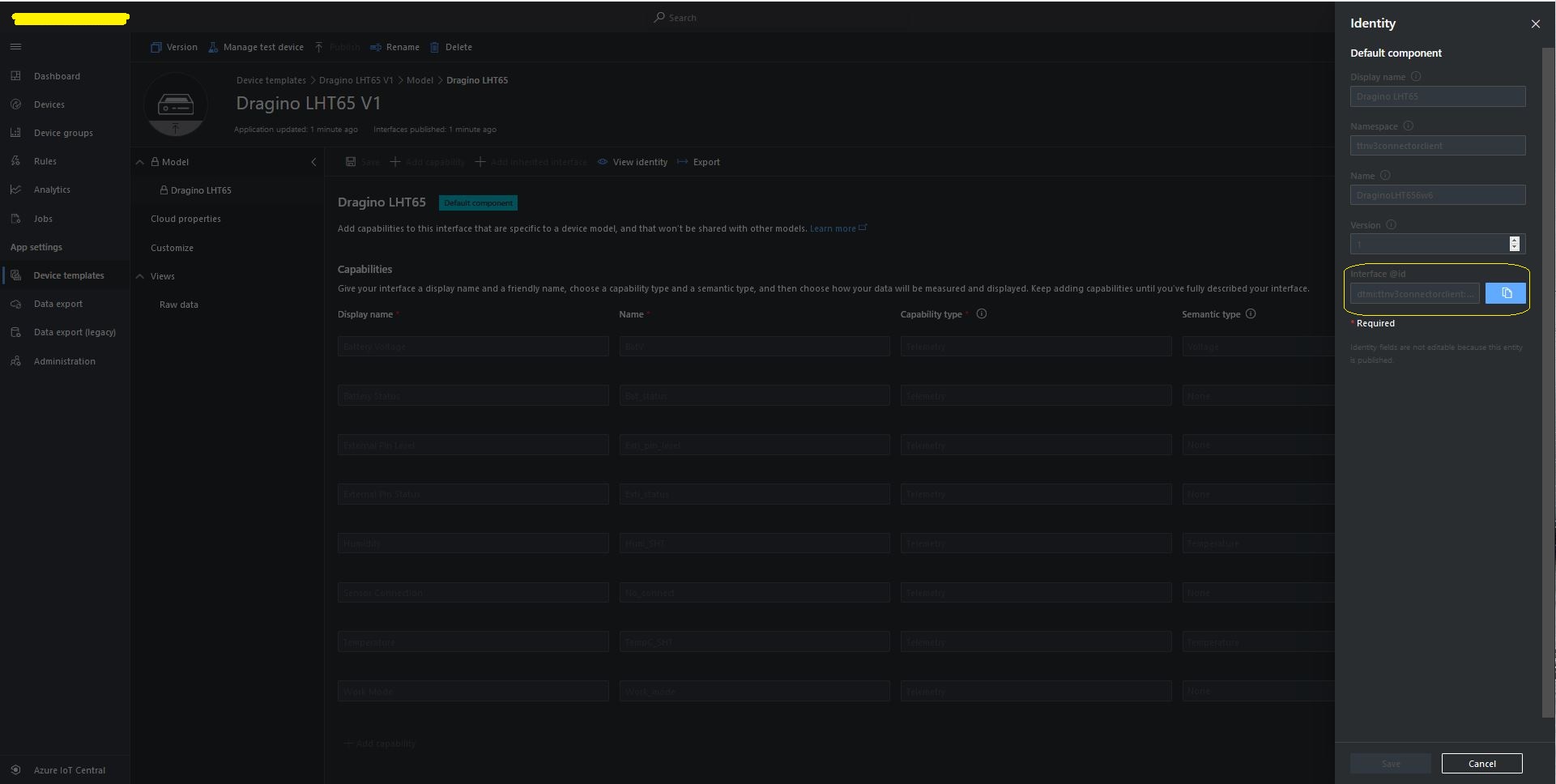
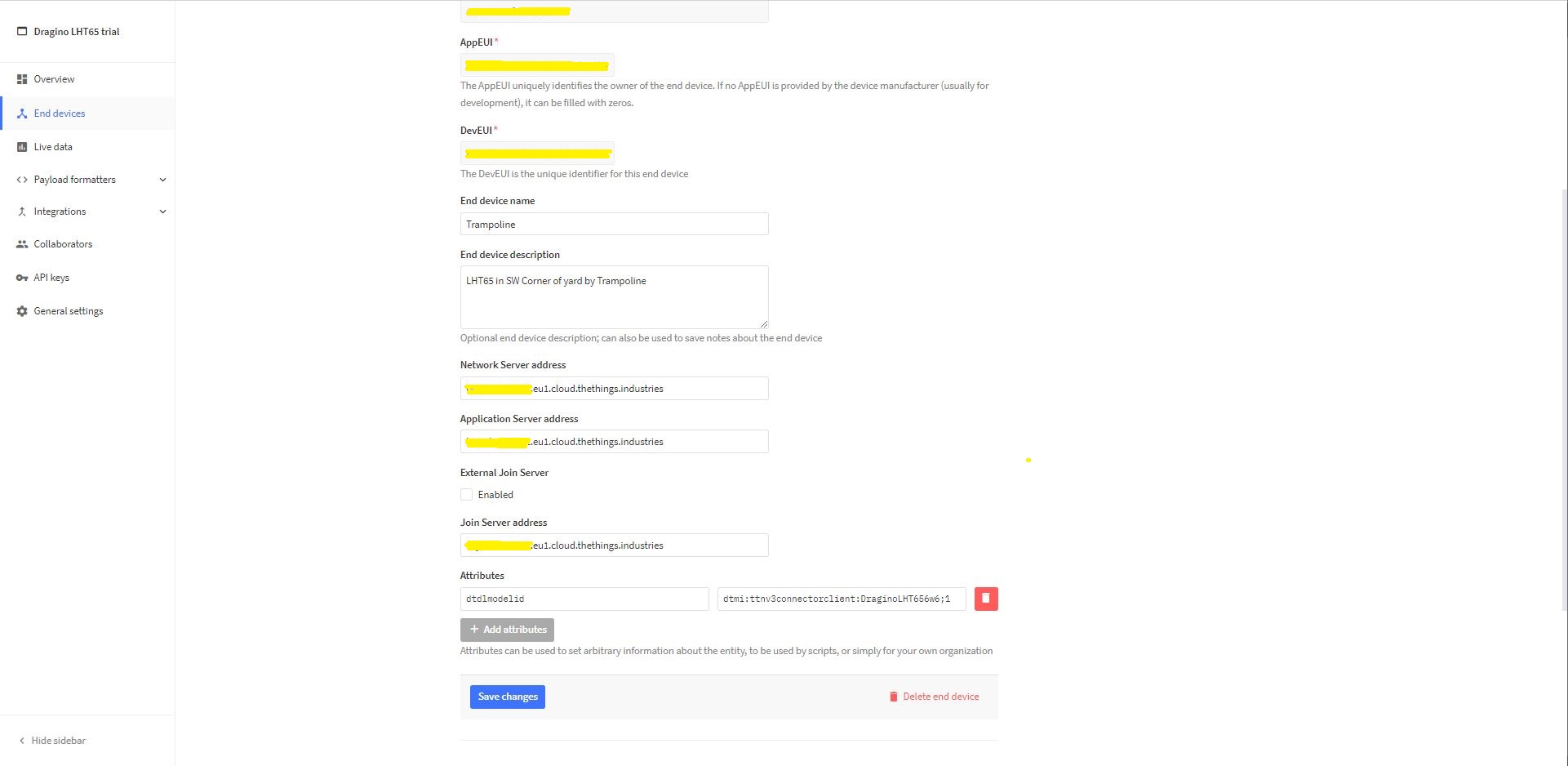
For Azure IoT Central “automagic” provisioning the DTDLModelId has to be copied from the Azure IoT Central Template into the TTI/TTN EndDevice or app.settings.json file application configuration.
LHT65 Device Template copy DTDL @ID
TTI EndDevice configuring the DTDLV2 @ID at the device level
Configuring the DTDLV2 @ID at the TTI application level in the app.settings.json file
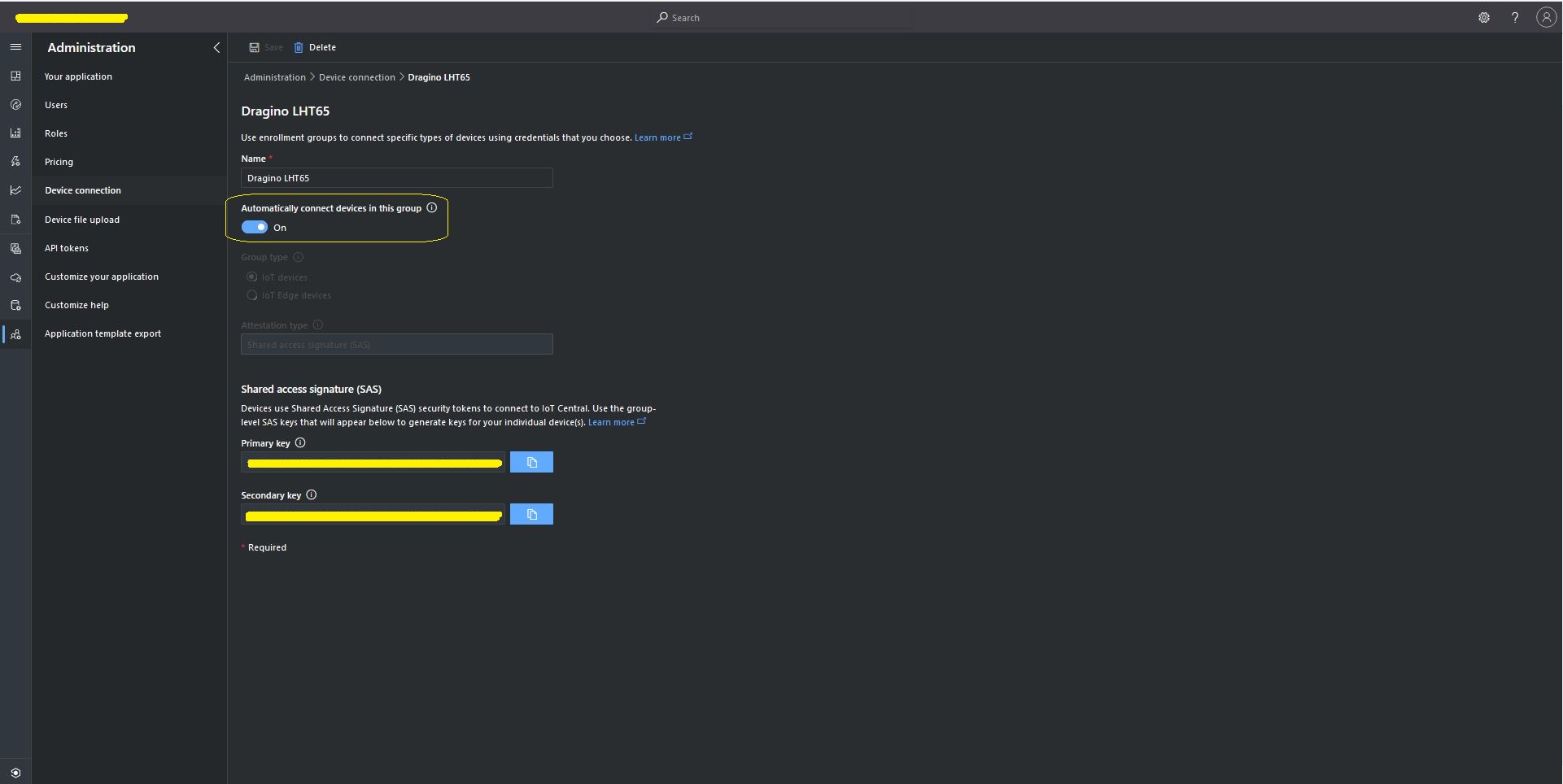
The Azure Device Provisioning Service(DPS) is configured at the TTI application level in the app.settings.json file. The IDScope and one of the Primary or Secondary Shared Access Signature(SAS) keys should be copied into DeviceProvisioningServiceSettings of an Application in the app.settings.json file. I usually set the “Automatically connect devices in this group” flag as part of the “automagic” provisioning process.
Azure IoT Central Group Enrollment Key
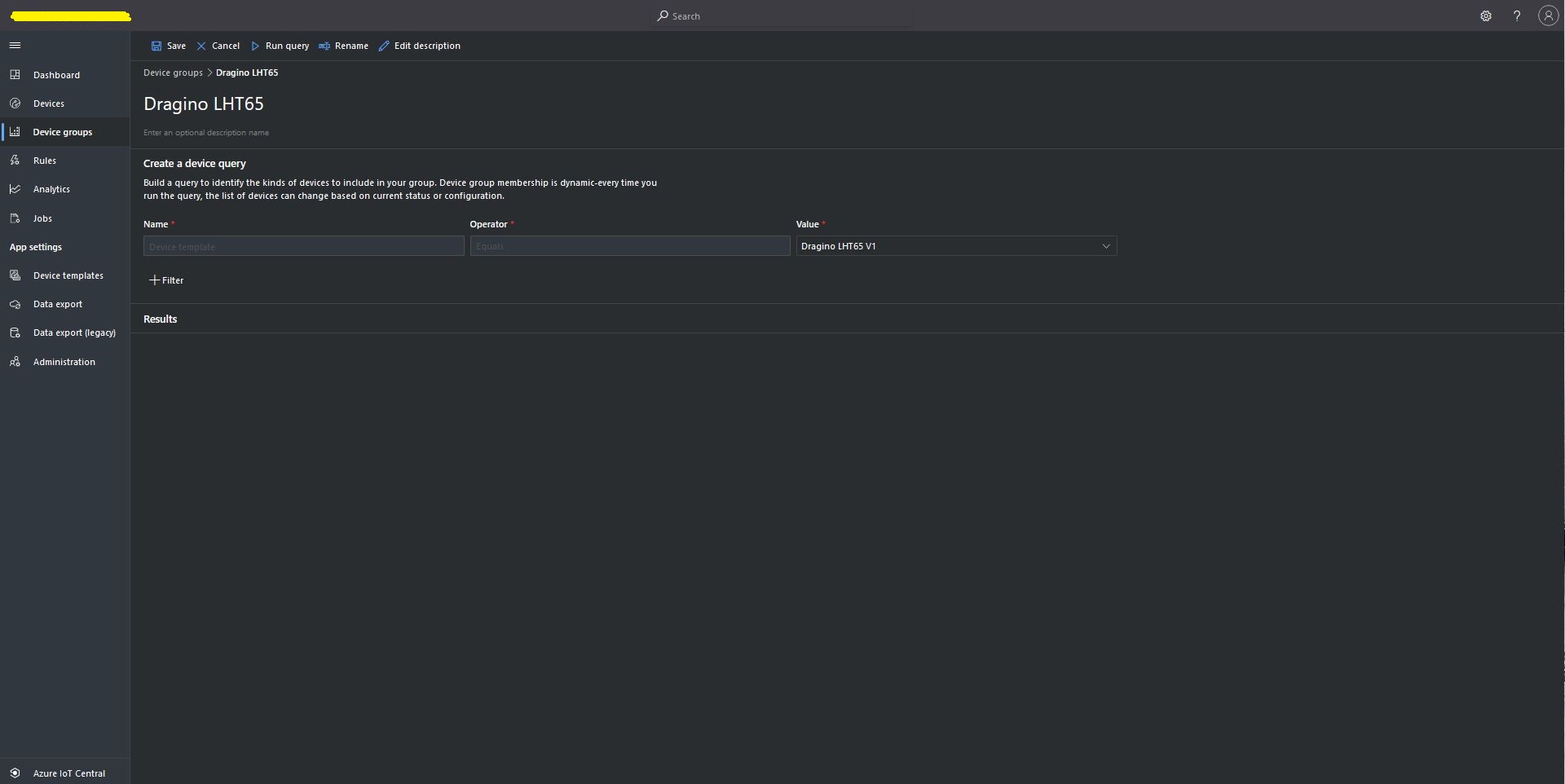
Then device templates need to be mapped to an Enrollment Group then Device Group.
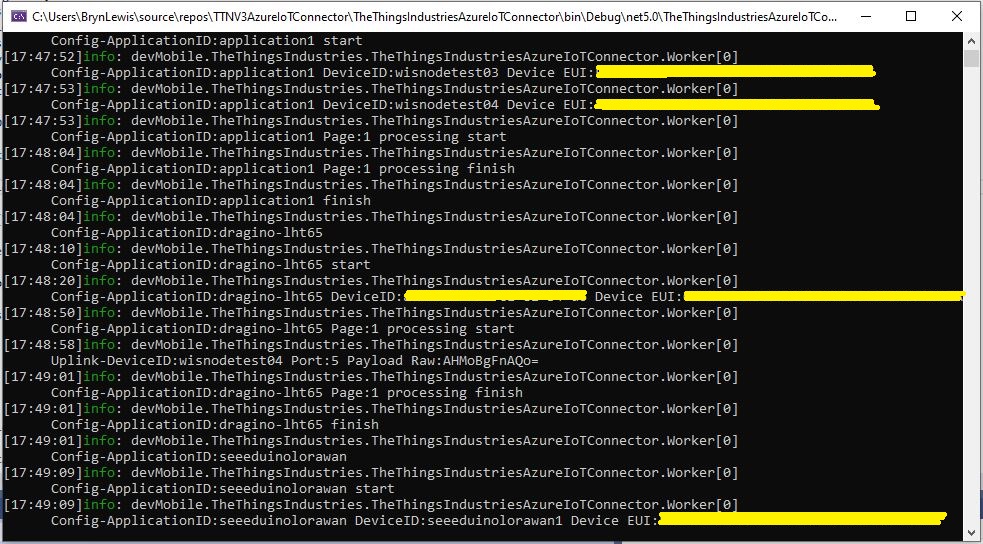
For testing the connector application can be run locally with diagnostic information displayed in the application console window as it “automagically’ provisions devices and uploads telemetry data.
Connector application Diagnostics
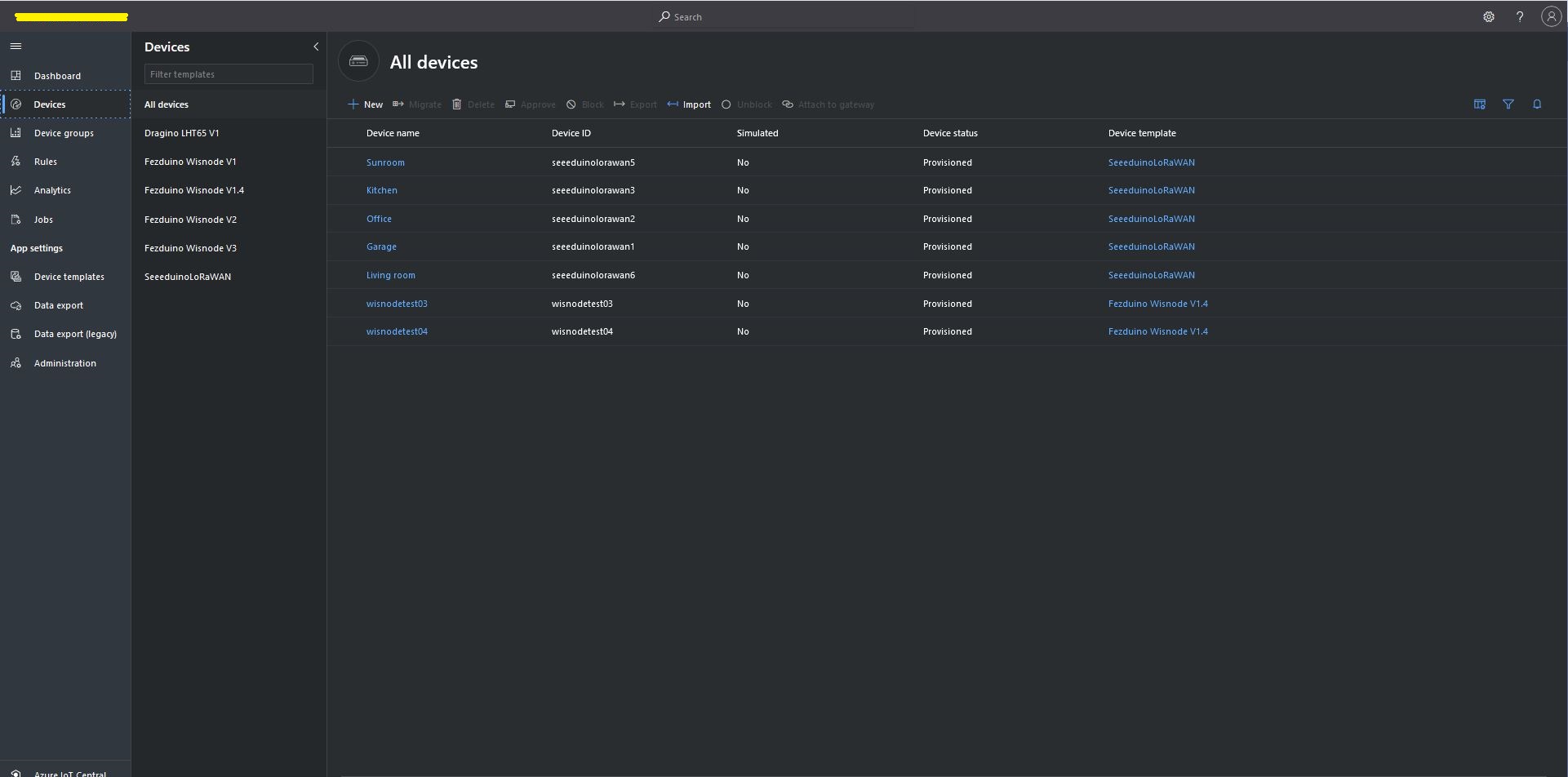
Azure IoT Central Device list before my LHT65 device is “automagically” provisioned
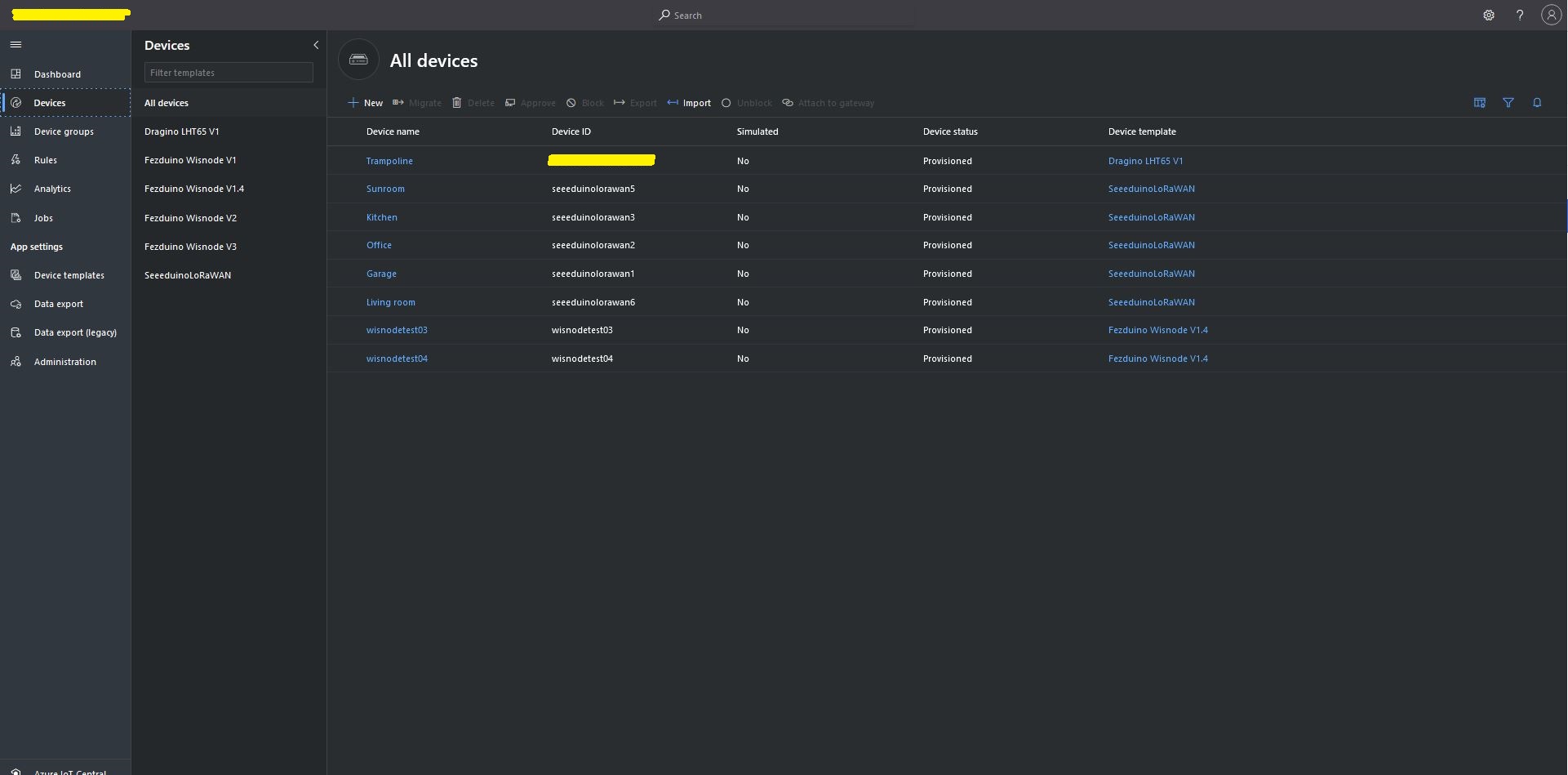
Azure IoT Central Device list after my LHT65 device is “automagically” provisioned
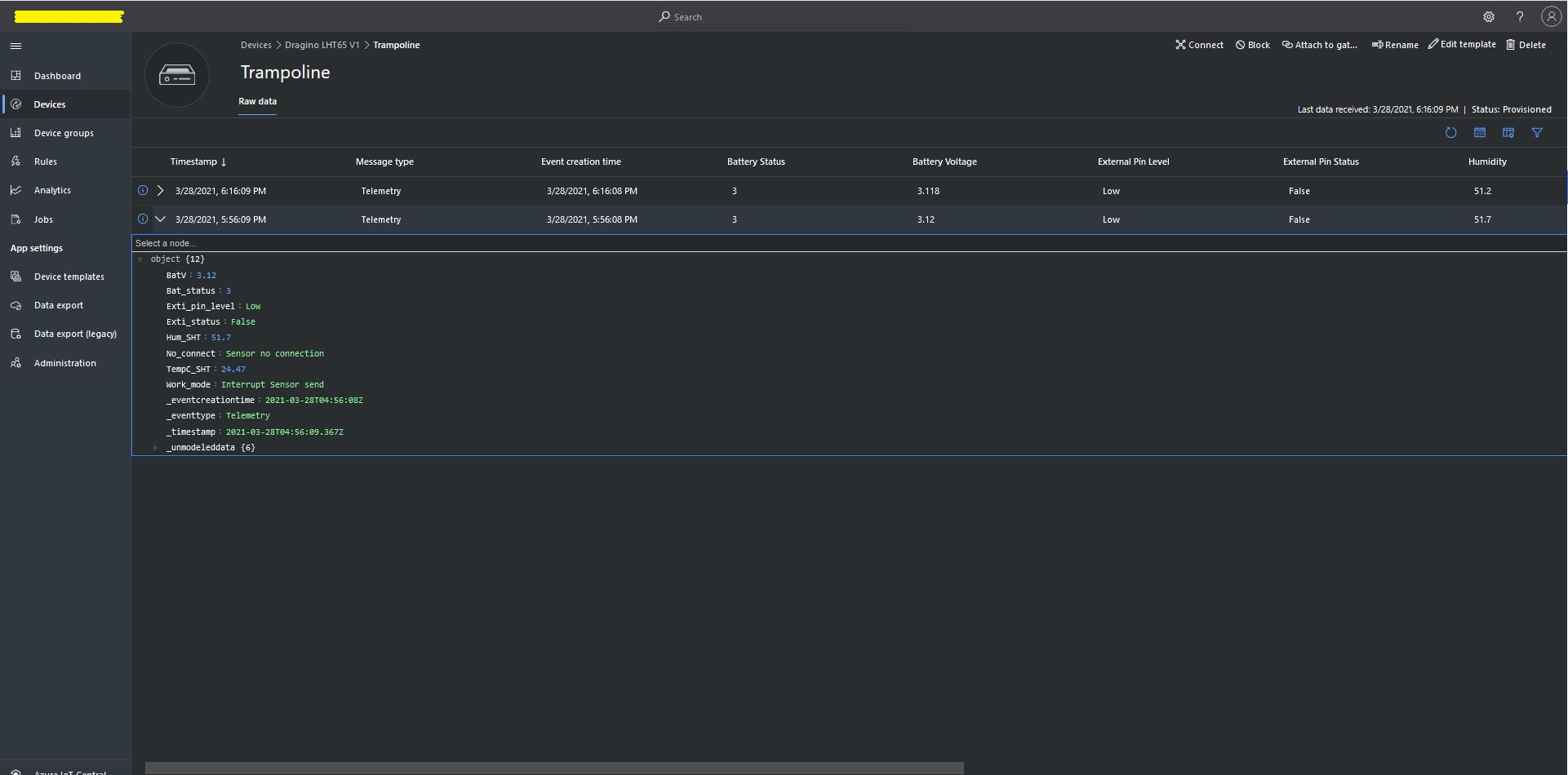
One a device has been provisioned I check on the raw data display that all the fields I configured have been mapped correctly.
Azure IoT Central raw data display
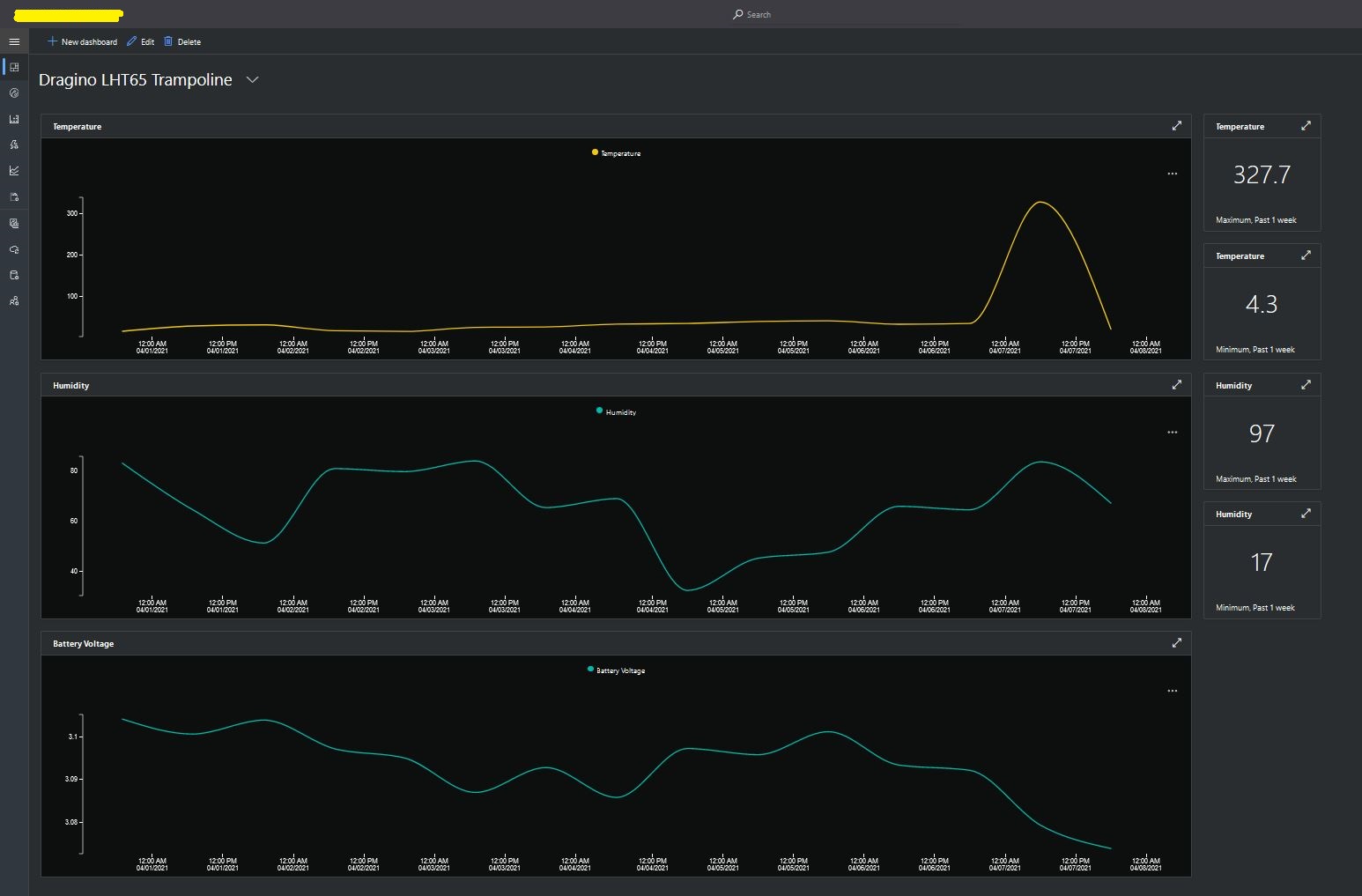
I then created a dashboard to display the telemetry data from the LHT65 sensors.
Azure IoT Central dashboard displaying LHT65 temperature, humidity and battery voltage graphs.
The dashboard also has a few KPI displays which highlighted an issue which occurs a couple of times a month with the LHT65 onboard temperature sensor values (327.7°). I have connected Dragino technical support and have also been unable to find a way to remove the current an/or filter out future aberrant values.
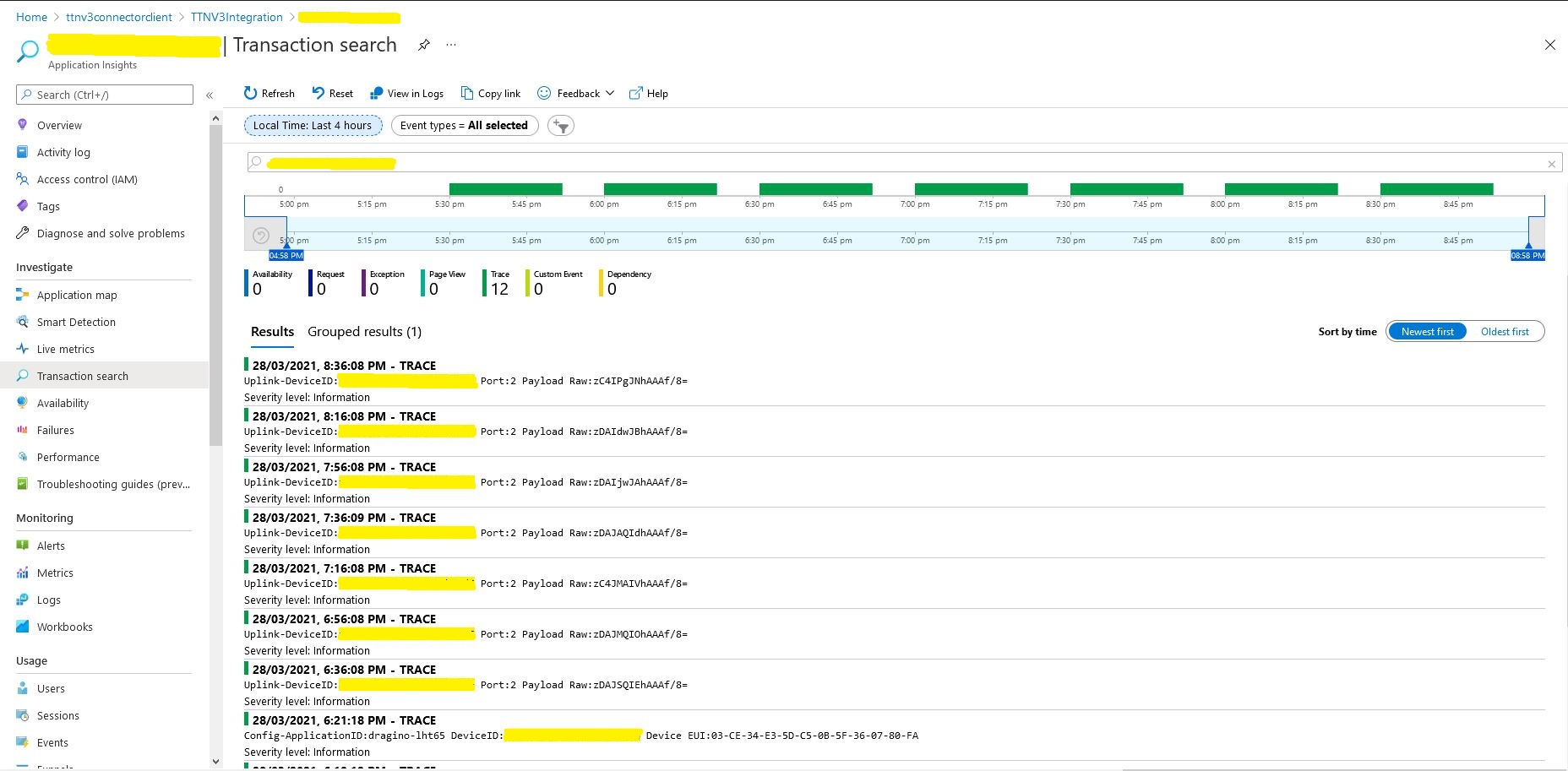
Azure Application Insights logging
I also noticed that the formatting of the DeviceEUI values in the Application Insights logging was incorrect after trying to search for one of my Seeedstudio LoRaWAN device with its DeviceEUI.
//---------------------------------------------------------------------------------
// Copyright (c) July 2020, devMobile Software
//
// Licensed under the Apache License, Version 2.0 (the "License");
// you may not use this file except in compliance with the License.
// You may obtain a copy of the License at
//
//     http://www.apache.org/licenses/LICENSE-2.0
//
// Unless required by applicable law or agreed to in writing, software
// distributed under the License is distributed on an "AS IS" BASIS,
// WITHOUT WARRANTIES OR CONDITIONS OF ANY KIND, either express or implied.
// See the License for the specific language governing permissions and
// limitations under the License.
//
// must have one of
//    TINYCLR_V2_FEZDUINO or
//    PAYLOAD_BCD or PAYLOAD_BYTES defined
//    OTAA or ABP
//
// For confirmed messages define CONFIRMED
//---------------------------------------------------------------------------------
namespace devMobile.IoT.Rak811LoRaWanDeviceClient
{
   using System;
   using System.Threading;
   using System.Diagnostics;

   using GHIElectronics.TinyCLR.Pins;
   using GHIElectronics.TinyCLR.Devices.Uart;

   using devMobile.IoT.LoRaWan;

   public class Program
   {
#if TINYCLR_V2_FEZDUINO
      private const string SerialPortId = SC20100.UartPort.Uart5;
#endif
#if OTAA
      private const string DevEui = "...";
      private const string AppEui = "...";
      private const string AppKey = "...";
#endif
#if ABP
      private const string DevAddress = "...";
      private const string NwksKey = "...";
      private const string AppsKey = "...";
#endif
      private const string Region = "AS923";
      private static readonly TimeSpan JoinTimeOut = new TimeSpan(0, 0, 10);
      private static readonly TimeSpan SendTimeout = new TimeSpan(0, 0, 10);
      private const byte MessagePort = 1;
#if PAYLOAD_BCD
      private const string PayloadBcd = "48656c6c6f204c6f526157414e"; // Hello LoRaWAN in BCD
#endif
#if PAYLOAD_BYTES
      private static readonly byte[] PayloadBytes = { 0x48, 0x65, 0x6c, 0x6c, 0x6f, 0x20, 0x4c, 0x6f, 0x52, 0x61, 0x57, 0x41, 0x4e}; // Hello LoRaWAN in bytes
#endif

      public static void Main()
      {
         Result result;

         Debug.WriteLine("devMobile.IoT.Rak811LoRaWanDeviceClient starting");

         try
         {
            using (Rak811LoRaWanDevice device = new Rak811LoRaWanDevice())
            {
               result = device.Initialise(SerialPortId, 9600, UartParity.None, 8, UartStopBitCount.One);
               if (result != Result.Success)
               {
                  Debug.WriteLine($"Initialise failed {result}");
                  return;
               }

#if CONFIRMED
               device.OnMessageConfirmation += OnMessageConfirmationHandler;
#endif
               device.OnReceiveMessage += OnReceiveMessageHandler;

               Debug.WriteLine($"{DateTime.UtcNow:hh:mm:ss} Region {Region}");
               result = device.Region(Region);
               if (result != Result.Success)
               {
                  Debug.WriteLine($"Region failed {result}");
                  return;
               }

               Debug.WriteLine($"{DateTime.UtcNow:hh:mm:ss} ADR On");
               result = device.AdrOn();
               if (result != Result.Success)
               {
                  Debug.WriteLine($"ADR on failed {result}");
                  return;
               }

#if CONFIRMED
               Debug.WriteLine($"{DateTime.UtcNow:hh:mm:ss} Confirmed");
               result = device.Confirm(LoRaConfirmType.Confirmed);
               if (result != Result.Success)
               {
                  Debug.WriteLine($"Confirm on failed {result}");
                  return;
               }
#else
               Debug.WriteLine($"{DateTime.UtcNow:hh:mm:ss} Unconfirmed");
               result = device.Confirm(LoRaConfirmType.Unconfirmed);
               if (result != Result.Success)
               {
                  Debug.WriteLine($"Confirm off failed {result}");
                  return;
               }
#endif

#if OTAA
               Debug.WriteLine($"{DateTime.UtcNow:hh:mm:ss} OTAA");
               result = device.OtaaInitialise(DevEui, AppEui, AppKey);
               if (result != Result.Success)
               {
                  Debug.WriteLine($"OTAA Initialise failed {result}");
                  return;
               }
#endif

#if ABP
               Debug.WriteLine($"{DateTime.UtcNow:hh:mm:ss} ABP");
               result = device.AbpInitialise(DevAddress, NwksKey, AppsKey);
               if (result != Result.Success)
               {
                  Debug.WriteLine($"ABP Initialise failed {result}");
                  return;
               }
#endif

               //Debug.WriteLine($"{DateTime.UtcNow:hh:mm:ss} Join start Timeout:{JoinTimeOut:hh:mm:ss}");
               result = device.Join(JoinTimeOut);
               if (result != Result.Success)
               {
                  Debug.WriteLine($"Join failed {result}");
                  return;
               }
               Debug.WriteLine($"{DateTime.UtcNow:hh:mm:ss} Join finish");

               while (true)
               {
#if PAYLOAD_BCD
                  Debug.WriteLine($"{DateTime.UtcNow:hh:mm:ss} port:{MessagePort} payload BCD:{PayloadBcd}");
                  result = device.Send(MessagePort, PayloadBcd, SendTimeout);
#endif
#if PAYLOAD_BYTES
                  Debug.WriteLine($"{DateTime.UtcNow:hh:mm:ss} Send Timeout:{SendTimeout:hh:mm:ss} port:{MessagePort} payload Bytes:{BitConverter.ToString(PayloadBytes)}");
                  result = device.Send(MessagePort, PayloadBytes, SendTimeout);
#endif
                  if (result != Result.Success)
                  {
                     Debug.WriteLine($"Send failed {result}");
                  }

                  // if we sleep module too soon response is missed
                  Thread.Sleep(5000);

                  Debug.WriteLine($"{DateTime.UtcNow:hh:mm:ss} Sleep");
                  result = device.Sleep();
                  if (result != Result.Success)
                  {
                     Debug.WriteLine($"Sleep failed {result}");
                     return;
                  }

                  Thread.Sleep(30000);

                  Debug.WriteLine($"{DateTime.UtcNow:hh:mm:ss} Wakeup");
                  result = device.Wakeup();
                  if (result != Result.Success)
                  {
                     Debug.WriteLine($"Wakeup failed {result}");
                     return;
                  }
               }
            }
         }
         catch (Exception ex)
         {
            Debug.WriteLine(ex.Message);
         }
      }

      static void OnMessageConfirmationHandler(int rssi, int snr)
      {
         Debug.WriteLine($"{DateTime.UtcNow:hh:mm:ss} Send Confirm RSSI:{rssi} SNR:{snr}");
      }

      static void OnReceiveMessageHandler(int port, int rssi, int snr, string payloadBcd)
      {
         byte[] payloadBytes = Rak811LoRaWanDevice.BcdToByes(payloadBcd);

         Debug.WriteLine($"{DateTime.UtcNow:hh:mm:ss} Receive Message RSSI:{rssi} SNR:{snr} Port:{port} Payload:{payloadBcd} PayLoadBytes:{BitConverter.ToString(payloadBytes)}");
      }
   }
}
I noticed (mid July 2020) that when changing from from ABP to OTAA and vice versa I needed to reset the the device “frame counters” in the Things Network console.
My Over the Air Activation (OTAA) implementation is very “nasty” I assumed that there would be no timeouts or failures and I only send one BCD message “48656c6c6f204c6f526157414e” which is “hello LoRaWAN”
I configured the RAK811 module for LoRaWAN
// Set the Working mode to LoRaWAN
txByteCount = serialDevice.Write(UTF8Encoding.UTF8.GetBytes("at+set_config=lora:work_mode:0\r\n"));
Debug.WriteLine($"TX: work mode {txByteCount} bytes");
Thread.Sleep(500);

// Read the response
rxByteCount = serialDevice.BytesToRead;
if (rxByteCount > 0)
{
   byte[] rxBuffer = new byte[rxByteCount];
   serialDevice.Read(rxBuffer);
   Debug.WriteLine($"RX :{UTF8Encoding.UTF8.GetString(rxBuffer)}");
}
...
Then just sequentially step through the necessary configuration to join the TTN network with a suitable delay after each command is sent.
// Set the Region to AS923
txByteCount = serialDevice.Write(UTF8Encoding.UTF8.GetBytes("at+set_config=lora:region:AS923\r\n"));
Debug.WriteLine($"TX: region {txByteCount} bytes");
Thread.Sleep(500);

// Read the response
rxByteCount = serialDevice.BytesToRead;
if (rxByteCount > 0)
{
   byte[] rxBuffer = new byte[rxByteCount];
   serialDevice.Read(rxBuffer);
   Debug.WriteLine($"RX :{UTF8Encoding.UTF8.GetString(rxBuffer)}");
}

// Set the JoinMode
txByteCount = serialDevice.Write(UTF8Encoding.UTF8.GetBytes("at+set_config=lora:join_mode:0\r\n"));
Debug.WriteLine($"TX: join_mode {txByteCount} bytes");
Thread.Sleep(500);

// Read the response
rxByteCount = serialDevice.BytesToRead;
if (rxByteCount > 0)
{
   byte[] rxBuffer = new byte[rxByteCount];
   serialDevice.Read(rxBuffer);
   Debug.WriteLine($"RX :{UTF8Encoding.UTF8.GetString(rxBuffer)}");
}

// OTAA set the devEUI
txByteCount = serialDevice.Write(UTF8Encoding.UTF8.GetBytes($"at+set_config=lora:dev_eui:{DevEui}\r\n"));
Debug.WriteLine($"TX: dev_eui: {txByteCount} bytes");
Thread.Sleep(500);

// Read the response
rxByteCount = serialDevice.BytesToRead;
if (rxByteCount > 0)
{
   byte[] rxBuffer = new byte[rxByteCount];
   serialDevice.Read(rxBuffer);
   Debug.WriteLine($"RX :{UTF8Encoding.UTF8.GetString(rxBuffer)}");
}
...
The code is not suitable for production but it confirmed my software and hardware configuration worked.
The thread '<No Name>' (0x2) has exited with code 0 (0x0).
devMobile.IoT.Rak811.NetworkJoinOTAA starting
TX: work mode 32 bytes
RX :UART1 work mode: RUI_UART_NORAMAL
Current work_mode:LoRaWAN, join_mode:OTAA, Class: A
Initialization OK

TX: region 33 bytes
RX :OK

TX: join_mode 32 bytes
RX :OK

TX: dev_eui: 45 bytes
RX :OK

TX: app_eui 45 bytes
RX :OK

TX: app_key 61 bytes
RX :OK

TX: confirm 30 bytes
RX :OK

TX: join 9 bytes
RX :OK Join Success

TX: send 43 bytes
RX :OK

TX: send 43 bytes
RX :OK
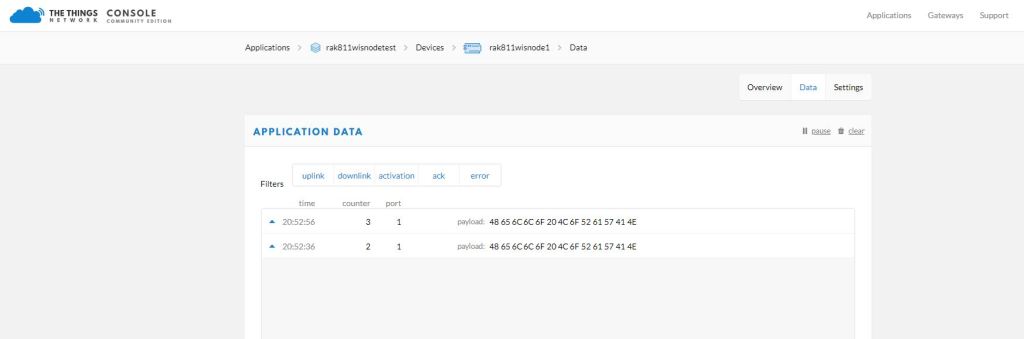
In the Visual Studio 2019 debug output I could see messages getting sent and then after a short delay they were visible in the TTN console.
Successful OTAA Connect TTN logging
I had some issues with TimeSpan.ToString(…) throwing a CLR_E_UNSUPPORTED_INSTRUCTION exception which has been mentioned on the GHI Forums.
I won’t bother with confirming any other functionality as I’m reasonably confident the nanoFramework library (which this code is based on) is working as expected.
I then added code to check the message had been sent and the code worked as expected. I now think, that rather than checking that the characters had been sent the short 100mSec delay was more important.
After building a nanoFramework library “inspired” by the RakWirelessArduinolibrary(which has some issues) I figured it would be good to refactor the library to be more asynchronous with event handlers for send confirmation (if configured) and received messages.
If the RAK811 module is initialised, and connects to the network successfully, the application sends “48656c6c6f204c6f526157414e” (“hello LoRaWAN”) every 5 minutes.
STM32F691Discovery with EVB plugged into Arduino headers
The code application code now has a lot more compile time options for network configuration and payload format.
//---------------------------------------------------------------------------------
// Copyright (c) June 2020, devMobile Software
//
// Licensed under the Apache License, Version 2.0 (the "License");
// you may not use this file except in compliance with the License.
// You may obtain a copy of the License at
//
//     http://www.apache.org/licenses/LICENSE-2.0
//
// Unless required by applicable law or agreed to in writing, software
// distributed under the License is distributed on an "AS IS" BASIS,
// WITHOUT WARRANTIES OR CONDITIONS OF ANY KIND, either express or implied.
// See the License for the specific language governing permissions and
// limitations under the License.
//
//---------------------------------------------------------------------------------
#define ST_STM32F769I_DISCOVERY      // nanoff --target ST_STM32F769I_DISCOVERY --update
#define PAYLOAD_BCD
//#define PAYLOAD_BYTES
#define OTAA
//#define ABP
#define CONFIRMED
namespace devMobile.IoT.Rak811LoRaWanDeviceClient
{
   using System;
   using System.Threading;
   using System.Diagnostics;
   using Windows.Devices.SerialCommunication;

   using devMobile.IoT.LoRaWan;

   public class Program
   {
#if ST_STM32F769I_DISCOVERY
      private const string SerialPortId = "COM6";
#endif
#if OTAA
      private const string DevEui = "...";
      private const string AppEui = "...";
      private const string AppKey = "...";
#endif
#if ABP
      private const string DevAddress = "...";
      private const string NwksKey = "...";
      private const string AppsKey = "...";
#endif
      private const string Region = "AS923";
      private static readonly TimeSpan JoinTimeOut = new TimeSpan(0, 0, 10);
      private static readonly TimeSpan SendTimeout = new TimeSpan(0, 0, 10);
      private const byte MessagePort = 1;
#if PAYLOAD_BCD
      private const string PayloadBcd = "48656c6c6f204c6f526157414e"; // Hello LoRaWAN in BCD
#endif
#if PAYLOAD_BYTES
      private static readonly byte[] PayloadBytes = { 0x48, 0x65, 0x6c, 0x6c, 0x6f, 0x20, 0x4c, 0x6f, 0x52, 0x61, 0x57, 0x41, 0x4e}; // Hello LoRaWAN in bytes
#endif

      public static void Main()
      {
         Result result;

         Debug.WriteLine("devMobile.IoT.Rak811LoRaWanDeviceClient starting");

         Debug.WriteLine($"Ports :{Windows.Devices.SerialCommunication.SerialDevice.GetDeviceSelector()}");

         try
         {
            using ( Rak811LoRaWanDevice device = new Rak811LoRaWanDevice())
            {
               result = device.Initialise(SerialPortId, 9600, SerialParity.None, 8, SerialStopBitCount.One);
               if (result != Result.Success)
               {
                  Debug.WriteLine($"Initialise failed {result}");
                  return;
               }

#if CONFIRMED
               device.OnMessageConfirmation += OnMessageConfirmationHandler;
#endif
               device.OnReceiveMessage += OnReceiveMessageHandler;

               Debug.WriteLine($"{DateTime.UtcNow:hh:mm:ss} Region {Region}");
               result = device.Region(Region);
               if (result != Result.Success)
               {
                  Debug.WriteLine($"Region failed {result}");
                  return;
               }

               Debug.WriteLine($"{DateTime.UtcNow:hh:mm:ss} ADR On");
               result = device.AdrOn();
               if (result != Result.Success)
               {
                  Debug.WriteLine($"ADR on failed {result}");
                  return;
               }

#if CONFIRMED
               Debug.WriteLine($"{DateTime.UtcNow:hh:mm:ss} Confirmed");
               result = device.Confirm(LoRaConfirmType.Confirmed);
               if (result != Result.Success)
               {
                  Debug.WriteLine($"Confirm on failed {result}");
                  return;
               }
#else
               Debug.WriteLine($"{DateTime.UtcNow:hh:mm:ss} Unconfirmed");
               result = device.Confirm(LoRaConfirmType.Unconfirmed);
               if (result != Result.Success)
               {
                  Debug.WriteLine($"Confirm off failed {result}");
                  return;
               }
#endif

#if OTAA
               Debug.WriteLine($"{DateTime.UtcNow:hh:mm:ss} OTAA");
               result = device.OtaaInitialise(DevEui, AppEui, AppKey);
               if (result != Result.Success)
               {
                  Debug.WriteLine($"OTAA Initialise failed {result}");
                  return;
               }
#endif

#if ABP
               Debug.WriteLine($"{DateTime.UtcNow:hh:mm:ss} ABP");
               result = device.AbpInitialise(DevAddress, NwksKey, AppsKey);
               if (result != Result.Success)
               {
                  Debug.WriteLine($"ABP Initialise failed {result}");
                  return;
               }
#endif

               Debug.WriteLine($"{DateTime.UtcNow:hh:mm:ss} Join start Timeout:{JoinTimeOut:hh:mm:ss}");
               result = device.Join(JoinTimeOut);
               if (result != Result.Success)
               {
                  Debug.WriteLine($"Join failed {result}");
                  return;
               }
               Debug.WriteLine($"{DateTime.UtcNow:hh:mm:ss} Join finish");

               while (true)
               {
#if PAYLOAD_BCD
                  Debug.WriteLine($"{DateTime.UtcNow:hh:mm:ss} Send Timeout:{SendTimeout:hh:mm:ss} port:{MessagePort} payload BCD:{PayloadBcd}");
                  result = device.Send(MessagePort, PayloadBcd, SendTimeout);
#endif
#if PAYLOAD_BYTES
                  Debug.WriteLine($"{DateTime.UtcNow:hh:mm:ss} Send Timeout:{SendTimeout:hh:mm:ss} port:{MessagePort} payload Bytes:{BitConverter.ToString(PayloadBytes)}");
                  result = device.Send(MessagePort, PayloadBytes, SendTimeout);
#endif
                  if (result != Result.Success)
                  {
                     Debug.WriteLine($"Send failed {result}");
                  }

                  // if we sleep module too soon response is missed
                  Thread.Sleep(new TimeSpan( 0,0,5));

                  Debug.WriteLine($"{DateTime.UtcNow:hh:mm:ss} Sleep");
                  result = device.Sleep();
                  if (result != Result.Success)
                  {
                     Debug.WriteLine($"Sleep failed {result}");
                     return;
                  }

                  Thread.Sleep(new TimeSpan(0, 5, 0));

                  Debug.WriteLine($"{DateTime.UtcNow:hh:mm:ss} Wakeup");
                  result = device.Wakeup();
                  if (result != Result.Success)
                  {
                     Debug.WriteLine($"Wakeup failed {result}");
                     return;
                  }
               }
            }
         }
         catch (Exception ex)
         {
            Debug.WriteLine(ex.Message);
         }
      }

      static void OnMessageConfirmationHandler(int rssi, int snr)
      {
         Debug.WriteLine($"{DateTime.UtcNow:hh:mm:ss} Send Confirm RSSI:{rssi} SNR:{snr}");
      }

      static void OnReceiveMessageHandler(int port, int rssi, int snr, string payloadBcd)
      {
         byte[] payloadBytes = Rak811LoRaWanDevice.BcdToByes(payloadBcd);

         Debug.WriteLine($"{DateTime.UtcNow:hh:mm:ss} Receive Message RSSI:{rssi} SNR:{snr} Port:{port} Payload:{payloadBcd} PayLoadBytes:{BitConverter.ToString(payloadBytes)}");
      }
   }
}
The debugging output with the Rak811LoRaWanDevice class diagnostics off
Some commands are quite quick to respond e.g. setting the Region, Sleep, and Wakeup. Others, take quite a while e.g. Join, Send, WorkMode so they have separate timeout configurations.
The code is approaching beta and I’ll be testing and fixing bugs for the next couple of days.
If the RAK811 module is initialised, then connects to the network successfully, the application sends “48656c6c6f204c6f526157414e” (“hello LoRaWAN”) every 20 seconds.
STM32F691Discovery with EVB plugged into Arduino headers
The code application code is now a lot smaller & simpler
   public class Program
   {
#if ST_STM32F769I_DISCOVERY
      private const string SerialPortId = "COM6";
#endif
#if OTAA
      private const string DevEui = "...";
      private const string AppEui = "...";
      private const string AppKey = "...";
#endif
#if ABP
      private const string devAddress = "...";
      private const string nwksKey = "...";
      private const string appsKey = "...";
#endif
      private const byte MessagePort = 1;
      private const string Payload = "48656c6c6f204c6f526157414e"; // Hello LoRaWAN

      public static void Main()
      {
         Result result;

         Debug.WriteLine(" devMobile.IoT.Rak811LoRaWanDeviceClient starting");

         Debug.WriteLine(Windows.Devices.SerialCommunication.SerialDevice.GetDeviceSelector());

         try
         {
            using ( Rak811LoRaWanDevice device = new Rak811LoRaWanDevice())
            {
               result = device.Initialise(SerialPortId, SerialParity.None, 8, SerialStopBitCount.One);
               if (result != Result.Success)
               {
                  Debug.WriteLine($"Initialise failed {result}");
                  return;
               }

               result = device.Region("AS923");
               if (result != Result.Success)
               {
                  Debug.WriteLine($"Region failed {result}");
                  return;
               }

#if OTAA
               result = device.OtaaInitialise(DevEui, AppEui, AppKey);
               if (result != Result.Success)
               {
                  Debug.WriteLine($"OTAA Initialise failed {result}");
                  return;
               }
#endif

#if ABP
               result = device.AbpInitialise(devAddress, nwksKey, appsKey);
               if (result != Result.Success)
               {
                  Debug.WriteLine($"ABP Initialise failed {result}");
                  return;
               }
#endif

               result = device.Join(new TimeSpan(0,0,10));
               if (result != Result.Success)
               {
                  Debug.WriteLine($"Join failed {result}");
                  return;
               }

               while (true)
               {
                  result = device.Send(MessagePort, Payload);
                  if (result != Result.Success)
                  {
                     Debug.WriteLine($"Send failed {result}");
                  }

                  result = device.Sleep();
                  if (result != Result.Success)
                  {
                     Debug.WriteLine($"Sleep failed {result}");
                     return;
                  }

                  Thread.Sleep(20000);

                  result = device.Wakeup();
                  if (result != Result.Success)
                  {
                     Debug.WriteLine($"Wakeup failed {result}");
                     return;
                  }
               }
            }
         }
         catch (Exception ex)
         {
            Debug.WriteLine(ex.Message);
         }
      }
   }
I compared the debugging output with confirmations off
The thread '<No Name>' (0x2) has exited with code 0 (0x0).
 devMobile.IoT.Rak811LoRaWanDeviceClient starting
COM5,COM6
01:11:13 lora:work_mode
TX: send 32 bytes 32 via COM6
RX 01:11:14:UART1 work mode: RUI_UART_NORAMAL
Current work_mode:LoRaWAN, join_mode:OTAA, Class: A
Initialization OK

01:11:15 lora:region
TX: send 33 bytes 33 via COM6
RX 01:11:16:OK

01:11:16 lora:join_mode
TX: send 32 bytes 32 via COM6
RX 01:11:17:OK

01:11:18 lora:dev_eui
TX: send 45 bytes 45 via COM6
RX 01:11:19:OK

01:11:19 lora:app_eui
TX: send 45 bytes 45 via COM6
RX 01:11:20:OK

01:11:21 lora:app_key
TX: send 61 bytes 61 via COM6
RX 01:11:22:OK

01:11:22 join
TX: send 9 bytes 9 via COM6
RX 01:11:29:OK Join Success

TX: send 43 bytes to output stream.
TX: 43 bytes via COM6
TX: send 43 bytes to output stream.
TX: 43 bytes via COM6
RX :OK

TX: send 43 bytes to output stream.
TX: 43 bytes via COM6
RX :OK
at+recv=1,-54,9,5:48656c6c6f

TX: send 43 bytes to output stream.
TX: 43 bytes via COM6

TX: send 43 bytes to output stream.
TX: 43 bytes via COM6
RX :OK
at+recv=2,-51,7,5:48656c6c6f

TX: send 43 bytes to output stream.
TX: 43 bytes via COM6
Then with confirmations on (note the at+recv=0,-59,7,0) and received messages (at+recv=23,-53,8,5:48656c6c6f)
devMobile.IoT.Rak811LoRaWanDeviceClient starting
COM5,COM6
01:20:54 lora:work_mode
TX: send 32 bytes 32 via COM6
RX 01:20:56:UART1 work mode: RUI_UART_NORAMAL
Current work_mode:LoRaWAN, join_mode:OTAA, Class: A
Initialization OK

01:20:56 lora:region
TX: send 33 bytes 33 via COM6
RX 01:20:57:OK

01:20:58 lora:join_mode
TX: send 32 bytes 32 via COM6
RX 01:20:59:OK

01:20:59 lora:dev_eui
TX: send 45 bytes 45 via COM6
RX 01:21:00:OK

01:21:01 lora:app_eui
TX: send 45 bytes 45 via COM6
RX 01:21:02:OK

01:21:02 lora:app_key
TX: send 61 bytes 61 via COM6
RX 01:21:03:OK

01:21:04 join
TX: send 9 bytes 9 via COM6
RX 01:21:11:OK Join Success

01:21:11 lora:confirm
TX: send 30 bytes 30 via COM6
RX 01:21:12:OK

TX: send 43 bytes to output stream.
TX: 43 bytes via COM6
TX: send 43 bytes to output stream.
TX: 43 bytes via COM6
TX: send 43 bytes to output stream.
TX: 43 bytes via COM6
RX :OK
at+recv=23,-53,8,5:48656c6c6f

TX: send 43 bytes to output stream.
TX: 43 bytes via COM6

TX: send 43 bytes to output stream.
TX: 43 bytes via COM6
RX :OK
at+recv=0,-59,7,0
In the Visual Studio 2019 debug output I could see the responses to the AT Commands and especially the lack of handling of downlink messages and confirmations from the network.
The next step is to implement timeouts for when operations fail or the module doesn’t respond. Then extend the code to support the receiving of messages as a class A device (missing for the RAK arduino library). I wonder how this will work for when the module is configured as a class C device which can receive messages at any time.
Some commands are quite quick to respond e.g. setting the Region, Sleep, and Wakeup so are most probably ok running synchronously. Other commands can take quite a while e.g. Join, Send, WorkMode so maybe these need to be asynchronous (along with the receiving of confirmations and messages ).
The code is not suitable for production but it confirmed my new approach worked.
My ABP implementation is based on my OTAA one so is pretty “nasty”. Again, I assumed that there would be no timeouts or failures and I only send one message BCD “48656c6c6f204c6f526157414e” (“hello LoRaWAN”) every 20 seconds.
STM32F691Discovery with EVB plugged into Arduino headers
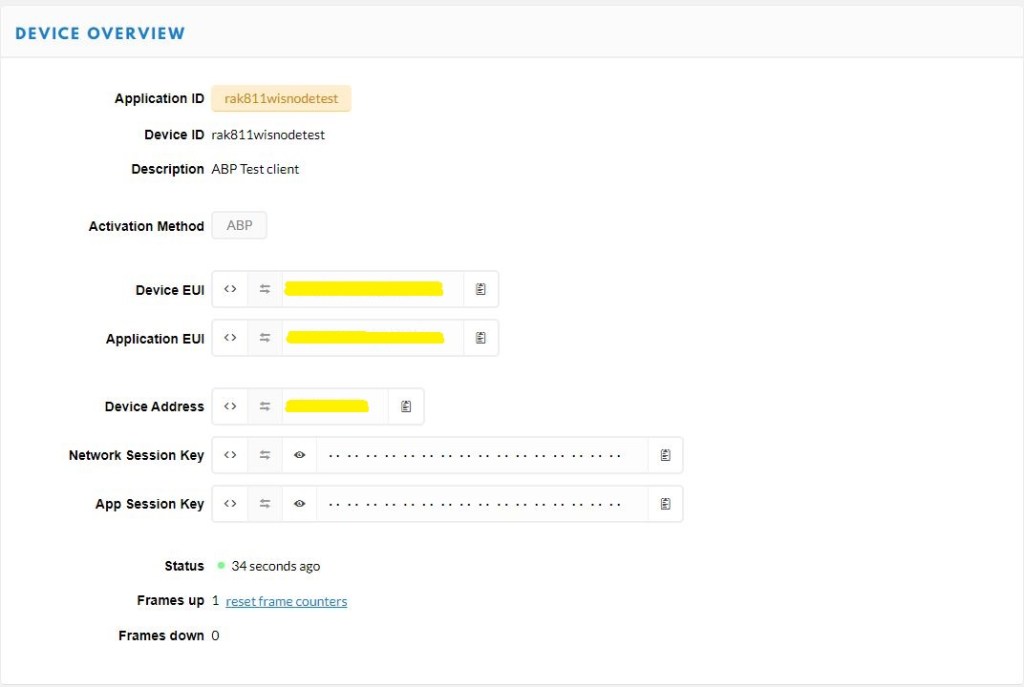
I created a new ABP device
Things Network ABP configuration
Then I configured the RAK811 module for LoRaWAN
// Set the Working mode to LoRaWAN
bytesWritten = outputDataWriter.WriteString("at+set_config=lora:work_mode:0rn");
Debug.WriteLine($"TX: work_mode {outputDataWriter.UnstoredBufferLength} bytes to output stream.");
txByteCount = outputDataWriter.Store();
Debug.WriteLine($"TX: {txByteCount} bytes via {serialDevice.PortName}");

// Read the response
bytesRead = inputDataReader.Load(128);
if (bytesRead > 0)
{
   string response = inputDataReader.ReadString(bytesRead);
   Debug.WriteLine($"RX sync:{response}");
}
Then sequentially stepped through the necessary configuration to join the The Things Network(TTN) network
// Set the JoinMode to ABP
bytesWritten = outputDataWriter.WriteString($"at+set_config=lora:join_mode:1\r\n");
Debug.WriteLine($"TX: join_mode {outputDataWriter.UnstoredBufferLength} bytes to output stream.");
txByteCount = outputDataWriter.Store();
Debug.WriteLine($"TX: {txByteCount} bytes via {serialDevice.PortName}");

// Read the response
bytesRead = inputDataReader.Load(128);
if (bytesRead > 0)
{
   String response = inputDataReader.ReadString(bytesRead);
   Debug.WriteLine($"RX :{response}");
}

// Set the device address
bytesWritten = outputDataWriter.WriteString($"at+set_config=lora:dev_addr:{devAddress}\r\n");
Debug.WriteLine($"TX: dev_addr {outputDataWriter.UnstoredBufferLength} bytes to output stream.");
txByteCount = outputDataWriter.Store();
Debug.WriteLine($"TX: {txByteCount} bytes via {serialDevice.PortName}");

// Read the response
bytesRead = inputDataReader.Load(128);
if (bytesRead > 0)
   {
   String response = inputDataReader.ReadString(bytesRead);
   Debug.WriteLine($"RX :{response}");
   }
...
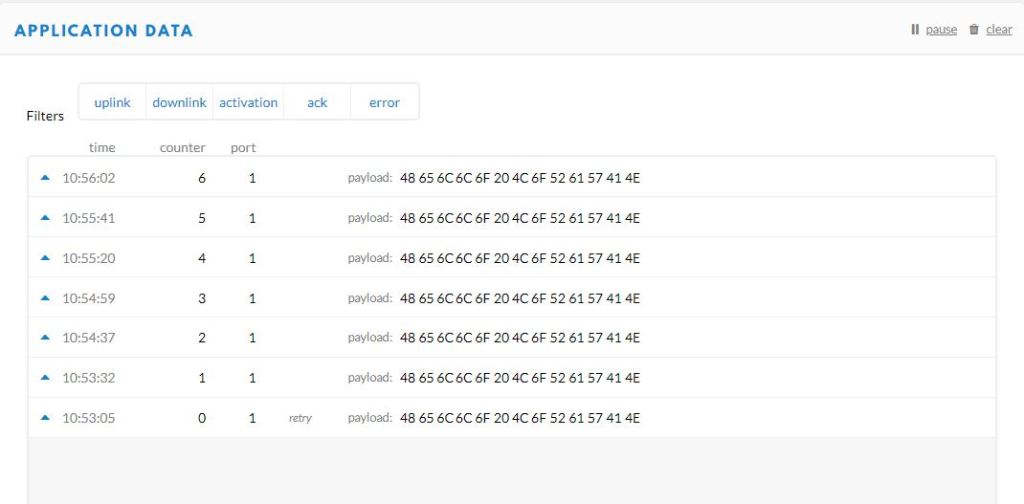
After making a few fixes to my code and tweaking some settings I could see data in the TTN Console.
ABP Device data uplink
The code is not suitable for production but it confirmed my software and hardware configuration worked.
In the Visual Studio 2019 debug output I could see the AT Command responses from were getting truncated in odd ways so I need to be careful how they are processed.
The thread '<No Name>' (0x2) has exited with code 0 (0x0).
devMobile.IoT.Rak811.NetworkJoinABP starting
COM5,COM6
TX: work_mode 32 bytes to output stream.
TX: 32 bytes via COM6
RX :UART1 work mode: RUI_UART_NORAMAL
Current work_mode:LoRaWAN, join_mode:ABP, Class: A
Initialization OK

TX: region 33 bytes to output stream.
TX: 33 bytes via COM6
RX :OK

TX: join_mode 32 bytes to output stream.
TX: 32 bytes via COM6
RX :OK

TX: dev_addr 38 bytes to output stream.
TX: 38 bytes via COM6
RX :OK

TX: nwks_key 62 bytes to output stream.
TX: 62 bytes via COM6
RX :OK

TX: apps_key 62 bytes to output stream.
TX: 62 bytes via COM6
RX :OK

TX: confirm 30 bytes to output stream.
TX: 30 bytes via COM6
RX :OK

TX: join 9 bytes to output stream.
TX: 9 bytes via COM6
TX: send 43 bytes to output stream.
TX: 43 bytes via COM6
TX: send 43 bytes to output stream.
TX: 43 bytes via COM6
RX :OK Jo
TX: send 43 bytes to output stream.
TX: 43 bytes via COM6
RX :in Su
TX: send 43 bytes to output stream.
TX: 43 bytes via COM6
RX :ccess
TX: send 43 bytes to output stream.
TX: 43 bytes via COM6
RX :
OK
TX: send 43 bytes to output stream.
TX: 43 bytes via COM6
RX :
OK
The next step is to get rework the code to process responses to the AT commands in a smarter way and extract error codes when an operation fails.
STM32F691Discovery with EVB plugged into Arduino headers
My Over the Air Activation(OTAA) implementation is pretty “nasty” I assumed that there would be no timeouts or failures and I only send one BCD message “48656c6c6f204c6f526157414e” which is “hello LoRaWAN”
I configured the RAK811 module for LoRaWAN
// Set the Working mode to LoRaWAN
bytesWritten = outputDataWriter.WriteString("at+set_config=lora:work_mode:0\r\n");
Debug.WriteLine($"TX: work_mode {outputDataWriter.UnstoredBufferLength} bytes to output stream.");
txByteCount = outputDataWriter.Store();
Debug.WriteLine($"TX: {txByteCount} bytes via {serialDevice.PortName}");

// Read the response
bytesRead = inputDataReader.Load(128);
if (bytesRead > 0)
{
   string response = inputDataReader.ReadString(bytesRead);
   Debug.WriteLine($"RX sync:{response}");
}
Then just sequentially stepped through the necessary configuration to join the TTN network
// Set the Region to AS923
bytesWritten = outputDataWriter.WriteString("at+set_config=lora:region:AS923\r\n");
Debug.WriteLine($"TX: region {outputDataWriter.UnstoredBufferLength} bytes to output stream.");
txByteCount = outputDataWriter.Store();
Debug.WriteLine($"TX: {txByteCount} bytes via {serialDevice.PortName}");

// Read the response
bytesRead = inputDataReader.Load(128);
if (bytesRead > 0)
{
   String response = inputDataReader.ReadString(bytesRead);
   Debug.WriteLine($"RX sync:{response}");
}

// Set the JoinMode
bytesWritten = outputDataWriter.WriteString($"at+set_config=lora:join_mode:0\r\n");
Debug.WriteLine($"TX: join_mode {outputDataWriter.UnstoredBufferLength} bytes to output stream.");
txByteCount = outputDataWriter.Store();
Debug.WriteLine($"TX: {txByteCount} bytes via {serialDevice.PortName}");

// Read the response
bytesRead = inputDataReader.Load(128);
if (bytesRead > 0)
{
   String response = inputDataReader.ReadString(bytesRead);
   Debug.WriteLine($"RX sync:{response}");
}

// OTAA set the devEUI
bytesWritten = outputDataWriter.WriteString($"at+set_config=lora:dev_eui:{devEui}\r\n");
Debug.WriteLine($"TX: dev_eui {outputDataWriter.UnstoredBufferLength} bytes to output stream.");
txByteCount = outputDataWriter.Store();
Debug.WriteLine($"TX: {txByteCount} bytes via {serialDevice.PortName}");

// Read the response
bytesRead = inputDataReader.Load(128);
if (bytesRead > 0)
{
   String response = inputDataReader.ReadString(bytesRead);
   Debug.WriteLine($"RX sync:{response}");
}
...
The code is not suitable for production but it confirmed my software and hardware configuration worked.
The thread '<No Name>' (0x2) has exited with code 0 (0x0).
devMobile.IoT.Rak811.NetworkJoinOTAA starting
COM5,COM6
TX: work_mode 32 bytes to output stream.
TX: 32 bytes via COM6
RX sync:UART1 work mode: RUI_UART_NORAMAL
Current work_mode:LoRaWAN, join_mode:OTAA, Class: A
Initialization OK

TX: region 33 bytes to output stream.
TX: 33 bytes via COM6
RX sync:OK

TX: join_mode 32 bytes to output stream.
TX: 32 bytes via COM6
RX sync:OK

TX: dev_eui 45 bytes to output stream.
TX: 45 bytes via COM6
RX sync:OK

TX: app_eui 45 bytes to output stream.
TX: 45 bytes via COM6
RX sync:OK

TX: app_key 61 bytes to output stream.
TX: 61 bytes via COM6
RX sync:OK

TX: confirm 30 bytes to output stream.
TX: 30 bytes via COM6
RX sync:OK

TX: join 9 bytes to output stream.
TX: 9 bytes via COM6
RX sync:
RX sync:
RX sync:
RX sync:
RX sync:OK Join Success

TX: send 43 bytes to output stream.
TX: 43 bytes via COM6
TX: send 43 bytes to output stream.
TX: 43 bytes via COM6
RX sync:OK
at+recv=0,-59,9,0
In the Visual Studio 2019 debug out put I could see messages getting sent and then after a short delay they were visible in the TTN console.
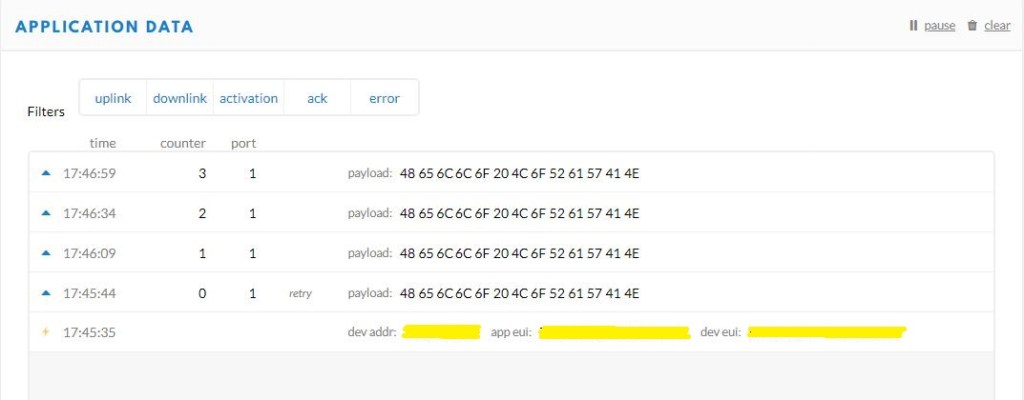
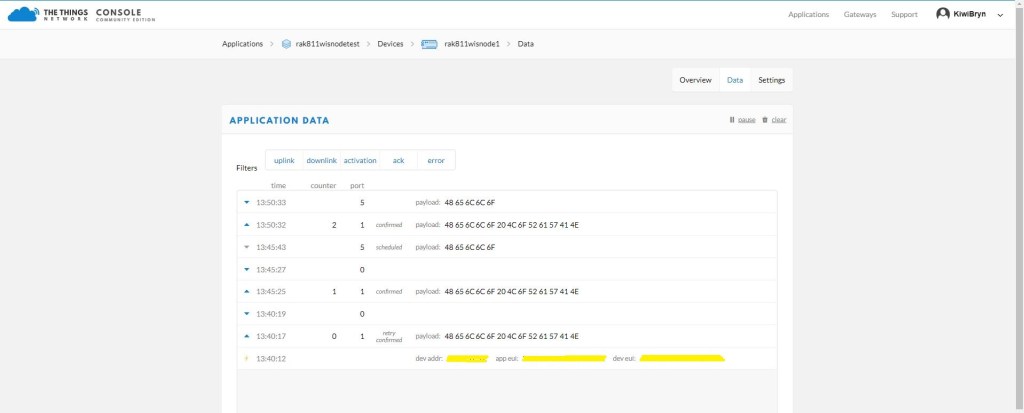
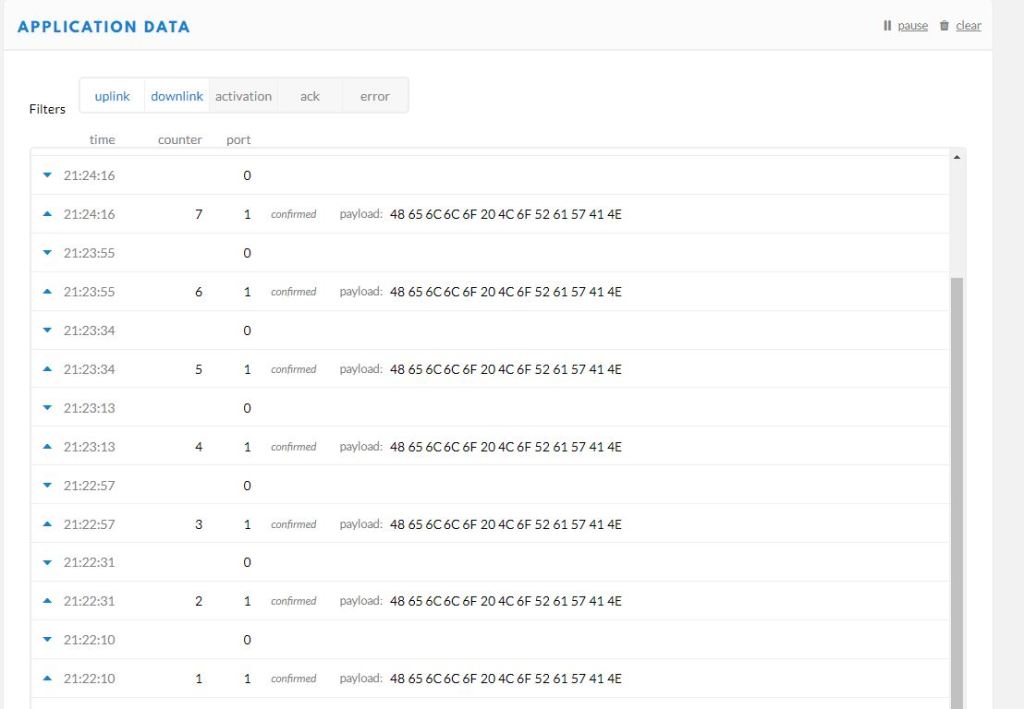
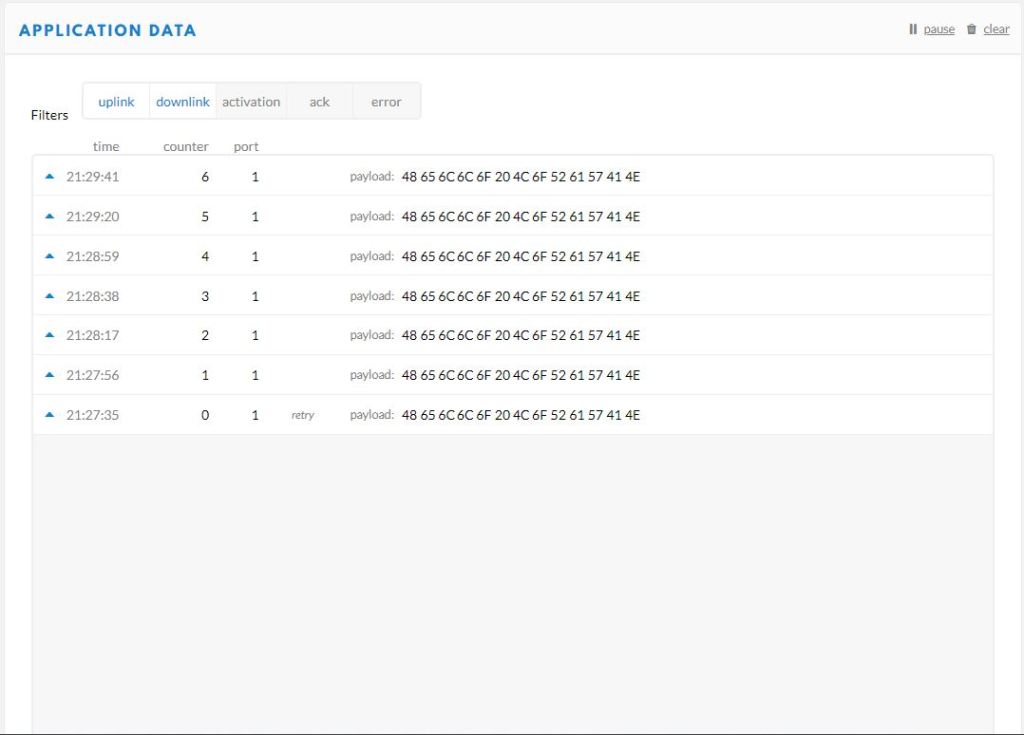
I then modified the confirmed flag and in the TTN console I could see how they were processed differently.
Confirmed messagesUnconfirmed messages
I could receive messages but as the RAK 811 module can be configured to be a Class C device there didn’t appear to be a way to receive a message without sending one which seemed a bit odd.
The next step is to get Authentication By Personalisation(ABP) working.


 devMobile's blog