Mikrobus.Net Quail and EthClick

In my second batch of MikroElektronika Mikrobus clicks I had purchased an EthClick to explore the robustness and reliability of the Mikrobus.Net IP Stack.

My first trial application uses the Internet Chuck Norris database (ICNBD) to look up useful “facts” about the movie star.

public static void Main()
{
   EthClick ethClick = new EthClick(Hardware.SocketTwo);

   ethClick.Start(ethClick.GenerateUniqueMacAddress("devMobileSoftware"), "QuailDevice");

   while (true)
   {
      if (ethClick.ConnectedToInternet)
      {
         Debug.Print("Connected to Internet");
         break;
      }
   Debug.Print("Waiting on Internet connection");
   }

   while (true)
   {
      var r = new HttpRequest(@"http://api.icndb.com/jokes/random");

      r.Headers.Add("Accept", "*/*");

      var response = r.Send();
      if (response != null)
      {
         if (response.Status == "HTTP/1.1 200 OK")
         {
            Debug.Print(response.Message);
         }

      }
      else
      {
         Debug.Print("No response");
      }
      Thread.Sleep(10000);
   }
}

The ran first time and returned the following text

7c
{ "type": "success, "value": { "id": 496, "joke": "Chuck Norris went out of an infinite loop.", "categories": ["nerdy"]}}
0

85
{ "type": "success", "value": { "id": 518, "joke": "Chuck Norris doesn't cheat death. He wins fair and square.", "categories": []}}
0

It looks like the HTTP response parsing is not quite right as each message starts with the length of the message in bytes in hex and the terminating “0”.

Mikrobus.Net Quail and ThumbStick Click

Back in June I purchased a MikroBus.Net Quail board and a selection of Mikro Elektronika click boards. After figuring out I had purchased a couple of click boards which didn’t have NetMF driver support, I placed another order (ensuring drivers available) which arrived just before Christmas.

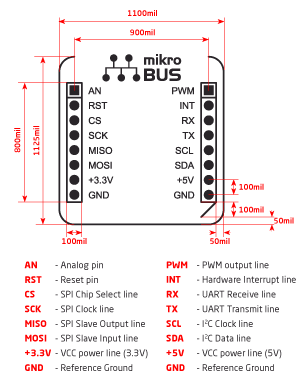
The mikroBUS connector standard has quite a different approach to my arduino style boards where the analog, digital, I2C , SPI and other functionality of the microcontroller are exposed on headers.

The mikroBUS standard specifies several different mechanical configurations (small, medium & large) for clicks and the connections available on the 16 pins (2 x 8 pin female headers).

mikrobus_pinout_thumb_b

This impacts on the way sensors are connected, for example with Arduino style devices there are shields with joysticks and buttons which are read using analog inputs and interrupt ports for the buttons

The mikroBus click boards only have one analog port so the x & y axis values of the joystick are read by an MCP3204 Analog to Digital convertor connected to the SPI Bus and the joystick button is connected to the interrupt port.

The microbus team have done a lot of work developing 60+ drivers and the ThumbStick driver was one of the first I downloaded. The interface provided by the driver is relatively straight forward to use

using MBN;
using MBN.Modules;
using Microsoft.SPOT;
using System.Threading;

namespace ThumbstickClickTestApp
{
   public class Program
   {
      public static void Main()
      {
         ThumbstickClick thumbStick = new ThumbstickClick(Hardware.SocketOne);

         thumbStick.ThumbstickOrientation = ThumbstickClick.Orientation.RotateZeroDegrees;
         thumbStick.ThumbstickPressed += thumbstickPressed;
         thumbStick.ThumbstickReleased += thumbstickReleased;
         thumbStick.Calibrate();

         while (true)
         {
            var position = thumbStick.GetPosition();

            Debug.Print("X,Y,IsPressed " + position.X.ToString("F1") + "," + position.Y.ToString("F1") + "," + thumbStick.IsPressed);

            Thread.Sleep(1000);
         }
      }

      static void thumbstickReleased(ThumbstickClick sender, ThumbstickClick.ButtonState state)
      {
         Debug.Print("Thumbstick Released");
      }

      static void thumbstickPressed(ThumbstickClick sender, ThumbstickClick.ButtonState state)
      {
         Debug.Print("Thumbstick Pressed");
      }
   }
}

From the diagnostics output window in Visual Studio
X,Y,IsPressed 0.0,0.0,False
Thumbstick Pressed
Thumbstick Released
X,Y,IsPressed 0.0,-0.0,False
Thumbstick Pressed
X,Y,IsPressed 0.0,1.0,True
Thumbstick Released
X,Y,IsPressed 0.0,0.0,False

Netduino 3 Wifi Queued Azure Event Hub Field Gateway V1.0

My ADSL connection had been a bit flaky which had meant I had lost some sensor data with my initial Azure Event Hub gateway. In attempt make the solution more robust this version of the gateway queues unsent messages using the on-board MicroSD card support.

The code assumes that a file move is an “atomic operation”, so it streams the events received from the devices into a temporary directory (configurable) then moves them to the upload directory (configurable).

This code is proof of concept and needs to be soak tested, improved error handling and some additional multi threading locking added plus the magic constants refactored.

This code is called in the nRF24 receive messages handler

private void OnReceive(byte[] data)
{
   activityLed.Write(!activityLed.Read());

   // Ensure that we have a payload
   if (data.Length < 1 )
   {
      Debug.Print( "ERROR - Message has no payload" ) ;
      return ;
   }

   string message = new String(Encoding.UTF8.GetChars(data));
   Debug.Print("+" + DateTime.UtcNow.ToString("HH:mm:ss") + " L=" + data.Length + " M=" + message);

   string filename = DateTime.UtcNow.ToString("yyyyMMddhhmmssff") + ".txt";

   string tempDirectory = Path.Combine("\\sd", "temp");
   string tempFilePath = Path.Combine(tempDirectory, filename);

   string queueDirectory = Path.Combine("\\sd", "data");
   string queueFilePath = Path.Combine(queueDirectory, filename);

   File.WriteAllBytes(tempFilePath, data);

   File.Move(tempFilePath, queueFilePath);

   new Microsoft.SPOT.IO.VolumeInfo("\\sd").FlushAll();
}

A timer initiates the upload process which uses the AMQPNetlite library

bool UploadInProgress = false;

      
void uploaderCallback(object state)
{
   Debug.Print("uploaderCallback - start");

   if (UploadInProgress)
   {
      return;
   }
   UploadInProgress = true;

   string[] eventFilesToSend = Directory.GetFiles(Path.Combine("\\sd", "data")) ;

   if ( eventFilesToSend.Length == 0 )
   {
      Debug.Print("uploaderCallback - no files");
      UploadInProgress = false;
      return ;
   }

   try
   {
      Debug.Print("uploaderCallback - Connect");
      Connection connection = new Connection(new Address(serviceBusHost, serviceBusPort, serviceBusSasKeyName, serviceBusSasKey));

      Session session = new Session(connection);

      SenderLink sender = new SenderLink(session, "send-link", eventHubName);

      for (int index = 0; index < System.Math.Min(eventUploadBatchSizeMaximum, eventFilesToSend.Length); index++)
      {
         string eventFile = eventFilesToSend[ index ] ;

         Debug.Print("-" + DateTime.UtcNow.ToString("HH:mm:ss") + " " + eventFile ); ;

         Message message = new Message()
         {
            BodySection = new Data()
            {
               Binary = File.ReadAllBytes(eventFile),
            },
         ApplicationProperties = new Amqp.Framing.ApplicationProperties(),
         };

         FileInfo fileInfo = new FileInfo(eventFile);

         message.ApplicationProperties["AcquiredAtUtc"] = fileInfo.CreationTimeUtc;
         message.ApplicationProperties["UploadedAtUtc"] = DateTime.UtcNow;
         message.ApplicationProperties["GatewayId"] = gatewayId;
         message.ApplicationProperties["DeviceId"] = deviceId;
         message.ApplicationProperties["EventId"] = Guid.NewGuid();

         sender.Send(message);

         File.Delete(eventFile);

         new Microsoft.SPOT.IO.VolumeInfo("\\sd").FlushAll();
      }

      sender.Close();
      session.Close();
      connection.Close();
   }
   catch (Exception ex)
   {
      Debug.Print("ERROR: Upload failed with error: " + ex.Message);
   }
   finally
   {
      Debug.Print("uploaderCallback - finally");
      UploadInProgress = false;
   }
}

The timer period and number of files uploaded in each batch is configurable. I need to test the application to see how it handles power outages and MicroSD card corruption. The source is Netduino NRF24L01 AMQPNetLite Queued Azure EventHub Gatewaywith all the usual caveats.

This project wouldn’t have been possible without

Netduino 3 AnalogInput read rates

At CodeClub some of the students build a power consumption meter and as part of that project we measure the AnalogInput sample rates to check they are sufficient for our application.

Earlier this term when we measured the sampling rates in a CodeClub session we had a mix of Netduino 2 and Netduino 3 devices and some of the results differed from my previous observations. I used the same code on all the devices

int value;
AnalogInput x1 = new AnalogInput(Cpu.AnalogChannel.ANALOG_0);
stopwatch.Start();
for (int i = 0; i < SampleCount; i++)
{
value = x1.ReadRaw();
}
stopwatch.Stop();

Netduino Plus 2

Duration = 2081 mSec 48053/sec
Duration = 2082 mSec 48030/sec
Duration = 2081 mSec 48053/sec
Duration = 2082 mSec 48030/sec
Duration = 2081 mSec 48053/sec

Netduino 3

Duration = 2071 mSec 48285/sec
Duration = 2069 mSec 48332/sec
Duration = 2070 mSec 48309/sec
Duration = 2071 mSec 48285/sec
Duration = 2070 mSec 48309/sec
Duration = 2071 mSec 48285/sec

Netduino 3 Ethernet
Duration = 2136 mSec 46816/sec
Duration = 2137 mSec 46794/sec
Duration = 2136 mSec 46816/sec
Duration = 2135 mSec 46838/sec
Duration = 2137 mSec 46794/sec
Duration = 2135 mSec 46838/sec
Duration = 2136 mSec 46816/sec
Duration = 2135 mSec 46838/sec

Netduino 3 Wifii
Duration = 3902 mSec 25627/sec
Duration = 3901 mSec 25634/sec
Duration = 3902 mSec 25627/sec
Duration = 3901 mSec 25634/sec
Duration = 3903 mSec 25621/sec
Duration = 3902 mSec 25627/sec
Duration = 3903 mSec 25621/sec

The results for the Netduino 3 & Netduino 3 Ethernet were comparable with the Netduino Plus 2 in my earlier post. The reduction in the sampling rate of the Netduino 3 Wifi warrants some further investigation.

Netduino Silicon Labs Si7005 Device Driver

A while back I wrote a post about some problems I was having with a Silicon Labs Si7005 device and now I have had some time to package up the code.

My code strobes the I2C SDA line and then initiates a request that will always fail, from there on everything works as expected.

public SiliconLabsSI7005(byte deviceId = DeviceIdDefault, int clockRateKHz = ClockRateKHzDefault, int transactionTimeoutmSec = TransactionTimeoutmSecDefault)
{
   this.deviceId = deviceId;
   this.clockRateKHz = clockRateKHz;
   this.transactionTimeoutmSec = transactionTimeoutmSec;

   using (OutputPort i2cPort = new OutputPort(Pins.GPIO_PIN_SDA, true))
   {
      i2cPort.Write(false);
      Thread.Sleep(250);
   }

   using (I2CDevice device = new I2CDevice(new I2CDevice.Configuration(deviceId, clockRateKHz)))
   {
      byte[] writeBuffer = { RegisterIdDeviceId };
      byte[] readBuffer = new byte[1];

      // The first request always fails
      I2CDevice.I2CTransaction[] action = new I2CDevice.I2CTransaction[] 
      { 
         I2CDevice.CreateWriteTransaction(writeBuffer),
         I2CDevice.CreateReadTransaction(readBuffer)
      };

      if( device.Execute(action, transactionTimeoutmSec) == 0 )
      {
         //   throw new ApplicationException("Unable to send get device id command");
      }
   }
}

This is how the driver should be used in an application

public static void Main()
{
   SiliconLabsSI7005 sensor = new SiliconLabsSI7005();

   while (true)
   {
      double temperature = sensor.Temperature();

      double humidity = sensor.Humidity();

      Debug.Print("T:" + temperature.ToString("F1") + " H:" + humidity.ToString("F1"));

      Thread.Sleep(5000);
      }
   }

I have added code to catch failures and there is a sample application in the project. For a project I’m working on I will modify the code to use one of the I2C sharing libraries so I can have a number of devices on the bus

My first AMQPNetLite program

After having some problems with my Netduino 3 wifi Azure Event Hub client code (which are most probably due to the issues discussed here) I decided to have a look at AMQPNetLite which had been suggested by Paolo Patierno in a response to one of my posts in the Netduino forums.

I usually create a “minimalist” project so I can figure out how a new library works without an domain specific code getting in the way. Overall, my first experience was pretty positive, the code compiled first time, ran second time and worked third time.

The objective for my first AMQPNetLite application running on my Netduino 3 Wifi was to connect to my home wifi, wait for an IP address then upload an event to an Azure EventHub

private const int amqpPortNumber = 5671;
private const string sbNamespace = "ServiceBus Namespace";
private const string keyName = "SaS Key name";
private const string keyValue = "SaS Key value";
private const string eventHub = "EventHub name";

...

// Wait for Network address if DHCP
NetworkInterface networkInterface = NetworkInterface.GetAllNetworkInterfaces()[0];
if (networkInterface.IsDhcpEnabled)
{
   Debug.Print(" Waiting for IP address ");

   while (NetworkInterface.GetAllNetworkInterfaces()[0].IPAddress == IPAddress.Any.ToString())
   {
      Debug.Print(".");
   }
}

// Display network config for debugging
Debug.Print("Network configuration");
Debug.Print(" Network interface type: " + networkInterface.NetworkInterfaceType.ToString());
Debug.Print(" MAC Address: " + BytesToHexString(networkInterface.PhysicalAddress));
Debug.Print(" DHCP enabled: " + networkInterface.IsDhcpEnabled.ToString());
Debug.Print(" Dynamic DNS enabled: " + networkInterface.IsDynamicDnsEnabled.ToString());
Debug.Print(" IP Address: " + networkInterface.IPAddress.ToString());
Debug.Print(" Subnet Mask: " + networkInterface.SubnetMask.ToString());
Debug.Print(" Gateway: " + networkInterface.GatewayAddress.ToString());

foreach (string dnsAddress in networkInterface.DnsAddresses)
{
   Debug.Print(" DNS Server: " + dnsAddress.ToString());
}

string deviceId = BytesToHexString(networkInterface.PhysicalAddress);
Debug.Print("DeviceId " + deviceId.ToString());

Then I constructed the AMQP address for the event hub, started an AMQP session and sent the message. I tried sending a message with a JSON payload and also using the “type safe” application properties.

try
{
   Address address = new Address(sbNamespace, amqpPortNumber, keyName, keyValue);
   Connection connection = new Connection(address);

   Session session = new Session(connection);

   SenderLink sender = new SenderLink(session, "send-link", eventHub);

   string messageBody = @"{""DeviceId"":""" + deviceId + @""",""Time"":""" + DateTime.Now.ToString("yy-MM-dd hh:mm:ss") + @"""}";

   Message message = new Message()
   {
      //BodySection = new Data() { Binary = Encoding.UTF8.GetBytes(messageBody)},
      ApplicationProperties = new Amqp.Framing.ApplicationProperties(),
   };

   message.ApplicationProperties["Time"] = DateTime.Now;
   message.ApplicationProperties["DeviceId"] = deviceId;

   sender.Send(message);

   sender.Close();
   session.Close();
   connection.Close();
}
catch (Exception ex)
{
   Debug.Print("ERROR: Publish failed with error: " + ex.Message);
}

For my scenario I was pleasantly surprised how easy it was to get working.

AMQP has a non TLS option (only for non sensitive data) and if this is supported I could use a device like a Netduino 3 Ethernet which don’t have baked in TLS support.

Netduino 3 Wifi Azure Service Bus client certificate issue

A few months ago I wrote a post about using a Netduino 3 wifi device to push data to an Azure Event Hub. Last week I wanted to reuse some of the code for another gateway I was building but it didn’t appear to work. When my application made an HTTPS request to the service bus endpoint of my Event Hub it failed with an exception. Initially I though it might be a problem with wildcard certificates so I build a small demo program which makes three HTTPS requests to endpoints with different certificate configurations (for more detail see the code below).

using System;
using System.Net;
using System.Threading;
using Microsoft.SPOT;
using Microsoft.SPOT.Net.NetworkInformation;

namespace devMobile.Netduino3WifiCertificateQuery
{
   public class Program
   {
      public static void Main()
      {
         // Wait for Network address if DHCP
         NetworkInterface networkInterface = NetworkInterface.GetAllNetworkInterfaces()[0];
         if (networkInterface.IsDhcpEnabled)
         {
            Debug.Print(" Waiting for IP address ");
            while (NetworkInterface.GetAllNetworkInterfaces()[0].IPAddress == IPAddress.Any.ToString())
            {
               Debug.Print(".");
               Thread.Sleep(250);
            }
         }

         // Baseline check with google
         Debug.Print("https://www.google.co.nz");
         try
         {
            using (HttpWebRequest request = (HttpWebRequest)WebRequest.Create(@"https://www.google.co.nz"))
            {
               request.Method = "GET";
               request.KeepAlive = false;
               request.Timeout = 5000;
               request.ReadWriteTimeout = 5000;
               request.KeepAlive = false;

               using (var response = (HttpWebResponse)request.GetResponse())
               {
                  Debug.Print("HTTP Status:" + response.StatusCode + " : " + response.StatusDescription);
               }
            }
         }
         catch (Exception ex)
         {
            Debug.Print(ex.Message);
         }

         /*
         DNS Name=*.wordpress.com
         DNS Name=wordpress.com
         */
         Debug.Print("https://wordpress.wordpress.com/");
         try
         {
            using (HttpWebRequest request = (HttpWebRequest)WebRequest.Create(@"https://wordpress.wordpress.com/"))
            {
               //request.Proxy = proxy; 
               request.Method = "GET";
               request.KeepAlive = false;
               request.Timeout = 5000;
               request.ReadWriteTimeout = 5000;
               request.KeepAlive = false;


               using (var response = (HttpWebResponse)request.GetResponse())
               {
                  Debug.Print("HTTP Status:" + response.StatusCode + " : " + response.StatusDescription);
               }
            }
         }
         catch (Exception ex)
         {
            Debug.Print(ex.Message);
         }


         /*
         DNS Name=*.servicebus.windows.net
         DNS Name=servicebus.windows.net
         */
         Debug.Print(@"https://myhomemonitor.servicebus.windows.net/");
         try
         {
            using (HttpWebRequest request = (HttpWebRequest)WebRequest.Create(@"https://myhomemonitor.servicebus.windows.net/"))
            {
               //request.Proxy = proxy; 
               request.Method = "GET";
               request.KeepAlive = false;
               request.Timeout = 5000;
               request.ReadWriteTimeout = 5000;
               request.KeepAlive = false;

               using (var response = (HttpWebResponse)request.GetResponse())
               {
                  Debug.Print("HTTP Status:" + response.StatusCode + " : " + response.StatusDescription);
               }
            }
         }
         catch (Exception ex)
         {
            Debug.Print(ex.Message);
         }
      }
   }
}

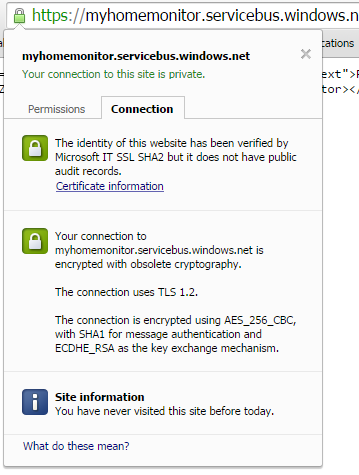
I then noticed that when I looked at the certificate details of the endpoint where the requests were failing in Google Chrome (only occurred in Chrome) there was a warming about “obsolete cryptography”.

Google Chrome info about ok certificate

Google Chrome info about ok certificate

Google Chrome info about error causing certificate

Google Chrome info about possibly error causing certificate

I have downloaded the Netduino 3 Wifi IP stack code from github and have traced down to the native interop call which appears to be failing at the very bottom of the stack. My post at Netduino.com has additional detail about my debugging efforts.

Now I’m wondering if the crypto required by newish certificate for the service bus endpoint is not supported/needs to be enabled for the TI CC3100 SimpleLink Wifi network processor.


Netduino 3 Wifi xively nRF24L01 Gateway

The first version of this code acquired data from a number of *duino devices and uploaded it to xively for a week without any problems(bar my ADSL modem dropping out every so often which it recovered from without human intervention). The data streams are the temperature and humidity for the three bedrooms in my house (the most reliable stream is Bedroom 1). Next version will use the new Netduino.IP stack and run on a Netduino 2 Plus
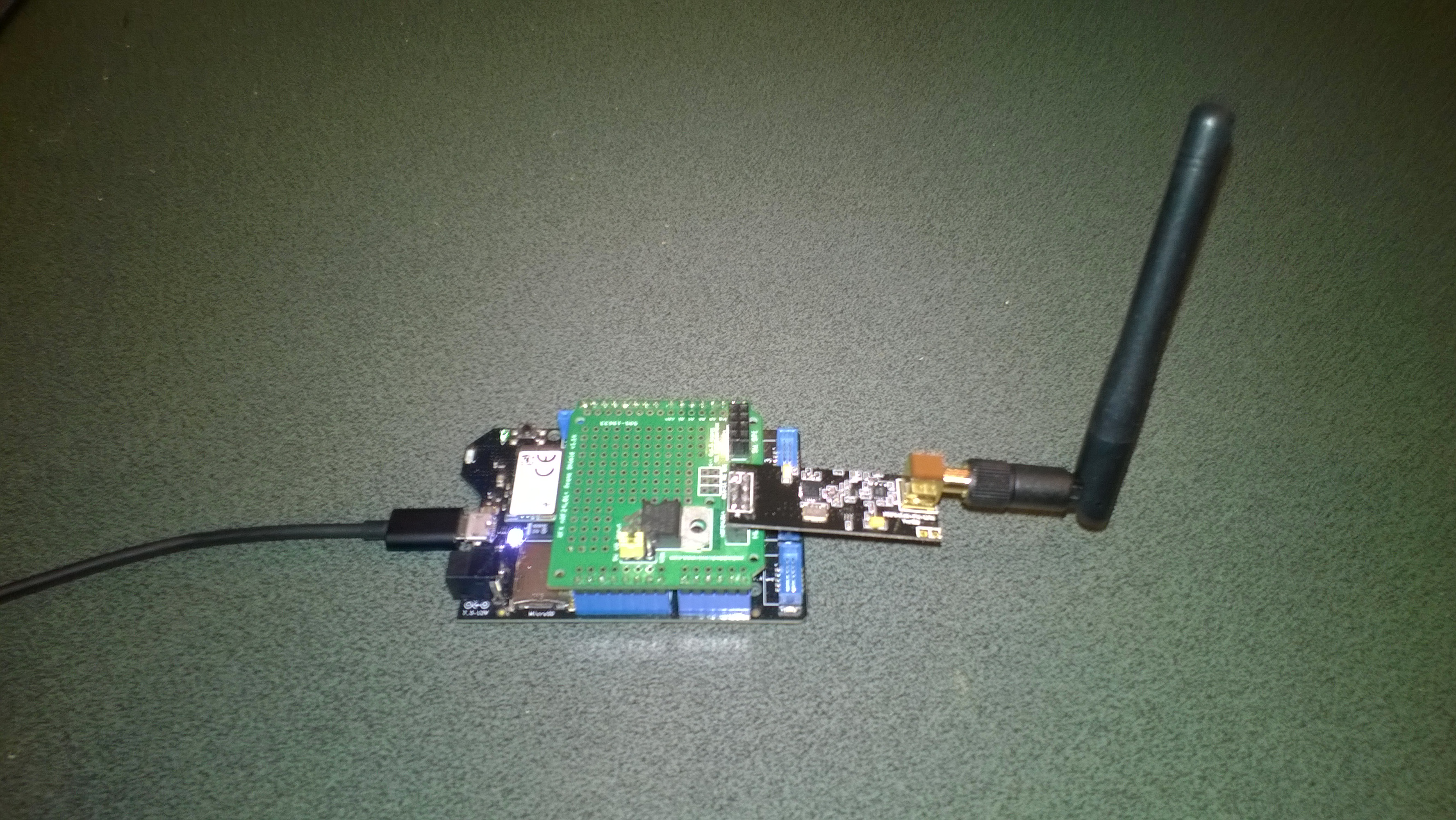
Netduino 3 Wifi with nRF24L01 shield

Netduino 3 Wifi + nRF24L01 shield

To make the software easy to setup all the gateway configuration is stored on a MicroSD and can be modified with a text editor. When the application starts it looks for a file in the root directory of the MicroSD card called app.config. If the file does not exist an empty template is created.

httprequestreadwritetimeoutmsec=2500
httprequesttimeoutmsec=2500
webproxyaddress=
webproxyport=
xivelyapibaseurl=http://api.xively.com/v2/feeds/
xivelyapikey=XivelyAPIKeyGoesHere
xivelyapifeedid=XivelyFeedIDGoesHere
xivelyapicontenttype=text/csv
xivelyapiendpoint=.csv
nrf2l01address=AddressGoesHere
nrf2l01channel=ChannelGoesHere
nrf2l01datarate=0
channel1=Sensor1
channel2=Sensor2
channel3=Sensor3
channel4=Sensor4
channel5=Sensor5
...
...

The first byte of each (upto 32 byte) nRF24L01 message is used to determine the Xively channel.

For testing I used a simple *duino program which uploads temperature and humidity readings every 5 seconds. It’s not terribly efficient or elegant and is just to illustrate how to package up the data.

#include <RF24_config>
#include <nRF24L01.h>
#include <SPI.h>
#include <RF24.h>
#include "Wire.h"
#include <TH02_dev.h>

//UNO R3 with embedded coolness board
//RF24 radio(3, 7);
//devDuino  with onboard
RF24 radio(8, 7);

char payload[32] = "";
const uint64_t pipe = 0x3165736142LL; // Base1 pay attention to byte ordering and address length

void setup()
{
  Serial.begin(9600);

  radio.begin();
  radio.setPALevel(RF24_PA_MAX);
  radio.setChannel(10);
  radio.enableDynamicPayloads();
  radio.openWritingPipe(pipe);

  radio.printDetails();

  /* Power up,delay 150ms,until voltage is stable */
  delay(150);

  TH02.begin();

  delay(1000);
}

void loop()
{
  float temperature = TH02.ReadTemperature();
  float humidity = TH02.ReadHumidity();

  radio.powerUp();

  payload[0] = 'A';
  dtostrf(temperature, 5, 1, &payload[1]);
  Serial.println(payload);
  boolean result = radio.write(payload, strlen(payload));
  if (result)
    Serial.println("T Ok...");
  else
    Serial.println("T failed.");

  payload[0] = 'B';
  dtostrf(humidity, 5, 1, &payload[1]);
  Serial.println(payload);
  result = radio.write(payload, strlen(payload));
  if (result)
    Serial.println("H Ok...");
  else
    Serial.println("H failed.");

  radio.powerDown();

  delay(5000);
}

The gateway code creates a thread for each call to the Xively REST API. (In future the code may need to limit the number of concurrent requests)

private void OnReceive(byte[] data)
{
   activityLed.Write(!activityLed.Read());

   // Ensure that we have a valid payload
   if ( data.Length == 0 )
   {
      Debug.Print( "ERROR - Message has no payload" ) ;
      return ;
   }

   // Extract the device id
   string deviceId = xivelyApiChannleIDPrefix + data[0].ToString();
   string message = new String(Encoding.UTF8.GetChars(data, 1, data.Length - 1));

   string xivelyApiChannel = appSettings.GetString( deviceId, string.Empty ) ;
   if ( xivelyApiChannel.Length == 0 )
   {
      Debug.Print("ERROR - Inbound message has unknown channel " + deviceId);
      return ;
   }
   Debug.Print(DateTime.Now.ToString("HH:mm:ss") + " " + xivelyApiChannel + " " + message); ;

   Thread thread = new Thread(() =&gt; xivelyFeedUpdate(xivelyApiChannel, message ));
   thread.Start();
   }

private void xivelyFeedUpdate( string channel, string value)
{
   #region Assertions
   Debug.Assert(channel != null);
   Debug.Assert(channel != string.Empty );
   Debug.Assert(value != null);
   #endregion

   try
   {
      WebProxy webProxy = null;

      if (webProxyAddress.Length &gt; 1)
      {
         webProxy = new WebProxy(webProxyAddress, webProxyPort);
      }

      using (HttpWebRequest request = (HttpWebRequest)WebRequest.Create(xivelyApiBaseUrl + xivelyApiFeedID + xivelyApiEndpoint))
      {
         byte[] buffer = Encoding.UTF8.GetBytes(channel + "," + value);

         DateTime httpRequestedStartedAtUtc = DateTime.UtcNow;

         if (webProxy != null)
         {
            request.Proxy = webProxy;
         }
         request.Method = "PUT";
         request.ContentLength = buffer.Length;
         request.ContentType = xivelyApiContentType;
         request.Headers.Add("X-ApiKey", xivelyApiKey);
         request.KeepAlive = false;
         request.Timeout = httpRequestTimeoutmSec;
         request.ReadWriteTimeout = httpRequestReadWriteTimeoutmSec;

         // request body
         Debug.Print("HTTP request");
         using (Stream stream = request.GetRequestStream())
         {
            stream.Write(buffer, 0, buffer.Length);
         }

         using (var response = (HttpWebResponse)request.GetResponse())
         {
            Debug.Print(" Status: " + response.StatusCode + " : " + response.StatusDescription);
         }

         TimeSpan duration = DateTime.UtcNow - httpRequestedStartedAtUtc;
         Debug.Print(" Duration: " + duration.ToString());
      }
   }
   catch (Exception ex)
   {
      Debug.Print(ex.Message);
   }
}

To use this code download the Nordic nRF24L01 library from Codeplex then include that plus my Netduino NRF24L01 Xively Gateway in a new solution and it should just work.

Deploy the application to a Netduino 2 Plus or Netduino 3 Wifi device and run it to create the app.config file, then use a text editor to update the file with your Xively & device settings.

I’ll upload this and a couple of other projects to GitHub shortly.

Bill of materials (prices as at July 2015)
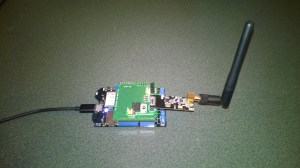
Mikrobus.Net Quail and Click boards arrived

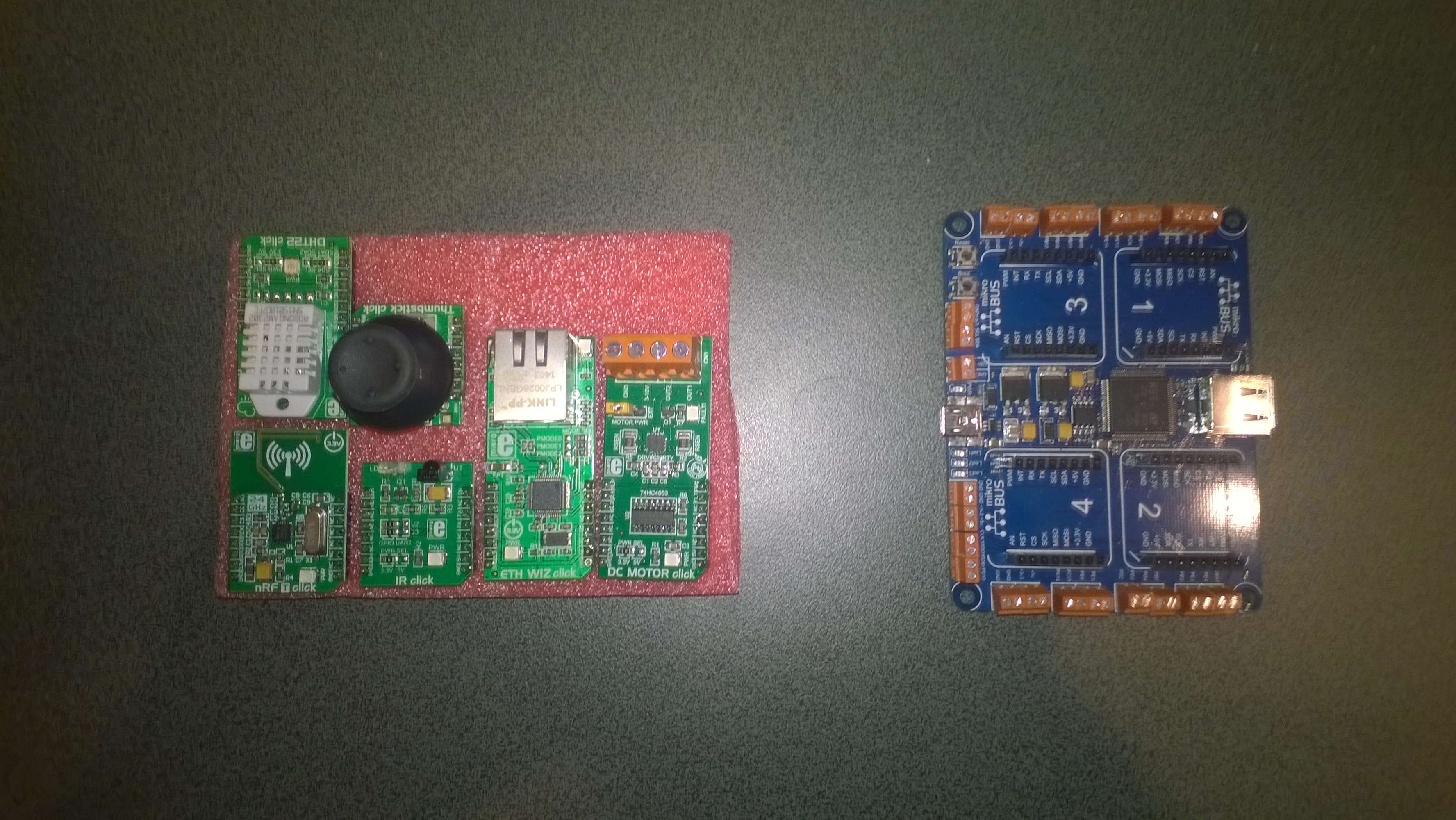
A couple of weeks ago I ordered a NetMF board from MikroElektronika in Serbia. Last night I downloaded the platform libraries and built my first application for the device (the obligatory flashing an LED). This afternoon I soldered the headers onto the clicks and hopefully didn’t make a mess of it.

MikroBusNet Quail board and a selection of click boards

MikroElektronika MikroBusNet Quail board and a selection of click boards

using MBN;
using MBN.Exceptions;
using System.Threading;
using Microsoft.SPOT.Hardware;

namespace MBFlashy
{
   public class Program
   {
      public static void Main()
      {
         while( true )
         {
            MBN.Hardware.Led1.Write(!MBN.Hardware.Led1.Read());
            Thread.Sleep(500);
         }
      }
   }
}

Next steps will be to get the nRF24L01 and joystick clicks working, maybe as a remote control for my 4WD robot.

Silicon Labs Si7005 Device Driver oddness

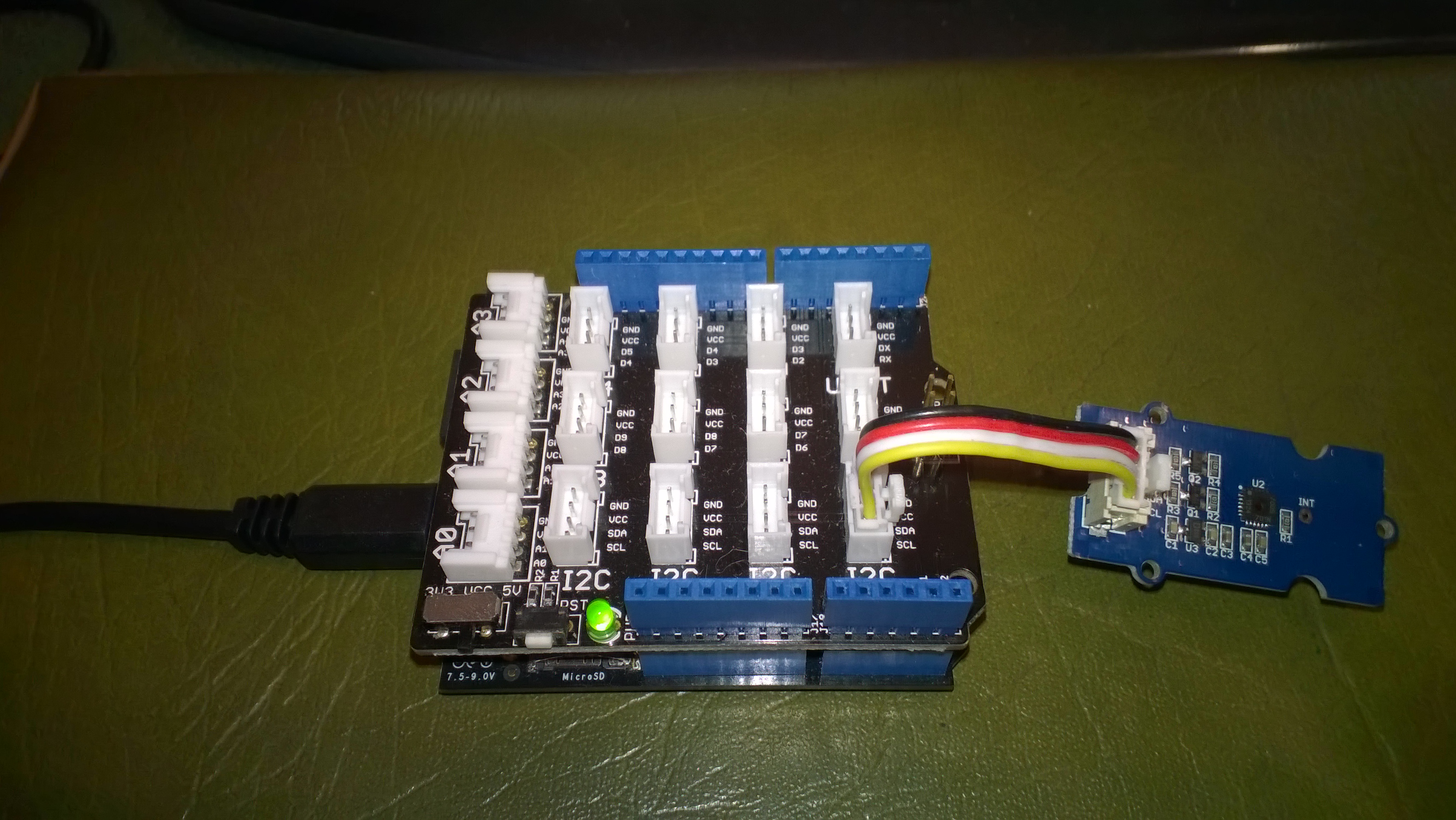
I have been working on a Netduino I2C driver for the Silicon Labs Si7005 Digital I2C Humidity & Temperature Sensor for weather station and building monitoring applications as it looks like a reasonably priced device which is not to complex to interface with.I’m using a SeeedStudio Grove – Temperature&Humidity Sensor (High-Accuracy & Mini) for development.

The first time I try and read anything from the device it fails. Otherwise my driver works as expected.

Netduino 2 Plus & Silicon Labs Si7005

Bill of materials (prices as at April 2015)

  • Netduino Plus 2 USD60 NZD108
  • Grove – Temperature&Humidity Sensor (High-Accuracy & Mini) USD11.50
  • Grove – Base Shield USD8.90

This code just shows the flow, I’ll package into a driver shortly

I strobe the I2C line which seems to help

using (OutputPort i2cPort = new OutputPort(Pins.GPIO_PIN_SDA, true))
{
   i2cPort.Write(false);
   Thread.Sleep(1000);
}

I then try and read the Device ID (0x50) from register 0X11 but this (and any other read fails)

byte[] writeBuffer = { RegisterIdDeviceId };
byte[] readBuffer = new byte[1];

I2CDevice.I2CTransaction[] action = new I2CDevice.I2CTransaction[] 
{ 
   I2CDevice.CreateWriteTransaction(writeBuffer),
   I2CDevice.CreateReadTransaction(readBuffer)
};

int length = device.Execute(action, TransactionTimeoutMilliseconds);
Debug.Print(&quot;Byte count &quot; + length.ToString());
foreach (byte Byte in readBuffer)
{
   Debug.Print(Byte.ToString(&quot;X2&quot;));
}

I can read the temperature and humidity by writing to the command register

byte[] writeBuffer = { RegisterIdConiguration, CMD_MEASURE_TEMP };

I2CDevice.I2CTransaction[] action = new I2CDevice.I2CTransaction[] 
{ 
   I2CDevice.CreateWriteTransaction(writeBuffer),
};

int length = device.Execute(action, TransactionTimeoutMilliseconds);
Debug.Print(&quot;Byte count&quot; + length.ToString());

Then poll for measurement process to finish

conversionInProgress = true
do
{
   byte[] writeBuffer = { RegisterIdStatus };
   byte[] readBuffer = new byte[1];

   I2CDevice.I2CTransaction[] action = new I2CDevice.I2CTransaction[] 
   { 
      I2CDevice.CreateWriteTransaction(writeBuffer4),
      I2CDevice.CreateReadTransaction(readBuffer4)
   };

   int length = device.Execute(action, TransactionTimeoutMilliseconds);
   Debug.Print(&quot;Byte count &quot; + length.ToString());
   foreach (byte Byte in readBuffer)
   {
      Debug.Print(Byte.ToString());
   }

   if ((readBuffer[RegisterIdStatus] &amp;&amp; STATUS_RDY_MASK) != STATUS_RDY_MASK)
   {
      conversionInProgress = false;
   }
} while (conversionInProgress);

Then finally read and convert the value

byte[] writeBuffer = { REG_DATA_H };
byte[] readBuffer = new byte[2];

I2CDevice.I2CTransaction[] action = new I2CDevice.I2CTransaction[] 
{ 
   I2CDevice.CreateWriteTransaction(writeBuffer),
   I2CDevice.CreateReadTransaction(readBuffer)
};

int length = device.Execute(action, TransactionTimeoutMilliseconds);
Debug.Print(&quot;Byte count &quot; + length.ToString());
foreach (byte Byte in readBuffer)
{
   Debug.Print(Byte.ToString());
}

int temp = readBuffer[0];

temp = temp &lt;&lt; 8;
temp = temp + readBuffer[1];
temp = temp &gt;&gt; 2;

double temperature = (temp / 32.0) - 50.0;

Debug.Print(&quot; Temp &quot; + temperature.ToString(&quot;F1&quot;));