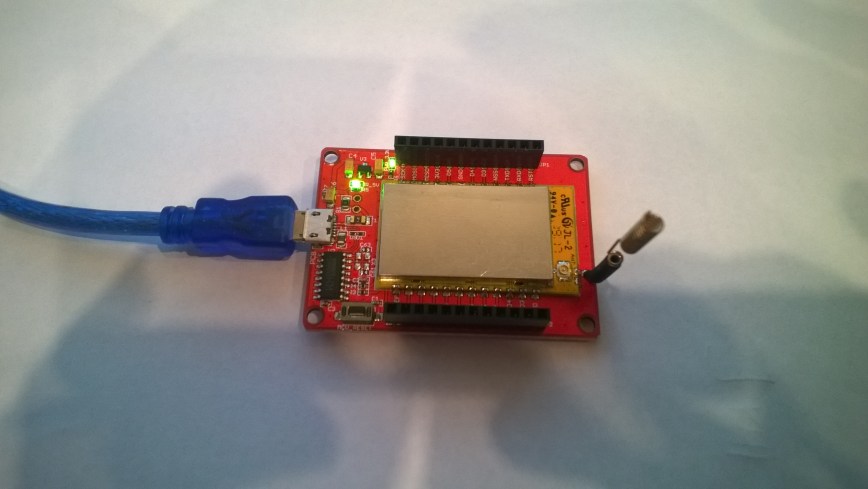
.Net MicroFramework LoRa library Part8

Receive Interrupt

After getting interrupts to work for outbound messages I changed the interrupt pin D10 mapping and the interrupt mask.

Getting this working with my RPI meant the process went relatively smoothly.

//---------------------------------------------------------------------------------
// Copyright (c) August 2018, devMobile Software
//
// Licensed under the Apache License, Version 2.0 (the "License");
// you may not use this file except in compliance with the License.
// You may obtain a copy of the License at
//
//     http://www.apache.org/licenses/LICENSE-2.0
//
// Unless required by applicable law or agreed to in writing, software
// distributed under the License is distributed on an "AS IS" BASIS,
// WITHOUT WARRANTIES OR CONDITIONS OF ANY KIND, either express or implied.
// See the License for the specific language governing permissions and
// limitations under the License.
//
//---------------------------------------------------------------------------------
namespace devMobile.IoT.NetMF.Rfm9X.ReceiveInterrupt
{
   using System;
   using System.Text;
   using System.Threading;
   using Microsoft.SPOT;
   using Microsoft.SPOT.Hardware;
   using SecretLabs.NETMF.Hardware.Netduino;

   public sealed class Rfm9XDevice
   {
      private const byte RegisterAddressReadMask = 0X7f;
      private const byte RegisterAddressWriteMask = 0x80;

      private SPI Rfm9XLoraModem = null;
      private OutputPort ResetGpioPin = null;
      private InterruptPort InterruptPin = null;

      public Rfm9XDevice(Cpu.Pin chipSelect, Cpu.Pin resetPin, Cpu.Pin interruptPin)
      {
         // Factory reset pin configuration
         ResetGpioPin = new OutputPort(Pins.GPIO_PIN_D9, true);
         ResetGpioPin.Write(false);
         Thread.Sleep(10);
         ResetGpioPin.Write(true);
         Thread.Sleep(10);

         this.Rfm9XLoraModem = new SPI(new SPI.Configuration(chipSelect, false, 0, 0, false, false, 2000, SPI.SPI_module.SPI1));

         InterruptPin = new InterruptPort(interruptPin, false, Port.ResistorMode.Disabled, Port.InterruptMode.InterruptEdgeHigh);

         InterruptPin.OnInterrupt += InterruptPin_OnInterrupt;

         Thread.Sleep(100);
      }

      public Rfm9XDevice(Cpu.Pin chipSelect, Cpu.Pin reset)
      {
         // Factory reset pin configuration
         ResetGpioPin = new OutputPort(Pins.GPIO_PIN_D9, true);
         ResetGpioPin.Write(false);
         Thread.Sleep(10);
         ResetGpioPin.Write(true);
         Thread.Sleep(10);

         this.Rfm9XLoraModem = new SPI(new SPI.Configuration(chipSelect, false, 0, 0, false, false, 2000, SPI.SPI_module.SPI1));

         Thread.Sleep(100);
      }

      public Byte RegisterReadByte(byte registerAddress)
      {
         byte[] writeBuffer = new byte[] { registerAddress };
         byte[] readBuffer = new byte[1];
         Debug.Assert(Rfm9XLoraModem != null);

         Rfm9XLoraModem.WriteRead(writeBuffer, readBuffer, 1);

         return readBuffer[0];
      }

      public ushort RegisterReadWord(byte address)
      {
         byte[] writeBuffer = new byte[] { address &= RegisterAddressReadMask };
         byte[] readBuffer = new byte[2];
         Debug.Assert(Rfm9XLoraModem != null);

         readBuffer[0] = RegisterReadByte(address);
         readBuffer[1] = RegisterReadByte(address += 1);

         return (ushort)(readBuffer[1] + (readBuffer[0] << 8));
      }

      public byte[] RegisterRead(byte address, int length)
      {
         byte[] writeBuffer = new byte[] { address &= RegisterAddressReadMask };
         byte[] readBuffer = new byte[length];
         Debug.Assert(Rfm9XLoraModem != null);

         for (byte index = 0; index < length; index++)
         {
            readBuffer[index] = RegisterReadByte(address += 1);
         }

         return readBuffer;
      }

      public void RegisterWriteByte(byte address, byte value)
      {
         byte[] writeBuffer = new byte[] { address |= RegisterAddressWriteMask, value };
         Debug.Assert(Rfm9XLoraModem != null);

         Rfm9XLoraModem.Write(writeBuffer);
      }

      public void RegisterWriteWord(byte address, ushort value)
      {
         byte[] valueBytes = BitConverter.GetBytes(value);
         byte[] writeBuffer = new byte[] { address |= RegisterAddressWriteMask, valueBytes[0], valueBytes[1] };
         Debug.Assert(Rfm9XLoraModem != null);

         Rfm9XLoraModem.Write(writeBuffer);
      }

      public void RegisterWrite(byte address, byte[] bytes)
      {
         byte[] writeBuffer = new byte[1 + bytes.Length];
         Debug.Assert(Rfm9XLoraModem != null);

         Array.Copy(bytes, 0, writeBuffer, 1, bytes.Length);
         writeBuffer[0] = address |= RegisterAddressWriteMask;

         Rfm9XLoraModem.Write(writeBuffer);
      }

      public void RegisterDump()
      {
         Debug.Print("---Registers 0x00 thru 0x42---");
         for (byte registerIndex = 0; registerIndex  4];

         // Mask off the upper 4 bits to get the rest of it.
         hexString += hexChars[singlebyte & 0x0F];

         return hexString;
      }

      private static string WordToHexString(ushort singleword)
      {
         string hexString = string.Empty;

         byte[] bytes = BitConverter.GetBytes(singleword);

         hexString += ByteToHexString(bytes[1]);

         hexString += ByteToHexString(bytes[0]);

         return hexString;
      }

      public class Program
      {
         public static void Main()
         {
            Rfm9XDevice rfm9XDevice = new Rfm9XDevice(Pins.GPIO_PIN_D10, Pins.GPIO_PIN_D9, Pins.GPIO_PIN_D2);
            byte MessageCount = byte.MinValue;

            // Put device into LoRa + Sleep mode
            rfm9XDevice.RegisterWriteByte(0x01, 0x80); // RegOpMode 

            // Set the frequency to 915MHz
            byte[] frequencyWriteBytes = { 0xE4, 0xC0, 0x00 }; // RegFrMsb, RegFrMid, RegFrLsb
            rfm9XDevice.RegisterWrite(0x06, frequencyWriteBytes);

            rfm9XDevice.RegisterWriteByte(0x0F, 0x0); // RegFifoRxBaseAddress 

            rfm9XDevice.RegisterWriteByte(0x40, 0x0); // RegDioMapping1 0b00000000 DIO0 RxReady & TxReady

            rfm9XDevice.RegisterWriteByte(0x01, 0x85); // RegOpMode set LoRa & RxContinuous

            Thread.Sleep(Timeout.Infinite);
         }
      }
   }
}

In the Visual Studio debug output window I could see received packets

'Microsoft.SPOT.Debugger.CorDebug.dll' (Managed): Loaded 'C:\Program Files (x86)\Secret Labs\Netduino SDK\Assemblies\v4.3\le\SecretLabs.NETMF.Hardware.dll', Symbols loaded.
The thread '' (0x2) has exited with code 0 (0x0).
RegIrqFlags 50
Receive-Message
Received 28 byte message Hello W10 IoT Core LoRa! 247
RegIrqFlags 50
Receive-Message
Received 28 byte message Hello W10 IoT Core LoRa! 246
RegIrqFlags 50
Receive-Message

Next, I’ll integrate the .NetMF receive and transmit interrupt examples, and then refactor the code to extract the RFM9X code into a reusable module.
 

RFM95/96/97/98 shield library Part5


Receive Basic

The receive code worked reliably after a couple of attempts. Initially, I was setting the RxTimeout bit on the RegIrqFlags register after retrieving the message, rather than the RxDone bit, and then found I was setting the receive single rather than receive continuous bit of RegOpMode.

I did some basic stress testing with a number of Arduino devices running a slightly modified version of the LoRaSetSyncWord example and my C# code didn’t appear to be dropping messages.

//---------------------------------------------------------------------------------
// Copyright (c) August 2018, devMobile Software
//
// Licensed under the Apache License, Version 2.0 (the "License");
// you may not use this file except in compliance with the License.
// You may obtain a copy of the License at
//
//     http://www.apache.org/licenses/LICENSE-2.0
//
// Unless required by applicable law or agreed to in writing, software
// distributed under the License is distributed on an "AS IS" BASIS,
// WITHOUT WARRANTIES OR CONDITIONS OF ANY KIND, either express or implied.
// See the License for the specific language governing permissions and
// limitations under the License.
//
//---------------------------------------------------------------------------------
namespace devMobile.IoT.Rfm9x.ReceiveBasic
{
   using System;
   using System.Diagnostics;
   using System.Text;
   using System.Runtime.InteropServices.WindowsRuntime;
   using System.Threading.Tasks;
   using Windows.ApplicationModel.Background;
   using Windows.Devices.Spi;
   using Windows.Devices.Gpio;

   public sealed class Rfm9XDevice
   {
      private SpiDevice Rfm9XLoraModem = null;
      private GpioPin ChipSelectGpioPin = null;
      private const byte RegisterAddressReadMask = 0X7f;
      private const byte RegisterAddressWriteMask = 0x80;

      public Rfm9XDevice(byte chipSelectPin, byte resetPin)
      {
         SpiController spiController = SpiController.GetDefaultAsync().AsTask().GetAwaiter().GetResult();
         var settings = new SpiConnectionSettings(0)
         {
            ClockFrequency = 500000,
            Mode = SpiMode.Mode0,
         };

         // Chip select pin configuration
         GpioController gpioController = GpioController.GetDefault();
         ChipSelectGpioPin = gpioController.OpenPin(chipSelectPin);
         ChipSelectGpioPin.SetDriveMode(GpioPinDriveMode.Output);
         ChipSelectGpioPin.Write(GpioPinValue.High);

         // Reset pin configuration to do factory reset
         GpioPin resetGpioPin = gpioController.OpenPin(resetPin);
         resetGpioPin.SetDriveMode(GpioPinDriveMode.Output);
         resetGpioPin.Write(GpioPinValue.Low);
         Task.Delay(10);
         resetGpioPin.Write(GpioPinValue.High);
         Task.Delay(10);

         Rfm9XLoraModem = spiController.GetDevice(settings);
         }

	public Byte RegisterReadByte(byte address)
	{
		byte[] writeBuffer = new byte[] { address &= RegisterAddressReadMask };
		byte[] readBuffer = new byte[1];
		Debug.Assert(Rfm9XLoraModem != null);

		ChipSelectGpioPin.Write(GpioPinValue.Low);
		Rfm9XLoraModem.Write(writeBuffer);
		Rfm9XLoraModem.Read(readBuffer);
		ChipSelectGpioPin.Write(GpioPinValue.High);

		return readBuffer[0];
	}

	public ushort RegisterReadWord(byte address)
	{
		byte[] writeBuffer = new byte[] { address &= RegisterAddressReadMask };
		byte[] readBuffer = new byte[2];
		Debug.Assert(Rfm9XLoraModem != null);

		ChipSelectGpioPin.Write(GpioPinValue.Low);
		Rfm9XLoraModem.Write(writeBuffer);
		Rfm9XLoraModem.Read(readBuffer);
		ChipSelectGpioPin.Write(GpioPinValue.High);

		return (ushort)(readBuffer[1] + (readBuffer[0] << 8));
	}

	public byte[] RegisterRead(byte address, int length)
	{
		byte[] writeBuffer = new byte[] { address &= RegisterAddressReadMask };
		byte[] readBuffer = new byte[length];
		Debug.Assert(Rfm9XLoraModem != null);

		ChipSelectGpioPin.Write(GpioPinValue.Low);
		Rfm9XLoraModem.Write(writeBuffer);
		Rfm9XLoraModem.Read(readBuffer);
		ChipSelectGpioPin.Write(GpioPinValue.High);

		return readBuffer;
	}

	public void RegisterWriteByte(byte address, byte value)
	{
		byte[] writeBuffer = new byte[] { address |= RegisterAddressWriteMask, value };
		Debug.Assert(Rfm9XLoraModem != null);

		ChipSelectGpioPin.Write(GpioPinValue.Low);
		Rfm9XLoraModem.Write(writeBuffer);
		ChipSelectGpioPin.Write(GpioPinValue.High);
	}

	public void RegisterWriteWord(byte address, ushort value)
	{
		byte[] valueBytes = BitConverter.GetBytes(value);
		byte[] writeBuffer = new byte[] { address |= RegisterAddressWriteMask, valueBytes[0], valueBytes[1] };
		Debug.Assert(Rfm9XLoraModem != null);

		ChipSelectGpioPin.Write(GpioPinValue.Low);
		Rfm9XLoraModem.Write(writeBuffer);
		ChipSelectGpioPin.Write(GpioPinValue.High);
	}

	public void RegisterWrite(byte address, [ReadOnlyArray()] byte[] bytes)
	{
		byte[] writeBuffer = new byte[1 + bytes.Length];
		Debug.Assert(Rfm9XLoraModem != null);

		Array.Copy(bytes, 0, writeBuffer, 1, bytes.Length);
		writeBuffer[0] = address |= RegisterAddressWriteMask;

		ChipSelectGpioPin.Write(GpioPinValue.Low);
		Rfm9XLoraModem.Write(writeBuffer);
		ChipSelectGpioPin.Write(GpioPinValue.High);
	}

	public void RegisterDump()
	{
		Debug.WriteLine("Register dump");
		for (byte registerIndex = 0; registerIndex <= 0x42; registerIndex++)
		{
			byte registerValue = this.RegisterReadByte(registerIndex);

			Debug.WriteLine("Register 0x{0:x2} - Value 0X{1:x2} - Bits {2}", registerIndex, registerValue, Convert.ToString(registerValue, 2).PadLeft(8, '0'));
		}
	}
}

public sealed class StartupTask : IBackgroundTask
{
	private const int ChipSelectLine = 25;
	private const int ResetLine = 17;
	private Rfm9XDevice rfm9XDevice = new Rfm9XDevice(ChipSelectLine, ResetLine);

	public void Run(IBackgroundTaskInstance taskInstance)
	{
		// Put device into LoRa + Sleep mode
		rfm9XDevice.RegisterWriteByte(0x01, 0b10000000); // RegOpMode 

		// Set the frequency to 915MHz
		byte[] frequencyWriteBytes = { 0xE4, 0xC0, 0x00 }; // RegFrMsb, RegFrMid, RegFrLsb
		rfm9XDevice.RegisterWrite(0x06, frequencyWriteBytes);

		rfm9XDevice.RegisterWriteByte(0x0F, 0x0); // RegFifoRxBaseAddress 

		rfm9XDevice.RegisterWriteByte(0x01, 0b10000101); // RegOpMode set LoRa & RxContinuous

		while (true)
		{
			// Wait until a packet is received, no timeouts in PoC
			Debug.WriteLine("Receive-Wait");
			byte IrqFlags = rfm9XDevice.RegisterReadByte(0x12); // RegIrqFlags
			while ((IrqFlags & 0b01000000) == 0)  // wait until RxDone cleared
			{
				Task.Delay(20).Wait();
				IrqFlags = rfm9XDevice.RegisterReadByte(0x12); // RegIrqFlags
				Debug.Write(".");
			}
			Debug.WriteLine("");

			Debug.WriteLine("Receive-Message");
			byte currentFifoAddress = rfm9XDevice.RegisterReadByte(0x10); // RegFifiRxCurrent
			rfm9XDevice.RegisterWriteByte( 0x0d, currentFifoAddress); // RegFifoAddrPtr

			byte numberOfBytes = rfm9XDevice.RegisterReadByte(0x13); // RegRxNbBytes

			// Allocate buffer for message
			byte[] messageBytes = new byte[numberOfBytes];

			for (int i = 0; I < numberOfBytes; i++)
			{
				messageBytes[i] = rfm9XDevice.RegisterReadByte(0x00); // RegFifo
			}
            string messageText = UTF8Encoding.UTF8.GetString(messageBytes);
            Debug.WriteLine("Received {0} byte message {1}", messageBytes.Length, messageText);

            rfm9XDevice.RegisterWriteByte(0x12, 0b01000000); // RegIrqFlags clear RxDone bit

            Debug.WriteLine("Receive-Done");
         }
      }
   }
}

With 3 client devices transmitting the debug output looked like this

Receive-Wait

Receive-Message
Received 16 byte message HeLoRa World! 14
Receive-Done
Receive-Wait
……………………………………………………
Receive-Message
Received 16 byte message HeLoRa World! 16
Receive-Done
Receive-Wait
………………………………………………………………………………….
Receive-Message
Received 16 byte message HeLoRa World! 18
Receive-Done
Receive-Wait
………………………………………………………………………….
Receive-Message
Received 16 byte message HeLoRa World! 20
Receive-Done
Receive-Wait
………………
Receive-Message
Received 16 byte message HelloRa World! 0
Receive-Done
Receive-Wait
………………………
Receive-Message
Received 16 byte message HeLoRa World! 22
Receive-Done
Receive-Wait

Most LoRa libraries include the Received Signal Strength Indication(RSSI) & Signal To noise ratio (SNR) information with the received packet. The RSSI needs to be “adjusted” by a constant depending on the frequency so that can wait until after configuration approach has been decided.

Transmitting/receiving with interrupts or design goals next.

RFM95/96/97/98 shield library Part4

Transmit Basic

Slight change of plan I decided that proving I could send a message and interoperability with another LoRa stack would be more interesting…

My first attempt didn’t have much range so I tried turning on the PA_BOOST pin (in RegPaConfig) which improved the range and Received Signal Strength Indication (RSSI) on my Arduino client (equipped with Dragino shield). This was running the Arduino LoRa library LoRaSetSyncWord example.

/*
  LoRa Duplex communication with Sync Word

  Sends a message every half second, and polls continually
  for new incoming messages. Sets the LoRa radio's Sync Word.

  Spreading factor is basically the radio's network ID. Radios with different
  Sync Words will not receive each other's transmissions. This is one way you
  can filter out radios you want to ignore, without making an addressing scheme.

  See the Semtech datasheet, http://www.semtech.com/images/datasheet/sx1276.pdf
  for more on Sync Word.

  created 28 April 2017
  by Tom Igoe
*/
#include
#include
const int csPin = 10;          // LoRa radio chip select
const int resetPin = 9;       // LoRa radio reset
const int irqPin = 2;         // change for your board; must be a hardware interrupt pin

byte msgCount = 0;            // count of outgoing messages
int interval = 2000;          // interval between sends
long lastSendTime = 0;        // time of last packet send

void setup() {
  Serial.begin(9600);                   // initialize serial
  while (!Serial);

  Serial.println("LoRa Duplex - Set sync word");

  // override the default CS, reset, and IRQ pins (optional)
  LoRa.setPins(csPin, resetPin, irqPin);// set CS, reset, IRQ pin

  if (!LoRa.begin(915E6)) {             // initialize ratio at 915 MHz
    Serial.println("LoRa init failed. Check your connections.");
    while (true);                       // if failed, do nothing
  }

  LoRa.setSyncWord(0x12);           // ranges from 0-0xFF, default 0x34, see API docs

  LoRa.dumpRegisters(Serial);
  Serial.println("LoRa init succeeded.");
}

void loop() {
  if (millis() - lastSendTime > interval) {
    String message = "HeLoRa World! ";   // send a message
    message += msgCount;
    sendMessage(message);
    Serial.println("Sending " + message);
    lastSendTime = millis();            // timestamp the message
    interval = random(2000) + 1000;    // 2-3 seconds
    msgCount++;
  }

  // parse for a packet, and call onReceive with the result:
  onReceive(LoRa.parsePacket());
}

void sendMessage(String outgoing) {
  LoRa.beginPacket();                   // start packet
  LoRa.print(outgoing);                 // add payload
  LoRa.endPacket();                     // finish packet and send it
  msgCount++;                           // increment message ID
}

void onReceive(int packetSize) {
  if (packetSize == 0) return;          // if there's no packet, return

  // read packet header bytes:
  String incoming = "";

  while (LoRa.available()) {
    incoming += (char)LoRa.read();
  }

  Serial.println("Message: " + incoming);
  Serial.println("RSSI: " + String(LoRa.packetRssi()));
  Serial.println("Snr: " + String(LoRa.packetSnr()));
  Serial.println();
}

The Windows 10 IoT core application

//---------------------------------------------------------------------------------
// Copyright (c) August 2018, devMobile Software
//
// Licensed under the Apache License, Version 2.0 (the "License");
// you may not use this file except in compliance with the License.
// You may obtain a copy of the License at
//
//     http://www.apache.org/licenses/LICENSE-2.0
//
// Unless required by applicable law or agreed to in writing, software
// distributed under the License is distributed on an "AS IS" BASIS,
// WITHOUT WARRANTIES OR CONDITIONS OF ANY KIND, either express or implied.
// See the License for the specific language governing permissions and
// limitations under the License.
//
//---------------------------------------------------------------------------------
namespace devMobile.IoT.Rfm9x.TransmitBasic
{
   using System;
   using System.Diagnostics;
   using System.Text;
   using System.Runtime.InteropServices.WindowsRuntime;
   using System.Threading.Tasks;
   using Windows.ApplicationModel.Background;
   using Windows.Devices.Spi;
   using Windows.Devices.Gpio;

	public sealed class Rfm9XDevice
	{
		private SpiDevice Rfm9XLoraModem = null;
		private GpioPin ChipSelectGpioPin = null;
		private const byte RegisterAddressReadMask = 0X7f;
		private const byte RegisterAddressWriteMask = 0x80;

		public Rfm9XDevice(byte chipSelectPin, byte resetPin)
		{
			SpiController spiController = SpiController.GetDefaultAsync().AsTask().GetAwaiter().GetResult();
			var settings = new SpiConnectionSettings(0)
			{
				ClockFrequency = 500000,
				Mode = SpiMode.Mode0,
			};

			// Chip select pin configuration
			GpioController gpioController = GpioController.GetDefault();
			ChipSelectGpioPin = gpioController.OpenPin(chipSelectPin);
			ChipSelectGpioPin.SetDriveMode(GpioPinDriveMode.Output);
			ChipSelectGpioPin.Write(GpioPinValue.High);

			// Reset pin configuration for factory reset
			GpioPin resetGpioPin = gpioController.OpenPin(resetPin);
			resetGpioPin.SetDriveMode(GpioPinDriveMode.Output);
			resetGpioPin.Write(GpioPinValue.Low);
			Task.Delay(10);
			resetGpioPin.Write(GpioPinValue.High);
			Task.Delay(10);

			Rfm9XLoraModem = spiController.GetDevice(settings);
		}

		public Byte RegisterReadByte(byte address)
		{
			byte[] writeBuffer = new byte[] { address &= RegisterAddressReadMask };
			byte[] readBuffer = new byte[1];
			Debug.Assert(Rfm9XLoraModem != null);

			ChipSelectGpioPin.Write(GpioPinValue.Low);
			Rfm9XLoraModem.Write(writeBuffer);
			Rfm9XLoraModem.Read(readBuffer);
			ChipSelectGpioPin.Write(GpioPinValue.High);

			return readBuffer[0];
		}

		public ushort RegisterReadWord(byte address)
		{
			byte[] writeBuffer = new byte[] { address &= RegisterAddressReadMask };
			byte[] readBuffer = new byte[2];
			Debug.Assert(Rfm9XLoraModem != null);

			ChipSelectGpioPin.Write(GpioPinValue.Low);
			Rfm9XLoraModem.Write(writeBuffer);
			Rfm9XLoraModem.Read(readBuffer);
			ChipSelectGpioPin.Write(GpioPinValue.High);

			return (ushort)(readBuffer[1] + (readBuffer[0] << 8));
		}

		public byte[] RegisterRead(byte address, int length)
		{
			byte[] writeBuffer = new byte[] { address &= RegisterAddressReadMask };
			byte[] readBuffer = new byte[length];
			Debug.Assert(Rfm9XLoraModem != null);

			ChipSelectGpioPin.Write(GpioPinValue.Low);
			Rfm9XLoraModem.Write(writeBuffer);
			Rfm9XLoraModem.Read(readBuffer);
			ChipSelectGpioPin.Write(GpioPinValue.High);

			return readBuffer;
		}

		public void RegisterWriteByte(byte address, byte value)
		{
			byte[] writeBuffer = new byte[] { address |= RegisterAddressWriteMask, value };
			Debug.Assert(Rfm9XLoraModem != null);

			ChipSelectGpioPin.Write(GpioPinValue.Low);
			Rfm9XLoraModem.Write(writeBuffer);
			ChipSelectGpioPin.Write(GpioPinValue.High);
		}

		public void RegisterWriteWord(byte address, ushort value)
		{
			byte[] valueBytes = BitConverter.GetBytes(value);
			byte[] writeBuffer = new byte[] { address |= RegisterAddressWriteMask, valueBytes[0], valueBytes[1] };
			Debug.Assert(Rfm9XLoraModem != null);

			ChipSelectGpioPin.Write(GpioPinValue.Low);
			Rfm9XLoraModem.Write(writeBuffer);
			ChipSelectGpioPin.Write(GpioPinValue.High);
		}

		public void RegisterWrite(byte address, [ReadOnlyArray()] byte[] bytes)
		{
			byte[] writeBuffer = new byte[1 + bytes.Length];
			Debug.Assert(Rfm9XLoraModem != null);

			Array.Copy(bytes, 0, writeBuffer, 1, bytes.Length);
			writeBuffer[0] = address |= RegisterAddressWriteMask;

			ChipSelectGpioPin.Write(GpioPinValue.Low);
			Rfm9XLoraModem.Write(writeBuffer);
			ChipSelectGpioPin.Write(GpioPinValue.High);
		}

		public void RegisterDump()
		{
			Debug.WriteLine("Register dump");
			for (byte registerIndex = 0; registerIndex <= 0x42; registerIndex++)
			{
				byte registerValue = this.RegisterReadByte(registerIndex);

				Debug.WriteLine("Register 0x{0:x2} - Value 0X{1:x2} - Bits {2}", registerIndex, registerValue, Convert.ToString(registerValue, 2).PadLeft(8, '0'));
			}
		}
	}

	public sealed class StartupTask : IBackgroundTask
	{
		private const byte ChipSelectLine = 25;
		private const byte ResetLine = 17;
		private Rfm9XDevice rfm9XDevice = new Rfm9XDevice(ChipSelectLine, ResetLine);

		public void Run(IBackgroundTaskInstance taskInstance)
		{
			// Put device into LoRa + Sleep mode
			rfm9XDevice.RegisterWriteByte(0x01, 0b10000000); // RegOpMode 

			// Set the frequency to 915MHz
			byte[] frequencyWriteBytes = { 0xE4, 0xC0, 0x00 }; // RegFrMsb, RegFrMid, RegFrLsb
			rfm9XDevice.RegisterWrite(0x06, frequencyWriteBytes);

			// More power - PA_BOOST
			rfm9XDevice.RegisterWriteByte(0x09, 0b10000000); // RegPaConfig

			while (true)
			{
				rfm9XDevice.RegisterWriteByte(0x0E, 0x0); // RegFifoTxBaseAddress 

				// Set the Register Fifo address pointer
				rfm9XDevice.RegisterWriteByte(0x0D, 0x0); // RegFifoAddrPtr 

				string messageText = "Hello LoRa!";

				// load the message into the fifo
				byte[] messageBytes = UTF8Encoding.UTF8.GetBytes(messageText);
				foreach ( byte b in messageBytes )
				{
					rfm9XDevice.RegisterWriteByte(0x0, b); // RegFifo
				}

				// Set the length of the message in the fifo
				rfm9XDevice.RegisterWriteByte(0x22, (byte)messageBytes.Length); // RegPayloadLength

				Debug.WriteLine("Sending {0} bytes message {1}", messageBytes.Length, messageText);
				/// Set the mode to LoRa + Transmit
				rfm9XDevice.RegisterWriteByte(0x01, 0b10000011); // RegOpMode 

				// Wait until send done, no timeouts in PoC
				Debug.WriteLine("Send-wait");
				byte IrqFlags = rfm9XDevice.RegisterReadByte(0x12); // RegIrqFlags
				while((IrqFlags & 0b00001000) == 0 )  // wait until TxDone cleared
				{
					Task.Delay(10).Wait();
					IrqFlags = rfm9XDevice.RegisterReadByte(0x12); // RegIrqFlags
					Debug.Write(".");
				}
				Debug.WriteLine("");
				rfm9XDevice.RegisterWriteByte(0x12, 0b00001000); // clear TxDone bit
				Debug.WriteLine( "Send-Done");

				Task.Delay(30000).Wait();
			}
		}
	}
}

This PoC code is starting to get a bit nasty with magic numbers and no error checking. Next steps are either some refactoring or getting a basic packet receive working…

RFM95/96/97/98 shield library Part3

Register Read and Write

Now that I could reliably dump all the registers of the RFM9X shield I needed to be able to reset the Semtech 1276/7/8/9 back to factory settings (by strobing the reset pin) so the Rfm9XDevice class constructor gained an additional parameter, the reset GPIO pin.

To configure the RFM9X I wrote some wrapper functions to read/write byte values, word values and arrays of bytes. I found the TransferFullDuplex method didn’t work and I assume this was due to the non standard chip select pin usage.

Each method was tested by read/writing suitable register(s) in the device configuration (Needed to set it into LoRa mode first).

//---------------------------------------------------------------------------------
// Copyright (c) August 2018, devMobile Software
//
// Licensed under the Apache License, Version 2.0 (the "License");
// you may not use this file except in compliance with the License.
// You may obtain a copy of the License at
//
//     http://www.apache.org/licenses/LICENSE-2.0
//
// Unless required by applicable law or agreed to in writing, software
// distributed under the License is distributed on an "AS IS" BASIS,
// WITHOUT WARRANTIES OR CONDITIONS OF ANY KIND, either express or implied.
// See the License for the specific language governing permissions and
// limitations under the License.
//
//---------------------------------------------------------------------------------
namespace devMobile.IoT.Rfm9x.RegisterReadAndWrite
{
	using System;
	using System.Diagnostics;
	using System.Runtime.InteropServices.WindowsRuntime;
	using System.Threading.Tasks;
	using Windows.ApplicationModel.Background;
	using Windows.Devices.Spi;
	using Windows.Devices.Gpio;

	public sealed class Rfm9XDevice
	{
		private SpiDevice Rfm9XLoraModem;
		private GpioPin ChipSelectGpioPin;
		private const byte RegisterAddressReadMask = 0X7f;
		private const byte RegisterAddressWriteMask = 0x80;

		public Rfm9XDevice(int chipSelectPin, int resetPin)
		{
			SpiController spiController = SpiController.GetDefaultAsync().AsTask().GetAwaiter().GetResult();
			var settings = new SpiConnectionSettings(0)
			{
				ClockFrequency = 500000,
				Mode = SpiMode.Mode0,
			};

			// Chip select pin configuration
			GpioController gpioController = GpioController.GetDefault();
			ChipSelectGpioPin = gpioController.OpenPin(chipSelectPin);
			ChipSelectGpioPin.SetDriveMode(GpioPinDriveMode.Output);
			ChipSelectGpioPin.Write(GpioPinValue.High);

			// Factory reset pin configuration
			GpioPin resetGpioPin = gpioController.OpenPin(resetPin);
			resetGpioPin.SetDriveMode(GpioPinDriveMode.Output);
			resetGpioPin.Write(GpioPinValue.Low);
			Task.Delay(10);
			resetGpioPin.Write(GpioPinValue.High);
			Task.Delay(10);

			Rfm9XLoraModem = spiController.GetDevice(settings);
		}

		public Byte RegisterReadByte(byte address)
		{
			byte[] writeBuffer = new byte[] { address &= RegisterAddressReadMask };
			byte[] readBuffer = new byte[1];
			Debug.Assert(Rfm9XLoraModem != null);

			ChipSelectGpioPin.Write(GpioPinValue.Low);
			Rfm9XLoraModem.Write(writeBuffer);
			Rfm9XLoraModem.Read(readBuffer);
			ChipSelectGpioPin.Write(GpioPinValue.High);

			return readBuffer[0];
		}

		public ushort RegisterReadWord(byte address)
		{
			byte[] writeBuffer = new byte[] { address &= RegisterAddressReadMask };
			byte[] readBuffer = new byte[2];
			Debug.Assert(Rfm9XLoraModem != null);

			ChipSelectGpioPin.Write(GpioPinValue.Low);
			Rfm9XLoraModem.Write(writeBuffer);
			Rfm9XLoraModem.Read(readBuffer);
			ChipSelectGpioPin.Write(GpioPinValue.High);

			return (ushort)(readBuffer[1] + (readBuffer[0] << 8));
		}

		public byte[] RegisterRead(byte address, int length)
		{
			byte[] writeBuffer = new byte[] { address &= RegisterAddressReadMask };
			byte[] readBuffer = new byte[length];
			Debug.Assert(Rfm9XLoraModem != null);

			ChipSelectGpioPin.Write(GpioPinValue.Low);
			Rfm9XLoraModem.Write(writeBuffer);
			Rfm9XLoraModem.Read(readBuffer);
			ChipSelectGpioPin.Write(GpioPinValue.High);

			return readBuffer;
		}

		public void RegisterWriteByte(byte address, byte value)
		{
			byte[] writeBuffer = new byte[] { address |= RegisterAddressWriteMask, value };
			Debug.Assert(Rfm9XLoraModem != null);

			ChipSelectGpioPin.Write(GpioPinValue.Low);
			Rfm9XLoraModem.Write(writeBuffer);
			ChipSelectGpioPin.Write(GpioPinValue.High);
		}

		public void RegisterWriteWord(byte address, ushort value)
		{
			byte[] valueBytes = BitConverter.GetBytes(value);
			byte[] writeBuffer = new byte[] { address |= RegisterAddressWriteMask, valueBytes[0], valueBytes[1] };
			Debug.Assert(Rfm9XLoraModem != null);

			ChipSelectGpioPin.Write(GpioPinValue.Low);
			Rfm9XLoraModem.Write(writeBuffer);
			ChipSelectGpioPin.Write(GpioPinValue.High);
		}

		public void RegisterWrite(byte address, [ReadOnlyArray()] byte[] bytes)
		{
			byte[] writeBuffer = new byte[1 + bytes.Length];
			Debug.Assert(Rfm9XLoraModem != null);

			Array.Copy(bytes, 0, writeBuffer, 1, bytes.Length);
			writeBuffer[0] = address |= RegisterAddressWriteMask;

			ChipSelectGpioPin.Write(GpioPinValue.Low);
			Rfm9XLoraModem.Write(writeBuffer);
			ChipSelectGpioPin.Write(GpioPinValue.High);
		}

		public void RegisterDump()
		{
			Debug.WriteLine("Register dump");
			for (byte registerIndex = 0; registerIndex <= 0x42; registerIndex++)
			{
				byte registerValue = this.RegisterReadByte(registerIndex);

				Debug.WriteLine("Register 0x{0:x2} - Value 0X{1:x2} - Bits {2}", registerIndex, registerValue, Convert.ToString(registerValue, 2).PadLeft(8, '0'));
			}
		}
	}

	public sealed class StartupTask : IBackgroundTask
	{
		private const int ChipSelectLine = 25;
		private const int ResetLine = 17;
		private Rfm9XDevice rfm9XDevice = new Rfm9XDevice(ChipSelectLine, ResetLine);

		public void Run(IBackgroundTaskInstance taskInstance)
		{
			while (true)
			{
				rfm9XDevice.RegisterDump();

				Debug.WriteLine("Read RegOpMode (read byte)");
				Byte regOpMode = rfm9XDevice.RegisterReadByte(0x1);
				Debug.WriteLine("Preamble 0x{0:x2}", regOpMode);

				Debug.WriteLine("Set LoRa mode and sleep mode (write byte)");
				rfm9XDevice.RegisterWriteByte(0x01, 0b10000000); // 

				Debug.WriteLine("Read the preamble (read word)");
				ushort preamble = rfm9XDevice.RegisterReadWord(0x20);
				Debug.WriteLine("Preamble 0x{0:x2} - Bits {1}", preamble, Convert.ToString(preamble, 2).PadLeft(16, '0'));

				Debug.WriteLine("Set the preamble to 0x80 (write word)");
				rfm9XDevice.RegisterWriteWord(0x20, 0x80);

				Debug.WriteLine("Read the centre frequency (read byte array)");
				byte[] frequencyReadBytes = rfm9XDevice.RegisterRead(0x06, 3);
				Debug.WriteLine("Frequency Msb 0x{0:x2} Mid 0x{1:x2} Lsb 0x{2:x2}", frequencyReadBytes[0], frequencyReadBytes[1], frequencyReadBytes[2]);

				Debug.WriteLine("Set the centre frequency to 916MHz (write byte array)");
				byte[] frequencyWriteBytes = { 0xE4, 0xC0, 0x00 };
				rfm9XDevice.RegisterWrite(0x06, frequencyWriteBytes);

				rfm9XDevice.RegisterDump();

				Task.Delay(30000).Wait();
			}
		}
	}
}

The output of the application looked like this

Register dump
Register 0x00 – Value 0X00 – Bits 00000000
Register 0x01 – Value 0X09 – Bits 00001001
Register 0x02 – Value 0X1a – Bits 00011010
Register 0x03 – Value 0X0b – Bits 00001011
Register 0x04 – Value 0X00 – Bits 00000000
Register 0x05 – Value 0X52 – Bits 01010010
Register 0x06 – Value 0X6c – Bits 01101100
Register 0x07 – Value 0X80 – Bits 10000000
Register 0x08 – Value 0X00 – Bits 00000000
Register 0x09 – Value 0X4f – Bits 01001111
Register 0x0a – Value 0X09 – Bits 00001001
Register 0x0b – Value 0X2b – Bits 00101011
Register 0x0c – Value 0X20 – Bits 00100000
Register 0x0d – Value 0X08 – Bits 00001000
Register 0x0e – Value 0X02 – Bits 00000010
Register 0x0f – Value 0X0a – Bits 00001010
Register 0x10 – Value 0Xff – Bits 11111111
Register 0x11 – Value 0X70 – Bits 01110000
Register 0x12 – Value 0X15 – Bits 00010101
Register 0x13 – Value 0X0b – Bits 00001011
Register 0x14 – Value 0X28 – Bits 00101000
Register 0x15 – Value 0X0c – Bits 00001100
Register 0x16 – Value 0X12 – Bits 00010010
Register 0x17 – Value 0X47 – Bits 01000111
Register 0x18 – Value 0X32 – Bits 00110010
Register 0x19 – Value 0X3e – Bits 00111110
Register 0x1a – Value 0X00 – Bits 00000000
Register 0x1b – Value 0X00 – Bits 00000000
Register 0x1c – Value 0X00 – Bits 00000000
Register 0x1d – Value 0X00 – Bits 00000000
Register 0x1e – Value 0X00 – Bits 00000000
Register 0x1f – Value 0X40 – Bits 01000000
Register 0x20 – Value 0X00 – Bits 00000000
Register 0x21 – Value 0X00 – Bits 00000000
Register 0x22 – Value 0X00 – Bits 00000000
Register 0x23 – Value 0X00 – Bits 00000000
Register 0x24 – Value 0X05 – Bits 00000101
Register 0x25 – Value 0X00 – Bits 00000000
Register 0x26 – Value 0X03 – Bits 00000011
Register 0x27 – Value 0X93 – Bits 10010011
Register 0x28 – Value 0X55 – Bits 01010101
Register 0x29 – Value 0X55 – Bits 01010101
Register 0x2a – Value 0X55 – Bits 01010101
Register 0x2b – Value 0X55 – Bits 01010101
Register 0x2c – Value 0X55 – Bits 01010101
Register 0x2d – Value 0X55 – Bits 01010101
Register 0x2e – Value 0X55 – Bits 01010101
Register 0x2f – Value 0X55 – Bits 01010101
Register 0x30 – Value 0X90 – Bits 10010000
Register 0x31 – Value 0X40 – Bits 01000000
Register 0x32 – Value 0X40 – Bits 01000000
Register 0x33 – Value 0X00 – Bits 00000000
Register 0x34 – Value 0X00 – Bits 00000000
Register 0x35 – Value 0X0f – Bits 00001111
Register 0x36 – Value 0X00 – Bits 00000000
Register 0x37 – Value 0X00 – Bits 00000000
Register 0x38 – Value 0X00 – Bits 00000000
Register 0x39 – Value 0Xf5 – Bits 11110101
Register 0x3a – Value 0X20 – Bits 00100000
Register 0x3b – Value 0X82 – Bits 10000010
Register 0x3c – Value 0Xf1 – Bits 11110001
Register 0x3d – Value 0X02 – Bits 00000010
Register 0x3e – Value 0X80 – Bits 10000000
Register 0x3f – Value 0X40 – Bits 01000000
Register 0x40 – Value 0X00 – Bits 00000000
Register 0x41 – Value 0X00 – Bits 00000000
Register 0x42 – Value 0X12 – Bits 00010010
Read RegOpMode (read byte)
Preamble 0x09
Set LoRa mode and sleep mode (write byte)
Read the preamble (read word)
Preamble 0x08 – Bits 0000000000001000
Set the preamble to 0x80 (write word)
Read the centre frequency (read byte array)
Frequency Msb 0x6c Mid 0x80 Lsb 0x00
Set the centre frequency to 916MHz (write byte array)
Register dump
Register 0x00 – Value 0X54 – Bits 01010100
Register 0x01 – Value 0X80 – Bits 10000000
Register 0x02 – Value 0X1a – Bits 00011010
Register 0x03 – Value 0X0b – Bits 00001011
Register 0x04 – Value 0X00 – Bits 00000000
Register 0x05 – Value 0X52 – Bits 01010010
Register 0x06 – Value 0Xe4 – Bits 11100100
Register 0x07 – Value 0Xc0 – Bits 11000000
Register 0x08 – Value 0X00 – Bits 00000000
Register 0x09 – Value 0X4f – Bits 01001111
Register 0x0a – Value 0X09 – Bits 00001001
Register 0x0b – Value 0X2b – Bits 00101011
Register 0x0c – Value 0X20 – Bits 00100000
Register 0x0d – Value 0X01 – Bits 00000001
Register 0x0e – Value 0X80 – Bits 10000000
Register 0x0f – Value 0X00 – Bits 00000000
Register 0x10 – Value 0X00 – Bits 00000000
Register 0x11 – Value 0X00 – Bits 00000000
Register 0x12 – Value 0X00 – Bits 00000000
Register 0x13 – Value 0X00 – Bits 00000000
Register 0x14 – Value 0X00 – Bits 00000000
Register 0x15 – Value 0X00 – Bits 00000000
Register 0x16 – Value 0X00 – Bits 00000000
Register 0x17 – Value 0X00 – Bits 00000000
Register 0x18 – Value 0X10 – Bits 00010000
Register 0x19 – Value 0X00 – Bits 00000000
Register 0x1a – Value 0X00 – Bits 00000000
Register 0x1b – Value 0X00 – Bits 00000000
Register 0x1c – Value 0X00 – Bits 00000000
Register 0x1d – Value 0X72 – Bits 01110010
Register 0x1e – Value 0X70 – Bits 01110000
Register 0x1f – Value 0X64 – Bits 01100100
Register 0x20 – Value 0X80 – Bits 10000000
Register 0x21 – Value 0X00 – Bits 00000000
Register 0x22 – Value 0X01 – Bits 00000001
Register 0x23 – Value 0Xff – Bits 11111111
Register 0x24 – Value 0X00 – Bits 00000000
Register 0x25 – Value 0X00 – Bits 00000000
Register 0x26 – Value 0X04 – Bits 00000100
Register 0x27 – Value 0X00 – Bits 00000000
Register 0x28 – Value 0X00 – Bits 00000000
Register 0x29 – Value 0X00 – Bits 00000000
Register 0x2a – Value 0X00 – Bits 00000000
Register 0x2b – Value 0X00 – Bits 00000000
Register 0x2c – Value 0X00 – Bits 00000000
Register 0x2d – Value 0X50 – Bits 01010000
Register 0x2e – Value 0X14 – Bits 00010100
Register 0x2f – Value 0X45 – Bits 01000101
Register 0x30 – Value 0X55 – Bits 01010101
Register 0x31 – Value 0Xc3 – Bits 11000011
Register 0x32 – Value 0X05 – Bits 00000101
Register 0x33 – Value 0X27 – Bits 00100111
Register 0x34 – Value 0X1c – Bits 00011100
Register 0x35 – Value 0X0a – Bits 00001010
Register 0x36 – Value 0X03 – Bits 00000011
Register 0x37 – Value 0X0a – Bits 00001010
Register 0x38 – Value 0X42 – Bits 01000010
Register 0x39 – Value 0X12 – Bits 00010010
Register 0x3a – Value 0X49 – Bits 01001001
Register 0x3b – Value 0X1d – Bits 00011101
Register 0x3c – Value 0X00 – Bits 00000000
Register 0x3d – Value 0Xaf – Bits 10101111
Register 0x3e – Value 0X00 – Bits 00000000
Register 0x3f – Value 0X00 – Bits 00000000
Register 0x40 – Value 0X00 – Bits 00000000
Register 0x41 – Value 0X00 – Bits 00000000
Register 0x42 – Value 0X12 – Bits 00010010

The next step is to extract the SPI register access functionality into a module and configure the bare minimum of settings required to get the RFM9X to transmit.

RFM95/96/97/98 shield library Part2

Register Dump

Next step was to dump all registers (0x00 thru 0x40) of the SX1276/7/8/9 device

//---------------------------------------------------------------------------------
// Copyright (c) July 2018, devMobile Software
//
// Licensed under the Apache License, Version 2.0 (the "License");
// you may not use this file except in compliance with the License.
// You may obtain a copy of the License at
//
// http://www.apache.org/licenses/LICENSE-2.0
//
// Unless required by applicable law or agreed to in writing, software
// distributed under the License is distributed on an "AS IS" BASIS,
// WITHOUT WARRANTIES OR CONDITIONS OF ANY KIND, either express or implied.
// See the License for the specific language governing permissions and
// limitations under the License.
//
//---------------------------------------------------------------------------------
namespace devMobile.IoT.Rfm9x.RegisterScan
{
   using System;
   using System.Diagnostics;
   using System.Threading.Tasks;
   using Windows.ApplicationModel.Background;
   using Windows.Devices.Gpio;
   using Windows.Devices.Spi;

   public sealed class Rfm9XDevice
   {
      private SpiDevice rfm9XLoraModem;
      private GpioPin chipSelectGpioPin;

      public Rfm9XDevice(int chipSelectPin)
      {
         SpiController spiController = SpiController.GetDefaultAsync().AsTask().GetAwaiter().GetResult();
         var settings = new SpiConnectionSettings(0)
         {
            ClockFrequency = 500000,
            Mode = SpiMode.Mode0,
         };

         GpioController gpioController = GpioController.GetDefault();
         chipSelectGpioPin = gpioController.OpenPin(chipSelectPin);
         chipSelectGpioPin.SetDriveMode(GpioPinDriveMode.Output);
         chipSelectGpioPin.Write(GpioPinValue.High);

         rfm9XLoraModem = spiController.GetDevice(settings);
      }

      public Byte RegisterReadByte(byte registerAddress)
      {
         byte[] writeBuffer = new byte[] { registerAddress };
         byte[] readBuffer = new byte[1];
         Debug.Assert(rfm9XLoraModem != null);

         chipSelectGpioPin.Write(GpioPinValue.Low);
         rfm9XLoraModem.Write(writeBuffer);
         rfm9XLoraModem.Read(readBuffer);
         chipSelectGpioPin.Write(GpioPinValue.High);

         return readBuffer[0];
      }
   }

   public sealed class StartupTask : IBackgroundTask
   {
      private const int ChipSelectLine = 25;
      private Rfm9XDevice rfm9XDevice = new Rfm9XDevice(ChipSelectLine);

      public void Run(IBackgroundTaskInstance taskInstance)
      {
         while (true)
         {
            for (byte registerIndex = 0; registerIndex <= 0x42; registerIndex++)
            {
               byte registerValue = rfm9XDevice.RegisterReadByte(registerIndex);

               Debug.WriteLine("Register 0x{0:x2} - Value 0X{1:x2} - Bits {2}", registerIndex, registerValue, Convert.ToString(registerValue, 2).PadLeft(8, '0'));
            }

            Task.Delay(10000).Wait();
         }
      }
   }
}

The output of the application looked like this

Register 0x00 – Value 0X00 – Bits 00000000
Register 0x01 – Value 0X09 – Bits 00001001
Register 0x02 – Value 0X1a – Bits 00011010
Register 0x03 – Value 0X0b – Bits 00001011
Register 0x04 – Value 0X00 – Bits 00000000
Register 0x05 – Value 0X52 – Bits 01010010
Register 0x06 – Value 0X6c – Bits 01101100
Register 0x07 – Value 0X80 – Bits 10000000
Register 0x08 – Value 0X00 – Bits 00000000
Register 0x09 – Value 0X4f – Bits 01001111
Register 0x0a – Value 0X09 – Bits 00001001
Register 0x0b – Value 0X2b – Bits 00101011
Register 0x0c – Value 0X20 – Bits 00100000
Register 0x0d – Value 0X08 – Bits 00001000
Register 0x0e – Value 0X02 – Bits 00000010
Register 0x0f – Value 0X0a – Bits 00001010
Register 0x10 – Value 0Xff – Bits 11111111
Register 0x11 – Value 0X71 – Bits 01110001
Register 0x12 – Value 0X15 – Bits 00010101
Register 0x13 – Value 0X0b – Bits 00001011
Register 0x14 – Value 0X28 – Bits 00101000
Register 0x15 – Value 0X0c – Bits 00001100
Register 0x16 – Value 0X12 – Bits 00010010
Register 0x17 – Value 0X47 – Bits 01000111
Register 0x18 – Value 0X32 – Bits 00110010
Register 0x19 – Value 0X3e – Bits 00111110
Register 0x1a – Value 0X00 – Bits 00000000
Register 0x1b – Value 0X00 – Bits 00000000
Register 0x1c – Value 0X00 – Bits 00000000
Register 0x1d – Value 0X00 – Bits 00000000
Register 0x1e – Value 0X00 – Bits 00000000
Register 0x1f – Value 0X40 – Bits 01000000
Register 0x20 – Value 0X00 – Bits 00000000
Register 0x21 – Value 0X00 – Bits 00000000
Register 0x22 – Value 0X00 – Bits 00000000
Register 0x23 – Value 0X00 – Bits 00000000
Register 0x24 – Value 0X05 – Bits 00000101
Register 0x25 – Value 0X00 – Bits 00000000
Register 0x26 – Value 0X03 – Bits 00000011
Register 0x27 – Value 0X93 – Bits 10010011
Register 0x28 – Value 0X55 – Bits 01010101
Register 0x29 – Value 0X55 – Bits 01010101
Register 0x2a – Value 0X55 – Bits 01010101
Register 0x2b – Value 0X55 – Bits 01010101
Register 0x2c – Value 0X55 – Bits 01010101
Register 0x2d – Value 0X55 – Bits 01010101
Register 0x2e – Value 0X55 – Bits 01010101
Register 0x2f – Value 0X55 – Bits 01010101
Register 0x30 – Value 0X90 – Bits 10010000
Register 0x31 – Value 0X40 – Bits 01000000
Register 0x32 – Value 0X40 – Bits 01000000
Register 0x33 – Value 0X00 – Bits 00000000
Register 0x34 – Value 0X00 – Bits 00000000
Register 0x35 – Value 0X0f – Bits 00001111
Register 0x36 – Value 0X00 – Bits 00000000
Register 0x37 – Value 0X00 – Bits 00000000
Register 0x38 – Value 0X00 – Bits 00000000
Register 0x39 – Value 0Xf5 – Bits 11110101
Register 0x3a – Value 0X20 – Bits 00100000
Register 0x3b – Value 0X82 – Bits 10000010
Register 0x3c – Value 0Xff – Bits 11111111
Register 0x3d – Value 0X02 – Bits 00000010
Register 0x3e – Value 0X80 – Bits 10000000
Register 0x3f – Value 0X40 – Bits 01000000
Register 0x40 – Value 0X00 – Bits 00000000
Register 0x41 – Value 0X00 – Bits 00000000
Register 0x42 – Value 0X12 – Bits 00010010
Register 0x00 – Value 0X00 – Bits 00000000
Register 0x01 – Value 0X09 – Bits 00001001
Register 0x02 – Value 0X1a – Bits 00011010
Register 0x03 – Value 0X0b – Bits 00001011
Register 0x04 – Value 0X00 – Bits 00000000
Register 0x05 – Value 0X52 – Bits 01010010
Register 0x06 – Value 0X6c – Bits 01101100
Register 0x07 – Value 0X80 – Bits 10000000
Register 0x08 – Value 0X00 – Bits 00000000
Register 0x09 – Value 0X4f – Bits 01001111
Register 0x0a – Value 0X09 – Bits 00001001
Register 0x0b – Value 0X2b – Bits 00101011
Register 0x0c – Value 0X20 – Bits 00100000
Register 0x0d – Value 0X08 – Bits 00001000
Register 0x0e – Value 0X02 – Bits 00000010
Register 0x0f – Value 0X0a – Bits 00001010
Register 0x10 – Value 0Xff – Bits 11111111
Register 0x11 – Value 0X71 – Bits 01110001
Register 0x12 – Value 0X15 – Bits 00010101
Register 0x13 – Value 0X0b – Bits 00001011
Register 0x14 – Value 0X28 – Bits 00101000
Register 0x15 – Value 0X0c – Bits 00001100
Register 0x16 – Value 0X12 – Bits 00010010
Register 0x17 – Value 0X47 – Bits 01000111
Register 0x18 – Value 0X32 – Bits 00110010
Register 0x19 – Value 0X3e – Bits 00111110
Register 0x1a – Value 0X00 – Bits 00000000
Register 0x1b – Value 0X00 – Bits 00000000
Register 0x1c – Value 0X00 – Bits 00000000
Register 0x1d – Value 0X00 – Bits 00000000
Register 0x1e – Value 0X00 – Bits 00000000
Register 0x1f – Value 0X40 – Bits 01000000
Register 0x20 – Value 0X00 – Bits 00000000
Register 0x21 – Value 0X00 – Bits 00000000
Register 0x22 – Value 0X00 – Bits 00000000
Register 0x23 – Value 0X00 – Bits 00000000
Register 0x24 – Value 0X05 – Bits 00000101
Register 0x25 – Value 0X00 – Bits 00000000
Register 0x26 – Value 0X03 – Bits 00000011
Register 0x27 – Value 0X93 – Bits 10010011
Register 0x28 – Value 0X55 – Bits 01010101
Register 0x29 – Value 0X55 – Bits 01010101
Register 0x2a – Value 0X55 – Bits 01010101
Register 0x2b – Value 0X55 – Bits 01010101
Register 0x2c – Value 0X55 – Bits 01010101
Register 0x2d – Value 0X55 – Bits 01010101
Register 0x2e – Value 0X55 – Bits 01010101
Register 0x2f – Value 0X55 – Bits 01010101
Register 0x30 – Value 0X90 – Bits 10010000
Register 0x31 – Value 0X40 – Bits 01000000
Register 0x32 – Value 0X40 – Bits 01000000
Register 0x33 – Value 0X00 – Bits 00000000
Register 0x34 – Value 0X00 – Bits 00000000
Register 0x35 – Value 0X0f – Bits 00001111
Register 0x36 – Value 0X00 – Bits 00000000
Register 0x37 – Value 0X00 – Bits 00000000
Register 0x38 – Value 0X00 – Bits 00000000
Register 0x39 – Value 0Xf5 – Bits 11110101
Register 0x3a – Value 0X20 – Bits 00100000
Register 0x3b – Value 0X82 – Bits 10000010
Register 0x3c – Value 0Xff – Bits 11111111
Register 0x3d – Value 0X02 – Bits 00000010
Register 0x3e – Value 0X80 – Bits 10000000
Register 0x3f – Value 0X40 – Bits 01000000
Register 0x40 – Value 0X00 – Bits 00000000
Register 0x41 – Value 0X00 – Bits 00000000
Register 0x42 – Value 0X12 – Bits 00010010

I also started to refactor the code (extracting the Read functionality and format the output in both hexadecimal and binary (convert.ToString in base2 + padleft) to make comparison of register values with the datasheet easier.

The device was not in LoRa mode (Bit 7 of RegOpMode 0x01) so the next step was to read and write registers so I could change its configuration.

RFM95/96/97/98 shield library Part1

Register Read

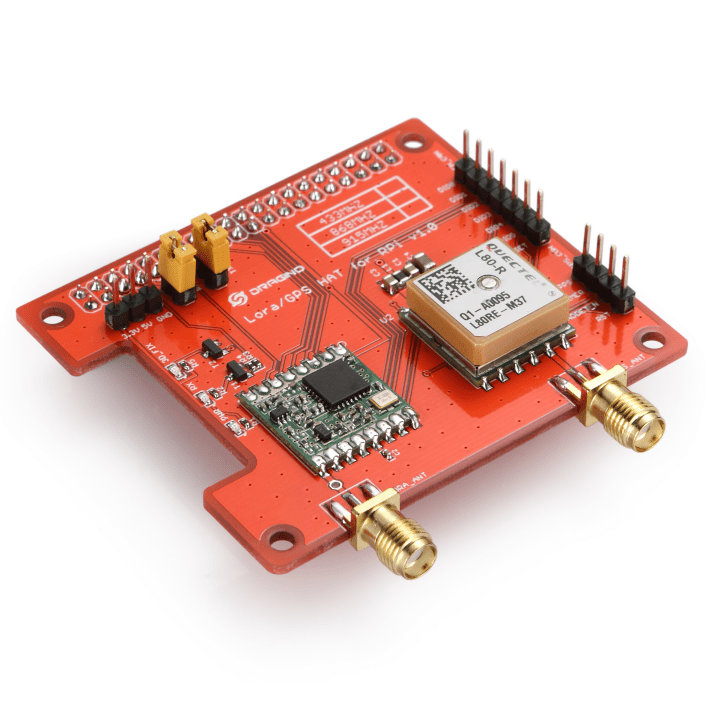
Over the last couple of weeks I have been working on a Windows 10 IoT Core C# library for my Dragino LoRa GPS hat for Raspberry PI. I initially started with the Dragino.LoRa library but after some experimentation and hacking I decided to write my own library (which is usually not a good idea).

DraginoLoraGPSHat

I wanted a lightweight LoRa only library (hopefully possible to backport to .NetMF) which didn’t try to hide how the Semtech 1276 chip functioned, and in the future could be configured to work with other vendors’ shields (dragino, electronictricks, elecrow, m2m).

I’m also working on an RFM69 Raspberry PI shield based on an electronictricks PCB populated with a RFM69HCW so I figured the experience of building a library would be useful.

The first step was to build a basic universal windows platform (UWP) background task to confirm that I could reliably communicate with the shield over SPI bus by reading a single register value (RegVersion the silicon version specified in the vendor datasheet).

//---------------------------------------------------------------------------------
// Copyright (c) July 2018, devMobile Software
//
// Licensed under the Apache License, Version 2.0 (the "License");
// you may not use this file except in compliance with the License.
// You may obtain a copy of the License at
//
//     http://www.apache.org/licenses/LICENSE-2.0
//
// Unless required by applicable law or agreed to in writing, software
// distributed under the License is distributed on an "AS IS" BASIS,
// WITHOUT WARRANTIES OR CONDITIONS OF ANY KIND, either express or implied.
// See the License for the specific language governing permissions and
// limitations under the License.
//
//---------------------------------------------------------------------------------
namespace devMobile.IoT.Rfm9x.RegisterRead
{
   using System;
   using System.Diagnostics;
   using System.Threading.Tasks;
   using Windows.ApplicationModel.Background;
   using Windows.Devices.Gpio;
   using Windows.Devices.Spi;

   public sealed class StartupTask : IBackgroundTask
   {
      private const int ChipSelectLine = 25;
      private SpiDevice rfm9XLoraModem;

      public void Run(IBackgroundTaskInstance taskInstance)
      {
         // Have to setup the SPI bus with custom Chip Select line rather than std CE0/CE1
         SpiController spiController = SpiController.GetDefaultAsync().AsTask().GetAwaiter().GetResult();
         var settings = new SpiConnectionSettings(0)
         {
            ClockFrequency = 500000,
            Mode = SpiMode.Mode0,
         };

         GpioController gpioController = GpioController.GetDefault();
         GpioPin chipSelectGpioPin = gpioController.OpenPin(ChipSelectLine);
         chipSelectGpioPin.SetDriveMode(GpioPinDriveMode.Output);
         chipSelectGpioPin.Write(GpioPinValue.High);

         rfm9XLoraModem = spiController.GetDevice(settings);

         while (true)
         {
            byte[] writeBuffer = new byte[]{ 0x42 }; // RegVersion
            byte[] readBuffer = new byte[1];

            chipSelectGpioPin.Write(GpioPinValue.Low);
            rfm9XLoraModem.Write(writeBuffer);
            rfm9XLoraModem.Read(readBuffer);
            chipSelectGpioPin.Write(GpioPinValue.High);

            Debug.WriteLine("RegVersion {0:x2}", readBuffer[0]);

            Task.Delay(10000).Wait();
            }
         }
   }
}

The dragino shield has the chip select (also know as slave select) line connected to pin 25 rather than the usual CS0 (pin 24) & CS1 (pin 26) so it has to be manually strobed.

'backgroundTaskHost.exe' (CoreCLR: CoreCLR_UWP_Domain): Loaded 'C:\Data\Users\DefaultAccount\AppData\Local\DevelopmentFiles\RegisterRead-uwpVS.Debug_ARM.Bryn.Lewis\System.Diagnostics.Debug.dll'. Skipped loading symbols. Module is optimized and the debugger option 'Just My Code' is enabled.
RegVersion 12
RegVersion 12

Next step was to dump all the registers of the HopeRF module.

Windows 10 IoT Core LoRa library

I have a pair of Windows 10 IoT Core nRF24L01 field gateway projects, one for AdaFruit.IO and the other for Azure IoTHub (Including Azure IoT Central). I use these field gateways for small scale indoor and outdoor deployments.

For larger systems e.g a school campus I was looking for something with a bit more range (line of site + in building penetration) and clients with lower power consumption (suitable for long term battery or solar power).

Other makers had had success with RFM69(proprietary) and RFM9X (LoRA) based devices and shields/hats so I had a look at both technologies.

To kick things off I purchased

I then did some searching and downloaded two commonly used libraries

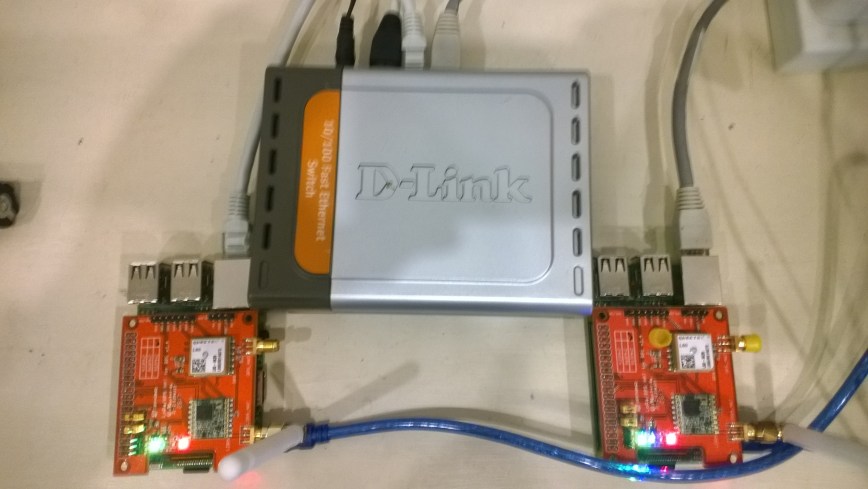
Initially I trialled the emmellsoft Windows 10 IoT Core Dragino.LoRa code on a couple of Raspberry PI devices.

RPIDraginoP2P

After updating the Windows 10 Min/Max versions, plus the NuGet packages and setting the processor type to ARM the code compiled, downloaded and ran which was a pretty good start.

I could see messages being transmitted and received by the two devices


Packet RSSI: -33, RSSI: -91, SNR: 8, Length: 5

Message Received: CRC OK, Rssi=-91, PacketRssi=-33, PacketSnr=8, Buffer:[55, ff, 00, aa, 01], 2018-07-30 09:27:48

Successfully sent in 110 milliseconds.

Packet RSSI: -15, RSSI: -100, SNR: 9.2, Length: 5

Message Received: CRC OK, Rssi=-100, PacketRssi=-15, PacketSnr=9.2, Buffer:[55, ff, 00, aa, 02], 2018-07-30 09:27:53

Successfully sent in 36 milliseconds.

Packet RSSI: -35, RSSI: -101, SNR: 9, Length: 5

Message Received: CRC OK, Rssi=-101, PacketRssi=-35, PacketSnr=9, Buffer:[55, ff, 00, aa, 03], 2018-07-30 09:27:58

Successfully sent in 36 milliseconds.

I added my first attempt at device configuration for New Zealand (based on EU settings) in Dragino.LoRa\Radio\TransceiverSettings.cs


public static readonly TransceiverSettings ANZ915 = new TransceiverSettings(

RadioModemKind.Lora,

915000000,

BandWidth.BandWidth_125_00_kHz,

SpreadingFactor.SF7,

CodingRate.FourOfFive,

8,

true,

false,

LoraSyncWord.Public);

The LoraSyncWord.Public would turn out to be a problem later!

Then I modified the sender and receiver sample application MainPage.xaml.cs files to reference my settings


private static TransceiverSettings GetRadioSettings()

{

// *********************************************************************************************

// #1/2. YOUR EDITING IS REQUIRED HERE!

//

// Choose transeiver settings:

// *********************************************************************************************

return TransceiverSettings.Standard.ANZ915;

}

I modified one of the RadioHead sample Arduino applications (centre frequency) and deployed it to a LoRa MiniDev device. I could see messages getting sent but they were not getting received by the RPI(s).

So I dumped the registers for the SX127X device in the HopeRF RFM95 module on both devices,

DraginoLoraMinDev

From the device on RPI Hat


SX1276/77/78/79 detected, starting.

1-85

2-1A

3-B

4-0

5-52

6-E4

7-C0

8-0

9-85

A-9

B-2B

C-23

D-0

E-80

F-0

10-0

11-0

12-0

13-0

14-0

15-0

16-0

17-0

18-4

19-0

1A-0

1B-42

1C-0

1D-72

1E-74

1F-9F

20-0

21-8

22-1

23-FF

24-0

25-0

26-4

27-0

28-0

29-0

2A-0

2B-0

2C-9

2D-50

2E-14

2F-45

30-55

31-C3

32-5

33-27

34-1C

35-A

36-3

37-A

38-42

39-34

The LoRa transceiver is initiated successfully.

I printed out the Radiohead and emmellsoft registers then manually compared them using the SX1276 datasheet for reference.

I found the 3 registers which contain the MSB, ISB and LSB for the centre frequency weren’t being calculated correctly (checked this by changing the frequency to 434MHz and comparing the register values to the worked example in the datasheet).

I manually “brute forced” the centre frequency registers in LoRaTransceiver.cs Init() and the RPI could then detect a signal but couldn’t decode the messages.

I went back to the Register dumps and found the SyncWord (odd name as it is a byte) were different. After updating the RPI settings the devices could exchange packets..


const double RH_RF95_FXOSC = 32000000.0;

const double RH_RF95_FSTEP = RH_RF95_FXOSC / 524288.0;

long frf = (long)(Settings.Frequency / RH_RF95_FSTEP);

byte[] bytes = BitConverter.GetBytes(frf);

byte[] x6 = { bytes[2] };

RegisterManager.WriteRegister(6, x6);

byte[] x7 = { bytes[1] };

RegisterManager.WriteRegister(7, x7);

byte[] x8 = { bytes[0] };

RegisterManager.WriteRegister(8, x8);

RegisterManager.Write(new LoraRegisterSyncWord(Settings.LoraSyncWord.Value));

This was not a long term solution, lots of code, and register setting changes with limited explanation…

NLog and Application Insights

Another of my clients has an application which uses NLog and sooner or later they are going to want to move their logging to Azure Application Insights.

The application consists of a number of Azure websites and some embedded clients. The Azure applications log information to the local file system on each box but the number of boxes is growing so finding and tracing issues is becoming painful.

//---------------------------------------------------------------------------------
// Copyright (c) 2018, devMobile Software
//
// Licensed under the Apache License, Version 2.0 (the "License");
// you may not use this file except in compliance with the License.
// You may obtain a copy of the License at
//
//     http://www.apache.org/licenses/LICENSE-2.0
//
// Unless required by applicable law or agreed to in writing, software
// distributed under the License is distributed on an "AS IS" BASIS,
// WITHOUT WARRANTIES OR CONDITIONS OF ANY KIND, either express or implied.
// See the License for the specific language governing permissions and
// limitations under the License.
//---------------------------------------------------------------------------------
using System;
using Microsoft.ApplicationInsights.Extensibility;
using NLog;

namespace devMobile.Azure.ApplicationInsightsNLogClient
{
   class Program
   {
      private static Logger log = LogManager.GetLogger(System.Reflection.MethodBase.GetCurrentMethod().DeclaringType.ToString());

      static void Main(string[] args)
      {
         if (args.Length != 1)
         {
            Console.WriteLine("Command line argument InstrumentationKey missing");
            return;
         }
         TelemetryConfiguration.Active.InstrumentationKey = args[0];

         log.Trace("This is nLog");
         log.Debug("This is a Debug message");
         log.Info("This is a Info message");
         log.Warn("This is a Warning message");
         log.Error("This is an Error message");
         log.Fatal("This is a Fatal message");

         new Microsoft.ApplicationInsights.TelemetryClient().Flush();
      }
   }
}

Sample code ApplicationInsightsNLogClient

Two clients to go, one which uses serilog the other has a DIY system which I’m ignoring as long as possible.

Apache Log4net and Application Insights

One of my clients had built a Fintech application which uses Apache log4net and I have just finished moving the logging to Azure Application Insights.

The application used to run on a couple of dedicated servers but its core processing engine is now run on an Azure Virtual Machine Scale Set(VMSS).

The application used to log information to the local file system on each server but with more machines (upto a dozen) and them being started up and shutdown in response to customer demand this wasn’t a viable approach.

//---------------------------------------------------------------------------------
// Copyright (c) 2018, devMobile Software
//
// Licensed under the Apache License, Version 2.0 (the "License");
// you may not use this file except in compliance with the License.
// You may obtain a copy of the License at
//
//     http://www.apache.org/licenses/LICENSE-2.0
//
// Unless required by applicable law or agreed to in writing, software
// distributed under the License is distributed on an "AS IS" BASIS,
// WITHOUT WARRANTIES OR CONDITIONS OF ANY KIND, either express or implied.
// See the License for the specific language governing permissions and
// limitations under the License.
//---------------------------------------------------------------------------------
using System;
using log4net;
using Microsoft.ApplicationInsights.Extensibility;

namespace devMobile.Azure.ApplicationInsightsLog4NetClient
{
   class Program
   {
      public static ILog log = log4net.LogManager.GetLogger(System.Reflection.MethodBase.GetCurrentMethod().DeclaringType);

      static void Main(string[] args)
      {
         if (args.Length != 1)
         {
            Console.WriteLine("Command line argument InstrumentationKey missing");
            return;
         }
         TelemetryConfiguration.Active.InstrumentationKey = args[0];

         log.Info("This is Log4net");
         log.Debug("This is a Debug message");
         log.Info("This is a Info message");
         log.Warn("This is a Warning message");
         log.Error("This is an Error message");
         log.Fatal("This is a Fatal message");

         new Microsoft.ApplicationInsights.TelemetryClient().Flush();
      }
   }
}

Sample code ApplicationInsightsLog4NetClient

Microsoft Enterprise Library and Application Insights

One of my clients has a largish application (120+ projects) which uses the Microsoft Patterns and Practices Enterprise Library V6 data access, exception handling, logging and transient fault handling blocks.

To get consistent logging across Classic Cloud services, Azure websites and Azure functions etc. we are in the process of moving all our diagnostics to Azure application insights.

My proof of concept uses a community developed Enterprise Library listener and it appears to be working well.

Beware the Visual Studio configuration tool plug-in rewrites and application config file removing the application insights enterprise library trace listener setup.

The code for a smallest example application is below (I pass the instrumentation key as a command line parameter).

//---------------------------------------------------------------------------------
// Copyright (c) 2018, devMobile Software
//
// Licensed under the Apache License, Version 2.0 (the "License");
// you may not use this file except in compliance with the License.
// You may obtain a copy of the License at
//
//     http://www.apache.org/licenses/LICENSE-2.0
//
// Unless required by applicable law or agreed to in writing, software
// distributed under the License is distributed on an "AS IS" BASIS,
// WITHOUT WARRANTIES OR CONDITIONS OF ANY KIND, either express or implied.
// See the License for the specific language governing permissions and
// limitations under the License.
//---------------------------------------------------------------------------------
using System;
using Microsoft.ApplicationInsights.Extensibility;
using Microsoft.Practices.EnterpriseLibrary.Logging;
using Microsoft.Practices.EnterpriseLibrary.ExceptionHandling;
namespace ApplicationInsightsEnterpriseLibraryClient
{
   class Program
   {
      static void Main(string[] args)
      {
         if (args.Length != 1)
         {
            Console.WriteLine("Command line argument InstrumentationKey missing");
            return;
         }
         TelemetryConfiguration.Active.InstrumentationKey = args[0];

         LogWriterFactory logWriterFactory = new LogWriterFactory();
         LogWriter logWriter = logWriterFactory.Create();
         Logger.SetLogWriter(logWriter);

         ExceptionManager exceptionManager = new ExceptionPolicyFactory().CreateManager();
         ExceptionPolicy.SetExceptionManager(exceptionManager);

         logWriter.Write("This is Entlib", "General");

         logWriter.Write("Application startup", "Startup");

         logWriter.Write("General category", "General");
         logWriter.Write(new LogEntry() { Severity = System.Diagnostics.TraceEventType.Error, Categories = { "General" }, Message = "General category more complex overload", Title = "Dumpster fire" });

         try
         {
            throw new ApplicationException("Something bad has happened");
         }
         catch (Exception ex)
         {
            bool rethrow = ExceptionPolicy.HandleException(ex, "ProgramMain");
            if (rethrow)
               throw;
         }

         logWriter.Write("Application shutdown", "Shutdown");

         new Microsoft.ApplicationInsights.TelemetryClient().Flush();
      }
   }
}

Sample project ApplicationInsightsEnterpriseLibraryClient

Thanks to bveerendrakumar for sharing your code