Rfm9xLoRaDevice SNR and RSSI

The signal to noise Ratio (SNR) and Received Signal Strength Indication(RSSI) for inbound messages required reading values from three registers

  • RegPktSnrValue
  • RegPktRssiValue
  • RegRssiValue

I had to modify the EventArgs returned to the customer

public class OnDataReceivedEventArgs : EventArgs
{
	public float PacketSnr { get; set; }
	public int PacketRssi { get; set; }
	public int Rssi { get; set; }
	public byte[] Data { get; set; }
}

I was inspired by the RSSI adjustment approach used in the Arduino-LoRa library

// Get the RSSI HF vs. LF port adjustment section 5.5.5 RSSI and SNR in LoRa Mode
float packetSnr = this.RegisterManager.ReadByte((byte)Registers.RegPktSnrValue) * 0.25f;

int rssi = this.RegisterManager.ReadByte((byte)Registers.RegRssiValue);
if (Frequency < 868E6)
	rssi = -164 - rssi; // LF output port
else
	rssi = -157 + rssi; // HF output port

int packetRssi = this.RegisterManager.ReadByte((byte)Registers.RegPktRssiValue);
if (Frequency < 868E6)
	packetRssi = -164 - rssi; // LF output port
else
	packetRssi = -157 - rssi; // HF output port

OnDataReceivedEventArgs receiveArgs = new OnDataReceivedEventArgs
{
	PacketSnr = packetSnr,
	Rssi = rssi,
	PacketRssi = packetRssi,
	Data = messageBytes
};

The values displayed in the Rfm9xLoRaDeviceClient application looked reasonable, but will need further checking

RFM9X.IoTCore on Github

After a month of posts the source code of V0.9 of my RFM9X/SX127X library is on GitHub. I included all of the source for my test harness and proof of concept(PoC) applications so other people can follow along with “my learning experience”.

I started wanting a library to for a LoRa telemetry field gateway and ended up writing one (which is usually not a good idea). My use case was a device that was configured, then run for long periods of time, was not battery powered, and if settings were changed could be restarted. I need to trial with some more hardware, frequency bands, variety of clients, initialisation configurations and backport the last round of fixes to my .NetMF library.

I am also looking at writing an RFM69 library using a pair of shields (434MHz & 915MHz)  from seegel-systeme.

The simplest possible application using the new library (a fair bit of the code is to support the different supported shields)

//---------------------------------------------------------------------------------
// Copyright (c) August 2018, devMobile Software
//
// Licensed under the Apache License, Version 2.0 (the "License");
// you may not use this file except in compliance with the License.
// You may obtain a copy of the License at
//
//     http://www.apache.org/licenses/LICENSE-2.0
//
// Unless required by applicable law or agreed to in writing, software
// distributed under the License is distributed on an "AS IS" BASIS,
// WITHOUT WARRANTIES OR CONDITIONS OF ANY KIND, either express or implied.
// See the License for the specific language governing permissions and
// limitations under the License.
//
//---------------------------------------------------------------------------------
namespace devMobile.IoT.Rfm9x.LoRaDeviceClient
{
using System;
using System.Diagnostics;
using System.Text;
using System.Threading.Tasks;

using devMobile.IoT.Rfm9x;
using Windows.ApplicationModel.Background;

public sealed class StartupTask : IBackgroundTask
{
private byte NessageCount = Byte.MaxValue;
#if DRAGINO
private const byte ChipSelectLine = 25;
private const byte ResetLine = 17;
private const byte InterruptLine = 4;
private Rfm9XDevice rfm9XDevice = new Rfm9XDevice(ChipSelectPin.CS0, ChipSelectLine, ResetLine, InterruptLine);
#endif
#if M2M
private const byte ChipSelectLine = 25;
private const byte ResetLine = 17;
private const byte InterruptLine = 4;
private Rfm9XDevice rfm9XDevice = new Rfm9XDevice(ChipSelectPin.CS0, ChipSelectLine, ResetLine, InterruptLine);
#endif
#if ELECROW
private const byte ResetLine = 22;
private const byte InterruptLine = 25;
private Rfm9XDevice rfm9XDevice = new Rfm9XDevice(ChipSelectPin.CS1, ResetLine, InterruptLine);
#endif
#if ELECTRONIC_TRICKS
private const byte ResetLine = 22;
private const byte InterruptLine = 25;
private Rfm9XDevice rfm9XDevice = new Rfm9XDevice(ChipSelectPin.CS0, 22, 25);
#endif

public void Run(IBackgroundTaskInstance taskInstance)
{
rfm9XDevice.Initialise(Rfm9XDevice.RegOpModeMode.ReceiveContinuous, 915000000.0, paBoost: true);

#if DEBUG
rfm9XDevice.RegisterDump();
#endif
rfm9XDevice.OnReceive += Rfm9XDevice_OnReceive;
rfm9XDevice.OnTransmit += Rfm9XDevice_OnTransmit;

Task.Delay(10000).Wait();

while (true)
{
string messageText = string.Format("Hello W10 IoT Core LoRa! {0}", NessageCount);
NessageCount -= 1;

byte[] messageBytes = UTF8Encoding.UTF8.GetBytes(messageText);
Debug.WriteLine("{0:HH:mm:ss}-TX {1} byte message {2}", DateTime.Now, messageBytes.Length, messageText);
this.rfm9XDevice.Send(messageBytes);

Task.Delay(10000).Wait();
}
}

private void Rfm9XDevice_OnReceive(object sender, Rfm9XDevice.OnDataReceivedEventArgs e)
{
try
{
string messageText = UTF8Encoding.UTF8.GetString(e.Data);

Debug.WriteLine("{0:HH:mm:ss}-RX {1} byte message {2}", DateTime.Now, e.Data.Length, messageText);
}
catch (Exception ex)
{
Debug.WriteLine(ex.Message);
}
}

private void Rfm9XDevice_OnTransmit(object sender, Rfm9XDevice.OnDataTransmitedEventArgs e)
{
Debug.WriteLine("{0:HH:mm:ss}-TX Done", DateTime.Now);
}
}
}

I have a shield from uputronics on order which should arrive from the UK in roughly a week. This shield has two RFM9X devices onboard (In my case 434MHz & 915MHz) so it will be interesting to see how my library copes with two instances of the stack running together.

I need to do more testing (especially of the initialisation options) and will add basic device addressing soon so my field gateway will only see messages which it is interested in.

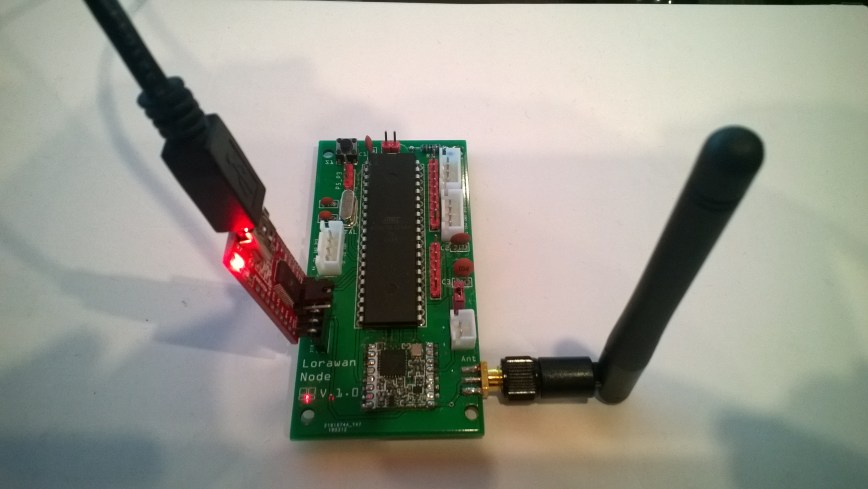
M2M Low power LoRaWan Node Model B1284

Along with the M2M LoRaWan Gateway Shield for Raspberry Pi I also purchased a Low power LoRaWan Node Model B1284. After configuring Arduino IDE then downloading the necessary board configuration files (link to instructions was provided) I could down upload my Arduino-Lora based test application .

LoRaWanNodeV1_0.jpg
Initially the program failed with “LoRa init failed. Check your connections.” so I went back and checked the board configuration details and noticed that the chip select line was different.

const int csPin = 14;          // LoRa radio chip select
const int resetPin = 9;       // LoRa radio reset
const int irqPin = 2;         // change for your board; must be a hardware interrupt pin

byte msgCount = 0;            // count of outgoing messages
int interval = 2000;          // interval between sends
long lastSendTime = 0;        // time of last packet send

void setup() {
  Serial.begin(9600);                   // initialize serial
  while (!Serial);

  Serial.println("LoRa Duplex - Set sync word");

  // override the default CS, reset, and IRQ pins (optional)
  LoRa.setPins(csPin, resetPin, irqPin);// set CS, reset, IRQ pin

  if (!LoRa.begin(915E6)) {             // initialize ratio at 915 MHz
    Serial.println("LoRa init failed. Check your connections.");
    while (true);                       // if failed, do nothing
  }

  LoRa.enableCrc();

  LoRa.setSyncWord(0x12);           // ranges from 0-0xFF, default 0x34, see API docs

  LoRa.dumpRegisters(Serial);
  Serial.println("LoRa init succeeded.");
}

void loop() {
  if (millis() - lastSendTime > interval) {
    String message = "11 Hello Arduino LoRa! ";   // send a message
    message += msgCount;
    sendMessage(message);
    Serial.println("Sending " + message);
    lastSendTime = millis();            // timestamp the message
    //interval = random(2000) + 1000;    // 2-3 seconds
    interval = 1000;
  }

  // parse for a packet, and call onReceive with the result:
  onReceive(LoRa.parsePacket());
}

void sendMessage(String outgoing) {
  LoRa.beginPacket();                   // start packet
  LoRa.print(outgoing);                 // add payload
  LoRa.endPacket();                     // finish packet and send it
  msgCount++;                           // increment message ID
}

void onReceive(int packetSize) {
  if (packetSize == 0) return;          // if there's no packet, return

  // read packet header bytes:
  String incoming = "";

  while (LoRa.available()) {
    incoming += (char)LoRa.read();
  }

  Serial.println("Message: " + incoming);
  Serial.println("RSSI: " + String(LoRa.packetRssi()));
  Serial.println("Snr: " + String(LoRa.packetSnr()));
  Serial.println();
}

When I uploaded my application I found the device had significantly more memory available

Sketch uses 8456 bytes (27%) of program storage space. Maximum is 30720 bytes.
vs..
Sketch uses 10424 bytes (8%) of program storage space. Maximum is 130048 bytes.

With the size of the LMIC stack this additional extra headroom could be quite useful. For most my LoRa applications (which tend to be a couple of simple sensors) I think the Low Power LoRaWan Node Model A328 should be sufficient.

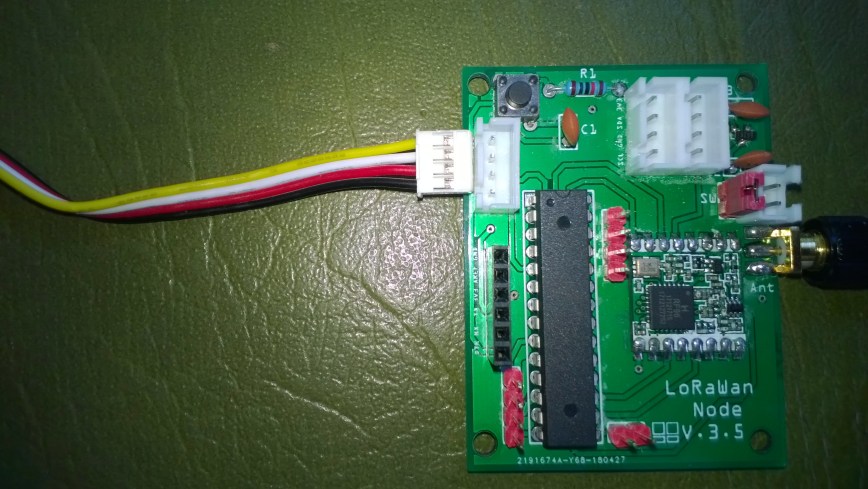
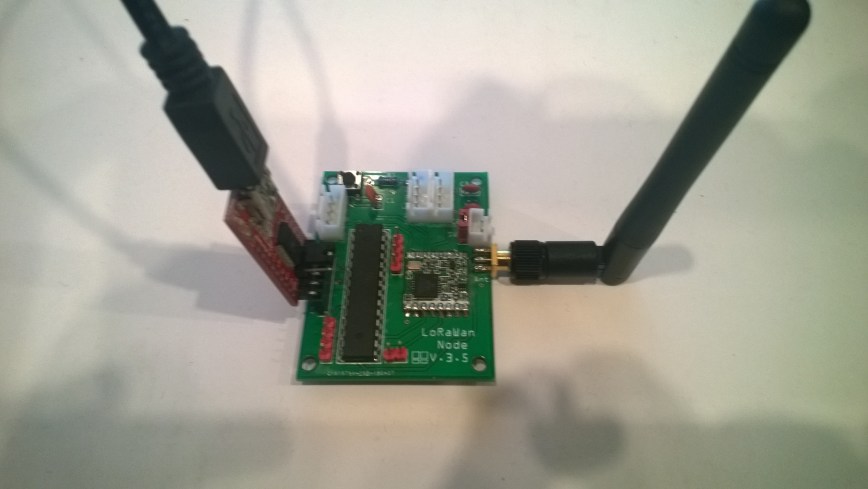
M2M LoRaWan Node Model A328

Along with the M2M LoRaWan Gateway Shield for Raspberry Pi I also purchased a Low power LoRaWan Node Model A328. After setting the Board in Arduino IDE to Arduino pro mini 8Mhz 3V the device fired up and worked first time.

LoRaWanNodeV3_5
The device is intended for LoRaWan applications so the samples provided (including a link to application template generator) were not that applicable for my LoRa project so I used the Arduino LoRa library.

const int csPin = 10;          // LoRa radio chip select
const int resetPin = 9;       // LoRa radio reset
const int irqPin = 2;         // change for your board; must be a hardware interrupt pin

byte msgCount = 0;            // count of outgoing messages
int interval = 2000;          // interval between sends
long lastSendTime = 0;        // time of last packet send

void setup() {
  Serial.begin(9600);                   // initialize serial
  while (!Serial);

  Serial.println("LoRa Duplex - Set sync word");

  // override the default CS, reset, and IRQ pins (optional)
  LoRa.setPins(csPin, resetPin, irqPin);// set CS, reset, IRQ pin

  if (!LoRa.begin(915E6)) {             // initialize ratio at 915 MHz
    Serial.println("LoRa init failed. Check your connections.");
    while (true);                       // if failed, do nothing
  }

  LoRa.enableCrc();

  LoRa.setSyncWord(0x12);           // ranges from 0-0xFF, default 0x34, see API docs

  LoRa.dumpRegisters(Serial);
  Serial.println("LoRa init succeeded.");
}

void loop() {
  if (millis() - lastSendTime > interval) {
    String message = "0 Hello Arduino LoRa! ";   // send a message
    message += msgCount;
    sendMessage(message);
    Serial.println("Sending " + message);
    lastSendTime = millis();            // timestamp the message
    //interval = random(2000) + 1000;    // 2-3 seconds
    interval = 1000;
  }

  // parse for a packet, and call onReceive with the result:
  onReceive(LoRa.parsePacket());
}

void sendMessage(String outgoing) {
  LoRa.beginPacket();                   // start packet
  LoRa.print(outgoing);                 // add payload
  LoRa.endPacket();                     // finish packet and send it
  msgCount++;                           // increment message ID
}

void onReceive(int packetSize) {
  if (packetSize == 0) return;          // if there's no packet, return

  // read packet header bytes:
  String incoming = "";

  while (LoRa.available()) {
    incoming += (char)LoRa.read();
  }

  Serial.println("Message: " + incoming);
  Serial.println("RSSI: " + String(LoRa.packetRssi()));
  Serial.println("Snr: " + String(LoRa.packetSnr()));
  Serial.println();
}

I did find the “grove” connectors weren’t compatible with any of my sensors, but the vendor does include a number of cables DIY connection.

GroveConnectorIssue20180822

Next I’ll use power conservation modes and see how long I can get a set of AAA batteries to last. The device looks like a good option (esp. with solar power for devices with higher power consumption sensors) for some of the SmartAg projects my students are building.

In my Windows 10 IoT Core test application I could see the enableCrc() method was working according to the RegHopChannel CrcOnPayload flag.

For real deployments of the field gateway I think packets which have no CRC or a corrupted one will be dropped.

Re-reading the SX1276 datasheet

I sat down and read the Semtech SX1276 datasheet paying close attention to any references to CRCs and headers. Then to test some ideas I modified my Receive Basic test harness to see if I could reliably reproduce the problem with my stress test harness.LoRaStress2

public sealed class StartupTask : IBackgroundTask
	{
		private const int ChipSelectLine = 25;
		private const int ResetLine = 17;
		private Rfm9XDevice rfm9XDevice = new Rfm9XDevice(ChipSelectLine, ResetLine);

		public void Run(IBackgroundTaskInstance taskInstance)
		{
			// Put device into LoRa + Sleep mode
			rfm9XDevice.RegisterWriteByte(0x01, 0b10000000); // RegOpMode 

			// Set the frequency to 915MHz
			byte[] frequencyWriteBytes = { 0xE4, 0xC0, 0x00 }; // RegFrMsb, RegFrMid, RegFrLsb
			rfm9XDevice.RegisterWrite(0x06, frequencyWriteBytes);

			rfm9XDevice.RegisterWriteByte(0x0F, 0x0); // RegFifoRxBaseAddress 

			rfm9XDevice.RegisterWriteByte(0x01, 0b10000101); // RegOpMode set LoRa & RxContinuous

			while (true)
			{
				// Wait until a packet is received, no timeouts in PoC
				Debug.WriteLine("Receive-Wait");
				byte IrqFlags = rfm9XDevice.RegisterReadByte(0x12); // RegIrqFlags
				while ((IrqFlags & 0b01000000) == 0)  // wait until RxDone cleared
				{
					Task.Delay(20).Wait();
					IrqFlags = rfm9XDevice.RegisterReadByte(0x12); // RegIrqFlags
					Debug.Write(".");
				}
				Debug.WriteLine("");

				if ((IrqFlags & 0b00100000) == 0b00100000)
				{
					Debug.WriteLine("Payload CRC error");
				}

				byte regHopChannel = rfm9XDevice.RegisterReadByte(0x1C);
				Debug.WriteLine(string.Format("regHopChannel {0}", Convert.ToString((byte)regHopChannel, 2).PadLeft(8, '0')));

				byte currentFifoAddress = rfm9XDevice.RegisterReadByte(0x10); // RegFifiRxCurrent
				rfm9XDevice.RegisterWriteByte(0x0d, currentFifoAddress); // RegFifoAddrPtr*
				byte numberOfBytes = rfm9XDevice.RegisterReadByte(0x13); // RegRxNbBytes

				// Allocate buffer for message
				byte[] messageBytes = new byte[numberOfBytes];

				for (int i = 0; i < numberOfBytes; i++)
				{
					messageBytes[i] = rfm9XDevice.RegisterReadByte(0x00); // RegFifo
				}
				rfm9XDevice.RegisterWriteByte(0x12, 0xff); // RegIrqFlags clear all the bits

				string messageText = UTF8Encoding.UTF8.GetString(messageBytes);
				Debug.WriteLine("Received {0} byte message {1}", messageBytes.Length, messageText);
				Debug.WriteLine(string.Format("RegIrqFlags {0}", Convert.ToString((byte)IrqFlags, 2).PadLeft(8, '0')));
				Debug.WriteLine("Receive-Done");
			}
		}
	}

The RegHopChannel register has a flag indicating whether there was a CRC extracted from the packet header.

regHopChannel 00000000
Received 23 byte message 1 Hello Arduino LoRa! 1
RegIrqFlags 01010000
Receive-Done
Receive-Wait
…………………………..
regHopChannel 00000000
Received 23 byte message 1 Hello Arduino LoRa! 2
RegIrqFlags 01010000
Receive-Done
Receive-Wait
……………………………
regHopChannel 00000000
Received 23 byte message 1 Hello Arduino LoRa! 3
RegIrqFlags 01010000
Receive-Done
Receive-Wait

I then modified my Arduino-LoRa library based client to include a CRC

void setup() {
  Serial.begin(9600);                   // initialize serial
  while (!Serial);

  Serial.println("LoRa Duplex - Set sync word");

  // override the default CS, reset, and IRQ pins (optional)
  LoRa.setPins(csPin, resetPin, irqPin);// set CS, reset, IRQ pin

  if (!LoRa.begin(915E6)) {             // initialize ratio at 915 MHz
    Serial.println("LoRa init failed. Check your connections.");
    while (true);                       // if failed, do nothing
  }

  LoRa.enableCrc();  // BHL This was my change

  LoRa.setSyncWord(0x12);           // ranges from 0-0xFF, default 0x34, see API docs

  LoRa.dumpRegisters(Serial);
  Serial.println("LoRa init succeeded.");
}

void loop() {
  if (millis() - lastSendTime > interval) {
    String message = "5 Hello Arduino LoRa! ";   // send a message
    message += msgCount;
    sendMessage(message);
    Serial.println("Sending " + message);
    lastSendTime = millis();            // timestamp the message
    //interval = random(2000) + 1000;    // 2-3 seconds
    interval = 1000;
  }

  // parse for a packet, and call onReceive with the result:
  onReceive(LoRa.parsePacket());
}

void sendMessage(String outgoing) {
  LoRa.beginPacket();                   // start packet
  LoRa.print(outgoing);                 // add payload
  LoRa.endPacket();                     // finish packet and send it
  msgCount++;                           // increment message ID
}

void onReceive(int packetSize) {
  if (packetSize == 0) return;          // if there's no packet, return

  // read packet header bytes:
  String incoming = "";

  while (LoRa.available()) {
    incoming += (char)LoRa.read();
  }

  Serial.println("Message: " + incoming);
  Serial.println("RSSI: " + String(LoRa.packetRssi()));
  Serial.println("Snr: " + String(LoRa.packetSnr()));
  Serial.println();
}

When I powered up a single client and the payload had a CRC

...............................
regHopChannel 01000000
Received 23 byte message 6 Hello Arduino LoRa! 6
RegIrqFlags 01010000
Receive-Done
Receive-Wait
.................................
regHopChannel 01000000
Received 23 byte message 6 Hello Arduino LoRa! 7
RegIrqFlags 01010000
Receive-Done
Receive-Wait
.................................
regHopChannel 01000000
Received 23 byte message 6 Hello Arduino LoRa! 8
RegIrqFlags 01010000
Receive-Done
Receive-Wait
...............................

Then when I increased the number of clients I started getting corrupted messages with CRC errors.

Received 24 byte message 6 Hello Arduino LoRa! 32
RegIrqFlags 01010000
Receive-Done
Receive-Wait
...............
regHopChannel 01000001
Received 25 byte message 8 Hello Arduino LoRa! 114
RegIrqFlags 01010000
Receive-Done
Receive-Wait
Payload CRC error
regHopChannel 01000000
Received 24 byte message s��=��(��p�^j�\ʏ�����
RegIrqFlags 01100000
Receive-Done
Receive-Wait
.............
regHopChannel 01000000
Received 24 byte message 6 Hello Arduino LoRa! 33
RegIrqFlags 01010000
Receive-Done
Receive-Wait
...............
regHopChannel 01000001
Received 25 byte message 8 Hello Arduino LoRa! 115
RegIrqFlags 01010000
Receive-Done
Receive-Wait

I need to do some more testing but now I think the problem was the RegIrqFlags PayloadCRCError flag was never going to get set because there was no CRC on the payload.

Poetry in Klingon

Along time ago I read an article which said “There is no easy way to program in parallel it’s like writing poetry in Klingon”. Little did I know that you can buy bound books of Klingon poetry.

I had noticed odd characters getting displayed every so often, especially when I had many devices working. Initially, I though it was two (or more) of the devices interfering with each other but after looking at the logging the payload CRC was OK

RegIrqFlags 01010000 = RxDone + Validheader (The PayloadCrcError bit is not set)

Received 23 byte message Hello Arduino LoRa! 142
RegIrqFlags 01010000
RX-Done
Received 23 byte message Hello Arduino LoRa! 216
The thread 0xea4 has exited with code 0 (0x0).
The thread 0x1034 has exited with code 0 (0x0).
RegIrqFlags 01010000
RX-Done
Received 23 byte message Ngllo Arduino /R�� �44
RegIrqFlags 01010000
RX-Done
Received 23 byte message Hello Arduino LoRa! 218
RegIrqFlags 01010000
RX-Done

I think the problem is that under load the receive and transmit code are accessing the SX127X FIFO and messing things up or the CRC isn’t getting attached.

I’ll put a lock around where bytes are inserted into and read from the FIFO, check the sequencing of register reads and do some more stress testing.

I turned off sending of messages and still got the corruption.

Then I went back to by Receive Basic example and it still had the problem. Looks like it might be something to do with the way I access the FIFO.

egIrqFlags 01010000
Receive-Message
Received 23 byte message Hello Arduino LoRa! 112
Receive-Done
Receive-Wait
........................
RegIrqFlags 01010000
Receive-Message
Received 23 byte message Hello Arduino LoRa! 110
Receive-Done
Receive-Wait
.....
RegIrqFlags 01110000
Receive-Message
Received 19 byte message Hello NetMFh���u�P
Receive-Done
Receive-Wait
.

RFM95/96/97/98 shield library Part 10

Enums & Masks

The code was filled with “magic numbers” so it was time to get rid of them. In C# there are bit constants which I missed for my backport to .NetMF.

I sat down with the Semtech SX1276 datasheet and started typing in register names and adding constants and enums for all the bit masks, flags and defaults.

The initialisation of the RFM9X is now done in one of two constructors and an initialise method. Much like the approach used in the nRF24L01P libraries I use on Windows 10 IoT Core and .NetMF.

A few weeks ago I had a failed attempt at building a library which tried to hide as much of the hardware and wireless implementation details from the user as possible. Realistically if you’re building systems using LoRa, a basic understanding of the technology plus any regional regulatory requirements (frequency use, duty cycles etc.) is necessary.

	sealed class Rfm9XDevice
	{
		// Registers from SemTech SX127X Datasheet
		enum Registers : byte
		{
			MinValue = RegOpMode,
			RegFifo = 0x0,
			RegOpMode = 0x01,
			//Reserved 0x02-0x06
			RegFrMsb = 0x06,
			RegFrMid = 0x7,
			RegFrLsb = 0x08,
			RegPAConfig = 0x09,
			//RegPARamp = 0x0A, // not inlcuded as FSK/OOK functionality
			RegOcp = 0x0B,
			RegLna = 0x0C,
			RegFifoAddrPtr = 0x0D,
			//RegFifoTxBaseAddr = 0x0E
			RegFifoRxCurrent =0x10,
			RegIrqFlagsMask = 0x11,
			RegIrqFlags = 0x12,
			// RegRxNdBytes = 0x13
			// RegRxHeaderCnValueMsb=0x14
			// RegRxHeaderCnValueLsb=0x15
			// RegRxPacketCntValueMsb=0x16
			// RegRxPacketCntValueMsb=0x17
			// RegModemStat=0x18
			// RegPktSnrVale=0x19
			// RegPktRssiValue=0x1A
			// RegRssiValue=0x1B
			// RegHopChannel=0x1C
			RegModemConfig1 = 0x1D,
			RegModemConfig2 = 0x1E,
			RegSymbTimeout = 0x1F,
			RegPreambleMsb = 0x20,
			RegPreambleLsb = 0x21,
			RegPayloadLength = 0x22,
			RegMaxPayloadLength = 0x23,
			RegHopPeriod = 0x24,
			// RegFifiRxByteAddr = 0x25
			RegModemConfig3 = 0x26,
			RegPpmCorrection = 0x27,
			// RegFeiMsb = 0x28
			// RegFeiMid = 0x29
			// RegFeiLsb = 0x2A
			// Reserved 0x2B
			// RegRssiWideband = 0x2C
			// Reserved 0x2D-0x30
			RegDetectOptimize = 0x31,
			// Reserved 0x32
			RegInvertIQ = 0x33,
			// Reserved 0x34-0x36
			RegDetectionThreshold = 0x37,
			// Reserved 0x38
			RegSyncWord = 0x39,
			RegDioMapping1 = 0x40,
			RegVersion = 0x42,

			MaxValue = RegVersion,
		}

		// RegOpMode mode flags
		private const byte RegOpModeLongRangeModeLoRa = 0b10000000;
		private const byte RegOpModeLongRangeModeFskOok = 0b00000000;
		private const byte RegOpModeLongRangeModeDefault = RegOpModeLongRangeModeFskOok;

		private const byte RegOpModeAcessSharedRegLoRa = 0b00000000;
		private const byte RegOpModeAcessSharedRegFsk = 0b01000000;
		private const byte RegOpModeAcessSharedRegDefault = RegOpModeAcessSharedRegLoRa;

		private const byte RegOpModeLowFrequencyModeOnHighFrequency = 0b00000000;
		private const byte RegOpModeLowFrequencyModeOnLowFrequency = 0b00001000;
		private const byte RegOpModeLowFrequencyModeOnDefault = RegOpModeLowFrequencyModeOnLowFrequency;

		[Flags]
		public enum RegOpModeMode : byte
		{
			Sleep = 0b00000000,
			StandBy = 0b00000001,
			FrequencySynthesisTX = 0b00000010,
			Transmit = 0b00000011,
			FrequencySynthesisRX = 0b00000100,
			ReceiveContinuous = 0b00000101,
			ReceiveSingle = 0b00000110,
			ChannelActivityDetection = 0b00000111,
		};

		// Frequency configuration magic numbers from Semtech SX127X specs
		private const double RH_RF95_FXOSC = 32000000.0;
		private const double RH_RF95_FSTEP = RH_RF95_FXOSC / 524288.0;

		// RegFrMsb, RegFrMid, RegFrLsb
		private const double FrequencyDefault = 434000000.0;

One constructor is for shields where the chip select pin is connected to one of the two standard lines CS0/CS1.

// Constructor for shields with chip select connected to CS0/CS1 e.g. Elecrow/Electronic tricks
		public Rfm9XDevice(ChipSelectPin chipSelectPin, int resetPinNumber, int interruptPinNumber)
		{
			RegisterManager = new RegisterManager(chipSelectPin);

			// Check that SX127X chip is present
			Byte regVersionValue = RegisterManager.ReadByte((byte)Registers.RegVersion);
			if (regVersionValue != RegVersionValueExpected)
			{
				throw new ApplicationException("Semtech SX127X not found");
			}

			GpioController gpioController = GpioController.GetDefault();

The other is for shields with the chip select connected to another pin (the chip select has to be set to one of the default pins even though I am implementing the drive logic in code

	// Constructor for shields with chip select not connected to CS0/CS1 (but needs to be configured anyway) e.g. Dragino
		public Rfm9XDevice(ChipSelectPin chipSelectPin, int chipSelectPinNumber, int resetPinNumber, int interruptPinNumber)
		{
			RegisterManager = new RegisterManager(chipSelectPin, chipSelectPinNumber);

			// Check that SX127X chip is present
			Byte regVersionValue = RegisterManager.ReadByte((byte)Registers.RegVersion);
			if (regVersionValue != RegVersionValueExpected)
			{
				throw new ApplicationException("Semtech SX127X not found");	
			}

			GpioController gpioController = GpioController.GetDefault();

The Initialise method has a large number of parameters (most of them can be ignored and defaults used). I only set registers if the configuration has been changed from the default value. This is fine for most settings, but some (like RegSymbTimeoutMsb & RegSymbTimeoutLsb span two registers and are combined with other settings.

public void Initialise(RegOpModeMode modeAfterInitialise, // RegOpMode
			double frequency = FrequencyDefault, // RegFrMsb, RegFrMid, RegFrLsb
			bool paBoost = false, byte maxPower = RegPAConfigMaxPowerDefault, byte outputPower = RegPAConfigOutputPowerDefault, // RegPaConfig
			bool ocpOn = true, byte ocpTrim = RegOcpOcpTrimDefault, // RegOcp
			RegLnaLnaGain lnaGain = LnaGainDefault, bool lnaBoostLF = false, bool lnaBoostHf = false, // RegLna
			RegModemConfigBandwidth bandwidth = RegModemConfigBandwidthDefault, RegModemConfigCodingRate codingRate = RegModemConfigCodingRateDefault, RegModemConfigImplicitHeaderModeOn implicitHeaderModeOn = RegModemConfigImplicitHeaderModeOnDefault, //RegModemConfig1
         RegModemConfig2SpreadingFactor spreadingFactor = RegModemConfig2SpreadingFactorDefault, bool txContinuousMode = false, bool rxPayloadCrcOn = false,
			ushort symbolTimeout = SymbolTimeoutDefault,
			ushort preambleLength = PreambleLengthDefault,
			byte payloadLength = PayloadLengthDefault,
			byte payloadMaxLength = PayloadMaxLengthDefault,
			byte freqHoppingPeriod = FreqHoppingPeriodDefault,
			bool lowDataRateOptimize = false, bool agcAutoOn = false,
			byte ppmCorrection = ppmCorrectionDefault,
			RegDetectOptimizeDectionOptimize detectionOptimize=RegDetectOptimizeDectionOptimizeDefault,
         bool invertIQ = false,
			RegisterDetectionThreshold detectionThreshold = RegisterDetectionThresholdDefault,
         byte syncWord = RegSyncWordDefault )
		{
			Frequency = frequency; // Store this away for RSSI adjustments
			RegOpModeModeCurrent = modeAfterInitialise;

			// Strobe Reset pin briefly to factory reset SX127X chip
			ResetGpioPin.Write(GpioPinValue.Low);
			Task.Delay(10);
			ResetGpioPin.Write(GpioPinValue.High);
			Task.Delay(10);

			// Put the device into sleep mode so registers can be changed
			SetMode(RegOpModeMode.Sleep);

			// Configure RF Carrier frequency
			if (frequency != FrequencyDefault)
			{
				byte[] bytes = BitConverter.GetBytes((long)(frequency / RH_RF95_FSTEP));
				RegisterManager.WriteByte((byte)Registers.RegFrMsb, bytes[2]);
				RegisterManager.WriteByte((byte)Registers.RegFrMid, bytes[1]);
				RegisterManager.WriteByte((byte)Registers.RegFrLsb, bytes[0]);
			}

Next step is add event handlers for inbound and outbound messages, then the finally split the device specific code into a stand alone library.
 

.Net MicroFramework LoRa library Part9

Receive and Transmit Interrupts

For the second to last development iteration of my RFM9X LoRa NetMF library client I have got the interrupt handler working for transmitting and receiving messages. My code sends a message every 10 seconds then goes back to waiting in receive mode .

//---------------------------------------------------------------------------------
// Copyright (c) August 2018, devMobile Software
//
// Licensed under the Apache License, Version 2.0 (the "License");
// you may not use this file except in compliance with the License.
// You may obtain a copy of the License at
//
//     http://www.apache.org/licenses/LICENSE-2.0
//
// Unless required by applicable law or agreed to in writing, software
// distributed under the License is distributed on an "AS IS" BASIS,
// WITHOUT WARRANTIES OR CONDITIONS OF ANY KIND, either express or implied.
// See the License for the specific language governing permissions and
// limitations under the License.
//
//---------------------------------------------------------------------------------
namespace devMobile.IoT.NetMF.Rfm9X.ReceiveTransmitInterrupt
{
   using System;
   using System.Text;
   using System.Threading;
   using Microsoft.SPOT;
   using Microsoft.SPOT.Hardware;
   using SecretLabs.NETMF.Hardware.Netduino;

   public sealed class Rfm9XDevice
   {
      private const byte RegisterAddressReadMask = 0X7f;
      private const byte RegisterAddressWriteMask = 0x80;

      private SPI Rfm9XLoraModem = null;
      private OutputPort ResetGpioPin = null;
      private InterruptPort InterruptPin = null;

      public Rfm9XDevice(Cpu.Pin chipSelect, Cpu.Pin resetPin, Cpu.Pin interruptPin)
      {
         // Factory reset pin configuration
         ResetGpioPin = new OutputPort(Pins.GPIO_PIN_D9, true);
         ResetGpioPin.Write(false);
         Thread.Sleep(10);
         ResetGpioPin.Write(true);
         Thread.Sleep(10);

         this.Rfm9XLoraModem = new SPI(new SPI.Configuration(chipSelect, false, 0, 0, false, false, 2000, SPI.SPI_module.SPI1));

         InterruptPin = new InterruptPort(interruptPin, false, Port.ResistorMode.Disabled, Port.InterruptMode.InterruptEdgeHigh);

         InterruptPin.OnInterrupt += InterruptPin_OnInterrupt;

         Thread.Sleep(100);
      }

      public Rfm9XDevice(Cpu.Pin chipSelect, Cpu.Pin reset)
      {
         // Factory reset pin configuration
         ResetGpioPin = new OutputPort(Pins.GPIO_PIN_D9, true);
         ResetGpioPin.Write(false);
         Thread.Sleep(10);
         ResetGpioPin.Write(true);
         Thread.Sleep(10);

         this.Rfm9XLoraModem = new SPI(new SPI.Configuration(chipSelect, false, 0, 0, false, false, 2000, SPI.SPI_module.SPI1));

         Thread.Sleep(100);
      }

      public Byte RegisterReadByte(byte registerAddress)
      {
         byte[] writeBuffer = new byte[] { registerAddress };
         byte[] readBuffer = new byte[1];
         Debug.Assert(Rfm9XLoraModem != null);

         Rfm9XLoraModem.WriteRead(writeBuffer, readBuffer, 1);

         return readBuffer[0];
      }

      public ushort RegisterReadWord(byte address)
      {
         byte[] writeBuffer = new byte[] { address &= RegisterAddressReadMask };
         byte[] readBuffer = new byte[2];
         Debug.Assert(Rfm9XLoraModem != null);

         readBuffer[0] = RegisterReadByte(address);
         readBuffer[1] = RegisterReadByte(address += 1);

         return (ushort)(readBuffer[1] + (readBuffer[0] << 8));
      }

      public byte[] RegisterRead(byte address, int length)
      {
         byte[] writeBuffer = new byte[] { address &= RegisterAddressReadMask };
         byte[] readBuffer = new byte[length];
         Debug.Assert(Rfm9XLoraModem != null);

         for (byte index = 0; index < length; index++)
         {
            readBuffer[index] = RegisterReadByte(address += 1);
         }

         return readBuffer;
      }

      public void RegisterWriteByte(byte address, byte value)
      {
         byte[] writeBuffer = new byte[] { address |= RegisterAddressWriteMask, value };
         Debug.Assert(Rfm9XLoraModem != null);

         Rfm9XLoraModem.Write(writeBuffer);
      }

      public void RegisterWriteWord(byte address, ushort value)
      {
         byte[] valueBytes = BitConverter.GetBytes(value);
         byte[] writeBuffer = new byte[] { address |= RegisterAddressWriteMask, valueBytes[0], valueBytes[1] };
         Debug.Assert(Rfm9XLoraModem != null);

         Rfm9XLoraModem.Write(writeBuffer);
      }

      public void RegisterWrite(byte address, byte[] bytes)
      {
         byte[] writeBuffer = new byte[1 + bytes.Length];
         Debug.Assert(Rfm9XLoraModem != null);

         Array.Copy(bytes, 0, writeBuffer, 1, bytes.Length);
         writeBuffer[0] = address |= RegisterAddressWriteMask;

         Rfm9XLoraModem.Write(writeBuffer);
      }

      public void RegisterDump()
      {
         Debug.Print("---Registers 0x00 thru 0x42---");
         for (byte registerIndex = 0; registerIndex  4];

         // Mask off the upper 4 bits to get the rest of it.
         hexString += hexChars[singlebyte & 0x0F];

         return hexString;
      }

      private static string WordToHexString(ushort singleword)
      {
         string hexString = string.Empty;

         byte[] bytes = BitConverter.GetBytes(singleword);

         hexString += ByteToHexString(bytes[1]);

         hexString += ByteToHexString(bytes[0]);

         return hexString;
      }

      public class Program
      {
         public static void Main()
         {
            Rfm9XDevice rfm9XDevice = new Rfm9XDevice(Pins.GPIO_PIN_D10, Pins.GPIO_PIN_D9, Pins.GPIO_PIN_D2);
            byte MessageCount = Byte.MinValue;

            // Put device into LoRa + Sleep mode
            rfm9XDevice.RegisterWriteByte(0x01, 0x80); // RegOpMode 

            // Set the frequency to 915MHz
            byte[] frequencyWriteBytes = { 0xE4, 0xC0, 0x00 }; // RegFrMsb, RegFrMid, RegFrLsb
            rfm9XDevice.RegisterWrite(0x06, frequencyWriteBytes);

            rfm9XDevice.RegisterWriteByte(0x0F, 0x0); // RegFifoRxBaseAddress 

            // More power - PA_BOOST
            rfm9XDevice.RegisterWriteByte(0x09, 0x80); // RegPaConfig

            //rfm9XDevice.RegisterWriteByte(0x40, 0x0);

            rfm9XDevice.RegisterWriteByte(0x01, 0x85); // RegOpMode set LoRa & RxContinuous

            while (true)
            {
               rfm9XDevice.RegisterWriteByte(0x0E, 0x0); // RegFifoTxBaseAddress 

               // Set the Register Fifo address pointer
               rfm9XDevice.RegisterWriteByte(0x0D, 0x0); // RegFifoAddrPtr 

               string messageText = "Hello NetMF LoRa! " + MessageCount.ToString() ;
               MessageCount += 1;

               // load the message into the fifo
               byte[] messageBytes = UTF8Encoding.UTF8.GetBytes(messageText);
               foreach (byte b in messageBytes)
               {
                  rfm9XDevice.RegisterWriteByte(0x0, b); // RegFifo
               }

               // Set the length of the message in the fifo
               rfm9XDevice.RegisterWriteByte(0x22, (byte)messageBytes.Length); // RegPayloadLength

               rfm9XDevice.RegisterWriteByte(0x40, 0x40); // RegDioMapping1 

               /// Set the mode to LoRa + Transmit
               rfm9XDevice.RegisterWriteByte(0x01, 0x83); // RegOpMode
               Debug.Print("Sending " + messageBytes.Length + " bytes message " + messageText);

               Thread.Sleep(10000);
            }
         }
      }
   }
}

On the Netduino3 device messages were being sent and received

The thread '' (0x2) has exited with code 0 (0x0).
Sending 19 bytes message Hello NetMF LoRa! 0
RegIrqFlags 08
Transmit-Done
Sending 19 bytes message Hello NetMF LoRa! 1
RegIrqFlags 08
Transmit-Done
Sending 19 bytes message Hello NetMF LoRa! 2
RegIrqFlags 08
Transmit-Done
Sending 19 bytes message Hello NetMF LoRa! 3
RegIrqFlags 08
Transmit-Done
RegIrqFlags 50
Receive-Message
Received 15 byte message HeLoRa World! 0
RegIrqFlags 50
Receive-Message
Received 15 byte message HeLoRa World! 2
Sending 19 bytes message Hello NetMF LoRa! 4
RegIrqFlags 08
Transmit-Done
RegIrqFlags 50
Receive-Message

On my Windows 10 Core device I could see messages arriving

RegIrqFlags 01010000
RX-Done
Received 19 byte message Hello NetMF LoRa! 1
The thread 0x168 has exited with code 0 (0x0).
RegIrqFlags 01010000
RX-Done
Received 19 byte message Hello NetMF LoRa! 2
The thread 0x8 has exited with code 0 (0x0).
RegIrqFlags 01010000
RX-Done

This library is going to be quite a bit smaller/lighter than my Windows 10 IoT Core one so the next so next step event handlers and refactoring.

.Net MicroFramework LoRa library Part8

Receive Interrupt

After getting interrupts to work for outbound messages I changed the interrupt pin D10 mapping and the interrupt mask.

Getting this working with my RPI meant the process went relatively smoothly.

//---------------------------------------------------------------------------------
// Copyright (c) August 2018, devMobile Software
//
// Licensed under the Apache License, Version 2.0 (the "License");
// you may not use this file except in compliance with the License.
// You may obtain a copy of the License at
//
//     http://www.apache.org/licenses/LICENSE-2.0
//
// Unless required by applicable law or agreed to in writing, software
// distributed under the License is distributed on an "AS IS" BASIS,
// WITHOUT WARRANTIES OR CONDITIONS OF ANY KIND, either express or implied.
// See the License for the specific language governing permissions and
// limitations under the License.
//
//---------------------------------------------------------------------------------
namespace devMobile.IoT.NetMF.Rfm9X.ReceiveInterrupt
{
   using System;
   using System.Text;
   using System.Threading;
   using Microsoft.SPOT;
   using Microsoft.SPOT.Hardware;
   using SecretLabs.NETMF.Hardware.Netduino;

   public sealed class Rfm9XDevice
   {
      private const byte RegisterAddressReadMask = 0X7f;
      private const byte RegisterAddressWriteMask = 0x80;

      private SPI Rfm9XLoraModem = null;
      private OutputPort ResetGpioPin = null;
      private InterruptPort InterruptPin = null;

      public Rfm9XDevice(Cpu.Pin chipSelect, Cpu.Pin resetPin, Cpu.Pin interruptPin)
      {
         // Factory reset pin configuration
         ResetGpioPin = new OutputPort(Pins.GPIO_PIN_D9, true);
         ResetGpioPin.Write(false);
         Thread.Sleep(10);
         ResetGpioPin.Write(true);
         Thread.Sleep(10);

         this.Rfm9XLoraModem = new SPI(new SPI.Configuration(chipSelect, false, 0, 0, false, false, 2000, SPI.SPI_module.SPI1));

         InterruptPin = new InterruptPort(interruptPin, false, Port.ResistorMode.Disabled, Port.InterruptMode.InterruptEdgeHigh);

         InterruptPin.OnInterrupt += InterruptPin_OnInterrupt;

         Thread.Sleep(100);
      }

      public Rfm9XDevice(Cpu.Pin chipSelect, Cpu.Pin reset)
      {
         // Factory reset pin configuration
         ResetGpioPin = new OutputPort(Pins.GPIO_PIN_D9, true);
         ResetGpioPin.Write(false);
         Thread.Sleep(10);
         ResetGpioPin.Write(true);
         Thread.Sleep(10);

         this.Rfm9XLoraModem = new SPI(new SPI.Configuration(chipSelect, false, 0, 0, false, false, 2000, SPI.SPI_module.SPI1));

         Thread.Sleep(100);
      }

      public Byte RegisterReadByte(byte registerAddress)
      {
         byte[] writeBuffer = new byte[] { registerAddress };
         byte[] readBuffer = new byte[1];
         Debug.Assert(Rfm9XLoraModem != null);

         Rfm9XLoraModem.WriteRead(writeBuffer, readBuffer, 1);

         return readBuffer[0];
      }

      public ushort RegisterReadWord(byte address)
      {
         byte[] writeBuffer = new byte[] { address &= RegisterAddressReadMask };
         byte[] readBuffer = new byte[2];
         Debug.Assert(Rfm9XLoraModem != null);

         readBuffer[0] = RegisterReadByte(address);
         readBuffer[1] = RegisterReadByte(address += 1);

         return (ushort)(readBuffer[1] + (readBuffer[0] << 8));
      }

      public byte[] RegisterRead(byte address, int length)
      {
         byte[] writeBuffer = new byte[] { address &= RegisterAddressReadMask };
         byte[] readBuffer = new byte[length];
         Debug.Assert(Rfm9XLoraModem != null);

         for (byte index = 0; index < length; index++)
         {
            readBuffer[index] = RegisterReadByte(address += 1);
         }

         return readBuffer;
      }

      public void RegisterWriteByte(byte address, byte value)
      {
         byte[] writeBuffer = new byte[] { address |= RegisterAddressWriteMask, value };
         Debug.Assert(Rfm9XLoraModem != null);

         Rfm9XLoraModem.Write(writeBuffer);
      }

      public void RegisterWriteWord(byte address, ushort value)
      {
         byte[] valueBytes = BitConverter.GetBytes(value);
         byte[] writeBuffer = new byte[] { address |= RegisterAddressWriteMask, valueBytes[0], valueBytes[1] };
         Debug.Assert(Rfm9XLoraModem != null);

         Rfm9XLoraModem.Write(writeBuffer);
      }

      public void RegisterWrite(byte address, byte[] bytes)
      {
         byte[] writeBuffer = new byte[1 + bytes.Length];
         Debug.Assert(Rfm9XLoraModem != null);

         Array.Copy(bytes, 0, writeBuffer, 1, bytes.Length);
         writeBuffer[0] = address |= RegisterAddressWriteMask;

         Rfm9XLoraModem.Write(writeBuffer);
      }

      public void RegisterDump()
      {
         Debug.Print("---Registers 0x00 thru 0x42---");
         for (byte registerIndex = 0; registerIndex  4];

         // Mask off the upper 4 bits to get the rest of it.
         hexString += hexChars[singlebyte & 0x0F];

         return hexString;
      }

      private static string WordToHexString(ushort singleword)
      {
         string hexString = string.Empty;

         byte[] bytes = BitConverter.GetBytes(singleword);

         hexString += ByteToHexString(bytes[1]);

         hexString += ByteToHexString(bytes[0]);

         return hexString;
      }

      public class Program
      {
         public static void Main()
         {
            Rfm9XDevice rfm9XDevice = new Rfm9XDevice(Pins.GPIO_PIN_D10, Pins.GPIO_PIN_D9, Pins.GPIO_PIN_D2);
            byte MessageCount = byte.MinValue;

            // Put device into LoRa + Sleep mode
            rfm9XDevice.RegisterWriteByte(0x01, 0x80); // RegOpMode 

            // Set the frequency to 915MHz
            byte[] frequencyWriteBytes = { 0xE4, 0xC0, 0x00 }; // RegFrMsb, RegFrMid, RegFrLsb
            rfm9XDevice.RegisterWrite(0x06, frequencyWriteBytes);

            rfm9XDevice.RegisterWriteByte(0x0F, 0x0); // RegFifoRxBaseAddress 

            rfm9XDevice.RegisterWriteByte(0x40, 0x0); // RegDioMapping1 0b00000000 DIO0 RxReady & TxReady

            rfm9XDevice.RegisterWriteByte(0x01, 0x85); // RegOpMode set LoRa & RxContinuous

            Thread.Sleep(Timeout.Infinite);
         }
      }
   }
}

In the Visual Studio debug output window I could see received packets

'Microsoft.SPOT.Debugger.CorDebug.dll' (Managed): Loaded 'C:\Program Files (x86)\Secret Labs\Netduino SDK\Assemblies\v4.3\le\SecretLabs.NETMF.Hardware.dll', Symbols loaded.
The thread '' (0x2) has exited with code 0 (0x0).
RegIrqFlags 50
Receive-Message
Received 28 byte message Hello W10 IoT Core LoRa! 247
RegIrqFlags 50
Receive-Message
Received 28 byte message Hello W10 IoT Core LoRa! 246
RegIrqFlags 50
Receive-Message

Next, I’ll integrate the .NetMF receive and transmit interrupt examples, and then refactor the code to extract the RFM9X code into a reusable module.


M2M LoRaWan Gateway Shield for Raspberry Pi

This morning a 1 Channel LoRaWan Gateway Shield for Raspberry Pi arrived from M2M along with a Low power LoRaWan Node Model A328 and Low power oRaWan Node Model B1284.

First setup to get the LoRaWan Gateway Shield up and running on my Raspberry PI 3.

M2MLoRaShield

No schematics were available so I had to reverse engineer the configuration for the Single Channel LoRaWAN Gateway for my Windows 10 IoT Core setup.

pins configuration in global_conf.json

“pin_nss”: 6,

“pin_dio0”: 7,

“pin_rst”: 0

If you use RPI0, edit single_chan_pkt_fwd.cpp and change eth0 to wlan0.

First step was to confirm I had the chip select line and SPI configuration sorted by reading the RegVersion register.

//---------------------------------------------------------------------------------
// Copyright (c) August 2018, devMobile Software
//
// Licensed under the Apache License, Version 2.0 (the "License");
// you may not use this file except in compliance with the License.
// You may obtain a copy of the License at
//
//     http://www.apache.org/licenses/LICENSE-2.0
//
// Unless required by applicable law or agreed to in writing, software
// distributed under the License is distributed on an "AS IS" BASIS,
// WITHOUT WARRANTIES OR CONDITIONS OF ANY KIND, either express or implied.
// See the License for the specific language governing permissions and
// limitations under the License.
//
//---------------------------------------------------------------------------------
namespace devMobile.IoT.Rfm9x.M2MSPI
{
	using System;
	using System.Diagnostics;
	using System.Threading;
	using Windows.ApplicationModel.Background;
	using Windows.Devices.Gpio;
	using Windows.Devices.Spi;

	public sealed class StartupTask : IBackgroundTask
	{
		public void Run(IBackgroundTaskInstance taskInstance)
		{
			GpioPin ChipSelectGpioPin = null;
			const int chipSelectPinNumber = 25;

			SpiController spiController = SpiController.GetDefaultAsync().AsTask().GetAwaiter().GetResult();
			var settings = new SpiConnectionSettings(1)
			{
				ClockFrequency = 500000,
				Mode = SpiMode.Mode0,   // From SemTech docs pg 80 CPOL=0, CPHA=0
			};

			// Chip select pin configuration
			GpioController gpioController = GpioController.GetDefault();
		   ChipSelectGpioPin = gpioController.OpenPin(chipSelectPinNumber);
			ChipSelectGpioPin.SetDriveMode(GpioPinDriveMode.Output);
			ChipSelectGpioPin.Write(GpioPinValue.High);

			SpiDevice Device = spiController.GetDevice(settings);

			while (true)
			{
				byte[] writeBuffer = new byte[] { 0x42 }; // RegVersion
				byte[] readBuffer = new byte[1];

				// Read the RegVersion silicon ID to check SPI works
				ChipSelectGpioPin.Write(GpioPinValue.Low);
				Device.TransferSequential(writeBuffer, readBuffer);
				ChipSelectGpioPin.Write(GpioPinValue.High);
				Debug.WriteLine("Register RegVer 0x{0:x2} - Value 0X{1:x2} - Bits {2}", writeBuffer[0], readBuffer[0], Convert.ToString(readBuffer[0], 2).PadLeft(8, '0'));

				Thread.Sleep(10000);
			}
		}
	}
}

The output confirmed I could read the register

‘backgroundTaskHost.exe’ (CoreCLR: CoreCLR_UWP_Domain): Loaded ‘C:\Data\Users\DefaultAccount\AppData\Local\DevelopmentFiles\M2MSPI-uwpVS.Debug_ARM.Bryn.Lewis\System.Threading.Thread.dll’. Skipped loading symbols. Module is optimized and the debugger option ‘Just My Code’ is enabled.
Register RegVer 0x42 – Value 0X12 – Bits 00010010

So far the M2M shield looks like a well priced option for my DIY LoRa Gateway deployments.

It arrived promptly and the vendor followed up with sample Arduino code a couple of days after the package shipped.