.NET Core web API + Dapper – MiniProfiler

The time to open the home page of one of the “legacy” applications I was working on was slowly increasing over time. After a quick investigation it looked like there a couple of Azure SQL stored procedures which were called many times as the home page was opening were the problem.

The application used a combination of ADO.Net and Dapper to access the Azure SQL database, so Stack Overflow MiniProfiler looked like a good option.

There were quite a few samples online like the one below which “inspired” my approach.

using (SqlConnection connection = new SqlConnection(_configuration.GetConnectionString("default")))
{
   using (ProfiledDbConnection connection = new ProfiledDbConnection((IDbConnection)connection, MiniProfiler.Current))
   {
      await connection.OpenAsync();

      using (ProfiledDbCommand command = (ProfiledDbCommand)connection.CreateCommand())
      {
         command.CommandText = @"SELECT [StockItemID] as ""ID"", [StockItemName] as ""Name"", [RecommendedRetailPrice], [TaxRate] FROM [Warehouse].[StockItems];
         command.CommandType = CommandType.Text;

                 using (ProfiledDbDataReader reader = (ProfiledDbDataReader)await command.ExecuteReaderAsync())
                 {
                     var rowParser = reader.GetRowParser<Model.StockItemListDtoV1>();

                     while (await reader.ReadAsync())
                     {
                         response.Add(rowParser(reader));
                     }

                     await reader.CloseAsync();
                 }
             }

             await connection.CloseAsync();
       }
}

A simple modification of the WebAPI Dapper PerformanceProfiling project program.cs file enabled MiniProfiler for the project.

public static void Main(string[] args)
{
    var builder = WebApplication.CreateBuilder(args);

    // Add services to the container.
    builder.Services.AddTransient<IDapperContext>(s => new DapperContext(builder.Configuration));

    builder.Services.AddControllers();

    builder.Services.AddMiniProfiler(options =>
    {
        options.RouteBasePath = "/profiler";
        //options.SqlFormatter = new StackExchange.Profiling.SqlFormatters.InlineFormatter();
        options.TrackConnectionOpenClose = true;
        //options.PopupShowTrivial = false
    });

    var app = builder.Build();

    app.UseMiniProfiler();

    // Configure the HTTP request pipeline.

    app.UseHttpsRedirection();

    app.MapControllers();

    app.Run();
}

For simple Dapper calls, the modifications to WebAPI controllers were minimal, and could be done largely with Visual Studio 2022 “search & replace.”

[HttpGet("Dapper")]
public async Task<ActionResult<IEnumerable<Model.StockItemListDtoV1>>> GetDapper()
{
    IEnumerable<Model.StockItemListDtoV1> response;

    using (IDbConnection db = dapperContext.ConnectionCreate())
    {
        response = await db.QueryAsync<Model.StockItemListDtoV1>(sql: sqlCommandText, commandType: CommandType.Text);
    }

    return this.Ok(response);
}
World Wide Importers database list of stockitems

The World Wide Importers database has approximately 250 StockItems which was representative of one of the problematic queries.

[HttpGet("DapperProfiled")]
public async Task<ActionResult<IEnumerable<Model.StockItemListDtoV1>>> GetDapperProfiled()
{
    IEnumerable<Model.StockItemListDtoV1> response;

    using (IDbConnection db = new ProfiledDbConnection((DbConnection)dapperContext.ConnectionCreate(), MiniProfiler.Current))
    {
        response = await db.QueryAsync<Model.StockItemListDtoV1>(sql: sqlCommandText, commandType: CommandType.Text);
    }

    return this.Ok(response);
 }

When I executed the GetDapperProfiler() method of the StockItems controller on my development box it took roughly 2.4 seconds.

MiniProfiler results for StockItems query running on my desktop

I sometimes ran the website on my development box so when I used “toggle trivial gaps” it was easier to see what where the delays were.

When I executed the GetDapperProfiler() method of the StockItems controller running in an Azure AppService it took roughly 20 mSec.

MiniProfiler results for StockItems query running in an Azure AppService

In one application a QueryMultipleAsync is used to retrieve information about a product and a list of its attributes. The World Wide Importers database has Invoices which have invoice lines and Transactions which was representative of another problematic query.

[HttpGet("DapperProfiledQueryMultiple")]
public async Task<ActionResult<IEnumerable<Model.StockItemListDtoV1>>> GetDapperProfiledQueryMultiple([Required][Range(1, int.MaxValue, ErrorMessage = "Invoice id must greater than 0")] int id)
{
    Model.InvoiceSummaryGetDtoV1 response = null;

    using (ProfiledDbConnection db = new ProfiledDbConnection((DbConnection)dapperContext.ConnectionCreate(), MiniProfiler.Current))
    {
        var invoiceSummary = await db.QueryMultipleAsync("[Sales].[InvoiceSummaryGetV1]", param: new { InvoiceId = id }, commandType: CommandType.StoredProcedure);

        response = await invoiceSummary.ReadSingleOrDefaultAsync<Model.InvoiceSummaryGetDtoV1>();
        if (response == default)
        {
            return this.NotFound($"Invoice:{id} not found");
        }

        response.InvoiceLines = await invoiceSummary.ReadAsync<Model.InvoiceLineSummaryListDtoV1>();

        response.StockItemTransactions = await invoiceSummary.ReadAsync<Model.StockItemTransactionSummaryListDtoV1>();
    }

    return this.Ok(response);
}
World Wide Importers database list of invoice lines and transactions for a StockItem
MiniProfiler results for Invoice Item Query Multiple running in an Azure AppService

I couldn’t see any results for reading the StockItem Invoice lines and Transactions so I wrapped each ReadAsync with a MiniProfiler.Current.Step.

[HttpGet("DapperProfiledQueryMultipleStep")]
public async Task<ActionResult<IEnumerable<Model.StockItemListDtoV1>>> GetDapperProfiledQueryMultipleStep([Required][Range(1, int.MaxValue, ErrorMessage = "Invoice id must greater than 0")] int id)
{
    Model.InvoiceSummaryGetDtoV1 response = null;

    using (IDbConnection db = new ProfiledDbConnection((DbConnection)dapperContext.ConnectionCreate(), MiniProfiler.Current))
    {
        SqlMapper.GridReader invoiceSummary;

        using (MiniProfiler.Current.Step("db.QueryMultipleAsync"))
        {
            invoiceSummary = await db.QueryMultipleAsync("[Sales].[InvoiceSummaryGetV1]", param: new { InvoiceId = id }, commandType: CommandType.StoredProcedure);
        }

        using (MiniProfiler.Current.Step("invoiceSummary.ReadSingleOrDefaultAsync"))
        {
            response = await invoiceSummary.ReadSingleOrDefaultAsync<Model.InvoiceSummaryGetDtoV1>();
        }
        if (response == default)
        {
            return this.NotFound($"Invoice:{id} not found");
        }

        using (MiniProfiler.Current.Step("invoiceSummaryLine.ReadAsync"))
        {
            response.InvoiceLines = await invoiceSummary.ReadAsync<Model.InvoiceLineSummaryListDtoV1>();
        }

        using (MiniProfiler.Current.Step("TransactionSummary.ReadAsync"))
        {
            response.StockItemTransactions = await invoiceSummary.ReadAsync<Model.StockItemTransactionSummaryListDtoV1>();
        }
    }

    return this.Ok(response);
}

With larger lists every so often there were ReadAsync calls that took a more than a “trivial” amount of time. I surmise was some sort of batching done by the underlying ReadAsync + NextResultAsync methods of a SqlDataReader.

Need to investigate the use of

using (IDbConnection db = new ProfiledDbConnection(new SqlConnection(_configuration.GetConnectionString("default"), MiniProfiler.Current))
{
//...
}

.NET Core web API + Dapper – HTTP Patch

The application I’m currently working on has some tables with many columns and these were proving painful to update with HTTP PUT methods. Over the last couple of releases, I have been extending the customer facing API with PATCH methods so the client can specify only the values to changed.

{ 
    "op": "replace", 
    "path": "/name", 
    "value": "USB missile launcher (Green)." 
},
{ 
    "op": "replace", 
    "path": "/UnitPrice", 
    "value": 25
},
{ 
    "op": "replace", 
    "path": "/recommendedRetailPrice", 
    "value": 37.41
}

The JSON Patch is a format for specifying updates to be applied to a resource.

Stock Items list before HTTP Patch operation

A JSON Patch document has an array of operations which identify a particular type of change.

Using Telerik Fiddler Composer functionality to apply an HTTP PATCH
Stock Items list after HTTP Patch operation

The StockItemPatchDtoV1 class is decorated with DataAnnotations to ensure the contents are valid.

public class StockItemPatchDtoV1
{
    [Required]
    [StringLength(100, MinimumLength = 1, ErrorMessage = "The name text must be at least {2} and no more than {1} characters long")]  // These would be constants in a real application
    public string Name { get; set; }

    [Required]
    [Range(0.0, 100.0)] // These would be constants in a real application
    public decimal UnitPrice { get; set; }

    [Required]
    [Range(0.0, 1000000.0)] // These would be constants in a real application
    public decimal RecommendedRetailPrice { get; set; }
}

The StockItemsController [HttpPatch(“{id}”)] method retrieves the stock item to be updated, then uses ApplyTo method and TryValidateModel to update only the specified fields.

[HttpPatch("{id}")]
public async Task<ActionResult<Model.StockItemGetDtoV1>> Patch([FromBody] JsonPatchDocument<Model.StockItemPatchDtoV1> stockItemPatch, int id)
{
    Model.StockItemGetDtoV1 stockItem;

    using (IDbConnection db = dapperContext.ConnectionCreate())
    {
        stockItem = await db.QuerySingleOrDefaultWithRetryAsync<Model.StockItemGetDtoV1>(sql: "[Warehouse].[StockItemsStockItemLookupV1]", param: new { stockItemId = id }, commandType: CommandType.StoredProcedure);

        if (stockItem == default)
        {
            logger.LogInformation("StockItem:{id} not found", id);

            return this.NotFound($"StockItem:{id} not found");
        }

        Model.StockItemPatchDtoV1 stockItemPatchDto = mapper.Map<Model.StockItemPatchDtoV1>(stockItem);

        stockItemPatch.ApplyTo(stockItemPatchDto, ModelState);

        if (!ModelState.IsValid || !TryValidateModel(stockItemPatchDto))
        {
            logger.LogInformation("stockItemPatchDto invalid {0}", string.Join(Environment.NewLine, ModelState.Values.SelectMany(v => v.Errors).Select(v => v.ErrorMessage + " " + v.Exception))); // would extract this out into shared module

            return BadRequest(ModelState);
        }

        mapper.Map(stockItemPatchDto, stockItem);

        await db.ExecuteWithRetryAsync(sql: "UPDATE Warehouse.StockItems SET StockItemName=@Name, UnitPrice=@UnitPrice, RecommendedRetailPrice=@RecommendedRetailPrice WHERE StockItemId=@Id", param: stockItem, commandType: CommandType.Text);
    }

    return this.Ok();
}

Initially the HTTP Patch method returned this error message.

HTTP/1.1 400 Bad Request
Content-Type: application/problem+json; charset=utf-8
Date: Tue, 27 Jun 2023 09:20:30 GMT
Server: Kestrel
Transfer-Encoding: chunked

1d7
{"type":"https://tools.ietf.org/html/rfc7231#section-6.5.1","title":"One or more validation errors occurred.","status":400,"traceId":"00-665a6ee9ed1105a105237c421793af5d-1719bda40c0b7d5d-00","errors":{"$":["The JSON value could not be converted to Microsoft.AspNetCore.JsonPatch.JsonPatchDocument`1[devMobile.WebAPIDapper.HttpPatch.Model.StockItemPatchDtoV1]. Path: $ | LineNumber: 0 | BytePositionInLine: 1."],"stockItemPatch":["The stockItemPatch field is required."]}}
0

After some research I worked out that I had forgotten to wire up the Newtonsoft JSON support with builder.Services.AddControllers().AddNewtonsoftJson();

.NET Core web API + Dapper – Dependency Injection

So far, to keep the code really obvious (tends to be more verbose) I have limited the use Dependency Injection(DI). I have been “injecting” an instance of an IConfiguration interface then retrieving the database connection string and other configuration. This isn’t a great approach as the database connection string name is in multiple files etc.

public CustomerController(IConfiguration configuration, ILogger<CustomerController> logger)
{
    this.connectionString = configuration.GetConnectionString("WorldWideImportersDatabase");
    this.logger = logger;
}

I wanted to explore the impact(s) of different DI approaches on ADO.Net connection pooling. With the system idle I used exec sp_who to see how many connections there were to my SQL Azure database.

SQL Server Management Studio(SSMS) sp_who query – Idle

Dapper Context approach

The application I’m currently working on uses a Command and Query Responsibility Segregation(CQRS) like approach. The application is largely “read only” so we have replicas of the database to improve the performance of queries hence the ConnectionReadCreate and ConnectionWriteCreate methods.

namespace devMobile.WebAPIDapper.ListsDIBasic
{
   using System.Data;
   using System.Data.SqlClient;

   using Microsoft.Extensions.Configuration;

   public interface IDapperContext 
   {
      public IDbConnection ConnectionCreate();
      public IDbConnection ConnectionCreate(string connectionStringName);

      public IDbConnection ConnectionReadCreate();
      public IDbConnection ConnectionWriteCreate();
   }

   public class DapperContext : IDapperContext
   {
      private readonly IConfiguration _configuration;

      public DapperContext(IConfiguration configuration)
      {
         _configuration = configuration;
      }

      public IDbConnection ConnectionCreate()
      { 
         return new SqlConnection(_configuration.GetConnectionString("default"));
      }

      public IDbConnection ConnectionCreate(string connectionStringName)
      {
         return new SqlConnection(_configuration.GetConnectionString(connectionStringName));
      }

      public IDbConnection ConnectionReadCreate()
      {
         return new SqlConnection(_configuration.GetConnectionString("default-read"));
      }

      public IDbConnection ConnectionWriteCreate()
      {
         return new SqlConnection(_configuration.GetConnectionString("default-write"));
      }
   }
}

I have experimented with how the IDapperContext context is constructed in the application startup with builder.Services.AddSingleton, builder.Services.AddScopedand and builder.Services.AddTransient.

public class Program
{
    public static void Main(string[] args)
    {
        var builder = WebApplication.CreateBuilder(args);

        // Add services to the container.
        //builder.Services.AddSingleton<IDapperContext>(s => new DapperContext(builder.Configuration));
        //builder.Services.AddTransient<IDapperContext>(s => new DapperContext(builder.Configuration));
        //builder.Services.AddScoped<IDapperContext>(s => new DapperContext(builder.Configuration));

        builder.Services.AddControllers();

        var app = builder.Build();

        // Configure the HTTP request pipeline.

        app.UseHttpsRedirection();

        app.MapControllers();

        app.Run();
    }
}

Then in the StockItems controller the IDapperContext interface implementation is used to create an IDbConnection for Dapper operations to use. I also added “WAITFOR DELAY ’00:00:02″ to the query to extend the duration of the requests.

[ApiController]
[Route("api/[controller]")]
public class StockItemsController : ControllerBase
{
   private readonly ILogger<StockItemsController> logger;
   private readonly IDapperContext dapperContext;

   public StockItemsController(ILogger<StockItemsController> logger, IDapperContext dapperContext)
   {
      this.logger = logger;

      this.dapperContext = dapperContext;
   }

   [HttpGet]
   public async Task<ActionResult<IEnumerable<Model.StockItemListDtoV1>>> Get()
   {
      IEnumerable<Model.StockItemListDtoV1> response;

      using (IDbConnection db = dapperContext.ConnectionCreate())
      {
         //response = await db.QueryWithRetryAsync<Model.StockItemListDtoV1>(sql: @"SELECT [StockItemID] as ""ID"", [StockItemName] as ""Name"", [RecommendedRetailPrice], [TaxRate] FROM [Warehouse].[StockItems]", commandType: CommandType.Text);
         response = await db.QueryWithRetryAsync<Model.StockItemListDtoV1>(sql: @"SELECT [StockItemID] as ""ID"", [StockItemName] as ""Name"", [RecommendedRetailPrice], [TaxRate] FROM [Warehouse].[StockItems]; WAITFOR DELAY '00:00:02'", commandType: CommandType.Text);
      }

      return this.Ok(response);
   }
...
}
I ran a stress testing application which simulated 50 concurrent users. When the stress test rig was stopped all the connections in the pool were closed after roughly 5 minutes.

SQL Server Management Studio(SSMS) sp_who query – stress test

Nasty approach

I then tried using DI to create a new connection for each request using builder.Services.AddScoped

public class Program
{
    public static void Main(string[] args)
    {
        var builder = WebApplication.CreateBuilder(args);

        // Add services to the container.

        //builder.Services.AddSingleton<IDbConnection>(s => new SqlConnection(builder.Configuration.GetConnectionString("default")));
        //builder.Services.AddScoped<IDbConnection>(s => new SqlConnection(builder.Configuration.GetConnectionString("default")));
        //builder.Services.AddTransient<IDbConnection>(s => new SqlConnection(builder.Configuration.GetConnectionString("default")));

        builder.Services.AddControllers();

        var app = builder.Build();

        app.UseHttpsRedirection();

        app.MapControllers();

        app.Run();
    }
}

The code in the get method was reduced. I also added “WAITFOR DELAY ’00:00:02″ to the query to extend the duration of the requests.

public class StockItemsController : ControllerBase
{
   private readonly ILogger<StockItemsController> logger;
   private readonly IDbConnection dbConnection;

   public StockItemsController(ILogger<StockItemsController> logger, IDbConnection dbConnection)
   {
      this.logger = logger;

      this.dbConnection = dbConnection;
   }

   [HttpGet]
   public async Task<ActionResult<IEnumerable<Model.StockItemListDtoV1>>> Get()
   {
      // return this.Ok(await dbConnection.QueryWithRetryAsync<Model.StockItemListDtoV1>(sql: @"SELECT [StockItemID] as ""ID"", [StockItemName] as ""Name"", [RecommendedRetailPrice], [TaxRate] FROM [Warehouse].[StockItems]; WAITFOR DELAY '00:00:02';", commandType: CommandType.Text));
      return this.Ok(await dbConnection.QueryWithRetryAsync<Model.StockItemListDtoV1>(sql: @"SELECT [StockItemID] as ""ID"", [StockItemName] as ""Name"", [RecommendedRetailPrice], [TaxRate] FROM [Warehouse].[StockItems]", commandType: CommandType.Text));
    }
...
}
With the stress test rig running the number of active connections was roughly the same as the DapperContext based implementation.

I don’t like this approach so will stick with DapperContext

.NET Core web API + Dapper – Parameters

Different Approaches…

While working on customer ASP.NET Core web API(WebAPI) + Microsoft SQL Server(MSSQL) applications I have encountered several different ways of passing parameters to stored procedures and embedded Structured Query Language(SQL) statements. I have created five examples which query the World Wide Importers database [Warehouse].[StockItems] in the World Wide Importers database to illustrate the different approaches.

A customer with large application which had a lot of ADO.Net code was comfortable Dapper DynamicParameters. Hundreds of stored procedures with input (some output) parameters were used to manage access to data. The main advantage of this approach was “familiarity” and the use of DynamicParameters made mapping of C# variable and stored procedure parameters (with different naming conventions) obvious.

[HttpGet("Dynamic")]
public async Task<ActionResult<IEnumerable<Model.StockItemListDtoV1>>> GetDynamic(
            [Required][MinLength(3, ErrorMessage = "The name search text must be at least {1} characters long"), MaxLength(20, ErrorMessage = "The name search text must be no more that {1} characters long")] string searchText,
            [Required][Range(1, int.MaxValue, ErrorMessage = "MaximumRowsToReturn must be greater than or equal to {1}")] int maximumRowsToReturn)
{
    IEnumerable<Model.StockItemListDtoV1> response = null;

    using (SqlConnection db = new SqlConnection(this.connectionString))
    {
        DynamicParameters parameters = new DynamicParameters();

        parameters.Add("MaximumRowsToReturn", maximumRowsToReturn);
        parameters.Add("SearchText", searchText);

        response = await db.QueryWithRetryAsync<Model.StockItemListDtoV1>(sql: "[Warehouse].[StockItemsNameSearchV1]", param: parameters, commandType: CommandType.StoredProcedure);
    }

    return this.Ok(response);
}
Error message displayed when SearchText field missing
Error message displayed when SearchText is too short
Error message displayed when SearchText too long
Successful query of StockItems table

The developers at another company used anonymous typed variables everywhere. They also had similar C# and stored procedure parameter naming conventions so there was minimal (in the example code only maximumRowsToReturn vs. stockItemsMaximum) mapping required. They found mapping stored procedure output parameters was problematic. For longer parameter lists they struggled with formatting the code in a way which was readable.

 [HttpGet("Anonymous")]
public async Task<ActionResult<IEnumerable<Model.StockItemListDtoV1>>> GetAnonymous(
            [Required][MinLength(3, ErrorMessage = "The name search text must be at least {1} characters long"), MaxLength(20, ErrorMessage = "The name search text must be no more that {1} characters long")] string searchText,
            [Required][Range(1, 100, ErrorMessage = "The maximum number of stock items to return must be greater than or equal to {1} and less then or equal {2}")] int stockItemsMaximum)
{
   IEnumerable<Model.StockItemListDtoV1> response = null;

   using (SqlConnection db = new SqlConnection(this.connectionString))
   {
      response = await db.QueryWithRetryAsync<Model.StockItemListDtoV1>(sql: "[Warehouse].[StockItemsNameSearchV1]", new { searchText, maximumRowsToReturn = stockItemsMaximum }, commandType: CommandType.StoredProcedure);
   }

   return this.Ok(response);
}

At another customer the developers used Data Transfer Objects(DTOs)/Plain Old CLR Objects(POCOs) and they had some control over the naming of the stored procedure/embedded SQL parameters.

public class StockItemNameSearchDtoV1
{
   [Required]
   [MinLength(3, ErrorMessage = "The name search text must be at least {1} characters long"), MaxLength(20, ErrorMessage = "The name search text must be no more that {1} characters long")]
   public string SearchText { get; set; }

   [Required]
   [Range(1, 100, ErrorMessage = "The maximum number of rows to return must be greater than or equal to {1} and less then or equal {2}")]
   public int MaximumRowsToReturn { get; set; }
}
[HttpGet("AutomagicDefault")]
public async Task<ActionResult<IEnumerable<Model.StockItemListDtoV1>>> GetDefault([FromQuery] Model.StockItemNameSearchDtoV1 request)
{
   IEnumerable<Model.StockItemListDtoV1> response = null;

   using (SqlConnection db = new SqlConnection(this.connectionString))
   {
      response = await db.QueryWithRetryAsync<Model.StockItemListDtoV1>(sql: "[Warehouse].[StockItemsNameSearchV1]", param: request, commandType: CommandType.StoredProcedure);
   }

   return this.Ok(response);
}

At another customer the developers used Data Transfer Objects(DTOs)/Plain Old CLR Objects(POCOs) to access the database which had several hundred stored procedures. They had no control over the stored procedure parameter names so they mapped query string parameters to the properties of their POCOs.

This took some experimentation as System.Text.Json/Newtonsoft.Json decorations didn’t work (query string is not Java Script Object Notation(JSON)). They decorated the properties of their DTOs with the [FromQuery] attribute.

public class StockItemNameSearchDtoV2
{
   [Required]
   [FromQuery(Name = "SearchText")]
   [MinLength(3, ErrorMessage = "The name search text must be at least {1} characters long"), MaxLength(20, ErrorMessage = "The name search text must be no more than {1} characters long")]
   public string SearchText { get; set; }

   [Required]
   [FromQuery(Name = "StockItemsMaximum")]
   [Range(1, 100, ErrorMessage = "The maximum number of stock items to return must be greater than or equal to {1} and less then or equal {2}")]
   public int MaximumRowsToReturn { get; set; }
}
[HttpGet("AutomagicMapped")]
public async Task<ActionResult<IEnumerable<Model.StockItemListDtoV1>>> GetMapperDecorated([FromQuery] Model.StockItemNameSearchDtoV2 request)
{
   IEnumerable<Model.StockItemListDtoV1> response = null;

   using (SqlConnection db = new SqlConnection(this.connectionString))
   {
      response = await db.QueryWithRetryAsync<Model.StockItemListDtoV1>(sql: "[Warehouse].[StockItemsNameSearchV1]", param: request, commandType: CommandType.StoredProcedure);
   }

   return this.Ok(response);
}

I don’t think that [FromQuery] decorations on POCOs is a good idea. If the classes are only used for one method I would consider moving them into the controller file.

//
// https://localhost:5001/api/StockItemsParameter/Array?StockItemId=1&StockItemId=5&StockItemId=10
//
[HttpGet("Array")]
public async Task<ActionResult<IEnumerable<Model.StockItemListDtoV1>>> GetArray(
   [FromQuery(Name = "stockItemID")][Required(), MinLength(1, ErrorMessage = "Minimum of {1} StockItem id(s)"), MaxLength(100, ErrorMessage = "Maximum {1} StockItem ids")] int[] stockItemIDs)
{
    IEnumerable<Model.StockItemListDtoV1> response = null;

    using (SqlConnection db = new SqlConnection(this.connectionString))
    {
        response = await db.QueryWithRetryAsync<Model.StockItemListDtoV1>(sql: @"SELECT [StockItemID] as ""ID"", [StockItemName] as ""Name"", [RecommendedRetailPrice], [TaxRate] FROM [Warehouse].[StockItems] WHERE  StockItemID IN @StockItemIds ", new { StockItemIDs = stockItemIDs }, commandType: CommandType.Text);
    }

    return this.Ok(response);
}

A customer wanted users to be able search for items selected in a multiple selection list so a Dapper WHERE IN value array was used.

Dapper WHERE IN with no StockItemIds on the query string
Dapper WHERE IN with several StockItemIds on query string

To explore how this worked I downloaded the Dapper source code and reference the project in my solution.

After single stepping through the Dapper source code I found where the array of StockTtems was getting mapped into a “generated” parameterised SQL statement.

Dapper generated parameterised SQL Statement

Based on my customer’s experiences a “mix ‘and ‘n’ match” approach to parameterising Dapper queries looks like a reasonable approach.

.NET Core web API + Dapper – Asynchronicity Revisited

Asynchronous is always better, maybe…

For a trivial ASP.NET Core web API controller like the one below the difference between using synchronous and asynchronous calls is most probably negligible. Especially as the sample World Wide Importers database [Warehouse].[StockItems] table only has 227 records.

[HttpGet("IEnumerableSmall")]
public async Task<ActionResult<IEnumerable<Model.StockItemListDtoV1>>> GetIEnumerableSmall([FromQuery] bool buffered = false)
{
	IEnumerable<Model.StockItemListDtoV1> response = null;

	using (SqlConnection db = new SqlConnection(this.connectionString))
	{
		logger.LogInformation("IEnumerableSmall start Buffered:{buffered}", buffered);

		response = await db.QueryWithRetryAsync<Model.StockItemListDtoV1>(
			sql: @"SELECT [SI1].[StockItemID] as ""ID"", [SI1].[StockItemName] as ""Name"", [SI1].[RecommendedRetailPrice], [SI1].[TaxRate]" +
				   "FROM [Warehouse].[StockItems] as SI1",
			buffered,
			commandType: CommandType.Text);

		logger.LogInformation("IEnumerableSmall done");
	}

	return this.Ok(response);
}

The easiest way to increase the size of the returned record was with CROSS JOIN(s). This is the first (and most probably the last time) I have used a cross join in a “real” application.

[HttpGet("IEnumerableMedium")]
public async Task<ActionResult<IEnumerable<Model.StockItemListDtoV1>>> GetIEnumerableMedium([FromQuery] bool buffered = false)
{
	IEnumerable<Model.StockItemListDtoV1> response = null;

	using (SqlConnection db = new SqlConnection(this.connectionString))
	{
		logger.LogInformation("IEnumerableMedium start Buffered:{buffered}", buffered);

		response = await db.QueryWithRetryAsync<Model.StockItemListDtoV1>(
					sql: @" SELECT [SI2].[StockItemID] as ""ID"", [SI2].[StockItemName] as ""Name"", [SI2].[RecommendedRetailPrice], [SI2].[TaxRate]" +
									"FROM [Warehouse].[StockItems] as SI1" +
									"CROSS JOIN[Warehouse].[StockItems] as SI2",
					buffered,
					commandType: CommandType.Text);

		logger.LogInformation("IEnumerableMedium done");
	}

	return this.Ok(response);
}

The medium controller returns 51,529 (227 x 227) rows and the large controller upto 11,697,083 (227 x 227 x 227) rows.

[HttpGet("IEnumerableLarge")]
public async Task<ActionResult<IEnumerable<Model.StockItemListDtoV1>>> GetIEnumerableLarge()
{
	IEnumerable<Model.StockItemListDtoV1> response = null;

	using (SqlConnection db = new SqlConnection(this.connectionString))
	{
		logger.LogInformation("IEnumerableLarge start");

		response = await db.QueryWithRetryAsync<Model.StockItemListDtoV1>(
				sql: $@"SELECT [SI3].[StockItemID] as ""ID"", [SI3].[StockItemName] as ""Name"", [SI3].[RecommendedRetailPrice], [SI3].[TaxRate]" +
						"FROM [Warehouse].[StockItems] as SI1" +
						"   CROSS JOIN[Warehouse].[StockItems] as SI2" +
						"	CROSS JOIN[Warehouse].[StockItems] as SI3",
				commandType: CommandType.Text);

		logger.LogInformation("IEnumerableLarge done");
	}

	return this.Ok(response);
}

The first version of “IEnumerableLarge” returned some odd Hyper Text Transfer Protocol(HTTP) error codes and Opera kept running out of memory.

After a roughly 3minute delay Opera Browser displayed a 500 error

I think this error was due to the Azure App Service Load Balancer 230 second timeout.

Opera displaying out of memory error

I added some query string parameters to the IEnumerable and IAsyncEnumerable methods so the limit number of records returned by the QueryWithRetryAsync(us the TOP statement).

if (command.Buffered)
{
   var buffer = new List<T>();
   var convertToType = Nullable.GetUnderlyingType(effectiveType) ?? effectiveType;
   while (await reader.ReadAsync(cancel).ConfigureAwait(false))
   {
      object val = func(reader);
      buffer.Add(GetValue<T>(reader, effectiveType, val));
   }
   while (await reader.NextResultAsync(cancel).ConfigureAwait(false)) 
   { /* ignore subsequent result sets */ }
   command.OnCompleted();
   return buffer;
}
else
{
   // can't use ReadAsync / cancellation; but this will have to do
   wasClosed = false; // don't close if handing back an open reader; rely on the command-behavior
   var deferred = ExecuteReaderSync<T>(reader, func, command.Parameters);
   reader = null; // to prevent it being disposed before the caller gets to see it
   return deferred;
 }

The QueryWithRetryAsync method (My wrapper around Dapper’s QueryAsync) also has a “buffered” vs. “Unbuffered” reader parameter(defaults to True) and I wanted to see if that had any impact.

[HttpGet("IEnumerableLarge")]
public async Task<ActionResult<IEnumerable<Model.StockItemListDtoV1>>> GetIEnumerableLarge([FromQuery] bool buffered = false, [FromQuery] int recordCount = 10)
{
	IEnumerable<Model.StockItemListDtoV1> response = null;

	using (SqlConnection db = new SqlConnection(this.connectionString))
	{
		logger.LogInformation("IEnumerableLarge start RecordCount:{recordCount} Buffered:{buffered}", recordCount, buffered);

		response = await db.QueryWithRetryAsync<Model.StockItemListDtoV1>(
			sql: $@"SELECT TOP({recordCount}) [SI3].[StockItemID] as ""ID"", [SI3].[StockItemName] as ""Name"", [SI3].[RecommendedRetailPrice], [SI3].[TaxRate]" +
					"FROM [Warehouse].[StockItems] as SI1" +
					"   CROSS JOIN[Warehouse].[StockItems] as SI2" +
					"	CROSS JOIN[Warehouse].[StockItems] as SI3",
		buffered,
		commandType: CommandType.Text);

		logger.LogInformation("IEnumerableLarge done");
	}

	return this.Ok(response);
}

I used Telerik Fiddler to call the StockItemsIAsyncEnumerable controller IEnumberable and IAsyncEnumerable methods. The Azure App Service was hosted in an Azure Application Plan (S1, 100 total ACU, 1.75 GB). I found Telerik Fiddler had problems with larger responses, and would crash if the body of a larger response was viewed.

IEnumberableLarge method (buffered=false) response sizes and timings
IEnumberableLarge method (buffered=true) response sizes and timings

The unbuffered buffered version was slower Time To Last Byte(TTLB) and failed earlier which I was expecting.

[HttpGet("IAsyncEnumerableLarge")]
public async Task<ActionResult<IAsyncEnumerable<Model.StockItemListDtoV1>>> GetAsyncEnumerableLarge([FromQuery] bool buffered = false, [FromQuery]int recordCount = 10)
{
    IEnumerable<Model.StockItemListDtoV1> response = null;

    using (SqlConnection db = new SqlConnection(this.connectionString))
    {
        logger.LogInformation("IAsyncEnumerableLarge start RecordCount:{recordCount} Buffered:{buffered}", recordCount, buffered);

        response = await db.QueryWithRetryAsync<Model.StockItemListDtoV1>(
            sql: $@"SELECT TOP({recordCount}) [SI3].[StockItemID] as ""ID"", [SI3].[StockItemName] as ""Name"", [SI3].[RecommendedRetailPrice], [SI3].[TaxRate]" +
                    "FROM [Warehouse].[StockItems] as SI1" +
                    "   CROSS JOIN[Warehouse].[StockItems] as SI2" +
                    "   CROSS JOIN[Warehouse].[StockItems] as SI3",
        buffered,
        commandType: CommandType.Text);

        logger.LogInformation("IAsyncEnumerableLarge done");
    }

    return this.Ok(response);
}
IAsyncEnumberableLarge method response sizes and timings
[HttpGet("IAsyncEnumerableLargeYield")]
public async IAsyncEnumerable<Model.StockItemListDtoV1> GetAsyncEnumerableLargeYield([FromQuery] int recordCount = 10)
{
	int rowCount = 0;

	using (SqlConnection db = new SqlConnection(this.connectionString))
	{
		logger.LogInformation("IAsyncEnumerableLargeYield start RecordCount:{recordCount}", recordCount);

		CommandDefinition commandDefinition = new CommandDefinition(
			$@"SELECT TOP({recordCount}) [SI3].[StockItemID] as ""ID"", [SI3].[StockItemName] as ""Name"", [SI3].[RecommendedRetailPrice], [SI3].[TaxRate]" +
						"FROM [Warehouse].[StockItems] as SI1" +
						"   CROSS JOIN[Warehouse].[StockItems] as SI2" +
						"	CROSS JOIN[Warehouse].[StockItems] as SI3",
			//commandTimeout:
			CommandType.Text,
			//flags: CommandFlags.Pipelined
		);

		using var reader = await db.ExecuteReaderWithRetryAsync(commandDefinition);

		var rowParser = reader.GetRowParser<Model.StockItemListDtoV1>();

		while (await reader.ReadAsync())
		{
			rowCount++;

			if ((rowCount % 10000) == 0)
			{
				logger.LogInformation("Row count:{0}", rowCount);
			}

			yield return rowParser(reader);
		}
		logger.LogInformation("IAsyncEnumerableLargeYield done");
	}
}

When this post was written (August 2022) Dapper IAsyncEnumerable understanding was limited so I trialed the approach suggested in the StackOverflow post.

IAsyncEnumberableLargeYield method response sizes and timings

The IAsyncEnumerableLargeYield was faster to start responding, the overall duration was less and returned significantly more records 7000000 vs. 13000000. I assume this was because the response was streamed so there wasn’t a timeout.

Azure Application Insights displaying the IAsyncEnumerable with yield method executing

The results of my tests should be treated as “indicative” rather than “definitive”. In a future post I compare the scalability of different approaches. The number of records returned by the IAsyncEnumerableLargeYield not realistic and in a “real-world” scenario paging or an alternate approach should be used.

.NET Core web API + Dapper – Readonly query workloads with Data Sync

Azure SQL Data Synchronisation Process

Read-only replicas of an Azure SQL Database database with Active geo-replication are easy to setup but there are some disadvantages. e.g. bi-directional synchronisation is not supported, not all tables or selected columns of some tables might not be needed\should not be accessible for reporting, the overhead of replicating tables used for transaction processing might impact on the performance of the solution etc. Azure SQL Data Sync is a service built on Azure SQL Database that can synchronise selected data bi-directionally across multiple databases, both on-premises and in the cloud.

The first step was to remove all the Microsoft SQL Server features used in the the World Wide Importers database (e.g. Sequence Numbers, Column Store indexes etc.) which are not supported(see general limitiations) by Azure SQL Data Sync. I then used the “Deploy Database Wizard” to copy my modified World Wide Importers database to an Azure SQL Database.

Deploy Database to Microsoft Azure SQL Database running
Microsoft Azure SQL Database Servers with WorldWideImporters and ReadonlyReplicaHub database
Data Sync Group creation onReadOnlyReplicaHub database

For my “read-only replicas” scenario if there are any update conflicts the the source database “wins”.

Data Sync Group created
Data Sync Group configuration database management
Data Sync Group configuration adding “source” database synchronisation to Hub
Data Sync Group configuration adding “destination” database(s) synchronisation from Hub
Data Sync Group selecting source database StockItems table and columns to synchronise
Data Sync Group “destination” databases configured
Initial synchronisation of only StockItems table and seed data
Regular synchronisation of a subset of StockItems columns to destination databases
Source Azure SQL Database regular synchronisation compute utilisation
StockItemsReadOnlyReplicas Controller JSON after first replication completed
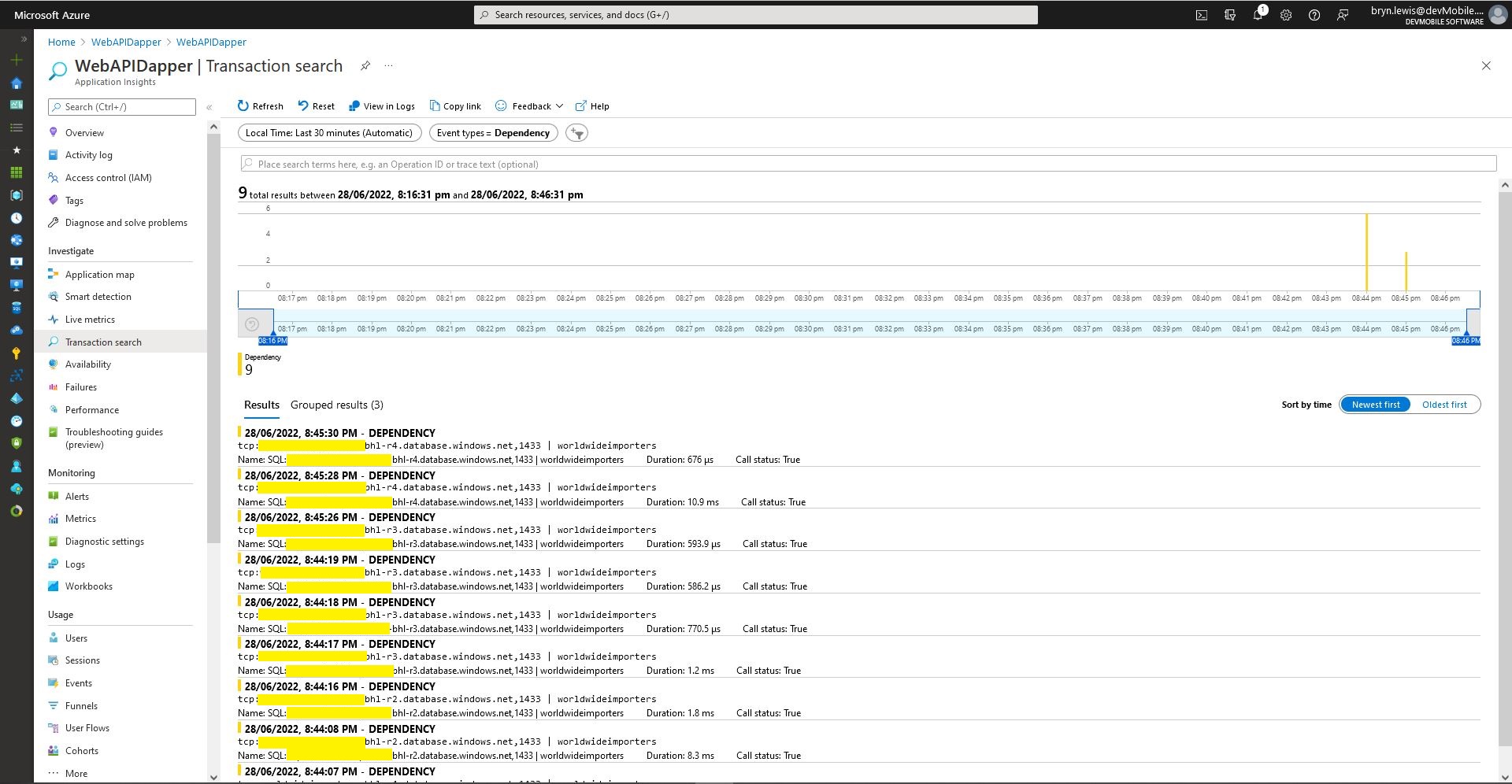
Azure application Insights Dependencies showing usage of different synchronised databases
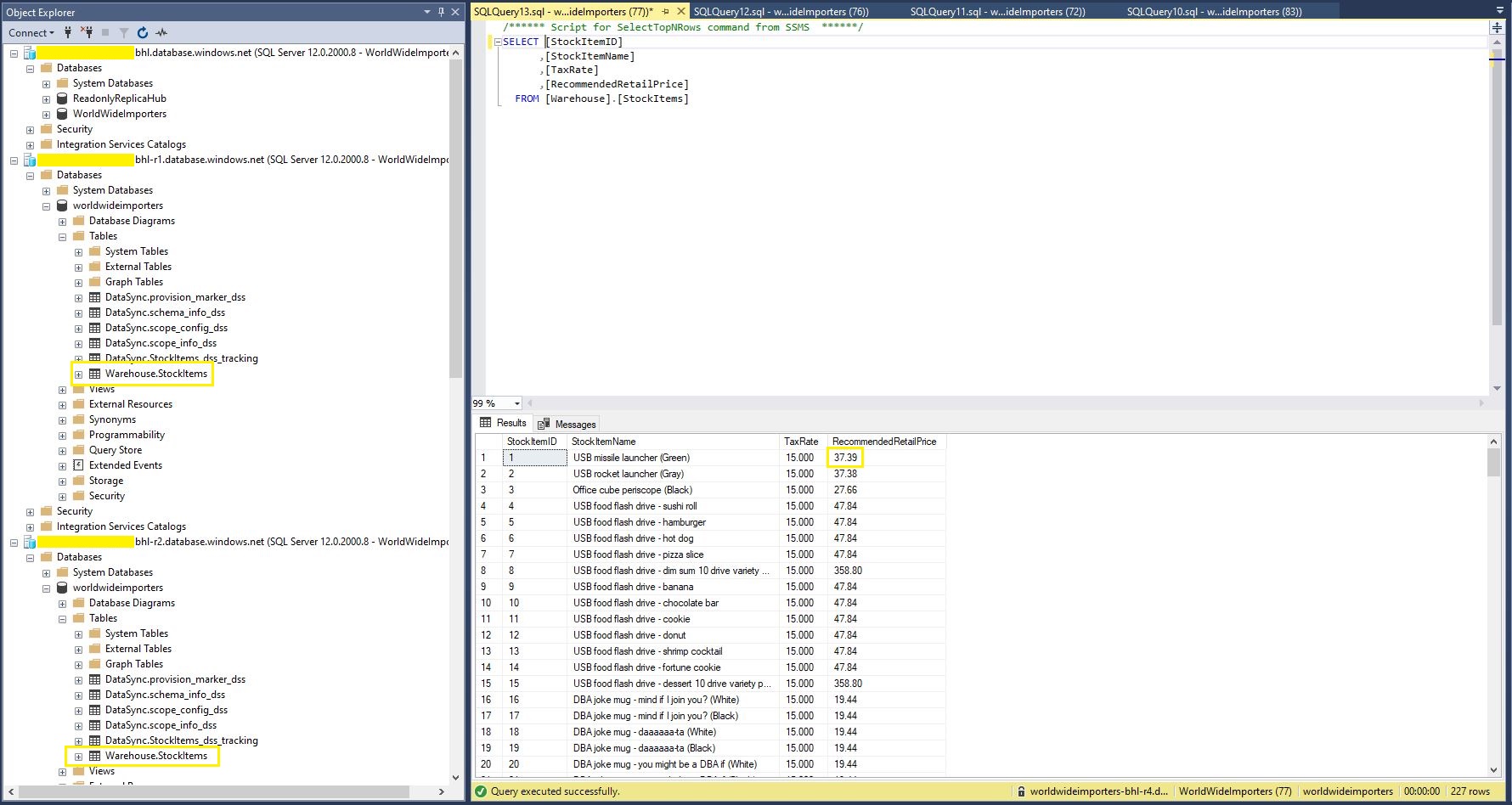
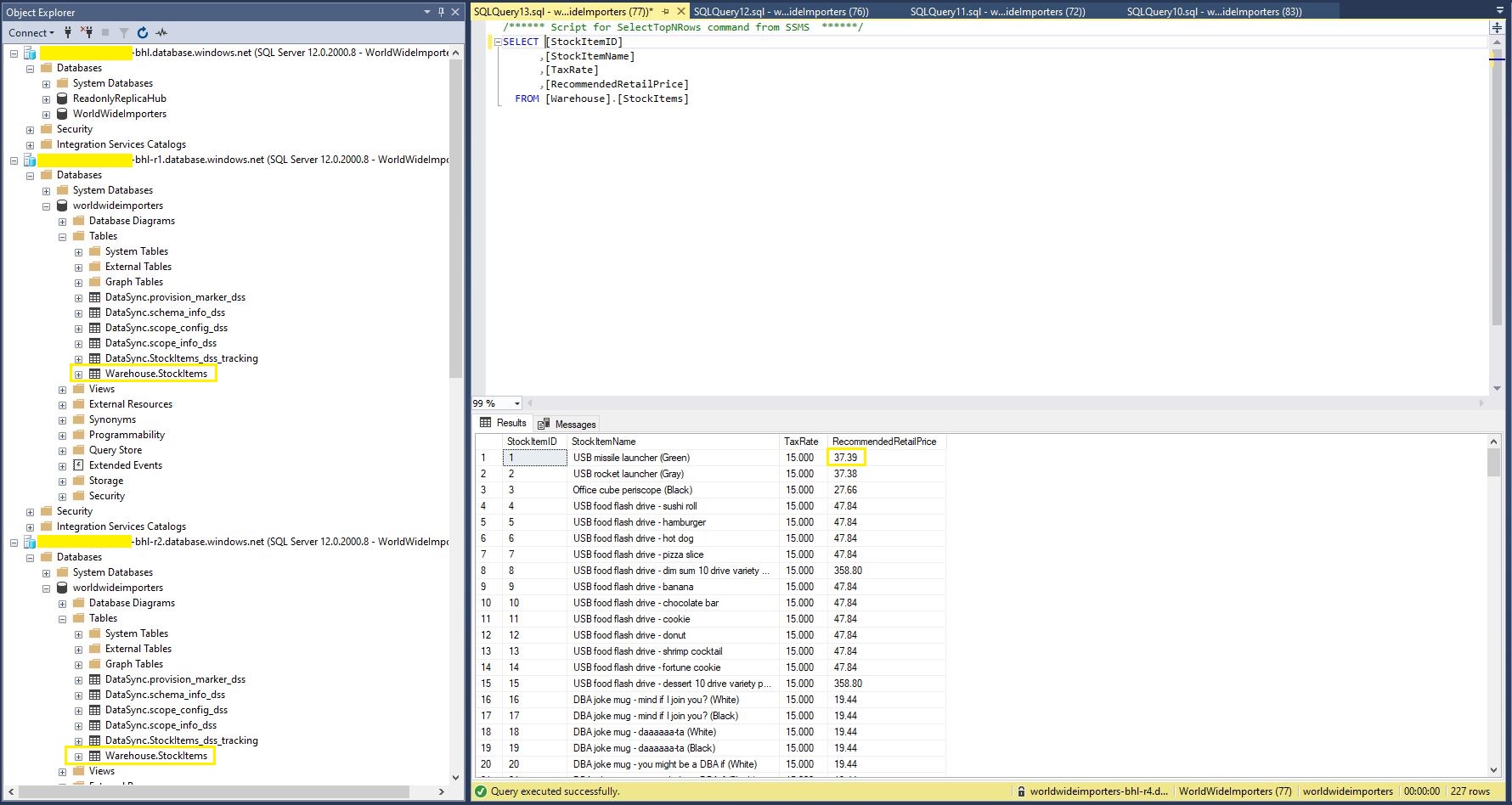
StockItems table in source database with updated RRP
StockItems table in destination database with updated RRP after next scheduled snychronisation
StockItems table in destination database after next scheduled synchronisation

The Azure SQL Database Data Sync was pretty easy to setup (configuration in the hub database tripped me up initially). For a production scenario where only a portion of the database (e.g. shaped by Customer, Geography, security considerations, or a bi-directional requirement) it would be an effective solution, though for some applications the delay between synchronisations might be an issue.

.NET Core web API + Dapper – ADO.Net Retries

Recovering from transient failures with ADO.Net RetryLogicProvider

This post is all about learning from failure, hopefully it will help someone else…

A while ago I wrote DapperTransient which uses Polly to retry SQLConnection and SQLCommand operations if the failure might be “transient”. My DapperTransient code wraps nearly all of the Dapper methods with a Polly RetryPolicy.ExecuteAsync.

public static Task<int> ExecuteWithRetryAsync(
			  this IDbConnection connection,
			  string sql,
			  object param = null,
			  IDbTransaction transaction = null,
			  int? commandTimeout = null,
			  CommandType? commandType = null) => RetryPolicy.ExecuteAsync(() => connection.ExecuteAsync(sql, param, transaction, commandTimeout, commandType));


One company I work for has a 10+year old VB.Net codebase that makes extensive use of ADO.Net calls which we moved to Azure Infrastructure as a Service(IaaS) a few years ago. Every so often they would get a cluster of ADO.Net exceptions when executing stored procedures in their Azure SQL database. While I was investigating how to retry transient failures without a major refactoring of the codebase I stumbled across SqlRetryLogicOption + TransientErrors, SqlRetryLogicBaseProvider and RetryLogicProvider which looked like a viable solution. At the time I also wondered if it would be possible to use the same approach with Dapper.

namespace devMobile.WebAPIDapper.Lists.Controllers
{
    [ApiController]
    [Route("api/[controller]")]
    public class StockItemsRetryADONetController : ControllerBase
    {
        private readonly string connectionString;
        private readonly ILogger<StockItemsRetryADONetController> logger;

        // This is a bit nasty but sufficient for PoC
        private readonly int NumberOfRetries = 3;
        private readonly TimeSpan TimeBeforeNextExecution = TimeSpan.Parse("00:00:01");
        private readonly TimeSpan MaximumInterval = TimeSpan.Parse("00:00:30");
        private readonly List<int> TransientErrors = new List<int>()
        {
            49920, // Cannot process rquest. Too many operations in progress for subscription
			49919, // Cannot process create or update request.Too many create or update operations in progress for subscription
			49918, // Cannot process request. Not enough resources to process request.
			41839, // Transaction exceeded the maximum number of commit dependencies.
			41325, // The current transaction failed to commit due to a serializable validation failure.
			41305, // The current transaction failed to commit due to a repeatable read validation failure.
			41302, // The current transaction attempted to update a record that has been updated since the transaction started.
			41301, // Dependency failure: a dependency was taken on another transaction that later failed to commit.
			40613, // Database XXXX on server YYYY is not currently available. Please retry the connection later.
			40501, // The service is currently busy. Retry the request after 10 seconds
			40197, // The service has encountered an error processing your request. Please try again
			20041, // Transaction rolled back. Could not execute trigger. Retry your transaction.
			17197, // Login failed due to timeout; the connection has been closed. This error may indicate heavy server load.
			14355, // The MSSQLServerADHelper service is busy. Retry this operation later.
			11001, // Connection attempt failed
			10936, // The request limit for the elastic pool has been reached. 
			10929, // The server is currently too busy to support requests.
			10928, // The limit for the database is has been reached
			10922, // Operation failed. Rerun the statement.
			10060, // A network-related or instance-specific error occurred while establishing a connection to SQL Server.
			10054, // A transport-level error has occurred when sending the request to the server.
			10053, // A transport-level error has occurred when receiving results from the server.
			9515, // An XML schema has been altered or dropped, and the query plan is no longer valid. Please rerun the query batch.
			8651, // Could not perform the operation because the requested memory grant was not available in resource pool
			8645, // A timeout occurred while waiting for memory resources to execute the query in resource pool, Rerun the query
			8628, // A timeout occurred while waiting to optimize the query. Rerun the query. 
			4221, // Login to read-secondary failed due to long wait on 'HADR_DATABASE_WAIT_FOR_TRANSITION_TO_VERSIONING'. The replica is not available for login because row versions are missing for transactions that were in-flight when the replica was recycled
			4060, // Cannot open database requested by the login. The login failed.
			3966, // Transaction is rolled back when accessing version store. It was earlier marked as victim when the version store was shrunk due to insufficient space in tempdb. Retry the transaction.
			3960, // Snapshot isolation transaction aborted due to update conflict. You cannot use snapshot isolation to access table directly or indirectly in database
			3935, // A FILESTREAM transaction context could not be initialized. This might be caused by a resource shortage. Retry the operation.
			1807, // Could not obtain exclusive lock on database 'model'. Retry the operation later.
			1221, // The Database Engine is attempting to release a group of locks that are not currently held by the transaction. Retry the transaction.
			1205, // Deadlock
			1204, // The instance of the SQL Server Database Engine cannot obtain a LOCK resource at this time. Rerun your statement.
			1203, // A process attempted to unlock a resource it does not own. Retry the transaction.
			997, // A connection was successfully established with the server, but then an error occurred during the login process.
			921, // Database has not been recovered yet. Wait and try again.
			669, // The row object is inconsistent. Please rerun the query.
			617, // Descriptor for object in database not found in the hash table during attempt to un-hash it. Rerun the query. If a cursor is involved, close and reopen the cursor.
			601, // Could not continue scan with NOLOCK due to data movement.
			233, // The client was unable to establish a connection because of an error during connection initialization process before login.
			121, // The semaphore timeout period has expired.
			64, // A connection was successfully established with the server, but then an error occurred during the login process.
			20, // The instance of SQL Server you attempted to connect to does not support encryption.
		};
...
}
After some experimentation the most reliable way I could reproduce a transient failure (usually SQL Error 11001-“An error has occurred while establishing a connection to the server”) was by modifying the database connection string or unplugging the network cable after a connection had been explicitly opened or command executed.

namespace devMobile.WebAPIDapper.Lists.Controllers
{
    [ApiController]
    [Route("api/[controller]")]
    public class StockItemsRetryADONetController : ControllerBase
    {
...
		[HttpGet("Dapper")]
		public async Task<ActionResult<IEnumerable<Model.StockItemListDtoV1>>> GetDapper()
        {
            IEnumerable<Model.StockItemListDtoV1> response = null;

            SqlRetryLogicOption sqlRetryLogicOption = new SqlRetryLogicOption()
            {
                NumberOfTries = NumberOfRetries,
                DeltaTime = TimeBeforeNextExecution,
                MaxTimeInterval = MaximumInterval,
                TransientErrors = TransientErrors,
                //AuthorizedSqlCondition = x => string.IsNullOrEmpty(x) || Regex.IsMatch(x, @"^SELECT", RegexOptions.IgnoreCase),
            };

            SqlRetryLogicBaseProvider sqlRetryLogicProvider = SqlConfigurableRetryFactory.CreateFixedRetryProvider(sqlRetryLogicOption);

            using (SqlConnection db = new SqlConnection(this.connectionString))
            {
                db.RetryLogicProvider = sqlRetryLogicProvider;

                db.RetryLogicProvider.Retrying += new EventHandler<SqlRetryingEventArgs>(OnDapperRetrying);

                await db.OpenAsync(); // Did explicitly so I could yank out the LAN cable.

                response = await db.QueryAsync<Model.StockItemListDtoV1>(sql: @"SELECT [StockItemID] as ""ID"", [StockItemName] as ""Name"", [RecommendedRetailPrice], [TaxRate] FROM [Warehouse].[StockItems]", commandType: CommandType.Text);
            }

            return this.Ok(response);
        }

        protected void OnDapperRetrying(object sender, SqlRetryingEventArgs args)
        {
            logger.LogInformation("Dapper retrying for {RetryCount} times for {args.Delay.TotalMilliseconds:0.} mSec - Error code: {Number}", args.RetryCount, args.Delay.TotalMilliseconds, (args.Exceptions[0] as SqlException).Number);
        }
...
    }
}

For my initial testing I used an invalid Azure SQL Database connection string and in the Visual Studio 2022 Debug output I could see retries.

ADO.Net RetryLogicProvider retrying request 3 times

I then added an OpenAsync just before the Dapper query so I could open the database connection, pause the program with a breakpoint, unplug the LAN cable and then continue execution. The QueryAsync failed without any retries and modifying the AuthorizedSqlCondition didn’t seem change the way different SQL statement failures were handled.

There was limited documentation about how to use ADO.Net retry functionality so I hacked up another method to try and figure out what I had done wrong. The method uses the same SqlRetryLogicOption configuration for retrying connection and command failures.

namespace devMobile.WebAPIDapper.Lists.Controllers
{
    [ApiController]
    [Route("api/[controller]")]
    public class StockItemsRetryADONetController : ControllerBase
    {
...
        [HttpGet("AdoNet")]
        public async Task<ActionResult<IEnumerable<Model.StockItemListDtoV1>>> GetAdoNet()
        {
            List<Model.StockItemListDtoV1> response = new List<Model.StockItemListDtoV1>();

            // Both connection and command share same logic not really an issue for nasty demo
            SqlRetryLogicOption sqlRetryLogicOption = new SqlRetryLogicOption()
            {
                NumberOfTries = NumberOfRetries,
                DeltaTime = TimeBeforeNextExecution,
                MaxTimeInterval = MaximumInterval,
                TransientErrors = TransientErrors,
                //AuthorizedSqlCondition = x => string.IsNullOrEmpty(x) || Regex.IsMatch(x, @"^SELECT", RegexOptions.IgnoreCase),
            };

            SqlRetryLogicBaseProvider sqlRetryLogicProvider = SqlConfigurableRetryFactory.CreateFixedRetryProvider(sqlRetryLogicOption);


            // This ADO.Net is a bit overkill but just wanted to highlight ADO.Net vs. Dapper
            using (SqlConnection sqlConnection = new SqlConnection(this.connectionString))
            {
                sqlConnection.RetryLogicProvider = sqlRetryLogicProvider;
                sqlConnection.RetryLogicProvider.Retrying += new EventHandler<SqlRetryingEventArgs>(OnConnectionRetrying);

                await sqlConnection.OpenAsync(); // Did explicitly so I could yank out the LAN cable.

                using (SqlCommand sqlCommand = new SqlCommand())
                {
                    sqlCommand.Connection = sqlConnection;
                    sqlCommand.CommandText = @"SELECT [StockItemID] as ""ID"", [StockItemName] as ""Name"", [RecommendedRetailPrice], [TaxRate] FROM [Warehouse].[StockItems]";
                    sqlCommand.CommandType = CommandType.Text;

                    sqlCommand.RetryLogicProvider = sqlRetryLogicProvider;
                    sqlCommand.RetryLogicProvider.Retrying += new EventHandler<SqlRetryingEventArgs>(OnCommandRetrying);

                    // Over kill but makes really obvious
                    using (SqlDataReader sqlDataReader = await sqlCommand.ExecuteReaderAsync(CommandBehavior.CloseConnection))
                    {
                        while (await sqlDataReader.ReadAsync())
                        {
                            response.Add(new Model.StockItemListDtoV1()
                            {
                                Id = sqlDataReader.GetInt32("Id"),
                                Name = sqlDataReader.GetString("Name"),
                                RecommendedRetailPrice = sqlDataReader.GetDecimal("RecommendedRetailPrice"),
                                TaxRate = sqlDataReader.GetDecimal("TaxRate"),
                            });
                        }
                    }
                };
            }

            return this.Ok(response);
        }

        protected void OnConnectionRetrying(object sender, SqlRetryingEventArgs args)
        {
            logger.LogInformation("Connection retrying for {RetryCount} times for {args.Delay.TotalMilliseconds:0.} mSec - Error code: {Number}", args.RetryCount, args.Delay.TotalMilliseconds, (args.Exceptions[0] as SqlException).Number);
        }

        protected void OnCommandRetrying(object sender, SqlRetryingEventArgs args)
        {
            logger.LogInformation("Command retrying for {RetryCount} times for {args.Delay.TotalMilliseconds:0.} mSec - Error code: {Number}", args.RetryCount, args.Delay.TotalMilliseconds, (args.Exceptions[0] as SqlException).Number);
        }
    }
}

I also added two RetryLogicProvider.Retrying handlers one for SQLConnection and the other for SQLCommand so I could see what was being retried.

sqlConnection.RetryLogicProvider with a broken connection string
sqlCommand.RetryLogicProvider with the LAN cable unplugged just before executing query

The number of retries when I unplugged the LAN cable wasn’t quite what I was expecting….

I didn’t fully understand the differences between System.Data.Sqlclient and Microsoft.Data.Sqlclient so I downloaded the source code for Dapper and starting hacking. My approach was to modify the Dapper CommandDefinition struct so a caller could pass in a SqlRetryLogicBaseProvider instance.

namespace Dapper
{
    /// <summary>
    /// Represents the key aspects of a sql operation
    /// </summary>
    public struct CommandDefinition
    {
        internal static CommandDefinition ForCallback(object parameters)
        {
            if (parameters is DynamicParameters)
            {
                return new CommandDefinition(parameters);
            }
            else
            {
                return default;
            }
        }

        internal void OnCompleted()
        {
            (Parameters as SqlMapper.IParameterCallbacks)?.OnCompleted();
        }

        /// <summary>
        /// The command (sql or a stored-procedure name) to execute
        /// </summary>
        public string CommandText { get; }

        /// <summary>
        /// The parameters associated with the command
        /// </summary>
        public object Parameters { get; }

        /// <summary>
        /// The active transaction for the command
        /// </summary>
        public IDbTransaction Transaction { get; }

        /// <summary>
        /// The effective timeout for the command
        /// </summary>
        public int? CommandTimeout { get; }

        /// <summary>
        /// The type of command that the command-text represents
        /// </summary>
        public CommandType? CommandType { get; }

        /// <summary>
        /// Should data be buffered before returning?
        /// </summary>
        public bool Buffered => (Flags & CommandFlags.Buffered) != 0;

        /// <summary>
        /// 
        /// </summary>
        public SqlRetryLogicBaseProvider SqlRetryLogicProvider { get; }

        /// <summary>
        /// Should the plan for this query be cached?
        /// </summary>
        internal bool AddToCache => (Flags & CommandFlags.NoCache) == 0;

        /// <summary>
        /// Additional state flags against this command
        /// </summary>
        public CommandFlags Flags { get; }

        /// <summary>
        /// Can async queries be pipelined?
        /// </summary>
        public bool Pipelined => (Flags & CommandFlags.Pipelined) != 0;

        /// <summary>
        /// Initialize the command definition
        /// </summary>
        /// <param name="commandText">The text for this command.</param>
        /// <param name="parameters">The parameters for this command.</param>
        /// <param name="transaction">The transaction for this command to participate in.</param>
        /// <param name="commandTimeout">The timeout (in seconds) for this command.</param>
        /// <param name="commandType">The <see cref="CommandType"/> for this command.</param>
        /// <param name="flags">The behavior flags for this command.</param>
        /// <param name="sqlRetryLogicProvider">Retry strategy for this command.</param>
        /// <param name="cancellationToken">The cancellation token for this command.</param>
        public CommandDefinition(string commandText, object parameters = null, IDbTransaction transaction = null, int? commandTimeout = null,
                                 CommandType? commandType = null, CommandFlags flags = CommandFlags.Buffered
                                 , SqlRetryLogicBaseProvider sqlRetryLogicProvider = null
                                 , CancellationToken cancellationToken = default
            )
        {
            CommandText = commandText;
            Parameters = parameters;
            Transaction = transaction;
            CommandTimeout = commandTimeout;
            CommandType = commandType;
            Flags = flags;
            SqlRetryLogicProvider = sqlRetryLogicProvider;
            CancellationToken = cancellationToken;
        }
...
}

This didn’t end well, as the Dapper library extends System.Data.IDbConnection which doesn’t “natively” support retry logic. Several hours lost from my life I now understand a bit more about the differences between System.Data.Sqlclient and Microsoft.Data.Sqlclient.

.NET Core web API + Dapper – Readonly query workloads with Geo Replication

Geo Replication process

One of the easiest ways to create read-only replicas of an Azure SQL Database database is with Active geo-replication(it’s also useful for disaster recovery with geo-failure to a geo-secondary in a different Azure Region).

The first step was to remove all the Microsoft SQL Server features used in the The World Wide Importers database (e.g. Memory Optimized tables) which were not supported by the Azure SQL Database tier I was using.

SQL Service Management Studio(SSMS) Deploy to Azure wizard

I then used the “Deploy Database Wizard” to copy my modified World Wide Importers database to an Azure SQL Database.

Azure Portal Primary Database in SQL Service Management Studio(SSMS)

I then created replicas in the same region (if the application had a global customer base creating read only geo replicas in regions close to users might be worth considering) for the read-only queries.

Azure SQL Database no replicas configured
Azure Portal Create Geo Replica

I created four replicas which is the maximum number supported. If more replicas were required a secondary of a secondary (a process known as chaining) could be use to create additional geo-replicas

Azure Portal Primary Database and four Geo-replicas
Azure Portal Primary Database and Geo-replicas in SQL Service Management Studio(SSMS)
Azure Application Insights showing multiple Geo-Replicas being used.

The Azure Database Geo-replication was pretty easy to setup. For a production scenario where only a portion of the database (e.g. shaped by Customer or Geography) is required it might not be the “right hammer”.

WebAPI Dapper Azure Resource Group

The other limitation I encountered was the resources used by the replication of “transaction processing” tables (in the World Wide Importers database tables like the Sales.OrderLines, Sales.CustomerTransactions etc.) which often wouldn’t be required for read-only applications.

.NET Core web API + Dapper – Offloading readonly query workloads.

A Scaling Out Scenario

Initially this was going to be a post about Sharding but after some discussion with my manager at one of the companies I work for it evolved into a post about using the Dapper Object Relational Mapper(ORM) with Azure SQL Database and Active geo-replication or SQL Data Sync for Azure to offload read-only query workloads to improve scalability.

The company builds a Software as a Service(Saas) product for managing portfolios of foreign currency forwardsoptionsswaps etc. Part of the solution has an application which customers use to get an “aggregated” view of their purchases.

The database queries to lookup reference data (forward curves etc.), return a shaped dataset for each supported instrument type, then “aggregating” the information with C# code consumes significant database and processing resources.

The first step was to remove all the Microsoft SQL Server features used in the The World Wide Importers database (e.g. Memory Optimized tables) which were not supported by the Azure SQL Database vCore or DTU tier I had was using.

I then uploaded my modified World Wide Importers database to an Azure SQL Database Server.

Azure SQL Database SQL Server Management Studio (SSMS) initial database

I then created read only replicas of the original database to use for scaling out in my demo application.

Azure SQL Database SQL Server Management Studio (SSMS) with replicas databases

The configuration strings of the read-only replicas are loaded as the application starts.

// This method gets called by the runtime. Use this method to add services to the container.
public void ConfigureServices(IServiceCollection services)
{
	services.AddControllers();

	var errorHandlerSettings = Configuration.GetSection(nameof(ErrorHandlerSettings));
	services.Configure<ErrorHandlerSettings>(errorHandlerSettings);

	var readonlyReplicaServersConnectionStringSettings = Configuration.GetSection("ReadonlyReplicaServersConnectionStringSettings");
	services.Configure<List<string>>(readonlyReplicaServersConnectionStringSettings);

	services.AddResponseCaching();

	services.AddDapperForMSSQL();
#if DAPPER_EXTENSIONS_CACHE_MEMORY
	services.AddDapperCachingInMemory(new MemoryConfiguration
	{
		AllMethodsEnableCache = false
 	});
#endif
#if DAPPER_EXTENSIONS_CACHE_REDIS
	services.AddDapperCachingInRedis(new RedisConfiguration
	{
		AllMethodsEnableCache = false,
		KeyPrefix = Configuration.GetValue<string>("RedisKeyPrefix"),
		ConnectionString = Configuration.GetConnectionString("RedisConnection")
	}); 
#endif
	services.AddApplicationInsightsTelemetry();
}

Then code was added to the controller to randomly select which read-only replica to use. More complex approaches were considered but not implemented for the initial version.

[ApiController]
[Route("api/[controller]")]
public class StockItemsReadonlyReplicasController : ControllerBase
{
    private readonly ILogger<StockItemsReadonlyReplicasController> logger;
    private readonly List<string> readonlyReplicasConnectionStrings;

    public StockItemsReadonlyReplicasController(ILogger<StockItemsReadonlyReplicasController> logger, IOptions<List<string>> readonlyReplicasServerConnectionStrings)
    {
        this.logger = logger;

        this.readonlyReplicasConnectionStrings = readonlyReplicasServerConnectionStrings.Value;
    }

    [HttpGet]
    public async Task<ActionResult<IEnumerable<Model.StockItemListDtoV1>>> Get()
    {
        IEnumerable<Model.StockItemListDtoV1> response = null;

        if (readonlyReplicasConnectionStrings.Count == 0)
        {
            logger.LogError("No readonly replica server Connection strings configured");

            return this.StatusCode(StatusCodes.Status500InternalServerError);
        }

        Random random = new Random(); // maybe this should be instantiated ever call, but "danger here by thy threading"

        string connectionString = readonlyReplicasConnectionStrings[random.Next(0, readonlyReplicasConnectionStrings.Count)];

        logger.LogTrace("Connection string {connectionString}", connectionString);

        using (SqlConnection db = new SqlConnection(connectionString))
        {
            response = await db.QueryAsync<Model.StockItemListDtoV1>(sql: @"SELECT [StockItemID] as ""ID"", [StockItemName] as ""Name"", [RecommendedRetailPrice], [TaxRate] FROM [Warehouse].[StockItems]", commandType: CommandType.Text);
        }

        return this.Ok(response);
    }
}

The Read-only replica server connection string setup template in appsettings.Development.json.

{
  "Logging": {
    "LogLevel": {
      "Default": "Information",
      "Microsoft": "Warning",
      "Microsoft.Hosting.Lifetime": "Information"
    }
  },
  "ConnectionStrings": {
    "WorldWideImportersDatabase": "ThisIsNotTheDatabaseConnectionStringYouAreLookingFor",
    "DefaultConnection": "ThisIsNotTheDefaultDatabaseConnectionStringYouAreLookingFor",
    "RedisConnection": "ThisIsNotTheRedisConnectionStringYouAreLookingFor"
  },
  "ReadonlyReplicaServersConnectionStringSettings": [
    "ThisIsNotTheReadonlyReplicaDatabaseConnectionStringYouAreLookingFor",
    "ThisIsNotTheReadonlyReplicaDatabaseConnectionStringYouAreLookingFor",
    "ThisIsNotTheReadonlyReplicaDatabaseConnectionStringYouAreLookingFor",
    "ThisIsNotTheReadonlyReplicaDatabaseConnectionStringYouAreLookingFor"
  ],
  "ApplicationInsights": {
    "ConnectionString": "ThisIsNotTheApplicationInsightsConnectionStringYouAreLookingFor"
  },
  "ErrorHandlerSettings": {
    "Detail": "Default detail",
    "Title": "Default title",
    "UrlSpecificSettings": {
      "localhost": {
        "Title": "Title for localhost",
        "Detail": "Detail for localhost"
      },
      "127.0.0.1": {
        "Title": "Title for 127.0.0.1",
        "Detail": "Detail for 127.0.0.1"
      }
    }
  }
}

The Manage UserSecrets(Secrets.json) functionality was used for testing on my development machine. In production Azure App Service the array of connections strings was configured with ReadonlyReplicaServersConnectionStringSettings:0, ReadonlyReplicaServersConnectionStringSettings:1 etc. syntax

Sample application Azure App Service Configuration
Azure Application Insights with connections to different read-only replicas highlighted

I had incorrectly configured the firewall on one of the read-only replica database servers so roughly one in four connection attempts failed.

Azure Application Insights failed database connection displayed

The customer’s application was also fairly compute intensive so we configure the Azure App Service to Auto scale based on the CPU load.,

Azure app service horizontal auto scale configuration

I’ll outline the configuration of Active geo-replication or SQL Data Sync for Azure in a couple of future posts.

The current solution works but I need to tidy up few issues like the StockItemsReadonlyReplicasController getting constructor getting a bit “chunky”.

.NET Core web API + Dapper – Error handling

Failure is an Option

For some historical reason I can’t remember my controllers often had an outer try/catch and associated logging. I think may have been ensure no “sensitive” information was returned to the caller even if the application was incorrectly deployed. So I could revisit my approach I added a controller with two methods one which returns an HTTP 500 error and another which has un-caught exception.

[Route("api/[controller]")]
[ApiController]
public class StockItemsNok500Controller : ControllerBase
{
	private readonly string connectionString;
	private readonly ILogger<StockItemsNok500Controller> logger;

	public StockItemsNok500Controller(IConfiguration configuration, ILogger<StockItemsNok500Controller> logger)
	{
		this.connectionString = configuration.GetConnectionString("WorldWideImportersDatabase");

		this.logger = logger;
	}

	public async Task<ActionResult<IEnumerable<Model.StockItemListDtoV1>>> Get500()
	{
		IEnumerable<Model.StockItemListDtoV1> response = null;

		try
		{
			using (SqlConnection db = new SqlConnection(this.connectionString))
			{
				response = await db.QueryWithRetryAsync<Model.StockItemListDtoV1>(sql: @"SELECT [StockItemID] as ""ID"", [StockItemName] as ""Name"", [RecommendedRetailPrice], [TaxRate] FROM [Warehouse].[StockItem500]", commandType: CommandType.Text);
			}
		}
		catch (SqlException ex)
		{
			logger.LogError(ex, "Retrieving list of StockItems");

			return this.StatusCode(StatusCodes.Status500InternalServerError);
		}

		return this.Ok(response);
	}
}

The information returned to a caller was generic and the only useful information was the “traceId”.

StockItemsNok500Controller error page
[Route("api/[controller]")]
[ApiController]
public class StockItemsNokExceptionController : ControllerBase
{
	private readonly string connectionString;

	public StockItemsNokExceptionController(IConfiguration configuration)
	{
		this.connectionString = configuration.GetConnectionString("WorldWideImportersDatabase");
	}

	public async Task<ActionResult<IEnumerable<Model.StockItemListDtoV1>>> GetException()
	{
		IEnumerable<Model.StockItemListDtoV1> response = null;

		using (SqlConnection db = new SqlConnection(this.connectionString))
		{
			response = await db.QueryWithRetryAsync<Model.StockItemListDtoV1>(sql: @"SELECT [StockItemID] as ""ID"", [StockItemName] as ""Name"", [RecommendedRetailPrice], [TaxRate] FROM [Warehouse].[StockItemsException]", commandType: CommandType.Text);
		}

		return this.Ok(response);
	}
}

In “Development” mode the information returned to the caller contains a detailed stack trace that reveals implementation details which are useful for debugging but would also be useful to an attacker.

Developer StockItemsNok Controller Exception page

When not in “Development” mode no additional information is returned (not even a TraceId).

Production StockItemsNok500Controller Exception

The diagnostic stacktrace information logged by the two different controllers was essentially the same

System.Data.SqlClient.SqlException:
   at System.Data.SqlClient.SqlCommand+<>c.<ExecuteDbDataReaderAsync>b__126_0 (System.Data.SqlClient, Version=4.6.1.3, Culture=neutral, PublicKeyToken=b03f5f7f11d50a3a)
   at System.Threading.Tasks.ContinuationResultTaskFromResultTask`2.InnerInvoke (System.Private.CoreLib, Version=6.0.0.0, Culture=neutral, PublicKeyToken=7cec85d7bea7798e)
   at System.Threading.Tasks.Task+<>c.<.cctor>b__272_0 (System.Private.CoreLib, Version=6.0.0.0, Culture=neutral, PublicKeyToken=7cec85d7bea7798e)
   at System.Threading.ExecutionContext.RunInternal (System.Private.CoreLib, Version=6.0.0.0, Culture=neutral, PublicKeyToken=7cec85d7bea7798e)
   at System.Runtime.ExceptionServices.ExceptionDispatchInfo.Throw (System.Private.CoreLib, Version=6.0.0.0, Culture=neutral, PublicKeyToken=7cec85d7bea7798e)
   at System.Threading.ExecutionContext.RunInternal (System.Private.CoreLib, Version=6.0.0.0, Culture=neutral, PublicKeyToken=7cec85d7bea7798e)
   at System.Threading.Tasks.Task.ExecuteWithThreadLocal (System.Private.CoreLib, Version=6.0.0.0, Culture=neutral, PublicKeyToken=7cec85d7bea7798e)
   at System.Runtime.ExceptionServices.ExceptionDispatchInfo.Throw (System.Private.CoreLib, Version=6.0.0.0, Culture=neutral, PublicKeyToken=7cec85d7bea7798e)
   at System.Runtime.CompilerServices.TaskAwaiter.ThrowForNonSuccess (System.Private.CoreLib, Version=6.0.0.0, Culture=neutral, PublicKeyToken=7cec85d7bea7798e)
   at System.Runtime.CompilerServices.TaskAwaiter.HandleNonSuccessAndDebuggerNotification (System.Private.CoreLib, Version=6.0.0.0, Culture=neutral, PublicKeyToken=7cec85d7bea7798e)
   at Dapper.SqlMapper+<QueryAsync>d__33`1.MoveNext (Dapper, Version=2.0.0.0, Culture=neutral, PublicKeyToken=null: /_/Dapper/SqlMapper.Async.cs:418)
   at System.Runtime.ExceptionServices.ExceptionDispatchInfo.Throw (System.Private.CoreLib, Version=6.0.0.0, Culture=neutral, PublicKeyToken=7cec85d7bea7798e)
   at System.Runtime.CompilerServices.TaskAwaiter.ThrowForNonSuccess (System.Private.CoreLib, Version=6.0.0.0, Culture=neutral, PublicKeyToken=7cec85d7bea7798e)
   at System.Runtime.CompilerServices.TaskAwaiter.HandleNonSuccessAndDebuggerNotification (System.Private.CoreLib, Version=6.0.0.0, Culture=neutral, PublicKeyToken=7cec85d7bea7798e)
   at Polly.Retry.AsyncRetryEngine+<ImplementationAsync>d__0`1.MoveNext (Polly, Version=7.0.0.0, Culture=neutral, PublicKeyToken=c8a3ffc3f8f825cc)
   at System.Runtime.ExceptionServices.ExceptionDispatchInfo.Throw (System.Private.CoreLib, Version=6.0.0.0, Culture=neutral, PublicKeyToken=7cec85d7bea7798e)
   at System.Runtime.CompilerServices.TaskAwaiter.ThrowForNonSuccess (System.Private.CoreLib, Version=6.0.0.0, Culture=neutral, PublicKeyToken=7cec85d7bea7798e)
   at System.Runtime.CompilerServices.TaskAwaiter.HandleNonSuccessAndDebuggerNotification (System.Private.CoreLib, Version=6.0.0.0, Culture=neutral, PublicKeyToken=7cec85d7bea7798e)
   at System.Runtime.CompilerServices.ConfiguredTaskAwaitable`1+ConfiguredTaskAwaiter.GetResult (System.Private.CoreLib, Version=6.0.0.0, Culture=neutral, PublicKeyToken=7cec85d7bea7798e)
   at Polly.AsyncPolicy+<ExecuteAsync>d__21`1.MoveNext (Polly, Version=7.0.0.0, Culture=neutral, PublicKeyToken=c8a3ffc3f8f825cc)
   at System.Runtime.ExceptionServices.ExceptionDispatchInfo.Throw (System.Private.CoreLib, Version=6.0.0.0, Culture=neutral, PublicKeyToken=7cec85d7bea7798e)
   at System.Runtime.CompilerServices.TaskAwaiter.ThrowForNonSuccess (System.Private.CoreLib, Version=6.0.0.0, Culture=neutral, PublicKeyToken=7cec85d7bea7798e)
   at System.Runtime.CompilerServices.TaskAwaiter.HandleNonSuccessAndDebuggerNotification (System.Private.CoreLib, Version=6.0.0.0, Culture=neutral, PublicKeyToken=7cec85d7bea7798e)
   at System.Runtime.CompilerServices.TaskAwaiter`1.GetResult (System.Private.CoreLib, Version=6.0.0.0, Culture=neutral, PublicKeyToken=7cec85d7bea7798e)
   at devMobile.WebAPIDapper.Lists.Controllers.StockItemsNokController+<Get500>d__4.MoveNext (ListsClassic, Version=1.0.0.0, Culture=neutral, PublicKeyToken=null: C:\Users\BrynLewis\source\repos\WebAPIDapper\Lists\Controllers\14.StockItemsNokController.cs:70)

One customer wanted their client application to display a corporate help desk number for staff to call for support. This information was made configurable

namespace devMobile.WebAPIDapper.Lists
{
	public class ErrorHandlerSettings
	{
		public string Detail { get; set; } = "devMobile Lists Classic API failure";

		public string Title { get; set; } = "System Error";
	}
}
public void ConfigureServices(IServiceCollection services)
{
	services.AddControllers();

	var errorHandlerSettings = Configuration.GetSection(nameof(ErrorHandlerSettings));
	services.Configure<ErrorHandlerSettings>(errorHandlerSettings);

	services.AddResponseCaching();

	services.AddDapperForMSSQL();
#if DAPPER_EXTENSIONS_CACHE_MEMORY
	services.AddDapperCachingInMemory(new MemoryConfiguration
	{
		AllMethodsEnableCache = false
	});
#endif
#if DAPPER_EXTENSIONS_CACHE_REDIS
	services.AddDapperCachingInRedis(new RedisConfiguration
	{
		AllMethodsEnableCache = false,
		KeyPrefix = Configuration.GetConnectionString("RedisKeyPrefix"),
		ConnectionString = Configuration.GetConnectionString("RedisConnection")
	}); 
#endif
	services.AddApplicationInsightsTelemetry();
}
{
 ...
  },
  "ErrorHandlerSettings": {
    "Title": "Webpage has died",
    "Detail": "Something has gone wrong call the help desk on 0800-RebootIt"
  },
...
}
namespace devMobile.WebAPIDapper.Lists.Controllers
{
	using Microsoft.AspNetCore.Mvc;
	using Microsoft.Extensions.Hosting;
	using Microsoft.Extensions.Options;


	[ApiController]
	public class ErrorController : Controller
	{
		private readonly ErrorHandlerSettings errorHandlerSettings;

		public ErrorController(IOptions<ErrorHandlerSettings> errorHandlerSettings)
		{
			this.errorHandlerSettings = errorHandlerSettings.Value;
		}

		[Route("/error")]
		public IActionResult HandleError([FromServices] IHostEnvironment hostEnvironment)
		{
			return Problem(detail: errorHandlerSettings.Detail, title: errorHandlerSettings.Title);
		}
	}
}
StockItemsNok Controller Error page with configurable title and details

Another customer wanted their client application to display a corporate help desk number based on the source hostname.

  • ClientA.SaasApplicationProvider.co.nz
  • ClientB.SaasApplicationProvider.co.nz
  • ClientC.SaasApplicationProvider.co.nz
  • SaasApplication.ClientD.co.nz

This information was also made configurable

namespace devMobile.WebAPIDapper.Lists
{
	using System.Collections.Generic;

	public class UrlSpecificSetting
	{
		public string Title { get; set; } = "";
		
		public string Detail { get; set; } = "";

		public UrlSpecificSetting()
		{
		}

		public UrlSpecificSetting(string title, string detail)
		{
			this.Title = title;
			this.Detail = detail;
		}
	}

	public class ErrorHandlerSettings
	{
		public string Title { get; set; } = "System Error";

		public string Detail { get; set; } = "devMobile Lists Classic API failure";

		public Dictionary<string, UrlSpecificSetting> UrlSpecificSettings { get; set; }

		public ErrorHandlerSettings()
		{
		}

		public ErrorHandlerSettings(string title, string detail, Dictionary<string, UrlSpecificSetting> urlSpecificSettings )
		{
			Title = title;

			Detail = detail;

			UrlSpecificSettings = urlSpecificSettings;
		}
	}
}

We considered storing the title and details message in the database but that approach was discounted as we wanted to minimise dependencies.

{
 ...
  "ErrorHandlerSettings": {
    "Detail": "Default detail",
    "Title": "Default title",
    "UrlSpecificSettings": {
      "localhost": {
        "Title": "Title for localhost",
        "Detail": "Detail for localhost"
      },
      "127.0.0.1": {
        "Title": "Title for 127.0.0.1",
        "Detail": "Detail for 127.0.0.1"
      }
    }
  }
}
namespace devMobile.WebAPIDapper.Lists.Controllers
{
	using Microsoft.AspNetCore.Mvc;
	using Microsoft.Extensions.Hosting;
	using Microsoft.Extensions.Options;


	[ApiController]
	public class ErrorController : Controller
	{
		private readonly ErrorHandlerSettings errorHandlerSettings;

		public ErrorController(IOptions<ErrorHandlerSettings> errorHandlerSettings)
		{
			this.errorHandlerSettings = errorHandlerSettings.Value;
		}

		[Route("/error")]
		public IActionResult HandleError([FromServices] IHostEnvironment hostEnvironment)
		{
			if (!this.errorHandlerSettings.UrlSpecificSettings.ContainsKey(this.Request.Host.Host))
			{
				return Problem(detail: errorHandlerSettings.Detail, title: errorHandlerSettings.Title);
			}

			return Problem(errorHandlerSettings.UrlSpecificSettings[this.Request.Host.Host].Title, errorHandlerSettings.UrlSpecificSettings[this.Request.Host.Host].Detail);
		}
	}
}

The sample configuration has custom title and details text for localhost and 127.0.0.1 with a default title and details text for all other hostnames.

StockItemsNok Controller Error page with 127.0.0.1 specific title and details
StockItemsNok Controller Error page with localhost specific title and details

One customer had a staff member who would take a photo of the client application error page with their mobile and email it to us which made it really easy to track down issues. This was especially usefully as they were in an awkward timezone.

Application Insights TraceId search
Application Insights TraceId search result with exception details

With a customisable error page my approach with the outer try/catch has limited benefit and just adds complexity.