Christchurch Azure User Group Session April 2026

Faster, Cheaper, Scalable: Architecting High-Performance Azure Apps with Caching
Details

“There are 2 hard problems in computer science: cache invalidation, naming things, and off-by-1 errors.” — Leon Bambrick

Join us as Microsoft MVP Bryn Lewis shows us how caching is the ultimate “cheat code” for cloud architecture. When implemented correctly, it’s the fastest way to slash your Azure consumption costs, reduce database contention, and keep your application responsive under massive load. But move beyond simple lookups – your deployment model and caching strategy can make or break your app’s reliability. In this session, we’ll move from the browser edge to the distributed core:

  • Optimizing the Edge: Leverage RFC-standard HTTP semantics to offload traffic to CDNs and browsers, cutting ingress/egress costs before requests even reach your App Service.
  • Saving Compute: See how ASP.NET Core Output Caching rescues your CPU from redundant work, allowing you to scale out less frequently and save on your monthly Azure bill.
  • Modern Object Strategies: A deep dive into HybridCache and FusionCache. We’ll compare L1/L2 strategies and master “the dark arts” of stampede protection and cache invalidation to ensure high availability.
  • The Power of Azure Cache for Redis: We’ll close by configuring Redis as a distributed L2 cache, ensuring your cloud applications stay fast, synchronized, and resilient across multiple instances.

The code I used to double check my assumptions is available on GitHub. This repo demonstrates various .NET caching strategies (FusionCache, HybridCache, OutputCache, Redis, etc.) against a real Azure SQL Server backend.

Dapper Extensions

All the demo projects use my DapperExtensions project, so every cache benchmark hits the database through the same resilient layer, meaning the retry logic “should never” skew the results.

DIYCache – Rolling your own cache in 80 lines

The cache is a ConcurrentDictionary<string,CacheItem<T>>> registered as a singleton. The GET endpoint uses the cache-aside pattern, return if valid and not expired, otherwise hit the database, and store the result with a configurable TTL, then return. A companion DELETE endpoint evicts a specific entry with a single TryRemove call. The cache has no background eviction, or stampede protection, and the size is “unbounded”

Fusion Cache – Scale with configuration

FusionCache is a read through cache with Fast L1/Shared L2 support which hides the checking, fetching, and storing in three separate steps, with a factory lambda to manage the process. Cache invalidation uses tags, each entry is stamped at write time, and a single RemoveByTagAsync call evicts every matching entry. In the sample project Stack Exchange Redis is opt-in via configuration. Add the required connection string and FusionCache becomes a two-tier cache: fast in-memory L1 backed by distributed Redis L2. Add a backplane connection string and invalidation signals propagate across all running instances. The same code works as a single-process cache in development and a fully distributed one in production with no code changes. Realistically it was what I was hoping HybridCache would be

HTTP Head – RFC 9111 IETF “HTTP Caching”.

The HTTPHead project shows how HTTP’s HEAD method and ETags can eliminate unnecessary data transfers. When a client fetches a neighborhood record via GET, it receives an ETag derived from the Azure SQL Server rowversion (replaces the TimeStamp which has been deprecated) column. On subsequent checks, it sends that ETag to the HEAD endpoint, which queries only the version column and returns 304 Not Modified or 200 OK no payload needed. The PUT endpoint uses optimistic concurrency, rejecting updates where the ETag no longer matches. This ensures clients only download data that has actually changed.

Hybrid Cache – If only

HybridCache is a two-tier cache that sits in front of both an in-process L1 cache and an optional Redis L2 cache behind a single GetOrCreateAsync call. In the sample code NeighborHood lookups are cached with a 5-minute in-memory expiry and a 30-minute Stack Exchange Redis expiry, so repeated requests within the same process never leave the machine, while distributed deployments still share a warm cache across instances.

Hybrid Cache Serialization – When less sent to the L2 Cache is more

The HybridCacheSerialization project extends the HybridCache sample by swapping the default JSON serializer for others like Neuecc MessagePack. HybridCache exposes an IHybridCacheSerializer interface, so developers can plug in different serialisers. In the sample the Data Transfer Object(DTO) is decorated with [MessagePackObject] and [Key(n)] attributes to control the binary layout (MessagePack message format is supported by many languages). The payoff is compact, fast binary payloads stored in Stack Exchange Redis instead of verbose JSON. This is worthwhile when cached objects are large, retrieved frequently, or bandwidth between app and cache is a latency/jitter/cost concern.

Object Cache – Barely sufficient

The ObjectCache project is the simplest (non-DIY) option using just IMemoryCache. Neighborhood lookups are wrapped in GetOrCreateAsync: a hit returns the cached object instantly, a miss queries Azure SQL Server and caches the result for 5 minutes. In this example a database miss isn’t just returned as NotFound and forgotten, this is cached too, for 1 minute, so a flood of requests for a non-existent record won’t hammer the database. A DELETE endpoint lets callers evict a specific entry on demand.

Output Cache – Avoiding regeneration, but don’t cross the streams.

The OutputCache project demonstrates ASP.NET Core’s OutputCaching middleware, a response-level cache that stores the fully serialized HTTP responses rather than the underlying objects. Output caching short-circuits the entire endpoint and serves the cached bytes directly. The project has named policies (“short”, “medium”, “neighborhood”) defined at startup and applied to endpoints with .CacheOutput(), inline policies defined inline as a lambda, Stack Exchange Redis can be dropped in
as the backing store with no code changes

MIDDLEWARE ORDER MATTERS- Place AFTER authentication/authorization so user identity and policies respected

Redis Cache – Old school and amazingly Fast

The RedisCache project goes bare-metal, using the Stack Exchange Redis IConnectionMultiplexer directly rather than any .NET caching abstraction. The cache-aside pattern used, check Redis first, then fall back to the database on a miss, then write the result back with a 30-second TTL. This sample uses source-generated JSON serializationvia JsonSerializerContext: serialization and deserialization use pre-compiled code paths rather than runtime reflection, which keeps allocation low and throughput high on the hot path. This also enables Ahead of Time(AoT) compilation support.

ResponseCache – RFC 9110 IETF “HTTP Semantics”

The ResponseCache project covers ASP.NET Core’s older ResponseCaching middleware, which caches responses based on standard HTTP Cache-Control headers rather than any framework-specific API. The endpoint sets Cache-Control: public, max-age=90 directly on the response headers and the middleware handles the rest. ResponseCache has largely been replaced by Output Cache though it matters when managing the caching behaviour of downstream proxies and Content Delivery Networks(CDNs), because the Cache-Control headers it emits are understood by the full HTTP stack.

Response Compression – When less sent to the client is more

The ResponseCompression middleware is server-side complement to caching that reduces payload size rather than request database traffic. The sample supports Gzip (faster,universally supported) and Brotli (better compression ratio, higher CPU cost), with an optionalflag to tune the trade-off between speed and size.

The application/json content-type isn’t compressed by default so it must be added explicitly to the Multipurpose Internet Mail Extension(MIME) type list; EnableForHttps must be opted into deliberately since compressing encrypted responses can expose reflected secrets (the CRIME/BREACH attacks); and Azure App Service containers apply their own platform-level gzip, so enabling this middleware there risks double-compression. Clients must send Accept-Encoding: gzip for compression as it’s not automatic.

The full source is available in the CHCAzureUGC202604 repository alongside the caching demos it supports
The Things Network MQTT & Azure IoT Part3A

Cloud to Device with frm_payload no confirmation

An Azure IoT Hub supports three kinds for Cloud to Device(C2D) messaging and my gateway will initially support only Direct Methods and Cloud-to-device messages.

The first step was to add the The Things Network(TTN) V3 Tennant ID to the context information as it is required for the downlink Message Queue Telemetry Transport (MQTT) publish topic.

namespace devMobile.TheThingsNetwork.Models
{
   public class AzureIoTHubReceiveMessageHandlerContext
   {
      public string TenantId { get; set; }
      public string DeviceId { get; set; }
      public string ApplicationId { get; set; }
   }
}

The object is passed as the context parameter of the SetReceiveMessageHandlerAsync method.

try
{
	DeviceClient deviceClient = DeviceClient.CreateFromConnectionString(
		options.AzureIoTHubconnectionString,
		endDevice.Ids.Device_id,
		TransportType.Amqp_Tcp_Only);

	await deviceClient.OpenAsync();

	AzureIoTHubReceiveMessageHandlerContext context = new AzureIoTHubReceiveMessageHandlerContext()
	{
		TenantId = options.Tenant,
		DeviceId = endDevice.Ids.Device_id,
		ApplicationId = options.ApiApplicationID,
	};

	await deviceClient.SetReceiveMessageHandlerAsync(AzureIoTHubClientReceiveMessageHandler, context);
	
	DeviceClients.Add(endDevice.Ids.Device_id, deviceClient, cacheItemPolicy);
}
catch( Exception ex)
{
	Console.WriteLine($"Azure IoT Hub OpenAsync failed {ex.Message}");
}

To send a message to a LoRaWAN device in addition to the payload, TTN needs the port number and optionally a confirmation required flag, message priority, queueing type and correlation ids.

With my implementation the confirmation required flag, message priority, and queueing type are Azure IoT Hub message properties and the messageid is used as a correlation id.

private async static Task AzureIoTHubClientReceiveMessageHandler(Message message, object userContext)
{
	bool confirmed;
	byte port;
	DownlinkPriority priority;
	string downlinktopic;

	try
	{
		AzureIoTHubReceiveMessageHandlerContext receiveMessageHandlerConext = (AzureIoTHubReceiveMessageHandlerContext)userContext;

		DeviceClient deviceClient = (DeviceClient)DeviceClients.Get(receiveMessageHandlerConext.DeviceId);
		if (deviceClient == null)
		{
			Console.WriteLine($" UplinkMessageReceived unknown DeviceID: {receiveMessageHandlerConext.DeviceId}");
			await deviceClient.RejectAsync(message);
			return;
		}

		using (message)
		{
			Console.WriteLine();
			Console.WriteLine();
			Console.WriteLine($"{DateTime.UtcNow:HH:mm:ss} Azure IoT Hub downlink message");
			Console.WriteLine($" ApplicationID: {receiveMessageHandlerConext.ApplicationId}");
			Console.WriteLine($" DeviceID: {receiveMessageHandlerConext.DeviceId}");
#if DIAGNOSTICS_AZURE_IOT_HUB
			Console.WriteLine($" Cached: {DeviceClients.Contains(receiveMessageHandlerConext.DeviceId)}");
			Console.WriteLine($" MessageID: {message.MessageId}");
			Console.WriteLine($" DeliveryCount: {message.DeliveryCount}");
			Console.WriteLine($" EnqueuedTimeUtc: {message.EnqueuedTimeUtc}");
			Console.WriteLine($" SequenceNumber: {message.SequenceNumber}");
			Console.WriteLine($" To: {message.To}");
#endif
			string messageBody = Encoding.UTF8.GetString(message.GetBytes());
			Console.WriteLine($" Body: {messageBody}");
#if DOWNLINK_MESSAGE_PROPERTIES_DISPLAY
			foreach (var property in message.Properties)
			{
				Console.WriteLine($"   Key:{property.Key} Value:{property.Value}");
			}
#endif
			if (!message.Properties.ContainsKey("Confirmed"))
			{
				Console.WriteLine(" UplinkMessageReceived missing confirmed property");
				await deviceClient.RejectAsync(message);
				return;
			}

			if (!bool.TryParse(message.Properties["Confirmed"], out confirmed))
			{
				Console.WriteLine(" UplinkMessageReceived confirmed property invalid");
				await deviceClient.RejectAsync(message);
				return;
			}

			if (!message.Properties.ContainsKey("Priority"))
			{
				Console.WriteLine(" UplinkMessageReceived missing priority property");
				await deviceClient.RejectAsync(message);
				return;
			}

			if (!Enum.TryParse(message.Properties["Priority"], true, out priority))
			{
				Console.WriteLine(" UplinkMessageReceived priority property invalid");
				await deviceClient.RejectAsync(message);
				return;
			}

			if (priority == DownlinkPriority.Undefined)
			{
				Console.WriteLine(" UplinkMessageReceived priority property undefined value invalid");
				await deviceClient.RejectAsync(message);
				return;
			}

			if (!message.Properties.ContainsKey("Port"))
			{
				Console.WriteLine(" UplinkMessageReceived missing port number property");
				await deviceClient.RejectAsync(message);
				return;
			}

			if (!byte.TryParse( message.Properties["Port"], out port))
			{
				Console.WriteLine(" UplinkMessageReceived port number property invalid");
				await deviceClient.RejectAsync(message);
				return;
			}

			if ((port < Constants.PortNumberMinimum) || port > (Constants.PortNumberMaximum))
			{
				Console.WriteLine($" UplinkMessageReceived port number property invalid value must be between {Constants.PortNumberMinimum} and {Constants.PortNumberMaximum}");
				await deviceClient.RejectAsync(message);
				return;
			}

			if (!message.Properties.ContainsKey("Queue"))
			{
				Console.WriteLine(" UplinkMessageReceived missing queue property");
				await deviceClient.RejectAsync(message);
				return;
			}

			switch(message.Properties["Queue"].ToLower())
			{
				case "push":
					downlinktopic = $"v3/{receiveMessageHandlerConext.ApplicationId}@{receiveMessageHandlerConext.TenantId}/devices/{receiveMessageHandlerConext.DeviceId}/down/push";
					break;
				case "replace":
					downlinktopic = $"v3/{receiveMessageHandlerConext.ApplicationId}@{receiveMessageHandlerConext.TenantId}/devices/{receiveMessageHandlerConext.DeviceId}/down/replace";
					break;
				default:
					Console.WriteLine(" UplinkMessageReceived missing queue property invalid value");
					await deviceClient.RejectAsync(message);
					return;
               }

			DownlinkPayload Payload = new DownlinkPayload()
			{
				Downlinks = new List<Downlink>()
				{ 
					new Downlink()
					{
						Confirmed = confirmed,
						PayloadRaw = messageBody,
						Priority = priority,
						Port = port,
						CorrelationIds = new List<string>()
						{
							message.MessageId
						}
					}
				}
			};

			var mqttMessage = new MqttApplicationMessageBuilder()
					.WithTopic(downlinktopic)
					.WithPayload(JsonConvert.SerializeObject(Payload))
					.WithAtLeastOnceQoS()
					.Build();

			await mqttClient.PublishAsync(mqttMessage);

			// Need to look at confirmation requirement ack, nack maybe failed & sent
			await deviceClient.CompleteAsync(message);

			Console.WriteLine();
		}
	}
	catch (Exception ex)
	{
		Debug.WriteLine("UplinkMessageReceived failed: {0}", ex.Message);
	}
}

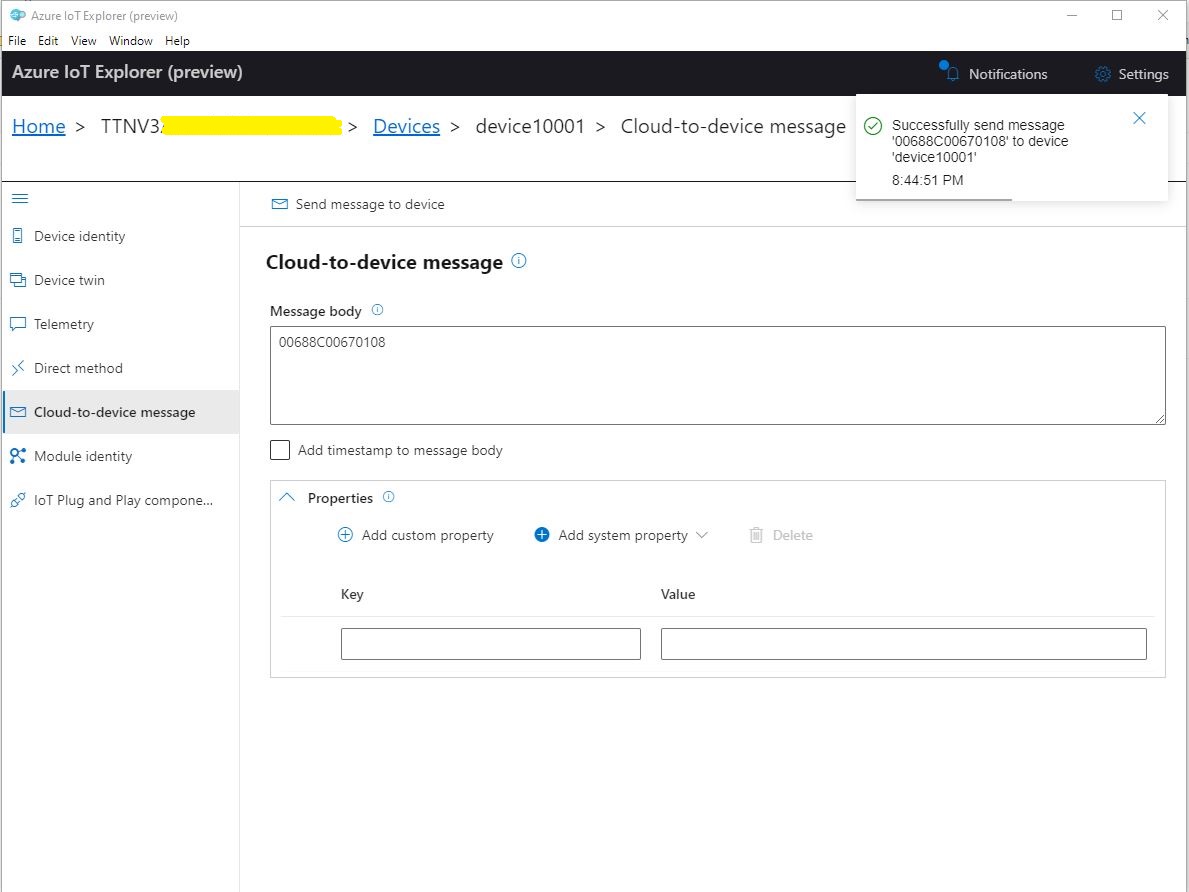
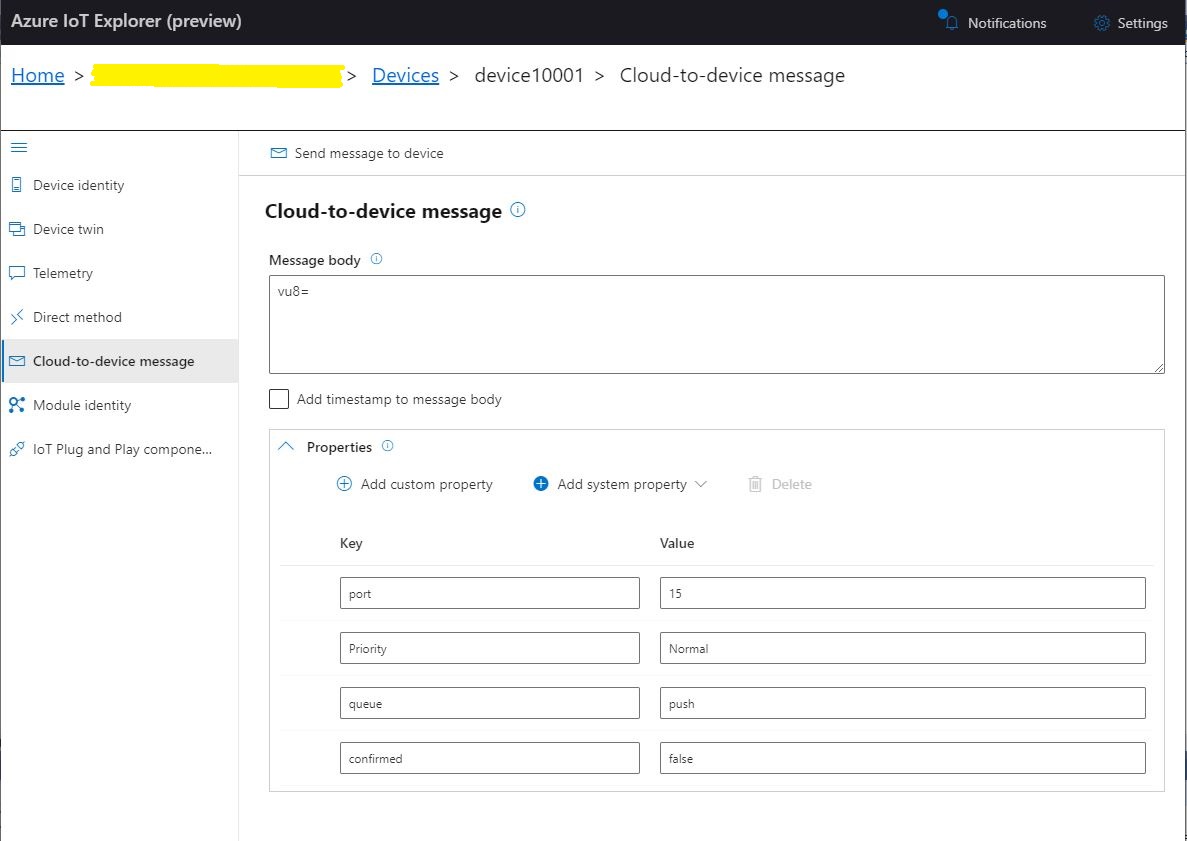
To “smoke test”” my implementation I used Azure IoT Explorer to send a C2D telemetry message

Azure IoT Hub Explorer send message form with payload and message properties

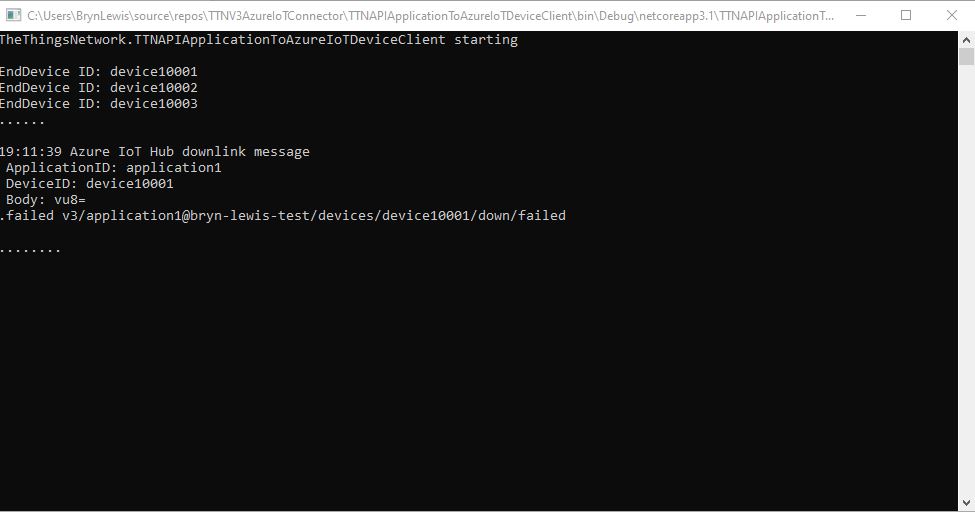
The PoC console application then forwarded the message to TTN using MQTT to be sent(which fails)

PoC application sending message then displaying result

The TTN live data display shows the message couldn’t be delivered because my test LoRaWAN device has not been activiated.

TTN Live Data display with message delivery failure

Now that my PoC application can receive and transmit message to devices I need to reconfigure my RAK Wisgate Developer D+ gateway and Seeeduino LoRaWAN and RAK Wisnode 7200 Track Lite devices on The Things Industries Network so I can test my approach with more realistic setup.

The Things Network MQTT & Azure IoT Part2

Uplink with decoded_payload & frm_payload

The next functionality added to my Proof of Concept(PoC) Azure IoT Hub, The Things Network(TTN) V3 Hypertext Transfer Protocol(HTTP) client API Integration, and Message Queue Telemetry Transport (MQTT) Data API Integration is sending of raw and decoded uplink messages to an Azure IoT Hub.

// At this point all the AzureIoT Hub deviceClients setup and ready to go so can enable MQTT receive
mqttClient.UseApplicationMessageReceivedHandler(new MqttApplicationMessageReceivedHandlerDelegate(e => MqttClientApplicationMessageReceived(e)));

// This may shift to individual device subscriptions
string uplinkTopic = $"v3/{options.MqttApplicationID}/devices/+/up";
await mqttClient.SubscribeAsync(uplinkTopic, MQTTnet.Protocol.MqttQualityOfServiceLevel.AtLeastOnce);

//string queuedTopic = $"v3/{options.MqttApplicationID}/devices/+/queued";
//await mqttClient.SubscribeAsync(queuedTopic, MQTTnet.Protocol.MqttQualityOfServiceLevel.AtLeastOnce);

The additional commented out subscriptions are for the processing of downlink messages

The MQTTNet received message handler uses the last segment of the topic to route messages to a method for processing

private static async void MqttClientApplicationMessageReceived(MqttApplicationMessageReceivedEventArgs e)
{
	if (e.ApplicationMessage.Topic.EndsWith("/up", StringComparison.InvariantCultureIgnoreCase))
	{
		await UplinkMessageReceived(e);
	}

	/*
	if (e.ApplicationMessage.Topic.EndsWith("/queued", StringComparison.InvariantCultureIgnoreCase))
	{
		await DownlinkMessageQueued(e);
	}
	...			
	*/
}

The UplinkMessageReceived method deserialises the message payload, retrieves device context information from the local ObjectCache, adds relevant uplink messages fields (including the raw payload), then if the message has been unpacked by a TTN Decoder, the message fields are added as well.

static async Task UplinkMessageReceived(MqttApplicationMessageReceivedEventArgs e)
{
	try
	{
		PayloadUplinkV3 payload = JsonConvert.DeserializeObject<PayloadUplinkV3>(e.ApplicationMessage.ConvertPayloadToString());
		string applicationId = payload.EndDeviceIds.ApplicationIds.ApplicationId;
		string deviceId = payload.EndDeviceIds.DeviceId;
		int port = payload.UplinkMessage.Port;
...
		DeviceClient deviceClient = (DeviceClient)DeviceClients.Get(deviceId);
		if (deviceClient == null)
		{
			Console.WriteLine($" UplinkMessageReceived unknown DeviceID: {deviceId}");
			return;
		}

		JObject telemetryEvent = new JObject();
		telemetryEvent.Add("DeviceID", deviceId);
		telemetryEvent.Add("ApplicationID", applicationId);
		telemetryEvent.Add("Port", port);
		telemetryEvent.Add("PayloadRaw", payload.UplinkMessage.PayloadRaw);

		// If the payload has been unpacked in TTN backend add fields to telemetry event payload
		if (payload.UplinkMessage.PayloadDecoded != null)
		{
			EnumerateChildren(telemetryEvent, payload.UplinkMessage.PayloadDecoded);
		}

		// Send the message to Azure IoT Hub/Azure IoT Central
		using (Message ioTHubmessage = new Message(Encoding.ASCII.GetBytes(JsonConvert.SerializeObject(telemetryEvent))))
		{
			// Ensure the displayed time is the acquired time rather than the uploaded time. 
			//ioTHubmessage.Properties.Add("iothub-creation-time-utc", payloadObject.Metadata.ReceivedAtUtc.ToString("s", CultureInfo.InvariantCulture));
			ioTHubmessage.Properties.Add("ApplicationId", applicationId);
			ioTHubmessage.Properties.Add("DeviceId", deviceId);
			ioTHubmessage.Properties.Add("port", port.ToString());

			await deviceClient.SendEventAsync(ioTHubmessage);
		}
	}
	catch( Exception ex)
	{
		Debug.WriteLine("UplinkMessageReceived failed: {0}", ex.Message);
	}
}

private static void EnumerateChildren(JObject jobject, JToken token)
{
	if (token is JProperty property)
	{
		if (token.First is JValue)
		{
			// Temporary dirty hack for Azure IoT Central compatibility
			if (token.Parent is JObject possibleGpsProperty)
			{
				if (possibleGpsProperty.Path.StartsWith("GPS_", StringComparison.OrdinalIgnoreCase))
				{
					if (string.Compare(property.Name, "Latitude", true) == 0)
					{
						jobject.Add("lat", property.Value);
					}
					if (string.Compare(property.Name, "Longitude", true) == 0)
					{
						jobject.Add("lon", property.Value);
					}
					if (string.Compare(property.Name, "Altitude", true) == 0)
					{
						jobject.Add("alt", property.Value);
					}
				}
			}
			jobject.Add(property.Name, property.Value);
		}
		else
		{
			JObject parentObject = new JObject();
			foreach (JToken token2 in token.Children())
			{
				EnumerateChildren(parentObject, token2);
				jobject.Add(property.Name, parentObject);
			}
		}
	}
	else
	{
		foreach (JToken token2 in token.Children())
		{
			EnumerateChildren(jobject, token2);
		}
	}
}

There is also some basic reformatting of the messages for Azure IoT Central

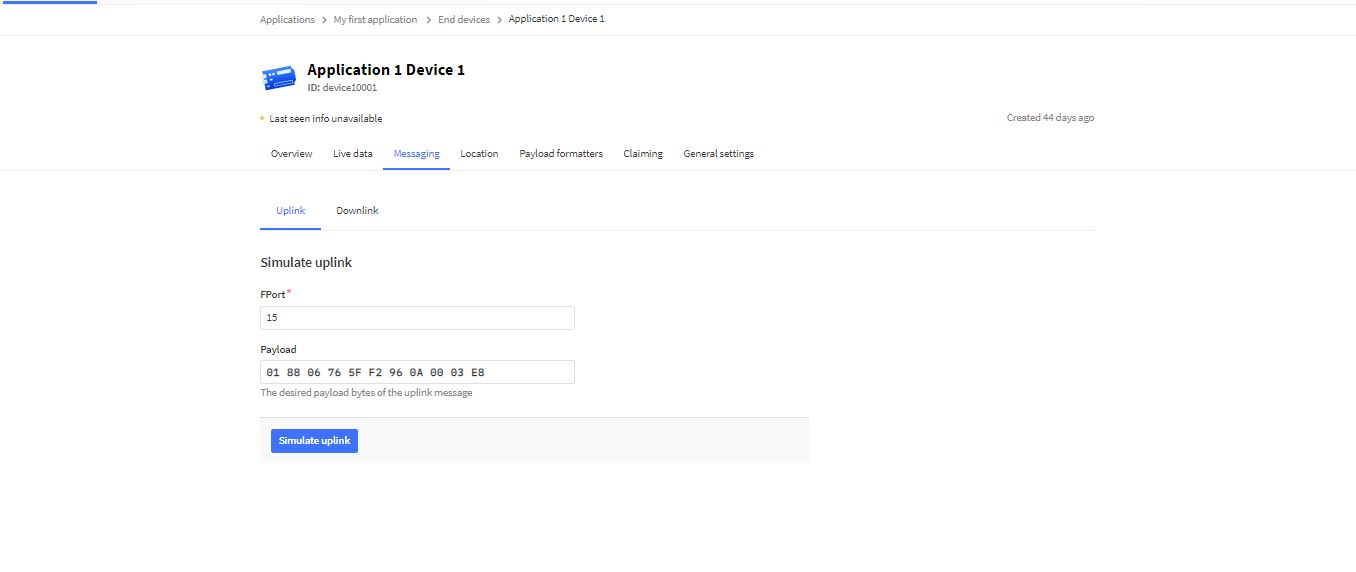
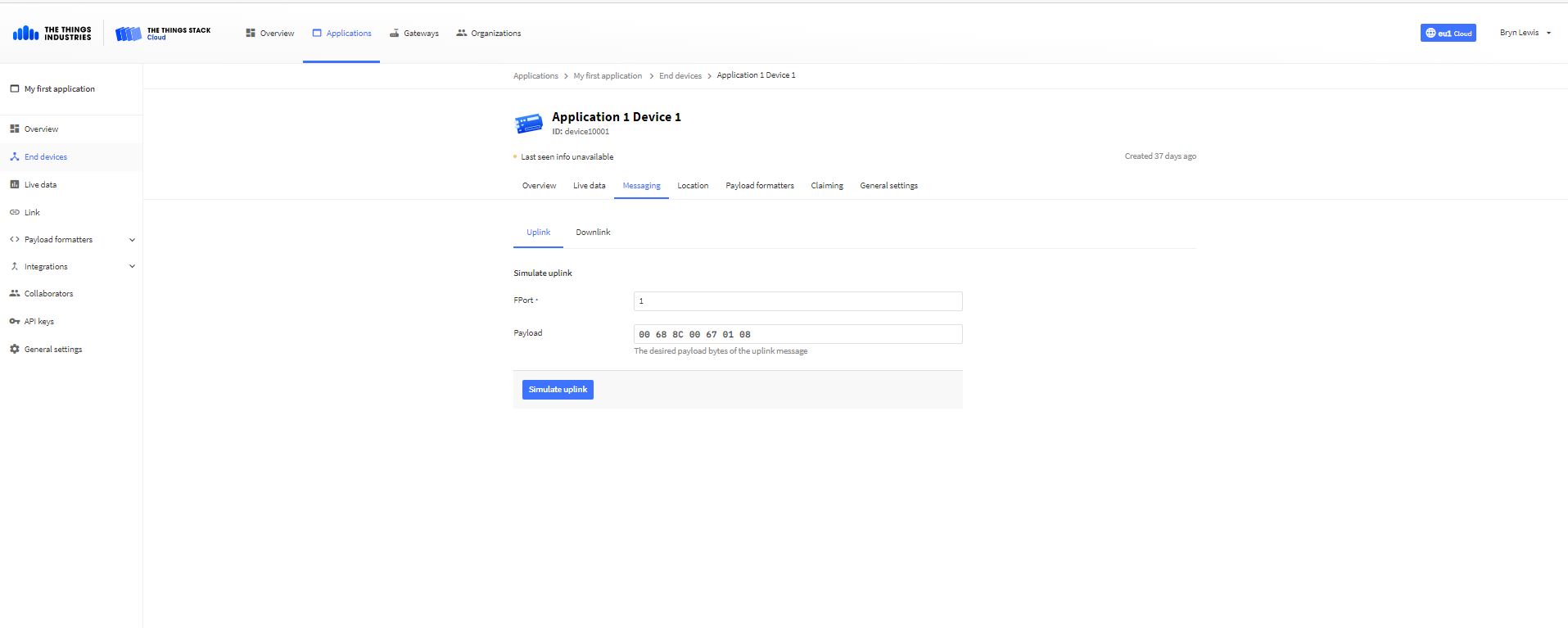
TTN Simulate uplink message with GPS location payload.
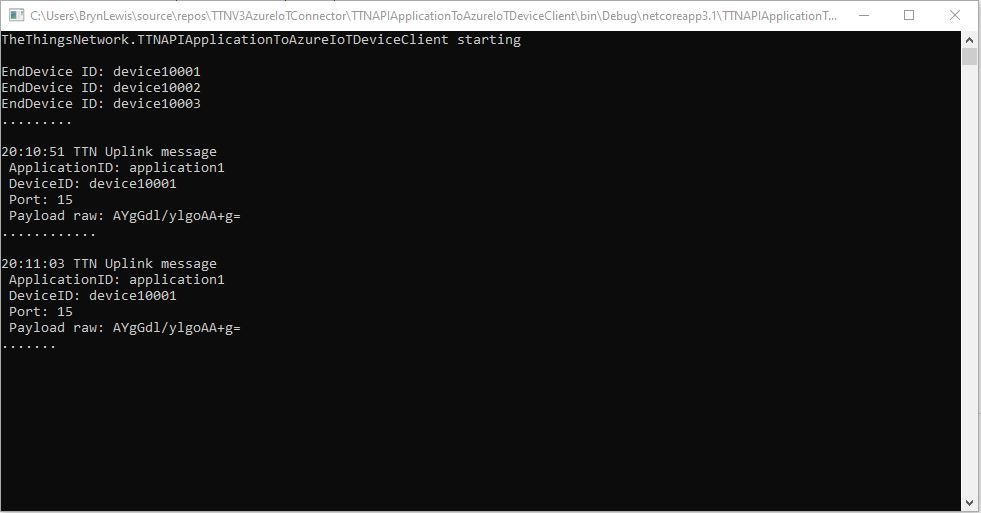
Nasty console application processing uplink message
Message from LoRaWAN device displayed in Azure IoT Explorer

Currently the code has a lots of diagnostic Console.Writeline statements, doesn’t support Uplink messages, has no Advanced Message Queuing Protocol(AMQP) client connection pooling, can’t run as an Azure Webjob, and a number of other features which I plan on adding in future blog posts.

The Things Network MQTT & Azure IoT Part1

Side by Side

In my last few posts I have built Proof of Concept(PoC) The Things Network(TTN) V3 Hypertext Transfer Protocol(HTTP) API Integration and Message Queue Telemetry Transport (MQTT) Data API Integrations.

While building these PoCs I have learnt a lot about the way that the TTN V3 RESTful and MQTT APIs work and this is the first in a series of posts about linking them together. My plan is to start with yet another .NetCore Console application which hosts both the MQTT and Azure IoT Hub DeviceClient (using the Advanced Message Queueing Protocol(AMQP)) client implementations. I’m using MQTTnet to build my data API client and used NSwag by Richo Suter to generate my RESTful client from the TTN provided swagger file.

In this PoC I’m using the commandlineParser NuGet package to the reduce the amount of code required to process command line parameters and make it more robust. This PoC has a lot of command line parameters which would have been painful to manually parse and validate.

public class CommandLineOptions
{
	[Option('u', "APIbaseURL", Required = false, HelpText = "TTN Restful API URL.")]
	public string ApiBaseUrl { get; set; }

	[Option('K', "APIKey", Required = true, HelpText = "TTN Restful API APIkey")]
	public string ApiKey { get; set; }

	[Option('P', "APIApplicationID", Required = true, HelpText = "TTN Restful API ApplicationID")]
	public string ApiApplicationID { get; set; }

	[Option('D', "DeviceListPageSize", Required = true, HelpText = "The size of the pages used to retrieve EndDevice configuration")]
	public int DevicePageSize { get; set; }

	[Option('S', "MQTTServerName", Required = true, HelpText = "TTN MQTT API server name")]
	public string MqttServerName { get; set; }

	[Option('A', "MQTTAccessKey", Required = true, HelpText = "TTN MQTT API access key")]
	public string MqttAccessKey { get; set; }

	[Option('Q', "MQTTApplicationID", Required = true, HelpText = "TTN MQTT API ApplicationID")]
	public string MqttApplicationID { get; set; }

	[Option('C', "MQTTClientName", Required = true, HelpText = "TTN MQTT API Client ID")]
	public string MqttClientID { get; set; }

	[Option('Z', "AzureIoTHubConnectionString", Required = true, HelpText = "Azure IoT Hub Connection string")]
	public string AzureIoTHubconnectionString { get; set; }
}

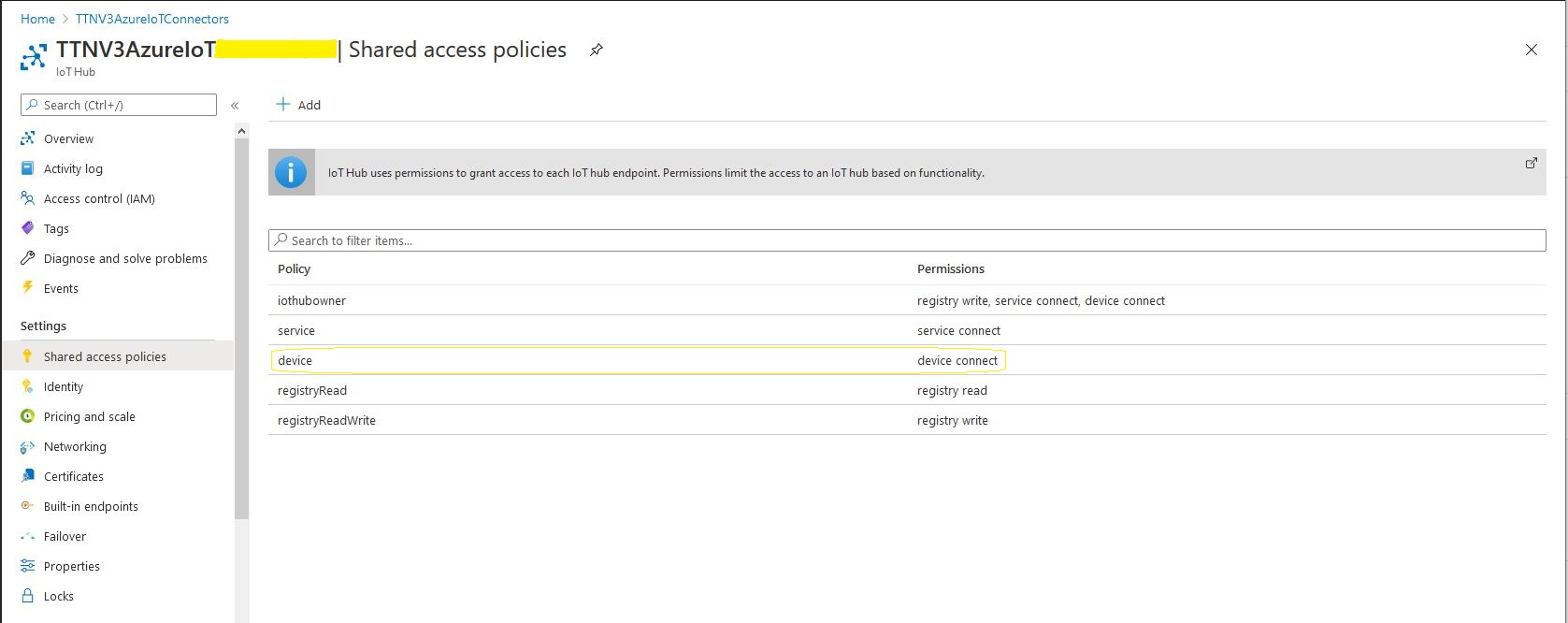
To keep things simple in this PoC I’m using an Azure IoT Hub specific (rather than a device specific connection string)

Azure IoT Hub Device shared access policy selection

After some trial and error I found the order of execution was important

  • Open MQTTnet connection to TTN host (but don’t configure any subscriptions)
  • Configure connection to TTN RESTful API
  • Retrieve list of V3EndDevices (paginated), then for each V3EndDevice
    • Open connection to Azure IoT Hub using command line connection string + TTN Device ID
    • Call DeviceClient.SetReceiveMessageHandlerAsync to specify ReceiveMessageCallback and additional context information for processing Azure IoT Hub downlink messages.
    • Store DeviceClient instance in ObjectCache using DeviceID as key
  • Configure the MQTTnet recived message handler
  • Subscribe to uplink messages from all the V3EndDevices in the specified application.
private static async Task ApplicationCore(CommandLineOptions options)
{
	MqttFactory factory = new MqttFactory();
	mqttClient = factory.CreateMqttClient();

#if DIAGNOSTICS
	Console.WriteLine($"baseURL: {options.ApiBaseUrl}");
	Console.WriteLine($"APIKey: {options.ApiKey}");
	Console.WriteLine($"ApplicationID: {options.ApiApplicationID}");
	Console.WriteLine($"AazureIoTHubconnectionString: {options.AzureIoTHubconnectionString}");
	Console.WriteLine();
#endif

	try
	{
		// First configure MQTT, open connection and wire up disconnection handler. 
		// Can't wire up MQTT received handler as at this stage AzureIoTHub devices not connected.
		mqttOptions = new MqttClientOptionsBuilder()
			.WithTcpServer(options.MqttServerName)
			.WithCredentials(options.MqttApplicationID, options.MqttAccessKey)
			.WithClientId(options.MqttClientID)
			.WithTls()
			.Build();

		mqttClient.UseDisconnectedHandler(new MqttClientDisconnectedHandlerDelegate(e => MqttClientDisconnected(e)));

		await mqttClient.ConnectAsync(mqttOptions);

		// Prepare the HTTP client to be used in the TTN device enumeration
		using (HttpClient httpClient = new HttpClient())
		{
			EndDeviceRegistryClient endDeviceRegistryClient = new EndDeviceRegistryClient(options.ApiBaseUrl, httpClient)
			{
				ApiKey = options.ApiKey
			};

			// Retrieve list of devices page by page
			V3EndDevices endDevices = await endDeviceRegistryClient.ListAsync(
				options.ApiApplicationID, 
				field_mask_paths: DevicefieldMaskPaths, 
				limit: options.DevicePageSize);
			if ((endDevices != null) && (endDevices.End_devices != null)) // If no devices returns null rather than empty list
			{
				foreach (V3EndDevice endDevice in endDevices.End_devices)
				{
					// Display the device info+attributes then connect device to Azure IoT Hub
#if DEVICE_FIELDS_MINIMUM
					Console.WriteLine($"EndDevice ID: {endDevice.Ids.Device_id}");
#else
					Console.WriteLine($"Device ID: {endDevice.Ids.Device_id} Name: {endDevice.Name} Description: {endDevice.Description}");
					Console.WriteLine($"  CreatedAt: {endDevice.Created_at:dd-MM-yy HH:mm:ss} UpdatedAt: {endDevice.Updated_at:dd-MM-yy HH:mm:ss}");
#endif

#if DEVICE_ATTRIBUTES_DISPLAY
					if (endDevice.Attributes != null)
					{
						Console.WriteLine("  EndDevice attributes");

						foreach (KeyValuePair<string, string> attribute in endDevice.Attributes)
						{
							Console.WriteLine($"    Key: {attribute.Key} Value: {attribute.Value}");
						}
					}
#endif
					try
					{
						DeviceClient deviceClient = DeviceClient.CreateFromConnectionString(
							options.AzureIoTHubconnectionString, 
							endDevice.Ids.Device_id, 
							TransportType.Amqp_Tcp_Only);

						await deviceClient.OpenAsync();

						await deviceClient.SetReceiveMessageHandlerAsync(
							AzureIoTHubClientReceiveMessageHandler,
							new AzureIoTHubReceiveMessageHandlerContext()
							{
								DeviceId = endDevice.Ids.Device_id,
								ApplicationId = endDevice.Ids.Application_ids.Application_id,
							});

						DeviceClients.Add(endDevice.Ids.Device_id, deviceClient, cacheItemPolicy);
					}
					catch( Exception ex)
					{
						Console.WriteLine($"Azure IoT Hub OpenAsync failed {ex.Message}");
					}
				}
			}
		}

		// At this point all the AzureIoT Hub deviceClients setup and ready to go so can enable MQTT receive
		mqttClient.UseApplicationMessageReceivedHandler(new MqttApplicationMessageReceivedHandlerDelegate(e => MqttClientApplicationMessageReceived(e)));

		// This may shift to individual device subscriptions
		string uplinktopic = $"v3/{options.MqttApplicationID}/devices/+/up";

		await mqttClient.SubscribeAsync(uplinktopic, MQTTnet.Protocol.MqttQualityOfServiceLevel.AtLeastOnce);
	}
	catch(Exception ex)
	{
		Console.WriteLine($"Main {ex.Message}");
		Console.WriteLine("Press any key to exit");
		Console.ReadLine();
		return;
	}

	while (!Console.KeyAvailable)
	{
		Console.Write(".");
		await Task.Delay(1000);
	}

	// Consider ways to mop up connections

	Console.WriteLine("Press any key to exit");
	Console.ReadLine();
}

When I was initially looking at Azure Deviceclient I would of had to have created a thread (which would have been blocked most of the time) for each device. This implementation issued was removed by the introduction of the DeviceClient SetReceiveMessageHandlerAsync method in release 1.33.0.

Currently the application just displays the Cloud to Device(C2D) message payload plus diagnostic information, and the CompleteAsync method is called so the message is dequeued.

private async static Task AzureIoTHubClientReceiveMessageHandler(Message message, object userContext)
{
	AzureIoTHubReceiveMessageHandlerContext receiveMessageHandlerConext = (AzureIoTHubReceiveMessageHandlerContext)userContext;

	DeviceClient deviceClient = (DeviceClient)DeviceClients.Get(receiveMessageHandlerConext.DeviceId);

	using (message)
	{
		Console.WriteLine();
		Console.WriteLine();
		Console.WriteLine($"{DateTime.UtcNow:HH:mm:ss} Azure IoT Hub downlink message");
		Console.WriteLine($" ApplicationID: {receiveMessageHandlerConext.ApplicationId}");
		Console.WriteLine($" DeviceID: {receiveMessageHandlerConext.DeviceId}");
#if DIAGNOSTICS_AZURE_IOT_HUB
		Console.WriteLine($" Cached: {DeviceClients.Contains(receiveMessageHandlerConext.DeviceId)}");
		Console.WriteLine($" MessageID: {message.MessageId}");
		Console.WriteLine($" DeliveryCount: {message.DeliveryCount}");
		Console.WriteLine($" EnqueuedTimeUtc: {message.EnqueuedTimeUtc}");
		Console.WriteLine($" SequenceNumber: {message.SequenceNumber}");
		Console.WriteLine($" To: {message.To}");
#endif
		string messageBody = Encoding.UTF8.GetString(message.GetBytes());
		Console.WriteLine($" Body: {messageBody}");
#if DOWNLINK_MESSAGE_PROPERTIES_DISPLAY
		foreach (var property in message.Properties)
		{
			Console.WriteLine($"   Key:{property.Key} Value:{property.Value}");
		}
#endif

		await deviceClient.CompleteAsync(message);

		Console.WriteLine();
	}
}

Currently the application just displays the Cloud to Device(D2C) message payload plus diagnostic information, displaying the payload fields if the message format has been configured and successfully processed.

private static void MqttClientApplicationMessageReceived(MqttApplicationMessageReceivedEventArgs e)
{
	if (e.ApplicationMessage.Topic.EndsWith("/up"))
	{
		PayloadUplinkV3 payload = JsonConvert.DeserializeObject<PayloadUplinkV3>(e.ApplicationMessage.ConvertPayloadToString());

		Console.WriteLine();
		Console.WriteLine();
		Console.WriteLine($"{DateTime.UtcNow:HH:mm:ss} TTN Uplink message");
#if DIAGNOSTICS_MQTT
		Console.WriteLine($" ClientId:{e.ClientId} Topic:{e.ApplicationMessage.Topic}");
		Console.WriteLine($" Cached: {DeviceClients.Contains(payload.EndDeviceIds.DeviceId)}");
#endif
		Console.WriteLine($" ApplicationID: {payload.EndDeviceIds.ApplicationIds.ApplicationId}");
		Console.WriteLine($" DeviceID: {payload.EndDeviceIds.DeviceId}");
		Console.WriteLine($" Port: {payload.UplinkMessage.Port} ");
		Console.WriteLine($" Payload raw: {payload.UplinkMessage.PayloadRaw}");

		if (payload.UplinkMessage.PayloadDecoded != null)
		{
			Console.WriteLine($" Payload decoded: {payload.UplinkMessage.PayloadRaw}");
			EnumerateChildren(1, payload.UplinkMessage.PayloadDecoded);
		}

		Console.WriteLine();
	}
	else
	{
		Console.WriteLine($"{DateTime.UtcNow:HH:mm:ss} ClientId: {e.ClientId} Topic: {e.ApplicationMessage.Topic}");
	}
}
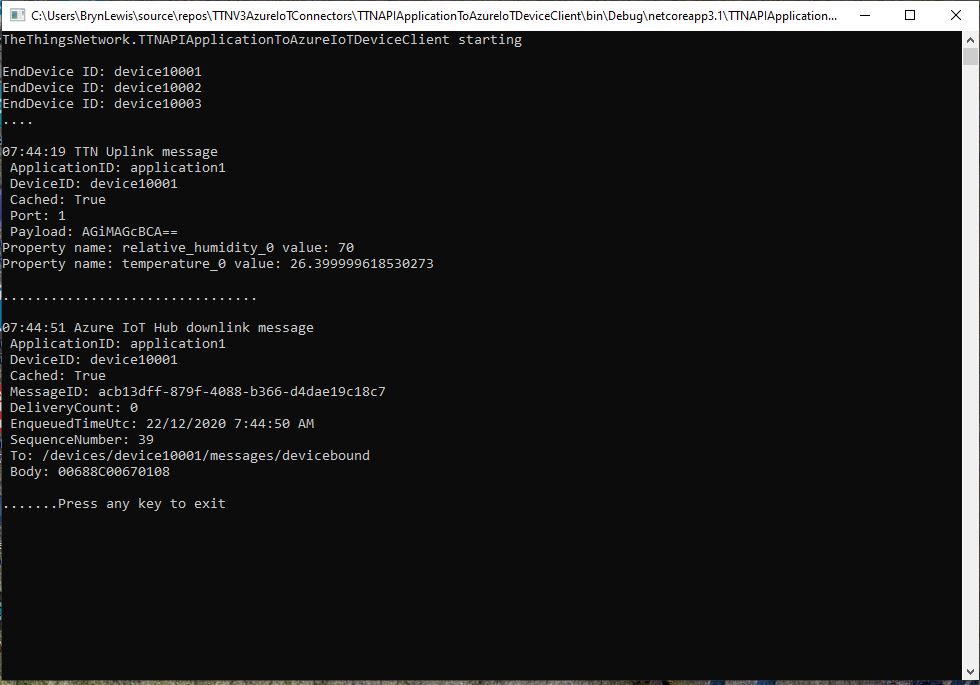
dotNet Core Console application displaying simulated uplink and downlink messages.
Simulating C2D messages with AzureIoTExplorer
Simulating D2C messages with TTN Device console

In the MQTT received message handler.

Console.WriteLine($" Cached: {DeviceClients.Contains(receiveMessageHandlerConext.DeviceId)}");

and Azure DeviceClient received message handler.

Console.WriteLine($" Cached: {DeviceClients.Contains(receiveMessageHandlerConext.DeviceId)}");

check that the specified TTN device ID is in the DeviceClients ObjectCache

The Things Network HTTP Integration Part13

Connection multiplexing

For the Proof of Concept(PoC) I had used a cache to store Azure IoT Hub connections to reduce the number of calls to the Device Provisioning Service(DPS).

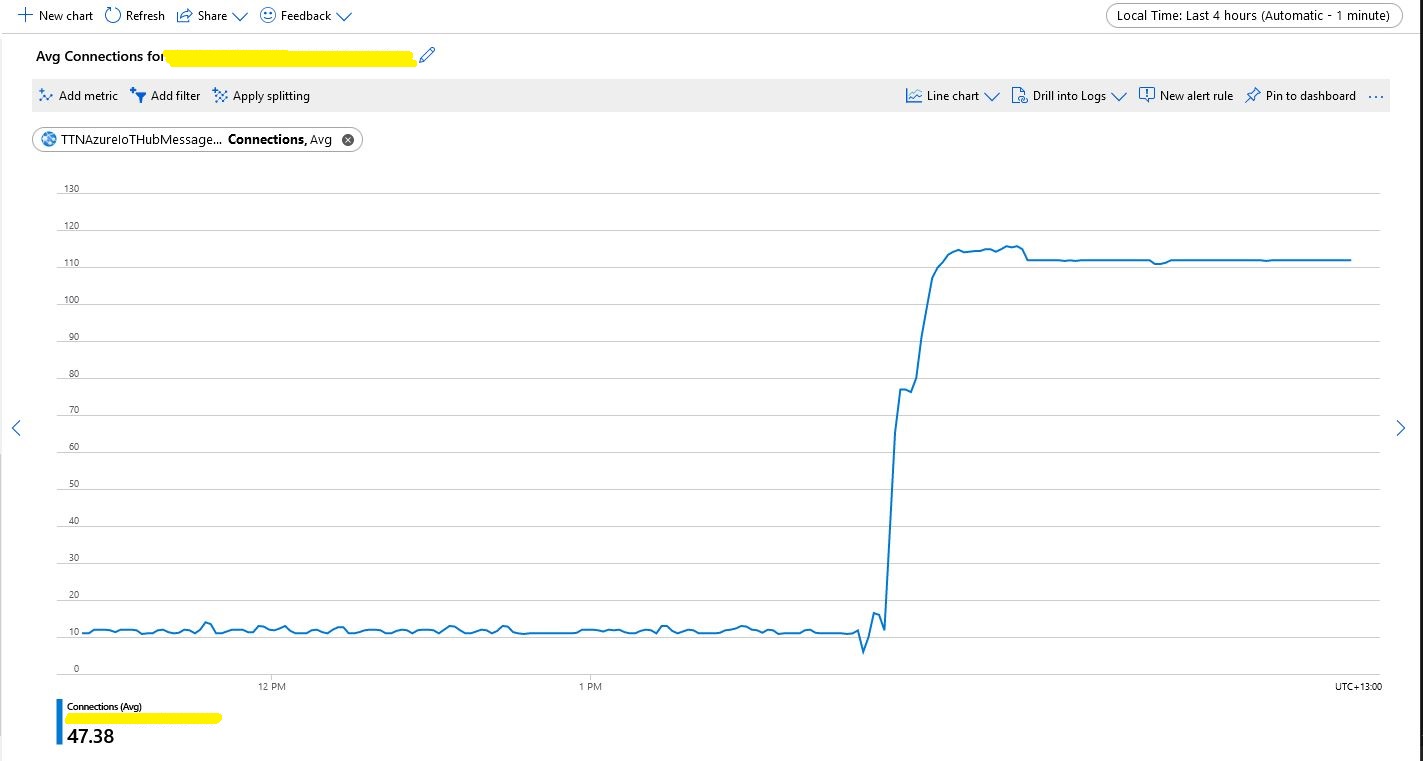
Number of connections with no pooling

When stress testing with 1000’s of devices my program hit the host connection limit so I enabled Advanced Message Queuing Protocol(AMQP) connection pooling.

return DeviceClient.Create(result.AssignedHub,
                  authentication,
                  new ITransportSettings[]
                  {
                     new AmqpTransportSettings(TransportType.Amqp_Tcp_Only)
                     {
                        PrefetchCount = 0,
                        AmqpConnectionPoolSettings = new AmqpConnectionPoolSettings()
                        {
                           Pooling = true,
                        }
                     }
                  }
               );

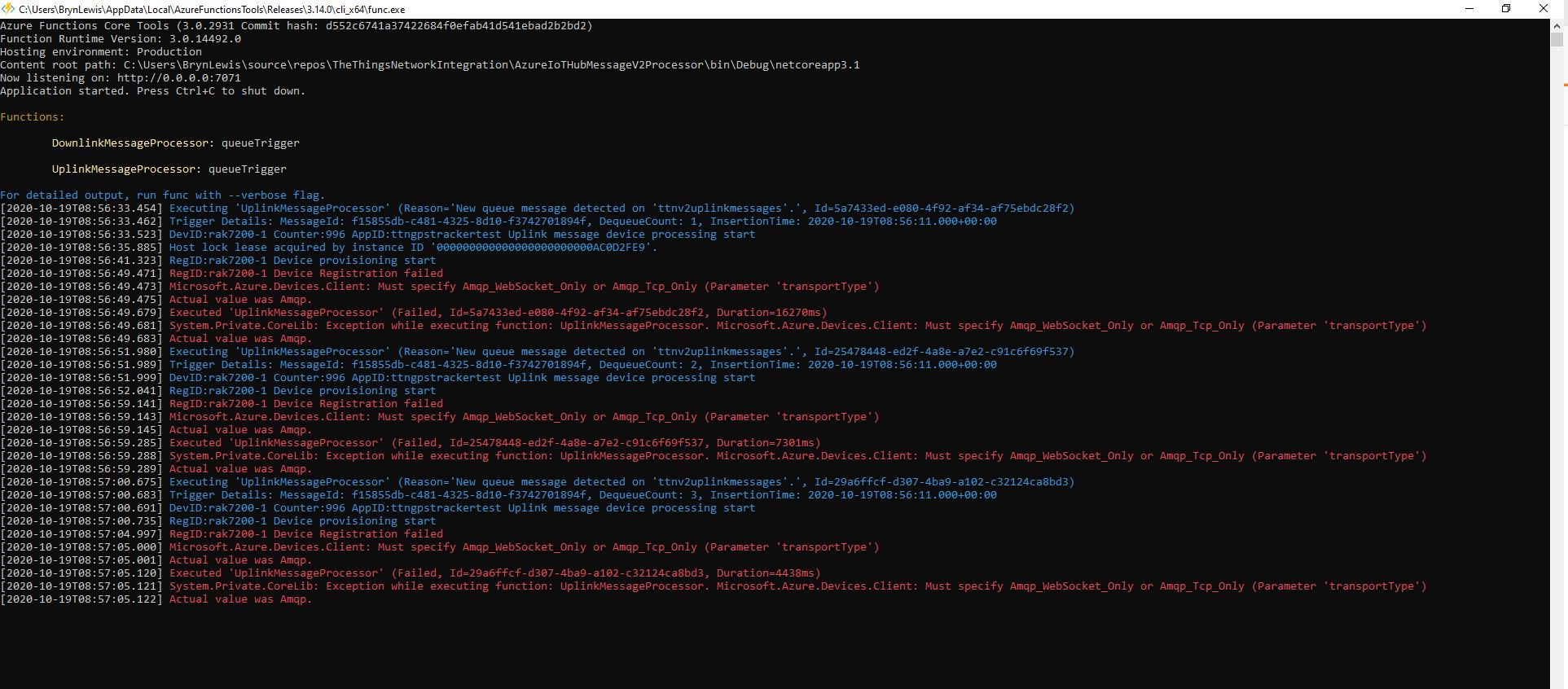
My first attempt failed as I hadn’t configured “TransportType.Amqp_Tcp_Only” which would have allowed the AMQP implementation to fallback to other protocols which don’t support pooling.

Exception caused by not using TransportType.Amqp_Tcp_Only

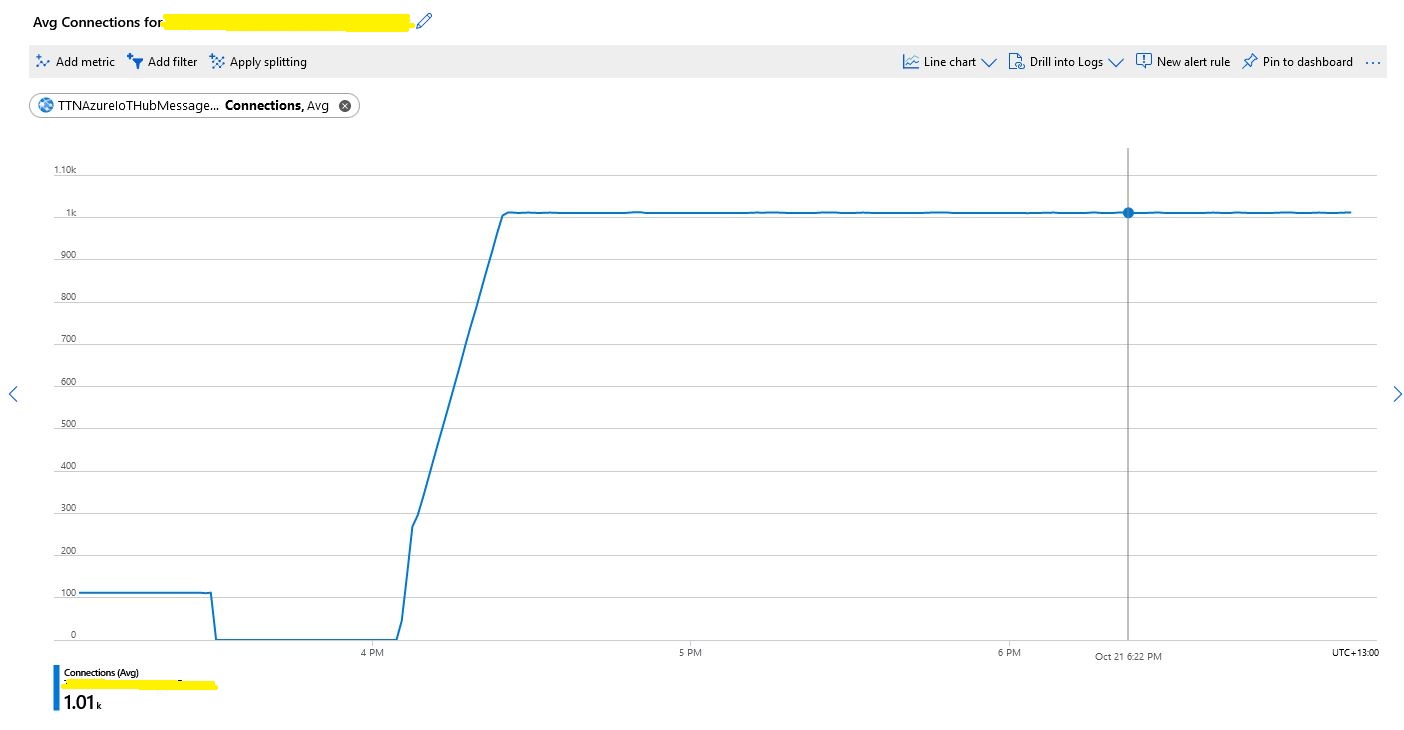
I then deployed the updated code and ran my 1000 device stress test (note the different x axis scales)

Number of connections with pooling

This confirmed what I found in the Azure.AMQP source code

/// <summary>
/// The default size of the pool
/// </summary>
/// <remarks>
/// Allows up to 100,000 devices
/// </remarks>
/// private const uint DefaultPoolSize = 100;

The Things Network HTTP Integration Part12

Removing the DIY cache

For the Proof of Concept(PoC) I had written a simple cache using a ConcurrentDictionary to store Azure IoT Hub connections to reduce the number of calls to the Device Provisioning Service(DPS).

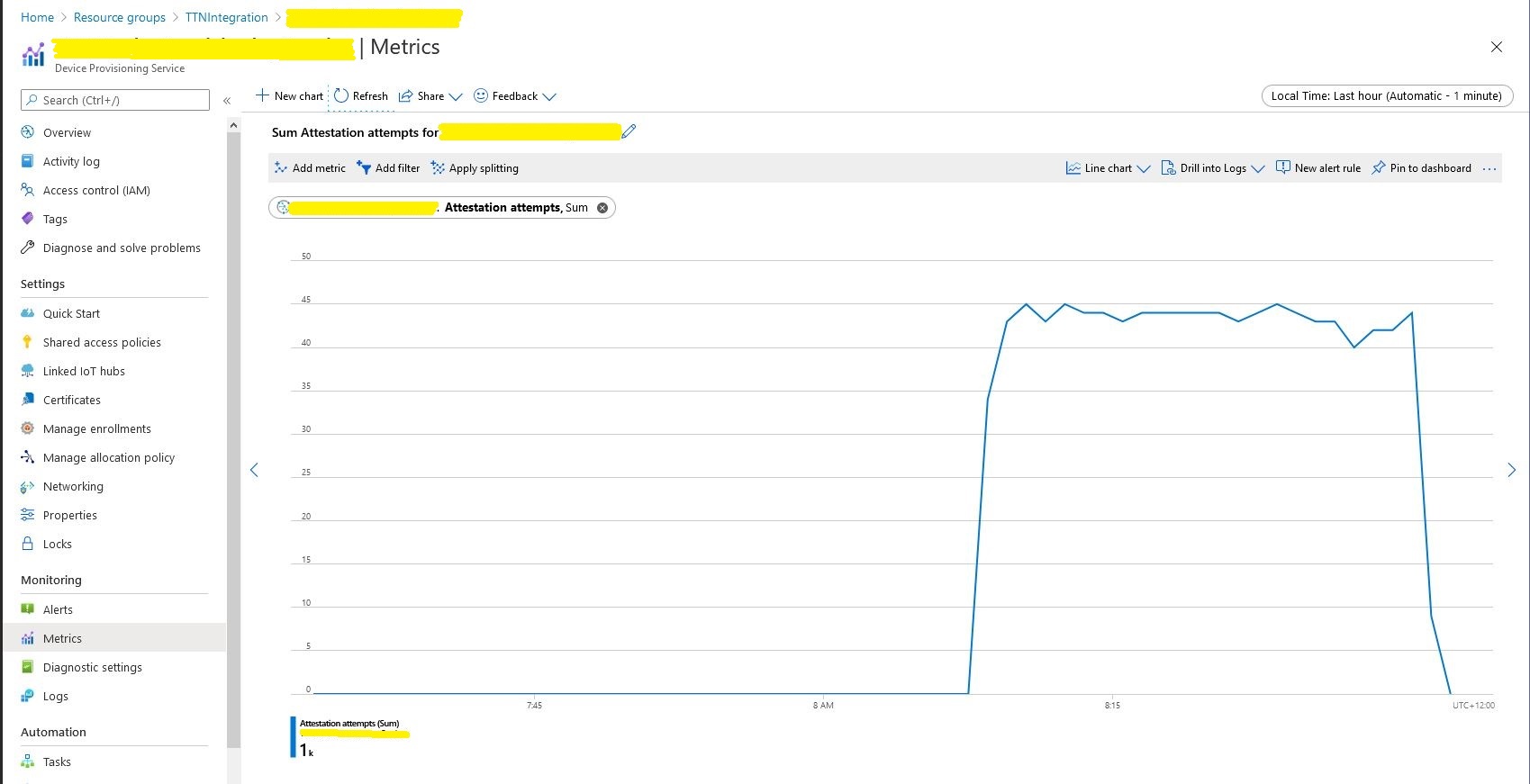
Device Provisioning Service calls in stress test

For a PoC the DIY cache was ok but I wanted to replace it with something more robust like the .Net ObjectCache which is in the System.Runtime.Caching namespace.

I started by replacing the ConcurrentDictionary declaration

static readonly ConcurrentDictionary<string, DeviceClient> DeviceClients = new ConcurrentDictionary<string, DeviceClient>();
     

With an ObjectCache declaration.

static readonly ObjectCache DeviceClients = MemoryCache.Default;
  

Then, where there were compiler errors I updated the method call.

// See if the device has already been provisioned or is being provisioned on another thread.
if (DeviceClients.Add(registrationId, deviceContext, cacheItemPolicy))
{
   log.LogInformation("RegID:{registrationId} Device provisioning start", registrationId);
...

One difference I found was that ObjectCache throws an exception if the value is null. I was using a null value to indicate that the Device Provisioning Service(DPS) process had been initiated on another thread and was underway.

I have been planning to add support for downlink messages so I added a new class to store the uplink (Azure IoT Hub DeviceClient) and downlink ( downlink_url in the uplink message) details.

 public class DeviceContext
   {
      public DeviceClient Uplink { get; set; }
      public Uri Downlink { get; set; }
   }

For the first version the only functionality I’m using is sliding expiration which is set to one day

CacheItemPolicy cacheItemPolicy = new CacheItemPolicy()
{
   SlidingExpiration = new TimeSpan(1, 0, 0, 0),
   //RemovedCallback
};

DeviceContext deviceContext = new DeviceContext()
{
   Uplink = null,
   Downlink = new Uri(payload.DownlinkUrl)
};

I didn’t have to make many changes and I’ll double check my implementation in the next round of stress and soak testing.